
BMC Remedy IT Service Management 7.0 Data Management Administrator s Guide
|
|
|
- Reynold Owens
- 9 years ago
- Views:
Transcription

1 BMC Remedy IT Service Management 7.0 Data Management Administrator s Guide November

2 Contacting BMC Software You can access the BMC Software website at From this website, you can obtain information about the company, its products, corporate offices, special events, and career opportunities. United States and Canada Address BMC SOFTWARE INC 2101 CITYWEST BLVD HOUSTON TX USA Outside United States and Canada Telephone or Telephone (01) Fax (01) Fax If you have comments or suggestions about this documentation, contact Information Design and Development by at Copyright 2007 BMC Software, Inc. BMC, BMC Software, and the BMC Software logo are the exclusive properties of BMC Software, Inc., are registered with the U.S. Patent and Trademark Office, and may be registered or pending registration in other countries. All other BMC trademarks, service marks, and logos may be registered or pending registration in the U.S. or in other countries. All other trademarks or registered trademarks are the property of their respective owners. ITIL is a registered trademark, and a registered community trademark of the Office of Government Commerce, and is registered in the U.S. Patent and Trademark Office. Linux is the registered trademark of Linus Torvalds in the U.S. and other countries. Oracle is a registered trademark of Oracle Corporation. UNIX is a registered trademark of The Open Group. BMC Software considers information included in this documentation to be proprietary and confidential. Your use of this information is subject to the terms and conditions of the applicable End User License Agreement for the product and the proprietary and restricted rights notices included in this documentation. Restricted rights legend U.S. Government Restricted Rights to Computer Software. UNPUBLISHED -- RIGHTS RESERVED UNDER THE COPYRIGHT LAWS OF THE UNITED STATES. Use, duplication, or disclosure of any data and computer software by the U.S. Government is subject to restrictions, as applicable, set forth in FAR Section , DFARS , DFARS , DFARS , and DFARS , as amended from time to time. Contractor/Manufacturer is BMC Software, Inc., 2101 CityWest Blvd., Houston, TX , USA. Any contract notices should be sent to this address.

3 Customer Support You can obtain technical support by using the Support page on the BMC Software website or by contacting Customer Support by telephone or . To expedite your inquiry, please see Before Contacting BMC Software. Support website You can obtain technical support from BMC Software 24 hours a day, 7 days a week at From this website, you can: Read overviews about support services and programs that BMC Software offers. Find the most current information about BMC Software products. Search a database for problems similar to yours and possible solutions. Order or download product documentation. Report a problem or ask a question. Subscribe to receive notices when new product versions are released. Find worldwide BMC Software support center locations and contact information, including addresses, fax numbers, and telephone numbers. Support by telephone or In the United States and Canada, if you need technical support and do not have access to the Web, call or send an message to [email protected]. (In the Subject line, enter SupID:<yourSupportContractID>, such as SupID:12345.) Outside the United States and Canada, contact your local support center for assistance. Before contacting BMC Software Have the following information available so that Customer Support can begin working on your issue immediately: Product information Product name Product version (release number) License number and password (trial or permanent) Operating system and environment information Machine type Operating system type, version, and service pack System hardware configuration Serial numbers Related software (database, application, and communication) including type, version, and service pack or maintenance level Sequence of events leading to the problem Commands and options that you used Messages received (and the time and date that you received them) Product error messages Messages from the operating system, such as file system full Messages from related software
4 License key and password information If you have a question about your license key or password, contact Customer Support through one of the following methods: [email protected]. (In the Subject line, enter SupID:<yourSupportContractID>, such as SupID:12345.) In the United States and Canada, call Outside the United States and Canada, contact your local support center for assistance. Submit a new issue at

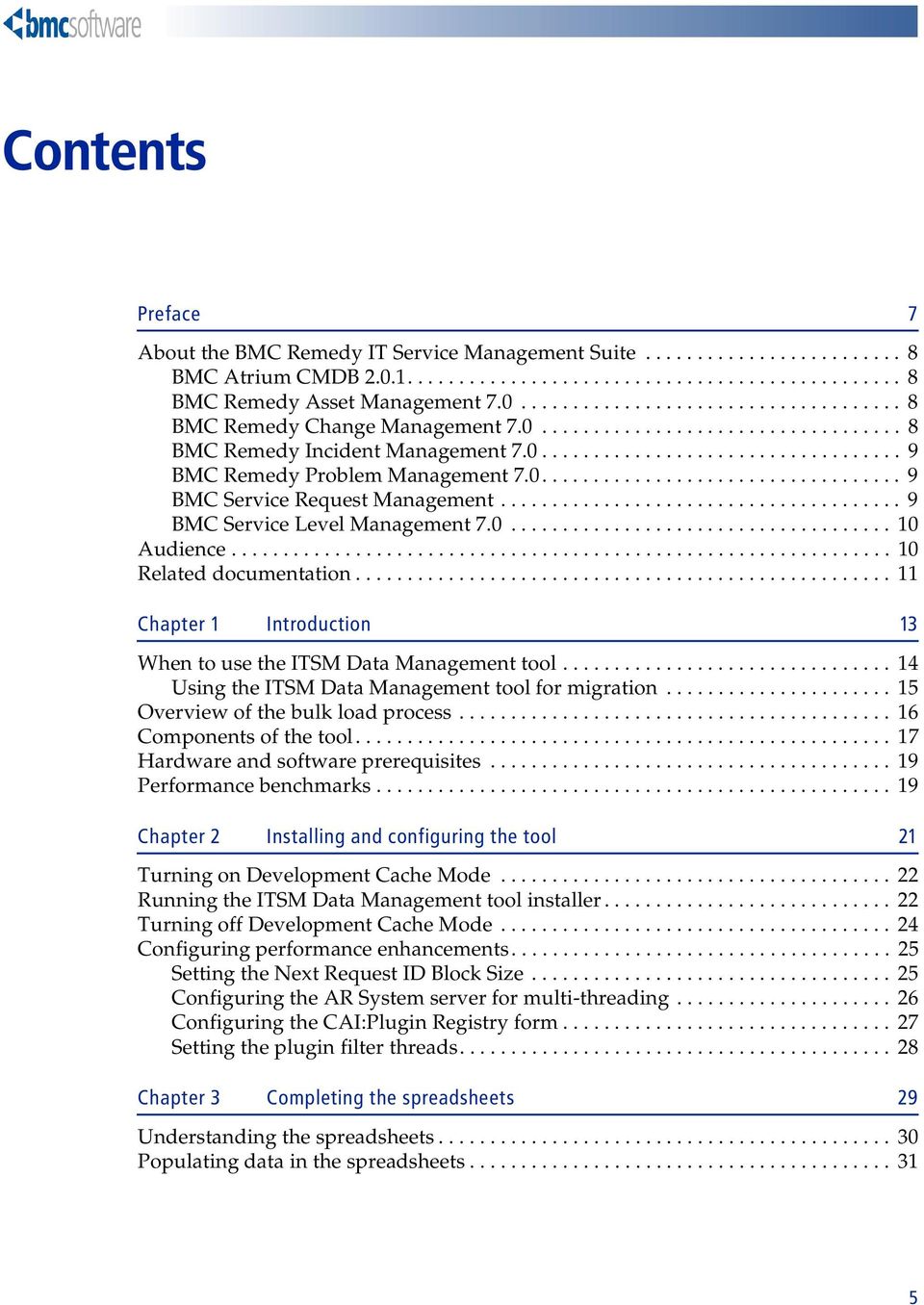
5 Contents Preface 7 About the BMC Remedy IT Service Management Suite BMC Atrium CMDB BMC Remedy Asset Management BMC Remedy Change Management BMC Remedy Incident Management BMC Remedy Problem Management BMC Service Request Management BMC Service Level Management Audience Related documentation Chapter 1 Introduction 13 When to use the ITSM Data Management tool Using the ITSM Data Management tool for migration Overview of the bulk load process Components of the tool Hardware and software prerequisites Performance benchmarks Chapter 2 Installing and configuring the tool 21 Turning on Development Cache Mode Running the ITSM Data Management tool installer Turning off Development Cache Mode Configuring performance enhancements Setting the Next Request ID Block Size Configuring the AR System server for multi-threading Configuring the CAI:Plugin Registry form Setting the plugin filter threads Chapter 3 Completing the spreadsheets 29 Understanding the spreadsheets Populating data in the spreadsheets
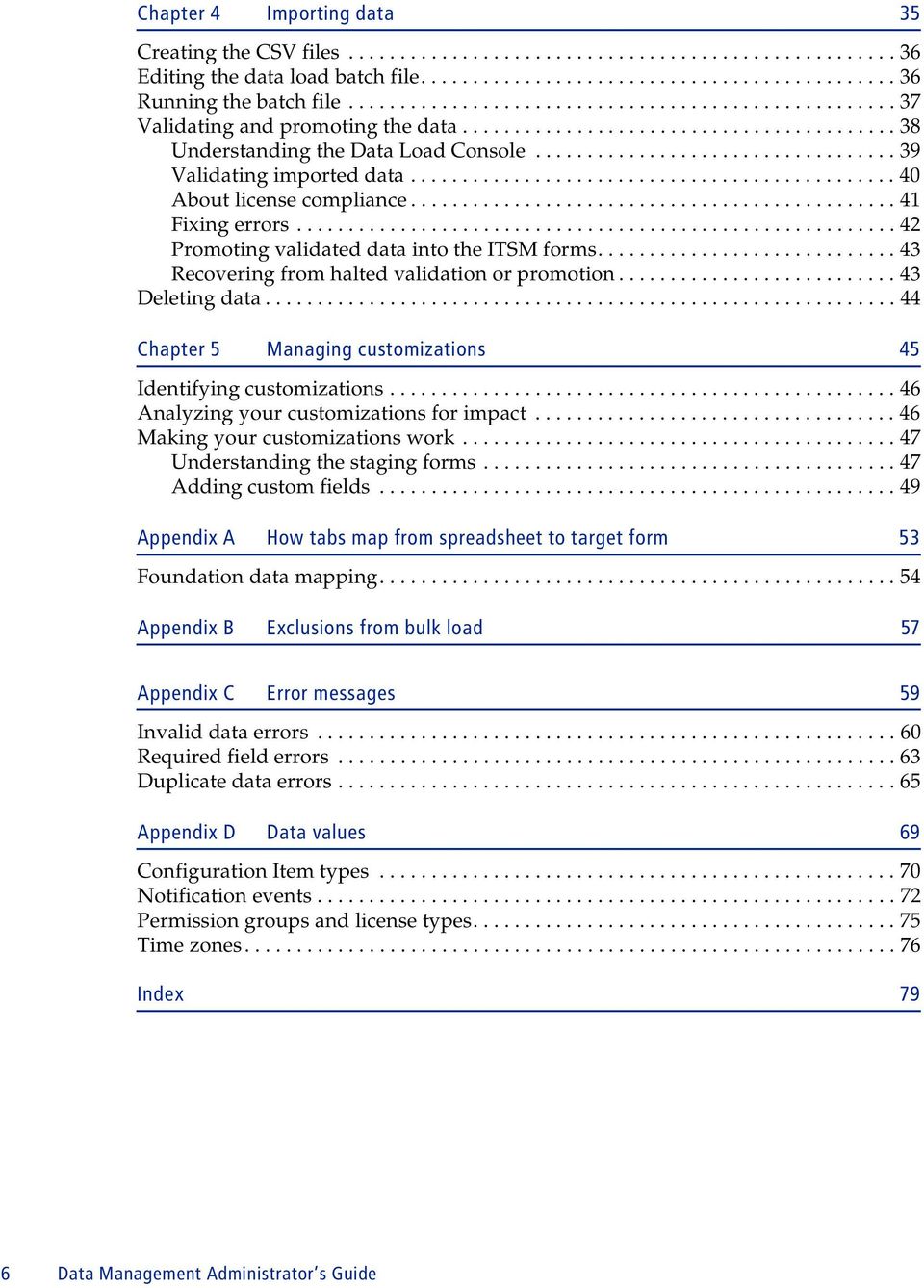
6 Chapter 4 Importing data 35 Creating the CSV files Editing the data load batch file Running the batch file Validating and promoting the data Understanding the Data Load Console Validating imported data About license compliance Fixing errors Promoting validated data into the ITSM forms Recovering from halted validation or promotion Deleting data Chapter 5 Managing customizations 45 Identifying customizations Analyzing your customizations for impact Making your customizations work Understanding the staging forms Adding custom fields Appendix A How tabs map from spreadsheet to target form 53 Foundation data mapping Appendix B Exclusions from bulk load 57 Appendix C Error messages 59 Invalid data errors Required field errors Duplicate data errors Appendix D Data values 69 Configuration Item types Notification events Permission groups and license types Time zones Index 79 6 Data Management Administrator s Guide
7 Preface The BMC Remedy IT Service Management 7.0 Data Management Administrator s Guide describes how to install and use the BMC Remedy ITSM Data Management (ITSM Data Management) tool. The BMC Remedy IT Service Management Suite (ITSM) includes the following applications and solutions:! The BMC Remedy Asset Management application! The BMC Remedy Change Management application! The BMC Remedy Service Desk solution (which includes the BMC Remedy Incident Management application and the BMC Remedy Problem Management application) ITSM can be integrated with the following applications:! The BMC Service Request Management application! The BMC Service Level Management application The applications run in conjunction with the BMC Remedy Action Request System platform (AR System) and share a common database. All five applications consume data from the BMC Atrium Configuration Management Database (CMDB) application. Preface 7

8 BMC Remedy IT Service Management 7.0 About the BMC Remedy IT Service Management Suite The following sections provide an overview of IT Service Management products. BMC Atrium CMDB The BMC Atrium CMDB is installed prior to Asset Management, Change Management, and Service Desk (including Incident Management and Problem Management). It stores information about configuration items (CIs) and their relationships in an inheritance-based data model, and has the ability to reconcile data from different sources. The BMC Atrium CMDB provides a single source of truth about your IT environment, enabling other BMC applications to manage CIs, predict the impact of configuration changes, and perform other Business Service Management (BSM) functions. For more information, see the BMC Atrium CMDB User s Guide. BMC Remedy Asset Management 7.0 The BMC Remedy Asset Management application lets IT professionals track and manage enterprise configuration items (CIs) and their changing relationships throughout the entire asset life cycle. As part of the BMC Remedy ITSM Suite, Asset Management is integrated with BMC Remedy Service Desk (which contains the BMC Remedy Incident Management and BMC Remedy Problem Management applications), BMC Remedy Change Management, and BMC Service Level Management, and offers flexibility to support customized business processes. For more information, see the BMC Remedy Asset Management 7.0 User s Guide. BMC Remedy Change Management 7.0 Using ITIL -compatible best practices, BMC Remedy Change Management provides IT organizations with the ability to manage changes by enabling them to assess impact, risk, and resource requirements, and then create plans and automate approval functions for implementing changes. It provides scheduling and task assignment functionality, and reporting capabilities for reviewing performance and improving processes. Because Change Management is integrated with the BMC Atrium CMDB, Change Management lets you relate changes to other records, such as CIs (including services) and incidents. For more information, see the BMC Remedy Change Management 7.0 User s Guide. 8 Data Management Administrator s Guide

9 About the BMC Remedy IT Service Management Suite BMC Remedy Incident Management 7.0 BMC Remedy Incident Management is used to manage incidents. Incident management is reactive, and is typically initiated in response to a customer call or automated event. An example of an automated event might be an alert from a monitoring system, such as BMC Service Impact Management (BMC SIM). The primary goal of the incident management process, according to ITIL standards, is to restore normal service operation as quickly as possible with minimum disruption to the business, thus ensuring that the best achievable levels of availability and service are maintained. An incident is any event that is not part of the standard operation of a service and that causes an interruption to or a reduction in the quality of that service. Normal service operation is the operation of services within the limits specified by Service Level Management (SLM). For more information, see the BMC Service Desk: Incident Management 7.0 User s Guide. BMC Remedy Problem Management 7.0 BMC Remedy Problem Management is used to manage problem investigations, known errors, and solution database entries. Problem management can proactively prevent the occurrence of incidents, errors, and additional problems. A problem investigation helps an IT organization get to the root cause of incidents. It initiates actions that help to improve or correct the situation, preventing the incident from recurring. After a problem investigation identifies the cause, this information can result in either a known error or a solution database entry. A known error is a problem that has been successfully diagnosed and for which a temporary workaround or permanent solution has been identified. A solution database entry contains information that might be required to provide or restore a service. For more information, see the BMC Service Desk: Problem Management 7.0 User s Guide. BMC Service Request Management BMC Service Request Management (SRM) allows IT to define offered services, publish those services in a service catalog, and automate the fulfillment of those services for their users. With SRM, users have the ability to help themselves, which reduces the requests coming into the service desk. This enables IT to focus on more mission-critical activities, such as resolving incidents related to service failures and restoring critical services. SRM also provides the ability to automate workflow for each service, enforcing consistency of process and faster fulfillment of the request. For more information, see the BMC Service Request Management 2.0 Administrator s and User's Guide. Preface 9

10 BMC Remedy IT Service Management 7.0 BMC Service Level Management 7.0 Audience BMC Service Level Management enables a service provider, such as an IT organization, a customer support group, or an external service provider, to formally document the needs of its customers or lines of business using service level agreements, and provide the correct level of service to meet those needs. Service Level Management also provides a means to review, enforce, and report on the level of service provided. It streamlines the most important task of all, which is the communication between a service provider and its customers. Multiple service targets can be defined and monitored, acting as a bridge between IT service support and IT operations. This enables costs to be controlled and helps to provide a consistent level of service in support of key business services. For more information, see the BMC Service Level Management 7.0 User s Guide. This document is intended for the following IT professionals:! Application administrators! AR System administrators 10 Data Management Administrator s Guide

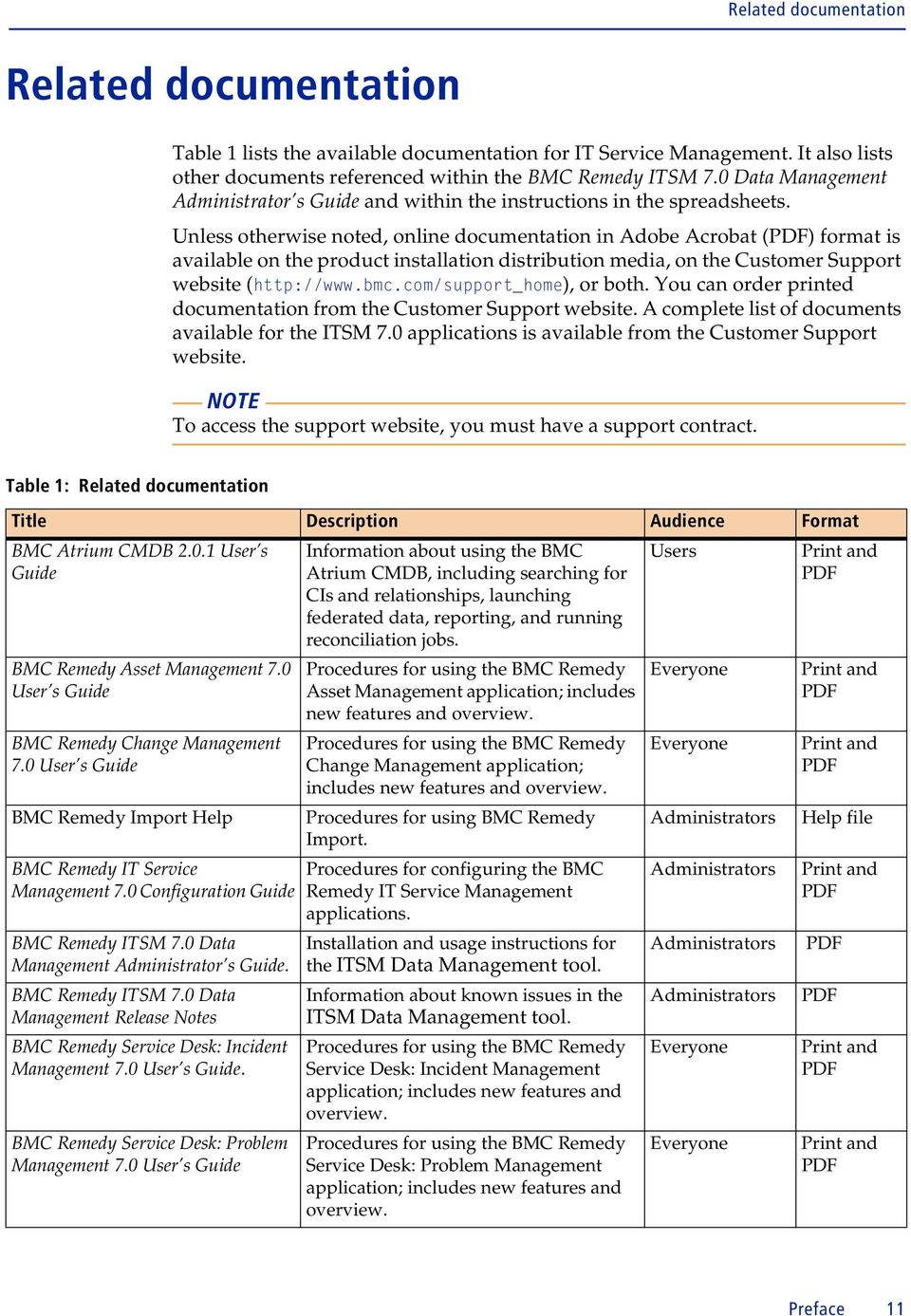
11 Related documentation Related documentation Table 1 lists the available documentation for IT Service Management. It also lists other documents referenced within the BMC Remedy ITSM 7.0 Data Management Administrator s Guide and within the instructions in the spreadsheets. Unless otherwise noted, online documentation in Adobe Acrobat (PDF) format is available on the product installation distribution media, on the Customer Support website ( or both. You can order printed documentation from the Customer Support website. A complete list of documents available for the ITSM 7.0 applications is available from the Customer Support website. NOTE To access the support website, you must have a support contract. Table 1: Related documentation Title Description Audience Format BMC Atrium CMDB User s Guide BMC Remedy Asset Management 7.0 User s Guide BMC Remedy Change Management 7.0 User s Guide BMC Remedy Import Help BMC Remedy IT Service Management 7.0 Configuration Guide BMC Remedy ITSM 7.0 Data Management Administrator s Guide. BMC Remedy ITSM 7.0 Data Management Release Notes BMC Remedy Service Desk: Incident Management 7.0 User s Guide. BMC Remedy Service Desk: Problem Management 7.0 User s Guide Information about using the BMC Atrium CMDB, including searching for CIs and relationships, launching federated data, reporting, and running reconciliation jobs. Procedures for using the BMC Remedy Asset Management application; includes new features and overview. Procedures for using the BMC Remedy Change Management application; includes new features and overview. Procedures for using BMC Remedy Import. Procedures for configuring the BMC Remedy IT Service Management applications. Installation and usage instructions for the ITSM Data Management tool. Information about known issues in the ITSM Data Management tool. Procedures for using the BMC Remedy Service Desk: Incident Management application; includes new features and overview. Procedures for using the BMC Remedy Service Desk: Problem Management application; includes new features and overview. Users Everyone Everyone Administrators Administrators Print and PDF Print and PDF Print and PDF Help file Print and PDF Administrators PDF Administrators Everyone Everyone PDF Print and PDF Print and PDF Preface 11
12 BMC Remedy IT Service Management 7.0 Table 1: Related documentation (Continued) Title Description Audience Format BMC Service Level Management 7.0 User s Guide BMC Service Request Management 2.0 Administrator s and User's Guide Procedures for using the BMC Service Level Management application; includes new features and overview. Procedures for administrating and using the BMC Service Request Management application. Everyone Administrators and users Print and PDF PDF 12 Data Management Administrator s Guide

13 1 Introduction Chapter You can use the ITSM Data Management tool to import foundation data into ITSM 7.0. The following topics are provided:! When to use the ITSM Data Management tool (page 14)! Overview of the bulk load process (page 16)! Components of the tool (page 17)! Hardware and software prerequisites (page 19)! Performance benchmarks (page 19) Chapter 1 Introduction 13

14 BMC Remedy IT Service Management 7.0 When to use the ITSM Data Management tool You can use the ITSM Data Management tool whenever you wish to import foundation data, such as in the following scenarios:! A new installation of ITSM! An existing installation of ITSM to which another company, business unit, department, or other group is being added! Migration from a previous version of ITSM Foundation data refers to configuration data that applies to all of the ITSM applications, such as companies, sites, people, and categorization. Figure 1-1 illustrates the three levels of data in ITSM. Figure 1-1: Levels of data in ITSM Service Desk Change Management Asset Management Transactional Data Incidents, problems Change requests Configuration items, contracts, purchase requests Process Setup Data Decision trees, scripts, assignment mapping Change templates, approvals, assignment mapping Approvals, configurations Foundation Data Companies, sites, people, categorization NOTE At this time, only foundation data can be loaded with the ITSM Data Management tool. 14 Data Management Administrator s Guide

15 When to use the ITSM Data Management tool Using the ITSM Data Management tool for migration Migration scenarios for using the ITSM Data Management tool include:! Migrating from a version earlier than 6.0 If you use automated migrations, you would have to run more than one migration, to first migrate to 6.0, and then to 7.0. The procedure using the ITSM Data Management tool can eliminate steps.! Migrating in a phased approach You can load different portions of data at different times. For example, if you have both Help Desk and Change Management 6.0, you might choose to initially install Service Desk, and bulk load the appropriate foundation data. At a later date, you could install Change Management and bulk load the appropriate foundation data.! Migrating as a fresh install You might wish to treat migration as a fresh install, for example if your earlier version of ITSM includes many customizations, or if the existing data is of questionable quality. In this case, you can bulk load your quality foundation data. In each of these scenarios, you must do the following steps: Step 1 Install ITSM 7.0. Step 2 Export data from your earlier version of ITSM. Step 3 Import the data into the spreadsheets. Step 4 Clean up the data in the spreadsheets. This might include adding newly required information that is missing. Step 5 Run the ITSM Data Management tool to import the data into ITSM 7.0. Chapter 1 Introduction 15
16 BMC Remedy IT Service Management 7.0 Overview of the bulk load process This section provides an overview of the bulk load process. The following chapters provide detailed instructions. Figure 1-2: Overview of the bulk load process 1 Add data to spreadsheets A B C 111 xxx yyy 222 xxx yyy 333 xxx yyy 444 xxx yyy Change Management Asset Management Service Desk 2 Convert spreadsheets to CSV 5 Promote data to ITSM 3 Load data 4 Validate data 16 Data Management Administrator s Guide

17 Components of the tool The bulk load process consists of the following steps: Step 1 Add data to spreadsheets. The ITSM Data Management tool includes Excel workbooks. Each tab on the Excel workbook corresponds to a form in ITSM 7.0, as described in Appendix A, How tabs map from spreadsheet to target form. For instructions, see Chapter 3, Completing the spreadsheets. Step 2 Convert data in spreadsheets to CSV files. The tool includes macros to convert the spreadsheet data to the appropriate CSV files, as described in Creating the CSV files on page 36. Step 3 Load the data. You must perform steps to load the data. For instructions, see Editing the data load batch file on page 36, and Running the batch file on page 37. Step 4 Validate the data. Step 5 Promote the data into ITSM. For instructions, see Validating and promoting the data on page 38. NOTE If you have customized ITSM, see Chapter 5, Managing customizations. Components of the tool The ITSM Data Management tool includes the following components:! Excel workbook files for loading data Each of these workbook files has individual tabs that correspond to the different foundation data structures that can be imported. The following workbook files are included:! Company.xls! Financials.xls! GenericCatalog.xls! Geography.xls! Location.xls! OperationalCatalog.xls! People.xls! PeopleOrg.xls! ProductCatalog.xls! SupportGroup.xls! SystemSetup.xls Chapter 1 Introduction 17
18 BMC Remedy IT Service Management 7.0! Excel conversion files Each data load workbook has a corresponding conversion file. Each conversion file contains a macro to convert the individual tabs in the data load workbook into separate files in CSV format. The following conversion files are included:! CompanyCSV.xls! FinancialsCSV.xls! GenericCatalogCSV.xls! GeographyCSV.xls! LocationCSV.xls! OperationalCatalogCSV.xls! PeopleCSV.xls! PeopleOrgCSV.xls! ProductCatalogCSV.xls! SupportGroupCSV.xls! SystemSetupCSV.xls! Definition files The DEF files contain the necessary AR System staging forms and AR System workflow to manage, validate, and promote the data that you are importing into the appropriate ITSM forms.! Mapping file list Foundation.lst lists the mapping files that are used during the automated import.! Data load batch file Foundation.bat automates the importing of the data in the CSV files and makes sure that they are imported in the correct order. Data is imported into a staging area for validation before you promote the data into the target forms.! ARX files These files contain back-end data required by the ITSM Data Management tool.! Import mapping files Files with the extension.arm (AR Mapping) are import mapping files used by the ITSM Data Management tool. 18 Data Management Administrator s Guide

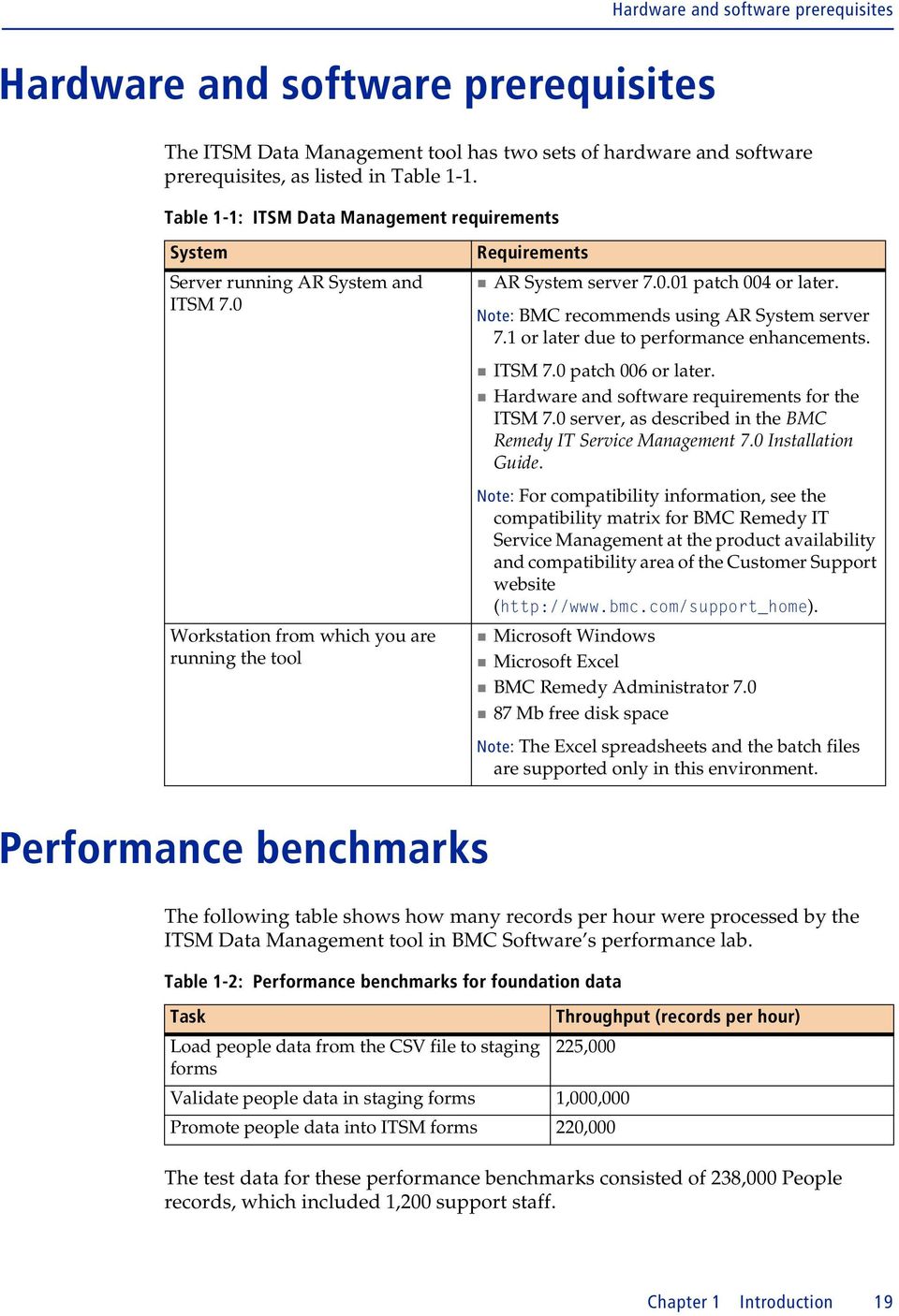
19 Hardware and software prerequisites Hardware and software prerequisites The ITSM Data Management tool has two sets of hardware and software prerequisites, as listed in Table 1-1. Table 1-1: ITSM Data Management requirements System Server running AR System and ITSM 7.0 Workstation from which you are running the tool Requirements! AR System server patch 004 or later. Note: BMC recommends using AR System server 7.1 or later due to performance enhancements.! ITSM 7.0 patch 006 or later.! Hardware and software requirements for the ITSM 7.0 server, as described in the BMC Remedy IT Service Management 7.0 Installation Guide. Note: For compatibility information, see the compatibility matrix for BMC Remedy IT Service Management at the product availability and compatibility area of the Customer Support website ( Microsoft Windows! Microsoft Excel! BMC Remedy Administrator 7.0! 87 Mb free disk space Note: The Excel spreadsheets and the batch files are supported only in this environment. Performance benchmarks The following table shows how many records per hour were processed by the ITSM Data Management tool in BMC Software s performance lab. Table 1-2: Performance benchmarks for foundation data Task Throughput (records per hour) Load people data from the CSV file to staging 225,000 forms Validate people data in staging forms 1,000,000 Promote people data into ITSM forms 220,000 The test data for these performance benchmarks consisted of 238,000 People records, which included 1,200 support staff. Chapter 1 Introduction 19
20 BMC Remedy IT Service Management 7.0 Hardware environment Software environment The performance benchmarks were performed on two Dell PowerEdge 1850 servers connected to a LAN with 100M Bps network interface card. Each server has two 3.8Ghz Intel Xenon processors, 4Gb RAM and two local hard drives (10K rpm). The following table indicates the software environment for the two servers. Table 1-3: Software environment for performance benchmark lab Server Component Version Running on A Windows 2003 server Enterprise Edition SP1 Dell PowerEdge 1850 A AR Server patch 004 Windows 2003 Server A BMC Remedy ITSM applications patch 005 B Redhat Linux ELsmp Dell PowerEdge 1850 B Oracle 10g R Redhat Linux The AR System server was configured for multi-threading, as described in Configuring performance enhancements on page 25. For Oracle configuration, the initialization parameters were set as follows:! cursor_share=force! optimizer_index_cost_adj=25! optimizer_index_caching=90! sga_target=800m! pga_aggregate_target=200m! open_cursors=300 Data files were on one hard drive, while all the online redo log files were on another dedicated hard drive. NOTE After starting validation, and after starting promotion, the Data Load console was closed to maximize throughput. 20 Data Management Administrator s Guide

21 2 Installing Chapter and configuring the tool Follow these steps to install and configure the tool: Step 1 Turn on Development Cache Mode. Step 2 Run the ITSM Data Management tool installer. BMC recommends that you run the installer on your workstation. The installer installs components, such as the Data Load Console to your AR System server. It installs other components, such as the data load spreadsheets, to your workstation. Step 3 Turn off Development Cache Mode. Step 4 Optionally, to enhance bulk data load performance, you can configure the tool to use multi-threading. The following topics are provided:! Turning on Development Cache Mode (page 22)! Running the ITSM Data Management tool installer (page 22)! Turning off Development Cache Mode (page 24)! Configuring performance enhancements (page 25) Chapter 2 Installing and configuring the tool 21
22 BMC Remedy IT Service Management 7.0 Turning on Development Cache Mode To install the ITSM Data Management tool, you must first turn on Development Cache Mode. After you do this, run the ITSM Data Management tool installer. When the installer finishes running, turn off Development Cache Mode. NOTE After you turn on Development Cache Mode in the following procedure, you must restart the AR System server. To turn on Development Cache Mode 1 Open BMC Remedy Administrator. 2 Log in to the AR System server to which you are importing data. 3 Select the appropriate server. 4 Choose File > Server Information. The Server Information window appears. 5 Click the Configuration tab. 6 Select Development Cache Mode. 7 Click OK. The Server information window closes and the system prompts you to restart the AR System server. 8 Close BMC Remedy Administrator, and then restart the AR System server. Running the ITSM Data Management tool installer Follow this procedure to install the ITSM Data Management tool. To install the ITSM Data Management tool 1 Run setup.exe. BMC recommends that you run the installer from your Windows workstation. After the installer loads, the ITSM Data Management Tool window appears, displaying the Introduction screen of the installer. NOTE Depending on your Windows security settings, you might see a Windows Security Alert. 22 Data Management Administrator s Guide
23 Running the ITSM Data Management tool installer 2 Click Next to continue. The End User License Agreement appears. 3 Accept the terms of the license agreement and click Next to continue. You are prompted for the installation location. The default location is C:\Program Files\BMC Software\BMC Remedy ITSM Data Management Tool. You can change this location, if appropriate. 4 Click Next to continue. After the tool is configured for your environment, you are prompted to enter connection information for your AR System server. The installer requires this information so that it can install the necessary DEF and ARX files. Figure 2-1: BMC Remedy ITSM Data Management Tool Connection Information screen 5 Complete the Connection Information screen as described in Table 2-1. Table 2-1: Connection information Field AR System Server AR Administrator AR Password AR TCP Port AR RPC Socket Description Enter the name of the server to which you are importing data. Enter the login name of an AR System administrator. Enter the password for the AR System administrator account. If necessary, enter the AR System server s TCP port. If necessary, enter the AR System server s RPC socket. 6 Click Next to continue. After the installer connects to your AR System server, the Version Summary screen appears, displaying a table of currently installed ITSM products, and their corresponding version numbers, patch levels, and installed languages. Chapter 2 Installing and configuring the tool 23
24 BMC Remedy IT Service Management 7.0 IMPORTANT If any of the installed applications are not at version 7.0 patch 006 or later, your system does not meet the prerequisites of the ITSM Data Management tool. You must cancel installation of the tool. Prerequisites for the tool are described in Hardware and software prerequisites on page Click Next to continue. The pre-installation summary displays the product name, installation folder, and disk space requirements. 8 Click Install to install the tool. During installation, the progress is displayed. When the tool has been installed, the screen displays the message, Execution complete. 9 Click Next to continue. The installer displays the status of the installation. 10 Click Done to exit the installer. 11 If you ran the installer on the server, copy the files from the installation location (default of C:\Program Files\BMC Software\BMC Remedy ITSM Data Management Tool) to the workstation on which you will run the tool. Turning off Development Cache Mode After you install the tool, turn off Development Cache Mode. NOTE After you turn off Development Cache Mode, you must restart the AR System server. To turn off Development Cache Mode 1 Open BMC Remedy Administrator. 2 Log in to the AR System server to which you are importing data. 3 Select the appropriate server. 4 Choose File > Server Information. The Server Information window appears. 5 Click the Configuration tab. 6 Clear Development Cache Mode. 7 Click OK. The Server Information window closes and the system prompts you to restart the AR System server. 8 Close BMC Remedy Administrator, and then restart the AR System server. 24 Data Management Administrator s Guide
25 Configuring performance enhancements Configuring performance enhancements If you are bulk loading significant amounts of data, you will see performance improvements by:! Setting the Next Request ID Block Size to 40. This setting enhances performance when importing data from the CSV files into the staging forms.! Using multi-threading. Multi-threading allows multiple chunks of data to be processed at the same time. You can configure multiple threads to be run simultaneously, depending on how powerful your server is. IMPORTANT If you configure these performance enhancements, when the ITSM Data Management tool is running validation or promotion, the AR System server utilizes 100 percent CPU capacity to achieve maximum throughput. This means that during validation and promotion, the AR System server is not responsive to other requests. To configure the tool to use multi-threading, you must: Step 1 Configure the AR System server information for multi-threading. Step 2 Configure the CAI:Plugin Registry form. Step 3 Set the plugin filter API threads. Setting the Next Request ID Block Size You can set this performance enhancement, regardless of whether you configure multi-threading. To set the Next ID Block Size 1 Open BMC Remedy Administrator. 2 Log in to the AR System server to which you are importing data. 3 Select the appropriate server. 4 Choose File > Server Information. 5 Click the Configuration tab. 6 Set the Next Request ID Block Size to If you are configuring the AR System server for multi-threading, continue with the next procedure, which is on this screen. Otherwise, click OK to save your settings. Chapter 2 Installing and configuring the tool 25
26 BMC Remedy IT Service Management 7.0 Configuring the AR System server for multi-threading To see performance improvements from multi-threading, you must configure several settings for AR System server information. To configure multi-threading 1 If it is not already open, open the Server Information window. 2 Click the Server Ports and Queues tab. Figure 2-2: Server Information window Server Ports and Queues tab 3 If no private server queue exists, create one by performing the following steps: a Click the Click to add row. b For Type, select Private. c Select an available RPC Program Number. 4 Set (or modify) the minimum and maximum number of threads as indicated in Table 2-2. Table 2-2: Server queue configuration Queue type Min Threads setting Max Threads setting Fast Private Data Management Administrator s Guide
27 Configuring performance enhancements 5 Make sure that the Plug-in Loopback RPC Program Number is set to the private queue s RPC Program Number. Take note of this number. You will need it in subsequent steps, after you close this window. 6 Click OK to save your changes. Configuring the CAI:Plugin Registry form You must configure the CAI:Plugin Registry form as indicated in the following steps. To configure the CAI:Plugin Registry form 1 Open BMC Remedy User. 2 Log in to the AR System server as an administrator. 3 Open the CAI:Plugin Registry form. 4 Click Search to search for the record. 5 If no record is found, create a new record. Figure 2-3: CAI Plug-in Registry form 6 Set the Private Queue # to the RPC Program Number. 7 Set the Number of Threads to 16. The number of threads must be within the minimum and maximum number that you set for the Private server queue. BMC recommends 16 threads. 8 Click Save. Chapter 2 Installing and configuring the tool 27
28 BMC Remedy IT Service Management 7.0 Setting the plugin filter threads To see performance improvements from multi-threading, you set the plugin filter threads. To set the plugin filter threads 1 On the server, open the AR System configuration file in a text editor. On a Windows server, the configuration file is ar.cfg. On a UNIX server, the file is ar.conf. 2 Add the following line to the end: Plugin-Filter-API-Threads: Save your changes. 4 Restart the AR System server. 28 Data Management Administrator s Guide
29 3 Completing Chapter the spreadsheets Before you can import data, you must complete the appropriate data load spreadsheets. The following topics are provided:! Understanding the spreadsheets (page 30)! Populating data in the spreadsheets (page 31) Chapter 3 Completing the spreadsheets 29
30 BMC Remedy IT Service Management 7.0 Understanding the spreadsheets This section provides an overview of the data load spreadsheets. Additional instructions are provided within the spreadsheets. Each workbook contains related spreadsheets. The first tab provides instructions for using the spreadsheet. Each of the subsequent tabs corresponds to the form into which the data is populated. Figure 3-1: Example spreadsheet Column headings provide instructions for completing that column of the spreadsheets according to the following standards:! A green column heading indicates a required field.! An orange column heading indicates a field that might be required, depending on a value set in another column.! Text in the first row provides instructions for entering data in the column. 30 Data Management Administrator s Guide
31 Populating data in the spreadsheets The number above each column heading is the database length of the field. This number corresponds to the number of bytes in the field. For English and other single-byte languages, the number of bytes is the same as the number of characters. Double-byte languages use two characters per byte. Validation on each column indicates if you entered data longer than this maximum allowed length. NOTE This validation occurs only when you type in the spreadsheet cells. If you bring in data by copying and pasting from another source or by importing data into the spreadsheet, you bypass the validation. Populating data in the spreadsheets This section provides general instructions for populating data in the data load spreadsheets. To make it easier for you to distribute the spreadsheets to others to complete, each spreadsheet includes instructions specific to the spreadsheet. Are all spreadsheets required? If you are updating an existing ITSM system, for example, loading data for a new department or location, some data already exists on your ITSM system. Do not reenter data that is already loaded on your system. You must complete spreadsheet only for the new data that you are loading. If you are loading data for a new ITSM 7.0 system, you might choose to configure all foundation data through the spreadsheets. To load only the minimum standard configuration, you must complete the required tabs within the required spreadsheets, which are listed in Table 3-1. Table 3-1: Spreadsheets and tabs required to load minimum standard configuration Required Required tabs Description spreadsheets Company.xls 01 COM-Company Use this tab to specify companies. Location.xls 01 SIT-Site Use this tab to specify sites. 5 SIT-SiteCompanyAssociation Use this tab to associate each site to a company. Sites are physical locations. Supportgroup.xls 01 CTM-SupportGroup Use this tab to specify support groups. Chapter 3 Completing the spreadsheets 31
32 BMC Remedy IT Service Management 7.0 Table 3-1: Spreadsheets and tabs required to load minimum standard configuration (Continued) Required Required tabs Description spreadsheets People.xls 01 CTM-PeopleTemplate To load support staff, you must use people templates. On this tab you specify the Template Names that are referenced on the other tabs. Use other tabs to set the permission groups, support groups, and support group functional roles for each people template. People templates make it easier to load people who fulfill the same role within a given support group. Even support staff who fulfill a unique role within their support group, however, must be related to a people template. When you load people, the purpose of this tab is only to specify the Template Names. The other fields, such as Company Name, are loaded from the 02 CTM-People tab. These other fields, however, are stored in the People Template, and are used when creating individual people records through the Application Administration console. 02 CTM-People Use this tab to load people. 03 CTM-PeoplePermissionGroups Use this tab to specify the ITSM application permission groups for each people template. 04 CTM-SupportGroupAssociation Use this tab to specify the support groups for each people template. 05 CTM-SupportGrpFunctionalRole Use this tab to specify the support group functional roles for each people template. Where do you start? What are the dependencies? Start with spreadsheets that are self-contained and do not have dependencies on data in other spreadsheets. BMC suggests that you start with Company.xls. When entering data, be aware that data in one spreadsheet can be dependent upon data that is either entered on another spreadsheet or already loaded in the system. For example, the company field, which is entered on most spreadsheets, must match a company either created in Company.xls or already loaded on the system. These dependencies are noted as instructions in the spreadsheets. Table 3-2 lists dependencies among spreadsheets. 32 Data Management Administrator s Guide
33 Populating data in the spreadsheets The spreadsheets are listed in the order that the corresponding data is validated and promoted in the Data Load Console. You might choose to complete spreadsheets in this sequence. Table 3-2: Dependencies among spreadsheets Data entered in this spreadsheet Depends on data entered in these spreadsheets Company Geography System Setup People Org To populate data in the spreadsheet 1 Complete the spreadsheets according to the instructions on the Instructions tab and in the column headings. All leading and trailing spaces and tab characters are stripped when the data is imported into staging forms. 2 Save the file to the ITSM Data Management tool directory. Location Financials Support Group Company Geography Location Yes Yes SystemSetup PeopleOrg Yes SupportGroup Yes Yes Financials Yes People Yes Yes Yes Yes Yes Yes ProductCatalog Yes OperationalCatalog Yes GenericCatalog Yes Yes Catalogs (all) IMPORTANT Leave the tabs in their original order. Deleting, inserting, or changing the order of tabs causes errors when you perform the steps to convert the spreadsheets to CSV (comma-separated value) files. Chapter 3 Completing the spreadsheets 33
34 BMC Remedy IT Service Management Data Management Administrator s Guide
35 4 Importing Chapter data After the spreadsheet is complete, you must complete the following steps to import the data: Step 1 Create the CSV files. Step 2 Edit the data load batch file. Step 3 Run the batch file. Step 4 Validate and promote the data. When appropriate, you can delete the data from the staging forms. The following topics are provided:! Creating the CSV files (page 36)! Editing the data load batch file (page 36)! Running the batch file (page 37)! Validating and promoting the data (page 38)! Deleting data (page 44) Chapter 4 Importing data 35
36 BMC Remedy IT Service Management 7.0 Creating the CSV files After you populate the data load spreadsheets, you must create the CSV files. The ITSM Data Management tool imports the data from the CSV file. To create the CSV file 1 Open the appropriate conversion spreadsheet, such as CompanyConvertCSV.xls. When you open the spreadsheet, depending on your Excel security settings, you might receive a security warning. Make sure that you enable macros. The macros in the spreadsheet create the appropriate CSV files. Figure 4-1: Example of conversion spreadsheet 2 On the first tab, click Run ConvertCSV Macro. For each tab in the corresponding data load workbook (such as Company.xls), the macro creates a CSV file in the <ITSM Data Management>\CSVs directory. Editing the data load batch file The data load batch file imports data from the CSV files into the data load staging forms. For a successful import, you must specify values in this batch file. For foundation data, this batch file is named foundation.bat. To edit the data load batch file 1 Open the data load batch file (Foundation.bat) in a text editor. 2 Complete the values in the set section as indicated in Table 4-1. Table 4-1: Values to set in the data load batch file Value user_name password Description The user name of an administrative user The corresponding password 36 Data Management Administrator s Guide
37 Running the batch file Table 4-1: Values to set in the data load batch file (Continued) Value server_name external_authentication_string rpc_number port_number arsystem_admin_directory Description The AR System into which you are importing data External authentication, if required by the AR System server RPC number, if required by the AR System server Port number, if a port other than the default is required The local directory for AR System commands Make sure you have no spaces between the equal sign (=) and the value you enter. The directories in Table 4-2 are already set to the default values. You can leave these values, unless you move the directories. Table 4-2: Preset values in the data load batch file Value mapping_file_directory csv_file_directory log_file_path Description Already set to the mapping file directory Already set to the CSV file directory Already set to the log file directory 3 Save the file. Running the batch file The data load batch file imports data from the CSV files into the data load staging forms. To run the batch file 1 Make sure that the following files and directories are all located in the same directory:! Foundation.bat file! Foundation.lst file! CSVs directory! Mappings directory! Logs directory 2 Run the data load batch file (Foundation.bat). Data is imported into staging forms. NOTE This import process strips all leading and trailing spaces, and all tab characters from the data. Chapter 4 Importing data 37
38 BMC Remedy IT Service Management 7.0 The import process creates a log file in the Logs directory for each CSV file that was imported. If a CSV file is missing or has no data, an error is generated in the log file, but the data load utility continues, and loads data for CSV files that do exist and have valid data. 3 Examine the log files for errors. Error messages indicated in Table 4-3 are benign and can be ignored. Table 4-3: Benign error messages Error message The Datafile option given does not exist. Cannot import. The Datafile type is not supported. Cannot import. Explanation The CSV file did not exist. If you did not intend to load data from the corresponding Excel workbook tab, you can ignore this error. AR Import generates this error in response to files with a CSV extension. The file is successfully imported, however. 4 If you are using an Oracle database, after loading large amounts of data, run the following SQL command: begin dbms_stats.gather_schema_stats( ownname=> '"ARADMIN"', cascade=> TRUE, estimate_percent=> null, degree=> null, no_invalidate=> FALSE, granularity=> 'AUTO', method_opt=> 'FOR ALL COLUMNS SIZE AUTO', options=> 'GATHER'); end; This SQL command re-gathers Oracle Optimizer Statistics. Validating and promoting the data Data is initially loaded into staging forms. To validate and promote the data you must use the Data Load Console to: Step 1 Validate the imported data. Step 2 Fix errors. If there are licensing warnings, you must also fix those warnings. Step 3 Promote validated data from the staging forms into the appropriate ITSM forms. 38 Data Management Administrator s Guide
39 Validating and promoting the data Understanding the Data Load Console This section provides an overview of the Data Load Console. Instructions for using the console are provided in the following sections. You use the Data Load Console to load data into ITSM. The current version supports loading foundation data. Figure 4-2: Data Load Console Functions provide related functions. The table lists staging forms. The sequence number indicates the order in which forms are validated and promoted. A table lists the staging forms. The default order of these forms in the table corresponds to the sequence in which they are processed. For each form, the table indicates the staging status, whether errors were detected, and the number of records to be promoted. The table refreshes every 10 minutes. During validation and promotion, you can monitor progress by checking which forms have been validated or promoted. TIP If you are loading large amounts of data, BMC recommends that you close the Data Load Console after you start validation or promotion. The table refresh affects performance. To check the progress, you can either reopen the Data Load Console or run the following SQL query: select DL_STATUS,count(*) rowcnt from CTM_loadpeople group by DL_STATUS Chapter 4 Importing data 39
40 BMC Remedy IT Service Management 7.0 Validating imported data Before you can promote the data, you must validate it. NOTE When you proceed with validation, the max filter setting is temporarily changed to It is changed back to its original value when validation is complete. BMC recommends that you note the current value of max filters before proceeding; if the procedure is halted before it completes, you might need to manually reset this value. To validate imported data 1 Access the Data Load Console. a Log into BMC Remedy Administrator. b From the Application Administration Console, click the Custom Configuration tab. c From the Application Setting list, choose Foundation > Data Management Tool > Data Load Console. 2 For the category, select Foundation. The table lists all foundation staging forms. Forms with data that you loaded from the CSV files are currently listed with a staging status of Unvalidated. A staging status of No Data indicates a form that does not have data loaded from a CSV form. 3 Click Validate. After you confirm that you wish to proceed, validation is performed on all unvalidated data in staging forms. Validated data is revalidated if it appears on the list below unvalidated data. After validation is completed for a form, its staging status changes to Validated. Validated forms might have errors. If you validate new people records, the tool validates whether sufficient licenses are available. If the number of licenses available is insufficient, an error message appears, and the data remains unvalidated. To view details of the license compliance check, choose Functions > License Compliance Check. 40 Data Management Administrator s Guide
41 Validating and promoting the data About license compliance You can load people into the system only if you have sufficient licenses. If you do not have enough licenses, an error message is displayed during validation. To view details of the license compliance check, choose Functions > License Compliance Check. Figure 4-3: License Compliance Check window To fix the license compliance, you must either:! Add the required licenses.! Load people only for whom you have sufficient licenses. Chapter 4 Importing data 41
42 BMC Remedy IT Service Management 7.0 Fixing errors After validation is complete, the Error Detected column indicates whether an error was detected in a staging form. To fix errors 1 Select the form with errors, then click View. The staging form opens in Search mode. Figure 4-4: Example of a staging form in Search mode 2 To find records with errors, set Error_Flag to Yes, then click Search. When you open a record that has an error, the staging form includes one or more error description codes and the corresponding error messages. For example, the record in Figure 4-5 has two errors. For a listing of error messages, see Appendix C, Error messages. Figure 4-5: A staging form displaying a record with an error 3 Correct the errors, then save the form. The staging status for the form is reset to Unvalidated. Error_Flag remains set to Yes until after you validate the data. 42 Data Management Administrator s Guide
43 Validating and promoting the data TIP Because an error in a form can result in errors in dependent forms, you can sometimes save time by validating the data after fixing errors in one or two forms. 4 Click Validate. Validation starts with the first staging form marked as Unvalidated and continues with the remaining forms in sequence. If errors are still detected, you must repeat this procedure until all the errors are corrected. You cannot promote data while errors remain. Promoting validated data into the ITSM forms When all the staging forms are validated with no errors detected, you can promote the data into the ITSM forms. To promote validated data 1 Click Promote. NOTE When you proceed with promotion, the max filter setting is temporarily changed to It is changed back to its original value when promotion is complete. 2 Confirm that you wish to continue. After data is promoted from a staging form into the ITSM form, the staging status changes to All Data Promoted and the number of records to promote is reset to 0. 3 If you are using an Oracle database, after promoting large amounts of data, run the following SQL command: begin dbms_stats.gather_schema_stats( ownname=> '"ARADMIN"', cascade=> TRUE, estimate_percent=> null, degree=> null, no_invalidate=> FALSE, granularity=> 'AUTO', method_opt=> 'FOR ALL COLUMNS SIZE AUTO', options=> 'GATHER'); end; This SQL command re-gathers Oracle Optimizer Statistics. Recovering from halted validation or promotion If either validation or promotion is halted before the operation is complete, an administrator must:! Reset the maximum number of filters for an operation to the original value.! Delete the DLD:ThreadManager records. Chapter 4 Importing data 43
44 BMC Remedy IT Service Management 7.0 To recover from halted validation or promotion Deleting data 1 Reset the maximum number of filters for an operation to the original value. a Open BMC Remedy Administrator. b Log in to the AR System server to which you are importing data. c Select the appropriate server. d Choose File > Server Information. e Click the Advanced tab. f Change the value in the Maximum Filters for an Operation field to the original value and then click OK. AR System is installed with this value set to Delete the DLD:ThreadManager records. a Open BMC Remedy User. b Log in to the AR System server as an administrator. c Open DLD:ThreadManager. d Search for all records. To do this, put % in the RequestID field and click Search. e Select all the records. f Choose Actions > Delete. A message asks you to confirm whether to delete the records. g Click OK. You can now rerun validation or promotion. At any point you can delete data from staging forms. The navigation pane on the left of the Data Load Console provides two functions:! Delete Promoted Staging Data This deletes only promoted data from all staging forms.! Delete All Staging Data This deletes all data from all staging forms, regardless of the current status. 44 Data Management Administrator s Guide
45 5 Managing Chapter customizations The ITSM Data Management tool is designed to load data into an out-of-the-box ITSM 7.0 product suite. The ITSM 7.0 product suite is a leap forward in terms of functionality, and the types of data being stored. Despite these capabilities, you might have customized ITSM, due to various business drivers. To make sure that the ITSM Data Management tool functions correctly in a customized ITSM application, you must identify the customizations, analyze the impact, and make the customizations work with the tool. The following topics are provided:! Identifying customizations (page 46)! Analyzing your customizations for impact (page 46)! Making your customizations work (page 47) Chapter 5 Managing customizations 45
46 BMC Remedy IT Service Management 7.0 Identifying customizations Use these tips to identify your customizations:! Documentation If your customizations are documented, you can use this information to create a list of the workflow, fields, and forms that have been added or changed within your application.! Naming conventions Application developers sometimes use a naming convention that identifies customized workflow. The workflow is then placed within a namespace reserved for this purpose. For example, if the HPD:HPD- GetPerson active link is modified, it could have been copied to HPD:CUS- GetPerson, using CUS in the name to indicate that it is customized workflow. Analyzing your customizations for impact After you identify customizations, you must determine the impact to the data load functionality. The types of customizations to ITSM that impact the functionality of the ITSM Data Management tool are listed in this section. The following guidelines can help with your analysis:! Custom fields with Required entry mode Whether these fields are new or are modified on existing ITSM forms, they impact the data load. You must make sure that these fields are populated with data. Otherwise, the data load will fail.! Fields with Optional entry mode If these fields have custom workflow to enforce data entry upon record creation or update, they impact the data load. If required, duplicate the custom workflow on the data load staging forms to enforce the same constraints. To determine the appropriate staging form, see Appendix A, How tabs map from spreadsheet to target form.! Custom workflow In most cases, workflow customizations do not impact the ITSM Data Management tool. When data is loaded by the tool, all ITSM workflow on forms targeted for the load are bypassed, with the exception of workflow firing from the tool itself. This workflow bypass on target forms is performed by using filter workflow with goto actions. These filters fire on execution order 0 based on keywords that are received from the data load staging forms. Some custom workflow, however, does impact the data load function. For example, the workflow might be triggered on creation of the record on the form to create other child or dependent records elsewhere.! New customized forms In most cases, new forms do not impact the data load function. If dependencies are created between this new customized form and data load target forms, however, you must perform additional evaluation. 46 Data Management Administrator s Guide
47 Making your customizations work Making your customizations work This section contains some detailed steps on how to incorporate your customizations into the ITSM Data Management tool. The following topics are provided:! Understanding the staging forms! Adding custom fields on page 49 Understanding the staging forms This section describes how the workflow in the data load staging forms is structured. Use this information for customizations of the ITSM Data Management tool. The following topics are provided:! Staging form filters! Staging form permissions on page 48! Staging form fields on page 48 Staging form filters You can customize two types of filters. Both of these types of filters run on modify and only on records that have not been promoted:! Filters that run on validation The filters that perform the validations are coded in the execution order range. For fields that must be set for use in validation, the filters with those actions are coded in this range. Validation filters look at the keyword VALIDATE.! Filters that run on promote The calculation filters that set the fields needed for promotion, and the filters that perform the actual promotion (push to target forms) are coded in the execution order range. Promotion filters look at keyword LOAD. The following table lists the execution order and filter actions for the staging forms. IMPORTANT Make customizations only in the and the execution order range. Table 5-1: Execution order and filter actions Execution order Filter actions 0 Skip to execution order Related to error handling Validation 300 Set dataload status to Validated Chapter 5 Managing customizations 47
48 BMC Remedy IT Service Management 7.0 Table 5-1: Execution order and filter actions (Continued) Execution order Filter actions 500 If any field data is changed, set dataload status to Unvalidated Calculation, promotion 799 Set dataload status to Promoted 900 Delete record Staging form permissions Staging forms have Public-Hidden permission. All fields on staging forms have Public-Write permission. Staging form fields Fields on staging forms are grouped in different sections, as indicated in the following illustration. Figure 5-1: Example of a staging form A B C D 48 Data Management Administrator s Guide
49 Making your customizations work The following table describes the types of fields in each section of the staging form. Table 5-2: Purpose of fields in each section of the staging form Section A B C D Purpose of fields These fields provide information about processing of the staging form. They include fields for ID, data load status, error flag, error code, and error message. These fields are not promoted to the target form. These fields contain the data being imported. These fields correspond to the columns of data entered on the staging form. These fields are promoted to the target form. These fields are calculated from data in section B. These fields are read-only; the values are entered only through filter calculations. These fields are promoted to the target form. These are system fields. NOTE Hidden fields, which are not in the view, are used for temporary calculation by workflow. Adding custom fields The following scenario demonstrates the steps to take when a new field is added to a target form and how to incorporate the field into the ITSM Data Management tool. TIP To determine the staging form equivalent of the target form you are loading data into, see Appendix A, How tabs map from spreadsheet to target form. In this scenario, a new required character field called Employee ID, with field ID , has been created in the CTM:People form. The requirement is to incorporate this new field into the ITSM Data Management tool so that the contents of this field can be loaded at the same time as the other out-of-the-box fields. NOTE This scenario is relatively straightforward, because filters for this staging form use the Matching IDs feature. Some forms require an additional step, as described in Modifying workflow to promote custom fields on page 50. Chapter 5 Managing customizations 49
50 BMC Remedy IT Service Management 7.0 To make the customization from the scenario work 1 Add a new column called Employee ID in the 02 CTM-People tab of the People.xls spreadsheet. This spreadsheet is installed with the ITSM Data Management tool. You can use this column to populate and load the contents of the custom field at the same time as the other People records. 2 Update the CTM-People.arm file. This file is located in the <ITSM Data Management>\Mappings directory. Update the file by adding the following line: Mapping: $ $="Employee ID" This mapping is required for importing the modified spreadsheet into the staging form. 3 Recreate an exact copy of this field in the CTM:LoadPeople staging form. The field must exist on the staging form, so that it can accept the new customized field. After this step, you can load new People records that contain the customized Employee ID column. For some forms, however, you must first modify the filter on the staging form before you can promote the data. For more information, see Modifying workflow to promote custom fields. Modifying workflow to promote custom fields For most forms, you do not need to modify the workflow for the promotion of data from the staging form to the target form. In the Employee ID example, the filters use the Matching IDs feature, so no modification is needed. For some forms, however, the workflow must be modified. If you add fields to a form that does not use this feature, such as the FIN:LoadCostCenterUDAAssoc form, you must: Step 1 Copy the new fields from the target form to the staging form. Step 2 In the Push Field action, select the new fields in the Field and Value fields. The staging versions of these target forms do not use the Matching IDs feature, and require the workflow modification for custom fields:! FIN:CostCenterUDAAssoc! Business Time Holidays! Business Time Workdays! COM:Company Alias! All people attributes forms:! CTM:People IT Skills! CTM:Login ID 50 Data Management Administrator s Guide
51 Making your customizations work! CTM:People Benefit Info! CTM:People Education! CTM:People HR Attendance Mgmt! CTM:People HR Time Management! CTM:People Travel Profile! CTM:People Wallet! CTM:People Worklog! NTE:CFG-Notification Events To modify workflow to promote custom fields 1 Copy the new field from the target form to the staging form. 2 View the filters on the staging form. 3 Open the filter that pushes to the target form. This filter is in the 700 range. For example, on the FIN:LoadCostCenterUDAAssoc form, the filter is called: FIN:DCU:CreatCostCenterUDA_750_FIN! 4 On the If Action tab, in the fields area, choose the Name and choose Value > Field. The Name indicates the field name on the target form. Choose Value > Field to select the field name on the staging form. These two fields might be the same field name. 5 Save your changes. Chapter 5 Managing customizations 51
52 BMC Remedy IT Service Management Data Management Administrator s Guide
53 Appendix A How tabs map from spreadsheet to target form This section describes how tabs in the Excel (XLS) spreadsheets map to staging forms, and how the staging forms map to the primary target forms in ITSM 7.0. The following topic is provided:! Foundation data mapping (page 54) Appendix A How tabs map from spreadsheet to target form 53
54 BMC Remedy IT Service Management 7.0 Foundation data mapping Table A-1: Foundation data mapping Table A-1 lists the mapping from spreadsheet to the target form of foundation data. Spreadsheet Tab Staging form Target form or forms Company.xls 01 COM-Company COM:LoadCompany COM:Company Company.xls 02 COM-Company Alias COM:LoadCompanyAlias COM:Company Alias Financials.xls Financials.xls 01 FIN-ConfigCost CentersRepository 02 FIN-CostCenterUD Associations FIN:LoadConfigCostCenters Rep FIN:LoadCostCenterUDA Assoc FIN:ConfigCostCenters Repository FIN:CostCenterUDA Associations GenericCatalog.xls 01 CFG-GenericCatalog CFG:LoadGenericCatalog CFG:Generic Catalog GenericCatalog.xls GenericCatalog.xls 02 CFG-GenericProd ServiceAssoc 02 CFG-Generic CompanyModuleAsso CFG:LoadGenericProdSer Assoc CFG:LoadGenericCpyModule Assoc CFG:GenericProdService Assoc CFG:GenericCompany ModuleAssoc Geography.xls CTM-Postal Codes CTM:LoadPostalCodes CTM:PostalCodes Location.xls 01 SIT-Site SIT:LoadSite SIT:Site Location.xls 02 SIT-SiteAlias SIT:LoadSiteAlias SIT:Site Alias Location.xls 03 CTM-Region CTM:LoadRegion CTM:Region Location.xls 04 SIT-SiteGroup SIT:LoadSiteGroup SIT:Site Group Location.xls OperationalCatalog.xls OperationalCatalog.xls People.xls 05 SIT-SiteCompany Association 01 CFG-Operational Catalog 02 CFG-Operational CatalogAssoc 01 CTM-People Template SIT:LoadSite CompanyAssoc CFG:LoadServiceCatalog CFG:LoadServiceCatalog Assoc CTM:LoadPeopleTemplate SIT:Site Company Association CFG:Service Catalog CFG:Service Catalog Assoc CTM:People Template People.xls 02 CTM-People CTM:LoadPeople! CTM:People People.xls People.xls 03 CTM-People PermissionGroups 04 CTM-SupportGroup Association CTM:LoadPeopleTemplatePG CTM:LoadPeopleTemplateSG! User (if a Remedy Login ID is specified)! CTM:People Template PG! CTM:People Permission Groups! CTM:People Template SG! CTM:Support Group Association 54 Data Management Administrator s Guide
55 Foundation data mapping Table A-1: Foundation data mapping (Continued) Spreadsheet Tab Staging form Target form or forms People.xls 05 CTM-SupportGroup FunctionalRole CTM:LoadPeopleTemplateSFR! CTM:SupportGroup FunctionalRole! AP:Role People.xls 06 CTM-Login CTM:LoadPeopleAttributes CTM:Login ID People.xls 07 CTM-PeopleWallet CTM:LoadPeopleAttributes CTM:People Wallet People.xls People.xls People.xls People.xls People.xls 08 CTM-PeopleHR AttendanceMgmt 09 CTM-PeopleHR TimeManagement 10 CTM-People Education 11 CTM-PeopleTravel Profile 12 CTM-PeopleBenefit Info CTM:LoadPeopleAttributes CTM:LoadPeopleAttributes CTM:LoadPeopleAttributes CTM:LoadPeopleAttributes CTM:LoadPeopleAttributes CTM:People HR Attendance Mgmt CTM:People HR Time Management CTM:People Education CTM:People Travel Profile CTM:People Benefit Info People.xls 13 CTM-PeopleITSkills CTM:LoadPeopleAttributes CTM:People IT Skills People.xls People.xls People.xls PeopleOrg.xls 14 FIN-CostCenterUD Associations 15 CTM-PeopleWork Log 16 NTE-CFG- Notification Events CTM-People Organization FIN:LoadCostCenterUDA Assoc CTM:LoadPeopleWorkLog NTE:LoadCFGNotification Events CTM:LoadPeople Organization FIN:CostCenterUDA Associations CTM:People WorkLog NTE:CFG-Notification Events CTM:People Organization ProductCatalog.xls 01 PCT-ProductCatalog PCT:LoadProductCatalog PCT:Product Catalog ProductCatalog.xls 02 PCT-ProductAlias PCT:LoadProductAlias PCT:Product Alias ProductCatalog.xls ProductCatalog.xls ProductCatalog.xls ProductCatalog.xls 03 PCT-Product CompanyAssoc 04 PCT-ProductModel Version 05 PCT-ModelVersion Patch 06 PCT-ProdCatalog AliasMapping PCT:LoadProdComAssoc PCT:LoadProdModelVersion PCT:LoadModelVersionPatch PCT:LoadProdCatAlias Mapping PCT:ProductCompany Association PCT:Product Model/ Version PCT:ModelVersion Patch PCT:ProductCatalogAlias MappingForm SupportGroup.xls 01 CTM-SupportGroup CTM:LoadSupportGroup CTM:Support Group SupportGroup.xls SupportGroup.xls SupportGroup.xls 02 CTM-SupportGroup Assignments 03 CTM-SupportGroup Alias 04 CTM-SupportGroup OnCall CTM:LoadSGPAssignments CTM:Support Group Assignments CTM:LoadSupportGroupAlias CTM:Support Group Alias CTM:LoadSGPOnCall CTM:Support Group On- Call Appendix A How tabs map from spreadsheet to target form 55
56 BMC Remedy IT Service Management 7.0 Table A-1: Foundation data mapping (Continued) Spreadsheet Tab Staging form Target form or forms SupportGroup.xls SupportGroup.xls SystemSetup.xls 05 BusinessTime Workdays 06 BusinessTime Holidays NTE-CFG-PagerService Config CFG:LoadBusinessTimeWork days CFG:LoadBusinessTime Holidays NTE:LoadCFGPagerService Config Business Time Workdays! CFG:Business Holidays Storage! Business Time Holidays NTE:CFG-Pager Service Config 56 Data Management Administrator s Guide
57 B Exclusions Appendix from bulk load The following areas are excluded from bulk load data management:! Attachments File attachments cannot be loaded into AR System attachment fields because AR System supports importing attachments only as ARX files.! Geography The following foundation forms are excluded from bulk load:! CFG:Geography City! CFG:Geography Country! CFG:Geography Stat/Province These foundation geography forms are excluded because ITSM provides extensive data for all these forms with installation of the applications. To import additional data, import the records directly into these forms using BMC Remedy Import. For information about using BMC Remedy Import, see the BMC Remedy Import Help. Appendix B Exclusions from bulk load 57
58 BMC Remedy IT Service Management Data Management Administrator s Guide
59 C Error Appendix messages This section lists error codes from the bulk load process. The following topics are provided:! Invalid data errors (page 60)! Required field errors (page 63)! Duplicate data errors (page 65) Appendix C Error messages 59
60 BMC Remedy IT Service Management 7.0 Invalid data errors This section lists error codes from invalid data that is identified during the validation operation on records in staging forms. Table C-1: Error codes from invalid data Code Message Explanation 100 Invalid Bargaining Unit 101 Invalid Benefit Group 102 Invalid Compensation Method 103 Invalid Dental Plan 104 Invalid Employment Status 105 Invalid Marital Status 106 Invalid Medical Plan 107 Invalid Pension Plan 108 Invalid Person 109 Invalid Operational Category Fields For IT Skills 110 Invalid Product Category Fields For IT Skills 111 Invalid Category/Type The Category and Type values are invalid. Correct values can be obtained from CFG:Generic Catalog. 112 Invalid Contact Type 113 Invalid Home Country 114 Invalid Manager 115 Invalid Pager Service Provider 116 Invalid Template 117 Invalid Title 118 Invalid Company 119 Invalid Department 120 Invalid Organization 121 Invalid Site 122 Invalid Site for selected Company 123 Invalid Support Group 124 Invalid Permission Group 125 Invalid Country 126 Invalid Region 127 Invalid Site Group 128 Invalid City 129 Assignment Group Cannot Be The Same As The Support Group 60 Data Management Administrator s Guide
61 Invalid data errors Table C-1: Error codes from invalid data (Continued) Code Message Explanation 130 Invalid Assignment Group 131 Invalid Functional Role 132 Invalid Product Catalog The functional role that is selected is not valid or is not applicable to your currently installed applications. 133 Invalid Product Model/Version 134 Invalid Operational Catalog 135 Invalid Manufacturer. Manufacturer must match entries found in the Company form or Company staging form with a company type of Manufacturer 136 Both Start And End Times Must Be Entered Or Left Blank 137 Start Time Must Be Earlier Than End Time 138 Start Time Of The Next Schedule Must Be Later Than The End Time Of The Previous Schedule 139 Invalid Timezone 140 Invalid Primary Cost Center Code 141 Invalid Cost Center 142 Invalid Source Cost Center 143 Person Does Not Have A Primary Cost Center Defined 144 Total Distribution Percentage Is Greater Than Cost Center And Source Cost Center Must Not Be The Same 146 The Allocation Method For The Source Cost Center In The Finance Cost Center Configuration Form Is Not Set To 'Equal Distribution' Or 'User-Defined Percentage' 147 Relationship Type Must Be Set To Secondary Cost Center 148 Invalid Notification Event For The Module Name 149 Invalid Login ID 150 Invalid CI Type 151 Invalid Company or Company is not enabled Appendix C Error messages 61
62 BMC Remedy IT Service Management 7.0 Table C-1: Error codes from invalid data (Continued) Code Message Explanation 152 Support Group must exist as a valid Support Group on CTM:LoadPeopleTemplatesSG for the specified Template 153 HR Attendance Management record does not exist for the HR Time Management record 154 Invalid work time. Open Time has to be earlier than Close Time for any workday 155 Invalid Person ID 156 The Allocation Method For The Source Cost Center In the FIN:LoadConfigCostCentersRep Form Is Not Set To 'Equal Distribution' Or 'User- Defined Percentage' 157 Invalid Manager Name 158 Invalid Generic Catalog 159 A valid Generic Product Operational relationship record cannot be found A valid record that matches the record's Generic, Product, and Operational catalog cannot be found in CFG:LoadGenericProdSerAssoc or CFG:GenericProdServiceAssoc forms. You must create a relationship first between those catalog entries before creating a Company Module relationship to it. 160 General Access is automatically given and is not a valid permission group for this form 161 Asset Viewer is automatically given If the following permission groups are specified for the Template Name, Asset Viewer is not valid since it is automatically given:! Task Manager! Task User! Incident User! Incident Master! Problem User! Problem Master! Infrastructure Change User! Infrastructure Change Master! Infrastructure Change Config! Purchasing User 62 Data Management Administrator s Guide
63 Required field errors Table C-1: Error codes from invalid data (Continued) Code Message Explanation 162 Invalid Client Type The following client types are valid. You can use either the number or words to specify the client type:! 2000 or Office-Based Employee! 3000 or Field-Based Employee! 4000 or Home-Based Employee! 5000 or Contractor! 7000 or Customer! 8000 or Prospect! or Vendor 163 Invalid Assignment Event 164 Invalid Company, Region, Site Group and Site combination 165 Invalid Process Name 166 Invalid Contact Company 167 Invalid Currency Required field errors This section lists error codes from missing required fields. Table C-2: Error codes from missing required fields Code Message Explanation 200 Missing Required Fields For Access IF 201 Missing Required Fields For It Skills When IT Skills is selected, Operational Category Tier 1 and Product Category Tier 1 are required. 202 Missing Home Fields Home fields are required when client type is set to Home-based. 203 Paging Times Is Required 204 Time Zone Is Required 205 Corresponding Values For Open Times And Close Times Must Be Entered Or Both Must Be Empty 206 Pager Service Provider Is Required When On-Call Paging Type Is Generic 207 Pager Parameters Is Required For The Selected Pager Service Provider 208 Pager Parameters Pin Is Required For The Selected Pager Service Provider 209 Pager Parameters Phone Is Required For The Selected Pager Service Provider Appendix C Error messages 63
64 BMC Remedy IT Service Management 7.0 Table C-2: Error codes from missing required fields (Continued) Code Message Explanation 210 Pager Parameters Pin And Phone Is Required For The Selected Pager Service Provider 211 Operational Category Tier 1 and 2 is a required field when Operational Category Tier 3 is entered 212 Incident Management selected, at least one sub category is required 213 Change Management selected, at least one sub category is required 214 Source Cost Center And Distribution Percentage Are Required 215 Person ID Is Required 216 Source Cost Center Is Required 217 Both the Product Name and Manufacturer are required when defining a Product within Product Catalog 218 Login ID is required when On-Call paging type is set to Individual 219 Site Required when the Client Type is Office-Based Employee, Field-Based Employee or Contractor 220 Missing Required Fields for Wallet attribute 221 Generic Category Tier 1 and 2 is a required field when Generic Category Tier 3 is entered 222 Manufacturer is required when specifying Product Name 223 Product Name required with specifying Manufacturer 224 Product Tier 1 through 3, Manufacturer and Product Name is required with specifying a Model Version 225 Product Tier 1 through 3 is required when specifying a Product Name or Manufacturer 226 Product Tier 1 is required when Product Tier 2 or 3 is entered 227 Product Tier 1 and 2 is a required field when Product Category Tier 3 is entered 228 Operational Category Tier 1 is required when Operational Category 2 or 3 is entered When Wallet Attribute is selected, Category and Type are required. 64 Data Management Administrator s Guide
65 Duplicate data errors Table C-2: Error codes from missing required fields (Continued) Code Message Explanation 229 Company Menu Structure Tier 1 is required when Menu Structure Tier 2 is entered 230 Company Menu Structure Tier 1 and Tier 2 are required when Menu Structure Tier 3 is entered 231 Organization is required when specifying Department 232 User Service Restoration, User Service Request, Infrastructure Restoration or Infrastructure Event is required when Incident Management flag is selected 233 Organization and Department must be blank when specifying Global Contact Company 234 Region, Site Group and Site must be blank when specifying Global Company 235 The License Type, Full Text License Type and Default Notification Mechanism is required when specifying Login ID 236 The Login ID is required when the Support Staff flag is set to Yes 237 The Currency is required when specifying the Hourly Rate Value 247 'Time Management Type', Year and 'Status Reason' fields are required when the 'Attribute Type' is set to 'HR Time Management' Duplicate data errors This section lists error codes from duplicate data. Table C-3: Error codes from duplicate data Code Message Explanation 300 Duplicate Record On Staging Form 301 Duplicate Record On Target Form 304 Navigation Tiers for Company are not unique 305 Login ID Exist On Staging Form 306 Login ID Exist On User Form Appendix C Error messages 65
66 BMC Remedy IT Service Management 7.0 Table C-3: Error codes from duplicate data (Continued) Code Message Explanation 307 An entry with this Product Categorization and blank Product Name already exists on target form 308 An entry with the Product Name and Manufacturer already exists on target form 309 An entry with this Product Categorization and blank Product Name already exists on staging form 310 An entry with the Product Name and Manufacturer already exists on staging form 311 Invalid Product Alias, duplicate alias will be created from Product Catalog staging form 312 Duplicate Site Alias from Site staging form 313 Duplicate Support Group Alias from Support Group staging form 314 Cannot create Company relationship. Global relationship is already being created from the PCT:LoadProductCatalog staging form 315 Cannot create Company relationship. Global relationship is already being created from the CFG:LoadGenericProdSerAssoc staging form 316 Cannot create association to the specified company. Global association already exists on target form 317 Cannot create association to the specified company. Global association already exists on staging form 318 Cannot create Global Company relationship. Relationship already exists with other company on target form 319 Cannot create Global Company relationship. Relationship already exists with other company on staging form 320 Invalid Company Alias, duplicate alias will be created from Company staging form 66 Data Management Administrator s Guide
67 Duplicate data errors Table C-3: Error codes from duplicate data (Continued) Code Message Explanation 321 Cannot create Company relationship. Global relationship is already being created from the CFG:LoadServiceCatalog staging form 322 Duplicate Company Multi-tiered menu structure already exists The duplicate Company multi-tiered menu structure exists either in the COM:Company form or in the COM:LoadCompany staging form. Appendix C Error messages 67
68 BMC Remedy IT Service Management Data Management Administrator s Guide
69 Appendix D Data values The spreadsheets for data migration include instructions on how to complete the spreadsheet columns. This section provides tables of data values where the list of values was too lengthy to display in the spreadsheet. The following topics are provided:! Configuration Item types (page 70)! Notification events (page 72)! Permission groups and license types (page 75)! Time zones (page 76) Appendix D Data values 69
70 BMC Remedy IT Service Management 7.0 Configuration Item types On the ProductCatalog.xls spreadsheet, the 01 PCT-ProductCatalog tab includes a column for configuration item (CI) type, which must be completed with one of the following values:! Account! Activity! Admin Domain! Application! Application Infrastructure! Application Service! Application System! BIOS Element! Bulk Inventory! Business Process! Business Service! Card! CDROM Drive! Chassis! Cluster! Communication Endpoint! Computer System! Connectivity Collection! Connectivity Segment! Database! Database Storage! Disk Drive! Disk Partition! Document! Equipment! File System! Floppy Drive! Hardware Package! Hardware System Component! Inventory Location 70 Data Management Administrator s Guide
71 Configuration Item types! IP Connectivity Subnet! IP Endpoint! IPX Connectivity Network! Keyboard! Local Area Network (LAN)! LNs Collection! Local File System! Logical System Component! LPAR! Mainframe! Media! Memory! Monitor! Network Port! NT Domain! Operating System! Package! Patch! Physical Location! Pointing Device! Printer! Processor! Product! Protocol Endpoint! Rack! Remote File System! Role! Share! Software Server! System Resource! System Software! Tape Drive! UPS! Virtual System Appendix D Data values 71
72 BMC Remedy IT Service Management 7.0! Virtual System Enabler! VM Ware! Wide Area Network (WAN) Notification events On the People.xls spreadsheet, the 16 NTE-CFG-NotificationEvents tab includes columns for Module Name and Notification Event, both of which are required fields. The following table lists the module names in ITSM 7.0 along with the applicable notification events. Table D-1: ITSM 7.0 module names and applicable notification events ITSM 7.0 modules Asset Management Broadcast Incident (Continued on next page) Applicable notification events! Asset Scheduled Maintenance! Bulk Inventory Reorder! CI Status Change! Configuration Item Approval! Configuration Scheduled Maintenance! Contract Expiration! Contract Expiration Warning! Escalated Notifications! License Management Exception! Resolution Escalation! Response Escalation! Unavailability Assignment! Broadcast Notification! Assignment! Cancellation! Change Associations! Incident Escalation! Known Error Solution! Known Error Workaround! OLA Resolution Escalated Notification! OLA Resolution Escalation! OLA Response Escalated Notification! OLA Response Escalation! Ownership Assignment! Problem Investigation Associations! Problem Investigation Completion! Requester Incident Re-Opened! Requester Incident Receipt Confirmation! Requester Incident Resolution! Resolution 72 Data Management Administrator s Guide
73 Notification events Table D-1: ITSM 7.0 module names and applicable notification events (Continued) ITSM 7.0 modules Incident (Continued from previous page) Infrastructure Change (Continued on next page) Applicable notification events! SLA Resolution Escalated Notification! SLA Resolution Escalation! SLA Response Escalated Notification! SLA Response Escalation! UC Resolution Escalated Notification! UC Response Escalation! Unavailability Restored! Approval! Approval Information! Approval Resolution Escalated Notification! Approval Resolution Escalation! Cancellation! Change Assignee Assignment! Change Assignee Approval Rejection! Change Assignee Completion! Change Assignee Latent Completion! Change Assignee Planning! Change Assignee Pre-planning! Change Assignee Re-scheduled! Change Assignee Scheduled! Change Assignee Scheduled For Review! Change Management Assignment! Change Management Approval Rejection! Change Manager Completion! Change Manager Group Escalation! Change Manager Latent Completion! Change Manager Next Dependent Change! Change Manager Planning! Change Manager Pre-planning! Change Manager Predecessor Completion! Change Manager Re-scheduled! Change Manager Scheduled! Change Manager Scheduled for Review! Change Worklog Assignment! Completion! Implementer Assignment! Implementer Planning! Implementer Pre-planner! Implementer Scheduled! Manual Notification! Non-Approval Information! OLA Resolution Escalated Notification! OLA Resolution Escalation Appendix D Data values 73
74 BMC Remedy IT Service Management 7.0 Table D-1: ITSM 7.0 module names and applicable notification events (Continued) ITSM 7.0 modules Infrastructure Change (Continued from previous page) Problem Management Reminders Request Management Task Management Applicable notification events! OLA Response Escalated Notification! OLA Response Escalation! Receipt Confirmation! Requester Change Cancellation! Requester Change Receipt Confirmation! Requester Completion! Requester Change Re-scheduled! Requester Change Scheduled! Requester Rejection! Scheduled! SLA Response Escalated Notification! Task Cancellation! Task Pending! Unavailability Restored! Change Completed! Known Error Assignment! Known Error Manager Assignment! Problem Assignment! Problem Cancelled! Problem Completed! Problem Manager Assignment! Solution Assignment! Unavailability Restored! Reminders Notification! Request Status Changed! Request Submitted! Task Assigned! Task Status Changed 74 Data Management Administrator s Guide
75 Permission groups and license types Permission groups and license types On the People.xls spreadsheet, the 03 CTM-PeoplePermissionGroups tab includes columns for Permissions Group and License Type, both of which are required fields. The following table lists the permission groups in ITSM 7.0 along with the applicable license types. For a description of each permission group, see the BMC Remedy IT Service Management 7.0 Configuration Guide. Table D-2: ITSM 7.0 permission groups and applicable license types Permission group Applicable license types Read Fixed Floating None Administrator Yes ApprovalAdmin Yes ASE-Administrator Yes Asset Admin Yes Yes Yes Asset Config Yes Yes Yes Asset User Yes Yes Yes Asset Viewer Yes Browser Yes CM Dashboard User Yes Command Event Master Yes Config Categorization Admin Yes Config Categorization User Yes Config Group Mapping Admin Yes Contact Location Admin Yes Contact Organization Admin Yes Contact People Admin Yes Contact People HR Admin Yes Contact People User Yes Contact Support Admin Yes Cost Manager Yes Yes Yes Customize Yes DSL Master Yes DSL Viewer Yes Incident Config Yes Yes Incident Master Yes Yes Incident Submitter Yes Incident User Yes Yes Incident Viewer Yes Infrastructure Change Config Yes Yes Appendix D Data values 75
76 BMC Remedy IT Service Management 7.0 Table D-2: ITSM 7.0 permission groups and applicable license types (Continued) Permission group Applicable license types Read Fixed Floating None Infrastructure Change Master Yes Yes Infrastructure Change Submit Yes Infrastructure Change User Yes Yes Infrastructure Change Viewer Yes Licensing Yes Notification Admin Yes Problem Config Yes Yes Problem Master Yes Yes Problem Submitter Yes Problem User Yes Yes Problem Viewer Yes Purchasing User Yes Yes Receiving User Yes Requester Console Config Yes Requester Console Master Yes Security Yes SLM Config Yes Yes SLM Customer Yes Yes SLM Manager Yes Yes Sub Administrator Yes Summary Definition Config Yes Task Administrator Yes Task Application Config Yes Task Manager Yes Task Process Config Yes Task User Yes Time zones On the SupportGroup.xls spreadsheet, the 06 BusinessTimeHolidays tab includes a column for time zone, which must be completed with one of the following values:! (GMT -12:00) Eriwetok, Kwajalein! (GMT -11:00) Midway Island, Samoa! (GMT -10:00) Hawaii! (GMT -09:00) Alaska 76 Data Management Administrator s Guide
77 Time zones! (GMT -08:00) Pacific Time (US & Canada); Tijuana! (GMT -07:00) Arizona! (GMT -07:00) Mountain Time (US & Canada)! (GMT -0600) Central Time (US & Canada)! (GMT -06:00) Mexico City (Tegucigalpa)! (GMT -06:00) Saskatchewan! (GMT -05:00) Bogota, Lima, Quito! (GMT -05:00) Eastern Time (US & Canada)! (GMT -05:00) Indiana (East)! (GMT -04:00) Atlantic Time (Canada)! (GMT -04:00) Caracas, La Paz! (GMT -03:30) Newfoundland! (GMT -03:00) Brasilia! (GMT -03:00) Buenos Aries, Georgetown! (GMT -02:00) Mid-Atlantic! (GMT -01:00) Azores, Cape Verde Is.! (GMT) Casablanca, Monrovia! (GMT) Greenwich Mean Time: Dublin, Edinburgh, Lisbon, London! (GMT +1:00) Amsterdam, Copenhagen, Madrid, Paris, Vilnius! (GMT +1:00) Belgrade, Sarajevo, Skopje, Sofija, Zagreb! (GMT+1:00) Bratislava, Budapest, Ljubljana, Prague, Warsaw! (GMT +1:00) Brussels, Berlin, Bern, Rome, Stockholm, Vienna! (GMT +2:00) Athens, Istanbul, Minsk! (GMT +2:00) Bucharest! (GMT +2:00) Cairo! (GMT +2:00) Harare, Pretoria! (GMT +2:00) Helsinki, Riga, Tallinn! (GMT +2:00) Israel! (GMT +3:00) Baghdad, Kuwait, Riyadh! (GMT+3:00) Moscow, St. Petersburg, Volgograd! (GMT +3:00) Nairobi! (GMT +3:30) Tehran! (GMT +4:00) Abu Dhabi, Muscat! (GMT +4:00) Baku, Tbilisi Appendix D Data values 77
78 BMC Remedy IT Service Management 7.0! (GMT +4:30) Kabul! (GMT +5:00) Ekaterinburg! (GMT +5:30) Bombay, Calcutta, Madras, New Delhi! (GMT +6:00) Colombo! (GMT +7:00) Bangkok, Hanoi, Jakarta! (GMT+8:00) Beijing, Chongqing, Hong Kong, Urumqi! (GMT +8:00) Perth! (GMT +8:00) Singapore! (GMT +8:00) Taipei! (GMT +9:00) Osaka, Sapporo, Tokyo! (GMT +9:00) Seoul! (GMT +9:00) Yakutsk! (GMT +9:30) Adelaide! (GMT +10:00) Canberra, Melbourne, Sydney! (GMT +10:00) Guam, Port Moresby! (GMT +10:00) Hobart! (GMT+10:00) Vladivostok! (GMT +11:00) Magadan, Solomon Is., New Caledonia! (GMT +12:00) Auckland, Wellington! (GMT +12:00) Fiji, Kamchatka, Marshall Is. 78 Data Management Administrator s Guide
79 Index A B C D E F G H I J K L M N O P Q R S T U V W X Y Z A AR System server information and multi-threading 26 Asset Management, about 8 attachment fields, exclusion from loading 57 audience 10 B batch files data load 36 editing 36 running 37 benchmarks, performance 19 BMC Software, contacting 2 bulk load exclusions 57 process overview 16 C CAI plugins registry form 27 threads, setting 28 Change Management, about 8 CMDB, about 8 components 17 Configuration Item types 70 configuring AR System server information for multi-threading 26 CAI Plugin Registry form 27 performance enhancements 25 creating CSV files 36 CSV files creating 36 errors creating 33 customer support 3 customizations analyzing impact 46 fields adding custom 49 optional 46 required 46 workflow and 50 forms loading data 45 new 46 identifying 46 incorporating into tool 47 workflow 46 D data deleting 44 errors duplicate 65 invalid 60 populating in spreadsheets 31 promoting 43 validating 40 Data Load Console, overview 39 data mapping, foundation 54 default location, ITSM Data Management Tool 23 deleting data 44 dependencies, spreadsheets 32 Development Cache Mode turning off 24 turning on 22 documentation, related 11 duplicate data errors 65 E editing batch file 36 errors CSV fields, creating 33 duplicate data 65 Index 79
80 A B C D E F G H I J K L M N O P Q R S T U V W X Y Z errors (continued) fixing 42 invalid data 60 license compliance 40 messages, benign 38 required fields 63 events, notification 72 exclusions 57 F fields attachments 57 custom 46, 49 errors 63 staging form 48 filters, about 47 fixing errors 42 forms customized, new 46 geography 57 promoting data into 43 staging, described 47 foundation data mapping 54 G geography forms, exclusion from bulk load 57 H hardware performance lab environment 20 prerequisites 19 I identifying customizations 46 Incident Management, about 9 installing, ITSM Data Management Tool 22 invalid data errors 60 IT Service Management, about product family 8 10 ITSM Data Management Tool components 17 default location 23 installing 22 migration, and 15 when to use 14 L license compliance about 41 errors 40 license types, permission groups and 75 loading data, customized forms 45 M mapping foundation data 54 migrating data 15 multi-threading, AR System server information 26 N Next Request ID Block Size, setting 25 notification events 72 P patches, prerequisite 24 performance benchmarks 19 performance enhancements configuring 25 data import 25 multi-threading 26 performance lab, hardware and software environments 20 permission groups, license types and 75 permissions, staging forms 48 populating data in spreadsheets 31 prerequisites hardware 19 ITSM patch software 19 Problem Management, about 9 product support 3 promoting, data into ITSM forms 43 promotion filters, and 47 halted, recovering from 43 R recovering from halted validation or promotion 43 related documentation 11 required fields, errors 63 spreadsheets Data Management Administrator s Guide
81 A B C D E F G H I J K L M N O P Q R S T U V W X Y Z running batch file 37 ITSM Data Management Tool installer 22 S Service Level Management. See SLM setting Next Request ID Block Size 25 plugin filter threads 28 SLM, about 10 software performance lab 20 prerequisites 19 spreadsheets dependencies 32 overview 30 populating 31 required 31 starting point 32 tab order 33 SRM, about 9 staging forms described 47 fields, overview 48 filters, described 47 permissions 48 support, customer 3 T tab order, spreadsheets 33 technical support 3 threads, plugin filter 28 time zones 76 V validating data 40 validation filters, and 47 halted, recovering from 43 W workflow customized 46 modifying for custom data 50 Index 81
82 A B C D E F G H I J K L M N O P Q R S T U V W X Y Z 82 Data Management Administrator s Guide
83
84 *71769* *71769* *71769* *71769* *71769*
Knowledge Article Performance Comparison: BMC Remedy ITSM Incident Management version 7.5.00 Vs. 7.0.03 on Windows
 Knowledge Article Performance Comparison: BMC Remedy ITSM Incident Management version 7.5.00 Vs. 7.0.03 on Windows April 2009 www.bmc.com Contacting BMC Software You can access the BMC Software website
BMC Remedy IT Service Management 7.5.00 Concepts Guide
 BMC Remedy IT Service Management 7.5.00 Concepts Guide February 2009 www.bmc.com Contacting BMC Software You can access the BMC Software website at http://www.bmc.com. From this website, you can obtain
BMC Service Request Management 7.6.04 User s Guide
 BMC Service Request Management 7.6.04 User s Guide January 2011 www.bmc.com Contacting BMC Software You can access the BMC Software website at http://www.bmc.com. From this website, you can obtain information
White Paper BMC Remedy Action Request System Security
 White Paper BMC Remedy Action Request System Security June 2008 www.bmc.com Contacting BMC Software You can access the BMC Software website at http://www.bmc.com. From this website, you can obtain information
BMC Remedy IT Service Management Suite 7.6.04 Installing and Configuring Server Groups
 BMC Remedy IT Service Management Suite 7.6.04 Installing and Configuring Server Groups January 2011 www.bmc.com Contacting BMC Software You can access the BMC Software website at http://www.bmc.com. From
BMC Remedy IT Service Management Concepts Guide
 BMC Remedy IT Service Management Concepts Guide Supporting Version 7.6.04 of BMC Remedy Asset Management Version 7.6.04 of BMC Remedy Change Management Version 7.6.04 of BMC Remedy Service Desk January
White Paper: BMC Service Management Process Model 7.6 BMC Best Practice Flows
 White Paper: BMC Service Management Process Model 7.6 BMC Best Practice Flows October 2009 www.bmc.com Contacting BMC Software You can access the BMC Software website at http://www.bmc.com. From this website,
Integration for BMC Remedy Service Desk
 Integration for BMC Remedy Service Desk User Guide Supporting Integration for BMC Remedy Service Desk 7.3.01 BMC Impact Manager 7.3.01 BMC Remedy Service Desk 7.3.01 BMC ProactiveNet Performance Management
PATROL Console Server and RTserver Getting Started
 PATROL Console Server and RTserver Getting Started Supporting PATROL Console Server 7.5.00 RTserver 6.6.00 February 14, 2005 Contacting BMC Software You can access the BMC Software website at http://www.bmc.com.
BMC Impact Solutions Infrastructure Management Guide
 BMC Impact Solutions Infrastructure Management Guide Supporting BMC Impact Manager version 7.3 BMC Impact Administration Server 7.3 BMC Impact Explorer version 7.3 BMC Impact Portal version 7.3 February
HP Service Manager. Software Version: 9.40 For the supported Windows and Linux operating systems. Application Setup help topics for printing
 HP Service Manager Software Version: 9.40 For the supported Windows and Linux operating systems Application Setup help topics for printing Document Release Date: December 2014 Software Release Date: December
BMC BladeLogic Client Automation Installation Guide
 BMC BladeLogic Client Automation Installation Guide Supporting BMC BladeLogic Client Automation 8.2.02 January 2013 www.bmc.com Contacting BMC Software You can access the BMC Software website at http://www.bmc.com.
BSM Interoperability 8.0.00 Installation and Configuration Guide
 BSM Interoperability 8.0.00 Installation and Configuration Guide December 2009 www.bmc.com Contacting BMC Software You can access the BMC Software website at http://www.bmc.com. From this website, you
This document contains the following topics:
 Release Notification BMC Discovery Solution Version 8.1.00 December 18, 2009 This document describes the products and components contained in version 8.1.00 of BMC Discovery Solution. If you have any questions,
BMC Remedy Service Desk: Problem Management User. Guide. Supporting. Version 7.6.04 of BMC Remedy Problem Management. January 2011. www.bmc.
 BMC Remedy Service Desk: Problem Management User Guide Supporting Version 7.6.04 of BMC Remedy Problem Management January 2011 www.bmc.com Contacting BMC Software You can access the BMC Software website
Embarcadero Performance Center 2.7 Installation Guide
 Embarcadero Performance Center 2.7 Installation Guide Copyright 1994-2009 Embarcadero Technologies, Inc. Embarcadero Technologies, Inc. 100 California Street, 12th Floor San Francisco, CA 94111 U.S.A.
SafeCom Smart Printing Administrator s Quick Guide
 SafeCom Smart Printing Administrator s Quick Guide D10600-08 March 2012 Trademarks: SafeCom, SafeCom Go, SafeCom P:Go, SafeCom epay and the SafeCom logo are trademarks of SafeCom a/s. Company and product
BMC Remedy Action Request System 7.6.04 Configuration Guide
 BMC Remedy Action Request System 7.6.04 Configuration Guide January 2011 www.bmc.com Contacting BMC Software You can access the BMC Software website at http://www.bmc.com. From this website, you can obtain
BMC Remedy Action Request System 7.6.04 Integration Guide
 BMC Remedy Action Request System 7.6.04 Integration Guide January 2011 www.bmc.com Contacting BMC Software You can access the BMC Software website at http://www.bmc.com. From this website, you can obtain
BMC Remedy Service Desk: Incident Management User. Guide. Supporting. Version 7.6.04 of BMC Remedy Incident Management. January 2011. www.bmc.
 BMC Remedy Service Desk: Incident Management User Guide Supporting Version 7.6.04 of BMC Remedy Incident Management January 2011 www.bmc.com Contacting BMC Software You can access the BMC Software website
BMC Performance Manager Portal Monitoring and Management Guide
 BMC Performance Manager Portal Monitoring and Management Guide Supporting BMC Performance Manager Portal 2.7 Remote Service Monitor 2.7 April 2009 www.bmc.com Contacting BMC Software You can access the
MGC WebCommander Web Server Manager
 MGC WebCommander Web Server Manager Installation and Configuration Guide Version 8.0 Copyright 2006 Polycom, Inc. All Rights Reserved Catalog No. DOC2138B Version 8.0 Proprietary and Confidential The information
User Manual. Onsight Management Suite Version 5.1. Another Innovation by Librestream
 User Manual Onsight Management Suite Version 5.1 Another Innovation by Librestream Doc #: 400075-06 May 2012 Information in this document is subject to change without notice. Reproduction in any manner
BMC Impact Solutions Concepts Guide
 BMC Impact Solutions Concepts Guide Supporting BMC Impact Manager 7.3 BMC Impact Event Adapters 7.3 BMC Impact Administration Server 7.3 BMC Impact Explorer 7.3 BMC Impact Publishing Server 7.3 BMC Impact
Attix5 Pro Server Edition
 Attix5 Pro Server Edition V7.0.3 User Manual for Linux and Unix operating systems Your guide to protecting data with Attix5 Pro Server Edition. Copyright notice and proprietary information All rights reserved.
About Recovery Manager for Active
 Dell Recovery Manager for Active Directory 8.6.1 May 30, 2014 These release notes provide information about the Dell Recovery Manager for Active Directory release. About Resolved issues Known issues System
HYPERION SYSTEM 9 N-TIER INSTALLATION GUIDE MASTER DATA MANAGEMENT RELEASE 9.2
 HYPERION SYSTEM 9 MASTER DATA MANAGEMENT RELEASE 9.2 N-TIER INSTALLATION GUIDE P/N: DM90192000 Copyright 2005-2006 Hyperion Solutions Corporation. All rights reserved. Hyperion, the Hyperion logo, and
Remedy IT Service Management 5.6 Installation and Configuration Guide
 Remedy IT Service Management 5.6 Installation and Configuration Guide March 2004 Part No: ITSM-560-ICG-01 Copyright 2004 BMC Software, Inc. All rights reserved. Remedy, the Remedy logo, all other Remedy
RSA Authentication Manager 7.1 Basic Exercises
 RSA Authentication Manager 7.1 Basic Exercises Contact Information Go to the RSA corporate web site for regional Customer Support telephone and fax numbers: www.rsa.com Trademarks RSA and the RSA logo
BMC Impact Solutions. Service Modeling and Publishing Guide. Supporting. BMC Impact Service Model Editor 7.3 BMC Impact Publishing Server 7.
 BMC Impact Solutions Service Modeling and Publishing Guide Supporting BMC Impact Service Model Editor 7.3 BMC Impact Publishing Server 7.3 February 2009 www.bmc.com Contacting BMC Software You can access
White Paper August 2006. BMC Best Practice Process Flows for ITIL Change Management
 White Paper August 2006 BMC Best Practice Process Flows for ITIL Change Management Copyright 1991 2006 BMC Software, Inc. All rights reserved. BMC, the BMC logo, all other BMC product or service names,
Cisco is a registered trademark or trademark of Cisco Systems, Inc. and/or its affiliates in the United States and certain other countries.
 Legal Notices Copyright 1999, 2009 BMC Software, Inc. Copyright 1996-2014 Numara Software, Inc. BMC, BMC Software, and the BMC Software logo are the exclusive properties of BMC Software, Inc., are registered
CONTROL-M/Enterprise Manager API Developer Guide
 CONTROL-M/Enterprise Manager API Developer Guide Supporting CONTROL-M/Enterprise Manager version 6.4.01 September 2008 www.bmc.com Contacting BMC Software You can access the BMC Software website at http://www.bmc.com.
SQL Server Setup for Assistant/Pro applications Compliance Information Systems
 SQL Server Setup for Assistant/Pro applications Compliance Information Systems The following document covers the process of setting up the SQL Server databases for the Assistant/PRO software products form
Sharp Remote Device Manager (SRDM) Server Software Setup Guide
 Sharp Remote Device Manager (SRDM) Server Software Setup Guide This Guide explains how to install the software which is required in order to use Sharp Remote Device Manager (SRDM). SRDM is a web-based
Attix5 Pro Server Edition
 Attix5 Pro Server Edition V7.0.2 User Manual for Mac OS X Your guide to protecting data with Attix5 Pro Server Edition. Copyright notice and proprietary information All rights reserved. Attix5, 2013 Trademarks
White Paper November 2006. BMC Best Practice Process Flows for Asset Management and ITIL Configuration Management
 White Paper November 2006 BMC Best Practice Process Flows for Asset and ITIL Configuration Copyright 2006 BMC Software, Inc. All rights reserved. BMC, the BMC logo, all other BMC product or service names,
NETWRIX EVENT LOG MANAGER
 NETWRIX EVENT LOG MANAGER QUICK-START GUIDE FOR THE ENTERPRISE EDITION Product Version: 4.0 July/2012. Legal Notice The information in this publication is furnished for information use only, and does not
Decision Support System Software Asset Management (SAM)
 DecisionSupportSystem SoftwareAssetManagement(SAM) ReleaseNotes Version1.2.3 May,2010 BigFix DSSSAM1.2.3 2009-2010 BigFix, Inc. All rights reserved. BigFix, Fixlet, Relevance Engine, Powered by BigFix
CA Clarity Project & Portfolio Manager
 CA Clarity Project & Portfolio Manager Connector for CA Unicenter Service Desk & CA Software Change Manager for Distributed Product Guide v2.0.00 This documentation, which includes embedded help systems
CA Spectrum and CA Service Desk
 CA Spectrum and CA Service Desk Integration Guide CA Spectrum 9.4 / CA Service Desk r12 and later This Documentation, which includes embedded help systems and electronically distributed materials, (hereinafter
Tivoli Access Manager Agent for Windows Installation Guide
 IBM Tivoli Identity Manager Tivoli Access Manager Agent for Windows Installation Guide Version 4.5.0 SC32-1165-03 IBM Tivoli Identity Manager Tivoli Access Manager Agent for Windows Installation Guide
BMC Remedy Action Request System 7.0 Configuring
 BMC Remedy Action Request System 7.0 Configuring May 2006 Part No: 58466 Copyright 1991 2006 BMC Software, Inc. All rights reserved. BMC, the BMC logo, all other BMC product or service names, BMC Software,
Web Application Security Assessment and Vulnerability Mitigation Tests
 White paper BMC Remedy Action Request System 7.6.04 Web Application Security Assessment and Vulnerability Mitigation Tests January 2011 www.bmc.com Contacting BMC Software You can access the BMC Software
WebSpy Vantage Ultimate 2.2 Web Module Administrators Guide
 WebSpy Vantage Ultimate 2.2 Web Module Administrators Guide This document is intended to help you get started using WebSpy Vantage Ultimate and the Web Module. For more detailed information, please see
CA ARCserve Backup for Windows
 CA ARCserve Backup for Windows Agent for Sybase Guide r16 This Documentation, which includes embedded help systems and electronically distributed materials, (hereinafter referred to as the Documentation
Symantec Backup Exec TM 11d for Windows Servers. Quick Installation Guide
 Symantec Backup Exec TM 11d for Windows Servers Quick Installation Guide September 2006 Symantec Legal Notice Copyright 2006 Symantec Corporation. All rights reserved. Symantec, Backup Exec, and the Symantec
VERITAS Backup Exec TM 10.0 for Windows Servers
 VERITAS Backup Exec TM 10.0 for Windows Servers Quick Installation Guide N134418 July 2004 Disclaimer The information contained in this publication is subject to change without notice. VERITAS Software
Netwrix Auditor for SQL Server
 Netwrix Auditor for SQL Server Quick-Start Guide Version: 7.1 10/26/2015 Legal Notice The information in this publication is furnished for information use only, and does not constitute a commitment from
Sage Intelligence Financial Reporting for Sage ERP X3 Version 6.5 Installation Guide
 Sage Intelligence Financial Reporting for Sage ERP X3 Version 6.5 Installation Guide Table of Contents TABLE OF CONTENTS... 3 1.0 INTRODUCTION... 1 1.1 HOW TO USE THIS GUIDE... 1 1.2 TOPIC SUMMARY...
CONTROL-M Business Service Management Solution
 CONTROL-M Business Service Management Solution User Guide Supporting BMC Batch Impact Manager version 6.4.01 BMC CONTROL-M/Forecast version 6.4.01 BMC Batch Discovery version 6.4.01 September 2008 www.bmc.com
Matisse Installation Guide for MS Windows. 10th Edition
 Matisse Installation Guide for MS Windows 10th Edition April 2004 Matisse Installation Guide for MS Windows Copyright 1992 2004 Matisse Software Inc. All Rights Reserved. Matisse Software Inc. 433 Airport
BMC FootPrints Asset Core - Asset Discovery. Version 11.7
 BMC FootPrints Asset Core - Asset Discovery Version 11.7 Legal Notices Copyright 1999, 2009 BMC Software, Inc. Copyright 1994-2013 Numara Software, Inc. BMC, BMC Software, and the BMC Software logo are
HP Service Manager. Software Version: 9.40 For the supported Windows and Linux operating systems. Processes and Best Practices Guide (Codeless Mode)
 HP Service Manager Software Version: 9.40 For the supported Windows and Linux operating systems Processes and Best Practices Guide (Codeless Mode) Document Release Date: December, 2014 Software Release
CA ARCserve Backup for Windows
 CA ARCserve Backup for Windows Agent for Sybase Guide r16.5 This Documentation, which includes embedded help systems and electronically distributed materials, (hereinafter referred to as the Documentation
Dell Statistica 13.0. Statistica Enterprise Installation Instructions
 Dell Statistica 13.0 2015 Dell Inc. ALL RIGHTS RESERVED. This guide contains proprietary information protected by copyright. The software described in this guide is furnished under a software license or
Quick Install Guide. Lumension Endpoint Management and Security Suite 7.1
 Quick Install Guide Lumension Endpoint Management and Security Suite 7.1 Lumension Endpoint Management and Security Suite - 2 - Notices Version Information Lumension Endpoint Management and Security Suite
VeriCentre 3.0 Upgrade Pre-Installation and Post Installation Guidelines
 VeriCentre 3.0 Upgrade Pre-Installation and Post Installation Guidelines * For actual installation steps, please refer to the VeriCentre 3.0 Installation guide that came with the VeriCentre 3.0 software.
Dell Recovery Manager for Active Directory 8.6. Quick Start Guide
 Dell Recovery Manager for Active Directory 8.6 2014 Dell Inc. ALL RIGHTS RESERVED. This guide contains proprietary information protected by copyright. The software described in this guide is furnished
Remote Management System
 RMS Copyright and Distribution Notice November 2009 Copyright 2009 ARTROMICK International, Inc. ALL RIGHTS RESERVED. Published 2009. Printed in the United States of America WARNING: ANY UNAUTHORIZED
Veritas Cluster Server Database Agent for Microsoft SQL Configuration Guide
 Veritas Cluster Server Database Agent for Microsoft SQL Configuration Guide Windows 2000, Windows Server 2003 5.0 11293743 Veritas Cluster Server Database Agent for Microsoft SQL Configuration Guide Copyright
Adaptive Log Exporter Users Guide
 IBM Security QRadar Version 7.1.0 (MR1) Note: Before using this information and the product that it supports, read the information in Notices and Trademarks on page page 119. Copyright IBM Corp. 2012,
Operating System Installation Guide
 Operating System Installation Guide This guide provides instructions on the following: Installing the Windows Server 2008 operating systems on page 1 Installing the Windows Small Business Server 2011 operating
Enterprise Vault Installing and Configuring
 Enterprise Vault Installing and Configuring Enterprise Vault 6.0 Legal Notice Copyright 2005 Symantec Corporation. All rights reserved. Symantec, the Symantec Logo, VERITAS, the VERITAS Logo, and Enterprise
Connect for Dragon Medical 360 Network Edition. Administrator Guide
 Connect for Dragon Medical 360 Network Edition Administrator Guide Copyright 2013. Connect for Dragon Medical 360 Network Edition. Nuance Communications, Inc. has patents or pending patent applications
HP Business Availability Center
 HP Business Availability Center for the Windows and Solaris operating systems Software Version: 8.05 Business Process Monitor Administration Document Release Date:September 2010 Software Release Date:
Sage 100 ERP. Installation and System Administrator s Guide
 Sage 100 ERP Installation and System Administrator s Guide This is a publication of Sage Software, Inc. Version 2014 Copyright 2013 Sage Software, Inc. All rights reserved. Sage, the Sage logos, and the
How To Use Gfi Mailarchiver On A Pc Or Macbook With Gfi Email From A Windows 7.5 (Windows 7) On A Microsoft Mail Server On A Gfi Server On An Ipod Or Gfi.Org (
 GFI MailArchiver for Exchange 4 Manual By GFI Software http://www.gfi.com Email: [email protected] Information in this document is subject to change without notice. Companies, names, and data used in examples
Symantec Mail Security for Domino
 Getting Started Symantec Mail Security for Domino About Symantec Mail Security for Domino Symantec Mail Security for Domino is a complete, customizable, and scalable solution that scans Lotus Notes database
Dell SupportAssist Version 2.0 for Dell OpenManage Essentials Quick Start Guide
 Dell SupportAssist Version 2.0 for Dell OpenManage Essentials Quick Start Guide Notes, Cautions, and Warnings NOTE: A NOTE indicates important information that helps you make better use of your computer.
Installation Instructions Release Version 15.0 January 30 th, 2011
 Release Version 15.0 January 30 th, 2011 ARGUS Software: ARGUS Valuation - DCF The contents of this document are considered proprietary by ARGUS Software, the information enclosed and any portion thereof
HP Service Manager. Software Version: 9.34 For the supported Windows and UNIX operating systems. Incident Management help topics for printing
 HP Service Manager Software Version: 9.34 For the supported Windows and UNIX operating systems Incident Management help topics for printing Document Release Date: July 2014 Software Release Date: July
Netwrix Auditor for Active Directory
 Netwrix Auditor for Active Directory Quick-Start Guide Version: 7.1 10/26/2015 Legal Notice The information in this publication is furnished for information use only, and does not constitute a commitment
CA VPN Client. User Guide for Windows 1.0.2.2
 CA VPN Client User Guide for Windows 1.0.2.2 This Documentation, which includes embedded help systems and electronically distributed materials, (hereinafter referred to as the Documentation ) is for your
Symantec System Recovery 2013 Management Solution Administrator's Guide
 Symantec System Recovery 2013 Management Solution Administrator's Guide Symantec System Recovery 2013 Management Solution Administrator's Guide The software described in this book is furnished under a
Symantec Integrated Enforcer for Microsoft DHCP Servers Getting Started Guide
 Symantec Integrated Enforcer for Microsoft DHCP Servers Getting Started Guide Legal Notice Copyright 2006 Symantec Corporation. All rights reserved. Federal acquisitions: Commercial Software - Government
Netwrix Auditor for Exchange
 Netwrix Auditor for Exchange Quick-Start Guide Version: 8.0 4/22/2016 Legal Notice The information in this publication is furnished for information use only, and does not constitute a commitment from Netwrix
Netwrix Auditor for Windows Server
 Netwrix Auditor for Windows Server Quick-Start Guide Version: 7.0 7/7/2015 Legal Notice The information in this publication is furnished for information use only, and does not constitute a commitment from
Core Protection for Virtual Machines 1
 Core Protection for Virtual Machines 1 Comprehensive Threat Protection for Virtual Environments. Installation Guide e Endpoint Security Trend Micro Incorporated reserves the right to make changes to this
Batch. Production Management INSTALLATION GUIDE INTEGRATED PRODUCTION & PERFORMANCE SUITE
 INTEGRATED PRODUCTION & PERFORMANCE SUITE Production Management Batch INSTALLATION GUIDE P UBLICATION BATCH-IN011C-EN-P November 2014 Supersedes Publication BATCH-IN011B-EN-E Contact Rockwell Customer
CA Nimsoft Monitor Snap
 CA Nimsoft Monitor Snap Quick Start Guide 7.0 Legal Notices Copyright 2013, CA. All rights reserved. Warranty The material contained in this document is provided "as is," and is subject to being changed,
WebEx. Remote Support. User s Guide
 WebEx Remote Support User s Guide Version 6.5 Copyright WebEx Communications, Inc. reserves the right to make changes in the information contained in this publication without prior notice. The reader should
InventoryControl for use with QuoteWerks Quick Start Guide
 InventoryControl for use with QuoteWerks Quick Start Guide Copyright 2013 Wasp Barcode Technologies 1400 10 th St. Plano, TX 75074 All Rights Reserved STATEMENTS IN THIS DOCUMENT REGARDING THIRD PARTY
Sage ERP MAS 90 Sage ERP MAS 200 Sage ERP MAS 200 SQL. Installation and System Administrator's Guide 4MASIN450-08
 Sage ERP MAS 90 Sage ERP MAS 200 Sage ERP MAS 200 SQL Installation and System Administrator's Guide 4MASIN450-08 2011 Sage Software, Inc. All rights reserved. Sage, the Sage logos and the Sage product
Novell ZENworks Asset Management 7.5
 Novell ZENworks Asset Management 7.5 w w w. n o v e l l. c o m October 2006 USING THE WEB CONSOLE Table Of Contents Getting Started with ZENworks Asset Management Web Console... 1 How to Get Started...
Veeam Backup Enterprise Manager. Version 7.0
 Veeam Backup Enterprise Manager Version 7.0 User Guide August, 2013 2013 Veeam Software. All rights reserved. All trademarks are the property of their respective owners. No part of this publication may
insync Installation Guide
 insync Installation Guide 5.2 Private Cloud Druva Software June 21, 13 Copyright 2007-2013 Druva Inc. All Rights Reserved. Table of Contents Deploying insync Private Cloud... 4 Installing insync Private
Getting Started with ESXi Embedded
 ESXi 4.1 Embedded vcenter Server 4.1 This document supports the version of each product listed and supports all subsequent versions until the document is replaced by a new edition. To check for more recent
Unicenter Patch Management
 Unicenter Patch Management Best Practices for Managing Security Updates R11 This documentation (the Documentation ) and related computer software program (the Software ) (hereinafter collectively referred
Enterprise Manager. Version 6.2. Installation Guide
 Enterprise Manager Version 6.2 Installation Guide Enterprise Manager 6.2 Installation Guide Document Number 680-028-014 Revision Date Description A August 2012 Initial release to support version 6.2.1
HP Service Manager. Service Desk help topics for printing. For the supported Windows and UNIX operating systems. Software Version: 9.
 HP Service Manager For the supported Windows and UNIX operating systems Software Version: 9.32 Service Desk help topics for printing Document Release Date: August 2013 Software Release Date: August 2013
ZENworks 11 Support Pack 4 Full Disk Encryption Agent Reference. May 2016
 ZENworks 11 Support Pack 4 Full Disk Encryption Agent Reference May 2016 Legal Notice For information about legal notices, trademarks, disclaimers, warranties, export and other use restrictions, U.S. Government
Version 1.2. 2011 Provance Technologies, Inc. All rights reserved. Provance Technologies Inc. 85 Bellehumeur Gatineau, Quebec CANADA J8T 8B7
 This document is provided for informational purposes only and Provance makes no warranties, either express or implied, in this document. Information in this document, including external references, is
SAM Server Utility User s Guide
 SAM Server Utility User s Guide Updated May 2012 Copyright 2010, 2012 by Scholastic Inc. All rights reserved. Published by Scholastic Inc. PDF0157 (PDF) SCHOLASTIC, READ 180, SYSTEM 44, SCHOLASTIC EXPERT
SOLARWINDS ORION. Patch Manager Evaluation Guide
 SOLARWINDS ORION Patch Manager Evaluation Guide About SolarWinds SolarWinds, Inc. develops and markets an array of network management, monitoring, and discovery tools to meet the diverse requirements of
HP Service Manager. Software Version: 9.34 For the supported Windows and UNIX operating systems. Service Desk help topics for printing
 HP Service Manager Software Version: 9.34 For the supported Windows and UNIX operating systems Service Desk help topics for printing Document Release Date: July 2014 Software Release Date: July 2014 Legal
User Guide. CTERA Agent. August 2011 Version 3.0
 User Guide CTERA Agent August 2011 Version 3.0 Copyright 2009-2011 CTERA Networks Ltd. All rights reserved. No part of this document may be reproduced in any form or by any means without written permission
Dell Recovery Manager for Active Directory 8.6.0
 Dell Recovery Manager for Active Directory 8.6.0 April, 2014 These release notes provide information about the Recovery Manager for Active Directory release. About Recovery Manager for Active Directory
Symantec Backup Exec 2010 R2. Quick Installation Guide
 Symantec Backup Exec 2010 R2 Quick Installation Guide 20047221 The software described in this book is furnished under a license agreement and may be used only in accordance with the terms of the agreement.