
GE FANUC CONTROL MAINTENANCE MANUAL
|
|
|
- Theodora Marsh
- 10 years ago
- Views:
Transcription
1 GE FANUC CONTROL MAINTENANCE MANUAL FADAL MACHINING CENTERS, LLC Corporate Office... phone (818) fax (818) Service / Parts... phone (818) fax (818) Programming Support... phone (818) fax (818) [email protected] Plummer Street, Chatsworth, California USA
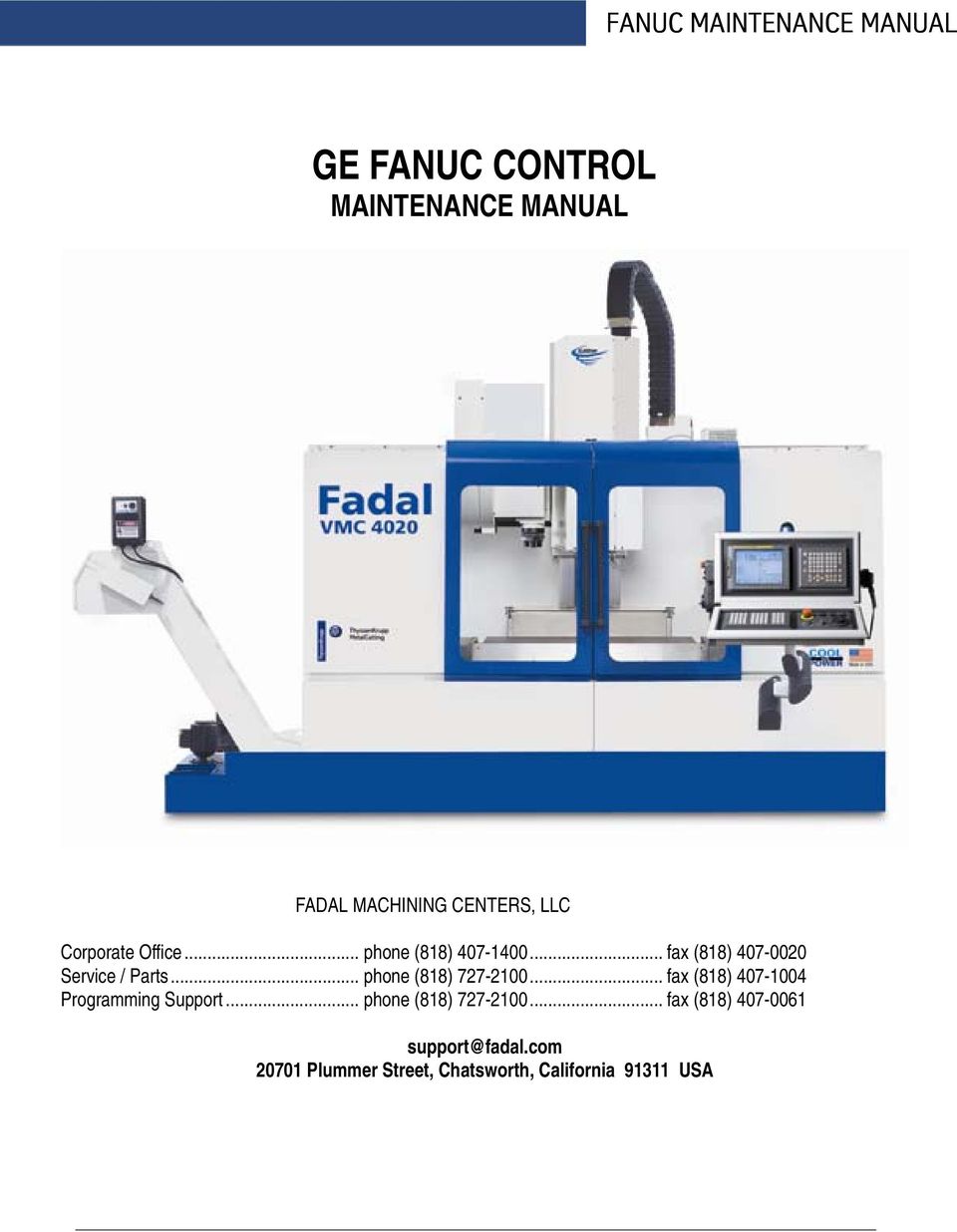
2 FADAL MACHINING CENTERS AUGUST 2005

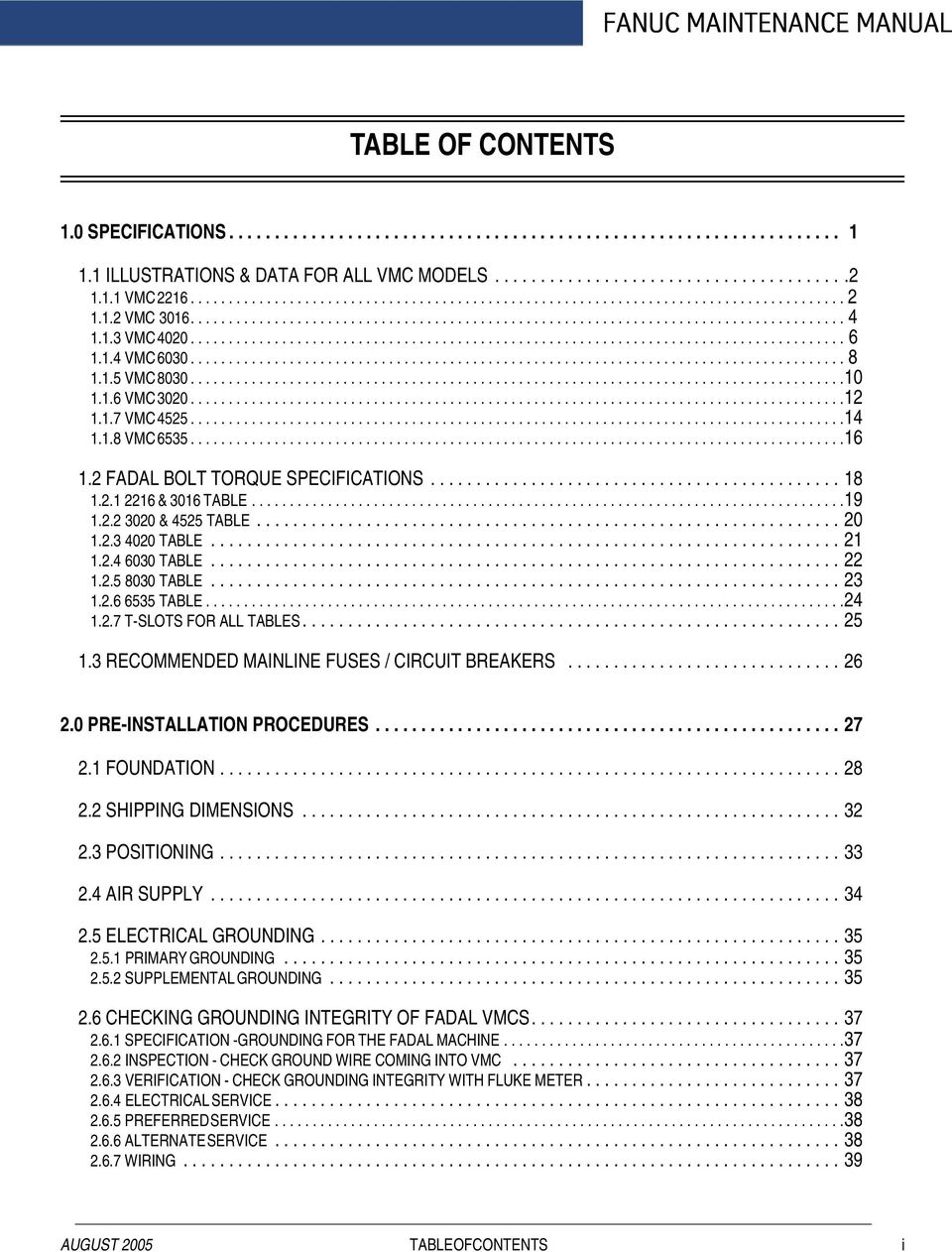
3 TABLE OF CONTENTS 1.0 SPECIFICATIONS ILLUSTRATIONS & DATA FOR ALL VMC MODELS VMC VMC VMC VMC VMC VMC VMC VMC FADAL BOLT TORQUE SPECIFICATIONS & 3016 TABLE & 4525 TABLE TABLE TABLE TABLE TABLE T-SLOTS FOR ALL TABLES RECOMMENDED MAINLINE FUSES / CIRCUIT BREAKERS PRE-INSTALLATION PROCEDURES FOUNDATION SHIPPING DIMENSIONS POSITIONING AIR SUPPLY ELECTRICAL GROUNDING PRIMARY GROUNDING SUPPLEMENTAL GROUNDING CHECKING GROUNDING INTEGRITY OF FADAL VMCS SPECIFICATION -GROUNDING FOR THE FADAL MACHINE INSPECTION - CHECK GROUND WIRE COMING INTO VMC VERIFICATION - CHECK GROUNDING INTEGRITY WITH FLUKE METER ELECTRICAL SERVICE PREFERRED SERVICE ALTERNATE SERVICE WIRING AUGUST 2005 TABLE OF CONTENTS i
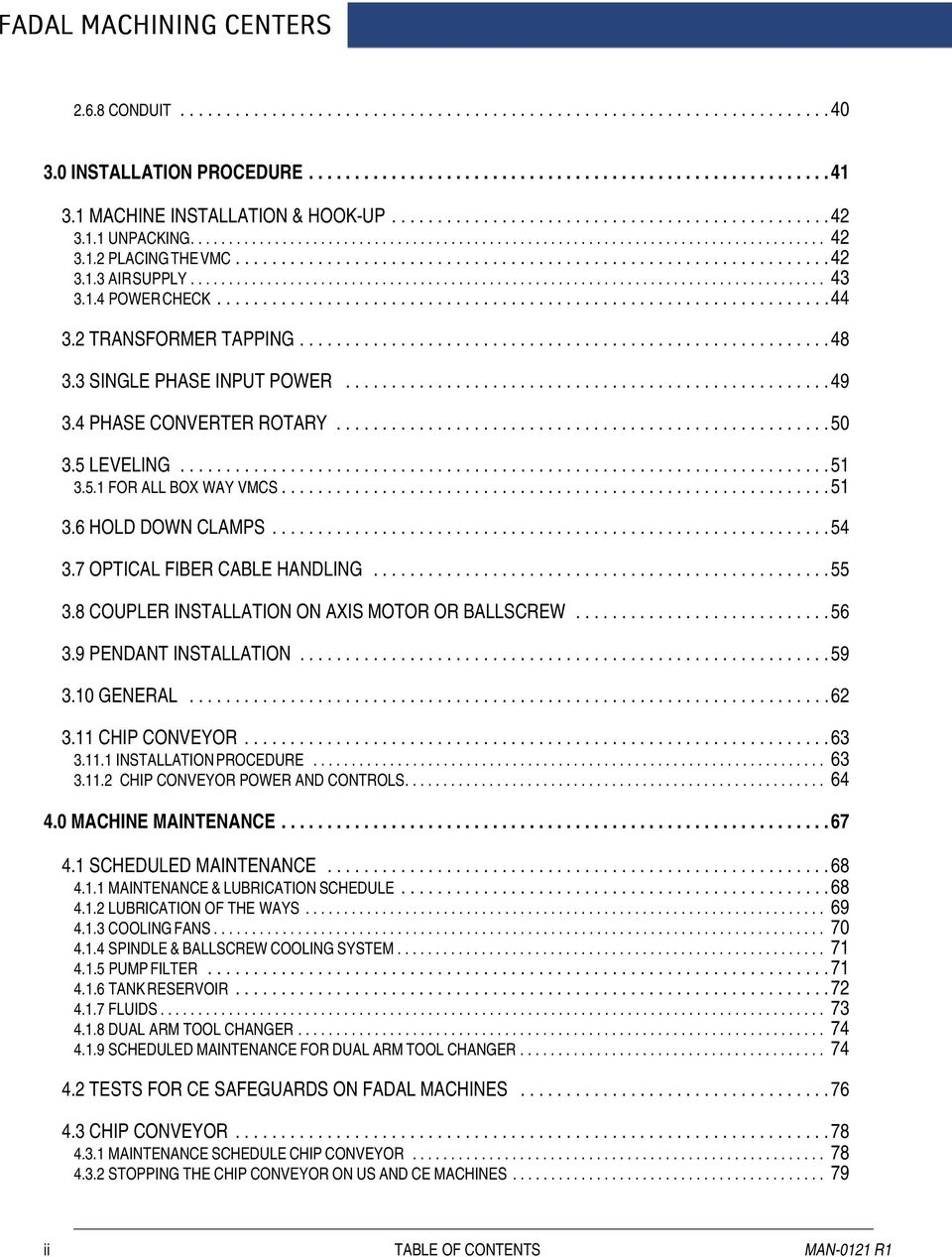
4 FADAL MACHINING CENTERS CONDUIT INSTALLATION PROCEDURE MACHINE INSTALLATION & HOOK-UP UNPACKING PLACING THE VMC AIR SUPPLY POWER CHECK TRANSFORMER TAPPING SINGLE PHASE INPUT POWER PHASE CONVERTER ROTARY LEVELING FOR ALL BOX WAY VMCS HOLD DOWN CLAMPS OPTICAL FIBER CABLE HANDLING COUPLER INSTALLATION ON AXIS MOTOR OR BALLSCREW PENDANT INSTALLATION GENERAL CHIP CONVEYOR INSTALLATION PROCEDURE CHIP CONVEYOR POWER AND CONTROLS MACHINE MAINTENANCE SCHEDULED MAINTENANCE MAINTENANCE & LUBRICATION SCHEDULE LUBRICATION OF THE WAYS COOLING FANS SPINDLE & BALLSCREW COOLING SYSTEM PUMP FILTER TANK RESERVOIR FLUIDS DUAL ARM TOOL CHANGER SCHEDULED MAINTENANCE FOR DUAL ARM TOOL CHANGER TESTS FOR CE SAFEGUARDS ON FADAL MACHINES CHIP CONVEYOR MAINTENANCE SCHEDULE CHIP CONVEYOR STOPPING THE CHIP CONVEYOR ON US AND CE MACHINES ii TABLE OF CONTENTS MAN-0121 R1
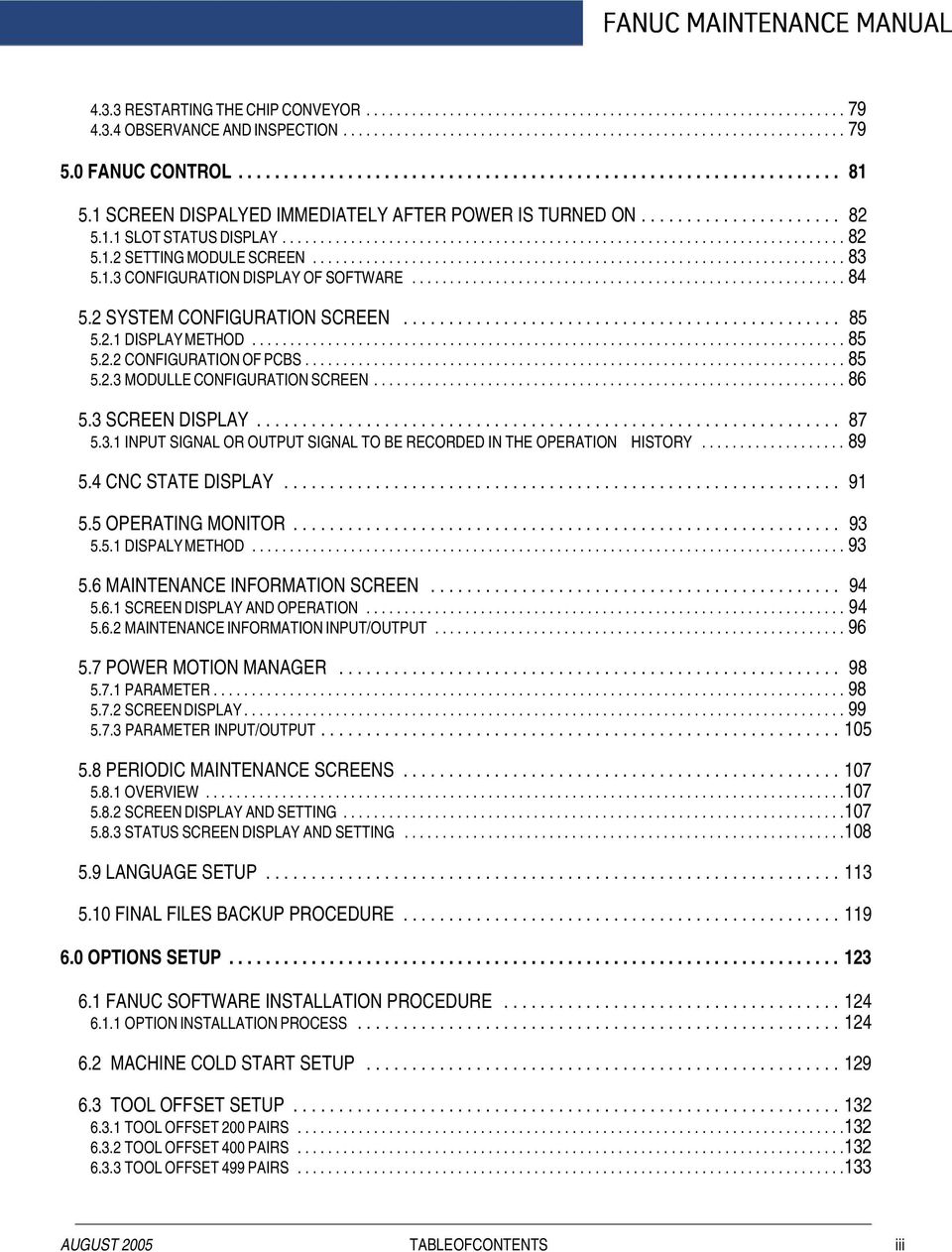
5 4.3.3 RESTARTING THE CHIP CONVEYOR OBSERVANCE AND INSPECTION FANUC CONTROL SCREEN DISPALYED IMMEDIATELY AFTER POWER IS TURNED ON SLOT STATUS DISPLAY SETTING MODULE SCREEN CONFIGURATION DISPLAY OF SOFTWARE SYSTEM CONFIGURATION SCREEN DISPLAY METHOD CONFIGURATION OF PCBS MODULLE CONFIGURATION SCREEN SCREEN DISPLAY INPUT SIGNAL OR OUTPUT SIGNAL TO BE RECORDED IN THE OPERATION HISTORY CNC STATE DISPLAY OPERATING MONITOR DISPALY METHOD MAINTENANCE INFORMATION SCREEN SCREEN DISPLAY AND OPERATION MAINTENANCE INFORMATION INPUT/OUTPUT POWER MOTION MANAGER PARAMETER SCREEN DISPLAY PARAMETER INPUT/OUTPUT PERIODIC MAINTENANCE SCREENS OVERVIEW SCREEN DISPLAY AND SETTING STATUS SCREEN DISPLAY AND SETTING LANGUAGE SETUP FINAL FILES BACKUP PROCEDURE OPTIONS SETUP FANUC SOFTWARE INSTALLATION PROCEDURE OPTION INSTALLATION PROCESS MACHINE COLD START SETUP TOOL OFFSET SETUP TOOL OFFSET 200 PAIRS TOOL OFFSET 400 PAIRS TOOL OFFSET 499 PAIRS AUGUST 2005 TABLE OF CONTENTS iii
6 FADAL MACHINING CENTERS TOOL OFFSET 999 PAIRS MULTI STEP SKIP OPTION SETUP PROCEDURE FOR K BITS MACHINE TIME STAMP MOUNTING AND REMOVING OPTION BOARD MOUNTING AND REMOVING MAIN CPU BOARD AND FULL-SIZE OPTION BOARD MOUNTING AND REMOVING A MINI SLOT OPTION BOARD (EXCEPT DEVICENET BOARD) MOUNTING AND REMOVING THE BACK PANEL REPLACING THE FUSE OF THE CONTROL UNIT REPLACING THE BATTERY REPLACING A FAN UNIT REPLACING THE FUSE OF LCD UNIT REPLACING THE LCD BACKLIGHT HEAT GENERATION OF THE UNITS AUTOMATIC TOOL CHANGERS OPERATION PROGRAMMING TOOL CHANGE SEQUENCE ATC FAULT MESSAGES ADJUSTMENTS Z AXIS COLD START ADJUSTMENT SPRING CONFIGURATION 16, 21 & 30 TOOL CHANGERS ATC TURRET SLIDE ADJUSTMENT TOOL TURRET ROTATIONAL ADJUSTMENT ATC MOTOR REPLACEMENT PROCEDURE REPLACING THE TURRET MOTOR ON A GENEVA WHEEL ATC TURRET FACTOR SETTING PULLEY ALIGNMENT DUAL ARM TOOL CHANGER TOOL CHANGER SPECIFICATIONS SUB-ASSEMBLIES INSTALLATION & TESTING SCHEDULED MAINTENANCE DATC TOOL CHANGER ADJUSTMENT PROCEDURE TAPER DUAL ARM TOOL CHANGER TOOL CHANGER SPECIFICATIONS SUB-ASSEMBLIES INSTALLATION INSTALLATION NOTICE TROUBLESHOOTING MAINTENANCE iv TABLE OF CONTENTS MAN-0121 R1

7 7.6.7 DUAL ARM TOOL CHANGER - ARM INSTALLATION INSERTING THE ARM ASSEMBLY DUAL ARM TOOL CHANGER ALIGNMENT AXES DRIVE SYSTEM ROTARY TABLES, 4TH AXIS PRE-INSTALLATION REMOVE THE ROTARY TABLE FROM THE SHIPPING CRATE INSTALLATION SQUARING THE VH SETTING THE VH-65 WORM GEAR BACKLASH MAINTENANCE GEAR OIL COOLANT FACE PLATE SERIALIZED MATCHED SETS A & B AXIS SETUP DIGITAL AXIS DRIVE SYSTEM SETUP BACKLASH PROCEDURE WORK COORDINATE SETUP CONTROL AXIS DETACH SETUP PALLET CHANGER INSTALLATION OF PALLET CHANGER INSTALLATION OF LIGHT CURTAIN MIRROR ALIGNMENT SETTING THE SENSOR ON THE 1840 BOARD PURPOSE OPERATION PALLETS M-FUNCTIONS MAINTENANCE SCHEDULE EACH PART CYCLE DAILY MAINTENANCE WEEKLY MAINTENANCE MONTHLY MAINTENANCE MIDACO PALLET CHANGER REQUIREMENTS MAINTENANCE PALLET AUGUST 2005 TABLE OF CONTENTS v

8 FADAL MACHINING CENTERS 10.0 SPINDLE DRIVE SYSTEMS BELT DRIVE SYSTEMS POSI-DRIVE BELT SYSTEM MOTOR PLATE TENSIONER CABLE HYDRAULIC HI/LOW SYSTEM ,500 RPM POLY CHAIN BELT TOOLS STICKING IN THE SPINDLE DURING A CHANGE CYCLE AIR SUPPLY PRESSURE DRAWBAR CYLINDER HALL EFFECTS SWITCH INSUFFICIENT AIR VOLUME: MAC IN-LINE VALVE AIR LEAKS: EXHAUST VALVE AIR LEAKS: EXHAUST VALVE NIPPLE AIR LEAKS: DRAWBAR CYLINDER BUSHING AIR LEAKS; DRAWBAR CYLINDER PLATE AIR LEAKS: HYDRAULIC ACTUATOR ASSEMBLY BOLTS AIR LEAKS; COOLANT-THRU DRAWBAR CYLINDER ORIENTATION BRIDGE "LIFTING" BLACK OXIDE TOOL HOLDERS DIRTY TOOL HOLDERS SPRING PILOT: OVERSIZED DIAMETER SPRING PILOT: BALL POCKETS INCORRECT DRAWBAR SCORED DAMAGED DRAWBAR DAMAGED FLOATER TESTING PROCEDURE MEASURING DRAWBAR PERFORMANCE DRB-0024 STICKING TOOLS KIT, 10K LDB, DRB-0025 STICKING TOOLS KIT, 10K LDB-CT= SPINDLE DRAWBAR AND BELLEVILLE SPRING REPLACEMENT DRAWBAR REMOVAL REPLACE BELLEVILLE SPRINGS REMOVE FLOATER SPINDLE PRE-LOAD MEASURING THE SPINDLE PRE-LOAD SPINDLE DUTY CYCLE AIR POSITIVE FLOW SYSTEM SPINDLES K GREASE PACKED SPINDLES K AIR/OIL SPINDLE SPINDLE/LUBE PUMP/CONTROL COMPONENT INSTALLATION SPINDLE TRAM ADJUSTING SPINDLE TRAM K AIR/OIL SPINDLE INSTALLATION PLUMBING SPINDLE vi TABLE OF CONTENTS MAN-0121 R1
9 INSTALL COMPONENT PLUMBING TAPER BT & CAT PULL STUDS FUSES REPLACING THE FUSE OF LCD UNIT PANEL FUSES REPLACING THE FUSE OF THE CONTROL UNIT REPLACING FUSES ON VARIOUS UNITS GENERAL INFORMATION HELPFUL FORMULAS TEMPERATURE CONVERSION FACTORS ELECTRICAL REFERENCES EXPANSION COEFFICIENTS THERMAL EXPANSION OVERVIEW RECOGNIZING THERMAL EXPANSION ACCURACY AND REPEATABILITY EXPANSION COEFFICIENTS HEAT SOURCES FRICTION AMBIENT TEMPERATURE MACHINING PRACTICES NON-UNIFORM EXPANSION MATERIAL DIFFERENCES FIXTURES / SUB PLATES MACHINE ASSEMBLIES SOLVING THE THERMAL EXPANSION PROBLEM GENERAL CONSIDERATIONS AMBIENT SOURCES READING STATUS GROUP VMC MAINTENANCE CABINET FANS LUBRICATION MACHINING PRACTICES VMC OPTIONS CONCLUSION INDEX AUGUST 2005 TABLE OF CONTENTS vii

10 FADAL MACHINING CENTERS viii TABLE OF CONTENTS MAN-0121 R1

11 1.0 SPECIFICATIONS This section provides dimensions/specifications of machines (VMCs 2216, 3016, 4020, 6030, 8030, 3020, 4525, and 6535). Dimensions represent in inches and millimeters. AUGUST 2005 SPECIFICATIONS 1
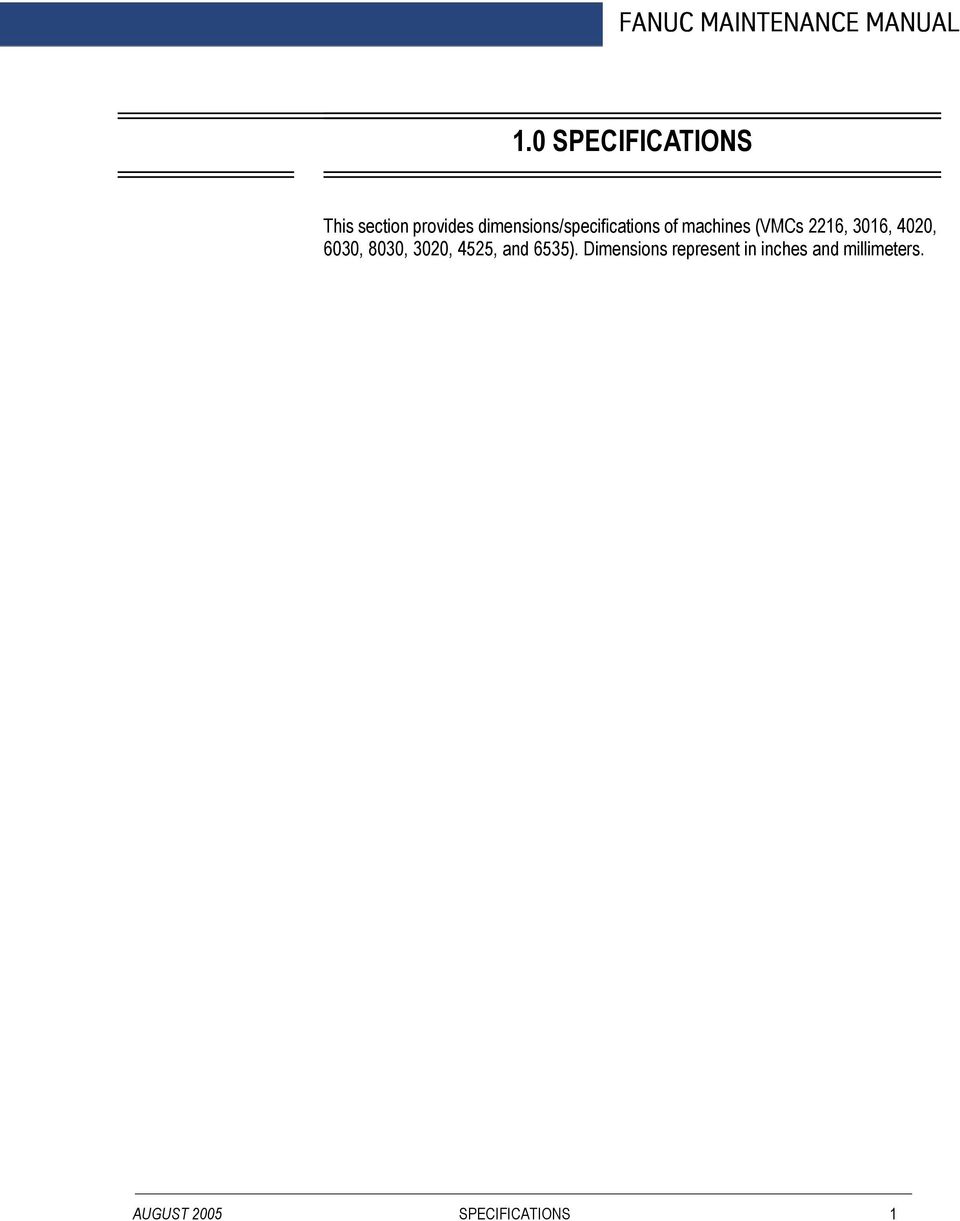
12 FADAL MACHINING CENTERS 1.1 ILLUSTRATIONS & DATA FOR ALL VMC MODELS VMC 2216 Figure 1-1: VMC 2216 NOTE Dimensions represented in inches and [millimeters]. 2 SPECIFICATIONS MAN-0121 R1
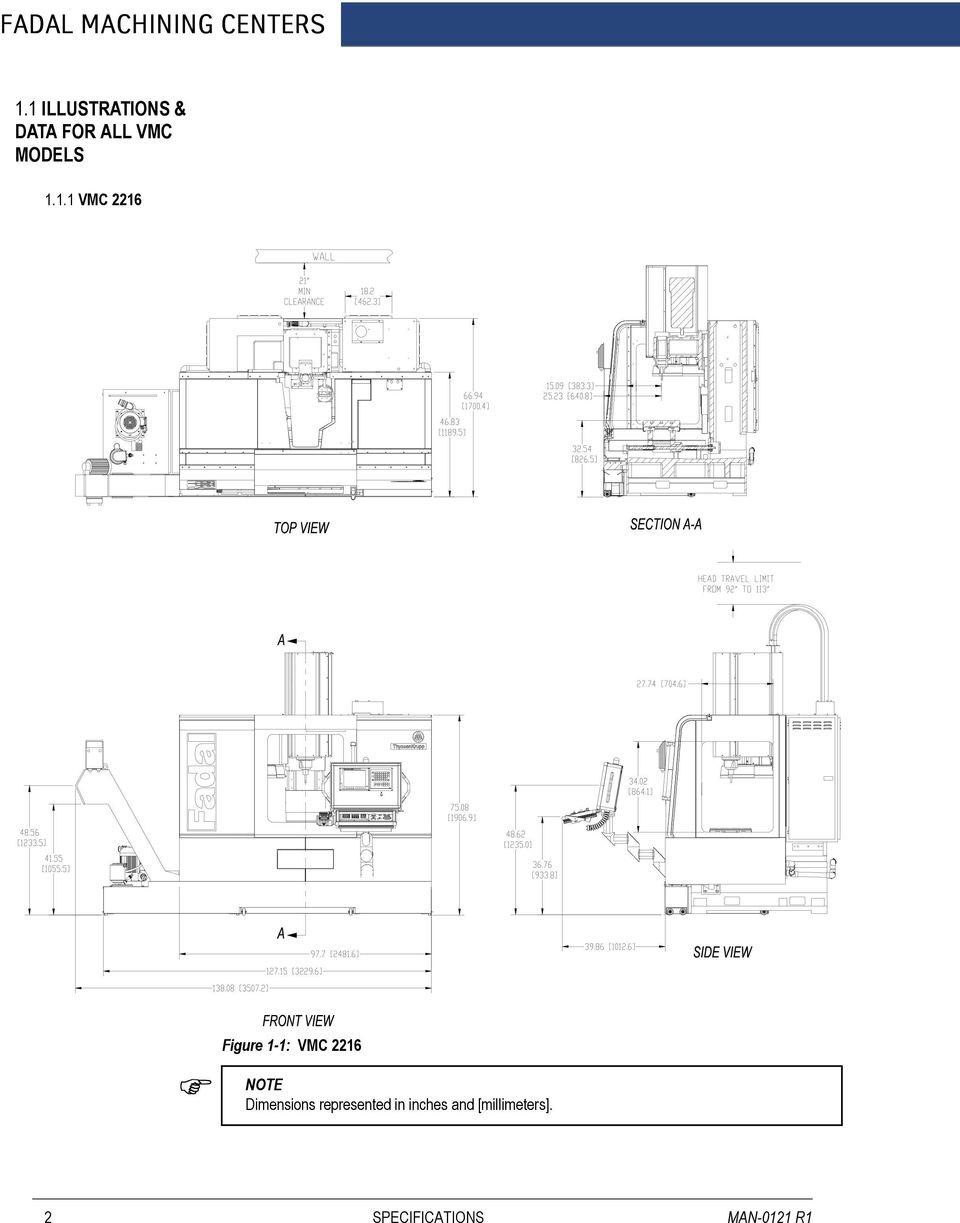
13 *Rated Peak Value Table 1-1: VMC 2216 Specifications 2216 SPECIFICATIONS 2216 STANDARD 2216 METRIC Table Size 39" x 16" 750 mm x 406 mm Floor to Table 31" 787 mm T-Slots (No. x Width x Span) 3 x.562" x 4.33" 3 x 14 mm x 110 mm Cutting Feed Rate ipm 150%).25-10,160 (15,240 at 150%) mm/min. Rapid Feed Rate (X/Y/Z) 900 ipm (X/Y) 700 ipm (Z) 22.8 m/min. (X,Y) 17.7 m/min (Z) Max. Weight on Table 2,006 lbs. 991 kg. Axis Drive Motor (X/Y/Z)* AC, 3,800 lbs AC, N* thrust Ball Screw Size 40mm Dia. (X/Y/Z) Longitudinal (X Axis) 22" 559 mm Cross (Y Axis) 16" 406 mm Vertical (Z Axis) 20" (28" Opt.) 508 mm (711 mm Opt.) Spindle Nose to Table 4"-24" (4"-32" Opt.) 102 mm-610 mm (102 mm-813 mm) Spindle Center to Column Ways 16" 406 mm Main Motor - Automatic 2 Speed Vector 15 HP*, 11.2 KW Opt. HT Motor - Automatic 2 Speed Vector 22.5 HP*, 16.8 KW Torque 160 ft-lbs, 220 ft-lbs (HT) 220 Nm/300 Nm Accuracy, Axis Positioning ±.0002".0050 mm Accuracy, Axis Repeatability ±.0001".0025 mm Glass Scales (X/Y/Z) Optional Spindle Speed 10-10,000 rpm (15,000 Opt.) Spindle Orientation Electromechanical Spindle Taper No. 40 ATC, Number of Tools 21 ATC, Tool Selection Random, Bi-directional Max. Tool Diameter 3" (4.5" w/o adjacent tools) 76mm (114 mm w/o adjacent tools) Max. Tool Length 15" 381 Max. Tool Weight 15 lbs. 6.8 kg Machine Width and Depth 98" W x 67" D (w/o chip conveyor or 21 wall clearance) mm W x mm D (w/o chip conveyor or 21 wall clearance) Machine Maximum Height 113" mm Machine Weight 8,600 lbs. (w/o chip conveyor) kg (w/o chip conveyor) Air Pressure Reqs. (Momentary) 120 psi, 15 scfm 5.5 Bar Power Reqs. (3-phase) 40/45 amps, 230 VAC Single Phase (Optional) 60 amps, 230 VAC Cool Power System Spindle, Headstock, Ballscrews Ball Screw Supports (X/Y/Z) dual No. of Ground Boxways per Axis (X/Y/Z) 2 AUGUST 2005 SPECIFICATIONS 3

14 FADAL MACHINING CENTERS VMC 3016 Figure 1-2: VMC 3016 NOTE Dimensions represented in inches and [millimeters]. 4 SPECIFICATIONS MAN-0121 R1

15 *Rated Peak Value Table 1-2: VMC 3016 Specifications 3016 SPECIFICATIONS 3016 STANDARD 3016 METRIC Table Size 39" x 16" 750 mm x 406 mm Floor to Table 31" 787 mm T-Slots (No. x Width x Span) 3 x.562" x 4.33" 3 x 14 mm x 110 mm Cutting Feed Rate ipm 150%).25-10,160 (15,240 at 150%) mm/min. Rapid Feed Rate (X/Y/Z) 900 ipm (X/Y) 700 ipm (Z) 22.8 m/min. (X,Y) 17.7 m/min (Z) Max. Weight on Table 2,736 lbs. 1,241 kg. Axis Drive Motor (X/Y/Z) AC, 3,800 lbs peak thrust AC, N* thrust Ball Screw Size 40mm Dia. (X/Y/Z) Longitudinal (X Axis) 30" 762 mm Cross (Y Axis) 16" 406 mm Vertical (Z Axis) 20" (28" Opt.) 508 mm (711 mm Opt.) Spindle Nose to Table 4"-24" (4"-32" Opt.) 102 mm-610 mm (102 mm-813 mm) Spindle Center to Column Ways 16" 406 mm Main Motor - Automatic 2 Speed Vector 15 HP*, 11.2 KW Opt. HT Motor - Automatic 2 Speed Vector 22.5 HP*, 16.8 KW Torque 160 ft-lbs, 220 ft-lbs (HT) 220 Nm/300 Nm Accuracy, Axis Positioning ±.0002".0050 mm Accuracy, Axis Repeatability ±.0001".0025 mm Glass Scales (X/Y/Z) Optional Spindle Speed 10-10,000 rpm (15,000 Opt.) Spindle Orientation Electromechanical Spindle Taper No. 40 ATC, Number of Tools 21 ATC, Tool Selection Random, Bi-directional Max. Tool Diameter 3" (4.5" w/o adjacent tools) 76 mm (114 mm w/o adjacent tools) Max. Tool Length 15" 381mm Max. Tool Weight 15 lbs. 6.8 kg Machine Width and Depth 98" W x 67" D (w/o chip conveyor or 21 wall clearance) mm W x mm D (w/o chip conveyor or 21 wall clearance) Machine Maximum Height 113" mm Machine Weight 8,600 lbs. (w/o chip conveyor) kg (w/o chip conveyor) Air Pressure Reqs. (Momentary) 120 psi, 15 scfm 5.5 Bar Power Reqs. (3-phase) 40/45 amps, 230 VAC (20/ VAC) Single Phase (Optional) 60 amps, 230 VAC Cool Power System Spindle, Headstock, Ballscrews Ball Screw Supports (X/Y/Z) dual No. of Ground Boxways per Axis (X/Y/Z) 2 AUGUST 2005 SPECIFICATIONS 5
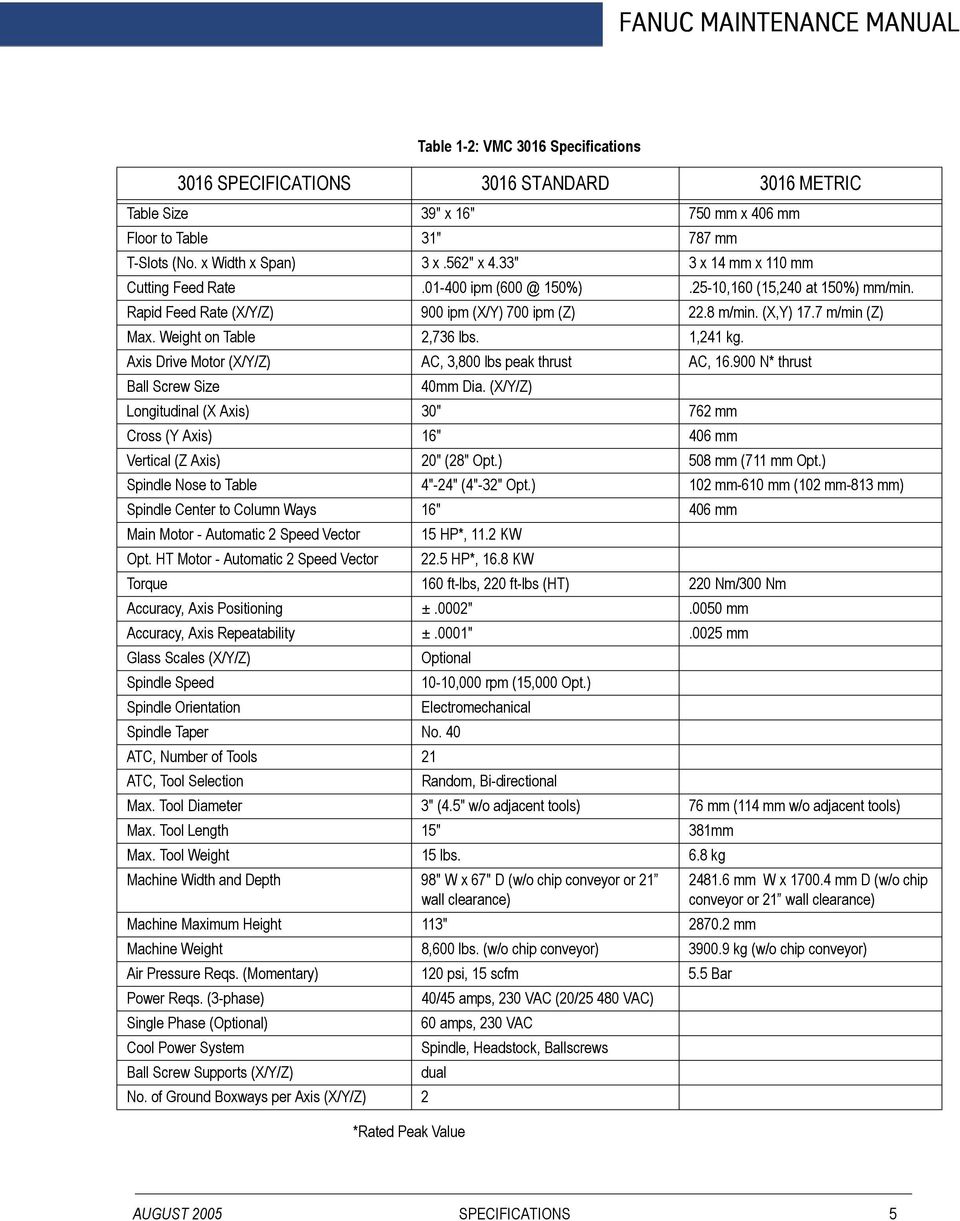
16 FADAL MACHINING CENTERS VMC 4020 Figure 1-3: VMC 4020 NOTE Dimensions represented in inches and [millimeters]. Optional Very High Torque Motor 30 Peak Horsepower, 32 Amps continuous current in WYE mode, 56, Amps continuous current in DELTA mode, Peak current may run as high as 70 Amps. 6 SPECIFICATIONS MAN-0121 R1
![[millimeters].](/docs-images/41/15002019/images/page_16.jpg "Optional Very High Torque Motor 30 Peak Horsepower, 32 Amps continuous current")
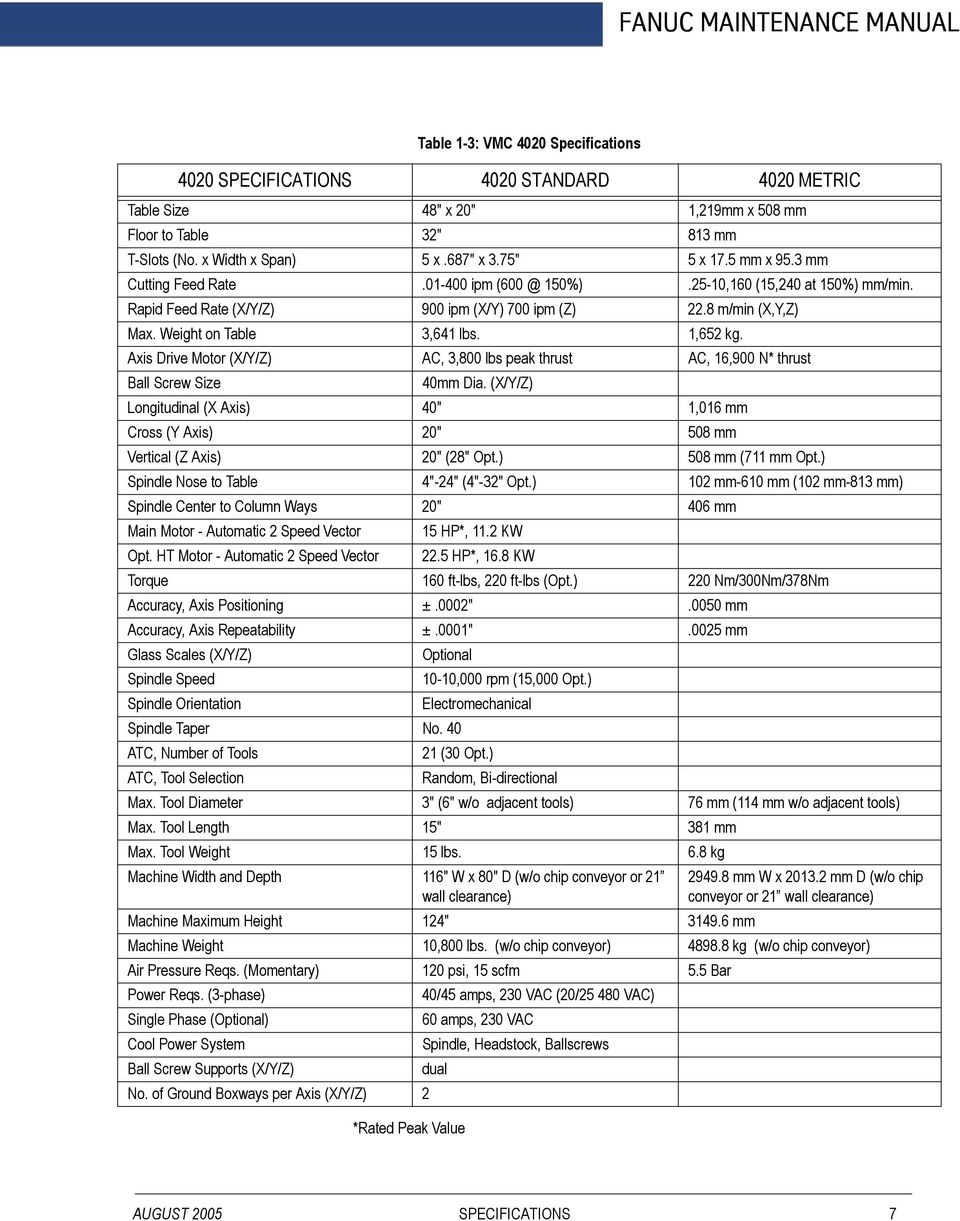
17 *Rated Peak Value Table 1-3: VMC 4020 Specifications 4020 SPECIFICATIONS 4020 STANDARD 4020 METRIC Table Size 48" x 20" 1,219mm x 508 mm Floor to Table 32" 813 mm T-Slots (No. x Width x Span) 5 x.687" x 3.75" 5 x 17.5 mm x 95.3 mm Cutting Feed Rate ipm 150%).25-10,160 (15,240 at 150%) mm/min. Rapid Feed Rate (X/Y/Z) 900 ipm (X/Y) 700 ipm (Z) 22.8 m/min (X,Y,Z) Max. Weight on Table 3,641 lbs. 1,652 kg. Axis Drive Motor (X/Y/Z) AC, 3,800 lbs peak thrust AC, 16,900 N* thrust Ball Screw Size 40mm Dia. (X/Y/Z) Longitudinal (X Axis) 40" 1,016 mm Cross (Y Axis) 20" 508 mm Vertical (Z Axis) 20" (28" Opt.) 508 mm (711 mm Opt.) Spindle Nose to Table 4"-24" (4"-32" Opt.) 102 mm-610 mm (102 mm-813 mm) Spindle Center to Column Ways 20" 406 mm Main Motor - Automatic 2 Speed Vector 15 HP*, 11.2 KW Opt. HT Motor - Automatic 2 Speed Vector 22.5 HP*, 16.8 KW Torque 160 ft-lbs, 220 ft-lbs (Opt.) 220 Nm/300Nm/378Nm Accuracy, Axis Positioning ±.0002".0050 mm Accuracy, Axis Repeatability ±.0001".0025 mm Glass Scales (X/Y/Z) Optional Spindle Speed 10-10,000 rpm (15,000 Opt.) Spindle Orientation Electromechanical Spindle Taper No. 40 ATC, Number of Tools 21 (30 Opt.) ATC, Tool Selection Random, Bi-directional Max. Tool Diameter 3" (6" w/o adjacent tools) 76 mm (114 mm w/o adjacent tools) Max. Tool Length 15" 381 mm Max. Tool Weight 15 lbs. 6.8 kg Machine Width and Depth 116" W x 80" D (w/o chip conveyor or 21 wall clearance) mm W x mm D (w/o chip conveyor or 21 wall clearance) Machine Maximum Height 124" mm Machine Weight 10,800 lbs. (w/o chip conveyor) kg (w/o chip conveyor) Air Pressure Reqs. (Momentary) 120 psi, 15 scfm 5.5 Bar Power Reqs. (3-phase) 40/45 amps, 230 VAC (20/ VAC) Single Phase (Optional) 60 amps, 230 VAC Cool Power System Spindle, Headstock, Ballscrews Ball Screw Supports (X/Y/Z) dual No. of Ground Boxways per Axis (X/Y/Z) 2 AUGUST 2005 SPECIFICATIONS 7
18 FADAL MACHINING CENTERS VMC 6030 Figure 1-4: VMC 6030 NOTE Dimensions represented in inches & [millimeters]. Optional Very High Torque Motor 30 Peak Horsepower, 32 Amps continuous current in WYE mode, 56 Amps continuous current in DELTA mode, Peak current may run as high as 70 Amps. 8 SPECIFICATIONS MAN-0121 R1
![[millimeters].](/docs-images/41/15002019/images/page_18.jpg "Optional Very High Torque Motor 30 Peak Horsepower, 32 Amps continuous current")
19 *Rated Peak Value Table 1-4: VMC 6030 Specifications 6030 SPECIFICATIONS 6030 STANDARD 6030 METRIC Table Size 62.5 x 30" 1,588mm x 762 mm Floor to Table 36" 914 mm T-Slots (No. x Width x Span) 5 x.687" x 5.5" 5 x 17.5 mm x mm Cutting Feed Rate ipm 150%).25-6,350 (9,525 at 150%) mm/min. Rapid Feed Rate (X/Y/Z) 400 ipm (X/Y/Z) 10.1 m/min (X,Y,Z) Max. Weight on Table 4,120 lbs. 1,869 kg. Axis Drive Motor (X/Y/Z) AC, 5,000 lbs peak thrust AC, 22,420 N* thrust Ball Screw Size 1.75" Dia. (X/Y) 1.50" Dia. (Z) mm Dia (X,Y) 38.1 mm Dia. (Z) Longitudinal (X Axis) 60" 1,524 mm Cross (Y Axis) 30" 762 mm Vertical (Z Axis) 30" 762 mm Spindle Nose to Table 5.5"-35.5" 140 mm-902 mm Spindle Center to Column Ways 16" 406 mm Main Motor - Automatic 2 Speed Vector 15 HP*, 11.2 KW Opt. HT Motor - Automatic 2 Speed Vector 22.5 HP*, 16.8 KW Torque 160 ft.-lbs, 220 ft-lbs (Opt.) 300 Nm/375Nm Accuracy, Axis Positioning ±.0004".0076 mm Accuracy, Axis Repeatability ±.0002".0038 mm Glass Scales (X/Y/Z) Optional Spindle Speed 10-10,000 rpm Spindle Orientation Electromechanical Spindle Taper No. 40 ATC, Number of Tools 21 (30 Opt.) ATC, Tool Selection Random, Bi-directional Max. Tool Diameter 3" (4.5" w/o adjacent tools) 76 mm (114 mm w/o adjacent tools) Max. Tool Length 15" 381mm Max. Tool Weight 15 lbs. 6.8 kg Machine Width and Depth 158" W x 93" D (w/o chip conveyor and 21 wall clearance) mm x mm D (w/o chip conveyor and 21 wall clearance) Machine Maximum Height 141" mm Machine Weight 17,300 lbs. (w/o chip conveyor) kg (w/o chip conveyor) Air Pressure Reqs. (Momentary) 120 psi, 15 scfm 5.5 Bar Power Reqs. (3-phase) 40/45, 230 VAC (20/25, 480 VAC) Single Phase (Optional) 60 amps, 230 VAC Cool Power System Spindle, Headstock, Ballscrew (Y) Ball Screw Supports (X/Y/Z) dual No. of Ground Boxways per Axis (X/Y/Z) 2 AUGUST 2005 SPECIFICATIONS 9

20 FADAL MACHINING CENTERS VMC 8030 Figure 1-5: VMC 8030 NOTE Dimensions represented in inches & [millimeters]. Optional Very High Torque Motor 30 Peak Horsepower, 32 Amps continuous current in WYE mode, 56 Amps continuous current in DELTA mode, Peak current may run as high as 70 Amps. 10 SPECIFICATIONS MAN-0121 R1
![[millimeters].](/docs-images/41/15002019/images/page_20.jpg "Optional Very High Torque Motor 30 Peak Horsepower, 32 Amps continuous current")
21 *Rated Peak Value Table 1-5: VMC 8030 Specifications 8030 SPECIFICATIONS 8030 STANDARD 8030 METRIC Table Size 82.5" x 30" 2,096 mm x 762 mm Floor to Table 36" 914 mm T-Slots (No. x Width x Span) 5 x.687" x 5.5" 5 x 17.5 mm x mm Cutting Feed Rate ipm 150%).25-6,350 (9,525 at 150% )mm/min. Rapid Feed Rate (X/Y/Z) 400 ipm (X/Y/Z) 10.1 m/min (X,Y,Z) Max. Weight on Table 3,751 lbs. 1,701 kg. Axis Drive Motor (X/Y/Z) AC, 5,000 lbs peak thrust AC, 22,420 N* thrust Ball Screw Size 1.75" Dia. (X/Y) 1.50" Dia. (Z) mm Dia (X,Y) 38.1 mm Dia. (Z) Longitudinal (X Axis) 80" 2,032 mm Cross (Y Axis) 30" 762 mm Vertical (Z Axis) 30" 76 2mm Spindle Nose to Table 5.5"-35.5" 140 mm-902 mm Spindle Center to Column Ways 16" 406 mm Main Motor - Automatic 2 Speed Vector 15 HP*, 11.2 KW Opt. HT Motor - Automatic 2 Speed Vector 22.5 HP*, 16.8 KW Torque 160 ft-lbs, 220 ft-lbs (Opt.) 300 Nm/375 Nm Accuracy, Axis Positioning ±.0004".0076 mm Accuracy, Axis Repeatability ±.0002".0038 mm Glass Scales (X/Y/Z) Optional Spindle Speed 10-10,000 rpm (15,000 Opt.) Spindle Orientation Electromechanical Spindle Taper No. 40 ATC, Number of Tools 21 (30 Opt.) ATC, Tool Selection Random, Bi-directional Max. Tool Diameter 6" 152 mm Max. Tool Length 15" 381 Max. Tool Weight 15 lbs. 6.8 kg Machine Width and Depth 208" W x 93" D (w/o chip conveyor and 21 wall clearance) mm W x mm D (w/o chip conveyor and 21 wall clearance) Machine Maximum Height 141" mm Machine Weight 18,300 lbs. (w/o chip conveyor) kg (w/o chip conveyor) Air Pressure Reqs. (Momentary) 120 psi, 15 scfm 5.5 Bar Power Reqs. (3-phase) 45 amps, 230 VAC (20/25 amps, 480 VAC) Single Phase (Optional) 60 amps, 230 VAC Cool Power System Spindle, Headstock, Ballscrew (Y) Ball Screw Supports (X/Y/Z) dual No. of Ground Boxways per Axis (X/Y/Z) 2 AUGUST 2005 SPECIFICATIONS 11
22 FADAL MACHINING CENTERS VMC 3020 Figure 1-6: VMC 3020 NOTE Table and head shown at cold start position. Top of head cover at cold start position. Add 18 for max operating height. Subtract 2 for install height. Dimensions represented in inches & [millimeters]. Optional Very High Torque Motor 30 Peak Horsepower, 32 Amps continuous current in WYE mode, 56 Amps continuous current in DELTA mode, Peak current may run as high as 70 Amps. 12 SPECIFICATIONS MAN-0121 R1
23 *Rated Peak Value Table 1-6: VMC 3020 Specifications 3020 SPECIFICATIONS 3020 STANDARD 3020 METRIC Table Size 40.5" x 20" 1,029 mm x 508 mm Floor to Table 31" 787 mm T-Slots (No. x Width x Span) 5 x.709" x 3.75" 5 x 18 mm x 95.3 mm Cutting Feed Rate ipm ( %).25-10,160 (15,240 at 150%) Rapid Feed Rate (X/Y/Z) 900 ipm (X/Y) 700 ipm (Z) 30.5(X,Y) 17.8(Z) m/min Max. Weight on Table 4,250 lbs. 1,928 kg Axis Drive Motor (X/Y/Z) AC 3,800 lbs peak thrust AC, 16,903 N*thrust. Ball Screw Size 40mm Dia. (X/Y/Z) Longitudinal (X Axis) 30" 762 mm Cross (Y Axis) 20" 508 mm Vertical (Z Axis) 20" (24" Opt.) 508 mm (610 mm) Spindle Nose to Table 4"-24" (28" Opt.) 102 mm-61 0mm-(711 mm Opt.) Spindle Center to Column Ways " 581 mm Main Motor - Automatic 2 Speed Vector 15 HP*, 11.2 KW Opt. HT Motor - Automatic 2 Speed Vector 22.5 HP*, 16.8 KW Torque 160 ft-lbs, 290 ft-lbs (Opt.) 300 Nm/375 Nm Accuracy, Axis Positioning ±.0002" ±.004 mm Accuracy, Axis Repeatability ±.0001" ±.0015 mm Glass Scales (X/Y/Z) Optional Spindle Speed 10-10,000 rpm (15,000 Opt.) Spindle Orientation Electromechanical Spindle Taper No. 40 ATC, Number of Tools 21 (30 Opt.) ATC, Tool Selection Random, Bi-directional Max. Tool Diameter 3" (4.5" w/o adjacent tools) 76.2 mm (114.3 mm) Max. Tool Length 15" 381 mm Max. Tool Weight 15 lbs. 6.8 kg Machine Width and Depth 108" W x 85" D (w/o chip conveyor or 21 wall clearance) 2749 mm W x 2156 mm D (w/o chip conveyor or 21 wall clearance) Machine Maximum Height 122" (130" with 22.5 HP Opt.) mm (3302 mm with 22.5hp. Opt) Machine Weight 12,700 lbs. (w/o chip conveyor) kg (w/o chip conveyor) Air Pressure Reqs. (Momentary) 120 psi, 15 scfm 5.5 Bar Power Reqs. (3-phase) 45 amps, 230 VAC (20/25 amps, 480 VAC) Single Phase (Optional) 60 amps, 230 VAC Cool Power System Spindle, Headstock, Ballscrews Ball Screw Supports (X/Y/Z) dual No. of Ground Boxways per Axis (X/Y/Z) 2 AUGUST 2005 SPECIFICATIONS 13
24 FADAL MACHINING CENTERS VMC 4525 Figure 1-7: VMC 4525 NOTE Table and head shown at cold start position. Top of head cover at cold start position. Add 18 for max operating height. Subtract 2 for install height. Dimensions represented in inches & [millimeters]. 14 SPECIFICATIONS MAN-0121 R1
25 *Rated Peak Value Table 1-7: VMC 4525 Specifications 4525 SPECIFICATIONS 4525 STANDARD 4525 METRIC Table Size 53.5" x 25" 1,359mm x 635mm Floor to Table 31" 787mm T-Slots (No. x Width x Span) 5 x.709" x 4.92" 5 x 18mm x 125mm Cutting Feed Rate ipm ( %).25-10,160 (15,240 at 150%) Rapid Feed Rate (X/Y/Z) 900 ipm (X/Y) 700 ipm (Z) 30.5(X,Y) 17.8(Z) m/min Max. Weight on Table 4,250 lbs. 1,928 kg. Axis Drive Motor (X/Y/Z) AC 3,800 lbs peak thrust AC, 16,903 N*thrust. Ball Screw Size 40mm Dia. (X/Y/Z) Longitudinal (X Axis) 45" 1,143 mm Cross (Y Axis) 25" 635mm Vertical (Z Axis) 24" 610 Spindle Nose to Table 4"-24" 102mm-610mm Spindle Center to Column Ways 27.87" 708mm Main Motor - Automatic 2 Speed Vector 22.5 HP*, 16.8 KW Opt. HT Motor - Automatic 2 Speed Vector 30 HP*, 22.4 KW Torque 220 ft-lbs, 270 ft-lbs (Opt.) 300 Nm/375Nm Accuracy, Axis Positioning ±.00016" ±.004mm Accuracy, Axis Repeatability ±.00006" ±.0015mm Glass Scales (X/Y/Z) Optional Spindle Speed 10-10,000 rpm (15,000 Opt.) Spindle Orientation Electromechanical Spindle Taper No. 40 ATC, Number of Tools 1.9 sec dual arm / 24 tools ATC, Tool Selection Random, Bi-directional Max. Tool Diameter 4" (4.5" w/o adjacent tools) 101.6mm (114.3mm) Max. Tool Length 15" 381mm Max. Tool Weight 15 lbs. 6.8 kg Machine Width and Depth 131" W x 90" D (w/o chip conveyor or 21 wall clearance) mm W x mm D (w/o chip conveyor or 21 wall clearance) Machine Maximum Height 133" mm Machine Weight 13,900 lbs. (w/o chip conveyor) kg (w/o chip conveyor) Air Pressure Reqs. (Momentary) 120 psi, 15 scfm 5.5 Bar Power Reqs. (3-phase) 40/60 amps, 230 VAC (20/25 amps, 480 VAC) Single Phase (Optional) 60 amps, 230 VAC Cool Power System Spindle, Headstock, Ballscrews Ball Screw Supports (X/Y/Z) dual No. of Ground Boxways per Axis (X/Y/Z) 2 AUGUST 2005 SPECIFICATIONS 15
26 FADAL MACHINING CENTERS VMC 6535 SIDE VIEW FRONT VIEW TOP VIEW - BASE SCALE 2:1 Figure 1-8: VMC 6535 TOP VIEW NOTE Dimensions represented in inches & [millimeters]. 16 SPECIFICATIONS MAN-0121 R1
27 Table 1-8: VMC 6535 Specifications 6535 SPECIFICATIONS 6535 STANDARD 6535 METRIC Table Size 74.8" x 26.5" 1,899mm x 673.1mm Floor to Table 40.3" 1024mm T-Slots (No. x Width x Span) 5 x.709" x 4.92" 5 x 18mm x 125mm Cutting Feed Rate ipm ( %).25-10,160 (15,240 at 150%) Rapid Feed Rate (X/Y/Z) 900 ipm (X/Y) 700 ipm (Z) 30.5(X,Y) 17.8(Z) m/min Max. Weight on Table 4,250 lbs. 1,928 kg. Axis Drive Motor (X/Y/Z) AC 3,800 lbs peak thrust AC, 16,903 N*thrust. Ball Screw Size 62.2mm Dia. (X/Y/Z) Longitudinal (X Axis) 65" 1,651mm Cross (Y Axis) 35" 889mm Vertical (Z Axis) 34" 864mm Spindle Nose to Table 5"-39" 127mm-991mm Spindle Center to Column Ways 37.4" 950mm Main Motor - Automatic 2 Speed Vector 22.5 HP*, 16.8 KW Opt. HT Motor - Automatic 2 Speed Vector 30 HP*, 22.4 KW Torque 220 ft-lbs, 270 ft-lbs (Opt.) 300 Nm/375Nm Accuracy, Axis Positioning ±.00016" ±.004mm Accuracy, Axis Repeatability ±.00006" ±.0015mm Glass Scales (X/Y/Z) Optional Spindle Speed 10-10,000 rpm (15,000 Opt.),(7,500, 50 tpr.opt.) Spindle Orientation Electromechanical Spindle Taper No. 40 (50 Opt.) ATC, Number of Tools 1.9 sec dual arm / 24 tools (32, 50 tpr. Opt.) ATC, Tool Selection Random, Bi-directional Max. Tool Diameter Ø9.85 Ø250mm Max. Tool Length 15.75" 400mm Max. Tool Weight 40 lbs. 18 kg Machine Width and Depth 219" W x130" D 5.56m W x 3.3m D Machine Maximum Height 133" 3.4m Machine Weight 29,000 lbs. 6,169 kg Air Pressure Reqs. (Momentary) 120 psi, 15 scfm 5.5 Bar Power Reqs. (3-phase) 40/60 amps, 230 VAC (20/25 amps, 480 VAC) Power Reqs. (3-phase) 50 taper 70 amps, 480 VAC Cool Power System Spindle, Ballscrews Ball Screw Supports (X/Y/Z) dual No. of Ground Boxways per Axis (X/Y/Z) 2 *Rated Peak Value AUGUST 2005 SPECIFICATIONS 17
28 FADAL MACHINING CENTERS 1.2 FADAL BOLT TORQUE SPECIFICATIONS Table 1-9: Fadal Bolt Torque Specifications COMPONENT MODEL LOCATION BOLT SIZE TORQUE UNIT COLUMN ALL COLUMN TO BASE 5/8"-11 X X.50 HHB 175 FT-LBS COLUMN ALL COUPLER SET SCREW 1/4"-20 X 0.50 SHSS 70 IN-LBS COLUMN ALL Z B/S MOUNT IN BACK 3/8"-16 X X.XX HHB 45 FT-LBS COLUMN ALL Z B/S MOUNT IN FRONT 1/2"-13 X 2.XX HHB 75 FT-LBS COLUMN ALL Z B/S NUT 5/16"-18 X 1.25 HHB 30 FT-LBS COLUMN ALL Z MOTOR 3/8"-16 X 1.25 SHCS 40 FT-LBS COLUMN ALL Z XT B/S BEARING MOUNT 5/16"-18 X 1.50 HHB 25 FT-LBS COLUMN ALL Z XT B/S BEARING SUPPORT (60/8030) 3/8"-18 X X.XX HHB 40 FT-LBS COLUMN ALL Z XT B/S SUPPORT ADAPTER 5/16"-18 X 1.50 SHCS 15 FT-LBS HEAD ALL SPINDLE 3/8"-16 X 1.00 SHCS 45 FT-LBS HEAD ALL SPINDLE RETAINING RING 3/8"-16 X 1.00 HHB 25 FT-LBS HEAD 7.5K RPM DRAWBAR PISTON 1/4"-20 X 2.00 HHB 15 FT-LBS HEAD 7.5K RPM ORIENTATION BRIDGE (7.5K) 3/8"-16 X 6.00 SHCS 45 FT-LBS HEAD 10K RPM BACK BELT GUIDE 1/2"-13 X 4.00 HHB 70 FT-LBS HEAD 10K RPM HYDRAULIC PISTON 1/4"-20 X 2.00 HHB 15 FT-LBS HEAD 10K RPM ORIENTATION BRIDGE (10K) 5/16"-18 X 6.00 HHB 30 FT-LBS HEAD 10K RPM SPINDLE MOTOR 1/2"-13 X X.XX HHB 65 FT-LBS HEAD 10K RPM SPINDLE MOTOR MOUNT 1/2"-13 X X.XX SHCS 70 FT-LBS HEAD 10K RPM VIBRATION MOUNTS 1/2"-13 X 0.75 SHCS 70 FT-LBS HEAD 10K RPM Z STRAP 3/8"-16 X 1.75 HHB 45 FT-LBS X-Y AXIS ALL SADDLE STRAP 3/8"-16 X 1.75 HHB 45 FT-LBS X-Y AXIS ALL TABLE STRAP 3/8"-16 X 0.75 HHB 45 FT-LBS X-Y AXIS ALL X B/S NUT 5/16"-18 X 1.XX HHB 25 FT-LBS X-Y AXIS ALL X-Y MOTOR 3/8"-16 X 1.XX SHSC 40 FT-LBS X-Y AXIS ALL Y B/S NUT 5/16"-18 X 1.XX SHCS 30 FT-LBS X-Y AXIS 60/8030 TABLE B/S BLOCK MOUNT (60/8030) 3/8"-16 X 3.50 SHCS 40 FT-LBS X-Y AXIS 60/8030 X B/S SUPPORT MOUNT (60/8030) 1/2"-13 X 4.50 HHB 80 FT-LBS X-Y AXIS 60/8030 X MOTOR MOUNT (60/8030) 1/2"-13 X 3.50 HHB 80 FT-LBS X-Y AXIS 60/8030 Y MOTOR MOUNT (60/8030) 3/8"-16 X 1.50 HHB 40 FT-LBS X-Y AXIS 22/30/4020 TABLE B/S BLOCK MOUNT (22/3016) 5/16"-18 X 2.75 SHCS 25 FT-LBS X-Y AXIS 22/30/4020 X B/S SUPPORT MOUNT (22/30/4020) 3/8"-16 X 1.75 HHB 40 FT-LBS X-Y AXIS 22/30/4020 X-Y MOTOR MOUNT (22/30/4020) 1/2"-13 X 3.XX HHB 80 FT-LBS 18 SPECIFICATIONS MAN-0121 R1
29 & 3016 TABLE B C D A E E D Figure 1-9: 2216 & 3016 Table Table 1-10: 2216 & 3016 Table Dimensions VMCS 2216 & 3016 A B C D E 16.00" (406.4 mm) 40.50" ( mm) 36.00" (914.4 mm) 3.67" (93.22 mm) 4.33" ( mm) AUGUST 2005 SPECIFICATIONS 19
30 FADAL MACHINING CENTERS & 4525 TABLE B C D E A E E E F Figure 1-10: 3020 & 4525 Table Table 1-11: 3020 & 4525 Table Dimensions VMC 3020 VMC 4525 A (508 mm) A (635 mm) B ( mm) B ( mm) C ( mm) C ( mm) D (730 mm) D (76.51 mm) E 3.74 (95 mm) E ( mm) F (55 mm) F (58.51 mm) 20 SPECIFICATIONS MAN-0121 R1
31 TABLE B C D E A E E E Figure 1-11: 4020 Table D Table 1-12: 4020 Table Dimensions VMC 4020 A B C D E (508 mm) ( mm) ( mm) 2.52 (64 mm) (95 mm) AUGUST 2005 SPECIFICATIONS 21
32 FADAL MACHINING CENTERS TABLE B C D E A E E E D Figure 1-12: 6030 TABLE Table 1-13: 6030 Table Dimensions VMC 6030 A B C D E (762 mm) ( mm) ( mm) (101 mm) (140 mm) 22 SPECIFICATIONS MAN-0121 R1
33 TABLE B C D E A E E E D Figure 1-13: 8030 Table Table 1-14: 8030 Table Dimensions VMC 8030 A B C D E (762 mm) ( mm) ( mm) (101 mm) (140 mm) AUGUST 2005 SPECIFICATIONS 23
34 FADAL MACHINING CENTERS TABLE B C D E A E E E D Figure 1-14: 6535 Table Table 1-15: 6535 Table Dimensions VMC 6535 A B C D E (889 mm) (1899 mm) (1765 mm) 2.74 (70 mm) 4.92 (125 mm) 24 SPECIFICATIONS MAN-0121 R1
35 1.2.7 T-SLOTS FOR ALL TABLES E G H Figure 1-15: T-Slots for All Tables F METRIC Table 1-16: Metric T-Slot Dimensions for All Tables T-SLOT DIMENSIONS E F G H ( mm mm) (30.22 mm mm) (12.24 mm mm) (32.99 mm) AUGUST 2005 SPECIFICATIONS 25
36 FADAL MACHINING CENTERS 1.3 RECOMMENDED MAINLINE FUSES / CIRCUIT BREAKERS SPINDLE TYPE 208 V 3 PHASE Table 1-17: Circuit Breakers for the New Sheet Metal 240 V 3 PHASE V 3 PHASE 480 V 3 PHASE 240 V SINGLE PHASE 5 HP 30A 30A 30A 30A 50A 10 HP 50A 50A 35A 25A 70A HT 70A 70A 35A 35A 90A VHT N/A 90A 70A N/A N/A 50 Taper N/A N/A 70A 70 A N/A SPINDLE TYPE 208 V 3 PHASE Table 1-18: Electrical Service Circuit Breaker 240 V 3 PHASE V 3 PHASE 480 V 3 PHASE 240 V SINGLE PHASE 5 HP 30 A 30 A 30 A 30 A 50 A 10 HP 50 A 40 A 25 A 25 A 60 A HT 70 A 45 A 35 A 25 A 60 A VHT N/A 90 A 70 A N/A N/A 50-Taper N/A N/A 70 A 70 A N/A NOTE VHT with Fadal control runs only on V. External transformer required for any other voltage. VHT with Siemens Control only runs on 400V. External transformer required for any other voltage. 26 SPECIFICATIONS MAN-0121 R1
37 2.0 PRE-INSTALLATION PROCEDURES AUGUST 2005 PRE-INSTALLATION PROCEDURES 27
38 FADAL MACHINING CENTERS 2.1 FOUNDATION WARNING! The VMC MUST be placed on a surface that will support the combined weight of the VMC, options, fixtures, and tooling, etc. (refer to the VMC Specifications section at the beginning of this manual for VMC weights). 1. It is recommended that most models be placed on a isolated concrete pad 8-12 thick. For VMC 6030 and larger the foundation pad should be (Figure 2-1:, Dimension C). For A and B dimensions, see Table 2-1:Isolation Pad Dimensions. A B #4 REBAR AS SHOWN 5/8 FELT CAULK SEAMS TO SEAL FLOOR TYP. C 5/8 FELT Figure 2-1: Typical Pad Construction 2. The VMC should be positioned on a single slab. Placing the VMC over an expansion joint may cause the VMC to shift when each individual slab moves. 3. The surface below the leveling pads should be free from cracks. Placing the VMC over a crack may cause the VMC to shift during use. Inadequate flooring could result in mechanical degradation. 4. Bolt the VMC directly to the pad through the.953 diameter holes that are provided in the base casting. The dimensions for the base mounting holes of all machines are in the VMC Specifications section (See Specifications, Section 1.0, MAN-0121 R1). Anchors are to be installed as shown below (Figure 2-2: Anchor Stud 28 PRE-INSTALLATION PROCEDURES MAN-0121 R1
39 Installation). For high performance machines, the machine must be bolted to achieve maximum performance. Figure 2-2: Anchor Stud Installation Table 2-1: Isolation Pad Dimensions MACHINE A (DEPTH) B (WIDTH) 2216/ ft 9in 9ft 6in ft 7in 11ft ft 5in 10ft 2in ft 10in 12ft ft 11in 14ft 6in ft 11in 15ft 10in ft 11in 18ft 9in Anchor stud installation: 1. Wear safety goggles. 2. Use 7/8 carbide tipped drill for the anchor you are using. 3. Use a rotary-hammer drill and drill the base material to depth. AUGUST 2005 PRE-INSTALLATION PROCEDURES 29
40 FADAL MACHINING CENTERS 4. Use proper eye and hearing protection while performing this step. Remove dust and rubble from the hole with compressed air and brush. 5. Insert capsule in the hole, either end first. 6. Select proper 1/2 SQ. drive socket and attach to sup-r-setter. 7. Jam nut on stud as per illustration. 8. Using a 1 1/8 socket insert the stud into the hole to break the capsule. 9. Under rotary power, push the stud to full depth, maintaining power for two or three seconds after the stud bottoms. 10. Promptly and carefully release the installation tool from the stud, leaving it undisturbed right through the prescribed curing time consistent with on-site temperature. 11. Install machine. 12. Level machine. 13. Add two flat washers, one lock washer and one nut per threaded rod. 14. Tighten nut, stop when washer gets flat, do not overtighten. 15. Recheck level. Recommended curing time 58ºF to 68ºF 30 MIN 50ºF to 58ºF 1 HR 41ºF to 50ºF 2 HRs 32ºF to 41ºF 4 HRs 23ºF to 32ºF 8 HRs 14ºF to 23ºF 24 HRs Ground should be compacted to 90%. A layer of 3/4 (1 nominal) crushed rock can be applied at 6 thickness for added support. For rebar in all pads, use #4 rebar 18 on center, three inches off the ground. For vibration dampening, 5/8 or thicker felt on all sides is sufficient. If the customer wants to have a larger pad to support several machines, the pads should be or 30 PRE-INSTALLATION PROCEDURES MAN-0121 R1
41 thicker with # 4 rebar 18 on center three inches off the ground. For stress lines in the concrete make sure they are such that they do not go under any of the machines. (If they do, this will eventually defeat the purpose of the pad.) The top of the felt, if used, should be sealed with a caulking compound to prevent oils and coolants from penetrating the ground. (Compound must be resistant to oils and coolants of course). A recommended product is Volcum. Concrete to use for the pad should be rated at least 3000 psi. It should also contain 3/4 (1 nominal) crushed rock. Curing time should be at least 7 days. The longer foundation is allowed to cure, the better. If accelerants are used to cure the concrete in less time, cracking is more likely to occur. AUGUST 2005 PRE-INSTALLATION PROCEDURES 31
42 FADAL MACHINING CENTERS 2.2 SHIPPING DIMENSIONS Table 2-2: VMC Shipping Dimensions VMC LENGTH WIDTH HEIGHT WEIGHT Z MTR DWN ft 8in 8ft 8in 10ft 2in 19,000lbs 8ft 8in ft 9in 8ft 10in 11ft 3in 30,000lbs 11ft 3in ft 2in 8ft 8in 10ft 2in 17,000lbs 8ft 8in ft 10in 7ft 10in 10ft 13,600lbs 8ft 5in ft 7in 7ft 8ft 3in 10,500lbs 6ft 8in ft 7in 7ft 9ft 1in ext column 10,500lbs 7ft 5in ft 10in 6ft 10in 10ft 12,400lbs 8ft 5in ft 3in 6ft 5in 8ft 2in 9,500lbs 6ft 8in ft 3in 6ft 5in 8ft 8in ext column 9,500lbs 7ft 4in ft 3in 6ft 5in 8ft 2in 9,100lbs 6ft 8in ft 3in 6ft 5in 8ft 8in ext column 9,100lbs 7ft 4in HYDRO 8ft 5in 4ft 2in 5ft 3in 820lbs PALLET 7ft 2in 3ft 3in 3ft 8in 911lbs Table 2-3: VMC Crated Dimensions & Weights VMC LENGTH WIDTH HEIGHT WEIGHT ft 8in 8ft 8in 10ft 2in 20,500lbs est ft 10ft 4in 14ft 4in 35,000lbs est ft 8ft 8in 10ft 2in 18,500lbs est ft 5in 8ft 8ft 7in 16,000lbs est ft 5in 8ft 8ft 7in 11,800lbs est ft 8ft 8ft 7in 13,000lbs est ft 7ft 8ft 7in 10,300lbs est ft 7ft 8ft 7in 10,300lbs est HYDRO 9ft 3in 4ft 9in 6ft 1,420lbs est PALLET 7ft 9in 4ft 9in 6ft 1,411lbs est NOTE All VMCs 6535 and 8030 do not get crated. (Unless specified by customer or distributor.) They are placed on pallets and vacuum sealed. 32 PRE-INSTALLATION PROCEDURES MAN-0121 R1
43 2.3 POSITIONING 1. Place the VMC so that skylights or air vents are NOT directly overhead. Do not expose the machine to direct sunlight, or any other heat source. Do not place the machine in an area that will expose the machine to moisture, standing water, liquid or rain. 2. Ensure there is adequate room behind the VMC to fully open the rear cabinet door. Minimum clearance behind the machine is two feet (24 / cm.) Figure 2-3: 24 Minimum Clearance Behind VMC 3. Ensure adequate ceiling clearance for the Z axis conduit with the Z axis in the Z+4.0 (10.16cm) position. VMCs with the Extended Travel option require an additional 8.0 (20.32cm) vertical clearance. Table 2-4: Minimum Ceiling Clearances (inches/metric) VMC 2216, 3016 VMC 4020 VMC 6030, 8030 VMC 3020, 4525 VMC 6535 Regular Column (Z+4.0 (0.35m)) m m m m m Extended Column 28.0 (0.7m) m m N/A m N/A AUGUST 2005 PRE-INSTALLATION PROCEDURES 33
44 FADAL MACHINING CENTERS 2.4 AIR SUPPLY WARNING! Air pressure required: 120psi before regulator, 80 psi after regulator, 15 scfm (standard cubic feet per minute) momentary. 1. From the main air supply line attach a 3/8 air supply line for the VMC. The distance from the air compressor and number of machines attached should be taken into consideration when determining the size of piping for the main air supply line. 2. Piping may consist of one or more of the following: galvanized pipe, PVC pipe or high pressure hose. Do not use quick disconnects; quick disconnects will restrict air flow. 3. A T riser should be used to connect the main air supply line with the air supply line to the VMC (See Figure 2-4: Attach Drain to Lowest Point of Air Supply Line). 4. To prevent moisture from entering the VMC s air system, attach a drain to the lowest point of the air supply line. (See Figure 2-4: Attach Drain to Lowest Point of Air Supply Line). The drain could be a self-relieving moisture separator, a simple petcock, or a gate valve opened occasionally to release the water build-up. An air dryer is preferred where higher moisture levels exist. 5. To help prevent contaminants from entering the air system on the VMC, place a filter in-line on the main air supply line. Figure 2-4: Attach Drain to Lowest Point of Air Supply Line 34 PRE-INSTALLATION PROCEDURES MAN-0121 R1
45 2.5 ELECTRICAL GROUNDING PRIMARY GROUNDING WARNING! The importance of proper grounding CANNOT be over-emphasized! Improper grounding will result in a wide range of hard-to-diagnose problems in communications, positioning, spindle motion, etc. 1. The grounding conductor shall be of copper. The material selected shall be resistant to any corrosive condition existing at the installation or shall be suitably protected against corrosion. 2. The grounding conductor shall be a No. 8 AWG (10 mm 2 ) or larger equipment ground conductor, and must be: solid or stranded insulated, covered, or bare installed in one continuous length without a splice or joint. 3. Individually covered or insulated grounding conductors shall have a continuous outer finish that is either green, or green with one or more yellow stripes. 4. A No. 8 AWG (10 mm 2 ) or larger equipment ground conductor and 3 phase conductors must be contained within one of the following: rigid metal conduit intermediate metal conduit electrical metallic tubing 5. The ground conductor shall be connected between the VMC s ground bus and the approved ground bus contained within the voltage supply panel board or enclosure. 6. The VMC branch supply conduit, phase conductors and ground conductors must be dedicated to a single VMC. They cannot be used to supply any other loads SUPPLEMENTAL GROUNDING 1. Supplementary grounding electrodes shall be permitted to augment the equipment grounding conductor; however, the earth shall not be used as the sole equipment grounding conductor. 2. The supplemental grounding conductor shall be a No. 6 (16 mm 2 ) or larger copper conductor in the form of a wire, and must be: solid or stranded insulated, covered or bare installed in one continuous length without splice or joint 3. A No. 6 (16 mm 2 ) or larger grounding conductor shall be run in one of the following: rigid metal conduit AUGUST 2005 PRE-INSTALLATION PROCEDURES 35
46 FADAL MACHINING CENTERS intermediate metal conduit electrical metallic tubing or cable armor 4. One end of the supplemental grounding conductor shall be attached to the VMC s ground bus. The other end shall be effectively bonded to a copper cold water pipe that is in direct contact with the earth for 10 feet or more (See Figure 2-5: Bond Grounding Conductor to Copper Cold Water Pipe). 5. Connections shall be made so that they are electrically continuous. Figure 2-5: Bond Grounding Conductor to Copper Cold Water Pipe WARNING! Many problems that are difficult to diagnose can occur if the VMC is not properly grounded. Proper grounding cannot be overemphasized. 36 PRE-INSTALLATION PROCEDURES MAN-0121 R1
47 2.6 CHECKING GROUNDING INTEGRITY OF FADAL VMCS SPECIFICATION - GROUNDING FOR THE FADAL MACHINE 1. MUST conferm to NEC code as stated in the Maintenance Manual. 2. MUST be a continuous wire 8 AWG or larger between the VMC's ground bus and the building power distribution panel serving the VMC. 3. MUST be dedicated to a single VMC. (The ground and phase conductors cannot be shared with any other equipment.) 4. Ground rods and other supplemental grounding may be used in addition to the ground specified above but not instead of it INSPECTION - CHECK GROUND WIRE COMING INTO VMC 1. The ground wire coming into the VMC and going to the building power distribution panel must be 8AWG or larger. 2. The ground wire must be connected to the ground bar in the back cabinet of the VMC. (It does not go to a screw in the disconnect box.) 3. The ground wire is to be a continuous wire from the VMC to the building power distribution panel serving the VMC. The conduit is not to be used as the grounding conductor. Ground rods and other supplemental grounding may be used in addition to the ground specified above but not instead of it. Servicemen are not the appropriate people to be inspecting power distribution panels or building wiring. The serviceman is not expected to physically verify the routing of the ground conductor, but should look for any indications that grounding is not as specified VERIFICATION - CHECK GROUNDING INTEGRITY WITH FLUKE METER 1. Measure the resistance (ohms) of a length of 16AWG or larger wire that is long enough to reach from the VMC to the building power distribution panel that supplies the VMC. Record reading. 2. Attach the wire of step 1 (test wire) to the ground bus of VMC. The other end will be used for measurement at the power distribution enclosure. (Do not open the enclosure. Use a bare screw or bare metal on the enclosure for measurements.) 3. Set meter to AC Volts; with VMC on, measure and record voltage between the test wire and the power distribution enclosure. Set meter to DC Volts; measure and record voltage. Voltages should be OV with machine on but not operating, (up to.o1ov is OK). AUGUST 2005 PRE-INSTALLATION PROCEDURES 37
48 FADAL MACHINING CENTERS 4. Turn off the VMC and measure the ground voltages (AC and DC) again. Record these readings. Voltages should be OV to.005v. 5. Voltages (AC or DC) across the ground wire will cause false resistance readings. If the ground voltages with VMC off are 0 (.005VAC max.), set meter to ohms and measure resistance between VMC ground bus and power distribution enclosure. Resistance measurement should be less than twice the resistance measured in step 1. (If resistance is negative (due to a ground current), reverse meter leads and average the two readings.) ELECTRICAL SERVICE WARNING! Electrical installation of machine must be done by a qualified electrician. 1. The total connected load should not exceed 75% of the panel rating, allowing for the VMC load. Refer to the Electrical Rating Plaque for full load current. 2. If other CNC equipment, motor controllers, motors or electric-discharge lighting (fluorescent, mercury vapor, metal-halide, high and low pressure sodium) are connected to the same panel, the connected load should not exceed 50% of the panels rated capacity. 3. Prior to the installation of the VMC, the panel should be measured for average and peak loads across the three phases. WARNING! The VMC must NOT be installed on a panel where the measured surge demand current exceeds the panel s supply amplitude PREFERRED SERVICE The VMC should be supplied by a dedicated circuit connected directly to the Service Entrance panel ALTERNATE SERVICE The VMC may be supplied by a dedicated circuit connected directly to the local branch panel. 38 PRE-INSTALLATION PROCEDURES MAN-0121 R1
49 2.6.7 WIRING Table 2-5: Wiring Requirements 40 Taper 240 VAC 3 Ø 8 AWG (10 mm 2 ) stranded THHN copper within 100 ft. of panel. For VHT 4AWG 40 Taper 480 VAC 3 Ø 10 AWG (6 mm 2 ) stranded THHN copper within 100 ft. of panel. For VHT 6 AWG 40 Taper 240 VAC Single Ø 6 AWG (16 mm 2 ) stranded THHN copper within 50 ft. of panel. 50 Taper 480 VAC 3 Ø 4 AWG (25 mm 2 ) stranded THHN copper within 100 ft. of panel. 50 Taper 240 VAC 3 Ø 1AWG (50 mm 2 ) stranded THHN copper within 100 ft. of panel. 6 AWG (16 mm 2 ) stranded THHN copper 100 ft. or more from panel. For VHT 3 AWG 8 AWG (10 mm 2 ) stranded THHN copper 100 ft. or more from panel. For VHT 4 AWG 4 AWG (25 mm 2 ) stranded THHN copper from 50 to 100 ft. from panel. 3 AWG (30 mm 2 ) stranded THHN copper 100 ft. or more from panel. 1/0 AWG (60 mm 2 ) stranded THHN copper 100 ft. or more from panel. AUGUST 2005 PRE-INSTALLATION PROCEDURES 39
50 FADAL MACHINING CENTERS CONDUIT 1. The number and size of conductors in any raceway shall not be more than will permit dissipation of the heat. 2. The conduit must allow ready installation or withdrawal of the conductors without damage to the conductors or to their insulation. # OF CONDUCTORS Table 2-6: Conduit Selection CONDUCTOR SIZE MINIMUM SIZE OF CONDUIT 4 10 AWG THHN (6 mm 2 ) 1/2 4 8 AWG THHN (10 mm 2 ) 3/4 4 6 AWG THHN (16 mm 2 ) 3/4 3 4 AWG THHN (25 mm 2 ) PRE-INSTALLATION PROCEDURES MAN-0121 R1
51 3.0 INSTALLATION PROCEDURE WARNING! Before beginning the Machine Installation & Hook-Up it is important to review the entire Installation Procedure section. AUGUST 2005 INSTALLATION PROCEDURE 41
52 FADAL MACHINING CENTERS 3.1 MACHINE INSTALLATION & HOOK-UP UNPACKING Tools Required Hammer, 15/16 socket or wrench and knife 1. Remove the crate and/or protective material from around the VMC. 2. Remove the strapping material from the front doors. 3. Unload the boxes from the inside and/or around the VMC. 4. Remove each of the four 5/8 bolts and nuts between the base of the VMC and the pallet PLACING THE VMC 1. Place the leveling pads (countersink side up) under the leveling bolts. Be sure leveling bolts go into countersink on leveling pads. NOTE Use leveling pad SHP-0002 (PLC-0063 for slant sheet metal machines, or machines equipped with the HydroSweep option) for placing the machine. Any other pad may cause damage to the machine. 2. Remove the fork lift bars or the eye bolts and the steel bar from the column. 42 INSTALLATION PROCEDURE MAN-0121 R1
53 3. At this point the VMC is ready for power and air connections. Hole procided for 1-1/4 bar minimum bar length eye bolt 2 places 1.5 eye bolt 2 places for 6535 Maximum fork width is 6.00 Figure 3-1: Placing the VMC AIR SUPPLY WARNING! AIR PRESSURE REQUIRED: 120 psi before regulator, 80 psi after regulator, 15 scfm (standard cubic feet per minute) momentary. 1. Connect the 3/8 air hose to the VMC. AUGUST 2005 INSTALLATION PROCEDURE 43
54 FADAL MACHINING CENTERS 2. Check the pressure gauge for 120 psi and adjust the regulator on the VMC if necessary. 3. Check for air leaks at the fitting and around the air regulator. 4. It is important that the air compressor turns on when the pressure drops to approximately 120 psi. This assures the VMC a constant 80 psi POWER CHECK WARNING! Do NOT power on the VMC before completing this section. Tools Required Fluke DMM, screwdriver or Wago tool (ST-26), 5/16 hex bit socket and 3/4 open or box wrench. Verify the Main Power Fuses With the main disconnect switch in the off (down) position, open the cover to the main disconnect box. 44 INSTALLATION PROCEDURE MAN-0121 R1
55 Verify the MOV Surge Suppressor Board 1. Locate the MOV Surge Suppressor Board (see Figure 3-2: MOV Surge Suppressor Board). Figure 3-2: MOV Surge Suppressor Board 2. Find the part number on the board. a. If your incoming voltage is under 250 VAC, then an (PCB-0145) should be installed. b. If your incoming voltage is over 250 VAC, then an (PCB-0146) should be installed. 3. Identify the jumper and AC input locations. Use Figure 3-3 through 3-5 for three phase and single phase transformers. a. Where are the jumpers located? b. Where are the AC inputs (L1, L2, L3) located? 4. With the jumper and AC input locations, locate the voltage setting of the transformer using the table in either (3 phase) or (single phase). Jumper (Step 6a) AC Input (Step 6b) = Voltage Setting = 240VAC AUGUST 2005 INSTALLATION PROCEDURE 45
56 FADAL MACHINING CENTERS Figure 3-3: Figure 3-4: 46 INSTALLATION PROCEDURE MAN-0121 R1
57 Figure 3-5: The VMC is Ready for the Initial Power on Procedure 1. Move the main disconnect switch to the ON (up) position. 2. Measure the voltage at the transformers secondary between A12-B12, A12-C12, B12-C For single phase measure across A8-C8. The voltage should be between VAC, correct if necessary. 4. Push the EMERGENCY STOP switch to disable the axes, then push the CNC POWER button. 5. Check the voltages on the D.C. power supply, i.e. 5, + 12, -12 VDC. 6. Reset the EMERGENCY STOP switch. 7. Unbolt and remove the support between the table and the head. 8. Unbolt and remove the counterweight bars from the column, located next to the main disconnect box. 9. Jog the axis to the cold start indicators and cold start the VMC. AUGUST 2005 INSTALLATION PROCEDURE 47
58 FADAL MACHINING CENTERS 3.2 TRANSFORMER TAPPING 1. With the machine main power switch turned OFF, verify that the chart on the door of the cabinet is the one for the transformer in the machine. 2. Measure the input voltage to the machine on the chart (Measure leg to leg the input power lines to the machine.). 3. Next to the voltage on the chart will be a jumper number, such as 3-6, and a AC Input number, such as Each phase has a group of terminals such as A3 to A8 for phase 1 and B3 to B8 for phase 2. Place a jumper between the two terminals listed on the chart for each phase. Using the same example place jumper from A3 to A6 for phase 1, B3 to B6 for phase 2 and one from C3 to C6 for phase Place the input tap wire in the proper terminal, as in example A7 for phase 1, B7 for phase 2 and C7 for phase Turn ON the main power switch. 7. Measure the input voltage to the spindle drive, usually labeled L1, L2 & L3, leg to leg. Should be about 230 VAC with the range being from 220 to 240 VAC. If the difference between 230 and the measured voltage is greater then ten (10) volts then power down. If the voltage is too high then select the next higher voltage on the chart and change the jumper and / or input tap and recheck. If the voltage is too low then select the next lower voltage and change and check. NOTE It is acceptable to have the legs tapped differently by one voltage tap position. There should be no more than one position. 48 INSTALLATION PROCEDURE MAN-0121 R1
59 3.3 SINGLE PHASE INPUT POWER The Fadal VMC line is designed for three phase input power. However, three-phase power is not always available. If this is the case, Fadal offers a single-phase input power option. Most Fadal machines are capable of operating on single-phase line input. The torque ratings will be at 60% of the published performance. The rapid traverse rate is reduced to not more than 700 IPM for machines with higher speed capability. This is because as the DC bus capacitors are drained and the bus voltage drops, the singlephase input can not recharge the capacitors as fast as the three-phase. Lower bus voltage equals lower speed and more current. Single-phase requires 73% more current to maintain the same performance (square root of 3). The main limitation is the spindle drive. It will not draw more than its rated current. The current rise is steeper in singlephase and will, therefore, trip sooner. Fadal does not recommend single-phase power for the High torque or the 6535, 6030 and 8030 machines and cannot be used with VHT or 50 taper. This option can be ordered on a new machine and can be installed in the field. Some wiring changes are also necessary. Please see the single-phase transformer charts and wiring instructions. AUGUST 2005 INSTALLATION PROCEDURE 49
60 FADAL MACHINING CENTERS 3.4 PHASE CONVERTER ROTARY The normal Fadal VMC requires three phase-input power. The machines are also configured in a single-phase power configuration when requested. Some customers prefer to use rotary phase converters. However, Fadal does not recommend the use of rotary phase converters. Rotary phase converters input single-phase 208 to 230 VAC and output three phase 230 VAC. For a VMC close to a 5% voltage balance between legs is desirable, in reference to the voltage differences of each phase. Most CNC machines would require the output power to be 1-1/2 to 2 times larger than the spindle motor (for a Fadal output must be at or higher than the minimum of the required input; see Specifications, Section 1.0, MAN-0121 R1). A Voltage Stabilizer may also be required. The stabilizer s function is to maintain a consistent voltage level of the three phases during light or no load conditions. 50 INSTALLATION PROCEDURE MAN-0121 R1
61 3.5 LEVELING Leveling is an important first step in setting up the VMC. All calibration and squareness performed on the assembly line is done with the machine leveled. It is important to follow the sequence below precisely to ensure proper results. Tools Required Precision Level, such as the Starrett 12, P/N 199Z WARNING! Verify that the scale reads the same when rotated 180 degrees. If using a flashlight to see the bubble, do not place the flashlight on the level, as it will warm the bubble and give an incorrect reading FOR ALL BOX WAY VMCS 1. The VMC should be positioned on one solid concrete slab (see Pre-Installation, section 2, MAN-0121 R1). Do not straddle any cracks or seams. 2. Center the leveling pads under the leveling screws. 3. Level the VMC as close as possible to the leveling pads. The leveling screws should be extended as little as possible to reduce vibration through the sheet metal. NOTE Make sure that machines with the chip conveyor option are raised high enough so that the chip conveyor tank fits under the sheet metal of the VMC. 4. Verify the Cold Start indicators, then cold start the VMC. 5. Clean the level with alcohol. 6. Jog the Y axis to the Y+ limit. 7. Clean the outer base ways with alcohol. AUGUST 2005 INSTALLATION PROCEDURE 51
62 FADAL MACHINING CENTERS 8. Place the level on the right hand way (the outer right hand way on the 6535) of the base with the small bubble towards the column. Take an accurate reading. (See Figure 3-6: Leveling Box Way.) Figure 3-6: Leveling Box Way. 9. Now put the level on the left hand way (the outer left hand way on the 6535) of the base with the level pointing in the same direction as on the right hand way. 10. Adjust the leveling screws on the machine until the left hand way and the right hand way level are even. 11. The level will have a front to back bubble and a side to side bubble. Level the machine from front to back first and then from side to side. When adjusting the side to side, adjust both leveling screws of one side only. 12. If leveling larger machines, such as the 6535, 6030 or 8030 models, the center four leveling screws must not be touching the leveling pads during the leveling procedure. After the machine has been leveled, lower the four screws to the pad, then check the level and tram readings to ensure they have not changed. 52 INSTALLATION PROCEDURE MAN-0121 R1
63 13. Verify the spindle tram and, if necessary, adjust by slightly changing only the two front leveling screws. AUGUST 2005 INSTALLATION PROCEDURE 53
64 FADAL MACHINING CENTERS 3.6 HOLD DOWN CLAMPS Larger machines may vibrate, bump on reversals, and degrade floor finish. This may indicate that the base casting needs to be clamped to floor. Larger machines need to be clamped to the floor to prevent movement between the machine and the floor, and clamping holes are provided on all base castings for this purpose. The kit SHP-0116 has been developed to mount the machine to the floor without moving it. 1. The Clamp is first mounted into the clamping hole in the base. 2. The position is marked on the floor for drilling a ½ hole into the concrete. 3. The RedHead stud is mounted in the floor with one nut and washer on it. 4. The Clamp is mounted over the stud and then the two ½ inch Socket Cap screws are tightened, pinching the flange of the base casting. 5. The second washer and nut are tightened onto the stud, inhibiting any flexing up or down of the base casting. 6. Recheck machine level. Hilti (mfg in Liechtenstein) makes a Right-Angle Hammer Drill, model TE-5, with a model TE-AC Right Angle Head attachment, that works very well in this application. 54 INSTALLATION PROCEDURE MAN-0121 R1
65 3.7 OPTICAL FIBER CABLE HANDLING Careful handling of Optical Fiber Cable: 1. Even though reinforcing cover used on the optical fiber code has enough mechanical strength, be sure not to be damaged by heavy materials drop. 2. Detaching and attaching of optical connector should always be made by touching connector. Optical fiber code should not be touched when replacement. 3. Optical connector is automatically locked with upper side lock levels after being connected. It is impossible to pull out the connector without releasing the lock levels. 4. Optical connector can not be connected oppositely. Be sure the connector direction when connection is done. 5. Optical connector should be processed as follows before laying of optical fiber cable. Fix a reinforcing cover to a wire with hook or tension member by a tape. At laying hook the wire or pull the tension member taking enough care that optical connector does not receive pulling strength. 6. Reinforcing cover is fixed to cable lamp so that optical fiber cable could not weight directly the connecting part of connector. 7. Notice that optical connector s chip is clear. The attached protect cap must be always put on when optical connector is not used. 8. Remove dirt with a clear tissue or absorbent cotton (cotton with ethyl alcohol is applicable). No other organic solvent than ethyl alcohol can be used. AUGUST 2005 INSTALLATION PROCEDURE 55
66 FADAL MACHINING CENTERS 3.8 COUPLER INSTALLATION ON AXIS MOTOR OR BALLSCREW NOTE Motor and Ball Screw shaft must be clean and oil free. Follow the next procedure: 1. Loozen both coupler HUB screws. 2. Mark coupler HUBs and SPIDER before disassembling to insure coupler is assembled back together the same way. Figure 3-7: Coupler 3. Separate coupler HUBs. 4. Install bottom coupler HUB on to axis motor shaft. 5. Coupler must be gaged 0.10 (2.54mm) away from axis motor face. 56 INSTALLATION PROCEDURE MAN-0121 R1
67 6. Install the SPIDER and set the tolerance on all 4 RAISED BOSSes to from the HUB using 2 (two) (0.381mm) and (0.762mm) feeler gages. Figure 3-8: Gages 7. Install Ball Screw coupler HUB on the SPIDER and set the tolerance on all 4 RAISED BOSSes to ( mm) from the HUB using 2 (two) or feeler gages and torque coupler HUB to Ball Screw shaft using correct torque specification. NOTE Verify when the coupler assembly is completely installed all 8 RAISED BOSSes must be checked and set to ( mm). 8. Clean marked notes from coupler assembly when installation is complete. Z-AXIS 8ft Y-AXIS 8ft X-AXIS 8ft Figure 3-9: Motors AUGUST 2005 INSTALLATION PROCEDURE 57
68 FADAL MACHINING CENTERS Table 3-1: Couplers MACHINE X AXIS Y AXIS Z AXIS EMC KTR ROTEX GS KTR ROTEX GS KTR ROTEX AI GS A 4020A 3016L x24mm x24mm KTR ROTEX GS x24mm x19mm 2016L KTR ROTEX AI GS x19mm X-AXIS 8ft Z-AXIS 19ft Y-AXIS 8ft Figure 3-10: Motors Table 3-2: Couplers MACHINE X AXIS Y AXIS Z AXIS 3020 KTR ROTEX GS KTR ROTEX GS KTR ROTEX AI GS x24mm x24mm x19mm 6535/40T 6535/50T KTR ROTEX GS x24mm 58 INSTALLATION PROCEDURE MAN-0121 R1
69 3.9 PENDANT INSTALLATION In order to install pendant, follow the next procedure: VMC Carefully remove shipping crate, with pendant inside, from machine and place it close to the right side of the machine. 2. Remove second (smaller) box from the machine. 3. Find the lower pivot pendant support and mount it on an appropriate position. NOTE Two people required. 4. Carefully remove pendant from crate, place it on the mounted lower pivot pendant support, and hold it. 5. Mount the upper pivot support while holding the pendant. 6. Mount pendant to both (upper and lower) pivot supports using screws and nuts from the small box. 7. Open back panel of the pendant housing. Cables through the hole Upper pivot support Remote bulk-head connector Lower pivot support Figure 3-11: 6535 Fanuc Control AUGUST 2005 INSTALLATION PROCEDURE 59
70 FADAL MACHINING CENTERS 8. Pull all the cables coming from the machine through the upper pivot support and the hole on the right top side of the pendant housing. 9. Connect these cables to appropriate positions according wiring diagram. 10. Connect remote bulk-head connector. VMCs 2216, 3016, 6030, Carefully remove shipping crate, with pendant inside, from machine and place it close to the right side of the machine. 2. Pull out cables and wires from the pendant support arm attachment point. 3. Mount the pendant support arm to this attachment point using screws and nuts from the plastic bag. 4. Run all the cables and wires, coming from the machine, through the pendant support arm. 5. Pull these cables and wires through the hole on the bottom of the pendant housing display. 6. Mount support arm caps back to appropriate positions using screws from the plastic bag. 60 INSTALLATION PROCEDURE MAN-0121 R1
71 7. Connect these cables and wires to appropriate positions according wiring diagram. Cables through the hole Figure 3-12: 2216, 3016, 6030, 8030 Fanuc control AUGUST 2005 INSTALLATION PROCEDURE 61
72 FADAL MACHINING CENTERS 3.10 GENERAL Dettach column breaks from spindle head and tool changer arm. side view Column breaks front view Figure 3-13: Column breaks Place the cable carrier (black flexible arc on top of the machine) onto appropriate screws and tight them with nuts. Figure 3-14: Cable carrier 62 INSTALLATION PROCEDURE MAN-0121 R1
73 3.11 CHIP CONVEYOR INSTALLATION PROCEDURE 1. Place the chip conveyor in the coolant tank. 2. Measure the height to the top of the conveyor sheet metal (should be approximately the height of the coolant tank). 3. Set the machine height (the machine should be on the small leveling pads) to slightly above the height established in step 2 above. 4. Slide the coolant tank/conveyor underneath the machine. 5. Slide the coolant tank/conveyor so that conveyor is against the left side of the sheet metal (Figure 3-15: Conveyor Against Left Side of Sheet Metal). Figure 3-15 Conveyor Against Left Side of Sheet Metal 6. Slide the coolant tank/conveyor so that the face of the sheet metal coolant tank is slightly in front of the machine sheet metal. It should overlap the machine sheet metal (Figure 3-16: Sheet Metal Coolant Tank Slightly in Front of Machine Sheet Metal). Figure 3-16: Place Sheet Metal Coolant Tank Slightly in Front of Machine Sheet Metal AUGUST 2005 INSTALLATION PROCEDURE 63
74 FADAL MACHINING CENTERS 7. Adjust the machine height (during leveling and installation) to minimize the gap (or overlap) between the coolant tank face and the machine sheet metal, (Figure 3-17: Minimize Gap of Overlap). Gap Figure 3-17: Minimize Gap or Overlap 8. Coolant, wash down and flood pumps are connected per normal installation/setup. 9. A standard 55 gallon drum can be positioned underneath the conveyor discharge to collect the chips CHIP CONVEYOR POWER AND CONTROLS 1. The chip conveyor requires 220 volt single phase power. NOTE The conveyor must be plugged into the provided outlet on the VMC which is dedicated for the chip conveyor. 2. The control has 3 operating positions: Forward - Controls the forward motion of the conveyor belt Stop/Reset - Shuts off the conveyor Reverse - Reverses direction of the conveyor belt (for clearing jams) 64 INSTALLATION PROCEDURE MAN-0121 R1
75 3. The control also has a variable speed control for the belt speed. The belt speed can be controlled from 2.60 ft./min. to 10.80ft/min. Figure 3-18: Control Operating Positions Figure 3-19: Emergency Stop (CE machines only) AUGUST 2005 INSTALLATION PROCEDURE 65
76 FADAL MACHINING CENTERS 66 INSTALLATION PROCEDURE MAN-0121 R1
77 4.0 MACHINE MAINTENANCE AUGUST 2005 MACHINE MAINTENANCE 67
78 FADAL MACHINING CENTERS 4.1 SCHEDULED MAINTENANCE MAINTENANCE & LUBRICATION SCHEDULE Daily 1. Check air pressure: Right regulator 120 psi. max. (Tool Out Only). Left Regulator psi. 2. Check way lube level. Use Castrol Magna BD68, Shell Tonna 68V or Mobil Vactra #2 ONLY. 3. Check way lube system for adequate oil flow to all way surfaces. 4. With tool in spindle blow chips from around ATC and slide. NEVER blow chips from around these areas during automatic tool change or without a tool in the spindle. 5. Remove heavy chip build up from guards and way covers. 6. Wash ATC and machine work area. 7. Check coolant level. 8. Clean coolant screen. 9. Clean the area around the machine. 10. Immediately clean any spills in the area. Weekly 1. Check spindle cooler pump and refrigeration unit for proper operation. 2. Check fluid level of chiller tank and refill, if needed, with a 50/50 mix of DOWFROST CLEAR and de-ionized water. If de-ionized water is not available, sodium-free distilled water can be substituted. Do not accept any substitutes for DOWFROST CLEAR! 3. Clean ATC slide. 4. Check air regulator. 5. Drain and clean water separator. 6. Fill oiler if needed. 7. Activate thru-tool coolant system for 2-3 minutes (if machine has this option). 8. Grease axis way cover using molygraph. 9. Grease retention rings using molygraph. 68 MACHINE MAINTENANCE MAN-0121 R1
79 10. Grease Geneva wheel and gear using Kopr-Kote. 11. For high torque machines, check fluid level in the hydraulic actuator reservoir. Refill, if needed, with Mobil DTE Heavy Medium. 12. Inspect all cooling fans, clean screens if necessary. Every 4 months Service way lube filter. Machines with an external filter require less frequent replacement; however, do not exceed 4 months. When replacing the external filter, fill the new filter with way lube prior to installation LUBRICATION OF THE WAYS Waylube System Use waylube type Castrol Magna BD68, Shell Tonna 68V or Mobil Vactra Oil #2. The Positive Displacement Injection (PDI) lube system is a solenoid-controlled pneumatic system. When the solenoid is activated, the pump sends oil to the junction block assemblies, which may contain several different size valves, at a pressure ratio of 5:1. The pump is activated for 10 seconds, within a 4 minute cycle, during which oil is distributed to all of the valves on the junction block assemblies. When the solenoid is deactivated the oil flow stops and creates back pressure which escapes through a relief valve. When the pressure on the valve drops below 50 psi, a spring inside the valve is then able to inject oil into the lines. The CNC has direct control of the automatic lube system. The cycle is activated by executing an axis motion in a CNC program, commanding an axis move in MDI mode or pressing the JOG key. Once activated it monitors the oil level to be sure the reservoir is above the minimum level. In addition, it shuts the oil system down if the machine sits idle longer than one cycle of the lube system. Frequently clogging filters indicate that the wrong waylube is being used. Use Castrol Magna BD68, Shell Tonna 68V or Mobil Vactra Oil #2 ONLY. Procedure for Flushing a Contaminated Waylube System This procedure is necessary when the waylube that was being used in the machine was incorrect. Other waylubes may contain paraffin wax or silicone. 1. Replace the 10-port way lube junction block that is located at the left side of the saddle. 2. Replace the External filter on the BIJUR PDI way lube pump (Part # LUB-0049). AUGUST 2005 MACHINE MAINTENANCE 69
80 FADAL MACHINING CENTERS 3. Remove the oil line that is between the way lube pump and the three port junction T that is located near the pump mount. 4. Verify that the flush pump air regulator is fully counterclockwise. 5. Attach an air line to the flush pump. WARNING! Verify that the air regulator is closed. 6. Insert the 3/8" hose from the flush pump into a container of grade A kerosene. 7. Slowly open the air regulator clockwise to start the flush pump. 8. Increase the air pressure being careful that the output pressure does not exceed 180 psi at the gauge. 9. The pump is 4:1 ratio, 45 psi input air pressure is 180 psi output. 10. Enter a program that will exercise all axes to their limits. Start running the program. 11. The flow of kerosene through the way lube system should be steady. 12. If the kerosene is dripping slowly down the column from underneath the Z axis head the manifold filters are probably clogged. Replace the eight-port junction block located on the Z axis head. Start over at step D. 13. Remove the 3/8 hose from the kerosene and place the hose in a can of clean fresh waylube. 14. Slowly open the regulator clockwise on the flush pump. Pump waylube through the lines until the system is well lubricated. 15. Stop the machine and return it to the COLD START position. 16. Turn the flush pump air regulator fully counterclockwise and remove the air line. 17. Remove the flush pump and reattach the oil line from the Bijur pump to the 3 port junction COOLING FANS WARNING! Power off the machine at the main disconnect switch and lockout/tagout the main disconnect. There are numerous cooling fans on the VMC that require periodic inspection. Located in the CNC box and the junction box. 70 MACHINE MAINTENANCE MAN-0121 R1
81 WARNING! Wear safety glasses! If the fan is turning slowly or not at all, it may require cleaning or replacement. The fan on the bottom of the junction box has a screen that requires periodic inspection and removal for cleaning SPINDLE & BALLSCREW COOL- ING SYSTEM The spindle and ballscrew cooling system is made up of a motor pump assembly, ambient-liquid temperature sensor assembly and a DP5P chiller. As long as there is power to the machine the chiller pump is circulating DOWFROST through the system. The ambient sensor is used to measure casting/air temperature and the liquid sensor to measure Dowfrost temperature in the return line. When there is a one degree temperature differential between the two sensors the chiller is then powered on PUMP FILTER There is a small filter and pressure gauge located on the pump head assembly. Normal pressure is 3-5 pounds, cooled ball screws are 10 to 30 pounds. If the pressure gauge shows a pressure above normal the filter should be inspected and cleaned. Filter Figure 4-1 Pump Filter AUGUST 2005 MACHINE MAINTENANCE 71
82 FADAL MACHINING CENTERS TANK RESERVOIR The tank reservoir is located next to the motor pump assembly in the chiller cabinet. The tank has a 2 1/2 gallon capacity. Visually check the fluid level with the machine powered on. If the fluid level is less than 1/2 of the tank, mix the DOWFROST to a 50:50 solution, with deionized water, or sodium free distilled water and fill to no more than 3/4 full. Figure 4-2: Tank Reservoir Source for DOWFROST GOLDENWEST LUBRICANTS 1816 POTRERO AVE. SOUTH EL MONTE, CA (626) (800) Do not accept any substitutes for DOWFROST! Pressure The cooling system should maintain a constant pressure of 3 to 5 psi on machines with 400 I.P.M. rapid or 10 to 30 psi with 900 I.P.M. rapid. If the pressure rises, the following conditions may exist: clogged pump filter; pinched oil lines; clogged cross tubes (only on 900 I.P.M. machines equipped with cooled ball screws (8030, 6030, with cool Y ball screw)). If the machine is losing pressure and the DOWFROST level keeps dropping, the following conditions may exist: the O-ring that seals the ballscrew cross tubes is leaking; there is a hole in one of the lines. 72 MACHINE MAINTENANCE MAN-0121 R1
83 4.1.7 FLUIDS RESERVOIR Table 4-1: Fluids FILL WITH Waylube CASTROL MAGNA BD68 SHELL TONNA 68V or MOBIL VACTRA #2 Spindle Cooling System DOWFROST CLEAR (Mixed 50/50 with de-ionized water or sodium free distilled water) Rotary Tables MOBIL GEAR 626 Hydraulic Hi/Low MOBIL DTE HEAVY MEDIUM Hydraulic Brake HYDRAULIC OIL 32 Spindle Oil (air/oil) UNI-LUBE 32 AUGUST 2005 MACHINE MAINTENANCE 73
84 FADAL MACHINING CENTERS DUAL ARM TOOL CHANGER The causes of abnormal wear and fractures will be apparent when the tool changer is used without lubricant. It is very important to grease all moving parts of the tool changer at least once a week. Lubricant The lubricant should be changed annually, or when it has become visibly deteriorated. The recommended lubricant is SAE The DATC uses approximately 5 liters of lubricant (1.3 gallons). Grease Grease should be spread once a week in the following locations: 1. The claws of the tool changing arm unit. 2. The tip of the release pin of the tool changing arm unit. Cleaning 1. Remove the chip powder from around the proximity switch inducing box. 2. Remove the chip powder from around the inverted moving body of the tool pot. 3. The tool changing mechanism must be cleaned frequently to prevent excess build up of chip powder. Inspection Check the parts of the tool falling mechanism regularly and, check for grease on the sliding base of the tool falling mechanism and the sliding base of the pull rod. Check the parts of the tool pots and tool discs for tightness and overall condition SCHEDULED MAINTENANCE FOR DUAL ARM TOOL CHANGER The maintenance schedule is based on machine usage of eight hours a day, five days a week. Daily Maintenance Perform the following daily: 1. Cleaning a. Remove the chips and debris surrounding the proximity switch inducing block. b. Remove the chips and debris that have accumulated on the inverted moving body of the tool pot. c. Clear the tool changing mechanism of all debris before any operation. 74 MACHINE MAINTENANCE MAN-0121 R1
85 2. Inspection: a. Check the parts of the tool falling mechanism for damage and wear. Add grease to the sliding base of the tool falling mechanism and the pull rod. b. Check the parts of the tool pots, tool discs, and snap rings for damage and tightness. Grease Maintenance 1. Perform the following weekly: a. Grease the claws of the tool changing arm unit. b. Grease the tip of the release pin of the tool changing unit. 2. Check and replenish the following parts with grease every six months: SECTION Too magazine Index mechanism Tool pot Tool arm PARTS NAME Driving roller Cylindrical cam Roller wheel Plunger Tool holding rod Lubricant Maintenance The lubricant inside the lubricant container of tool changing mechanism should be changed after working for 2400 hours. When the cam, rollers and bevel gear are in use without lubricant abnormal wear and fractures will occur. Appropriate quantity of lubricant should be a little more than half of the lubricant container. Change the lubricant annually or as needed. The recommended lubricant is SAE The Dual Arm Tool Changer uses approximately : 40T fill oil to the middle line of oil glass about 6L (1.5 gallons) 50T fill oil to the middle line of oil glass about 10L (2.5 gallons). AUGUST 2005 MACHINE MAINTENANCE 75
86 FADAL MACHINING CENTERS 4.2 TESTS FOR CE SAFEGUARDS ON FADAL MACHINES These tests should be done when machine is first installed and after servicing when any components are replaced. 1. Power on machine but do reference. Start spindle. (Press Shift-Spindle on) Spindle will not start OR Press Emergency Stop; spindle must stop. Immediately release Emergency Stop; spindle does not start. 2. Reference machine. Start spindle. Press Emergency Stop; spindle must stop. Immediately release Emergency Stop; spindle shall not start, VMC remains in emergency stop. Repeat test in Auto, MDI, and Jog modes. 3. Start spindle. (Press Shift-Spindle on) Open front door; spindle must stop. Try to restart spindle; spindle does not start with doors open. Check contactor for spindle; contacts should be out. (There may be a 5 to 10 second delay between the opening of the door and the release of the contactor. This allows a controlled stop). 4. Close doors. Repeat test with left side panel. Repeat test with right side panel. 76 MACHINE MAINTENANCE MAN-0121 R1
87 Daily & Weekly Safety Tests for CE Safety Circuits To ensure proper functioning of safety circuits, the following tests should be performed on a regular basis. Daily Front Door Lock Daily Test for 2030-OA 1. Close all doors. Make sure machine is not in emergency stop. 2. Open front door. You may be able to hear the spindle contactor open, if not a second person will be needed to watch the contactor. 3. Close front door. You may be able to hear the contactor close, if not see 2 above. 4. Start spindle. Attempt to open front door. Front door should be locked. 5. Stop spindle. There should be a delay of 1 to 5 seconds after the spindle comes to a complete stop before the door unlocks. (This delay can be adjusted from 1 to 5 seconds.) 6. In either automatic or manual mode command a tool change. Attempt to open the door. Front door should be locked while turret is moving toward spindle or while dual arm tool changer arm is in motion. Dual Arm Tool Changer Daily Test No daily test. AUGUST 2005 MACHINE MAINTENANCE 77
88 FADAL MACHINING CENTERS 4.3 CHIP CONVEYOR MAINTENANCE SCHEDULE CHIP CONVEYOR Please carry out daily, monthly, and yearly inspection according to the following directions. Daily Inspection 1. Always keep oil in the speed reducer at the specified oil level. 2. Check motor for abnormal operation, i.e. noise, heat excessive current, etc. 3. Lubricate conveyor chain and roller chain every 150 hours. 4. Discard chips on the surface of the belt and inside of frame (place a rag on the belt and reverse until the rag is discarded). Monthly Inspection 1. Change oil at 100 hours initially, every 1,500 to 2,000 hours thereafter. 2. Check motor for abnormal operation, i.e. noise, heat excessive current, etc. 3. Keep correct tension of conveyor chain by adjusting take-up bearing. 4. Check roller chain between motor and conveyor for proper alignment and correct tension. 5. The greatest care should be exercised to keep friction surface of torque limiter free from oil when lubricating roller chain. 6. Lubricate conveyor chain and roller chain every 150 hours. Yearly Inspection 1. Carry out all monthly inspection items. 2. Pull out belt and clean inside of frame. 3. Check for worn out parts inside of frame and belt assembly and replace with new if necessary. 4. Check bolts for looseness. 5. Check friction disk for abrasion, and replace if necessary. 78 MACHINE MAINTENANCE MAN-0121 R1
89 1. At the initial running, confirm the following before turning power on. a. Inspect for and remove any article other than material (chip, etc.) to be transported on conveyor link belt portion. WARNING! Make sure hands, feet and clothing are clear of all moving parts. 2. Confirm the direction of rotation by turning switch on for about two seconds. a. If motor rotates in reverse, correct electrical connection. 3. Run conveyor continuously while machine tool is exhausting chips STOPPING THE CHIP CONVEYOR ON US AND CE MACHINES On US machines, hitting the VMC Emergency Stop will stop all machine operations including the chip conveyor. On CE machines, hitting the VMC Emergency Stop, opening the front door, or switching off an Estop switch at the conveyor chute will stop the chip conveyor. NOTE The Estop switch at the chute stops only the conveyor; it has no effect on the VMC RESTARTING THE CHIP CONVEYOR When the chip conveyor is stopped, it must be restarted at the chip conveyor control by switching it off, and then on again. Closing the front doors on a CE machine or resetting the Estop switch will not restart the chip conveyor OBSERVANCE AND INSPECTION 1. Maintain oil level in the speed reducer at specified level; check at least once a year. 2. Keep correct tension of conveyor chain by adjusting take-up bearing. (Obtain equal tension on both right and left hand conveyor chains by adjusting screw.) AUGUST 2005 MACHINE MAINTENANCE 79
90 FADAL MACHINING CENTERS Figure 4-3: Adjust Take-Up Bearing 3. Check roller chain between motor and conveyor for proper alignment and correct tension. Figure 4-4: Check Roller Chain 4. The greatest care should be exercised to keep friction surface of torque limiter free from oil when lubricating roller chain. Figure 4-5: Torque Limiter 5. Lubricate conveyor chain and roller chain every 150 Hours. 80 MACHINE MAINTENANCE MAN-0121 R1
91 5.0 FANUC CONTROL This chapter covers those items, displayed on the screen, that are related to maintenance. It describes how to display various screens by the function keys. AUGUST 2005 FANUC CONTROL 81
92 FADAL MACHINING CENTERS 5.1 SCREEN DISPALYED IMMEDIATELY AFTER POWER IS TURNED ON SLOT STATUS DISPLAY If a hardware trouble or an incorrect mounting is found, the following screen is displayed. Slot state screen SLOT CONFIGURATION DISPAY 0: 003E4000 0: 1: : 2: : 3: 3: 4: 4: 5: 5: Module ID 1-physical slot number (primary side) 2-module ID of the PCB mounted (*1) 3- physical slot number (2ndary side) Table 5-1: Module ID D5 C5 CC EC CD CE CF A3 D3 AA C9 ID NAME Series 16i motherboard Series 18i motherboard Series 160i motherboard Series 180i motherboard Serial communication board; remote buffer/dnc2 Serial communication board: DNC1 C language board CAP II board Sub-CPU board RISC board Data server board Loader control board HSSB interface board Pc function card 82 FANUC CONTROL MAN-0121 R1
93 Software ID 40 : Main CPU 41 : C language 43 : Sub CPU 49 : CAP II 4A : Remote buffer 4F : PMC-RE 53 : Loader control 59 : RISC board for high-precision contour control 5E : HSSB interface (with PC) SETTING MODULE SCREEN B0H1-01 COPYRIGHT FANUC LTD SLOT 01 (3046) : END SLOT 02 (0050) : slot number 2-module ID 3-setting incomplete (space) 4-setting conplete (end) AUGUST 2005 FANUC CONTROL 83
94 FADAL MACHINING CENTERS CONFIGURA- TION DISPLAY OF SOFTWARE B0H1-01 COPYRIGHT FANUC LTD SERVO : 90B0-01 SUB : xxxx-xx OMM : yyyy-yy OMC : zzzz-zz 1-CNC control 2-digital servo ROM 3-sub CPU (remote buffer 4-order made macro/macro compiler 5-PMC 84 FANUC CONTROL MAN-0121 R1
95 5.2 SYSTEM CONFIGURATION SCREEN DISPLAY METHOD After the system has been installed correctly, you can find the PCBs installed and thesoftwares integrated on the system configuration screen. Follow the next steps: 1. Press SYSTEM key. 2. Press soft key [SYSTEM], then the system configuration screen is displayed. 3. The system configuration screen is composed of three screens and each of them can be selected by the page key PAGE UP and PAGE DOWN CONFIGURA- TION OF PCBS Screen SYSTEM CONFIG (SLOT) SLOT MODULE ID SERIES VERSION : 40 B0H CF : 66 B PAGE slot number (80 to 8F is 2nd side) 2-module ID 3-software ID (type) 4-software series of module with CPU 5-software version of module with CPU Software ID 40 : Main CPU 41 : C language 43 : Sub CPU 49 : CAP II 4A : Remote buffer 4F : PMC-RE 53 : Loader control 59 : RISC board for high-precision contour control 5E : HSSB interface (with PC) AUGUST 2005 FANUC CONTROL 85
96 FADAL MACHINING CENTERS Module ID D5 C5 CC EC CD CE CF A3 D3 AA C9 ID NAME Series 16i motherboard Series 18i motherboard Series 160i motherboard Series 180i motherboard Serial communication board: remote buffer/dc2 Serial communication board: DNC 1 C language board CAP-II board Sub-CPU board RISC board Data server board Loader control board HSSB interface board PC function card MODULLE CON- FIGURATION SCREEN Configuration of the modules displayed on PCB. 1. SYSTEM CONFIG (MODULE) SLOT 00 MOTHER BOARD N12345 PAGE: AXIS CTRL CARD : 08 DISPLAY CTRL CARD : 0E CPU CARD : 11 FROM DIMM : C7 SRAM DIMM : 05 DRAM DIMM : A9 PMC CPU : 01 MEM **** *** *** 12:14:59 [ PARMA ] [ DGNOS ] [ PMC ] [ SYSTEM ] [ (OPRT) ] slot number (the number is correspoinding to PCB configuration screen) 2-typr of PCB mounted 3-name of card PCB or DIMM module 4-hardware ID of mounted card PCB or DIMM module Pressing the page PAGE UP or PAGE DOWN key displays the system configuration screen of other PCBs. 86 FANUC CONTROL MAN-0121 R1
97 5.3 SCREEN DISPLAY Displaying the operation history. 1. Press the SYSTEM function key. 2. Press the continue menue key. The [OPEHIS] (operation history) soft key are displayed. 3. Press the [OPEHIS] soft key twice. The operation history screen is displayed. OPERATION HISTORY N12345 PAGE: 123 NO.DATA NO. DATA NO.DATA 01 01/06/03 11 F F :40:00 12 F <POS> 03 <DELETE> 13 F <PROG> 04 F F <RESET> 05 MEM 15 P/S EDIT 06 G /06/ G :27: G <PROG> ST 19 <RESET> ST 20 F EDIT **** *** *** 08:20:52 [ TOP ] [ BOTTOM ] [ ] [ ] [ PG. SRH] 4. To display the next part of the operation history, press the PAGE DOWN key. The next page is displayed. To display the interface between two pages, press cursor key left or right. The screen is scrolled by one row. On a 14-inch CRT screen, pressing the cursor key scrolls the screen by half a page. These soft keys can also be used: Pressing the [TOP] soft key displays the first page (oldest data). Pressing the [BOTTOM] soft key displays a specified page (latest data). Pressing the [PG. SRH] soft key displays a specified page. EXAMPLE: By entering 50 then pressing the [PG. SRH] key, page 50 is displayed. Data displayed on the operation history screen. 1. MDI keys Address and numeric keys are displayed after a single space. Soft keys are displayed in square brackets ([ ]). Other keys (RESET/INPUT, for example) are displayed in angle brackets (< >). A key pressed at power-on is displayed in reverse video. For two-path control, the operations of paths 2 are displayed in the same way, but preceded by S_. Function key :<POS>, <PROG>, <OFFSET>, etc. Address/numeric key: A to Z, 0 to 9,; (EOB), +, -, (, etc. AUGUST 2005 FANUC CONTROL 87
98 FADAL MACHINING CENTERS Page/cursor key: <PAGE >, <CUR >, <CUR > Soft key: [SF1], [SF2], etc. Other key <RESET>, <CAN>, etc. Key pressed at power-on 2. Input and output signals General signals are displayed in the following format: G Some signals are indicated by their symbol names. This mark indicates that the signal is turned on. The arrow down mark indicates that the signal is turned off. Indicates the address. Mode selection signals and rapid traverse override signals are displayed as indicated below: INPUT SIGNALS NAME DISPLAYED MD1 MD2 MD4 REF DNC MDI MEM RMT NOMODE EDT H/INC JOG REF TJOG THND INPUT SIGNAL NAME DISPLAYED ROV1 ROV2 0 0 R100% 1 0 R50% 0 1 R25% 1 1 RF0% 88 FANUC CONTROL MAN-0121 R1
99 3. NC alarms NC akarms are displayed in reverse video. P/S alarms system alarms, and external alarms are displayed together with their numbers. For other types of alarms, only the alarm type is displayed. (No details are displayed.) For two-path control, the operations of path 2 are displayed in the same way, but preceded by S_. EXAMPLE: P/S0050, SV_ALM, S_APC_ALM 4. Time stamp (date and time) The following time data (date and time) is recorded: Date and time of power-on Date and time of power-off Date and time when an NC alarm occurs The clock time is recorded at predetermined intervals, together with each new calendar day. EXAMPLE: 01/01/20 ==== Year/Month/Day 09:15:30 ==== Hour:Minute:Second The clock time is recorded for a specified interval only when data is stored within that interval. If a system alarm is issued, the system alarm occurrence time is used for power-off display INPUT SIGNAL OR OUTPUT SIGNAL TO BE RECORDED IN THE OPERATION HISTORY 1. Press the SYSTEM function key. 2. Press the continuous menu key. The [OPEHIS] (operation history) soft key is displayed. 3. Press the [OPEHIS] soft key, then press the [SG-SEL] soft key. The operation history sihnal selection screen is displayed. AUGUST 2005 FANUC CONTROL 89
100 FADAL MACHINING CENTERS OP_HIS SIGNAL SELECT N02000 NO. ADDRESS 01 X X X X X Y Y Y Y Y0010 > SIGNAL NO. ADDRESS 11 G G G G G EDIT * * * * * * * * * * 00:00:00 [ OPEHIS ] [ SG-SEL ] [ ] [ ] [ (OPE) ] SIGNAL * * * * * * * * * * * * * * * * * * * * * * * * * * * * * * * * * * * * * * * * 90 FANUC CONTROL MAN-0121 R1
101 5.4 CNC STATE DISPLAY ACTUAL POSITION (ABSOLUTE) X Y Z O1000 N00010 RUN TIME ACT.F PART COUNT 5 0H15M CYCLE TIME 0H 0M38S 3000MM/M S 0 T0000 MEM STRT MTN * * * 09:06:35 [ ABS ] [ REL ] [ ] [ HNDL ] [ OPRT ] 1. Mode selection status - display example and explanation. -indicates the current status of the CNC. MEM STRT MTN * * * 09:06: MEM: Automatic operation (memory operation). MDI: Manual data input/mdi operation. EDIT: Program editing. RMT: Remote operaion. JOG: Jog feed. REF: Reference position return. INC: Incremental feed mode = step feed. HND: Manual handle feed mode. TJOG: Teaching in jog feed mode. THND: Teaching in handle feed mode. 2. Automatic operation status 5. STRT: Automatic operation has started (and program execution is under way). HOLD: Automatic operation has been suspended. STOP: Automatic operation has stopped. MSTR: The tool is returning or being repositioned when the tool retract and return function is executed. * * * * : Other staus (when the power is switched on, or automatic operation has ended). 3. Automatic operation status MTN: Program-specified axis movement is under way. DWL: Program-specified dwell command (G04) is being executed. AUGUST 2005 FANUC CONTROL 91
102 FADAL MACHINING CENTERS * * * : Other status 4. Auxiliary function status FIN: The completion signal FIN for an auxiliary function is being awaited. * * * : Other status 5. Emergency stop and reset status (displayed at the location of items mentioned in (3) and (4)). EMG: Emergency stop status RESET: CNC reset status (The state in which the reset signal or the MDI RESET key remains active). 6. Alarm status ALM: BAT: An alarm condition has been detected The lithium battery (CNC back-up battert) voltage is low (the battery is to be replaced). 7. Clock display Input: Data is being input. Output: Data is being output. SRCH: A data search is under way. EDIT: Editing such as insertion or modification is under way. LSK: Label skip enabled at data input (until valid information is read). PTRR: Retract or return/re-positioning is under way when the tool retrack and return function is used. HPCC: High-precision contour cotrol mode. AICC: AI contour control mode. AI NANO: AI nano contour control mode. AI HPCC: AI high-precision contour control mode. NANO HP: AI nano high=precision cotour control mode. AIAPC: AI advanced preview control mode. RVRS: Reversing based on the retrace function. RTRY: Re-advancing based on the retrace function. RVED: Reversing based on the retrace function has ended. Blank: Editing is not under way. 92 FANUC CONTROL MAN-0121 R1
103 5.5 OPERATING MONITOR Load meter of the servo axis and the serial spindle and speed meter can be displayed DISPALY METHOD 1. Set a parameter to display operating monitor. (Bit 5 (OPM) of parameter No.3111) 2. Press the POS key to display the position display screen. 3. Press continuous menu key, then soft key [MONI] is displayed. 4. Press the soft key [MONI], then the operating monitor screen is displayed. OPERATING MONITOR (LOAD METER) X : * 80% Y : * * * * * 0% Z: * * * * * 0% O0001 N00001 S1 : 201% (SPEED METER RPM) S1 : * * * 1500 PART COUNT 5 RUN TIME 0H15M CYCLE TIME 0H 0M38S ACT.F 3000 MM/M S 0 T 0000 MEM STRT MTN * * * [ ABS ] [ REL ] [ ALL ] [ HNDL ] [ OPRT ] CAUTION The bar graph for the load meter shows load up to 200%. The bar graph for the speed meter shows the ratio of the current spindle speed to the maximum spindle speed (100%). Although the speed meter normally indicates the speed of the spidnle motor, it can also be used to indicate the speed of the spindle by setting bit 6. (OPS) of parameter 3111 to 1. The servo axes for their load meters are displayed are set to parameter No to 3. If parameters 3151 to 3153 are all zero, the load meter of the basic axes are displayed. For color dispaly, the bar of the load meter that exceed 100 % shows purple color. AUGUST 2005 FANUC CONTROL 93
104 FADAL MACHINING CENTERS 5.6 MAINTENANCE INFORMATION SCREEN The maintenance information screen is provided to record the history of maintenance performed by a service person of Fadal. The screen has the following features: MDI alphabetical input is allowed the recording screen can be screlled in units of lines edited maintenance information can be read and punched the screen can be saved in flach ROM SCREEN DISPLAY AND OPERATION Screen display 1. Press the function key. 2. Press the continuous menu key several times [M-INFO] soft key appears. 3. Press the [M-INFO] soft key. The maintenance information screen appears. when selected the maintenance screen shows the latest information the recording screen has an input of 40 characters by 11 lines the status (mode number of empty character spaces cursor line column number) is displayed at the bottom of the screen 11 lines 40 characters MAINTENANCE INFROM aaa bbb ccc ddd eee f f f nnn /OVER/ EDIT/ spaces : :1 Status display OVER/INSERT - - OVER Overwrite mode INSERT Insert mode EDIT/VIEW EDOT Editing allowed VIEW Editing inhibited Number of empty character spaces Current cursor line Current cursor column 94 FANUC CONTROL MAN-0121 R1
105 Screen operation The maintenance information screen has view mode and edit mode which are selected by pressing the [END] or [EDIT] soft key. Initially view mode is selcted. To start editing select edit mode by pressing the ([OPRT)] and [EDIT] keys. When the editing is completed press the [END] key. Then select [STORE] or [IGNORE]. Unless [STORE] is selected the edited data will be lost at next power-up. To scroll the screen showing the recorded information press a cursor key or page key on the MDI screen. The following keys are used for editing (character input) and viewing. Operation table MODE KEY DESCRIPTION View Edit Soft keys [EDIT] [JUMP] Cursor key Page key Soft keys [END] [ALLDEL] [I/O] [JUMP] Cursor key Page key Alphanumeric/ special character key INSERT key Function key CAN key INPUT key Allows editing Displays the begining or the end Scrolls the screen up or down Scrolls the screen up or down in units of whole screens Ends editing. Select whether to store the edited data Clears all maintenance information. (This key is enabled when the MDC bit (bit 3 of parameter 3118) is set to 1) Reads or punches the maintenance information Moves the cursor to the beginning or end Moves the cursor position up or down Scrolls the screen up or down in units of whole screens Allowas alphabetical numeric or special characte input Select either insert mode or overwrite mode Deletes a single character Deletes a single character before the cursor position Starts a new line AUGUST 2005 FANUC CONTROL 95
106 FADAL MACHINING CENTERS Operation of the soft keys (1) View mode Edit Jump (2) (5) (2) Edit mode END I/O ALLDEL Jump (3) (4) (5) (6) (3) Edit saving Mainte IGNORE nance (1) (1) CANCEL (2) (4) I/O READ PUNCH CANCEL (5) Jump (6) (6) (2) Begining END CANCEL (1) (2) (1) (2) (1) (2) (6) Execution EXEC CANCEL (2) (2) MAINTENANCE INFORMATION INPUT/ OUTPUT The maintenance can be read and punched: When the maintenance information is input from or output to a memory card a file name MAINTINFDAT is used. 1. Format Data % % 96 FANUC CONTROL MAN-0121 R1
107 2. Reading When a MAINTINFDAT file generated in the format shown above is read the data is added at the end of the exisiting maintenance information. NOTE A TAB code is converted to one to four blanks depending on the input position. Control codes (00H to 1FH) except TAB and LF are discarded in reading. %% cannot be input. AUGUST 2005 FANUC CONTROL 97
108 FADAL MACHINING CENTERS 5.7 POWER MOTION MANAGER When the Power Motion series is used as an additional axis (slave) of the CNC the power motion manager allows the slave data to be displayed and set by the CNC. The power motion manager enables the following display and setting: 1. Current position display (absolute/machine coordinates) 2. Parameter display and setting 3. Diagnosis display 4. System configuration screen display 5. Alarm display The Power Motion series that can be used as the slave is a β amplifier with I/O Link PARAMETER #7 #6 #5 #4 #3 #2 #1 # CH ASG SLPWE PMN MD2 MD1 SLV [Data type] Bit SLV - - When the power motion manager is selected the screen shows the data of: 0 A single slave 1 Up to four slaves by dividing the screen into four segments MD1, MD2 - -The slave parameters are input from and output to the following devices: MD2 MD1 I/O device 0 0 Part program storage 0 1 Memory card The parameters are input or output in the program format no matter which I/o device is selected. PMN - - The power motion manager finction is: 0 Enabled 1 Disabled (Communication with the slave is not performed) 98 FANUC CONTROL MAN-0121 R1
109 SLPWE - - Settings of slave parameters 0 Can be made by Power mate CNC manager regardless of the PWE setting 1 Are made according to the PWE setting ASG - - Whether or not the number of bytes allocated to the input/output destination of the β amplifier with I/O links is 16 0 Is checked 1 Is not checked 2CH - - Power mate CNC manager 0 Communicates with channel 2 1 Communicates with channel SCREEN DISPLAY 1. Press the function key. 2. Press the continuous menu key several times. The [PMM] soft key appears. 3. Press the [PMM] soft key. The system configuration screen which is the initial screen of the power motion manager appears. The screen has the following soft keys (function selection soft keys) [ POS ] [ ] [ ] [ SYSTEM [ MSG ] The currently active soft key is displayed in reverse video. Pressing a soft key enables the corresponding function as indicated below: POS Current position display SYSTEM System information MSG Alarm list To select another function after one of the functions listed above is selected press the return menu key several times until the soft keys are displayed as shown above. Then select the desired function. 4. To terminate the power motion manager repeatedly press the return menu key until the function selection keys are displayed as shown above. Then press the return menu key once more. The soft keys of the CNC system appear and the power motion manager terminates. The system configuration screen of this function is displayed as the termination screen. AUGUST 2005 FANUC CONTROL 99
110 FADAL MACHINING CENTERS Alternative termination method is to select another function while this function is enables. To do this press an MDI funciton key (POS, PROG,...) NOTE After another screen is displayed by pressing a function key pressing the function key restores the initial status of this function. That is the soft keys shown above are restored. The data that was being input is canceled. System configuration This screen displays the system software information of the slave. The screen is displayed first when the power motion manager function is selected. This screen is automatically displayed also at the termination of hte function. 1. Press the [SYSTEM] function selection soft key. The following soft keys are displayed together with the screen displayed when SYSTEM was last selected. The currenctly active soft key is displayed in reverse video. [ PARAM ] [DGNOS ] [ ] [ SYSTEM ] [ ] 2. Press the [SYSTEM] soft key again. The system configuration screen appears. While this screen is displayed, the [SYSTEM] soft key is left displayed is reverse video. POWER MOTION MANAGER SYSTEM CONFIGURATION 1. GROUP0 / ββ SYSTEM <SERIES/ VERSION> 88 A1 01 [ PARAM ] [ DGNOS ] [ ] [ SYSTEM ] [ ] Parameter screen The parameters necessary for the functions of the slave must be specified in advance. 1. Press [SYSTEM] function selection soft key. The following soft keys appear: [ PARAM ] [DGNOS ] [ ] [ SYSTEM] [ ] 100 FANUC CONTROL MAN-0121 R1
111 2. Press the [PARAM] soft key. The parameter screen appears. POWER MOTION MANAGER PARAMETER 1. GROUP0 /β [ PARAM ] [ DGNOS ] [ ] [ SYSTEM ] [ ] The screen displays just the bit and decimal data. Searching can be made for the parameter to be displayed. 1. Select the active slave. 2. Press the [(OPRT)] soft key. The following soft keys appear. [ NO.SRC ] [ ] [ ] [ ] [ INPUT ] 3. Enter a desired number in the key-in field by using MDI numeric keys. Then, press the [NO.SRC] soft key. The search starts. A parameter of a slave Power Motion unit can be directly set from the CNC. 1. Select the active slave. 2. Press the [OPRT] soft key. The following soft keys appear: [ NO.SRC ] [ ] [ ] [ ] [ INPUT ] 3. Move the cursor to the parameter to be set. 4. Enter desired data in the key-in buffer by using MDI numeric keys. Then, press the [INPUT] soft key. Alternatively, press the MDI INPUT key. AUGUST 2005 FANUC CONTROL 101
112 FADAL MACHINING CENTERS Diagnosis screen This screen shows the current status of the slave. 1. Press the [SYSTEM] function selection soft key. The following soft keys appear: [ PARAM ] [DGNOS ] [ ] [ SYSTEM] [ ] 2. Press the [DGNOS] soft key. The diagnosis screen appears. The displayed data is basically the same as the data displayed on the parameter screen, Current position display The screen shows the current position on the workpiece coordinate system or machine coordinate system. 1. Press the [POS] function selections soft key. The following soft keys appear: [ WORK ] [ ] [ MACHIN ] [ ] [ ] 2. To see the absolute coordinate screen, press the [WORK] soft key. To see the machine coordinate screen, press the [MACHIN] soft key. POWER MOTION MANAGER ACTUAL POSITION (MACHINE) 1. GROUP0 / ββ F 3500 [ WORK ] [ ] [ MACHIN ] [ ] [ ] Alarm screen If an alarm is issued during operation, the group number of the slave causing the alarm is indicated at the right end of the message field on the screen. EXAMPLE: (13) means that the first and third power motion units are in the same alarm state. 102 FANUC CONTROL MAN-0121 R1
113 1. Press the [MSG] function selection soft key. just the error code is displayed on the screen. POWER MOTION MANAGER ALARM 1. GROUP0 / ββ [ POS ] [ ] [ ] [ ] [ MSG ] Up to forty (40) codes can be displayed on the screen. Operating the active slave The active slave is subjected to the ZOOM function, which will be described later, and parameter overwrite. The title of the active salve is displayed in a color different from the display color of the other slave titles. The active slave can be selected by pressing the [NEXT] or [BACK] soft key, which is displayed after the continuius menu key is pressed several times. NEXT: Displays the screen of the Power Motion unit connected after the currently active slave. The equipment other than the Power Motion unit is ignored. BACK: Displays the screen of the Power Motion unit connected before the cur rently active slave. Single-slave display/four-slave display Whether the screen displays the data of njust a single unit or of four units in four segments is spcified in the SLV bit (bit 0 of parameter 960) To switch the four-slave display to the single-slave display, press the [ZOOM] soft key, which is displayed after the continuous menu key is pressed several times. The singleslave display shows the data of the active slave. To switch the single-slave display to the four-slave display showing the data of four slave including the active slave, press the [ZOOM] key. When five or more slaves are connected, the four-slave display has two or more pages. to see the slave data that is not displayed on the current page, press soft key [NEXT]. AUGUST 2005 FANUC CONTROL 103
114 FADAL MACHINING CENTERS POWER MOTION MANAGER/SYSTEM CONFIGURATION 1.GROUP0 / β β 2. GROUP1 / β O N12345 SYSTEM ****--## SYSTEM 88A GROUP2 / β 4. GROUP3 / β SYSTEM 88A1--01 SYSTEM ****--## SERVO ****--## PARAM DGNOS SYSTEM (OPRT) The figure above shows a sample four-slave display screen on a display unit with twelve soft keys. A unit with seven soft keys can also display the four-slave display screen. POWER MOTION MANAGER SYSTEM CONFIGURATION 1. GROUP0 / ββ SYSTEM <SERIES/VERSION> O N A1--01 [ POS ] [ DGNOS ] [ ] [ SYSTEM ] [ MSG ] The figure above shows a sample single-slave display screen on a display unit with seven soft keys. A unit with twelve soft keys can also display the single-slave display screen. Guidance message While the following soft keys are being displayed a guidance message is displayed in the message field. [ WORK ] [ ] [ MACHIN ] [ ] [ ] 104 FANUC CONTROL MAN-0121 R1
115 [ PARAM ] [DGNOS ] [ ] [ SYSTEM] [ (OPRT) When the soft keys are displayed as shown above SELECT ACTIVE SLAVE [ ] [ ] is displayed. Key-in field [ POS ] [ ] [ ] [ SYSTEM ] [ MSG ] When the [(OPRT)] soft key is pressed the message line may turn into a key-in field as require. The numeric data input by using DMI keys is displayed after the prompt (>) PARAMETER INPUT/OUTPUT Saving parameters Parameters can be saved in CNC memory or a memory card as a data file of program format. Specify the first digit of the registration program number in parameter 8760.programs with predetermined numbers are created for individual slaves. When the parameters are saved in CNC memory a program having the speicified program number is created. When the parameters are saved in a memory card a file is created to which the file name consists of the specified program number and an extension PMM. EXAMPLE: When parameter 8760 is set to The program number for group n is 8000+n*10. The group number n is indicated in the title area of each slave. In case that the parameters are saved in a memory card if the specified program number already exists on memory card the corresponding program is overwritten with new data. Specify a desired input device in the MD1 and MD2 bits (bits 1 and 2 of parameter 960). Connect a memory card. Alternatively check the free area of CNC memory. Then follow the steps given below: 1. Select the active slave. 2. Press the [(OPRT)] soft key. 3. Press the continuous menu key. AUGUST 2005 FANUC CONTROL 105
116 FADAL MACHINING CENTERS 4. Press the [READ] soft key. 5. Press the [EXEC] soft key. During input INPUT blinks in the message field. Writting parameters The data file of parameters saved in CNC memory or a memory card as a program is written into the slave determined by the program number. The program number and memory device are determined as described in Saving parameters. 1. Press the active slave. 2. Press the [(OPRT)] soft key. 3. Press the next-menu key. 4. Press the [PUNCH] soft key. 5. Press the [EXEC] soft key. During input INPUT blinks in the message field. The screen cannot be changed to another screen during parameter input/output. When the RESET key is pressed or when an alarm status is detected in communication the input/output stops. 106 FANUC CONTROL MAN-0121 R1
117 5.8 PERIODIC MAINTENANCE SCREENS Using the periodic maintenance screens makes it easy to manage consumable (such as LCD unit backlight and backup battery) that are to be replaced periodically OVERVIEW The following configuration The following periodic maintenance screens are available. Status screen. Displays item names remaining service time countdown status and lets you specify item names. Setting screen. Lets you specify service life remaining service time and count type (countdown method). Machine system menu screen. Displays the names of registered consumable used in the NC. Procedure To use this function follow the steps below: 1. Select a number for registration (using the cursor key on the status screen) 2. Specify an item name - Selecting a name from a menu screen (machine or NC system menu screen) - Entering a name to the status screen directly form the MDI. Using the machine system menu screen requires that item names be registered previously. 3. Specify the service life remaining service time and count type for a target item. Once they are specified the remaining service time can be checked on the status screen SCREEN DISPLAY AND SETTING Follow the next steps: 1. Press the function key. 2. Press the continuous menu key several times. Soft key [MAINTE] appears. 3. Press soft key [MAINTE]. A periodic maintenance screen appears. There are two periodic maintenance screens status and setting screens. Either screen can be selected using soft key [CHANGE]. AUGUST 2005 FANUC CONTROL 107
118 FADAL MACHINING CENTERS STATUS SCREEN DISPLAY AND SET- TING Up to 10 consumable items can be registered for management. Their remaining service time and count status are displayed on the status screen. PERIODICAL MAINTENANCE (STATUS) ITEM NAME * 01 BATTERY FOR BATTERY FOR PUSLECODER 03 FAN LCD BACK LIGHT O0001 N12345 REMAIN 0H 5000H 10000H 720H >_ EDIT * * * * * * * * * * * * * * * [ ] [ MAINTE ] [ ] [ ] [ (OPRT) ] [ CHANGE ] [ ENTRY ] [ CLEAR ] [+INPUT ] [ INPUT ] [ CHANE ] [ ENTRY ] [ CLEAR ] [ CAN ] [ EXEC ] Item name The name of an item to be subjected to periodic maintenance is specified under ITEM name. Two methods can be used to specify item names. The first method uses the menu screen and the second the MDI keypad. 1. Method of using the menu screen. - place the cursor on the target item name and press soft key [ENTRY]. A menu screen appears. The menu screen is either the machine or NC system system. - press soft key [MACIN] or [NC]. A machine system menu appears. It holds the names of consumables typical to the machine system or NC system. - place the cursor on a registered item name and press soft key [SELECT] then soft key [EXEC]. The status screen appears again enbling the selected item to be set up. - press soft key [CAN]. The previous soft key displays appear again. - press soft key [MAINTE. The status screen appears again. Using the machine system menu screen requires that item names be registered on the screen previously. This can be done using two methods (a) and (b). 108 FANUC CONTROL MAN-0121 R1
119 (a). Program-based registration. Executing a program in the following format enables item names to be registered on the machine system menu screen. G10 L61 Px [n] x n Registration number Item name [Alphanumeric characters two-byte characters alphanumeric characters]. (b). MDI keypad-based registration. An item name can be registered on the machine system menu screen by first entering it in the following format then pressing soft key [INPUT]. Pressing soft key [+INPUT] adds the item name to the list of previously registered item names. Alphanumeric characters two-bytes characters alphanumeric characters. The two-byte characters shall comply eith the FANUC code. When entering a two-byte character sandwich it withan * pair. The item name can consist of up to 24 alphanumeric characters (if no two-byte character is included) or 12 two-byte characters (if no alphanumeric character is included). EXAMPLE: To register LCD backlight enter >LCD*110E10F410CC114010B610FE_ NOTE * cannot be used in item names because it is used as control code [ ] (or) also cannot be used in it names. To erase the registered data for an item place the cursor on the target item name and press soft key [CLEAR] then soft key [EXEC]. AUGUST 2005 FANUC CONTROL 109
120 FADAL MACHINING CENTERS [Machine system] menu screen: PERIODICAL MAINTENANCE (MACHINE) ITEM NAME O0001 N >_ EDIT * * * * * * * * * * * * * * * 19:27:05 [ ] [ STATUS ] [ MACHIN ] [ NC ] [ (OPRT) ] [ SELECT] [ ENTRY ] [ CLEAR ] [ +INPUT ] [ INPUT ] [ CHANE ] [ ENTRY ] [ CLEAR ] [ CAN ] [ EXEC ] [ CHANE ] [ READ ] [ PUNCH ] [ CAN ] [ EXEC ] [ CHANE ] [ ENTRY ] [ CLEAR ] [ CAN ] [ EXEC ] [NC system] menu screen: PERIODICAL MAINTENANCE (STATUS) ITEM NAME * 01 BATTERY FOR BATTERY FOR PUSLECODER 03 FAN LCD BACK LIGHT O0001 N12345 REMAIN 0H 5000H 10000H 720H >_ EDIT * * * * * * * * * * * * * * * [ ] [ MAINTE ] [ ] [ ] [ (OPRT) ] [ SELECT] [ ENTRY ] [ CLEAR ] [ +INPUT ] [ INPUT ] [ CHANE ] [ ENTRY ] [ CLEAR ] [ CAN ] [ EXEC ] 110 FANUC CONTROL MAN-0121 R1
121 NOTE On the CNC system screen no item name can be registered erased input or output. 2. MDI keypad-based setting. An item name can be registered on the status screen by first entering it in the following format using keys then pressing soft key [INPUT]. Pressing soft key [+INPUT] adds the item name to the list of previously registered item names. Alphanumeric characters two-bytes characters alphanumeric characters. The two-bytes characters shall comply with the FANUC code. When entering a two-byte character using keys sandwich it with an * pair. The item name can consist of up to 24 alphanumeric characters (of no two-byte character is included) or 12 two-byte characters (if no alphanumeric character is included) EXAMPLE: To register LCD backlight enter >LCD*110E10F410CC114010B610FE_ NOTE * cannot be used in item names because it is used as control code [ ] (or) also cannot be used in it names. To erase the registered data for an item place the cursor on the target item nam press soft key [CLEAR] then [EXEC]. When an item name is deleted the related service life remaining service time and count type are also deleted. 3. Remaining service time. The remaining service time of an item (the time allowed before the item is replaced) is obtained by count-down and displayed under remaining service time. When the remaining service time decreases to a specified percentage (specified in parameter No 8911) of the service life or lower it is displayed in red. Count-down continues even after the rservice life has expired. NOTE Setting is impossible on the status screen. it should be done on the setting screen. AUGUST 2005 FANUC CONTROL 111
122 FADAL MACHINING CENTERS 4. Count status. The count status is displayed at the left of the corresponding item number as listed below: DISPLAY COUNT STATUS Count suspended Count inder way The service life has expired 112 FANUC CONTROL MAN-0121 R1
123 5.9 LANGUAGE SETUP MACRO VARIABLE #598 VALUE LANGUAGE 0 English 1 Japanese 2 Germany 3 French 4 Chinese 5 Italian 6 Korea 7 Spanish 8 Dutch 9 Portuguese 1. Change the language setting in the macro variable table. - Press [OFFSET/SETTING] key on the MDI panel. - Press once or twice on the LCD screen until MACRO soft key comes out. - Press [MACRO] soft key on the LCD screen. - Input 598 on the MDI panel. - Press NO.SRH on the LCD screen, the variable No. 598 will be displayed on the LCD screen. - Iput VALUE number (value number depends on the language, see table above) from the MDI panel. - Press [INPUT] from the MDI panel. 2. Run the production program P8820 to enable the ENGLICH language option. - Press [EDIT] key to select edit mode. - Press [PROG] key on the MDI panel. - Press [DIR] soft key on the LCD screen. - Input O Press [INPUT] key on the MDI panel. - Press [O.SRH] soft key on the LCD screen, make sure that program comes out on the screen. - Press [AUTO] key on the machine pendant - Press [DOOR OVR] key on the machine pendant until the door override is enabled. - Press [CYCLE START] key on the machine pendant. 3. Cycle the CNC power. AUGUST 2005 FANUC CONTROL 113
124 FADAL MACHINING CENTERS 4. Check the following screen on the CNC. If screen displays with the right language, the software insatallation is successful. Otherwise, repeat steps above all over again. Follow these step to setup any language. EXAMPLE: ENGLISH JAPANESE 114 FANUC CONTROL MAN-0121 R1
125 GERMAN FRENCH AUGUST 2005 FANUC CONTROL 115
126 FADAL MACHINING CENTERS CHINESE ITALIAN 116 FANUC CONTROL MAN-0121 R1
127 KOREAN SPANISH AUGUST 2005 FANUC CONTROL 117
128 FADAL MACHINING CENTERS DUTCH PORTUGUESE 118 FANUC CONTROL MAN-0121 R1
129 5.10 FINAL FILES BACKUP PROCEDURE Follow these steps: I STEP: Prepare operation 1. Smoothly put the COMPACT FLASH CARD inside the M-CARD slot of LCD. 2. Press EDIT PB. to change edit mode. 3. Press SYSTEM on the MDI panel until parameter screen comes out. 4. Press + twice using the soft key until ALL IO displays below the LCD. 5. Press ALL IO. Backup the parameter 6. Press < to return to the previous page. 7. Press PARAMETER. 8. Press OPRT. 9. Press PUNCH. 10. Press EXEC. Backup the MACRO 11. Press < to return to the previous page. 12. Press + to the next page. 13. Press MACRO 14. Press OPRT 15. Press PUNCH 16. Press EXEC Backup the PITCH 17. Press < to return to the previous page. AUGUST 2005 FANUC CONTROL 119
130 FADAL MACHINING CENTERS 18. Press PITCH. 19. Press OPRT. 20. Press PUNCH. 21. Press EXEC. II STEP: Backup the PLC software 1. Put the flash card into the slot on the LCD. 2. Press EDIT PB. to change edit mode. 3. Press SYSTEM on the MDI panel until parameter screen comes out. 4. Press PMC soft key. 5. Press I/O 6. Select the page as following (move the cursor, and use key to select the correct data type); M-card Write Ladder PMC-SB Press EXEC. Backup the PLC parameter 8. Move the cursor to the DATA TYPE. 9. Press PARAM soft key on the LCD. 10. Select the page as following; M-card Write PARAM PMC-SB.PRM 11. Press EXEC. 120 FANUC CONTROL MAN-0121 R1
131 III STEP: Sram backup procedure 1. Power of the machine. 2. Put the flash card into the slot. 3. Press the most right side two soft key on the LCD screen and hold. 4. Wait until the CNC system screen comes out. 5. Wait until the CNC system screen displays. 6. Press the DOWN soft key to move the cursor to the item 5 (highlighted). System data backup 7. Press SELECT soft key will display two choices 1. SRAM BACKUP (CNC -----Flash Card) Make sure the cursor is in the first line. 9. Press SELECT soft key and you will be asked Backup SRAM Data OK? 10. Select YES to continue (or NO to return to the previous menu). 11. Wait a few seconds. The screen will display complete information. 12. Press SELECT soft key. 13. Press DOWN soft key until the cursor moves to item : END. 14. Press SELECT. 15. Press DOWN soft key until the cursor moves to item : END. 16. Press SELECT. 17. Press YES. 18. End, the CNC system will boot up.. AUGUST 2005 FANUC CONTROL 121
132 FADAL MACHINING CENTERS 122 FANUC CONTROL MAN-0121 R1
133 6.0 OPTIONS SETUP AUGUST 2005 OPTIONS SETUP 123
134 FADAL MACHINING CENTERS 6.1 FANUC SOFTWARE INSTALLATION PROCEDURE OPTION INSTAL- LATION PROCESS Find the activation key from the Fanuc SFT-xxxx floppy disk. The activation key is located at the A disk: SFT-0095.txt second paragraph. Write down this number on your paper. 1. Install any hardware required by the Fanuc option before installing software options. 2. Move all the axes XYZAB to the cold start position. 3. Backup all the files (including SRAM) according to files backup procedure. (See Fanuc control, section 5.0) 4. Verify whether RS232C serial data cable is connected from JD5A of Fanuc CNC to the COM1 port of your PC. PC 9 pin RS232C port CNC JD5A (RS232-1)port. PC side 9-Pin Female RS-232C communication cable CNC side JD5A, JD5B Female CNC side 25-Pin Female CD(1) RD(2) SD(3) ER(4) SG(5) DR(6) RS(7) CS(8) (7)CD (11)SD (1)RD (3)DR (2)0V (13)ER (5)CS (15)RS (8)CD (2)SD (3)RD (6)DR (7)SG (5)CS (4)RS (20)ER 5. From the Fanuc control, run the program O8850 to activate the communication parameter: - Press EDIT key on the pendant. - Press PROG key on the MDI panel. - Press DIR soft key on the LCD screen. - Input O OPTIONS SETUP MAN-0121 R1
135 - Press NO.SRH soft key on the LCD screen, the program will display on the screen. - Press DOOR OVR (the light above the DOOR OVR should flick). - Press AUTO key on the pendant. - Press CYCLE START key to run the program. - Make sure the program is finished and M30 is displayed on the screen area. 6. Boot you computer from A drive using the MS-DOS boot disk. - Insert the MS-DOS boot disk into the floppy drive A of PC. - Restart the computer. - Wait until the system boot up and display A:/> 7. Take MS-DOS disk out of the A drive of PC, and then put Fanuc software option disk (SFT-0095) in drive A of PC. 8. Type EZOPT on the PC and press ENTER key on the PC keyboard. 9. The following screen displays on the PC, then enter the filename as shown at the top left of screen. 10. Once this screen displays on the PC, enter the activation key which is from the SFT-0095.txt and press ENTER. AUGUST 2005 OPTIONS SETUP 125
136 FADAL MACHINING CENTERS NOTE ACTIVATION KEY is located in the A disk file: SFT-0095.txt second paragraph. 44A G01 EZOPT(TM) CNC OPTION INSTALLATION UTILITY for GE Fanuc series 0C, 15A/B, 16B/C, 18B/C, and all series i controls. Prepared: 02/01/05 12:50:17 for FADAL CNC type: S18i Serial number: SFT-0095 GE Fanuc Order: 44A G10R00, Customer PO: CONTROL AXIS DETACH Activation key: 948A8372 Follow instructions on the PC to computer the option installation. Help is available for each step. I you experience a LINK FAILURE error message, review the README.TXT file again 11. The system displays the following screen on the PC. - Press Y (yes) on the PC, the system will enter another screen. - Press Y on the PC again, the system will display another screen. SYSTEM PARAM OPRT + PUNCH ALL EXEC - Press Y on the PC. - Press C (continue) 7 (seven) times on the PC. - Press 0 on the PC. - Press C on the PC. - Select EDIT mode on the Fanuc control, then press Y on the PC. 12. Release the E-stop on the machine pendant until the CNC did not indicate an alarm on the screen, then press Y on the PC. 126 OPTIONS SETUP MAN-0121 R1
137 13. Verify wether series cable is connected from PC to Fanuc CNC, then press Y on the PC. 14. Check the download link: - Quickly press following keys and soft keys on the Fanuc control: - Until the PC displays press MDI and RESET, then press MDI key and RESET key on the machine pendant. - Press Y on the PC if screen displays saying, Link Ok... Continue? - Press EDIT on the pendant again. ** Press Y on the PC to repeat step 14. (above) if download link check has failed. 15. Download parameters - Quickly press following keys and soft keys on the Fanuc control: SYSTEM PARAM OPRT + PUNCH ALL EXEC - Press Y on the PC until the screen displays saying, Download ok... Continue? ** Press Y on the PC to repeat step 15. (above) if download parameter has failed. 16. Select MDI mode on the machine pendant, then press Y on the PC. 17. Press E-stop switch on the machine pendant until the CNC enters the E-stop status, then press C on the PC. 18. Upload link check. - Quickly press following keys and soft keys on the Fanuc control: SYSTEM PARAM OPRT + READ EXEC - Press Y on the PC until the screen displays saying, Option successfully updated? - Press Y on the PC to repeat step 18. (above) if upload parameter has failed. 19. Cycle the CNC power. Once CNC displays the normal screen press C on the PC. 20. Press any key to exit the Fanuc software update program. 21. Check all the files and make sure that files still are in the system.(program library, CNC parameter, PMC parameter, PMC ladder, Pitch compensation, Offset, Macro Variable.) 22. Set a new cold start position on the machine according the Cold start procedure (See Machine Cold Start Setup, Section 6.2, MAN-0121-R1). AUGUST 2005 OPTIONS SETUP 127
138 FADAL MACHINING CENTERS 23. Run the program O8851 to recover the communication parameter to original one. - Press EDIt key on the pendant. - Press PROG key on the MDI panel. - Press DIR soft key on the LCD screen. - Input O Press NO.SRH soft key on the LCD screen, the program will display on the screen. - Press DOOR OVR (the light above the DOOR OVR key should flick). - Press AUTO key on the pendant. - Press CYCLE START key to run the program. - Make sure the program is completed and M30 is displayed on the screen area. 24. Load backup pacific files from the flashcard to CNC and make sure if files still are in the system. 25. Setup is completed. 128 OPTIONS SETUP MAN-0121 R1
139 6.2 MACHINE COLD START SETUP Fadal Fanuc VMC comes with absolute encoders which is setup at Fadal already. The machine will remember the position even if it is powered off. We need to remake the cold start position if the alarm No.300 appears on the screen which can be caused by a low battery or disconnect the servo motor encoder. Follow the next procedure: 1. Prepare: In MDI mode input G21 to change machine to Metric display. 1.1 Press the MDI push button on the operator panel A. 1.2 Press PROGRAM key one/two times on the MDI panel until PROGRAM (MDI) screen is displayed. 1.3 Press G21 using MDI panel. 1.4 Press EOB key on the MDI panel. 1.5 Press INSERT key. 1.6 Press CYCLE START push button on the operator panel A. 1.7 Make sure the screen is changed to Metric Mode (X***,*** is displayed). 1.8 Press REF RETURN push button on the operator panel A. 1.9 Press Z push button on the operator panel A (Manual Z axis zero return) Press X push button on the operator panel A (Manual X axis zero return) Press Y push button on the operator panel A (Manual Y axis zero return) Preparation is done. 2. Install the tool. 2.1 Press JOG push button on the operator panel A. 2.2 Press TOOL REL push button on the operator panel and keep it. (Draw Bar will be released) 2.3 Put the tool inside of spindle nose. 2.4 Release the TOOL REL push button. 3. Find out X axis zero position manually, make the cold start. 3.1 Press HANDLE and select MPG mode, press X1/X10/X100 to select MPG resolution, and press X select to select X axis. 3.2 Use TAPE MEASURE find out the X axis middle point of the table, and make a mark. AUGUST 2005 OPTIONS SETUP 129
140 FADAL MACHINING CENTERS 3.3 Use MPG move the X axis to the X axis middle potion mark. 3.4 Record the X coordinate displayed on the CNC screen as A. 3.5 Press MDI push button on the operator panel A. 3.6 Press SYSTEM key on the MDI panel. 3.7 Press PARAMETER soft key below the LCD screen. 3.8 Press 1850 using MDI panel. 3.9 Press NO.SRH soft key below the LCD screen (Parameter 1850 will be displayed) Move the cursor to X Press the X coordinator as following format: (3.456x10000) Press INPUT key on the MDI panel (34560 will be displayed on the parameter 1850X column) ***Alarm 000 will pop up on the alarm window Power OFF the CNC (Press O button on the operator panel B) Power ON the CNC (Press T button on the operator panel B). ***Alarm 300X will be displayed on the screen (it is normal) Press JOG push button on the operator panel A Press X push button on the operator panel A Press - minus push button to move the X axis 55.0mm or more (press + push button if machine is 2016, 3016, EMCD, 2216) Press + plus push button to move the X axis middle position (press - push button if machine is 2016, 3016, EMCD, 2216) Press REF RETURN push button Press X push button. (X axis will automatically move to the zero position) 3.21 In case if zero position is wrong, repeat the previous steps starting with pressing MDI push button of the operator panel A Double check the cold start position using tape measure Press RESET key on the MDI panel. That will reset the 300 alarm. 4. Find out Y axis zero position manually, make the cold start. 4.1 Install the indicator on the spindle. 4.2 Repeat the same procedure as to find out the Y axis cold start position. 130 OPTIONS SETUP MAN-0121 R1
141 5. Find out Z axis zero position manually, make the cold start. 5.1 Install tool on the arm (DATC) or Magazine (ATC). 5.2 Measure the height of the tool. 5.3 Install the tool on the spindle. 5.4 Use MPG move the Z axis to the same height as the tool on the ARM/Magazine. 5.5 Repeat the same procedure as to find out the Z axis cold start position. 6. Repeat the same procedure for A/B axis. 7. Cold Start setup is finished. AUGUST 2005 OPTIONS SETUP 131
142 FADAL MACHINING CENTERS 6.3 TOOL OFFSET SETUP TOOL OFFSET 200 PAIRS Fanuc Software option related with tool offset. 1. Update the software option from EZOPT disk according to Fanuc Software Option Installation Procedure. (See Option Installation process, section 6.1.1) 2. Cycle the CNC power. 3. Follow these steps to display the following screen: - Press OFFSET/SETTING key on the MDI panel. - Press OFFSET soft key on the LCD screen. - Press PAGE UP key once on the MDI screen. - Check the following screen on the CNC. If 200 pairs offset appears on the screen, the software installation is successful. Otherwise, repeat all the steps above all over again TOOL OFFSET 400 PAIRS 1. Update the software option form EZOPT disk according to Fanuc Software Option Installation Procedure. (See section 6.1, MAN-0121 R1) 2. Cycle the CNC power. 3. Follow these steps to display the following screen. - Press OFFSET/SETTING key on the MDI panel. - Press OFFSET soft key on the LCD screen. 132 OPTIONS SETUP MAN-0121 R1
143 - Press PAGE UP key once on the MDI pane. - Check the following screen on the CNC. If 400 pairs offset appears on the screen, the software installation is successful. Otherwise, repeat all the steps above all over again TOOL OFFSET 499 PAIRS 1. Update the software option form EZOPT disk according to Fanuc Software Option Installation Procedure. (See section 6.1, MAN-0121 R1) 2. Cycle the CNC power. 3. Follow these steps to display the following screen. - Press OFFSET/SETTING key on the MDI panel. - Press OFFSET soft key on the LCD screen. - Press PAGE UP key once on the MDI pane. - Check the following screen on the CNC. If 499 pairs offset appears on the screen, the software installation is successful. Otherwise, repeat all the steps above all AUGUST 2005 OPTIONS SETUP 133
144 FADAL MACHINING CENTERS over again TOOL OFFSET 999 PAIRS 1. Update the software option form EZOPT disk according to Fanuc Software Option Installation Procedure. (See section 6.1, MAN-0121 R1) 2. Cycle the CNC power. 3. Follow these steps to display the following screen. - Press OFFSET/SETTING key on the MDI panel. - Press OFFSET soft key on the LCD screen. - Press PAGE UP key once on the MDI pane. - Check the following screen on the CNC. If 999 pairs offset appears on the screen, the software installation is successful. Otherwise, repeat all the steps above all over again. 134 OPTIONS SETUP MAN-0121 R1
145 AUGUST 2005 OPTIONS SETUP 135
146 FADAL MACHINING CENTERS 6.4 MULTI STEP SKIP Follow the next procedure: 1. Update the software option from EZOPT disk according to the Fanuc Software Option Installation Procedure. (See section 6.1, MAN-0121 R1) 2. Install the probe hardware and make sure that signal is working properly TS27R, MP Input the testing program O5004 from EDIT mode. O5004 (MULTI STEP SKIP) N01 G01 G90 N02 G28X0Y0Z0 N03 G31P1X5.0F10.0 N04 G31P2Y5.0F10.0 N05 G31P3Z-5.0F10.0 N06 M30 4. Run the testing program O5004 from AUTO mode. - Press EDIT key to select edit mode. - Press PROG key on the MDI panel. - Press DIR soft key on the LCD screen. - Input O Press INPUT key on the MDI panel. - Press O.SRH soft key on the LCD screen, make sure that program displays on the screen. - Press AUTO key on the machine pendant. - Press DOOR OVR key on the machine pendant until the door override is enabled. - Press CYCLE START key on the machine pendant. 5. Press the probe head to trig the probe MP12 when the program is running at block N03. If program skips to the next block N04 as soon as one trig the probe, MP12 is working. 6. Press the probe head to trig the probe TR27R when the program is running at block N04. If program skips to the next block N05 as soon as one trig the probe, TS27R is working. 7. Block the beam of NC1 to trig the probe NC1 when the program is running at block N05. If program skips to the next block N06 as soon as one trig the probe, NC1 is working. 8. If steps from 5. through 7. are succeeded without an alarm alert, the software installation is successful. Otherwise, repeat these steps all over again. 136 OPTIONS SETUP MAN-0121 R1
147 6.5 OPTION SETUP PROCEDURE FOR K BITS 1. Setup the machine type. 1.1 Push the OFFSET/setting key to select offset screen, push the + soft key below the LCD to find out MACRO soft key, and then select it. 1.2 Input Press O>SRH, the No.599 variable will be displayed on the current screen. 1.4 Input the machine type according the machine. EXAMPLE: Input 4020 if machine is 4020 Input 4525 if machine is Press INPUT key to input the data to the variable No Move the cursor to the No.600, repeat steps 1.4 and 1.5 to input the tool changer type according the machine configuration and option data sheet. 600=0 if machine comes with DATC 600=1 if machine comes with ATC 1.7 Move the cursor form No.601 to No.624, repeat the steps 1.4 and 1.5 to input the correct data for different option according the machine configuration and option data sheet. Table 6-1: Option Data Sheet VARIABLE NO. VARIABLE VALUE MEANING OF #599 MACHINE TYPE 1016 EMCD REMARKS #600 TOOL CHANGER TYPE 0 DATC (*#600=0 DATC ACT=1 SERVO ATC=2), EAK ATC EAK-0035, EAK Servo ATC EAK-0047 AUGUST 2005 OPTIONS SETUP 137
148 FADAL MACHINING CENTERS Table 6-1: (Continued) Option Data Sheet VARIABLE NO. VARIABLE VALUE MACHINE TYPE REMARKS #601 TOOL CHANGER POCKET NUMBER 16 ATC (*#601=24 MAGZINE POCKET NO.), ATC/DATC 21 ATC 30 ATC 20 DATC 24 DATC 32 DATC 62 DATC 40 HMC DATC 92 HMC DATC #602 EXTEND COLUMN SELECTION 0 Standard column (*#602=0 STD=0 EXTEND COLUMN=1) 1 Extend column #603 SPINDLE MOTOR TYPE 1 10HP/7.5KW Fanuc spindle motor 2 15HP/11KW Fanuc spindle motor 3 20HP/15KW Fanuc spindle motor 4 30HP/22.5KW Fanuc spindle motor Spindle motor type (STD) (High Torque Fanuc motor) (Very High Torque Fanuc motor) (Fanuc motor for 6535) #604 SPINDLE GEAR SHIFT SELECTION 1 Mech HI/LO 2 Elec. HI/LO 3 Neither Mech. nor Elec. 138 OPTIONS SETUP MAN-0121 R1
149 Table 6-1: (Continued) Option Data Sheet VARIABLE NO. VARIABLE VALUE MACHINE TYPE REMARKS #605 SPINDLE MAX CLAMP SPEED RPM 7.5K Spindle RPM 15KSpindle 7.5 k RPM 15K Spindle #606 SPINDLE SHIFT SPEED (*spare parameter) 2501 Mech HI/LO=2501. Electrical HI/LO=2501 #610 A AXIS SELECTION 0 No A axis 1 A axis exists #611 B AXIS SELECTION 0 No B axis 1 B axis exists #612 X AXIS SCALE SELECTION 0 No X axis scale EAK X axis exists EAK-0041 #613 Y AXIS SCALE SELECTION 0 No Y axis scale EAK Y axis exists EAK-0041 #614 Z AXIS SCALE SELECTION 0 No Z axis scale EAK Z axis exists EAK-0041 AUGUST 2005 OPTIONS SETUP 139
150 FADAL MACHINING CENTERS Table 6-1: (Continued) Option Data Sheet VARIABLE NO. VARIABLE VALUE MACHINE TYPE REMARKS #615 A AXIS SCALE SELECTION 0 No A axis scale EAK A axis exists EAK-0041 #616 B AXIS SCALE SELECTION 0 No B axis scale 1 B axis exists #617 A AXIS TYPE SELECTION 1 VH165 A4/5000is, EAK TR165 A4/5000is, EAK V300/V400 B8/3000is, EAK SMW-175 A2/5000i, EAK SMW-225/275 AC8/2000i, EAK-0064 #618 B AXIS TYPE SELECTION 2 TR165 A4/5000is, EAK-0043 #619 SPEED 0 Standard rapid speed IPM rapid speed #620 AIR OIL SELECTION 0 No 1 Yes #621 MIDACO PALLET 0 No EAK Yes EAK OPTIONS SETUP MAN-0121 R1
151 Table 6-1: (Continued) Option Data Sheet VARIABLE NO. VARIABLE VALUE MACHINE TYPE REMARKS #622 WAY LUBRICATION TYPE 0 Except PDI TYPE (with air solenoid) L, 3016L, 4020A, 5020A NO-PDI TYPE (without air solenoid) #623 COOL SPINDLE OPTION 0 No EAK Yes Only 2216, 2016, 3016 #630 CHANGE X AXIS DIRECTION 0 No 1 Yes 1.8 Run the option program from O8800 to O8805 one by one to active all the options Press EDIT key to select edit mode, and push PROGRAM key on the MDI keyboard until program directory is displayed on the CNC screen Use PAGE UP/PAGE DOWN key to review all the programs inside CNC Input O8800 using MDI keyboard, and push CURSOR DOWN to call this program out and display it on the CNC program window Press AUTO key to select Auto mode and press CYCLE START key to execute the program After executing program O8800, and CNC screen indicates an alarm 000, cycle the CNC Power Repeat steps through to execute all the option programs: O8800: Soft limit and ATC option O8801 : Spindle motor setup O8803: PMC data setup O8804: A axis setup O8805: B axis setup 1.9 Cycle the power again Disable the 1050 alarm by seting the K4.6=1 if it is mechanical HI/LO. If the machine comes with a mechanical High/Low gear shift, this alarm will come out after first power on. Operator can disable the alarm by following procedure, but this bit should be changed back to 0 when the spindle is ready to run. - Press MDI to change the to the MDI mode - Press SYSTEM key on the MDI panel(press one more time if it need until the parameter screen comes out) AUGUST 2005 OPTIONS SETUP 141
152 FADAL MACHINING CENTERS - Press PMC soft key - Press PMCPRM soft key - Press KEEPLY soft key - Move to the cursor to K4 - Move to the bit 6 using cursor - Change the K4.6=1 - Cycle the power - The alarm 1050 will disappear K4 Bit 7 Bit 6 Bit 5 Bit 4 Bit 3 Bit 2 Bit 1 Bit ***Run the M84 when the spindle assembly is ready to run. 142 OPTIONS SETUP MAN-0121 R1
153 6.6 MACHINE TIME STAMP Follow the next procedure: 1. Update the software option from EZOPT disk according to Fanuc software option installation procedure. 2. Input the testing program P5006 from EDIT mode. 3. Run the testing program O5006 from AUTO mode. Press EDIT key to select edit mode Press PROG key on the MDI keyboard Press DIR soft key on the LCD screen Input O5006 Press INPUT key on the MDI panel Press O.SRG soft key on the LCD screen, make sure that program comes out on the screen Press AUTO key on the machine pendant Press DOOR OVR key on the machine pendant until the door override is enabled. 4. Machine time calculation procedure. Select the memory operation mode, then press RESET key Press CYCLE START button on the machine pendant to execute the program to perform actual machining When O5006 is complete, machining time count operation stops 5. Display machine time. When machining time display screen is selected, the program number of the stopped program and it s machining time are displayed. Press the function key PROG Press the rughtmost soft key + once or twice to display soft key TIME Press soft key TIME Machining time screen displays. AUGUST 2005 OPTIONS SETUP 143
154 FADAL MACHINING CENTERS O5006 G21 G91 G02 X3.0Y5.0R M OPTIONS SETUP MAN-0121 R1
155 6.7 MOUNTING AND REMOVING OPTION BOARD WARNING! The replacement described here should be performed by a person fully trained in maintenance and safety. If the care not to touch any high voltage area. If the area is uncovered, direct contact with this area will result in an electric shock. cabinet is opened to replace the option board, take extreme. NOTE Before starting the replacement, take a back up copy of the contents (parameters, programs, etc.) of the SRAM memory of the CNC. The backup copy can be used in case the contents of the SRAM memory are lost during the replacement MOUNTING AND REMOVING MAIN CPU BOARD AND FULL- SIZE OPTION BOARD Removing the board 1. Removing cables other than the battery cable. (The battery cable is connected only to the main CPU board.) 2. Hold handles A and B. 3. Pushing down the hook of handle A and pushing up the hook of handle B, pull out the printed circuit board. NOTE 1 The battery is mounted on the face place of the main CPU board. The battery is pulled out together with the main CPU board. 2 The main CPU board or a full size option board can be removed without removing mini slot option boards. (If a cable connected to a mini slot option board obstructs the removal, the cable must be removed.) Mounting the board 1. Holding handles A and B, insert the board into the cabinet until the connector on the back panel is connected. AUGUST 2005 OPTIONS SETUP 145
156 FADAL MACHINING CENTERS 2. Connect the removed cables to correct positions MOUNTING AND REMOVING A MINI SLOT OPTION BOARD (EXCEPT DEVICENET BOARD) Removing the board 1. Remove cables connected to the target mini slot option board. Remove other cables that would obstruct the removal of the mini slot option board. 2. Hold handles C and D. 3. Pushing the latch of handle C to the right, pull out the printed circuit board. NOTE The mini slot option board can be removed without removing the main CPU option board or full size option board. Mounting the board 1. Holding handles C and D, insert the board into the cabinet until the connector on the back panel is connected. 2. Connect the removed cables to correct positions. 146 OPTIONS SETUP MAN-0121 R1
157 6.7.3 MOUNTING AND REMOVING THE BACK PANEL WARNING! The replacement described here should be performed by a person fully trained in maintenance and safety. If the care not to touch any high voltage area. If the area is uncovered, direct contact with this area will result in an electric shock. cabinet is opened to replace the back panel, take extreme. NOTE Before starting the replacement, take a back up copy of the contents (parameters, programs, etc.) of the SRAM memory of the CNC. The backup copy can be used in case the contents of the SRAM memory are lost during the replacement. Removing the Panel 1. Remove the main CPU board and all option boards, following the steps described in Section Remove the connector of the fan connected to the back panel. 3. Push down the latch securing the back panel until the latch is disengaged. 4. Pull down and detach the back panel to the rear. Mounting the Back Panel 1. Aligning the positioning hole of the back panel with the positioning pin, fit the back panel on from the rear. AUGUST 2005 OPTIONS SETUP 147
158 FADAL MACHINING CENTERS 2. Pull up the back panel until the latch is engaged. 3. Connect the fan connector to the back panel. 4. Mount the main CPU board and option boards REPLACING THE FUSE OF THE CONTROL UNIT WARNING! Before starting the replacement of a fuse, remove the cause of the fuse burn out. Accordingly, the replacement should be performed by a person fully trained in maintenance and safety. If the cabinet is opened to replace the fuse, take extreme care not touch any high voltage area. If the area is uncovered, direct contact with this area will result in an electric shock. 148 OPTIONS SETUP MAN-0121 R1
159 Mounting position of the fuse of the control unit The fuse of the control unit is mounted on the main CPU board REPLACING THE BATTERY Part programs, offset data, and system parameters are stored in CMOSmemory in the control unit. The power to the CMOS memory is backed up by a lithium battery mounted on the front panel of the control unit. Theabove data is not lost even when the main battery goes dead. The backup battery is mounted on the control unit at shipping. This battery canmaintain the contents of memory for about a year. When the voltage of the battery becomes low, alarm message BAT blinks on the display and the battery alarm signal is output to the PMC.When this alarm is displayed, replace the battery as soon as possible. In general, the battery can be replaced within two or three weeks, however, this depends on the system configuration.if the voltage of the battery becomes any lower, memory can no longerbe backed up. Turning on the power to the control unit in this state causes system alarm 910 (SRAM parity alarm) or 935 (SRAM ECC error) to occur because the contents of memory are lost. Clear the entire memory and reenter data after replacing the battery. The following two kinds of batteries can be used. Lithium battery built into the CNC control unit. Two alkaline dry cells (size D) in the external battery case. NOTE A lithium battery is installed as standard at the factory. AUGUST 2005 OPTIONS SETUP 149
160 FADAL MACHINING CENTERS Replacing the battery If a lithium battery is used, have A02B 0200 K102 (FANUC internal code: A98L ) handy. 1. Turn the CNC on. About 30 seconds later, turn the CNC off. 2. Remove the battery from the top area of the CNC unit. Disconnect the connector first. Then, remove the battery from the battery case. The battery case is provided in the top area of the face plate of the main CPU board. 3. Replace the battery, then connect the connector. WARNING! The incorrect mounting of the battery may cause an explosion. Avoid using any battery other than the one specified here (A02B 0200 K102). Complete steps (1) to (3) within 30 minutes. If the battery is left removed for a long time, the memory would lose the contents. If there is a danger that the replacement cannot 150 OPTIONS SETUP MAN-0121 R1
161 be completed within 30 minutes, save the whole contents of the CMOS memory to a memory card. The contents of the memory can be easily restored with the memory card in case the memory loses the contents. Discard the dead battery, observing appropriate municipal rules and regulations. When discarding the battery, insulate the terminal with a tape so that no short circuit would occur. General method of using commercial D size alkaline dry cells Use the connector connected to the lithium battery for an external battery. Following the battery replacement procedure described above, replace the standard lithium battery with an external battery in a battery case (A02B 0236 C281). 1 Place the battery case (A02B 0236 C281) in such a position that the battery can be replaced even while the control unit is active. 2 The connector of the battery cable uses a simple lock system. Fix the cable within an area of 50 cm from the connector, removing tension on the cable. This is required to prevent the connector from coming off because of the weight of the cable or tension on the cable. Replacing the battery 1. Have commercial D size alkaline dry cells handy. 2. Turn the CNC on. AUGUST 2005 OPTIONS SETUP 151
162 FADAL MACHINING CENTERS 3. Remove the lid from the battery case. 4. Replace the old dry cells with new ones. Mount the dry cells in a correct orientation. 5. Replace the lid on the battery case. In the power off state, the battery should be replaced as in the case of the lithium battery, which is descried above. on the back REPLACING A FAN UNIT WARNING! If the cabinet is opened to replace a fan unit, take extreme care not to touch any high voltage area. If the area is uncovered, direct contact with this area will result in an electric shock. Ordering information of fan units ORDERING INFORMATION QUANTITY For 1 slot cabinet A02B 0265 C101 1 For 2 slot cabinet A02B 0260 C021 1 Replacing a fan unit 1. Before starting the replacement of a fan unit, turn the CNC off. 152 OPTIONS SETUP MAN-0121 R1
163 2. Pull the fan unit to be replaced. 3. Lift the pulled fan unit until the fan unit is detached from the cabinet. 4. Place a new fan unit on the cabinet. 5. Push the new unit as far as it goes. When a click is heard, the unit is connected to the fan connector REPLACING THE FUSE OF LCD UNIT WARNING! Before starting the replacement of the fuse, remove the cause of the fuse burn out. Accordingly, the replacement should be performed by a person fully trained in maintenance and safety. If the tocabinet is opened to replace the fuse, take extreme care not touch any high voltage area. If the area is uncovered, direct contact with this area will result in an electric shock. AUGUST 2005 OPTIONS SETUP 153
164 FADAL MACHINING CENTERS Mounting position of the fuse Information of the fuse Ordering information: A02B 0265 K101 Rating: 2.0 A Individual information: A60L #LM20C REPLACING THE LCD BACKLIGHT WARNING! The replacement described here should be performed by a person fully trained in maintenance and safety. If the tocabinet is opened to replace the unit, take extreme care not touch any high voltage area. If the area is uncovered, direct contact with this area will result in an electric shock. Ordering information of the backlight Backlight Ordering information Individual information For 9.5 LCD A02B 0281 K114 A61L #BLC NOTE The back light of the 10.4 color LCD cannot be replaced. 154 OPTIONS SETUP MAN-0121 R1
165 Replacing the backlight 1. Remove soft key cable connector CK2, then remove the escutcheon from the LCD unit. If the unit has a touch panel, remove touch panel signal cable connector CN1 as well. AUGUST 2005 OPTIONS SETUP 155
166 FADAL MACHINING CENTERS 2. Disconnect inverter cable connector CP1 and video signal cable connector CN8, then remove the LCD panel from the unit. 3. For 9.5. monochrome LCD 156 OPTIONS SETUP MAN-0121 R1
167 4. After replacing the backlight, assemble the unit, reversing the disassembly procedure of steps (1) to (3). During the assembly, take care to keep dust out HEAT GENERA- TION OF THE UNITS Table 6-2: Heat Generation UNIT HEART REMARKS GENERATION Control unit 1 slot cabinet 30W (*1) 3 slot cabinet 43W Option board HSSB board 4W Sub CPU board 14W PMC C board 7W Serial communication board 7W Symbol CAPi T board 10W RISC board 9W Data server board 6.3W Including 0.3 W of the ATA card(*2) RISC + data server 15.3W Including 0.3 W of the board ATA card(*2) Loader control board 15W (*3) I/O Link II board 9W Ethernet board 6W DeviceNet interface board 4W PROFIBUS board 9W FL net board 7W NOTE 1 The values of the main CPU board and MDI unit are included. The values of option boards are not included. 2 The heat generation of the ATA flash card may be different if a large capacity card is used or if the card specifications are changed. 3 The values are taken when 50% of inputs are turned on. MDI unit 0W Operator s panel I/O module 12W (*1) Connector panel I/O module (basic) 8W (*1) Connector panel I/O module (expansion) 5W (*1) Separate detector interface unit 9W Unit with 4 basic axes only Separate detector interface unit 14W 4 basic axes + 4 additional axes(*2) AUGUST 2005 OPTIONS SETUP 157
168 FADAL MACHINING CENTERS NOTE 1 The values are taken when 50% of the module inputs are turned on. 2 The heat generated in the separate detector is not included. 158 OPTIONS SETUP MAN-0121 R1
169 7.0 AUTOMATIC TOOL CHANGERS VMC models 3020, 4525, 6535 come standard with the Dual Arm Tool Changer. VMC models 2216, 3016, 4020, 6030, 8030 (DATC optional) come standard with a 21 tool capacity (30 tool capacity optional for 4020, 6030, 8030) Geneva drive tool changer. AUGUST 2005 AUTOMATIC TOOL CHANGERS 159
170 FADAL MACHINING CENTERS 7.1 OPERATION 7.1.1PROGRAMMING To make an automatic tool change, an M6 code is used. This code can be used in a program or in Manual Data Input (MDI) mode. In a Program When another tool is needed, an M6 followed by a tool location. (T_) is entered and the tool changer will make the appropriate tool change and then continue on with the program. In MDI The operator can make a tool change with out running a program. If the operator is testing the tool changer or setting tool lengths, the M6 code followed by the tool location will command the tool changer to make the necessary tool change TOOL CHANGE SEQUENCE The following is the order of operations for the CNC when making a tool change (Geneva driven ): 1. Move the Z axis to the machine home (Cold Start) position. 2. Turn the spindle slowly while looking for the Orientation Sensor signal. 3. When orientation signal is received, stop the spindle. 4. Activate the orientation arm. 5. Move the ATC turret to the tool position of the tool in the spindle. 6. Verify the orientation sensor. 7. Check the ATC Home sensor and verify that the ATC is at the home position. 8. Activate the ATC slide reverse circuit. 9. Activate the ATC slide motor circuit. 10. Watch for the ATC extended sensor signal. 11. Stop the slide motor when the extended position sensor is read. 12. Activate the draw bar. 13. Watch for the drawbar sensor detection (air feed parameter). 14. Check for the ATC fault switch. 15. Move the Z axis up to 3.8 above the cold start position. 160 AUTOMATIC TOOL CHANGERS MAN-0121 R1
171 16. Activate the turret motor and the turret reverse (if the reverse direction is required) circuit(s). 17. Count the turret sensor signals, with a dwell time for coasting as set by the turret factor, until the requested tool position is reached. 18. Stop the turret motor. 19. Move the Z axis downward to the machine home position. 20. Check for the ATC fault switch. 21. Release the drawbar circuit. 22. Activate the ATC slide motor. 23. Watch for the ATC Home sensor, to determine the ATC home position. 24. Stop the ATC slide motor. 25. Release the orientation arm. NOTE The hall effect sensors have three wires. One for 5vdc, one for ground, and one for the signal. The signal will be about 5vdc until a magnet is over it, then it will become active, and the signal will be about zero ATC FAULT MESSAGES ATC FAILURE: The machine is receiving a signal from the ATC fault switch. This would indicate that the ATC spindle is out of position. Check the position of the ATC spindle. If it is in the proper position, check the switch, the switch wiring. ATC TURRET FAILURE: The machine did not receive a signal from the ATC Turret Sensor, when the tool position change was commanded. If the turret moved to the next position, then the sensor is not operating. This could be caused by a bad sensor, wiring problem, sensor to magnet spacing, or chips on the sensor or magnet. If the turret does not move, then the turret motor circuit is not operating. This may be caused by a mechanical bind, turret motor, wiring problem. ATC WILL NOT MOVE TO POSITION: When the ATC is commanded to move to either the extended or home positions and the appropriate sensor does not send a signal within the allotted time, this fault is displayed. The possible causes for this fault are mechanical problems including chips in the track area preventing the rollers from rolling, misalignment of the ATC or spindle position, bad sensor or gap setting on cylinder, wiring problem, motor. ATC WILL NOT MOVE TO SPINDLE: Same as the ATC WILL NOT MOVE INTO POSITION except the direction (reverse) is known. AUGUST 2005 AUTOMATIC TOOL CHANGERS 161
172 FADAL MACHINING CENTERS 7.2 ADJUSTMENTS There are four motions that influence the automatic tool changer alignment. These motions are: Z-axis up & down. Spindle orientation. Turret in & out. Turret rotation Z AXIS COLD START ADJUSTMENT 1. Remove the ATC upper cover. Figure 7-1 Remove ATC Upper Cover 2. Position the Z-axis head to the machine zero position (G28 G91 Z0.0). 3. Orientate Spindle (M190). 4. Manually move the ATC slide in toward the spindle following the next steps: Disconnect the air to the machine. Manually move the ATC slide towards the spindle. Re-connect the air to the machine for added pressure against the spindle. NOTE ATC will come back with a force. Make sure that nobody is inside of the machine. 162 AUTOMATIC TOOL CHANGERS MAN-0121 R1
173 Figure 7-2: Move ATC Slide Toward Spindle 5. Measure the distance from the ATC carriage to the nose of the spindle with a thickness gauge. Adjust the Z axis until the nose of the spindle is.050 [1.27mm] above the turret carriage for CAT taper,.250 [6.35mm] for BT tooling. Figure 7-3: Measure Distance from ATC Carriage to Spindle 6. When the Z axis is in the correct position, tighten the screws. For AC machines, determine their offset by cold starting the machine then jogging the Z axis. Enter the value in G28 G91 Z Cold Start the machine and recheck the position. AUGUST 2005 AUTOMATIC TOOL CHANGERS 163
174 FADAL MACHINING CENTERS SPRING CONFIG- URATION 16, 21 & 30 TOOL CHANGERS 16,21 Tool Changer (315 lb. max. tool load) 30 Tool Changer (450 lb. max. tool 6 each set 8 each set Add.060 shim under ATC fault switch Figure 7-4: Spring Configuration ATC TURRET SLIDE ADJUSTMENT 1. Position the Z-axis to the machine zero. 2. Orient the spindle using M190 from MDI mode. 3. Insert a tool holder in the spindle. 4. Manually move the slide to the spindle until fully engaged. Loosen the 2 each 1/4 hex bolts on the top of the Carriage Plate. NOTE The machine uses an air cylinder for the turret movement. To manually move the ATC as suggested in step (4) several steps must be taken: Disconnect the air to the machine. Switch the air lines connected to the air cylinder (see figure 7-5) Manually move the ATC slide towards the spindle. Re-connect the air to the machine for added pressure against the spindle. 164 AUTOMATIC TOOL CHANGERS MAN-0121 R1
175 Figure 7-5: Loosen Hex Bolts / Move Slide to Spindle Until Engaged Adjust the cushion Adjust the cushion Adjust the air flow Air lines to switch for ATC adjustment Figure 7-6: ATC Cylinder 5. Give the slide a firm push toward the spindle. Retighten the 2 bolts. 6. If the slide does not fully engage, loosen each of the six 3/8" hex bolts holding the tool carrier. This will allow the slide to fully engage. Figure 7-7: Loosen Hex Bolts Holding Tool Carrier AUGUST 2005 AUTOMATIC TOOL CHANGERS 165
176 FADAL MACHINING CENTERS 7. Tighten all bolts on tool carrier and upper Geneva slot. If the slide still does not engage, check the spindle orientation. 8. Disconnect the air to the machine. 9. Move the ATC slide back. 10. Switch the air lines connected to the air cylinder. 11. Re-connect the air to the machine. 12. Adjust the air flow. Make sure that the ATC doesn t move too quickly or too slowly on a tool change. 13. Adjust the cushion. Make sure that during the tool change the ATC doesn t bang at either end of it s travel TOOL TURRET ROTATIONAL ADJUSTMENT 1. Position the Z-axis to the machine zero. 2. Orient the spindle using M190 from MDI mode. 3. Loosen each of the six 3/8" hex bolts on the under side of the tool carrier. Figure 7-8: Loosen Hex Bolts on Under Side of Tool Carrier 4. With the tool in the spindle, manually move the slide into the spindle, until fully engaged. Figure 7-9: Manually Move Slide Into Spindle 5. Tighten the 6 each 3/8" hex bolts. 166 AUTOMATIC TOOL CHANGERS MAN-0121 R1
177 7.3 ATC MOTOR REPLACEMENT PROCEDURE REPLACING THE TURRET MOTOR ON A GENEVA WHEEL ATC 1. Remove the ATC cover. 2. Remove the Motor cover. 3. Disconnect the Molex connector with the motor wires. 4. Disconnect the ground wire. 5. Remove the four bolts holding the motor down. 6. Remove the motor. 7. Measure the distance from the bottom of the motor to the top of the Geneva gear. 8. Remove the Geneva gear. 9. Install Geneva gear on replacement motor at same position as on old motor. 10. Place motor in ATC and slide it firmly toward the Head. 11. Tighten motor mounting bolts. 12. Connect ground wire and Molex connector. 13. Perform alignment procedures. 14. Replace the covers. AUGUST 2005 AUTOMATIC TOOL CHANGERS 167
178 FADAL MACHINING CENTERS TURRET FACTOR SETTING This parameter is set at the factory. This parameter should not be changed unless the turret motor has been replaced or the tool turret rotation is over or under shooting. NOTE VMCs equipped with the Servo Turret ATC, instead of the Geneva-driven ATC, must ALWAYS have a turret factor of 1. A proper turret factor will have the Geneva driver positioned as in Figure 7-10a. An incorrect turret factor will have the Geneva driver positioned approximately as shown in Figure 7-10b. Figure 7-10a Figure 7-10b PULLEY ALIGNMENT Fadal Spindle Pulleys have lines for the orientation alignment of the spindle. To achieve proper alignment, the line on the top of the spindle must be aligned with one of the three lines on the spindle pulley. The Long Line, which is for all Machines except for VMC 4020 with 30 tool ATC, and the Dual Arm ATC. The Short Line, which is for VMC 4020 machines with 30 tool ATC. The Long and Short Lines are next to one another. The new pulleys will also have a Third Line, which is for the Dual Arm ATC. 168 AUTOMATIC TOOL CHANGERS MAN-0121 R1
179 Balance positions Figure 7-11: Fadal Spindle Pulleys NOTCH NO. DESCRIPTION 1 ATC 16T, 21T, 30T, except 4020, 4020A, 5020A, 2 ATC 30T, 4020, 4020A, 5020A 3 DATC 24T, DATC 24T, except DATC 3016D AUGUST 2005 AUTOMATIC TOOL CHANGERS 169
180 FADAL MACHINING CENTERS 7.4 DUAL ARM TOOL CHANGER TOOL CHANGER SPECIFICATIONS Table 7-1: DATC Tool Changer Specifications SPECIFICATIONS /40T Type of Tool CAT-40/BT-40 Number of Tools /62 Maximum Tool All Pockets Full 100mm (4in.) Diameter Adjacent Pockets 180mm (7.2in.) Empty Maximum Tool Length 350mm (13.8in.) Tool Weight Maximum 6.5kg (14.3lbs.) Average 5.0kg (11lbs.) Tool Magazine Drive Motor Voltage 220VAC, 3 Phase Source Air Pressure 5~7kg/sqcm (12.5psi) 170 AUTOMATIC TOOL CHANGERS MAN-0121 R1
181 7.4.2 SUB-ASSEM- BLIES 2 Figure 7-12: Index Mechanism Table 7-2: Index Mechanism No. Part Description 1 Cam Base 2 Cylindrical Cam 3 Sensor Block 4 Proximity Switch Bracket 5 Motor Base 6 Driving Shaft 7 Gear 8 Gear Plate AUGUST 2005 AUTOMATIC TOOL CHANGERS 171
182 FADAL MACHINING CENTERS Figure 7-13: Tool Arm Table 7-3: Tool Arm No. Part Description 1 Tool Arm 2 Tool Draw 3 Tool Holding Rod 4 Spring Cover 5 Plunger 6 Positioning Key 7 Positioning Screw 8 Self Lubricating Bearing 9 Self Lubricating Bearing 10 Spring Pin 172 AUTOMATIC TOOL CHANGERS MAN-0121 R1
183 Figure 7-14: Tool Falling Mechanism Table 7-4: Tool Falling Mechanism No. Part Description 1 Tool Rod 2 Sliding Block 3 Sliding Block Cover Plate 4 Positioning Block Stand 5 Positioning Sliding Block (1) 6 Positioning Sliding Block (2) 7 Fixing Base of Tool Pot 8 Positioning Sliding Block (3) AUGUST 2005 AUTOMATIC TOOL CHANGERS 173
184 FADAL MACHINING CENTERS Figure 7-15: Tool Turret Table 7-5: Tool Turret No. Part Description 1 Tool Magazine Motor 2 Tool Magazine 3 Tool Buckets INSTALLATION & TESTING Dual Arm ATC Installation and Alignment: 1. Verify that all bolts are properly tightened. 2. Remove the main cover surrounding the ATC arm and falling mechanism. 3. Remove the oil inlet plug and fill the ATC oil reservoir with lubricant (MOBIL DTE OIL HEAVY MEDIUM) to approximately 1-1/2 gallons or 5 liters. Observe the sight glass to verify that the oil reservoir does not over fill (see Figure 7-16, positions 1 and 2). The alternative way to fill the oil reservoir is by utilizing the plugged air vent on top and to the rear of the main ATC casting. This does not require the removal of the main cover. NOTE Use caution during installation. Check all of the control elements for damage (sensors and wires). 174 AUTOMATIC TOOL CHANGERS MAN-0121 R1
185 4. Install the ATC onto the machine using: 8 1/2 13 X 1 ¾ inch UNC-2B HHC hex cap screws with eight split lock washers. 5. Do not tighten the mount bolts completely. They will need to remain loose to allow for the front to back and side to side alignments to be made. 6. Using a crane or forklift, position the ATC as needed to assist in the adjustments. 7. Install the alignment fixture to the spindle mount surface using two 3/8-16X1 bolts. Verify that the fixture is centered. Slowly tighten the fixture. Keep the fixture centered throughout the procedure. NOTE Before proceeding to the next step, review the applicable job sheet to confirm that the ATC is set-up for the specified tool holder configuration (CAT-40 or BT-40). The tool grippers and tool orientation (or positioning) keys may need to be changed if the tool holder configuration needs to be changed. 8. Remove the socket head cap screws plus the 2-8mm Roll pins mounting the gripper onto the ATC arm body (the gripper has 3 bolts for the 4525 and 4 for the 3020 and 6535). 9. Install and tighten the gripper with the proper tool orientation (or position) key. See Figure 7-16:, positions 1, 6, and When manually rotating the tool arm, use the proper socket on top of the tool changing mechanism motor shaft. The drill motor should turn forward or CW. 11. While rotating the ATC arm, pull the motor brake switch up. This is the electromagnetic brake that will be holding the motor back from turning smoothly. The switch is located on top and to the front of the ATC motor (the switch must be held up). See Figure 7-16:, position The ATC arm body will turn 80 degrees for the 3020, 65 degrees for the 4525 and 35 degrees for the The tool falling mechanism will engage. The arm will then move down and turn 180 degrees, for both the 3020 and 4525, to exchange gripper positions. Stop turning the motor when the arm reaches the down position. 13. With the falling mechanism in the down position, put the proper tool holder type in the forward tool gripper and orient the tool so that it goes into the arm gripper with the deepest relief engaging the gripper key way. 14. To install the tool holder manually, it will be necessary to push the plunger mechanism down, to release the pressure of the tool holding rod. See Figure 7-16:, positions 2 and Begin manually turning the motor of the ATC. The falling mechanism will start moving back up. Stop turning the motor when the arm reaches the top most position or has reached the dead spot, before changing direction. AUGUST 2005 AUTOMATIC TOOL CHANGERS 175
186 FADAL MACHINING CENTERS 16. JOG the Z-axis down and position the head and spindle fixture at or near the normal Z-axis cold start position. this will put the tool holder up inside the fixture. Do not allow the sides of the tool holder to touch the Inner Diameter (I.D.) of the spindle fixture. 17. If the ATC is off alignment, adjust the front to back and side to side as needed, until the tool can be inserted into the spindle fixture to a minimum of Put a small level on the ATC arm body to check the level. Typically, this would be the same level adjustment as the base casting. Check the base way, with the small level, as the reference position. 19. With a dial-caliper (Veiner-Caliper) or a depth micrometer, check the distance from the outer diameter (O.D.) of the tool holder to the O.D. of the spindle fixture using the fixture through holes. Split the difference between the front to back readings. 20. Check the distance between the O.D. of the tool holder to the O.D. of the spindle fixture, using the through holes, and split the difference between the side to side readings. See Figure 7-16, positions 4, 5, 6 and The reading that was obtained in step #20 will be the shim size required. 22. If required, install the shims in groups of twos, one along the top the row of the ATC mount bolts and one underneath the bottom row of mount bolts. See Figure 7-17:, positions 4,5, and With a forklift or crane still connected to the ATC, loosen the support bolts to reposition the ATC. Using a rubber mallet, shift the tool changer forward or backward, or bring the front up or down. The forward and backward movement of the ATC is used to adjust the horizontal straightness. The front of the tool changer being moved up or down is used to adjust the level. 24. To properly adjust the side to side position of the ATC, use one of the following methods: a. Remove one of the shims from in between the main casting and the extended mount bracket. These items were used to compensate for dimension tolerances that resulted from the manufacturing process. Shims may or may not be present. b. Remove the ATC extension mount bracket and mill it down to the proper dimension and then reassemble the part to the machine (This is only in the case of not having shims present between the ATC and extension bracket). c. Manufacture shims that will be inserted between the extended mount bracket and the column casting of the machine. Loosen the support bolts to allow the shims to be inserted in along the top and bottom rows of the ATC mount bracket, at the column. 176 AUTOMATIC TOOL CHANGERS MAN-0121 R1
187 25. Recheck the level and alignment of the ATC for front to back and side to side. If necessary, re-adjust the alignment and tighten the ATC into position. See Figure 7-18:. 26. Repeat above steps for the opposite tool gripper to ensure consistent alignment before pinning the ATC into its final position. 27. Drill and ream the four dowel-pin holes to accept tapered pins. The drill size is 5.953mm. The tapered Reamer size is: #5 NOTE When reaming the holes for the dowel pins, observe that the pins do not extend past the edge of the hole by more than 6.35mm (1/4 in.). 28. Install four #5 tapered dowel-pins into the ATC arm mount at the column. See Figure 7-16:, position Switch to the reverse direction on the drill motor to manually rotate the tool arm back, so the tool holder can be removed. 30. While rotating the ATC arm, pull the motor brake switch up. This is the electromagnetic brake that will be holding the motor back from turning smoothly. The switch is located on top and to the front of the ATC motor (the switch must be held up). See Figure 7-16:, position 3. When the motor has reached the lowest position, press the plunger and remove the tool holder. 31. Start turning the ATC motor again, in the same direction as in step #30. The falling mechanism will reverse, sending the arm back up. At the highest position, the arm body will turn back (80 degrees for the 3020, 65 degrees for the 4525 and 35 degrees for the 6535) to the stand by position 1 (ATC Home Position). AUGUST 2005 AUTOMATIC TOOL CHANGERS 177
188 FADAL MACHINING CENTERS 32. Remove the spindle fixture from the head. Figure 7-16: Manual Rotation of Tool Arm Figure 7-17: Pull Motor Brake Switch 178 AUTOMATIC TOOL CHANGERS MAN-0121 R1
189 Figure 7-18: ATC Movement AUGUST 2005 AUTOMATIC TOOL CHANGERS 179
190 FADAL MACHINING CENTERS Figure 7-19: Engage Gripper Key Way SCHEDULED MAINTENANCE The maintenance schedule is based on machine usage of eight hours a day, five days a week. Daily Maintenance Perform the following daily: 1. Cleaning a. Remove the chips and debris surrounding the proximity switch inducing block. 180 AUTOMATIC TOOL CHANGERS MAN-0121 R1
191 b. Remove the chips and debris that have accumulated on the inverted moving body of the tool pot. c. Clear the tool changing mechanism of all debris before any operation. 2. Inspection: a. Check the parts of the tool falling mechanism for damage and wear. Add grease to the sliding base of the tool falling mechanism and the pull rod. b. Check the parts of the tool pots, tool discs, and snap rings for damage and tightness. Weekly Maintenance Perform the following weekly: 1. Greasing: a. Grease the claws of the tool changing arm unit. b. Grease the tip of the release pin of the tool changing unit. Miscellaneous Maintenance Perform the following as necessary: 1. Change the lubricant annually or as needed. The recommended lubricant is SAE The Dual Arm Tool Changer uses approximately 5 liters (1.3 gallons). AUGUST 2005 AUTOMATIC TOOL CHANGERS 181
192 FADAL MACHINING CENTERS 7.5 DATC TOOL CHANGER ADJUSTMENT PROCEDURE ***Verify the cold start position. ****First, should finish the M84 spindle belt calibration and spindle orientation setup before setup the tool changer. ***Preparation: Verity the spindle orientation using M190. Follow the next adjustment procedure: 1. Turn on the special keep relay to active related function manually to adjust the tool changer. 2. Change to MDI mode. 3. Press Parameter key, then press PMC soft key, select PMC PRM, then press KEEPRLY menu. K K Bypass Z axis Tool Changer Location Switch (Fadal Assembly Floor Use Only) K Bypass Door Open Switch (Fadal Assembly Floor Use Only) K K Force Spindle Air On (Y8.6) (Fadal Assembly Floor Use Only) K Force Spindle Draw Bar Open (Y8.5) (Fadal Assembly Floor Use Only) K Manual Index (Up/Down) of DATC Tool Drum Pot (Fadal Assembly Floor Use Only) K Manual Toggle In/Out of Tool Change Orient Arm (Fadal Maintenance Use Only) K Manual Jog of Tool Arm (Fadal Maintenance Use Only) Bypass = 1 Normal = 0 Bypass = 1 Normal = 0 Force = 1 Normal = 0 Force = 1 Normal = 0 Enable = 1 Normal = 0 Enable = 1 Normal = 0 Enable = 1 Normal = 0 K30 Keep Relays are provided for Fadal manufacturing and Fadal factory & authorized service. Relays are provided to enable manual operation of machine functions. Due to requirements when used for service, normal interlocking of machine mechanisms are not enforced. Use with extreme caution. Operator message indicating setup mode is 182 AUTOMATIC TOOL CHANGERS MAN-0121 R1
193 active displayed when any Keep Relays are set to 1. All settings are always to be set to 0 for use of machine by Auto/MDI commands. K Z axis Tool Changer Position Proximity Switch Bypass door open proximity switch. Intended for factory assembly use only, prior to sheet metal and Z axis position switch mounting. K Ignore Door Open Switch Bypass door open proximity switch. Intended for factory assembly use only, prior to sheet metal and door switch mounting. K Turn On Spindle Air for Service Turn on output Y8.6 for spindle air pressure. K Turn On Spindle Draw Bar Turn on output Y8.5 for spindle draw bar. K Manual Index (Up/Down) of DATC Tool Drum Pot Enable manual, command of bottom tool pot in tool carousel. Must be in Incr Jog mode. Use 1KX pushbutton for tool down motion, 100X pushbutton for tool up motion. use with extreme caution. Intended for use by setup/maintenance work only. K Manual Toggle In/Out of Tool Change Orient Arm Enable manual activation of tool change orient locking arm for maintenance work. Must be in Jog mode. Use 10X pushbuttom to toggle locking arm In/Out. Use with extreme caution. K Manual Jog of Tool Arm Enable manual rotation of tool change dual swing arm for machine setup/maintenance work. Must be in Jog mode. Use 1KX pushbutton for forward rotation, 100X pushbutton for reverse rotation. Please use with extreme caution. Remove tool from spindle before using. Draw bar will not release if tool in spindle is grabbed by tool arm. 4. Check the K bit according the DATC tool changer K5.3=1-- DATC 20 K5.4=1-- DATC 24 K5.5=1-- DATC 32 K5.6=1-- DATC 62 AUGUST 2005 AUTOMATIC TOOL CHANGERS 183
194 FADAL MACHINING CENTERS K5.7=1-- DATC Spindle Orientation M code M AUTOMATIC TOOL CHANGERS MAN-0121 R1
195 TAPER DUAL ARM TOOL CHANGER TOOL CHANGER SPECIFICATIONS Table 7-6: Tool Changer Specifications SPECIFICATIONS 6535/50T Type of Tool CAT-50/BT-50 Number of Tools 32 Maximum Tool Diameter All Pockets Full Ø125mm (4.92in.) Adjacent Pockets Empty Ø250 (9.85in.) Maximum Tool Length Maximum 400mm (15.75in.) Tool Weight Maximum 18kg. (40lb.) Tool Magazine Drive Source Motor Voltage AC 220 V, 3 Phases Air Pressure 5~7kg/Cm ( psi) SUB-ASSEM- BLIES Figure 7-20: Index Mechanism AUGUST 2005 AUTOMATIC TOOL CHANGERS 185
196 FADAL MACHINING CENTERS Table 7-7: Index Mechanism No. Part Description 1 Cam Base 2 Cylindrical Cam 3 Driving Spindle 4 Gear 5 Motor Base 6 Proximity Switch Base 7 Gear s Locking Basket 8 Proximity Switch Block 9 Gear Figure 7-21: 50 Taper Tool Arm 186 AUTOMATIC TOOL CHANGERS MAN-0121 R1
197 Table 7-8: 50 Taper Tool Arm No. Part Description No. Part Description 1 Tool Arm Body 12 Counter Sunk Screw 2 Gripper 13 Female Hexagon Bolt 3 Tool Holding Rod 14 Spring(2) 4 Spring Cover 15 Spring(1) 5 Fixing Rod 16 Locking Ring 6 Positioning Key 17 Hexagon Nut 7 Positioning Bolt 18 Catching Claw Pad 8 Self Lubricating Bearing 9 Self Lubricating Bearing 10 Pin 11 Female Hexagon Bolt Figure 7-22: Tool Falling Mechanism AUGUST 2005 AUTOMATIC TOOL CHANGERS 187
198 FADAL MACHINING CENTERS Table 7-9: Tool Falling Mechanism No. Part Description No. Part Description 1 Tool Falling Pull Rod 9 Cylinder Base 2 Sliding Block 10 Positioning Slide Block 3 Sliding Block Cover Plate 11 Connecting Block 4 Positioning Block 12 R-Fixing Plate 5 Positioning Sliding Block (1) 6 Positioning Sliding Block (2) 7 Pot Fixing Base 8 Positioning Block 188 AUTOMATIC TOOL CHANGERS MAN-0121 R1
199 Figure 7-23: Control Elements No. Table 7-10: Control Elements Part Description 1 Tool Changing Mechanism Motor 2 Index Mechanism Motor 3 Proximity Switch 1 4 Reed Switch 2 AUGUST 2005 AUTOMATIC TOOL CHANGERS 189
200 FADAL MACHINING CENTERS Table 7-10: (Continued) Control Elements No. Part Description 5 Reed Switch 1 6 Proximity Switch 2 7 Proximity Switch 3 8 Proximity Switch 4 9 Proximity Switch 4 10 Control Box INSTALLATION 1. Check if all the bolts and parts are affixed tightly (they might be loose during transportation). If not; fasten them tightly. 2. Check if the automatic tool changer has any interference with the column of machining center or other area while connecting to the interface. 3. Check voltage specification of motors, sensors and wiring condition to see if they are all compatible with the control system of the machining center. 4. Insure that the conducting wire of control elements during installation is not damaged. 5. Install the automatic tool changer with the machining center, adjusting the relative position between the tool arm and spindle. a. When manually rotating the tool arm for the proper angle, put the wrench on the top of the tool changing mechanism motor shaft to rotate the arm. b. While rotating the arm, pull rod of the motor brake must be released for smooth rotation. c. Adjust the shaft of the arm and spindle in the vertical direction so that they are parallel. 6. Connect each control element according to the diagrams with the relative points of the machining center. 7. When programming the automatic tool changer, note the protection programming between each single action and refer to SEQUENCE OF ELECTRIC ACTIONS' and INSTALLATION NOTICE. 8. Check all the wiring and the relative connections to see if they are accurate before trial running. 9. When performing the trial running, take single action in the beginning, then go for successive actions. 190 AUTOMATIC TOOL CHANGERS MAN-0121 R1
201 10. If the trial running of single action is not smooth, stop running to check, in order to avoid any damage. 11. If it is necessary, prolong the time between each related action. 12. When performing the successive running, be careful not to miss any interlock protection programming between all the relative actions INSTALLATION NOTICE 1. Make the necessary interlock protection programming for all the relative connections. The following chart is for reference. Relay Control Table 7-11: Interlock Protection Programming Tool Disk Rotation Tool Falling 2. After the tool falling of the tool pot is completed, there must be little prolonged time ( seconds) before the tool catching of arm. The purpose is to have sufficient air pressure inside the cylinder to avoid shaking of the tool pot while tool catching. 3. After the sensor of the tool unclamping or the tool clamping of the spindle claw is sensed, there could be some prolonged time if necessary. If the tool arm is proceeding the next action before the tool has been unclamped or clamped completely from spindle claw, tool might be forced to be pulled out or the tool might be falling. 4. Adjust the pressure of cylinder to be 5-7 kg/c m². Tool Returning Tool Changing Mechanism Action Tool Disc Starting Off Off Off Reed switch of tool returning On (protruding of cylinder) Reed switch of tool returning On (protruding of cylinder) Proximity switch of tool counting On On On and positioning of tool disk Relay of tool changing mechanism Off Off motor starting Proximity switch of origin of tool changing mechanism On On AUGUST 2005 AUTOMATIC TOOL CHANGERS 191
202 FADAL MACHINING CENTERS TROUBLESHOOTING Table 7-12: Troubleshooting SYMPTOM POSSIBLE REASONS SOLUTION Tool disk is not rotating while tool selecting Tool disc does not stop at locating position Tool disc keeps Rotating Fixing base of tool pot is deformed Tool disc is stuck while rotating Tool pot is shaking while tool returning or tool falling. Tool pot is not at locating position while tool falling or tool returning 1) Proximity switch of tool counting and positioning of tool disc is not sensed 2) Proximity switch is out of order 3) Index mechanism motor is out of order 4) Motor brake is out of order 5) Reed switch of tool returning (protruding of cylinder) is not at the proper position 1) Brake of index mechanism motor is not working 2) Distance between proximity switch of tool counting & positioning of tool disc and inducing block is too long 3) Proximity switch is out of order 1) Distance between proximity switch of tool counting & positioning of tool disc and inducing block is too long 2) Proximity switch is out of order Tool disc rotates while tool pot is falling 1) "C" snap ring is loose, or parts of tool pot fixing base are falling apart 2) Cylinder works while tool disc is rotating, so tool pot is stuck at tool falling position 1) Sliding base of tool falling is not lubricated enough 2) Speed of cylinder is not even Blots of pull rod of tool falling are loose 1) Adjust the proximity switch to the proper position 2) Change a new proximity switch 3) Repair the motor or change a new one 4) Check the wiring or change its parts 5) Adjust it to the proper position 1) Check if wiring of brake is correct or if its parts are out of order 2) Adjust the distance between proximity switch and inducing block to be closer 3) Change a new proximity switch 1) Adjust the distance between proximity switch and inducing block to be closer 2) Change a new proximity switch Change a new set of fixing base, and adjust, then put spring in 1) Disassemble the scattered fixing base and check each part if they are all workable of change a new set of fixing base 2) Check if the tool pot fixing base is deformed. Put sliding block of tool falling and roller back if they are falling apart 1) Apply grease 2) Adjust intake pressure and speed adjusting device of cylinder Adjust bolts of pull rod of tool falling to be normal and tighten them 192 AUTOMATIC TOOL CHANGERS MAN-0121 R1
203 Table 7-12: (Continued) Troubleshooting SYMPTOM POSSIBLE REASONS SOLUTION Cylinder is not acting Arm is not rotating while tool changing Arm is not rotating after tool catching Tool catching of arm is not accurate Arm is not rotating after 180 tool changing Arm stops at origin position but proximity switch of origin is not sensed 1) Reed switch of tool falling (contracting of cylinder) is out of order 2) Reed switch of tool returning (protruding of cylinder) is out of order 3) Tool disc is not at locating position 4) No intake pressure in cylinder 1) Inducing block of origin of tool changing mechanism is not at the proper position 2) Proximity switch is out of order 3) Reed switch of tool falling (contracting of cylinder) is not at the proper position 1) Inducing block of tool catching of tool changing mechanism is not at the proper position 2) Proximity switch is out of order The relative position between arm and spindle is not correct 1) Inducing block of tool catching of tool changing mechanism is not at the proper position 2) Proximity switch is out of order 1) Inducing block of origin is not at the proper position 2) Proximity switch is out of order 1) Change a new reed switch 2) Change a new reed switch 3) Set tool disc to the locating position 4) Check if air resource has air and if solenoid valve is working 1) Adjust it to the proper position 2) Change a new proximity switch 3) Adjust it to the proper position 2 1) Adjust it to the proper position 2) Change a new proximity switch How to Adjust Arm: 1) Pull the pull rod of clutch downwards. 2) Use hexagon handle to turn motor and make the arm rotate to the angle of tool catching. 3) Adjust the arm until the arm sticks to the catched tool. 4) Tighten the fixing bolt of the arm. 1) Adjust it to the proper position 2) Change a new proximity switch 1) Adjust it to proper position 2) Change new proximity switch AUGUST 2005 AUTOMATIC TOOL CHANGERS 193
204 FADAL MACHINING CENTERS Table 7-12: (Continued) Troubleshooting SYMPTOM POSSIBLE REASONS SOLUTION Arm is supposed to stop at origin position but is not accurate Motor is too hot Timing belt of tool changing mechanism is sliding from pulley Inducing blocks are not at the proper position 1) Brake is not released 2) Brake is out of order 3) Commutator is out of order 1) The timing belt is too loose 2) The timing belt is worn Turn the 3 inducing blocks simultaneously to the proper angle 1) Check commutator is with electricity or not 2) Repair the brake or change to a new one 3) Change a new commutator 1) Adjust timing belt tight 2) Change a new timing belt MAINTENANCE 1. The lubricant inside the lubricant container of the tool changing mechanism should be changed after working for 2400 hours. When the cam, rollers and the bevel gear are in use without lubricant, abnormal wear and fractures will occur. Appropriate quantity of lubricant should be a little more than half of the lubricant container. 2. Change of lubricant The lubricant should be changed annually or when the lubricant becomes worse. Recommended lubricants viscosity: SAE Amount of lubricant: 5L. 3. Apply grease weekly a. On the grippers of tool arm b. On the tip of tool holding rod of tool arm c. On the sliding block of tool falling, fixing base of pull rod of tool falling 4. Cleaning a. Remove the chips around all the proximity switches and reed switches. b. Remove the chips inside the tool pot. c. The tool changing mechanism parts should be cleaned frequently so that the chips will not stick to it. 5. Check the tool falling mechanism parts regularly. 6. Check the parts of tool pots & tool disc and also check if "C" snap rings are tight regularly. If not, fasten them tightly or change new parts. 194 AUTOMATIC TOOL CHANGERS MAN-0121 R1
205 7.6.7 DUAL ARM TOOL CHANGER - ARM INSTALLATION INSERTING THE ARM ASSEMBLY WARNING! The arm of the dual arm tool changer moves suddenly and with great force. Make sure that while performing the following procedure you and others are out of range of the arm. NOTE It is recommended that two people perform the following procedure. 1. Place the taper lock and arm assembly into the tool changer spindle. It is recommended that the side of the arm is parallel with side sheet metal wall of the tool changer. Make sure that there is a 3 to 4 mm space between the tool changer arm and the top of the tool changer spindle (see picture below). Figure 7-24: Place Taper Lock and Arm Assembly into Tool Changer Spindle 2. While holding the arm assembly, insert the installation tool (SVT-0149) and tighten with the 12mm bolt. Figure 7-25: Insert and Tighten Installation Tool 3. Snugly fasten (do not tighten!) the eight taper lock bolts at the bottom of the tool changer in a typical eight bolt crossing pattern. 4. Lower the tool pot to the tool change position. AUGUST 2005 AUTOMATIC TOOL CHANGERS 195
206 FADAL MACHINING CENTERS 5. Insert a tool holder into the spindle and the lowered tool pot. 6. Jog the Z axis to correct tool change position. 7. Lock the spindle with the M190 command. 8. Again enter the Dual Arm Tool Changer Menu and select number 4 (Move Arm Reverse) or 3 (Move Arm Forward) to slowly bring the arm into both tool holders. 9. Use your hands to push the tool changer arm into both tool holders making sure that both tool holders are gripped entirely by the tool changer arm. 10. Tighten the eight taper lock bolts at the bottom of the tool changer in a typical eight bolt crossing pattern. 11. Remove the installation tool (SVT-0149) DUAL ARM TOOL CHANGER ALIGNMENT 1. Remove the dual arm head position sensor and replace with Jumper ELE Lock the spindle with the M190 command. 3. Jog the Z axis up. 196 AUTOMATIC TOOL CHANGERS MAN-0121 R1
207 8.0 AXES DRIVE SYSTEM AUGUST 2005 AXES DRIVE SYSTEM 197
208 FADAL MACHINING CENTERS 8.1 ROTARY TABLES, 4TH AXIS Figure 8-1: Rotary Table PRE-INSTALLA- TION Remove the top of the shipping crate: 1. With a large screwdriver gently pry the clips from the bottom of the crate. 2. Remove the crate top. Install all items except the Rotary Table itself. These items are included specifically for your VMC configuration, and may include: Amplifier Servo Card Axis Controller Card Brake Solenoid Overload Relay Air Lines and Fittings Prewire Harness 198 AXES DRIVE SYSTEM MAN-0121 R1
209 8.1.2 REMOVE THE ROTARY TABLE FROM THE SHIPPING CRATE WARNING! Wear Safety goggles, steel toe shoes and gloves to reduce the risk of injury. The VMC table, or any surface on which the rotary table rests, must be free of chips, or anything else that might damage it. 1. Loosen 3/8-16 bolts securing the rotary table and/or tail stock to the crate. 2. Using proper lifting procedures to reduce the risk of muscle strain. Remove the rotary table and/or tail stock. 3. Save the shipping crate. It will be needed if the rotary table needs to be returned to FADAL for any reason INSTALLATION 1. Stone both the table and the bottom surface of the rotary table to remove any possible dings. Wipe clean with a light oil. 2. Jog the VMC s table to the X+ and Y+ limits to ease installation. The rotary table normally sits on the right side of the VMC table. 3. Using proper lifting procedures, position the rotary table above the VMC s center T slot, and attach the supplied table keys with two 1/4-20 x 3/4 socket head cap screws. 4. Secure the rotary table to the table using two 1/2-13 x 1 3/4 hex head bolts and hard washers with two 1/2-13 T-nuts. DO NOT TORQUE BOLTS UNTIL THE ROTARY TABLE IS SQUARE SQUARING THE VH Place a tool holder with indicator in the VMC spindle. 2. Square the rotary table at the face plate surface using a soft-face mallet, and tighten the 1/2-13 bolts when square SETTING THE VH-65 WORM GEAR BACKLASH After disassembly or repairs, set the mechanical backlash for the VH-65 as follows: NOTE Setting the backlash requires a granite plate or other precision surface. AUGUST 2005 AXES DRIVE SYSTEM 199
210 FADAL MACHINING CENTERS 1. The Higgins nut pre-load should be no more than hand tight. Higgins Nut Figure 8-2: Higgins Nut 2. Secure the Higgins nut to the worm shaft by tightening the set screw. Figure 8-3: Tighten Set Screw 200 AXES DRIVE SYSTEM MAN-0121 R1
211 3. The bolts holding the worm pivot plate must be loose to allow setup for the adjustments. Figure 8-4: Loosen Bolts Holding Worm Pivot Plate 4. The pivot adjustment screws should be set to zero (pivot plate resting on pin A) before starting the adjustment procedure. A Figure 8-5: Set Pivot Adjustment Screws to Zero AUGUST 2005 AXES DRIVE SYSTEM 201
212 FADAL MACHINING CENTERS 5. Turn the top pivot adjusting screw one turn on the side opposite of the motor. Turn the screw on the motor side two turns. (A turn for this procedure is as far as the wrench will move from one side of the pocket to the opposite side). Figure 8-6: Turn Top Pivot Adjusting Screw and Screw on Motor Side 6. Set an indicator on a stand. Zero the indicator on the worm pivot plate of the side opposite the motor. Figure 8-7: Zero Indicator on Worm Pivot Plate 202 AXES DRIVE SYSTEM MAN-0121 R1
213 7. Move the indicator to the opposite side and take a reading off of the motor side pivot plate. Adjust the motor side pivot plate so that it is or (+.0254mm or mm). Remains at Zero or Figure 8-8: Move Indicator and Take Reading 8. Keep checking that the pivot plate on the side opposite the motor stays at zero, adjust back to zero if required. Continue adjusting and checking pivot plate heights until the plates are adjusted. 9. Tighten pivot plate bolts until snug. Figure 8-9: Tighten Pivot Plate Bolts 10. Tighten adjustment bolts until they are touching the pin, do not tighten beyond just touching the pin. AUGUST 2005 AXES DRIVE SYSTEM 203
214 FADAL MACHINING CENTERS 11. Install motor plate o-ring and set motor on housing with two bolts at opposite corners. Figure 8-10: Install Motor Plate O-Ring and Set on Housing 12. Connect power leads to the motor. 13. Listen to the operation of worm gear. Any knocking or banging indicates a bad gear adjustment on the worm or motor gear. Exit the program and enter the JOG mode. 14. Place an indicator on the face of the chuck, near the outer edge of the chuck as shown. Figure 8-11: Place Indicator on Face of Chuck 15. Zero the indicator and jog the axis in each direction returning to the initial position. The indicator should not be more than +/ (0.0508mm) from zero. If the indication exceeds this, continue with the next step to determine the cause of backlash error. 204 AXES DRIVE SYSTEM MAN-0121 R1
215 16. Zero the indicator. Using a flat aluminum plate in the slots of the chuck, place force up and down on the plate. If there is movement indicated, the worm gear adjustment is off. If there is no movement the motor gear backlash is the cause. Figure 8-12: Place Force on Plate 17. To correct worm gear backlash, adjust the worm gear backlash on the exposed side of the housing with adjusting bolts until indicator moves less than.002 (0.508mm) when the plate is pressed. AUGUST 2005 AXES DRIVE SYSTEM 205
216 FADAL MACHINING CENTERS 8.2 MAINTENANCE GEAR OIL The gear oil is the primary concern in rotary table maintenance. The oil should be changed every six to twelve months, depending on usage. 1. Remove the 1/8-27 NPT plug from the cover plate opposite the motor. 2. To allow the oil to flow more freely, wipe off any chips and dirt from the top of the rotary table and remove the 1/2-14 NPT plug. (No lubrication maintenance is required for the VH-5C.) As a replacement oil use: MOBILGEAR 626 LUBRICATION OIL ISO VG Replace the 1/8-27 NPT plug using teflon tape. 4. Using a funnel, fill the rotary table with the recommended oil or an approved equivalent gear oil through the top of the unit. Fill to the line on the sight glass, approximately 48 fl. oz. 5. Replace the top plug using teflon tape COOLANT Some types of coolant have a tendency to swell the motor cover gasket and attack the sealing compound. If this occurs, we recommend switching coolants. Wynns 941 has shown to be a satisfactory coolant FACE PLATE The rotary table face plate and any tooling must be free from chips and dings. Stone both surfaces and wipe clean SERIALIZED MATCHED SETS Rotary tables heads and tailstocks are serialized. FADAL maintains a record of the center line height of all serialized heads and tailstocks. If a customer desires at a later date to purchase a matching component, this may be easily accomplished. 206 AXES DRIVE SYSTEM MAN-0121 R1
217 8.3 A & B AXIS SETUP Follow the next procedure: 1. Power off the machine. Install the A & B axis drive inside the cabinet and install the A axis rotary table. Hardware: A axis drive for VH165 A06B-6114-H103 SERVO AMP SVM1-20i A&B axis drive for TR165 (Requires Package SCL-1) A06B-6114-H205 SERVO AMP SVM2-20/20-i A axis drive for V300 (Requires package SCL-1) A H103 SERVO AMP SVM1-20i A axis drive for ROT-SMW-1XX A06B H103 SERVO AMP SVM1-20i A axis drive for ROT-SMW-2XX A06B-6114-H103 SERVO AMP SVM1-20i Connect the wire according the wire diagram page E Turn ON/OFF A & B axis. Press MDI key on the operator panel Press PROGRAM on the MDI panel Press MDI soft key below the LCD screen Input M85 (M85 turn on A axis, M86 turn off A axis, M87 turn on B axis, M88 turn off B axis) Press EOB key on the MDI panel Press INSERT key Press CYCLE START Wait until this command is complete Turn off the control Turn on the control Use JOG function to check if the A axis is working ** Repeat above steps to use M86 to turn off A axis, M87 turn on B axis, M88 turn off B axis. 3. Input the pitch compensation ** Input the data inside of program ** O4014 is for A axis, O4015 is for B axis ** To change the #100 variable to setup different rotary table, default value is for VH165, TR165 Input the survey data inside of program Change the value of #100 of Program O4014/O4015 according the rotary type Run Program O1014/O1015 Turn off the CNC power Turn on the CNC power AUGUST 2005 AXES DRIVE SYSTEM 207
218 FADAL MACHINING CENTERS Reference all the axes Double check the pitch compensation data if necessary O4014(PITCH_A_SETUP) (*STEPOVER=10 FOR V300 (*STEPOVER=20 FOR VH65, TR65 (*N3605 BITO=0.UNIDIRECTIONAL PITCH COMP. (*N3620 p4r600 (*N3621 p4r600 (*N3622 p4r618 (*N3623 p4r10 (*N3624 p4r10000 (*N3625 p4r (*N3626 p4r0 (*N3627 p4r0 M0 N10#100=0 (0=TR65 or VH65, 1=V300) (*SETUP ROTARY TABLE TYPE INTO ABOVE M0 N20 IF [#100 EQ 0] GOTO60 (*STEPOVER=10 G10L50 N10600 R0 N10601 R0 N10602 R0 N10603 R0 N10604 R0 N10605 R0 N10606 R0 N10607 R0 N10608 R0 N10609 R0 N10610 R0 N10611 R0 N10612 R0 N10613 R0 N10614 R0 N10615 R0 N10616 R0 N10617 R0 N10618 R0 N10619 R0 N10620 R0 N10621 R0 N10622 R0 N10623 R0 208 AXES DRIVE SYSTEM MAN-0121 R1
219 N10624 R0 N10625 R0 N10626 R0 N10627 R0 N10628 R0 N10629 R0 N10630 R0 N10631 R0 N10632 R0 N10633 R0 N10634 R0 N10635 R0 N10636 R0 N3620 P4R600 N3621 P4R600 N3622 P4R636 N3623 P4R10 N3624 P4R10000 N3625 P4R N3626 P4R0 N3627 P4R0 G11 GOTO70 N60 (*STEPOVER=20DEGREE G10L50 N10600 R0 N10601 R0 N10602 R0 N10603 R0 N10604 R0 N10605 R0 N10606 R0 N10607 R0 N10608 R0 N10609 R0 N10610 R0 N10611 R0 N10612 R0 N10613 R0 N10614 R0 N10615 R0 N10616 R0 N10617 R0 N10618 R0 N3620 P4R600 AUGUST 2005 AXES DRIVE SYSTEM 209
220 FADAL MACHINING CENTERS N3621 P4R600 N3622 P4R618 N3623 P4R10 N3624 P4R20000 N3625 P4R N3626 P4R0 N3627 P4R0 N70M30 % 4. Make a cold start for A & B axis Press MDI key on the operator panel Press SYSTEM key on the MDI Press PARAM soft key on LCD Input 1850 Press NO.SRH soft key on LCD, the backlash parameter will be displayed (No.1850) Use the cursor move the related axis, and input the correct data as following: Cold start data = C (the data from rotary room, Metric) x 10 Parameter:1850 A B According the regular cold start procedure to make cold start for 4th and 5th axis Double check the cold start position Reference A &B axis Use indicator to check the A axis level according the table Redo the cold start setup according the cold start setup procedure 5. Input the backlash to the parameter Press MDI key on the operator panel Press SYSTEM key on the MDI Press PARAM soft key on LCD Input 1851 Press NO.SRH soft key on LCD, the backlash parameter will be displayed (No.1851) Use the cursor move the related axis, and input the correct data as following: Backlash Data = D (the data from rotary room, Metric) x AXES DRIVE SYSTEM MAN-0121 R1
221 Parameter: Check the A & B axis brake A B Install the indicator on the table and touch the chuck of the A axis Use M code to brake/release the A & B axis and check if the A & B axis is off from the original position. M A axis brake M A axis release M B axis brake M B axis release Change the timer of A & B axis if the position is off through the previous step. TIMER NO. Steps to change the PMC timer: - Press MDI - Press SYSTEM on the MDI panel - Press PARAM soft key - Press PMC soft key - Press PMCPRM soft key - Press TIMER soft key, then you can see all the timer table as above - Use PAGE DOWN and PAGE UP to go to different page - Use cursor move to the Timer number which we need to change - Input the timer data - Press INPUT - Timer Data is input T ADDRESS T DATA Table 8-1: Timer DESCRIPTION 50 T M60 Delay A axis Servo Off after Motor Brake applied 51 T Delay M60 FIN after Servo Off applied, set if required 52 T M61 Delay A axis Brake Release after Servo On applied 53 T Delay M61 FIN after Brake Released, set if required 54 T M62 Delay B axis Servo Off after Motor Brake applied 55 T Delay M62 Fin after Servo off applied, set if required 56 T M63 Delay A axis Brake Release after Servo On applied 57 T Delay M63 FIN after Brake Released, set if required AUGUST 2005 AXES DRIVE SYSTEM 211
222 FADAL MACHINING CENTERS 8.4 DIGITAL AXIS DRIVE SYSTEM SETUP BACKLASH PROCEDURE ***Prepare: In MDI mode, input G21 to change machine to Metric display. Follow the next procedure: 1. Reference all the axes. Push Reference mode key and select reference mode, them push X/Y/Z key to move X/Y/Z axis to zero position. CNC screen will display XoYoZo. 2. Find out machine backlash manually. Record the backlash as data A 3. Input the backlash to the parameter Press [MDI] key on the operator panel Press [SYSTEM] key on the MDI Press [PARAM] soft key on LCD Input 1851 Press [NO.SRH] soft key on LCD, the backlash parameter will be displayed (No.1851) Use the cursor to move the related axis, and input the correct data as following Backlash Data B = A(Metric) x Parameter:1851 X Y Z A B 4. Reference all the axes Push Reference mode key and select reference mode, them push X/Y/Z key to move X/Y/Z axis to zero position. CNC screen will display X0Y0Z0. 5. Repeat steps 2 and 3 for all the axes 6. Baklash setup is finished WORK COORDINATE SETUP FANUC Software option related with work coordinator procedure: 212 AXES DRIVE SYSTEM MAN-0121 R1
223 1. Update the software option from EZOPT disk according to Fanuc software option installation procedure. (See Options Setup, Section 6.0) 2. Cycle the CNC power. 3. Following the procedure go to the next screen - press [OFFSET/SETTING] key on the MDI panel - press the [WORK] soft key on the LCD screen - press [PAGE UP] key once on the MDI panel 4. Check the following screen on the CNC. If G54 P299/P300 coordinator is displayed, the software installaiton is successuful. Otherwise, repeat all the steps all over again CONTROL AXIS DETACH SETUP Fanuc software option related with control axis detach. Follow the next steps to detach the software function with 4th /5th axis. 1. Update the software option from EZOPT disk according to Fanuc software S/W option installation procedure.(see Options Setup, Section 6.0) 2. Cycle the CNC power. 3. According the procedure, chek the following screen. - press [SYSTEM] key on the MDI panel AUGUST 2005 AXES DRIVE SYSTEM 213
224 FADAL MACHINING CENTERS - press [PMC] soft key on the LCD screen - press [PMCDGN] soft key on the LCD screen - press [STATUS] soft key on the LCD screen - input [F110] from the MDI panel - press [SEARCH] soft key on the LCD screen 4. Check the following screen on the CNC. If the row of F110 is same as the following picture, software installation is successful. Otherwise, repeat the steps all over again. 214 AXES DRIVE SYSTEM MAN-0121 R1
225 9.0 PALLET CHANGER AUGUST 2005 PALLET CHANGER 215
226 FADAL MACHINING CENTERS 9.1 INSTALLATION OF PALLET CHANGER 1. The left, front, lower edge of the base must be a minimum of 2 from the floor. Level the machine on the 1.5 leveling pads that were shipped with the machine (see the Fadal Maintenance Manual Pre-Installation/Installation Section for documentation on leveling the VMC). 2. Verify that the X and Y axis cold start positions are correct. The X axis must travel to X-20 and the Y axis must travel to Y-10 and Y+10. Cold start the machine. 3. Enter the Parameters page and select the Pallet Changer. a. At the ENTER NEXT COMMAND screen, type SETP and press the ENTER button. b. Press the SPACE BAR to select the second page. c. Press the D button, to page down to the PALLET category. Select the number 2, which answers yes to the question Do you have a Pallet Changer. Press the ENTER button and then press the MANUAL button to exit the Parameters page. 4. Verify that the rail support bolts on the Pallet Receiver are installed and are all the way up. Figure 9-1 Verify Rail Support Bolts are Installed and All the Way Up 5. Verify that the rails and the bolts are high enough to clear the VMC sheetmetal. If not, adjust the Pallet Receiver legs clockwise to raise the level of the support rails. 6. Move the VMC table to X=-20 and Y= Open the Pallet Changer door using the UTILITIES command. a. In the ENTER NEXT COMMAND mode, type UT and press the ENTER button. b. Select option #5 PALLET CHANGER. c. Select option #4 SERVICE UTILITY. d. Select option #2 OPEN/CLOSE DOOR. 216 PALLET CHANGER MAN-0121 R1
227 8) Slide the Pallet Changer receiver base into position. Line up the floor plate rails with the bolt holes on the main casting base. Alignment block.0005 indicator Receiver Rails Machine Rails Figure 9-2 Slide Pallet Changer Receiver Base into Position 9. Install the bolts for the floor plate rails. Check the alignment visually. Tighten the bolts and then break them loose. 10. Level the receiver base. After leveling, verify the gap between the receiver rails and the machine rails is and the up and down alignment is also To align the rails side to side, move the receiver base left or right until the receiver and machine rails are aligned within Place the Alignment block on the receiver rail and the.0005 indicator on the machine rail and slide the adjustment block toward the machine. The indicator will move, indicating the up and down alignment of the rails. Adjust the receiver base legs to bring the up and down alignment of the receiver and machine rails to within Place the Alignment block on the receiver rail and the indicator on the machine rail and rotate the adjustment block to the side. The indicator will move, indicating the side to side alignment of the rails. Move the receiver base to bring the side to side alignment within.002. Check all four rails. If one rail is out of tolerance and cannot be adjusted to within tolerance, the machine or receiver rail may need to be replaced. 14. Tighten the bolts on the receiver base legs. After tightening the bolts, perform a check on the alignment by using steps 12 and 13. Re-adjust if necessary. 15. Remove the pallet shipping brackets. AUGUST 2005 PALLET CHANGER 217
228 FADAL MACHINING CENTERS 16. Move pallet A onto the machine by hand. Check for a smooth transition. If binding occurs, return the pallet to the receiver and check the alignment (Steps 12 and 13). 17. Once the A pallet travels across the rails smoothly, return it to the receiver and perform the same check on the B pallet. 18. Remove the pallet arm safety cover. Pallet arm safety cover Figure 9-3 Remove Pallet Arm Safety Cover 19. Loosen the 5/16 socket head pallet arm bolt. The pallet changer arm will drop down. Swing the arm out of the path of the pallet. 20. Release the clamp. a. In the ENTER NEXT COMMAND mode, type UT and press the ENTER button. b. Select option #5 PALLET CHANGER. c. Select option #4 SERVICE UTILITY. d. Select option #1 Clamp/Unclamp. Figure 9-4 Release the Clamp 21. Pull pallet A all the way on to the machine table and use the instructions in step #20 to clamp the table in place. 22. Position the Pallet Changer Arm roller into the slot of the pallet. Place the roller half way into the slot. The arm should be flush with the top of the pivot pin. 218 PALLET CHANGER MAN-0121 R1
229 23. Tighten the 5/16 socket head pallet arm bolt to foot pounds. 24. Store pallet A. a. In the ENTER NEXT COMMAND mode, type UT and press the ENTER button. b. Select option #5 PALLET CHANGER c. Select option #4 SERVICE UTILITY d. Select option #3 Store Pallet 25. If the pallet moves smoothly, tighten the rail slide bolts that are connected to the base. 26. Check pallet A and verify that the pallet is resting properly on the receiver roller. If the pallet is not resting properly on the roller, then adjust the pallet stop block position on the pallet. a. Remove the cover over the roller. Remove the two 5/16 hex head bolts that are holding the cover in place. Remove the cover. b. Loosen the two 9/16 hex head bolts that are located underneath the pallet stop block. c. Slide the stop block until it rests properly over the roller. Lock block cover Lock block Receiver lock roller Figure 9-5 Remove Cover; Loosen Bolts; Slide Stop Block Over Roller 27. Jog the table back to pallet B and load pallet B. The bolts for the lock block are located underneath. a. In the ENTER NEXT COMMAND mode, type UT and press the ENTER button. b. Select option #5 PALLET CHANGER; press the ENTER button. c. Select option #4 SERVICE UTILITY; press the ENTER button. d. Select option #8 JOG. e. Press the JOG key on the keypad and jog the Y-axis to Y= -10. AUGUST 2005 PALLET CHANGER 219
230 FADAL MACHINING CENTERS f. Verify that the arm is lined up with the groove in pallet B. If the arm is not lined up with the groove, move the pallet forward or backward to allow the arm to enter the groove. g. Press the manual button to return to the utility menu. Press Option #4 LOAD PALLET. 28. If pallet B loaded smoothly, store pallet B and verify that the pallet stop block is resting properly on the roller. If the pallet is not resting properly on the receiver roller, adjust the positioning (refer to step #26). 29. Drill holes in the concrete through the holes in the receiver base legs. Install the mounting bolts and tighten. 30. Verify the alignment, by performing several pallet changes using the utilities menu. 31. Adjust the pallet rail support bolts down until they touch the sheetmetal. Tighten the lock nut. 220 PALLET CHANGER MAN-0121 R1
231 9.2 INSTALLATION OF LIGHT CURTAIN 1. Attach the front and rear base plates to the pallet receiver (A). 2. Fasten the front and back light curtain mirror assemblies to the front and rear base plates. Verify that both mirrors are level (B). 3. Attach the receiver and transmitter. Align the receiver and transmitter to the mirror heights (C). 4. Attach the controller junction box onto the pallet changer base. Plug the transmitter and receiver cables into the junction box (D). 5. Connect the controller junction box to the board for 120V power. Figure 9-6 Connect Controller Junction Box to Board A= Front and rear base plates C= Transmitter and Receiver B= Front and rear mirror assemblies D= Junction box MIRROR ALIGNMENT NOTE The transmitter has two lights (one red and one green) located at the top end of the unit. They represent a good alignment (green light) or a bad alignment (red light). There must not be any obstructions within the light curtain while the alignment is being set. Obstructions may keep the transmitter from aligning properly with the receiver. 1. Stand next to the transmitter of the light curtain and look into mirror #1. 2. Adjust mirror #1 until the mirror #2 can be seen. AUGUST 2005 PALLET CHANGER 221
232 FADAL MACHINING CENTERS 3. Adjust mirror #2 until the receiver can be seen when looking in mirror #1. 4. Repeat the above steps while standing on the receiver side. If the mirrors are aligned properly, the transmitter will be viewed while looking in mirror #2 from the receiver side. 5. After the alignment has been set, look at the lights on the transmitter. The green light will be illuminated if the alignment is correct. If the alignment is incorrect, the red light will be illuminated. 6. If the red light is illuminated, repeat steps 1-5. Also, try adjusting the receiver or transmitter. Mirror #2 Mirror #1 Top view of Pallet Changer Receiver Transmitter Figure 9-7 Mirror Alignment 222 PALLET CHANGER MAN-0121 R1
233 9.3 SETTING THE SENSOR ON THE 1840 BOARD PURPOSE During a pallet change, the table will move to the table limits. If there is anything blocking the progress of the Y-axis, the current of the motor will be too high. The 1840 board senses when the Y-axis motor is receiving too much current and will inhibit the pallet operation. WARNING! This procedure is for DC machines only. AC machines monitor motor overload through the axis controller card. 1. Install the 1840 board into the VMC. 2. Power on the VMC. 3. Enter the ENTER NEXT COMMAND mode and enter a program for testing the sensor. a. Type PR and press the ENTER button. b. Select option #3 START A NEW PROGRAM. c. Type a program number that is not currently in the system and press the ENTER button. d. Select option #6 EXIT. e. Type IN and press the ENTER button. f. Enter the following program: N1 M49 F150. G1 G91 N2 Y5. N3 Y-5. N4 M99P1 4. Start the program. Press the AUTO button to start the program running. 5. On the 1840 board, turn the pot clockwise until the red LED is on continuously. 6. Turn the pot counterclockwise until the LED gives one solid blink once at the end of each move. 7. Stop the program. a. Press the SLIDE HOLD button. b. Press the MANUAL button. AUGUST 2005 PALLET CHANGER 223
234 FADAL MACHINING CENTERS 8. Make a pallet change In the MANUAL DATA INPUT mode (do not make a pallet change from the UTILITIES menu; a pallet change from the UTILITIES menu does not utilize all of the functions of a complete pallet change). In the MANUAL DATA INPUT mode: a. Turn the Rapid travel 3-position switch to 100%. b. Type M31. c. Press the ENTER BUTTON. 9. If the INHIBIT message is displayed on the monitor, repeat steps #3-# PALLET CHANGER MAN-0121 R1
235 9.4 OPERATION The pallet changer may be operated within the program or by use of the UT (Utilities) command PALLETS There are 2 pallets on the pallet changer. They are identified as Pallet A and Pallet B. Pallet A is the closest pallet to the operator. There are 3 positions for the pallets: loaded, stored, and working. The loaded position is when the pallet is locked onto the table with the hydraulic clamp. The stored position is when the pallet is ready to be loaded onto the table. The working position is when the pallet is released from the stored position. The pallet must be moved to this position manually. Push the release lever down, to pull the table to the working position. 1. The pallets move on rails with circular bearings. 2. The pallet is locked in place on the table with a hydraulic clamp. 3. The clamp is released with program coding of a pallet change or through the utility menu M-FUNCTIONS There are 3 M-Functions that may be used to operate the pallet changer: M31 Exchange Pallets - This function performs a pallet exchange. The pallet changer will store the current pallet and load the other pallet. M32 Store and Load Pallet A - This function is used when only pallet A is to be utilized. This exchange is performed the same as the M31 function. When pallet A is on the table, it is placed in the stored position. The machine will enter the waiting state, while the operator changes parts. When the START button is pressed, pallet A is loaded. AUGUST 2005 PALLET CHANGER 225
236 FADAL MACHINING CENTERS 9.5 MAINTENANCE SCHEDULE EACH PART CYCLE 1. Use an M20 in the program to make it automatic. Frequent washing out of chips prevents them from building up into difficult-to-remove piles. 2. Blow away any chips that may lodge underneath Pallet in Hydraulic Arm groove DAILY MAINTE- NANCE 1. Put both Pallets away onto stand. Put tool in spindle. Wash down interior with coolant hose nozzle, using care to keep splash away from Automatic Tool Changer, Head assembly, or any wiring connections. 2. Clean chips from trough behind Table and Saddle, and on Sliding. 3. Guard, and inspect between front Y-axis way cover and front of machine for chip buildup. 4. Remove screen/tank cover over fluid tank, and clean screen protecting pumps. 5. Using tool, check for any chip buildup in tank ahead of screen. 6. Check tank reservoir fluid level, and refill as necessary. 7. Check Waylube level, refill with Castrol Magna BD68, Shell Tonna V68, or Mobil Vactra #2. 8. Check for air pressure. Single regulators should be set for 80PSI. Dual regulators should be set at 80PSI on the left gauge, and PSI maximum on the right gauge. 9. Move X-axis to either side, and flip over outer X-axis way cover. Inspect for chip buildup, and clean. Check for waylube presence on both X-axis ways. Inspect Z- axis and Y-axis as well. 10. Check pressures/vacuum on Coolant-Thru pump filter and replace filter, if necessary WEEKLY MAINTENANCE 1. Check Hydraulic Fluid level for Pallet Clamp on top of machine. Use Mobil DTE Heavy Medium. 2. Remove Hydraulic Arm pump cover, and inspect Hydraulic Arm system, refilling fluid if necessary. 3. Check Hydraulic Arm chain tension by push/pull on arm. 4. Remove Head Cover, and inspect fluid lines for Hi/Lo Idler assembly, refilling, if necessary. 226 PALLET CHANGER MAN-0121 R1
237 5. Remove all tools from tool changer, and clean out any chip buildup found. When returning tools to ATC, inspect retention ring tension on tool holders for excessive looseness, replacing rings, if necessary. 6. Disconnect front Y-axis way cover from saddle, and check for chip buildup. 7. Inspect under Y-axis motor for chips, and clear out drain ports under Y-axis ways nearest the column MONTHLY MAINTENANCE 1. Carefully remove pallets, and grease rail bearings, using care not to damage lip seals. 2. Remove spindle motor top filter cover, and inspect filter. Replace, if necessary. 3. Inspect Pallet Roller latch system for both Pallets on stand. 4. Check Pallet Lift Door for smooth operation. 5. Inspect Chiller cabinet for low fluid in container, should be 1/2 to 3/4 full. 6. Inspect Chiller recirculation pump filter, and clean as needed. 7. Blow air into top of Chiller louvers to clear out dirt collecting on condenser. 8. At bottom of rear cabinet, remove fan filter screen and clean. 9. Inspect front door rollers, tightening as necessary. 10. Check door interlock system for proper operation. 11. Remove head cover and inspect belts, and check for any Coolant-thru system leaks. 12. Inspect all cables, hoses, and tubing for looseness, or damage. AUGUST 2005 PALLET CHANGER 227
238 FADAL MACHINING CENTERS 9.6 MIDACO PALLET CHANGER REQUIREMENTS Power requirements The pallet changer requires a 230V/Single Phase/30AMP power feed. The power is to be connected to the top of the power disconnect located in the pallet changer s electrical enclosure. The control panel is located inside the pallet shuttle. Release the two latches on the side of the shuttle to access the electrical enclosure. The power disconnect is in the upper right hand corner of the black electrical enclosure. Your power source must satisfy all local and national electrical codes. The power cable must NOT lie on the floor, but be wire-tied to the underside of the pallet shuttle. Install the power cable in a location that does not interfere with the operator and is NOT exposed to any traffic in your shop. CNC Interface (M-Codes) Two dedicated M functions with dry contacts that are M-Fin cancelable are required. Air Supply requirements The pallet changer requires a dry air supply of 12.5CFM at 100 P.S.I. during a pallet change. The minimum air requirement for your pallet load will vary with weight. The pallet may not unclamp if the proper air supply is not available. The air pressure may be increased to a maximum of 120 PSI. This requires a 3/8 I.D or larger compressed air supply line with 1/4 NPT fitting MAINTENANCE The following is a list of required maintenance for the pallet changer. These procedures must be followed in order to keep your machine in good working condition. Daily 1. Clean all of the chips off the receiver, and the machine tool s table. Check under the draw plate and remove any chip build-up there. Also, check for and remove any chips on the underside of the pallets and pallet rails. 2. Clean the chips off of the shuttle bed and rails. Weekly 1. Check the air supply to make sure air is dry, and free of contaminates. 2. Clean exterior surfaces using a mild cleaner; do not use solvents. 228 PALLET CHANGER MAN-0121 R1
239 Monthly 1. Check the air pressure level. Maintain a constant supply of PSI. 2. Check the cam followers to make sure they move freely. For more detailed information see Midaco Pallet Changer Servo Drive Manual. AUGUST 2005 PALLET CHANGER 229
240 FADAL MACHINING CENTERS PALLET 230 PALLET CHANGER MAN-0121 R1
241 10.0 SPINDLE DRIVE SYSTEMS AUGUST 2005 SPINDLE DRIVE SYSTEMS 231
242 FADAL MACHINING CENTERS 10.1 BELT DRIVE SYSTEMS POSI-DRIVE BELT SYSTEM The Posi-Drive Belt System features two belts that run on a 1-2 and 2-1 reduction pulley arrangement. Spindle Belts Replacement on Auto Hi/low System The spindle drive belts are Gates 315K10. Gates manufactures the belts to Fadal specification. When replacing the spindle belts, use only the belts supplied by Fadal Machining Centers. The belts supplied by Fadal are sized. The following steps are for replacing the belts on the auto HI/LOW spindle: 1. Verify that the VMC is aligned with the cold start indicators. 2. Power off the VMC and lock out the main disconnect. 3. Disconnect the air supply from the VMC. 4. Remove four each of the 1/4 cap bolts on the Head Cover and remove the Head Cover. Cut all the wire ties holding the air lines and wires in place. 5. The Auto Hi/Low pistons need to be released. Determine which piston is applying force on the belts, the upper piston is the low speed belt piston the lower piston is the high speed belt piston. To release the actuator, push the check valve into the actuator. With the check valve released, pull the idler away from the belts. Figure 10-1: Release Check Valve and Pull Idler Away from the Belts 232 SPINDLE DRIVE SYSTEMS MAN-0121 R1
243 6. Remove six each of the 1/4 hex bolts holding the Drawbar Cylinder assembly. Figure 10-2: Remove Hex Bolts Holding Drawbar Cylinder Assembly 7. Remove the Drawbar Cylinder assembly. 8. Disconnect the Orientation Bridge/Drawbar hall effect sensor 6 pin molex connector. Disconnect air line to the Orientation piston. Figure 10-3: Disconnect Orientation Bridge/Drawbar Figure 10-4: Disconnect Air Line to Orientation Piston AUGUST 2005 SPINDLE DRIVE SYSTEMS 233
244 FADAL MACHINING CENTERS 9. Remove three each of the 3/8 socket head cap screws holding the Orientation Bridge assembly. Figure 10-5: Remove Socket Head Cap Screws 10. Remove the Orientation Bridge assembly and front belt guide. Figure 10-6: Remove Orientation Bridge Assembly & Front Belt Guide 11. Remove the Core Cover located on the bottom of the head. 12. Remove both of the 1/2 bolts to the rear belt guide, as well as the left 1/2 Spindle motor bolt. Figure 10-7: Remove Bolts to Rear Belt Guide 234 SPINDLE DRIVE SYSTEMS MAN-0121 R1
245 Figure 10-8: Remove Spindle Motor Bolt 13. Swing the spindle motor forward and remove the rear belt guide from the left side. Figure 10-9: Remove Rear Belt Guide 14. Remove the 2 spindle drive belts. 15. Replace the 2 spindle drive belts. Reassemble using the previous steps in reverse order. AUGUST 2005 SPINDLE DRIVE SYSTEMS 235
246 FADAL MACHINING CENTERS MOTOR PLATE TENSIONER CABLE Machines equipped with a motor plate tensioner cable system (10K), as shown in the figure below, will need adjusting when belts are replaced. Adjustment procedure: 1. Disconnect the air supply from the machine. Remove the tension from the belts. Use either a dial indicator or a travel indicator. Hex head bolt Figure 10-10: Place Indicator 2. Once the indicator is in place, you will need two 9/16 open end wrenches to tighten and lock the cable tensioner screw. 3. Zero the indicator and slowly turn the 3/8 hex head bolt. 4. Adjust the screw until the plate moves.002 to.005 on the indicator. 5. After adjusting, lock down the 3/8 jam nut with the other wrench while holding the adjuster screw. Watch the indicator to verify that there is no movement. 236 SPINDLE DRIVE SYSTEMS MAN-0121 R1
247 10.2 HYDRAULIC HI/ LOW SYSTEM The hydraulic hi/low system requires very little maintenance. It is an air over oil system with check valves. Periodically check that you can see fluid in the 1/4 inch lines that go to the rear of the cylinder. If the lines have an excessive amount of bubbles then it is an indication that the oil level is low. Filling 1. Remove the head cover. 2. Disconnect the air supply from the machine. 3. With the air source disconnected one actuator will still be engaged. To release the actuator, push the check valve into the actuator. 4. With the check valve released, pull the idler away from the belts. 5. Remove the 1/4 line that goes to the rear of the cylinder and fill with Mobil DTE heavy medium oil. 6. The reservoir is full when oil enters the 5/32 line on the actuator. WARNING! DO NOT allow an excessive amount of oil to flow into the separator. 7. Reattach the 1/4 line to the fitting on the cylinder. 8. Repeat the above steps for the other range. 9. Reconnect the air supply to the machine. WARNING! Verify that the oil lines are secure. 10. In MDI, cycle between the high and low ranges about 10 times. This will fill the cylinders. MDI Example Type: MD,ENTER S.1, ENTER S.2, ENTER Repeat the S.1 and S.2 to continue switching ranges. AUGUST 2005 SPINDLE DRIVE SYSTEMS 237
248 FADAL MACHINING CENTERS ,500 RPM POLY CHAIN BELT This system features a single belt that runs on a 1-1 pulley arrangement. Spindle Belt Replacement The spindle drive belt is a Gates Poly-chain. Gates manufactures the belt to Fadal specification. When replacing the spindle belt, use only the belts supplied by Fadal Machining Centers. 1. Verify that the VMC is aligned with the cold start indicators. 2. Power off the VMC and lock out the main disconnect. 3. Disconnect the air supply from the VMC. 4. Remove four each of the 1/4 cap bolts on the Head Cover and remove the Head cover. 5. Cut all the wire ties holding the air lines and wires in place. Disconnect the 1/4 assembly. Figure 10-11: Cut Wire Ties Holding Air Lines and Wires 238 SPINDLE DRIVE SYSTEMS MAN-0121 R1
249 6. Remove each of the six 1/4 hex bolts to the Drawbar assembly. Figure 10-12: Remove Hex Bolts to Drawbar Assembly 7. Remove the Drawbar assembly. 8. Remove each of the four 3/8 cap bolts to the Orientation Bridge assembly. Figure 10-13: Remove Cap Bolts to Orientation Bridge Assembly 9. Remove the Orientation Bridge. AUGUST 2005 SPINDLE DRIVE SYSTEMS 239
250 FADAL MACHINING CENTERS 10. Loosen each of the two 1/2 hex bolts to the Spindle motor. Figure 10-14: Loosen Hex Bolts to Spindle Motor 11. Swing the Spindle motor forward. 12. Remove the Spindle drive belt. 13. Install the new Spindle drive belt. 14. Mount a Mag base with an indicator on the head and touch off the top-front edge of the spindle pulley. 15. Set a zero reading while there is NO belt tension, then push back on the Spindle motor until about.0005" of deflection is seen on the indicator. 16. Tighten two each of the 1/2 hex bolts to the Spindle motor. 17. Verify that the reading has not changed. NOTE If the belt tension is too tight, then vibration will appear at the tool tip, and a poor finish may result. 18. Reassemble using the previous steps in reverse order. 240 SPINDLE DRIVE SYSTEMS MAN-0121 R1
251 10.3 TOOLS STICKING IN THE SPINDLE DURING A CHANGE CYCLE There are many different solutions to problems leading to sticking tools, and although most machines experiencing a sticking tool problem will exhibit only one or two of these symptoms, it is better to check out all of them in each case. Inspection and elimination of the items on this list ensures a complete resolution to the problem AIR SUPPLY PRESSURE Minimum air pressure from the building to the machine must be greater than 80 PSI, or 5.5 Bar. The supply volume must be adequate enough to not drop more than 5 PSI during a tool change cycle. Check for restrictions in the building plumbing, air filtration system, regulator bowl, lack of a closed loop in air supply plumbing around the shop, or excessive water in the air supply. A good test for inadequate volume is the observation of large pressure drops during a tool change cycle, or when other machinery in the shop uses air. Those machines with dual regulators should have the main regulator on the right side set no greater than 120 PSI (8 bar), and the secondary regulator at PSI (5-5.5 bar). The main regulator feeds the Drawbar Cylinder, and its output force is computed at 100 PSI, for example, 38 square inches x 100 pounds per square inch or 3800 pounds pushing force. An increase of pressure to the Drawbar Cylinder proportionately increases Drawbar force at a factor of 38:1. Figure 10-15: Dual Air Regulator Set at 80 psi and 120 psi Figure 10-16: Exhaust Valve Pipe Nipples AUGUST 2005 SPINDLE DRIVE SYSTEMS 241
252 FADAL MACHINING CENTERS DRAWBAR CYLINDER HALL EFFECTS SWITCH Tool "Popping" can be reduced on machines equipped with Drawbar Cylinder Hall Effects switches, by checking the adjustment on the switch. If the switch is up too high, then the Z-axis may start up prematurely in the Tool Extraction cycle, wrenching the tool out of the spindle. Note that there is a new parameter in SETP labelled Do you have Air Valve feedback? This does not mean that electric signals are returning to the control from the air valve. It means that there could be Hall Effects switches on the Idlers and Drawbar Cylinder, and if so, the answer would be YES. To answer NO might mean that the control will ignore any such feedback and Z-axis may lift off the tool prematurely INSUFFICIENT AIR VOLUME: MAC IN-LINE VALVE In some cases, the rear MAC In-Line valve that delivers air to the Drawbar Cylinder may have reduced output by volume. There have been cases of 40% reduction in airflow when this valve experiences a failure. This condition will not allow the Drawbar Cylinder to fill fast enough to provide enough impact to operate properly. A simple test is to swap the valve with another in the manifold and retest AIR LEAKS: EXHAUST VALVE Inside the Exhaust Valve on top of the Drawbar Cylinder is a diaphragm valve/seat. A tiny pinhole leak in the diaphragm will cause the valve to leak out the exhaust and not fill up the Drawbar Cylinder. Inspect the diaphragm visually for a rupture, and replace if necessary. Part numbers are VLV-0032 and VLV-0033 for repair kits, the large valve style or the small valve style, respectively AIR LEAKS: EXHAUST VALVE NIP- PLE The pipe nipple that attaches the Exhaust Valve to the Drawbar Cylinder Housing may be cracked from overtightening, and then leak. Inspect and replace, if necessary AIR LEAKS: DRAWBAR CYLINDER BUSHING Test for an air leak with soapy water sprayed around the air lines. The bronze bushing that guides the Drawbar Cylinder Shaft may be worn, or damaged, or too rough internally to prevent premature wear to the O-ring around the shaft. Disassemble the Drawbar Cylinder and inspect/replace the O-ring and bushing. A new bushing design will be available soon to not only house a second O-ring, but provide a smoother surface to reduce O-ring wear. It will be retrofittable to all earlier Drawbar Cylinders. It has been included in the Sticking Tool Retrofit kit listed on the last page AIR LEAKS; DRAWBAR CYLINDER PLATE Another source of air leaks can be from the large O-ring around the Drawbar Cylinder Plate, and to discover this will require disassembly and inspection. The Drawbar Cylinder Plate itself can be cracked or distorted. When reassembling, please note the 242 SPINDLE DRIVE SYSTEMS MAN-0121 R1
253 correct location of the magnet for the Hall Effects switch, and avoid cutting the large O- ring accidentally AIR LEAKS: HYDRAULIC ACTUA- TOR ASSEMBLY BOLTS Two of the 1/4-20 bolts used to mount the Hydraulic Actuator assembly penetrate the Drawbar Cylinder housing, and may not have been sealed with teflon tape adequately. Test with soapy water for air leaks, sealing the bolt threads with teflon tape AIR LEAKS; COOLANT-THRU DRAWBAR CYLINDER On Coolant-Thru Drawbar Cylinders equipped with a brass "shuttle valve" there is a port fitted to the top of the housing that was designed to feed air first to the shuttle valve, and then down the Drawbar Shaft to clear off the tool holder. The existence of this port is a leak to the Drawbar Cylinder, bleeding off air from the chamber. Earlier versions had a large port, and later versions have an orifice restricting airflow. A mechanical air valve can be installed to draw air for the shuttle valve back at the main regulator, instead of from the Drawbar Cylinder. Contact the Fadal Parts Department for details ORIENTATION BRIDGE "LIFTING" When the Drawbar Cylinder pushes downward with 3000 to 4000 pounds force, and meets resistance in extracting the tool, an upward force is created that wants to "lift" the Orientation bridge up from the head casting. The 3 bolts that hold the Bridge down to the Belt Guide resist this upward movement. During a tool change, inspect the movement upward of the Orientation Bridge. A closer inspection might reveal stripped bolt threads, distortion of the Bridge plate, damaged pockets in the Bridge plate containing the 3 bolt heads. A new design Orientation Bridge and Belt Guide will have 4 bolts holding it down, and is included in the Sticking Tools Retrofit kit listed below BLACK OXIDE TOOL HOLDERS We recommend "Side Ground" tool holders. Those manufactured with "Crush Ground" or those with Black Oxide coated finish are more vulnerable to tool sticking problems DIRTY TOOL HOLDERS SPRING PILOT: OVERSIZED DIAMETER Foreign matter on the tool holder taper, and sometimes coolant gel from evaporated coolant on the taper, will contribute some to the problem. As a test, clean the tapers thoroughly, and spray an anti-rust lubricant such as LPS-3 or Ironclad (not WD40) on the taper and retest. The outer diameter of the Spring Pilot, either non-locking or locking, may be too large and fit too tightly into the spindle bore. Check for score marks on the pilot, which would AUGUST 2005 SPINDLE DRIVE SYSTEMS 243
254 FADAL MACHINING CENTERS indicate galling of the surface. Recently the Knock-Out Cap was redesigned to provide a capturing ridge to contain the upper points of the crown of the spring pilot. With the increased tool retention forces, we have seen some distortion of the pilot. Check the inner bore of the Spindle Rotor where the Spring Pilot is located and carefully stone any developed burrs SPRING PILOT: BALL POCK- ETS INCORRECT With the Spring Pilot removed from the spindle, carefully inspect the 4 ball pockets and insert (4) BRG /4 steel balls into them. Remount the Spider on top of them. The balls should easily retract full travel when pressed, and return under gravity force. Any binding indicates a misformed pocket. The pockets themselves should show no sign of distortion that might restrict ball travel when heavily loaded DRAWBAR SCORED Inspect the shaft of the Drawbar itself, particularly where the Belleville springs may contact it. Should the Belleville springs twist around the Drawbar, they may shift off of their rims, and dig into the Drawbar, and resist up and down movement. The introduction of hardened flat washers every 10th Belleville spring helps prevent the stack shift. A newly designed Drawbar and Spring Pilot will be available soon that has a larger diameter shaft which should restrict the stack shift from occurring. See the Sticking Tools Retrofit kit below DAMAGED DRAWBAR At the bottom of the Drawbar is a pocket for the Pull Stud of the tool holder, and around its perimeter are 8 holes for the 3/16 inch balls to grasp the Pull Stud. Earlier Drawbars had a deeper pocket, and CAT tools were pushed out of the spindle by the lowest rim of this pocket contacting the pull stud. Eventually the rim of the Drawbar was distorted and the balls might not retract as smoothly as expected. Later Drawbars have a shorter pocket so that the Drawbar shaft pushes on the top of the pull stud, rather than on its base. A damaged Drawbar rim might prevent the pull stud from extraction smoothly DAMAGED FLOATER TESTING PRO- CEDURE The Floater is located by two 3/16 balls in a circular track in the spindle throat. These hold the Floater steady when the Drawbar is pressed through it, and the step at the bottom of the Floater allows the 8 3/16 balls to retract out of the way to release the tool. Should the Floater be damaged in a way that allows it to move with the Drawbar, the Pull Stud cannot be extracted from the Drawbar. Replace the damaged Floater, if necessary. Use the following page to measure Drawbar performance, both before inspection, and after completion of the procedures outlined in this bulletin, for comparison. 244 SPINDLE DRIVE SYSTEMS MAN-0121 R1
255 MEASURING DRAWBAR PERFOR- MANCE In order to measure the amount of push force that the Drawbar Cylinder has upon the tool, place a tool holder into the spindle (without a tool in it) and Jog the machine slowly downward in Z-axis onto the SVT-0066 Pressure Gauge-3000PSI. Once the gauge begins to register after contact, press the Tool In/Out button to release the tool. Measure how much net force is pressed upon the tool by the Drawbar. Use the following chart to figure the amount of force that is lost. Drawbar Cylinder force (38 x #PSI) Less Drawbar return spring Less Belleville Springs Net Force = Less Pressure Gauge reading - Lost Pressure Force = Drawbar Cylinder force is the air pressure in PSI multiplied by 38. Figuring the Drawbar return spring to be about 100 pounds, and the resistance from the Belleville Springs to be 800 pounds, we deduct 900 from the Drawbar Cylinder force. This gives us the expected Net Force. However, it is necessary to measure with the Pressure Gauge what the Net Force actually is. The difference is lost forces, such as binding, friction losses, etc. A higher number Lost Pressure Force will result in Sticking Tools. The technician should check sections through , and the corrections should restore any missing forces and allow more of the drawbar cylinder pressure to reach the tool holder. AUGUST 2005 SPINDLE DRIVE SYSTEMS 245
256 FADAL MACHINING CENTERS DRB-0024 STICKING TOOLS KIT, 10K LDB, DRB-0025 STICKING TOOLS KIT, 10K LDB-CT= Figure 10-17: Drawbar Kit 246 SPINDLE DRIVE SYSTEMS MAN-0121 R1
257 10.4 SPINDLE DRAWBAR AND BELLEVILLE SPRING REPLACEMENT DRAWBAR REMOVAL 1. Remove the Drawbar Cylinder Assembly. 2. Remove the Orientation Bridge Assembly. 3. Place a long 3/8 inch drive extension or similar item in the spindle and jog the head down until the extension is under slight tension between the drawbar and the table. WARNING! Do not place high tension on the extension; it only needs to support the drawbar. Place a piece of wood between the extension and the table, if needed. 4. Remove the Knock out cap (on locking drawbars only). 5. Place pilot tool on spring pilot. 6. Use wheel puller to depress the spring pilot. 7. Remove spring retainers. 8. Remove wheel puller. 9. Jog head up and remove the extension and the drawbar. Be careful not to drop the ball bearing. 10. Now remove the belleville springs or the floater. 11. To reinstall, reverse the above steps REPLACE BELLEVILLE SPRINGS 1. Remove drawbar (See Drawbar Removal, Section , MAN-0121 R1) 2. Using a spring hook or a magnet remove the belleville springs (Be sure to remove any broken pieces). 3. Install replacement springs starting with first one cupped downward and reverse every other one. The quantity will vary depending on the spindle pocket size (See Belleville Spring Quantity Chart, Table 10-1, MAN-0121 R1). 4. Reinstall drawbar. AUGUST 2005 SPINDLE DRIVE SYSTEMS 247
258 FADAL MACHINING CENTERS REMOVE FLOATER 1. Remove the drawbar (See Drawbar Removal, Section , MAN-0121 R1) 2. The floater has two ball bearings that hold it in place. Using a floater removal tool or a magnet pull the ball bearing toward the center and the floater should come out. If badly damaged the floater can be difficult to remove. NOTE This procedure will rarely be necessary.spindle Belleville Springs Quantity Chart There have been many spindle and spring retainer combinations over the years. To determine the number of Belleville Springs in a spindle, three factors have to be considered: The depth of the spring pocket in the spindle, the depth of the spring retainer and the width of the Belleville springs. The following chart is a guide line for the number of springs and may vary slightly from spindle to spindle. This chart covers the most common depths of spindles. In most cases the deeper spring retainers will use one less spring then number in the chart. Table 10-1: Belleville Springs Quantity Chart Spindle Type Spindle Depth Number Of Springs 10K Non-Locking K Non-Locking K Non-Locking K Non-Locking K Non-Locking K Locking K Locking K Locking K Locking K Locking SPINDLE DRIVE SYSTEMS MAN-0121 R1
259 10.5 SPINDLE PRE-LOAD MEASURING THE SPINDLE PRE-LOAD 1. Place a Pressure Gage (SVT-0066) on the table and align it with the Spindle nose. 2. Set an indicator on the Head and touch the indicator tip on the nose of the Spindle. 3. Jog the head (Z axis) down until the pressure gage reads 1000 pounds. 4. Zero the Indicator. 5. Jog the head (Z axis) up until it is no longer in contact with the pressure gage. 6. Depress the Tool In Out Button on the keyboard. 7. Release Button. 8. Read the value on the indicator. If adjustment is necessary on a adjustable spindle then turn the spindle preload adjustment nut clockwise to tighten and counter clockwise to loosen. Listed below are the Fadal factory recommended specifications for the various spindles. RPM Rating Table 10-2: Factory Recommended Spindle Specifications Preload Setting (Deflection at 1,000 psi) Lube Method 15,000/10, (Can Not be adjusted) Air/Oil 10, (Adjustable preload) Grease Packed 15, (Adjustable preload) Grease Packed AUGUST 2005 SPINDLE DRIVE SYSTEMS 249
260 FADAL MACHINING CENTERS 10.6 SPINDLE DUTY CYCLE The Fadal Engineering Department in conjunction with the bearing manufacturers recommend that the following procedures be followed to increase spindle life under extreme operating conditions. Spindles operating under 8,000 RPMs need no cool down period regardless of on time or load to the tool. Fadal recommends that spindles operating at over 8,000 RPMs for extended periods of time should be shut down for a period of at least 20 minutes after every 5 hours of continuous operation. This will allow cooling of the races and re-lubrication of the grease lubricated bearings. The actual load to the spindle is not a factor a these higher RPMs. The time period should be monitored as closely as possible to increase spindle life. 250 SPINDLE DRIVE SYSTEMS MAN-0121 R1
261 10.7 AIR POSITIVE FLOW SYSTEM Figure 10-18: Air Positive Flow System AUGUST 2005 SPINDLE DRIVE SYSTEMS 251
262 FADAL MACHINING CENTERS 10.8 SPINDLES K GREASE PACKED SPINDLES Components The 10K grease packed spindles are self contained units. Functional Description These spindles are belt driven and require no maintenance. There is air supplied to the spindle on the top and bottom for positive pressure. These spindles are self-contained, therefore they should be replaced when bad. The 10K spindle has a locking drawbar K AIR/OIL SPINDLE Components The 15K air/oil system consists of a spindle, a spindle lubricating oil supply pump, a vacuum pump, a positive displacement injector (PDI) block, a coalescent filter, four pressure switches (2-15psi, 1-80psi, 1-265psi) mounted on a pressure switch manifold, an electronic control board with wire harness, and various standard plumbing parts. This spindle is also belt driven. Functional Description The electronic control board controls the ON time of solenoids for oil and air while monitoring: Supply oil pressure Oil reservoir level Supply air pressure Air/oil pressure to the upper and lower bearings of the spindle The pump pressurizes oil to the PDI block. Oil pressure is monitored by an oil pressure switch. Air is supplied to the PDI block through a coalescing filter from a solenoid valve. Air pressure to the machine is monitored by an air pressure switch. The PDI block mixes air and oil. The two lines carry the air/oil mixture to the upper and lower bearings. The pressure of each line is monitored by a pressure switch. A vacuum pump is used to remove any oil that blows by the upper or lower bearings, to reduce oil leakage. 252 SPINDLE DRIVE SYSTEMS MAN-0121 R1
263 SPINDLE/LUBE PUMP/CONTROL Spindle Bearings Lubrication Operating temp. Motor Power Max. Speed Ceramic Steel Hybrid Air and oil pressure feed back control Ambient +20 F during steady state operation 15 HP 15,000 RPM Max. Cut 3/8 Max. Depth of cut 3/8 Max. Tool diameter 3/4 Spindle Lube Pump Lube Pump Oil Oil Cycle Oil Filtration Air Flow Air Filtration Venturi Vacuum Pump Air and oil feed back pressure control Mobil DTE 797 Steam Turbine Oil or equivalent Nominal cc/injection cycle 5 micron absolute psi 10 micron 9" Hg Control Circuit Supply voltage Overload protection 120 VAC 2 amp (fused) Spindle Removal 1. Verify that the VMC is aligned with the cold start indicators. 2. Power off the VMC and lockout/tagout the main disconnect. 3. Disconnect the air supply from the VMC. AUGUST 2005 SPINDLE DRIVE SYSTEMS 253
264 FADAL MACHINING CENTERS 4. Remove the head cover by removing the four 1/4-20 socket head cap screws. 5. Disconnect the electrical connection to the orientation bridge assembly at the six pin connector plug. 6. Disconnect the two 1/4 air lines from the orientation bridge assembly. 7. Remove the draw bar cylinder plate by removing the six 1/4 hex head bolts and set them aside. 8. Remove the orientation bridge assembly and the front belt guide by removing the three 3/8 socket head cap screws. 9. To swing the spindle motor forward, loosen the 1/2 hex bolt on the left side of the spindle motor and loosen the two 1/2 hex bolts on the right side of the spindle motor. 10. Remove the spindle drive belt. WARNING! Use heavy duty work gloves when handling the heated spindle and pulley. 11. Using a propane torch, direct the flame at the spindle pulley for approximately 6-10 minutes while slowly rotating the spindle. Maintain an even amount of heat throughout the pulley. The spindle pulley will drop down on the spindle when it is expanded enough to remove it from the spindle. 12. Label and disconnect the upper and lower spindle cooling lines from the spindle. Disconnect the 5/32 air seal line from the lower spindle flange. This will be reused later as the air supply to the vacuum pump. 13. Loosen the upper spindle retainer clamping screw. 14. Remove the six 1/2 hex bolts and lock washers from the upper spindle retainer and lift the retainer from the spindle. Ensure that the cooling line O-ring and the spindle O-ring are removed. 15. Remove the coolant supply manifold by removing the 1/4 socket head cap screw. Move it out of the work area and support it so that the lines are not crimped. WARNING! Support the spindle with a wooden block while performing the next step. 16. Remove the six 3/8 socket head cap screws holding the spindle in the head, remove the old spindle and O-ring. Discard the used O-ring. Save the socket head cap screws. 254 SPINDLE DRIVE SYSTEMS MAN-0121 R1
265 COMPONENT INSTALLATION Regulator/ Separation Block Mounting The regulator should be installed at the same location that it was at when the machine was originally installed. Installing Spindle Lubrication Pump Mount the spindle lubrication pump plate assembly to the side of the column above the way lube pump. On older model VMCs four 1/4-20 holes may need to be drilled and tapped; use the spindle lubrication pump plate assembly as a template. Vacuum Pump Installation Using the vacuum pump base as a template, drill through and tap two 1/4-20 holes into the left counter weight arm on top of the column. Mount the vacuum pump to the plate. Pressure Manifold Mounting Mount the pressure switch manifold block on the inside bottom of the cabinet, by removing the four knockouts and drilling the necessary mounting holes. Control Board Mounting Mount the control board on the inside upper right side of the cabinet, by drilling the necessary holes to attach. Solenoid Modification 1. Remove the solenoid fitting on the solenoid closest to the rear of the cabinet. 2. Install the T-fitting and 1/4 to 5/32 reducer on solenoid SPINDLE TRAM 1. Level Machine. 2. Adjust TABLE GIBS, SADDLE GIBS, and HEAD GIBS. Watch for Turcite gibs:.0003" Non-Turcite gibs:.0005" 3. Adjust TABLE STRAPS. 4. Adjust SADDLE STRAPS and HEAD STRAPS. AUGUST 2005 SPINDLE DRIVE SYSTEMS 255
266 FADAL MACHINING CENTERS 5. Above items must be checked properly or spindle tram test may be invalid. Figure 10-19: Granite Block for Spindle Tram Test 6. Establish X,Y plane by mounting an indicator in spindle. Touch off granite block at points A,B,C, and D by moving in MDI as follows: Zero indicator at A Y-10. F75. GI(Move to C and record) Y5.X5. (Move to B and record) X-10. (Move to D and record) Y5.X5. (Verify zero at A) 7. Sweep indicator over the same four points by rotating spindle by hand. Check each point at E,F,G,H. Figure 10-20: Check Points for Spindle Tram Test 256 SPINDLE DRIVE SYSTEMS MAN-0121 R1
267 ADJUSTING SPINDLE TRAM If spindle is to be installed, follow this procedure. Clean all surfaces and replace O- rings. Mount spindle in head using 6 SoCap bolts. Check tram as described above. Determine which position shows the most POSITIVE error. Imagine a pointer using diagram below, and align arrow on diagram to point towards most POSITIVE direction. Loosen 6 bolts slightly, and tighten according to the diagram bolt pattern with a torque wrench. First, tighten to 25 Ft.Lb. and then to 55 Ft.Lb. Retest tram, and install upper O- Ring and clamp ring. Tighten these 6 bolts also using the following bolt pattern. Figure 10-21: Adjusting the Spindle Tram AUGUST 2005 SPINDLE DRIVE SYSTEMS 257
268 FADAL MACHINING CENTERS K AIR/OIL SPINDLE INSTALLATION 1. Verify that the lower spindle O-ring is in good condition (not cut, torn or pinched). 2. Position the 15K spindle in the head with O-ring seal. 3. Install six socket head cap screws and evenly tighten them until they are snug. Torque the socket head cap screws in increments of 25 ft/lbs then 40 ft/lbs. 4. Place a magnetic dial indicator base on the spindle. Check the run out on a true plate. The run out should be less than.0005"(.0127mm). 5. Shim the spindle if necessary to achieve a proper run out specification. 6. Verify that the upper spindle retainer O-rings are in good condition (not cut, torn or pinched). 7. Align the upper spindle retaining ring with the cooling passage. Lightly cover the hex head bolts with gasket sealing compound and evenly tighten them until snug. Torque the hex head bolts to 30 ft/lbs. 8. Snugly tighten the retainer ring clamping screw. 9. Using a propane torch, direct the flame at the spindle pulley for approximately 5 minutes. Maintain an even amount of heat throughout the spindle pulley. WARNING! Use heavy duty work gloves when handling the heated spindle and spindle pulley. 10. While the spindle pulley is heating, place the spindle pulley locating spacer (part # SVT-0096) on the ground surfaces of the head. 11. Find the orientation mark on the top of the spindle housing and position the spindle so that the orientation mark is toward the front of the VMC. Secure the spindle so that it will not rotate when installing the spindle pulley. 12. Place the spindle pulley on the spindle so that it rests on the locating spacer, at the same time align the orientation marks of the spindle and the spindle pulley. 13. Allow the spindle pulley to cool to the touch before continuing with the assembly. 14. Install the spindle drive belt. 15. Place a dial indicator against the top front edge of the pulley and set it at zero. 16. Swing the spindle motor towards the rear of the machine until the dial indicator reads.0003" (.0076mm). WARNING! Do not adjust the belt tension more than the recommended deflection. 17. Tighten the 1/2 hex bolt on the left side of the spindle motor and the two 1/2 hex bolts on the right side of the spindle motor. 258 SPINDLE DRIVE SYSTEMS MAN-0121 R1
269 18. Install the orientation bridge assembly and front belt guide with the three 3/8 socket head cap screws, and tighten them snugly. 19. Install the draw bar cylinder plate with the six hex head bolts, and tighten the bolts. 20. Connect the six pin connector plug into the orientation bridge assembly. 21. Connect the two 1/4 air lines to the orientation bridge. 22. Connect the coolant lines removed from the old spindle to the upper and lower connections on the new spindle PLUMBING SPINDLE 1. Pull four 5/32 air lines from the back of the machine up through the cable ways to a point just above the head next to the motor mounts. Leave a portion of the lines coiled for extra. NOTE Check the machine for the High/Low option 5/32 lines. If these lines are present they can be used instead of pulling the new lines through the cable ways. Label these lines as 21, 22, 25 and 26 if used. 2. Pull the 5/32 air seal line previously removed from the old spindle up through the cable way. Connect it to the fitting (32) on the vacuum pump. 3. Insert three 5/32 lines in 3 foot lengths into the fittings located on the lower spindle flange. The three lines are the inlet line stamped AIR/OIL IN (23), the exhaust line stamped AIR OUT (29), and the vacuum line stamped VACUUM (27). 4. Cover the two lines (23, 27) with 1/4 nylon tubing from the fittings to the point where they enter the head. 5. Feed the line from the fitting on the lower flange stamped with AIR/OIL IN (23) up through the head to where the four lines are located next to the motor mount. 6. Insert three 5/32 lines in 3 foot lengths into the three fittings located on the upper bearing retainer just below the pulley. The three lines are the inlet line stamped AIR/OIL IN (24), the exhaust line stamped AIR OUT (30), and the vacuum line stamped VAC/AIR (28). 7. Feed the inlet line, stamped AIR/OIL IN (24) on the upper bearing retainer, into the head and up along side the other lines from the lower flange. 8. The four lines coming to the head from the back of the machine are two PDI lines (21, 22) and two Pressure switch lines (25, 26). Be sure to keep these lines labeled. 9. Connect one air/oil PDI line (21) and one pressure switch line (25) to the double end of the Y-fitting. AUGUST 2005 SPINDLE DRIVE SYSTEMS 259
270 FADAL MACHINING CENTERS 10. Connect the inlet line, stamped AIR/OIL IN (23) on the lower flange, to the single end of the Y-fitting. 11. Connect the other air/oil PDI line (22) and the other pressure switch line (26) to the double end of the second Y-fitting. 12. Connect the inlet line, stamped AIR/OIL IN (24) on the upper bearing retainer, to the single end of the Y-fitting. 13. Feed the two outlet lines, one from the lower flange Stamped AIR OUT (29) and one from the upper bearing retainer stamped AIR OUT (30), into the inside of the head and fasten them to any hose with a nylon wire tie. These two lines are the exhaust lines. 14. Verify that a 5-in-line valve system or air-seal valve is installed on the machine. If they currently do not exist on the machine, order and install part number VLV Feed the lower vacuum line (27) up through the head to the vacuum pump and connect it to the Y-fitting (27) on the vacuum pump. 16. Feed the upper vacuum line (28) along the top of the head to the vacuum pump and connect it to the fitting (28) on the vacuum pump. 17. Verify that all plumbing lines are installed correctly. Secure loose lines as necessary with nylon wire ties INSTALL COM- PONENT PLUMBING 1. Complete the installation of all lines for the air supplies, oil supply lines and pressure feed back lines. 2. Before filling the spindle lubrication pump with the recommended oil (Mobil DTE 797 Steam Turbine Oil), remove the reservoir and inspect the float on the level switch. The cutaway ridge on the float should be on top. Remove the float and reverse it if the ridge is on the bottom of the float. Start Up After Installation 1. Fill the reservoir on the spindle lube tank with Mobil DTE 797 ISOVG32 oil or equivalent. Any other viscosity oil will cause damage to the spindle. 2. Check the wiring on the circuit control board. 3. Plug in the air supply line to the machine and set the regulators to 80 psi for the left regulator and 120 psi for the right regulator. 4. Remove the oil pressure line from the oil pressure switch fitting on the pressure switch manifold. Hold the line over a collecting container. Prime the spindle lubricating pump by depressing the solenoid button with a small screwdriver until all air bubbles are removed from the oil pressure line. 260 SPINDLE DRIVE SYSTEMS MAN-0121 R1
271 NOTE Observe the color of the oil coming out of the oil pressure line. If the color is DARK BROWN, there is way lube oil in the pump. Prime the line until the way lube oil is flushed out. The spindle oil color is LIGHT YELLOW, prime the oil pressure line until the oil coming out is this color. 5. Replace the oil pressure line at the oil pressure switch fitting. 6. Press the reset button on the control board and observe the LED lights (if any lights are illuminated then take the action necessary to correct the condition). 7. Prime the PDI block with the spindle inlet lines at the Y-fitting on the head disconnected. Prime until oil is seen flowing through both of the 5/32 lines coming out of the PDI block. Prime by pressing the spindle lubrication pump solenoid button with a small screwdriver. Press it for 10 seconds and release it for 10 seconds and repeat until oil flow is satisfactory. Priming can only be done while the air is flowing to the spindle. If air is not flowing then press and release the reset button. This will provide 2 minutes of air flow. 8. After priming the PDI block, run the spindle at 10,000 RPM and monitor the temperature for 20 minutes. If the temperature is high, check the PDI block operation. 9. Run the spindle at 15,000 RPM and monitor the temperature. The spindle temperature should be below 100 F after one-half hour. This is the steady-state temperature of the spindle. 10. If the temperature exceeds this specification, verify the oil line connections and the oiling cycle. AUGUST 2005 SPINDLE DRIVE SYSTEMS 261
272 FADAL MACHINING CENTERS TAPER BT & CAT PULL STUDS Figure 10-22: 40-Taper BT & CAT Pull Studs Figure 10-23: 40-Taper BT & CAT Pull Studs 262 SPINDLE DRIVE SYSTEMS MAN-0121 R1
273 11.0 FUSES Before replacing a blown fuse, it is necessary to locate and remove the cause of the blown fuse. For this reason, only those personnel who have received approved safety and maintenance training may perform this work. WARNING! Before starting the replacement of a fuse, remove the cause of the fuse butn-out. Accordingly, the replacement should be performed by a person fully trained in maintenance of safety. When replacing a fuse with the cabinet open, be careful not to touch the high-voltage circuits. Touching an uncovered high-voltage circuit presents an extremely dangerous electric shock hazard. AUGUST 2005 FUSES 263
274 FADAL MACHINING CENTERS 11.1 REPLACING THE FUSE OF LCD UNIT Mounting position of the fuse Figure 11-1: Fuse of LCD unit Information of the fuse Ordering information: A02B 0265 K101 Rating: 2.0 A Individual information: A60L #LM20C 264 FUSES MAN-0121 R1
275 11.2 PANEL FUSES Fuses are GMA-1, GMA-2, GMA-3, GMA-5. Location Table 11-1: Panel Fuses TERMINAL POSITION FUSE BLOCK T.B.1 180F1 24V 5AMP 180F2 24V 3AMP 180F3 24V 1AMP 180F4 24V 5AMP T.B.3 170FU1 120V 2AMP 170FU2 120V 2AMP 170FU3 120V 2AMP 173FU1 120V 3AMP T.B.4 850FU1 24V 1AMP 850FU2 24V 1AMP 850FU3 24V 1AMP 850FU4 24V 1AMP 850FU5 24V 1AMP 850FU6 24V 1AMP 850FU7 24V 1AMP 850FU8 24V 1AMP 851FU1 24V 1AMP 851FU2 24V 1AMP 851FU3 24V 1AMP 851FU4 24V 1AMP 851FU5 24V 1AMP 851FU6 24V 1AMP 851FU7 24V 1AMP 851FU8 24V 1AMP 852FU1 24V 1AMP 852FU2 24V 1AMP 852FU3 24V 1AMP 852FU4 24V 1AMP 852FU5 24V 1AMP 852FU6 24V 1AMP 852FU7 24V 1AMP 852FU8 24V 1AMP 853FU1 24V 2AMP 853FU2 24V 2AM 853FU3 24V 2AMP 853FU4 24V 2AMP AUGUST 2005 FUSES 265
276 FADAL MACHINING CENTERS Table 11-1: (Continued) Panel Fuses TERMINAL POSITION FUSE BLOCK T.B 4 (cont) 853FU5 24V 5AMP 853FU6 24V 5AMP 853FU7 24V 5AMP 853FU8 24V 5AMP 854FU1 24V 2AMP 854FU2 24V 2AMP 854FU3 24V 2AMP 854FU4 24V 2AMP 854FU5 24V 2AMP 854FU6 24V 2AMP 854FU7 24V 2AMP 854FU8 24V 2AMP 855FU1 24V 2AMP 855FU2 24V 2AMP 855FU3 24V 2AMP 855FU4 24V 2AMP 855FU5 24V 2AMP 855FU6 24V 2AMP 855FU7 24V 2AMP 855FU8 24V 2AMP 856FU1 24V 2AMP 856FU2 24V 2AMP 856FU3 24V 2AMP 856FU4 24V 2AMP 856FU5 24V 2AMP 856FU6 24V 2AMP 856FU7 24V 2AMP 856FU8 24V 2AMP 857FU1 24V 2AMP 857FU2 24V 2AMP 857FU3 24V 2AMP 857FU4 24V 2AMP 857FU5 24V 2AMP 857FU6 24V 2AMP 857FU7 24V 2AMP 857FU8 24V 2AMP 266 FUSES MAN-0121 R1
277 11.3 REPLACING THE FUSE OF THE CONTROL UNIT Mounting position of the fuse of the control unit The fuse of the control unit is mounted on the main CPU board. Figure 11-2: Fuse of the control unit AUGUST 2005 FUSES 267
278 FADAL MACHINING CENTERS 11.4 REPLACING FUSES ON VARIOUS UNITS Fuse mounting location on the connector panel I/O modules Figure 11-3: Fuses on various units NOTE No fuse is provided on the expansion modules. A fuse is provided on the basic module only. 268 FUSES MAN-0121 R1
279 Fuse mounting location on the operator s panel I/O modules Figure 11-4: Fuse on the operator s panel Fuse mounting location on the operator s panel connection units Figure 11-5: Fuse on the operator s panel AUGUST 2005 FUSES 269
280 FADAL MACHINING CENTERS Fuse mounting locations on the machine operator s panel interface unit This drawing is for A16B Figure 11-6: Fuse on the machine operator s panel FU1: Fuse for +24V (for protection of general purpose DO and the power supply of this printed circuit board) FU2: Fuse for +5V (for protection of the IC power supply and manual pulse generator) FU3: Fuse for +5E (for protection of general purpose DI) NOTE FU2 is not mounted with Edition 05A and later. 270 FUSES MAN-0121 R1
281 Fuse mounting location on the distributed I/O machine operator s panels Figure 11-7: Fuse the distributed I/O panel Fuse mounting location on the separate detector interface unit Figure 11-8: Fuse on the separate ditector AUGUST 2005 FUSES 271
282 FADAL MACHINING CENTERS 272 FUSES MAN-0121 R1
283 12.0 GENERAL INFORMATION AUGUST GENERAL INFORMATION 273
284 FADAL MACHINING CENTERS 12.1 HELPFUL FORMULAS TEMPERATURE Degrees Fahrenheit (F) = (9/5 x degrees C) + 32 Degrees Celsius (C) = 5/9 x (degrees F-32) CONVERSION FACTORS Inch (in) = millimeter x Inch (in) = centimeter x Millimeter (mm) = inch x 25.4 Centimeter (cm) = inch x 2.54 Liter = gallon (U.S.) x Gallon (U.S.) = liter x Bar = Pounds per Square Inch (psi) x Pounds per Square Inch (psi) = Bar x 14.5 Newton-metre (N/m) = pound/foot x Pound/foot = Newton-metre (N/m) x Newton-metre (N/m) = ounce-inch x Ounce-inch = newton-metre (N/m) x ELECTRICAL REFERENCES Formulas from Ohm s Law Amperes (I) = Volts (E) / Resistance (R) Resistance (R) = Volts (E) / Amperes (I) Volts (E) = Amperes (I) x Resistance (R) Single-Phase Kilovolt-Amperes (KVA) = (Volts x Amperes) / GENERAL INFORMATION MAN-0121 R1
285 Three-Phase Kilovolt-Amperes (KVA) = (Volts x Amperes x 1.73) / EXPANSION COEFFICIENTS Formula Expansion amount = Coefficient x distance x degree of temperature change (Fahrenheit) Coefficients Steel = Cast Iron = Aluminum = pathname = C:\CNCDATA\ filename = PN1234.NC > = > (the > is required DOS syntax to redirect file to COM2) port = COM2 NOTE Before typing these two lines, the VMC should be in the TA,1 mode ready to receive the program at 2400 baud. Refer to the DOS manual for answers to additional questions about the DOS commands used here. Running DOS-based software from Windows may not work for communications. AUGUST GENERAL INFORMATION 275
286 FADAL MACHINING CENTERS 12.2 THERMAL EXPANSION OVERVIEW Thermal expansion is a natural occurrence in materials subject to heat, and there are several sources of heat in any machining operation. In addition, different materials react to heat at different rates, and different subsystems of the VMC react to specific machining operations to different degrees, further complicating matters. Finally, some machining practices designed to save time may actually aggravate the expansion problem. Fortunately, there are a number of ways in which the unwanted effects of thermal expansion can be reduced to acceptable tolerances RECOGNIZING THERMAL EXPANSION ACCURACY AND REPEATABILITY EXPANSION COEFFICIENTS Changes in positioning can have many causes, and correctly identifying the cause is the key to solving the problem. Thermal expansion has a unique 'signature' which can aid in recognizing it as the culprit in a given situation. Position changes that are due to thermal expansion occur gradually over time, and continue to move in one general direction at a more or less constant rate. The best way to combat thermal expansion is to accept the inherent nature of it in a machining operation, and to take corrective measures, like those suggested in this document, ahead of time. It should be noted that when accuracy and repeatability are quoted for a machine, thermal expansion is not considered. These values are measured and recorded only when the machine and all of its components are thermally stable, usually by limiting test repetitions and time duration so that thermal growth does not have a chance to come into play. For example, a typical industry test for linear repeatability involves only seven to ten moves away from and back to a position. The rate of expansion of any particular material, due to temperature, can be measured. This rate of expansion is referred to as the expansion coefficient, and is measured per degree per inch. Using this rate of expansion, and the temperature of the material, the effects from heat can be predicted. Table 12-1: Expansion Coefficients for Specified Materials MATERIAL LOCATION / USAGE EXPANSION COEFFICIENT Steel Ball Screws, Spindle, Fixtures, Sub Plates, Tooling, part stock Cast Iron Head, Table, Column, Glass Scales, part stock Aluminium Fixtures, Sub Plates, part stock Formula: coefficient * distance * degrees of temperature change = expansion amount For example, if a nut is 23 inches from the motor mount and the temperature of the screw has changed 20 degrees, the screw length would have expanded inches ( *23*20 = ) GENERAL INFORMATION MAN-0121 R1
287 HEAT SOURCES It comes as no surprise that the primary source of heat in machining is friction; however, some of the sources of friction, and all of the areas affected by a given friction source, may not be readily apparent. Additionally, the effects on the ambient temperature from various heat sources in the machine shop are often overlooked FRICTION The most obvious heat source from friction is the cutting of material itself. Heat is transferred to the chips, which then can transfer their heat to the table. Heat is also transferred to the tool, and then to the spindle, and then to the head. Finally, heat is transferred to the part material itself, and from there to any fixture or sub plate holding the blank. Movement of the table, and of the head, also generates heat from the friction. The ball screws turning produces friction between the nut and the screw, heating the screw and causing expansion, with the Y axis of the machine experiencing more thermal expansion than the X axis because the Y axis is moving more weight than the X axis. The movement of the table on the ways produces friction which can increase the expansion of the ball screws AMBIENT TEM- PERATURE The general temperature of the shop environment will affect the machining process, but the most significant effect will be seen when temperature differences are created. Sunlight on a VMC will cause the side of the machine in the sun to expand at a different rate than the side in the shade. Radiant heat sources, such as ovens or hydraulic pumps, will heat the side of the VMC closest to them significantly more than the side furthest from the radiant heat source, causing uneven expansion. Cooling vents without diffusion gratings can blow cooler air onto one area of the VMC than another area, once again causing uneven expansion. The goal is to surround everything with an even temperature. A shop at 90 degrees will experience more thermal expansion than a shop at 70 degrees, but a shop at 70 degrees with an air conditioning vent blowing directly on the VMC will experience more problems with uneven thermal expansion MACHINING PRACTICES There are a few machining practices that can aggravate thermal expansion, or its perceived effects, and deserve special mention. One is the use of rapid moves in a CNC program, which can vastly increase the friction, and therefore the thermal expansion, on the ball screws. The obvious drawback of reducing rapid moves is a slower production rate, however, this may be compensated for by increased accuracy and reduced scrap rates. Another practice is using ceramic (or other) cutters without coolant and allowing the chips to sit on the table. The chips absorb the majority of the heat from the cutting process, and then transfer this heat to the table, causing the table to expand independently from any other part of the VMC. A third practice is the use of cutting oil in place of water-soluble coolant. Although cutting oil does reduce friction at the surface of the cut, coolant does a much better job AUGUST GENERAL INFORMATION 277
288 FADAL MACHINING CENTERS of carrying away the heat of the cut and minimizing the effects of thermal expansion resulting from that heat. Yet another practice that deserves mentioning is machining parts at temperatures significantly different from those at which the parts are inspected. If the inherent expansion of the part material from the heat of the machining process is outside tolerance once the part has cooled to inspection temperatures, the problem can only be resolved by correcting for the heat generated during machining so as to keep the part material closer to inspection temperatures while the part is being machined. Along those same lines, it is important to use a gauge at approximately the same temperature as the temperature at which the gauge was calibrated. Finally, the use of blanks for which the outside dimensions have been established prior to cutting is another practice which aggravates the effects of thermal expansion. Since the blank is going to expand locally from the heat of cutting, the actual distance from edge to feature may change GENERAL INFORMATION MAN-0121 R1
289 12.3 NON-UNIFORM EXPANSION MATERIAL DIFFERENCES FIXTURES / SUB PLATES MACHINE ASSEMBLIES The differing rates of expansion by unlike materials further complicate the problems created by the heat generated in the machining process. This applies both to parts stock, like aluminum, and to fixtures and sub plates, often also made of a material like aluminum. Aluminum's coefficient of expansion is nearly twice that of steel or cast iron (the primary VMC materials), which means the aluminum will expand nearly twice as much as the ball screws, head, spindle, or table. Fixtures or sub plates of material other than the steel/cast iron of the VMC will cause the greatest problems in this area, unless the bottom of the fixture or sub plate is flat within.001 (please note that "parallel" is not the same as "flat", and flatness is the key in this area). For example, a sub plate made of aluminum has an expansion coefficient nearly double that of the table to which it is secured. If the flatness is not within. 001", the heat of the machining process causing the sub plate to expand at twice the rate of the table will result in the sub plate actually bending the VMC's table. This will cause binding which will both affect position accuracy and cause undue wear on the mating surfaces under the table. Various assemblies of the VMC itself will be affected by different sources of heat in the machining process, and the effect of each assembly on positioning will vary accordingly. For instance, the head will expand from two heat sources, the spindle heat and the ambient temperature. The effects of thermal expansion in the head will be seen in the directions of the Y axis and the Z axis, but not in the X axis, with the Y axis expanding away from the column (toward the operator) and the Z axis expanding down toward the table. Meanwhile, the Y axis itself will be expanding away from the column due to the expansion of the ball screw, which will compensate for the effect of the head's expansion in the same direction. The ball screws will expand due to the friction of the nut. The effect will increase with the distance of the nut from the motor mounts (the effective length of the screw), and will be in the direction away from the motor mounts. Thermal growth of the ball screws is independent of growth in the head or the table. The spindle experiences heat not only from the actual cutting, which is transferred through the tool, but also from its bearings. The spindle also transfers most of this heat to the head, and the thermal growth is reflected in the head position, as mentioned above, and is independent of changes in the ball screws or table. The table receives most of its heat secondhand, through the heat of the nut, the heat from the part (through the fixture or sub plate), and the heat carried by hot chips that lay AUGUST GENERAL INFORMATION 279
290 FADAL MACHINING CENTERS on the table. Because of its large size, the table seems less affected by the heat of machining. It will expand, but it takes longer to heat or cool the entire table. In addition, the use of coolant tends to stabilize the temperature of the table at or close to coolant temperature. A machining operation using rapid moves and low spindle speeds, with additional cooling at the part through FADAL's servo coolant subsystem, will generate much more thermal expansion in the ball screws, and hence the X axis and Y axis, than will be seen in the Z axis from the spindle or in the part material from the cutting. An operation using very high RPM spindle speeds with slower interpolated moves would experience more Z axis expansion, but would experience less expansion in the X axis and Y axis, and might actually experience less expansion in the part material because the high rate of chip removal carries much of the heat away from the part. Each machining operation has a unique combination of factors that apply to predicting and managing the thermal expansion inherent in machining. Finding the right solution is a matter of combining various approaches, many of which are outlined in the pages that follow GENERAL INFORMATION MAN-0121 R1
291 12.4 SOLVING THE THERMAL EXPANSION PROBLEM GENERAL CONSIDERATIONS A simplified description of the thermal environment in machining would state that heat is generated through friction, and also input through ambient factors. That heat is transferred among the system components, and is either removed from the system through radiation, convection and evaporation, or absorbed by the components of the system (part, fixture, VMC). In its simplest form, any solution designed to combat thermal expansion must reduce friction, reduce ambient influences, or increase heat removal through radiation, convection or evaporation. A complementary approach is to simply compensate for the changes brought on by thermal expansion. In a real life situation, a balance of approaches is required AMBIENT SOURCES Sunlight Do not allow direct sunlight on the VMC. Window shades that diffuse sunlight can be acceptable, but any source of warmth that only heats one side of the VMC at a time will cause uneven warming and further complicate thermal considerations. Cooling Systems Diffusion gratings on air conditioning vents can be used to prevent any air from directly blowing on the machine or part. Again, an unevenly heated part or machine will cause the heated, or cooled, portion of the part or machine to expand at rates different from the rest of the part or machine. Radiant Heat If an operator can detect the radiant heat from other devices, a protective wall needs to be erected between the machine and the device radiating the heat. This type of heat source will cause the machine to heat up on one side and cause uneven expansion. AUGUST GENERAL INFORMATION 281
292 FADAL MACHINING CENTERS 12.5 READING STATUS GROUP Reading a status in a computer can be very helpful for troubleshooting. Status is usually a byte or a word. The status is normally represented in hexadecimal. To demonstrate how a status byte is decoded, the command 1 byte in the diagnostics display switches will be used. Each binary bit in the status byte will represent one relay in this case. Because Fadal uses negative logic, a value of zero (0) turns the relay on (activates it). B0 is the right-most bit. Each Hexadecimal digit is representing four (4) binary bits. B0 = M68/M69 B1 = High range Idler B2 = Unused B3 = Drawbar / Geneva / Slide Enable B4 = Drawbar B5 = Air indexer B6 = Coolant 1 On B7 = Coolant 2 On For example if the command 1 displayed BD then the binary equivalent would be To decode remember that 0 is On. In this example, B1 the high range idler would be On and Coolant 1 would be On GENERAL INFORMATION MAN-0121 R1
293 12.6 VMC MAINTENANCE CABINET FANS The fans in the cabinets must be functioning properly. The purpose of the fans in the cabinets is to cool the electronics and to move the heat out the vents. An excessive amount of heat in the cabinets, from clogged holes or nonfunctional fans, will transfer to the column and cause it to expand, as well as damaging the electronics. On a regular basis, remove and clean the vent hole grates, as the vents occasionally become clogged with dust or other particles, and inspect the fans to see that they are working LUBRICATION Lubrication is essential for the free motion of the table, saddle, and head, as well as for the nut on each ball screw. Each way must be lubricated, and the ball screws greased, to minimize both the wear on the machine and the excess heat generated by friction. The lubrication system must be inspected and serviced regularly. Inspect all of the ways to confirm that each way is getting lubricated. The lubrication system may need to be flushed by a qualified service person to remove any contaminants on the inside of the tubes and joints MACHINING PRACTICES Warm Up The first step in combating thermal expansion effects is also the simplest. Run the machine through a series of moves, at feeds and speeds equivalent to what will be encountered in the production run, long enough to reach an equilibrium; that is, where the amount of heat being generated is balanced by the amount of heat being removed (via convection, evaporation, or absorption through expansion of material). After that point is reached, the effect of thermal expansion in the VMC stabilizes, and the only corrections needed are for the expansion of the part material as each successive part feature is machined. Locate fixture offsets and establish tool length offsets after the machine has attained the optimum operating temperature. Avoid using moves or spindle speeds that exceed those used in the part program. In addition to running a warm up routine at the beginning of the production shift, the same kind of routine can be run during breaks. This will maintain the VMC at operating temperature, especially the two subsystems that heat up or cool down the most (the spindle and the ball screws). Rough Cut / Cool Down / Finish Cut A complement to the warm up of the VMC is the use of a rough cut to remove most of the material from the part. Although the part material heats up, the material can then be cooled to a stable temperature. Then, a series of finish cuts can complete the part in a short time, so that the material doesn't have time to expand beyond acceptable tolerance. AUGUST GENERAL INFORMATION 283
294 FADAL MACHINING CENTERS This process is also effective for inspecting parts. By cooling the part prior to the finish cuts, the temperatures at final cut and at inspection can be brought closer. In this situation, the target temperature should also be close to the temperature at which the gauge is calibrated. Monitoring Position Changes The home position of the part will change as the temperature of the screws change. The operator can follow the home position changes throughout the production run and change the fixture home position and offsets accordingly. Coolant Using soluble and synthetic coolants that are mixed with water is the single most effective factor in removing the heat generated during cutting. Coolant is formulated specifically to absorb a great deal of heat within its molecular structure without having to radiate that heat onto the next material it contacts. Cutting oils are formulated for cutting, and lack the cooling quality of soluble and synthetic coolants mixed with water. Flood coolant is a better choice than either mist coolant or cutting oils because it benefits the cutting process in addition to providing heat removal. The temperature of the coolant can be conditioned further through any of a few simple actions. Bags of ice floating in the coolant tank can be used to maintain the temperature. Pumping the coolant through a radiator, or through a copper coil in the coolant tank, or through a copper coil placed in a small refrigerator can all be used to condition the temperature of the coolant. One side benefit of coolant is its cooling effect on the table as well as the part. As it is splashed around, the coolant's direct contact and its evaporation tends to keep the table at or near the temperature of the coolant, directly compensating for the effect of hot chips falling on the table. If the coolant temperature is being conditioned through some of the steps just mentioned, the thermal stability of the table benefits even more. Cooled Ballscrews and Spindle The only effective way to greatly reduce the thermal expansion of the ball screws is to provide coolant through the center of the screws. Building on the Coolant Through Spindle concept, machines equipped with this feature pump a fluid through the screws and the spindle. A refrigeration unit, coupled to a thermostat, is used to control the temperature of the fluid, which consequently conditions the temperature of the screws and spindle as the fluid flows through them VMC OPTIONS There are options that can be added to a standard VMC to help manage the thermal expansion problems GENERAL INFORMATION MAN-0121 R1
295 Probe A probe in the spindle can be used as a part of the program to discover what adjustments are required to compensate for thermal expansion. The probe can be used to pick up the new home position at the beginning of each program, or even at various times within the program. A probe can quantify the rate of expansion in the Z axis and a change can then be made to the tool table. The probe can also track the Y axis and X axis growth and, by using a macro, the fixture offsets can be altered without operator intervention. Because the amount of expansion differs depending on where the fixture is located on the table, each fixture should be relocated with the probe. A consideration when using a probe is that if a chip is in the spindle or on the probe's holder the probe will indicate an incorrect position. Coolant Thru Spindle FADAL's Coolant ThruSpindle option is designed to work in conjunction with specific tooling (with a hole in the center) to allow coolant to be pumped deep into the part, where normally coolant does not reach. This significantly improves the rate at which heat is removed from the area of the cut, reducing the expansion of the part material. In addition, there is less heat to be transferred through the tool to the spindle and the head, so expansion of the spindle and the head is also significantly reduced, improving Z axis positioning and accuracy. Auto-Aim Servo Coolant Auto-Aim Servo Coolant is an automatic positioning coolant nozzle system. A closed loop servo motor automates the coolant stream. Servo Coolant memorizes where coolant is aimed on each tool adjusting the nozzle position automatically shile the machine is running. The system consists of a nozzle assembly with closed loop servo motor, a control unit, a remote adjustment knob, cabling, and mounting hardware. The nozzle assembly is fastened to the machine s head, oriented so the coolant stream is aligned to the spindle centerline. Servo Coolant runs off the machines coolant pump. The nozzle position is set, or taught, for each tool by turning the adjustment knob to precisely aim the coolant stream. This is done once for each tool in the machine. From that point on, coolant adjustment is automatic. There are no M-codes to write into your program, and adjustments can be made and rememorized at any time during the machining cycle. AUGUST GENERAL INFORMATION 285
296 FADAL MACHINING CENTERS CONCLUSION Thermal expansion is a natural occurrence in any machining operation, and, when ignored, can significantly impact positioning repeatability. By identifying and eliminating unwanted heat sources, by calculating or measuring expansion effects and altering positioning accordingly, by performing regular maintenance on the VMC, and by adopting the machining practices outlined above, the effects of thermal expansion can be reduced. For higher accuracy requirements, several options can be added to a standard VMC to further reduce expansion effects. Thermal expansion itself is unavoidable, but its undesirable effects can be eliminated GENERAL INFORMATION MAN-0121 R1
297 INDEX 10K GREASE PACKED SPINDLES K AIR/OIL SPINDLE K AIR/OIL SPINDLE INSTALLATION & 3016 TABLE & 4525 TABLE TAPER BT & CAT PULL STUDS TABLE TAPER DUAL ARM TOOL CHANGER TABLE TABLE 24 7,500 RPM POLY CHAIN BELT TABLE 23 A A & B AXIS SETUP 207 ACCURACY AND REPEATABILITY 276 ADJUSTING SPINDLE TRAM 257 ADJUSTMENTS 162 AIR LEAKS: DRAWBAR CYLINDER BUSHING 242 AIR LEAKS: EXHAUST VALVE 242 AIR LEAKS: EXHAUST VALVE NIPPLE 242 AIR LEAKS: HYDRAULIC ACTUATOR ASSEMBLY BOLTS 243 AIR LEAKS; COOLANT-THRU DRAWBAR CYLINDER 243 AIR LEAKS; DRAWBAR CYLINDER PLATE 242 AIR POSITIVE FLOW SYSTEM 251 AIR SUPPLY 43 AIR SUPPLY PRESSURE 241 AIR SUPPLY34 ALTERNATE SERVICE 38 AMBIENT SOURCES 281 AMBIENT TEMPERATURE 277 ATC FAULT MESSAGES161 ATC MOTOR REPLACEMENT PROCEDURE 167 ATC TURRET SLIDE ADJUSTMENT 164 AUTOMATIC TOOL CHANGERS 159 AXES DRIVE SYSTEM 197 B BELT DRIVE SYSTEMS 232 BLACK OXIDE TOOL HOLDERS 243 AUGUST 2005 INDEX 287
298 FADAL MACHINING CENTERS C CABINET FANS 283 CHECKING GROUNDING INTEGRITY OF FADAL VMCS37 CHIP CONVEYOR 63 CHIP CONVEYOR 78 CHIP CONVEYOR POWER AND CONTROLS64 CNC STATE DISPLAY 91 COMPONENT INSTALLATION 255 CONCLUSION 286 CONDUIT 40 CONFIGURATION DISPLAY OF SOFTWARE 84 CONFIGURATION OF PCBS 85 CONTROL AXIS DETACH SETUP 213 CONVERSION FACTORS 274 COOLANT 206 COOLING FANS 70 COUPLER INSTALLATION ON AXIS MOTOR OR BALLSCREW 56 D DAILY MAINTENANCE 226 DAMAGED DRAWBAR 244 DAMAGED FLOATER 244 DATC TOOL CHANGER ADJUSTMENT PROCEDURE 182 DIGITAL AXIS DRIVE SYSTEM 212 DIRTY TOOL HOLDERS 243 DISPALY METHOD 93 DISPLAY METHOD 85 DRAWBAR CYLINDER HALL EFFECTS SWITCH 242 DRAWBAR REMOVAL 247 DRAWBAR SCORED 244 DRB-0024 STICKING TOOLS KIT, 10K LDB, DRB-0025 STICKING TOOLS KIT, 10K LDB-CT= 256 DUAL ARM TOOL CHANGER - ARM INSTALLATION 194 DUAL ARM TOOL CHANGER 170 DUAL ARM TOOL CHANGER ALIGNMENT 196 DUAL ARM TOOL CHANGER 74 E EACH PART CYCLE 226 ELECTRICAL GROUNDING 35 ELECTRICAL REFERENCES 274 ELECTRICAL SERVICE 38 EXPANSION COEFFICIENTS 275 EXPANSION COEFFICIENTS 276 F FACE PLATE 206 FADAL BOLT TORQUE SPECIFICATIONS 18 FANUC CONTROL 81 FANUC SOFTWARE INSTALLATION PROCEDURE INDEX MAN-0121 R1
299 FINAL FILES BACKUP PROCEDURE 119 FIXTURES / SUB PLATES 279 FLUIDS 73 FOR ALL BOX WAY VMCS51 FOUNDATION 28 FRICTION 277 FUSES 263 G GEAR OIL 206 GENERAL 62 GENERAL CONSIDERATIONS 281 GENERAL INFORMATION 273 H HEAT GENERATION OF THE UNITS 157 HEAT SOURCES 277 HELPFUL FORMULAS 274 HOLD DOWN CLAMPS 54 HYDRAULIC HI/LOW SYSTEM 237 I ILLUSTRATIONS & DATA FOR ALL VMC MODELS 2 INDEX 287 INPUT SIGNAL OR OUTPUT SIGNAL TO BE RECORDED IN THE OPERATION HISTORY 89 I INSERTING THE ARM ASSEMBLY 194 INSPECTION - CHECK GROUND WIRE COMING INTO VMC 37 INSTALL COMPONENT PLUMBING 260 INSTALLATION 190 INSTALLATION 199 INSTALLATION & TESTING 174 INSTALLATION NOTICE 191 INSTALLATION OF LIGHT CURTAIN 221 INSTALLATION OF PALLET CHANGER 216 INSTALLATION PROCEDURE 63 INSTALLATION PROCEDURE 41 INSUFFICIENT AIR VOLUME: MAC IN-LINE VALVE 242 L LANGUAGE SETUP 113 LEVELING 51 LUBRICATION OF THE WAYS 69 LUBRICATION 283 AUGUST 2005 INDEX 289
300 FADAL MACHINING CENTERS M MACHINE ASSEMBLIES 279 MACHINE COLD START SETUP 129 MACHINE INSTALLATION & HOOK-UP 42 MACHINE MAINTENANCE 67 MACHINE TIME STAMP 143 MACHINING PRACTICES 277 MACHINING PRACTICES 283 MAINTENANCE 194 MAINTENANCE 206 MAINTENANCE 228 MAINTENANCE & LUBRICATION SCHEDULE 68 MAINTENANCE INFORMATION INPUT/OUTPUT 96 MAINTENANCE INFORMATION SCREEN 94 MAINTENANCE SCHEDULE 226 MAINTENANCE SCHEDULE CHIP CONVEYOR 78 MATERIAL DIFFERENCES 279 MEASURING DRAWBAR PERFORMANCE 245 MEASURING THE SPINDLE PRE-LOAD 249 M-FUNCTIONS 225 MIDACO PALLET CHANGER 228 MIRROR ALIGNMENT 221 MODULLE CONFIGURATION SCREEN 86 MONTHLY MAINTENANCE 227 MOTOR PLATE TENSIONER CABLE 236 MOUNTING AND REMOVING A MINI SLOT OPTION BOARD (EXCEPT DEVICENET BOARD) 146 MOUNTING AND REMOVING MAIN CPU BOARD AND FULL-SIZE OPTION BOARD 145 MOUNTING AND REMOVING OPTION BOARD 145 MOUNTING AND REMOVING THE BACK PANEL 147 MULTI STEP SKIP 136 N NON-UNIFORM EXPANSION 279 O OBSERVANCE AND INSPECTION 79 OPERATING MONITOR 93 OPERATION 225 OPERATION 160 OPTICAL FIBER CABLE HANDLING 55 OPTION INSTALLATION PROCESS 124 OPTION SETUP PROCEDURE FOR K BITS 137 OPTIONS SETUP 123 ORIENTATION BRIDGE "LIFTING" 243 OVERVIEW 276 OVERVIEW INDEX MAN-0121 R1
301 P PALLET CHANGER 215 PALLET 230 PALLETS 225 PANEL FUSES 265 PARAMETER 98 PARAMETER INPUT/OUTPUT105 PENDANT INSTALLATION 59 PERIODIC MAINTENANCE SCREENS 107 PHASE CONVERTER ROTARY 50 PLACING THE VMC 42 PLUMBING SPINDLE 259 POSI-DRIVE BELT SYSTEM 232 POSITIONING 33 POWER CHECK 44 POWER MOTION MANAGER 98 PREFERRED SERVICE 38 PRE-INSTALLATION 198 PRE-INSTALLATION PROCEDURES 27 PRIMARY GROUNDING 35 PROGRAMMING 160 PULLEY ALIGNMENT 168 PUMP FILTER 71 PURPOSE 223 R READING STATUS GROUP 282 RECOGNIZING THERMAL EXPANSION 276 RECOMMENDED MAINLINE FUSES / CIRCUIT BREAKERS 26 REMOVE FLOATER 248 REMOVE THE ROTARY TABLE FROM THE SHIPPING CRATE 199 REPLACE BELLEVILLE SPRINGS 247 REPLACING A FAN UNIT 152 REPLACING FUSES ON VARIOUS UNITS 268 REPLACING THE BATTERY 149 REPLACING THE FUSE OF LCD UNIT 264 REPLACING THE FUSE OF LCD UNIT 153 REPLACING THE FUSE OF THE CONTROL UNIT 267 REPLACING THE FUSE OF THE CONTROL UNIT 148 REPLACING THE LCD BACKLIGHT 154 REPLACING THE TURRET MOTOR ON A GENEVA WHEEL ATC 167 REQUIREMENTS 228 RESTARTING THE CHIP CONVEYOR 79 ROTARY TABLES, 4TH AXIS 198 S SCHEDULED MAINTENANCE 180 SCHEDULED MAINTENANCE 68 SCHEDULED MAINTENANCE FOR DUAL ARM TOOL CHANGER 74 SCREEN DISPALYED IMMEDIATELY AFTER POWER IS TURNED ON 82 SCREEN DISPLAY 87 AUGUST 2005 INDEX 291
302 FADAL MACHINING CENTERS SCREEN DISPLAY 99 SCREEN DISPLAY AND OPERATION 94 SCREEN DISPLAY AND SETTING 107 SERIALIZED MATCHED SETS 206 SETTING MODULE SCREEN 83 SETTING THE SENSOR ON THE 1840 BOARD 223 SETTING THE VH-65 WORM GEAR BACKLASH 199 SETUP BACKLASH PROCEDURE 212 SHIPPING DIMENSIONS 32 SINGLE PHASE INPUT POWER 49 SLOT STATUS DISPLAY 82 SOLVING THE THERMAL EXPANSION PROBLEM 281 SPECIFICATION -GROUNDING FOR THE FADAL MACHINE 37 SPECIFICATIONS 1 SPINDLE & BALLSCREW COOLING SYSTEM 71 SPINDLE DRAWBAR AND BELLEVILLE SPRING REPLACEMENT 247 SPINDLE DRIVE SYSTEMS 231 SPINDLE DUTY CYCLE 250 SPINDLE PRE-LOAD 249 SPINDLE TRAM 255 SPINDLE/LUBE PUMP/CONTROL 253 SPINDLES 252 SPRING CONFIGURATION 16, 21 & 30 TOOL CHANGERS 164 SPRING PILOT: BALL POCKETS INCORRECT 244 SPRING PILOT: OVERSIZED DIAMETER 243 SQUARING THE VH STATUS SCREEN DISPLAY AND SETTING 108 STOPPING THE CHIP CONVEYOR ON US AND CE MACHINES 79 SUB-ASSEMBLIES 185 SUB-ASSEMBLIES 171 SUPPLEMENTAL GROUNDING 35 SYSTEM CONFIGURATION SCREEN 85 T TANK RESERVOIR 72 TEMPERATURE 274 TESTING PROCEDURE 244 TESTS FOR CE SAFEGUARDS ON FADAL MACHINES 76 THERMAL EXPANSION 276 TOOL CHANGE SEQUENCE 160 TOOL CHANGER SPECIFICATIONS 185 TOOL CHANGER SPECIFICATIONS 170 TOOL OFFSET 200 PAIRS 132 TOOL OFFSET 400 PAIRS 132 TOOL OFFSET 499 PAIRS 133 TOOL OFFSET 999 PAIRS 134 TOOL OFFSET SETUP 132 TOOL TURRET ROTATIONAL ADJUSTMENT 166 TOOLS STICKING IN THE SPINDLE DURING A CHANGE CYCLE 241 TRANSFORMER TAPPING 48 TROUBLESHOOTING 192 T-SLOTS FOR ALL TABLES 25 TURRET FACTOR SETTING INDEX MAN-0121 R1
303 U UNPACKING 42 V VERIFICATION - CHECK GROUNDING INTEGRITY WITH FLUKE METER 37 VMC VMC VMC VMC VMC VMC VMC VMC VMC MAINTENANCE283 VMC OPTIONS 284 W WEEKLY MAINTENANCE 226 WIRING 39 WORK COORDINATE SETUP 212 AUGUST 2005 INDEX 293
SIEMENS SINUMERIK 840D CONTROL
 SIEMENS MAINTENANCE MANUAL SIEMENS SINUMERIK 840D CONTROL MAINTENANCE MANUAL FADAL MACHINING CENTERS, LLC Corporate Office...phone (818) 407-1400... fax (818) 407-0020 Service / Parts...phone (818) 727-2100...
DUGARD. DUGARD Machine. Dugard Heavy Duty Vertical Machining Centres. Machine Tools That Create Solutions Since 1939. Tools
 DUGARD Machine Tools That Create Solutions Since 1939 Dugard Heavy Duty Vertical Machining Centres DUGARD Machine Tools www.dugard.com [email protected] 01273 732286 The unique inverted slideway design
[ means: Save time, money and space! MAXXMILL 500. Vertical milling center for 5-side machining
 [ E[M]CONOMY] means: Save time, money and space! MAXXMILL 500 Vertical milling center for 5-side machining MAXXMILL 500 MAXXMILL 500 is the ideal vertical milling center for the for the 5-axis operation
DUGARD. Machine Tools Since 1939. Dugard 700L Series Heavy Duty CNC Lathes. www.dugard.com
 DUGARD Machine Tools Since 1939 Dugard 700L Series Heavy Duty CNC Lathes www.dugard.com Dugard 700L Heavy Duty CNC Lathe 2000, 3000 or 4000mm bed length Designed for easy and convenient operation The concave
QP-2040L CNC VERTICAL MACHINING CENTER
 Page 1 of 8 QP-2040L CNC VERTICAL MACHINING CENTER Page 2 of 8 MACHINE FEATURES: This fully upgradeable VMC is designed to accommodate various upgrades in the future so that it can be reconfigured for
CNC Vertical Machining Center Alpha-Center HD Heavy cast iron design, precise guideways, high-performance gear designed for heavy machining
 CNC Vertical Machining Center Alpha-Center HD Heavy cast iron design, precise guideways, high-performance gear designed for heavy machining Optional spindle package: 31 kw maximum power 870 Nm max. torque
QP-2040 CNC VERTICAL MACHINING CENTER
 Page 1 of 11 QP-2040 CNC VERTICAL MACHINING CENTER Page 2 of 11 CHEVALIER s QP series large capacity VMCs are designed for high precision and high productivity machining of large work pieces for aerospace,
SHARP SVL 4525 LINEAR WAY VERTICAL MACHINING CENTER
 SHRP SVL 4525 LINER WY VERTICL MCHINING CENTER PRECISION MCHINE TOOLS Sharp Industries, Inc. 3501 Challenger Street Torrance, C 90503 Tel 310-370-5990 Fax 310-542-6162 Email: [email protected]
SAMSUNG Machine Tools
 SAMSUNG Machine Tools LCV 55 / 65 / 8 VERTICAL MACHINING CENTERS SMEC Co., Ltd. 6671, Gasulri, Daesanmyeon, Changwonsi Gyeongsangnamdo, Korea 641921 Tel +82 55 25 4832(48) Fax +82 55 25 491(492) http://www.esmec.com
SAMSUNG Machine Tools
 SAMSUNG Machine Tools VERTICAL MACHINING CENTER SMEC Co., Ltd. 666, Gasul-ri, Daesan-myeon, Changwon-si Gyeongsangnam-do, Korea 641-921 Tel +82 55 250 4800 Fax +82 55 253 5355 http://www.esmec.com www.esmec.com
Providing Answers For All Your Machine Tool Needs
 Providing Answers For All Your Machine Tool Needs STANDARD FEATURES FANUC MXP-200FA CONTROL Spindle Features Body Structure POWERFUL 20 HP H / L SHIFTING SPINDLE MOTOR HARDENED & GROUND BOXWAY CONSTRUCTION
Signature Norman Crepeau Special Condition Subject to prior sale Johnford ST60B. CNC Turning Center
 Mr. Will Rood B & B Precise Products 25 Neck Road Benton, ME 04901 Date June 3, 2008 Quote # 06032008 Valid for 30 Days Quoted by Norman Signature Norman Crepeau Special Condition Subject to prior sale
HIGH PRODUCTION DUAL DRIVE HORIZONTAL MACHINING CENTER
 HIGH PRODUCTION DUAL DRIVE HORIZONTAL MACHINING CENTER 14001 認 可 登 錄 14001 認 可 登 錄 1 Introducing all new H630B high speed horizontal machining center. Incorporates state of the art Dual Drive technology
SmartCut EVS Series CNC Mills Combination of CNC technology and manual capability SC EVS-350B CNC SC EVS-550B CNC
 Summit Machine Tool Manufacturing L.L.C. SmartCut EVS Series CNC Mills Combination of CNC technology and manual capability SC EVS-350B CNC SC EVS-550B CNC Summit Machine Tool Manufacturing L.L.C. SmartCut
DUGARD. Machine Tools Since 1939. Dugard 200HT / 200MC Slant Bed, High Precision CNC Lathes. www.dugard.com
 DUGARD Machine Tools Since 1939 Dugard 00HT / 00MC Slant Bed, High Precision CNC Lathes www.dugard.com Dugard 00HT / 00MC Hydraulic Tailstock Quill can be controlled by programme or manually, auto sensing
That s E[M]CONOMY: Not just training: Real Action! CONCEPT TURN 250. Training reality with industrial performance
![That s E[M]CONOMY: Not just training: Real Action! CONCEPT TURN 250. Training reality with industrial performance](/thumbs/30/13966838.jpg "That s E[M]CONOMY: Not just training: Real Action! CONCEPT TURN 250. Training reality with industrial performance") [ That s ] E[M]CONOMY: Not just training: Real Action! CONCEPT TURN 250 Training reality with industrial performance Concept TURN 250 Uncompromising quality right down to the last bolt, at an unbeatable
[ That s ] E[M]CONOMY: Not just training: Real Action! CONCEPT TURN 250 Training reality with industrial performance Concept TURN 250 Uncompromising quality right down to the last bolt, at an unbeatable
DUGARD. Machine Tools Since 1939. Dugard 400 Slant Bed High Precision CNC Lathe. www.dugard.com
 DUGARD Machine Tools Since 1939 Dugard 400 Slant Bed High Precision CNC Lathe www.dugard.com Superb Performance, Maximum Stability, Maximum Reliability Precision, Power and Capacity Make the Dugard 400
Newland Machine Tool Group Inc.
 Newland Machine Tool Group Inc. HEAVY MACHINE TOOLS OVERVIEW Horizontal Boring Mills KB Series T-type HBM with 130 or 165 mm extendable spindle (W-axis), column movable in the spindle direction (Z-axis),
Vision Engravers and Routers PRE-Installation Guide. 2015 Vision Engraving & Routing Systems
 Vision Engravers and Routers PRE-Installation Guide Revised: 8/19/2015 Vision Engravers and Routers PRE-Installation Guide All rights reserved. No parts of this work may be reproduced in any form or by
Machining Center MODEL: VL-850
 Machining Center MODEL: VL-850 MACHINE FEATURES 10HP Spindle Motor BT40/CAT40/DIN40 spindle dia. 150mm, 100% balanced with low vibration performs high precision machining. 8000 rpm spindle speed, ( Optional
Specifications for a Precision CNC Vertical Machining Center. Section I. Mechanical Performance Specifications (must meet or exceed)
 Specifications for a Precision CNC Vertical Machining Center Introduction The Naval Research Laboratory Vacuum Electronics Branch requires a high precision computer numerically controlled (CNC) vertical
Machining Center MODEL: VH-610 MACHINE FEATURES
 Machining Center MODEL: VH-610 MACHINE FEATURES 10HP Spindle Motor, CAT40 Spindle Taper 8000 rpm spindle speed ( Optional 10,000 or 12,000 rpm ) Super grade Turcite-B On X/Y/Z Slideways Hardened & Ground
CNC Vertical Machining Center V-Mill CNC Large box-way and linear guide way machines
 CNC Vertical Machining Center Large box-way and linear guide way machines Technical Datasheet CNC Vertical Machining Center Large box-way and linear guide way machines Spindle gear drive (50-taper) for
CNC MILLING MACHINE TROUBLE SHOOTING. 1. Trouble Shooting. No Trouble Solution. 1.Check the air pressure
 CNC MILLING MACHINE TROUBLE SHOOTING 1. Trouble Shooting No Trouble Solution 1 Tool magazine( (Umbrella type) Noise for tool changing Can t change the tool Tool number in chaos Tool magazine keep rotation
CNC Portal Milling Machine FZ 50. CNC Power Milling Technology
 CNC Portal Milling Machine FZ 5 CNC Power Milling Technology FZ 5 Portal Milling Machine for Heavy Cutting The newly developed portal milling machine FZ 5 is based on a flexible machine design which can
SKYFIRE TM CNC. www. Skyfirecnc.com. SVM-2 Vertical CNC Milling Machine
 SVM-2 Vertical CNC Milling Machine Datasheet Ver. 1.0 1 SUMMARY SKYFIRE provides variale versions to meet customers budget and needs. Not all appliacations need a fully equiped high end CNC. We give many
PBZ Heavy. PBZ Heavy. CNC Gantry-Type Machining Center. Power - Performance - Precision. www.knuth-usa.com
 CNC Gantry-Type Machining Center Power - Performance - Precision Travel X-axis up to 244 in Y-axis up to 126 in Z-axis up to 39 in Strong Machine bed, dual columns and fixed bridge ensure a rigid frame
DUGARD. Machine Tools Since 1939. Dugard ECO Series Driven Tool, Slant Bed CNC Lathes. www.dugard.com
 DUGARD Machine Tools Since 1939 ECO Series Driven Tool, Slant Bed CNC Lathes www.dugard.com ECO Series - CNC Lathes Amazing speed, power, precision and durability all at an affordable price Rigid and Trustworthy
Pos. Qty. Article Description Price / Clamping surface 1.300 x 430 mm Additional table load 1200 kg 3 T-slots 14 H12 for mounting on fixture, etc..
 Offer 1 1 Vertical CNC-machining centre model STAMA MC 531 Completely refurbished pre-owned machine Year of construction: 1998, Weight: 8.000 kg Machine-No. 1113 (Picture similiar) Scope of delivery: Technical
T-Series Precision Linear Actuators Installation and Service Manual DW110353GB-1018 - EDITION 5. www.thomsonlinear.com
 T-Series Precision Linear Actuators Installation and Service Manual DW110353GB-1018 - EDITION 5 www.thomsonlinear.com Version History Edition Number Edition Date Reason for Revision 1 2004 First edition
L I V E T O O L F O R O K U M A
 L I V E T O O L F O R O K U M A The Way to Success [Heimatec headquarters-germany] Heimatec is an international manufacturing company headquartered in Renchen, Germany. Heimatec s 40,000 square foot facility,
Machine tools. Milling- and boring machines
 Milling- and boring machines Milling- and boring machines Our family owned company develops and manufactures customized machines and designs machine tools based on work piece requirements successfully
ŠKODA MACHINE TOOL HORIZONTAL MILLING AND BORING MACHINES ŠKODA HCW
 ŠKODA MACHINE TOOL HORIZONTAL MILLING AND BORING MACHINES ŠKODA HCW KODA HCW TRADITION AND EXPERIENCE The ŠKODA machine tools of different types and design have been present in the world market since the
SAMSUNG Machine Tools PL60 CNC TURNING CENTER
 SAMSUNG Machine Tools PL60 CNC TURNING CENTER SAMSUNG'S Advanced Engineering and Machine Design Cast iron structure for superior dampening characteristics and thermal displacement Rigid 45 degree slant
HCW 1000 NEW TYPE OF LIGHT MACHINE FROM SKODA
 HCW 1000 NEW TYPE OF LIGHT MACHINE FROM SKODA INTRODUCTION HCW 1000 ŠKODA MACHINE TOOL a.s. continues its more than 100 years old tradition of high-precision machine tool manufacturing. Based on market
Whirling Machine. New Dimension of Whirling Technology. Thread Whirling Machines. Big Workpiece Diameter. High Pitch Thread
 LEISTRITZ PRODUKTIONSTECHNIK GMBH Thread Whirling Machines Whirling Machine New Dimension of Whirling Technology Big Workpiece Diameter High Pitch Thread Customer Satisfaction remains the Highest Priority
Pos. Qty. Article Description Price / Drilling capacity in steel 60 Ø 25 mm Tapping capacity M 20 Milling capacity in steel 60 150 cm³/min.
 Offer 1 1 Vertical CNC-machining centre model FZ 12 W Magnum Completely refurbished pre-owned machine Updated in 2015 Year of construction: depends, weight 4.000 kg Scope of delivery: Column moving machining
Pallet Jack. OWNER S MANUAL Model MH1230. Important Safety Instructions Assembly Instructions Parts and Hardware Identification
 OWNER S MANUAL Model MH1230 Important Safety Instructions Assembly Instructions Parts and Hardware Identification Pallet Jack CAUTION: Read, understand and follow ALL instructions before using this product
DMU 75 / 95 monoblock
 www.dmgmori.com Five-axis universal milling machines DMU 75 / 95 monoblock High tech as standard Five-axis simultaneous machining at the best price. DMU 75 / 95 monoblock Top features for five-axis simultaneous
1x90 TONS TENSIONERS TECHNICAL PROPOSAL. 1 X 90 Tons 30 m/min Tensioners TECHNICAL PROPOSAL JOB 08/059. 0 19/02/2008 Basic proposal PP GM SB
 Pagina N.: 1 of 19 1 X 90 Tons 30 m/min Tensioners JOB 08/059 0 19/02/2008 Basic proposal PP GM SB Rev N Date Issue Description Prepared by Checked by Approved by Pagina N.: 2 of 19 TABLE OF CONTENTS:
TL-Series Sub-Spindle Operator s Addendum
 3 4 5 11 9 TL-Series Sub-Spindle Operator s Addendum 2 1 12 10 6 7 8 20HP VECTOR DUAL DRIVE LIVE TOOLING SUB SPINDLE 2008 Haas Automation, Inc. 96-0037 rev L 9/08 1 1. Introduction Specific M codes are
Table of Contents. Overview 1. Pump Disassembly 2. Control Disassembly / Reassembly 7. Pump Reassembly 13. Adjustment Procedures DR Control 19
 Table of Contents Overview 1 Pump Disassembly 2 Control Disassembly / Reassembly 7 Pump Reassembly 13 Adjustment Procedures DR Control 19 Adjustment Procedures DRG Control 20 Adjustment Procedures DFR
SECTION G2: CABLE PROCESSOR MODULE MAINTENANCE
 SECTION G2: CABLE PROCESSOR MODULE MAINTENANCE Cable Processor Module overview WARNING! When tipping the Cable Processor Module back, (after removing the toggle arm pin), use extreme caution not to drop
Volkswagen New Beetle 2.0 Liter 4-cyl General, Engine (Engine Code AEG) 17 Engine-Lubrication system (Page GR-17)
 17 Engine-Lubrication system (Page GR-17) Lubrication system components, removing and installing Oil pan, removing and installing Oil pressure and oil pressure switch, checking Dynamic oil pressure warning
Daily Operator Checks. Monthly Maintenance
 CUSTOMER DATE OF INSPECTION SERIAL # RSF # UI Rev # PLC Project # SERVICE REPRESENTATIVE Daily Operator Checks Verify that all safety guards are in place. Verify that all safety signs are in proper location
TA-A BED TYPE MILLING CENTRE
 TA-A BED TYPE MILLING CENTRE TA-A BED TYPE MILLING CENTRE MILLING CENTRE HIGH CAPACITY IN A COMPACT MACHINE High stock removal capacity TA-A BED TYPE MILLING CENTRE 2 TA-A The TA-A milling centre is a
SC-32 CNC LATHE OPERATION MANUAL
 SC-32 OPERATION MANUAL NCT Ipari Elektronikai Kft. 1 / 29 Dátum: 2013.09.27. CONTENTS 1. ACCURACY RECORD... 2 2. SAFETY PRECAUTIONS... 2 2.1. Safety Rules... 2 2.2. Warning label attaching positions...
CNC Applications. Introduction to Machining Centers
 CNC Applications Introduction to Machining Centers Machining Centers A machining center is simply a CNC milling machine with an automatic tool changer and an enclosure. There are a number of different
Contractors Guide Central Inverter System Installation
 Contractors Guide Central Inverter System Installation Step By Step Procedures 2,200 Watt/VA 6 Step Installation 1. Mount Bottom Cabinet 2. Mount Top Cabinet 3. Install Batteries 4. Install Conduit 5.
CNC Portal Milling Machine FZ 32. High Performance Milling Technology
 CNC Portal Milling Machine FZ 32 High Performance Milling Technology FZ 32 HSC Portal Milling Machine with Overhead Gantry with upper moving portal high axial accelerations and perfect surface finishes
Model 60L. 2) Click on appropriate Service Notice
 Service Notices Model 60L 1) Select the Bookmark option 2) Click on appropriate Service Notice Service Notice Numbering and Tracking System The following layout is using a single part number for reference
DRILLFLEX CNC HORIZONTAL MACHINING CENTER
 DRILLFLEX CNC HORIZONTAL MACHINING CENTER 02 DRILLFLEX CNC HORIZONTAL MACHINING CENTER MUBEA DRILLFLEX - DF 1100 TIME IS MONEY MUBEA SYSTEMS (DIVISION OF THE WORLDWIDE HACO GROUP) has developed a new automatic
The Speed of Live and the Accuracy of Fixed
 The Speed of Live and the Accuracy of Fixed SG10A CYLINDER HEAD SEAT & GUIDE MACHINE Light Weight Work Head The SG10A has a light weight work head for fast and accurate centering for the minimum concentricity.
The Boxford range of 3-axis CNC Machining Centres are
 The Boxford range of 3-axis CNC Machining Centres are requirements. Featuring a high-end machine controller, utilising the latest motion control technology, they can satisfy all your 2½ and 3D milling
Cooktop Low-Profile Ventilation Hoods
 INSTALLATION GUIDE Cooktop Low-Profile Ventilation Hoods Contents Wolf Cooktop Low-Profile Ventilation Hoods........ 3 Cooktop Low-Profile Hood Specifications.......... 4 Cooktop Low-Profile Hood Installation............
HERZ-Thermal Actuators
 HERZ-Thermal Actuators Data Sheet 7708-7990, Issue 1011 Dimensions in mm 1 7710 00 1 7710 01 1 7711 18 1 7710 80 1 7710 81 1 7711 80 1 7711 81 1 7990 00 1 7980 00 1 7708 11 1 7708 10 1 7708 23 1 7709 01
FALEX Four-Ball Extreme Pressure Test Machine
 FALEX Four-Ball Extreme Pressure Test Machine The Four-Ball EP Test measures a lubricant s extreme pressure properties under High Hertzian contact in pure sliding, or pure rolling, motion. The test is
CNC Bed Mills. Machining Centers. and. powered by. TW-32-Q now with up to 15 Hp. TW-43-HV our unique horizontal /vertical machining center
 CNC Bed Mills and Machining Centers powered by OR TW-32-Q now with up to 15 Hp TW-43-HV our unique horizontal /vertical machining center TW-60-MCO # 40 or 50 taper and up to 30 hp TW-32-Q - handwheels
Standard Version High Power Version
 Standard Version High Power Version 1. Standard Version High Precision with Standard CNC 31i-B The Latest CNC, Servo Control Function High Rigidity Mechanical Design Direct Drive Rotary Table DDR Standard
Key data. The practical machines for your specific grinding solution. A member of the United Grinding Group. The Art of Grinding.
 The Art of Grinding. A member of the United Grinding Group CT450 / CT550 The practical machines for your specific grinding solution. Key data The CT450 / CT550 are very flexible internal cylindrical grinding
BRAKE DRUM AND ROTOR SERVICE INFORMATION
 SERVICE INFORMATION To achieve maximum drum life and optimum performance, proper brake maintenance and brake balance are essential. Consult your truck or trailer manufacturer s maintenance manual for proper
RENISHAW measuring OMP 40 system EN3M0-0 Edgecam Advanced Milling ENS-M0-G EdgeCam Solid Machinist for Granite
 1 Horizontal Machining Center MATSUURA Model: H-Plus 300 PC 5 Year: 2008 Control: Matsuura G-Tech 30i No. of pallets: 5 Size (each) 300 x 300 mm. Table indexation: 1 Index speed: 1,5 sek./90 Index speed:
Pos. Qty. Article Descripiton Price /
 Offer 1 1 Vertical CNC-machining centre Mill 800 40 tools Partly refurbished pre-owned machine Delivered 2003 Weight approx. 7000 kg Machine-No. 220-52 Column moving machining centre with fixed table NC
INSTALLATION AND OPERATING INSTRUCTIONS For Model GL1 Gate Locks
 Securitron Magnalock Corp. www.securitron.com ASSA ABLOY, the global leader Tel 800.624.5625 [email protected] in door opening solutions INSTALLATION AND OPERATING INSTRUCTIONS For Model GL1 Gate
BED TYPE MILLING CENTRE
 TR BED TYPE MILLING CENTRE TR BED TYPE MILLING CENTRE BED TYPE MILLING CENTRE HIGH PERFORMANCE IN A COMPACT MACHINE PROVIDING ACCURATE COMPLEX MILLING TR BED TYPE MILLING CENTRE The TR milling centre is
2. Crane standing on firm, horizontal ground.
 The operating weight includes the basic machine with HD undercarriage, 2 main winches 300 kn with speed change gear and 11 m boom, consisting of A frame, boom foot (4 m), boom head section (6.4 m), boom
Pos. Qty. Article Description Price /
 Offer 1 1 Vertical CNC-machining centre model FZ 08.2 KS with NC-swivel head Year of construction: 2002, weight: 3.100 kg Machine-No. 223-11 Scope of delivery: Column moving machining centre with fixed
CNC - Lathe. in very maintained condition
 CNC Lathe in very maintained condition Manufacture DOOSAN Type PUMA 2600 B Year of manufacture 2012 Control CNC FANUC 0iTD with Manual Guide i Machinenumber ML0200024 operating hours ca. 3.000 Spindle
Precise heavy-duty cutting
 PR 130 / PR 150 / PR 160 / PR 180 / PR 200 / PR 260 Precise heavy-duty cutting P-SERIES K-SERIES T-SERIES MILLFORCE 02 / Fields of application 03 / Machine concept 04 / Machine technology 05 / Options
Lathe Milling Attachment
 Lathe Milling Attachment By L C. MASON BY CLEVERLY stacking cold-rolled flat stock together, T-slots and slide for this lathe milling attachment are made without costly machinery. In fact, only two tools,
Electrical Systems - IQAN Digital Control System. IQAN Control System Components... 5.1.3
 Section 5.1 Electrical Systems - IQAN Digital Control System IQAN Control System Components........................... 5.1.3 IQAN Operational Description: At Machine Startup.....................................
12,OOO LB. 2-POST AUTOMOBILE LIFT
 12,OOO LB. 2-POST AUTOMOBILE LIFT IMPORTANT Reference ANSI/ALI ALIS, Safety Requirements for Installation and Service of Automotive Lifts before installing lift. July 2013 by Vehicle Service Group. All
ATS Overhead Table Shelf System INSTRUCTION MANUAL
 ATS Overhead Table Shelf System INSTRUCTION MANUAL ATS Overhead Table Shelf System Instruction Manual Warranty Newport Corporation warrants this product to be free of defects in material and workmanship
Tool Holder Catalog INDEX ABC VDI 25 LL3602.30051-10.04.2014. 0414/Rö
 Tool Holder Catalog INDEX ABC VDI 25 LL3602.30051-10.04.2014 0414/Rö Disclaimer The illustrations in this documents may deviate from the delivered product. We reserve the right to make changes due to errors
High Performance High Rigidity Vertical Machining Center
 High Performance High Rigidity Vertical Machining Center Vertical Machining Centers YCM MV Series The YCM MV Series Vertical Machining Center is the latest developed machine tool for efficient production
ELECTRONIC THERMOSTAT AND THERMOMETER With SPEED CONTROL
 148 OLD CONCORD TURNPIKE, BARRINGTON NH 03825 USA TEL (603) 868-5720 FAX (603) 868-1040 1-800-435-6708 E-Mail:[email protected] www.seafrost.com ELECTRONIC THERMOSTAT AND THERMOMETER With SPEED CONTROL
Titan Makina Ltd. Şti. 1160. Sok. No: 9 Ostim 06370 Ankara Tel: + 90 312 354 9977 Fax: + 90 312 385 5611 Web: www.titanltd.com.
 IS26 Concrete Spraying Machine IS26 Concrete Spraying Machine TECHNICAL SPECIFICATIONS Manipulator Max. vertical spraying reach : Max. horizontal spraying reach : Working lights : Spraying Head Rotation
A Whole NEW Level of Machining Freedom. SmithyCNC Bed Mills. Product Information
 A Whole NEW Level of Machining Freedom SmithyCNC Bed Mills Product Information The Complete & Affordable CNC Machining System for the Visionary Machinist Here's the long-awaited new generation CNC machining
AMFA-27 AMFA-29. Operator s Manual & Installation Instructions. Rev. 2.5
 AMFA-27 AMFA-29 Operator s Manual & Installation Instructions Rev. 2.5 Date: 17 July, 2010 Permanently-connected, utility Interactive, single-phase, inverters Model AMFA-27 WIND TURBINE INVERTER (240 VAC
10. CNC Hardware Basics
 CAD/CAM Principles and Applications 10 CNC Hardware Basics 10-1/10-20 by P.N.Rao 10. CNC Hardware Basics 10.1 Structure of CNC machine tools Table 10.1 Some design criteria for CNC machine tool design
Operating Instructions Parts List Manual Scissor Lift Pallet Truck
 Operating Instructions Parts List Manual Scissor Lift Pallet Truck Note: Operator MUST read and understand this operating instructions before use this Hand Scissor Lift. Thank you for using this hand scissors
2100 AD 015 0009 Mirror Elevator Ball Nut Replacement Procedure
 2100 AD 015 0009 Mirror Elevator Ball Nut Replacement Procedure Derek Guenther 1/28/2015 Rev. Purpose The purpose of this document is to describe the procedure necessary to replace one of the ball nuts
A cut above the rest. sprintcut. CNC Wirecut EDM
 ZAXS I sprintcut Z AXIS sprintcut 4 axes CNC Precision LM guideways for all axes Max. cutting speed : 2 16 mm / min. (With Ø.25 special soft brass wire on 5 mm thick HCHCr (steel) workpiece) 2 14 mm /
SKID STEER LOADER CK20-1 / CK30-1 20-1 30-1
 CK20-1 / CK30-1 OPERATING WEIGHT CK20-1: 3.750 kg - CK30-1: 4.290 kg OPERATING CAPACITY CK20-1: 930 kg - CK30-1: 1.130 kg ENGINE POWER CK20-1: 52,1 kw / 69,9 HP @ 2.500 rpm CK30-1: 63,9 kw / 85,7 HP @
Dismantling and Reassembly Guide
 Super X3 Mill Dismantling and Reassembly Guide A picture story book to help you dismantle and reassemble your Sieg Super X3 Mill Arc Euro Trade Ltd. 10 Archdale Street, Syston, Leicester, LE7 1NA. Web:
Maxi-Stamper. 200 to 1,000 Tons STAMPING OUT DOWNTIME
 TM Maxi-Stamper 200 to 1,000 Tons STAMPING OUT DOWNTIME Standard Features Steel Fabricated Construction Drive Capacity Rated 1/2 Above Bottom of Stroke Self-Diagnostic Solid State Controller Moveable Operator
OEM Manual MODEL 2350 ELECTRONIC DUAL CYLINDER SCALE
 OEM Manual MODEL 2350 ELECTRONIC DUAL CYLINDER SCALE Scaletron Industries, Ltd. Bedminster Industrial Park 53 Apple Tree Lane P.O. Box 365 Plumsteadville, PA 18949 USA Toll Free: 1-800-257-5911 (USA &
Phone: 800.894.0412 - Fax: 888.723.4773 - Web: www.clrwtr.com - Email: [email protected]
 Product description Wide rated operational voltage 208 600 V AC Wide rated control supply voltage 100 250 V, 50/60 Hz Rated operational current 18 to 370 A Wide ambient temperature range, -25 to +60 ºC
Volkswagen Jetta, Golf, GTI 1999, 2000 2.8 Liter VR6 2V Engine Mechanical, Engine Code(s): AFP 17 Engine-Lubrication (Page GR-17)
 17 Engine-Lubrication (Page GR-17) Lubrication system components, removing and installing Oil filter housing, disassembling and assembling Oil pan, removing and installing Oil pressure and oil pressure
Operation Manual For NDJ-8S Digital Rotary Viscometer
 Operation Manual For NDJ-8S Digital Rotary Viscometer 1 Contents 1. General... 2 2. Main technical data... 2 3. Working principle... 2 4. Installation... 3 5. Operation procedures... 4 6. Precautions...
Packaged Terminal Air Conditioner Wall Sleeve Installation
 Installation & Maintenance Data IM 1196 Group: PTAC Part Number: 910141799 Date: October 2013 Packaged Terminal Air Conditioner Installation x 42" PGAN with Top-Mounted Hydronic Heat Note: Installation
OPERATING MANUAL CONTRACTOR STYLE AXIAL FANS
 Manual No. BLWR043 Rev. 4 September 2012 OPERATING MANUAL CONTRACTOR STYLE AXIAL FANS CVF-8AC CVF-8AC50 CVF-6ACAN CVF-15ACAN CVF-25ACAN CVF-8A15KIT CVF-8A25KIT MODELS: CVF-8DC CVF-6DCAN CVF-15DCAN CVF-25DCAN
Pin & Vee Block Test Machine
 Pin & Vee Block Test Machine Picture of the apparatus Used in Standard Test Methods ASTM Standards D 2670, D2626, D3233, D5620 Federal Test Methods FTM-791-3807.1, FTM-791-3812.1 Chrysler Corporation 461-C-84-01,
2010 APPLICATION REFERENCE GUIDE
 2010 APPLICATION REFERENCE GUIDE INDEX QUALITY POLICY 2 ERGO ASSIST STANDARD 4-13 CUSTOM 14-18 END EFFECTORS 19-24 LIFT ASSIST 25-41 FIXTURED TOOLS 42-53 FIXTURES 54-63 ASSEMBLY TABLES 64-72 CARTS/ DUNNAGE
Precision made in Europe. As per DIN 8606. The heart of a system, versatile and expandable.
 1 von 9 Precision made in Europe. As per DIN 8606. The heart of a system, versatile and expandable. Main switch with auto-start protection and emergency off. Precision lathe chuck as per DIN 6386 (Ø 100mm).
ALLDATA Online - 2006 Dodge Truck RAM 2500 Truck 2WD L6-5.9L DSL Turbo VI... Service and Repair
 Page 1 of 15 Home Account Contact ALLDATA Log Out Help PAUL REDEHOFT Select Vehicle New TSBs Technician's Reference Component Search: OK 2006 Dodge Truck RAM 2500 Truck 2WD L6-5.9L DSL Turbo VIN C Conversion
Machining Center Equipped with Unparalleled Rigidity and Agility NHX6300
 Press Release Mori Seiki Co., Ltd. Head Office: 2-35-16 Meieki, Nakamura-ku, Nagoya City 450-0002, Japan TEL: +81(0)52-587-1830 FAX: +81(0)52-587-1833 January 24, 2013 Machining Center Equipped with Unparalleled
Installation Instructions For Slider Casement Air Conditioners
 Installation Instructions For Slider Casement Air Conditioners NOTE: These instructions describe installation in a typical wood framed window with a wood SLIDE-BY sash, or installation in a metal CASEMENT
HMI display Installation Guide
 HMI display Installation Guide Product Description Specifications Important Information o Package Contents o Related Documents o Accessories Cautions and Warnings Mounting and Dimensions o BAC-DIS-ENC