
NATIONAL SCIENCE FOUNDATION Grants.Gov Application Guide A Guide for Preparation and Submission of NSF Application via Grants.
|
|
|
- Joleen Lester
- 10 years ago
- Views:
Transcription
1 This document has been archived and replaced by grantsgovguide309. NATIONAL SCIENCE FOUNDATION A Guide for Preparation and Submission of NSF Application via Grants.gov June 15, 2006 Summary of Significant Changes Page 1

2 Summary of Significant Changes SUMMARY OF SIGNIFICANT CHANGES Overall The Grants.gov Application Guide has been updated for consistency with the re-issuance of the Grant Proposal Guide (GPG). The GPG is contained in Part I of the new Proposal & Award Policies & Procedures Guide [NSF ). All references to the GPG have been updated accordingly. NSF application packages posted to Grants.gov will continue to utilize PureEdge forms as the transition by Grants.gov from PureEdge to Adobe forms remains in progress. Upon completion of the transition process, the NSF Grants.gov Application Guide will be updated and reissued with instructions for Adobe forms. Chapter III Section 1, NSF s Implementation of Grants.gov This section has been updated to reflect NSF s implementation plan for Fiscal Year Chapter III Section 6, Applications Eligible for Submission This section has been updated to reflect NSF s implementation plan for Fiscal Year Chapter V Sections 2.1, SF 424 (R&R) (Cover Sheet) This section has been clarified to inform the applicant that the term preliminary proposals, used by NSF, is synonymous with the term pre-applications used by Grants.gov. Chapter V Section 2.14, Enter Congressional Districts (Field 14 on the Form) This section has been clarified to inform the applicant that the attachment for the additional list of Project Congressional Districts on page 2 is an optional field. Chapter V- Section 3.1, Enter Project/Performance Site Primary Location This section has been updated to inform the applicant that on the R&R Performance Site Locations form, if the Organization Name field is left blank for the Performing Organization, then the Awardee Organization is also considered as the Performing Organization. Chapter V Section 5, R&R Senior/Key Person (Expanded) The graphic has been corrected to include the most recent version of the R&R Senior/Key Person (Expanded). Chapter V Section7.8, Enter Other Direct Costs, 5. Subawards/Consortium/Contractual Costs The following sentence has been deleted as it no longer applies: "NSF is not accepting applications that require submission of subaward budgets through Grants.gov at this time. Page 2

3 Table of Contents Table of Contents I. INTRODUCTION BACKGROUND PURPOSE AND SCOPE INTENDED AUDIENCE DOCUMENT SYMBOLS REFERENCED DOCUMENTS NSF Grant Proposal Guide Grants.gov User Guide...7 II. GENERAL INSTRUCTIONS FOR SUBMISSION VIA GRANTS.GOV REGISTRATION PROCESS SOFTWARE REQUIREMENTS PureEdge Special Instructions for Macintosh Users...8 III. NSF-SPECIFIC INSTRUCTIONS FOR SUBMISSION VIA GRANTS.GOV NSF S IMPLEMENTATION OF GRANTS.GOV COMPONENTS OF AN NSF APPLICATION CONFORMANCE WITH APPLICATION PREPARATION REQUIREMENTS Portable Document Format (PDF) Creating PDF Files Instructions For Non-Adobe Acrobat Users Warnings and Rules SUBMISSION OF SAME APPLICATION TO MULTIPLE AGENCIES NSF Biological Sciences Directorate Policy SUBMISSION FOR REVIEW BY MULTIPLE PROGRAMS WITHIN NSF APPLICATIONS ELIGIBLE FOR SUBMISSION NEXT STEPS POST SUBMISSION TO GRANTS.GOV Grants.gov Contact Center NSF IT Help Central NSF FastLane System Check the Status of an Application in FastLane Proposal File Update Post Submission Warning Messages...13 IV. GRANT APPLICATION PACKAGE INSTRUCTIONS GRANT APPLICATION PACKAGE Verify Grant Information Enter a Name for the Application Open and Complete Mandatory Documents Open and Complete Optional Documents Navigating the Forms Accessing Help Tips Saving the Application Check Package for Errors Submitting the Application...17 V. RESEARCH AND RELATED (R&R) FORMS AND INSTRUCTIONS OVERVIEW SF 424 (R&R) (COVER SHEET) Enter a Type of Submission Enter Date Submitted and Applicant Identifier Enter Date Received by State Federal Identifier Enter Applicant Information Enter Employer Identification (EIN) or (TIN)...22 Page 3

4 Table of Contents 2.7 Enter Type of Applicant Select Type of Application Enter Name of Federal Agency Enter Catalog of Federal Domestic Assistance Number Enter Descriptive Title of Applicant's Project List Areas Affected by Project Enter Proposed Project Enter Congressional Districts Enter Project Director/Principal Investigator Contact Information Enter Estimated Project Funding Is Application Subject to Review by State Executive Order Process? Complete Certification Enter Authorized Representative Enter Pre-Application Attach an additional list of Project Congressional Districts if needed R&R PERFORMANCE SITE LOCATIONS Enter Project/Performance Site Primary Location R&R OTHER PROJECT INFORMATION Are Human Subjects Involved? Are Vertebrate Animals Used? Is Proprietary/Privileged Information Included in the Application? Does this Project Have an Actual or Potential Impact on the Environment? Does this Project Involve Activities Outside the U.S. or Partnership with International Collaborators? Attach Project Summary/Abstract Attach Project Narrative Attach Bibliography & References Cited Attach Documentation for Facilities & Other Resources Attach Equipment Documentation Add Other Attachments R&R SENIOR/KEY PERSON (EXPANDED) Enter Profile Project Director/Principal Investigator (PD/PI) Attach Biographical Sketch Attach Current and Pending Support Enter Profile Senior/Key Person Attach Biographical Sketch Attach Current and Pending Support Attach Additional Senior/Key Person Profile(s) Form(s) Attach Additional Senior Key Person Profiles Attach Additional Biographical Sketch(es) (Senior Key Person) Attach Additional Current and Pending Support(s) R&R PERSONAL DATA Enter Project Director/Principal Investigator Enter Co-Project Director/co-Principal Investigator Information R&R BUDGET Enter Budget Information Enter Senior/Key Person Enter Other Personnel Enter Equipment Description Enter Travel Enter Participant/Trainee Support Costs Total Participant/Trainee Support Costs Total Funds requested for all trainee costs Enter Other Direct Costs Verify Total Direct Costs...45 Page 4

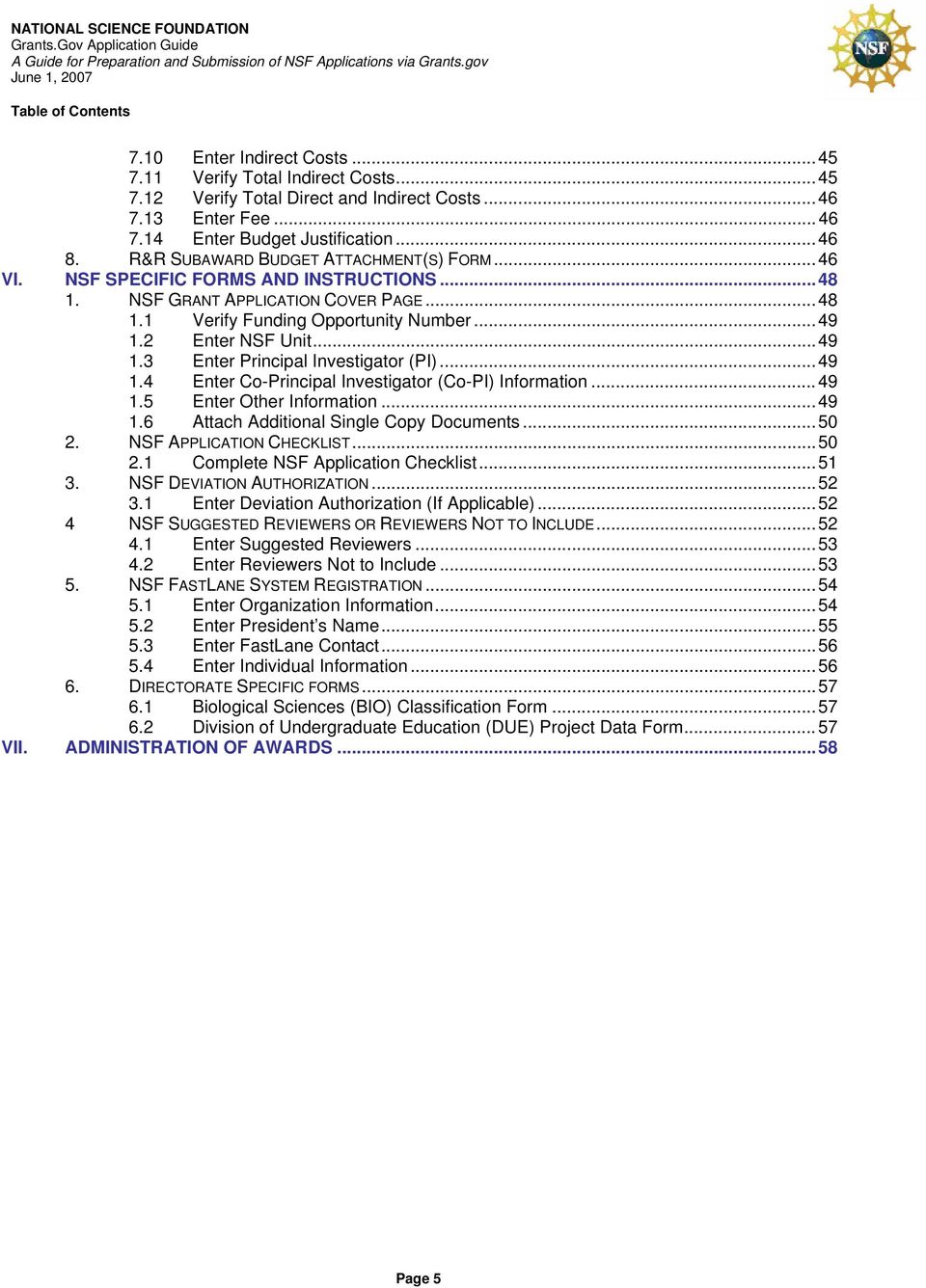
5 Table of Contents 7.10 Enter Indirect Costs Verify Total Indirect Costs Verify Total Direct and Indirect Costs Enter Fee Enter Budget Justification R&R SUBAWARD BUDGET ATTACHMENT(S) FORM...46 VI. NSF SPECIFIC FORMS AND INSTRUCTIONS NSF GRANT APPLICATION COVER PAGE Verify Funding Opportunity Number Enter NSF Unit Enter Principal Investigator (PI) Enter Co-Principal Investigator (Co-PI) Information Enter Other Information Attach Additional Single Copy Documents NSF APPLICATION CHECKLIST Complete NSF Application Checklist NSF DEVIATION AUTHORIZATION Enter Deviation Authorization (If Applicable) NSF SUGGESTED REVIEWERS OR REVIEWERS NOT TO INCLUDE Enter Suggested Reviewers Enter Reviewers Not to Include NSF FASTLANE SYSTEM REGISTRATION Enter Organization Information Enter President s Name Enter FastLane Contact Enter Individual Information DIRECTORATE SPECIFIC FORMS Biological Sciences (BIO) Classification Form Division of Undergraduate Education (DUE) Project Data Form...57 VII. ADMINISTRATION OF AWARDS...58 Page 5
6 General Instructions for Submission via Grants.gov I. INTRODUCTION 1. BACKGROUND The National Science Foundation (NSF) funds research and education in science and engineering through grants and cooperative agreements. The Foundation accounts for approximately 20 percent of federal support to academic institutions for basic research. Grants.gov allows organizations to electronically find and apply for competitive grant opportunities from all Federal grant-making agencies, including NSF. Grants.gov encompasses over 900 grant programs offered by the 26 Federal grant-making agencies. It streamlines the process of awarding $350+ billion annually to colleges, universities, K-12 school systems, businesses, informal science organizations, and other research organizations throughout the US. Grants.gov is one of 24 Federal crossagency E-Government initiatives focused on improving access to government services via the Internet. 2. PURPOSE AND SCOPE This document was developed to assist applicants in the preparation and submission of applications to NSF. It is intended as the primary document for use in preparation of applications via Grants.gov. Where appropriate, relevant sections of the NSF Grant Proposal Guide (GPG) and Grants.gov User Guide have been incorporated by reference. For the purpose of this document, the term application (used by Grants.gov) will replace the term proposal (used by NSF). However, the terms are synonymous. 3. INTENDED AUDIENCE NSF applicants include scientists, engineers and educators. Graduate students are not encouraged to submit research applications, but should arrange to serve as research assistants to faculty members. Some NSF divisions accept applications for Doctoral Dissertation Research Grants when submitted by a faculty member on behalf of the graduate student. A full listing of eligible applicants is contained in the NSF Grant Proposal Guide (GPG Chapter I.E.) NSF Grant Proposal Guide Chapter I.E DOCUMENT SYMBOLS The following symbols are used throughout this document to highlight information that is of particular interest or importance: This symbol indicates NSF specific instructions. This symbol represents a link to an important reference material. * This symbol represents a required field Page 6

7 General Instructions for Submission via Grants.gov 5. REFERENCED DOCUMENTS 5.1 NSF Grant Proposal Guide (GPG) The GPG provides guidance for the preparation of applications for submission to NSF via use of the FastLane System. The GPG includes detailed application preparation instructions and information about NSF s application processing and review process. It also includes information about withdrawals, returns and declinations. Where appropriate, sections of the GPG have been incorporated by reference into this application guide. NSF Grant Proposal Guide: Grants.gov User Guide The Grants.gov User Guide is a comprehensive reference to information about Grants.gov. Applicants can download the User Guide as a Microsoft Word document or as a PDF document. Grants.gov User Guide: Page 7

8 General Instructions for Submission via Grants.gov II. GENERAL INSTRUCTIONS FOR SUBMISSION VIA GRANTS.GOV 1. REGISTRATION PROCESS Before using Grants.gov for the first time, each organization must register to create an institutional profile. Once registered, the applicant s organization can then apply for any government grant on the Grants.gov website, including NSF grants. Grants.gov Registration: 2. SOFTWARE REQUIREMENTS PureEdge In order to access, complete and submit applications, applicants need to download and install the PureEdge Viewer. For minimum system requirements and download instructions, please see the Grants.gov User Guide. 2.2 Special Instructions for Macintosh Users If the applicant does not have a Windows operating system, the applicant can still use PureEdge by using a Windows emulation program. PureEdge has created detailed instructions for Macintosh users: Additional information is available on the Grants.gov Help Page: 1 NOTE: If the applicant has problems setting up software on their machine, the applicant may not have security permissions to install new programs on their system. If that is the case, they should contact the organization s system administrator. Page 8

9 NSF-Specific Instructions for Submission via Grants.gov III. NSF-SPECIFIC INSTRUCTIONS FOR SUBMISSION VIA GRANTS.GOV 1. NSF S IMPLEMENTATION OF GRANTS.GOV In furtherance of the President's Management Agenda, in Fiscal Year 2007, NSF has identified specific programs that will either authorize or require use of Grants.gov to prepare and submit proposals to NSF. NSF will revise each of the funding opportunities identified on the list to incorporate Grants.gov submission requirements throughout the fiscal year. Once the funding opportunity has been revised and posted to Grants.gov FIND, the application package will then become available in Grants.gov APPLY. The application package will contain the appropriate Pure Edge forms, NSF specific forms, and the NSF Grants.gov Application Guide. Applicants are advised that until the funding opportunity has been revised, the NSF FastLane system must be used to prepare and submit grant applications to NSF. Complete Listing of NSF Programs that require use of Grants.gov to prepare and submit proposals to NSF in FY 2007: In addition, NSF does not accept applications through Grants.gov for the following types of transactions: Changed/Corrected Applications Continuation Revision 2. COMPONENTS OF AN NSF APPLICATION The documents listed in Table 1 are components of an NSF application. The documents identified as required must be submitted to NSF as part of the application. Detailed instructions for submitting both required and optional documents can be found on the page indicated in the last column of the table. Table 1: Components of an NSF Application Document Required Optional Instructions R&R SF424 Cover Sheet Page 20 R&R Performance Site Locations Page 27 R&R Other Project Information Page 28 R&R Senior/Key Person (Expanded) Page 32 R&R Personal Data Page 37 R&R Budget Page 39 NSF Grant Application Cover Page Page 48 NSF Application Checklist Page 50 R&R Subaward Budget Attachment Page 46 NSF Deviation Authorization Page 52 NSF Suggested Reviewers Page 52 NSF FastLane System Registration Page CONFORMANCE WITH APPLICATION PREPARATION REQUIREMENTS It is imperative that all applications conform to these application preparation and submission instructions. All attachments to an application also must comply with NSF font, spacing and margin requirements (See GPG Chapter II.B.2.). Conformance with all preparation and submission instructions is required and will be strictly enforced unless a deviation had been approved in advance of application submission. Please note that NSF solicitations may establish additional requirements. Applications that do not comply with this requirement will not Page 9

10 NSF-Specific Instructions for Submission via Grants.gov be inserted into NSF s FastLane system and therefore cannot be reviewed. See GPG Chapter IV.B., ( for additional information. 3.1 Portable Document Format (PDF) NSF requires that applicants submit attachments to applications to Grants.gov in Portable Document Format (PDF). Using PDF format allows applicants to preserve the formatting of their documents. In order to save a document as a PDF, the applicant will need to use PDF generator software Creating PDF Files NSF has published the following webpage that provides guidance on creating PDF files acceptable for submission to FastLane. This same guidance must be followed for all attachments submitted with the NSF application through Grants.gov. Creating PDF Files: Adobe Reader cannot produce PDF files. The applicant must use the Adobe Distiller component of Adobe Acrobat. NOTE: DO NOT USE PDFWriter! To avoid problems with converting files to PDF, download the FastLane Job Options file as described below Instructions For Non-Adobe Acrobat Users Users without Adobe Acrobat may use the PDF Conversion Utility found within FastLane to convert non-pdf documents to PDF format. The utility can be accessed by registered FastLane users through either the Proposal Preparation or the Research Administration modules. Accessing the FastLane PDF Conversion Utility through Proposal Preparation 1. Navigate to the NSF FastLane homepage: 2. Select the Proposals, Awards and Status module. 3. Log in using your appropriate FastLane log-in information. 4. On the Quick Links menu at the left of the screen, select Convert Files to PDF. 5. Enter the location of the file in the space provided, or select the Browse button to select the file to be converted to PDF format. 6. Select the Convert to PDF button. The PDF conversion process may take a few minutes depending on your file. Upon completion of PDF conversion, the screen will indicate that your file has been successfully converted. 7. Select View PDF. The converted document appears in PDF format in Adobe Reader within your web browser. 8. Select the diskette icon to name and save your new PDF file locally to your hard drive. Accessing the FastLane PDF Conversion Utility through Research Administration 1. Navigate to the NSF FastLane homepage: 2. Select the Research Administration module. Page 10

11 NSF-Specific Instructions for Submission via Grants.gov 3. Log in using your appropriate FastLane log-in information. 4. On the Quick Links menu at the left of the screen, select Convert Files to PDF. 5. Enter the location of the file in the space provided, or select the Browse button to select the file to be converted to PDF format. 6. Select the Convert to PDF button. The PDF conversion process may take a few minutes depending on your file. Upon completion of PDF conversion, the screen will indicate that your file has been successfully converted. 7. Select View PDF. The converted document appears in PDF format in Adobe Reader within your web browser. 8. Select the diskette icon to name and save your new PDF file locally to your hard drive Warnings and Rules Failure to comply with the following warnings or adhere to NSF rules for PDF files may result in your application not being inserted into NSF s FastLane and the application missing the opportunity s deadline date! Warnings DO NOT Use Adobe Acrobat PDFWriter DO NOT Use Blocked PDF Producers DO NOT Use Adobe Acrobat Encryption or Security Settings Rules Always Check Results Always Embed All Fonts Always Use Type 1 or True Type Fonts Note the Special Rules for TeX or LaTeX DO NOT Use Adobe Acrobat PDFWriter PDFWriter does not produce acceptable PDF files, except under very limited circumstances. This can lead to NSF program officers and reviewers seeing garbled and/or incomplete versions of a file. FastLane recommends uploading one of the supported formats as identified in the Acceptable File Formats section on FastLane To create and upload a PDF file, use Adobe Distiller (in the same package as PDFWriter) or Ghostscript. 4. SUBMISSION OF SAME APPLICATION TO MULTIPLE AGENCIES With the exception of the Biological Sciences Directorate policy specified below, concurrent submission of an application to other organizations for simultaneous consideration will not prejudice its review. 4.1 NSF Biological Sciences Directorate Policy Research applications to the Biological Sciences Directorate, however, (not applications for conferences or workshops) cannot be duplicates of applications to any other Federal agency for simultaneous consideration. The only exceptions to this rule are (1) when the applicants and program officers at relevant Federal agencies have previously agreed to joint review and possible joint funding of the application; or (2) applications for Principal Investigators (PIs) who are beginning investigators (individuals who have not been a PI) or co-principal investigator (co-pi) on a Federally funded award with the exception of doctoral dissertation, postdoctoral fellowship or research planning grants. For applicants who qualify under this latter exception, the box for "Beginning Investigator" must be checked on the NSF Grant Application Cover Page. Page 11

12 NSF-Specific Instructions for Submission via Grants.gov 5. SUBMISSION FOR REVIEW BY MULTIPLE PROGRAMS WITHIN NSF The same work/proposal cannot be funded twice. The submission of duplicate or substantially similar proposals concurrently for review by more than one program without prior NSF approval may result in the return of the redundant proposals. (See GPG Chapter IV.B. for further information.) 6. APPLICATIONS ELIGIBLE FOR SUBMISSION In furtherance of the President's Management Agenda, in Fiscal Year 2007, NSF has identified specific programs that will either authorize or require use of Grants.gov to prepare and submit proposals to NSF. NSF will revise each of the funding opportunities identified on the list to incorporate Grants.gov submission requirements throughout the fiscal year. Once the funding opportunity has been posted to Grants.gov FIND, the application package will become available in Grants.gov APPLY. The application package will contain the appropriate Pure Edge forms, NSF specific forms, and the NSF Grants.gov Application Guide. Applicants are advised that until the funding opportunity has been revised, the NSF FastLane system must be used to prepare and submit grant applications to NSF. Complete Listing of NSF Programs that will require use of Grants.gov to prepare and submit proposals to NSF in FY 2007: 7. NEXT STEPS POST SUBMISSION TO GRANTS.GOV Until an application has been received and validated by NSF, the Authorized Representative (AR) may check the status of an application on Grants.gov. Grants.gov requires a user login and password. Check Application Status: Grants.gov Contact Center If the Authorized Representative (AR) has not received a confirmation message from Grants.gov within 48 hours of submission of the application, please contact: Telephone: [email protected] 7.2 NSF IT Help Central If the Authorized Representative (AR) 2 has not received a confirmation message from NSF within 60 hours of submission of the application, please contact: Telephone: [email protected] 7.3 NSF FastLane System FastLane is the NSF online website through which NSF interacts with researchers and potential researchers, reviewers, and research administrators and their organizations. FastLane: For applications submitted through Grants.gov, FastLane will be utilized by the applicant to: Check the status of an application after it has been received and validated by NSF. See Section 7.3.1, Check the Status of an Application in FastLane below for more information; 2 Please note that the identified PI also will receive a confirmation message from NSF. Page 12

13 NSF-Specific Instructions for Submission via Grants.gov Add or correct information in the application after submission via Grants.gov and a notification is received from NSF that the application has been inserted into FastLane. See Section 7.3.2, Proposal File Update Post Submission and Section 7.4, Warning Messages below for more information Check the Status of an Application in FastLane After applicants receive a receipt notification from NSF, FastLane should be used to check the status of an application. FastLane Proposal Status: Proposal File Update Post Submission Applications submitted through Grants.gov are considered official submissions to the Federal government. Applicants that wish to change or correct a previously submitted application must use the Proposal File Update 3 module available in the NSF FastLane System as specified below. FastLane Proposal File Update: A request for a file update automatically will be accepted if submitted prior to: the deadline date specified in a program solicitation; initiation of external peer review in cases when a target date is utilized; and initiation of external peer review in the case of an unsolicited application. A request for a file update after the timeframes specified above will require acceptance by the cognizant NSF Program Officer. Such requests may be submitted only to correct a technical problem with the application (i.e., formatting or print problems). Changes in the content of the application should not be requested after the timeframes specified above. When a request is accepted, the proposed files or revisions to application attributes will immediately replace the existing files and become part of the official application. PIs can access the Proposal File Update Module via the "Proposal Functions" section of FastLane. Authorized individuals in the organization's Sponsored Projects Office (or equivalent) can initiate or review requests for proposal file updates using the "Submit Proposals/Supplements/File Updates/Withdrawals" Module via the FastLane "Research Administration Functions." NSF will consider only one request for a proposal file update per proposal at a time. It is anticipated that it will be a rare occurrence for more than one file update request to be submitted for a proposal. 7.4 Warning Messages If an applicant receives a Warning Message stating information needs to be added or corrected in the application, the applicant will need to make the necessary correction(s) in the Proposal File Update module. See Proposal File Update Post Submission above for more information about file updates. 3 The module in FastLane that is used to update files is the Proposal File Update module. The term proposal is the same as an application. Page 13

14 Grant Application Package Instructions IV. GRANT APPLICATION PACKAGE INSTRUCTIONS 1. GRANT APPLICATION PACKAGE 1.1 Verify Grant Information Verify that the information shown corresponds to the grant for which the applicant wishes to apply. Grants.gov will auto-populate the following information: Opportunity Title Offering Agency Catalog of Federal Domestic Assistance (CFDA) Number CFDA Description Opportunity Number Competition ID Opportunity Open Date Opportunity Close Date Agency Contact 1.2 Enter a Name for the Application Check the box indicating that the applicant will be submitting applications on their own behalf (if applicable). The check box will only be shown on funding opportunities that are open to individuals. Enter a name for the application in the *Application Filing Name field (this is a required field). This name is for use solely by the applicant for you to track through the Grants.gov submission process. It is not used by the receiving agency. 1.3 Open and Complete Mandatory Documents Open and complete all of the documents listed in the Mandatory Documents box. Complete the SF 424 (R&R) first. Data entered on the SF 424 (R&R) will populate other mandatory and optional forms where possible. Page 14

15 Grant Application Package Instructions To open an item, simply click on it to select the item and then click on the Open Form button. When a form or document has been completed, click the form/document name to select it, and then click the => button. This will move the form/document to the Completed Documents box. To remove a form/document from the Completed Documents box, click the form/document name to select it, and then click the <= button. This will return the form/document to the Mandatory Documents or Optional Documents box. 1.4 Open and Complete Optional Documents These documents can be used to provide additional support or supplemental information for the application or may be required for specific types of funding opportunities. Reference the application package instructions for more information regarding Optional Documents. 1.5 Navigating the Forms The SF 424 (R&R) Cover Sheet, R&R Budget and NSF Application Checklist forms/documents are two or more pages in length. The applicant must complete the mandatory fields on each page of the form/document. To navigate to the next page of a form/document, locate the Next button at the top of the form and click on the button. Once the Next button has been clicked, the applicant will be taken to the next page of the form/document where they may complete the rest of the form. Page 15

16 Grant Application Package Instructions To go back to the first page of the form/document, simply click on the Previous button. Once all the relevant fields have been completed, the applicant may click on the Close Form button to return to the Grant Application Package screen and the list of Mandatory and Optional Documents. When a form/document is closed the completed data is captured in the application package but the form/document is not saved. The application package must be saved from the Grant Application Package screen. More information on saving the application package is available in section 1.7, Saving the Application. On the R&R Budget form/document, the applicant may enter up to 5 budget periods. To add a new budget period, the applicant must first complete Budget Period 1. The Next Period button on page 3 of the R&R Budget form/document will become active once Budget Period 1 is completed. Many of the forms/documents in the application package require the applicant to attach files. As stated in section 3.1, Portable Document Format (PDF), NSF requires that all attachments be submitted in PDF format. All attachments must also have a unique name to identify the attachment. Attachments with duplicate names will not be processed by NSF and will require resubmission of the application package through Grants.gov. The R&R Subaward Budget Attachment(s) Form and the R&R Additional Senior/Key Person (Expanded) Form allow the applicant to attach additional PureEdge forms. Chapter V, Sections 8 and 5.7 (respectively) provide detailed instructions for the navigation of both forms. 1.6 Accessing Help Tips The applicant may access help tips while completing the application package by clicking on the help mode button located in the menu bar at the top of the screen. This button is shown below and is represented by an arrow and a question mark. A question mark will appear next to the applicant s browser cursor once the help mode button has been clicked. The applicant may use their cursor to scroll over each field on the form/document to reveal help text for each field. Click on the help mode button again to return the cursor to normal. 1.7 Saving the Application The Save button only appears on the Grant Application Package screen. It is recommended that after the applicant completes each form/document that they click on the Close Form button to close the form and then save the application package by clicking on the Save button at the top of the Grant Application Package Screen. It is important to note that the application package will be saved to the last active directory on the applicant s Page 16

17 Grant Application Package Instructions computer. Therefore, the applicant should save the application package to their hard drive where it can easily be located. The applicant may save their application package at any time and should save the application package with the same file name each time. An error message will occur each time that the applicant saves the form before completing all of the mandatory fields on the mandatory forms or the optional forms moved to the Optional Completed Documents for Submission column on the application package. The applicant may ignore this warning. This warning will not appear once all of the mandatory fields have been completed on all of the forms/documents in the application package. 1.8 Check Package for Errors To initiate the Grants.gov edit check process, simply click on the Check Package for Errors button at the top of the screen. This process will identify all mandatory fields that have not been completed by the applicant. These errors will be displayed one at a time. Applicants are advised that no checks against NSF-specific business rules will take place at this time. 1.9 Submitting the Application The AR must open the Internet Explorer browser, open the application and then press the Submit button. To submit the application: 1. Close all open browser(s) and running applications. 2. Open Internet Explorer. 3. From the tool bar, click File > Open. The Open window appears. 4. Click the Browse button located at the bottom right of the window. A Browse menu opens. At the bottom of this screen there is a Files of type: drop-down menu. 5. Click the drop-down arrow and click All Files. 6. At the top of the screen there is a Look in: drop-down menu. Click the drop down arrow and browse to the physical location where the application file is located on your hard disk. Select the application. 7. Double-click the application or click Open and then click OK. 8. Internet Explorer will open the application. This may take a few moments. Please be patient. 9. Once the application is completely open, click the Submit button. (The Submit button will not become active until all mandatory documents have been properly completed and the application has been saved.) Page 17

18 Grant Application Package Instructions 10. Click Sign and Submit. 11. Next, enter your username and password. 12. Lastly, click Login. Only the AR has the authority and user rights to Sign and Submit an application to Grants.gov. Additional submission FAQs may be found at the Grants.gov website. Grants.gov Submission FAQs: Page 18

19 Research and Related (R&R) Forms and Instructions V. RESEARCH AND RELATED (R&R) FORMS AND INSTRUCTIONS 1. OVERVIEW This section contains both the SF 424 (R&R) instructions, as well as any applicable NSF-specific instructions. The NSF-specific instructions are identified by the NSF logo. It is important that all applications conform to these SF 424 (R&R) General Instructions, and where specified, with the NSF-specific instructions. Conformance is required and will be strictly enforced unless a deviation has been approved in advance of submission. Applicants are advised that NSF may return without review applications that are not consistent with these instructions. The NSF applicant is required to complete and submit the following SF 424 (R&R) forms as part of the application package: SF 424 (R&R) Cover Sheet; SF 424 (R&R) Performance Site Locations; SF 424 (R&R) Other Project Information; SF 424 (R&R) Senior/Key Person (Expanded); SF 424 (R&R)Personal Data; SF 424 (R&R) Budget The following SF 424 (R&R) form is optional and only should be submitted when appropriate: SF424 (R&R) Subaward Budget Attachment Detailed instructions for the completion of each of these forms are explained in the following sections. Page 19

20 Research and Related (R&R) Forms and Instructions 2. SF 424 (R&R) (COVER SHEET) 2.1 Enter a Type of Submission (Field 1 on the Form) Check one of the Type of Submission boxes. If this submission is to change or correct a previously submitted New application, click the Changed/Corrected Application box and enter the Grants.gov tracking number in the Federal Identifier field. If this submission is to change or correct a resubmission, renewal, continuation, or revision application, leave the Federal identifier field as previously filled with the existing identifier (e.g. Award number). Do NOT insert the Grants.gov tracking number in these cases. Unless specifically identified in an NSF program solicitation, pre-applications (for purposes of NSF, the term preliminary proposals is synonymous with pre-applications) are not required and should not be submitted to NSF. In addition, the box for "changed/corrected application must not be used. Rather, applicants that wish to change Page 20

21 Research and Related (R&R) Forms and Instructions or correct a previously submitted application should use the Proposal File Update module available in the NSF FastLane System at See Chapter III, Section 7.3.2, Proposal File Update Post Submission. Resubmissions, renewals, continuations or revisions should also not be used in Field 8 on the form. See Section 2.8, Select Type of Application (Field 8 on the Form). 2.2 Enter Date Submitted and Applicant Identifier (Field 2 on the Form) Enter the date the application is submitted to the Federal agency (or State if applicable). Enter the applicant's control number (if applicable). 2.3 Enter Date Received by State (Field 3 on the Form) Enter the date received by state (if applicable). Enter the state application identifier (if applicable). 2.4 Federal Identifier (Field 4 on the Form) New project applications should leave this field blank, unless you are submitting a Changed/Corrected application. When submitting a changed/corrected New application, enter the Grants.gov tracking number. If this is a continuation, revision or renewal application, enter the assigned Federal Identifier number (for example, award number) even if submitting a changed/corrected application. If a new, full application is being submitted that is related to a previously submitted pre-application, enter the NSF assigned pre-application number in the Federal Identifier field. If this application is a resubmission of an application that has been previously submitted, but was not funded, and is being resubmitted for new consideration, leave blank. NSF treats these submissions as new applications. 2.5 Enter Applicant Information (Field 5 on the Form) Enter the DUNS or DUNS+4 number of the applicant organization. This field is required. The legal name of the applicant "organization" should be entered under "Legal Name", unless the applicant is an individual. field. In addition, applicants that are individuals also cannot enter information into the Organizational DUNS Field Name *Legal Name Department Division *Street 1 Street 2 *City County *State Province *Zip Code *Country Input Enter legal name of applicant, which will undertake the assistance activity, enter the complete address of the applicant (including county and country), and name, telephone number, , and fax of the person to contact on matters related to this application. This field is required. Enter the name of primary organizational department, service, laboratory, or equivalent level within the organization which will undertake the assistance activity. Enter the name of primary organizational division, office, or major subdivision which will undertake the assistance activity. Enter first line of the street address for the applicant in Street1 field. This field is required. Enter second line of the street address for the applicant in Street2 field. This field is optional. Enter the city for address of applicant. This field is required. Enter the county for address of applicant. Enter the State where the applicant is located. This field is required if the applicant is located in the United States. Enter the Province. Enter the Postal Code (e.g., ZIP code) of applicant. This field is required if the applicant is located in the United States. This field is required if a State is selected; optional for Province. Select the country for the applicant address. This field is required. Person to be contacted on matters involving this application: Field Name Input Prefix Enter the prefix (e.g., Mr., Mrs., Rev.) for the person to contact on matters related to this application. *First Name Enter first (given) name of the person to contact on matters related to this application. This field is required. Middle Name Enter the middle name of the person to contact on matters related to this application. Page 21
22 Research and Related (R&R) Forms and Instructions *Last Name Suffix *Phone Number Fax Number Enter the last (family) name of the person to contact on matters related to this application. This field is required. Enter the suffix (e.g., Jr, Sr, PhD) for the name of the person to contact on matters related to this application. Enter the daytime phone number for the person to contact on matters related to this application. This field is required. Enter the fax number for the person to contact on matters related to this application. Enter the address for the person to contact on matters related to this application. 2.6 Enter Employer Identification (EIN) or (TIN) (Field 6 on the Form) Employer Identification (EIN) or (TIN) - Enter either TIN or EIN as assigned by the U.S. Internal Revenue Service. If applicant s organization is not in the U.S., type This is required information. 2.7 Enter Type of Applicant (Field 7 on the Form) Type of Applicant - Select the appropriate applicant type code. This field is required. Complete only if "Other" is selected as the Type of Applicant. If Small Business is selected as Type of Applicant, then note if the organization is Woman-owned and/or Socially and Economically Disadvantaged. Woman Owned - Check if the applicant is a women-owned small business - a small business that is at least 51% owned by a woman or women, who also control and operate it. Socially and Economically Disadvantaged - Check if the applicant is a socially and economically disadvantaged small business, as determined by the U.S. Small Business Administration pursuant to section 8(a) of the Small Business Act U.S.C. 637(a). 2.8 Select Type of Application (Field 8 on the Form) Select the type from the following list. Check only one. New - An application that is being submitted to an agency for the first time. Resubmission - An application that has been previously submitted, but was not funded, and is being resubmitted for new consideration. Renewal - An application requesting additional funding for a period subsequent to that provided by a current award. A renewal application competes with all other applications and must be developed as fully as though the applicant is applying for the first time. Continuation - A non-competing application for an additional funding/budget period within a previously approved project period. Revision - An application that proposes a change in - 1) the Federal Government's financial obligations or contingent liability from an existing obligation; or, 2) any other change in the terms and conditions of the existing award. For purposes of NSF, the boxes for "Continuation" and "Revision" will not be utilized and must not be checked. If a renewal application is being submitted, enter the assigned award number of the previously funded application in the Federal Identifier field (Field 4 on the Form.) If Revision, mark the appropriate box(es) Increase Award Decrease Award Increase Duration Decrease Duration Other (specify) If "Other" is selected, please specify in space provided. NSF will not be using the SF 424 (R&R) to: Increase Award, Decrease Award, Increase Duration or Decrease Duration, or perform other post award transactions, and therefore, these boxes should not be checked. Page 22
23 Research and Related (R&R) Forms and Instructions Requests for supplemental funding should be submitted electronically via the Supplemental Funding Request module in the NSF FastLane system at * Is this application being submitted to other agencies? Enter yes or no. If yes, enter the name(s) of other Agencies. This is required information. 2.9 Enter Name of Federal Agency (Field 9 on the Form) * Name of Federal Agency - This is the name of the Federal agency from which assistance is being requested with this application. This information is pre-populated by Grants.gov Enter Catalog of Federal Domestic Assistance Number (Field 10 on the Form) This is the Catalog of Federal Domestic Assistance Number of the program under which assistance is being requested. This information is pre-populated by Grants.gov Number Enter the number. Title Enter the title Enter Descriptive Title of Applicant's Project (Field 11 on the Form) * Descriptive Title of Applicant's Project - Enter a brief descriptive title of the project. This is required information. The title of the project must be brief, scientifically or technically valid, intelligible to a scientifically or technically literate reader, and suitable for use in the public press. NSF may edit the title of a project prior to making an award List Areas Affected by Project (Field 12 on the Form) * Areas Affected by Project - List only the largest political entities affected by the project (e.g., State, counties, cities). This is required information Enter Proposed Project (Field 13 on the Form) * Start Date Enter the proposed start date of the project. This field is required. *Ending Date Enter the proposed end date of the project. This field is required. The proposed duration for which support is requested must be consistent with the nature and complexity of the proposed activity. Grants are normally awarded for up to three years but may be awarded for periods of up to five years. The Foundation encourages organizations to request awards for durations of three to five years when such durations are necessary for completion of the proposed work and when such durations are technically and managerially advantageous. Specification of a desired starting date for the project is important and helpful to NSF staff; however, requests for specific effective dates may not be met. Except in special situations, requested effective dates must allow at least six months for NSF review, processing and decision. Should unusual situations (e.g., a long lead time for procurement) create problems regarding the proposed effective date, the PI should consult his/her organization s sponsored projects office Enter Congressional Districts (Field 14 on the Form) * Applicant - Enter the Congressional District in the format: 2 character State Abbreviation - 3 character District Number. Examples: CA-005 for California's 5th district, CA-012 for California's 12th district. If outside the US, enter To locate your congressional district, visit the Grants.gov web site. This field is required. * Project Enter the Congressional District in the format: 2 character State Abbreviation - 3 character District Number. Examples: CA-005 for California's 5th district, CA-012 for California's 12th district. If all districts in a state are affected, enter "all" for the district number. Example: MD-all for all congressional districts in Maryland. If nationwide (all districts in all states), enter US-all. If the program/project is outside the US, enter To locate your congressional district, visit the Grants.gov web site (this field is required). Attach an additional list of Project Congressional Districts on page 2, if needed (this field is optional). Page 23
24 Research and Related (R&R) Forms and Instructions 2.15 Enter Project Director/Principal Investigator Contact Information (Field 15 on the Form) Field Name Input Prefix Enter the prefix (e.g., Mr., Mrs., Rev.) for the name of the Project Director. *First Name Enter first name of the PD/PI. This field is required. Middle Name Enter the middle name of the Project Director. *Last Name Enter the last (family) name of the Project Director. This field is required. Suffix Enter the suffix (e.g., Jr, Sr, PhD) for the name of the PD/PI. Position/Title Enter the title of the Project Director. *Organization Name Enter the name of organization for the PD/PI. This field is required. Department Enter the name of primary organizational department, service, laboratory, or equivalent level within the organization of the PD/PI. Division Enter the name of primary organizational division, office, or major subdivision of the PD/PI. *Street 1 Enter first line of the street address for the PD/PI in the Street1 field. This field is required. Street 2 Enter second line of the street address for the PD/PI in Street2 field. This field is optional. *City Enter the City for address of the PD/PI. This field is required. County Enter the county for address of the PD/PI. *State Enter the State where the PD/PI is located. This field is required if the PD/PI is located in the United States. Province Enter the Province for PD/PI. *Zip Code Enter the Postal Code (e.g., ZIP code) of the PD/PI. This field is required if the PD/PI is located in the United States. *Country Select the country for the PD/PI address. This field is required. *Phone Number Enter the daytime phone number for the PD/PI. This field is required. Fax Number Enter the fax number for the PD/PI. * Enter the address for the PD/PI. This field is required. Page 24
25 Research and Related (R&R) Forms and Instructions 2.16 Enter Estimated Project Funding (Field 16 on the Form) Field Name * Total Estimated Project Funding *Total Federal & Non- Federal Funds *Estimated Program Income Input Enter total Federal funds requested for the entire project period. This is required information. Enter total estimated funds for the entire project period, including both Federal and non-federal funds. This is required information. Identify any Program Income estimated for this project period if applicable. This is required information Is Application Subject to Review by State Executive Order Process? (Field 17 on the Form) If yes, select This pre-application/application was made available to the state executive order process for review on: and enter the date. If the announcement indicates that the program is covered under Executive Order 12372, applicants should contact the State Single Point of Contact (SPOC) for Federal Executive Order If No, check appropriate box. The Foundation's regulation on Intergovernmental Review of National Science Foundation Programs and Activities is published in 45 CFR Part 660. Page 25
26 Research and Related (R&R) Forms and Instructions 2.18 Complete Certification (Field 18 on the Form) Check "I agree" to provide the required certifications and assurances. This field is required. Only a designated Authorized Representative of the Organization may submit the applicable certifications specified in GPG Chapter II.C.1.e. As defined in the NSF Proposal & Award Policies & Procedures Guide, Introduction, Section D, the Authorized Representative is the administrative official who on behalf of the applicant is empowered to make certifications and assurances and can commit the organization to the conduct of a project that NSF is being asked to support as well as adhere to various NSF policies and grant requirements Enter Authorized Representative (Field 19 on the Form) Field Name Input Prefix Enter the prefix (e.g., Mr., Mrs., Rev.) for the name of the Authorized Representative. *First Name Enter the first (given) name of the Authorized Representative. This field is required. Middle Name Enter the middle name of the Authorized Representative. *Last Name Enter the last (family) name of the Authorized Representative. This field is required. Suffix Enter the suffix (e.g., Jr, Sr, PhD) for the name of the Authorized Representative. Position/Title Enter the title of the Authorized Representative. This field is required. Organization Name Enter the name of organization for the Authorized Representative. This field is required. Department Enter the name of primary organizational department, service, laboratory, or equivalent level within the organization of the Authorized Representative. Division Enter the name of primary organizational division, office, or major subdivision of the Authorized Representative. *Street 1 Enter first line of the street address for the Authorized Representative in the Street1 field. This field is required. Street 2 Enter second line of the street address for the Authorized Representative in the Street2 field. This field is optional. *City Enter the city for the address of the Authorized Representative. This field is required. County Enter the county for the address of the Authorized Representative. *State Enter the State where the Authorized Representative is located. This field is required if the Authorized Representative is located in the United States. Province Enter the Province for the Authorized Representative. *Zip Code Enter the Postal Code (e.g., ZIP code) of the Authorized Representative. This field is required if the Authorized Representative is located in the United States. *Country Select the country for the Authorized Representative address. *Phone Number Enter the daytime phone number for the Authorized Representative. This field is required. Fax Number Enter the fax number of the Authorized Representative. * Enter the of the Authorized Representative. This is required information. Signature of Authorized Representative It is the organization s responsibility to assure that only properly authorized individuals sign in this capacity and/or submit the application to Grants.gov. If this application is submitted through Grants.gov, leave blank. If a hard copy is submitted, the AR must sign this block. Date Signed If this application is submitted through Grants.gov, the system will generate this date. If submitting a hard copy, enter the date the AR signed the application Enter Pre-Application (Field 20 on the Form) If submitting a pre-application, provide a summary description of the project in accordance with the announcement and/or agency specific instructions and attach here. With regard to block 20 on the SF424 (R&R) Cover Sheet, for purposes of NSF, pre-applications are submitted via FastLane and therefore, Field 1, Type of Submission should not be checked and an attachment should not be provided in block Attach an additional list of Project Congressional Districts if needed (Field 21 on the Form) Attach a file using the appropriate buttons. Page 26
27 Research and Related (R&R) Forms and Instructions 3. R&R PERFORMANCE SITE LOCATIONS 3.1 Enter Project/Performance Site Primary Location Indicate the primary site where the work will be performed. If a portion of the project will be performed at any other site(s), identify the site location(s) in the block(s) provided. If more than 8 performance site locations are proposed, provide the requested information in a separate file and attach. Project/Performance Site Primary Location: Field Name Input Organization Name Indicate the primary site where the work will be performed. If a portion of the project will be performed at any other site(s), identify the site location(s) in the block(s) provided. *Street 1 Enter first line of the street address in "Street 1" field of the primary performance site location. This field is required. Street 2 Enter second line of the street address in "Street 2" field for the primary performance site location. This field is optional. *City Enter the City for address of the primary performance site location. This field is required. County Select the county for the performance site location. *State Enter the State where the primary performance site location is located. This field is required if the Project Performance Site is located in the United States. Province Enter the Province where the primary performance site location is located. *Zip Code Enter the Postal Code (e.g., ZIP code) of the primary performance site location. This field is required if the Project Performance Site is located in the United States. Country Select the name of the country for the primary project performance site Project/Performance Site Location 1 (Optional): Field Name Organization Name *Street 1 Street 2 *City County *State Input Indicate the site where the work will be performed. If a portion of the project will be performed at any other site(s), identify the site location(s) in the block(s) provided. Enter first line of the street address in "Street 1" field of the primary performance site location. This field is required. Enter second line of the street address in "Street 2" field for the primary performance site location. This field is optional. Enter the City for address of the primary performance site location. This field is required. Select the county for the performance site location. Enter the State or province where the primary performance site location is located. This field is Page 27
28 Research and Related (R&R) Forms and Instructions Province *Zip / Postal Code Country required if the Project Performance Site is located in the United States. Enter the Province for the primary performance site location. Enter the Postal Code (e.g., ZIP code) of the primary performance site location. This field is required if the Project Performance Site is located in the United States. Select the name of the country for the project performance site Add additional sites as necessary using the Next Site button. For research performed at remote sites, NA should be typed in the following mandatory fields if they do not apply to the location: Street 1, City, State, and Zip Code. NSF only captures the Primary Location as the Performing Organization. If the Organization Name field is left blank for the Performing Organization, then the Awardee Organization is also considered as the Performing Organization. 4. R&R OTHER PROJECT INFORMATION 4.1 Are Human Subjects Involved? (Field 1 on the Form) Yes No If activities involving human subjects are planned at any time during the proposed project at any performance site, check yes. Check yes, even if the proposed project is exempt from Regulations for the Protection of Human Subjects. If no, skip the rest of block 1. This field is required. Page 28
29 Research and Related (R&R) Forms and Instructions Projects involving research with human subjects must ensure that subjects are protected from research risks in conformance with the relevant federal policy known as the Common Rule (Federal Policy for the Protection of Human Subjects, 45 CFR 690). All projects involving human subjects must either (1) have approval from the organization's Institutional Review Board (IRB) before issuance of an NSF award or, (2) must affirm that the IRB or an appropriate knowledgeable authority previously designated by the organization (not the Principal Investigator) has declared the research exempt from IRB review in accordance with the applicable subsection, as established in section 101(b) of the Common Rule. The box for "Human Subjects" must be checked "yes" with the IRB approval date (if available) or exemption subsection from the Common Rule identified in the space provided. Check yes even if the proposed project is exempt from Regulations for the Protection of Human Subjects. If no, skip the remaining questions about Human Subjects. If YES to Human Subjects: Is the IRB review Pending? Yes No IRB Approval Date Enter the latest Institutional Review Board (IRB) approval date (if available). Leave blank if Pending. NOTE: This is required information if the applicant selected NO to Is the IRB review Pending? Exemption Number If human subject activities are exempt from Federal regulations, provide the exemption numbers corresponding to one or more of the exemption categories. The six categories of research that qualify for exemption from coverage by the regulations are defined in the Common Rule for the Protection of Human Subjects. These regulations can be found at: Please check the exemption number: Human Subject Assurance Number Enter the approved Federal Wide Assurance (FWA), Multiple Project Assurance (MPA), Single Project Assurance (SPA) Number or Cooperative Project Assurance Number that the applicant has on file with the Office for Human Research Protections, if available. If the applicant has a FWA number, enter the 8-digit number. Do not enter the FWA before the number. The Human Subject Assurance Number field on the R&R Other Project Information form/document has a maximum length of 10 characters. 4.2 Are Vertebrate Animals Used? (Field 2 on the Form) This is required information. Check yes or no. Yes No For applications involving the use of vertebrate animals, sufficient information must be provided within the 15-page project description to enable reviewers to evaluate the choice of species, number of animals to be used, and any necessary exposure of animals to discomfort, pain, or injury. Consistent with the requirements of the Animal Welfare Act [7 U.S.C et seq.] and the regulations promulgated by the Secretary of Agriculture [9 CFR, ], NSF requires that proposed projects involving use of any vertebrate animal for research or education be approved by the submitting organization's Institutional Animal Care and Use Committee (IACUC) before an award can be made. For this approval to be accepted by NSF, the organization must have a current Institutional Animal Welfare Assurance established with the Public Health Service (PHS). Page 29
30 Research and Related (R&R) Forms and Instructions If the organization does not have such an Assurance in place, then approval of the project by the IACUC of an organization with a current PHS Assurance will be acceptable, if the IACUC agrees to provide the required oversight of facilities and activities during the award. In any case, IACUC approval must be received prior to an award. Questions regarding this requirement should be directed to the cognizant NSF Program Officer. If activities involving vertebrate animals are planned at any time during the proposed project at any performance site, check yes. If no, skip the remaining questions about Vertebrate Subjects. If YES to Vertebrate Subjects: Is the IACUC review Pending? Check yes or no. Yes No IACUC Approval Date Enter the latest Institutional Animal Care and Use Committee (IACUC) approval date (if available). Leave blank if Pending. Animal Welfare Assurance Number Enter the Federally approved assurance number, if available. 4.3 Is Proprietary/Privileged Information Included in the Application? (Field 3 on the Form) This is required information. Check yes or no. Yes No Patentable ideas, trade secrets, privileged or confidential commercial or financial information, disclosure of which may harm the applicant, should be included in applications only when such information is necessary to convey an understanding of the proposed project. If the application includes such information, check yes and clearly mark each line or paragraph on the pages containing the proprietary/privileged information with a legend similar to - "The following contains proprietary/privileged information that (name of applicant) requests not be released to persons outside the Government, except for purposes of review and evaluation." Such information also may be included as a separate statement. If this method is used, the statement must be submitted electronically as a single-copy document and attached in Block 6 of the National Science Foundation Grant Application Cover Page. While NSF will make every effort to prevent unauthorized access to such material, the Foundation is not responsible or in any way liable for the release of such material. (See also GPG Chapter III.G.) 4.4 Does this Project Have an Actual or Potential Impact on the Environment? (Field 4 on the Form) This is required information. Check yes or no. Yes No If yes, please explain Enter an explanation for the actual or potential impact on the environment. If this project has an actual or potential impact on the environment, has an exemption been authorized or an environmental assessment (EA) or environmental impact statement (EIS) been performed? - Check yes or no. Yes - Indicate whether an exemption has been authorized or an Environmental Assessment (EA) or an Environmental Impact Statement (EIS) has been performed. No - Indicate whether an exemption has been authorized or an Environmental Assessment (EA) or an Environmental Impact Statement (EIS) has been performed. Click here for no. You must answer question 4a before this one. If yes, please explain Provide an explanation here or attach a file at block 11 "Other Attachments". If there is an attachment, please enter Please see attached". 4.5 Does this Project Involve Activities Outside the U.S. or Partnership with International Collaborators? (Field 5 on the Form) This is required information. Check yes or no. Yes No Page 30
31 Research and Related (R&R) Forms and Instructions If yes: Provide countries with which international cooperative activities are involved Use this block to provide any supplemental information if necessary or attach a file at block 11 "Other Attachments". Optional Explanation Enter an explanation for involvement with outside entities (optional). 4.6 Attach Project Summary/Abstract (Field 6 on the Form) The Project Summary must contain a summary of the proposed activity suitable for dissemination to the public. It should be a self-contained description of the project and should contain a statement of objectives and methods to be employed. It should be informative to other persons working in the same or related fields and insofar as possible, understandable to a scientifically or technically literate lay reader. This Summary must not include any proprietary/confidential information. To attach a Project Summary/Abstract, click Add Attachment. The Project Summary must not be more than one page in length and must be suitable for publication. It must clearly address in separate statements (within the one-page summary): (1) the intellectual merit of the proposed activity; and (2) the broader impacts resulting from the proposed activity. (See Chapter III.A. of the GPG for further descriptive information on the NSF merit review criteria.) It should be informative to other persons working in the same or related fields and, insofar as possible, understandable to a scientifically or technically literate lay reader. Applications that do not separately address both merit review criteria within the one page Project Summary will be returned without review. 4.7 Attach Project Narrative (Field 7 on the Form) Provide Project Narrative in accordance with the announcement and/or agency-specific instructions. To attach a Project Narrative, click Add Attachment. The Project Narrative (referred to as the Project Description in the GPG) including the Results from Prior NSF Support must not exceed 15 pages, and must be prepared in accordance with the guidelines specified in GPG Chapter II.C.2.d. 4.8 Attach Bibliography & References Cited (Field 8 on the Form) Provide a bibliography of any references cited in the Project Narrative. Each reference must include the names of all authors (in the same sequence in which they appear in the publication), the article and journal title, book title, volume number, page numbers, and year of publication. Include only bibliographic citations. Proposers should be especially careful to follow scholarly practices in providing citations for source materials relied upon when preparing any section of the application. Please click the add attachment button to the right of this field to complete this entry. If the applicant has a Website address readily available, that information also should be included in the citation. It is not NSF's intent, however, to place an undue burden on applicants to search for the URL of every referenced publication. Therefore, inclusion of a Website address is optional. An application that includes reference citation(s) that do not specify a URL address is not considered to be in violation of NSF application preparation guidelines and the application will still be reviewed. 4.9 Attach Documentation for Facilities & Other Resources (Field 9 on the Form) This information is used to assess the capability of the organizational resources available to perform the effort proposed. Identify the facilities to be used (Laboratory, Animal, Computer, Office, Clinical and Other). If appropriate, indicate their capacities, pertinent capabilities, relative proximity, and extent of availability to the project. Describe only those resources that are directly applicable to the proposed work. Provide any information describing the Other Resources available to the project (e.g., machine shop, electronic shop) and the extent to which they would be available to the project. To attach a document for Facilities and Other Resources, click Add Attachment Attach Equipment Documentation (Field 10 on the Form) List major items of equipment already available for this project and, if appropriate identify location and pertinent capabilities. To attach a document for Equipment, click Add Attachment. Page 31
32 Research and Related (R&R) Forms and Instructions 4.11 Add Other Attachments (Field 11 on the Form) Attach file(s) using the appropriate buttons. Except as specified in GPG Chapter II.C.2.j, special information and supplementary documentation must be included as part of the project description (or part of the budget justification), if it is relevant to determining the quality of the proposed work. The categories of information identified in GPG Chapter II.C.2.j, are not considered part of the 15-page project description limitation. This Special Information and Supplementary Documentation section also is not considered an appendix. Specific guidance on the need for additional documentation may be obtained from the organization s sponsored projects office or in the references cited in GPG Chapter II.C.2.j. 5. R&R SENIOR/KEY PERSON (EXPANDED) Beginning with the PD/PI, provide a profile for each senior/key person proposed. Unless otherwise specified in an agency announcement, Senior/Key Personnel are defined as all individuals who contribute in a substantive, measurable way to the scientific development or execution of the project, whether or not salaries are requested. Consultants should be included if they meet this definition. Definitions of categories of personnel are contained in GPG Chapter II, Exhibit II-7. Page 32
33 Research and Related (R&R) Forms and Instructions 5.1 Enter Profile Project Director/Principal Investigator (PD/PI) Prefix Field Name *First Name Middle Name *Last Name Suffix Position/Title Department Organization Name Division *Street 1 Street 2 *City County *State Province *Zip Code *Country *Phone Number Fax Number Credential, e.g., agency login *Project Role Other Project Role Category Input Pre-populated from the SF 424 (R&R). The prefix (e.g., Mr., Mrs., Rev.) for the name of the Project Director. Pre-populated from the SF 424 (R&R). The first (given) name of the Project Director. This field is required. Pre-populated from the SF 424 (R&R). The middle name of the Project Director. Pre-populated from the SF 424 (R&R). The last (family) name of the Project Director. This field is required. Pre-populated from the SF 424 (R&R). The suffix (e.g., Jr, Sr, PhD) for the name of the Project Director. Enter the position/title of the PD/PI. Pre-populated from the SF 424(R&R). Pre-populated from the SF 424 (R&R). The title of the Department. Pre-populated from the SF 424 (R&R). The name of organization of the PD/PI. Pre-populated from the SF 424 (R&R). The name of primary organizational division, office, or major subdivision of the PD/PI. Pre-populated from the SF 424 (R&R). The first line of the street address for the Project Director in the "Street 1" field. This field is required. Pre-populated from the SF 424 (R&R). The second line of the street address for the Project Director in the "Street 2" field. This field is optional. Pre-populated from the SF 424 (R&R). The city for address of Project Director. This field is required. Pre-populated from the SF 424 (R&R). The county for address of Project Director. Pre-populated from the SF 424 (R&R). The state where the Project Director is located. This field is required if the Project Director is located in the United States. Pre-populated from the SF 424 (R&R). The Province where the Project Director is located. Pre-populated from the SF 424 (R&R). The postal Code (e.g., ZIP code) of Project Director. This field is required if the Project Director is located in the United States. Pre-populated from the SF 424 (R&R). The country for the Project Director address. This field is required. Pre-populated from the SF 424 (R&R). The daytime phone number for the Project Director. This field is required. Pre-populated from the SF 424 (R&R). The fax number for the Project Director. Pre-populated from the SF 424 (R&R). The address for the Project Director. This field is required for Project Director. If the application is being submitted to an agency (e.g. NIH) where the PD/PI. has an established personal profile, enter the agency ID. If not, leave blank. Use Other if a category is not listed in the pick list. This field is required. Complete if Other Professional or Other has been selected as a project role; e.g., Engineer, Chemist. 5.2 Attach Biographical Sketch Provide a biographical sketch for the PD/PI. Recommended information includes: Education and Training, Research and Professional Experience, Collaborators and Affiliations (for conflicts of interest), Publications and Synergistic Activities. Save the information in a single file and attach here. This field is required. A biographical sketch (limited to two pages) is required for the individual identified as the PD/PI. The information must be provided in the order and format established in GPG Chapter II.C.2.f. 5.3 Attach Current and Pending Support Provide a list of all current and pending support for the PD/PI (even if they receive no salary support from the project(s)) for ongoing projects and pending proposals. Show the total award amount for the entire award period (including indirect costs) as well as the number of person-months per year to be devoted to the project by the senior/key person, regardless of source of support. Concurrent submission of a proposal to other organizations will not prejudice its review. Page 33
34 Research and Related (R&R) Forms and Instructions With regard to the statement above that "Concurrent submission of an application to other organizations for simultaneous consideration will not prejudice its review," please note the Biological Sciences Directorate Policy specified in Chapter III, Section 4.1. of this Guide. 5.4 Enter Profile Senior/Key Person Field Name Prefix *First Name Middle Name *Last Name Suffix Position/Title Department Organization Name Division *Street 1 Street 2 *City County *State Province *Zip Code *Country *Phone Number Fax Number Credential, e.g., agency login Project Role Other Project Role Category Input Enter the prefix (e.g., Mr., Mrs., Rev.) for the name of the Senior/Key Person. Enter first (given) name of the Senior/Key Person. This field is required. Enter the middle name of the senior/key person. Enter the last (family) name of the Senior/Key Person. This field is required. Enter the suffix (e.g., Jr, Sr, PhD) for the name of the Senior/Key Person. Enter the title of the Senior/Key Person. Enter the name of the primary organizational department, service, laboratory, or equivalent level within the organization of the Senior/Key Person. Enter the name of the organization of the Senior/Key Person. Enter the name of primary organizational division, office, or major subdivision of the Senior/Key Person. Enter first line of the street address for the Senior/Key Person in the "Street 1" field. This field is required. Enter second line of the street address for the Senior/Key Person in the "Street 2" field. This field is optional. Enter the City for address of Senior/Key Person. This field is required. Enter the County for address of Senior/Key Person. Enter the State where the Senior/Key Person is located. This field is required if the Senior/Key Person is located in the United States. Enter the Province where Senior/Key Person is located. Enter the Postal Code (e.g., ZIP code) of Senior/Key Person. This field is required if the Senior/Key Person is located in the United States. Select the country for the Senior/Key Person address. Enter the daytime phone number for the Senior/Key Person. This field is required. Enter the fax number of the senior/key person. Enter the address for the Senior/Key Person. This field is required for the Senior/Key Person. If the application is being submitted to an agency (e.g. NIH) where the senior/key person has an established personal profile, enter the agency ID. If not, leave blank. Select one. Use Other if a category is not listed in the pick list. This field is required. Complete if Other Professional or Other has been selected as a project role; e.g., Engineer, Chemist. 5.5 Attach Biographical Sketch Provide a biographical sketch for each senior/key person. Recommended information includes - Education and Training, Research and Professional Experience, Collaborators and Affiliations (for conflicts of interest), Publications and Synergistic Activities. Save the information in a single file and attach. This is required information. A biographical sketch (limited to two pages) is required for each individual identified as senior project personnel. The information must be provided in the order and format established in GPG Chapter II.C.2.f. 5.6 Attach Current and Pending Support Provide a list of all current and pending support for each senior/key person (even if they receive no salary support from the project(s)) for ongoing projects and pending applications. Show the total award amount for the entire award period (including indirect costs) as well as the number of person-months per year to be devoted to the project by the senior/key person, regardless of source of support. Concurrent submission of an application to other organizations for simultaneous consideration will not prejudice its review. Page 34
35 Research and Related (R&R) Forms and Instructions With regard to the statement above that "Concurrent submission of an application to other organizations for simultaneous consideration will not prejudice its review," please note the Biological Sciences Directorate Policy specified Chapter III, Section 4.1. of this Guide. 5.7 Attach Additional Senior/Key Person Profile(s) Form(s) The applicant may enter up to seven senior/key person profiles on the R&R Senior/Key Person Profile (Expanded) form/document. If more than 8 senior/key person profiles are proposed, provide the information requested in a separate file and attach here. To attach additional PureEdge forms select the Select to attach additional Senior/Key Person Forms button on the R&R Senior/Key Person (Expanded) form/document. This will open the Additional Senior/Key Person Form Attachments form. Each additional form attached here provides the applicant with the ability to identify another eight individuals as senior/key person(s). The applicant may attach a maximum of four attachments (32 people). In order to extract or download, fill, and attach each additional form, simply follow these steps: 1. Press the Select to Extract the R&R Additional Senior/Key Person Form button to download another copy of the form. Page 35
36 Research and Related (R&R) Forms and Instructions 2. Save the file using a descriptive name that will help you remember the content of the supplemental form that you are creating. When assigning a name to the file, please remember to give it the extension.xfd (for example, My_Senior_Key1.xfd ). If you do not name your file with the.xfd extension you will be unable to open it later using your PureEdge viewer software. 3. Using the Open Form tool on your PureEdge viewer, open the new form that you have just saved. 4. Enter your additional Senior/Key Person information in this supplemental form. It is essentially the same as the Senior/Key person form that you see in the main body of your application. 5. When you have completed entering information in the supplemental form, save it and close it. 6. Return to this Additional Senior/Key Person Form Attachments page. 7. Attach the saved supplemental form, that you just filled in, to one of the blocks provided on this attachments form. 8. Extract and attach additional R&R Additional Senior/Key Person form(s) as necessary using the process outlined above. Please remember that the files you attach must be previously extracted R&R Senior/Key Person PureEdge forms. Attaching any other type of file may result in the inability to submit your application to Grants.gov. Applications submitted to NSF may identify a maximum of four co-principal Investigators. In cases where applications are submitted that include more than 4 co-pis, NSF only will use the first 4 names entered on this form. Any person identified as a co-pi in addition to the first 4 co-pis listed will have their role changed to Senior Key Person in NSF s FastLane system. Since Grants.gov cannot control the order the Additional Senior/Key Person Form Attachments are sent to the agencies, the co-pis should not be identified on an Additional Senior/Key Person Form Attachment but entered as one of the first 8 senior/key persons. 5.8 Attach Additional Senior Key Person Profiles If more than 40 senior/key person profiles are proposed, provide the information requested in a separate file and attach here. 5.9 Attach Additional Biographical Sketch(es) (Senior Key Person) Provide a biographical sketch for each senior/key person on this form. Recommended information includes: Education and Training, Research and Professional Experience, Collaborations and Affiliations (for conflicts of interest), Publications and Synergistic Activities. Save the information in a single file and attach here. A biographical sketch (limited to two pages) is required for each individual identified as senior project personnel. The information must be provided in the order and format established in GPG Chapter II.C.2.f Attach Additional Current and Pending Support(s) Provide a list of all current and pending support for each senior/key person on this form (even if they receive no salary support from the projects(s)) for ongoing projects and pending proposals. Show the total award amount for the entire award period (including indirect costs) as well as the number of person-months per year to be devoted to the project by the senior/key person, regardless of source of support. Concurrent submission of a proposal to other organizations will not prejudice its review. With regard to the statement above that "Concurrent submission of an application to other organizations for simultaneous consideration will not prejudice its review," please note the Biological Sciences Directorate Policy specified Chapter III, Section 4.1. of this Guide. Page 36
37 Research and Related (R&R) Forms and Instructions 6. R&R PERSONAL DATA The Federal Government has a continuing commitment to monitor the operation of its review and award processes to identify and address any inequities based on gender, race, ethnicity, or disability of its proposed PDs/PIs and co-pds/pis. To gather information needed for this important task, the applicant should submit the requested information for each identified PD/PI and co-pd/pi with each application. Submission of the requested information is voluntary and is not a precondition of award. However, information not submitted will seriously undermine the statistical validity, and therefore the usefulness, of information received from others. Any individual not wishing to submit some or all the information should check the box provided for this purpose. Upon receipt of the application, this form will be separated from the application. This form will not be duplicated, and it will not be a part of the review process. Data will be confidential. Collection of this information is authorized by and will be used in accordance with the NSF Act of 1950, as amended, 42 U.S.C. 1861, et seq. Demographic data allows NSF to gauge whether our programs and other opportunities in science and technology are fairly reaching and benefiting everyone regardless of demographic category; to ensure that those in under-represented groups have the same knowledge of and access to programs and other research and educational opportunities; and to assess involvement of international investigators in work supported by NSF. The information may be disclosed to government contractors, experts, volunteers, and researchers to complete assigned work; and to other government agencies in order to coordinate and assess programs. The information may be added to the Reviewer file and used to select potential candidates to serve as peer reviewers or advisory committee members. See Systems of Records, NSF-50, "Principal Investigator/Proposal File and Associated Records," 69 Federal Register (May 12, 2004), and NSF-51, "Reviewer/Proposal File and Associated Records, " 69 Federal Register (May 12, 2004). Submission of the Social Security Number is voluntary and will not affect the organization's eligibility for an award. However, it is an integral part of the NSF information system and assists in processing of the application. Page 37
38 Research and Related (R&R) Forms and Instructions 6.1 Enter Project Director/Principal Investigator Field Name Prefix *First Name Middle Name *Last Name Suffix Date of Birth Social Security Number Input Enter the prefix (e.g., Mr., Mrs., Rev.) for the name of the PD/PI. Pre-populated from SF 424 R&R. Enter the first (given) name of the PD/PI. This field is required. Pre-populated from SF 424 R&R. Enter the middle name of the PD/PI. Pre-populated from SF 424 R&R. Enter the last (family) name of the PD/PI. This field is required. Pre-populated from SF-424 R&R. Enter the suffix (e.g., Jr, Sr, PhD) for the name of the PD/PI. Pre-populated from SF 424 R&R. Enter the date of birth. Leave blank if you do not wish to provide. The Social Security Number serves as a helpful identifier. However, submission of this data element is voluntary. Leave blank if you do not wish to provide it. Failure to submit the Social Security Number (SSN) will not affect the organization's eligibility for an award. Field Name Input Gender Select the gender of the Project Director/Principal Investigator. Choose one or more. American Indian or Alaska Native: A person having origins in any of the original peoples of North, Central, or South America, and who maintains tribal affiliation or community attachment. Race (check all that apply) Asian: A person having origins in any of the original peoples of the Far East, Southeast Asia, or the Indian subcontinent, including, for example, Cambodia, China, India, Japan, Korea, Malaysia, Pakistan, the Philippine Islands, Thailand, and Vietnam. (Note, individuals from the Philippine Islands have been recorded as Pacific Islanders in previous data collection strategies.) Black or African American: A person having origins in any of the black racial groups of Africa. Ethnicity Disability Status (check all that apply) Citizenship Native Hawaiian or Other Pacific Islander: A person having origins in any of the original peoples of Hawaii, Guam, Samoa, or other Pacific Islands. White: A person having origins in any of the original peoples of Europe, the Middle East or North Africa. Do Not Wish to Provide Chose one: Hispanic or Latino - A person of Mexican, Puerto Rican, Cuban, South or Central American, or other Spanish culture or origin, regardless of race Check one or more: Hearing Visual Mobility/Orthopedic Impairment Other None Do Not Wish to Provide Chose one: US Citizen Permanent Resident Other non-us Citizen Do Not Wish to Provide 6.2 Enter Co-Project Director/co-Principal Investigator Information To enter the Co-Project Director/co-Principal Investigator information click on the Next Person button. Page 38
39 Research and Related (R&R) Forms and Instructions 7. R&R BUDGET 7.1 Enter Budget Information Applicants will be using the SF 424 R&R "Funds Requested" budget type to prepare their application for submission to NSF. Field Name Input Project, Subaward/Consortium: Check the appropriate block. Project: The budget requested for the primary applicant organization. *Budget Type Subaward/Consortium: The budget requested for subawardee/consortium organization(s). Note, separate budgets are required only for subawardee/consortium organizations that perform a substantive portion of the project. *Start Date *End Date Budget Period If creating a Subaward Budget, use the R&R Subaward Budget Attachment and attach as a separate file on the R&R Budget Attachment(s) form. Pre-populated from the SF 424 (R&R). Enter the requested/proposed start date of each budget period. This field is required. Enter the requested/proposed end date of each budget period. This field is required. Identifies the specific budget period; e.g., 1, 2, 3, 4, 5. If submitting through Grants.gov, the system will automatically generate a cumulative budget for the total project period. This field is required. 7.2 Enter Senior/Key Person (Field A on the Form) This section identifies names of senior/key personnel. Each person identified in the senior/key person profile that is an employee of the applying organization must be listed in this section if funds are requested. Enter the name (first name, middle initial, last name) for each senior/key personnel exactly as entered on other forms/documents in the application package. Do not enter a duplicate name for any senior/key personnel identified. If a duplicate name is entered in this section for any of the senior/key personnel, then the application Page 39
40 Research and Related (R&R) Forms and Instructions will not be inserted into FastLane and therefore will not be reviewed. This section should also include such roles as co-pd/pi/pd, Postdoctoral Associates, and Other Professionals. As a general policy, NSF recognizes that salaries of faculty members and other personnel associated directly with the project constitute appropriate direct costs and may be requested in proportion to the effort devoted to the project. NSF regards research as one of the normal functions of faculty members at institutions of higher education. Compensation for time normally spent on research within the term of appointment is deemed to be included within the faculty member s regular organizational salary. Grant funds may not be used to augment the total salary or rate of salary of faculty members during the period covered by the term of faculty appointment or to reimburse faculty members for consulting or other time in addition to a regular full-time organizational salary covering the same general period of employment. Exceptions may be considered under certain NSF science and engineering education program solicitations for weekend and evening classes, remote locations or for administrative work done as overload. If anticipated, any intent to provide salary compensation above the base salary should be disclosed in the budget justification and must be specifically approved by NSF in the award notice. Summer salary for faculty members on academic-year appointments is limited to no more than two-ninths of their regular academic-year salary. This limit includes summer salary received from all NSF-funded grants. These same principles apply to other types of non-academic organizations, such as research institutes. Since their employment periods are usually annual, salary must be shown under calendar months. For such persons, summer salary is normally inappropriate under an NSF grant. Field Name Prefix *First Name Middle Name *Last Name Suffix *Project Role Base Salary ($) Cal. Months Acad. Months Sum. Months *Requested Salary ($) *Fringe Benefits ($) Input Select the prefix of the senior/key person. Enter the first name of the senior/key person. This is required information. Enter the middle name of the senior/key person. Enter the last name of the senior/key person. This is required information. Select the suffix of the senior/key person. Enter the project role of the senior/key person. This is required information. Enter the annual compensation paid by the employer for each senior/key personnel. This includes all activities such as research, teaching, patient care, or other. The applicant may choose to leave this column blank. Identify the number of calendar months devoted to the project. Identify the number of academic months devoted to the project. Identify the number of summer months devoted to the project Regardless of the number of months being devoted to the project, indicate only the amount of salary being requested for this budget period for each senior/key person. This is required information. Enter the applicable fringe benefits, if any, for each senior/key person. This is required information. If the grantee's usual accounting practices provide that its contributions to employee benefits (social security, retirement, etc.) be treated as direct costs, NSF funds may be requested to fund fringe benefits as a direct cost. Page 40
41 Research and Related (R&R) Forms and Instructions Field Name *Funds Requested ($) Total Funds requested for all Senior Key Persons in the Attached File Total Senior/Key Person Input Enter requested salary & fringe benefit for each senior/key person. This is required information. Total Funds requested for all Senior Key Persons in the attached file. This total will auto-calculate. Additional Senior Key Persons - If funds are requested for more than 8 Senior/Key Persons, include all pertinent budget information and attach as a file here. Enter the total funds requested for all additional senior/key persons in line 9 of Section A. NSF policy permits an applicant organization to request that salary data on senior personnel not be released to persons outside the Government during the review process. If this option is exercised, such applications must be submitted via the NSF FastLane system in accordance with the instructions identified in GPG Chapter I.D Enter Other Personnel (Field B on the Form) Field Name Input *Number of Personnel For each project role category, identify the number of personnel proposed. This is required information. *Project Role For each project role category identify the number of personnel proposed. Cal. Months Identify the number of calendar months devoted to the project. Acad. Months Identify the number of academic months devoted to the project. Sum. Months Identify the number of summer months devoted to the project *Requested Salary ($) Regardless of the number of months being devoted to the project, indicate only the amount of salary/wages being requested for each project role. This is required information. *Fringe Benefits ($) Enter applicable fringe benefits, if any, for this project role category. This is required information. *Funds Requested ($) Total Number of Other Personnel Enter requested salary/wages & fringe benefits for each project role. This is required information. Enter Total Number of Other Personnel. Page 41
42 Research and Related (R&R) Forms and Instructions 7.4 Enter Equipment Description (Field C on the Form) Equipment is defined as an item of property that has an acquisition cost of $5,000 or more (unless the organization has established lower levels) and an expected service life of more than one year. Equipment item - List each item of equipment separately and justify each in the budget justification section. Allowable items ordinarily will be limited to research equipment and apparatus not already available for the conduct of the work. General-purpose equipment, such as a personal computer, is not eligible for support unless primarily or exclusively used in the actual conduct of scientific research. * Funds Requested ($) - List the estimated cost of each item of equipment including shipping and any maintenance costs and agreements. Dollar amount for item should exceed $5000. Total funds requested for all equipment listed in the attached file - Total funds requested for all equipment listed in the attached file. Dollar amount for item should exceed $5000. Total Equipment Total Funds requested for all equipment. 7.5 Enter Travel (Field D on the Form) 1. Domestic Travel Costs (Incl. Canada, Mexico, and U.S. Possessions) Funds Requested ($) Identify the total funds requested for domestic travel. Domestic travel includes Canada, Mexico and US Possessions. In the budget justification section, include purpose, destination, dates of travel (if known) and number of individuals for each trip. If the dates of travel are not known, specify estimated length of trip (e.g., 3 days). 2. Foreign Travel Costs Funds Requested ($) - Identify the total funds requested for foreign travel. Foreign travel includes any travel outside of North America and/or US Possessions. In the budget justification section, include purpose, destination, dates of travel (if known) and number of individuals for each trip. If the dates of travel are not know, specify estimated length of trip (e.g., 3 days). Page 42
43 Research and Related (R&R) Forms and Instructions All foreign travel must be justified in the budget justification. Travel support for dependents of key project personnel may be requested only when all of the following conditions apply: The individual is a key person who is essential to the research on a full-time basis; The individual s residence away from home and in a foreign country is for a continuous period of six months or more and is essential to the effective performance of the project; and The dependent s travel allowance is consistent with the policies of the organization administering the grant. Total Travel Costs Total Funds requested for all travel. 7.6 Enter Participant/Trainee Support Costs (Field E on the Form) Participant costs are the costs associated with conference, workshop, or symposium attendees that are not employees of the applicant or a subawardee. Trainee costs are the costs associated with educational projects that support trainees (pre-college, college, graduate and post graduate). List total costs for each budget item and the number of participants/trainees. In the budget justification, identify the purpose of the conference/training, dates, and places and justify costs. Generally, indirect costs (F&A) are not allowed on participant support costs. See GPG Chapter II.C.2.g.(viii) for additional information. 1. Tuition/Fees/Health Insurance - List total funds requested for Participant/Trainee Tuition/Fees/Health Insurance. 2. Stipends - List total funds requested for Participant/Trainee Stipends. 3. Travel - List total funds requested for Participant/Trainee Travel. 4. Subsistence - List total funds requested for Participant/Trainee Subsistence. 5. Other - Describe any other participant trainee funds requested. Number of Participants/Trainees List the total number of participants/trainees. Page 43
44 Research and Related (R&R) Forms and Instructions 7.7 Total Participant/Trainee Support Costs Total Funds requested for all trainee costs. 7.8 Enter Other Direct Costs (Field F on the Form) 1. Materials and Supplies - List total funds requested for materials & supplies. In the budget justification, indicate general categories such as glassware, chemicals, animal costs, including an amount for each category. Categories less than $1,000 do not require itemization. 2. Publication Costs - List the total publication funds requested. The application budget may request funds for the costs of documenting, preparing, publishing or otherwise making available to others the findings and products of the work conducted under the award. In the budget justification include supporting information. 3. Consultant Services - List the total costs for all consultant services. In the budget justification, identify each consultant, the services he/she will perform, total number of days, travel costs, and total estimated costs. Anticipated consultant services must be justified and information furnished on each individual s expertise, primary organizational affiliation, normal daily compensation rate, and number of days of expected service. Consultants travel costs, including subsistence, also may be included. If requested, the proposer must be able to justify that the proposed rate of pay is reasonable. Additional information on the charging of consultant costs to an NSF award is available in the NSF Award & Administration Guide (AAG), Chapter V.B ADP/Computer Services - List total funds requested for ADP/Computer Services. The cost of computer services, including computer-based retrieval of scientific, technical and education information may be requested. In the budget justification, include the established computer service rates at the proposing organization if applicable. 5. Subawards/Consortium/Contractual Costs - List total funds requested for 1) all subaward/consortium organization(s) proposed for the project and 2) any other contractual costs proposed for the project. Page 44
45 Research and Related (R&R) Forms and Instructions Except for the procurement of such items as commercially available supplies, materials, equipment or general support services allowable under the grant, no significant part of the research or substantive effort under an NSF grant may be contracted or otherwise transferred to another organization without prior NSF authorization. 6. Equipment or Facility Rental/User Fees - List total funds requested for Equipment or Facility Rental/Use Fees. In the budget justification, identify each rental user fee and justify. 7. Alterations and Renovations - List total funds requested for Alterations & Renovations. In the budget justification, itemize, by category and justify the costs of alterations and renovations including repairs, painting, removal or installation of partitions, shielding, or air conditioning. Where applicable, provide the square footage and costs. Total Other Direct Costs This total will auto-calculate. 7.9 Verify Total Direct Costs (Field G on the Form) Total Direct Costs (A-F) Total Funds requested for all direct costs Enter Indirect Costs (Field H on the Form) Indirect Cost Type - Indicate the type of base; e.g., Salary & Wages, Modified Total Direct Costs, Other (explain). Also indicate if Off-site. If more than one rate/base is involved, use separate lines for each. If the applicant does not have a current indirect rate(s) approved by a Federal agency, indicate, "None--will negotiate" and include information for a proposed rate. Use the budget justification if additional space is needed. Indirect Cost Rate (%) - Indicate the most recent Indirect Cost rate(s) (also known as Facilities & Administrative Costs [F&A]) established with the cognizant Federal office, or in the case of for-profit organizations, the rate(s) established with the appropriate agency. If the applicant has a cognizant/ oversight agency and is selected for an award, the applicant must submit the indirect rate proposal to that office for approval. If the applicant does not have a cognizant/oversight agency, contact the awarding agency. Indirect Cost Base - Enter the amount of the base for each indirect cost type. * Funds Requested ($) - Enter funds requested for each indirect cost type Verify Total Indirect Costs Cognizant Federal Agency - Enter the name of the cognizant Federal Agency, name & phone number of the individual responsible for negotiating your rate. If no cognizant agency is known, enter "None". Unless otherwise indicated in a specific program solicitation, it is NSF policy that grantees are entitled to reimbursement from grant funds for indirect costs (F&A) allocable to the NSF share of allowable direct costs of a project, except: grants to individuals; grants solely for the support of travel, equipment, construction of facilities, or doctoral dissertation research; grants in which NSF support is exclusively in the form of fellowships, traineeships or other fixed amounts such as cost-of-education allowances; participant support costs. However, an allowance for indirect costs associated with participant support costs may be established or negotiated in advance when circumstances indicate that the grantee could be expected to incur significant expenses in administering participant payments (other than salary or other direct expenses being reimbursed under the award) or; foreign grantees (unless the foreign grantee has a previously negotiated rate agreement with a US Federal agency that has a practice of negotiating rates with foreign entities). Page 45
46 Research and Related (R&R) Forms and Instructions 7.12 Verify Total Direct and Indirect Costs (Field I on the Form) Total Direct and Indirect Institutional Cost (G +-H) Total Funds requested for direct and indirect costs Enter Fee (Field J on the Form) Generally, a fee is not allowed on a grant or cooperative agreement. Do not include a fee in the budget, unless the program announcement specifically allows the inclusion of a "fee" (e.g., SBIR/STTR). If a fee is allowable, enter the requested fee. Inclusion of fees (profit) in a budget is allowable only if specifically authorized by an NSF program solicitation Enter Budget Justification (Field K on the Form) Use the budget justification to provide the additional information requested in each budget category identified above and any other information the applicant wishes to submit to support the budget request. The following budget categories must be justified, where applicable: equipment, travel, participant/trainee support and other direct cost categories. Only one file may be attached. 8. R&R SUBAWARD BUDGET ATTACHMENT(S) FORM Page 46
47 Research and Related (R&R) Forms and Instructions On this form/document, you may attach the up to 10 R&R Subaward Budget files for your grant application. Complete the subawardee budget(s) in accordance with the R&R budget instructions. Please remember that any file(s) you attach must be a PureEdge document. To extract or download, fill and attach additional R&R Subaward Budget Attachment form/document, simply follow these steps: 1. On the R&R Subaward Budget Attachment form/document, press the Click Here to extract the R&R Subaward Budget Attachment button to download the form. 2. Save the subawardee budget file(s) with the name of the subawardee organization. Each file name attached to the R&R Subaward Budget Attachment Form must be unique. When assigning a name to the file, please remember to give it the extension.xfd (for example, My_Senior_Key1.xfd ). If you do not name your file with the.xfd extension you will be unable to open it later using your PureEdge viewer software. 3. Using the Open Form tool on your PureEdge viewer, open the new form that you have just saved. 4. Enter your Subawardee Organization information in this supplemental form. Complete the subawardee budget(s) in accordance with the R&R budget instructions. 5. When you have completed entering information in the supplemental form, save it and close it. 6. Return to the R&R Subaward Budget Attachment(s) Form. 7. Attach the saved supplemental form, that you just filled in, to one of the blocks provided on this attachments form. 8. Extract and attach additional R&R Budget Forms for the Subaward Organizations as necessary using the process outlined above. Please remember that the files you attach must be previously extracted R&R Budget forms. Attaching any other type of file may result in the ability to submit your application to Grants.gov. All Subaward Organization included on the R&R Subaward Budget Attachment(s) Form must currently be registered in NSF s FastLane System. If the Subaward Organization is not registered in FastLane, then the application will not be inserted into FastLane and therefore will not be reviewed. Each Subaward Organization included on the R&R Subaward Budget Attachment(s) Form may only be associated with 15 budget periods. If the Subaward Organization is associated with 15 or more budget periods, then the application will not be inserted into FastLane and a confirmation will not be sent. Page 47
48 NSF-Specific Forms and Instructions VI. NSF SPECIFIC FORMS AND INSTRUCTIONS The NSF applicant is required to complete and submit the following forms in conjunction with the SF 424 (R&R) forms included in this application package: National Science Foundation Grant Application Cover Page; and NSF Application Checklist. The following NSF-specific forms are optional and only should be submitted, when appropriate: NSF Deviation Authorization; NSF Suggested Reviewers; and NSF FastLane System Registration. Instructions for completing each of these forms follow. 1. NSF GRANT APPLICATION COVER PAGE Page 48
49 NSF-Specific Forms and Instructions 1.1 Verify Funding Opportunity Number (Field 1 on the Form) * Funding Opportunity Number This info is pre-populated by Grants.gov. Opportunity Closing Date Enter a closing date for this proposal. 1.2 Enter NSF Unit (Field 2 on the Form) Indicate which NSF Unit should consider the application. To do that click on the URL in Block 2 and a browser window will open showing an NSF web page, Follow the instructions on this web page to search by Funding Opportunity to identify the appropriate Division and Program for programs accepting applications through Grants.gov. Copy the Division code and Program code into the form. * Division Code Enter the NSF division code for this funding opportunity. This is required information. * Program Code Enter the NSF program code for this funding opportunity. This is required information. Division Name Enter the NSF division name for this funding opportunity. Program Name Enter the NSF program name for this funding opportunity. 1.3 Enter Principal Investigator (PI) (Field 3 on the Form) * Degree Type From the drop-down list, choose the name of the highest degree the PI has earned. This is required information. * Degree Year Enter the year in which this degree was earned. This is required information. Check the box if currently serving (or have previously served) as PI, Co-PI or Program Director (PD) on any federally funded project. 1.4 Enter co-principal Investigator (co-pi) Information (Field 4 on the form) NSF applications may identify a maximum of four co-principal Investigators. The information below corresponds to the first four Co-PIs specified on the R&R Senior/Key Person (Expanded) Form. NSF will only use the first four co-pis entered on this form. Any persons identified as a co-pi in addition to the first 4 co-pis listed will have their role changed to Senior Key Person in NSF s FastLane system. Please enter the co-pis in the same order as on the R&R Senior/Key Person (Expanded) form. For co-pi 1, co-pi 2, co-pi 3, and co-pi 4 enter: Field Name Prefix *First Name Middle Name *Last Name Suffix *Degree Type *Degree Year Input Enter the prefix of the co-pi. Enter the first name of the Co-PI. This is required information. Enter the middle name of the Co-PI. Enter the last name of the Co-PI. This is required information. Enter the suffix of the co-pi. From the drop-down list, choose the name of the highest degree the co-pi has earned. This is required information. Enter the year in which this degree was earned. This is required information. 1.5 Enter Other Information (Field 5 on the Form) Check the appropriate box(es) if this application includes any of the items listed below: Beginning Investigator (GPG Chapter I.G.2) Check box if Beginning Investigator. Note that this box applies only to PIs who are submitting applications to the Directorate for Biological Sciences. See Chapter III, Section 4.1 of this Guide for further information. Small Grants for Exploratory Research (SGER)(GPG Chapter II.D.1) Check box if this proposal includes a request for Small Grants for Exploratory Research. For more information on Small Grants for Exploratory Research, go to: Accomplishment-Based Renewal (GPG Chapter V.B) Check box if this is an Accomplishment-Based Renewal. For more information on Accomplishment-Based Renewals, see GPG Chapter V.B. If an accomplishment-based-renewal is being submitted, applicants are reminded to enter the assigned award number of the previously funded application in the Federal field (Field 4 on the SF 424 (R&R) Cover Sheet). Disclosure of Lobbying Activities (GPG Chapter II.C.1.e) Check box for Disclosure of Lobbying Activities. This certification is required for an award of a Federal contract, grant or cooperative agreement exceeding $100,000 and for an award of a Federal loan or a commitment providing for the United States to insure or guarantee a loan exceeding $150,000. For more information on Disclosure of Lobbying Activities, go to: Page 49
50 NSF-Specific Forms and Instructions Historic Places (GPG Chapter II.C.2.j) Check box if research occurs in a location designated, or eligible to be designated, a registered historic place. For more information on Historic Places, go to NSF s AAG Chapter VI.K. High Resolution Graphics/Other Graphics Where Exact Color Representation Is Required For Proper Interpretation (GPG Chapter I.G.1) Detailed instructions for submission of applications that contain highresolution graphics or other graphics where exact color representations are required for proper interpretation by the reviewer are available on the FastLane Website at Attach Additional Single Copy Documents (Field 6 on the Form) Attach PDF files for Additional Single-Copy Documents. For more information on Additional Single-Copy Documents, go to: 2. NSF APPLICATION CHECKLIST Prior to electronic submission via the Grants.gov portal, applicants must conduct an administrative review of the application by use of the NSF Application Checklist. NSF requires that this review be conducted in order to help ensure that an application complies with all application preparation instructions, in the format specified. Page 50
51 NSF-Specific Forms and Instructions 2.1 Complete NSF Application Checklist This checklist is not intended to be an all-inclusive repetition of the required application contents and associated application preparation guidelines. It is, however, meant to highlight certain critical items so they will not be overlooked when the application is prepared. Complete all the checklist items in order to submit the application. Select the appropriate response for each item. Submission of the checklist is required. Please note that a revised version of this Checklist is currently being developed by Grants.gov. This new version will conform to the requirements specified in the recently released version of the Grant Proposal Guide (NSF ). Until an updated version of this form is released, applications should check "NA" next to the radio button for "Cost Sharing". Page 51
52 NSF-Specific Forms and Instructions 3. NSF DEVIATION AUTHORIZATION 3.1 Enter Deviation Authorization (If Applicable) It is important that all applications conform to the instructions provided in this Guide, and where applicable, the GPG. Conformance is required and will be strictly enforced unless a deviation has been approved. NSF may return without review applications that are not consistent with these instructions. See Chapter IV.B. of the GPG for additional information. NSF must authorize any deviations from these instructions in advance. Deviations may be authorized in one of two ways: 1. Through specification of different requirements in an NSF solicitation; or 2. By the written approval of the cognizant NSF Assistant Director/Office Head or designee. These deviations may be in the form of a blanket deviation for a particular program or programs or, in rare instances, an individual deviation for a particular application. Applicants may deviate from these instructions only to the extent authorized. Applications must identify the deviation in one of the following ways as appropriate - (a) by identifying the solicitation number that authorized the deviation in the appropriate block on the application Cover Sheet; or (b) for individual deviations, by identifying the name, date and title of the NSF official authorizing the deviation. Further instructions are available on the FastLane Website ( Requests for approval of a deviation from NSF's electronic submission requirement must be forwarded to the cognizant NSF program for review and approval prior to submission of the paper application. 4 NSF SUGGESTED REVIEWERS OR REVIEWERS NOT TO INCLUDE Applicants may include a list of suggested reviewers who they believe are especially qualified to review the application. Applicants also may designate persons they would prefer not review the application, indicating why. These suggestions are optional. Grant Proposal Guide Chapter II, Exhibit II-2, Potentially Disqualifying Conflicts of Interest, contains information on conflicts of interest that may be useful in preparation of this list. Page 52
53 NSF-Specific Forms and Instructions 4.1 Enter Suggested Reviewers Suggested Reviewers - Provide the First, Middle, and Last Name of suggested reviewers that the applicant believes are especially well qualified to review this application. 4.2 Enter Reviewers Not to Include Designate persons the applicant would prefer not review this application and indicate why. The cognizant Program Officer handling the application considers the suggestions and may contact the Applicant for further information. However, the decision whether or not to use the suggestions remains with the Program Officer. Page 53
54 NSF-Specific Forms and Instructions 5. NSF FASTLANE SYSTEM REGISTRATION 5.1 Enter Organization Information The following information should only be completed if the applicant s organization is not currently registered in NSF s FastLane System. To check if an organization is already registered, please visit If the applicant is not employed by, or affiliated with, an organization, please complete the Individual Information in section 3 of this form. Page 54
55 NSF-Specific Forms and Instructions Field Name *Organization Name *Organization Short Name *Organization Type *EIN/TIN *DUNS Number *Street 1 Street 2 *City County *State Province *Zip Code *Country *Telephone Number Fax Number * Address Input Pre-populated from the R&R form. Enter the full name of the applicant s organization for NSF records (up to 64 characters, including spaces). This is required information. Enter the short name of your organization in 26 characters or less for identification purposes. If your full name can fit within 26 characters, you should use the same name here. You should not truncate your full name at 26 characters. The Short Name should be a unique identifier. This field is required. Choose your type of organization from the drop-down list. This field is required. Pre-populated from the R&R form. (9 digits, no hyphens). An EIN (Employer Identification Number) or TIN (Taxpayer Identification Number) is a nine-digit number that the IRS assigns in the following format: The IRS uses this number to identify taxpayers that are required to file various tax returns. Employers, sole proprietors, universities, corporations, partnerships, nonprofit associations, trusts, and estates of decedents, government agencies, certain individuals, and other business entities use EIN/TIN. If the applicant s organization is not in the U.S., type This is required information. Pre-populated from the R&R form (9 digits, no hyphens). This is a unique 9-digit identifier provided by Dun & Bradstreet. It is an organizational identifier used by the federal government. If the organization does not have a DUNS number, it must contact Dun and Bradstreet at (800) to obtain one. A DUNS number will be provided to them immediately by telephone at no charge. This is required information. Pre-populated by RR. The physical address of the organization. Up to two lines may be used for the street address. The second line is not required. Pre-populated by RR. The physical address of the organization. You may use up to two lines for the street address. The second line is not required. Pre-populated by RR. The name of the city/place where the organization operates. Pre-populated by RR. The name of the county where the organization operates. Pre-populated by RR. The name of the State where the organization is registered. Choose the state name from the drop-down list. (If a foreign address, skip). This field is required if the Organization is located in the United States. Pre-populated by RR. Enter the Province. Pre-populated by RR. The complete nine digits of the zip code (no dashes & if foreign address, skip). This field is required if the Organization is located in the United States. Pre-populated by RR. The country of the organization. (Foreign address, choose Country) Enter the telephone number of the organization for NSF to use to contact your business (enter area code and number, for U.S. phones, using only ten digits, no hyphens). Extensions, dashes or alphabetical characters cannot be accommodated in the phone number. This field is required. (10 digits, no hyphens, no country code) Enter the fax number of the organization. Enter an address for the organization where NSF can contact your business electronically (must be of the format [email protected] or similar). This field is required. 5.2 Enter President s Name Field Name Input Prefix Enter the prefix of the president of the organization. First Name Enter the first name of the president of the organization. Middle Name Enter the middle name of the president of the organization. Last Name Enter the last name of the president of the organization. Pre-populated by RR. The prefix of the FastLane Contact. This person will be the point of contact for FastLane in the organization and responsible for performing administrative management functions Suffix within FastLane (e.g., giving out passwords, submitting proposals). This may be the same person as an Authorized Organizational Representative. Do not enter non-alphabetic characters (e.g., periods or hyphens) or spaces. Page 55
56 NSF-Specific Forms and Instructions 5.3 Enter FastLane Contact Field Name Prefix *First Name Middle Name *Last Name Suffix Social Security Number *Telephone Number Fax Number * Address Input Pre-populated by RR. The prefix of the FastLane Contact. This person will be the point of contact for FastLane in the organization and responsible for performing administrative management functions within FastLane (e.g., giving out passwords, submitting proposals). This may be the same person as an Authorized Organizational Representative. Do not enter non-alphabetic characters (e.g., periods or hyphens) or spaces. Pre-populated by RR. The first name of the FastLane Contact. This field is required. Pre-populated by RR. The middle name of the FastLane Contact. Pre-populated by RR. The last name of the FastLane Contact. Pre-populated by RR. The suffix of the FastLane Contact. (9 digits) Enter the Social Security Number (SSN) for the FastLane Contact. (If you do not want to provide the real Social Security Number, leave this field empty and NSF s FastLane System will generate a PSEUDO-SSN for you). Pre-populated by RR. (10 digits, no hyphens, no country code) The FastLane Contact's phone number. This field is required. Pre-populated by RR. (10 digits, no hyphens, no country code) The FastLane Contact's fax number. Enter the address for the FastLane Contact. This field is required. 5.4 Enter Individual Information Only complete this information if the applicant is not employed by, or affiliated with, an organization. Do not use this section to register a new organization. Prefix Field Name *First Name Middle Name *Last Name Suffix *Tax ID Social Security Number *Street 1 Street 2 *City County *State Province *Zip Code *Country *Telephone Number Fax Number Input Enter the prefix of the individual who will be the point of contact for FastLane and responsible for performing organizational management functions within FastLane. This may be the same person as an Authorized Organizational Representative. Do not enter non-alphabetic characters (e.g., periods or hyphens) or spaces. Enter the first name of the individual who will be the point of contact for FastLane and responsible for performing organizational management functions within FastLane. This field is required. Enter the middle initial of the individual. Enter the last name of the individual. This field is required. Enter the name suffix of the individual. Enter the Tax ID Number (9 digits, no hyphens). This is a nine-digit number that the IRS assigns. The IRS uses this number to identify taxpayers that are required to file various tax returns. This field is required. Enter the Social Security Number (9 digits). If you do not want to provide the real Social Security Number, leave this field empty and NSF s FastLane System will generate a PSEUDO-SSN. Enter the physical address. You may use up to two lines for the street address. The second line is not required. Enter the physical address of the organization. You may use up to two lines for the street address. The second line is not required. Enter the name of the city. This field is required. Enter the name of the county. Choose the name of the state where you are registered from the drop-down list (If foreign address, skip). This field is required if the individual is located in the United States. Enter the province. Enter the complete nine digits of your zip code (no dashes). (If foreign address, skip). This field is required if the individual is located in the United States. Choose the country from the drop-down list (Foreign address, choose Country) Enter the telephone number of the individual (enter area code and number, for U.S. phones, using only ten digits). Extensions, dashes or alphabetical characters cannot be accommodated in the phone number. This field is required. Enter the fax number of the individual. Page 56
57 NSF-Specific Forms and Instructions * Address Department *Degree Type *Degree Year Enter the of the individual (must be of the format or similar). This field is required. Enter the Department of the individual. From the drop-down list, choose the name of the highest degree the individual has earned. This field is required. Enter the 4 digit year in which this degree was earned. This field is required. 6. DIRECTORATE SPECIFIC FORMS 6.1 Biological Sciences (BIO) Classification Form For applications submitted to the Directorate for Biological Sciences, a Biological Sciences Classification form is required to be submitted. The applicant should use the Proposal File Update module in FastLane to enter this information. The applicant will not be able to check the status of an application until this information is provided. 6.2 Division of Undergraduate Education (DUE) Project Data Form For applications submitted to the Division of Undergraduate Education (DUE) a Project Data form is required to be submitted. The applicant should use the Proposal File Update module in FastLane to enter this information. The applicant will not be able to check the status of an application until this information is provided. Page 57
58 NSF-Specific Forms and Instructions VII. ADMINISTRATION OF AWARDS Guidance regarding the administration of NSF awards is contained in the NSF Award & Administration Guide and the relevant award conditions: Page 58
Small Business Electronic Applications: Annotated SF424 (R&R) Form Set
 Small Business Electronic Applications: Annotated SF424 (R&R) Form Set FORMS Included in SBIR and STTR applications: Federal-wide Forms SF424 (R&R) Cover Component [Page 2] Project/Performance Site Location(s)
Grant Application Package
 Opportunity Title: Offering Agency: CFDA Number: CFDA Description: Opportunity Number: Competition ID: Opportunity Open Date: Opportunity Close Date: Agency Contact: Grant Application Package Reducing
Step-by-Step Guide to Submitting a SBIR/STTR Phase I Proposal in FastLane
 Step-by-Step Guide to Submitting a SBIR/STTR Phase I Proposal in FastLane ADA & 508 Compliance Assistance - Please Call the FastLane Help Desk at 1-800-673-6188. STOP: Do you have the required registrations?
Instructions for Completing a DOE SBIR/STTR Phase I Grant Application
 U.S. Department of Energy (DOE) Instructions for Completing a DOE SBIR/STTR Phase I Grant Application (Please refer to the respective Funding Opportunity Announcement for Fast-Track and Phase II guidance)
Electronic Grant Submission: FASTLANE and GRANTS.GOV
 Electronic Grant Submission: FASTLANE and GRANTS.GOV BRAD STITH, UNIVERSITY OF COLORADO AT DENVER TALK POSTED TO: www.cudenver.edu/~bstith 1 WHY ELECTRONIC SUBMISSION? during the 1980s. the NSF budget
Instructions for Application Submission National MS Society-American Academy of Neurology (AAN) Clinician Scientist Development Award 2016
 Instructions for Application Submission National MS Society-American Academy of Neurology (AAN) Clinician Scientist Development Award 2016 INTRODUCTION Please read these instructions and follow them carefully.
CDMRP ereceipt System User Guide
 CDMRP ereceipt System User Guide Congressionally Directed Medical Research Programs (CDMRP) Last Updated: January 2011 Table of Contents Overview... 3 Purpose... 3 Help Desk Contact Information... 3 System
NIH Electronic Grant Submission. Maqsood Wani
 NIH Electronic Grant Submission Maqsood Wani Electronic Submission Process New Process New Forms but It s Still About the Science! Our philosophy and policy has not changed! 2 The Plan OMB set the following
GMS Applicant Procedures Applicant - OJP Grants Management System Welcome Page (AP-1)
 Applicant - OJP Grants Management System Welcome Page (AP-) Welcome to the Applicant Procedures (AP) for the OJP Grants Management System. These Job Aids will guide you through the procedures for using
Last Modified: August 25, 2015. Table of Contents. Page 1 of 15
 National Science Foundation Office of International Science and Engineering How to Apply to the East Asia and Pacific Summer Institutes (EAPSI) Fellowship Program for U.S. Graduate Students via NSF FastLane
http://grants.nih.gov/grants/electronicreceipt/faq_full.htm
 Page 1 of 20 Glossary & Acronyms Frequently Asked Questions Applying Electronically Public FAQs NIH Staff FAQs Last Revised: September 27, 2012 Related NIH Staff FAQs Back to List On This Page: I. Preparing
Office of Sponsored Projects NIH INSTITUTIONAL TRAINING GRANT GUIDE RUTH L. KIRSCHSTEIN NATIONAL SERVICE AWARDS (NRSA) IN COEUS
 Office of Sponsored Projects NIH INSTITUTIONAL TRAINING GRANT GUIDE RUTH L. KIRSCHSTEIN NATIONAL SERVICE AWARDS (NRSA) IN COEUS Coeus Premium 4.5.1.X Document Version 4 Updated June 2013 Contents I. ABOUT
March 7, 2016, NIH Webinar. THE FOLLOWING IS AN UNEDITED ROUGH DRAFT TRANSLATION FROM THE CART PROVIDER'S OUTPUT
 March 7, 2016, NIH Webinar. ****************DISCLAIMER!!!**************** THE FOLLOWING IS AN UNEDITED ROUGH DRAFT TRANSLATION FROM THE CART PROVIDER'S OUTPUT FILE. THIS TRANSCRIPT IS NOT VERBATIM AND
INTERNAL USER GUIDE. How to Complete and Submit Electronic Applications for Funding with the National Institutes of Health
 INTERNAL USER GUIDE How to Complete and Submit Electronic Applications for Funding with the National Institutes of Health Applying and Finding Funding within the NIH Guide and Downloading the Application
FINANCIAL ASSISTANCE FUNDING OPPORTUNITY ANNOUNCEMENT. Small Business Innovation Research (SBIR) Small Business Technology Transfer (STTR)
 FINANCIAL ASSISTANCE FUNDING OPPORTUNITY ANNOUNCEMENT Small Business Innovation Research (SBIR) Small Business Technology Transfer (STTR) FY 2012 Phase II Funding Opportunity Number: DE-FOA-0000676 Announcement
Section 8(e) Notice User Guide Primary Support
 Primary Support Environmental Protection Agency Office of Pollution Prevention and Toxics Manage Toxic Substances Table of Contents 1 Introduction... 1 1.1 Overview... 1 1.2 Labeling Confidential Information...
FastLane Proposal Preparation. 1. PI receives password from Office of Sponsored Research. 2. PI accesses FastLane homepage <www.fastlane.nsf.gov>.
 1. PI receives password from Office of Sponsored Research. 2. PI accesses FastLane homepage . 3. PI clicks on Proposal Preparation. 4. PI types in last name, SSN, and password, then
Getting Started Manual: Authors
 PaperPlaza and PaperCept Conference Manuscript Management and Registration Systems Getting Started Manual: Authors PaperCept, Inc. (Revised October 5, 2011) Getting Started Manual: Authors Contents 1.
2. Basic operations ---------------------------------------------------------------------------------------------------------4
 Version: June 2012 Contents 1. Introduction----------------------------------------------------------------------------------------------------------------3 1.1. Availability of the data -----------------------------------------------------------------------------------------------3
NYS OCFS CMS Contractor Manual
 NYS OCFS CMS Contractor Manual C O N T E N T S CHAPTER 1... 1-1 Chapter 1: Introduction to the Contract Management System... 1-2 CHAPTER 2... 2-1 Accessing the Contract Management System... 2-2 Shortcuts
ELECTRONIC BIOMEDICAL RESEARCH APPLICATION PORTAL (ebrap) User Guide
 ELECTRONIC BIOMEDICAL RESEARCH APPLICATION PORTAL (ebrap) User Guide 1 Table of Contents Overview 5 Purpose and User Roles 5 Help Desk Contact Information 6 Operating Environment 6 Welcome to the ebrap
Renewal Project Application
 e-snaps Instructional Guide Renewal Project Application * 2015, Version 3 Table of Contents Introduction... 1 Objectives... 1 Overview of the Project Application Process... 1 Overview of this Instructional
INFOED PROPOSAL DEVELOPMENT TIPS. Version 12
 INFOED PROPOSAL DEVELOPMENT TIPS General: We recommend using Mozilla Firefox as your browser. These tips are geared toward NIH proposals, although other sponsors are available. We recommend uploading PDFs
ithenticate User Manual
 ithenticate User Manual Updated November 20, 2009 Contents Introduction 4 New Users 4 Logging In 4 Resetting Your Password 5 Changing Your Password or Username 6 The ithenticate Account Homepage 7 Main
EPSS Helpdesk - workdays from 08:00 to 20:00 - Phone: +32 2 23 33 760 E-mail: [email protected]
 EPSS Frequently Asked Questions (FAQ) For support please contact: EPSS Helpdesk - workdays from 08:00 to 20:00 - Phone: +32 2 23 33 760 E-mail: [email protected] A. General Questions: N.B.: For PIC-related
User Guide. A guide to online services available through Sircon for Education Providers. DOC CX 08/13/10 02/02 v5
 User Guide A guide to online services available through Sircon for Education Providers DOC CX 08/13/10 02/02 v5 Contents Contents Contents... 2 Introduction... 4 About this Guide... 4 Getting Started...
ithenticate User Manual
 ithenticate User Manual Version: 2.0.2 Updated March 16, 2012 Contents Introduction 4 New Users 4 Logging In 4 Resetting Your Password 5 Changing Your Password or Username 6 The ithenticate Account Homepage
EPSS Helpdesk - workdays from 08:00 to 20:00 - Phone: +32 2 23 33 760 E-mail: [email protected]
 EPSS Frequently Asked Questions (FAQ) For support please contact: EPSS Helpdesk - workdays from 08:00 to 20:00 - Phone: +32 2 23 33 760 E-mail: [email protected] A. General Questions: N.B.: For PIC-related
General Application Instructions. Fiscal Year 2015. Defense Health Program Department of Defense Congressionally Directed Medical Research Programs
 General Application Instructions Fiscal Year 2015 Defense Health Program Department of Defense Congressionally Directed Medical Research Programs Table of Contents I. HELPFUL INFORMATION... 2 A. Tips for
Online Financial Statement Guide
 Contents Life Sciences Policies... 2 Online Grant Management... 2 Financial Statement Submission Deadlines... 2 Financial Policy Highlights... 2 proposalcentral Login... 6 Accessing Awards and Budget Section...
ithenticate User Manual
 ithenticate User Manual Version: 2.0.8 Updated February 4, 2014 Contents Introduction 4 New Users 4 Logging In 4 Resetting Your Password 5 Changing Your Password or Username 6 The ithenticate Account Homepage
SES PAS Senior Executive Service (SES) Performance Appraisal System (PAS)
 Job Aid: Create the Executive Development Plan (EDP) Creating the Developmental Plan Step 1: From within your performance plan, navigate to the Developmental Plan tool bar in the left column Step 2: Click
Johns Hopkins University School of Medicine Office of Research Administration
 Checklist for T Applications (Institutional Training Grants) Please read RFA and Individual NIH Institute Guidelines This document is designed only to serve as a project management tool. It does NOT replace
Grants and Cooperative Agreements with Subawards you must enter the detailed subaward budget.
 `Grants and Contracts Office Grants and Contracts Office One Gustave L. Levy Place Box 1075 New York, NY 10029-6574 Phone: 212. 824-8300 Facsimile: 212.241-3294 Email: [email protected] Memorandum To: All
Electronic Docket Filings Michigan Public Service Commission Department of Licensing and Regulatory Affairs
 Electronic Docket Filings Michigan Public Service Commission Department of Licensing and Regulatory Affairs How to Electronically File Documents in Cases Before the Michigan Public Service Commission (E-Dockets
DEFENSE EXPERIMENTAL PROGRAM TO STIMULATE COMPETITIVE RESEARCH (DEPSCoR)
 PROGRAM ANNOUNCEMENT THE DEPARTMENT OF DEFENSE (DoD) FISCAL YEAR 2009 DEFENSE EXPERIMENTAL PROGRAM TO STIMULATE COMPETITIVE RESEARCH (DEPSCoR) Broad Agency Announcement No.: W911NF-09-R-0003 FULL PROPOSAL
How To Set Up Total Recall Web On A Microsoft Memorybook 2.5.2.2 (For A Microtron)
 Total Recall Web Web Module Manual and Customer Quick Reference Guides COPYRIGHT NOTICE Copyright 1994-2009 by DHS Associates, Inc. All Rights Reserved. All TOTAL RECALL, TOTAL RECALL SQL, TOTAL RECALL
Guidance for Industry
 #108 Guidance for Industry How to Register with the CVM Electronic Submission System To Submit Information in Electronic Format Using the FDA Electronic Submissions Gateway This version of the guidance
Applicants: How to apply for a Commonwealth PhD Scholarship
 Applicants: How to apply for a Commonwealth PhD Scholarship Log On/Register Apply for a Scholarship A. Application Details B. Personal Information C. Career To Date D. References E. Endorsement F. Proposed
Ships & Offshore Structures
 Ships & Offshore Structures And Tutorial for Reviewers Table of Contents Registering 3 Logging In 3 4 Changing your password 4 Software requirements 5 New Reviewer Invitations 5 Submitting your review
The United States Office Of Personnel Management eopf Human Resources Specialist Training Manual for eopf Version 4.0.
 The United States Office Of Personnel Management eopf Human Resources Specialist Training Manual for eopf Version 4.0. Copyright 1994-2007 by Northrop Grumman. All rights reserved. Northrop Grumman, the
DIRECT ADMISSIONS SYSTEM
 1/24/2013 UNIVERSITY OF GLASGOW DIRECT ADMISSIONS SYSTEM Postgraduate Taught Application User Guide Online Application Guide Table of Contents Introduction... 1 Technical support... 1 1. Creating your
Portfolio Analysis and Management System (PAMS) External User Guide
 Portfolio Analysis and Management System (PAMS) External User Guide Version 11.1 April 2016 Prepared for: DOE Office of Science Office of Business Policy and Operations Revision History Date Document Version
Engaged Management ReView Reviewer Guidelines V.1.0. Friday, March 11, 2015
 Engaged Management ReView Reviewer Guidelines V.1.0 Friday, March 11, 2015 Table of Contents Engaged Management ReView (EMR) Reviewer Guidelines... 3 SECTION 1: Reviewer Receiving Invitation to Review
Cox Business Premium Online Backup USER'S GUIDE. Cox Business VERSION 1.0
 Cox Business Premium Online Backup USER'S GUIDE Cox Business VERSION 1.0 Table of Contents ABOUT THIS GUIDE... 4 DOWNLOADING COX BUSINESS PREMIUM ONLINE BACKUP... 5 INSTALLING COX BUSINESS PREMIUM ONLINE
The United States Office Of Personnel Management eopf System Administrator Training Manual for eopf Version 4.0.
 The United States Office Of Personnel Management eopf System Administrator Training Manual for eopf Version 4.0. Copyright 1994-2007 by Northrop Grumman. All rights reserved. Northrop Grumman, the Northrop
Electronic Signature and Approval Process
 Howard University Electronic Signature and Approval Process Submitting a Proposal Package Electronically version 3 created: 05/2013 R e s e a r c h A d m i n i s t r a t i v e S e r v i c e s CONTENTS
Supply Chain Finance WinFinance
 Supply Chain Finance WinFinance Customer User Guide Westpac Banking Corporation 2009 This document is copyright protected. Apart from any fair dealing for the purpose of private study, research criticism
HHS Accelerator: Account Creation and Access
 HHS Accelerator: Account Creation and Access Table of Contents HHS Accelerator System Requirements Overview... 3 HHS Accelerator System Compatible Internet Browsers... 3 Enabling JavaScript... 3 Valid
BRILL s Editorial Manager (EM) Manual for Reviewers
 BRILL s Editorial Manager (EM) Manual for Reviewers Table of Contents Introduction... 2 1. Logging into EM... 2 2. Changing Your Access Codes and Contact Information... 2 3. Agreeing or Declining to Review...
Vendor Registration Quick Start Guide
 Vendor Registration Quick Start Guide ColoradoVSS Help Desk 303-866-6464 [email protected] www.colorado.gov/vss Overview This guide provides an overview for vendor registration in ColoradoVSS. This guide
LOGER S INSTRUCTION MANUAL
 LOGER S INSTRUCTION MANUAL Local Government Electronic Local Government E- (LOGER) Last Updated October 2014 Page 1 of 52 TABLE OF CONTENTS SECTION ONE: Access Logging into LOGER.. 3 SECTION TWO: Annual
Account Management System User Guide
 Account Management System User Guide System Version 1.14.0.0 Document Version 1.1.5 January 19, 2015 CONTACT US Document Comments: How are we doing? The Communications & Documentation Team of the electronic
Proposal Submission User Guide. How to create, complete and submit an Application eform
 Proposal Submission How to create, complete and submit an Application eform Version 1 21 November 2013 TABLE OF CONTENTS Technical requirements... 3 Overview of the process... 5 A. Creation of a new application
Crystal Miller, MPA Assistant Director Sponsored Programs Administration. March 26 & 27, 2009 April 3, 2009
 Crystal Miller, MPA Assistant Director Sponsored Programs Administration March 26 & 27, 2009 April 3, 2009 NIH Funding Current Announcements Timelines and Process Challenge Grants Other NIH Stimulus Opportunities
Turnitin Blackboard 9.0 Integration Instructor User Manual
 Turnitin Blackboard 9.0 Integration Instructor User Manual Version: 2.1.3 Updated December 16, 2011 Copyright 1998 2011 iparadigms, LLC. All rights reserved. Turnitin Blackboard Learn Integration Manual:
Application Submission System & Interface for Submission Tracking (ASSIST) User Guide
 Application Submission System & Interface for Submission Tracking (ASSIST) User Guide System Version 2.14.1 Document Version 6.2.0 August 5, 2015 CONTACT US Document Comments: We value your feedback on
proposalcentral Prepare and Submit a Proposal.
 proposalcentral Prepare and Submit a Proposal. If you need assistance, contact Customer Service by email at [email protected] or by phone at 1-800-875-2562 1 Recommended Software proposalcentral Recommends
Electronic Signature and Routing Process
 Howard University Electronic Signature and Routing Process Submitting a Proposal Package Electronically 2012 R e s e a r c h A d m i n i s t r a t i v e S e r v i c e s CONTENTS DocuSign Overview... 2
Intro to Web Development
 Intro to Web Development For this assignment you will be using the KompoZer program because it free to use, and we wanted to keep the costs of this course down. You may be familiar with other webpage editing
How To Write A Health Care Plan
 USER GUIDE STEP UP PERFORMANCE MANAGEMENT SYSTEM Oklahoma State Department of Health Table of Contents Chapter 1 Getting Started... 2 Chapter 2 Overview and Public Health System Alignment... 5 Chapter
Proposal Submission User Guide. How to create, complete and submit an Application eform
 Proposal Submission How to create, complete and submit an Application eform Version 1 14 February 2014 TABLE OF CONTENTS Technical requirements... 3 Overview of the process... 5 A. Creation of a new application
GRANTS AND CONTRIBUTIONS ONLINE SERVICES: USER GUIDE (REGISTRATION AND ACCOUNT MANAGEMENT)
 GRANTS AND CONTRIBUTIONS ONLINE SERVICES: USER GUIDE (REGISTRATION AND ACCOUNT MANAGEMENT) JUNE 2014 TABLE OF CONTENTS INTRODUCTION... 1 Did you know?... 1 GCOS Has 3 Modules... 1 Important Things To Remember
End User s Guide. Electronic Filing
 End User s Guide Electronic Filing Rev: August 2014 This end user s guide has been skillfully created by smartech.net through meetings with the Clerk of the Circuit Court of Cook County and Online Information
How to Add Users 1. 2.
 Administrator Guide Contents How to Add Users... 2 How to Delete a User... 9 How to Create Sub-groups... 12 How to Edit the Email Sent Out to New Users... 14 How to Edit and Add a Logo to Your Group's
Sponsored Programs New Developments and Important Reminders
 Sponsored Programs New Developments and Important Reminders Bonnie Pendergraft Rebecca Trahan Office of Sponsored Programs March 22, 2011 1 Training Session Overview NSF Updates NIH Updates Senior Personnel
BHW Program Portal for Site Points of Contact User Guide
 BHW Program Portal for Site Points of Contact User Guide Last Revised: June 6, 2015 1 Contents Part 1: Purpose of the BHW Program Portal for Site Points of Contact... 5 What is a Site Point of Contact?...
Student User Guide. Introduction to the Module Management System (MMS) in Philosophy. Logging in; Submitting work; Logging out
 Student User Guide Introduction to the Module Management System (MMS) in Philosophy Logging in; Submitting work; Logging out Revised Oct 2008 (version 3.1P) University of St Andrews MMS Student Guide MMS
Electronic Selection of Consultants
 Electronic Selection of Consultants User Guide for Consulting Firms Version 3 This User Guide was produced by the Operations and Corporate Procurement Groups and the Information Solutions Group Global
NYS OCFS CMS Manual CHAPTER 1...1-1 CHAPTER 2...2-1 CHAPTER 3...3-1 CHAPTER 4...4-1. Contract Management System
 NYS OCFS CMS Manual C O N T E N T S CHAPTER 1...1-1 Chapter 1: Introduction to the Contract Management System...1-2 Using the Contract Management System... 1-2 Accessing the Contract Management System...
e-snaps Instructional Guide Continuum of Care (CoC) Applicant Profile
 e-snaps Instructional Guide Continuum of Care (CoC) Applicant Profile Version 1, 2016 Table of Contents Introduction... 1 Objectives... 1 Overview of this Instructional Guide... 1 Accessing e-snaps...
NIH and Other PHS Agency Research Performance Progress Report (RPPR) Instruction Guide
 NIH and Other PHS Agency Research Performance Progress Report (RPPR) Instruction Guide Document Version 7.1.0 April 25, 2014 Forms Approved Through 08/31/2015 OMB No. 0925-0002 CONTACT US Document Comments:
Custom Reporting Basics for ADP Workforce Now. Automatic Data Processing, LLC ES Canada
 Custom Reporting Basics for ADP Workforce Now Automatic Data Processing, LLC ES Canada ADP s Trademarks The ADP Logo, ADP, ADP Workforce Now and IN THE BUSINESS OF YOUR SUCCESS are registered trademarks