
DAVE Usage with SVN. Presentation and Tutorial v 2.0. May, 2014
|
|
|
- Hugo Herbert Marshall
- 10 years ago
- Views:
Transcription
1 DAVE Usage with SVN Presentation and Tutorial v 2.0 May, 2014
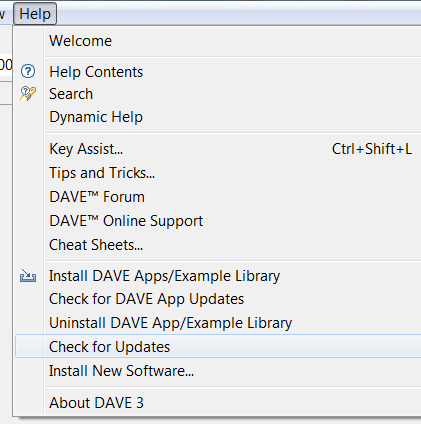
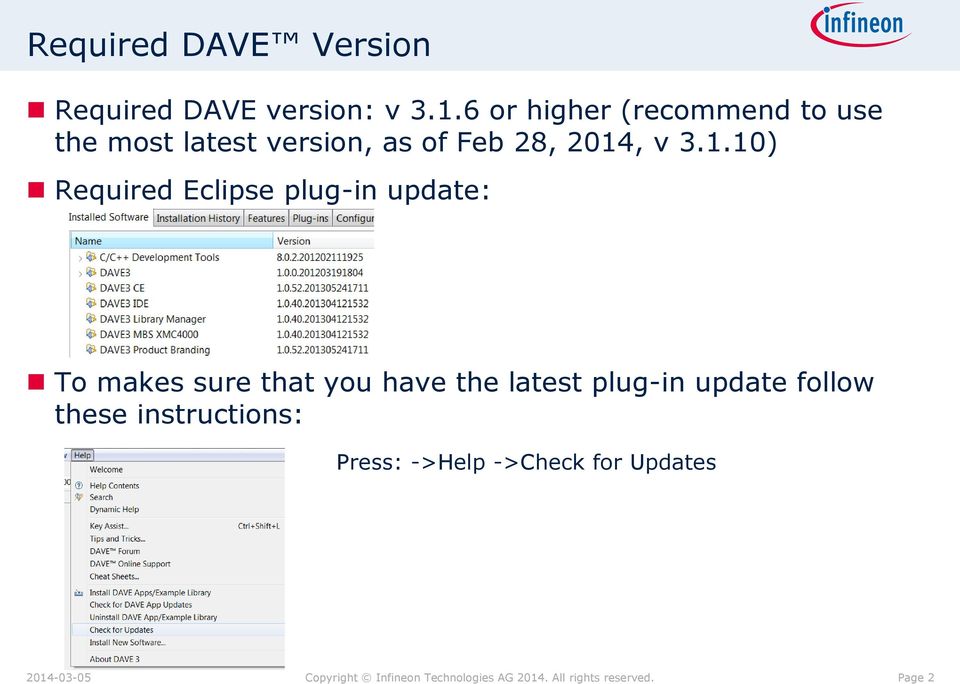
2 Required DAVE Version Required DAVE version: v or higher (recommend to use the most latest version, as of Feb 28, 2014, v ) Required Eclipse plug-in update: To makes sure that you have the latest plug-in update follow these instructions: Press: ->Help ->Check for Updates Page 2
3 Table of contents General Considerations Eclipse Subversive Overview Eclipse Subversive Installation in DAVE DAVE CE Example Project usage with SVN Page 3

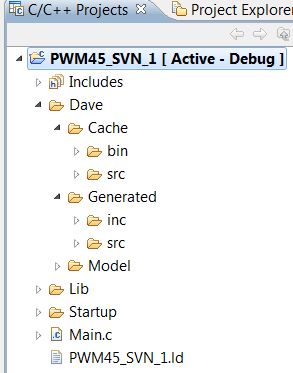
4 General Information How to Use DAVE Generated Sources in a Version Control SW Initial folder structure when creating a new DAVE CE project, adding some DAVE Apps and generate code Contains cached code template class files (intermediate files of a code generation process) to improve operation speed Contains the generated sources and header files Model Folder contains the model of each DAVE App (static coded, templates, UI models, configurations) that has been added to the project with the current configuration settings Other files are: startup files, linker script stubs for the c library and a simple main.c Folder with build artifacts added after first build Page 4
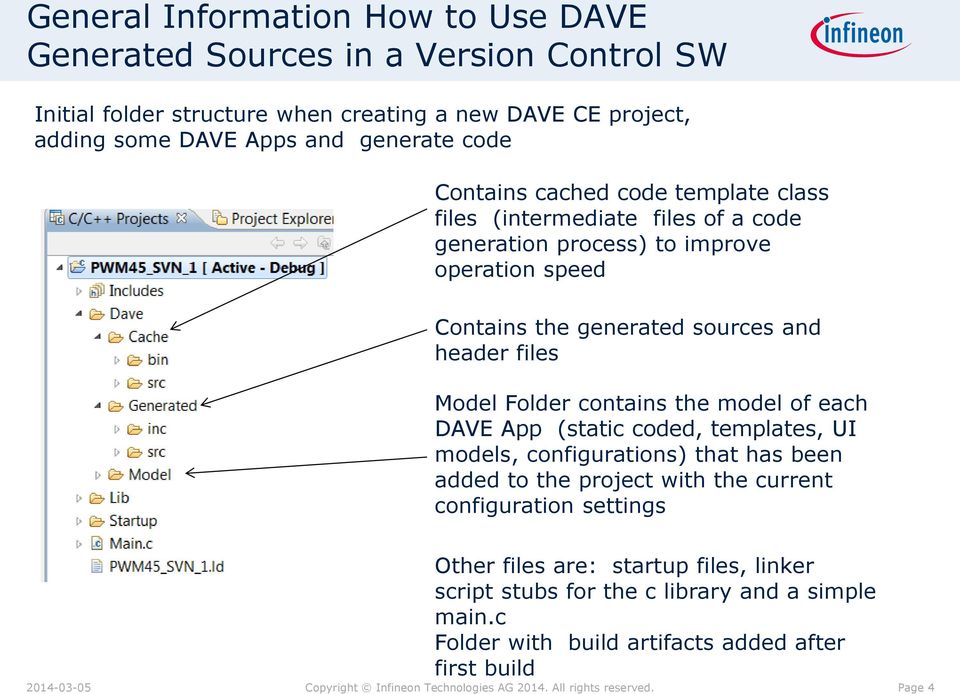
5 Version Control of the DAVE Generated Code DAVE will generate the code from the files stored in the model folder by utilizing the device model of the chosen device that is in the local library store located in the user folder Therefore it is only required to put all files of the Dave model folder under version control Putting the Dave Generated folder and the Dave Cache folder under version control is not required Recommendation: only the Dave Model folder and may be the Dave Generated folder should be put under version control cache folders and.codecache file should be assigned as svn ignore before committing) Before committing the Dave Model folder into a repository the application model has to be saved (all cached memory information to be saved in App instance file) After updating the Dave Model folder from the repository the code needs to be generated (assuming Dave Generated folder is not under version control) Page 5

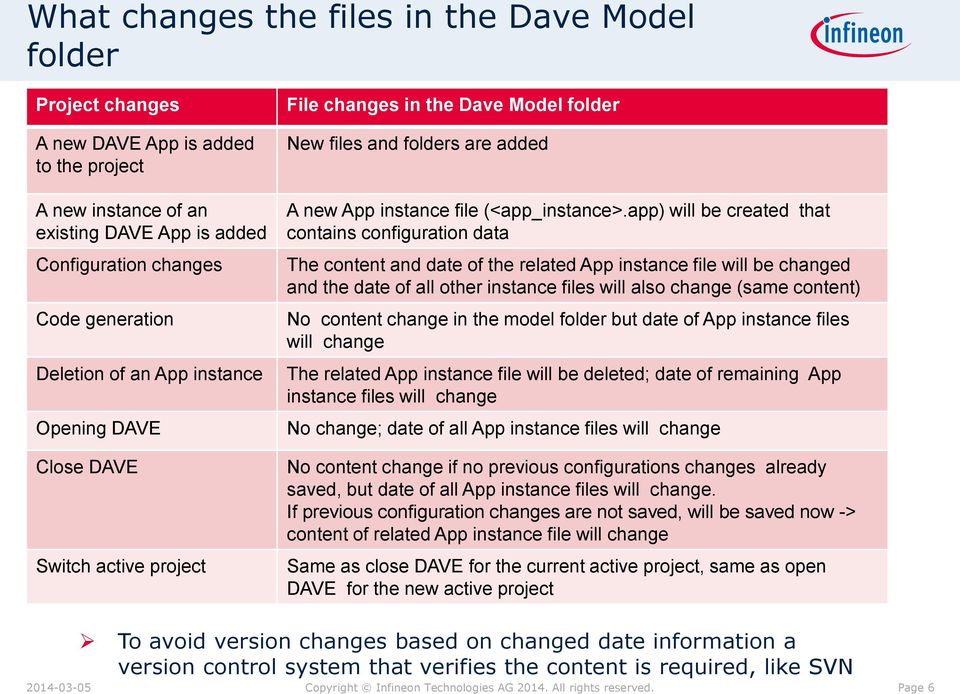
6 What changes the files in the Dave Model folder Project changes File changes in the Dave Model folder A new DAVE App is added to the project A new instance of an existing DAVE App is added Configuration changes Code generation Deletion of an App instance Opening DAVE Close DAVE Switch active project New files and folders are added A new App instance file (<app_instance>.app) will be created that contains configuration data The content and date of the related App instance file will be changed and the date of all other instance files will also change (same content) No content change in the model folder but date of App instance files will change The related App instance file will be deleted; date of remaining App instance files will change No change; date of all App instance files will change No content change if no previous configurations changes already saved, but date of all App instance files will change. If previous configuration changes are not saved, will be saved now -> content of related App instance file will change Same as close DAVE for the current active project, same as open DAVE for the new active project To avoid version changes based on changed date information a version control system that verifies the content is required, like SVN Page 6
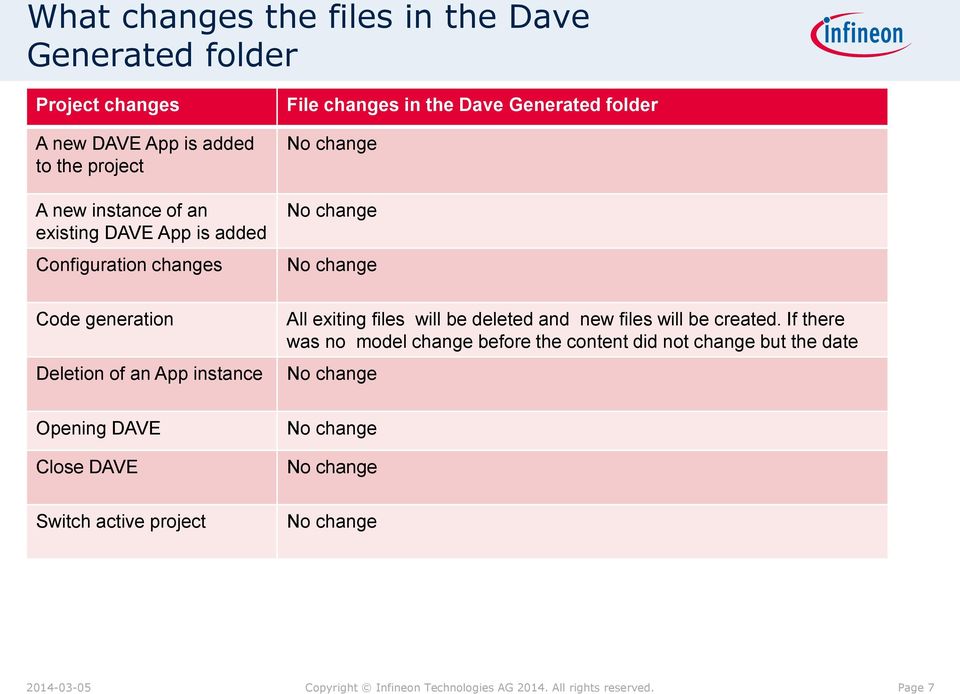
7 What changes the files in the Dave Generated folder Project changes File changes in the Dave Generated folder A new DAVE App is added to the project A new instance of an existing DAVE App is added Configuration changes No change No change No change Code generation Deletion of an App instance All exiting files will be deleted and new files will be created. If there was no model change before the content did not change but the date No change Opening DAVE Close DAVE No change No change Switch active project No change Page 7
8 Merging and Conflicts It is not allowed to let SVN merge model files In case a second user wants to commit a changed model folder that has be differently changed by another user previously, svn will offer a merge functionality, this merge functionality should not be executed. Second user should first update the working copy then make the required changes in the model file and then commit Page 8

9 Table of contents General Considerations Eclipse Subversive Overview Eclipse Subversive Installation in DAVE DAVE CE Example Project usage with SVN Page 9
10 Eclipse Subversive Subversive plug-in provides access to Subversion (SVN) repositories from the DAVE v 3 (Eclipse) workbench Subversive Features Full-Scale SVN Client Subversive is designed to be used as a full-featured SVN client, so you can update, commit, merge changes, work with SVN properties, view change history and perform other operations with SVN directly from the Eclipse environment. Advanced SVN Features Subversive includes several features that extend functionality of the standard SVN client. In particular, Subversive can show the SVN repository content grouped by the logical structures of trunk, branch and tag and display changes on a visual revisions graph. Seamless Integration with Eclipse Subversive is an official Eclipse project and an integral part of Eclipse Simultaneous releases. The project follows all Eclipse guidelines and requirements to deliver a quality SVN team provider plug-in similar to CVS and Git implementations. Support of the Latest SVN Versions Subversive evolves together with the Subversion project to provide Eclipse users with the features that appeared in new versions of the SVN implementation. You can use the new SVN functionality in Eclipse by installing the Early Access version of Subversive Page 10

11 Table of contents General Considerations Eclipse Subversive Overview Eclipse Subversive Installation in DAVE DAVE CE Example Project usage with SVN Page 11
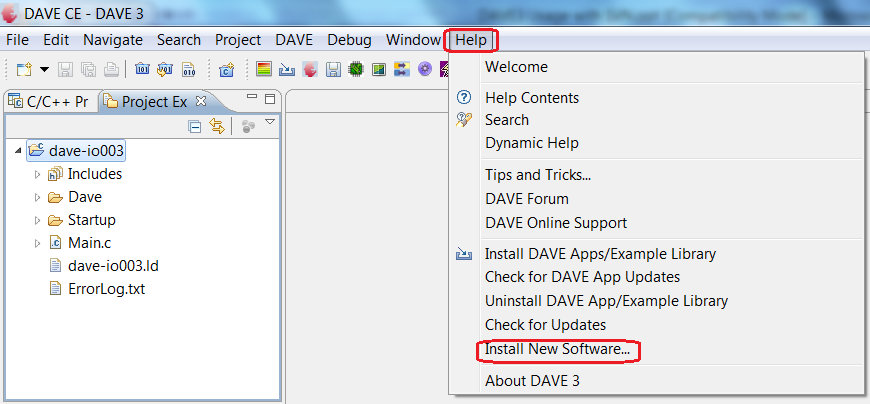
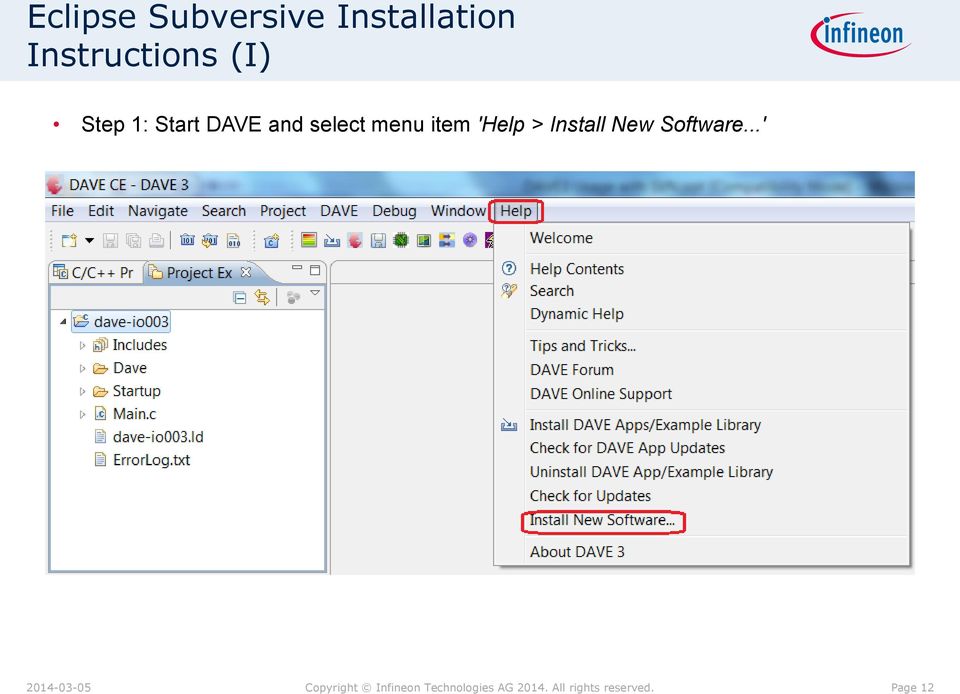
12 Eclipse Subversive Installation Instructions (I) Step 1: Start DAVE and select menu item 'Help > Install New Software...' Page 12
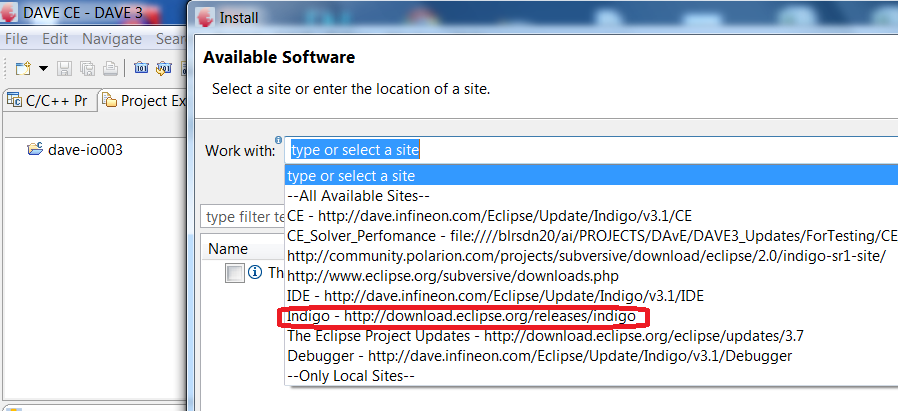
13 Eclipse Subversive Installation Instructions (II) Step 2: Select Eclipse Indigo link as per below Page 13

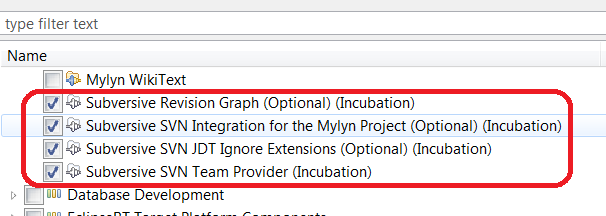
14 Eclipse Subversive Installation Instructions (III) Step 3: Expand the Collaboration option Step 4: Select the Subversive Features & then click Next Page 14

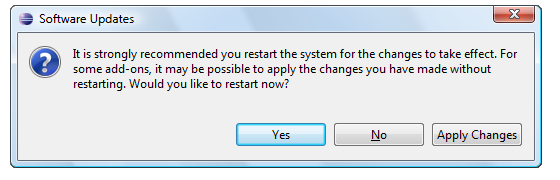
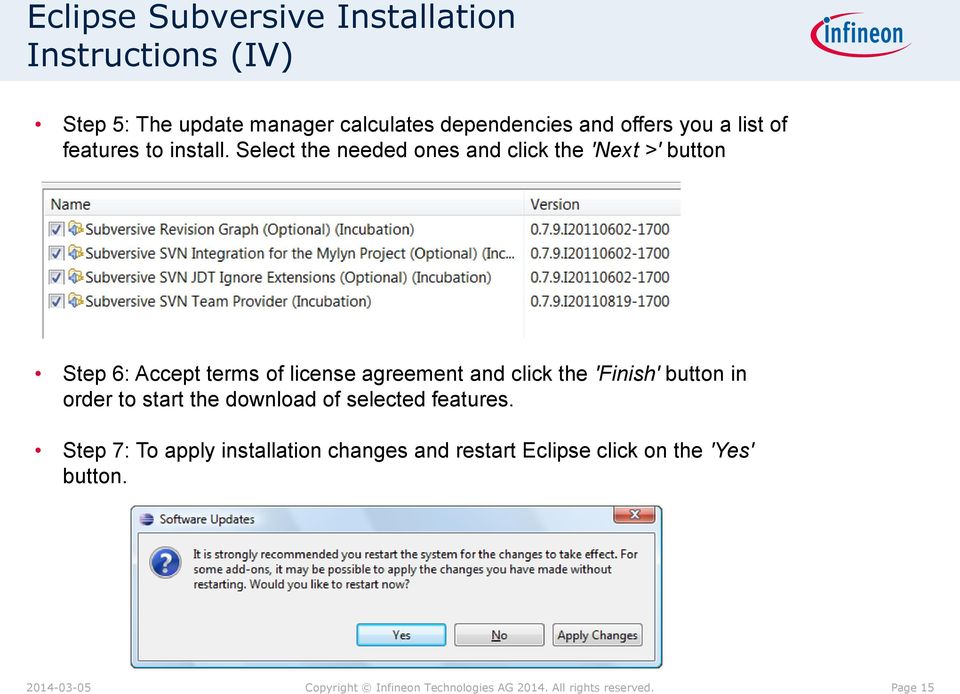
15 Eclipse Subversive Installation Instructions (IV) Step 5: The update manager calculates dependencies and offers you a list of features to install. Select the needed ones and click the 'Next >' button Step 6: Accept terms of license agreement and click the 'Finish' button in order to start the download of selected features. Step 7: To apply installation changes and restart Eclipse click on the 'Yes' button. Page 15
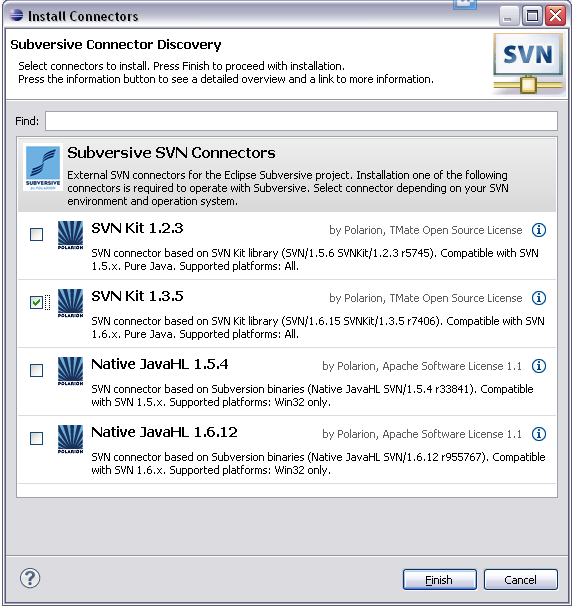
16 Eclipse Subversive Installation Instructions (V) Step 8: After Eclipse restart you'll see connectors discovery dialog which will allow you to install Subversive Connectors without registering connectors update site manually. Install the appropriate connector as per your subversion repository Page 16
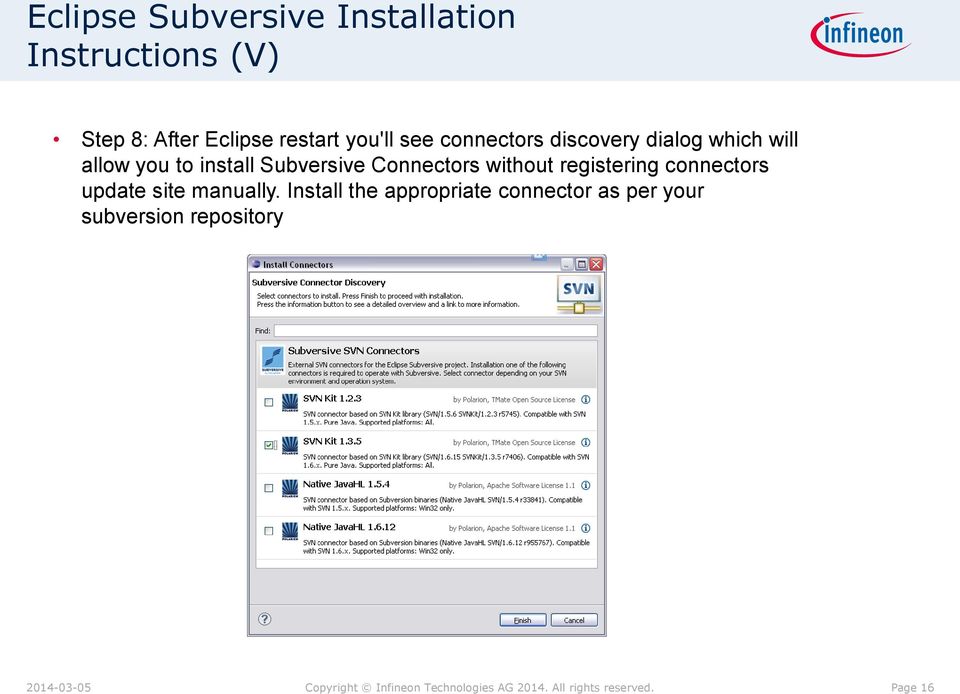
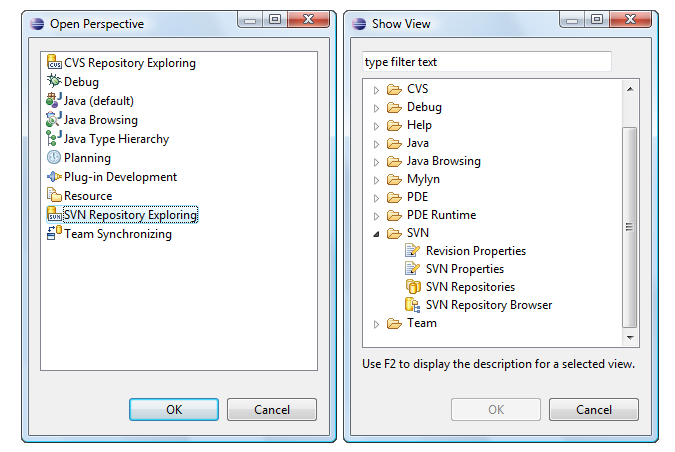
17 Eclipse Subversive Installation Instructions (VI) Step 9: You can find Subversive perspective and views in correspondent dialogs, activated by menu items 'Window > Open Perspective > Other...' and 'Window > Show View > Other...'. Page 17

18 Team Support with SVN Various Features of Eclipse Plug-in Usage with SVN are provided below SVN Exploring, Locating..etc Page 18

19 Team Support with SVN Various Features of Eclipse Plug-in Usage with SVN are provided below SVN Exploring, Locating..etc Page 19
20 Table of contents General Considerations Eclipse Subversive Overview Eclipse Subversive Installation in DAVE DAVE CE Example Project usage with SVN Page 20

21 Open the SVN related Perspectives Step1: Select the SVN Repository Exploring Perspective Page 21
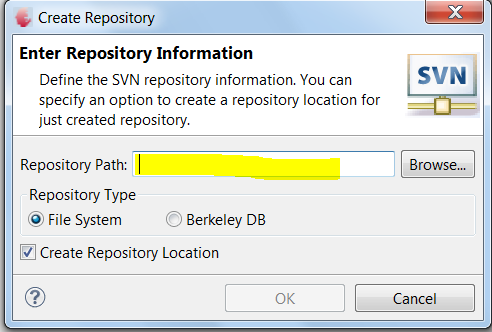
22 Connect to an Existing repository or Create a new One Step2: Select SVN Repository Location or Create New Repository Existing SVN Repository or New SVN Repository For test purposes a repository on a local drive can be created; Browse to the desired location Page 22

23 Project to be imported to a SVN Repository Step3: Select Active Project to be source controlled with SVN Step4: Save Application Model and Switch to Project Explorer Tab Page 23

24 Import the project to a SVN Repository Step5: Before the first import to the repository DAVE should not generate code or redundant folders (DAVE Generated, DAVE Cache folder, artifact folder,...), if already done, theses folders may be deleted. If the DAVE Generated folder should be also put under version control then the code has to be generated and the folders that should not be put under version control should be deleted. Page 24
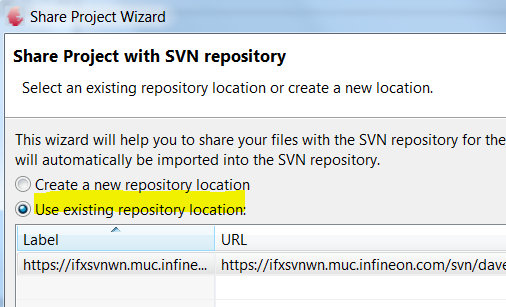
25 Import the project to a SVN Repository Step6: Right Click Project, Select Team & Share Project Step7: Select SVN repository & Click Finish Page 25
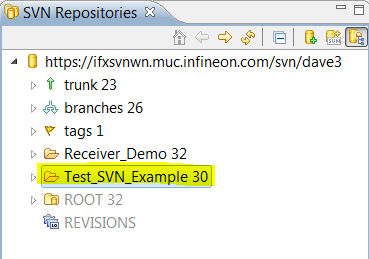
26 Import the project to a SVN Repository Step8: The project is added (imported) to SVN Repository Now!! Page 26
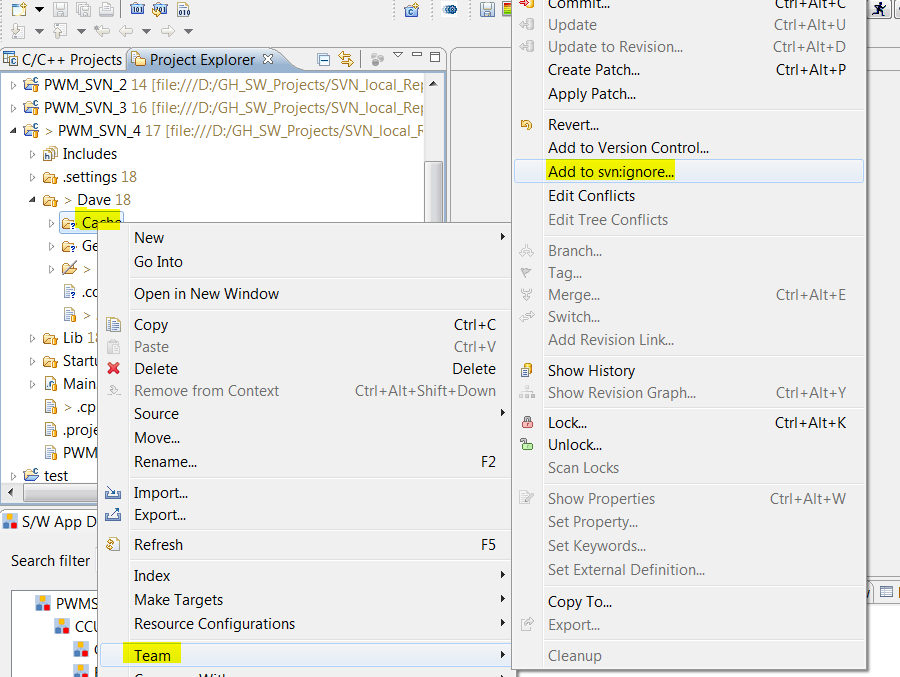
27 Assign folders that should not be under version control as svn ignore The svn ignore attribute can only be assigned to files and folder if the project is added (imported) in a SVN repository. First the folders that should be marked as svn ignore has to be created by pressing code generation and build (if the artifact folder should also be ignored) Step 9: Each folder that should be marked as marked as svn ignore should be handled like shown left: Right click on the folder Select Team Select Add to svn ignore We recommend to do this for the Cache folder and file:.codecache in the Dave folder and also the artifact folder Page 27
28 Subclipse FAQ This page will attempt to answer some questions about Subclipse 68eead02c3eff5648b77985d a Return to Wiki FrontPage 1. General questions: 1. Why does this project exist? 2. Does Subclipse support Eclipse X.Y or Other IDE X.Y? 3. What is an adapter? What is JavaHL? 4. Which adapter should I use? 5. Which adapter am I using? 6. I have chosen SVNKit, but it looks like JavaHL is still being used. 7. Usernames and passwords 2. How-to: 1. How do I check out the Subclipse code? 2. How do I create a repository? How do I import data into it? 3. How do I configure an HTTP proxy connection? 4. How do I specify SSL client certificates? 5. How do I configure an svn+ssh:// connection? 3. Troubleshooting: 1. While installing Subclipse I can't get past the Review Licenses page 2. New files added by other users are not showing up in Synchronize view or even coming into my workspace when I update the entire project 3. How do I get the JavaHL library for my operating system? 4. How do I build JavaHL from source? 5. I think I have a valid JavaHL library installed, but Subclipse says it is "Not available". What should I do? 6. I keep getting an error message about my "Working Copy not locked". Is this a bug? What should I do? 7. I am trying to commit some changes and I am getting an error message about the transaction being "out of date". What does this mean and what should I do? 8. On the SVN preferences page the SVN Interface drop down is Blank. What do I do? 4. Obsolete FAQs: 1. As soon as I do something with Subclipse on Windows, Eclipse just crashes. Why does this happen? 2. Why am I getting an error dialog telling me the case of my Eclipse workspace path does not match the filesystem? Windows does not seem to care. Subclipse exists to provide an outstanding user interface to Subversion from within the Eclipse IDE. We aim to provide a client that is every bit as robust and user-friendly as the CVS client Rules to work with SVN Step10: Before doing any project modifications make sure that you are working on the most current project version by update your local copy from SVN repository using command SVN- >Update Rules to make sure that changes are correctly committed to the SVN repository 1) Update local copy from SVN: SVN->Update 2) Make the required changes in the project 3) Commit your changes to SVN using SVN->Commit 4) Check if project is still in check-out mode [using the project icons in the project explorer, see following pages] 5) If yes again start from steps 3 6) Refer attached SVN FAQ for more info Contents General questions: Why does this project exist? Page 28
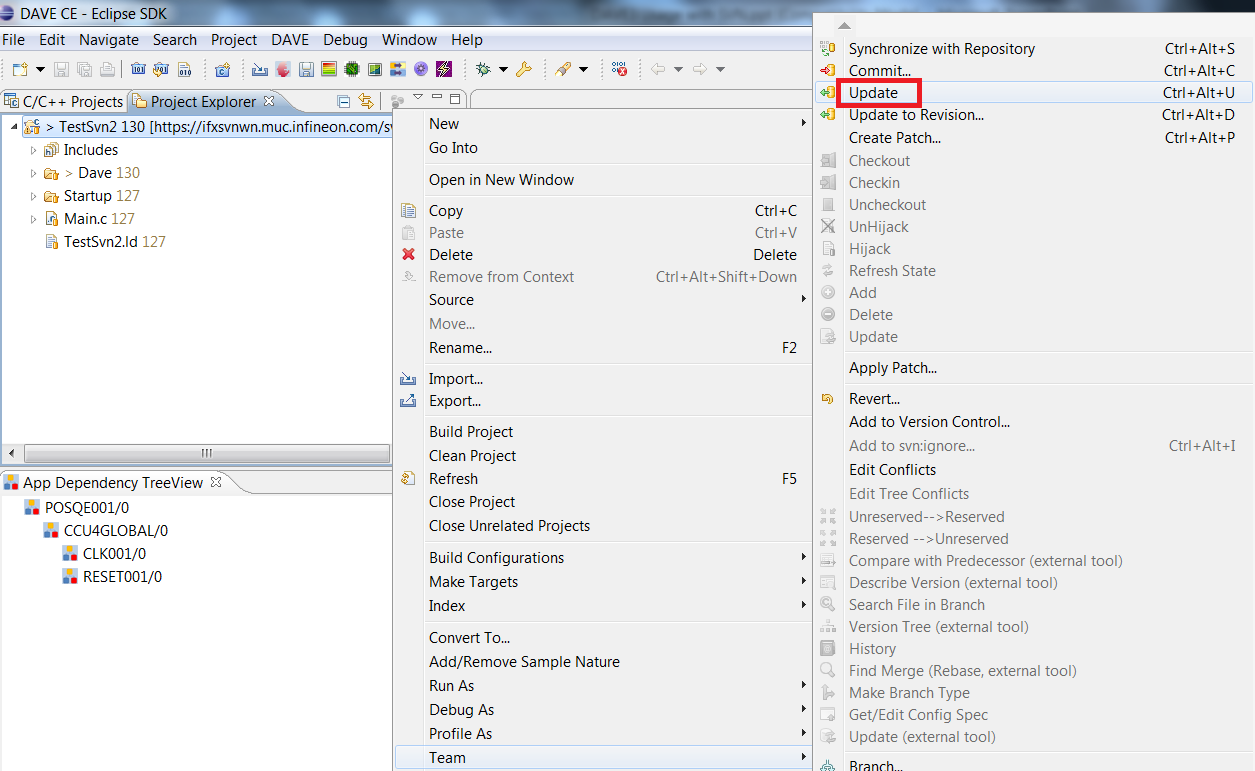
29 Step 1: Update local copy from SVN Project in checked out state Page 29

30 Step 3: Commit your changes to SVN Project in checked out state Page 30
31 Alternatives to Subversive Instead of Subversive also the eclipses plug-in Subclipse can be used Subclipse is usually more up to date in following the latest updates of svn Instead of an eclipse plug-in, tortoises might be used Client and repo browser that is integrated in the windows file explorer After the initial project import all svn commands are available via the windows project explorer Page 31
32 Summary The DAVE generated code can be put under version control as any other project files To avoid redundancies only the Dave Model folder should be put under version control The Dave Cache folder should be marked as ignored by the version control system The Dave Generated folder should also be marked as ignored To avoid regeneration it could also be kept under version control The version control systems should verify the content of the files and not the date of the last change SVN can be recommended CVS can not be recommended Page 32
33
Beginning with SubclipseSVN
 Version 2 July 2007 Beginning with SubclipseSVN A user guide to begin using the Subclipse for source code management on the CropForge collaborative software development site. Copyright International Rice
How To Run A Hello World On Android 4.3.3 (Jdk) On A Microsoft Ds.Io (Windows) Or Android 2.7.3 Or Android 3.5.3 On A Pc Or Android 4 (
 Developing Android applications in Windows Below you will find information about the components needed for developing Android applications and other (optional) software needed to connect to the institution
Manual. CollabNet Subversion Connector to HP Quality Center. Version 1.2
 Manual CollabNet Subversion Connector to HP Quality Center Version 1.2 A BOUT THE CONNECTOR About the Connector The CollabNet Subversion Connector to HP Quality Center enables Quality Center users to
INF 111 / CSE 121. Homework 4: Subversion Due Tuesday, July 14, 2009
 Homework 4: Subversion Due Tuesday, July 14, 2009 Name : Student Number : Laboratory Time : Objectives Preamble Set up a Subversion repository on UNIX Use Eclipse as a Subversion client Subversion (SVN)
SourceAnywhere Service Configurator can be launched from Start -> All Programs -> Dynamsoft SourceAnywhere Server.
 Contents For Administrators... 3 Set up SourceAnywhere... 3 SourceAnywhere Service Configurator... 3 Start Service... 3 IP & Port... 3 SQL Connection... 4 SourceAnywhere Server Manager... 4 Add User...
A Tutorial on installing and using Eclipse
 SEG-N-0017 (2011) A Tutorial on installing and using Eclipse LS Chin, C Greenough, DJ Worth July 2011 Abstract This SEGNote is part of the material use at the CCPPNet Software Engineering Workshop. Its
Lab 0 (Setting up your Development Environment) Week 1
 ECE155: Engineering Design with Embedded Systems Winter 2013 Lab 0 (Setting up your Development Environment) Week 1 Prepared by Kirill Morozov version 1.2 1 Objectives In this lab, you ll familiarize yourself
Source Control Guide: Git
 MadCap Software Source Control Guide: Git Flare 11.1 Copyright 2015 MadCap Software. All rights reserved. Information in this document is subject to change without notice. The software described in this
Introducing Xcode Source Control
 APPENDIX A Introducing Xcode Source Control What You ll Learn in This Appendix: u The source control features offered in Xcode u The language of source control systems u How to connect to remote Subversion
BlueJ Teamwork Tutorial
 BlueJ Teamwork Tutorial Version 2.0 for BlueJ Version 2.5.0 (and 2.2.x) Bruce Quig, Davin McCall School of Engineering & IT, Deakin University Contents 1 OVERVIEW... 3 2 SETTING UP A REPOSITORY... 3 3
Version Control! Scenarios, Working with Git!
 Version Control! Scenarios, Working with Git!! Scenario 1! You finished the assignment at home! VC 2 Scenario 1b! You finished the assignment at home! You get to York to submit and realize you did not
educ Office 365 email: Remove & create new Outlook profile
 Published: 29/01/2015 If you have previously used Outlook the with the SCC/SWO service then once you have been moved into Office 365 your Outlook will need to contact the SCC/SWO servers one last time
Building OWASP ZAP Using Eclipse IDE
 Building OWASP ZAP Using Eclipse IDE for Java Pen-Testers Author: Raul Siles (raul @ taddong.com) Taddong www.taddong.com Version: 1.0 Date: August 10, 2011 This brief guide details the process required
Version Control with Subversion
 Version Control with Subversion Introduction Wouldn t you like to have a time machine? Software developers already have one! it is called version control Version control (aka Revision Control System or
Exchange 2003 Mailboxes
 Exchange 2003 Mailboxes Microsoft will stop supporting Exchange 2003 mailboxes in 2014 as it comes to the end of it s life. To maintain our levels of support and performance of all our customers, we will
WhatsUp Gold v16.3 Installation and Configuration Guide
 WhatsUp Gold v16.3 Installation and Configuration Guide Contents Installing and Configuring WhatsUp Gold using WhatsUp Setup Installation Overview... 1 Overview... 1 Security considerations... 2 Standard
Revision control systems (RCS) and
 Revision control systems (RCS) and Subversion Problem area Software projects with multiple developers need to coordinate and synchronize the source code Approaches to version control Work on same computer
Getting started with 2c8 plugin for Microsoft Sharepoint Server 2010
 Getting started with 2c8 plugin for Microsoft Sharepoint Server 2010... 1 Introduction... 1 Adding the Content Management Interoperability Services (CMIS) connector... 1 Installing the SharePoint 2010
MadCap Software. SharePoint Guide. Flare 11.1
 MadCap Software SharePoint Guide Flare 11.1 Copyright 2015 MadCap Software. All rights reserved. Information in this document is subject to change without notice. The software described in this document
EAE-MS SCCAPI based Version Control System
 EAE-MS SCCAPI based Version Control System This document is an implementation guide to use the EAE-MS SCCAPI based Version Control System as an alternative to the existing EAE Version Control System. The
MailEnable Connector for Microsoft Outlook
 MailEnable Connector for Microsoft Outlook Version 2.23 This guide describes the installation and functionality of the MailEnable Connector for Microsoft Outlook. Features The MailEnable Connector for
Introduction to Programming Tools. Anjana & Shankar September,2010
 Introduction to Programming Tools Anjana & Shankar September,2010 Contents Essentials tooling concepts in S/W development Build system Version Control System Testing Tools Continuous Integration Issue
BestSync Tutorial. Synchronize with a FTP Server. This tutorial demonstrates how to setup a task to synchronize with a folder in FTP server.
 BestSync Tutorial Synchronize with a FTP Server This tutorial demonstrates how to setup a task to synchronize with a folder in FTP server. 1. On the main windows, press the Add task button ( ) to add a
Using GitHub for Rally Apps (Mac Version)
 Using GitHub for Rally Apps (Mac Version) SOURCE DOCUMENT (must have a rallydev.com email address to access and edit) Introduction Rally has a working relationship with GitHub to enable customer collaboration
Business mail 1 MS OUTLOOK CONFIGURATION... 2
 Business mail Instructions for configuration of Outlook, 2007, 2010, 2013 and mobile devices CONTENT 1 MS OUTLOOK CONFIGURATION... 2 1.1 Outlook 2007, 2010 and 2013 adding new exchange account, automatic
Maintenance Guide. Outpost Firewall 4.0. Personal Firewall Software from. Agnitum
 Maintenance Guide Outpost Firewall 4.0 Personal Firewall Software from Agnitum Abstract This document is intended to assist Outpost Firewall users in installing and maintaining Outpost Firewall and gets
Using Git for Project Management with µvision
 MDK Version 5 Tutorial AN279, Spring 2015, V 1.0 Abstract Teamwork is the basis of many modern microcontroller development projects. Often teams are distributed all over the world and over various time
ELF WP 2 UML repository instruction
 ELF WP 2 UML repository instruction Author: Magnus Karge Date: 22/12/2014 Version: 1.2 Change Summary Version Date Author/Editor Change Summary 1.0 29/08/2013 Magnus Karge First version 1.1 17/10/2013
pure::variants Transformer for Software Configuration Management Manual
 pure-systems GmbH Copyright 2003-2007 pure-systems GmbH 2007 Table of Contents 1. Synopsis... 1 2. Concept... 1 2.1. Client Authorization... 2 3. Installing the Transformer... 3 4. Using the Transformer...
Windows 7 Hula POS Server Installation Guide
 Windows 7 Hula POS Server Installation Guide Step-by-step instructions for installing the Hula POS Server on a PC running Microsoft Windows 7 1 Table of Contents Introduction... 3 Getting Started... 3
Why Use Blackboard Content System to Store Documents One Time
 Set Up Blackboard Drive to Store and Access Assessment Plans and Related Documents This document will walk you through installing the Blackboard Drive application and then configuring it to access the
Set up Outlook for your new student e mail with IMAP/POP3 settings
 Set up Outlook for your new student e mail with IMAP/POP3 settings 1. Open Outlook. The Account Settings dialog box will open the first time you open Outlook. If the Account Settings dialog box doesn't
CoProc2. 1 Overview. Contents. Eclipse/DataPower CoProcessor
 Contents CoProc2 Eclipse/DataPower CoProcessor 1 Overview...1 2 Installation...3 2.1 Service Installation...3 2.2 Plug-in Installation...4 3 Documentation...5 4 Troubleshooting...5 4.1 Connection Problems...5
Updating Your Applied Account
 For Applied System Administrators Updating Your Applied Account, Assigning Chubb Codes, Configuring Users, Activating New Users To start using Transformation Station to conduct Chubb policy inquiries directly
DAVE Software Development Kit overview. Preparing the workbench. Creating a simple APP. Step 1: Create a new APP project
 DAVE Software Development Kit overview The DAVE SDK project provides the tool used to develop DAVE 4 software components or applications called "DAVE APPs". It provides facilities to create user interface
Sitecore InDesign Connector 1.1
 Sitecore Adaptive Print Studio Sitecore InDesign Connector 1.1 - User Manual, October 2, 2012 Sitecore InDesign Connector 1.1 User Manual Creating InDesign Documents with Sitecore CMS User Manual Page
StruxureWare Data Center Operation Troubleshooting Guide
 StruxureWare Data Center Operation Troubleshooting Guide Versions 7.4 and 7.4.5 1. Power Tool Tip Troubleshooting............................................................................ 2 2. Troubleshooting
Installing and Configuring vcloud Connector
 Installing and Configuring vcloud Connector vcloud Connector 2.7.0 This document supports the version of each product listed and supports all subsequent versions until the document is replaced by a new
How to install and use the File Sharing Outlook Plugin
 How to install and use the File Sharing Outlook Plugin Thank you for purchasing Green House Data File Sharing. This guide will show you how to install and configure the Outlook Plugin on your desktop.
Migrating helpdesk to a new server
 Migrating helpdesk to a new server Table of Contents 1. Helpdesk Migration... 2 Configure Virtual Web on IIS 6 Windows 2003 Server:... 2 Role Services required on IIS 7 Windows 2008 / 2012 Server:... 2
WA1826 Designing Cloud Computing Solutions. Classroom Setup Guide. Web Age Solutions Inc. Copyright Web Age Solutions Inc. 1
 WA1826 Designing Cloud Computing Solutions Classroom Setup Guide Web Age Solutions Inc. Copyright Web Age Solutions Inc. 1 Table of Contents Part 1 - Minimum Hardware Requirements...3 Part 2 - Minimum
Tutorial: BlackBerry Object API Application Development. Sybase Unwired Platform 2.2 SP04
 Tutorial: BlackBerry Object API Application Development Sybase Unwired Platform 2.2 SP04 DOCUMENT ID: DC01214-01-0224-01 LAST REVISED: May 2013 Copyright 2013 by Sybase, Inc. All rights reserved. This
Configuring IBM HTTP Server as a Reverse Proxy Server for SAS 9.3 Web Applications Deployed on IBM WebSphere Application Server
 Configuration Guide Configuring IBM HTTP Server as a Reverse Proxy Server for SAS 9.3 Web Applications Deployed on IBM WebSphere Application Server This document is revised for SAS 9.3. In previous versions
Set up a VPN Connection on Windows
 Set up a VPN Connection on Windows NOTICE: Beginning in July 2014, McGill has a new, more secure VPN server. You must go through the steps to install the Cisco AnyConnect VPN client on your computer (a
Version Control with Subversion and Xcode
 Version Control with Subversion and Xcode Author: Mark Szymczyk Last Update: June 21, 2006 This article shows you how to place your source code files under version control using Subversion and Xcode. By
Administering Jive for Outlook
 Administering Jive for Outlook TOC 2 Contents Administering Jive for Outlook...3 System Requirements...3 Installing the Plugin... 3 Installing the Plugin... 3 Client Installation... 4 Resetting the Binaries...4
http://docs.trendmicro.com/en-us/smb/hosted-email-security.aspx
 Trend Micro Incorporated reserves the right to make changes to this document and to the product described herein without notice. Before installing and using the product, review the readme files, release
Changing Your Cameleon Server IP
 1.1 Overview Technical Note Cameleon requires that you have a static IP address defined for the server PC the Cameleon server application runs on. Even if the server PC has a static IP address, you may
Setting up a local working copy with SVN, MAMP and rsync. Agentic - 2009
 Setting up a local working copy with SVN, MAMP and rsync Agentic - 2009 Get MAMP You can download MAMP for MAC at this address : http://www.mamp.info/en/downloads/index.html Install MAMP in your APPLICATION
Apple Mail... 36 Outlook Web Access (OWA)... 38 Logging In... 38 Changing Passwords... 39 Mobile Devices... 40 Blackberry...
 Contents Email Accounts... 3 Adding accounts... 3 Account Modifications... 6 Adding Aliases... 7 Primary E-mail Addresses... 10 Mailbox Quotas... 12 Removing accounts... 13 Mail Forwarding and Distribution
Installing Windows Server Update Services (WSUS) on Windows Server 2012 R2 Essentials
 Installing Windows Server Update Services (WSUS) on Windows Server 2012 R2 Essentials With Windows Server 2012 R2 Essentials in your business, it is important to centrally manage your workstations to ensure
CYAN SECURE WEB APPLIANCE. User interface manual
 CYAN SECURE WEB APPLIANCE User interface manual Jun. 13, 2008 Applies to: CYAN Secure Web 1.4 and above Contents 1 Log in...3 2 Status...3 2.1 Status / System...3 2.2 Status / Network...4 Status / Network
You can find the installer for the +Cloud Application on your SanDisk flash drive.
 Installation You can find the installer for the +Cloud Application on your SanDisk flash drive. Make sure that your computer is connected to the internet. Next plug in the flash drive and double click
Using Subversion in Computer Science
 School of Computer Science 1 Using Subversion in Computer Science Last modified July 28, 2006 Starting from semester two, the School is adopting the increasingly popular SVN system for management of student
WebSpy Vantage Ultimate 2.2 Web Module Administrators Guide
 WebSpy Vantage Ultimate 2.2 Web Module Administrators Guide This document is intended to help you get started using WebSpy Vantage Ultimate and the Web Module. For more detailed information, please see
PTC Integrity Eclipse and IBM Rational Development Platform Guide
 PTC Integrity Eclipse and IBM Rational Development Platform Guide The PTC Integrity integration with Eclipse Platform and the IBM Rational Software Development Platform series allows you to access Integrity
Content. Development Tools 2(63)
 Development Tools Content Project management and build, Maven Version control, Git Code coverage, JaCoCo Profiling, NetBeans Static Analyzer, NetBeans Continuous integration, Hudson Development Tools 2(63)
This guide provides information to show how to create and manage Riva Dynamic Distribution List policies.
 Riva Enterprise Edition Secure Distribution List Guide This Guide Welcome to Riva Managed Applications Dynamic Distribution Lists, a policy-driven method of creating dynamically populated GroupWise distribution
Exchange 2013 mailbox setup guide
 Fasthosts Customer Support Exchange 2013 mailbox setup guide This article covers the setup of Exchange 2013 mailboxes in Microsoft Outlook 2013, 2010 and Outlook 2011 for Mac. Contents Exchange 2013 Mailbox
Office of Information Technology Connecting to Microsoft Exchange User Guide
 OVERVIEW The Office of Information Technology is migrating its messaging infrastructure from Microsoft Exchange 2003 to Microsoft Exchange 2010. Moving to the latest technology will provide many enhancements
Laptop Backup - User Guide (Windows)
 Laptop Backup - User Guide (Windows) Page 1 of 14 Page 2 of 14 Laptop Backup - User Guide - (Windows) TABLE OF CONTENTS INSTALLATION MONITOR RESTORE ADVANCED OPTIONS Adding Backup Content Filtering Contents
Module 11 Setting up Customization Environment
 Module 11 Setting up Customization Environment By Kitti Upariphutthiphong Technical Consultant, ecosoft [email protected] ADempiere ERP 1 2 Module Objectives Downloading ADempiere Source Code Setup Development
Hosted Microsoft Exchange Client Setup & Guide Book
 Hosted Microsoft Exchange Client Setup & Guide Book Section 1 Microsoft Outlook Web Access (OWA) access directions Section 2 Windows 10 Mail App setup & configuration Section 3 Windows Mobile Phone ActiveSync
Kaspersky Password Manager
 Kaspersky Password Manager User Guide Dear User, Thank you for choosing our product. We hope that you will find this documentation useful and that it will provide answers to most questions that may arise.
SIM900 Eclipse environment install Application Note_V1.00
 SIM900 Eclipse environment install Application Note_V1.00 Document Title: Note Version: V1.00 Date: 2011-01-11 Status: Document Control ID: Edit SIM900_Eclipse_environment_install_Application_Note _V1.01
pure::variants Connector for Version Control Systems Manual
 pure::variants Connector for Version Control Systems Manual pure-systems GmbH Version 3.2.17 for pure::variants 3.2 Copyright 2003-2015 pure-systems GmbH 2015 Table of Contents 1. Synopsis... 1 1.1. Software
CPSC 491. Today: Source code control. Source Code (Version) Control. Exercise: g., no git, subversion, cvs, etc.)
 Today: Source code control CPSC 491 Source Code (Version) Control Exercise: 1. Pretend like you don t have a version control system (e. g., no git, subversion, cvs, etc.) 2. How would you manage your source
QUANTIFY INSTALLATION GUIDE
 QUANTIFY INSTALLATION GUIDE Thank you for putting your trust in Avontus! This guide reviews the process of installing Quantify software. For Quantify system requirement information, please refer to the
File Share Navigator Online 1
 File Share Navigator Online 1 User Guide Service Pack 3 Issued November 2015 Table of Contents What s New in this Guide... 4 About File Share Navigator Online... 5 Components of File Share Navigator Online...
ultimo theme Update Guide Copyright 2012-2013 Infortis All rights reserved
 ultimo theme Update Guide Copyright 2012-2013 Infortis All rights reserved 1 1. Update Before you start updating, please refer to 2. Important changes to check if there are any additional instructions
October, 2015. Install/Uninstall Xerox Print Drivers & Apps Best Practices for Windows 8, 8.1, and 10 Customer Tip
 October, 2015 Install/Uninstall Xerox Print Drivers & Apps Best Practices for Windows 8, 8.1, and 10 Customer Tip 2015 Xerox Corporation. All rights reserved. Xerox, Xerox and Design, ColorQube, and WorkCentre
Configuration Guide. Remote Backups How-To Guide. Overview
 Configuration Guide Remote Backups How-To Guide Overview Remote Backups allow you to back-up your data from 1) a ShareCenter TM to either a Remote ShareCenter or Linux Server and 2) Remote ShareCenter
How To Use A Pvpn On A Pc Or Mac Or Ipad (For Pc) With A Password Protected (For Mac) On A Network (For Windows) On Your Computer (For Ipad) On An Ipad Or Ipa
 VPN User Guide For PC System Requirements Operating System: Windows XP, Windows Vista, or Windows 7. (Windows 8 is not officially supported, but does work for some users.) Internet Browser: Internet Explorer
Zend Server 4.0 Beta 2 Release Announcement What s new in Zend Server 4.0 Beta 2 Updates and Improvements Resolved Issues Installation Issues
 Zend Server 4.0 Beta 2 Release Announcement Thank you for your participation in the Zend Server 4.0 beta program. Your involvement will help us ensure we best address your needs and deliver even higher
Employee Quick Reference Guide
 Employee Quick Reference Guide Thank you for using ADP's ipaystatements to view your payroll information. Use this Quick Reference Guide to learn how to view your pay statements, W-2s, 1099s, and adjustments.
Working with a Version Control System
 Working with a Version Control System Summary Tutorial TU0114 (v2.4) March 18, 2008 This tutorial looks at how you can use Altium Designer s built-in version control capabilities to check project files
Lab 5 Using Remote Worklight Server
 Lab 5 Using Remote Worklight Server Table of Contents 5. Using Remote Worklight Server... 5-3 5.1. Lab Setup...5-4 5.1.1. Delete the mobile app in the Worklight Console... 5-4 5.2. Using the Remote Worklight
Team Foundation Server 2010, Visual Studio Ultimate 2010, Team Build 2010, & Lab Management Beta 2 Installation Guide
 Page 1 of 243 Team Foundation Server 2010, Visual Studio Ultimate 2010, Team Build 2010, & Lab Management Beta 2 Installation Guide (This is an alpha version of Benjamin Day Consulting, Inc. s installation
Introduction: The Xcode templates are not available in Cordova-2.0.0 or above, so we'll use the previous version, 1.9.0 for this recipe.
 Tutorial Learning Objectives: After completing this lab, you should be able to learn about: Learn how to use Xcode with PhoneGap and jquery mobile to develop iphone Cordova applications. Learn how to use
DiskPulse DISK CHANGE MONITOR
 DiskPulse DISK CHANGE MONITOR User Manual Version 7.9 Oct 2015 www.diskpulse.com [email protected] 1 1 DiskPulse Overview...3 2 DiskPulse Product Versions...5 3 Using Desktop Product Version...6 3.1 Product
CONNECT-TO-CHOP USER GUIDE
 CONNECT-TO-CHOP USER GUIDE VERSION V8 Table of Contents 1 Overview... 3 2 Requirements... 3 2.1 Security... 3 2.2 Computer... 3 2.3 Application... 3 2.3.1 Web Browser... 3 2.3.2 Prerequisites... 3 3 Logon...
Network Connect Installation and Usage Guide
 Network Connect Installation and Usage Guide I. Installing the Network Connect Client..2 II. Launching Network Connect from the Desktop.. 9 III. Launching Network Connect Pre-Windows Login 11 IV. Installing
FAQ: troubleshooting Java for Saba Web Access
 FAQ: troubleshooting Java for Saba Web Access Published: 06/11/2013 Introduction 2 TOC 3 Contents What are the Java requirements for using Saba Meeting?...4 How do I check if I have a supported version
Installing Novell Client Software (Windows 95/98)
 Installing Novell Client Software (Windows 95/98) Platform: Windows 95/98 Level of Difficulty: Intermediate The following procedure describes how to install the Novell Client software. This software allows
Using Oracle Cloud to Power Your Application Development Lifecycle
 Using Oracle Cloud to Power Your Application Development Lifecycle Srikanth Sallaka Oracle Product Management Dana Singleterry Oracle Product Management Greg Stachnick Oracle Product Management Using Oracle
ADOBE DRIVE CC USER GUIDE
 ADOBE DRIVE CC USER GUIDE 2 2013 Adobe Systems Incorporated. All rights reserved. Adobe Drive CC User Guide Adobe, the Adobe logo, Creative Cloud, Creative Suite, Illustrator, InCopy, InDesign, and Photoshop
Running the Tor client on Mac OS X
 Running the Tor client on Mac OS X Note that these are the installation instructions for running a Tor client on Mac OS X. If you want to relay traffic for others to help the network grow (please do),
How to Configure Outlook 2010 E-mail Client for Exchange
 LAUSD IT Help Desk How to Configure Outlook 2010 E-mail Client for Exchange (03/04/2012) LAUSD IT Help Desk 333 S. Beaudry Ave. 9 th Floor Phone 213.241.5200 Table of Contents Configure Outlook 2010 for
Administration Guide. BlackBerry Enterprise Service 12. Version 12.0
 Administration Guide BlackBerry Enterprise Service 12 Version 12.0 Published: 2015-01-16 SWD-20150116150104141 Contents Introduction... 9 About this guide...10 What is BES12?...11 Key features of BES12...
Version Control Using Subversion. 12 May 2013 OSU CSE 1
 Version Control Using Subversion 12 May 2013 OSU CSE 1 Version Control In team projects, software engineers: Share and extend a common code base (and comply with standards, coding conventions, comment
ANIMATED HEADER IMAGE WITH IMAGE HEADER SLIDESHOW (FL_HEADER_SLIDE)
 ANIMATED HEADER IMAGE WITH IMAGE HEADER SLIDESHOW (FL_HEADER_SLIDE) (STEP BY STEP INSTRUCTIONS FOR REAL BEGINNERS) I am writing this tutorial out of frustration with the general lack of proper instructions
GFI Product Manual. Outlook Connector User Manual
 GFI Product Manual Outlook Connector User Manual http://www.gfi.com [email protected] The information and content in this document is provided for informational purposes only and is provided "as is" with no
National Fire Incident Reporting System (NFIRS 5.0) Configuration Tool User's Guide
 National Fire Incident Reporting System (NFIRS 5.0) Configuration Tool User's Guide NFIRS 5.0 Software Version 5.6 1/7/2009 Department of Homeland Security Federal Emergency Management Agency United States
Frequently Asked Questions
 Frequently Asked Questions Contents Installing Lync 2010 Setting Up Devices Managing Contacts Using Lync 2010 as a Phone Using Lync 2010 with Office Outlook Scheduling Meetings Inviting People to Meetings
Team Foundation Server 2013 Installation Guide
 Team Foundation Server 2013 Installation Guide Page 1 of 164 Team Foundation Server 2013 Installation Guide Benjamin Day [email protected] v1.1.0 May 28, 2014 Team Foundation Server 2013 Installation Guide
Tutorial: Android Object API Application Development. SAP Mobile Platform 2.3 SP02
 Tutorial: Android Object API Application Development SAP Mobile Platform 2.3 SP02 DOCUMENT ID: DC01939-01-0232-01 LAST REVISED: May 2013 Copyright 2013 by Sybase, Inc. All rights reserved. This publication
National Fire Incident Reporting System (NFIRS 5.0) NFIRS Data Entry/Validation Tool Users Guide
 National Fire Incident Reporting System (NFIRS 5.0) NFIRS Data Entry/Validation Tool Users Guide NFIRS 5.0 Software Version 5.3 Prepared for: Directorate of Preparedness and Response (FEMA) Prepared by: