
Using Subversion in Computer Science
|
|
|
- Brianna Sullivan
- 10 years ago
- Views:
Transcription
1 School of Computer Science 1 Using Subversion in Computer Science Last modified July 28, 2006 Starting from semester two, the School is adopting the increasingly popular SVN system for management of student software projects. This will provide experience with a key software engineering competency use of software configuration management which will be of great practical benefit. This semester, SVN will be used in a range of courses. 1 Introduction A source control system is one which can manage the changes occurring to software as a project is worked on and developed. Such systems are very important because they allow more than one person to work on a single project. They also provide a complete history of all files, which allows the project to be backtracked and comparisons made with previous versions. Subversion (SVN) is a popular source control system which is freely available 1 SVN is a tool available for most popular operating systems which is able to keep track of multiple revisions of a project. It works by noticing the differences in a set of files. These files can be source code, documentation, or anything else related to a project. SVN allows developers to maintain control over a specific item, such as a source file, while changes are being made. When a developer has finished making changes to that file, it is committed to the system, and is available for use by other developers. All of the changes made to the file are recorded by SVN, which enables comparisons with different versions of that file to be made at any time. SVN provides facilities for a number of developers to simultaneously modify files in a project at any time. It is up to the SVN system to control the checking in process so that conflicting changes are managed. SVN only stores the differences between versions instead of every version of every file ever created. It also keeps a log of who, when, and why changes have been made to each file. It is very helpful for managing releases and controlling the concurrent editing of source files among multiple authors. SVN provides version control for a hierarchical collection of directories consisting of revision controlled files. These directories and files can then be combined to form an entire project. The flexibility offered by allowing many programmers to contribute to a project in a safe manner makes version control tools such as SVN very popular. However, even on a project with a single author such as a course assignment SVN can prove very useful. 1 see packages.html.

2 School of Computer Science 2 The chief benefits to using SVN when attempting practical work are the ability to roll-back changes, perhaps after inadvertently introducing an error into the code, and the ability to manage working on the assignment from multiple computers. For example, SVN can help when working on writing code from the systems at University, and your own computer at home. 1.1 Repositories Every project managed by SVN is stored in a central repository. In the repository all of the files related to the project are kept, along with all of the change and history information. For your own projects, your repository will be stored in a location accessed by the URL: where the string a1xxxxxx should be replaced by your username. Separate from the central repository, several different copies of the project files may exist in working directories. These files are said to be checked out from your repository ready to be worked on. Files inside your repository cannot be accessed directly. Rather, only files inside a working, checked out, copy should be modified. Checked out copies of a project can exist in different places on the same computer (for example in different user s home directories), or they may exist on separate computers. In this case, SVN communicates over the network to control the versions. The next section describes the basics required to get started with using SVN for course assignments. 2 Using SVN for course assignments Every assignment that will be used in conjunction with SVN will have its own unique key. The key will contain the name of the course, the year and semester, and the assignment name. For example, the first assignment for DSA in semester one could have the following key: dsa 05 s1 assign1. Every assignment sheet which describes the assignment will also specify the particular key. It is very important to get this key right in the commands in which you use it. When first starting an assignment, the very first step is to create an appropriate module in your SVN repository. To do that, you need to run the svn import command to import the starting files for the assignment into your repository. The general format of this command is (broken over two lines to fit in this document): svn import -m {message-string} {starting-files} where: {message-string} is some message indicating what you are doing surrounded in double-quotes. Typically, {message-string} is something like "initial import".

3 School of Computer Science 3 {starting-files} is the name of a directory containing the starting files you have copied to your home directory for the assignment, for example: /users/students/a1xxxxxx/dsa/dsa 05 s1 assign1. {key} is the assignment key, for example dsa 05 s1 assign1. At the very least, the values of files {message-string}, {starting-files} and {key} for this command will be given in each assignment specification. Note that the svn import command will only create files in your repository not files that you can actually edit. Also note that the original files that you imported are not in a format that svn can work with directly. You should remove the files you just imported from your home directory. Following on from the previous example, you would type: rm -rf ~/dsa/dsa_05_s1_assign1 or, at the very least, move the files to a safe place where you won t touch them for the rest of the project. Now you have your starting files in the repository and the original copies deleted or at least stowed away somewhere else. Now to start working on the assignment you will need to check out the code from your repository. To do that, you first of all need to create a place to store the checked out files. For example, create /dsa/, and change to this directory. From there, run 2 : svn checkout dsa_05_s1_assign1 This will create a directory inside the current directory containing all of the assignment files. You can now work on your assignment. You should regularly commit any changes you have made to the files back to your repository. Although you probably don t want to commit every single line that is changed, we suggest committing at least at the end of every work session. When committing changes back to the repository, SVN requires a short message describing the changes made. These messages can be used later when browsing the history of a particular file. An example of a commit is svn commit -m "a relevant comment describing changes made..." Note that this commit must be executed from within your working copy. Also note that, very occasionally, it may take up to two minutes for commit to take effect in the repository. For some assignments all you will need to do is work on assignment, committing regularly and, when you have finished, commit again (we will checkout the relevant files from your repository for marking after the due-date). However, for many assignments you will be expected to have your assignment marked (or checked) using the web based submission system found at: 2 Again, the command above is broken over two lines to fit in this document.
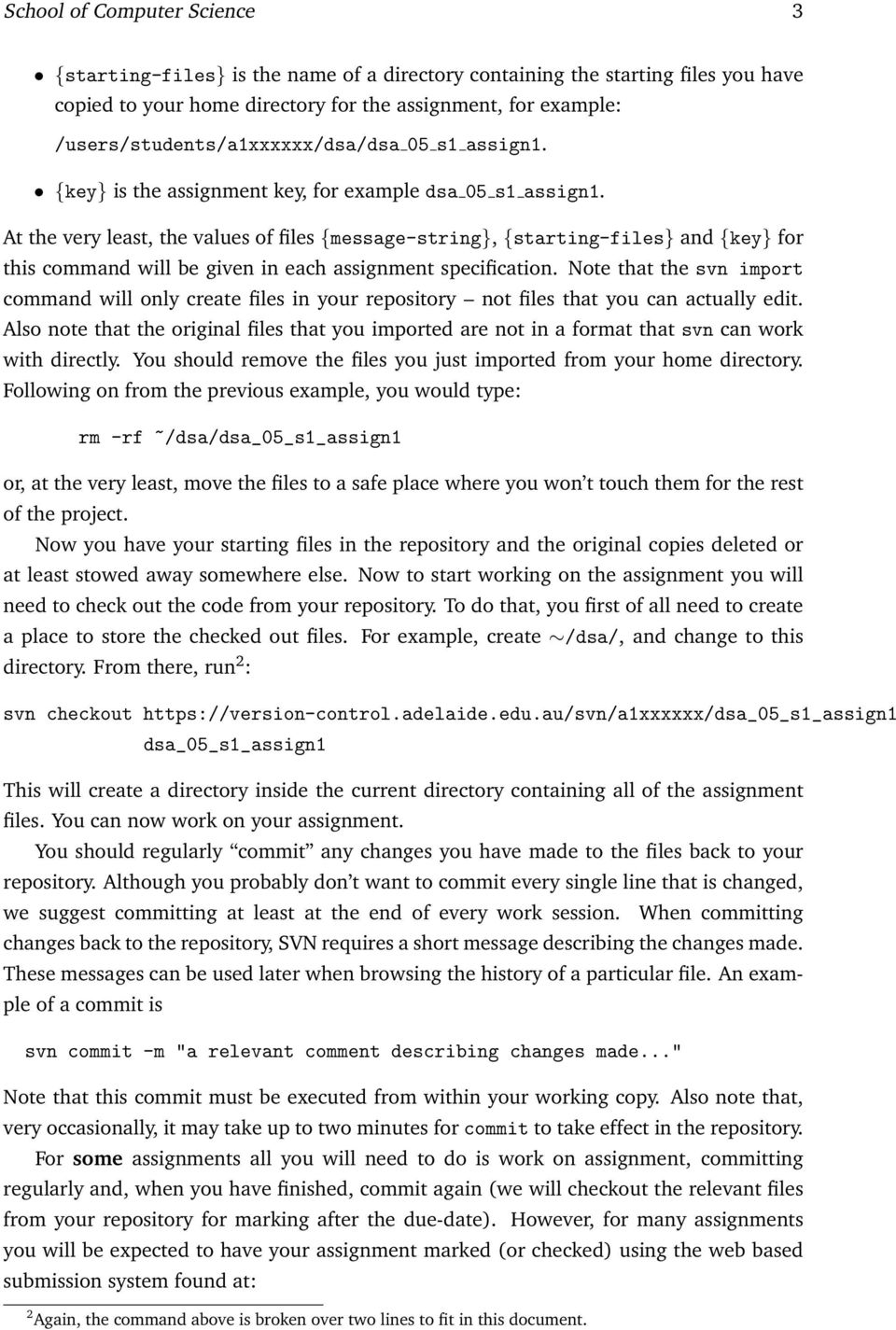
4 School of Computer Science 4 When you use this mechanism the marking system will expect your files to be in a directory with a specific name in your repository. The instructions for each individual assignment will tell you what this directory will be. 3 Basic SVN commands There are only a handful of commonly used SVN commands. Each of them is described briefly below. 3.1 checkout This command will take a copy of a project, and create a working directory of all of the files. It should be used like this: svn checkout {key} Of course, the required {key} directory must have already been created in your repository by running the svn import command. Once an assignment has been checked out, the files can be modified inside the working directory. 3.2 commit The commit command will cause any of changes made to any file in the current working directory to be saved in your repository. This means that they are now part of the latest version and are available to all other developers. When committing files, a short description may be given using the -m option (see above). If a description is not given with the -m option, then SVN will open an editor where one can be specified. By default, on UNIX systems, the editor is vi. Which editor is opened by SVN can be controlled by setting the SVN EDITOR environment variable. For example, if you prefer emacs to vi, you can put setenv SVN_EDITOR emacs for example in your.cshrc file. Note, very occasionally a commit may take one or two minutes to take effect in the repository even after the svn commit command has finished executing. 3.3 add By default, every new file that you create in a working directory is not automatically included in your repository. In fact, SVN will ignore any new files unless you explicitly let it know. This is achieved using the add command. Note that you will not need to add every file in your working copy to your repository. For example Java.class files do not need to be added because they are easily re-generated from the Java source files.
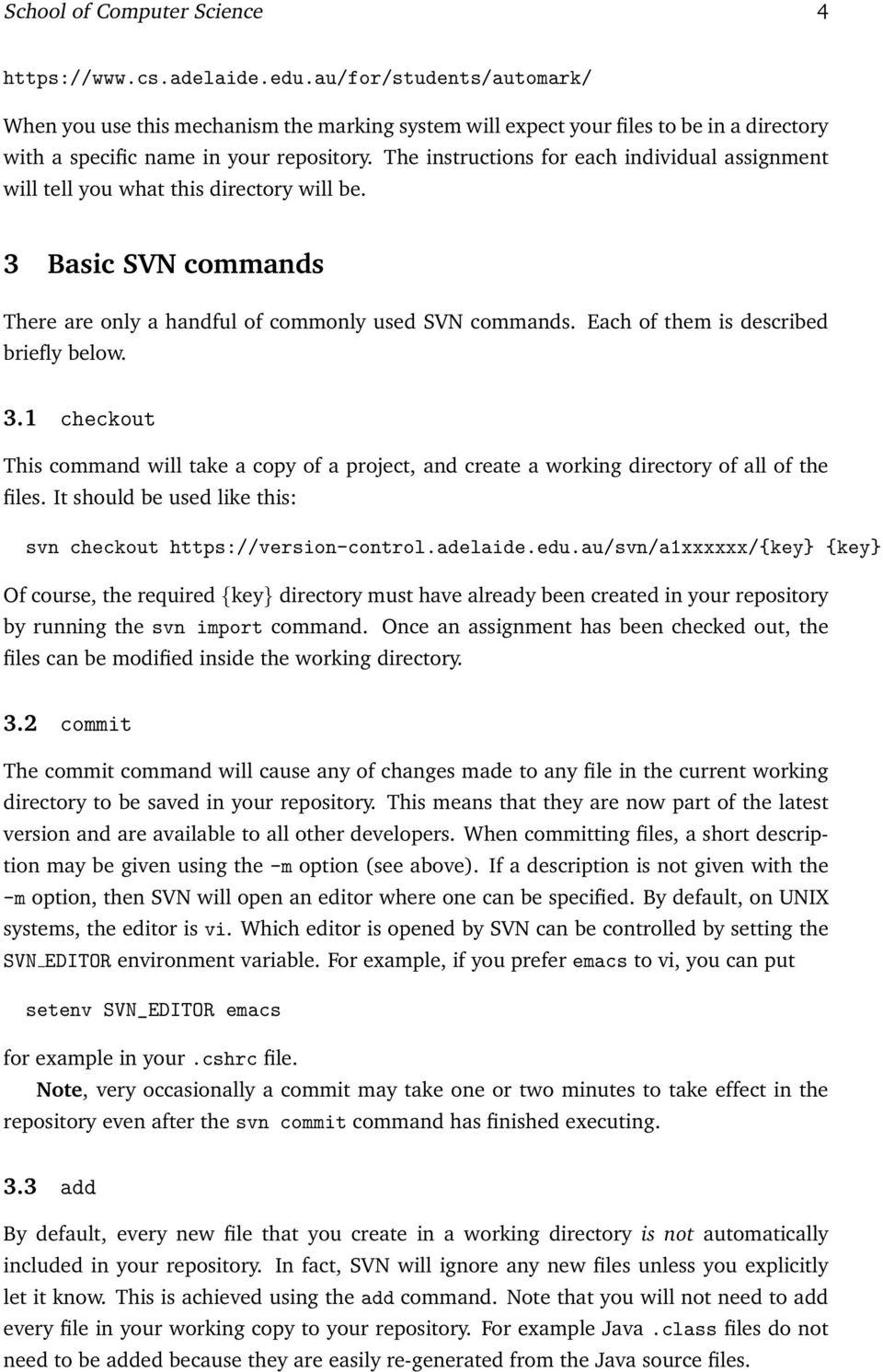
5 School of Computer Science 5 As an example of the use of svn add: if you create a new file, Something.java, as a new source file in your project, you must add it to your repository by doing svn add Something.java Be warned though that this will merely tell SVN about the existence of the file. It will not actually be put into your repository until the next commit. Usually you would want to follow the above add with a svn commit -m "Added a new java file implementing..." 3.4 log and status The commands log and status can be used to find out information about files currently in a repository. If you have forgotten if a file is in your repository or not, you can say svn status NotSure.java from a working directory, and the output will tell you if that file is in your repository or not. If it is not, you should use the add command as above. If the file is in your repository, you can say svn log NotSure.java which will show the current revision number, who and when commits where done, and the comments given for each revision. Note, it is worth typing: svn update prior to typing svn status or svn log to make sure that the changes from your most recent commit are shown. update is described next. 3.5 update Execute this command from within a working directory when you wish to update your local copies of source files with the latest versions from your repository. For example, from within the working directory dsa 05 s1 assign1, the command svn update will recursively update all files in the project. It is possible to update only a single file at a time, for example svn update afile.java will only get the latest version of that particular file. 3.6 diff Because SVN stores all of the revisions made to files, it is possible to compare two different versions of the same file. This is often very useful when wishing to go back and look at older visions in the hope of finding an introduced bug. When used by just giving a file name, like this svn diff afile.java

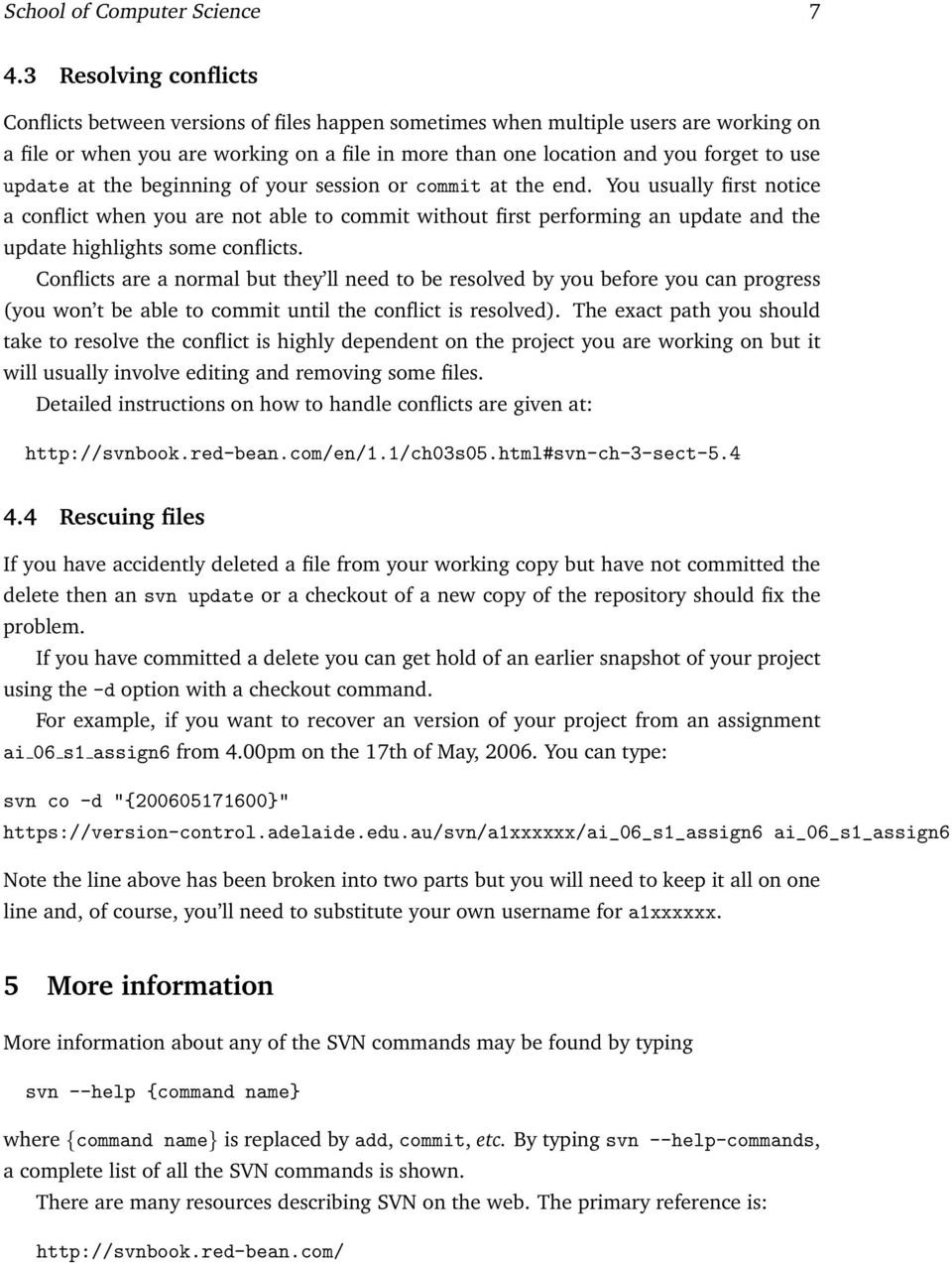
6 School of Computer Science 6 then SVN will show the differences between the file in the current working directory and the latest version checked into your repository. So the above will show any changes made to the file afile.java since it was last committed. To go back further, then the -r option can be used to specify a revision number of the file to check for differences. The appropriate revision number can be found by first doing a svn log on the file. To view all differences between version 11 of afile.java and its current contents, simply do svn diff -r 11 afile.java 4 Using SVN remotely One of the great benefits to using SVN is not only can it manage a number of people working on a project, it can also help when one person is working on a project from more than one computer. In this case, more than one working directory will exist on different computers. An example is working on a programming assignment from the University system, and also a machine at home. In this case, your home machine will need to have the svn program available. There are also downloadable versions of the svn client program, for most platforms, including Linux, MacOS, and Win32 on the main SVN site 3. Once you have the svn command installed on your machine the commands for accessing your repository are the same as in this document so far Viewing your files In this school, we have configured SVN to work through a web-server. One nice feature of this setup is that you can view your repository using a web-browser. So, for example, if you want to see the files in the dsa 05 s1 assign directory in your repository, and your username is a then you can type: into your web-browser and you can navigate through your files. 4.2 Use update As a habit, it is a good idea to run svn update before you begin work on files and svn commit, at least, at the end of the session. Of course, it doesn t hurt to run these commands more often. Moreover, when you have more than one working copy of your assignment files running these commands becomes even more important. 3 Again, see packages.html 4 The commands may behave slightly differently, for example the initial checkout will require you to log in to the machine using your Computer Science password.

7 School of Computer Science Resolving conflicts Conflicts between versions of files happen sometimes when multiple users are working on a file or when you are working on a file in more than one location and you forget to use update at the beginning of your session or commit at the end. You usually first notice a conflict when you are not able to commit without first performing an update and the update highlights some conflicts. Conflicts are a normal but they ll need to be resolved by you before you can progress (you won t be able to commit until the conflict is resolved). The exact path you should take to resolve the conflict is highly dependent on the project you are working on but it will usually involve editing and removing some files. Detailed instructions on how to handle conflicts are given at: Rescuing files If you have accidently deleted a file from your working copy but have not committed the delete then an svn update or a checkout of a new copy of the repository should fix the problem. If you have committed a delete you can get hold of an earlier snapshot of your project using the -d option with a checkout command. For example, if you want to recover an version of your project from an assignment ai 06 s1 assign6 from 4.00pm on the 17th of May, You can type: svn co -d "{ }" ai_06_s1_assign6 Note the line above has been broken into two parts but you will need to keep it all on one line and, of course, you ll need to substitute your own username for a1xxxxxx. 5 More information More information about any of the SVN commands may be found by typing svn --help {command name} where {command name} is replaced by add, commit, etc. By typing svn --help-commands, a complete list of all the SVN commands is shown. There are many resources describing SVN on the web. The primary reference is:
8 School of Computer Science 8 which gives comprehensive coverage of SVN and its features 5. A detailed Frequently Asked Questions (FAQ) page is also available at: There is a very useful section, in chapter 3 which provides a guided tour of the basic work cycle. This document can be found at: There are also several mailing lists for SVN enthusiasts and users encountering problems these can all be accessed through: Rob Esser Darren Gawley Kevin Maciunas Brad Alexander 5 The section titled A Quick Start suggests each project is set up with branches, tags, and trunk subdirectories. While this is a very sensible way to work on long-running projects most Computer Science assignments will not require this setup. Instead the project directory for your assignment will contain just the files you would normally put in the trunk part of the repository.

Version Control with Subversion and Xcode
 Version Control with Subversion and Xcode Author: Mark Szymczyk Last Update: June 21, 2006 This article shows you how to place your source code files under version control using Subversion and Xcode. By
Version control. HEAD is the name of the latest revision in the repository. It can be used in subversion rather than the latest revision number.
 Version control Version control is a powerful tool for many kinds of work done over a period of time, including writing papers and theses as well as writing code. This session gives a introduction to a
UNIVERSITY OF CALIFORNIA Department of Electrical Engineering and Computer Sciences Computer Science Division. P. N. Hilfinger
 UNIVERSITY OF CALIFORNIA Department of Electrical Engineering and Computer Sciences Computer Science Division CS 61B Fall 2012 P. N. Hilfinger Version Control and Homework Submission 1 Introduction Your
Source Code Management/Version Control
 Date: 3 rd March 2005 Source Code Management/Version Control The Problem: In a typical software development environment, many developers will be engaged in work on one code base. If everyone was to be
Introducing Xcode Source Control
 APPENDIX A Introducing Xcode Source Control What You ll Learn in This Appendix: u The source control features offered in Xcode u The language of source control systems u How to connect to remote Subversion
Version Control with Subversion
 Version Control with Subversion Introduction Wouldn t you like to have a time machine? Software developers already have one! it is called version control Version control (aka Revision Control System or
Git Basics. Christopher Simpkins [email protected]. Chris Simpkins (Georgia Tech) CS 2340 Objects and Design CS 1331 1 / 22
 Git Basics Christopher Simpkins [email protected] Chris Simpkins (Georgia Tech) CS 2340 Objects and Design CS 1331 1 / 22 Version Control Systems Records changes to files over time Allows you to
Setting up a local working copy with SVN, MAMP and rsync. Agentic - 2009
 Setting up a local working copy with SVN, MAMP and rsync Agentic - 2009 Get MAMP You can download MAMP for MAC at this address : http://www.mamp.info/en/downloads/index.html Install MAMP in your APPLICATION
CSE 374 Programming Concepts & Tools. Laura Campbell (Thanks to Hal Perkins) Winter 2014 Lecture 16 Version control and svn
 CSE 374 Programming Concepts & Tools Laura Campbell (Thanks to Hal Perkins) Winter 2014 Lecture 16 Version control and svn Where we are Learning tools and concepts relevant to multi-file, multi-person,
INF 111 / CSE 121. Homework 4: Subversion Due Tuesday, July 14, 2009
 Homework 4: Subversion Due Tuesday, July 14, 2009 Name : Student Number : Laboratory Time : Objectives Preamble Set up a Subversion repository on UNIX Use Eclipse as a Subversion client Subversion (SVN)
Beginning with SubclipseSVN
 Version 2 July 2007 Beginning with SubclipseSVN A user guide to begin using the Subclipse for source code management on the CropForge collaborative software development site. Copyright International Rice
Version Control! Scenarios, Working with Git!
 Version Control! Scenarios, Working with Git!! Scenario 1! You finished the assignment at home! VC 2 Scenario 1b! You finished the assignment at home! You get to York to submit and realize you did not
Revision control systems (RCS) and
 Revision control systems (RCS) and Subversion Problem area Software projects with multiple developers need to coordinate and synchronize the source code Approaches to version control Work on same computer
Using Git for Project Management with µvision
 MDK Version 5 Tutorial AN279, Spring 2015, V 1.0 Abstract Teamwork is the basis of many modern microcontroller development projects. Often teams are distributed all over the world and over various time
DAVE Usage with SVN. Presentation and Tutorial v 2.0. May, 2014
 DAVE Usage with SVN Presentation and Tutorial v 2.0 May, 2014 Required DAVE Version Required DAVE version: v 3.1.6 or higher (recommend to use the most latest version, as of Feb 28, 2014, v 3.1.10) Required
Subversion Server for Windows
 Subversion Server for Windows VisualSVN Team VisualSVN Server: Subversion Server for Windows VisualSVN Team Copyright 2005-2008 VisualSVN Team Windows is a registered trademark of Microsoft Corporation.
CISC 275: Introduction to Software Engineering. Lab 5: Introduction to Revision Control with. Charlie Greenbacker University of Delaware Fall 2011
 CISC 275: Introduction to Software Engineering Lab 5: Introduction to Revision Control with Charlie Greenbacker University of Delaware Fall 2011 Overview Revision Control Systems in general Subversion
Version Control Systems
 Version Control Systems ESA 2015/2016 Adam Belloum [email protected] Material Prepared by Eelco Schatborn Today IntroducGon to Version Control Systems Centralized Version Control Systems RCS CVS SVN
Using SVN to Manage Source RTL
 Using SVN to Manage Source RTL CS250 Tutorial 1 (Version 092509a) September 25, 2009 Yunsup Lee In this tutorial you will gain experience using the Subversion (SVN) to manage your source RTL and code.
Lab 0 (Setting up your Development Environment) Week 1
 ECE155: Engineering Design with Embedded Systems Winter 2013 Lab 0 (Setting up your Development Environment) Week 1 Prepared by Kirill Morozov version 1.2 1 Objectives In this lab, you ll familiarize yourself
Version Control with. Ben Morgan
 Version Control with Ben Morgan Developer Workflow Log what we did: Add foo support Edit Sources Add Files Compile and Test Logbook ======= 1. Initial version Logbook ======= 1. Initial version 2. Remove
MATLAB & Git Versioning: The Very Basics
 1 MATLAB & Git Versioning: The Very Basics basic guide for using git (command line) in the development of MATLAB code (windows) The information for this small guide was taken from the following websites:
Source Control Guide: Git
 MadCap Software Source Control Guide: Git Flare 11.1 Copyright 2015 MadCap Software. All rights reserved. Information in this document is subject to change without notice. The software described in this
Git - Working with Remote Repositories
 Git - Working with Remote Repositories Handout New Concepts Working with remote Git repositories including setting up remote repositories, cloning remote repositories, and keeping local repositories in-sync
BlueJ Teamwork Tutorial
 BlueJ Teamwork Tutorial Version 2.0 for BlueJ Version 2.5.0 (and 2.2.x) Bruce Quig, Davin McCall School of Engineering & IT, Deakin University Contents 1 OVERVIEW... 3 2 SETTING UP A REPOSITORY... 3 3
Distributed Version Control with Mercurial and git
 OpenStax-CNX module: m37404 1 Distributed Version Control with Mercurial and git Hannes Hirzel This work is produced by OpenStax-CNX and licensed under the Creative Commons Attribution License 3.0 Abstract
Version control. with git and GitHub. Karl Broman. Biostatistics & Medical Informatics, UW Madison
 Version control with git and GitHub Karl Broman Biostatistics & Medical Informatics, UW Madison kbroman.org github.com/kbroman @kwbroman Course web: kbroman.org/tools4rr Slides prepared with Sam Younkin
Version Control Using Subversion. Version Control Using Subversion 1 / 27
 Version Control Using Subversion Version Control Using Subversion 1 / 27 What Is Version Control? Version control is also known as revision control. Version control is provided by a version control system
Managing Software Projects Like a Boss with Subversion and Trac
 Managing Software Projects Like a Boss with Subversion and Trac Beau Adkins CEO, Light Point Security lightpointsecurity.com [email protected] 2 Introduction... 4 Setting Up Your Server...
Introduction to Subversion
 Introduction to Subversion Getting started with svn Matteo Vescovi 19/02/2010 Agenda A little bit of theory Overview of Subversion Subversion approach to Version Control Using Subversion Typical subversion
Using SVN to Manage Source RTL
 Using SVN to Manage Source RTL CS250 Tutorial 1 (Version 083010a) August 30, 2010 Yunsup Lee In this tutorial you will gain experience using the Subversion (SVN) to manage your source RTL and code. You
Version Control with Subversion
 Version Control with Subversion http://www.oit.duke.edu/scsc/ http://wiki.duke.edu/display/scsc [email protected] John Pormann, Ph.D. [email protected] Software Carpentry Courseware This is a re-work from the
CPSC 491. Today: Source code control. Source Code (Version) Control. Exercise: g., no git, subversion, cvs, etc.)
 Today: Source code control CPSC 491 Source Code (Version) Control Exercise: 1. Pretend like you don t have a version control system (e. g., no git, subversion, cvs, etc.) 2. How would you manage your source
Pragmatic Version Control
 Extracted from: Pragmatic Version Control using Subversion, 2nd Edition This PDF file contains pages extracted from Pragmatic Version Control, one of the Pragmatic Starter Kit series of books for project
Version Control Script
 Version Control Script Mike Jackson, The Software Sustainability Institute Things you should do are written in bold. Suggested dialog is in normal text. Command- line excerpts and code fragments are in
FlexSim LAN License Server
 FlexSim LAN License Server Installation Instructions Rev. 20150318 Table of Contents Introduction... 2 Using lmtools... 2 1. Download the installation files... 3 2. Install the license server... 4 3. Connecting
Version control with Subversion
 Version control with Subversion Davor Cubranic Grad Seminar October 6, 2011 With searching comes loss And the presence of absence: My Thesis not found. Version Control A tool for managing changes to a
FEEG6002 - Applied Programming 3 - Version Control and Git II
 FEEG6002 - Applied Programming 3 - Version Control and Git II Sam Sinayoko 2015-10-16 1 / 26 Outline Learning outcomes Working with a single repository (review) Working with multiple versions of a repository
Introduction to Git. Markus Kötter [email protected]. Notes. Leinelab Workshop July 28, 2015
 Introduction to Git Markus Kötter [email protected] Leinelab Workshop July 28, 2015 Motivation - Why use version control? Versions in file names: does this look familiar? $ ls file file.2 file.
Xcode Source Management Guide. (Legacy)
 Xcode Source Management Guide (Legacy) Contents Introduction 5 Organization of This Document 5 See Also 6 Source Management Overview 7 Source Control Essentials 7 Snapshots 8 Managing Source in Xcode 8
Two Best Practices for Scientific Computing
 Two Best Practices for Scientific Computing Version Control Systems & Automated Code Testing David Love Software Interest Group University of Arizona February 18, 2013 How This Talk Happened Applied alumnus,
Subversion Integration for Visual Studio
 Subversion Integration for Visual Studio VisualSVN Team VisualSVN: Subversion Integration for Visual Studio VisualSVN Team Copyright 2005-2008 VisualSVN Team Windows is a registered trademark of Microsoft
Subversion workflow guide
 Subversion workflow guide Joanne Carr January 2010 Contents 1 Before we start: some definitions, etc. 2 2 UKRmol-in repository layout 3 3 Checking out 3 4 Monitoring and dealing with
Dalhousie University CSCI 2132 Software Development Winter 2015 Lab 7, March 11
 Dalhousie University CSCI 2132 Software Development Winter 2015 Lab 7, March 11 In this lab, you will first learn how to use pointers to print memory addresses of variables. After that, you will learn
Source Control Systems
 Source Control Systems SVN, Git, GitHub SoftUni Team Technical Trainers Software University http://softuni.bg Table of Contents 1. Software Configuration Management (SCM) 2. Version Control Systems: Philosophy
pure::variants Transformer for Software Configuration Management Manual
 pure-systems GmbH Copyright 2003-2007 pure-systems GmbH 2007 Table of Contents 1. Synopsis... 1 2. Concept... 1 2.1. Client Authorization... 2 3. Installing the Transformer... 3 4. Using the Transformer...
Lab Exercise Part II: Git: A distributed version control system
 Lunds tekniska högskola Datavetenskap, Nov 25, 2013 EDA260 Programvaruutveckling i grupp projekt Labb 2 (part II: Git): Labbhandledning Checked on Git versions: 1.8.1.2 Lab Exercise Part II: Git: A distributed
Version Control. Luka Milovanov [email protected]
 Version Control Luka Milovanov [email protected] Configuration Management Configuration management is the management of system change to software products Version management: consistent scheme of version
FTP Service Reference
 IceWarp Server FTP Service Reference Version 10 Printed on 12 August, 2009 i Contents FTP Service 1 V10 New Features... 2 FTP Access Mode... 2 FTP Synchronization... 2 FTP Service Node... 3 FTP Service
CS108, Stanford Handout #33. CVS in Eclipse
 CS108, Stanford Handout #33 Winter, 2006-07 Nick Parlante CVS in Eclipse Source Control Any modern software project of any size uses "source control" Store all past revisions - Can see old versions, see
Software Delivery Integration and Source Code Management. for Suppliers
 Software Delivery Integration and Source Code Management for Suppliers Document Information Author Version 1.0 Version Date 8/6/2012 Status final Approved by Reference not applicable Subversion_for_suppliers.doc
User s Guide. Version 2.1
 Content Management System User s Guide Version 2.1 Page 1 of 51 OVERVIEW CMS organizes all content in a tree hierarchy similar to folder structure in your computer. The structure is typically predefined
pure::variants Connector for Version Control Systems Manual
 pure::variants Connector for Version Control Systems Manual pure-systems GmbH Version 3.2.17 for pure::variants 3.2 Copyright 2003-2015 pure-systems GmbH 2015 Table of Contents 1. Synopsis... 1 1.1. Software
Continuous Integration. CSC 440: Software Engineering Slide #1
 Continuous Integration CSC 440: Software Engineering Slide #1 Topics 1. Continuous integration 2. Configuration management 3. Types of version control 1. None 2. Lock-Modify-Unlock 3. Copy-Modify-Merge
SVN Setup and Configuration Management
 Configuration Management Each team should use the Subversion (SVN) repository located at https://svn-user.cse.msu.edu/user/cse435/f2014/ to provide version control for all project artifacts as
Introduction to the Git Version Control System
 Introduction to the Sebastian Rockel [email protected] University of Hamburg Faculty of Mathematics, Informatics and Natural Sciences Department of Informatics Technical Aspects of Multimodal
Version Control. Version Control
 Version Control CS440 Introduction to Software Engineering 2013, 2015 John Bell Based on slides prepared by Jason Leigh for CS 340 University of Illinois at Chicago Version Control Incredibly important
NASA Workflow Tool. User Guide. September 29, 2010
 NASA Workflow Tool User Guide September 29, 2010 NASA Workflow Tool User Guide 1. Overview 2. Getting Started Preparing the Environment 3. Using the NED Client Common Terminology Workflow Configuration
Introduction to Version Control
 Research Institute for Symbolic Computation Johannes Kepler University Linz, Austria Winter semester 2014 Outline General Remarks about Version Control 1 General Remarks about Version Control 2 Outline
How To Run A Hello World On Android 4.3.3 (Jdk) On A Microsoft Ds.Io (Windows) Or Android 2.7.3 Or Android 3.5.3 On A Pc Or Android 4 (
 Developing Android applications in Windows Below you will find information about the components needed for developing Android applications and other (optional) software needed to connect to the institution
1. Product Information
 ORIXCLOUD BACKUP CLIENT USER MANUAL LINUX 1. Product Information Product: Orixcloud Backup Client for Linux Version: 4.1.7 1.1 System Requirements Linux (RedHat, SuSE, Debian and Debian based systems such
FTP Service Reference
 IceWarp Unified Communications Reference Version 11.3 Published on 1/6/2015 Contents... 3 About... 4 Reference... 5 General Tab... 5 Dialog... 6 FTP Site... 6 Users... 7 Groups... 11 Options... 14 Access...
CHANGES IN GECS 3.50 PACKAGES
 CHANGES IN GECS 3.50 PACKAGES GECS version 3.50 started shipping January 20 th, 2005. You can find the date of the last GECS package installed by looking in the file named PKGDATE.TXT located in your GECS
Change Management for Rational DOORS User s Guide
 Change Management for Rational DOORS User s Guide Before using this information, read the general information under Appendix: Notices on page 58. This edition applies to Change Management for Rational
Version Control with Git. Linux Users Group UT Arlington. Rohit Rawat [email protected]
 Version Control with Git Linux Users Group UT Arlington Rohit Rawat [email protected] Need for Version Control Better than manually storing backups of older versions Easier to keep everyone updated
Version Control with Svn, Git and git-svn. Kate Hedstrom ARSC, UAF
 1 Version Control with Svn, Git and git-svn Kate Hedstrom ARSC, UAF 2 Version Control Software System for managing source files For groups of people working on the same code When you need to get back last
Online Backup Client User Manual Mac OS
 Online Backup Client User Manual Mac OS 1. Product Information Product: Online Backup Client for Mac OS X Version: 4.1.7 1.1 System Requirements Operating System Mac OS X Leopard (10.5.0 and higher) (PPC
Online Backup Client User Manual Mac OS
 Online Backup Client User Manual Mac OS 1. Product Information Product: Online Backup Client for Mac OS X Version: 4.1.7 1.1 System Requirements Operating System Mac OS X Leopard (10.5.0 and higher) (PPC
Chapter 3 ADDRESS BOOK, CONTACTS, AND DISTRIBUTION LISTS
 Chapter 3 ADDRESS BOOK, CONTACTS, AND DISTRIBUTION LISTS 03Archer.indd 71 8/4/05 9:13:59 AM Address Book 3.1 What Is the Address Book The Address Book in Outlook is actually a collection of address books
Online Backup Client User Manual Linux
 Online Backup Client User Manual Linux 1. Product Information Product: Online Backup Client for Linux Version: 4.1.7 1.1 System Requirements Operating System Linux (RedHat, SuSE, Debian and Debian based
ELF WP 2 UML repository instruction
 ELF WP 2 UML repository instruction Author: Magnus Karge Date: 22/12/2014 Version: 1.2 Change Summary Version Date Author/Editor Change Summary 1.0 29/08/2013 Magnus Karge First version 1.1 17/10/2013
PCRecruiter Resume Inhaler
 PCRecruiter Resume Inhaler The PCRecruiter Resume Inhaler is a stand-alone application that can be pointed to a folder and/or to an email inbox containing resumes, and will automatically extract contact
Version Control with Git. Dylan Nugent
 Version Control with Git Dylan Nugent Agenda What is Version Control? (and why use it?) What is Git? (And why Git?) How Git Works (in theory) Setting up Git (surviving the CLI) The basics of Git (Just
PORTAL ADMINISTRATION
 1 Portal Administration User s Guide PORTAL ADMINISTRATION GUIDE Page 1 2 Portal Administration User s Guide Table of Contents Introduction...5 Core Portal Framework Concepts...5 Key Items...5 Layouts...5
EAE-MS SCCAPI based Version Control System
 EAE-MS SCCAPI based Version Control System This document is an implementation guide to use the EAE-MS SCCAPI based Version Control System as an alternative to the existing EAE Version Control System. The
User Guide and Tutorial Central Stores Online Ordering System. Central Stores Financial Services Western Washington University
 User Guide and Tutorial Central Stores Online Ordering System Central Stores Financial Services Western Washington University TABLE OF CONTENTS 1. Introduction... Page 3 2. Finding and Logging into Central
"Code management in multi programmer environments."
 Another installment in the 'Computing in high energy physics' series (16 02 2004). "Code management in multi programmer environments." Author: D. Hatton (DESY/Hamburg) Table of Contents: 1. Overview 2.
SVN Starter s Guide Compiled by Pearl Guterman June 2005
 SVN Starter s Guide Compiled by Pearl Guterman June 2005 SV Table of Contents 1) What is SVN?... 1 2) SVN Architecture... 2 3) Creating a Working Copy... 3 4) Basic Work Cycle... 4 5) Status Symbols...
[PRAKTISCHE ASPEKTE DER INFORMATIK WS 13/14]
![[PRAKTISCHE ASPEKTE DER INFORMATIK WS 13/14]](/thumbs/26/7375219.jpg "[PRAKTISCHE ASPEKTE DER INFORMATIK WS 13/14]") 2013/14 Institut für Computergraphik, TU Braunschweig Pablo Bauszat [PRAKTISCHE ASPEKTE DER INFORMATIK WS 13/14] All elemental steps that will get you started for your new life as a computer science programmer.
2013/14 Institut für Computergraphik, TU Braunschweig Pablo Bauszat [PRAKTISCHE ASPEKTE DER INFORMATIK WS 13/14] All elemental steps that will get you started for your new life as a computer science programmer.
Contents Release Notes... ... 3 System Requirements... ... 4 Using Jive for Office... ... 5
 Jive for Office TOC 2 Contents Release Notes...3 System Requirements... 4 Using Jive for Office... 5 What is Jive for Office?...5 Working with Shared Office Documents... 5 Get set up...6 Get connected
How To Encrypt A Traveltrax Report On Gpg On A Pc Or Mac Or Mac (For A Free Download) On A Thumbdrive Or Ipad Or Ipa (For Free) On Pc Or Ipo (For An Ipo)
 EMAIL ENCRYPTION Guide June 3, 2013 TABLE OF CONTENTS Steps to Create Encryption Public Key... 3 Installing GPG... 3 Key Generation Process... 4 Update User Settings... 6 Decrypting an encrypted file...
RecoveryVault Express Client User Manual
 For Linux distributions Software version 4.1.7 Version 2.0 Disclaimer This document is compiled with the greatest possible care. However, errors might have been introduced caused by human mistakes or by
CEFNS Web Hosting a Guide for CS212
 CEFNS Web Hosting a Guide for CS212 INTRODUCTION: TOOLS: In CS212, you will be learning the basics of web development. Therefore, you want to keep your tools to a minimum so that you understand how things
CSE 70: Software Development Pipeline Version Control with Subversion, Continuous Integration with Bamboo, Issue Tracking with Jira
 CSE 70: Software Development Pipeline Version Control with Subversion, Continuous Integration with Bamboo, Issue Tracking with Jira Ingolf Krueger Department of Computer Science & Engineering University
Continuous Integration (CI) and Testing - Configuring Bamboo, Hudson, and TestMaker
 Continuous Integration and Testing Configuring Bamboo, Hudson, and TestMaker Operate PushToTest TestMaker tests from Continuous Integration environments. PushToTest checks TestMaker compatibility with
Online Backup Linux Client User Manual
 Online Backup Linux Client User Manual Software version 4.0.x For Linux distributions August 2011 Version 1.0 Disclaimer This document is compiled with the greatest possible care. However, errors might
Version control with GIT
 AGV, IIT Kharagpur September 13, 2012 Outline 1 Version control system What is version control Why version control 2 Introducing GIT What is GIT? 3 Using GIT Using GIT for AGV at IIT KGP Help and Tips
Managing your e-mail accounts
 Managing your e-mail accounts Introduction While at Rice University, you will receive an e-mail account that will be used for most of your on-campus correspondence. Other tutorials will tell you how to
Hosting Users Guide 2011
 Hosting Users Guide 2011 eofficemgr technology support for small business Celebrating a decade of providing innovative cloud computing services to small business. Table of Contents Overview... 3 Configure
Online Backup Client User Manual
 For Linux distributions Software version 4.1.7 Version 2.0 Disclaimer This document is compiled with the greatest possible care. However, errors might have been introduced caused by human mistakes or by
using version control in system administration
 LUKE KANIES using version control in system administration Luke Kanies runs Reductive Labs (http://reductivelabs.com), a startup producing OSS software for centralized, automated server administration.