
OpenEMR Practice Management Gap Review DRAFT
|
|
|
- Sherman Johnston
- 10 years ago
- Views:
Transcription
1 OpenEMR Practice Management Gap Review DRAFT This document uses a typical medium to large practice work flow diagram for practice management and billing to analyze the gaps in OpenEMR, state requirements and recommend possible enhancements and work flow changes to bring the project up to industry standards. Work Flow Diagram Provided by Dr. Sam Bowen Gaps, Identified by Block 1. Collect Correct and Complete information 1. Demographics 1. Guarantor/Patient connection is weak. Insurance subscriber model is not adquate to describe the relationship. Demographics should support separate record type for guarantors that can also be patients and allow for a connection to be made from one demograpic record to another. The dependent patients can have connections to different guarantors for each insurance level including "self". The Insurance records should be attached to the subscriber's demographic record. This reduces the

2 redundant storage of information. Insurance information needs to be maintained in permanantly by effective date for claims processing. This is done in the insurance_data table now, but the historical data is not visible to the user. 2. Enter Information Correctly 1. Good validation of key fields is missing. A full definition of the requirements for each field should be available and configurable in the layout model. Some fields have rules that are insurance company, clearing house or billing service specific and should have 'transformation' rules loaded at the service providers level. 2. Fields such as postal code and telephone area codes should be validated agaist reliable tables and provide a warning that they may be incorrect. 3. Some fields are required only when other fields are filled/selected this chain of requirements must be supported in all forms 4. Free Text entries should be considered carefully with an eye toward pick lists and lookup tables whenever possible 5. Referencial integrity should be enforced where possible to prevent the removal of parts of the data in advertantly 3. Generate Routing Slip (aka SuperBill) 1. The creation of superbill or routing slips is more complex than it needs to be. A tool more like the layout tool should be created that will allow user to create custom superbills that can be printed for offline use or used online in an intuitive way. The current Fee Sheet form works for this if configured well by a technician. A more modern UI that uses the same underlying structure is in progress. (See addendum for screen shots). 4. Physician Interaction (Orders, Lab, Xray) 1. The Superbill interface should be wrapped in the workflow in a way that includes other Physician driven orders 2. Providers need to be able to enter codes as they see the patient, after the patient visit or separately in some kind of batch mode (see 5. below) 3. Needs to add referrals support to the CPOE wrapper as part of the work flow. "Transactions" seems like the right place to use as the CPOE wrapper but needs to be extended for all types of orders 4. History, Issues, previous issues feed need to, optionally, allow the relevant Diagnosis codes to be used in the new encounters. Issues need better diagnosis code lookups to support this. 5. Level criteria for management code, map service code requirements to ROS + Diag.

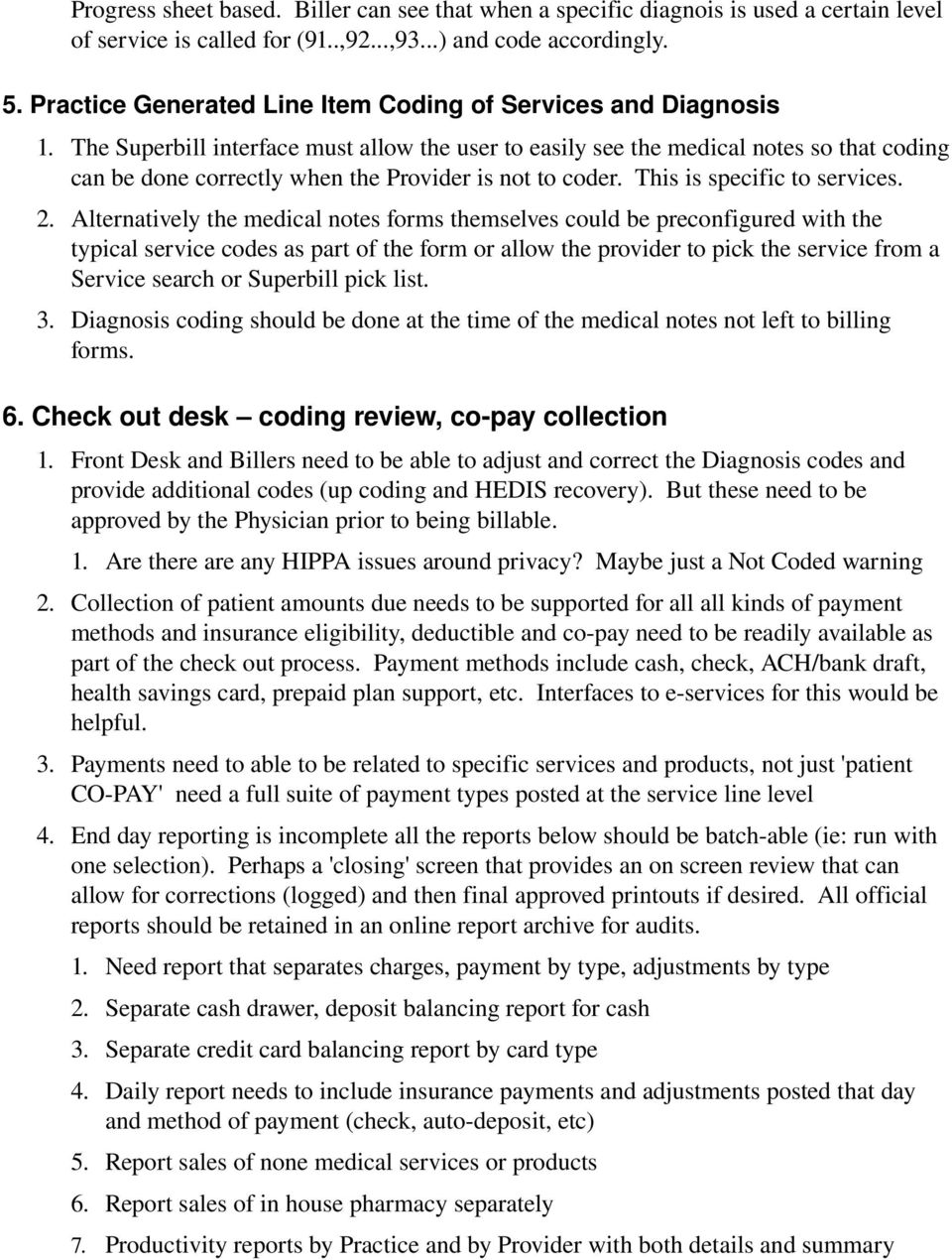
3 Progress sheet based. Biller can see that when a specific diagnois is used a certain level of service is called for (91..,92...,93...) and code accordingly. 5. Practice Generated Line Item Coding of Services and Diagnosis 1. The Superbill interface must allow the user to easily see the medical notes so that coding can be done correctly when the Provider is not to coder. This is specific to services. 2. Alternatively the medical notes forms themselves could be preconfigured with the typical service codes as part of the form or allow the provider to pick the service from a Service search or Superbill pick list. 3. Diagnosis coding should be done at the time of the medical notes not left to billing forms. 6. Check out desk coding review, co pay collection 1. Front Desk and Billers need to be able to adjust and correct the Diagnosis codes and provide additional codes (up coding and HEDIS recovery). But these need to be approved by the Physician prior to being billable. 1. Are there are any HIPPA issues around privacy? Maybe just a Not Coded warning 2. Collection of patient amounts due needs to be supported for all all kinds of payment methods and insurance eligibility, deductible and co pay need to be readily available as part of the check out process. Payment methods include cash, check, ACH/bank draft, health savings card, prepaid plan support, etc. Interfaces to e services for this would be helpful. 3. Payments need to able to be related to specific services and products, not just 'patient CO PAY' need a full suite of payment types posted at the service line level 4. End day reporting is incomplete all the reports below should be batch able (ie: run with one selection). Perhaps a 'closing' screen that provides an on screen review that can allow for corrections (logged) and then final approved printouts if desired. All official reports should be retained in an online report archive for audits. 1. Need report that separates charges, payment by type, adjustments by type 2. Separate cash drawer, deposit balancing report for cash 3. Separate credit card balancing report by card type 4. Daily report needs to include insurance payments and adjustments posted that day and method of payment (check, auto deposit, etc) 5. Report sales of none medical services or products 6. Report sales of in house pharmacy separately 7. Productivity reports by Practice and by Provider with both details and summary
4 options. Daily, Monthly, any other date range (daily would be the default) 8. Logging of posting information, ie who keyed the accounting data. 9. Out put of final daily transations to General Ledger in users format, provide QuickBooks, MS Money, CSV, perhaps customizable options for accounting services 10. Currently identified issues: 1. Payments posted daily for previous visits show on previous date report, not on current day reports 2. Adjustments, debits, credits and payments are all bundled into one column. Should be broken down individually. 7. Daily Claims and Statement Processing (Electronic, Manual, Out Sourced) 1. Claims need a preprocess that checks for obvious errors 1. Uncoded or Not Justified (this is particially there) 2. No Insurance or Secondary coverage carrier only 3. ID# missing or incorrectly formatted for the target carrier 4. Demographic data missing or incorrectly formatted for the target carrier 5. Diag or Service codes that are not valid or typically create rejections 2. Need to be able to easily separate claims processing by claim types, (see addendum for screen shot of design for this). 1. Electronic by Clearing House partner 2. Electronic by Insco for direct processing 3. Manual by Insco + Address for easy sorting and mailing 4. Statement processing for patient portion, A/R and unisured. Needs to support payment plans as well. 5. Interface with the "billing" company should be supported for those that don't want to do in house billing at all. 6. Review of X12 batch (error logs, etc) should happen PRIOR to downloading or submitting the batch for processing. 7. All batches should be saved and easy to access from the billing process, not just on the disk somewhere. Ideally the batch should be saved as an sql table instead of a flat file making it easy to tweak and recreate if needed. 8. CMS1500 claims (perhaps all) should be able to be loaded into a WYSIWYG CMS1500 form for easy review, edit and print before and after submission. 9. Issues/Questions with existing system 1. How are manual secondary claims handled, manual/electronic Liability, Workers comp. Etc? 2. How are NPS billed as supporting Physicians versus direct credentialed providers. 3. Where are Medipass Medicaid ID group MSO number kept 4. EOB/EOP Insco batch payments need to be recorded for the day that posted.

5 Related to closing the day 5. ERA posting should be automated from EDI response files (not just manually uploaded). 8. Posting of InsCo payments 1. Payment Posting EOB/EOP should reflect denials and rejections from automatic responses as well as allowing manual flagging errors for correction. This should generate a patient billing note and drive a work list. Common problems, incorrect demographics, incorrect procedure, missing medical data. 1. Payment posting screens need to be modernized to new UI standard as modal windows. Work list needs to be refreshed after each payment post, etc. 2. Completed payment batches need to produce a batch posting review report PRIOR to actually writing the payments to the billing records. This will allow form easy correction of typo's with having to enter adjustments. 3. Payments need to show on daily reports for the day posted not the encounter/visit date 9. Posting Insurance Denials 1. Claims denial model sometimes has really good ways to NOT say what the real issue is. Some of X12 mapping to english from the programmer crud by insurance co and clearing house. 2. Need a Denial Dictionary and a way to added new information to it 3. Add the ability to create new error types/codes for future use and training 4. Add the ability to create adjustment codes from the posting module 10. Claim Denial Research 1. Easy access the the claims with errors from work list, links to patient records and encounters (like in billing report now). 2. Easy access to Insco help desk phone # contact information for harder to figure denials 3. Need a learning module related to insco "special" rules that result in rejections. 11. Fix the Denial 1. Processing loop work flow needed. 2. Claims and their status (billed, paid, errors) should be visible from the patient view for the front desk. 3. Should be able to reopen an encounter from the patient enounter mode to correcting and rebilling. 4. Error processing 1. Eletronic response files need to be processed for errors on batch and reported with each claims and on patient notes to billers to be worked

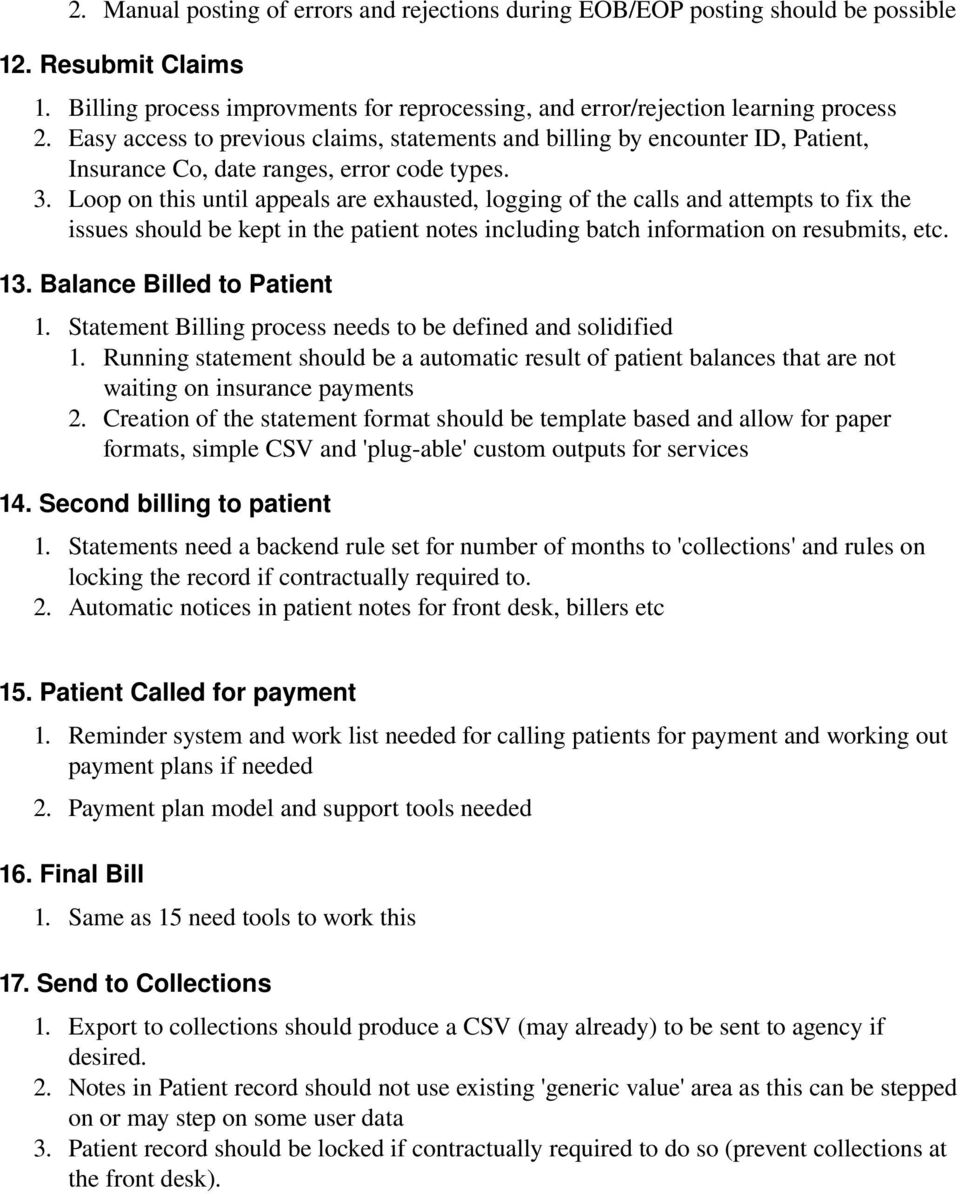
6 2. Manual posting of errors and rejections during EOB/EOP posting should be possible 12. Resubmit Claims 1. Billing process improvments for reprocessing, and error/rejection learning process 2. Easy access to previous claims, statements and billing by encounter ID, Patient, Insurance Co, date ranges, error code types. 3. Loop on this until appeals are exhausted, logging of the calls and attempts to fix the issues should be kept in the patient notes including batch information on resubmits, etc. 13. Balance Billed to Patient 1. Statement Billing process needs to be defined and solidified 1. Running statement should be a automatic result of patient balances that are not waiting on insurance payments 2. Creation of the statement format should be template based and allow for paper formats, simple CSV and 'plug able' custom outputs for services 14. Second billing to patient 1. Statements need a backend rule set for number of months to 'collections' and rules on locking the record if contractually required to. 2. Automatic notices in patient notes for front desk, billers etc 15. Patient Called for payment 1. Reminder system and work list needed for calling patients for payment and working out payment plans if needed 2. Payment plan model and support tools needed 16. Final Bill 1. Same as 15 need tools to work this 17. Send to Collections 1. Export to collections should produce a CSV (may already) to be sent to agency if desired. 2. Notes in Patient record should not use existing 'generic value' area as this can be stepped on or may step on some user data 3. Patient record should be locked if contractually required to do so (prevent collections at the front desk).
7 This document was created by Tony McCormick of Medical Information Integration, LLC with advise from Dr. Sam Bowen and Dr. Robert Schaffer and their staff. It is intended to be a guide for formal specification of a project centered around improvements to OpenEMR's practice management systems. First Revision: 02/17/10

OpenEMR Practice Management Gap and Development Proposal
 OpenEMR Practice Management Gap and Development Proposal 3/15/2014 Medical Information Integration, LLC This document uses a typical medium to large practice work flow diagram for practice management and
ICD-10 Support. Insurance. Lytec Features Evolution Matrix
 ICD-10 Support 2014 ICD-10 Mapping Tool Customized Carrier Setting to ICD-9 or ICD-10 Dual Diagnosis List Wrong Code Set Warning CMS 1500 02-12 Form Insurance Apply Payment Wizard Authorization/Referral
EMR Technology Checklist
 Patient Accessibility/Scheduling/Account Maintenance: Able to interact with schedule through an online portal pre register VIP status to move patient to the front of the line Access and pre registration
Lytec Features Evolution Matrix
 Insurance Apply Payment Wizard Authorization/Referral Tracking Auto Fee Schedule Update Multi-location Fee Schedule Management Batch Eligibility Veriication Capture Scanned Images of Insurance Cards Compress
Medisoft Features Evolution Matrix
 1 Medisoft Features Evolution Matrix Insurance Automatic Rebill for Claims Insurance Groupings for Reporting and Analysis Remittance Tracking for Secondary Claims Integrated Electronic Eligibility Checking
Eligibility Patient s coverage verified prior to visit Coding Medical Records are reviewed and coded by Certified Coders Demographic & Charge Entry
 Eligibility Patient s coverage is verified prior to visit Coding Medical Records are reviewed and coded by Certified Coders Clearing Clearing Houses Houses For For Electronic Electronic Clearance Clearance
EHR Software Feature Comparison
 EHR Comparison ELECTRONIC MEDICAL RECORDS Patient demographics Manages the input and maintenance of patient information including demographics, insurance, contacts, referrals, notes and more. Consents
Surgical/ASC Claims Revenue Cycle Management: An Introduction to Our Processes and Protocols
 Surgical/ASC Claims Revenue Cycle Management: An Introduction to Our Processes and Protocols 200 Old Country Road, Suite 470 Mineola, NY 11501 Phone: 516-294-4118 Fax: 516-294-9268 www.businessdynamicslimited.com
Revenue Cycle. Management. The AdvancedMD Training & Companion Guide
 Revenue Cycle Management The AdvancedMD Training & Companion Guide How to Use the Tools and Reports within AdvancedMD to Support Industry Standard Best Practices in Revenue Cycle Management Table of Contents
Gateway EDI Client Website Help Document
 Gateway EDI Client Website Help Document Learning your way around a new website can be tricky we know that! This document will serve as a cheat sheet for questions that may arise as you maneuver around
How To Use Zh Openemr
 ZHOpenEMR A Fully Integrated Certified EHR and Practice Management System Z&H Healthcare Solutions, LLC ZHOpenEMR ONC-ATB Ambulatory EHR 2011-2012 Certified Incentive Reporting No License fees Used in
Practice management system criteria checklist
 Practice management system criteria checklist The American Medical Association (AMA) and Medical Group Management Association (MGMA) have created the following checklist as a starting point for assessing
NextGen Enterprise Practice Management (EPM) Best Practices Guide and Tasks Catalog
 NextGen Enterprise Practice Management (EPM) Best Practices Guide and Tasks Catalog Version 5.5 NextGen Healthcare Information Systems, Inc. Copyright 2008 NextGen Healthcare Information Systems, Inc.
USER MANUAL FOR INTERNET BANKING (IB) SERVICE
 USER MANUAL FOR INTERNET BANKING (IB) SERVICE Content: Introduction and General questions. Accessing and using Internet Banking. 1. Log In, Log Out and Printing screen/transaction information 2. Inquiries
Management Tools Quiz Answers
 Management Tools Quiz Answers 70 Royal Little Drive Providence, RI 02904 Copyright 2002-2010 Ingenix. All rights reserved. General Navigation and Help 1) How do you send messages within CareTracker? a)
ClinicalConnect EMR Download Training Guide
 ClinicalConnect EMR Download Training Guide The information contained in this reference guide reflects upgrades in functionality as of February 17th, 2011 P a g e 2 Table of Contents About the EMR Download:...
CareTracker PDF - Administration Module
 CareTracker PDF - Administration Module Table Of Contents Administration Module...1 Overview...1 Messages and Knowledgebase...10 System Messages...11 Company Details Report...14 Insurance Lookup...15
Feature List. Freight.Ware for Brokers. Included Features: 1 P a g e. 5501 NE 109 th Court Suite H Vancouver, Wa 98662 * (360) 896-6699 *
 Freight.Ware for Brokers Included Features: Explorer Style menu system Menu-Level Security SQL Server 2005 / 2008 based Full-charge integrated Accounting Management Information Center Optional Mileage
Understanding Your Role in Maximizing Revenue in a FQHC
 Understanding Your Role in Maximizing Revenue in a FQHC Cynthia M Patterson President N Charleston SC 29420-1093 [email protected] P: (843) 597-8437 F: (888) 697-8923 Have systems
Revenue Cycle Management Process
 OVERVIEW It is important for everyone involved in the billing cycle process to be familiar with how each step of the encounter provides opportunities to assure successful and compliant billing. The purpose
Proven Practice Management and EHR Solutions
 Proven Practice Management and EHR Solutions The Smart Choice to Enhance Office Productivity, Profitability and Care Quality Your small practice faces big challenges. Finding time and resources to prepare
Cardinal Project Commonwealth of Virginia. General Ledger & Accounts Receivable Business Process Workshop April 2015
 Cardinal Project Commonwealth of Virginia General Ledger & Accounts Receivable Business Process Workshop April 2015 Agenda Welcome and BPW Overview General Ledger Overview and Cardinal Impacts System Setup
Chapter 5 Claims Submission Unit 1: Benefits of Electronic Communication
 Chapter 5 Claims Submission Unit 1: Benefits of Electronic Communication In This Unit Topic See Page Unit 1: Benefits of Electronic Communication Electronic Connections 2 Electronic Claim Submission Benefits
How to select a practice management system
 How to select a practice management system New challenges and opportunities are impacting your practice today The physician practice environment is changing dramatically. The transition to ICD-10-CM and
Guidance and Instructions on Configuring Access and Auditing. NYC Dept. of Health and Mental Hygiene. Primary Care Information Project
 Guidance and Instructions on Configuring Access and Auditing NYC Dept. of Health and Mental Hygiene Primary Care Information Project Privacy and Security Guidelines for PCIP Participating Practices Purpose:
Reference Manual Agresso Accounts Payable
 Reference Manual Agresso Accounts Payable Contents Project background...1 Why Agresso?...1 Viewing Supplier Details...2 Scanning Invoices...5 Load Invoices...5 Invoice Registration...7 Overview...7 Purchase
2015 Training Courses
 PowerHealth Solutions Driving Healthcare Efficiency 2015 Training Courses PPM Training Courses 1 Costing Theory Workshop (1 day) 1 Data Load (1 day) 1 GL Setup (1 day) 1 Costing Dataset (1 day) 1 Revenue
Alliance Payroll Services, Inc Payentry.com. Training manual
 Alliance Payroll Services, Inc Payentry.com Training manual 0 Table of Contents Employee Information Getting Started..1-2 Employee Selection..3 Demographics.4 Department/Positions 5 Labor Allocation..6
our group Mission Overview Offering
 ABOUT OUR COMPANY Mission Infrahealth is dedicated to offering cost-effective infrastructure solutions tailored to achieve maximum results for healthcare professionals. We are focused on delivering medical
The Requirements Compliance Matrix columns are defined as follows:
 1 DETAILED REQUIREMENTS AND REQUIREMENTS COMPLIANCE The following s Compliance Matrices present the detailed requirements for the P&I System. Completion of all matrices is required; proposals submitted
The following online training module will provide a general overview of the Vanderbilt University Medical Center s (VUMC) technical revenue cycle.
 The following online training module will provide a general overview of the Vanderbilt University Medical Center s (VUMC) technical revenue cycle. This Revenue Cycle Overview training will establish a
HOW TO PREVENT AND MANAGE MEDICAL CLAIM DENIALS TO INCREASE REVENUE
 Billing & Reimbursement Revenue Cycle Management HOW TO PREVENT AND MANAGE MEDICAL CLAIM DENIALS TO INCREASE REVENUE Billing and Reimbursement for Physician Offices, Ambulatory Surgery Centers and Hospitals
Chapter A5: Creating client files and attaching bank accounts
 Chapter A5: Creating client files and attaching bank accounts This chapter is aimed at BankLink Administrators It covers the set up of your BankLink Practice clients. A BankLink Practice user needs BankLink
REVENUE CYCLE MANAGEMENT (RCM) Bob Strickland Consultant R Strickland & Associates LLC
 REVENUE CYCLE MANAGEMENT (RCM) Bob Strickland Consultant R Strickland & Associates LLC REVENUE CYCLE MANAGEMENT WHAT S THE BIG DEAL? Productivity = Efficiency + Effectiveness How much input (cost) is needed
Feature List. Freight.Ware for Truckload Carriers. Included Features: 1 P a g e
 Freight.Ware for Truckload Carriers Included Features: Explorer Style menu system Menu-Level Security SQL Server based Full-charge integrated Accounting Management Information Center with Bulletins, Reminders
BILLING HEADACHES? STAFF OVERLOAD! DENIALS LOST REVENUE
 BILLING HEADACHES? STAFF OVERLOAD! DENIALS LOST REVENUE END BILLING HEADACHES! - NBI WILL INCREASE YOUR REVENUE. - NBI WILL DECREASE BILLING COSTS. - NBI WILL REDUCE DENIALS. - NBI WILL PROVIDE 100%OFFICE
Reports Pack. TherapySource and Rehab ToolKit. Version 1.1
 Reports Pack TherapySource and Rehab ToolKit Version 1.1 February 2009 TABLE OF CONTENTS THERAPYSOURCE... 6 SCHEDULING REPORTS... 6 Appointment Card... 6 Daily Call List... 6 Daily Sign-In Sheet... 7 Cancelled,
Instructions for using Eastpointe s Electronic Systems (Waiver Version)
 Instructions for using Eastpointe s Electronic Systems (Waiver Version) Updated 11/05/2012 Instruction Manual on the MCO and Service Provider Electronic System Processes Eastpointe - 1 - Contents ProviderConnect
Easy Dental 11. Release Guide. (For Easy Dental 11.2, Easy Dental 11 Productivity Pack 1, and Easy Dental 11) www.easydental.
 Easy Dental 11 Release Guide (For Easy Dental 11.2, Easy Dental 11 Productivity Pack 1, and Easy Dental 11) www.easydental.com 1-800-824-6375 PUBLICATION DATE October 2013 COPYRIGHT 1987 2013 Henry Schein,
Revenue Cycle Management: It Takes a Village. Problem Statement
 Revenue Cycle Management: It Takes a Village AHRA 38 th Annual Meeting August 24, 2010 Patricia R. Blank, Executive Vice President, InSight Imaging Nancy Walker, Executive Director, RCM, Insight Imaging
Avoiding the Claims Denial Black Hole: Strategies to Accelerate and Maximize Claims Payments
 Avoiding the Claims Denial Black Hole: Strategies to Accelerate and Maximize Claims Payments January 30, 2013 Carmen Elliott, MS American Physical Therapy Association Senior Director, Payment & Practice
Table of Contents. Getting Started...1. Chart of Accounts...1. Sales Tax...3. Setting Up Sales Tax the big picture... 3
 Table of Contents Table of Contents Getting Started...1 Chart of Accounts...1 Sales Tax...3 Setting Up Sales Tax the big picture... 3 Using Sales Tax the big picture... 4 Create individual tax items...
DAISY 4.2. New features. Electronic prescribing with erx Integrated credit card processing with DAISY InCharge
 DAISY 4.2 New features Electronic prescribing with erx Integrated credit card processing with DAISY InCharge DAISY 4.2 Update Release Notes 1 What s New in DAISY 4.2... 1 New Features... 1 Other Enhancements
ethomas ethomas Practice Management Software Providing the best office automation solutions for successful healthcare businesses.
 ethomas ethomas Practice Management Software Providing the best office automation solutions for successful healthcare businesses. ethomas Practice Management Software Comprehensive doesn t have to mean
EDI Insight Manual. Training Manual. Presented By
 EDI Insight Manual Training Manual Presented By EDI Insight Manual 2 Step 1 Upload File: Select the file to transmit on the eceno claims transmission screen and click connect. Login to EDI Insight, when
5/16/2014. Revenue Cycle Impact Documentation risks in an EMR AGENDA. EMR Challenges Related to Billing and Revenue Cycle
 EMR Challenges Related to Billing and Revenue Cycle Lori Laubach, Principal Health Care Consulting California Primary Care Association Billing Managers Peer Conference May 20 21, 2014 1 The material appearing
How To Replace A Billing Service
 Selecting a Billing Service Are you considering a transition from an in-house billing department to a billing service, or thinking of replacing your current billing service? This checklist will help you
Compensation and Claims Processing
 Compensation and Claims Processing Compensation The network rate for eligible outpatient visits is reimbursed to you at the lesser of (1) your customary charge, less any applicable co-payments, coinsurance
WORKERS COMPENSATION INFORMATION. Soc. Sec.# Address Marital Status: Single Married Divorced Widowed Email: Home Phone: Cell Phone: Work Phone:
 WORKERS COMPENSATION INFORMATION PATIENT INFORMATION Name: Birthdate: Soc. Sec.# Address Marital Status: Single Married Divorced Widowed Email: Home Phone: Cell Phone: Work Phone: Preferred Pharmacy: Tel
Instructions for submitting Claim Reconsideration Requests
 Instructions for submitting Claim Reconsideration Requests A Claim Reconsideration Request is typically the quickest way to address any concern you have with how we processed your claim. With a Claim Reconsideration
Centricity Business Eligibility - Training Manual
 Centricity Business Eligibility - Training Manual CB - Eligibility Training Manual Page 1 of 103 Table of Contents Eligibility Workspace... 3 Log In... 4 Eligibility Summary... 5 Eligibility Insurance
OVERVIEW DATA SHEET. MedAct Overview Data Sheet
 MedAct Overview Data Sheet MedAct delivers an integrated solution for your HME/DMEPOS that provides end-to-end coverage of all your business needs. From patient intake and purchasing to inventory management,
Table of Contents. 2 Copyright 2009 Bank of American Fork. All Rights Reserved.
 Table of Contents Logging In... 3 Changing Your Password... 4 Cash User Login Screen... 5 Navigation... 6 Account Access Page... 7 Account Activity Options... 8 Transactions... 9 Download... 10 Statements...
I couldn t believe that a simple internet browser can help me so much, thanks to Health Highway.
 I couldn t believe that a simple internet browser can help me so much, thanks to Health Highway. Making You Successful Your problems are ours.... We welcome you to the 21st Century with Health Highway's
Rehab Notes Management System
 Rehab Time The Rehab Time module is integral to determining staff productivity and practice profitability. It is designed to function as a time clock. Each staff member simply logs in and punches in/out
MEDICAID BASICS BOOK Third Party Liability
 Healthy Connections Visual MEDICAID BASICS BOOK Third Party Liability An illustrated companion to the interactive courses at: MedicaideLearning.com. This topic includes content from the exclusive Third
SENDING SECONDARY CLAIMS IN MEDICAL OFFICE MANAGEMENT
 SENDING SECONDARY CLAIMS IN MEDICAL OFFICE MANAGEMENT The following are instructions for setting up and sending secondary claims in the Medical Office Management system. As you can see in the next few
REIMBURSEMENT IN THE FSEC WORLD. Everyone is jumping on!
 REIMBURSEMENT IN THE FSEC WORLD Everyone is jumping on! OPPORTUNITY Rapidly growing industry Everyone wants in Emergency Physicians Hospitals Non-ER Physicians Nurses Pharmacists Architects Real Estate
How QuickBooks desktop edition features and data are translated into QuickBooks Online: Legend Customers Vendors Employees Banking Lists
 This is a reprint from the help menu of the QuickBooks Online Edition. Page 1 of 10 If you are planning on switching from the desktop edition, this is an important document to read in its entirety. Visit
Optimize Healthcare Facility Revenue in minimum time. Billing /Coding/ Patient Management
 TALISMAN SOLUTIONS Optimize Healthcare Facility Revenue in minimum time Billing /Coding/ Patient Management We put together a team of healthcare, financial and management experts to identify ways to optimize
MEDGEN EHR Release Notes: Version 6.2 Build 106.6.22
 09/04/2014 MEDGEN EHR Release Notes: Version 6.2 Build 106.6.22 Phone: 516-466-3838 Fax: 516-466-3877 Email: [email protected] Please find below recent updates that were made to your Medgen
WinCare Integrated Key Features
 WinCare Integrated Key Features Printed on 16 August, 2011 i Contents Clinical 3 Pre-Admit... 5 Admit... 6 PO/MAR... 7 Vitals... 8 Care Plan... 9 ADL... 10 MDS... 11 Progress Notes... 12 CQI... 13 Reports...
CHARGE ENTRY. Charge Entry in the Batch menu allows the user to:
 CHARGE ENTRY Charge Entry in the Batch menu allows the user to: Enter charges for procedures performed at any location or practice enterprise Copy and Modify charges for a patient from the charges entered
Business Internet Banking System Customers User Guide
 Business Internet Banking System Customers User Guide Version 1.1 Table of Contents Table of Contents... 2 Introduction... 3 Using Business Internet Banking... 4 Accessing the Website... 4 Logging onto
MEDGEN EHR Release Notes: Version 6.2 Build 106.6.20
 10/18/2013 MEDGEN EHR Release Notes: Version 6.2 Build 106.6.20 Special Note: Comtron is excited to announce that over the next few weeks all of our Medgen products will be going through a rebranding process.
2013 ERA & DENIAL MANAGER
 2013 ERA & DENIAL MANAGER The ERA Denial Manager solution allows providers to organize and manage remittance data; helps staff prioritize and monitor denials and underpayments; and allows accurate reporting
What Every Medical Practice Must Do to Optimize Workflow and Maximize Revenue While Decreasing Costs
 What Every Medical Practice Must Do to Optimize Workflow and Maximize Revenue While Decreasing Costs Don t just trust that your staff is maximizing time and revenue. It is up to you to monitor, analyze
Business Online Banking
 Business Online Banking User Guide Rev. 01/11 Table of Contents Logging In... 1 Viewing the Online Banking Agreement... 3 Changing Your Company Password... 4 Cash User Login Screen... 5 Changing Your Cash
8.0.0.0.0 Accounts Receivable. I. Overview Definitions and Abbreviations. Equipment and Supplies Required
 8.0.0.0.0 Accounts Receivable I. Overview Definitions and Abbreviations Equipment and Supplies Required Page 1 of 36 Revised October 2015 Version 4 II. Job Position(s) Accounts Receivable Clerk Page 2
Solutions for Your Practice
 Solutions for Your Practice You have challenges. We have answers. If your small practice is like most, it s a challenge for you to maintain solid financial performance in this era of shrinking reimbursements
Cornerstone Practice Explorer User s Guide
 IDEXX Cornerstone Practice Management System Cornerstone Practice Explorer User s Guide Powered by SmartLink Technology Proprietary Rights Notice Information in this document is subject to change without
Guide To Meaningful Use
 Guide To Meaningful Use Volume 1 Collecting the Data Contents INTRODUCTION... 3 CORE SET... 4 1. DEMOGRAPHICS... 5 2. VITAL SIGNS... 6 3. PROBLEM LIST... 8 4. MAINTAIN ACTIVE MEDICATIONS LIST... 9 5. MEDICATION
ES ACCOUNTING QUICK START GUIDE
 QUICK START GUIDE Version 5.0.7 Malaysia GST Ready Page 1 CONTENTS Chapter 1 PAGE Overview 1.1 Introduction 1.2 File Module 1.3 General Ledger Module 1.4 Customer Module 1.5 Supplier Module 1.6 Malaysia
Medical Assisting Review
 Fifth Edition Medical Assisting Review Passing the CMA, RMA, and CCMA Exams Chapter 14 Medical Insurance 14-2 Learning Outcomes 14.1 Define terminology used in association with medical insurance. 14.2
TABLE OF CONTENTS Practice Mate Getting Started... 5 Overview... 5 Glossary of Terms... 5 Navigating the Program... 7 Entering Data...
 TABLE OF CONTENTS Practice Mate Getting Started... 5 Overview... 5 Glossary of Terms... 5 Navigating the Program... 7 Entering Data... 8 Deleting/Editing Data... 8 Short Cuts... 9 Using the database search
Practice Name. Job Description Billing, Insurance and Coding Specialist
 Practice Name Job Description Billing, Insurance and Coding Specialist Purpose: The job description of Billing, Insurance and Coding Associate is a written statement that identifies a job title and its
Shellie Sulzberger, LPN, CPC, ICDCT-CM. Coding & Compliance Initiatives, Inc.
 Shellie Sulzberger, LPN, CPC, ICDCT-CM Coding & Compliance Initiatives, Inc. My connection to coding and documentation My connection to clinical processes My connection to ICD-10 My connection to YOU Coding
WEEK CHAPTER OBJECTIVES ASSIGNMENTS & TESTS 11 Chapter 1 An Introduction to Electronic Health Records
 ELECTRONIC HEALTH RECORDS Textbook: Electronic Health Records, 3 rd Edition by Byron R. Hamilton Software: SpringCharts EHR WEEK CHAPTER OBJECTIVES ASSIGNMENTS & TESTS 11 Chapter 1 An Introduction to Electronic
Community Health Network of CT, Inc.
 PRPRE0024-0712 Clear Coverage Online Authorizations Outpatient Surgery Community Health Network of CT, Inc. A New Way to Request Authorizations As of July 31, 2012, there are now three options for requesting
Revenue Cycle Management. A Primer for School Based Health Care Centers Presented By Jane Speyer, Senior Billing Manager OCHIN
 Revenue Cycle Management A Primer for School Based Health Care Centers Presented By Jane Speyer, Senior Billing Manager OCHIN Discussion Overview The Revenue Cycle demystified: How do appointments turn
Contracting and Clean Claims: Billing Techniques for Success!
 Contracting and Clean Claims: Billing Techniques for Success! Top 5 Things to Know for CE: Make sure your BADGE IS SCANNED each time you enter a session, to record your attendance. Carry the Evaluation
Magento module Documentation
 Table of contents 1 General... 4 1.1 Languages... 4 2 Installation... 4 2.1 Search module... 4 2.2 Installation in Magento... 6 2.3 Installation as a local package... 7 2.4 Uninstalling the module... 8
You help your patients. We help you» DocComply streamlines your office so you can focus your energy on the what matters most your patients.
 WHAT IS DOCCOMPLY? We are the all in one solution for Practice Management, Electronic Medical Records & Billing. DocComply simplifies and streamlines the clerical end of your practice as well as the clinical
Revenue Cycle Management Services. QTAT Team: Integrity, Honesty, Efficiency and Communication Skills
 Revenue Cycle Management Services QTAT Team: Integrity, Honesty, Efficiency and Communication Skills R C M S Medical Coding Medical Billing Account Receivables QTAT BPO Solutions Inc is a business process
Last Updated on 11/06/2008. www.jobprotech.com
 Last Updated on 11/06/2008 www.jobprotech.com Copyright JobPro Technology, 2008 How to Use this Guide This manual is designed as a reference for JobPro customers. It is not intended to be a replacement
Electronic Ticket System
 UNIVERSITY OF GEORGIA Electronic Ticket System New Options Available as of January 2010 Insert the complete email address (valid UGA address only) instead of the UGA MyID to send tickets to Approvers.
Secure Provider Website. Instructional Guide
 Secure Provider Website Instructional Guide Operational Training 2 12/12/2012 Table of Contents Introduction... 4 How to Use the Manual... 4 Registration... 5 Update Account... 8 User Management... 10
North Carolina Medicaid Electronic Health Record Incentive Program
 North Carolina Medicaid Electronic Health Record Incentive Program Eligible Professional Stage 1 (2014) Meaningful Use Attestation Guide NC MIPS 2.0 Issue Number 1.8 November 19, 2014 The North Carolina
Payco, Inc. Evolution and Employee Portal. Payco Services, Inc.., 2013. 1 Home
 Payco, Inc. Evolution and Employee Portal Payco Services, Inc.., 2013 1 Table of Contents Payco Services, Inc.., 2013 Table of Contents Installing Evolution... 4 Commonly Used Buttons... 5 Employee Information...
Business On Line File Gateway Guide for Customers
 Business On Line File Gateway Guide for Customers This document is published by Bank of Ireland, and both it, and its contents, are the property of Bank of Ireland. This document may not be reproduced