
MAM + MDM = BMS. (Bada$$ Mobile Strategy)
|
|
|
- Lynne Caldwell
- 10 years ago
- Views:
Transcription
1 MAM + MDM = BMS (Bada$$ Mobile Strategy)

2 Table of Contents 3 Introduction 4 What is Mobile Device Management? 5 What is Mobile Application Management? 6 Why Should You Use Both MDM and MAM? 7 MAM Lifecycle Deploy Manage Analyze 10 Bring Your Own Device (BYOD) 11 MAM for Better Configuration Management 12 Conclusion

3 Introduction Mobile device management (MDM) and mobile application management (MAM) are often confused with each other, and sometimes even viewed as one and the same. Instead, think of them not as one person or identical twins, but rather as siblings. In this ebook, we will look at the differences between the two to develop a better understanding of how to use them together. We will also dig deeper into MAM so you can better manage enterprise mobile apps as they become increasingly important to your business. We will look at the MAM lifecycle, a critical IT issue, and how better app configuration can benefit your company. 3 MAM + MDM = BMS

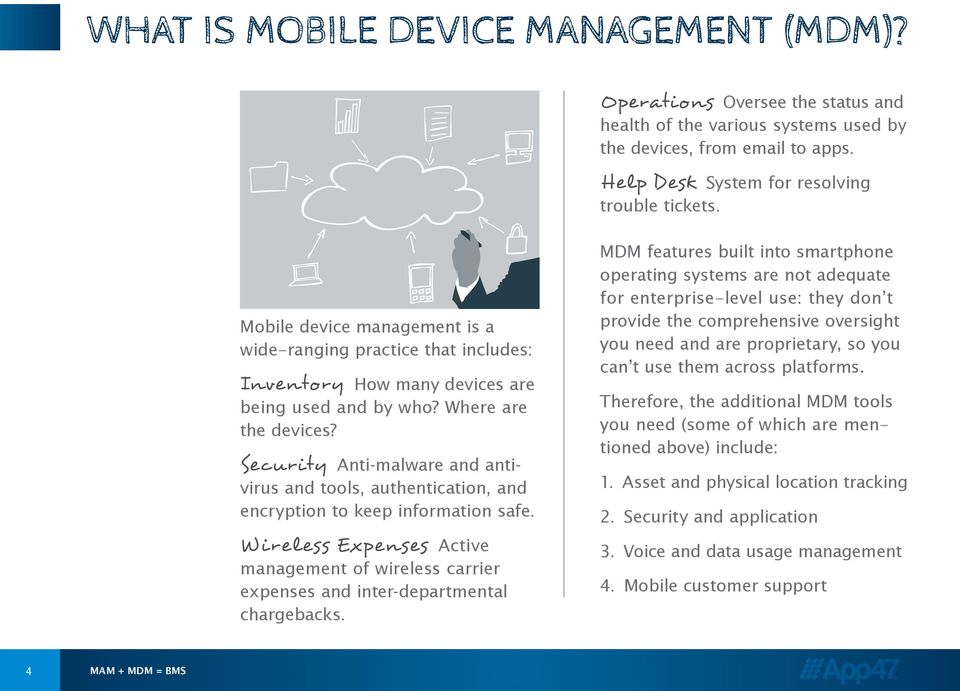
4 What is Mobile Device Management (MDM)? Operations Oversee the status and health of the various systems used by the devices, from to apps. Help Desk System for resolving trouble tickets. Mobile device management is a wide-ranging practice that includes: Inventory How many devices are being used and by who? Where are the devices? Security Anti-malware and antivirus and tools, authentication, and encryption to keep information safe. Wireless Expenses Active management of wireless carrier expenses and inter-departmental chargebacks. MDM features built into smartphone operating systems are not adequate for enterprise-level use: they don t provide the comprehensive oversight you need and are proprietary, so you can t use them across platforms. Therefore, the additional MDM tools you need (some of which are mentioned above) include: 1. Asset and physical location tracking 2. Security and application 3. Voice and data usage management 4. Mobile customer support 4 MAM + MDM = BMS
5 What is Mobile Application Management (MAM)? Mobile application management focuses on the applications loaded onto mobile devices the software, and the ability to add, remove, or update them in an organized way. It includes the strategy and process around developing, distributing, updating, configuring and removing business apps from mobile devices used by employees. Here are examples of MAM: You switch from a Blackberry to an Android, and all business apps are moved from one to the other. You develop a business app to help employees be more efficient in the field, and need to know if the app is being utilized and hitting ROI targets. Your company has a set of ap proved apps they want their employees to use to increase productivity, and want them to be easily accessible via their own branded app store. You leave a company where you used your own device, and the company removes just their apps. A popular business app is updated with new features, and the update is handled remotely no need to download the new version. 5 MAM + MDM = BMS
6 Why Should You Use Both MDM and MAM? Arguments have been made that mobile device management is not necessary as companies increasingly focus on mobile apps but that argument is a little short-sighted. Both are necessary, because there are so many factors in enterprise mobility to consider. Multiple operating systems Industry and government compliance and regulations Department specifications Security and encryption Personal data Cloud storage and hosting These factors link the devices to the apps and vice versa. To manage one, you must manage the other. To make it easier on your IT department though, the app s management can be embedded in the app itself when it is developed. That way, it will be configured properly, updated remotely (so employees don t have to download new versions), and removed remotely when it is no longer useful. 6 MAM + MDM = BMS

7 MAM Lifecycle From managing your network, to troubleshooting hardware and software issues, to overseeing desktop and mobile apps, IT departments have full plates. Depending on a single, cloud-based solution will greatly improve your app. Let s take a look at the MAM lifecycle (illustrated left) to better understand that solution. D e ploy Phase When you release your app to your employees, have a process in place to keep it where it belongs within your company! Provisioning Understand what resources you need to support the app when it is released, such as a user guide and technical support. 7 MAM + MDM = BMS
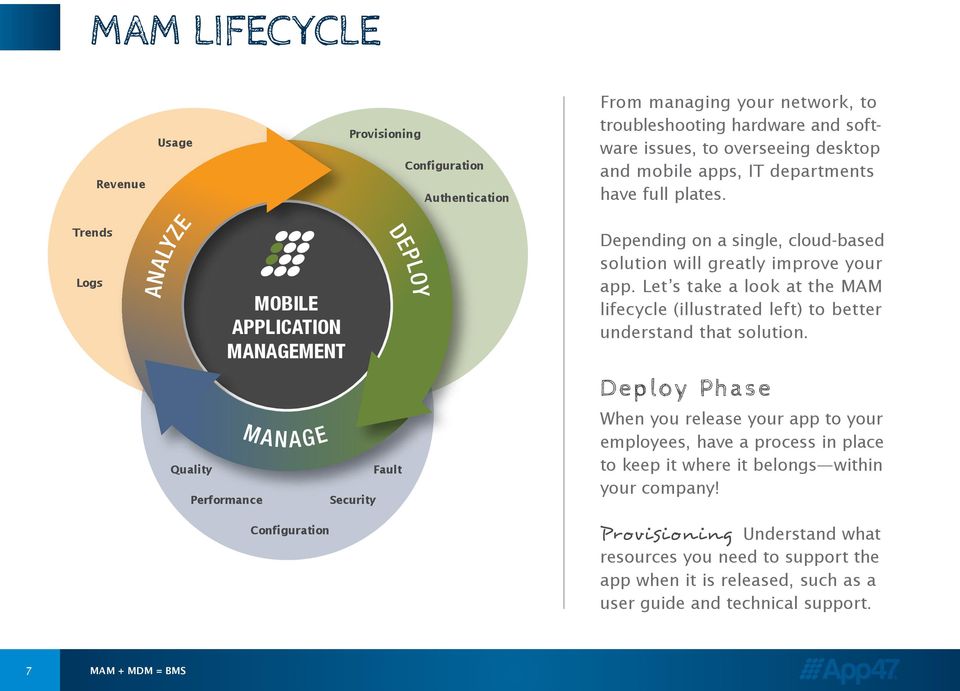
8 Configuration Make sure the app adheres to department and company requirements and policies. Authentication In order to control who can access the app, have a mechanism in place that ensures only the people who need the app can download it. IT departments have full plates. Depending on a single, cloud-based solution will greatly improve your app. Updates When an app gets updated, you can t rely on busy employees to download the update. Be sure you can update the app remotely. Enterprise App Store Set up your internal app store with a clean, straightforward design, so finding and downloading apps is a snap. Manag e Phase Quality The app is only as good as its coding. Bugs will inevitably pop up, so make sure developers are available to address issues quickly. Performance Uploading and downloading speeds and navigability will directly impact how well your app operates. Again, keep your developers on speed dial should any performance issues arise. Configuration As the app evolves and is used by more or fewer people, be sure it can be remotely configured to address those changes in use, and have the ability to add or improve features throughout the app. 8 MAM + MDM = BMS
9 Security Because your app is for internal use and not a commercial product, careful measures must be taken to encrypt data especially if a device it resides on is lost or stolen. Fault As with all important business systems and applications, knowing you have an issue before your customer experiences a problem is critical in enumerable ways: from keeping a loyal customer base to lowering operational costs. Having the ability to manage fault is key to a successful app. Analyze Phase You need to have a firm understanding of your current or potential app s usefulness. Usage Look at how many users you have or plan to have, how they will use the app, how often they will use it, where are they using it, and when. Revenue Examine the app s direct or indirect impact on your company s revenue, whether your app focuses on business development, marketing, sales, or operations. Trends Study internal trends such as patterns of use, and external trends such as usability, design, features, and benefits that are popular. Logs It s no secret that at some point your mobile app will crash, just ask Apple. Accessing the log data for your mobile app will yield valuable insight to help address bugs before pushing to production, or analyze crash logs to know exactly what happened at the time of the crash and more importantly what led to the crash. 9 MAM + MDM = BMS

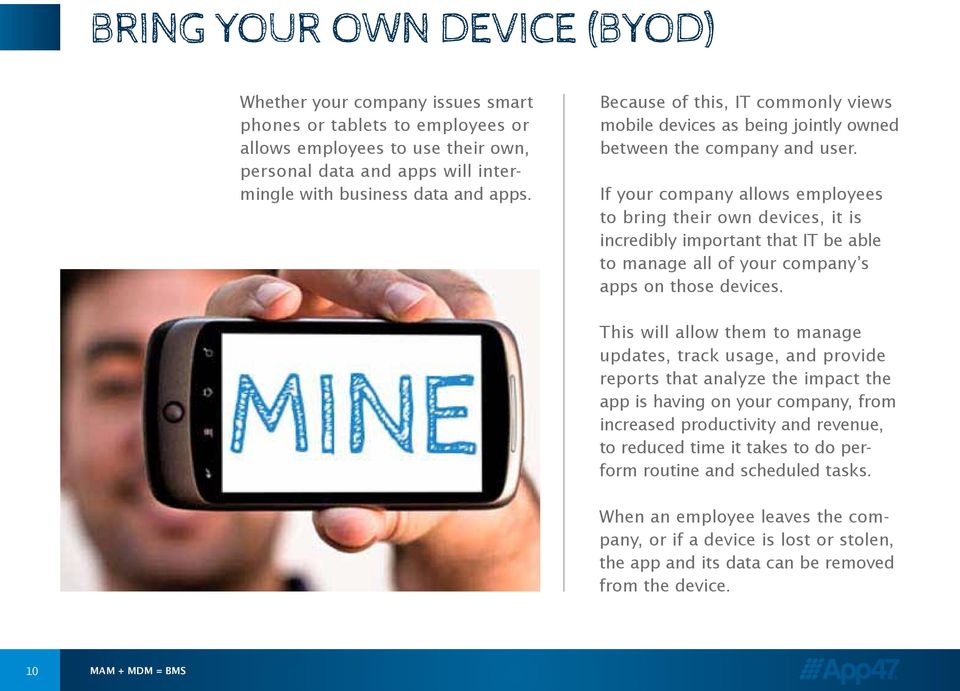
10 Bring Your Own Device (BYOD) Whether your company issues smart phones or tablets to employees or allows employees to use their own, personal data and apps will intermingle with business data and apps. Because of this, IT commonly views mobile devices as being jointly owned between the company and user. If your company allows employees to bring their own devices, it is incredibly important that IT be able to manage all of your company s apps on those devices. This will allow them to manage updates, track usage, and provide reports that analyze the impact the app is having on your company, from increased productivity and revenue, to reduced time it takes to do perform routine and scheduled tasks. When an employee leaves the company, or if a device is lost or stolen, the app and its data can be removed from the device. 10 MAM + MDM = BMS
11 Benefits of Better Configuration Management As we have discussed, there is one thing you can depend on when it comes to anything mobile: constant change. Because of this, configuration management can get tricky. Unlike updates to desktop applications, which you can push out to everyone on your network, you can t force your employees to update their apps. You can remind them a million times, but they could be too busy or like the current version too much, even if it has gaping security holes to be bothered to download the new version and replace the old one. A better approach to configuration management begins with the app itself. When they are being developed, you can code the app for specific variables and thus allow remote updates. Those variables can include device model, operating system, user location, department, team, etc. This approach gives you a remarkable level of customization and control. You can t force your employees to update their Apps. You can remind them a million times, but they could be too busy. The added benefits? You can drive an app s acceptance and usage and thus increase its return on investment. 11 MAM + MDM = BMS

12 Application Intelligence for the Mobile Enterprise At App47, we believe the true value of mobility optimizes the mobile user experience. We offer the only Mobile Application Management (MAM) solution that gives you complete control of the entire mobile app lifecycle so you can realize the real value of your mobile investment. The cloud-based, enterprise-grade MAM solution provided by App47 arms IT with a single command center to deploy, manage and analyze their critical mobile apps. The instrumentation sits inside the application looking out, rather than on a device looking in. This powerful perspective is what creates a complete picture of your organization s mobile application landscape. MAM is more than an enterprise app store or a way to get apps on employee and customer devices; it s an unprecedented end-to-end mobile app lifecycle solution. To learn more, contact us today MAM + MDM = BMS
Yes MAM: How Mobile Device Management Plus Mobile Application Management Protects and Addresses BYOD
 STRATEGY ANALYTICS INSIGHT October 2012 Yes MAM: How Mobile Device Management Plus Mobile Application Management Protects and Addresses BYOD By Mark Levitt, Analyst/Director at Strategy Analytics BYOD
Managing Mobile Devices in a Device-Agnostic World Finding and Enforcing a Policy That Makes Business Sense
 SAP White Paper SAP Partner Organization Mobile Device Management Managing Mobile Devices in a Device-Agnostic World Finding and Enforcing a Policy That Makes Business Sense Table of Content 4 Mobile Device
Kony Mobile Application Management (MAM)
 Kony Mobile Application Management (MAM) Kony s Secure Mobile Application Management Feature Brief Contents What is Mobile Application Management? 3 Kony Mobile Application Management Solution Overview
How To Protect The Agency From Hackers On A Cell Phone Or Tablet Device
 PRODUCT DESCRIPTION Product Number: 0.0.0 MOBILE DEVICE MANAGEMENT (MDM) Effective Date: Month 00, 0000 Revision Date: Month 00, 0000 Version: 0.0.0 Product Owner: Product Owner s Name Product Manager:
Cisco Mobile Collaboration Management Service
 Cisco Mobile Collaboration Management Service Cisco Collaboration Services Business is increasingly taking place on both personal and company-provided smartphones and tablets. As a result, IT leaders are
Hands on, field experiences with BYOD. BYOD Seminar
 Hands on, field experiences with BYOD. BYOD Seminar Brussel, 25 september 2012 Agenda Challenges RIsks Strategy Before We Begin Thom Schiltmans Deloitte Risk Services Security & Privacy Amstelveen [email protected]
Cloud Backup and Recovery for Endpoint Devices
 Cloud Backup and Recovery for Endpoint Devices Executive Summary Armed with their own devices and faster wireless speeds, your employees are looking to access corporate data on the move. They are creating,
DRIVING ENTERPRISE MOBILITY. Enterprise Mobility Solutions
 DRIVING ENTERPRISE MOBILITY Enterprise Mobility Solutions from Computacenter CONTENTS 03 04 05 06 09 10 The Growth of Mobility Seizing Opportunities Overcoming Adversity Computacenter Mobility Solutions
BYOD & MOBILE SECURITY
 2013 surve y results BYOD & MOBILE SECURITY Group Partner Information Security Sponsored by Symantec KPMG Zimbani MailGuard INTRODUCTION Welcome to the 2013 BYOD & Mobile Security Report! Bring Your Own
How To Manage A Corporate Device Ownership (Byod) On A Corporate Network (For Employees) On An Iphone Or Ipad Or Ipa (For Non-Usenet) On Your Personal Device
 Empowering BYOD and Mobile Security in the Enterprise Jeff Baum, APAC Managing Director Growth of Mobile Mobile worker population will reach 1.3 Billion in 2015 Source: IDC Worldwide Mobile Worker Population
Corporate-level device management for BlackBerry, ios and Android
 B L A C K B E R R Y E N T E R P R I S E S E R V I C E 1 0 Corporate-level device management for BlackBerry, ios and Android Corporate-level (EMM) delivers comprehensive device management, security and
BRING YOUR OWN DEVICE
 WHITE PAPER BRING YOUR OWN DEVICE This white paper from Stylusinc addresses on how to introduce BYOD programs in an enterprise and how an IT department can implement a practical and a secure strategy.
1. What are the System Requirements for using the MaaS360 for Exchange ActiveSync solution?
 MaaS360 FAQs This guide is meant to help answer some of the initial frequently asked questions businesses ask as they try to figure out the who, what, when, why and how of managing their smartphone devices,
Answers to these questions will determine which mobile device types and operating systems can be allowed to access enterprise data.
 Mobility options and landscapes are evolving quickly for the corporate enterprise. Mobile platform providers such as Apple, Google and Microsoft, and leading device hardware vendors are constantly updating
Enterprise mobility trends 2015 and beyond
 Sponsored by >> Whitepaper Enterprise mobility trends 2015 and beyond How to best manage mobile in the workplace and deal with challenges from current and emerging technologies FEBRUARY 2015 resources
EOH Cloud Mobile Device Management. EOH Cloud Services - EOH Cloud Mobile Device Management
 EOH Cloud EOH Cloud Services - EOH Cloud Page 1 EOH Mobile Device Management Manage a fleet of diverse mobile devices, support new secure mobile workflows and effectively distribute apps. The evolving
Choosing an MDM Platform
 Whitepaper Choosing an MDM Platform Where to Start the Conversation 2 Choosing an MDM Platform: Where to Start the Conversation There are dozens of MDM options on the market, each claiming to do more than
perspective The battle between MDM and MAM: Where MAM fills the gap? Abstract - Payal Patel, Jagdish Vasishtha (Jags)
 perspective The battle between MDM and MAM: Where MAM fills the gap? - Payal Patel, Jagdish Vasishtha (Jags) Abstract MDM Mobile Device Management and MAM Mobile Application Management are main Enterprise
Btech IT SECURITY SERVICES. Financial Mobility Balancing Security and Success
 Financial Mobility Balancing Security and Success Fiberlink, MaaS360, associated logos, and the names of the products and services of Fiberlink are marks, brands, logos, and symbols may be trademarks or
Compliance Management for Mobile Devices
 Compliance Management for Mobile Devices MOBILE SOLUTIONS Agenda Mobile Device Use Today Mobile Device Use Tomorrow Mobile Device Configuration Challenges in the Mobile Device Environment Policy and Configuration
SOLUTION BRIEF Enterprise Mobility Management. Critical Elements of an Enterprise Mobility Management Suite
 SOLUTION BRIEF Enterprise Mobility Management Critical Elements of an Enterprise Mobility Management Suite CA Technologies is unique in delivering Enterprise Mobility Management: the integration of the
Swisscom Mobile Device Services Quick Start Guide: Set-up Remote Management basic. Mobile Device Services Februar 2014
 Swisscom Mobile Device Services Quick Start Guide: Set-up Remote Management basic Mobile Device Services Februar 2014 Contents 2 Login «Welcome to Swisscom MDS» First steps Step 1: Installing the MDM certificate
THE CONNECTED WORKPLACE A strategy for making the most of mobile devices while protecting your enterprise.
 THE CONNECTED WORKPLACE A strategy for making the most of mobile devices while protecting your enterprise. Enterprises are realizing a new vision where CONSTANT CONNECTIVITY AND COMMUNICATION Plays a major
Mobile Device Management for CFAES
 Mobile Device Management for CFAES What is Mobile Device Management? As smartphones and other mobile computing devices grow in popularity, management challenges related to device and data security are
Kaspersky Security for Mobile
 Kaspersky Security for Mobile See. Control. Protect. MOVING TARGETS Mobile devices play a key role in connectivity and productivity. But they also introduce new risks to the business: in the past 12 months
CHOOSING AN MDM PLATFORM
 CHOOSING AN MDM PLATFORM Where to Start the Conversation Whitepaper 2 Choosing an MDM Platform: Where to Start the Conversation There are dozens of MDM options on the market, each claiming to do more than
How To Manage A Mobile Device Management (Mdm) Solution
 Mobile Device Management Buyers Guide IT departments should be perceived as the lubricant in the machine that powers an organization. BYOD is a great opportunity to make life easier for your users. But
The Convergence of IT Security and Physical Access Control
 The Convergence of IT Security and Physical Access Control Using a Single Credential to Secure Access to IT and Physical Resources Executive Summary Organizations are increasingly adopting a model in which
Mobile Device Security Is there an app for that?
 Mobile Device Security Is there an app for that? Session Objectives. The security risks associated with mobile devices. Current UC policies and guidelines designed to mitigate these risks. An approach
If you can't beat them - secure them
 If you can't beat them - secure them v1.0 October 2012 Accenture, its logo, and High Performance delivered are trademarks of Accenture. Preface: Mobile adoption New apps deployed in the cloud Allow access
Guideline on Safe BYOD Management
 CMSGu2014-01 Mauritian Computer Emergency Response Team CERT-MU SECURITY GUIDELINE 2011-02 Enhancing Cyber Security in Mauritius Guideline on Safe BYOD Management National Computer Board Mauritius Version
The Convergence of IT Security and Physical Access Control
 The Convergence of IT Security and Physical Access Control Using a Single Credential to Secure Access to IT and Physical Resources Executive Summary Organizations are increasingly adopting a model in which
The Maximum Security Marriage:
 The Maximum Security Marriage: Mobile File Management is Necessary and Complementary to Mobile Device Management The bring your own device (BYOD) trend in the workplace is at an all-time high, and according
A guide to enterprise mobile device management.
 WHITEPAPER A guide to enterprise Beyond expectation. www.azzurricommunications.co.uk Introduction. As smartphones and tablets proliferate in the enterprise, IT leaders are under pressure to implement an
HIGH-SECURITY MOBILITY MANAGEMENT FROM BLACKBERRY
 GOLD EMM SUBSCRIPTIONS Experience the most secure mobility management solution with BES12 and Gold Enterprise Mobility Management (EMM) subscriptions. HIGH-SECURITY MOBILITY MANAGEMENT FROM BLACKBERRY
Securing Enterprise Mobility for Greater Competitive Advantage
 SAP Brief SAP Technology SAP Afaria Objectives Securing Enterprise Mobility for Greater Competitive Advantage Build a strong foundation for mobile success Build a strong foundation for mobile success Enterprise
CDW PARTNER REVIEW GUIDE MOBILE DEVICE MANAGEMENT
 CDW PARTNER REVIEW GUIDE MOBILE DEVICE MANAGEMENT GETTING CONTROL OF MOBILITY IN THE MARKET In a 2011 IDC study, IT decision-makers report that, on average, 34 percent of their employees access business
How To Protect Your Mobile Devices From Security Threats
 Back to the Future: Securing your Unwired Enterprise By Manoj Kumar Kunta, Global Practice Leader - Security Back to the Future: Securing your Unwired Enterprise The advent of smartphones and tablets has
Mobile Device Management in the Systems Management Ecosystem. Katie Wiederholt, Dell Software
 Mobile Device Management in the Systems Management Ecosystem Katie Wiederholt, The forces driving change in mobility Agenda The journey to MDM Where do we want to be and mobile security technologies 2
DEPLOYMENT. ASSURED. SEVEN ELEMENTS OF A MOBILE TEST STRATEGY. An Olenick & Associates White Paper
 DEPLOYMENT. ASSURED. SEVEN ELEMENTS OF A MOBILE TEST STRATEGY An Olenick & Associates White Paper July 2013 Contents Executive Summary... 1 Mobile Vision... 3 QA Methodology and Process... 4 Deployment
LabTech Mobile Device Management Overview
 You are here: Using LabTech > Mobile Device Management > Mobile Device Management Overview LabTech Mobile Device Management Overview Features LabTech mobile device management (MDM) is a fully integrated
Advanced Configuration Steps
 Advanced Configuration Steps After you have downloaded a trial, you can perform the following from the Setup menu in the MaaS360 portal: Configure additional services Configure device enrollment settings
Cisco BYOD Smart Solution: Take a Comprehensive Approach to Secure Mobility
 Solution Overview Cisco BYOD Smart Solution: Take a Comprehensive Approach to Secure Mobility What You Will Learn Whether you want to simply allow tablets on your network or transform business processes
Security and Compliance challenges in Mobile environment
 Security and Compliance challenges in Mobile environment Emerging Technologies November 19, 2013 Bob Bastani Introductions Bob Bastani, Security & Compliance Program Manager, IBM, 301-803-6078, [email protected]
The 9 Pillars of Enterprise Mobility
 The 9 Pillars of Enterprise Mobility Building a framework that benefits IT, users and the business An Enterprise Mobility Program (EMP) focuses on policies, processes and enabling technologies that align
Building an Effective Mobile Device Management Strategy for a User-centric Mobile Enterprise
 Building an Effective Mobile Device Management Strategy for a User-centric Mobile Enterprise Jan Wiewiora White Paper Introduction Users are increasingly relying on smartphones and tablets for work. Recent
SIMPLIFY MULTI-PLATFORM ENTERPRISE MOBILITY MANAGEMENT
 DATASHEET SIMPLIFY MULTI-PLATFORM ENTERPRISE MOBILITY MANAGEMENT Silver level EMM Enterprise Mobility Management for Corporate-owned and BYOD devices BlackBerry Enterprise Service 10 is a powerful device,
KEEPING YOUR SANITY AS YOU EMBRACE CLOUD AND MOBILE
 KEEPING YOUR SANITY AS YOU EMBRACE CLOUD AND MOBILE There s been lots of buzz about the tsunamis of change hitting IT. Talk of pivoting to the cloud, the growing mobile workforce, and the Internet of Things
EXECUTIVE SUMMARY Cloud Backup for Endpoint Devices
 EXECUTIVE SUMMARY Cloud Backup for Endpoint Devices According to Gartner, by 2015 more than 60% of enterprises will have suffered material loss of sensitive corporate data via mobile devices. Armed with
Microsoft Windows Intune: Cloud-based solution
 Microsoft Windows Intune: Cloud-based solution So what exactly is Windows Intune? Windows Intune simplifies and helps businesses manage and secure PCs using Windows cloud services and Windows 7. Windows
HDAA BYOD Workshops May 2013
 HDAA BYOD Workshops May 2013 Discussion Mobility Trends in Australia BYOD and Consumerisation of IT Implications Checklist 2 Macro Trends GEOGRAPHIES Asia Pacific fastest growing Smart Mobile Device market
Remote Infrastructure Management Emergence of the Cloud-based Helpdesk
 Remote Infrastructure Management Emergence of the Cloud-based Helpdesk A leadership perspectives white paper Recommended next steps for business and industry executives Issue 11 in a series Executive Summary
SAP White Paper Enterprise Mobility
 SAP White Paper Enterprise Mobility Mobile Content and Document Management Best Practices and Decision Checklist Enterprise-Grade Solutions Give IT Much-Needed Security and Control Over Company Content
ADDING STRONGER AUTHENTICATION for VPN Access Control
 ADDING STRONGER AUTHENTICATION for VPN Access Control Adding Stronger Authentication for VPN Access Control 1 ADDING STRONGER AUTHENTICATION for VPN Access Control A VIRTUAL PRIVATE NETWORK (VPN) allows
Security and Privacy Considerations for BYOD
 Security and Privacy Considerations for BYOD Carol Woodbury, President SkyView Partners, Inc 1 Introduction The world of BYOD (Bring Your Own Device) is rapidly expanding. You may not think it s happening
BlackBerry Mobile Voice System
 BlackBerry Mobile Voice System BlackBerry Mobile Voice System Mobile Unified Communications BlackBerry Mobile Voice System (BlackBerry MVS) brings desk phone features to BlackBerry smartphones. Work with
Enterprise Mobility as a Service
 Service Description: Insert Title Enterprise Mobility as a Service Multi-Service User Management for Mobility 1. Executive Summary... 2 2. Enterprise Mobility as a Service Overview... 3 3. Pricing Structure...
Mobile Device Inventory the first step in enterprise mobile management
 Mobile Device Inventory the first step in enterprise mobile management EXECUTIVE SUMMARY As phones and tablets overtake PCs as the most-often used means of connecting to company data and apps, organizations
6 Things To Think About Before Implementing BYOD
 6 Things To Think About Before Implementing BYOD Kimber Spradlin, CISA, CISSP 2012 IBM Corporation Mobile Devices: Unique Management & Security Challenges Mobile devices are shared more often Mobile devices
Mobile Printing for Business Made Easy
 Mobile Printing for Business Made Easy If users know how to send an email or go to a Web address, they can print with EveryonePrint EveryonePrint is the perfect fit for any business of any size, where
Troubleshooting BlackBerry Enterprise Service 10 version 10.1.1 726-08745-123. Instructor Manual
 Troubleshooting BlackBerry Enterprise Service 10 version 10.1.1 726-08745-123 Instructor Manual Published: 2013-07-02 SWD-20130702091645092 Contents Advance preparation...7 Required materials...7 Topics
Bring Your Own Device (BYOD) and Mobile Device Management. tekniqueit.com
 Bring Your Own Device (BYOD) and Mobile Device Management tekniqueit.com Bring Your Own Device (BYOD) and Mobile Device Management People are starting to expect the ability to connect to public networks
Quick Start Guide. Version R9. English
 Mobile Device Management Quick Start Guide Version R9 English February 25, 2015 Agreement The purchase and use of all Software and Services is subject to the Agreement as defined in Kaseya s Click-Accept
Bring Your Own Device (BYOD) and 1:1 Initiatives: What Questions Do You Need to Answer Before Jumping In?
 Bring Your Own Device (BYOD) and 1:1 Initiatives: What Questions Do You Need to Answer Before Jumping In? Bruce Alexander Product Specialist- Wireless and Mobility Bret Straffon Product Specialist-Security
BYOD Policy for [AGENCY]
![BYOD Policy for [AGENCY]](/thumbs/24/2163525.jpg "BYOD Policy for [AGENCY]") BYOD Policy for [AGENCY] This document provides policies, standards, and rules of behavior for the use of smartphones, tablets and/or other devices ( Device ) owned by [AGENCY] employees personally (herein
BYOD Policy for [AGENCY] This document provides policies, standards, and rules of behavior for the use of smartphones, tablets and/or other devices ( Device ) owned by [AGENCY] employees personally (herein
OWA vs. MDM. Once important area to consider is the impact on security and compliance policies by users bringing their own devices (BYOD) to work.
 OWA vs. MDM Introduction SmartPhones and tablet devices are becoming a common fixture in the corporate environment. As feature phones are replaced with new devices such as iphone s, ipad s, and Android
[BRING YOUR OWN DEVICE POLICY]
![[BRING YOUR OWN DEVICE POLICY]](/thumbs/33/16168462.jpg "[BRING YOUR OWN DEVICE POLICY]") 2013 Orb Data Simon Barnes [BRING YOUR OWN DEVICE POLICY] This document specifies a sample BYOD policy for use with the Orb Data SaaS MDM service Contents 1 ACCEPTABLE USE... 3 1.1 GENERAL RULES... 3 2
2013 Orb Data Simon Barnes [BRING YOUR OWN DEVICE POLICY] This document specifies a sample BYOD policy for use with the Orb Data SaaS MDM service Contents 1 ACCEPTABLE USE... 3 1.1 GENERAL RULES... 3 2
Simplifying Desktop Mgmt With Novell ZENworks
 Simplifying Desktop Mgmt With Novell ZENworks Joe Marton Senior Systems Engineer Collaboration Solution Principal Novell North America [email protected] Ryan Radschlag Network Manager Hartford Joint #1
Bring Your Own Device (BYOD) and Mobile Device Management. www.cognoscape.com
 Bring Your Own Device (BYOD) and Mobile Device Management www.cognoscape.com Bring Your Own Device (BYOD) and Mobile Device Management People are starting to expect the ability to connect to public networks
White Paper. Data Security. journeyapps.com
 White Paper Data Security CONTENTS The JourneyApps Commitment to Security Geographic Location of Cloud Hosting Infrastructure-Level Security Protection of Data Through Encryption Data Life Cycle Management
GlobalProtect Configuration for IPsec Client on Apple ios Devices
 GlobalProtect Configuration for IPsec Client on Apple ios Devices Tech Note PAN-OS 4.1 Revision D 2013, Palo Alto Networks, Inc. www.paloaltonetworks.com CONTENTS OVERVIEW... 3 PREREQUISITES... 3 GLOBALPROTECT
Five Steps to Android Readiness
 Five Steps to Android Readiness Android State of the Union Ready or not, Android is coming to the enterprise. The rise of Google s Android operating system has ushered a new wave of mobile devices and
How to Execute Your Next Generation of Mobile Initiatives. Ian Evans Vice President and Managing Director- EMEA, AirWatch by VMware
 How to Execute Your Next Generation of Mobile Initiatives Ian Evans Vice President and Managing Director- EMEA, AirWatch by VMware Company Facts 12000 1,800 employees 150 countries 17 languages 11 global
Data Loss Prevention Whitepaper. When Mobile Device Management Isn t Enough. Your Device Here. Good supports hundreds of devices.
 Data Loss Prevention Whitepaper When Mobile Device Management Isn t Enough Your Device Here. Good supports hundreds of devices. Contents Shifting Security Landscapes 3 Security Challenges to Enterprise
Mobility Solutions for Plant Personnel
 Mobility Solutions for Plant Personnel ARC Forum Orlando, February 2014 Greg Gorbach Vice President ARC Advisory Group [email protected] Introduction Mobile Devices play a key role in industrial operations
Empowering the Enterprise Through Unified Communications & Managed Services Solutions
 Continuant Managed Services Empowering the Enterprise Through Unified Communications & Managed Services Solutions Making the transition from a legacy system to a Unified Communications environment can
BlackBerry Mobile Voice System
 BlackBerry Mobile Voice System Mobile Unified Communications BlackBerry Mobile Voice System (BlackBerry MVS) brings desk phone features to BlackBerry smartphones. Work with one business number at the office
M a as3 6 0 fo r M o bile D evice s
 by Fiberlink Services > Overview MaaS360 helps IT administrators provision, manage, and secure today s expanding suite of mobile devices, including ios and Android devices. The New Challenges of Mobile
Is your business secure in a hosted world?
 Is your business secure in a hosted world? Threats to the security of business data are constantly growing and evolving - What can you do ensure your data remains secure? Introduction The safe use of computer
What Is Cisco Mobile Workspace Solution?
 Solution Overview Cisco Mobile Workspace Solution A Whole New Level of Worker Mobility Basic mobile connectivity for employees using personal devices has been around for a while, bringing both benefits