
Electronic Check Services
|
|
|
- Florence Lane
- 10 years ago
- Views:
Transcription
1 Title Page Electronic Check Services User Guide July 2015 CyberSource Corporation HQ P.O. Box 8999 San Francisco, CA Phone:

2 CyberSource Contact Information For technical support questions, go to the Home page in the Business Center to see the contact information appropriate for your account. Visit the Business Center, your central location for managing your online payment transactions, at For general information about our company, products, and services, go to For sales questions about any CyberSource Service, or call or (toll free in the United States). Copyright 2015 CyberSource Corporation. All rights reserved. CyberSource Corporation ("CyberSource") furnishes this document and the software described in this document under the applicable agreement between the reader of this document ("You") and CyberSource ("Agreement"). You may use this document and/or software only in accordance with the terms of the Agreement. Except as expressly set forth in the Agreement, the information contained in this document is subject to change without notice and therefore should not be interpreted in any way as a guarantee or warranty by CyberSource. CyberSource assumes no responsibility or liability for any errors that may appear in this document. The copyrighted software that accompanies this document is licensed to You for use only in strict accordance with the Agreement. You should read the Agreement carefully before using the software. Except as permitted by the Agreement, You may not reproduce any part of this document, store this document in a retrieval system, or transmit this document, in any form or by any means, electronic, mechanical, recording, or otherwise, without the prior written consent of CyberSource. Restricted Rights Legends For Government or defense agencies. Use, duplication, or disclosure by the Government or defense agencies is subject to restrictions as set forth the Rights in Technical Data and Computer Software clause at DFARS and in similar clauses in the FAR and NASA FAR Supplement. For civilian agencies. Use, reproduction, or disclosure is subject to restrictions set forth in subparagraphs (a) through (d) of the Commercial Computer Software Restricted Rights clause at and the limitations set forth in CyberSource Corporation's standard commercial agreement for this software. Unpublished rights reserved under the copyright laws of the United States. Trademarks CyberSource, The Power of Payment, CyberSource Payment Manager, CyberSource Risk Manager, CyberSource Decision Manager, CyberSource Connect, Authorize.Net, and echeck.net are trademarks and/or service marks of CyberSource Corporation. All other brands and product names are trademarks or registered trademarks of their respective owners. 2

3 Contents CONTENTS Recent Revisions to This Document 7 About This Guide 8 Audience 8 Purpose 8 Conventions 8 Related Documentation 9 Chapter 1 Introduction to Electronic Check Services 10 Payment Processors 10 Chase Paymentech Solutions 10 CyberSource ACH Service 10 RBS WorldPay Atlanta 11 TeleCheck 11 Legal Compliance Text 11 Internet Check Acceptance Authorization Full Debit 11 Internet Check Acceptance Authorization Recurring Payments 12 Checks by Phone Authorization Full Debit 13 Determining Whether a Check Has Cleared 13 Order Tracking 14 Request IDs 14 Reconciliation IDs 15 Check Reference Numbers 15 Processor Transaction Identifiers 15 Chapter 2 Electronic Check Processing 16 Electronic Check Debits 16 Requesting a Debit 16 Handling Customer Account Information 16 Merchant-Provided Data 16 Notifications of Change (NOCs) 18 Electronic Check Services User Guide July

4 Contents Verification and Validation 19 Validation 19 ACH Verification 20 Guarantees 21 Paymentech Verification 21 Optional Features for Debits 22 Debit Request Fields 22 Electronic Check Credits 23 Requesting a Credit 23 Follow-On Credits and Stand-Alone Credits 24 Deciding What Kind of Credit to Request 24 Follow-On Credits 24 Stand-Alone Credits 25 ACH Verification 25 Notifications of Change (NOCs) 26 Optional Features for Credits 27 Credit Request Fields 27 Authentication 29 Voids 29 Requesting a Void 30 Chapter 3 Optional Features 31 Corporate Checks 31 Deferred and Partial Payments 31 Chase Paymentech Solutions 32 TeleCheck 32 Merchant Descriptors 33 Multiple Partial Credits 33 Non-Sufficient Funds (NSF) Service 34 Payment Tokenization 34 Recurring Billing 35 Settlement Delivery Methods 36 Chapter 4 Testing Electronic Check Services 38 Requirements for Testing 38 Testing Chase Paymentech Solutions Transactions 39 Successful Transactions 39 Testing Chase Paymentech Solutions Declines 40 Testing CyberSource ACH Service Transactions 40 Testing RBS WorldPay Atlanta 41 Electronic Check Services User Guide July

5 Contents Testing TeleCheck 41 Going Live 41 Appendix A API Fields 42 Formatting Restrictions 42 Data Type Definitions 42 Request Fields 43 Reply Fields 53 Appendix B Examples 59 Name-Value Pair Examples 59 XML Examples 60 Appendix C Product Codes 62 Appendix D Reason Codes 63 Appendix E NOC Codes 66 Appendix F Check Point Summary Codes 68 Primary Result Codes 68 Address Result Codes 69 Phone Codes 70 Address Type Codes 72 Change of Address Codes 72 Social Security Number Codes 73 Address Unit Mismatch Codes 74 Phone Unit Mismatch Codes 74 Driver's License Result Codes 74 Date of Birth Match Codes 75 High Risk Address Codes 75 High Risk Phone Codes 76 OFAC Validation Results Codes 76 Address Residential Match Codes 77 Address Business Match Codes 77 Electronic Check Services User Guide July
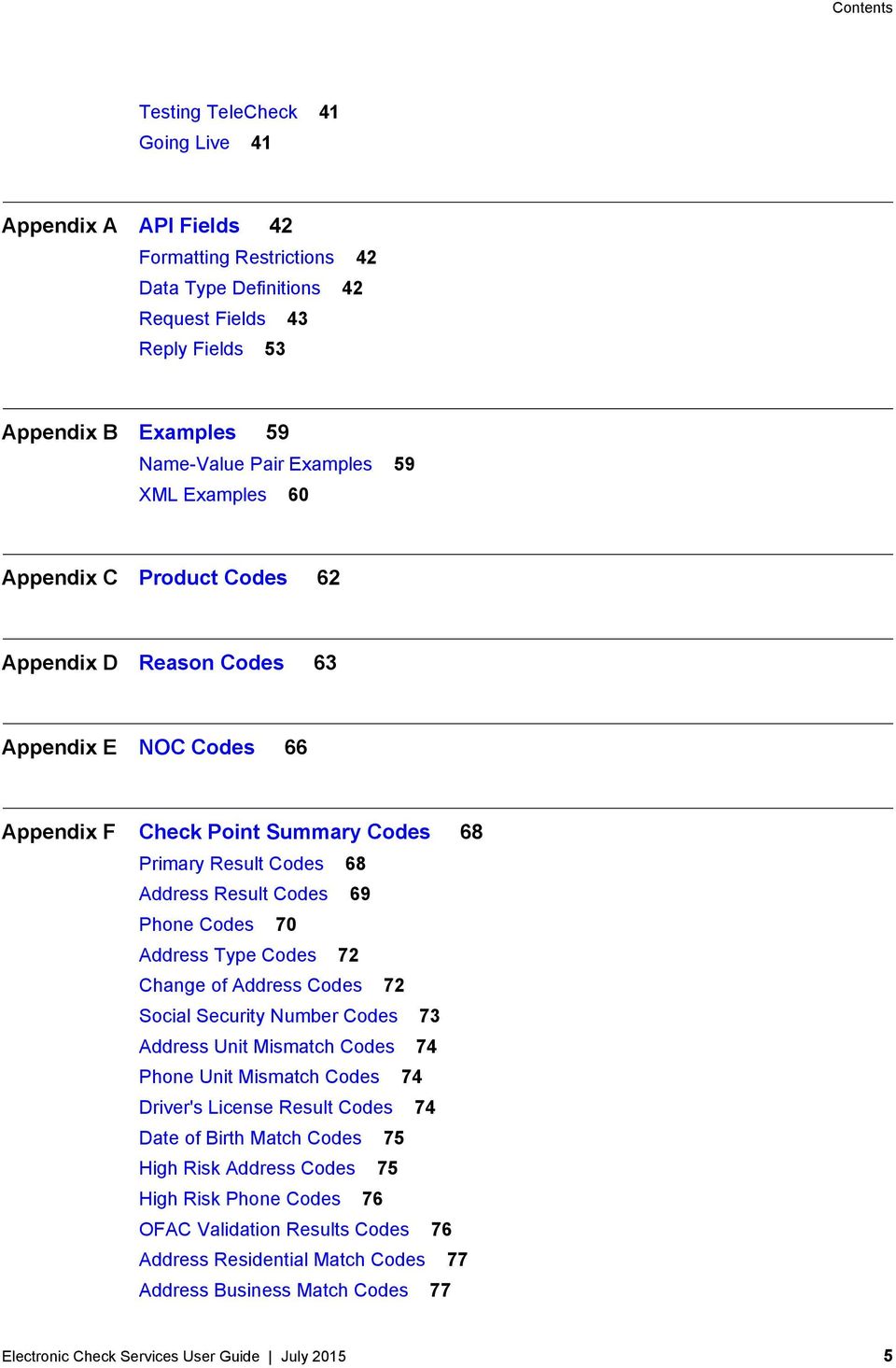
6 Contents Phone Number Residential Match Codes 77 Phone Number Business Match Codes 77 Appendix G Fraud Shield Indicator Codes 78 Appendix H Verification Codes 79 Mapped Verification Codes 79 Raw Verification Codes 80 Appendix I SEC Codes 81 Index 83 Electronic Check Services User Guide July

7 Recent Revisions to This Document REVISIONS Release July 2015 Changes CyberSource ACH Service: added ecdebitservice_effectivedate and eccreditservice_ effectivedate to "Request Fields," page 43. October 2014 Updated the maximum length of the billto_company field. See "Request Fields," page 43. Added check_terminalcity and check_terminalstate to "Request Fields," page 43, and "SEC Codes," page 81. June 2014 Added a note telling you to contact Telecheck for information about "Guarantees," page 21. May 2014 Removed option number 3 from ecdebitservice_verificationlevel in "Request Fields," page 43, because guarantees cannot be enabled through the API. CyberSource ACH Service: Moved the information about service fees to a new document. See Service Fee Processing Using the Simple Order API. February 2014 Added check_imagereferencenumber to "Request Fields," page 43. January 2014 Added ecauthenticateservice_referencenumber to "Request Fields," page 43. Added check_authenicateid to "Request Fields," page 43. Added ARC and POP values to SEC Codes. See "SEC Codes," page 81. Updated the description of the check_seccode field. It is required for TeleCheck, and optional for all other processors. For more information, see "SEC Codes," page 81. Electronic Check Services User Guide July

8 About This Guide ABOUT GUIDE Audience This guide is written for application developers who want to use the CyberSource Simple Order API to integrate electronic check processing into their order management system. Implementing the CyberSource electronic check services requires software development skills. You must write code that uses the API request and reply fields to integrate the electronic check services into your existing order management system. Purpose This guide describes tasks you must complete to integrate the electronic check services into your existing order management system. Conventions The following special statements are used in this document: Note A Note contains helpful suggestions or references to material not contained in this document. Important An Important statement contains information essential to successfully completing a task or learning a concept. Electronic Check Services User Guide July

9 About This Guide The following text conventions are used in this document: Table 1 Text Conventions Convention boldface monospace Meaning Boldface type indicates API field names, API service names, and graphical user interface elements that you must act upon. Monospace type indicates URLs, code in examples, or possible values for API fields. Related Documentation Getting Started with CyberSource Essentials describes how to get started using the Simple Order API: PDF: getting_started.pdf HTML: html/wwhelp/wwhimpl/js/html/wwhelp.htm#href=cover.html The Reporting User Guide describes how to download reports: PDF: SB_Reporting_UG.pdf HTML: UG/html/ The Secure Acceptance Silent Order POST Development Guide describes how to create a Secure Acceptance Silent Order POST profile: PDF: Acceptance_SOP/Secure_Acceptance_SOP.pdf HTML: Acceptance_SOP/html/wwhelp/wwhimpl/js/html/wwhelp.htm#href=coverAPI.html The Secure Acceptance Web/Mobile Configuration Guide describes how to create a Secure Acceptance Web/Mobile profile: PDF: Acceptance_WM/Secure_Acceptance_WM.pdf HTML: Acceptance_WM/html/wwhelp/wwhimpl/js/html/wwhelp.htm#href=coverSC.html Electronic Check Services User Guide July

10 Introduction to Electronic Check Services CHAPTER 1 Payment Processors To use the CyberSource Electronic Check Services, you must register with one of these processors: Chase Paymentech Solutions CyberSource ACH Service RBS WorldPay Atlanta TeleCheck Chase Paymentech Solutions Supports U.S. Dollars (USD) for U.S. bank accounts. Chase Paymentech Solutions will provide you with unique identification numbers for your account. You must provide these identification numbers to your CyberSource Sales Representative. Chase Paymentech Solutions acts as both a processor and a merchant bank, which is a bank that offers accounts for businesses that accept credit card or electronic check payments. If you choose Chase Paymentech Solutions as your processor, you must also open a check-enabled merchant bank account with them. However, you can set up the account to deposit the electronic check funds you receive directly into your primary account at another bank. CyberSource ACH Service Supports U.S. Dollars (USD) for U.S. bank accounts. If CyberSource ACH Service is your processor, you need to have a treasury relationship with one of the following originating depository financial institutions (ODFIs): Bank of America Wells Fargo Electronic Check Services User Guide July

11 Chapter 1 Introduction to Electronic Check Services CyberSource ACH Solutions will provide you with unique identification numbers for your account. You must provide these identification numbers to your CyberSource Sales Representative. RBS WorldPay Atlanta Supports U.S. Dollars (USD) for U.S. bank accounts. RBS WorldPay Atlanta will provide you with unique identification numbers for your account. You must provide these identification numbers to your CyberSource Sales Representative. TeleCheck Supports U.S. Dollars (USD) for U.S. bank accounts. Telecheck will provide you with unique identification numbers for your account. You must provide these identification numbers to your CyberSource Sales Representative. If TeleCheck is your processor, you do not need to open a check-enabled merchant bank account. TeleCheck can deposit funds directly into your existing bank account. Legal Compliance Text Step 1 Step 2 Internet Check Acceptance Authorization Full Debit To process electronic checks, you need to add the following items to your web site: On your web site, add a link to the table of current state returned check fees: Because this table is updated regularly, CyberSource recommends that you link directly to it. You can display the state fees table in a pop-up window, a full browser window, or directly on the checkout page. At the end of the checkout process on your web site, display a consent statement for the check authorization that your customer must accept before submitting the order. The authorization consent statement must: Be readily identifiable as an authorization. Clearly and conspicuously state its terms including the transaction amount and the effective date of the transfer. Include the routing number and bank account number to be debited. Electronic Check Services User Guide July
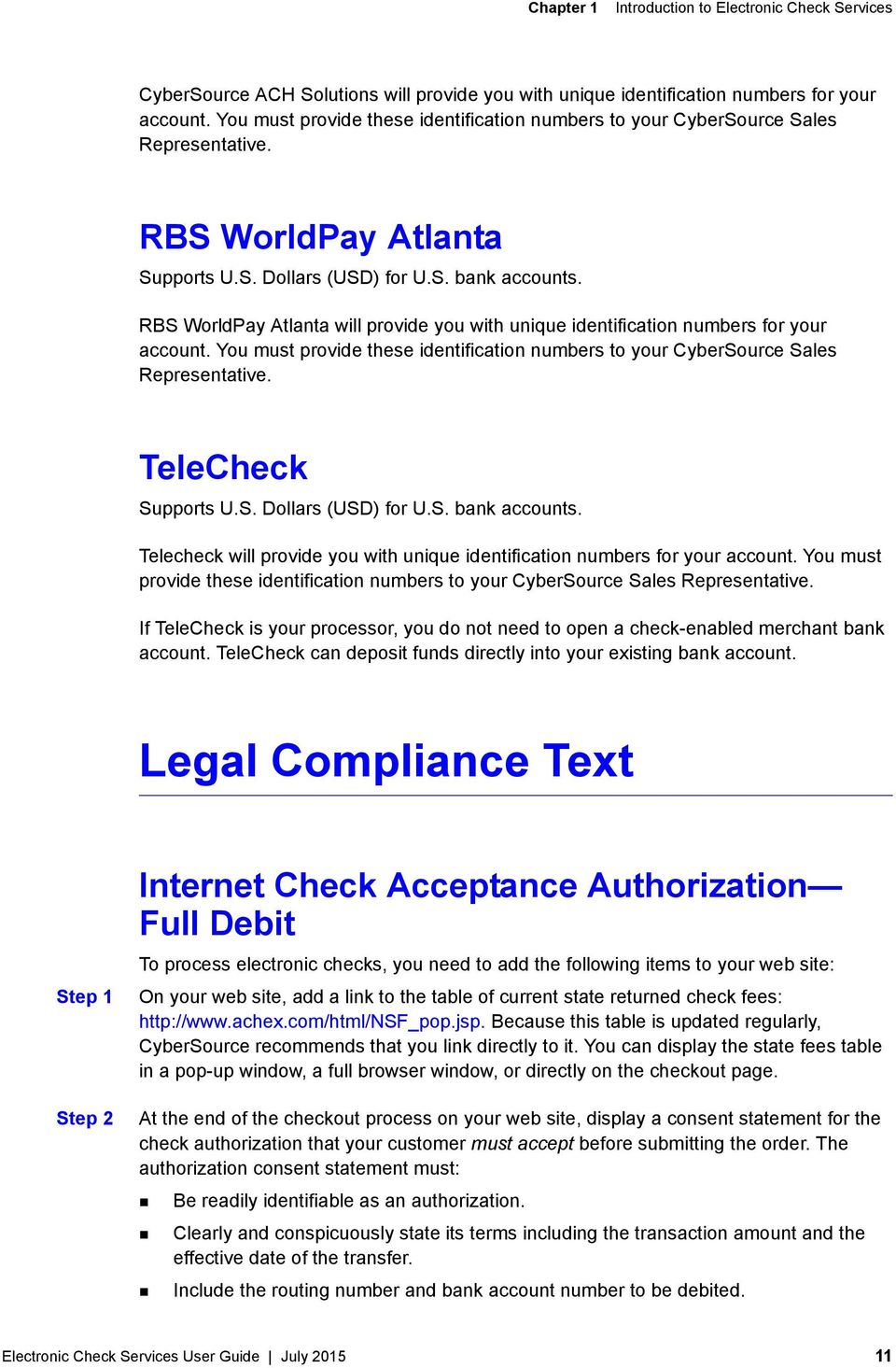
12 Chapter 1 Introduction to Electronic Check Services Example Language for a Payment Authorization for a Debit Bank ABA Routing Number: [ABA routing number for the customer s bank] Bank Account Type: [checking, business checking, savings] Bank Account Number: [customer s bank account number] By entering my account number above and clicking Authorize, I authorize my payment to be processed as an electronic funds transfer or draft drawn from my account. If the payment is returned unpaid, I authorize you or your service provider to collect the payment and my state s return item fee by electronic funds transfer(s) or draft(s) drawn from my account. Click here to view your state s returned item fee If this payment is from a corporate account, I make these authorizations as an authorized corporate representative and agree that the entity will be bound by the NACHA operating rules. Internet Check Acceptance Authorization Recurring Payments Example Language for a Payment Authorization for a Recurring Payments By entering my account number above and clicking Authorize, I authorize my payments to be processed as electronic funds transfers or drafts drawn from my account. [insert information on payment amount, timing, etc.] If any of my payments are returned unpaid, I authorize you or your service provider to collect the payment and my state s return item fee for each payment by electronic fund transfer(s) or draft(s) drawn from my account. Click here to view your state s returned item fee. If this payment is from a corporate account, I make these authorizations as an authorized corporate representative and agree that the entity will be bound by the NACHA Operating Rules. This authorization is to remain in full force and effect until [merchant s name] has received written notification from me of my termination in such time and manner as to afford [merchant s name] a reasonably opportunity to act on it. Electronic Check Services User Guide July

13 Chapter 1 Introduction to Electronic Check Services Checks by Phone Authorization Full Debit At the end of the checkout process, the consent text must be read to the consumer, and you must either audio record the consumer s authorization or send a written notification of the authorization and the transaction to the consumer prior to settlement of the transaction. The consent text for the consumer to accept prior to submitting the payment authorization is as follows. Example Language for a Payment Authorization Over the Telephone Today [insert today s date], I d like to confirm that you, [insert first and last name], are authorizing a payment in the amount of [insert amount] to be processed as an electronic funds transfer or draft drawn from your account. Do you agree? If your payment is returned unpaid, you authorize us or our service provider to collect the payment and your state s return item fee of [insert state returned item fee] by electronic funds transfer(s) or draft(s) drawn from your account. Do you agree and authorize the payment? Determining Whether a Check Has Cleared You can use the Payment Events Report to keep track of your electronic check debits and identify problems that occur with funds transfers. The report is available daily and includes information from the past 24 hours that the processor has provided about your transactions, such as the clearing of a check or the denial of a check due to insufficient funds. The following table describes the event types that indicate that a check has likely cleared. For a list of all the event values, see the description of the Payment Events Report in the Reporting User Guide. Important Due to the nature of electronic check processing, CyberSource does not guarantee that a check has truly cleared. Table 2 Determining Whether a Check Has Cleared Processor Chase Paymentech Solutions Event Type The Payment Events Report does not indicate that a check has cleared; it shows only problems that occur with funds transfers. Important If you use Chase Paymentech Solutions, you must contact them and request that they send their electronic check declines file to CyberSource. Then contact CyberSource Sales with your Chase Paymentech Solutions MA number so that your CyberSource account can be configured appropriately. Electronic Check Services User Guide July

14 Chapter 1 Introduction to Electronic Check Services Table 2 Determining Whether a Check Has Cleared (Continued) Processor CyberSource ACH Service TeleCheck Event Type The event type listed in the Payment Events Report is Payment when the ODFI receives a debit request. Bank of America ACH: To see an event type of Completed when the check clears, contact Customer Support to have your account configured. CyberSource does not recommend using this event type because it is not a reliable indication that a check has cleared. Wells Fargo ACH: After receiving the debit request, the ODFI waits for three days and if the bank does not inform them about any problems with the funds transfer, they consider the check cleared. The event type listed in the report is Completed when the check clears. CyberSource does not guarantee that the check has truly cleared. The event type listed in the Payment Events Report is Payment when a check clears. Order Tracking See Getting Started with CyberSource Essentials for information about order tracking. This section provides the names of the API fields that are used for order tracking for the electronic check services. Request IDs For all CyberSource services, the request ID is returned in the reply messages in requestid. The following table lists the field names for the request IDs in request messages. Table 3 Field Names for Request IDs in Request Messages Service Electronic check credit Electronic check debit Void Request ID Field eccreditservice_debitrequestid ecdebitservice_debitrequestid voidservice_voidrequestid Electronic Check Services User Guide July
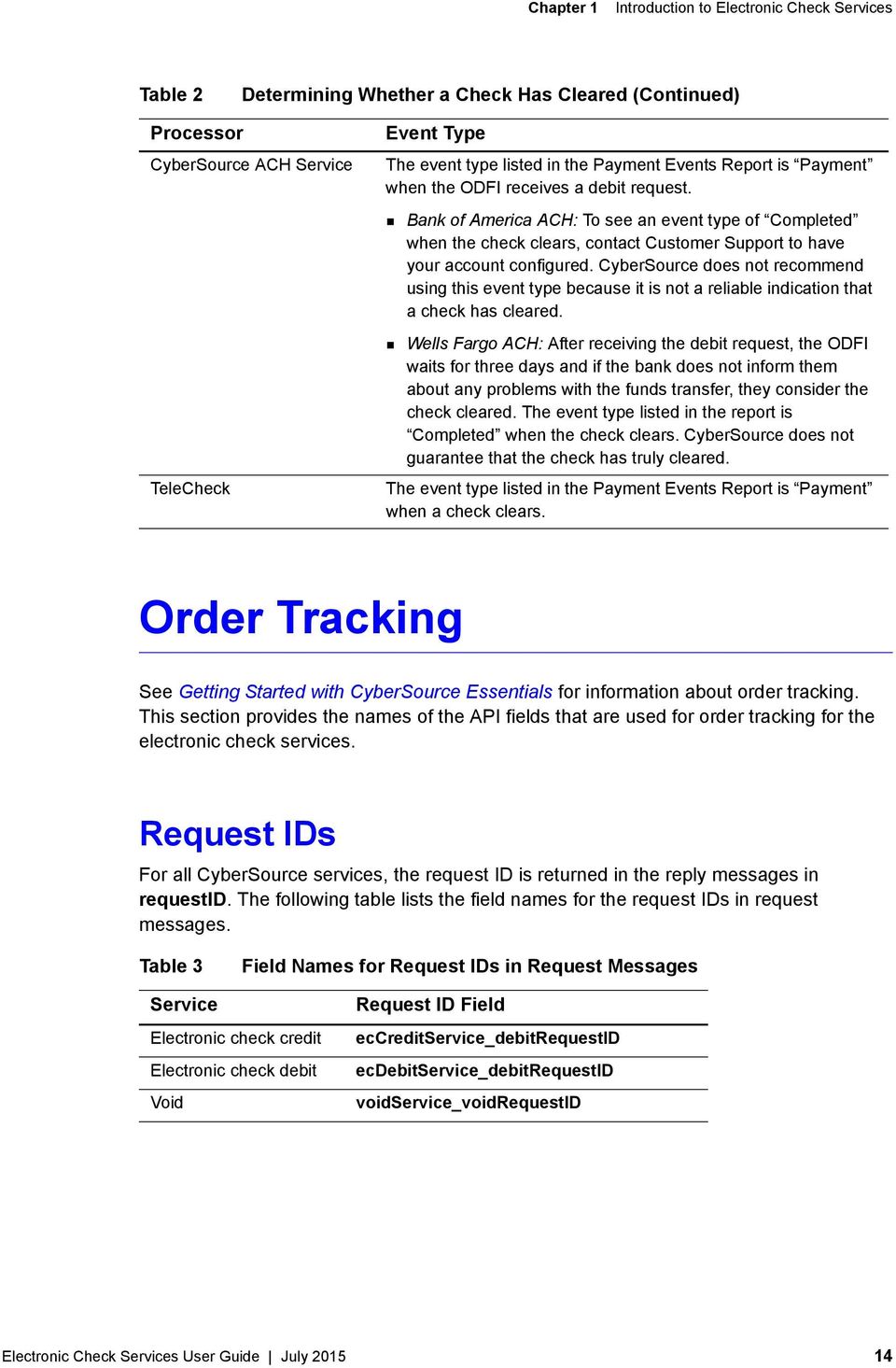
15 Chapter 1 Introduction to Electronic Check Services Reconciliation IDs The following table lists the field names for the reconciliation IDs, which are returned in the reply messages. Table 4 Field Names for Reconciliation IDs Service Electronic check debit Electronic check credit Reconciliation ID Field Name ecdebitreply_reconciliationid eccreditreply_reconciliationid Check Reference Numbers The check reference number is a value you can send in a request to track transactions through to the processor for reconciliation. If you do not include this field in your request, CyberSource generates a unique value for you and returns it in the reply message. The following table lists the field names for the check reference numbers in request and reply messages. Table 5 Field Names for Check Reference Numbers in Request and Reply Messages Service Electronic check debit Electronic check credit Check Reference Number Field Name in Requests ecdebitservice_referencenumber eccreditservice_referencenumber Check Reference Number Field Name in Replies 1 ecdebitreply_reconciliationid eccreditreply_reconciliationid (1) The reply fields for the check reference numbers are the same as the reconciliation ID fields. Processor Transaction Identifiers The processor transaction identifier is a value assigned by the processor that you can use for reconciliation. The following table lists the field names for the processor transaction identifiers, which are returned in the reply messages. Table 6 Field Names for Processor Transaction Identifiers Service Electronic check debit 1 Electronic check credit 2 Processor Transaction Identifier Field Name ecdebitreply_processortransactionid eccreditreply_processortransactionid (1) Not supported for Chase Paymentech Solutions (2) Not supported for Chase Paymentech Solutions and TeleCheck Electronic Check Services User Guide July
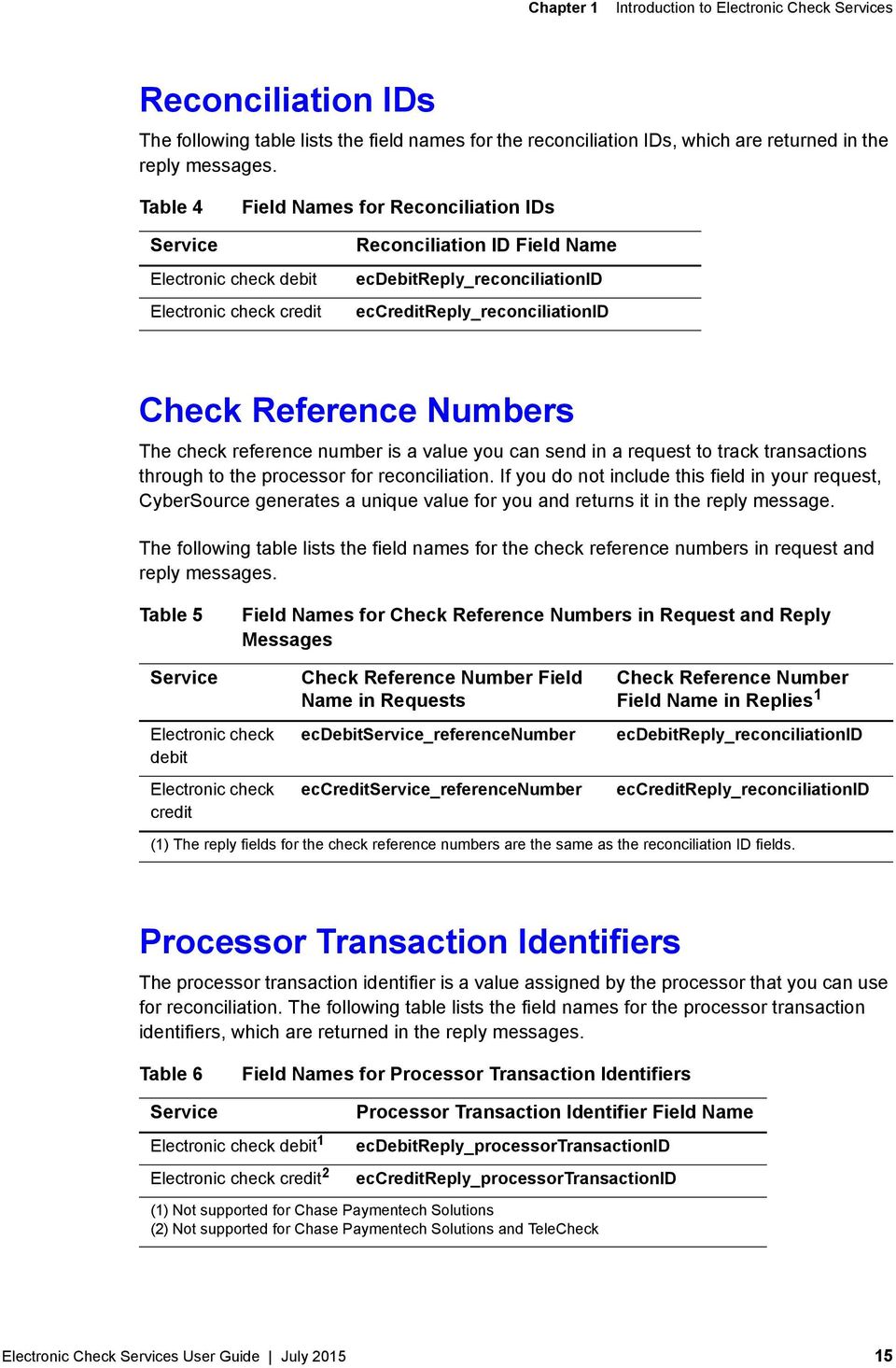
16 Electronic Check Processing CHAPTER 2 Electronic Check Debits Requesting a Debit To request an electronic check debit, set the ecdebitservice_run field to true. When you request a debit, do not request any of the following services at the same time: Any credit card services: ccauthservice, ccauthreversalservice, cccaptureservice, cccreditservice. For information about these services, see Credit Card Services User Guide. Electronic check credit: eccreditservice. For information about this service, see "Electronic Check Credits," page 23. PayPal payment or credit: paypalpaymentservice, paypalcreditservice. For information about these services, see the PayPal Services User Guide. Handling Customer Account Information Merchant-Provided Data Service: Debit Processors: Chase Paymentech Solutions CyberSource ACH Service RBS WorldPay Atlanta TeleCheck Electronic Check Services User Guide July

17 Chapter 2 Electronic Check Processing Merchant-provided data handling requires you to collect the customer s account information and provide it in your service request. The required fields are: check_accountnumber check_accounttype check_banktransitnumber You must modify your web site to collect the account information. Retain the account information for future transactions, such as credits. Customers might not know how to use their printed checks to find the bank routing number and the bank account number. Consider using a graphic like the following example on your web site to help customers locate their information. Example Check Showing Routing Number and Account Number The following events occur when you request a debit: 1 Your customer places an order. 2 You request an electronic check debit. 3 In your request, you provide the customer s account information. 4 CyberSource sends the customer s account information and other information about the transaction to the check processor. 5 The payment processor validates the information and performs basic fraud screening. The processor does not contact the customer s bank to verify the existence of the customer s account; it only makes sure that the information provided by the customer is reasonable and that the account is not a known source of fraud. Depending on which processor you use, if there are problems with the account that prevent the transaction from being completed, the processor might charge you a returned check fee. 6 The payment processor sends a reply to CyberSource indicating whether the debit will be processed. Electronic Check Services User Guide July

18 Chapter 2 Electronic Check Processing 7 CyberSource sends a reply to you. 8 You display an appropriate message to your customer. 9 The processor sends the request for clearing. Notifications of Change (NOCs) Services: Credit Debit Processors: CyberSource ACH Service RBS WorldPay Atlanta A Notification of Change (NOC) is a notice from a customer s bank indicating that an electronic check transaction included incorrect customer or payment information. The customer s bank: Corrects the information. Posts the transaction to the customer s bank account. Notifies you that payment information needs to be updated. Each NOC includes a code that specifies what needs to be changed. You are responsible for taking the appropriate action when you receive a NOC. You must correct all applicable records before submitting additional electronic check transactions for the customer. If you are using Payment Tokenization or Recurring Billing, you must update the information in your subscriptions or customer profiles. CyberSource maintains a database of all NOC entries. Repeated attempts to resubmit an uncorrected transaction could result in a fine and possible sanctions from the National Automated Clearing House Association (NACHA). Electronic Check Services User Guide July

19 Chapter 2 Electronic Check Processing Step 1 Step 2 To get information about the NOCs for your transactions: Create a PGP key pair as described in Creating and Using Security Keys. Log in to the Business Center and view the NOC Report, which is listed under Reports. You can also talk to your bank about getting a report that includes NOCs. NOC codes are described in Appendix E, "NOC Codes," on page 66. Verification and Validation Important Even if an account passes validation and verification tests, the transaction can be rejected at the time of settlement. The bank against which the check is drawn does not participate in the verification or validation process. Therefore, an account can pass the verification and validation tests and the transaction can still be rejected if there are not sufficient funds in the account or if the bank account number is invalid. The following table indicates the types of verification and validation supported for each processor. Table 7 Types of Verification and Validation Payment Processor Validation ACH Verification Chase Paymentech Solutions Guarantees Paymentech Verification Yes No No Yes CyberSource ACH Services No Yes No No TeleCheck Yes No Yes No RBS No Yes No No Validation Service: Debit Processors: Chase Paymentech Solutions TeleCheck Note For the CyberSource ACH Service, validation is included in the ACH verification functionality, which happens automatically when you call the debit or credit services. Electronic Check Services User Guide July

20 Chapter 2 Electronic Check Processing Chase Paymentech Solutions and TeleCheck Important For the TeleCheck service, please contact CyberSource Customer Support for information about Validation. Validation consists of format tests, bank routing number tests, and a comparison with the check processing partner s internal negative file. Set ecdebitservice_verificationlevel to 1 to request validation with your debit request. ACH Verification Services: Credit Debit Processors: CyberSource ACH Service RBS WorldPay Atlanta ACH verification is performed automatically for all debit and credit requests for the CyberSource ACH Service and RBS WorldPay Atlanta. ACH verification: 1 Validates the format and structure of the customer s bank account number. If the account number needs to be corrected and if a corrected account number is available, CyberSource returns the corrected account number to you in one of these fields: ecdebitreply_correctedaccountnumber eccreditreply_correctedaccountnumber 2 Verifies that the customer s routing number is a valid routing number and valid for electronic transactions. If the routing number needs to be corrected and if a corrected routing number is available, CyberSource returns the corrected routing number to you in one of these fields: ecdebitreply_correctedroutingnumber eccreditreply_correctedroutingnumber Note If a corrected account number or corrected routing number is returned to you, you can use the value to update the information in your system. You do not need to update the information for the current transaction because CyberSource already updated the information before sending the transaction request to your bank. Electronic Check Services User Guide July

21 Chapter 2 Electronic Check Processing 3 Returns verification codes to you regardless of whether or not the account number or routing number was corrected. These verification codes indicate the results of the ACH verification. One of these verification codes is a mapped value and is returned in one of these fields: ecdebitreply_verificationcode eccreditreply_verificationcode The other verification code is a raw value and is returned in one of these fields: ecdebitreply_verificationcoderaw eccreditreply_verificationcoderaw The verification codes have enumerated values that are described in Table 12, "Reply Fields," on page 53. Guarantees Service: Debit Processor: TeleCheck Please contact Telecheck for information about check guarantees. Important Paymentech Verification Service: Debit Processor: Chase Paymentech Solutions Important If you use the Paymentech verification feature, the Fair Credit Reporting Act (FCRA) requires that you notify your customer when an electronic check transaction is declined as a result of the verification process. Paymentech verification compares the transaction information with an external negative file to identify accounts that have a history of bad checks or that were closed for cause. Paymentech verification is available only for transactions in U.S. dollars. Set ecdebitservice_verificationlevel to 2 to request Paymentech verification with your debit request. Electronic Check Services User Guide July
22 Chapter 2 Electronic Check Processing Optional Features for Debits For information about optional features, such as subscriptions and deferred payments, see Chapter 3, "Optional Features," on page 31. Debit Request Fields For detailed descriptions of these fields, see "Request Fields," page 43. On TeleCheck, the values of all request fields must not contain ampersands (&). Note billto_city billto_company billto_companytaxid billto_country billto_driverslicensenumber billto_driverslicensestate billto_ billto_firstname billto_ipaddress billto_lastname billto_phonenumber billto_postalcode billto_state billto_street1 billto_street2 check_accountencoderid check_accountnumber check_accounttype check_banktransitnumber check_checknumber check_seccode ecdebitservice_commerceindicator ecdebitservice_debitrequestid ecdebitservice_paymentinfo ecdebitservice_paymentmode ecdebitservice_referencenumber Electronic Check Services User Guide July
23 Chapter 2 Electronic Check Processing ecdebitservice_run ecdebitservice_settlementmethod ecdebitservice_verificationlevel invoiceheader_merchantdescriptor item_#_productcode item_#_productname item_#_productsku item_#_quantity item_#_taxamount item_#_unitprice linktorequest merchantid merchantreferencecode purchasetotals_currency purchasetotals_grandtotalamount recurringsubscriptioninfo_subscriptionid Electronic Check Credits Requesting a Credit To request an electronic check credit, set the eccreditservice_run field to true. When you request a credit, do not request any of the following services at the same time: Any credit card services: ccauthservice, ccauthreversalservice, cccaptureservice, cccreditservice. For information about these services, see Credit Card Services User Guide. Electronic check debit: ecdebitservice. For information about this service, see "Electronic Check Debits," page 16. PayPal payment or credit: paypalpaymentservice, paypalcreditservice. For information about these services, see the PayPal Services User Guide. Electronic Check Services User Guide July
24 Chapter 2 Electronic Check Processing Follow-On Credits and Stand-Alone Credits There are two kinds of credits: Follow-on all processors support this feature. Send the credit request with the request ID from the debit reply. CyberSource uses this value to retrieve all the customer s billing and account information that you sent with the debit so you do not have to send it again with the credit. Stand-alone all processors except TeleCheck support this feature. You need to include all the customer s billing and account information because CyberSource does not retrieve anything from the database. Important CyberSource stores the debit information for 60 days, so you must process follow-on credits within 60 days of the debit request. If the 60 days have passed or if you are not sure if the 60 days have passed, then use a stand-alone credit and provide all the customer s billing and account information. Deciding What Kind of Credit to Request All Processors Except TeleCheck: if you are sending the credit request within 60 days of the debit request, send a follow-on credit so that you are not required to provide all the customer information. If you are sending the credit request more than 60 days after the debit request, send a stand-alone credit. TeleCheck: you must send the credit request within 60 days of the debit request. The credit request must be a follow-on credit, which means you do not need to provide all the customer information. CyberSource retrieves all the required information from the database, including the identifier that the processor uses to link the credit to the debit. By linking the credit to the debit, the processor can prohibit a credit amount that exceeds the debit amount. Follow-On Credits A follow-on credit uses the requestid from a previous ecdebitservice request to link the credit to the debit. Send the request ID value in the eccreditservice_debitrequestid field. CyberSource uses this value to look up the customer s billing and account information from the original debit, which means that you are not required to include this field in the eccreditservice request. Note A follow-on credit must be for a debit request that included a payment. In other words, ecdebitservice_paymentmode=0 or 2. A follow-on credit cannot be for a debit request in which ecdebitservice_paymentmode=1. Electronic Check Services User Guide July
25 Chapter 2 Electronic Check Processing Important If you combine a request for a follow-on credit with a request for another service, you must provide the customer s billing and account information. Stand-Alone Credits A stand-alone credit does not link the credit to a previous debit request. Instead of sending the eccreditservice_debitrequestid field in the credit request, the request must include the fields for the customer s billing and account information. ACH Verification Services: Credit Debit Processors: CyberSource ACH Service RBS WorldPay Atlanta ACH verification is performed automatically for all debit and credit requests for the CyberSource ACH Service and RBS WorldPay Atlanta. ACH verification: 1 Validates the format and structure of the customer s bank account number. If the account number needs to be corrected and if a corrected account number is available, CyberSource will return the corrected account number to you in one of these fields: ecdebitreply_correctedaccountnumber eccreditreply_correctedaccountnumber 2 Verifies that the customer s routing number is a valid routing number and valid for electronic transactions. If the routing number needs to be corrected and if a corrected routing number is available, CyberSource will return the corrected routing number to you in one of these fields: ecdebitreply_correctedroutingnumber eccreditreply_correctedroutingnumber Note If a corrected account number or corrected routing number is returned to you, you can use the value to update the information in your system. You do not need to update the information for the current transaction because CyberSource already updated the information before sending the transaction request to your bank. 3 Returns verification codes to you regardless of whether or not the account number or routing number was corrected. These verification codes indicate the results of the Electronic Check Services User Guide July
26 Chapter 2 Electronic Check Processing ACH verification. One of these verification codes is a mapped value and is returned in one of these fields: ecdebitreply_verificationcode eccreditreply_verificationcode The other verification code is a raw value and is returned in one of these fields: ecdebitreply_verificationcoderaw eccreditreply_verificationcoderaw The verification codes have enumerated values that are described in Table 12, "Reply Fields," on page 53. Notifications of Change (NOCs) Services: Credit Debit Processors: CyberSource ACH Service RBS WorldPay Atlanta A Notification of Change (NOC) is a notice from a customer s bank indicating that an electronic check transaction included incorrect customer or payment information. The customer s bank: Corrects the information. Posts the transaction to the customer s bank account. Notifies you that payment information needs to be updated. Each NOC includes a code that specifies what needs to be changed. You are responsible for taking the appropriate action when you receive a NOC. You must correct all applicable records before submitting additional electronic check transactions for the customer. If you are using Payment Tokenization or Recurring Billing, you must update the information in your subscriptions or customer profiles. CyberSource maintains a database of all NOC entries. Repeated attempts to resubmit an uncorrected transaction could result in a fine and possible sanctions from the National Automated Clearing House Association (NACHA). Electronic Check Services User Guide July
27 Chapter 2 Electronic Check Processing Step 1 Step 2 To get information about the NOCs for your transactions: Create a PGP key pair as described in Creating and Using Security Keys. Log in to the Business Center and view the NOC Report, which is listed under Reports. You can also talk to your bank about getting a report that includes NOCs. NOC codes are described in Appendix E, "NOC Codes," on page 66. Optional Features for Credits For information about optional features, such as merchant descriptors and multiple partial credits, see Chapter 3, "Optional Features," on page 31. Credit Request Fields The following lists the fields used to request an electronic check credit. For detailed descriptions of these fields, see For detailed descriptions of these fields, see "Request Fields," page 43. On TeleCheck, the values of all request fields must not contain ampersands (&). Note billto_city billto_country billto_dateofbirth billto_ billto_firstname billto_ipaddress billto_lastname billto_phonenumber billto_postalcode billto_state billto_street1 billto_street2 check_accountnumber check_accounttype check_banktransitnumber check_checknumber check_paymentinfo Electronic Check Services User Guide July
28 Chapter 2 Electronic Check Processing check_seccode eccreditservice_commerceindicator eccreditservice_debitrequestid eccreditservice_partialpaymentid eccreditservice_referencenumber eccreditservice_run eccreditservice_settlementmethod ecdebitservice_debitrequestid ecdebitservice_partialpaymentid invoiceheader_merchantdescriptor item_#_productcode item_#_productname item_#_productsku item_#_quantity item_#_taxamount item_#_unitprice merchantid merchantreferencecode purchasetotals_currency purchasetotals_grandtotalamount recurringsubscriptioninfo_subscriptionid Electronic Check Services User Guide July
29 Chapter 2 Electronic Check Processing Authentication Processor: RBS WorldPay Atlanta The authentication service is an optional service you can request for RBS WorldPay Atlanta. To request an electronic check authentication, set the ecauthenticateservice_run field to true. The following fields are required when requesting this service: billto_city billto_country billto_firstname billto_lastname billto_postalcode 5 digits billto_state billto_street1 ecauthenticateservice_run merchantid merchantreferencecode For more information about these fields, see "API Fields," page 42. The authentication service: Validates customer information such as name, address, and date of birth and returns information to you in the ecauthenticatereply_checkpointsummary field. Provides you with consumer fraud information to help protect you against fraudulent transactions. Information is returned to you in the ecauthenticatereply_ fraudshieldindicators field. For more information, see: Appendix F, "Check Point Summary Codes," on page 68 Appendix G, "Fraud Shield Indicator Codes," on page 78 Voids A void cancels an electronic check debit or credit request that you have submitted to CyberSource. A transaction can be voided only if CyberSource has not already submitted the debit or credit information to your processor. CyberSource usually submits transaction information to your processor each day, so the period for successfully performing a void is relatively short. CyberSource declines your void request if the debit or credit information Electronic Check Services User Guide July
30 Chapter 2 Electronic Check Processing was already sent to the processor. You cannot undo a void, and you cannot perform a follow-on credit for a debit that has been voided. Requesting a Void To request a void for an electronic check debit or credit, set the voidservice_run field to true. When you request a void, do not request any other services at the same time. A void is a follow-on transaction that uses the request ID returned from a previous ecdebitservice or eccreditservice request to link the void to the debit or credit. Send the request ID value in the voidservice_voidrequestid field. CyberSource uses this value to look up the customer s billing and account information from the original debit or credit, which means that you are not required to include this field in the voidservice request. The following lists the fields used to request a void. For detailed descriptions of these fields, see "Request Fields," page 43. merchantid merchantreferencecode voidservice_run voidservice_voidrequestid Electronic Check Services User Guide July
31 Optional Features CHAPTER 3 Corporate Checks Set check_accounttype to X to indicate that the check is a corporate check. Service: Debit Processors: Chase Paymentech Solutions CyberSource ACH Service RBS WorldPay Atlanta TeleCheck To process corporate checks with TeleCheck, include these fields in your debit request: billto_driverslicensenumber and billto_driverslicensestate or billto_companytaxid Deferred and Partial Payments Services: Debit Credit Processors: Chase Paymentech Solutions Debit only. TeleCheck Electronic Check Services User Guide July
32 Chapter 3 Optional Features Definitions: Deferred payment If there is a delay between the time you take the order and the time you ship the product, you need to defer your payment request. Partial payment If a customer orders multiple products but you ship them separately on different dates, you need to perform multiple partial payments as you ship the products. Step 1 Step 2 Step 3 Chase Paymentech Solutions For the first debit request, set ecdebitservice_paymentmode to 1 to indicate that the debit uses deferred payment and full payment, or partial payments will occur later. The default value of 0 indicates a normal debit with immediate payment. When you are ready to process a payment, whether it is for the full amount or a partial amount, send another debit request and set ecdebitservice_paymentmode to 2 to indicate that you are triggering a payment. Repeat Step 2 for each partial payment for the order. TeleCheck Step 1 For the first debit request, set the value of the ecdebitservice_paymentmode field to 1 to indicate that the debit uses deferred payment and full payment, or partial payments will occur later. The default value of 0 indicates a normal debit with immediate payment. Including the ecdebitservice_referencenumber field in the request is optional. Step 2 Step 3 Step 4 When you are ready to process a payment, whether it is for the full amount or a partial amount, send another debit request and do the following: Set the value of the ecdebitservice_paymentmode field to 2 to indicate that you are triggering a payment. Set the value of the ecdebitservice_debitrequestid field to the same value as the ecdebitservice_debitrequestid field that you received from the original debit request in Step 1. Repeat Step 2 for each partial payment for the order. For a credit request, set the value of the ecdebitservice_debitrequestid field to the same value as the ecdebitservice_debitrequestid that you received from the debit request in Step 2. This value is used to complete the follow-on capture of the initial request. Electronic Check Services User Guide July
33 Chapter 3 Optional Features Merchant Descriptors Services: Debit Credit Processor: Chase Paymentech Solutions You can provide a merchant descriptor that will be displayed on the customer s bank account statement. The descriptor includes your company s name and a description of the product or service that was purchased. Before sending a merchant descriptor with a debit or credit request, check with your processor to find out if you need to register your merchant descriptor information with them. The invoiceheader_merchantdescriptor field requires a particular format: Characters 1-15: Name of your company. If the name is less than 15 characters, use spaces to fill in the full 15 characters. If the name is greater than 15 characters, provide only the first 15 characters of the name. Characters 16-25: Description of the product or service. If you use more than one consecutive space, extra spaces will be removed. Note Multiple Partial Credits Service: Credit Processors: RBS WorldPay Atlanta TeleCheck When performing multiple partial credits: The amount of each individual credit cannot exceed the debit amount. The total amount of all the credits cannot exceed the debit amount. Electronic Check Services User Guide July
34 Chapter 3 Optional Features In your follow-on credit request, use the ecdebitservice_debitrequestid from the debit. Do not use the eccreditservice_debitrequestid from a previous partial credit. For each partial credit, set eccreditservice_partialpaymentid to a value of your choice that is unique within the scope of the order. The processor uses the payment IDs to identify the credits that are related to an order. If you performed partial payments for this order, you specified a unique value for ecdebitservice_partialpaymentid for each payment. You cannot reuse any of those values for the order s partial credits. For example, if you used 1 and 2 for the partial payments, you must use different values, such as 3 and 4, for the partial credits. Non-Sufficient Funds (NSF) Service Service: Debit Processor: CyberSource ACH Service A non-sufficient funds (NSF) return occurs when the customer s bank account does not have sufficient funds to cover a specific electronic check transaction. CyberSource does not automatically resubmit charges returned from a customer s bank due to NSF. You can resubmit transactions returned as NSF up to two additional times for a total of three submissions: original submission plus two resubmissions. Continued attempts after this point may result in a fine and possible sanctions from the National Automated Clearing House Association (NACHA). Contact your ODFI to enable the NSF service at your bank. Payment Tokenization Services: Debit Credit Processors: Chase Paymentech Solutions CyberSource ACH Service Electronic Check Services User Guide July
35 Chapter 3 Optional Features RBS WorldPay Atlanta TeleCheck If you are using Payment Tokenization, you can process a debit or credit by using information that is stored in a customer profile. CyberSource uses the subscription ID to reference the customer profile information in the CyberSource database. Instead of providing all the information that is normally required for a transaction, you need to provide only the following values: Merchant ID Merchant reference code Amount of the payment or credit Subscription ID You can override most of the information stored in the customer profile by including the relevant API fields in the debit or credit request. For example, you could provide a different billing or shipping address in the request. You cannot override the account number. For complete information about Payment Tokenization, see Payment Tokenization Using the Simple Order API for CyberSource Essentials. Recurring Billing Services: Debit Credit Processors: Chase Paymentech Solutions CyberSource ACH Service Recurring debits and credits for telephone-initiated orders are supported. The check_seccode must be TEL. RBS WorldPay Atlanta TeleCheck Electronic Check Services User Guide July
36 Chapter 3 Optional Features If you are using Recurring Billing, you can process a debit or credit by using information that is stored in a subscription. CyberSource uses the subscription ID to reference the subscription information in the CyberSource database. Instead of providing all the information that is normally required for a transaction, you need to provide only the following values: Merchant ID Merchant reference code Amount of the payment or credit Subscription ID You can override most of the information stored in the subscription by including the relevant API fields in the debit or credit request. For example, you could provide a different billing or shipping address in the request. You cannot override the account number. For complete information about Recurring Billing, see Recurring Billing Using the Simple Order API for CyberSource Essentials. Settlement Delivery Methods Services: Debit Credit Processor: Chase Paymentech Solutions You must specify a default method for delivering settlements to and from the customer s bank. For debits, you can use the ecdebitservice_settlementmethod field to override the default method for a single transaction. For credits, you can use the eccreditservice_ settlementmethod field to override the default method for a single transaction. The following delivery methods are available: Automated Clearing House (ACH) for U.S. accounts or the Canadian Payment Association (CPA) for Canadian accounts: The transaction is deposited through the ACH or CPA. If the check fails the validation or verification process, the transaction is rejected. Facsimile draft: The transaction is deposited as a facsimile draft. Only available for transactions in U.S. dollars. Use this method when the issuing bank is not an ACH member. Electronic Check Services User Guide July
37 Chapter 3 Optional Features Best possible The transaction is deposited through the ACH system unless the customer s bank is not an ACH participant, in which case a facsimile draft is created and deposited on your behalf. Available only for transactions in U.S. dollars. Electronic Check Services User Guide July
38 Testing Electronic Check Services CHAPTER 4 Requirements for Testing Important Before you can test, you must contact Sales to activate Electronic Check Services and configure your account for electronic check testing. You must also contact your processor to set up your processor account. Use your regular merchant ID to perform testing. Use the test server ics2wstest.ic3.com. Use a real city and state, as well as the correct postal code for that city and state. Use a real combination for the area code and telephone number. Use a non-existent account and domain name for the customer s address. For example: [email protected]. Electronic Check Services User Guide July
39 Chapter 4 Testing Electronic Check Services Testing Chase Paymentech Solutions Transactions Successful Transactions Use the data in the following table to simulate successful debits and credits for Chase Paymentech Solutions. Table 8 Test Data for Chase Paymentech Solutions Debits and Credits Field Test Values Required / Optional check_accountnumber check_accounttype check_banktransitnumber ecdebitservice_ settlementmethod ecdebitservice_ verificationlevel For transactions in U.S. dollars: For transactions in U.S. dollars: C S X For transactions in U.S dollars only: For transactions in U.S. dollars only: A B F For transactions in U.S. dollars only: 1 2 Required Required Required Optional Optional Electronic Check Services User Guide July
40 Chapter 4 Testing Electronic Check Services Testing Chase Paymentech Solutions Declines For Chase Paymentech Solutions, you can simulate electronic check declines using specific bank account numbers for debits. For a list of these values and the expected results, see Using the Test Simulator. Testing CyberSource ACH Service Transactions Use the data in the following table to simulate ACH verification by requesting a debit for the CyberSource ACH Service. As an alternative, you can simulate ACH verification by requesting a credit: the reply fields will be for the credit service instead of the debit service. Table 9 Field: Field Name: ACH Verification Test Data Triggers Account Number check_ account Number Routing Number check_ banktransit Number Reply Fields Mapped ACH Verification Code ecdebitreply _verification Code Raw ACH Verification Code ecdebitreply _verification CodeRaw Corrected Account Number ecdebitreply _corrected Account Number N/A N/A N/A N/A N/A N/A N/A Corrected Routing Number ecdebitreply _corrected Routing Number N/A N/A N/A * N/A N/A * N/A N/A * See the following table for the reply values for this error. Electronic Check Services User Guide July
41 Chapter 4 Testing Electronic Check Services Table 10 ACH Verification Error Reply Values Raw ACH Verification Code Error Reply Values 9 decision=reject reasoncode= decision=reject reasoncode=388 Testing RBS WorldPay Atlanta See Using the Test Simulator. Testing TeleCheck See Using the Test Simulator. Going Live You must go live with CyberSource before you start submitting production transactions. When you go live, your account is updated so that you can send transactions to the CyberSource production server. If you have not already done so, you need to provide your banking information to CyberSource so that your processor can deposit funds to your merchant bank account. For information about going live, see Getting Started with CyberSource Essentials. Electronic Check Services User Guide July
42 API Fields APPENDIX A Formatting Restrictions Unless otherwise noted, all field names are case sensitive and all fields accept special characters such #, and %. Note The values of the item_#_ fields must not contain carets (^) or colons (:) because these characters are reserved for use by the CyberSource services. Values for request-level and item-level fields must not contain new lines or carriage returns. However, they can contain embedded spaces and any other printable characters. CyberSource removes all leading and trailing spaces. TeleCheck Request fields must not contain ampersands (&). Data Type Definitions For more information about these data types, see the World Wide Web Consortium (W3C) XML Schema Part 2: Datatypes specification. Data Type Description Integer Whole number {..., -3, -2, -1, 0, 1, 2, 3,...} String Sequence of letters, numbers, spaces, and special characters Electronic Check Services User Guide July
43 Appendix A API Fields Request Fields Note If you are using Payment Tokenization or Recurring Billing and you include a subscription ID in your request, many of the fields in the following table that are normally required for a debit or credit become optional. See "Payment Tokenization," page 34, and "Recurring Billing," page 35 Table 11 Request Fields Field Name Description Used By: Required (R) or Optional (O) billto_city City in the billing address. ecauthenticateservice (R) billto_company billto_companytaxid billto_country billto_dateofbirth Name of the customer s company. This field is used only for TeleCheck. Company s tax identifier. TeleCheck: Contact your TeleCheck representative to find out whether this field is required or optional. All other processors: Not used. Country in the billing address. Use the twocharacter ISO Standard Country Codes. Date of birth of the customer. Format: YYYY-MM-DD or YYYYMMDD Used only by RBS WorldPay Atlanta. ecdebitservice (R) eccreditservice (R) (1) ecdebitservice (Optional for TeleCheck. Not used for any other processor.) ecdebitservice (See description) ecauthenticateservice (R) ecdebitservice (R) eccreditservice (R) (1) eccreditservice (Optional for RBS WorldPay Atlanta. Not used by any other processor.) Data Type & Length TeleCheck: String (30) All other processors: String (50) String (60) String with numbers only (9) String (2) String (10) (1) Required for RBS for both stand-alone and follow-on credits. Required only for stand-alone credits for all other processors. Electronic Check Services User Guide July
44 Appendix A API Fields Table 11 Request Fields (Continued) Field Name Description Used By: Required (R) or Optional (O) Data Type & Length billto_ driverslicensenumber billto_ driverslicensestate billto_ billto_firstname billto_ipaddress billto_lastname Driver s license number of the customer. TeleCheck: Contact your TeleCheck representative to find out whether this field is required or optional. If you include this field in your request then you must also include billto_ driverslicensestate. All other processors: Not used. State or province where the customer s driver s license was issued. Use the twocharacter State, Province, and Territory Codes for the United States and Canada. TeleCheck: Contact your TeleCheck representative to find out whether this field is required or optional. All other processors: Not used. Customer s address, including the full domain name. Format: [email protected] Customer s first name. If the first name is unavailable or inapplicable, such as for a corporate account, enter a dummy value such as NA. IP address for the customer. Example: For debits: Chase Paymentech Solutions: Optional. TeleCheck: It is recommended that you use this field if check_seccode is WEB. All other processors: Not used. Customer s last name. If the transaction is for a corporate account, use this field for the company name. ecdebitservice (See description) ecdebitservice (See description) String (30) String (2) ecdebitservice (R) eccreditservice (R) (1) String (255) ecauthenticateservice (R) ecdebitservice (R) eccreditservice (R) (1) ecdebitservice (See description) eccreditservice (O) ecauthenticateservice (R) ecdebitservice (R) eccreditservice (R) (1) TeleCheck: String (50) All other processors: String (60) String (15) TeleCheck: String (50) All other processors: String (60) (1) Required for RBS for both stand-alone and follow-on credits. Required only for stand-alone credits for all other processors. Electronic Check Services User Guide July
45 Appendix A API Fields Table 11 Request Fields (Continued) Field Name Description Used By: Required (R) or Optional (O) billto_phonenumber billto_postalcode billto_state Customer s phone number. Format for TeleCheck: NNNNNNNNNN Postal code for the billing address. The postal code must consist of 5 to 9 digits. If the billing country is the U.S., the 9-digit postal code must follow this format: [5 digits][dash][4 digits] Example: State in the billing address. Use the twocharacter State, Province, and Territory Codes for the United States and Canada. ecdebitservice (Required for CyberSource ACH Service and TeleCheck. Not used by any other processor.) eccreditservice (Required for RBS WorldPay Atlanta. Optional for all other processors.) ecauthenticateservice (R) ecdebitservice (R) eccreditservice (R) (1) ecauthenticateservice (R) ecdebitservice (R) eccreditservice (R) (1) billto_street1 First line of the billing street address. ecauthenticateservice (R) billto_street2 Second line of the billing street address. Used for additional address information. Example: Attention: Accounts Payable ecdebitservice (R) eccreditservice (R) (1) ecdebitservice (Not used by RBS WorldPay Atlanta. Optional for all other processors.) eccreditservice (For RBS WorldPay Atlanta: Required for stand-alone credits, optional for follow-on credits. Optional for all other processors.) Data Type & Length TeleCheck: String (10) All other processors: String (15) RBS WorldPay Atlanta: String (5) All other processors: String (10) String (2) TeleCheck: String (50) All other processors: String (60) TeleCheck: String (50) All other processors: String (60) (1) Required for RBS for both stand-alone and follow-on credits. Required only for stand-alone credits for all other processors. Electronic Check Services User Guide July
46 Appendix A API Fields Table 11 Request Fields (Continued) Field Name Description Used By: Required (R) or Optional (O) Data Type & Length businessrules_ declineavsflags List of AVS flags that cause the request to be declined for AVS reasons. Use a space to separate the flags in the list. Important Make sure that you include the value N in the list if you want to receive declines for the AVS code N. ecdebitservice (Optional for Chase Paymentech Solutions. Not used for any other processor.) check_accountnumber Account number. ecdebitservice (R) eccreditservice (R) (1) check_accounttype check_authenicateid check_ banktransitnumber Account type. Possible values: C: Checking S: Savings (U.S. dollars only) X: Corporate checking (U.S. dollars only) Authentication ID of the check. If this field is submitted, the value must be numeric or an error is returned. Bank routing number. This is also called the transit number. String (255) String with numbers only (17) ecdebitservice (R) eccreditservice (R) (1) String (1) ecdebitservice (Optional for RBS, not used for all other processors.) ecdebitservice (R) eccreditservice (R) (1) check_checknumber Check number. ecdebitservice (Optional for Chase Paymentech Solutions and RBS WorldPay Atlanta. Strongly recommended for TeleCheck. Not used for any other processor.) check_imagereference Number Image reference number associated with the check. eccreditservice (Optional for Chase Paymentech Solutions and TeleCheck. Required for RBS WorldPay Atlanta.) Used only by Paymentech for ARC and POP SEC codes. String (32) String with numbers only (9) String with numbers only (8) Alphanumeric String (32) (1) Required for RBS for both stand-alone and follow-on credits. Required only for stand-alone credits for all other processors. Electronic Check Services User Guide July
47 Appendix A API Fields Table 11 Request Fields (Continued) Field Name Description Used By: Required (R) or Optional (O) Data Type & Length check_paymentinfo Additional payment information on the customer s statement. eccreditservice (Required only for RBS WorldPay Atlanta. Not used for any other processors.) String (80) check_seccode Authorization method used for the transaction. See "SEC Codes," page 81. ecdebitservice (Required for TeleCheck. Optional for all other processors.) String (3) eccreditservice (Required for TeleCheck. Optional for all other processors.) check_terminalcity City in which the terminal is located. If more than 4 alphanumeric characters are submitted, the transaction will be declined. eccreditservice ecdebitservice Optional but strongly recommended if your processor is Paymentech and you include check_seccode with a value of POP. Alphanumeric String (4) check_terminalstate State in which the terminal is located. If more than 2 alphanumeric characters are submitted, the transaction will be declined. eccreditservice ecdebitservice Optional but strongly recommended if your processor is Paymentech and you include check_seccode with a value of POP. Alphanumeric String (2) ecauthenticateservice_ run Set this field to true to include ecauthenticateservice in your request. ecauthenticateservice (R) String (5) ecauthenticateservice_ referencenumber Merchant-generated order number or transaction identifier. ecauthenticateservice (Optional for RBS. Not used by any other processor.) String (100) (1) Required for RBS for both stand-alone and follow-on credits. Required only for stand-alone credits for all other processors. Electronic Check Services User Guide July
48 Appendix A API Fields Table 11 Request Fields (Continued) Field Name Description Used By: Required (R) or Optional (O) Data Type & Length eccreditservice_ commerceindicator eccreditservice_ debitrequestid eccreditservice_ effectivedate eccreditservice_ partialpaymentid eccreditservice_ referencenumber eccreditservice_run Type of transaction. Possible values: internet (default): e-commerce order placed using a Web site. moto: Mail order or telephone order. recurring: Recurring transaction. The requestid for the debit that is being credited. Only used for multiple partial credits. See "Follow-On Credits and Stand- Alone Credits," page 24. Effective date for the transaction. The effective date must be within 45 days of the current day. If you do not include this value, CyberSource sets the effective date to the next business day. Format: MMDDYYYY Supported only for the CyberSource ACH Service. Identifier for a partial credit. The value for each credit request must be unique within the scope of the order. See "Multiple Partial Credits," page 33. Check reference number. Identifier used for tracking a request through to the payment processor for reconciliation. If you do not provide this value, CyberSource generates a unique value and returns it to you in the eccreditreply_reconciliationid field. For more information about tracking orders, see Getting Started with CyberSource Essentials. Set this field to true to include eccreditservice in your request. eccreditservice (Required for RBS WorldPay Atlanta for stand-alone credits. Optional for RBS WorldPay Atlanta for follow-on credits. Optional for CyberSource ACH Services and TeleCheck. Not used by Chase Paymentech Solutions.) eccreditservice (Required for follow-on credits. Not used for stand-alone credits.) String (13) String (26) eccreditservice (O) String (8) eccreditservice (Optional for RBS WorldPay Atlanta. Not used for any other processor.) eccreditservice (Required for RBS WorldPay Atlanta, only for stand-alone credits. Optional for RBS WorldPay Atlanta for Follow-on credits. Optional for all other processors.) String (25) TeleCheck: String (50) All other processors: String (60) eccreditservice (R) String (5) (1) Required for RBS for both stand-alone and follow-on credits. Required only for stand-alone credits for all other processors. Electronic Check Services User Guide July
49 Appendix A API Fields Table 11 Request Fields (Continued) Field Name Description Used By: Required (R) or Optional (O) Data Type & Length eccreditservice_ settlementmethod ecdebitservice_ commerceindicator ecdebitservice_ debitrequestid ecdebitservice_ effectivedate ecdebitservice_ partialpaymentid ecdebitservice_ paymentinfo Method used for settlement. Possible values: A: Automated Clearing House (default for credits) F: Facsimile draft (U.S. dollars only) B: Best possible (U.S. dollars only) (default if the field has not already been configured for your merchant ID) See "Settlement Delivery Methods," page 36. Type of transaction. Possible values: internet (default): e-commerce order placed using a Web site. moto: Mail order or telephone order. recurring: Recurring transaction. The request ID for debit requests. See "Deferred and Partial Payments," page 31. Use for deferred and partial payments. Effective date for the transaction. The effective date must be within 45 days of the current day. If you do not include this value, CyberSource sets the effective date to the next business day. Format: MMDDYYYY Supported only for the CyberSource ACH Service. Identifier for a partial payment. The value for each debit request must be unique within the scope of the order. See "Deferred and Partial Payments," page 31. Payment related information. This information is included on the customer s statement. eccreditservice (Optional for Chase Paymentech Solutions and RBS WorldPay Atlanta. Not used for any other processor.) ecdebitservice (Not used for Chase Paymentech Solutions. Optional for all other processors.) ecdebitservice (Supported only for Chase Paymentech Solutions and TeleCheck.) String (1) String (13) String (26) ecdebitservice (O) String (8) ecdebitservice (Optional for RBS WorldPay Atlanta. Not used by any other processor.) ecdebitservice (Required for RBS WorldPay Atlanta. Not used by any other processor.) String (25) Alpha numeric (80) (1) Required for RBS for both stand-alone and follow-on credits. Required only for stand-alone credits for all other processors. Electronic Check Services User Guide July
50 Appendix A API Fields Table 11 Request Fields (Continued) Field Name Description Used By: Required (R) or Optional (O) Data Type & Length ecdebitservice_ paymentmode ecdebitservice_ referencenumber ecdebitservice_run ecdebitservice_ settlementmethod Flag that indicates whether to process the payment. Use with deferred payments. See "Deferred and Partial Payments," page 31. Possible values: 0: Standard debit with immediate payment (default) 1: Indicates that this is a deferred payment and that you will send a debit request with ecdebitservice_ paymentmode=2 in the future. 2: Indicates notification to initiate payment Not used by CyberSource ACH Services and RBS WorldPay Atlanta. Check reference number. Identifier used for tracking a request through to the payment processor for reconciliation. If you do not provide this value, CyberSource generates a unique value and returns it to you in the ecdebitreply_reconciliationid field. For more information about tracking orders, see Getting Started with CyberSource Essentials. For deferred payments with TeleCheck, set this field to the value you received in the ecdebitreply_reconciliationid field in the associated debit s reply. See "Deferred and Partial Payments," page 31. Set this field to true to include ecdebitservice in your request. Method used for settlement. Possible values: A: Automated Clearing House (default for credits) F: Facsimile draft (U.S. dollars only) B: Best possible (U.S. dollars only) (default if the field has not already been configured for your merchant ID) See "Settlement Delivery Methods," page 36. ecdebitservice (See description.) ecdebitservice (O) Integer (1) TeleCheck: String (50) All other processors: String (60) ecdebitservice (R) String (5) ecdebitservice (Optional for Chase Paymentech Solutions. Not used by any other processor.) String (1) (1) Required for RBS for both stand-alone and follow-on credits. Required only for stand-alone credits for all other processors. Electronic Check Services User Guide July
51 Appendix A API Fields Table 11 Request Fields (Continued) Field Name Description Used By: Required (R) or Optional (O) ecdebitservice_ verificationlevel invoiceheader_ merchantdescriptor item_#_productcode Level of fraud screening. Possible values: 1: Validation Default if the field has not already been configured for your merchant ID 2: Verification For a description of this feature and a list of supported processors, see "Verification and Validation," page 19. Merchant description that appears on the customer s bank statement. For a description of this feature, a list of supported processors, and special formatting requirements, see "Merchant Descriptors," page 33. Type of product. This value is used to determine the category that the product is in: electronic, handling, physical, service, or shipping. The default value is default. See Appendix C, "Product Codes," on page 62 for a list of valid values. ecdebitservice (Optional for Chase Paymentech Solutions and TeleCheck. Not used by any other processor.) ecdebitservice (Optional for Chase Paymentech Solutions. Not used for any other processor.) eccreditservice (Optional for Chase Paymentech Solutions and RBS WorldPay, not used by any other processor.) ecdebitservice (Not used by RBS WorldPay Atlanta. Optional for any other processor.) eccreditservice (O) item_#_productname Name of the product. ecdebitservice (Not used for RBS WorldPay Atlanta. Optional for any other processors.) eccreditservice (O) item_#_productsku Product s identifier code. ecdebitservice (Not used for RBS WorldPay Atlanta. Optional for any other processor.) item_#_quantity Quantity of the product being purchased. The default value is 1. Required if item_#_productcode is not default or one of the values related to shipping and/or handling. Not used by RBS WorldPay Atlanta. eccreditservice (O) ecdebitservice (See description.) eccreditservice (O) Data Type & Length Integer (1) String (25) String (255) TeleCheck: String (20) All other processors: String (30) String (255) Integer (10) (1) Required for RBS for both stand-alone and follow-on credits. Required only for stand-alone credits for all other processors. Electronic Check Services User Guide July
52 Appendix A API Fields Table 11 Request Fields (Continued) Field Name Description Used By: Required (R) or Optional (O) Data Type & Length item_#_taxamount Total tax to apply to the product. This value cannot be negative. The tax amount and the unit price must be in the same currency. The tax amount field is additive. The following example uses a two-exponent currency such as USD: ecdebitservice (Not used for RBS WorldPay Atlanta. Optional for all other processors.) eccreditservice (O) String (15) 1 You include the following items in your request: item_0_unitprice=10.00 item_0_quantity=1 item_0_taxamount=0.80 item_1_unitprice=20.00 item_1_quantity=1 item_1_taxamount= The total amount authorized will be 32.40, not with 2.40 of tax included. item_#_unitprice Per-item price of the product. This value cannot be negative. You can include a decimal point (.) in this field, but you cannot include any other special characters. The amount is truncated at the request level to the correct number of decimal places. ecdebitservice (See description.) eccreditservice (See description.) String (15) Not used by RBS WorldPay Atlanta. For all other processors: You must include either this field or purchasetotals_grandtotalamount in your request. linktorequest merchantid merchantreference Code Value that links the current request to a previous transaction. Your merchant ID. Use the same merchantid for evaluation, testing, and production. Merchant-generated order reference or tracking number. For more information about tracking orders, see Getting Started with CyberSource Essentials. ecdebitservice (O) String (26) All services String (30) All services String (50) (1) Required for RBS for both stand-alone and follow-on credits. Required only for stand-alone credits for all other processors. Electronic Check Services User Guide July
53 Appendix A API Fields Table 11 Request Fields (Continued) Field Name Description Used By: Required (R) or Optional (O) Data Type & Length purchasetotals_currency purchasetotals_ grandtotalamount recurringsubscription Info_subscriptionID voidservice_run voidservice_ voidrequestid Currency used for the order. Possible value: USD: U.S. dollars Grand total for the order. For more information about using items or a grand total, see Getting Started with CyberSource Essentials. RBS WorldPay Atlanta: Required for debits and credits. All other processors: You must include either this field or item_ #_unitprice in your request for CyberSource ACH, Chase, and TeleCheck. If you are using Payment Tokenization or Recurring Billing and you include this value in your request, many of the fields that are normally required for a debit or credit become optional. See "Payment Tokenization," page 34 and "Recurring Billing," page 35. Set this field to true to include voidservice in your request. The requestid of the debit or credit that you want to void. ecdebitservice (R) String (5) eccreditservice (R) (1) ecdebitservice (See description.) eccreditservice (See description.) String (15) ecdebitservice (O) eccreditservice (O) (1) String (26) voidservice (R) String (5) voidservice (R) String (26) (1) Required for RBS for both stand-alone and follow-on credits. Required only for stand-alone credits for all other processors. Reply Fields Table 12 Reply Fields Field Name Description Returned By Data Type & Length decision Summarizes the result of the overall request. The field can contain one of the following values: All Electronic Check Services String (6) ACCEPT ERROR REJECT Electronic Check Services User Guide July
54 Appendix A API Fields Table 12 Reply Fields (Continued) Field Name Description Returned By Data Type & Length ecauthenticatereply_ checkpointsummary ecauthenticatereply_ fraudshieldindicators ecauthenticatereply_ processorresponse ecauthenticatereply_ reasoncode ecauthenticatereply_ reconciliationid ecauthenticatereply_ requestdatetime eccreditreply_amount eccreditreply_ correctedaccount Number eccreditreply_ correctedrouting Number Information about the parameters sent in the authenticate message, which is described in "Check Point Summary Codes," page 68. Information about the fraud checks performed, which is described in "Fraud Shield Indicator Codes," page 78. Result code returned by the payment processor. Numeric value corresponding to the result of the overall request. See "Reason Codes," page 63, for a list of possible values. Reference number you use to reconcile CyberSource reports with processor reports. For more information about tracking orders, see Getting Started with CyberSource Essentials. Time of the request. The format is YYYY-MM- DDThh:mm:ssZ. For example, T22:47:57 is equal to August 11, 2013, at 10:47:57 P.M. The T separates the date and the time, and the Z indicates UTC. Total amount submitted to the payment processor. Corrected account number from the ACH verification service, which is described in "ACH Verification," page 25. Corrected routing number from the ACH verification service, which is described in "ACH Verification," page 25. ecauthenticatereply String (600) ecauthenticatereply String (300) ecauthenticatereply String (6) ecauthenticatereply Integer (5) ecauthenticatereply String (60) ecauthenticatereply String (20) eccreditreply String (15) eccreditreply String (17) eccreditreply String (9) Electronic Check Services User Guide July
55 Appendix A API Fields Table 12 Reply Fields (Continued) Field Name Description Returned By Data Type & Length eccreditreply_ ownermerchantid eccreditreply_ processorresponse eccreditreply_ processortransactionid eccreditreply_ reasoncode eccreditreply_ reconciliationid eccreditreply_ requestdatetime eccreditreply_ settlementmethod Merchant ID that was used to create the subscription or customer profile for which the service was requested. If you are enabled for Recurring Billing, this field is returned only if you are using subscription sharing and if your merchant ID is in the same merchant ID pool as the owner merchant ID. See the subscription sharing information in Recurring Billing Using the Simple Order API for CyberSource Essentials. If you are enabled for Payment Tokenization, this field is returned only if you are using profile sharing and if your merchant ID is in the same merchant ID pool as the owner merchant ID. See the profile sharing information in Payment Tokenization Using the Simple Order API for CyberSource Essentials. Result code returned by the payment processor. Transaction identifier or tracking ID returned by the payment processor. For more information about tracking orders, see Getting Started with CyberSource Essentials. A numeric value corresponding to the result of the credit request. See "Reason Codes," page 63, for a list of possible values. Reference number for the transaction. For some processors, you can use this value to reconcile your CyberSource reports with your processor reports. For more information about tracking orders, see Getting Started with CyberSource Essentials. Time when credit is requested. The format is YYYY-MM-DDThh:mm:ssZ. For example, T22:47:57 is equal to August 11, 2013, at 10:47:57 P.M. The T separates the date and the time, and the Z indicates UTC. Method used to settle the credit. Possible values: A: Automated Clearing House B: Best possible F: Facsimile eccreditreply String (30) eccreditreply String (6) eccreditreply String (87) eccreditreply Integer (5) eccreditreply String (60) eccreditreply String (20) eccreditreply String (1) Electronic Check Services User Guide July
56 Appendix A API Fields Table 12 Reply Fields (Continued) Field Name Description Returned By Data Type & Length eccreditreply_ verificationcode eccreditreply_ verificationcoderaw ecdebitreply_amount ecdebitreply_ correctedaccount Number ecdebitreply_ correctedrouting Number ecdebitreply_ ownermerchantid ecdebitreply_ processorresponse ecdebitreply_ processortransactionid ecdebitreply_ reasoncode Indicates the results from the ACH verification service, which is described in "ACH Verification," page 25. For the possible values, see Appendix H, "Verification Codes," on page 79. Raw results from the ACH verification service, which is described in "ACH Verification," page 25. For the possible values, see Appendix H, "Verification Codes," on page 79. Total amount submitted to the payment processor. Corrected account number from the ACH verification service, which is described in "ACH Verification," page 20. Corrected routing number from the ACH verification service, which is described in "ACH Verification," page 20. Merchant ID that was used to create the subscription or customer profile for which the service was requested. If you are enabled for Recurring Billing, this field is returned only if you are using subscription sharing and if your merchant ID is in the same merchant ID pool as the owner merchant ID. See the subscription sharing information in Recurring Billing Using the Simple Order API for CyberSource Essentials. If you are enabled for Payment Tokenization, this field is returned only if you are using profile sharing and if your merchant ID is in the same merchant ID pool as the owner merchant ID. See the profile sharing information in Payment Tokenization Using the Simple Order API for CyberSource Essentials. Result code returned by the payment processor. Transaction identifier or tracking ID returned by the payment processor. For more information about tracking orders, see Getting Started with CyberSource Essentials. A numeric value corresponding to the result of the debit request. See "Reason Codes," page 63, for a list of possible values. eccreditreply String (2) eccreditreply String (2) ecdebitreply String (15) ecdebitreply String (17) ecdebitreply String (9) ecdebitreply String (30) ecdebitreply String (6) ecdebitreply String (87) ecdebitreply Integer (5) Electronic Check Services User Guide July
57 Appendix A API Fields Table 12 Reply Fields (Continued) Field Name Description Returned By Data Type & Length ecdebitreply_ reconciliationid ecdebitreply_ requestdatetime ecdebitreply_ settlementmethod ecdebitreply_ verificationcode ecdebitreply_ verificationcoderaw ecdebitservice_ debitrequestid invalidfield_0...n merchantreference Code Reference number for the transaction. For some processors, you can use this value to reconcile your CyberSource reports with your processor reports. For more information about tracking orders, see Getting Started with CyberSource Essentials. Time when debit is requested. The format is YYYY-MM-DDThh:mm:ssZ. For example, T22:47:57 is equal to August 11, 2013, at 10:47:57 P.M. The T separates the date and the time, and the Z indicates UTC. Method used to settle the debit. Possible values: A: Automated Clearing House B: Best possible F: Facsimile Results from the ACH verification service, which is described in "ACH Verification," page 20. For the possible values, see Appendix H, "Verification Codes," on page 79. Raw results from the ACH verification service, which is described in "ACH Verification," page 20. For the possible values, see Appendix H, "Verification Codes," on page 79. The request ID for debit or credit requests. See "Deferred and Partial Payments," page 31, or "Follow-On Credits and Stand-Alone Credits," page 24. Fields in the request that contained invalid data. These reply fields are included as an aid to software developers only. No attempt should be made to use these fields for end user interaction. For more information about missing and invalid fields, see Getting Started with CyberSource Essentials. Order reference or tracking number that you provided in the request. If you included multibyte characters in this field in the request, the returned value might contain corrupted characters. ecdebitreply String (60) ecdebitreply String (20) ecdebitreply String (1) ecdebitreply String (2) ecdebitreply String (2) ecdebitreply String (26) All Electronic Check Services All Electronic Check Services String (100) String (50) Electronic Check Services User Guide July
58 Appendix A API Fields Table 12 Reply Fields (Continued) Field Name Description Returned By Data Type & Length missingfield_0...n purchasetotals_ currency reasoncode Required fields that were missing from the request. These reply fields are included as an aid to software developers only. No attempt should be made to use these fields for end user interaction. For more information about missing and invalid fields, see Getting Started with CyberSource Essentials. Currency used for the order. Possible value: USD: U.S. dollars Numeric value corresponding to the result of the overall request. See "Reason Codes," page 63, for a list of possible values. All Electronic Check Services ecdebitreply eccreditreply All Electronic Check Services requestid Identifier for the request. All Electronic Check Services String (100) String (5) Integer (5) String (26) voidreply_amount Total amount of the void. voidreply Decimal (15) voidreply_currency voidreply_reasoncode voidreply_ requestdatetime Currency used for the order. Possible value: USD: U.S. dollars Numeric value corresponding to the result of the void request. See "Reason Codes," page 63, for a list of possible values. Time when void was requested. The format is YYYY-MM-DDThh:mm:ssZ. For example, T22:47:57Z is equal to August 11, 2013, at 10:47:57 P.M. The T separates the date and the time. The Z indicates UTC. voidreply String (5) voidreply Integer (5) voidreply String (20) Electronic Check Services User Guide July
59 Examples APPENDIX B Name-Value Pair Examples Example Electronic Check Debit Request ecdebitservice_run=true merchantid=infodev merchantreferencecode= d21528f billto_firstname=john billto_lastname=doe billto_street1=1295 Charleston Rd. billto_city=mountain View billto_state=ca billto_postalcode=94043 billto_country=us billto_phonenumber= billto_ [email protected] item_0_unitprice= purchasetotals_currency=usd check_accountnumber=4100 check_accounttype=c check_banktransitnumber= Example Electronic Check Debit Reply requestid= merchantreferencecode= d21528f decision=accept reasoncode=100 ecdebitreply_reasoncode=100 ecdebitreply_settlementmethod=a ecdebitreply_requestdatetime= t23:48:09z ecdebitreply_amount= ecdebitreply_verificationlevel=1 ecdebitreply_reconciliationid=02ryxspgcqh60nwa ecdebitreply_processorresponse= Electronic Check Services User Guide July
60 Appendix B Examples XML Examples Example Electronic Check Debit Request <requestmessage xmlns="urn:schemas-cybersource-com:transaction-data 1.23"> <merchantid>infodev</merchantid> <merchantreferencecode> d21528f</merchantreferencecode> <billto> <firstname>john</firstname> <lastname>doe</lastname> <street1>1295 Charleston Rd.</street1> <city>mountain View</city> <state>ca</state> <postalcode>94043</postalcode> <country>us</country> <phonenumber> </phonenumber> < >[email protected]</ > </billto> <item id="0"> <unitprice>100.00</unitprice> </item> <purchasetotals> <currency>usd</currency> </purchasetotals> <check> <accountnumber>4100</accountnumber> <accounttype>c</accounttype> <banktransitnumber> </banktransitnumber> </check> <ecdebitservice run="true"/> </requestmessage> Electronic Check Services User Guide July
61 Appendix B Examples Example Electronic Check Debit Reply <c:replymessage xmlns:c="urn:schemas-cybersource-com:transaction-data-1.23"> <c:merchantreferencecode> d21528f</c:merchantreferencecode> <c:requestid> </c:requestid> <c:decision>accept</c:decision> <c:reasoncode>100</c:reasoncode> <c:purchasetotals> <c:currency>usd</c:currency> </c:purchasetotals> <c:ecdebitreply> <c:reasoncode>100</c:reasoncode> <c:settlementmethod>a</c:settlementmethod> <c:requestdatetime> t23:48:09z</c:requestdatetime> <c:amount>100.00</c:amount> <c:verificationlevel>1</c:verificationlevel> <c:reconciliationid>02ryxspgcqh60nwa</c:reconciliationid> <c:processorresponse>123456</c:processorresponse> </c:ecdebitreply> </c:replymessage> Electronic Check Services User Guide July
62 Product Codes APPENDIX C The following table lists the values that you can use for the product code. Use the item_#_ productcode request field to specify the product code. Table 13 Product Codes Product Code adult_content coupon default electronic_good electronic_software gift_certificate handling_only service shipping_and_handling shipping_only subscription Definition Adult content. Coupon applied to the entire order. Default value for the product code. CyberSource uses default when a request message does not include a value for the product code. Electronic product other than software. Software distributed electronically rather than on disks or other media. Gift certificate. Fee that you charge your customer to cover your administrative selling costs. Service that you perform for your customer. The shipping portion is the charge for shipping the product to your customer. The handling portion is the fee you charge your customer to cover your administrative selling costs. Charge for transporting tangible personal property from your location to your customer. You must maintain documentation that clearly establishes the location where the title to the property passed from you to your customer. Subscription to a web site or other content. Electronic Check Services User Guide July
63 Reason Codes APPENDIX D The following table lists the Electronic Check Services reason codes returned by the Simple Order API. See the information about handling replies in Getting Started with CyberSource Essentials. Note CyberSource reserves the right to add new reason codes at any time. If your error handler receives a reason code that it does not recognize, it should use the decision field to determine the result. Table 14 Reason Code Reason Codes Description 100 Successful transaction. 101 The request is missing one or more required fields. Possible action: See the reply fields missingfield_0...n for which fields are missing. Resend the request with the complete information. See the information about missing and invalid fields in Getting Started with CyberSource Essentials. 102 One or more fields in the request contains invalid data. Possible action: See the reply fields invalidfield_0...n for which fields are invalid. Resend the request with the correct information. See the information about missing and invalid fields in Getting Started with CyberSource Essentials. 150 Error: General system failure. See the documentation for your client for information about handling retries in the case of system errors. 151 Error: The request was received, but there was a server timeout. This error does not include timeouts between the client and the server. Possible Action: To avoid duplicating the transaction, do not resend the request until you have reviewed the transaction status in the Business Center. See the documentation for your client for information about handling retries in the case of system errors. Electronic Check Services User Guide July
64 Appendix D Reason Codes Table 14 Reason Code Reason Codes (Continued) Description 152 Error: The request was received but there was a service timeout. Possible action: To avoid duplicating the transaction, do not resend the request until you have reviewed the transaction status in the Business Center. See the documentation for your client for information about handling retries in the case of system errors. 220 The processor declined the request based on a general issue with the customer s account. Possible action: Request a different form of payment. 221 The customer matched an entry on the processor s negative file. Possible action: Review the order and contact the payment processor. 222 The customer s bank account is frozen. Possible action: Review the order or request a different form of payment. 223 The customer s payment or credit has been declined. This could relate to an existing duplicate check, the original transaction was not approved, or a valid authorization could not be located. Possible action: Review the order and contact the payment processor. 233 The processor declined the request based on an issue with the request itself. Possible action: Request a different form of payment. 234 There is a problem with your merchant configuration. Possible action: Do not resend the request. Contact Customer Support to correct the configuration problem. 235 The processor declined the request due to the requested amount exceeding the authorized amount. Possible action: Review the order and contact the payment processor. 236 Processor failure. Possible action: Wait a few minutes and resend the request. 241 The request ID is invalid for the follow-on request. Possible action: Verify the request ID is valid and resend the request. 246 The debit or credit is not voidable because the debit or credit information has already been submitted to your processor. Or, you requested a void for a type of transaction that cannot be voided. Possible action: No action required. 247 You requested a credit for a debit that was previously voided. Possible action: No action required. 250 Error: The request was received, but there was a timeout at the payment processor. Possible action: To avoid duplicating the transaction, do not resend the request until you have reviewed the transaction status in the Business Center. Electronic Check Services User Guide July
65 Appendix D Reason Codes Table 14 Reason Code Reason Codes (Continued) Description 388 Error: The routing number did not pass verification as described in "ACH Verification," page 20. Possible action: (1) Ask your customer to contact their bank to get an ACH routing number. (2) Ask your customer to provide the routing number and account number for a different bank account if they have one. (3) Request a different form of payment. Electronic Check Services User Guide July
66 NOC Codes APPENDIX E The following table describes the NOC codes. For more information, see "Notifications of Change (NOCs)," page 18. Table 15 NOC Codes Code NOC Reason Description Required Action C01 Incorrect account number The customer s bank account number is incorrect. Correct all applicable records before submitting additional electronic check transactions for the customer. C02 Incorrect routing number The bank s routing number is incorrect. Correct all applicable records before submitting additional electronic check transactions for the customer. C03 Incorrect routing number and incorrect account number The bank s routing number and the customer s bank account number are incorrect. Correct all applicable records before submitting additional electronic check transactions for the customer. C04 Incorrect customer name The customer name associated with the bank account is incorrect. Correct all applicable records before submitting additional electronic check transactions for the customer. C05 Incorrect transaction code The transaction was submitted to a specific type of account but includes a conflicting account type code (checking / savings). Correct all applicable records before submitting additional electronic check transactions for the customer. C06 Incorrect account number and incorrect transaction code The customer s bank account number is incorrect and the transaction was submitted to a specific type of account but includes a conflicting account type code (checking / savings). Correct all applicable records before submitting additional electronic check transactions for the customer. Electronic Check Services User Guide July
67 Appendix E NOC Codes Table 15 NOC Codes (Continued) Code NOC Reason Description Required Action C07 Incorrect routing number, incorrect account number, and incorrect transaction code The bank s routing number and the customer s bank account number are incorrect. Additionally, the transaction was submitted to a specific type of account but includes a conflicting account type code (checking / savings). Correct all applicable records before submitting additional electronic check transactions for the customer. Electronic Check Services User Guide July
68 Check Point Summary Codes APPENDIX F The check point summary is returned in ecauthenticatereply_checkpointsummary in the authenticate reply message. The check point summary provides information about the parameters sent in the authenticate request message. If no parameters are sent, no information is returned. The following tables describes the codes returned in the check point summary. For more information, see "Authentication," page 29. Primary Result Codes Table 16 Primary Result Codes Code Description 00 Data found for search request 02 Receive error 03 Link to load balancing failed 04 Converse allocation error 05 System busy 06 SYSID error 08 Term error 12 No search criteria specified, request ignored 13 Response level must be F, B, or blank 15 Match to Full Name Only PLC NS List 16 Match to Last Name and First Initial PLC NS List 17 Internal error contact Help Desk 18 Internal error contact Help Desk 25 System busy try again later 50 Transaction timed out contact Help Desk if problem persists 51 Poll error contact Help Desk 52 Receive error contact Help Desk 53 Create error contact Help Desk Electronic Check Services User Guide July
69 Appendix F Check Point Summary Codes Table 16 Primary Result Codes (Continued) Code Description 54 Connect error contact Help Desk 55 Send error contact Help Desk 56 Link error contact Help Desk 57 EBCDIC to ASCII convert failed contact Help Desk 58 ASCII to EBCDIC convert failed contact Help Desk 59 Response exceeds storage contact Help Desk 63 Storage error during data parsing contact Help Desk 64 Response data format invalid contact Help Desk 65 Unable to allocate connection 66 System ID error 67 Connect/converse error 68 Checkpoint server dropped socket 69 Profile not on database 70 System change transaction fail (internal) 71 Name required but missing 72 Address required but missing 75 Audit number required but missing 77 Invalid audit number 78 Audit entry not a Checkpoint 2.0 request 79 Audit file not loaded 80 Server not available to process request 81 Error connecting to database Address Result Codes The address result code (AddrCode) identifies the results found based on the address submitted. Table 17 Code A B BB BM Address Result Codes Description Address ambiguous Match to business name residential address Match to business name business address Match to business name mixed-use address Electronic Check Services User Guide July
70 Appendix F Check Point Summary Codes Table 17 Address Result Codes (Continued) Code Description E Matching records exceed maximum defined on profile H House number not found on street I Incomplete or blank address IV Invalid address N No match to name residential address NA Data not available NB No match to name business address NM No match to name mixed-use address NP Test not in profile NS Standardization database has expired contact Help R Road name City/Zip mismatch S Match to Last Name residential address SB Match to Last Name business address SM Match to Last Name mixed-use address SX Standardization database has expired contact Help T City/State mismatch U Address unverifiable not in database UR Address residential name match unavailable Y Match to full name residential address YB Match to full name business address YM Match to full name mixed-use address Z City/State Zip mismatch 00 Unknown message code contact Help Desk Phone Codes The phone code (PhnCode) identifies the results found based on the phone number submitted in the authenticate message. Table 18 Code A AB AM Phone Codes Value Match to address only residential phone Match to address only business phone Match to address only mixed-use phone Electronic Check Services User Guide July
71 Appendix F Check Point Summary Codes Table 18 Phone Codes (Continued) Code Value B Match to business name and address residential phone BB Match to business name and address business phone BM Match to business name and address mixed-use phone C Probable cellular phone D Match to business name residential address DB Match to business name business address DM Match to business name mixed-use phone E Matching records exceed maximum defined on profile F Match to full name only residential phone FB Match to full name only business phone FM Match to full name only mixed-use phone H Match to Last Name and address residential phone HB Match to Last Name and address business phone HM Match to Last Name and address mixed-use phone I Phone is incorrect length IA Invalid area code M Phone missing (search information not received) MA Match to header data N No match to name or address residential phone NA Data not available NB No match to name or address business phone NM No match to name or address mixed-use phone NP Test not in profile P Probable pager S Match to Last Name only residential phone SB Match to Last Name only business phone SM Match to Last Name only mixed-use phone U Phone unverifiable not in database X Prefix Zip mismatch Y Match to full name and address residential phone YB Match to full name and address business phone YM Match to full name and address mixed-use phone 00 Unknown message code contact Help Desk Electronic Check Services User Guide July
72 Appendix F Check Point Summary Codes Address Type Codes The address type code (AddrTypeCode) identifies the results found based on the address submitted. Table 19 Code C E EB EM EX M N NA NP O P Address Type Codes Value Single company Test error Seasonal business Seasonal multi-family dwelling Seasonal mixed use Multi-family dwelling No information available Data not available Test not in profile Office building Post office box Change of Address Codes The change of address code (COACode) identifies the results found for a change of address check. Table 20 Change of Address Codes Code Value C Change of address information found N No change of address information found NA Data not available NP Test not in profile U Test not available YA A high risk business was identified at this address 00 Unknown message code contact Help Desk Electronic Check Services User Guide July
73 Appendix F Check Point Summary Codes Social Security Number Codes The Social Security Number code (SSNCode) identifies the results found to verify the Social Security Number submitted. Table 21 Social Security Number Codes Code Value A Match to address only D Deceased unable to verify name DN Deceased no match to name DS Deceased match to last name DY Deceased match to full name E Matching records exceed maximum defined on profile F SSN format is invalid FF Match to first name and address match performed using SSN finder FY Match to full name and address match performed using SSN finder I SSN is incorrect length M SSN is missing N No match to name or address NA Data not available NI SSN not issued NP Test not in profile NV Header search not available in NV due to state law P Match to previous address only S Match to last name only SA Match to last name and address V Valid SSN SSN not found Y Match to full name only YA Match to full name and address match performed using SSN YB Match to full name and address match performed using name and address Z SSN found no last name entered 00 Unknown message code contact Help Desk Electronic Check Services User Guide July
74 Appendix F Check Point Summary Codes Address Unit Mismatch Codes The address unit mismatch code (AddrUnitMismatchCode) identifies the expected unit for the address. Table 22 Code EU MU WU Address Unit Mismatch Codes Value Unit number is extra not expected at this address Unit number is missing expected at this address Unit number wrong unit number does not match unit number at this address Phone Unit Mismatch Codes The phone unit mismatch code (PhnUnitMismatchCode) identifies the expected unit for the address associated with the phone number. Table 23 Code EU MU WU Phone Unit Mismatch Codes Value Unit number is extra not expected at this address Unit number is missing expected at this address Unit number wrong unit number does not match unit number at this address Driver's License Result Codes The driver's license result code (DLResultCode) identifies the results found based on the driver's licences information submitted. Table 24 Code A I M N NA NI Driver s License Result Codes Value Match to address only DL state and number format invalid Driver license number not submitted on inquiry No match to name or address Data not available for this state Input DL state and number not on file Electronic Check Services User Guide July
75 Appendix F Check Point Summary Codes Table 24 Code NP S SA V Y Driver s License Result Codes (Continued) Value Test not in profile Match to Last Name only Match to Last Name and address Valid DL state and number name match not available Match to full name only Date of Birth Match Codes The date of birth match code (DateOfBirthMatch) identifies the results found based on the date of birth information submitted. Table 25 Date of Birth Match Codes Code Value 1 Match 2 Partial match 3 No match 4 Not on file 5 SSN not on file; search cannot be done 6 DOB not provided on search request 7 Invalid DOB format High Risk Address Codes The high risk address code (HighRiskAddrCode) identifies any high risk address information that is associated with the address information submitted. Table 26 High Risk Address Codes Parameters N NP YA Values No address high risk information found Test not in profile A high risk business was identified at this address Electronic Check Services User Guide July
76 Appendix F Check Point Summary Codes High Risk Phone Codes The high risk phone code (HighRiskPhnCode) identifies any high risk phone number information that is associated with the phone number information submitted. Table 27 Code N NP YA High Risk Phone Codes Values No address high risk information found Test not in profile A high risk business was identified at this address OFAC Validation Results Codes The OFAC validation results code (OFACValidationResult) identifies whether the information submitted in the request is on the OFAC list and specifies which pieces of information are present on the OFAC list if there is a match. Table 28 OFAC Validation Results Codes Code Value 1 No match 2 Match to full name only 3 Match to SSN only 4 Match to name and SSN 5 Match to name and DOB 6 Match to name and YOB 7 Match to SSN and DOB 8 Match to SSN and YOB 9 Match to name, SSN, and DOB 10 Match to name, SSN, and YOB 11 Match to company name only 12 Match to company address only 13 Match to company name and address 14 Match to Last Name and first name 15 Match to full name only PLC NS list 16 Match to Last Name and first initial PLC NS list Electronic Check Services User Guide July
77 Appendix F Check Point Summary Codes Address Residential Match Codes The address residential match code is a number (0000 through 9999) that identifies the number of residential records that matched the address given during address verification. Address Business Match Codes The address business match code is a number (0000 through 9999) that identifies the number of business records that matched the address given during address verification. Phone Number Residential Match Codes The phone number residential match code is a number (0000 through 9999) that identifies the number of residential records that matched the phone number given during address verification. Phone Number Business Match Codes The phone number business match code is a number (0000 through 9999) that identifies the number of business records that matched the phone number given during address verification. Electronic Check Services User Guide July
78 Fraud Shield Indicator Codes APPENDIX G The fraud shield indicators are returned in ecauthenticatereply_fraudshieldindicators in the authenticate reply message. The fraud shield indicators provide consumer fraud information. This information is used to protect you against fraudulent transactions. However, no fraud check is perfect, and fraudulent activity is always possible. The following table describes the codes returned in the fraud shield indicator value. For more information, see "Authentication," page 29. Table 29 Code FS01 FS02 FS03 FS04 FS05 FS06 FS10 FS11 FS13 FS14 FS15 FS16 FS17 FS18 FS21 FS25 FS26 FS27 Fraud Shield Indicator Codes Description Inquiry/online current address conflict Inquiry address first reported less than 90 days Inquiry current address not on file Input SSN not issued as of MM/YY Input SSN recorded as deceased Inquiry age younger than SSN issue date INQ: Type of high risk address INQ: Non-residential address High probability SSN belongs to another person Input SSN invalid INQ: Address reported cautious FILE: Type of high risk address FILE: Non-residential address FILE: reported cautious Telephone number inconsistent with address Best on file SSN recorded as deceased Best on file SSN not issued as of MM/YY SSN reported more frequently for another Electronic Check Services User Guide July
79 Verification Codes APPENDIX H Verification codes indicate the results of ACH verification and are returned in the following fields. For a description of ACH verification for debits, see "ACH Verification," page 20. For a description of ACH verification for credits, see "ACH Verification," page 25. Table 30 Reply Fields for Verification Codes Service Mapped Value Raw Value ecdebitservice eccreditservice ecdebitreply_ verificationcode eccreditreply_ verificationcode ecdebitreply_ verificationcoderaw eccreditreply_ verificationcoderaw Mapped Verification Codes Table 31 Mapped Verification Codes Code Description 00 Success: Account number and routing number are OK. 01 Success: Account number was corrected; routing number is OK. 02 Success: Routing number was corrected; account number is OK. 03 Success: Account number and routing number were corrected. 04 Declined: Routing number did not pass verification. 98 Unavailable: Unable to perform ACH verification. 99 Invalid: Response from ACH verification is invalid. Electronic Check Services User Guide July
80 Appendix H Verification Codes Raw Verification Codes Table 32 Raw Verification Codes Code Description 1 Accepted: Routing number is valid. Account number is valid. 2 Accepted: Routing number is valid. Account number is invalid; use corrected account number. 3 Accepted: Routing number is valid. Account number is valid. 4 Accepted: Routing number is valid. Account number structure not recognized; account may be valid. 5 Accepted: Routing number is not usable for ACH; use corrected routing number. Account number is valid. 6 Accepted: Routing number is not usable for ACH; use corrected routing number. Account number is invalid; use corrected account number. 7 Accepted: Routing number is not usable for ACH; use corrected routing number. Account number is valid. 8 Accepted: Routing number is not usable for ACH; use corrected routing number. Account number structure not recognized; account may be valid. 9 Declined: Routing number is not usable for ACH; no corrected routing number available. 10 Declined: Routing number not found. 11 Declined: Invalid routing number. Electronic Check Services User Guide July
81 SEC Codes APPENDIX I The check_seccode field specifies the authorization method for the transaction. Possible values: ARC: Account Receivable Conversion Supports the conversion of checks received via US mail into a merchant s unattended lock box. This value is used only by Paymentech. ARC is not supported in Canada. Contact your Paymentech representative to ensure that your address city field has been set up. CCD: Corporate cash disbursement A charge or credit against a business checking account. You can use one-time or recurring CCD transactions to transfer funds to or from a corporate entity. A standing authorization is required for recurring transactions. For CyberSource ACH Service, CCD is the default for eccreditservice if no value is set for check_seccode. POP: Point of Purchase Conversion Supports single entry debits used at the point of purchase. This value is used only by Paymentech. POP is not supported in Canada. Contact your Paymentech representative to ensure that your address city field has been set up. If you submit check_seccode with a value of POP, we strongly recommend that you also submit check_terminalcity and checkterminal_state. If you submit check_terminalcity and checkterminal_state in a transaction and you wish to perform a follow-on transaction, you must resubmit them with the follow-on transaction. For more information, see "Request Fields," page 43. PPD: Prearranged payment and deposit entry A charge or credit against a personal checking or savings account. You can originate a PPD entry only when the payment and deposit terms between you and the customer are prearranged. A written authorization from the customer is required for one-time transactions and a written standing authorization is required for recurring transactions. For CyberSource ACH Service, PPD is the default for ecdebitservice if no value is set for check_seccode. TEL: Telephone-initiated entry A one-time charge against a personal checking or savings account. You can originate a TEL entry only when there is a business relationship between you and the customer or when the customer initiates a telephone call to you. For a TEL entry, you must obtain a payment authorization from the customer over the telephone. Only the CyberSource ACH processor supports recurring telephone-initiated debits and credits. For CyberSource ACH Service, if the E-commerce Indicator for the Virtual Terminal is MOTO, the value of check_seccode will default to TEL. WEB: Internet-initiated entry A charge against a personal checking or savings account. You can originate a one-time or recurring WEB entry when the customer initiates the transaction over the Internet. For a WEB entry, you must obtain payment Electronic Check Services User Guide July
82 Appendix I SEC Codes authorization from the customer over the Internet. For CyberSource ACH Service, if the E-commerce indicator for the Virtual Terminal is not set to MOTO, then the value of check_seccode will default to WEB. Electronic Check Services User Guide July
83 INDEX Index A B C D E F G H I J K L M N O P Q R S T U V W X Y Z A account information 16 account numbers on checks 16 ACH verification for credits 25 for debits 20 authentication 29 B banking requirements 10 C Chase Paymentech Solutions banking requirements 10 corporate checks 31 credits 23 debits 16 deferred payments 31 merchant descriptors 33 merchant-provided data 16 partial payments 31 payment tokenization 34 recurring billing 35 settlement delivery methods 36 testing 39 validation 19 verification 21 voids 29 check point summary codes 68 check reference numbers 14 corporate checks 31 credits follow-on 24 multiple partial 33 stand-alone 24 customer profiles 34 CyberSource ACH Service banking requirements 10 corporate checks 31 merchant-provided data 16 NOCs for credits 26 for debits 18 NSF service 34 payment tokenization 34 recurring billing 35 testing 40 verification for credits 25 for debits 20 D data types 42 debits 16 deferred payments 31 delivery methods 36 descriptors 33 E ecdebitservice 16 examples 59 Electronic Check Services User Guide July
84 Index A B C D E F G H I J K L M N O P Q R S T U V W X Y Z F follow-on credits 24 fraud screening 19 fraud shield indicator codes 78 G guaranteed checks 21 L live transactions 41 M merchant descriptors 33 merchant-provided data 16 multiple partial credits 33 N NOC codes 66 NOCs for credits 26 for debits 18 non-sufficient funds. See NSF service NSF service 34 O order tracking 14 P partial credits 33 partial payments 31 Payment Events Report 13 payment tokenization 34 processor transaction identifiers 14 product codes 62, 79 profiles 34 R RBS WorldPay Atlanta authentication 29 banking requirements 10 corporate checks 31 merchant-provided data 16 multiple partial credits 33 NOCs for credits 26 for debits 18 payment tokenization 34 recurring billing 35 verification for credits 25 for debits 20 voids 29 reason codes 63 reconciliation IDs 14 recurring billing 35 request IDs 14 routing numbers on checks 16 S samples 59 SEC codes 47, 81 secure data 34 secure storage 34 settlement delivery methods 36 soft descriptors 33 special characters 42 stand-alone credits 24 subscriptions 35 Electronic Check Services User Guide July
85 Index A B C D E F G H I J K L M N O P Q R S T U V W X Y Z T TeleCheck banking requirements 10 corporate checks 31 credits 23 debits 16 deferred payments 31 guaranteed checks 21 merchant-provided data 16 multiple partial credits 33 partial payments 31 payment tokenization 34 recurring billing 35 validation 19 voids 29 testing 38 V validation 19 verification 19 voids 29 voidservice 29 Electronic Check Services User Guide July
Electronic Check Services
 Title Page Electronic Check Services Using the Simple Order API October 2015 CyberSource Corporation HQ P.O. Box 8999 San Francisco, CA 94128-8999 Phone: 800-530-9095 CyberSource Contact Information For
Recurring Billing. Using the Simple Order API. October 2015. CyberSource Corporation HQ P.O. Box 8999 San Francisco, CA 94128-8999 Phone: 800-530-9095
 Title Page Recurring Billing Using the Simple Order API October 2015 CyberSource Corporation HQ P.O. Box 8999 San Francisco, CA 94128-8999 Phone: 800-530-9095 CyberSource Contact Information For general
PayPal Express Checkout Services
 Title Page PayPal Express Checkout s Using the Simple Order API January 2016 CyberSource Corporation HQ P.O. Box 8999 San Francisco, CA 94128-8999 Phone: 800-530-9095 CyberSource Contact Information For
Recurring Billing. Using the Simple Order API for CyberSource Essentials. March 2016
 Title Page Recurring Billing Using the Simple Order API for CyberSource Essentials March 2016 CyberSource Corporation HQ P.O. Box 8999 San Francisco, CA 94128-8999 Phone: 800-530-9095 CyberSource Contact
Title Page. Credit Card Services. User Guide. August 2015. CyberSource Corporation HQ P.O. Box 8999 San Francisco, CA 94128-8999 Phone: 800-530-9095
 Title Page Credit Card Services User Guide August 2015 CyberSource Corporation HQ P.O. Box 8999 San Francisco, CA 94128-8999 Phone: 800-530-9095 CyberSource Contact Information For technical support questions,
Recurring Billing. Using the Business Center. May 2015. CyberSource Corporation HQ P.O. Box 8999 San Francisco, CA 94128-8999 Phone: 800-530-9095
 Title Page Recurring Billing Using the Business Center May 2015 CyberSource Corporation HQ P.O. Box 8999 San Francisco, CA 94128-8999 Phone: 800-530-9095 CyberSource Contact Information For general information
Korean Cyber Payment Services
 Title Page Korean Cyber Payment Services Using the Simple Order API April 2015 CyberSource Corporation HQ P.O. Box 8999 San Francisco, CA 94128-8999 Phone: 800-530-9095 CyberSource Contact Information
CyberSource PayPal Services Implementation Guide
 CyberSource PayPal Services Implementation Guide Simple Order API SCMP API September 2015 CyberSource Corporation HQ P.O. Box 8999 San Francisco, CA 94128-8999 Phone: 800-530-9095 CyberSource Contact Information
AliPay International Services
 Title Page AliPay International Services Using the Simple Order API September 2015 CyberSource Corporation HQ P.O. Box 8999 San Francisco, CA 94128-8999 Phone: 800-530-9095 CyberSource Contact Information
CyberSource Global Payment Service
 Title Page CyberSource Global Payment Service Developer Guide For Bank Transfers, Brazilian Boletos Bancários, and Direct Debits Simple Order API SCMP API March 2015 CyberSource Corporation HQ P.O. Box
Recurring Billing. Using the SCMP API. October 2015. CyberSource Corporation HQ P.O. Box 8999 San Francisco, CA 94128-8999 Phone: 800-530-9095
 Title Page Recurring Billing Using the SCMP API October 2015 CyberSource Corporation HQ P.O. Box 8999 San Francisco, CA 94128-8999 Phone: 800-530-9095 CyberSource Contact Information For general information
CyberSource Business Center Simple Order API
 CyberSource Business Center Simple Order API User s Guide Simple Order API June 2006 CyberSource Contact Information For technical support questions, go to the Home page in the Business Center to see the
Getting Started with CyberSource Advanced
 Getting Started with CyberSource Advanced for the Simple Order API July 2013 CyberSource Corporation HQ P.O. Box 8999 San Francisco, CA 94128-8999 Phone: 800-530-9095 CyberSource Contact Information For
Getting Started with Fraud Alert
 Title Page Getting Started with Fraud Alert August 2013 CyberSource Corporation HQ P.O. Box 8999 San Francisco, CA 94128-8999 Phone: 800-530-9095 CyberSource Contact Information For general information
AliPay International Services
 Title Page AliPay International Services Using the SCMP API May 2016 CyberSource Corporation HQ P.O. Box 8999 San Francisco, CA 94128-8999 Phone: 800-530-9095 CyberSource Contact Information For general
Getting Started with Visa Checkout
 Title Page Getting Started with Visa Checkout on the CyberSource Platform September 2015 CyberSource Corporation HQ P.O. Box 8999 San Francisco, CA 94128-8999 Phone: 800-530-9095 CyberSource Contact Information
Merchant Account Reports
 Title Page Merchant Account Reports User Guide June 2014 CyberSource Corporation HQ P.O. Box 8999 San Francisco, CA 94128-8999 Phone: 800-530-9095 CyberSource Contact Information For general information
User s Guide Simple Order API Version 1.14 May 2005
 CyberSource Business Center Simple Order API User s Guide Simple Order API Version 1.14 May 2005 CyberSource Contact Information For technical support questions, go to the Home page in the Business Center
CyberSource Secure Acceptance Web/Mobile
 Title Page CyberSource Secure Acceptance Web/Mobile Configuration Guide October 2015 CyberSource Corporation HQ P.O. Box 8999 San Francisco, CA 94128-8999 Phone: 800-530-9095 CyberSource Contact Information
echeck.net Developer Guide
 echeck.net Developer Guide Advanced Integration Method (AIM) Transactions Authorize.Net Developer Support http://developer.authorize.net Authorize.Net LLC 082007 Ver.1.0 Authorize.Net LLC ( Authorize.Net
How To Understand And Understand The Bank Account In European Credit Card Transactions
 Title Page CyberSource Global Payment Service Planning Guide December 2014 CyberSource Corporation HQ P.O. Box 8999 San Francisco, CA 94128-8999 Phone: 800-530-9095 CyberSource Contact Information For
PINless Debit Card Services
 Title Page PINless Debit Card Services Using the SCMP API September 2015 CyberSource Corporation HQ P.O. Box 8999 San Francisco, CA 94128-8999 Phone: 800-530-9095 CyberSource Contact Information For general
CyberSource Payer Authentication
 Title Page CyberSource Payer Authentication Using the Simple Order API September 2015 CyberSource Corporation HQ P.O. Box 8999 San Francisco, CA 94128-8999 Phone: 800-530-9095 CyberSource Contact Information
CyberSource Verification Services
 Title Page CyberSource Verification Services Using the Simple Order API April 2016 CyberSource Corporation HQ P.O. Box 8999 San Francisco, CA 94128-8999 Phone: 800-530-9095 CyberSource Contact Information
echeck.net Developer Guide
 echeck.net Developer Guide Advanced Integration Method (AIM) Transactions March 2014 Authorize.Net Developer Support http://developer.authorize.net Authorize.Net LLC 082007 Ver.2.0 Authorize.Net LLC (
echeck.net Operating Procedures and User Guide
 echeck.net Operating Procedures and User Guide Table of Contents Introduction... 4 What is echeck.net?... 4 Who can use echeck.net?... 4 Applying for echeck.net... 5 echeck.net Fees and Settings... 5 echeck.net
Universal Management Portal
 Title Page Universal Management Portal User Guide December 2015 CyberSource Corporation HQ P.O. Box 8999 San Francisco, CA 94128-8999 Phone: 800-530-9095 CyberSource Contact Information For general information
The Wells Fargo Payment Gateway Business Center. User Guide
 The Wells Fargo Payment Gateway Business Center User Guide Contents 1 Introduction 1 About the Wells Fargo Payment Gateway service Business Center 1 About this guide 2 Access the Business Center 2 Log
CyberSource Business Center
 Title Page CyberSource Business Center User Guide January 2015 CyberSource Corporation HQ P.O. Box 8999 San Francisco, CA 94128-8999 Phone: 800-530-9095 CyberSource Contact Information For technical support
Response Code Details
 Section 4 Transaction Response If the original transaction was approved, and a value was passed in the duplicate window field, the payment gateway response will also include the authorization code for
CyberSource Merchant Account Guide. March 2008
 CyberSource Merchant Account Guide March 2008 CyberSource Contact Information Please visit our home page at http://www.cybersource.com. To contact CyberSource Support, call 1-866-203-0975 (Pacific Time),
Credit Card Services. Using the Simple Order API. August 2015
 Title Page Credit Card Services Using the Simple Order API August 2015 CyberSource Corporation HQ P.O. Box 8999 San Francisco, CA 94128-8999 Phone: 800-530-9095 CyberSource Contact Information For general
Automated Clearing House
 Automated Clearing House THE SERVICE Customer wishes to initiate credit and/or debit Entries as an Originator through Bank to Accounts maintained at Bank and in other depository financial institutions
Payflow ACH Payment Service Guide
 Payflow ACH Payment Service Guide For Professional Use Only Currently only available in English. A usage Professional Uniquement Disponible en Anglais uniquement pour l instant. Last updated: October 2013
Fax Cover Sheet and Application Checklist Attention: Craig Storms Company: Authorize.Net
 Fax Cover Sheet and Application Checklist Attention: Craig Storms From: Company: Authorize.Net Date: Fax Number: (801) 492-6546 Total No. of Pages (including cover): Reseller Reseller ID: 11296 Checklist
Card-Present Processing Using the Simple Order API
 Title Page Card-Present Processing Using the Simple Order API Supplement to Credit Card Services Using the Simple Order API May 2015 CyberSource Corporation HQ P.O. Box 8999 San Francisco, CA 94128-8999
ACH Internal Control Questionnaire
 ACH Internal Control Questionnaire AUTOMATED CLEARING HOUSE (ACH) Assessment of the Adequacy of Internal Controls Completed by: Date Completed: Quality of Management and Support for ACH Processing Activity
API Integration Payment21 Button
 API Integration Payment21 Button The purpose of this document is to describe the requirements, usage, implementation and purpose of the Payment21 Application Programming Interface (API). The API will allow
ECHECK FREQUENTLY ASKED QUESTIONS
 ECHECK FREQUENTLY ASKED QUESTIONS General echeck Information Question: What network is used to process electronic checks? Answer: echecks are processed through the Automated Clearinghouse (ACH) network,
CyberSource Merchant Account: Examples of Best Practice Business Policies
 CyberSource Merchant Account: Examples of Best Practice Business Policies February 2008 the power of payment CyberSource Contact Information For support questions related to your CyberSource Merchant Account,
CyberSource Simple Order API Client
 Title Page CyberSource Simple Order API Client Developer Guide September 2015 CyberSource Corporation HQ P.O. Box 8999 San Francisco, CA 94128-8999 Phone: 800-530-9095 CyberSource Contact Information For
Treasury Management Services Product Terms and Conditions
 Treasury Management Services Product Thank you for choosing M&T Bank for your treasury management service needs. We appreciate the opportunity to serve you. If you have any questions about this Product
PAYMENT GATEWAY AND OPTIONAL MERCHANT ACCOUNT SETUP FORM
 AR ID: 102291 Name: IRIS Sytems PAYMENT GATEWAY AND OPTIONAL MERCHANT ACCOUNT SETUP FORM ATTENTION: David Glass Phone Number: 801-492-6509, Fax Number: 801-492-6546, E-mail Address: [email protected]
Fax Cover Sheet and Application Checklist Attention: Sarah Oldham Company: Authorize.Net
 AR ID:10739 Fax Cover Sheet and Application Checklist Attention: Sarah Oldham From: Company: Authorize.Net Date: Fax Number: (801) 492-6546 Total No. of Pages (including cover): Reseller Reseller ID: 10739
Level II and Level III Processing Using the Simple Order API
 Title Page and Processing Using the Simple Order API Supplement to Credit Card Services Using the Simple Order API March 2015 Corporation HQ P.O. Box 8999 San Francisco, CA 94128-8999 Phone: 800-530-9095
Server and Direct Shared Protocols
 Server and Direct Shared Protocols IMPORTANT: Before reading this document, you should have read through the Server or Direct Protocol and Integration Guidelines that accompany it. These explain the terms
Merchant Integration Guide
 Merchant Integration Guide Card Not Present Transactions Authorize.Net Customer Support [email protected] Authorize.Net LLC 071708 Authorize.Net LLC ( Authorize.Net ) has made efforts to ensure the
By placing an order with International Checkout Inc. and / or using its website, you agree and are bound to the Terms & Conditions below.
 By placing an order with International Checkout Inc. and / or using its website, you agree and are bound to the Terms & Conditions below. 1. How It Works International Checkout Inc. ( we / us ) has agreements
Credit Card Services. Using the SCMP API. October 2015. CyberSource Corporation HQ P.O. Box 8999 San Francisco, CA 94128-8999 Phone: 800-530-9095
 Title Page Credit Card Services Using the SCMP API October 2015 CyberSource Corporation HQ P.O. Box 8999 San Francisco, CA 94128-8999 Phone: 800-530-9095 CyberSource Contact Information For general information
Virtual Terminal User s Guide
 Virtual Terminal User s Guide For Professional Use Only Currently only available in English. A usage Professional Uniquement Disponible en Anglais uniquement pour l instant. Last updated: June 2008 PayPal
PAYMENT GATEWAY ACCOUNT AND MERCHANT ACCOUNT SETUP FORMS
 PAYMENT GATEWAY ACCOUNT AND MERCHANT ACCOUNT SETUP FORMS Welcome to Authorize.Net, and thank you for choosing us for your e-commerce transaction needs. To complete the setup of your Authorize.Net account,
Merchant Interface Online Help Files
 Merchant Interface Online Help Files REGAL t e c h n o l o g i e s t h e f u t u r e o f p a y m e n t s Table of Contents Merchant Interface Online Help Files... 1 Tools... 2 Virtual Terminal... 7 Submit
API Integration Payment21 Recurring Billing
 API Integration Payment21 Recurring Billing The purpose of this document is to describe the requirements, usage, implementation and purpose of the Payment21 Application Programming Interface (API). The
QUICK GUIDE Automated Clearing House (ACH) Rules for ACH Originators
 QUICK GUIDE To ensure compliance with current regulations, all ACH Originators must obtain a current copy of the National Automated Clearing House Association (NACHA) Operating Rules (Rules) and Guidelines
5500 Brooktree Road, Suite 104 Wexford, PA 15090 888-436-5101 www.profituity.com AN OVERVIEW OF ACH COPYRIGHT 2013, PROFITUITY, LLC
 5500 Brooktree Road, Suite 104 Wexford, PA 15090 888-436-5101 www.profituity.com AN OVERVIEW OF ACH COPYRIGHT 2013, PROFITUITY, LLC Page 2 of 11 Contents Automated Clearing House... 3 The Role of NACHA...
Testing Transactions
 Before you activate your website or application for use by buyers, test your integration. A simulated payment network handles transactions, enabling you to verify the configuration and operation of your
CyberSource Business Center
 CyberSource Business Center CS-5-123110 Copyright 2010 Harris Connect, LLC. all rights reserved. Reproduction in any form without the express written consent of Harris Connect, LLC. is strictly prohibited
Card-Present Processing Using the SCMP API
 Title Page Card-Present Processing Using the SCMP API Supplement to Credit Card Services Using the SCMP API May 2016 CyberSource Corporation HQ P.O. Box 8999 San Francisco, CA 94128-8999 Phone: 800-530-9095
Ease-E-Club Client Management Software by Computerease
 Ease-E-Club Client Management Software by Computerease Bluefin Payment Setup and Processing The Bank Export, Point of Sale and Client file are integrated with Bluefin Payment Systems: http://bluefin.com/computerease.
Treasury Management Guide to ACH Origination Processing and Customer Service March 2012
 Treasury Management Guide to ACH Origination Processing and Customer Service March 2012 This guide provides important information regarding ACH origination processing at PNC and addresses many frequently
Merchant Web Services API
 Merchant Web Services API Automated Recurring Billing (ARB) SOAP Guide Authorize.Net Developer Support http://developer.authorize.net Authorize.Net LLC 042007 Ver.1.0 Authorize.Net LLC ( Authorize.Net
Online Payment Processing What You Need to Know. PayPal Business Guide
 Online Payment Processing What You Need to Know PayPal Business Guide PayPal Business Guide Online Payment Processing 2006 PayPal, Inc. All rights reserved. PayPal, Payflow, and the PayPal logo are registered
I. Simplifying Payment Processing. II. Authorizing Your Transactions Correctly page 6
 Welcome to PaySimple! Congratulations on choosing PaySimple for all your payment processing needs! You will quickly notice that billing and collections is transformed into an effortless process. With PaySimple,
Volume PLANETAUTHORIZE PAYMENT GATEWAY. vtiger CRM Payment Module. User Guide
 Volume 2 PLANETAUTHORIZE PAYMENT GATEWAY vtiger CRM Payment Module User Guide S A L E M A N A G E R M E R C H A N T S E R V I C E S User Guide and Installation Procedures Information in this document,
Tax Calculation Service
 Title Page Tax Calculation Service Using the SCMP API September 2014 CyberSource Corporation HQ P.O. Box 8999 San Francisco, CA 94128-8999 Phone: 800-530-9095 CyberSource Contact Information For general
Merchant Integration Guide
 Merchant Integration Guide Card Not Present Transactions January 2012 Authorize.Net Developer Support http://developer.authorize.net Authorize.Net LLC 082007 Ver.2.0 Authorize.Net LLC ( Authorize.Net )
SALEM FIVE ONLINE BANKING AGREEMENT
 SALEM FIVE ONLINE BANKING AGREEMENT What This Agreement Covers This agreement (the Agreement ) between you and Salem Five Cents Savings Bank ( we, our, us, or Salem Five ) governs your use of Salem Five
Virtual Terminal User s Guide
 Virtual Terminal User s Guide For Professional Use Only Currently only available in English. A usage Professional Uniquement Disponible en Anglais uniquement pour l instant. Last updated: August 2009 PayPal
Merchant Web Services API
 Merchant Web Services API Automated Recurring Billing (ARB) XML Guide Authorize.Net Developer Support http://developer.authorize.net Authorize.Net LLC 042007 Ver.1.0 Authorize.Net LLC ( Authorize.Net )
Virtual Terminal User s Guide
 Virtual Terminal User s Guide For Professional Use Only Currently only available in English. A usage Professional Uniquement Disponible en Anglais uniquement pour l instant. Last updated: June 2009 PayPal
Authorize.Net Mobile Application
 Authorize.Net Mobile Application ios User Guide October 2015 Authorize.Net Developer Support http://developer.authorize.net Authorize.Net LLC 082007 Ver.2.0 Authorize.Net LLC ( Authorize.Net ) has made
Getting Started with Apple Pay on the Authorize.Net Platform
 Title Page Getting Started with Apple Pay on the Authorize.Net Platform September 2014 Authorize.Net Developer Support http://developer.authorize.net Authorize.Net LLC 082007 Ver.2.0 Authorize.Net LLC
Money One Federal Credit Union Pocket 2 Pocket Service E-SIGNATURE AND ELECTRONIC DISCLOSURES AGREEMENT
 Money One Federal Credit Union Pocket 2 Pocket Service E-SIGNATURE AND ELECTRONIC DISCLOSURES AGREEMENT You are signing up to use the Pocket 2 Pocket service powered by Acculynk that allows you to send
Authorize.Net Mobile Application
 Authorize.Net Mobile Application Android User Guide October 2015 Authorize.Net Developer Support http://developer.authorize.net Authorize.Net LLC 082007 Ver.2.0 Authorize.Net LLC ( Authorize.Net ) has
Credit Card Processing Setup
 Credit Card Processing Setup Users Settings Payments Credit Card Processing Settings Credit Card Processing Settings Basic Setup 2 Card Processing 4 Credit Card Processor 5 Setting up Authorize.net 6 Setting
Resource Online User Guide JUNE 2013
 Resource Online User Guide JUNE 2013 CHASE PAYMENTECH SOLUTIONS MAKES NO WARRANTY OF ANY KIND, EITHER EXPRESSED OR IMPLIED, WITH REGARD TO THIS MATERIAL, INCLUDING, BUT NOT LIMITED TO, THE IMPLIED WARRANTIES
Merchant Interface Online Help Files
 Merchant Interface Online Help Files Table of Contents Merchant Interface Online Help Files... 5 Tools... 6 Virtual Terminal... 7 Submit a Credit Card Charge... 7 Submit a Credit Card Refund... 9 Submit
Service Agreement. UltraBranch Business Edition. alaskausa.org AKUSA 02952 R 05/15
 Service Agreement UltraBranch Business Edition Your savings federally insured to at least $250,000 and backed by the full faith and credit of the United States Government. National Credit Union Administration,
Web Services Credit Card Errors A Troubleshooter
 Web Services Credit Card Errors A Troubleshooter January 2014 This manual and accompanying electronic media are proprietary products of Optimal Payments plc. They are to be used only by licensed users
New Customer Workbook
 UTAH GOVPAY: THE OFFICIAL PAYMENT SOLUTION FOR UTAH GOVERNMENT New Customer Workbook Extend the power of your website by taking payments online OVERVIEW Start Taking Payments in Days with Utah GovPay Features
a CyberSource solution Merchant Payment Solutions
 a CyberSource solution Merchant Payment Solutions 1 Simplifying Payments Safe and reliable payment processing is essential to your business. Authorize.Net, a leading payment gateway since 1996, provides
Setting Up a CyberSource Web Payment Account
 Setting Up a CyberSource Web Payment Account Contents Setting Up a CyberSource Web Payment Account... 1 Introduction... 1 Setting Up a CyberSource Account... 2 Get Username and Password... 2 Log in to
Company Information Company Name:
 Payment Gateway and Optional Merchant Account Set-Up Form Reseller Name: YLW Consulting Services, Inc. Reseller ID: 6189 PHONE NUMBER: (866)-437-0476 FAX NUMBER: (801) 492-6546 EMAIL ADDRESS: [email protected]
Gateway Developer Guide and Reference
 Gateway Developer Guide and Reference PayPal Payments Advanced PayPal Payments Pro Payflow Pro Payflow Link The PDF version of this guide is no longer maintained. For the latest updates, please refer to
Merchant Web Services API
 Merchant Web Services API Advanced Integration Method (AIM) XML Guide February 2013 Authorize.Net Developer Support http://developer.authorize.net Authorize.Net LLC 082007 Ver.2.0 Authorize.Net LLC ( Authorize.Net
Payflow Link User s Guide
 Payflow Link User s Guide For Professional Use Only Currently only available in English. A usage Professional Uniquement Disponible en Anglais uniquement pour l instant. Last updated: June 2008 Payflow
Web Services Credit Card Errors A Troubleshooter
 Web Services Credit Card Errors A Troubleshooter January 2012 This manual and accompanying electronic media are proprietary products of Optimal Payments plc. They are to be used only by licensed users
General Terms Applicable to Bill Payment and Transfer Services
 Please read this document carefully and print a copy for your reference. You may refer back to it at any time on this website. General Terms Applicable to Bill Payment and Transfer Services Your use of
Three Step Redirect API V2.0 Patent Pending
 Three Step Redirect API V2.0 Patent Pending Contents Three Step Redirect Overview... 4 Three Step Redirect API... 4 Detailed Explanation... 4 Three Step Transaction Actions... 7 Step 1... 7 Sale/Auth/Credit/Validate/Offline
a CyberSource solution Merchant Payment Solutions
 a CyberSource solution Merchant Payment Solutions 1 Simplifying Payments 2 Safe and reliable payment processing is essential to your business. Authorize.Net, a leading payment gateway since 1996, provides
Offline Payment Methods
 Offline Payment Methods STRONGVON Tournament Management System 1 Overview The STRONGVON Tournament Management System allows you to collect online registration, while arranging for offline payment methods
FIRST REPUBLIC BANK ONLINE BANKING AGREEMENT
 FIRST REPUBLIC BANK ONLINE BANKING AGREEMENT I. Introduction This Agreement between you and First Republic Bank ("Bank"), governs the use of the Bank's Internet Banking services ("Online Banking"). These
MERIDIAN BANK ONLINE BANKING SERVICE AGREEMENT
 MERIDIAN BANK ONLINE BANKING SERVICE AGREEMENT This Online Banking Service Agreement ( Agreement ) governs your use of the Online Banking Service. Please read this Agreement carefully. By accepting the
Web Services Credit Card Errors A Troubleshooter
 Web Services Credit Card Errors A Troubleshooter March 2011 This manual and accompanying electronic media are proprietary products of Optimal Payments plc. They are to be used only by licensed users of
Account Management System Guide
 Account Management System Guide Version 2.2 March 2015 Table of Contents Introduction...5 What is the Account Management System?...5 Accessing the Account Management System...5 Forgotten Password...5 Account
Adyen Merchant Manual. Version 1.10 Adyen B.V.
 Adyen Merchant Manual Version 1.10 Adyen B.V. Introduction3 Table of Contents Introduction... 3 Audience...3 Changelog...3 1 Payment Life-cycle in the Adyen System... 4 What Happens to a Payment After
Funds Transfer Agreement
 Funds Transfer Agreement Your Lifetime Financial Partner This Funds Transfer Authorization Agreement & Notice ( Agreement ) applies to all domestic or international Wire Transfers and Automated Clearing