
Cyberoam IPSec VPN Client Installation Guide
|
|
|
- Lucinda Allison
- 9 years ago
- Views:
Transcription
1 Cyberoam IPSec VPN Client Installation Guide Document version /07/2006
2 Cyberoam IPSec VPN Client Configuration Guide IMPORTANT NOTICE Elitecore has supplied this Information believing it to be accurate and reliable at the time of printing, but is presented without warranty of any kind, expressed or implied. Users must take full responsibility for their application of any products. Elitecore assumes no responsibility for any errors that may appear in this document. Elitecore reserves the right, without notice to make changes in product design or specifications. Information is subject to change without notice. USER S LICENSE The Appliance described in this document is furnished under the terms of Elitecore s End User license agreement. Please read these terms and conditions carefully before using the Appliance. By using this Appliance, you agree to be bound by the terms and conditions of this license. If you do not agree with the terms of this license, promptly return the unused Appliance and manual (with proof of payment) to the place of purchase for a full refund. LIMITED WARRANTY Software: Elitecore warrants for a period of ninety (90) days from the date of shipment from Elitecore: (1) the media on which the Software is furnished will be free of defects in materials and workmanship under normal use; and (2) the Software substantially conforms to its published specifications except for the foregoing, the software is provided AS IS. This limited warranty extends only to the customer as the original licenses. Customers exclusive remedy and the entire liability of Elitecore and its suppliers under this warranty will be, at Elitecore or its service center s option, repair, replacement, or refund of the software if reported (or, upon, request, returned) to the party supplying the software to the customer. In no event does Elitecore warrant that the Software is error free, or that the customer will be able to operate the software without problems or interruptions. Elitecore hereby declares that the anti virus and anti spam modules are powered by Kaspersky Labs and the performance thereof is under warranty provided by Kaspersky Labs. It is specified that Kaspersky Lab does not warrant that the Software identifies all known viruses, nor that the Software will not occasionally erroneously report a virus in a title not infected by that virus. Hardware: Elitecore warrants that the Hardware portion of the Elitecore Products excluding power supplies, fans and electrical components will be free from material defects in workmanship and materials for a period of One (1) year. Elitecore's sole obligation shall be to repair or replace the defective Hardware at no charge to the original owner. The replacement Hardware need not be new or of an identical make, model or part; Elitecore may, in its discretion, replace the defective Hardware (or any part thereof) with any reconditioned product that Elitecore reasonably determines is substantially equivalent (or superior) in all material respects to the defective Hardware. DISCLAIMER OF WARRANTY Except as specified in this warranty, all expressed or implied conditions, representations, and warranties including, without limitation, any implied warranty or merchantability, fitness for a particular purpose, non-infringement or arising from a course of dealing, usage, or trade practice, and hereby excluded to the extent allowed by applicable law. In no event will Elitecore or its supplier be liable for any lost revenue, profit, or data, or for special, indirect, consequential, incidental, or punitive damages however caused and regardless of the theory of liability arising out of the use of or inability to use the product even if Elitecore or its suppliers have been advised of the possibility of such damages. In the event shall Elitecore s or its supplier s liability to the customer, whether in contract, tort (including negligence) or otherwise, exceed the price paid by the customer. The foregoing limitations shall apply even if the above stated warranty fails of its essential purpose. In no event shall Elitecore or its supplier be liable for any indirect, special, consequential, or incidental damages, including, without limitation, lost profits or loss or damage to data arising out of the use or inability to use this manual, even if Elitecore or its suppliers have been advised of the possibility of such damages. RESTRICTED RIGHTS Copyright 2000 Elitecore Technologies Ltd. All rights reserved. Cyberoam, Cyberoam logo are trademark of Elitecore Technologies Ltd. Information supplies by Elitecore Technologies Ltd. Is believed to be accurate and reliable at the time of printing, but Elitecore Technologies assumes no responsibility for any errors that may appear in this documents. Elitecore Technologies reserves the right, without notice, to make changes in product design or specifications. Information is subject to change without notice CORPORATE HEADQUARTERS Elitecore Technologies Ltd. 904 Silicon Tower, Off. C.G. Road, Ahmedabad , INDIA Phone: Fax: Web site: 2

3 Cyberoam IPSec VPN Client Configuration Guide Guide Sets Guide Installation & Registration Guide User Guide Part I Getting Started Part II Management Detailed statistics Reports Console Guide Windows Client Guide Linux Client Guide HTTP Client Guide Analytical Tool Guide Cyberoam - LDAP Integration guide Cyberoam ADS Integration Guide Data transfer Management Guide Multi Link Manager User Guide VPN Management Cyberoam IDP Implementation Guide Cyberoam Anti Virus Implementation Guide Cyberoam Anti Spam Implementation Guide Describes Installation & registration process How to start using Cyberoam Management and Customization of Cyberoam Detailed reports Console Management Installation & configuration of Cyberoam Windows Client Installation & configuration of Cyberoam Linux Client Installation & configuration of Cyberoam HTTP Client Using the Analytical tool for diagnosing and troubleshooting common problems Configuration for integrating LDAP with Cyberoam for external authentication Configuration for integrating ADS with Cyberoam for external authentication Configuration and Management of user based data transfer policy Configuration of Multiple Gateways, load balancing and failover Implementing and managing VPN Configuring, implementing and managing Intrusion Detection and Prevention Configuring and implementing anti virus solution Configuring and implementing anti spam solution 3

4 Cyberoam IPSec VPN Client Configuration Guide Technical Support You may direct all questions, comments, or requests concerning the software you purchased, your registration status, or similar issues to Customer care/service department at the following address: Corporate Office elitecore Technologies Ltd. 904, Silicon Tower Off C.G. Road Ahmedabad Gujarat, India. Phone: Fax: Web site: Cyberoam contact: Technical support (Corporate Office): Web site: Visit for the regional and latest contact information. Typographic Conventions Material in this manual is presented in text, screen displays, or command-line notation. Item Convention Example Server Client User Username Part titles Bold and shaded font typefaces Machine where Cyberoam Software - Server component is installed Machine where Cyberoam Software - Client component is installed The end user Username uniquely identifies the user of the system Report Topic titles Shaded font typefaces Introduction Subtitles Navigation link Bold & Black typefaces Bold typeface Notation conventions Group Management Groups Create it means, to open the required page click on Group 4
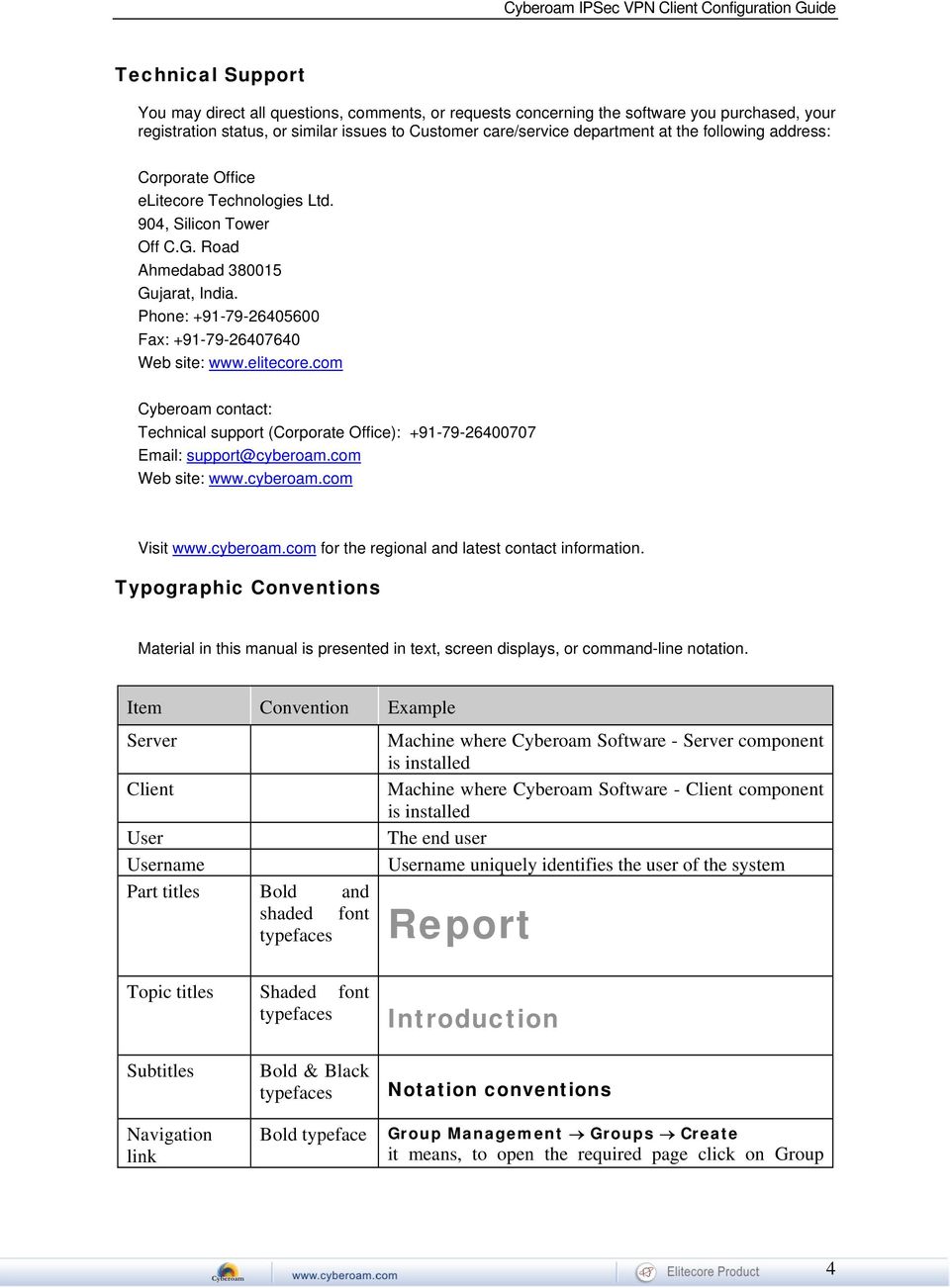
5 Name of a particular parameter / field / command button text Cross references Notes & points to remember Prerequisites Lowercase italic type Hyperlink in different color Bold typeface between the black borders Bold typefaces between the black borders management then on Groups and finally click Create tab Enter policy name, replace policy name with the specific name of a policy Or Click Name to select where Name denotes command button text which is to be clicked refer to Customizing User database Clicking on the link will open the particular topic Note Prerequisite Prerequisite details 5
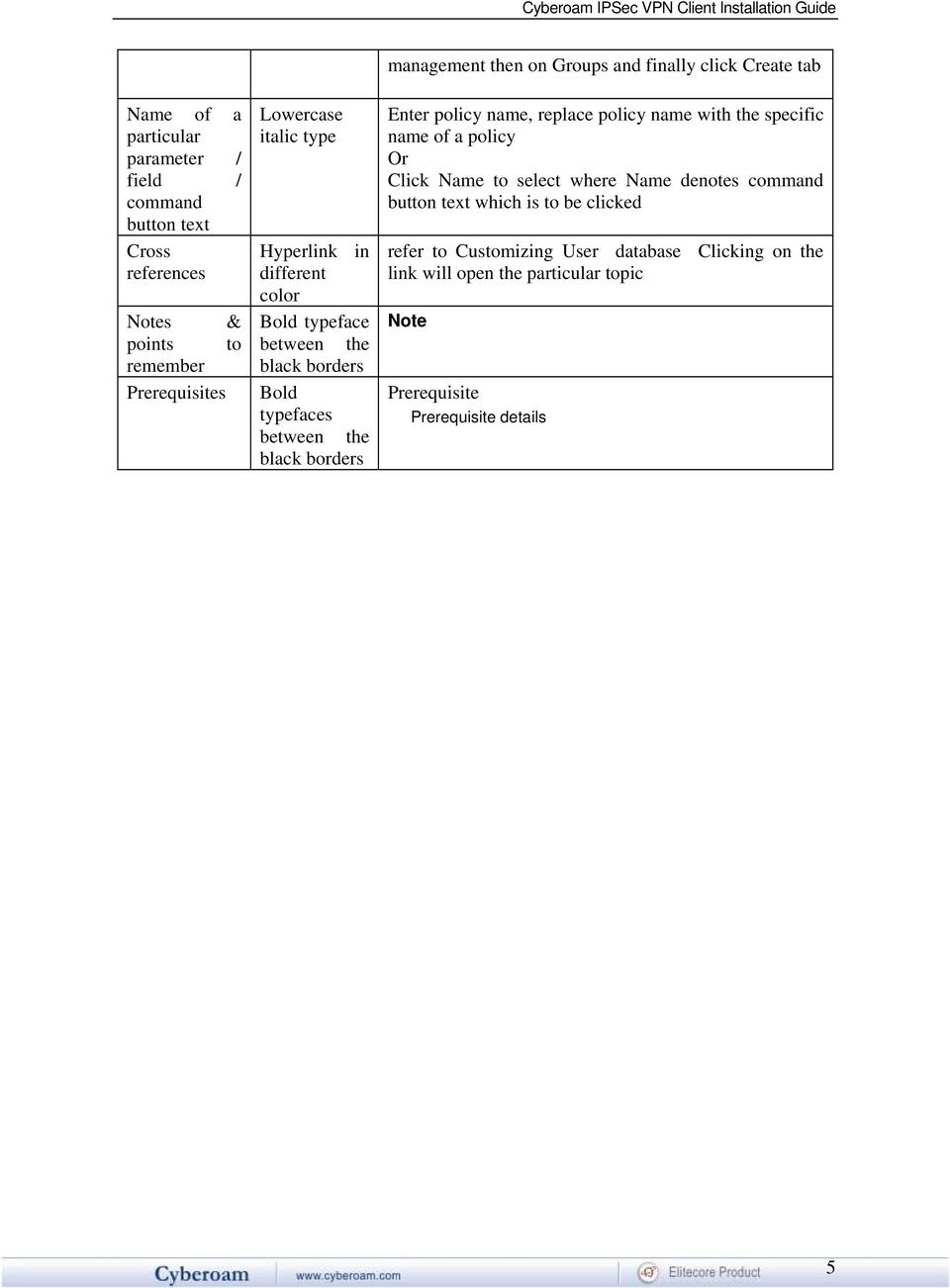
6 Table of Contents Introduction...7 Installing VPN Client...8 Evaluating Client...11 Activating Client...12 Activation Errors...13 Navigating the User Interface...15 Navigating the user interface...15 System Tray...15 Main Window
7 Introduction Cyberoam VPN client is IPSec VPN software that allows to establish secure connections over the Internet usually between a remote worker and the Corporate Intranet. It supports following Windows versions: Windows 98/98SE Windows Millennium Windows Win2000 all service packs Windows NT4 Windows XP. WinXP all service packs, including SP2 Windows Server 2003 IPSec is the most secure way to connect to the enterprise as it provide strong user authentication and tunnel encryption with ability to cope with existing network and firewall settings. The VPN IPSec Client is extremely easy to use and to install. This document describes the procedure to install and to deploy client. 7
8 Installing VPN Client Step 1. Go to and download VPN client Installation program - CyberoamVPNClient_Setup.exe. Step 2. Double click CyberoamVPNClient_Setup.exe to install and select the language for displaying the installation choices. Follow the on screen instructions given by Installation wizard. 8

9 Specify the installation folder 9
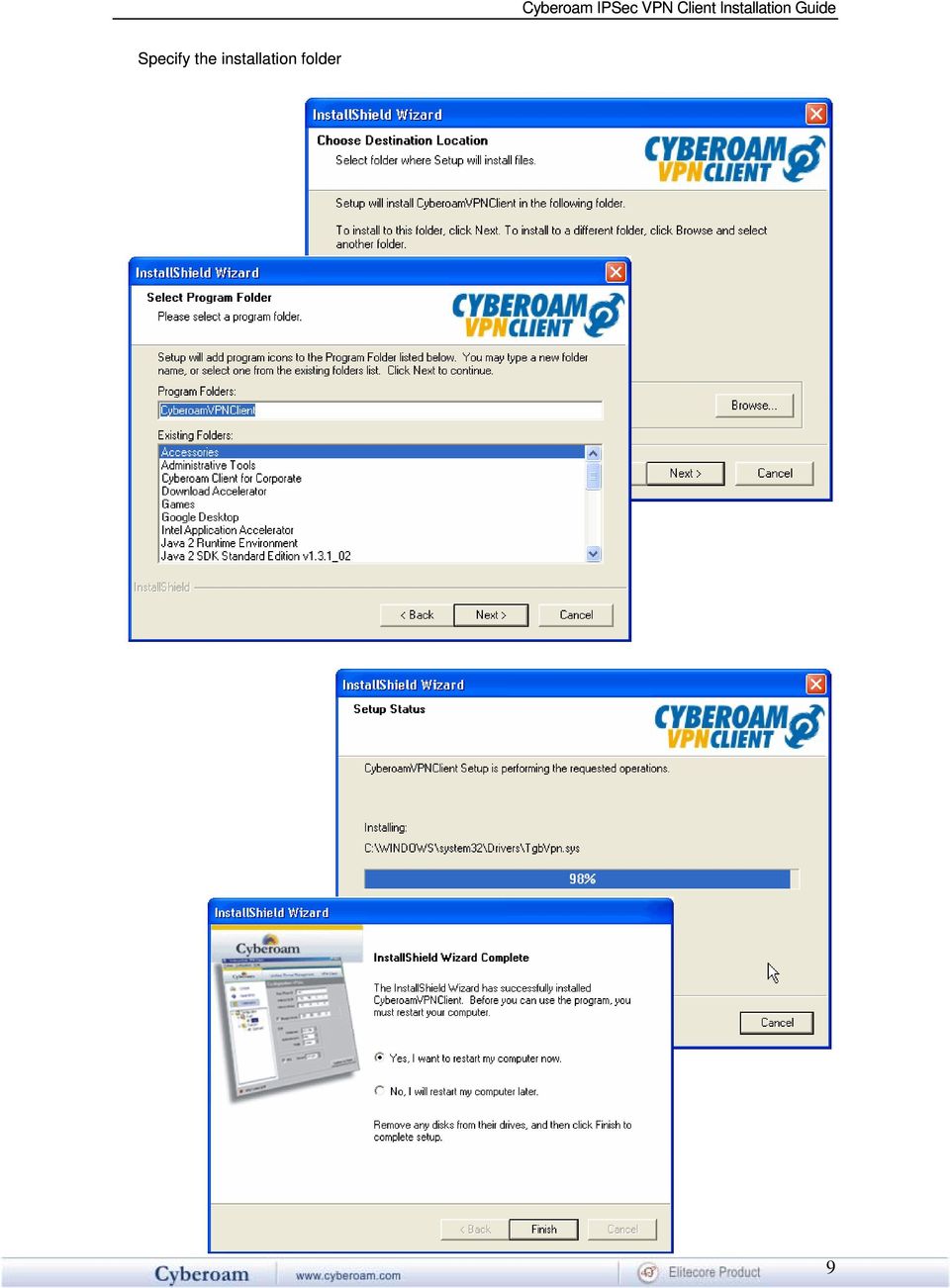
10 After completing the installation, you will be asked to reboot your computer. If you want to configure the VPN client immediately after the installation, select No, I will start my computer later Successful installation creates a shortcut to run the Cyberoam VPN Client and following directory structure: Cyberoam CyberoamVPNClient ca certs LogFiles private This finished the installation procedure and now you can configure client for your use. After reboot, click the shortcut with following options: "Quit' will close this window and software. "Evaluate' allows you to continue software yellow bar. to run Client, a Software Activation window appears evaluation. Evaluation period is displayed in the "Activate' allows you to activate the software online. This requires a License Number. Activation Wizard pops up when you click 'Activate' button. "Buy' allows you to go online and purchase a license. It directs you to the Cyberoam site. 10

11 Evaluating Client If you do not have license key and want to evaluate the Client before placing the order, click Evaluate. Evaluation period is of 30 days and you will be able to use the complete set of features of Cyberoam VPN Client during that period. When the VPN Client is on "Evaluation" mode, the registration window appears every time you boot the system. Evaluation period is displayed in the yellow bar above. Once evaluation period expires, 'Evaluation' button is no longer available and the software is disabled. 11

12 Activating Client If you have license key, click Activate. The Activation Wizard is a two step Wizard that allows users to activate the Client online. Activation requires a License Number. Enter your License Number, address, and click 'Next' as shown below. address will be used to send back an activation confirmation. The 'Activation Wizard' will automatically connect to the online activation server to activate the VPN Client. You can use Previous button to go to License number page anytime to change the License Number. 12

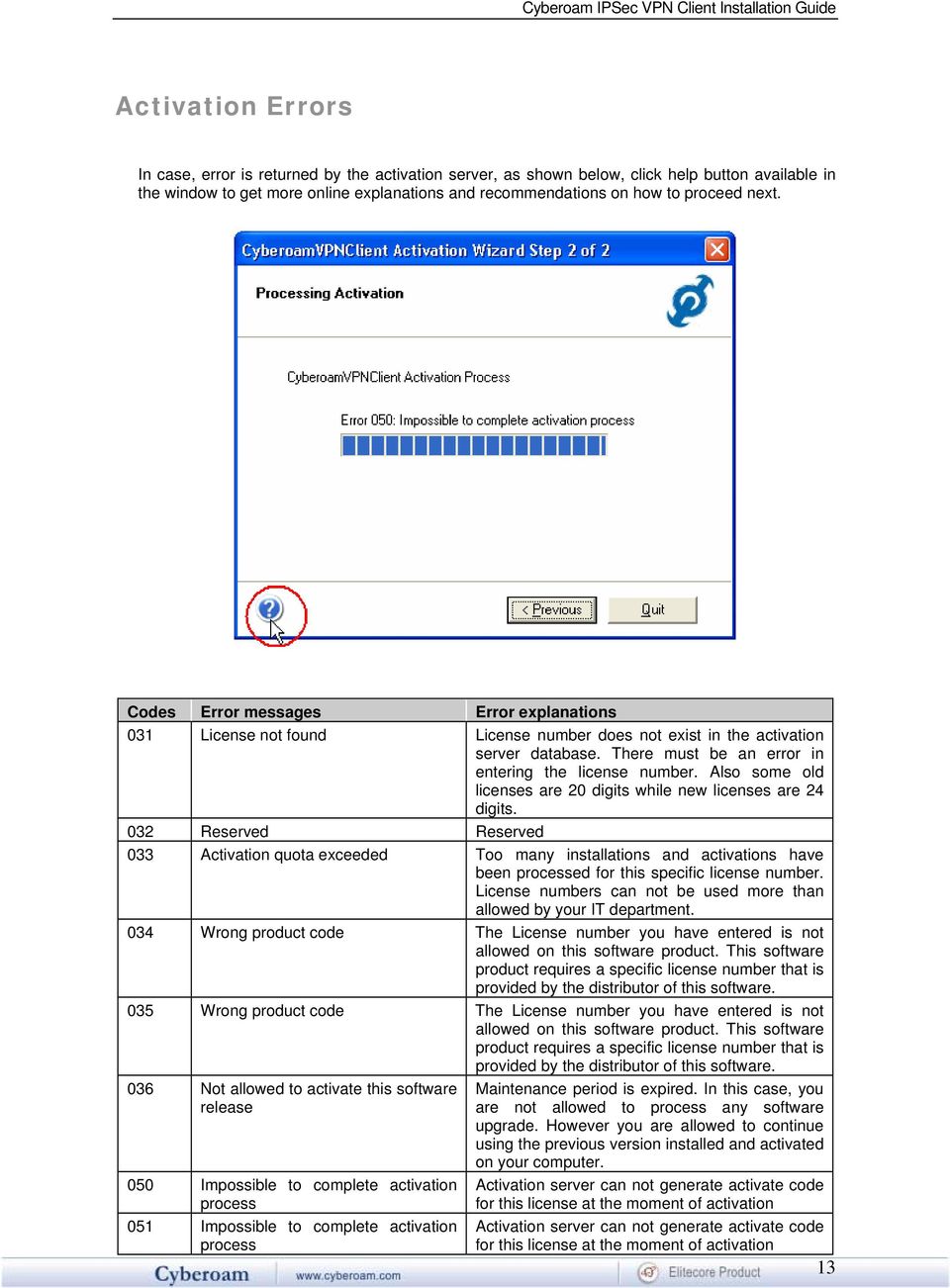
13 Activation Errors In case, error is returned by the activation server, as shown below, click help button available in the window to get more online explanations and recommendations on how to proceed next. Codes Error messages Error explanations 031 License not found License number does not exist in the activation server database. There must be an error in entering the license number. Also some old licenses are 20 digits while new licenses are 24 digits. 032 Reserved Reserved 033 Activation quota exceeded Too many installations and activations have been processed for this specific license number. License numbers can not be used more than allowed by your IT department. 034 Wrong product code The License number you have entered is not allowed on this software product. This software product requires a specific license number that is provided by the distributor of this software. 035 Wrong product code The License number you have entered is not allowed on this software product. This software product requires a specific license number that is provided by the distributor of this software. 036 Not allowed to activate this software Maintenance period is expired. In this case, you release are not allowed to process any software upgrade. However you are allowed to continue using the previous version installed and activated on your computer. 050 Impossible to complete activation Activation server can not generate activate code process for this license at the moment of activation 051 Impossible to complete activation Activation server can not generate activate code process for this license at the moment of activation 13
14 052 Impossible to complete activation process Activation server can not generate activate code for this license at the moment of activation 053 Cannot connect activation server The activation server can not be contacted. Reasons can be broken: Internet connection, activation server down, firewall and security policies. 054 Cannot connect activation server The activation server can not be contacted. Reasons can be broken: Cannot connect activation server policies 055 Activation code error Activation code might have been modified after activation. 14

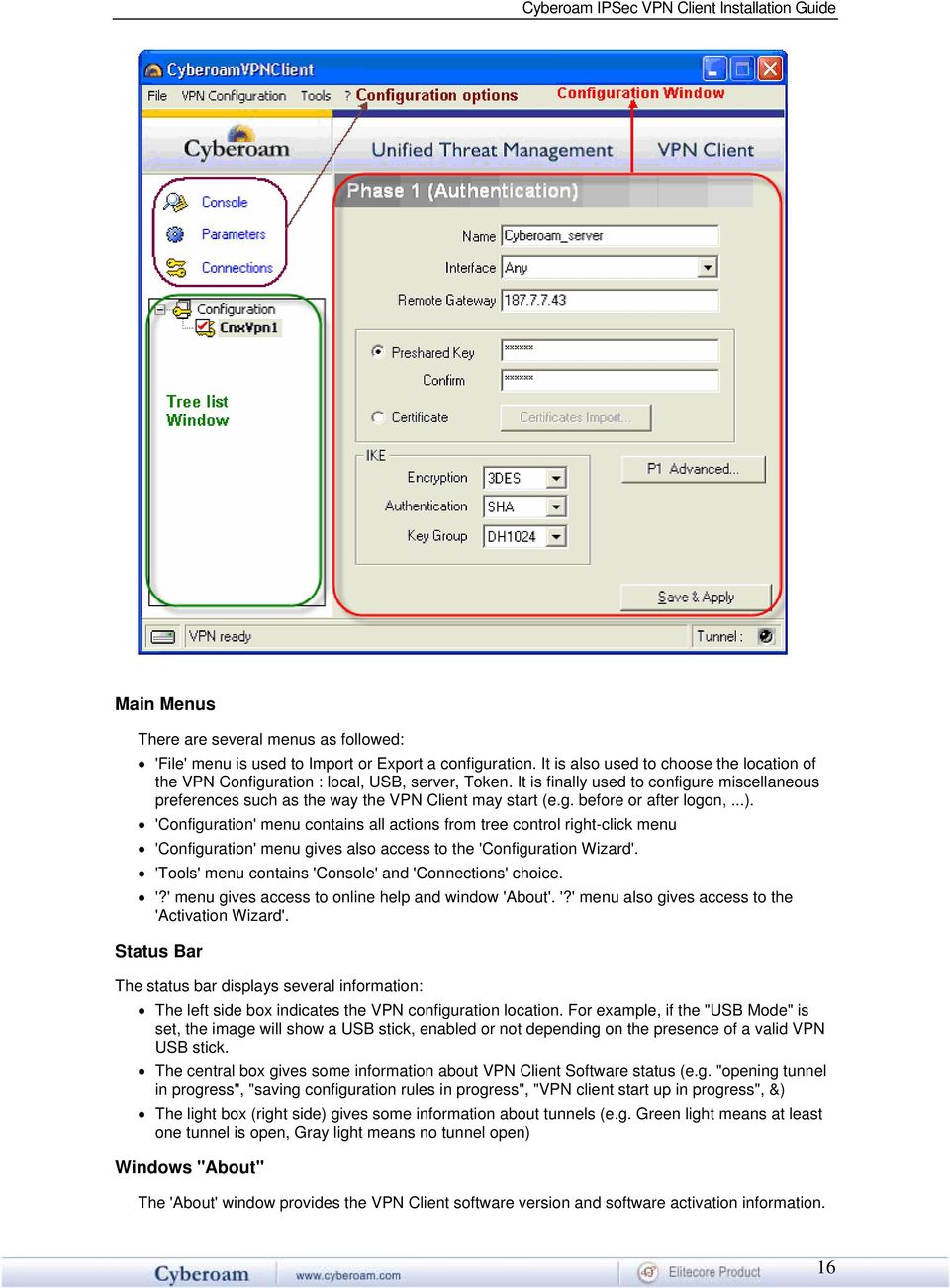
15 Naviga ting the User Interface Navigating the user interface Cyberoam IPSec VPN Client is fully autonomous and can start and stop tunnels without user interven tion, depending on traffic to certain destinations. However it requires a VPN configuration. The VPN Client configuration is defined in a V PN configuration file. The software user interface allows creating, modifying, saving, exporting or importing the VPN configurations together with security elements (e.g. Preshared key, Certificates). The user interface is made of several elements: System Tray Icon Main window Main menus Status bar Wizards Preferences System Tray The VPN Client user interface can be launched via a double click on application icon (Desktop or Windows Start menu) or by single click on application icon in system tray. Once launched, the VPN Client software shows an icon in the system tray that indicates whether a tunnel is opened or not, using color code. A left-button click on VPN icon opens configuration user interface. A right-button click shows the following menu: Quit - closes established VPN tunnels, stops the configuration user interface Save & Apply - closes established VPN tunnels, apply latest VPN configuration modification and reopen all the VPN tunnels Console - shows log window Connections - opens the list of already established VPN tunnels. You can configure to open tunnels automatically when the Client starts List of configured tunnels with current status. Tunnels can be opened or closed from this menu also Main Window The main window is made of several elements: Configuration Option: Console, Parameters and Connections (left column) A tree list window (left column) that contains all the IKE and IPSec configuration A configuration window (right column) that shows the associated tree level. 15
16 Main Menus There are several menus as followed: 'File' menu is used to Import or Export a configuration. It is also used to choose the location of the VPN Configuration : local, USB, server, Token. It is finally used to configure miscellaneous preferences such as the way the VPN Client may start (e.g. before or after logon,...). 'Configuration' menu contains all actions from tree control right-click menu 'Configuration' menu gives also access to the 'Configuration Wizard'. 'Tools' menu contains 'Console' and 'Connections' choice. '?' menu gives access to online help and window 'About'. '?' menu also gives access to the 'Activation Wizard'. Status Bar The status bar displays several information: The left side box indicates the VPN configuration location. For example, if the "USB Mode" is set, the image will show a USB stick, enabled or not depending on the presence of a valid VPN USB stick. The central box gives some information about VPN Client Software status (e.g. "opening tunnel in progress", "saving configuration rules in progress", "VPN client start up in progress", &) The light box (right side) gives some information about tunnels (e.g. Green light means at least one tunnel is open, Gray light means no tunnel open) Windows "About" The 'About' window provides the VPN Client software version and software activation information. 16
IPSec VPN Client Installation Guide. Version 4
 IPSec VPN Client Installation Guide Version 4 Document version - 1.0-410003-25/10/2007 IMPORTANT NOTICE Elitecore has supplied this Information believing it to be accurate and reliable at the time of printing,
Radius Integration Guide Version 9
 Radius Integration Guide Version 9 Document version 9402-1.0-18/10/2006 2 IMPORTANT NOTICE Elitecore has supplied this Information believing it to be accurate and reliable at the time of printing, but
HTTP Client Installation Guide Version 9
 HTTP Client Installation Guide Version 9 Document version 7300-1.0-9/13/2006 IMPORTANT NOTICE Elitecore has supplied this Information believing it to be accurate and reliable at the time of printing, but
SSL VPN Client Installation Guide Version 9
 SSL VPN Client Installation Guide Version 9 Document version 96060-1.0-08/10/2009 IMPORTANT NOTICE Elitecore has supplied this Information believing it to be accurate and reliable at the time of printing,
High Availability Configuration Guide Version 9
 High Availability Configuration Guide Version 9 Document version 9402-1.0-08/11/2006 2 HA Configuration Guide IMPORTANT NOTICE Elitecore has supplied this Information believing it to be accurate and reliable
Cyberoam IPSec VPN Client Configuration Guide Version 4
 Cyberoam IPSec VPN Client Configuration Guide Version 4 Document version 1.0-410003-25/10/2007 IMPORTANT NOTICE Elitecore has supplied this Information believing it to be accurate and reliable at the time
ADS Integration Guide
 ADS Integration Guide Document version 9402-1.0-18/10/2006 Cyberoam ADS Integration Guide IMPORTANT NOTICE Elitecore has supplied this Information believing it to be accurate and reliable at the time of
CYBEROAM WINDOWS DOMAIN CONTROLLER INTEGRATION GUIDE VERSION:
 7300-1.0-9/20/2005 1 CYBEROAM WINDOWS DOMAIN CONTROLLER INTEGRATION GUIDE VERSION: 7 7300-1.0-9/20/2005 2 IMPORTANT NOTICE Elitecore has supplied this Information believing it to be accurate and reliable
Virtual LAN Configuration Guide Version 9
 Virtual LAN Configuration Guide Version 9 Document version 96-1.0-12/05/2009 2 IMPORTANT NOTICE Elitecore has supplied this Information believing it to be accurate and reliable at the time of printing,
Cyberoam Multi link Implementation Guide Version 9
 Cyberoam Multi link Implementation Guide Version 9 Document version 96-1.0-12/05/2009 IMPORTANT NOTICE Elitecore has supplied this Information believing it to be accurate and reliable at the time of printing,
CORPORATE HEADQUARTERS Elitecore Technologies Ltd. 904 Silicon Tower, Off. C.G. Road, Ahmedabad 380015, INDIA www.cyberoam.com
 CYBEROAM LDAP INTEGRATION GUIDE VERSION: 7 IMPORTANT NOTICE Elitecore has supplied this Information believing it to be accurate and reliable at the time of printing, but is presented without warranty of
CORPORATE HEADQUARTERS Elitecore Technologies Ltd. 904 Silicon Tower, Off. C.G. Road, Ahmedabad 380015, INDIA www.cyberoam.com 7300-1.
 CYBEROAM - ADS INTEGRATION GUIDE VERSION: 7 7300-1.0-9/20/2005 2 IMPORTANT NOTICE Elitecore has supplied this Information believing it to be accurate and reliable at the time of printing, but is presented
Version: 4.10 Build 010 Date: April, 2008
 Version: 4.10 Build 010 Date: April, 2008 Contents Download Client...2 Operating Systems supported...2 Introduction...2 Release 4.10 build 010...2...2 Release 4.10 build 009...2...2 Enhancements...2...2
SOFTWARE LICENSE LIMITED WARRANTY
 CYBEROAM INSTALLATION GUIDE VERSION: 6..0..0..0 IMPORTANT NOTICE Elitecore has supplied this Information believing it to be accurate and reliable at the time of printing, but is presented without warranty
Cyberoam Anti Spam Implementation Guide Version 9
 Cyberoam Anti Spam Implementation Guide Version 9 Document version 9402-1.0-18/10/2006 IMPORTANT NOTICE Elitecore has supplied this Information believing it to be accurate and reliable at the time of printing,
Cyberoam Configuration Guide for VPNC Interoperability Testing using DES Encryption Algorithm
 Cyberoam Configuration Guide for VPNC Interoperability Testing using DES Encryption Algorithm Document Version:2.0-12/07/2007 IMPORTANT NOTICE Elitecore has supplied this Information believing it to be
SSL VPN Management Guide Version 10
 SSL VPN Management Guide Version 10 Document version 10.00.0302-1.0-09/08/2010 IMPORTANT NOTICE Elitecore has supplied this Information believing it to be accurate and reliable at the time of printing,
Cyberoam Anti Virus Implementation Guide Version 9
 Cyberoam Anti Virus Implementation Guide Version 9 Document version 9402-1.0-18/10/2006 2 Cyberoam Anti Virus Implementation Guide IMPORTANT NOTICE Elitecore has supplied this Information believing it
Thin Client Solution Installation Guide Version 2.0.0.9
 Thin Client Solution Installation Guide Version 2.0.0.9 Version 7 Document Version 2.0.0.9-1.0-20/02/2013 Version 7 Version 7 Important Notice Cyberoam Technologies Pvt. Ltd. has supplied this Information
Cyberoam Anti Spam Configuration Guide Version 9
 Cyberoam Anti Spam Configuration Guide Version 9 Document version 95466-1.0-25/06/2008 IMPORTANT NOTICE Elitecore has supplied this Information believing it to be accurate and reliable at the time of printing,
Cyberoam Virtual Security Appliance - Installation Guide for VMware ESX/ESXi. Version 10
 Cyberoam Virtual Security Appliance - Installation Guide for VMware ESX/ESXi Version 10 Document Version 10.6.2-16/04/2015 Contents Preface... 4 Base Configuration... 4 Installation Procedure... 4 Cyberoam
Cyberoam Virtual Security Appliance - Installation Guide for XenServer. Version 10
 Cyberoam Virtual Security Appliance - Installation Guide for XenServer Version 10 Document Version 10.6.1-01/07/2014 Contents Preface... 4 Base Configuration... 4 Installation Procedure... 4 Cyberoam Virtual
Cyberoam Anti Spam Implementation Guide Version 9
 Cyberoam Anti Spam Implementation Guide Version 9 Document version 96-1.0-12/05/2009 IMPORTANT NOTICE Elitecore has supplied this Information believing it to be accurate and reliable at the time of printing,
User Guide Version 9 Document version 9412-1.0-01/03/2007
 User Guide Version 9 Document version 9412-1.0-01/03/2007 2 Cyberoam User Guide IMPORTANT NOTICE Elitecore has supplied this Information believing it to be accurate and reliable at the time of printing,
User Guide Version 9.5.8
 User Guide Version 9.5.8 Document version 95838-1.0-24/20/2008 2 IMPORTANT NOTICE Elitecore has supplied this Information believing it to be accurate and reliable at the time of printing, but is presented
Self Help Guides. Create a New User in a Domain
 Self Help Guides Create a New User in a Domain Creating Users & Groups This document is to be used as a guide to creating users and/or groups in a Domain Server environment; 1. Windows Server Domain exists,
Application Note. Intelligent Application Gateway with SA server using AD password and OTP
 Application Note Intelligent Application Gateway with SA server using AD password and OTP ii Preface All information herein is either public information or is the property of and owned solely by Gemalto
BlackBerry Web Desktop Manager. Version: 5.0 Service Pack: 4. User Guide
 BlackBerry Web Desktop Manager Version: 5.0 Service Pack: 4 User Guide Published: 2012-10-03 SWD-20121003174218242 Contents 1 Basics... 5 Log in to the BlackBerry Web Desktop Manager... 5 Connect your
4.0. Offline Folder Wizard. User Guide
 4.0 Offline Folder Wizard User Guide Copyright Quest Software, Inc. 2007. All rights reserved. This guide contains proprietary information, which is protected by copyright. The software described in this
Dell One Identity Cloud Access Manager 8.0 - How To Deploy Cloud Access Manager in a Virtual Private Cloud
 Dell One Identity Cloud Access Manager 8.0 - How To Deploy Cloud Access Manager in a Virtual Private Cloud February 2015 This guide describes how to deploy Dell One Identity Cloud Access Manager within
Defender Delegated Administration. User Guide
 Defender Delegated Administration User Guide 2012 Quest Software, Inc. ALL RIGHTS RESERVED. This guide contains proprietary information protected by copyright. The software described in this guide is furnished
Symantec LiveUpdate Administrator. Getting Started Guide
 Symantec LiveUpdate Administrator Getting Started Guide Symantec LiveUpdate Administrator Getting Started Guide The software described in this book is furnished under a license agreement and may be used
SSL VPN User Guide Version 10
 SSL VPN User Guide Version 10 Version 7 Document Version 10.04.5.0007-30/11/2013 Document Version 10.04.4.0028-08/10/2013 Version 7 Version 7 Important Notice Cyberoam Technologies Pvt. Ltd. has supplied
Self Help Guides. Setup Exchange Email with Outlook
 Self Help Guides Setup Exchange Email with Outlook Setting up Exchange Email Connection This document is to be used as a guide to setting up an Exchange Email connection with Outlook; 1. Microsoft Outlook
Defender 5.7. Remote Access User Guide
 Defender 5.7 Remote Access User Guide 2012 Quest Software, Inc. ALL RIGHTS RESERVED. This guide contains proprietary information protected by copyright. The software described in this guide is furnished
formerly Help Desk Authority 9.1.3 Upgrade Guide
 formerly Help Desk Authority 9.1.3 Upgrade Guide 2 Contacting Quest Software Email: Mail: Web site: [email protected] Quest Software, Inc. World Headquarters 5 Polaris Way Aliso Viejo, CA 92656 USA www.quest.com
8.7. Resource Kit User Guide
 8.7 Resource Kit User Guide 2011 Quest Software, Inc. ALL RIGHTS RESERVED. This document contains proprietary information protected by copyright. The software described in this document is furnished under
Unified Threat Management
 Unified Threat Management QUICK START GUIDE CR35iNG Appliance Document Version: PL QSG 35iNG/96000-10.04.5.0.007/250121014 DEFAULTS Default IP addresses Ethernet Port IP Address Zone A 172.16.16.16/255.255.255.0
Application Note. Gemalto s SA Server and OpenLDAP
 Application Note Gemalto s SA Server and OpenLDAP ii Preface All information herein is either public information or is the property of and owned solely by Gemalto NV. and/or its subsidiaries who shall
Foglight Experience Monitor and Foglight Experience Viewer
 Foglight Experience Monitor and Foglight Experience Viewer Quest Software, Inc. April 2008 Using the Dell Remote Access Controller Copyright Quest Software, Inc. 2008. All rights reserved. This guide contains
Ektron CMS400.NET Virtual Staging Server Manual Version 7.5, Revision 1
 Ektron CMS400.NET Virtual Staging Server Manual Version 7.5, Revision 1 Ektron Inc. 542 Amherst St. Nashua, NH 03063 Tel: +1 603-594-0249 Fax: +1 603-594-0258 Email: [email protected] http://www.ektron.com
VCCC Appliance VMware Server Installation Guide
 VCCC Appliance VMware Server Installation Guide Content Preface... 4 System Requirements... 4 Installation Procedure... 4 CCC Virtual Machine Installation... 5 CCC Virtual Machine Management... 12 Resource
Dell One Identity Cloud Access Manager 8.0.1 - How to Configure for SSO to SAP NetWeaver using SAML 2.0
 Dell One Identity Cloud Access Manager 8.0.1 - How to Configure for SSO to SAP NetWeaver using SAML 2.0 May 2015 About this guide Prerequisites and requirements NetWeaver configuration Legal notices About
HP IMC Firewall Manager
 HP IMC Firewall Manager Configuration Guide Part number: 5998-2267 Document version: 6PW102-20120420 Legal and notice information Copyright 2012 Hewlett-Packard Development Company, L.P. No part of this
CITRIX SYSTEMS, INC. SOFTWARE LICENSE AGREEMENT
 CITRIX SYSTEMS, INC. SOFTWARE LICENSE AGREEMENT PLEASE READ THIS SOFTWARE LICENSE AGREEMENT CAREFULLY BEFORE DOWNLOADING, INSTALLING OR USING CITRIX OR CITRIX-SUPPLIED SOFTWARE. BY DOWNLOADING OR INSTALLING
Deploying Virtual Cyberoam Appliance in the Amazon Cloud Version 10
 Deploying Virtual Cyberoam Appliance in the Amazon Cloud Version 10 Document version 1.0 10.6.2.378-13/03/2015 Important Notice Cyberoam Technologies Pvt. Ltd. has supplied this Information believing it
COM Port Stress Test
 COM Port Stress Test COM Port Stress Test All rights reserved. No parts of this work may be reproduced in any form or by any means - graphic, electronic, or mechanical, including photocopying, recording,
Virtual Office Remote Installation Guide
 Virtual Office Remote Installation Guide Table of Contents VIRTUAL OFFICE REMOTE INSTALLATION GUIDE... 3 UNIVERSAL PRINTER CONFIGURATION INSTRUCTIONS... 12 CHANGING DEFAULT PRINTERS ON LOCAL SYSTEM...
Installing the IPSecuritas IPSec Client
 Mac Install Installing the IPSecuritas IPSec Client IPSecuritasMac201003-01 Global Technology Associates 3505 Lake Lynda Drive Suite 109 Orlando, FL 32817 Tel: +1.407.380.0220 Fax. +1.407.380.6080 Email:
SafeNet Cisco AnyConnect Client. Configuration Guide
 SafeNet Cisco AnyConnect Client Configuration Guide All information herein is either public information or is the property of and owned solely by Gemalto NV. and/or its subsidiaries who shall have and
VERITAS Backup Exec 9.1 for Windows Servers Quick Installation Guide
 VERITAS Backup Exec 9.1 for Windows Servers Quick Installation Guide N109548 Disclaimer The information contained in this publication is subject to change without notice. VERITAS Software Corporation makes
How To Connect Checkpoint To Gemalto Sa Server With A Checkpoint Vpn And Connect To A Check Point Wifi With A Cell Phone Or Ipvvv On A Pc Or Ipa (For A Pbv) On A Micro
 Application Note: Integrate Check Point IPSec or SSL VPN with Gemalto SA Server [email protected] January 2008 www.gemalto.com All information herein is either public information or is the property
FOR WINDOWS FILE SERVERS
 Quest ChangeAuditor FOR WINDOWS FILE SERVERS 5.1 User Guide Copyright Quest Software, Inc. 2010. All rights reserved. This guide contains proprietary information protected by copyright. The software described
Setting up VMware ESXi for 2X VirtualDesktopServer Manual
 Setting up VMware ESXi for 2X VirtualDesktopServer Manual URL: www.2x.com E-mail: [email protected] Information in this document is subject to change without notice. Companies, names, and data used in examples
MiSync Personal for Beams
 Using MiSync Personal for Beams V4.3.1.0 by Metisc Copyright Printed: 16 January 2015 2014 by Metisc. All rights reserved. Notice This user guide and the software it describes are furbished under a license
empower Authentication Manual, Version 3.7
 empower Authentication Manual, Version 3.7 i Copyright 2002 Ektron, Inc. All rights reserved. EKTRON is a registered trademark of Ektron, Inc. Version 3.7, February, 2002 empower Authentication Manual,
System Requirements. Installation. Microsoft SQL Express 2008 R2 Installation
 Contents System Requirements... 3 Installation... 3 Microsoft SQL Express 2008 R2 Installation... 3 Microsoft.NET Framework 4.0 Installation... 7 InFocus Management Tool Installation... 8 Log In... 10
BIGPOND ONLINE STORAGE USER GUIDE Issue 1.1.0-18 August 2005
 BIGPOND ONLINE STORAGE USER GUIDE Issue 1.1.0-18 August 2005 PLEASE NOTE: The contents of this publication, and any associated documentation provided to you, must not be disclosed to any third party without
QuickBack. User s Guide
 QuickBack Data backup, volume cloning and file / folder archiving utility. Features automated scheduling, compression, encryption, CD/DVD burning and can preserve volume backup bootability. Part of the
Global VPN Client Getting Started Guide
 Global VPN Client Getting Started Guide PROTECTION AT THE SPEED OF BUSINESS Introduction The SonicWALL Global VPN Client creates a Virtual Private Network (VPN) connection between your computer and the
Application Note. Citrix Presentation Server through a Citrix Web Interface with OTP only
 Application Note Citrix Presentation Server through a Citrix Web Interface with OTP only ii Preface All information herein is either public information or is the property of and owned solely by Gemalto
Quest ChangeAuditor 5.1 FOR ACTIVE DIRECTORY. User Guide
 Quest ChangeAuditor FOR ACTIVE DIRECTORY 5.1 User Guide Copyright Quest Software, Inc. 2010. All rights reserved. This guide contains proprietary information protected by copyright. The software described
Preparing Your Server for an MDsuite Installation
 Preparing Your Server for an MDsuite Installation Introduction This document is intended for those clients who have purchased the MDsuite Application Server software and will be scheduled for an MDsuite
Server Installation Guide ZENworks Patch Management 6.4 SP2
 Server Installation Guide ZENworks Patch Management 6.4 SP2 02_016N 6.4SP2 Server Installation Guide - 2 - Notices Version Information ZENworks Patch Management Server Installation Guide - ZENworks Patch
Dell Spotlight on Active Directory 6.8.3. Server Health Wizard Configuration Guide
 Dell Spotlight on Active Directory 6.8.3 Server Health Wizard Configuration Guide 2013 Dell Software Inc. ALL RIGHTS RESERVED. This guide contains proprietary information protected by copyright. The software
Global VPN Client Getting Started Guide
 Global VPN Client Getting Started Guide 1 Notes, Cautions, and Warnings NOTE: A NOTE indicates important information that helps you make better use of your system. CAUTION: A CAUTION indicates potential
Quick Connect Express for Active Directory
 Quick Connect Express for Active Directory Version 5.2 Quick Start Guide 2012 Dell Inc. ALL RIGHTS RESERVED. This guide contains proprietary information protected by copyright. The software described in
DameWare Server. Administrator Guide
 DameWare Server Administrator Guide About DameWare Contact Information Team Contact Information Sales 1.866.270.1449 General Support Technical Support Customer Service User Forums http://www.dameware.com/customers.aspx
Polycom RSS 4000 / RealPresence Capture Server 1.6 and RealPresence Media Manager 6.6
 INTEGRATION GUIDE May 2014 3725-75304-001 Rev B Polycom RSS 4000 / RealPresence Capture Server 1.6 and RealPresence Media Manager 6.6 Polycom, Inc. 0 Copyright 2014, Polycom, Inc. All rights reserved.
ALL WEATHER, INC. SOFTWARE END USER LICENSE AGREEMENT
 ALL WEATHER, INC. SOFTWARE END USER LICENSE AGREEMENT THIS SOFTWARE END USER LICENSE AGREEMENT (THIS AGREEMENT ) IS DATED FOR REFERENCE PURPOSES ONLY AS OF MARCH 26, 2009, AND IS BY AND BETWEEN ALL WEATHER,
Dell One Identity Cloud Access Manager 8.0.1 - How to Configure Microsoft Office 365
 Dell One Identity Cloud Access Manager 8.0.1 - How to Configure Microsoft Office 365 May 2015 This guide describes how to configure Microsoft Office 365 for use with Dell One Identity Cloud Access Manager
Dell Statistica 13.0. Statistica Enterprise Installation Instructions
 Dell Statistica 13.0 2015 Dell Inc. ALL RIGHTS RESERVED. This guide contains proprietary information protected by copyright. The software described in this guide is furnished under a software license or
MDM Zinc 3.0 End User License Agreement (EULA)
 MDM Zinc 3.0 End User License Agreement (EULA) THIS AGREEMENT (or "EULA") IS A LEGAL AGREEMENT BETWEEN THE PERSON, COMPANY, OR ORGANIZATION THAT HAS LICENSED THIS SOFTWARE ("YOU" OR "CUSTOMER") AND MULTIDMEDIA
Sage HRMS 2014 Sage Employee Self Service Tech Installation Guide for Windows 2003, 2008, and 2012. October 2013
 Sage HRMS 2014 Sage Employee Self Service Tech Installation Guide for Windows 2003, 2008, and 2012 October 2013 This is a publication of Sage Software, Inc. Document version: October 17, 2013 Copyright
Active Directory Change Notifier Quick Start Guide
 Active Directory Change Notifier Quick Start Guide Software version 3.0 Mar 2014 Copyright 2014 CionSystems Inc., All Rights Reserved Page 1 2014 CionSystems Inc. ALL RIGHTS RESERVED. This guide may not
RELEASE NOTES TABLE OF CONTENTS: SOFTWARE OVERVIEW DESCRIPTION OF GENEMAPPER ID-X SOFTWARE HOTFIX_20110620
 RELEASE NOTES GeneMapper ID-X Software Hotfix_20110620 Copyright 2011, Life Technologies Corporation and/or its affiliate(s). All rights reserved. July 2011 ` TABLE OF CONTENTS: * Software Overview * Description
BlackBerry Enterprise Server Resource Kit BlackBerry Analysis, Monitoring, and Troubleshooting Tools Version: 5.0 Service Pack: 2.
 BlackBerry Enterprise Server Resource Kit BlackBerry Analysis, Monitoring, and Troubleshooting Tools Version: 5.0 Service Pack: 2 Release Notes Published: 2010-06-04 SWD-1155103-0604111944-001 Contents
technical brief Multiple Print Queues
 technical brief in HP Overview HP has the ability to create shared printer queues on a remote machine to help ease the task that administrators face on a regular basis. Print queue creation of the following
Crestron VMK-WIN TouchPoint Virtual Mouse & Keyboard Software for Windows Installation Guide
 Crestron VMK-WIN TouchPoint Virtual Mouse & Keyboard Software for Windows Installation Guide This document was prepared and written by the Technical Documentation department at: Crestron Electronics, Inc.
Symantec Virtual Machine Management 7.1 User Guide
 Symantec Virtual Machine Management 7.1 User Guide Symantec Virtual Machine Management 7.1 User Guide The software described in this book is furnished under a license agreement and may be used only in
Dell One Identity Cloud Access Manager 8.0.1- How to Configure for High Availability
 Dell One Identity Cloud Access Manager 8.0.1- How to Configure for High Availability May 2015 Cloning the database Cloning the STS host Cloning the proxy host This guide describes how to extend a typical
Configuration Guide. SafeNet Authentication Service AD FS Agent
 SafeNet Authentication Service AD FS Agent Configuration Guide Technical Manual Template Release 1.0, PN: 000-000000-000, Rev. A, March 2013, Copyright 2013 SafeNet, Inc. All rights reserved. 1 Document
NCD ThinPATH Load Balancing Startup Guide
 NCD ThinPATH Load Balancing Startup Guide Copyright Copyright 1999 by Network Computing Devices, Inc. (NCD).The information contained in this document is subject to change without notice. Network Computing
Dell Statistica Document Management System (SDMS) Installation Instructions
 Dell Statistica Document Management System (SDMS) Installation Instructions 2015 Dell Inc. ALL RIGHTS RESERVED. This guide contains proprietary information protected by copyright. The software described
NCD ThinPATH Load Balancing Startup Guide versions 2.0.7 and 2.8.1
 NCD ThinPATH Load Balancing Startup Guide versions 2.0.7 and 2.8.1 Copyright Copyright 2003 by Network Computing Devices, Inc. (NCD).The information contained in this document is subject to change without
How do I set up a branch office VPN tunnel with the Management Server?
 Fireware How To VPN How do I set up a branch office VPN tunnel with the Management Server? Introduction Using the WatchGuard Management Server, you can make fully authenticated and encrypted IPSec tunnels
Barbara Ann Karmanos Cancer Institute. Instructions for Installing Cisco Systems VPN Client
 Barbara Ann Karmanos Cancer Institute Instructions for Installing Cisco Systems VPN Client DISCLAIMER: IMPORTANT INFORMATION - PLEASE READ THIS AGREEMENT CAREFULLY BEFORE OPENING THE PACKAGE AND/OR USING
Imaging License Server User Guide
 IMAGING LICENSE SERVER USER GUIDE Imaging License Server User Guide PerkinElmer Viscount Centre II, University of Warwick Science Park, Millburn Hill Road, Coventry, CV4 7HS T +44 (0) 24 7669 2229 F +44
Symantec Enterprise Vault
 Symantec Enterprise Vault Guide for Microsoft Outlook 2003/2007 Users 10.0 Light Outlook Add-In Symantec Enterprise Vault: Guide for Microsoft Outlook 2003/2007 Users The software described in this book
Spotlight Management Pack for SCOM
 Spotlight Management Pack for SCOM User Guide January 2015 The is used to display data from alarms raised by Spotlight on SQL Server Enterprise in SCOM (System Center Operations Manager). About System
Ektron CMS100 Web Hosting Edition Installation Manual, Version 1.0
 Ektron CMS100 Web Hosting Edition Installation Manual, Version 1.0 i Copyright 2002 Ektron, Inc. All rights reserved. Version 1.0, February, 2002 Ektron CMS100 Web Hosting Edition Installation Manual,
BlackBerry World Storefront. Version: 4.3. User Guide
 BlackBerry World Storefront Version: 4.3 User Guide Published: 2013-02-21 SWD-20130221142618627 Contents About BlackBerry World... 5 New features and enhancements... 6 Browsing and searching... 7 Search
Veritas Cluster Server Database Agent for Microsoft SQL Configuration Guide
 Veritas Cluster Server Database Agent for Microsoft SQL Configuration Guide Windows 2000, Windows Server 2003 5.0 11293743 Veritas Cluster Server Database Agent for Microsoft SQL Configuration Guide Copyright
Integration Guide. SafeNet Authentication Client. Using SAC CBA for Check Point Security Gateway
 SafeNet Authentication Client Integration Guide Technical Manual Template Release 1.0, PN: 000-000000-000, Rev. A, March 2013, Copyright 2013 SafeNet, Inc. All rights reserved. 1 Document Information Document
HP A-IMC Firewall Manager
 HP A-IMC Firewall Manager Configuration Guide Part number: 5998-2267 Document version: 6PW101-20110805 Legal and notice information Copyright 2011 Hewlett-Packard Development Company, L.P. No part of this
NetBak Replicator 4.0 User Manual Version 1.0
 NetBak Replicator 4.0 User Manual Version 1.0 Copyright 2012. QNAP Systems, Inc. All Rights Reserved. 1 NetBak Replicator 1. Notice... 3 2. Install NetBak Replicator Software... 4 2.1 System Requirements...