
BAGRAM STX Stair lighting controller
|
|
|
- Ira Harper
- 9 years ago
- Views:
Transcription
1 BAGRAM Dickensa 26, Warszawa, tel.: Stair lighting controller STX-1792 STX-1792 controller is used to control stairs lighting dynamically. The backlight is switched on with the subsequent steps, depending on the motion directions: ascending or descending. The controller has 3 different light animation programs (for upward direction): WAVE stairs light up one after another in the direction of entry, CASCADE light jumps fast from top to bottom, lighting up the steps, ELEVATOR three lighted steps are slowly moving to the top of the staircase. When descending to the bottom, the animation respectively changes direction. You can permanently select one of the programs or set the options to change programs on a regular basis. Depending on the setting parameters of the controller, the light of the stairs can fade out to zero or to a minimum value (allowing to illuminate the stairs for better presentation, or climb them easily in the dark without turning on a full light especially important for children!). When you press the top button, the stairs are lighted from top to bottom and turned off also in the same direction. The controller is adapted to control the MOO LED strips arranged in stair steps or points (spots) LED built into the wall above the steps. LED strip driver can smoothly dimm at each step which gives a nice effect to the eye. In case when another person steps on the stairs, the controller switches on full illumination of stairs and fade them out smoothly. Lights can be turned on by pressing directly button on the wall, connected to the controller or by the use of additional sensor (infrared, motion, pressure, etc.) to detect when the person steps on the stairs. The controller can support up to 20 steps. It can also control lighting of handrail in this case the number of steps is reduced by the number of handrails (max. 2). If there is no handrail, the controller can highlight, for example, ceiling lights (). umber of supported points of light (usually it is the amount of stairs) and the number of illuminated handrails, are set at the factory and cannot be changed by the user. Other parameters of the controller can be set by the user. These include the backlight on or off the stairs in the dark, steps lightening time, the time interval between successive step lightening (it has an impact on the speed of lightening all of the stairs), or the time after which the steps will be faded out. If used motion detectors, dead time can be set after receiving a signal from a sensor, or a lack of response to one or both of the sensors until the end of the animation program, to prevent re-integration of lighting while descending the stairs. You can also set a long time to start up the driver does it will not react to transients of the sensor while power is on. Possibility of changing options can be locked. At any time, you can also restore the factory settings. 1

2 Specifications Maximum number of illuminated stairs 20 (or 18 steps and 2 handrails) Quantity of illuminated handrails 2 Voltage Dimensions: length 11cm, width 9cm, height 7 cm Mounting on T-35 rail the width of 6 modules. Output capacity up to 5A Running by shorting the input to ground (negative power supply) The number of steps and number of handrails supported by the controller is set at the factory when ordering, please give the following information: Quantity of illuminated handrails (1 or 2), Stairs backlight type (LED strips or LED lights) Type of handrails or overhead lighting (LED strips or LED lights) Type of motion sensor (230V or, please link to the sensor to be ordered). If you have problems determining the amount and type of light points or sensors, please contact us. BUTOS DOWSTAIR AIMATIO TUR O PERMAATLY LED COTROL UPSTAIR AIMATIO OPTIO SETUP TEST O L ED SET IPUTS 1 2 5V BAGRAM STAIR LIGHTIG COTROLLER STX x 5A 6 Buttons functions and LED control 2

3 Installation Driver Installation should be done by the person having advanced skills in the field of electrical engineering, preferably a specialist with permission. Connecting the controller must be strictly carried out with the power off! AC driver and LEDs should be stabilized with adequate current capacity dependent on the amount and length of the used LED strips or LED light. Do not use a power supply (type 12) from halogens the controller will be damaged immediately! The controller is designed for a voltage of DC (stabilized). Maximum current per output is 5A. Do not exceed this value. The first step is to connect the lights to the driver and any mechanical button between driver s input 1 and the power minus. When you connect the power supply, the stairs lightning should turn on with minimum brightness (so-called stairs illumination effect). When you press UPSTAIRS AIMATIO button (indicated by arrow pointing up) on the controller body, the controller should start lighting up the steps one by one. After pressing DOWSTAIR AIMATIO button (indicated by arrow pointing down), the stairs lightning should go down. If there is no effect or steps are lighting up in a different way, you should check again carefully how to connect LED lighting. Then it is recommended to adjust the sensor response to the movement without connecting them to the controller inputs. Be sure to first set the sensor pulse time (TIME) to extreme minimum and it should not be changed during adjustment, and the sensitivity (range) also at the minimum - but this parameter can be adjusted. In some sensors, there should be disabled or properly adjusted support function (called triggering). Only after obtaining the proper operation of the sensors, they can be connected to the controller. After connecting the sensor, if only the first step is lighted, or the entire staircase is lighted, this means that the sensor pulse time exceeds 20 seconds, or is short-circuited. The sensor should be immediately disconnected from the controller and replaced operating properly. Only after obtaining the proper light animation, you can begin to connect the motion sensor. Be sure to pre-set the operating time of sensors for extreme minimum and sensitivity (range) also at the minimum value. With some sensors, there should be disabled or switched triggering function. ote: After powering of the whole system, the driver does not respond to the buttons or sensors for about 1 minute. This is indicated by the blinking of all steps. The last step is time intervals adjustment. The best way is to do it after a few days of using the stairs in order to determine as accurately as possible the necessary changes. We recommend you to not adjust the parameters for no particular reason. For the higher safety, changing parameters is permanently locked (Look: Adjusting the controller ). 3


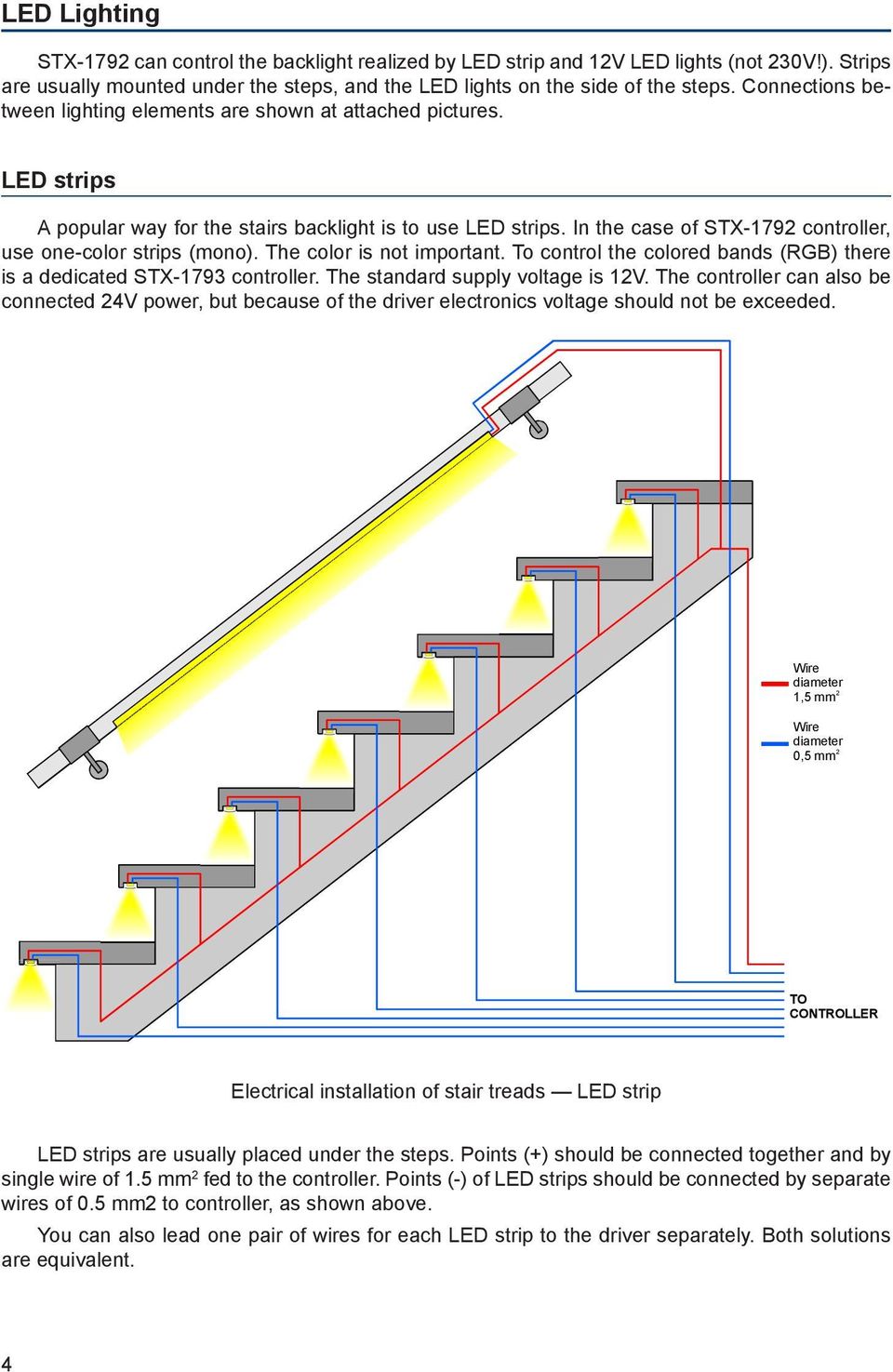
4 LED Lighting STX-1792 can control the backlight realized by LED strip and LED lights (not 230V!). Strips are usually mounted under the steps, and the LED lights on the side of the steps. Connections between lighting elements are shown at attached pictures. LED strips A popular way for the stairs backlight is to use LED strips. In the case of STX-1792 controller, use one-color strips (mono). The color is not important. To control the colored bands (RGB) there is a dedicated STX-1793 controller. The standard supply voltage is. The controller can also be connected 24V power, but because of the driver electronics voltage should not be exceeded. Wire diameter 1,5 mm 2 Wire diameter 0,5 mm 2 Electrical installation of stair treads LED strip LED strips are usually placed under the steps. Points () should be connected together and by single wire of 1.5 mm 2 fed to the controller. Points (-) of LED strips should be connected by separate wires of 0.5 mm2 to controller, as shown above. You can also lead one pair of wires for each LED strip to the driver separately. Both solutions are equivalent. 4
5 HAD RAILS LEFT RIGHT STEP S STEP 18 STEP 17 STEP 16 STEP 15 STEP 14 STEP 13 STEP 12 TEST O LED SET IPUTS 1 2 5V BAGRAM STAIR LIGHTIG COTROLLER STX x 5A STEP 11 STEP 10 STEP 9 STEP 8 STEP 7 STEP 6 STEP 5 STEP 4 STEP 3 STEP 2 STEP 1 B OTTOM LED POWER VOLTAGE MOMETARY BUTTOS LED strips connected to the controller The diagram above shows the connection of the controller to the staircase consisting of 18 steps and two handrails. Output 1 is connected to the first, lower level, exit 2 to the second (higher), etc. The output 19 is connected, looking from the bottom of the stairs, to the right handrail (running up), and the output 20 to the left handrail (running down). Please respect the principle that all the points () of LED strips should be connected with each other and plus value, points (-) should be connected to the controller s outputs. 5

6 LED lights (spots) Another way to highlight the stairs is to place on the wall, on each step, a small LED light (spot). Lights must be prepared to supply voltage. We recommend the use of dimmable lights then you will be able to use the backlight of the stairs, and the smooth illumination of each step. HADRAILS LEFT RIGHT STEP 18 STEP 17 TEST O LED SET IPUTS 1 2 5V BAGRAM STAIR LIGHTIG COTROLLER STX x 5A STEP 16 STEP 15 STEP 4 STEP 3 STEP 2 STEP 1 LED POWER VOLTAGE MOMETARY BUTTOS spots connected to the controller The diagram above shows the connection of the controller to the staircase consisting of 18 steps and two handrails. Output 1 is connected to the first light from the lower level, exit 2 to the second light (from a higher level), etc. The output 18 is connected to the last (18) light. Output 19 is connected, looking from the bottom of the stairs, to the right handrail (running up), and the output 20 to the left one(running down). Lamps generally have no polarity, so you should just follow the rule that the lights should be connected with each other and with the plus value, and the second end of each lamp must be connected to the corresponding driver output. If the staircase is smaller and there is no illuminated handrails, for example you can use exit o. 20 for ceiling lighting above the stairs (of course, if you have one). However, there must be used LED elements with power. Do not connect the lighting powered from 230V! 6

7 The next picture shows a solution where the exit o. 20 is connected to three LED lights placed on the ceiling above the stairs. The driver will be turning it on with the first step and turn off after about 2 seconds from the extinction of the last step. Of course, you can use any other light source with the voltage of, depending on the design of the stairs, in place of ceiling lamps. CEILIG LIGHTS STEPS STEP 14 STEP 13 STEP 12 TEST O LED SET IPUTS 1 2 5V BAGRAM STAIR LIGHTIG COTROLLER STX x 5A STEP 11 STEP 10 STEP 9 STEP 8 STEP 7 STEP 6 STEP 5 STEP 4 STEP 3 B OTTOM TO P STEP 2 STEP 1 LED POWER VOLTAGE MOMETARY BUTTOS Ceiling lighting When designing the connections between the controller and LED points, please include your current flowing in the circuit and select the appropriate type of wiring. Plus supply line for LED strips or LED lights should have a much larger cross-section than the cables between the controller and the LED strips. Installation must be carried out very carefully and securely to avoid loosening of wires or short circuits between them. LED strip wires should be soldered. We do not recommend using special sockets and plugs, because after a while, due to the movements of the stairs, they are loose and may lose contact. 7

8 Control Driver inputs are working on a short to ground. Connecting random mechanical button (not switch) will run the controller after a short press. One end of the button should be connected to the controller input, and the other to ground (minus of ). All previous diagrams show this solution. You can also run the driver with other elements or devices, including motion sensors. Motion sensors are found in two versions: the 230V voltage and the voltage of 5 or. Do not connect the sensor directly to the input of the driver, because, especially in the case of 230V sensors, it will cause (at best) incorrect working of the controller, and at worst it can be completely damaged. Before mounting the sensors, please set their parameters. The most important is the length of the impulse (time of starting the sensor), which should be set to a minimum and should not exceed 15 seconds (preferably about 1-5 seconds this should be checked before purchase). The second parameter possible to set on the sensor is its sensitivity and range. This parameter should be set experimentally in order to enable steady and in the right time. In some sensors you can choose from various modes of operation. Please turn off triggering mode, because in this mode, the sensor provides the impulse continuously when a person is within its range - and the impulse becomes too long as for the requirements of the controller. Sensors operating at 230V network require the use of transmitters to separate the 230V circuit from the controller inputs. LV Sensors will almost certainly need a special adapter matching the sensor signal to requirements of the controller. The following diagrams and descriptions explain how to connect the most common types of sensors. If you need to use a different type of sensor, please contact the manufacturer to agree on how to connect the sensor. Motion sensors for 230V voltage Typical motion sensor (230V) is a standard size module and is mounted to the installation box. It has regulatory elements (time, sensitivity, etc.) and usually three contacts for the wires. Two are plugged into a 230V network, and the third wire is used to power the receiver (the lamp) and is marked with this symbol. Before installing the sensor, carefully read the instructions. 8 Typical motion sensor on the V Thus, illumination of the stairs does not turn on during the day. However, this may cause problems - if it rains, the twilight sensor will light the stairs. By adjusting the sensitivity, you can try to fix this. We can recommend the family 230V sensors: Servodan Minilux Sensor PIR Picture on the next page is a diagram of a typical motion sensor (230V) connected to the controller. Transmitters must be applied! Relay coil voltage must be at 230V, because this voltage is supplied from the motion sensor. To the contacts of the transmitter O (normally open) and CO (common), connect input 1 or 2 and minus of. We recommend a careful assembly. In case of errors in the connections, controller will be damaged.

9 110/230V MOTIO SESOR CO L T L B OTTO M MOTIO SESOR RELAY RELAY 110/230V 110/230V O C CO L T L O C TEST O L ED SET IPUTS 1 2 5V BAGRAM STAIR LIGHTIG COTROLLER STX x 5A OUTPUT S PUSH BUTTOS TO P Installation diagram: V motion sensors connected to the controller Despite the use of motion sensors, a mechanical button located near the driver will be also needed. With it, you can set the parameters of the controller. Therefore, it should be not ignored. Relay and socket to rail T-35 The transmitters used to separate 230V circuit from the controller may be of any type. For We recommend the transmitters mounted on T-35 bus, the same as the driver. Their use helps with the installation. The picture shows such a set, consisting of a transmitter (orange part), and a special stand (the blue part). The stand has a few screw terminals allowing to connect the wires from the motion sensor and wires from the controller. Connections should be performed each time according to the diagram located on the stand (see photo), as each type of stand has a different distribution of contacts. The following chart should be used only as a general reference version, unless the used items are exactly as given in the description. 9

10 110/230V SESOR CR-5891 L L SESOR CR-5891 L PRZEKAŹIK 230V PRZEKAŹIK 230V T EST 20 O LED SET BAGRAM STAIR LIGHTIG COTROLLER STX x 5A IPUTS 1 2 5V Motion sensor wall mounting CR-5891 Relays Finder F VAC 16A/250V Socket for relay Finder F PUSH BUTTOS LED POWER VOLTAGE Installation diagram: motion sensor CR-5891 connected to the controller OTE: Knob Time in the sensors must be set to minimum! The picture above shows an example of the assembly of motion sensors operating at 230V. There are used two one-connection transmitters with stands for mounting on T-35 bus. Due to the fact that every manufacturer of transmitters and sockets uses a different pin configuration, you should always carefully consider how to connect the sensor and the controller to the transmitter so that the driver does not connect directly to 230V! Installation of motion sensors in order to work properly is very difficult, and often impossible. Visualization next to the sensor assembly may help. We recommend to tilt down the sensor so as to see only a portion of the first step while cloaking the top of the Fresnel lens with opaque material. If the motion sensor does not have built-in light sensor, add at least a small, steady source of light over the sensor to light up the field observed by the sensor. 10

11 Motion sensors for voltage You can also use miniature motion sensors operating at low supply voltage such as. We offer the sensor with the symbol CR Voltage of the sensor is identical to the LED supply voltage, which greatly simplifies installation of the entire system. The sensor cannot be connected directly to the controller input, due to the opposite polarity of the output signal. You need special adapters (2 pieces), which we can attach on request for free to the controller. It is important that the sensor, the adapter and the driver have been combined in the right way, according to the following pictures and diagrams. Sensor dimensions: plate: 32.5 x23, 5 mm, the diameter of the bowl: 23mm. The sensor has an adjustable impulse length and sensitivity. Miniature motion sensor Adapter The adapter is a small electronic component that needs to be properly applied to the motion sensor output. The sensor has a three-pin plug described on the printed circuit board (PCB) with symbols: GD, OUT, 5V (or ). The same marks appear on the adapter socket. This makes it easier to impose the adapter on the sensor pins. The next picture shows the proper way to impose the adapter on the sensor output - subtitles on the adapter should be located outside the sensor and be consistent with the description of the connector on the PCB. At the other end of the adapter there are again three pins to which you should attach three wires going to the controller. To facilitate this operation, to each adapter was connected three-pole socket, which has to be soldered to the wires and then put on the pins of the adapter as shown in the next picture. It is recommended to use the colored wires with cross-section as small as possible (such as the cross-section of the telephone line). Please note that any mistake in connecting the wires, especially power, can damage the sensor or controller. Sensor with properly imposed adapter 11

12 The diagram below shows exactly how the whole set is made using motion sensors. MOTIO SESOR CR-5481 MOTIO SESOR CR-5481 ADAPTER GD OUT GD OUT GD OUT 12 V GD OUT 12 V SESOR SES OR ADAPTER TEST O LED SET BAGRAM STAIR LIGHTIG COTROLLER STX x 5A IP UTS 1 2 5V PUSH BUTTOS TO P LED POWER VOLTAGE Installation diagram: motion sensors connected to the controller Before mounting the sensors, please set their time of action and sensitivity to a minimum. In the case of sensors with a jumper used to select the operating mode with or without triggering, choose the position non-repeatable trigger. These prepared two sets of adapters with sensors should be mounted in appropriate place on the side of the first and the last step. Setting the motion sensors This is one of the most difficult operations it requires patience and accuracy. First of all, adjust the sensitivity of the sensor in order to accurate respond to the person entering the stairs. The second problem to solve is that the sensor does not respond to the person descending the stairs - that it not re-activate the fading of the stairs. Best thing to do is to cover the sensor hemisphere respectively. Of course, the arrangement of the sensors is also very important usually they are placed on the right side of the stairs looking in the direction of movement (when the right-hand traffic ). Some sensors have additional adjustable parameter - the so-called dead time. It is a time measured after pulse for which the sensor does not respond to the next person entering into the field of its operations. Patient changing mentioned parameters will adjust quite well the sensors so that their work and lighting the stairs will be rewarding. 12

13 Adjusting the controller Setting the parameters should be performed only when strictly necessary, after carefully reading the following description. For greater safety, parameters change is already locked. It can be unlocked by the user after understanding the methods of setting parameters. To start the parameter setting mode, press and hold the SETUP button for about 20 seconds (it stars lighting up the steps) until the green LED will fade out. Release the button to go to the controller parameter setting mode. A few seconds flickering of the LED corresponds to each parameter. You can set or change 12 parameters, and therefore there will be twelve consecutive flashes of the LED. In order to facilitate counting them, a marker is inserted every five flashes marker a two second LED solid light. To select a specific parameter to be changed, you should count each flickering and the at relevant number of the flickering, press the SETUP button. If you do not want to change a parameter, skip the flickering without pressing the button. If at the parameter setting mode the SETUP button is not pressed, none of the parameters will change. Adjusting controller parameters diagram The principle of setting the parameters is as follows: setting each parameter is indicated by rapid blinking of the green LED. If during this flickering the SETUP button is pressed and held, then, depending on the parameter, you will see from one to dozens of slow LED flashes. Setting the parameter is to release the button with the desired number of flashes or just after the end of flickering. During the flickering, if the SETUP button is not pressed, after a short time of fading out the LED, there will appear flickering of the next parameter and so on until the end of setting mode. If desired flickering is omitted, then the corresponding parameter is not changed. This allows you to set, for example, only one parameter, except of all the others. otice: if the SETUP button is pressed during the flickering and released immediately after it, but before the first impulse, the value of the parameter will be set to the factory setting. We recommend setting only one parameter a time. Setting single parameter Although the parameters change is locked, the process described above works, and you can practice it without worrying about changing any of the parameters. Chosen values are not stored in memory of the controller. 13

14 Description of parameters Flickering 1 Demo mode. This parameter is not locked and it works always, independently from the parameter lock status. It shows lighting controller capabilities for the stairs. This function can be used to demonstrate the stairway lighting or to check if the controller works properly. After demo mode, the driver enters the standby mode and waits for a signal from the button or motion sensor. Flickering 2 Staircase backlight. Steps illumination is used to gently brighten the dark steps so as to be easily visible, which makes good impression. There is no possibility of adjusting the backlight brightness. The backlight does not work with lamps having no dimming function (dimmable) and should then be turned off. For this parameter (backlight on), releasing the button just after the flickering turns off the backlight, and releasing after the first impulse - enables the backlight. Flickering 3 Animation type. The controller has 3 different light animation programs (for upward direction): WAVE stairs light up one after another in the direction of entry, CASCADE light jumps fast from top to bottom, lighting up the steps, ELEVATOR three lighted steps are slowly moving to the top of the staircase. When descending to the bottom, the animation respectively changes direction. In the factory, cycle animation function is set: first WAVE, then CASCADE and finally ELEVATOR, and then the sequence is repeated. Releasing the button after the first pulse turns the program 1 (Wave), the second pulse will turn on program 2 (Cascade), and releasing the button after the third pulse switch permanently program o. 3 (Elevator). To turn back cycle animation function, the button should be let go immediately after the end of the flickering. Flickering 4 Lightening of the steps. You can set the time of slow lightening of the steps. This gives a pleasing effect, rather than a sharp light at full power. The factory setting is 10, which corresponds to 0.5 second time of single step illumination (a total of 10 seconds for 20 steps). Releasing the button after the end of the flickering sets the time to the default value (approx. 0.5 sec. 10 units). However, if the button is held on, you can set a different, shorter or longer period of time illuminating a single step. umber of flashes is proportional to the time of illumination. Just hold the button for the appropriate number of flashes (default setting of 10). Flickering 5 Time interval between lighting following steps. Releasing the button after the end of the flickering sets the time to the minimum so that the speed of the staircase lighting depends on the time of steps illumination. However, if the illumination time (parameter 4) is set to a low value or zero (eg lamp lights), set the value of the experimental time interval so that the steps will light up at the right speed. umber of flashes is proportional to the time interval and is approximately 0.5 seconds per unit (pulse). This parameter is factory-set to 0 (minimum value), which makes the next step is lightened immediately after the previous one. Marker Fixed light 2 sec. 14

15 Flickering 6 Time between illuminating and fading out the staircase. It is a time in which, after switching steps such as one by one, they light up continuously at all levels, before the start of their fading out. Factory value is set to 10 seconds, which is equal to 10 pulses (1 pulse = 1 second). Flickering 7 Time of illumination for the other person. If the next person enters the staircase, illumination of all steps go on. It is re-measured at each entry of the new person, and therefore light will turn off after a set time measured from the entry of last person. This time is pre-set to 20 seconds, which equates to 20 pulses (1 pulse = 1 second). Flickering 8 Controller blockade time. If the sensor detects when a person sends more than one pulse for example, by the movement of other people on the stairs, the driver can react by turning the lights all over the stairs, just like during the entrance of another person. To avoid this, you can set the so-called blockade time counted from the end of the first pulse, during which the driver will not respond to further impulses. Blockade time is pre-set for 2 seconds, which corresponds to 2 pulses (1 pulse = 1 second). Flickering 9 Sensors lock. Important parameter when installing motion sensors. In some cases, motion sensors can not be placed in an ideal direction, and it happens that when a person starts going down the stairs, and turn all the lights on as if at the stairs came next person. This can be prevented by blocking the sensors in two ways. When you release the button after the first impulse, the opposite the sensor to the sensor that started the animation is blocked. When released after the second pulse, both sensors are blocked. Lock lasts for the duration of the animation to the end of lighting time of the stairs or turning on the backlight. From that point on the two sensors are again active and animation can be run in either directions. You can disable the lock by releasing the button immediately after the end of flickering. As you get the controller from the factory, the lock is turned off. Flickering 10 Fade out animation. If the other person comes up the staircase, all the lights light up. It can be turned off by a smooth, slow fade or animation of the steps. Releasing the button immediately after the flickering sets the first option, and releasing after one impulse - the second one. Marker Fixed light 2 sec. Flickering 11 Controller delayed start. Some motion sensors, after power on, transmit a long, often tens of seconds, pulse. It can cause an incorrect operation of the controller (eg the inclusion of constant light). In this case, you can set a controller delayed start about 1 minute. At that time, after powering of the whole system, the driver does not respond to the buttons or sensors. This is indicated by the blinking of all steps. ormally, the delayed start function is on. Releasing the button immediately after flickering turns delayed start off, and after one impulse turns it on. Flickering 12 Changing parameters lock and controller reset. This option is always active, even during the lockout to make adjustments. To unlock the parameter setting, press and hold the SETUP button during twelfth flickering and release immediately after the third pulse. Unlocking is confirmed by three slow flashes of the LED. From this point, you can change all parameters of the controller. To block the ability to change parameters, after they are set correctly, press the button again during the twelfth flickering and release it immediately after flashing and before the first impulse. 15

16 You can reset the controller, or restore it to factory settings (for example, after wrong setting the parameters) by pressing and holding the SETUP button during the twelfth flickering and releasing it immediately after the eleventh pulse. A successful reset is confirmed by eleven slow flashes of the LED. To turn the light of the stairs on the permanently, press and hold for 20 seconds the UP button (ignition of lighting up the steps) until the lights go out at all steps. Releasing the button will light up the staircase. To turn off the permanent light, press the UP button and hold it for more than 20 seconds. The driver then goes to normal functioning. 16

Operating instructions IV / 2007
 General Operating instructions IV / 2007 Contents General Installation Application and function Application and function... 2 Safety information... 2 Design and dimensions... 3 Wiring diagram... 3 Installation
Stop Alert Flasher with G-Force sensor
 Stop Alert Flasher with G-Force sensor Stop Alert module creates brake light flashing effect to catch attention of the drivers behind to avoid dangerous rear end collision. The flasher module is a state
38699 000 Page 1. Description
 38699 000 Page 1 Description Tectron Surf for flushing cistern GD 2 concealed installation CE-approved front plate 156 x 197 mm infra-red control servo motor transformer for external installation operating
PUSH BUTTON START INSTALLATION MANUAL
 PUSH BUTTON START INSTALLATION MANUAL ALTHOUGH THIS PRODUCT HAS BEEN THOROUGHLY TESTED KPIERSON TECHNOLOGIES ASSUMES NO RESPONSIBILITY FOR ANY DAMAGE THAT MAY RESULT BY THE INSTALLATION OF THIS PRODUCT.
15 Series - Electronic step relay and dimmer. Features 15.91 15.51 15.81 SERIE
 Series - Electronic step relay and dimmer SERIE Features.91.51.81 Electronic step relay and dimmer for control of lighting levels Suitable for incandescent and halogen lighting loads (with or without transformer
Lectric Enterprises 5905 Sprucepine Drive Winston Salem, NC. 27105 Telephone 336-655-4801 e-mail: [email protected]
 KNIGHT RIDER DASH ELECTRONICS PILOT\SEASON 2-2 TV DASH INSTALLATION INSTRUCTION MANUAL Bezel Overlay Voice Box Instructions Relay connection for a dash startup delay. Connect to the +12v side of relay
PUSH CV. Vi säljer och konsulterar Ledbelysning. Utebelysning Innebelysning Led-strip RGB Drivdon. SÄLJKONTOR Torstensviksvägen 6 439 62 Frillesås
 PUSH CV Vi säljer och konsulterar Ledbelysning Utebelysning Innebelysning Led-strip RGB Drivdon HUVUDKONTOR Kungegårdsgatan 7 441 57 Alingsås SÄLJKONTOR Torstensviksvägen 6 439 62 Frillesås 0322-30 30
SYSTEM 45. C R H Electronics Design
 SYSTEM 45 C R H Electronics Design SYSTEM 45 All in one modular 4 axis CNC drive board By C R Harding Specifications Main PCB & Input PCB Available with up to 4 Axis X, Y, Z, & A outputs. Independent 25
DALI RC BASIC SO. Control unit Operating instructions
 DALI RC BASIC SO Control unit Operating instructions Contents Safety... 4 General instructions 4 Safety instructions 4 Description... 5 Purpose and application 5 Function 5 Light control 5 Brightness
How To Use A Power Supply On A Powerline 2.2 (Ai)
 KNX/EIB Product documentation Issue: 05.08.2010 629x1220 Push button sensor 3 comfort 1-gang Push button sensor 3 comfort 2-gang (1+1) Push button sensor 3 comfort 3-gang Push button sensor 3 comfort 4-gang
CHAPTER 11: Flip Flops
 CHAPTER 11: Flip Flops In this chapter, you will be building the part of the circuit that controls the command sequencing. The required circuit must operate the counter and the memory chip. When the teach
Single Channel Loop Detector
 Single Channel Loop Detector Model - LD100 Series The LD100 is a single channel inductive loop detector designed for parking and access control applications. The detector is connected to an inductive loop
AUTODIALLER / QUICKDIALLER - SA132
 AUTODIALLER / QUICKDIALLER - SA132 INSTRUCTION LEAFLET ENGLISH www.thermomax-group.com CONTENTS 1 SETUP AT A GLANCE... 2 2 FOREWORD....... 3 3 INSTALLATION...... 4 4 KEYPAD AND INDICATORS...... 5 SETTING
Stove Guard Kit User Manual
 Stove Guard Kit User Manual Innohome improves the Safety of your Home. inno home www.innohome.com Stove Guard Kit User Manual Stove Guard Kit User Manual Congratulations! You now own one of the most intelligent
Modular I/O System Analog and Digital Interface Modules
 OPERATING INSTRUCTIONS Modular I/O System Analog and Digital Interface Modules Installation Operation Maintenance Document Information Document ID Title: Operating Instructions Modular I/O System Part
Short Range Wireless Switch System Handheld 8 Installation and Operations Guide
 Phone: (866) 701-1146 Fax: (425) 216-7558 www.remotecontroltech.com Short Range Wireless Switch System Handheld 8 Installation and Operations Guide Introduction... 2 Before Installation... 2 Receiver Installation...
TC-9102 Series Surface Mount Temperature Controllers
 TC-9102 Series Surface Mount Temperature Controllers General Description & Applications The TC-9102 Series Temperature Controller offers a versatile solution for a wide variety of applications that may
Light scene push button 8gang comfort flush-mounted 751688xx
 751688xx Documentation Product name: Light scene push button 8gang comfort Design: flush-mounting type (Up) ETS search path: Push button / Push button general / Light scene push button 8gang comfort Functional
1 Safety instructions. 2 Device components. 3 Function. Leader in Led solutions. Compact presence detector. Operating instructions
 Compact presence detector Operating instructions 1 Safety instructions Electrical equipment may only be installed and fitted by electrically skilled persons. Failure to observe the instructions may cause
NC-12 Modbus Application
 NC-12 Modbus Application NC-12 1 Table of Contents 1 Table of Contents... 2 2 Glossary... 3 SCADA...3 3 NC-12 Modbus in general... 3 4 Entire system... 4 4.1 PFC to PC connection alternatives...4 4.1.1
ZME_WALLC-S Z-Wave Secure Wall Controller
 ZME_WALLC-S Z-Wave Secure Wall Controller Firmware Version : 1.0 Quick Start S This device operates as Z-Wave sensor in two modes: the normal control mode (daily use) or in management mode for setup. Pushing
GENERATOR START CONTROL MODULE - MINI (2 Wire to 3 Wire)
 FEATURES & APPLICATIONS Inexpensive 2 wire to 3 wire start controller for electric start high speed gas generators. Optimized for use with Outback Invertors. Supports three types of 3 wire generator control
2013 Wireless Video Intercom INSTALLATION GUIDE
 2013 Wireless Video Intercom INSTALLATION GUIDE INDEX System configuration and wiring VL-SWD501 System Component.. 4 VL-SWD501EX wiring schematic diagram VL-SWD501EX wiring type and length... 5.... 6 Door
ILISC515-A Shift Interlock (Manual Lift Door) 2015 Ford Transit, 3.7L and 3.5L
 An ISO 9001:2008 Registered Company ILISC515-A Shift Interlock (Manual Lift Door) 2015 Ford Transit, 3.7L and 3.5L Introduction The ILISC515-A is a microprocessor driven system for controlling wheelchair
Technical Manual. FAN COIL CONTROLLER COOLING or HEATING ANALOG or PWM Art. 119914 631001A
 COOLING or HEATING ANALOG or PWM Art. 119914 631001A TOTAL AUTOMATION GENERAL TRADING CO. LLC SUITE NO.506, LE SOLARIUM OFFICE TOWER, SILICON OASIS, DUBAI. UAE. Tel. +971 4 392 6860, Fax. +971 4 392 6850
Automotive Sensor Simulator. Automotive sensor simulator. Operating manual. AutoSim
 Automotive sensor simulator Operating manual AutoSim Contents Introduction.. page 3 Technical specifications.... page 4 Typical application of AutoSim simulator..... page 4 Device appearance... page 5
BLOCK OCCUPANCY DETECTOR WITH SEMAPHORE OPERATION BOD1/DAP4-BR
 BLOCK OCCUPANCY DETECTOR WITH SEMAPHORE OPERATION BOD1/DAP4-BR This Block Occupancy Detector recognises the current drawn by moving trains within a block, and can operate a number of built-in programs
Car Alarm Series 2 B 2 Buttons
 Car Alarm Series 2 B 2 Buttons G22 SE (External - Shock Sensor) Version 3 Software 67 Plus www.geniuscaralarm.com 21 CAR ALARM GENIUS Series 2B 2 Buttons - G22 Se (External Shock Sensor) Module controlled
ODYSSEY. Security System Owner s Manual. Kit No. 08E51-SHJ-100 08E55-SHJ-100. 2004 American Honda Motor Co., Inc. - All Rights Reserved.
 Kit No. 08E5-SHJ-00 08E55-SHJ-00 Security System Owner s Manual ODYSSEY 004 American Honda Motor Co., Inc. - All Rights Reserved. Contents Introduction... 3 Emergency Disarming During the Panic Alarm Activation...
DALI DIM/CONVERTER CONTROL (DC NV) 1 10V (0-10 V) analog DALI Converter with (Multi-) Sensor-control and 1 and 2-Switch dim functions
 DAI DIM/COVERTER COTRO (DC V) 1 10V (0-10 V) analog DAI Converter with (Multi-) Sensor-control and 1 and 2-Switch dim functions Dim-and Switch Functions: The DAI Dim/Converter Control DC V is suitable
5W LED Energy Saver PIR Bulkhead
 5W LED Energy Saver PIR Bulkhead Model: LED88PIR Black I n s t a l l a t i o n & Ope r a t i n g I n s t r u c t i o n s 1. General information: The unit utilises passive infrared technology to detect
Operating instructions II / 2004
 Operating instructions II / 2004 Light and presence sensor TOUCH DIM LS/PD LI OSRAM GmbH Costumer-Service-Center (CSC) Steinerne Furt 62 86167 Augsburg, Germany www.osram.com www.osram.de Tel. : (+49)
The RIDZ 8x2 Audio Switcher
 The RIDZ 8x2 Audio Switcher Engineering Manual Support Number 800-765-2930 International 712-852-2813 Table of Contents General Information for the RIDZ (8 x 2) Switcher..... 3 Input 9 on the RIDZ Switcher....6
KCIEN KCIENSBP. Heavy Duty Stainless Steel Illuminated Keypads INSTALLATION MANUAL. Range: DIGICODE (Stand-Alone Keypad)
 KCIENSBP KCIEN Heavy Duty Stainless Steel Illuminated Keypads Range: DIGICODE (Stand-Alone Keypad) INSTALLATION MANUAL Features: Input voltage: 12V to 24V AC or 12V to 48V DC Illuminated keys Heavy duty
FAQ s on Siemens Magmeters
 FAQ s on Siemens Magmeters 1. The cables for the coils and electrodes for the magmeters look the same. Does it matter which cable is used for coils and which one is used for the electrodes? Both cables
Technical data. General specifications. Indicators/operating means. 30 Hz Multiplex operation 30 Hz / n, n = number of sensors, n 5
 Model Number Single head system Features Parameterization interface for the application-specific adjustment of the sensor setting via the service program ULTRA 000 programmable switch outputs Hysteresis
POINTS POSITION INDICATOR PPI4
 POINTS POSITION INDICATOR PPI4 Advanced PPI with Adjustable Brightness & Simplified Wiring Monitors the brief positive operating voltage across points motors when they are switched Lights a corresponding
GSM Alarm System User Manual
 GSM Alarm System User Manual For a better understanding of this product, please read this user manual thoroughly before using it. Quick Guider After getting this alarm system, you need to do the following
Microprocessor Home Security System
 numbers of sensor s activations in the zone and after which activations the zone will be discarded (ignored). On every system s arming the counter is cleared in self. 6.3.11. 2 - Triger Timer - enter a
CO2 Alarm. Operation. Application
 CO Alarm 100-77V AC Supply Voltage Two pre-configured alarm and control thresholds Thresholds factory set to customer requirements on dispersive infrared sensing technology Optional internal audible alarm
SYSTEM 4C. C R H Electronics Design
 SYSTEM 4C C R H Electronics Design SYSTEM 4C All in one modular 4 axis CNC drive board By C R Harding Specifications Main PCB & Input PCB Available with up to 4 Axis X, Y, Z, A outputs. Independent 25
User's Guide. Integrating Sound Level Datalogger. Model 407780. Introduction
 User's Guide 99 Washington Street Melrose, MA 02176 Phone 781-665-1400 Toll Free 1-800-517-8431 Visit us at www.testequipmentdepot.com Back to the Extech 407780 Product Page Integrating Sound Level Datalogger
instabus KNX / EIB System System E F G H
 Product name: Uninterruptible power supply (USV) 640 ma Design: REG (rail-mounted device) Article-no.: 1079 00 ETS search path: Gira Giersiepen / system components / power supply / power supply 640mA DRA
PK-01. Standalone door control module. SATEL sp. z o.o. ul. Schuberta 79 80-172 Gdańsk POLAND tel. + 48 58 320 94 00
 Standalone door control module PK-01 Firmware version 1.00 pk-01_en 06/12 SATEL sp. z o.o. ul. Schuberta 79 80-172 Gdańsk POLAND tel. + 48 58 320 94 00 [email protected] www.satel.eu WARNINGS Read carefully
Detector transparent with Color Inserts. FAA 500 TR P Trim Ring transparent with Color Inserts. FCA 500 / FCA 500 E Detector Bases
 Detector Color Detector transparent with Color Inserts FAA 500 TR W Trim Ring FAA 500 TR P Trim Ring transparent with Color Inserts FAA 500 BB Ceiling Mount Back Box FCA 500 / FCA 500 E Detector Bases
DOEPFER MIDI TO SYNC INTERFACE MSY2. User's Guide (English)
 DOEPFER MIDI TO SYNC INTERFACE MSY2 User's Guide (English) www.doepfer.com INTRODUCTION MSY2 is an interface that converts the MIDI realtime events CLOCK, START and STOP into the corresponding signals
MIGRATION HEIGHT-ADJUSTABLE DESKS. Troubleshooting Guide
 Troubleshooting Guide Control Box Power Cable Wire Manager Controller Lifting Column Foot Low-Voltage Cable MIGRATION HEIGHT-ADJUSTABLE DESKS HOW THEY WORK Each Lifting Column contains an individual motorized
Electric Landing Gear controllers and sequencer LGC12 / LGC 13C
 Electric Landing Gear controllers and sequencer LGC12 / LGC 13C Users Guide. Torrent d en Puig, 31. 08358, Arenys de Munt, Barcelona,Catalonia,Spain E-mail: [email protected]. Fax: +34 933 969 743 web: www.xicoy.com
Dimmer and Bulb Compatibility
 Dimmers Buying Guide By reducing the amount of energy provided to the lighting fixtures they control, dimmers are an easy and effective way to save energy and extend the life of the bulb. They also offer
Inwall 4 Input / 4 Output Module
 Inwall 4 Input / 4 Output Module IO44C02KNX Product Handbook Product: Inwall 4 Input / 4 Output Module Order Code: IO44C02KNX 1/27 INDEX 1. General Introduction... 3 2. Technical data... 3 2.1 Wiring Diagram...
13 SERIES. Electronic step relays 10-16 A 13.81 13.91
 13 Electronic step relays 10-16 A 13 13.81 - Electronic step relay - Rail mount - 1 Pole 13.91 - Electronic step relay and timing step relay Switch box mount - 1 Pole Fixed time (10 minutes) timing function
FL ballasts Electronic dimming. PCA T5 BASIC lp Y II, 14 80 W BASIC T5
 T5 TC-L PCA T5 BASIC lp Y II, 1 80 W BASIC T5 Product description Processor-controlled ballast with y II inside Highest possible energy class CELMA EEI = A1 BAT 1 Noise-free precise control via DSI signal,
ZME_05459 Wall Blind Control Set for Busch-Jaeger DURO 2000 Firmware Version : 1.8
 ZME_05459 Wall Blind Control Set for Busch-Jaeger DURO 2000 Firmware Version : 1.8 Quick Start A This device is a Z-Wave Actuator. Triple click one of the buttons on the device will include the device.
MAGICAR M871A. Car alarm with two-way remote User s guide
 MAGICAR M871A Car alarm with two-way remote User s guide EN MAGICAR M871A Car alarm with two-way remote User s guide TABLE OF CONTENTS Table of contents...2 1. Important notice...4 2. Introduction...4
Application Unit, MDRC AB/S 1.1, GH Q631 0030 R0111
 , GH Q631 0030 R0111 SK 0010 B 98 The application unit is a DIN rail mounted device for insertion in the distribution board. The connection to the EIB is established via a bus connecting terminal at the
PRODUCTIVITY THROUGH INNOVATION 600 CONTROL DIRECT DRIVE TECHNICAL/OPERATION MANUAL
 Rev. D PRODUCTIVITY THROUGH INNOVATION 600 CONTROL DIRECT DRIVE TECHNICAL/OPERATION MANUAL 10 BORIGHT AVENUE, KENILWORTH NEW JERSEY 07033 TELEPHONE: 800-524-0273 FAX: 908-686-9317 TABLE OF CONTENTS Page
e-4 AWT07MLED 7 Q TFT LCD MONITOR (LED Backlighted) USER MANUAL
 Thank you for purchasing our product. Please read this User s Manual before using the product. Change without Notice AWT07MLED 7 Q TFT LCD MONITOR (LED Backlighted) USER MANUAL e-4 SAFETY PRECAUTIONS Federal
AC-115 Compact Networked Single Door Controller. Installation and User Manual
 AC-115 Compact Networked Single Controller Installation and User Manual December 2007 Table of Contents Table of Contents 1. Introduction...5 1.1 Key Features... 6 1.2 Technical Specifications... 7 2.
UniPi technical documentation REV 1.1
 technical documentation REV 1.1 Contents Overview... 2 Description... 3 GPIO port map... 4 Power Requirements... 5 Connecting Raspberry Pi to UniPi... 5 Building blocks... 5 Relays... 5 Digital Inputs...
G-100/200 Operation & Installation
 G-100/200 Operation & Installation 2 Contents 7 Installation 15 Getting Started 16 GPS Mode Setup 18 Wheel Sensor Mode Setup 20 Fuel Calibration 23 Basic Operation 24 Telemetery Screen 27 Entering a Distance
Multi-Protocol decoder 76 200 with Load regulation
 Multi-Protocol decoder 76 2 with Load regulation For locomotives with universal motors on digital layouts operating in the DCC and Motorola data format. Features 76 2 Load regulated multi-protocol decoder
FIRERAY 2000 Installation Guide
 FIRERAY 2000 Installation Guide Features Range 33ft to 330 ft. 24Vdc operation Selectable alarm thresholds Low current consumption Ground level electronics Manual or Automatic reset System Description
EBDSPIR-DD, EBDSPIR-DD-IP
 Product Guide EBDSPIR-DD, EBDSPIR-DD-IP Ceiling PIR presence detector DALI / DSI dimming Overview The EBDSPIR-DD PIR (passive infrared) presence detector provides automatic control of lighting loads with
OPERATION MANUAL VALVE CHECKER G040-123
 OPERATION MANUAL VALVE CHECKER AUSTRALIA PTY. LTD. L:\DWG_NO\DOCUMENT\MANUALS\Word File\A OPERATION MANUAL CN 20.4.99 VALVE CHECKER 1 of 20 CONTENTS Chapter Title Page 1. Description 3 2. Specification
CelluLine CGW-TS GSM Cellular Gateway. Installation and Programming Manual
 CelluLine CGW-TS GSM Cellular Gateway Installation and Programming Manual CelluLine CGW-TS GSM Cellular Gateway Installation and Programming Manual CGWTS-M001A Version 1, Release 1, December 2004 NOTICE
Advanced LED Controller (LED Chaser)
 Advanced LED Controller (LED Chaser) Introduction. Advanced LED controller (also known as LED Chaser) is microcontroller based circuit designed to produce various visual LED light effects by controlling
USER MANUAL CHARGING STATIONS FOR ELECTRIC VEHICLES
 USER MANUAL CHARGING STATIONS FOR ELECTRIC VEHICLES 204.CAxxx 204.CBxxx 204.UBxxx 204.WBxxx MP36289 1 ZP90856-GB-6 INDICE 1 SYSTEM DESCRIPTION... 4 1.1 MODES OF OPERATION... 4 2 USER INTERFACE... 6 2.1
ABB i-bus EIB Logic Module LM/S 1.1
 Product Manual ABB i-bus EIB Logic Module LM/S 1.1 Intelligent Installation System Contents page 1 General... 3 1.1 About this manual... 3 1.2 Product and functional overview... 3 2 Device technology...
HAM841K ALARM CONTROL PANEL FOR COMMERCIAL AND RESIDENTIAL SECURITY SYSTEMS
 ALARM CONTROL PANEL FOR COMMERCIAL AND RESIDENTIAL SECURITY SYSTEMS USER MANUAL USER MANUAL ALARM CONTROL PANEL FOR COMMERCIAL AND RESIDENTIAL SECURITY SYSTEMS INTRODUCTION The (HA-841K) is a complete
TECHNICAL SERVICE DEPARTMENT Technical Service Bulletin 1-800-432-8373. 2 Inch PowerVent LED Indicator Explanations & Troubleshooting Table
 New Robertshaw control valve was introduced in May 2008 as a replacement part. See last page for troubleshooting this replacement part. All voltage inputs are 120V. All electrical connectors are Molex
Operating Manual Color Changing Fountains
 Operating Manual Color Changing Fountains 1-877-80-PONDS www.atlanticwatergardens.com Introduction Thank you for purchasing Atlantic s Color Changing Fountains overflowing features that glow from within.
Universal Wireless Effects Controller USER S GUIDE SA115
 Universal Wireless Effects Controller USER S GUIDE SA115 Welcome Thank you for purchasing this Hot Hand 3 Universal Wireless Effects Controller. We hope that the new functionality of the Hot Hand 3 unit
PRO PLM Installation Instructions
 PRO PLM Installation Instructions PROFESSIONAL INSTALLATION STRONGLY RECOMMENDED Installation Precautions: Roll down window to avoid locking keys in vehicle during installation Avoid mounting components
INSTALLATION GUIDE. www.security.soundstream.com FCC ID NOTICE
 AL.1 AUTO SECURITY SYSTEM INSTALLATION GUIDE www.security.soundstream.com FCC ID NOTICE This device complies with Part 15 of the FCC rules. Operation is subject to the following conditions: 1. This device
User manual DinaSys DTC/DTS and DTC/DTZ
 PiCommIT has developed the DinaSys DTC/DTS and DinaSys DTC/DTZ turntable controller for the Fleischmann / Marklin Turntables in scale H0, H0m, TT, N and Z. One of the most important starting point was
MasterINTERFACE 39 Series - Relay interface modules
 MasterINTERFACE 39 Series - Relay interface modules Common features Space saving 6.2 mm wide Connections for 16-way jumper link Integral coil indication and protection circuit Secure retention and easy
Rain+Birdt. Simple To Set Timer (SST) Setup & Operation Instructions. English. 1-800- RAIN BIRD (800-724-6247) or visit www.rainbird.
 Rain+Birdt Simple To Set r (SST) Setup & Operation Instructions English Installation...2 Tools and Supplies Needed...2 Step 1. Mount r...2 Step 2. Connect Power...2 Indoor r...2 Outdoor r...2 Step 3. Connect
2.0 Installation 1. Remove the cover using a small flat blade screwdriver. Figure 2: Cover Removal
 O N DS160/DS161 Installation Guide High Performance Request-to-Exit Sensors 1.0 Description The DS160/161 is a passive-infrared (PIR) detector designed for Request to Exit (REX) interior applications.
PASSIVE INFRARED INTRUSION DETECTOR PASSIVE INFRAROOD DETECTOR DETECTEUR D INTRUSION PASSIF INFRAROUGE
 MODEL HAA51 PASSIVE INFRARED INTRUSION DETECTOR PASSIVE INFRAROOD DETECTOR DETECTEUR D INTRUSION PASSIF INFRAROUGE OPERATING MANUAL HAA51 PASSIVE INFRARED INTRUDER DETECTOR INTRODUCTION HAA51 Passive Infrared
New GSM Alarm System. User s Manual. Profile For a better understanding of this product, please read this user manual thoroughly before using it.
 New GSM Alarm System User s Manual Profile For a better understanding of this product, please read this user manual thoroughly before using it. Chapter 1. Features Chapter 2. Alarm Host Introduction Chapter
MOTION SENSOR PIR LIGHT SWITCH INSTALLATION & OPERATING. Cat No. ZV810 INSTRUCTIONS
 MOTION SENSOR PIR LIGHT SWITCH Cat No. ZV810 INSTALLATION & OPERATING INSTRUCTIONS ZV810 Motion Sensor PIR Light Switch Please read the instructions before using the product and retain for future use.
HDTV Anywhere USER MANUAL 3. 20672/ 20140710 HDTV Anywhere ALL RIGHTS RESERVED MARMITEK
 HDTV Anywhere USER MANUAL 3 20672/ 20140710 HDTV Anywhere ALL RIGHTS RESERVED MARMITEK 2 MARMITEK SAFETY WARNINGS To prevent short circuits, this product should only be used inside and only in dry spaces.
SECURITY SYSTEM ADP-CAN
 INSTALLATION INSTRUCTION SECURITY SYSTEM ADP-CAN Introduction Motorcar security system ADP-CAN is for motorcars provided with CAN net. It is for the work with the motorcar factory security systems or remote
ABB i-bus EIB Universal Interfaces US/U 4.2 US/U 2.2
 Product Manual ABB i-bus EIB US/U 4.2 US/U 2.2 Intelligent Installation Systems Intelligent and limitless Contents Page 1 General............................................. 3 1.1 Product and functional
RC Camera Control. User Guide v1.2. 10/20/2012
 RC Camera Control User Guide v1.2 10/20/2012 kristaps_r@rcgroups INTRODUCTION RC Camera Control board (RCCC) is multifunctional control board designed to for aerial photography or First Person Video flying.
Tiny Audio C3. English TINY AUDIO C3. Please read carefully before using this product
 English TINY AUDIO C3 Please read carefully before using this product 1 Safety Instructions: 1. Do not use this radio near water. 2. Clean with dry cloth. 3. Do not block any ventilation openings. 4. Do
Operating Instructions
 D-TEK Vehicle Loop Detector Operating Instructions This product is an accessory or part of a system. Always read and follow the manufacturer s instructions for the equipment you are connecting this product
Battery Wall Controller. Manual
 Battery Wall Controller Manual 009303 Battery Wall Controller Manual Quick Start... 2 Product Description... 3 Installation Guidelines... 3 Behavior within the Z-Wave Network... 4 Operating the Device...
User Manual. Before installation and use, please read the user manual carefully.
 Sebury Technology Co., Ltd. Address: 5/F, Building 8, Xinwu Industrial Park, Xili, Nanshan District, Shenzhen, China. Tel: +86-755-88856 Fax: +86-755-888565 P.C.: 58055 www.sebury.com.cn User Manual Before
WIRELESS ALARM KIT INSTRUCTION MANUAL COMPLETE ALARM SYSTEM FOR HOME OR BUSINESS. Model Number: IT214054
 WIRELESS ALARM KIT COMPLETE ALARM SYSTEM FOR HOME OR BUSINESS Model Number: IT214054 INSTRUCTION MANUAL Warranty Details/Support This product is warranted against defects for a period of One year if the
Transmitter Actuator 230V wave UP 560. Operation
 Transmitter ctuator 230V wave UP 560 5WG3 560-201 Product- and pplication Description Diagram The transmitter actuator 230V wave UP 560 (Diagram ) is a flush-mounted device with radio communication for
Installation Instructions For Controllers with MS/TP Automatic MAC Addressing. Patent Pending 000-019-01
 Installation Instructions For Controllers with MS/TP Automatic MAC Addressing Patent Pending 000-019-01 KMC Controls Important notices Disclaimer 2009, KMC Controls, Inc. TotalControl, BACstage and FullBAC
!Operation:!1. Connect an external power source to J1 (+ and - IN terminals). The
 The CB500 Electronic Circuit Breaker is an resettable circuit breaker (fuse) that disconnects power when the trip setting is exceeded. There are 4 trip settings that can easily be changed and set during
Troubleshooting and Diagnostics
 Troubleshooting and Diagnostics The troubleshooting and diagnostics guide provides instructions to assist in tracking down the source of many basic controller installation problems. If there is a problem
Model 201 Wiegand Touchpad Reader Installation Guide
 Model 201 Wiegand Touchpad Reader Installation Guide P/N 460353001C 15AUG11 2011 UTC Fire & Security. All rights reserved. This document may not be copied in whole or in part or otherwise reproduced without
Technical data. General specifications. Indicators/operating means. Electrical specifications Operating voltage U B Power consumption P 0 Interface
 Release date: 06-0- 09: Date of issue: 06-0- 009_eng.xml Model Number Single head system Features Parameterization interface for the application-specific adjustment of the sensor setting via the service
SERVICE MANUAL FOR 12 VDC WALL THERMOSTAT AIR CONDITIONING SYSTEMS ROOF TOP UNITS ONLY
 RV Products Division SERVICE MANUAL FOR 12 VDC WALL THERMOSTAT AIR CONDITIONING SYSTEMS ROOF TOP UNITS ONLY Airxcel, Inc. RV Products Division P.O. Box 4020 Wichita, KS 67204 1976A376 (1-11) TABLE OF CONTENTS
OPL BASIC. Dosing System for Professional Laundry machines. Contents
 OPL BASIC Dosing System for Professional Laundry machines Contents 1 Getting Started. Page 2 2 Installation. Page 4 3 Set Up & Operation. Page 8 4 Maintenance & Accessories. Page 10 5 Troubleshooting Page
2 Mega-Pixel PoE Plus Speed Dome Internet Camera ICA-HM620. Quick Installation Guide
 2 Mega-Pixel PoE Plus Speed Dome Internet Camera ICA-HM620 Quick Installation Guide Table of Contents Verify The Contents Inside Package Box... 3 Physical Installation... 4 Further Configuration...12 Verify
GLOLAB Universal Telephone Hold
 GLOLAB Universal Telephone Hold 1 UNIVERSAL HOLD CIRCUIT If you have touch tone telephone service, you can now put a call on hold from any phone in the house, even from cordless phones and phones without