
Every Door Direct Mail
|
|
|
- Juniper Damon Boone
- 9 years ago
- Views:
Transcription
1 Every Door Direct Mail Simplified Mailing Process USER GUIDE

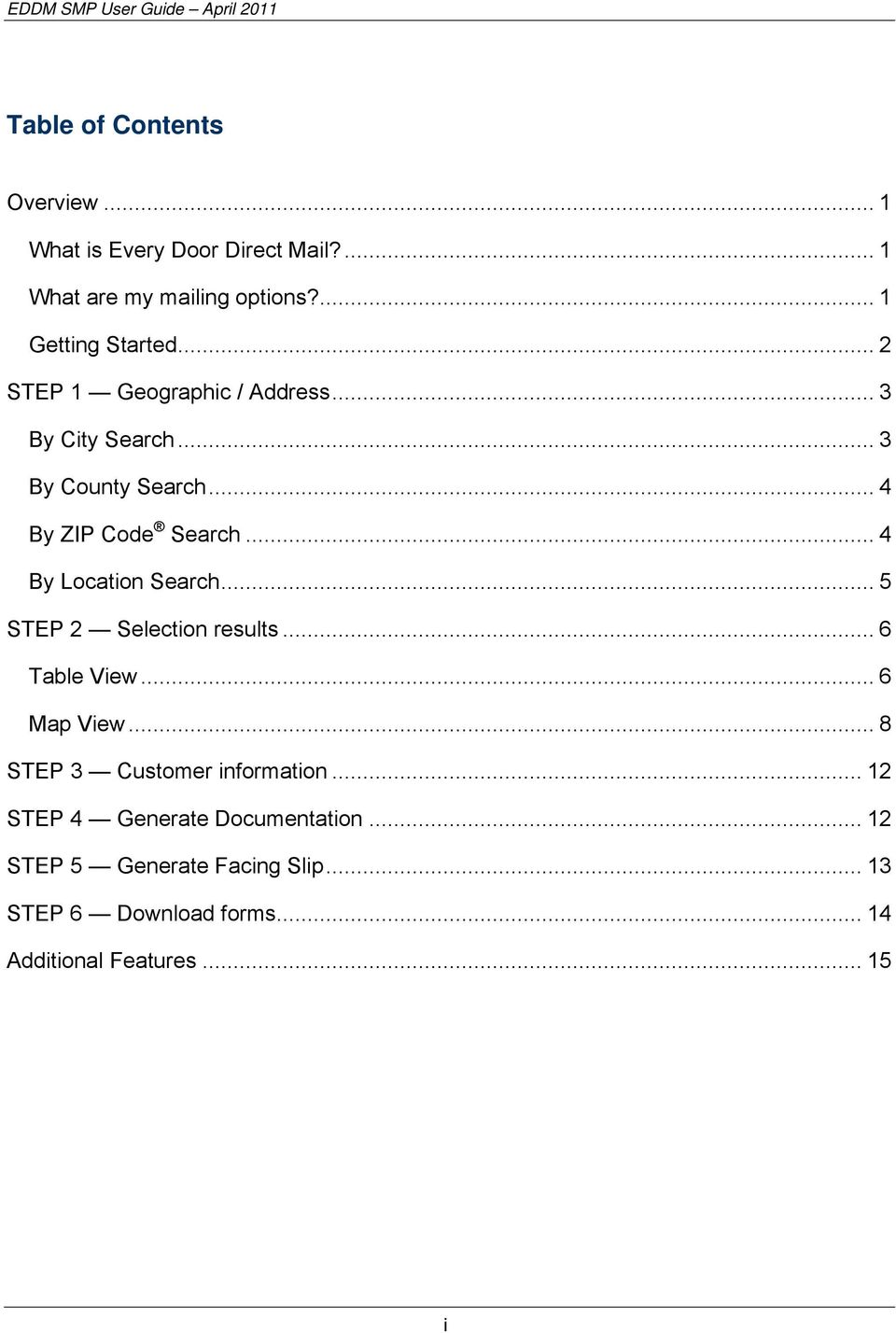
2 Table of Contents Overview... 1 What is Every Door Direct Mail?... 1 What are my mailing options?... 1 Getting Started... 2 STEP 1 Geographic / Address... 3 By City Search... 3 By County Search... 4 By ZIP Code Search... 4 By Location Search... 5 STEP 2 Selection results... 6 Table View... 6 Map View... 8 STEP 3 Customer information STEP 4 Generate Documentation STEP 5 Generate Facing Slip STEP 6 Download forms Additional Features i
3 OVERVIEW What is Every Door Direct Mail? Every Door Direct Mail enables you to extend your customer reach via saturation mail without the need for mailing lists, permits, and the associated fees. With Every Door Direct Mail, you create a saturation mailing without applying individual names and addresses to each mailpiece. You can use Every Door Direct Mail to: Target a location without an address list Send out local mailings or national campaigns Build more traffic Find new customers Increase revenue Reduce mail preparation costs Who can benefit from Every Door Direct Mail? Retailers Auto dealerships Arts organizations Restaurants Business services Attorneys Doctors Dry cleaners Contractors Realtors What are my mailing options? Every Door Direct Mail enables you to target your local neighborhood only or reach customers nationwide with Every Door Direct Mail. If you only plan to do smaller mailings (fewer than 5,000 pieces) and you only need to reach your local marketing area, perhaps Every Door Direct Mail Retail will work best for you. When preparing Every Door Direct Mail, the Simplified Mailing Process (SMP) allows you to identify which USPS mail routes to include in your target mailing area based on active deliveries per delivery route using the USPS Delivery Statistics. The intuitive interface of the EDDM application provides an option of preparing your mailing for submission at a local Post Office retail (EDDM Retail) unit or at a Bulk Mail Entry Unit (EDDM) for processing. 1

4 EDDM Retail - Saturation mailings are taken to the local Post Office retail unit for processing. Requirements: Customer must have a USPS business Customer Registration Identification (CRID) Mailing includes standard mail flats only Each mailpiece must be equal to or less than 3.3 ounces Each mailpiece must display special indicia or permit imprint Each retail unit submission must include a minimum of 200 mailpieces; but not exceed 5,000 mailpieces per day Mailing must be accompanied by PS Form 3587, which includes delivery statistics documentation Postage rate of 14.5 charged for each mailpiece Postage is paid in full at the retail unit Do you have a Customer Registration Identification provided by USPS? Yes No EDDM - Saturation mailings are prepared for processing at a Business Mail Entry Unit (BMEU). Requirements: Customer must have an active USPS Standard mail permit number Click here for more information Mailing includes Standard Mail flats, Periodical flats, Bound Printed Matter (BPM) flats, or irregular parcels Mailing must be accompanied by PS Form 3602-R, or the applicable mailing statement; in addition to Delivery Statistics File documentation Mailings entered at the BMEU and dropped at local Post Office must be accompanied by PS Form 8125 Getting Started EDDM Retail 1. Click Yes or No to indicate if you have a Customer Registration Identification provided by USPS. Yes = user answer accepted; user advances to Step 1 of EDDM Retail. No = a link is provided to the customer registration website; user is not advanced to Step 1 Note: A CRID number is not required to advance through the SMP application; however, a CRID is required when mailer is presented at the retail count. EDDM 1. Select EDDM by clicking on the image or the EDDM link. User advances to Step 1. 2

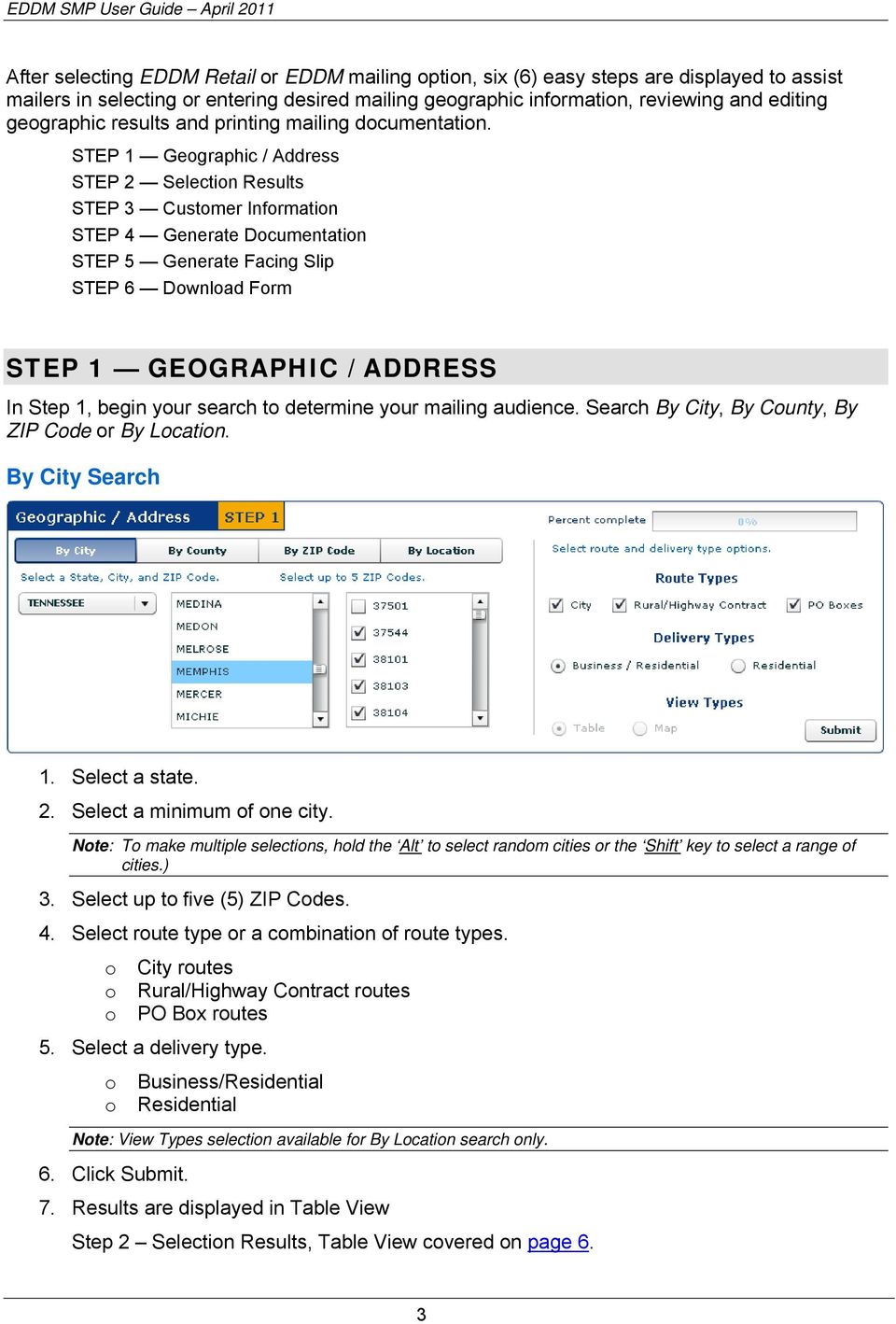
5 After selecting EDDM Retail or EDDM mailing option, six (6) easy steps are displayed to assist mailers in selecting or entering desired mailing geographic information, reviewing and editing geographic results and printing mailing documentation. STEP 1 Geographic / Address STEP 2 Selection Results STEP 3 Customer Information STEP 4 Generate Documentation STEP 5 Generate Facing Slip STEP 6 Download Form STEP 1 GEOGRAPHIC / ADDRESS In Step 1, begin your search to determine your mailing audience. Search By City, By County, By ZIP Code or By Location. By City Search 1. Select a state. 2. Select a minimum of one city. Note: To make multiple selections, hold the Alt to select random cities or the Shift key to select a range of cities.) 3. Select up to five (5) ZIP Codes. 4. Select route type or a combination of route types. o City routes o Rural/Highway Contract routes o PO Box routes 5. Select a delivery type. o Business/Residential o Residential Note: View Types selection available for By Location search only. 6. Click Submit. 7. Results are displayed in Table View Step 2 Selection Results, Table View covered on page 6. 3
6 By County Search 1. Select a state. 2. Select a county. 3. Select up to five (5) ZIP Codes. 4. Select route type or a combination of route types. o City routes o Rural/Highway Contract routes o PO Box routes 5. Select a delivery type. o Business/Residential o Residential Note: View Types selection available for By Location search only. 6. Click Submit. 7. Results are displayed in Table View Step 2 Selection Results, Table View covered on page 6. By ZIP Code Search 1. Enter a 5-digit ZIP Code. 2. Select route type or a combination of route types. o City routes o Rural/Highway Contract routes o PO Box routes 4

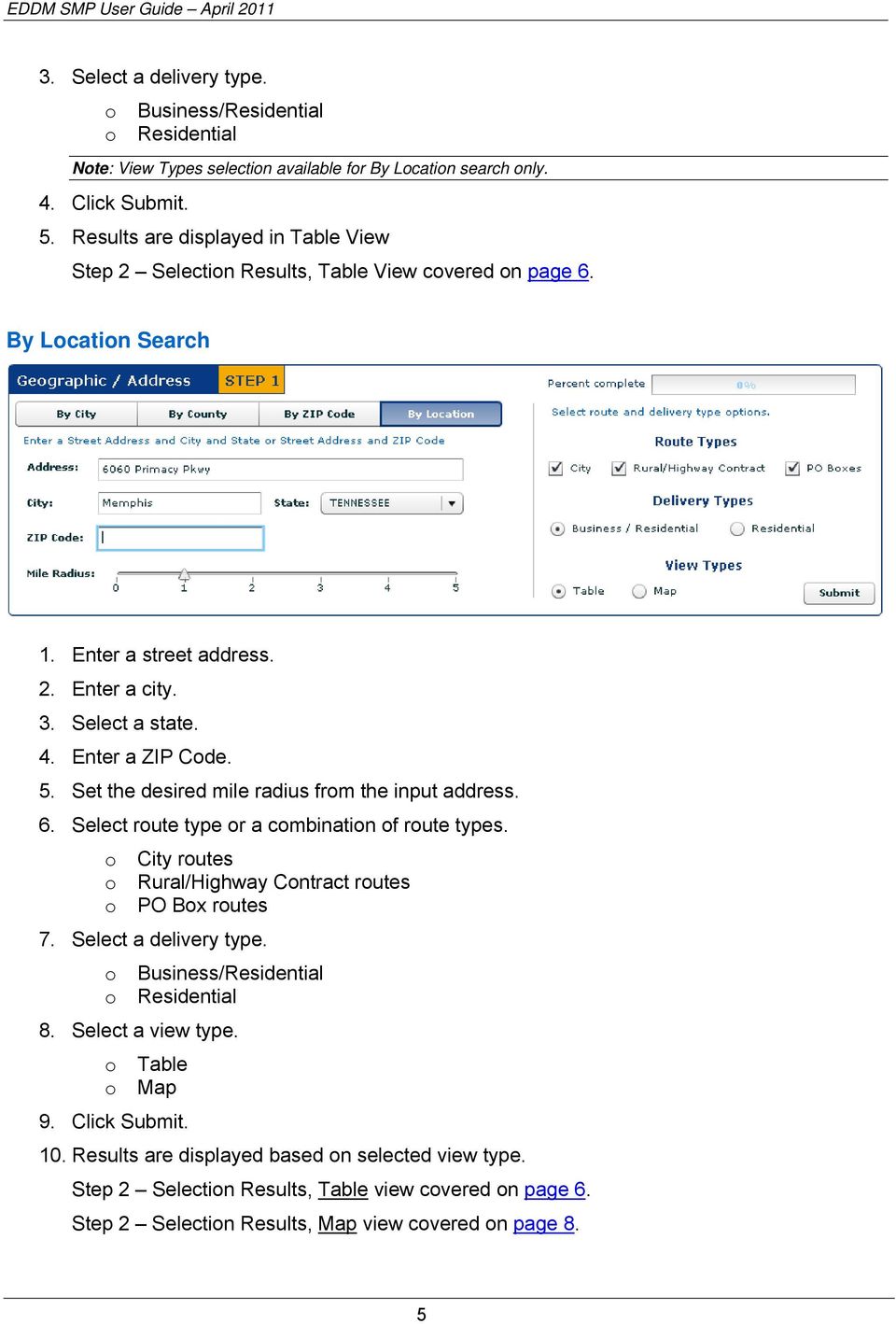
7 3. Select a delivery type. o Business/Residential o Residential Note: View Types selection available for By Location search only. 4. Click Submit. 5. Results are displayed in Table View Step 2 Selection Results, Table View covered on page 6. By Location Search 1. Enter a street address. 2. Enter a city. 3. Select a state. 4. Enter a ZIP Code. 5. Set the desired mile radius from the input address. 6. Select route type or a combination of route types. o City routes o Rural/Highway Contract routes o PO Box routes 7. Select a delivery type. o Business/Residential o Residential 8. Select a view type. o Table o Map 9. Click Submit. 10. Results are displayed based on selected view type. Step 2 Selection Results, Table view covered on page 6. Step 2 Selection Results, Map view covered on page 8. 5
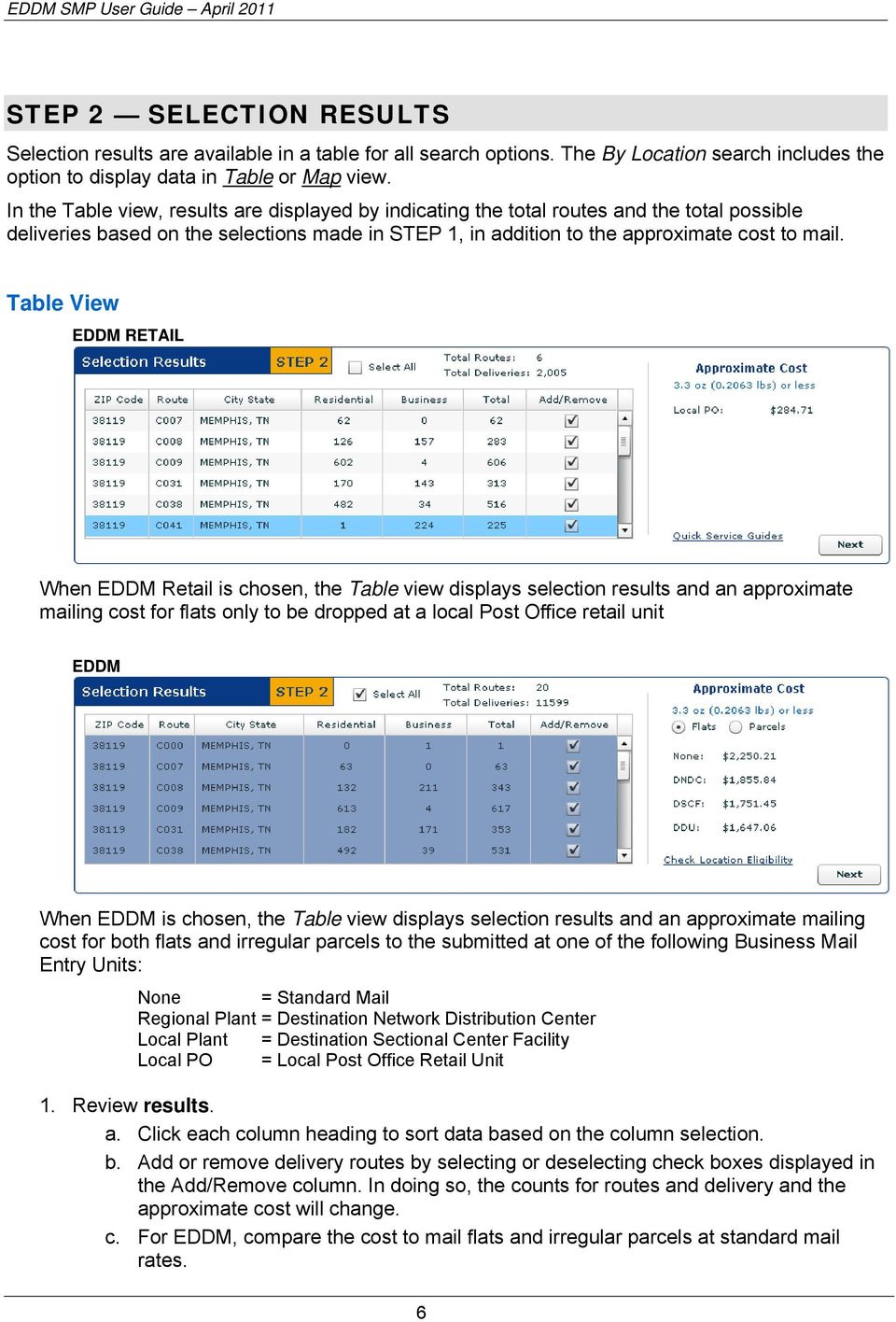
8 STEP 2 SELECTION RESULTS Selection results are available in a table for all search options. The By Location search includes the option to display data in Table or Map view. In the Table view, results are displayed by indicating the total routes and the total possible deliveries based on the selections made in STEP 1, in addition to the approximate cost to mail. Table View EDDM RETAIL When EDDM Retail is chosen, the Table view displays selection results and an approximate mailing cost for flats only to be dropped at a local Post Office retail unit EDDM When EDDM is chosen, the Table view displays selection results and an approximate mailing cost for both flats and irregular parcels to the submitted at one of the following Business Mail Entry Units: None = Standard Mail Regional Plant = Destination Network Distribution Center Local Plant = Destination Sectional Center Facility Local PO = Local Post Office Retail Unit 1. Review results. a. Click each column heading to sort data based on the column selection. b. Add or remove delivery routes by selecting or deselecting check boxes displayed in the Add/Remove column. In doing so, the counts for routes and delivery and the approximate cost will change. c. For EDDM, compare the cost to mail flats and irregular parcels at standard mail rates. 6
9 d. The Check Location Eligibility links provides a list of Quick Service Guides and Service Destination Entry Information to assist in mail preparation. Quick Service Guides Standard Mail Carrier Route Flats Standard Mail Irregular Parcels Service Area Destination Entry Information (DNDC. DSCF, DDU) Standard Mail Carrier Route Flats Standard Mail Irregular Parcels 2. Click the Next button. For EDDM Retail mailings, route selections are verified to ensure the requirement of more than 200 and less than 5,000 delivery points per retail unit is met. a. If qualifications are met, users will proceed to remaining steps for EDDM Retail. b. If qualifications are not met, a message is displayed. Yes = continue with selected routes and process as EDDM with a permit No = return to interface to modify selections for EDDM Retail compliance. c. If only a portion of the selected routes qualify, the following message appears listing the deliveries that meet retail qualifications along with total routes, total deliveries and approximate mailing cost: EDDM Retail = continue EDDM Retail with qualifying routes only EDDM = switch to EDDM with all routes selected in Step 2 7
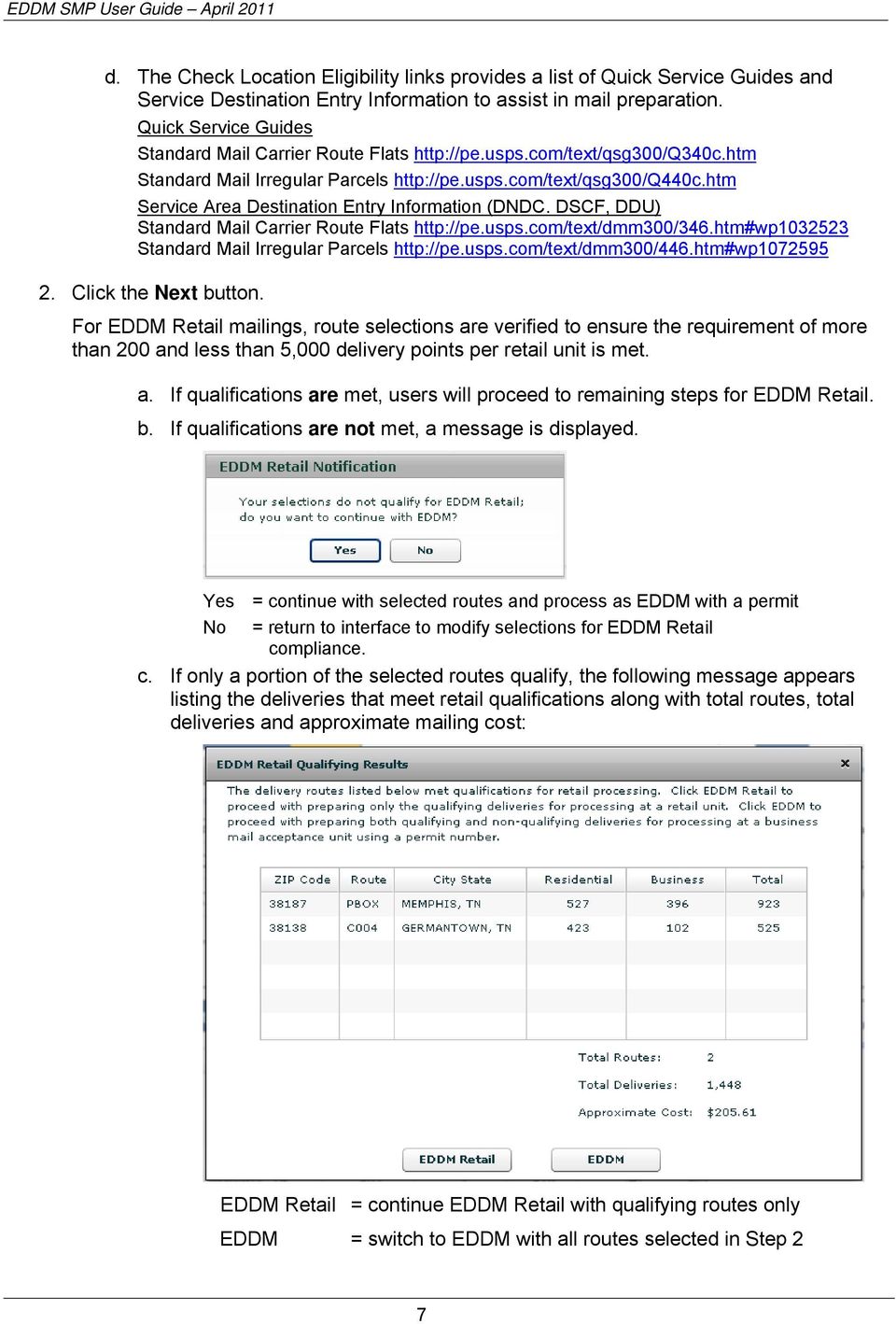
10 Map View EDDM RETAIL MAP 1 8
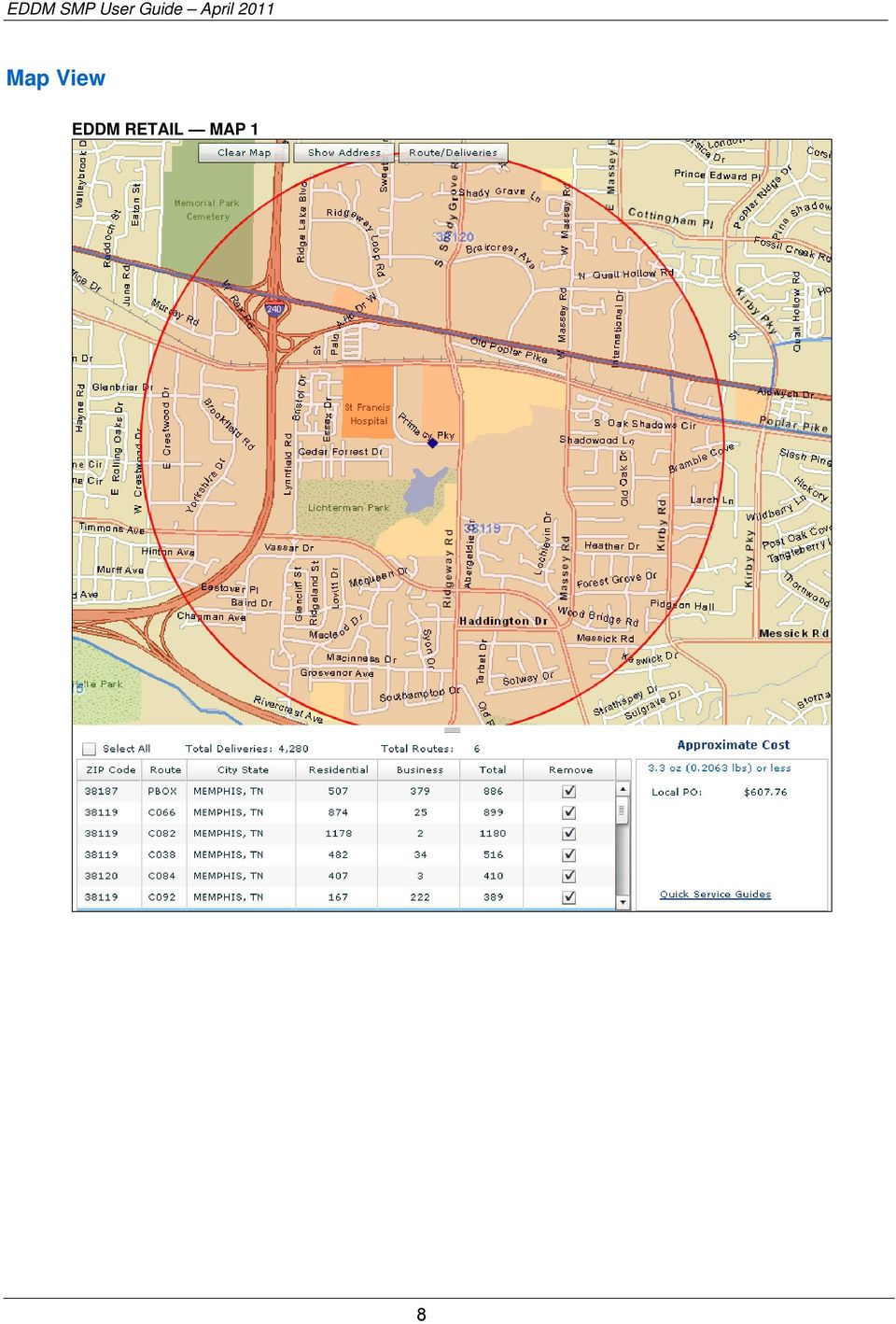
11 EDDM MAP 1 Using the By Location search, when either EDDM Retail or EDDM is chosen, the Map view displays a map and a table along with the approximate mailing cost. The shaded circle on the map represents the mile radius with the input address as the center point (centroid). Like the Table view, the table displayed below the map identifies selection results and an approximate mailing cost for flats to be dropped at a local Post Office retail unit (See EDDM Retail Map 1) or for flats and irregular parcels to be dropped at a Business Mail Entry Unit (See EDDM Map 1) Pointing to each route listed in the table outlines the route on the map showing its exact location within the radius. 1. Review results. a. Add or remove delivery routes by selecting or deselecting check boxes displayed in the Add/Remove column. In doing so, the counts for routes and delivery and the approximate cost will change. b. For EDDM, compare the cost to mail flats and irregular parcels at standard mail rate. 9

12 c. The Check Location Eligibility links provides a list of Quick Service Guides and Service Destination Entry Information to assist in mail preparation. Quick Service Guides Standard Mail Carrier Route Flats Standard Mail Irregular Parcels Service Area Destination Entry Information (DNDC. DSCF, DDU) Standard Mail Carrier Route Flats Standard Mail Irregular Parcels To modify the display, use the Clear Map, Show Address or Route/Deliveries buttons: Clear Map Removes the shaded radius and the data from the table. Show Address Modify input and radius Click Find to apply edits (map and table refreshes) Click Cancel to discard Route/Deliveries Modify Route Type selections Modify Delivery Type selections 2. Click the Next button. For EDDM Retail mailings, route selections are verified to ensure the requirement of more than 200 and less than 5,000 delivery points per retail unit is met. a. If qualifications are met, users will proceed to remaining steps for EDDM Retail. b. If qualifications are not met, a message is displayed. 10

13 Yes = continue with selected routes and process as EDDM with a permit No = return to interface to modify selections for EDDM Retail compliance. c. If only a portion of the selected routes qualify, the following message appears listing the deliveries that meet retail qualifications, total routes, total deliveries and approximate mailing cost: EDDM Retail = continue EDDM Retail with qualifying routes only EDDM = switch to EDDM with all routes selected in Step 2 (permit required) 11

14 STEP 3 CUSTOMER INFORMATION Step 3 is used to enter customer information and to pre-populate portions of PS Form 3587 (Retail) or portions of PS Form 3602-R (EDDM) in addition to the facing slips for each mailing type. EDDM Retail EDDM 3. Enter the customer information EDDM Retail a. Enter the Company/Mailer Name b. Enter the Post Office of Mailing EDDM c. Enter the Company/Mailer Name d. Enter the Post Office of Mailing e. Select a permit type Permit Imprint Precanceled Stamps Metered f. Enter a permit number STEP 4 GENERATE DOCUMENTATION Step 4 provides a link to generate the Retail Post Office Listing (EDDM Retail) or the Every Door Direct Mail Documentation for PS Form 3602-R (EDDM). EDDM Retail EDDM 12

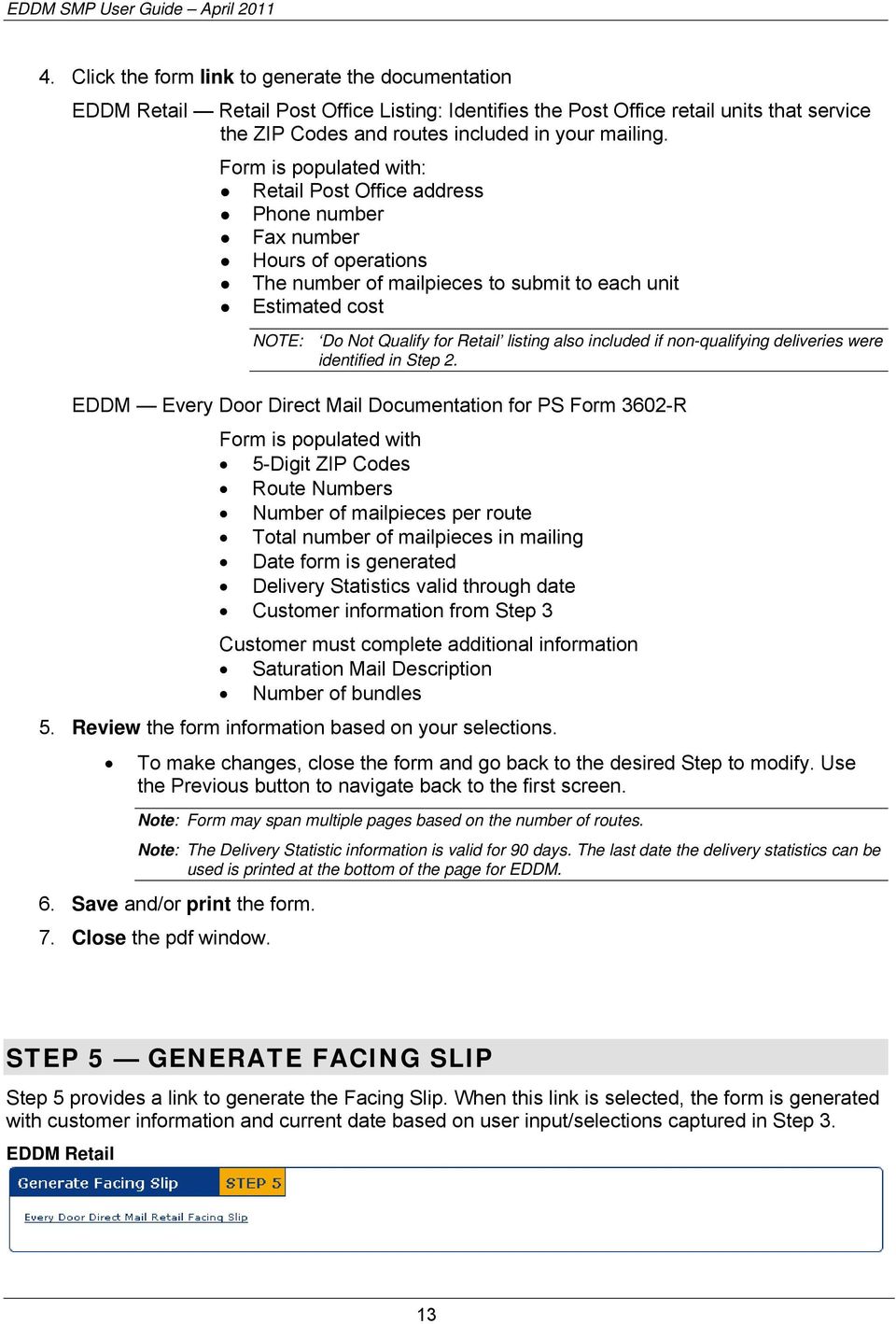
15 4. Click the form link to generate the documentation EDDM Retail Retail Post Office Listing: Identifies the Post Office retail units that service the ZIP Codes and routes included in your mailing. Form is populated with: Retail Post Office address Phone number Fax number Hours of operations The number of mailpieces to submit to each unit Estimated cost NOTE: Do Not Qualify for Retail listing also included if non-qualifying deliveries were identified in Step 2. EDDM Every Door Direct Mail Documentation for PS Form 3602-R Form is populated with 5-Digit ZIP Codes Route Numbers Number of mailpieces per route Total number of mailpieces in mailing Date form is generated Delivery Statistics valid through date Customer information from Step 3 Customer must complete additional information Saturation Mail Description Number of bundles 5. Review the form information based on your selections. To make changes, close the form and go back to the desired Step to modify. Use the Previous button to navigate back to the first screen. Note: Form may span multiple pages based on the number of routes. Note: The Delivery Statistic information is valid for 90 days. The last date the delivery statistics can be used is printed at the bottom of the page for EDDM. 6. Save and/or print the form. 7. Close the pdf window. STEP 5 GENERATE FACING SLIP Step 5 provides a link to generate the Facing Slip. When this link is selected, the form is generated with customer information and current date based on user input/selections captured in Step 3. EDDM Retail 13
16 EDDM 8. Click the link. Form is populated with 5-Digit ZIP Code Delivery Type Date form is generated Customer information from Step 3 Customer must complete additional information Route Number Total Number of Mailpieces per Bundle Total Number of Bundles Do Not Deliver Address information and Saturation Mail Description 9. Review the form information based on your selections. o To make changes, close the form and go back to the desired Step to modify. Use the Previous button to navigate back to the first screen. 10. Save and/or Print the form. 11. Close the pdf window. STEP 6 DOWNLOAD FORMS Step 6 provides a link to the Postage Statements forms and other accompanying documentation. EDDM Retail EDDM 12. Click each link to view and download the appropriate forms. 14

17 EDDM Retail EDDM PS Form 3587, Every Door Direct Mail Retail Form is populated with unit price, total mailpieces and total postal Every Door Direct Mail Retail Manifest Form is populated with 5-digit ZIP Codes, routes and total mailpieces PS Form 3602-R, Postage Statement Standard Mail PS Form 8125, Plant-Verified Drop Shipment (PVDS) Verification and Clearance ADDITIONAL FEATURES Located at the top of each page, a Percent Complete bar is provided to see and monitor completion. Located at the bottom of the Map view and page 2: A previous button is provided allowing users to navigate back to the previous page. The Exit button closes the SMP application and returns user to Note. This button is active after user click the links for Every Door Direct Mail Documentation for PS Form 3602-R and the Every Door Direct Mail Facing Slip. 15

Simplified Mailing Process // User Guide. Every Door Direct Mail
 2 V. Simplified Mailing Process // User Guide Every Door Direct Mail Table of Contents Overview What is Every Door Direct Mail? 1 What are My Mailing Options 2 Registration New User Registration 3 Every
Simplified Mailing Process // User Guide. Every Door Direct Mail
 3 V. Simplified Mailing Process // User Guide Every Door Direct Mail Table of Contents Overview What is Every Door Direct Mail service? 3 What are My Mailing Options 4 Registration New User Registration
Simplified Mailing Process // User Guide. Every Door Direct Mail
 2 V. Simplified Mailing Process // User Guide Every Door Direct Mail Table of Contents Overview What is Every Door Direct Mail? 1 What are My Mailing Options 2 Registration New User Registration 3 Every
Every Door Direct Mail. Simplified Mailing Process // User Guide
 4 V. Every Door Direct Mail Simplified Mailing Process // User Guide Table of Contents Overview What is Every Door Direct Mail Service? What Are My Mailing Options? 3 3 4 Registration New User Registration
EVERY DOOR DIRECT MAIL Training Presentation
 Training Presentation EDDM Retail Getting Started Key points that should be considered: Build your brand (use pictures, colors, limit words) Consider your marketing budget Use our postal EDDM program to
of Mailing Agent (If other than permit holder) Mailer's Mailing Date SSF Transaction # Weight of a Single Piece 0. pounds Periodicals Media Mail
 United States Postal Service Statement - Standard Mail Post Office: Note Mail Arrival Date & Time (Do Not Round-Stamp) Mailing Mailer Permit Holder's Name and Address and Email Address, if Any CAPS Cust.
of Mailing Agent (If other than permit holder) Mailer's Mailing Date SSF Transaction # Weight of a Single Piece 0. pounds Periodicals Media Mail
 United States Postal Service Statement - Nonprofit Standard Mail Post Office: Note Mail Arrival Date & Time (Do Not Round-Stamp) Mailing Mailer Permit Holder's Name and Address and Email Address, if Any
ailing List A M e l i s s a D a t a W h i t e Pa p e r Saturation Mail: A Best Kept Secret No More
 ailing List A M e l i s s a D a t a W h i t e Pa p e r Saturation Mail: A Best Kept Secret No More Saturation Mail: A Best-Kept Secret No More As postal rates continue to rise every year, mailers must
A Melissa Data White Paper. Saturation Mail: The Perfect Low-Cost Way to Reach More Customers
 A Melissa Data White Paper Saturation Mail: The Perfect Low-Cost Way to Reach More Customers g 2 If you own a local business and are looking for an inexpensive way to increase your sales, or plan to expand
Guide to USPS Postal Discounts
 Guide to USPS Postal Discounts White Paper Discover a New Business Opportunity Contents Introduction... 1 Planning Your Mailing... 2 Standard Mail... 6 First-Class Mail... 15 Periodicals... 20 Using Bulk
Mailing Made Easy for Small Business
 Mail Entry & Payment Technologies Mailing Made Easy for Small Business Intelligent Mail for Small Business (IMsb) Intelligent Mail for Small Business Tool The IMsb tool is a new, free online tool specifically
Name and Address of Mailing Agent (If other than permit holder) Mailer's Mailing Date. Weight of a Single Piece. . pounds
 United States Postal Service Statement - Package Services (Bound Printed Matter, Library Mail, Media Mail) and Parcel Select Use this form for all Package Services. Only Library Mail and Media Mail may
Product Samples & Picture Permit Promotions
 Product Samples & Picture Permit Promotions 1 2013 Promotions 2 Product Samples Promotion Overview Upfront 5% postage discount on qualifying mail that contain product samples Eligible Mail Classes Standard
Premium Forwarding Service (PFS ) Application
 Instructions PLEASE READ CAREFULLY BEFORE YOU COMPLETE THIS FORM. Individual Entire Household Premium Forwarding Service (PFS ) Application Instructions for completing this form are printed on the reverse
USPS Pricing and Extra Services Overview Effective May 31, 2015
 USPS Pricing and Extra Services Overview Effective May 31, 2015 Market Dominant Price Change Competitive Price Change Extra Services Simplification Value Added Services Return Simplification 2 Total average
Premium Forwarding Service Residential (PFS-Residential ) Application
 Premium Forwarding Service Residential (PFS-Residential ) Application Instructions PLEASE READ CAREFULLY BEFORE YOU COMPLETE THIS FORM. Instructions for completing this form are printed on the reverse
Find the customers that matter most. With Every Door Direct Mail service, you can reach every home, every address, every time.
 Find the customers that matter most. With Every Door Direct Mail service, you can reach every home, every address, every time. According to BizReport 2010, up to 85% of a store s customers come from a
Official Election Mail Training Webinar
 Official Election Mail Training Webinar Agenda Official Election Mail Preparation procedures for Official Election Mail Steps for Successful Mailing Resources 2 Agenda Official Election Mail Definition
Proposed 2013 Postal Changes and How They Could Affect Your Organization. Akron/Canton PCC Seminar 11/1/12
 Proposed 2013 Postal Changes and How They Could Affect Your Organization Akron/Canton PCC Seminar 11/1/12 On the Move The National Customer Support Center (NCSC) is moving its office location. Starting
Full-Service Webinar Frequently Asked Questions. Table of Contents Basic vs. Full Service...2. Full Service related...3. Full Service Discounts...
 Table of Contents Basic vs. Full Service...2 Full Service related...3 Full Service Discounts...4 Full Service Approved Vendors...5 Full Service Permits...5 Full Service Reports...6 Barcodes...9 Mailing
Welcome to the Political Campaign Mail and Official Election Mail webinar.
 Welcome to the Political Campaign Mail and Official Election Mail webinar. 1 Today s Political Campaign Mail and Official Election Mail webinar will cover the latest information for the 2014 Election Mail
Dos and Don ts of Direct Mail
 Dos and Don ts of Direct Mail Do Consider Bulk Mailings for the following reasons: Bulk postage rates are much lower than straight 1st class rates; which saves you money. Mailing in bulk requires a permit,
PostalOne! Release Notes R44.0.0.0 August 2016 Version 2 June 30, 2016
 PostalOne! Release Notes R44.0.0.0 August 2016 Version 2 June 30, 2016 Release Notes R44 Version 2 6/30/2016 Page i of iii The Release Numbers USPS systems are: 44.0.0.0 for PostalOne! 34.0.0.0 for FAST
USPS Postal Rates AN EVERYDAY MAILING REFERENCE. Your guide to postage rates and common types of mail. Effective April 10, 2016
 USPS Postal Rates AN EVERYDAY MAILING REFERENCE Your guide to postage rates and common types of mail Includes the April 2016 USPS Rate Decrease Effective April 10, 2016 FP Mailing Solutions FP-USA.COM
CONTENTS. Program Requirements 2016 MOBILE SHOPPING PROMOTION PROGRAM REQUIREMENTS I. BACKGROUND AND PROGRAM DESCRIPTION 2
 Program Requirements 2016 MOBILE SHOPPING PROMOTION CONTENTS I. BACKGROUND AND PROGRAM DESCRIPTION 2 II. PROGRAM PARAMETERS.2 III. ELIGIBILITY REQUIREMENTS 3 A. MAILPIECE CONTENT REQUIREMENTS 3 B. REGISTRATION
Merchant Returns Service
 Merchant Returns Service User s Guide Document Version 2.0 2015 Version History Version Date of Summary of Additions Addition 1.0 08/07/2014 Document created. 2.0 2/21/2015 Updated based on changes from
How To Print Mail From The Post Office
 PRINTING AND MAILING, INC. Understanding Mailing UPDATED January 23, 2014 www.successprint.com www.successprint.com Let s Be Friends! 10 Pearl Street Norwalk, CT 06850 tel 203-847-1112 fax 203-846-2770
INTELLIGENT MAIL FOR SMALL BUSINESS MAILERS (IM sb) USER GUIDE
 INTELLIGENT MAIL FOR SMALL BUSINESS MAILERS (IM sb) USER GUIDE FEBRUARY 2015 Table of Contents OVERVIEW... 3 GETTING STARTED... 3 Prerequisites... 3 Database formats allowed:... 5 Business Customer Gateway...
How to prepare Saturation Mail with. How to Guide 2011
 How to prepare Saturation Mail with How to Guide 2011 How to Prepare Saturation Mail using MAILERS+4 Table of Contents Welcome to Saturation Mailing with MAILERS+4...1 Step 1 What You Need to Get Started...5
EDDM. BusinessEtc Marketing Ideas & Solutions 239-822-5157 1-844-268-2085 Armando Nargi www.businessetc.com
 EDDM BusinessEtc Marketing Ideas & Solutions 239-822-5157 1-844-268-2085 Armando Nargi www.businessetc.com Find Potential Customers Planning a marketing mailing? Use the online mapping tool is designed
SCANNING THE USPS SCAN BARCODE
 U.S.P.S. STANDARD OPERATING PROCEDURE SCANNING THE USPS SCAN BARCODE OVERVIEW: Printed on PS Form 8125, Plant-Verified Drop Shipment (PVDS) Verification and Clearance, the USPS Scan barcode will be used
Helpful Mailing Tips
 Helpful Mailing Tips Mail Piece Specifications & Characteristics This document is an overview only. For the specific DMM (Domestic Mail Manual) standards, consult the DMM. This is not meant to be used
Guide to the Manifest Mailing System
 Guide to the Manifest Mailing System Publication 401 June 2002 Transmittal Letter A. Explanation. This publication describes the requirements for using a Manifest Mailing System. B. Availability. Nonpostal
OVERVIEW... 1 L000 GENERAL USE...
 TABLE OF CONTENTS OVERVIEW... 1 L000 GENERAL USE... 1 L001: 5-DIGIT SCHEME PERIODICALS, STANDARD MAIL, AND PACKAGE SERVICES FLATS AND IRREGULAR PARCELS... 1 L002: 3-DIGIT ZIP CODE PREFIX MATRIX... 2 L003:
MDA CUSTOMER SERVICE HELP DESK FREQUENTLY ASKED QUESTIONS (FAQS)
 MDA CUSTOMER SERVICE HELP DESK FREQUENTLY ASKED QUESTIONS (FAQS) Revised July 29, 2014 1 MDA CUSTOMER SERVICE HELP DESK GENERAL INFORMATION... 3 1. MDA CUSTOMER SERVICE HELP DESK CONTACT INFORMATION &
333 Prices and Eligibility. 2.0 Content Standards for First-Class Mail Flats. 1.0 Prices and Fees for First-Class Mail
 333333.2.1 333 Prices and Eligibility Overview 1.0 Prices and Fees for First-Class Mail 2.0 Content Standards for First-Class Mail Flats 3.0 Eligibility Standards for First-Class Mail Flats 4.0 Additional
333 Prices and Eligibility. 1.0 Prices and Fees for First-Class Mail. 1.0 Prices and Fees for First-Class Mail
 333333.1.6 333 Prices and Eligibility Overview 1.0 Prices and Fees for First-Class Mail 2.0 Content Standards for First-Class Mail Flats 3.0 Eligibility Standards for First-Class Mail Flats 4.0 Additional
233 Rates and Eligibility. 1.0 Rates and Fees for First-Class Mail
 233233.1.5 233 Rates and Eligibility Overview 1.0 Rates and Fees for First-Class Mail 2.0 Content Standards for First-Class Mail Letters 3.0 Basic Standards for First-Class Mail Letters 4.0 Additional
Business Customer Gateway. Business Customer Gateway 1
 Business Customer Gateway Business Customer Gateway 1 Table of Contents Highlights Basics 5 Login and New Accounts 8 Your Account Settings 18 Business Services 31 Accounts 38 Design & Prepare 43 Mail &
Mailing Services. Made Easy. Providing the information and tools for your mail pieces from start to finish.
 Mailing Services Made Easy. Guide Book Providing the information and tools for your mail pieces from start to finish. Mailing Services Made Easy. Table of Contents Smart, Dynamic Mailings.... 2 Classes
Getting Started with the Intelligent Mail Barcode
 August 01, 2012 CUSTOMER COLLATERAL SV62591 Rev. B Getting Started with the Intelligent Mail Barcode Applies to: SmartMailer Purpose This document provides instructions on how to start using the Intelligent
Direct Mail Tips #3 Classes of Mail, Prices & Postage Payment
 Direct Mail Tips #3 Classes of Mail, Prices & Postage Payment First-Class Mail **Delivery time: Guaranteed in 1 3 business days Minimum Weight: None. Maximum Weight: 13 ounces (over 13 ounces, First-Class
Postage Guide. Action, Inc. Effective January 22, 2012. Includes information for: Mailpiece Layout... Page 8. Envelope Sizes...
 Action, Inc. Postage Guide Includes information for: First-Class Mail... Pages 2-3 Standard Mail... Pages 4-5 Nonprofit Mail... Pages 6-7 Mailpiece Layout... Page 8 Move Update... Page 9 Envelope Sizes...
2015 EARNED VALUE PROMOTION
 Program Requirements 2015 EARNED VALUE PROMOTION CONTENTS I. Background and Program Description... 2 II. Program Parameters... 2 III. Registration Requirements... 2 IV. Mailing Requirements... 3 V. Earned
Shipping, Receiving, and Mail Services Procedure
 Shipping, Receiving, and Mail Services Procedure Procedure Number Effective Date 5.1.3P TBD 1.0 PURPOSE The functions of Mail Services include receiving, processing, and delivering incoming, outgoing,
Revisions to Publication 199, Intelligent Mail Package Barcode. (IMpb) Implementation Guide for: Confirmation Services and
 Revisions to Publication 199, Intelligent Mail Package Barcode (IMpb) Implementation Guide for: Confirmation Services and Electronic Verification System (evs) Mailers Supplement for Bulk Proof of Delivery
USPS POSTAGE RATES & FEES TABLE OF CONTENTS
 USPS POSTAGE RATES & FEES TABLE OF CONTENTS First Class Mail... Standard Mail Regular... Standard Mail Nonprofit... NOTE: taken from the official USPS web site: pe.usps.com, effective May 4, 007 Rates
Express Mail Manifesting System Business and Technical Guide
 Express Mail Manifesting System Business and Technical Guide Publication 97 January 2012 Transmittal Letter A. Explanation. This publication contains information for customers who are interested in participating
INTELLIGENT MAIL BARCODES FREQUENTLY ASKED QUESTIONS:
 INTELLIGENT MAIL BARCODES FREQUENTLY ASKED QUESTIONS: General What is the Intelligent Mail barcode? The Intelligent Mail barcode, formerly referred to as the 4-State Customer barcode, is a new Postal Service
FOR FURTHER INFORMATION CONTACT: Karen Key at 202-268-7492 or Richard Daigle at 202-268-6392.
 POSTAL SERVICE 39 CFR Part 111 Adult Signature Services AGENCY: Postal Service. ACTION: Final rule. SUMMARY: The Postal Service is revising the Mailing Standards of the United States Postal Service, Domestic
Index A B C D E F G H I K L M N O P Q R S T U V W Z
 A B C D E F G H I K L M N O P Q R S T U V W Z A absentee balloting materials, 703.8.0 accelerated reply mail, 508.5.8 additional entry for Periodicals, 707.30.0 authorization, 707.30.2 cancellation, 707.30.2
1 Personnel Management... 1
 Contents Contents 1 Personnel Management............................................... 1 11 Overview......................................................................... 1 12 Business Mail Entry Staff
RMS Postal Workout Program
 RMS Postal Workout Program Workout # 5B Barcodes Intelligent Mail Barcode Data Updated - 2013 Response Marketing Services Knowledge That Delivers Postal Workout 1. RMS Introduction & Processes 2. Mail
FLAT MAIL BUNDLE VISIBILITY
 FLAT MAIL BUNDLE VISIBILITY January 2015 1 THREE-PRONGED APPROACH TO EXPANDING FLAT BUNDLE VISIBILITY Full Service Bundle Visibility Saturation Mail Bundle Visibility Large National/Regional Mailers* *must
ULTIMATE GUIDE TO THE 2012 USPS RATE INCREASE
 ULTIMATE GUIDE TO THE 2012 USPS postage RATE INCREASE Effective January 22, 2012, the U.S. Postal Service will raise postage rates for letter mail classes by an average of 2.1% and shipping services by
Illustration 1: Purchase Order Screen
 Welcome to the Alstom Power Online Freight Routing Guide! This website provides Alstom suppliers a secure, efficient and accurate way to generate LTL and Parcel shipping documents, as well as automatically
Getting Started: Full Service For New Users. National PCC Day September 18, 2013
 Getting Started: Full Service For New Users National PCC Day September 18, 2013 1 XYZ CORPORATION INTERNATIONAL FALLS, MN What is Intelligent Mail Service? Intelligent Mail uses information-rich barcodes
UNITED STATES DEPARTMENT OF AGRICULTURE FOOD SAFETY AND INSPECTION SERVICE WASHINGTON, DC MAIL MANAGEMENT PROGRAM
 UNITED STATES DEPARTMENT OF AGRICULTURE FOOD SAFETY AND INSPECTION SERVICE WASHINGTON, DC FSIS DIRECTIVE 2660.1 Revision 4 8/25/14 CHAPTER I GENERAL I. PURPOSE MAIL MANAGEMENT PROGRAM This directive provides
ACCUZIP REST API CALLS. 100% Cloud Based DQ and Mail Processing
 ACCUZIP REST API CALLS 100% Cloud Based DQ and Mail Processing Abstract Upload Name and Address Files for CASS Certification, NCOALink Certification, Duplicate Detection, Postal Presorting, USPS Documentation
FedEx Billing Online User Guide
 FedEx Billing Online User Guide Introduction FedEx Billing Online allows you to efficiently manage and pay your FedEx invoices online. It s free, easy and secure. FedEx Billing Online helps you streamline
RATE POSTAGE INCREASE 2013 USPS GUIDE
 2013 USPS POSTAGE RATE INCREASE GUIDE On January 27, 2013, the U.S. Postal Service will implement a postage rate increase for all mail classes including First-Class Mail, Priority Mail and Express Mail
State Mail Services: An Introduction. 1910 Darbytown Road Richmond VA 23231 Mail Stop Code: 194-16
 State Mail Services: An Introduction 1910 Darbytown Road Richmond VA 23231 Mail Stop Code: 194-16 16 What is SMS State Mail Services (SMS) is a unit of the Department of General Services that provides
Mail 101. What s new with the Postal Service? 4/9/12. Department Mail CLASS OBJECTIVES:
 Mail 101 CLASS OBJECTIVES: USPS financial situation and the impact it will have Your departments address and how it impacts your mail delivery USPS Classifications explained A review of your choices regarding
FREQUENTLY ASKED QUESTIONS (FAQs) Informed Visibility (IV) Internal Service Performance Measurement (SPM) Sampling
 FREQUENTLY ASKED QUESTIONS (FAQs) Informed Visibility (IV) Internal Service Performance Measurement (SPM) Sampling General 1. What is Informed Visibility (IV)? IV is a key component of the Delivering Results,
POSTAGE RATE INCREASE GUIDE 2014 USPS
 2014 USPS POSTAGE RATE INCREASE GUIDE On January 26, 2014, the U.S. Postal Service will implement a postage rate increase for all mail classes including First-Class Mail, Priority Mail and Priority Mail
FAST TEM Guide for Mail.XML
 FAST TEM Guide for Mail.XML Version 3.5 December 12, 2011 Page 1 of 30 Revision History Date Reason For Changes Version 12/2/2011 Updated the language on Page 4, Activation Process Details Modified language
New Jersey Judiciary. Administrative Office of the Courts. Automated Trial Court Systems Unit JUDICIARY ELECTRONIC FILING IMAGING SYSTEM J E F I S
 New Jersey Judiciary Administrative Office of the Courts Automated Trial Court Systems Unit JUDICIARY ELECTRONIC FILING IMAGING SYSTEM J E F I S ATTORNEY MANUAL E-FILING DC DOCUMENTS USING THE JEFIS ATTORNEY
Understanding the April 2016 U.S. Postal Service Price Change
 Understanding the April 2016 U.S. Postal Service Price Change Each year at least once per year the U.S. Postal Service (USPS ) changes rates across their various mail classes and extra services. Often
Program Registration External Online Enrollment User Guide
 Program Registration External Online Enrollment User Guide May 17, 2015 Version: 3.7 Page 1 of 102 Table of Contents Change History... 12 1. Introduction... 13 1.1. Purpose of Technical Specifications...
Hold For Pickup Webinar. Start Time: 11:00 AM ET. To listen to a recording of this presentation: Click here. United States Postal Service
 Hold For Pickup Webinar United States Postal Service Start Time: 11:00 AM ET Patricia Harris Product Development Specialist, Sr Shipping Products and Services To listen to a recording of this presentation:
509509.1.5. 509 Other Services. 1.0 Address Information System Services. Other Services: Address Information System Products
 509509.1.5 Other Services: Address Information System Products 509 Other Services Overview 1.0 Address Information System Services 2.0 Nonpostal Services 1.0 Address Information System Services 1.1 General
Intelligent Mail Barcodes and Placard Solu4ons
 Intelligent Mail Barcodes and Placard Solu4ons Lance Bell USPS 2014 National Postal Forum Washington, DC Welcome to Intelligent Male 2 1 Intelligent Mail Barcodes and Placard Solu;ons This workshop will
Automated Business Reply Mail (ABRM) Tool Instructional Process Guide
 Automated Business Reply Mail (ABRM) Tool Instructional Process Guide The USPS Automated Business Reply Mail (ABRM) application is an online tool that allows mailers to create artwork with an Intelligent
507 Mailer Services. 1.0 Treatment of Mail. Additional Services: Treatment of Mail 507.1.2.1. 1.0 Treatment of Mail. Overview
 Additional Services: Treatment of Mail 507 507.1.2.1 507 Mailer Services Overview 1.0 Treatment of Mail 2.0 Forwarding 3.0 Premium Forwarding Services 4.0 Address Correction Services 5.0 Package Intercept
Electronic Verification System (evs ) Business and Technical Guide
 Electronic Verification System (evs ) Business and Technical Guide January 2016 This page intentionally left blank. Electronic Verification System (evs ) Business and Technical Guide Publication 205 January
How To Get Started With Every Door Direct Mail. Table Of Contents
 How To Get Started With Every Door Direct Mail This guide is designed to help you to get started with every door direct mail. The United States Postal Service (USPS) provides every door direct mail (EDDM),
Mail Services. Internal Procedure for Bulk Mailings
 Mail Services Internal Procedure for Bulk Mailings PURPOSE Bulk Mailings provide a substantial cost savings for UDM postage; therefore, Mail Services encourages the use of the Bulk Mailing Permit whenever
Return Receipt - Webinar Start Time: 11:00 AM ET
 Return Receipt - Webinar Start Time: 11:00 AM ET United States Postal Service Alia McPhail Product Development Specialist Shipping Products and Services To listen/view a recording of this presentation:
Asellertool Amazon Shipment Tutorial
 Asellertool Amazon Shipment Tutorial Chapter 1: Setup...1 Chapter 2: Work Flow...3 Chapter 3: Other Features...5 The Asellertool Amazon Shipment Software allows Amazon sellers to download orders, print
Product Tracking System Error/Warning Messages
 1 Header/Detail CHECK DIGIT ERROR The check digit in the label number is invalid. 2 Header/Detail MAILER ID IS NOT A VALID EVS MAILER ID 3 Header/Detail SERIAL NUMBER NOT NUMERIC The serial number portion