
Project Management the smart way. Engineering & Construction. Timesheet Management QTIME. System. Improve Efficiency with QTIME
|
|
|
- Sharlene Booker
- 10 years ago
- Views:
Transcription
1 Project Management the smart way Engineering & Construction Timesheet Management QTIME Timesheet Management System Improve Efficiency with QTIME

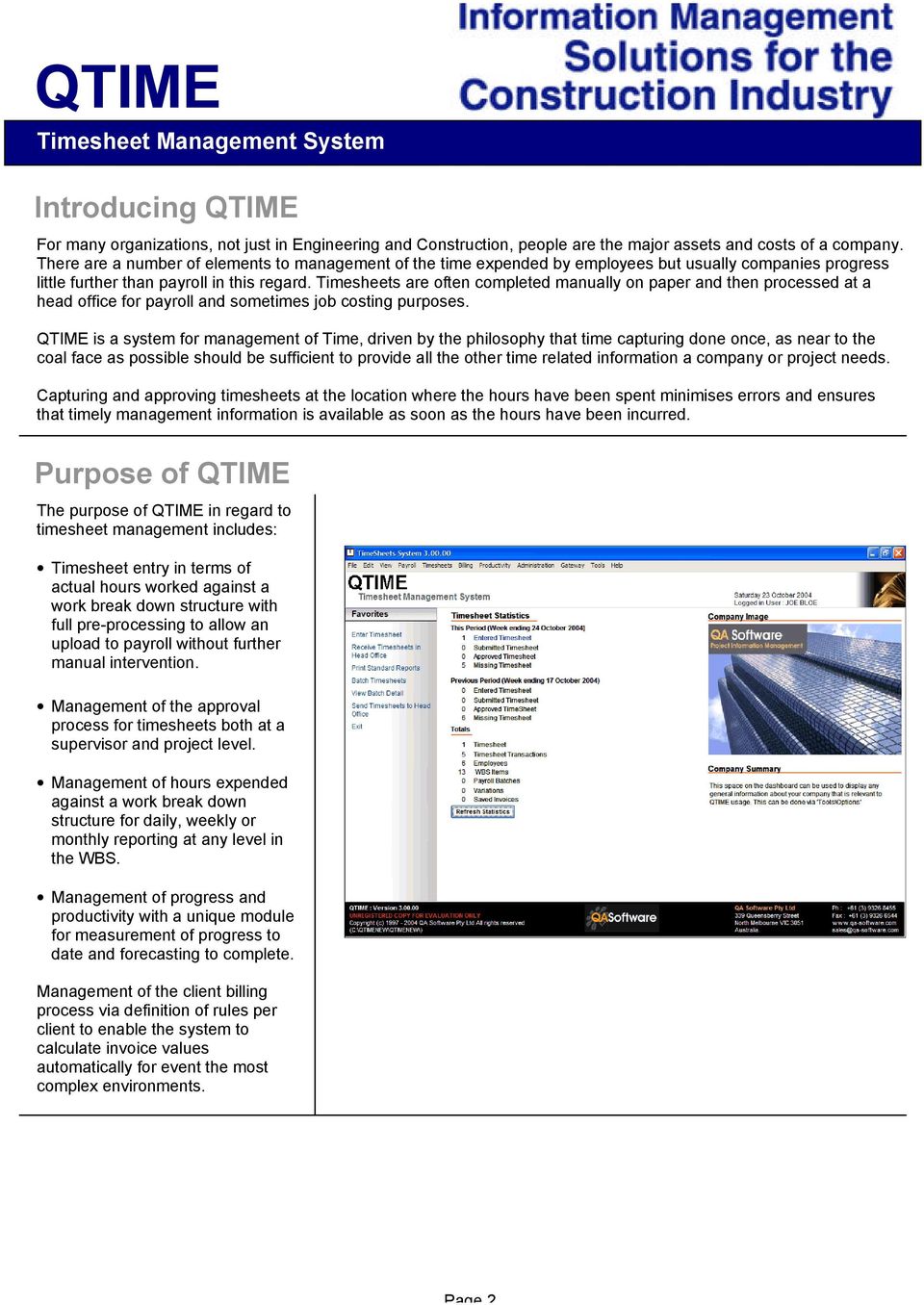
2 Introducing QTIME For many organizations, not just in Engineering and Construction, people are the major assets and costs of a company. There are a number of elements to management of the time expended by employees but usually companies progress little further than payroll in this regard. Timesheets are often completed manually on paper and then processed at a head office for payroll and sometimes job costing purposes. QTIME is a system for management of Time, driven by the philosophy that time capturing done once, as near to the coal face as possible should be sufficient to provide all the other time related information a company or project needs. Capturing and approving timesheets at the location where the hours have been spent minimises errors and ensures that timely management information is available as soon as the hours have been incurred. Purpose of QTIME The purpose of QTIME in regard to timesheet management includes: Timesheet entry in terms of actual hours worked against a work break down structure with full pre-processing to allow an upload to payroll without further manual intervention. Management of the approval process for timesheets both at a supervisor and project level. Management of hours expended against a work break down structure for daily, weekly or monthly reporting at any level in the WBS. Management of progress and productivity with a unique module for measurement of progress to date and forecasting to complete. Management of the client billing process via definition of rules per client to enable the system to calculate invoice values automatically for event the most complex environments. Page 2
3 Features and Benefits QTIME provides the capacity to: Which deliver benefits: Create a multi-level, project based work breakdown structure (WBS) for capture of timesheets. Improved management reporting with early identification of problem areas. Enable on-line timesheet entry, with automated approval work flows. Configure Project based rules for automated generation of pay codes with full integration to Payroll. Manage hours spent down to any level of the WBS including engineering deliverables. Measure progress, with auto calculation of earned values and forecasts to complete. Configure Client based rules for automated generation of Billing information. Capture time sheets once only to support all your business needs. Improved efficiency in the management of the timesheet approval process. Increased productivity in the pay office by elimination of manual entry of data for payroll. Increased productivity in engineering by integration of time sheet entry with Document Control. Reduced risk of cost overruns via early and automated prediction of activities likely to go over budget. Increased productivity and reduced risk of errors via elimination of manual calculations. Increased productivity by eliminating the multiple processing of timesheet data for different purposes. An Integrated System While QTIME can be used as a comprehensive stand alone Time Management System since it contains all the functionality necessary for: Time Capture and Approval. Budgeting and Forecasting. Progress Reporting. Award Interpretation. It is more often used as a key component of the overall project management and corporate systems used by an organisation. Hence QTIME contains the hooks and features necessary to make integration with Payroll, Job Costing and Scheduling systems a straightforward exercise. The diagram attempts to show the possible links that can be made between QTIME and other systems. Page 3

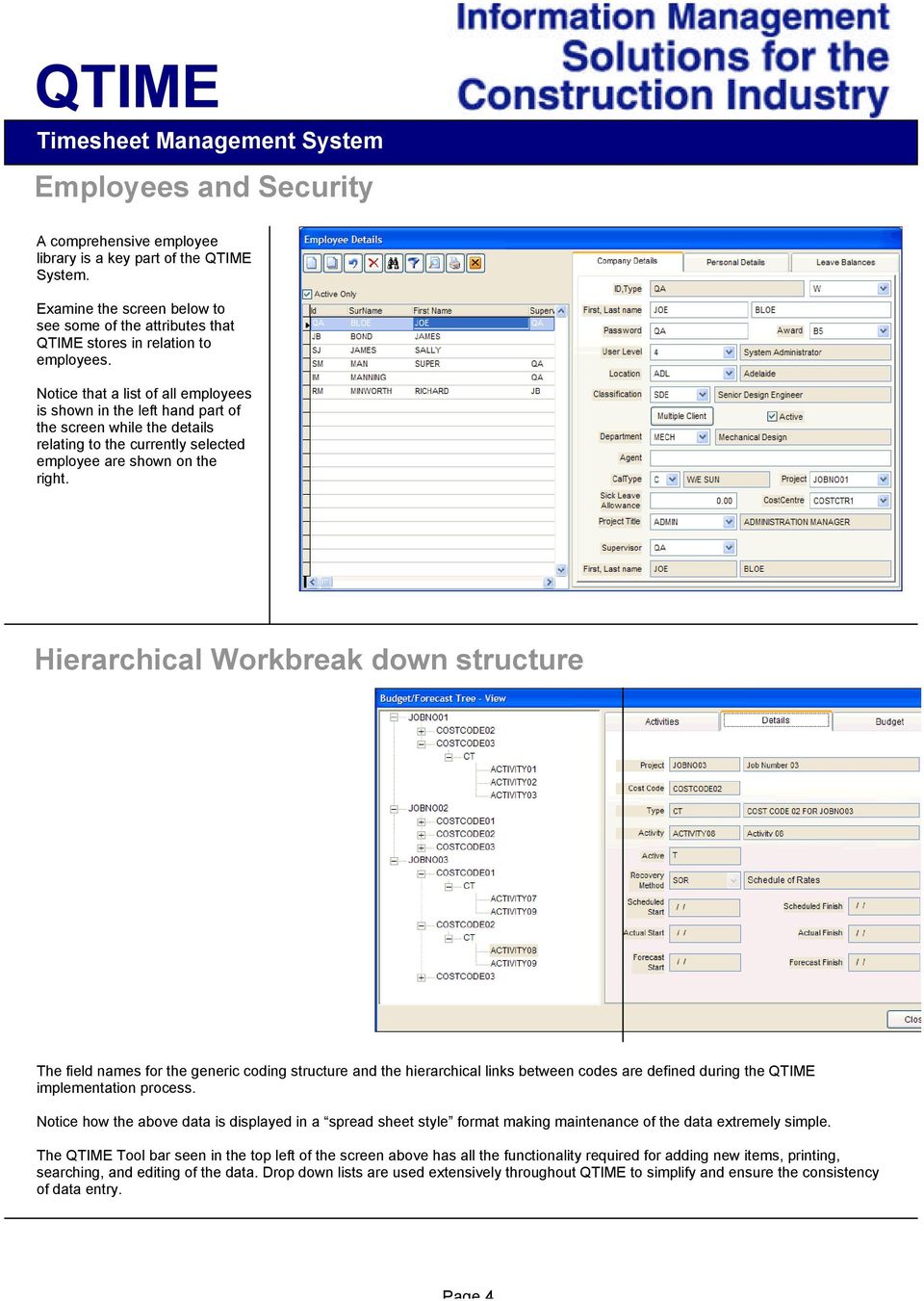
4 Employees and Security A comprehensive employee library is a key part of the QTIME System. Examine the screen below to see some of the attributes that QTIME stores in relation to employees. Notice that a list of all employees is shown in the left hand part of the screen while the details relating to the currently selected employee are shown on the right. Hierarchical Workbreak down structure Effective time capturing is normally done against a Work Breakdown Structure (WBS). QTIME provides for up to nine levels of work breakdown structure. Not all of these levels need be used, or even be hierarchical in nature. For example, an Activity may be related to a Project in a typical hierarchical relationship, where as a Cost Centre may also be a sub code to a Project, but may not be hierarchical. This would enable a single Cost Centre library to be used across all projects whereas the Activity library would be project specific. The field names for the generic coding structure and the hierarchical links between codes are defined during the QTIME implementation process. Notice how the above data is displayed in a spread sheet style format making maintenance of the data extremely simple. The QTIME Tool bar seen in the top left of the screen above has all the functionality required for adding new items, printing, searching, and editing of the data. Drop down lists are used extensively throughout QTIME to simplify and ensure the consistency of data entry. Page 4
5 Timesheet capture and Approval QTIME supports multiple formats for timesheet entry. The standard format is capable of handling timesheets for staff and wages personnel as well as sub contracting staff. The most complex timesheet is required for wages staff as this utilizes all four page frames of the example time sheet to the right. For consulting organizations where Award interpretation is not required, QTIME is supplied with a simpler timesheet entry screen. For organizations with both staff and wages, QTIME can be configured with multiple entry methods on the same installation. Notice that timesheet entries are added in rows and for each row, valid combinations of codes are selected from drop down lists. The example shows a simple coding system utilising three hierarchical codes (Project Number + Cost Code + Activity) and one non- hierarchical codes (GL Account). The PcType and Rule Set are captured because this time sheet is for a wages employee. Once Time sheets are completed they are submitted for approval by the responsible supervisor. QTIME provides a complete audit trail for changes made to timesheets. Productivity and Progress The facility to manage budgeted man-hours and progress within QTIME is a fundamental differentiator between QTIME and other Time Management Systems. Budgeting is done at the lowest level of the hierarchical coding structure in the QTIME Budget/Forecast file in terms of either hours or quantities. Actual hours are posted into this file at the end of every period, which can be as often as daily. Physical progress via a percentage complete or actual quantity is also recorded in this table or, up-loaded from lower level systems such as a scheduling system or another QA Software product such as QDMS for Document Control. QTIME is then able to calculate Earned Man Hours and Productivity factors. QTIME also supports a range of forecasting to complete algorithms that ensure the most accurate and objective forecast final total is projected. The results rolled up at any level in the hierarchical coding structure. A history of all forecasting is maintained to enable advanced reporting and analysis in terms of trends. This is an extremely powerful and useful feature that not even the most advanced scheduling systems can offer with comparative structure and processing automation. Page 5

6 Scheduling QTIME can be linked to popular scheduling software such as Primavera s P3 System. This enables the transfer of Actual hours from QTIME to the schedule, saving the normal manual entry that takes place in this regard. In the other direction, QTIME can import Schedule and Actual dates from the Schedule enabling this information to be on line for all users and also for advanced reporting. The diagram to the right describes the potential relationships between QTIME and the Schedule. Payroll It is a rare organisation that employs wages personnel in the construction industry, and does not have to do any manual adjustment, calculation or data entry to convert paper timesheets, completed on site, for readiness for entry into their payroll system until now! While QTIME is not a payroll system, it can store all the logic necessary to automatically convert simple man-hours recorded into pay codes, ready for export to payroll based on Australian Awards and Project or Location specific Site Agreements. The indicated line on the image to the left can be interpreted as saying: If the employee has time allocated to a project linked to Award A05, then, effective as of 1/1/99, if the employee works on Day 1 of the pay cycle, then QTIME will generate Pay code A03 (Double Time) for those hours worked on that day that exceed 10, up to a maximum of 14 double time hours. The Rule Set adds a further degree of flexibility enabling multiple groups of rules within an Award. By defining the above logic for all Days and conditions in the Pay Cycle, QTIME can generate the correct pay codes automatically, from the most basic of timesheet entry, in a consistent manner throughout a project. To further explain this concept, the screen below shows the results of an award interpretation on a typical timesheet after pay code generation has taken place. Notice on the left hand side of the screen that the timesheet hours have been dissected into a series of pay codes such as A01, AO2, AO3 based Page 6

7 One of the great advantages of this is that this calculation can be seen as the timesheet is entered and hence checked at point of entry. A second advantage is that responsibility for the interpretation, establishment and maintenance of rule sets can be assigned to a Paymaster at head office and the rule sets then distributed in a controlled manner as required, ensuring that consistent application and interpretation of pay entitlement occurs wherever QTIME is deployed. The supervisors entering the timesheets simply press the Generate button to see the relevant pay codes. Once the timesheets for a period have been entered and approved in QTIME, a Batching process is used to export timesheets from QTIME to a payroll system. At the end of the period, a batch is created and employees allocated into that batch. Weekly allowances are created and the batch can then be exported to payroll systems. Client Billing Consultants especially, often make heavy going of the process of billing a client for hours worked on projects, especially in offices with multiple projects ongoing at the same time. The process of client billing becomes even more complex if multiple rates apply, perhaps based on locations or, for overtime worked. In the case of billing the time of wages employees, multiple rates are often based on penalty rates which can mean several different sell rates for each trade. The QTIME Client Billing module is powerful and flexible enough to handle even the most complex situations. As with the paycode generation module, the key here is that the person entering the time sheet does not enter the penalty rate information. Instead, rules are defined per client which enable QTIME to determine the correct rate type and sell rate to use for the hours captured. Thus the process of calculation becomes automated and errors are reduced or eradicated completely. QTIME uses an effective date to enable the logic to be changed without affecting hours already captured and billed. This means that QTIME keeps a complete history of all hours worked including the rate at which they were billed if applicable. Remote point of entry Page 7

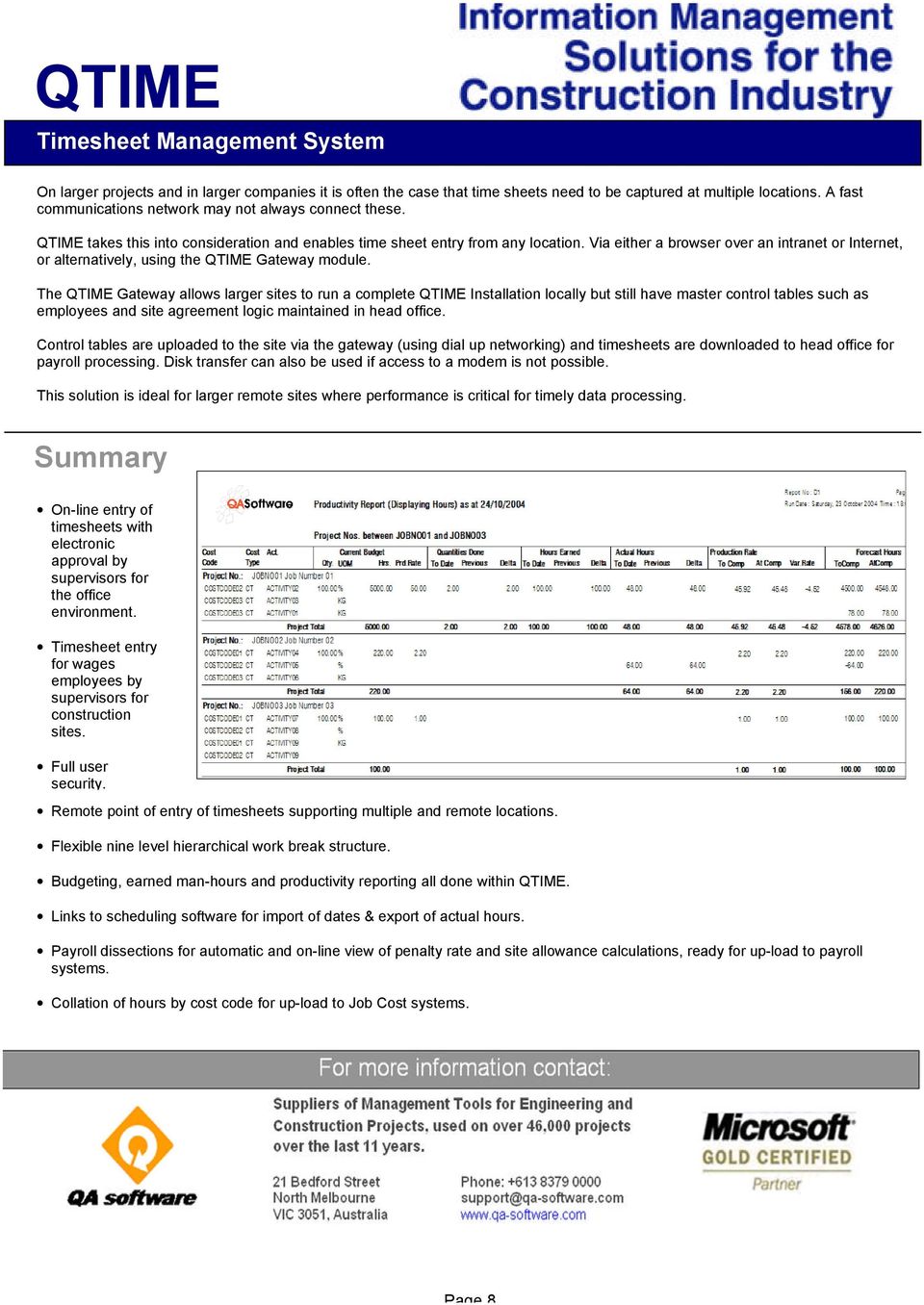
8 On larger projects and in larger companies it is often the case that time sheets need to be captured at multiple locations. A fast communications network may not always connect these. QTIME takes this into consideration and enables time sheet entry from any location. Via either a browser over an intranet or Internet, or alternatively, using the QTIME Gateway module. The QTIME Gateway allows larger sites to run a complete QTIME Installation locally but still have master control tables such as employees and site agreement logic maintained in head office. Control tables are uploaded to the site via the gateway (using dial up networking) and timesheets are downloaded to head office for payroll processing. Disk transfer can also be used if access to a modem is not possible. This solution is ideal for larger remote sites where performance is critical for timely data processing. Summary On-line entry of timesheets with electronic approval by supervisors for the office environment. Timesheet entry for wages employees by supervisors for construction sites. Full user security. Remote point of entry of timesheets supporting multiple and remote locations. Flexible nine level hierarchical work break structure. Budgeting, earned man-hours and productivity reporting all done within QTIME. Links to scheduling software for import of dates & export of actual hours. Payroll dissections for automatic and on-line view of penalty rate and site allowance calculations, ready for up-load to payroll systems. Collation of hours by cost code for up-load to Job Cost systems. Page 8
Manager's Guide to TimeIPS
 Manager's Guide to TimeIPS A training and reference guide for Managers using the TimeIPS time and attendance system. For more information, please contact WorkSmart Systems. To Log in, please go to your
Accounts Marketing Sales Project Management Campaigns Invoicing SMS Wiki Calendar Bulk Email Opportunities Quotes Surveys Reports
 Intrabench// is a complete business management, cloud based system. Versatile, fast and secure allowing you to organise your contacts, drive sales, manage productivity, create marketing and keep accounts
Sage 200 v4.10 What s New At a Glance
 Sage Business Partner: IDL Systems Limited Sage 200 v4.10 What s New At a Glance Tel: 0845 092 0926 Email: [email protected] Web: www.idlsystems.co.uk Introducing the Sage 200 Platform The Sage 200
Project Document Collaboration
 QA software Project Management the smart way Project Document Collaboration Web based Project Document Management and Collaboration Solution Get the TeamBinder Advantage Benefits Deploying TeamBinder on
Project Management Planning
 Develop Project Tasks One of the most important parts of a project planning process is the definition of activities that will be undertaken as part of the project. Activity sequencing involves dividing
Data Sheet Innate Timesheets
 Data Sheet Innate Timesheets Software for timesheets, progress reporting & expenses. Innate Timesheets enables you to record people's time and expenses and other related data, using webbased sheets. Because
Don t simply manage work in your Professional Services business. Manage dollars and profits.
 INCREASE PROFITABILITY THROUGH END-TO-END INTEGRATION OF CRM, PROJECT MANAGEMENT, AND BILLING SYSTEMS Don t simply manage work in your Professional Services business. Manage dollars and profits. Through
Optimising workforce performance while reducing costs
 Optimising workforce performance while reducing costs E-tivity Enterprise automates staff rosters, budgets, timesheets and payroll processes About E-tivity Corporation E-tivity Corporation is a developer
project management product sheet
 product sheet project management Managing the Full Project Workflow To improve project profitable your ERP solution should support all stages of the project life cycle; from presales over project execution
Q-Accounts Software Limited. Key Software Function Version 1.2
 Q-Accounts Software Limited 2015 Key Software Function Table of Contents Background... 3 For Accountants... 3 Managed and Pre-posted Accruals... 3 Tracked Expenditure based Income... 5 Report Mailing Lists...
Product overview. Tempest optional extras. Safe Tempest Internet (STi) Client, worker, consultant and supplier portals
 Safe Tempest Internet (STi) Client, worker, consultant and supplier portals Our portals provide direct access to key Tempest data via the web or intranet. This enables functionality e timesheet processes,
Cloud Solutions for Bigger Business
 Cloud Solutions for Bigger Business Cloud Solutions for Bigger Business MYOB Advanced is set to transform the way larger Australian and New Zealand businesses work. MYOB Advanced Business is a cloud based
Increase your Performance with the PSA Suite for Microsoft Dynamics CRM
 Increase your Performance with the PSA Suite for Microsoft Dynamics CRM With the PSA Suite you will increase your Performance and you will have insight in all the major Key Performance Indicators of your
Deltek Maconomy Project Management
 Deltek Maconomy Project Management Managing the full project workflow To improve project profitability your ERP solution should support all stages of the project life cycle; from presales over project
Manage Your Greatest Your Workforce
 We Acroe automates yo Manage Your Greatest you have Asset more time Your Workforce Automated web time and attendance tracking so you have more time to focus on your core business. NOTHING TO INSTALL -
Swedish Time & Attendance (STA)
 Swedish Time & Attendance (STA) Swedish Time & Attendance (STA) To Service Customer IT Consultancy Service Time & Attendance Model Fully Integration with Oracle E-Business Suite SAP or (Stand Alone ) Complete,
Remember, employee payroll is YOUR BIGGEST EXPENSE
 Cer 100 Labour management solutions deliver the workforce management capabilities you need to address the realworld workforce issues of your business. Time&LaborManagement BenefitLeaveAdministration AttendanceManagement
Advanced Knowledge Acquisition System
 Advanced Knowledge Acquisition System Knowledge is Power Introduction 4th Wave, a leading European E-commerce solution provider, has created the unique ADVANCED KNOWLEDGE ACQUISITION SYSTEM -. This innovative
Time Tracking Solutions for Project-Oriented Professionals
 Time Tracking Solutions for Project-Oriented Professionals TimeSheet Professional PC and Web-based Time Sheet Software for Workgroups of Any Size TimeSheet Professional has helped us eliminate inaccurate,
Net2 Anywhere - Installation
 Net2 Anywhere - Installation What is Net2 Anywhere? Net2 Anywhere is a range of services that use the internet to provide additional features for your Net2 access control system. Our secure web server
idocuments Solutions Overview Enterprise financial management & workforce solutions www.idocuments.net June 2015
 idocuments Enterprise financial management & workforce solutions Solutions Overview June 2015 Sy na nt i x Ltd. All r ig ht s r es er ved. P a g e 1 17 Contents Introducing idocuments... 3 Mobile Approvals
Sage 200 v5.10 What s New At a Glance
 Introducing Sage 200 v5.10 Sage 200 v5.10 What s New At a Glance Sage 200 v5.10 sees the release of a number of new features including support for Microsoft Vista (Business and Ultimate Edition) and Microsoft
Introducing new Sage One Accounting
 Sage One Accounting Introducing new Sage One Accounting Sage One Accounting is an online accounting service for small businesses that want to manage international trade easily, control how they share accounts
MYOB EXO Electronic Timeclocks
 MYOB EXO Electronic Timeclocks MYOB EXO Timeclocks are the ultimate in time and attendance management. The MYOB Electronic Timeclock provides a magnetic swipe card and/or biometric fingerprint interface
Sage 200 Manufacturing Datasheet
 Sage 200 Manufacturing Datasheet Sage 200 Manufacturing is a powerful manufacturing solution that enables you to manage your entire supply chain in detail, end to end, giving you the information needed
WEB-BASED TIME AND ATTENDANCE & DCAA COMPLIANCE
 WEB-BASED TIME AND ATTENDANCE & DCAA COMPLIANCE White Paper AUDIT CONCERNS Certain types of organizations who contract with the US Government must follow specific timekeeping guidelines set forth by the
ELEPHANT. Serviced Offices. The 116 Group Limited Telephone: 0203 3713333
 ELEPHANT In Serviced Offices The 116 Group Limited Telephone: 0203 3713333 Web: www.wcgl.co.uk Revision 1.9.0 ELEPHANT IN SERVICED OFFICES TABLE OF CONTENTS Elephant in Serviced Offices... 3 Table of contents...
CARE HOME MANAGEMENT SOFTWARE
 CARE HOME MANAGEMENT SOFTWARE // CONTENTS 02 About Us 03 Introducing CoolCare4 05 Dashboard 07 Caring for Residents 11 Care Home Staff 15 Home Management 17 Virtual Notice Board 18 Performance Analysis
The power to transform your business
 The power to transform your business Optimus 2020 continues to be the number one choice for litho and packaging printers worldwide. What is the secret of our longevity? Constant research and forward thinking
Table of Contents. Table of Contents...2 BARAZA PAYROLL SYSTEM...3. Control Panel...5 MONTHLY PAYROLL...18 REPORTS...27
 Table of Contents Table of Contents...2 BARAZA PAYROLL SYSTEM...3 Control Panel...5 MONTHLY PAYROLL...18 REPORTS...27 BARAZA PAYROLL SYSTEM As your organization grows, the demands on your operations ensure
Leverage SharePoint with PSI:Capture
 Leverage SharePoint with PSI:Capture A White Paper Courtesy of PSIGEN Software, Inc. Table of Contents Intro to PSI:Capture... 1 Intro to PSI:Capture for SharePoint... 1 Key SharePoint Features... 2 Key
AnyTime Online Timesheet System
 AnyTime is a fully hosted online timesheet system that allows Employees to submit timesheets and Clients to approve these timesheets electronically. It integrates with the Code House Integrated Payroll
Special Key Combination
 ICST Institute Tally.erp9 Notes Page 1 of 6 Tally.erp9 Shortcuts The shortcut keys appear in button names in the button bar (right side of the Tally ). You can either click the button from the button bar
E-Invoicing Supplier Manual
 E-Invoicing Supplier Manual Version: 1.0 2 E-Invoicing Supplier Manual Table of Contents 1 Introduction 3 1.1 About This... Manual 3 1.2 Getting Started... 3 2 Understanding E-Invoicing 4 2.1 Overview...
The Business Benefits of Integrated PSA. Rafat Hilal and Alexander D Aquila
 The Business Benefits of Integrated PSA Rafat Hilal and Alexander D Aquila The Business Benefit of Integrated PSA Introductions Best of Breed Integration Approach CRM Connector Financial & Payroll Connector
TimeSite & ExpenSite Offline Utility 4.0
 User's Guide to TimeSite & ExpenSite Offline Utility 4.0 By DATABASICS, Inc. Table of Contents Starting Up 1 Introduction 1 Logging On 1 User Profile 1 Offline Work Files 2 Timesheets 3 Creating a New
WHITE PAPER. Loading Excel Data Securely into SAP ERP Systems
 WHITE PAPER Loading Excel Data Securely into SAP ERP Systems Table of Contents PAGE 2 Summary 3 Data Load Applications 4 Helping the Business Win 4 Quadrate Application Answer 5 Simple 3-Step Process Explained
ERP Manufacturing Process Tracking and Scheduling
 ERP Manufacturing Process Tracking and Scheduling Whether your manufacturing process is a simple assembly of components or requires the scheduling and monitoring of multiple processes and resources, ERP
Product Overview. Payroll & Personnel Data Warehouse
 Payroll & Personnel Data Warehouse Grapevine Solutions 2010 HAPPI HAPPI (History & Archiving for Payroll & Personnel Information) was developed by Grapevine Solutions to meet the needs of organisations
Oracle Primavera P6 Enterprise Project Portfolio management Overview Programme Reference # 201A
 Oracle Primavera P6 Enterprise Project Portfolio management Overview Programme Reference # 201A Programme Description: Dedicated one full day training module in a structured and professional manner to
Deliverable based project planning and control for Microsoft Dynamics AX
 Deliverable based project planning and control for Microsoft Dynamics AX Deliverable based project planning and control Harvest the full potential of Microsoft Dynamics AX (DAX) and Microsoft Enterprise
Sage Payroll Services
 SAGE ACCPAC Sage Accpac ERP Sage Payroll Services Integration Guide 2006 Sage Accpac International, Inc. All rights reserved. Sage Software, Sage Software logos, and all Sage Accpac product and service
Cloud Solutions for Bigger Business
 Cloud Solutions for Bigger Business Cloud Solutions for Bigger Business MYOB Advanced is the cloud based business management system (ERP) set to transform the way larger Australian and New Zealand businesses
Expat Tracker. User Manual. 2010 HR Systems Limited
 Expat Tracker User Manual Expat Tracker Assignee Management Software HR Systems Limited Expat Tracker All rights reserved. No parts of this work may be reproduced in any form or by any means - graphic,
Oracle Hospitality Cloud Services* Food & Beverage Service Descriptions and Metrics
 s* Food & Beverage Service Descriptions and Metrics October 22, 2015 *The Service Descriptions and Metrics for Oracle Retail s and Hotel s are now found in separate documents which may be viewed at: www.oracle.com/contracts.
The Carbon Accountancy Guide to book-keeping
 The Carbon Accountancy Guide to book-keeping Written by Rana Karadal April 2012 Registered Office: 80-83 Long Lane London EC1A 9ET Telephone:+44 (0)20 7710 5300 Fax:+44 (0)20 7796 3483 [email protected]
Purchase Order Processing
 Purchase Order Processing The Purchase Order Processing system is concerned with the production and management of orders placed with suppliers of materials, plant, etc and the subsequent matching with
PeopleSoft Enterprise Program Management 9.1 PeopleBook
 PeopleSoft Enterprise Program Management 9.1 PeopleBook November 2009 PeopleSoft Enterprise Program Management 9.1 PeopleBook SKU fscm91pbr0 Copyright 1992, 2009, Oracle and/or its affiliates. All rights
Getting started with Sage Accounts The online retailers guide
 Getting started with Sage Accounts The online retailers guide Contents Overview... 3 Which Sage Accounts package to use?... 3 Configuring Sage Accounts... 5 Nominal Codes... 5 Departments... 7 Bank Accounts...
Quick Online & Paperless Overview
 Chapter 13 Quick Online & Paperless Overview This chapter will provide a quick overview of our online and paperless capabilities. Paperless Payroll The client does not necessarily need to be an Online
TOP New Features of Oracle Business Intelligence 11g
 10 TOP New Features of Oracle Business Intelligence 11g TABLE OF CONTENTS Feature 1 New Chart Choices Funnel Chart 2 Trellis Chart 3 Waterfall 4 Tile Diagram 5 Feature 2 Recommended Visualization 6 Feature
PSA 2015 Step by Step Guide is published by Assistance Software. All rights reserved. No part of this publication may be Projects reproduced.
 Step by Step Guide PSA 2015 Module 4 4.1 BAFPA Methodology 4.2 & Budget 4.3 Project sales forecast 4.4 Project & Resource planning 4.5 Utilization Sheet 4.6 CRM Appointments and Group calendar 4.7 Programs
Product Brief. Intacct Financials & Accounting. Intacct General Ledger
 Product Brief Intacct Financials & Accounting Intacct Financials and Accounting includes Intacct General Ledger, Intacct Accounts Receivable, Intacct Accounts Payable, Intacct Cash Management and Intacct
Sage 300 Retail Management by InfoCentral
 Sage 300 Retail Management by InfoCentral Sage 300 Retail Management by InfoCentral Sage 300 Retail Management is a fully featured Point of Sale Solution that offers tremendous flexibility and enables
Last Updated on 11/06/2008. www.jobprotech.com
 Last Updated on 11/06/2008 www.jobprotech.com Copyright JobPro Technology, 2008 How to Use this Guide This manual is designed as a reference for JobPro customers. It is not intended to be a replacement
Sage 200 Manufacturing
 Sage 200 Manufacturing Our extensive customer research shows that customers want suites of integrated software that work together across their business and their processes. With the Sage 200 suite, we
CONVERTING TO PHYSICAL % COMPLETE METHOD OF EARNED VALUE IN MICROSOFT PROJECT
 CONVERTING TO PHYSICAL % COMPLETE METHOD OF EARNED VALUE IN MICROSOFT PROJECT PREPARED BY James E Aksel, PMP [email protected] http://www.msprojectdblog.com http://www.projectpmo.com Page 1 of 19 Table
A GUIDE TO IMPLEMENTING SAP BUSINESS ONE
 A GUIDE TO IMPLEMENTING SAP BUSINESS ONE THE ULTIMATE GUIDE If you are considering SAP Business One as your business management solution or have already selected SAP Business One and you are about to embark
What is Costrac? Approval of Budget against WBS. Feasibility Study Completed. Define & Map WBS. Approval of WBS. Estimate
 The outcome of any venture is most often affected by the ready availability of useful information on which timely decisions can be taken. For project success, the need is therefore to know where you re
How do I set up the Accounting Interface between SPS & SFM? CONFIGURING COMPANY MAINTENANCE
 How do I set up the Accounting Interface between SPS & SFM? Clients who make use of both the Shireburn Payroll and the Shireburn Financial Manager have the opportunity to interface both systems to automate
Cloud Solutions for Bigger Business
 Cloud Solutions for Bigger Business Cloud Solutions for Bigger Business MYOB Advanced is the new cloud based business management system set to transform the way larger Australian and New Zealand businesses
WORKFORCE MANAGEMENT HAS NEVER BEEN SO EASY
 WORKFORCE MANAGEMENT HAS NEVER BEEN SO EASY INTRODUCTION TO TIMETARGET TimeTarget is a market leading Workforce Management, Time and Attendance and Rostering solution. It allows you to streamline and automate
Web Based Timesheet Manual
 Web Based Timesheet Manual 25/01/2012 User Manual V4.0 1 Welcome Welcome to the Skillset Web-Based Timesheet (WBT) System. This Manual has been designed to guide you through the fundamentals of the Skillset
WHY CONTRACTORS AUTOMATE TIME AND ATTENDANCE
 WHY CONTRACTORS AUTOMATE TIME AND ATTENDANCE FROM A LEADER IN WORKFORCE MANAGEMENT SOLUTIONS www.mitcsoftware.com INTRODUCTION Labor costs are the largest controllable expense for most contractors. Contractors
TimeLive Web Timesheet. Feature Overview
 TimeLive Web Timesheet Feature Overview Time tracking tools Despite budget restraints, modern, practical employee timesheet software and time tracking tools must be incorporated in work environments to
Financial Reporting Budgeting Consolidations Financial Modeling
 REASONS TO USE XCELLEGEN FOR FINANCIAL REPORTING A natural extension of Microsoft Excel, with a tight integration to an Accounting Intelligent Database Current methodology is time consuming, inaccurate,
Data Sheet Plus Pack for Sage 200
 Data Sheet Plus Pack for Sage 200 A collection of 75+ addons for Sage 200 Over 75 individual addons to enhance Sage 200 Control Panel allows easy configuration Includes stock code aliasing functionality
Loading Excel Data Securely into SAP ERP Systems
 Loading Excel Data Securely into SAP ERP Systems SUMMARY When organizations make the strategic decision to invest in an ERP system with the goal of making the business run better, data becomes paramount
Guide from Raymond Benn & Co. Limited
 Guide from Raymond Benn & Co. Limited Tel: 01892 545021/549754 Fax: 01892 548956 Email: [email protected] Website: www.raymondbenn.co.uk 0BChoosing accounting software Choose the right accounting
Timebase 247 Service Definition
 Timebase 247 Service Definition Introduction Tricostar is the author of Tricostar Case Management (TCM). TCM is a public sector, shared service software solution for case management used both in legal
MYOB EXO BUSINESS WHITE PAPER
 MYOB EXO BUSINESS WHITE PAPER MYOB EXO Payroll Integration with MYOB EXO Business EXO BUSINESS MYOB ENTERPRISE SOLUTIONS Table of Contents Table of Contents 2 Installation 3 Minimum Requirements 3 Installing
How To Manage Time And Expense On A Computer Or Tablet Or Ipad Or Ipa Or Ipo Or Ipod Or Ipode Or Ipro Or Ipor Or Ipora Or Ipore Or Ipot Or Ipos Or Ipom Or Ip
 M4 Systems Advanced Time and Expense Management Brochure M4 Systems Ltd Tel: 0845 5000 777 International: +44 (0)1443 863910 www.m4systems.com www.dynamicsplus.net Table of Contents Introduction ------------------------------------------------------------------------------------------------------------------
Project Time Management an essential element to project success
 Project Time Management an essential element to project success Abstract This paper discusses the reasons behind the necessity to apply sound Project Time Management principles and processes to projects
LSMW: Upload Master Data using Batch Input Recording
 LSMW: Upload Master Data using Batch Input Recording Applies to: All modules of SAP where upload of data need to be performed using Batch Input Recording. For more information, visit the Master Data Management
Introduction to ARGUS Developer 7
 Introduction to ARGUS Developer 7 ARGUS Developer version 7.0 Overview On the surface, when moving your existing modules (Project and Structured Finance) to ARGUS Developer 7.0, the existing functions
Questions & Answers from: Project Workforce Analytics: Real Time Visibility into Project and Workforce Performance
 Questions & Answers from: Project Workforce Analytics: Real Time Visibility into Project and Workforce Performance Q: Is it customizable per project and/or per user? A: Yes. Dashboards and reports can
Enhanced Time Entry for. Step-by-Step
 Enhanced Time Entry for Table of Contents CAT2 Step-by-Step Introduction... 3 Document Conventions... 3 Italicized Text... 3 Procedures and Bold/Italicized Text... 3 Graphic Conventions... 3 Training Materials
... ... www.tracker-rms.com +44 (0) 8451 262 300 [email protected] CRM
 .. TrackerRMS Customer relationship management The foundation component of TrackerRMS offers an all-in-one solution that can be applied to any type of business that require a mechanism for tracking customer
WWW.MINDYOURSERVICE.COM ACCESS ANYWHERE FIELD SERVICE SOFTWARE. MindYourService
 ACCESS ANYWHERE FIELD SERVICE SOFTWARE MindYourService INTRODUCTION SEE YOUR SERVICE BUSINESS IN A NEW LIGHT If you want your company to be able to compete in today s marketplace, you ll need a cutting
An Introduction to Staff Scheduling
 SCHEDULING SOFTWARE An Introduction to Staff Scheduling whitepaper Content 3 4 5 6 7 8 9 Introduction What is Scheduling Software? How Does Scheduling Software Work? Advantages to Scheduling Software Things
QuickBooks Online Payroll Getting Started Guide. January 2016 Powered by
 QuickBooks Online Payroll Getting Started Guide January 2016 Powered by Table of Contents Payroll Settings... 2 Business Settings... 3 ABA settings... 3 ATO Supplier settings... 7 Pay Slips... 9 Chart
5 Getting Started. 5.1 Objectives. In this section, you will learn how to:
 5 Getting Started 5.1 Objectives In this section, you will learn how to: start SilkNet Standard log in first time log in as a default user (System Manager) some basic tools and buttons in the Windows interface
Vanguard Knowledge Automation System
 KNOWLEDGE AUTOMATION SYSTEM: OVERVIEW Vanguard Knowledge Automation System Turn routine processes into easy-to-use Web Apps Vanguard Knowledge Automation System lets you capture routine business processes
SOA REFERENCE ARCHITECTURE: WEB TIER
 SOA REFERENCE ARCHITECTURE: WEB TIER SOA Blueprint A structured blog by Yogish Pai Web Application Tier The primary requirement for this tier is that all the business systems and solutions be accessible
Building Reliable, Scalable AR System Solutions. High-Availability. White Paper
 Building Reliable, Scalable Solutions High-Availability White Paper Introduction This paper will discuss the products, tools and strategies available for building reliable and scalable Action Request System
Kevin Kochirka, ABB Turbine Automation, June 29, 2016. Flexible turbine control retrofits Webinar
 Kevin Kochirka, ABB Turbine Automation, June 29, 2016 Flexible turbine control retrofits Webinar Welcome Speaker introduction Kevin Kochirka Sr. Applications Engineer with ABB Inc. [email protected]
Technical Specifications
 Technical Specifications SerbizHub Suite 2.1 Overview Serbizhub Suite (SS) incorporates sales, inventory, and accounting functions. It helps manage purchase orders, invoices, accounts payable and receivable,
Axapta Object Server MICROSOFT BUSINESS SOLUTIONS AXAPTA
 MICROSOFT BUSINESS SOLUTIONS AXAPTA Axapta Object Server Microsoft Business Solutions Axapta Object Server minimises bandwidth requirements and ensures easy, efficient and homogeneous client deployment.
Easy Data Centralization with Webster. User Guide
 Easy Data Centralization with Webster User Guide CONTENTS 3-4 1 Introducing Webster Webster - An Introduction 5-14 2 Installing & Configuring Webster Installing the System Configuring Webster 15-18 3 Managing
APOTEk. Pharmacy Management System (PMS) Introduction. APOTEk Modules
 APOTEk Pharmacy Management System (PMS) Introduction Modern healthcare establishments demand speed and accuracy from their front-end or counter operations. PMS provides these advantages in the form of
Utilizing KolibriMFG Software System to Schedule and Control Shop Floor
 Utilizing KolibriMFG Software System to Schedule and Control Shop Floor Lajos Kiss Patternium AC., www.patternium.hu, [email protected] Abstract: Manufacturing software modules are essential part of any large
WEB-BASED TIME AND ATTENDANCE DCAA COMPLIANCE. White Paper
 WEB-BASED TIME AND ATTENDANCE AND DCAA COMPLIANCE White Paper Page 1 AUDIT CONCERNS Certain types of organizations who contract with the US Government must follow specific timekeeping guidelines set forth