
SAP BusinessObjects Accounts Receivable Rapid Mart XI 3.2, version for SAP solutions - User Guide
|
|
|
- Ross Ashley Pitts
- 10 years ago
- Views:
Transcription
1 SAP BusinessObjects Accounts Receivable Rapid Mart XI 3.2, version for SAP solutions - User Guide Version

2 October 2009 Copyright Trademarks Copyright 2009 SAP AG. All rights reserved. No part of this publication may be reproduced or transmitted in any form or for any purpose without the express permission of SAP AG. The information contained herein may be changed without prior notice. Some software products marketed by SAP AG and its distributors contain proprietary software components of other software vendors. All rights reserved. SAP, R/3, SAP NetWeaver, Duet, PartnerEdge, ByDesign, SAP Business ByDesign, and other SAP products and services mentioned herein as well as their respective logos are trademarks or registered trademarks of SAP AG in Germany and other countries. Business Objects and the Business Objects logo, BusinessObjects, Crystal Reports, Crystal Decisions, Web Intelligence, Xcelsius, and other Business Objects products and services mentioned herein as well as their respective logos are trademarks or registered trademarks of Business Objects S.A. in the United States and in other countries. Business Objects is an SAP company. All other product and service names mentioned are the trademarks of their respective companies. Data contained in this document serves informational purposes only. National product specifications may vary. These materials are subject to change without notice. These materials are provided by SAP AG and its affiliated companies ("SAP Group") for informational purposes only, without representation or warranty of any kind, and SAP Group shall not be liable for errors or omissions with respect to the materials. The only warranties for SAP Group products and services are those that are set forth in the express warranty statements accompanying such products and services, if any. Nothing herein should be construed as constituting an additional warranty.
3

4

5 Contents Chapter 1 Introduction 11 What is a Rapid Mart? Rapid Marts packages accelerate Time to Value SAP BusinessObjects Rapid Marts packages architecture About this document Chapter 2 Overview 17 Overview What you can do with this Rapid Mart Supported analyses Related Rapid Marts Components shared with other SAP BusinessObjects Rapid Marts.. 24 The Rapid Mart Schema Where the Rapid Mart Fits in the Sales Cycle Chapter 3 Subject Areas 27 Overview Customer Items Section Rapid Mart Processing Rapid Mart Data Customer Summary Section Rapid Mart Processing Rapid Mart Data Chapter 4 Reports 39 Overview SAP BusinessObjects Accounts Receivable Rapid Mart XI 3.2 for SAP solutions User Guide 5

6 Contents Accounts Receivable Details Reports Recommended Joins Accounts Receivable Summary Reports Recommended Table Joins Invalid Documents Recommended Table Joins SAP Master Data Reports Data Discovery Data Auditing Recommended table joins Chapter 5 Universe 99 Overview Universe Design Principles Universe Terminology Universe Table Layout Join Strategy Techniques Hierarchies Hierarchies Overview Geographic Hierarchies Time Dimension and Fiscal Period Hierarchies Material Product Hierarchy Horizontal & Vertical Hierarchies Hierarchy Filters Accounts Receivable Specific Hierarchies SAP Accounts Receivable Universe Universe Objects & Classes Common Dimensions Customer Items Subject Area Customer Summary Subject Area SAP BusinessObjects Accounts Receivable Rapid Mart XI 3.2 for SAP solutions User Guide
7 Contents Invalid Customer Items Subject Area Filters & Techniques Universe Validation SAP Master Data Universe Universe Objects & Classes - Master Data Universe Validation - Master Data Customizing the Universe View for DSO (Days Sales Outstanding) Calculation Chapter 6 Installing the Rapid Mart 181 Overview System Prerequisites Personnel Prerequisites Rapid Mart product components Preparing your environment Preparing Data Services Preparing Target Database Environment Preparing Source Application Preparing BusinessObjects Enterprise Performance Tuning The Rapid Mart Package Install the Rapid Mart Target Schema Create Target Schema Install the Data Services Job(s) Renaming the Data Stores Import ATL File Adjusting the Data Stores Using Auxiliary Files Using ABAP Files Final Steps Installing Rapid Mart Reporting Content Import Wizard for Reporting Content BIAR File Creating Universe Connection SAP BusinessObjects Accounts Receivable Rapid Mart XI 3.2 for SAP solutions User Guide 7

8 Contents Chapter 7 Using the Rapid Mart 231 Overview Recovery framework Data Services automatic recovery feature Rapid Mart recovery framework Execution status framework The execution status table The execution status API Executing a job with the Reset option Extraction, transformation and loading process Executing the job Initial (First) Extraction and Load Incremental (Delta) Extraction and Load Global Variables Global Variable Cross-Reference Used in All Rapid Marts Used in 2 to 10 Rapid Marts Used in Only 1 Rapid Mart Setting Global Variables Customizing the Rapid Mart Chapter 8 Technical Implementation 275 Overview Customer Items Section Customer Items - Incremental Load Logic Customer Items - Date Validation Customer Items - Calculation of Dates and Due Periods Customer Summary Section Rolling Totals Calculation Optimization Techniques Table Partitions Data Transfer Transform Hierarchy Optimizations SAP BusinessObjects Accounts Receivable Rapid Mart XI 3.2 for SAP solutions User Guide
9 Contents Dealing with NULL values Fact Table Stored Procedures Fiscal Periods & Time Dim Load Chapter 9 Documentation References 311 Data Services Documentation References BusinessObjects Enterprise Documentation References Appendix A Rapid Mart Data Schema 315 SAP BusinessObjects Accounts Receivable Rapid Mart XI 3.2 for SAP solutions User Guide 9
10 Contents 10 SAP BusinessObjects Accounts Receivable Rapid Mart XI 3.2 for SAP solutions User Guide
11 Introduction chapter
12 1 Introduction What is a Rapid Mart? What is a Rapid Mart? SAP BusinessObjects Rapid Marts packages are blueprints for building data marts with SAP BusinessObjects technology: Data Services Universe Designer Web Intelligence. Rapid Marts packages deliver jump-start ETL (extract, transform & load) mappings, schema, and initial reporting content, accelerating the deployment of BI (business intelligence) for enterprise applications from SAP, PeopleSoft, Oracle, and Siebel. Each Rapid Mart is designed to address the reporting needs of a specific business area (or department) like accounting, sales, or purchasing. A component-based framework allows conducting analysis across these selected business areas by combining different packages within the same source application suite. Rapid Marts focus on basic standard configuration of the enterprise applications. They are country and industry neutral templates meant to be easily modified and extended to suit customer specific application implementation and reporting needs. Rapid Marts incorporate best practices, and provide easily modifiable templates. With Rapid Marts total development time of a data mart solution is greatly reduced. Each customer situation is different. You will probably encounter one or more of these: Customizations you have made to SAP solutions the Rapid Mart does not cover. Standard SAP solutions data fields important for your specific business, but not included in the Rapid Mart templates. Optimization and performance challenges unique to your environment. Reporting requirements not covered within the Rapid Mart template reports. Rapid Marts are flexible templates that you can adjust to account for these unique situations. It is expected that some customization and optimization will be needed to suit your individual environment. Rapid Marts are not an out-ofthe-box solution. 12 SAP BusinessObjects Accounts Receivable Rapid Mart XI 3.2 for SAP solutions User Guide
13 Introduction What is a Rapid Mart? 1 BI tools and analytic tools can access Rapid Mart data through SQL queries. Rapid Marts can be implemented individually, or in any combination, to form a single platform that delivers the infrastructure for your company s internal and external information needs. They can also serve as a staging area for enterprise analytic applications. Rapid Marts provide your business with an accelerated time to value through rapid BI deployments because you can implement them quickly and easily customize them to meet specific analytic requirements. Rapid Marts packages accelerate Time to Value Rapid Marts are packaged data solutions that you can quickly deploy to address specific areas of business analysis. Available Rapid Marts packages for SAP solutions include: Financial Suite: SAP BusinessObjects General Ledger Rapid Mart, version for SAP solutions SAP BusinessObjects Accounts Payable Rapid Mart, version for SAP solutions SAP BusinessObjects Accounts Receivable Rapid Mart, version for SAP solutions SAP BusinessObjects Cost Center Rapid Mart, version for SAP solutions Operational Suite: SAP BusinessObjects Inventory Rapid Mart, version for SAP solutions SAP BusinessObjects Purchasing Rapid Mart, version for SAP solutions SAP BusinessObjects Sales Rapid Mart, version for SAP solutions Manufacturing Suite: SAP BusinessObjects Plant Maintenance Rapid Mart, version for SAP solutions SAP BusinessObjects Production Planning Rapid Mart, version for SAP solutions SAP BusinessObjects Project System Rapid Mart, version for SAP solutions Human Capital Management (HCM) Suite: SAP BusinessObjects Human Resources Rapid Mart, version for SAP solutions SAP BusinessObjects Accounts Receivable Rapid Mart XI 3.2 for SAP solutions User Guide 13
14 1 Introduction What is a Rapid Mart? You can combine multiple Rapid Marts packages into a single environment to build the foundation for your data warehouse or use them as a staging area for business intelligence applications. SAP BusinessObjects Rapid Marts packages architecture Rapid Marts architecture is driven by SAP BusinessObjects technology. Rapid Mart Architecture: Rapid Marts packages include the following components: 14 SAP BusinessObjects Accounts Receivable Rapid Mart XI 3.2 for SAP solutions User Guide

15 Introduction About this document 1 Data Movement Jobs - packaged source-to-target mappings and data transformations. Each job is designed to perform initial and incremental data movement; Data Model & Schema - set of data mart database objects designed with dimensional data modeling approach. Rapid Marts packages for SAP solutions has a single integrated data model. The schema are available for Oracle, SQL Server IBM DB2, and Teradata; Semantic Layer (Universes) - SAP BusinessObjects metadata packages for efficient query generation. There can be one or more universes per Rapid Mart. Each universe is developed using Rapid Marts design principles to ensure compatibility, code readability, and component reuse. In addition, there is one Master universe for development/ maintenance of multiple use objects (like Customer, Material, Currency, etc.); Reports (Samples) - set of Web Intelligence reports per Rapid Mart. They represent answers to mostly asked business questions (for example, in the SAP BusinessObjects Sales Rapid Mart, version for SAP solutions - 'What is the monthly Revenue trend by Division for this year?'). The reports are developed using Rapid Mart color/layout templates. Reports are examples of Web Intelligence best practice development (trends, listing, guided analysis, roll ups and downs, etc.). About this document This document describes the SAP BusinessObjects Accounts Receivable Rapid Mart XI 3.2 for SAP solutions User Guide. This document contains information for a variety of users information that helps you understand the use of the Rapid Mart, the data in the Rapid Mart, the reports you can create with the Rapid Mart, and how to use and update the Rapid Mart. This document contains the following chapters: Chapter 2: Overview Describes the business problems you can solve and the types of analyses you can do with this Rapid Mart Chapter 3: Subject Areas Contains detailed information about each section in the Rapid Mart, including the processes each section captures Chapter 4: Reports Provides examples of reports you can produce Chapter 5: Universe Describes the universe (semantic layer) upon which the reports are based Chapter 6: Installing Rapid Mart Reporting Content Contains information you need to install the Rapid Mart SAP BusinessObjects Accounts Receivable Rapid Mart XI 3.2 for SAP solutions User Guide 15
16 1 Introduction About this document Chapter 7: Using the Rapid Mart Describes how to execute the Rapid Mart, including information about setting parameters and considerations you need to make when using the SAP BusinessObjects Accounts Receivable Rapid Mart XI 3.2 for SAP solutions User Guide in customizing the Rapid Mart Chapter 8: Technical Implementation Describes each section and work flows that run to load that section Chapter 9: Documentation References Information about where to find related to the Rapid Mart technical documentation on Data Services and BusinessObjects Enterprise Appendix A: Rapid Mart Data Schema Contains a detailed list of the tables and views in the Rapid Mart 16 SAP BusinessObjects Accounts Receivable Rapid Mart XI 3.2 for SAP solutions User Guide
17 Overview chapter

18 2 Overview Overview Overview This chapter describes the business problems you can solve with the SAP BusinessObjects Accounts Receivable Rapid Mart, version for SAP solutions and the types of analyses you can do with this Rapid Mart. The information in this chapter is useful for those who want a business-level overview of the Rapid Mart and its benefits. This chapter contains the following sections: What you can do with this Rapid Mart Supported analyses Related Rapid Marts The Rapid Mart Schema Where the Rapid Mart Fits in the Sales Cycle What you can do with this Rapid Mart The SAP BusinessObjects Accounts Receivable Rapid Mart, version for SAP solutions extracts data from SAP solutions s FI module, which covers the financial accounting process of accounts receivable. You can use the information that the Rapid Mart extracts to analyze your company s accounts receivable processes for example, you can measure actual performance and evaluate future external commitments for tracking and planning purposes. The SAP BusinessObjects Accounts Receivable Rapid Mart, version for SAP solutions consists of two components or sections. Each section supports a subject related to analysis of the accounts receivable process: Customer Items Section Tracks customer invoices and customer payments at a detailed, line-item level. You can roll-up the information by various dimensions such as customer, and company,. The fact table in this section stores data for each financial document line item. The section stores measures in several monetary currencies including: Transaction Currency, Local (or Company Code) Currency and Global Currency. Additional measures include quantities ordered, invoiced, shipped, and recorded for each financial document line item. Reporting dimensions include customer, payment terms, posting key type, financial document type, GL account, risk category, various customer blocking codes, fiscal periods, time, company code, customer by company, and others. 18 SAP BusinessObjects Accounts Receivable Rapid Mart XI 3.2 for SAP solutions User Guide

19 Overview What you can do with this Rapid Mart 2 Customer Summary Section Tracks customer balances. The fact table in this section is a summary table of periodic, quarterly, and annual customer activity totals. Stored data includes customer total debits, credits, and sales by fiscal year and period, quarter, and year. Additionally, the Rolling16 Fiscal periods A/R totals provides a measure of A/R activity over the last 16 periods relative to any fiscal year and fiscal period combination. This in turn is used in the DSO (Days Sales Outstanding) calculation. Note: The 16 periods refer to the 12 regular periods in the fiscal year, plus 4 special or adjustment periods used for year end reconciliation. Use this table to analyze periodic, quarterly and yearly balances. This section also stores measures in several monetary currencies including: Transaction Currency, Local (or Company Code) Currency and Global Currency. Reporting dimensions include accounting clerk, customer, posting key type, financial document type, risk category, various customer blocking codes, fiscal periods, company code, customer by company, and others. Chapter 3: Subject Areas discusses each of these sections in more detail and how to link them together for a complete analysis of accounts receivable. SAP BusinessObjects Accounts Receivable Rapid Mart XI 3.2 for SAP solutions User Guide 19
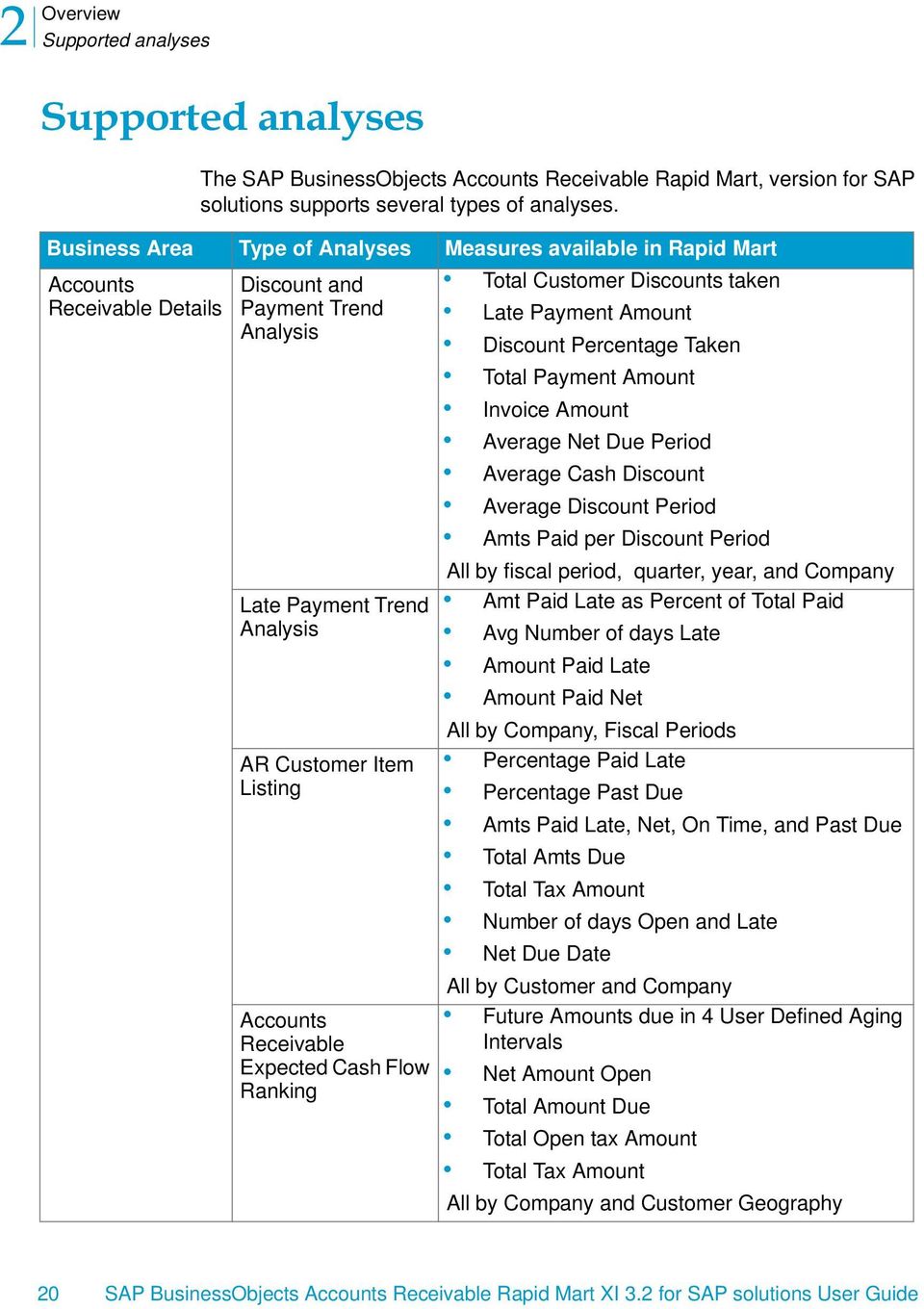
20 2 Overview Supported analyses Supported analyses The SAP BusinessObjects Accounts Receivable Rapid Mart, version for SAP solutions supports several types of analyses. Business Area Type of Analyses Measures available in Rapid Mart Accounts Receivable Details Discount and Payment Trend Analysis Late Payment Trend Analysis AR Customer Item Listing Accounts Receivable Expected Cash Flow Ranking Total Customer Discounts taken Late Payment Amount Discount Percentage Taken Total Payment Amount Invoice Amount Average Net Due Period Average Cash Discount Average Discount Period Amts Paid per Discount Period All by fiscal period, quarter, year, and Company Amt Paid Late as Percent of Total Paid Avg Number of days Late Amount Paid Late Amount Paid Net All by Company, Fiscal Periods Percentage Paid Late Percentage Past Due Amts Paid Late, Net, On Time, and Past Due Total Amts Due Total Tax Amount Number of days Open and Late Net Due Date All by Customer and Company Future Amounts due in 4 User Defined Aging Intervals Net Amount Open Total Amount Due Total Open tax Amount Total Tax Amount All by Company and Customer Geography 20 SAP BusinessObjects Accounts Receivable Rapid Mart XI 3.2 for SAP solutions User Guide
21 Overview Supported analyses 2 Business Area Type of Analyses Measures available in Rapid Mart Accounts Receivable Details (continued) Accounts Receivable Summary Aging of Open (Unpaid) and Past Due Receivables Aging of Receivables Paid Late Open Receivables Targeting AR Revenue Trend Analysis & Ranking AR Revenue Year Trend Comparison Cumulative Trend Vertical Amounts Open and Past Due in 4 User Defined Aging Intervals Percentage of A/R balance past due Total Amount Due All by Fiscal Period, Company, Customer Geography, & Customer Industry Amts Paid Late in 4 User Defined Aging Intervals Percentage Paid Late Percentage Paid Late Total Amt Paid Late Total Amt Paid All by Customer & Geography, Company, Industry, Fiscal Period Number of Days Open Amount Open Amount Due All by Risk Category, Fiscal Period, Customer, Top Amounts or Days overdue Customer Revenue Top 10 Customer s Revenue By Fiscal Period, Quarter, Company, Country Revenue Amount Revenue Variance vs. Previous Fiscal Period Percent of variance vs. previous fiscal period Percent of variance vs. Avg. Annual Sales All by Company and fiscal period, A/R Credit Balance A/R Debit Balances A/R YTD total balance All by Company for Fiscal Period, Quarter, and Year SAP BusinessObjects Accounts Receivable Rapid Mart XI 3.2 for SAP solutions User Guide 21
22 2 Overview Supported analyses Business Area Type of Analyses Measures available in Rapid Mart Accounts Receivable Summary (continued) Accounts Receivable Audit Revenue Rolling 16 Periods versus Period Comparison DSO (Days Sales Outstanding) Analysis 360 Customer Snapshot & Trend Customer Item Validation Unapplied Payment Analysis Avg. Rolling 16 Period A/R total Total Revenue (Sales) Revenue as Percent of Sales All by Fiscal Period Average DSO (Days Sales Outstanding) A/R Balance Open All by Company, Customer, Customer Geography and Fiscal Period Credit Limit Credit Rating Last Payment Amt Recommended Credit Limit Total Sales All by Fiscal Periods, Customer & Customer Geography Audit Financial Document Dates for inaccuracies Unapplied Payment Amt Financial Document Details for Payments not applied to customer invoices To support analysis, the Rapid Mart includes currency units, such as United States dollars or German marks, and the quantities ordered, invoice, and shipped. The Rapid Mart records quantities for individual financial document line items, and for sales order line items. The Rapid Mart also includes the total customer activity that SAP solutions collects each financial period, and a table of daily balances. Reporting dimensions available in the Rapid Mart include enterprise entities, such as country, region, division, plant code, company code, and customer data, and information specific to the SAP solutions FI module, such as document types and status, posting keys, payment terms, and bank information. 22 SAP BusinessObjects Accounts Receivable Rapid Mart XI 3.2 for SAP solutions User Guide
23 Overview Related Rapid Marts 2 Related Rapid Marts Each Rapid Mart is composed of multiple components. A component is a stand-alone work flow that completes a particular task, such as loading a specific dimension table. Components can contain other components. A section is a set of components that address a particular business problem or subject area. A section is itself a component. Components of the SAP BusinessObjects Accounts Receivable Rapid Mart, version for SAP solutions are related to other SAP BusinessObjects Rapid Marts components. For example: The customer component is used in the Sales Rapid Mart. Common dimensions are included in appropriate Rapid Marts. SAP BusinessObjects Accounts Receivable Rapid Mart XI 3.2 for SAP solutions User Guide 23
24 2 Overview Related Rapid Marts Components shared with other SAP BusinessObjects Rapid Marts The same components can be used in multiple Rapid Marts. For example, a component that extracts information about materials bought, produced, and sold is needed for a Rapid Mart that supports sales analysis and also for a Rapid Mart that supports inventory analysis. Work flows that extract star schema dimensions are components. You can add a component to any Rapid Mart using a simple import procedure. A Data Services job can include multiple instances of a component. For example, each section includes all the required dimension components. Therefore, a job with several sections may include several instances of a particular dimension component. Components are set to execute only once within a job. This execute once feature ensures that shared components do not cause duplicate data extraction from SAP solutions. For more information about the execute once feature, see the Data Integrator/Data Services Designer Guide. Each of the sections listed in What you can do with this Rapid Mart on page 18 are considered components. You can identify a component within a SAP BusinessObjects job by a C_ prefix before its name. For example, the component that tracks customer invoicing and receivable information is named C_CustomerItems_Section. 24 SAP BusinessObjects Accounts Receivable Rapid Mart XI 3.2 for SAP solutions User Guide
25 Overview The Rapid Mart Schema 2 The Rapid Mart Schema The following diagram shows an overview of the SAP BusinessObjects Accounts Receivable Rapid Mart, version for SAP solutions components and their relationships. SAP BusinessObjects Accounts Receivable Rapid Mart XI 3.2 for SAP solutions User Guide 25
26 2 Overview Where the Rapid Mart Fits in the Sales Cycle Where the Rapid Mart Fits in the Sales Cycle The SAP BusinessObjects Accounts Receivable Rapid Mart, version for SAP solutions fits into the sales cycle from the time a sales order is received until the time the customer pays for the order. Accounts Receivable Rapid Mart Sales Requisition Quotation Contract Order Invoice Payment 26 SAP BusinessObjects Accounts Receivable Rapid Mart XI 3.2 for SAP solutions User Guide
27 Subject Areas chapter
28 3 Subject Areas Overview Overview Each section in the SAP BusinessObjects Accounts Receivable Rapid Mart, version for SAP solutions pertains to a particular subject area. This chapter describes each section and the processes each section captures. The information in this chapter is useful for readers who use the Rapid Mart to design and support a real-time system, such as a Web application, and need to understand the data in the Rapid Mart and how it relates to SAP solutions. This chapter discusses: Customer Items Section Customer Summary Section Customer Items Section The customer items section stores information about all customer related documents in SAP-FI (SAP solutions Financials). These include, invoices, credit memos, payments, etc. at a detailed line-item level. You can roll up this information to any aggregated level supported by the associated dimensions. The fact table for this section contains data for each financial document line item. Specifically, the table stores monetary amounts and quantities for each financial document line item. SAP solutions processes vendor related financial documents and stores them in two tables: BSID (Secondary Index for Open Customer Items) and BSAD (Secondary Index for Cleared Customer Items). These include all customer invoices, payments, credit memos, etc. When an invoice or other customer document is received, SAP solutions posts a corresponding financial document, to the BSID table. As these items are cleared (by payment, credit memo, etc.) SAP solutions posts entries to the BSAD table. Therefore, these two tables are the source for Customer Items in the Rapid Mart. If the clearing procedure is separate from the invoice receipt procedure, SAP solutions keeps the payment and the invoice open until it posts the clearing. Thus, until the clearing procedure is complete you may have unapplied payments (or credits). When clearing an item, SAP solutions updates the item with the date and document number of the payment document (or the financial document that cleared the item). 28 SAP BusinessObjects Accounts Receivable Rapid Mart XI 3.2 for SAP solutions User Guide
29 Subject Areas Customer Items Section 3 The Customer Items section loads data into fact table CUSTOMER_ITEM_FACT. This fact table contains data from the vendor related financial document line items (tables BSID and BSAD in SAP solutions). The Accounts Receivable Rapid Mart calculates past due amounts, amounts paid on time, amounts paid late, amounts due in the future, and other measures from the SAP solutions source tables. There is also a database view based on CUSTOMER_ITEM_FACT (called CUSTOMER_ITEM_AR_BALANCE_VIEW). The view is used in the DSO calculation. Additionally, any records with containing dates before the year 1900 are loaded into the CUSTOMER_ITEM_FACT_BAD table. We reject these records because a date before the year 1900 is legal in SAP solutions but not in the Microsoft SQL-Server database, and would otherwise cause an error. Rapid Mart Processing Customer Items data is stored in the CUSTOMER_ITEM_FACT table of the target database. Additionally this section captures the following dimensional attributes and their associated dimension tables Attribute Name Accounting Clerk Aging Interval Business Area Chart Of Accounts Company Code Credit Control Area Currency Currency Conversion Rate Customer Customer By Company Debit Credit Indicator Document Type Fiscal Period GL Account By Company Dimension Table(s) ACCOUNTING_CLERK AGING_INTERVAL BUSINESS_AREA CHART_OF_ACCOUNTS COMPANY_CODE CREDIT_CONTROL_AREA CURRENCY CURRENCY_CONVERT_RATE CUSTOMER CUSTOMER_BY_COMPANY DEBIT_CREDIT_INDICATOR DOCUMENT_TYPE & DOCUMENT_CATEGORY FISC_PERIOD GL_ACCOUNT_BY_COMPANY SAP BusinessObjects Accounts Receivable Rapid Mart XI 3.2 for SAP solutions User Guide 29
30 3 Subject Areas Customer Items Section Attribute Name Monetary Currency Payment Block Payment Reason Code Payment Terms Posting Key Type Special GL Indicator Time Dimension Dimension Table(s) CURRENCY PAYMENT_BLOCK PAYMENT_REASON_CODE PAYMENT_TERM POSTING_KEY_TYPE SPECIAL_GL_INDICATOR TIME_DIM, TIME_DIM_WEEKLY Fact Table Fields The Customer Items table (CUSTOMER_ITEM_FACT) contains the following measures Note: Suffixes indicate the monetary currency of the measure. LOC - Local or Company Currency TRX - Transaction or Document Currency UPDT - Update Currency Note: Intervals A through G are user definable aging periods set up in the Data Services job At the universe level, we use the currency conversion rates to obtain measures in a user-defined global currency. Column Name AMT_DISCNT_TAKEN_LOC AMT_DUE_IN_E_DAYS_LOC AMT_DUE_IN_F_DAYS_LOC AMT_DUE_IN_G_DAYS_LOC AMT_DUE_OVER_G_DAYS_LOC AMT_ELIGBL_FOR_DISCNT_TRX AMT_LOC Description Discount amount taken Amount due in interval E days in local (company) currency Amount due in interval F days in local (company) currency Amount due in interval G days in local (company) currency Amount due in more than interval G days in local (company) currency Amount of invoice that can be discounted as appropriate Amount in local (company) currency 30 SAP BusinessObjects Accounts Receivable Rapid Mart XI 3.2 for SAP solutions User Guide
31 Subject Areas Customer Items Section 3 Column Name AMT_PAID_DISCNT_PER01_LOC AMT_PAID_DISCNT_PER02_LOC AMT_PAID_LATE_LOC AMT_PAID_NET_LOC AMT_PAID_ON_TIME_LOC AMT_PAST_DUE_GT_A_LOC AMT_PAST_DUE_GT_B_LOC AMT_PAST_DUE_GT_C_LOC AMT_PAST_DUE_GT_D_LOC AMT_PD_GT_A_LATE_LOC AMT_PD_GT_B_LATE_LOC AMT_PD_GT_C_LATE_LOC AMT_PD_GT_D_LATE_LOC AMT_TAX_LOC AMT_TAX_TRX AMT_TRX Description Local currency amount paid during the first discount period (includes any discounts applicable) Local currency amount paid after the first and during the second discount period (includes any discounts applicable) Paid after due date Local currency amount paid before due date and after any discount periods (includes only non-timerelated discounts) Local currency amount paid by due date (includes any discounts applicable) Local currency amount past due more than interval A days Local currency amount past due more than interval B days Local currency amount past due more than interval C days Local currency amount past due more than interval D days Local currency amount paid more than interval A days late Local currency amount paid more than interval B days late Local currency amount paid more than interval C days late Local currency amount paid more than interval D days late Tax amount in local (company) currency Tax amount in document (transaction) currency Amount in document (Transaction) currency SAP BusinessObjects Accounts Receivable Rapid Mart XI 3.2 for SAP solutions User Guide 31
32 3 Subject Areas Customer Items Section Column Name AMT_TTL_PAST_DUE_LOC AMT_UPDT AMT_WEIGHT_PAST_DUE_LOC Description Total Amount Past Due in local (Company) currency Update Currency Amt. Total Amt. Past Due times Number of Days Past Due Rapid Mart Data The Customer Items section includes customer transaction detail. The CUSTOMER_ITEM_FACT table stores these details. CUSTOMER_ITEM_FACT table and associated dimension tables are organized as a star schema as shown below You can analyze Vendor Items along several dimensions: Accounting Clerk Aging Interval - user definable A/P Aging Intervals Business Area Company 32 SAP BusinessObjects Accounts Receivable Rapid Mart XI 3.2 for SAP solutions User Guide
33 Subject Areas Customer Summary Section 3 Currency Conversion Rates Monetary Currency Payment Block Payment Reason Fiscal Periods Time - By posting date and document creation dates Customer by Company - A snowflaked dimension that cross-references Customer with Company Customer Debit / Credit Indicator Special GL Indicator Payment Terms Document Type - Financial Document Type GL Account by Company - Also a snowflaked dimension. Includes both the regular and special GL account numbers from SAP solutions, crossreferenced by Company Code Posting Key For the customer items section, typical queries include: What is a current snapshot of my Accounts Receivables? Which fiscal periods show the slowest payment rates? Which customers are blocked for delivery? Which customers should I focus on to reduce the aging receivables? Do my best paying customers have the most favorable credit limit? Are my customers taking advantage of discounts offered on payment terms to pay early? Are my customers trending towards earlier or later payments? What are my top 25 open invoices (by invoice value)? Which customer payments or credit memos have not been applied to an outstanding receivable? Customer Summary Section The customer totals section of this Rapid Mart stores customer balances. The two fact tables for this section summarizes yearly, periodic, and quarterly customer activity totals. SAP BusinessObjects Accounts Receivable Rapid Mart XI 3.2 for SAP solutions User Guide 33
34 3 Subject Areas Customer Summary Section Information includes customer total debits, credits, and sales by fiscal year, quarter, and period. The data is organized into two fact tables. The first, carries the data in horizontal format with one row of information for each combination of customer, company code, and fiscal year. This mimics the organization of the source SAP solutions table (KNC1 - Customer Transaction Figures). There are separate fields for debits, credits, and sales figures for each fiscal period in the fiscal year. This includes the 12 regular fiscal periods supported by SAP solutions, as well as the 4 special adjustment periods for a total of 16 fiscal periods. It also includes aggregated debit, credit and sales figures for each of the 4 quarters of the fiscal year, and aggregated debit, credit, and sales figures for the year to date. The second fact table, carries data in a vertical format. That is one row of data for each customer, company code, fiscal year, and fiscal period combination. The vertical table includes the same debit, credit, and sales figures as the horizontal table. It also includes additional fields for the DSO calculation: Rolling 16 Fiscal Periods Total: (the 4 Special Fiscal Periods are included) Period To Date Balance Period Beginning Balance The Customer Summary section stores information in two fact tables: CUSTOMER_SUMMARY_FACT_HZ The horizontal summary table that contains periodic and quarterly vendor activity totals. The table stores total vendor debits, credits, and purchases by fiscal year. CUSTOMER_SUMMARY_FACT_VR The vertical summary table that contains the periodic and quarterly vendor activity totals. The table stores total vendor debits, credits, and purchases by fiscal year, and fiscal period. There is also a staging table CUSTOMER_SUMMARY_STAGE_VR that is used to transform the horizontal format into the vertical one. You can do ongoing daily customer balance analyses with this data. The KNC1 table is updated constantly by SAP solutions as transactions occur. Therefore each daily refresh of the Rapid Mart will provide a daily snapshot of changes to the customer balances. 34 SAP BusinessObjects Accounts Receivable Rapid Mart XI 3.2 for SAP solutions User Guide
35 Subject Areas Customer Summary Section 3 Rapid Mart Processing The Customer Summary section captures the following dimensional attributes, and their associated dimension tables Attribute Name Aging Interval Company Code Credit Control Area Currency Currency Currency Conversion Rate Customer Customer By Company Fiscal Period Time Dimension Dimension Table(s) AGING_INTERVAL COMPANY_CODE CREDIT_CONTROL_AREA CURRENCY CURRENCY CURRENCY_CONVERT_RATE CUSTOMER CUSTOMER_BY_COMPANY FISC_PERIOD TIME_DIM, TIME_DIM_WEEKLY Fact Table Fields The Customer Summary tables (CUSTOMER_SUMMARY_FACT_HZ & CUSTOMER_SUMMARY_FACT_VR) contain the following measures Note: At the universe level, we use the currency conversion rates to obtain measures in a user-defined global currency. CUSTOMER_SUMMARY_FACT_HZ: Measure AMT_CR_PER01_LOC - AMT_CR_PER16_LOC AMT_CR_QTR01_LOC - AMT_CR_QTR04_LOC AMT_CR_YTD_LOC AMT_DR_PER01_LOC - AMT_DR_PER16_LOC AMT_DR_QTR01_LOC - AMT_DR_QTR04_LOC AMT_DR_YTD_LOC Definition Total Credit Postings for the fiscal period (1-16) Total Credit Postings for the quarter (1-4) Total of the credit postings for the year to date Total Debit Postings for the fiscal period (1-16) Total Debit Postings for the quarter (1-4) Total of the debit postings for the year to date SAP BusinessObjects Accounts Receivable Rapid Mart XI 3.2 for SAP solutions User Guide 35
36 3 Subject Areas Customer Summary Section Measure AMT_PER_BEGIN_LOC AMT_SALES_PER01_LOC - AMT_SALES_PER16_LOC AMT_SALES_QTR01_LOC - AMT_SALES_QTR04_LOC AMT_SALES_YTD_LOC CUSTOMER_SUMMARY_FACT_VR: Definition Balance carried forward in local currency Total Sales Postings for the fiscal period (1-16) Total Sales Postings for the quarter (1-4) Total of the sales postings for the year to date Measure AMT_CR_LOC AMT_DR_LOC AMT_PER_BEGIN_LOC AMT_PER_ROLLING_LOC AMT_PTD_LOC AMT_SALES_LOC Definition Total Credit Postings for the Fisc. period Total Debit Postings for the Fisc. period Balance carried forward in local currency for the Fisc. Period Rolling 16 Periods Total Period To Date Balance Total Sales Postings for the Fisc. period Rapid Mart Data The Customer Summary is organized as a Star Schema as shown below You can analyze Customer summary data along several dimensions including: Accounting Clerk Aging Intervals (Aging Time Periods) Billing Block Company Credit Control Area Currency Exchange Rates - used to convert from local currency to global currency Customer 36 SAP BusinessObjects Accounts Receivable Rapid Mart XI 3.2 for SAP solutions User Guide
37 Subject Areas Customer Summary Section 3 Customer by Company - this is a snow-flaked dimension with subsidiary dimensions Fiscal Periods Monetary Currency - including local (company code) currency, and global currency For the customer totals section, typical queries include: What is the monetary value locked up in DSO (days sales outstanding) by customer, or company? Which customers have the worst/best DSO? What are my revenue trends? Are my late payments trending up or down? Can you give me a snapshot of how a specific customer is doing? How is cumulative A/R activity trending by fiscal period? How does current period revenue compare to the last 12 months? SAP BusinessObjects Accounts Receivable Rapid Mart XI 3.2 for SAP solutions User Guide 37
38 3 Subject Areas Customer Summary Section 38 SAP BusinessObjects Accounts Receivable Rapid Mart XI 3.2 for SAP solutions User Guide
39 Reports chapter
40 4 Reports Overview Overview You can use the SAP BusinessObjects Accounts Receivable Rapid Mart, version for SAP solutions to perform ad hoc analysis and produce many kinds of reports. This chapter provides examples of reports you could generate using the SAP Accounts Receivable universe. The information in this chapter is useful for those who design reporting solutions for analysis of data in the Accounts Payable module of SAP solutions. This chapter provides reports and the recommended joins for each componentized section in the Rapid Mart including: Accounts Receivable Details (Customer Items) Accounts Receivable Summary (Customer Summary) Invalid Documents SAP Master Data Reports Note that all report SQL is located in the Rapid Mart installation directory under "\Sample\DML". 40 SAP BusinessObjects Accounts Receivable Rapid Mart XI 3.2 for SAP solutions User Guide
41 Reports Accounts Receivable Details 4 Accounts Receivable Details Reports Accounts Receivable Details tracks customer invoices and customer payments at a line-item level. These correspond to the Customer Items subject area in the Universe. These details can be analyzed by various dimensions including, customer and company. The fact table in this section stores data for each financial document line item. This Rapid Mart comes with several reports providing accounts receivable detail analysis for discount and late payments trends, late payment trends, AR Customer Item Listing, expected cash flow ranking, receivables aging, and more. There are 11 template reports included with this Rapid Mart, including: Discount and Payment Trend Analysis Discount Trend Analysis Late Payment Trend Analysis AR Customer Item Listing Accounts Receivable Expected Cash Flow Ranking Aging Receivables Ranking Receivable Amounts Past Due Aging Receivables Paid Late Ranking Receivables Paid Late Trend Analysis Open Receivables Targeting Unapplied Payment Analysis SAP BusinessObjects Accounts Receivable Rapid Mart XI 3.2 for SAP solutions User Guide 41
42 4 Reports Accounts Receivable Details Discount and Payment Trend Analysis View Discounts and Payments trend analysis for a selected Company Code and Fiscal Year-Period range. This report contains two tabs, by Period and by Quarter to analyze discount and payment trends by different period calendar dimensions. Calculations Invoice Amount =[GC Amt Paid Net]+[GC Discount Amt Taken] Amount Paid Discount =[GC Amt Paid Discount1]+[GC Amt Paid Discount2] Discount % Taken =If([Invoice Amount] <> 0; [GC Discount Amt Taken]/ ([Invoice Amount]); 0) Report SQL SELECT DISTINCT CUSTOMER_ITEM_FACT.CASH_DISCNT_PRCNT_01, CUSTOMER_ITEM_FACT.CURR_ID_GBL, PAYMENT_TERM.PAYMNT_TERM_DESCR, SUM(CUSTOMER_ITEM_FACT.AMT_PAID_NET_LOC * CURRENCY_CONVERT_RATE.EXCH_RATE / CURRENCY_CONVERT_RATE.FROM_FACTOR / CURRENCY_CONVERT_RATE.TO_FACTOR), 42 SAP BusinessObjects Accounts Receivable Rapid Mart XI 3.2 for SAP solutions User Guide
43 Reports Accounts Receivable Details 4 SUM(CUSTOMER_ITEM_FACT.AMT_PAID_LATE_LOC * CURRENCY_CONVERT_RATE.EXCH_RATE / CURRENCY_CONVERT_RATE.FROM_FACTOR / CURRENCY_CONVERT_RATE.TO_FACTOR), SUM(CUSTOMER_ITEM_FACT.AMT_PAID_DISCNT_PER01_LOC * CURRENCY_CONVERT_RATE.EXCH_RATE / CURRENCY_CONVERT_RATE.FROM_FACTOR / CURRENCY_CONVERT_RATE.TO_FACTOR), SUM(CUSTOMER_ITEM_FACT.AMT_PAID_DISCNT_PER02_LOC * CURRENCY_CONVERT_RATE.EXCH_RATE / CURRENCY_CONVERT_RATE.FROM_FACTOR / CURRENCY_CONVERT_RATE.TO_FACTOR), SUM(CUSTOMER_ITEM_FACT.AMT_DISCNT_TAKEN_LOC * CURRENCY_CONVERT_RATE.EXCH_RATE / CURRENCY_CONVERT_RATE.FROM_FACTOR / CURRENCY_CONVERT_RATE.TO_FACTOR), FISC_PERIOD.FISC_YEAR, FISC_PERIOD.FISC_YEAR_PERIOD, FISC_PERIOD.FISC_YEAR_QUARTER, COMPANY_CODE.CMPNY_CODE_ID, COMPANY_CODE.CMPNY_CODE_NAME FROM CUSTOMER_ITEM_FACT, PAYMENT_TERM, CURRENCY_CONVERT_RATE, FISC_PERIOD, COMPANY_CODE WHERE ( CUSTOMER_ITEM_FACT.CMPNY_CODE_ID = COMPANY_CODE.CMPNY_CODE_ID ) AND ( CUSTOMER_ITEM_FACT.PAYMNT_TERM_ID=PAYMENT_TERM.PAYMNT_ TERM_ID AND PAYMENT_TERM.PAYMNT_TERM_DAY_LIMIT = '?' ) AND ( CUSTOMER_ITEM_FACT.FISC_YEAR=FISC_PERIOD.FISC_YEAR and CUSTOMER_ITEM_FACT.FISC_PERIOD=FISC_PERIOD.FISC_PERIOD and CUSTOMER_ITEM_FACT.FISC_YR_VARIANT_ID=FISC_PERIOD.FISC_YR_ VARIANT_ID ) AND ( CUSTOMER_ITEM_FACT.EXCH_TYPE_ID_GBL = CURRENCY_CONVERT_RATE.EXCH_TYPE_ID AND CUSTOMER_ITEM_FACT.CURR_ID_LOC = CURRENCY_CONVERT_RATE.CURR_ID_FROM AND CUSTOMER_ITEM_FACT.CURR_ID_GBL = CURRENCY_CONVERT_RATE.CURR_ID_TO AND CUSTOMER_ITEM_FACT.POST_DATE >= CURRENCY_CONVERT_RATE.VALID_FROM_DATE AND CUSTOMER_ITEM_FACT.POST_DATE < CURRENCY_CONVERT_RATE.VALID_TO_DATE ) AND FISC_PERIOD.FISC_YEAR_PERIOD BETWEEN '2000-P07' AND '2001-P07' GROUP BY CUSTOMER_ITEM_FACT.CASH_DISCNT_PRCNT_01, CUSTOMER_ITEM_FACT.CURR_ID_GBL, PAYMENT_TERM.PAYMNT_TERM_DESCR, FISC_PERIOD.FISC_YEAR, FISC_PERIOD.FISC_YEAR_PERIOD, SAP BusinessObjects Accounts Receivable Rapid Mart XI 3.2 for SAP solutions User Guide 43
44 4 Reports Accounts Receivable Details FISC_PERIOD.FISC_YEAR_QUARTER, COMPANY_CODE.CMPNY_CODE_ID, COMPANY_CODE.CMPNY_CODE_NAME 44 SAP BusinessObjects Accounts Receivable Rapid Mart XI 3.2 for SAP solutions User Guide
45 Reports Accounts Receivable Details 4 Discount Trend Analysis View Discount trends for all Company Codes given the selected Fiscal Year- Period range. There are two tabs in this report, Overall and by Company. Overall View Discount % Year-Period trend for the selected Year-Period range. Also view discount 1 and discount 2 information by Fiscal Year- Quarter. SAP BusinessObjects Accounts Receivable Rapid Mart XI 3.2 for SAP solutions User Guide 45
46 4 Reports Accounts Receivable Details by Company View comparison of discount information by Company for the selected Fiscal Year-Period range. Calculations Discount % Taken = If([GC Amt Paid Net] <> 0; [GC Discount Amt Taken]/ [GC Amt Paid Net]; 0) Report SQL All report SQL is located in the Rapid Mart installation directory under "\Sample\DML" 46 SAP BusinessObjects Accounts Receivable Rapid Mart XI 3.2 for SAP solutions User Guide
47 Reports Accounts Receivable Details 4 Late Payment Trend Analysis View Late Payment trends for all Company Codes over the selected Fiscal Year-Period range. The report shows late payment trends by Fiscal Year- Period as well as Fiscal Year-Quarter (both in two separate tabs). There is a hyperlink on GC Amt Paid Late for each Fiscal Year-Period to allow users to drill to 360 Customer Snapshot for more details. Calculations % Paid Late = If([GC Amt Paid Net] <> 0; [GC Amt Paid Late]/[GC Amt Paid Net]; 0) Report SQL All report SQL is located in the Rapid Mart installation directory under "\Sample\DML" SAP BusinessObjects Accounts Receivable Rapid Mart XI 3.2 for SAP solutions User Guide 47
48 4 Reports Accounts Receivable Details AR Customer Item Listing View financial documents listing for the selected Company Code and list of Customers. View AR document listing, Open Documents, and Cleared Documents. The report uses an alert to display Financial Doc Id in red font when Amount Past Due does not equal zero. AR Document Listing View listing of all documents for the Company and Customers. 48 SAP BusinessObjects Accounts Receivable Rapid Mart XI 3.2 for SAP solutions User Guide
49 Reports Accounts Receivable Details 4 Open Documents This report tab limits the document listing to all Open documents using a report level filter of Cleared Flag = O - Open and Financial Doc Id Is not null. SAP BusinessObjects Accounts Receivable Rapid Mart XI 3.2 for SAP solutions User Guide 49
50 4 Reports Accounts Receivable Details Cleared Documents This report tab limits the document listing to all Open documents using a report level filter of Cleared Flag = C - Cleared. Calculations % Paid Late =If([LC Total Amount Due] <> 0; [LC Amt Paid Late]/[LC Total Amount Due]; 0) % Past Due = =If([LC Total Amount Due] <> 0; [LC Amt Past Due]/[LC Total Amount Due]; 0) Report SQL All report SQL is located in the Rapid Mart installation directory under "\Sample\DML" 50 SAP BusinessObjects Accounts Receivable Rapid Mart XI 3.2 for SAP solutions User Guide
51 Reports Accounts Receivable Details 4 Accounts Receivable Expected Cash Flow Ranking View snapshot of AR expected cash flow (or aging amounts due) on open documents for all Company Codes. This report contains two tabs: Overall and by Customer Geography. Report SQL All report SQL is located in the Rapid Mart installation directory under "\Sample\DML" SAP BusinessObjects Accounts Receivable Rapid Mart XI 3.2 for SAP solutions User Guide 51
52 4 Reports Accounts Receivable Details Aging Receivables Ranking AR Aging Receivables Ranking provides a snapshot of receivables amounts past due across all Company Codes. This report contains two tabs: Overall and by Company Code and Customer Industry. Overall View AR aging by Company Name. 52 SAP BusinessObjects Accounts Receivable Rapid Mart XI 3.2 for SAP solutions User Guide
53 Reports Accounts Receivable Details 4 by Company Code and Customer Industry View AR aging by Customer Industry. Calculations % AR Past Due =If([GC Total Amount Due] <> 0; [GC Amt Past Due]/[GC Total Amount Due]; 0) Report SQL All report SQL is located in the Rapid Mart installation directory under "\Sample\DML" SAP BusinessObjects Accounts Receivable Rapid Mart XI 3.2 for SAP solutions User Guide 53
54 4 Reports Accounts Receivable Details Receivable Amounts Past Due Aging View all invoices with receivables amounts past due. Aging analysis in this case is based on terms defined days, days, days, and 121+ days. This report contains two tabs: by Company Code and by Customer Geography. Report SQL All report SQL is located in the Rapid Mart installation directory under "\Sample\DML" 54 SAP BusinessObjects Accounts Receivable Rapid Mart XI 3.2 for SAP solutions User Guide
55 Reports Accounts Receivable Details 4 Receivables Paid Late Ranking View amounts paid late for all Company Codes over a selected Fiscal Year- Period range. Analyze amounts paid late in the following age bands: days, days, days, and 121+ days. This report contains two tabs: by Company Code and by Customer Geography. Calculations % Paid Late =If([GC Amt Paid Net] <>0; [GC Amt Paid Late]/[GC Amt Paid Net]; 0) Report SQL All report SQL is located in the Rapid Mart installation directory under "\Sample\DML" SAP BusinessObjects Accounts Receivable Rapid Mart XI 3.2 for SAP solutions User Guide 55
56 4 Reports Accounts Receivable Details Receivables Paid Late Trend Analysis View trends of AR amounts paid late all Company Codes over a selected Fiscal Year-Period range. This report has two tabs to analyze the data by Company Code and Top 25 Customers for each Company. By Company View receivables paid late trend for the selected Fiscal Year-Period range. 56 SAP BusinessObjects Accounts Receivable Rapid Mart XI 3.2 for SAP solutions User Guide
57 Reports Accounts Receivable Details 4 Top 25 Late Customers View Top 25 Late Customers according to GC Amt Paid Late for each Company Code.This report tab uses the Webi report ranking feature for the top 25 analysis. It is easily customizable to allow for Top X customer categories. Calculations % Paid Late = If([GC Amt Paid Net] <>0; [GC Amt Paid Late]/[GC Amt Paid Net]; 0) Report SQL All report SQL is located in the Rapid Mart installation directory under "\Sample\DML" SAP BusinessObjects Accounts Receivable Rapid Mart XI 3.2 for SAP solutions User Guide 57
58 4 Reports Accounts Receivable Details Open Receivables Targeting View all open receivables invoices for selected Company Codes and Accounting Clerks. This report has two report tabs for Top 25 Invoices by Amount Remaining and Top 25 Invoices by Age. The report uses the Webi report ranking feature for the top 25 analysis. It is easily customizable to allow for Top X invoices. Top 25 Invoices by Amount Remaining View Top 25 invoices based on Amount Remaining. 58 SAP BusinessObjects Accounts Receivable Rapid Mart XI 3.2 for SAP solutions User Guide
59 Reports Accounts Receivable Details 4 Top 25 Invoices by Age View Top 25 invoices based on number of days open. Calculations # Days = Sum([Number Days Open]) Report SQL All report SQL is located in the Rapid Mart installation directory under "\Sample\DML" SAP BusinessObjects Accounts Receivable Rapid Mart XI 3.2 for SAP solutions User Guide 59
60 4 Reports Accounts Receivable Details Unapplied Payment Analysis View a listing of all unapplied payments - all financial documents for payments not applied to customer invoices. Summary View listing of all unapplied payments. Details by Customer View details of all unapplied payments with a break by Customer. Report SQL All report SQL is located in the Rapid Mart installation directory under "\Sample\DML". 60 SAP BusinessObjects Accounts Receivable Rapid Mart XI 3.2 for SAP solutions User Guide
61 Reports Accounts Receivable Details 4 Recommended Joins To analyze Accounts Receivable Detail data you will need to create joins between the fact and dimension tables as follows Note: Additional joins between dimension and hierarchy tables are shown in Recommended table joins on page 27 for master reports. Fact Table Dimension Table Join Text CUSTOMER_ITEM_FACT ACCOUNTING_CLERK CUSTOMER_ITEM_FACT.CMPNY_CODE_ID=ACCO UNTING_CLERK.CMPNY_CODE_ID and CUSTOMER_ITEM_FACT.ACCTNG_CLERK_ID=ACC OUNTING_CLERK.ACCTNG_CLERK_ID CUSTOMER_ITEM_FACT AGING_INTERVAL AGING_INTERVAL.AGING_INTERVAL_ID=CUSTOME R_ITEM_FACT.AGING_INTERVAL_ID CUSTOMER_ITEM_FACT BUSINESS_AREA CUSTOMER_ITEM_FACT.BUS_AREA_ID=BUSINESS _AREA.BUS_AREA_ID CUSTOMER_ITEM_FACT CHART_OF_ACCOUN TS CUSTOMER_ITEM_FACT.CHART_OF_ACCT_ID=CH ART_OF_ACCOUNTS.CHART_OF_ACCT_ID CUSTOMER_ITEM_FACT COMPANY_CODE CUSTOMER_ITEM_FACT.CMPNY_CODE_ID = COMPANY_CODE.CMPNY_CODE_ID CUSTOMER_ITEM_FACT CREDIT_CONTROL_A REA CUSTOMER_ITEM_FACT.CR_CTRL_AREA_ID=CRE DIT_CONTROL_AREA.CR_CTRL_AREA_ID CUSTOMER_ITEM_FACT CURRENCY CURRENCY.CURR_ID = CUSTOMER_ITEM_FACT.CURR_ID_TRX CUSTOMER_ITEM_FACT CURRENCY CURRENCY.CURR_ID=CUSTOMER_ITEM_FACT.CU RR_ID_GBL CUSTOMER_ITEM_FACT CURRENCY CURRENCY.CURR_ID = CUSTOMER_ITEM_FACT.CURR_ID_UPDT CUSTOMER_ITEM_FACT CURRENCY CURRENCY.CURR_ID=CUSTOMER_ITEM_FACT.CU RR_ID_LOC CUSTOMER_ITEM_FACT CURRENCY_CONVER T_RATE CUSTOMER_ITEM_FACT.EXCH_TYPE_ID_GBL = CURRENCY_CONVERT_RATE.EXCH_TYPE_ID AND CUSTOMER_ITEM_FACT.CURR_ID_LOC = CURRENCY_CONVERT_RATE.CURR_ID_FROM AND CUSTOMER_ITEM_FACT.CURR_ID_GBL = CURRENCY_CONVERT_RATE.CURR_ID_TO AND CUSTOMER_ITEM_FACT.POST_DATE >= CURRENCY_CONVERT_RATE.VALID_FROM_DATE AND CUSTOMER_ITEM_FACT.POST_DATE < CURRENCY_CONVERT_RATE.VALID_TO_DATE CUSTOMER_ITEM_FACT CUSTOMER CUSTOMER_ITEM_FACT.CUSTOMER_ID = CUSTOMER.CUSTOMER_ID CUSTOMER_ITEM_FACT CUSTOMER_BY_COM PANY CUSTOMER_ITEM_FACT.CMPNY_CODE_ID=CUSTO MER_BY_COMPANY.CMPNY_CODE_ID and CUSTOMER_ITEM_FACT.CUSTOMER_ID=CUSTOM ER_BY_COMPANY.CUSTOMER_ID SAP BusinessObjects Accounts Receivable Rapid Mart XI 3.2 for SAP solutions User Guide 61
62 4 Reports Accounts Receivable Details Fact Table Dimension Table Join Text CUSTOMER_ITEM_FACT DEBIT_CREDIT_INDIC ATOR CUSTOMER_ITEM_FACT.DR_CR_ID=DEBIT_CREDI T_INDICATOR.DR_CR_ID AND DEBIT_CREDIT_INDICATOR.DIM_SRC_ID = 'FINANCIAL' CUSTOMER_ITEM_FACT DOCUMENT_TYPE CUSTOMER_ITEM_FACT.DOC_TYPE_ID=DOCUMEN T_TYPE.DOC_TYPE_ID and DOCUMENT_TYPE.DOC_CATEG_ID = 'FINANCIAL' and DOCUMENT_TYPE.DIM_SRC_ID = 'FINANCIAL' CUSTOMER_ITEM_FACT FISC_PERIOD CUSTOMER_ITEM_FACT.FISC_YEAR=FISC_PERIO D.FISC_YEAR and CUSTOMER_ITEM_FACT.FISC_PERIOD=FISC_PERI OD.FISC_PERIOD and CUSTOMER_ITEM_FACT.FISC_YR_VARIANT_ID=FIS C_PERIOD.FISC_YR_VARIANT_ID CUSTOMER_ITEM_FACT CUSTOMER_ITEM_FACT GL_ACCOUNT_BY_C OMPANY GL_ACCOUNT_BY_C OMPANY CUSTOMER_ITEM_FACT.CMPNY_CODE_ID=GL_AC COUNT_BY_COMPANY.CMPNY_CODE_ID and CUSTOMER_ITEM_FACT.CHART_OF_ACCT_ID=GL_ ACCOUNT_BY_COMPANY.CHART_OF_ACCT_ID and CUSTOMER_ITEM_FACT.GL_ACCT_ID=GL_ACCOU NT_BY_COMPANY.GL_ACCT_ID CUSTOMER_ITEM_FACT.CMPNY_CODE_ID=GL_AC COUNT_BY_COMPANY.CMPNY_CODE_ID and CUSTOMER_ITEM_FACT.CHART_OF_ACCT_ID=GL_ ACCOUNT_BY_COMPANY.CHART_OF_ACCT_ID and CUSTOMER_ITEM_FACT.GL_ACCT_ID_SPECL=GL_ ACCOUNT_BY_COMPANY.GL_ACCT_ID CUSTOMER_ITEM_FACT PAYMENT_BLOCK CUSTOMER_ITEM_FACT.PAYMNT_BLOCK_ID=PAY MENT_BLOCK.PAYMNT_BLOCK_ID CUSTOMER_ITEM_FACT PAYMENT_REASON_ CODE CUSTOMER_ITEM_FACT.CMPNY_CODE_ID = PAYMENT_REASON_CODE.CMPNY_CODE_ID and PAYMENT_REASON_CODE.PAYMNT_REASON_CO DE_ID = CUSTOMER_ITEM_FACT.PAYMNT_REASON_CODE _ID CUSTOMER_ITEM_FACT PAYMENT_TERM CUSTOMER_ITEM_FACT.PAYMNT_TERM_ID=PAYM ENT_TERM.PAYMNT_TERM_ID AND PAYMENT_TERM.PAYMNT_TERM_DAY_LIMIT = '?' CUSTOMER_ITEM_FACT POSTING_KEY_TYPE CUSTOMER_ITEM_FACT.POST_KEY_ID=POSTING_ KEY_TYPE.POST_KEY_ID and CUSTOMER_ITEM_FACT.SPECL_GL_ID=POSTING_ KEY_TYPE.SPECL_GL_ID CUSTOMER_ITEM_FACT SPECIAL_GL_INDICAT OR CUSTOMER_ITEM_FACT.SPECL_GL_ID=SPECIAL_ GL_INDICATOR.SPECL_GL_ID AND SPECIAL_GL_INDICATOR.ACCT_TYPE_ID = 'D' CUSTOMER_ITEM_FACT TIME_DIM TIME_DIM.CALENDAR_DATE=CUSTOMER_ITEM_FA CT.POST_DATE CUSTOMER_ITEM_FACT TIME_DIM TIME_DIM.CALENDAR_DATE=CUSTOMER_ITEM_FA CT.DOC_DATE 62 SAP BusinessObjects Accounts Receivable Rapid Mart XI 3.2 for SAP solutions User Guide
63 Reports Accounts Receivable Summary 4 Accounts Receivable Summary Reports Accounts Receivable Summary is used to analyze periodic, quarterly, and yearly balances. These correspond to the Customer Summary Subject Area in the Universe. The fact table in this section is a summary table of periodic, quarterly, and annual customer activity totals. Data stored includes customer total debits, credits, and sales by fiscal year-period, quarter, and year. Additionally, the Rolling Fiscal periods A/R totals provides a measure of A/R activity over the last 16 periods (12 regular and 4 adjustment periods) relative to any fiscal year and fiscal period combination. Accounts receivable summary allows for a variety of trend and high level analysis, including: AR Revenue Trend Analysis Top 10 Customer AR Revenue Analysis AR Revenue Year Trend Comparison Cumulative AR Activity Period Trend Revenue Rolling 16 Periods versus Period Comparison DSO Analysis 360 Customer Snapshot 360 Customer Trend SAP BusinessObjects Accounts Receivable Rapid Mart XI 3.2 for SAP solutions User Guide 63
64 4 Reports Accounts Receivable Summary AR Revenue Trend Analysis View revenue trends for selected Fiscal Year-Period range for all Company Codes. This report has two tabs to allow for trend analysis by Period and by Quarter. Report SQL SELECT DISTINCT FISC_PERIOD.FISC_PERIOD, FISC_PERIOD.FISC_QUARTER, FISC_PERIOD.FISC_YEAR, FISC_PERIOD.FISC_YEAR_PERIOD, FISC_PERIOD.FISC_YEAR_QUARTER, CUSTOMER_SUMMARY_FACT_VR.CURR_ID_GBL, SUM(CUSTOMER_SUMMARY_FACT_VR.AMT_SALES_LOC * CURRENCY_CONVERT_RATE.EXCH_RATE / CURRENCY_CONVERT_RATE.FROM_FACTOR / CURRENCY_CONVERT_RATE.TO_FACTOR), COMPANY_CODE.COUNTRY_NAME, COMPANY_CODE.CMPNY_CODE_NAME FROM FISC_PERIOD, CUSTOMER_SUMMARY_FACT_VR, CURRENCY_CONVERT_RATE, COMPANY_CODE 64 SAP BusinessObjects Accounts Receivable Rapid Mart XI 3.2 for SAP solutions User Guide
65 Reports Accounts Receivable Summary 4 WHERE ( CUSTOMER_SUMMARY_FACT_VR.FISC_YEAR=FISC_PERIOD.FISC_YEAR and CUSTOMER_SUMMARY_FACT_VR.FISC_PERIOD=FISC_PERIOD.FISC_PER IOD and CUSTOMER_SUMMARY_FACT_VR.FISC_YR_VARIANT_ID=FISC_PERIOD. FISC_YR_VARIANT_ID ) AND ( CUSTOMER_SUMMARY_FACT_VR.CMPNY_CODE_ID = COMPANY_CODE.CMPNY_CODE_ID ) AND ( CUSTOMER_SUMMARY_FACT_VR.EXCH_TYPE_ID_GBL = CURRENCY_CONVERT_RATE.EXCH_TYPE_ID AND CUSTOMER_SUMMARY_FACT_VR.CURR_ID_LOC = CURRENCY_CONVERT_RATE.CURR_ID_FROM AND CUSTOMER_SUMMARY_FACT_VR.CURR_ID_GBL = CURRENCY_CONVERT_RATE.CURR_ID_TO AND CUSTOMER_SUMMARY_FACT_VR.CREATE_DATE >= CURRENCY_CONVERT_RATE.VALID_FROM_DATE AND CUSTOMER_SUMMARY_FACT_VR.CREATE_DATE < CURRENCY_CONVERT_RATE.VALID_TO_DATE ) AND ( CUSTOMER_SUMMARY_FACT_VR.FISC_YEAR = CUSTOMER_SUMMARY_FACT_VR.PARTITION_YEAR ) AND FISC_PERIOD.FISC_YEAR_PERIOD BETWEEN '2001-P01' AND '2001-P15' GROUP BY FISC_PERIOD.FISC_PERIOD, FISC_PERIOD.FISC_QUARTER, FISC_PERIOD.FISC_YEAR, FISC_PERIOD.FISC_YEAR_PERIOD, FISC_PERIOD.FISC_YEAR_QUARTER, CUSTOMER_SUMMARY_FACT_VR.CURR_ID_GBL, COMPANY_CODE.COUNTRY_NAME, COMPANY_CODE.CMPNY_CODE_NAME Top 10 Customer AR Revenue Analysis View top 10 customers by revenue amount for selected fiscal years.the report uses the Webi report ranking feature for the top 10 analysis. It is easily customizable to allow for Top X sales. SAP BusinessObjects Accounts Receivable Rapid Mart XI 3.2 for SAP solutions User Guide 65
66 4 Reports Accounts Receivable Summary Top 10 Sales Overall View top 10 Sales according to revenue (LC Sales Ttl). 66 SAP BusinessObjects Accounts Receivable Rapid Mart XI 3.2 for SAP solutions User Guide
67 Reports Accounts Receivable Summary 4 Top10 Sales - by Fiscal Year View top 10 Sales according to revenue (LC Sales Ttl) for each Fiscal Year. Report SQL All report SQL is located in the Rapid Mart installation directory under "\Sample\DML". SAP BusinessObjects Accounts Receivable Rapid Mart XI 3.2 for SAP solutions User Guide 67
68 4 Reports Accounts Receivable Summary AR Revenue Year Trend Comparison View revenue trend by period for selected Fiscal Years. Compare Total Amounts, Variance Amount versus Previous Period, Variance % Against Previous Period, and Variance % against Average. There are four tabs in this report to analyze revenue year trends: Total Amount, Variance Amount vs Previous Period, Variance % against Previous Period, and Variance % Previous Period against Average. Total Amount View GC Period Sales Total amounts for each period. 68 SAP BusinessObjects Accounts Receivable Rapid Mart XI 3.2 for SAP solutions User Guide
69 Reports Accounts Receivable Summary 4 Variance Amount vs Previous Period View variance amounts for each period compared to the previous period. SAP BusinessObjects Accounts Receivable Rapid Mart XI 3.2 for SAP solutions User Guide 69
70 4 Reports Accounts Receivable Summary Variance % against Previous Period View variance percentages for each period compared to the previous period. 70 SAP BusinessObjects Accounts Receivable Rapid Mart XI 3.2 for SAP solutions User Guide
71 Reports Accounts Receivable Summary 4 Variance % Previous Period against Average View variance percentages for the period compared to the average sales total. Calculations Average GC Sales Ttl =([GC Per 01 Sales Ttl]+ [GC Per 02 Sales Ttl]+[GC Per 03 Sales Ttl]+[GC Per 04 Sales Ttl]+[GC Per 05 Sales Ttl]+[GC Per 06 Sales Ttl]+[GC Per 07 Sales Ttl]+[GC Per 08 Sales Ttl]+[GC Per 09 Sales Ttl]+[GC Per 10 Sales Ttl]+[GC Per 11 Sales Ttl]+[GC Per 12 Sales Ttl])/12 Variance Amount vs Previous Period (Example): =[GC Per 02 Sales Ttl]-[GC Per 01 Sales Ttl] Variance % vs Previous Period (Example): =If([GC Per 02 Sales Ttl] <> 0; Abs(100*([GC Per 02 Sales Ttl]-[GC Per 01 Sales Ttl])/[GC Per 02 Sales Ttl]); 0) SAP BusinessObjects Accounts Receivable Rapid Mart XI 3.2 for SAP solutions User Guide 71
72 4 Reports Accounts Receivable Summary Variance % Previous Period vs Average (Example): =If([GC Per 02 Sales Ttl] <> 0; Abs(100*([GC Per 02 Sales Ttl]-[GC Per 01 Sales Ttl])/[Average GC Sales Ttl]); 0) Report SQL All report SQL is located in the Rapid Mart installation directory under "\Sample\DML". Cumulative AR Activity Period Trend View trend of YTD Balance totals for a selected Fiscal Year-Period range. Calculations YTD Balance =[GC Period Begin Balance]+[GC Debit Ttl]-[GC Credit Ttl] Report SQL All report SQL is located in the Rapid Mart installation directory under "\Sample\DML". 72 SAP BusinessObjects Accounts Receivable Rapid Mart XI 3.2 for SAP solutions User Guide
73 Reports Accounts Receivable Summary 4 Revenue Rolling 16 Periods versus Period Comparison View comparison of Average Rolling 16 Revenue Total versus Period Revenue for a specified Fiscal Year-Period range. Calculations Revenue % =If([GC Avg Rolling Ttl] <> 0;Abs([GC Sales Ttl]/[GC Avg Rolling Ttl]); 0) Report SQL All report SQL is located in the Rapid Mart installation directory under "\Sample\DML". SAP BusinessObjects Accounts Receivable Rapid Mart XI 3.2 for SAP solutions User Guide 73
74 4 Reports Accounts Receivable Summary DSO Analysis View snapshot of DSO (Days Sales Outstanding) ranking snapshot by Company Code. The report has three tabs: Overall, Top 10 DSO by Customer, and Top 10 DSO by Customer (Geography). The report uses the Webi report ranking feature for the top 10 analysis. It is easily customizable to allow for Top X sales. Overall View overall DSO by Company. 74 SAP BusinessObjects Accounts Receivable Rapid Mart XI 3.2 for SAP solutions User Guide
75 Reports Accounts Receivable Summary 4 Top 10 DSO by Customer View Top 10 DSO by Customer Name. Top 10 DSO by Customer (Geography) View Top 10 DSO by Customer Geography. Report SQL All report SQL is located in the Rapid Mart installation directory under "\Sample\DML". SAP BusinessObjects Accounts Receivable Rapid Mart XI 3.2 for SAP solutions User Guide 75
76 4 Reports Accounts Receivable Summary 360 Customer Snapshot View overview of customer credit, geography, and summary of invoice and payments for a selected Company Code, Fiscal Year-Period range, and single or multiple Customers. There are two hyperlinks to allow users to drill to the 360 Customer Trend report for either a single customer or for all customers chosen in this 360 Customer Snapshot report. Report SQL All report SQL is located in the Rapid Mart installation directory under "\Sample\DML". 76 SAP BusinessObjects Accounts Receivable Rapid Mart XI 3.2 for SAP solutions User Guide
77 Reports Accounts Receivable Summary Customer Trend View trends of original invoice amounts for selected Company Code, Fiscal Year-Period range, and single or multiple customers. This report contains a hyperlink to AR Customer Item Listing to allow for drilling into an item listing for the selected customer. Report SQL All report SQL is located in the Rapid Mart installation directory under "\Sample\DML". SAP BusinessObjects Accounts Receivable Rapid Mart XI 3.2 for SAP solutions User Guide 77
78 4 Reports Accounts Receivable Summary Recommended Table Joins To analyze Accounts Receivable Summary data you will need to create joins between the fact and dimension tables as follows Note: Additional joins between dimension and hierarchy tables are shown in Recommended table joins on page 27 for master reports. Fact Table Dimension Table Join Text CUSTOMER_SUMMARY _FACT_HZ CUSTOMER_SUMMARY _FACT_HZ CUSTOMER_SUMMARY _FACT_HZ CUSTOMER_SUMMARY _FACT_HZ CUSTOMER_SUMMARY _FACT_HZ CUSTOMER_SUMMARY _FACT_HZ CUSTOMER_SUMMARY _FACT_HZ CUSTOMER_SUMMARY _FACT_HZ CUSTOMER_SUMMARY _FACT_HZ CUSTOMER_SUMMARY _FACT_HZ CUSTOMER_SUMMARY _FACT_VR CUSTOMER_SUMMARY _FACT_VR CUSTOMER_SUMMARY _FACT_VR CUSTOMER_SUMMARY _FACT_VR CUSTOMER_SUMMARY _FACT_VR AGING_INTERVAL AGING_INTERVAL.AGING_INTERVAL_ID=CUSTOMER_S UMMARY_FACT_HZ.AGING_INTERVAL_ID COMPANY_CODE CUSTOMER_SUMMARY_FACT_HZ.CMPNY_CODE_ID = COMPANY_CODE.CMPNY_CODE_ID CREDIT_CONTROL _AREA CURRENCY CURRENCY CURRENCY_CONV ERT_RATE CUSTOMER_SUMMARY_FACT_HZ.CR_CTRL_AREA_ID= CREDIT_CONTROL_AREA.CR_CTRL_AREA_ID CURRENCY.CURR_ID=CUSTOMER_SUMMARY_FACT_H Z.CURR_ID_GBL CURRENCY.CURR_ID=CUSTOMER_SUMMARY_FACT_H Z.CURR_ID_LOC CUSTOMER_SUMMARY_FACT_HZ.EXCH_TYPE_ID_GBL = CURRENCY_CONVERT_RATE.EXCH_TYPE_ID AND CUSTOMER_SUMMARY_FACT_HZ.CURR_ID_LOC = CURRENCY_CONVERT_RATE.CURR_ID_FROM AND CUSTOMER_SUMMARY_FACT_HZ.CURR_ID_GBL = CURRENCY_CONVERT_RATE.CURR_ID_TO AND CUSTOMER_SUMMARY_FACT_HZ.CREATE_DATE >= CURRENCY_CONVERT_RATE.VALID_FROM_DATE AND CUSTOMER_SUMMARY_FACT_HZ.CREATE_DATE < CURRENCY_CONVERT_RATE.VALID_TO_DATE CUSTOMER CUSTOMER_SUMMARY_FACT_HZ.CUSTOMER_ID = CUSTOMER.CUSTOMER_ID CUSTOMER_BY_C OMPANY CUSTOMER_SUM MARY_FACT_HZ TIME_DIM AGING_INTERVAL CUSTOMER_SUMMARY_FACT_HZ.CMPNY_CODE_ID=C USTOMER_BY_COMPANY.CMPNY_CODE_ID and CUSTOMER_SUMMARY_FACT_HZ.CUSTOMER_ID=CUS TOMER_BY_COMPANY.CUSTOMER_ID CUSTOMER_SUMMARY_FACT_HZ.FISC_YEAR = CUSTOMER_SUMMARY_FACT_HZ.PARTITION_YEAR TIME_DIM.CALENDAR_DATE=CUSTOMER_SUMMARY_F ACT_HZ.CREATE_DATE AGING_INTERVAL.AGING_INTERVAL_ID=CUSTOMER_S UMMARY_FACT_VR.AGING_INTERVAL_ID COMPANY_CODE CUSTOMER_SUMMARY_FACT_VR.CMPNY_CODE_ID = COMPANY_CODE.CMPNY_CODE_ID CREDIT_CONTROL _AREA CURRENCY CURRENCY CUSTOMER_SUMMARY_FACT_VR.CR_CTRL_AREA_ID= CREDIT_CONTROL_AREA.CR_CTRL_AREA_ID CURRENCY.CURR_ID=CUSTOMER_SUMMARY_FACT_V R.CURR_ID_GBL CURRENCY.CURR_ID=CUSTOMER_SUMMARY_FACT_V R.CURR_ID_LOC 78 SAP BusinessObjects Accounts Receivable Rapid Mart XI 3.2 for SAP solutions User Guide
79 Reports Accounts Receivable Summary 4 Fact Table Dimension Table Join Text CUSTOMER_SUMMARY _FACT_VR CUSTOMER_SUMMARY _FACT_VR CUSTOMER_SUMMARY _FACT_VR CUSTOMER_SUMMARY _FACT_VR CUSTOMER_SUMMARY _FACT_VR CUSTOMER_SUMMARY _FACT_VR CUSTOMER_SUMMARY _FACT_VR CURRENCY_CONV ERT_RATE CUSTOMER_SUMMARY_FACT_VR.EXCH_TYPE_ID_GBL = CURRENCY_CONVERT_RATE.EXCH_TYPE_ID AND CUSTOMER_SUMMARY_FACT_VR.CURR_ID_LOC = CURRENCY_CONVERT_RATE.CURR_ID_FROM AND CUSTOMER_SUMMARY_FACT_VR.CURR_ID_GBL = CURRENCY_CONVERT_RATE.CURR_ID_TO AND CUSTOMER_SUMMARY_FACT_VR.CREATE_DATE >= CURRENCY_CONVERT_RATE.VALID_FROM_DATE AND CUSTOMER_SUMMARY_FACT_VR.CREATE_DATE < CURRENCY_CONVERT_RATE.VALID_TO_DATE CUSTOMER CUSTOMER_SUMMARY_FACT_VR.CUSTOMER_ID = CUSTOMER.CUSTOMER_ID CUSTOMER_BY_C OMPANY CUSTOMER_ITEM_ AR_BALANCE_VIE W CUSTOMER_SUM MARY_FACT_VR FISC_PERIOD TIME_DIM CUSTOMER_SUMMARY_FACT_VR.CMPNY_CODE_ID=C USTOMER_BY_COMPANY.CMPNY_CODE_ID and CUSTOMER_SUMMARY_FACT_VR.CUSTOMER_ID=CUS TOMER_BY_COMPANY.CUSTOMER_ID CUSTOMER_ITEM_AR_BALANCE_VIEW.CUSTOMER_ID =CUSTOMER_SUMMARY_FACT_VR.CUSTOMER_ID and CUSTOMER_ITEM_AR_BALANCE_VIEW.FISC_YEAR=CU STOMER_SUMMARY_FACT_VR.FISC_YEAR and CUSTOMER_ITEM_AR_BALANCE_VIEW.CMPNY_CODE_ ID=CUSTOMER_SUMMARY_FACT_VR.CMPNY_CODE_I D and CUSTOMER_ITEM_AR_BALANCE_VIEW.FISC_PERIOD= CUSTOMER_SUMMARY_FACT_VR.FISC_PERIOD CUSTOMER_SUMMARY_FACT_VR.FISC_YEAR = CUSTOMER_SUMMARY_FACT_VR.PARTITION_YEAR CUSTOMER_SUMMARY_FACT_VR.FISC_YEAR=FISC_P ERIOD.FISC_YEAR and CUSTOMER_SUMMARY_FACT_VR.FISC_PERIOD=FISC _PERIOD.FISC_PERIOD and CUSTOMER_SUMMARY_FACT_VR.FISC_YR_VARIANT_I D=FISC_PERIOD.FISC_YR_VARIANT_ID TIME_DIM.CALENDAR_DATE=CUSTOMER_SUMMARY_F ACT_VR.CREATE_DATE SAP BusinessObjects Accounts Receivable Rapid Mart XI 3.2 for SAP solutions User Guide 79
80 4 Reports Invalid Documents Invalid Documents This Rapid Mart comes with a single invalid document table called CUSTOMER_ITEM_FACT_BAD. Upon running the Rapid Mart load, data is loaded into this table where there are issues with financial document dates. You have the ability to report on this table via the Universe. Customer Item Validation View Invalid Customer Item records identified during Rapid Mart load. These records are identified as those financial document with inaccurate dates. Report SQL SELECT DISTINCT CUST_ITEMS_FACT_BAD.ALLOC_ID, CUST_ITEMS_FACT_BAD.BASELINE_DATE, CUST_ITEMS_FACT_BAD.CLEARING_DOC_ID, CUST_ITEMS_FACT_BAD.CLEARED_ON, CUST_ITEMS_FACT_BAD.CUSTOMER_ID, CUST_ITEMS_FACT_BAD.DI_ERRORACTION, CUST_ITEMS_FACT_BAD.DI_ERRORCOLUMNS, CUST_ITEMS_FACT_BAD.DOCUMENT_DATE, CUST_ITEMS_FACT_BAD.ENTRY_DATE, CUST_ITEMS_FACT_BAD.FINANCIAL_DOC_ID, CUST_ITEMS_FACT_BAD.FISCAL_YEAR, CUST_ITEMS_FACT_BAD.LINE_ITEM_ID, CUST_ITEMS_FACT_BAD.LOAD_DATE, CUST_ITEMS_FACT_BAD.LOAD_TIME, CUST_ITEMS_FACT_BAD.NET_DUE_DATE, CUST_ITEMS_FACT_BAD.POSTING_DATE, CUST_ITEMS_FACT_BAD.SPECIAL_GL_IND, CUST_ITEMS_FACT_BAD.SPECIAL_GL_TTYPE, CUST_ITEMS_FACT_BAD.COMPANY_CODE_ID FROM CUST_ITEMS_FACT_BAD Recommended Table Joins Invalid record tables do not join to other tables. 80 SAP BusinessObjects Accounts Receivable Rapid Mart XI 3.2 for SAP solutions User Guide
81 Reports SAP Master Data Reports 4 SAP Master Data Reports Data Discovery SAP Master Data reports provide a tool for Data Discovery and Data Auditing. These reports are used by all Rapid Marts in the SAP BusinessObjects Rapid Mart Suite for SAP. Note: This universe only includes joins for hierarchy dimensions. No other joins are provided as they are specific to each Rapid Mart. Recommended table joins contains a complete list of joins provided in the SAP Master Data universe. These reports allow users to view hierarchy data. The full breadth of the data can be ascertained and used to make informed decisions when designing a report for any given subject area. The reports are: Activity Hierarchy Data Discovery Cost Center Hierarchy Data Discovery Profit Center Hierarchy Data Discovery Cost Element Hierarchy Data Discovery Internal Order Hierarchy Data Discovery Functional Area Hierarchy Data Discovery GL Account Hierarchy Data Discovery FS Account Hierarchy Data Discovery Project Element Hierarchy Data Discovery Equipment Hierarchy Data Discovery Functional Location Hierarchy Data Discovery Work Center Hierarchy Data Discovery BOM Hierarchy Data Discovery Organization Unit Data Discovery Position Data Discovery SAP BusinessObjects Accounts Receivable Rapid Mart XI 3.2 for SAP solutions User Guide 81
82 4 Reports SAP Master Data Reports Activity Hierarchy Data Discovery View Activity Hierarchies for a specified Controlling Area, Parent Activity, and Activity Hierarchy. Report SQL SELECT DISTINCT ACTIVITY_HIER_HR.ACTIVITY_ID, ACTIVITY_HIER_HR.CTRL_AREA_ID, ACTIVITY_HIER_HR.LEAF_LEVEL, ACTIVITY_HIER_HR.LEVEL_0_FULLNAME, ACTIVITY_HIER_HR.LEVEL_1_FULLNAME, ACTIVITY_HIER_HR.LEVEL_2_FULLNAME, ACTIVITY_HIER_HR.LEVEL_3_FULLNAME, ACTIVITY_HIER_HR.LEVEL_4_FULLNAME, ACTIVITY_HIER_HR.LEVEL_5_FULLNAME, ACTIVITY_HIER_HR.LEVEL_6_FULLNAME, ACTIVITY_HIER_HR.LEVEL_7_FULLNAME FROM ACTIVITY_HIER_HR, ACTIVITY_HIER_VR, ACTIVITY WHERE ( ACTIVITY.CTRL_AREA_ID = ACTIVITY_HIER_VR.CTRL_AREA_ID and ACTIVITY.ACTIVITY_ID = ACTIVITY_HIER_VR.DESCENDANT_ID ) AND ( ACTIVITY.CTRL_AREA_ID=ACTIVITY_HIER_HR.CTRL_AREA_ID and ACTIVITY.ACTIVITY_ID=ACTIVITY_HIER_HR.ACTIVITY_ID ) AND 82 SAP BusinessObjects Accounts Receivable Rapid Mart XI 3.2 for SAP solutions User Guide
83 Reports SAP Master Data Reports 4 ( ( ACTIVITY_HIER_VR.ANCESTOR_ID in ('A1') AND ACTIVITY_HIER_HR.LEVEL_0_ID in ('A1') ) AND ACTIVITY_HIER_HR.CTRL_AREA_ID = '1000' AND ACTIVITY_HIER_HR.CTRL_AREA_ID <> '?' AND ACTIVITY_HIER_HR.LEVEL_0_ID <> '?' ) Cost Center Hierarchy Data Discovery View Cost Center Hierarchies for a specified Controlling Area, Parent Cost Center, and Cost Center Hierarchy. Report SQL All report SQL is located in the Rapid Mart installation directory under "\Sample\DML". SAP BusinessObjects Accounts Receivable Rapid Mart XI 3.2 for SAP solutions User Guide 83
84 4 Reports SAP Master Data Reports Profit Center Hierarchy Data Discovery View Profit Center Hierarchies for a specified Controlling Area, Parent Profit Center(s), and Profit Center Hierarchy (or Hierarchies). Report SQL All report SQL is located in the Rapid Mart installation directory under "\Sample\DML". Cost Element Hierarchy Data Discovery View Cost Element Hierarchies for a specified Chart of Accounts, Parent Cost Element, and Cost Element Hierarchy. Report SQL All report SQL is located in the Rapid Mart installation directory under "\Sample\DML". 84 SAP BusinessObjects Accounts Receivable Rapid Mart XI 3.2 for SAP solutions User Guide
85 Reports SAP Master Data Reports 4 Internal Order Hierarchy Data Discovery View Internal Order Hierarchies for a specified Controlling Area, Parent Internal Order, and Internal Order Hierarchy. Report SQL All report SQL is located in the Rapid Mart installation directory under "\Sample\DML". SAP BusinessObjects Accounts Receivable Rapid Mart XI 3.2 for SAP solutions User Guide 85
86 4 Reports SAP Master Data Reports Functional Area Hierarchy Data Discovery View Functional Area Hierarchies for a specified Parent Functional Area and Functional Area Hierarchy. Report SQL All report SQL is located in the Rapid Mart installation directory under "\Sample\DML". 86 SAP BusinessObjects Accounts Receivable Rapid Mart XI 3.2 for SAP solutions User Guide
87 Reports SAP Master Data Reports 4 GL Account Hierarchy Data Discovery View GL Account, Profit Center GL Account, and Financial Statement (FS) Hierarchies for a specified Chart of Accounts, Parent GL Account, and GL Account Hierarchy. This report uses a prompt to indicate which type of financial hierarchy should be analyzed: GL Account Hierarchy Profit Center GL Account Hierarchy FS Hierarchy = code of the financial statement (ex: CAUS) Report SQL All report SQL is located in the Rapid Mart installation directory under "\Sample\DML". SAP BusinessObjects Accounts Receivable Rapid Mart XI 3.2 for SAP solutions User Guide 87
88 4 Reports SAP Master Data Reports FS Account Hierarchy Data Discovery View account information for a specified Chart of Accounts and FS Account hierarchy, along with account ranges, credit and debit flags, and account full names. Report SQL SELECT DISTINCT GL_ACCOUNT_HIER_HZ.LEVEL_0_FULLNAME, GL_ACCOUNT_HIER_HZ.LEVEL_1_FULLNAME, GL_ACCOUNT_HIER_HZ.LEVEL_2_FULLNAME, 88 SAP BusinessObjects Accounts Receivable Rapid Mart XI 3.2 for SAP solutions User Guide
89 Reports SAP Master Data Reports 4 GL_ACCOUNT_HIER_HZ.LEVEL_3_FULLNAME, GL_ACCOUNT_HIER_HZ.LEVEL_4_FULLNAME, GL_ACCOUNT_HIER_HZ.LEVEL_5_FULLNAME, GL_ACCOUNT_HIER_HZ.LEVEL_6_FULLNAME, GL_ACCOUNT_HIER_HZ.LEVEL_7_FULLNAME, FS_HIERARCHY_DISCOVERY_HZ.CREDIT_FLAG, FS_HIERARCHY_DISCOVERY_HZ.DEBIT_FLAG, FS_HIERARCHY_DISCOVERY_HZ.LOWER_ACCT_LIMIT, FS_HIERARCHY_DISCOVERY_HZ.UPPER_ACCT_LIMIT, GL_ACCOUNT_DISCOVERY_HZ.LEAF_FLAG, GL_ACCOUNT_DISCOVERY_HZ.HIERARCHY_NAME FROM GL_ACCOUNT_HIER_HZ, FS_HIERARCHY FS_HIERARCHY_DISCOVERY_HZ, GL_ACCOUNT_HIER GL_ACCOUNT_DISCOVERY_HZ, GL_ACCOUNT_MASTER WHERE ( GL_ACCOUNT_MASTER.CHART_OF_ACCTS_ID=GL_ACCOUNT_HIER_HZ. CHART_OF_ACCTS_ID and GL_ACCOUNT_MASTER.GL_ACCOUNT_ID=GL_ACCOUNT_HIER_HZ.CUR RENT_LEAF AND GL_ACCOUNT_MASTER.HIERARCHY_NAME in ('ACCOUNT','CAUS') AND GL_ACCOUNT_HIER_HZ.HIERARCHY_NAME = 'CAUS' ) AND ( GL_ACCOUNT_HIER_HZ.HIERARCHY_NAME=GL_ACCOUNT_DISCOVER Y_HZ.HIERARCHY_NAME and GL_ACCOUNT_HIER_HZ.CHART_OF_ACCTS_ID=GL_ACCOUNT_DISCOVE RY_HZ.CHART_OF_ACCTS_ID and GL_ACCOUNT_HIER_HZ.CURRENT_LEAF=GL_ACCOUNT_DISCOVERY_H Z.CHILD_ID ) AND ( GL_ACCOUNT_HIER_HZ.CHART_OF_ACCTS_ID=FS_HIERARCHY_DISCO VERY_HZ.CHART_OF_ACCTS_ID and GL_ACCOUNT_HIER_HZ.HIERARCHY_NAME=FS_HIERARCHY_DISCOVE RY_HZ.FS_VERSION_ID and GL_ACCOUNT_HIER_HZ.CURRENT_LEAF=FS_HIERARCHY_DISCOVERY_ HZ.CHILD_ID ) AND ( GL_ACCOUNT_HIER_HZ.CHART_OF_ACCTS_ID = 'CAUS' AND ( GL_ACCOUNT_MASTER.HIERARCHY_NAME NOT IN ( '@PC', '@GL') ) AND GL_ACCOUNT_HIER_HZ.LEVEL_2_ID <> GL_ACCOUNT_HIER_HZ.LEVEL_1_ID AND GL_ACCOUNT_HIER_HZ.LEVEL_3_ID <> GL_ACCOUNT_HIER_HZ.LEVEL_2_ID AND GL_ACCOUNT_HIER_HZ.LEVEL_4_ID <> GL_ACCOUNT_HIER_HZ.LEVEL_3_ID AND GL_ACCOUNT_HIER_HZ.LEVEL_5_ID <> GL_ACCOUNT_HIER_HZ.LEVEL_4_ID ) SAP BusinessObjects Accounts Receivable Rapid Mart XI 3.2 for SAP solutions User Guide 89
90 4 Reports SAP Master Data Reports Project Element Hierarchy Data Discovery View Project Element Hierarchies for a specified Parent Project Element and Project Element Hierarchy. Report SQL All report SQL is located in the Rapid Mart installation directory under "\Sample\DML". Equipment Hierarchy Data Discovery View Equipment Hierarchies for a specified Parent Equipment and Equipment Hierarchy. Report SQL All report SQL is located in the Rapid Mart installation directory under "\Sample\DML". 90 SAP BusinessObjects Accounts Receivable Rapid Mart XI 3.2 for SAP solutions User Guide
91 Reports SAP Master Data Reports 4 Functional Location Hierarchy Data Discovery View Functional Location Hierarchies for a specified Parent Functional Location and Functional Location Hierarchy. Report SQL All report SQL is located in the Rapid Mart installation directory under "\Sample\DML". Work Center Hierarchy Data Discovery View Work Center Hierarchies for a specified Parent Work Center and Work Center Hierarchy. Report SQL All report SQL is located in the Rapid Mart installation directory under "\Sample\DML". SAP BusinessObjects Accounts Receivable Rapid Mart XI 3.2 for SAP solutions User Guide 91
92 4 Reports SAP Master Data Reports BOM Hierarchy Data Discovery View BOM Hierarchies for a specified BOM Id and Parent BOM Hierarchy. Report SQL All report SQL is located in the Rapid Mart installation directory under "\Sample\DML". 92 SAP BusinessObjects Accounts Receivable Rapid Mart XI 3.2 for SAP solutions User Guide
93 Reports SAP Master Data Reports 4 Organization Unit Data Discovery View Organization Unit Hierarchies for a specified Parent Organization Unit(s). Report SQL All report SQL is located in the Rapid Mart installation directory under "\Sample\DML". Position Data Discovery View Position Hierarchies for the specified Parent Position(s). Report SQL All report SQL is located in the Rapid Mart installation directory under "\Sample\DML". SAP BusinessObjects Accounts Receivable Rapid Mart XI 3.2 for SAP solutions User Guide 93
94 4 Reports SAP Master Data Reports Data Auditing These reports allow users to view hierarchy data records that have failed validation in Data Services. This enables correction of the data in the SAP solutions source system. Nine data auditing reports are included with the SAP Master Data universe. These reports display data in validation tables as follows: Report Name Invalid Cost Center Hierarchy Invalid Activity Hierarchy Invalid Cost Element Hierarchy Invalid Functional Area Hierarchy Invalid GL Account Hierarchy Invalid Internal Order Hierarchy Invalid Profit Center Hierarchy Invalid Project Element Hierarchy Invalid Work Center Hierarchy Invalid Data Table COST_CENTER_HIER_BAD ACTIVITY_HIER_BAD COST_ELEMENT_HIER_BAD FUNCTIONAL_AREA_HIER_BAD GL_ACCOUNT_HIER_BAD INTERNAL_ORDER_HIER_BAD PROFIT_CENTER_HIER_BAD PROJECT_ELEMENT_HIER_BAD WORK_CENTER_HIER_BAD All data auditing reports are all similar in structure. Invalid Cost Center Hierarchy is show below as an example of the hierarchy data auditing reports. Invalid Cost Center Hierarchy Show Cost Center Hierarchy records that have failed validation in Data Services. Report SQL SELECT DISTINCT COST_CNTR_HIER_BAD.PARENT_ID, COST_CNTR_HIER_BAD.PARENT_DESC, COST_CNTR_HIER_BAD.CTRL_AREA_ID, COST_CNTR_HIER_BAD.CHILD_ID, 94 SAP BusinessObjects Accounts Receivable Rapid Mart XI 3.2 for SAP solutions User Guide
95 Reports SAP Master Data Reports 4 COST_CNTR_HIER_BAD.CHILD_DESC, COST_CNTR_HIER_BAD.DI_ERRORACTION, COST_CNTR_HIER_BAD.DI_ERRORCOLUMNS, COST_CNTR_HIER_BAD.LEAF_FLAG, COST_CNTR_HIER_BAD.LOAD_DATE, COST_CNTR_HIER_BAD.LOAD_TIME, COST_CNTR_HIER_BAD.ROOT_FLAG FROM COST_CNTR_HIER_BAD Recommended table joins When analyzing data hierarchy data, you need to create joins between the dimension table and the hierarchy tables in the Rapid Mart. The following shows joins provided in the SAP Master Data universe. Dimension Table Hierarchy Table Join Text ACTIVITY ACTIVITY_HIER_HZ ACTIVITY.CTRL_AREA_ID=ACTIVITY_HIER_H Z.CTRL_AREA_ID and ACTIVITY.ACTIVITY_ID=ACTIVITY_HIER_HZ.A CTIVITY_ID ACTIVITY ACTIVITY_HIER_VR ACTIVITY.CTRL_AREA_ID = ACTIVITY_HIER_VR.CTRL_AREA_ID and ACTIVITY.ACTIVITY_ID = ACTIVITY_HIER_VR.CHILD_ID BILL_OF_MATERIALS BILL_OF_MATERIALS_HIE R_HZ BILL_OF_MATERIALS.BOM_CATEG_ID=BILL_ OF_MATERIALS_HIER_HZ.BOM_CATEG_ID and BILL_OF_MATERIALS.BOM_ID=BILL_OF_MAT ERIALS_HIER_HZ.BOM_ID and BILL_OF_MATERIALS.ALT_BOM_ID=BILL_OF_ MATERIALS_HIER_HZ.ALT_BOM_ID and BILL_OF_MATERIALS.BOM_NODE_ID=BILL_O F_MATERIALS_HIER_HZ.BOM_NODE_ID BILL_OF_MATERIALS BILL_OF_MATERIALS_HIE R_VR BILL_OF_MATERIALS.BOM_CATEG_ID=BILL_ OF_MATERIALS_HIER_VR.BOM_CATEG_ID and BILL_OF_MATERIALS.BOM_ID=BILL_OF_MAT ERIALS_HIER_VR.BOM_ID and BILL_OF_MATERIALS.ALT_BOM_ID=BILL_OF_ MATERIALS_HIER_VR.ALT_BOM_ID and BILL_OF_MATERIALS.BOM_NODE_ID=BILL_O F_MATERIALS_HIER_VR.CHILD_ID COST_CENTER COST_CENTER_HIER_HZ COST_CENTER.CTRL_AREA_ID=COST_CENT ER_HIER_HZ.CTRL_AREA_ID and COST_CENTER.COST_CNTR_ID=COST_CEN TER_HIER_HZ.COST_CNTR_ID SAP BusinessObjects Accounts Receivable Rapid Mart XI 3.2 for SAP solutions User Guide 95
96 4 Reports SAP Master Data Reports Dimension Table Hierarchy Table Join Text COST_CENTER COST_CENTER_HIER_VR COST_CENTER.CTRL_AREA_ID=COST_CENT ER_HIER_VR.CTRL_AREA_ID and COST_CENTER.COST_CNTR_ID=COST_CEN TER_HIER_VR.CHILD_ID COST_ELEMENT COST_ELEMENT COUNTRY_GROUP COST_ELEMENT_HIER_H Z COST_ELEMENT_HIER_V R COUNTRY_GROUP_STAT US COST_ELEMENT.COST_ELEM_ID=COST_ELE MENT_HIER_HZ.COST_ELEM_ID and COST_ELEMENT.CHART_OF_ACCT_ID=COST _ELEMENT_HIER_HZ.CHART_OF_ACCT_ID COST_ELEMENT.CHART_OF_ACCT_ID=COST _ELEMENT_HIER_VR.CHART_OF_ACCT_ID and COST_ELEMENT.COST_ELEM_ID=COST_ELE MENT_HIER_VR.CHILD_ID COUNTRY_GROUP.COUNTRY_GRP_ID = COUNTRY_GROUP_STATUS.COUNTRY_GRP _ID EQUIPMENT EQUIPMENT_HIER_HZ EQUIPMENT.EQUIPMNT_ID=EQUIPMENT_HIE R_HZ.EQUIPMNT_ID EQUIPMENT EQUIPMENT_HIER_VR EQUIPMENT.EQUIPMNT_ID=EQUIPMENT_HIE R_VR.CHILD_ID FS_HIERARCHY GL_ACCOUNT_HIER_HZ GL_ACCOUNT_HIER_HZ.CHART_OF_ACCT_I D=FS_HIERARCHY.CHART_OF_ACCT_ID and GL_ACCOUNT_HIER_HZ.HIER_ID=FS_HIERA RCHY.FS_VERSION_ID and GL_ACCOUNT_HIER_HZ.GL_ACCT_ID=FS_HI ERARCHY.CHILD_ID FS_HIERARCHY GL_ACCOUNT_HIER_VR GL_ACCOUNT_HIER_VR.CHART_OF_ACCT_I D=FS_HIERARCHY.CHART_OF_ACCT_ID and GL_ACCOUNT_HIER_VR.HIER_ID=FS_HIERA RCHY.FS_VERSION_ID and GL_ACCOUNT_HIER_VR.CHILD_ID=FS_HIER ARCHY.CHILD_ID FUNCTIONAL_AREA FUNCTIONAL_AREA FUNCTIONAL_LOCATION FUNCTIONAL_LOCATION FUNCTIONAL_AREA_HIER _HZ FUNCTIONAL_AREA_HIER _VR FUNCTIONAL_LOCATION_ HIER_HZ FUNCTIONAL_LOCATION_ HIER_VR FUNCTIONAL_AREA.FUNCTNL_AREA_ID=FU NCTIONAL_AREA_HIER_HZ.FUNCTNL_AREA _ID FUNCTIONAL_AREA.FUNCTNL_AREA_ID=FU NCTIONAL_AREA_HIER_VR.CHILD_ID FUNCTIONAL_LOCATION.FUNCTNL_LOCATN _ID=FUNCTIONAL_LOCATION_HIER_HZ.FUN CTNL_LOCATN_ID FUNCTIONAL_LOCATION.FUNCTNL_LOCATN _ID=FUNCTIONAL_LOCATION_HIER_VR.CHIL D_ID GL_ACCOUNT_HIER GL_ACCOUNT_HIER_HZ GL_ACCOUNT_HIER_HZ.HIER_ID=GL_ACCO UNT_HIER.HIER_ID and GL_ACCOUNT_HIER_HZ.CHART_OF_ACCT_I D=GL_ACCOUNT_HIER.CHART_OF_ACCT_ID and GL_ACCOUNT_HIER_HZ.GL_ACCT_ID=GL_A CCOUNT_HIER.CHILD_ID 96 SAP BusinessObjects Accounts Receivable Rapid Mart XI 3.2 for SAP solutions User Guide
97 Reports SAP Master Data Reports 4 Dimension Table Hierarchy Table Join Text GL_ACCOUNT_HIER GL_ACCOUNT_HIER_VR GL_ACCOUNT_HIER_VR.HIER_ID=GL_ACCO UNT_HIER.HIER_ID and GL_ACCOUNT_HIER_VR.CHART_OF_ACCT_I D=GL_ACCOUNT_HIER.CHART_OF_ACCT_ID and GL_ACCOUNT_HIER_VR.CHILD_ID=GL_ACC OUNT_HIER.CHILD_ID GL_ACCOUNT_MASTER GL_ACCOUNT_HIER_HZ GL_ACCOUNT_MASTER.CHART_OF_ACCT_I D=GL_ACCOUNT_HIER_HZ.CHART_OF_ACC T_ID and GL_ACCOUNT_MASTER.GL_ACCT_ID=GL_A CCOUNT_HIER_HZ.GL_ACCT_ID AND GL_ACCOUNT_MASTER.HIER_ID in ('ACCOUNT',@Prompt('Select GL Account Hierarchy Code','A','GL Account\Hierarchy Name',mono,free)) AND GL_ACCOUNT_HIER_HZ.HIER_ID GL Account Hierarchy Code','A','GL Account Hierarchy Hz\Hierarchy Name',mono,free) GL_ACCOUNT_MASTER GL_ACCOUNT_HIER_VR GL_ACCOUNT_MASTER.CHART_OF_ACCT_I D=GL_ACCOUNT_HIER_VR.CHART_OF_ACC T_ID and GL_ACCOUNT_MASTER.GL_ACCT_ID=GL_A CCOUNT_HIER_VR.CHILD_ID AND GL_ACCOUNT_MASTER.HIER_ID in ('ACCOUNT',@Prompt('Select GL Account Hierarchy Code','A','GL Account\Hierarchy Name',mono,free)) AND GL_ACCOUNT_HIER_VR.HIER_ID GL Account Hierarchy Code','A','GL Account Hierarchy Vr\Hierarchy Name',mono,free) INTERNAL_ORDER INTERNAL_ORDER INTERNAL_ORDER_HIER_ HZ INTERNAL_ORDER_HIER_ VR INTERNAL_ORDER.INTERNAL_ORDER_ID=IN TERNAL_ORDER_HIER_HZ.INTERNAL_ORDE R_ID INTERNAL_ORDER.INTERNAL_ORDER_ID=IN TERNAL_ORDER_HIER_VR.CHILD_ID MATERIAL PRODUCT_HIERARCHY MATERIAL.PROD_HIER_ID=PRODUCT_HIERA RCHY.PROD_HIER_ID OBJECT_STATUS_HZ OBJECT_STATUS OBJECT_STATUS_HZ.OBJ_ID=OBJECT_STAT US.OBJ_ID ORGANIZATION_UNIT ORGANIZATION_UNIT PAYROLL_PERIOD ORGANIZATION_UNIT_HIE R_HZ ORGANIZATION_UNIT_HIE R_VR PAYROLL_PERIOD_PARA METER ORGANIZATION_UNIT.ORG_UNIT_KEY =ORGANIZATION_UNIT_HIER_HZ.ORG_UNIT _KEY ORGANIZATION_UNIT.ORG_UNIT_KEY=ORG ANIZATION_UNIT_HIER_VR.CHILD_KEY PAYROLL_PERIOD.PERIOD_PARAMETER_ID = PAYROLL_PERIOD_PARAMETER.PERIOD_PA RAMETER_ID SAP BusinessObjects Accounts Receivable Rapid Mart XI 3.2 for SAP solutions User Guide 97
98 4 Reports SAP Master Data Reports Dimension Table Hierarchy Table Join Text POSITION POSITION_HIER_HZ POSITION.POSITION_ID=POSITION_HIER_HZ.POSITION_ID POSITION POSITION_HIER_VR POSITION.POSITION_ID=POSITION_HIER_VR.CHILD_ID PROFIT_CENTER PROFIT_CENTER PROJECT_ELEMENT PROJECT_ELEMENT PROFIT_CENTER_HIER_H Z PROFIT_CENTER_HIER_V R PROJECT_ELEMENT_HIE R_HZ PROJECT_ELEMENT_HIE R_VR PROFIT_CENTER.CTRL_AREA_ID=PROFIT_C ENTER_HIER_HZ.CTRL_AREA_ID and PROFIT_CENTER.PROFIT_CNTR_ID=PROFIT _CENTER_HIER_HZ.PROFIT_CNTR_ID PROFIT_CENTER.CTRL_AREA_ID=PROFIT_C ENTER_HIER_VR.CTRL_AREA_ID and PROFIT_CENTER.PROFIT_CNTR_ID=PROFIT _CENTER_HIER_VR.CHILD_ID PROJECT_ELEMENT.PROJ_ELEM_ID=PROJE CT_ELEMENT_HIER_HZ.PROJ_ELEM_ID PROJECT_ELEMENT.PROJ_ELEM_ID=PROJE CT_ELEMENT_HIER_VR.CHILD_ID WORK_CENTER WORK_CENTER_HIER_HZ WORK_CENTER.WORK_CNTR_ID=WORK_CE NTER_HIER_HZ.WORK_CNTR_ID and WORK_CENTER.PLANT_ID=WORK_CENTER_ HIER_HZ.PLANT_ID WORK_CENTER WORK_CENTER_HIER_VR WORK_CENTER.WORK_CNTR_ID=WORK_CE NTER_HIER_VR.CHILD_ID AND WORK_CENTER.PLANT_ID=WORK_CENTER_ HIER_VR.PLANT_ID 98 SAP BusinessObjects Accounts Receivable Rapid Mart XI 3.2 for SAP solutions User Guide
99 Universe chapter
100 5 Universe Overview Overview Before we begin a detailed discussion of the AR Universes it is important to understand certain concepts that are common to any Rapid Mart Universe. Overview (this section) Universe Design Principles Hierarchies Overview Accounts Receivable Specific Hierarchies Then we can discuss the details of the Universes. The SAP BusinessObjects Accounts Receivable Rapid Mart, version for SAP solutions contains two universes. The first is a Business Content Universe organized around fact tables and dimensions in a classic star schema layout. SAP Accounts Receivable Universe The other is an Auxiliary Universe designed to facilitate data discovery and auditing within SAP solutions. It does not follow a star schema approach. SAP Master Data Universe An additional section on customizing the SAP Accounts Receivable universe is also presented. Customizing the Universe Universe Design Principles The universe design principles presented below are designed to help you better understand universe content and how to use it. All Rapid Mart universes use the same design principles to ensure ease of use, and rapid creation of reporting solutions. 100 SAP BusinessObjects Accounts Receivable Rapid Mart XI 3.2 for SAP solutions User Guide
101 Universe Universe Design Principles 5 Universe Terminology Star Schema: also called Subject Area. The dimensional data modeling approach. A star schema has one large central table (fact table) and a set of smaller attendant tables (dimension tables) displayed in a radial pattern around the central table. Optionally, a hierarchy may be associated with a dimension table. See diagram below for details Dimension Table (Dim 1 - Dim 6): a table where the textual descriptions are stored. Optionally, a Dimension may have an associated hierarchy - such as Dim 6 in the diagram. Hierarchy: A hierarchy is an ordered series of related objects. An example of a hierarchy is time, or date, which may group objects as Year, Quarter, and Month. You can use drill up or down to perform multi dimensional analysis with a hierarchy. Hierarchies are described in great detail later in this chapter. Fact Table: a table where the numerical measurements of the business are stored. Each of these measurements is taken at the intersection of all the dimensions. The fact table, if it represents a transactional table, might also store some transaction descriptive attributes if there is no a proper dimension for this attribute. Fact tables can be detailed or summarized. These represent different levels of granularity. A detailed fact table has a finer granularity, typically transaction level detail. A summarized table aggregates the transaction data with fewer SAP BusinessObjects Accounts Receivable Rapid Mart XI 3.2 for SAP solutions User Guide 101
102 5 Universe Universe Design Principles dimensions, and uses a grouping function (sum, average, maximum, minimum) to aggregate the measures (typically money and quantity -- see section on Measures below) by those dimensions. Fact tables can also be pivoted vertically or horizontally. The pivot point is typically the Fiscal Period, but other dimensions can be used. Pivoted measures are expressed for each pivot point. Horizontal tables have one row for a logical group of pivot points. For example all the profit values for all fiscal periods in a year appear in one row of the fact table, with separate columns for each profit value / fiscal period combination. Vertical tables have one row per pivot point. For example, the profit value for each fiscal period has a separate row in the fact table. Measures: numeric additive or semi-additive quantities or monetary amounts like: PC DTL Hz Line Credit Amt Period 03 TRX - Profit Center Detail Horiz. - Line Credit Amount for Fisc Period 3 in Transaction Currency Line Debit Amt LOC - Financial Document Fact Line Debit Amount in Local Currency. Objects: descriptive non-additive attributes used to describe the measure, and master data such as Monetary Currency Name, Unit of Measure, or Material Name. Additive Measure: a measure that can be summarized across all attributes; such as sales order value in global currency Semi-Additive Measure: measure that can be summarized only across selected dimensions, such as sales order quantity Non-Additive Measure: measures that can t be summarized, such as net price. Attribute: descriptive information; can t be aggregated, such as internal order number, material number, etc. Detail: a transaction attribute, such as Currency code, or Functional Area ID. Subject: in most cases associated with the fact table name. Examples are FINANCIAL_DOCUMENT_FACT, PROFIT_CENTER_FACT_VR. Business Function/Process: processes and functions in ERP applications that are captured when entering a transaction (Costing, Profitability, etc.). For the Universe, it is logical grouping of attributes by function or processes related to the subject. Examples are Activity Hierarchy, and Project Element dates. Common Dimension: a dimension table that is associated with multiple fact tables; such as Internal Orders, Time Dim, Currency, and GL Account. 102 SAP BusinessObjects Accounts Receivable Rapid Mart XI 3.2 for SAP solutions User Guide
103 Universe Universe Design Principles 5 Universe Table Layout Join Strategy The Rapid Mart data model uses star design principle. Fact tables are used to store measures and dimension tables to store attributes. The universe table layout follows the Rapid Mart data model. Fact Tables are placed vertically in the middle of the universe between two parallel rows of dimension tables. Dimensions are grouped logically by business function or process. These groups are documented in the universe graphical layout. There are screen shots of the graphical layout for each subject area in this chapter. In some cases, like the Metadata universe, a star schema is not possible due to the nature of the data. In these cases the layout is presented as simply and logically as possible. Contexts: Dimensions that relate to multiple fact tables (common dimensions) are joined to each of those fact tables. No aliasing of the dimensions is used. Instead, a context for each fact table has been created and all dimensional joins for that fact table are included in the context. as shown below: Aliases: Aliases are used when the same dimension describes different business processes. For example, the Time Dimension needs to be associated with different processes document creation, and posting. All of these may be in the same subject area (fact table). In this case, there will be a Time Dimension alias for each process. Facts to Fact Joins: Fact tables are not joined with each other unless they represent the same subject and have similar granularity. Example: SALES_ORDERS_FACT and BACKLOG_FACT. SAP BusinessObjects Accounts Receivable Rapid Mart XI 3.2 for SAP solutions User Guide 103
104 5 Universe Universe Design Principles BACKLOG_FACT records are a subset of records in SALES_ORDERS_FACT they share the same primary key (sales order number, and sales order line item) and therefore the same granularity. Inner Joins Only: The universe uses inner joins only. The Data Services job loads a default row in each dimension table. The row is populated with the default text (defined by a Data Services global variable) as primary key. Example: We load a row with default text in the Material dimension. When a financial document has no Material, we load that same default text as the foreign key from the financial document to the Material table. In this way we can avoid outer joins that can slow database performance. Short Cut Joins: When a dimension is both joined to a fact table and also to another dimension table we use a short cut join for the fact table join. Example: In the diagram above the horizontal and vertical hierarchies are joined both to the corresponding dimension (Dim 6) and the fact table. The joins between hierarchy and dimension are short-cuts. Complex Joins and Objects: In this scenario we use function to allow users selecting appropriate constraints ar report run time. Example: join between GL_ACCOUNT_MASTER and GL_ACCOUNT_HIER_VR tables: GL_ACCOUNT_MASTER.CHART_OF_ACCT_ID = GL_ACCOUNT_HIER_VR.CHART_OF_ACCT_ID and GL_ACCOUNT_MASTER.GL_ACCT_ID = GL_ACCOUNT_HIER_VR.CHILD_ID AND GL_ACCOUNT_MASTER.HIER_ID in ('ACCOUNT',@Prompt('Select GL Account Hierarchy Code','A','GL Account\Hierarchy Name',mono,free)) AND GL_ACCOUNT_HIER_VR.HIER_ID GL Account Hierarchy Code','A','GL Account Hierarchy Vr\Hierarchy Name',mono,free) Default Coded Joins and Objects: This occurs when an object or join needs to be restricted to certain values. A default code is introduced to restrict the object to appropriate values. Example: the Line Debit Amt LOC measure for Financial Documents. Here the Debit / Credit indicator is restricted to S to ensure selection of only Debit values: SUM(Case when FINANCIAL_DOCUMENT_FACT.DR_CR_ID = 'S' then FINANCIAL_DOCUMENT_FACT.AMT_LOC else 0 end) 104 SAP BusinessObjects Accounts Receivable Rapid Mart XI 3.2 for SAP solutions User Guide
105 Universe Hierarchies 5 Techniques Hierarchies These are advanced technique objects developed for the Web Intelligence reports. Indexes: The index technique enables multiple measures to be returned in a single data provider while providing different conditions for different groups of measures. For example, using indexes it is possible to return the total revenue, revenue lost for returned items, and last year s revenue all in a single data provider, and using a single revenue object. Without this technique multiple synchronized queries would be needed. Think of indexes as providing vertical breaks in a single data provider. Local variables can then be created using the index values. Zeros: These perform a similar function to indexes, namely they provide a means to return filtered information in a single data provider. Just as Indexes provide vertical breaks for measures, Zeros provide horizontal breaks. This is often requires when comparing two time periods. For example, you want to compare sales in a certain product line for each quarter this year. However, the product line had no sales in third quarter. Without use of the Zeros technique the data for 3rd quarter would be missing in the report. With Zeros, a placeholder value (with zero value) is shown. Blanks: Their purpose is to provide an additional object that can be used in a display block. An example is a label that returns total company sales, where a normal query would only provide breakdowns by some category. Blanks are coded to (a space). Normally, this text is the same as the name of the object. Hyperlink Start: provides a starting point for hyperlink jumps (for example to details in another report). Used in a Java environment. Hierarchies Overview In general, hierarchies allow users to perform multi-dimensional analysis. Multi-dimensional analysis uses dimension objects organized in a meaningful order. Multi-dimensional analysis allows users to observe data from various viewpoints. This enables them to spot trends or exceptions in the data. SAP BusinessObjects Accounts Receivable Rapid Mart XI 3.2 for SAP solutions User Guide 105
106 5 Universe Hierarchies A hierarchy is an ordered series of related objects. An example of a hierarchy is time, or date, which may group objects as Year, Quarter, and Month. You can use drill up or down to perform multi dimensional analysis with a hierarchy. Time is an example of a horizontal hierarchy where each level in the hierarchy is presented as a column in a database table. Thus, Year, Quarter, Month, and Date are all column names. You can use this hierarchy in a report to drill down from a higher level of aggregation (year) to a more detailed level (quarter). You can also drill up from quarter to year. The hierarchies appear both as sub-classes in the dimensions of each universe and in their own display screen in Web Intelligence (as shown below). Web Intelligence- Location of Rapid Mart Hierarchies 106 SAP BusinessObjects Accounts Receivable Rapid Mart XI 3.2 for SAP solutions User Guide
107 Universe Hierarchies 5 Note: The screenshot above is an example from the SAP BusinessObjects Cost Center Rapid Mart, version for SAP solutions. Geographic Hierarchies These allow you to organize reports by the geographic location (or address) of a dimension. Examples are: Company Geography Cost Center Geography Profit Center Geography Vendor Geography Time Dimension and Fiscal Period Hierarchies Time Dimension Fiscal Period Dimension The Time Dimension allows you to organize reports by calendar attributes and fiscal periods for a single Fiscal Year Variant. The Fiscal Year Variant is determined by the default Company Code (global variable $G_CCODE) in the Rapid Mart load job. Attributes such as calendar year, calendar month as well as fiscal year, and fiscal period are available. It is granular to the calendar date level. Examples are: Posting Date Time Dimension Creation Date Time Dimension Document Date Time Dimension The Fiscal Period Dimension allows you to organize reports by the fiscal and calendar periods across multiple Fiscal Year Variants. Attributes such as calendar year, calendar month as well as fiscal year, and fiscal period are available. Granularity is at the Fiscal Year, Fiscal Period, and Fiscal Variant level. Examples are: Controlling Area Fiscal Periods Company Code Fiscal Periods Material Product Hierarchy This hierarchy organizes materials in reports by the SAP solutions Product Hierarchy. SAP BusinessObjects Accounts Receivable Rapid Mart XI 3.2 for SAP solutions User Guide 107
108 5 Universe Hierarchies Horizontal & Vertical Hierarchies The remaining hierarchies used across Rapid Marts are organized into Vertical and Horizontal tables. They can be sourced from a variety of different tables and structures in SAP solutions. In general, Rapid Marts simplify this complexity by presenting a uniform view, regardless of the source or organization of that source in SAP solutions. Activity Hierarchy Example We will use Activity as an example to illustrate how vertical and horizontal hierarchies work together. The principles in this example holds true for any hierarchy, regardless of its source in SAP solutions. The illustration below shows a sample set of Activities organized into a three level hierarchy: Note: The hierarchy contains a ragged node. This happens when a node reports to more than one ancestor (or parent) node. In our example, the node 1421 has two ancestors. This legal and acceptable in both SAP solutions and the Rapid Mart. 108 SAP BusinessObjects Accounts Receivable Rapid Mart XI 3.2 for SAP solutions User Guide
109 Universe Hierarchies 5 Horizontal Hierarchy Structure Horizontal hierarchies are organized so that all levels (or nodes) appear as columns on a single row of data. Vertical hierarchies represent each level or node with an individual row of data. The horizontal structure for Activities is the Activity Hierarchy Hz class, and the corresponding ACTIVITY_HIER_HR table. Within this table and class, the hierarchy is represented as shown below. Horizontal Hierarchy Structure: In the horizontal representation, one row shows the entire hierarchy for each node in the hierarchy. Note: Be careful of the ragged hierarchy nodes. If your query simply selects for Activity ID = 1421, you will get two rows returned because Activity 1421 reports to two different sets of ancestors or parents. You must also specify the Level 2 ID (P1000 or P2000) to uniquely identify the hierarchy. In this case, you could also specify the Level 1 ID (A1000 or A3000) to uniquely identify the hierarchy. Note: Be careful of Primary Key violations. The Horizontal Hierarchy tables have an arbitrary limit of how may levels of hierarchy are extracted. If your data contains more levels than the limit, you can have a primary key violation when loading horizontal data. SAP BusinessObjects Accounts Receivable Rapid Mart XI 3.2 for SAP solutions User Guide 109
110 5 Universe Hierarchies The primary key for a horizontal hierarchy contains all the level id s (LVL_00_ID to LVL_xx_ID). Where xx is the limit set in Data Services. In cases where there are more than xx levels in the hierarchy there are two choices Change the primary key into a non-unique index. Customize the hierarchy to include the missing levels; expanding the horizontal table and its primary key accordingly. Propagation of Child (Leaf) Nodes: Also note that child (leaf) nodes that belong to other than the last hierarchy level (Leaf Level 1 and Leaf Level 2) have their Activity ID propagated to the lowest Level ID of the hierarchy starting with the Level 1 ID. Leaf level 2 nodes are propagated out from level 2 ID to the lowest Level ID. Leaf level 3 nodes are propagated out from level 3 ID to the lowest level, etc.. Child (leaf) node propagation allows creating reports with indented listings of Cost Elements, Cost and Profit Centers, and other hierarchical master data where depth of indention depends on the node position (Leaf Level). Vertical Hierarchy Structure The vertical structure for the Activities hierarchy is the Activity Hierarchy Vr class, and the corresponding ACTIVITY_HIER_VR table. The vertical hierarchy uses many more rows to represent the same hierarchy. Each row is an ancestor / descendant combination showing only a single relationship in the hierarchy. For simplicity, only the A1000 hierarchy is shown in the diagram below: 110 SAP BusinessObjects Accounts Receivable Rapid Mart XI 3.2 for SAP solutions User Guide
111 Universe Hierarchies 5 Vertical Hierarchy Structure: In this representation the Level (or leaf level) indicates how many generations exist between ancestor and descendant. Level 0 indicates no generations (ancestor and descendant the same). Level 1 indicates parent to child, level 2 grandparent to child, level 3 great-grandparent to child, etc. You can find more information on how hierarchies are created in the Data Services documentation for the Hierarchy Flattening Transform, Pivot Transform, and Reverse Pivot Transform. SAP BusinessObjects Accounts Receivable Rapid Mart XI 3.2 for SAP solutions User Guide 111
112 5 Universe Hierarchies Hierarchy Report Generation When you choose the Select Single Parent Activity for Group (Vertical Hierarchy) filter in a report, you are prompted to Select a Single Parent Activity for Group at run time. Entering A1000 selects this subset of data from the Vertical Hierarchy Structure: Vertical Hierarchy Subset for A1000 This subset contains all relationships in the hierarchy, no matter how many generations are between the ancestor (or parent) chosen and its descendant nodes. When you include objects from the horizontal Activity Hierarchy Hz class in the same query, the results will show the entire family structure for the selected Activity Hierarchy Group. Thus, the vertical hierarchy gives us the selection criteria (via the filter) and the horizontal hierarchy gives us the report contents. Note: We recommend using Select Single Parent Activity Group (Vertical Hierarchy) filter only with hierarchy data discovery reports. See Hierarchy Data Discovery in Reports Chapter for more details. 112 SAP BusinessObjects Accounts Receivable Rapid Mart XI 3.2 for SAP solutions User Guide
113 Universe Hierarchies 5 Sample Report for Activity (Vertical Hierarchy): Report Generation - Propagation of Leaf Nodes As described earlier, the horizontal hierarchy can be used to create an indented report where the each lower level (leaf level) is more indented than the previous level. SAP BusinessObjects Accounts Receivable Rapid Mart XI 3.2 for SAP solutions User Guide 113
114 5 Universe Hierarchies Sample Report (Propagation of Leaf Nodes): Hierarchy Filters Hierarchy filters allow you to restrict the results of your reports to subsets of the various hierarchies. They can also be used to filter ragged hierarchies by allowing you to select only one parent hierarchy chain. In this case, we ll use the GL Account Hierarchy as an example. All hierarchies work in a similar method, but the GL Account Hierarchy has the added complexity of combining more than one hierarchy from SAP solutions. It has additional filters not found in the other hierarchies to deal with this situation. 114 SAP BusinessObjects Accounts Receivable Rapid Mart XI 3.2 for SAP solutions User Guide
115 Universe Hierarchies 5 The filters appear below the Fact Table Classes in any universe. Those for GL Account Hierarchy appear as shown below: Unique GL Account Hierarchy Filters These filters, highlighted above, are unique to the GL Account Hierarchy. Because this hierarchy has multiple sources, these extra filters allow you to restrict data in your reports to one specific source hierarchy name. Values - identifies GLPCT-RACCT - The EC-PCA Profit Center GL Account - identifies GLT0-RACCT - The FI Standard Ledger GL Account Hierarchy Any other value - identifies a FS (Financial Statements) Hierarchy. The names are configurable during setup of ETL loading process. If you customize the GL Account Hierarchy by adding additional hierarchy sources, you would add a new source hierarchy name. SAP BusinessObjects Accounts Receivable Rapid Mart XI 3.2 for SAP solutions User Guide 115
116 5 Universe Hierarchies Single Parent Filters All hierarchies have a similar set of filters. The filters numbered from 0 to 4 limit to a single parent hierarchy, and they ensure ragged hierarchies return only one parent chain. The vertical filters choose a single parent hierarchy. They do not limit the level of the hierarchy, so they do not ensure ragged hierarchies return only parent chain. These filters are used only in hierarchy data discovery reports. Multiple Parent Filters All hierarchies have a similar set of filters. The filters numbered from 0 to 4 select multiple parent hierarchies. Due to selection of multiple parents, you may get duplicate records for ragged hierarchies. To ensure the elimination of ragged hierarchies use the Single Parent Filters numbered 0 to 4 (above). The vertical filters choose a single parent hierarchy. They do not limit the level of the hierarchy, so they do not ensure ragged hierarchies return only parent chain. These filters are used only in hierarchy data discovery reports. Invalid Hierarchies The hierarchies loaded from SAP solutions could have invalid records. These records are allowed by SAP solutions, but cause errors when used in the Rapid Mart. Therefore, they are excluded from the normal hierarchy tables, and listed here. A record is invalid when a descendant (child) record is in a loop so that it is also its own ancestor (parent) record. SAP solutions allows this, but it is not possible to use these records in the Rapid Mart. If you correct these records in SAP solutions, they will load properly on the next execution of the Data Services load job. 116 SAP BusinessObjects Accounts Receivable Rapid Mart XI 3.2 for SAP solutions User Guide
117 Universe Hierarchies 5 Example: In the example below, Activity 1" is both the parent and child of Activity 2. (as Parent) Activity1 Activity2 Activity3 Activity1 Activity4 Activity5 Activity6 (as Child) Invalid Hierarchies have no measures or filters. They are not linked to any subject areas. They are represented as a way identifying the invalid records that cannot be loaded from SAP solutions. Invalid Hierarchies Subject Area Classes Invalid Hierarchy entries appear in their own set of classes within the universe as shown in the example below: Invalid Hierarchies Subject Area Classes: Invalid Hierarchies Layout The Invalid Hierarchy tables are not part of any star schema. Instead, they are grouped with their corresponding dimension tables. The name of each table containing invalid records has the suffix _BAD. They appear as shown below in the universe graphical representation. SAP BusinessObjects Accounts Receivable Rapid Mart XI 3.2 for SAP solutions User Guide 117
118 5 Universe Hierarchies Invalid Hierarchies Layout: Note: The screenshot above is an example from the SAP BusinessObjects Cost Center Rapid Mart, version for SAP solutions. 118 SAP BusinessObjects Accounts Receivable Rapid Mart XI 3.2 for SAP solutions User Guide
119 Universe Accounts Receivable Specific Hierarchies 5 Accounts Receivable Specific Hierarchies Cust Item Document Date Time Dim: A hierarchy on the Time Dimension associated with the document date on Customer Items. Cust Item Posting Date Time Dim: A hierarchy on the Time Dimension associated with the posting date on Customer Items. Fiscal Periods: A hierarchy on the Fiscal Periods Dimension for Customer Summary. Note: This can only be used for reporting vertical Customer Summary as the Horizontal values do not have a fiscal period. Customer Geography: A hierarchy on the geography associated with the customer s address. SAP BusinessObjects Accounts Receivable Rapid Mart XI 3.2 for SAP solutions User Guide 119
120 5 Universe SAP Accounts Receivable Universe SAP Accounts Receivable Universe The SAP Accounts Receivable Universe gathers information from the SAP solutions Accounts Receivable (FI-AR) module. The Accounts Receivable (FI-AR) Module in SAP solutions represents the accounting processes of capturing customer invoices, adjustments to the invoices, and payments for the invoices. To support these processes SAP solutions uses Company Code, Customers, GL Accounts, Fiscal Periods, other master data, and numerous reference data. In some cases these master data are organized into hierarchy (or tree) structures. The hierarchies are available for Accounts receivable are Customer Geography, Time Dimension, and Fiscal Periods. The SAP Accounts Receivable universe is a reflection of this complexity. At this writing, it has: 109 classes 949 objects 7 conditions 25 tables 9 alias 47 joins 3 contexts 4 hierarchies The universe is well documented and logically organized to help universe users easily navigate to a specific object. The information in this chapter is useful to understand the data in the Rapid Mart and how to build reports using the data. The universe, and this chapter, are logically grouped into subject areas. They are: Universe Objects & Classes Common Dimensions Customer Items Subject Area Customer Summary Subject Area Invalid Customer Items Subject Area Filters & Techniques Universe Validation 120 SAP BusinessObjects Accounts Receivable Rapid Mart XI 3.2 for SAP solutions User Guide
121 Universe SAP Accounts Receivable Universe 5 Universe Objects & Classes All Rapid Mart dimension and fact table columns are exposed as objects. Universe Objects are grouped in folders and sub-folders. These folders and sub-folders are also called classes. The classes, sub-classes and all objects they contain are organized alphabetically for ease of navigation. The top level classes are shown below Accounts Receivable Top Level Classes: Measures: The first Top Level class represents the Measures as described in Universe Terminology on page 101. Measures are grouped into sub-folders that represent the various monetary and quantity amounts of the fact tables in the star schemas. Each subject area is further divided into classes by types of measure specific to the subject area. Common Dimensions: These top level classes appear after the Measures. These are the dimensions used in common by more than one subject area. These are sub-divided into classes for each specific dimension table. SAP BusinessObjects Accounts Receivable Rapid Mart XI 3.2 for SAP solutions User Guide 121
122 5 Universe SAP Accounts Receivable Universe For example, the Organization Structure class has sub-classes for Company Code, and Business Area. Each of these represents a specific dimension table or alias of a dimension table. The Common Dimensions Matrix (presented later in this chapter) details which subject areas can be used with which common dimensions. Fact Tables: Following the Dimensions are group of Top Level classes, one for each subject area (also called fact table or star schema) in the universe. These subject area classes are further divided into classes that are logical groupings of fact table attributes. For example, the Cust Item Dates class under CUSTOMER ITEMS contains the dates that are important for tracking customer invoices, adjustments and payments. Invalid Data and Hierarchies: This class reports Customer Item records that have failed validation in the Data Services job. Use this information to correct the source records in SAP solutions. Corrected data will be reloaded into the proper tables with the next Data Services job run. Filters & Techniques: Filters: This top level folder contains pre-defined conditions (organized by subject area) for use in any report. See details about specific Hierarchy Filters on page 22 Techniques: These are advanced technique objects that have developed for the Web Intelligence reports. See Techniques on page 17 for details. Common Dimensions Common Dimensions are those dimensions shared by more than one subject area (or fact table). They appear as shown below in the universe. 122 SAP BusinessObjects Accounts Receivable Rapid Mart XI 3.2 for SAP solutions User Guide
123 Universe SAP Accounts Receivable Universe 5 Accounts Receivable Common Dimension Classes SAP BusinessObjects Accounts Receivable Rapid Mart XI 3.2 for SAP solutions User Guide 123
124 5 Universe SAP Accounts Receivable Universe CUSTOMER Customers are the companies and individuals to whom your company sells goods and services. DOCUMENT ATTRIBUTES Master data associated with the various documents found in SAP solutions. These include Document Categories, Document Types, and separate class groupings for Accounting Documents, Sales Documents and Purchasing Documents. Document Attributes subclasses include: Document Type Document Type combines all document categories in one table, including: Internal Order, Sales, Purchasing, Billing, Delivery, Financial, Special Ledger, and Notification document types. The following document type aliases are also included in the SAP Master Data universe: Financial Document Type - Records what the posting was for. Examples: Goods Issue, Goods Receipt, Asset posting, Vendor Payment, Customer Payment ACCOUNTING DOCUMENT ATTRIBUTES Debit Credit Indicator - From Domain SHKZG. Values: H = Credit, S = Debit Payment Block - An indicator that allows you (by entering a payment block) to block an account or individual items for payment. The payment blocking indicator is placed in the customer or vendor's master record, or in the line item. from table T008T - indicates any Holds preventing payment to a vendor. Payment Reason - From table T053S - Classification of Payment Differences (Texts) Payment Term - Relevant only for Financial Documents, describes when payments to a vendor or from a customer are due. Also describes any discounts associated with early payment. Posting Key Type -The posting key defines if it is a debit or credit posting, and which account type (customer or vendor) is posted. The posting keys for special G/L transactions must be indicated as such. Special GL Indicators - Special G/L transactions are special transactions in accounts receivable and accounts payable that are displayed separately in the general ledger and the 124 SAP BusinessObjects Accounts Receivable Rapid Mart XI 3.2 for SAP solutions User Guide
125 Universe SAP Accounts Receivable Universe 5 subledger. This is achieved by posting to alternative reconciliation accounts, instead of posting to the reconciliation accounts for receivables and payables. GL ACCOUNTS and HIERARCHIES General Ledger accounts are a structure that records value movements in a company code and represents the G/L account items in a chart of accounts. The Debit / Credit Flag indicates a debit or credit posting. SAP Accounts Receivable universe includes the GL Account By Company dimension as a cross-reference of GL Accounts and Companies. It is a Union join of tables SKA1, SKB1, T001, and SKAT. Contains sub-classes for Regular GL Account by Company Special GL Account by Company MONETARY DIMENSIONS A medium of exchange in current use within a particular country to valuate goods and services. For example the US Dollar, the Euro, the Japanese Yen, etc. Contains the following sub-classes related to the valuation of various monetary currencies: Monetary Currencies The Rapid Marts maintain various currencies, including: Global Currency - maintained as a Global Variable in Data Services. This is a user defined currency to facilitate consistent reporting in a single monetary currency. Local (Company Code) Currency - Also called Company Code Currency. The currency of a company code (country currency) in which the local ledgers are managed. Update Currency - Used for Euro conversion in European Union. The update currency is the currency, in addition to the local (company) currency, in which the transaction figures are updated in the general ledger. You specify whether the document or account currencies should also be the update currency in the G/L account master record. Transaction (Document) Currency - The currency on an individual transaction in SAP solutions. This may be the individual currency of a sales order, purchase order, internal order, etc. Monetary Exchange Rates These are the conversion rates used to convert one currency to another. They are used to compute global currency amounts in the universe. SAP BusinessObjects Accounts Receivable Rapid Mart XI 3.2 for SAP solutions User Guide 125
126 5 Universe SAP Accounts Receivable Universe ORGANIZATION STRUCTURE Various components that classify transaction documents within your business enterprise. These include: Business Area An organizational unit of financial accounting that represents a separate area of operations or responsibilities within an organization and to which value changes recorded in Financial Accounting can be allocated. Business areas are used in external segment reporting (over and above company codes) based on the significant areas of operation (for example, product lines) of a business enterprise. A segment is an isolated area of activity. Chart Of Accounts A classification scheme consisting of a group of general ledger (G/L) accounts. A chart of accounts provides a framework for the recording of values to ensure an orderly rendering of accounting data. The G/L accounts it contains are used by one or more company codes. For each G/L account, the chart of accounts contains the account number, the account name, and technical information. A chart of accounts must be assigned to each company code. This chart of accounts is the operative chart of accounts and is used in both financial accounting and cost accounting. Company Code The smallest organizational unit of Financial Accounting for which a complete self-contained set of accounts can be drawn up for purposes of external reporting. This includes recording of all relevant transactions and generating all supporting documents required for financial statements. Credit Control Area An organizational unit that represents an area responsible for granting and monitoring credit. This organizational unit is either a single company code or, if credit control is performed across several company codes, multiple company codes. Credit information can be made available per customer within a credit control area. PEOPLE People dimensions describing persons with specific job functions in an operational setting: Accounting Clerk - Person responsible for collections or payments. 126 SAP BusinessObjects Accounts Receivable Rapid Mart XI 3.2 for SAP solutions User Guide
127 Universe SAP Accounts Receivable Universe 5 TIME RELATED DIMENSIONS Time related dimensions include relevant time dimensions, fiscal period dimensions, and Calendar dimensions. This class includes the Time Dimensions Allow you group data in reports by standard time measurement units such as month, year, and quarter. The following aliases of time are included in this universe: Document Date Time Dim Posting Date Time Dim FISCAL PERIOD DIMENSIONS Fiscal periods within a fiscal year for which transaction figures are updated. Every transaction that is posted is assigned to a particular posting period. The transaction figures are then updated for this period. Fiscal years are divided into halves, quarters, periods, and months for reporting purposes. Fiscal years and fiscal calendars are defined by the fiscal year variant. There can be 12 regular fiscal periods, and 4 special processing periods. Fiscal periods are numbered 1-12 for regular periods, for special periods. SAP Master Data universe provides these aliases for Fiscal Period analysis: Company Code Fiscal Period Controlling Area Fiscal Period Common Dimensions Matrix Because the common dimensions are shown in their own top level classes, it can be difficult to tell which dimensions to use with each subject area. The two tables below are a cross-reference matrix of common dimensions and subject areas showing exactly which common dimensions to use with each subject area. Note: Invalid Customer Items are not included as a subject area in the matrix as they are not linked to any Dimensions. Dimension Table Customer Items Customer Summary Horiz. Customer Summary Vertical Accounting Clerk X Aging Interval X X X SAP BusinessObjects Accounts Receivable Rapid Mart XI 3.2 for SAP solutions User Guide 127
128 5 Universe SAP Accounts Receivable Universe Dimension Table Business Area X Chart of Accounts X Company Code X X X Credit Control Area X X X Currency X X X Currency Convert Rate X X X Customer X X X Customer By Company X X X Debit Credit Indicator X Document Type X Fiscal Period X X GL Account By Company X Payment Block X Payment Reason Code X Payment Term X Posting Key Type X Special GL Indicator X Time Dimension X X X Below is a brief description of each of the subject areas, its objects, common dimensions, measures, and filters. Use this section to you familiarize yourself with the universe structure. Customer Items Subject Area Customer Items Customer Summary Horiz. These are the individual invoice, credit memo, payment, and other adjustments to a Customer s Accounts Receivable balance. Customer Summary Vertical Customer Items Measures The Customer Items measures contain all additive and semi-additive measures for Customer Items. They appear as shown below in the universe: 128 SAP BusinessObjects Accounts Receivable Rapid Mart XI 3.2 for SAP solutions User Guide
129 Universe SAP Accounts Receivable Universe 5 Customer Items Measures Cust Item Meas - Avg. Days and Percents: Averages of time periods (in days) and discount percentages used to calculate the various aging and payment due amounts. Cust Item Meas - GC Amounts Due: Measures for amounts in Global Currency due in various periods for the transaction. The periods are defined by Global Variables $E, $F, and $G. Cust Item Meas - GC Amounts Paid: Measures in Global Currency for amounts paid in various aging periods for this transaction. The aging periods are determined by global variables $A - $D. Cust Item Meas - GC Amounts Past Due: Measures in Global Currency for Amounts Past Due in various aging periods for this transaction. Aging periods are defined by global variables $A - $D. Cust Item Meas - LC Amounts Due: Measures for amounts in Local (or Company Code) Currency due in various periods for the transaction. The periods are defined by Global Variables $E, $F, and $G. Cust Item Meas - LC Amounts Paid: Measures in Local (or Company Code) Currency for amounts paid in various aging periods for this transaction. The aging periods are determined by global variables $A - $D. Cust Item Meas - LC Amounts Past Due: Measures in Local (or Company Code) Currency for Amounts Past Due in various aging periods for this transaction. Aging periods are defined by global variables $A - $D. SAP BusinessObjects Accounts Receivable Rapid Mart XI 3.2 for SAP solutions User Guide 129
130 5 Universe SAP Accounts Receivable Universe Cust Item Meas - Other Currencies: Measures in Document and Update Currency. Update currency is used for Euro conversion in European Union. Document currency is the transaction currency. Customer Items Subject Area Classes The Customer Items subject area classes contain all remaining objects for Customer Items. They appear as shown below in the universe: Customer Items: The primary key objects that uniquely identify a customer item. Cust Item - Additional Details (IDs): These ID's are the keys that link to the various dimensions in universe. Cust Item - Additional Details (Descriptive): Additional descriptive details: flags, descriptions, names, etc. 130 SAP BusinessObjects Accounts Receivable Rapid Mart XI 3.2 for SAP solutions User Guide
131 Universe SAP Accounts Receivable Universe 5 Cust Item - Dates and Fiscal Periods: Dates for customer items. These include the Posting Date and Document Date which are keys to the Time Dimensions. Identifiers used to tie to the fiscal periods dimension. Cust Item - Monetary Currency: Identifies the various currencies used on Customer Items. Each of these links to a corresponding Monetary Currencies dimension Cust Item - Values: Customer Item Amounts - these objects ARE NOT summed. Use corresponding objects in the MEASURES classes to sum. Cust Item Values - Days and Percents: Time periods (in days) and discount percentages used to calculate the various aging and payment due amounts. Cust Item Values - Global Currency: Customer item amounts in global currency as defined by global variable $G_GLOBAL_CURRENCY in the Data Services job Cust Item Values - Local (Company Code) Currency: Customer item amounts in local or company code currency Cust Item Values - Other Currencies: Values in Document and Update Currency. SAP BusinessObjects Accounts Receivable Rapid Mart XI 3.2 for SAP solutions User Guide 131
132 5 Universe SAP Accounts Receivable Universe Customer Items Star Schema Layout Here is a graphical representation of the star schema for this subject area as it appears in the universe designer. Customer Summary Subject Area Summary accounts receivable values totaled by Company Code, Customer ID, Fiscal Year, and Fiscal Period. These are presented horizontally and vertically. Customer Summary Measures (Horizontal) present one row of data for each fiscal year. All 16 possible fiscal periods are shown (12 regular fiscal periods, and 4 special fiscal periods) as well as Quarter year totals, and Year to Date totals. 132 SAP BusinessObjects Accounts Receivable Rapid Mart XI 3.2 for SAP solutions User Guide
133 Universe SAP Accounts Receivable Universe 5 Customer Summary Measures (Vertical) present one row of data for each fiscal year & fiscal period combination. Only the 12 regular fiscal periods are shown. The 4 special fiscal periods are excluded. This vertical representation is not available in SAP solutions. It is achieved by pivoting the horizontal data in the Data Services. The vertical summary is presented because it is optimal for Web Intelligence reports which can auto-aggregate by fiscal period, quarter, year, etc. Customer Summary Measures The Customer Summary Measures contain all additive and semi-additive measures for Customer Summary. They appear as shown below in the universe: Customer Summary Measures Cust Summary - Horizontal Measures: This class contains two measures (LC Year Begin Balance and GC Year Begin Balance) as well as all the subclasses for horizontal measures. The two measures are the accounts receivable beginning balances in Local (Company Code) Currency and Global Currency. Cust Sum Hz - GC Credit Measures: Customer Summary, Horizontal measures - Credit Values in Global Currency. Cust Sum Hz - GC Debit Measures: Customer Summary, Horizontal measures - Debit Values in Global Currency. SAP BusinessObjects Accounts Receivable Rapid Mart XI 3.2 for SAP solutions User Guide 133
134 5 Universe SAP Accounts Receivable Universe Cust Sum Hz - GC Sales Measures: Customer Summary, Horizontal measures - Sales Values in Global Currency. Cust Sum Hz - LC Credit Measures: Customer Summary, Horizontal measures - Credit Values in Local Currency (also called Company Code Currency). Cust Sum Hz - LC Debit Measures: Customer Summary, Horizontal measures - Debit Values in Local Currency (also called Company Code Currency) Cust Sum Hz - LC Sales Measures: Customer Summary, Horizontal measures - Sales Values in Local Currency (also called Company Code Currency) Cust Summary - Vertical Measures: Contains the sub-classes for Vertical Measures. The vertical measures include Sales, Credit, and Debit values (similar to the horizontal measures). They also include Period Begin Balance: This is equivalent to the Year s Begin Balance in the horizontal measures. PTD A/R Balance Ttl: This is the Period-to-Date A/R balance. It differs from the Period Begin Balance in that this includes any new receivables for the current period, while the Begin Balance only includes items through the end of the previous fiscal period. PTD Revenue Balance Ttl: This is the Period-to-Date Revenue (or billings) balance at the beginning of the fiscal period. Rolling Period Total: This is the PTD revenue balance for the last twelve fiscal periods. It is used to calculate DSO (Days Sales Outstanding). This measure uses all 16 fiscal periods including the special or adjustment periods. The special periods are numbered in SAP solutions. Cust Sum - GC Vertical Measures: Customer Summary, Vertical measures in Global Currency. Cust Sum - LC Vertical Measures: Customer Summary, Vertical measures in Local Currency (also called Company Code Currency). Days Sales Outstanding (DSO) Calculation: This class contains the total Open Accounts Receivable balance, and the DSO calculation. DSO is calculated as follows: Days Sales Outstanding = (Open AR Balance / Rolling Period Total) X SAP BusinessObjects Accounts Receivable Rapid Mart XI 3.2 for SAP solutions User Guide
135 Universe SAP Accounts Receivable Universe 5 Note: DSO can be calculated in either Local Currency or Global Currency. The result will be the same because the ratio between the Open AR Balance and Rolling Period Total is the same regardless of currency used. Customer Summary Subject Area Classes The Customer Summary Subject Area Classes contain all remaining objects for accounts receivable customer summary. They appear as shown below in the universe. SAP BusinessObjects Accounts Receivable Rapid Mart XI 3.2 for SAP solutions User Guide 135
136 5 Universe SAP Accounts Receivable Universe Customer Summary Subject Area Classes: CUSTOMER SUMMARY - Vertical: These are the primary keys that uniquely identify a Customer Summary Vertical record Cust Summ Vr - Additional Details (IDs): Objects used as links to Dimensional tables for CUSTOMER SUMMARY Cust Summ Vr - Dates and Fiscal Periods: Dates and Fiscal periods for Customer Summary VR 136 SAP BusinessObjects Accounts Receivable Rapid Mart XI 3.2 for SAP solutions User Guide
137 Universe SAP Accounts Receivable Universe 5 Cust Summ Vr - Monetary Currency: Monetary Currencies for the Customer Summaries. Cust Summ Vr - Values: Customer Summary Totals (Vertical) present one row of data for each fiscal year & fiscal period combination. Cust Summ Vr - GC Vertical Amounts: Customer Summary, Vertical amounts - Values in Global Currency Cust Summ Vr - LC Vertical Amounts: Customer Summary, Vertical amounts - Values in Local Currency (also called Company Code Currency) Cust Summ Vr - DSO Calculation: Days Sales Outstanding (DSO) and Accts Receivable Open Balances. CUSTOMER SUMMARY - Horizontal: These are the primary keys that uniquely identify a Customer Summary Horizontal record. Cust Summ Hz - Dates and Fiscal Period: Dates and Fiscal periods for Customer Summary HZ Cust Summ Hz - Monetary Currency: Monetary Currencies for the Customer Summaries. Cust Summ Hz - Values: Customer Summary Totals (Horizontal) present one row of data for each fiscal year. All 16 possible fiscal periods are shown (12 regular fiscal periods, and 4 special fiscal periods) as well as Quarter year totals, and Year to Date totals. This class also contains the Year Beginning Balances in Local Currency and Global Currency. Cust Summ Hz - GC Credit Totals: Customer Summary, Horizontal amounts - Credit Values in Global Currency Cust Summ Hz - GC Debit Totals: Customer Summary, Horizontal amounts - Debit Values in Global Currency Cust Summ Hz - GC Sales Totals: Customer Summary, Horizontal amounts - Sales Values in Global Currency Cust Summ Hz - LC Credit Totals: Customer Summary, Horizontal amounts - Credit Values in Local Currency (also called Company Code Currency) Cust Summ Hz - LC Debit Totals: Customer Summary, Horizontal amounts - Debit Values in Local Currency (also called Company Code Currency) Cust Summ Hz - LC Sales Totals: Customer Summary, Horizontal amounts - Sales Values in Local Currency (also called Company Code Currency) SAP BusinessObjects Accounts Receivable Rapid Mart XI 3.2 for SAP solutions User Guide 137
138 5 Universe SAP Accounts Receivable Universe Customer Summary Star Schema Layout Below is a graphical representation of the star schema for this subject area as it appears in the universe designer. Invalid Customer Items Subject Area This is a validation table used to capture Customer Items with invalid dates. The subject area contains a single class with the primary key fields for Customer Items and the Customer Item date fields. The class contains two additional field (DI Error Action and DI Error Columns) that describe which dates are in error. Any date before the year 1900 is flagged as an error. If a Customer Item transaction has an invalid date it is not loaded into the Customer Items table. Instead, it is loaded here. You should check for invalid dates after each Data Services load. You correct invalid dates in SAP solutions. The next Data Services load of the Rapid Mart will load records with corrected dates into the Customer Items. Invalid Customer Items Measures This subject area contains no measures. Invalid Customer Items Subject Area Classes The subject area contains a single class as shown below: 138 SAP BusinessObjects Accounts Receivable Rapid Mart XI 3.2 for SAP solutions User Guide
139 Universe SAP Accounts Receivable Universe 5 Invalid Customer Items Subject Area Class: Invalid Customer Items Star Schema Layout All data for this class is contained in a single table: CUSTOMER_ITEM_FACT_BAD. There are no dimensions, and therefore no star schema. SAP BusinessObjects Accounts Receivable Rapid Mart XI 3.2 for SAP solutions User Guide 139
140 5 Universe SAP Accounts Receivable Universe Filters & Techniques Filters The universe contains filters that allow you to restrict the results of your reports. The filters appear after the Fact Table Classes in the universe: Customer Item Filters: These allow you to filter by Open or Closed items. You can also filter for payment documents only. Finally, you can also filter for unapplied payments or credit memos. Financial Document Type Filters: These filters restrict the Financial Document Type which is a dimension of Customer Items. You can restrict to either Revenue or Payment document types. Techniques These are advanced technique objects developed for the Web Intelligence reports. They are described in Techniques on page 17. Universe Validation When validating the universe within the Universe Designer, some errors are expected and acceptable. They do not harm universe performance in any way. They are detailed below. 140 SAP BusinessObjects Accounts Receivable Rapid Mart XI 3.2 for SAP solutions User Guide
141 Universe SAP Accounts Receivable Universe 5 Integrity Check Results. Structure Divergences Some tables are not joined to other tables. This is because we use only aliases of those tables in the universe. However, the original table must remain as a placeholder for the original table name. Also, validation tables (those ending in _BAD ) are not joined to other tables. Object Parsing Errors These objects are in the Techniques section and are represented by valid SQL. These objects are included in the universe to accommodate advanced reporting techniques primarily in Web Intelligence and will work properly when used with other objects in a query. Cardinality Divergences These are caused by the use of function in the join. Since this function requires user intervention to complete the SQL join condition, the Universe Designer cannot check the cardinality vs. the database. The error messages are specific to your database server. Thus Oracle, SQL- Server, and DB2 will have different messages for the same errors. SAP BusinessObjects Accounts Receivable Rapid Mart XI 3.2 for SAP solutions User Guide 141
142 5 Universe SAP Master Data Universe SAP Master Data Universe The SAP Master Data universe defines a common class structure and contains common master data dimension objects, techniques, and conditions used by all Rapid Mart universes in the SAP BusinessObjects Rapid Mart Suite for SAP. This universe is designed to facilitate Rapid mart universe integration and customization, master data discovery, and auditing hierarchy structures in SAP solutions. In the business content universes these hierarchies and master data are dimension tables joined to one or more fact tables. The SAP Master Data universe contains no fact tables. Therefore, it is not organized as a star schema. All hierarchies, except Material (Product) Hierarchy, are organized both horizontally and vertically. The SAP Master Data universe also provides reports to identify Invalid Hierarchies. These are hierarchy records that have failed validation in Data Services. The SAP Master Data universe, at this writing, has: 394 classes 4100 objects 199 conditions 261 tables 44 alias 36 joins 0 contexts 26 hierarchies The universe is well documented and logically organized to help universe users easily navigate to a specific object. Universe Objects & Classes - Master Data All Rapid Mart dimension columns are exposed as objects. Universe Objects are grouped in folders and sub-folders. These folders and sub-folders are also called classes. The classes, sub-classes and all objects they contain are organized alphabetically for ease of navigation. The top level classes are shown below 142 SAP BusinessObjects Accounts Receivable Rapid Mart XI 3.2 for SAP solutions User Guide
143 Universe SAP Master Data Universe 5 Top Level Classes SAP BusinessObjects Accounts Receivable Rapid Mart XI 3.2 for SAP solutions User Guide 143
144 5 Universe SAP Master Data Universe ACTIVITY Physical measure of the activity output/production in a cost center. Examples of Controlling activities include: number of units produced hours machine times production times Activities in Controlling can be internal or external. Activity Hierarchies are presented stacked vertically and flattened horizontally. BENEFITS In HR, these are the various employee benefits including health insurance and savings plans as well as the rules associated with the plans. The class carries the following sub-classes: Benefit Area The highest-level subdivision of benefits data. Benefit areas enable different pools of benefit plans to be administered separately, for example, to reflect geographical location, departments, or production areas. Employees are sorted into benefit areas during processing, according to the corresponding feature. Example: The medical benefits offered by a company in the chemical industry are organized according to production areas. Employees in plastics production have different plans to employees in fertilizer production. Each production areas is represented by a benefit area. Benefit Plan The central element of the Benefit Administration component, representing a single benefit offered by the employer. A plan belongs to a plan category, and is defined by the following: General plan data (for example, provider) Any relevant plan options (for example, health plan coverage, investments) Rules determining the calculation of monetary amounts relating to plans (for example, costs, contributions, coverage, credit) Plan-specific checks (for example, evidence of insurability) 144 SAP BusinessObjects Accounts Receivable Rapid Mart XI 3.2 for SAP solutions User Guide
145 Universe SAP Master Data Universe 5 Benefit Program Group A set of benefit plans offered to a specific group of employees. Benefit programs are defined for one, or a combination of two program groupings, and therefore control high-level eligibility. Low-level eligibility in controlled by the eligibility rules assigned to the individual plans within a program. Benefit Spending Account A benefit plan that allows employees to set aside tax-free dollars for anticipated medical care and dependent care expenses. Flexible spending accounts are available in North America only. Dependent Coverage An option for a health plan, chararacterized by the number of dependents that can be covered. Enrollment Type Benefit program enrollment type descriptive attributes from DD07T, BEN_ENRTYP domain. A -Automatic, D - Default, M - Manual. Health Plan Health Plan descriptive attributes from T5UCE Insurance Coverage Group Benefit insurance coverage rules and formulas from T74FB, T74FC, PA0168 (date-effective) Insurance Option This is the insurance plan option, within the insurance plan. Example: The Standard Life plan has 2 options, which the employee selects the desired coverage from: HIGH - $120,000 option; LOW - $80,000 option Investment Group A customer-defined group of investments that can be assigned to plans in the categories 'Savings' and 'Miscellaneous'. Investment Plan A customer-defined option for plans in the categories Savings and Miscellaneous that lets employees choose how their contributions are invested. SAP BusinessObjects Accounts Receivable Rapid Mart XI 3.2 for SAP solutions User Guide 145
146 5 Universe SAP Master Data Universe BENEFIT RULES Identifying rules for benefits participation and contribution. Sub-classes include: Benefit Termination Rule, Contribution Rule, Eligibility Rule, and Vesting Rule. BILL OF MATERIALS (BOM) A formally structured list of the components that make up a product or assembly. The list contains the object number of each component, together with the quantity and unit of measure. BOMs are used in their different forms in various situations where a finished product is assembled from several component parts or materials. Depending on the industry sector, they can also be called recipes or lists of ingredients and so on. They contain important basic data for numerous areas of a company, for example: MRP Material provisions for production Product costing Plant maintenance Bill of Materials Item Category Part of a bill of material containing information about the quantity and unit of measure of a component. According to the object referred to (for example, material or document) and other criteria (such as inventory management criteria), BOM items are defined in different item categories that determine which item data is managed. Bill of Materials Status A tool used to control processing of a BOM in different application areas. Bill of Materials Usage A tool that allows you to enter BOMs, for example, for material LAMP, for specific sections of your company. You can enter a separate BOM for each section in your company, for example, production, so that each section only processes the items relevant to that section. The usage is an important selection criterion in the BOM application, which controls the automatic explosion of BOMs. CAPACITY The ability of a work center to perform a task. Capacities are differentiated according to capacity category. They are arranged in a hierarchy under a work center. 146 SAP BusinessObjects Accounts Receivable Rapid Mart XI 3.2 for SAP solutions User Guide
147 Universe SAP Master Data Universe 5 Capacity by Work Center Standard work center capacity information from CRCA/CRHD/KAKO. Capacity Category A description that classifies a capacity at a work center. A capacity category can exist only once at each work center. However, capacities at different work centers can have the same capacity category. Capacity category descriptions from TC26T. Capacity Object Type Capacity Object Type (like Order, Task List) - from DD07T TYPKZ domain. Capacity Planning Group Capacity planner group descriptive attributes (from TC27T). CENTRAL ADDRESS This is the Central Address repository (table ADRC) in SAP. Currently, it is used to store Customer Ship-To addresses for sales orders and billings (Sales Rapid Mart). But, can be easily expanded to show addresses associated with purchase orders, vendors, etc. CLASSIFICATIONS System that is used to describe objects on the basis of characteristics by grouping together into classes (i.e. classifying) objects according to freely definable criteria. Objects can be retrieved with the aid of classes and the characteristics defined in the classes, enabling objects that are identical or similar from a point of view of their characteristics to be retrieved as quickly as possible. We carry two sets of Classification data for: Equipment Classification Functional Location Classification COST CENTER Organizational unit within a controlling area that represents a defined location of cost incurrence. The definition can be based on: Functional requirements Allocation criteria Physical location Responsibility for costs SAP BusinessObjects Accounts Receivable Rapid Mart XI 3.2 for SAP solutions User Guide 147
148 5 Universe SAP Master Data Universe Cost center hierarchies presented stacked vertically and flattened horizontally. Cost center contact numbers, and geography are also included. COST ELEMENT A cost element classifies the organization's valuated consumption of production factors within a controlling area. SAP solutions maintains both primary and secondary cost elements. CUSTOMER Customers are the companies and individuals to whom your company sells goods and services. Customer by Company Intersection of Company and Customer records. Used by both Customer Items and Customer Totals DOCUMENT ATTRIBUTES Master data associated with the various documents found in SAP solutions. These include Document Categories, Document Types, and separate class groupings for Accounting Documents, Sales Documents and Purchasing Documents. Document Attributes subclasses include: Document Category Document Category combines all document categories in one table, including: Financial, Internal Order, Notification, Purchasing, and Sales. The following document category aliases are also included as classes under DOCUMENT ATTRIBUTES: Accounting Document Category - Domain DOCCT in SAP solutions. Internal Order Document Category - A technical classification criterion for orders. The order category determines the SAP application to which an order belongs, and controls the functions by which an order can be processed. Notification Document Category - A key that identifies notification types in an application component. Notification categories include: - Quality notification in the Quality Management (QM) application component - Maintenance notification in the Plant Maintenance (PM) application component - Service notification in the Customer Service (CS) application component 148 SAP BusinessObjects Accounts Receivable Rapid Mart XI 3.2 for SAP solutions User Guide
149 Universe SAP Master Data Universe 5 Purchase Document Category - Broadly categorizes purchase documents as requisitions, purchase orders, contracts etc. Sales Document Category - One of a set of classes used to control how the system processes a sales document in the sales and distribution component module. Sales document categories include: - Inquiries and quotations - Sales orders - Outline agreements Document Type Document Type combines all document categories in one table, including: Internal Order, Sales, Purchasing, Billing, Delivery, Financial, Special Ledger, and Notification document types. The following document type aliases are also included in the SAP Master Data universe: Billing Document Type - indicates type of billing document Delivery Document Type - indicates type of delivery document Financial Document Type - Records what the posting was for. Examples: Goods Issue, Goods Receipt, Asset posting, Vendor Payment, Customer Payment Internal Order Document Type - A tool that categorizes orders according to purpose. The order type contains information which is necessary for managing orders. Order types are clientspecific. The same order type can be used in all controlling areas in one client. Examples: production orders, maintenance orders (Plant Maintenance Service Orders), capital investment orders, and marketing orders. Notification Document Type - A key that determines the origin, content, and other features of service, maintenance, and quality notifications. The following notification types exist in the standard SAP Applications system: - Maintenance notifications, including malfunction and activity reports and maintenance requests - Service notifications, including problem notifications, service requests, and activity reports - Quality notifications, including complaints against the vendor, customer complaints, and internal problems Purchase Document Type - A further subdivision of Purchase Document Categories. SAP BusinessObjects Accounts Receivable Rapid Mart XI 3.2 for SAP solutions User Guide 149
150 5 Universe SAP Master Data Universe Sales Document Type - A categorization of a Sales Document as an invoice, credit memo, debit memo, pro forma invoice, or cancellation document. Special Ledger Document Type - Document Type (tables T889 and T889TE) Reference Date Key Key determining the reference date for various entities - Milestone, PRT - Domain MLST_SDDAT; TCA55 Special Stock Indicator Stock of materials that must be managed separately for reasons of ownership or location. An example is consignment stock from vendors. Standard Text Key Standard text Key descriptions for activities from T435T. Standard Value Key Capacity Standard Value Key descriptive attributes from TC21T. Valuation Type The basic criterion for calculating the asset value. In a depreciation area, in addition to the acquisition and production costs and ordinary depreciation, the following special valuation types can be calculated: Revaluation, Investment support measures, Special depreciation, Unplanned depreciation, Transfer of reserves, and Interest. ACCOUNTING DOCUMENT ATTRIBUTES Bank Account Information - Bank account details defined by account. Controlling (Business) Transaction Type - Cost Accounting (or business) transaction types. Examples: cost planning, invoice posting, or overhead calculation. Debit Credit Indicator - From Domain SHKZG. Values: H = Credit, S = Debit Financial Document Status - Status (from Domain BSTAT), indicates if a financial document is a normal, clearing or parked document. Financial Management Area - FM01T - Funds Management Area Texts. Financial Record Category - Categorization for a financial document. 150 SAP BusinessObjects Accounts Receivable Rapid Mart XI 3.2 for SAP solutions User Guide
151 Universe SAP Master Data Universe 5 Financial Record Type - Special Ledger Record Types (Domain RRCTY) from table DD07T and Cost/Plant Maintenance value types from CO_WRTTP domain of DD07T table Financial Version - Special Ledger Version (T894T table in SAP solutions) Ledger Group - A combination of ledgers for the purpose of applying the functions and processes of general ledger accounting to the group as a whole. Payment Block - An indicator that allows you (by entering a payment block) to block an account or individual items for payment. The payment blocking indicator is placed in the customer or vendor's master record, or in the line item. from table T008T - indicates any Holds preventing payment to a vendor. Payment Reason - From table T053S - Classification of Payment Differences (Texts) Payment Term - Relevant only for Financial Documents, describes when payments to a vendor or from a customer are due. Also describes any discounts associated with early payment. Posting Key Type -The posting key defines if it is a debit or credit posting, and which account type (customer or vendor) is posted. The posting keys for special G/L transactions must be indicated as such. Reference Procedure - Object Type Names for Accounting (TTYPT). Segment - A division of a company that can create its own financial statements for external reporting. A segment can be entered in the master record of a profit center. The segment is then derived from the assigned profit center during posting. This is the business segment. It is available in New GL only (release ECC 5.0 or higher). Special GL Indicators - Special G/L transactions are special transactions in accounts receivable and accounts payable that are displayed separately in the general ledger and the subledger. This is achieved by posting to alternative reconciliation accounts, instead of posting to the reconciliation accounts for receivables and payables. Special Ledger Master - Identifies the Standard or Special Ledger used. SAP BusinessObjects Accounts Receivable Rapid Mart XI 3.2 for SAP solutions User Guide 151
152 5 Universe SAP Master Data Universe Transaction Type - Transaction type of the Financial Document from table T856T. PURCHASING DOCUMENT ATTRIBUTES Account Assignment Category - A key indicating whether an item is to be assigned to an auxiliary account (such as a cost center). The account assignment category determines which account assignment details are required for the item (for example, cost center or account number). Condition Type - Identification that defines characteristics, attributes, and business meaning of a condition. The system can, for example, contain different condition types for freegoods, sales-based rebate, or gross price discount. Every condition type has its own access sequences, condition tables, and condition records. Purchase Document Price History - A series of prices charged or quoted by a vendor for a material or service over a certain period up to the present. Purchase Document Source - Describes where the purchase document originated (BAPI, RFQ conversion, Third Party, Kanban, etc.) Purchase Item Category - An identifier indicating the characteristics of an item. The item category determines whether the following are mandatory or admissible for an item: - Material number - Additional account assignment - Inventory management in the SAP solutions system - Goods receipt - Invoice receipt SALES DOCUMENT ATTRIBUTES Billing Block - A block that prevents the release of billing documents to financial accounting. Delivery Block - A block that prevents the release of products for documents to financial accounting. Delivery Route - Delivery route details. Sales Order Status - Status descriptions for sales orders 152 SAP BusinessObjects Accounts Receivable Rapid Mart XI 3.2 for SAP solutions User Guide
153 Universe SAP Master Data Universe 5 EMPLOYEE In HR, the employee class tracks information about employees such as name,address, birth date, Gender, Marital status, number of dependents, etc. EMPLOYEE ATTRIBUTES Additional information about the employee such as Personnel Actions, Education, Job Qualifications, Work Permit status, etc. This area contains the following sub-classes: Certificate Type Education Type Ethnic Origin Gender Identification Type Language Marital Status Military Status Nationality Personnel Action Reason Personnel Action Status Personnel Action Type Personnel Date Type Personnel Task Status Personnel Task Type Proficiency Qualification Religion Residence Status School Type Study Branch Time Management Status Work Permit Type SAP BusinessObjects Accounts Receivable Rapid Mart XI 3.2 for SAP solutions User Guide 153
154 5 Universe SAP Master Data Universe EQUIPMENT Used in Plant Maintenance and Service modules of SAP. Individual, physical object that is to be maintained as an autonomous unit. Equipment can be internal, such as machinery in your factory used to manufacture goods for sale. Equipment can also be external, such as the machine that is manufactured and sold to your customer. FUNCTIONAL LOCATION Organizational unit within Logistics that structures the maintenance objects of a company according to functional, process-oriented or spatial criteria. A functional location represents the place at which a maintenance task is to be performed. GL ACCOUNTS and HIERARCHIES General Ledger accounts are a structure that records value movements in a company code and represents the G/L account items in a chart of accounts. The Debit / Credit Flag indicates a debit or credit posting. The accounts can be organized into various hierarchies, such as those need to produce Profit & Loss or other Financial Statements. Use the Hierarchy Data Discovery Class to explore these hierarchies. Additionally these dimensions include sub-classes that facility data discovery of the GL Account Hierarchies and Financial Statement (FS) Hierarchies, without linking to any fact table. GL Account Hierarchy Data Discovery GL Account Discovery Hz GL Account Discovery Vr FS Hierarchy Discovery Hz FS Hierarchy Discovery Vr INTERCOMPANY TERM01 Describes when in the delivery process the receiver of goods takes physical ownerships of the those goods. INTERNAL ORDERS Production Orders, Service Orders, and associated hierarchies. Object used to monitor costs and, in some instances, revenues for an organization. Internal orders can be used to: 1. Monitor the costs of short-term measures 2. Monitor the costs and revenues related to a specific service 154 SAP BusinessObjects Accounts Receivable Rapid Mart XI 3.2 for SAP solutions User Guide
155 Universe SAP Master Data Universe 5 3. Monitor ongoing costs Internal orders are divided into the following categories: 1. Overhead orders 2. Capital investment orders 3. Accrual orders 4. Orders with revenues. Internal Order Status Internal Order status name and description from TKO04. JOB An organizational object that serves as a template for creating positions when you create an organizational plan. Unlike Positions that can be occupied by holders, for example, secretary in the marketing department. Jobs are a classification of functions in an enterprise, for example, secretary, defined by the tasks and characteristics assigned to them. Job descriptions apply to different positions with similar tasks and characteristics. This includes Exempt/Non-Exempt Status, Payscale, etc. LEAVE Information about the types of leave (vacation, sick leave, maternity leave, etc.) an employee may have. Leave Type Job leave type descriptive attributes from T533T MATERIAL The Materials Master in SAP R/3 and ERP. Goods that are the subject of business activity. The material can be traded, used in manufacture, consumed, or produced. They can also be bought or sold. This class also contains the following subclasses: Material Batch Batch material management - Material Master from MCHA Material by Plant MARA and MARC Tables - Plant Level Material attributes. Material Group A grouping of materials and services according to their characteristics. SAP BusinessObjects Accounts Receivable Rapid Mart XI 3.2 for SAP solutions User Guide 155
156 5 Universe SAP Master Data Universe Material (Product) Hierarchy Materials can be grouped into hierarchies. Every material (product) can be assigned to one material product hierarchy level. Material Production Defines production version information (from MKAL). Material Type A grouping together of materials with the same basic attributes such as raw materials, semi-finished products, or finished products. All materials must be assigned to a material type which determines: Whether the material is intended for a specific purpose such as a configurable material or process material Whether the material number can be assigned internally or externally The number range from which the material number is drawn Which screens appear and in what sequence Which user department data you may enter What procurement type the material has; that is, whether it is manufactured in-house or procured externally, or both MONETARY DIMENSIONS A medium of exchange in current use within a particular country to valuate goods and services. For example the US Dollar, the Euro, the Japanese Yen, etc. Contains the following sub-classes related to the valuation of various monetary currencies: Currency Sources Currency Sources for 2nd and 3rd Local Currencies. The Currency source indicates which currency was used as a source for the 2nd or 3rd Local currency. The exchange rate is determined from this source currency to the 2nd or 3rd local currency. Standard Values: 1 = Translation taking first local currency as basis, i.e., the main Local Currency or Company Code Currency was used as the currency source. 2 = Translation taking transaction (or document) currency as basis. Currency Types Currency Types for 2nd and 3rd Local Currencies. Key identifying the role of a currency in the R/3 System. In addition to the local currency as house currency, you can manage parallel currencies with the following currency types: 156 SAP BusinessObjects Accounts Receivable Rapid Mart XI 3.2 for SAP solutions User Guide
157 Universe SAP Master Data Universe 5 Group currency Hard currency Index currency Global company currency Monetary Currencies The Rapid Marts maintain various currencies, including: Benefit Currency - The monetary currency associated with personnel administration. Controlling Area Currency - The monetary currency assigned to the controlling area Group Currency - Group currency is used in the consolidated financial statements. Before the consolidation process can be completed all values in the individual financial statements must be translated from the local or transaction currency into group currency. Local (Company Code) Currency - The monetary currency assigned to the company code Transaction (Document) Currency - The monetary currency of each individual transaction document. Update Currency - Used for Euro conversion in European Union: The update currency is the currency, in addition to the local (company) currency, in which the transaction figures are updated in the general ledger. You specify whether the document or account currencies should also be the update currency in the G/L account master record. Monetary Exchange Rates These are the conversion rates used to convert one currency to another. They are used to compute global currency amounts in the universe. MRP Material Resource Planning - A term for procedures in requirements planning that take into account and plan every future requirement during the creation of order proposals such as independent requirements, and dependent requirements. Contains the following sub-classes: Mrp Controller The person responsible for a group of materials in MRP in a plant or company. Material that takes part in material requirements planning must be assigned to an MRP controller. SAP BusinessObjects Accounts Receivable Rapid Mart XI 3.2 for SAP solutions User Guide 157
158 5 Universe SAP Master Data Universe Mrp Element Type A term for all objects displayed as items in the MRP list or in the stock and requirements list. Such objects include planned orders, purchase orders, reservations, and sales orders. Mrp Group The MRP group, groups material from the material requirements planning point of view to allocate them control parameters for planning. The control parameters include the strategy group, the planning horizon and the creation indicator for the planning run. Mrp Lot Size A key that defines which lot-sizing procedure the system uses for calculating the quantity to procure in the MRP run. Mrp Profile A collection of data required for updating the material master record for planning. The MRP profile contains the necessary MRP data for the material master.this simplifies updating the material master record. When creating or changing a material master, the data in the MRP profile is copied automatically to the material master. The MRP profile defines: Which fields are mandatory when entering MRP data Values of these fields Which values can be overwritten (default values) or not (fixed values) Mrp Type A key that controls the MRP procedure (MRP or reorder point) used for planning a material. It contains additional control parameters, for example, for using the forecast for the materials planning, or for firming procurement proposals. OBJECT Object is a very generic term in SAP solutions. It can mean anything from an internal identifier for equipment in Plant Maintenance, to a way of categorizing cost in Controlling. The object class groups these various kinds of objects together for easy reference with these sub-classes: Object Class The object class categorizes Controlling objects according to their business function and enables you to analyze cost flows within Controlling from different business perspectives. The following object classes are available: overhead, production, investment, profitability analysis and sales 158 SAP BusinessObjects Accounts Receivable Rapid Mart XI 3.2 for SAP solutions User Guide
159 Universe SAP Master Data Universe 5 While certain object types automatically belong to a particular class (for example, cost centers belong to the "Overhead" class), others need to be explicitly assigned to an object class in their master record (this is the case with internal orders and work breakdown structure elements, for example). In addition to the functional area, the object class is required to determine or explain certain values in the external accounting components. Object Class (from Domain SCOPE_CV). Object Number Type The object type is the first two characters of the object number (from TBO01), which is a unique object key per client (order, cost center, project, etc.). Object Status Object statuses from JEST. Object Status Hz Dimensional component loading horizontally represented selected ERP Object status information from JEST for selected Statuses from OBJECT_STATUS. Object Type A type of object that you process in the Engineering Workbench. An object can, for example, be a type of "task list type," "item," or "component assignment." Object Type (from Domain OBART). ORGANIZATION STRUCTURE Various components that classify transaction documents within your business enterprise. These include: Account Type A key that specifies the accounting area to which an account belongs. Examples of account types are: Asset accounts Customer accounts Vendor accounts G/L accounts The account type is required in addition to the account number to identify an account, because the same account number can be used for each account type. SAP BusinessObjects Accounts Receivable Rapid Mart XI 3.2 for SAP solutions User Guide 159
160 5 Universe SAP Master Data Universe Business Activity Business activity attributes from T022/T022T. Business Area An organizational unit of financial accounting that represents a separate area of operations or responsibilities within an organization and to which value changes recorded in Financial Accounting can be allocated. Business areas are used in external segment reporting (over and above company codes) based on the significant areas of operation (for example, product lines) of a business enterprise. A segment is an isolated area of activity. Chart Of Accounts A classification scheme consisting of a group of general ledger (G/L) accounts. A chart of accounts provides a framework for the recording of values to ensure an orderly rendering of accounting data. The G/L accounts it contains are used by one or more company codes. For each G/L account, the chart of accounts contains the account number, the account name, and technical information. A chart of accounts must be assigned to each company code. This chart of accounts is the operative chart of accounts and is used in both financial accounting and cost accounting. Company Code The smallest organizational unit of Financial Accounting for which a complete self-contained set of accounts can be drawn up for purposes of external reporting. This includes recording of all relevant transactions and generating all supporting documents required for financial statements. Controlling Area An organizational unit within a company, used to represent a closed system for cost accounting purposes. A controlling area may include single or multiple company codes that may use different currencies. These company codes must use the same operative chart of accounts. All internal allocations refer exclusively to objects in the same controlling area. Country Group A grouping of countries for which the political restrictions or AFS quota are equally valid (e.g. EU). The grouping of countries facilitates the entry and processing of country-specific restrictions and AFS quota. 160 SAP BusinessObjects Accounts Receivable Rapid Mart XI 3.2 for SAP solutions User Guide
161 Universe SAP Master Data Universe 5 Credit Control Area An organizational unit that represents an area responsible for granting and monitoring credit. This organizational unit is either a single company code or, if credit control is performed across several company codes, multiple company codes. Credit information can be made available per customer within a credit control area. Distribution Channel CA channel through which saleable materials or services reach customers. Distribution channels include wholesale, retail, and direct sales. You can assign a distribution channel to one or more sales organizations. Division An organizational unit based on responsibility for sales or profits from saleable materials or services. Employee Group The employee group is an organizational entity which is governed by specific personnel regulations. An employee group is divided into several employee subgroups. Employee Subgroup An employee subgroup is an organizational entity within an employee group which is governed by specific personnel regulations. Functional Area An organizational unit in Accounting that classifies the expenses of an organization by functions such as: Administration Sales and distribution Marketing Production Research and development Classification takes place to meet the needs of cost-of-sales accounting. Line Manager Hierarchy A person who holds a managerial position in a company or department and who makes decisions in an area of responsibility. Line managers can act as the first person responsible for applicant correspondence. SAP BusinessObjects Accounts Receivable Rapid Mart XI 3.2 for SAP solutions User Guide 161
162 5 Universe SAP Master Data Universe Organization (Structure) Key A hierarchy in which the organizational units in an enterprise are arranged according to tasks and functions. The organizational structure differs from the administrative enterprise or personnel structure, whose structural elements are relevant to payroll accounting and accounting. Organization Unit An object used to depict the basic structure of an organization. Organizational units are functional units of a company. Depending on how tasks are distributed at a company, organizational units can be departments, groups or project teams. Organizational units are different from other entities at a company such as personnel areas, company codes, and business areas. These are used to depict administrative or accounting structures in the corresponding components. Payroll Area A group of employees included in the same payroll run. A payroll area is used to group employees together who have the same payroll periodicity, for whom the payroll runs at the same time, who have the same payment date, and to whom the same earliest possible retroactive accounting period applies. Examples: Payroll area Salaried Employees (monthly payroll run on 25th of each month) Payroll area Retired Employee (monthly payroll run on 20th of each month) Payroll area Weekly Wage Earners (weekly payroll run on each Friday) Personnel Administrator Portal role that performs all tasks related to managing employees. He or she primarily performs personnel services, management and advising tasks for the specialist fields. Typical tasks in this area are: Administrating/changing HR master data, (such as new hires, salary changes, transfers, employess on leave, and so on) Administrating personnel appraisals Processing organizational data Year-end closing work Statements and providing information 162 SAP BusinessObjects Accounts Receivable Rapid Mart XI 3.2 for SAP solutions User Guide
163 Universe SAP Master Data Universe 5 Creating diverse, sporadic required evaluations Advising all employees, retired employees, and managers Other personnel management tasks such as anniversaries/birthdays, cooperating with the organization, or performing work's council and spokespersons' committee elections, cooperating with the mass creation of messages, and so on. Personnel Area A personnel area is an organizational entity representing an area within an enterprise defined by specific aspects of personnel administration, time management and payroll. Personnel areas are subdivided into personnel subareas. Personnel Subarea An organizational entity that represents part of a personnel area. It is delimited according to personnel administration, time management, and payroll accounting criteria. Planning Group The customers and vendors in cash management and forecast are assigned to a planning group that reflects certain characteristics, risks or the type of business relationship in question, for example: Customer - Bank collection Customer - Crisis area Vendor: - Member of a consolidation group Plant In Logistics a plant is an organizational unit for dividing an enterprise according to production, procurement, maintenance, and materials planning. A place where materials are produced, or goods and services are provided. Plant Location Plant location attributes. Purchase Group A key for a buyer or group of buyers responsible for certain purchasing activities. The purchasing group is internally responsible for the procurement of a material or a class of materials The principal channel for a company's dealings with its vendors. SAP BusinessObjects Accounts Receivable Rapid Mart XI 3.2 for SAP solutions User Guide 163
164 5 Universe SAP Master Data Universe Purchase Organization An organizational unit responsible for procuring materials or services for one or more plants and for negotiating general conditions of purchase with vendors. The purchasing organization assumes legal responsibility for all external purchase transactions. Sales District A geographical sales district or sales region. You can assign customers to a sales district and use the sales district to generate sales statistics. Sales Group Organizational unit that performs and is responsible for sales transactions. Constituent component in a distribution chain (with a sales manager per sales group, for example). Sales groups can be used for reporting purposes. In its capacity as a customer, a store can have a sales group assigned to it; this sales group is then responsible for sales to this store. Sales Office A organizational unit in a geographical area of a sales organization. A sales office establishes contact between the firm and the regional market. Constituent component in a distribution chain (with a sales manager per sales group, for example). Sales groups can be used for reporting purposes. In its capacity as a customer, a store can have a sales group assigned to it; this sales group is then responsible for sales to this store. Sales Org Hierarchy Hierarchy associated with Sales Organizations Sales Organization A organizational unit in Logistics that structures the company according to its sales requirements. A sales organization is responsible for selling materials and services. Storage Location An organizational unit that allows the differentiation of material stocks within a plant. The storage location is hierarchically situated between the plant and the warehouse number. Supply Area The production supply area exists directly in the production area. You stage the material in the production supply area in productions storage bins, so that it can be removed directly for production. 164 SAP BusinessObjects Accounts Receivable Rapid Mart XI 3.2 for SAP solutions User Guide
165 Universe SAP Master Data Universe 5 The production supply area groups together work centers near to production storage bins, taking the material staging type into consideration. Valuation Area An organizational unit in Logistics subdividing an enterprise for the purpose of uniform and complete valuation of material stocks. Warehouse An organizational division of a plant for managing materials stored in different places. Work Contract A contract under private law in which the employee undertakes to work directly for the employer, and the employer undertakes to remunerate the employee. PAYROLL and WAGES Information about the compensation and other payments an employee receives. Includes the following sub-classes: Pay Scale Area The physical area of validity of a collective agreement. Pay Scale Type The economic area to which a collective agreement applies, for example metal industry or the chemical industry. Payroll Cumulation Type Descriptive attributes for calendar-associated cumulation types. Payroll Period Period for which regular payroll is run. A payroll period is identified by a period number and payroll year. Payroll Period Parameter Payroll Period Parameter descriptive attributes, defines periodicity of the payroll run. Payroll Status Descriptive attributes for Payroll Indicator for most recent update of results record. Payroll Type Characteristic used by the system to recognize which type of payroll run is to be carried out. SAP BusinessObjects Accounts Receivable Rapid Mart XI 3.2 for SAP solutions User Guide 165
166 5 Universe SAP Master Data Universe Salary Range Defines the minimum, midpoint and maximum reported for the job by organizations with a formal salary structure. The salary range reflects the market value of a job. Wage Type Object in Payroll and Personnel Administration in which the user or the system stores amounts and time units that are used, for example, for calculating pay or for determining statistics. Wage types separate amounts and time units for various business purposes. This also enables the system to process amounts and time units in different ways during the payroll run. PEOPLE People dimensions describing persons with specific job functions in an operational setting: Accounting Clerk - Person responsible for collections or payments. Sales Person - Person responsible for selling goods to the customer. Service Person - An employee who is actively involved in troubleshooting, maintenance, and repair activities. POSITION An organizational object used to distribute tasks to posts in an organizational plan and to model the reporting structure between posts. Positions are concrete posts in an enterprise, which can be occupied by holders (employees or contractors), for example purchasing administrator, European sales manager, or secretary in the marketing department. Positions are not the same as jobs. A job is not a concrete position in an enterprise. It is a construct that enables you to create a number of positions with similar tasks and features. PRICING PROCEDURE Rule type for pricing. Defines the conditions which are permitted for a particular document and the sequence in which the system takes these conditions into account during pricing. The Standard Pricing Procedure contains the conditions most commonly used. These include material prices as well as various discounts and surcharges (freight, tax). PRODUCTION & PLANT MAINTENANCE Attributes associated Production Planning and Plant Maintenance functions. The sub-classes include: 166 SAP BusinessObjects Accounts Receivable Rapid Mart XI 3.2 for SAP solutions User Guide
167 Universe SAP Master Data Universe 5 Component An object used as part of a bill of material by entering the object number. Example: A material is entered as a component of a bill of material by entering the material number. A document is entered as a component of a bill of material by entering the document number, document type, document part, and document version. Control Key A key that specifies how an operation or a sub-operation is processed in functions such as orders, costing or capacity planning. The following are examples of processing types managed by a control key for operations and sub-operations: External processing Completion confirmation Printing Scheduling Costing Exception Text Text that describes an exception and is specified in an exception class. An exception text can be parameterized using the attributes of the exception class. Maintenance Activity Type A key for the type of maintenance activity provided. Activities are divided into repairs, shutdowns, regular activities, inspections and so on. In cost evaluations, for example, total costs or number of orders for each technical object, you can classify data according to maintenance activity type. Maintenance Priority The relationship between the order priority from a maintenance order and the requirement urgency. Malfunction Cause One of 3 pre-defined notification catalog objects - Malfunction Cause. Describes the incident or circumstances responsible for a malfunction Malfunction Damage One of 3 pre-defined notification catalog objects - Malfunction Damage. Describes the breakage sustained by a technical object SAP BusinessObjects Accounts Receivable Rapid Mart XI 3.2 for SAP solutions User Guide 167
168 5 Universe SAP Master Data Universe Malfunction Effect Describes the consequences of the malfunction in the technical object s performance. Description of malfunction effects from T357A_T Malfunction Object Part One of 3 pre-defined notification catalog objects - Malfunctioning Object Part. Describes the physical location of the malfunction. Notification A data record with which a user informs the Plant Maintenance, Quality Management, or Customer Service department about an occurrence. The following notification categories are available: Maintenance notifications Service notifications Quality notifications Operation Suitability Key suitability required for carrying out the operation (for example, welding certificate or NC programming course) - from T423T Procurement Type A classification indicating whether a material is produced internally, procured externally, or both. Production Scheduler Production scheduler descriptive attributes from T024F Scheduling Error Planned order scheduling error texts from DD07T, domain TRMER. Spare Part Indicator A material used to replace a defective part. This material may or may not be kept in stock. This table stores descriptions of these spare parts as defined in T413T. Special Procurement Type An indicator in the material master record that defines external procurement or in-house production of the material precisely. Example: Consignment Stock transfer Production in another plant 168 SAP BusinessObjects Accounts Receivable Rapid Mart XI 3.2 for SAP solutions User Guide
169 Universe SAP Master Data Universe 5 System Condition System Condition descriptive attributes from T253M_T. Variance Category A classification of variances based on their cause. You can calculate the following variance categories on the input side: Scrap variances (only in Product Cost Controlling) Input price variances Resource usage variances Input quantity variances Remaining input variances You can calculate the following variance categories on the output side: Fixed cost variance (only in Overhead Cost Controlling) Mixed price variance (only in Product Cost Controlling) Output price variance Output quantity variance (only in Overhead Cost Controlling) Lot size variance (only in Product Cost Controlling) Remaining variances PROFIT CENTER Organizational unit in Accounting that reflects a management-oriented structure of the organization for the purpose of internal control. Operating results for profit centers can be analyzed using either the cost-ofsales approach or the period accounting approach. By analyzing the fixed capital as well, you can expand your profit centers for use as investment centers. PROJECT A complex structure of tasks within a controlling area. It is used to control and monitor the schedule, resources, capacities, cost, revenues, and funds availability. PROJECT ELEMENT (WBS) Also called WBS (Work Breakdown Structure). Hierarchical outline of an undertaking described in the project definition. The work breakdown structure (WBS) forms the basis for the organization and coordination of a project. A WBS consists of various WBS elements. The WBS elements describe specific tasks or actions in the project to be carried out within a defined time period. SAP BusinessObjects Accounts Receivable Rapid Mart XI 3.2 for SAP solutions User Guide 169
170 5 Universe SAP Master Data Universe PRT (Production Resource Tool) A moveable operating resource used in production or plant maintenance. PRT includes the following sub-classes: PRT Category Descriptive attributes from TCF03 of Production Resource/Tools categories PRT Grouping Key Production Resource/Tools grouping key descriptive attributes from TCF1 PRT Status Descriptive attributes for PRT status from TCF05 ROUTING A description of the production process used to manufacture materials or provide services in the manufacturing industry. Routing includes the following sub-classes: Order Operation Order Operation including Sequences from AFVC Routing Operation Routing master data from PLPO. Routing Sequence Routing (Task List) sequence definition from PLFL Task List Type A tool that classifies task lists according to function. In PP, the following task list types are used: Routing Reference operation set Rate routing Standard rate routing Task List Usage Task List Usage descriptive attributes from TC23T. TIME RELATED DIMENSIONS Time related dimensions include relevant time dimensions, fiscal period dimensions, and Calendar dimensions. This class includes the 170 SAP BusinessObjects Accounts Receivable Rapid Mart XI 3.2 for SAP solutions User Guide
171 Universe SAP Master Data Universe 5 Time Dimensions Allow you group data in reports by standard time measurement units such as month, year, and quarter. The following aliases of time are included in this universe: Document Date Time Dim Early Start Time Dim Hire Date Time Dim Notification Time Dim Participation Time Dim Payroll Run Date Time Dim Planned Open Date Time Dim Weekly Time Dim FISCAL PERIOD DIMENSIONS Fiscal periods within a fiscal year for which transaction figures are updated. Every transaction that is posted is assigned to a particular posting period. The transaction figures are then updated for this period. Fiscal years are divided into halves, quarters, periods, and months for reporting purposes. Fiscal years and fiscal calendars are defined by the fiscal year variant. There can be 12 regular fiscal periods, and 4 special processing periods. Fiscal periods are numbered 1-12 for regular periods, for special periods. SAP Master Data universe provides these aliases for Fiscal Period analysis: Company Code Fiscal Period Controlling Area Fiscal Period Calendar Dimensions Certain Rapid Marts carry calendars subject areas specific calendars. Included here are: Factory Calendar Factory Calendar Period Work Calendar UNIT OF MEASURE (UOM) Unit that enables you to determine the size of a quantity of material. Examples: Each, Piece, Dozen, Kilogram, ounce, liter, centimeter, minute, hour, etc. It includes these sub-classes: SAP BusinessObjects Accounts Receivable Rapid Mart XI 3.2 for SAP solutions User Guide 171
172 5 Universe SAP Master Data Universe Base Unit of Measure Downtime Unit of Measure Duration Unit of Measure Offset Unit of Measure Standard Unit of Measure Time Interval Unit of Measure Work Unit of Measure UNIT OF TIME (UOT) Human Resources related unit of time descriptive attributes. VENDOR Business partner to whom amounts are payable for goods delivered or services performed. Examples of such services/goods include: Goods acquired, Business services received, The transfer of a right. VENDOR also contains the following subclasses: Vendor Categories Vendor Contact Numbers Vendor Geography Vendor by Company WORK CENTER An organizational unit that defines where and when an operation should be carried out. The work center has a particular available capacity. The activities performed at or by the work center are valuated by charge rates, which are determined by cost centers and activity types. Work centers can be: Machines People Production lines Groups of craftsmen Work Center Category Work Center Category Attributes from TC30T. Work Center Formula Capacity formulas from TC25; parameters are parsed from the formula equation text. 172 SAP BusinessObjects Accounts Receivable Rapid Mart XI 3.2 for SAP solutions User Guide
173 Universe SAP Master Data Universe 5 INVALID HIERARCHIES This set of classes reports hierarchy records that have failed validation in the Data Services job. Use this information to correct the source records in SAP solutions. Corrected data will be reloaded into the proper tables with the next Data Services job run. The sub-classes are: Invalid Activity Hierarchy Invalid Cost Center Hierarchy Invalid Cost Element Hierarchy Invalid Functional Area Hierarchy Invalid GL Acct Hierarchy Invalid Internal Order Hierarchy Invalid Profit Center Hierarchy Invalid Project Element Hierarchy Invalid Work Center Hierarchy FILTERS This top level folder represents pre-defined conditions that can be included in any report (filters). They are organized by subject area, and include the following sub-classes: Benefits Filters Company Code Filters Employee Filters Financial Document Type Filters Fiscal Period Filters Hierarchy Filters Activity Filters Bill of Materials Filters Cost Center Filters Cost Element Filters Equipment Filters Functional Area Filters Functional Location Filters GL Account Hierarchy Filters Internal Orders Hierarchy Organization Unit Filters Position Filters SAP BusinessObjects Accounts Receivable Rapid Mart XI 3.2 for SAP solutions User Guide 173
174 5 Universe SAP Master Data Universe Profit Center Hierarchy Filters Project Element Filters Work Center Filters Personnel Area Filters Personnel Subarea Filters Project Filters TECHNIQUES These are advanced technique objects developed for the Web Intelligence reports. Master Data Universe Layout Here is a graphical representation of the Master Data Universe as it appears in the universe designer: 174 SAP BusinessObjects Accounts Receivable Rapid Mart XI 3.2 for SAP solutions User Guide
175 Universe SAP Master Data Universe 5 Master Data Universe (1 of 3) SAP BusinessObjects Accounts Receivable Rapid Mart XI 3.2 for SAP solutions User Guide 175
176 5 Universe SAP Master Data Universe Master Data Universe (2 of 3): 176 SAP BusinessObjects Accounts Receivable Rapid Mart XI 3.2 for SAP solutions User Guide
177 Universe SAP Master Data Universe 5 Master Data Universe (2 of 3): Universe Validation - Master Data When validating the universe within the Universe Designer, some errors are expected and acceptable. They do not harm universe performance in any way. They are detailed below. SAP BusinessObjects Accounts Receivable Rapid Mart XI 3.2 for SAP solutions User Guide 177
178 5 Universe SAP Master Data Universe Integrity Check Results Structure Divergences Some tables are not joined to other tables. This is because we use only aliases of those tables in the universe. However, the original table must remain as a placeholder for the original table name. Also, validation tables (those ending in _BAD ) are not joined to other tables. Object Parsing Errors These objects are in the Techniques section and are represented by valid SQL. These objects are included in the universe to accommodate advanced reporting techniques primarily in Web Intelligence and will work properly when used with other objects in a query. Cardinality Divergences These are caused by the use of function in the join. Since this function requires user intervention to complete the SQL join condition, the Universe Designer cannot check the cardinality vs. the database. Note: The error messages are specific to your database server. Thus Oracle, SQL-Server, and DB2 will have different messages for the same errors. 178 SAP BusinessObjects Accounts Receivable Rapid Mart XI 3.2 for SAP solutions User Guide
179 Universe Customizing the Universe 5 Customizing the Universe The universe can be modified easily to suit your specific needs. Here is an example: View for DSO (Days Sales Outstanding) Calculation The universe contains a database view CUSTOMER_ITEM_AR_BALANCE_VIEW (on CUSTOMER_ITEM_FACT). It is joined to the CUSTOMER_SUMMARY_FACT_VR table and used in the calculation of DSO (Days Sales Outstanding). The view was created so that we can obtain the open Accounts Receivable balance for a customer. This is not available in the Customer Summary fact tables. The SQL to create this view is included with the target schema for the Rapid Mart in the SQL source file: SAP_Create_Tables.sql For performance reasons, you may decide to create an aggregated fact table to replace the view. 1. Create a fact table CUSTOMER_ITEM_AR_BALANCE_FACT with the same columns included in the view. Make sure the columns have the same data types as their source columns in CUSTOMER_ITEM_FACT table. 2. In the Data Services job for the Rapid Mart, create a dataflow that runs immediately after the CUSTOMER_ITEM_FACT table is populated. The new dataflow populates CUSTOMER_ITEM_AR_BALANCE_FACT using the same logic used to create the view in SQL source file: SAP_Create_Tables.sql 3. In the Universe, replace CUSTOMER_ITEM_AR_BALANCE_VIEW with CUSTOMER_ITEM_AR_BALANCE_FACT, preserving the join to the CUSTOMER_SUMMARY_FACT_VR table. 4. There are several objects in the Universe that need to be re-pointed from the view to the new fact table. To get the list (highlighted below), right-click on the CUSTOMER_ITEM_AR_BALANCE_VIEW in the universe designer graphic display. Then choose view associated objects : 5. Save and export the universe. SAP BusinessObjects Accounts Receivable Rapid Mart XI 3.2 for SAP solutions User Guide 179
180 5 Universe Customizing the Universe 180 SAP BusinessObjects Accounts Receivable Rapid Mart XI 3.2 for SAP solutions User Guide
181 Installing the Rapid Mart chapter
182 6 Installing the Rapid Mart Overview Overview This chapter contains the information you need to install the SAP BusinessObjects Accounts Receivable Rapid Mart, version for SAP solutions. The information in this chapter is useful for system administrators or others who install the Rapid Mart. See Documentation References chapter for Data Services and BusinessObjects Enterprise installation and configuration documentation location. This chapter contains the following sections: System Prerequisites Personnel Prerequisites Rapid Mart product components Preparing your environment The Rapid Mart Package Install the Rapid Mart Target Schema Install the Data Services Job(s) Installing Rapid Mart Reporting Content 182 SAP BusinessObjects Accounts Receivable Rapid Mart XI 3.2 for SAP solutions User Guide
183 Installing the Rapid Mart System Prerequisites 6 System Prerequisites To run the SAP BusinessObjects Accounts Receivable Rapid Mart, version for SAP solutions, you need the following: SAP solutions release 4.6 or higher. SAP BusinessObjects Enterprise XI Release 2 or higher (for reporting content only) SAP BusinessObjects Data Services XI 3.2, or higher A Target database that is one of: Oracle Microsoft SQL Server IBM DB2 UDB Teradata Note: Using Teradata as a target requires additional customizations and modifications to the Rapid Mart. View xi3_rm_sap_td_suppl_en.pdf document for details. We recommend that your consulting or technical staff be well versed in both Teradata and Data Services functionality before proceeding. Consult the Supported Platforms document for details on supported versions of: SAP solutions BusinessObjects Enterprise Data Services Target databases If you are installing the Rapid Mart over network, the system you are using needs to have at least: SAP BusinessObjects Data Services XI 3.2 Designer or higher SAP BusinessObjects Enterprise XI Release 2 Client or higher If you have questions about system prerequisites, contact SAP BusinessObjects Technical Support. SAP BusinessObjects Accounts Receivable Rapid Mart XI 3.2 for SAP solutions User Guide 183
184 6 Installing the Rapid Mart Personnel Prerequisites Personnel Prerequisites The Rapid Mart installation procedure is completely manual. There are many intricacies. We recommend the team installing the Rapid Mart be fluent with these SAP BusinessObjects products: Data Services Designer Job Server Web Administration BusinessObjects Enterprise Universe Designer Web Intelligence Query Designer For additional support we recommend expertise in: SAP solutions Administration (BASIS) Target Database DBA (Database Administration) 184 SAP BusinessObjects Accounts Receivable Rapid Mart XI 3.2 for SAP solutions User Guide
185 Installing the Rapid Mart Rapid Mart product components 6 Rapid Mart product components The Rapid Mart is delivered as a Zip file that includes all major product components. These are organized as directories and sub-directories within the zipped file. The main directories are: Data Model for the target database: This is an Integrated ERWin Data Model of the complete target schema for all Rapid Marts related to SAP solutions. The ERwin file is called: SAP_Integrated_Model.erwin The model is built with AllFusion ERwin Data Modeler Release: 7.2. If you have ERwin release 7.2 or higher available, you can load the file and use it to extend and customize the data model. The model is used to generate SQL scripts for: Creating Rapid Mart tables and views Dropping Rapid Mart tables and views Creating Rapid Mart indexes Dropping Rapid Mart indexes Creating database stored procedures Dropping database stored procedures Documentation for the Rapid Mart including: Business Guide User Guide Release Notes Deployment Guidelines for Oracle Integrated Data Model User Guide White Paper on Rapid Marts manual upgrade process Customizing Rapid Marts for Teradata Supplement Rapid Marts Word Utility User Guide. ETL (Extract Transformation Load) logic including: SAP BusinessObjects Data Services XI 3.2 ATL file that specifies the full (initial) load and incremental (delta) update jobs. These jobs perform the extract from SAP solutions and load to the Rapid Mart target tables Auxiliary Data Files used by the jobs Source code for custom ABAP programs used by the jobs SAP BusinessObjects Accounts Receivable Rapid Mart XI 3.2 for SAP solutions User Guide 185
186 6 Installing the Rapid Mart Rapid Mart product components Sample reporting SQL (DML): This is the SQL source statements extracted from each of the sample Web Intelligence reports delivered with the Rapid Mart. It also includes sample SQL (DDL) for suggested database procedures. Utilities (Rapid Mart Word Utility and Metadata Discovery Utility.) Both Word Utility and Metadata Discovery Utility are metadata reporting solutions designed to help you with the manual upgrade process and to enforce pre-defined naming conventions when developing or customizing Rapid Mart data model(s). It also provides better exposure of the data model metadata details. Visuals contains the Rapid Mart BIAR file (reporting content). These are the sample Webi reports and universes (semantic layer) included with the Rapid Mart. 186 SAP BusinessObjects Accounts Receivable Rapid Mart XI 3.2 for SAP solutions User Guide
187 Installing the Rapid Mart Preparing your environment 6 Preparing your environment Preparing Data Services Follow these steps to prepare your environment for the Rapid Mart installation: Install SAP BusinessObjects Data Services XI 3.2 or higher, if it is not already installed. Refer to the Data Services Installation Guide for detailed installation instructions. Make sure that you install the Data Services Designer and that you install and configure a Job Server and an Access Server. Though you need Data Services job server to run Rapid Mart jobs, you need just Data Services Designer to install Rapid Mart. Create a separate repository for Rapid Mart(s) after the Data Services installation using the Repository Manager. A Data Services repository is required to install the Rapid Mart ETL job (ATL file). It is recommended to import the ATL file(s) into an empty Data Services repository. Multiple Rapid Marts can be installed in the same repository. Make sure that the Job Server is associated to the repository. The association sign in the right bottom corner of Data Services Designer should be on: If the association is inactive, the sign will have a red cross: Start Data Services Designer and log on to the repository where you are going to install the Rapid Mart. This step ensures that your default connection is set appropriately. Exit Data Services Designer. Preparing Target Database Environment Prepare your target database environment. Currently the Rapid Mart supports Oracle, MS SQL Server, Teradata, and DB2 as target databases. SAP BusinessObjects Accounts Receivable Rapid Mart XI 3.2 for SAP solutions User Guide 187
188 6 Installing the Rapid Mart Preparing your environment Ensure there is an empty database schema/user for use as target database. Create one if necessary. Be sure to have the target database connection information (user name, password, etc.) available. Target database connection information is required when setting up connectivity in Data Services Designer. If your target database is Microsoft SQL-Server, make sure the database uses Case Sensitive collation (like Latin1_General_BIN). Preparing Source Application Confirm your SAP solutions version. Minimum required version is SAP solutions release 4.6 or higher. Sometimes Rapid Marts process data differently, depending upon the version. See Data Service Supplement for SAP document for details on how to setup connectivity between Data Services and SAP. Preparing BusinessObjects Enterprise Follow these steps to prepare your environment for the Rapid Mart Reporting Content installation: Ensure the SAP BusinessObjects Enterprise XI Release 2 or higher Client is available on your installation machine. Ensure BusinessObjects Enterprise Client has correct connectivity to the CMS you will use for the sample reporting content. The CMS must also be SAP BusinessObjects Enterprise XI Release 2 or higher. Ensure the Import Wizard utility is available to import the BIAR file. Performance Tuning The table and index creation scripts provided in the Rapid Mart are a guideline and starting point. As no two installation environments are the same, we recommend a performance tuning analysis of the target environment considering: Volume of data to be loaded, including growth rates Physical disk layout and requirements Network bandwidth Frequency and duration of loads 188 SAP BusinessObjects Accounts Receivable Rapid Mart XI 3.2 for SAP solutions User Guide
189 Installing the Rapid Mart Preparing your environment 6 Reporting query volumes and most frequently used subject areas Hardware configuration and capacity for all servers involved: SAP solutions server(s) Data Services Job Server(s) Target Database Server(s) BusinessObjects Enterprise Server(s) From this analysis you will be able to implement proper database storage parameters and proper indexes for your environment. It is invaluable to have a qualified DBA and appropriately trained technical staff for this analysis. SAP BusinessObjects Accounts Receivable Rapid Mart XI 3.2 for SAP solutions User Guide 189
190 6 Installing the Rapid Mart The Rapid Mart Package The Rapid Mart Package Download the Rapid Mart package. Choose an appropriate location on your installation server and run unzip/ extract program to install the package. We recommend creating a subdirectory called as the Rapid Mart name (example SAPAR_RapidMart) under the Data Services directory of the installation server. This process will create a standard set of sub directories described in Rapid Mart product components on page 185 and ReadMe.txt file. 190 SAP BusinessObjects Accounts Receivable Rapid Mart XI 3.2 for SAP solutions User Guide
191 Installing the Rapid Mart Install the Rapid Mart Target Schema 6 Install the Rapid Mart Target Schema This section deals with the installation of the Rapid Mart target schema.the schema installation is manual. Create Target Schema After you unzip the Rapid Mart package, to go the DataModel sub-directory. You will find directories for each of the target databases supported: Oracle DB2 SQL Server Teradata Create the target schema using the files from the sub-directory for your target database. Note: The integrated data model includes the tables, views, and indexes used by all Rapid Marts for SAP solutions. Thus, execute the set of scripts only once when installing multiple Rapid Marts. The set of scripts is identical in all Rapid Marts for SAP solutions. Create Target Tables In the appropriate target database directory locate the files: SAP_Create_Tables.sql SAP_Create_Comments.sql As a quick start, execute the scripts in your target database. It will create all database tables and views used by the Rapid Mart. Creating comments is optional. It will ensure that Data Services will store tables and views with descriptions in its repository after you re-import the tables and views. Note: Please read notes below, and apply as needed: 1. Use the results of Performance Tuning analysis to guide you in the process of allocating storage space and physical disk location for your tables You may want to modify the table create script to include these parameters before execution. 2. If your target database is DB2 without Code Set UTF-8 (without multi-byte character support), you will need to edit the SAP_Create_Tables.sql script. Change all occurrences of data type VARGRAPHIC to VARCHAR before creating tables. SAP BusinessObjects Accounts Receivable Rapid Mart XI 3.2 for SAP solutions User Guide 191
192 6 Installing the Rapid Mart Install the Rapid Mart Target Schema 3. If your target database is DB2 with Code Set UTF-8 (with multi-byte character support), you do not need to make changes to SAP_Create_Tables.sql script. 4. If your target database is DB2, regardless of Code Set, you must have at least one tablespace with page size = 8 Kilobytes to accommodate column size (table width) on some tables. The tables affected by this are: COST_CENTER_HIER_HZ FUNCTIONAL_AREA_HIER_HZ GL_ACCOUNT_HIER_HZ PROFIT_CENTER_HIER_HZ PROJECT_ELEMENT_HIER_HZ Create Target Indexes Creating indexes is optional. We highly recommend that the DBAs first review the indexes and decide which indexes should be created to ensure proper performance for both ETL process and reporting query responses. In the appropriate target database directory locate the files: SAP_Create_Indexes_All.sql SAP_Create_Indexes_Performance.sql The first script includes all indexes for all tables in the data model. These include indexes for each foreign key in the model. The second script is a subset of indexes (from SAP_Create_Indexes_All.sql) tuned for performance in our internal SAP BusinessObjects development environment. This includes optimization for both Data Services load performance and reporting performance. For a quick start, we suggest starting with the SAP_Create_Indexes_Performance.sql file, and then creating / dropping indexes as needed in your environment. Note: Use the results of Performance Tuning analysis to guide you in the process of: selecting indexes to create allocating storage space allocating physical disk You may want to modify the index creation scripts to include these parameters before execution. 192 SAP BusinessObjects Accounts Receivable Rapid Mart XI 3.2 for SAP solutions User Guide
193 Installing the Rapid Mart Install the Rapid Mart Target Schema 6 Create Dummy Procedures The Rapid Mart contains 2 templates or dummy database procedures. As delivered, they are place holders for custom performance tuning. See Rapid Mart Deployment Guideline.pdf for more details on how to use these procedures. One procedure is called before each fact table load in the Rapid Mart, and the other after the fact table is loaded. The procedures need to be installed for the Data Services jobs to run. Locate the file: Create_Dummy_Maintenance_SP.sql Execute this file in your target database environment to create the dummy procedures. You can modify these procedures to help load performance. For example, the first procedure could be modified to drop secondary (foreign key) indexes on the fact table before a load. The other, could be modified to re-create these indexes (for query performance) at the end of the load. The Rapid Mart contains an example (File Create_Sample_Maintenance_SP.sql in the Sample directory) of how to do this with an Oracle target database. Dropping Tables, Procedures and Indexes Use these scripts as needed to drop tables, procedures, views, and indexes. When starting with an empty target database / schema, they are not required for installation. They are provided to ensure a complete DDL (Data Definition Language) package for each target database. Drop_Dummy_Maintenance_SP.sql Note: The Oracle version of Create_Dummy_Maintenance_SP.sql uses Oracle s create or replace syntax. Thus, no drop script is provided for Oracle. SAP_Drop_Indexes_All.sql SAP_Drop_Indexes_Performance.sql SAP_Drop_Tables.sql SAP BusinessObjects Accounts Receivable Rapid Mart XI 3.2 for SAP solutions User Guide 193
194 6 Installing the Rapid Mart Install the Data Services Job(s) Install the Data Services Job(s) This section deals with the installation of the Rapid Mart jobs using Data Services Designer. Installation of reporting content is covered in Installing Rapid Mart Reporting Content on page 212. The Rapid Mart Job Installation is manual. The ETL subdirectory for the Rapid Mart package contains the ATL file. ATL files are specific to each Rapid Mart and follow the naming convention (RM_ABBR)_Rapid_Mart.atl Example: The Accounts Receivable Rapid Mart ATL file is named: SAPAR_Rapid_Mart.atl Renaming the Data Stores This step is optional. You can configure and customize the Rapid Mart with Data Services Designer, except for changing Data Store names. The default names for the data stores in the ATL are R3_DS for the SAP solutions data store RM_DS for the target database data store If you are satisfied with these names, proceed to the next step, Import ATL File. To rename the data stores proceed as shown below. Note: This step is prone to human error. We strongly urge you to make a backup copy of the ATL file before you start. Open the ATL file in a text editor such as Wordpad. Note: DO NOT use Notepad. Notepad does not handle text wrapping properly and will corrupt the ATL file. We suggest Wordpad instead. Use the global replace function or replace all function to change all occurrences of the default SAP solutions data store name with one of your choosing. Example: using Wordpad 194 SAP BusinessObjects Accounts Receivable Rapid Mart XI 3.2 for SAP solutions User Guide
195 Installing the Rapid Mart Install the Data Services Job(s) 6 Before Replace All SAP BusinessObjects Accounts Receivable Rapid Mart XI 3.2 for SAP solutions User Guide 195
196 6 Installing the Rapid Mart Install the Data Services Job(s) After Replace All Import ATL File Repeat these steps for the RM_DS data store Save the ATL file. Note: DO NOT use the same name for the R3_DS and the RM_DS data stores as this will corrupt the file. See Data Services Designer Guide for details on importing files. Start Data Services Designer and log on to the local repository where you are going to install the Rapid Mart. Note: The example below uses the ATL file for the SAP BusinessObjects General Ledger Rapid Mart, version for SAP solutions. Be sure to use file SAPAR_Rapid_Mart.atl instead of the file name shown in the example. 196 SAP BusinessObjects Accounts Receivable Rapid Mart XI 3.2 for SAP solutions User Guide
197 Installing the Rapid Mart Install the Data Services Job(s) 6 From the Tools Menu choose Import From File: Choose the ATL File SAP BusinessObjects Accounts Receivable Rapid Mart XI 3.2 for SAP solutions User Guide 197
198 6 Installing the Rapid Mart Install the Data Services Job(s) Click OK to any warnings. You might get pop-up windows warning that the import may take a long time, or that the ATL file was created with a lower version of Data Services. Answer OK to any of these. This will start the import process. Data Services will import the ATL file, creating all the repository objects required to run Rapid Mart load jobs. Adjusting the Data Stores As imported, the Rapid Mart data stores point to dummy data sources for both SAP solutions and your target database. You will need to provide proper connectivity and login information for both. R3_DS (SAP solutions Data Store): Navigate to the Data Store: 198 SAP BusinessObjects Accounts Receivable Rapid Mart XI 3.2 for SAP solutions User Guide
199 Installing the Rapid Mart Install the Data Services Job(s) 6 Edit the Data Store: SAP BusinessObjects Accounts Receivable Rapid Mart XI 3.2 for SAP solutions User Guide 199
200 6 Installing the Rapid Mart Install the Data Services Job(s) Open Advanced Edit Window 200 SAP BusinessObjects Accounts Receivable Rapid Mart XI 3.2 for SAP solutions User Guide
201 Installing the Rapid Mart Install the Data Services Job(s) 6 Edit Data Store Settings. Click OK to close Edit Window Click OK to Close Advanced Window The Data Store window should close without any warnings or errors, indicating successful connection and log-in to the SAP solutions server. Note: The local repository must be associated with the Data Services Job Server to complete the R/3 datastore configuration successfully. Re-import R/3 tables used by the Rapid Mart. Use R/3 datastore Reimport All... command you can access by right-clicking on the R/3 datastore name. RM_DS (Target Database Data Store): SAP BusinessObjects Accounts Receivable Rapid Mart XI 3.2 for SAP solutions User Guide 201
202 6 Installing the Rapid Mart Install the Data Services Job(s) Edit the Data Store: 202 SAP BusinessObjects Accounts Receivable Rapid Mart XI 3.2 for SAP solutions User Guide
203 Installing the Rapid Mart Install the Data Services Job(s) 6 Open Advanced Edit Window SAP BusinessObjects Accounts Receivable Rapid Mart XI 3.2 for SAP solutions User Guide 203
204 6 Installing the Rapid Mart Install the Data Services Job(s) Edit Data Store Settings. Example: If your target database is Oracle, you would only change settings in Configuration1 column. For SQL-Server, change only Configuration2 column, etc. Note: For RM_USER alias, enter the target database schema owner: For SQL Server - dbo For Oracle and DB2 UDB - database user name For Teradata - the schema owner Click OK to close Edit Window 204 SAP BusinessObjects Accounts Receivable Rapid Mart XI 3.2 for SAP solutions User Guide
205 Installing the Rapid Mart Install the Data Services Job(s) 6 Click OK to Close Advanced Window The Data Store window should close without any warnings or errors, indicating successful connection and log-in to the Target Database server. Re-import target tables used by the Rapid Mart. Use the target datastore (RM_DS) Reimport All... command you can access by right-clicking on the target (RM_DS) datastore name. Using Auxiliary Files All Rapid Marts come with an auxiliary file: dates.dat This file is used to load the Fiscal Period and Time Dimensions. After unzipping, this file is located in the ETL subdirectories, the path is:...\etl\files\data\ Note: There may be additional Rapid Mart specific files in this directory. SAP BusinessObjects Accounts Receivable Rapid Mart XI 3.2 for SAP solutions User Guide 205
206 6 Installing the Rapid Mart Install the Data Services Job(s) All files in this directory must be moved to the working directory you specified when Adjusting the Data Stores, as shown below: Using ABAP Files Rapid Marts may come with additional ABAP files. These are ABAP code snippets used by the Rapid Mart to assist in extracting data from SAP solutions. ABAP files always end with the suffix.aba They are used when regular Data Services transformations are insufficient to extract the data. For example, they are used to read from a clustered table in SAP solutions. 206 SAP BusinessObjects Accounts Receivable Rapid Mart XI 3.2 for SAP solutions User Guide
207 Installing the Rapid Mart Install the Data Services Job(s) 6 At this writing, only four Rapid Marts use ABAP files SAP BusinessObjects Cost Center Rapid Mart, version for SAP solutions SAP BusinessObjects General Ledger Rapid Mart, version for SAP solutions SAP BusinessObjects Human Resources Rapid Mart, version for SAP solutions SAP BusinessObjects Production Planning Rapid Mart, version for SAP solutions If used, these files are located in:...\etl\files\abap\ Some examples of the files found in the Cost Center and GL Rapid Marts are: RF011F_NEW.aba RF011F_OLD.aba RF011P_NEW.aba RF011P_OLD.aba etc. Note: For SAP BusinessObjects Human Resources Rapid Mart, version for SAP solutions Only: be sure to choose the correct files for your SAP solutions version: There are two versions of these files: PA0167_ABAPXFORM.aba PA0168_ABAPXFORM.aba If you are running SAP solutions version 5.0 or newer, choose the files in directory:...\etl\files\abap\abap50 If you are running SAP solutions version 4.6, choose the files in directory:...\etl\files\abap\abap46 SAP BusinessObjects Accounts Receivable Rapid Mart XI 3.2 for SAP solutions User Guide 207
208 6 Installing the Rapid Mart Install the Data Services Job(s) All these files should be moved to the Generated ABAP directory you specified when Adjusting the Data Stores, as shown below: Then, make sure the Data Services transforms using these files point to the Generated ABAP directory as shown below. 208 SAP BusinessObjects Accounts Receivable Rapid Mart XI 3.2 for SAP solutions User Guide
209 Installing the Rapid Mart Install the Data Services Job(s) 6 1. Open Data Services and navigate to the Transforms tab of the Local Object Library: Note: This step applies only to: SAP BusinessObjects Cost Center Rapid Mart, version for SAP solutions SAP BusinessObjects General Ledger Rapid Mart, version for SAP solutions SAP BusinessObjects Human Resources Rapid Mart, version for SAP solutions SAP BusinessObjects Production Planning Rapid Mart, version for SAP solutions For the rest of Rapid Marts, you will not see Custom ABAP transforms in the Transforms tab. SAP BusinessObjects Accounts Receivable Rapid Mart XI 3.2 for SAP solutions User Guide 209
210 6 Installing the Rapid Mart Install the Data Services Job(s) 2. Then, change path to be the same as where the ABAP files are installed Final Steps 3. Repeat this step for all the other ABAP transforms in the Object Library 4. Save the changes 5. Validate the Data Services jobs to ensure they are working correctly. If your Job Server runs on a UNIX system, using Data Services Designer adjust the directory paths in all Rapid Mart file format definitions to follow the UNIX convention (that is, change from / to \ ). 210 SAP BusinessObjects Accounts Receivable Rapid Mart XI 3.2 for SAP solutions User Guide
211 Installing the Rapid Mart Install the Data Services Job(s) 6 Before running the job, you must initialize some global variables. For information about executing the Rapid Mart job, see Chapter 7: Using the Rapid Mart. Rapid Marts are developed against standard out-of-the-box SAP solutions installation. It is important that during the Rapid Mart implementation you: Re-import all Rapid Mart source objects (tables, hierarchies, functions, etc.) to have object customization captured; Review each Rapid Mart dataflow to make sure that its Query transform(s) contain(s) proper constraints when extracting data from the source tables. Adjust WHERE conditions in Query Transforms if necessary. Look for hard-coded constraints and other conditions that need to be customized. SAP BusinessObjects Accounts Receivable Rapid Mart XI 3.2 for SAP solutions User Guide 211
212 6 Installing the Rapid Mart Installing Rapid Mart Reporting Content Installing Rapid Mart Reporting Content Rapid Marts come with their own Reporting Content, supplied as Web Intelligence reports and universes (semantic layer.) In order to use the Reporting Content you must first install them to your BusinessObjects Enterprise system and configure a connection to your Rapid Mart target database. If the BusinessObjects Enterprise server (CMS) is located on a different machine, you need to have BusinessObjects Enterprise client installed, with connectivity to that server. The Reporting Content is delivered as a BIAR file, located in the unzipped Visuals sub-directory: Directory Path:...\Visuals\ File Name: sapar_rapid_mart_visuals Note: We recommend that you start with a clean CMS, or by deleting any old versions of Rapid Mart reports or universes. This will avoid confusion with older versions. Import Wizard for Reporting Content BIAR File Use the BusinessObjects Enterprise Import Wizard to import the BIAR file. The Import Wizard can be identified by this icon: Start the Import Wizard and follow these instructions. Note: The screen shots here are from SAP BusinessObjects Enterprise XI Release 3. Some screens do not appear in SAP BusinessObjects Enterprise XI Release 2. The missing screens are indicated below. If you are using SAP BusinessObjects Enterprise XI Release 2, simply ignore the missing screens. 212 SAP BusinessObjects Accounts Receivable Rapid Mart XI 3.2 for SAP solutions User Guide
213 Installing the Rapid Mart Installing Rapid Mart Reporting Content 6 On the first screen, click Next : SAP BusinessObjects Accounts Receivable Rapid Mart XI 3.2 for SAP solutions User Guide 213
214 6 Installing the Rapid Mart Installing Rapid Mart Reporting Content Choose BIAR File: Note: The BIAR file for the SAP BusinessObjects General Ledger Rapid Mart, version for SAP solutions is used in this illustration. You should use the proper file for the Accounts Receivable Rapid Mart located in Directory:...\Visuals File: sapar_rapid_mart_visuals 214 SAP BusinessObjects Accounts Receivable Rapid Mart XI 3.2 for SAP solutions User Guide
215 Installing the Rapid Mart Installing Rapid Mart Reporting Content 6 Choose CMS: SAP BusinessObjects Accounts Receivable Rapid Mart XI 3.2 for SAP solutions User Guide 215
216 6 Installing the Rapid Mart Installing Rapid Mart Reporting Content Select Object to Import - Check or Uncheck Boxes: Note: The number of boxes to check on this screen may vary between BusinessObjects Enterprise releases. Regardless of release, just make sure only the import folders and objects box is checked. Do not click Next on this screen. Proceed to next page. 216 SAP BusinessObjects Accounts Receivable Rapid Mart XI 3.2 for SAP solutions User Guide
217 Installing the Rapid Mart Installing Rapid Mart Reporting Content 6 Select Object to Import - Check or Uncheck Boxes (continued): Note: The number of boxes to check on this screen may vary between BusinessObjects Enterprise releases. Regardless of release, just make sure only the import universes box is checked. SAP BusinessObjects Accounts Receivable Rapid Mart XI 3.2 for SAP solutions User Guide 217
218 6 Installing the Rapid Mart Installing Rapid Mart Reporting Content Check Import Scenario Radio Buttons as shown Note: This screen does not appear in SAP BusinessObjects Enterprise XI Release SAP BusinessObjects Accounts Receivable Rapid Mart XI 3.2 for SAP solutions User Guide
219 Installing the Rapid Mart Installing Rapid Mart Reporting Content 6 Incremental Import - Check or Uncheck Boxes: SAP BusinessObjects Accounts Receivable Rapid Mart XI 3.2 for SAP solutions User Guide 219
220 6 Installing the Rapid Mart Installing Rapid Mart Reporting Content Acknowledge Message, Click Next 220 SAP BusinessObjects Accounts Receivable Rapid Mart XI 3.2 for SAP solutions User Guide
221 Installing the Rapid Mart Installing Rapid Mart Reporting Content 6 Select All to import complete contents of BIAR file. SAP BusinessObjects Accounts Receivable Rapid Mart XI 3.2 for SAP solutions User Guide 221
222 6 Installing the Rapid Mart Installing Rapid Mart Reporting Content Universe & Connection Options- Check or Uncheck as shown 222 SAP BusinessObjects Accounts Receivable Rapid Mart XI 3.2 for SAP solutions User Guide
223 Installing the Rapid Mart Installing Rapid Mart Reporting Content 6 Ensure All Objects are Selected: Write down universe names. There can be more than one universe per a Rapid Mart. You will need these names later when creating Universe connection. SAP BusinessObjects Accounts Receivable Rapid Mart XI 3.2 for SAP solutions User Guide 223
224 6 Installing the Rapid Mart Installing Rapid Mart Reporting Content Select Import Options for Publications: Note: This screen does not appear in SAP BusinessObjects Enterprise XI Release SAP BusinessObjects Accounts Receivable Rapid Mart XI 3.2 for SAP solutions User Guide
225 Installing the Rapid Mart Installing Rapid Mart Reporting Content 6 Acknowledge message, Click Next : SAP BusinessObjects Accounts Receivable Rapid Mart XI 3.2 for SAP solutions User Guide 225
226 6 Installing the Rapid Mart Installing Rapid Mart Reporting Content Verify Correct List of Objects to Import, Click FINISH to start import: 226 SAP BusinessObjects Accounts Receivable Rapid Mart XI 3.2 for SAP solutions User Guide
227 Installing the Rapid Mart Installing Rapid Mart Reporting Content 6 Wait for Import to Finish. Then Click View Detail Log : Click on each item imported. Make sure there are no errors: SAP BusinessObjects Accounts Receivable Rapid Mart XI 3.2 for SAP solutions User Guide 227
228 6 Installing the Rapid Mart Installing Rapid Mart Reporting Content Click Done to Exit the Import Wizard: This completes the Import Wizard for Reporting Content. Creating Universe Connection Now use the Universe Designer to change the connection in the imported universe(s). 228 SAP BusinessObjects Accounts Receivable Rapid Mart XI 3.2 for SAP solutions User Guide
229 Installing the Rapid Mart Installing Rapid Mart Reporting Content 6 Start the Universe Designer, and import the universe(s) by choosing File -> Import. Select universe(s) you wrote down when importing the BIAR file in the previous step and import all of them. Then, navigate to the Universe Parameters Screen: SAP BusinessObjects Accounts Receivable Rapid Mart XI 3.2 for SAP solutions User Guide 229
230 6 Installing the Rapid Mart Installing Rapid Mart Reporting Content For each universe, either choose an existing connection to Rapid Mart target database, or create a new one: Note: This illustration uses the SAP BusinessObjects Accounts Receivable Rapid Mart, version for SAP solutions as an example only. The Universe Designer will show the correct universe name for your Rapid Mart Note: Consult the SAP BusinessObjects Universe Designer Guide for details on how to assign or create a connection. When done, export the universe(s) back to the CMS by choosing File -> Export in the Universe Designer. This concludes Rapid Mart installation. 230 SAP BusinessObjects Accounts Receivable Rapid Mart XI 3.2 for SAP solutions User Guide
231 Using the Rapid Mart chapter
232 7 Using the Rapid Mart Overview Overview This chapter describes how to execute the Rapid Mart, including information about the variables that the Rapid Mart uses. This chapter also discusses considerations you need to make when customizing the Rapid Mart. The information in this chapter is useful for administrators and others who run or modify the Rapid Mart. Specific topics include: Recovery framework Execution status framework Extraction, transformation and loading process Executing the job Global Variables Customizing the Rapid Mart Recovery framework When executing the Rapid Mart, it is important that you do not load any duplicate data and that you do not extract data redundantly, even in cases of failure. There are two mechanisms to ensure that you do not load duplicate data: Data Services automatic recovery feature Rapid Mart recovery framework Data Services automatic recovery feature With automatic recovery, Data Services records the result of each successfully completed step in a job. If a job fails, you can choose to run the job again in recovery mode. During recovery mode, Data Services retrieves the results for successfully completed steps and reruns uncompleted or failed steps under the same conditions as the original job. For recovery purposes, Data Services considers steps that raise exceptions as failed steps, even if the step is caught in a try/catch block. To use the automatic recovery feature, you must enable the feature during the initial execution of a job. In the Execution Properties window, select the Enable Recovery check box. 232 SAP BusinessObjects Accounts Receivable Rapid Mart XI 3.2 for SAP solutions User Guide
233 Using the Rapid Mart Recovery framework 7 The automatic recovery option is useful during testing and development phases. However, use caution with this feature during a production run because the data may lose its integrity if significant changes in SAP solutions source tables occur between the failed run and the recovery run. For example, suppose two tables contain related data but are loaded in separate work flows. In this case, the job can fail after successfully completing the work flow that loads the first table but before completing the work flow that loads the second table. During recovery, Data Services does not re-run a successfully completed work flow; therefore, the first table is not loaded again. However, Data Services will run the work flow that loads the second table during the recovery job. If the work flow loads the entire table regardless of dates, the second table will contain data added to SAP solutions between the initial run and the recovery run, but the first table will not contain this data. As a result, the two tables will be inconsistent. Rapid Mart recovery framework The Rapid Mart contains an external execution status table (AW_JOBEXECUTION) that tracks the status of a job s execution and the time data was extracted. By using the execution status table, the Rapid Mart ensures that data for the proper dates is extracted from the source datastore. With each incremental (or delta) execution, the Rapid Mart job extracts data between a start date and an end date. This is determined by setting the global variable $G_LOAD_TYPE = DELTA. If the job fails and is rerun on the same or a subsequent day, the new job uses the failed job s start date to ensure that all the data is extracted contiguously. Note: There are exceptions to this, as certain subject areas may have delta loads that use a different methodology. Consult the Technical Implementation chapter for details on the delta loads for each subject area. Upon execution, a job first checks the status of the last execution of the job. If the last execution failed, the job determines the ending date of the last successful execution. This date becomes the starting date of the next execution of the job. All work flows are re-executed using the same starting date to ensure consistency. For example, if a failed job is restarted on the same day (without using the automatic recovery feature), the restarted job refreshes all tables because the last execution of the job on that day was not successful. If a job continues to fail over several days, the job would continue using the same start date used on the first failed attempt. This ensures that when the job is eventually successful, it extracts the complete set of data that changed since the start date. SAP BusinessObjects Accounts Receivable Rapid Mart XI 3.2 for SAP solutions User Guide 233
234 7 Using the Rapid Mart Execution status framework To maintain consistency with data flowing to SAP solutions, the Rapid Mart always overlaps one day s worth of data in incremental loads. For example, if the end date is June 3, the incremental load job extracts data entered or changed on June 3. The next incremental load job extracts data starting with the June 3 date. Up to one day s worth of duplicate data may be extracted each time the job runs; however, work flows are designed to detect and delete duplicate data from the target data table before reloading the refreshed data. To do this, many work flows use the auto correct load option or the Table Comparison transform. Both of these check for an existing row with the same key as each row flagged as an insert or update activity. If the row exists, Data Services updates the row. If the row does not exist, Data Services inserts the row. Execution status framework The Rapid Mart uses two mechanisms to check the job execution status and control execution: An execution status table that stores one record for each job. That record contains: Status of previous job execution Starting and ending times of the last attempted execution of the job An application programming interface (API) that updates the status table and supports the implementation of restartable jobs and flows The execution status table The Rapid Mart installation procedure creates a table named AW_JOBEXECUTION in the target database. The execution status table has four columns. Table column NAME STATUS EXTRACTLOW EXTRACTHIGH Description The name of the job being executed. If the same target datastore is used for more than one repository, you must ensure that all job names are unique. The status of this job after the last execution. Possible status values are: started, done, or none. Last attempted start date of data retrieval. This date is also the ending date of the last successful run of the job. Last attempted end date of data retrieval. 234 SAP BusinessObjects Accounts Receivable Rapid Mart XI 3.2 for SAP solutions User Guide
235 Using the Rapid Mart Execution status framework 7 How job status is maintained The Rapid Mart records a job status for each invocation of a particular job. There are three possible values for job status: None The job status is none when the job has never been executed. Started Job status is set to started when a new invocation of a job starts. Done Job status is set to done when a job completes successfully. When a job is started, the Rapid Mart checks the job s existing status. If the previous execution of the job did not complete successfully that is, the job status is not done the Rapid Mart resets the starting date for data extraction ($G_SDATE) from the value specified in the job initialization script to the ending date of the last successful run (EXTRACTHIGH). You can override the reassignment of the starting date by forcing the starting date to be reset. See Executing a job with the Reset option on page 236. The Rapid Mart never changes the ending value ($G_EDATE) from the value specified in the initialization script. After checking the job s existing status, the Rapid Mart sets the status of the job to started, and starts a new execution of the job. When a job successfully completes, the Rapid Mart sets the job s status to done. If the job does not complete successfully, the job s status remains set to started. The EXTRACTLOW and EXTRACTHIGH dates remain set to the current values. The execution status API The execution status API updates the execution status table to control gaps in the time sequence of data extraction. The API contains two external functions. These functions mark the start and termination of jobs. AW_StartJob ($jobname input, $run_mode input, $load_type input, extractlow input/ output, extracthigh date input/output) The InitializeJob script calls this function to initialize a job and check the last execution status. When called for a new job execution, the function inserts a new row into table AW_JOBEXECUTION. When called for a restarted job execution, the function: Checks the run mode to see if you set the reset option. If $G_RUN_MODE is RESET, the function resets EXTRACTLOW and EXTRACTHIGH to the $G_SDATE and $G_EDATE values specified in the initialization script. SAP BusinessObjects Accounts Receivable Rapid Mart XI 3.2 for SAP solutions User Guide 235
236 7 Using the Rapid Mart Extraction, transformation and loading process Checks the last execution status of the job. If the job status is done, the function sets EXTRACTLOW to the previous value of EXTRACTHIGH, the last successful end date; next, the function sets EXTRACTHIGH to the value of $G_EDATE, which you set in the initialization script. The function returns the values in EXTRACTLOW and EXTRACTHIGH and the Rapid Mart uses these values to update $G_SDATE and $G_EDATE. If the job status is started, the function does not change the value of EXTRACTLOW. Instead, this value remains the end date of the last successful execution. The function does change EXTRACTHIGH to the new value set in $G_EDATE. The function returns the EXTRACTLOW and EXTRACTHIGH values, and the Rapid Mart uses these values to update $G_SDATE and $G_EDATE. AW_EndJob(job name) The EndJob script calls this function to change the job status value in the AW_JOBEXECUTION table to done when the job executes successfully. Executing a job with the Reset option You can use the reset mode to force the Rapid Mart to assign a new starting extract time for data extracts. Use reset mode to force the starting and ending dates (global variables $G_SDATE and $G_EDATE) to remain the same as the values you set set in the initialization script or job properties. Note: Using this option may cause gaps in the time sequence of data loaded into target tables. To specify reset mode, edit the job s initialization script or execution properties and set global variable $G_RUN_MODE = RESET. When using reset mode, be sure that the global variables $G_SDATE and $G_EDATE are set so that no gaps in data occur. Extraction, transformation and loading process The job Accounts_Receivable_Load_SAP executes objects that load the load the data from SAP solutions to Rapid Mart target database. This job contains: 236 SAP BusinessObjects Accounts Receivable Rapid Mart XI 3.2 for SAP solutions User Guide
237 Using the Rapid Mart Extraction, transformation and loading process 7 Job global variable properties. This window can be accessed by rightclicking on the Accounts_Receivable_Load_SAP job and selecting the Properties command from the drop-down list. Most of the Accounts Receivable Rapid Mart global variables are initialized here. An initialization script. The script contains description of each global variable set in the job Properties window. It also completes several steps: Sets the initial values of the Rapid Mart framework variables that the job uses Initiates the execution status framework Note: If you plan to change global variable settings from the default as shipped values, we suggest you do so in the initialization script. The initialization script executes after the global variables are set in the SAP BusinessObjects Accounts Receivable Rapid Mart XI 3.2 for SAP solutions User Guide 237
238 7 Using the Rapid Mart Executing the job properties window. Thus, you can preserve the as shipped values for reference in the properties window, while still using your own values as set in the initialization script. Sections that load a set of tables you can use to analyze and report on a particular Subject Area in the Rapid Mart. A section consists of: A work flow that loads the reporting dimensions applicable to the subject area. Work flows that load holding tables, intermediate tables, and auxiliary tables that support loading the main subject area tables. Some of these flows might be reusable components, which can be incorporated into multiple sections of Rapid Marts. Components have the execute once feature enabled. A conditional object that determines whether the job executes the initial or incremental loading logic. Work flows that load the main tables for the subject area. These tables are generally called fact tables in relational modeling terminology. A section loads a single fact table and any additional fact tables that depend on it. For example, an order analysis section might load an order table and an order summary table. A final script that updates the job execution status table Executing the job Before executing the job, make sure that the configuration steps in "Data Services Supplement for SAP" have been completed and the connection to SAP server is established. The steps needed to execute a job, depend on the type of job: Initial (First) Extraction and Load Incremental (Delta) Extraction and Load Initial (First) Extraction and Load 1. In the project area right-click in the Accounts_Receivable_Load_SAP job to access the Properties window. 2. Edit the job Global Variable properties: a. Make sure that the value for the $G_LOAD_TYPE variable is set to FIRST. b. In either the Properties window, or the job initialization script, set the starting and ending dates for the initial load. 238 SAP BusinessObjects Accounts Receivable Rapid Mart XI 3.2 for SAP solutions User Guide
239 Using the Rapid Mart Executing the job 7 c. Set the starting date (the value for $G_SDATE) low enough to select the earliest data desired for all target tables. Set the ending date (the value for $G_EDATE) to the current date. d. Set values for the rest of global variables in the Properties window or the job initialization script, and click OK to accept the set properties and to close the window. Note: We suggest setting global variables in the job initialization script. That way the Properties window will preserve the as delivered settings, while the initialization script will show your custom settings. The initialization script executes after the values in the Properties window are set, and overrides the setting in the Properties windows. You can also set global variable values after you select Execute command from the drop-down menu in the project area. For more information about the variables see Executing the job on page Run the job. a. In the project area, right-click the job and choose Execute. Data Services opens the Execution Properties window. b. Select the desired execution properties. At this point, you must decide whether or not to enable automatic recovery. See Data Services User Guide for more information. If you enabled automatic recovery and a job failed, you can recover from the failed job at this time. c. Click OK to accept the selected properties and start the job. The job completes several steps: Initializes the variables to the values you set in the initialization script. Calls components to load the tables. Generally, the job truncates the tables before loading them during the initial job. Some components, such as work flows that load dimension tables, are repeated. The job only executes these components the first time because these work flows and data flows are set to execute only once. 4. Check the error log and the execution status table to make sure the job ran successfully. SAP BusinessObjects Accounts Receivable Rapid Mart XI 3.2 for SAP solutions User Guide 239
240 7 Using the Rapid Mart Executing the job Incremental (Delta) Extraction and Load 1. Open the Properties window for job Accounts_Receivable_Load_SAP by right-clicking on the job in the project area and selecting Properties command. Edit the job Global Variable properties (remember, you can also set the values in the job initialization script instead of using the Properties window): a. Make sure that the value for the $G_LOAD_TYPE global variable is set to DELTA. b. Set the starting and ending time periods for the delta load. The standard setting is the yesterday s date for the starting date ($G_SDATE) and today s date for ending date ($G_EDATE). This assumes the Initial (First) load has already successfully loaded all data through yesterday. c. Set values for the rest of global variables as needed. d. Click OK to accept the set properties and to close the window. Note: We suggest setting global variables in the job initialization script. That way the Properties window will preserve the as delivered settings, while the initialization script will show your custom settings. The initialization script executes after the values in the Properties window are set, and overrides the setting in the Properties windows. 2. Run the job. a. In the project area, right-click the job and choose Execute. Data Services opens the Execution Properties window. b. Select the desired execution properties. At this point, you must decide whether or not to enable automatic recovery. See Data Services User Guide for more information about automatic recovery. If you enabled automatic recovery and a job failed, you can recover from the failed job at this time. c. Click OK to accept the selected properties and start the job. The job completes several steps: Initializes the variables to the values you set in the initialization script. 240 SAP BusinessObjects Accounts Receivable Rapid Mart XI 3.2 for SAP solutions User Guide
241 Using the Rapid Mart Global Variables 7 Calls components to load the tables incrementally, inserting new and changed data since the last job execution. The job deletes outdated data from the target tables, and reloads the target tables with new and changed data. The incremental load uses the append option to load most tables. Some components, such as work flows that load dimension tables, are repeated. The job only executes these components the first time because these work flows and data flows are set to execute only once. 3. Check the error log and the execution status table to make sure the job ran successfully. Global Variables All Rapid Mart jobs use a standardized set of Global Variables. For completeness, and multiple Rapid Mart integration. They are included with each Rapid Mart job, regardless if they are used by the job. Global Variable Cross-Reference Global Variable Name Used in all 11 Rapid Marts A complete Cross-Reference Matrix of Global Variables is shown below. It is organized in three sections grouped by how many Rapid Marts use each Global Variable: Used in All Rapid Marts Used in 2 to 10 Rapid Marts Used in Only 1 Rapid Mart The global variables in each of these sections are described in detail after the matrix. Data Type AP AR CA GL HR IA PM PP PR PS SA $G_CCODE varchar(4) X X X X X X X X X X X $G_DEFAULT_DATE datetime X X X X X X X X X X X $G_DEFAULT_NUMBER int X X X X X X X X X X X $G_DEFAULT_TEXT varchar(1) X X X X X X X X X X X $G_EDATE datetime X X X X X X X X X X X SAP BusinessObjects Accounts Receivable Rapid Mart XI 3.2 for SAP solutions User Guide 241
242 7 Using the Rapid Mart Global Variables Global Variable Name Data Type AP AR CA GL HR IA PM PP PR PS SA $G_LANGUAGE varchar(1) X X X X X X X X X X X $G_LOAD_DATE datetime X X X X X X X X X X X $G_LOAD_TIME varchar(8) X X X X X X X X X X X $G_LOAD_TYPE varchar(7) X X X X X X X X X X X $G_MAX_DATE datetime X X X X X X X X X X X $G_REBUILD_INDEXES varchar(1) X X X X X X X X X X X $G_RUN_MODE varchar(10) X X X X X X X X X X X $G_SDATE datetime X X X X X X X X X X X Used in 2 to 10 Rapid Marts $A int X X $B int X X $C int X X $D int X X $E int X X $F int X X $G int X X $G_ABSOLUTE_START_DA datetime X X X X X TE $G_ENDFISCALYEAR int X X X X X X $G_EXCHANGE_TYPE_ID varchar(4) X X X $G_GLOBAL_CURRENCY varchar(5) X X X $G_INT_ORDER_CATEG_P varchar(2) X X P $G_INT_ORDER_CATEG_P varchar(2) X X S $G_ORIG_SDATE datetime X X X $G_STARTFISCALYEAR int X X X X X X Used in Only 1 Rapid Mart $G_ADDRESS_VERSION varchar(1) X $G_BUS_PARTN_SDATE datetime X $G_BUS_PARTNER varchar(1) X $G_COST_OF_SALES_LED varchar(2) X GER_ID $G_COUNTRY_GRP varchar(2) X $G_DEL_PERIOD datetime X 242 SAP BusinessObjects Accounts Receivable Rapid Mart XI 3.2 for SAP solutions User Guide
243 Using the Rapid Mart Global Variables 7 Global Variable Name Data Type AP AR CA GL HR IA PM PP PR PS SA $G_DEL_REJECT_REASON varchar(2) X $G_DROP_SHIP varchar(1) X $G_GL_ACCOUNT_HIER_N varchar(10) X AME $G_GL_SUM_PLAN_LEDGE varchar(2) X R_ID $G_GL_VERSION varchar(3) X $G_HIRE_ACTION_01 varchar(2) X $G_HIRE_ACTION_02 varchar(2) X $G_HIRE_ACTION_03 varchar(2) X $G_INIT_HIST_CHG varchar(1) X $G_MALFUNCTION_CAUSE varchar(20) X $G_MALFUNCTION_DAMAG varchar(20) X E $G_MALFUNCTION_OBJ_P varchar(20) X ART $G_MRP_RESULTS_DELET varchar(1) X E $G_ONTIME_DELIV_WINDO int X W $G_PC_ACCOUNT_HIER_N varchar(10) X AME $G_PROFIT_CENTER_LED varchar(2) X GER_ID $G_REHIRE_ACTION_01 varchar(2) X $G_REHIRE_ACTION_02 varchar(2) X $G_RETIRE_ACTION varchar(2) X $G_SAP_VERSION int X $G_SCHOOL_TYPE varchar(2) X $G_SERVICE_INTERVAL_01 int X $G_SERVICE_INTERVAL_02 int X $G_SERVICE_INTERVAL_03 int X $G_SERVICE_INTERVAL_04 int X $G_SERVICE_INTERVAL_05 int X $G_TABLE_EQUIPMENT varchar(20) X $G_TABLE_FUNCTL_LOCAT N varchar(20) X SAP BusinessObjects Accounts Receivable Rapid Mart XI 3.2 for SAP solutions User Guide 243
244 7 Using the Rapid Mart Global Variables Global Variable Name Data Type $G_TASK_TYPE_PROBATIO varchar(2) X N_END $G_TERMINATION_ACTION varchar(2) X $G_VALID_DATE datetime X $G_WAGE_TYPE_01 varchar(4) X $G_WAGE_TYPE_02 varchar(4) X $G_WAGE_TYPE_03 varchar(4) X $G_WAGE_TYPE_04 varchar(4) X $G_WAGE_TYPE_05 varchar(4) X $G_WAGE_TYPE_06 varchar(4) X $G_WAGE_TYPE_07 varchar(4) X $G_WAGE_TYPE_08 varchar(4) X $G_WAGE_TYPE_09 varchar(4) X $G_WAGE_TYPE_10 varchar(4) X $G_WAGE_TYPE_11 varchar(4) X $G_WAGE_TYPE_12 varchar(4) X $G_WAGE_TYPE_13 varchar(4) X $G_WAGE_TYPE_14 varchar(4) X $G_WAGE_TYPE_15 varchar(4) X $G_WAGE_TYPE_16 varchar(4) X $G_WAGE_TYPE_17 varchar(4) X $G_WAGE_TYPE_18 varchar(4) X $G_WAGE_TYPE_19 varchar(4) X $G_WAGE_TYPE_20 varchar(4) X $G_WORKDAY_EDATE datetime X $G_WORKDAY_SDATE datetime X Used in All Rapid Marts AP AR CA GL HR IA PM PP PR PS SA $G_CCODE Data Type: varchar(4) Default Value: SAP BusinessObjects Accounts Receivable Rapid Mart XI 3.2 for SAP solutions User Guide
245 Using the Rapid Mart Global Variables 7 The SAP solutions Company Code used for Time Dimension extraction. The fiscal variant associated with this company code is used to determine the fiscal periods of the Time Dimension. Set this to the Company Code that carries the Fiscal Calendar (determined by the Fiscal Variant) that best suits your needs. $G_DEFAULT_DATE Data Type: datetime Default Value: 31-Dec-9999 The default date for missing dates. $G_DEFAULT_NUMBER Data Type: int Default Value: -1 Default number for dimension default rows, foreign keys, and primary keys. Also used as a default for missing numbers. $G_DEFAULT_TEXT Data Type: varchar(1) Default Value:? Default text for dimension default rows, foreign keys, and primary keys. Also used as a default for missing descriptions. $G_EDATE Data Type: datetime Default Value: NULL The ending date for data extraction. For first (initial) run or incremental (delta) runs, we recommend leaving this empty (null). The Initialize job script and function AW_StartJob will automatically determine the proper value. if you set the variable, jobs will not extract data entered into your SAP solutions system after this date. For example, if your end date is June 4, 1999, the jobs will not extract data for June 5, 1999 or later. $G_LANGUAGE Data Type: varchar(1) Default Value: E (English) SAP BusinessObjects Accounts Receivable Rapid Mart XI 3.2 for SAP solutions User Guide 245
246 7 Using the Rapid Mart Global Variables The language in which jobs extract text descriptions. Use the SAP solutions standard language abbreviations if you require a different language. $G_LOAD_DATE Data Type: datetime Default Value: System Date and Time Always set to current system date and time by the Job Initialization script. Do not change the setting of this variable. $G_LOAD_TIME Data Type: varchar(8) Default Value: System Time Always set to current system time by the Job Initialization script. Do not change the setting of this variable. $G_LOAD_TYPE Data Type: varchar(7) Default Value: FIRST Legal values: FIRST - for the initial or first load DELTA - for incremental or delta loads Setting this variable to anything else will cause the job to fail. $G_MAX_DATE Data Type: datetime Default Value: 31-Dec-9999 Used in date effective transforms to match SAP value for infinite date as end of validity period. $G_REBUILD_INDEXES Data Type: varchar(1) Default Value: N on Weekdays, Y on Weekends Legal values: Y - Run rebuild indexes script N - Do not run rebuild indexes script As delivered, this is a place holder for custom performance tuning. 246 SAP BusinessObjects Accounts Receivable Rapid Mart XI 3.2 for SAP solutions User Guide
247 Using the Rapid Mart Global Variables 7 See Rapid Mart Deployment Guideline.pdf for more details on how to use this variable in conjunction with the stored procedures in file Create_Sample_Maintenance_SP.sql. These stored procedures drop indexes before a Fact Table load, and recreate the indexes when the load is complete. Use this variable to further restrict the drop and re-create to weekends only. $G_RUN_MODE Data Type: varchar(10) Default Value: NULL Legal values: RESET - Forces job to reload from value set in $G_SDATE. NULL - Uses AW_JOBEXECUTION to determine $G_SDATE. When set to RESET, this variable forces the Rapid Mart to use the starting extract date you have set for variable $G_SDATE. Otherwise, the setting is determine by querying table AW_JOBEXECUTION, and using the EXTRACTHIGH value of the last successful run. $G_SDATE Data Type: datetime Default Value: 01-Jan-1990 The start date for data extraction. During an initial extract, the job does not extract data that was entered into your SAP solutions system prior to $G_SDATE. For example, if your start date is January 26, 2000, the initial extract job does not extract data that was entered on January 25, 2000 or earlier. During incremental (delta) extractions, the job only extracts data modified or entered on or after this date. The incremental load job only uses the $G_SDATE when one of these conditions is true: Execution status table AW_JOBEXECUTION has no rows that correspond to the current job. The variable $G_RUN_MODE is set to RESET in the initialization script for the job. Otherwise, the incremental job determines $G_SDATE by querying table AW_JOBEXECUTION and using the EXTRACTHIGH of the last successfully executed job. If there was no previous successful execution, the EXTRACTLOW value is used. SAP BusinessObjects Accounts Receivable Rapid Mart XI 3.2 for SAP solutions User Guide 247
248 7 Using the Rapid Mart Global Variables Used in 2 to 10 Rapid Marts $A $B $C Data Type: int Default Value: 30 Where Used: SAP BusinessObjects Accounts Payable Rapid Mart, version for SAP solutions SAP BusinessObjects Accounts Receivable Rapid Mart, version for SAP solutions 1 of 4 configurable past time periods (in days) to use for aged receivables and payables and late payments. Data Type: int Default Value: 60 Where Used: SAP BusinessObjects Accounts Payable Rapid Mart, version for SAP solutions SAP BusinessObjects Accounts Receivable Rapid Mart, version for SAP solutions 2 of 4 configurable past time periods (in days) to use for aged receivables and payables and late payments Data Type: int Default Value: 90 Where Used: SAP BusinessObjects Accounts Payable Rapid Mart, version for SAP solutions SAP BusinessObjects Accounts Receivable Rapid Mart, version for SAP solutions 3 of 4 configurable past time periods (in days) to use for aged receivables and payables and late payments 248 SAP BusinessObjects Accounts Receivable Rapid Mart XI 3.2 for SAP solutions User Guide
249 Using the Rapid Mart Global Variables 7 $D $E $F $G Data Type: int Default Value: 120 Where Used: SAP BusinessObjects Accounts Payable Rapid Mart, version for SAP solutions SAP BusinessObjects Accounts Receivable Rapid Mart, version for SAP solutions 4 of 4 configurable past time periods (in days) to use for aged receivables and payables and late payments Data Type: int Default Value: 14 Where Used: SAP BusinessObjects Accounts Payable Rapid Mart, version for SAP solutions SAP BusinessObjects Accounts Receivable Rapid Mart, version for SAP solutions 1 of 3 configurable forecast time periods (in days) used to calculate values of financial documents at future dates (for discounting purposes, etc.) Data Type: int Default Value: 30 Where Used: SAP BusinessObjects Accounts Payable Rapid Mart, version for SAP solutions SAP BusinessObjects Accounts Receivable Rapid Mart, version for SAP solutions 2 of 3 configurable forecast time periods (in days) used to calculate values of financial documents at future dates (for discounting purposes, etc.) Data Type: int Default Value: 45 SAP BusinessObjects Accounts Receivable Rapid Mart XI 3.2 for SAP solutions User Guide 249
250 7 Using the Rapid Mart Global Variables Where Used: SAP BusinessObjects Accounts Payable Rapid Mart, version for SAP solutions SAP BusinessObjects Accounts Receivable Rapid Mart, version for SAP solutions 3 of 3 configurable forecast time periods (in days) used to calculate values of financial documents at future dates (for discounting purposes, etc.) $G_ABSOLUTE_START_DATE Data Type: datetime Default Value: NULL Where Used: SAP BusinessObjects Accounts Payable Rapid Mart, version for SAP solutions SAP BusinessObjects Accounts Receivable Rapid Mart, version for SAP solutions SAP BusinessObjects General Ledger Rapid Mart, version for SAP solutions SAP BusinessObjects Human Resources Rapid Mart, version for SAP solutions SAP BusinessObjects Inventory Rapid Mart, version for SAP solutions Earliest date to use for delta load of Financial Documents, (in AP, AR, and GL Rapid Marts). Closed documents created before this date WILL NOT be loaded to the Rapid Mart. It works in conjunction with variable $G_ORIG_SDATE for incremental loads that do not carry a date of last change in the SAP solutions tables. See the Technical Implementation chapter for each specific Rapid Mart for full details on how this variable is used. In General: If you set Absolute Start Date in the initialization script, this is the value that will be used in the delta load. If Absolute Start Date is NOT set in the initialization script (the default value NULL), the date of the earliest OPEN Document will be used. We use the earliest OPEN date because the earliest open document may have been closed since your last load. So, to be sure it is re-loaded as a closed item, we need to use the earliest open date from the last load. This is stored as the MIN(ENTRY_DATE) in associated Fact Table for open documents 250 SAP BusinessObjects Accounts Receivable Rapid Mart XI 3.2 for SAP solutions User Guide
251 Using the Rapid Mart Global Variables 7 $G_ENDFISCALYEAR Data Type: int Default Value: NULL $G_EXCHANGE_TYPE_ID Where Used: SAP BusinessObjects Accounts Payable Rapid Mart, version for SAP solutions SAP BusinessObjects Accounts Receivable Rapid Mart, version for SAP solutions SAP BusinessObjects Cost Center Rapid Mart, version for SAP solutions SAP BusinessObjects General Ledger Rapid Mart, version for SAP solutions SAP BusinessObjects Plant Maintenance Rapid Mart, version for SAP solutions SAP BusinessObjects Project System Rapid Mart, version for SAP solutions Determines the last fiscal year to be extracted for certain incremental loads. This is used when a date of last change is not available in SAP solutions, but the fiscal year of a transaction is available. This is usually the year from global variable $G_EDATE. Data Type: varchar(4) Default Value: M - Standard Translation at Average Rate Where Used: SAP BusinessObjects Accounts Payable Rapid Mart, version for SAP solutions SAP BusinessObjects Accounts Receivable Rapid Mart, version for SAP solutions SAP BusinessObjects Sales Rapid Mart, version for SAP solutions Used for lookup of exchange rates to Global Currency $G_GLOBAL_CURRENCY Data Type: varchar(5) Default Value: USD - U.S. Dollar Where Used: SAP BusinessObjects Accounts Receivable Rapid Mart XI 3.2 for SAP solutions User Guide 251
252 7 Using the Rapid Mart Global Variables SAP BusinessObjects Accounts Payable Rapid Mart, version for SAP solutions SAP BusinessObjects Accounts Receivable Rapid Mart, version for SAP solutions SAP BusinessObjects Sales Rapid Mart, version for SAP solutions Global Currency Code. You assign a global currency for the Rapid Mart. Used to present a consolidated picture of monetary values in one universal currency. $G_INT_ORDER_CATEG_PP Data Type: varchar(2) Default Value: 10 Where Used: SAP BusinessObjects Production Planning Rapid Mart, version for SAP solutions SAP BusinessObjects Project System Rapid Mart, version for SAP solutions PRODUCTION_ORDER_FACT is a common table in each of these Rapid Marts. However, we extract a different Order Category in each. The default values for Production Orders (PP Rapid Mart) is 10 Note: If you have only the PP Rapid Mart set values for both $G_INT_ORDER_CATEG_PP and $G_INT_ORDER_CATEG_PS to 10. $G_INT_ORDER_CATEG_PS Data Type: varchar(2) Default Value: 20 Where Used: SAP BusinessObjects Production Planning Rapid Mart, version for SAP solutions SAP BusinessObjects Project System Rapid Mart, version for SAP solutions PRODUCTION_ORDER_FACT is a common table in each of these Rapid Marts. However, we extract a different Order Category in each. The default values for Network Orders (PS Rapid Mart) is 20 Note: If you have only the PS Rapid Mart set values for both $G_INT_ORDER_CATEG_PP and $G_INT_ORDER_CATEG_PS to SAP BusinessObjects Accounts Receivable Rapid Mart XI 3.2 for SAP solutions User Guide
253 Using the Rapid Mart Global Variables 7 $G_ORIG_SDATE Data Type: datetime Default Value: NULL Where Used: SAP BusinessObjects Accounts Payable Rapid Mart, version for SAP solutions SAP BusinessObjects Accounts Receivable Rapid Mart, version for SAP solutions SAP BusinessObjects General Ledger Rapid Mart, version for SAP solutions SAP BusinessObjects Human Resources Rapid Mart, version for SAP solutions SAP BusinessObjects Inventory Rapid Mart, version for SAP solutions This is set on the first (initial) load. It is the value of $G_SDATE at the time of that first load. It is stored in database table AW_FIRST_RUN_DATE. During DELTA (incremental) loads, it is retrieved from that table. It is used in several Rapid Marts to determine the start date for the load of OPEN items. It works in conjunction with variable $G_ABSOLUTE_START_DATE for incremental loads that do not carry a date of last change in the SAP solutions tables. $G_STARTFISCALYEAR Data Type: int Default Value: NULL Where Used: SAP BusinessObjects Accounts Payable Rapid Mart, version for SAP solutions SAP BusinessObjects Accounts Receivable Rapid Mart, version for SAP solutions SAP BusinessObjects Cost Center Rapid Mart, version for SAP solutions SAP BusinessObjects General Ledger Rapid Mart, version for SAP solutions SAP BusinessObjects Plant Maintenance Rapid Mart, version for SAP solutions SAP BusinessObjects Project System Rapid Mart, version for SAP solutions SAP BusinessObjects Accounts Receivable Rapid Mart XI 3.2 for SAP solutions User Guide 253
254 7 Using the Rapid Mart Global Variables Determines the first fiscal year to be extracted for certain incremental loads. This is used when a date of last change is not available in SAP solutions, but the fiscal year of a transaction is available. This is usually the year from global variable $G_SDATE. Used in Only 1 Rapid Mart $G_ADDRESS_VERSION Data Type: varchar(1) Default Value: A single space Where Used: SAP BusinessObjects Sales Rapid Mart, version for SAP solutions Used for Extraction of Central Address dimension from table ADRC. Default value is a single space. $G_BUS_PARTN_SDATE Data Type: datetime Default Value: System Date - 8 Where Used: SAP BusinessObjects Sales Rapid Mart, version for SAP solutions Used in data flow R3_SalesOrdVBPADelta. Tells how many days back in time we will check for changes in sales document partners (bill-to partner, ship-to partner, etc.) Used in conjunction with variable $G_BUS_PARTNER. $G_BUS_PARTNER Data Type: varchar(1) Default Value: Sunday = Yes, all other days = No Actual ATL Language Code: ifthenelse(day_in_week(sysdate())=7,'y','n') Where Used: SAP BusinessObjects Sales Rapid Mart, version for SAP solutions Used in Component Work Flow C_SalesOrderNumberDelta_SAP If Y (Sunday), the Rapid Mart will extract an incremental load of business partners going back the number of days set in variable $G_BUS_PARTN_DATE (see above). 254 SAP BusinessObjects Accounts Receivable Rapid Mart XI 3.2 for SAP solutions User Guide
255 Using the Rapid Mart Global Variables 7 $G_COST_OF_SALES_LEDGER_ID Data Type: varchar(2) Default Value: 0L Where Used: SAP BusinessObjects General Ledger Rapid Mart, version for SAP solutions In New GL, identifies the subset of the New FI-SL Standard Ledger that is loaded into the Cost of Sales Detail and Summary Subject Areas. Choose the Ledger ID in your business that best captures the Cost of Sales functionality. $G_COUNTRY_GRP Data Type: varchar(2) Default Value: 10 Where Used: SAP BusinessObjects Human Resources Rapid Mart, version for SAP solutions Default Country Grouping Code for HR as determined in SAP solutions table T500L. $G_DEL_PERIOD Data Type: datetime Default Value: System Date Where Used: SAP BusinessObjects Sales Rapid Mart, version for SAP solutions Used in Sales Order Incremental Load. Determines how far back (in days) the Rapid Mart checks for orders that have been deleted in SAP solutions. $G_DEL_REJECT_REASON Data Type: varchar(2) Default Value: DD Where Used: SAP BusinessObjects Sales Rapid Mart, version for SAP solutions Identifier used in the REJECT_REASON_ID field of SALES_ORDERS_FACT when a sales order line has been deleted in SAP solutions. The code is also added to the dimension table REJECT_REASON with the description Deleted. $G_DROP_SHIP Data Type: varchar(1) SAP BusinessObjects Accounts Receivable Rapid Mart XI 3.2 for SAP solutions User Guide 255
256 7 Using the Rapid Mart Global Variables Default Value: Y - Calculate backlog for third-party delivery Where Used: SAP BusinessObjects Sales Rapid Mart, version for SAP solutions Third-party deliveries are those that are delivered by an outside (third-party) organization such as a fulfillment house. They can also be for an intangible material (such as a service) where no physical item is delivered. When set to Y (Yes) the Rapid Mart calculates backlog as: Qty Ordered - Qty Invoiced (for third-party items) Qty Ordered - Qty Delivered (for all other items). When set to N (No) the Rapid Mart calculates backlog as: Qty Ordered - Qty Delivered (for all items). $G_GL_ACCOUNT_HIER_NAME Data Type: varchar(10) Default Where Used: SAP BusinessObjects General Ledger Rapid Mart, version for SAP solutions The GL Account Hierarchy tables in the Rapid Mart use field HIER_ID to identify the source of the hierarchy entry. Data from SAP solutions transaction GS03, source hierarchy GLT0-RACCT are You can change the assignment of this variable. However, this is not a requirement. See Technical Implementation Chapter in the SAP BusinessObjects General Ledger Rapid Mart, version for SAP solutions User Guide for more information. $G_GL_SUM_PLAN_LEDGER_ID Data Type: varchar(2) Default Value: L6 Where Used: SAP BusinessObjects General Ledger Rapid Mart, version for SAP solutions In New GL, identifies the subset of the New FI-SL Standard Ledger that is loaded into the GL Plan and GL Summary Subject Areas. Choose the Ledger ID that best captures GL Summary and GL Plan functionality. 256 SAP BusinessObjects Accounts Receivable Rapid Mart XI 3.2 for SAP solutions User Guide
257 Using the Rapid Mart Global Variables 7 $G_GL_VERSION Data Type: varchar(3) Default Value: (see below) Legal Values: OLD or NEW Where Used: SAP BusinessObjects General Ledger Rapid Mart, version for SAP solutions Tells which version of SAP solutions GL Module you use. Using NEW with SAP solutions releases older than ECC 5.0 is not possible as the New GL module did not exist in these earlier releases. In the SAP BusinessObjects General Ledger Rapid Mart, version for SAP solutions, there are two jobs, one for OLD GL and one for NEW GL. The default value in the NEW GL job is NEW. The default value in the OLD GL job is OLD. $G_HIRE_ACTION_01 Data Type: varchar(2) Default Value: 01 Where Used: SAP BusinessObjects Human Resources Rapid Mart, version for SAP solutions Hiring Action Variable 01 $G_HIRE_ACTION_02 Data Type: varchar(2) Default Value: 90 Where Used: SAP BusinessObjects Human Resources Rapid Mart, version for SAP solutions Hiring Action Variable 02 $G_HIRE_ACTION_03 Data Type: varchar(2) Default Value: K1 Where Used: SAP BusinessObjects Human Resources Rapid Mart, version for SAP solutions Hiring Action Variable 03 SAP BusinessObjects Accounts Receivable Rapid Mart XI 3.2 for SAP solutions User Guide 257
258 7 Using the Rapid Mart Global Variables $G_INIT_HIST_CHG Data Type: varchar(1) Default Value: Z Where Used: SAP BusinessObjects Sales Rapid Mart, version for SAP solutions Used during the initial load of SALES_ORDER_HISTORY table. IF default value Z, then SALES_ORDER_HISTORY.QTY_DELTA_ORDER_SLSUOM = 0 SALES_ORDER_HISTORY.AMT_DELTA_NET_VALUE_TRX = 0 If any other value, then SALES_ORDER_HISTORY.QTY_DELTA_ORDER_SLSUOM = SALES_ORDER_FACT.QTY_ORDER_SLSUOM SALES_ORDER_HISTORY.AMT_DELTA_NET_VALUE_TRX = SALES_ORDER_FACT.AMT_NET_VALUE_TRX $G_MALFUNCTION_CAUSE Data Type: varchar(20) Default Value: 5 Where Used: SAP BusinessObjects Plant Maintenance Rapid Mart, version for SAP solutions Catalog type to use for Malfunction Cause on Notifications. Choose your system notification catalog group type for Cause. $G_MALFUNCTION_DAMAGE Data Type: varchar(20) Default Value: C Where Used: SAP BusinessObjects Plant Maintenance Rapid Mart, version for SAP solutions Catalog type to use for Malfunction Damage on Notifications. Choose your system notification catalog group type for Damage. $G_MALFUNCTION_OBJ_PART Data Type: varchar(20) Default Value: B Where Used: SAP BusinessObjects Plant Maintenance Rapid Mart, version for SAP solutions 258 SAP BusinessObjects Accounts Receivable Rapid Mart XI 3.2 for SAP solutions User Guide
259 Using the Rapid Mart Global Variables 7 Catalog type to use for Malfunction Object Part on Notifications. Choose your system notification catalog group type for Object Part. $G_MRP_RESULTS_DELETE Data Type: varchar(1) Default Value: N Where Used: SAP BusinessObjects Production Planning Rapid Mart, version for SAP solutions Determines if MRP Results should be deleted before an Incremental Load. Y = Delete before Incremental Load. N = No Delete before Incremental Load $G_ONTIME_DELIV_WINDOW Data Type: int Default Value: 15 days Where Used: SAP BusinessObjects Sales Rapid Mart, version for SAP solutions Used by On Time Delivery Section. Tells the system to limit On Time Delivery loads to a date range based on the Sales Schedule Line s Planned Goods Issue Date (SAP solutions field VBEP.WADAT). It means that the On Time Delivery will only process Sales orders scheduled to ship between 15 days in the past and 15 days in the future from system date. $G_PC_ACCOUNT_HIER_NAME Data Type: varchar(10) Default Where Used: SAP BusinessObjects General Ledger Rapid Mart, version for SAP solutions The GL Account Hierarchy tables in the Rapid Mart use field HIER_ID to identify the source of the hierarchy entry. Data from SAP solutions transaction GS03, source hierarchy GLPCT-RACCT are You can change the assignment of this variable. However, this is not a requirement. SAP BusinessObjects Accounts Receivable Rapid Mart XI 3.2 for SAP solutions User Guide 259
260 7 Using the Rapid Mart Global Variables See Technical Implementation Chapter in the SAP BusinessObjects General Ledger Rapid Mart, version for SAP solutions User Guide for more information. $G_PROFIT_CENTER_LEDGER_ID Data Type: varchar(2) Default Value: L5 Where Used: SAP BusinessObjects General Ledger Rapid Mart, version for SAP solutions In New GL, identifies the subset of the New FI-SL Standard Ledger that is loaded into the Profit Center Detail and Summary Subject Areas Choose the Ledger ID that best captures Profit Center Summary and Profit Center functionality. $G_REHIRE_ACTION_01 Data Type: varchar(2) Default Value: "JD" Where Used: SAP BusinessObjects Human Resources Rapid Mart, version for SAP solutions Rehiring Action Variable 01 $G_REHIRE_ACTION_02 Data Type: varchar(2) Default Value: "N7" Where Used: SAP BusinessObjects Human Resources Rapid Mart, version for SAP solutions Rehiring Action Variable 02 $G_RETIRE_ACTION Data Type: varchar(2) Default Value: "ZP Where Used: SAP BusinessObjects Human Resources Rapid Mart, version for SAP solutions Retirement Action 260 SAP BusinessObjects Accounts Receivable Rapid Mart XI 3.2 for SAP solutions User Guide
261 Using the Rapid Mart Global Variables 7 $G_SAP_VERSION Data Type: int Default Value: System Determined - see below Where Used: SAP BusinessObjects General Ledger Rapid Mart, version for SAP solutions Automatically determined in the Rapid Mart jobs. The first digit of the SAP solutions system variable SY-SAPRL. See Work Flow C_SAPVersion for more details. This value is also stored in the one row target table SAP_VERSION. Attempting to run the NEW GL job with SAP solutions older than release ECC 5.0 will cause the job to fail. $G_SCHOOL_TYPE Data Type: varchar(2) Default Value: "50" Where Used: SAP BusinessObjects Human Resources Rapid Mart, version for SAP solutions School Type $G_SERVICE_INTERVAL_01 Data Type: INT Default Value: 6 (1/2 year) Where Used: SAP BusinessObjects Human Resources Rapid Mart, version for SAP solutions One of 5 Intervals for determining Employee Length of Service. Values are in Months. $G_SERVICE_INTERVAL_02 Data Type: INT Default Value: 12 (1 year) Where Used: SAP BusinessObjects Human Resources Rapid Mart, version for SAP solutions One of 5 Intervals for determining Employee Length of Service. Values are in Months. SAP BusinessObjects Accounts Receivable Rapid Mart XI 3.2 for SAP solutions User Guide 261
262 7 Using the Rapid Mart Global Variables $G_SERVICE_INTERVAL_03 Data Type: INT Default Value: 36 (3 years) Where Used: SAP BusinessObjects Human Resources Rapid Mart, version for SAP solutions One of 5 Intervals for determining Employee Length of Service. Values are in Months. $G_SERVICE_INTERVAL_04 Data Type: INT Default Value: 60 (5 years) Where Used: SAP BusinessObjects Human Resources Rapid Mart, version for SAP solutions One of 5 Intervals for determining Employee Length of Service. Values are in Months. $G_SERVICE_INTERVAL_05 Data Type: INT Default Value: 120 (10 years) Where Used: SAP BusinessObjects Human Resources Rapid Mart, version for SAP solutions One of 5 Intervals for determining Employee Length of Service. Values are in Months. $G_TABLE_EQUIPMENT Data Type: varchar(20) Default Value: EQUI Where Used: SAP BusinessObjects Plant Maintenance Rapid Mart, version for SAP solutions Initialize according to your system class type for Equipment master table name $G_TABLE_FUNCTL_LOCATN Data Type: varchar(20) Default Value: IFLOT 262 SAP BusinessObjects Accounts Receivable Rapid Mart XI 3.2 for SAP solutions User Guide
263 Using the Rapid Mart Global Variables 7 Where Used: SAP BusinessObjects Plant Maintenance Rapid Mart, version for SAP solutions Initialize according to your system class type for Functional Location master table name $G_TASK_TYPE_PROBATION_END Data Type: varchar(2) Default Value: 01 Where Used: SAP BusinessObjects Human Resources Rapid Mart, version for SAP solutions Probation End Task Type $G_TERMINATION_ACTION Data Type: varchar(2) Default Value: 10 Where Used: SAP BusinessObjects Human Resources Rapid Mart, version for SAP solutions Termination Action $G_VALID_DATE Data Type: datetime Default Value: System Date (without Time) Where Used: SAP BusinessObjects Sales Rapid Mart, version for SAP solutions This is identical to variable $G_LOAD_DATE without the timestamp (midnight, beginning of the day). Used in the incremental load of Sales Organization Hierarchy for comparison to with the VALID_TO dates. Do not change the value in this variable. $G_WAGE_TYPE_01 Data Type: varchar(4) Default Value: "/101" Where Used: SAP BusinessObjects Human Resources Rapid Mart, version for SAP solutions One of upto 20 Wage Types used in SAP solutions table PCL2. Set Values to "////" if not used. SAP BusinessObjects Accounts Receivable Rapid Mart XI 3.2 for SAP solutions User Guide 263
264 7 Using the Rapid Mart Global Variables $G_WAGE_TYPE_02 Data Type: varchar(4) Default Value: "/110" Where Used: SAP BusinessObjects Human Resources Rapid Mart, version for SAP solutions One of upto 20 Wage Types used in SAP solutions table PCL2. Set Values to "////" if not used. $G_WAGE_TYPE_03 Data Type: varchar(4) Default Value: "/401" Where Used: SAP BusinessObjects Human Resources Rapid Mart, version for SAP solutions One of upto 20 Wage Types used in SAP solutions table PCL2. Set Values to "////" if not used. $G_WAGE_TYPE_04 Data Type: varchar(4) Default Value: "/403" Where Used: SAP BusinessObjects Human Resources Rapid Mart, version for SAP solutions One of upto 20 Wage Types used in SAP solutions table PCL2. Set Values to "////" if not used. $G_WAGE_TYPE_05 Data Type: varchar(4) Default Value: "/404" Where Used: SAP BusinessObjects Human Resources Rapid Mart, version for SAP solutions One of upto 20 Wage Types used in SAP solutions table PCL2. Set Values to "////" if not used. $G_WAGE_TYPE_06 Data Type: varchar(4) Default Value: "/405" 264 SAP BusinessObjects Accounts Receivable Rapid Mart XI 3.2 for SAP solutions User Guide
265 Using the Rapid Mart Global Variables 7 Where Used: SAP BusinessObjects Human Resources Rapid Mart, version for SAP solutions One of upto 20 Wage Types used in SAP solutions table PCL2. Set Values to "////" if not used. $G_WAGE_TYPE_07 Data Type: varchar(4) Default Value: "/406" Where Used: SAP BusinessObjects Human Resources Rapid Mart, version for SAP solutions One of upto 20 Wage Types used in SAP solutions table PCL2. Set Values to "////" if not used. $G_WAGE_TYPE_08 Data Type: varchar(4) Default Value: "/410" Where Used: SAP BusinessObjects Human Resources Rapid Mart, version for SAP solutions One of upto 20 Wage Types used in SAP solutions table PCL2. Set Values to "////" if not used. $G_WAGE_TYPE_09 Data Type: varchar(4) Default Value: "/441" Where Used: SAP BusinessObjects Human Resources Rapid Mart, version for SAP solutions One of upto 20 Wage Types used in SAP solutions table PCL2. Set Values to "////" if not used. $G_WAGE_TYPE_10 Data Type: varchar(4) Default Value: "/550" Where Used: SAP BusinessObjects Human Resources Rapid Mart, version for SAP solutions One of upto 20 Wage Types used in SAP solutions table PCL2. Set Values to "////" if not used. SAP BusinessObjects Accounts Receivable Rapid Mart XI 3.2 for SAP solutions User Guide 265
266 7 Using the Rapid Mart Global Variables $G_WAGE_TYPE_11 Data Type: varchar(4) Default Value: "/560" Where Used: SAP BusinessObjects Human Resources Rapid Mart, version for SAP solutions One of upto 20 Wage Types used in SAP solutions table PCL2. Set Values to "////" if not used. $G_WAGE_TYPE_12 Data Type: varchar(4) Default Value: "/5U0" Where Used: SAP BusinessObjects Human Resources Rapid Mart, version for SAP solutions One of upto 20 Wage Types used in SAP solutions table PCL2. Set Values to "////" if not used. $G_WAGE_TYPE_13 Data Type: varchar(4) Default Value: "/5U1" Where Used: SAP BusinessObjects Human Resources Rapid Mart, version for SAP solutions One of upto 20 Wage Types used in SAP solutions table PCL2. Set Values to "////" if not used. $G_WAGE_TYPE_14 Data Type: varchar(4) Default Value: "MI10" Where Used: SAP BusinessObjects Human Resources Rapid Mart, version for SAP solutions One of upto 20 Wage Types used in SAP solutions table PCL2. Set Values to "////" if not used. $G_WAGE_TYPE_15 Data Type: varchar(4) Default Value: "/102" 266 SAP BusinessObjects Accounts Receivable Rapid Mart XI 3.2 for SAP solutions User Guide
267 Using the Rapid Mart Global Variables 7 Where Used: SAP BusinessObjects Human Resources Rapid Mart, version for SAP solutions One of upto 20 Wage Types used in SAP solutions table PCL2. Set Values to "////" if not used. $G_WAGE_TYPE_16 Data Type: varchar(4) Default Value: "////" Where Used: SAP BusinessObjects Human Resources Rapid Mart, version for SAP solutions One of upto 20 Wage Types used in SAP solutions table PCL2. Set Values to "////" if not used. $G_WAGE_TYPE_17 Data Type: varchar(4) Default Value: "////" Where Used: SAP BusinessObjects Human Resources Rapid Mart, version for SAP solutions One of upto 20 Wage Types used in SAP solutions table PCL2. Set Values to "////" if not used. $G_WAGE_TYPE_18 Data Type: varchar(4) Default Value: "////" Where Used: SAP BusinessObjects Human Resources Rapid Mart, version for SAP solutions One of upto 20 Wage Types used in SAP solutions table PCL2. Set Values to "////" if not used. $G_WAGE_TYPE_19 Data Type: varchar(4) Default Value: "////" Where Used: SAP BusinessObjects Human Resources Rapid Mart, version for SAP solutions One of upto 20 Wage Types used in SAP solutions table PCL2. Set Values to "////" if not used. SAP BusinessObjects Accounts Receivable Rapid Mart XI 3.2 for SAP solutions User Guide 267
268 7 Using the Rapid Mart Global Variables $G_WAGE_TYPE_20 Data Type: varchar(4) Default Value: "////" Where Used: SAP BusinessObjects Human Resources Rapid Mart, version for SAP solutions One of upto 20 Wage Types used in SAP solutions table PCL2. Set Values to "////" if not used. $G_WORKDAY_EDATE Data Type: datetime Default Value: 01-Jan-1994 Where Used: SAP BusinessObjects Human Resources Rapid Mart, version for SAP solutions First date of date range to populated Working Days dimension $G_WORKDAY_SDATE Data Type: datetime Default Value: 31-Dec-2006 Where Used: SAP BusinessObjects Human Resources Rapid Mart, version for SAP solutions Last date of date range to populated Working Days dimension Setting Global Variables Job Properties The default values for most Global Variables are set on the Job Properties window (shown below) of the Rapid Mart jobs. The exceptions are Global Variables that are conditional (an IF statement is required). The conditional Global Variables are set in the InitializeJob Script (see below). The script is a common component (identical across all Rapid Marts). 268 SAP BusinessObjects Accounts Receivable Rapid Mart XI 3.2 for SAP solutions User Guide
269 Using the Rapid Mart Global Variables 7 Job Properties: InitializeJob Script The script is divided into the same sections categorizing Global Variables as shown above: Used in All Rapid Marts Used in 2 to 10 Rapid Marts Used in Only 1 Rapid Mart Each of these sections in the script shows the same information as the sections above as comments. These are followed by a fourth section where the Conditional Global Variables are set. SAP BusinessObjects Accounts Receivable Rapid Mart XI 3.2 for SAP solutions User Guide 269
270 7 Using the Rapid Mart Global Variables Note: The InitializeJob script is the first executable in any Rapid Mart job. If you have set Global variables on the Job Properties window in Data Services and also in the InitializeJob script, the values in the script will be used. They will override any setting in the Job Properties window. Tip: We suggest that you not touch the settings in the Job Properties window. Make any changes to the Global Variable settings in the InitializeJob script, as shown below. Thus, you can preserve the original as delivered settings while still using your own. Custom Global Variable Settings:. Next, the fourth section of the InitializeJob script sets the Conditional Global Variables. 270 SAP BusinessObjects Accounts Receivable Rapid Mart XI 3.2 for SAP solutions User Guide
271 Using the Rapid Mart Global Variables 7 Conditional Global Variables in InitializeJob Script: The Conditional Settings section also determines that certain global variable settings are accurate and compatible: $G_LOAD_TYPE - Is either FIRST or DELTA. Any other setting will cause the job to abort $G_GL_VERSION - Is either OLD or NEW. Any other setting will cause the job to abort. This section also calls certain Rapid Mart functions to properly set up the job environment: AW_StartJob - Stores the current job execution parameters in table AW_JOBEXECUTION. RM_PutFirstRunDate - Called in FIRST (initial) loads only. Stores the contents of $G_SDATE and $G_EDATE for the FIRST (initial) load in table AW_FIRST_RUN_DATE. These dates are important in delta (or incremental) loads later on. SAP BusinessObjects Accounts Receivable Rapid Mart XI 3.2 for SAP solutions User Guide 271
272 7 Using the Rapid Mart Customizing the Rapid Mart RM_GetFirstRunDate - Called in DELTA (incremental) loads only. Retreives the value of $G_SDATE stored in table AW_FIRST_RUN_DATE. The value retreived is stored in global variable $G_ORIG_SDATE. Consult the Techinical Implementation Chapter for each individual Rapid Mart for more details on how this is used. Note: If you set your own value for $G_ORIG_DATE before the call to RM_GetFirstRunDate, the Rapid Mart will use your value and not retreive the value in AW_FIRST_RUN_DATE. Customizing the Rapid Mart Rapid Marts are easy to customize. You can easily: Customize the Rapid Mart data schema to meet your specific needs. Expand the Rapid Mart to be used with various integrated query, reporting, and data analysis applications. Transport Rapid Mart components and sections to different Rapid Marts using the Data Services export and import facilities. For example, to customize the Rapid Mart, you might: Change column names to be more meaningful in your business environment. Remove columns or tables you do not need in your business environment. Add: Columns from tables already sourced New columns from tables not extracted Aggregates Calculated or scrubbed data You change your Rapid Mart in exactly the same way you would change any Data Services application. For information about how to make such changes, see the Data Services product documentation. Note: In general, whenever you make a change, you need to perform impact analysis. Impacts to consider include: Initial load Incremental load Target tables Integrity of existing Rapid Mart data 272 SAP BusinessObjects Accounts Receivable Rapid Mart XI 3.2 for SAP solutions User Guide
273 Using the Rapid Mart Customizing the Rapid Mart 7 Integrity between batch extraction and real time jobs Downstream analysis and reporting and Web applications Variable settings used by imported components and sections Other Rapid Mart (in a multi-rapid Mart environment) If you are implementing the Rapid Mart on Oracle 8i or Oracle 9i platforms, you can take advantage of pre-processing and post-processing performance tuning stored procedures described in Fact Table Stored Procedures on page 307 and in the Rapid Mart Deployment Guide. SAP BusinessObjects Accounts Receivable Rapid Mart XI 3.2 for SAP solutions User Guide 273
274 7 Using the Rapid Mart Customizing the Rapid Mart 274 SAP BusinessObjects Accounts Receivable Rapid Mart XI 3.2 for SAP solutions User Guide
275 Technical Implementation chapter
276 8 Technical Implementation Overview Overview This chapter provides technical details about how the SAP BusinessObjects Accounts Receivable Rapid Mart, version for SAP solutions is implemented. This chapter describes each section and the work flows that run to load that section. The information in this chapter is particularly useful for readers who customize the Rapid Mart for their use. This chapter discusses: Customer Items Section Customer Summary Section Rolling Totals Calculation Optimization Techniques Dealing with NULL values Fact Table Stored Procedures Fiscal Periods & Time Dim Load Customer Items Section The customer items section of this Rapid Mart stores data that tracks issued invoices and received payments, as well as dunning activities for delinquent accounts. The Rapid Mart calls the C_CustomerItem_Section_SAP work flow to load tables from SAP solutions. First, this section executes work flow WF_CustomerItemDims_SAP that loads the required dimensions. If these dimensions have already been loaded during the current job, the job will not reload them. WF_CustomerItemDims_SAP uses these work flow components to load dimension tables. Work Flow Name Description Tables Loaded C_AccountingClerk_SAP Loads Accounting Clerk Dim ACCOUNTING_CLERK C_AgingInterval_SAP Loads aging intervals (Global variables $A thru $G) into a one row table. AGING_INTERVAL C_BusinessArea_SAP C_ChartofAccts_SAP Dimensional component loading Business Area information from TGSB and TGSBT Chart of Accts (T004 and T004T) in SAP solutions BUSINESS_AREA CHART_OF_ACCOUNTS 276 SAP BusinessObjects Accounts Receivable Rapid Mart XI 3.2 for SAP solutions User Guide
277 Technical Implementation Customer Items Section 8 Work Flow Name Description Tables Loaded C_CompanyCode_SAP C_CreditControlArea_SAP C_Currency_SAP C_CurrencyConvRate_SAP C_Customer_SAP Dimensional component loading Company Codes information from T001 COMPANY_CODE Loads Credit Control Area Dim CREDIT_CONTROL_AREA Dimensional component CURRENCY loading currency abbreviations and texts from TCURT, TCURC Performs full extraction of Currency Conversion Rate dimension Dimensional component loading consisting of a first and delta load for the customer table from KNA1. C_CustomerByCompany_SAP Loads information that supports customer financial transactions and the legal entity of the enterprise doing business with that customer. C_DebitCreditIndicator_SAP C_DocumentType_SAP C_FiscalPeriod_SAP C_GLAccountByCompany_SA P Loads Debit or Credit Indicator descriptions from Domains SHKZG, BP_INOUT, & BEKNZ Combined Document Type Dim. Dimensional component loading Fiscal Year / Fiscal Period data Loads GL Account by Company table. This is a Union join of SKA1, SKB1, T001, and SKAT tables in SAP solutions. C_PaymentBlock_SAP Load Payment Block Dim from table T008T in SAP solutions C_PaymentReasonCode_SAP Loads Payment Reason Dim from table T053S in SAP solutions CURRENCY_CONVERT_R ATE CUSTOMER CUSTOMER_BY_COMPAN Y DEBIT_CREDIT_INDICATO R DOCUMENT_TYPE & DOCUMENT_CATEGORY FISC_PERIOD GL_ACCOUNT_BY_COMP ANY PAYMENT_BLOCK PAYMENT_REASON_COD E SAP BusinessObjects Accounts Receivable Rapid Mart XI 3.2 for SAP solutions User Guide 277
278 8 Technical Implementation Customer Items Section Work Flow Name Description Tables Loaded C_PaymentTerm_SAP C_PostingKeyType_SAP C_SpecialGLIndicator_SAP C_TimeDim_SAP Dimensional component. Loads payment terms. Standard terms from TVZBT and Own terms from T052U Dimensional component. Loads the posting key type from tables TBSL and TBSLT. Loads Special GL Indicator Dimension from table T074T in SAP solutions. Dimensional component loading generated time periods with SAP solutions fiscal year periods and calendar parameters. After loading the dimensions, the work flow determines whether you are loading the CUSTOMER_ITEM_FACT table for the first time. If you are, the Rapid Mart executes the initial load work flow (WF_CustomerItem_SAP). If not, the Rapid Mart executes the incremental or delta load work flow (WF_DeltaCustomerItems_SAP). During the initial load work flow, the Rapid Mart completely refreshes and loads the table. During the incremental load work flow, the Rapid Mart extracts new data or data that has changed since the last load. Customer Items - Incremental Load Logic PAYMENT_TERM POSTING_KEY_TYPE SPECIAL_GL_INDICATOR TIME_DIM Background The incremental load for Customer Items unique. This is because there is no true Delta possibility for this data. SAP solutions does not accurately maintain the change dates in BSID and BSAD tables (the source tables for Customer Items). The only reliable date is the entry date (BSID.CPUDT or BSAD.CPUDT in SAP solutions). Therefore it is the only date we can use to determine the scope of an incremental load. The entry date is the date the record was created in SAP solutions. It is assigned by SAP solutions and cannot be changed. 278 SAP BusinessObjects Accounts Receivable Rapid Mart XI 3.2 for SAP solutions User Guide
279 Technical Implementation Customer Items Section 8 Open items are found in the BSID table. When an item is closed (cleared), it is deleted from BSID and added to BSAD table. It keeps the same entry date regardless of which of the tables it is in. No further changes are made to a closed item. If there is a correction for a closed item, you must enter a new adjusting entry, which will be a new record, and have it s own entry date. An item may be closed upon creation. In this case, it is written directly to BSAD, and never makes it to BSID. Incremental Load Logic Flow Full (First) Load Steps 1. The full load of CUSTOMER_ITEM_FACT is from BSID and BSAD (open and closed items respectively). Both load with a where clause of CPUDT >= $G_SDATE. The CUSTOMER_ITEM_FACT is truncated (all rows deleted) before the load. 2. We also record in table AW_FIRST_RUN_DATE the value of $G_SDATE used in the first load. Delta (Incremental) Load Steps 1. Retrieve the value of $G_SDATE stored in the AW_FIRST_RUN_DATE table. It is stored in the variable $ORIG_SDATE for use in the delta job. 2. Determine the entry date for oldest open item in CUSTOMER_ITEM_FACT. This is the MIN(ENTRY_DATE) where CLEARED_FLAG = O. It is stored in the global variable $G_ABSOLUTE_START_DATE. 3. Delete CLOSED items from CUSTOMER_ITEM_FACT: Where ENTRY_DATE >= $G_ABSOLUTE_START_DATE, and CLEARED_FLAG = C (this insures that any items that were open on our last run, but have closed since then are re-loaded as closed items instead of open items) 4. Delete OPEN items from CUSTOMER_ITEM_FACT: Where CLEARED_FLAG = O (we need to reload all open items) 5. Load all BSID records where BSID.CPUDT >= $ORIG_SDATE into CUSTOMER_ITEM_FACT (open items) 6. Load all BSAD records where BSAD.CPUDT >= $ABSOLUTE_START_DATE (closed items) SAP BusinessObjects Accounts Receivable Rapid Mart XI 3.2 for SAP solutions User Guide 279
280 8 Technical Implementation Customer Items Section 7. One final note on the incremental load: if you are sure that you can ignore open items before a certain date, you can over-ride the $G_ABSOLUTE_START_DATE by setting it to that date in the job initialization script. This will override the value determined in Incremental Load Step 2 (above), and use the date you enter instead. Example: The earliest ENTRY DATE for open items in CUSTOMER_ITEM_FACT is 17-May But, you know that nothing before 2005 needs to be addressed by the Rapid Mart. You can set the $G_ABSOLUTE_START_DATE to 01-Jan-2005 in the job initialization script. It will be used instead of the 1998 date. Customer Items - Date Validation The date fields in CUSTOMER_ITEM_FACT are validated at load time. Rows with dates before the year 1900 in SAP solutions are rejected and placed in a auditing table CUSTOMER_ITEM_FACT_BAD instead of CUSTOMER_ITEM_FACT. We reject these records because a date before the year 1900 is legal in SAP solutions but not in the Microsoft SQL-Server database, and would otherwise cause an error at load time. CUSTOMER_ITEM_FACT_BAD contains the same columns as CUSTOMER_ITEM_FACT plus two additional field (ETL_ERROR_ACTN and ETL_ERROR_COLUMN) that describe which dates are in error. Additionally all date columns are converted to a 10 character text string so that any invalid dates can be examined. Example: One of the records in your BSAD table has a document date (BSAD.BLDAT) of 01-Nov-1196 (this is a data entry error, it should have been 1996). This is acceptable in SAP solutions as the document date is userassigned and not validated in any way. However, in the Rapid Mart, the record containing this date is inserted into CUSTOMER_ITEM_FACT_BAD. The document date is converted to a character string in the format The proper course of action is to correct the record in SAP solutions, and allow it to load normally in the next Rapid Mart refresh. Records in CUSTOMER_ITEM_FACT_BAD do not have a primary key. Thus if the same record fails to load on multiple occasions, there will be one record for each of those occasions in the table. 280 SAP BusinessObjects Accounts Receivable Rapid Mart XI 3.2 for SAP solutions User Guide
281 Technical Implementation Customer Items Section 8 Customer Items - Calculation of Dates and Due Periods The customer items fact table (CUSTOMER_ITEM_FACT) contains data from the financial document line item. If needed, you can add filters to the data load, such as filters for a customer or company code. For a list of all columns in this table, see Rapid Mart Data Schema on page 315. The Rapid Mart uses special calculations for several columns: NET_DUE_PERIOD_NEW A recalculation of SAP solutions s net due period to handle cases where the net due period is stored as zero. In such a case, the NET_DUE_PERIOD_NEW is one day after either discount period 2 or discount period 1. If all three discount periods are zero, this column is set to zero. NET_DUE_DATE A calculation of the date the item is due, based on adding NET_DUE_PERIOD_NEW to BASELINE_DATE. DAYS_OPEN For open items, this is the number of days from the invoice posting date to the Rapid Mart load date. For cleared items, this is the number of days from the invoice posting date to the payment clearing date. The CUSTOMER_ITEM_FACT table contains seven aging intervals. These are variable time periods (global variables $A through $G). You can configure these time periods to the appropriate number of days for aged receivables. (See Executing the job on page 238.) The values you set for global variables $A through $G are also stored in the table AGING_INTERVALS. The variable time periods affect 12 columns: AMT_PAST_DUE_GT_A_LOC (B, C, D) Contains the value (local or company code currency) of the line item if and only if this amount is more than a certain number of days overdue as determined by global variables $A through $D. Col. Name Contents AMT_PAST_DUE_GT_A_LOC Past Due $A+1 to $B Days AMT_PAST_DUE_GT_B_LOC Past Due $B+1 to $C Days AMT_PAST_DUE_GT_C_LOC Past Due $C+1 to $D Days AMT_PAST_DUE_GT_D_LOC Past Due More Than $D Days SAP BusinessObjects Accounts Receivable Rapid Mart XI 3.2 for SAP solutions User Guide 281
282 8 Technical Implementation Customer Items Section AMT_PD_GT_A_LATE (B, C, D) Contains a value only if the item has cleared (paid) and was a certain number of days late as determined by global variables $A through $D Col. Name AMT_PD_GT_A_LATE_LOC AMT_PD_GT_B_LATE_LOC AMT_PD_GT_C_LATE_LOC AMT_PD_GT_D_LATE_LOC Contents Paid Late $A+1 to $B Days Paid Late $B+1 to $C Days Paid Late $C+1 to $D Days Paid Late More Than $D Days AMT_DUE_IN_E_DAYS_LOC (F and G) and AMT_DUE_OVER_G_DAYS_LOC Contains a value based on when an open item will be due (or was due) for payment, as determined by global variables $E through $G Col. Name AMT_DUE_IN_E_DAYS_LOC AMT_DUE_IN_F_DAYS_LOC AMT_DUE_IN_G_DAYS_LOC AMT_DUE_OVER_G_DAYS_LOC Contents Due in $E Days or Less Due in $E+1 to $F Days Due in $F+1 to $G Days Due in $G+1 Days or More Note: All items that are overdue (late) for payment will go into AMT_DUE_IN_E_DAYS_LOC. 282 SAP BusinessObjects Accounts Receivable Rapid Mart XI 3.2 for SAP solutions User Guide
283 Technical Implementation Customer Items Section 8 Aging Interval Calculations The following table shows how the Aging Interval values are calculated. Note that Debit amounts are always positive, while Credit amounts are always negative. Column Name Open Debit (+) - Customer Owes us AMT_DUE_IN_E_D AYS_LOC AMT_DUE_IN_F_D AYS_LOC AMT_DUE_IN_G_D AYS_LOC AMT_DUE_OVER_ G_DAYS_LOC IF (BASELINE_DATE + NET_DUE_PERIOD _NEW) <= $G_LOAD_DATE + $E Then AMT_LOC + AMT_TAX_LOC Else 0 IF (BASELINE_DATE + NET_DUE_PERIOD _NEW) > $G_LOAD_DATE + $E AND (BASELINE_DATE + NET_DUE_PERIOD _NEW) <= $G_LOAD_DATE + $F THEN AMT_LOC + AMT_TAX_LOC Else 0 IF (BASELINE_DATE + NET_DUE_PERIOD _NEW) > $G_LOAD_DATE + $F AND (BASELINE_DATE + NET_DUE_PERIOD _NEW) <= $G_LOAD_DATE + $G THEN AMT_LOC + AMT_TAX_LOC Else 0 IF (BASELINE_DATE + NET_DUE_PERIOD _NEW) > $G_LOAD_DATE + $G THEN AMT_LOC + AMT_TAX_LOC ELSE 0 Open Credit (-) - We owe Customer 0 - IF (BASELINE_DATE + NET_DUE_PERIOD _NEW) <= $G_LOAD_DATE + $E Then AMT_LOC + AMT_TAX_LOC Else 0 0 -IF (BASELINE_DATE + NET_DUE_PERIOD _NEW) > $G_LOAD_DATE + $E AND (BASELINE_DATE + NET_DUE_PERIOD _NEW) <= $G_LOAD_DATE + $F THEN AMT_LOC + AMT_TAX_LOC Else IF (BASELINE_DATE + NET_DUE_PERIOD _NEW) > $G_LOAD_DATE + $F AND (BASELINE_DATE + NET_DUE_PERIOD _NEW) <= $G_LOAD_DATE + $G THEN AMT_LOC + AMT_TAX_LOC Else IF (BASELINE_DATE + NET_DUE_PERIOD _NEW) > $G_LOAD_DATE + $G THEN AMT_LOC + AMT_TAX_LOC ELSE 0 Cleared Debit (+)- Customer Owes us Cleared Credit (-)- We owe Customer SAP BusinessObjects Accounts Receivable Rapid Mart XI 3.2 for SAP solutions User Guide 283
284 8 Technical Implementation Customer Items Section Column Name Open Debit (+) - Customer Owes us AMT_PAID_DISCNT _PER01_LOC AMT_PAID_DISCNT _PER02_LOC AMT_PAID_LATE_L OC AMT_PAID_NET_L OC AMT_PAID_ON_TI ME_LOC Open Credit (-) - We owe Customer Cleared Debit (+)- Customer Owes us 0 0 If CLEARED_DATE <= (BASELINE_DATE+ DISCNT_PERIOD_0 1) And DISCNT_PERIOD_0 1 > 0 Then AMT_LOC + AMT_TAX_LOC - AMT_DISCNT_TAK EN_LOC Else If CLEARED_DATE <= BASELINE_DATE + DISCNT_PERIOD_0 2 And CLEARED_DATE > BASELINE_DATE + DISCNT_PERIOD_0 1 And DISCNT_PERIOD_0 2 > 0 Then AMT_LOC + AMT_TAX_LOC - AMT_DISCNT_TAK EN_LOC Else IF CLEARED_ON > NET_DUE_PERIOD _NEW + BASELINE_DATE THEN AMT_LOC + AMT_TAX_LOC - DISC_AMT_TAKEN ELSE AMT_LOC + AMT_TAX_LOC - AMT_DISCNT_TAK EN_LOC 0 0 IF (CLEARED_DATE <= NET_DUE_PERIOD _NEW + BASELINE_DATE) Then AMT_LOC + AMT_TAX_LOC - AMT_DISCNT_TAK EN_LOC Else 0 Cleared Credit (-)- We owe Customer SAP BusinessObjects Accounts Receivable Rapid Mart XI 3.2 for SAP solutions User Guide
285 Technical Implementation Customer Items Section 8 Column Name Open Debit (+) - Customer Owes us AMT_PD_GT_A_LA TE_LOC AMT_PD_GT_B_LA TE_LOC AMT_PD_GT_C_LA TE_LOC AMT_PD_GT_D_LA TE_LOC 0 0 IF CLEARED_ON > BASELINE_DATE + NET_DUE_PERIOD _NEW + $A AND CLEARED_ON <= BASELINE_DATE + NET_DUE_PERIOD _NEW + $B, THEN AMT_LOC + AMT_TAX_LOC - DISC_AMT_TAKEN ELSE IF CLEARED_ON > BASELINE_DATE + NET_DUE_PERIOD _NEW + $B AND CLEARED_ON <= BASELINE_DATE + NET_DUE_PERIOD _NEW + $C, THEN AMT_LOC + AMT_TAX_LOC - DISC_AMT_TAKEN ELSE IF CLEARED_ON > BASELINE_DATE + NET_DUE_PERIOD _NEW + $C AND CLEARED_ON <= BASELINE_DATE + NET_DUE_PERIOD _NEW + $D, THEN AMT_LOC + AMT_TAX_LOC - DISC_AMT_TAKEN ELSE IF CLEARED_ON > BASELINE_DATE + NET_DUE_PERIOD _NEW + $D THEN AMT_LOC + AMT_TAX_LOC - DISC_AMT_TAKEN ELSE 0 CLEARED_FLAG O (Open) O (Open) C (Cleared) C (Cleared) CLEARED_DATE 31-Dec Dec-9999 BSAD.AUGDT BSAD.AUGDT NET_DUE_DATE BASELINE_DATE + NET_DUE_PERIOD _NEW Open Credit (-) - We owe Customer BASELINE_DATE + NET_DUE_PERIOD _NEW Cleared Debit (+)- Customer Owes us BASELINE_DATE + NET_DUE_PERIOD _NEW Cleared Credit (-)- We owe Customer BASELINE_DATE + NET_DUE_PERIOD _NEW SAP BusinessObjects Accounts Receivable Rapid Mart XI 3.2 for SAP solutions User Guide 285
286 8 Technical Implementation Customer Items Section Column Name Open Debit (+) - Customer Owes us DAYS_PAST_DUE (open Doc.) DAYS_LATE (closed Doc.) IF G_LOAD_DATE > NET_DUE_DATE THEN $G_LOAD_DATE - NET_DUE_DATE ELSE 0 DAYS_OPEN LOAD_DATE - POST_DATE AMT_PAST_DUE_G T_A_LOC AMT_PAST_DUE_G T_B_LOC AMT_PAST_DUE_G T_C_LOC IF G_LOAD_DATE > NET_DUE_DATE THEN $G_LOAD_DATE - NET_DUE_DATE ELSE CLEARED_DATE - BASELINE_DATE + NET_DUE_PERIOD _NEW IF NET_DUE_PERIOD _NEW + BASELINE_DATE <= $G_LOAD_DATE - $A AND NET_DUE_PERIOD _NEW + BASELINE_DATE > $G_LOAD_DATE - $B THEN AMT_LOC + AMT_TAX_LOC ELSE 0 IF NET_DUE_PERIOD _NEW + BASELINE_DATE <= $G_LOAD_DATE - $B AND NET_DUE_PERIOD _NEW + BASELINE_DATE > $G_LOAD_DATE - $C THEN AMT_LOC + AMT_TAX_LOC ELSE 0 IF NET_DUE_PERIOD _NEW + BASELINE_DATE <= $G_LOAD_DATE - $C AND NET_DUE_PERIOD _NEW + BASELINE_DATE > $G_LOAD_DATE - $D THEN AMT_LOC + AMT_TAX_LOC ELSE 0 Open Credit (-) - We owe Customer 0 CLEARED_DATE - POST_DATE 0 - IF ENTRY_DATE <= $G_LOAD_DATE - $A AND NET_DUE_PERIOD _NEW + BASELINE_DATE > $G_LOAD_DATE - $B THEN AMT_LOC + AMT_TAX_LOC ELSE IF ENTRY_DATE <= $G_LOAD_DATE - $B AND NET_DUE_PERIOD _NEW + BASELINE_DATE > $G_LOAD_DATE - $C THEN AMT_LOC + AMT_TAX_LOC ELSE IF ENTRY_DATE <= $G_LOAD_DATE - $C AND NET_DUE_PERIOD _NEW + BASELINE_DATE > $G_LOAD_DATE - $D THEN AMT_LOC + AMT_TAX_LOC ELSE 0 Cleared Debit (+)- Customer Owes us Cleared Credit (-)- We owe Customer 286 SAP BusinessObjects Accounts Receivable Rapid Mart XI 3.2 for SAP solutions User Guide
287 Technical Implementation Customer Summary Section 8 Column Name Open Debit (+) - Customer Owes us AMT_PAST_DUE_G T_D_LOC AMT_TTL_PAST_D UE_LOC IF NET_DUE_PERIOD _NEW + BASELINE_DATE <= $G_LOAD_DATE - $D THEN AMT_LOC + AMT_TAX_LOC ELSE 0 IF BASELINE_DATE + NET_DUE_PERIOD _NEW < $G_LOAD_DATE THEN AMT_LOC + AMT_TAX_LOC ELSE 0 Open Credit (-) - We owe Customer 0 - IF ENTRY_DATE <= $G_LOAD_DATE - $D THEN AMT_LOC + AMT_TAX_LOC ELSE 0 AMT_LOC + AMT_TAX_LOC Customer Summary Section Cleared Debit (+)- Customer Owes us Cleared Credit (-)- We owe Customer The Customer Summary section of this Rapid Mart stores data that tracks issued invoices and received payments. The Rapid Mart calls the C_CustomerSummary_Section_SAP work flow to load tables from SAP solutions. First, this section executes work flow WF_CustomerSummaryDims_SAP to load the required dimensions. If these dimensions have already been loaded during the current job, the job will not reload them. The section uses these work flow components to load dimension tables. Work Flow Name Description Tables Loaded C_AgingInterval_SAP Loads aging intervals (Global variables $A thru $G) into a one row table. AGING_INTERVAL C_CompanyCode_SAP Dimensional component loading Company Codes information from T001 C_CreditControlArea_S AP C_Currency_SAP C_CurrencyConvRate_ SAP Loads Credit Control Area Dim Dimensional component loading currency abbreviations and texts from TCURT, TCURC Performs full extraction of Currency Conversion Rate dimension COMPANY_CODE CREDIT_CONTROL_AREA CURRENCY CURRENCY_CONVERT_R ATE SAP BusinessObjects Accounts Receivable Rapid Mart XI 3.2 for SAP solutions User Guide 287
288 8 Technical Implementation Customer Summary Section Work Flow Name Description Tables Loaded C_Customer_SAP C_CustomerByCompa ny_sap C_FiscalPeriod_SAP C_TimeDim_SAP Dimensional component loading consisting of a first and delta load for the customer table from KNA1. Loads information that supports customer financial transactions and the legal entity of the enterprise doing business with that customer. Dimensional component loading Fiscal Year / Fiscal Period data Dimensional component loading generated time periods with SAP solutions fiscal year periods and calendar parameters. CUSTOMER CUSTOMER_BY_COMPAN Y FISC_PERIOD TIME_DIM After loading the dimensions, the work flow C_CustomerSummaryFact_SAP determines whether you are loading the target tables (CUSTOMER_SUMMARY_FACT_VR, CUSTOMER_SUMMARY_STAGE_VR, and CUSTOMER_SUMMARY_FACT_HZ) for the first time, or if this an incremental (delta) load by querying the $G_LOAD_TYPE global variable. The range of years to load is determined by global variables $G_SDATE and $G_EDATE. The years stored in these variables are used to determine the first and last fiscal years respectively to be loaded. These variables are used in both first and incremental loads. If $G_LOAD_TYPE = FIRST, this is a first or initial load. The target tables are truncated (all data in them is deleted). If $G_LOAD_TYPE = DELTA, this an incremental or delta load. Table partitions for the range of fiscal years ($G_SDATE and $G_EDATE) are dropped and re-added to the target tables. This effectively deletes all data from the tables for the range of fiscal years. See Table Partitions later in this chapter for more details. Then common logic for both initial and incremental loads takes over: Customer summary data is extracted from table KNC1 (Customer Master Transaction Figures). The data extracted is restricted to the range of years specified by variables $G_SDATE and $G_EDATE. The output is loaded to CUSTOMER_SUMMARY_FACT_HZ. A parallel set of transforms converts KNC1 data into vertical format. This is loaded to CUSTOMER_SUMMARY_STAGE_VR table. 288 SAP BusinessObjects Accounts Receivable Rapid Mart XI 3.2 for SAP solutions User Guide
289 Technical Implementation Customer Summary Section 8 A final set of transforms computes the rolling 16 periods totals on CUSTOMER_SUMMARY_STAGE_VR. Output is loaded to CUSTOMER_SUMMARY_FACT_VR. See Rolling Totals Calculation below for more details SAP BusinessObjects Accounts Receivable Rapid Mart XI 3.2 for SAP solutions User Guide 289
290 8 Technical Implementation Rolling Totals Calculation Rolling Totals Calculation Vertical summary tables in several Rapid Marts use Rolling 16 Fiscal Period Totals. These totals present the last 16 months of Period-To-Date values summed, for each set of primary keys in the table. The vertical summary tables with rolling totals are: Rapid Mart Accts. Payable Accts. Receivable Cost General Ledger General Ledger General Ledger General Ledger & Cost Plant Maint. Project Systems Vertical Summary Table VENDOR_SUMMARY_FACT_VR CUSTOMER_SUMMARY_FACT_VR COST_SUMMARY_FACT_VR COST_OF_SALES_SUMMARY_FACT_VR GL_SUMMARY_FACT_VR LEDGER_SUMMARY_FACT_VR PROFIT_CENTER_SUMMARY_FACT_VR SERVICE_COST_SUMMARY_FACT_VR PROJECT_COST_SUMMARY_FACT_VR To implement Rolling Totals we use a custom function RM_RollingSummary_Calculation. The function keeps track of the Period-to-Date values from the previous row processed by Data Services. This is key for rolling totals. Rolling totals and the use of the function need to be carefully set up in Data Services as shown in the example below. Vertical Summary data is first populated to a staging table that has all values for the vertical summary except the PTD (Period-to-Date) and Rolling Totals values. Then, rolling totals are computed, and the results moved from the staging table to the vertical summary table. A rolling totals data flow typically looks like this SAP BusinessObjects Accounts Receivable Rapid Mart XI 3.2 for SAP solutions User Guide
291 Technical Implementation Rolling Totals Calculation 8 Details for each query transform follow... SAP BusinessObjects Accounts Receivable Rapid Mart XI 3.2 for SAP solutions User Guide 291
292 8 Technical Implementation Rolling Totals Calculation PTDBALQuery - 1. Calculate PTD Values: PTD values are calculated by subtracting Credits from Debits. 292 SAP BusinessObjects Accounts Receivable Rapid Mart XI 3.2 for SAP solutions User Guide
293 Technical Implementation Rolling Totals Calculation 8 PTDBALQuery - 2. Concatenate Summary Key: The Summary Key is the concatenated Primary Key in one column. If the Fiscal Year and Fiscal Period are a part of the Primary Key, they are excluded from the Summary Key. SAP BusinessObjects Accounts Receivable Rapid Mart XI 3.2 for SAP solutions User Guide 293
294 8 Technical Implementation Rolling Totals Calculation Ordering Query: The Ordering Query will sort the data by the Summary Key, Fiscal Year, and Fiscal Period. This is important for Rolling Totals as the function will Reset totals to zero when the Summary Key changes. Keep tract of totals for the past 16 rows processed. None of this would work correctly without the proper sorting of the data. 294 SAP BusinessObjects Accounts Receivable Rapid Mart XI 3.2 for SAP solutions User Guide
295 Technical Implementation Rolling Totals Calculation 8 Calc Rolling Totals Query: This query calls the RM_RollingSummary_Calculation function. The call for AMT_PER_ROLLING_TRX is shown above. The call for AMT_PER_ROLLING_LOC is: RM_RollingSummary_Calculation( SUMMARY_KEY, AMT_PTD_LOC, $c1, $c2, $c3, $c4, $c5, $c6, $c7, $c8, $c9, $c10, $c11, $c12, $c13, $c14, $c15, $c16, $rkey ) Rolling Summary Calculation uses the computed Summary Key and Period- To-Date total as input parameters. The function is called twice, once for each of the two Rolling Totals calculated. Each of the calls uses a set of 16 local variables $t1 through $t16 for the AMT_PER_ROLLING_TRX call $c1 through $c16 for the AMT_PER_ROLLING_LOC call SAP BusinessObjects Accounts Receivable Rapid Mart XI 3.2 for SAP solutions User Guide 295
296 8 Technical Implementation Rolling Totals Calculation Should there be a third rolling total to calculate, we would use a third set of 16 variables. A final local variable $rkey is the value of the Summary Key on the previous row processed by Data Services. It is used in both calls. It is important to setup and initialize these local variables up correctly. They are defined as local variables at the Work Flow Level in Data Services: 296 SAP BusinessObjects Accounts Receivable Rapid Mart XI 3.2 for SAP solutions User Guide
297 Technical Implementation Rolling Totals Calculation 8 They are defined as Parameters at the Data Flow level: SAP BusinessObjects Accounts Receivable Rapid Mart XI 3.2 for SAP solutions User Guide 297
298 8 Technical Implementation Rolling Totals Calculation The Call values for the parameters are initialized at the Work Flow level as shown below. The value of $RKEY is initialized to value that will never appear in the Summary Key. The remaining groups of 16 variables are all initialized to zero. 298 SAP BusinessObjects Accounts Receivable Rapid Mart XI 3.2 for SAP solutions User Guide
299 Technical Implementation Rolling Totals Calculation 8 An example of the output generated by this type of data flow and the Rolling Totals Function are shown below. SAP BusinessObjects Accounts Receivable Rapid Mart XI 3.2 for SAP solutions User Guide 299
300 8 Technical Implementation Optimization Techniques Optimization Techniques Table Partitions Within Data Services there are several optimization techniques available. Some of these are used extensively in the Accounts Receivable Rapid Mart. They are described below However, every installation is unique. Other techiques may be applicable to your particular Rapid Mart installation. This depends on many variables such as data load volume, server configuration, network transfer rates, etc. Refer to Data Services technical manuals for more information on the varous tuning and optimizing techniques. Summary tables in SAP solutions present a particular challenge in terms of a incremental (or delta) load. They often do not carry a date of last change field in the source table. In most cases source table granularity is at the Fiscal Period / Fiscal Year level. Data Services performs incremental loads on these tables by fiscal year. Data for a range of fiscal years is deleted from the target tables before each incremental load. The range is determined by the fiscal years associated with the global variables $G_SDATE and $G_EDATE. Then the same range of years is re-loaded from the SAP solutions source tables. Deleting by fiscal year without partitions is resource intensive, and can take a very long time. To facilitate these deletions we have partitioned the target tables by fiscal year. Partitions based on fiscal year can be dropped and re-added to the table very quickly. Thus the delete of a range of fiscal years is much faster. with partitions Each of the databases supported (Oracle, SQL-Server, DB2) handles partition logic differently. Separate cases for each have been coded into the Data Services jobs. Use of partitions is transparent to the end-user. Note: We do not use partition logic for Teradata. Terdata optimizes the delete function in SQL so that partitions are not needed. Note: In a DB2 target environment, proper database tuning is required to handle detaching partitions properly. If not tuned, the database returns control to the Data Services job before the partition is physically detached. This will cause the job to fail. To prevent this, we query the DB2 metadata table: 300 SAP BusinessObjects Accounts Receivable Rapid Mart XI 3.2 for SAP solutions User Guide
301 Technical Implementation Optimization Techniques 8 SYSIBM.SYSDATAPARTITIONS in a while loop, upto 100 times, with a 10 second sleep in between each query. When this table shows that the partitions are truly detached, the job proceeds. However, in a poorly tuned system even this may not be enough time. Proper tuning is essential. Tables and Rapid Marts that use partition logic are: Rapid Mart Accts. Payable Accts. Receivable Cost General Ledger General Ledger General Ledger General Ledger Plant Maint. Projects Subject Area Tables VENDOR_SUMMARY_FACT_HZ, VENDOR_SUMMARY_FACT_VR, VENDOR_SUMMARY_STAGE_VR CUSTOMER_SUMMARY_FACT_HZ, CUSTOMER_SUMMARY_FACT_VR, CUSTOMER_SUMMARY_STAGE_VR COST_SUMMARY_FACT_HZ, COST_SUMMARY_FACT_VR, COST_SUMMARY_STAGE_VR COST_OF_SALES_SUMMARY_FACT_HZ, COST_OF_SALES_SUMMARY_FACT_VR, COST_OF_SALES_SUMMARY_STAGE_VR GL_SUMMARY_FACT_HZ, GL_SUMMARY_FACT_VR, GL_SUMMARY_STAGE_VR LEDGER_SUMMARY_FACT_HZ, LEDGER_SUMMARY_FACT_VR, LEDGER_SUMMARY_STAGE_VR PROFIT_CENTER_SUMMARY_FACT_HZ, PROFIT_CENTER_SUMMARY_FACT_VR, PROFIT_CENTER_SUMMARY_STAGE_VR SERVICE_COST_SUMMARY_FACT_HZ, SERVICE_COST_SUMMARY_FACT_VR, SERVICE_COST_SUMMARY_STAGE_VR PROJECT_COST_SUMMARY_FACT_HZ, PROJECT_COST_SUMMARY_FACT_VR, PROJECT_COST_SUMMARY_STAGE_VR SAP BusinessObjects Accounts Receivable Rapid Mart XI 3.2 for SAP solutions User Guide 301
302 8 Technical Implementation Optimization Techniques Data Transfer Transform Within Data Services we make extensive use of the Data Transfer transform to optimize operations. Data Transfer insures the operations are pushed down. That is, performed by the underlying database instead of Data Services. Data Transfer creates a temporary database table that is used as a staging table for the operation, thus insuring the push down. The temporary table is deleted once the data flow that uses it is complete. Note: If your target database is DB2, you must provide the DB2 bulk loader log-in name and password in the Target Datastore. If you don't your job will finish with the red "X" across the traffic light indicating an error. But, no error log displayed in Data Services. To see the error, go to the log directory on the Data Services job server, you'll find and error log file indicating a warning about the DB2 bulkloader login and password. Providing the missing bulkloader log-in and password prevents this from happening. Here is an example of how to use a Data Transfer:: Key Transforms Circled in RED. 302 SAP BusinessObjects Accounts Receivable Rapid Mart XI 3.2 for SAP solutions User Guide
303 Technical Implementation Optimization Techniques 8 In this example the 3 circled transforms are the key to this optimization. Within the Data Transfer: Enable Transfer is checked Transfer Type is Automatic Join Rank is 0 Within the Ordering Query: Order by all non-pivot columns used in the Reverse-Pivot Make sure the columns in the order by clause appear in the same sequence as the non-pivot columns in the Reverse-Pivot. Within the Reverse-Pivot: Input Data is Grouped is checked Make sure the non-pivot columns appear in the same sequence as the order by clause of the Ordering Query Hierarchy Optimizations We also use optimizations for Hierarchy Flattening Transforms. Hierarchy Flattening Transforms are set to run as Separate Process (in the properties window). The data flow that calls the Hierarchy Flattening Transform is set to 2 degrees of parallelism. This degree of parallelism is tied to number of CPUs on your server, and can require manual tuning. Refer to Data Services technical manuals for more details on Distributed Data Flows. Hierarchy flattening transforms are resource intensive. To prevent overtaxing system resources on the Data Services job server you can split the Vertical and Horizontal hierarchy flattening into two separate workflows. The diagrams below show an example: SAP BusinessObjects Accounts Receivable Rapid Mart XI 3.2 for SAP solutions User Guide 303
304 8 Technical Implementation Optimization Techniques Before Split (Single Data Flow): After Split 1 of 2 Data Flows (Horizontal): 304 SAP BusinessObjects Accounts Receivable Rapid Mart XI 3.2 for SAP solutions User Guide
305 Technical Implementation Optimization Techniques 8 After Split 2 of 2 Data Flows (Vertical): The 2 Split Data Flows in Context. SAP BusinessObjects Accounts Receivable Rapid Mart XI 3.2 for SAP solutions User Guide 305
306 8 Technical Implementation Dealing with NULL values Dealing with NULL values As the first step in data cleansing, the SAP BusinessObjects Accounts Receivable Rapid Mart, version for SAP solutions allows replacing NULL values found in the source system with configurable default not-null values. The Rapid Mart provides three categories of default values to treat NULLs: For columns that behave as a foreign key the Rapid Mart replaces NULL value with a global variable $G_DEFAULT_NUMBER of data type integer; For columns that store descriptions NULLs are replaced with $G_DEFAULT_TEXT of data type char(1); For columns that store dates NULLs are replaced with $G_DEFAULT_DATE of data type DATE. Dimensions whose corresponding foreign keys in the fact tables can have value NULL are loaded with an additional dummy row to represent NULL. The value of $G_DEFAULT_NUMBER global variable gets inserted into each dimension primary key column. 306 SAP BusinessObjects Accounts Receivable Rapid Mart XI 3.2 for SAP solutions User Guide
307 Technical Implementation Fact Table Stored Procedures 8 Fact Table Stored Procedures When loading each fact table the Rapid Mart calls two stored procedures. A PREPROCESSING_FACT_TABLE procedure is called before loading the fact table and a POSTPROCESSING_FACT_TABLE procedure is called when the load is finished. The procedures, as delivered with the Rapid Mart, are only placeholders. The Oracle version of the placeholder procedures is shown below: CREATE OR REPLACE PROCEDURE postprocessing_fact_table(ploadtype IN VARCHAR2, pdropcreateindex IN VARCHAR2, pfacttable IN VARCHAR2, pmview_failures OUT BINARY_INTEGER) IS BEGIN NULL; END postprocessing_fact_table; CREATE OR REPLACE PROCEDURE preprocessing_fact_table(ploadtype IN VARCHAR2, pdropcreateindex IN VARCHAR2, pfacttable IN VARCHAR2) IS BEGIN NULL; END preprocessing_fact_table; In order to use these procedures as a performance tuning tool, you need to customize them. The Rapid Mart provides a sample script (for Oracle only): Create_Sample_Maintenance_SP.sql The sample PREPROCESSING_FACT_TABLE procedure will drop all indexes and all materialized view logs enabled for the fact table. This should reduce load time for the fact table in Data Services. The POSTPROCESSING_FACT_TABLE procedure will recreate logs and indexes. See the Rapid Mart Deployment Guide for details. SAP BusinessObjects Accounts Receivable Rapid Mart XI 3.2 for SAP solutions User Guide 307
308 8 Technical Implementation Fiscal Periods & Time Dim Load Fiscal Periods & Time Dim Load These two dimensions use a text file named dates.dat to define the range of dates you load. The file must be located in the Working Directory you defined in your R/3 Data Store 308 SAP BusinessObjects Accounts Receivable Rapid Mart XI 3.2 for SAP solutions User Guide
309 Technical Implementation Fiscal Periods & Time Dim Load 8 By default, the file contains all dates from 01-Jan-1990 through 31-Dec in YYYYMMDD format You can easily change the contents of dates.dat to include a different date range that covers your specific needs. SAP BusinessObjects Accounts Receivable Rapid Mart XI 3.2 for SAP solutions User Guide 309
310 8 Technical Implementation Fiscal Periods & Time Dim Load 310 SAP BusinessObjects Accounts Receivable Rapid Mart XI 3.2 for SAP solutions User Guide
311 Documentation References chapter
312 9 Documentation References Data Services Documentation References The SAP BusinessObjects Accounts Receivable Rapid Mart XI 3.2 for SAP solutions User Guide requires familiarity with SAP BusinessObjects Enterprise and Data Services applications. Documentation for both applications can be found in Data Services Documentation References From the SAP help portal, Data Services documentation is accessed via SAP BusinessObjects -> All Products -> Data Services -> SAP BusinessObjects XI 3.2 <or higher version> path. Installing Data Services: Data Services Installation Guide Data Services Getting Started Guide Configuring Data Services for SAP solutions and security considerations: Data Services Supplement for SAP Extending/customizing Rapid Marts ETL: Data Services Tutorial Data Services Designer Guide Data Services Reference Guide Data Services Advanced Development Guide Data Services Performance Optimization Guide BusinessObjects Enterprise Documentation References From the SAP help portal, BusinessObjects Enterprise documentation is accessed via SAP BusinessObjects -> All Products -> BusinessObjects Enterprise -> BusinessObjects XI Release 2 <or higher version> path. Installing BusinessObjects Enterprise: Installation Guide Configuring BusinessObjects Enterprise and security considerations: Administration Guide Deployment and Configuration Guide 312 SAP BusinessObjects Accounts Receivable Rapid Mart XI 3.2 for SAP solutions User Guide
313 Documentation References BusinessObjects Enterprise Documentation References 9 Administrator s Reference Guide Recommended Settings Guide Import Wizard Guide InfoView User Guide Extending/customizing Rapid Marts Reporting Content: Designer s Guide (BusinessObjects -> All Products -> Universe Designer path) Building queries with Web Intelligence (BusinessObjects -> All Products -> Web Intelligence path) Using Functions, Formulas and Calculations in Web Intelligence (BusinessObjects -> All Products -> Web Intelligence path) SAP BusinessObjects Accounts Receivable Rapid Mart XI 3.2 for SAP solutions User Guide 313
314 9 Documentation References BusinessObjects Enterprise Documentation References 314 SAP BusinessObjects Accounts Receivable Rapid Mart XI 3.2 for SAP solutions User Guide
315 Rapid Mart Data Schema appendix
316 Appendix Table Summary A Rapid Mart Data Schema This appendix provides detailed information about the tables and views in the SAP BusinessObjects Accounts Receivable Rapid Mart XI 3.2, version for SAP solutions. This information applies to an Oracle target datastore. Auxiliary Tables Dimension Tables AW_DIMENSION_SOURCE AW_FIRST_RUN_DATE AW_JOBEXECUTION AW_LOOKUP_INDEX Fact Tables ACCOUNTING_CLERK AGING_INTERVAL BUSINESS_AREA CHART_OF_ACCOUNTS COMPANY_CODE CREDIT_CONTROL_AREA CURRENCY CURRENCY_CONVERT_RATE CUSTOMER CUSTOMER_BY_COMPANY DEBIT_CREDIT_INDICATOR DOCUMENT_CATEGORY DOCUMENT_TYPE FISC_PERIOD GL_ACCOUNT_BY_COMPANY PAYMENT_BLOCK PAYMENT_REASON_CODE PAYMENT_TERM POSTING_KEY_TYPE SPECIAL_GL_INDICATOR TIME_DIM TIME_DIM_WEEKLY CUSTOMER_ITEM_AR_BALANCE_VIEW CUSTOMER_ITEM_FACT CUSTOMER_SUMMARY_FACT_HZ CUSTOMER_SUMMARY_FACT_VR Rapid Mart Data Schema 1
317 Staging Tables Appendix Table Summary A Validation Tables CUSTOMER_SUMMARY_STAGE_VR FISC_PERIOD_STAGE CUSTOMER_ITEM_FACT_BAD Rapid Mart Data Schema 2
318 Appendix Table Column Details A ACCOUNTING_CLERK T001S - Accounting Clerks # Column Name Key Column Desc Column Datatype Dtype Length Precision Scale Is Nullable 1 ACCTNG_CLERK_ID PK T001S.BUSAB - Accounting clerk NVARCSTR no 2 ACCTNG_CLERK_N AME T001S.SNAME - Name of Accounting Clerk NVARCSTR yes 3 CMPNY_CODE_ID PK T001S.BUKRS - Company Code NVARCSTR no 4 LOAD_DATE Date and Time loaded into Rapid Mart DATETIME yes 5 LOAD_TIME Time Loaded into Rapid Mart NVARCSTR yes 6 USER_NAME T001S.USNAM - Name of SAP Office User NVARCSTR yes Rapid Mart Data Schema 1
319 AGING_INTERVAL Appendix Table Column Details A Aging Intervals # Column Name Key Column Desc Column Datatype Dtype Length Precision Scale Is Nullable 1 AGING_INTERVAL_A Configurable Aging (past) time period "A" DECIMAL yes 2 AGING_INTERVAL_B Configurable Aging (past) time period "B DECIMAL yes 3 AGING_INTERVAL_C Configurable Aging (past) time period "C DECIMAL yes 4 AGING_INTERVAL_D Configurable Aging (past) time period "D" DECIMAL yes 5 AGING_INTERVAL_ID PK Aging Interval ID DECIMAL no 6 FCST_INTERVAL_E Configurable forecast time period "E" DECIMAL yes 7 FCST_INTERVAL_F Configurable forecast time period "F" DECIMAL yes 8 FCST_INTERVAL_G Configurable forecast time period "G" DECIMAL yes 9 LABEL_01_DUE_IN Due In Label 1 NVARCSTR yes 10 LABEL_01_PAID_LAT E Paid Late Label 1 NVARCSTR yes 11 LABEL_01_PAST_DUE Past Due Label 1 NVARCSTR yes 12 LABEL_02_DUE_IN Due In Label 2 NVARCSTR yes 13 LABEL_02_PAID_LAT E Paid Late Label 2 NVARCSTR yes 14 LABEL_02_PAST_DUE Past Due Label 2 NVARCSTR yes 15 LABEL_03_DUE_IN Due In Label 3 NVARCSTR yes 16 LABEL_03_PAID_LAT E Paid Late Label 3 NVARCSTR yes Rapid Mart Data Schema 2
320 Appendix Table Column Details A 17 LABEL_03_PAST_DUE Past Due Label 3 NVARCSTR yes 18 LABEL_04_DUE_IN Due in Label 4 NVARCSTR yes 19 LABEL_04_PAID_LAT E Paid Late Label 4 NVARCSTR yes 20 LABEL_04_PAST_DUE Past Due Label 4 NVARCSTR yes 21 LOAD_DATE Date and Time Loaded into Rapid Mart DATETIME yes 22 LOAD_TIME Time loaded into Rapid Mart NVARCSTR yes AW_DIMENSION_SOURCE Master list of values indicating sources of combined dimensions # Column Name Key Column Desc Column Datatype Dtype Length Precision Scale Is Nullable 1 DIM_SRC_DESCR Description of Dimension Source NVARCSTR yes 2 DIM_SRC_ID PK Dimension Source. Used in combined dimension combining similar attributes from different sources in SAP. NVARCSTR no Rapid Mart Data Schema 3
321 AW_FIRST_RUN_DATE Appendix Table Column Details A First Run Dates records the values of the $G_SDATE and $G_EDATE global variable on the "FIRST" Run of a rapid mart. # Column Name Key Column Desc Column Datatype Dtype Length Precision Scale Is Nullable 1 JOB_END_DATE $G_EDATE global variable setting at the time of the "First" or "Delta" run. DATETIME yes 2 JOB_LOAD_TYPE PK Will be FIRST or DELTA NVARCSTR no 3 JOB_NAME PK Name of the Rapid Mart Load Job. NVARCSTR no 4 JOB_START_DATE $G_SDATE global variable setting at the time of the "First" or "Delta" run. DATETIME yes 5 LOAD_DATE Date and time when the record was loaded into Rapid Mart DATETIME yes 6 LOAD_TIME AW_JOBEXECUTION Time when the record was loaded into the RapidMart (string format HH24:MI:SS) NVARCSTR yes Job Execution Status table # Column Name Key Column Desc Column Datatype Dtype Length Precision Scale Is Nullable 1 EXTRACTHIGH End Date NVARCSTR yes 2 EXTRACTLOW Start Date NVARCSTR yes 3 LOAD_DATE Date and time when the record was loaded into Rapid Mart DATETIME yes 4 NAME PK Job Name NVARCSTR no 5 STATUS Job Status NVARCSTR yes Rapid Mart Data Schema 4
322 AW_LOOKUP_INDEX Appendix Table Column Details A Auxilary table to store index information # Column Name Key Column Desc Column Datatype Dtype Length Precision Scale Is Nullable 1 ADDTNL_TXT Notes NVARCSTR yes 2 COLUMN_NAME_01 Index column 1 NVARCSTR yes 3 COLUMN_NAME_02 Index column 2 NVARCSTR yes 4 COLUMN_NAME_03 Index column 3 NVARCSTR yes 5 INDEX_NAME Index Name NVARCSTR yes 6 LOAD_DATE Load date in Rapid mart DATETIME yes 7 LOAD_TIME Load time in Rapid mart NVARCSTR yes 8 TBL_NAME Table name the index belong to NVARCSTR yes BUSINESS_AREA Business Areas - TGSB, TSGBT # Column Name Key Column Desc Column Datatype Dtype Length Precision Scale Is Nullable 1 BUS_AREA_DESCR TGSBT-GTEXT-Business area description NVARCSTR yes 2 BUS_AREA_FULL_NA ME Business Area ID and Descritpion NVARCSTR yes 3 BUS_AREA_ID PK TGSB-GSBER-Business area NVARCSTR no 4 LOAD_DATE Date and time when the record was loaded into Rapid Mart DATETIME yes 5 LOAD_TIME Time when the record was loaded into the RapidMart (string format HH24:MI:SS) NVARCSTR yes Rapid Mart Data Schema 5
323 CHART_OF_ACCOUNTS Appendix Table Column Details A Chart of Accounts in SAP (T004 and T004T tables) # Column Name Key Column Desc Column Datatype Dtype Length Precision Scale Is Nullable 1 CHART_OF_ACCT_FU LL_NAME Chart of accounts full name NVARCSTR yes 2 CHART_OF_ACCT_ID PK Chart of accounts NVARCSTR no 3 CHART_OF_ACCT_NA ME Chart of accounts description NVARCSTR yes 4 LOAD_DATE Date and time when the record was loaded into Rapid Mart DATETIME yes 5 LOAD_TIME Time when the record was loaded into the RapidMart (string format HH24:MI:SS) NVARCSTR yes Rapid Mart Data Schema 6
324 COMPANY_CODE Appendix Table Column Details A T001 - Company Code master # Column Name Key Column Desc Column Datatype Dtype Length Precision Scale Is Nullable 1 ADDRESS_ID Company default address identifier NVARCSTR yes 2 CHART_OF_ACCT_ID Company Code chart of accounts NVARCSTR yes 3 CHART_OF_ACCT_ID _COUNTRY Chart of Accounts according to country legislation NVARCSTR yes 4 CHART_OF_ACCT_NA ME Chart of Accounts Name NVARCSTR yes 5 CITY Company City Name NVARCSTR yes 6 CMPNY_CODE_FULL_ NAME Company Code and Name NVARCSTR yes 7 CMPNY_CODE_ID PK T001-BURKS - Company Code ID NVARCSTR no 8 CMPNY_CODE_ID_OR IGINAL Original Key of Company Code NVARCSTR yes 9 CMPNY_CODE_NAME Company Code Name NVARCSTR yes 10 CMPNY_CODE_NAM E_01 Name of the Company - 1st description NVARCSTR yes 11 CMPNY_CODE_NAM E_02 Name of the Company - 2nd description NVARCSTR yes 12 CMPNY_CODE_NAM E_03 Name of the Company - 3rd description NVARCSTR yes 13 CMPNY_CODE_NAM E_04 Name of the Company - 4th description NVARCSTR yes 14 COUNTRY_ID Country Identifier NVARCSTR yes 15 COUNTRY_NAME Country Name (lookup) NVARCSTR yes 16 CR_CTRL_AREA_DES CR Credit Controlling Area description NVARCSTR yes Rapid Mart Data Schema 7
325 Appendix Table Column Details A 17 CR_CTRL_AREA_ID Credit Control area NVARCSTR yes 18 CURR_ID Company Code Currency ID NVARCSTR yes 19 DISTRICT District of the Company NVARCSTR yes 20 FAX Fax no of the Company NVARCSTR yes 21 FIN_MGMT_AREA_ID Financial Management Area NVARCSTR yes 22 FISC_YR_VARIANT_ID Company code fiscal year variant NVARCSTR yes 23 FISC_YR_VARIANT_N AME Company code fiscal year variant name NVARCSTR yes 24 HOUSE_NUMBER Company code house number NVARCSTR yes 25 LANG_DESCR Company code language Description NVARCSTR yes 26 LANG_ID Company Code default language NVARCSTR yes 27 LOAD_DATE Date and time when the record was loaded into Rapid Mart DATETIME yes 28 LOAD_TIME Time when the record was loaded into the RapidMart (string format HH24:MI:SS) NVARCSTR yes 29 PHONE Company code telephone number NVARCSTR yes 30 REGION_ID Company code region NVARCSTR yes 31 REGION_NAME Company code region name NVARCSTR yes 32 STREET Company code street name NVARCSTR yes 33 TAX_JURISDIC_NUM Jurisdiction fo tax calculation - tax jurisdiction code NVARCSTR yes 34 VAT_REGISTRTN_NU M VAT regulation number NVARCSTR yes Rapid Mart Data Schema 8
326 Appendix Table Column Details A 35 ZIP Company code postal code NVARCSTR yes CREDIT_CONTROL_AREA T014T - Credit Control Area Names # Column Name Key Column Desc Column Datatype Dtype Length Precision Scale Is Nullable 1 CR_CTRL_AREA_DES CR T014T.KKBTX - Description of the credit control area NVARCSTR yes 2 CR_CTRL_AREA_FUL L_NAME Concatenation of Credit Ctrl Area ID and Description NVARCSTR yes 3 CR_CTRL_AREA_ID PK T014T.KKBER - Credit control area NVARCSTR no 4 LOAD_DATE Date and Time loaded into Rapid Mart DATETIME yes 5 LOAD_TIME Time Loaded into Rapid Mart NVARCSTR yes Rapid Mart Data Schema 9
327 CURRENCY Appendix Table Column Details A TCURC, TCURT # Column Name Key Column Desc Column Datatype Dtype Length Precision Scale Is Nullable 1 CURR_DECIMAL Lookup TCURX.CURRDEC - Number of decimals to display amounts in this currency. DECIMAL yes 2 CURR_DESCR TCURT-LTEXT - Long Text NVARCSTR yes 3 CURR_ID PK TCURC-WAERS - Currency Key NVARCSTR no 4 CURR_ID_ALT TCURC-ALTWR - Alternative Key For Currencies NVARCSTR yes 5 CURR_ISO_CODE TCURC-ISOCD - ISO Currency Code NVARCSTR yes 6 DISPLAY_FACTOR 7 LOAD_DATE Multiply currency amounts by this factor to display with correct number of decimals for the currency Date and time when the record was loaded into Rapid Mart DECIMAL yes DATETIME yes 8 LOAD_TIME Time when the record was loaded into the RapidMart (string format HH24:MI:SS) NVARCSTR yes 9 VALID_TO_DATE TCURC-GDATU -Date Up Until Which The Currency Is Valid DATETIME yes Rapid Mart Data Schema 10
328 CURRENCY_CONVERT_RATE Appendix Table Column Details A TCURR and TCURW - Monetary Conversion rates # Column Name Key Column Desc Column Datatype Dtype Length Precision Scale Is Nullable 1 CURR_ID_FROM PK TCURR-FCURR - From currency NVARCSTR no 2 CURR_ID_TO PK TCURR-TCURR - To-currency NVARCSTR no 3 EXCH_RATE TCURR-UKURS - Exchange rate DECIMAL yes 4 EXCH_TYPE_DESCR TCURW-CURVW - Exchange rate type usage NVARCSTR yes 5 EXCH_TYPE_ID PK TCURR-KURST - Exchange rate type NVARCSTR no 6 FROM_FACTOR TCURR-FFACT - Number of Currency for the from currency units INTEGER yes 7 INVERSE_RATE_FLA G "Y" if original value of TCURR.UKURS was negative. Otherwise "N" NVARCSTR yes 8 LOAD_DATE Date Time when the record was loaded DATETIME yes 9 LOAD_TIME Time in HH24:MI:SS string format when the record was created NVARCSTR yes 10 TO_FACTOR TCURR-TFACT - Number of Currency for the units in the To-currency INTEGER yes 11 VALID_FROM_DATE PK TCURR-GDATU- Date since when the exchange rate has been valid DATETIME no 12 VALID_TO_DATE To be used by Effective Date to generate VALID_TO output DATETIME yes Rapid Mart Data Schema 11
329 CUSTOMER Appendix Table Column Details A General customer master data at the customer level (KNA1) # Column Name Key Column Desc Column Datatype Dtype Length Precision Scale Is Nullable 1 ACCT_GRP_ID KNA1-KTOKD - Customer Group Account NVARCSTR yes 2 ACCT_GRP_NAME Lookup of account group name from T077X.TXT30 from KNA1.KTKOD NVARCSTR yes 3 ADDRESS_ID Load date NVARCSTR yes 4 AMT_ANNUAL_SALES KNA1-UMSAT - Annual sale DECIMAL yes 5 AMT_ANNUAL_SALES _02 KNA1-UMSA1 - Annual Sales DECIMAL yes 6 ANNUAL_SALES_YR KNA1-UMJAH - Year for which sales are given NVARCSTR yes 7 CITY KNA1-ORT01 - City NVARCSTR yes 8 CLASSIFCTN_CODE KNA1-KUKLA - Customer Classification NVARCSTR yes 9 CLASSIFCTN_DESCR Lookup of TKUKT.VTEXT for description of customer classification (size by total sales) based on KNA1.KUKLA. NVARCSTR yes 10 COMPETITOR_FLAG KNA1-DEAR1 - Competitor ID NVARCSTR yes 11 COUNTRY_ID KNA1-LAND1 - Country NVARCSTR yes 12 COUNTRY_NAME Country Name NVARCSTR yes 13 CUSTOMER_FULL_NA ME Customer Full Name NVARCSTR yes 14 CUSTOMER_GRP_K EY Customer Group Key NVARCSTR yes 15 CUSTOMER_ID PK KNA1-KUNNR - Customer Number NVARCSTR no 16 CUSTOMER_NAME Customer Name NVARCSTR yes Rapid Mart Data Schema 12
330 Appendix Table Column Details A 17 CUSTOMER_NAME_ 01 KNA1-NAME1 - Customer Name 1 NVARCSTR yes 18 CUSTOMER_NAME_ 02 KNA1-NAME2 - Customer Name 2 NVARCSTR yes 19 CUSTOMER_NAME_ 03 Customer Name 3 NVARCSTR yes 20 CUSTOMER_NAME_ 04 Customer Name 4 NVARCSTR yes 21 DISTRICT KNA1-ORT02 - District NVARCSTR yes 22 EMPL_COUNT KNA1-JMZAH - Number of employees for the year DECIMAL yes 23 FAX KNA1-TELFX - Fax Number NVARCSTR yes 24 HOUSE_NUMBER Customer House Number NVARCSTR yes 25 INDUSTRY_ID KNA1-BRSCH - Industry NVARCSTR yes 26 INDUSTRY_NAME Lookup of industry name in T016T.BRTXT where SPRAS=$G_LANGUAGE and KNA1.BRSCH=T016T.BRSCH. NVARCSTR yes 27 INITIAL_CONTACT KNA1-EKONT - Initial Contact NVARCSTR yes 28 LANG_DESCR Description of the Language NVARCSTR yes 29 LANG_ID KNA1-SPRAS -- Language NVARCSTR yes 30 LOAD_DATE Date and time when the record was loaded into Rapid Mart DATETIME yes 31 LOAD_TIME Time when the record was loaded into the RapidMart (string format HH24:MI:SS) NVARCSTR yes 32 NIELSEN_CODE KNA1.NIELS - Nielsen ID NVARCSTR yes 33 PHONE Telephone Number NVARCSTR yes 34 REGIONAL_MARKET KNA1-RPMKR - Regional market NVARCSTR yes Rapid Mart Data Schema 13
331 Appendix Table Column Details A 35 REGION_ID KNA1-REGIO - Region (State) NVARCSTR yes 36 REGION_NAME Region Name (State Name) NVARCSTR yes 37 SALES_PARTNER_FL AG KNA1-DEAR2 - Sales Partner Indicator NVARCSTR yes 38 SALES_PROSPECT_F LAG KNA1-DEAR3 - Sales Prospect ID NVARCSTR yes 39 STREET KNA1-STRAS - Street and House Number NVARCSTR yes 40 VENDOR_ID KNA1.LIFNR -- Vendor (creditor) account number NVARCSTR yes 41 ZIP KNA1-PSTLZ - Postal Code NVARCSTR yes Rapid Mart Data Schema 14
332 CUSTOMER_BY_COMPANY Appendix Table Column Details A Intersection of KNA1 (General Data in Customer Master) KNKK (Customer master credit management: Control area data) and KNB1 (Customer Master - Company Code) tables in SAP # Column Name Key Column Desc Column Datatype Dtype Length Precision Scale Is Nullable 1 ACCTNG_CLERK_ID KNB1-BUSAB -- Accounting clerk NVARCSTR yes 2 ACCTNG_CLERK_N AME T001S.SNAME -- Accounting Clerk Name NVARCSTR yes 3 ACCT_GRP_DESCR T077T.TXT30 - Customer Account descr (lookup) NVARCSTR yes 4 ACCT_GRP_ID KNA1.KTOKD - Customer Account Group NVARCSTR yes 5 AMT_AR_TTL_CCTRL KNKK.SKFOR - total receivables for the credit limit check in credit control area currency code DECIMAL yes 6 AMT_CR_LIMIT_CCTR L KNKK.KLIMK - Credit limit in credit control area currency DECIMAL yes 7 AMT_LAST_PAYMNT KNKK.CASHA - Amount of Last Payment DECIMAL yes 8 AMT_RECOMND_CR _LIMIT KNKK.DBEKR - recommended credit limit DECIMAL yes 9 AMT_TTL_ORDER_CC TRL KNKK.SAUFT - Total Order Values for credit limit check in credit control area currency DECIMAL yes 10 BANK_ID_HOUSE KNB1-HBKID -- ID for one house bank NVARCSTR yes 11 BILL_BLOCK_DESCR TVFST.FAKSD - Indicator for billing block description NVARCSTR yes 12 BILL_BLOCK_ID KNB1-FAKSP - Billing block ID NVARCSTR yes 13 CHART_OF_ACCT_ID T001.KTOPL - Chart of accounts NVARCSTR yes 14 CHART_OF_ACCT_NA ME T004T.KTPLT - Chart of accounts Name NVARCSTR yes 15 CMPNY_CODE_ID PK KNB1.BUKRS -- Company code NVARCSTR no 16 CMPNY_CODE_NAME T001.BUTXT - Name of the company code or company NVARCSTR yes Rapid Mart Data Schema 15
333 Appendix Table Column Details A 17 CR_BLOCK_FLAG KNKK.CRBLB - blocked credit flag (blocked by credit management) NVARCSTR yes 18 CR_CTRL_AREA_DES CR Lookup of T014T.KKBTX -- credit control area description NVARCSTR yes 19 CR_CTRL_AREA_ID PK KNKK.KKBER -- Credit control area NVARCSTR no 20 CR_RATING_CODE KNKK.DBRTG - Credit Rating NVARCSTR yes 21 CURR_ID_CCTRL Currency Key for Credit Control area NVARCSTR yes 22 CURR_ID_LAST_PAY MNT KNKK.CASHC - Monetary Currency for last payment NVARCSTR yes 23 CURR_ID_RECOMND_ CR_LIMIT KNKK.DBWAE - Monetary currency of recommended credit limit. NVARCSTR yes 24 CUSTOMER_CR_GR P_DESCR Credit Management Group descr from T691C NVARCSTR yes 25 CUSTOMER_CR_GR P_ID KNKK.GRUPP - Customer Credit Grp. NVARCSTR yes 26 CUSTOMER_FULL_NA ME Concatenation of Cusotmer Number and Name NVARCSTR yes 27 CUSTOMER_GRP_K EY KNKK.KDGRP - Customer Group NVARCSTR yes 28 CUSTOMER_ID PK KNB1.KUNNR -- Customer number NVARCSTR no 29 CUSTOMER_NAME KNA1.NAME1 - Name 1 NVARCSTR yes 30 CUST_ACCT_NUM_ID KNKK.KNKLI - customers account number (Customer ID in the customer system NVARCSTR yes 31 DELETE_BLOCK_FLA G KNA1.NODEL-Central deletion block for master record NVARCSTR yes 32 DELETE_FLAG KNA1.LOEVM-Central Deletion Flag for Master Record NVARCSTR yes 33 DELIV_BLOCK_DESC R TVLST.LIFSP - Indicator for delivery block description NVARCSTR yes 34 DELIV_BLOCK_ID KNB1-LIFSP - Default delivery block NVARCSTR yes Rapid Mart Data Schema 16
334 Appendix Table Column Details A 35 DUN_BRAD_RATING Dunn and Bradstreet Rating NVARCSTR yes 36 GL_ACCT_DESCR_RE CONCILE STAT.TXT50 - GL Reconciliation Account Description NVARCSTR yes 37 GL_ACCT_ID_RECON CILE KNB1-AKONT - Reconciliation account in G/L accounting NVARCSTR yes 38 LAST_PAYMNT_DATE KNKK.CASHD - date of last payment DATETIME yes 39 LOAD_DATE Date and time that this row was loaded into the rapid mart DATETIME yes 40 LOAD_TIME Time that this row was loaded into the rapid mart NVARCSTR yes 41 ONETIME_ACCT_FLA G KNA1.XCPDK - Indicator: Is the account a one-time account? NVARCSTR yes 42 ORDER_BLOCK_DE SCR TVAST.AUFSP - Indicator for order block description NVARCSTR yes 43 ORDER_BLOCK_ID KNB1.AUFSP - Indicator for order block NVARCSTR yes 44 OUR_ACCT_NUM KNB1-EIKTO -- Our account number at customer NVARCSTR yes 45 OVERLIMIT_DATE KNKK.UEDAT - date credit limit was exceeded DATETIME yes 46 PAYMNT_BLOCK_D ESCR T008T.TEXTL - Block key for payment Description NVARCSTR yes 47 PAYMNT_BLOCK_FLA G_CENTRAL KNA1. SPERZ - Central Payment Block FLAG (X = Blocked, Blank = Not Blocked) NVARCSTR yes 48 PAYMNT_BLOCK_ID KNB1.ZAHLS - Block key for payment ID NVARCSTR yes 49 PAYMNT_TERM_DE SCR TVZBT.VTEXT - Standard Payment term description NVARCSTR yes 50 PAYMNT_TERM_ID KNB1.ZTERM - Payment terms ID NVARCSTR yes 51 POST_BLOCK_FLAG KNB1.SPERR -Posting Block ID NVARCSTR yes 52 RISK_CATEG_DESCR Lookup for Risk Category descritpion from T691T NVARCSTR yes Rapid Mart Data Schema 17
335 Appendix Table Column Details A 53 RISK_CATEG_ID KNKK.CTLPC - Credit managment risk categ. NVARCSTR yes CUSTOMER_ITEM_AR_BALANCE_VIEW View for DSO Calculation (Days Sales Outstanding). The view determines the Open AR Bal per fiscal period. # Column Name Key Column Desc Column Datatype Dtype Length Precision Scale Is Nullable 1 AMT_LOC Amount in Local currency DECIMAL yes 2 AMT_PER_ROLLING_ LOC Rolling amount in Local currency DECIMAL yes 3 AMT_SALES_LOC Sales amount in local currency DECIMAL yes 4 AMT_TAX_LOC tax amount in local currency DECIMAL yes 5 AMT_TTL_DUE_LOC Total amount due in Local currency DECIMAL yes 6 CMPNY_CODE_ID company Code NVARCSTR no 7 CUSTOMER_ID Customer ID NVARCSTR no 8 FISC_PERIOD Fiscal period INTEGER yes 9 FISC_YEAR Fiscal Year INTEGER no Rapid Mart Data Schema 18
336 CUSTOMER_ITEM_FACT Appendix Table Column Details A BSID, BSAD. All Customer related financial documents -- open (table BSID) and cleared (table BSAD) such as invoices and payments # Column Name Key Column Desc Column Datatype Dtype Length Precision Scale Is Nullable 1 ACCTNG_CLERK_ID SKB1.BUSAB - Accounting clerk ID NVARCSTR yes 2 AGING_INTERVAL_ID Aging Interval ID DECIMAL yes 3 ALLOCATN_ID PK Allocation ID NVARCSTR no 4 AMT_DISCNT_TAKEN _LOC Discount amount taken DECIMAL yes 5 AMT_DUE_IN_E_DAY S_LOC Value of the invoice if paid within first forecast period DECIMAL yes 6 AMT_DUE_IN_F_DAY S_LOC Value of the invoice if paid within second forecast period DECIMAL yes 7 AMT_DUE_IN_G_DAY S_LOC Value of the invoice if paid within third forecast period DECIMAL yes 8 AMT_DUE_OVER_G _DAYS_LOC Amount Due in More than Interval "G" days DECIMAL yes 9 AMT_ELIGBL_FOR_DI SCNT_TRX Amount of invoice that can be discounted as appropriate DECIMAL yes 10 AMT_LOC Amount of the item in company currency DECIMAL yes 11 AMT_PAID_DISCNT_P ER01_LOC Local currency amount paid during the first discount period DECIMAL yes 12 AMT_PAID_DISCNT_P ER02_LOC Local currency amount paid after the first and during the second discount period (includes any discounts applicable) DECIMAL yes 13 AMT_PAID_LATE_LOC Local currency amount paid after due date DECIMAL yes 14 AMT_PAID_NET_LOC Local currency amount paid before due date and after any discount periods DECIMAL yes 15 AMT_PAID_ON_TIME_ LOC Local currency amount paid by due date DECIMAL yes 16 AMT_PAST_DUE_GT_ A_LOC Local currency amount if the first measuring period after net due date has past DECIMAL yes Rapid Mart Data Schema 19
337 Appendix Table Column Details A 17 AMT_PAST_DUE_GT_ B_LOC Local currency amount if the second measuring period after net due date has past DECIMAL yes 18 AMT_PAST_DUE_GT_ C_LOC Local currency amount if the third measuring period after net due date has past DECIMAL yes 19 AMT_PAST_DUE_GT_ D_LOC Local currency amount if the fourth measuring period after net due date has past DECIMAL yes 20 AMT_PD_GT_A_LATE _LOC Local currency amount paid later than first measuring period after net due date DECIMAL yes 21 AMT_PD_GT_B_LATE _LOC Local currency amount paid later than second measuring period after net due date DECIMAL yes 22 AMT_PD_GT_C_LATE _LOC Local currency amount paid later than third measuring period after net due date DECIMAL yes 23 AMT_PD_GT_D_LATE _LOC Local currency amount paid later than fourth measuring period after net due date DECIMAL yes 24 AMT_TAX_LOC Amount of the tax in company currency DECIMAL yes 25 AMT_TAX_TRX Amount of the tax in document currency DECIMAL yes 26 AMT_TRX Amount of the item in document currency DECIMAL yes 27 AMT_TTL_PAST_DUE _LOC Local currency amount paid after net due date DECIMAL yes 28 AMT_UPDT PSWBT - Amount for updating in general ledger DECIMAL yes 29 AMT_WEIGHT_PAST_ DUE_LOC Amount past due times number of days past due DECIMAL yes 30 BANK_ID_HOUSE ID for one house bank NVARCSTR yes 31 BASELINE_DATE Date from which due dates and late dates are calculated DATETIME yes 32 BILLING_DOC_ID Document number of associated invoice NVARCSTR yes 33 BUS_AREA_ID Business area NVARCSTR yes 34 CASH_DISCNT_PRCN T_01 Percent of discount eligible if paid by first discount period DECIMAL yes Rapid Mart Data Schema 20
338 Appendix Table Column Details A 35 CASH_DISCNT_PRCN T_02 Percent of discount eligible if paid by second discount period DECIMAL yes 36 CHART_OF_ACCT_ID T001.KTOPL - Chart of Accts ID NVARCSTR yes 37 CLEARED_DATE PK Clearing date DATETIME no 38 CLEARED_FLAG "O" if item is open; "C" if cleared NVARCSTR yes 39 CLEARNG_DOC_ID PK Document number of clearing document NVARCSTR no 40 CMPNY_CODE_ID PK Company code NVARCSTR no 41 CR_CTRL_AREA_ID Credit control area NVARCSTR yes 42 CURR_ID_GBL Global Currency ID - From Global Variable $G_GLOBAL_CURRENCY NVARCSTR yes 43 CURR_ID_GRP BKPF.KZWRS - Group Currency ID NVARCSTR yes 44 CURR_ID_LOC BKPF.HWAER - Local Currency ID NVARCSTR yes 45 CURR_ID_TRX Currency NVARCSTR yes 46 CURR_ID_UPDT PSWSL - Update Currency ID NVARCSTR yes 47 CUSTOMER_ID PK Customer number NVARCSTR no 48 DAYS_LATE 49 DAYS_OPEN 50 DAYS_PAST_DUE Number of days after NEW NET DUE DATE amount was paid Number of days the item was/is open: LOADDATE - POSTING_DATE if still open; CLEARING_DATE - POSTING_DATE if cleared. Number of days since due date if item still open and past due DECIMAL yes DECIMAL yes DECIMAL yes 51 DISCNT_PERIOD_01 Number of days in the first discount period DECIMAL yes 52 DISCNT_PERIOD_02 Number of days in the second discount period DECIMAL yes Rapid Mart Data Schema 21
339 Appendix Table Column Details A 53 DOC_DATE Date of the document DATETIME yes 54 DOC_TYPE_ID Financial document type NVARCSTR yes 55 DR_CR_ID Debit/credit indicator NVARCSTR yes 56 ENTRY_DATE Date of entry by accounting DATETIME yes 57 EXCH_TYPE_ID_GBL Global Currency Exchange Type from Global Variable $G_EXCHANGE_TYPE_ID NVARCSTR yes 58 FIN_DOC_ID PK Document number NVARCSTR no 59 FISC_PERIOD Fiscal Period INTEGER yes 60 FISC_YEAR PK Fiscal year INTEGER no 61 FISC_YR_VARIANT_ID Fiscal Year Variant ID (Lookup on T001 - Company Code Master) NVARCSTR yes 62 GL_ACCT_ID G/L account number NVARCSTR yes 63 GL_ACCT_ID_SPECL SAKNR - Special G/L account number NVARCSTR yes 64 INVOICE_ID Invoice number NVARCSTR yes 65 LINE_ITEM_ID PK Line item number NVARCSTR no 66 LINE_ITEM_TXT Line item description NVARCSTR yes 67 LOAD_DATE Date that this row was loaded into the data warehouse DATETIME yes 68 LOAD_TIME Time that this row was loaded into the data warehouse NVARCSTR yes 69 NET_DUE_DATE Baseline date + net due period in days DATETIME yes 70 NET_DUE_PERIOD Number of days between second discount period and net due date (SAP value) DECIMAL yes Rapid Mart Data Schema 22
340 Appendix Table Column Details A 71 NET_DUE_PERIOD_N EW Creates new net due period for those payment terms that leave the net due period blank. DECIMAL yes 72 PAYMNT_BLOCK_ID Payment blocked indicator NVARCSTR yes 73 PAYMNT_FLAG Payment indicator NVARCSTR yes 74 PAYMNT_METHOD_ID Payment method NVARCSTR yes 75 PAYMNT_REASON_ CODE_ID RSTGR- Reason Code for Payments NVARCSTR yes 76 PAYMNT_REF_ID KIDNO - Payment Reference NVARCSTR yes 77 PAYMNT_TERM_ID Payment terms key NVARCSTR yes 78 POST_DATE PK Date the entry posts to the accounting books DATETIME no 79 POST_KEY_ID Posting key NVARCSTR yes 80 REF_DOC_ID Reference document number NVARCSTR yes 81 REVERSAL_FLAG Indicator: Document is flagged for reversal NVARCSTR yes 82 SPECL_GL_ID PK Special G/L indicator NVARCSTR no 83 SPECL_GL_TRX_TYP E PK Special G/L transaction type NVARCSTR no 84 UNAPPLIED_PAYMNT _FLAG Unapplied Payment Flag - C = Unapplied Credit Memo, P = Unapplied Payment, otherwise blank NVARCSTR yes Rapid Mart Data Schema 23
341 CUSTOMER_ITEM_FACT_BAD Appendix Table Column Details A Invalid Records in BSID, BSAD. All Customer related financial documents -- open (table BSID) and cleared (table BSAD) such as invoices and payments # Column Name Key Column Desc Column Datatype Dtype Length Precision Scale Is Nullable 1 ACCTNG_CLERK_ID SKB1.BUSAB - Accounting clerk ID NVARCSTR yes 2 AGING_INTERVAL_ID Aging Interval ID DECIMAL yes 3 ALLOCATN_ID PK Allocation ID NVARCSTR no 4 AMT_DISCNT_TAKEN _LOC Discount amount taken DECIMAL yes 5 AMT_DUE_IN_E_DAY S_LOC Value of the invoice if paid within first forecast period DECIMAL yes 6 AMT_DUE_IN_F_DAY S_LOC Value of the invoice if paid within second forecast period DECIMAL yes 7 AMT_DUE_IN_G_DAY S_LOC Value of the invoice if paid within third forecast period DECIMAL yes 8 AMT_DUE_OVER_G _DAYS_LOC Amount Due in More than Interval "G" days DECIMAL yes 9 AMT_ELIGBL_FOR_DI SCNT_TRX Amount of invoice that can be discounted as appropriate DECIMAL yes 10 AMT_LOC Amount of the item in company currency DECIMAL yes 11 AMT_PAID_DISCNT_P ER01_LOC Local currency amount paid during the first discount period DECIMAL yes 12 AMT_PAID_DISCNT_P ER02_LOC Local currency amount paid after the first and during the second discount period (includes any discounts applicable) DECIMAL yes 13 AMT_PAID_LATE_LOC Local currency amount paid after due date DECIMAL yes 14 AMT_PAID_NET_LOC Local currency amount paid before due date and after any discount periods DECIMAL yes 15 AMT_PAID_ON_TIME_ LOC Local currency amount paid by due date DECIMAL yes 16 AMT_PAST_DUE_GT_ A_LOC Local currency amount if the first measuring period after net due date has past DECIMAL yes Rapid Mart Data Schema 24
342 Appendix Table Column Details A 17 AMT_PAST_DUE_GT_ B_LOC Local currency amount if the second measuring period after net due date has past DECIMAL yes 18 AMT_PAST_DUE_GT_ C_LOC Local currency amount if the third measuring period after net due date has past DECIMAL yes 19 AMT_PAST_DUE_GT_ D_LOC Local currency amount if the fourth measuring period after net due date has past DECIMAL yes 20 AMT_PD_GT_A_LATE _LOC Local currency amount paid later than first measuring period after net due date DECIMAL yes 21 AMT_PD_GT_B_LATE _LOC Local currency amount paid later than second measuring period after net due date DECIMAL yes 22 AMT_PD_GT_C_LATE _LOC Local currency amount paid later than third measuring period after net due date DECIMAL yes 23 AMT_PD_GT_D_LATE _LOC Local currency amount paid later than fourth measuring period after net due date DECIMAL yes 24 AMT_TAX_LOC Amount of the tax in company currency DECIMAL yes 25 AMT_TAX_TRX Amount of the tax in document currency DECIMAL yes 26 AMT_TRX Amount of the item in document currency DECIMAL yes 27 AMT_TTL_PAST_DUE _LOC Local currency amount paid after net due date DECIMAL yes 28 AMT_UPDT PSWBT - Amount for updating in general ledger DECIMAL yes 29 AMT_WEIGHT_PAST_ DUE_LOC Amount past due times number of days past due DECIMAL yes 30 BANK_ID_HOUSE ID for one house bank NVARCSTR yes 31 BASELINE_DATE Date from which due dates and late dates are calculated NVARCSTR yes 32 BILLING_DOC_ID Document number of associated invoice NVARCSTR yes 33 BUS_AREA_ID Business area NVARCSTR yes 34 CASH_DISCNT_PRCN T_01 Percent of discount eligible if paid by first discount period DECIMAL yes Rapid Mart Data Schema 25
343 Appendix Table Column Details A 35 CASH_DISCNT_PRCN T_02 Percent of discount eligible if paid by second discount period DECIMAL yes 36 CHART_OF_ACCT_ID T001.KTOPL - Chart of Accts ID NVARCSTR yes 37 CLEARED_DATE PK Clearing date NVARCSTR no 38 CLEARED_FLAG "O" if item is open; "C" if cleared NVARCSTR yes 39 CLEARNG_DOC_ID PK Document number of clearing document NVARCSTR no 40 CMPNY_CODE_ID PK Company code NVARCSTR no 41 CR_CTRL_AREA_ID Credit control area NVARCSTR yes 42 CURR_ID_GBL Global Currency ID - From Global Variable $G_GLOBAL_CURRENCY NVARCSTR yes 43 CURR_ID_GRP BKPF.KZWRS - Group Currency ID NVARCSTR yes 44 CURR_ID_LOC BKPF.HWAER - Local Currency ID NVARCSTR yes 45 CURR_ID_TRX Currency NVARCSTR yes 46 CURR_ID_UPDT PSWSL - Update Currency ID NVARCSTR yes 47 CUSTOMER_ID PK Customer number NVARCSTR no 48 DAYS_LATE 49 DAYS_OPEN 50 DAYS_PAST_DUE Number of days after NEW NET DUE DATE amount was paid Number of days the item was/is open: LOADDATE - POSTING_DATE if still open; CLEARING_DATE - POSTING_DATE if cleared. Number of days since due date if item still open and past due DECIMAL yes DECIMAL yes DECIMAL yes 51 DISCNT_PERIOD_01 Number of days in the first discount period DECIMAL yes 52 DISCNT_PERIOD_02 Number of days in the second discount period DECIMAL yes Rapid Mart Data Schema 26
344 Appendix Table Column Details A 53 DOC_DATE Date of the document NVARCSTR yes 54 DOC_TYPE_ID Financial document type NVARCSTR yes 55 DR_CR_ID Debit/credit indicator NVARCSTR yes 56 ENTRY_DATE Date of entry by accounting NVARCSTR yes 57 ETL_ERROR_ACTN DI Error Action from Validation NVARCSTR yes 58 ETL_ERROR_COLU MN DI Error Columns from Validation NVARCSTR yes 59 EXCH_TYPE_ID_GBL Global Currency Exchange Type from Global Variable $G_EXCHANGE_TYPE_ID NVARCSTR yes 60 FIN_DOC_ID PK Document number NVARCSTR no 61 FISC_PERIOD Fiscal Period INTEGER yes 62 FISC_YEAR PK Fiscal year DECIMAL no 63 FISC_YR_VARIANT_ID Fiscal Year Variant ID (Lookup on T001 - Company Code Master) NVARCSTR yes 64 GL_ACCT_ID G/L account number NVARCSTR yes 65 GL_ACCT_ID_SPECL SAKNR - Special G/L account number NVARCSTR yes 66 INVOICE_ID Invoice number NVARCSTR yes 67 LINE_ITEM_ID PK Line item number NVARCSTR no 68 LINE_ITEM_TXT Line item description NVARCSTR yes 69 LOAD_DATE PK Date that this row was loaded into the data warehouse DATETIME no 70 LOAD_TIME Time that this row was loaded into the data warehouse NVARCSTR yes Rapid Mart Data Schema 27
345 Appendix Table Column Details A 71 NET_DUE_DATE Baseline date + net due period in days NVARCSTR yes 72 NET_DUE_PERIOD Number of days between second discount period and net due date (SAP value) DECIMAL yes 73 NET_DUE_PERIOD_N EW Creates new net due period for those payment terms that leave the net due period blank. DECIMAL yes 74 PAYMNT_BLOCK_ID Payment blocked indicator NVARCSTR yes 75 PAYMNT_FLAG Payment indicator NVARCSTR yes 76 PAYMNT_METHOD_ID Payment method NVARCSTR yes 77 PAYMNT_REASON_ CODE_ID RSTGR- Reason Code for Payments NVARCSTR yes 78 PAYMNT_REF_ID KIDNO - Payment Reference NVARCSTR yes 79 PAYMNT_TERM_ID Payment terms key NVARCSTR yes 80 POST_DATE PK Date the entry posts to the accounting books NVARCSTR no 81 POST_KEY_ID Posting key NVARCSTR yes 82 REF_DOC_ID Reference document number NVARCSTR yes 83 REVERSAL_FLAG Indicator: Document is flagged for reversal NVARCSTR yes 84 SPECL_GL_ID PK Special G/L indicator NVARCSTR no 85 SPECL_GL_TRX_TYP E PK Special G/L transaction type NVARCSTR no 86 UNAPPLIED_PAYMNT _FLAG Unapplied Payment Flag - C = Unapplied Credit Memo, P = Unapplied Payment, otherwise blank NVARCSTR yes Rapid Mart Data Schema 28
346 CUSTOMER_SUMMARY_FACT_HZ Appendix Table Column Details A KNC1 - Customer master (transaction figures) in Horizontal Format (1 row per fiscal YEAR) # Column Name Key Column Desc Column Datatype Dtype Length Precision Scale Is Nullable 1 AGING_INTERVAL_ID PK Aging Interval ID DECIMAL yes 2 AMT_CR_PER01_LOC LFC1-UM01H Period 1 credit total DECIMAL yes 3 AMT_CR_PER02_LOC LFC1-UM02H Period 2 credit total DECIMAL yes 4 AMT_CR_PER03_LOC LFC1-UM03H Period 3 credit total DECIMAL yes 5 AMT_CR_PER04_LOC LFC1-UM04H Period 4 credit total DECIMAL yes 6 AMT_CR_PER05_LOC LFC1-UM05H Period 5 credit total DECIMAL yes 7 AMT_CR_PER06_LOC LFC1-UM06H Period 6 credit total DECIMAL yes 8 AMT_CR_PER07_LOC LFC1-UM07H Period 7 credit total DECIMAL yes 9 AMT_CR_PER08_LOC LFC1-UM08H Period 8 credit total DECIMAL yes 10 AMT_CR_PER09_LOC LFC1-UM09H Period 9 credit total DECIMAL yes 11 AMT_CR_PER10_LOC LFC1-UM10H Period 10 credit total DECIMAL yes 12 AMT_CR_PER11_LOC LFC1-UM11H Period 11 credit total DECIMAL yes 13 AMT_CR_PER12_LOC LFC1-UM12H Period 12 credit total DECIMAL yes 14 AMT_CR_PER13_LOC LFC1-UM13H Period 13 credit total DECIMAL yes 15 AMT_CR_PER14_LOC LFC1-UM14H Period 14 credit total DECIMAL yes 16 AMT_CR_PER15_LOC LFC1-UM15H Period 16 credit total DECIMAL yes Rapid Mart Data Schema 29
347 Appendix Table Column Details A 17 AMT_CR_PER16_LOC LFC1-UM16H Period 16 credit total DECIMAL yes 18 AMT_CR_QTR01_LOC KNC1.UM01H + KNC1.UM02H + KNC1.UM03H Quarter 1 credit total DECIMAL yes 19 AMT_CR_QTR02_LOC KNC1.UM04H + KNC1.UM05H + KNC1.UM06H Quarter 2 credit total DECIMAL yes 20 AMT_CR_QTR03_LOC KNC7.UM07H + KNC1.UM08H + KNC1.UM09H Quarter 3 credit total DECIMAL yes 21 AMT_CR_QTR04_LOC KNC7.UM10H + KNC1.UM11H + KNC1.UM12H Quarter 4 credit total DECIMAL yes 22 AMT_CR_YTD_LOC Total of the credit postings for the year to date DECIMAL yes 23 AMT_DR_PER01_LOC LFC1-UM01S Period 1 debit total DECIMAL yes 24 AMT_DR_PER02_LOC LFC1-UM02S Period 2 debit total DECIMAL yes 25 AMT_DR_PER03_LOC LFC1-UM03S Period 3 debit total DECIMAL yes 26 AMT_DR_PER04_LOC LFC1-UM04S Period 4 debit total DECIMAL yes 27 AMT_DR_PER05_LOC LFC1-UM05S Period 5 debit total DECIMAL yes 28 AMT_DR_PER06_LOC LFC1-UM06S Period 6 debit total DECIMAL yes 29 AMT_DR_PER07_LOC LFC1-UM07S Period 7 debit total DECIMAL yes 30 AMT_DR_PER08_LOC LFC1-UM08H Period 8 debit total DECIMAL yes 31 AMT_DR_PER09_LOC LFC1-UM09S Period 9 debit total DECIMAL yes 32 AMT_DR_PER10_LOC LFC1-UM10S Period 10 debit total DECIMAL yes 33 AMT_DR_PER11_LOC LFC1-UM11S Period 11 debit total DECIMAL yes 34 AMT_DR_PER12_LOC LFC1-UM12S Period 12 debit total DECIMAL yes Rapid Mart Data Schema 30
348 Appendix Table Column Details A 35 AMT_DR_PER13_LOC LFC1-UM13S Period 13 debit total DECIMAL yes 36 AMT_DR_PER14_LOC LFC1-UM14S Period 14 debit total DECIMAL yes 37 AMT_DR_PER15_LOC LFC1-UM15S Period 15 debit total DECIMAL yes 38 AMT_DR_PER16_LOC LFC1-UM16S Period 16 debit total DECIMAL yes 39 AMT_DR_QTR01_LOC KNC1.UM01S + KNC1.UM02S + KNC1.UM03S Quarter 1 debit total DECIMAL yes 40 AMT_DR_QTR02_LOC KNC1.UM04S + KNC1.UM05S + KNC1.UM06S Quarter 2 debit total DECIMAL yes 41 AMT_DR_QTR03_LOC KNC7.UM07S + KNC1.UM08S + KNC1.UM09S Quarter 3 debit total DECIMAL yes 42 AMT_DR_QTR04_LOC KNC7.UM10S + KNC1.UM11S + KNC1.UM12S Quarter 4 debit total DECIMAL yes 43 AMT_DR_YTD_LOC Total of the debit postings for the year to date DECIMAL yes 44 AMT_PER_BEGIN_LO C KNC1.UMSAV - Period Beginning Bal. DECIMAL yes 45 AMT_SALES_PER01_ LOC LFC1-UM01U Period 1 sales total DECIMAL yes 46 AMT_SALES_PER02_ LOC LFC1-UM02U Period 2 sales total DECIMAL yes 47 AMT_SALES_PER03_ LOC LFC1-UM03U Period 3 sales total DECIMAL yes 48 AMT_SALES_PER04_ LOC LFC1-UM04U Period 4 sales total DECIMAL yes 49 AMT_SALES_PER05_ LOC LFC1-UM05U Period 5 sales total DECIMAL yes 50 AMT_SALES_PER06_ LOC LFC1-UM06U Period 6 sales total DECIMAL yes 51 AMT_SALES_PER07_ LOC LFC1-UM07U Period 7 sales total DECIMAL yes 52 AMT_SALES_PER08_ LOC LFC1-UM08U Period 8 sales total DECIMAL yes Rapid Mart Data Schema 31
349 Appendix Table Column Details A 53 AMT_SALES_PER09_ LOC LFC1-UM09U Period 9 sales total DECIMAL yes 54 AMT_SALES_PER10_ LOC LFC1-UM10U Period 10 sales total DECIMAL yes 55 AMT_SALES_PER11_ LOC LFC1-UM11U Period 11 sales total DECIMAL yes 56 AMT_SALES_PER12_ LOC LFC1-UM12U Period 12 sales total DECIMAL yes 57 AMT_SALES_PER13_ LOC LFC1-UM13U Period 13 sales total DECIMAL yes 58 AMT_SALES_PER14_ LOC LFC1-UM14U Period 14 sales total DECIMAL yes 59 AMT_SALES_PER15_ LOC LFC1-UM15U Period 15 sales total DECIMAL yes 60 AMT_SALES_PER16_ LOC LFC1-UM16U Period 16 sales total DECIMAL yes 61 AMT_SALES_QTR01_ LOC KNC1.UM01U + KNC1.UM02U + KNC1.UM03U Quarter 1 sales total DECIMAL yes 62 AMT_SALES_QTR02_ LOC KNC1.UM04U + KNC1.UM05U + KNC1.UM06U Quarter 2 sales total DECIMAL yes 63 AMT_SALES_QTR03_ LOC KNC7.UM07U + KNC1.UM08U + KNC1.UM09U Quarter 3 sales total DECIMAL yes 64 AMT_SALES_QTR04_ LOC KNC7.UM10U + KNC1.UM11U + KNC1.UM12U Quarter 4 sales total DECIMAL yes 65 AMT_SALES_YTD_LO C Total of the sales postings for the year to date DECIMAL yes 66 CMPNY_CODE_ID PK T001-BUKRS Company code NVARCSTR no 67 CREATE_DATE PK KNC1-ERDAT Date row was created DATETIME yes 68 CR_CTRL_AREA_ID PK T001.KKBER -- Credit control area from Company Code Table NVARCSTR yes 69 CURR_ID_GBL PK Global Currency ID - From Global Variable $G_GLOBAL_CURRENCY NVARCSTR yes 70 CURR_ID_LOC PK Currency Code from the SAP Company Master table (T001) NVARCSTR yes Rapid Mart Data Schema 32
350 Appendix Table Column Details A 71 CUSTOMER_ID PK KNA1-KUNNR Customer number NVARCSTR no 72 EXCH_TYPE_ID_GBL PK Global Currency Exchange Type from Global Variable $G_EXCHANGE_TYPE_ID NVARCSTR yes 73 FISC_YEAR PK LFC1-GJAHR Fiscal Year in SAP INTEGER no 74 FISC_YR_VARIANT_ID Fiscal Year Variant ID from Company Master in SAP (T001) NVARCSTR yes 75 LOAD_DATE Load Date DATETIME yes 76 LOAD_TIME Load Time NVARCSTR yes 77 PARTITION_YEAR PK Duplicate of Fisc. Year column to allow for Table partition on a field not in the Primary Key INTEGER yes 78 SUMMARY_KEY Concatenated Customer Number and Company Code NVARCSTR yes Rapid Mart Data Schema 33
351 CUSTOMER_SUMMARY_FACT_VR Appendix Table Column Details A KNC1 - Customer master (transaction figures) in Vertical Format (1 row per fiscal PERIOD) # Column Name Key Column Desc Column Datatype Dtype Length Precision Scale Is Nullable 1 AGING_INTERVAL_ID PK Aging Interval ID DECIMAL yes 2 AMT_CR_LOC Credit Total for Fisc Yr and Fisc Period DECIMAL yes 3 AMT_DR_LOC Debit Total for Fisc Yr and Fisc Period DECIMAL yes 4 AMT_PER_BEGIN_LO C Period Beginning Balance DECIMAL yes 5 AMT_PER_ROLLING_ LOC Rolling 12 Periods Total DECIMAL yes 6 AMT_PTD_LOC Period To Date Balance DECIMAL yes 7 AMT_SALES_LOC Sales Total for Fisc Yr and Fisc Period DECIMAL yes 8 CMPNY_CODE_ID PK Company code NVARCSTR no 9 CREATE_DATE PK Date row was created DATETIME yes 10 CR_CTRL_AREA_ID PK T001.KKBER -- Credit control area from Company Code Table NVARCSTR yes 11 CURR_ID_GBL PK Global Currency ID - From Global Variable $G_GLOBAL_CURRENCY NVARCSTR yes 12 CURR_ID_LOC PK Currency Code from the SAP Company Master table (T001) NVARCSTR yes 13 CUSTOMER_ID PK Customer number NVARCSTR no 14 EXCH_TYPE_ID_GBL PK Global Currency Exchange Type from Global Variable $G_EXCHANGE_TYPE_ID NVARCSTR yes 15 FISC_PERIOD PK Fiscal Period in SAP INTEGER no 16 FISC_YEAR PK Fiscal Year in SAP INTEGER no Rapid Mart Data Schema 34
352 Appendix Table Column Details A 17 FISC_YR_VARIANT_ID PK Fiscal Year Variant in SAP NVARCSTR yes 18 LOAD_DATE Date row was loaded into the target table. DATETIME yes 19 LOAD_TIME Time row was loaded into the target table. NVARCSTR yes 20 PARTITION_YEAR PK Same as Fiscal Year used for table partitioning. INTEGER yes 21 SUMMARY_KEY Concatenation of PRIMARY KEY for the call to the function RM_RollingSummary_Calculation Function NVARCSTR yes Rapid Mart Data Schema 35
353 CUSTOMER_SUMMARY_STAGE_VR Appendix Table Column Details A KNC1 - Customer master (transaction figures) in Horizontal Format (1 row per fiscal YEAR) # Column Name Key Column Desc Column Datatype Dtype Length Precision Scale Is Nullable 1 AGING_INTERVAL_ID Aging Interval ID DECIMAL yes 2 AMT_CR_LOC Credit Total for Fisc Yr and Fisc Period DECIMAL yes 3 AMT_DR_LOC Debit Total for Fisc Yr and Fisc Period DECIMAL yes 4 AMT_PER_BEGIN_LO C Period Begining Balance DECIMAL yes 5 AMT_PER_ROLLING_ LOC Rolling 12 Fiscal Periods Total (Special Fiscal Periods NOT included) DECIMAL yes 6 AMT_PTD_LOC Period To Date Balance DECIMAL yes 7 AMT_SALES Sales Total for Fisc Yr and Fisc Period DECIMAL yes 8 CMPNY_CODE_ID PK Company code NVARCSTR no 9 CREATE_DATE Date row was created DATETIME yes 10 CR_CTRL_AREA_ID T001.KKBER -- Credit control area from Company Code Table NVARCSTR yes 11 CURR_ID_GBL Global Currency ID - From Global Variable $G_GLOBAL_CURRENCY NVARCSTR yes 12 CURR_ID_LOC Currency Code from the SAP Company Master table (T001) NVARCSTR yes 13 CUSTOMER_ID PK Customer number NVARCSTR no 14 EXCH_TYPE_ID_GBL Global Currency Exchange Type from Global Variable $G_EXCHANGE_TYPE_ID NVARCSTR yes 15 FISC_PERIOD PK Fiscal Period DECIMAL no 16 FISC_YEAR PK Fiscal year INTEGER no Rapid Mart Data Schema 36
354 Appendix Table Column Details A 17 FISC_YR_VARIANT_ID Fiscal Year Variant ID from Company Master in SAP (T001) NVARCSTR yes 18 LOAD_DATE Date row was loaded into the target table. DATETIME yes 19 LOAD_TIME Time row was loaded into the target table. NVARCSTR yes 20 PARTITION_YEAR PK Duplicate of Fisc. Year column to allow for Table partition on a field not in the Primary Key INTEGER yes 21 SUMMARY_KEY Concatenated Customer Number and Company Code NVARCSTR yes DEBIT_CREDIT_INDICATOR Debit or Credit Flag (from DD07T with DOMNAME = SHKZG) # Column Name Key Column Desc Column Datatype Dtype Length Precision Scale Is Nullable 1 DIM_SRC_ID PK Dimension Source. This is a combined dimension combining different varieties of "Debit/Credit" from different sources. This field identifies the source of "Debit/Credit" NVARCSTR no 2 DR_CR_DESCR Desc. of Debit / Credit Indicator ID NVARCSTR yes 3 DR_CR_ID PK Debit / Credit Indicator ID NVARCSTR no 4 LOAD_DATE Date and time when the record was loaded into Rapid Mart DATETIME yes 5 LOAD_TIME Time when the record was loaded into the RapidMart (string format HH24:MI:SS) NVARCSTR yes Rapid Mart Data Schema 37
355 DOCUMENT_CATEGORY Appendix Table Column Details A Domain VBTYP (Table DD07T) - Sales Document Categ # Column Name Key Column Desc Column Datatype Dtype Length Precision Scale Is Nullable 1 DIM_SRC_ID PK Dimension Source from table AW_DIMENSION_SOURCE NVARCSTR no 2 DOC_CATEG_DESCR Document Category Description from multiple sources in SAP NVARCSTR yes 3 DOC_CATEG_ID PK Document Category ID from multiple sources in SAP NVARCSTR no 4 LOAD_DATE Date and Time Loaded in Rapid Mart DATETIME yes 5 LOAD_TIME Time Loaded into Rapid Mart NVARCSTR yes DOCUMENT_TYPE Internal Order Type attributes from T003O/T003P # Column Name Key Column Desc Column Datatype Dtype Length Precision Scale Is Nullable 1 DIM_SRC_ID PK Dimension Source from table AW_DIMENSION_SOURCE NVARCSTR no 2 DOC_CATEG_DESCR Document Category Description NVARCSTR yes 3 DOC_CATEG_ID PK Document Category from multiple Sources in SAP NVARCSTR no 4 DOC_TYPE_DESCR Document Type Description NVARCSTR yes 5 DOC_TYPE_ID PK Document Type from Multiple sources in SAP NVARCSTR no 6 LOAD_DATE Date and time loaded into Rapid Mart DATETIME yes 7 LOAD_TIME Time when the record was loaded NVARCSTR yes Rapid Mart Data Schema 38
356 FISC_PERIOD Appendix Table Column Details A Table derived from Fisc. Yr Variants in SAP (tables T009, T009B, T009C, and T009T) # Column Name Key Column Desc Column Datatype Dtype Length Precision Scale Is Nullable 1 CALENDAR_HALF Calendar Half Year for this Fiscal Period NVARCSTR yes 2 CALENDAR_MONTH _LONG Calendar Month (January - December) for this Fiscal Period NVARCSTR yes 3 CALENDAR_MONTH _NUMERIC Calendar Month (Numeric) for this Fiscal Period NVARCSTR yes 4 CALENDAR_MONTH _SHORT Calendar Month (JAN - DEC) for this fiscal Period NVARCSTR yes 5 CALENDAR_QUART ER Calendar Quarter for this Fiscal Period INTEGER yes 6 CALENDAR_YEAR Calendar Year for this fiscal period INTEGER yes 7 CALENDAR_YEAR_HA LF Calendar Year and Half NVARCSTR yes 8 CALENDAR_YEAR_ MONTH Calendar Year and Month NVARCSTR yes 9 CALENDAR_YEAR_ QUARTER Calendar Year and Quarter NVARCSTR yes 10 END_DATE End Date for Fiscal Period DATETIME yes 11 FISC_HALF Fiscal Half Year NVARCSTR yes 12 FISC_MONTH Fiscal Month In SAP NVARCSTR yes 13 FISC_PERIOD PK Fiscal Period in SAP INTEGER no 14 FISC_QUARTER Fiscal Quarter NVARCSTR yes 15 FISC_YEAR PK Fiscal Year in SAP INTEGER no 16 FISC_YEAR_HALF Fiscal Year and Half NVARCSTR yes Rapid Mart Data Schema 39
357 Appendix Table Column Details A 17 FISC_YEAR_MONTH Fiscal Year and Month NVARCSTR yes 18 FISC_YEAR_PERIOD Fiscal Year and Period NVARCSTR yes 19 FISC_YEAR_QUARTE R Fiscal Year and Quarter NVARCSTR yes 20 FISC_YR_VARIANT_ID PK Fiscal Year Variant in SAP NVARCSTR no 21 FISC_YR_VARIANT_N AME Name of Fiscal Year Variant (Table T009T in SAP) NVARCSTR yes 22 LOAD_DATE Date and time when the record was loaded into Rapid Mart DATETIME yes 23 LOAD_TIME Time when the record was loaded into the RapidMart (string format HH24:MI:SS) NVARCSTR yes 24 SPECL_PERIOD_FLA G Y = This is a special period in SAP, N = This is NOT a special period in SAP NVARCSTR yes 25 START_DATE Start Date for Fiscal Period DATETIME yes Rapid Mart Data Schema 40
358 FISC_PERIOD_STAGE Appendix Table Column Details A Table derived from Fisc. Yr Variants in SAP (tables T009, T009B, T009C, and T009T) # Column Name Key Column Desc Column Datatype Dtype Length Precision Scale Is Nullable 1 CALENDAR_DATE PK Calendar Date - range from 01-Jan-1990 through 31-Dec-2049 DATETIME no 2 FISC_MONTH Fiscal Month in range 1 to 12 NVARCSTR yes 3 FISC_PERIOD PK Fiscal Period in range 1 to 16 INTEGER no 4 FISC_YEAR Fiscal Year in SAP INTEGER yes 5 FISC_YR_VARIANT_ID PK Fiscal Year Variant in SAP NVARCSTR no 6 FISC_YR_VARIANT_N AME Name of Fiscal Year Variant (Table T009T in SAP) NVARCSTR yes 7 LOAD_DATE Date and time when the record was loaded into Rapid Mart DATETIME yes 8 LOAD_TIME Time when the record was loaded into the RapidMart (string format HH24:MI:SS) NVARCSTR yes 9 REGISTRTN_PERIOD _COUNT Number of Regular Acctng Periods INTEGER yes 10 SPECL_PERIOD_COU NT Number of Special Acctng Periods INTEGER yes Rapid Mart Data Schema 41
359 GL_ACCOUNT_BY_COMPANY Appendix Table Column Details A GL Account by Company (Union of table SKA1 and SKB1 in SAP) # Column Name Key Column Desc Column Datatype Dtype Length Precision Scale Is Nullable 1 ACCTNG_CLERK_ID SKB1.BUSAB - Accounting clerk ID NVARCSTR yes 2 ACCTNG_CLERK_N AME T001S.SNAME - Accounting clerk Name NVARCSTR yes 3 BAL_SHEET_ACCT_F LAG SKA1.XBILK - Indicator: Account is a balance sheet account? (X = Yes, Blank = No) NVARCSTR yes 4 CHART_OF_ACCT_ID PK SKA1.KTOPL - Chart of accounts code NVARCSTR no 5 CHART_OF_ACCT_ID _CMPNY_CODE T001.KTOPL - Chart of accounts NVARCSTR yes 6 CHART_OF_ACCT_NA ME T004T.KTPLT - Chart of accounts Description NVARCSTR yes 7 CMPNY_CODE_FULL_ NAME Company code and Company Name NVARCSTR yes 8 CMPNY_CODE_ID PK SKB1-BUKRS -- Company code NVARCSTR no 9 CMPNY_CODE_NAME T001.BUTXT-Name of the company code or company NVARCSTR yes 10 CMPNY_CODE_NAM E_GBL T001.BUKRS_GLOB- Name of global company code NVARCSTR yes 11 CREATED_BY_CHART _OF_ACCT SKA1.ERNAM - Name of Person who Created the Object NVARCSTR yes 12 CREATED_BY_CMP NY_CODE SKB1-ERNAM -- Name of the user who created the object NVARCSTR yes 13 CREATE_DATE_CHAR T_OF_ACCT SKA1.ERDAT - Date on which the Chart of Accounts Record Was Created DATETIME yes 14 CREATE_DATE_CM PNY_CODE SKB1-ERDAT -- Date on which the record was created DATETIME yes 15 CR_CTRL_AREA_DES CR T014T.KKBTX - Credit control area Description NVARCSTR yes 16 CR_CTRL_AREA_ID T001.KKBER-Credit control area NVARCSTR yes Rapid Mart Data Schema 42
360 Appendix Table Column Details A 17 CURR_DESCR TCURT.LTEXT -- Account currency Description NVARCSTR yes 18 CURR_ID SKB1-WAERS -- Account currency NVARCSTR yes 19 FIN_MGMT_AREA_DE SCR FM01T.FITXT -Financial management area Description (also called Funds Management Area) NVARCSTR yes 20 FIN_MGMT_AREA_ID T001.FIKRS-Financial management area (also called Funds Management Area) NVARCSTR yes 21 FUNCTNL_AREA_DES CR TFKBT.FKBTX - Functional Area Description NVARCSTR yes 22 FUNCTNL_AREA_ID SKA1.FUNC_AREA - Functional Area ID NVARCSTR yes 23 GL_ACCT_FULL_NAM E GL Acct ID and Description NVARCSTR yes 24 GL_ACCT_GRP SKA1.KTOKS - G/L account group NVARCSTR yes 25 GL_ACCT_ID PK SKA1-SAKNR -- G/L account number NVARCSTR no 26 GL_ACCT_ID_GRP SKA1.BILKT - Group GL Account Number NVARCSTR yes 27 GL_ACCT_MASTER_D ESCR SKB1-STEXT - GL Account additional text NVARCSTR yes 28 GL_ADDTNL_TXT SKB1.STEXT - G/L account additional text NVARCSTR yes 29 HOUSE_BANK_ID SKB1.HBKID-Short key for a house bank NVARCSTR yes 30 LOAD_DATE Date and Time loaded in Rapid Mart DATETIME yes 31 LOAD_TIME Time Loaded into Rapid Mart NVARCSTR yes 32 PLANNG_GRP_DES CR T035T.TEXTL - Planning group description NVARCSTR yes 33 PLANNG_GRP_ID SKB1-FDGRV --Planning group NVARCSTR yes 34 PLANNG_LVL_DESCR T036T.LTEXT - Planning level Description NVARCSTR yes Rapid Mart Data Schema 43
361 Appendix Table Column Details A 35 PLANNG_LVL_ID SKB1-FDLEV -- Planning level NVARCSTR yes 36 PL_STMNT_ACCT_TY PE SKA1.GVTYP - P and L statement account type NVARCSTR yes 37 RECONCILE_ACCT_D ESCR DD07T.DDTEXT -- Description if account is reconciliation account (Domain MITKZ) NVARCSTR yes 38 RECONCILE_ACCT_ID SKB1-MITKZ -- Indicator if account is reconciliation account NVARCSTR yes 39 RECPT_DISBURSE_F LAG SKB1-XGKON -- Cash receipt account or cash disbursement account (X = Yes, Blank = NO) NVARCSTR yes PAYMENT_BLOCK T008T- Payment Blocks # Column Name Key Column Desc Column Datatype Dtype Length Precision Scale Is Nullable 1 LOAD_DATE Date and time when the record was loaded into Rapid Mart DATETIME yes 2 LOAD_TIME Time when the record was loaded into the RapidMart (string format HH24:MI:SS) NVARCSTR yes 3 PAYMNT_BLOCK_D ESCR T008T.TEXTL- Explanation of the Reason for Payment Block NVARCSTR yes 4 PAYMNT_BLOCK_ID PK T008T.ZAHLS - Block key for payment NVARCSTR no Rapid Mart Data Schema 44
362 PAYMENT_REASON_CODE Appendix Table Column Details A T053S - Classification of Payment Differences (Texts) # Column Name Key Column Desc Column Datatype Dtype Length Precision Scale Is Nullable 1 CMPNY_CODE_ID PK T053S.BUKRS - Company Code NVARCSTR no 2 LOAD_DATE Date and time when the record was loaded into Rapid Mart DATETIME yes 3 LOAD_TIME Time when the record was loaded into the RapidMart (string format HH24:MI:SS) NVARCSTR yes 4 PAYMNT_REASON_ CODE_ID PK T053S.RSTGR - Reason Code for Payments NVARCSTR no 5 PAYMNT_REASON_ CODE_NAME T053S.TXT40 - Reason Code Long Text NVARCSTR yes PAYMENT_TERM Table of explanations of payment term keys # Column Name Key Column Desc Column Datatype Dtype Length Precision Scale Is Nullable 1 LOAD_DATE Date and time when the record was loaded into Rapid Mart DATETIME yes 2 LOAD_TIME Time when the record was loaded into the RapidMart (string format HH24:MI:SS) NVARCSTR yes 3 PAYMNT_TERM_DA Y_LIMIT PK Day limit NVARCSTR no 4 PAYMNT_TERM_DE SCR Description of payment terms NVARCSTR yes 5 PAYMNT_TERM_ID PK Payment terms key NVARCSTR no Rapid Mart Data Schema 45
363 POSTING_KEY_TYPE Appendix Table Column Details A Posting key information # Column Name Key Column Desc Column Datatype Dtype Length Precision Scale Is Nullable 1 ACCT_TYPE_DESCR Account Type Description NVARCSTR yes 2 ACCT_TYPE_ID Account type (vendor) NVARCSTR yes 3 DR_CR_ID Debit/credit indicator NVARCSTR yes 4 LOAD_DATE Date and time when the record was loaded into Rapid Mart DATETIME yes 5 LOAD_TIME Time when the record was loaded into the RapidMart (string format HH24:MI:SS) NVARCSTR yes 6 PAYMNT_FLAG Payment indicator NVARCSTR yes 7 POST_KEY_DESCR Description NVARCSTR yes 8 POST_KEY_ID PK Posting key NVARCSTR no 9 POST_KEY_ID_REVE RSE Reversal posting key NVARCSTR yes 10 SALES_RELATED_FL AG Sales-related indicator NVARCSTR yes 11 SPECL_GL_ID PK Special G/L indicator NVARCSTR no Rapid Mart Data Schema 46
364 SPECIAL_GL_INDICATOR Appendix Table Column Details A T074T - Special G/L Indicator Names # Column Name Key Column Desc Column Datatype Dtype Length Precision Scale Is Nullable 1 ACCT_TYPE_DESCR Account Type Description NVARCSTR yes 2 ACCT_TYPE_ID PK Account type NVARCSTR no 3 LOAD_DATE Date and time when the record was loaded into Rapid Mart DATETIME yes 4 LOAD_TIME Time when the record was loaded into the RapidMart (string format HH24:MI:SS) NVARCSTR yes 5 SPECL_GL_DESCR Long Text for Special G/L Indicators NVARCSTR yes 6 SPECL_GL_ID PK Special G/L Indicator NVARCSTR no Rapid Mart Data Schema 47
365 TIME_DIM Appendix Table Column Details A Time Dimension (Daily) # Column Name Key Column Desc Column Datatype Dtype Length Precision Scale Is Nullable 1 CALENDAR_DATE PK Calendar Date DATETIME no 2 CALENDAR_MONTH Number of Calendar Month INTEGER yes 3 CALENDAR_QUART ER Calendar Quarter INTEGER yes 4 CALENDAR_YEAR Calenar Year INTEGER yes 5 DAY_IN_PERIOD Number of a day in a fiscal period INTEGER yes 6 DAY_IN_WEEK Day of the week INTEGER yes 7 FISC_PERIOD Fiscal Period of Calendar Date. Retrieved from SAP using FI_PERIOD_DETEMINE INTEGER yes 8 FISC_YEAR Fiscal Year of Calendar Date. Retrieved from SAP using FI_PERIOD_DETEMINE INTEGER yes 9 IS_WEEKEND Indicates if date falls on a weekend (1) NVARCSTR yes 10 LOAD_DATE Date and time when the record was loaded into Rapid Mart DATETIME yes 11 LOAD_TIME Time when the record was loaded into the RapidMart (string format HH24:MI:SS) NVARCSTR yes 12 MONTH_YEAR Calendar Month and Year NVARCSTR yes 13 WEEK_IN_YEAR Number of week in the year DECIMAL yes Rapid Mart Data Schema 48
366 TIME_DIM_WEEKLY Appendix Table Column Details A Time Dimension (WEEKLY). Used for summary facts (such as BENEFIT_ENROLL_SUMMARY_FACT) # Column Name Key Column Desc Column Datatype Dtype Length Precision Scale Is Nullable 1 CALENDAR_YEAR PK Calenar Year INTEGER no 2 LOAD_DATE Date and time when the record was loaded into Rapid Mart DATETIME yes 3 LOAD_TIME Time when the record was loaded into the RapidMart (string format HH24:MI:SS) NVARCSTR yes 4 WEEK_END_DATE Last date in the week DATETIME yes 5 WEEK_IN_YEAR PK Number of week in the year DECIMAL no 6 WEEK_NAME Week - Year concatenation NVARCSTR yes 7 WEEK_START_DATE First date of the week DATETIME yes 8 WEEK_START_FISC_ PER Fiscal Period when the week starts INTEGER yes 9 WEEK_START_FISC_ YEAR Fiscal Year when the week starts INTEGER yes 10 WEEK_START_MON TH Number of Calendar Month when the week starts INTEGER yes 11 WEEK_START_QUA RTER Calendar Quarter when the week starts INTEGER yes Rapid Mart Data Schema 49
Improve Business Efficiency by Automating Intercompany Transactions
 SAP Brief SAP s for Small Businesses and Midsize Companies SAP Business One Objectives Improve Business Efficiency by Automating Intercompany Transactions Streamlined intercompany transactions and integration
SAP BusinessObjects SOLUTIONS FOR ORACLE ENVIRONMENTS
 SAP BusinessObjects SOLUTIONS FOR ORACLE ENVIRONMENTS BUSINESS INTELLIGENCE FOR ORACLE APPLICATIONS AND TECHNOLOGY SAP Solution Brief SAP BusinessObjects Business Intelligence Solutions 1 SAP BUSINESSOBJECTS
SAP Working Capital Analytics Overview. SAP Business Suite Application Innovation January 2014
 Overview SAP Business Suite Application Innovation January 2014 Overview SAP Business Suite Application Innovation SAP Working Capital Analytics Introduction SAP Working Capital Analytics Why Using HANA?
SAP HANA Live & SAP BW Data Integration A Case Study
 SAP HANA Live & SAP BW Data Integration A Case Study Matthias Kretschmer, Andreas Tenholte, Jürgen Butsmann, Thomas Fleckenstein July 2014 Disclaimer This presentation outlines our general product direction
AC200. Basics of Customizing for Financial Accounting: General Ledger, Accounts Receivable, Accounts Payable COURSE OUTLINE
 AC200 Basics of Customizing for Financial Accounting: General Ledger, Accounts Receivable, Accounts Payable. COURSE OUTLINE Course Version: 15 Course Duration: 5 Day(s) SAP Copyrights and Trademarks 2015
K in Identify the differences between the universe design tool and the information design tool
 K in Identify the differences between the universe design tool and the information design tool The information design tool is a new modeling tool for the semantic layer that enables you to manipulate metadata
SAP BusinessObjects Business Intelligence 4.1 One Strategy for Enterprise BI. May 2013
 SAP BusinessObjects Business Intelligence 4.1 One Strategy for Enterprise BI May 2013 SAP s Strategic Focus on Business Intelligence Core Self-service Mobile Extreme Social Core for innovation Complete
Business Management Made Simpler
 SAP Brief SAP s for Small Businesses and Midsize Companies SAP Business One Objectives Business Management Made Simpler Successfully manage and grow your small business Successfully manage and grow your
Ignite Your Creative Ideas with Fast and Engaging Data Discovery
 SAP Brief SAP BusinessObjects BI s SAP Crystal s SAP Lumira Objectives Ignite Your Creative Ideas with Fast and Engaging Data Discovery Tap into your data big and small Tap into your data big and small
BW Workspaces Use Cases
 BW Workspaces Use Cases Applies to SAP NetWeaver Business Warehouse 7.30 (BW7.30) SP05 and SAP NetWeaver Business Warehouse Accelerator 7.20 (BWA7.20)/HANA 1.0 running as a database for SAP NetWeaver BW
Using Database Performance Warehouse to Monitor Microsoft SQL Server Report Content
 Using Database Performance Warehouse to Monitor Microsoft SQL Server Report Content Applies to: Enhancement Package 1 for SAP Solution Manager 7.0 (SP18) and Microsoft SQL Server databases. SAP Solution
Streamlined Planning and Consolidation for Finance Teams Running SAP Software
 SAP Solution in Detail SAP Solutions for Enterprise Performance Management, Version for SAP NetWeaver Streamlined Planning and Consolidation for Finance Teams Running SAP Software 2 SAP Solution in Detail
SAP BusinessObjects Edge BI, Preferred Business Intelligence. SAP BusinessObjects Portfolio SAP Solutions for Small Businesses and Midsize Companies
 SAP BusinessObjects Edge BI, Standard Package Preferred Business Intelligence Choice for Growing Companies SAP BusinessObjects Portfolio SAP Solutions for Small Businesses and Midsize Companies Executive
SAP S/4HANA Embedded Analytics
 Frequently Asked Questions November 2015, Version 1 EXTERNAL SAP S/4HANA Embedded Analytics The purpose of this document is to provide an external audience with a selection of frequently asked questions
SAP BusinessObjects BI Clients
 SAP BusinessObjects BI Clients April 2015 Customer Use this title slide only with an image BI Use Cases High Level View Agility Data Discovery Analyze and visualize data from multiple sources Data analysis
Enabling Better Business Intelligence and Information Architecture With SAP PowerDesigner Software
 SAP Technology Enabling Better Business Intelligence and Information Architecture With SAP PowerDesigner Software Table of Contents 4 Seeing the Big Picture with a 360-Degree View Gaining Efficiencies
Table of Contents. How to Find Database Index usage per ABAP Report and Creating an Index
 How to Find Database Index usage per ABAP Report and Creating an Index Applies to: SAP NETWEAVER WEB AS ABAP. For more information, visit the ABAP homepage Summary The aim of this article is to show how
Streamlined Planning and Consolidation for Finance Teams in Any Organization
 SAP Solution in Detail SAP Solutions for Enterprise Performance Management, Version for the Microsoft Platform Streamlined Planning and Consolidation for Finance Teams in Any Organization Table of Contents
SAP Note 1825734 Optimization of Financial Processes for China: Account Balance, Aging, and GR/IR
 SAP Library Documentation Changes SAP Note 1825734 Optimization of Financial Processes for China: Account Balance, Aging, and GR/IR CUSTOMER April, 2013 (C) SAP AG SAP Note: 1825734 1 Copyright Copyright
UI Framework Simple Search in CRM WebClient based on NetWeaver Enterprise Search (ABAP) SAP Enhancement Package 1 for SAP CRM 7.0
 UI Framework Simple Search in CRM WebClient based on NetWeaver Enterprise Search (ABAP) SAP Enhancement Package 1 for SAP CRM 7.0 1 Objectives At the end of this unit, you will be able to: Use the new
Enabling Better Business Intelligence and Information Architecture With SAP Sybase PowerDesigner Software
 SAP Technology Enabling Better Business Intelligence and Information Architecture With SAP Sybase PowerDesigner Software Table of Contents 4 Seeing the Big Picture with a 360-Degree View Gaining Efficiencies
Table of Contents. 4 General Ledger Analytics for Oracle E-Business Suite
 IBM Cognos 8 Financial Performance General Ledger Analytics for Oracle E-Business Suite USER GUIDE Product Information This document applies to IBM Cognos 8 Financial Performance Version 8.3 and may also
Business One in Action - How can we post bank fees and charges while posting Incoming or Outgoing Payment transactions?
 Business One in Action - How can we post bank fees and charges while posting Incoming or Outgoing Payment transactions? Applies to: SAP Business One, Accounting, Banking and Reconciliation Summary: This
SAP BusinessObjects Edge BI, Standard Package Preferred Business Intelligence Choice for Growing Companies
 SAP Solutions for Small Businesses and Midsize Companies SAP BusinessObjects Edge BI, Standard Package Preferred Business Intelligence Choice for Growing Companies SAP BusinessObjects Edge BI, Standard
Analytics: Pharma Analytics (Siebel 7.8) Student Guide
 Analytics: Pharma Analytics (Siebel 7.8) Student Guide D44606GC11 Edition 1.1 March 2008 D54241 Copyright 2008, Oracle. All rights reserved. Disclaimer This document contains proprietary information and
Understanding HR Schema and PCR with an Example
 Understanding HR Schema and PCR with an Example Applies to: SAP ECC 6.0 version, SAP HCM module. For more information, visit the Enterprise Resource Planning homepage. Summary This document will provide
HR400 SAP ERP HCM Payroll Configuration
 HR400 SAP ERP HCM Payroll Configuration. COURSE OUTLINE Course Version: 15 Course Duration: 5 Day(s) SAP Copyrights and Trademarks 2014 SAP AG. All rights reserved. No part of this publication may be reproduced
How-to guide: Monitoring of standalone Hosts. This guide explains how you can enable monitoring for standalone hosts in SAP Solution Manager
 How-to guide: Monitoring of standalone Hosts This guide explains how you can enable monitoring for standalone hosts in SAP Solution Manager TABLE OF CONTENT 1 CREATE TECHNICAL SYSTEM FOR HOST... 3 2 MANAGED
Table of Contents. 4 Receivables Analytics for Oracle E-Business Suite
 IBM Cognos 8 Financial Performance Receivables Analytics for Oracle E-Business Suite USER GUIDE Product Information This document applies to IBM Cognos 8 Financial Performance Version 8.3 and may also
SAP Business Intelligence Adoption V7.41:Software and Delivery Requirements. SAP Business Intelligence Adoption August 2015 English
 Business Intelligence Adoption August 2015 English Business Intelligence Adoption V7.41:Software and Delivery Requirements SE Dietmar-Hopp-Allee 16 69190 Walldorf Germany Document Revisions Date 0 6/26/2015
Consumption of OData Services of Open Items Analytics Dashboard using SAP Predictive Analysis
 Consumption of OData Services of Open Items Analytics Dashboard using SAP Predictive Analysis (Version 1.17) For validation Document version 0.1 7/7/2014 Contents What is SAP Predictive Analytics?... 3
Working Capital Analytics Overview. SAP Business Suite Application Innovation March 2015
 Working Capital Analytics Overview SAP Business Suite Application Innovation March 2015 Abstract As of Smart Financials 1.0 SP02 SAP delivers Working Capital Analytics DSO Analysis Working Capital Analytics
SAP BW Columnstore Optimized Flat Cube on Microsoft SQL Server
 SAP BW Columnstore Optimized Flat Cube on Microsoft SQL Server Applies to: SAP Business Warehouse 7.4 and higher running on Microsoft SQL Server 2014 and higher Summary The Columnstore Optimized Flat Cube
Xcelsius Dashboards on SAP NetWaver BW Implementation Best Practices
 Xcelsius Dashboards on SAP NetWaver BW Implementation Best Practices Patrice Le Bihan, SAP Intelligence Platform & NetWeaver RIG, Americas Dr. Gerd Schöffl, SAP Intelligence Platform & NetWeaver RIG, EMEA
Managing Procurement with SAP Business One
 SAP Product Brief SAP s for Small Businesses and Midsize Companies SAP Business One Objectives Managing Procurement with SAP Business One Integrate optimized procurement with the entire business Integrate
Open Items Analytics Dashboard System Configuration
 Author: Vijayakumar Udayakumar [email protected] Target Audience Developers Consultants For validation Document version 0.95 03/05/2013 Open Items Analytics Dashboard Scenario Overview Contents
Fixed Asset in SAP Business One 9.0
 Fixed Asset in SAP Business One 9.0 Hilko Mueller, Solution Management,SAP AG May 2013 2013 SAP AG. All rights reserved. 1 Agenda Fixed Asset Overview Fixed Asset Setup Fixed Asset Application Product
SAP BusinessObjects Business Intelligence Suite Document Version: 4.1 Support Package 3-2014-05-07. Patch 3.x Update Guide
 SAP BusinessObjects Business Intelligence Suite Document Version: 4.1 Support Package 3-2014-05-07 Table of Contents 1 Document History....3 2 Introduction....4 2.1 About this Document....4 2.1.1 Constraints....4
SAPFIN. Overview of SAP ERP Financials COURSE OUTLINE. Course Version: 15 Course Duration: 2 Day(s)
 SAPFIN Overview of SAP ERP Financials. COURSE OUTLINE Course Version: 15 Course Duration: 2 Day(s) SAP Copyrights and Trademarks 2014 SAP AG. All rights reserved. No part of this publication may be reproduced
Real-Time Reconciliation of Invoice and Goods Receipts powered by SAP HANA. Stefan Karl, Finance Solutions, SAP ASUG Presentation, May 2013
 Real-Time Reconciliation of Invoice and Goods Receipts powered by SAP HANA Stefan Karl, Finance Solutions, SAP ASUG Presentation, May 2013 Legal disclaimer The information in this presentation is confidential
SAP NetWeaver BRM 7.3
 SAP NetWeaver BRM 7.3 New Features Overview Arti Gopalan Solution Specialist SAP NetWeaver BRM NetWeaver Orchestration SAP Labs India Agenda Technical Components of NW BRM Rules Composer Rules Manager
Third Party Digital Asset Management Integration
 Third Party Digital Asset Management Integration Objectives At the end of this unit, you will be able to: Assign Digital Assets to CRM Objects Work with the Where-Used List Describe the necessary customizing
SAP Business Warehouse Powered by SAP HANA for the Utilities Industry
 SAP White Paper Utilities Industry SAP Business Warehouse powered by SAP HANA SAP S/4HANA SAP Business Warehouse Powered by SAP HANA for the Utilities Industry Architecture design for utility-specific
SAP BusinessObjects Business Intelligence 4 Innovation and Implementation
 SAP BusinessObjects Business Intelligence 4 Innovation and Implementation TABLE OF CONTENTS 1- INTRODUCTION... 4 2- LOGON DETAILS... 5 3- STARTING AND STOPPING THE APPLIANCE... 6 4.1 Remote Desktop Connection
DATA WAREHOUSE BUSINESS INTELLIGENCE FOR MICROSOFT DYNAMICS NAV
 www.bi4dynamics.com DATA WAREHOUSE BUSINESS INTELLIGENCE FOR MICROSOFT DYNAMICS NAV True Data Warehouse built for content and performance. 100% Microsoft Stack. 100% customizable SQL code. 23 languages.
SAP Landscape Transformation (SLT) Replication Server User Guide
 SAP Landscape Transformation (SLT) Replication Server User Guide February 2014 P a g e 1 NOTE : Pease refer the following guide for SLT installation. http://help.sap.com/hana/sap_hana_installation_guide_trigger_based
Financial Management with SAP Business One
 SAP Product Brief SAP SME s SAP Business One Objectives Financial Management with SAP Business One Integrated, comprehensive financial management Integrated, comprehensive financial management As your
How To Use Sap Business Objects For Microsoft (For Microsoft) For Microsoft (For Pax) For Pax (For Sap) For Spera) For A Business Intelligence (Bio) Solution
 SAP BusinessObjects FOR MICROSOFT ENVIRONMENTS MAKE BETTER DECISIONS TODAY SAP Solution Brief SAP BusinessObjects Business Intelligence Solutions SAP BusinessObjects FOR MICROSOFT ENVIRONMENTS SAP BusinessObjects
Enterprise Software - Applications, Technologies and Programming
 Enterprise Software - Applications, Technologies and Programming Dr. Uwe Kubach, Dr. Gregor Hackenbroich, Dr. Ralf Ackermann SAP Research 2010 SAP AG. All rights reserved. / Page 1 Abstract This lecture
Process Archiving using NetWeaver Business Process Management
 Process Archiving using NetWeaver Business Process Management Applies to: NetWeaver Composition Environment 7.2, 7.3. For more information, visit the Business Process Modeling homepage. Summary This document
Using SAP Crystal Reports with SAP Sybase SQL Anywhere
 Using SAP Crystal Reports with SAP Sybase SQL Anywhere TABLE OF CONTENTS INTRODUCTION... 3 REQUIREMENTS... 3 CONNECTING TO SQL ANYWHERE WITH CRYSTAL REPORTS... 4 CREATING A SIMPLE REPORT... 7 Adding Data
LO Extraction Part 1: SD Application Short Overview
 LO Extraction Part 1: SD Application Short Overview Applies to: SAP BI, NW2004s Business Intelligence, ABAP, BI. For more information, visit the EDW homepage. Summary This article explains about LO extraction
R/3 and J2EE Setup for Digital Signature on Form 16 in HR Systems
 R/3 and J2EE Setup for Digital Signature on Form 16 in HR Systems Agenda 1. R/3 - Setup 1.1. Transaction code STRUST 1.2. Transaction code SM59 2. J2EE - Setup 2.1. Key Storage 2.2. Security Provider 2.3.
Integrating Easy Document Management System in SAP DMS
 Integrating Easy Document Management System in SAP DMS Applies to: SAP Easy Document Management System Version 6.0 SP12. For more information, visit the Product Lifecycle Management homepage. Summary This
MS 20467: Designing Business Intelligence Solutions with Microsoft SQL Server 2012
 MS 20467: Designing Business Intelligence Solutions with Microsoft SQL Server 2012 Description: This five-day instructor-led course teaches students how to design and implement a BI infrastructure. The
SAP HANA. SAP HANA Performance Efficient Speed and Scale-Out for Real-Time Business Intelligence
 SAP HANA SAP HANA Performance Efficient Speed and Scale-Out for Real-Time Business Intelligence SAP HANA Performance Table of Contents 3 Introduction 4 The Test Environment Database Schema Test Data System
Portfolio and Project Management 5.0: Excel Integration for Financial and Capacity Planning
 Portfolio and Project Management 5.0: Excel Integration for Financial and Capacity Planning Applies to: Portfolio and Project Management 5.0 Summary Financial and Capacity planning for item, initiative
SAP Business Intelligence Adoption V6.41: Software and Delivery Requirements. SAP Business Intelligence Adoption February 2015 English
 Business Intelligence Adoption February 2015 English Business Intelligence Adoption V6.41: Software and Delivery Requirements AG Dietmar-Hopp-Allee 16 69190 Walldorf Germany Document Revisions Date 0 11/11/14
Data Integration using Integration Gateway. SAP Mobile Platform 3.0 SP02
 Data Integration using Integration Gateway SAP Mobile Platform 3.0 SP02 DOCUMENT ID: DC02000-01-0302-01 LAST REVISED: February 2014 Copyright 2014 by SAP AG or an SAP affiliate company. All rights reserved.
Business Requirements... 3 Analytics... 3 Typical Use Cases... 8 Related Content... 9 Copyright... 10
 SAP BW Data Mining Analytics: Process Reporting Applies to: SAP BW Data Mining. For more information, visit the Analytics homepage. Summary SAP BW Data Mining serves as a process design platform for a
How to Create a Support Message in SAP Service Marketplace
 How to Create a Support Message in SAP Service Marketplace Summary This document explains how to create a message (incident) on the SAP Service Marketplace. It is assumed that the customer has never logged
ERP Quotation and Sales Order in CRM WebClient UI Detailed View. SAP Enhancement Package 1 for SAP CRM 7.0 CRM Sales - SFA
 ERP Quotation and Sales Order in CRM WebClient UI Detailed View SAP Enhancement Package 1 for SAP CRM 7.0 CRM Sales - SFA ERP Quote, Order, Quantity Contract in CRM WebClient UI Recognizing that many SAP
SAP Briefing Brochure. Solutions. October 2010
 SAP Briefing Brochure SAP Energy Management Solutions October 2010 Our vision to enable every customer to become a best-run business will be the catalyst to delivering through on our goals. We must continue
Sales Planning Detailed View. SAP Enhancement Package 1 for SAP CRM 7.0 CRM Sales - SFA
 Sales Planning Detailed View SAP Enhancement Package 1 for SAP CRM 7.0 CRM Sales - SFA Table of Contents 1. Overview of Sales Planning 2. Key Features of Sales Planning 3. Architecture 4. Further Information
BI4Dynamics provides rich business intelligence capabilities to companies of all sizes and industries. From the first day on you can analyse your
 BI4Dynamics provides rich business intelligence capabilities to companies of all sizes and industries. From the first day on you can analyse your data quickly, accurately and make informed decisions. Spending
Duet Enterprise Add SAP ERP Reports and SAP BI Queries/Workbooks to Duet Enterprise Configuration
 Duet Enterprise Add SAP ERP Reports and SAP BI Queries/Workbooks to Duet Enterprise Configuration Applies to: Duet Enterprise 1.0, Feature Pack 1 for Duet Enterprise Summary This paper gives an overview
Mobile app for ios Version 1.10.x, August 2014
 Mobile app for ios Version 1.10.x, August 2014 Introduction This app allows you to access SAP Business One, SAP s enterprise resource planning application for small businesses, anywhere and anytime. Managers,
SAP BUSINESS PLANNING AND CONSOLIDATION 10.0, VERSION FOR SAP NETWEAVER, POWERED BY SAP HANA STARTER KIT FOR USGAAP
 SAP BUSINESS PLANNING AND CONSOLIDATION 10.0, VERSION FOR SAP NETWEAVER, POWERED BY SAP HANA STARTER KIT FOR USGAAP Configuration overview - Appendix TABLE OF CONTENTS LIST OF ACCOUNTS... 4 Assets...
Understanding Security and Rights in SAP BusinessObjects Business Intelligence 4.1
 Understanding Security and Rights in SAP BusinessObjects Business Intelligence 4.1 Session Code*: 0313 Greg Wcislo Disclaimer This presentation outlines our general product direction and should not be
What's New in SAP BusinessObjects XI 3.1 Service Pack 5
 What's New in SAP BusinessObjects XI 3.1 Service Pack 5 SAP BusinessObjects XI 3.1 Service Pack 5 Copyright 2011 SAP AG. All rights reserved.sap, R/3, SAP NetWeaver, Duet, PartnerEdge, ByDesign, SAP BusinessObjects
Empower Individuals and Teams with Agile Data Visualizations in the Cloud
 SAP Brief SAP BusinessObjects Business Intelligence s SAP Lumira Cloud Objectives Empower Individuals and Teams with Agile Data Visualizations in the Cloud Empower everyone to make data-driven decisions
http://hireitpeople.com/resume-database/71-sap-resumes/19151-...
 SAP Resume Mason, MI 1 of 7 1/23/2015 3:03 PM SAP RESUME MASON, MI SAP Resumes Please note that this is a not a Job Board - We are an I.T Staffing Company and we provide candidates on a Contract basis.
Sample Universe on Microsoft OLAP Cube
 Sample Universe on Microsoft OLAP Cube Applies to: SAP BusinessObjects XI4, the information design tool and Microsoft Analysis Services 2005 & 2008. For more information, visit the Business Objects homepage.
R49 Using SAP Payment Engine for payment transactions. Process Diagram
 R49 Using SAP Payment Engine for payment transactions Process Diagram Purpose, Benefits, and Key Process Steps Purpose The purpose of this scenario is to show you how to check the result of payment orders
Integration of SAP Netweaver User Management with LDAP
 Integration of SAP Netweaver User Management with LDAP Applies to: SAP Netweaver 7.0/7.1 Microsoft Active Directory 2003 Summary The document describes the detailed steps of configuring the integration
Automated Financial Reporting (AFR) Version 4.0 Highlights
 Automated Financial Reporting (AFR) Version 4.0 Highlights Why Do 65% of North American CAT Dealers Use AFR? Without formal training, our CFO conducted quarterly statement reviews with all of our operating
Mass Maintenance of Procurement Data in SAP
 Mass Maintenance of Procurement Data in SAP Applies to: SAP ECC 5.0 & SAP ECC 6.0. For more information, visit the Enterprise Resource Planning homepage. Summary: This document helps the P2P consultants
SAP Business One mobile app for ios. Version 1.9.x September 2013
 SAP Business One mobile app for ios Version 1.9.x September 2013 Legal disclaimer The information in this presentation is confidential and proprietary to SAP and may not be disclosed without the permission
Mobile app for Android Version 1.2.x, December 2015
 Mobile app for Android Version 1.2.x, December 2015 Introduction This app allows you to access SAP Business One, SAP s enterprise resource planning application for small businesses, anywhere and anytime.
INTELLIGENCE AND HOMELAND DEFENSE INSIGHT
 I N D U S T R Y INTELLIGENCE AND HOMELAND DEFENSE INSIGHT INTELLIGENCE AND HOMELAND DEFENSE CHALLENGES The Intelligence Community (IC) needs the right information, in real time, to make critical decisions.
Create Mobile, Compelling Dashboards with Trusted Business Warehouse Data
 SAP Brief SAP BusinessObjects Business Intelligence s SAP BusinessObjects Design Studio Objectives Create Mobile, Compelling Dashboards with Trusted Business Warehouse Data Increase the value of data with
SAP ERP FINANCIALS ENABLING FINANCIAL EXCELLENCE. SAP Solution Overview SAP Business Suite
 SAP Solution Overview SAP Business Suite SAP ERP FINANCIALS ENABLING FINANCIAL EXCELLENCE ESSENTIAL ENTERPRISE BUSINESS STRATEGY PROVIDING A SOLID FOUNDATION FOR ENTERPRISE FINANCIAL MANAGEMENT 2 Even
Extend the SAP FIORI app HCM Timesheet Approval
 SAP Web Integrated Development Environment How-To Guide Provided by Customer Experience Group Extend the SAP FIORI app HCM Timesheet Approval Applicable Releases: SAP Web Integrated Development Environment
SAP Master Data Governance- Hiding fields in the change request User Interface
 SAP Master Data Governance- Hiding fields in the change request User Interface Applies to: ERP 6 Ehp 5 SAP Master Data Governance. For more information, visit the Master Data Management homepage. Summary
LVS Troubleshooting Common issues and solutions
 LVS Troubleshooting Common issues and solutions www.sap.com TABLE OF CONTENT INSTALLATION... 3 No SQL Instance found... 3 Server reboots after LVS installs... 3 LVS Service does not start after update...
SAP BUSINESSOBJECTS FINANCIAL CONSOLIDATION 7.5 STARTER KIT FOR US GAAP SP1
 SAP BUSINESSOBJECTS FINANCIAL CONSOLIDATION 7.5 STARTER KIT FOR US GAAP SP1 Simplified Configuration Description 2010-04-28 1 Copyright 2009 SAP BusinessObjects. All rights reserved. SAP BusinessObjects
Get Growing with the Starter Package for SAP Business One
 SAP Brief SAP s for Small Businesses and Midsize Companies Objectives Get Growing with the Starter Package for Start quickly and maintain momentum as your business grows Start quickly and maintain momentum
In-Store Merchandise and Inventory Management. SAP Best Practices for Retail
 In-Store Merchandise and Inventory Management SAP Best Practices for Retail Purpose, Benefits, and Key Process Steps Purpose These components of the SAPECC Retail System are used in the store. Together
SAP DSM/BRFPlus System Architecture Considerations
 SAP DSM/BRFPlus System Architecture Considerations Applies to: SAP DSM and BRFPlus all releases. For more information, visit the SAP NetWeaver Decision Service Management Summary This document throws some
Mobile app for Android Version 1.0.x, January 2014
 Mobile app for Android Version 1.0.x, January 2014 Legal disclaimer The information in this presentation is confidential and proprietary to SAP and may not be disclosed without the permission of SAP. This
Receivables & Payables
 Receivables & Payables Microsoft Dynamics NAV RECEIVABLES AND PAYABLES MANAGEMENT Microsoft DynamicsTM NAV gives you an efficient vendor and customer management system that helps you strengthen business
Multi Channel Sales Order Management: Mail Order. SAP Best Practices for Retail
 Multi Channel Sales Order Management: Mail Order SAP Best Practices for Retail Purpose, Benefits, and Key Process Steps Purpose Multi Channel Sales Order Management: Mail Order describes a Business-to-Consumer
Period End Closing Financial Accounting. SAP Best Practices
 Period End Closing Financial Accounting SAP Best Practices Purpose, Benefits, and Key Process Steps Purpose The closing operations component helps you prepare and carry out the activities required for
Mobile app for ios Version 1.11.x, December 2015
 Mobile app for ios Version 1.11.x, December 2015 Introduction This app allows you to access SAP Business One, SAP s enterprise resource planning application for small businesses, anywhere and anytime.
SAP BW on HANA & HANA Smart Data Access Setup
 SAP BW on HANA & HANA Smart Data Access Setup SAP BW ON HANA & SMART DATA ACCESS - SETUP TABLE OF CONTENTS WHAT ARE THE PREREQUISITES FOR SAP HANA SMART DATA ACCESS?... 3 Software Versions... 3 ODBC Drivers...
By Makesh Kannaiyan [email protected] 8/27/2011 1
 Integration between SAP BusinessObjects and Netweaver By Makesh Kannaiyan [email protected] 8/27/2011 1 Agenda Evolution of BO Business Intelligence suite Integration Integration after 4.0 release
How to Define Authorizations
 SAP Business One How-To Guide PUBLIC How to Define Authorizations Applicable Release: SAP Business One 8.8 All Countries English September 2009 Table of Contents Introduction... 3 Authorizations Window...