
Infrastructure Deployment for Mobile Device Management with Microsoft System Center Configuration Manager and Windows Intune
|
|
|
- Erik McGee
- 10 years ago
- Views:
Transcription
1

2 Infrastructure Deployment for Mobile Device Management with Microsoft System Center Configuration Manager and Windows Intune Enrollment and Management of Mobile Devices with Microsoft System Center Configuration Manager and Windows Intune Application Management with Microsoft System Center Configuration Manager and Windows Intune Protecting Your Corporate Data with Microsoft System Center Configuration Manager and Windows Intune

3

4

5 Empowering people-centric IT Mobile Device Management Desktop Virtualization Hybrid Identity Access and information protection

6

7 Users Devices Apps Data

8

9 Mobile Device Management Unify your environment On-premises and cloud-based management of devices within a single console. Simplified, user-centric application management across devices Comprehensive settings management across platforms, including certificates, VPNs, and wireless network profiles Enable users Access to company resources consistently across devices Simplified registration and enrollment of devices Synchronized corporate data Protect your data Protect corporate information by selectively wiping apps and data from retired/lost devices A common identity for accessing resources on-premises and in the cloud Identify which mobile devices have been compromised

10 Selecting the Management Platform Unified Device Management System Center 2012 R2 Configuration Manager with Windows Intune Cloud-based Management Standalone Windows Intune Scale to 300,000 devices No existing Configuration Manager deployment Simplified policy control Less than 28,000 devices and 7,000 users Simple web-based administration console

11 Windows PCs (x86/64, Intel SoC), Windows to Go Windows Embedded Mac OS X Windows 8 RT Windows 8.1 Windows Phone 8.x ios, Android

12

13 Windows 8 RT Windows Phone 8 (and 8.1) ios (5.x, 6.x, 7.x) Android (2.3+ via EAS) Android (4.0+ via native agent) Windows 8.1 (x86/x64 and RT) selective Company branding Web apps and remote apps Required application deployment VPN/Wi-Fi/certificate profiles Additional settings

14 Platform Support in ConfigMgr R2 OS Platform Management Agent End User Experience Windows 8.1 PC ConfigMgr Agent Or Management Agent(OMA-DM) Software Center/Application Catalog / ConfigMgr Company Portal app Windows Intune Company Portal app Windows PC ConfigMgr Agent Software Center/Application Catalog (Win8,Win7,Vista,XP) Windows RT Management agent (OMA-DM) Windows Company Portal app Windows Phone 8.x Management agent (OMA-DM) Windows Phone 8 Company Portal app ios Apple MDM Protocol Native ios Company Portal App Android Android MDM agent (OMA-DM) Native Android Company Portal App Mac ConfigMgr Agent Limited self service experience Linux/Unix ConfigMgr Agent N/A

15

16

17 account.manage.microsoft.com

18

19 eyscriptingguy/archive/2004/ 12/06/how-can-i-assign-anew-upn-to-all-myusers.aspx

20 Not required but strongly recommended!

21
22
23
24
25
26 Platform Certificates or keys How you obtain Buy a code signing certificate from Symantec Windows Phone 8.x Windows Code signing certificate: All sideloaded apps must be codesigned. Sideloading Keys: Windows* devices have to be provisioned with sideloading keys to enable installation of sideloaded apps. Buy sideloading keys from Microsoft, link below has more details ios Android All sideloaded apps must be code-signed. Apple Push Notification service certificate None *Not required for domain-joined Windows Enterprise computers To enable app management for ios, you must follow these steps. 1. Download a Certificate Signing Request from Windows Intune. This certificate signing request lets you apply to Apple s certification authority for an Apple Push Notification service certificate. 2. Request an Apple Push Notification service certificate from the Apple website. To Download a Certificate Signing Request from Windows Intune In the Configuration Manager console, click Administration. In the Hierarchy Configuration, right-click Windows Intune Subscriptions and select Create APNs certificate request. Select a location and then click Download. In the Windows Intune sign in page, enter your organizational account and password. After you sign in, the certificate signing request is downloaded to the location that you specified. To request an Apple Push Notification service certificate Connect to the Apple Push Certificates Portal. Sign in and continue in the wizard.
27
28
29 Support Tool for Windows Intune Trial Management of Window Phone 8
30
31
32
33
34
35
36
37
38
39
40 Mobile Device Management Review Unify your environment On-premises and cloud-based management of devices within a single console. Simplified, user-centric application management across devices Comprehensive settings management across platforms, including certificates, VPNs, and wireless network profiles Enable users Access to company resources consistently across devices Simplified registration and enrollment of devices Synchronized corporate data Protect your data Protect corporate information by selectively wiping apps and data from retired/lost devices A common identity for accessing resources on-premises and in the cloud Identify which mobile devices have been compromised
41 Enterprise Mobility Suite EMS will enable customers with: Hybrid Identity Management Group management & Self Service Password Reset Security audit reports & MultiFactor Authentication Connection between AD / Azure AD Mobile Device Management Mobile device settings management Mobile app management Selective wipe Data Protection Information protection Connection to on-premises assets Enterprise Agreement Prices starting at $4 per user per month* * Limited time EA Level A promo pricing. Requires 250 seat minimum purchase and underlying CAL Suite license (CoreCAL/ECAL/BridgeCAL)
42 Code Title Time FDN02 Enabling Enterprise Mobility with Windows Intune, Microsoft Azure, and Windows Server Mon, May 12 11:00 AM PCIT-B311 What's New in Enterprise Management with Microsoft System Center Configuration Manager and Windows Intune Mon, May 12 1:15 PM PCIT-B215 What's New in Microsoft System Center 2012 R2 Configuration Manager Infrastructure Mon, May 12 3:00 PM PCIT-B410 Microsoft System Center 2012 Configuration Manager: MVP Experts Panel Mon, May 12 4:45 PM PCIT-B216 Infrastructure Deployment for Mobile Device Management with Microsoft System Center Configuration Manager and Windows Intune Tue, May 13 8:30 AM PCIT-B317 Enrollment and Management of Mobile Devices with Microsoft System Center Configuration Manager and Windows Intune Tue, May 13 1:30 PM PCIT-B320 Microsoft System Center Configuration Manager Community Jewels Tue, May 13 5:00 PM PCIT-B323 Application Management with Microsoft System Center Configuration Manager and Windows Intune Wed, May 14 8:30 AM PCIT-B325 Protecting Your Corporate Data with Microsoft System Center Configuration Manager and Windows Intune Wed, May 14 10:15 AM PCIT-B340 What s New with OS Deployment in Configuration Manager and the Microsoft Deployment Toolkit Wed May 14 5:00 PM PCIT-B336 Managing Mac OS X Clients and Linux Servers Using Microsoft System Center Configuration Manager Thu May 15 8:30 AM PCIT-B339 How Microsoft IT Manages Their Microsoft System Center Configuration Manager Application Lifecycle with Zero Touch Thu, May 15 10:15 AM PCIT-B333 How Microsoft IT Solves BYOD Using Microsoft System Center 2012 R2 Configuration Manager and Windows Intune Thu, May 15 1:00 PM
43 Code Title Time PCIT-IL200 Introduction to Microsoft System Center 2012 R2 Configuration Manager Mon, May 12 3:00 PM Wed, May 14 5:00 PM PCIT-IL201 Upgrading from Configuration Manager 2012 SP1 to Microsoft System Center 2012 R2 Configuration Manager Thu, May 15 10:15 AM PCIT-IL300 Deploying Windows 8.1 to Bare Metal Clients Wed, May 14 1:30 PM Thu, May 15 1:00 PM PCIT-IL305 Basic Software Distribution with Microsoft System Center 2012 R2 Configuration Manager Tue, May 13 5:00 PM Wed, May 14 3:15 PM PCIT-IL306 Implementing Endpoint Protection in Microsoft System Center 2012 R2 Configuration Manager Tue, May 13 10:15 AM Thu, May 15 8:30 AM PCIT-IL307 Managing Microsoft Software Updates in Microsoft System Center 2012 R2 Configuration Manager Tue, May 13 1:30 PM Wed, May 14 8:30 AM PCIT-IL308 Migrating from Configuration Manager 2007 to Microsoft System Center 2012 R2 Configuration Manager Wed, May 14 10:15 AM
44 Code Title PCIT-H302 Deploying a Microsoft System Center 2012 R2 Configuration Manager Hierarchy PCIT-H303 Deploying Microsoft System Center 2012 R2 Configuration Manager PCIT-H304 Deploying Windows 8.1 to Bare Metal Clients PCIT-H309 Implementing App-V 5.0 in Microsoft System Center 2012 R2 Configuration Manager PCIT-H310 Implementing Endpoint Protection in Microsoft System Center 2012 R2 Configuration Manager PCIT-H311 Implementing Linux Clients in Microsoft System Center 2012 R2 Configuration Manager PCIT-H312 Implementing Role-Based Administration in Microsoft System Center 2012 R2 Configuration Manager PCIT-H314 Managing Clients with Microsoft System Center 2012 R2 Configuration Manager PCIT-H315 Managing Content in Microsoft System Center 2012 R2 Configuration Manager PCIT-H316 Managing Software Updates in Microsoft System Center 2012 R2 Configuration Manager
45
46
47
48
Apps. Devices. Users. Data. Deploying and managing applications across platforms is difficult.
 Users Devices Apps Data Users expect to be able to work in any location and have access to all their work resources. The explosion of devices is eroding the standards-based approach to corporate IT. Deploying
How To Make Your Computer System More Secure And Secure
 Unified Device Management with Windows Intune Andras Khan Microsoft Western Europe HQ Agenda What are the challenges we are seeing cross vertical Unified Device Management Strategy How Unified Device Management
Agenda. Enterprise challenges. Hybrid identity. Mobile device management. Data protection. Offering details
 Agenda Enterprise challenges Hybrid identity Mobile device management Data protection Offering details 2 The time to address enterprise mobility is now 29% of today s global workforce use 3+ devices, work
Enterprise Mobility Services
 Learn. Connect. Explore. Enterprise Mobility Services MS Anand Technical Architect Evangelist Anirudh Singh Rautela Enterprise Mobility Business lead - India The challenges we face today in keeping users
Ondřej Výšek Sales Lead, Microsoft MVP. [email protected]
 Ondřej Výšek Sales Lead, Microsoft MVP [email protected] Azure Active Directory Features Free edition Basic edition Premium edition Directory as a service User and group management using UI or Windows PowerShell
Overview of Microsoft Enterprise Mobility Suite (EMS) Cloud University
 Overview of Microsoft Enterprise Mobility Suite (EMS) Cloud University www.infrontconsulting.com Global #1 on System Center Trusted for over a decade Microsoft Partner of the year 2012, 2013 & 2014 #1
Enterprise Mobility Suite (EMS) Sean Lewis Principal Partner Technology Strategist
 Enterprise Mobility Suite (EMS) Sean Lewis Principal Partner Technology Strategist Industry trends driving IT pressures Devices Apps Big data Cloud 52% of information workers across 17 countries report
Device Management Workshop. Enterprise Mobility
 Device Management Workshop Enterprise Mobility Selecting the Management Platform Unified Device Management System Center 2012 R2 Configuration Manager with Windows Intune Cloud-based Management - Standalone
New Features: What s new in Windows Intune?
 New Features: What s new in Windows Intune? Contents Release Overview... 2 Unified Enterprise Management Solution... 2 User-based Licensing... 5 Extending Client Support... 5 Understanding Mobile Device
Mobile device and application management. Speaker Name Date
 Mobile device and application management Speaker Name Date 52% 90% >80% 52% of information workers across 17 countries report using three or more devices for work* 90% of enterprises will have two or more
Getting Started Guide: Getting the most out of your Windows Intune cloud
 Getting Started Guide: Getting the most out of your Windows Intune cloud service Contents Overview... 3 Which Configuration is Right for You?... 3 To Sign up or Sign in?... 4 Getting Started with the Windows
Managing Enterprise Devices and Apps using System Center Configuration Manager 20696B; 5 Days, Instructor-led
 Managing Enterprise Devices and Apps using System Center Configuration Manager 20696B; 5 Days, Instructor-led Course Description Get expert instruction and hands-on practice configuring and managing clients
Microsoft Enterprise Mobility and Client Futures
 Microsoft Enterprise Mobility and Client Futures Steve Newby& Andy Taylor Device & Mobility TSPs Microsoft UK 66% 18% 33% of employees use personal devices for work purposes.* of all software spending
Course Outline. Managing Enterprise Devices and Apps using System Center Configuration ManagerCourse 20696B: 5 days Instructor Led
 Managing Enterprise Devices and Apps using System Center Configuration ManagerCourse 20696B: 5 days Instructor Led About this Course Get expert instruction and hands-on practice configuring and managing
20696B: Administering System Center Configuration Manager and Intune
 20696B: Administering System Center Configuration Manager and Intune Course Details Course Code: Duration: Notes: 20696B 5 days This course syllabus should be used to determine whether the course is appropriate
Enterprise Mobility Suite (EMS) Overview
 Enterprise Mobility Suite (EMS) Overview Industry trends driving IT pressures Devices Apps Big data Cloud 52% of information workers across 17 countries report using 3+ devices for work Enable my employees
Windows Phone 8 Device Management
 Windows Phone 8 Device Management with Windows Intune and System Center Configuration Manager SP1 This white paper is part of a series of technical papers designed to help IT professionals evaluate Windows
Course MS20696A Managing Enterprise Devices and Apps using System Center Configuration Manager
 3 Riverchase Office Plaza Hoover, Alabama 35244 Phone: 205.989.4944 Fax: 855.317.2187 E-Mail: [email protected] Web: www.discoveritt.com Course MS20696A Managing Enterprise Devices and Apps using
Microsoft Enterprise Client Management Report. Windows Intune* and System Center Configuration Manager*
 Executive Summary The bring your own device (BOD) workplace presents a number of challenges to IT management. Mobile devices come in a wider variety of devices and operating systems in the mobile realm
Andrej Zdravkovic Regional Vice President, Platform Solutions Intellinet
 Andrej Zdravkovic Regional Vice President, Platform Solutions Intellinet Platforms Operations Process Productivity Alignment Marketplace What We Do Business Transformation Through Strategic. Technology-Enabled.
Managing Enterprise Devices and Apps using System Center Configuration Manager
 Course 20696B: Managing Enterprise Devices and Apps using System Center Configuration Manager Course Details Course Outline Module 1: Managing Desktops and Devices in the Enterprise This module explains
People-centric IT: Bedeutung für das Identity und Access Management. Uwe Lüthy Solution Sales Specialist Core Infrastructure Microsoft Schweiz Gmbh
 People-centric IT: Bedeutung für das Identity und Access Management Uwe Lüthy Solution Sales Specialist Core Infrastructure Microsoft Schweiz Gmbh Cloud OS Vision Microsoft s vision of the unified platform
How To Configure A Windows 8.1 On A Windows 7.1.1 (Windows) With A Powerpoint (Windows 8) On A Blackberry) On An Ipad Or Ipad (Windows 7) On Your Blackberry Or Black
 Introduction to Cloud-Based Mobile Device Management with Intune Information in this document, including URLs and other Internet Web site references, is subject to change without notice. Unless otherwise
Microsoft Enterprise Mobility Suite
 Microsoft Enterprise Mobility Suite March 25, 2015 Colm Whelan VP of Cloud Solutions [email protected] @colmw https://www.linkedin.com/in/colmwhelan Lighthouse Computer Services, All rights reserved
Microsoft Enterprise Mobility Suite
 Microsoft Enterprise Mobility Suite Standalone - overview Peter Daalmans http://configmgrblog.com, [email protected] IT-Concern John Marcum Enterprise Client Management Architect / [email protected]
Microsoft Windows Intune: Cloud-based solution
 Microsoft Windows Intune: Cloud-based solution So what exactly is Windows Intune? Windows Intune simplifies and helps businesses manage and secure PCs using Windows cloud services and Windows 7. Windows
* Over de uitslag kan niet worden gecorrespondeerd, prijzen zijn voorbeelden All results are final, prices are examples
 * Over de uitslag kan niet worden gecorrespondeerd, prijzen zijn voorbeelden All results are final, prices are examples Laat ons weten wat u vindt van deze sessie! Vul de evaluatie in via www.techdaysapp.nl
Alexander De Houwer Technology Advisor Devices Win 10 Vincent Dal Technology Advisor Business Productivity
 Alexander De Houwer Technology Advisor Devices Win 10 Vincent Dal Technology Advisor Business Productivity Agenda INTRODUCTION (5 slides) WINDOWS 10 (10 slides) OFFICE 2016 (11 slides) Enterprise Mobility
How Microsoft IT manages mobile device management
 IT Insights A service of Microsoft IT Showcase How Microsoft IT manages mobile device management July 2015 Bring Your Own Device (BYOD) is no longer just a trend. It is arguably the dominant culture in
Enterprise Mobility Suite Overview. Joe Kuster Catapult Systems
 Enterprise Mobility Suite Overview Joe Kuster Catapult Systems 52% 90% >80% 52% of information workers across 17 countries report using three or more devices for work* 90% of enterprises will have two
Empowering People-Centric IT. October 2013
 Empowering People-Centric IT October 2013 Table of Contents Empowering People-Centric IT... 3 Overview... 4 Enable Users... 7 Overview... 8 Simplify BYOD Registration and Enrollment... 9 Enable Consistent
How To Protect The Agency From Hackers On A Cell Phone Or Tablet Device
 PRODUCT DESCRIPTION Product Number: 0.0.0 MOBILE DEVICE MANAGEMENT (MDM) Effective Date: Month 00, 0000 Revision Date: Month 00, 0000 Version: 0.0.0 Product Owner: Product Owner s Name Product Manager:
Where are Organizations Today? The Cloud. The Current and Future State of IT When, Where, and How To Leverage the Cloud. The Cloud and the Players
 The Current and Future State of IT When, Where, and How To Leverage the The and the Players Software as a Service Citrix VMWare Google SalesForce.com Created and Presented by: Rand Morimoto, Ph.D., MCITP,
Symantec Mobile Management Suite
 Symantec Mobile Management Suite One Solution For All Enterprise Mobility Needs Data Sheet: Mobile Security and Management Introduction Most enterprises have multiple mobile initiatives spread across the
Enterprise Mobile App Management Essentials. Presented by Ryan Hope and John Nielsen
 Enterprise Mobile App Management Essentials Presented by Ryan Hope and John Nielsen 1 Mobile App Trends Global mobile app downloads to exceed 30B by 1016 US and Europe account for over 70% of the market
Advanced Configuration Steps
 Advanced Configuration Steps After you have downloaded a trial, you can perform the following from the Setup menu in the MaaS360 portal: Configure additional services Configure device enrollment settings
What We Do: Simplify Enterprise Mobility
 What We Do: Simplify Enterprise Mobility AirWatch by VMware is the global leader in enterprise-grade mobility solutions across every device, every operating system and every mobile deployment. Our scalable
Enabling Enterprise Mobility Through People-Centric IT. October 2014
 Enabling Enterprise Mobility Through People-Centric IT October 2014 Table of Contents Enable Enterprise Mobility Through People-Centric IT... 3 Overview... 4 Enable Users... 8 Overview... 9 Simplify BYOD
Enterprise Mobility Management Migration Migrating from Legacy EMM to an epo Managed EMM Environment. Paul Luetje Enterprise Solutions Architect
 Enterprise Mobility Management Migration Migrating from Legacy EMM to an epo Managed EMM Environment Paul Luetje Enterprise Solutions Architect Table of Contents Welcome... 3 Purpose of this document...
Device Enrollment Guide
 TechReady Are you ready to implement IT solutions? Device Enrollment Guide Mobile Device Management with Enterprise Mobility Suite Created for: TechReady 7 iunie 2016 Version 0.3 Created by: Adrian Stoian
Implementing Desktop Application Environments
 Course 20416B: Implementing Desktop Application Environments Course Details Course Outline Module 1: Designing an Application Distribution Strategy This module discusses the high-level aspects of designing
Office 365 Windows Intune Administration Guide
 Chapter 7 Office 365 Windows Intune Administration Guide Office 365 is a suite of technologies delivered as a Software as a Service (SaaS) offering. Office 365 reduces the IT costs for businesses of any
Speeding Office 365 Implementation Using Identity-as-a-Service
 August 2015 www.sarrelgroup.com [email protected] Speeding Office 365 Implementation Using Identity-as-a-Service White paper August 2015 This white paper is sponsored by Centrify. August 2015 www.sarrelgroup.com
An Overview of Samsung KNOX Active Directory and Group Policy Features
 C E N T R I F Y W H I T E P A P E R. N O V E M B E R 2013 An Overview of Samsung KNOX Active Directory and Group Policy Features Abstract Samsung KNOX is a set of business-focused enhancements to the Android
Conditional Access and Mobile Application Management explained
 Conditional Access and Mobile Application Management explained Peter van der Woude AZURE OFFICE 365 ENTERPRISE MOBILITY SUITE OPERATIONS MANAGEMENT SUITE AZURE STACK HYPERV WINDOWS Peter van der Woude
Windows Phone 8.1 Mobile Device Management Overview
 Windows Phone 8.1 Mobile Device Management Overview Published April 2014 Executive summary Most organizations are aware that they need to secure corporate data and minimize risks if mobile devices are
Business Value of Microsoft System Center 2012 Configuration Manager
 Business Value of Microsoft System Center 2012 Configuration Manager Sponsored by: Microsoft Corporation Publish date: February 2013 Abstract: Microsoft System Center 2012 Configuration Manager ( Configuration
Windows 8.1 Devices Deliver. Simplified management through a single pane of glass
 d Windows 8.1 Devices Deliver Simplified management through a single pane of glass Contents Executive Summary... 2 Introduction... 3 Overview... 3 Scenarios... 5 Managing PCs and Mobile Devices... 5 Management
Dell World Software User Forum 2013
 Dell World Software User Forum 2013 December 9-12 Austin, TX SaaS Mobile Management Overview of Cloud Client Manager and integration with KACE K1000 Introducing Dell Enterprise Mobility Management Your
URLs in Exam Ref 70-697 Configuring Windows Devices
 URLs in Exam Ref 70-697 Configuring Windows Devices Chapter 1 Installing apps by using Microsoft Office 365 https://products.office.com/en-ca/business/exploreoffice-365-for-business Managing software by
How to generate an APNs Certificate to use the Apple MDM protocol via the portal
 How to generate an APNs Certificate to use the Apple MDM protocol via the portal Introduction Before you can manage ios devices with your device management portal you will need an Apple Push Notification
1. What are the System Requirements for using the MaaS360 for Exchange ActiveSync solution?
 MaaS360 FAQs This guide is meant to help answer some of the initial frequently asked questions businesses ask as they try to figure out the who, what, when, why and how of managing their smartphone devices,
Unified Device Management Allows Centralized Governance of Corporate Network Devices
 Unified Device Management Allows Centralized Governance of Corporate Network Devices Published July 2013 The recent bring your own device trend that allows employees to use devices they own for business
Workplace-as-a-Service BYOD Management
 For companies with people in them Workplace-as-a-Service BYOD Management Solution Overview The BYOD Management solution provides customers with IT tools and services to deploy a Workplace-as-a-Service
Cloud Based Device Management Using Enterprise Mobility Suite Production Pilot Service Definition Document
 Microsoft Services - GCloud 7 Catalogue Cloud Based Device Management Using Enterprise Mobility Suite Production Pilot Service Definition Document 1 Overview of the Service 1.1 Service Objectives The 2
Microsoft 70-696 Exam
 Volume: 86 Questions Topic 1: Proseware, Inc. 8 Topic 2: Litware, Inc. 14 Topic 3: Contoso, Ltd. 7 Topic 4: Fabrikam, Inc. 13 Topic 5: Mix Questions 44 Topic 1, Proseware, Inc. Case Study Overview General
Course Outline. Mobile Device Management Course 55078: 2 days Instructor Led
 Prerequisites: Mobile Device Management Course 55078: 2 days Instructor Led Before attending this course, students must have: Basic understanding of TCP/IP and networking concepts. Basic Windows and Active
AdminStudio 2013. Release Notes. 16 July 2013. Introduction... 3. New Features... 6
 AdminStudio 2013 Release Notes 16 July 2013 Introduction... 3 New Features... 6 Microsoft App-V 5.0 Support... 6 Support for Conversion to App-V 5.0 Virtual Packages... 7 Automated Application Converter
Integrating Cisco ISE with GO!Enterprise MDM Quick Start
 Integrating Cisco ISE with GO!Enterprise MDM Quick Start GO!Enterprise MDM Version 3.x Overview 1 Table of Contents Overview 3 Getting GO!Enterprise MDM Ready for ISE 5 Grant ISE Access to the GO!Enterprise
McAfee Enterprise Mobility Management Versus Microsoft Exchange ActiveSync
 McAfee Enterprise Mobility Management Versus Microsoft Secure, easy, and scalable mobile device management Table of Contents What Can Do? 3 The smartphone revolution is sweeping the enterprise 3 Can enterprises
AirWatch Enterprise Mobility Management. AirWatch Enterprise Mobility Management
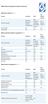 Device Vendor Comparisons Deployment options ( + / -) Vendor for On premises Cloud/SaaS and other platforms supported (+ / -) Vendor for ios Android Extended Android APIs Knox, Safe Safe BlackBerry Windows
1. Introduction... 1. 2. Activation of Mobile Device Management... 3. 3. How Endpoint Protector MDM Works... 5
 User Manual I Endpoint Protector Mobile Device Management User Manual Table of Contents 1. Introduction... 1 1.1. What is Endpoint Protector?... 2 2. Activation of Mobile Device Management... 3 2.1. Activation
Microsoft licensing for the Consumerization of IT
 Volume Licensing brief Microsoft licensing for the Consumerization of IT Table of Contents This brief applies to all Microsoft Volume Licensing programs. Summary... 1 What s New in this Brief?... 1 Introduction...
IBM United States Software Announcement 215-078, dated February 3, 2015
 IBM United States Software Announcement 215-078, dated February 3, 2015 solutions provide a comprehensive, secure, and cloud-based enterprise mobility management platform to protect your devices, apps,
Summary... 1 What s New in This Brief... 1 Details... 1 Customer Scenarios... 3 Frequently Asked Questions... 6
 Volume Licensing brief Licensing the Enterprise Cloud Suite This brief applies to the Microsoft Enterprise Agreement program. Table of Contents Summary... 1 What s New in This Brief... 1 Details... 1 Customer
Cloud Services MDM. Control Panel Provisioning Guide
 Cloud Services MDM Control Panel Provisioning Guide 10/24/2014 CONTENTS Overview... 2 Accessing MDM in the Control Panel... 3 Create the MDM Instance in the Control Panel... 3 Adding a New MDM User...
Client Access Licenses Suite Bridges Overview
 Volume Licensing brief Client Access Licenses Suite Bridges Overview This brief applies to all Microsoft Volume Licensing programs. Table of Contents Summary... 1 What s New in this Brief... 1 Details...
Configuration Guide. BES12 Cloud
 Configuration Guide BES12 Cloud Published: 2016-04-08 SWD-20160408113328879 Contents About this guide... 6 Getting started... 7 Configuring BES12 for the first time...7 Administrator permissions you need
Symantec Mobile Management 7.2 SP3 MR1 Release Notes
 Mobile Management 7.2 SP3 MR1 Release Notes Mobile Management 7.2 SP3 MR1 Release Notes This document includes the following topics: About What's new in 7.2 SP3 MR1 Fixed issues in 7.2 SP3 MR1 Known issues
System Center 2012 R2 Configuration Manager System Requirements
 prajwaldesai.com http://prajwaldesai.com/system-center-2012-r2-configuration-manager-system-requirements/ System Center 2012 R2 Configuration Manager System Requirements Prajwal Desai Welcome to System
Service Definition Nine23 MDM
 Service Definition Nine23 MDM G-Cloud iv Contents 1 Service Nine23 Mobile Device Management System.....4 1.1 Overview Nine23 MDM...... 4 1.2 Open Standards. 5 1.3 User requirements.....5 1.3.1 Client Browser....5
AVG Business SSO Partner Getting Started Guide
 AVG Business SSO Partner Getting Started Guide Table of Contents Overview... 2 Getting Started... 3 Web and OS requirements... 3 Supported web and device browsers... 3 Initial Login... 4 Navigation in
WHITEPAPER. SECUREAUTH 2-FACTOR AS A SERVICE 2FaaS
 WHITEPAPER SECUREAUTH 2-FACTOR AS A SERVICE 2FaaS EXECUTIVE OVERVIEW 2-Factor as a Service (2FaaS) is a 100% cloud-hosted authentication solution that offers flexible security without compromising user
License table for Competency partners. Core licenses
 License table for Competency partners Refer to the Product Usage Guide for important details regarding license use rights and limitations about each software product or online service. Your organization
Guide for Generating. Apple Push Notification Service Certificate
 Guide for Generating Apple Push Notification Service Certificate Contents Generating and Using APNs Certificate... 5 Understanding APNs Certificate... 6 Generating an APNs Certificate... 7 Initial Steps...
Systems Manager Cloud Based Mobile Device Management
 Datasheet Systems Manager Systems Manager Cloud Based Mobile Device Management Overview Meraki Systems Manager provides cloud-based over-the-air centralized management, diagnostics, and monitoring of the
IT Resource Management vs. User Empowerment
 Mobile Device Management Buyers Guide IT Resource Management vs. User Empowerment Business leaders and users are embracing mobility and enjoying the flexibility and productivity leading to rising mobile
Device Lifecycle Management
 Device Lifecycle Management 1 (8) Table of Contents 1. Executive summary... 3 2. Today's challenges in adapting to lifecycle management... 3 3. How is Miradore different?... 5 4. Conclusion... 8 2 (8)
Kaseya IT Automation Framework
 Kaseya Kaseya IT Automation Framework An Integrated solution designed for reducing complexity while increasing productivity for IT Professionals and Managed Service Providers. The powerful, web-based automation
Simplify the Deployment and Management of Desktop Virtualization & VDI Technologies. Terry Lewis Solutions Architect
 Simplify the Deployment and Management of Desktop Virtualization & VDI Technologies Terry Lewis Solutions Architect Today s discussion Technology Drivers Desktop and Application Delivery Complexity Which
Licensing Guide BES12. Version 12.1
 Licensing Guide BES12 Version 12.1 Published: 2015-04-02 SWD-20150402115554403 Contents Introduction... 5 About this guide...5 What is BES12?...5 Key features of BES12... 5 About licensing...7 Steps to
Introduction to Unified Device Management with Intune and System Center Configuration Manager
 Introduction to Unified Device Management with Intune and System Center Configuration Manager Most IT pros and the IT organizations they work for have the challenge of supporting a wide diversity of apps,
Course 20697-2A: Deploying and Managing Windows 10 Using Enterprise Services
 Course 20697-2A: Deploying and Managing Windows 10 Using Enterprise Services Duration: 35 hours About this Course This 5-day course provides administrators with the knowledge and skills needed to deploy
Data Sheet: Archiving Altiris Client Management Suite 7.0 from Symantec Deploy, manage, secure, and troubleshoot
 Deploy, manage, secure, and troubleshoot Overview The cost of a PC is only a small part of its total cost. Nearly 80 percent of the total cost of owning a client system goes toward the support and maintenance
BYOD How-To Guide. How do I securely deliver my company s applications and data to BYOD?
 BYOD How-To Guide How do I securely deliver my company s applications and data to BYOD? Table of Contents Harness the power of BYOD with Mobile Workspaces Why BYOD? Enterprise Mobile Requirements Mobile
Secure, Centralized, Simple
 Whitepaper Secure, Centralized, Simple Multi-platform Enterprise Mobility Management 2 Controlling it all from one place BlackBerry Enterprise Service 10 (BES10) is a unified, multi-platform, device, application,
QuickStart Guide for Mobile Device Management. Version 8.6
 QuickStart Guide for Mobile Device Management Version 8.6 JAMF Software, LLC 2012 JAMF Software, LLC. All rights reserved. JAMF Software has made all efforts to ensure that this guide is accurate. JAMF
TCS Hy5 Presidio Your Mobile Environment, Your Way Configure, Secure, Deploy. Mobility Solutions
 TCS Hy5 Presidio Your Mobile Environment, Your Way Configure, Secure, Deploy Mobility Solutions The growth of in-house and third-party enterprise mobile applications; device diversity across ios, Android,
Identity + Mobile Management + Security = Enterprise Mobility Suite
 presenta Identity + Mobile Management + Security = Enterprise Mobility Suite Alessandro Appiani Founder & CTO - Pulsar IT [email protected] twitter: @AlexAppiani Gabriele Tansini Partner
ManageEngine Desktop Central. Mobile Device Management User Guide
 ManageEngine Desktop Central Mobile Device Management User Guide Contents 1 Mobile Device Management... 2 1.1 Supported Devices... 2 1.2 What Management Operations you can Perform?... 2 2 Setting Up MDM...
Telstra Mobile Device Management (T MDM) Getting Started Guide
 Telstra Mobile Device Management (T MDM) Getting Started Guide Welcome Thank you for your interest in T MDM and Welcome! In this guide we will take you through the steps to enrolling your first device
CDH. Microsoft System Center Configuration Manager & Mobile Device Management
 Microsoft System Center Configuration Manager & Mobile Device Management Quick Facts About Us 22 nd Year Grand Rapids & Royal Oak 30 Staff Approach Vendor Independent Non-reseller Professional Services
Configuration Guide. BlackBerry Enterprise Service 12. Version 12.0
 Configuration Guide BlackBerry Enterprise Service 12 Version 12.0 Published: 2014-12-19 SWD-20141219132902639 Contents Introduction... 7 About this guide...7 What is BES12?...7 Key features of BES12...