
NetIQ AppManager for WebLogic Server UNIX. Management Guide
|
|
|
- Drusilla Houston
- 10 years ago
- Views:
Transcription
1 NetIQ AppManager for UNIX Management Guide May 2013

2 Legal Notice THIS DOCUMENT AND THE SOFTWARE DESCRIBED IN THIS DOCUMENT ARE FURNISHED UNDER AND ARE SUBJECT TO THE TERMS OF A LICENSE AGREEMENT OR A NON DISCLOSURE AGREEMENT. EXCEPT AS EXPRESSLY SET FORTH IN SUCH LICENSE AGREEMENT OR NON DISCLOSURE AGREEMENT, NETIQ CORPORATION PROVIDES THIS DOCUMENT AND THE SOFTWARE DESCRIBED IN THIS DOCUMENT ʺAS ISʺ WITHOUT WARRANTY OF ANY KIND, EITHER EXPRESS OR IMPLIED, INCLUDING, BUT NOT LIMITED TO, THE IMPLIED WARRANTIES OF MERCHANTABILITY OR FITNESS FOR A PARTICULAR PURPOSE. SOME STATES DO NOT ALLOW DISCLAIMERS OF EXPRESS OR IMPLIED WARRANTIES IN CERTAIN TRANSACTIONS; THEREFORE, THIS STATEMENT MAY NOT APPLY TO YOU. For purposes of clarity, any module, adapter or other similar material (ʺModuleʺ) is licensed under the terms and conditions of the End User License Agreement for the applicable version of the NetIQ product or software to which it relates or interoperates with, and by accessing, copying or using a Module you agree to be bound by such terms. If you do not agree to the terms of the End User License Agreement you are not authorized to use, access or copy a Module and you must destroy all copies of the Module and contact NetIQ for further instructions. This document and the software described in this document may not be lent, sold, or given away without the prior written permission of NetIQ Corporation, except as otherwise permitted by law. Except as expressly set forth in such license agreement or non disclosure agreement, no part of this document or the software described in this document may be reproduced, stored in a retrieval system, or transmitted in any form or by any means, electronic, mechanical, or otherwise, without the prior written consent of NetIQ Corporation. Some companies, names, and data in this document are used for illustration purposes and may not represent real companies, individuals, or data. This document could include technical inaccuracies or typographical errors. Changes are periodically made to the information herein. These changes may be incorporated in new editions of this document. NetIQ Corporation may make improvements in or changes to the software described in this document at any time. U.S. Government Restricted Rights: If the software and documentation are being acquired by or on behalf of the U.S. Government or by a U.S. Government prime contractor or subcontractor (at any tier), in accordance with 48 C.F.R (for Department of Defense (DOD) acquisitions) and 48 C.F.R and (for non DOD acquisitions), the government s rights in the software and documentation, including its rights to use, modify, reproduce, release, perform, display or disclose the software or documentation, will be subject in all respects to the commercial license rights and restrictions provided in the license agreement NetIQ Corporation and its affiliates. All Rights Reserved. For information about NetIQ trademarks, see

3 Contents About this Book and the Library 5 About NetIQ Corporation 7 1 Introduction to AppManager for UNIX 9 2 Installing AppManager for UNIX System Requirements Installing the Module Discovering UNIX Resources Upgrading Knowledge Script Jobs WebLogicSvrUNIX Knowledge Scripts Knowledge Scripts by Category Availability ClusterMessage ConnectorConnCurrent ConnectorConnRequests EntityEJBCache EntityEJBError EntityEJBPool EntityEJBTrans EntityEJBWait HealthCheck JDBCAvailableConnections JDBCClients JDBCConnections JDBCConnectionCapacity JDBCEnableSQLProfiling JMS JMSConnectionsSessions JMSHealthState JMSPooledConnAvail JMSPooledConnError JMSPooledConnSession JMSPooledConnWait JMSServersBytesStored JMSServersDestinations JMSServersHealthState JMSServersMsgsStored JMSServersSessionPools JRockitGC JRockitThreads JTAActiveTrans JTACompletedTrans JTAHealthState Contents 3

4 3.34 JTATransRolledBack LogAccessLog LogAccessLogSetPath LogWebLogic LogWebLogicSetPath Memory MsgDrivenEJBError MsgDrivenEJBPool MsgDrivenEJBTrans MsgDrivenEJBWait NetIQAgent Report_HealthSummary Report_PerfSummary SecurityUserLockout ServerCPU ServerHealthState ServerJVMHeap ServerRequests ServerSecurity ServerSockets ServerState ServerUptime ServletExecTime StartAdminServer StartServer StartServerNodeMgr StatefulEJBCache StatefulEJBTrans StatefulEJBWait StatelessEJBError StatelessEJBPool StatelessEJBTrans StatelessEJBWait StopServer TransCateg TransCategRollBacks TransResHealthState TransResHeuristics TransResources WebAppSessions NetIQ AppManager for UNIX Management Guide

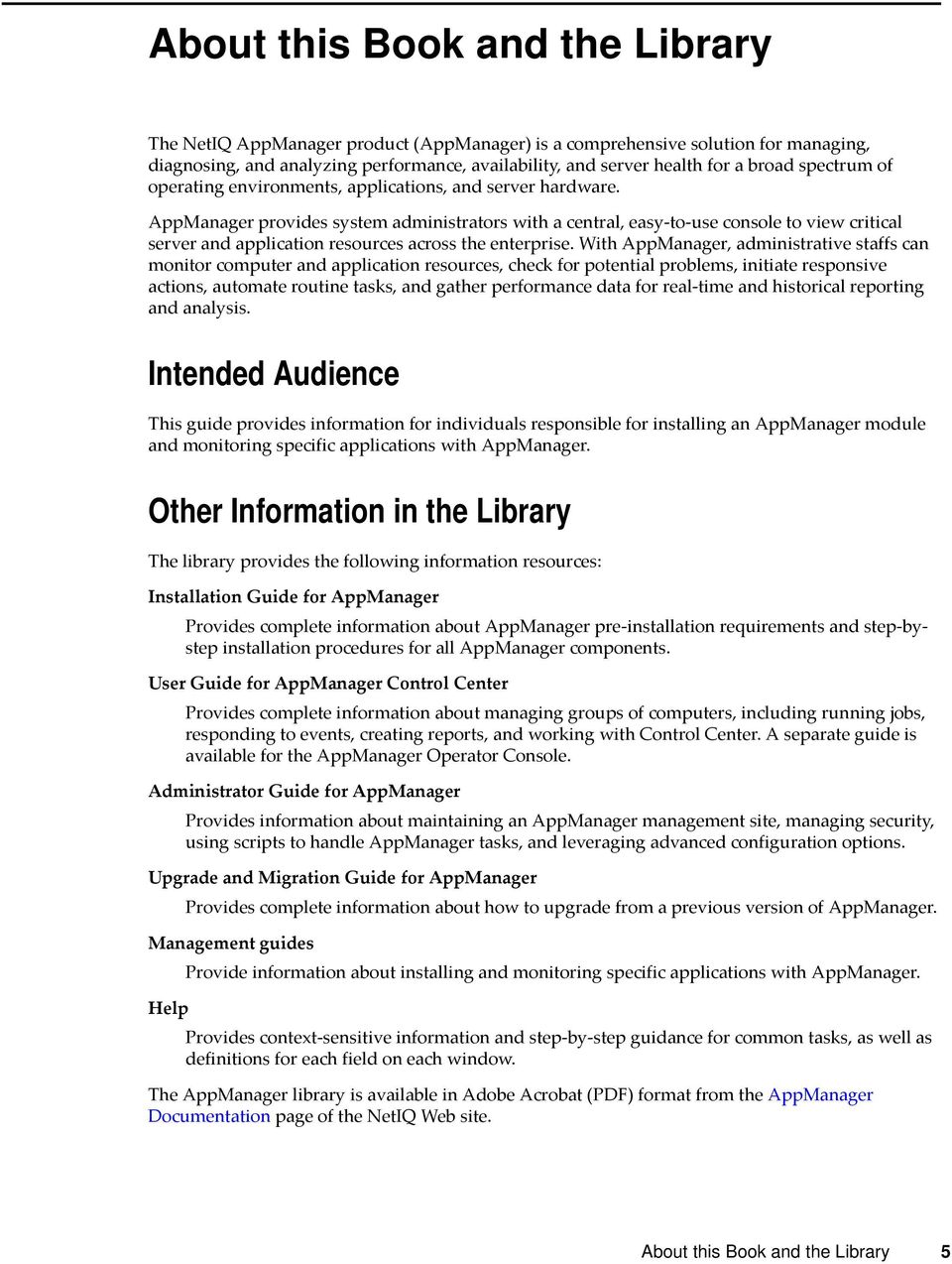
5 About this Book and the Library The NetIQ AppManager product (AppManager) is a comprehensive solution for managing, diagnosing, and analyzing performance, availability, and server health for a broad spectrum of operating environments, applications, and server hardware. AppManager provides system administrators with a central, easy to use console to view critical server and application resources across the enterprise. With AppManager, administrative staffs can monitor computer and application resources, check for potential problems, initiate responsive actions, automate routine tasks, and gather performance data for real time and historical reporting and analysis. Intended Audience This guide provides information for individuals responsible for installing an AppManager module and monitoring specific applications with AppManager. Other Information in the Library The library provides the following information resources: Installation Guide for AppManager Provides complete information about AppManager pre installation requirements and step bystep installation procedures for all AppManager components. User Guide for AppManager Control Center Provides complete information about managing groups of computers, including running jobs, responding to events, creating reports, and working with Control Center. A separate guide is available for the AppManager Operator Console. Administrator Guide for AppManager Provides information about maintaining an AppManager management site, managing security, using scripts to handle AppManager tasks, and leveraging advanced configuration options. Upgrade and Migration Guide for AppManager Provides complete information about how to upgrade from a previous version of AppManager. Management guides Provide information about installing and monitoring specific applications with AppManager. Help Provides context sensitive information and step by step guidance for common tasks, as well as definitions for each field on each window. The AppManager library is available in Adobe Acrobat (PDF) format from the AppManager Documentation page of the NetIQ Web site. About this Book and the Library 5
6 6 NetIQ AppManager for UNIX Management Guide

7 About NetIQ Corporation NetIQ, an Attachmate business, is a global leader in systems and security management. With more than 12,000 customers in over 60 countries, NetIQ solutions maximize technology investments and enable IT process improvements to achieve measurable cost savings. The company s portfolio includes award winning management products for IT Process Automation, Systems Management, Security Management, Configuration Audit and Control, Enterprise Administration, and Unified Communications Management. For more information, please visit Contacting Sales Support For questions about products, pricing, and capabilities, please contact your local partner. If you cannot contact your partner, please contact our Sales Support team. Worldwide: United States and Canada: Web Site: [email protected] Contacting Technical Support For specific product issues, please contact our Technical Support team. Worldwide: North and South America: Europe, Middle East, and Africa: +353 (0) Web Site: [email protected] Contacting Documentation Support Our goal is to provide documentation that meets your needs. If you have suggestions for improvements, click Add Comment at the bottom of any page in the HTML versions of the documentation posted at You can also Documentation [email protected]. We value your input and look forward to hearing from you. About NetIQ Corporation 7

8 Contacting the Online User Community Qmunity, the NetIQ online community, is a collaborative network connecting you to your peers and NetIQ experts. By providing more immediate information, useful links to helpful resources, and access to NetIQ experts, Qmunity helps ensure you are mastering the knowledge you need to realize the full potential of IT investments upon which you rely. For more information, please visit 8 NetIQ AppManager for UNIX Management Guide

9 1 1Introduction to AppManager for UNIX AppManager for UNIX provides a comprehensive solution for monitoring the activity on UNIX servers, along with all your other mission critical resources. With AppManager for UNIX, you can: Set s and event notification levels Continuously monitor computer resources with little or no manual intervention View application configuration details Stay informed about potential and current system problems Initiate corrective or responsive actions automatically View performance data for real time and historical reporting Extend monitoring functionality with easy to use scripting tools AppManager for UNIX provides real time performance and status monitoring of UNIX servers. Unlike other performance monitoring applications that gather historical data from access and error logs, AppManager collects and displays real time performance data. AppManager for UNIX offers the following features: Real time performance monitoring. AppManager for UNIX eliminates the lag time required by other applications that query access and error logs. Real time monitoring lets you take an accurate snapshot of WebLogic performance at any time, without worrying about losing data in log files that are configured to overwrite. Real time status code monitoring. AppManager for UNIX monitors status codes generated by client request errors in real time. If a client or virtual host requests a Web page that is unavailable (404 not found), AppManager collects the status code and displays it in the Operator Console and Control Center. Remote monitoring across platforms. AppManager for UNIX monitors the performance of a UNIX server from a computer running Microsoft Windows. AppManager Knowledge Scripts let you start, restart, and stop UNIX servers remotely, on demand, or at regularly scheduled times. Introduction to AppManager for UNIX 9

10 10 NetIQ AppManager for UNIX Management Guide

11 2 2Installing AppManager for WebLogic Server UNIX This chapter describes requirements for how to install AppManager for UNIX. This chapter assumes you have an AppManager repository, console, management server, and UNIX agent installed. For more information about installing AppManager Windows components, see the Installation Guide for AppManager and for information about installing the UNIX agent, see the AppManager for UNIX and Linux Servers Management Guide, which are available on the AppManager Documentation page. 2.1 System Requirements For the latest information about specific supported software versions and the availability of module updates, visit the AppManager Supported Products page. AppManager for UNIX has the following system requirements: Item AppManager repository, management server, and Control Center Console NetIQ UNIX Agent Operating system on agent computers Requirement or later 7.1 or later One of the following: CentOS HP-UX IBM AIX Oracle Linux Oracle Solaris Red Hat Enterprise Linux SUSE Linux Enterprise Server Oracle 10, 11, or 12 Java Runtime Environment (JRE) 1.5, 1.6, or 1.7 Java 1.5, 1.6, or 1.7 If you encounter problems using this module with a later version of your application, contact NetIQ Technical Support. Installing AppManager for UNIX 11

12 2.2 Installing the Module To install the module you must: Install the Knowledge Scripts by running the module installer.msi on all AppManager repositories that store data for this module. Install the Help files by running the module installer.msi on all AppManager Control Center and Operator Console computers you will use with this module. Ensure that UNIX agent 7.1. with patch or UNIX agent 7.2 is installed on the computer you want to monitor. You can access the AM70-WebLogicSvrUNIX-7.9.x.x.msi module installer and the p71p44.zip patch from the AM70_WebLogicSvrUNIX_7.9.x.x self extracting installation package on the AppManager Module Upgrades & Trials page. The module installer now installs Knowledge Scripts for each module directly into the QDB instead of to the \AppManager\qdb\kp folder as in previous releases of AppManager. To install the module: 1 Ensure you have the UNIX agent installed on the managed computer or computers. For information about how to install the agent, see the AppManager for UNIX and Linux Servers Management Guide. 2 (Conditional) If you have UNIX agent 7.1, apply patch to the computers you want to monitor. If you are applying the patch on a Solaris computer, then shutdown and restart the Java Server Process. For information about how to apply UNIX agent patches, see the AppManager for UNIX and Linux Servers Management Guide. 3 Install the Knowledge Scripts into the QDB by running the module installer, AM70- WebLogicSvrUNIX-7.9.x.x.msi, on the QDB computer: 3a Select Install Knowledge Scripts to install the repository components. 3b Specify the SQL Server name of the server hosting the QDB, as well as the case sensitive QDB name. 4 (Conditional) If you use Control Center 7.x, run the module installer for each QDB attached to Control Center. 5 (Conditional) If you use Control Center 8.x, run the module installer only for the primary QDB. Control Center automatically replicates this module to secondary QDBs. 6 Run the module installer, AM70-WebLogicSvrUNIX-7.9.x.x.msi, on all console computers to install the Help and console extensions. 7 (Conditional) If you have not discovered UNIX resources, run the Discovery_WebLogicSvrUNIX Knowledge Script on all agent computers that you want to monitor. For more information, see Section 2.3, Discovering UNIX Resources, on page To get the updates provided in this release, upgrade any running Knowledge Script jobs. For more information, see Section 2.4, Upgrading Knowledge Script Jobs, on page 14. After the installation has completed, the WebLogicSvrUNIX_Install.log file, located in the \NetIQ\Temp\NetIQ_Debug\<ServerName> folder, lists any problems that occurred. 12 NetIQ AppManager for UNIX Management Guide

13 2.2.1 Silently Installing the Knowledge Scripts To silently install the module on an AppManager repository, you can use Windows authentication or SQL authentication. Windows authentication: AM70-WebLogicSvrUNIX-7.9.x.x.msi /qn MO_B_QDBINSTALL=1 MO_B_SQLSVR_WINAUTH=1 MO_SQLSVR_NAME=[SQLServerName] MO_QDBNAME=[AMRepositoryName] SQL authentication: AM70-WebLogicSvrUNIX-7.9.x.x.msi /qn MO_B_QDBINSTALL=1 MO_B_SQLSVR_WINAUTH=0 MO_SQLSVR_USER=[SQL login] MO_SQLSVR_PWD=[SQLLoginPassword] MO_SQLSVR_NAME=[SQLServerName] MO_QDBNAME=[AMRepositoryName] 2.3 Discovering UNIX Resources Use the Discovery_WebLogicSrvUNIX Knowledge Script to discover configuration and resource information for WebLogic servers. The Discovery_WebLogicSrvUNIX script also tracks, displays, and provides various alerts about WebLogic services. Before you discover, if the UNIX agent is running under a non root user account, perform the following steps: 1 Ensure that the account running the UNIX agent has permission to access the WebLogic directories, for example, registry.xml file. 2 Add the following entries to the /etc/uroot.cfg file: /usr/sbin/lsof $NQMAGT_HOME/bin/lsof $NQMAGT_HOME/mo/bin/FindPidForPort.sh 3 Restart the agent. By default, this script runs once for each computer. Set the Values tab parameters as needed: Raise event when discovery succeeds? (y/n) Event severity when discovery succeeds Event severity when discovery fails Event severity when discovery partially succeeds Communication Channel (Clear Text/SSL) Set to y to raise an event when the Knowledge Script discovers a. The default is y. Specify a severity level for the event raised by successful discovery of a. The default is 25. Specify a severity level for the event raised by failure to discover a. The default is 5. Specify a severity level for the event raised when the Knowledge Script starts but does not run to completion. The default is 10. Select the channel for communication with a. The default communication channel is Clear Text. Installing AppManager for UNIX 13
![x.msi /qn MO_B_QDBINSTALL=1 MO_B_SQLSVR_WINAUTH=1 MO_SQLSVR_NAME=[SQLServerName] MO_QDBNAME=[AMRepositoryName] SQL authentication: AM70-WebLogicSvrUNIX-7.9.x.x.msi /qn MO_B_QDBINSTALL=1 MO_B_SQLSVR_WINAUTH=0 MO_SQLSVR_USER=[SQL login] MO_SQLSVR_PWD=[SQLLoginPassword] MO_SQLSVR_NAME=[SQLServerName] MO_QDBNAME=[AMRepositoryName] 2.](/docs-images/52/13135410/images/page_13.jpg "3 Discovering UNIX Resources Use the Discovery_WebLogicSrvUNIX Knowledge Script to discover configuration and resource information for WebLogic servers.")
14 Trusted Server CA Certificate (applicable if communication channel is SSL) Specify the path for the trusted server CA certificate. NOTE: Specify the certificate path only if you select SSL for the Communication Channel parameter. Administration Server hostname:port. Must match Security Manager entry Specify the hostname containing an Administration Server for the WebLogic domain and the port number on which the Administration Server is listening. The hostname and port must be separated by a colon. If you are discovering multiple servers and need to contact more than one Administration Server, specify each hostname:port combination, separated by a semi-colon. Do not add spaces before or after the semicolon. For example: localhost:80;storm:888;wilder:1333 The default is localhost:7001. NOTE: Ensure that all combinations are entered in Security Manager. BEA home directory. Must contain the BEA registry.xml file Specify the home directory of your installation. This directory should contain the registry.xml file. If you are discovering multiple installations of WebLogic, specify each home directory, separated by a semi-colon. Do not add spaces before or after the semicolon. For example, /usr/weblogic;/opt/web/ weblogic. The default is /usr/. Directory to search for a Java Runtime Environment Port to use for NetIQ WebLogic Server agent. Specify a directory in which a Java Runtime Environment is installed. Note that there is no default. Specify the port on which the NetIQ WebLogic agent receives requests. If you are discovering multiple versions of WebLogic, specify each version with a unique port, separated by semi-colons. For example: 2000;2001. The default is After you successfully run the Discovery_WebLogicSrvUNIX Knowledge Script, you should see the new WebLogicSvrUNIX Knowledge Script category in the Operator Console or Control Center. You are now ready to begin monitoring. 2.4 Upgrading Knowledge Script Jobs This release of AppManager for UNIX contains updated Knowledge Scripts. You can push the changes for updated scripts to running Knowledge Script jobs in one of the following ways: Use the AMAdmin_UpgradeJobs Knowledge Script. Use the Properties Propagation feature. 14 NetIQ AppManager for UNIX Management Guide

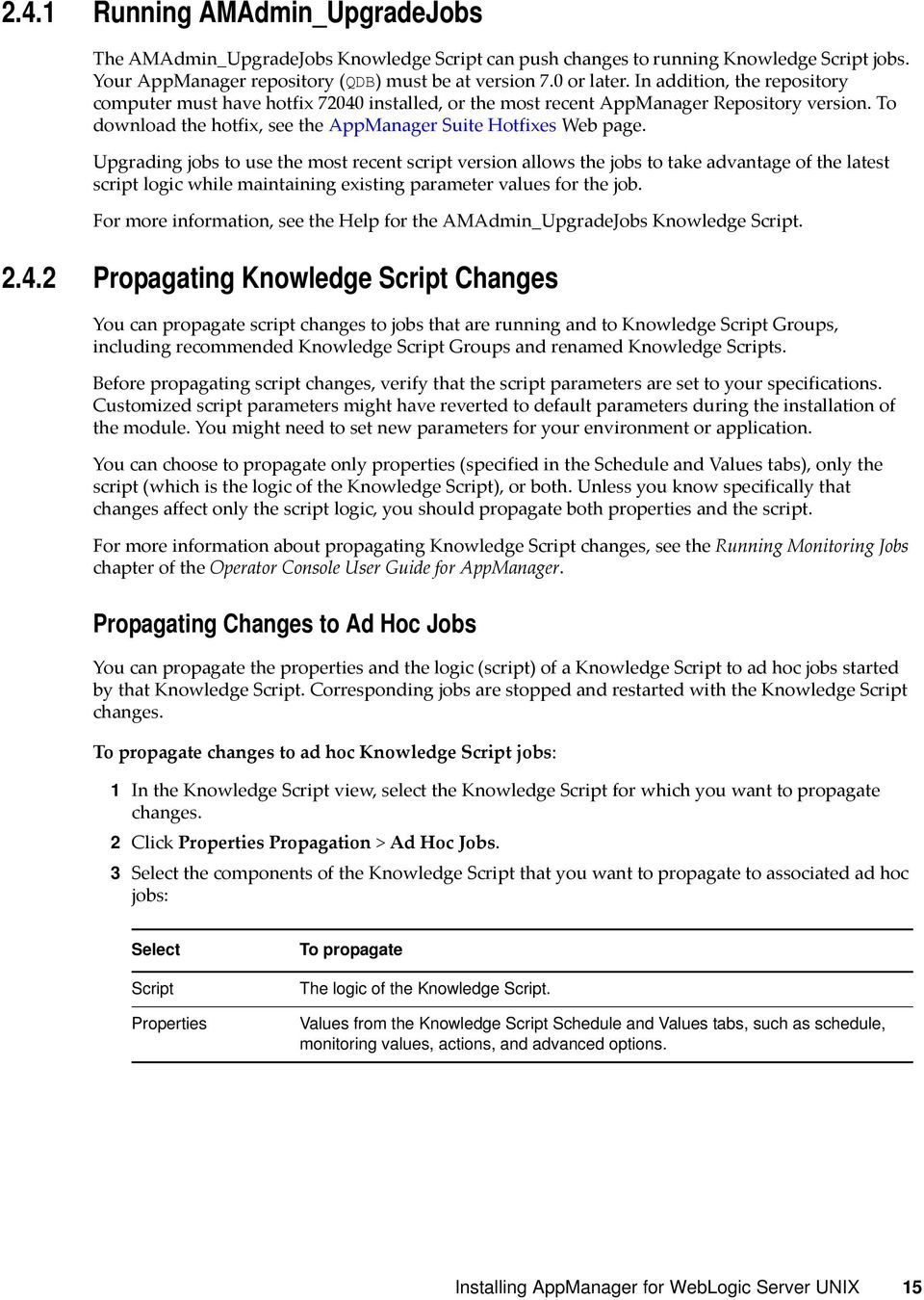
15 2.4.1 Running AMAdmin_UpgradeJobs The AMAdmin_UpgradeJobs Knowledge Script can push changes to running Knowledge Script jobs. Your AppManager repository (QDB) must be at version 7.0 or later. In addition, the repository computer must have hotfix installed, or the most recent AppManager Repository version. To download the hotfix, see the AppManager Suite Hotfixes Web page. Upgrading jobs to use the most recent script version allows the jobs to take advantage of the latest script logic while maintaining existing parameter values for the job. For more information, see the Help for the AMAdmin_UpgradeJobs Knowledge Script Propagating Knowledge Script Changes You can propagate script changes to jobs that are running and to Knowledge Script Groups, including recommended Knowledge Script Groups and renamed Knowledge Scripts. Before propagating script changes, verify that the script parameters are set to your specifications. Customized script parameters might have reverted to default parameters during the installation of the module. You might need to set new parameters for your environment or application. You can choose to propagate only properties (specified in the Schedule and Values tabs), only the script (which is the logic of the Knowledge Script), or both. Unless you know specifically that changes affect only the script logic, you should propagate both properties and the script. For more information about propagating Knowledge Script changes, see the Running Monitoring Jobs chapter of the Operator Console User Guide for AppManager. Propagating Changes to Ad Hoc Jobs You can propagate the properties and the logic (script) of a Knowledge Script to ad hoc jobs started by that Knowledge Script. Corresponding jobs are stopped and restarted with the Knowledge Script changes. To propagate changes to ad hoc Knowledge Script jobs: 1 In the Knowledge Script view, select the Knowledge Script for which you want to propagate changes. 2 Click Properties Propagation > Ad Hoc Jobs. 3 Select the components of the Knowledge Script that you want to propagate to associated ad hoc jobs: Select Script Properties To propagate The logic of the Knowledge Script. Values from the Knowledge Script Schedule and Values tabs, such as schedule, monitoring values, actions, and advanced options. Installing AppManager for UNIX 15
16 Propagating Changes to Knowledge Script Groups You can propagate the properties and logic (script) of a Knowledge Script to corresponding Knowledge Script Group members. After you propagate script changes to Knowledge Script Group members, you can propagate the updated Knowledge Script Group members to associated running jobs. For more information, see Propagating Changes to Ad Hoc Jobs on page 15. To propagate Knowledge Script changes to Knowledge Script Groups: 1 In the Knowledge Script view, select the Knowledge Script Group for which you want to propagate changes. 2 On the KS menu, select Properties propagation > Ad Hoc Jobs. 3 (Conditional) If you want to exclude a Knowledge Script member from properties propagation, clear that member from the list in the Properties Propagation dialog box. 4 Select the components of the Knowledge Script that you want to propagate to associated Knowledge Script Groups: Select Script Properties To propagate The logic of the Knowledge Script. Values from the Knowledge Script Schedule and Values tabs, including the schedule, actions, and Advanced properties. 5 Click OK. Any monitoring jobs started by a Knowledge Script Group member are restarted with the job properties of the Knowledge Script Group member. 16 NetIQ AppManager for UNIX Management Guide

17 3 3WebLogicSvrUNIX Knowledge Scripts AppManager provides the following Knowledge Scripts for monitoring UNIX UNIX servers. From the Knowledge Script view of Control Center, you can access more information about any NetIQ supported Knowledge Script by selecting it and clicking Help. In the Operator Console, click any Knowledge Script in the Knowledge Script pane and press F1. Knowledge Script Availability HealthCheck LogAccessLog LogAccessLogSetPath LogWebLogic LogWebLogicSetPath Memory SecurityUserLockout ServerCPU ServerHealthState ServerJVMHeap ServerRequests ServerSecurity ServerSockets ServerState ServerUptime StartAdminServer StartServer What It Does Monitors the availability of a. Verifies that a is running, can respond to requests, and can accept connections from clients. Returns the number of entries in the s access.log since the last sample that match the search criteria. Provides a way to monitor HTTP requests and sessions. Sets the absolute pathname for a Web server log file. Monitors entries that are added to the log for a. Sets the absolute pathname for a log file. Monitors the physical and virtual memory use of a. Monitors statistics on the number of users locked out because invalid usernames or passwords were supplied at login. Returns CPU utilization statistics. Returns the health state of a. Returns statistics on the JVM Heap. Returns statistics on the requests received by the. Monitors statistics on the number of users locked out because invalid usernames or passwords were supplied at login. Monitors the number of open sockets on a. Monitors the state (RUNNING or not) of a as reported by the. Monitors how many hours a has been running. Starts a specified as the Administration Server for the domain. Starts a specified as a Managed Server. WebLogicSvrUNIX Knowledge Scripts 17

18 Knowledge Script StopServer What It Does Stops a specified, which can be either an Administration Server or a Managed Server. 3.1 Knowledge Scripts by Category You can run Knowledge Scripts from the following categories to monitor specific services: Section 3.1.1, Managed Server/Cluster Knowledge Scripts, on page 18 Section 3.1.2, JDBC Connection Pool Knowledge Scripts, on page 18 Section 3.1.3, Java Message System (JMS) Knowledge Scripts, on page 19 Section 3.1.4, Java Virtual Machine (JVM) Knowledge Scripts, on page 19 Section 3.1.5, Java Message System (JMS) Pooled Connection Knowledge Scripts, on page 19 Section 3.1.6, Java Transaction API (JTA) Knowledge Scripts, on page 20 Section 3.1.7, Enterprise JavaBeans (EJB) Knowledge Scripts, on page 20 Section 3.1.8, Web Applications and Servlets Knowledge Scripts, on page 21 Section 3.1.9, Connector Connections Knowledge Scripts, on page 21 Section , Data Gathering Knowledge Script, on page 21 Section , SQL Profiling and Monitoring Knowledge Scripts, on page 22 Section , Report Knowledge Scripts, on page Managed Server/Cluster Knowledge Scripts Run the following Knowledge Scripts on managed servers, the Node Manager, and clusters. Knowledge Script ClusterMessage StartServerNodeMgr What It Does Monitors a server s view of the members of a WebLogic cluster. Starts a as a Managed Server using the Node Manager JDBC Connection Pool Knowledge Scripts Run the following Knowledge Scripts on JDBC connection pools: Knowledge Script JDBCAvailableConnections JDBCClients JDBCConnectionCapacity JDBCConnections What It Does Monitors the available number of connections in a JDBC Connection Pool. Monitors statistics on the clients of a JDBC Connection Pool. Monitors the current and maximum capacity of a JDBC Connection Pool. Monitors statistics on the connections in a JDBC Connection Pool. 18 NetIQ AppManager for UNIX Management Guide

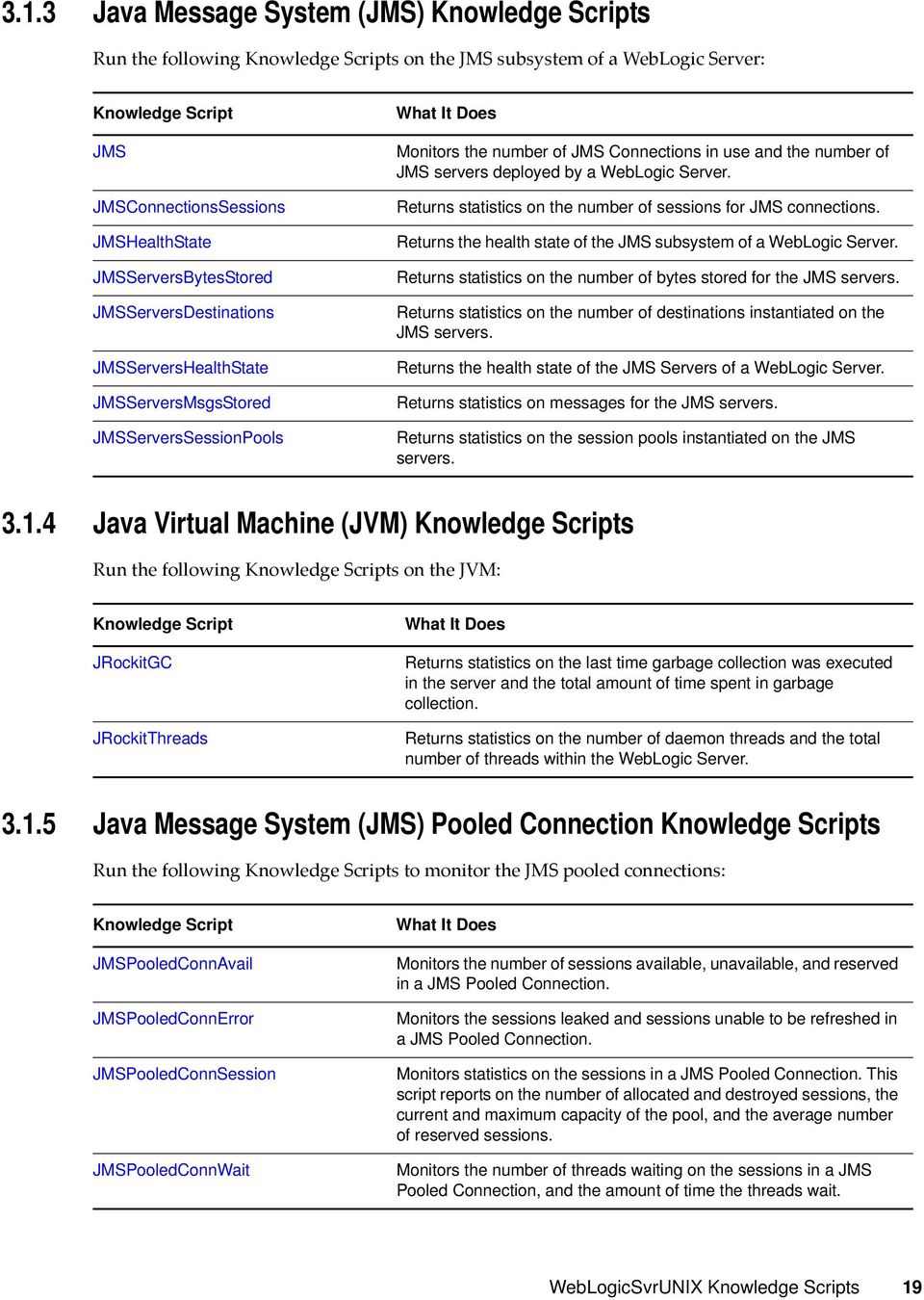
19 3.1.3 Java Message System (JMS) Knowledge Scripts Run the following Knowledge Scripts on the JMS subsystem of a : Knowledge Script JMS JMSConnectionsSessions JMSHealthState JMSServersBytesStored JMSServersDestinations JMSServersHealthState JMSServersMsgsStored JMSServersSessionPools What It Does Monitors the number of JMS Connections in use and the number of JMS servers deployed by a. Returns statistics on the number of sessions for JMS connections. Returns the health state of the JMS subsystem of a. Returns statistics on the number of bytes stored for the JMS servers. Returns statistics on the number of destinations instantiated on the JMS servers. Returns the health state of the JMS Servers of a. Returns statistics on messages for the JMS servers. Returns statistics on the session pools instantiated on the JMS servers Java Virtual Machine (JVM) Knowledge Scripts Run the following Knowledge Scripts on the JVM: Knowledge Script JRockitGC JRockitThreads What It Does Returns statistics on the last time garbage collection was executed in the server and the total amount of time spent in garbage collection. Returns statistics on the number of daemon threads and the total number of threads within the Java Message System (JMS) Pooled Connection Knowledge Scripts Run the following Knowledge Scripts to monitor the JMS pooled connections: Knowledge Script JMSPooledConnAvail JMSPooledConnError JMSPooledConnSession JMSPooledConnWait What It Does Monitors the number of sessions available, unavailable, and reserved in a JMS Pooled Connection. Monitors the sessions leaked and sessions unable to be refreshed in a JMS Pooled Connection. Monitors statistics on the sessions in a JMS Pooled Connection. This script reports on the number of allocated and destroyed sessions, the current and maximum capacity of the pool, and the average number of reserved sessions. Monitors the number of threads waiting on the sessions in a JMS Pooled Connection, and the amount of time the threads wait. WebLogicSvrUNIX Knowledge Scripts 19
20 3.1.6 Java Transaction API (JTA) Knowledge Scripts Run the following Knowledge Scripts on the JTA subsystem of a : Knowledge Script JTAActiveTrans JTACompletedTrans JTAHealthState JTATransRolledBack TransResources TransResHealthState TransResHeuristics TransCateg TransCategRollBacks What It Does Monitors the current number of transactions in progress on a. Monitors the transactions that have completed on a since the last sample. Returns the health state of the JTA subsystem of a. Provides statistics on the causes for transaction rollbacks. Returns statistics for the transactional resources of a WebLogic Server. Returns the health state of the transactional resources of a WebLogic Server. Provides a breakdown of the reasons for heuristic completes for the transactional resources of a. Returns statistics for the transaction categories of a WebLogic Server. Provides statistics on the reasons why transactions were rolled back for the transaction categories of a Enterprise JavaBeans (EJB) Knowledge Scripts Run the following Knowledge Scripts on the EJBs on a : Knowledge Script EntityEJBCache EntityEJBError EntityEJBPool EntityEJBTrans EntityEJBWait MsgDrivenEJBError MsgDrivenEJBPool MsgDrivenEJBTrans MsgDrivenEJBWait StatefulEJBCache StatefulEJBTrans What It Does Returns statistics on caching for an Entity EJB. Returns statistics on errors generated by an Entity EJB. Returns the percentage of beans that are idle and in-use for an Entity EJB. Returns statistics on transactions for an Entity EJB. Returns the number of times a client has waited for an Entity EJB and the number of times that clients have timed out waiting for an Entity EJB. Monitors errors generated by a message-driven EJB. Monitors the number of message-driven EJBs that are in use and the number that are idle. Returns statistics on transactions for a message-driven EJB. Returns the number of times a client has waited for a message-driven EJB and the number of times that clients have timed out waiting for a messagedriven EJB. Returns statistics on the cache for a Stateful EJB. Returns statistics on transactions for a Stateful EJB. 20 NetIQ AppManager for UNIX Management Guide

21 Knowledge Script StatefulEJBWait StatelessEJBError StatelessEJBPool StatelessEJBTrans StatefulEJBWait What It Does Returns the number of times a client waited for a bean and the number of times that clients have timed out waiting for a bean for the Stateful EJB. Monitors errors generated by a Stateless EJB. Returns the number and percentage of beans that are idle and in use for a Stateless EJB. Returns statistics on transactions for a Stateless EJB. Returns the number of times a client waited for a bean and the number of times that clients have timed out waiting for a bean for the Stateless EJB Web Applications and Servlets Knowledge Scripts Run the following Knowledge Scripts on the Web applications and servlets on a : Knowledge Script ServletExecTime WebAppSessions What It Does Monitors the execution times and number of times that the servlets of a Web application were invoked. Monitors the current number of sessions of a Web application and the number of sessions that have been run since the last sample Connector Connections Knowledge Scripts Run the following Knowledge Scripts on the Connector connections of a : Knowledge Script ConnectorConnCurrent ConnectorConnRequests What It Does Monitors statistics on the current number of active and free Connector connections. Returns the number of Connector connections created, destroyed, matched, rejected and recycled since the last sample Data-Gathering Knowledge Script Run the following Knowledge Script to start or stop components that gather data for the Knowledge Scripts: Knowledge Script NetIQAgent What It Does Starts or stops the NetIQ UNIX agent that helps gather data about WebLogic Servers and their components. WebLogicSvrUNIX Knowledge Scripts 21
22 SQL Profiling and Monitoring Knowledge Scripts Run the following Knowledge Script to monitor individual SQL statements: Knowledge Script JDBCEnableSQLProfiling What It Does Enables or disables profiling of SQL statements Report Knowledge Scripts Run the following Knowledge Scripts to generate reports: Knowledge Script Report_HealthSummary Report_PerfSummary What It Does Generates a report summarizing the health of monitored WebLogic servers. Generates a report summarizing the performance of monitored WebLogic servers. 3.2 Availability Use this Knowledge Script to monitor availability of a. This script verifies that a is running and can accept requests Resource Object Default Schedule Setting Parameter Values Collect data? Set to y to collect data for reports and graphs. The default value is n. Event severity when is not responding? importance of the event. The default value is NetIQ AppManager for UNIX Management Guide
23 3.3 ClusterMessage Use this Knowledge Script to monitor a server s view of the members of a WebLogic cluster. This script reports statistics on the multicast message and fragments sent and received by a WebLogic server Resource Object Default Schedule Setting Parameter Values Collect data? Fragments sent Event severity when fragments sent exceeds Fragments received Event severity when fragments received Resend requests Event severity when resend requests Messages lost Event severity when messages lost exceeds Set to y to collect data for reports and graphs. The default value is n. to 1. Use 1 to ignore this. If the number of fragments sent since the last sample exceeds this, this Knowledge Script raises an event. The default value is 1. to 1. Use 1 to ignore this. If the number of fragments received since the last sample exceeds this, this Knowledge Script raises an event. The default value is 1. to 1. Use 1 to ignore this. If the number of requests to resend a message since the last sample exceeds this, this Knowledge Script raises an event. The default value is 1. to 1. Use 1 to ignore this. If the number of incoming messages lost since the last sample exceeds this, this Knowledge Script raises an event. The default value is -1. WebLogicSvrUNIX Knowledge Scripts 23
24 Foreign fragments dropped Event severity when foreign fragments dropped to 1. Use 1 to ignore this. If the number of fragments received from a foreign domain or foreign cluster since the last sample exceeds this, this Knowledge Script raises an event. The default value is ConnectorConnCurrent Use this Knowledge Script to monitor the number of active and free connections in a Connector Connection Pool. These statistics provide a view of the Connector Connection Pool from the server s perspective, which will help determine if the capacity of the pool is large enough Resource Object Default Schedule Setting Parameter Values Collect data? Set to y to collect data for reports and graphs. The default value is n. Active connections to 1. Use 1 to ignore this. If the current number of active connections exceeds this, this Knowledge Script raises an event. The default value is 1. Event severity when active connections importance of Peak active connections to 1. Use 1 to ignore this. If the peak number of active connections exceeds this, this Knowledge Script raises an event. The default value is 1. Event severity when peak active connections importance of Average active connections to 1. Use 1 to ignore this. If the average number of active connections exceeds this, this Knowledge Script raises an event. The default value is NetIQ AppManager for UNIX Management Guide
25 Event severity when average active connections importance of Free connections to 1. Use 1 to ignore this. If the current number of free connections exceeds this, this Knowledge Script raises an event. The default value is 1. Event severity when free connections importance of Peak free connections to 1. Use 1 to ignore this. If the peak number of free connections exceeds this, this Knowledge Script raises an event. The default value is 1. Event severity when peak free connections Percent of connections in use Event severity when percent of connections in use importance of to 1 and less than or equal to 100. Use 1 to ignore this. If the percent of connections in use exceeds this, this Knowledge Script raises an event. The default value is 1. importance of 3.5 ConnectorConnRequests Use this Knowledge Script to monitor the rate at which a Connector Connection Pool is servicing requests for connections. These statistics provide a view of the Connector Connection Pool from the clients perspective, which can help determine if the capacity of the pool is large enough Resource Object Default Schedule Setting Parameter Values Collect data? Set to y to collect data for reports and graphs. The default value is n. WebLogicSvrUNIX Knowledge Scripts 25
26 Connections created Event severity when connections created Connections destroyed Event severity when connections destroyed Connections matched Event severity when connections matched Connections rejected Event severity when connections rejected Connections recycled Event severity when connections recycled Connections leaked Event severity when leaked connections to 1. Use 1 to ignore this. If the number of connections created since the last sample exceeds this, this Knowledge Script raises an event. The default value is 1. to 1. Use 1 to ignore this. If the number of connections destroyed since the last sample exceeds this, this Knowledge Script raises an event. The default value is 1. to 1. Use 1 to ignore this. If the number of times since the last sample that a request for a connection was satisfied via an existing connection exceeds this, this Knowledge Script raises an event. The default value is 0. to 1. Use 1 to ignore this. If the number of times since the last sample that a request for a connection was rejected exceeds this, this Knowledge Script raises an event. The default value is 1. to 1. Use 1 to ignore this. If the number of connections that have been recycled since the last sample exceeds this, this Knowledge Script raises an event. The default value is 1. to 1. Use 1 to ignore this. If the number of leaked connections since the last sample exceeds this, this Knowledge Script raises an event. The default value is NetIQ AppManager for UNIX Management Guide
27 3.6 EntityEJBCache Use this Knowledge Script to monitor statistics for an Entity EJB. This script reports caching statistics for an Entity EJB. This script can be used to determine a cache hit ratio and how frequently instances of the Entity EJB are being activated and passivated. These values will help determine if the size of the cache is appropriate Resource Object Default Schedule Setting Parameter Values Collect data? Set to y to collect data for reports and graphs. The default value is n. Current beans Event severity when current beans Specify a value using an integer value greater than or equal to 1. Use 1 to ignore this. If the number of beans currently in use exceeds this, this Knowledge Script raises an event. The default value is 1. importance of Cache accesses to 1. Use 1 to ignore this. If the number of cache accesses since the last sample exceeds this, this Knowledge Script raises an event. The default value is 1. Event severity when cache accesses Cache hit ratio Event severity when cache hit ratio falls below importance of Specify a value using a real number greater than or equal to 1. Use 1 to ignore this. If the cache hit ratio (expressed as a percentage) since the last sample falls below this, this Knowledge Script raises an event. The default value is 1. importance of Activations to 1. Use 1 to ignore this. If the number of activations since the last sample exceeds this, this Knowledge Script raises an event. The default value is 1. Event severity when activations importance of WebLogicSvrUNIX Knowledge Scripts 27
28 Passivations to 1. Use 1 to ignore this. If the number of passivations since the last sample exceeds this, this Knowledge Script raises an event. The default value is 1. Event severity when passivations importance of Cache miss count to 1. Use 1 to ignore this. If the cache miss count since the last sample exceeds this, this Knowledge Script raises an event. The default value is 1. Event severity when cache miss count importance of 3.7 EntityEJBError Use this Knowledge Script to monitor errors generated by an Entity EJB. This script reports error statistics for an Entity EJB. This script can be used to determine the number of times the Entity EJB was destroyed due to an exception, and the number of failed attempts to retrieve an EJB from the pool. These values will help monitor the Entity EJB if errors occur Resource Object Default Schedule Setting Parameter Values Collect data? Set to y to collect data for reports and graphs. The default value is n. Destroyed bean instances Event severity when destroyed bean instances Specify a value using an integer value greater than or equal to 1. Use 1 to ignore this. If the number of times since the last sample that a bean instance was destroyed due to a thrown exception exceeds this, this Knowledge Script raises an event. The default value is 0. importance of 28 NetIQ AppManager for UNIX Management Guide
29 Miss count to 1. Use 1 to ignore this. If the number of failed attempts to retrieve a bean from the free pool since the last sample exceeds this, this Knowledge Script raises an event. The default value is 0. Event severity when miss count importance of 3.8 EntityEJBPool Use this Knowledge Script to monitor for the number or percentage of in use and idle beans in an Entity EJB pool. These values will help determine if the size of the pool has been set properly Resource Object Default Schedule Setting Parameter Values Collect data? Beans idle Event severity when beans idle exceeds Beans in use Event severity when beans in use exceeds Set to y to collect data for reports and graphs. The default value is n. to 1. Use 1 to ignore this. If the number of beans that are allocated but idle exceeds this, this Knowledge Script raises an event. The default value is 1. to 1. Use 1 to ignore this. If the number of beans in use exceeds this, this Knowledge Script raises an event. The default value is 1. WebLogicSvrUNIX Knowledge Scripts 29
30 Percent of pool in use Event severity when percent of pool in use to 1. Use 1 to ignore this. If the percentage of available beans in the pool that are in use exceeds this, this Knowledge Script raises an event. The default value is EntityEJBTrans Use this Knowledge Script to monitor the transaction rates for an Entity EJB. Transactions are rolled back when timeouts or application, system or resource errors occur. The JTATransRolledBack Knowledge Script provides a breakdown of the reasons for rollbacks Resource Object Default Schedule Setting Parameter Values Collect data? Set to y to collect data for reports and graphs. The default value is n. Transactions committed to 1. Use 1 to ignore this. If the number of transactions committed since the last sample exceeds this, this Knowledge Script raises an event. The default value is 1. Event severity when transactions committed importance of Transactions rolled back to 1. Use 1 to ignore this. If the number of transactions rolled back since the last sample exceeds this, this Knowledge Script raises an event. The default value is 0. Event severity when transactions rolled back importance of Transactions timed out to 1. Use 1 to ignore this. If the number of transactions timed out since the last sample exceeds this, this Knowledge Script raises an event. The default value is NetIQ AppManager for UNIX Management Guide
31 Event severity when transactions timed out importance of 3.10 EntityEJBWait Use this Knowledge Script to monitor the number of times a request had to wait for an EJB and the number of times a request timed out waiting for an EJB. Increasing the cache size might help reduce the number of timeouts Resource Object Default Schedule Setting Parameter Values Collect data? Set to y to collect data for reports and graphs. The default value is n. Times waited to 1. Use 1 to ignore this. If the number of times since the last sample that clients have waited for a bean exceeds this, this Knowledge Script raises an event. The default value is 1. Event severity when times waited importance of the event. The default value is 25. Timeouts to 1. Use 1 to ignore this. If the number of timeouts since the last sample exceeds this, this Knowledge Script raises an event. The default value is 0. Event severity when timeouts importance of the event. The default value is HealthCheck Use this Knowledge Script to make sure a is running and is able to service requests. This script performs the following checks: Verifies the is running. WebLogicSvrUNIX Knowledge Scripts 31
32 Verifies the is able to respond to a request. Verifies the is able to accept connections from clients. This script can also be used to: Restart the if the script determines it is not running. Set response time s for responding to requests and establishing connections. Raise events (with user defined severity levels) if the is not running, is unable to respond to a request, or is unable to accept connections. If this script detects that the is not running, it raises a general event to alert you to the condition but it does not perform additional tests for responding to a request and accepting a connection from a client. Therefore, if the is not running, the script does not return data or compare the s for the WebLogic Ping time and the Average connection time, and does not raise events to indicate that a WebLogic Ping or connectivity test failed. If a is running but is not able to respond to a request, this Knowledge Script raises an event to indicate the ping request failed, but the script does not return data or compare the s for the WebLogic Ping time. Similarly, if a is running, but is not able to accept a connection from a client, this Knowledge Script raises an event to indicate that the connectivity test failed, but the script does not return data or compare the s for the Average connection time Resource Object Default Schedule The default interval for this Knowledge Script is Run once Setting Parameter Values Collect data? Event severity when server is not running Restart if not running? Use Node Manager to restart server? Start Command Start Command Parameters Set to y to collect data for reports and graphs. The default value is n. importance of the event. The default value is 10. Set to y to restart the WebLogic server if it is not running. The default value is n. Set to y to restart the WebLogic server using Node Manager. The default value is n. Set to the name of the script file that you use to start a WebLogic Server, including any parameters that the script requires. The name of the script must include the complete path for the file. Specify conditions to apply to the Start Command parameter. 32 NetIQ AppManager for UNIX Management Guide
33 Pass name of server, IP address, port, admin username and password to Start Script? Start time limit Requests WebLogic Ping time in secs Event severity when WebLogic Ping response not received Event severity when WebLogic Ping time Connections Average connection time in secs Event severity when connection not established Event severity when connection time Set to y to pass these parameters to the Start Script. These parameters will be added to the end of the string supplied for Start Script. The default value is n. Set to the number of seconds within which the should complete initialization. The default value is 300. Set to the number of requests, between 1 and 10, that should be made to the server to determine if it is able to respond to requests. The default value is 3. Specify a value using a real number greater than or equal to 1. Use 1 to ignore this. If the WebLogic Ping time in seconds exceeds this, this Knowledge Script raises an event. The default value is 0. importance of the event. The default value is 10. Set to the number of connections, between 1 and 10, that should be made to the server to determine if it is able to accept connections from clients. The default value is 3. Specify a value using a real number greater than or equal to 1. Use 1 to ignore this. If the average time in seconds it took the server to establish a connection exceeds this, this Knowledge Script raises an event. The default value is 0. importance of the event. The default value is JDBCAvailableConnections Use this Knowledge Script to monitor the available number of connections in a JDBC Connection Pool. This script reports the number of available and unavailable connections for a JDBC Connection Pool. This script can be used to monitor the number available and unavailable connections in a JDBC Connection Pool, and the peak number of available and unavailable connections in a JDBC Connection Pool. These values will help determine if the JDBC Connection Pool is over utilized or under utilized Resource Object Default Schedule WebLogicSvrUNIX Knowledge Scripts 33
34 Setting Parameter Values Collect data? Set to y to collect data for reports and graphs. The default value is n. Available connections Event severity when available connections Peak number of available connections Event severity when peak number of available connections exceeds Unavailable connections Event severity when unavailable connections Peak number of unavailable connections Event severity when peak number of unavailable connections exceeds Specify a value using an integer value greater than or equal to 1. Use 1 to ignore this. If the number of available connections exceeds this, this Knowledge Script raises an event. The default value is 1. importance of to 1. Use 1 to ignore this. If the peak number of available connections exceeds this, this Knowledge Script raises an event. The default value is 1. importance of Specify a value using an integer value greater than or equal to 1. Use 1 to ignore this. If the number of unavailable connections exceeds this, this Knowledge Script raises an event. The default value is 1. importance of to 1. Use 1 to ignore this. If the peak number of unavailable connections exceeds this, this Knowledge Script raises an event. The default value is 1. importance of 3.13 JDBCClients Use this Knowledge Script to monitor the number of requests that had to wait for a JDBC Connection and how long it took for a request to get a connection. If these values are consistently high, consider increasing the size of the pool. This script can be used to measure how quickly and efficiently the JDBC Connection Pool is servicing clients requests and will help determine if the capacity of the pool is sufficient Resource Object 34 NetIQ AppManager for UNIX Management Guide
35 Default Schedule Setting Parameter Values Collect data? Set to y to collect data for reports and graphs. The default value is n. Clients waiting to 1. Use 1 to ignore this. If the number of clients waiting for a JDBC connection exceeds this, this Knowledge Script raises an event. The default value is 1. Event severity when clients waiting importance of Peak clients waiting to 1. Use 1 to ignore this. If the peak number of clients waiting for a JDBC connection exceeds this, this Knowledge Script raises an event. The default value is 0. Event severity when peak clients waiting importance of Peak wait time in secs Specify a value using a real number greater than or equal to 1. Use 1 to ignore this. If the longest time (in seconds) that a client waited for a JDBC connection exceeds this, this Knowledge Script raises an event. The default value is 1. Event severity when peak wait time Average connection delay time in secs Event severity when average connection delay time exceeds importance of Specify a value using a real number greater than or equal to 1. Use 1 to ignore this. If the average time (in seconds) that a client waited for a JDBC connection exceeds this, this Knowledge Script raises an event. The default value is 1. importance of 3.14 JDBCConnections Use this Knowledge Script to monitor a JDBC Connection Pool. This script reports the number of active connections in the JDBC Connection Pool and will indicate whether the capacity of the pool needs adjustment Resource Object WebLogicSvrUNIX Knowledge Scripts 35
36 Default Schedule The default interval for this Knowledge Script is Run once Setting Parameter Values Collect data? Active connections Event severity when active connections Total connections Event severity when total connections Peak active connections Event severity when peak active connections Percent of connections in use Event severity when percent of connections in use Leaked connections Event severity when leaked connections Refresh failures Set to y to collect data for reports and graphs. The default value is n. to 1. Use 1 to ignore this. If the number of active connections exceeds this, this Knowledge Script raises an event. The default value is 1. to 1. Use 1 to ignore this. If the total number of connections exceeds this, this Knowledge Script raises an event. The default value is 1. to 1. Use 1 to ignore this. If the peak number of active connections exceeds this, this Knowledge Script raises an event. The default value is 1. to 1 and less than or equal to 100. Use 1 to ignore this. If the percent of connections in use exceeds this, this Knowledge Script raises an event. The default value is -1. to 1. Use 1 to ignore this. If the number of leaked connections since the last sample exceeds this, this Knowledge Script raises an event. The default value is 0. to 1. Use 1 to ignore this. If the number of refresh failures since the last sample exceeds this, this Knowledge Script raises an event. The default value is NetIQ AppManager for UNIX Management Guide
37 Event severity when refresh failures exceeds Average active connections Event severity when average active connections to 1. Use 1 to ignore this. If the average number of active connections exceeds this, this Knowledge Script raises an event. The default value is JDBCConnectionCapacity Use this Knowledge Script to monitor the current and maximum capacity of a JDBC Connection Pool. These values will help determine if the JDBC Connection Pool is too large or too small Resource Object Default Schedule Setting Parameter Values Collect data? Set to y to collect data for reports and graphs. The default value is n. Current capacity Event severity when current capacity Specify a value using an integer value greater than or equal to 1. Use 1 to ignore this. If the current capacity exceeds this, this Knowledge Script raises an event. The default value is 1. importance of Maximum capacity to 1. Use 1 to ignore this. If the maximum capacity exceeds this, this Knowledge Script raises an event. The default value is 1. Event severity when maximum capacity importance of WebLogicSvrUNIX Knowledge Scripts 37
38 3.16 JDBCEnableSQLProfiling Use this Knowledge Script to enable or disable profiling of SQL statements. This script provides a way to enable or disable SQL statement profiling without using the Administrator Console Resource Object Default Schedule The default interval for this Knowledge Script is Run once Setting Parameter Values Enable SQL statement profiling Set to y to enable SQL statement profiling within the. The default value is y JMS Use this Knowledge Script to monitor the Java Message System (JMS). This script monitors the number of JMS Connections in use and the number of JMS servers deployed by a Resource Object Default Schedule Setting Parameter Values Collect data? Set to y to collect data for reports and graphs. The default value is n. 38 NetIQ AppManager for UNIX Management Guide
39 Current connections to 1. Use 1 to ignore this. If the current number of JMS Connections exceeds this, this Knowledge Script raises an event. The default value is 1. Event severity when current connections importance of Peak connections to 1. Use 1 to ignore this. If the peak number of JMS Connections exceeds this, this Knowledge Script raises an event. The default value is 1. Event severity when peak connections importance of Connections made to 1. Use 1 to ignore this. If the number of JMS Connections made to this since the last sample exceeds this, this Knowledge Script raises an event. The default value is 1. Event severity when connections made importance of Current servers to 1. Use 1 to ignore this. If the current number of deployed JMS Servers exceeds this, this Knowledge Script raises an event. The default value is 1. Event severity when current servers importance of Peak servers to 1. Use 1 to ignore this. If the peak number of deployed JMS Servers exceeds this, this Knowledge Script raises an event. The default value is 1. Event severity when peak servers importance of Servers deployed to 1. Use 1 to ignore this. If the number of JMS Servers deployed since the last sample exceeds this, this Knowledge Script raises an event. The default value is 1. Event severity when servers deployed importance of 3.18 JMSConnectionsSessions Use this Knowledge Script to monitor JMS connections. This script monitors the number of sessions in use for each JMS Connection and the rate at which sessions are being opened Resource Object WebLogicSvrUNIX Knowledge Scripts 39
40 Default Schedule Setting Parameter Values Collect data? Set to y to collect data for reports and graphs. The default value is n. Current sessions to 1. Use 1 to ignore this. If the current number of sessions for the JMS Connection exceeds this, this Knowledge Script raises an event. The default value is 1. Event severity when current sessions importance of Peak sessions to 1. Use 1 to ignore this. If the peak number of sessions for the JMS Connection exceeds this, this Knowledge Script raises an event. The default value is 1. Event severity when peak sessions importance of Sessions opened to 1. Use 1 to ignore this. If the number of sessions opened for the JMS Connection since the last sample exceeds this, this Knowledge Script raises an event. The default value is 1. Event severity when sessions opened importance of 3.19 JMSHealthState Use this Knowledge Script to monitor the health state of the JMS subsystem of a Resource Object Default Schedule 40 NetIQ AppManager for UNIX Management Guide
41 Setting Parameter Values Collect data? Scale to 100? Event for health state of FAIL? Event severity when health state is FAIL? Event for health state of CRITICAL? Event severity when health state is CRITICAL Event for health state of WARNING? Event severity when health state is WARNING Event for health state of OK? Event severity when health state is OK Set to y to collect data for reports and graphs. The default value is n. Set to y to scale the values to 100. The default values range from 0-3, where 0 is OK, and 3 is FAIL. Setting to y will scale the values from 0-100, where 0 is FAIL and 100 is OK. The default value is n. Set to y to raise an event if the health state is FAIL. The default value is y. importance of the event. The default value is 5. Set to y to raise an event if the health state is CRITICAL. The default value is y. importance of the event. The default value is 15. Set to y to raise an event if the health state is WARNING. The default value is y. Set to y to raise an event if the health state is OK. The default value is n. importance of the event. The default value is JMSPooledConnAvail Use this Knowledge Script to monitor number of sessions available, unavailable, and reserved in a JMS Pooled Connection. These values will help determine if the JMS Pooled Connection is too large or too small Resource Object Default Schedule WebLogicSvrUNIX Knowledge Scripts 41
42 Setting Parameter Values Collect data? Set to y to collect data for reports and graphs. The default value is n. Available sessions Event severity when available sessions Specify a value using an integer value greater than or equal to 1. Use 1 to ignore this. If the number of available sessions exceeds this, an event is raised. The default value is 1. importance of Peak available sessions to 1. Use 1 to ignore this. If the peak number of available sessions exceeds this, an event is raised. The default value is 1. Event severity when peak available sessions Reserved sessions Event severity when reserved sessions importance of Specify a value using an integer value greater than or equal to 1. Use 1 to ignore this. If the number of reserved sessions exceeds this, an event is raised. The default value is 1. importance of Peak reserved sessions to 1. Use 1 to ignore this. If the peak number of reserved sessions exceeds this, an event is raised. The default value is 1. Event severity when peak reserved sessions Unavailable sessions Event severity when unavailable sessions Peak number of unavailable sessions Event severity when peak number of unavailable sessions exceeds importance of Specify a value using an integer value greater than or equal to 1. Use 1 to ignore this. If the number of unavailable sessions exceeds this, an event is raised. The default value is 1. importance of to 1. Use 1 to ignore this. If the peak number of unavailable sessions exceeds this, an event is raised. The default value is 1. importance of 42 NetIQ AppManager for UNIX Management Guide
43 3.21 JMSPooledConnError Use this Knowledge Script to monitor the sessions leaked and sessions unable to be refreshed in a JMS Pooled Connection. These values will help determine when errors and leaks occur when using a JMS Pooled Connection Resource Object Default Schedule Setting Parameter Values Collect data? Set to y to collect data for reports and graphs. The default value is n. Leaked sessions Event severity when leaked sessions Specify a value using an integer value greater than or equal to 1. Use 1 to ignore this. If the number of leaked sessions since the last sample exceeds this, an event is raised. The default value is 0. importance of Refresh failures to 1. Use 1 to ignore this. If the number of refresh failures since the last sample exceeds this, an event is raised. The default value is 0. Event severity when refresh failures importance of 3.22 JMSPooledConnSession Use this Knowledge Script to monitor statistics on the sessions in a JMS Pooled Connection. This script reports on the number of allocated and destroyed sessions, the current and maximum capacity of the pool, and the average number of reserved sessions. These values will help determine if the JMS Pooled Connection is overloaded or under utilized Resource Object WebLogicSvrUNIX Knowledge Scripts 43
44 Default Schedule Setting Parameter Values Collect data? Set to y to collect data for reports and graphs. The default value is n. Current capacity Event severity when current capacity Specify a value using an integer value greater than or equal to 1. Use 1 to ignore this. If the number of current capacity exceeds this, an event is raised. The default value is 1. importance of Maximum capacity to 1. Use 1 to ignore this. If the maximum capacity of available sessions exceeds this, an event is raised. The default value is 1. Event severity when maximum capacity Allocated sessions Event severity when allocated sessions importance of Specify a value using an integer value greater than or equal to 1. Use 1 to ignore this. If the number of allocated sessions since the last sample exceeds this, an event is raised. The default value is 1. importance of Destroyed sessions to 1. Use 1 to ignore this. If the number of destroyed sessions since the last sample exceeds this, an event is raised. The default value is 1. Event severity when destroyed sessions Average number of reserved sessions Event severity when average number of reserved sessions exceeds importance of Specify a value using an integer value greater than or equal to 1. Use 1 to ignore this. If the average number of reserved sessions exceeds this, an event is raised. The default value is 1. importance of 3.23 JMSPooledConnWait Use this Knowledge Script to monitor the number of threads waiting on the sessions in a JMS Pooled Connection, and the amount of time the threads wait. These values will help determine if the JMS Pooled Connection is overloaded. 44 NetIQ AppManager for UNIX Management Guide
45 Resource Object Default Schedule Setting Parameter Values Collect data? Set to y to collect data for reports and graphs. The default value is n. Threads waiting Event severity when threads waiting Peak number of threads waiting Event severity when peak number of threads waiting Peak wait time in secs Event severity when peak wait time Average creation delay time in secs Event severity when average creation delay time Specify a value using an integer value greater than or equal to 1. Use 1 to ignore this. If the number of threads waiting for a session exceeds this, an event is raised. The default value is 1. importance of to 1. Use 1 to ignore this. If the peak number of threads waiting for a session exceeds this, an event is raised. The default value is 1. importance of Specify a value using an integer value greater than or equal to 1. Use 1 to ignore this. If the longest amount of time a thread waited for a session in seconds since the last sample exceeds this, an event is raised. The default value is 1. importance of to 1. Use 1 to ignore this. If the average amount of time to create each session in seconds exceeds this, an event is raised. The default value is 1. importance of WebLogicSvrUNIX Knowledge Scripts 45
46 3.24 JMSServersBytesStored Use this Knowledge Script to monitor JMS servers. This script monitors the number of bytes consumed by messages on each JMS server. The Time in condition parameter is the time (in seconds) that the current number of bytes consumed exceeds a for that JMS server. This value, along with the current number of bytes, can help you adjust the maximum bytes for the JMS server Resource Object Default Schedule Setting Parameter values Collect data? Current bytes Event severity when current bytes exceeds Pending bytes Event severity when pending bytes exceeds Peak bytes Event severity when peak bytes exceeds Set to y to collect data for reports and graphs. The default value is n. Specify a value using a real number greater than or equal to 1. Use 1 to ignore this. If the current number of bytes stored on this JMS Server exceeds this, this Knowledge Script raises an event. The default value is 1. Specify a value using a real number greater than or equal to 1. Use 1 to ignore this. If the current number of pending bytes stored on this JMS server exceeds this, this Knowledge Script raises an event. The default value is 1. to 1. Use 1 to ignore this. If the peak number of bytes stored on this JMS Server exceeds this, this Knowledge Script raises an event. The default value is NetIQ AppManager for UNIX Management Guide
47 Time in condition in secs Event severity when time in condition Specify a value using a real number greater than or equal to 1. Use 1 to ignore this. If the number of seconds spent in the condition (due to the number of bytes stored on this JMS Server) since the last sample exceeds this, this Knowledge Script raises an event. The default value is JMSServersDestinations Use this Knowledge Script to monitor JMS servers. This script monitors the current number of destinations for each JMS server and the rate at which those destinations are being created Resource Object Default Schedule Setting Parameter Values Collect data? Current destinations Event severity when current destinations Peak destinations Event severity when peak destinations exceeds Set to y to collect data for reports and graphs. The default value is n. Specify a value using an integer greater than or equal to 1. Use 1 to ignore this. If the current number of destinations for this JMS server exceeds this, this Knowledge Script raises an event. The default value is 1. Specify a value using an integer greater than or equal to 1. Use 1 to ignore this. If the peak number of destinations for this JMS server exceeds this, this Knowledge Script raises an event. The default value is 1. WebLogicSvrUNIX Knowledge Scripts 47
48 Destinations instantiated Event severity when destinations instantiated Specify a value using an integer greater than or equal to 1. Use 1 to ignore this. If the number of destinations instantiated on this JMS server since the last sample exceeds this, this Knowledge Script raises an event. The default value is JMSServersHealthState Use this Knowledge Script to monitor the health state of the JMS servers of a Resource Object Default Schedule Setting Parameter Values Collect data? Scale to 100? Event for health state of FAIL? Event severity when health state is FAIL? Event for health state of CRITICAL? Event severity when health state is CRITICAL Event for health state of WARNING? Event severity when health state is WARNING Set to y to collect data for reports and graphs. The default value is n. Set to y to scale the values to 100. The default values range from 0-3, where 0 is OK, and 3 is FAIL. Setting to y will scale the values from 0-100, where 0 is FAIL and 100 is OK. The default value is n. Set to y to raise an event if the health state is FAIL. The default value is y. importance of the event. The default value is 5. Set to y to raise an event if the health state is CRITICAL. The default value is y. importance of the event. The default value is 15. Set to y to raise an event if the health state is WARNING. The default value is y. 48 NetIQ AppManager for UNIX Management Guide
49 Event for health state of OK? Event severity when health state is OK Set to y to raise an event if the health state is OK. The default value is n. importance of the event. The default value is JMSServersMsgsStored Use this Knowledge Script to monitor JMS servers. This script monitors the number of messages on each JMS server. The time in condition is the number of seconds in which the current number of messages is above or below a for that JMS server. This value, along with the current number of messages, can help you adjust the maximum messages for the JMS server Resource Object Default Schedule Setting Parameter Values Collect data? Current messages Event severity when current messages Pending messages Event severity when pending messages Set to y to collect data for reports and graphs. The default value is n. Specify a value using an integer greater than or equal to 1. Use 1 to ignore this. If the current number of messages stored on this JMS server, not including pending messages, exceeds this, this Knowledge Script raises an event. The default value is 1. Specify a value using an integer greater than or equal to 1. Use 1 to ignore this. If the current number of pending messages (unacknowledged or uncommitted) stored on this JMS server exceeds this, this Knowledge Script raises an event. The default value is 1. WebLogicSvrUNIX Knowledge Scripts 49
50 Peak messages Event severity when peak messages exceeds Time in condition in secs Event severity when time in condition Specify a value using an integer greater than or equal to 1. Use 1 to ignore this. If the peak number of messages stored on this JMS Server exceeds this, this Knowledge Script raises an event. The default value is 1. Specify a value using a real number greater than or equal to 1. Use 1 to ignore this. If the number of seconds time spent in the condition (due to the number of messages stored on this JMS server) exceeds this, this Knowledge Script raises an event. The default value is JMSServersSessionPools Use this Knowledge Script to monitor JMS servers. This script monitors the number of session pools in use by each JMS server and the rate at which those pools are being created Resource Object Default Schedule Setting Parameter Values Collect data? Current session pools Set to y to collect data for reports and graphs. The default value is n. Specify a value using an integer greater than or equal to 1. Use 1 to ignore this. If the current number of session pools instantiated on this JMS server exceeds this, this Knowledge Script raises an event. The default value is 1. Event severity when current session pools 50 NetIQ AppManager for UNIX Management Guide
51 Peak session pools Event severity when peak session pools Session pools instantiated Event severity when session pools instantiated bytes Specify a value using an integer greater than or equal to 1. Use 1 to ignore this. If the peak number of session pools instantiated on this JMS server exceeds this, this Knowledge Script raises an event. The default value is 1. Specify a value using an integer greater than or equal to 1. Use 1 to ignore this. If the number of session pools instantiated on this JMS server since the last sample exceeds this, this Knowledge Script raises an event. The default value is JRockitGC Use this Knowledge Script to monitor the last time garbage collection was executed in the server and the total amount of time spent in garbage collection. These values will help determine potential bottlenecks within the instance Resource Object Default Schedule Setting Parameter Values Collect data? Set to y to collect data for reports and graphs. The default value is n. Seconds since last garbage collection ended Event severity when seconds since last garbage collection Specify a value using an integer value greater than or equal to 1. Use 1 to ignore this. If the number of seconds since the last garbage collection run exceeds this, this Knowledge Script raises an event. The default value is 1. importance of WebLogicSvrUNIX Knowledge Scripts 51
52 Number of garbage collection runs Event severity when number of garbage collection runs exceeds Average garbage collection time in secs Event severity when average garbage collection time to 1. Use 1 to ignore this. If the number of garbage collection runs since the last sample exceeds this, this Knowledge Script raises an event. The default value is 1. importance of Specify a value using an integer value greater than or equal to 1. Use 1 to ignore this. If the average time spent in a garbage collection run in seconds since the last sample exceeds this, this Knowledge Script raises an event. The default value is 0. importance of 3.30 JRockitThreads Use this Knowledge Script to monitor the number of daemon threads and the total number of threads within the. These values will help determine potential bottlenecks within the instance Resource Object Default Schedule Setting Parameter Values Collect data? Set to y to collect data for reports and graphs. The default value is n. Number of daemon threads Event severity when number of daemon threads Specify a value using an integer value greater than or equal to 1. Use 1 to ignore this. If the number of daemon threads exceeds this, this Knowledge Script raises an event. The default value is 1. importance of 52 NetIQ AppManager for UNIX Management Guide
53 Total number of threads to 1. Use 1 to ignore this. If the total number of threads exceeds this, this Knowledge Script raises an event. The default value is 1. Event severity when total number of threads importance of 3.31 JTAActiveTrans Use this Knowledge Script to monitor the current number of transactions in progress on a WebLogic Server Resource Object Default Schedule Setting Parameter Values Collect data? Active transactions Event severity when active transactions Set to y to collect data for reports and graphs. The default value is n. to 1. Use 1 to ignore this. If the number of active transactions exceeds this, this Knowledge Script raises an event. The default value is JTACompletedTrans Use this Knowledge Script to monitor the Java Transaction API (JTA). This script monitors the transactions that have completed on a since the last sample. Transactions are rolled back when timeouts or application, system or resource errors occur. The JTATransRolledBack script provides a breakdown of the reasons for rollbacks Resource Object WebLogicSvrUNIX Knowledge Scripts 53
54 Default Schedule Setting Parameter Values Collect data? Total transactions Event severity when total transactions Transactions committed Event severity when transactions committed Transactions rolled back Event severity when transactions rolled back Heuristic completes Event severity when heuristic completes Average commit time in secs Event severity when average commit time Set to y to collect data for reports and graphs. The default value is n. to 1. Use 1 to ignore this. If the total number of transactions since the last sample exceeds this, this Knowledge Script raises an event. The default value is 1. to 1. Use 1 to ignore this. If the number of transactions committed since the last sample exceeds this, this Knowledge Script raises an event. The default value is 1. to 1. Use 1 to ignore this. If the number of transactions rolled back since the last sample exceeds this, this Knowledge Script raises an event. The default value is 0. to 1. Use 1 to ignore this. If the number of transactions with heuristic completes since the last sample exceeds this, this Knowledge Script raises an event. The default value is 1. Specify a value using a real number greater than or equal to 1. Use 1 to ignore this. If the average commit time in seconds exceeds this, this Knowledge Script raises an event. The default value is NetIQ AppManager for UNIX Management Guide
55 Transactions abandoned Event severity when transactions abandoned to 1. Use 1 to ignore this. If the number of transactions abandoned since the last sample exceeds this, this Knowledge Script raises an event. The default value is JTAHealthState Use this Knowledge Script to monitor the health state of the JTA subsystem of a Resource Object Default Schedule Setting Parameter Values Collect data? Scale to 100? Event for health state of FAIL? Event severity when health state is FAIL? Event for health state of CRITICAL? Event severity when health state is CRITICAL Event for health state of WARNING? Event severity when health state is WARNING Set to y to collect data for reports and graphs. The default value is n. Set to y to scale the values to 100. The default values range from 0-3, where 0 is OK, and 3 is FAIL. Setting to y will scale the values from 0-100, where 0 is FAIL and 100 is OK. The default value is n. Set to y to raise an event if the health state is FAIL. The default value is y. importance of the event. The default value is 5. Set to y to raise an event if the health state is CRITICAL. The default value is y. importance of the event. The default value is 15. Set to y to raise an event if the health state is WARNING. The default value is y. WebLogicSvrUNIX Knowledge Scripts 55
56 Event for health state of OK? Event severity when health state is OK Set to y to raise an event if the health state is OK. The default value is n. importance of the event. The default value is JTATransRolledBack Use this Knowledge Script to obtain a breakdown of the reasons why transactions were rolled back Resource Object Default Schedule Setting Parameter Values Collect data? Timeouts Event severity when timeouts exceeds Resource errors Event severity when resource errors Application errors Event severity when application errors Set to y to collect data for reports and graphs. The default value is n. to 1. Use 1 to ignore this. If the number of rollbacks due to timeouts since the last sample exceeds this, this Knowledge Script raises an event. The default value is 0. to 1. Use 1 to ignore this. If the number of rollbacks due to resource errors since the last sample exceeds this, this Knowledge Script raises an event. The default value is 0. to 1. Use 1 to ignore this. If the number of rollbacks due to application errors since the last sample exceeds this, this Knowledge Script raises an event. The default value is NetIQ AppManager for UNIX Management Guide
57 System errors Event severity when system errors exceeds to 1. Use 1 to ignore this. If the number of rollbacks due to system errors since the last sample exceeds this, this Knowledge Script raises an event. The default value is LogAccessLog Use this Knowledge Script to monitor entries that are added to the Web server log of a WebLogic Server. The entries that are monitored can be restricted by supplying Perl regular expressions to indicate which entries should be included or excluded from consideration. The script checks only the new log entries that were created since the last time the script examined the log. By monitoring access.log, you can gather statistics on HTTP requests and sessions Resource Object Default Schedule Setting Parameter Values Collect data? Number matched Event severity when number matched Include filter Include modifier Exclude filter Set to y to collect data for reports and graphs. The default value is n. to 1. Use 1 to ignore this. If the number of log entries that matched the search criteria exceeds this, this Knowledge Script raises an event. The default value is 0. Set to a string that is a regular expression that specifies the include filter. Set to a string that is a modifier for the regular expression include filter. The default value is a null string. Set to a string that is a regular expression that specifies the exclude filter. The default value is a null string. WebLogicSvrUNIX Knowledge Scripts 57
58 Exclude modifier Set to a string that is a modifier for the regular expression exclude filter. The default value is a null string LogAccessLogSetPath Use this Knowledge Script to set the absolute pathname for a Web server log file. The LogAccessLog Knowledge Script needs an absolute pathname for the log file, but the Administration Console of will accept relative pathnames. This script provides a way to set the absolute path without having to do it through the Administration Console Resource Object Default Schedule The default interval for this Knowledge Script is Run once Setting Parameter Values Absolute path name for access.log file The absolute pathname of the log file for the Web server LogWebLogic Use this Knowledge Script to monitor entries that are added to the log for a. The entries that are monitored can be restricted by supplying Perl regular expressions that indicate which entries should be included or excluded from consideration. The script checks only the new log entries that were created since the last time the script examined the log Resource Object Default Schedule 58 NetIQ AppManager for UNIX Management Guide
59 Setting Parameter Values Collect data? Number matched Event severity when number matched Include filter Include modifier Exclude filter Exclude modifier Set to y to collect data for reports and graphs. The default value is n. to 1. Use 1 to ignore this. If the number of log entries that matched the search criteria exceeds this, this Knowledge Script raises an event. The default value is 0. Set to a string that is a regular expression that specifies the include filter. The default value is (*). Set to a string that is a modifier for the regular expression include filter. The default value is a null string. Set to a string that is a regular expression that specifies the exclude filter. The default value is a null string. Set to a string that is a modifier for the regular expression exclude filter. The default value is a null string LogWebLogicSetPath Use this Knowledge Script to set the absolute pathname for a log file. The LogWebLogic Knowledge Script needs an absolute pathname for the log file, but the Administration Console of will accept relative pathnames. This script provides a way to set the absolute path without having to do it through the Administration Console Resource Object Default Schedule The default interval for this Knowledge Script is Run once Setting Parameter Values WebLogicSvrUNIX Knowledge Scripts 59
60 Absolute path name for log file The absolute pathname of the 's log file Memory Use this Knowledge Script to monitor the physical and virtual memory use of a Resource Object Default Schedule Setting Parameter Values Collect data? Real memory size Event severity when real memory size Virtual memory size Event severity when virtual memory size Percent of real memory in use Event severity when percent of real memory in use Set to y to collect data for reports and graphs. The default value is n. to 1. Use 1 to ignore this. If the real memory size of a in kilobytes exceeds this, this Knowledge Script raises an event. The default value is 1. to 1. Use 1 to ignore this. If the virtual memory size of a in kilobytes exceeds this, this Knowledge Script raises an event. The default value is 1. to 1. Use 1 to ignore this. If the percent of real memory in use of a in kilobytes exceeds this, this Knowledge Script raises an event. The default value is NetIQ AppManager for UNIX Management Guide
61 3.40 MsgDrivenEJBError Use this Knowledge Script to monitor errors generated by a message driven EJB. This script reports error statistics for a message driven EJB. This script can be used to determine the number of times the message driven EJB was destroyed due to an exception, and the number of failed attempts to retrieve an EJB from the pool. These values will help monitor the message driven EJB if errors occur Resource Object Default Schedule Setting Parameter Values Collect data? Set to y to collect data for reports and graphs. The default value is n. Destroyed bean instances Event severity when destroyed bean instances Specify a value using an integer value greater than or equal to 1. Use 1 to ignore this. If the number of times since the last sample that a bean instance was destroyed due to a thrown exception exceeds this, this Knowledge Script raises an event. The default value is 0. importance of Miss count to 1. Use 1 to ignore this. If the number of failed attempts to retrieve a bean from the free pool since the last sample exceeds this, this Knowledge Script raises an event. The default value is 0. Event severity when miss count importance of 3.41 MsgDrivenEJBPool Use this Knowledge Script to monitor for the number or percentage of beans that are in use and idle in a message driven EJB pool. These values will help determine if the size of the pool has been set properly Resource Object WebLogicSvrUNIX Knowledge Scripts 61
62 Default Schedule Setting Parameter Values Collect data? Beans idle Event severity when beans idle exceeds Beans in use Event severity when beans in use exceeds Percent of pool in use Event severity when percent of pool in use Set to y to collect data for reports and graphs. The default value is n. to -1. Use -1 to ignore this. If the number of beans that are allocated but idle exceeds this, this Knowledge Script raises an event. The default value is -1. to 1. Use 1 to ignore this. If the number of beans in use exceeds this, this Knowledge Script raises an event. The default value is 1. to 1. Use 1 to ignore this. If the percent of beans available in the pool in use exceeds this, this Knowledge Script raises an event. The default value is MsgDrivenEJBTrans Use this Knowledge Script to monitor a message driven EJB. This script monitors the transaction rates for a message driven EJB. Transactions are rolled back when timeouts or application, system or resource errors occur. The JTATransRolledBack Knowledge Script provides a breakdown of the reasons for rollbacks Resource Object Default Schedule 62 NetIQ AppManager for UNIX Management Guide
63 Setting Parameter Values Collect data? Transactions committed Event severity when transactions committed Transactions rolled back Event severity when transactions rolled back Transactions timed out Event severity when transactions timed out Set to y to collect data for reports and graphs. The default value is n. to 1. Use 1 to ignore this. If the number of transactions committed since the last sample exceeds this, this Knowledge Script raises an event. The default value is 1. to 1. Use 1 to ignore this. If the number of transactions rolled back since the last sample exceeds this, this Knowledge Script raises an event. The default value is 0. to 1. Use 1 to ignore this. If the number of transactions timed out since the last sample exceeds this, this Knowledge Script raises an event. The default value is MsgDrivenEJBWait Use this Knowledge Script to monitor a message driven EJB. This script monitors the number of times a request had to wait for an EJB and the number of times a request timed out waiting for an EJB. Increasing the cache size might help reduce the number of timeouts Resource Object Default Schedule WebLogicSvrUNIX Knowledge Scripts 63
64 Setting Parameter Values Collect data? Times waited Event severity when times waited exceeds Timeouts Event severity when timeouts exceeds Set to y to collect data for reports and graphs. The default value is n. to 1. Use 1 to ignore this. If the number of times since the last sample that clients have waited for a bean exceeds this, this Knowledge Script raises an event. The default value is 1. to 1. Use 1 to ignore this. If the number of timeouts since the last sample exceeds this, this Knowledge Script raises an event. The default value is NetIQAgent Use this Knowledge Script to stop (and start) the NetIQ UNIX agent, which most of the scripts use to gather information from WebLogic servers Resource Object Default Schedule The default interval for this Knowledge Script is Run once Setting Parameter Values Event severity when NetIQ WebLogic agent cannot be started Event severity when NetIQ WebLogic agent cannot be stopped importance of the event. The default value is 10. importance of the event. The default value is NetIQ AppManager for UNIX Management Guide
65 Event severity when NetIQ WebLogic agent is started Event severity when NetIQ WebLogic agent is stopped Enable? importance of importance of Set to y to start the NetIQ UNIX agent; set to n to stop it. The default value is y Report_HealthSummary Use this Report Knowledge Script to generate a report summarizing the health of monitored WebLogic servers. The report provides data gathered by the HealthCheck Knowledge Script Resource Object AppManager repository Default Schedule The default schedule for this Knowledge Script is Run once Setting Parameter Values Data source Select computer(s) Select time range Select peak weekday(s) Aggregation by Aggregation interval Report Component Selection Include parameter card? Use the following parameters to select the data for your report. Click the Browse (...) button to start the data wizard. Use the data wizard to select the computers for your report. Click the Browse (...) button to open the time browser. Set a specific or sliding time range for data included in your report. Click the Browse (...) button to select the days of the week to include in your report. Select the time period (Hour, Minute, or Day) by which the data in your report is aggregated. Select the interval between aggregations of the data in your report. This parameter uses the time period specified in the Aggregation by parameter to calculate the interval. Use the following parameters to define which data and statistics are displayed in the report. Set to y to include a table in the report that lists parameter settings for the report script. The default value is y. WebLogicSvrUNIX Knowledge Scripts 65
66 Include Running detail table? Set to y to include data from the Availability detail table in the report. The default value is y. Include Running chart? Set to y to include data from the Availability chart in the report. The default value is y. Threshold on running chart Include WebLogic Ping Response Time detail table? Specify an integer to set a for the Availability chart. Use -1 to ignore this. Set to y to include data from the WebLogic Ping Response Time detail table in the report. The default value is y. Include WebLogic Ping Response Time chart? Set to y to include data from the WebLogic Ping Response Time chart in the report. The default value is y. Units for WebLogic Ping Response Time report Select the measurement units to be used in the WebLogic Ping Response Time report. The default value is msec (milliseconds). Threshold on WebLogic Ping Response Time chart Include WebLogic Connect Time detail table? Specify an integer to set a for the WebLogic Ping Response Time chart. Use -1 to ignore this. The default value is 0. Set to y to include data from the WebLogic Connect Time detail table in the report. The default value is y. Include WebLogic Connect Time chart? Units for WebLogic Connect Time report Set to y to include data from the WebLogic Connect Time chart in the report. The default value is y. Select the measurement units to be used in the WebLogic Connect Time report. The default value is msec (milliseconds). Threshold on WebLogic Connect Time chart Report settings Customize chart appearance Specify an integer to set a for the WebLogic Connect Time chart. Use -1 to ignore this. The default value is 0. Use the following parameters to define the graphical presentation of data, the folder where the report is generated, and properties that identify the report. Click the Browse (...) button to open the Chart Settings window. Define the graphic properties of the charts in your report. The default value is Ribbon. Select report location Click the Browse (...) button to open the Publishing Options window. Define the report filename and specify a default folder this report. The default value is WebLogicSvrUnix_HealthSummary. 66 NetIQ AppManager for UNIX Management Guide
67 Add job ID to output folder name? Set to y to append the job ID to the name of the output folder. This is helpful to make the correlation between a specific instance of a Report Script and the corresponding report. The default value is n. Index-Report Title Click in the Value column, and click the Browse (...) button to open the Report Properties window. Set the properties parameters as desired The default title is WebLogicSvrUnix_HealthSummary. Add time stamp to title? Set to y to append a time stamp to the title of the report, making each title unique. The time stamp is made up of the date and time the report was generated. Adding a time stamp is useful in order to run consecutive iterations of the same report without overwriting previous output. The default value is n. Event notification Generate event on success? Use the following parameters to raise events associated with generating the report, and to set severity levels for those events. Set to y to raise an event when the report is successfully generated. The default value is y. Severity level for report success importance of the event. The default value is 35 (magenta level indicator). Severity level for report with no data Severity level for report failure. importance of the event. The default value is 25 (blue level indicator). importance of the event. The default value is 5 (red level indicator) Report_PerfSummary Use this Report Knowledge Script to generate a report summarizing the throughput performance of monitored WebLogic servers. The report provides data from the ServerCPU and ServerRequests Knowledge Scripts Resource Object AppManager repository Default Schedule The default schedule for this Knowledge Script is Run once. WebLogicSvrUNIX Knowledge Scripts 67
68 Setting Parameter Values Data source Select computer(s) Select time range Select peak weekday(s) Aggregation by Aggregation interval Report Component Selection Include parameter card? Include CPU Utilization detail table? Include CPU Utilization chart? Use the following parameters to select the data for your report. Click the Browse (...) button to start the data wizard. Use the data wizard to select the computers for your report. Click the Browse (...) button to open the time browser. Set a specific or sliding time range for data included in your report. Click the Browse (...) button to select the days of the week to include in your report. Select the time period (Hour, Minute, or Day) by which the data in your report is aggregated. Select the interval between aggregations of the data in your report. This parameter uses the time period specified in the Aggregation by parameter to calculate the interval. Use the following parameters to define which data and statistics are displayed in the report. Set to y to include a table in the report that lists parameter settings for the report script. The default value is y. Set to y to include data from the CPU Utilization detail table in the report. The default value is y. Set to y to include data from the CPU Utilization chart in the report. The default value is y. Threshold on CPU Utilization chart? Specify an integer to set a for the CPU Utilization chart. Use -1 to ignore this. The default value is 0. Include Throughput detail table? Set to y to include data from the Throughput detail table in the report. The default value is y. Include Throughput chart? Set to y to include data from the Throughput chart in the report. The default value is y. Threshold on Throughput chart Report settings Customize chart appearance Specify an integer to set a for the Throughput chart. Use -1 to ignore this. The default value is 0. Use the following parameters to define the graphical presentation of data, the folder where the report is generated, and properties that identify the report. Click the Browse (...) button to open the Chart Settings window. Define the graphic properties of the charts in your report. The default value is Ribbon. Select report location Click the Browse (...) button to open the Publishing Options window. Define the report filename and specify a default folder this report. The default value is WebLogicSvrUnix_PerfSummary. 68 NetIQ AppManager for UNIX Management Guide
69 Add job ID to output folder name? Set to y to append the job ID to the name of the output folder. This is helpful to make the correlation between a specific instance of a Report Script and the corresponding report. The default value is n. Index-Report Title Click in the Value column, and click the Browse (...) button to open the Report Properties window. Set the properties parameters as desired. The default title is WebLogicSvrUnix_Perf Summary. Add time stamp to title? Set to y to append a time stamp to the title of the report, making each title unique. The time stamp is made up of the date and time the report was generated. Adding a time stamp is useful in order to run consecutive iterations of the same report without overwriting previous output. The default value is n. Event notification Generate event on success? Use the following parameters to raise events associated with generating the report, and to set severity levels for those events. Set to y to raise an event when the report is successfully generated. The default value is y. Severity level for report success importance of the event. The default value is 35 (magenta level indicator). Severity level for report with no data Severity level for report failure. importance of the event. The default value is 25 (blue level indicator). importance of the event. The default value is 5 (red level indicator) SecurityUserLockout Use this Knowledge Script to monitor statistics on the number of users locked out because invalid usernames or passwords were supplied at login Resource Object Default Schedule WebLogicSvrUNIX Knowledge Scripts 69
70 Setting Parameter Values Collect data? User lockouts Event severity when user lockouts exceeds Invalid logins Event severity when invalid logins exceeds Set to y to collect data for reports and graphs. The default value is n. to 1. Use 1 to ignore this. If the number of user lockouts since the last sample exceeds this, this Knowledge Script raises an event. The default value is 0. to 1. Use 1 to ignore this. If the number of invalid logins since the last sample exceeds this, this Knowledge Script raises an event. The default value is 0. Invalid logins while user locked out to 1. Use 1 to ignore this. If the number of invalid logins while a user was locked out since the last sample exceeds this, this Knowledge Script raises an event. The default value is 0. Event severity when invalid logins while user locked out User unlocks Event severity when user unlocks exceeds Locked users Event severity when locked users exceeds to 1. Use 1 to ignore this. If the number of times since the last sample that a user was unlocked exceeds this, this Knowledge Script raises an event. The default value is 1. to 1. Use 1 to ignore this. If the current number of locked users exceeds this, this Knowledge Script raises an event. The default value is ServerCPU Use this Knowledge Script to monitor the utilization of a. This script monitors the amount of CPU the server is consuming. This script can be used to track how busy a server is at a given time. 70 NetIQ AppManager for UNIX Management Guide
71 Resource Object Default Schedule Setting Parameter Values Collect data? CPU usage Event severity when CPU usage exceeds Set to y to collect data for reports and graphs. The default value is n. to 1. Use 1 to ignore this. If the CPU utilization for the exceeds this, this Knowledge Script raises an event. The default value is ServerHealthState Use this Knowledge Script to monitor the health state of a Resource Object Default Schedule Setting Parameter Values Collect data? Scale to 100? Set to y to collect data for reports and graphs. The default value is n. Set to y to scale the values to 100. The default values range from 0-3, where 0 is OK, and 3 is FAIL. Setting to y will scale the values from 0-100, where 0 is FAIL and 100 is OK. The default value is n. WebLogicSvrUNIX Knowledge Scripts 71
72 Event for health state of FAIL? Event severity when health state is FAIL? Event for health state of CRITICAL? Event severity when health state is CRITICAL Event for health state of WARNING? Event severity when health state is WARNING Event for health state of OK? Event severity when health state is OK Set to y to raise an event if the health state is FAIL. The default value is y. importance of the event. The default value is 5. Set to y to raise an event if the health state is CRITICAL. The default value is y. importance of the event. The default value is 15. Set to y to raise an event if the health state is WARNING. The default value is y. Set to y to raise an event if the health state is OK. The default value is n. importance of the event. The default value is ServerJVMHeap Use this Knowledge Script to monitor the utilization of a. This script monitors the percentage of a WebLogic server s JVM heap that is currently used. If this value is consistently near 100%, consider increasing the size of the WebLogic server s JVM heap Resource Object Default Schedule Setting Parameter Values Collect data? Heap size Set to y to collect data for reports and graphs. The default value is n. to 1. Use 1 to ignore this. If the current size of the heap in KB exceeds this, this Knowledge Script raises an event. The default value is NetIQ AppManager for UNIX Management Guide
73 Event severity when heap size exceeds Free heap Event severity when free heap falls below Percent heap used Event severity when percent heap used to 1. Use 1 to ignore this. If the number of KB available in the heap falls below this, this Knowledge Script raises an event. The default value is 1. Specify a value using a real number greater than or equal to 1. Use 1 to ignore this. If the percentage of the JVM Heap that is currently used exceeds this, this Knowledge Script raises an event. The default value is ServerRequests Use this Knowledge Script to monitor the utilization and throughput of a. This script monitors the server s Execute Queue. This script can be used to track how busy a server is at a given time. NOTE: If the number of requests waiting on the Execute Queue is 0, the value for the Oldest request on the queue is not returned and the comparison is not performed Resource Object Default Schedule Setting Parameter Values Collect data? Set to y to collect data for reports and graphs. The default value is n. WebLogicSvrUNIX Knowledge Scripts 73
74 Throughput Event severity when throughput exceeds Waiting requests Event severity when waiting requests Oldest request Event severity when oldest request exceeds Idle threads Event severity when idle threads exceeds Percent threads in use Event severity when percent threads in use to 1. Use 1 to ignore this. If the number of requests the has serviced since the last sample exceeds this, this Knowledge Script raises an event. The default value is 1. to 1. Use 1 to ignore this. If the number of requests waiting on the Execute Queue exceeds this, this Knowledge Script raises an event. The default value is 1. to 1. Use 1 to ignore this. If the number of seconds the oldest request has been on the Execute Queue exceeds this, this Knowledge Script raises an event. The default value is 1. to 1. Use 1 to ignore this. If the number of idle threads in the Execute Queue exceeds this, this Knowledge Script raises an event. The default value is 1. to 1 and less than or equal to 100. Use 1 to ignore this. If the percent of threads in the Execute Queue exceeds this, this Knowledge Script raises an event. The default value is ServerSecurity Use this Knowledge Script to monitor statistics on the number of users locked out because invalid usernames or passwords were supplied at login Resource Object Default Schedule 74 NetIQ AppManager for UNIX Management Guide
75 Setting Parameter Values Collect data? User lockouts Event severity when user lockouts exceeds Invalid logins Event severity when invalid logins exceeds Set to y to collect data for reports and graphs. The default value is n. to 1. Use 1 to ignore this. If the number of user lockouts since the last sample exceeds this, this Knowledge Script raises an event. The default value is 0. to 1. Use 1 to ignore this. If the number of invalid logins since the last sample exceeds this, this Knowledge Script raises an event. The default value is 0. Invalid logins while user locked out to 1. Use 1 to ignore this. If the number of invalid logins while a user was locked out since the last sample exceeds this, this Knowledge Script raises an event. The default value is 0. Event severity when invalid logins while user locked out User unlocks Event severity when user unlocks exceeds Locked users Event severity when locked users exceeds to 1. Use 1 to ignore this. If the number of times since the last sample that a user was unlocked exceeds this, this Knowledge Script raises an event. The default value is 1. to 1. Use 1 to ignore this. If the current number of locked users exceeds this, this Knowledge Script raises an event. The default value is ServerSockets Use this Knowledge Script to monitor the number of sockets a has open. This script can be used to track the number of server connections and how busy a is. WebLogicSvrUNIX Knowledge Scripts 75
76 Resource Object Default Schedule Setting Parameter Values Collect data? Sockets currently open Event severity when sockets currently open Total sockets opened Event severity when total sockets opened Set to y to collect data for reports and graphs. The default value is n. to 1. Use 1 to ignore this. If the number of sockets currently open exceeds this, this Knowledge Script raises an event. The default value is 1. to 1. Use 1 to ignore this. If the number of sockets opened since the last sample exceeds this, this Knowledge Script raises an event. The default value is ServerState Use this Knowledge Script to monitor the state of a as reported by the WebLogic Server. If the state is anything other than RUNNING, the server might not be responding properly Resource Object Default Schedule 76 NetIQ AppManager for UNIX Management Guide
77 Setting Parameter Values Collect data? Event for any state other than RUNNING? Event severity when health state is not RUNNING? Event for state of RUNNING? Event severity when state is RUNNING Set to y to collect data for reports and graphs. The default value is n. Set to y to raise an event if the health state is not RUNNING. The default value is y. importance of the event. The default value is 5. Set to y to raise an event if the state is RUNNING. The default value is n. importance of the event. The default value is ServerUptime Use this Knowledge Script to monitor how many hours a has been running Resource Object Default Schedule Setting Parameter Values Maximum server up time Collect data? Event severity when server has restarted Specify a value using a real number greater than or equal to 1. Use 1 to ignore this. If the overall average execution time (in seconds) of the servlet exceeds this, this Knowledge Script raises an event. The default value is 1. Set to y to collect data for reports and graphs. The default value is n. WebLogicSvrUNIX Knowledge Scripts 77
78 3.56 ServletExecTime Use this Knowledge Script to monitor the execution times and number of times that the servlets of a Web application were invoked. The short term average is the average execution time since the last sample; the long term average is the average execution time since the WebLogic server was started. The overall average execution time of a servlet is calculated as the total time that the servlet has run since the WebLogic server was started, divided by the total number of times the servlet was invoked since the WebLogic server was started. This average will not tend to change very much if the WebLogic server has been running for a long time. The short term average execution time of a servlet is calculated as the time that the servlet has run since the last sample, divided by the number of times the servlets was invoked since the last sample. This average gives a better impression of how well the servlet has been performing since the last sample Resource Object Default Schedule Setting Parameter Values Collect data? Overall average in secs Event severity when overall average Short term average in secs Event severity when short-term average Set to y to collect data for reports and graphs. The default value is n. Specify a value using a real number greater than or equal to 1. Use 1 to ignore this. If the overall average execution time (in seconds) of the servlet exceeds this, this Knowledge Script raises an event. The default value is 1. Specify a value using a real number greater than or equal to 1. Use 1 to ignore this. If the short-term average execution time (in seconds) of the servlet exceeds this, this Knowledge Script raises an event. The default value is NetIQ AppManager for UNIX Management Guide
79 Longest time in secs Event severity when longest time exceeds Shortest time Event severity when shortest time exceeds Invocations Event severity when invocations exceeds Reloads Event severity when reloads exceeds Specify a value using a real number greater than or equal to 1. Use 1 to ignore this. If the longest execution time (in seconds) of the servlet exceeds this, this Knowledge Script raises an event. The default value is 1. Specify a value using a real number greater than or equal to 1. Use 1 to ignore this. If the shortest execution time (in seconds) of the servlet exceeds this, this Knowledge Script raises an event. The default value is 1. to 1. Use 1 to ignore this. If the number of invocations of the servlet since the last sample exceeds this, this Knowledge Script raises an event. The default value is 1. to 1. Use 1 to ignore this. If the number of reloads of the servlet since the last sample exceeds this, this Knowledge Script raises an event. The default value is StartAdminServer Use this Knowledge Script to start a as the Administration Server for a domain Resource Object Default Schedule The default interval for this Knowledge Script is Run once. WebLogicSvrUNIX Knowledge Scripts 79
80 Setting Parameter Values Event severity when script fails Event severity when server cannot be started importance of the event. The default value is 10. importance of the event. The default value is 10. Event severity when server is started importance of Start Script Enter the name (with the full path) of the script that you use to start an Administration Server. The default value is blank (no default). This is a mandatory field. Start Script Parameters Restart server if already running? (y/ n) Pass name of server, IP address, port, admin username and password to Start Script? Start time limit Enter the parameters for the start script, if any. Set to y to restart the server if it is already running. The default value is y. Set to y to pass these parameters to the Start Script. These parameters will be added to the end of the string supplied for Start Script. The default value is n. Set to the number of seconds within which the should complete initialization. The default value is StartServer Use this Knowledge Script to start a managed Resource Object Default Schedule The default interval for this Knowledge Script is Run once Setting Parameter Values Event severity when server cannot be started importance of the event. The default value is NetIQ AppManager for UNIX Management Guide
81 Event severity when server is started Start Script Start Script Parameters importance of the event. The default value is 25. Set to the name of the script that you use to start an Administration Server. The default value is blank (no default). Enter the parameters for the start script, if any. Restart server if already running? Set to y to restart the server if it is already running. The default value is y. Pass name of server, IP address, port, admin username and password to Start Script? Start time limit Set to y to pass these parameters to the Start Script. These parameters will be added to the end of the string supplied for Start Script. The default value is n. Set to the number of seconds within which the should complete initialization. The default value is StartServerNodeMgr Use this Knowledge Script to start as a Managed Server using the Node Manager Resource Object Default Schedule The default interval for this Knowledge Script is Run once Setting Parameter Values Event severity when server cannot be started Event severity when server is started Restart server if already running? importance of the event. The default value is 10. importance of Set to y to restart the server if it is already running. The default value is y. WebLogicSvrUNIX Knowledge Scripts 81
82 3.60 StatefulEJBCache Use this Knowledge Script to monitor statistics for a Stateful EJB. This script reports caching statistics for a Stateful EJB. This script can be used to determine a cache hit ratio and how frequently instances of the Stateful EJB are rendered active or passive. These values will help determine if the size of the cache is appropriate Resource Object Default Schedule Setting Parameter Values Collect data? Set to y to collect data for reports and graphs. The default value is n. Current beans Event severity when current beans Specify a value using an integer value greater than or equal to 1. Use 1 to ignore this. If the number of beans currently in use exceeds this, this Knowledge Script raises an event. The default value is 1. importance of Cache accesses to 1. Use 1 to ignore this. If the number of cache accesses since the last sample exceeds this, this Knowledge Script raises an event. The default value is 1. Event severity when cache accesses Cache hit ratio Event severity when cache hit ratio falls below importance of Specify a value using a real number greater than or equal to 1. Use 1 to ignore this. If the cache hit ratio (expressed as a percentage) since the last sample falls below this, this Knowledge Script raises an event. The default value is 1. importance of Activations to 1. Use 1 to ignore this. If the number of activations since the last sample exceeds this, this Knowledge Script raises an event. The default value is 1. Event severity when activations importance of 82 NetIQ AppManager for UNIX Management Guide
83 Passivations to 1. Use 1 to ignore this. If the number of passivations since the last sample exceeds this, this Knowledge Script raises an event. The default value is 1. Event severity when passivations importance of Cache miss count to 1. Use 1 to ignore this. If the cache miss count since the last sample exceeds this, this Knowledge Script raises an event. The default value is 1. Event severity when cache miss count importance of 3.61 StatefulEJBTrans Use this Knowledge Script to monitor Stateful EJBs. This script monitors the transaction rates for a Stateful EJB. Transactions are rolled back when timeouts or application, system, or resource errors occur. The JTATransRolledBack Knowledge Script provides a breakdown of the reasons for rollbacks Resource Object Default Schedule Setting Parameter Values Collect data? Transactions committed Event severity when transactions committed Set to y to collect data for reports and graphs. The default value is n. Specify a value using an integer greater than or equal to 1. Use 1 to ignore this. If the number of transactions committed since the last sample exceeds this, this Knowledge Script raises an event. The default value is 1. WebLogicSvrUNIX Knowledge Scripts 83
84 Transactions rolled back Event severity when transactions rolled back Transactions timed out Event severity when transactions timed out Specify a value using an integer greater than or equal to 1. Use 1 to ignore this. If the number of transactions rolled back since the last sample exceeds this, this Knowledge Script raises an event. The default value is 0. Specify a value using an integer greater than or equal to 1. Use 1 to ignore this. If the number of transactions timed out since the last sample exceeds this, this Knowledge Script raises an event. The default value is StatefulEJBWait Use this Knowledge Script to monitor Stateful EJBs. This script monitors the number of times a request had to wait for an EJB and the number of times a request timed out waiting for an EJB. Increasing the cache size might help reduce the number of timeouts Resource Object Default Schedule Setting Parameter Values Collect data? Times waited Event severity when times waited exceeds Set to y to collect data for reports and graphs. The default value is n. Specify a value using an integer greater than or equal to 1. Use 1 to ignore this. If the number of times since the last sample that clients have waited for a bean exceeds this, this Knowledge Script raises an event. The default value is NetIQ AppManager for UNIX Management Guide
85 Timeouts Event severity when timeouts exceeds Specify a value using an integer greater than or equal to 1. Use 1 to ignore this. If the number of timeouts since the last sample exceeds this, this Knowledge Script raises an event. The default value is StatelessEJBError Use this Knowledge Script to monitor errors generated by a Stateless EJB. This script reports error statistics for a Stateless EJB. This script can be used to determine the number of times the Stateless EJB was destroyed due to an exception, and the number of failed attempts to retrieve an EJB from the pool. These values will help monitor the Stateless EJB if errors occur Resource Object Default Schedule Setting Parameter Values Collect data? Set to y to collect data for reports and graphs. The default value is n. Destroyed bean instances Event severity when destroyed bean instances Specify a value using an integer value greater than or equal to 1. Use 1 to ignore this. If the number of times since the last sample that a bean instance was destroyed due to a thrown exception exceeds this, this Knowledge Script raises an event. The default value is 0. importance of Miss count to 1. Use 1 to ignore this. If the number of failed attempts to retrieve a bean from the free pool since the last sample exceeds this, this Knowledge Script raises an event. The default value is 0. Event severity when miss count importance of WebLogicSvrUNIX Knowledge Scripts 85
86 3.64 StatelessEJBPool Use this Knowledge Script to monitor for the number or percentage of in use and idle beans in a Stateless EJB pool. These values will help determine if the size of the pool has been set properly Resource Object Default Schedule Setting Parameter Values Collect data? Beans idle Event severity when beans idle exceeds Beans in use Event severity when beans in use exceeds Percent of pool in use Event severity when percent of pool in use Set to y to collect data for reports and graphs. The default value is n. to 1. Use 1 to ignore this. If the number of beans that are allocated but idle exceeds this, this Knowledge Script raises an event. The default value is 1. to 1. Use 1 to ignore this. If the number of beans in use exceeds this, this Knowledge Script raises an event. The default value is 1. to 1. Use 1 to ignore this. If the percentage of beans in the pool that are in use exceeds this, this Knowledge Script raises an event. The default value is StatelessEJBTrans Use this Knowledge Script to monitor Stateless EJBs. This script monitors the transaction rates for a Stateless EJB. Transactions are rolled back when timeouts or application, system or resource errors occur. The JTATransRolledBack Knowledge Script provides a breakdown of the reasons for rollbacks. 86 NetIQ AppManager for UNIX Management Guide
87 Resource Object Default Schedule Setting Parameter Values Collect data? Transactions committed Event severity when transactions committed Transactions rolled back Event severity when transactions rolled back Transactions timed out Event severity when transactions timed out Set to y to collect data for reports and graphs. The default value is n. Specify a value using an integer greater than or equal to 1. Use 1 to ignore this. If the number of transactions committed since the last sample exceeds this, this Knowledge Script raises an event. The default value is 1. Specify a value using an integer greater than or equal to 1. Use 1 to ignore this. If the number of transactions rolled back since the last sample exceeds this, this Knowledge Script raises an event. The default value is 0. Specify a value using an integer greater than or equal to 1. Use 1 to ignore this. If the number of transactions timed out since the last sample exceeds this, this Knowledge Script raises an event. The default value is StatelessEJBWait Use this Knowledge Script to monitor Stateless EJBs. This script monitors the number of times a request had to wait for an EJB and the number of times a request timed out waiting for an EJB. Increasing the cache size might help reduce the number of timeouts Resource Object WebLogicSvrUNIX Knowledge Scripts 87
88 Default Schedule Setting Parameter Values Collect data? Times waited Event severity when times waited exceeds Timeouts Event severity when timeouts exceeds Set to y to collect data for reports and graphs. The default value is n. Specify a value using an integer greater than or equal to 1. Use 1 to ignore this. If the number of times since the last sample that clients have waited for a bean exceeds this, this Knowledge Script raises an event. The default value is 1. Specify a value using an integer greater than or equal to 1. Use 1 to ignore this. If the number of timeouts since the last sample exceeds this, this Knowledge Script raises an event. The default value is StopServer Use this Knowledge Script to shut down a Resource Object Default Schedule The default interval for this Knowledge Script is Run once Setting Parameter Values Event severity when unable to stop server importance of the event. The default value is NetIQ AppManager for UNIX Management Guide
89 Event severity when server is stopped importance of 3.68 TransCateg Use this Knowledge Script to monitor statistics for transaction categories. This script monitors the transactions that have completed on a since the last sample on a per transaction category basis. Transactions are rolled back when timeouts or application, system or resource errors occur. The TransCategRollBacks Knowledge Script provides a breakdown of the reasons for rollbacks Resource Object Default Schedule Setting Parameter Values Collect data? Transactions completed Event severity when transactions completed Transactions committed Event severity when transactions committed Transactions rolled back Set to y to collect data for reports and graphs. The default value is n. Specify a value using an integer greater than or equal to -1. Use -1 to ignore this. If the number of transactions completed since the last sample exceeds this, this Knowledge Script raises an event. The default value is -1. Specify a value using an integer greater than or equal to 1. Use 1 to ignore this. If the number of transactions committed since the last sample exceeds this, this Knowledge Script raises an event. The default value is 1. Specify a value using an integer greater than or equal to 1. Use 1 to ignore this. If the number of transactions rolled back since the last sample exceeds this, this Knowledge Script raises an event. The default value is 0. WebLogicSvrUNIX Knowledge Scripts 89
90 Event severity when transactions rolled back Average commit time in secs Event severity when average commit time Heuristic completes Event severity when heuristic completes exceeds Transactions abandoned Event severity when transactions abandoned Specify a value using a real number greater than or equal to 1. Use 1 to ignore this. If the average commit time in seconds exceeds this, this Knowledge Script raises an event. The default value is 1. Specify a value using an integer greater than or equal to 1. Use 1 to ignore this. If the number of heuristic completes since the last sample exceeds this, this Knowledge Script raises an event. The default value is 1. Specify a value using an integer greater than or equal to 1. Use 1 to ignore this. If the number of transactions abandoned since the last sample exceeds this, this Knowledge Script raises an event. The default value is TransCategRollBacks Use this Knowledge Script to monitor the reasons why transactions were rolled back. This script reports this information on a per transaction category basis Resource Object Default Schedule Setting Parameter Values Collect data? Set to y to collect data for reports and graphs. The default value is n. 90 NetIQ AppManager for UNIX Management Guide
91 Timeouts to 1. Use 1 to ignore this. If the number of rollbacks due to timeouts since the last sample exceeds this, this Knowledge Script raises an event. The default value is 0. Event severity when timeouts exceeds Resource errors to 1. Use 1 to ignore this. If the number of rollbacks due to resource errors since the last sample exceeds this, this Knowledge Script raises an event. The default value is 0. Event severity when resource errors Application errors to 1. Use 1 to ignore this. If the number of rollbacks due to application errors since the last sample exceeds this, this Knowledge Script raises an event. The default value is 0. Event severity when application errors System errors to 1. Use 1 to ignore this. If the number of rollbacks due to system errors since the last sample exceeds this, this Knowledge Script raises an event. The default value is 0. Event severity when system errors exceeds 3.70 TransResHealthState Use this Knowledge Script to monitor the health state of the transactional resources of a WebLogic Server Resource Object WebLogicSvrUNIX Knowledge Scripts 91
92 Default Schedule Setting Parameter Values Collect data? Scale to 100? Event for health state of FAIL? Event severity when health state is FAIL? Event for health state of CRITICAL? Event severity when health state is CRITICAL Event for health state of WARNING? Event severity when health state is WARNING Event for health state of OK? Event severity when health state is OK Set to y to collect data for reports and graphs. The default value is n. Set to y to scale the values to 100. The default values range from 0-3, where 0 is OK, and 3 is FAIL. Setting to y will scale the values from 0-100, where 0 is FAIL and 100 is OK. The default value is n. Set to y to raise an event if the health state is FAIL. The default value is y. importance of the event. The default value is 5. Set to y to raise an event if the health state is CRITICAL. The default value is y. importance of the event. The default value is 15. Set to y to raise an event if the health state is WARNING. The default value is y. Set to y to raise an event if the health state is OK. The default value is n. importance of the event. The default value is TransResHeuristics Use this Knowledge Script to monitor the reasons why transactions for transactional resources completed with an heuristic status. This script monitors the transactions that completed with a heuristic status for each of a WebLogic server s transactional resources. Transactions are rolled back when timeouts or application, system or resource errors occur Resource Object Default Schedule 92 NetIQ AppManager for UNIX Management Guide
93 Setting Parameter Values Collect data? Commits Set to y to collect data for reports and graphs. The default value is n. to 1. Use 1 to ignore this. If the number of heuristic commits since the last sample exceeds this, this Knowledge Script raises an event. The default value is 1. Event severity when commits exceeds Rollbacks to 1. Use 1 to ignore this. If the number of heuristic rollbacks the last sample exceeds this, this Knowledge Script raises an event. The default value is 0. Event severity when rollbacks exceeds Mixed to 1. Use 1 to ignore this. If the number of mixed heuristics since the last sample exceeds this, this Knowledge Script raises an event. The default value is 1. Event severity when mixed heuristics Hazards to 1. Use 1 to ignore this. If the number of heuristic hazards since the last sample exceeds this, this Knowledge Script raises an event. The default value is 0. Event severity when hazards exceeds 3.72 TransResources Use this Knowledge Script to monitor statistics for transactional resources. This script monitors the transactions that have completed on a WebLogic server since the last sample on a per transactional resource basis. Transactions are rolled back when timeouts or application, system or resource errors occur. WebLogicSvrUNIX Knowledge Scripts 93
94 Resource Object Default Schedule Setting Parameter Values Collect data? Transactions completed Set to y to collect data for reports and graphs. The default value is n. to 1. Use 1 to ignore this. If the number of transactions completed since the last sample exceeds this, this Knowledge Script raises an event. The default value is 1. Event severity when transactions completed Transactions committed to 1. Use 1 to ignore this. If the number of transactions committed since the last sample exceeds this, this Knowledge Script raises an event. The default value is 1. Event severity when transactions committed Transactions rolled back to 1. Use 1 to ignore this. If the number of transactions rolled back since the last sample exceeds this, this Knowledge Script raises an event. The default value is 0. Event severity when transactions rolled back Heuristic completes to 1. Use 1 to ignore this. If the number of heuristic completes since the last sample exceeds this, this Knowledge Script raises an event. The default value is NetIQ AppManager for UNIX Management Guide
95 Event severity when heuristic completes 3.73 WebAppSessions Use this Knowledge Script to monitor Web applications. This script monitors the current number of sessions of a Web application and the number of sessions that have been run since the last sample Resource Object Default Schedule Setting Parameter Values Collect data? Current sessions Set to y to collect data for reports and graphs. The default value is n. to 1. Use 1 to ignore this. If the current number of sessions of the Web Application exceeds the, this Knowledge Script raises an event. The default value is 1. Event severity when current sessions Peak sessions to 1. Use 1 to ignore this. If the peak number of concurrent sessions of the Web Application exceeds the, this Knowledge Script raises an event. The default value is 1. Event severity when peak sessions exceeds WebLogicSvrUNIX Knowledge Scripts 95
96 Sessions run to 1. Use 1 to ignore this. If the number of sessions of the Web Application run since the last sample exceeds the, this Knowledge Script raises an event. The default value is 0. Event severity when sessions run exceeds 96 NetIQ AppManager for UNIX Management Guide
NetIQ AppManager for Self Monitoring UNIX and Linux Servers (AMHealthUNIX) Management Guide
 NetIQ AppManager for Self Monitoring UNIX and Linux Servers (AMHealthUNIX) Management Guide September 2014 Legal Notice THIS DOCUMENT AND THE SOFTWARE DESCRIBED IN THIS DOCUMENT ARE FURNISHED UNDER AND
NetIQ AppManager for IBM WebSphere Application Server UNIX Management Guide
 NetIQ AppManager for IBM WebSphere Application Server UNIX Management Guide March 2015 www.netiq.com/documentation Legal Notice THIS DOCUMENT AND THE SOFTWARE DESCRIBED IN THIS DOCUMENT ARE FURNISHED UNDER
NetIQ AppManager for Self Monitoring (AM Health) Management Guide
 NetIQ AppManager for Self Monitoring (AM Health) Management Guide September 2015 www.netiq.com/documentation Legal Notice THIS DOCUMENT AND THE SOFTWARE DESCRIBED IN THIS DOCUMENT ARE FURNISHED UNDER AND
NetIQ AppManager for Apache Server UNIX Management Guide
 NetIQ AppManager for Apache Server UNIX Management Guide November 2015 www.netiq.com/documentation Legal Notice For information about NetIQ legal notices, disclaimers, warranties, export and other use
NetIQ AppManager for NetBackup UNIX
 NetIQ AppManager for NetBackup UNIX Management Guide January 2008 Legal Notice NetIQ AppManager is covered by United States Patent No(s): 05829001, 05986653, 05999178, 06078324, 06397359, 06408335. THIS
NetIQ AppManager for Microsoft Cluster Server. Management Guide
 NetIQ AppManager for Microsoft Cluster Server Management Guide October 2013 Legal Notice THIS DOCUMENT AND THE SOFTWARE DESCRIBED IN THIS DOCUMENT ARE FURNISHED UNDER AND ARE SUBJECT TO THE TERMS OF A
NetIQ AppManager for Cisco Interactive Voice Response. Management Guide
 NetIQ AppManager for Cisco Interactive Voice Response Management Guide February 2009 Legal Notice THIS DOCUMENT AND THE SOFTWARE DESCRIBED IN THIS DOCUMENT ARE FURNISHED UNDER AND ARE SUBJECT TO THE TERMS
Installation Guide NetIQ AppManager
 Installation Guide NetIQ AppManager April 2016 www.netiq.com/documentation Legal Notice NetIQ AppManager is covered by United States Patent No(s): 05829001, 05986653, 05999178, 06078324, 06397359, 06408335.
NetIQ Privileged User Manager
 NetIQ Privileged User Manager Performance and Sizing Guidelines March 2014 Legal Notice THIS DOCUMENT AND THE SOFTWARE DESCRIBED IN THIS DOCUMENT ARE FURNISHED UNDER AND ARE SUBJECT TO THE TERMS OF A LICENSE
How To Monitor An Exchange Server With Netiqmc On A Windows 7.X.X (Windows 7) On A Microsoft Powerbook 2.X862 (Windows) On An Ubuntu 7.5 (Windows 8) On Windows
 NetIQ AppManager for Microsoft Exchange Server 2007, 2010, and 2013 Management Guide September 2015 www.netiq.com/documentation Legal Notice THIS DOCUMENT AND THE SOFTWARE DESCRIBED IN THIS DOCUMENT ARE
NetIQ Aegis Adapter for Databases
 Contents NetIQ Aegis Adapter for Databases Configuration Guide May 2011 Overview... 1 Product Requirements... 1 Implementation Overview... 1 Installing the Database Adapter... 2 Configuring a Database
NetIQ SecureLogin 8.0.1 includes new features, improves usability, and resolves several previous issues.
 NetIQ SecureLogin 8.0 SP1 Readme May 2014 NetIQ SecureLogin 8.0.1 includes new features, improves usability, and resolves several previous issues. Many of these improvements were made in direct response
NetIQ Identity Manager
 NetIQ Identity Manager Security Guide December 2014 Legal Notice THIS DOCUMENT AND THE SOFTWARE DESCRIBED IN THIS DOCUMENT ARE FURNISHED UNDER AND ARE SUBJECT TO THE TERMS OF A LICENSE AGREEMENT OR A NON
Identity as a Service Powered by NetIQ Privileged Account Manager Service Installation and Configuration Guide
 Identity as a Service Powered by NetIQ Privileged Account Manager Service Installation and Configuration Guide July 2015 www.netiq.com/documentation Legal Notice THIS DOCUMENT AND THE SOFTWARE DESCRIBED
NetIQ AppManager for Cisco Intelligent Contact Management. Management Guide
 NetIQ AppManager for Cisco Intelligent Contact Management Management Guide February 2012 Legal Notice THIS DOCUMENT AND THE SOFTWARE DESCRIBED IN THIS DOCUMENT ARE FURNISHED UNDER AND ARE SUBJECT TO THE
NetIQ AppManager for BlackBerry Enterprise Server. Management Guide
 NetIQ AppManager for BlackBerry Enterprise Server Management Guide April 2014 Legal Notice THIS DOCUMENT AND THE SOFTWARE DESCRIBED IN THIS DOCUMENT ARE FURNISHED UNDER AND ARE SUBJECT TO THE TERMS OF
NetIQ Identity Manager Setup Guide
 NetIQ Identity Manager Setup Guide July 2015 www.netiq.com/documentation Legal Notice THIS DOCUMENT AND THE SOFTWARE DESCRIBED IN THIS DOCUMENT ARE FURNISHED UNDER AND ARE SUBJECT TO THE TERMS OF A LICENSE
NetIQ AppManager for Microsoft SQL Server. Management Guide
 NetIQ AppManager for Microsoft SQL Server Management Guide January 2013 Legal Notice THIS DOCUMENT AND THE SOFTWARE DESCRIBED IN THIS DOCUMENT ARE FURNISHED UNDER AND ARE SUBJECT TO THE TERMS OF A LICENSE
Identity as a Service Powered by NetIQ Solution Overview Guide
 Identity as a Powered by NetIQ Solution Overview Guide July 2015 www.netiq.com/documentation Legal Notice THIS DOCUMENT AND THE SOFTWARE DESCRIBED IN THIS DOCUMENT ARE FURNISHED UNDER AND ARE SUBJECT TO
NetIQ AppManager ResponseTime for Microsoft Active Directory Management Guide
 NetIQ AppManager ResponseTime for Microsoft Active Directory Management Guide August 2015 www.netiq.com/documentation Legal Notice THIS DOCUMENT AND THE SOFTWARE DESCRIBED IN THIS DOCUMENT ARE FURNISHED
Server Configuration and Customization Guide. Operations Center 5.0
 Server Configuration and Customization Guide Operations Center 5.0 March 3, 2014 Legal Notices THIS DOCUMENT AND THE SOFTWARE DESCRIBED IN THIS DOCUMENT ARE FURNISHED UNDER AND ARE SUBJECT TO THE TERMS
NetIQ AppManager for Microsoft SharePoint Server. Management Guide
 NetIQ AppManager for Microsoft SharePoint Server Management Guide December 2013 Legal Notice THIS DOCUMENT AND THE SOFTWARE DESCRIBED IN THIS DOCUMENT ARE FURNISHED UNDER AND ARE SUBJECT TO THE TERMS OF
NetIQ Aegis Adapter for VMware vcenter Server
 Contents NetIQ Aegis Adapter for VMware vcenter Server Configuration Guide May 2011 Overview... 1 Product Requirements... 1 Supported Configurations... 2 Implementation Overview... 2 Ensuring Minimum Rights
Using NetIQ's Implementation of NetFlow to Solve Customer's Problems Lecture Manual
 ATT9290 Lecture Using NetIQ's Implementation of NetFlow to Solve Customer's Problems Using NetIQ's Implementation of NetFlow to Solve Customer's Problems Lecture Manual ATT9290 NetIQ Training Services
Integration With Third Party SIEM Solutions
 Integration With Third Party SIEM Solutions Secure Configuration Manager February 2015 www.netiq.com Legal Notice NetIQ Secure Configuration Manager is protected by United States Patent No(s): 5829001,
Setup Guide Access Manager 3.2 SP3
 Setup Guide Access Manager 3.2 SP3 August 2014 www.netiq.com/documentation Legal Notice THIS DOCUMENT AND THE SOFTWARE DESCRIBED IN THIS DOCUMENT ARE FURNISHED UNDER AND ARE SUBJECT TO THE TERMS OF A LICENSE
Service Level Agreement Guide. Operations Center 5.0
 Service Level Agreement Guide Operations Center 5.0 November 6, 2013 Legal Notices THIS DOCUMENT AND THE SOFTWARE DESCRIBED IN THIS DOCUMENT ARE FURNISHED UNDER AND ARE SUBJECT TO THE TERMS OF A LICENSE
NetIQ AppManager for IP Phone Quality. Management Guide
 NetIQ AppManager for IP Phone Quality Management Guide February 2011 Legal Notice NetIQ AppManager is covered by United States Patent No(s): 05829001, 05986653, 05999178, 06078324, 06397359, 06408335.
NetIQ Identity Manager
 NetIQ Identity Manager Management Guide October 2014 Legal Notice THIS DOCUMENT AND THE SOFTWARE DESCRIBED IN THIS DOCUMENT ARE FURNISHED UNDER AND ARE SUBJECT TO THE TERMS OF A LICENSE AGREEMENT OR A
NetIQ AppManager for Nortel Contact Center Manager Server. Management Guide
 NetIQ AppManager for Nortel Contact Center Manager Server Management Guide July 2011 Legal Notice THIS DOCUMENT AND THE SOFTWARE DESCRIBED IN THIS DOCUMENT ARE FURNISHED UNDER AND ARE SUBJECT TO THE TERMS
NetIQ Identity Manager
 NetIQ Identity Manager E-Mail Notification Guide December 2014 Legal Notice THIS DOCUMENT AND THE SOFTWARE DESCRIBED IN THIS DOCUMENT ARE FURNISHED UNDER AND ARE SUBJECT TO THE TERMS OF A LICENSE AGREEMENT
NetIQ AppManager for Oracle RDBMS on UNIX or Linux Servers Management Guide
 NetIQ AppManager for Oracle RDBMS on UNIX or Linux Servers Management Guide September 2015 www.netiq.com/documentation Legal Notice THIS DOCUMENT AND THE SOFTWARE DESCRIBED IN THIS DOCUMENT ARE FURNISHED
Installation and Configuration Guide. NetIQ Security Manager UNIX Agent
 Installation and Configuration Guide NetIQ Security Manager UNIX Agent March 2014 Legal Notice THIS DOCUMENT AND THE SOFTWARE DESCRIBED IN THIS DOCUMENT ARE FURNISHED UNDER AND ARE SUBJECT TO THE TERMS
NetIQ Directory and Resource Administrator NetIQ Exchange Administrator. Installation Guide
 NetIQ Directory and Resource Administrator NetIQ Exchange Administrator Installation Guide August 2013 Legal Notice NetIQ Directory and Resource Administrator is protected by United States Patent No(s):
MailMarshal SMTP in a Load Balanced Array of Servers Technical White Paper September 29, 2003
 Contents Introduction... 1 Network Load Balancing... 2 Example Environment... 5 Microsoft Network Load Balancing (Configuration)... 6 Validating your NLB configuration... 13 MailMarshal Specific Configuration...
Driver for NetIQ Privileged User Manager Implementation Guide. Identity Manager 4.0.2
 Driver for NetIQ Privileged User Manager Implementation Guide Identity Manager 4.0.2 May 2014 Legal Notice THIS DOCUMENT AND THE SOFTWARE DESCRIBED IN THIS DOCUMENT ARE FURNISHED UNDER AND ARE SUBJECT
Novell Access Manager
 J2EE Agent Guide AUTHORIZED DOCUMENTATION Novell Access Manager 3.1 SP3 February 02, 2011 www.novell.com Novell Access Manager 3.1 SP3 J2EE Agent Guide Legal Notices Novell, Inc., makes no representations
Common Driver Administration Guide. Identity Manager 4.0.2
 Common Driver Administration Guide Identity Manager 4.0.2 July 2014 Legal Notice THIS DOCUMENT AND THE SOFTWARE DESCRIBED IN THIS DOCUMENT ARE FURNISHED UNDER AND ARE SUBJECT TO THE TERMS OF A LICENSE
Data Integrator Guide
 Data Integrator Guide Operations Center 5.0 March 3, 2014 Legal Notices THIS DOCUMENT AND THE SOFTWARE DESCRIBED IN THIS DOCUMENT ARE FURNISHED UNDER AND ARE SUBJECT TO THE TERMS OF A LICENSE AGREEMENT
NetIQ AppManager for Microsoft Hyper-V Management Guide
 NetIQ AppManager for Microsoft Hyper-V Management Guide April 2015 www.netiq.com/documentation Legal Notice THIS DOCUMENT AND THE SOFTWARE DESCRIBED IN THIS DOCUMENT ARE FURNISHED UNDER AND ARE SUBJECT
Installation and Configuration Guide. NetIQ Security and Compliance Dashboard
 Installation and Configuration Guide NetIQ Security and Compliance Dashboard June 2011 Legal Notice NetIQ Secure Configuration Manager is covered by United States Patent No(s): 5829001, 7093251. THIS DOCUMENT
NetIQ AppManager for Cisco Unity Express. Management Guide
 NetIQ AppManager for Cisco Unity Express Management Guide February 2012 Legal Notice THIS DOCUMENT AND THE SOFTWARE DESCRIBED IN THIS DOCUMENT ARE FURNISHED UNDER AND ARE SUBJECT TO THE TERMS OF A LICENSE
User Guide Secure Configuration Manager
 User Guide Secure Configuration Manager January 2015 www.netiq.com/documentation Legal Notice NetIQ Secure Configuration Manager is protected by United States Patent No(s): 5829001, 7707183. THIS DOCUMENT
NetIQ AppManager for Cisco Unified Communications Manager. Management Guide
 NetIQ AppManager for Cisco Unified Communications Manager Management Guide October 2013 Legal Notice THIS DOCUMENT AND THE SOFTWARE DESCRIBED IN THIS DOCUMENT ARE FURNISHED UNDER AND ARE SUBJECT TO THE
Setup Guide Access Manager Appliance 3.2 SP3
 Setup Guide Access Manager Appliance 3.2 SP3 August 2014 www.netiq.com/documentation Legal Notice THIS DOCUMENT AND THE SOFTWARE DESCRIBED IN THIS DOCUMENT ARE FURNISHED UNDER AND ARE SUBJECT TO THE TERMS
NetIQ AppManager for Microsoft Lync Management Guide
 NetIQ AppManager for Microsoft Lync Management Guide July 2015 www.netiq.com/documentation Legal Notice THIS DOCUMENT AND THE SOFTWARE DESCRIBED IN THIS DOCUMENT ARE FURNISHED UNDER AND ARE SUBJECT TO
NetIQ Identity Manager Identity Reporting Module Guide
 NetIQ Identity Manager Identity Reporting Module Guide December 2014 www.netiq.com/documentation Legal Notice THIS DOCUMENT AND THE SOFTWARE DESCRIBED IN THIS DOCUMENT ARE FURNISHED UNDER AND ARE SUBJECT
Driver for Oracle E-Business Suite (User Management, HR, and TCA) Implementation Guide
 Driver for Oracle E-Business Suite (User Management, HR, and TCA) Implementation Guide February 2014 www.netiq.com/documentation Legal Notice THIS DOCUMENT AND THE SOFTWARE DESCRIBED IN THIS DOCUMENT ARE
Reporting Guide NetIQ Reporting Center
 Reporting Guide NetIQ Reporting Center October 2015 www.netiq.com/documentation Legal Notice THIS DOCUMENT AND THE SOFTWARE DESCRIBED IN THIS DOCUMENT ARE FURNISHED UNDER AND ARE SUBJECT TO THE TERMS OF
Optimizing Business Continuity Management with NetIQ PlateSpin Protect and AppManager. Best Practices and Reference Architecture
 Optimizing Business Continuity Management with NetIQ PlateSpin Protect and AppManager Best Practices and Reference Architecture WHITE PAPER Table of Contents Introduction.... 1 Why monitor PlateSpin Protect
NetIQ Group Policy Administrator User Guide
 NetIQ Group Policy Administrator User Guide October 2014 www.netiq.com/documentation Legal Notice THIS DOCUMENT AND THE SOFTWARE DESCRIBED IN THIS DOCUMENT ARE FURNISHED UNDER AND ARE SUBJECT TO THE TERMS
NetIQ AppManager SNMP Toolkit. Management Guide
 NetIQ AppManager SNMP Toolkit Management Guide July 2012 Legal Notice THIS DOCUMENT AND THE SOFTWARE DESCRIBED IN THIS DOCUMENT ARE FURNISHED UNDER AND ARE SUBJECT TO THE TERMS OF A LICENSE AGREEMENT OR
WebTrends 7 Backup and Restore for MySQL Databases
 WebTrends 7 Backup and Restore for MySQL Databases May 2004 Edition 2004 NetIQ Corporation Disclaimer This document and the software described in this document are furnished under and are subject to the
Oracle WebLogic Server
 Oracle WebLogic Server Creating WebLogic Domains Using the Configuration Wizard 10g Release 3 (10.3) November 2008 Oracle WebLogic Server Oracle Workshop for WebLogic Oracle WebLogic Portal Oracle WebLogic
Oracle EXAM - 1Z0-102. Oracle Weblogic Server 11g: System Administration I. Buy Full Product. http://www.examskey.com/1z0-102.html
 Oracle EXAM - 1Z0-102 Oracle Weblogic Server 11g: System Administration I Buy Full Product http://www.examskey.com/1z0-102.html Examskey Oracle 1Z0-102 exam demo product is here for you to test the quality
PlateSpin Protect 11.0.1 Installation and Upgrade Guide
 PlateSpin Protect 11.0.1 Installation and Upgrade Guide February 2015 www.netiq.com/documentation Legal Notice THIS DOCUMENT AND THE SOFTWARE DESCRIBED IN THIS DOCUMENT ARE FURNISHED UNDER AND ARE SUBJECT
Oracle Fusion Middleware
 Oracle Fusion Middleware Managing Server Startup and Shutdown for Oracle WebLogic Server 11g Release 1 (10.3.6) E13708-05 November 2011 This book describes how you manage Oracle WebLogic Server startup,
CA Identity Manager. Installation Guide (WebLogic) r12.5 SP8
 CA Identity Manager Installation Guide (WebLogic) r12.5 SP8 This documentation, which includes embedded help systems and electronically distributed materials, (hereinafter referred to as the Documentation
Installing Management Applications on VNX for File
 EMC VNX Series Release 8.1 Installing Management Applications on VNX for File P/N 300-015-111 Rev 01 EMC Corporation Corporate Headquarters: Hopkinton, MA 01748-9103 1-508-435-1000 www.emc.com Copyright
Installing and Configuring DB2 10, WebSphere Application Server v8 & Maximo Asset Management
 IBM Tivoli Software Maximo Asset Management Installing and Configuring DB2 10, WebSphere Application Server v8 & Maximo Asset Management Document version 1.0 Rick McGovern Staff Software Engineer IBM Maximo
Administration Guide. SecureLogin 8.0. October, 2013
 Administration Guide SecureLogin 8.0 October, 2013 Legal Notice NetIQ Product Name is protected by United States Patent No(s): nnnnnnnn, nnnnnnnn, nnnnnnnn. THIS DOCUMENT AND THE SOFTWARE DESCRIBED IN
PlateSpin Migrate 11.1 Installation and Upgrade Guide
 PlateSpin Migrate 11.1 Installation and Upgrade Guide September 22, 2014 www.netiq.com/documentation Legal Notice THIS DOCUMENT AND THE SOFTWARE DESCRIBED IN THIS DOCUMENT ARE FURNISHED UNDER AND ARE SUBJECT
NetIQ Identity Manager
 NetIQ Identity Manager Driver for ID Provider Implementation Guide October 2014 Legal Notice THIS DOCUMENT AND THE SOFTWARE DESCRIBED IN THIS DOCUMENT ARE FURNISHED UNDER AND ARE SUBJECT TO THE TERMS OF
Application Servers - BEA WebLogic. Installing the Application Server
 Proven Practice Application Servers - BEA WebLogic. Installing the Application Server Product(s): IBM Cognos 8.4, BEA WebLogic Server Area of Interest: Infrastructure DOC ID: AS01 Version 8.4.0.0 Application
CA Spectrum. Microsoft MOM and SCOM Integration Guide. Release 9.4
 CA Spectrum Microsoft MOM and SCOM Integration Guide Release 9.4 This Documentation, which includes embedded help systems and electronically distributed materials, (hereinafter referred to as the Documentation
NetIQ AppManager for Microsoft Active Directory. Management Guide
 NetIQ AppManager for Microsoft Active Directory Management Guide December 2012 Legal Notice THIS DOCUMENT AND THE SOFTWARE DESCRIBED IN THIS DOCUMENT ARE FURNISHED UNDER AND ARE SUBJECT TO THE TERMS OF
Oracle WebCenter Content Service for Microsoft Exchange
 Oracle WebCenter Content Service for Microsoft Exchange Installation and Upgrade Guide 10g Release 3 (10.3) November 2008 Oracle WebCenter Content Service for Microsoft Exchange Installation and Upgrade
Management Guide. NetIQ AppManager Connector for IBM Tivoli Netcool/OMNIbus
 Management Guide NetIQ AppManager Connector for IBM Tivoli Netcool/OMNIbus May 2012 Legal Notice THIS DOCUMENT AND THE SOFTWARE DESCRIBED IN THIS DOCUMENT ARE FURNISHED UNDER AND ARE SUBJECT TO THE TERMS
TIBCO ActiveMatrix BusinessWorks Plug-in for TIBCO Managed File Transfer Software Installation
 TIBCO ActiveMatrix BusinessWorks Plug-in for TIBCO Managed File Transfer Software Installation Software Release 6.0 November 2015 Two-Second Advantage 2 Important Information SOME TIBCO SOFTWARE EMBEDS
Siebel Installation Guide for UNIX. Siebel Innovation Pack 2013 Version 8.1/8.2, Rev. A April 2014
 Siebel Installation Guide for UNIX Siebel Innovation Pack 2013 Version 8.1/8.2, Rev. A April 2014 Copyright 2005, 2014 Oracle and/or its affiliates. All rights reserved. This software and related documentation
CA Unified Infrastructure Management
 CA Unified Infrastructure Management Probe Guide for IIS Server Monitoring iis v1.7 series Copyright Notice This online help system (the "System") is for your informational purposes only and is subject
Driver for Sentinel. Implementation Guide. June 2013
 Driver for Sentinel Implementation Guide June 2013 Legal Notice NetIQ Corporation, and its affiliates, have intellectual property rights relating to technology embodied in the product that is described
SOA Software: Troubleshooting Guide for Agents
 SOA Software: Troubleshooting Guide for Agents SOA Software Troubleshooting Guide for Agents 1.1 October, 2013 Copyright Copyright 2013 SOA Software, Inc. All rights reserved. Trademarks SOA Software,
Using the Message Releasing Features of MailMarshal SMTP Technical White Paper October 15, 2003
 Contents Introduction... 1 Automatic Message Releasing Concepts...2 Server Configuration...3 Policy components...5 Array Support...7 Summary...8. Using the Message Releasing Features of MailMarshal SMTP
s@lm@n Oracle Exam 1z0-102 Oracle Weblogic Server 11g: System Administration I Version: 9.0 [ Total Questions: 111 ]
![s@lm@n Oracle Exam 1z0-102 Oracle Weblogic Server 11g: System Administration I Version: 9.0 [ Total Questions: 111 ]](/thumbs/34/13135225.jpg "s@lm@n Oracle Exam 1z0-102 Oracle Weblogic Server 11g: System Administration I Version: 9.0 [ Total Questions: 111 ]") s@lm@n Oracle Exam 1z0-102 Oracle Weblogic Server 11g: System Administration I Version: 9.0 [ Total Questions: 111 ] Oracle 1z0-102 : Practice Test Question No : 1 Which two statements are true about java
s@lm@n Oracle Exam 1z0-102 Oracle Weblogic Server 11g: System Administration I Version: 9.0 [ Total Questions: 111 ] Oracle 1z0-102 : Practice Test Question No : 1 Which two statements are true about java
Upgrading to MailMarshal Version 6.0 SMTP Technical Reference
 Upgrading to MailMarshal Version 6.0 SMTP Technical Reference April 19, 2005 Contents Introduction... 3 Case 1: Standalone MailMarshal SMTP Server... 3 Case 2: Array of MailMarshal SMTP Servers... 14 Additional
TIBCO Runtime Agent Domain Utility User s Guide Software Release 5.8.0 November 2012
 TIBCO Runtime Agent Domain Utility User s Guide Software Release 5.8.0 November 2012 Important Information SOME TIBCO SOFTWARE EMBEDS OR BUNDLES OTHER TIBCO SOFTWARE. USE OF SUCH EMBEDDED OR BUNDLED TIBCO
CA Workload Automation Agent for Databases
 CA Workload Automation Agent for Databases Implementation Guide r11.3.4 This Documentation, which includes embedded help systems and electronically distributed materials, (hereinafter referred to as the
SSL VPN Server Guide. Access Manager 3.2 SP2. June 2013
 SSL VPN Server Guide Access Manager 3.2 SP2 June 2013 Legal Notice THIS DOCUMENT AND THE SOFTWARE DESCRIBED IN THIS DOCUMENT ARE FURNISHED UNDER AND ARE SUBJECT TO THE TERMS OF A LICENSE AGREEMENT OR A
Oracle Enterprise Manager
 Oracle Enterprise Manager System Monitoring Plug-in Installation Guide for Microsoft Active Directory Release 12.1.0.1.0 E28548-04 February 2014 Microsoft Active Directory, which is included with Microsoft
TIBCO Administrator User s Guide. Software Release 5.7.1 March 2012
 TIBCO Administrator User s Guide Software Release 5.7.1 March 2012 Important Information SOME TIBCO SOFTWARE EMBEDS OR BUNDLES OTHER TIBCO SOFTWARE. USE OF SUCH EMBEDDED OR BUNDLED TIBCO SOFTWARE IS SOLELY
NetIQ AppManager ResponseTime for Microsoft SQL Server
 NetIQ AppManager ResponseTime for Microsoft SQL Server Management Guide April 2009 Legal Notice NetIQ AppManager is covered by United States Patent No(s): 05829001, 05986653, 05999178, 06078324, 06397359,
AIMS Installation and Licensing Guide
 AIMS Installation and Licensing Guide Version 9 2603 Camino Ramon Suite 110 San Ramon, CA 94583 Toll Free: 800-609-8610 Direct: 925-217-5170 FAX: 925-217-0853 Email: [email protected] Limited Warranty
Oracle WebLogic Server 11g Administration
 Oracle WebLogic Server 11g Administration This course is designed to provide instruction and hands-on practice in installing and configuring Oracle WebLogic Server 11g. These tasks include starting and
BrightStor ARCserve Backup for Linux
 BrightStor ARCserve Backup for Linux Agent for MySQL Guide r11.5 D01213-2E This documentation and related computer software program (hereinafter referred to as the "Documentation") is for the end user's
Basic TCP/IP networking knowledge of client/server concepts Basic Linux commands and desktop navigation (if don't know we will cover it )
 About Oracle WebLogic Server Oracle WebLogic Server is the industry's best application server for building and deploying enterprise Java EE applications with support for new features for lowering cost
Oracle Enterprise Manager
 Oracle Enterprise Manager System Monitoring Plug-in Installation Guide for Apache Tomcat Release 12.1.0.1.0 E28545-04 February 2014 This document provides installation instructions and configuration information
CA Spectrum and CA Service Desk
 CA Spectrum and CA Service Desk Integration Guide CA Spectrum 9.4 / CA Service Desk r12 and later This Documentation, which includes embedded help systems and electronically distributed materials, (hereinafter
JBOSS OPERATIONS NETWORK (JBOSS ON) MONITORING
 JBOSS OPERATIONS NETWORK (JBOSS ON) MONITORING JBoss ON Monitoring is an agent-based monitoring platform that provides an integrated view of your JEMS infrastructure, JEMS-based applications, and other
Deltek Costpoint 7.1.1. New Installation Guide for Microsoft SQL Server
 Deltek Costpoint 7.1.1 New Installation Guide for Microsoft SQL Server March 28, 2016 While Deltek has attempted to verify that the information in this document is accurate and complete, some typographical
Oracle Fusion Middleware
 Oracle Fusion Middleware Managing Server Startup and Shutdown for Oracle WebLogic Server 11g Release 1 (10.3.5) E13708-04 April 2011 This book describes how you manage Oracle WebLogic Server startup, shutdown,
MagDiSoft Web Solutions Office No. 102, Bramha Majestic, NIBM Road Kondhwa, Pune -411048 Tel: 808-769-4605 / 814-921-0979 www.magdisoft.
 WebLogic Server Course Following is the list of topics that will be covered during the course: Introduction to WebLogic What is Java? What is Java EE? The Java EE Architecture Enterprise JavaBeans Application
CA Unified Infrastructure Management Server
 CA Unified Infrastructure Management Server CA UIM Server Configuration Guide 8.0 Document Revision History Version Date Changes 8.0 September 2014 Rebranded for UIM 8.0. 7.6 June 2014 No revisions for
CHAPTER 1 - JAVA EE OVERVIEW FOR ADMINISTRATORS
 CHAPTER 1 - JAVA EE OVERVIEW FOR ADMINISTRATORS Java EE Components Java EE Vendor Specifications Containers Java EE Blueprint Services JDBC Data Sources Java Naming and Directory Interface Java Message