
FRIGIDAIRE FREEZER WITH ELECTRONIC CONTROLS SERVICE MANUAL
|
|
|
- Georgia Fleming
- 10 years ago
- Views:
Transcription
1 ELECTROLUX MAJOR APPLIANCES OF NORTH AMERICA FRIGIDAIRE FREEZER WITH ELECTRONIC CONTROLS SERVICE MANUAL White-Westinghouse April
2 SAFE SERVICING PRACTICES - ALL APPLIANCES To avoid personal injury and/or property damage, it is important that Safe Servicing Practices be observed. The following are some limited examples of safe practices: 1. DO NOT attempt a product repair if you have any doubts as to your ability to complete it in a safe and satisfactory manner. 2. Before servicing or moving an appliance: Remove the power cord from the electrical outlet, trip the circuit breaker to the OFF position, or remove the fuse. Turn off the gas supply. Turn off the water supply. 3. Never interfere with the proper operation of any safety device. 4. USE ONLY REPLACEMENT PARTS CATALOGED FOR THIS APPLIANCE. SUBSTITUTIONS MAY DEFEAT COMPLIANCE WITH SAFETY STANDARDS SET FOR HOME APPLIANCES. 5. GROUNDING: The standard color coding for safety ground wires is GREEN, or GREEN with YELLOW STRIPES. Ground leads are not to be used as current carrying conductors. It is EXTREMELY important that the service technician reestablish all safety grounds prior to completion of service. Failure to do so will create a hazard. 6. Prior to returning the product to service, ensure that: All electrical connections are correct and secure All electrical leads are properly dressed and secured away from sharp edges, high-temperature components, and moving parts All non-insulated electrical terminals, connectors, heaters, etc. are adequately spaced away from all metal parts and panels All safety grounds (both internal and external) are correctly and securely connected All panels are properly and securely reassembled ATTENTION!!! This service manual is intended for use by persons having electrical and mechanical training and a level of knowledge of these subjects generally considered acceptable in the appliance repair trade. Electrolux Home Products cannot be responsible, nor assume any liability, for injury or damage of any kind arising from the use of this manual Electrolux Major Appliances of North America 2
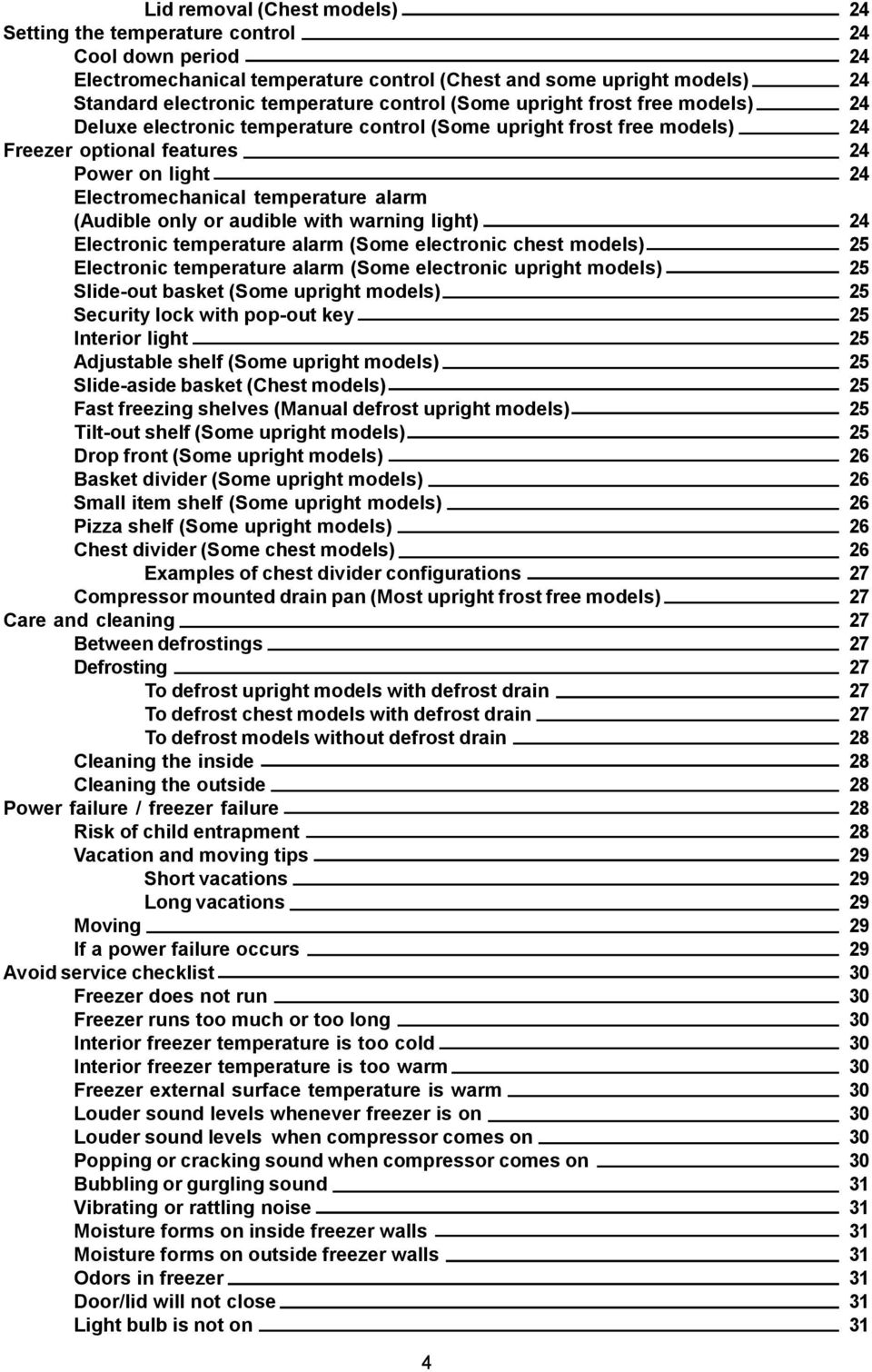
3 SAFE SERVICING PRACTICES 2 QUICK REFERENCE SHEET 9 Serial nameplate location 9 Chest models 9 Upright models 9 Serial number breakdown 9 Cold control location 10 Chest models 10 User interface location 10 Upright models with deluxe control 10 Chest models 10 Electronic control location (Upright models with standard control) 10 Electronic module location 11 Chest models 11 Upright models with deluxe control 11 Temperature alarm switch and indicator lights location (Upright models with standard control) 11 Deluxe control information 12 Standard control information 13 Sample wiring diagram (Chest freezer) 14 System schematic (Chest freezer) 15 Installation (Chest freezer) 15 Refrigerant charge, and electrical specifications (Chest freezer) 15 Temperature control (Chest freezer) 15 Performance (Chest freezer) 15 Thermistor resistance (Chest freezer) 15 Sample wiring diagram (Upright models with deluxe control) 16 Sample wiring diagram (Upright models with standard control) 17 Specifications (Upright Freezers) 18 Refrigerant charge and electrical 18 Defrost control 18 Temperature control (Upright models with deluxe control) 18 Performance (Upright models with deluxe control) 18 Temperature control (Upright models with standard control) 18 Performance (Upright models with standard control) 18 Thermistor resistance (Upright models with deluxe control) 18 System schematic (Upright freezer) 19 Service diagnostic (Upright models with deluxe control) 20 Air moment in upright freezers 20 SECTION A - OWNERS GUIDE 21 Product registration 21 Record your model and serial numbers 21 Register your product 21 Energy saving ideas 21 Important safety instructions 21 For your safety 21 Child safety 21 Risk of child entrapment 22 Electrical information 22 Other precautions 22 First steps 22 Installation / freezer placement 22 Leveling 23 To level upright units 23 To level chest units 23 Door removal (Upright models) 23 3

4 Lid removal (Chest models) 24 Setting the temperature control 24 Cool down period 24 Electromechanical temperature control (Chest and some upright models) 24 Standard electronic temperature control (Some upright frost free models) 24 Deluxe electronic temperature control (Some upright frost free models) 24 Freezer optional features 24 Power on light 24 Electromechanical temperature alarm (Audible only or audible with warning light) 24 Electronic temperature alarm (Some electronic chest models) 25 Electronic temperature alarm (Some electronic upright models) 25 Slide-out basket (Some upright models) 25 Security lock with pop-out key 25 Interior light 25 Adjustable shelf (Some upright models) 25 Slide-aside basket (Chest models) 25 Fast freezing shelves (Manual defrost upright models) 25 Tilt-out shelf (Some upright models) 25 Drop front (Some upright models) 26 Basket divider (Some upright models) 26 Small item shelf (Some upright models) 26 Pizza shelf (Some upright models) 26 Chest divider (Some chest models) 26 Examples of chest divider configurations 27 Compressor mounted drain pan (Most upright frost free models) 27 Care and cleaning 27 Between defrostings 27 Defrosting 27 To defrost upright models with defrost drain 27 To defrost chest models with defrost drain 27 To defrost models without defrost drain 28 Cleaning the inside 28 Cleaning the outside 28 Power failure / freezer failure 28 Risk of child entrapment 28 Vacation and moving tips 29 Short vacations 29 Long vacations 29 Moving 29 If a power failure occurs 29 Avoid service checklist 30 Freezer does not run 30 Freezer runs too much or too long 30 Interior freezer temperature is too cold 30 Interior freezer temperature is too warm 30 Freezer external surface temperature is warm 30 Louder sound levels whenever freezer is on 30 Louder sound levels when compressor comes on 30 Popping or cracking sound when compressor comes on 30 Bubbling or gurgling sound 31 Vibrating or rattling noise 31 Moisture forms on inside freezer walls 31 Moisture forms on outside freezer walls 31 Odors in freezer 31 Door/lid will not close 31 Light bulb is not on 31 4
5 Automatic icemaker not working (Some models) 31 Compact appliance warranty information 32 SECTION B - ELECTRONIC CONTROLS GUIDE 33 Temperature control 33 Temperature setting 33 Extreme freeze 33 Display lockout 33 Alarm function 34 Temperature alarm 34 Door/lid ajar alarm 34 Power failure 34 System error alarm 34 Alarm function table 34 SECTION C - ELECTRICAL OPERATION 35 Electrical mechanical control models 35 Compressor circuit 35 Alarm function circuit 35 Freezer light circuit 35 Standard electronic control models 36 Sealed system circuit 36 Defrost circuit 36 Interior light circuit 36 Power on indicator light circuit 37 Alarm circuit 37 Deluxe electronic control models 38 Electronics module and user interface circuit 38 Sealed system circuit 38 Defrost circuit 38 Interior light circuit 39 SECTION D - REFRIGERATION SYSTEM & SERVICE 40 Safety 40 Soldering 40 Refrigeration system 41 Refrigerant cycle 42 Low or high side leak or undercharge 42 Test for refrigerant leaks 42 Procedure for checking condenser leaks 43 Evacuating and recharging 43 Equipment needed for evacuation & recharging 43 Installing evacuation and recharging equipment 44 Evacuating system 44 Charging the system 44 Preparing the charging cylinder 45 Final leak test 45 SECTION E - TROUBLESHOOTING CHART (ELECTRICAL MECHANICAL CONTROL MODELS) 46 Compressor does not run 46 Compressor runs continuously, but freezer is not cold 46 Compressor runs continuously and the freezer is too cold 46 Freezer temperatures do not correspond with temperature control settings 47 Frost pattern does not cover evaporator 47 Buzzer does not sound when temperature in the freezer compartment goes above 23 F. 47 Buzzer does not turn off when temp alarm button is pushed 47 Interior light does not illuminate when door/lid is opened 47 5

6 SECTION F - TROUBLESHOOTING CHART (STANDARD ELECTRONIC CONTROL MODELS) 48 Compressor and evaporator fan motor do not run 48 Compressor does not run, but the evaporator fan motor does 48 Evaporator fan motor does not run, but the compressor operates 48 Electronic control display does not illuminate, but the freezer operates 48 The electronic control does not respond when the upper or down arrows are pushed 48 Interior light does not glow when door is opened 48 Compressor runs continuously, but freezer is not cold 48 Compressor runs continuously and the freezer is too cold 49 Freezer temperatures do not correspond with temperature control settings, but the compressor operation is normal 49 Freezer does not automatically defrost 49 Power on indicator light does not glow 49 Temp alarm does not sound and temp light does not illuminate when the temperature in the freezer goes about 23 F. 49 Temp alarm light illuminates when the freezer temperature goes above 23 F, but buzzer does not sound 49 Temp alarm buzzer sounds when the freezer temperature goes above 23 F, but alarm light does not illuminate 49 SECTION G - TROUBLESHOOTING CHART (DELUXE ELECTRONIC CONTROL MODELS) 50 User interface display is blank 50 User interface display shows CE. This indicating a communication error between the user interface and electronic module 50 Cabinet temperature is not within limits 50 Freezer does not go into the extreme freeze mode when the extreme freeze button is pushed 51 Alarms system does not operate when the temperature in the freezer goes above 23 F 51 Freezer interior light does not illuminate when door/lid is open 51 Door/lid ajar alarm does not operate 51 Compressor and evaporator fan motor do not run 51 The compressor runs, but the evaporator fan does not 51 The evaporator fan motor runs, but the compressor does not 51 Freezer does not automatically defrost 52 SECTION H - TEARDOWN (Upright Models) 53 Removing the wire shelves 53 Removing the glass shelves 53 Removing the lower wire basket 54 Removing the upper Wire basket (Some models) 54 Removing the upper wire basket side rails (Some models) 54 Removing the door shelf guard 55 Removing the door tilt out wire shelf 55 Removing the door tilt out wire shelf end cap 55 Removing the user interface (Deluxe control models) 56 Removing the kickplate 56 Removing the door seal 56 Removing the inner door liner 57 Removing the door handle 57 Removing the door lock mechanism 57 Removing the upper door hinge cover 58 Removing the upper door hinge 58 Removing the door 58 Removing the bottom door hinge and closer 59 Removing the air baffle 59 6

7 Removing the alarm switch and indicator lights bracket (Standard control models) 59 Removing either of the indicator lights (Standard control models) 60 Removing the alarm switch (Standard control models) 60 Removing the lights and switch bracket housing (Standard control models) 61 Removing the alarm buzzer (Standard control models) 61 Removing the light shield 61 Removing the light bulb 61 Removing the light bulb socket 61 Removing the alarm switch cover (Standard control models) 62 Removing the alarm switch (Standard control models) 62 Removing the evaporator cover 62 Removing the electronic control (Standard control models) 63 Removing the defrost thermostat 63 Removing the defrost heater 64 Removing the evaporator fans assembly 64 Removing the evaporator fans motor 64 Removing the evaporator fan blade 64 Removing the thermistor (Deluxe control models) 65 Removing the evaporator 65 Removing the door switch (Standard control models) 65 Removing the door switch ( Deluxe control models) 66 Disconnecting the drain hose 67 Removing the drain pan 67 Removing the filter-drier 67 Removing the compressor controller 67 Removing the compressor 68 To flush the system 68 Using dry nitrogen to flush the system 68 Using refrigerant to flush the system 69 Installing a new compressor 69 Removing the electronic module (Deluxe control models) 70 Removing the main breakers 70 Removing the corner breaker 71 Assembling the new main breaker and (2) new corner breakers 71 SECTION I - TEARDOWN (Chest Models) 72 Removing the baskets 72 Removing the dividers (Some models) 72 Removing the interior light shield 72 Removing the interior light bulb 72 Releasing the lid 73 Removing lid inner liner and seal 73 Removing interior light socket 74 Removing interior light switch 74 Removing lid handle 75 Removing interface board 76 Removing lock latch 76 Removing locking mechanism 76 Removing outer lid panel 77 Removing the hinges 77 Removing the hinges (Alternate method) 78 Replacing the breaker trim 78 Removing the breaker trim 79 Removing the end caps 79 Removing the internal drain cap 79 Removing the external drain cap 79 Removing the cold control knob 80 Releasing the machine compartment cover 80 7
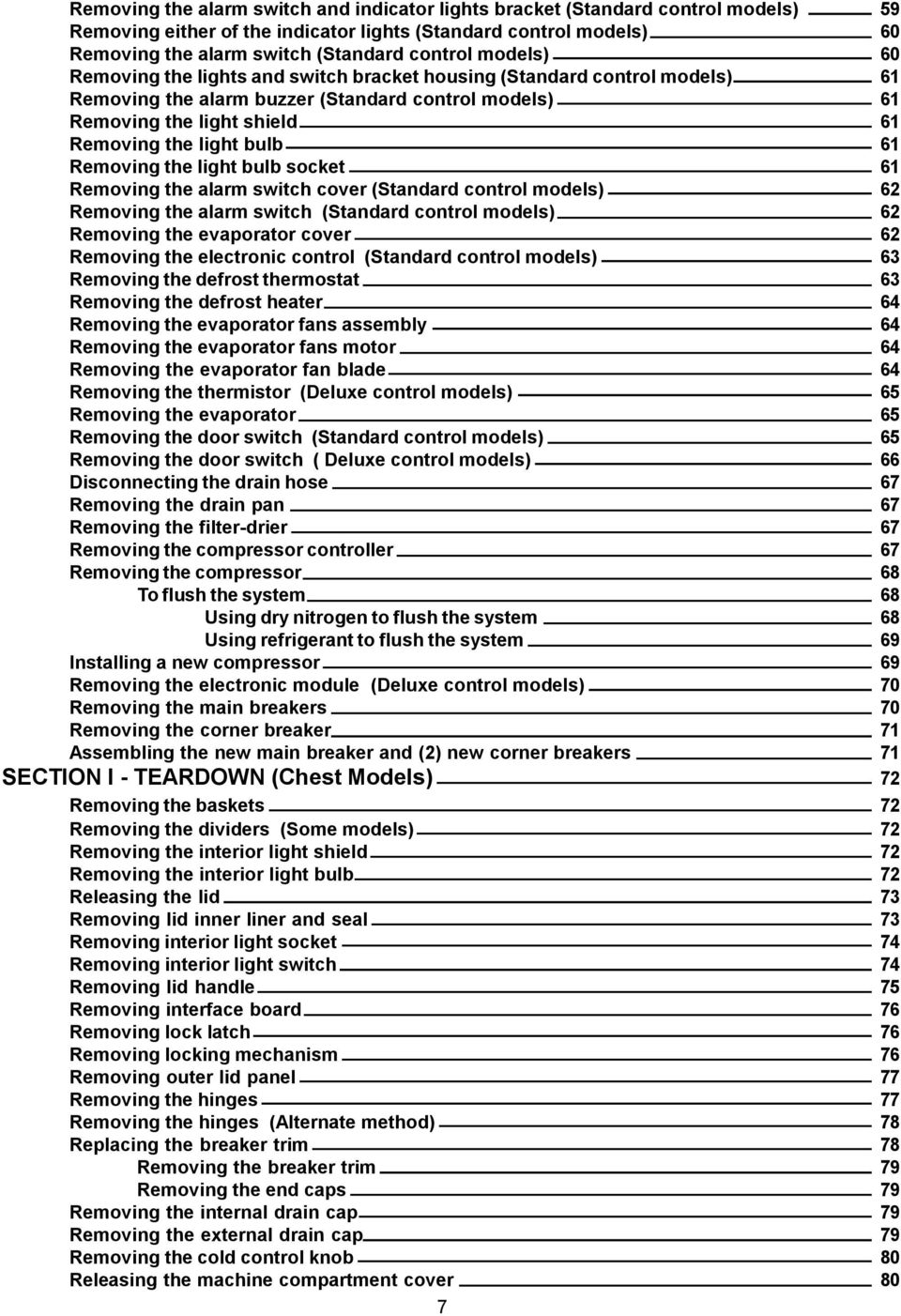
8 Removing the thermistor 81 Removing the electronic module 81 Removing the run capacitor and controller assembly 82 Removing the filter-drier 82 Replacing the compressor 82 To flush the system 83 Using dry nitrogen to flush the system 83 Using refrigerant to flush the system 83 Installing a new compressor 83 Replacing the condenser 85 8

9 QUICK REFERENCE SHEET 1. Serial nameplate location: Chest models On the left side of the freezer, above the machine compartment. Upright models Left-hand side of the freezer liner. W B Serial number breakdown. Incremented unit number Production week Last digit of production year Product identification Manufacturing Facility 9

10 3. Cold control location: Chest models. Mounted to the right end of the machine compartment cover. 4. User interface location: Upright freezer models with deluxe electronic control. Top front center of the freezer door. Chest models. Front center of freezer lid. 5. Electronic control location: Upright freezer models with standard electronic control. Upper right corner of the evaporator cover. 10

11 6. Electronic module location: Chest freezer models. Upper right corner of the rear wall of the machine compartment. Upright freezer models with deluxe electronic control. Top rear left corner of machine compartment. 7. Temperature alarm switch and indicator lights location: Upright freezers with standard electronic controls. Right side of front kick plate. 11

12 Deluxe Control Information 1. Temperature settings from 10 above zero to 10 below zero in 1 increments. 2. The control setting may be locked, to prevent accidental or unauthorized changes, by pressing and holding the alarm reset key until the control beeps. When the control is in lockout mode, if either the up or down arrows are pushed LOC will appear in the display. To unlock the control press and hold the alarm reset key until the control beeps and UL appears in the display 3. During normal operation the control displays the temperature inside the freezer in either Fahrenheit or centigrade. To change the reading from Fahrenheit to centigrade or from centigrade to Fahrenheit, press and hold the alarm reset button and the down arrow simultaneously until the control panel beeps. 4. To turn the freezer off set the control to 10 and push the up arrow. OF will appear in the display. With the control set to off, the freezer light will still operate, but neither the compressor or the defrost cycle will. 5. There is a 13 minute compressor off time delay built into the control. 6. To turn the control on push the down arrow. 10 will appear in the display. If the freezer is to be operated at a temperature below 10, push the down arrow until the desired temperature is indicated on the control. 7. The control is designed to fail safe. If the control fails the compressor runs continuously with a 30 minute defrost cycle every 12 hours. 8. When the extreme freeze button is pressed, FF will appear in the display and the compressor will operate continuously for 72 hours or until the button is pushed again. 9. To check the thermistor set to control in the service mode, (refer to page 20) then press the temp alarm button. If 0 appears in the display the thermistor is open. If C appears in the displays the thermistor is shorted. If a - appears in the display the thermistor is good. 10. If the cabinet temperature rises to the level above 23 F. the high temperature alarm will activate. The control panel will beep every five seconds, the red alarm light will glow and the display will flash. This will continue until the temperature level drops below 23 F. To stop the beeping press the alarm reset button, to stop the display from flashing press and hold the alarm reset button. 11. An automatic 30 minute defrost cycle will occur every 12 hours of compressor run time. 12. To manually defrost the freezer, press and hold the extreme freeze and the temperature alarm buttons simultaneously for 10 seconds or more. A half second beep will sound and df will appear in the display for 3 seconds indicating the control has entered into the 30 minute defrost cycle. At the end of the defrost cycle the control will then restart its 12 hour compressor run time count for the next automatic defrost cycle. 13. If the door is left ajar for more than five minutes, the door alarms is activated. The control panel will beep every five seconds, the red alarm light will glow and the display will alternate between d and the cabinet temperature. Press the alarm reset button to turn off the audible alarm. The display will keep flashing and the red light will stay on. Close the door of the freezer to return it to normal operation. 12

13 Standard Control Information 1. Temperature settings from 1 to 7. For corresponding temperatures see the chart below. Set points Base Temperature F. 0 OFF To turn the freezer off set the control to 1 and push the up arrow (3) times. O will appear in the display indicating the control is in the off position. With the control set to off, the freezer light will still operate, but neither the compressor or the defrost cycle will. 3. There is a 13 minute compressor off time delay built into the control. 4. To turn the control on push the down arrow 3 times. 1 will appear in the display. If the freezer is to be operated at a setting temperature below 1, push the down arrow until the desired number is indicated on the control. 5. The control is designed to fail safe. If the control fails the compressor runs continuously with a 30 minute defrost cycle every 12 hours. 6. To check the thermistor set to control to 4 then press both the up and down arrow at the same time for 3 seconds to initiate the service mode. If 0 appears in the display the thermistor is open. If C appears in the displays the thermistor is shorted. If a - appears in the display the thermistor is good. 7. An automatic 30 minute defrost cycle will occur every 12 hours of compressor run time. 8. To manually defrost the freezer set the control to 2 and press the up and down arrows simultaneously for three seconds. d will appear in the display and a 30 minute defrost will occur. The control will then restart its 12 hour compressor run time for the next automatic defrost cycle. 13

14 Chest Freezer Sample Wiring Diagram always refer to diagram with product Power L N Black See Diagram Thermistor VR/Cold Control White Compressor Red Gray Purple Blue Black User Interface Brown Yellow Blue Orange White Electronic Module Black Red White Lid Switch Interior Light Run Capacitor Capacitor Controller Yel Wh IMPORTANT IF ANY GREEN GROUNDING WIRES ARE REMOVED DURING SERVICING, THEY MUST BE RETURNED TO THEIR ORIGINAL POSITION AND PROPERLY SECURED. 14

15 Chest freezer systems schematic Charge Tube Heat Exchanger Discharge Dryer Condenser Outlet INSTALLATION (Chest freezer) This product is designed for free standing installation only and three inches of clearance must be provided on all sides of the freezer for air circulation. The floor or mounting surface should be level and capable of supporting the weight of the freezer when it is fully loaded. REFRIGERANT CHARGE AND ELECTRICAL SPECIFICATIONS (Chest freezer) Refer to serial plate. TEMPERATURE CONTROL (Chest freezer) 14.0 F cut in, 0 F number 1 setting. PERFORMANCE (Chest freezer) (Control at number 1 setting) Room Ambient 70 F 90 F Freezer Compartment Temperature 5 to 12 F 5 to 12 F Percent Running Time 30-40% 45-55% *Wattage Range (Last 1/3 of cycle) Suction Pressure (Cut-in, cut-out), PSIG High Side Pressure (Last 1/3 of cycle), PSIG THERMISTOR RESISTANCE (Chest freezer) 10K at 77 F., and 32.6 K. at 32 F. 15

16 Upright Freezer with Deluxe Electronic Control Sample Wiring Diagram always refer to diagram with product POWER L N USER INTERFACE A A WATER VALVE B C ICE MAKER A SEE DIAGRAM B B B A..Black B..White C..Purple D..Blue E..Gray F..Red G..Yellow H..Brown J..Orange H J G D G COMPRESSOR FAN C INTERIOR LIGHT F A G D DEFROST THERMOSTAT DEFROST HEATER J B C Overload 9 VOLT BATTERY A F A ELECTRONIC MODULE B A/B A F A Relay DOOR SWITCH J F THERMISTOR Run Capacitor IMPORTANT IF ANY GREEN GROUNDING WIRES ARE REMOVED DURING SERVICING, THEY MUST BE RETURNED TO THEIR ORIGINAL POSITION AND PROPERLY SECURED. 16 Compressor Controller L N C B

17 Upright Freezer with Standard Electronic Control Sample Wiring Diagram always refer to diagram with product L N A ELECTRONIC CONTROL B A..Black B..White C..Yellow D..Red E..Orange F..Brown SEE DIAGRAM C C COMPRESSOR FAN E DEFROST THERMOSTAT DEFROST HEATER DOOR SWITCH F INTERIOR LIGHT POWER ON ALARM SENSOR D D D TEMP WARNING ALARM OFF ON BUZZER C Overload Run Capacitor B Compressor Controller C Relay L N B IMPORTANT IF ANY GREEN GROUNDING WIRES ARE REMOVED DURING SERVICING, THEY MUST BE RETURNED TO THEIR ORIGINAL POSITION AND PROPERLY SECURED. 17

18 SPECIFICATIONS (Upright Freezers) REFRIGERANT CHARGE AND ELECTRICAL Refer to serial plate. DEFROST CONTROL An automatic 30 minute defrosting period is initiated after every 12 hours of compressor running time. During the defrosting period a thermostat will switch the defrost heater off after the frost on the evaporator has melted. The defrost thermostat closes at 10ºF and opens at 50ºF. Upright Freezers with Deluxe Electronic Control TEMPERATURE CONTROL 4.0 F cut in, -10 F number 1 setting. PERFORMANCE (Control at number 1 setting) Room Ambient 70 F 90 F Freezer Compartment Temperature 2 to 8 F 2 to 8 F Percent Running Time 35-45% 50-65% *Wattage Range (Last 1/3 of cycle) Suction Pressure (Cut-in, cut-out), PSIG High Side Pressure (Last 1/3 of cycle), PSIG Upright Freezers with Standard Electronic Control TEMPERATURE CONTROL 4.0 F cut in, -10 F number 1 setting. PERFORMANCE (Control at number 1 setting) Room Ambient 70 F 90 F Freezer Compartment Temperature 2 to 12 F 2 to 12 F Percent Running Time 30-45% 45-65% *Wattage Range (Last 1/3 of cycle) Suction Pressure (Cut-in, cut-out), PSIG High Side Pressure (Last 1/3 of cycle), PSIG THERMISTOR RESISTANCE (Upright freezers Deluxe Electronic Control) 10K at 77 F., and 32.6 K. at 32 F. 18

19 UPRIGHT FREEZER SYSTEM SCHEMATIC Hot wall Condenser Evaporator Coil High Side Process Tube Drier Suction Tube Compressor Capillary Low Side Process Tube Discharge 19

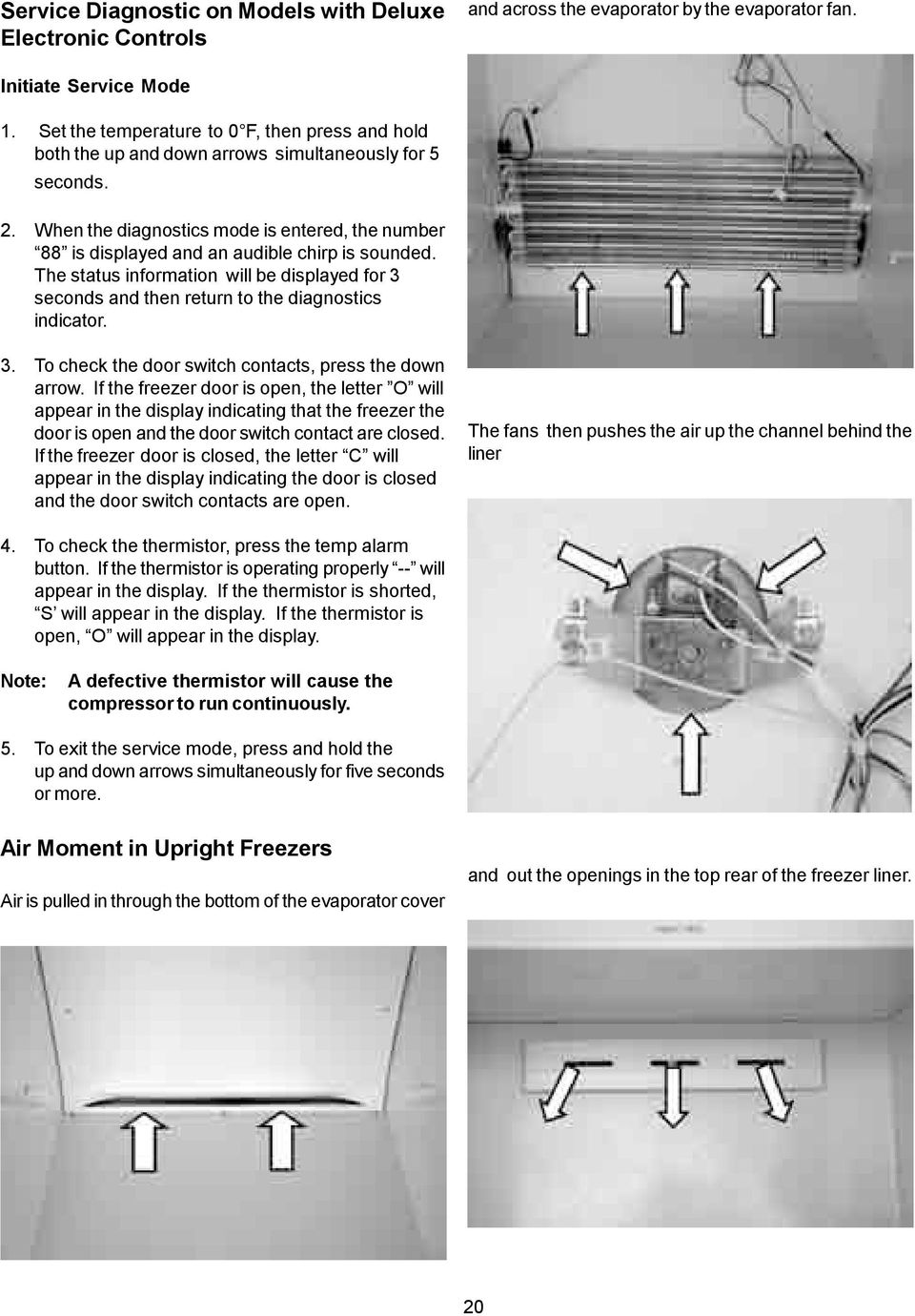
20 Service Diagnostic on Models with Deluxe Electronic Controls and across the evaporator by the evaporator fan. Initiate Service Mode 1. Set the temperature to 0 F, then press and hold both the up and down arrows simultaneously for 5 seconds. 2. When the diagnostics mode is entered, the number 88 is displayed and an audible chirp is sounded. The status information will be displayed for 3 seconds and then return to the diagnostics indicator. 3. To check the door switch contacts, press the down arrow. If the freezer door is open, the letter O will appear in the display indicating that the freezer the door is open and the door switch contact are closed. If the freezer door is closed, the letter C will appear in the display indicating the door is closed and the door switch contacts are open. The fans then pushes the air up the channel behind the liner 4. To check the thermistor, press the temp alarm button. If the thermistor is operating properly -- will appear in the display. If the thermistor is shorted, S will appear in the display. If the thermistor is open, O will appear in the display. Note: A defective thermistor will cause the compressor to run continuously. 5. To exit the service mode, press and hold the up and down arrows simultaneously for five seconds or more. Air Moment in Upright Freezers Air is pulled in through the bottom of the evaporator cover and out the openings in the top rear of the freezer liner. 20
21 SECTION A - OWNERS GUIDE Energy Saving Ideas Product Registration The freezer should be located in the coolest area of the room, away from heat producing appliances or heating ducts, and out of direct sunlight. Let hot foods cool to room temperature before placing in the freezer. Overloading the freezer forces the compressor to run longer. Foods that freeze too slowly may lose quality or spoil. Be sure to wrap foods properly and wipe containers dry before placing them in the freezer. This cuts down on frost build-up inside the freezer. The information contained in this Use and Care Guide will instruct you on how to properly operate and care for your product. Please read through the information contained in your literature pack to learn more about your new freezer. Record your Model and Serial Numbers Record the model number and serial number of this freezer in the space provided below. Model No. Serial No. Register Your Product The self-addressed PRODUCT REGISTRATION CARD (shown above) should be filled in completely, signed and returned to Electrolux Home Products. This Use and Care Guide provides operating instructions for your model. Use your freezer only as instructed in this Use and Care Guide. Freezer shelves and baskets should not be lined with aluminum foil, wax paper, or paper toweling. Liners interfere with cold air circulation, making the freezer less efficient. Organize and label food to reduce door/lid openings and extended searches. Remove as many items as needed at one time, and close door/lid as soon as possible. Important Safety Instructions Read all instructions before using this freezer. For your safety Do not store or use gasoline or other flammable vapors and liquids in the vicinity of this unit or any other appliance. Read product labels for flammability and other warnings. Child Safety Destroy carton, plastic bags, and any exterior wrapping material immediately after the freezer is unpacked. Children should never use these items for play. Cartons covered with rugs, bedspreads, plastic sheets or stretch wrap may become airtight chambers and can quickly cause suffocation. 21
22 A child might suffocate if he crawls into the freezer to hide or play. Remove the door/lid of the freezer when not in use, even if you plan to discard the freezer. Many communities have laws requiring you to take this safety precaution. Remove or discard any spacers used to secure the shelves during shipping. Small objects are a choke hazard to children. Risk of Child Entrapment Child entrapment and suffocation are not problems of the past. Junked or abandoned refrigerators or freezers are still dangerous even if they will sit for just a few days. If you are getting rid of your old refrigerator or freezer, please follow the instructions below to help prevent accidents: Remove the door/lid. Leave shelves in place so children may not easily climb inside. Have the refrigerant removed by a qualified technician. Refer to the serial plate for correct electrical rating. The power cord of the freezer is equipped with a three-prong grounding plug for protection against shock hazards. It must be plugged directly into its own properly grounded three-prong receptacle, protected with a 15 amp time delay fuse or circuit breaker. The receptacle must be installed in accordance with the local codes and ordinances. Consult a qualified electrician. Receptacles with Ground Fault Circuit Interrupters (GFCI) are NOT RECOMMENDED. DO NOT USE AN EXTENSION CORD OR AN ADAPTER PLUG. If the voltage varies by 10 percent or more, freezer performance may be affected. Operating the freezer with insufficient power can damage the motor. Such damage is not covered under the warranty. If you suspect your voltage is high or low, consult your power company for testing. To prevent the freezer from being turned off accidentally, do not plug the unit into an outlet controlled by a wall switch or pull cord. Do not pinch, knot, or bend the power cord in any manner. Other Precautions To defrost, always unplug unit first. Never unplug the freezer by pulling on the power cord. Always grip the plug firmly and pull straight out from the receptacle. Turning the control to OFF turns off the compressor but does not disconnect power to other electrical components. Electrical Information These guidelines must be followed to ensure that safety mechanisms in the design of this freezer will operate properly. First Steps Before starting the freezer, follow these important first steps. Installation / Freezer Placement Choose a place that is near a grounded electrical outlet. The freezer should be located where surrounding temperature will not exceed 110ºF (43ºC). Temperatures of 32ºF (0ºC) and below will NOT affect freezer operation. Additional compressor heaters are not recommended. Allow space around the unit for good air circulation. Leave a 3 inch (75mm) space on all sides of the freezer for adequate circulation. 22
23 Leveling The freezer must have all bottom corners resting firmly on a solid floor. The floor must be strong enough to support a fully loaded freezer. It is VERY IMPORTANT for your freezer to be level in order to function properly. If the freezer is not leveled during installation, the door/lid may be misaligned and not close or seal properly, causing cooling, frost or moisture problems. To level Upright Units: After discarding crating screws and wood base, use a carpenter s level to level the freezer from front to back. Adjust the plastic leveling feet in front, ½ bubble higher, so that the door closes easily when left halfway open. To level Chest Units: If needed, add metal or wood shims between feet pads and floor. Door Removal (Upright Models) Unplug the unit. Gently lay freezer on its back, on a rug or blanket. Remove two base screws and base panel. Remove wire from clips on bottom of cabinet, if required. Unplug connector, if required, by holding the cabinet connector in place and pulling the door connector out. Remove the bottom hinge screws. Remove the plastic top hinge cover. Remove the screws from the top hinge. Remove the top hinge from the cabinet. Remove the door and bottom hinge from the cabinet. To replace door, reverse the above procedures and securely tighten all screws to prevent hinge slippage. Base Panel Base Panel Screws PLASTIC LEVELING FEET CREATING SCREW Hinge Screws Wire Unpacking and Leveling - Upright Freezers DISCARD THE (4) CRATINGSCREWS AND (2) WOOD BASES Door Connector Clips Cabinet Connector 23
24 Lid Removal (Chest Models) See lid removal instructions on the back of the cabinet. Setting the Temperature Control Cool Down Period For safe food storage, allow four (4) hours for freezer to cool down completely. The freezer will run continuously for the first several hours. Foods that are already frozen may be placed in the freezer after the first few hours of operation. Unfrozen foods should NOT be loaded into the freezer until freezer has operated for four (4) hours. When loading freezer, freeze only three (3) pounds of fresh food per cubic foot of freezer space at one time. Distribute packages to be frozen evenly throughout the freezer. It is not necessary to turn the control knob to a colder setting while freezing food. Standard Electronic Temperature Control Figure 2 Deluxe Electronic Temperature Control (Some Upright Frost Free Models) Refer to the Electronics Control Guide supplied when you purchase a deluxe electronic upright model. See Figure 3 for deluxe electronics control panel. Electromechanical Temperature Control (Chest and Some Upright Models) The electromechanical temperature control is located inside the freezer on upright models, and on the left exterior wall on chest models (see figure 1). The temperature is factory preset to provide satisfactory food storage temperatures. However, the temperature control is adjustable to provide a range of temperatures for your personal satisfaction. To adjust the temperature setting, turn the temperature control knob clockwise or counter clockwise. Allow several hours for the temperature to stabilize between adjustments. Electromechanical Control Figure 1 Standard Electronic Temperature Control (Some Upright Frost Free Models) The standard electronic temperature control is located inside the freezer on upright models (see Figure 2). Temperature is factory preset to provide satisfactory food storage temperatures. To adjust the temperature setting, move the UP ( ) button for warmer temperature and DOWN ( ) button for colder temperature on the control panel. Allow several hours for the temperature to stabilize between adjustments. 24 Deluxe Electronic Temperature Control Figure 3 Freezer Optional Features Your freezer may have some or all of the features listed below. Become familiar with these features and their use and care. Power On Light The power on light indicates that the freezer is properly connected to an electrical power. The light glows even when the temperature control is turned to OFF. If the light goes out, refer to Freezer does not run in the Avoid Service Checklist section. Electromechanical Temperature Alarm (Audible Only or Audible with Warning Light) This feature is designed to provide a warning of a possible malfunction. If the temperature of the food rises to a level unsafe for long-term storage, the buzzer will sound. The red light, if equipped, will also glow. The Temp Alarm feature operates on household electricity. If power fails, the alarm will not function. An ON/OFF switch allows you to deactivate the Temp Alarm when not wanted. The freezer is shipped with the Temp Alarm in the OFF position (if equipped). After the freezer has run approximately four (4) hours, the red light, if equipped, will go off. Then you may activate the Temp Alarm without the alarm sounding. Press the ON switch to activate the Temp Alarm feature. To deactivate, press the OFF switch.
25 If the alarm sounds, be sure freezer is properly leveled, and the door/lid closes freely and seals properly. If you suspect a technical malfunction, call an authorized service personnel immediately. Electronic Temperature Alarm (Some Electronic Chest Models) This feature is designed to provide a warning if the inside temperature reaches an unsafe level. The Temp Alarm feature operates on household electricity. It will not function if household electricity is interrupted. When the freezer is initially plugged in, the red Temp Alarm indicator light blinks. The indicator light will continue to blink until the freezer has reached a safe freezing temperature. If a malfunction causes an unsafe temperature inside the freezer, the red light will blink and the buzzer will sound. To silence the buzzer, press the ALARM OFF button. The indicator light will continue to blink until a safe freezing temperature is again reached. If the problem is not solved within twelve (12) hours, the buzzer will turn on again. If the ALARM OFF button is not pressed, the buzzer will turn itself off automatically after 48 hours, but the red Temp Alarm light will continue to blink. Interior Light The light comes on automatically when the door/lid is opened. To replace the light bulb, turn the temperature control to OFF and unplug the electrical cord. Replace the old bulb with a bulb of the same type and wattage. Adjustable Shelf (Some Upright Models) This shelf can be moved to one of two positions. Lift the shelf up and out to move to the desired position. Slide-Aside Basket (Chest Models) This basket helps organize odd-shaped items. To reach other packages in the freezer, slide the basket aside or lift out. Electronic Temperature Alarm (Some Electronic Upright Models) Refer to the Electronics Control Guide supplied when you purchase a deluxe electronic upright model. Fast Freezing Shelves (Manual Defrost Upright Models) These shelves contain cooling coils to freeze foods quickly and allow cold air to constantly circulate throughout the freezer. Do not use sharp metal objects such as ice picks or scrapers to clean the shelves. This could damage the shelves and reduce their cooling ability. These shelves are not adjustable. Tilt-Out Shelf (Some Upright Models) This shelf is located inside on the freezer door and provides additional storage space. To access an item, tilt the top of the basket shelf down. Slide-Out Basket (Some Upright Models) The slide-out basket, located at the bottom of the freezer provides separate storage space for items that are difficult to store on freezer shelves. To remove the basket, pull out and lift up. Security Lock with Pop-out Key This security lock fastens the door/lid snugly, ensuring that stored food is secure. To lock or unlock the freezer, push the key into the lock and turn. The key pops out of the lock after it has been turned. Tilt-Out Shelf 25
26 Drop Front (Some Upright Models) The drop front, located at the bottom of the freezer, provides a separate compartment for small irregular shaped items. Lift the front up and out to remove. Basket Divider (Some Upright Models) Use these handy dividers to keep the various items stored in your baskets more organized. To change the location of the divider simply slide your basket out, lift up on each end of the divider until it is disengaged from the basket, place divider in the desired location (make sure it is between two vertical wires) and press down firmly on each end until it snaps into place. order to get a larger gap between the edge of the supporting shelf and the liner wall. Next, locate the pizza shelf beneath the shelf nearest your desired location and snap each tab upwards between the wire or glass shelf and liner until the tab has snapped into place and is resting on top of the supporting shelf. Repeat for each tab until all four are firmly in place and then load with desired items. Small Item Shelf (Some Upright Models) Use this shelf to store several of your single-serving microwavable dinners or other small items that you want to keep in an easy-to-reach spot. Chest Divider (Some Chest Models) Use these clever dividers to custom-arrange a variety of different sized storage bins in the bottom of your chest freezer. Use the peel-n-stick labels found in your literature packet to help remind you which items are stored where. If you have an item that isn t already covered by one of the pre-printed labels then use one of the blank labels and a permanent marking pen to make your own custom label. Labels can be peeled off when no longer needed and replaced by new and different ones. Pizza Shelf (Some Upright Models) Here is the place to store up to four extra-large boxes of frozen pizza without ever having to dig them out from beneath a pile of other stored goods. To change the location of the pizza shelf: support the bottom center of the shelf with one hand and use your other hand to gently ease each support tab outward until they have all dropped between the edge of the shelf and the liner wall. It may help to slide the supporting shelf slightly to the side opposite that in which you are removing the tabs in 26
27 Examples of Chest Divider Configurations: defrost automatically, but should be cleaned occasionally. Between Defrostings To avoid frequent defrosting, occasionally use a plastic scraper to remove frost. Scrape with pulling motion. NEVER use a metal instrument to remove frost. Defrosting It is important to defrost and clean the freezer when ¼ to ½ inch of frost has accumulated. Frost may tend to accumulate faster on the upper part of the freezer due to warm, moist air entering the freezer when the door/lid is opened. Remove food and leave the door/lid open when defrosting the freezer. Compressor Mounted Drain Pan (Most Upright Frost Free Models) Most upright frost free freezers are equipped with a compressor mounted drain pan that collects condensate during each defrost cycle. This compressor mounted drain pan takes advantage of the heat generated by the compressor to evaporate condensate water so there is no need to empty the pan during each defrost cycle. To Defrost Upright Models with Defrost Drain: Remove the drain plug on the inside floor of the freezer by pulling it straight out. To access external drain tube on models with a base panel, first remove the two screws from the base panel. Locate the drain tube near the left center under the freezer. Place a shallow pan under the drain tube. Defrost water will drain out. Check the pan occasionally so water does not overflow (see figure 1). Care and Cleaning Damp objects stick to cold metal surfaces. DO NOT touch interior metal surfaces with wet or damp hands. The freezer must be unplugged (to avoid electrical hazard) from power source when defrosting the unit. A ½ inch garden hose adapter can be used to drain the freezer directly into a floor drain. If your model is not equipped with an adapter, one can be purchased at most hardware stores. Replace the drain plug when defrosting and cleaning are completed. If the drain is left open, warm air may enter the freezer. Some upright and chest freezers are frost free and 27 To Defrost Chest Models with Defrost Drain: Place a shallow pan or the Divider/Drain Pan (if equipped) beneath the drain outlet. Pull out the outside
28 drain plug (see figure 2). Defrost water will drain out. Check pan occasionally so water does not overflow. Replace the drain plugs when defrosting and cleaning are completed. If the drain is left open, warm air may enter the freezer. To Defrost Models without Defrost Drain: Place towels or newspapers on the freezer bottom to catch the frost. The frost will loosen and fall. Remove the towels and/or newspapers. If the frost is soft, remove it by using a plastic scraper. If the frost is glazed and hard, fill deep pans with hot water and place them on the freezer bottom. A ½ inch garden hose adapter can be used to drain the freezer directly into a floor drain (see figure 3). Close the freezer door/lid. Frost should soften in about fifteen (15) minutes. Repeat this procedure is necessary. Cleaning The Inside After defrosting, wash inside surfaces of the freezer with a solution of two (2) tablespoons of baking soda in one (1) quart (1.136 liters) warm water. Rinse and dry. Wring excess water out of the sponge or cloth when cleaning in the area of the controls, or any electrical parts. Wash the removable parts with the baking soda solution mentioned above, or mild detergent and warm water. Rinse and dry. NEVER use metallic scouring pads, brushes, abrasive cleaners or alkaline solutions on any surface. DO NOT wash removable parts in a dishwasher. If your model is not equipped with an adapter, one can be purchased at most hardware stores. Pull out the drain plug inside the freezer (see figure 4). Cleaning The Outside Wash the cabinet with warm water and mild liquid detergent. Rinse well and wipe dry with a clean soft cloth. Replace parts and food. Do not use razor blades or other sharp instruments, which can scratch the freezer surface when removing adhesive labels.any glue left from the tape can be removed with a mixture of warm water and mild detergent, or touch the residue with the sticky side of the tape already removed. DO NOT REMOVE THE SERIAL PLATE. Power Failure / Freezer Failure Risk of Child Entrapment If leaving the freezer door/lid open while on vacation, make certain that children cannot get into the freezer and become entrapped. DO NOT open freezer door/lid unnecessarily if freezer is off for several hours. 28
29 Vacation and Moving Tips Short Vacations: Leave the freezer operating during periods of nonuse of less than three (3) weeks. Long Vacations: If the freezer will not be used for several months: Remove all food and unplug the power cord. Clean and dry the interior thoroughly. Leave the freezer door/lid open slightly, blocking it open if necessary, to prevent odor and mold growth. Moving: When moving the freezer, follow these guidelines to prevent damage: Disconnect the power cord plug from the wall outlet. Remove foods, then defrost, and clean the freezer. Secure all loose items such as base panel, baskets, and shelves by taping them securely in place to prevent damage. In the moving vehicle, secure freezer in an upright position to prevent movement. Also, protect outside of freezer with a blanket or similar item. IF A POWER FAILURE OCCURS: Frozen foods will stay frozen for at least 24 hours if the freezer is kept closed. If the power failure continues, pack seven or eight pounds of dry ice into the freezer every 24 hours. Look in the Yellow Pages under Dry Ice, Dairies, or Ice Cream Manufacturers for local dry ice suppliers. Always wear gloves and use caution when handling dry ice. If the freezer has stopped operating, see the Freezer does not run section in the Avoid Service Checklist section of this use and care guide. If you cannot solve the problem, call an authorized service personnel immediately. If the freezer remains off for several hours, follow the directions above for the use of dry ice during a power failure. If necessary, take the food to a local locker plant until the freezer is ready to operate. Look in the Yellow Pages under Frozen Food Locker Plants. 29
30 30
31 31
32 32
33 SECTION B - ELECTRONIC CONTROLS GUIDE TEMPERATURE CONTROL TEMPERATURE SETTING The desired temperature inside the freezer can be set using the UP (%) and DOWN (%) buttons on the control panel, located on the door/lid of the freezer. Press either the UP or DOWN buttons once to display the current setting. You may now use the UP and DOWN buttons to change the temperature setting to one which suits your needs. The range of settings is - 10ºF to 10ºF (-24ºC to -12ºC) (see figures 1 and 2). The display will return to showing the temperature of the cabinet after five (5) seconds of inactivity. EXTREME FREEZE Extreme Freeze enables the compressor to run continuously to help cool large quantities of warm (room temperature) foods faster. Always cool sown hot foods to room temperature before placing them in the freezer. Use this feature just prior to adding large quantities of unfrozen foods (not to exceed three (3) pounds per cubic foot of freezer space). For example, do not place more than 45 pounds of room temperature food into a 15 cubic foot freezer. To activate the Extreme Freeze feature, push the Extreme Freeze button. The control panel will beep once and the display will now read FF indicating that Extreme Freeze has begun (see figure 4). For your convenience, Extreme Freeze will automatically turn off after a period of 72 hours and the freezer will return to the previous temperature setting. You may deactivate Extreme Freeze at anytime by pressing the Extreme Freeze button. The display will return to showing the current temperature inside the freezer and the control panel will beep once. DISPLAY LOCKOUT You may also turn off the freezer by pressing the UP button when at temperature setting of 10ºF (-12ºC). The display will read 0FF (see figure 3). The freezer will not cool anything while it is in 0FF position. The door light will continue to operate while in 0FF. WARNING: The freezer still has electrical power while in 0FF. Disconnect freezer from the outlet before cleaning or moving it. Press and hold the ALARM RESET key until the control panel beeps to activate or deactivate the Display Lockout feature which prevents the user from accidentally changing the temperature and extreme freeze settings. L0C (LOCK) will be displayed for three (3) seconds indicating that the control panel is locked (see figure 5). Once in lockout when a key is pressed, L0C will display for three (3) seconds. When the lockout is deactivated, UL (UNLOCK) will display for 1 second (see figure 6). TEMPERATURE MODE CHANGE Temperature display can be changed from ºF to ºC to ºF by pressing the ALARM RESET and DOWN arrow simultaneously until the control panel beeps. The display will change to the other mode. 33
34 ALARM FUNCTIONS TEMPERATURE ALARM The display will alternate between temperature and CE or E and the control panel will beep every five (5) seconds (see figures 9 and 10). Press the ALARM RESET button to turn the audible alarm (beep) off. Call service repair to correct the problem. If the cabinet temperature rises to a level above 23ºF (-5ºC), a high temperature alarm will be activated. The control panel will beep every five (5) seconds, the red alarm light will glow and the display will flash. This will continue until the problem is determined, corrected and temperature once again drops to a level below 23ºF (-5ºC). You may stop the beep by pressing the ALARM RESET button. To also stop the display from flashing, press and hold thealarm RESET button until the control panel beeps. Temperature Alarm will reactivate itself upon reaching a safe temperature. DOOR / LID AJAR ALARM The door/lid alarm will activate if it is ajar for more than five (5) minutes. The control panel will beep every five (5) seconds, the red alarm light will glow and the display will alternate between d (DOOR/LID) and the cabinet temperature (see figure 7). Press the ALARM RESET button to turn the audible alarm (beep) off. The display will keep flashing and the red light will stay on. Close the door/lid of the freezer to return it to normal operation. ALARM FUNCTION TABLE Except during power loss, the red alarm light illuminates whenever there is an alarm status. POWER FAILURE (Models with 9 Volt Battery) If power to the freezer is lost, the power loss alarm will activate. The display will be off but the control panel will beep every minute (see figure 8). To turn the audible alarm (beep) off, press the ALARM RESET button. The audible alarm will also turn off automatically when power is reconnected to the freezer. The temperature alarm will activate if the temperature of the cabinet rises to a level above 23ºF (-5ºC) during power failure. The red alarm light however, will not illuminate. SYSTEM ERROR ALARM Display Lock/Unlock: Press and hold ALARM RESET until the control panel beeps to lock or unlock the display. 34
35 SECTION C - ELECTRICAL OPERA- TION Electrical mechanical control models: Electrical mechanical control models have three basic circuits: 1. The electrical circuitry that controls and powers the compressor. 2. The electrical circuitry for the alarm function, and power on indicator light. 3. The electrical circuitry for the freezer light. When powers applied to the freezer. Line is connected to the electronic module and the lid switch. Neutral is connected to one side of the compressor, interior light, and the electronic module. With line and neutral both applied to the electronic module, the module activates and checks the resistance of the cold control. The resistance of the cold control tells electronic module, if the control is turned off or at what temperature the freezer should operate. The temperature in the freezer is sensed by a thermistor, which is a device that changes resistance as the temperature changes. If the cold control is set at any position other than off, the electronic module reads the resistance of the thermistor, and calculates the temperature in the freezer compartment. If the temperature in the freezer is above the upper limits of the control setting, the electronic module applies line voltage to the compressor circuit, starting the compressor. With the compressor operating the sealed system cools the freezer compartment. As the freezer compartment cools the resistance of the thermistor increases. The electronic module monitors the resistance of the thermistor as it increases. When the temperature in the freezer reaches the lower limits of the control setting the resistance of the thermistor tells electronic module to remove power from the compressor. Alarm function circuit The components that make up the alarm function and power on light circuits are the user interface and electronic module. The alarm function is designed to alert the user if the temperature in the freezer goes above 23 F for any reason. The power on light gives the user a visual indication that power is applied to the freezer. Note both the power on light and the alarm function operate with the cold control set to off or at a temperature setting. The user interface is made up of the alarm off switch and two indicator lights. A yellow light to indicate that power is being applied to the freezer and a red light for the temperature alert. When power is applied to the freezer, the electronic module applies power to the yellow indicator light causing it to glow. Compressor circuit The electronic module constantly monitors the temperature in the freezer compartment. If the temperature in the freezer compartment goes above 23 F, the electronic module will beep every five seconds and the red alarm light will flash. The beeping will continue until either the freezer goes below 23 F or the alarm off switch is pushed. The red indicator light will continue to flash until the temperature in the freezer goes below 23 F. Freezer light circuit The freezer light circuit is made up of the lid switch and the freezer interior light. When the freezer lid is open to contacts of the lid switch close and apply power to the freezer interior light. 35
36 Standard electronic control models: The models with the standard electronic control have five basic electrical circuits: 1. The sealed system circuit made up of the electronic control, compressor and evaporator fan motor. 2. The defrost circuit is made up of the electronic control, defrost thermostat and the defrost heater. 3. The interior light circuit is made up of the door switch and the interior light. 4. The power on light circuit is made up of the power on light. 5. The alarm circuit is made up of the alarm sensor, temperature warning light, alarm off/on switch and the buzzer. Sealed system circuit When the freezer is plug-in, powers apply to electronic control. The electronic control has a keypad with up and down arrows that allows the user to turn the control off, or select the freezers operating temperature. The preset temperature settings are shown in the control s display as numbers from zero to seven, with zero being off and seven being the coldest. A thermistor in the control is used to sense the temperature of the freezer. If the electronic control is program for any number, other than zero, the control reads the resistance of the thermistor and compares it to the pre-programmed temperature setting. If the resistance indicates that the temperature in the freezer is above the upper limits of the preprogramed temperature setting, the control applies power to the compressor and the evaporator fan motor. This cools the freezer compartment and causes the resistance of the thermistor to increase. When the temperature in the freezer compartment reaches the lower limits of the control setting, the control removes power from the compressor and evaporator fan motor. By cycling the compressor and evaporator fan motor off and on electronic control maintains the preset temperature in the freezer compartment. Defrost circuit The electronic control has a preprogram defrost program that performs a 30 minute defrost cycle after every 12 hours of compressor run time. After 12 hours of compressor run time, the defrost section of the electronic control activates providing line to neutral voltage across the defrost thermostat and the defrost heater for 30 minutes. The defrost thermostat is a safety device that is used to prevent damage to the cabinet by the defrost heater. Although the control provides line to neutral voltage for 30 minutes, during a normal defrost cycle, the contacts of the defrost thermostat open at about the 12 to 14 minute mark removing power from the defrost heater. The remaining time of the defrost cycle allows the water to drip off the evaporator, so it does not refreeze when the compressor starts at the end of the defrost cycle. Interior light circuit Whenever powers is applied to the freezer, line to neutral voltage is applied across the door switch and interior light circuit. When the freezer doors is close the contacts of the door switch are open preventing current from flowing in the circuit. When the door is opened the contacts of the door switch close allowing current to flow through the circuit causing the interior light to glow. 36
37 Power on indicator light circuit The power on indicator light is connected between line and neutral. Whenever power is applied to the freezer the indicator light glows, giving a visual indication that powers is applied to the freezer. Alarm circuit The alarm circuit is a series parallel circuit, with line voltage being applied to the alarm sensor. If the temperature in the freezer goes above 23 F. the contacts of alarm sensor close. This applying power to the parallel circuit formed by the temperature warning light circuit and the alarm off/on switch and the buzzer circuit. The buzzer may be deactivated by placing the alarm off on switch to the off position. 37
38 Deluxe electronic control models: The models with the deluxe electronic control have five basic electrical circuits: 1. Electronic module and user interface circuit that is made up of the user interface, electronic module and thermistor. 2. Sealed system circuit that is made up of electronic module, the evaporator fan motor and the compressor. 3. Defrost circuit that is made up of electronic module, defrost heater, and defrost thermostat. 4. Interior light circuit that is made up of the electronic module, door switch and the interior light. Note: USER INTERFACE H J G D The 9 V battery backup is not available on some models and the icemaker comes as a kit. A A C A WATER VALVE G POWER L N ICE MAKER SEE DIAGRAM C B B COMPRESSOR FAN INTERIOR LIGHT B B Electronics module and user interface circuit The electronic module controls the operation of the freezer with inputs from the arrows on the interface, the extreme freeze switch, the alarm off switch, the thermistor, and door switch. The outputs of the electronic module are to the display of the interface, the compressor and evaporator fan circuit, the defrost circuit and the temp alarm indicator light. The electronic module uses the input from the up and down arrows to raise or lower the temperature at which the freezer operates or to turn the control off. The input from the extreme freeze switch tells the control to apply power to the compressor evaporator fan circuit for 72 hours or until the switch is pushed again. During an extreme freeze operation, the 30 minute defrost occurs every 12 hours of compressor run time. Pushing the alarm off switch tells the electronic module to turn the beeper off when the alarm function is operating. The input from the thermistor allows electronic module to calculate the temperature in the freezer compartment. With this knowledge the module cycles the compressor and evaporator fan circuit off and on to maintain the temperature at the program level. The module also uses this information to activate the alarm circuit, when the input from the thermistor indicates the temperature in the freezer compartment is about 23 F. When the door is opened the closing of the contacts the door switch tells the timer function of the module to start a five minute countdown. If the contacts of the door switch do not open within the five minute the module activates the door ajar alarm. Sealed system circuit The electronic module, evaporator fan motor, and compressor form a series circuit. When the electronic module determines that the temperature in the freezer is above it s preset limits, the relay on the module closes and provides line to neutral voltage to the evaporator fan motor and the compressor. With the evaporator fan motor and compressor running the freezer compartment cools down. When the temperature in the freezer compartment reaches the preset lower limit in the module the relay opens removing power from the evaporator fan motor and the compressor. F A G D 9 VOLT BATTERY DOOR SWITCH J F A F A/B A THERMISTOR J DEFROST THERMOSTAT A F A DEFROST HEATER B ELECTRONIC MODULE Defrost circuit The timer section of the electronic module, records the compressor run time. When the accumulated run time of the compressor reaches 12 hour, the module turns off the compressor and activates defrost circuit. For 30 minutes the module supplies lined a neutral voltage to the series circuit formed by the defrost heater and the defrost thermostat. The defrost thermostat is a safety device connected in the circuit to protect the freezer liner, if the defrost heater is allowed to remain on too long. In a normal defrost cycle the contacts of the defrost thermostat opens at about the 12 to 14 minute mark stopping current flow in the circuit. During the rest of the 30 minutes the water is allowed to drain off the evaporator, so it does not refreeze when the compressor restarts. 38
39 Interior light circuit The interior light circuit is a series circuit formed by the electronic module, the door switch and the interior light. The electronic module provides line to neutral voltage to the interior light circuit, whenever powers applied to the freezer. When the freezer door is closed, the contacts of the of the door switch are open, preventing current flow in the circuit. When the door is open, the contacts of the switch are closed and current flows through the circuit causing the light to glow. When current flows in the circuit the timing section of electronic module is activated for a five minute countdown. If the current flow in the interior light circuit is interrupted, by closing the door, which in turn opens the contacts of the door switch, the countdown is stopped. If the door is not closed within the five minute, the door alarm function is activated, notifying the user to close the door. 39
40 SECTION D - REFRIGERATION SYSTEM & SERVICE NOTICE: Instructions given here are furnished as a guide. Persons attempting to use these to make repairs to the sealed refrigeration system should have a working knowledge of refrigeration and previous training on sealed system repair. Safety Compressor Testing: Whenever testing a compressor, extreme caution should be used to prevent damaging the terminals. A compressor with a damaged terminal or a grounded terminal winding can expel a terminal from its insulated housing when the compressor is energized. If this happens, a mixture of refrigerant and oil will be released that could be ignited by an external heat source (open flame, heater, etc.). Also, if there is air in the system when it happens, a spark at the compressor shell could ignite the refrigerant and oil mixture. Charging Sealed Systems: Over charging a freezer system with refrigerant can be dangerous. If the overcharge is sufficient to immerse the major parts of the motor and compressor in liquid refrigerant, a situation has been created which, when followed by a sequence of circumstances, can lead to the compressor shell seam separating. A hydraulic block occurs preventing the compressor from starting. This condition is know as locked rotor. Electrical current continues to flow through the compressor motor windings which become, in effect, electrical resistance heaters. The heat produced begins to vaporize the excess refrigerant liquid, causing a rapid increase in system pressure. If the compressor protective devices fail, the pressure within the system may rise to extremes far in excess of the design limits. Under these conditions, the weld seam around the compressor Soldering CAUTION 40 shell can separate with explosive force, spewing oil and refrigerant vapor which could ignite. To eliminate this exceedingly rare but potential hazard, never add refrigerant to a sealed system. If refrigerant is required, evacuate the existing charge and recharge with the correct measured amount of refrigerant specified for the system. Wear the proper and approved safety glasses when working with or on any pressurized system or equipment. Have an approved dry type fire extinguisher handy when using any type of gas operated torch. 1. All joints to be soldered must have a proper fit. The clearance between tubes to be soldered should be from.001 to.006. It is not practical to actually measure this, however you do not want a dry fit or a loose fit. The tubing joints should overlap about the distance of their diameter except for restrictor tubes which should be inserted Clean all joint areas with fine steel wool or preferably an abrasive cloth, such as grit cloth No. 23 or Scotch-Brite. 3. Apply a thin film of a liquid flux recommended for silver soldering to the surfaces to be joined, and to the surfaces immediately adjacent to the joint. 4. Align the tubing so that is no stress on the joint. Do not move the tubing while the solder is solidifying or leaks will result. CAUTION During the application of heat, use wet cloths to prevent the heat from conducting to areas other than the soldered joint. Use a sheet of metal as a heat deflector to keep the flame away from inflammable materials and painted surfaces. 5. Use a torch of adequate capacity so that the joint can be quickly heated with a minimum of heat travel to other points. Use a good grade of silver solder. 6. Solder the connections. If the tubing is properly cleaned and fluxed, solder will flow readily. Do not use an excessive amount of solder, just enough to make a good bond.
41 7. Allow the joint to cool then wash exterior with water to remove flux. 3. The evaporator mounted to the rear wall of the food compartment or Refrigeration System Basic components of a refrigeration system are: 1. The compressor located in the machine compartment. attached to the food compartment liner. 2. The condenser that is foamed to the outer walls of the cabinet. 4. The capillary tube connects the output end of the drier to the input of the evaporator. 41
42 5.The filter-drier located in the machine compartment. diameter liquid line (capillary tube). Before it enters the evaporator, it is sub-cooled in the heat exchanger by the low temperature suction vapor in the suction line. SYSTEM SCHEMATIC Condenser Evaporator Drier Capillary Suction Tube Compressor Condenser Bottom Loop Discharge Low or High Side Leak or Undercharge 6.The suction line connects the output of the evaporator to the input side of the compressor. Note: Portions of the capillary tube and the suction line are soldered together to form the heat exchanger. Refrigerant Cycle The refrigerant cycle is a continuous cycle that occurs whenever the compressor is in operation. Liquid refrigerant is evaporated in the evaporator by the heat that enters the cabinet through the insulated walls and the heat introduced by the product load and door openings. The refrigerant vapor is then drawn from the evaporator, though the suction line, to the compressor. The pressure and temperature of the vapor is raised in the compressor by compression, and the vapor is then forced through the discharge valve into the discharge line and into the condenser. Air passing over the condenser surface removes heat from the high pressure vapor, which then condenses to a liquid. The liquid refrigerant flows from the condenser to the evaporator, through the small A loss of refrigerant results in excessive or continuous compressor operation; above normal freezer compartment temperature; a partially frosted evaporator (depending on the amount of refrigerant loss); above normal freezer compartment temperature; low suction pressure (vacuum) and low wattage. The condenser will be warm to cool, again, depending on the amount of refrigerant lost. When refrigerant is added, the frost pattern will improve; the suction and discharge pressures will rise; the condenser will become hot; and the wattage will increase. In the case of a low side refrigerant leak, resulting in a complete loss of refrigerant, the compressor will run, but with no refrigeration. Suction pressure will drop below atmospheric pressure, and air and moisture will be drawn into the system, saturating the filter-drier. If a slight undercharge of refrigerant is indicated, and no leak could be found after a thorough leak test, the charge can be corrected without changing the compressor. If there is reason to believe the system has operated for a considerable length of time with no refrigerant, and the leak occurred in the evaporator, excessive amounts of moisture may have entered the system. In such cases the compressor may need to be replaced to prevent repetitive service. If a high side leak is located and some refrigerant remains in the system, it is not necessary to change the compressor. Test for Refrigerant Leaks If the system is diagnosed as short of refrigerant and the system has not been recently opened, there is probably 42
43 a leak in the system. Adding refrigerant without first locating and repairing the leak, or replacing the component would not permanently correct the difficulty. THE LEAK MUST BE FOUND. Sufficient refrigerant may have escaped to make it impossible to leak test effectively. In such cases, add a 1/4 line piercing valve to the compressor process tube. Add sufficient refrigerant to increase the pressure to 75 lb. per sq. inch. Through this procedure, slow leaks are more easily detected before discharging the system. Note: The line piercing valve (clamp on type) should be used for adding refrigerant and test purposes only. It must be removed from the system after it has served its purpose. Procedure for Checking Condenser Leaks Before checking for leaks in the condenser, check all accessible system components and joints for leaks. If a condenser leak is suspected: 1. Discharge the system by using refrigerant recovery equipment. 2. Disconnect the condenser tube from the drier and pinch off and solder both the drier and condenser tube closed. 3. Remove the discharge tube from the compressor and seal the opening to the compressor. 4. Connect a pressure gauge and access valve to the discharge tube and pressurize to 250 lbs. using dry nitrogen or carbon dioxide. Never pressurize with oxygen. Never open a high pressure tank unless it is equipped with a pressure regulator. Never put high pressure on the dome of the compressor. Make sure the gauge and fitting is in good condition and do not leak. 5. Leave the pressure on the condenser for 24 hours. Any drop in pressure is an indication of a leak. Evacuating and Recharging CAUTION: Check the serial plate for the correct refrigerant type. It is extremely important to verify the type of refrigerant in the system before starting any sealed system repairs. CAUTION: With the possible exception of the vacuum pump, all service equipment that comes in contact with R-134a during evacuation and recharging must be dedicated. Accordingly, R-134a will require a dedicated charging cylinder, manifold gauge set, process tube adaptors, and hoses. Any residual mineral oil on other tools (tubing cutter, etc.) must be thoroughly cleaned off before using on R-134a/Ester oil systems. It will be necessary to check with the manufacturer of your vacuum pump for refrigerant and oil compatibility issues. CAUTION: If you use a vacuum pump with mineral oil to evacuate an R-134a system, it is ABSOLUTELY ESSENTIAL to have a shut-off valve between the pump and your manifold gauge set. The hand valve must be closed during all times when the vacuum pump is not operating. This will prevent the migration of mineral oil vapor into the R134a/Ester oil system. If the vacuum pump should stop during evacuation for any reason, the hand pump shut-off valve must be closed immediately. CAUTION: Insure that your refrigeration hoses are specified for use with R-134a refrigerant. Research has shown that compounds in standard refrigeration hoses may enter sealed systems and ultimately restrict the cap tube in an R-134a system. Equipment Needed For Evacuation & Recharging: Heated charging cylinder. Standard 3-port manifold gauge set: 4 charging hoses. Tee fitting with valve core stem removed. (Robinair No ). Hand shut-off valve (Robinair No.40380). Two stage vacuum pump. Process tube adapter kit (Robinair No ). Tubing cutter. Pinch-off tool capable of making leak proof seal. 43
44 Complete brazing torch set. Small 3-corner file. Grit cloth or Scotch-Brite. 45% silver solder and flux. Installing Evacuation and Recharging Equipment: 1. Disconnect the appliance from electrical supply. 2. If compressor was replaced, install correct sized process tube adaptor on process tube. If compressor was not replaced, cut process tube with tubing cutter leaving as much tube as possible and install correct size process tube adaptor. 3. Install correct sized process tube adaptor on high-side process tube. 4. Attach refrigeration service gauge manifold to system in following order: Low-side (compound gauge) hose to suction side process tube adaptor. High-side (pressure gauge) hose to high-side process tube adaptor. Center port manifold hose before hand shut-off valve to charging cylinder. Center port manifold hose after hand shut-off valve to vacuum pump. Evacuating System WARNING: R-134A SYSTEMS ARE PARTICULARLY SUSCEPTIBLE TO MOISTURE CONTAMINATION WHICH CAN ONLY BE PREVENTED BY EVACUATING THE SYSTEM FOR A MINIMUM OF 30 MINUTES TO ATTAIN A MINIMUM 29.9 INCH (500 MICRON OR LOWER) VACUUM. To achieve the required levels of evacuation, a properly maintained two stage vacuum pump in good condition is required. It is absolutely essential to maintain your vacuum pump according to the manufacturer s instructions including required oil changes at the recommended intervals. Vacuum pump oil should always be changed after evacuating a contaminated system. Vacuum pump performance should be checked periodically with a micron gauge. 1. Make certain that charging cylinder valve, hand shut-off valve, and manifold gauge valves are closed. 2. Start vacuum pump. 3. Open hand shut-off valve and slowly open both manifold valves, turning counterclockwise, for two full rotations. CAUTION: If high vacuum equipment is used, just crack both manifold valves for a few minutes and then open slowly for the two full turns counterclockwise. This will prevent the compressor oil from foaming and being drawn into the vacuum pump. 4. Operate the vacuum pump for a minimum of 30 minutes to a minimum of 29.9 (500 micron) vacuum. 5. Close hand shut-off valve to vacuum pump. Watch compound gauge for several minutes. If reading rises, there is a leak in the system, go to step 6. If no leak is indicated, stop vacuum pump. System is now ready for charging. 6. If a leak is indicated, stop vacuum pump and introduce a small charge of refrigerant into system by cracking valve on bottom of charging cylinder until system is pressurized to 40 or 50 lbs psig. 7. Leak test low-side. Close compound gauge. Run compressor for a few minutes and leak test high side. When leak is found, recapture refrigerant using EPA approved recovery system Repair and go back to step 1. Charging the System CAUTION: Check the serial plate for the correct refrigerant type. It is extremely important to verify the type of refrigerant in the system before starting any sealed system repairs. CAUTION: After charging the system with liquid be certain to wait at least 5 minutes before starting the compressor to give the refrigerant a chance to disperse throughout the system. Otherwise the compressor could be damaged by attempting to pump excessive quantities of liquid. 44
45 Preparing The Charging Cylinder: 1. Make certain that hand shut-off valve to vacuum pump is closed. 2. Close high-side manifold gauge valve. 3. Set charging cylinder scale to pressure indicated on cylinder pressure gauge. Final Leak Test: 1. With the refrigerator turned OFF, leak test all low-side system components. 2. Turn the unit ON and run until the condenser is warm. Leak test the high-side system components. 4. Observe refrigerant level in sight glass. Subtract amount to be charged into system and note shut off point. 5. Open charging cylinder valve slowly and allow proper charge to enter system. 6. As soon as refrigerant in sight glass has gone down to predetermined level, close charging cylinder valve. WARNING: DISCONNECT THE CHARGING CYLINDER HEATER AT THIS TIME TO PREVENT THE CYLINDER PRESSURE FROM EXCEEDING ITS MAXIMUM LIMITS. 7. Allow system to sit for five minutes. 8. Turn on compressor and allow it to run for a few minutes and monitor system pressures. 9. When satisfied that the unit is operating correctly, clamp the high-side process tube with the pinch-off tool while the unit is still running. 10. Slowly open the high-side manifold gauge valve to allow the compressor to remove any refrigerant trapped in the high-side hose and the process fitting. 11. Close both of the manifold gauge valves. If the high-side gauge reading rises, the pinch-off must be corrected before proceeding. 12. Remove the high-side process tube adaptor and solder the process tube closed. 13.Clamp the low-side process tube with the pinch-off tool while the unit is running. Remove the low-side process tube adaptor and solder the process tube closed. 14. Check the process tubes for refrigerant leaks. 45
46 SECTION E - TROUBLESHOOTING CHART (ELECTRICAL MECHANICAL CONTROL MODELS) FAILURE Compressor does not run. Compressor runs continuously, but freezer is not cold. Compressor runs continuously and the freezer is too cold. CHECK 1. Does the power light glow? 2. Is the temperature controls set to off? 3. Disconnect the wiring harness from the controller and measure the voltage drop between the two wires in the harness. Did the meter read line to neutral voltage? 4. Disconnect the wiring harness from the temperature control, set the dial to number (4), and measure the resistance between the blue wire and the center black wire. Is the reading between 3500 and 4500 ohms? 1. Connect a low side gauge to the processing tube on the compressor. Is the pressure, in a vacuum or lower than normal? 1. Disconnect the wiring harness from the temperature control, set the dial to number (4), and measure the resistance between the blue wire and the center black wire. Is the reading between 3500 and 4500 ohms? 2. Disconnect the wiring harness from the electronic module that goes to the thermistor and the temperature control. Measure the resistance between the red wire and the gray wire. Yes, go to step (2). CORRECTION No, checked for power to the freezer and that the freezer is plugged in. Yes, turn the temperature control on. No, go to step (3). Yes, defective compressor controller or compressor No, go to step (4). Yes, defective electronic module. No, defective temperature control. Yes, system low on refrigerant, check for leak in system. No, defective compressor. Yes, go to step (2). No, defective temperature control. If the meter read shorted or open the thermistor is defective. If the meter reads between 50,000 and 70,000 ohms the electronic module is defective. Note: Always check wiring between components. 46
47 FAILURE Freezer temperatures does not correspond with temperature control settings. Frost pattern does not cover evaporator. Buzzer does not sound when temperature in the freezer compartment goes above 23 F. Buzzer does not turn off when temp alarm button is pushed. Interior light does not illuminate when door/lid is opened. CHECK 1. Disconnect the wiring harness from the temperature control, set the dial to number (4), and measure the resistance between the blue wire and the center black wire. Is the reading between 3500 and 4500 ohms? 1. Low on gas or restricted. 1. Disconnect the wiring harness from the electronic module that goes to the thermistor and the temperature control. Measure the resistance between the red wire and the gray wire. Is the resistance between 10,000 and 35,000 ohms? 1. Does the contacts of the temp switch closed, when the temp switch is pushed? 1. Check the light bulb with an ohm meter. Is the bulb good? CORRECTION Yes, replace the thermistor, if problem is not corrected replace the electronic module No, replace the temperature control. Check for leaks or restriction. Yes, defective electronic module. No, defective thermistor. Yes, defective wiring or electronic module No, defective temp switch. Yes, defective lid switch. No, defective light bulb. Note: Always check wiring between components. 47
48 SECTION F - TROUBLESHOOTING CHART (STANDARD ELECTRONIC CONTROL MODELS) FAILURE CHECK CORRECTION Compressor and evaporator fan motor does not run. Compressor does not run, but the evaporator fan motor does. Evaporator fan motor does not run, but the compressor operates. Electronic control display does not illuminate, but the freezer operates. The electronic control does not respond when the upper or down arrows are pushed. Interior light does not glow when door is opened. Compressor runs continuously, but freezer is not cold. 1. Is a power on indicator light glowing? 2. Is a display in electronic control illuminated? 3. Measure the input voltage to the electronic control. Is line to neutral voltage being applied? 4. Is the electronic controls set to zero? 5. Disconnect the wiring harness from the compressor controller and measure the voltage drop between the two wires in the harness. Does the meter read line to neutral voltage? 1. Defective compressor or compressor controller. 1. Is there something blocking the fan blade? 1. Defective electronic control. 1. Is the control set to zero? 1. Check the light bulb with an ohm meter. Is the bulb good? 1. Connect a low side gauge to the processing tube on the compressor. Is the pressure, in a vacuum or lower than normal? Yes, go to step (2). No, checked for power to the freezer and that the freezer is plugged in. Yes, go to step (4). No, go to step (3). Yes, defective electronic control. No, defective wiring harness. Yes, set the control from 1 to 7. No, go to step (5). Yes, defective compressor controller or compressor and evaporator fan motor. No, the defective electronic control. Checks compressor and compressor controller. Yes, remove restriction. No, defective fan motor. Replace electronic control. Yes, the down arrow must be pushed (3) times to advance the control from 0 to 1. No, electronic control was defective. Yes, defective door switch. No, defective light bulb. Yes, system low on refrigerant, check for leak in system. No, defective compressor. Note: Always check wiring between components. 48
49 FAILURE Compressor runs continuously and the freezer is too cold. Freezer temperatures do not correspond with temperature control settings, but the compressor operation is normal. Freezer does not automatically defrost. Power on indicator light does not glow. Temp alarm does not sound and temp light does not illuminate, when the temperature in the freezer goes about 23 F. Temp alarm light illuminates when the freezer temperature goes above 23 F, but buzzer does not sound. Temp alarm buzzer sounds when the freezer temperature goes above 23 F, but alarm light does not illuminate. CHECK 1. Defective electronic control. 1. Defective electronic control. 1. Program the control for a manual defrost. Does a defrost operate? 2. Disconnect the incoming line to the defrost thermostat, and the wire from the defrost heater to the control. Measure the resistance across the defrost thermostat and the defrost heater. Is the reading about 25 ohms? 3. Disconnected defrost thermostat from the defrost heater and measure the resistance of the defrost heater. Is a reading about 25 ohms? 1. Does the freezer operate? 1. Using an ohm meter check the continuity of the alarm sensor at a temperature above 23 F. Does the meter read zero or infinity? 1. Is the temp alarm switch on? 2. Check the alarm switch with an ohm meter. Does a switch check good? 1. Defective light. CORRECTION Replaced the electronic control. Replaced the electronic control. Yes, replaced electronic module. No, go to step (2). Yes, defective electronic control. No, go to step (3). Yes, defective defrost thermostat. No, defective defrost heater. Yes, defective indicator light. No, check that the freezer is plugged in, and that power is applied to the freezer. Zero, check the wiring connections, light, alarm switch and buzzer. Infinity, defective alarm sensor. Yes, go to step (2). No, set the alarm switch to on. Yes, defective buzzer. No, defective alarm switch. Replace light. Note: Always check wiring between components. 49
50 SECTION G - TROUBLESHOOTING CHART (DELUXE ELECTRONIC CONTROL MODELS) FAILURE User interface display is blank. User interface display shows CE. This indicating a communication error between the user interface and electronic module. Cabinet temperature is not within limits. CHECK 1. Is the freezer plugged in? 2. Removed interface from the door and disconnects the wire harness from the interface. Measure the voltage between the brown and orange wires in the plug. Is in the reading greater than 4.3 VDC? 3. Is a voltage greater than 5.7 VDC? 4. Disconnect the user interface cable from the electronic module. Measure the voltage between the red wire and the black wire in the harness plug that is connected to the electronic module. Is the voltage 0.3 VDC greater than the voltage reading in step 2? 1. Check the connectors in the wiring between the user interface and electronic module. Is there a wiring problem? 2. Replace the user interface. Does this correct the problem? 3. Replaced electronic module. Does this correct the problem? 1. Initiate the service mode (refer to page 20) and checked the thermistor. What appears in the display? Yes, go to step (2). CORRECTION No, plug the freezer in. Yes, go to step (3). No, go to step (4). Yes, replaced electronic module. No, replaced the user interface if problem is not corrected, replaced electronic module. Yes, open wire or connection, recheck all connections and wiring. If defects cannot be located, replaced the door. No, replaced electronic module. Yes, correct wiring problem. No, go to step (2). Yes, problem has been solved. No, go to step (3). Yes, problem has been solved. No, rechecked the wiring, if the problem still exists, replaced the door. If C or O appears in the display replace the thermistor. If -- appears in the display replaced electronic module. Note: Always check wiring between components. 50
51 FAILURE Freezer does not go into the extreme freeze mode when the extreme freeze button is pushed. Alarms system does not operate when the temperature in the freezer goes above 23 F. Freezer interior light does not illuminate when door/ lid is open. Door/lid ajar alarm does not operate. Compressor and evaporator fan motor do not run. The compressor runs, but the evaporator fan does not. The evaporator fan motor runs, but the compressor does not. CHECK 1. Check the wiring and the connections between the user interface and electronic module. Is a wiring defective? 1. Does either the buzzer sound or the indicator light illuminate? 1. Program to control for the service mode (refer to page 20) and check the door switch contactswith the door open. Does the display show C or O? 1. Program to control for the service mode (refer to page 20) and check the door switch contactswith the door open. Does the display show O? 1. Does the display show, the internal temperature of the freezer? 2. Disconnected the wire harness from the compressor controller and measure voltage drop between the two pins in the harness. Does the meter read line to neutral voltage or zero? 1. Is the evaporator fan blade block? 1. Check the compressor and the compressor controller. CORRECTION Yes, correct wiring problem. No, replaced the interface board, and if problem is not corrected, replaced electronic module. Yes, if the indicator light illuminates, but the buzzer does not sound, replace electronic module. If the buzzer sounds, but the light does not illuminate, replace the user interface. If problem is not corrected, replace the electronic module. No, replaced the electronic module. If the display shows O the light bulb or wiring is defective. If the display shows C the switch is defective. Yes, replaced electronic module. No, replaced the door switch. Yes, go to step (2). No, refer to display is blank or to the display shows CE depending on what the display shows. If the meter reads line to neutral voltage, the evaporator fan motor is defective and either the controller or the compressor is also defect. If the meter reads the zero, the electronic module was defective. Yes, remove the restriction. No, replaced evaporator fan motor. Replace the defective item. Note: Always check wiring between components. 51
52 FAILURE Freezer does not automatically defrost. CHECK 1. Program the control for a manual defrost. Does a defrost operate? 2. Disconnect the orange wire from the defrost thermostat and the white wire from the defrost heater. Measure the resistance between the wire on the thermostat in the wire at the end of the heater. Is the reading about 25 ohms? 3. Disconnected defrost thermostat from the defrost heater and measure the resistance of the defrost heater. Is a reading about 25 ohms? CORRECTION Yes, replaced electronic module. No, go to step (2). Yes, defective electronic control. No, go to step (3). Yes, defective defrost thermostat. No, defective defrost heater. 52
53 SECTION H - TEARDOWN (Upright Models) This section will describe how to remove components from the freezer. Unless stated, reverse the procedure to reinstall the component. Removing the Glass Shelves: 1. Remove the glass shelves by pushing up on the right side of the shelf and slide the shelf to the right to disengage the left side of the shelf from the liner. Always remove electrical power from the freezer when working in an area where electrical power is present. Removing the Wire Shelves: 1. Remove the wire shelves by pushing up on the right side of the shelf and slide the shelf to the right to disengage the left side of the shelf from the liner. 2. Lift up on the left side of the shelf and slide the shelf to the left. 2. Lift up on the left side of the shelf and slide the shelf to the left. 53
54 Removing the Lower Wire Basket: 1. Remove the wire basket by pulling the basket out until it hits the stop. Removing the Upper Wire Basket: (Some Models) 1. Remove the wire basket by pulling the basket out until it hits the stops. then 2. Lift up on the front and pull the basket the rest of the way out. 2. Lift up on the front and pull the basket the rest of the way out. Removing the Upper Wire Basket Side Rails: (Some Models) 1. Remove the upper wire basket. 54
55 2. Remove the (3) Phillips screws holding the side rail to the liner. Removing the Door Tilt Out Wire Shelf: 1. Flex the door liner out and lift the wire shelf out of the end cap. Removing the Door Shelf Guard: 1. Bend the shelf guard out in the middle and pull the tabs out of the door liner. Removing the Door Tilt Out Wire Shelf End Cap: 1. Remove the tilt out wire shelf. 2. Snap the end cap out of the liner. 55
56 Removing the User Interface: (Deluxe Control Models) 1. Peel off the overlay. Removing the Kickplate: 1. Remove the (2) Phillips screws holding the kickplate to the cabinet, and pull the kick plate straight forward. 2. Remove the (2) Phillips screws holding the user interface to the door panel. Removing the Door Seal: Note: The screws that hold the inner door liner to the outer door panel do not go through the door seal. 1. Loosen the screws holding the inner door liner to the outer door panel and slide the door seal out from under the inner door panel. 3. Lift the user interface out and disconnect the wiring harness. 56
57 Removing the Inner Door Liner: 1. Remove the (48) Phillips screws holding the inner door liner to the outer panel, and lift the inner door liner off. 3. Using a deep 7/16 in socket remove the 2 nuts and lift to handle off. Note: Replace the foam. Removing the Door Lock Mechanism: 1. Carefully remove enough foam to gain access to the locking fork. 2. Using a common screwdriver push-up on the locking fork until it disengages the lock mechanism. Removing the Door Handle: Note: The door handle is fastened to the outer liner of the door by a 7/16 nut. The handle is install on the outer door liner before the door is foamed. 3. Pull the lock assembly out of the door liner. 1. Remove the inner door liner. 2. Starting at the edge of the metal liner, and using the handle has a positioning guide, using a sharp knife, carefully cut a 1 inch square hole in the foam, behind each end of the handle to reveal the nut. Note: Replace the foam. 57
58 Removing the Upper Door Hinge Cover: 3. Lift the hinge off. 1. The upper door hinge cover snaps to the upper door hinge. To remove the hinged cover insert a common screwdriver between the cover in the door and lift the cover off. Removing the Upper Door Hinge: 1. Removes the upper door hinge cover. 2. Using a 5/16 in socket remove the (2) screws holding the hinge the Cabinet. Removing the Door: 1. Remove power from the freezer, and remove the kickplate. 2. On models with the deluxe control system, disconnect the interface wire harness at the electronic module. 58
59 3. Pull the wire harness out the front of the freezer. 2. Remove the (2) Phillips screws holding the door closing mechanism to the bottom of the door and lift the hinge and closing mechanism off. 4. Place something under the door to hold it up and using a 5/16 in socket remove the (2) screws holding the lower hinge to the cabinet. Removing the Air Baffle: 1. The air baffle is held to the rear of the liner by (4) tabs. To remove the baffle roll the top of the baffle forward and lift up to disengage the bottom tabs. 5. Remove the item holding the door up and lower the door off the top door hinge pin to remove the door. Removing the Bottom Door Hinge and Closer: 1. Remove the door and place it face down on a soft smooth surface. Removing the Alarm Switch, and Indicator Lights Bracket: (Standard Control Models) 1. Remove power from the freezer, and remove the kickplate. 59
60 2. Disconnect the (2) wires from the buzzer. Removing either of the Indicator Lights: (Standard Control Models) 1. Remove power from the freezer remove the indicator lights and switch bracket and disconnect the wires from the light that is to be removed. 2. Press in on the tabs on the side of the light and push the light out of the front bracket. 3. Disconnect the wiring harness that goes to the lights and the switch. Removing the Alarm Switch: (Standard Control Models) 1. Remove power from the freezer, remove the light and switch bracket and disconnect the wires from the switch. 2. Squeeze the locking tabs on the top and bottom of the switch and pushed the switch out of the front of the bracket. 4. Remove the (2) Phillips screws holding the bracket to the cabinet. 60
61 Removing the Lights and Switch Bracket Housing: (Standard Control Models) 1. Remove power from the freezer, and remove the light and switch bracket. Removing the Light Shield: 1. Remove the (2) Phillips screws holding the shield to the top of the liner and the shield will drop down. 2. Lift up on the locking tab, and pull the housing out the front. Removing the Light Bulb: Removing the Alarm Buzzer: (Standard Control Models) 1. Turn the light bulb, counterclockwise to remove. 1. Remove power from the freezer, and disconnect the (2) wires from the buzzer. 2. Remove the Phillips head screw holding the buzzer to the top of the machine compartment. Removing the Light Bulb Socket: 1. Remove power from the freezer, pull down on the socket and turn the socket one quarter turn. 61
62 2. Disconnect the wires. 2. Unplug the switch from the liner and lift to switch off. Removing the Alarm Switch Cover: (Standard Control Models) 1. Squeeze the top and bottom of the cover to disengage the tabs from a liner and lift the cover off. Removing the Evaporator Cover: 1. Remove power from the freezer, remove the wire basket or baskets, on models with two baskets remove one of the upper basket glides and the bottom shelf. 2. Remove the (4) Phillips screws holding the top of the cover to the rear wall liner. 3. Remove the (2) Phillips screws, from the front of the cover, holding the cover to the evaporator standoffs and the (3) Phillips screws holding the cover to the bottom of the liner. Removing the Alarm Switch: (Standard Control Models) 1. Remove the alarm switch cover. 62
63 3. Slide one side of the cover forward and remove one of the side seal. 2. Remove the electronic control cover by disengaging the four locking tabs holding the cover to the control. 4. Is the model has a standard control system, unplug the wire harness from the control and lift evaporator cover out. 3. With the cover removed the control will pull out the front of the evaporator cover. Removing the Electronic Control: (Standard Control Models) 1. Remove power from the freezer and remove the evaporator cover. Removing the Defrost Thermostat: 1. Remove power from the freezer and remove the evaporator cover. 63
64 2. Disconnect the wires to the thermostat and unsnap the thermostat from the evaporator. 2. Disconnect the wire harness from the evaporator fan motor. 3. Using a 5/16 socket remove the (2) bolts holding the fan bracket to the liner and lift the fan assembly out. Removing the Defrost Heater: 1. Remove power from the freezer and remove the evaporator cover. 2. Disconnect the wires to the heater. 3. Release the (2) of aluminum straps securing the heater to the bottom of the evaporator. Removing the Evaporator Fan Motor: 1. Remove power from the freezer and remove the evaporator cover. 2. Disconnect the wire harness from the evaporator fan motor. 3. Using a 5/16 socket remove the (2) bolts holding the motor to the bracket and lift the motor out. 4. Pull the heater down to disengaged it from the evaporator. Removing the Evaporator Fan Assembly: 1. Remove power from the freezer and remove the evaporator cover. Removing the Evaporator Fan Blade: 1. Remove power from the freezer and remove the evaporator cover. 2. Remove the fan assembly. 64
65 3. Pull the fan blade off. 2. Remove the defrost heater, termination thermostat and the styrofoam blocks between the evaporator and the freezer liner 3. Recover refrigerant by using EPA approved recovery system. Note: Whenever this sealed system is opened, the filter-drier must be replaced. CAUTION: On R-134a systems, the system must NOT be left open to the atmosphere for more than 10 minutes to prevent moisture contamination of compressor oil. 4. Remove the filter-drier. 5. Cut the suction line at the compressor. Note: When installing the fan blade, be sure to push it completely on. Removing the Thermistor: (Deluxe Control Models) 1. Remove power from the freezer and remove the evaporator cover. 2. Remove the Phillips screw holding the thermistor to the back of the liner, then cut and splice the new thermistor into place. 6. Straighten the tubing, remove the foam sleeve and carefully feed the heat exchanger, through the cabinet, while pulling up on the evaporator. Removing the Door Switch: (Standard Control Models) 1. Remove power from the freezer, raise the front of the freezer up and block it up. Removing the Evaporator: 1. Remove power from the freezer the and remove the evaporator cover assembly. 65
66 2. Disconnect the wires from door switch. 2. Disconnect the wires from door switch. 3. Press in on the locking tab on the side of the switch and push the switch out the front. 3. Press in on the locking tab on the side of the switch and push the switch out the front. LOCKING TAB Removing the Door Switch: (Deluxe Control Models) 1. Remove power from the freezer, raise the front of the freezer up and block it up. 66
67 Disconnecting the Drain Hose: 1. The drain hose is pushed over the cabinet drain tube and the drain pan Inlet tube. To remove the hose pull it off of the cabinet drain tube and the drain pan inlet tube. more than 10 minutes to prevent moisture contamination of compressor oil. 2. Recover refrigerant by using EPA approved recovery system. CAUTION: DO NOT un-braze old filter-drier from system. This will vaporize and drive moisture from desiccant back into system. The old filter-drier should be cut out of system. 3. Using a three corner file score and break the tube at the bottom of the filter-drier. Removing the Drain Pan: 1. Remove power from the freezer, raise the front of the freezer up and block it up. 2. Release a locking tab and push the drain pan up until it clears the spring tab on the compressor. Then bring it forward, and lifted it out. 4. Remove the filter-drier by cutting the tube at the top of the filter-drier as close as possible. Removing the Filter-Drier: 1. Remove power and obtain access to the rear of the freezer. CAUTION: On R-134a systems, the system must NOT be left open to the atmosphere for Removing the Compressor Controller: 1. Remove power and obtain access to the rear of the freezer. 67
68 2. Release the plugs locking tab and disconnect the wire harness from the controller. as well as showing signs of contamination (dark color) Flush The System. Remove as much of contamination as possible from system before installing new compressor and filter-drier. To Flush the System: NOTE: It is recommended that system be flushed with dry Nitrogen. However, if refrigerant is used to flush the system you must look at the serial plate to see what type of refrigerant is used in the system. This is the only refrigerant that can be used to flush the system and it must be recovered. 3. Using needle nose pliers remove the spring wire holding the controller to the compressor. CAUTION: Use extreme care when using Dry Nitrogen to flush systems. Pressure in nitrogen cylinder could be as high as 2000 psi. Nitrogen cylinder must be equipped with approved pressure regulator and pressure relief valve. Ensure that your hoses have adequate ratings for pressure involved and that all of your equipment is in good condition. CAUTION: The end of the flushing hose on this tank regulator must be equipped with a hand shut-off valve. (Robinair No. 4038) Close hand shut-off valve and adjust nitrogen regulator to correct pressure before proceeding with flushing procedure. Using Dry Nitrogen to Flush the System: 1. Remove compressor and filter-drier. Connect process coupling to outlet tube of condenser. 4. Pull the controller off of the compressor. Removing the Compressor: CAUTION: NEVER install a new compressor without first checking for possible system contamination. To check for contamination, obtain oil sample from old compressor. If the oil has burned odor, but no color change or residue install the new compressor If oil has a burned odor and a sugar or gritty feel 2. Fasten cloth over other end of coil to prevent old oil from spraying out into the room. 3. Connect hand shut-off valve on flushing hose to process coupling. 4. Slowly open hand shut-off valve and allow nitrogen to flow through condenser until discharge is clear. CAUTION: DO NOT exceed 300 PSIG. 5. Disconnect cap tube from evaporator. Flush evaporator in same manner as condenser. CAUTION: DO NOT exceed 150 PSIG. 68
69 6. Flush cap tube. This is only possible if you have proper service valve adaptor. CAUTION: DO NOT exceed 300 PSIG. 7. Reassemble system. Using Refrigerant to Flush the System: CAUTION: Refrigerant used for flushing must be recovered into a recovery system. Meter amount of refrigerant used for flushing with your charging cylinder. DO NOT OVERFILL THE SYSTEM. 1. Disconnect the suction and discharge lines from the compressor and remove the filter-drier. Connect process coupling to outlet and inlet tube of condenser. 2. Connect hose to outlet process coupling and charging cylinder. Connect another hose to inlet coupling and recovery system. 3. Open charging cylinder and allow refrigerant to flow through condenser until discharge into bag is clear. NOTE: To flush evaporator and heat exchanger you must remove evaporator from inside product to disconnect cap tube. 4. Disconnect capillary tube from evaporator. Flush evaporator in same manner as condenser. 5. Flush cap tube. This is only possible if you have proper service valve adaptor. 6. Reassemble system. Installing a New Compressor: NOTE: Entirely new compressors have been developed for use with R-134a and Ester oil refrigeration systems. Both compressor and electric motor have been modified. Old compressors intended for R-12 refrigerant must not be used for new systems charged with R-134a. Replacement of compressor and installation of filter-drier must be done in a continuous sequence so system is exposed to atmosphere no longer than necessary. Compressors have a low-side process tube attached to the compressor shell. A high-side process tube is attached to the filter-drier. WARNING: DO NOT OPERATE RECIPROCATING COMPRESSOR WHEN CHARGING LIQUID REFRIGERANT INTO SYSTEM THROUGH ITS PROCESS TUBE. Replacement compressors for appliances may have an oil cooler even if the original compressor did not. If the product is not equipped for an oil cooler, leave the plastic caps in place and install the compressor connecting only to the suction and discharge lines of the new compressor. Before installing the replacement compressor remove the discharge plug and check for the pop sound of the inert gas leaving the compressor. CAUTION: DO NOT use compressor if you do not hear this sound. If the compressor checks OK, reinstall the plug. Do not remove any of the plugs again until the compressor is in position and you are ready to braze the lines. CAUTION: On R-134a systems, compressor must NOT be left open to atmosphere for more than 10 minutes to prevent moisture contamination of oil. A new compressor which is cold (e.g. after having been kept in a cold service van) should be left to warm to the surrounding temperature before the plugs on the compressor connections are removed. This will help prevent condensation from forming in the oil and the compressor. Also, avoid opening the system when any of the components or lines are cold. NOTE: RELEASE holding charge (release slowly to avoid oil discharge) on new compressor to ensure there is no leak in seam or tubing. Reinstall rubber plug. 1. Remove electrical power from the freezer. 2. Obtain access to the rear of the freezer 3. Recover refrigerant by using EPA approved recovery system. All replacement compressors are shipped with rubber plugs in the suction, discharge and process tubes and contain the correct oil charge and a holding charge of inert gas. 69
70 4. Remove the controller. Cut tubing with tubing cutter. Work as quickly as possible to avoid letting moisture and air into system. Removing the Electronic Module: (Deluxe Control Models) 1. Remove power from the freezer. 2. Obtain access to the rear of the freezer. 3. Unplugged the wiring harnesses to the electronic module. 4. Remove the (2) Phillips screws holding the electronic module to the top of the machine compartment and lift electronic module out. 5. Using a 7/16 socket remove the (4) bolts, one in each corner, holding the compressor to the base. Removing the Main Breakers: 6. After refrigerant is completely recovered, cut suction and discharge lines as close to compressor as possible. Leave only enough tubing to pinch off and seal defective compressor. Plug or tape any open system tubing to avoid entrance of moisture and air into system. Remove inoperable compressor and transfer mounting parts to new compressor. 7. Install new compressor in exact same manner as original compressor. 8. Reform both suction and discharge lines to align with new compressor. If they are too short, use additional lengths of tubing. Joints should overlap 0.5 to provide sufficient area for good solder joint. Clean and mark area where tubing should be cut. Note: The breakers are installed on the appliance before foam is added to the appliance. When the foam is added to the appliance, the foam adheres to the breakers. When removing the breakers, pieces of foam may break off and stick to the breakers. Remove any of the larger pieces from the breakers and put them back in the cabinet. 70
71 Note: The edge breakers are formed so they snap and lock to the edge of the cabinet and the edge of the liner. 3. Repeat the process using a regular putty knife break the breaker flange between the inside breaker edge in the interior liner. 4. Starting in the center pull the breaker out from the freezer, using the putty knife to separate the breaker from the foam. Tried to remove as little of the foam as possible. And a large pieces of the foam that are missing need to be replaced with additional insulation. Removing the Corner Breaker: Note: The corner breakers are flange to except main breakers. 1. Using a regular putty knife, start at the middle of the breaker, and carefully worked it between the cabinet and the breaker, push it as far towards inside edge to the breaker is possible. The goal is to break the inner flange on the underside of the breaker that is attaching it to the cabinet. Worked the knife toward each end, breaking through the flange is you go. 1. Remove one of the main breakers, that is attached to the corner breaker. 2. Using a pair of pliers pull the corner breaker away from the other main breaker. Assembling the New Main Breaker and (2) New Corner Breakers: 1. Work the (2) corner breakers onto the existing breakers. 2. Allowing the main breaker to flex in the middle and gradually work the corner breakers and the main breaker over the cabinet and liner flanges until they lays down smoothly. 3. Seal any joints and openings with NSF-approve sealant. 2. Carefully peel back the breaker from the cabinet towards the inside of the unit so as to minimize the amount of foam that sticks to the breaker. Use a putty knife to remove any large pieces of foam that stick to the breaker and placed them back in the cabinet. 71
72 SECTION I - TEARDOWN (Chest Models) This section will describe how to remove components from the freezers. Unless stated, reverse the procedure to reinstall the component. Always remove electrical power from the appliance when working in an area where electrical power is present. Removing the Interior Light Shield: 1. The interior light shield is snapped into the lid liner by (2) locking tabs. To release the tabs use a thin bladed object, such as a table knife, to release the tabs. 2. Lift the lid, released the tabs and pull the shield off. Removing the Baskets: 1. Lift the lid and the baskets lift out. Removing the Interior Light Bulb: 1. Lift the lid and turn the light bulb counterclockwise to remove it from the socket. Removing the Dividers: (Some Models) 1. Lift the lid, remove the baskets and the dividers lift out. 72
73 Releasing the Lid: 1. Disconnect electrical power from the freezer and insert a nail in each of the hinges to lock the hinges open. 3. Place something behind the freezer, that is about the same height as the freezer, and carefully lift the lid over the hinges, turn the lid over and lay the the lid on the object. Removing Lid Inner Liner and Seal: The lid inner liner is held to the lid outer liner by plastic rivets and (4) Phillips head screws that are hidden in by the seal. 2. Using a 5/16 socket, remove the (4) screws, from each hinge, holding the upper part of the hinge to the lid. Note: The number of plastic rivets will very with the size of the freezer. 1. Disconnect electrical power from the freezer, released the lid and place it on the support with the inner liner up. 2. Roll the seal back and using a common screwdriver pop-out the rivets. Note: The electrical cord, providing power to the lid is still connected. 73
74 3. Remove the (4) Phillips screws, one in each corner, holding the inner liner to the outer liner. Removing Interior Light Socket: 1. Disconnect electrical power from the freezer and remove the light shield and light bulb. 2. Release the lid and remove the plastic rivets and (4) Phillips head screws holding the inner liner to the outer liner. 3. Raise the inner liner, disconnect the (2) wires from the socket. When reconnecting the wires be sure to connect the white wire to the terminal marked W. 4. Squeeze the (2) locking tabs and push the socket out of the liner. 4. The seal will now lift off. Removing Interior Light Switch: 5. Remove the light shield and a light bulb, raise the inner liner and disconnect the wires from a light socket and light switch. The inner liner will now lift off. 1. Disconnect electrical power from the freezer and remove the light shield and light bulb. 2. Release the lid and remove the plastic rivets and (4) Phillips head screws holding the inner liner to the outer liner. 3. Raise the inner liner and disconnect the two wires from the switch. 74
75 4. Release the locking tab and push the socket out of the liner. 4. Remove the permagum sealing the wire harness opening. Removing Lid Handle: 1. Disconnect electrical power from the freezer and release the inner lid liner. 2. Remove the insulation from the lid panel. Note: Always replace the permagum when reinstalling the handle. 5. Insert a common screwdriver between the panel and the bottom of the handle and pull the handle out, so it clears the face of the locking mechanism. 3. Using a 1/2 wrench remove the (2) nuts holding the handle to the panel. 75
76 6. Push down on the plastic studs to release the handle from the liner. 3. Unplug the wire harness from the board. Removing Lock Latch: Removing Interface Board: 1. Disconnect electrical power from the freezer and remove the lid handle. 2. Using a #1 Phillips remove the (2) screws holding the board to the handle and lift the board out. 1. Disconnect electrical power from the freezer and release of the inner lid liner. 2. Pull the insulation back, remove the Phillips screw holding the latch to the locking mechanism and lift the latch off. Removing Locking Mechanism: 1. Disconnect electrical power from the freezer and remove of the lid handle. 2. Remove the latch arm. 76
77 3. Using a common screwdriver release the locking fork and push the locking mechanism out the front of the panel. Removing the Hinges: 1. While holding in on the bottom part of the hinge, use a 5/16 socket, to remove the (4) screws holding the bottom part of the hinge to the freezer. Removing Outer Lid Panel: 1. Disconnect electrical power from the freezer and remove the inner lid liner. 2. Remove the insulation, lid handle and the locking mechanism. 3. Disconnect the wiring harness from interface board and, the green ground wire from the panel. 4. Using a common screwdriver work the wiring gromit into the outer lid panel and remove the harness. 2. Slowly release the pressure from the bottom part of the hinge. 3. While holding the hinge, use a 5/16 socket, to remove the (4) screws holding the hinge to the lid and lift the hinge off. 5. The outer panel can now be removed. 77
78 Removing the Hinges: (Alternate Method) 1. With the lid closed insert a pin or nail into the hinge to lock it closed. The outer liner of the cabinet has a 3/16 flange and the inner liner has (2) grooves in it. 2. Using a 5/16 socket remove the (4) screws holding the hinge to the lid and the (4) screws holding the hinge to the chassis. The trim has a channel with a locking tab that snaps down over the inner liner and a flange with a locking tab that snaps under the flange of the outside liner. The end caps are formed to allow the trim to slide into them. Replacing the Breaker Trim: When the freezer is manufactured, the trim and end caps are installed before foam is added to the freezer. When foam is added to the freezer, some of the foam adheres to the trim and caps, helping to hold them in place. When a piece of trim or an end cap is removed, some of the foam will come with it. If the trim or end cap is to be reused the foam must be cleaned off. 78
79 Removing the Breaker Trim: 1. Lift the lid and start at the inside center, lift up and out on the trim to disengage it from the inside liner. Then pull up and out on the trim to disengage it from the foam, and the flange of the outer cabinet liner. Removing the Internal Drain Cap: 1. Raise the lid and the slide the baskets to the left. 2. The drain cap lifts off. 2. Once the trim has been disengaged from the liners and the foam, bow the center of the trim up to disengage from the end cap. Removing the External Drain Cap: 1. The drain cap pulls off. Removing the End Caps: 1. Remove the lid. 2. Remove one the pieces of trim connect to the end cap. 3. Lift up on the front edge of the end cap, that is in line with the remaining piece of trim, and slide it off. 79
80 Removing the Cold Control Knob: 2. Disconnect the wire harness to the cold control. 1. The cold control knob pulls off. 3. Push down on the control to release the spring-loaded tabs from the machine compartment cover and lift the control out. Releasing the Machine Compartment Cover: 1. Disconnect electrical power. 2. Remove the (2) Phillips screws holding the machine compartment cover to the outer liner. 3. Pull out on the top of the cover. Removing the Machine Compartment Cover: 1. Disconnect power and release the machine compartment cover. Removing the Cold Control: 1. Disconnect power and release the machine compartment cover. 80
81 2. Release the cold control and lift the cover out of the slots. 3. Pull the thermistor out of the tube. Removing the Thermistor: 1. Disconnect power and release the machine compartment cover. 2. Remove the permagum from the base of the tube in which the thermistor is inserted. Note: When replacing the thermistor, cut and splice the new thermistor into the circuit. Removing the Electronic Module: 1. Disconnect power and remove the machine compartment cover. 2. Unplug the wire harnesses from the module. 3. Remove the (2) Phillips screws holding the module to the back wall of the machine compartment and lift the module out. 81
82 Removing the Run Capacitor and Controller Assembly: 1. Disconnect electrical power and remove the machine compartment cover. 2. Unplugged the wires from the controller and release the spring wire clip holding the run capacitor and controller assembly to the compressor. CAUTION: DO NOT un-braze old filter-drier from system. This will vaporize and drive moisture from desiccant back into system. The old filter-drier should be cut out of system. 3. Using a three corner file score and break the tube at the bottom of the filter-drier. 4. Remove the filter-drier by cutting the tube at the top of the filter-drier as close as possible. 3. Pull the controller off of the compressor and slide the capacitor off of the controller. Removing the Filter-Drier: 1. Disconnect power from the freezer and remove the machine compartment cover. CAUTION: On R-134a systems, the system must NOT be left open to the atmosphere for more than 10 minutes to prevent moisture contamination of compressor oil. Replacing the Compressor: CAUTION: NEVER install a new compressor without first checking for possible system contamination. 2. Recover refrigerant by using EPA approved recovery system. 82
83 To check for contamination, obtain oil sample from old compressor. If the oil has burned odor, but no color change or residue install the new compressor If oil has a burned odor and a sugar or gritty feel as well as showing signs of contamination (dark color) Flush The System. Remove as much of contamination as possible from system before installing new compressor and filter-drier. To Flush the System: NOTE: It is recommended that system be flushed with dry Nitrogen. However, if refrigerant is used to flush the system you must look at the serial plate to see what type of refrigerant is used in the system. This is the only refrigerant that can be used to flush the system and it must be recovered. CAUTION: Use extreme care when using Dry Nitrogen to flush systems. Pressure in nitrogen cylinder could be as high as 2000 psi. Nitrogen cylinder must be equipped with approved pressure regulator and pressure relief valve. Ensure that your hoses have adequate ratings for pressure involved and that all of your equipment is in good condition. CAUTION: The end of the flushing hose on this tank regulator must be equipped with a hand shut-off valve. (Robinair No. 4038) Close hand shut-off valve and adjust nitrogen regulator to correct pressure before proceeding with flushing procedure. Using Dry Nitrogen to Flush the System: 1. Remove compressor and filter-drier. Connect process coupling to outlet tube of condenser. 2. Fasten cloth over other end of coil to prevent old oil from spraying over room. 3. Connect hand shut-off valve on flushing hose to process coupling. 4. Slowly open hand shut-off valve and allow nitrogen to flow through condenser until discharge is clear. CAUTION: DO NOT exceed 300 PSIG. 5. Reassemble system. Using Refrigerant to Flush the System: CAUTION: Refrigerant used for flushing must be recovered into a recovery system. Meter the amount of refrigerant used for flushing with your charging cylinder. DO NOT OVERFILL THE SYSTEM. 1. Disconnect the suction and discharge lines from the compressor and remove the filter-drier. Connect process coupling to outlet and inlet tube of condenser. 2. Connect hose to outlet process coupling and charging cylinder. Connect another hose to inlet coupling and recovery system. 3. Open charging cylinder and allow refrigerant to flow through condenser until discharge into bag is clear. 4. Reassemble system. Installing a New Compressor: NOTE: Entirely new compressors have been developed for use with R-134a and Ester oil refrigeration systems. Both compressor and electric motor have been modified. Old compressors intended for R-12 refrigerant must not be used for new systems charged with R-134a. Replacement of compressor and installation of filter-drier must be done in a continuous sequence so system is exposed to atmosphere no longer than necessary. All replacement compressors are shipped with rubber plugs in the suction, discharge and process tubes and contain the correct oil charge and a holding charge of inert gas. Compressors have a low-side process tube attached to the compressor shell. A high-side process tube is attached to the filter-drier. WARNING: DO NOT OPERATE RECIPROCATING COMPRESSOR WHEN CHARGING LIQUID REFRIGERANT INTO SYSTEM THROUGH ITS PROCESS TUBE. 83
84 Replacement compressors for freezer may have an oil cooler even if the original compressor did not. If the product is not equipped for an oil cooler, leave the plastic caps in place and install the compressor connecting only to the suction and discharge lines of the new compressor. 4. Remove the controller and run capacitor from the compressor and unplug the ground wire. Before installing the replacement compressor remove the discharge plug and check for the pop sound of the inert gas leaving the compressor. CAUTION: DO NOT use compressor if you do not hear this sound. If the compressor checks OK, reinstall the plug. Do not remove any of the plugs again until the compressor is in position and you are ready to braze the lines. CAUTION: On R-134a systems, compressor must NOT be left open to atmosphere for more than 10 minutes to prevent moisture contamination of oil. 6. Remove mounting clips and washers. A new compressor which is cold (e.g. after having been kept in a cold service van) should be left to warm to the surrounding temperature before the plugs on the compressor connections are removed. This will help prevent condensation from forming in the oil and the compressor. Also, avoid opening the system when any of the components or lines are cold. NOTE: RELEASE holding charge (release slowly to avoid oil discharge) on new compressor to ensure there is no leak in seam or tubing. Reinstall rubber plug. 1. Disconnect electrical supply to freezer. 2. Remove machine compartment panel. 3. Recover refrigerant by using EPA approved recovery system. 7. After refrigerant is completely recovered, cut suction and discharge lines as close to compressor as possible. Leave only enough tubing to pinch off and seal defective compressor. Plug or tape any open system tubing to avoid entrance of moisture and air into system. Remove inoperable compressor and transfer mounting parts to new compressor. 8. Install new compressor in exact same manner as original compressor. 9. Reform both suction and discharge lines to align with new compressor. If they are too short, use additional lengths of tubing. Joints should overlap 0.5 to provide sufficient area for good solder joint. Clean and mark area where tubing should be cut. Cut tubing with tubing cutter. Work as quickly as possible to avoid letting moisture and air into system. 84
85 NOTE: If low-side process tube is too short, silver solder four inch piece of tubing onto process tube at this time. 10. Solder all connections. 13. Replace the original filter-drier. CAUTION: DO NOT un-braze old filter-drier from system. This will vaporize and drive moisture from desiccant back into system. The old filter-drier should be cut out of system. 15. Evacuate and charge system using recommended procedure described under Evacuating and Recharging. Replacing the Condenser: The condenser is foamed in place and is not accessible for repair. However, repair can be made by installing a service replacement condenser kit. Refer to the appropriate part list of the model been service for the correct kit part number. Each service replacement condenser kit consists of: a condenser assembly that can be installed on the back of the cabinet, mounting hardware, replacement filterdrier and a complete installation instructions. To install, use the following procedure: 1. Disconnect unit from source of power. 2. Recover refrigerant by using EPA approved recovery system. 3. Installed the replacement condenser in accordance with the instructions included with the kit. 4 Evacuate and charge a system using the recommended procedure described under evacuation and recharging found in section D. 85
86 NOTES 86
87 NOTES 87
88 88
INSTRUCTION MANUAL REFRIGERATOR BEFORE USE, PLEASE READ AND FOLLOW ALL SAFETY RULES AND OPERATING INSTRUCTIONS.
 INSTRUCTION MANUAL Model Number: BC-130 REFRIGERATOR BEFORE USE, PLEASE READ AND FOLLOW ALL SAFETY RULES AND OPERATING INSTRUCTIONS. 1 REFRIGERATOR SAFETY Your safety and the safety of others are very
Vertical Display and Storage B1350-2. SKOPE Gen2: Three Door Chiller
 Vertical Display and Storage User Manual MAN1227 Rev. 3.0 March 2008 edition CONTACT ADDRESSES Designed and Manufactured by New Zealand SKOPE INDUSTRIES LIMITED PO Box 1091, Christchurch New Zealand Freephone:
3.6 CU.FT. REFRIGERATOR INSTRUCTION MANUAL
 3.6 CU.FT. REFRIGERATOR INSTRUCTION MANUAL Model No.: MCBR360W MCBR360B MCBR360S To ensure proper use of this appliance and your safety, please read the following instructions completely before operating
BUILT-IN WINE & BEVERAGE COOLER WITH DUAL TEMPERATURE ZONES INSTRUCTION MANUAL. Model No.: MCWBC77DZC
 BUILT-IN WINE & BEVERAGE COOLER WITH DUAL TEMPERATURE ZONES INSTRUCTION MANUAL Model No.: MCWBC77DZC To ensure proper use of this appliance and your safety, please read the following instructions completely
Wine Cooler with Thermo-Electric Cooling & Heating Technology
 Wine Cooler with Thermo-Electric Cooling & Heating Technology Model number: WC-0888H (8-bottles capacity) Instruction Manual Please read carefully and follow all safety rules and operating instructions.
Dehumidifier Users manual. For Models: DH45S DH65S
 Dehumidifier Users manual For Models: DH45S DH65S 950-0062-revD Jan. 9 2007 FORWARD The appearance of the units that you purchase might be slightly different from the ones described in the Manual, but
3.5 CU.FT. REFRIGERATOR INSTRUCTION MANUAL HMBR350BE HMBR350SE
 3.5 CU.FT. REFRIGERATOR INSTRUCTION MANUAL Model No.: HMBR350WE HMBR350BE HMBR350SE To ensure proper use of this appliance and your safety, please read the following instructions completely before operating
Name of Equipment Silver King Model SKMCD1P/C1. This equipment chapter is to be inserted in the appropriate section of the Equipment Manual.
 Name of Equipment Silver King Model SKMCD1P/C1 This equipment chapter is to be inserted in the appropriate section of the Equipment Manual. Manufactured exclusively for McDonald s By Silver King Refrigeration,
from the literature package located inside your freezer. Install that cover as shown in the above illustration.
 TLirlpool CORPORATION USC and Care CHEST FREEZER Model EHH-150CW Guide To help you get the most from your new freezer Before you freeze the first apple pie, you will want to know all about your new Whirlpool
4.5 CU.FT. REFRIGERATOR INSTRUCTION MANUAL
 4.5 CU.FT. REFRIGERATOR INSTRUCTION MANUAL Model No.: HVDR450WE HVDR450BE HVDR450SE To ensure proper use of this appliance and your safety, please read the following instructions completely before operating
STAINLESS STEEL WINE / BEVERAGE COOLER INSTRUCTION MANUAL HVBC31ST
 STAINLESS STEEL WINE / BEVERAGE COOLER INSTRUCTION MANUAL Model No.: HVWC28ST HVBC31ST To ensure proper use of this appliance and your safety, please read the following instructions completely before operating
4.4 CU.FT. REFRIGERATOR INSTRUCTION MANUAL HMBR445BE HMBR445SE
 4.4 CU.FT. REFRIGERATOR INSTRUCTION MANUAL Model No.: HMBR445WE HMBR445BE HMBR445SE To ensure proper use of this appliance and your safety, please read the following instructions completely before operating
Deluxe Bottle Warmer
 Deluxe Bottle Warmer IMPORTANT SAFEGUARDS This product is for household use only. When using electrical appliances, basic safety precautions should always be followed including the following: Read all
PRODUCT: WASHER / WASHER-DRYER COMBO MODEL: AW 120 / AW 122 / AW 125 AWD 120 / AWD 121 / AWD 129
 PRODUCT: WASHER / WASHER-DRYER COMBO MODEL: The information included in this Splendide Repair Manual may change without notice. Please see our web site www.splendide.com/service/docs.html for updates,
DC REFRIGERATORS 12/24 VOLTS INSTALLATION AND OWNER S MANUAL
 DC REFRIGERATORS 12/24 VOLTS INSTALLATION AND OWNER S MANUAL Service Information If service or parts are required, contact the nearest Norcold Service Center. To find an authorized Norcold Service Center
Portable Air Conditioner. OWNER S MANUAL Read these instructions before use. Model: MF08CESWW. Voltage rating: 115V~60Hz Power rating : 800W
 MODE ALARM Portable Air Conditioner OWNER S MANUAL Read these instructions before use 8 Model: MF08CESWW Voltage rating: 115V~60Hz Power rating : 800W Customer Support : 1-800-474-2147 For product inquiries
Operating Instructions Control Settings...5 Inside of Refrigerator...5 Care and Cleaning...6
 GE Appliances Refrigerators Safety Information Safety Precautions...................3 Proper Disposal of Refrigerator.......3 Use of Extension Cords..............3 How to Connect Electricity...........4
USER INSTRUCTIONS FOR 10 LITRE PORTABLE DEHUMIDIFIER MODEL NO. DHMD102
 USER INSTRUCTIONS FOR 10 LITRE PORTABLE DEHUMIDIFIER MODEL NO. DHMD102 THANK YOU FOR CHOOSING YOUR NEW DEHUMIDIFIER. BEFORE USING THE UNIT READ THESE INSTRUCTIONS FULLY AND RETAIN THEM FOR FUTURE REFERENCE
2-DOOR REFRIGERATOR / FREEZER
 2-DOOR REFRIGERATOR / FREEZER Models CP36W CP36BK Instruction Manual BEFORE USE, PLEASE READ AND FOLLOW ALL SAFETY RULES AND OPERATING INSTRUCTIONS. Keep proof of original sales date (such as your sales
Portable Air Conditioner
 Portable Air Conditioner Owner's Manual Model:3 in 1 12,000 Btu/h Series 3 Please read this owner s manual carefully before operation and retain it for future reference. CONTENTS 1. SUMMARY...1 2. PORTABLE
Portable Air Conditioner. OWNER S MANUAL Read these instructions before use. Model: MM14CCS. Voltage rating: 115V~60Hz Power rating : 1400W
 Portable Air Conditioner OWNER S MANUAL Read these instructions before use Model: MM14CCS Customer Support : 1-800-474-2147 Voltage rating: 115V~60Hz Power rating : 1400W For product inquiries or support
Portable Air Conditioner. OWNER S MANUAL Read these instructions before use. Model: MN12CES / MN10CESWW
 Portable Air Conditioner OWNER S MANUAL Read these instructions before use 8 Model: MN12CES / MN10CESWW Voltage rating: 120V~60Hz Power rating : 1100W (MN12CES) Power rating : 900W (MN10CESWW) Customer
AROS SMART WINDOW AIR CONDITIONER
 AROS SMART WINDOW AIR CONDITIONER Part of the Quirky + GE collection of smart products, Aros is an app-enabled air conditioning unit that reacts to its surroundings to save you Time, Energy & Money. TABLE
PORTABLE AIR CONDITIONER
 PORTABLE AIR CONDITIONER MAC 7500 Owner s Manual Air Conditioner Dehumidifier Oscillating Fan Please read this owner s manual carefully before operating the unit. POWERED BY 66126113.p65 17 INTRODUCTION
Oil and Coolant Circulating Heating System. Model - OCSM
 Oil and Coolant Circulating Heating System Model - OCSM Installation & Operation Manual 216280-000 REV 2 Identifying Your System The HOTSTART heating system is designed to heat fluids for use in marine
Troubleshooting Your Refrigerator
 Troubleshooting Your Refrigerator With conscientious care, a refrigerator will perform for years with little or no repairs. Refrigerators are categorized according to the way frost is removed from them.
NewAir AC-10100E / AC-10100H Portable Air Conditioner Owner s Manual PLEASE READ AND SAVE THESE INSTRUCTIONS
 NewAir AC-10100E / AC-10100H Portable Air Conditioner Owner s Manual PLEASE READ AND SAVE THESE INSTRUCTIONS ELECTRICAL SAFETY This appliance is for indoor use only. Always turn off the unit and unplug
USER MANUAL. Bottom Loading Bottled Water Dispenser SAVE THIS MANUAL FOR FUTURE USE. Model # 900172
 Model # 900172: Page 1 USER MANUAL Bottom Loading Bottled Water Dispenser Model # 900172 TO REDUCE THE RISK OF INJURY AND PROPERTY DAMAGE, USER MUST READ THIS MANUAL BEFORE ASSEMBLING, INSTALLING & OPERATING
General Purpose Laboratory Freezer with Alarms
 General Purpose Laboratory Freezer with Alarms 316981H01 Rev. A 1 Table of Contents Introduction...3 Warning...3 Installation...4 Unpacking...4 Visible Loss or Damage...4 Concealed Loss or Damage...4 Packing
WINDOW ROOM AIR CONDITIONER
 WINDOW ROOM AIR CONDITIONER Installation and Operation Manual Electromechanical Remote Control CAPACITIES 220V - 60 HZ. 12,000; 18,000; 24000 BTU/HR 220V-240V - 50 HZ. 12,000; 18,000; 24000 BTU/HR Please
Please read this owner s Manual carefully before operating the unit. - Cooling - Heating - Dehumidifying - Fan
 Please read this owner s Manual carefully before operating the unit. - Cooling - Heating - Dehumidifying - Fan TABLE OF CONTENTS INTRODUCTION 2 IMPORTANT SAFEGUARDS...2 PACKAGE CONTAINS..2 NAMES OF PARTS.3
SAFETY PRECAUTIONS Read all of the instructions before using this appliance. When using this appliance, always exercise basic safely precautions,
 SAFETY PRECAUTIONS Read all of the instructions before using this appliance. When using this appliance, always exercise basic safely precautions, including the following: Do not use if the power supply
Roof Top Air Conditioner INSTALLATION AND OPERATING INSTRUCTIONS
 Roof Top Air Conditioner INSTALLATION AND OPERATING INSTRUCTIONS Ducted System RECORD THIS UNIT INFORMATION FOR FUTURE REFERENCE: Model Number: Serial Number: Date Purchased: This manual must be read and
REFRIGERATOR INSTRUCTION MANUAL. Model No.: MCBR170W/B/S
 REFRIGERATOR INSTRUCTION MANUAL Model No.: MCBR170W/B/S To ensure proper use of this appliance and your safety, please read the following instructions completely before operating this appliance. TABLE
Single Zone LCD Thermostat Operating Instructions
 Fan Cool Furnace *Heat Pump or Heat Strip On/Off F Single Zone LCD Thermostat Operating Instructions MODEL 3313192.XXX Cool/Furnace 3313193.XXX Cool/Furnace/Heat Pump 3313194.XXX Cool/Furnace/Heat Strip
Portable Air Conditioner. OWNER S MANUAL Read these instructions before use. Model: MM14CHCSCS
 Portable Air Conditioner OWNER S MANUAL Read these instructions before use Model: MM14CHCSCS Voltage rating: 120V~60Hz Power rating : 1400W(Cooling) Power rating : 1350W(Heating) Customer Support : 1-800-474-21477
Instruction Manual. Image of SP-3015 & SP-3815. Important Safeguards. Automatic Dispensing Hot Water Pot with Reboil Function
 Important Safeguards READ ALL INSTRUCTIONS BEFORE USE. Instruction Manual Automatic Dispensing Hot Water Pot with Reboil Function Image of SP-3015 & SP-3815 SP-3015: 3.0L SP-3815: 3.8L SP-3017: 3.0L (Stainless
Convection Ovens. BX Classic. Models BX4 / FG 189C, BX4-6040 / FG 158C, BX10 / FG 180C. Operator's Manual
 Convection Ovens BX Classic Models BX4 / FG 189C, BX4-6040 / FG 158C, BX10 / FG 180C Operator's Manual Belshaw Bros., Inc. 814 44 th Street NW, Suite 103 Auburn, WA 98001 USA Phone: 206-322-5474 Fax: 206-322-5425
Cleaning & Sanitisation
 Cleaning & Sanitisation Notice: The information and/or procedures presented in the following demonstration(s) should be performed by a trained Water Cooler Service Technician only. Never attempt to service
Instructional & Operating Manual
 Instructional & Operating Manual For CoolFreeze Series Portable Refrigerators/Freezers CF-18, CF-25, CF-35, CF-40, CF-50, CF-80, CF-110 WAECO USA Clinton, CT www.waecousa.com ! Safety indications in the
FOR THE FOLLOWING MODELS: EE-8075W EE-8075O EE-8075R EE-8075BK
 FIREPLACE HEATER FOR THE FOLLOWING MODELS: EE-8075W EE-8075O EE-8075R EE-8075BK If you have any questions about the operation of your fireplace heater, please contact Crane Customer Care. Toll Free: 888-599-0992
Service manual. Website: www.andico.com.au CAUTION - BEFORE SERVICING THE UNIT, READ THE SAFETY - PRECAUTIONS IN THIS MANUAL.
 Website: www.andico.com.au Service manual CAUTION - BEFORE SERVICING THE UNIT, READ THE SAFETY - PRECAUTIONS IN THIS MANUAL. - ONLY FOR AUTHORISED SERVICE PERSONNEL. MODELS: MPK1-09CR-QB8 MPK1-12ER-QB6
INSTRUCTION MANUAL FOR RECREATIONAL REFRIGERATOR/FREEZER MODEL
 INSTRUCTION MANUAL FOR RECREATIONAL REFRIGERATOR/FREEZER MODEL 15-LITER, 20-LITER, 35-LITER, 45-LITER, 60-LITER & 100-LITER SECTION 1 Basic Operation SECTION 2 Cleaning and Storing SECTION 3 Basic Trouble
Portable Evaporative Air Cooler. OWNER S MANUAL Read and save these instructions before use. Model: CL30XC
 Portable Evaporative Air Cooler OWNER S MANUAL Read and save these instructions before use Model: CL30XC Power rating: 250 Watts Voltage rating: 230 Volt, 50Hz Made in P.R.C. QUICK START GUIDE Fill with
UB1 AIR CONDITIONING UNIT INSTALLATION INSTRUCTIONS
 UB1 AIR CONDITIONING UNIT INSTALLATION INSTRUCTIONS INSTALLATION INSTRUCTIONS: Carefully read these instructions before installing your new air-conditioner. AUSTRALIAN AUTOMOTIVE AIR AL00500054E 1 Table
Meaco 30L and Meaco 40L dehumidifier instruction manual
 Meaco 30L and Meaco 40L dehumidifier instruction manual Please read this instruction manual before using the dehumidifier and keep safe for future reference SAFETY INSTRUCTIONS PLEASE READ ALL INSTRUCTIONS
Convection TCO600. For your safety and continued enjoyment of this product, always read the instruction book carefully before using.
 Convection Toaster Oven TCO600 For your safety and continued enjoyment of this product, always read the instruction book carefully before using. IMPORTANT SAFEGUARDS SAVE AND READ THESE INSTRUCTIONS When
AROS SMART WINDOW AIR CONDITIONER
 AROS SMART WINDOW AIR CONDITIONER Part of the Quirky + GE collection of smart products, Aros is an app-enabled air conditioner that reacts to its surroundings to save you time, energy and money. TABLE
CARING FOR YOUR WATER HEATER
 http://waterheatertimer.org/troubleshoot-rheem-tankless-water-heater.html Water Heater Inspections CARING FOR YOUR WATER HEATER Venting System (Direct Vent Only) The venting system should be inspected
Campus Services Hints and tips for residents
 Campus Services Hints and tips for residents We have compiled this webpage to help University residents with simple tips and hints about cleaning kitchen areas - which are residents responsibility. We
ELECTRONIC THERMOSTAT AND THERMOMETER With SPEED CONTROL
 148 OLD CONCORD TURNPIKE, BARRINGTON NH 03825 USA TEL (603) 868-5720 FAX (603) 868-1040 1-800-435-6708 E-Mail:[email protected] www.seafrost.com ELECTRONIC THERMOSTAT AND THERMOMETER With SPEED CONTROL
Installation Instructions
 Installation Instructions READ BEFORE INSTALLING UNIT For Low Profile Window Air Conditioner INSTALLATION WARNINGS AND CAUTION Carefully read the installation manual before beginning. Follow each step
75th anniversary blender
 75th anniversary blender MBB1000 Series For your safety and continued enjoyment of this product, always read the instruction book carefully before using. CONTENTS Important Safeguards... 3 Grounding Instructions...
Carpet Washer. vax.co.uk VRS5W. Vax Careline: (UK) 0844 412 8455 (ROI) 1-800 928 308. Vax model number: Version 1.0
 VRS5W Powermax User Guide V1.0.qxd:V1.0 23/7/10 15:35 Page 1 Vax Careline: (UK) 0844 412 8455 (ROI) 1-800 928 308 Carpet Washer Vax model number: VRS5W instruction manual Version 1.0 Please read carefully
Instruction manual for Wine Cabinet
 Instruction manual for Wine Cabinet Wi6123 Slot-in Contact Caple on 0844 800 3830 or for spares www.caple.co.uk Thank you for buying your new CAPLE Wine Cabinet. To ensure that you get the best results
IMPORTANT SAFETY INSTRUCTIONS WARNING READ AND SAVE THESE OPERATING AND SAFETY INSTRUCTIONS BEFORE USING THIS HEATER.
 THERMAWAVE CERAMIC HEATER Model HZ-850 Series Model HZ-860 Series IMPORTANT SAFETY INSTRUCTIONS WARNING READ AND SAVE THESE OPERATING AND SAFETY INSTRUCTIONS BEFORE USING THIS HEATER. Warning Failure to
NO-FROST CUSTOMER SUPPORT INFORMATION INFORMATION ON THE NO-FROST TECHNOLOGY WHITE GOODS
 INFORMATION INFORMATION ON THE TECHNOLOGY The -Frost refrigerators are different from the other static refrigerators in terms of their operational system. In normal refrigerators, in the freezing section,the
Service Guide 12/27/03 TESTING, SERVICE & REPAIR GUIDE (For SH Space Heating Models & RA Water Heating Models)
 TESTING, SERVICE & REPAIR GUIDE (For SH Space Heating Models & RA Water Heating Models) WARNING - HIGH VOLTAGE AC electrical circuits are connected to this heater. Do not attempt any service work on the
Room Air Conditioner
 All about the Use &Care of your Room Air Conditioner Important Safety Instructions... 2 Product Registration... 3 Normal Sounds... 3 Air Conditioner Features... 4... 4-9 TABLE OF CONTENTS Care and Cleaning...
Convection TCO650. For your safety and continued enjoyment of this product, always read the instruction book carefully before using.
 Convection Toaster Oven TCO650 For your safety and continued enjoyment of this product, always read the instruction book carefully before using. IMPORTANT SAFEGUARDS SAVE AND READ THESE INSTRUCTIONS When
DIGITAL WARMING CABINETS
 DIGITAL WARMING CABINETS INSTALLATION-OPERATION-MAINTENANCE USER MANUAL Mac Medical 820 S Mulberry St. Millstadt, IL 62260 California OSHPD Pre-approved (618) 476-3550 phone (618) 476-3337 fax December
3. SEISCO PARTS & SERVICE REMOVAL AND REPAIR GUIDE
 4 3. SEISCO PARTS & SERVICE REMOVAL AND REPAIR GUIDE A. Changing the Control Board B. Replacing a Heating Element C. Thermistor Replacement D. High Limit Switch Replacement E. Level Detector Replacement
USER INSTRUCTIONS FOR GET PORTABLE 12k BTU AIR CONDITIONER MODEL No. GPACU12HR
 USER INSTRUCTIONS FOR GET PORTABLE 12k BTU AIR CONDITIONER MODEL No. GPACU12HR CONTENTS Introduction Safety Notes Identification of parts Installation instructions Operation instructions Maintenance Troubleshooting
Whynter 62 QT DUAL ZONE PORTABLE FRIDGE / FREEZER
 Whynter 62 QT DUAL ZONE PORTABLE FRIDGE / FREEZER MODEL# : FM-62DZ Instruction Manual Congratulations on your new WHYNTER product. To ensure proper operation, please read this Instruction Manual carefully
Under Counter Fridge Model MUR1107WW. Instruction Book
 Under Counter Fridge Model MUR1107WW Instruction Book 2 Getting to know your Under Counter Fridge Installation of your new Under Counter Fridge Before use Please read these instructions carefully before
Installation Guide. 5 Series 15 W. Undercounter/Freestanding Nugget Ice Machine
 Installation Guide 5 Series 15 W. Undercounter/Freestanding Nugget Ice Machine Table of Contents Warnings & Important Safety Instructions 3 Dimensions (Professional) 5 Dimensions (Custom Panel) 6 Specifications
SAVE THESE INSTRUCTIONS FOR FUTURE REFERENCE
 SAFETY PRECAUTIONS Read all of the instructions before using this appliance. When using this appliance, always exercise basic safety precautions, including the following: NOTE: If the refrigerator has
English. Symbols used to mark instructions...3. Congratulations...5 Getting the best results...5. Warnings...6 Operating Procedure...
 2 Contents Components Attachments Guidance Installation Operation Maintenance Service Technical Troubleshooting Symbols used to mark instructions...3 Included Attachments...4 Congratulations...5 Getting
Table of Contents. www.hunterfan.com. What to Expect with. Preparation. Tools Needed. Wiring. Hanging the Fan. Blades. Motor Housing.
 www.hunterfan.com Table of Contents What to Expect with Your Installation 30 inches Hanging the Fan Wiring 8 Maintenance, Operation & Cleaning Light Kit 13??? 14 1 9 Troubleshooting 11 5 Blades Motor Housing
OPL BASIC. Dosing System for Professional Laundry machines. Contents
 OPL BASIC Dosing System for Professional Laundry machines Contents 1 Getting Started. Page 2 2 Installation. Page 4 3 Set Up & Operation. Page 8 4 Maintenance & Accessories. Page 10 5 Troubleshooting Page
SERVICE MANUAL 12VDC WALL THERMOSTAT AIR CONDITIONING SYSTEMS ROOFTOP UNITS ONLY
 SERVICE MANUAL 12VDC WALL THERMOSTAT AIR CONDITIONING SYSTEMS ROOFTOP UNITS ONLY! WARNING - SHOCK HAZARD! TO PREVENT THE POSSIBILITY OF SEVERE PERSONAL INJURY, DEATH, OR EQUIPMENT DAMAGE DUE TO ELECTRICAL
WHYNTER 20 Bottle Thermoelectric Wine Cooler MODEL # : WC-201TD
 WHYNTER 20 Bottle Thermoelectric Wine Cooler MODEL # : WC-201TD Thank you for your purchase of this WHYNTER product. Please read this Instruction Manual carefully before using product to ensure proper
Installation Instructions
 READ BEFORE INSTALLING UNIT For Slider Casement Air Conditioners To avoid risk of personal injury, property damage, or product damage due to the weight of this device and sharp edges that may be exposed:
SERVICE MANUAL REFRIGERATION
 SERVICE MANUAL REFRIGERATION ELECTROLUX HOME PRODUCTS S.p.A. Publication no. Spares Operations Italy 599 36 16-90 Corso Lino Zanussi, 30 031117 I - 33080 PORCIA / PN (ITALY) ITZ/SERVICE/AA Fax +39 0434
IMPORTANT INSTRUCTIONS & OPERATING MANUAL. Houston 50 Inch Electric Wall Mounted Fireplace Black / White
 IMPORTANT INSTRUCTIONS & OPERATING MANUAL Houston 50 Inch Electric Wall Mounted Fireplace Black / White Model Number:MFE5050BK Model Number:MFE5050WH Read these instructions carefully before attempting
Bench Autoclave. Standard Operating Procedure. For Installation, Use and Maintenance
 Bench Autoclave Standard Operating Procedure For Installation, Use and Maintenance 1. Introduction This SOP is intended for use with the following model, in a laboratory context: Type: Nuve Bench Top Steam
French Door Refrigerator E23BC78IPS professional series
 French Door Refrigerator E23BC78IPS professional series 23 CU. FT. COUNTER-DEPTH FRENCH DOOR REFRIGERATOR Custom Temp Drawer Enjoy the ultimate in versatility with 9 preset selections including White/Sparkling
TIPS ON ENERGY SAVING
 TIPS ON ENERGY SAVING IN HOME APPLIANCES AND ELECTRICITY SAFETY The Domestic Sector accounts for 30% of total energy consumption in the country. There is a tremendous scope to conserve energy by adopting
HEAT RECOVERY VENTILATORS MODELS 90H-V ECM HRV, 90H-V+, 60H-V+ AND ENERGY RECOVERY VENTILATOR MODEL 90H-V ECM ERV
 USER GUIDE HEAT RECOVERY VENTILATORS MODELS 90H-V ECM HRV, 90H-V+, 60H-V+ AND ENERGY RECOVERY VENTILATOR MODEL 90H-V ECM ERV PLEASE READ AND SAVE THESE INSTRUCTIONS These products earned the ENERGY STAR
Pet hair clipper. Model 96822. Diagrams within this manual may not be drawn proportionally.
 Pet hair clipper Model 96822 Cleaning And Operation Instructions Diagrams within this manual may not be drawn proportionally. Due to continuing improvements, actual product may differ slightly from the
Operating Manual. Los Angeles Abrasion Machine HM-70A & HM-70AF
 Operating Manual Los Angeles Abrasion Machine HM-70A & HM-70AF Rev: 07/19/2012 PHONE: 800-444-1508 P.O. Box 200, Lewis Center, Ohio 43035-0200 FAX: 800-255-5314 740-548-7298 E-mail: [email protected]
SIBIR MANUAL V110 KE. English page 5 RKE - 1D 822 70 66-02
 SIBIR MANUAL RKE - 1D V110 KE English page 5 822 70 66-02 2 1 A. Flue tube E. Adapter I. Thermostat B. Flue baffle F. Burner base J. Lever arm C. Control knob G. Lamp glass D. Fuel gauge H. Lamp glass
WARMER or COOKER/WARMER
 WARMER or COOKER/WARMER Use & Care Manual FW-S500 WARMER 3138365 Conforms to: UL STD: 197 3138365 Conforms to: NSF STD.4 FW-S600 COOKER / WARMER Model Description Size Voltage Hz Wattage FW-S500 Electric
Support Cleaning Apparatus. Operation, Cleaning, & Safety Manual
 Support Cleaning Apparatus Operation, Cleaning, & Safety Manual Revision 1.1 31 May 2014 WARNING: The instructions and precautionary statements contained herein are intended for the Support Cleaning Apparatus
Troubleshooting Guide for Dispenser Model #900172
 Troubleshooting Guide for Dispenser Model #900172 Q. The cold water is room temperature. A. There is a cold water thermostat control mounted to the back of the majority of our appliances. Simply unplug
IMPORTANT SAFETY RULES TO FOLLOW
 WARNING FLOOR & CARPET CLEANER Any piece of equipment can be dangerous if not operated properly. YOU are responsible for the safe operation of this equipment. The operator must carefully read and follow
ATS Overhead Table Shelf System INSTRUCTION MANUAL
 ATS Overhead Table Shelf System INSTRUCTION MANUAL ATS Overhead Table Shelf System Instruction Manual Warranty Newport Corporation warrants this product to be free of defects in material and workmanship
Hot Water Central. Electric Hot Water Dispenser. Instruction Manual AAP-325W. www.aromaco.com
 Hot Water Central Electric Hot Water Dispenser Instruction Manual www.aromaco.com AAP-325W With the Aroma Hot Water Central, hot water is just a button away. Boil up to 3 liters of water in just 30 minutes,
SERVICE MANUAL FOR 6535 SERIES TWO TON HIGH EFFICIENCY PACKAGED HEAT PUMPS
 SERVICE MANUAL FOR 6535 SERIES TWO TON HIGH EFFICIENCY PACKAGED HEAT PUMPS TABLE OF CONTENTS 1. Warnings...2 2. Accessibility Of Appliance...3 3. Unit Dimensions And Specifications...3 4. Unit Specifications
Owners & Installation Manual for the Sheridan, Mountainair, Pine Valley and Old Forge Ceiling Fan Family
 Owners & Installation Manual for the Sheridan, Mountainair, Pine Valley and Old Forge Ceiling Fan Family Part of the Kiva Lighting Family Custom Lighting and Fans Since 1992 1312 12th St NW Albuquerque,
Owner s Guide and Installation Manual. Vancouver Model Name. 21321, 21328 Model No. English Español
 For Your Records and Warranty Assistance For reference, also attach your receipt or a copy of your receipt to the manual. Vancouver Model Name 21321, 21328 Model No. Type A Models Owner s Guide and Installation
Single Day Alarm Clock with. Bluetooth and USB Play-through
 Single Day Alarm Clock with Bluetooth and USB Play-through MODEL : BSC 200 READ THIS INSTRUCTION MANUAL BEFORE OPERATING THE APPLIANCE. SAVE THIS MANUAL FOR FUTURE REFERENCE. TABLE OF CONTENTS IMPORTANT
NewAir AC-10000E, AC-10000H Portable Air Conditioner Owner s Manual PLEASE READ AND SAVE THESE INSTRUCTIONS
 NewAir AC-10000E, AC-10000H Portable Air Conditioner Owner s Manual PLEASE READ AND SAVE THESE INSTRUCTIONS BEFORE USE GENERAL SAFETY INSTRUCTIONS: ALWAYS OPERATE THE UNIT IN AN UPRIGHT POSITION AND PLACE
Ceramic Glass Electric Galley Ranges
 Ceramic Glass Electric Galley Ranges OWNER S MANUAL Models # 65335, 65336, 75331, 75332 Read all instructions and warnings before operating. Force 10 Manufacturing Corporation Unit A 19169 21 st Ave Surrey,
Installation Instructions For Slider Casement Air Conditioners
 Installation Instructions For Slider Casement Air Conditioners NOTE: These instructions describe installation in a typical wood framed window with a wood SLIDE-BY sash, or installation in a metal CASEMENT
USER S MANUAL HSC-24A
 AIRREX AIR CONDITIONER USER S MANUAL HSC-24A Thank you for purchasing an AIRREX AIR CONDITIONER. BEFORE operation please read this user s manual carefully. Keep this manual readily available. It is ESSENTIAL
Cambridge Electric Infared Fireplace User Manual
 EL1239 WW12993 Cambridge Electric Infared Fireplace User Manual SAVE THESE INSTRUCTIONS FOR FUTURE REFERENCE. If you are assembling this unit for someone else, give this manual to him or her to read and
OWNER'S MANUAL R-410A Duct Free Split System Air Conditioner and Heat Pump
 R-410A Duct Free Split System Air Conditioner and Heat Pump Product Family: DFS4(A/H)-System, DFC4(A/H)3-Outdoor, DFF4(A/H)H-Indoor Please read the operating instructions and safety precautions carefully