
2.0 SCOPE OF SERVICES
|
|
|
- Ethan Leonard
- 10 years ago
- Views:
Transcription

1 This project is funded by the American Recovery & Reinvestment Act (ARRA) 2.0 SCOPE OF SERVICES 2.1 Introduction Miami-Dade County, hereinafter referred to as the County, as represented by the Miami-Dade Transit Department (Transit), is soliciting proposals to establish a contract to implement an integrated Computer Aided Dispatch/Automatic Vehicle Locator (CAD/AVL) System. Transit operates and coordinates fixed-route buses, an elevated heavy rail service, demand-response services, and a people mover system. Transit seeks to procure a CAD/AVL System to improve the operational efficiency, cost-effectiveness, and security of its transit services. This solicitation defines the minimum features, requirements, and capabilities desired for the CAD/AVL System and are the benchmarks for its design, verification, and validation. The CAD/AVL System shall include advanced vehicle technologies, customer information systems, and operations scheduling and dispatching functionality. The CAD/AVL System shall be complete in every respect inclusive of all design, components, and recommendations for auxiliary equipment, and required maintenance or licensing. 2.2 Objective The objective of this solicitation is to establish a contract to provide and implement a CAD/AVL System that increase availability of transit information and dissemination; and improves the County s overall dispatching, operational efficiency, and cost effectiveness. 2.3 Tasks The major tasks required for this project include, but are not limited to: 1. Replace the existing CAD/AVL System 2. Replace the Metromover system alarm and communication interfaces 3. Install and integrate mobile data terminals (MDT) in each vehicle 4. Replace vehicle onboard infrastructure 5. Implement Automated Vehicle Monitoring (AVM) 6. Implement Traffic Signal Priority (TSP) by integrating the County s Automated Traffic Management System (ATMS) 7. Integrate CAD/AVL System with the County owned P25 and OpenSky Vida Network 2.4 Technical Specifications The selected Proposer shall perform the detailed scope of work and implement an integrated CAD/AVL System as specified in Exhibit A, Technical Specifications.
2 EXHIBIT A TECHNICAL SPECIFICATIONS COMPUTER AIDED DISPATCH / AUTOMATIC VEHICLE LOCATOR SYSTEM (CAD/AVL SYSTEM) Page 1 of 113

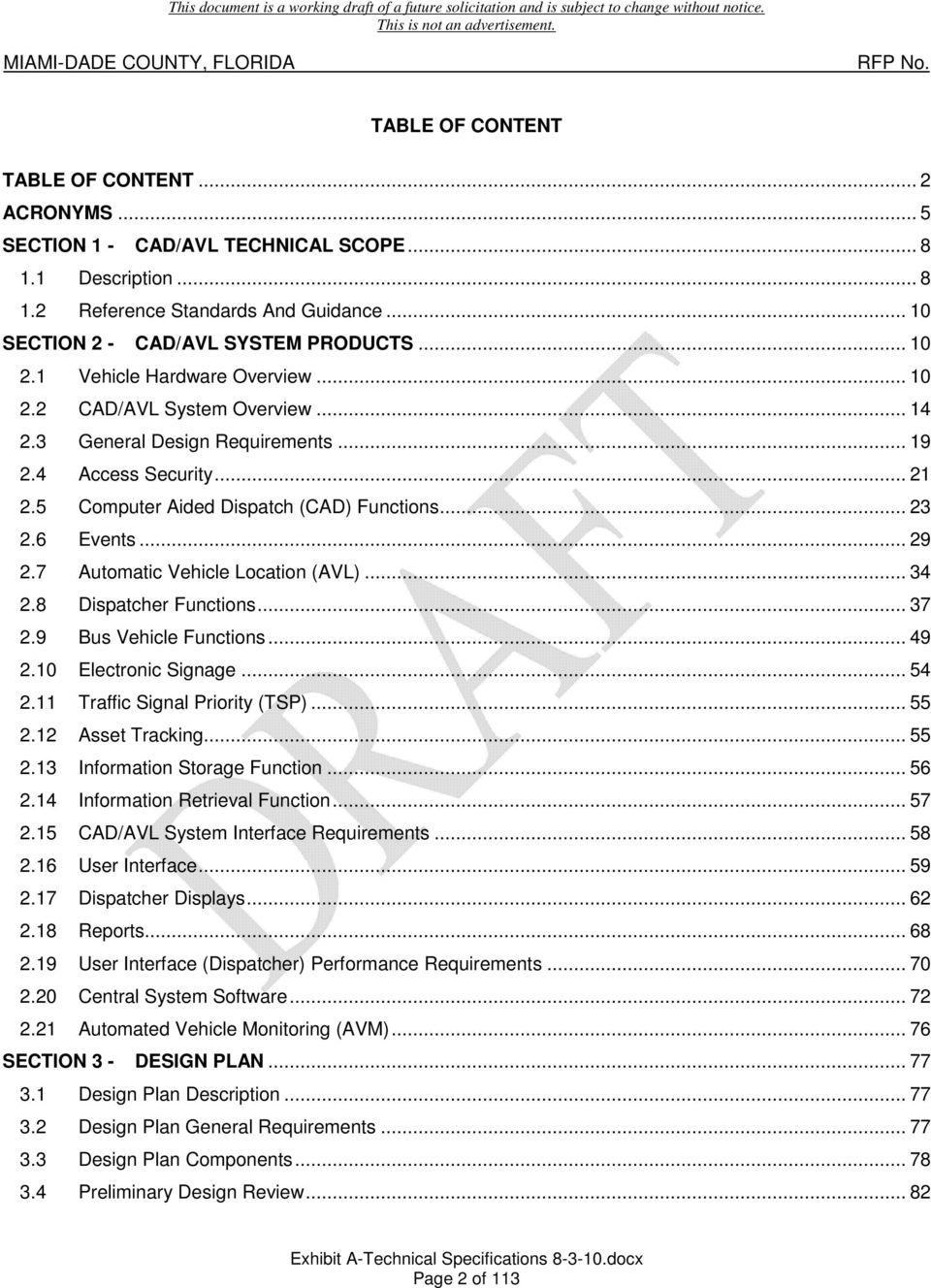
3 TABLE OF CONTENT TABLE OF CONTENT... 2 ACRONYMS... 5 SECTION 1 - CAD/AVL TECHNICAL SCOPE Description Reference Standards And Guidance SECTION 2 - CAD/AVL SYSTEM PRODUCTS Vehicle Hardware Overview CAD/AVL System Overview General Design Requirements Access Security Computer Aided Dispatch (CAD) Functions Events Automatic Vehicle Location (AVL) Dispatcher Functions Bus Vehicle Functions Electronic Signage Traffic Signal Priority (TSP) Asset Tracking Information Storage Function Information Retrieval Function CAD/AVL System Interface Requirements User Interface Dispatcher Displays Reports User Interface (Dispatcher) Performance Requirements Central System Software Automated Vehicle Monitoring (AVM) SECTION 3 - DESIGN PLAN Design Plan Description Design Plan General Requirements Design Plan Components Preliminary Design Review Page 2 of 113
4 3.5 Final Design Review Installation Work Plan Testing Plan SECTION 4 - DESIGN PLAN EXECUTION Implementation SECTION 5 - IP NETWORK IP Network Description Industry Standards General Product Requirements IP Network Equipment Network Segments The IP Addressing And Device Names Security of IP Traffic within the CAD/AVL Network Remote Access for Vendor Support Wireless LAN Network Device Security Network Time Protocol Syncing Event Logging Quality of Service SECTION 6 - IP NETWORK TESTING Network Cabling and Connections SECTION 7 - NETWORK SUBSYSTEMS Description Reference Standards SECTION 8 - NETWORK SUBSYSTEMS PRODUCTS General Product Requirements Backup and Restore Subsystem Radius/Access Control Server Network Time Protocol Syncing System Administrator s Workstation And Printer VLU Test/Data Recovery Workstations SECTION 9 - NETWORK SUBSYSTEMS EXECUTION General Execution Requirements SECTION 10 - MOVER SUBSYSTEM Current Functionality Page 3 of 113

5 SECTION 11 - MOVER SUBSYSTEM COMMUNICATIONS Communications Requirements SECTION 12 - RAIL SUBSYSTEM OPTION CAD/AVL Rail Subsystem SECTION 13 - RAIL SUBSYSTEM OPTION Train to Wayside Communications (TWC) Carborne Equipment Page 4 of 113

6 ACRONYMS 1. ABS Automatic Braking System 2. ADA Americans with Disabilities Act 3. AES Advanced Encryption Standard 4. AFCS Automated Fare Collection System 5. APC Automatic Passenger Counter 6. ARRA American Recovery and Reinvestment Act 7. ASCII American Standard Code for Information Interchange 8. ATC Automatic Train Control 9. ATMS Automated Traffic Management System 10. ATO Automatic Train Operation 11. ATOMS Automated Transit Operations Management System 12. ATP Automatic Train Protection 13. ATS Automatic Train Supervision 14. AVL Automatic Vehicle Location 15. AVM Automated Vehicle Monitoring 16. BTC Bus Traffic Controller 17. CAD Computer Aided Dispatch 18. CAD/AVL Computer Aided Dispatch/ Automatic Vehicle Locator 19. CAE Covert Emergency Alarm 20. CCU Communication Control Unit 21. CD Compact Disc 22. CPPS Cutover Phasing Plan and Schedule 23. DCU Driver Control Unit 24. DECnet Digital Equipment Corporation 25. DL Dual Layer 26. DOT Department of Transportation 27. DR Dead Reckoning 28. DSD Detailed System Design 29. DVD Digital Video Disc 30. DVI Digital Visual Interface 31. EA Emergency Alarm 32. ECM Engine Control Module 33. EDACS Enhanced Digital Access Communication System Page 5 of 113
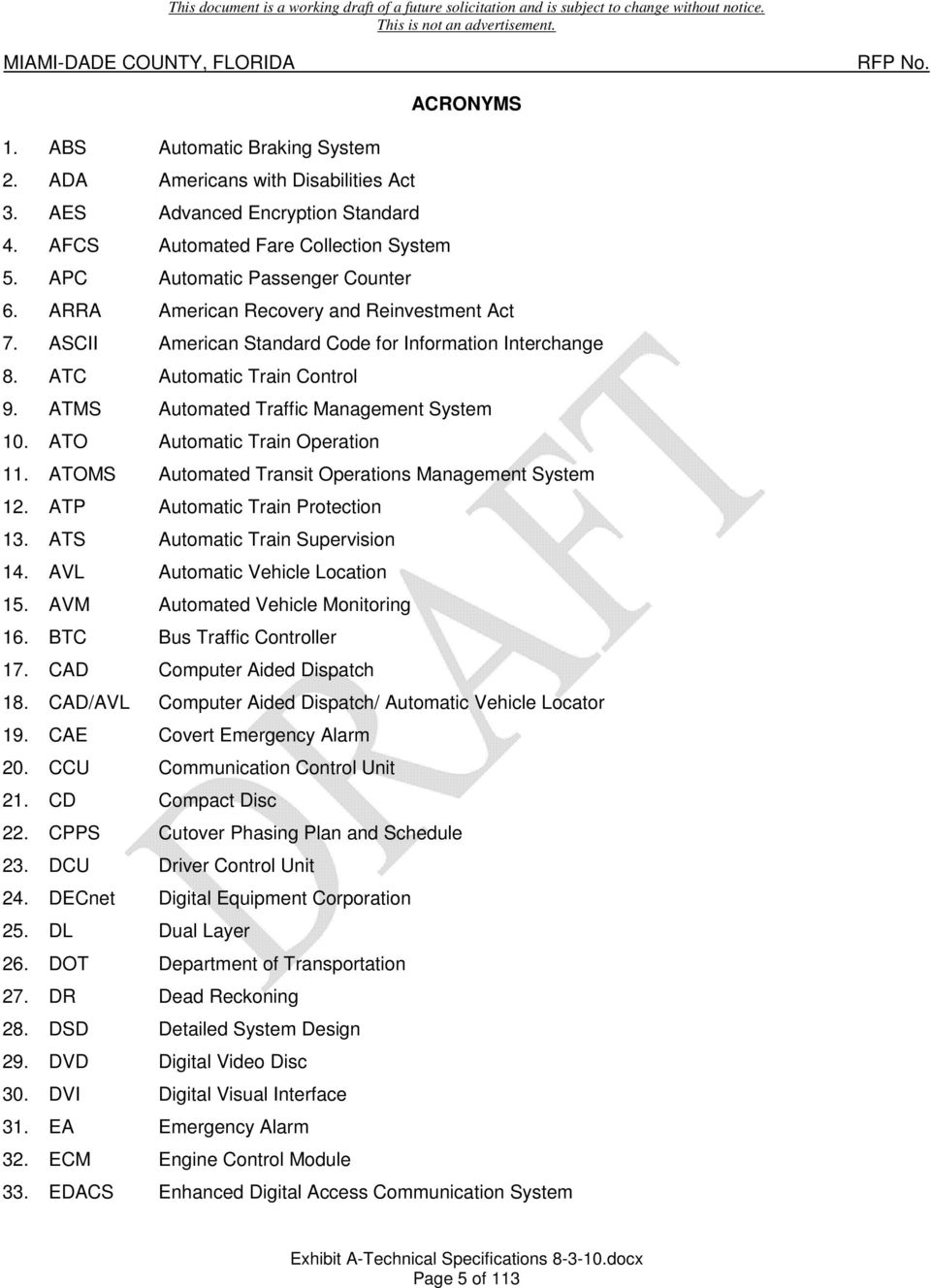
7 34. ESRI Environmental Systems Research Institute 35. ETSD Miami-Dade County Enterprise Technology Services Department 36. FDR Final Design Review 37. FSK Frequency Shift Keying 38. FTA Federal Transit Authority Administration 39. GPS Global Positioning System 40. GUI Graphical User Interface 41. HTML HyperText Markup Language 42. HVAC Heating, Ventilation and Air-conditioning 43. ID Identification 44. I/O Input/Output 45. ITS Intelligent Transportation System 46. IVR Interactive Voice Response 47. LAN Local Area Network 48. LCD Liquid Crystal Display 49. LDAP Lightweight Directory Access Protocol 50. MAC Media Access Control 51. MAR Mobile Access Router 52. MDR Mobile Data Radio 53. MDT Mobile Data Terminal 54. MRS Maintenance Radio System 55. NIC Network Interface Card 56. NTCIP National Transportation Communications for Intelligent Transportation Systems Protocol 57. ODBC Open Database Connectivity 58. OEA Overt Emergency Alarm 59. OEM Original Equipment Manufacturer 60. PA Public Access system 61. PCI-DSS Payment Card Industry-Data Security Standard 62. PDA Personal Digital System 63. PDF Portable Document Format 64. PDR Preliminary Design Review 65. PHY Physical Layer 66. PRTT Priority Request To Talk 67. QA Quality Assurance Page 6 of 113

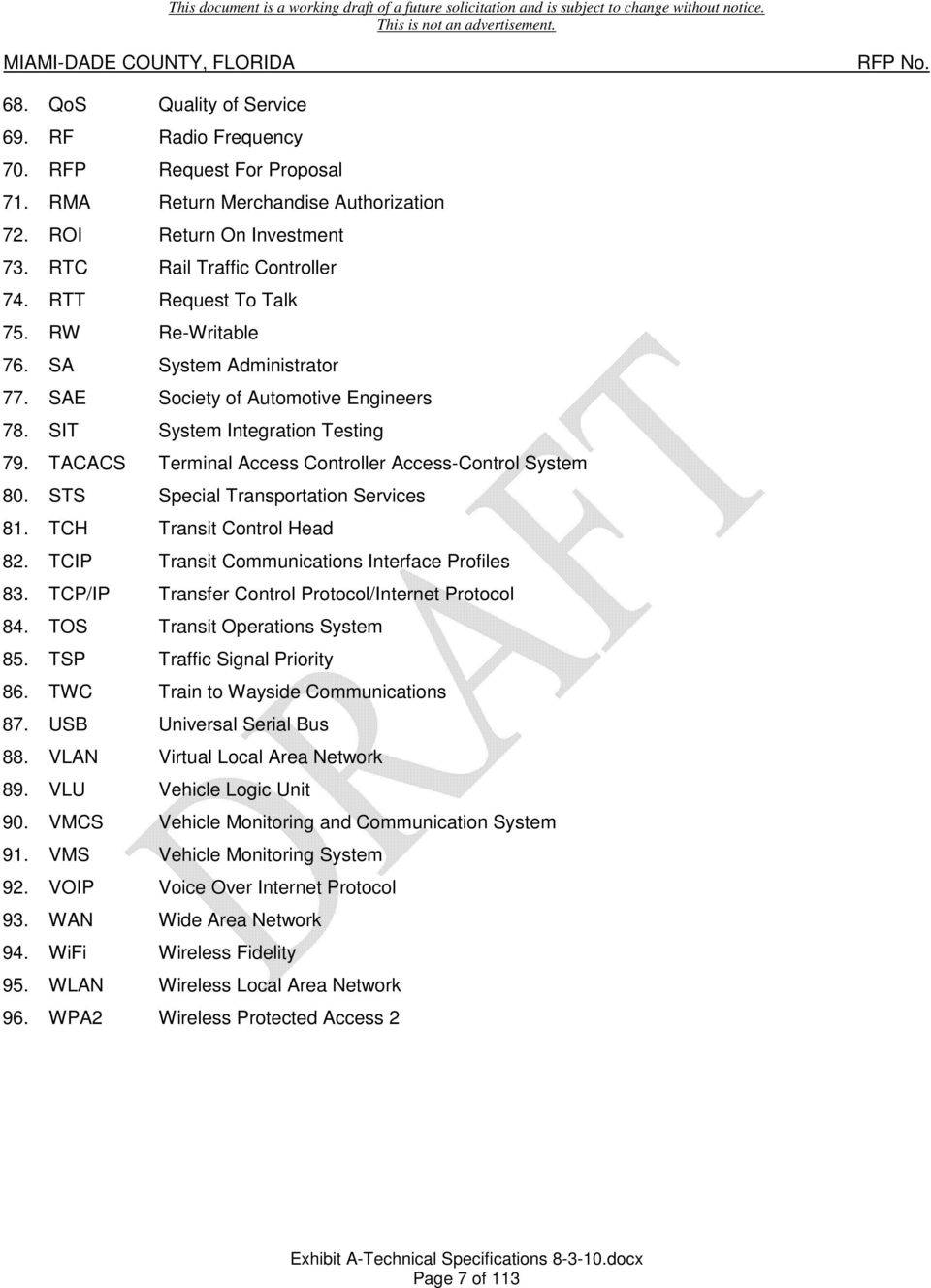
8 68. QoS Quality of Service 69. RF Radio Frequency 70. RFP Request For Proposal 71. RMA Return Merchandise Authorization 72. ROI Return On Investment 73. RTC Rail Traffic Controller 74. RTT Request To Talk 75. RW Re-Writable 76. SA System Administrator 77. SAE Society of Automotive Engineers 78. SIT System Integration Testing 79. TACACS Terminal Access Controller Access-Control System 80. STS Special Transportation Services 81. TCH Transit Control Head 82. TCIP Transit Communications Interface Profiles 83. TCP/IP Transfer Control Protocol/Internet Protocol 84. TOS Transit Operations System 85. TSP Traffic Signal Priority 86. TWC Train to Wayside Communications 87. USB Universal Serial Bus 88. VLAN Virtual Local Area Network 89. VLU Vehicle Logic Unit 90. VMCS Vehicle Monitoring and Communication System 91. VMS Vehicle Monitoring System 92. VOIP Voice Over Internet Protocol 93. WAN Wide Area Network 94. WiFi Wireless Fidelity 95. WLAN Wireless Local Area Network 96. WPA2 Wireless Protected Access 2 Page 7 of 113
9 SECTION 1 - CAD/AVL TECHNICAL SCOPE 1.1 Description A. Technical Scope 1. Miami-Dade Transit Department, herein referred to as Transit requires an integrated Computer Aided Dispatch / Automatic Vehicle Locator (CAD/AVL) System replacement to handle its fixedroute services for Metrobus, Metrorail, Metromover and select supervisory/administrative vehicles. 2. The technical scope of this project is to procure a state-of-the-art system that meets the County s specific requirements for security, functionality, and interoperability with existing Transit systems and onboard subsystems. As part of a Transit initiative to "Enhance Customer Information through Technology for increased satisfaction" Transit intends to replace its current CAD/AVL System to support a real-time tracking and incident management system. 3. The CAD/AVL System shall facilitate an estimated time of arrival and shall be accessible via the Internet, text messaging, Interactive Voice Response (IVR) system, web enabled Personal Digital Assistant (PDA) and electronic signs at select bus stops displaying and announcing estimated arrival times. 4. The CAD/AVL System shall be integrated with the existing onboard vehicle infrastructure and provide a single sign-on solution. 5. In addition, the CAD/AVL System shall be open in nature, mature and capable of performing specific tasks outlined herein. 6. The CAD/AVL System shall also interface with other Transit systems including the Automated Fare Collection System (AFCS), Automatic Passenger Counter (APC) System, P25 and OpenSky Communications Infrastructure and Transit s current and new Automated Transit Operations Monitoring System (ATOMS). 7. This project will leverage the County-wide radio re-banding initiative to replace the communications infrastructure. The County re-banding project utilizes P25 and OpenSky Technology which applies voice-over-ip (VoIP) transport to radio communications applications architecture. The selected Proposer shall install County furnished P25 and OpenSky radios while installing its respective onboard equipment. 8. The selected Proposer shall contemplate for this project that the current Transched supported Transit Operations System (TOS) will be replaced concurrently with the implementation of CAD/AVL System. 9. The CAD/AVL System shall also include implementation of vehicle Traffic Signal Priority (TSP) which allows communication with the County s traffic signal controllers under the County Automatic Traffic Management System (ATMS). This solicitation is partially funded by the American Recovery and Reinvestment Act (ARRA) 2009 for the Traffic Signal Priority (TSP) portion of the project. The County anticipates making the payment for the TSP portion of the project not later than April The CAD/AVL System shall implement Automated Vehicle Monitoring (AVM). The AVM system shall be capable of providing real-time alarm notifications for a subset of at least 20 userconfigurable alarms. The AVM system shall be capable of performing bulk data uploads to backend servers for processing of vehicle diagnostic data and information. The AVM system shall be Page 8 of 113

10 capable of performing interactive playbacks. The AVM system shall provide configurable metrics that allow for prioritization. The AVM system shall create an environment setup for ad hoc reporting, data-mining and business intelligence. 11. The CAD/AVL System shall be a highly reliable, fault tolerant system that will meet current needs and provide a growth path for future expansion. The CAD/AVL System is expected to serve Transit for 12 years. 12. The CAD/AVL System shall be implemented to allow for, at a minimum, 50% additional fleet growth. B. Existing CAD/AVL System Description 1. Miami Dade Transit (Transit) is the 12th largest Transit system in the United States and the largest transit department in the State of Florida, providing multi-mode transit services to patrons in and around Miami-Dade County. Serving over 354,000 passengers daily within a geographic area that encompasses all of Miami-Dade County, at this time Transit operates Metrobus (Bus) of over 950 fixed route buses; Metrorail (Rail), a 22.4 mile elevated heavy rail service with 22 passenger stations; and Metromover (Mover), a people mover system with 21 stations. 2. The existing Transit CAD/AVL System servers and dispatch workstations are located at the Bus Traffic Central Control of the Stephen P. Clark Center (SPCC) 5th at 111 N.W. 1st Street Suite 510 Miami, Florida A legacy system supported by the Harris Corporation, consisting of Alpha 4100 s running on Open VMS Alpha environment version 7.1-1H2 that interfaces real-time with a Transched Transit Operations System (TOS). The real-time system operates on a DECnet network protocol and Network Systems BorderGuard 2000 Area Router connection to the Miami-Dade Transit Enterprise Network. In addition, Axiom computers are used to receive alarms from the Mover Cars. 3. The current CAD/AVL System receives real-time updates from TOS for vehicle assignments. The TOS system creates several ASCII files that contain timepoints, assignments, schedule changes, and operator information. The current CAD system runs a process that imports these ASCII files into its database. 4. The current CAD/AVL System also facilitates an incident management platform for Bus, Rail and Mover. 5. Each bus utilizes a Cooper General Vehicle Logic Unit and Transit Control Head (TCH) input/display device to control vehicle communication systems and GPS. A trunked Enhanced Digital Communication System (EDACS) 800 MHz radio system provides voice and AVL data communications. Each bus also utilizes a DRI Corporation VLU to operate the destination sign, annunciator and provide GPS data to the AFCS Driver Control Unit (DCU). The onboard fare collection equipment consists of a Cubic Transportation Systems DCU controlling a validating GFI Genfare Farebox and an Urban Transportation Associates (UTA) Automated Passenger Counter (APC) system. 6. The bus garage\dispatch center and maintenance facilities are as follows: a. Central Bus Garage 3300 NW 32 Avenue Miami, Florida Page 9 of 113

11 b. Coral Way Bus Garage 2775 SW 74 Avenue Miami, Florida c. Northeast Bus Garage 360 NE 185 Street Miami, Florida d. Joseph Bryant Metromover Maintenance Facility 100 SW 1 Avenue Miami, Florida e. Lehman Center (Metrorail Maintenance) Facility 6601 NW 72 Avenue Miami, Florida Reference Standards And Guidance A. The selected Proposer shall comply with the following references as specified throughout these Technical Specifications. The references can be found online. 1. MIL-STD-810F Environmental Engineering Considerations and Laboratory Tests ( 2. SAE J Recommended Environmental Practices for Electronic Equipment Design in Heavy-Duty Vehicle Applications ( 3. SAE J1113/13 Immunity to Electrostatic Discharge ( 4. BSR/HFES 100 Human Factors Engineering of Computer Workstations ( 5. Americans with Disabilities Act (ADA) U.S. Department of Justice 1990 ( 6. National Transportation Communications for ITS Protocol (NTCIP) ( SECTION 2 - CAD/AVL SYSTEM PRODUCTS 2.1 Vehicle Hardware Overview A. Vehicle Logic Unit (VLU) 1. The CAD/AVL System shall include a single Vehicle Logic Unit (VLU) central processing device and data storage device installed onboard for all vehicles and powered by the vehicle s electrical system. 2. The VLU shall integrate with the existing onboard equipment on each vehicle that provides route/destination announcements and vehicle informational signs with both audible and textual messages, fare collection and automated passenger counting. Where alternate efficiencies can reduce cost and improve reliability, alternate solutions shall be proposed. 3. The VLU shall interface to the vehicle s J1939/J1708 to capture, record, and transmit vehicle AVM data. Page 10 of 113
12 4. A Global Positioning System (GPS) receiver shall be integrated into the VLU used to provide time and location data for AVL and AVM functions. 5. The VLU shall pass position information to the existing farebox DCU. 6. The AVL shall provide both the Vehicle Operators and Dispatchers with accurate and timely position data and schedule and route adherence data. 7. The VLU shall have the ability to interact with all of the existing vehicle subsystems and to integrate communications via Transit s digital P25 and OpenSky Radio System. 8. The VLU shall interface with the wireless local area networks (WLAN) at each Vehicle Maintenance Facility for bulk data uploads and downloads. 9. The VLU shall provide the transmission of data to and from all subsystems such as passenger informational sign content, public address, passenger counter data, and farebox DCU systems. 10. The VLU shall meet environmental and vibration standards as defined by MIL-STD-810F and SAE J The VLU shall meet electromagnetic immunity standards of SAE J1113/13 and protect against surge, and reverse polarity. 12. The VLU shall be capable of multiple radio control, real time updates and messaging to and from the vehicle. 13. The VLU shall meet communication requirements for the P25 System, OpenSky Radio System, and WLAN. 14. Provided interfaces shall include USB, RS232, RS485, J1708, J1939, Ethernet, discrete inputs and outputs, odometer, spare I/O pins, audio inputs and outputs. 15. The VLU shall allow for future expansion and interoperability with add on modems to include USB interfaces. 16. Data storage capacity shall be sufficient to store the complete current and pending route schedules, announcement files, and event messages. 17. CAD/AVL System configuration settings related specifically to a vehicle shall be stored in a vehicle configuration module such that the VLU unit can be swapped out and vehicle information not lost. B. Automatic Vehicle Location (AVL) Module 1. An AVL module shall be fully integrated into the VLU. 2. The AVL module shall provide a derived location by interfacing with the VLU as required for basic coverage of a vehicle with minimal accuracy of three (3) meters. 3. The AVL module shall utilize dead reckoning (DR) for location predictions, whereby the VLU shall determine a position based on a previous position along with known estimated speeds and direction. DR shall be utilized in the event GPS data is not available. Page 11 of 113

13 4. The vehicle location shall be determined by a navigation algorithm that collects inputs from multiple sources and calculates a solution based on the reported reliability and weighting of each input device. 5. The CAD/AVL System shall contain an algorithm for predicting estimated vehicle arrival times within a 60 minute window for Bus and 30 minute window for Rail. 6. The CAD/AVL System estimate algorithm shall use scheduled data in conjunction with historical data to perform estimated arrival predictions. For transfer points and bus stops with multiple routes, the CAD/AVL System shall perform predictions for each route. C. Mobile Data Terminal (MDT) 1. A mobile data terminal (MDT) shall be installed on each vehicle to serve as the interface between the Vehicle Operator and the Dispatch Center and between the Vehicle Operator and other onboard integrated systems. Vehicle logons and logoffs required by a Vehicle Operator shall be consolidated to a single-logon for the vehicle. 2. The selected Proposer shall include a solution that facilitates a Single Log-on, whereby an input device serves as the primary vehicle operator interface and eliminates the need to log on to disperse systems. 3. The MDT shall incorporate a color graphical screen capable of displaying fonts of variable size. 4. The MDT shall be equipped with appropriate functional buttons capable of controlling other onboard systems (e.g. fare boxes, head signs, card readers) and will include a numeric keypad. 5. The MDT buttons shall provide tactile feedback for positive recognition of signal processing. 6. The MDT shall provide brightness controls to provide for clear and easy viewing in day or night conditions. 7. The MDT shall be easy to install and replace, be durable and meet SAE ruggedness standards, and provide real-time updates to and from the vehicle. 8. The MDT shall be capable of providing status and setup capabilities to the maintenance technician of all integrated onboard systems including GPS, communication network devices, farebox, signage and annunciator. 9. The MDT shall be capable of providing unique audio tones to alert the Vehicle Operator of incoming messages. 10. The MDT shall be capable of but not limited to displaying the following onboard information and interface to onboard systems during operation of the vehicle: A. Logon B. Talk C. Emergency Alarm D. Data Messaging Page 12 of 113

14 E. Transfer Notification F. Schedule Adherence G. Head Sign Control H. Fare Collection I. Maintenance J. Stop Announcement K. Trip/Schedule Display Control L. Route Guidance D. Covert Emergency Alarm (Silent Alarm) 1. The selected Proposer shall provide a Covert Emergency Alarm (CEA) with a hidden microphone which will activate a silent alarm when a Vehicle Operator presses an existing button located in an inconspicuous location of the driver s area. 2. The CEA shall be a recessed push button located on the Vehicle Operator left side instrument panel. 3. Emergency Alarms shall have the highest priority of all data messages. 4. The Vehicle Operator shall have the ability to downgrade an Emergency Alarm by pressing Priority Request to Talk (PRTT) or Request to Talk (RTT) on the radio microphone handset. 5. A CEA event indication shall not be noticeable to passengers on any vehicle. 6. When a Bus Traffic Controller (BTC) receives a CEA the following events shall occur, in sequence: A. An audio alarm shall be triggered and a visual alarm shall be displayed in a separate window on the AVL of each Bus Traffic Controller B. When a BTC responds to the Emergency Alarm, an incident report shall be generated. C. An Emergency Alarm acknowledgment message shall be sent to the vehicle. D. The BTC shall have the ability to listen in on the vehicle audio. E. Receive audio on the vehicle shall be silenced. 7. The BTC shall have the ability to downgrade an Emergency Alarm if conditions warrant. E. Overt Emergency Alarm 1. The Overt Emergency Alarm (OEA) allows a Vehicle Operator to communicate the nature of an incident using pre-recorded messages that are transmitted to the Dispatch Center in emergency situations in which passenger or Vehicle Operator distress can be openly communicated. Page 13 of 113
15 2. The CAD/AVL System shall be configurable to allow the System Administrator the ability to specify a list of overt emergency messages that are used for all vehicles. F. Farebox Interface 1. The VLU shall interface to the existing vehicle Cubic DCU that controls the GFI Genfare farebox. 2. The capability to logon the Fare box system with a single vehicle logon shall be provided. 3. The VLU shall provide at a minimum date, time, location, fare set, stop ID, route ID, Direction, Operator ID, and trip ID upon change, and door open information for the proper operation of the farebox. G. Interior Signs 1. The VLU shall be integrated with the existing vehicle informational signage. 2. Interior signs shall display stop requested, bus stop arrival, major intersections and landmarks, date/time information, and other preformatted messages. 3. Controllers shall be capable of sending data messages to the interior signs. 4. The interior sign system data files shall be updatable and/or replaced via the onboard WLAN. H. Annunciation System 1. The VLU shall be capable of providing preformatted voice announcements through an integral Public Address (PA) system. 2. Dispatchers shall have the ability to make announcements over the onboard PA to individual bus vehicles, groups of bus vehicles (line or route call) or the entire bus vehicle fleet (all call). Through the existing PA amplifier. 3. CAD/AVL System software shall be capable of initiating route announcements for external speakers, stop announcements for internal speakers and scheduled announcements for public service and other informational needs. 4. The annunciation system data files shall be updatable and/or replaced via the onboard WLAN. 2.2 CAD/AVL System Overview A. Major Functions The CAD/AVL System shall support the fixed-route vehicle operations of Transit and shall provide the following major functions: 1. CAD/AVL consisting of voice and data communications between fixed-route bus vehicles and the Bus Central Control. 2. CAD/AVL consisting of voice and data communications between Rail vehicles and the Rail Central Control. Page 14 of 113
16 3. CAD/AVL consisting of voice and data communications between Mover vehicles and the Mover Central Control. 4. Global Positioning System (GPS) based Automatic Vehicle Location (AVL) functions that are tightly integrated with the supplied CAD functions. 5. Selected Proposer shall integrate a CAD/AVL System with Transit s existing Scheduling System, ATOMS, and the Farebox; in addition, the supplied system must utilize the existing onboard vehicle infrastructure where possible to reduce costs. 6. The CAD/AVL system shall provide for AVM data capture, retrieval, reporting and alarm handling. 7. The CAD/AVL system shall provide a reporting interface that will be used to do business intelligence reporting. B. Textual and Tabular Displays Basic dispatch console textual capabilities shall be implemented in an easy to use and intuitive graphical user interface and shall include the following basic functions: 1. Configurable multiple message queues for Data Messages, Schedule/Headway Adherence, Request to Talk, and Emergencies. 2. Capability to filter within the queues to tailor information as operationally required by each Dispatcher. 3. Capability to assign priority levels for display ordering and filtering of message types within the message queues. 4. Capability for individual Dispatchersto set their own schedule adherence thresholds that override the CAD/AVL System setting for their individual display queues. 5. Canned (pre-defined) and ad hoc text messaging to the MDT or onboard vehicle displays with store and forward capability. 6. Voice path options to handset, Vehicle Operator speaker, and vehicle PA. 7. Emergency Alarm listen in via a remote key up to a covert microphone to be supplied and installed by the selected Proposer, audible alarms, and status downgrade capabilities. 8. Schedule information by block and/or run including real time status. 9. Route information including schedules, vehicles and real time status. 10. Pull-in and pull-out status from Vehicle Maintenance Facility locations including alarms for late and missed pull-ins and pull-outs. 11. Hotlinks to follow a vehicle from either Pull-in/Pull-out, schedule, roster or map displays. 12. Roster information for logging in/out Vehicle Operators and changing assignments. 13. Capability for Dispatchers to log in Vehicle Operators with selectable requirement for Vehicle Operator acknowledgement. Page 15 of 113

17 14. Work piece information for service adjustments and Vehicle Operator management. 15. Information on vehicle availability and current status. 16. User definable vehicle status categories and availability set by date, time and duration. 17. Maintenance information of real time vehicle monitoring status including query capability for vehicle historical status. 18. Capability to perform service adjustments for individual time points and stops. 19. Add new services (i.e., overloads). 20. Cancel partial blocks (i.e., turn backs or short turns). 21. Temporarily change times within a schedule (i.e., offsets). 22. Capability to cancel an entire block of service. 23. Schedule adherence and off route conditions waived when appropriate for both past and future service. 24. Message queues filtered to eliminate waived adherence and off-route notifications. 25. Service adjustment properties included with off route messages for waived service. 26. Off route monitoring including both off route and back on route messages. 27. Off route vehicle status included in the vehicle properties. 28. Capability for Dispatchers to create and query incident reports. 29. Incident report forms configured based upon event types and sub-types. 30. Communication history for reviewing most recent voice and data communications with ability to create incident reports from the history list. 31. Review of Vehicle Operator generated transfers and cancel transfer requests. 32. Capability for Dispatchers to intervene in the transfer process when operationally required. C. Graphical Displays Real time mapping shall display in an easy to use and intuitive graphical user interface that includes the capability to perform the following functions: 1. Import and display standard format vector and image map layers. 2. Real time location updates within the polling cycle. 3. Define multiple map views and ability to set as default by Dispatcher. 4. Define shared views that can be used by any Dispatcher to be saved in their default set of views. Page 16 of 113

18 5. Zoom, move, center, fit to window and thumbnail views within each map window. 6. Filter by vehicle, route, login status, fleet, and mechanical status. 7. Display route traces. 8. Display vehicle label by number, adherence, route, driver, run, and block. 9. Display vehicle Estimated Time of Arrival (ETA) at a specified destination location as part of the vehicle label. ETA shall be accurate within one minute 90% of the time and within three minutes 95% of the time. Vehicle ETA shall be available for next bus arrival signs, IVR, website, web enabled PDA and cellular phone devices. 10. Vehicle icons that are configurable and contain properties including adherence, login, transfer, and maintenance status. 11. Locate vehicle, route, intersection or object. 12. Establish voice/data communication by individual vehicle or combining a group of vehicles together. 13. Measuring distance tool. 14. Print display. 15. Track vehicles and automated focus on emergency conditions. 16. Vehicle status. D. Headway Management A route ladder shall provide real-time linear graph route trace displays for one or more routes and include capability to perform the following functions: 1. Vehicle icons that indicate direction and vehicle property details. 2. Vehicles tracked by headway or schedule adherence. 3. Configurable headway and adherence thresholds with indication by color-coding. 4. Initiate voice communication individually, by route, or by vehicle group established by dynamic grouping. 5. Evenly distributed time points and ability to reverse time point order. 6. Actual time points crossed by a vehicle displayed for a multi-pattern route. 7. Horizontal or vertical representation of up to 10 routes per display. 8. Hotlink to the schedule and route displays for easy screen navigation. 9. Pending area for vehicles scheduled to perform the selected route in the near future. Page 17 of 113

19 E. Historical Event Reporting I. An historical event display shall playback all pertinent historical messages. Pertinent historical messages shall include, but not be limited to, messages sent and received by: MDT, operator, dispatch, and Vehicle Maintenance Facility). II. The display shall be by a sequence of events on a geographic map. III. Playback of these events shall include the capability to perform the following functions: 1. Allow selection by vehicle(s), driver(s), route(s), fleet(s), or run(s) for specific time frames through a query action window. 2. Allow the selection of onboard route files to play assigned internal and external announcements to validate timing. 3. Configurable speed of replay for moving forward and backward. 4. Graphical representation of event data on common CAD/AVL system maps. 5. Selectable display of map layers. 6. Text display of attributes of each vehicle event message. 7. Step forward, step backward and pause. 8. Zoom, move, center, fit to window and thumbnail views within map window. 9. Measuring distance tool. 10. Vehicle label by number, adherence, route, driver, run, and block. 11. Vehicle icons that are configurable and display adherence, login, transfer, and maintenance status. 12. Locate vehicle, route, intersection or object. 13. Display route traces. 14. Date and time message was logged. 15. Print display. 16. Historical event reporting shall be implemented to ensure that a potentially large number of users performing ad-hoc (i.e., unpredictable) retrieval from the stored information will not adversely affect the performance of online functions of the CAD/AVL System. F. CAD/AVL System Operations Support 1. The CAD/AVL System shall support operations at Bus Traffic Central Control, located at the Stephen P. Clark Center (SPCC), 5th Floor Computer Room, at 111 N.W. 1st Street Miami, Florida This location will serve as the central CAD/AVL and radio dispatch location for Transit s fixed-route Bus, Rail and Mover service. Page 18 of 113

20 2. CAD/AVL workstations shall be provided in order to support the operations at Bus Traffic Central Control. 3. The CAD/AVL System shall support Wide Area Network operations. 2.3 General Design Requirements A. CAD/AVL System Scalability 1. The CAD/AVL System shall initially support the functions specified herein with the quantities of vehicles, devices and workstations shown in Attachment 3, Vehicle Breakdown. However, the System shall be easily scalable through 12 years from contract effective date to support additional vehicles, users, and workstations without replacement of initially installed components, including both hardware and software components. B. Functional Expandability 1. The CAD/AVL System shall be expandable to provide new additional function capabilities over the System s lifetime without significant replacement of existing components. C. Local Installation 1. Dispatch workstations shall have local installations of the selected Proposer s application. The selected Proposer may utilize, with prior written consent from the County, the County s Citrix infrastructure to deliver the application to all other workstations and as a backup to locally installed Dispatch workstations. 2. Transit will maintain the existing Citrix Server Farm and connection licenses required. D. Modern OEM Products 1. The selected Proposer shall supply modern, unmodified, OEM products of computer and communication equipment required for its CAD/AVL System. 2. All OEM products utilized shall be from authorized distributors. Evidence that products were obtained by the selected Proposer from authorized distributors shall be provided to the County upon request. 3. The equipment shall be delivered with the latest firmware, patches, and software updates available at the time of delivery. E. Adjustable Parameters 1. All parameters in the CAD/AVL System that users may need to modify shall be adjustable by authorized CAD/AVL System County personnel. 2. Parameters designated in this Specification as Dispatcher-adjustable shall be modifiable by authorized Dispatchers via workstation displays normally accessible to those users. 3. Parameters designated in this Specification as System Administrator-adjustable shall be modifiable and accessible only by authorized county System Administrators. Page 19 of 113

21 4. Parameters designated simply as adjustable shall be modified in either of the above ways, depending on the selected Proposer's standard approach. 5. Adjustments made to parameters by Dispatchers shall become effective immediately without having to restart any part of the CAD/AVL System. 6. Adjustments made to parameters by the System Administrator that require a restart of affected System components shall not require rebuilding and/or recompilation of programs, or regeneration of databases. 7. All parameters, including periodicities and time intervals, defined in this Specification shall be considered initial values to be used for planning purposes, but all shall be adjustable by authorized CAD/AVL System personnel. 8. The CAD/AVL System shall log all parameter changes. F. Activity Logging 1. The CAD/AVL System shall log all user actions. 2. The activity log shall be real-time and accessible on-line. 3. Each action shall result in a log entry that shall include, at a minimum, user ID, terminal ID, record/file ID s, date/time, module/function ID s and other pertinent data associated with the action. G. Reasonability of Data 1. In order to prevent invalid and unreasonable data from having a harmful effect on the CAD/AVL System or Transit operations, the System shall check data for reasonability. 2. All input data, parameters, and commands whether collected automatically or entered by a user shall be checked for reasonability before allowing the data to be processed or used by the CAD/AVL System, and shall be rejected if unreasonable. 3. When unreasonable input data or results are detected, diagnostic messages clearly describing the problem shall be generated. 4. All individual form fields shall continue to operate in the presence of unreasonable data. Calculations using the unreasonable data shall be temporarily suspended and continue to use the last reasonable data. H. Data Integrity 1. The CAD/AVL System shall be provided to protect System data integrity in a multi-user and multiprocessing environment. 2. The CAD/AVL System shall utilize exclusion methods to ensure that collected data is not corrupted from multiple concurrent accesses by different processes. 3. User-entered data shall be protected by appropriate exclusion methods that prevent more than one user from simultaneously editing the same data. Page 20 of 113
22 4. In general, users shall be notified and granted read-only access to data that is being updated by another user. 2.4 Access Security 1. Access to the CAD/AVL System shall be strictly limited to designated and authorized System Administrators. 2. Users without proper minimum authorization shall be denied access to all CAD/AVL System functions and data, as well as all System resources such as servers, printers, workstations, etc. B. User Authorization 1. As a minimum, User authorization shall require entry of a valid CAD/AVL System domain, username, and password combination that determines the User s level of access to System functions and data. 2. Each User shall have a unique username that is assigned by the System Administrator. 3. The selected Proposer shall utilize Lightweight Directory Access Protocol (LDAP) integration for application access and security groups via the County s Windows Server 2008 Active Directory Domain Services or an alternative approved by the County s Project Manager. 4. The logon/logoff status of a User shall be unaffected by any failure recovery procedure in the System. 5. A function shall be provided for Users to log off. C. Functional Partitioning 1. Access to CAD/AVL System functions and capabilities shall be based upon each User s authorization level and not the physical workstation being used, though limitations in functional capabilities due to the configuration of the workstation may also apply (e.g., no voice equipment). 2. Each level of access shall be capable of specifying full, view-only, or no access to each identified CAD/AVL System function. 3. A minimum of four user-access levels shall be supported by the CAD/AVL System. The term User alone shall refer to all levels, except when it is clear from the context that another meaning is intended. The minimum user-access levels shall be: A. Information User these users shall have only read-only access to CAD/AVL System historical data via the information server resources, but shall have no access to CAD/AVL System functions. B. Customer Service User these users shall have all the rights of an Information User plus readonly access to selected Dispatcher functions (e.g., AVL functions). C. DISPATCHER THESE USERS SHALL HAVE ALL OF THE RIGHTS OF A CUSTOMER SERVICE USER PLUS FULL ACCESS TO SPECIFIC CAD/AVL SYSTEM FUNCTIONS AS DETERMINED BY THE SYSTEM ADMINISTRATOR. C. System Administrator these users shall have unrestricted access to CAD/AVL System Page 21 of 113
23 D. Data Partitioning functions and shall have special privileges required to administer overall access security and to maintain the CAD/AVL System. A secure method shall be provided for the System Administrator to change passwords and user identifications and establish functional partitions. 1. System Administrators shall be able to define data partitions that specify, via selection criteria or other means, a subset of all CAD/AVL System data, including events that Users are permitted to access. 2. For each defined data partition, the System Administrator shall also be able to specify the type of access, which shall include at least read-only and full access. 3. Data partitions shall be able to overlap in definition and each data partition shall be assignable to any number of Dispatchers. 4. A minimum of four distinct data partitions shall be supported by the System. 5. As a minimum, data partitioning shall be possible based on any logical combination of the following criteria: A. Service - Data associated with a specific service. B. Vehicle Type - Data associated with a specific vehicle type. C. Event Type/Sub-Type - Events of specific types and sub-types. E. Security Records 1. Each User logon and logoff shall be recorded in the historical event log. 2. The recorded data shall include the date and time that the logon/logoff was executed, the name of the workstation, and the identification of the User. All functions performed by all users shall be stored in the historical event log. F. CAD/AVL Wide Area Networking 1. The CAD/AVL System shall have the capability to support complete dispatch operations over Wide Area Networking (WAN) of system components. 2. The System shall perform seamlessly over a WAN and have a high tolerance for latency. G. CAD/AVL System Overall Security 1. Transit uses the Payment Card Industry Data Security Standard (PCI-DSS) as its security standard. 2. The selected Proposer shall implement a System that shall adhere to the latest PCI-DSS requirements, currently v1.2 as of 5/11/ The selected Proposer s design and implementation of the System shall incorporate and adhere to the design requirements of the PCI-DSS latest standard if the selected Proposer s System will be connected to a cardholder data environment. Page 22 of 113
24 2.5 Computer Aided Dispatch (CAD) Functions The CAD/AVL System shall provide a comprehensive set of computer-aided radio dispatch features that allow for effective and efficient monitoring and control of all modes of transportation. A. Voice Communications 1. The CAD/AVL System shall support voice communications via the County provided digital trunking radio OpenSky Radio System that is to be integrated with the CAD/AVL System by the selected Proposer. 2. The System Administrator shall be able to assign a default voice talk group to each CAD/AVL Workstation from the pool of available voice talk groups. 3. All voice calls initiated by a Dispatcher shall use the workstation s default voice talk group assignment. 4. All mobile or fixed route selected by the Dispatcher for a voice call shall be automatically switched to the assigned voice talk group for the duration of the call. The CAD/AVL System shall notify the Dispatcher when a voice call is requested and the assigned default voice talk group is currently in use at another Workstation. 5. The System shall interface with the Harris C3 Maestro console to provide console selection and deselection. B. Voice Fallback Mode 1. The CAD/AVL System shall support a fallback mode of voice communications in the event that normal data/communications with one or more vehicles has failed, such as during the failure of a data channel. 2. In the fallback mode of operation, OpenSky voice communications between the Dispatchers and the vehicles affected by the failure shall still be possible via voice channels that are assignable by the System Administrator for this purpose. 3. All affected vehicles shall be automatically switched to the fallback mode when a failure of normal communications is detected. 4. Vehicles unaffected by the failure shall continue to operate in the normal communications mode. 5. The time period between detection of a communications failure by a vehicle and the entering of fallback mode shall be adjustable by the System Administrator. 6. Vehicles in fallback mode shall periodically check for restoration of normal communications at an interval that is adjustable by the System Administrator. 7. When normal communications have been restored, all affected vehicles shall automatically return to the normal communications mode. 8. During fallback mode, vehicles equipped with Covert Emergency Alarm capabilities shall continue to allow those Emergency Alarms to be initiated. Page 23 of 113
25 9. All such fallback silent Emergency Alarms shall be immediately displayed by visual and audile alerts to all active BTCs and shall provide them with at least the vehicle ID that issued the alarm. C. Data Communications 1. Data Channel Allocation A. The CAD/AVL System shall support the transfer of control commands and data to and from the vehicle fleet. 2. Data Communications Protocol A. A suitable data communications protocol shall be used to ensure the reliable delivery of data and control commands over the OpenSky system. B. Protocol parameters, such as timeouts and retry counts and intervals, shall be System Administrator-adjustable. C. Data communications errors shall be logged and excessive errors and communications failures shall be alarmed to the appropriate Dispatchers. D. The protocol used shall be configured to avoid operating the CAD/AVL System mobile radios beyond their maximum transmit duty cycle specifications, such as during time periods with very few active vehicles. E. Due to the importance of receiving silent Emergency Alarms as quickly and reliably as possible, the CAD/AVL System shall be configured to ensure the rapid and reliable transmission of silent Emergency Alarms to the appropriate Dispatchers. F. Silent alarm messages shall also be transmitted by the mobile radios and received by the CAD/AVL System when the radios are operating in fallback mode. D. Vehicle Data Monitoring 1. If the selected Proposer s CAD/AVL System utilizes a polling scheme to retrieve requests for voice communications and data transmissions from the vehicles: A. The CAD/AVL System shall poll all active in-service vehicles at least every 30 seconds. B. The polling rate shall be selectable by the System Administrator with the interval of 15 to 30 seconds. C. The use of variable polling strategies shall be applied to provide frequent polling where required. D. These strategies shall include more frequent polling of off-schedule and off-route vehicles and less frequent polling of vehicles in the yard or at the end of a route. E. In the event of an Emergency Alarm, vehicle polling shall automatically be placed on a rapid poll rate selectable by the System Administrator in the range of 15 to 30 seconds. 2. If the selected Proposer s CAD/AVL System employs an exception reporting scheme for initiating communications with the vehicles: Page 24 of 113
26 A. All vehicles shall report to the CAD/AVL System whenever data is available for transmission, whenever voice communications are required, and whenever the vehicle is operating either offschedule or off-route. B. In addition, each vehicle shall initiate "health-check" transmissions whenever no exception report transmissions have been made for a period of 90 seconds. C. The CAD/AVL System shall verify that it receives at least one transmission, either an exception report or a health-check, from each vehicle on a regular basis. D. This verification (c. above) shall be performed at a pre-set period, adjustable only by the System Administrator. E. The CAD/AVL System shall alarm and log all vehicles failing to report in during each period. 3. If the selected Proposer s CAD/AVL System employs any other reporting scheme (e.g., non-polled, non-exception): A. All communication requests and all data transmissions shall be retrieved from all active inservice vehicles at least every 30 seconds. B. The CAD/AVL System shall receive and process all data received from vehicles, regardless of whether a Vehicle Operator is logged in. C. All Emergency Alarms and other alarms, RTT, PRTT and other Vehicle Operator-initiated actions shall be handled in the same manner as for logged-in vehicles. E. Bulk Data Transfer 1. The CAD/AVL System shall support automated wireless transfer, in either direction, of large amounts of data with all CAD/AVL System equipped vehicles. The primary objective of this function shall be to eliminate the need for Transit personnel to physically work on each vehicle when major schedule changes occur or when routine software, configuration and other non-hardware modifications are required on the vehicles. 2. Wireless data transfers shall occur when the vehicles enter specific access zones, which shall include the three Transit garages. 3. The posting of data for transfers shall be supported at any time. 4. The bulk data transfer function shall enable authorized System Administrators to post data for transfer to vehicles and to monitor the progress of all transfers on a per-vehicle basis. 5. No user intervention shall be required to handle transfers once they are posted. 6. Suitable interactive facilities shall be provided for the System Administrator to manage the bulk data transfer function. 7. The bulk data transfer function shall detect interrupted transfers, such as the case when a vehicle leaves the access zone prior to completion of a bulk data transfer. In this instance, the transfer shall be completed normally when the affected vehicle returns to any access zone. In the event of an interrupted data transfer, the original data set shall be retained and used until the data transfer is complete. Page 25 of 113
27 8. Bulk data supported by this function shall include, but not be limited to, the following types of data: A. Fixed Route Definition Data I. Schedule route definition data including routes, schedules, trips, runs, time points, display/annunciator trigger points, map data and other data required by the fixed route vehicles. II. The bulk data transfer function shall permit all such updates to occur over a period of at least two weeks prior to the effective date of the new data and without disrupting current operations using the existing data. III. Additionally, the CAD/AVL System shall include a capability to download short-term changes to the route definition data (e.g., re-routes) to vehicles operating in the field. B. Destination Sign Data Updated destination sign message data for fixed route vehicles with onboard signs that are interfaced to the CAD/AVL System. C. Audio Announcement and Visual Display Data Updated audio announcement data and visual display data (if supplied) for all fixed route vehicles. D. MDT Parameters Updated MDT parameters, including canned message menus, timeout periods, and schedule activation dates. 9. All equipment, labor and software required to transfer the data to/from the vehicles shall be provided by the selected Proposer. 10. The transfer of higher priority, more time critical data shall be accomplished before the transfer of less critical data. 11. Potential interference between the CAD/AVL System bulk data transfer function and other Transit systems shall be eliminated. 12. The selected Proposer shall ensure that all data transferred via the bulk data transfer function is secure from unauthorized interception. 13. The selected Proposer shall employ encryption and/or other methods to prevent such unauthorized access. 14. The selected Proposer shall also ensure that the bulk data transfer function is adequately protected from unauthorized entry that could result in access to or control of resources on the CAD/AVL System and Transit s network. F. Mobile Access Router (Option) Page 26 of 113
28 1. As an option to be exercised at the County s discretion the selected proposer shall provide a Mobile Access Router (MAR) for bulk data transfer and multi-network routing for support of public WiFi access. Transit will be responsible for the recurring cellular fees. 2. The MAR shall include the following: A. multiple WAN connections (connections shall be managed by connection policies including GPS location, time of day, availability, and priority) B. application QoS C. LAN networking D. in-vehicle access point b/g E. four port Ethernet switch F. DHCP server G. WLAN security and authentication H. WPA2 I. key management J. RADIUS authentication K. Firewall L. Port forwarding M. port blocking N. WAN wireles networking O. compatibility with GPRS, EDGE, UMTS, HSPDA, HSUPA, and WiMAX P. IEEE802.11a/b/g/n Q based 4.9GHz R. future compatibility with , LTE S. Modem Format T. Express Card, MiniPCIe, MiniPCI, and USB U. Supported Transport V. HTTPS, SMTP, FTP, UDP W. Power Supply Page 27 of 113
29 X. 12 to 24 VDC Y. Internal DC to DC converter with reverse polatiry and over-voltage protection Z. Locking power connector AA. Power Management BB. Autopower-up on ignition sense CC. Managed power-down including programmable shutoff delay DD. Input voltage monitoring with autoshutdown EE. Auto out of range temperature detection FF. vibration shock standards with accordance with SAE J1455 GG. Solid State storage HH. 1GB minimum onboard solid state storage II. External Antennas JJ. tri-mode , GPS, Cellular KK. Low profile omni-directional (not to exceed a height of 2 and a diameter of 5 ) LL. Built-in ground plane MM. Adhesive mount NN. Internal AP Antennas OO. Low profile omni-directional (not to exceed a height of 2 and a diameter of 4 ) PP. Adhesive mount G. Identifier Field Formats 1. All vehicles supported by the CAD/AVL System shall be identified by vehicle IDs, route numbers, and block numbers. 2. Vehicle Operators shall be identified by employee numbers and run numbers. 3. Supervisory and other non-revenue vehicles shall be identified by vehicle ID. 4. The format of the identifiers supported by the CAD/AVL System shall be at least eight numeric digits in length. 5. Where the actual number utilized by Transit is shorter than the maximum length provided for an identifier field, leading zeros shall not be required. Page 28 of 113
30 2.6 Events 1. The CAD/AVL System shall support the gathering, processing, storage and presentation of information regarding System status and events relating to vehicles and Vehicle Operators. A. Event Types and Priorities 1. The CAD/AVL System shall support multiple event types and subtypes. Events shall be available within the CAD/AVL System for presentation, processing, and storage within specified maximum time delays relative to the actual creation of the events in the field under the peak loading conditions. 2. The maximum delay for an event shall be determined by the specified priority of the event. A minimum of three event priority levels shall be supported. 3. The maximum delay for a high priority event shall be five seconds, for a medium priority event shall be 30 seconds, and for a low priority event shall be 24 hours. 4. The CAD/AVL System shall support the following minimum set of event types and subtypes: A. Emergency Alarm (EA) A covert signal from a vehicle that an emergency condition is occurring. This event shall have high priority. B. Priority Request To Talk (PRTT) A high priority request from a Vehicle to talk with a Dispatcher. This event shall have high priority. C. Request To Talk (RTT) A normal request by a Vehicle Operator to talk with a CAD/AVL System Dispatcher. This event shall have medium priority. D. Canned Text Message I. A pre-defined text message from a Vehicle Operator to a CAD/AVL System Dispatcher. II. Each canned text data message shall be distinguishable as a unique data message subtype and shall be configurable by the System Administrator to a supported priority level. E. Schedule Adherence Violations I. An event indicating that a vehicle is off schedule (early/late). II. The message shall indicate the amount of schedule deviation in minutes. III. Schedule adherence violations having an early deviation from schedule and those having a late deviation from schedule shall be configurable to different priorities. These events shall initially have medium priority. F. Route Adherence Violation Page 29 of 113
31 An event indicating that a vehicle is off route. This event shall have medium priority. G. Turn-back An event indicating that a vehicle has performed a turn-back. This event shall have medium priority. H. Fill-in Service Start/Stop Events indicating starting and stopping of fill-in service for a specified route. This event shall have medium priority. I. Logon Alarm An event indicating that a vehicle has left the yard without a valid Vehicle Operator logon. This event shall have medium priority. J. Missed Operator Logon An event indicating that a Vehicle Operator has not logged on to an active route. This event shall have medium priority. K. Operator Logon/Logoff Events indicating successful Vehicle Operator logons and logoffs. This event shall have medium priority. L. Open Block Alarm An event indicating that a block has been without service (i.e., no active vehicle) for more than a pre-defined and configurable time period. This event shall have high priority. M. Relief Events Events indicating that a Vehicle Operator relief has started, ended, or has been missed. This event shall have medium priority. N. CAD/AVL System Alarm Events indicating a failure within the CAD/AVL System such as communications errors and failures, mobile component failures, etc. This event shall have medium priority. O. Information Message A low priority data message that is logged for historical purposes, but is not normally presented to a CAD/AVL System Dispatcher. Examples of this type of event include: reporting of reasons for lateness, wheelchair lift/ramp usage, etc. This event shall have low priority. 5. All events shall include sufficient identifying and descriptive data necessary for a user to properly interpret the event. 6. The System shall have the ability to sound an audible alarm at the Dispatcher consoles for any event as defined by the System Administrator. Page 30 of 113
32 7. The System shall be configurable to allow the System Administrator to give Users and Vehicle Operators the ability to silence alarms. B. Event Storage 1. All events shall be stored by the CAD/AVL System and, if appropriate, shall be presented to the appropriate Dispatchers according to their data partition assignments. 2. The CAD/AVL System shall be provided with sufficient processing and storage capacity to store all events without loss under peak load conditions. 3. Stored event history shall include at least the following data: A. Event type/sub-type(s) B. Event parameter data, if any (e.g., message text) C. Date/time of creation (at the location of the event) D. Originating location of event E. Date/time of receipt (at the Bus Traffic Central Control) F. Date/time of selection (by User) G. Identification of selecting user H. Data regarding the disposition of the event (e.g., incident report generated). 4. The history of all logged events shall be accessible via the CAD/AVL System Information Storage and Retrieval functions. 5. The historical event log shall be implemented to ensure that a potentially large number of users performing ad-hoc (i.e., unpredictable) retrieval from the stored information will not adversely affect the performance of online functions of the CAD/AVL System. C. Incidents The CAD/AVL System shall support the creation, maintenance, tracking, and reporting of all incidents relating to event occurrences for all modes of transportation and Vehicle Operators. 1. Incident Types The CAD/AVL System shall support at least 36 different incidents types. Each type of incident shall be associated with a unique incident report format that provides the information required for that particular incident type. The types of incidents and incident reports to be supported shall include but not limited to the following: A. Emergency Alarms B. Maintenance problems, including but not limited to the following sub-types: I. Road call Page 31 of 113
33 II. Fare box III. Head sign IV. Radio V. Tires VI. Operator seat VII. Engine alarm VIII. Door IX. Air conditioning X. Wheelchair lift C. Accident involving a revenue vehicle D. Incident involving a revenue vehicle E. Incident involving a passenger F. Delay I. Road Conditions II. Traffic Conditions III. Emergency Situations IV. Vehicle unable to move G. Relief vehicle H. Spare incident types definable by the System Administrator. 2. The System Administrator shall be able to define sub-types for each type of incident. The sub-type shall be an additional field on the incident form. The same type form shall be used for all subtypes. 3. Incident Storage The general information common to all incidents shall, at a minimum include the following: A. Incident number B. Time and date of the incident C. Incident code D. Incident description Page 32 of 113
34 E. Reference to the event(s) associated with this incident F. Vehicle ID G. Route number and direction H. Block number I. Run number J. Vehicle Operator name and badge number K. Incident location in GPS coordinates L. Incident location as an address or street intersection description M. Incident disposition N. Vehicle change option for yes/no I. Replacement vehicle ID II. Change location III. Change time IV. Vehicle from location O. Notes P. Time lost Q. Responding Road Supervisor name and badge number R. Incident status option for open/closed S. Dispatcher who opened the incident T. Dispatcher who closed the incident U. Time and date the incident was closed V. Dispatcher comments 4. Additional information particular to each type of incident shall be supported by the CAD/AVL System and will be defined by Transit during PDR. D. Date and Time Coordination 1. The CAD/AVL System shall synchronize to the time server defined in Section D, Network Subsystems, to keep all components of the CAD/AVL System synchronized to standard UTC time adjusted for the local time zone. Page 33 of 113
35 2. CAD/AVL System components that shall be synchronized in time include all local and remote workstations, all CAD/AVL System servers, and all MDTs. 3. The time error between the standard time reference and any component of the CAD/AVL System, including MDTs, shall not exceed one second. 4. In the event of a failure to synchronize with the selected time reference, the CAD/AVL System shall generate an alarm to the System Administrator. 2.7 Automatic Vehicle Location (AVL) A. The CAD/AVL System shall include a Global Positioning System (GPS) based Automatic Vehicle Location (AVL) function. B. The AVL function shall provide tracking and reporting of the locations of AVL equipped vehicles with a positional accuracy of 10 meters or less, regardless of whether the vehicles are moving, on-route, offroute, have no assigned route; or whether or not the vehicles are logged into the CAD/AVL System. This required level of accuracy shall not be adversely impacted by GPS errors resulting from selective availability and from other reception errors. C. All vehicle movement on AVL maps and displays shall be based upon actual vehicle location reports and shall not be simulated. D. The AVL implementation shall provide both Vehicle Operators and Dispatchers with accurate and timely position data and schedule and route adherence data, while minimizing the use of radio communications for the transmission of vehicle location data. E. Onboard calculation and display of schedule and route adherence, with only schedule and route deviation and occasional and on-demand schedule/route adherence reporting to the CAD/AVL System Server shall be provided. F. Based on the requirement that a vehicle schedule and route adherence is calculated on-board, vehicle locations shall be reported to the CAD/AVL System whenever the schedule or route adherence thresholds are exceeded, whenever any communications request or other data is being transmitted and at least every 30 seconds if no other data transmissions or communications requests are initiated from the vehicle. G. AVL Coverage 1. There will likely be locations of momentary GPS signal blockage and/or distortion, such as in a downtown area. Accordingly, the selected Proposer shall investigate to become aware of the GPS satellite coverage throughout Transit s service area. 2. In the event of loss of GPS derived vehicle position information, vehicle location shall be determined with dead reckoning techniques utilizing the existing vehicle odometer or other means and technologies which provide position accuracy equivalent to GPS tracking. 3. When dead reckoning is utilized an event shall be recorded. H. AVL Map and Overlays Page 34 of 113
36 1. Transit will supply geographic information Systems (GIS) base map of the service area for use by the CAD/AVL System AVL functions. This same map data is used by Transit's fixed-route Scheduling System Environmental Systems Research Institute (ESRI) The CAD/AVL System AVL map shall support all map features of Transit s base map. Supported features shall include, but not be limited to, street network segments, street names, street addresses, as well as depiction of landmarks such as schools, parks, hospitals, and bodies of water. 3. In addition, the CAD/AVL System shall be able to import data for route schedules, shapes, stops, time points, and other fixed route location-based service data maintained in Transit s Scheduling System. 4. The selected Proposer shall initialize the CAD/AVL System AVL map using Transit provided data. 5. The selected Proposer shall be responsible for all necessary refinements, updates, format conversions, and other processing and handling of the map data as necessary for successful incorporation of the data into the CAD/AVL System. 6. The selected Proposer shall supply all software, scripts and procedures necessary for successful importation of Transit map data into the CAD/AVL System to allow Transit to perform similar imports in the future without assistance from the selected Proposer. 7. All functions necessary for successfully incorporating map data into the CAD/AVL System shall be provided as part of System. A. These functions shall enable the System Administrator to perform regular updates to and replacement of the AVL base map and map overlays used by the CAD/AVL System without requiring extensive or complex manual operating procedures and without requiring significant manual data entry. B. Selective updates of the base map and to any selected overlays shall be possible without reimporting the entire map and all overlays and without loss of prior map CAD/AVL System. C. Where minor CAD/AVL System or data entry are required, such entries, and corrections shall be stored (e.g., as a script) for reapplication in subsequent imports. D. The System Administrator shall be able to reapply these CAD/AVL System entries and corrections on subsequent imports via a minimal set of commands. I. Daily Fixed Route Schedule Selection 1. The schedule of trips for each service day shall be automatically selected by the CAD/AVL System based upon the date, day of the week, and any special schedules applicable to particular days. In general, schedules include weekday, Saturday, and Sunday schedules. In addition, special (exception) schedules are generated for school closures and early-outs, special events, and holidays. Holidays and other special dates may be defined by Transit in real-time. 2. Any changes shall be reported to ATOMS. 3. The CAD/AVL System shall check all defined special dates to determine which service days require holiday, school, or special service schedules. Page 35 of 113
37 4. The CAD/AVL System shall support service days that cover time periods over 36 hours in duration and that end at the time of the last pull-in. At 2AM, the new day's schedule shall be utilized for vehicles that pull out after 2AM. Those vehicles that pulled out before midnight shall continue to operate under the schedule of the day they pulled out until they complete their scheduled block, even if the block completion occurs after midnight. Therefore, for a time period after midnight, the CAD/AVL System shall allow two schedules to be in effect concurrently. The schedule times for vehicles that operate beyond midnight are currently identified in schedules by times that are greater than 24:00. The CAD/AVL System shall recognize day-to-day variations in the schedules and only display and use the scheduled trips that apply to the particular service day. J. Fixed Route Schedule Adherence Monitoring 1. The CAD/AVL System shall accurately monitor the schedule adherence of all fixed route revenue vehicles that are operating on defined schedules. Fill-in vehicles (extra vehicles placed on a route) and special event/service vehicles that are without defined schedules shall not be monitored for schedule adherence. 2. Schedule adherence shall be calculated at each defined time point and accurately estimated between defined time points. The time delay between the receipt of a vehicle's position and the availability of the calculated/estimated schedule adherence status shall not exceed five seconds. Schedule deviations beyond pre-defined, System Administrator-adjustable thresholds shall produce an event. 3. Schedule adherence to defined time points (i.e., those in official published schedules) shall be based on the scheduled departure time at each time point, with the exception of those specific stops that have both arrival and departure times (e.g., layovers) and the end of a trip. The number of time points shall range from 2 to 100 time points per route per direction. Time point departures shall be determined by the CAD/AVL System to an accuracy of ± 5 seconds, regardless of whether the vehicle stops at the time point or passes the time point without stopping. 4. The System shall provide the Dispatcher the projected recovery time based on the next terminal departure. 5. A vehicle's schedule adherence status shall be available for presentation to the Vehicle Operator and to Dispatchers, and for generation of schedule adherence deviation events. K. Fixed-Route, Route Guidance 1. The System shall have the capability of providing detour options to the Dispatcher and to the Vehicle Operator via the MDT. 2. In order to support Vehicle Operator assignment substitutions and route training, the System shall have the capability, enabled on an individual vehicle basis by the Dispatcher, to present turn-byturn directions for a selected route. Route directions shall be presented on the MDT in a nonintrusive, easy to read format. Optional verbal turn-by-turn announcements shall be available to the Vehicle Operator. L. Turn-Back Monitoring 1. The CAD/AVL System shall detect and adjust for turn-backs within a fixed route vehicle s assigned block. The System shall issue a turn-back event when a vehicle has turned around before the end Page 36 of 113
38 of a current trip and proceeds along the route in the opposite direction for a subsequent trip within the same block. 2. Following a turn-back, the System shall automatically determine which trip the vehicle has jumped to within the System assigned block based on the current time, the vehicle's new geographic location, the vehicle's direction, and the vehicle's schedule. 3. After a turn-back adjustment, the System shall resume schedule and route adherence monitoring and automated voice announcements for the vehicle based on the new trip assignment. All turnbacks shall produce events. M. AVL from Non-VLU Equipped Vehicles 1. The CAD/AVL System shall have the capability to accept and display AVL location data transmitted via the Digital OpenSky Radio System from vehicles such as, maintenance and supervisory vehicles, equipped with the selected Proposer s supplied hardware. 2.8 Dispatcher Functions The CAD/AVL System shall provide functions as specified in the following sections to support authorized Dispatchers operating from both local and remote CAD/AVL Workstations. A. Event Handling 1. Event Presentation A. Events shall be presented to Dispatchers in a manner that emphasizes the most urgent events requiring response. However, all events within a Dispatcher s data partition(s) shall be accessible. B. Redundant events shall be eliminated in order to reduce the presentation of unnecessary events. In cases where multiple RTT, PRTT and EA events are present from the same vehicle, only the first-received, highest priority, unanswered event shall be presented. However, a PRTT received from a vehicle after an EA has been answered shall be presented to allow the Dispatcher to respond to the PRTT. Where different mechanical alarms are being reported for the same vehicle, the most recent unacknowledged alarm of each unique alarm subtype shall be presented. Where multiple schedule and route adherence violations are being reported for the same vehicle, only the most recent event of each type shall be presented. C. All BTCs shall be able to inhibit or change the display reporting thresholds of selected events in order to reduce the volume of events being reported during peak operating periods and during service disruptions. In particular, Dispatchers shall be able to inhibit the reporting of schedule and route adherence violations and to modify the reporting thresholds in order to control the number of displayed schedule and route adherence violations. 2. Event Selection A. The CAD/AVL System shall enable authorized Dispatchers to quickly locate and select an event. A convenient mechanism shall be provided that allows Dispatchersto automatically select the oldest (first received) event in the highest event priority level and the most recent (last received) event in the queue, regardless of the event's priority level. Page 37 of 113
39 B. Upon selection of an event by an authorized Dispatcher, the CAD/AVL System shall enable the following functions: I. View examine all information concerning the event II. Remove remove an event without responding to it III. Incident create and edit an incident report for the event IV. Answer respond to an event requiring a response, including establishing voice communications, returning a text data message, and acknowledging alarms V. Show Location Show the current location of the vehicle associated with the event on the AVL map display VI. Transfer transfer control of the event to another authorized Dispatcher C. The CAD/AVL System shall manage access to events by multiple Dispatchers in order to avoid conflicts and loss of data that may otherwise occur from multiple operations on the same event. 3. Event Removal A. BTCs shall be able to remove events regardless of their current status. Basic confirmation response from the Dispatcher shall be required for each event removal command. The ability to select multiple events for removal with a single command shall also be provided. Authorized Dispatchers shall also be able to specify that all events of a particular type be removed with a single command. Removal of Emergency Alarms shall require additional confirmation from the Dispatcher before the request is executed. Removal of events shall affect only their presentation to Dispatchers and shall not affect the historical log, which shall store all events. 4. Emergency Alarms A. When a BTC answers an Emergency Alarm (EA) event, the CAD/AVL System shall provide a subtle and silent indication back to the vehicle alerting the requesting Vehicle Operator that the Emergency Alarm has been answered and covert monitoring shall automatically be initiated on the reporting vehicle. All other attempts to initiate communications of any kind, including broadcasts, OpenSky calls and data messages, with the reporting vehicle from any source shall be reprioritized during an Emergency Alarm event. Communications with all other revenue and non-revenue vehicles not in an emergency alarm state shall continue to operate normally, except that functions involving a vehicle in Emergency Alarm (e.g., a passenger transfer request) shall be inhibited. B. The CAD/AVL System shall terminate an Emergency Alarm if the Vehicle Operator reporting the EA subsequently issues a request for voice communications (e.g., PRTT). The Dispatcher shall also have the capability to terminate an Emergency Alarm without communication from the Vehicle Operator. However, the System shall issue a warning message and require a confirmation from the Dispatcher before the Emergency Alarm is actually terminated. C. An Emergency Alarm shall automatically generate an incident report. D. The System shall have the capability to provide Emergency Alarm notification, including incident location information, to the Dispatcher as designated by the System Administrator. Page 38 of 113
40 5. Event Partitioning A. Dispatchers shall be permitted access to events to the extent permitted by their assigned data partition(s) by SA. Dispatchers with read-only access to specific events shall be able to view the events, but they shall not be permitted to respond to (i.e., acknowledge, open incident, reply, log, etc.) the events. Dispatchers shall not be permitted view events to which they do not have at least read-only access. B. The CAD/AVL System shall always ensure that emergency events are promptly presented to at least one active (i.e., logged on) Dispatcher. Events not assigned to a data partition and events in data partitions without a current active User shall be routed to at least one active Dispatcher, regardless of the data partition assignment(s). B. Vehicle Location and Status (Map-Based) 1. The CAD/AVL System, via AVL capabilities, shall provide authorized Dispatchers with detailed geographical maps of the service areas showing the current locations and schedule/route adherence status of all vehicles within a Dispatcher s assigned data partition(s). This capability shall be provided at all workstations that are equipped for the display of geographical maps. 2. Vehicle locations shall be accurately aligned with the streets and routes on which the vehicles are operating. There shall be no visible offsetting of vehicle positions from the displayed streets and routes. If necessary, the CAD/AVL System shall compensate for map and positional inaccuracies and automatically position the displayed vehicle symbols onto the proper streets and routes. 3. A vehicle's location shall be updated on the map overlay each time new vehicle position data is obtained from the vehicle. If the selected Proposer s AVL is based on an exception reporting scheme, whereby vehicle positions are not reported at each polling/reporting interval, then the revenue vehicle positions of scheduled fixed route vehicles that are on-route shall be updated based on each vehicle's last reported position, on-time performance data and the expected movement along the route (adjusted for the last reported schedule adherence data). 4. Position deviation of a fixed route revenue vehicle from on-route, on-time position as determined by vehicle on-board position measurements shall initiate a system event and shall automatically increase the vehicle polling rate to a rapid rate selectable by the System Administrator within a range of 15 to 30 seconds. 5. Vehicle status information conveyed to the Dispatchers by this function shall include, but not be limited to, the following attributes: A. Schedule status (early, on-schedule, or late) B. Silent Emergency Alarm conditions C. Route status (on or off-route) D. Type of vehicle (fixed route, supervisor, or other non-revenue, if AVL equipped) E. Non-scheduled - logged on (e.g., fill-in, trip, special event vehicles) F. Not logged on G. Vehicle Operator name Page 39 of 113
41 H. Direction of travel I. Estimated time of arrival calculated by the CAD/AVL System for a selected vehicle at a selected destination. 6. Dispatchers shall be able to quickly and easily configure their map view to show only the attributes that are desired. C. Fixed-Route Service Status (Tabular) 1. The CAD/AVL System shall provide information to authorized Dispatchers for determining the status of specific fixed-route service routes, schedules, and vehicles within the Dispatcher s assigned data partition(s) without the use of geographical maps. The Dispatcher shall be able to filter the data presented using common selection criteria, such as date/time, vehicle, Vehicle Operator, route, block, run, etc. 2. The following types of information shall be provided: A. A searchable listing of blocks (vehicle schedules) that provides the scheduled arrival times of vehicles at time points and, if data is available, at vehicle stops B. All vehicles that are currently in violation of schedule adherence CAD/AVL System with the early/late status (in minutes) and current route/block assignment of each vehicle. C. All blocks that are active for the current service day (e.g., based on holidays, etc.) and the current status of each block. D. An indication of active blocks that are currently un-served. E. The currently active (logged on) vehicle and Vehicle Operator for each block F. All routes that currently have tripper and fill-in vehicles active and the number of trip and fill-in vehicles on each of those routes G. The actual versus scheduled service performance and headways for each route H. Pull-in and pull-out information for each block. D. Vehicle and Route Selection I. The CAD/AVL System shall enable Dispatchers to quickly identify, through selection, a set of fixed route vehicles and routes for the purpose of voice and data communications. Vehicle and route selections shall be restricted according to a Dispatcher s assigned data partition(s). II. The CAD/AVL system must have console mapping functionality that is easily activated and deactivated. 1. Basic Selection Methods A. The basic methods of vehicle and route selection that shall be supported are as follows: I. Select one or more vehicles by specifying vehicle IDs Page 40 of 113
42 II. Select one or more vehicles by specifying vehicle assignment attributes, including Operator badge numbers of the current Vehicle Operators and currently assigned fixed route block numbers. The CAD/AVL System shall automatically maintain the correlation between vehicles, Vehicle Operator badge numbers and block numbers based on the current schedule and logon data received from the vehicle when Vehicle Operators log in. III. Select one or more specified fixed-route routes by route numbers. Since the set of vehicles associated with a route may change frequently during the service day, the selection of routes shall resolve to the corresponding vehicles only at the time the selection is actually used and not during the selection process which may have occurred at an earlier time. For example, route selections for the data message store and forward function shall pick up new vehicles as they log onto a route during the service day. IV. Select all vehicles of a particular type. V. Select all vehicles. The CAD/AVL System shall provide a dedicated command for executing this selection. VI. Re-use the selection with which the Dispatcher previously communicated, or tried to communicate. The CAD/AVL System shall support this type of selection without requiring the Dispatcher to explicitly re-select the vehicles and routes involved. The Dispatcher shall be able to name and save vehicle selections for re-use. VII. Any combination of the above selection methods shall be applicable interactively in order to construct the desired final list of vehicles and routes. The System shall automatically filter out duplicate vehicle entries that may occur as a result of the selection process. 2. Map-based Selection Methods A. For workstations equipped with geographical map capabilities, the following additional selection methods shall be provided: I. Select one or more vehicles and routes that are individually picked from the geographical map display. II. Select all displayed vehicles within a dynamically selected geographical area of the geographical map display. (1) A "rubber-band" type of graphical selection shall be supported for selecting the geographical area. (2) The CAD/AVL System shall generate a list of all vehicles that are currently displayed within the selected area. (3) The selected vehicles shall be identified by their vehicle IDs and fixed-route block/route numbers. (4) Once a list of vehicles is generated, the Dispatcher shall be able to add, delete, and modify entries in the list prior to using it. III. Select all displayed routes within a dynamically selected geographical area of the geographical map display. Page 41 of 113
43 E. Covert Monitoring (1) A "rubber-band" type of graphical selection shall be supported for selecting the geographical area. (2) The CAD/AVL System shall generate a list of all displayed fixed routes that pass through the selected area. (3) Once a list of routes is generated, the Dispatcher shall be able to add, delete, or modify entries in the list prior to using it. (4) Dispatch Users viewing both revenue and non-revenue vehicles shall also be able to specify either or both types of vehicles to be part of the selection. (5) The ability to use a combination of both basic and map-based methods to make a selection shall be implemented. 1. Dispatcher selection of an Emergency Alarm shall automatically initiate covert monitoring (i.e., a one-way voice call from the vehicle to the selecting Dispatcher). Dispatcher initiation of covert monitoring without an associated Emergency Alarm shall not be permitted. 2. Covert monitoring shall enable the Dispatcher to monitor sound from the vehicle that is in an Emergency Alarm state. The voice talk group number selected by the System for covert monitoring shall be made available to the Dispatcher at the workstation. 3. While covert monitoring is active at a workstation, all other workstations shall continue to operate normally, including support for all OpenSky voice and data communications with other revenue and non-revenue vehicles. 4. The Dispatcher who selected the Emergency Alarm, thus initiating a covert monitoring session, shall be able to end the covert monitoring session (but not the Emergency Alarm) at any time by entering the proper covert monitoring override commands. F. Data Messaging 1. The CAD/AVL System shall enable Dispatchers to send data messages to one or more selected vehicles and routes using any of the selection methods specified. Custom, free-form data messages and a set of canned data messages shall be supported. Pre-defined data messages shall be configurable by authorized Dispatchers and shall be available for rapid selection. 2. Data Messaging with Response A. The CAD/AVL System shall enable users to specify a response requirement for each text data message that is issued. Response requirement options supported by the CAD/AVL System shall include: no response, acknowledgment of receipt, and yes/no. For messages requiring a response, the CAD/AVL System shall request a response from each Vehicle Operator to whom the data message is directed. Canned data messages shall each have a pre-defined default response requirement. The default response requirement for custom messages shall be no response. B. The CAD/AVL System shall keep track of the status of responses to issued data messages that require a response. The CAD/AVL System shall display to the initiating user, by message, all responses received and those still required but not yet received. Responses shall not be Page 42 of 113
44 displayed in the event queue. Rather, a separate display area shall be used for displaying and managing these responses. C. For each message issued that requires a response, the user shall be able to display a list of the receiving vehicles and their assigned fixed-route block numbers, an indication of those that have responded, and the response received. Vehicles that have not responded shall be listed at the bottom of the list. The text of the original data message and the time it was sent shall be displayed at the top of each list. D. The CAD/AVL System shall support situations where multiple messages requiring a response are active at the same time for the same Dispatcher. In this case, the System shall associate the responses with the proper message. The active messages and the list of responses received for each shall be preserved when a Dispatcher logs off and automatically transferred to a new Dispatcher who logs on and takes over the responsibility of the Dispatcher who initiated the active messages. Alternatively, a Dispatcher shall have the capability to manually initiate a transfer of the lists to another Dispatcher who may not be logged on yet or to whoever assumes the responsibility of the Dispatcher who initiated the messages. E. Dispatchers shall be able to choose the message responses to be displayed from a list of active messages for which responses have been required. Dispatchers shall be able to delete a message from the active list even if all of the responses have not been received. 3. Data Messaging- Store and Forward A. The CAD/AVL System shall enable authorized Dispatchers to send data messages that are designated as store and forward messages. Store and forward message capability shall also apply to messages that require a response. B. Dispatchers shall be able to address store and forward messages to selected vehicles in a manner similar to normal data messaging and shall be able to designate a bounded (start/end) delivery time period within the service day. A store and forward message shall be delivered to the selected vehicles that are active (i.e., logged on) and also those that become active at any time during the designated time period. In no case shall a stored message be delivered more than once to the same Vehicle Operator while operating the same vehicle and block. C. A store and forward message shall remain available for delivery until the user-specified delivery time period has ended, until the message is deleted by the Dispatcher, or until the end of the service day, whichever occurs first. 4. Re-Route Notices A. The CAD/AVL System shall provide a means for Dispatchers to issue re-route notices that describe detours and other short-term route changes to active vehicles based on their route assignments. B. Once defined, re-route notices shall be automatically delivered to all vehicles that log onto the affected routes throughout the service day. Re-route notices shall remain in effect until they are removed by a User, or until a user-specified expiration date has passed, rather than have the notices expire at the end of each service day. G. Voice Communications Page 43 of 113
45 The CAD/AVL System shall enable authorized Dispatchers at workstations equipped for voice communications to communicate via voice using, as a minimum, the following methods: 1. Request to Talk and Priority Request to Talk Communications The CAD/AVL System shall enable Dispatchers to easily respond to requests for voice communications from CAD/AVL Vehicle Operators through Request to Talk (RTT) and Priority Request to Talk (PRTT) functions. A Dispatcher shall initiate communications with a Vehicle Operator by acknowledging the RTT or PRTT from the Vehicle Operator. Selection of a OpenSky radio talk group for the subsequent voice communications shall be automatic and not require Dispatcher intervention. 2. Open Talk Group Communications The CAD/AVL System shall enable Dispatchers to conveniently initiate and receive calls on an open radio talk group in order to communicate with vehicles equipped only with mobile radios and with field personnel equipped only with portable radios. These calls shall utilize a pre-designated open talk group that is selectable by the Dispatcher. 3. Voice Fallback Mode Communications The CAD/AVL System shall enable Dispatchers to conveniently initiate and receive voice calls from vehicles operating in voice fallback mode. The CAD/AVL System shall provide users with a means of quickly determining the communications status of individual vehicles and a means to quickly determine the assigned fallback talk group for any vehicle that is in fallback mode. 4. Voice Communication Patching The CAD/AVL System shall provide the capability for Dispatchers to establish OpenSky voice connections to any OpenSky system user. H. Route/Schedule Adherence Status 1. The CAD/AVL System shall monitor the route/schedule adherence (RSA) status of all fixed-route revenue vehicles. All vehicles that are off-route and/or off-schedule by more than pre-defined threshold values (see below) shall be identified on both tabular and map displays to Dispatchers who are assigned to the corresponding data partition(s). Route and schedule adherence status data presented to users shall include the number of minutes of deviation from schedule and shall include a means to measure distance off-route. 2. RSA Thresholds The threshold values for declaring a fixed-route vehicle to be off-schedule and off-route shall be adjustable by the System Administrator. Initially, vehicles that deviate from their schedules by more than one minute early and more than 5 minutes late shall be handled as schedule adherence violations; and vehicles that deviate from their scheduled routes by more than 500 feet shall be treated as route adherence violations. 3. RSA Disable/Enable In order to minimize nuisance alarms, Dispatchers shall be able to disable/enable schedule and route adherence alarms for selected vehicles, for all vehicles on selected routes and for all vehicles while they are located within a specified geographic area. These disabled conditions shall be Page 44 of 113
46 identified in a list available to all BTCs for review and for re-enabling actions. In addition, Dispatchers shall be able to enable and disable all schedule and route adherence alarms for all vehicles. All such enabling and disabling shall be logged. 4. RSA Detailed Data Collection BTCs shall be able to selectively collect more detailed fixed route schedule and route adherence data without regard to thresholds in order to allow monitoring of specific transit operations. Detailed schedule and route adherence data collection for specific routes, vehicles, and Vehicle Operators shall be supported. The data collected shall include: date/time stamp, Vehicle Operator badge number, vehicle ID, block number, vehicle location, and early/late status at each time point. I. Fixed-Route Block Status The CAD/AVL System shall verify that fixed-route Vehicle Operators log on in time to support a defined block s schedule and to verify that all currently scheduled blocks are serviced by a logged-on vehicle throughout the service day. The CAD/AVL System shall issue an alarm message to the appropriate Dispatcher(s) if a block scheduled for service remains open (i.e., without a logged-on vehicle) for more than a Dispatcher-adjustable time period. This time period shall initially be set to 2 minutes and shall be adjustable from one minute to at least 15 minutes. The Dispatcher(s) shall also be notified when Vehicle Operators log on to open blocks. J. Operator Relief Status The CAD/AVL System shall enable Dispatchers to monitor the status of scheduled reliefs for fixed-route Vehicle Operators. A complete schedule of reliefs for the service day shall be provided that shows the status of each scheduled relief. The status indications for reliefs shall include whether the relief has started, is completed, and has been missed. K. Incident Management 1. The CAD/AVL System shall support Dispatchers in the creation, maintenance, tracking and distribution of incident reports. Creation of incident reports shall be triggered automatically for some event types and sub-types (e.g., on receipt of an Emergency Alarm) and on user demand for all other event types and sub-types and for incidents not linked to events. The System Administrator shall be able to select which events automatically generate an incident report. 2. Upon creation of an incident report, the CAD/AVL System shall automatically fill in all data for the report that is available to the System, such as vehicle IDs, badge numbers, location, current date and current time. The automatically filled in location shall be a reverse geo-coded street address based on the vehicle s reported position (lat/long). Dispatchers shall then be able to edit all data fields and fill out any additional data fields defined for the incident report. Dispatchers shall be able to edit incident report data until the incident is closed. 3. The CAD/AVL System shall provide functions to enable the System Administrator to specify which events will trigger incident reports and the incident report format to be used, create new incident report formats, edit existing report formats, and integrate new incident report formats into the System. These incident report maintenance functions shall be available on-line without interrupting current System operation. L. Incident Playback Page 45 of 113
47 1. The CAD/AVL System shall include a playback capability that enables Dispatchers to quickly recreate and observe the exact conditions that existed within the System at a previous time for the purpose of analyzing incidents. The playback function shall permit a Dispatcher to rapidly and selectively retrieve data for any time within the last 13 months without requiring the loading of archival data from offline media. The System shall be able to restore and play back data from time periods prior to the 13-month online history. 2. Observation of the conditions that were present at the selected time shall be supported via CAD/AVL System displays and reports at the requesting Dispatcher s workstation. The ability to playback the conditions that existed at a previous time shall be unaffected by any database, display, or report changes that have occurred since that time. The normal online operation of the CAD/AVL System at other user workstations shall be unaffected by the playback function. 3. The System shall able to enable Dispatchers to start a playback beginning at any selected date and time. Dispatchersshall not be required to play back data for an extended duration in order to properly initialize the System conditions at the beginning of the playback period specified by the user. Users shall be able to control the speed and execution of the playback and shall be able to start and stop the playback, fast forward/backward, pause/resume the playback, and playback in slow motion. While in pause mode, no further data updates shall occur, but users shall be able to view and move among all displays and produce all reports. 4. The playback shall recreate the exact conditions that existed at a particular time and allow presentation of all CAD/AVL System conditions, including presentation of vehicle locations via an AVL map display, and production of all reports. The actual displays that were originally present on each workstation monitor are not required to be recreated; the System conditions shall be recreated. These System conditions shall include all application program generated outputs, alarms, events, incidents, all vehicle locations, schedule and route adherence statuses, information on all reroutes in effect, all data communications, and any user-entered data and commands that initiate communications, initiate actions, and modify the database. The AVL presentation for playback shall include the ability of determining the average speed of vehicles, if this is not already a capability of the normal displays. M. Report Production 1. The CAD/AVL System shall support production of pre-defined reports on demand and on userdefined schedules. Report schedules shall support one-time production of reports at specific dates and times and periodic report production at user-defined intervals ranging from at least one hour to one month. In addition, the reporting function shall permit the definition of predefined collections of reports that can be conveniently referenced as a group. 2. The destination of the report output shall be user-selectable and shall be routed to the user s display (for immediate requests) and any user-selected printer(s) on the CAD/AVL System network and Transit s network. Reports directed to user displays shall appear the same as the corresponding report when printed. Report production shall also support storage of report output into files at a user-designated location on any accessible network file server. Report output file formats shall include a generic text format, HTML format, and Acrobat PDF format. N. System Administration Functions Access to the following CAD/AVL System functions shall be restricted to System Administrators. 1. Fixed-Route Data Retrieval Page 46 of 113
48 A. The CAD/AVL System shall enable System Administrators to manually initiate retrieval of all defining data for the fixed-route schedules. Schedule data required for proper operation of the CAD/AVL System shall be retrieved via an Open Database Connectivity (ODBC) connection from Transit s Scheduling System data sets. This data shall include, but not be limited to, route shapes and descriptions, trips, runs, time points, stops and block definitions. The retrieved data shall be used by all functions within the CAD/AVL System, including Route and Schedule Adherence Monitoring. B. Retrieval of route definition data shall occur directly via an ODBC connection with Transit s Scheduling System rather than through manual handling of physical media. In addition, functions shall be provided to enable System Administrators to validate, test, repair and, if necessary, discard a retrieved data set prior to cutover to online CAD/AVL System operation. These functions shall be supported without interfering with online operation of the CAD/AVL System using the currently active data set. C. The cutover to online operation for a retrieved and validated data set shall be coordinated within the CAD/AVL System to prevent operation errors due to inconsistent data (e.g., route data that differs between the back end and the vehicles). The cutover process shall minimize any interruption to online operations and in no event shall such an interruption exceed 10 minutes. 2. Interim Schedule Maintenance A. Schedule changes will normally be made in Transit s Scheduling System. The CAD/AVL System shall retrieve the updated schedules from that system as needed, rather than requiring corresponding manual entries of changes into the CAD/AVL System. The CAD/AVL System shall nevertheless enable authorized System Administrators to manually make adjustments and corrections to the last retrieved schedule definition data for use in the CAD/AVL System on an interim basis. B. All such adjustments and corrections shall be visually distinguishable by users from the base data defined during the full retrieval process. All such manual changes shall be immediately available to all affected (fixed site/non-vehicle) CAD/AVL System functions. 3. AVL Map Retrieval and Maintenance A. The CAD/AVL System shall enable authorized System Administrators to manually initiate retrieval of new AVL map data from Transit s Scheduling System. The update process shall enable input, validation and correction of new map data, including addition of map layers, without affecting current System operation and, once complete, it shall permit a controlled and rapid switchover to the new data. B. Corrections and additions made to the map on the CAD/AVL System shall be stored so that these corrections and additions can be re-applied on subsequent retrievals of newer versions of the base map without requiring re-entry of any of the changed data. A simple means of reverting to a prior map shall also be provided. C. The System shall be able to switchover to new map data that minimizes CAD/AVL System disruption while updates are being distributed to all components of the System that require map data, including map-enabled workstations and, if applicable, the MDT s. All distribution shall be automatic and shall not require the System Administrator to physically access each component. Page 47 of 113
49 D. Regardless of the method used, System downtime shall not exceed 10 minutes for incorporation of new AVL map data. 4. Destination Sign Data Maintenance A. The CAD/AVL System shall enable authorized System Administrators to create and maintain trigger location data and text message data for fixed-route vehicle exterior destination signs. Destination sign changes shall be triggered based upon the starting and ending of userspecified trips, rather than require geographic location-based triggers. B. If the selected Proposer s System uses geographic location-based triggers, the triggers shall be permitted at any location along routes within the service area. The definition of geographic location-based triggers shall not require manual entry of geo-coded locations. The System shall allow easily viewing and modifying location-based triggers using a map of the service area with route overlays. All location-based trigger designs shall utilize schedule data to determine if a trigger should occur when the vehicle passes through the trigger location. C. All maintenance of destination sign data shall be possible without interrupting current online operations. The System shall allow for simple cutover to a new destination sign data set that coordinates with other changes, such as route changes, that may also be pending. The distribution of destination sign data shall be according to the requirements specified for bulk data transfer. 5. In-Vehicle Announcement Data Maintenance A. The CAD/AVL System shall enable authorized System Administrators to maintain data for all interior and exterior fixed-route vehicle audio and visual announcements. Audio and visual announcement messages shall be fully managed within the CAD/AVL System maintenance facilities. The System shall not use numeric codes for messages that have to then be manually coordinated with separate, external annunciator programming facilities. Capacity for at least 200 audio and 200 visual announcements per route for at least 800 route patterns shall be provided. B. The selected Proposer s System shall be able to create, edit and delete audio and visual announcements and their associated triggers and text descriptions within the CAD/AVL system. Software maintenance tools that utilize rules-based trigger algorithms shall be used. For audio announcements, the System shall provide a method for specifying output options of interior, exterior and both. The System shall provide a method for synchronizing an audio and visual message together via the same trigger or by other means such as rule-based algorithm shall be provided. An ability to prioritize announcements shall be included in the System, thereby enabling higher priority announcements to interrupt lower priority announcements when triggers overlap. C. Triggering of automatic audio and visual announcements shall include, but not be limited to, the following methods: I. Approaches/departures to/from scheduled stops and time points Triggers that occur at user-specified amounts of distance prior to arrivals at user-specified stops and time points within scheduled trips. II. Arrival within a defined geographic area Triggers that occur upon vehicle entry into a user-specified physical area while operating on a user-specified trip. A means of quickly Page 48 of 113
50 identifying the trigger locations using a map of the service area with route overlays shall be provided by the System. III. Departure from a defined geographic area Triggers that occur upon vehicle exit from a user-specified physical area while operating on a user-specified trip. A means of quickly identifying the trigger locations using a map of the service area with route overlays shall be provided by the System. IV. Time of day V. Elapsed time triggers that occur at a user-specified amount of time from the start of a user-specified trip VI. Door open event D. Support for manual (i.e., Vehicle Operator-triggered) announcements shall be provided by the System. E. All maintenance of in-vehicle announcement data shall be possible without interrupting current online operations. A simple means of cutover to new announcement data sets shall be provided that coordinates with other changes, such as route changes, that may also be pending. The distribution of announcement data shall be according to the requirements specified for bulk data transfer. 6. System Configuration Monitoring and Control A. The CAD/AVL System shall provide System Administrators with the ability to review and revise the CAD/AVL System configuration and parameters. The ability to monitor the status of all CAD/AVL System components shall also be provided. Functions to control System performance monitoring and to display and analyze server and workstation processor resource utilizations shall also be provided by the System. B. Control operations shall include, but not be limited to, server administration, management of interfaces, and control of CAD/AVL System components, including the OpenSky Radio System. 2.9 Bus Vehicle Functions The CAD/AVL System shall provide bus vehicle functions as specified in the following sections. CAD/AVL System equipped bus vehicles shall be capable of providing all required functions while operating anywhere within the defined service area and without requiring manual reconfiguration of any kind. A. Vehicle Operator Support Functions 1. Single Logon/Logoff A. The Logon Process shall log on the Vehicle Operator to the: I. Farebox System II. Auto-logon to the CAD/AVL Subsystem III. Auto-logon to the Destination Sign and Voice Annunciator Subsystems Page 49 of 113
51 IV. OpenSky Subsystem B. Single Vehicle Operator Logon Process I. The Vehicle Operator shall tap the contactless smart card employee ID badge on the Farebox Driver Control Unit to initiate the Logon Process. The Farebox System will transmit via the SAE J-1708 Interface bus, route, run number and block ID information. II. The employee number shall be obtained from the employee ID badge tapped on the Farebox Driver Control Unit. III. As an exception case where a driver is given an assignment as a relief on the streetrather than at the garage, the assignment information is entered into ATOMS and sent to the CAD/AVL System. The driver will log on to the farebox using the keypad. An overwrite feature shall also be available via the MDT. IV. The interface solution provided by the selected Proposer shall have the flexibility to easily accommodate rapid changes in services due to an increase service growth, without extensive modification to the original design. V. The vehicle ID shall be programmed into and read from the vehicle onboard VLU. VI. Data transactions between the VLU, CAD/AVL server, and ATOMS required to complete the logon process shall utilize the Wireless LAN or OpenSky Radio System. C. Manual Operator Exception Logon Process The Vehicle Operator has the ability to manually log onto the MDT, subsystems, and farebox through the vehicle Driver Control Unit. In the event of special operational cases including but not limited to: I. Last minute Vehicle Operator work assignment changes II. Employee ID badge smart card reader recognition failures III. Central CAD/AVL System failures IV. Wireless LAN and OpenSky Radio system failures D. The CAD/AVL System shall verify that all logon data is valid before accepting the logon. The validity checks that shall be performed on each data field are as follows: I. Employee Number - Verify that the employee number is valid in the current employee list, that the employee is permitted to perform a vehicle logon and that the same employee is not already logged onto another vehicle. (1) The valid current employee list shall be based on the ATOMS system. (2) The list of valid employees authorized to perform a vehicle logon (operate a vehicle) shall be definable by the SA. (3) Vehicle ID - Verify that the Vehicle ID is a valid number in the current vehicle list. Page 50 of 113
52 (4) Work ID number For revenue logons, verify that the entered Work ID number is valid for the current day, time and vehicle assignment and is not already logged in to another vehicle. E. Invalid logons shall be rejected. After three consecutive invalid logon attempts the CAD/AVL System shall log an event that indicates all relevant information about the invalid logon attempt, including the badge number used, the vehicle ID, run number, and date and time. F. All valid logons and logoffs shall be logged as events that indicate all relevant information about the logon and logoff, including the Vehicle Operator badge number, vehicle ID, run number, block/route number (for revenue logons), and date and time. A successful logon shall trigger the delivery of any relevant stored data messages to the vehicle. G. If a Vehicle Operator fails to logon prior to leaving the yard, the CAD/AVL System shall issue an audible alarm to the Vehicle Operator and shall prompt the Vehicle Operator to log on. Dispatchers shall be immediately notified of this condition via an alarm. Successful logon shall not be required in order to use any of the vehicle communications functions of the CAD/AVL onboard systems. 2. Vehicle Operator Changes A. The CAD/AVL System shall support en-route changes of the assigned Vehicle Operators for cases such as mechanical breakdowns and Vehicle Operator substitutions. In these cases, the System shall allow the Vehicle Operator to send a pre-defined data message to indicate the reason for the change. Vehicle Operators shall be required to perform a Vehicle Operator logon/logoff when the change takes place. 3. Data Messaging A. The CAD/AVL System shall enable Vehicle Operators to send predefined text data messages to Dispatchers with a minimum of interaction. The CAD/AVL System on-board apparatus shall support at least 30 pre-defined messages of at least 80 characters in length. The CAD/AVL System shall allow System Administrators to define and revise the set of predefined messages and to schedule the transfer of the revised messages to all vehicles. Vehicle Operator initiated messages shall be handled as events and shall be subject to all of the requirements of events, including event priority and event partitioning. B. The CAD/AVL System shall provide the means to designate the routing of selected pre-defined Vehicle Operator-initiated data messages. It shall be possible to route pre-defined Vehicle Operator-initiated messages to a specific Dispatcher. If a designated Dispatcher is not logged on, the message shall be rerouted to another Dispatcher; in no case shall a message from a Vehicle Operator be lost. C. Vehicle Operators shall be able to review recently received messages at any time with a minimum of interaction. The CAD/AVL System on-board apparatus shall be capable of retaining at least the last eight received messages for Operator review. The received messages shall be ordered chronologically with the most recently received message presented first. D. Messages requiring a response shall be clearly indicated to the Vehicle Operators and Vehicle Operators shall be able to respond with the least amount of interaction. Message responses shall be routed to the requesting Dispatcher. Page 51 of 113
53 4. Voice Communications A. The CAD/AVL System shall enable Vehicle Operators to easily initiate voice communications with Dispatchers through the use of Request to Talk (RTT) and Priority Request to Talk (PRTT) functions. These functions shall notify the appropriate Dispatchers of the request to talk. Selection of a radio channel for the subsequent voice communications shall not require Vehicle Operator intervention. B. When a vehicle is placed into fallback mode, the Vehicle Operator shall be notified that the vehicle is operating in fallback mode via a continuously displayed message. All communications with a vehicle in fallback mode shall be via the Operator's handset or speaker, and not the vehicle's PA system. All vehicles not impacted by the failure shall continue to operate in the normal communications mode. 5. Silent Emergency Alarms A. The CAD/AVL System shall enable Vehicle Operators to issue a silent Emergency Alarm (EA) for which activation is not readily observable by passengers on the vehicle. Activation of this alarm shall result in an Emergency Alarm event that is reported to the appropriate Dispatchers. Dispatcher Silent Emergency Alarm notifications shall be selectable by the System Administrator to include but not be limited to the individual Dispatcher with the assigned responsibility for the vehicle originating the Emergency Alarm. If a voice call is already in progress on the vehicle at the time an Emergency Alarm is activated, then the EA shall be issued immediately upon termination of the voice call. B. Dispatcher acknowledgement of an Emergency Alarm event shall provide a subtle, non-obvious indication to the Vehicle Operator that the Emergency Alarm has been received and that covert monitoring has been initiated. The Vehicle Operator who issued the Emergency Alarm shall be able to cancel the alarm by making a voice call request (RTT, PRTT). Emergency Alarms shall be sent to the appropriate Dispatchers regardless of whether the vehicle is in fallback mode or in the normal mode of operation. B. Other Vehicle Functions 1. Vehicle Location Reporting A. Reporting of vehicle locations based upon on-board Global Positioning System (GPS) equipment shall be provided by the CAD/AVL System. In addition, any data sources used to back up the GPS equipment when the GPS signal cannot be received shall also be supported. B. Reporting on dead reckoning utilization shall also be reported. C. Location data shall always be reported as part of all data messages. D. Regardless of the reporting scheme used, vehicles shall report their location at least once every 30 seconds or at a rate designated by the System Administrator within the range of 5 through 30 seconds. After the initial transmission of an Emergency Alarm, vehicles in an Emergency Alarm state shall report their location at a rapid polling interval designated by the System Administrator with the range of 5 through 30 seconds. 2. Mechanical Alarms Page 52 of 113
54 The CAD/AVL System shall detect certain vehicle warning and failure conditions and generate an appropriate mechanical alarm event to Dispatchers. A minimum of eight different mechanical alarm conditions shall be supported. The conditions that can be alarmed shall include any warning and failure condition that is detected by the vehicle s onboard monitoring Systems, as well as those conditions for which a discrete status signal is available. The system shall support a minimum of eight discrete alarms to be specified by the County during the PDR. 3. Lift/Ramp Data The CAD/AVL System shall collect lift/ramp data indicating when the lift/ramp on a vehicle is raised and lowered. The data collected shall enable generation of statistics for lift/ramp usage by location and the time it takes to board/de-board passengers using the lift/ramp. 4. Route/Schedule Adherence Status The CAD/AVL System on-board System shall automatically display route and schedule adherence status to the Operator. The CAD/AVL System on-board System shall display schedule adherence status in minutes preceded by a + (early) or - (late) as appropriate. 5. Farebox Interface The CAD/AVL System shall interface with the existing farebox equipment. The System shall support all functions necessary to fully implement the interface supported by the farebox. The supported functions shall include, but not be limited to, receiving logon/logoff data from the farebox after successful Operator logon/logoff to the System. The farebox currently receives GPS data from the destination sign VLU. 6. Destination Sign Control A. The CAD/AVL System shall provide for automatic control of all destination signs in CAD/AVL System equipped fixed route vehicles that are equipped with external interfaces. The destination signs shall be automatically updated by the System at Vehicle Operator logon and at predefined points along each route (e.g., at the end of a trip). The points at which destination sign messages shall be automatically changed shall be definable by the System Administrator. B. It is preferred to reduce cost by utilizing the onboard equipment where possible. Transit is open to alternate solutions. C. The new and revised destination sign data shall be automatically transferred to the vehicle without individual programming of each sign via memory cards and/or other manual methods. 7. On-Board Vehicle Audio Announcements A. The CAD/AVL System shall provide automatic audio announcements to passengers on-board fixed-route revenue vehicles. This function shall support next stop announcements as well as annunciation of major intersections, key transfer points, promotional information, public service information, Vehicle Operator initiated messages and advertising. Written scripts for the initially required announcement messages and corresponding location names where announcements are to be made will be supplied by Transit for recording and implementation by the selected Proposer. The selected Proposer shall initialize the audio recordings and announcement trigger points to support agency-provided locations and announcements. Page 53 of 113
55 B. Configuration of audio announcements shall permit triggering of specific messages based upon a variety of conditions. Additionally, the capability to randomize playing of timed announcements, such as advertising and public service announcements, are required. The CAD/AVL System shall not issue next stop messages when the vehicle is off-route. C. Next stop, major intersection and key transfer point announcement capacity shall be sufficient to support all of the routes in the service area and all of the trips made by each vehicle during a service day, plus a 50% spare capacity for other types of announcements. D. The CAD/AVL System shall include facilities necessary to allow Transit to revise the initial, selected Proposer supplied messages and to record additional messages as CAD/AVL System services and routes change. All programming features of the supplied maintenance functions shall be fully supported by the in-vehicle announcement capabilities. A method for installing announcements on vehicles that does not require direct programming of each announcement device via memory cards and/or other manual methods shall be provided by the System. E. Audio levels shall be controllable by the Vehicle Operator within a usable audio range. The Operator shall have the capability of overriding the automatic initiation of audio announcements and instead manually select from a menu of predefined messages for announcements to passengers. The override shall be reported as an event. 8. On-Board Vehicle Visual Announcements A. The CAD/AVL System shall provide automatic visual announcements to passengers on-board the vehicles. This function shall support next stop announcements as well as annunciation of major intersections, key transfer points, promotional information, public service information, Operator messages, and advertising. Written scripts for the initially required announcement messages and corresponding location names where announcements are to be displayed will be supplied by Transit for display implementation by the selected Proposer. The selected Proposer shall initialize all messages and their associated trigger points to support Transit provided locations and announcements. B. Configuration, maintenance and capacity requirements shall be the same as for audio announcements. The System shall support coordinating visual announcements with corresponding audio announcements. As with audio announcements, the CAD/AVL System shall not display next stop messages when the vehicle is off-route. C. The Operator shall have the capability of overriding the automatic initiation of visual announcements and instead manually select from a menu of predefined messages for display to passengers. The override shall be reported as an event Electronic Signage A. As an option to be exercised at the County s discretion, the selected Proposer shall provide and install up to 50 solar powered electronic signs at select transfer points and bus stops/shelters. B. The signs shall display the respective estimated arrival for the next bus for each route that services the location. The signs shall be configurable to display arrival estimation for the next two vehicles on route. The design, placement, functionality, and angle of monitors at the select transfer points and bus stops/shelters shall allow for easy viewing. C. The signs shall deliver all visual content in equal configurable audible text to speech format. Page 54 of 113
56 D. Visual and audible specifications shall meet or exceed all ADA requirements. E. The contrast of the signage shall have configurable parameters to be set by the County. F. The sign shall be ruggedized outdoor displays. G. The sign shall comply with the National Transportation Communications for ITS Protocol (NTCIP) Dynamic Message Signs 1203 Standard, found at H. The sign shall: 1. Be vandal, UV and water resistant. 2. All signs all have the ability for remote configuration and have the capability to enter a configurable stand-by mode during off hours. 3. Include data modems also powered by the solar power source. 4. Have be designed at an angle between 10 and 15º from its vertical axis to better cope with direct sun light while contributing to readability. 5. Enclosure able to withstand winds of 155 mph and gusts up to 220 mph. 6. Have speakers capable of producing a sound output of no less than 65db and include the minimum requirements listed below: A. UL listed category UL 1480 (UEAY, outdoor use) B. IEC IP Code IP-64 (Dust and moisture resistant) C. Operating temperature: -4ºF to 131ºF D. Fire-Resistant, ABS Resin, Polyurethane Resin 2.11 Traffic Signal Priority (TSP) Interface Control Document is pending from the Public Works Department Asset Tracking A. The selected Proposer shall provide Transit with a list of all components utilized in this implementation. The hardware information shall include the following: 1. Serial number 2. Model number 3. Part number 4. Description 5. Unit Price Page 55 of 113
57 B. Such information shall be prepared in a data file (Microsoft Excel / Access format) and provided to Transit two weeks before scheduled delivery date. C. Transit will prepare barcode labels based on the data file provided by the selected Proposer and ship the barcode labels to the selected Proposer. D. The selected Proposer shall be responsible for affixing the labels to the hardware before shipping to or during installation at Transit. E. The selected Proposer shall provide Transit with a daily list of installed components in the same aforementioned data file format by noon the next calendar day after installation Information Storage Function A. The CAD/AVL System shall provide an information storage function that collects and stores all operational data for the purpose of later retrieval and analysis. The operational data to be collected and stored by the CAD/AVL System for later retrieval shall include, but not be limited to: 1. Records of all events stored 2. all voice calls to and from vehicle vehicle operators and other personnel 3. all data transmitted from the vehicle fleet including but not limited to: A. logon data B. communications requests C. emergency alarms D. mechanical alarms E. data messages F. schedule and route adherence status data G. location data H. time point collection data I. data transmitted from other equipment on board the vehicles J. all data collected from the vehicles via bulk data transfers K. all data and messages transmitted to the vehicles L. all user-entered data M. all user logon/logoff N. all reports generated by the CAD/AVL System Page 56 of 113
58 4. The stored data shall be time and date tagged and shall contain sufficient information to enable the selective sorting and retrieval of the data based on user-specified selection criteria. B. Fixed route schedule and route deviations and changes in a previously reported schedule/route deviation shall also be collected and stored. This schedule/route deviation data shall include a date/time stamp, vehicle ID, block numbers, trip number, direction, vehicle location data, Operator badge number, and the magnitude of the schedule/route deviation. C. The most-recent historical data shall be immediately accessible online to any User. The online (shortterm) accessible data shall include all historical data from the present to at least the past 13 months. Online data older than the short-term cutoff shall be automatically transferred to long-term archive storage at pre-defined intervals. All historical data, whether online or archived, shall be readily accessible to authorized CAD/AVL Users. D. Support for 23-hour and 25-hour days shall be provided to accommodate changeover to and from daylight saving time. This support shall include the ability to retrieve data for each of the duplicated hours on a 25-hour day and accommodation of the missing or additional hour in daily summaries Information Retrieval Function A. The CAD/AVL System shall provide an information retrieval function that enables authorized Users to selectively retrieve historical information. The information retrieval function shall be implemented to ensure that a potentially large number of users performing ad-hoc (i.e., unpredictable) retrieval from the stored information will not adversely affect the performance of online functions of the CAD/AVL System. B. The information retrieval function shall provide access security that is configurable by the System Administrator. The security features shall enable restriction of data access to view-only and shall permit further access restrictions to the data at both the table and field levels. The security provided for this function shall also support safeguards against unauthorized access to the historical information, especially via Transit s network, where many authorized Users may reside. C. Selection criteria shall include text string matches on selected or all portions of fixed-format or freeformat entries, or combinations of these criteria. Definition of selection criteria shall support the use of "wild card" and partial match entries. As a minimum, the following specific criteria shall be supported for accessing historical information: 5. Vehicle Operator badge number 6. Block numbers 7. Run numbers 8. Route numbers 9. User ID 10. Date/time interval 11. Type of data, message, and event 12. Vehicle ID 13. Schedule adherence (exceptions) Page 57 of 113
59 14. Bus stop IDs 15. Additional specific criteria to be defined at PDR. D. The System shall all users the ability to combine any number of the above selection criteria with logical operands (and, or) such that all data meeting the combined criteria can be retrieved. Additional selection and sorting criteria for data shall include time tags and ranges, status values, text string matches on selected data fields, and combinations of these criteria. All information shall be retrievable in a fully decoded format. The user shall not be required to interpret coded messages in order to determine the meaning of the retrieved data CAD/AVL System Interface Requirements A. This Section describes interfaces that the CAD/AVL System shall support in order to provide all required functions herein. The selected Proposer shall be responsible for the coordination and implementation of all defined interfaces. B. CAD/AVL System interfaces shall utilize, to the fullest extent, the capabilities already present in the other systems to be interfaced, so as to minimize the need for modifications to those systems. It shall be the responsibility of the selected Proposer to provide all interfaces in full compliance with the functional requirements of this Specification. C. The CAD/AVL System interfaces shall provide a secure means of data exchange, including providing historical data and, if necessary, near real-time data such as vehicle position and schedule adherence data on the fleet. Near real-time data shall be provided by the CAD/AVL System on an as-needed basis, not to exceed a 30-second periodicity of position and schedule adherence data for every vehicle in the fleet. D. CAD/AVL System performance shall not be affected by data transfer activity to and from other Transit systems. E. The selected Proposer shall be responsible for all third party costs to include non-recurring engineering costs required to interface the selected Proposer s System with any third party systems. F. Network Access to CAD/AVL System Historical Data 1. The CAD/AVL System shall allow extraction of System historical data in common machinereadable formats that can be used in other Transit applications. 2. All such access shall be via a CAD/AVL System information retrieval function accessed through a web browser. G. Interfaces 1. The CAD/AVL System shall interface with Transit s ATOMS in order to obtain transit service data. ATOMS will be accessible via Transit s network. 2. The CAD/AVL System shall be capable of automatically converting, reformatting, and filtering data acquired from ATOMS as necessary to support CAD/AVL System functions. Operation of ATOMS s interface shall not impact other functions of the CAD/AVL System and shall not require the CAD/AVL System to be shut down or disabled in any way. The CAD/AVL System shall not require manual manipulation of acquired Scheduling System data in order for it to be usable by the Page 58 of 113
60 CAD/AVL System. Manual entry and maintenance of Transit service data within the CAD/AVL System shall be supported. 3. The CAD/AVL System shall support ATOMS s default interface format and protocol. The identification and implementation of all required interfaces shall be the sole responsibility of the selected Proposer. The selected Proposer shall not require Transit involvement for coordination and management of any agreement between itself and the ATOMS s vendor concerning any required interfaces. The selected Proposer shall be responsible for any non-recurring engineering costs for all interfaces. 4. Geographic Data The CAD/AVL System shall be able to acquire from ATOMS any and all available geographic data that is required to support the proposed CAD/AVL System implementation, including the base map s street network that is being used by the Transit Scheduling System. Geographic data available to the CAD/AVL System from the fixed-route Scheduling System includes location and shape data for routes, patterns, time points, and division/ garages. Updates to the Scheduling System s base geographic data will occur and shall be supported by the CAD/AVL System on an as-required basis. 5. Base Schedule Data The CAD/AVL System shall acquire from the Transit Scheduling System any and all available base schedule data that is required. Base schedule data available to the CAD/AVL System from the Scheduling System includes attribute data on routes, patterns, time points, blocks, vehicles and runs. The CAD/AVL System shall support at least two base schedule data versions, one current and one future, so that the loading of a new base schedule for a future date does not interrupt current CAD/AVL System operations. 6. Daily Schedule Data 2.16 User Interface A. The CAD/AVL System shall acquire daily schedule data from the ATOMS s Operator Dispatch Module in order to update the base schedule data for a specific future service day with all recent changes. Changes of this nature will typically include changes to trips to handle school closures and early-outs, though changes to runs and blocks may also occur. B. Daily schedule data that is available to the CAD/AVL System from the ATOMS Operator dispatch module shall include attributes on blocks, vehicles, runs and Vehicle Operators for specific service days. The proposed CAD/AVL System shall support this type of interface and shall permit any number of updates to a CAD/AVL System resident service day schedule via this interface up to within one hour prior to the start of the service day. These operation updates shall not interrupt or affect other CAD/AVL System functions. The CAD/AVL System shall provide a modern, state-of-the-art user interface for supporting all CAD/AVL System users. The class of CAD/AVL System user shall determine the required capabilities of the user interface. Regardless of the class of user, however, the user interface shall be convenient to use and be responsive to user requests. A. User Interface General Features Page 59 of 113
61 1. Rapid and reliable selection and performance of user actions is crucial to the successful implementation of the CAD/AVL System and acceptance by CAD/AVL System users. The selected Proposer s System and user interface should be user-friendly and allow all user actions to be completed as quickly and conveniently as possible. To avoid user confusion, the Systems and functions accessible by users shall be integrated to minimize the number and diversity of System interfaces and discrete display devices that are presented to each class of user. The selected Proposer shall configure the CAD/AVL System s user interface settings, configuration files or other user interface control mechanisms as required by Transit at PDR. 2. The following features, in subsections B through J shall be included in the CAD/AVL System user interface. Alternatives may be applied by the selected Proposer with prior written consent from the County s Project Manager, but shall be functionally equivalent to the features specified. B. Workstations 1. The simultaneous display of at least eight windows on each screen of a workstation shall be supported. The windows shall be individually selectable by the user using the keyboard and the cursor positioning device, with the currently selected window being the focus for User input. 2. The windows shall be re-configurable by the user as follows: A. Quickly displayed in overlapping and tiled configurations at the user s option B. Easily resized to any dimension up to the full dimensions of the screen C. Easily moveable to any position on the screen, including between screens on a multi-screen workstation. D. Quickly reduced to an icon and subsequently restored to the previously configured size and position. 3. Window configurations (including window locations, window sizes and window content configurations) shall be defined on a per-user basis, and shall be retained between user sessions. For multi screen workstations, initial/default window and dialog positions shall be offset from the desktop center so that it is not necessary to move them in order to see their contents. C. Remote Application Service 1. Transit staff will be responsible for deploying Citrix server and workstation client via Active Directory Group Policy. 2. The selected Proposer shall be responsible for its respective application installations. D. Element Highlighting Highlighting techniques shall direct the user to critical data on displays. The display attributes of blinking, character inversion, line texture, and appended symbols shall be provided. For Dispatchers, the additional attributes of color and color intensity shall be provided. These attributes shall be used to highlight alarms, data entry locations, and error conditions, and to convey information to the user. The use of element highlighting shall be consistent throughout all displays of the CAD/AVL System for each class of user. E. User Guidance Page 60 of 113
62 1. The CAD/AVL System shall respond to all user input actions indicating whether the action was accepted, was not accepted, or is pending. For multi-step procedures, the CAD/AVL System shall provide feedback at each step. Indications such as text messages, color changes and blinking shall provide this feedback. 2. User guidance messages shall be unabbreviated English text and shall not require the use of a reference document for interpretation. The use of mnemonics is prohibited. 3. User guidance messages for System errors that occur during normal System use shall not include diagnostic or other complex data or descriptions intended for maintenance personnel. Diagnostic data shall be logged for later retrieval by the System Administrator. 4. Critical actions initiated by the CAD/AVL System user, such as a deletion, shall be performed only after a warning message and request for confirmation are issued to the initiating user and the confirmation of the intended action is received from the initiating user. 5. Pop-up user guidance messages shall not require the user to select or move them in order to read their contents. F. Cursor Position Selection 1. Multiple methods of rapid and convenient cursor positioning shall be provided, including forward and backward tab keys, a direct cursor-positioning device, and cursor control keys. Tab stops shall be provided on displays at the first character of enterable data fields, at controllable devices, and at all other cursor targets. Cursor targets on displays shall be sufficiently large to permit rapid selection of the target, and shall be sufficiently spaced apart to minimize the possibility of incorrect target selections. Cursor positioning shall be consistent for all displays. 2. In addition to positioning the cursor on a screen, the CAD/AVL System shall provide a means for continuously moving the cursor between screens on multiple screen workstations via movement of the cursor-positioning device. G. Function and Display Selection 1. Rapid selection of the most commonly required displays and functions shall be available to users at all times using techniques such as menu bars, pop-up menus and tool (function button) bars. 2. CAD/AVL System users shall be able to initiate the most common functions and display requests at any time by a variety of means, depending on the user's preference. These means shall include the selection of items from menu bars and pop-up menus, use of dedicated function keys, use of cursor-positioning device buttons (if applicable), and keyboard entry. H. User Interface Configuration 1. Reconfiguration of the CAD/AVL System user interface, such as changes to element highlighting techniques, user messages, and displays, shall not require reprogramming or recompilation of program code. 2. User-configurable settings and preferences of the user interface shall be retained between user sessions and shall be uniquely defined for each user. Suitable defaults shall be provided for all settings and preferences. Each user shall be able to restore all settings and preferences to the defaults and to store multiple sets of settings and preferences for each user. Page 61 of 113
63 I. Data Entry 1. All enterable data fields shall be highlighted. The User shall be able to enter the desired value anywhere within the data entry field. If only a portion of a data value needs to be changed, only that portion of the value shall need to be entered. 2. The User will initiate data entry by selecting the value to be entered on a display. The value shall be highlighted and the value's identification shall be displayed. An authorization feature shall determine if proper authorization exists for the user requesting data entry. The CAD/AVL System shall also verify user entries. Invalid entries shall be detected and reported to the user as user guidance messages. 3. Full-page data entry shall be provided that allows users to make multiple data entries before requesting that the data be entered into the database. All valid entries shall be accepted unless a CAD/AVL System function requires all entries be correct. In that case, the user shall not be required to re-enter valid entries. 4. The amount of data Users are required to enter shall be minimal. The CAD/AVL System shall insert any data that is already known (e.g., date, time, user identification, vehicle identification, Vehicle Operator ID) and provide default values where appropriate. When data entry of a field is limited to a known set of valid responses, the list of valid responses shall be presented to the user in the form of a scrollable list. The User shall be able to select the desired entry from this list. Users shall be able to override any CAD/AVL System generated or default values. 5. The user shall be able to end data entry at any time by selecting cancel or requesting a different display or window. These actions shall cause the process to be terminated and the data value shall remain unchanged. J. Context-Sensitive Help 1. The selected Proposer shall provide a comprehensive, context-sensitive help facility to aid Users in interpreting displayed information and to guide Users, at their option, through all the control, data entry, selection, and other user action processes supported by the CAD/AVL System. The help information displayed to Users shall provide assistance and information pertaining to the particular actions being performed by the user at the time help was requested Dispatcher Displays This section describes the minumum display features and types of displays to be provided for Dispatchers and to accomplish some of the CAD/AVL System functional requirements. These specific display type requirements are not intended to define the set of all displays and display features necessary to meet the full functional requirements of this Specification. The selected Proposer shall provide all displays necessary to meet or exceed the full CAD/AVL System functional requirements. In addition, the selected Proposer shall provide all standard displays that are normally included with Transit s existing CAD/AVL System. A. General Display Features 1. Each display shall have the features described in the subsections below. Alternative approaches that provide the functional requirements of the Specification may be utilized with prior written consent from the County. Page 62 of 113
64 2. Multi-Screen Displays Time and date shall be displayed at a fixed location on a screen-basis and not on a display basis. Default locations for task bars, tool bars, menus, pop-up windows and for fixed windows shall be pre-configured by the selected Proposer so that they are not obstructed by the boundaries between multiple screens. 3. Display Heading Each display shall include a heading at the top of the display consisting of a title showing the unabbreviated name of the display and the page number for multi-page displays. 4. User Guidance Message Area A means for presenting CAD/AVL System generated user guidance messages on a display shall be provided. 5. Display Scrolling If display content is larger than the display, scroll bars shall be used to enable rapid viewing of all display content. For tabular displays that must be scrolled, the row and column headings of the table shall be stationary so that these headings can be viewed regardless of the scroll position. B. Geographical Map Display 1. A geographical map display shall be provided that supports basic functional requirements for vehicle location status tracking, vehicle and route selection, and other supplied functions that require the use of a geographical map. 2. The CAD/AVL System shall provide specific display interaction capabilities in order to enable Dispatchers to efficiently interact with geographical maps. 3. Map Views Dispatchers shall be able to set up a particular view of the territory on the map display and store it for future recall on the display. The ability to define, store and retrieve up to 30 specific views of portions of the territory shall be supported. Each of the views shall be uniquely identified and rapidly displayable by the Dispatcher. Each stored view shall include a definition of the area being displayed, scale/zoom level, routes to be displayed, vehicles to be displayed, center point of the display, and other parameters that define what information is displayed and how it is displayed. When a stored view is selected, it shall be displayed as defined in the setup parameters for the particular view. All map functions, controls, and real-time vehicle updates shall be active when these stored views are being displayed. 4. Map Attributes The displayed map shall be capable of supporting a variety of map attributes that shall include, but not be limited to, all streets, highways, prominent geographical features (e.g., rivers, major bodies of water, mountains), important landmarks (bridges, airports, transit centers, Vehicle Maintenance Facilities, important buildings, etc.), routes, bus stops, time points, and transfer points. The major bodies of water shall be displayed as areas of solid blue or cyan on the geographical map display. 5. Vehicle Overlays Page 63 of 113
65 A. The locations of all AVL-equipped vehicles shall be indicated by special symbols that are overlaid on the geographical map display. All symbols shall be review by Transit for approval, prior to use. A vehicle identifier shall be displayed adjacent to, or within each vehicle symbol. These vehicle identifiers shall uniquely identify each vehicle. Bus vehicles shall be identified by their vehicle number, fixed-route block number, or Vehicle Operator employee number. The identifier used by the System shall be configurable by the Dispatcher. Vehicle symbols shall also clearly show the vehicle type, state, and status using combinations of symbol colors and shapes and, if necessary, text. Dispatchers shall be able to call-up additional information pertaining to a vehicle by selecting the vehicle s symbol on the display. This additional vehicle information shall be displayed in a pop-up window. B. When multiple vehicles are located too close together to be displayed without overlapping at the selected zoom level, the CAD/AVL System shall provide a means for the user to see the individual vehicle identities for the overlapped vehicles. 6. Map Navigation A. The following navigation functions and features shall be provided to support Dispatchers when they are working with geographical maps: I. Rapidly select a specific map area for viewing by using a graphical map overview. II. Locate selected vehicle IDs, operator numbers, and block numbers on the map and center the selection on the display. III. Locate a selected landmark on the map and center it on the display. IV. Center the display on any selected point of the currently visible map. V. Center the display on a vehicle and continuously track the vehicle on the map. VI. Calculate the distance between two selected points on the map, and accumulate the distance along the path formed by a series of points. VII. Coarse and fine panning of the display to bring any portion of the map into view. 7. Map Scaling A. Dispatchers shall be able to zoom in and out on the map display to view specific areas of the territory at different levels of detail. The range of display capability shall extend from displaying the entire service area at an overview level of detail to displaying a small portion of the area in fine detail. Information shall be automatically added/deleted at selected scale (zoom) factors as the view is zoomed in/out, respectively. At least eight distinct zoom levels shall be supported. B. Dispatchers shall be able to zoom in to a map level that allows at least four vehicles lined-up within a 200-foot distance to be clearly distinguished, without overlap of the vehicle symbols. The map textual information such as street names, vehicle identities, route names, and landmark names displayed at the various zoom levels shall be clearly readable. Route and street names shall be repeated along lengthy routes and streets. C. The System Administrator shall be able to specify the scale associated with each zoom level as well as the default attribute information that will appear at each level. The selected Proposer shall provide an initial configuration that satisfies the above viewing requirements. Page 64 of 113
66 8. Map Attribute Filtering The visibility of various map attributes shall be dependent upon the displayed zoom level in order to avoid unnecessary cluttering of the display. The CAD/AVL System shall enable a Dispatcher to configure the map display as desired by selecting specific attributes for display. All user configuration options for the map shall be unique to each Dispatcher and shall be retained for each user between sessions. 9. Vehicle Overlay Filtering A. An Dispatcher shall be able to restrict the display of AVL-equipped vehicles on the geographical map to any combination of the following criteria: I. All bus vehicles on all routes II. Buses on selected routes. III. A single bus vehicle. B. The mechanism for defining the routes (and the associated vehicles) that are displayed shall be convenient and shall not be solely dependent on the manual entry or individual selection of the specific route numbers to be displayed. Other mechanisms, such as allowing Dispatchers to conveniently select one or more pre-defined groups of routes for display shall be supported. C. Users shall be able to set filtering options that enable them to view vehicles outside of their assigned data partition(s). Vehicles reporting an Emergency Alarm shall always be visible on the geographical map display regardless of the user s current filtering criteria and data partition assignments. C. Event Queue Display 1. A tabular display shall be provided that addresses event handling functional requirements of the Dispatcher. The event types supported by this display shall be as defined in this Technical Specification. 2. Events shall be partitioned, as defined in this Technical Specification, so that each user sees only those events that pertain to his/her area(s) of responsibility. The following additional features of the event queue display shall be provided with the CAD/AVL System: A. Event Ordering - Events in the event queue display shall be ordered by decreasing priority, and ordered chronologically (oldest first) within each priority as the default mode of presentation. The CAD/AVL System shall enable users to re-order the events in the event queue display by sorting on any displayed field. A means shall be provided to quickly return the display to the default ordering. B. Scrolling - Scrolling of the event queue display shall be supported when there are more events in the queue than can be displayed at once. In a typical window configuration, the CAD/AVL System shall be able to concurrently display at least 20 events in the event queue display. C. Priority - Color coding and/or spacing shall be used to distinguish events of different priority levels. Events that are unanswered (i.e., those which a Dispatcher has not yet responded) shall be clearly distinguishable from all other events. Page 65 of 113
67 D. Display Fields - The fields (table columns) to be presented for each event shall include the type of event, time of occurrence, route number, vehicle ID, Vehicle Operator name and employee number, a text description of the event, event status (e.g., unanswered) and any important event attributes (e.g., schedule deviation amount). The System Administrator shall be able to define the order in which the event queue fields are displayed. The time of occurrence shall be displayed in a 24-hour format showing hours, minutes and seconds. Clear, descriptive text and/or abbreviations shall be used for identifying each event type. The full set of attributes for an event shall be viewable by selecting the event. E. Text Descriptions - The text description shall uniquely describe each type of event such as Emergency Alarm, request to talk, schedule and route deviations and text for canned data messages received from vehicles. In the case of lengthy text messages, at least the first 20 characters of each data message shall be displayed in the event queue. For messages longer than 20 characters, the full text of the message shall be displayed to the user when the particular event is selected. Numeric and cryptic alphabetic codes shall not be used for the event descriptions. F. Emergency Alarms - All Emergency Alarm events shall be audibly annunciated with a unique and distinctive tone when an Emergency Alarm is first displayed in the event queue. The audible annunciation of an Emergency Alarm shall continue until an authorized Dispatcher either selects the Emergency Alarm event or otherwise acknowledges the alarm. G. Audible Annunciation - An audible tone, different from the Emergency Alarm tone, shall sound if a user's event queue contains no unanswered events and a new event (other than an Emergency Alarm) is being added to the user's event queue. This audible tone shall consist of a single short beep. At all other times, the entry of an event into a user's event queue shall not be audibly annunciated. H. Event Selection - The event queue display shall provide for the convenient selection of events in the queue and for initiating follow-up actions pertaining to the selected event as described in this Technical Specification. Once an event is selected, all information pertaining to that event and other pertinent data including the vehicle ID, Vehicle Operator name, schedule adherence status, complete text of the message, and fields for initiating follow-up actions shall be displayed. The ability to select multiple contiguous and non-contiguous events in the display shall be provided to support rapid event removal. D. Fixed-Route Service Performance Display 1. A tabular display, or integrated set of displays, shall be provided that enables Dispatchers to quickly monitor the current fixed-route service performance. In addition to basic identifying information, such as vehicle IDs, employee numbers, route numbers, block numbers, etc., the following specific types of information shall be presented: A. Off-route status for each vehicle off route, the distance off route, the time that the vehicle went off route and the next scheduled time point shall be displayed B. Off-schedule status for each vehicle that is off schedule, the schedule deviation and the next scheduled time point shall be displayed C. Late pull-outs for each block with a late pull-out, the scheduled pull-out time, and the associated vehicle status, if logged in, shall be displayed Page 66 of 113
68 D. Late pull-ins for each block that is late pulling in, the scheduled pull-in time, and the associated vehicle status, if logged in, shall be displayed. 2. Status information shall be organized such that the most critical service issues are displayed first followed by less critical service issues and finally, if included in the display, all service that is within normal operating thresholds. E. Reference Information Displays 1. The CAD/AVL System shall provide reference information displays that present transit operations information routinely needed by the Dispatchers. The information displayed to Dispatchers shall be images or copies (e.g., Acrobat PDF) of existing data obtained from various sources. Using this data as-is, the selected Proposer shall develop the CAD/AVL System import procedures and software applications necessary to support these displays. Transit will not repackage, rework, or otherwise change CAD/AVL System reference data to suit the needs of the selected Proposer s CAD/AVL System input requirements. The CAD/AVL System shall provide the capability for users to create reference information displays as Transit uses the System and identifies other needs. The types of displays to be initially provided shall include: A. Paddle Displays These displays shall present copies of the Vehicle Operator's schedules (paddles). B. Headway Displays These displays shall present a list of buses (by block numbers) that service a particular route including time points along the route, the pull out/pull in times, and the departure times of each bus. C. Destination Sign Displays These displays shall present destination sign messages and their corresponding codes. D. Route Displays These displays shall provide detailed descriptions, including any notes, for each route. E. Radio Assignments Display This display shall list the fallback mode radio channel assignments for each vehicle. F. Vehicle Listing Display This display shall show a listing of all revenue and non-revenue vehicles. The information presented in this display shall include the vehicle number, type, manufacturer, license plate number, registration information, MDT serial number and radio serial number. F. Bus Traffic Central Control Workstations 1. The selected Proposer shall deliver and install 20 workstations. 2. Bus Traffic Central Control Large Screen Display Transit will provide a screen electronic display 70 to be integrated with the CAD/AVL System, capable of presenting system status information selected. The selected Proposer is responsible for providing the workstation with a DVI output at the Bus Traffic Central Control. A. Display information shall include but not be limited to: I. Geographical Map (AVL) Page 67 of 113
69 II. Event Queue (including Emergency Alarm indications) 2.18 Reports III. Fixed Route Performance IV. Reference Information B. The display unit shall be mounted by the selected Proposer. Mounting will be approved the SPCC Building Manager. The display must be in plain view of all workstations. The selected Proposer shall provide, in addition to all of its standard reports, the reports specified in the following subsections and up to 50 additional and customizable reports as requested by Transit. A. General Report Features 1. Report Access and Distribution A. BTCs shall be able to display and print any and all reports supported by the CAD/AVL System. The CAD/AVL System shall permit output manipulations such as changing the paper size, utilizing different printers, and reorienting the printed pages from landscape to portrait. All reports shall be viewable on-demand via displays, and shall be printable both on-demand by authorized users and automatically at scheduled times and intervals. All report content shall be restricted to the assigned data partition(s) of the requesting user. B. The ability to automatically generate and distribute reports electronically via shall be provided by the System. 2. Report Headings and Footers All reports shall include headings and footers on each page that include at least the report title, page number and the date and time that the report was generated. 3. Report Parameters A. All supplied reports shall support user-specified parameters that constrain the report content to specific date/time periods, service, vehicle types, etc. as appropriate to the purpose of the report. All reports providing summary data shall be available over a time period that represents a service day. Report parameters shall have appropriate pre-configured defaults that are used to generate the report if the user does not specify those parameters. All parameters, both userspecified and default, shall be printed with the report on a report cover page, or equivalent, that lists all parameter settings that were used to generate the report. B. All reports that include threshold parameters and status conditions based on threshold parameters (e.g., a report of schedule deviations, where the threshold is the definition of how many minutes behind schedule is defined as a late status), shall utilize the threshold value that was in effect at the time the data was collected and not the current threshold value. B. Incident Report Summary 1. The CAD/AVL System shall automatically produce a daily listing of all incident reports that were open during the service day. This report shall contain copies of all the incident reports, complete Page 68 of 113
70 with all the data entered, sorted by service, incident type, and by time. The reporting period for the report shall begin when the previous service day's incident report summary ended. 2. Once an incident report is generated for a service day, it shall automatically be archived via the information storage function and printed on the designated printers. All open incident reports shall be carried over to the next service day's reporting period. 3. The Incident Report Summary shall summarize the number of incident reports listed in the log. The following totals shall be provided: A. Number of open incident reports carried over from previous days, by service and type of incident. B. Number of new incident reports opened, by service and type of incident. C. Total number of incident reports, by service, type, and combined. D. Number of incident reports that remain open, by service, type of incident, and combined. 4. Authorized users shall also be able to request a printout of all or selected incident reports on demand. These on-demand requests shall not affect the automatic incident summary reporting processing. For example, on-demand requests shall not cause the automatic incident report summary time period to be reset and shall not archive the on-demand report data. 5. Authorized users shall be able to select and print incident reports within a user-specified time period, by type, by responsible Dispatcher, by status (open/closed), and by incident report numbers. C. Passenger and Accident Incident Report 1. The CAD/AVL System shall automatically produce daily listings of all incidents concerning passengers and accidents that were open during the service day. The incidents shall be listed according to incident number and shall contain the date of the incident, service, incident type, incident number, block numbers, route number, vehicle number, location of incident, time of incident, direction of incident (compass), description of incident, Vehicle Operator's name and employee number, incident opened and closed by (name of Dispatcher), and other pertinent summary data. 2. Once a Passenger and Accident Incident Report is generated for a service day, it shall automatically be archived via the historical storage function and printed on the designated printers. All open incident reports shall be carried over to the next service day's reporting period. D. Dispatch Activity Report 1. The CAD/AVL System shall produce daily, weekly, and monthly reports of dispatch activity. The daily report shall consist of a log of all the events that were displayed in the event queue and all calls and data transmissions initiated by Dispatchers along with a summary of the day's activity according to the statistics listed below: A. Number of requests to talk B. Number of priority requests to talk Page 69 of 113
71 C. Number of Emergency Alarms D. Number of Dispatcher-initiated calls E. Number of incidents generated F. Number of radio transmissions by talk group or channel (excluding data channel) G. Radio talk group or channel usage, expressed in total seconds per hour or percentage used. 2. The daily reports shall provide the above statistics broken down on an hourly basis per Dispatcher, along with daily totals. The weekly reports shall provide the Dispatcher and type of service breakdowns on a daily and weekly total basis. The monthly report shall provide daily, weekly, and monthly totals for each of the above statistics and categories by service type. 3. Schedule Deviation Reports (Fixed Route) A. The CAD/AVL System shall produce reports showing daily, weekly, and monthly schedule deviation. B. These reports shall summarize the schedule deviations that occurred during the time periods covered by the reports. The following statistics shall be produced for the fixed-route fleet, for each bus route, and for each Vehicle Operator: I. Total number of blocks II. Total number of early blocks (i.e., blocks that were early departing from any time point) III. Average number of minutes early IV. Total number of late blocks (i.e., blocks that were late departing from any time point by more than a user-specified threshold) V. Average number of minutes late C. The report output shall be configurable to allow the user to filter certain types of specific schedule deviations. The types of deviations that can be filtered shall include early times on selected express routes and at selected stops, where early times are acceptable. D. The daily reports shall provide the above statistics broken down on an hourly basis along with daily totals. The weekly reports shall provide the above statistics broken down on a daily basis along with weekly totals. The monthly report shall provide the above statistics broken down on a daily basis along with weekly and monthly totals User Interface (Dispatcher) Performance Requirements The selected Proposer shall not use averaged or other statistically processed response and update times as a measure of conformance to the resultant contract. A. CAD/AVL Workstation User Interface Performance Requirements 1. Display Response Time Page 70 of 113
72 A. When a new display is requested by the Dispatcher, the new display complete with data values shall appear on the local workstation screens within two seconds and within three seconds at remote workstations located at Transit centers, under the peak load conditions. For this requirement, display response time is defined as the response time to display current database data on a display. B. Transit recognizes that a complex geographical map display may require a longer initial response time than other System displays. Due to the complex nature of geographical map displays, an additional three seconds shall be allowed for a new geographical map display callup for each of the response times listed in the paragraph above C. When data entry is performed on a display, the data entry operation shall be completed and the newly entered value(s) displayed at local workstations within two seconds and within three seconds at remote workstations, under the peak load conditions. 2. Display Update Rate A. Once a display containing dynamic data is active, the display shall be updated to ensure a data latency of no more than two seconds. To achieve this, displays may be updated on a periodic basis of at least every two seconds or displays can be updated as changes to the data occur. Data on displays that are being viewed by a user shall be updated regardless of whether or not the window containing the display is the active window. The maximum allowable data latency for remote workstations shall be three seconds. B. From the start of visible update activity, an update shall be completed within one second at both local and remote workstations. 3. Geographical Map Display Zooming Response Times A Dispatcher request to display an active Geographical Map Display at a different scale factor shall be completed within three seconds. 4. Report Response Times Requests for reports shall be acknowledged within 10 seconds with an indication that the report is being processed. B. CAD/AVL SYSTEM MDT User Interface Performance Requirements 1. Vehicle Operator On-Board Actions All Vehicle Operator actions performed via the MDT that are processed entirely by the CAD/AVL System on-board equipment (Vehicle Logic Unit and associated apparatus) shall be completed in one second. 2. Sent Data Messages When a Vehicle Operator enters a request on the MDT to send an event message, the CAD/AVL System MDT shall provide immediate feedback to the user that the request has been accepted and is being processed, and shall notify the user when the message has been sent. The message shall be available at the back end within the maximum event delay times defined in this Technical Specification. Page 71 of 113
73 3. Received Data Messages When the CAD/AVL System on-board equipment receives a data message, the CAD/AVL System Vehicle Operator shall be notified by a mutable audio tone signal and the message shall be available for display on the MDT within one second after it is received Central System Software The System software shall be comprised of the tools and applications that setup, configure, report, secure, and manage data information collected, accessed, and stored by the CAD/AVL System. In order to maximize the effectiveness of the CAD/AVL, these tools and applications shall be available to maintain the System in a timely fashion. These tools and application shall be designed for ease of use and provide a high level of control over the operation of the System. A. Dispatcher Work Assignments The System shall provide the capability for dispatcher assignments based upon Vehicle Maintenance Facilities, fleets, routes, vehicles, or geographic regions where geographic regions shall be user definable. Distribution of un-assigned vehicle calls shall be assigned to logged-in Dispatchers by explicit or round robin rules. Capability to configure all dispatcher consoles to see emergency situations shall be provided. B. Configuration Management The CAD/AVL System shall be based upon user definable parameters wherever possible. A single graphical user interface for configuration management to assign agency specific data shall be provided. These parameter values shall be used by all applications throughout the System. Types of configuration parameters shall include vehicles, Vehicle Operators, fleets, divisions, data messaging, communication settings, System settings and operational thresholds. C. Security Management A security scheme that controls group and access management shall be provided that ensures a secure computing environment. Capability shall be provided to print reports providing lists of the configured security groups and/or access settings. D. Reports and Reporting Database 1. A Reporting module shall be provided that provides access to a set of standard reports that are provided with the System. Such standard reports are: A. Driver Text Message Activity B. Hourly Passenger Count by Stop C. MDT Current Versions D. Off Route Report E. Pull In and Pull Out F. Route Activity Page 72 of 113
74 G. Schedule Adherence by Block Time Point Chart H. Schedule Adherence by Block I. Schedule Adherence by Driver J. Schedule Adherence by Route Summary K. Schedule Adherence by Route L. Schedule Adherence Deviations by Route Summary M. Schedule Adherence Deviations N. Schedule Adherence by Route Bar Chart O. Schedule Adherence by Vehicle P. Transfers Q. User Activity by Activity R. User Activity by User S. Vehicle Dropped From Polling List T. Vehicle Miles and Hours 2. The ability to modify and create new reports shall be provided by use of standard application tools also provided with the System. The database(s) shall be ODBC compliant allowing connections from third party reporting tools. A database dictionary and schema describing the complete System shall be provided for retrieving real-time data stored in the database to create and review historical reports for System, dispatch, vehicle, and driver performance. E. Data Archival and Restore Provisions shall be provided to save data and database schema to long term storage media such as, but not limited to; magnetic tape, CD, or DVD. Deletions shall then occur from the main or secondary database(s). Provisions shall be provided to restore data by copying archived data from long term storage to either a stand-alone database machine or onto the current System database. Either activity shall be possible by either a graphical user interface or via the command line for automating tasks. F. Secondary Online Data Storage A secondary database server that takes the processing load off of the primary real time database shall be provided for the purpose of data retrieval for reporting and data analysis. Enough online data storage shall be provided to keep at least three (3) years of historical data. The historical data shall be accessible by included standard System applications and tools. Data replication to the secondary data storage shall be a continuous automated process with a posting delay of no more than 90 seconds. G. Incident Form Management Page 73 of 113
75 A form creation editor shall be provided that provides the System Administrator the capability to create Transit specific customized incident forms or modify standard incident forms that are accessible to Dispatchers and other users of the System. Forms shall be managed by creating associations between incident types and forms. Incident Forms shall have the option to be required for selected type/subtype incidents. If a message requiring an Incident Form is deleted, the System shall generate the form and mark it as System generated. User definable fields shall be possible and be implemented such that custom fields do not inhibit upgrades to software. Query capabilities shall be provided of existing Incident Forms. Incident Form queries shall include the ability to query secondary data sources where data may be replicated or stored for historical purposes. H. Route Management An application that facilitates the data preparation necessary for the proper functioning of the CAD/AVL System shall be supplied. This application shall automate and simplify the data preparation to the maximum extent possible. The Route Management application shall be capable of importing routes and stops via an ODBC connection from Scheduling software packages. Users shall be able to: 1. Edit/Input internal and external annunciation indexes 2. Edit/Input time point/stop internal properties 3. Merge schedule and geographic data 4. Validate scheduling software data 5. Edit/Input Transit Signal Priority reference points 6. Generate MDT files used by the vehicles 7. Define zones related to announcements, arrivals, and departures 8. Define speed at the interval level I. Map Import Tool An import utility providing a seamless data conversion to convert standard GIS formats (MapInfo, AutoCAD, ESRI, Integraph, etc.) data into the AVL System shall be provided as an alternative source to the primary map data maintained by Transit s Scheduling System. Images for background display as well as common map layers shall be imported and made available for display including routes, stops, roads, interstates, railroads, parks, and waterways and their associated labels. J. Announcement Management Capabilities to record and import audio announcements intended for internal and external vehicle audio Systems shall be provided. Capability to create and edit textual information to display in conjunction with audio announcements shall be provided. Textual information shall include date and time display including formatting options. Capability to create and schedule public service or advertising messages shall be provided. Displays and announcements shall conform to American with Disabilities Act (ADA) regulations. Graphic capabilities shall be included for onboard displays. Complete management of recordings, text, graphics, associated indexes, and interface to the vehicle System shall be provided. K. Data Transfer Management Page 74 of 113
76 1. A high-speed wireless data transfer of system-critical data and firmware upgrades to and from the vehicles over the central LAN shall be provided based upon an open data transfer protocol. Data transfers shall be transparent to the user and occur whether or not the vehicle is logged in to the System. Data transfer sessions shall be able to be managed through remote workstations. Distributed data transfer architecture shall be supported for data transfer servers located at each Bus Equipment Services Facility or area supported by an access point through which file transfers occur regardless of which Bus Equipment Services Facility a vehicle is located, at a given time. 2. A Data Cache Server shall be provided at each Bus Equipment Services facility as shown in Attachment 1- Network Diagrams. The Data Cache Server shall manage the transfer of data to and from the Vehicle Logic Units mounted onboard the bus vehicles. The selected Proposer shall ensure bulk data transfers will utilize the selected Proposer s provided wireless LAN at each site. Requirements for the wireless LAN can be found in Section C, IP Network. The Data Cache Servers shall perform the following functions: A. Automatically manage, without user or System Administrator intervention, the upload and download of data between the Vehicle Logic Units and the CAD/AVL System. Data to be managed shall include, but not be limited to, the following: I. Route and Block data II. Schedules III. Data files for headsign systems IV. Audio announcement files V. Detours VI. Canned messages VII. Firmware and software upgrades for on-vehicle equipment VIII. Logged events and data from the vehicles B. Reduce bandwidth requirements of the data link between the central CAD/AVL Servers and the Bus Equipment Service Facilities by caching locally files that will be repeatedly downloaded. C. Monitor, track, log and verify all file exchanges D. The Vehicle Logic Unit shall be capable of transferring data when in any wireless LAN coverage of any Bus Equipment Services Facility as shown in the Attachment 1, Network Diagrams. The System shall be capable of transferring data without requiring a user to be logged onto the Vehicle Logic Unit in the bus vehicle. E. The Vehicle Logic Unit shall be capable of data transfers at vehicle start up, vehicle shut down, by a wake-up command even when the vehicle is powered down, anytime the vehicle is within a System wireless LAN coverage area, or at specific times scheduled by the System Administrator. F. A graphical user interface, accessible remotely, shall be provided for administrating the Data Cache Server. Page 75 of 113
77 L. Maintenance Software Tools Software for the maintaining and troubleshooting vehicle and System operation shall be supplied. Such software shall provide individual message level activity related to data communication, transmission and network health. Access to these software tools shall be controlled by login or other security rules. M. Software Interfaces Software interfaces that support the data transfer to configure, operate, and maintain the Systems shall be provided for the following: 1. Routes and schedules from Transit s Scheduling System that shall be the source of information for the CAD/AVL System. An ODBC interface shall be the method of transferring the data. 2. Employee and roster information for planning work in advance shall be imported from internal Transit software applications and databases. An open defined file transfer specification shall be the method of transferring the data Automated Vehicle Monitoring (AVM) A. The CAD/AVL System shall provide AVM features that will allow Transit to make vehicle maintenance decisions. The AVM features shall include a real-time and passive alarm data function. The System shall allow Operations to make decisions on state of vehicle both preventative and post-breakdown. The System shall allow Transit to mine data to detect fleet defects and find patterns in vehicle maintenance and history data to produce efficiencies. B. The selected Proposer s solution shall be interfaced with the existing multiplex and powertrain onboard computer software. C. The selected Proposer shall be responsible for providing any hardware or software upgrades required for this interface. D. The VLU shall immediately report priority alarms detected while monitoring the vehicles diagnostics, multiplex system and powertrain onboard computers. E. Alarms sahll be configurable and logged back to the CAD/AVL System. F. The VLU shall be integrated with all J-1708/J-1939 interfaces on the fixed-route fleet to collect codes; including but not limited to, from Engine Control Module, Transmission Control Module and Automatic Braking System. 1. At minimum the VLU shall monitor additional onboard sensors and multiplex systems below: A. Pressures oil, hydraulic B. Braking events - hard braking events C. Temperatures engine oil, engine coolant, transmission fluid D. Fluid levels engine oil, engine coolant, automatic transmission fluid, fuel E. Voltage 12V and 24V Page 76 of 113
78 F. Heating, ventilation and air-conditioning (HVAC) G. Other circuits such as wheelchair ramp deploy, bus kneel activation, and door open/closed. G. The VLU shall allow the System Administrator to configure frequency and duration thresholds for sensor data and determine which shall be stored in the VLU as warnings for bulk data transfer to the central system using the garage WLAN. H. The VLU shall allow the System Administrator to configure frequency and duration thresholds for sensor data and determine which shall be sent in real-time via the OpenSky System as critical alerts data messages. These thresholds shall be initially configured by the selected Proposers at the time of vehicle installations. The VLU shall periodically attempt to send device alarm and critical alert data messages until it receives an acknowledgement from the CAD/AVL System. I. The selected Proposer s solution shall offer tracking return on investment (ROI) for all failures averted. The selected Proposer s solution shall be configurable to allow for quantifying ROI and effectiveness. J. The System shall identify buses coming in to the garage and identify whether they have priority issues that need to be addressed. The System shall also inform the driver via the MDT that the bus is need of priority repair as it pulls in the lot. K. The AVM shall integrate with the CAD to allow incidents to pull in as much AVM data as is available from the real-time feeds. L. Data Analysis and Reporting 1. The System shall have the ability to perform data mining of the retrieved data to allow for both canned and adhoc reporting that can be used for warranty purposes as well as to identify trends in failures. SECTION 3 - DESIGN PLAN 3.1 Design Plan Description A. This Section provides an overview of technical requirements, engineering guidelines, technical constraints, and general design conditions of the CAD/AVL System to be followed by the selected Proposer throughout the term of the resultant contract. B. The selected Proposer shall provide a System Design Plan that includes, at minimum, the plans, diagrams, and documents and information and process requirements as outlined in Section 3.3. C. The selected Proposer shall submit its System Design Plan to Transit for a prelimiarny design review and subsequent final design review and attend all associated meetings. D. In addition, the selected Propsoer shall provide an Installation Plan and Test Plan. 3.2 Design Plan General Requirements A. The Design Plan shall consist of a complete implementation description, including detailed catalog cut sheets, manufacturer specifications, and submittals of all subsystems elements. The final submittal documents shall contain sufficient details for construction and implementation. Page 77 of 113
79 B. The Design Plan shall include all materials, equipment, assembly and installation required to carry out the work required to make the System suitable for the purpose for which it is intended, whether or not such materials, equipment, assembly and installation are specifically indicated in the minimum requirements of these specifications. 3.3 Design Plan Components The Design Plan shall consist of the following: A. Cutover-Phasing Plan and Schedule 1. The Design Plan shall include a cutover-phasing plan and schedule (CPPS) to reflect the entire implementation plan and phasing schedule. The first draft of the CPPS shall be submitted with the PDR package. The final CPPS shall be submitted at the FDR. The selected Proposer shall clearly show when cutover and implementation dates are required to meet the various milestone dates of the resultant contract. The selected Proposer shall determine the number of phases required to meet the milestones of the resultant contract and shall provide a CPPS for each phase. 2. The CPPS shall include a plans and schedules for all facilities and subsystems. 3. The CPPS shall, at minimum, provide the following information for each phase: A. Pre-requisites (hardware, software, testing, etc). B. Required phasing activities. C. Activity sequencing and duration. D. Phasing schedule. E. Descriptions and drawings of any intermediate or temporary configurations required, per phase, which differ from final configuration. Drawings shall be submitted in native AutoCAD, Word, Excel, Visio formats and in print packages for 10 Transit personnel. All electronic submittals shall be fully searchable and allow copy permissions. F. Required access to restricted facilities with expected duration and hours. G. Identification of any required Transit support personnel. H. Identification of Transit Operations impact or outages along with expected durations and contingency plans. B. Equipment Removal, Relocation and Restoration Plan The Design Plan shall include a submittal detailing a plan for all the equipment and facilities requiring removal, restoration and /or relocation required under the resultant contract to include: 1. All the items (by subsystem and location) requiring restoration, rebuild and/ or upgrades to its original condition or better. 2. All the items (by subsystem and location) requiring removal. Page 78 of 113
80 3. All the items (by subsystem and location) requiring salvage and packaging to keep original condition or better. 4. A plan for temporary relocation and offsite storage. C. Block Diagrams 1. Block diagrams and floor plans shall be provided showing all major components at each of the following sites: A. SPCC Computer Room B. Bus Control Center dispatch center C. Facility Site plan and equipment layout. D. Garage Facilities E. Facility Site plan and equipment layout. F. WLAN RF coverage plot. G. WLAN standards and security mechanisms 2. Block diagrams and plan views of apparatus locations showing all major components in each bus vehicle by type. 3. Block diagrams and plan views of apparatus locations showing all major components in each Mover vehicle by type. 4. Block diagrams and plan views of apparatus locations showing all major components in each Rail vehicle by type. D. Network Diagrams both Logical and Physical 1. Diagrams must show interconnections between the separate networks 2. Diagrams must show all system nodes and interconnections to the system. 3. Diagrams must clearly label equipment that is being supplied by the proposer. E. Security Diagrams 1. Accompanying Excel document with access control lists and firewall rule sets must be provided. 2. Diagrams must show interconnections between the separate networks and what ports are open closed in the diagram. F. Estimated Data Bandwidth Requirements 1. Document must be provided that shows bandwidth utilizations per node. Page 79 of 113
81 2. For each device, data must be provided in table format that shows the Minimum data, Max data, Average data and Typical data bandwidth that will be used by a device in production on the CAD/AVL system. 3. Document must be provided that shows the bandwidth utilizations required per site/rack by the CAD/AVL System. Use the following assumptions to calculate the above calculations 1500 vehicles one year of online data and a five year archive database. 4. Reporting infrastructure shall support data warehousing functions where Ad hoc reporting is performed on up to 5 years of archive data. G. Preliminary Bill of Materials 1. Excel document showing quantities, brand, model number, firmware versions, software version inclusive of feature set proposed, power requirements. and locations where equipment is going to be deployed 2. Datasheets for the equipment and devices. H. Cutover Phasing Plan 1. The cutover plan must describe how the proposer is planning to perform the cutover of equipment from the old to the new system. 2. The document must describe the effect of the cutover on the network through each phase of the installations. I. Power, Environmental and Physical Requirements 1. Document describing the physical space requirements. 2. Document describing the Cooling requirements per rack. 3. Document describing the power requirements and power receptacle options available J. Quality Assurance Plan 1. The selected Proposer shall provide a Quality Assurance / Quality Control Plan in accordance with the Federal Transit Administration Quality Assurance and Quality Control Guidelines (available at K. Safety Certification Program Plan 1. The CAD/AVL System shall be Safety Certified by Transit in accordance with the Transit Safety Certification Program Plan. L. Detailed System Design (DSD) document describing: 1. CAD/AVL System features, functions, commands and reports. 2. Dispatcher Workstation apparatus configurations, control arrangements and display screen images. Page 80 of 113
82 3. Vehicle Mobile Data Terminal apparatus configurations, control arrangements and display screen images. 4. Network design documents showing all network components, communications infrastructure and network paths. All equipment not being provided by the vendor must be properly identified. Each level of the system must be documented from Vehicle Network, Field Network, LAN, WAN and System Core. 5. Detailed data flow diagrams for all major use case scenarios to be approved by Transit. 6. Solar powered Electronic Signs for displaying and announcing next bus estimated arrival times. 7. A detailed data mapping from the vehicle through the infrastructure and to the web/dispatch consoles and customers for arrival estimations. 8. Backup and Restore server procedures. 9. Describe Time synchronization mechanisms for both onboard and core systems. 10. Preliminary Test Plan and Procedures 11. Templates for the Final Test Plans, sign off Records and Reports M. Complete working bus in a box mirroring proposed solution including, but not limited to: 1. Standalone CAD/AVL System simulator 2. CAD/AVL workstation 3. Vehicle MDT 4. Vehicle VLU 5. Electronic next bus sign 6. OpenSky Radio (to be provided by Transit) 7. Network Communication equipment required to allow box in a box to be self-sustained. 8. The devices and system shall inter-operate to simulate the live environment. 9. Power inverters to supply required power to bus in a box via standard 120V AC, 15Amp circuit. N. CAD/AVL Interface Plan describing how existing third party vehicle onboard systems (destination signs, farebox, passenger counters and OpenSky Radio) interface with the VLU and CAD/AVL system elements. O. Description and illustrations of Bus Traffic Control Center workstations. P. Initial Training Plan Q. Initial Test Plan Page 81 of 113
83 R. Server and Networking Components 1. Describe hardware, specifications, operating system vendor, operating system version, application software vendor and version for Transit s approval S. Description of Communication Cables to be used and where they will be used T. Description of power requirements that will be used by all the equipment and locations where the equipment will be installed. U. Description and locations of power installations and bonding and grounding that will be done. V. Document of the reliability in Mean Time Between Failures (MTBF) of the equipment and description of their maintainability and life expectancy. W. Description of the Training Plan documenting hours, and class size. 3.4 Preliminary Design Review A. The Design Plan shall be submitted to Transit as a Preliminary Design Review (PDR) package. The PDR package shall consist of individual submittals for each subsystem or discrete sections of a combined submittal containing all subsystems. The PDR package shall be submitted no later than 30 days after the contract effective date. Transit anticipates conducting the PDR Meeting 45 days after contract effective date. B. The PDR package shall be organized to include the following headings and information: 1. Purpose and Scope of the PDR package: A brief description and introduction of the package. 2. Reference material: List of relevant references and standards. 3. Specification compliance matrix table: acknowledging and referencing the selected Proposer s conformance to each technical requirement clause of every subsystem Specification Section. The selected Proposer shall submit explanatory or mitigating evidence as well as alternative design recommendations for each clause that the proposed implementation is determined to be noncompliant or complies with exception. 4. Subsystem Description: Subsystem description, interface information, all performance, functionality and operational description, etc. 5. Interface Requirements: the selected Proposer shall identify all required interfaces with other communications and non-communications subsystems. This section of the PDR shall include: A. Interfaces between works performed under the resultant contract and any other communications contracts. B. Interfaces required for a successful Single Log on to all onboard subsystems. C. Interfaces between the subsystems defined under the resultant contract. (Example: OpenSky Voice/Data Communication System and CAD/AVL, etc.) D. Interfaces between the ATOMS and CAD/AVL Systems. Page 82 of 113
84 E. Identification and description of any required hardware and software modifications or additions to existing subsystem equipment. F. Identification of all external interfaces, including those to facilities and equipment provided by others. Interface examples include power, cable facilities, discrete signals, voice, and data. 6. Equipment List: The selected Proposer shall submit a table/list of manufacturer, model and part numbers for all proposed equipment and materials to be used for individual subsystems. The equipment list shall include all materials inclusive of those items that are not specified under the subsystem section, including but not limited to, conduit types and sizes, supporting devices, electrical boxes, miscellaneous materials and any associated peripherals. Include the expected lead-time for each item while identifying the ones with lead-times greater than 30 days. The list/table shall be grouped for each subsystem with functional descriptions of equipment or material included. Quantities and locations shall be included. 7. Product Data Sheet: the selected Proposer shall submit product information sufficient enough to determine if the component meets the described specification. 8. Calculations: the selected Proposer s professional engineer shall seal all calculations with that individual s Florida Professional seal approved by the State of Florida as outlined in the subject subsystem. 9. Phasing and Cutovers: Identification and description of all major system cutover events or integration activities describing techniques, methods, and procedures. 10. The selected Proposer submittal shall include a proposed data backup plan for Transit s approval. The backup plan shall define the systems to be backed up and the periodicity of the backups 11. Certifications, Registration, and Resumes: The selected Proposer shall provide a copy of all the required certification, registration and resumes as outlined in the subject subsystem. 12. Drawings: Electrical, mechanical, block and functional diagrams with corresponding parts list as well as other drawings or details specified within individual subsystem specifications. 13. Physical Requirements: the selected Proposer shall identify the A/C and D/C power load requirements, heat load, and physical space requirements for each location where equipment will be installed. 3.5 Final Design Review A. Final Design Review (FDR) package shall be one complete submittal sufficient to provide all the required details for overall system integration and operation. Design review requirements defined within the individual subsystem specification sections, shall be consolidated and submitted as a single package. The FDR package shall be submitted no later than 75 days after the contract effective date. B. The Final Design Review submittal package shall not be submitted until Transit has approved all individual PDR submittals. The FDR Submittal Package shall be organized to include the following final design information: C. Approved and updated versions of all previously submitted design review materials. Updated material shall represent complete design, final calculation; detailed product (component level) parts list, drawings, phasing and interface details required for construction. All the new and revised sections of Page 83 of 113
85 the subsystem PDRs shall have a side revision bar to reflect the changes. The previous information submitted in the PDRs shall be organized by subsystems. D. Updated product submittals for all, materials and components for which product submittals were not previously submitted and approved. E. Complete Drawing index. F. Complete list of items to be serialized. G. Complete cable identification and equipment labels. H. Complete wiring diagrams for all equipment to be installed, modified, upgraded, or interfaced to under this Contract. I. Top level mechanical drawings, if applicable. J. Grounding details. K. Power panel schedule and distribution. 3.6 Installation Work Plan A. The selected Proposer shall submit a complete installation work plan with detailed documentation and drawings no later than 90 days prior to the scheduled date of installation at each location where work is performed and for each subsystem. B. Installation detailed documentation applicable to a subsystem shall not be submitted prior to approval of the FDR submittal. C. The Installation Work Plan package shall be organized to include the following heading and information: 1. Scope and description of work 2. Pre-requisites 3. Tools 4. Key installation staff and their roles 5. Safety rules, regulations, procedures, and requirements 6. Permits, traffic plans, licenses, training (confined space) and certifications, etc. 7. Planned access dates and times for each location, Authority resources required for each location and Operational Impact 8. Daily Preparation and Clean-up Procedures 9. Storage / Staging Facilities and Security and the overall Job-Site Security 10. Installation procedures shall include each component (hardware and software) of a subsystem, including any software and configuration setting and changes. Page 84 of 113
86 11. Installation drawings: 3.7 Testing Plan A. Corresponding subsystem design review drawings, with updates and details. Include detailed physical layout drawings with parts-list keyed to the layouts B. Cable and conduit schedules, showing exactly where each cable is to be installed. Include and identify raceways, cable trays, conduit, junction boxes, pull boxes, manholes, hand-holes and floor boxes by type, size, and number C. Cable and wiring connectors and terminal assignments D. Wiring diagrams (e.g. for patch panels, terminal blocks, power panel details,, Main Distribution Frame, etc.) E. Electrical power diagrams and panel and power strip schedules F. Mounting, securing and installation details for all equipment and materials G. For racks in which equipment will be installed, rack face elevations with all intra-rack and interrack wiring and cabling to be installed. H. Power connections, panel schedules and grounding connections A. A Test Plan shall be submitted no later than 60 days after approval of the FDR, outlining the selected Proposer s overall testing strategy and schedule. 1. The test plan shall include individual subsystem testing plans. 2. At a minimum, the test plan shall cover the following testing activities: A. Factory Testing B. Field Equipment and Subsystem Testing C. End-to-End Acceptance Test D. System Integration Test 3. The test plan shall include a list all the required tests per subsystem that are to be performed in order to meet the requirements of these Specifications. This list shall be organized to include: A. Type of test B. Tools and Test Equipment C. Pre-requisites D. Pass / fail criteria E. Personnel and / or laboratory requirements Page 85 of 113
87 F. Required Cutover and Phasing G. Expected Impacts (outages, operational, environmental, traffic, revenue, etc) and recovery plan when required, H. Authority resources required I. Scheduled date and expected duration J. Additional comments/ notes 4. The selected Proposer shall provide personnel, as specified herein, and as further required by Transit, throughout the System Integration Testing phase to provide interface and coordination to all other selected Proposers. 5. Test procedures shall be submitted no later than 60 days prior to the scheduled activity. All the required test procedure submittals shall be detailed, and organized to be consistent and include, but not be limited to the following heading and information: A. Scope and Purpose: Clearly state the scope, case, and conditions the procedure tests. B. Pre-requisites: Describe test environment and the pre-requisites, including access, availability, and equipment configuration for each group of functions. C. Technical References D. Tools: List test equipment and tools, with calibration data for each item. E. Personnel: List test participants and roles. F. Procedure: Contain enumerated step-by-step procedures. Procedures shall include regression test and Pass Fail Criteria. G. Drawings: Include detailed drawings depicting test setup. Drawings shall include list of equipment, parts and material used and tested. H. Test Data Form: The form will include space to record the tools with calibration date, environmental condition during the test (i.e. rainy, cloudy, temperature, etc.), test measurement, pass/fail criteria and space to record the pass/fail outcome and the signature of the test engineer and a test witness. I. Test Exception Form: The form shall be used to record the identifier of the defect report/problem report(s) generated as a result of faults/problems detected during the test. All the troubleshooting techniques and corrective actions shall be documented on this form. B. Test Records and Reports 1. All test records and reports shall be submitted within 14 days of completion of the corresponding test. 2. Test report submittals shall be organized to include the following headings and information: A. Purpose/Introduction: Defines the scope of the submittal. Page 86 of 113
88 B. Summary of the Test Results: Including measurements, results, problem areas, workarounds, troubleshooting, exceptions, etc. C. Open Items: Identify any open items requiring resolution. Include the corrective action to resolve the open items. D. Completed Test Records: Completed, signed, and dated test sheets, as well as a defect/problem report for each fault/problem found during the testing. SECTION 4 - DESIGN PLAN EXECUTION 4.1 Implementation A. The selected Proposer and subcontractors shall attend a Transit instructor led safety course at a Transit facility. B. Operation and Maintenance 1. Operation and maintenance safety shall be the highest consideration in equipment and subsystem selection and installation. 2. The location of installation for each equipment must receive prior approval from Transit. 3. Where applicable, equipment and design shall comply with ADA requirements. C. Continued Operation of the Transit s Existing System 1. The Metrorail or Metromover System conducts revenue operations between the hours of 5:00 AM and midnight, seven days a week. The existing Communications and Central Control System is in use 24 hours per day, 7 days per week. 2. Installation, replacement, testing or modification of equipment or software during implementation of the new Train to Wayside shall not disrupt continued operation of the Metrorail or Metromover System. 3. During non-revenue hours, any disruption to the existing Communications and Central Control system shall be minimized. 4. To the extent possible, no more than a single station shall be unavailable through the existing Communications and Central Control System at any point in time. No station shall become unavailable through the existing Communications and Central Control System without Transit approval. 5. Track access time is limited and shall be coordinated and approved through the Transit s Change Review Board. Transit will provide the selected Proposer a basic work rules document to be followed for access and working procedures at Transit facilities. 6. Transit requires bus service operations over the Transit service areas, 24 hours per day, 7 days per week without disruption. 7. Installation, replacement, testing or modification of equipment or software during implementation of the new CAD/AVL System shall not disrupt continued operation of the Bus, Rail and Mover Page 87 of 113
89 D. Testing General 1. This subsection and the following subsections include basic requirements for testing activities. Where requirements for these activities are present elsewhere, the requirements specified in this Section should be augmented by those additional requirements. 2. The selected Proposer shall: A. Be responsible for successfully completing all tests required by these Specifications. B. Furnish all test instruments and any other materials, equipment and personnel needed to perform the tests. C. Be fully responsible for the replacement of all equipment damaged as a result of the tests, and shall bear all associated costs. D. Maintain comprehensive records of all tests. E. Notify Transit in writing, no less than 14 days prior to each test activity. F. Provide test plans, procedures, records and reports to Transit for approval. 3. Transit reserves the right to: A. Witness any and all tests and inspections required by these Specifications. B. Inspect test records at any time. C. Perform additional testing, beyond that specified herein, of any equipment or material at any time to determine conformance with the Contract requirements. This additional testing by Transit is not to be considered as a replacement for any testing required of the selected Proposer or a manufacturer producing materials for the Contract. E. Factory Testing 1. The selected Proposer shall notify Transit at least 21 days prior to each Factory Testing so that the Transit s representatives may be present. Factory testing shall be conducted for: A. All equipment provided for and installed under this Contract. B. All components installed, integrated, and operated as a subsystem. 2. Factory testing for a subsystem shall occur only after approval of the FDR submittal and corresponding subsystem test procedures. 3. Factory testing for a subsystem must be successfully completed prior to shipping any equipment for that subsystem to Transit.. 4. If the equipment for a location will be assembled at the factory, factory testing for that equipment shall be conducted after all the racks and other subassemblies are integrated and rack interconnections are in place. Page 88 of 113
90 5. In order to show proper operation of all aspects, behavior, and characteristics, minimum requirements for equipment testing include: A. Manufacturers Recommended Testing. B. Power-up Testing. C. Equipment burn-in of 72 hours, with concurrent operation of the equipment, for the full burn-in period. D. After burn-in, comprehensive functional testing, including testing of all controls and indicators. E. After burn-in, comprehensive diagnostic testing. F. After burn-in, comprehensive performance testing. G. After burn-in, comprehensive external interface testing, including verification of: I. Electrical Interface. II. Functional Interface. III. Mechanical Interface. 6. Minimum requirements for subsystem testing include: A. Comprehensive Functional Testing. B. Comprehensive Performance Testing. C. Comprehensive External Interface Testing, including verification of: I. Electrical Interface. II. Functional Interface. III. Mechanical Interface. IV. Rack-to-rack Interconnects. F. Installation Inspection 1. Installation inspection shall include inspection for: A. Missing components and parts. B. Correct serial numbers. C. Damage to equipment. D. All installed equipment shall undergo as a minimum, inspections for: I. Conformance to standards, methods, and quality. Page 89 of 113
91 II. Correct location, positioning, mounting, orientation, and labeling. III. Damage to equipment. IV. Correct and secure external connections. V. Correct and secure routing of cable and wires. VI. Correct and secure internal connections. VII. Proper grounding. VIII. Verification of all configuration data and settings. IX. Correct labeling. 2. Inspections shall be conducted by both the selected Proposer and the Transit Project Manger s designee together. The Transit Project Manger s designee will approve or deny the corresponding Final Inspection forms at the time of inspection based on the findings. 3. Final Inspection forms shall be submitted to the Transit Project Manager. G. Field Equipment and Subsystem Testing 1. The following types of equipment field tests shall be performed for all installed equipment. Additional field tests for each subsystem, listed in the respective subsystem sections, shall not be construed to limit or otherwise relieve the selected Proposer of the responsibility for performing comprehensive field testing of the following: A. Basic operation of the equipment. B. Functional and performance testing. C. All external interfaces (mechanical, electrical, and functional). D. Operation in the presence of equipment and software failures. E. Operation in the presence of power failure and restart. 2. Subsystem testing shall include: A. Tests for proper local operation. B. A Test to confirm the installed equipment or subsystem meets performance requirements. C. Validation of all data used to configure or operate the subsystem. H. End-to-End Acceptance Testing 1. To be defined within respective subsystem testing sections. I. Support for Transit s Systems Integration Testing Page 90 of 113
92 1. Upon turn-up, interface, and integration of all required individual subsystems required for OpenSky interfacing, the selected Proposer shall provide technical support for Transit s System Integration Testing (SIT). Technical support shall include providing qualified staff as well as tools, appliances, fixtures, expendable materials, supplies, and test equipment as needed to assist performing the SIT test or to develop and implement required corrective actions on the selected Proposer s elements. 2. Systems Integration Testing shall include testing of all communication subsystems added to, modified, or integrated as a result of work performed under the resultant contract and work integrated or interfaced to any other subsystem. Subsystem integration testing shall include: A. OpenSky Radio Functionally and performance under the resultant contract at SPCC, Traffic Control Center, Lehman Rail yard and at each garage. B. Proper operation and reporting between CAD/AVL and all other Transit s system indications. J. Inspections And Tests For Substantial Completion 1. "Complete Testing" shall be performed for all equipment that exhibited faults during the Systems Integration Testing. "Complete Testing" shall be testing that is equivalent to the field and functional testing performed on the equipment when first installed, per the specification requirements and approved test procedure, including submission of test results and test reports. 2. COMPLETE TESTING SHALL BE PERFORMED FOR ALL EQUIPMENT THAT WAS REPLACED BY THE SELECTED PROPOSER UNDER WARRANTY. SECTION 5 - IP NETWORK 5.1 IP Network Description A. This Section specifies the IP (Internet Protocol) network that the selected Proposer shall build to link the components of the CAD/AVL network. The IP network shall be referred to as the CAD/AVL Network. B. Within this Section the term network devices shall refer to Ethernet switches, IP routers, firewalls, wireless access points and other network devices that the selected Proposer shall use to create the CAD/AVL Network. Some device functions may be combined into a single device, for example an Ethernet switch that also performs IP routing functions. C. The CAD/AVL Network includes the network infrastructure needed for the communication of the CAD/AVL servers, databases, reporting environment, interface to the Opensky and P25 radio networks, wireless networks for the Automated Vehicle Maintenance(AVM) servers, client workstations, vehicle communications,, ancillary servers, CAD/AVL workstations, CAD/AVL consoles at several dispatch centers,, and all the network links necessary to interconnect these resources as shown in Attachment 1 CAD/AVL Network Diagram. 1. Network Topology Overview A. The primary, secondary and test CAD/AVL system will be located at the SPCC Computer Room. B. The active disaster recovery CAD/AVL system will be located at the ETSD Lightspeed building. Page 91 of 113
93 C. The CAD/AVL system will be required to fully interface with the OpenSky and P25 voice/data radios for both call dispatching, call queuing, call acknowledgment, silent emergency alarm notification and AVM alarm conditions. D. A disaster recovery CAD/AVL system operating in a redundant configuration shall be located at the ETSD LightSpeed building and be in Active/Active configuration with the primary system. DataGuard should be used to keep the systems synced. E. Selected proposer shall supply all additional network and security devices, cabling and modules required to interface with the existing Transit network. F. The CAD/AVL Network will secure the infrastructure by creating firewalled zones at Transit s datacenter to secure the CAD/AVL Network. The proposer shall supply Dual stacked Cisco Top of Rack switches, Dual Cisco ASA firewalls in Active/Active configuration, and all transceivers, modules and fiber cabling needed to connect to the Transit Enterprise network. All access servers, application servers, database servers shall be connected via 1GB or faster dual active/active Ethernet connections. G. Selected Proposer shall directly attach SAN to blade enclosures with 8GB fiber channel technology. H. The current wireless infrastructure covering the bus parking areas, Lehman rail yard, and Metromover maintenance 2nd floor both inside and outside shall be upgraded by the selected Proposer to use n dual frequency MIMO AP s equivalent to the Cisco 3000e AP. License packs for the backend Cisco Controller will also be required. A specific SSID will need to be setup on these AP s to enable bidirectional bulk data transfers to all vehicles. Each wireless AP must support multiple SSID s with the ability to attach each to a separate VLAN. Devices must be setup to support Quality of Service. I. A firewalled zone at Transit s datacenter to be known as the CAD/AVL Network will interconnect access servers, application servers, database servers and the SAN infrastructure with 1GB or faster dual active/active Ethernet connections. Connections shall be patched to high speed 1GB Ethernet or faster connections on the CAD/AVL Network switch stack. J. The Disaster Recovery CAD/AVL network will be located at ETSD s Lightspeed building. Connectivity from the Miami-Dade Enterprise network will be via a single 1GB Ethernet connection. This connection will be connected to a proposer provided Cisco top of rack switch. K. The network topology overview is shown in Attachment 1 CAD/AVL Network Diagram. 5.2 Industry Standards The System shall comply with the following industry standards: A. Internet Engineering Task Force 1. RFC 3826 Simple Network Management Protocol V3 with AES 2. RFC 2865 Remote Authentication Dial In User Service 3. RFC 1305 Network Time (Protocol Version 3) Specification, Implementation and Analysis B. Institute of Electrical and Electronics Engineers (IEEE) Page 92 of 113
94 D-2004: IEEE Standard for Local and Metropolitan Area Networks: Media Access Control (MAC) Bridges Q-2005: IEEE Standard for Local and Metropolitan Area Networks Virtual Bridged Local Area Networks Revision P -1998: LAN Layer 2 QoS/CoS Protocol for Traffic Prioritization A-1999: IEEE Standard for Telecommunications and Information Exchange Between Systems - LAN/MAN Specific Requirements - Part 11: Wireless Medium Access Control (MAC) and physical layer (PHY) specifications: High speed Physical Layer in the 5 GHz Band B-1999 : Supplement to IEEE Standard for IT-Telecommunications & Information Exchange Between Systems - Local & Metropolitan Area Networks - Specific Requirements - Part 11: Wireless LAN Medium Access Control & Physical Layer Specifications: Higher Speed Physical Layer Extension in the 2.4 GHz Band 6. IEEE B-1999/COR1-2001: Standard for IT - Specific Requirements - Part 11: Wireless LAN Medium Access Control (MAC) and Physical Layer (PHY) specifications - Amendment 2: Higher- Speed Physical Layer (PHY) Extension in the 2.4 GHz Band - Corrigendum G-2003 : Supplement to IEEE Standard for Telecommunications and Information Exchange Between Systems - LAN/MAN Specific Requirements - Part 11: Wireless LAN Medium Access Control (MAC) and Physical Layer (PHY) Specifications - Amendment 4: Further Higher-Speed Physical Layer Extension in the 2.4 GHz Band N-2009: Standard for Information technology Telecommunications and information exchange between systems - Local and Metropolitan Area Networks-Specific Requirements-Part 11: Wireless LAN Medium Access Control (MAC) & Physical Layer specifications Enhancements for Higher Throughput I-2004: IEEE Standard for Information Technology-Telecom and Information Exchange Between Systems-LAN/MAN-Specific Requirements-Part 11: Wireless LAN Medium Access Control (MAC) and Physical Layer (PHY) Specifications-Amendment 6: MAC Security Enhancements C. Wi-Fi Alliance 1. WPA2 Wireless Protected Access 2 - With AES D. Payment Card Industry - Data Security Standard (PCI-DSS) 1. The PCI DSS is a multifaceted security standard that includes requirements for security management, policies, procedures, network architecture, software design and other critical protective measures. This comprehensive standard is intended to help organizations proactively protect customer account data. 5.3 General Product Requirements A. This section provides minimum hardware and software requirements for the CAD/AVL Network. It is the selected Proposer s responsibility for adequately calculating and sizing specific hardware to ensure the minimum hardware requirements are met and that the hardware has the capacity to effectively perform the specified function. Page 93 of 113
95 B. CAD/AVL Network devices including routers, ethernet switches, firewalls, and wireless access points shall be commercial-off-the-shelf equipment. Commercial-off-the-shelf shall mean standard, unmodified, service-proven products of computer and communication equipment manufacturers, established third-party hardware and software suppliers and their own baseline product offerings where they meet or exceed the functional requirements of this Specification. C. Routers, ethernet switches, firewalls, and wireless access points shall be from a single equipment vendor unless approved in writing by Transit. Where possible, use the same model numbers for similar equipment to reduce sparing requirements. D. All communications to and from the vehicles will support automatic recovery from failed transmissions without user intervention. Any file transfer operation to/from the VLU s on the vehicles will be capable of automatic recovery. All image updates, file updates, data uploads/downloads to/from the vehicle VLU s or other components installed as part of this system will use self recovery and data protection schemes. 5.4 IP Network Equipment A. Network devices shall work of 120V AC circuits. B. Network devices shall be rack mountable in 19-inch properly ventilated cabinets, supplied with PDS s as specified by Transit based on available power and selected Proposer s requirements. C. Network devices shall be manageable via secure shell (SSH-2) and support user authentication via a RADIUS authentication server. D. Network devices shall support monitoring via Simple Network Management Protocol (SNMP) V3 and HTTPS. E. Unsecure management protocols such as SNMP V1, SNMP V2, Telnet, HTTP, SSHV1 access shall be disabled on all network infrastructures. F. Network and Security devices shall support logging to a Transit owned SIEM and Proposer provided syslog server. G. The selected Proposer shall provide the CAD/AVL Network with two GUI based syslog server installations each to be installed on a server blade at both the Government Center and the ETSD Lightspeed installation. H. The sylog server must allow for GUI based parsing of events by the administrator. A product such as Solarwinds, full version Kiwi Syslog. I. Proposer provided Ethernet switches in the racks must be Cisco 3750-E or better and must run IP- Advanced Services IOS or equivalent at the time of design. Proposer will be required to confirm the model chosen will not be underpowered for the system. J. Firewalls shall support stateful packet inspection, and be setup in Active/Active configurations. K. Proposer provided routers shall support packet filtering via Access Control Lists (ACL), Open Shortest Path First (OSPF), EIGRP and 802.1Q trunked interfaces. 5.5 Network Segments Page 94 of 113
96 Network segments shall be defined as layer-2 broadcast domains that are separated from each other by use of VLANS and firewall zones. At a minimum the CAD/AVL Network shall contain the following network segments: A. CAD/AVL Network 1. The CAD/AVL Server Network shall contain the server infrastructure to support the CAD/AVL Replacement Project (CAD/AVL). Systems on this network shall include, but not be limited to, the CAD/AVL Servers, or additional network subsystems (Access, Reporting, Database, Application, Backup and Restore Server). This Network shall also contain a Test, Development and Disaster Recovery Environment. 2. A separate security zone must be setup for any security and management devices that may be required as part of the installation; for example, the syslog server and Radius/ACS (Access Control Servers). B. Redundant CAD/AVL Network 1. The selected Proposer shall provide/setup/configure and deploy a redundant CAD/AVL system configuration at the ETSD LightSpeed facility. Connectivity to the equipment at this location will be made by a 1GB ethernet circuit connected to the Proposer provided dual Ethernet Top of Rack Switches. 2. The CAD/AVL system shall support the automatic cutover to servers in this network if a failure occurs on a the primary system and backup system. C. CAD/AVL End User Network CAD/AVL client access will be done through a combination of Citrix Presentation servers and native client connections. All workstations located in the same facility as the Transit Datacenter will be wired to the CAD/AVL End User Network. The CAD/AVL End User Network will be a logically separate network on the CAD/AVL Proposer provided switches. Clients shall have the ability to use both native client applications on the workstation or Citrix Client Access. Client access will be done via 1GB Ethernet connections, with QOS (Quality of Service) enabled. D. Wireless LAN Maintenance Network Provider installed wireless networks at the garage and rail facilities are to be networked using Cisco recommended security standards. The Proposer shall be required to supply new switches and interconnecting fiber small form pluggable (SFP) transceivers, both at originating and terminating equipment. The setup of the wireless communication will be based on Cisco s latest controller based security design. Any additional licenses required will be the responsibility of the Proposer. E. ESIS Wireless Network 1. The Rail Platforms will be equipped with wireless AP s by Transit for bulk data downloads. 2. Transit will supply the wireless credentials to the selected Proposer. F. OpenSky Network The CAD/AVL replacement project shall interface with the County owned OpenSky Network. Page 95 of 113
97 G. P25 Network The CAD/AVL replacement project shall interface with the County owned P25 Network. H. Vehicle Network Vehicles will need to be equipped with VLU s that will be required to interface with the OpenSky network, Wireless LAN Maintenance Facility Network, Mobile Data Terminal and vehicle J1939; J1708/1587, RS-485, RS-232 based information network.. I. Each network segment shall contain a distinct IP subnet or group of IP subnets. 5.6 The IP Addressing And Device Names A. IP addressing and network device naming shall be directed by Transit. 5.7 Security of IP Traffic within the CAD/AVL Network A. Only necessary and valid communications shall be allowed between the various network segments. B. Traffic filtering shall be implemented using both access control lists (ACL) on the IP routers and Firewall rules between the network segments. ACL s and Firewall rules shall contain embedded remark statements explaining the purpose of each traffic flow. A state-full firewall will also be maintained to provide another level of protection. C. Transit shall approve all ACL s and Firewall rules. 5.8 Remote Access for Vendor Support A. Where CAD/AVL support contracts call for remote vendor support, remote support shall be configured via a county approved Secure Socket Layer (SSL) connection providing access to the CAD/AVL Network. Traditional IPSEC tunneling is not an acceptable form of remote access to and from county owned networks. B. Vendor representative will be required to fill out a form per user requiring remote access. 5.9 Wireless LAN A. The selected Proposer shall provide a WLAN communications link for bulk data exchanges between the vehicle and the central CAD/AVL System. B. Software shall be provided that simplifies and provides a manageable method of transferring files for distribution to multiple Vehicle Maintenance Facilities. C. Wireless LANs, used to facilitate bulk data uploads and downloads to and from the CAD/AVL System and the vehicle logic unit in each bus, shall be installed at the three Bus Maintenance facilities as shown in EXHIBIT-F Wireless Coverage Map D. Wireless LAN equipment shall be IEEE N-2009 compliant. E. Each single AP will have a minimum of 2x3, Dual Frequency, MIMO configuration. F. Both the 2.4GHz and 5.0GHz frequencies shall be supported concurrently. Page 96 of 113
98 G. Selected proposer must supply a Wireless Control System (WCS) and enable CleanAir on the APs to allow for RF Spectrum Analysis from the Server. H. I. The AP shall be capable of being fully managed by Transit s Cisco 5500 Series Wireless Controller. J. Wireless LAN equipment shall be rated for outdoor use or be installed in an appropriate weatherized NEMA enclosure capable of withstanding direct water spray. K. Lightning arrestors installed to vendor specifications shall be installed on the AP s. L. Wireless LAN equipment shall be IEEE802.11i compliant or be Wi-Fi Protected Access 2 (WPA2) certified by the Wi-Fi Alliance and AES encryption shall be implemented on the wireless LANs. M. Wireless LAN coverage at the Bus Maintenance facilities shall include the parking lots and entrance to the bus parking lots. N. The selected Proposer shall provide a multiple Wireless Access Points at each Bus Maintenance facility as indicated in Attachment 2 Wireless Coverage Map. O. The selected Proposer shall provide a wireless LAN controller at each Bus Maintenance facility. The Wireless LAN Controllers and Wireless Access Points shall support the following functions: 1. The Wireless LAN Controller shall automatically detect and configure the Wireless Access Points. 2. The Wireless LAN Controller shall provide full control of the Wireless Access Points. 3. Wireless Access Points shall monitor radio frequency characteristics including receive signal strength, noise, and interference (from other radios) on all channels in it s operational frequency band. This data shall be collected and analyzed by the Wireless LAN Controller. 4. The Wireless LAN Controller shall use the real time radio frequency monitoring information received from the Wireless Access Points to optimize the Wireless LAN capacity. The Wireless LAN Controller shall: 5. Dynamically assign radio channels to each Wireless Access Point to avoid interference and channel conflicts. 6. Dynamically control the transmit power of each Wireless Access Point to maximize wireless LAN coverage and performance while minimizing interference with neighboring Wireless Access Points in the wireless LAN system. P. AP s shall be capable of supporting multiple SSID s and assign separate SSID s to separate VLAN s. Q. AP s shall be able to support WMM (WiFi Multimedia) R. The selected Proposer shall coordinate the wireless LAN implementation with Transit in order to prevent interference of the selected Proposer provided wireless LAN with any Transit owned wireless LAN s Network Device Security Page 97 of 113
99 A. Network device security refers to securing the individual network devices (Firewalls, Ethernet switches, wireless access points and routers).. B. The selected Proposer shall configure management access as follows: 1. Disable telnet access. 2. Disable http access 3. Enable Secure Shell (SSH) access. 4. Enable console access. 5. Require username and password authentication via RADIUS for SSH and console access. 6. Configure failover to a backup RADIUS/ACS Server 7. Provide fail-over to a local password of last resort if the RADIUS/ACS is unavailable. 8. Configure a Transit approved login banner on all network and security equipment. 9. Update the devices to the latest firmware while not affecting system performance. C. Unnecessary Services shall be configured as follows: 1. Services or protocols not used for the operation of the CAD/AVL Network shall be disabled. For example, disable http management if https is not available. 2. Disable lower security protocols if more secure methods can be used such as using SSH and disabling telnet. D. Simple Network Management Protocol (SNMP) shall be configured as follows: 1. SNMP V1, SNMP V2 will be disabled 2. SNMP V3 read-only access shall be enabled on all network devices. 3. Security Credentials and encryption method must be agreed to by Transit 4. Access to SNMP will be restricted to a set list of IP s to be agreed to by Transit. 5. Disable SNMP V3 write access to network devices unless SNMP write access will be used by a specific management or control program to change SNMP modifiable values on a specific device. Where SNMP write access is enabled: A. The SNMP write ability shall be restricted via a write community string. B. The SNMP write ability shall also be restricted to the IP addresses of the servers that run a management or control program that specifically requires write access Network Time Protocol Syncing Page 98 of 113
100 A. The clocks on the network devices shall be synchronized using the Network Time Protocol (NTP) from a Transit approved source Event Logging A. Network devices shall be configured to log system events locally on the device. B. Network devices shall be configured to also log system events to the selected Proposer provided Syslog Server. C. Syslog events for security related events will be forwarded to the Transit Security Incident Event Manager (SIEM) device. D. Degree of logging will be determined during network sessions between the selected Proposer and MDT as to provide as much detail as possible in order to assist in troubleshooting while not adversely affecting the network environment Quality of Service A P shall be implemented on all Ethernet links between LAN switches to provide quality of service (QoS) at the Ethernet LAN layer. B. Differentiated Services shall be implemented on all CAD/AVL routers to provide QoS at the IP network layer. C. QoS shall be used to protect voice traffic and critical command and control messages. D. The selected Proposer shall coordinate QoS traffic classification and marking with Transit to ensure compatibility with existing Transit s networks. SECTION 6 - IP NETWORK TESTING 6.1 Network Cabling and Connections A. The selected Proposer shall provide new floor boxes to accommodate power, data and communication circuits where needed. B. The selected Proposer shall furnish and install all required Ethernet, fiber optic and other communications cables. C. Ethernet cables shall be Category 6 (or better) type cables except for servers and key equipment that will need to use Category 6a patch cords. D. All network cables routed between racks shall be installed in cable trays. E. LAN connections shall be made using patch panels unless the devices being connected are in the same rack. F. Cabling shall be secured to racks and cable trays using approved cable management equipment to avoid any pinching or micro bends. Page 99 of 113
101 SECTION 7 - NETWORK SUBSYSTEMS 7.1 Description A. This section specifies the network subsystems that the selected Proposer shall, provide, install and configure to Miami-Dade Transit herein referred to as Transit. Throughout this section, the term Network Subsystems shall refer to the following: 1. All Hardware related to the CAD/AVL project. 2. Network Time Protocol (NTP) services provided by Transit for synchronize of system time clocks on the CAD/AVL network devices. 3. System Administrator s Workstation and Printer. B. Network subsystems listed above shall be located in the Stephen P. Clark Center (SPCC) Computer Room at 111 N.W. 1st Street Suite 510 Miami, Florida Reference Standards A. Internet Engineering Task Force 1. RFC 3826 Simple Network Management Protocol V3 with AES 2. RFC 2865 Remote Authentication Dial In User Service 3. RFC 1305 Network Time Protocol (Version 3) Specification, Implementation and Analysis B. Telecommunications Industry Association (TIA)/Electronic Industries Alliance (EIA): 1. EIA-310-E Cabinets, Racks, Panels, and Associated Equipment SECTION 8 - NETWORK SUBSYSTEMS PRODUCTS 8.1 General Product Requirements This section provides minimum hardware and software requirements. It is the selected Proposer s responsibility for adequately calculating and sizing specific hardware to ensure the minimum hardware requirements are met and that the hardware has the capacity to effectively perform its specified function and allows up to 50% growth. A. Server Hardware The requirements of this section shall also apply to any hardware in Specification Exhibit A, CAD-AVL Technical Specifications. B. Servers shall be commercially available off-the-shelf equipment. C. The selected Proposer shall provide hardware equivalent or better than Transit s Standard Infrastructure which is listed as follows: 1. Workstations Page 100 of 113
102 A. HP DC7900 B. OS Windows 7 Professional or newer C. Intel Core 2 Duo E8400 D. 2GB Memory DDR3 E. 160Gb Hard Disk F. Integrated Video/Network G. 24 inch wide screen DVI to meet or exceed contrast ratio of 1000:1 and Maximum Response Time 6 ms 2. File Servers A. HP DL380G6 B. Windows Server 2008 Standard C. 2xQuad-Core Intel Xeon E5440 D. 16GB Fully Buffered DIMM PC X2GB Memory E. 6x146GB Hot Plug 2.5 SAS 10,000rpm Hard Drive 3. Application Servers A. HP BLc3000 enclosure with 8 bl460 blades B. Windows Server 2008 Standard C. 2xQuad-Core Intel Xeon L5420 D. 16GB Fully Buffered DIMM PC X2GB Memory (per blade) E. 2x146 GB Hot Plug 2.5 SAS 15,000rpm Hard Drive (per blade) F. Redundant Fiber Interfaces to connect direct to Storage SAN G. Redundant Fiber Interface to connect directly Transit s Core Cisco Routers (6506) 4. Database Server A. 2 x HP RX3600 2xDual Itanium 32G RAM 8x146G disks B. Storage SAN eva4400 (Dual controller array with embedded switch 8x146G 15k FC disks and 18x300G 15k FC disks) C. Red Hat Linux - Latest Release D. Oracle 11gr2 Page 101 of 113
103 E. msl4048 Tape Library LTO-4 with 2 drives and connectors F. Software Oracle db & Options Licensing (Enterprise License for Partitioning, DataGuard and RAC License with 1yr support) G. Resource TapeSys Expert H. Resource HP Oracle-RAC install D. Servers shall be rack mountable in 19-inch cabinets. E. The selected Proposer shall provide and install 19-inch cabinets for the equipment listed in these Technical Specifications. 1. Cabinets shall be EIA-310-E compliant. 2. Cabinets containing servers shall be equipped with pullout 1U LCD monitors with integrated keyboards and pointing devices. LCDs shall be a minimum of 19-inch displays and shall fold flat when not in use. 3. IP Based Keyboard, Video, Monitor (KVM) switches shall be provided for cabinets containing servers. Servers shall be connected to the KVM switch so that the keyboard, mouse and LCD monitor is functional for each server in the cabinet. F. Servers shall be commercial class equipment designed specifically for continuous operation. G. Servers shall utilize the latest multi-core Intel Xeon processors of the latest type and speed at the time of installation. H. Servers shall be equipped with dual hot-swappable power supplies. I. Servers shall have a RAM in accordance with Transit s Standard Infrastructure. J. Servers shall be equipped with internal hard disks in a RAID (Redundant Array of Inexpensive Disks) configuration that will continue to operate, without data loss, in the event of a single hard disk failure. K. Servers shall be equipped with the current version of a server class operating system in accordance with Transit s Standard Infrastructure. No more than two operating system vendors shall be used for servers and workstation equipment specified in these Technical Specifications. L. Servers shall be equipped with 10/100/1000 Base-T network interface cards and 4Gb Native Fiber Channel cards for blade enclosures. 8.2 Backup and Restore Subsystem A. The Backup and Restore Subsystem shall consist of a backup and restore server, storage solution utilizing enterprise class virtual storage array and a tape library. B. The selected Proposer shall exceed the most stringent of the following requirement when selecting the Backup and Restore Server. 1. The backup and restore software vendor s recommended hardware requirements Page 102 of 113
104 2. The requirements listed in Section 2.2 of this Technical Specification C. The selected Proposer shall include methods for System backup and recovery. The County requires, at a minimum: 1. Backup of all file systems, databases, fileservers and applications servers 2. Full database archive logging to ensure recovery to last commit 3. Online database backups 4. Full, differential and incremental backups 5. Provide for a unified database and data dictionary setup where all data is co-resident in database tables reducing redundancy and allowing ease of backup and support. 6. A graphical user interface for configuring the backup software. 7. Ability to configure backup jobs to run automatically at a preconfigured time. 8. Ability to log job failure or success. 9. Support for automated backup to attached storage and the ability to automatically relocate data from to tape storage. 10. Database backup support for all databases. 11. Full compatibility with NetBackup D. Virtual Storage Array Subsystem 1. The Virtual Storage Array Subsystem shall have redundant storage controllers. 2. Shall support Windows 2000 Server, Linux, VMware, XEN, and HP OpenVMS. 3. Shall have Dual redundant: A. Hot swappable power supplies B. Fans C. Cache batteries D. I/O Modules E. Embedded Switches 8GB fiber channel 4. Support Disk Enclosures E. Tape Library Subsystem 1. 2 drives and connectors for LTO-4 type tapes Page 103 of 113
105 2. Individual tapes shall support a minimum of 800GB of data uncompressed. 3. The Tape Drive Subsystem shall be an autoloader that supports 48 cartridge tapes. F. Virtual Storage Array Subsystem and tape storage capacity: 1. The Backup and Restore Subsystem s data storage devices shall have capacity of backing up and restoring all mission critical operational and configuration data including, but not limited to, the following: A. The CAD/AVL Servers configuration data and operations data shall be backed up in a manner that allows the CAD/AVL Servers to be rebuilt in the event of a failure. B. The Backup and Restore Server s configuration data shall be backed up in a manner that allows the Backup and Restore Server to be rebuilt in the event of a failure. 2. Daily backups shall be stored on the storage solution. Weekly backups shall be created by copying data from the storage solution to the Tape library Subsystem. 3. The storage device shall have a maximum capacity such that the anticipated backup data during its expected useful 12 year life span shall not exceed 60 percent of the storage capacity of the system. G. The backup and restore function shall not cause the interruption of operational IP network traffic. The selected Proposer shall install a physically or logically separate network to perform the backup and restore functions if the selected Proposer determines that the backup and restore function will cause interruption of the operational IP network traffic. 8.3 Radius/Access Control Server A. The selected Proposer shall provide a Primary and Backup Access Control Server to be installed in one of the secured zones at both the SPCC and ETSD Lightspeed CAD/AVL racks. B. The System shall be of the latest Cisco version or recommended new platform at the time of the design reviews. C. The System shall support all the following protocols: EAP-FAST, Extensible Authentication Protocol (EAP), MS-CHAP, PAP, RADIUS, and TACACS+. D. The System shall support an Active/Failover configuration with the Backup Server. 8.4 Network Time Protocol Syncing A. The time of all network devices shall be synchronized to the time of the Miami-Dade County, Network Time Server to within one second. 8.5 System Administrator s Workstation And Printer A. The selected Proposer shall provide a System Administrator s Workstation that shall meet the following requirements: 1. The System Administrator s Workstation shall be located in the Stephen P. Clark Center (SPCC) Computer Room at 111 N.W. 1st Street Miami, Florida on an existing desk or table. Page 104 of 113
106 2. The System Administrator s Workstation shall be attached to the CAD/AVL network and have access to all CAD/AVL Servers. Dual Gigabit shall be installed on workstation for connection to Enterprise network. 3. The System Administrator s Workstation shall have access to the administrative and maintenance functions of all CAD/AVL Systems that allow remote maintenance or administration. 4. The System Administrator s Workstation shall be provided with all software and licenses needed to access the administrative and maintenance functions of all CAD/AVL Systems that allow remote maintenance or administration. 5. Two 24 flat panel displays with DVI inputs shall be provided. 6. The System Administrator s Workstation shall use an Intel processor of the latest type and speed at the time of installation. 7. The System Administrator s Workstation shall have a minimum of 4 GB of RAM. 8. Dual CD/DVD-RW-DL or better. 9. The System Administrator s Workstation shall be equipped with the current version of Microsoft s workstation class operating system with dual DVI outputs. 8.6 VLU Test/Data Recovery Workstations A. Licensing for five VLU Upload/Test/Repair Stations shall be provided by the selected Proposer. B. Any hardware or peripherals required to connect the workstation to the VLU shall be provided. Interface shall utilize USB connectivity to the workstation. C. Workstations shall be capable of connecting to VLU s to retrieve data, test equipment to determine if Return Merchandise Authorization (RMA) is needed, manipulate data manually if corrupted, test units before deployment and for troubleshooting or other vehicle subsystems provided by this system.. D. VLU Upload/Test/Repair Station Repair Stations shall have a way of uploading data from a VLU. E. VLU Upload/Test/Repair Station shall have a mechanism to upload all data that would normally have been uploaded if still in a vehicle. SECTION 9 - NETWORK SUBSYSTEMS EXECUTION 9.1 General Execution Requirements A. Access to facilities such as communication facilities, equipment rooms, or control centers shall be coordinated in advance through Transit to minimize disruptions of daily operations. B. The replacement and addition of CAD/AVL equipment shall be done in a seamless manner, which does not affect the Transit s operations. C. The selected Proposer shall submit for Transit s approval any service interruptions identified and shall include: Page 105 of 113
107 1. Identified affected end-users and operational impact 2. Length of time of interruption 3. Revert plan in the event of a failure or extended difficulties. 9.2 Network Cabling and Connections A. The selected Proposer shall provide new floor boxes to accommodate power, data and communication circuits where needed. B. Ethernet cables shall be Category 6 type cables. C. All cables shall be routed in cable trays between racks. D. Ethernet connections shall be made using patch panels unless the devices being connected are in the same rack. E. Cabling shall be secured to racks and cable trays using approved cable management equipment to avoid any pinching or microbends. 9.3 Power A. All network subsystems requiring 60Hz electrical power shall be connected to an existing batterybacked power source (UPS). B. The selected Proposer shall provide floor boxes, as required, for all equipment located in raised floor environments. The selected Proposer shall provide power cabling from the service panel breaker to these floor boxes. The power cabling shall be installed in separate conduits and/or metallic ducts. The selected Proposer shall use only protected 120 AC power for all network subsystems. Power shall be provided to the equipment using the following constraints: 1. Where network subsystem components contain dual power supplies or where multiple components are used for redundancy, assignments to power outlets shall be made such that the availability of the network subsystem is maximized in the event of a feeder breaker open or trip. 2. Power cables shall not be grouped or routed together with data or voice cables. 3. POWER DISTRIBUTION UNITS SHALL BE RACK MOUNTED. SECTION 10 - MOVER SUBSYSTEM 10.1 Current Functionality A. Mover alarms generated by the vehicle alarm relay are sent to the on-board Cooper-General VLU and transmitted over the OpenSky Radio System as part of the position report message received by the CAD/AVL System. The server processes and reformats the position report message (including alarms) and logs it into the daily message log file. The CAD software subsystem receives this position message and processes it for CAD-related events, including Mover alarms. Priority alarms are then transmitted to the CAD AR IntelSrv process. The IntelSrv process then reformats the message once more and sends it over an asynchronous data link to the Mover Axiom "Intel Computer" via a port on one of the terminal servers that is part of the CAD/AVL system. There is a rudimentary heartbeat between the two systems to insure message delivery. All communications between the two systems are logged to a file by the Page 106 of 113
108 IntelSrv process. The "Intel Computer" is linked to the Mover communications system and vehicle alarms appear on the Axiom console in the Mover Central control room. B. The Mover system is an automated light rail system that requires no operator; therefore, there is no TCH onboard. The CAD system provides a user interface to monitor critical alarms and keep track of the unmanned Mover vehicles. The following section describes the alarm protocol currently in use to monitor alarms. C. Intel Alarm Interface Protocol Alarm # Mover Alarm Name Serial Output OVRSPEED RLY 000XX YY UNSCR DOOR OPEN 000XX YY FIRE EXTR OFF 000XX YY PARTED CONSIST 000XX YY PHASE LOSS 000XX AYY TRAIN STOPPED 000XX CYY ROLLBACK 000XX EYY SPRING BRAKES APPLIED 000XX YY TRIP STOP 000XX YY SERVICE BRAKE FAILURE 000XX YY FLAT TIRE 000XX YY LOSS OF TRACK SIGNAL 000XX YY MOTOR OVERLOAD 000XX AYY AIR PRES LOW 000XX EYY GENERAL CLASS 1 000XX YY GENERAL CLASS 2 000XX YY BAT CHARGER FAIL 000XX YY DOOR FAIL TO OPEN 000XX YY DOOR FAIL TO CHANGE 000XX YY RESET AND RUNNING 000XX AYY HANDBACK 000XX CYY DYNAMIC BRAKE FAILURE 000XX EYY DOOR LOCK ALARM 000XX YY MANUAL MODE 000XX YY NOT USED 000XX YY NOT USED 000XX YY NOT USED 000XX YY NOT USED 000XX AYY NOT USED 000XX CYY NOT USED 000XX EYY ATO STATUS ALARM 000XX YY Where: XX = Vehicle number YY = Computed checksum Intel Port Configuration Local> sh port 7 char Port 7: Server: DSV701 Character Size: 7 Input Speed: 1200 Flow Control: XON Output Speed: 1200 Page 107 of 113
109 Parity: Odd Modem Control: Disabled Stop Bits: 1 Access: Remote Local Switch None Backwards Switch: None Name: PORT 7 Break: Disabled Session Limit: 1 Forwards Switch: None Type: Ansi Default Protocol: LAT Default Menu: None Preferred Service: None Authorized Groups: 0 (Current) Groups: 0 D. Onboard Voice Communication for Older Vehicles A customer has the ability to pick up a handset on the Movers. When a handset is picked up, an emergency is generated and sent to the EDACS Console via a MDR Voice Radio and appears as a Request to Talk (RTT) on the EDACS Console. The RTT is acknowledged by the Rail Traffic Controller (RTC) via a button push on the EDACS Console. Once the RTT is acknowledged the RTC will pick up the RED phone to establish a two way voice communications with the vehicle. E. Onboard Voice Communication for Newer Vehicles 1. A passenger intercom panel is mounted at both ends of each vehicle. In an emergency, passengers use a panel to communicate with central control. The panel has a PUSH TO CALL pushbutton, indicator (amber and green LEDs surround the pushbutton), microphone, and a speaker. When the button is pushed the indicator ring will light and an emergency is generated then sent to the EDACS Console via a MDR Voice Radio and appears as a Request to Talk (RTT) on the EDACS Console. The RTT is acknowledged by the Rail Traffic Controller (RTC) via a button push on the EDACS Console. Once the RTT is acknowledged the RTC will pick up the RED phone to establish a two way voice communications with the vehicle. The passenger then listens for the operator s response over the speaker. To reply, the passenger must press and hold the button. To listen, the button must be released. The indicator signifies that the passenger speaker/microphone panel is in the system-ready state and can be used for a two-way conversation. When a passenger is holding the button in to talk, the amber LEDs illuminate. 2. A maintenance technician has the ability to communicate by connecting a maintenance microphone to a manual controller MIC JACK. The technician has the ability to enable the microphone and uses its manual push to talk. F. Alarm Reporting When the vehicle Automatic Train Control (ATC) system detects alarm conditions in a vehicle, it sends an alarm message to the vehicle monitoring and control system (VMCS). It then sends the information over a serial link to the data radio for transmittal to central control. The alarm message appears in the display on the RTC s Axiom console and on the Maestro console. The RTC responds to the alarm by an acknowledgment on the Maestro console. SECTION 11 - MOVER SUBSYSTEM COMMUNICATIONS 11.1 Communications Requirements Page 108 of 113
110 A. The selected Proposer shall provide hardware, install, integrate, and test a complete Mover/OpenSky Communication subsystem that shall include all existing functionality with the addition of full duplex communications to and from the passenger intercom panel. The fully integrated system shall be verified, tested and demonstrated as necessary, to satisfy the County. B. The selected Proposer shall provide and install 47 complete sets of vehicle components for integration, installation, and testing of all vehicles. The Mover subsystem shall fully integrate with the Mover components and with Central Control. The selected Proposer shall install two County furnished OpenSky radios while installing its respective onboard equipment. The first OpenSky radio shall be used for data communications with the CAD/AVL System. The second OpenSky radio shall be integrated with the existing passenger intercom panel. The proposed shall provide full duplex communications through the OpenSky system to central control. C. The Mover subsystem design and equipment shall be state-of-the-art and shall provide a solution whereby all messages and alarms are displayed and recorded through the CAD/AVL System. D. The selected Proposer shall provide Emergency Alarm listen in via a remote key up to a covert microphone to be supplied and installed by the selected Proposer. E. All messages and alarms are to be displayed on the C3 Maestro consoles. F. ALL MESSAGES AND ALARMS ARE TO BE SENT TO THE MOVER AXIOM INTEL COMPUTER. SECTION 12 - RAIL SUBSYSTEM OPTION CAD/AVL Rail Subsystem A. As an option to be exercised by the County at its discrection, the selected Proposer shall provide, install, integrate and test a complete Rail Subsystem. The Rail Subsystem shall consist of all necessary vehicle hardware. B. Transit currently operates 66 married pairs. The selected Proposer shall provide and install 66 complete sets of vehicle components for integration, installation, and testing of all married pair vehicles. The Mover subsystem shall fully integrate with the Mover components and with Central Control. The selected Proposer shall install County furnished P25 and OpenSky radios while installing its respective onboard equipment. C. The selected Proposer shall interface with an onboard Communications Control Unit for both the P25 Mobile Radio and the OpenSky Radio. D. The selected Proposer shall provide and install 66 complete sets of vehicle borne components for integration, installation (to include County provided P25 Mobile Radios and the OpenSky Radios), and testing of each married pair, which the selected Proposer shall fully integrate with the CAD/AVL System. E. The fully integrated system shall be verified, tested and demonstrated as necessary, to satisfy the County that the entire Rail Subsystem will operate as required. F. Information from the trains at a minimum shall include train identification (ID), route/destination, and alarms. Data will be transmitted to and from the CAD/AVL System. G. The Rail Subsystem shall include a Global Positioning System (GPS) based Automatic Vehicle Location (AVL) function. The AVL function shall provide tracking and reporting of the locations of all Page 109 of 113
111 vehicles with a positional accuracy of 3 meters or less. All vehicles shall report GPS location regardless of whether the vehicles are moving, have no assigned routes, or whether or not the vehicles are logged into the CAD/AVL System. H. This required level of accuracy shall not be adversely impacted by GPS errors resulting from selective availability or from other reception errors. All vehicle movement on AVL maps and displays shall be based upon actual vehicle location reports. The AVL module shall utilize Dead Reckoning for location predictions where by the VLU shall determine a position based on a previous position along with known estimated speeds and direction. This shall be utilized in the event GPS data is not available. All vehicles shall communicate with the CAD/AVL System to obtain schedule and operator verification data originating from Transit s Scheduling System. I. The selected Proposer shall provide complete details of design, configuration, features and functions for the Rail Subsystem with vehicle interfaces. J. The selected Proposer shall provide Emergency Alarm listen in via a remote key up to a covert microphone to be supplied and installed by the selected Proposer with audible alarms, and status downgrade capabilities. K. The Rail Subsystem shall be expandable to provide various data messages from the vehicle Communications Control Unit (CCU) and shall be provided with the following message capabilities in addition to those specified herein: 1. Train Route/Service 2. Train Number 3. Train Formation Number 4. Train Length 5. Train Mode Automatic Train Operation (ATO), Yard, Manual 6. End in Control. 7. Spare message capability SECTION 13 - RAIL SUBSYSTEM OPTION Train to Wayside Communications (TWC) A. As an option to be exercised at the County s discrection, the selected Proposer shall provide, install, integrate, and test a complete TWC subsystem. The TWC subsystem shall consist of all necessary wayside, vehicle hardware and central control components including hardware, software and software tools. B. The selected Proposer shall provide and install 66 complete sets of vehicle hardware components for integration, installation, and testing on both ends of existing married pair vehicles. The selected Proposer shall fully integrate with the wayside components and with the existing Control Center, Metrorail Mainline and MIC-EHT Connector transit system. C. The fully integrated system shall be verified, tested, and demonstrated as necessary to satisfy the County that the entire TWC subsystem will operate as required. Page 110 of 113
112 D. The TWC subsystem design and equipment shall be state-of-the-art and microprocessor-based and compatible with the Hanning & Kahl TWC system that will be implemented at the MIC-EHT Connector. E. The vehicle onboard TWC unit must interface with the wayside TWC subsystem via a vehicle mounted antenna and a wayside receiver. F. Information from the trains at a minimum shall include train identification (ID), route/destination, and TWC alarms will be transmitted to the TWC subsystem communications controllers in the Train Control and Communications Equipment rooms at each Metrorail station. G. The TWC subsystem communications controllers shall interface with the interlocking control microprocessors. This process shall route requests and pass the other train information to the Automatic Train Supervision (ATS) subsystem at Central Control. H. Route request inputs from the vehicles shall be processed by the train control subsystem. The train control subsystem shall, automatically and safely, control interlocked switches and wayside signals for aligning the appropriate routes based on the operational requirements of the ATS subsystem. I. The wayside equipment and train control system interface portion of the TWC subsystem shall be provided, installed, and tested by the selected Proposer and shall be approved by Transit. J. The vehicle onboard portion of the TWC subsystem shall also be provided, installed, integrated, and tested by the selected Proposer and shall be approved by Transit. K. The TWC subsystem shall be a full duplex system capable of providing train-to-wayside and waysideto-train communication. L. The TWC subsystem shall be compatible with the electromagnetic environment in which it will operate. M. The TWC signal shall be of the binary frequency shift keying (FSK) format. N. Transmission and reception of messages shall be accomplished through coupling between vehicle TWC antenna(s) and wayside transmitters/receivers. O. The TWC subsystem equipment shall be fully wired, tested, and fully functional at the completion of the TWC test program. P. Complete details of design, configuration, features, and functions of the TWC with vehicle interfaces, shall be provided by the selected Proposer. Q. The onboard TWC subsystem shall be able to transmit vehicle data when the vehicle passes over a wayside TWC sensor. R. The bi-directional TWC transmit signal shall have a minimum transmission rate of 4800 Bits/second each way. S. The train shall transmit a TWC signal at least every 250 ms to the equipment. T. In this duplex system, when the onboard TWC subsystem receives a response from the wayside, it shall transmit a return message. U. The TWC subsystem shall be expandable to provide various data messages and shall be provided with the following message capabilities in addition to those specified herein: Page 111 of 113
113 1. Train-to-Wayside 2. Train Route/Service 3. Train Number 4. Train Formation Number 5. TWC Status 6. Train Length 7. Train Mode Automatic Train Operation (ATO), Yard, Manual 8. End in Control. 9. Operator silent alarm 10. Spare message capability V. Wayside-to-train information shall be as required by designer to be compatible with the MIC-EHT Connector and Central Control Carborne Equipment A. As an option to be exercised at the County s discrection, the TWC subsystem shall consist of one vehicle set of TWC electronic units per each married pair. B. Each of the two cabs of the married pair shall contain an operator control panel located in close proximity to the Operator's control console. C. A transmitting/receiving antenna located on the underbody at each end of the married pair shall be provided by the selected Proposer. D. Each operator control panel shall, at a minimum, perform the following: 1. A three digit route code entry. 2. Touchscreen pushbuttons with indication. 3. An encoder. 4. A three digit vehicle ID number entry. 5. A three-digit destination code. 6. An enable light indicator. E. Vehicle ID number shall be coded into the TWC unit and not changeable at the operator's panel. F. When the key switch is in the "On" mode, the TWC subsystem shall automatically activate. Page 112 of 113
114 G. When the TWC subsystem is active, a green light on the control panel in the active cab shall be illuminated, and control by the opposite end cab shall be locked out. The opposite end cab green light will go out, and the red light will illuminate in the locked-out cab. H. The vehicle onboard TWC subsystem shall include a minimum of two communication ports (serial or Ethernet) which need not be of the same type. I. The first port will provide direct maintenance access for diagnostics. J. Diagnostic software shall be provided. K. The second port will provide a dedicated link to the vehicle automatic train control. This second link shall transfer all data to/from the vehicle and wayside. L. The data exchange protocol shall be well documented and supplied to Transit for use on the new vehicles. M. All information from the TWC subsystem that is required to be transmitted for alarms, and/or malfunction reporting and/or the Vehicle Monitoring System (VMS) will be transmitted by the TWC system. Page 113 of 113
Fire Station IP Alerting System
 SCOPE OF SERVICES Fire Station IP Alerting System The County desires to acquire a Fire Station Alerting System ( System ) that will interface with the County s Motorola CAD system (Premier CAD v7, formally
Los Angeles County Metropolitan Transportation Authority. (Metro) Advanced Transportation Management System (ATMS) Overview
 Los Angeles County Metropolitan Transportation Authority Los Angeles County Metropolitan Transportation Authority (Metro) Advanced Transportation Management System (ATMS) Overview June, 2010 ATMS is Supported
Radiological Assessment Display and Control System
 Features Fast, real-time data acquisition and control Highly reliable communication with remote terminal units Collecting, converting, integrating and analyzing data from all monitors Detecting, annunciating
REQUEST FOR PROPOSAL (RFP) GPS AUTOMATIC VEHICLE LOCATING SYSTEM
 REQUEST FOR PROPOSAL (RFP) GPS AUTOMATIC VEHICLE LOCATING SYSTEM START BUS 450 WEST SNOW KING AVE PO BOX 1687 JACKSON, WY 83001 AUGUST 25, 2014 TABLE OF CONTENTS 1. SUMMARY AND BACKGROUND... 2 2. PROPOSAL
RouteMatch Fixed Route
 RouteMatch Fixed Route Computer aided Dispatch Intelligent Vehicles Analysis and Reporting Advanced Fixed Route ITS Solutions Fixed route operators are faced with challenges as to how to improve service
Advanced Transit Fleet Management Transfer Of European Systems And Solutions Into North American Environment
 Advanced Transit Fleet Management Transfer Of European Systems And Solutions Into North American Environment Roland Staib and Horst Gerland INIT Innovations in Transportation Karlsuhe, Germany ABSTRACT
4. Technology Assessment
 4. Technology Assessment KAT Transit Development Plan A technology study for KAT was prepared in 2005. That work provides the basis for this chapter as much of the information is germane and tied to the
Technology Integration Of Fixed-R Service
 Technology Integration Of Fixed-R ed-route And Paratransit Service Dr. Jurgen Greschner INIT Innovations in Transportation, Inc. Chesapeake, VA ABSTRACT For many years, people have designed concepts to
Verizon Wireless Field Force Manager Device User Guide
 Verizon Wireless Field Force Manager Device User Guide Verizon Wireless Field Force Manager Device User Guide Table of Contents General Information...4 System requirements...4 Privacy and mobility...4
ATTACHMENT G PRICE PROPOSAL FORM REVISED AND ISSUED 10/26/2011. Williamsburg Area Transit Authority Solicitation Number 12-005
 ATTACHMENT G PRICE PROPOSAL FORM REVISED AND ISSUED 10/26/2011 Williamsburg Area Transit Authority Solicitation Number 12-005 PRICE SCHEDULE 1 PRICING FOR CORE SYSTEM COMPONENTS Offerors must complete
FLEET MANAGEMENT & CAR SECURITY SYSTEM GPRS/GPS
 FLEET MANAGEMENT & CAR SECURITY SYSTEM FOR PROVIDERS AND CUSTOMERS The Tracker Server Communication Program for data collection The Tracker Client Map Program intended for dispatching desks The GSM/GPRS
Appendix A - Cost Estimate Spreadsheet
 CCTV Camera, PTZ Per Each $18,500 $1,250 12 $33,500 Closed circuit television (CCTV) camera with pan, tilt, zoom (PTZ) functionality in a dome enclosure. CCTV Camera, Fixed Per Each $14,000 $1,250 12 $29,000
ARA Digital Train Radio System Functional Requirements For Australian Metropolitan Railway Operators. 19 September 2005
 ARA Digital Train Radio System Functional Requirements For Australian Metropolitan Railway Operators 19 September 2005 1. General 1.1 General 1.1.1 Scope and Standard The Australian Metropolitan Railway
FOXBORO. I/A Series SOFTWARE Product Specifications. I/A Series Intelligent SCADA SCADA Platform PSS 21S-2M1 B3 OVERVIEW
 I/A Series SOFTWARE Product Specifications Logo I/A Series Intelligent SCADA SCADA Platform PSS 21S-2M1 B3 The I/A Series Intelligent SCADA Platform takes the traditional SCADA Master Station to a new
APPLICATION NOTE. The DMP Software Family DMP COMPUTER SOFTWARE PROGRAMS
 APPLICATION NOTE Contents The DMP Software Family... 1 Stand-Alone Link Software... 1 Add-on Modules for Link Software... 1 System Link End-User Panel Management Software... 2 Simple Registration and Activation...
Montgomery County Bus Rapid Transit System Information Technology Needs
 Montgomery County Bus Rapid Transit System Information Technology Needs Department of Technology Services Department of Transportation Montgomery County Government, MD 3/7/2012 2011 by Montgomery County
Table of Contents. 1. Product Overview... 3. 2. Proposed Solution... 3. 3. System Architecture... 4. 4. Key Modules & Features...
 Features. Table of Contents 1. Product Overview... 3 2. Proposed Solution... 3 3. System Architecture... 4 4. Key Modules & Features... 5 5. Product Hardware Device and Software (SaaS) Costing... 10 6.
CDVS-7000 Series Remote Software Users Guide
 CDVS-7000 Series Remote Software Users Guide Crest Electronics, Inc. Version 12.1005 Remote Surveillance Program The remote surveillance program enables users of the Crest 7000 series DVRs to connect remotely
WISE-4000 Series. WISE IoT Wireless I/O Modules
 WISE-4000 Series WISE IoT Wireless I/O Modules Bring Everything into World of the IoT WISE IoT Ethernet I/O Architecture Public Cloud App Big Data New WISE DNA Data Center Smart Configure File-based Cloud
Fire Station Alerting and Automation
 Fire Station Alerting and Automation Proven Technology Extensive Customization Unmatched Service Annually Verified for Integration with Motorola Solutions MCC7100, MCC7500 Consoles and ASTRO 25 Integrated
Remote Client Program... 3. Web Client... 39
 Remote Client / Web Client USER MANUAL T Series Digital Video Recorder Remote Client Program... 3 Remote Client Program Installation... 4 Remote Client... 6 Main Window... 6 Site Registration... 7 Group
serial ASCII CES Wireless s principal activity is to provide mobile Ability to create flexible, custom
 trak-control Enterprise Software Integration trak-control is a software application that provides continuous and seamless secure GPS location, vehicle status, text messaging and job ticketing information
WRE2205. User s Guide. Quick Start Guide. Wireless N300 Range Extender. Default Login Details. Version 1.00 Edition 1, 06/2012
 WRE2205 Wireless N300 Range Extender Version 1.00 Edition 1, 06/2012 Quick Start Guide User s Guide Default Login Details LAN IP Address http://192.168.1.2 User Name admin Passwordwww.zyxel.com 1234 Copyright
A&E Specifications RoadRunner Video Surveillance Systems for School Transportation Applications
 RoadRunner Video Surveillance Systems for School Transportation Applications A. Digital Video Recorder (DVR) System: 1. The system shall be provided in compatible and interchangeable formats that support
IP-Based Communications Solutions
 IP-Based Communications Solutions IP-Based Communications Solutions Effective Communications Facility-Wide and Campus-Wide Leverage your network and lower your system costs Scalable, cost-effective and
이 기기는 업무용 급 으로 전자파적합등록을 한 기기이오니 판매자 또는 사용자는 이점을 주의하시기 바라며 가정 외의 지역에서 사용하는 것을 목적으로 합니다
 020-101186-01 020-101186-01 이 기기는 업무용 급 으로 전자파적합등록을 한 기기이오니 판매자 또는 사용자는 이점을 주의하시기 바라며 가정 외의 지역에서 사용하는 것을 목적으로 합니다 Table of Contents About this Document... 1 Document Conventions... 1 Audience... 1 Related
Quick Start Guide: Iridium GO! Advanced Portal
 Quick Start Guide: Iridium GO! Advanced Portal Contents Set-Up... 3 Overview... 4 Main Tab 1: General... 5 Status.... 5 Settings... 8 Audio.... 8 GPS.... 9 Tab 2: Communication... 9 Wi-Fi... 9 Satellite...
Smart wayside management software
 Smart wayside management software FleetWise is innovative wayside data management software specifically designed to help transit authorities achieve superior fleet performance by collecting, distributing
ImagineWorldClient Client Management Software. User s Manual. (Revision-2)
 ImagineWorldClient Client Management Software User s Manual (Revision-2) (888) 379-2666 US Toll Free (905) 336-9665 Phone (905) 336-9662 Fax www.videotransmitters.com 1 Contents 1. CMS SOFTWARE FEATURES...4
Crow Limited Warranty. Print Version 017
 Crow Limited Warranty (Crow) warrants this product to be free from defects in materials and workmanship under normal use and service for a period of one year from the last day of the week and year whose
Discrete Wireless MARCUS Product Overview
 Discrete Wireless MARCUS Product Overview Company Background Discrete Wireless, Inc. is a dynamic leader in GPS Fleet Management products and services. Discrete Wireless was incorporated May 12, 2000.
To ensure you successfully install Timico VoIP for Business you must follow the steps in sequence:
 To ensure you successfully install Timico VoIP for Business you must follow the steps in sequence: Firewall Settings - you may need to check with your technical department Step 1 Install Hardware Step
BlackHawk for MAC Software User Guide
 BlackHawk for MAC Software User Guide Products: BLK-DH2 Series and BLK-HD Series DVRs Please read this manual before using your software, and always follow the instructions for safety and proper use. Save
SOLUTION BRIEF. Motorola FSA4000. How to Achieve Near 100% Fire Station Alerting Reliability
 SOLUTION BRIEF Motorola FSA4000 How to Achieve Near 100% Fire Station Alerting Reliability CONTENTS 2 Abstract 2 Introduction 2 Rapid Response Depends on Reliable Dispatch and Alerting Systems 3 Most Approaches
From: HDR Engineering & Oz Engineering Project: AZTech TM Transit Data Integration Concepts of Operation. Date: July 29, 2009 Job No: 105240
 To: Faisal Saleem, MCDOT James Book, RPTA Technical Memo From: HDR Engineering & Oz Engineering Project: AZTech TM Transit Data Integration Concepts of Operation CC: Tomas Guerra Saroja Devarakonda, File
Portable Wireless Mesh Networks: Competitive Differentiation
 Portable Wireless Mesh Networks: Competitive Differentiation Rajant Corporation s kinetic mesh networking solutions combine specialized command and control software with ruggedized, high-performance hardware.
Zorba Asset Tracking Solution
 Asset Tracking Solution State-of-the art fleet management and vehicle tracking solution to increase your productivity. Affordable installation and operating costs Easy to install and operate User friendly
ITS eprimer Module 7: Public Transportation
 ITS eprimer Module 7: Public Transportation March 2016 ITS Professional Capacity Building Program ITS Joint Program Office Instructor Add a professional photo of yourself to the left-hand side of the slide.
INTELLECT TM Software Package
 AxxonSoft INTELLECT TM Software Package Quick Start Guide Version 1.0.0 Moscow 2010 1 Contents CONTENTS... 2 1 INTRODUCTION... 3 1.1 Document purpose... 3 1.2 Purpose of the Intellect software package...
TRANSPORTATION ROUTING MANAGEMENT SOFTWARE REQUEST FOR PROPOSAL SPECIFICATIONS SPECIFICATION DESCRIPTION YES NO COMMENTS
 GENERAL SYSTEM CHARACTERISTICS The software should be a true Windows Client/Server program. The software should be currently installed and operational under any Microsoft supported Windows operating system.
IDD-213T User Manual. (Rev. 1.0) China Aerospace Telecommunications Limited
 (Rev. 1.0) China Aerospace Telecommunications Limited Contents 1. Introduction......3 2. Specifications...4 2.1 External Interface... 4 2.2 Status Indicator...... 5 2.3 Technical Parameters... 6 3. Device
Reliable Security Solutions
 Reliable Security Solutions Challenger10 The proven solution for access control, intrusion detection and video integration. An integrated security solution for your most challenging environments The Tecom
Introducing Cisco Voice and Unified Communications Administration Volume 1
 Introducing Cisco Voice and Unified Communications Administration Volume 1 Course Introduction Overview Learner Skills and Knowledge Course Goal and Course Flow Additional Cisco Glossary of Terms Your
Purpose... 3. Computer Hardware Configurations... 6 Single Computer Configuration... 6 Multiple Server Configurations... 7. Data Encryption...
 Contents Purpose... 3 Background on Keyscan Software... 3 Client... 4 Communication Service... 4 SQL Server 2012 Express... 4 Aurora Optional Software Modules... 5 Computer Hardware Configurations... 6
11.1. Performance Monitoring
 11.1. Performance Monitoring Windows Reliability and Performance Monitor combines the functionality of the following tools that were previously only available as stand alone: Performance Logs and Alerts
WEB CONFIGURATION. Configuring and monitoring your VIP-101T from web browser. PLANET VIP-101T Web Configuration Guide
 WEB CONFIGURATION Configuring and monitoring your VIP-101T from web browser The VIP-101T integrates a web-based graphical user interface that can cover most configurations and machine status monitoring.
The Access Engine. Building Integration System - The Access Engine. Security Systems
 The Access Engine 1 What is BIS Access Engine? It is one of the central software modules of the Building Integration System It s a fully integrated access control solution with corresponding access hardware
How To Use A Gps 130 With A Gps-130
 GPS-130 L 130 LOCATION INTELLIGENCE/ / ASSET TRACKING / A The GPS-130 is a commercial, low cost asset and vehicle location device compatible with conventional and Trunking radio systems. Radio specific
Integration of PTC and Ride Quality Data. Presented by: Wabtec Railway Electronics, I-ETMS PTC Supplier. and
 Integration of PTC and Ride Quality Data Presented by: Wabtec Railway Electronics, I-ETMS PTC Supplier and dfuzion, Inc., rmetrix Ride Performance Assessment System Supplier The FRA mandate to implement
Firmware version: 1.10 Issue: 7 AUTODIALER GD30.2. Instruction Manual
 Firmware version: 1.10 Issue: 7 AUTODIALER GD30.2 Instruction Manual Firmware version: 2.0.1 Issue: 0.6 Version of the GPRS transmitters configurator: 1.3.6.3 Date of issue: 07.03.2012 TABLE OF CONTENTS
Crystal Gears. Crystal Gears. Overview:
 Crystal Gears Overview: Crystal Gears (CG in short) is a unique next generation desktop digital call recording system like no other before. By widely compatible with most popular telephony communication
TELUS Business Connect Customer Onboarding Guide. How to successfully set up your service
 TELUS Business Connect Customer Onboarding Guide How to successfully set up your service Contents The onboarding process............ 2 Network readiness.............. 3 Web registration...............
Load Manager Administrator s Guide For other guides in this document set, go to the Document Center
 Load Manager Administrator s Guide For other guides in this document set, go to the Document Center Load Manager for Citrix Presentation Server Citrix Presentation Server 4.5 for Windows Citrix Access
Allworx Queuing and Automated Call Distribution Guide (Release 7.2.3.x)
 Allworx Queuing and Automated Call Distribution Guide (Release 7.2.3.x) No part of this publication may be reproduced, stored in a retrieval system, or transmitted, in any form or by any means, electronic,
This section will focus on basic operation of the interface including pan/tilt, video, audio, etc.
 Catalogue Basic Operation... 2 For Internet Explorer... 2 For Other Non-IE Web Browsers... 5 Camera Settings... 6 System... 6 About... 6 PT Setting... 7 Backup and Restore Setup... 8 NTP Setting... 8 System
PURVIS Fire Station Alerting System
 SOLUTION BRIEF www.purvispublicsafety.com PURVIS Fire Station Alerting System The PURVIS Fire Station Alerting System (FSAS) is an award winning, IP-based alerting solution designed to enhance communications
Using Cisco UC320W with Windows Small Business Server
 Using Cisco UC320W with Windows Small Business Server This application note explains how to deploy the Cisco UC320W in a Windows Small Business Server environment. Contents This document includes the following
Infinity 2020 Perimeter Intrusion Detection System
 Infinity 2020 Perimeter Intrusion Detection System User Guide: Network Application Your First Line of Defense 1 Infinity 2020 Perimeter Intrusion Detection System Table of Contents Section 1: Getting Started...
Functional Specification Document
 Functional Specification Document Access Control Technology Unit C1 South City Business Centre Tallaght Dublin 24 Ireland Ph: + 353 (0) 1 4662570 Web: www.accesscontrol.ie Index Introduction 1.1 Hardware
LOREX CLIENT Remote Software 4.0
 LOREX CLIENT Remote Software 4.0 Instruction Manual English Version 2.0 MODEL: L20WD800 Series www.lorexcctv.com Copyright 2008 LOREX Technology Inc. Table of Contents Table of Contents Software Installation...
Exploring the Remote Access Configuration Utility
 Exploring the Remote Access Configuration Utility in Ninth-Generation Dell PowerEdge Servers The Remote Access Configuration Utility supports local and remote server management in ninth-generation Dell
Automated Waste Management System Solution. Technical Specifications
 Automated Waste Management System Solution Technical Specifications Contained herein are the technical specifications for an Automated Waste Management Solution for the Public Sector. Ron Pettit 6/3/2013
Trains crossing at Toronto s Old Mill Station 2009 TTC. Train Control
 Trains crossing at Toronto s Old Mill Station 2009 TTC 76 An Advance Communication Based System for Toronto Resignaling for Higher Performance The Yonge-University-Spadina Line (YUS) in Toronto had been
Doors.NET Access Control Software. Data Sheet. email: [email protected] web: www.kerisys.com
 Doors.NET Access Control Software Data Sheet Software Application to manage Keri s NXT TCP/IP-based, RS-485-based PXL-500 hardware platforms, and additional 3rd party platforms Native Microsoft.NET application
TimePictra Release 10.0
 DATA SHEET Release 100 Next Generation Synchronization System Key Features Web-based multi-tier software architecture Comprehensive FCAPS management functions Software options for advanced FCAPS features
Gallagher Command Centre
 DATASHEET Gallagher Command Centre security.gallagher.com Gallagher Command Centre is the central management platform for the Gallagher security system. Leveraging a client server architecture, the software
Integrated Command and Control Center Solutions for Public Safety
 Integrated Command and Control Center Solutions for Public Safety TETRA - P25 - LTE - CAD We live in a rapidly changing world, and the time has come for critical communications systems to either evolve
ERICSSON BUSINESSPHONE CALL CENTER
 ERICSSON BUSINESSPHONE CALL CENTER The Ericsson BusinessPhone Call Center solution is for small to medium-sized enterprises that want to improve customer service. The BusinessPhone Call Center can be built
Dell Advanced Network Monitoring Services Service Description
 Dell Service Description 1. INTRODUCTION TO YOUR SERVICE AGREEMENT Advanced Network Monitoring: Network outages or network performance problems can cause significant economic impacts to your day to day
Getting Started with IntelleView POS Administrator Software
 Getting Started with IntelleView POS Administrator Software Administrator s Guide for Software Version 1.2 About this Guide This administrator s guide explains how to start using your IntelleView POS (IntelleView)
NVMS-1200. User Manual
 NVMS-1200 User Manual Contents 1 Software Introduction... 1 1.1 Summary... 1 1.2 Install and Uninstall... 1 1.2.1 Install the Software... 1 2 Login Software... 3 2.1 Login... 3 2.2 Control Panel Instruction...
Operation Error Management
 S&C IntelliTeam CNMS Communication Network Management System Operation Error Management Table of Contents Section Page Section Page Overview.... 2 Error Management Alarms... 4 Viewing Alarms.... 5 Editing
Trace Desktop Workforce / Fleet Management System
 Trace Desktop Workforce / Fleet Management System Introduction TRACE is an extension of SD s Geographical Information System (SPACE) which incorporates a range of GPS tracking devices that enable users
COMSPHERE 6700 SERIES NETWORK MANAGEMENT SYSTEM
 COMSPHERE 6700 SERIES NETWORK MANAGEMENT SYSTEM SECURITY MANAGER FEATURE SUPPLEMENT Document No. 6700-A2-GB41-30 February 1998 Copyright 1998 Paradyne Corporation. All rights reserved. Printed in U.S.A.
SOYO G668 VOIP IP PHONE USER MANUAL
 SOYO G668 VOIP IP PHONE USER MANUAL Inglos Networks Industrial Global Solutions Teléfono: +1 (585) 217-9864, Fax: + 1 (585) 872-9627, Email: [email protected] Table of Content SAFETY INFORMATION... 1 INTRODUCTION...
GROUPTALK FOR ANDROID VERSION 3.0.0. for Android
 for Android Requirements Android version 2.3 or later. Wi-Fi or mobile data connection of at least 20kbit/s network bandwidth. Optional: Bluetooth audio requires Android version 4.0.3 or later. Optional:
BlackVue Cloud App Overview...3. Getting Started...6. Basic Menu Screens...15. BlackVue Cloud...24. BlackVue Wi-Fi...40. Internal Memory...
 Table of Contents BlackVue Cloud App Overview...3 Key Functions When Cloud is Connected...4 Key Functions When Wi-Fi Connection is Made...4 Key Features of Internal Memory...4 Supported Devices...5 Getting
IP Video Surveillance
 IP Video Surveillance Solutions and Services Wireless IP PDA Administration Wireless Access Point Viewer Remote Control IP Video Server IP Network Alarm Management Video Recording Analog Video Server Access
Virtual Contact Center (VCC) Overview & Features
 Features & Benefits Full features for a low monthly fee Less than a day to setup and easy to learn and use Lower cost by eliminating, Dedicated IT support Phone line rental (uses broadband service) Special
Mission Critical Voice Communications Requirements for Public Safety National Public Safety Telecommunications Council Broadband Working Group
 Mission Critical Voice Communications Requirements for Public Safety National Public Safety Telecommunications Council Broadband Working Group Executive Summary The term mission critical voice has been
Allworx Queuing and Automated Call Distribution Guide (Release 7.1.0.x)
 Allworx Queuing and Automated Call Distribution Guide (Release 7.1.0.x) No part of this publication may be reproduced, stored in a retrieval system, or transmitted, in any form or by any means, electronic,
DSX-Soft I/O Integration Software
 DSX Access Systems, Inc. DSX-Soft I/O Integration Software DSX now has the ability to integrate with various different external devices through serial data streams. This integration allows other systems
UniFireNet Facilities Monitoring System MEA GENERAL NETWORK FEATURES
 November 16, 1999 A1-100 UniFireNet Facilities Monitoring System Section: Integrated Systems GENERAL UniFireNet is the next generation in advanced technology to monitor and control security, fire, card
Vertex VoIP Caller ID (Version 1.5)
 Vertex VoIP Caller ID (Version 1.5) Introduction The Vertex unit is designed to capture Caller ID and other telephony signaling on VoIP phone calls and send this information to computers. Depending on
BlackBerry Enterprise Server for Microsoft Exchange Version: 5.0 Service Pack: 2. Feature and Technical Overview
 BlackBerry Enterprise Server for Microsoft Exchange Version: 5.0 Service Pack: 2 Feature and Technical Overview Published: 2010-06-16 SWDT305802-1108946-0615123042-001 Contents 1 Overview: BlackBerry Enterprise
GE Measurement & Control. Cyber Security for NEI 08-09
 GE Measurement & Control Cyber Security for NEI 08-09 Contents Cyber Security for NEI 08-09...3 Cyber Security Solution Support for NEI 08-09...3 1.0 Access Contols...4 2.0 Audit And Accountability...4
Gigabyte Content Management System Console User s Guide. Version: 0.1
 Gigabyte Content Management System Console User s Guide Version: 0.1 Table of Contents Using Your Gigabyte Content Management System Console... 2 Gigabyte Content Management System Key Features and Functions...
 Controller 5000GL Controller 5000GL provides flexible system architecture with options of GBUS and LOCAL BUS communications to field devices, to meet a wide range of site requirements. GGBUS L LOCAL BUS
System Integration Software
 System Integration Software Release Notes for Version 6.0.5 1.0 Compatibility Currently, PC9000 is compatible with the following Radionics control/communicators: D7212, D7412, D7412G D9112, D9412 and D9412G
WAMLocal. Wireless Asset Monitoring - Local Food Safety Software. Software Installation and User Guide BA/WAM-L-F
 Wireless Asset Monitoring - Local Food Safety Software BA/WAM-L-F Software Installation and User Guide System Overview The BAPI Wireless Asset Monitoring Local (WAM Local) Software receives temperature
Using RAID Admin and Disk Utility
 Using RAID Admin and Disk Utility Xserve RAID Includes instructions for creating RAID arrays and monitoring Xserve RAID systems K Apple Computer, Inc. 2003 Apple Computer, Inc. All rights reserved. Under
STATE OF NEVADA Department of Administration Division of Human Resource Management CLASS SPECIFICATION
 STATE OF NEVADA Department of Administration Division of Human Resource Management LASS SPEIFIATION TITLE GRADE EEO-4 ODE IT TEHNIIAN SUPERVISOR 37 7.927 SERIES ONEPT Information Technology (IT) Technicians
WHITE PAPER September 2012. CA Nimsoft For Network Monitoring
 WHITE PAPER September 2012 CA Nimsoft For Network Monitoring Table of Contents EXECUTIVE SUMMARY 3 Solution overview 3 CA Nimsoft Monitor specialized probes 3 Network and application connectivity probe
System i and System p. Customer service, support, and troubleshooting
 System i and System p Customer service, support, and troubleshooting System i and System p Customer service, support, and troubleshooting Note Before using this information and the product it supports,
Chapter 4 Control Center
 Chapter 4 Control Center Control Center is a central monitoring station solution (CMS) that provides the CMS operator with these major features: Access to client DVRs (See Remote DVR) Access to remote
ZyXEL IP PBX Support Note. ZyXEL IP PBX (X2002) VoIP. Support Notes
 ZyXEL IP PBX (X2002) VoIP Support Notes Version 1.00 October 2008 1 Contents Overview ZyXEL IP PBX Support Note 1. How to manage and maintain your IPPBX?...3 1.1 Firmware Upgrade..3 1.2 Backing up your
CommsOffice Express. Innovative call management software
 CommsOffice Express Innovative call management software Innovative call management software After salaries, overall communication costs are the largest single office expense. These costs are usually unmanaged,
Welcome to ScopServ. ScopTEL ACD Module
 Welcome to ScopServ ScopTEL ACD Module Table of contents 1. Introduction... 2 2. ACD manager... 3 2.1. Queues... 3 2.1.1. General parameters... 3 2.1.2. Managing notifications (queue)... 3 2.1.3. Managing
Chapter 6 Using Network Monitoring Tools
 Chapter 6 Using Network Monitoring Tools This chapter describes how to use the maintenance features of your Wireless-G Router Model WGR614v9. You can access these features by selecting the items under