
QUALITY ASSURANCE/QUALITY CONTROL DOCUMENTATION SERIES STANDARD OPERATING PROCEDURE
|
|
|
- Esmond Hunter
- 10 years ago
- Views:
Transcription
1 QUALITY ASSURANCE/QUALITY CONTROL DOCUMENTATION SERIES TITLE PROCUREMENT AND ACCEPTANCE TESTING PROCEDURES FOR SCENE MONITORING EQUIPMENT TYPE STANDARD OPERATING PROCEDURE NUMBER 4005 DATE JANUARY 1994 AUTHORIZATIONS TITLE NAME SIGNATURE ORIGINATOR PROJECT MANAGER PROGRAM MANAGER QA MANAGER Karen Fischer James H. Wagner David L. Dietrich Gloria S. Mercer OTHER REVISION HISTORY REVISION NO. CHANGE DESCRIPTION DATE AUTHORIZATIONS Reviewed; no changes necessary. January Minor format and equipment changes. February 1996 Reviewed; no changes necessary. February 1997 Reviewed; no changes necessary. February Add SVHS video system references. February 1999 Reviewed; no changes necessary. February 2000 Reviewed; no changes necessary. February Add digital camera systems/change originator. August continued --

2 QUALITY ASSURANCE/QUALITY CONTROL DOCUMENTATION SERIES TITLE PROCUREMENT AND ACCEPTANCE TESTING PROCEDURES FOR SCENE MONITORING EQUIPMENT TYPE STANDARD OPERATING PROCEDURE NUMBER 4005 DATE JANUARY 1994 AUTHORIZATIONS TITLE NAME SIGNATURE ORIGINATOR PROJECT MANAGER PROGRAM MANAGER QA MANAGER Karen Fischer James H. Wagner David L. Dietrich Gloria S. Mercer OTHER REVISION HISTORY REVISION NO. CHANGE DESCRIPTION DATE AUTHORIZATIONS Reviewed; no changes necessary. August Add HRDC systems and equipment. August 2003

3 Section TABLE OF CONTENTS Number 4005 Revision 2.1 Date AUG 2003 Page i of i Page 1.0 PURPOSE AND APPLICABILITY RESPONSIBILITIES Project Manager Data Coordinator Field Specialist Communications Technician REQUIRED EQUIPMENT AND MATERIALS Required Equipment and Materials for 35 mm or 8 mm Systems Required Equipment and Materials for SVHS Video Systems Required Equipment and Materials for Remote Digital Camera Systems (RDCS) Required Equipment and Materials for High-Resolution Digital Camera Systems (HRDC) Inventory METHODS Procurement Acceptance Testing Shipping 6

4 Number 4005 Revision 2.1 Date AUG 2003 Page 1 of PURPOSE AND APPLICABILITY This standard operating procedure (SOP) describes the steps for procurement and acceptance testing of photographic and video equipment. This equipment is purchased for new installations or as replacement equipment at scene monitoring sites. Acceptance testing is performed to ensure that all systems are fully functional and operating within acceptable limits when shipped to designated sites. Purchasing, fabrication, and acceptance testing of a full system or individual components of a system are addressed in the following technical instructions (TIs): TI Procurement and Acceptance Testing Procedures for 35 mm Automatic Camera Systems TI Procurement and Acceptance Testing Procedures for 8 mm Automatic Camera Systems TI Procurement and Acceptance Testing of SVHS Time-Lapse Video Camera Systems for the Healy Clean Coal Project TI Procurement and Acceptance Testing Procedures for the Remote High-Resolution Digital Camera System (RDCS-100) TI Procurement and Acceptance Testing Procedures for the High- Resolution Digital Camera System (HRDC) 2.0 RESPONSIBILITIES 2.1 PROJECT MANAGER The project manager shall: Quote camera specifications, prices, and delivery times to purchasing agents. Obtain information regarding specific equipment needed. Obtain site information, contact person s name, telephone number, shipping address, and any other special instructions needed to ship equipment to a site. Coordinate purchasing with the data coordinator. Coordinate acceptance testing with the data coordinator and field specialist.

5 Number 4005 Revision 2.1 Date AUG 2003 Page 2 of DATA COORDINATOR The data coordinator shall: Prepare equipment purchase orders as directed by the project manager and send the orders to appropriate vendors. Receive, label, log, and inventory all equipment. Maintain inventory information in the equipment database. Assemble photographic equipment and perform initial quality assurance checks. Ship camera and lenses to a local factory-authorized repair facility for a full system check. Take test photographs with the camera to verify exposure and operation. Assemble the photographic system (camera, cables, timer, batteries, controller, Palmtop, etc.) and perform acceptance testing procedures. Assemble the camera enclosures (including fabricating and installing camera tripods and security plates). Verify tripod placement and security of windows and doors in the camera enclosure. Assemble a site operator s manual and all necessary photographic monitoring supplies. Package and ship the photographic systems according to specifications. 2.3 FIELD SPECIALIST The field specialist shall: Assemble the video equipment (including camera, cables, monitor, and SVHS recorder) and perform acceptance testing procedures. Assemble the video enclosures (including heaters, fans, power systems, and any required power systems, camera mounts, and security plates) and perform acceptance testing procedures. Assemble a site operator s manual and all necessary time-lapse video monitoring supplies. Package and ship the video systems according to specifications.

6 Number 4005 Revision 2.1 Date AUG 2003 Page 3 of COMMUNICATIONS TECHNICIAN A trained and certified communications technician shall acceptance test any communications system used in connection with a photographic or video monitoring system. These communications systems may include a microwave transmitter/receiver system or other specialized communications system. 3.0 REQUIRED EQUIPMENT AND MATERIALS 3.1 REQUIRED EQUIPMENT AND MATERIALS FOR 35 MM OR 8 MM SYSTEMS Equipment and materials required to test a 35 mm or 8 mm photographic system include: A camera A lens (for 35 mm camera only) A winding system (for 35 mm camera only) A camera databack (for 35 mm camera only) A UV filter (for 35 mm camera only) Programmable timer and cables Batteries Film A documentation chart A Visibility Network Photo Log (35 mm camera only) A Camera Test Form (8 mm camera only) A tripod mount and mounting hardware An environmentally-sealed and lockable enclosure Equipment and materials required to test a camera system at a local factory-authorized dealer also include a multi-plex camera tester. 3.2 REQUIRED EQUIPMENT AND MATERIALS FOR SVHS VIDEO SYSTEMS Equipment and materials required to test an SVHS time-lapse video system include: A high-resolution color video camera with lens

7 Number 4005 Revision 2.1 Date AUG 2003 Page 4 of 6 A programmable SVHS video recorder A color video monitor Power and signal cables A cross-polarizing lens filter A camera enclosure SVHS videotapes A voltmeter An SVHS Time-Lapse Video System Test Log 3.3 REQUIRED EQUIPMENT AND MATERIALS FOR REMOTE DIGITAL CAMERA SYSTEMS (RDCS) Equipment and materials required to test a digital camera system include: A voltmeter test platform A high-resolution digital camera with zoom lens, integrated scripting, and batteries installed Camera cables A PDA (Personal Digital Assistant) palm computer interface with batteries installed and HotSync cable A custom-designed controller A battery-backed power system (AC or solar power) A DC charge regulator A tripod with quick release plate Miscellaneous hardware and controller components A high-resolution color video camera with lens A camera enclosure A Digital Camera System Test Log

8 Number 4005 Revision 2.1 Date AUG 2003 Page 5 of REQUIRED EQUIPMENT AND MATERIALS FOR HIGH-RESOLUTION DIGITAL CAMERA SYSTEMS (HRDC) Digital multimeter Standard tool kit 3-ring binders Digital camera with batteries installed 4 AA replacement camera batteries A camera enclosure with sun shield, thermal insulation, and thermostatically controlled resistive heaters, fan, and window defroster A camera power supply and thermostat circuitboard A 50-foot to 100-foot 24 volt AC power cable A 50-foot to 100-foot RS-232 signal cable or USB (Cat-5 Ethernet) cable An 120 volt AC to 24 volt AC transformer or DC power supply A 3-foot to 6-foot AC power cable A personal computer with 20 to 40 gigabyte hard disk An internal 56K modem and external 56K modem (optional) An uninterruptible power supply (UPS) Microsoft Windows operating software and ARS_DIGICAM and camera software A lockable, environmental computer enclosure (optional) Miscellaneous hardware Optional equipment such as various mounting arms, posts, etc. Site Operator s Manual for High-Resolution Digital Camera Systems

9 Number 4005 Revision 2.1 Date AUG 2003 Page 6 of INVENTORY An up-to-date accounting of purchase and warranty information, location, and status of all purchased equipment is maintained. Primary accounting is performed on an equipment database developed by ARS. The database can be searched and sorted by fields to yield reports such as equipment listings by site, equipment type, manufacturer, model number, serial number, property number, purchase order number, date purchased, or a variety of additional search fields. 4.0 METHODS This section includes the following three (3) subsections: 4.1 Procurement 4.2 Acceptance Testing 4.3 Shipping 4.1 PROCUREMENT Purchase Orders (POs) for system components or fully integrated systems are generated by the data coordinator and sent to the project manager for approval. Upon approval, the POs are sent to the appropriate equipment vendors. Upon arrival at ARS, the equipment is cross-checked against the PO and readied for acceptance testing. Complete descriptions of procurement procedures are detailed in the system-specific TIs listed in Section 1.0 All components are guaranteed. 4.2 ACCEPTANCE TESTING Photographic or video equipment purchased from a manufacturer is subject to thorough inspection and acceptance testing upon receipt at ARS. These inspections include individual component and full system checks to verify that the equipment is operating within manufacturer s specifications. Enclosures are also prepared for monitoring component installation, and operator s manuals and supplies are prepared for shipment to the monitoring sites. ARS has a long, established relationship with local factory-authorized repair facilities. These facilities provide prompt, thorough photographic testing and preventive maintenance and repair services. Cameras that pass all tests are then tested as part of the integrated monitoring system. Complete descriptions for ARS testing and factory-authorized dealer testing are detailed in the system-specific TIs listed in Section SHIPPING Integrated photographic systems or individual components are packed for shipping following successful testing. All shipments will be made by the most expedient, cost-effective method. Packing slips containing item description, serial number, quantity, weight, and insurance value for all shipments accompany each shipping container. A record of the shipment including a copy of the packing slip is kept on file by the data coordinator.

10 QUALITY ASSURANCE/QUALITY CONTROL DOCUMENTATION SERIES TITLE PROCUREMENT AND ACCEPTANCE TESTING PROCEDURES FOR 35 MM AUTOMATIC CAMERA SYSTEMS TYPE TECHNICAL INSTRUCTION NUMBER DATE NOVEMBER 1993 AUTHORIZATIONS TITLE NAME SIGNATURE ORIGINATOR PROJECT MANAGER PROGRAM MANAGER QA MANAGER Karen K. Rosener James H. Wagner David L. Dietrich Gloria S. Mercer OTHER REVISION HISTORY REVISION NO. CHANGE DESCRIPTION DATE AUTHORIZATIONS Reviewed; no changes necessary. November 1994 Reviewed; no changes necessary. November Minor format and equipment changes. February 1996 Reviewed; no changes necessary. February 1997 Reviewed; no changes necessary. February 1998 Reviewed; no changes necessary. February 1999 Reviewed; no changes necessary. February 2000 Reviewed; no changes necessary. February 2001 Reviewed; no changes necessary. February 2002

11 Section TABLE OF CONTENTS Number Date FEB 1996 Page i of i Page 1.0 PURPOSE AND APPLICABILITY RESPONSIBILITIES Project Manager Data Coordinator REQUIRED EQUIPMENT AND MATERIALS Camera System Testing Inventory METHODS Procurement Individual Components Complete System Acceptance Testing Testing Cameras and Lenses Testing of Integrated Monitoring System Including Camera, Timers, Cables, and Batteries Testing Enclosures Shipping 5 Figure LIST OF FIGURES Page 4-1 Example Photographic Log for Camera Test Session 6

12 Number Date FEB 1996 Page 1 of PURPOSE AND APPLICABILITY This technical instruction (TI) describes the steps for procurement and acceptance testing of 35 mm photographic equipment. The primary purpose of acceptance testing is to ensure that all systems are fully functional and operating within acceptable limits when shipped to designated sites. For the purpose of this TI, a full automatic 35 mm camera system consists of the following components: 35 mm camera with winder and databack Lens with UV filter Programmable timer and cabling Environmental enclosure with sunshield and internal locks Quick-release camera mount Documentation chart Instruction manuals and example forms Lens cleaning supplies Batteries Mounting post 2.0 RESPONSIBILITIES 2.1 PROJECT MANAGER The project manager shall: Quote camera specifications, prices, and delivery times to purchasing agents. Obtain information regarding specific equipment needed. Obtain site information, contact person s name, telephone number, shipping address, and any other special instructions needed to ship equipment to a site. Receive customer purchase orders, direct the data coordinator to fill the order, and further coordinate all information with the data coordinator. 2.2 DATA COORDINATOR The data coordinator shall: Prepare equipment purchase orders and send to appropriate vendors.

13 Number Date FEB 1996 Page 2 of 6 Receive, label, log, and inventory all equipment. Enter inventory information in the equipment database. Assemble camera equipment and perform initial quality assurance checks. Ship camera and lenses to a local factory-authorized repair facility for a full system check. Load the camera with film (when returned from the repair facility) and take test photographs. Assemble the photographic system (camera, cables, timer, and batteries) and perform acceptance testing procedures. Assemble the camera enclosures, including documentation charts, camera tripods, security plates, standard setting and troubleshooting labels. Verify tripod placement and security of windows and doors in the camera enclosure. Assemble a site operator s manual and all necessary photographic monitoring supplies. Package and ship the photographic systems according to specifications. 3.0 REQUIRED EQUIPMENT AND MATERIALS 3.1 CAMERA SYSTEM TESTING Equipment and materials required to test a camera system include: Camera Programmable timer Lens Winding system Camera databack UV filter Power and camera cables Batteries Kodachrome 64 color slide film Photographic log Battery jumper bar

14 Number Date FEB 1996 Page 3 of 6 Documentation chart Environmentally-sealed and lockable enclosure Tripod mount Multi-plex camera tester (used at the factory-authorized repair facility) 3.2 INVENTORY An up-to-date accounting of purchase and warranty information, location, and status of all field and laboratory equipment will be maintained. Primary accounting will be performed on an equipment database developed by ARS. The database can be searched and sorted by fields to yield reports such as equipment listings by site, equipment type, manufacturer, model number, serial number, property number, purchase order number, date purchased, or a variety of additional search fields. Monthly updates of the equipment database will be routinely performed by the data coordinator. Purchase orders, repair records, and all other available sources of equipment status will serve as documentation of equipment database entries. All equipment not being used at a monitoring site will be stored in a secure location at ARS. A detailed inventory of all items awaiting maintenance, testing, or future deployment will be maintained at all times. Items uneconomical for repair will be salvaged for parts. 4.0 METHODS This section includes the following three (3) subsections: 4.1 Procurement 4.2 Acceptance Testing 4.3 Shipping 4.1 PROCUREMENT Individual Components Purchase orders (POs) are generated by the data coordinator and sent to the project manager for approval. Upon approval, the POs are sent to the appropriate equipment vendors. Equipment is inventoried and readied for testing after receipt at ARS. After receiving the individual components, fabrication of a complete system may be required. Fabrication includes: Assembly of camera enclosure Assembly of integrated camera system for testing Assembly of site operator s manuals and operating supplies

15 Number Date FEB 1996 Page 4 of Complete System Purchase orders (POs) are generated by the data coordinator and sent to the project manager for approval. Upon approval, the POs are given to the instrument technician at ARS Technologies, Inc. The equipment is inventoried when received by the data coordinator. All 35 mm automatic camera systems purchased from ARS Technologies, Inc. have undergone thorough acceptance testing. All components are guaranteed. 4.2 ACCEPTANCE TESTING Camera equipment purchased from a manufacturer will be subject to thorough inspection and acceptance testing upon receipt at ARS. These inspections will include full system checks and verifications to ensure that the equipment is operating properly Testing Cameras and Lenses Upon receiving a camera and lens from a vendor, the following are performed: The lens is attached to the camera. Camera batteries are installed. The camera is configured for remote operation (e.g., on a Canon EOS 630, the standard grip would be removed and a remote jack grip installed). Basic camera and lens functions are verified. Warranty cards are completed. Serial numbers are entered into the equipment database. The camera and lens are both sent to a factory-authorized repair facility. ARS has a long, established relationship with local factory-authorized repair facilities. These facilities provide prompt, thorough photographic testing and preventive maintenance and repair services, including ambient and cold testing of: Current draw Shutter speed and curtain travel time Automatic exposure accuracy Film transport Diaphragm operation Lens focus and disable soft focus mechanism

16 Number Date FEB 1996 Page 5 of 6 When the camera, lens, and testing documentation are returned from the repair facility, the camera is loaded with a 36-exposure roll of Kodachrome 64 color slide film and is taken to an outdoor location. The following sequence of test photographs are taken: Three photographs of the documentation chart, at apertures of 5.6, 8.0, and Three photographs of a vista, at ground to sky ratios of 70:30, 50:50, and 30:70. Each set is taken at an aperture setting ranging from 4.0 to The lens is set to auto focus and the above procedures are repeated. The last few frames on the roll are taken in several different directions at a ground to sky ratio of 50:50. The composition of each test photograph, test photograph settings, and the camera and lens serial numbers are documented on a photographic log. An example of a completed photographic log for a camera test session is provided as Figure 4-1. Film is then sent in for processing. When test photographs are returned from processing, they are thoroughly reviewed for exposure consistency, databack imprinting clarity, and focus. If problems are noted they are returned to the repair facility for further evaluation or on the advice of the repair facility, returned to the manufacturer. Cameras that pass all tests are then tested as part of the integrated monitoring system Testing of Integrated Monitoring System Including Camera, Timers, Cables, and Batteries Timers and cables are tested by assembling the entire camera system, including timer, cables, batteries, and camera. The timer is set to the current time, date, and alarm times. The cables and camera are attached and the system is observed for two days to ensure all components are functioning properly Testing Enclosures The placement of the tripod mount is verified and adjusted if necessary. The window, door lock, and latches are checked to ensure the enclosure is secure and completely weatherproof. 4.3 SHIPPING Integrated camera systems or individual components are packed for shipping following successful testing. All shipments will be made by the most expedient, cost-effective method, usually by UPS Ground service. Packing slips containing item description, serial number, quantity, weight, and insurance value for all shipments accompany each shipping container. A record of the shipment including a copy of the packing slip is kept on file by the data coordinator.

17 Number Date FEB 1996 Page 6 of 6 VISIBILITY NETWORK PHOTO LOG Camera: Lens: TEST ROLL EXP. # DATE TIME APERTURE NOTES 1 Doc Chart Manual 4.0 Ratios 70/30 50/50 30/ Auto Manual /50 ratio in 9 different directions Figure 4-1. Example Photographic Log for Camera Test Session.

18 QUALITY ASSURANCE/QUALITY CONTROL DOCUMENTATION SERIES TITLE TYPE PROCUREMENT AND ACCEPTANCE TESTING PROCEDURES FOR THE REMOTE HIGH-RESOLUTION DIGITAL CAMERA SYSTEM (RDCS-100) TECHNICAL INSTRUCTION NUMBER DATE AUGUST 2001 AUTHORIZATIONS TITLE NAME SIGNATURE ORIGINATOR PROJECT MANAGER PROGRAM MANAGER QA MANAGER Karen Fischer James H. Wagner David L. Dietrich Gloria S. Mercer OTHER REVISION HISTORY REVISION NO. CHANGE DESCRIPTION DATE AUTHORIZATIONS Reviewed; no changes necessary. August 2002

19 Section TABLE OF CONTENTS Number Date AUG 2001 Page i of i Page 1.0 PURPOSE AND APPLICABILITY RESPONSIBILITIES Project Manager Data Coordinator REQUIRED EQUIPMENT AND MATERIALS Testing Equipment Shipping Equipment and Materials Inventory METHODS Procurement Acceptance Testing Enclosure Preparation Integrated Camera System Testing Manuals and Supplies Preparation Shipping 9 Figure LIST OF FIGURES Page 4-1 Digital Camera System Test Log 8

20 Number Date AUG 2001 Page 1 of PURPOSE AND APPLICABILITY This technical instruction (TI) describes the steps for procurement and acceptance testing of the Remote High-Resolution Digital Camera System (RDCS-100). The primary purpose of acceptance testing is to ensure that all systems are fully functional and operating within acceptable limits when shipped to designated sites. This TI is referenced in Standard Operating Procedure (SOP) 4005, Procurement and Acceptance Testing Procedures for Scene Monitoring Equipment. For the purpose of this TI, a full RDCS-100 camera system consists of the following components: A high-resolution digital camera with zoom lens and integrated scripting A custom-designed controller A PDA (Personal Digital Assistant) palm computer interface A battery-backed power system (AC or solar power) A lockable environmental enclosure 2.0 RESPONSIBILITIES 2.1 PROJECT MANAGER The project manager shall: Quote camera specifications, prices, and delivery times to purchasing agents. Obtain information regarding specific equipment needed. Obtain site information, contact person s name, telephone number, shipping address, and any other special instructions needed to ship equipment to a site. Receive customer purchase orders, direct the data coordinator to fill the order, and further coordinate all information with the data coordinator. 2.2 DATA COORDINATOR The data coordinator shall: Prepare equipment purchase orders and send to appropriate vendors. Receive, label, log, and inventory all equipment. Enter inventory information in the equipment database.

21 Number Date AUG 2001 Page 2 of 9 Assemble camera equipment and perform initial quality assurance checks. Take test photographs with the camera to verify exposure and operation. Assemble the photographic system (camera, PDA, cables, etc.) and perform acceptance testing procedures. Assemble the camera enclosures, including camera tripods, security plates, etc. Verify tripod placement and security of windows and doors in the camera enclosure. Assemble a site operator s manual and all necessary photographic monitoring supplies. Package and ship the photographic systems according to specifications. 3.0 REQUIRED EQUIPMENT AND MATERIALS 3.1 TESTING EQUIPMENT Voltmeter test platform 3.2 SHIPPING EQUIPMENT AND MATERIALS Kodak digital camera with batteries installed Camera cables A custom-designed controller A PDA (Personal Digital Assistant) palm computer interface with batteries installed and HotSync cable A battery-backed power system (AC or solar power) Gel cell rechargeable battery DC charge regulator Tripod with quick release plate A lockable environmental enclosure Miscellaneous hardware and controller components Mounting post
22 Number Date AUG 2001 Page 3 of 9 Site Operator s Manual for Remote High-Resolution Digital Camera Systems, containing: - SOP 4120, Automatic Camera System Maintenance - TI , Routine Site Operator Maintenance Procedures for the Remote High-Resolution Digital Camera System (RDCS-100) - TI , Troubleshooting and Emergency Maintenance Procedures for the Remote High-Resolution Digital Camera System (RDCS-100) - User s Manual - Site configuration settings - Visibility Monitoring Status/Assessment Sheets - Manufacturer s manuals (PDA, Kodak camera) - Miscellaneous supplies Equipment letter with site-specific serial numbers Memory card pouches with labels Mailing envelopes with FedEx return airbill (2) 128 MB memory cards (2) Backup batteries: - (4) AA lithium camera batteries - (2) AAA alkaline PDA batteries Enclosure keys (2) Mounting hardware Camera lens cleaning tissue (1 packet) Lens cleaning fluid (1 bottle) Desiccant (2 packages) Extra sheet metal plugs (2 sizes) Packing supplies, including: - 18 x 18 x 18 dw box - Packing material - Cardboard for both sides of enclosure window - PVC tubing cut to size for solenoid protection - Tie for power cord
23 Number Date AUG 2001 Page 4 of INVENTORY An up-to-date accounting of purchase and warranty information, location, and status of all field and laboratory equipment will be maintained. Primary accounting will be performed on an equipment database developed by ARS. The database can be searched and sorted by fields to yield reports such as equipment listings by site, equipment type, manufacturer, model number, serial number, property number, purchase order number, date purchased, or a variety of additional search fields. Monthly updates of the equipment database will be routinely performed by the data coordinator. Purchase orders, repair records, and all other available sources of equipment status will serve as documentation of equipment database entries. All equipment not being used at a monitoring site will be stored in a secure location at ARS. A detailed inventory of all items awaiting maintenance, testing, or future deployment will be maintained at all times. Items uneconomical for repair will be salvaged for parts. 4.0 METHODS This section includes three (3) major subsections: 4.1 Procurement 4.2 Acceptance Testing 4.3 Shipping 4.1 PROCUREMENT Purchase orders (POs) are generated by the data coordinator and sent to the project manager for approval. Upon approval, the POs are sent to the appropriate equipment vendors. Equipment is inventoried and readied for testing after receipt at ARS. All components are guaranteed. After receiving the individual components, fabrication of a complete system may be required. Fabrication includes: Assembly of camera enclosure Assembly of integrated camera system for testing Assembly of site operator s manuals and operating supplies 4.2 ACCEPTANCE TESTING Enclosure Preparation The equipment enclosure is prepared for installation and use at a site as follows:
24 Number Date AUG 2001 Page 5 of 9 DRILL HOLES POSITION SHELF PREPARE PORTAL Holes are drilled in various parts of the shelter to allow for mounting of equipment and cabling to pass through. Affix the shelf inside the enclosure to the proper position. Send the portal template to the enclosure manufacturer for cutting. Drill holes in the vandal plate. Attach glass to portal window with silicone. Attach window defroster kit. PREPARE INSTRUCTIONS Attach plastic pocket to inside of enclosure door. Place User s Manual in pocket. PREPARE ENCLOSURE Clean out metal shavings from enclosure and prepare for equipment installation. Line the bottom of the enclosure with insulation. Install a heating pad (if needed). Affix battery cable. Plug unused inlet holes Integrated Camera System Testing Silicone around exterior screws and hood. Camera equipment purchased from a manufacturer will be subject to a thorough inspection and acceptance testing upon receipt at ARS. These inspections will include full system checks and verifications to ensure that the equipment operates properly. The electronic technician is provided with all needed equipment for testing. Individual components are tested first, then the system is assembled and tested as a unit. Component and system test procedures are: KODAK DIGITAL CAMERA Program the correct date and time into the camera. Program the site s abbreviation (if known). Turn the camera s flash feature off.
25 Number Date AUG 2001 Page 6 of 9 PERSONAL DIGITAL ASSISTANT (PDA) Program the unit with PalmCam software. Test PDA programming and HotSync operation: Open the palm desktop program on a PC. Click on the HotSync icon on the taskbar and make sure local is checked on the menu. In the palm desktop, select the user in the top-right corner as FSCAM. Connect the PDA to the HotSync cable (connected to the PC). Set the date and time. At the palm desktop, click the Install button at the bottom-left of the menu. Choose the user FSCAM in the install toolbox. Click the Add button at the right side in the drop-down menu. Go to G:\project\fsvis\digicam\rdcs palm programming. Highlight all three files (fscamera.prc, mathlib.prc, and nsbruntime.prc). Click Open. The program will go back to the install toolbox where the three files are. Click Done. A message box will appear informing that the files will transfer the next time a HotSync operation is performed. Press the HotSync button on the cable. The palm menu will inform you when the transfer is complete. Verify that PalmCam appears in the main menu on the PDA. You may need to click All in the right-corner to view all icons in the main menu. Refer to the PDA manual for more detailed instructions. Program the correct date and time into the PDA. Enter basic site information (if known) (zoom, site abbreviation, etc.).
26 Number Date AUG 2001 Page 7 of 9 CONTROLLER Program the controller with ARS software. Verify that the green LED is flashing on the controller, signifying the unit is functioning correctly. TEST POWER SYSTEM Turn on the voltmeter test platform meters and connect both blue cables. Check the voltage (on the left side of the platform) of the battery charger. The voltage should be ~ Push the button on the platform to test the 12v battery only. Read the current in miliamps on the right side of the platform. Have the switch on test. When the battery is topped off then it will read close to 0. To test a solar panel, use the right side of the voltage test platform. Plug in the blue cable and check the current. If the battery is down to volts, and not showing much current, the battery will deplete. When the battery button is pushed, the charge voltage needs to be higher than the battery voltage or it sets up reverse current and depletes the battery. TEST SYSTEM AS A UNIT Run the complete, assembled system over a period of time as it will be run at the monitoring site. Use AC or solar power as required. Test the scripting programs and proper memory card storage of the Image.dat file, battery voltage, image count, etc Manuals and Supplies Preparation Before testing the system, note the initial battery voltage, temperature, and image frequency. Set the controller date and time on the system log (refer to Figure 4-1). All operator manuals and supplies are gathered and verified for shipment to a monitoring site. The Site Operator s Manual for Remote High-Resolution Digital Camera Systems contains: SOP 4120, Automatic Camera System Maintenance TI , Routine Site Operator Maintenance Procedures for the Remote High- Resolution Digital Camera System (RDCS-100) TI , Troubleshooting and Emergency Maintenance Procedures for the Remote High-Resolution Digital Camera System (RDCS-100) User s Manual
27 Number Date AUG 2001 Page 8 of 9 Site configuration settings Visibility Monitoring Status/Assessment Sheets Manufacturer s manuals (PDA, Kodak camera) Miscellaneous supplies All other supplies are small (e.g., batteries, lens cleaning fluid) and are placed in a plastic bag inside the enclosure. See Section 3.2 for a complete list of monitoring supplies. 4.3 SHIPPING Integrated camera systems or individual components are packed for shipping following successful testing. All shipments will be made by the most expedient, cost-effective method, usually by UPS Ground service. Packing slips containing item description, serial number, quantity, weight, and insurance value for all shipments accompany each shipping container. A record of the shipment including a copy of the packing slip is kept on file by the data coordinator. All electronic components are packed separately to prepare for shipping to a monitoring site. All power cables to the camera, PDA, and gel cell battery are detached and wrapped separately. The solenoid is protected with PVC tubing for shipment. All items are packed inside the enclosure box, including the site operator s manual and bag of miscellaneous monitoring supplies. The enclosure is packed in a heavy box with material packed tightly around it. The mounting post is shipped separately from the enclosure.
28 Digital Camera System Test Log System Model: Proposed Client/Site Abbr. Enclosure ID# Controller Board Series #: ID#: Camera Model: Palm Model: AC/Solar Testing: Average Operating Conditions: Date Type of Image Auto/Forced Time Battery Voltage Temp Reading # Exposures Card Exchange (Attach.Dat file) Other Comments: Figure 4-1. Digital Camera System Test Log. Number Date AUG 2001 Page 9 of 9
29 QUALITY ASSURANCE/QUALITY CONTROL DOCUMENTATION SERIES TITLE PROCUREMENT AND TESTING PROCEDURES FOR THE HIGH- RESOLUTION DIGITAL CAMERA SYSTEM (HRDC) TYPE TECHNICAL INSTRUCTION NUMBER DATE JULY 2003 AUTHORIZATIONS TITLE NAME SIGNATURE ORIGINATOR Jeff Ogburn PROJECT MANAGER Scott Cismoski PROGRAM MANAGER David L. Dietrich QA MANAGER Gloria S. Mercer OTHER REVISION HISTORY REVISION NO. CHANGE DESCRIPTION DATE AUTHORIZATIONS
30 Section TABLE OF CONTENTS Number Date JUL 2003 Page i of i Page 1.0 PURPOSE AND APPLICABILITY RESPONSIBILITIES Project Manager Data Coordinator REQUIRED EQUIPMENT AND MATERIALS Fabrication and Testing Equipment and Materials Shipping Equipment and Materials Inventory METHODS Procurement Acceptance Testing Camera Subsystem Preparation Power Supply Subsystem Preparation Computer Subsystem Preparation Computer Hardware Preparation Computer Software Preparation Manuals and Supplies Preparation Shipping 10 Figure LIST OF FIGURES Page 4-1 Mode Dial Location for Kodak DC265 and Olympus C Component Location Inside the Pelco Camera Enclosure (Serial and USB Connections) 6
31 Number Date JUL 2003 Page 1 of PURPOSE AND APPLICABILITY This technical instruction (TI) describes the steps for procurement and acceptance testing of the High-Resolution Digital Camera System (HRDC). The primary purpose of acceptance testing is to ensure that all systems are fully functional and operating within acceptable limits when shipped to designated sites. This TI is referenced in Standard Operating Procedure (SOP) 4005, Procurement and Acceptance Testing Procedures for Scene Monitoring Equipment. For the purpose of this TI, a full HRDC camera system consists of the following components: A high-resolution digital camera with zoom lens A camera enclosure with: - A camera power circuitboard - A thermostat circuitboard - A 120 volt AC to 24 volt AC transformer or DC power supply A personal computer with 20 to 40 gigabyte hard disk and modem An uninterruptible power supply (UPS) Microsoft Windows operating software and ARS_DIGICAM software A lockable, environmental computer enclosure (optional) System configurations may vary depending upon availability of power or severe weather conditions at site locations. Alternative components may include battery power supplies, solar panels, a second modem, satellite equipment, etc. The digital camera system is designed to acquire images from a digital camera subsystem and upload the images to an FTP site on the Internet for subsequent display on a Web page. In addition, the user can install remote access software such as pcanywhere (with modems or a LAN connection) to allow access to the PC from another PC for image file acquisition and/or system monitoring and configuration. 2.0 RESPONSIBILITIES 2.1 PROJECT MANAGER The project manager shall: Quote camera specifications, prices, and delivery times to purchasing agents. Obtain information regarding specific equipment needed. Obtain site information, contact person s name, telephone number, shipping address, and any other special instructions needed to ship equipment to a site.
32 Number Date JUL 2003 Page 2 of 10 Receive customer purchase orders, direct the data coordinator to complete the order, and further coordinate all information with the data coordinator. 2.2 DATA COORDINATOR The data coordinator shall: Prepare equipment purchase orders and send to appropriate vendors. Receive, label, log, and inventory all equipment. Enter inventory information in the equipment database. Assemble camera equipment and perform initial quality assurance checks. Take test images with the camera to verify exposure and operation. Assemble the system (camera, cables, computer, etc.) and perform acceptance testing procedures. Assemble the camera enclosure, including circuitboard, power supply, etc. Assemble a site operator s manual and all necessary monitoring supplies. Package and ship the systems according to specifications. 3.0 REQUIRED EQUIPMENT AND MATERIALS 3.1 FABRICATION AND TESTING EQUIPMENT AND MATERIALS Digital multimeter Standard tool kit with adjustable crescent wrench, channel-lock pliers, standard combination wrench set, screwdrivers (flat-head and Phillips-head), wire snips, needle-nose pliers, regular pliers, wire ties, and electrical tape 3-ring binders 3.2 SHIPPING EQUIPMENT AND MATERIALS Digital camera with batteries installed 4 AA replacement camera batteries A camera enclosure with sun shield, thermal insulation, and thermostatically controlled resistive heaters, fan, and window defroster
33 Number Date JUL 2003 Page 3 of 10 A camera power supply and thermostat circuitboard A 50-foot to 100-foot 24 volt AC power cable A 50-foot to 100-foot RS-232 signal cable or USB (Cat-5 Ethernet) cable An 120 volt AC to 24 volt AC transformer or DC power supply A 3-foot to 6-foot AC power cable A personal computer with 20 to 40 gigabyte hard disk An internal 56K modem and external 56K modem (optional) An uninterruptible power supply (UPS) Microsoft Windows operating software and ARS_DIGICAM and camera software A lockable, environmental computer enclosure (optional) Miscellaneous hardware Optional equipment such as various mounting arms, posts, etc. Site Operator s Manual for High-Resolution Digital Camera Systems, containing: - SOP 4120, Automatic Camera System Maintenance - TI , Routine Site Operator Maintenance Procedures for the High-Resolution Digital Camera System (HRDC) - TI , Troubleshooting and Emergency Maintenance Procedures for the High-Resolution Digital Camera System (HRDC - TI , Digital Camera Image and Data Archives - High-Resolution Digital Camera System User s Manual - Site configuration and settings - Manufacturer s manuals 3.3 INVENTORY An up-to-date accounting of purchase and warranty information, location, and status of all field and laboratory equipment will be maintained. Primary accounting will be performed on an equipment database developed by ARS. The database can be searched and sorted by fields to yield reports such as equipment listings by site, equipment type, manufacturer, model number, serial number, property number, purchase order number, date purchased, or a variety of additional search fields. Monthly updates of the equipment database will be routinely performed by the data coordinator. Purchase orders, repair records, and all other available sources of equipment status will serve as documentation of equipment database entries.
34 Number Date JUL 2003 Page 4 of 10 All equipment not being used at a monitoring site will be stored in a secure location at ARS. A detailed inventory of all items awaiting maintenance, testing, or future deployment will be maintained at all times. Items uneconomical for repair will be salvaged for parts. 4.0 METHODS This section includes three (3) major subsections: 4.1 Procurement 4.2 Acceptance Testing 4.3 Shipping 4.1 PROCUREMENT Purchase orders (POs) are generated by the data coordinator and sent to the project manager for approval. Upon approval, the POs are sent to the appropriate equipment vendors. Equipment is inventoried and readied for testing after receipt at ARS. All components are guaranteed. After receiving the individual components, fabrication of a complete system may be required. Fabrication includes: Assembly of the camera enclosure components Assembly of the power supply Assembly of the computer hardware Assembly of site operator s manuals and operating supplies 4.2 ACCEPTANCE TESTING The high-resolution digital camera system contains three subsystems, the camera subsystem, the power supply subsystem, and the computer subsystem. Acceptance testing procedures for each subsystem are detailed in the following sections Camera Subsystem Preparation Camera equipment purchased from a manufacturer will be subject to thorough inspection and acceptance testing upon receipt at ARS. These inspections will include full system checks and verifications to ensure that the equipment operates properly. The camera subsystem does not currently include mounting hardware pending information on where the unit will be installed. Two threaded mounting holes in the base of the enclosure allow for attaching a standard Pelco product or other appropriate mount. The camera enclosure and interior components is prepared for installation and use at a site as follows:
35 Number Date JUL 2003 Page 5 of 10 INSERT BATTERIES SET CAMERA MODE Inert the 4 AA batteries into the camera. The batteries keep the camera operational in the event of AC power failure. The camera must be ON at all times. If the camera turns off due to lack of power or prolonged periods without communication with the PC, the camera will need to be turned on manually. For the Kodak DC265 or 290 camera, set the camera mode dial to CONNECT. For the Olympus C2100 or C-730 camera, set the camera mode dial to P to enable communication with the PC. Refer to Figure 4-1. Figure 4-1. Mode Dial Location for Kodak DC265 and Olympus C2100 ASSEMBLE WIRING ATTACH POWER SUPPLY TEST SYSTEM AS A UNIT Assemble all wiring in the camera enclosure and PC enclosure. Attach the 24 volt power supply and turn it on. The ventilation fan may come on. Refer to Figure 4-2 for component location inside the camera enclosure. Run the complete, assembled system overnight as it will be run at the monitoring site. This will ensure that the wires have been pinned correctly, the PC software and modems have been configured correctly, and that the camera is working properly. Typical problems arise when wiring is not seated or pinned correctly, the modem is dialing the wrong telephone number, or if the camera is not setup correctly. Usually, the system is tested by having it dial a local ISP to upload to an FTP site with a typical 15-minute interval between images. Also, if the system has pcanywhere software, an attempt is made to dial into the PC. The ARS_DIGICAM.INI file is re-configured for site-specific information once testing is complete.
36 Number Date JUL 2003 Page 6 of 10 Red light on means incoming power is good. Green light on means outgoing camera power is good. Dim light could mean failure. 6.5v DC. Camera power supply. Converts 24 VAC to DC. Thermostat to heaters and window defrost. Serial cable coming from PC connects here. Pins color must be in the same order as on the serial cable off Pelco board. Color as are red, white, black, and green. B Camera data cable meets Pelco board then goes to serial connection at B. 24v AC Pelco board feeds to camera power supply, defrosters, and fan USB cable. USB booster, remote end Cat-5 cable Figure 4-2. Component Location Inside the Pelco Camera Enclosure (Serial and USB Connections).
37 Number Date JUL 2003 Page 7 of Power Supply Subsystem Preparation The camera subsystem is powered by a 24 volt AC or DC power supply, which requires 110 volt AC power. The power supply is usually housed indoors with the computer or in an outdoor computer enclosure, and includes at least 50 feet of cable to the camera enclosure. Power switches on the AC power supplies include an integrated circuit breaker. The power is ON when the switch is UP Computer Subsystem Preparation Both hardware and software must be prepared for the digital camera system s computer Computer Hardware Preparation The PC interface to the camera subsystem is via an RS-232 serial port or USB port. The PC is equipped with the following ports: COM1 (9-pin, built-in) External modem (optional) 2 USB ports NECCARD 2 PCMIA slots The port assignments listed above are defined in the configuration file (ARS_DIGICAM.INI). Detailed information on this file is included in Section The PC and camera should be plugged into the uninterruptible power supply to ensure the PC continues to operate in the event of short duration power failures. If the PC has a separate monitor, the monitor is not plugged into the UPS Computer Software Preparation Software preparation includes both the ARS_DIGICAM software and Internet connectivity software. The digital camera system includes custom ARS_DIGICAM software to perform the following functions: Control the digital camera Acquire JPG images from the camera Package the images and associated image information into ZIP files Establish a dial-up connection to the Internet Establish a connection to an FTP site on the Internet Transfer JPG or ZIP files to the FTP site Accept data from an onsite datalogger for inclusion with the image upload The software handles all functions automatically and allows the user to manually snap and/or upload images from the camera subsystem. The software configuration is specified in the ARS_DIGICAM.INI file, described below.
38 Number Date JUL 2003 Page 8 of 10 The ARS_DIGICAM software consists of three to five tabbed panes of information: Log Camera #1 Status (newer systems only) Setup Data (if collecting associated visibility or air quality data) More information regarding these tabbed panes can be found in TI , Routine Site Operator Maintenance Procedures for the High-Resolution Digital Camera System (HRDC) and TI , Troubleshooting and Emergency Maintenance Procedures for the High- Resolution Digital Camera System (HRDC). The Log tab is a text listing of the system s operations and allows the user to read the status of the system and troubleshoot functions. The Camera #1 tab allows the user to view the most recent image acquired and take manual images to test the camera subsystem. The Setup tab, on newer systems, allows the user to change system settings. The Data tab is used in conjunction with collection of associated air quality or visibility data. The Status tab provides the most information on the system s operation. When the Automatic Operation checkbox is checked the software will acquire and upload images automatically according to the schedule defined in the ARS_DIGICAM.INI file. When the checkbox is not checked, the Manual menu item is available and enables several operations for taking pictures, uploading files, and changing the configuration. When ARS_DIGICAM is invoked, it reads the ARS_DIGICAM.INI file and attempts to connect to and configure the camera using the settings in the file. If the camera is off the software will indicate the initialization failed. If that occurs, check the camera and cables, and restart the software. Note: The camera must be on first before the computer is turned on. IMPORTANT: If an error message occurs indicating FATAL ERROR INITIALIZING PROGRAM appears, there is an incorrect or missing entry in the INI file. Contact ARS for assistance. After successful initialization, the Automatic Operation box will be checked and the software will wait for the specified image acquisition time. At the correct time, the software will perform the following actions: Connect to the camera, snap an image, and download it to the PC Read the current CR10 data file for most recent data collected by the PC208W software from the CR10 datalogger Call the ESC8816 datalogger for the most recent data
39 Number Date JUL 2003 Page 9 of 10 Add the CR10 and ESC8816 data to the ZIP file Add the JPG image file to a ZIP file The ZIP file is uploaded to the FTP site The upload process occurs when the upload enable box is checked. The process is: The software will attempt to establish a dial-up Internet connection via an ISP. A connection to the FTP site defined in the INI file will be established. The file(s) will be transferred in 4096 byte blocks. The FTP connection will be terminated. The Dial-up connection will be terminated. The JPG and ZIP files, program files, and error/log files are arranged in the following directory structure: C:\ARS_DIGICAM \DATA \RETRY \UPLOAD \ERRORS ARS_DIGICAM.EXE ARS_DIGICAM.INI *.JPG, *.ZIP *.JPG, *.ZIP *.JPG, *.ZIP *.ERR The RETRY directory will contain files that should have been uploaded but could not be. ARS_DIGICAM will attempt to upload the files at the time specified in the INI file. The ARS_DIGICAM software needs to connect to an FTP site on the Internet to upload images to Web page display. The software uses the standard Windows dial-up networking system. If a dedicated Internet connection is available (i.e., DSL, cable modem, etc.), the software will use it instead of establishing a dial-up connection. Users can configure the.ini file to change camera settings or connection settings. The INI file also contains information about the FTP site that will serve as the image upload destination. Contact ARS for assistance in changing this file Manuals and Supplies Preparation All operator manuals and supplies are gathered and verified for shipment to a monitoring site. The Site Operator s Manual for High-Resolution Digital Camera Systems contains:
40 Number Date JUL 2003 Page 10 of 10 SOP 4120, Automatic Camera System Maintenance TI , Routine Site Operator Maintenance Procedures for the High- Resolution Digital Camera System (HRDC) TI , Troubleshooting and Emergency Maintenance Procedures for the High-Resolution Digital Camera System (HRDC TI , Digital Camera Image and Data Archives High-Resolution Digital Camera System User s Manual Site configuration and settings Manufacturer s manuals 4.3 SHIPPING Integrated camera systems or individual components are packed for shipping following successful testing. All shipments will be made by the most expedient, cost-effective method, usually by FedEx or UPS. Packing slips containing item description, serial number, quantity, weight, and insurance value for all shipments accompany each shipping container. A record of the shipment including a copy of the packing slip is kept on file by the data coordinator. All items are packed inside the enclosure box, including the site operator s manual and bag of miscellaneous monitoring supplies. The enclosure is packed in a heavy box with material packed tightly around it. The mounting post (if used) is shipped separately from the enclosure.
QUALITY ASSURANCE/QUALITY CONTROL DOCUMENTATION SERIES AUTOMATIC CAMERA SYSTEM MAINTENANCE STANDARD OPERATING PROCEDURE
 QUALITY ASSURANCE/QUALITY CONTROL DOCUMENTATION SERIES TITLE AUTOMATIC CAMERA SYSTEM MAINTENANCE TYPE STANDARD OPERATING PROCEDURE NUMBER 4120 DATE MARCH 1993 AUTHORIZATIONS TITLE NAME SIGNATURE ORIGINATOR
Digital Camera Monitoring Technologies, Systems, and Products
 Digital Camera Monitoring Technologies, Systems, and Products Extended Abstract # 43 D. Scott Cismoski, Frank Schreiner, Karen Fischer, Lincoln Sherman Air Resource Specialists, Inc., 1901 Sharp Point
A-Series Data Loggers PRODUCT MANUAL
 A-Series Data Loggers PRODUCT MANUAL Model # s A110, A125, A130, and A150 Contents Model Specifications 2 Connecting to the Computer 3 SpecWare Software 4 Installation and Placement 6 Battery Replacement
USER MANUAL V5.0 ST100
 GPS Vehicle Tracker USER MANUAL V5.0 ST100 Updated on 15 September 2009-1 - Contents 1 Product Overview 3 2 For Your Safety 3 3 ST100 Parameters 3 4 Getting Started 4 4.1 Hardware and Accessories 4 4.2
Temperature & Humidity SMS Alert Controller
 Temperature & Humidity Alert Controller METERS 3 simple steps starting the unit: Insert the SIM card Plug in the sensors connectors Connect the AC power cord. Specifications: AC 90~260V Auto Select Internal
Product Specification instalert Rapid Messenger Variable Message Sign
 instalert 2 units to cover any application instalert 18 (ia18): 18 x 28 full matrix instalert 24: (ia24): 24 x 60 full matrix Size, Weight without battery ia18: 30 x 20 x 2.74, 29 lbs ia24: Folds to fits
Frontier DSL SelfConnect Guide
 Frontier DSL SelfConnect Guide Frontier DSL Self-Installation Guide Table of Contents Getting Started...2 Customer and Computer Requirements...2...3 STEP 1: Install Microfilters...3 STEP 2: Install Your
ELECTRIC POSITION for electric heat, then confirm with Fan Test below.
 Troubleshooting Poor Temperature Regulation This page lists problems that may affect the temperature performance of your LUX thermostat with suggested resolutions. For more detailed information please
WAMLocal. Wireless Asset Monitoring - Local Food Safety Software. Software Installation and User Guide BA/WAM-L-F
 Wireless Asset Monitoring - Local Food Safety Software BA/WAM-L-F Software Installation and User Guide System Overview The BAPI Wireless Asset Monitoring Local (WAM Local) Software receives temperature
600 Series Camera. User Guide
 600 Series Camera User Guide IMPORTANT SAFEGUARDS Note: This product is listed by Underwriters Laboratories, Inc. (UL). As a condition of listing, UL requires that basic safety information be provided.
its ELECTRIC POSITION for electric heat, or set the units fan control appropriately to ELECTRIC or another appropriate setting.
 Troubleshooting Poor Temperature Regulation This page lists problems that may affect the temperature performance of your LUX thermostat with suggested resolutions. For more detailed information please
Cisco 831 Router and Cisco SOHO 91 Router Cabling and Setup Quick Start Guide
 English CHAPTER 1 Cisco 831 Router and Cisco SOHO 91 Router Cabling and Setup Quick Start Guide Cisco One-Year Limited Hardware Warranty Terms Easy Installation: Try These Steps First! (CRWS Users) Overview
NEWTECH PRO 1-2-3 KVA ONLINE UNINTERRUPTIBLE POWER SUPPLY USER MANUAL
 NEWTECH PRO 1-2-3 KVA ONLINE UNINTERRUPTIBLE POWER SUPPLY USER MANUAL [email protected] / www.tuncmatik.com Table of Contents 1. Important Safety Warning 2 1-1. Transportation 2 1-2. Preparation 2 1-3.
Quick Start Guide RRL Radio Telemetry
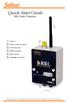 Quick Start Guide RRL Radio Telemetry Antenna External Power Connection LED Activity Light RS232 Connection Serial Number Levelogger Connections RRL Station High Quality Groundwater and Surface Water Monitoring
USER MANUAL WARNING! CONTENTS MODEL 1 SPECIFICATIONS READ ALL INSTRUCTIONS BEFORE PROCEEDING. Non-Programmable Single Stage Heat/Cool Thermostat
 Builder MODEL 1010 Series Non-Programmable Single Stage Heat/Cool Thermostat USER MANUAL Compatible with low voltage single stage gas, oil or electric heating or cooling systems, including single stage
Your Phone This section introduces you to the hardware of the device.
 Your Phone This section introduces you to the hardware of the device. No. Items Functions 1 Earphone jack 2 Strap hole 3 LED / Speaker Use a headset for hands-free conversation or listening to music. It
MZ Series Overview. Introduction. (MZ 220 Illustrated)
 Thank you for choosing one of our Zebra MZ Series Mobile s. These rugged printers will become productive and efficient additions to your workplace thanks to their innovative design. Because they are made
Installation Guide Solar Connect-11
 Installation Guide Solar Connect-11 Version 1.1 Contents Important Product Information 3 System Registration Form 4 Solar Connect-11 Overview 5 Internet & Power Connections 6 Single Phase CT Connections
* DISCLAIMER: Contents. How to Use This Guide: COMMERCIAL INSTALL GUIDE 2
 COMMERCIAL INSTALL GUIDE 2 Contents How to Use This Guide: The first section of this guide is designed to assist you with the installation of your DECK Monitoring hardware. The revenue grade meter and
An Inexpensive Gel Documentation System
 An Inexpensive Gel Documentation System Tony Schountz, PhD School of Biological Sciences University of Northern Colorado [email protected] http://www.unco.edu/schountz/gel/ Revision 3.2 16 Oct 2006
HP UPS R1500 Generation 3
 HP UPS R1500 Generation 3 Installation Instructions Part Number 650952-001 NOTE: The rating label on the device provides the class (A or B) of the equipment. Class B devices have a Federal Communications
LP 2844 Thermal Printer
 Quick Installation Guide FedEx Ship Manager Software FedEx Ship Manager at fedex.com LP 2844 Thermal Printer Step 1: Confirm Printer Kit Contents Your printer kit contains: 1. Thermal Printer 4. Serial
Web: www.stp.hu; www.logipix.eu; www.walkdvr.com
 StP Technical Development Ltd. version: 1 Contact: Address: 11-13. Késmárk st., 1158 Budapest, Hungary Phone: +36 1 410-0556; +36 20 480-5933 Fax: +36 1 414-0913 E-mail: [email protected] Technical support:
LINE POWERED ADA TELEPHONE USER S MANUAL Use With Part Numbers 11-580, 11-581, 11-582, 11-583, 11-585,11-586 and 11-589
 LINE POWERED ADA TELEPHONE USER S MANUAL Use With Part Numbers 11-580, 11-581, 11-582, 11-583, 11-585,11-586 and 11-589 6200 Brent Drive, Toledo, Ohio 43611 Phone: 800-837-1066 Fax: 419-729-5764 Email:
Recommended Tools and Supplies: Small Flat Blade Screwdriver, 35mm x 7.5mm DIN Rail. Qwik Install
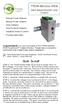 TPDIN-Monitor-WEB Web Based Monitor and Control Remote Power Stations Backup Power Systems Solar Systems Wind Powered Systems Industrial Sense & Control Process Automation Congratulations! on your purchase
FTDI VCP DRIVER (free) (WIN/MAC/LINUX) http://www.ftdichip.com/drivers/vcp.htm
 002 - CONNECTING THE PRINTER Now that you have an idea what 3D printing entails, we can continue and connect the printer to your computer. First make sure you have a computer with a decent amount of RAM
Tracking Key II User s Guide. www.landairsea.com
 Tracking Key II User s Guide www.landairsea.com LandAirSea Tracking Key II User s Guide Contents Warranty Information & System Requirements. 2 Quick Start Guide.... 3 Registering Device and Activating
DSL Self-install Kit Instructions. SpeedStream 4100
 DSL Self-install Kit Instructions SpeedStream 4100 Cover and installation notes Page 1 1. Verify your system requirements Page 2 2. Verify the contents of your DSL Self-Install kit Page 2 3. Install filters
Installation and Operation Guide PD4600 Series Converter Replacement
 Installation and Operation Guide PD4600 Series Converter Replacement Extended warranties are available for purchase at www.progressivedyn.com Member Thank you for selecting Progressive Dynamics as your
OASIS-PLUS 120V READ ALL INSTRUCTIONS BEFORE OPERATING READ ALL INSTRUCTIONS BEFORE OPERATING OZONE IS A POWERFUL OXIDIZER AND MUST BE USED WITH CARE
 OASIS-PLUS 120V INFORMATION & OPERATING INSTRUCTIONS READ ALL INSTRUCTIONS BEFORE OPERATING READ ALL INSTRUCTIONS BEFORE OPERATING OZONE IS A POWERFUL OXIDIZER AND MUST BE USED WITH CARE 56041852 WARNING:
MAINTENANCE & TROUBLESHOOTING
 MAINTENANCE & TROUBLESHOOTING This section describes how to: clean the lens clean the fan intake filter replace the projection lamp replace the batteries in the remote control use the Kensington lock feature
IPX AUTOMATIC IP NETWORK LOSS BACKUP A/B SWITCH INSTRUCTION BOOK IB6444-02
 IPX AUTOMATIC IP NETWORK LOSS BACKUP A/B SWITCH INSTRUCTION BOOK IB6444-02 TABLE OF CONTENTS DESCRIPTION 2 MOUNTING INSTRUCTIONS 2 HOW TO CABLE THE IPX 2/3 POWER SUPPLY INSTALLATION 3 OPERATION 3 CARE
INSTALLER S & OWNER S MANUAL
 INSTALLER S & OWNER S MANUAL HVAC INSTALLER: PLEASE LEAVE MANUAL FOR HOMEOWNER DEH 3000 DEH 3000 Part No. 4028539 Dehumidifier & Ventilation System Controller P.O. Box 8680 Madison, WI 53708 TOLL-FREE
User's Guide. Integrating Sound Level Datalogger. Model 407780. Introduction
 User's Guide 99 Washington Street Melrose, MA 02176 Phone 781-665-1400 Toll Free 1-800-517-8431 Visit us at www.testequipmentdepot.com Back to the Extech 407780 Product Page Integrating Sound Level Datalogger
ViZion Installation Guide
 ViZion Installation Guide v2.0 1 ViZion Installation Guide Table of Contents Inventory Hardware Setup Understanding Synchronization Cable Begin by taking an inventory of the required equipment DR Unit
PCS300 Universal IP Reporting Module V1.0
 PCS300 Universal IP Reporting Module V1.0 Reference and Installation Manual Patents: One or more of the following US patents may apply: 7046142, 6215399, 6111256, 6104319, 5920259, 5886632, 5721542, 5287111,
UPS Monitoring and Management Software
 UPS Monitoring and Management Software LEN.MAN.SOF.141 Rev.1.00/2008 User s Guide: Easy-Mon X 1. Configuration Before Easy-Mon X software can display the electrical data of LEONICS UPS, user has to configure
HP ProLiant DL380 G6 Carrier-Grade Server Read Before Install
 HP ProLiant DL380 G6 Carrier-Grade Server Read Before Install Carrier-Grade Instructions HP Part Number: AM275-9001A Published: July 2012 Edition: 3 Copyright 2009, 2012 Hewlett-Packard Development Company,
RI-215A Operator s Manual. Part Number: 71-0045RK Revision 0 Released: 10/3/05
 RI-215A Operator s Manual Part Number: 71-0045RK Revision 0 Released: 10/3/05 Warranty RKI Instruments, Inc., warrants gas alarm equipment sold by us to be free from defects in materials and workmanship,
Setting Up the Cisco Unified IP Phone
 CHAPTER 3 This chapter includes the following topics, which help you install the Cisco Unified IP Phone on an IP telephony network: Before You Begin, page 3-1 Understanding the Cisco Unified IP Phone 7962G
MAINTENANCE & TROUBLESHOOTING
 MAINTENANCE & TROUBLESHOOTING This section describes how to: clean the lens replace the projection lamp replace the batteries in the remote use the security lock feature troubleshoot the projector Cleaning
Watch Your Garden Grow
 Watch Your Garden Grow The Brinno GardenWatchCam is a low cost, light weight, weather resistant, battery operated time-lapse camera that captures the entire lifecycle of any garden season by taking photos
ADA COMPLIANT BOX STYLE TELEPHONE INSTALLATION, PROGRAMMING AND OPERATING INSTRUCTIONS FOR MODEL PBX
 ADA COMPLIANT BOX STYLE TELEPHONE INSTALLATION, PROGRAMMING AND OPERATING INSTRUCTIONS FOR MODEL PBX INSTALLATION INSTRUCTIONS Step 1. Determine the position for the Hands-free phone in the elevator phone
Using GIGABYTE Notebook for the First Time
 P55 V3.0 Congratulations on your purchase of the GIGABYTE Notebook. This manual will help you to get started with setting up your notebook. The final product configuration depends on the model at the point
reflecta Super 8 Scanner
 reflecta Super 8 Scanner User Manual 1 FEDERAL COMMUNICATIONS COMMISSION (FCC) STATEMENT This Equipment has been tested and found to comply with the limits for a class B digital device, pursuant to Part
Service Guide 12/27/03 TESTING, SERVICE & REPAIR GUIDE (For SH Space Heating Models & RA Water Heating Models)
 TESTING, SERVICE & REPAIR GUIDE (For SH Space Heating Models & RA Water Heating Models) WARNING - HIGH VOLTAGE AC electrical circuits are connected to this heater. Do not attempt any service work on the
FPV MONITOR. User Manual
 FPV MONITOR User Manual Important Safety Instructions: Please read User Guide before using this product. Please keep User Guide for future reference. Please read the cautions to prevent possible danger
Using the Communication Ports on the DG-700 and DG-500 Digital Pressure Gauges
 Using the Communication Ports on the DG-700 and DG-500 Digital Pressure Gauges 1. USB and Serial Communication Ports: Newer DG-700 and DG-500 gauges contain both a USB and a DB-9 Serial Communication Port,
Automatic Phone-Out Home Monitoring Systems
 Automatic Phone-Out Home Monitoring Systems Power Outage and Freeze Alarm Model Number: THP202 Power Outage, Freeze and Flood Alarm Product Description Model Number: THP201 These monitoring systems are
LDG DTS-4/4R Desktop Coaxial Switch / Remote
 LDG DTS-4/4R Desktop Coaxial Switch / Remote LDG Electronics 1445 Parran Road, PO Box 48 St. Leonard MD 20685-2903 USA Phone: 410-586-2177 Fax: 410-586-8475 [email protected] www.ldgelectronics.com
QUICK START GUIDE. SG2 Client - Programming Software SG2 Series Programmable Logic Relay
 QUICK START GUIDE SG2 Client - Programming Software SG2 Series Programmable Logic Relay SG2 Client Programming Software T he SG2 Client software is the program editor for the SG2 Series Programmable Logic
USER MANUAL V5.0 VT300
 GPS Vehicle Tracker USER MANUAL V5.0 VT300 Updated on 26/12/2008 Contents 1 Product Overview 3 2 For Your Safety 3 3 VT300 Parameters 3 4 Getting Started 4 4.1 Hardware and Accessories 4 4.2 Light and
AC-115 Compact Networked Single Door Controller. Installation and User Manual
 AC-115 Compact Networked Single Controller Installation and User Manual December 2007 Table of Contents Table of Contents 1. Introduction...5 1.1 Key Features... 6 1.2 Technical Specifications... 7 2.
SNMP Web card. User s Manual. Management Software for Uninterruptible Power Supply Systems
 SNMP Web card User s Manual Management Software for Uninterruptible Power Supply Systems Table of Contents 1. Overview... 3 1.1 Introduction... 3 1.2 Features... 3 1.3 Overlook... 3 1.4 Installation and
Solar Home System. User Manual. AEH-SHS01-10W2L Solar Home System 2 Lamps
 Solar Home System User Manual AEHSHS0110W2L Solar Home System 2 Lamps All rights reserved Specifications subject to change without prior notice 2 Dear Customer, Thank you for purchasing Schneider Electric
Networkfleet 3500 Product Line Installation Guide
 Networkfleet 3500 Product Line Installation Guide Light/Medium Duty (L3500) Heavy Duty (H3500) Universal (U3500) www.networkcar.com/fleet Customer Care: (866) 227-7323 [email protected] Table
Config software for D2 systems USER S MANUAL
 DT-CONFIG SOFTWARE Config software for D2 systems USER S MANUAL CONTENTS 1. Introductions ------------------------------------------------------------------- 3 2. System Requirement and Connection ----------------------------------------
3. SEISCO PARTS & SERVICE REMOVAL AND REPAIR GUIDE
 4 3. SEISCO PARTS & SERVICE REMOVAL AND REPAIR GUIDE A. Changing the Control Board B. Replacing a Heating Element C. Thermistor Replacement D. High Limit Switch Replacement E. Level Detector Replacement
TECHNICAL SERVICE DEPARTMENT Technical Service Bulletin 1-800-432-8373. Tankless Electric (RTE) Troubleshooting
 Sequence of Operations 1 Power supply and field wiring block 2 Energy Cut Off (ECO) 3 Water flow plunger and cold inlet 4 Magnetic flow switch 5 Water temperature thermistor 6 Control panel and circuit
DSL Self-install Kit Instructions
 DSL Self-install Kit Instructions Cover and installation notes Page 1 1. Verify your system requirements Page 2 2. Verify the contents of your DSL Self-Install kit Page 2 3. Install filters on your telephone
How To Wire Wireline Cable To A Cell Phone (New Zealand)
 Installation Guide EnerNOC Site Server - S2 Installation Guide - AUS, NZ v 1.7 EnerNOC New Zealand Limited 2 Collina Terrace PO Box 12-202 Thorndon Wellington NZ 6144 +64 4 909 7546 1 Table of Contents
5-port / 8-port 10/100BaseTX Industrial Ethernet Switch User Manual
 5-port / 8-port 10/100BaseTX Industrial Ethernet Switch User Manual Content Overview... 1 Introduction... 1 Features... 3 Packing List... 4 Safety Precaution... 4 Hardware Description... 5 Front Panel...
HP Scanjet G4000 series. User Guide
 HP Scanjet G4000 series User Guide Contents 1 How to use the scanner...2 Where to get additional information...2 Accessibility...2 How to use the HP Photosmart software...3 Front panel and accessories
DSL Self-install Kit Instructions. SpeedStream 5360
 DSL Self-install Kit Instructions SpeedStream 5360 Cover and installation notes Page 1 1. Verify your system requirements Page 2 2. Verify the contents of your DSL Self-Install kit Page 2 3. Install filters
Checking the Package Contents. Installing the Printer Software. Connecting. Unpacking the. the Printer. Printer. Attaching
 Installing the Printer Software Checking the Package Contents Connecting the Printer Unpacking the Printer Installing the Ink Cartridges Plugging in the Printer Attaching the Printer Parts 4032216-00 EUL
mysensors mysensors Wireless Sensors and Ethernet Gateway Quick Start Guide Information to Users Inside the Box mysensors Ethernet Gateway Quick Start
 mysensors Information to Users mysensors Wireless Sensors and Ethernet Gateway Quick Start Guide This equipment has been tested and found to comply with the limits for a Class B digital devices, pursuant
Cisco 837 Router and Cisco SOHO 97 Router Cabling and Setup
 English CHAPTER 1 Cisco 837 Router and Cisco SOHO 97 Router Cabling and Setup Cisco One-Year Limited Hardware Warranty Terms Easy Installation: Try These Steps First! (CRWS Users) Overview Parts List Verify
FTW 175 VERIZON Wireless Monitoring System Reference Manual Part Number 7911751VERIZON
 FTW 175 VERIZON Wireless Monitoring System Reference Manual Part Number 7911751VERIZON SERIAL NUMBER Flash Technology, 332 Nichol Mill Lane, Franklin, TN 37067 (615) 261-2000 Front Matter Abstract This
How to read this guide
 How to read this guide The following shows the symbols used in this Quick start guide with descriptions and examples. Symbol Description Example P oint Reference Caution [ ] This symbol explains information
How To Set Up An Inverter
 MAKING MODERN LIVING POSSIBLE SOLAR INVERTERS Installation Guide GSM Option Kit FLX series www.danfoss.com/solar Safety Safety Safety Message Types WARNING Safety information important for human safety.
Monitoring Network DMN
 Monitoring Network DMN User Manual Table of contents Table of contents... 2 1. Product features and capabilities... 3 2. System requirements... 5 3. Getting started with the software... 5 3-1 Installation...
User Manual 1K/2K/3K Online UPS
 User Manual 1K/2K/3K Online UPS Uninterruptible Power Supply System Table of Contents 1. Important Safety Warning... 1 1-1. Transportation... 1 1-2. Preparation... 1 1-3. Installation... 1 1-4. Operation...
How To Install A Gel Doc Xr+ Camera On A Computer Or Mouse Or Tv (For A Powerbook) With A Zoom Lens (For An Ipa) With An Iphone Or Ipa (For Mac) With The Zoom Lens
 Molecular Imager Gel Doc XR+ Installation Guide To install your Gel Doc XR+, perform these seven steps in the following order: 1. Unpack the Gel Doc XR+ system. 2. Install Image Lab software. 3. Set up
Canon Vixia HFS10 High Definition Camcorder Quick Start Guide
 School of Communications Design Media Lab Canon Vixia HFS10 High Definition Camcorder Quick Start Guide The Canon HFS10 is a Hard Drive/Flash Memory camera. This means the footage can be recorded to a
JNIOR. Overview. Get Connected. Get Results. JNIOR Model 310. JNIOR Model 312. JNIOR Model 314. JNIOR Model 410
 The INTEG is an Ethernet I/O (digital, analog) device that monitors and controls a small set of process signals. functions as both basic I/O for integration with another application or system AND as a
Using GIGABYTE Notebook for the First Time
 Congratulations on your purchase of the GIGABYTE Notebook. This manual will help you to get started with setting up your notebook. The final product configuration depends on the model at the point of your
Model: 616-146v2 Quick Setup Guide DC: 071015 Atomic Projection Alarm with Indoor and Outdoor Temperature
 Model: 616-146v2 Quick Setup Guide DC: 071015 Atomic Projection Alarm with Indoor and Outdoor Temperature Snooze/Backlight BUTTONS Time, Alarm with Snooze, & Calendar Projection Arm Rotates 180 Indoor/Outdoor
site monitoring Kit Site Monitoring Kit User Manual we prove it.
 site monitoring Kit 1 User Manual Site Monitoring Kit User Manual we prove it. 2 site monitoring Kit Content 1. Introduction 3 2. Content of the Site Monitoring Kit 4 3. Preparation 6 1. Positioning of
LS1024B / LS2024B/ LS3024B. Solar Charge Controller USER MANUAL
 EPSOLAR LS1024B / LS2024B/ LS3024B Solar Charge Controller USER MANUAL Thank you very much for selecting our product! This manual offers important information and suggestions with respect to installation,
Online UPS. PowerWalker VFI 1000R/1U
 Online UPS PowerWalker VFI 1000R/1U Manual Uninterruptible Power Supply System Table of Contents 1. Important Safety Warning... 1 1-1. Transportation... 1 1-2. Preparation... 1 1-3. Installation... 1 1-4.
Alliance System Ordering Guide
 Alliance System Ordering Guide Multiple Technologies Versatile Hardware Powerful Software One family of parts and accessories Version 12-Nov-03 Alliance System Ordering Guide Table of Contents Controllers
INSTALLATION & SERVICE MANUAL. Display Panel
 INSTALLATION & SERVICE MANUAL Display Panel The PowerLine EMS TM is a specialized power distribution and energy management system intended to be used in recreational vehicles. The Control Module is housed
Argus Technologies Pathfinder10kW to Cordex3.6kW Shelf Replacement Procedure
 Summary Argus Technologies Pathfinder10kW to Cordex3.6kW Shelf Replacement Procedure This is a general procedure on how to replace Pathfinder 48-10kW shelf with a Cordex 3.6kW shelf. Part Numbers 010-567-20
CHAPTER 2: USING THE CAMERA WITH THE APP
 TABLE OF CONTENTS OVERVIEW... 1 Front of your camera... 1 Back of your camera... 2 ACCESSORIES... 3 CHAPTER 1: Navigating the Mobile Application... 4 Device List: How to Use this Page... 4 My Messages:
Solar monitoring gateway quick start guide
 Instructional Leaflet I70002E LGATE101-1B LGATE101-1A LGATE101-5B LGATE101-5A Contents Description Page General................................. 2 Information collection sheet............... 2 Quick reference
EMBEDDED ACCESS CONTROL Hardware Installation Guide
 EMBEDDED ACCESS CONTROL Hardware Installation Guide Lenel goentry Hardware Installation Guide, product version 1.00. This guide is item number DOC- ENHW-ENU, revision 1.003, April 2009 Copyright 2009 Lenel
ViewPower. User s Manual. Management Software for Uninterruptible Power Supply Systems
 ViewPower User s Manual Management Software for Uninterruptible Power Supply Systems Table of Contents 1. ViewPower Overview... 2 1.1. Introduction...2 1.2. Structure...2 1.3. Applications...2 1.4. Features...2
Alarm Security Kit - NVR
 Alarm Security Kit - NVR EN The alarm configuration menu (see above right screenshot) allows you to configure and change settings for the PIR movement sensors, window/door sensors, remote controls (key
Kurz MODBUS Client User s Guide
 Kurz MODBUS Client User s Guide Introduction The Kurz MODBUS Client program can be used to demonstrate how the Kurz MFTB and MFTA Series products can be used in a MODBUS protocol network. The program is
RMM2 Heat-Tracing Remote Monitoring Module for the Raychem NGC Control System Installation Instructions
 Heat-Tracing Remote Monitoring Module for the NGC Control System Installation Instructions Tools Required 3 mm slotted screwdriver 3/8 hex key (for -4X only) Approvals Nonhazardous locations Type NM LISTED
PRODUCTIVITY THROUGH INNOVATION 600 CONTROL DIRECT DRIVE TECHNICAL/OPERATION MANUAL
 Rev. D PRODUCTIVITY THROUGH INNOVATION 600 CONTROL DIRECT DRIVE TECHNICAL/OPERATION MANUAL 10 BORIGHT AVENUE, KENILWORTH NEW JERSEY 07033 TELEPHONE: 800-524-0273 FAX: 908-686-9317 TABLE OF CONTENTS Page
DIALER SPECIFICATION VERBATIM MODULAR SERIES VSS
 DIALER SPECIFICATION VERBATIM MODULAR SERIES VSS 1. Description and Phone Number Dialing: The dialer shall be a solid state component capable of dialing up to 16 telephone numbers, each up to 60 digits
TS93 EMR T/PT/TDE. Surface applied door closer
 TS EMR T/PT/TDE Surface applied door closer Installation instructions: Pull side track mount door closer with smoke detector (EMR T) Push side track mount door closer with smoke detector (EMR PT) Double
Honeywell Internet Connection Module
 Honeywell Internet Connection Module Setup Guide Version 1.0 - Page 1 of 18 - ICM Setup Guide Technical Support Setup - Guide Table of Contents Introduction... 3 Network Setup and Configuration... 4 Setting
IMMS-CCC. IMMS-CCC Hardwire Central Interface. Installation Instructions
 IMMS-CCC IMMS-CCC Hardwire Central Interface Installation Instructions TABLE OF CONTENTS... Choose a Location... 1 Connections... 2 Operations... 3 Software Configuration... 4 Troubleshooting... 5 Loopback
Infinity C Reference Guide
 1 2! Infinity C Reference Guide Table of Contents Components... 1 Hardware Setup... 5 SmartDrive Configuration... 12 Startup... 15 Login... 16 System Configuration... 19 DICOM Setup... 20 Monitoring Status...
SCREENLOGIC INTERFACE WIRELESS CONNECTION KIT
 SCREENLOGIC INTERFACE WIRELESS CONNECTION KIT FOR INTELLITOUCH AND EASYTOUCH CONTROL SYSTEMS INSTALLATION GUIDE IMPORTANT SAFETY INSTRUCTIONS READ AND FOLLOW ALL INSTRUCTIONS SAVE THESE INSTRUCTIONS Technical
Table of Contents. I. Working Directions...2. II. System Introduction...3. III. Wiring Installation...4. 1. Product Parts List...
 TTS 300 GPS Vehicle Tracker Hardware Installation Manual Table of Contents I. Working Directions...2 II. System Introduction...3 III. Wiring Installation...4 1. Product Parts List... 4 2. Precaution before
MN POS TM. Hardware & Peripherals. All required hardware may be purchased from Home Office.
 Important Notice Enclosed you will find the MN POS installation DVD for Windows 7 and Windows XP. Please keep all disks in a safe place in the Studio. If you purchased a computer from Home Office, MN POS
V.I.P. Kit. Video Insight Pilot Kit. (Video Insight Pilot Kit).
 V.I.P. Kit (Video Insight Pilot Kit). Video Insight Pilot Kit Please follow these instructions and everything should go very smoothly. Before you begin, you will need to establish (or obtain from your