
RingLead + Marketo Best Practices
|
|
|
- Roxanne Daniel
- 10 years ago
- Views:
Transcription
1 R RingLead + Marketo Best Practices RingLead + Marketo Best Practices Page 1 of 7 Copyright 2015 RingLead, Inc.
2 Get in Sync There are many Marketo users who are proponents of a partial database sync. A partial sync means your Marketo database holds all marketing qualified leads () which are pushed into a CRM database that contains a subset of sales qualified leads (). The typical scenario calls for records to be pushed from marketing automation into CRM when they ve reached a specified Lead score or when sales goes and cherry picks them because they re having a slow day. The alternative is a 1:1 sync each record has a corresponding record in CRM. The records should not be assigned to a sales rep; the records would instead be assigned to a marketing queue. The partial database sync is problematic for ensuring data quality since Leads are created from a variety of different sources; some are created manually in CRM and pushed up to marketing automation, some are created in Marketo via forms, etc., and pushed back to CRM. You can see some of the problems that this scenario would create. Scenario A: Perfect World Scenario B: The Problem Marketing Automation 1 A new Marketing Qualified Lead () is created in marketing automation. 2 When the hits a certain Lead Score, it is pushed into CRM and assigned to Sales. Marketing Automation 2 [email protected] 3 Since the address is not an exact match, an existing is not matched uo to the newly created record in CRM The record is replicated in marketing automation. CRM 3 Sales Qualified Lead () is assigned. CRM 1 A Lead is created in CRM via API, manual entry, or list import. Scenario C: How to Solve Marketing Automation are always created in CRM, and assigned to a queue. These Leads will not be assigned to Sales until Lead Score threshold is reached. Queue CRM RingLead + Marketo Best Practices Page 2 of 7 Copyright 2015 RingLead, Inc.

3 The problem is, as illustrated in Scenario B, that when a record is created in CRM, there is a chance it might go unmatched with an existing record in marketing automation. Here s an example: a prospect spends time on your website and finally downloads a whitepaper. A few days later, they call your sales line and speak with a rep. The sales rep does his or her job by doing a search for existing records in CRM (or, better yet, they re using Unique Entry which does the search for them as they re typing the record into Salesforce) but the record does not exist in CRM at this stage it only exists in marketing automation. This problem is overcome by implementing Scenario C, which abides by a 1:1 relationship of records in marketing automation to records in CRM. The s that are not yet ready for sales can simply be assigned to a marketing queue not a sales queue or a sales rep. This is ideal for preserving data quality in CRM and marketing automation. How to Deploy RingLead + Marketo This section builds upon the setup instructions in the RingLead Marketo Integration. First and foremost, we strongly advise that users create a standalone Lead Routing & Management Program in Marketo. By creating modular programs that can be called from any other Marketo programs, you are ensuring that you will not have to replicate or maintain dozens of different programs that include Lead assignment logic. There is nothing worse than debugging your Marketo programs at 6:45 on a Thursday night while the rest of your colleagues are at happy hour. The examples below are based on our own implementation of the RingLeadMarketo integration. Please be aware that while this works for us, this setup may not work for everyone, and this is only an example, or suggestion. We use two primarily different types of queues: SDR Queue assigns a given Lead to a Sales Development Representative in your company who is responsible for qualifying the lead and handing off to a Sr. Sales Rep.; and a Marketing Queue, which is a holding area in the CRM until the Leads are ready to be assigned to a sales person. We ll start with the Marketing Queue leads first. Lead Routing & Management 01. Sync Lead & Assign to SDR Queue 02. Sync Lead & Assign to Marketing Queue RingLead + Marketo Best Practices Page 3 of 7 Copyright 2015 RingLead, Inc.
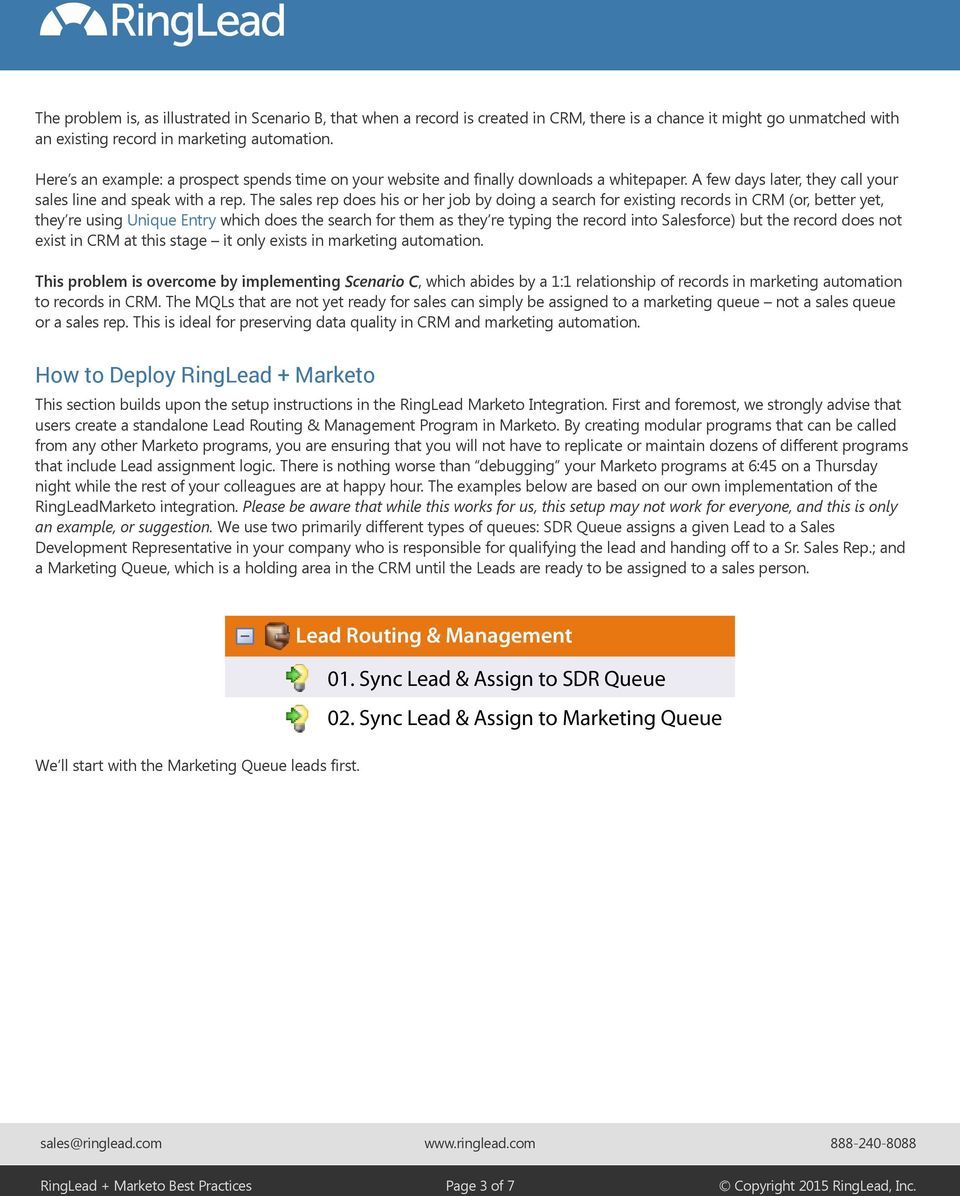
4 Assigning Leads to the Marketing Queue We get a variety of marketing-qualified leads that are not quite ready to be assigned to a sales person, and so we create them in CRM. Instead of assigning these Leads to a Salesforce user, we assign them to a special queue, the Marketing Queue. This is basically a staging area for Leads until they warm up and are ready for contact from a sales person. We ll highlight again that this is a separate Marketo Program that can be called from other marketing programs (eg. Ebook Downloads, Webinar Registrations, and more) so that assignment rules can easily be maintained. 02. Sync Lead & Assign to Marketin... Smart List Flow Schedule Results Use ALL filters Collapse All Expand All Campaign is Requested Add Constraint Source: is Marketo Flow Action Note: Enter a memorable and well-defined campaign description RingLead + Marketo Best Practices Page 4 of 7 Copyright 2015 RingLead, Inc.

5 When the Campaign is requested, the Flow steps are as follows: 02. Sync Lead & Assign to Marketin... Smart List Flow Schedule Results Collapse All 1 - Wait Expand All Duration: 5 minutes 2 - Call Webhook Webhook: RingLead Web-to-Lead 3 - Sync Lead to SFDC Choice 1 Lead Owner Last Name is empty Queue: Marketing Queue Choice 2 Lead Owner Address is (10) [email protected]; amanda@r Queue: Marketing Queue Default Choice -- Do Nothing -- Note: Only the first matching choice applies We employ some logic to account for existing Leads in the system. First, if the Lead Owner Last Name is empty, that means that the Lead is owned by another Queue. If that is the case, we are OK with the Lead being reassigned from that Queue to the Marketing Queue. If the Lead Owner Address is someone from our marketing team or a past employee, we will also allow that Lead to be assigned to the Marketing Queue. If none of those criteria are met, then the Lead must be owned by a sales user as the record owner; in that case we would like all communication about that Lead to be routed to that owner. RingLead + Marketo Best Practices Page 5 of 7 Copyright 2015 RingLead, Inc.

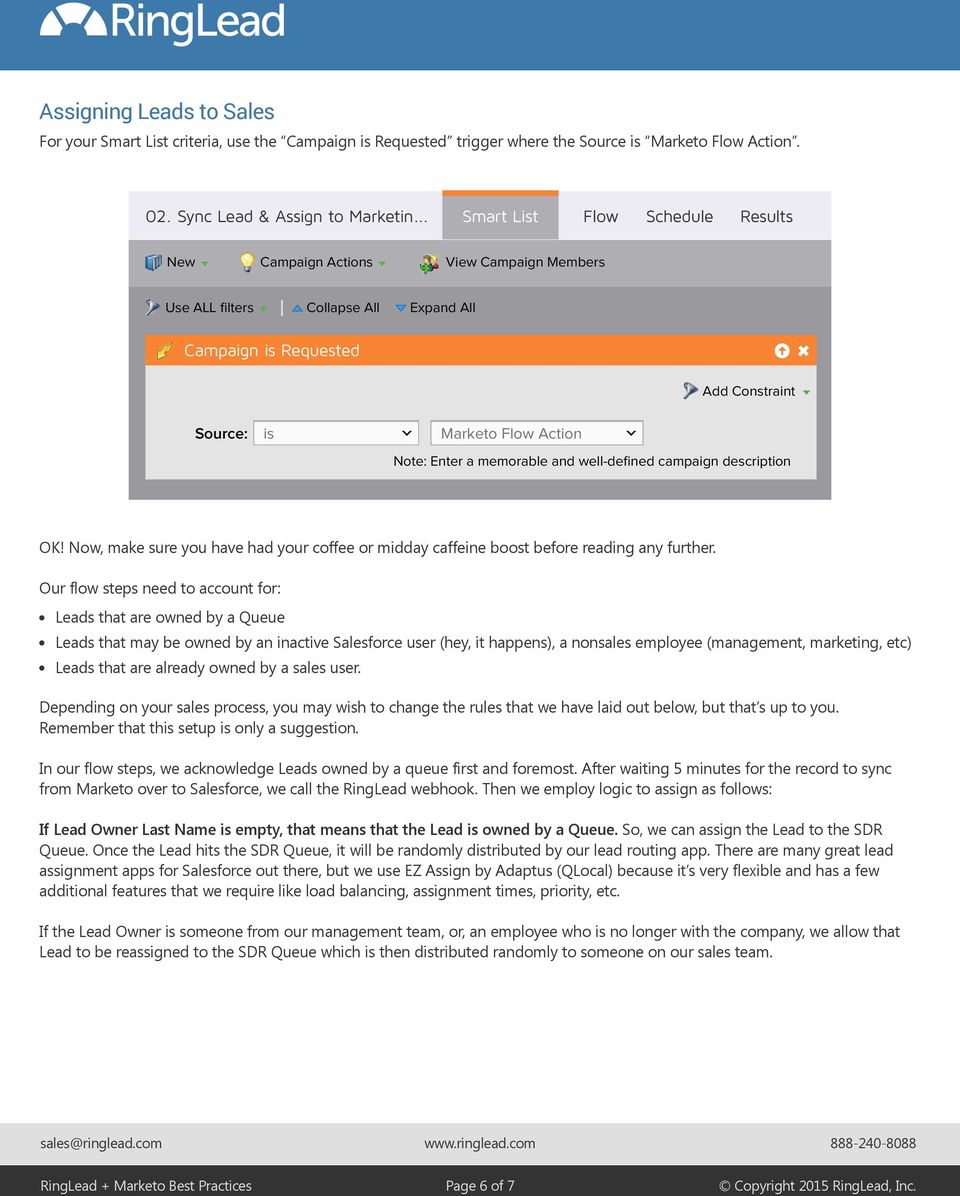
6 Assigning Leads to Sales For your Smart List criteria, use the Campaign is Requested trigger where the Source is Marketo Flow Action. 02. Sync Lead & Assign to Marketin... Smart List Flow Schedule Results Use ALL filters Collapse All Expand All Campaign is Requested Add Constraint Source: is Marketo Flow Action Note: Enter a memorable and well-defined campaign description OK! Now, make sure you have had your coffee or midday caffeine boost before reading any further. Our flow steps need to account for: Leads that are owned by a Queue Leads that may be owned by an inactive Salesforce user (hey, it happens), a nonsales employee (management, marketing, etc) Leads that are already owned by a sales user. Depending on your sales process, you may wish to change the rules that we have laid out below, but that s up to you. Remember that this setup is only a suggestion. In our flow steps, we acknowledge Leads owned by a queue first and foremost. After waiting 5 minutes for the record to sync from Marketo over to Salesforce, we call the RingLead webhook. Then we employ logic to assign as follows: If Lead Owner Last Name is empty, that means that the Lead is owned by a Queue. So, we can assign the Lead to the SDR Queue. Once the Lead hits the SDR Queue, it will be randomly distributed by our lead routing app. There are many great lead assignment apps for Salesforce out there, but we use EZ Assign by Adaptus (QLocal) because it s very flexible and has a few additional features that we require like load balancing, assignment times, priority, etc. If the Lead Owner is someone from our management team, or, an employee who is no longer with the company, we allow that Lead to be reassigned to the SDR Queue which is then distributed randomly to someone on our sales team. RingLead + Marketo Best Practices Page 6 of 7 Copyright 2015 RingLead, Inc.
7 You may wish to build additional queues for distinct business units, regions, etc. which is all possible with this modular lead routing Program and Smart Campaign configuration. 01. Sync Lead & Assign to SDR Queu... Smart List Flow Schedule Results Collapse All 1 - Wait Expand All Duration: 5 minutes 2 - Call Webhook Webhook: RingLead Web-to-Lead 3 - Sync Lead to SFDC Choice 1 Lead Owner Last Name is empty Queue: SDR Queue Choice 2 Lead Owner Address is (10) [email protected]; amanda@r Queue: SDR Queue Default Choice -- Do Nothing -- Note: Only the first matching choice applies You will notice that the default choice is --Do Nothing-- which is fine because all sales notifications and/or task assignments will be routed to the original Lead or Contact owner. RingLead + Marketo Best Practices Page 7 of 7 Copyright 2015 RingLead, Inc.

Marketo Integration Setup Guide
 Page 1 of 30 Table of Contents About the RingLead Integration with Marketo Create the Marketo Webhook - Response Mapping - Configure Webhook Response Mapping Create the Marketo Program and Campaign - Create
Marketing Rockstar s Guide to Marketo
 Marketing Rockstar s Guide to Marketo Page 1 Page 2 At a Glance Overview Marketing Automation Setup Checklist Campaign Checklist Email Creation Checklist Landing Page Checklist Webinar Checklist Live Events:
MARKETO CHECKLIST. All users are setup within Marketo with the appropriate roles and permissions.
 Setup Users & Roles All users are setup within Marketo with the appropriate roles and permissions. Smart Campaign Settings Limit set to abort smart campaigns if number of qualified leads exceeds this limit
Sales Process Map, Campaign to Customer
 Sales Process Map, Campaign to Customer Two tier sales process typically found in high volume B2B sales organizations where marketing campaigns generate leads, a tier one team qualifies leads to pass on
InsideView Lead Enrich Setup Guide for Marketo
 InsideView Lead Enrich Setup Guide for Marketo ... 1 Step 1: Sign up for InsideView for Marketing... 1 Step 2: Create Custom Fields... 3 Step 3: Create a Webhook for InsideView for Marketing... 5 Step
Designing a Lead Lifecycle in Salesforce
 Designing a Lead Lifecycle in Salesforce A Best Practices White Paper for Response Management from Full Circle CRM Full Circle CRM FullCircleCRM.com 650.641.2766 877.834.4001 Copyright 2015, Full Circle
Designing a Lead Lifecycle in Salesforce
 Designing a Lead Lifecycle in Salesforce A Best Practices White Paper for Response Management Better data. Better marketing. Table of Contents Introduction 4 The Words We Use 4 What is a Lead? 4 Evolving
Marketo Lead Management Fundamentals
 Marketo Lead Management Fundamentals V. 2.0 Exercise Guide for Marketo s Introductory Training Course 20 Contents Marketo Fundamentals...5 Get Started...5 Please Read: Prepare your Workspace BEFORE Class...
GETRESPONSE MARKETING AUTOMATION
 1 GETRESPONSE MARKETING AUTOMATION Quick Guide to Planning & Implementation Chapter 2. PLANNING TABLE OF CONTENTS OVERVIEW 3 Flexible processes 3 Actionable information 3 Modular components 3 Stackable
ReadyTalk for Salesforce User Guide
 ReadyTalk for Salesforce User Guide Revised 11/8/2013 2 Contents Getting Started... 4 What is ReadyTalk for Salesforce?... 4 Installing and Configuring the AppExchange Application... 5 User Types and Settings...
Email Marketing and Marketing Automation in Complex Buying Processes
 Email Marketing and Marketing Automation in Complex Buying Processes Email Marketing and Marketing Automation in Complex Buying Processes 1 Introduction We often hear the question: How is Marketing Automation
Salesforce Administrator s Installation Guide
 Salesforce Administrator s Installation Guide Welcome to sales emails done better. This guide will walk you through setting up ToutApp and Salesforce. Read on to learn how to connect the two, and what
Little Green Light & MailChimp: Email Marketing
 Little Green Light & MailChimp: Email Marketing Table of Contents Overview 2 Connect LGL to MailChimp 3 Create your MailChimp account if you don t already have one 3 Create a list in MailChimp to sync
Stripe Event Trigger
 Stripe Event Trigger Agile CRM integrates with many billing widgets including Stripe. The Stripe CRM integration lets you track your customer payments, provides 2-way sync and trigger campaigns following
Events. Sponsorships Website PPC Webinars. The Ultimate Guide to Lead Source Strategy and Management 10 Steps to Measuring Marketing Success
 Events Sponsorships Website PPC Webinars The Ultimate Guide to Lead Source Strategy and Management 10 Steps to Measuring Marketing Success Guide to Lead Source Management An Introduction Page 2 How Can
What s the difference between email marketing and marketing automation?
 Marketing automation is a technology platform for marketers to create, nurture, and pass leads to sales. Most marketing automation platforms (MAPs) have functions for email marketing, social media, contact
Set Up Omni-Channel. Salesforce, Winter 16. @salesforcedocs
 Set Up Omni-Channel Salesforce, Winter 16 @salesforcedocs Last updated: December 10, 2015 Copyright 2000 2015 salesforce.com, inc. All rights reserved. Salesforce is a registered trademark of salesforce.com,
Leads Best Practice: Lead Generation, Management & Performance
 Leads Best Practice: Lead Generation, Management & Performance Best Practice: Leads Business Driver Best Practice Overview Best Practice: Leads Marketing Effectiveness Lead Generation and Integration Lead
Salesforce Certified Pardot Specialist Study Guide
 Salesforce Certified Pardot Specialist Study Guide Summer 15 STUDY GUIDE 0 Contents SECTION 1. PURPOSE OF THIS STUDY GUIDE... 1 SECTION 2. ABOUT THE SALESFORCE CERTIFIED PARDOT SPECIALIST CREDENTIAL...
Customizing and Integrating
 Customizing and Integrating CRM The Essential Guide 1 THE ESSENTIAL CRM BUYER S GUIDE INTRODUCTION What s in this Guide This guide is meant to help business who are using Zoho CRM software, specifically
MARKETING ROCKSTAR S. Guide to. Marketo. Learn How to Use Marketo Effectively from Day 1 JOSH HILL
 MARKETING ROCKSTAR S Guide to Marketo Learn How to Use Marketo Effectively from Day 1 JOSH HILL Marketing Rockstar s Guide to Marketo P a g e 1 Sales Insight Training for Sales Note: this section is for
Table of Contents. Copyright 2010-2015 Symphonic Source, Inc. All rights reserved. Salesforce is a registered trademark of salesforce.
 DupeCatcher is a real-time deduplication app designed specifically for Salesforce. It is a 100% APEX developed and deployed managed package, and is installed via the Salesforce AppExchange, eliminating
How to Integrate Marketo LIKE A PRO
 How to Integrate Marketo LIKE A PRO Best practice techniques to make your marketing data shine. www.bedrockdata.com TABLE OF CONTENTS Integration Big Picture... 3 Integration Features...4 Marketo Data
Marketing Automation And the Buyers Journey
 Marketing Automation And the Buyers Journey A StrategyMix White Paper By Jonathan Calver, Managing Director, StrategyMix About this Paper This paper will first introduce you to the principles and concepts
Marketo GoToWebinar Adapter. User Guide Version 3.5
 Marketo GoToWebinar Adapter User Guide Version 3.5 CONTENTS EVENT INTEGRATION OVERVIEW... 3 BEFORE YOU BEGIN... 4 REQUIREMENTS... 4 HOW TO CREATE AN EVENT IN MARKETO WITH A GOTOWEBINAR INTEGRATION... 4
HubSpot CRM & Salesforce:
 HubSpot CRM & What is the best solution for your company? Credits To BluLeadz inbound Marketing Company As a marketing agency, we are always speaking with business owners, marketing managers and sales
THE BIG EASY GUIDEBOOK TO MARKETING AUTOMATION
 THE BIG EASY GUIDEBOOK TO MARKETING AUTOMATION The essential guide to EASILY creating sophisticated, automated marketing programs that drive revenue 2009 Marketo, Inc. All rights reserved Forget the Hard
Case Management Implementation Guide
 Case Management Implementation Guide Salesforce, Winter 16 @salesforcedocs Last updated: October 30, 2015 Copyright 2000 2015 salesforce.com, inc. All rights reserved. Salesforce is a registered trademark
TOP 10. Features Small and Medium Businesses
 Introduction Once thought of as only relevant for enterprises, CRM technology is increasingly being used by small and medium businesses across industries. Even the smallest organizations recognize the
A KUNO CREATIVE EBOOK. How to Get Started with MARKETING AUTOMATION
 A KUNO CREATIVE EBOOK How to Get Started with MARKETING AUTOMATION So you have a database of a few thousand contacts. Every month you send those contacts a nice email newsletter with little bits of information
SalesFUSION Partner Certification Guide
 SalesFUSION Partner Certification Guide Welcome to the SalesFUSION Partner Family!! This document will guide you through the SalesFUSION Certified Partner Program. At each step there will be videos to
Integration Set Up Guide
 Integration Set Up Guide The Marketo Integration for Pipeliner CRM powered by itduzzit makes it possible to automatically create or update Leads and Contacts directly in Pipeliner CRM. Get started now:
Case Management Implementation Guide
 Case Management Implementation Guide Salesforce, Summer 15 @salesforcedocs Last updated: June 30, 2015 Copyright 2000 2015 salesforce.com, inc. All rights reserved. Salesforce is a registered trademark
10 Steps To Getting Started With. Marketing Automation
 So the buzz about marketing automation and what the future holds for marketing in general finally got to you. Now you are ready to start using marketing automation and are not really sure where to start.
How to Setup SQL Server Replication
 Introduction This document describes a scenario how to setup the Transactional SQL Server Replication. Before we proceed for Replication setup you can read brief note about Understanding of Replication
Hands-On Lab. Embracing Continuous Delivery with Release Management for Visual Studio 2013. Lab version: 12.0.21005.1 Last updated: 12/11/2013
 Hands-On Lab Embracing Continuous Delivery with Release Management for Visual Studio 2013 Lab version: 12.0.21005.1 Last updated: 12/11/2013 CONTENTS OVERVIEW... 3 EXERCISE 1: RELEASE MANAGEMENT OVERVIEW...
Integrating Email Verification and Hygiene into Marketo
 User Guide Integrating Email Verification and Hygiene into Marketo Step by Step Using Webhooks This document contains Confidential, Proprietary and Trade Secret Information ( Confidential Information )
QuickLaunch. Program for. Marketo
 QuickLaunch Program for Marketo QuickLaunch Program QuickLaunch Program for Marketo comes an with entire suite of itial set up you need to have to be successful with Marketo. It is designed to help your
WHO, WHAT, HOW, WHERE, & WHY of EMAIL MARKETING
 THE WHO, WHAT, HOW, WHERE, & WHY of EMAIL MARKETING A FIELD GUIDE THE WHO, WHAT, HOW, WHERE, & WHY of EMAIL MARKETING A FIELD GUIDE Email marketing is about more than just your message. In fact, the words
How To Get A Lead From A Realtor.Com
 TIPS FOR CLOSING LEADS TIPS FOR STEP 1 Respond promptly To establish a client connection and begin building a relationship, it s critical to respond to incoming leads within five minutes. When prospective
PIVOTAL CONNECTOR FOR MARKETO. Copyright 2015 Tokara Solutions. All Rights Reserved.
 PIVOTAL CONNECTOR FOR MARKETO CRM & Marketing Integration: Why It s Needed In addition to generating brand buzz and creating campaign collateral, your marketing teams are working hard at contact management
SAP Digital CRM. Getting Started Guide. All-in-one customer engagement built for teams. Run Simple
 SAP Digital CRM Getting Started Guide All-in-one customer engagement built for teams Run Simple 3 Powerful Tools at Your Fingertips 4 Get Started Now Log on Choose your features Explore your home page
Salesforce Integration. Installation Manual Release
 Salesforce Integration Installation Manual Release Table of Contents Salesforce Integration... Error! Bookmark not defined. 1. Integration with LeadForce1(Manual)... 3 2. Integration with LeadForce1 (Automated
Salesforce Certified Pardot Consultant Study Guide
 Salesforce Certified Pardot Consultant Study Guide Winter 16 STUDY GUIDE 0 Contents ABOUT THE SALESFORCE CERTIFIED PARDOT CONSULTANT PROGRAM 1 SECTION 1. PURPOSE OF THIS STUDY GUIDE 1 SECTION 2. AUDIENCE
6 A/B Tests You Should Be Running In Your App
 6 A/B Tests You Should Be Running In Your App Introduction Everyone in mobile believes in A/B testing. But if you re wasting your days testing nothing more than various colors or screen layouts: you re
How an Innovative Email Marketing Strategy Can Pave the Way to New Customers
 How an Innovative Email Marketing Strategy Can Pave the Way to New Customers AN EMAIL MARKETING STRATEGY WHITE PAPER EMAIL MARKETING PROGRAMS According to the Direct Marketing Association, email marketing
Integrating and Customizing. Salesforce.com. The Essential Guide
 Integrating and Customizing Salesforce.com The Essential Guide 1 INTRODUCTION What s in this Guide? Ease of Use and System Design: How easy is the system to use for your company s users? What are the best
Getting Started Guide
 Getting Started Guide Table of Contents OggChat Overview... 3 Getting Started Basic Setup... 3 Dashboard... 4 Creating an Operator... 5 Connecting OggChat to your Google Account... 6 Creating a Chat Widget...
Lead Generation Quickstart Guide
 Lead Generation Quickstart Guide 1 2 Lead Generation Quickstart Guide Copyright 2014 Mooloop Ltd All Rights Reserved You re welcome to email, tweet, blog, and pass this ebook around. But please don t change
ClickDimensions Quick Start Guide For Microsoft Dynamics CRM 2011. 9/1/2011 ClickDimensions
 ClickDimensions Quick Start Guide For Microsoft Dynamics CRM 2011 9/1/2011 ClickDimensions Online Training Resources This guide will explain how to register for and use a ClickDimensions Marketing Automation
Demand Generation Best Practices: Lead Scoring
 TM Simply Powerful Online Marketing MARKETING RESOURCES Demand Generation Best Practices: Lead Scoring Deliver More and Higher Quality Leads to Your Sales Team with Canterris Marketing Suite Copyright
Introduction to Integrated Marketing: Lead Scoring
 Introduction to Integrated Marketing: Lead Scoring Are You Making The Most Of Your Sales Leads? Lead scoring is a key missing link in many B2B marketing strategies. According to a recent Gartner study,
10 Tips For Lead Management
 10 Tips For Lead Management Demand Generation Software Buyers Kit Ten Tips For Best Practice Lead Managment Only 25% of new leads are sales-ready. 25% are disqualified. How do you handle the remaining
Setting Up Email Marketing Automation
 Setting Up Email Marketing Automation with MailChimp protocol 80, Inc. :: protocol80.com :: @protocol80 :: +protocol 80 1 If You Haven t Heard of Marketing Automation, You Probably Aren t Actively Marketing
Pay per Click Success 5 Easy Ways to Grow Sales and Lower Costs
 Pay per Click Success 5 Easy Ways to Grow Sales and Lower Costs Go Long! The Benefits of Using Long Tail Keywords clogged sewage line, I ll see a higher conversion How many keywords are in your pay-per-click
Ten Tips for Best Practice Lead Management
 Ten Tips for Best Practice Lead Management Only 25% of new leads are sales-ready. 25% are disqualified. How do you handle the remaining 50%? The Answer: Lead Management Lead management is the ability to:
The following are two things that cannot be done with a lead until it has been converted to a prospect or account:
 Customer Management Work with the Leads Database & Lead Entry The Oasis-CRM Leads Database is quarantined from the main Oasis-CRM accounts and contacts database until they are converted to a prospect or
INinbox Start-up Pack
 2 INspired Email Marketing This is what you should know about sending emails through INinbox and how to get started! Thanks for joining INinbox. choice. You ve made a great In front of you, you find the
Rocketseed for Salesforce User Guide for Sales People
 Rocketseed for Salesforce User Guide for Sales People The one-on-one emails in your organisation are now ready to boost sales. Introduction: How the Rocketseed email media app works. With Rocketseed, every
From small businesses to large enterprise companies, Recurly offers the simplicity and sophistication your business needs as it grows.
 GROWING with From small businesses to large enterprise companies, Recurly offers the simplicity and sophistication your business needs as it grows. Our features, tools, and support help you effectively
Eloqua Discover Frequently Asked Questions
 Eloqua Discover Frequently Asked Questions Table of Contents Prospect Discover Home... 3 What defines my Most Active Prospects? Why are these people in the list as opposed to other people?... 3 What about
Marketing Rockstar s Guide to Marketo
 Marketing Rockstar s Guide to Marketo P a g e 1 Marketing Rockstar s Guide to Marketo Marketing Rockstar s Guide to Marketo P a g e 2 At a Glance Overview 3 A Bit About Josh 4 Who is this guide for? 5
CommuniGator. Email List Building
 CommuniGator Email List Building Building and growing your email list You could have the best creative, a compelling subject line and the most irresistible call to action, but if you haven t thought about
Things you should be doing with Salesforce
 Things you should be doing with Salesforce Postcode Anywhere has teamed up with Salesforce experts, Westbrook, to put together top tips on how you can use Salesforce to its full potential. Introduction
Salesforce.com Integration Guide
 ServicePattern Version 3.6 Revision SP36-SFDC-41855 Bright Pattern, Inc. 1111 Bayhill Drive, Suite 275, San Bruno, CA 94066 Phone: +1 (855) 631.4553 or +1 (650) 529.4099 Fax: +1 (415) 480.1782 www.brightpattern.com
Zendesk + Salesforce. Step-by-Step Guide to Integrating Zendesk and Salesforce. www.zendesk.com
 Zendesk + Salesforce Step-by-Step Guide to Integrating Zendesk and Salesforce www.zendesk.com 2 Table of Contents Introduction Getting Started Page 1 Step 1: Installing the Zendesk for Salesforce App in
Step 2. Choose security level Step 2 of 3
 Quickstart Guide Unique Entry Get it Now Unique Entry is installed quickly and easily from the AppExchange via the Get it Now button. During the installation wizard, you must make sure you grant access
A Quicker, Simpler Path to Lead Management ROI
 A Quicker, Simpler Path to Lead Management ROI A Step by Step Guide Lisa Cramer Co-Founder & President LeadLife Solutions [email protected] 770.670.6702 Because marketers are time, budget and resource-constrained,
Your Complete CRM Handbook
 Your Complete CRM Handbook Introduction Introduction Chapter 1: Signs You REALLY Need a CRM Chapter 2: How CRM Improves Productivity Chapter 3: How to Craft a CRM Strategy Chapter 4: Maximizing Your CRM
Introduction. The traditional content for leads conversion funnel looks a bit like this: Email sent to new lead with link to content
 Introduction. Content marketing comes in many shapes and sizes. Today we are going to focus on everyone s favourite, using free digital content for lead generation. Savvy marketers have been distributing
Add Feedback Workflow
 Add Feedback Workflow Add Feedback Collection workflow to a list or library The workflows included with SharePoint products are features that you can use to automate your business processes, making them
Send Individually User s Manual
 Send Individually User s Manual Contents Welcome... 2 Configuring the Add-in... 3 Using Send Individually... 4 To Start a New Campaign... 4 To Personalize Campaign Emails... 6 To Send To People in an Excel
Volunteers for Salesforce User s Guide Version 3.5
 Volunteers for Salesforce User s Guide Version 3.5 September 14, 2013 www.rg 1 Djhconsulting.com 1 CONTENTS 1. What is Volunteers for Salesforce?... 4 1.1 Overview... 4 1.2 How You Might Use It... 5 2.
setup and provide drill-down capabilities to view further details on metrics and dynamic updates for a real-time view of your business conditions.
 Workflow Automation Build a competitive advantage with automated processes and increased business visibility While the competition struggles with manual processes, queries and reports on customer interactions,
Author: Ryan J Adams. Overview. Policy Based Management. Terminology
 Author: Ryan J Adams Overview We will cover what Policy Based Management is and how you can leverage its power to better manage your environment. With PBM we'll see what it can and cannot do to help you
MARKETO LEAD MANAGEMENT APP INSTALLATION AND SYNCHRONIZATION WITH SALESFORCE. Installation Guide Version 1.2
 MARKETO LEAD MANAGEMENT APP INSTALLATION AND SYNCHRONIZATION WITH SALESFORCE Installation Guide Version 1.2 CONTENTS INSTALLATION AND SYNCHRONIZATION OVERVIEW... 2 STEP 1: SET UP REQUIRED PERMISSIONS IN
Personalised view of metrics for an instant snapshot of your business. Wizard-Driven Dashboards
 Workflow Automation Build a competitive advantage with automated processes and increased business visibility While the competition struggles with manual processes, queries and reports on customer interactions,
YOUR COMPLETE CRM HANDBOOK EVERYTHING YOU NEED TO KNOW TO GET STARTED WITH CRM
 YOUR COMPLETE CRM HANDBOOK EVERYTHING YOU NEED TO KNOW TO GET STARTED WITH CRM Introduction WHAT IS CRM? CRM is much more than a buzzy acronym that s been tossed around the business and sales world for
Marketing Rockstar s Guide to Marketo
 Marketing Rockstar s Guide to Marketo P age 1 P age 2 At a Glance Overview Creating the Scoring Model: Ask Sales Building a Scoring System in Marketo Train Sales to Use Scoring Reporting on Scoring Case
Informatica Cloud Siebel-Salesforce Vibe integration package. Siebel to Salesforce Quote Bundle
 Informatica Cloud -Salesforce Vibe integration package to Salesforce Quote Bundle User Guide 2014 Informatica Corporation. No part of this document may be reproduced or transmitted in any form, by any
A Modern Sales Roadmap. 7 best practices to drive sales success. tellwise
 A Modern Sales Roadmap 7 best practices to drive sales success tellwise Introduction Whether you re an inside sales rep or the Chief Sales Officer (CSO), you know sales is a demanding field, with countless
Course 10978A Introduction to Azure for Developers
 Course 10978A Introduction to Azure for Developers Duration: 40 hrs. Overview: About this Course This course offers students the opportunity to take an existing ASP.NET MVC application and expand its functionality
Active Directory Integration 855.426.7227. www.onelogin.com twitter.com/onelogin ONELOGIN WHITEPAPER
 Active Directory Integration Even as enterprises continue to adopt more cloud applications, Active Directory (AD) and Lightweight Directory Access Protocol (LDAP) still play a critical role in how information
Custom Apps A Beginners Guide
 Custom Apps A Beginners Guide SkyDesk CRM August, 2015 Fuji Xerox Co., Ltd. CRM is the backbone of any organization. It manages all your business data in one place, like no other tool. It is one that keeps
Installation and Configuration Guide for
 Installation and for Brickwork Version: 4.1506 Last Updated: February 13 th, 2014 Table of Contents 1 Document Version... 4 2 Contact Information... 5 3 Overview... 6 3.1 Brickwork Overview... 6 3.2 Custom
Live Agent for Support Agents
 Live Agent for Support Agents Salesforce, Spring 16 @salesforcedocs Last updated: February 18, 2016 Copyright 2000 2016 salesforce.com, inc. All rights reserved. Salesforce is a registered trademark of
Personalised view of metrics for an instant snapshot of your business. Wizard-Driven Dashboards
 Workflow Automation Build a competitive advantage with automated processes and increased business visibility While the competition struggles with manual processes, queries and reports on customer interactions,