
Army Readiness Assessment Program (ARAP) Navigation Explanation
|
|
|
- Samson Williams
- 10 years ago
- Views:
Transcription

1 Army Readiness Assessment Program (ARAP) Navigation Explanation Commander can review the following charts in the debrief ARAP Main web site 1- Summary Graph 2 - Composite Categories Graph 3 - All Survey Items Table 4 - Single Item Graph 5 - Open-Ended Responses 6 - Focus Area 7 - Negative Responses 8 - Respondent Distributions 9 - Course of Action 10 - Data Summary 11- Debriefing Support 12 - ARAP Debrief Template 13 - ARAP Update 14 Analyst Read Ahead (Provided by the ARAP Team) 15 Certificate (Provided by the ARAP Team after debrief)

2 Why ARAP? ARAP is designed to assess unit climate and culture. A leading indicator to identify the probability of a mishaps. Provides a means to direct resources to mitigate mishaps. Proactive leaders receive the best results. Immediate feedback from the entire command. Survey results are influenced by current unit conditions (deployment status, resources, etc). Communicates the Army s strong conviction that CRM is best. Civilians take a modified version of the same survey.

3 Log into ARAP Web Site

4 Welcome to the main page of ARAP To review the results of the assessment click on the Commander / Safety Officer Tab


5 Commanders/ Director Enter the Commanders access code you were provided, select a branch, choose between military and civilian version of the questions and hit the submit tab. If this is the second assessment enter in the access code you used on the first assessment. (Note all access codes are case sensitive) Then hit submit tab.


6 Administrative Dashboard This is a brief look at the assessment history. Numbers of suspect assessments are also shown Bottom Right. (Assessment was not taken seriously by individuals) Above the number of suspect assessments shows the unit s mean score after and before removal of the suspect data.

7 The Commander s Charts tab is where all of the assessment data is contained: Summary Graph, Composite Categories Graph etc.

8 Review between All Branches or Like organization Remove check to take out suspect data

9 Remove check to take out suspect data

10 Export Item Summary Table to Excel or PDF Export all written in comments to Excel or PDF Remove check to take out suspect data Top 5 highest scored question on the assessment Bottom five lowest scored question in the assessment. Also the Bottom 15.

11 Move between question by clicking Next or use drop down arrow Hover mouse over green bar and the number of personnel that responded to that question will appear. Number of surveys completed by organization (prior to removal of suspect data (Green Bar in the graph) Total number of ARAP surveys taken as the comparison group (Gold bar in the graph) From the organization select a rank to review Review data by Calendar or Fiscal Comparison group Rank Compare to like organization. Default is against All Compare against your division Remove check to remove suspect data Always Update Graph when changing demographic areas

12 Export all write in comments to Excel or PDF Question 62 The most hazardous thing I do is Percentage of Resonance (193 out of 275 provided a comment) The number 10 is the response to this question from the tenth person that took the assessment.

13 Export all written in comments to Excel or PDF Question 63 The most important action(s) my organization can take to improve safety is/are Percentage of Resonance (171 out of 275 provided a comment) The number 10 is the response to this question from the tenth person that took the assessment.

14 Your organizations mean scores as compared to the Army mean score Export all written in comments to Excel or PDF ARAP Question looked at for this Category Area. Example: Direct Leadership Involvement (3, 6, 9, 10, 16, 23, 26, 27, 37, 41, 44, 46, 54 and 55) Jj11111 (15 category Areas) breaks the questions down into some more meaningful areas (Key) Color Code 1 st -Top Scored 2 nd - Just above Avg. 3 rd - Below Avg. 4 th Bottom Scored Note: When in the program; move the mouse over the number and the question will appear.


15 Remove check to take out suspect data Export to Excel Shows you by grade all questions that are a concern by that grade. Question number only appears when at least 25% of that grade responded more negatively to that question in the assessment. Note: When in the program; move the mouse over the number and the question will appear.

16 100% when 66% of personnel have taken the assessment. Number of personnel that took 18 minutes to complete assessment. (3) Number of personnel in the rank of GS-07 to GS- 11 (88)

17 Select anyone of the questions and review COA s other commanders across the force have submitted. Some of the COA s may not fit your organizations concerns but can be a starting point for ideas.

18 Area for Commander/Director to suggest a course of action, his/her name and address will automatically populate. Place your best practices in the Type suggestion here box. Below: place a check mark in the assessment item list for the area or areas your COA is addressing.


19 Data Summary a printable report that lets the command know the details of the assessment. Appendixes Product Remove the suspect data by removing the check mark under the #5. Appendix 1 is the summary graph compared to the rest of the Army. Appendix 2 is the composite category graph compared to the rest of the Army. Appendix 3 is the all survey items table showing the rank order of the questions from top to bottom scored. Appendix 4 - each question with a red flag and the courses of action for that question. (In this case No Red Flags ) Appendix 5 - each question with a yellow flag and the courses of action for that question.


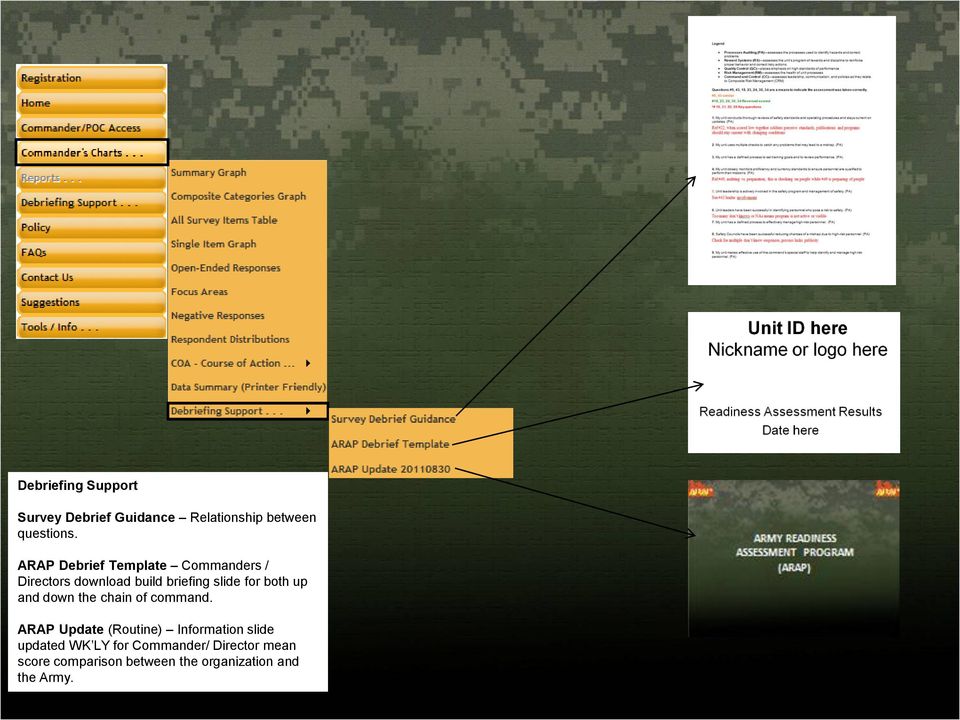
20 Debriefing Support Survey Debrief Guidance Relationship between questions. ARAP Debrief Template Commanders / Directors download build briefing slide for both up and down the chain of command. ARAP Update (Routine) Information slide updated WK LY for Commander/ Director mean score comparison between the organization and the Army.


21 These are all hyper linked: The official Homepage of the Army, USACR/Safety Center Home Page, About USACR/ Safety Center Page, US Army Combat Readiness Center Information Need Help Page and US Army Combat Readiness Center Information Contacts Page.
22 ARAP Survey Process Registration New Commander ARAP 1 st Assessment 1 Month CDR Back Briefs results Up and Down Chain Of Command ARAP is a web-based assessment tool. Cost- free with 24/7 global access Degree of difficulty- easy De-Brief 1 st Assessment 21 day De-Brief 2d Assessment Initial guidance put out by the CSA All battalion level units would register their units within 90 days of assumption of command. Leading Indicators: Survey results are broken down into safety related categories that impact unit readiness. Benefits: Provides battalion-level commanders immediate feedback regarding the safety climate and culture of their organizations. ARAP captures insight on how individuals perceive issues impacting ground, driving and air operations. Assist in identifying behavior toward safety. Shared best practices and courses of actions. 21 day 1 Month CDR Back Briefs results Up and Down Chain Of Command Current process to complete two (2) assessments during a commander tour. Registration ARAP 2d Assessment / Mid Tour

23 Questions/ Discussion U.S. Army Combat Readiness/Safety Center Bldg 4905, 5 th Ave Ft Rucker, AL ARAP Lead Army Readiness Assessment Program (344) /9362/9579 DSN /9362/9579 [email protected]
What Do You Think? for Instructors
 Accessing course reports and analysis views What Do You Think? for Instructors Introduction As an instructor, you can use the What Do You Think? Course Evaluation System to see student course evaluation
Next Generation Dashboard Guide
 Next Generation Dashboard Guide For use with READ 180 Next Generation, System 44 Next Generation, FASTT Math Next Generation, iread, MATH 180, and Scholastic Achievement Manager (SAM) version 2.0.2 or
INTRODUCTION... 4 MODULE 5. TIMESHEET... 5. Overview... 5 5.1 TIMESHEET CALENDAR VIEW... 7 INTRODUCTION... 7. What you will learn in this section...
 Step by Step Guide PSA 2015 Module 5 5.1 calendar view 5.2 by line 5.3 Instant Time Entry PSA 2015 (Release 2.3.0.243) PSA 2015 Step by Step Guide is published by Assistance Software. All rights reserved.
FDA s Vulnerability Assessment Software tool
 FDA s Vulnerability Assessment Software tool Quick Instruction Guide The FDA s Vulnerability Assessment Software tool uses the CARVER + Shock methodology. The software tool is a user-friendly, interactive
LMS USER GUIDE WELCOME KIT
 WELCOME KIT WELCOME 02 WELCOME 03 WELCOME TO TRAINING CENTER LEARNING MANAGEMENT SYSTEM Welcome to the new Customer Training Learning Management System (LMS). The new LMS is designed to provide you with
Merchant Center User Guide
 Merchant Center User Guide Logging In The Merchant Center is the online management tool for your Groupon promotions. Here you can track redemption, read customer comments and view customer demographic
SAP Business Intelligence ( BI ) Financial and Budget Reporting. 2nd Edition. (Best Seller Over 1,000,000 copies sold)
 SAP Business Intelligence ( BI ) Financial and Budget Reporting 2nd Edition (Best Seller Over 1,000,000 copies sold) August 2009 Table of Contents Log In... 1 Initial Variable Screen... 4 Fund Center Hierarchy
Basecamp Manual. Managing Projects Using Basecamp s Project Management Software
 271 Grove Avenue Webster Commons - Building C, Suite 4 Verona, NJ 07044 T: 973.239.9002 www.lform.com Basecamp Manual Managing Projects Using Basecamp s Project Management Software LFORM DESIGN 271 Grove
Attention. Save, print and read this information. This document will provide insight on issues that will help you through the course.
 Attention Save, print and read this information. This document will provide insight on issues that will help you through the course. You can download this document to your mobile device by following the
JROTC Unit Management System (JUMS) User s Guide
 JROTC Unit Management System (JUMS) User s Guide 1 March 2016 Summary of Changes JUMS User Guide This revision, dated 1 March 2016 o Updates Chapter 3, paragraph 3-2, Import New Cadets from a File into
Faculty Access for the Web 7 - New Features and Enhancements
 Faculty Access for the Web 7 - New Features and Enhancements New Design...................................................................... 2 Alerts............................................................................
Merchant Center User Guide
 Merchant Center User Guide Logging In The Merchant Center is the online management tool for your Groupon promotions. You can track redemption, read customer comments, and view customer demographic information.
Finance Reporting. Millennium FAST. User Guide Version 4.0. Memorial University of Newfoundland. September 2013
 Millennium FAST Finance Reporting Memorial University of Newfoundland September 2013 User Guide Version 4.0 FAST Finance User Guide Page i Contents Introducing FAST Finance Reporting 4.0... 2 What is FAST
Helpful Links 8 Helpful Documents 8 Writing History 9 Pending Peer Reviews 9 Navigation Tabs 10 Changing Courses 10
 V7.30.15 2014 GETTING STARTED Table of Contents Welcome to WPP Online 3 WPP Online Welcome Page 3 Logging in to WPP Online 4 Changing your Password 5 Accessing your Courses 7 Selecting a Course 7 The Course
Welcome to Energia online. online. Users guide
 Welcome to Energia online online Users guide Welcome to Energia online - Quick Guide Step 1: Logging on Click on the customer log in section on the top right of the energia.ie homepage Enter your e-mail
For use with Position Manager Version 10.0. Hiring Manager Portal
 Hiring Manager Reference Manual For use with Position Manager Version 10.0 Hiring Manager Portal Updated March 1, 2007 Table of Contents Overview of the Position Manager Applicant Tracking System. 3 Applicant
Access to Moodle. The first session of this document will show you how to access your Lasell Moodle course, how to login, and how to logout.
 Access to Moodle The first session of this document will show you how to access your Lasell Moodle course, how to login, and how to logout. 1. The homepage of Lasell Learning Management System Moodle is
T Analyst User Guide 1
 T Analyst User Guide 1 Contents Contents...2 Getting Started...3 Navigation...4 Logging Out of T Analyst...4 View bills...4 Bill columns and definitions...4 Viewing a PDF bill...5 Comparing bills...5 Requesting
SAP Business Intelligence ( BI ) Financial and Budget Reporting. 7.0 Edition. (Best Seller At Least 43 copies Sold)
 SAP Business Intelligence ( BI ) Financial and Budget Reporting 7.0 Edition (Best Seller At Least 43 copies Sold) November 2011 Table of Contents Log In... 3 Initial Variable Screen... 5 Multiple / Single
TED Commander User Manual
 Page 1 TED Commander User Manual The following instruction is the recommended method for TED Pro customers using Footprints software to Activate the ECC to post to TED Commander. TED5000 customers, TED
MANAGER SELF SERVICE USER GUIDE
 MANAGER SELF SERVICE USER GUIDE FEBRUARY 2016 Contents Note: If using this guide electronically the contents are hyperlinked to each section. Introduction... 2 Using This Manual... 2 Signing in to Workday...
Student Manager s Guide to the Talent Management System
 Department of Human Resources 50 Student Manager s Guide to the Talent Management System 1 Table of Contents Topic Page SYSTEM INTRODUCTION... 3 GETTING STARTED... 4 NAVIGATION WITHIN THE TALENT MANAGEMENT
AIM Dashboard-User Documentation
 AIM Dashboard-User Documentation Accessing the Academic Insights Management (AIM) Dashboard Getting Started Navigating the AIM Dashboard Advanced Data Analysis Features Exporting Data Tables into Excel
DataDirector Getting Started
 DataDirector Getting Started LOGIN Log into the DataDirector website: https://www.achievedata.com/yourdistrictname User Name: New Password: Enter your User Name and Password o After login, you may need
Table of Contents. Manual for Core Staff - Equipment/Scheduling Core Facilities
 Table of Contents 1. Overview 2. How do I manage my account? 3. Equipment Scheduling Workflow Overview 4. Equipment Scheduling Walk Through a. How do I access the list of calendars available for scheduling?
Oracle Business Intelligence (OBI) User s Guide October 2011
 Page 1 of 9 Oracle Business Intelligence (OBI) User s Guide October 2011 OBI is a web-based reporting tool that enables PeopleSoft users to analyze and report on information stored in the PeopleSoft Finance
my.scouting Tools Training-Home Trend Chart Training Summary Report
 my.scouting Tools Training-Home my.scouting Tools is best experienced using the latest version of Google Chrome or Mozilla Firefox. Also works with the latest version of Safari, and Internet Explorer (v11).
Maryland MESA Database School Coordinators Login and Registration Training Handout
 Maryland MESA Database School Coordinators Login and Registration Training Handout The following information will assist users in creating a user profile in the database, managing student profiles for
MicroStrategy Quick Guide: Running the PI Report ITU Data Mart Support Group Go to reporting.gmu.edu and click on Login to Microstrategy
 MicroStrategy Quick Guide: Running the PI Report ITU Data Mart Support Group Go to reporting.gmu.edu and click on Login to Microstrategy ACTION Enter User name and Password. Keep default selection of LDAP
BackupAgent Management Console 4.0.1 User Manual
 BackupAgent Management Console 4.0.1 User Manual May 2011 Version 1.0 Disclaimer This document is compiled with the greatest possible care. However, errors might have been introduced caused by human mistakes
Module A2 Item Activities, Gantt Chart and Utilization Sheet
 Module A2 Item Activities, Gantt Chart and Utilization Sheet A2.1 Project item activities A2.2 Gantt chart A2.3 Utilization sheet 1 Module 1. Project item activities, Gantt Chart & Utilization Sheet Contents...
At the top of the page there are links and sub-links which allow you to perform tasks or view information in different display options.
 APPOINTMENTS TAB P r a c t i c e M a t e M a n u a l 38 OVERVIEW The Appointments Tab is used to set up appointments, reschedule or edit existing appointment information, check patients in and out, and
CI Financial Exception Dashboard. User Manual
 CI Financial Exception Dashboard User Manual CONTENTS THE CI FINANCIAL EXCEPTION DASHBOARD... 2 ACCESSING ANU INSIGHT... 2 LOGGING INTO ANU INSIGHT... 3 NAVIGATING TO THE DASHBOARD... 4 THE INSIGHT HOMEPAGE...
Executive Dashboard. User Guide
 Executive Dashboard User Guide 2 Contents Executive Dashboard Overview 3 Naming conventions 3 Getting started 4 Welcome to Socialbakers Executive Dashboard! 4 Comparison View 5 Setting up a comparison
MathXL Getting Started Guide for Students
 MathXL Getting Started Guide for Students Copyright Notice Copyright 2013 by Pearson Education. All rights reserved. No part of the contents of this book may be reproduced or transmitted in any form or
Welcome to PowerClaim Net Services!
 Welcome to PowerClaim Net Services! PowerClaim Net Services provides a convenient means to manage your claims over the internet and provides detailed reporting services. You can access PowerClaim Net Services
Process Portal Hands-on Exercise
 IBM BPM in Action using WebSphere Lombardi Edition Process Portal Hands-on Exercise This lab will introduce you to the Lombardi Process Portal, which is an interface that enables process participants to
QAD Usability Customization Demo
 QAD Usability Customization Demo Overview This demonstration focuses on one aspect of QAD Enterprise Applications Customization and shows how this functionality supports the vision of the Effective Enterprise;
Creating Online Surveys with Qualtrics Survey Tool
 Creating Online Surveys with Qualtrics Survey Tool Copyright 2015, Faculty and Staff Training, West Chester University. A member of the Pennsylvania State System of Higher Education. No portion of this
All Employees. Logging In. Use your SSO (single sign on) to log into the application. (UMKC email username and Password). Click Submit.
 Performance Appraisal Technical Guide (Some updates to the look of the screens have been made. Do not worry if your screen does not exactly match the pictures in this document. The document will be updated
TRAINING MODULE IV. The Department of Health REPUBLIC OF SOUTH AFRICA FOR IDEAL CLINIC REALIZATION AND MAINTENANCE
 The Department of Health REPUBLIC OF SOUTH AFRICA TRAINING MODULE IV FOR IDEAL CLINIC REALIZATION AND MAINTENANCE Data capturing and report generation on IC software IDEAL CLINIC DASHBOARD Table of Contents
Module A2 Item Activities, Gantt Chart and Utilization Sheet. A2.1 Project item activities A2.2 Gantt chart A2.3 Utilization sheet
 Module A2 Item Activities, Gantt Chart and Utilization Sheet A2.1 Project item activities A2.2 Gantt chart A2.3 Utilization sheet 1 Assistance PSA: Advanced Functionalities Welcome to the Advanced Functionalities
Issuer Operational Performance Profile. Security Officer Briefing. Version 1.0
 Issuer Operational Performance Profile Security Officer Briefing Version 1.0 IOPP Overview The Issuer Operational Performance Profile (IOPP) measures an Issuer s operational and default performance against
my.scouting Tools Training Dashboard Trained Exception Report YPT Aging Report Trained Leader Rpt Add Training Search Training View Training
 my.scouting Tools Training Dashboard YPT Aging my.scouting Tools is best experienced using Firefox 14 or greater, Google Chrome 21 or greater, Apple Safari 6 or greater, and Internet Explorer 9.0 or greater.
This training module reviews the CRM home page called the Dashboard including: - Dashboard My Activities tab. - Dashboard Pipeline tab
 This training module reviews the CRM home page called the Dashboard including: - Dashboard My Activities tab - Dashboard Pipeline tab - My Meetings Dashlet - My Calls Dashlet - My Calendar Dashlet - My
P6 Analytics Reference Manual
 P6 Analytics Reference Manual Release 3.2 October 2013 Contents Getting Started... 7 About P6 Analytics... 7 Prerequisites to Use Analytics... 8 About Analyses... 9 About... 9 About Dashboards... 10 Logging
Sign in. Select Search Committee View
 Applicant Tracking for Search Committees Thank you for agreeing to serve on a search committee at Youngstown State University. The following information will enable you to utilize our online applicant
Retention Management Software IRR Affiliation Program User Guide
 Retention Management Software IRR Affiliation Program User Guide - 1 - Privacy Act Statement This is documentation for a DOD web site. The security accreditation level of the site is classified as FOUO
SimplyMap Canada Tutorial
 SimplyMap Canada Tutorial SimplyMap Canada is a web mapping application developed by Geographic Research Inc. The application enables users to create thematic maps and reports using demographic, business,
PowerSchool and Digital Learning Platforms Integration. Student Guide
 PowerSchool and Digital Learning Platforms Integration Student Guide Table of Contents Welcome... 1 Access Your Classes on Pearson Digital Curriculum Platforms... 1 Sign In to PowerSchool and go to CAT:...
SAS BI Dashboard 4.3. User's Guide. SAS Documentation
 SAS BI Dashboard 4.3 User's Guide SAS Documentation The correct bibliographic citation for this manual is as follows: SAS Institute Inc. 2010. SAS BI Dashboard 4.3: User s Guide. Cary, NC: SAS Institute
How To Run A Run Dashboard On An Aca.Edu
 Chairs and Deans Argos Dashboards Guide The following guide is provided to assist you in running and understanding the information that the dashboard in Argos returns. The dashboard located through the
BAI online FAQs. Sound and Vision II A Broadcasting Funding Scheme. Version 1.0 23 rd January 2013
 Sound and Vision II A Broadcasting Funding Scheme BAI online FAQs Version 1.0 23 rd January 2013 For all queries regarding this document, contact the BAI at: T: +353 1 6441200 E: [email protected] A: Broadcasting
Computing and Communications Services (CCS) - LimeSurvey Quick Start Guide Version 2.2 1
 LimeSurvey Quick Start Guide: Version 2.2 Computing and Communications Services (CCS) - LimeSurvey Quick Start Guide Version 2.2 1 Table of Contents Contents Table of Contents... 2 Introduction:... 3 1.
Turnitin Instructor User Manual Chapter 2: OriginalityCheck
 Turnitin Instructor User Manual Chapter 2: OriginalityCheck Updated August 23, 2011 Turnitin Instructor Handbook: 48 Section: Introduction Introduction A typical submission made to an assignment on Turnitin
National Finance Center. Insight: Using Reports and Dashboards Participant Guide
 National Finance Center Insight: Using Reports and Dashboards Participant Guide June 2013 0 Table of Contents Table of Contents... 1 1.0. Training Information... 3 1.1. Agenda... 3 1.2. Purpose... 3 1.3.
Outlook 2013 ~ Advanced
 Mail Using Categories 1. Select the message that for the category. 2. Select the appropriate category. 3. The category color displays next to the message. Renaming Categories 1. Select a message. 2. Select
Value Line Investment Survey Online
 Value Line Investment Survey Online User s Guide Welcome to Value Line Investment Survey Online. This user guide will show you everything you need to know to access and utilize the wealth of information
Making Visio Diagrams Come Alive with Data
 Making Visio Diagrams Come Alive with Data An Information Commons Workshop Making Visio Diagrams Come Alive with Data Page Workshop Why Add Data to A Diagram? Here are comparisons of a flow chart with
PASSPORT USER GUIDE. This guide provides a detailed overview of how to use Passport, allowing you to find the information you need more efficiently.
 PASSPORT USER GUIDE Euromonitor International s Passport is an integrated online database, providing business intelligence on industries, economies and consumers. Its simple-to-use interface makes it easy
My AutoSupport. User Guide. October 2013
 System User Guide My AutoSupport October 2013 NetApp AutoSupport is an integrated, efficient monitoring and reporting technology that checks the health of your AutoSupport enabled NetApp systems on a continual
Thera Band Academy Speaker Database. Users Manual 2/2008
 Thera Band Academy Speaker Database Users Manual 2/2008 2008 The Hygenic Corporation. THERA-BAND, the Color Pyramid, the Associated Colors and BIOFREEZE are all trademarks of The Hygenic Corporation. Unauthorized
Volunteer Management Information System Army Volunteer Corps Organization Point of Contact User Guide
 Volunteer Management Information System Army Volunteer Corps Organization Point of Contact User Guide May 2014 Notice This manual and all of the information contained herein are confidential and proprietary
Scopus. Quick Reference Guide
 Scopus Quick Reference Guide Quick Reference Guide An eye on global research. Scopus is the largest abstract and citation database of peer-reviewed literature, with bibliometrics tools to track, analyze
SPOC Instruction Guide
 SPOC Instruction Guide The following information should guide you through navigating NC AWWA-WEA s self-paced online course (SPOC) program. If you have additional questions please contact Nicole Banks
Quality Assurance Guide. IRMS-5.8.4.0c-Quality Assurance Guide.doc 01.0 November 2, 2009
 Quality Assurance Guide IRMS-5.8.4.0c-Quality Assurance Guide.doc 01.0 November 2, 2009 IRMS Quality Assurance Guide 1011 State Street, Suite 210 Lemont, IL 60439 Phone: 630-243-9810 Fax: 630-243-9811
User Guide. The Business Energy Dashboard
 User Guide The Business Energy Dashboard 1 More Ways to Understand and Control Your Energy Use At FPL, we re investing in smart grid technologies as part of our commitment to building a smarter, more reliable
ANYWHERE POLLING - POLLING WITH A QUESTION LIST
 Anywhere Polling - Polling with a Question List 1 ANYWHERE POLLING - POLLING WITH A QUESTION LIST Before Class This section covers question lists and participant lists. Question lists and participant lists
How To Use Tigo Energy
 System Owner s Manual Tigo Energy Maximizer System Applies to the following: Tigo Energy Module Maximizer (MM-ES) Tigo Energy Dual Maximizer (MM-2ES) Tigo Energy Maximizer Management Unit (MMU) Model numbers:
MetroBoston DataCommon Training
 MetroBoston DataCommon Training Whether you are a data novice or an expert researcher, the MetroBoston DataCommon can help you get the information you need to learn more about your community, understand
Getting Started with Performance Management
 Getting Started with Performance Management Welcome to SuccessFactors, our new performance management system. This guide will orient you to the selections of the system and overview of the features and
Module 1 Concept & Navigation
 PSA 2015 Step by Step Guide Module 1 Concept & Navigation 1.1 Vision and Concept 1.2 Navigation PSA 2015 (Release 2.3.0.243) PSA 2015 Step by Step Guide is published by Assistance Software. All rights
Family Connection by Naviance
 Family Connection by Naviance 1 Family Connection We are pleased to introduce Family Connection from Naviance, a web based service designed especially for students and parents. Family Connection is a comprehensive
Online Backup Management Console 3.8 User Manual
 Online Backup Management Console 3.8 User Manual September 2010 Version 1.0 Disclaimer This document is compiled with the greatest possible care. However, errors might have been introduced caused by human
Event Planner Portal Quick Reference Guide
 Event Planner Portal Quick Reference Guide Table of Contents 1 Overview 1 About this guide 1 Who is this Quick Reference Guide designed for? 2 What s in it for me? 2 How long will it take me to go through
7.0 Quick Guide. Contents
 7.0 Quick Guide Contents How do I use the scheduler to create appointments/plan visits?... 2 How do I document a visit?... 3 What do I use a Sticky Note for?... 4 How do I set up a new medication in a
How To Access The Self Study Guide On Ncaa.Org
 Accessing the 2013 Digital Self-Study Guide The NCAA Division III Self-Study Guides are provided in an online-only format. Submission through the Self-Study Guide online program is the only format that
User Guide. The Business Energy Dashboard
 User Guide The Business Energy Dashboard 1 More Ways to Understand and Control Your Energy Use At FPL, we re investing in smart grid technologies as part of our commitment to building a smarter, more reliable
Marathon Data Systems
 Marathon Data Systems Executive Dashboard Executive Dashboard is a powerful business intelligence tool that allows owners, managers and executives to: Easily see trends that exist within the data that
Virtual Heart User Manual Username Password
 Virtual Heart User Manual Username Password These instructions are meant to help you use the Virtual Heart website. Please write down your username and password and store them in a safe place in case you
ithenticate User Manual
 ithenticate User Manual Version: 2.0.8 Updated February 4, 2014 Contents Introduction 4 New Users 4 Logging In 4 Resetting Your Password 5 Changing Your Password or Username 6 The ithenticate Account Homepage
Online Banking Quick Reference Guide
 1 Page 2 Set Up and Access to Online Banking 2 How do I set up Online Banking? 2 How do I sign in to Online Banking? Online Banking Quick Reference Guide 3 Security 3 How do I change User ID? 3 What should
RESCO MOBILE CRM USER GUIDE. Access your CRM data on any mobile platform ipad, iphone, Android, Windows Phone or Win XP/Vista/7/8
 RESCO MOBILE CRM USER GUIDE Access your CRM data on any mobile platform ipad, iphone, Android, Windows Phone or Win XP/Vista/7/8 Contents Synchronization... 1 1.1. How to synchronize your device... 1 1.2.
Deploying the BIG-IP LTM with the Cacti Open Source Network Monitoring System
 DEPLOYMENT GUIDE Deploying the BIG-IP LTM with the Cacti Open Source Network Monitoring System Version 1.0 Deploying F5 with Cacti Open Source Network Monitoring System Welcome to the F5 and Cacti deployment
Social Media Monitoring: Engage121
 Social Media Monitoring: Engage121 User s Guide Engage121 is a comprehensive social media management application. The best way to build and manage your community of interest is by engaging with each person
Wellesley College Alumnae Association. Volunteer Instructions for Email Template
 Volunteer Instructions for Email Template Instructions: Sending an Email in Harris 1. Log into Harris, using your username and password If you do not remember your username/password, please call 781.283.2331
Using Mindjet Software and Templates for Strategic Consulting
 Getting Started Guide Using Mindjet Software and Templates for Strategic Consulting Mindjet Getting Started Guide Using Mindjet Software and Templates for Strategic Consulting 2 One of the challenges we
Student Toolkit PEAK Classroom
 Student Toolkit PEAK Classroom CONTENTS (click to jump to) WELCOME... 2 Accessing Your Homeroom... 2 GLOBAL NAVIGATION MENU... 4 Posts... 4 Updates... 5 My Grades... 6 Calendar... 7 PEAK CLASSROOM... 9
CAMRI Guide to Bloomberg Version 1.0
 CAMRI Guide to Bloomberg Version 1.0 Centre for Asset Management Research & Investments (CAMRI) NUS Business School The Terminal is a 24-hour, global financial services system that provides transparent
Project Management within ManagePro
 Project Management within ManagePro This document describes how to do the following common project management functions with ManagePro: set-up projects, define scope/requirements, assign resources, estimate
Register & Login pages 2 to 8. Create & Edit Quiz pages 9 to 16. Run Quizzes & Reports pages 17 to 33
 Welcome to Socrative! We are happy to have you in the community. Like you, we think it s important to visualize student understanding. That s why we ve developed an easy-to-use tool for building assessments
Introduction 2. Creating an Invoice 3. How quickly will I receive payments once I have submitted an invoice? 6. Previous Payments 6
 Introduction 2 Invoicing using MultiTrans. 2 Accessing the Invoices Module 2 Creating an Invoice 3 How quickly will I receive payments once I have submitted an invoice? 6 Previous Payments 6 Deduction
INSTRUCTOR HELP & WALKTHROUGH
 INSTRUCTOR HELP & WALKTHROUGH 2015 Jones & Bartlett Learning, LLC, An Ascend Learning Company Contents What are the system requirements for Navigate 2 TestPrep? 3 How do I review my students performance?
CRM Navigation Guide. Department of Developmental Disabilities. June, 2015
 CRM Navigation Guide Department of Developmental Disabilities June, 2015 1. Introduction Welcome to the LOC Tool which was developed using Microsoft Dynamics CRM 2013. Over the past several years CRM (Customer
Pearson Inform v4.0 Educators Guide
 Pearson Inform v4.0 Educators Guide Part Number 606 000 508 A Educators Guide v4.0 Pearson Inform First Edition (August 2005) Second Edition (September 2006) This edition applies to Release 4.0 of Inform