
Introduction to Payroll Services Letters
|
|
|
- Ashley Barton
- 10 years ago
- Views:
Transcription
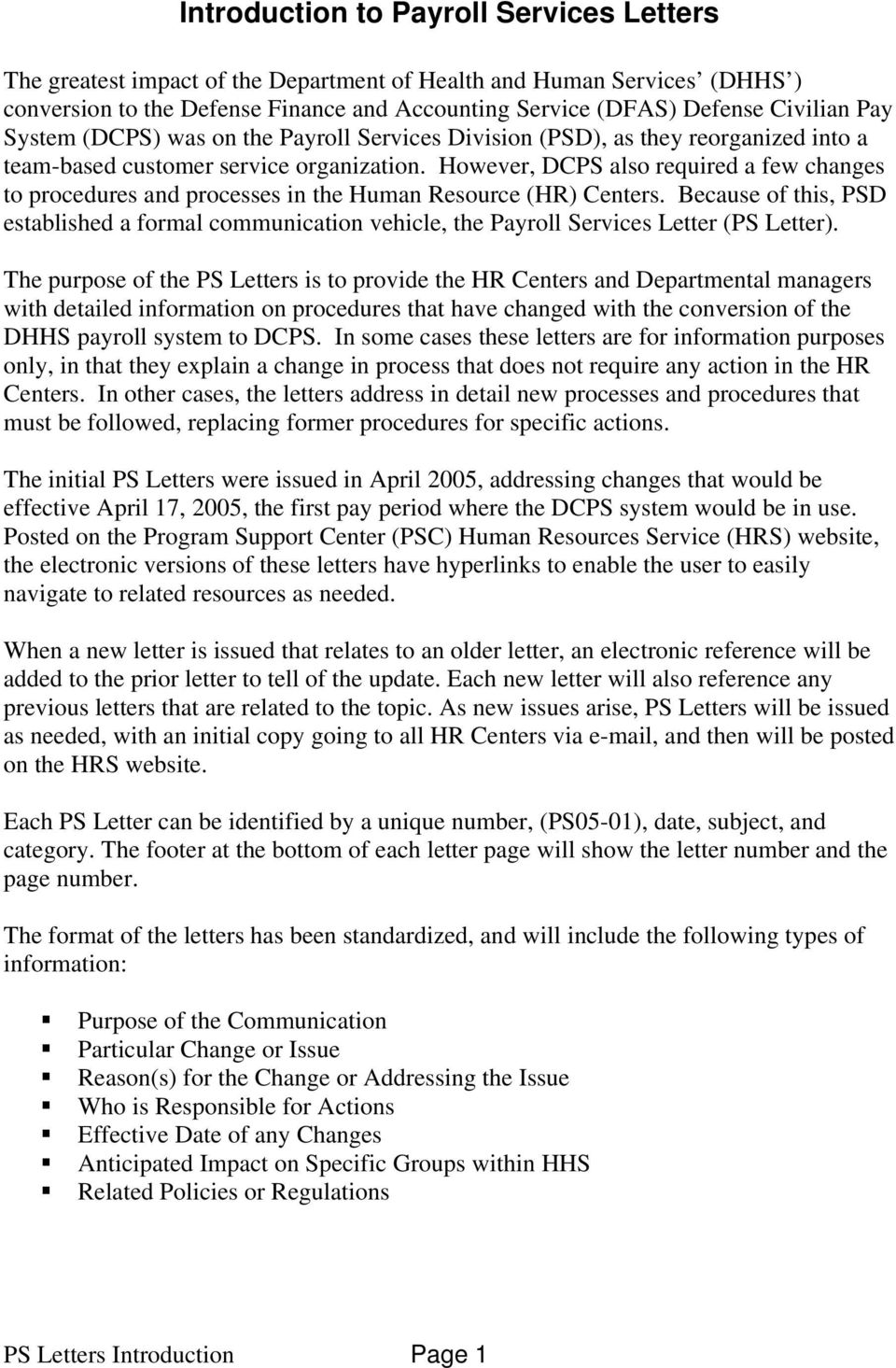
1 Introduction to Payroll Services Letters The greatest impact of the Department of Health and Human Services (DHHS ) conversion to the Defense Finance and Accounting Service (DFAS) Defense Civilian Pay System (DCPS) was on the Payroll Services Division (PSD), as they reorganized into a team-based customer service organization. However, DCPS also required a few changes to procedures and processes in the Human Resource (HR) Centers. Because of this, PSD established a formal communication vehicle, the Payroll Services Letter (PS Letter). The purpose of the PS Letters is to provide the HR Centers and Departmental managers with detailed information on procedures that have changed with the conversion of the DHHS payroll system to DCPS. In some cases these letters are for information purposes only, in that they explain a change in process that does not require any action in the HR Centers. In other cases, the letters address in detail new processes and procedures that must be followed, replacing former procedures for specific actions. The initial PS Letters were issued in April 2005, addressing changes that would be effective April 17, 2005, the first pay period where the DCPS system would be in use. Posted on the Program Support Center (PSC) Human Resources Service (HRS) website, the electronic versions of these letters have hyperlinks to enable the user to easily navigate to related resources as needed. When a new letter is issued that relates to an older letter, an electronic reference will be added to the prior letter to tell of the update. Each new letter will also reference any previous letters that are related to the topic. As new issues arise, PS Letters will be issued as needed, with an initial copy going to all HR Centers via , and then will be posted on the HRS website. Each PS Letter can be identified by a unique number, (PS05-01), date, subject, and category. The footer at the bottom of each letter page will show the letter number and the page number. The format of the letters has been standardized, and will include the following types of information: Purpose of the Communication Particular Change or Issue Reason(s) for the Change or Addressing the Issue Who is Responsible for Actions Effective Date of any Changes Anticipated Impact on Specific Groups within HHS Related Policies or Regulations PS Letters Introduction Page 1
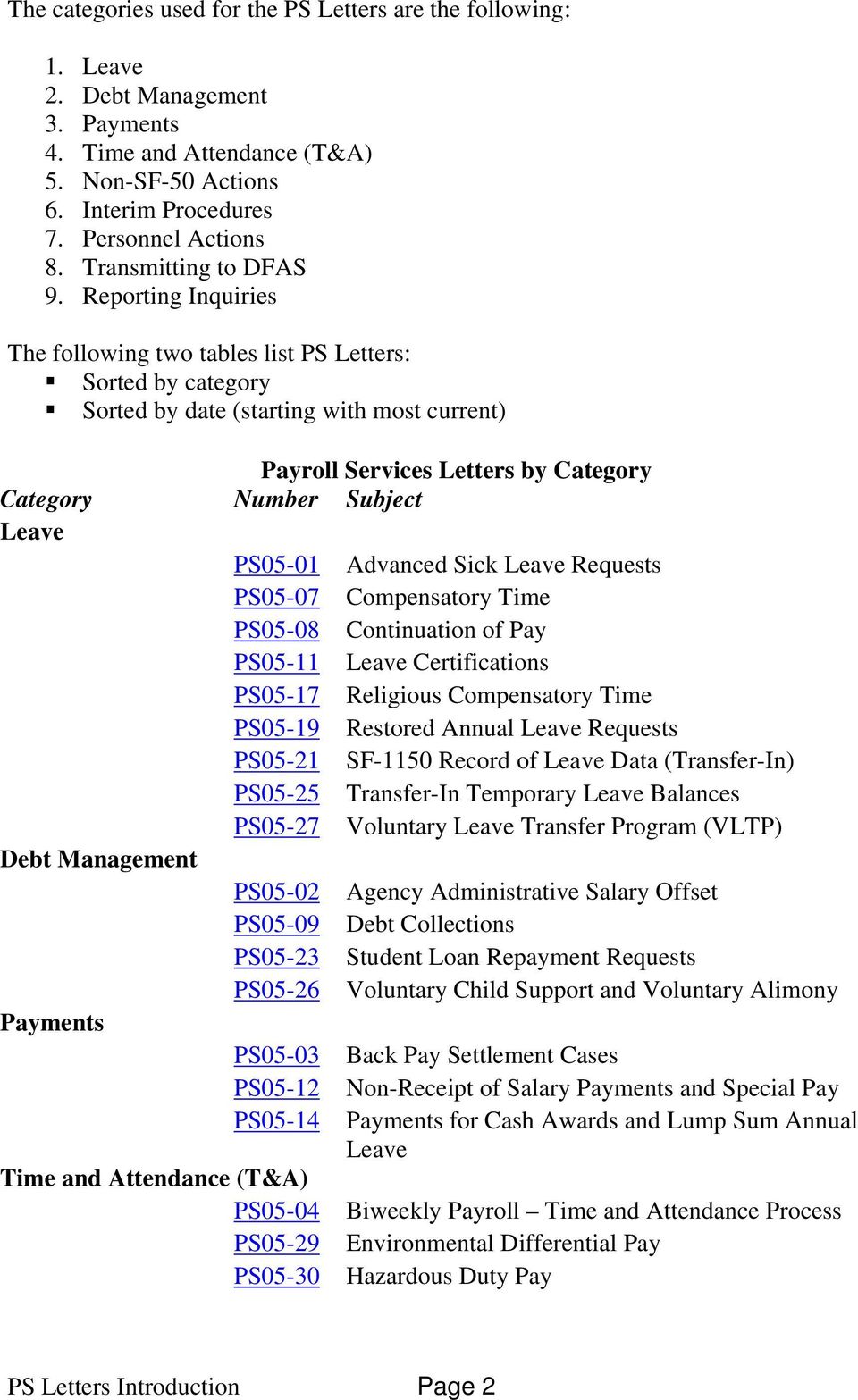
2 The categories used for the PS Letters are the following: 1. Leave 2. Debt Management 3. Payments 4. Time and Attendance (T&A) 5. Non-SF-50 Actions 6. Interim Procedures 7. Personnel Actions 8. Transmitting to DFAS 9. Reporting Inquiries The following two tables list PS Letters: Sorted by category Sorted by date (starting with most current) Payroll Services Letters by Category Category Number Subject Leave PS05-01 Advanced Sick Leave Requests PS05-07 Compensatory Time PS05-08 Continuation of Pay PS05-11 Leave Certifications PS05-17 Religious Compensatory Time PS05-19 Restored Annual Leave Requests PS05-21 SF-1150 Record of Leave Data (Transfer-In) PS05-25 Transfer-In Temporary Leave Balances PS05-27 Voluntary Leave Transfer Program (VLTP) Debt Management PS05-02 Agency Administrative Salary Offset PS05-09 Debt Collections PS05-23 Student Loan Repayment Requests PS05-26 Voluntary Child Support and Voluntary Alimony Payments PS05-03 Back Pay Settlement Cases PS05-12 Non-Receipt of Salary Payments and Special Pay PS05-14 Payments for Cash Awards and Lump Sum Annual Leave Time and Attendance (T&A) PS05-04 Biweekly Payroll Time and Attendance Process PS05-29 Environmental Differential Pay PS05-30 Hazardous Duty Pay PS Letters Introduction Page 2
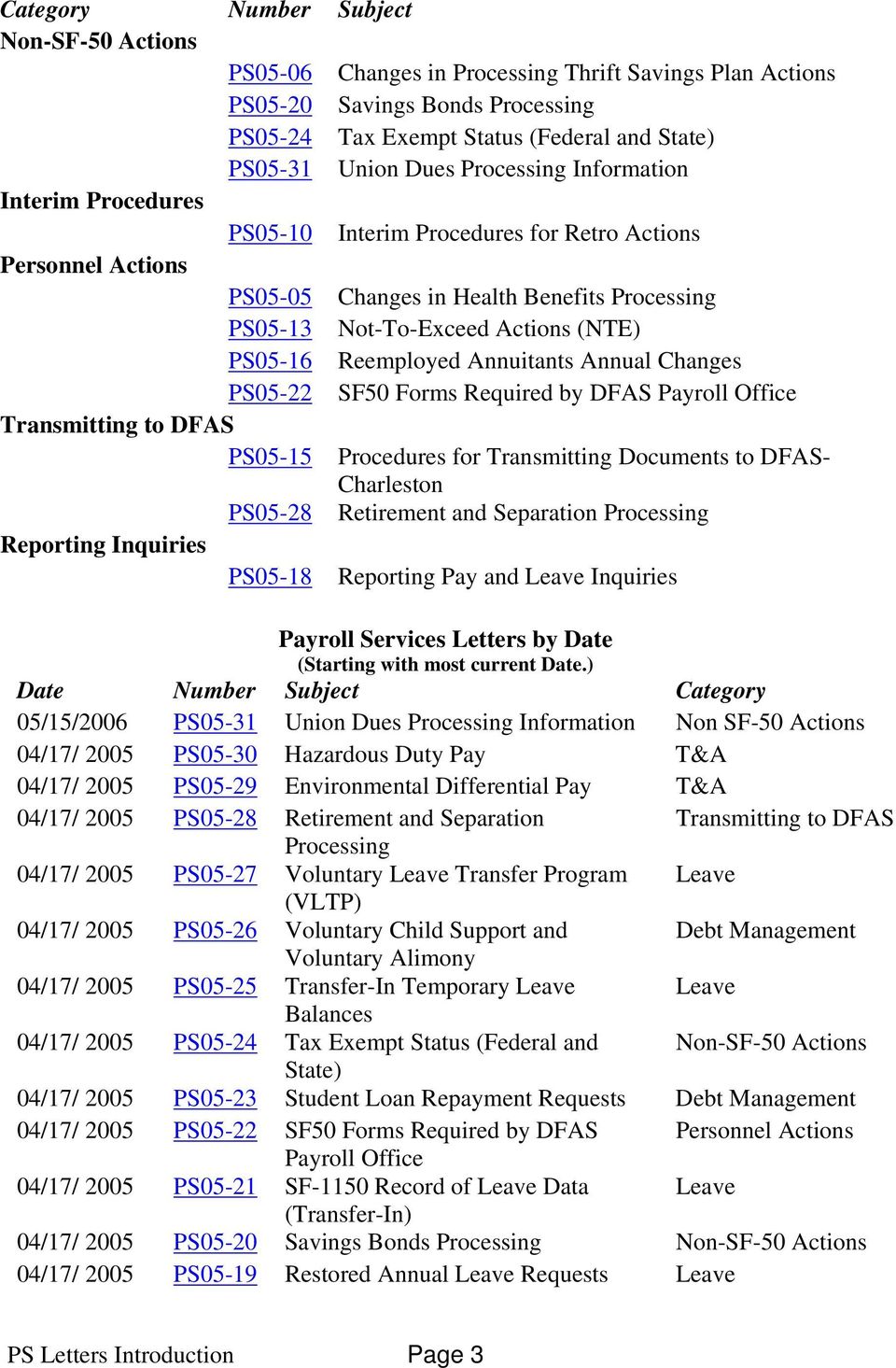
3 Category Number Subject Non-SF-50 Actions PS05-06 Changes in Processing Thrift Savings Plan Actions PS05-20 Savings Bonds Processing PS05-24 Tax Exempt Status (Federal and State) PS05-31 Union Dues Processing Information Interim Procedures PS05-10 Interim Procedures for Retro Actions Personnel Actions PS05-05 Changes in Health Benefits Processing PS05-13 Not-To-Exceed Actions (NTE) PS05-16 Reemployed Annuitants Annual Changes PS05-22 SF50 Forms Required by DFAS Payroll Office Transmitting to DFAS PS05-15 Procedures for Transmitting Documents to DFAS- Charleston PS05-28 Retirement and Separation Processing Reporting Inquiries PS05-18 Reporting Pay and Leave Inquiries Payroll Services Letters by Date (Starting with most current Date.) Date Number Subject Category 05/15/2006 PS05-31 Union Dues Processing Information Non SF-50 Actions 04/17/ 2005 PS05-30 Hazardous Duty Pay T&A 04/17/ 2005 PS05-29 Environmental Differential Pay T&A 04/17/ 2005 PS05-28 Retirement and Separation Transmitting to DFAS Processing 04/17/ 2005 PS05-27 Voluntary Leave Transfer Program Leave (VLTP) 04/17/ 2005 PS05-26 Voluntary Child Support and Debt Management Voluntary Alimony 04/17/ 2005 PS05-25 Transfer-In Temporary Leave Leave Balances 04/17/ 2005 PS05-24 Tax Exempt Status (Federal and Non-SF-50 Actions State) 04/17/ 2005 PS05-23 Student Loan Repayment Requests Debt Management 04/17/ 2005 PS05-22 SF50 Forms Required by DFAS Personnel Actions Payroll Office 04/17/ 2005 PS05-21 SF-1150 Record of Leave Data Leave (Transfer-In) 04/17/ 2005 PS05-20 Savings Bonds Processing Non-SF-50 Actions 04/17/ 2005 PS05-19 Restored Annual Leave Requests Leave PS Letters Introduction Page 3
4 Date Number Subject Category 04/17/ 2005 PS05-18 Reporting Pay and Leave Inquiries Reporting Inquiries 04/17/ 2005 PS05-17 Religious Compensatory Time Leave 04/17/ 2005 PS05-16 Reemployed Annuitants Annual Personnel Actions Changes 04/17/ 2005 PS05-15 Procedures for Transmitting Transmitting to DFAS Documents to DFAS-Charleston 04/17/ 2005 PS05-14 Payments for Cash Awards and Payments Lump Sum Annual Leave 04/17/ 2005 PS05-13 Not-To-Exceed Actions (NTE) Personnel Actions 04/17/ 2005 PS05-12 Non-Receipt of Salary Payments and Payments Special Pay 04/17/ 2005 PS05-11 Leave Certifications Leave 04/17/ 2005 PS05-10 Interim Procedures for Retro Actions Interim Procedures 04/17/ 2005 PS05-09 Debt Collections Debt Management 04/17/ 2005 PS05-08 Continuation of Pay Leave 04/17/ 2005 PS05-07 Compensatory Time Leave 04/17/ 2005 PS05-06 Changes in Processing Thrift Savings Non-SF-50 Actions Plan Actions 04/17/ 2005 PS05-05 Changes in Health Benefits Personnel Actions Processing 04/17/ 2005 PS05-04 Biweekly Payroll Time and T&A Attendance Process 04/17/ 2005 PS05-03 Back Pay Settlement Cases Payments 04/17/ 2005 PS05-02 Agency Administrative Salary Offset Debt Management 04/17/ 2005 PS05-01 Advanced Sick Leave Requests Leave PS Letters Introduction Page 4

5 Payroll Services Letter Number: PS05-01 Date: April 17, 2005 Subject: Advanced Sick Leave Requests Category: Leave Purpose This letter describes new procedures for submitting notifications of advanced sick leave approvals to the Payroll Services Division (PSD) Currently, after advanced sick leave is approved, it is submitted on the time and attendance (T&A) record and updated in the employee s payroll record. Effective April 17, 2005, HHS Timekeepers must forward approvals for advanced sick leave to their Human Resource (HR) Center Payroll Liaison. This new procedure is being implemented to comply with the Defense Finance and Accounting Service (DFAS) payroll processing requirements. The DFAS Defense Civilian Pay System (DCPS) maintains advanced sick leave balances and requires that the number of approved hours be updated in DCPS prior to submission of the T&A data. It is the responsibility of Timekeepers to be sure that the request for advanced sick leave is properly authorized and submitted to the Payroll Liaison. The notification must include the following information: Employee name SSN Date effective (usually the first day that the advanced sick leave is to be used). Number of hours authorized A not to exceed date for use of the advanced sick leave Payroll Liaisons must include the above information in a Peregrine ticket and send it to their Payroll Customer Service Team. There is a specific field for this purpose in Peregrine Category: LEAVE Subcategory: ADVANCED/RESTORED LEAVE. The advanced sick leave hours must be updated in DCPS before the hours will be accepted when processing the T&A. Notifications of advanced sick leave approvals for PS05-01 Page 1 of 2

6 the current pay period must be received in PSD no later than close of business Wednesday, the second week of the pay period. If advanced sick leave notifications are not received in PSD on time, the DFAS payroll system will perform a leave conversion, i.e., the advanced sick leave will convert to annual leave, compensatory, credit hours or leave without pay. The leave and earnings statement will show the leave charged accordingly. Also, Payroll Liaisons will receive a Conversion of Hours report that lists leave that was converted for employees. For further information on leave conversion, see the Payroll Services Letter entitled Biweekly Payroll Process. Payroll Liaisons should review the leave conversions and report any discrepancies to their Payroll Customer Service Team. PSD can accept and process notifications of advanced sick leave approvals for previous pay periods and adjustments will be made to the employee records. For further assistance or for questions regarding the information in this letter, please contact your Payroll Customer Service Team. PS05-01 Page 2 of 2

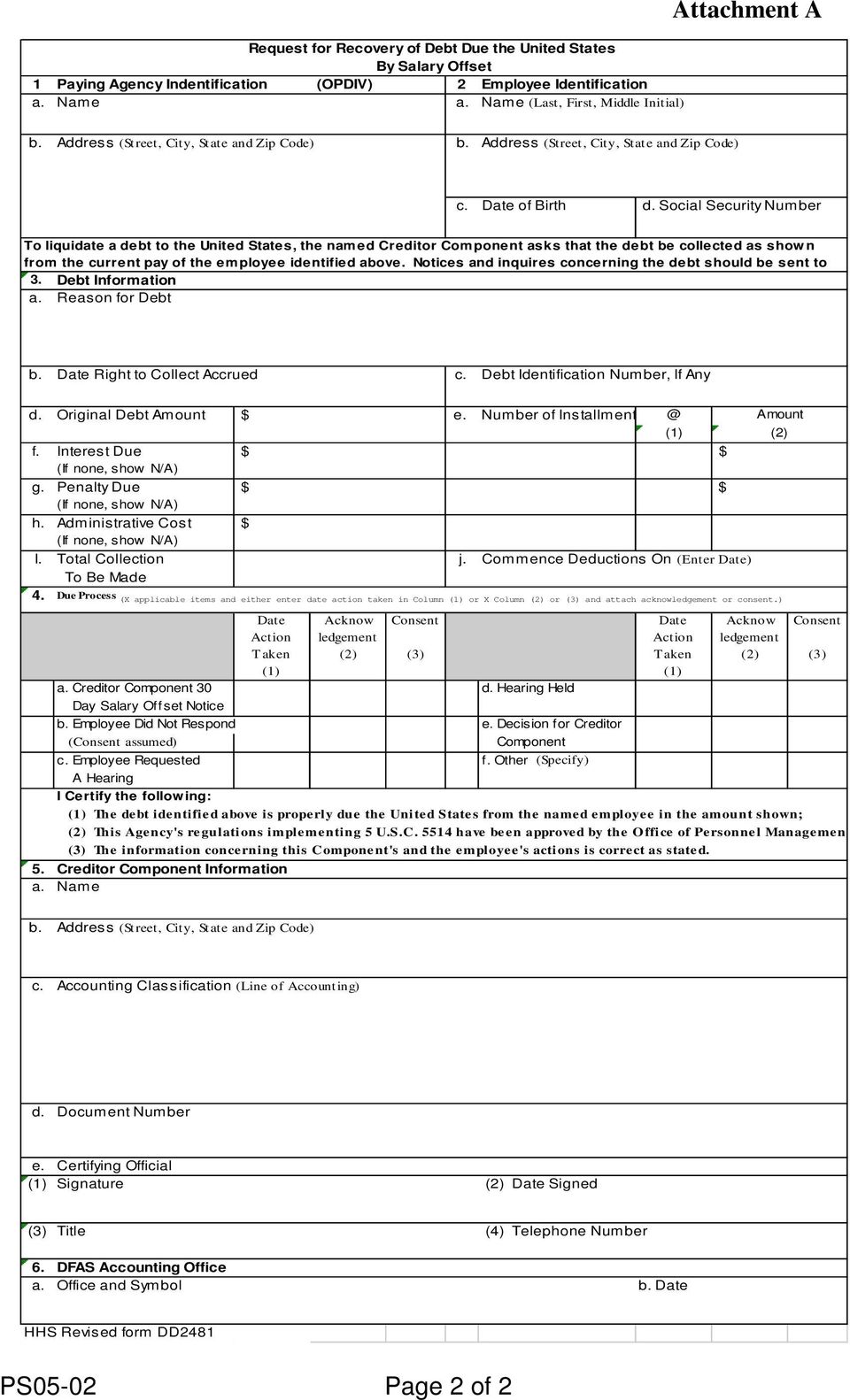
7 Payroll Services Letter Number: PS05-02 Date: April 17, 2005 Subject: Agency Administrative Salary Offset Category: Debt Management Purpose The purpose of this letter is to inform the HHS Operating Divisions (OPDIVS) of new procedures for requesting salary offset to recover administrative debts incurred by employees. The new procedure is being implemented as part of the conversion of the HHS payroll system to the Defense Finance and Accounting Service (DFAS) Effective April 17, 2005, OPDIV Finance and Administrative Offices must submit requests for recovery of an administrative debt, such as, travel advances, equipment, training, salary advances, and emergency salary payments to the DFAS Charleston Payroll Office. The request must be submitted with supporting documentation using the Request for Recovery of Debt Due the United States by Salary Offset form (Attachment A), and faxed or mailed to the following address for action: DFAS Charleston Payroll Office Code PCPS P.O. Box Pensacola, FL OR Toll Free: 1 (866) Commercial: 1 (850) The supporting documentation should include a copy of the employee agreement or notification requesting payment and informing them of salary offset authorization. For additional information on debt collections, see Payroll Services Letter entitled Debt Collections. For further assistance or for questions regarding the information in this letter, please contact your Payroll Customer Service Team. PS05-02 Page 1 of 2

8 Request for Recovery of Debt Due the United States By Salary Offset 1 Paying Agency Indentification (OPDIV) 2 Employee Identification a. Name a. Name (Last, First, Middle Initial) Attachment A b. Address (Street, City, State and Zip Code) b. Address (Street, City, State and Zip Code) c. Date of Birth d. Social Security Number To liquidate a debt to the United States, the named Creditor Component asks that the debt be collected as shown from the current pay of the employee identified above. Notices and inquires concerning the debt should be sent to 3. Debt Information a. Reason for Debt b. Date Right to Collect Accrued c. Debt Identification Number, If Any d. Original Debt Amount $ e. Number of (1) Amount (2) f. Interest Due $ $ (If none, show N/A) g. Penalty Due $ $ (If none, show N/A) h. Administrative Cost $ (If none, show N/A) I. Total Collection j. Commence Deductions On (Enter Date) To Be Made 4. Due Process (X applicable items and either enter date action taken in Column (1) or X Column (2) or (3) and attach acknowledgement or consent.) Date Action Taken (1) Acknow ledgement (2) Consent... (3) Date Action Taken (1) Acknow ledgement (2) Consent... (3) a. Creditor Component 30 d. Hearing Held Day Salary Offset Notice b. Employee Did Not Respond e. Decision for Creditor (Consent assumed) Component c. Employee Requested f. Other (Specify) A Hearing I Certify the following: (1) The debt identified above is properly due the United States from the named employee in the amount shown; (2) This Agency's regulations implementing 5 U.S.C have been approved by the Office of Personnel Managemen (3) The information concerning this Component's and the employee's actions is correct as stated. 5. Creditor Component Information a. Name b. Address (Street, City, State and Zip Code) c. Accounting Classification (Line of Accounting) d. Document Number e. Certifying Official (1) Signature (2) Date Signed (3) Title (4) Telephone Number 6. DFAS Accounting Office a. Office and Symbol b. Date HHS Revised form DD2481 PS05-02 Page 2 of 2
9 Payroll Services Letter Number: PS05-03 Date: April 17, 2005 Subject: Back Pay Settlement Cases Category: Payments Purpose The purpose of this letter is to provide procedures for HHS Human Resource (HR) Centers when requesting payment of back pay settlement cases. The new procedure is part of the HHS payroll system conversion to the Defense Finance and Accounting Services (DFAS). The correct documentation for this action is very important to ensure settlement cases are processed and dispersed properly. Effective April 17, 2005, HR Centers must send back pay settlement cases directly to the DFAS Charleston Payroll Office. Once the determination has been made that an employee is entitled to Back Pay under Section 5596 of 5 U.S.C. and implementing regulations in 5 C.F.R. 550, the HR Center must notify the DFAS payroll office with an official letter detailing the action and any special processing instructions. A. The transmittal letter must contain the following: (1) Statement if Unemployment Benefits are to be deducted and if so, the dollar amount and documentation. (2) Statement that employee has been counseled concerning Health Benefits and Thrift Savings Plan and the election forms if necessary. (3) Statement concerning entitlement to overtime, night differential, shift premium, Sunday premium, etc. with number of hours and dates for each entitlement. (4) Statement certifying the dollar amount and hours of any annual leave lump sum paid and dollar amount of any severance pay that was paid, if back pay settlement was prior to the conversion to DFAS, (5) Statement if interest is payable and the date it is to begin. PS05-03 Page 1 of 2

10 B. The following documentation must be included: (1) Copy of Settlement Agreement. (2) Corrected or canceled personnel actions - Standard Form 50Bs. (3) Statement certified to be accurate by the employee that must include the following: (a) Any outside earnings along with copies of W2 s or statement from employer as proof to the amount. (b) Statement that he/she was ready, willing and able to perform work during dates involved. (c ) Statement of any payments made at time of separation to include Lump Sum Leave, Severance Pay, VSIP and if employee withdrew Retirement Funds from the Office of Personnel Management. (4) If employee was unable to work during any or part of the period involved, certification of the type of leave to be charged and number of hours will be required. (5) Corrected/amended timecards as needed. The case must be mailed or faxed to: DFAS Charleston Payroll Office Code PCPS P. O. Box Pensacola, FL Toll Free: 1 (866) Commercial: 1 (850) For further assistance or for questions regarding the information in this letter, please contact your Payroll Customer Service Team. PS05-03 Page 2 of 2
11 Payroll Services Letter Number: PS05-04 Date: April 17, 2005 Subject: Biweekly Payroll Time and Attendance Process Category: Time & Attendance (T&A) Purpose This letter provides information to Human Resource (HR) Centers describing changes to the Time and Attendance (T&A) data submission and biweekly payroll process resulting from the conversion of the Department of Health and Human Services (HHS) payroll system to the Defense Finance and Accounting Services (DFAS). Topics addressed in this letter include: A. Biweekly T&A Submission Process B. Incorrect and Late T&A Data C. Leave Conversions D. Amended T&A. Biweekly T&A Submissions Timekeepers and Leave Approving Officials should follow their OPDIV internal procedures and schedule for the submission of T&A data. However, it is important to understand changes to the T&A submission process as a result of the HHS payroll system conversion to DFAS. DFAS has only one final pay computation process. This is a major change for HHS. There are no longer Mini or Supplemental payroll runs for employees whose time rejects or is submitted late. The one payroll run will include cash awards and lump sum annual leave payments. A remark will appear on the employee s Leave and Earnings Statement (LES) if a cash award and/or lump sum payment is paid out during the pay period. Accurate and timely submission of T&A data is required to ensure accurate and timely payments to employees. If T&A data is not submitted timely, employees may receive an incorrect or late payment. Payroll Customer Service Representatives (CSR) will notify Payroll Liaisons of active employees who did not have T&A data submitted or who had T&A data rejected. CSRs will analyze the errors, if necessary, request information from Payroll Liaisons, and resubmit the T&A. There is a short timeframe (Monday and Tuesday) for correction of T&As. PS05-04 Page 1 of 6

12 The Payroll Liaison has an integral role during the T&A submission process. They must coordinate and provide information between the Timekeepers and CSRs. CSRs do not communicate directly with Timekeepers so the Payroll Liaisons or their designee must be available and gather information quickly. During the short window of time allotted to make corrections and changes, the CSR will rely on the Payroll Liaison to collect, fax, or information so that corrections to an employee s T&A record can be made and the employee can be paid correctly and on time. Changes have been made to the HHS Timekeeper s Manual to emphasize the DFAS T&A edits. Payroll Liaisons can review timekeeping updates by accessing the HHS Timekeeper s Manual located on the HHS Intranet - The manual describes ways to avoid common mistakes and also takes into account what is required for the new payroll system. The payroll schedule has been revised to meet the DFAS processing schedule for a new official payday of Friday, the first week of the pay period. The schedule below gives a description of the activities that occur in the Program Support Center, Human Resources Service, during the biweekly T&A process. T&A Submission Schedule The T&A submission schedule below shows the end of the pay period activities that occur Friday through Tuesday. It gives an overview of when T&As can be submitted to DFAS, the activities DFAS performs with the T&As and what CSRs, Payroll Liaisons and Timekeepers must do to help ensure timely resolution of missing or erroneous T&A submissions. It also provides new DFAS terminology to help promote better communication and knowledge transfer between HHS and DFAS. Friday (prior to the end of the pay period) T&A data can be transmitted to the Program Support Center (PSC) Human Resources Service (HRS) anytime from the T&A systems. Saturday T&A data can be transmitted to the PSC HRS anytime from T&A systems. Sunday T&A data must be received by the PSC HRS by 6:30 PM EST. The PSC HRS prepares the data by creating files that are sent to DFAS for validating and PS05-04 Page 2 of 6

13 editing. Any errors detected during this validation and edit process are captured and displayed on the DFAS error reports. Monday CSRs receive and analyze the Invalid Transaction Report. This report lists errors detected in employee T&A records. Most of the errors found on the report are a result of T&As being entered incorrectly into the T&A systems. Monday is a crucial day for Payroll Liaisons. They must respond quickly when researching and gathering information for the CSRs. CSRs will then make the necessary corrections in the DFAS payroll system. Monday evening, DFAS runs a pay computation in which they process the corrections and any additional T&A data submitted. This process once again validates and edits the T&A data looks for errors and returns the errors on the Invalid Transaction Report on Tuesday morning. Tuesday Tuesday is the last day that T&A data can be submitted or errors corrected and the results included in the final pay computation. CSRs will submit corrections and late T&A data based on their review of the Invalid Transaction and Missing Time reports, and the information received from the Payroll Liaisons. CSRs spend Tuesday analyzing errors on the Invalid Transaction Reports and Missing Time/Created Leave Reports. Missing Time Reports display information on employees who are missing partial or all time. The DFAS payroll system checks to see if the employee s hours that were submitted equal his tour hours. (DFAS expects the tour and base hours to be the same.). For example, if the number of base hours sent to DFAS does not equal what DFAS has as that individual s tour hours, the employee is listed on the Missing Time Report. This means that the employees missing hours submitted will show up on the report as missing time and the CSR will need to correct it. If the time is not corrected, DFAS converts the missing time to leave without pay. Incorrect and Late T&A Data ALL T&A data must be received by the PSC HRS by Tuesday 3:30pm E.S.T. The DFAS payroll system edits the T&A data being transmitted against the appointment and pay entitlement data in the employee s record. It is IMPORTANT to know that DFAS runs the computation of pay process, referred to as Final Pass, Tuesday evening and any time that has not been corrected or is still missing may result in an employee receiving partial or late salary payment. Payroll Liaisons can request a special pay (manual payment) if the employee received less than 90% of his basic pay. This does not include overtime, night differential (except for FWS employees), holiday premium, Sunday PS05-04 Page 3 of 6

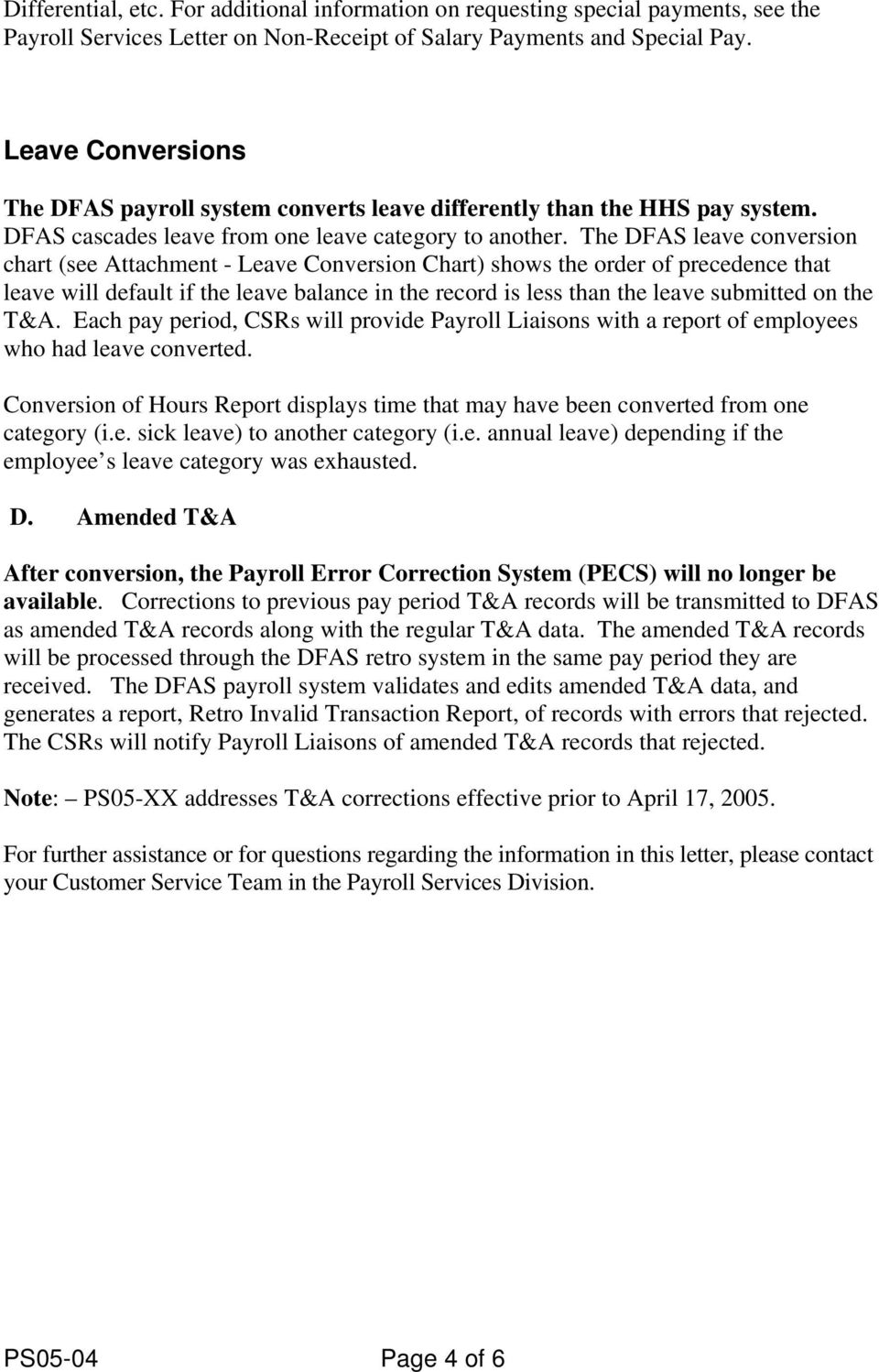
14 Differential, etc. For additional information on requesting special payments, see the Payroll Services Letter on Non-Receipt of Salary Payments and Special Pay. Leave Conversions The DFAS payroll system converts leave differently than the HHS pay system. DFAS cascades leave from one leave category to another. The DFAS leave conversion chart (see Attachment - Leave Conversion Chart) shows the order of precedence that leave will default if the leave balance in the record is less than the leave submitted on the T&A. Each pay period, CSRs will provide Payroll Liaisons with a report of employees who had leave converted. Conversion of Hours Report displays time that may have been converted from one category (i.e. sick leave) to another category (i.e. annual leave) depending if the employee s leave category was exhausted. D. Amended T&A After conversion, the Payroll Error Correction System (PECS) will no longer be available. Corrections to previous pay period T&A records will be transmitted to DFAS as amended T&A records along with the regular T&A data. The amended T&A records will be processed through the DFAS retro system in the same pay period they are received. The DFAS payroll system validates and edits amended T&A data, and generates a report, Retro Invalid Transaction Report, of records with errors that rejected. The CSRs will notify Payroll Liaisons of amended T&A records that rejected. Note: PS05-XX addresses T&A corrections effective prior to April 17, For further assistance or for questions regarding the information in this letter, please contact your Customer Service Team in the Payroll Services Division. PS05-04 Page 4 of 6
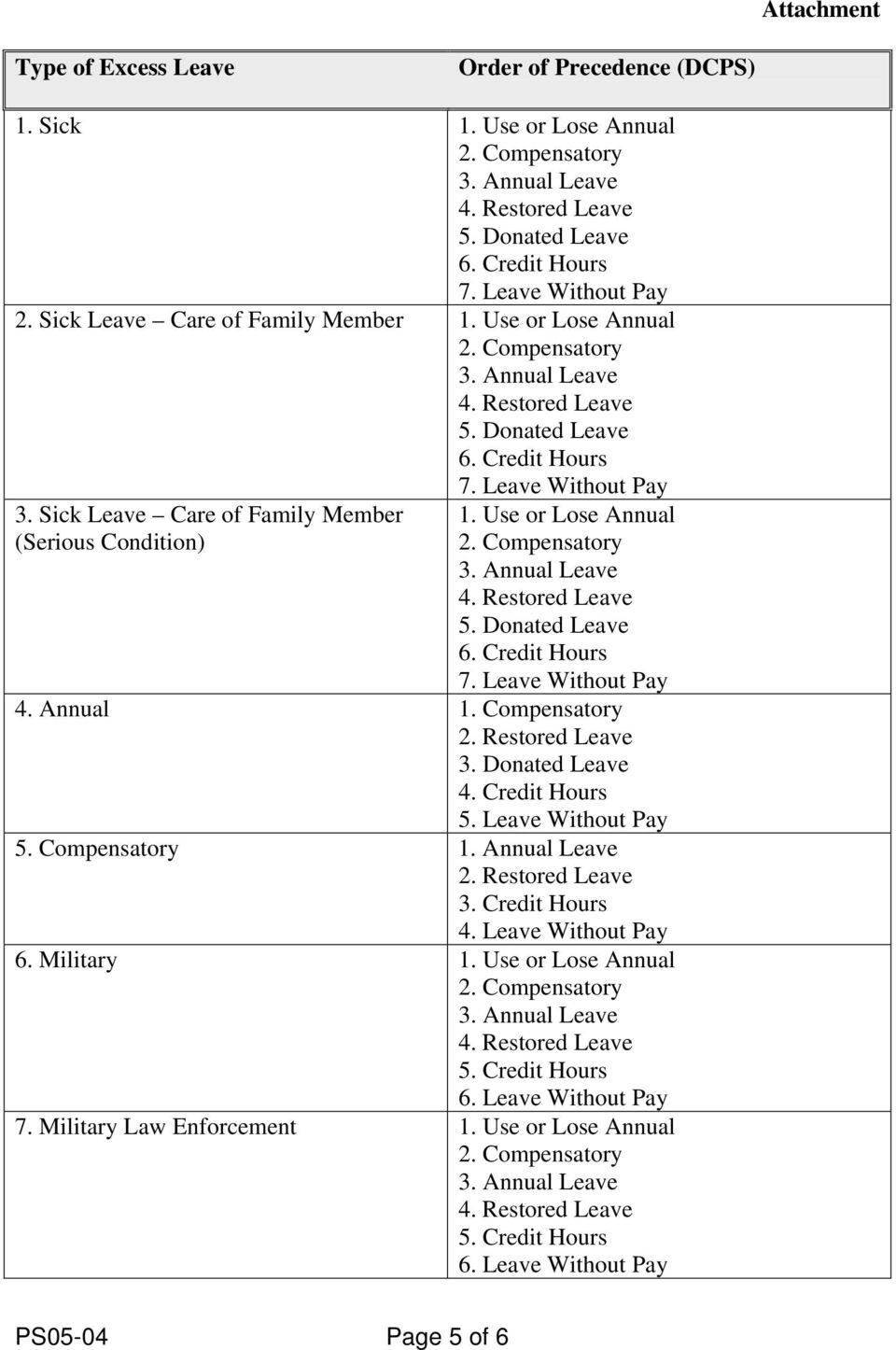
15 Attachment Type of Excess Leave Order of Precedence (DCPS) 1. Sick 1. Use or Lose Annual 2. Compensatory 3. Annual Leave 4. Restored Leave 5. Donated Leave 6. Credit Hours 7. Leave Without Pay 2. Sick Leave Care of Family Member 1. Use or Lose Annual 2. Compensatory 3. Annual Leave 4. Restored Leave 5. Donated Leave 6. Credit Hours 7. Leave Without Pay 3. Sick Leave Care of Family Member (Serious Condition) 1. Use or Lose Annual 2. Compensatory 3. Annual Leave 4. Restored Leave 5. Donated Leave 6. Credit Hours 7. Leave Without Pay 4. Annual 1. Compensatory 2. Restored Leave 3. Donated Leave 4. Credit Hours 5. Leave Without Pay 5. Compensatory 1. Annual Leave 2. Restored Leave 3. Credit Hours 4. Leave Without Pay 6. Military 1. Use or Lose Annual 2. Compensatory 3. Annual Leave 4. Restored Leave 5. Credit Hours 6. Leave Without Pay 7. Military Law Enforcement 1. Use or Lose Annual 2. Compensatory 3. Annual Leave 4. Restored Leave 5. Credit Hours 6. Leave Without Pay PS05-04 Page 5 of 6
16 Type of Excess Leave Order of Precedence (DCPS) 8. Home 1. Use or Lose Annual 2. Compensatory 3. Annual Leave 4. Restored Leave 5. Credit Hours 6. Leave Without Pay 9. Shore 1. Use or Lose Annual 2. Compensatory 3. Annual Leave 4. Restored Leave 5. Credit Hours 6. Leave Without Pay 10. Restored Annual 1. Use or Lose Annual 2. Compensatory 3. Annual Leave 4. Restored Leave 5. Credit Hours 6. Leave Without Pay 11. Credit Hours 1. Use or Lose Annual 2. Compensatory 3. Annual Leave 4. Restored Leave 5. Leave Without Pay 12. Time-Off Incentive Award 1. Use or Lose Annual 2. Compensatory 3. Annual Leave 4. Restored Leave 5. Credit Hours 6. Leave Without Pay DCPS Family Leave will convert the same as annual, sick, compensatory time leave, etc., if the employee has no authorization or balance equals zero. PS05-04 Page 6 of 6

17 Payroll Services Letter Number: PS05-05 Date: April 17, 2004 Subject: Changes in Health Benefits Processing Category: Personnel Actions Purpose The conversion of the HHS payroll system to the Defense Finance and Accounting Service (DFAS) will require changes in health benefits processing. This letter provides Human Resource Centers (HRC) with information and instructions for the following health benefits actions: A. Employees on Leave Without Pay (LWOP) B. Reservists Called to Active Duty C. Reconciliation of Health Benefits D. Waiving FEHB Premium Conversion A. Employees on Leave Without Pay (LWOP) Employees taking LWOP have had three options for paying their Federal Employee Health Benefits (FEHB) premiums: Pay-As-You-Go Catch-Up Prepay These payment options are described in the FEHB Handbook on the OPM website: Effective April 17, 2005, the third option, Prepay, will no longer be available (LWOP Pre-pay HB Start NOA Code 9628). As noted in the FEHB Handbook, agencies are not required to offer this option. Please advise employees of the two options still available to them for paying their share of FEHB premiums while in LWOP status. PS05-05 Page 1 of 3
18 B. Reservists Called to Active Duty When an employee has been called to active military duty in support of a contingency operation, HHS will pay that employee s share of FEHB premiums in addition to the government s share. Effective April 17, 2005, HRC Payroll Liaisons must notify their Payroll Customer Service Team of employees called to active duty to ensure that qualifying reservists are not indebted for health benefits premiums. The notification must be via a Peregrine ticket with the category/subcategory of BENEFITS/FEHB. The following information must be included: Name SSN FEHB enrollment code A brief statement that the reservist is called to active duty in support of a contingency operation Beginning date employee is eligible to have the agency pay the employee s share of the FEHB premium Approximate ending date employee is eligible to have the agency pay the employee s share of the FEHB premium Name and telephone number of the HR office representative responsible for the case The description field should be used to indicate that the reservist was called to active duty, the FEHB enrollment code, and the effective or beginning date and the approximate end date. The Secretary of HHS directed the Operating Divisions to arrange for payment of employee shares of FEHB premiums in a memorandum dated April 23, 2003 (attached). Authority to waive the requirement that employees pay their share of FEHB premiums is given under 5 U.S.C. Section 8906(e)(1)(B)(ii) and 5524a(c) Further information is available on the OPM website Health Benefits Coverage under the FEHB Program for Federal Civilian Employees Called to Active Duty Service C. Reconciliation of Health Benefits Effective April 17, 2005, insurance carriers will inform DFAS directly of enrollment discrepancies. Should the DFAS payroll office require HR documentation to resolve a discrepancy, DFAS will communicate with the Health Benefits Contacts in the HR Center. HHS will provide DFAS with a list of all the HR Health Benefits Contacts. The Customer Service Representatives (CSRs) in the Payroll Services Division will be available to assist the HR and DFAS staff if necessary. PS05-05 Page 2 of 3

19 Please notify the Payroll Customer Service Team if the name, address or telephone number changes for the HR Health Benefits Contact. D. Waiving FEHB Premium Conversion While the vast majority of employees take advantage of the Premium Conversion program to pay their FEHB premiums with pre-tax dollars, all employees have the right to waive their participation in this program. To do so, they must obtain a waiver form from their HR Center. Waiver requests may only be authorized if they are submitted during open season or if a qualifying life event applies to the employee. Effective April 17, 2005, HR Centers are required to send waiver authorization FEHB Premium Conversion Waiver/Election Forms directly to DFAS-Charleston. The forms should be faxed to the DFAS payroll office at the following numbers: toll-free, or commercial Additional information about forwarding documents to the DFAS payroll office is available in the PS Letter: Procedures for Transmitting Documents to DFAS-Charleston. A template for the waiver form and additional information about the FEHB premium conversion program are available from the following sources: FEHB Premium Conversion Waiver/Election Form. Attachment to BAL FEHB Premium Conversion (about paying health benefits premiums with pre-tax dollars, waivers, etc.) OPM website For further assistance or for questions regarding the information in this letter, please contact your Customer Service Team in the Payroll Services Division. PS05-05 Page 3 of 3

20 Payroll Services Letter Number: PS05-06 Date: April 17, 2005 Subject: Changes in Processing Thrift Savings Plan Actions Category: Non-SF-50 Actions Purpose This letter provides new procedures for Human Resource (HR) Centers to follow regarding processing Thrift Savings Plan (TSP) actions. The procedures affect the following actions: A. TSP Transfer-In B. TSP Hardship Loans (In-Service Withdrawals) C. TSP Underdeduct Letters The new procedures become effective April 17, 2005 with the conversion of the HHS payroll system to the Defense Finance and Accounting Service (DFAS). A. TSP Data Transfer-In TSP year-to-date (YTD) balances must be input on the accession action. When an employee transfers from another federal agency into HHS, it is important that the payroll system be updated with the TSP YTD employee contributions. In most cases, the YTD information will be included with the accession action processed for the employee and no other action will be required. If the HR Center does not include the TSP YTD on the accession action, the information must be sent to their Payroll Customer Service Team for processing. The information must be sent electronically using the Peregrine system using the category/subcategory: BENEFITS/TSP. The Peregrine screen contains a specific section to input the TSP information. The first line of the description field must indicate TSP Transfer-in. Include the information below in the Peregrine ticket: Name SSN Employee ID (optional) TSP Status: Code and Date Date of Birth Retirement Code TSP YTD balance PS05-06 Page 1 of 2

21 B. Hardship Loans (In-Service Withdrawals) HR Centers will not be required to process TSP Hardship Loan actions. Upon accepting an employee request for an in-service withdrawal from their TSP account, the National Finance Center (NFC) will send an electronic file to DFAS to update the payroll system record. The employee TSP status code will change to either T or S. The HR Center will be notified of this change in TSP status code by the Enterprise Human Resources and Payroll (EHRP) system. DFAS will maintain the standard restrictions of the non-contribution period of six months from the date of disbursement of the withdrawal. The NFC will continue to be responsible for sending the employee an eligibility notice at the end of the six-month period. Resumption of employee contributions will still require that the employee submit the appropriate election form, TSP-1 to the HR Center. C. TSP Underdeduct Letters HR Centers are no longer required to process thrift underdeduct actions. If an employee s TSP action is not processed by the effective date indicated, the employee should receive an underdeduct letter. The TSP underdeduct letters will be mailed directly to the employee by the DFAS Payroll Office. The employee has thirty days to respond to the DFAS Payroll Office. If an employee believes that an underdeduct letter should have been generated or the letter is incorrect the HR Center should intervene and send an inquiry to their Payroll Customer Service Team using the Peregrine system. For further assistance or for questions regarding the information in this letter, please contact your Payroll Customer Service Team. PS05-06 Page 2 of 2
22 Payroll Services Letter Number: PS05-07 Date: April 17, 2005 Subject: Compensatory Time Category: Leave Purpose This letter describes the new policy regarding the use of Compensatory Time. Compensatory time is time off with pay in lieu of overtime pay for irregular or occasional overtime work, as permitted by your OPDIV internal policy and flexible work schedule programs. Effective April 17, 2005, employees will be required to use all accumulated compensatory time within 26 pay periods of accrual or the time will be converted to overtime pay. This new procedure is in accordance with the processing changes needed to support the conversion of HHS Payroll to the Defense Civilian Pay System operated by the Defense Finance and Accounting Service. After the 26 th pay period, unused compensatory time will be automatically converted to overtime pay at the rate at which it was earned, and will be included with the biweekly salary payment. The amount of the overtime pay will be displayed in the Current Earnings Section of the Leave and Earnings Statement (LES). Any remaining compensatory hours accrued will be displayed in the Leave Section of the LES. Defense Civilian Pay System will not make separate payments for compensatory time. For further assistance or for questions regarding the information in this letter, please contact your Payroll Customer Service Team. PS05-07 Page 1 of 2
23 Attachment PS05-07 Page 2 of 2
24 Payroll Services Letter Number: PS05-08 Date: April 17, 2005 Subject: Continuation of Pay Category: Leave Purpose This letter describes new procedures for handling Continuation of Pay (COP). Effective April 17, 2005, Payroll Liaisons and Timekeepers must provide information to the Payroll Services Division on employees who are placed on COP. The new procedure is part of the HHS payroll system conversion to the Defense Finance and Accounting Service (DFAS). The DFAS payroll system has additional requirements for processing COP. When employees are placed on COP, the date of the injury and injury number must be submitted with the time and attendance (T&A) data. Currently, this information cannot be submitted on the HHS T&A record. Timekeepers will be instructed to forward the date of injury and injury number to their Payroll Liaison each pay period an employee is placed on COP. Payroll Liaisons must send the information via Peregrine ticket to the Payroll Customer Service Team. Use the Peregrine classification Category: LEAVE Subcategory: LEAVE ADJUSTMENT. Note: DFAS describes the injury number as a four-digit field, which comprises the month and date (MMDD) of the actual injury date. The Peregrine ticket must include the following information: Name SSN Employee ID (optional) Date of Injury The first line of the description field must indicate COP and the date of injury. The Payroll Customer Service Team will input the data in the DFAS system. It is necessary that the COP information be updated before the COP hours submitted on the T&A are accepted in the DFAS payroll system. For further assistance or for questions regarding the information in this letter, please contact your Customer Service Team in the Payroll Services Division. PS05-08 Page 1 of 1
25 Payroll Services Letter Number: PS05-09 Date: April 17, 2005 Subject: Debt Collections Category: Debt Management Purpose This letter is to inform the Department of Health and Human Services (HHS) Human Resource (HR) Centers and Operating Divisions (OPDIV) of new payroll procedures for debt collections. The changes will be implemented as part of the conversion of the HHS payroll system to the Defense Civilian Pay System (DCPS) operated by the Defense Finance and Accounting Service (DFAS), our new payroll provider. As of April 17, 2005, HR Centers will no longer receive copies of indebtedness letters or reports regarding employee debts. The DFAS Charleston (DFAS-CH) Payroll Office will notify employees directly regarding employee debts. Debt collections fall into one of four categories: A. Salary Debts B. Administrative and Non-Salary Debts C. Court Ordered Garnishments D. Separated Employee Salary Debts Salary Debts Salary debts can occur when time and attendance information is corrected or changed for a previous pay period or when retroactive personnel actions are processed that changes the salary or pay entitlements. This includes any overpayment that is attributable to clerical errors, administrative errors, or delays in processing pay documents. This also includes Health Benefits debts for employees who are on leave without pay (LWOP) or who have insufficient salary to cover health benefits premiums. Salary debts are classified as either routine debts or non-routine (full due process) debts. PS05-09 Page 1 of 18
26 Routine Debt A routine debt is defined as a salary overpayment having an amount of $50.00 or less, or one that is greater than $50.00 but is identified within four pay periods. The collection of a routine debt will begin in the pay period that it is identified by the payroll office. There will not be a delay in starting the collection of newly identified routine debt. A remark will appear on the Leave and Earnings Statement (LES) in the pay period the collection is started. The remark will include the amount being collected in the current pay period, the gross amount of the debt, what caused the debt (time and attendance or personnel action) and a contact phone number for the DFAS debt processing team. The following is an example of a remark that may appear on the LES for each deduction taken: $ COLLECTED THIS PAY PERIOD FOR $. (LESS AMT APPLIED LEAVES A REMAINING BALANCE $. ) CORRECTION DEBT IN ACCORDANCE WITH DEBT COLLECTION IMPROVEMENT ACT OF POC: PAYROLL OFFICE CUSTOMER SERVICE DESK, 1 (843) The deduction amount may not exceed 15 percent of disposable net pay unless the employee gives written consent. If the total amount of the debt exceeds this limitation, the initial deduction will be for the full 15 percent and remaining deduction amounts will be 15 percent until the debt has been satisfied. Non-Routine Debts A non-routine debt is any salary overpayment greater than $50 that was not identified within four pay periods in which the debt was incurred. This is considered a debt requiring full due process. Due process includes giving the employee written notification, which includes information about submitting payments, and the employee s rights to request a hearing or a waiver. If the employee does not repay the debt or contact the payroll office to establish a repayment schedule within 30 days, the DFAS-CH Payroll Office will begin collection of the debt by salary offset at 15 percent of their disposable net pay. The following is an example of a remark that may appear on the LES for each deduction taken: $ COLLECTED THIS PAY PERIOD FOR $. (LESS AMT APPLIED LEAVES A REMAINING BALANCE $. ) CORRECTION DEBT IN ACCORDANCE WITH 5 U.S.C POC: PAYROLL OFFICE CUSTOMER SERVICE DESK, 1 (843) PS05-09 Page 2 of 18
27 Health Benefit Debts During periods of leave without pay or insufficient pay, employees participating in the Federal Employees Health Benefits Program (FEHB) are indebted for the amount of the employee s portion of the FEHB premiums. Collection for FEHB debts will be for the current pay period and one prior pay period until the debt is paid in full. There are various remarks that appear on the LES for FEHB Debts. Below are some of these remarks: CASH PAYMENT PROCESSED FOR FEHB o This remark is produced when a payment for FEHB indebtedness is processed. FEHB PREMIUM HAS BEEN PREPAID BY YOUR AGENCY DUE TO INSUFFICIENT PAY. THIS DEBT MUST BE REPAID EXCEPT FOR THOSE ELIGIBLE RESERVISTS IN SUPPORT OF CONTINGENCY OPERATIONS. o This remark is produced when an employee has an employer contribution or adjustment for FEHB. PREPAID FEHB PREMIUM DEBT COLLECTED o This remark is produced when an employee has a deduction or adjustment for FEHB. RETROACTIVE ADJUSTMENT(S) FOR HEALTH BENEFITS PROCESSED o This remark is produced when an automatic collection for FEHB indebtedness is processed. Repayment Options These options normally apply to non-routine debts. However an employee may submit payment in full for routine debts, if they wish. The DFAS-CH Payroll Office must be notified that payment in full has been submitted, with the date and amount of the payment so the automatic payroll deduction can be stopped. The employee can consent to pay the debt voluntarily or the Government can collect the debt involuntarily. PS05-09 Page 3 of 18
28 Voluntary Repayment There are two methods for repaying a debt voluntarily: 1) A payment can be made by check or money order. The payments can be paid in one lump sum or at regularly established intervals. Checks or money orders for repayment of debts should be made payable to DFAS-CL DSSN 8522 and mailed to: DFAS-CL P.O. Box Cleveland, OH ) The debt can be collected through payroll deduction using one of the following methods. a) A one-time deduction. b) Payment may be spread over more than one pay period for other than minor indebtedness amounts. The debt should be equal to at least 15% of the disposable pay in order to qualify for installment liquidation. Installment payments must be at least $25 per pay period and must be sufficient to liquidate the debt within three years. Involuntary Repayment Recovery of the indebtedness by involuntary salary offset is for instances in which the employee has failed to either make a payment, authorize a voluntary one-time payroll deduction, or enter into an agreement with the payroll office for installment deductions. (see Attachment A sample Debt Collection Letter for Formal Due Process Debts) Waiver and Hearing Requests Waiver and hearing requests should be submitted by the employee to their HR Center. Employee instructions for requesting waivers and hearings are found in Attachment B of this letter and on the HHS Intranet Forms website at and the PSC HRS website at PS05-09 Page 4 of 18
29 Hearing Request If an employee has reason to believe he or she was not overpaid or the amount of the debt is incorrect, the employee may submit a written request for review by a hearing officer within fifteen calendar days from the date of mailing of the notice. The request must raise a genuine issue of fact or law. Waiver Request Under certain circumstances, debt claims against an employee may be waived. Authority is provided by 5 USC 5584 and 4 CFR, parts 91 and 92, for the waiver of claims of the United States against an employee stemming from an erroneous payment of pay or allowances. It is the employee s responsibility to review his/her LES and make an inquiry as to any unexplained increases in their pay and allowances. The employee may request a waiver of the overpayment if he/she believes that the overpayment occurred through administrative error and the employee was not aware of the error through receipt of any official document/notification. Amounts collected and later waived or found not owed will be promptly refunded to the employee unless otherwise provided by the statue or contract. Submission Requirements If an employee decides to apply for a waiver or hearing, he or she should follow the instructions for Request for Waiver of Overpayment or for Hearing (DHHS), Attachment B, and send the request to the HR Center. The request for waiver or hearing should include the reason for the request, whether the employee was aware or unaware of the overpayment, whether the employee put forth any effort to question the overpayment, and an actual request for a refund if the waiver is granted. Suspension of Collection DFAS will suspend collection of the debt pending waiver determination only if the OPDIV representative or HR Center request suspension in writing. PS05-09 Page 5 of 18
30 The address is: DFAS Charleston Payroll Office P.O. Box Pensacola, FL The fax numbers are: Toll Free: 1 (866) Commercial: 1 (850) PS05-09 Page 6 of 18
31 Hearing and Waiver Decision The employee will be directly notified of the hearing and waiver decision. A copy of the decision letter will also be forwarded to the DFAS-CH Payroll Office. The DFAS-CH Payroll Office is responsible for processing refunds of any amount collected and subsequently waived. The DFAS-CH Payroll Office must immediately initiate further collection action when informed of a waiver denial and collection action has been suspended. Administrative and Non-Salary Debts Administrative and Non-Salary debts are monies owed to the OPDIV or other Government agencies by employees. Examples include: recovery for travel advances, equipment, student loans, training, salary advances, emergency salary advances, and other Government agency debts. Debts owed to OPDIVS In order for an OPDIV to request recovery of a debt, they must submit the request to the DFAS-CH Payroll Office along with the Request for Recovery of Debt Due the United States by Salary Offset form (see Attachment C). This form is used for requesting recovery of a debt by salary offset and certifying that due process has been completed. The collection is processed through the employee s payroll record, and the specified amount is withheld from the employee s pay in single or multiple deductions. The request form and supporting documentation must be sent directly to the DFAS-CH Payroll Office via the DFAS Imaging Center. For more information on sending documents to DFAS-CH Payroll Office, see the Imaging Documents Payroll Letter. The address is: DFAS Charleston Payroll Office P.O. Box Pensacola, FL The fax numbers are: Toll Free: 1 (866) Commercial: 1 (850) PS05-09 Page 7 of 18
32 Debts Owed to Other Government Agencies When federal agencies notify HHS of outstanding employee debts owed to their agency, the request for collection should be forwarded to the DFAS-CH Payroll Office via the DFAS Imaging Center using the revised form DD2481 Request for Recovery of Debt Due the United States by Salary Offset. The address is: DFAS Charleston Payroll Office P.O. Box Pensacola, FL The fax numbers are: Toll Free: 1 (866) Commercial: 1 (850) These debts may automatically be collected by salary offset through the Treasury Offset Program (TOP). With each deduction taken the LES remark will state: $_(deduction amount) COLLECTED THIS PAY PERIOD FOR A $_(gross amount)_ TREASURY OFFSET PROGRAM DEBT. CONTACT THE TOP CALL CENTER AT FOR MORE INFORMATION. Additional remarks may be found on the employee s LES for the collection of other government agency debts. Court Ordered Garnishments Garnishments and bankruptcies are types of court ordered debts. Garnishments: There are garnishments for 1) child support and alimony and 2) commercial debts. DFAS Cleveland is the official record keeper for all of these documents and is responsible for processing them. Employees are instructed to contact DFAS Cleveland directly with questions concerning garnishments. Inquires and court orders should be sent to: DFAS-CL Code L PO Box Cleveland, OH PS05-09 Page 8 of 18
33 Or call: 1 (216) For commercial debts, which include state and local indebtedness, a one time administrative fee of $75.00 per case shall be collected from the amount of the garnishment due to the creditor. The administrative fee will be collected in full before any payments are remitted to the creditor. An administrative fee will be assessed for each case if more than one commercial debt exists. Bankruptcy: Federal employees may file for bankruptcy under the provisions of 11 U.S.C. The court orders are sent to the DFAS-CH Payroll Office. The DFAS-CH Payroll Office processes the collection in accordance with the instructions in the court order. Debt collection inquiries from HR Centers on behalf of employees can be sent using the Peregrine system. The category is: DEBT COLLECTIONS and the subcategory is the type of debt such as: AGENCY DEBTS, BANKRUPTCY, IRS LEVIES, or SALARY OVERPAYMENTS. Inquiries can also be sent to the DFAS-CH Payroll Office via the Imaging Center. The address is: DFAS Charleston Payroll Office P.O. Box Pensacola, FL The fax numbers are: Toll Free: 1 (866) Commercial: 1 (850) D. Separated Employee Salary Debts Separated Employee Salary Debts for Former HHS Employees The Program Support Center s (PSC), Financial Management Services (FMS) Debt Management Branch will continue to collect debts for employees who separate from HHS. (see Attachment D Debt Collection Letter for Separated Employee Debts). If you have questions regarding the information contained in this letter, please contact your Payroll Customer Service Team. PS05-09 Page 9 of 18
34 Attachment A SAMPLE DEBT COLLECTION LETTER FOR FULL DUE PROCESS (NON-ROUTINE) DEBTS Each Payroll Office Letterhead here (2A)Name (2B)Street City, State Zip (1)DATE: Month date, year Dear Name: An overpayment record has been generated on your pay account for pay period(s) ending (20). The gross amount of your overpayment (including pay, all taxes, benefits and other deductions) is (5). The overpayment is the result of (4)change(s). Under the provisions of 31 CFR 901.2, payment of this debt is due within 30 days from the date of this letter. Your repayment options are: a. You may remit the repayment in the net amount of $ (6) by check or money order payable to DFAS-CL DSSN (7), along with the payment coupon at the bottom of this letter to DFAS-CL, P.O. Box 99555, Cleveland OH (8). b. If you are unable to remit payment in full, you may submit the enclosed Voluntary Repayment Agreement to your civilian payroll office at the address on the letterhead above. c. If you do not repay the debt in full or establish a voluntary repayment schedule within (9) days, we are required to collect the debt involuntarily from your pay, beginning on (10). The maximum amount deductible under these circumstances is 15 percent of your disposable pay each pay period until the debt is repaid in full. Our estimates of your disposable pay, based on current payroll information, is $ (11). Therefore, the maximum deduction would be $ (12), and repayment of the principal amount of the debt would take approximately (13) pay periods. We encourage your prompt payment as in accordance with 4 CFR and 31 USC 3717, interest at the Treasury tax and loan rate, penalties and administrative fees, may be assessed from the date of this letter on any part of the debt not paid within (9) days of the date of this letter. You may request copies of records we hold pertaining to your debt by contacting this office. PS05-09 Page 10 of 18
35 If you have any questions about your debt you may contact your timekeeper for time and attendance corrections, or your personnel office for changes in personnel items or allowances. For general questions your Customer Service Representative (CSR) can either assist you or contact this office to obtain information relative to your needs. Your CSR cannot answer questions on debts more than 12 months old. Contact the payroll office Customer Service Desk, at (comm phone number), DSN (DSN prefix)(14) for action. You may request a hearing concerning the amount, validity of the debt, or the repayment schedule. A hearing only determines the validity of the debt and has no bearing on your ability or responsibility to repay the debt. Should you choose to exercise this option, please submit your written request within 30 days from the date of this letter to your civilian payroll office. Please include a statement and any supporting documents contesting the validity of the debt. Detailed guidance regarding hearings for erroneous payments under the authority of 5 USC 5514 are contained in regulations of the employing agency. new fill-in-the-blank contains the agency s web site. You may also request a waiver of repayment of the debt if you acknowledge the validity of the debt, but believe you should not be required to repay it. Although collection of your debt may continue after receipt of your waiver request, any amount collected by this office that is later waived will be refunded to you. Detailed guidance regarding waiver of claims for erroneous payments under the authority of 5 USC 5584 are contained in regulations of the employing agency. new fill-in-the-blank contains the agency s web site. Federal Statute 31 USC 3716 also requires that if you retire or resign before your debt is paid in full, your final pay (salary and lump sum payments) may be applied to liquidate your debt balance without further notification. Sincerely, (Signature Name)(15) Supervisor, Debt Processing Please remit with payment: Name (2A) SSN (17) PayBlk_(18) Code_(19)_ Debt Dates (20) Debt Type (4) Creation Date (3) Sequence Number (21) LOA (22) Payment Amount Enclosed $ (23). PS05-09 Page 11 of 18
36 Voluntary Repayment Agreement for Civilian Payroll Indebtedness I understand that I owe the amount indicated below due to a salary overpayment. Should I fail to return this repayment agreement, 15 percent of my disposable pay will be deducted beginning in the stated pay period. An estimate of this amount is shown below. I also understand that if I decide to repay the amount owed by any method other than in a lump sum payment, interest at the Treasury tax and loan rate may be charged on the unpaid balance every month until the debt is paid in full. Please sign and return this repayment agreement to your payroll office. Debt Reason Allowance (4) Sequence Number (21) Amount Owed $ (6) Est. Disposable Net Amount $ (11) Est. Deduction Amount 15% of net disposable $ (12) PPE Deductions will begin July 1, 2000 (10) Code_(19)_ Debt Dates (20) Creation Date (3) LOA (22) Employee's Name (2A) SSN: (17) Pay Blk (18) DB JANE C. SMITH ZFR I choose the following repayment plan (Check one): 1. I am repaying what I owe in a lump sum. My payment in the amount of $ is enclosed. 2. Deduct from my salary the total amount in pay period ending. 3. I do not want to pay it all at once. You may deduct $ each pay period, which is more than 15 percent of my disposable pay. **4. I am unable to pay 15 percent of my disposable pay because of a financial hardship. You may deduct $ each pay period. This repayment amount has been approved by my employing agency. (Signature of agency approving official is required below). Signature: Date: Daytime Telephone Number: **Approving Official's Signature/Date: PS05-09 Page 12 of 18
37 Attachment B Request for Waiver of Overpayment or for Hearing (DHHS) INSTRUCTIONS PLEASE CAREFULLY READ THE FOLLOWING INFORMATION BEFORE COMPLETING THE REQUEST FOR WAIVER OF OVERPAYMENT OR HEARING ON PAGE 2 OF ATTACHMENT B The Secretary shall collect on any claim of the United States for money or property arising out of the activities of the Department of Health and Human Services. 31 U.S.C. 3711(a). Any debt owed to the Department of Health and Human Services may be collected through administrative offset or wage garnishment. 31 U.S.C. 3716(a); 31 U.S.C. 3720D. However, if an employee disputes the debt or the amount of the debt, he or she may make a timely written request for a hearing before any collection efforts are made. 45 C.F.R ; 45 C.F.R Such a hearing, at the Department s option, may be oral or written. 45 C.F.R The employee may also request to have the debt waived if it arose due to an administrative error. 5 U.S.C. 5584(a). The Secretary may waive a claim of the United States against an employee arising out of an erroneous payment of pay or allowances if the collection would be against equity and good conscience and not in the best interest of the United States. 5 U.S.C. 5584(a). Should you wish to file a request for a waiver of overpayment or request a hearing regarding your indebtedness to the Department of Health and Human Services, check the appropriate space on the attached request form. Attach a separate statement specifying which decision you are disputing and explaining the reasons for the dispute to this request. You must also list any desired supporting witnesses and include any documents to support your request. Upon completion of this form, sign it, attach any supporting documents, and present all documents to your current Servicing Personnel Officer, or if you are a former employer, to your former Servicing Personnel Officer. Waiver of overpayment requests submitted by headquarters employees of the Office of the Secretary (OS) will be forwarded to the General Law Division of the Office of the General Counsel for review. Hearing requests will be forwarded to the Departmental Appeals Board for review. Waiver requests submitted by OS regional employees will be forwarded to the appropriate regional chief counsel s office. Waiver requests for employees working in the DHHS Operating Divisions (OPDIV) will be reviewed by the employee s employing operating Division. PRIVACY ACT NOTICE This notice is provided pursuant to Public Law , Privacy Act of 1974, 5 U.S.C. Section 552a, for individuals supplying information for a waiver/hearing request. Authority: This information is solicited pursuant to one or more of the following provisions: 5 U.S.C. 5514, 31 U.S.C. 3720D, 31 U.S.C. 3716(a), 45 C.F.R 30.15, and 45 C.F.R Disclosure of the requested information is voluntary, but necessary for processing. Purposes and Uses: The primary use of the information supplied on this form is for evaluating claims arising out of an erroneous payment of pay or allowance. This information may be disclosed to the (1) Department of Justice for litigation or further administrative action; (2) to the Treasury Department; and (3) other agents of the Department of Health and Human Services to assist with collecting or compromising a debt. Social Security numbers are requested to identify the employee and the debt owed to the Department. Effects of Nondisclosure: Failure to supply the information will result in denial of a request. PS05-09 Page 13 of 18
38 Request for Waiver of Overpayment or for Hearing (DHHS) Instructions: Please carefully read the instructions on the reverse side of this form before completing the information below, and attach the information described in the instructions when you present your request. I dispute the debt and/or the amount owed to the Department of Health and Human Services and request a hearing pursuant to the administrative wage garnishment and offset provisions. 45 C.F.R. 32.5; 45 C.F.R This hearing request has been submitted within fifteen days from the date of the collection notice. I request a waiver of overpayment pursuant to 5 U.S.C. 5584(a), because the overpayment occurred through an administrative error, and I was not aware of the error and could not have reasonably been expected to have known of the error through receipt of any official document e.g. Leave and Earnings Statements, Notification of Personnel Action, SF-50 etc. I am aware that I am not entitled to a hearing under the waiver provision. A separate statement explaining the overpayment and the reason(s) for my dispute is attached. I do not request a waiver of overpayment pursuant to 5 U.S.C. 5584(a). However, I am requesting that any administrative charges and/or interest incurred due to my indebtedness be waived because the overpayment occurred through an administrative error. I was not aware of the error and could not have reasonably been expected to have known of the error through receipt of any official document, e.g. Leave and Earnings Statements, Notification of Personnel Action, SF-50), etc. A separate statement explaining the overpayment and the reason(s) for my dispute is attached. Employee Name SSN: Signature Date Completed by the Servicing Personnel Office only Date Received Name Telephone Number HR Center For OPDIV PS05-09 Page 14 of 18
39 Attachment C Request for Recovery of Debt Due the United States By Salary Offset 1 Paying Agency Indentification (OPDIV) 2 Employee Identification a. Name a. Name (Last, First, Middle Initial) b. Address (Street, City, State and Zip Code) b. Address (Street, City, State and Zip Code) c. Date of Birth d. Social Security Number To liquidate a debt to the United States, the named Creditor Component asks that the debt be collected as shown from the current pay of the employee identified above. Notices and inquires concerning the debt should be sent to 3. Debt Information a. Reason for Debt b. Date Right to Collect Accrued c. Debt Identification Number, If Any d. Original Debt Amount $ e. Number of (1) Amount (2) f. Interest Due $ $ (If none, show N/A) g. Penalty Due $ $ (If none, show N/A) h. Administrative Cost $ (If none, show N/A) I. Total Collection j. Commence Deductions On (Enter Date) To Be Made 4. Due Process (X applicable items and either enter date action taken in Column (1) or X Column (2) or (3) and attach acknowledgement or consent.) Date Action Taken (1) Acknow ledgement (2) Consent... (3) Date Action Taken (1) Acknow ledgement (2) Consent... (3) a. Creditor Component 30 d. Hearing Held Day Salary Offset Notice b. Employee Did Not Respond e. Decision for Creditor (Consent assumed) Component c. Employee Requested f. Other (Specify) A Hearing I Certify the following: (1) The debt identified above is properly due the United States from the named employee in the amount shown; (2) This Agency's regulations implementing 5 U.S.C have been approved by the Office of Personnel Managemen (3) The information concerning this Component's and the employee's actions is correct as stated. 5. Creditor Component Information a. Name b. Address (Street, City, State and Zip Code) c. Accounting Classification (Line of Accounting) d. Document Number e. Certifying Official (1) Signature (2) Date Signed (3) Title (4) Telephone Number 6. DFAS Accounting Office a. Office and Symbol b. Date HHS Revised form DD2481 PS05-09 Page 15 of 18
40 SECTION 1: PAY AGENCY IDENTIFICATION a. Name DFAS- Charleston b. Address 1545 Truxtun Ave, Code P Charleston, SC SECTION 2: EMPLOYEE IDENTIFICATION Guidelines for Completing the DD2481 a. Name Last Name, First Name, Middle Initial b. Address Employee s complete mailing address c. Date of Birth d. Social Security Number please include the complete number and not the last 4 digits SECTION 3: DEBT INFORMATION a. Reason for the Debt self explanatory b. Date right to collect accrued date the debt was generated c. Debt identification number, if any maybe the employee s SSN or some identifying information d. Original debt amount self explanatory e. Number of installation set amount or 15% of disposal pay f. Interest due self explanatory g. Penalty due self explanatory h. Administrative cost self explanatory i. Total collection to be made self explanatory j. Commence deductions on effective date that collection will start SECTION 4: DUE PROCESS a. Creditor component 30 day salary offset notice day the employee was notified of the overpayment b. Employee did not respond self explanatory c. Employee requested a hearing self explanatory d. Hearing held self explanatory e. Decision for creditor component self explanatory f. Other self explanatory SECTION 5: CREDITOR COMPONENT INFORMATION a. Name Creditor (HHS OPDIV) b. Address HHS OPDIV complete mailing address c. Accounting classification complete accounting classification that the overpayment will be collected into d. Document number, optional e. Certifying Official Name and signature and telephone number for questions. PS05-09 Page 16 of 18
41 Attachment D SAMPLE DEBT COLLECTION LETTER FOR SEPARATED EMPLOYEES Each Payroll Office Letterhead here (2A)Name (2B)Street City, State Zip (1)DATE: Month date, year Dear Name: An overpayment record has been generated on your pay account for pay period(s) ending (20). The gross amount of your overpayment (including pay, all taxes, benefits and other deductions) is (5). The overpayment is the result of (4). Under the provisions of 31 CFR 901.2, payment of this debt is due within 30 days from the date of this letter. You may remit the repayment in the net amount of $ (6) by check or money order payable to DFAS-CL DSSN (7), along with the payment coupon at the bottom of this letter to (8). If you do not repay the debt in full within (9) days it will be forwarded to the Office of Personnel Management (OPM) or the office that handles your agency s out-of-service debts for further action. We encourage your prompt payment as in accordance with 4 CFR and 31 USC 3717, interest at the Treasury tax and loan rate, penalties and administrative fees, may be assessed from the date of this letter on any part of the debt not paid within (9) days of the date of this letter. You may request copies of records we hold pertaining to your debt by contacting this office. If you have any questions about your debt you may contact your timekeeper for time and attendance corrections, or your personnel office for changes in personnel items or allowances. For general questions your Customer Service Representative (CSR) can either assist you or contact this office to obtain information relative to your needs. Your CSR cannot answer questions on debts more than 12 months old. Contact the payroll office Customer Service Desk, at (comm phone number), DSN (DSN prefix)(14) for action. You may also request a waiver of repayment of the debt if you acknowledge the validity of the debt, but believe you should not be PS05-09 Page 17 of 18
42 required to repay it. Although collection of your debt may continue after receipt of your waiver request, any amount collected by this office that is later waived will be refunded to you. Detailed guidance regarding waiver of claims for erroneous payments under the authority of 5 USC 5584 are contained in regulations of the employing agency. new fill-in-the-blank contains the agency s web site. Sincerely, (Signature Name)(15) Supervisor, Debt Processing Please remit with payment: Name (2A) SSN (17) PayBlk_(18) Code_(19)_ Debt Dates (20) Debt Type (4) Creation Date (3) Sequence Number (21) LOA (22) Payment Amount Enclosed $ (23). PS05-09 Page 18 of 18
43 Payroll Services Letter Number: PS05-10 Date: April 17, 2005 Subject: Interim Procedures for Retro Actions Category: Interim Procedures Purpose The conversion of the HHS payroll system to the Defense Finance and Accounting Service (DFAS) will change how retroactive (retro) actions that are effective prior to the conversion are processed. This letter provides Human Resource (HR) Centers with information and instructions for the following type of retro actions: A. Personnel Actions B. Time and Attendance (T&A) Corrections A. Personnel Actions Late personnel actions effective prior to the DFAS conversion will be processed through the HHS Automatic Pay Adjustment System (APAS) and sent electronically to DFAS. The APAS system will determine adjustment for each pay period from the effective date of the retro action through the pay period prior to the effective date of the conversion of the HHS payroll system to DFAS. The resulting pay adjustments will be paid by DFAS with the regular salary payment the following pay period after the action was processed. The DFAS payroll office will automatically establish debts for negative adjustment amounts. For more information on debt collections, see Payroll Services Letter PS If the retro action covers pay periods before and after the conversion, the total adjustment amount will normally be paid in two parts. The period from April 17, 2005 forward will be paid the same pay period the retro action is processed, and the period prior to the conversion will be paid the following pay period after the action is processed. There may be exceptions to this process if the retro action requires manual review. B. Time and Attendance Corrections Corrections to time and attendance data for pay periods prior to the DFAS conversion should be submitted through the T&A system as amended records. Pay and leave adjustments resulting from T&A corrections will be made within 1-2 pay periods after they are submitted. The DFAS payroll office will automatically establish debts for negative adjustment amounts. For detailed information regarding debt collections, see Payroll Services Letter PS PS05-10 Page 1 of 2
44 For further assistance or for questions regarding the information in this letter, please contact your Payroll Customer Service Team. PS05-10 Page 2 of 2
45 Payroll Services Letter Number: PS05-11 Date: April 17, 2005 Subject: Leave Certifications Category: Leave Purpose This letter describes new procedures for certifying leave when an employee is absent from work due to court, military (DC Guard), law enforcement, and/or military leave types. The new procedure is being implemented to comply with the Defense Finance and Accounting Service (DFAS) payroll processing requirements. Effective April 17, 2005, HHS Timekeepers must notify their Human Resource (HR) Center Payroll Liaison when an employee who was placed on court, military (DC Guard), law enforcement, and/or military leave returned to duty and provided documentation substantiating the employee was entitled to the leave reported for each date contained in the employee s leave record. The Payroll Liaison must forward the notification of leave certification to their Payroll Customer Service Team. Certifications are accepted from the employee after the employee returns from the respective leave. The notification must be sent to your Payroll Customer Service Team electronically through the Peregrine system. Use the Peregrine category/subcategory - LEAVE/ADJUSTMENT. The first line in the description field must state: The employee provided documentation substantiating the period of leave listed. Include the information below in the description field: Type of Leave Dates (shown on the document provided by the employee) Number of Hours The Payroll Services Division will receive a report of all uncertified leave, the Outstanding Leave Documentation Report, and will follow-up with the Payroll Liaison if the certifications are not received. There is no leave conversion of uncertified leave balances. For further assistance or for questions regarding the information in this letter, please contact your Payroll Customer Service Team in the Payroll Services Division. PS05-11 Page 1 of 1
46 Payroll Services Letter Number: PS05-12 Date: April 17, 2005 Subject: Non-Receipt of Salary Payments and Special Pay Category: Payments Purpose The purpose of this letter is to describe the procedures necessary to respond to an employee s inquiry for Non-Receipt of Salary Payments. This letter also introduces a new term, Special Pay that will be used when processing manual payments. Non-Receipt of Salary Payments After the conversion to the Defense Finance and Accounting Service (DFAS) on April 17, 2005, if an employee does not receive a salary payment the Payroll Liaison, Human Resource Center (HRC) must respond differently than they have in the past. This new procedure is necessary to support the processing of payroll for HHS by DFAS, Defense Civilian Pay System (DCPS). The following information regarding non-receipt of salary payments is included in this letter: A. Electronic Funds Transfer (EFT) B. Hard copy checks When an employee reports that a biweekly salary payment was not received, the Payroll Liaison or designee must verify that the salary payment was due and not issued. This verification is necessary prior to notifying the Payroll Services Division (PSD) regarding non-receipt of a salary payment. The Payroll Liaison or designee must: Check the Impact Master to ensure that an EFT payment or hard copy check does not exist. If the payment does not exist: Check to see if the proper authorization was submitted, i.e. time and attendance data updated; Check to see if the accession SF-50, and/or EFT authorization, updated properly; Check to see if the EFT authorization information on the form (routing number and account number) match the information in EHRP; Check to see if the address is in the record and if it is correct. After verifying that no payment was issued and the supporting documents (time and attendance, EFT authorization, address information and/or SF-50) properly updated, a Peregrine ticket must be created to request Special Pay. Complete the following information to notify PSD that a payment is due. PS05-12 Page 1 of 2
47 Using the Peregrine system, the proper person will select the Service Desk PSD tab. On the left-hand side of the panel select: Create PSD Incidents. The following information is required input on the screen you see after selecting PSD Incidents: Description Category and Subcategory Hours PP End Date First Name Last Name SSN This information is forwarded to the Payroll Customer Service Team in the PSD. The Customer Service Representative will treat the information as a Special Pay request. Special Pay Payroll Services Division will receive the special pay request, make some additional checks, confirm the payment is due and forward the request to DCPS. Requests for special pay received in PSD before 1 pm EST will be sent to DCPS on the same day if the time and attendance and the personnel master are properly updated. Normally DCPS will process the request from PSD within 24 hours of receipt. After DCPS sends the authorization to Treasury, allow 2 days for Treasury to process the check to the employee s account through the Federal Reserve Board. Allow 5 to 7 days for receipt of hard copy checks. In order for an employee to request a special pay, the employee must have received less than 90% of basic pay and allowances. This does not include overtime, night differential (except for FWS employees), holiday premium, Sunday Differential, etc. DCPS does not produce a Leave and Earnings Statement (LES) for special pay payments. Any adjustments to pay and leave will appear on the next pay period s LES. DCPS delivers a special pay to the employee in the same manner that the employee currently receives his biweekly net pay. Therefore, if an employee receives his biweekly net pay via EFT, then DCPS will forward the special pay to his account via EFT. NOTE: If the Impact Master shows that a payment was issued, go to PS05-?? to get instructions relative to requesting a lost or misdirected payment. Other payments not received i.e., Lump-Sum Annual Leave, Retroactive Adjustments, Cash Awards, etc. do not qualify for Special Pay and, if appropriate, will be paid on the next regular payroll. However, if the Impact Master shows that a payment was issued, go to PS05-?? to get instructions relative to requesting a lost or misdirected payment. For further assistance or for questions regarding the information in this letter, please contact your Payroll Customer Service Team. PS05-12 Page 2 of 2
48 Payroll Services Letter Number: PS05-13 Date: April 17, 2005 Subject: Not-To-Exceed Actions (NTE) Category: Personnel Actions Purpose This letter describes the procedures Human Resource (HR) Centers must follow to ensure proper and timely payment to employees who are on NTE Appointments, Promotions, Leave Without Pay, Sabbatical, Suspension and Military Furlough. Effective April 17, 2005, all employees of the Department of Health and Human Service (DHHS) will be subject to the payroll rules of the Defense Finance Accounting Services (DFAS). Therefore, the following stipulations relative to employees who have NTE dates in their records must be strictly adhered to. Promotion NTE A personnel action to extend a temporary promotion or an action to make the temporary promotion permanent must be processed and updated prior to the NTE date. If the temporary promotion expires and no extension or permanent promotion has updated, DFAS will revert the employee s rate to the permanent grade and step of record. If the expiration date of the promotion NTE is effective anytime other than the end of the pay period, DFAS will prorate the salary due. Example: Full-time employee s temporary promotion NTE date is 13-Apr DFAS will pay 64 hours at the higher rate and 16 hours at the lower rate? The employee will continue to be paid the lower rate until an extension to the temporary promotion or a permanent promotion is updated to the employee s record. If an extension of the temporary promotion or permanent promotion is updated after the NTE date expires, DFAS will process the personnel action through their retroactive process. DFAS will make any back payments due on the pay period that the personnel action updates. No Special Pays will be processed for these retroactive payments. Leave Without Pay, Sabbatical, Furlough, and Suspension NTE If one of the named actions expires, DFAS will not pay the employee until the master is updated with a Return to Duty (RTD) Action. Once the RTD action is processed, the CSR must input the T&A information for the pay periods that the employee was not paid and request Special Pay. DFAS will process the Special Pay if the amount due is less than 90% of what the employee is due. PS05-13 Page 1 of 2
49 Appointment NTE The HHS personnel system will automatically process a termination of appointment action if the appointment expires and no extension is processed prior to the effective date. The termination action will update the employee s master in EHRP and along with other transactions, the termination action will be sent to DFAS. DFAS will pay the employee the number of hours due up to the expiration date. If the termination is other that the end of the pay period, DFAS will pay the number of hours due? Example: Full-time employee s appointment is NTE is 13-Apr DFAS will pay 64 hours. At the end of the pay period in which the termination is received, DFAS will begin processing the person off the payroll. They will process the lump-sum annual leave payment and send the appropriate documents (SF-2806 or SF-3100) to OPM for action. However, if DFAS receives (information is updated in the employee s master record) a nature of action (NOA) 001 Cancellation SF-50 and an extension of the appointment no later than end of processing of the second pay period after the employee was terminated, the cancellation and extension will be processed in the DFAS system and the entire record will be reactivated. The CSR must input the T&A information in order for the employee to be paid. The SF-2806 and SF-3100 will be forwarded to OPM and cannot be retrieved by DFAS. If lump-sum annual leave was paid the employee will receive a debt collection letter. If the appropriate NOAs (cancellation and extension) are not processed within the timeframe indicated, the HR Center must process an appointment action. The HR Center must also process all the other supporting documents, tax forms, health benefits, thrift, etc. to start a new record for the employee. The record cannot be reactivated by DFAS. The data fields that are driven by maximum amounts withheld during the year will be updated by DFAS, i.e. FICA, Thrift, Medicare, etc. The Cancellation SF50 must be mailed or faxed to: DFAS Charleston Payroll Office Code PCPS P. O. Box Pensacola, FL Toll Free: 1 (866) Commercial: 1 (850) For further assistance or for questions regarding the information in this letter, please contact your Payroll Customer Service Team. PS05-13 Page 2 of 2
50 Payroll Services Letter Number: PS05-14 Date: April 17, 2005 Subject: Payments for Cash Awards and Lump Sum Annual Leave Category: Payments Purpose This letter is to inform Human Resource Centers of the new payroll process for payment of cash awards and lump sum annual leave Effective April 17, 2005, cash awards and lump sum annual leave payments will be included with biweekly salary payments. The gross amount will display in the Current Earnings section of the Leave and Earning Statement (LES). The net amount will display in the Remarks section. Federal, state and/or local taxes for these payments will be computed separately from the regular pay but shown as one deduction under the respective tax categories. It is important to note that the payroll office will not make special payments for cash awards or lump sum annual leave. Cash awards updated by the end of the pay period will be included with the salary payment for that pay period. Lump sum annual leave payments will be made with the last salary payment if the separation action is processed in a timely manner and updated in the payroll system. For further assistance or for questions regarding the information in this letter, please contact your Payroll Customer Service Team. PS05-14 Page 1 of 1
51 Payroll Services Letter Number: PS05-15 Date: April 17, 2005 Subject: Procedures for Transmitting Documents to DFAS-Charleston Category: Transmitting to DFAS Purpose This letter introduces you to the procedures for transmitting documents to the Defense Finance and Accounting Service (DFAS). DFAS requires that certain documents be sent to their DFAS Charleston Payroll Office (DFAS-CH). However, these documents are first sent to the DFAS office in Pensacola, FL where they are imaged and the Pensacola office forwards the imaged documents to the DFAS- CH Payroll Office. Additional information and instructions are found in this letter. Effective April 17, 2005, documents that are required to be sent directly from the HHS Human Resource Centers to the DFAS-CH Payroll Office, such as: back pay settlement cases, military deposit applications, leave buy back cases, etc. should be forwarded to the DFAS-CH Payroll Office via the Imaging Center. (Note: Individual Payroll Letters will provide instructions on the documents that should be faxed or mailed directly from HR Centers to the DFAS-CH Payroll Office, as applicable.) What is the Imaging System? DFAS has a centralized operation for receiving and tracking payroll documents that is called Imaging. Imaging is a system that scans, indexes, stores, and provides electronic routing and retrieval for all documents sent to the DFAS-CH Payroll Office. All incoming faxed or mailed documents are converted to an electronic file that the DFAS Payroll staff can access. The fax numbers are: Toll Free: 1 (866) Commercial: 1 (850) When documents are required to be sent to the DFAS-CH Payroll Office, they should be mailed to: DFAS Charleston Payroll Office P.O. Box Pensacola, FL PS05-15 Page 1 of 3
52 Each page of the fax must contain the employee s social security number for the documents pertaining to that employee. Only civilian payroll documents should be faxed or mailed to Imaging. A copy of the Imaging Fax Cover Letter is attached and must accompany all faxes. Any documents mailed directly to the DFAS-CH Payroll Office (with the exception of retirement packages) will experience a short delay due to these documents needing to be mailed to the above address. NOTE: The only exception to the above requirement is retirement packages. For further assistance or for questions regarding the information in this letter, please contact your Payroll Customer Service Team. PS05-15 Page 2 of 3
53 CIVILIAN PAYROLL IMAGING FAX COVER LETTER Fax to: Toll free: Comm: DSN: Date: From: Name: Phone #: Comm DSN Fax #: address: To Payroll: Denver Pensacola Charleston (please circle one only) Team/Database/Payblock # Subject: Employee Name: SSN: UIC/PAS CODE: Remedy Action Request Number: Total # Pages: Remarks/CPMS Issued Workaround Number: DO NOT TRANSMIT CLASSIFIED INFORMATION OVER UNSECURED TELECOMMUNICATION PS05-15 SYSTEMS. OFFICIAL DOD TELECOMMUNICATIONS Page 3 of 3 SYSTEMS ARE SUBJECT TO MONITORING.
54 Payroll Services Letter Number: PS05-16 Date: April 17, 2005 Subject: Reemployed Annuitants Annual Changes Category: Personnel Actions Purpose This letter provides information on processing annual changes for reemployed annuitants. The new procedure is being implemented as part of the conversion of the HHS payroll system to the Defense Finance and Accounting Service (DFAS). Effective April 17, 2005, Human Resource (HR) Centers can only enter reemployed annuitant annual amounts for an employee who receives an annuity from OPM that is subject to salary offset on the accession action. This information is required by the payroll system to ensure that the employee is paid correctly. The DFAS payroll system requires the Customer Service Representative (CSR) to enter any changes to the reemployed annuitant amount in the payroll system. When the HR Center receives documentation of a change in the reemployed annuitant amount, or if the annual annuity amount was not processed on the accession action, the HR Center must forward the information to their Payroll Customer Service Team. The information must be sent to Payroll Services electronically using the Peregrine system. Use the Peregrine category/subcategory: PAY/PAY ADJUSTMENT to have the employee s payroll record updated. The Peregrine ticket should include: Employee Name Social Security Number Employee ID (optional) Reemployed Annuitant Annual Amount Effective Date The first line of the description field must indicate Reemployed Annuitant Data or Reemployed Annuitant Annual Change, the amount and effective date, followed by any other pertinent information. Reemployed Annuity Peregrine tickets received by close of business on Wednesday before the end of the pay period will be updated during the pay period in which they are received. For further assistance or for questions regarding the information in this letter, please contact your Payroll Customer Service Team. PS05-16 Page 1 of 1
55 Payroll Services Letter Number: PS05-17 Date: April 17, 2005 Subject: Religious Compensatory Time Category: Leave Purpose This letter provides the repayment of religious compensatory time. The change in procedure is part of the conversion of the HHS payroll system to the Defense Finance and Accounting Service (DFAS). Effective April 17, 2005, the payroll system will no longer automatically convert religious compensatory time to annual leave if the hours used has not been repaid within four pay periods. The HHS policy requires that the advanced religious compensatory time be repaid within four pay periods of use. If the religious compensatory hours are not repaid within the four pay periods, the HHS payroll system automatically charges the religious compensatory time used to annual leave or leave without pay. The DFAS payroll system does not automatically convert the time to leave when the religious compensatory time is not repaid. Therefore, HHS Timekeepers must submit an amended time and attendance record charging the employee leave for the advanced religious compensatory hours that have not been repaid within four pay periods. The amended time and attendance records will be automatically processed through the DFAS retro process. In addition, the DFAS payroll system limits the number of advanced religious compensatory time to 80 hours. Once the balance for advanced religious compensatory time reaches 80 hours, no additional hours will be advanced. For further assistance or for questions regarding the information in this letter, please contact your Payroll Customer Service Team. PS05-17 Page 1 of 1
56 Payroll Services Letter Number: PS05-18 Date: April 17, 2005 Subject: Reporting Pay and Leave Inquiries Category: Reporting Inquiries Purpose The Payroll Services Division is implementing new procedures for reporting pay and leave inquiries. The new procedures will provide Human Resource (HR) Centers with an improved payroll inquiry reporting and tracking system. The new procedures are being implemented as part of the HHS payroll system conversion to the Defense Finance and Account Services (DFAS) payroll system. Effective February 9 through April 17, 2005, the Pay Services Division (PSD) will conduct final testing of the changes made to the payroll inquiry process. Human Resource (HR) Centers must follow new procedures for reporting payroll inquiries as part of our test. The payroll inquiry form 411A (Pay) and 411B (Leave) will no longer be accepted in PSD. Currently, the HHS Program Support Center (PSC), Human Resources Service (HRS) utilizes the Peregrine Service Center software application as its incident management solution. DFAS uses a web-based system called the Remedy Action Request System. The Peregrine system has been modified and an automatic bridge developed from Peregrine to Remedy. Listed below are some of the enhancements included in the Peregrine software compared to how tickets are handled now: Customers (HR users) will be able to select whether the ticket they are submitting will be routed to HRS Helpdesk or Payroll Services Division (PSD). Once in PSD, tickets will be auto-routed to the appropriate Payroll Customer Service Team, and then assigned to Customer Service Representatives (CSR) for action. Like PSD, the teams in Peregrine will be aligned with the four HR Centers (Atlanta, Baltimore/IHS, NIH and Rockville). Additionally, the HRS Helpdesk and PSD will be able to pass tickets back and forth before and after assignment to a CSR. Tickets will be assigned within the teams within four hours of submission. Depending on category, subcategory and completeness of information, some tickets will be researched by PSD, and then bridged to the DFAS Remedy Action Request System. ; Some tickets will be auto-bridged to DFAS immediately upon submission by the HR Center, and then monitored by PSD; and other tickets will be resolved within PSD. PS05-18 Page 1 of 7
57 HR Centers will be able to select the category and subcategory that pertains to their PSD ticket. The enhanced version of the Web Portal is also fairly simple. It will look similar to the current screen with the addition of the selection of routing and category and subcategory. Once the category and subcategory are selected, some tickets may contain more required fields. These fields coincide with PSD or DFAS required fields. For tickets routed to PSD, status is dependent on the action taken. Action drives status. The CSR (or an outside actor, such as HR Center Helpdesk staff or DFAS) will select an action, and the status of the ticket will automatically be derived from the action selected. Tickets will be prioritized and auto-assigned deadlines based on the type of problem. Peregrine will be an integral part of the standard work processes in PSD. It will be used as a customer-focused workload management tool. In addition, it will enable real-time quantification and analysis of performance and customer service. HR Center customers will access Peregrine as they do now through the Peregrine Web Portal. Although the screen will look quite similar, there are some changes to how tickets will be submitted. Since Human Resources issues will still be submitted on tickets through the HRS Helpdesk and Payroll issues will be submitted to the Payroll Services Division, OPDIV users must select the type of ticket they are going to enter. If the ticket is an EHRP system or Time & Attendance file issue, customers will select the Service Desk tab. If the ticket is regarding a payroll issue, the customer will select the Service Desk PSD tab. Once the Service Desk PSD tab is selected users will see many familiar fields, such as: Description User Priority User Contact Info (which is automatically filled in for you) Employee First Name Employee Last Name Employee ID Employee Social Security Number On the PSD ticket entry screen, two new optional fields which are common to payroll issues have been added. They are: Amount Hours In addition, customers are asked to select a Category and Subcategory when entering tickets for payroll issues. Selecting a field will not only greatly expedite tickets, but are necessary in the bridging process if it is necessary to escalate the ticket to DFAS. For PS05-18 Page 2 of 7
58 some Category/Subcategory combinations, tickets with validated data in the required fields will automatically be bridged to DFAS upon submission. A complete list of Categories, Subcategories and their definitions can be found below: If you need to submit a payroll inquiry for an Select this Then this employee with these issues: Category Subcategory Federal Employees Group Life Insurance BENEFITS FEGLI Federal Employees Health Benefits BENEFITS FEHB Thrift Savings Plan BENEFITS TSP Retirement (CSRS/FERS) BENEFITS RET/CSRS/FERS Death Cases DEATH CASES DEATH CASES Agency Debts DEBT COLLECTIONS AGENCY DEBTS Voluntary Bankruptcy DEBT COLLECTIONS BANKRUPTCY Miscellaneous Debt Collections DEBT COLLECTIONS DEBT COLLECTIONS IRS Levies DEBT COLLECTIONS IRS LEVIES Salary Overpayments DEBT SALARY COLLECTIONS OVERPAYMENTS Savings Bond Issues SAVINGS BONDS SAVINGS BONDS Charity Contributions DEDUCTIONS CFC Long Term Care DEDUCTIONS LTC Flexible Spending Account DEDUCTIONS FSA Transportation Subsidies DEDUCTIONS TEA Taxes (Federal, State, City/Local, Medicare, OASDI) EFT Returns/Non-Receipt of Check DEDUCTIONS CHECK/EFT NOT RECEIVED TAXES CHECK/EFT NOT RECEIVED Court-Ordered Alimony GARNISHMENTS ALIMONY Court-Ordered Bankruptcy GARNISHMENTS BANKRUPTCY Court-Ordered Child Support GARNISHMENTS CHILD SUPPORT Court-Ordered Private Debts GARNISHMENTS PRIVATE DEBTS Advanced Sick Leave, Restored Leave LEAVE ADV/REST LEAVE DONATED LEAVE LEAVE Donated/Family Leave PS05-18 Page 3 of 7
59 Continuation of Pay, Home Leave, Compensatory Time, Religious Compensatory Time, Credit Hours, etc. LEAVE LEAVE ADJUSTMENT If you have an employee with Select this Then this these issues: Category Subcategory Leave Audits (Inquiries which require research and analysis) LEAVE LEAVE AUDIT Leave Buy-Back LEAVE LEAVE BUY-BACK Lump Sum Leave LEAVE LSL Transfer-In Leave LEAVE TRANSFER-IN/SF-1150 Requests for Leave and Earnings Statements (formerly OS-340) PSD_OTHER Military Deposits PSD_OTHER MILITARY DEPOSITS OPM Inquiries PSD_OTHER OPM INQUIRIES Union Issues PSD_OTHER UNIONS Cash Awards PAY CASH AWARD Consultant Pay Issues PAY CONSULTANT Pay Audits (Inquiries which require research and analysis) PAY INQUIRY Aggregate Limit Issues PAY AGGREGATE LIMIT Defacto Employee Issues PAY DEFACTO Foreign Allowances PAY FOREIGN ALLOWANCES Pay Issues Not Covered in Another Category PAY OTHER Pay Adjustments PAY PAY ADJUSTMENT Physician's Comparability Allowance PAY PCA Physicians Specialty Pay PAY PSP Student Loans PAY STUDENT LOANS SF-50 PERSONNEL UPDATES SF-50 Report Issues/Questions REPORTS REPORTS Retirements SEPARATIONS RETIREMENTS Miscellaneous Separations Issues SEPARATIONS SEPARATIONS/OTHER Severance Packages SEPARATIONS SEVERANCE Tribal Payments SEPARATIONS TRIBAL LES PS05-18 Page 4 of 7
60 VSIP/VERA Payments SEPARATIONS VSIP/VERA Settlement Cases -- MOU SETTLEMENT MOU If you have an employee with Select this Then this these issues: Category Subcategory Settlement Cases -- MSPB SETTLEMENT MSPB Settlement Agreements SETTLEMENT SETTLEMENT AGREEMENT Settlement Cases -- Union Agreement SETTLEMENT UNION AGREEMENT T&A Issues T&A T&A INQY W-2 Inquiries W-2 W-2 INQUIRY W-2 Reissues W-2 W-2 REISSUE HRS Tickets When First Opened EHRP WEB EHRP WEB PSD Tickets When First Opened PSD WEB PSD WEB For some category/subcategory combinations it will be necessary to complete some additional fields. On the ticket entry screen, these fields are located in clearly marked sections directly beneath the fields discussed above. Tickets which fall under the following Category/Subcategory combinations will require completion of additional fields: Category Subcategory BENEFITS TSP SAVINGS BONDS SAVINGS BONDS CHECK/EFT NOT RECEIVED CHECK/EFT NOT RECEIVED LEAVE DONATED LEAVE PAY SPECIAL PAY W-2 W-2 INQUIRY W-2 W-2 REISSUE Immediately upon submission, ticket status can be determined for all PSD tickets. Status is driven by actions in the PSD Peregrine Service Center. Whenever your ticket is acted upon, the status will update. Status codes and their definitions are as follows: STATUS OPENU Explanation Indicates that a ticket was auto-bridged to DFAS. PS05-18 Page 5 of 7
61 STATUS WEB OPEN PSD WEB OPEN EHRP STATUS OPENR OPEN CUST INFO CUST UPDATED DCPS HRS- RESEARCH PENDING HRS- RESEARCH COMPLETE EHRP- RESEARCH PENDING EHRP- RESEARCH COMPLETE IMAGING RESEARCH SYSTEMS RESOLVED RESOLVED- DFAS RESOLVED- REJ BRIDGED Explanation Indicates that a ticket was opened in the PSD queue, but not assigned to a CSR. Indicates a ticket was opened in the HRS Helpdesk queue, but not assigned to an individual. Explanation Indicates a ticket was referred to the Director due to the threebounce rule. (Tickets may not be passed between HRS Helpdesk more than three times.) Indicates a ticket was assigned to a CSR in PSD for action. Requests additional information from customer. Indicates that customer updated the ticket with requested information, or otherwise added information to the ticket. Indicates that CSR has taken action by entering the appropriate information in DCPS. Ticket was sent to HRS Helpdesk for research. EHRP Technical team has completed research on a ticket and is returning it to HRS for additional action or HRS has retrieved the ticket from EHRP Technical team. HRS Helpdesk has completed research. Or, PSD has retrieved the ticket from HRS Helpdesk. HRS Helpdesk has sent ticket to EHRP for additional information. EHRP has completed research and is returning the ticket to PSD. Or PSD has retrieved the ticket from EHRP. Indicates that CSR has sent documents to DFAS via the IMAGING System. PSD must analyze and/or research the issue. There is a system change required to resolve the issue. Indicates an issue that has been resolved. DFAS has resolved the ticket and is awaiting closure or rejection of resolution. DFAS has resolved the ticket and PSD disagrees with the resolution. Ticket has been bridged to DFAS. PS05-18 Page 6 of 7
62 CLOSED Indicates a ticket whose resolution has been approved by PSD management. Certain actions taken upon a ticket will result in an notification being sent to the originator of the ticket. Anyone who opens a ticket will be notified: When the ticket is opened in PSD; When the CSR working a ticket needs more information; and When the ticket is closed. These notifications will contain a very brief description to let you know that you should look at your ticket to see what has changed. You still have the capability to attach documents to a Peregrine ticket. The DFAS on-line historical payroll data should reduce the need to mail or fax documents to Payroll Services. However, you can mail or fax documents that cannot to electronically attached to: DHHS PSC/HRS Payroll Services Division Post Office Box Silver Spring, MD Attention: (your Payroll Customer Service Team) OR Fax: (301) or (301) You can provide comments on the Peregrine enhancements during the test period by sending an to Collin Ford at [email protected]., or if you have questions, please call him at (301) You will receive a draft Peregrine User Manual the week of April 17, 2005 that will provide more detailed instructions. PS05-18 Page 7 of 7
63 Payroll Services Letter Number: PS05-19 Date: April 17, 2005 Subject: Restored Annual Leave Requests Category: Leave Purpose This letter describes new procedures for processing approved restored annual leave requests. The new procedure is part of the conversion of the HHS payroll system to the Defense Finance and Accounting Service (DFAS). Effective April 17, 2005, Human Resource Centers will no longer have the ability to process restored leave requests using the Payroll Error Correction System. Payroll Liaisons must forward the approved requests for restored leave to their Payroll Customer Service Team for processing. The restored leave requests must be sent electronically through the Peregrine system. Use the Peregrine classification Category: LEAVE Subcategory: ADVANCED/RESTORED LEAVE and input the following information in the appropriate fields: Employee name SSN Effective date Number of hours approved Leave year The Payroll Customer Service Team will process the request to establish a restored leave account in the DFAS payroll system. Until the information is updated in the payroll system, an employee may not use the restored leave. Timekeepers must not submit restored annual leave on the time and attendance record until they verify with the employee that the balance shows on the employee's Leave and Earnings Statement. Otherwise, the leave hours will be converted to another form of leave (annual, compensatory, credit hours or leave without pay). For further information on leave conversion, see the Payroll Services Letter entitled Biweekly Payroll Process. For further assistance or for questions regarding the information in this letter, please contact your Payroll Customer Service Team. PS05-19 Page 1 of 1
64 `Payroll Services Letter Number: PS05-20 Date: April 17, 2005 Subject: Savings Bonds Processing Category: Non-SF-50 Actions Purpose This letters provides information and new procedures for processing savings bonds. The procedures are being implemented as part of the conversion of the HHS payroll system to the Defense Finance and Accounting Services (DFAS), Defense Civilian Pay System (DCPS). Effective April 17, 2005, Human Resource (HR) Centers will no longer have the ability to process savings bond authorizations (start, change, cancel) through the EHRP system. Employees must use mypay to start, change or cancel bonds. Employees who do not have access to mypay must send the authorizations to their HR Payroll Liaison. The Payroll Liaison must forward the bond authorization information to the Payroll Services Division electronically using the Peregrine system. The category/subcategory is: SAVINGS BOND/SAVINGS BOND. There is a specific section on the Peregrine screen for savings bonds requests and inquiries. Bond requests received in Payroll Services before close of business on the Wednesday prior to the end of the pay period will be processed for that pay period. Although HR Centers cannot process the bond form, they will be asked to provide guidance and counseling to the employees they service. The following information is provided for that purpose: 1. Use the following website to access the bond form: ftp://ftp.publicdebt.treas.gov/forms/mar2362.pdf (Copy of the form is attached.) 2. Be sure employees are aware: a. that an authorization form must be completed for each bond; b. that the biweekly deduction they enter is for each bond and if they have multiple bonds, each biweekly deduction will be added to make the total biweekly deduction; c. of the specific allotment requirements for bonds; d. that they can enter bonds using mypay; and e. that if they do not have access to mypay, the bond form must be sent to the HR Center. (Note: HR Centers must maintain the authorization forms.) PS05-20 Page 1 of 3
65 DFAS Requirements Maximum number of bonds allowed is 9 Must conform to chart below Multiple bonds must have a deduction for each bond (see chart below) which will add up to one biweekly deduction Requires that all Owner, Co-Owner and/or Beneficiary information be present BOND SERIES DFAS Bond Deduction Chart FACE VALUE DFAS VALID ALLOTMENT AMOUNTS ($) EE $ EE $ EE $ EE $1, I $ I $ I $ I $ I $ The DFAS Bond Deduction Chart above requires that employees select a biweekly allotment that conforms to the Bond Series and the Face Value of the bond as depicted in the chart. HR Centers were notified in May 2004 about the processing differences and of the changes made in EHRP to conform to DFAS processing. Since that time, all new HHS bond enrollees or persons changing their biweekly bond allotment or denomination are required to conform to the new bond chart. The bond records of employees currently participating in the Savings Bond Program were checked to see if their biweekly allotment conformed to the chart above. If their bond records did not conform to DFAS requirements, they were individually notified and provided options for change. Employees who do not conform prior to the conversion to DFAS effective April 17, 2005 will be dropped from the Savings Bond Program. For further assistance or for questions regarding the information in this letter, please contact your Payroll Customer Service Team. PS05-20 Page 2 of 3
66 PS05-20 Page 3 of 3
67 Payroll Services Letter Number: PS05-21 Date: April 17, 2005 Subject: SF-1150 Record of Leave Data (Transfer-In) Category: Leave Purpose This letter provides instructions for transmitting SF-1150, Record of Leave Data Transferred to Human Resource (HR) Centers to follow when processing leave data for employees transferring in to HHS. The instruction is being released as part of the conversion of the HHS payroll system to the Defense Finance and Accounting Service (DFAS). Effective April 17, 2005, HR Centers will no longer be required to process the SF- 1150, Record of Leave Data Transferred (nature of action code 9100) to update leave data in the payroll system. When an employee transfers to HHS, the HR Center must send a copy of the SF-1150 Record of Leave Data Transferred directly to the DFAS payroll office. The SF-1150 must be mailed or faxed to: DFAS Charleston Payroll Office Code PCPS P. O. Box Pensacola, FL Toll Free: 1 (866) Commercial: 1 (850) Employees can verify their leave balances by reviewing the Leave and Earnings Statement. Payroll Liaisons should send inquiries concerning the status of the updating of the SF-1150 to their Payroll Customer Service Team using the Peregrine system. The Peregrine category/subcategory is: LEAVE/ TRANSFER IN/SF For information about temporary leave balances, see Payroll Services Letter, PS05-25: Transfer-In Temporary Leave Balances. For further assistance or if you have questions regarding the information in this letter, please contact your Payroll Customer Service Team. PS05-21 Page 1 of 1
68 Payroll Services Letter Number: PS05-22 Date: April 17, 2005 Subject: SF50 Forms Required by DFAS Payroll Office Category: Personnel Actions Purpose This letter identifies personnel actions that Human Resource (HR) Centers are required to send a copy of the SF-50 to the Defense Finance and Accounting Services (DFAS) Charleston Payroll Office. Effective April 17, 2005, personnel actions that require manual intervention by the DFAS payroll office must have hardcopy SF50s sent directly to the DFAS payroll office. The personnel action must be processed through the Enterprise Human Resource Payroll (EHRP) system and updated in the payroll system before DFAS will take action. A copy is to be made and forwarded to the address below. These hardcopy SF-50s are required to effect resolution of the employee s case. The SF50s are: 1. Cancellation (001) SF-50 actions 2. Correction (002) SF50 actions, if the correction affects other than the most recent action, i.e., an 002 correction with remarks identifying the date effective and information truly being corrected. 3. Change in Retirement Plan (NOAC 803). 4. Award SF50s for inactive employees when the record no longer exists in the personnel system. 5. SF50 required by the civilian payroll office to complete an Equal Employment Opportunity settlement, a back pay settlement, a debt for waiver purposes, or any other audit requiring SF50 documentation. 6. An SF50 documenting the following: a. LWOP to active military duty/training. b. Suspension identifying non-consecutive dates. c. A change in Service Computation Date (NOAC 882) with remarks that identify an effective date other than the date in block 4 of the SF50 d. An employee to whom a Recruitment Bonus has been paid and separates before the agreement expiration date. PS05-22 Page 1 of 2
69 The SF50 must be mailed or faxed to: DFAS Charleston Payroll Office Code PCPS P. O. Box Pensacola, FL Toll Free: 1 (866) Commercial: 1 (850) For further assistance or for questions regarding the information in this letter, please contact your Payroll Customer Service Team. PS05-22 Page 2 of 2
70 Payroll Services Letter Number: PS05-23 Date: April 17, 2005 Subject: Student Loan Repayment Requests Category: Debt Management Purpose This letter provides instructions for requesting payment for employees in the Student Loan Repayment Program and forwarding related payroll information to the Defense Finance and Accounting Service (DFAS) Payroll Office. This letter also contains information about the program and its intended use. The Student Loan Repayment Program is intended to facilitate the recruitment and retention of highly-qualified employees by allowing agencies to repay part or all of their federally insured student loans. For the complete list of eligible loans, refer to the Student Loan Repayment Fact Sheet Authorization HHS Operating Divisions (OPDIV) and Staff Divisions Heads or their designee have the authority to approve the repayment of student loans in accordance with the criteria established by 5CFR 575. The official HHS request and agreement form must be used for documentation and approval. Payment The DFAS Charleston payroll office will process the Student Loan Repayment Agreement upon receipt. A copy of the signed agreement and personnel action must be submitted to the payroll office via Imaging. The documentation must be mailed or faxed to: DFAS Charles Payroll Office or Toll Free: 1 (866) Post Office Box Commercial: 1 (850) Pensacola, FL A lump sum payment will be made to the lender identified in the Repayment Agreement. The amount paid by the agency is subject to all the following maximum limits: $6,000 per employee per calendar year, and a total of $40,000 per employee PS05-23 Page 1 of 2
71 Tax Liability Although a student loan payment is paid directly to the loan holder on behalf f the employee, the employee is nonetheless responsible for the taxes as they are on income. The student loan repayment is included as taxable income in the employee s pay record, and tax withholdings are deducted from the payment. For more information on the taxes related to this program, refer to the Student Loan Repayment Program Questions and Answers on Tax Liability RESOURCES Guidelines for student loan repayment can be found on the OPM website: Student Loan Repayment Fact Sheet ( OPM s Student Loan Repayment Program Service Agreement RELATED REGULATIONS Section 5379 of Title 5, United States Code Part 537 of Title 5, Code of Federal Regulations For further assistance or for questions regarding the information in this letter, please contact your Payroll Customer Service Team. PS05-23 Page 2 of 2
72 Payroll Services Letter Number: PS05-24 Date: April 17, 2005 Subject: Tax Exempt Status (Federal and State) Category: Non-SF-50 Actions Purpose The conversion of the HHS new payroll system to the Defense Finance and Accounting Services (DFAS) requires changes for processing Federal and/or State tax exemption actions for employees. This letter provides new instructions for submitting information on employees claiming exemption from Federal and/or State tax withholding to the Payroll Services Division. Effective April 17, 2005 Human Resource (HR) Centers will no longer be able to submit non-sf-50 personnel actions to update the payroll records for employees who claim exemption status from the withholding of Federal and/or State taxes. The Internal Revenue Service and various states have determined that there are certain circumstances that permit employees to claim exemption from the withholding of Federal and/or State taxes. For the Federal rules, regarding Federal tax exemption, see the following website: The state rules vary so HR Centers should check with the states they service for the eligibility rules governing exemption from State tax withholding. The HR Centers must follow the procedures listed below: 1. Receive the signed Federal and/or State tax form(s) from the employee that requested exemption from withholdings. 2. Determine the employee s eligibility is based on the guidelines for exemption from Federal and/or State tax withholding. 3. If the HR Center determines that the employee is eligible for exempt status, forward the information to your Payroll Customer Service Team electronically using the Peregrine system. HR Centers must retain the original certification/ form submitted by the employee. a. The Peregrine category/subcategory is: DEDUCTIONS/TAXES b. The Peregrine ticket must include the name and social security number of the employee. c. The first line of the description field must indicate Tax Exempt Status and the name of the HR staff that determine eligibility and date certified. PS05-24 Page 1 of 2
73 4. Employees must be informed that Federal exempt status is good for only the year in which it is filed. a. Employees must file a new Federal exemption certificate by February 15 of the next taxable year to be eligible to retain exempt status. b. Failure to file the form will result in the payroll office withholding Federal tax from any wages paid by the employer. c. Each year the HR Center must repeat number 3 above. 5. Exemption from the withholding of State tax varies by the rules of the states. HR Centers must follow the individual state rules for determining eligibility for employees asking to continue exempt status. For further assistance or for questions regarding the information in this letter, please contact your Payroll Customer Service Team. PS05-24 Page 2 of 2
74 Payroll Services Letter Number: PS05-25 Date: April 17, 2005 Subject: Transfer-In Temporary Leave Balances Category: Leave Purpose This letter provides a new procedure for establishing temporary leave balances for employees transferring to the Department of Health and Human Services (HHS). This procedure is being implemented as part of the conversion of the HHS payroll system to the Defense Finance and Accounting Service (DFAS). Effective April 17, 2005 Human Resource (HR) Centers will no longer be required to process HHS 510 Leave data (nature of action code 9101) to update temporary leave balances in employee payroll records. Payroll Liaisons should verify the leave from the employee's last pay statement and send a request to their Payroll Customer Service Team for processing. The request must be sent electronically through the Peregrine system. Use the Peregrine classification Category: LEAVE Subcategory: TRANSFER-IN/SF The first line of the description field must indicate Temporary Leave update and should include the annual and sick leave balances. Temporary leave balances can be updated in the payroll system for annual and sick leave only. For other categories of leave and for transfer in to the employee s permanent record, HR Centers must submit a copy of the SF-1150 form (Record of Leave Data) directly to the DFAS payroll office. For more information, see Payroll Services Letter PS05-21: SF-1150 Record of Leave Data (Transfer-In). The Payroll Customer Service Team must receive requests that should be processed in the current pay period by close of business Wednesday, the second week of the pay period. If the request is not received by this cut-off and annual and/or sick leave is submitted on the time and attendance record, the DFAS payroll system will reject the hours and charge the leave to Leave Without Pay. For further assistance or for questions regarding the information in this letter, please contact your Customer Service Team in the Payroll Services Division. PS05-25 Page 1 of 1
75 Payroll Services Letter Number: PS05-26 Date: April 17, 2005 Subject: Voluntary Child Support and Voluntary Alimony Category: Debt Management Purpose The conversion of the Department of Health and Human Services (HHS) payroll system to Defense Finance and Accounting Service (DFAS) will change the current HHS process for requesting an allotment from salary for voluntary child support and/or voluntary alimony. HHS Human Resource Centers will no longer be responsible for processing voluntary child support and voluntary alimony allotment requests. Effective April 17, 2005, employees must send requests for voluntary child support and/or voluntary alimony allotments directly to the DFAS Charleston Payroll Office. In order for the Charleston Payroll Office to process the allotment, the employee must submit a letter requesting the deduction. The letter must include the following information: Name of employee Employee s Social Security Number The name and address of the designated recipient The amount of the biweekly deduction A copy of a legal agreement Name of financial institution ** Routing number ** Names on account ** Account number ** ** NOTE - Employees may request that their allotments be sent as an electronic fund transfer (EFT), as long as they have a joint account with the recipient. EFT requests must include the information stated above for the letter, in addition to the items followed by asterisks. Employees must fax requests to the payroll office at: Toll Free: 1 (866) Commercial: 1 (850) PS05-26 Page 1 of 2
76 Letters for requests can also be mailed to: DFAS Charleston Payroll Office P.O. Box Pensacola, FL Voluntary child support and voluntary alimony deductions will appear on the employee s Leave and Earnings Statements for as long as the deductions are taken. If employees have additional questions regarding voluntary child support and/or voluntary alimony, they must contact the DFAS Charleston Payroll Office Customer Service at 1 (843) If you have questions regarding the information contained in this letter, please contact your Payroll Customer Service Team. PS05-26 Page 2 of 2
77 Payroll Services Letter Number: PS05-27 Date: April 17, 2005 Subject: Voluntary Leave Transfer Program (VLTP) Category: Leave Purpose This letter transmits new procedures for forwarding information on Voluntary Leave Transfer Program (VLTP) recipients and donors to the Defense Finance and Accounting Service (DFAS) Charleston payroll office. Effective April 17, 2005, HHS Timekeepers and Human Resource Center (HRC) Payroll Liaisons must follow a new procedure to notify the payroll office of employees approved to participate in VLTP and employees who donate leave to VLTP recipients. The new procedure is part of the payroll system conversion to the DFAS. Employee requests that have been approved, either to receive or to donate leave hours through the VLTP, should be sent from HHS Timekeepers to Payroll Liaisons. Payroll Liaisons will forward the information electronically to the DFAS payroll office using the Peregrine system. The Peregrine category/subcategory is: LEAVE/ DONATED LEAVE. The Peregrine screen contains a specific section to input the following VLTP information: For the Recipient: For Donors (tabs for up to five donors): Last Name; First Name SSN SSN PPE (Pay period end date) Date Signed PP (Pay period number) Hours (decimal) Donated Leave Type 1 Restoration 2 Date Emergency Began Same Payroll Office Status Indicator (Self or Family) Payroll Office Address, City, State, ZIP 1 Indicate the VLTP program type; new, Continuing, liquidated indebtedness or Remove from program. 2 Leave blank if not restoring leave to donor. If restoring, indicate if hours are to go to donor s normal or restored account, or to another recipient. PS05-27 Page 1 of 3
78 The donated leave account and balance must be established in the Defense Civilian Pay System (DCPS) before hours will be accepted when processing the T&A. Notifications of VLTP approvals for the current pay period must be entered into Peregrine no later than close of business Thursday, the first week of the pay period. If notification is not processed timely, the DFAS payroll system will perform a leave conversion. Leave hours in excess of the employee s own sick leave balance will follow the standard leave conversion, i.e., sick leave will convert to annual leave, compensatory, credit hours or leave without pay. The employee s Leave and Earnings Statement will show the leave charged accordingly. Also, Payroll Liaisons will receive a Conversion of Hours report that lists leave that was converted for employees. For further information on leave conversion, see the Payroll Services Letter entitled Biweekly Payroll Process. Payroll Liaisons should review the leave conversions and report any discrepancies to their Payroll Customer Service Team. Retroactive Donated Leave DFAS will retroactively apply donated leave. Donated leave does not have a not to exceed (NTE) date or expiration date. It will remain in the employee s donated leave balance until the employee is removed from the program. When the Payroll Services Division (PSD) sends the information to DFAS to establish the donated leave account, it will give an effective date. When the emergency situation is over and the employee is removed from the program, the HR Center/Payroll Liaison must notify Payroll Services via a Peregrine ticket. DFAS will not return leave to donors until notified by Payroll Services to remove the employee from the program. Leave Accrual Employees are eligible to accrue leave (annual and sick while they are using donated leave. If they use a partial number of donated hours during the pay period, the full leave accrual is given. However the accrual is prorated and a portion is credited to a Donated Leave Account for Accruals and the remainder goes to the regular leave account. Waivers Waivers are sometimes granted when an employee wants to donate more leave than the regulations permit. Traditionally, DCPS assumes that the waiver has been granted for the employee to donate more than the allowable maximum. However, the staff at DFAS-Charleston may call the CSR to verify that the employee donating the hours above the maximum has received a waiver. Use of Advanced Sick Leave and Donated Leave in the same Pay Period If an employee s time and attendance (T&A) record has both advanced sick leave and donated leave in the same pay period, the following occurs: DCPS checks to see if the employee has the Donated Leave in his account. If Donated Leave is in his account the system charges the leave that was recorded on the T&A record. PS05-27 Page 2 of 3
79 DCPS converts the advanced sick leave to LWOP if the advanced sick leave on the T&A is not posted correctly. To avoid this conversion to LWOP, the CSR must check to see if the employee has donated when establishing an advanced sick leave account. If so, the CSR will call the DCPS Donated Leave Coordinator to ensure that the leave is charged appropriately. If the combination is detected before Final Pass, the DCPS Donated Leave Coordinator will adjust the record so the leave is appropriately charged to the donated and advanced sick leave accounts. After Final Pass or for a retroactive T&A record, the CSR must contact the DFAS- Charleston Donated Leave Coordinator for help correcting the record. The CSR must check to see if the employee received less than 90% of the basic pay due for that pay period because advanced leave was not credited. If the employee received less than 90%, the CSR must request Special Pay. If 90% or more was received, no action is necessary. For further assistance or for questions regarding the information in this letter, please contact your Customer Service Team in the Payroll Services Division. PS05-27 Page 3 of 3
80 Payroll Services Letter Number: PS05-28 Date: April 17, 2005 Subject: Retirement and Separation Processing Category: Transmitting to DFAS Purpose The conversion of the HHS payroll system to the Defense Finance and Accounting Service (DFAS) on April 17, 2005 will change the Human Resource (HR) Center internal process for reviewing employees historical data prior to processing retirement and separation actions. This letter provides information on forwarding packages to DFAS. The Office of Personnel Management requires that retirement records for employees who transfer to other federal agencies, or who separate from federal service, be forwarded to it within thirty days of the effective date of the separation action. Before processing the separation action, the HR staff performs a review of the employee s record to ensure that all actions have been processed correctly. The HHS Retirement System will continue to be available to review and correct data that updated the HHS payroll system prior to the DFAS conversion. The Payroll Services Division is responsible for certifying HHS retirement records for any period of service prior to the transfer of the payroll system to DFAS. The DFAS Charleston Payroll Office is responsible for processing and certifying retirement information after the conversion. Use the following addresses for forwarding retirement packages or separation information. For actions effective prior to the DFAS conversion: Department of Health and Human Services PSC/HRS/Payroll Services Division Post Office Box Silver Spring, MD For actions effective after the DFAS conversion: DFAS Charleston Payroll Office 1545 Truxtun Avenue Charleston, SC Attn: Retirement Section HR staff should use the EHRP system to review historical data effective after the conversion. For further assistance or for questions regarding the information in this letter, please contact your Payroll Customer Service Team. PS05-28 Page 1 of 1
81 Payroll Services Letter Number: PS05-29 Date: April 17, 2005 Subject: Environmental Differential Pay Category: Time and Attendance (T&A) Purpose The conversion of the HHS payroll system to the Defense Finance and Accounting Service (DFAS) will change how Environmental Differential Pay is handled by HHS. This letter explains those changes. _ Background Environmental Differential Pay is a differential pay authorized for Federal Wage System (FWS) employees who are exposed to specific hazards, physical hardships, or working conditions of an unusually severe nature. Any employee exposed to a situation for which Environmental Differential Pay is authorized is entitled to the appropriate differential without regard to the type of appointment or tour. New Procedure DFAS enters Environmental Differential Pay through the Time and Attendance (T&A) and Pay Adjustment programs. Due to the small number of HHS employees receiving Environmental Differential Pay, the HHS Payroll Office had processed Environmental Differential Pay manually. From now on, HHS Timekeepers must enter Environmental Differential Pay data through T&A. Timekeepers will maintain the Environmental Differential hours, rates and certification. Before close of business on Friday, before the end of the pay period, the Timekeeper will forward the hour(s) and rate(s) to the Payroll Liaison. The Environmental Differential must be sent electronically through the Peregrine system. Use the following Peregrine category/subcategory: Pay / Environmental Differential. The first line of the description must include the words Environmental Differential. Then input the following information in the appropriate fields: Employee name SSN Effective date or Pay Period Ending Date Environmental/Hazard Code PS05-29 Page 1 of 2
82 Ungraded (UNGR) or Graded (GR) Number of hour(s) The Peregrine ticket must be received by the Payroll Services Division (PSD) before noon on Monday after the end of the pay period. For further assistance or for questions regarding the information in this letter, please contact your Payroll Customer Service Team. Reference: The HHS Timekeeper Manual provides information about Exposure Categories and Percentages. An electronic version of this manual is located on the HHS web site at PS05-29 Page 2 of 2
83 Payroll Services Letter Number: PS05-30 Date: April 17, 2005 Subject: Hazardous Duty Pay Category: Time and Attendance (T&A) Purpose The conversion of the HHS payroll system to the Defense Finance and Accounting Service (DFAS) will change how Hazardous Duty Pay is handled by HHS. This letter explains those changes. Background _ Hazardous Duty Pay is a differential paid for duty involving physical hardship or hazard. It may be granted to full-time, part-time and intermittent GS employees. It is paid in addition to any additional pay or allowances payable under other statutes. It may not be considered part of the employee s rate of basic pay in computing additional pay or allowances payable under other statutes. New Procedure DFAS enters Hazardous Duty Pay through the T&A and Pay Adjustment programs. Due to the small number of HHS employees receiving Hazardous Duty Pay, the HHS Payroll office had formerly processed Hazardous Duty Pay manually. From now on, Hazardous Duty Pay data must be entered through the T&A process. A personnel action is not used for Hazardous Duty Pay. Here is the procedure for entering Hazardous Duty Pay. OPDIV Timekeepers will continue to submit an amended timecard along with the following required documentation to the Payroll Liaison: HHS 411A (error notice) Written justification or documented verification signed by the Supervisor The Payroll Liaison in the Human Resource (HR) Center will do the following: Review the amended timecard and verify the documentation. Either retain the documentation or forward the documentation to the Customer Service Representative (CSR) in the Payroll Services Division (PSD). (Procedure to be decided.) PS05-30 Page 1 of 2
84 The CSR will do the following: Annotate the amended timecard with the correct DFAS Hazardous Duty Pay code. If necessary, calculate the Hazardous Duty Pay amount for Retroactive pay. Submit the T&A to DFAS. For further assistance or for questions regarding the information in this letter, please contact your Payroll Customer Service Team. PS05-30 Page 2 of 2
85 Payroll Services Letter Number: PS05-31 Date: May 15, 2006 Subject: Union Dues Processing Information Category: Non SF-50 Actions Purpose The purpose of this letter is to inform the HHS Operating Divisions (OPDIVS) and Human Resources Centers of changes in procedures for processing union dues enrollments, changes in labor organization information and inquiries concerning union dues reports. The new procedures are being implemented as part of the conversion of the HHS payroll system to the Defense Finance and Accounting Service (DFAS) Effective April 17, 2005, new union dues codes were implemented in EHRP for processing union dues start and stop actions as part of the DFAS conversion (Attachment A). Roles and responsibilities for processing union dues are as follows. DFAS assigned new union codes for each HHS union account and is responsible for updating the payroll system with changes in labor organization information (Refer to EHRP Release Notes dated April 18, 2005.). The Payroll Services Division (PSD) is responsible for coordinating changes or new requirements with EHRP and DFAS. The HR Centers Labor Relations Officers or designees are responsible for sending information on establishing, changing, or terminating organizational accounts to PSD using the transmittal form in Attachment B. Submit this form as an attachment to a Peregrine ticket (use the Category PAY and Subcategory OTHER) or fax to ( ), ATTN: Kaye Tiller. As a reminder, HR Centers must process union dues stop actions when an employee moves out of the bargaining unit, or to a position that is not covered by the bargaining unit. Personnel processing instructions were provided to HR Centers in the updated training and revised job aids issued by the EHRP Functional Team (Attachment C). This information is also located on the Program Support Center website under Human Resources, Enterprise Human Resources and Personnel System (EHRP), Training. Questions regarding processing union dues actions in EHRP (Peoplesoft) should be referred to the HRS Helpdesk. The DFAS conversion did not impact the HR Center internal procedures or supporting documentation required from Labor Organizations or employees for union dues processing. PS05-31
86 Individual employee union dues inquiries should be submitted to PSD. Please submit your inquiry via a Peregrine ticket (use the Category PAY and Subcategory OTHER) or fax to ( ), ATTN: Kaye Tiller. If you are requesting a refund of union dues to an employee or group of employees, please include Name, SSN, CAN Number, Appropriation Number and Amount of Refund when sending your request. The DFAS Charleston Payroll Office is responsible for distributing Union Dues Remittance Reports to the Labor Organizations and the Labor Relations Offices. If reports are not received timely, please contact Sheran Moore at (843) or by , [email protected]. PS05-31
87 Attachment B ESTABLISHMENT, CHANGE OR CANCELLATION OF UNION DUES ACCOUNT INFORMATION Please complete the following information which is required to establish, modify, or delete a union account. OPDIV NAME: Contact Person: SPO: TERMINAL ID: Phone Number: Union Account Code(s) LAIRS Code: Type of Action: Establish Change Terminate Proposed Effective Date: DHHS Installation Information: Organization: City: Union Name: State: Remittance Information FROM: Remittance Amount: Local Dues: National Code: Union Name: Mailing Address: Remittance Information TO: Remittance Amount: Local Dues: National Code: Union Name: Mailing Address: PS05-31
88 Local Labor Relations Officer Information FROM: Officer Name: Title: Mailing Address: Local Labor Relations Officer Information TO: Officer Name: Title: Mailing Address: Electronic Funds Transfer/Direct Deposit Financial Account Information FROM: Bank Routing Number: Account Number: Indicate: Checking Savings Electronic Funds Transfer/Direct Deposit Financial Account Information TO: Bank Routing Number: Account Number: Indicate: Checking Savings PS05-31
89 Attachment C Section 1.01 Manual Dues Start/Stop (Union Dues) 1. Click the Compensate Employees link. 2. Click the Maintain Payroll Data (USF) link. 3. Click the Use link. 4. Click the General Deduction Data link. 5. Enter the Employee ID to pull up the employee record or click on the Search By list to perform a search for the employee by Name or other criteria. Enter the desired information into the EmplID field. Enter a valid value, e.g. "HA1A". 6. Click the Search button. 7. To start Union dues deduction, insert a row on the Deduction Code row. Click the Add a new row at row 1 button. 8. Enter the desired information into the *Deduction Code field. Enter a valid value, e.g. "HBWA". 9. Enter the Effective Date. Click the Choose a date button. 10. Click the desired date. 11. Click the Save button. 12. To stop Union dues deductions, insert a row on the most effective-dated row for the applicable deduction. Click the Add a new row at row 1 button. 13. Enter the Effective Date. Click the Choose a date button. PS05-31
90 14. Click the Year list. 15. Select the desired Year. 16. Click the desired date. Click Enter the Deduction End Date. This must be equal to the Effective Date. Click in the Deduction End Date field. 18. Enter the desired information into the Deduction End Date field. Enter a valid value, e.g. "01/15/2005". 19. Press [Tab]. 20. Click the Deduction Stop Reason list. 21. Enter the type of action being processed. 22. Changes to Union dues deductions amounts do not require any action by the User. These changes are processed automatically by the Union Mass. Click the Save button. 23. The Union dues start/stop information is saved. End of Procedure. NOTE: The codes shown on the HHS to DFAS Union Code Crosswalk contain three positions. However, the EHRP drop down selection contains four positions. The last position is an A. PS05-31
91 Attachment A HHS to DFAS Union Code Crosswalk (updated 06/20/2005) HHS Union Code DFAS Union Code Union Code Description 1 HA1 AFGE LOCAL HA2 NAPFE LOCAL HA3 NTEU CHAPTER HA4 AFGE LOCAL HBA AFGE LOCAL HBB LIUNA LOCAL HA5 PROFESSIONAL MGRS ASSOC 19 HA6 FED PHYSICIANS ASSOC 20 HA7 LIUNA LOCAL HA8 LIUNA LOCAL HA9 NTEU CHAPTER HB3 AFGE LOCAL HB5 LIUNA LOCAL HB4 NTEU CHAPTER HBC NTEU CHAPTER HB6 LIUNA LOCAL HB7 LIUNA LOCAL HB8 NTEU CHAPTER HBH NFFE LOCAL HC4 NTEU CHAPTER HBI NTEU CHAPTER HBJ NTEU CHAPTER HBK NTEU CHAPTER HBL AFGE LOCAL HC2 LIUNA LOCAL HC6 NTEU CHAPTER HBM AFGE LOCAL HC7 NTEU CHAPTER HC8 NTEU CHAPTER HBO AFGE LOCAL HC9 NTEU CHAPTER HD2 NTEU CHAPTER HD3 LIUNA LOCAL HD9 AFGE LOCAL 3430 PS05-31
92 PS HBQ AFGE LOCAL HBR AFGE LOCAL HI3 LIUNA LOCAL HBS LIUNA LOCAL HI5 NTEU CHAPTER HBT NTEU CHAPTER HI6 LIUNA LOCAL HBU AFGE LOCAL HBW AFGE LOCAL HI7 NTEU CHAPTER HI8 FPS & PTE LOCAL HJ2 NTEU CHAPTER HJ3 LIUNA LOCAL HJ5 AFGE LOCAL HCA AFGE LOCAL HJ0 AFGE LOCAL HK2 LIUNA LOCAL HCI DHMO NV SINGLE ONE COV 119 HCJ LIUNA LOCAL HO1 LIUNA LOCAL HCK NAT ASSOC OF FED VET 124 HL2 AFGE LOCAL HL3 NTEU CHAPTER HL4 LIUNA LOCAL HCL LIUNA LOCAL HCM LIUNA LOCAL HCN LIUNA LOCAL HCO LIUNA LOCAL HCP AFGE LOCAL HCQ LIUNA LOCAL HL8 LIUNA LOCAL HL9 LIUNA LOCAL HM3 LIUNA LOCAL HCR LIUNA LOCAL HCS AFGE LOCAL HM4 LIUNA LOCAL HM5 LIUNA LOCAL HM6 AFGE LOCAL HM7 LIUNA LOCAL 1386
93 PS HN1 LIUNA LOCAL HCU LIUNA LOCAL HCV LIUNA LOCAL HCW INDEMNITY EXTENDED COV 176 HCX LIUNA LOCAL HCY LIUNA LOCAL HN2 LIUNA LOCAL HN3 NTEU CHAPTER 212 NON PROF 195 HDB NTEU CHAPTER HDC NTEU CHAPTER 212 PROF 197 HO3 NTEU CHAPTER 215 NON PROF 198 HDD NTEU CHAPTER 215 PROF 208 HO5 AFGE LOCAL HO6 NTEU CHAPTER HDJ AFGE LOCAL 2637 DENTAL 222 HDK AFGE LOCAL HDL AFGE LOCAL HP4 AFGE LOCAL HDN AFGE LOCAL HP8 LIUNA LOCAL HDO LIUNA LOCAL HP5 LIUNA LOCAL HP6 NFFE LOCAL HP7 AFGE LOCAL HO2 LIUNA LOCAL HDP LIUNA LOCAL HDQ LIUNA LOCAL HDR LIUNA LOCAL HDS LIUNA LOCAL HDT LIUNA LOCAL HDU LIUNA LOCAL HQ4 NTEU CHAPTER HQ0 LIUNA LOCAL HDV LIUNA LOCAL HDW LIUNA LOCAL HDX LIUNA LOCAL HDY LIUNA LOCAL HDZ LIUNA LOCAL HHK LIUNA LOCAL 1376
94 PS HEA LIUNA LOCAL HEB LIUNA LOCAL HQ5 NFFE LOCAL HQ6 FRATERNAL ORDER OF POLICE 328 HS3 LIUNA LOCAL HEH LIUNA LOCAL HS4 NTEU CHAPTER HS5 LIUNA LOCAL HEI LIUNA LOCAL HEJ LIUNA LOCAL HS7 SENIOR EXECUTIVE ASSOC 380 HEK LIUNA LOCAL HEL LIUNA LOCAL HEM LIUNA LOCAL HEN LIUNA LOCAL HT4 LIUNA LOCAL HEP LIUNA LOCAL HHL LIUNA LOCAL HER LIUNA LOCAL HT7 LIUNA LOCAL HES LIUNA LOCAL HT9 LIUNA LOCAL HET LIUNA LOCAL HEU LIUNA LOCAL HEV LIUNA LOCAL HEW LIUNA LOCAL HEX LIUNA LOCAL HEY LIUNA LOCAL HEZ LIUNA LOCAL HFA LIUNA LOCAL HFB LIUNA LOCAL HFC LIUNA LOCAL HFD LIUNA LOCAL HV1 LIUNA LOCAL HFE LIUNA LOCAL HV3 LIUNA LOCAL HFF LIUNA LOCAL HFG LIUNA LOCAL HFH LIUNA LOCAL 205
95 PS HFI LIUNA LOCAL HFJ LIUNA LOCAL H3V LIUNA LOCAL H4V NFFE LOCAL H5V LIUNA LOCAL HW2 LIUNA LOCAL HFK LIUNA LOCAL H2W AFGE LOCAL HFM AFGE LOCAL H3W NTEU CHAPTER H4W NTEU CHAPTER H5W NTEU CHAPTER H6W LIUNA LOCAL HHM LIUNA LOCAL H7W LIUNA LOCAL HAH LIUNA LOCAL HAJ LIUNA LOCAL HAK LIUNA LOCAL HFN NFFE LOCAL HX5 LIUNA LOCAL HFQ LIUNA LOCAL HFR LIUNA LOCAL HFS AFGE LOCAL HFT LIUNA LOCAL HFU LIUNA LOCAL H9X LIUNA LOCAL H2V AFGE LOCAL HFW AFGE LOCAL HFX AFGE LOCAL H3Y LIUNA LOCAL H4Y LIUNA LOCAL H5Y LIUNA LOCAL HY0 LIUNA LOCAL HFZ LIUNA LOCAL HGA LIUNA LOCAL HGB LIUNA LOCAL HGC NTEU CHAPTER HZ5 LIUNA LOCAL HGD LIUNA LOCAL 205
96 PS HGE LIUNA LOCAL HZ0 NFFE LOCAL HGG LIUNA LOCAL HGH LIUNA LOCAL HGI LIUNA LOCAL HGJ LIUNA LOCAL HGK LIUNA LOCAL H1Z NFFE LOCAL HGL NFFE LOCAL HGM NFFE LOCAL H2Z LIUNA LOCAL H3Z IAFF, LOCAL F HGN AFGE LOCAL H51 LIUNA LOCAL H50 LIUNA LOCAL H53 LIUNA LOCAL H54 LIUNA LOCAL HGO AFGE LOCAL H4Z LIUNA LOCAL HO4 LIUNA LOCAL H5Z SEIU LOCAL H6Z NFFE LOCAL H7Z LIUNA LOCAL H8Z LIUNA LOCAL HGQ NFFE LOCAL H9Z NFFE LOCAL H0Z LIUNA LOCAL H00 NFFE LOCAL H01 NFFE LOCAL H03 NFFE LOCAL HGS NFFE LOCAL HO7 ASSN OF ADMIN LAW JUDGES 797 HGT AFGE LOCAL HGU SF MANAGEMENT ASSOC H04 FEDERAL MANAGERS ASSOC 850 H5D LIUNA LOCAL H5E LIUNA LOCAL H5F LIUNA LOCAL H5G LIUNA LOCAL 205
97 PS HGV AFGE LOCAL H05 LIUNA LOCAL HZ7 LIUNA LOCAL HZ6 LIUNA LOCAL HZ4 LIUNA LOCAL HZ3 LIUNA LOCAL HZ9 LIUNA LOCAL HZ2 LIUNA LOCAL HZ1 LIUNA LOCAL H06 NTEU CHAPTER H07 NTEU CHAPTER H08 AFGE LOCAL HGZ AFGE LOCAL H09 NTEU CHAPTER HHA AFGE LOCAL HHB AFGE LOCAL HAC NTEU LOCAL HHC LIUNA LOCAL HHD NFFE LOCAL HAD LIUNA LOCAL H5B AFGE LOCAL H5C AFGE LOCAL HAF NTEU CHAPTER HAG LIUNA LOCAL HEC LIUNA LOCAL H9E AFGE LOCAL HHF AFGE LOCAL HHG AFGE LOCAL HHH LIUNA LOCAL HHI LIUNA LOCAL HHJ AFGE LOCAL HHS NTEU CHAPTER 219
Payroll Services Letter
 Payroll Services Letter Number: PS05-09.2 Date: June 16, 2008 (Revised May, 2009) Subject: Debt Collections Category: Debt Management Reference: PS05-09.1, Subject: Debt Collections dated June 16, 2008.
Payroll Services Letter
 Payroll Services Letter Number: PS05-18 Date: April 17, 2005 Subject: Reporting Pay and Leave Inquiries Category: Reporting Inquiries Purpose The Payroll Services Division is implementing new procedures
VOLUME 13, CHAPTER 8: NONAPPRORIATED FUND PAYROLL SUMMARY OF MAJOR CHANGES. All changes are denoted by blue font.
 VOLUME 13, CHAPTER 8: NONAPPRORIATED FUND PAYROLL SUMMARY OF MAJOR CHANGES All changes are denoted by blue font. Substantive revisions are denoted by an * symbol preceding the section, paragraph, table,
FDA STAFF MANUAL GUIDES, VOLUME III - GENERAL ADMINISTRATION FINANCIAL MANAGEMENT BUDGET EMERGENCY SALARY ADVANCES. Effective Date: 08/03/2009
 SMG 2310.3 FDA STAFF MANUAL GUIDES, VOLUME III - GENERAL ADMINISTRATION 1. PURPOSE FINANCIAL MANAGEMENT BUDGET EMERGENCY SALARY ADVANCES Effective Date: 08/03/2009 1. Purpose 2. Policy 3. References 4.
DoD Financial Management Regulation Volume 7B, Chapter 28 + September 1999 CHAPTER 28 COLLECTION OF DEBTS
 2801 GENERAL CHAPTER 28 COLLECTION OF DEBTS A debt may be due to an overpayment or erroneous payment not legally due a member, or an amount due to the U. S. Government but unpaid by a member. A debt may
CIVIL SERVICE RETIREMENT SYSTEM
 CIVIL SERVICE RETIREMENT SYSTEM CSRS ELIGIBILITY TYPES OF RETIREMENT: AGE YEARS OF SERVICE OPTIONAL 55 30** 60 20 62 5 DISABILITY ANY 5 DEFERRED 62 5 EARLY OPTIONAL 50 20* (Agencies must have approval
NASA Financial Management Requirements Volume 11, Chapter 7 Effective: September 2008 Expiration: September 2013
 CHAPTER 7. WITHHOLDING DEDUCTIONS FROM GROSS PAY TABLE OF CONTENTS 7.1 POLICY....7-1 7.2 AUTHORIZATION...7-1 7.3 TYPES OF DEDUCTIONS...7-1 7.4 ORDER OF WITHHOLDING PREFERENCE FOR DEDUCTIONS...7-2 7.5 OTHER
Attachment 1: DOE Phased Retirement Implementation Plan
 Attachment 1: DOE Phased Retirement Implementation Plan Purpose: Phased retirement is designed to assist agencies with knowledge management and continuity of operations in the short term. Although the
DEPARTMENTAL DIRECTIVE
 ADMINISTRATIVE COMMUNICATIONS SYSTEM U.S. DEPARTMENT OF EDUCATION DEPARTMENTAL DIRECTIVE OM:3-105 Page 1 of 18 (11/21/2006) Distribution: Approved by: /s/ All Department of Education Employees Michell
Court-Ordered Benefits for Former Spouses
 Court-Ordered Benefits for Former Spouses Civil Service Retirement System Federal Employees Retirement System Federal Employees Group Life Insurance Federal Employees Health Benefits RI 84-1 Revised July
A. We will automatically withhold the following taxes from these supplemental payments:
 Frequently Asked Questions on Pay-Related Aspects of Your Voluntary Separation incentive Payment (VSIP/Buyout) Prepared by the GSA National Payroll Center, Kansas City, MO. Q-1. The Human Resources Office
2014 Retirement Planning Checklists
 2014 Retirement Planning Checklists www.feddesk.com FREE Federal & Military Guides Since 2002 2014 Retirement Planning Checklists Published by Feddesk.com FREE Federal and Military Guides Since 2002 www.feddesk.com
Planning for Retirement
 Planning for Retirement We at the Army Benefits Center Civilian (ABC-C) understand that retirement is a very important topic and the information contained in this document should not negate your need to
U.S. Department of Education Employer s Garnishment Handbook Revised February 10, 2009
 U.S. Department of Education Employer s Garnishment Handbook Revised February 10, 2009 Table of Content Introduction Overview... 3 Legislative Authority... 4 Under This Authority:... 4 Sec. 34.19 Amounts
Voluntary and Involuntary Debt Collections
 Authoritative Sources: Department of Defense 7000.14-R, Vol. 5, Chapter 8 Department of Defense 7000.14-R, Vol. 5, Chapter 24 Department of Defense 7000.14-R, Vol. 4, Chapter 3 Department of Defense 7000.14-R,
This pamphlet answers questions most frequently asked by Civil Service Retirement System survivor annuitants and their families.
 CSRS Civil Service Retirement System This pamphlet answers questions most frequently asked by Civil Service Retirement System survivor annuitants and their families. O P M United States Office of Personnel
FERS Retirement Benefits. Insurance Programs. Thrift Savings Plan. Social Security Benefits. CSRS / FERS Transfer Retirement Benefits
 Retirement Planning for FERS and FERS Transfer Employees FERS Retirement Benefits Insurance Programs Thrift Savings Plan Social Security Benefits CSRS / FERS Transfer Retirement Benefits Financial Planning
United States Department of the Interior
 United States Department of the Interior BUREAU OF RECLAMATION PO Box 25007 Denver, Colorado 80225-0007 D-7511 PER-11.00 VIA ELECTRONIC MAIL December 2, 2004 MEMORANDUM To: From: All Bureau of Reclamation
Office of Personnel Management
 United States Office of Personnel Management The Federal Government s Human Resources Agency Retirement and Insurance Service Payroll Office Letter Number: P-00-13 Date: July 13, 2000 SUBJECT: FEHB PREMIUM
Defense Finance and Accounting Service. Civilian Pay Concept of Operations
 Defense Finance and Accounting Service Civilian Pay Concept of Operations DFAS Enterprise Solutions and Standards March 2012 TABLE OF CONTENTS Sec. I: EMPLOYING ACTIVITY RESPONSIBILITIES... 3 Approving
WAGE WITHHOLDING FOR DEFAULTED STUDENT LOANS A HANDBOOK FOR EMPLOYERS
 WAGE WITHHOLDING FOR DEFAULTED STUDENT LOANS A HANDBOOK FOR EMPLOYERS TABLE of CONTENTS A Letter to Employers.3 The Student Loan Program...4 Collection Authority...4 The Basic Steps Employers Follow for
POLICY AND PROCEDURES MANAGEMENT VOLUNTARY LEAVE TRANSFER PROGRAM. Table of Contents
 POLICY AND PROCEDURES MANAGEMENT VOLUNTARY LEAVE TRANSFER PROGRAM Table of Contents PURPOSE...1 BACKGROUND...1 POLICY...2 RESPONSIBILITIES...6 When receiving donated leave as a recipient applicant...6
for Work-Related Injuries and Disease Chapter 102 Table of Contents SUBCHAPTER 102A CSRS AND FERS... 1
 CSRS Relationship Between Retirement Annuity and Compensation FERS i Table of Contents SUBCHAPTER 102A CSRS AND FERS... 1 Part 102A1 General Information... 1 Section 100A1.1-1 Overview... 1 A. Introduction...
EMPLOYEE HANDOUT MILITARY SERVICE AND RETIREMENT
 MILITARY SERVICE AND RETIREMENT Persons First Employed Under the Civil Service Retirement System BEFORE 10-1-82 If You Will Be: Your Choices: Effect on Your Annuity: Eligible for Social Security benefits
Department of the Navy Civilian Benefits Center
 Department of the Navy Civilian Benefits Center Information for Newly Hired Employees on Appointments Entitled to Benefits Congratulations on your new job! Pay is only part of the compensation you earn
Payroll Documents Introduction
 Payroll Documents Introduction Payroll Documents allow Human Resources to enter information related to the employee s personal data. This section is a guide to enter all types of benefits for the employee.
UNITED STATES DEPARTMENT OF AGRICULTURE FOOD SAFETY AND INSPECTION SERVICE WASHINGTON, DC SPECIAL PROVISIONS FOR THE END OF THE LEAVE YEAR
 UNITED STATES DEPARTMENT OF AGRICULTURE FOOD SAFETY AND INSPECTION SERVICE WASHINGTON, DC FSIS NOTICE 72-15 11/23/15 I. PURPOSE SPECIAL PROVISIONS FOR THE END OF THE LEAVE YEAR This notice informs employees
Court-ordered Benefits for Former Spouses Under CSRS, FERS, FEHB, and FEGLI
 Court-ordered Benefits for Former Spouses Under CSRS, FERS, FEHB, and FEGLI The information in this publication is a non-technical summary of the relevant laws and regulations dealing with the subject.
CSRS Spouse Benefits - Death of an Employee FERS i Chapter 70
 CSRS Spouse Benefits - Death of an Employee FERS i Table of Contents Subchapter 70A CSRS Part 70A1 General Information Section 70A1.1-1 Overview... 1 A. Introduction... 1 B. Topics Covered... 1 C. Organization
Department of Veterans Affairs October 2013 Payroll: Thrift Savings Plan Volume XV Chapter 8 0801 OVERVIEW... 3 0802 POLICIES... 4
 Financial Policies and Procedures Payroll: Thrift Savings Plan CHAPTER 8 0801 OVERVIEW... 3 0802 POLICIES... 4 0803 AUTHORITY AND REFERENCES... 6 0804 ROLES AND RESPONSIBILITIES... 7 0805 PROCEDURES...
Federal Employees Retirement System. Information for. Disability Annuitants
 FERS Federal Employees Retirement System Information for Disability Annuitants This pamphlet provides information for disability retirees under the Federal Employees Retirement System. For a detailed description
7/15/2015. Injured Workers Retirement Options. Objectives. Retirement System Overview
 Injured Workers Retirement Options NICOLE KELSCH WORKERS COMPENSATION PROGRAM MANAGER NORTH FLORIDA/SOUTH GEORGIA VETERANS HEALTH SYSTEM Objectives Identify retirement options to determine eligibility
VOLUME 7B, CHAPTER 28: COLLECTION OF DEBTS SUMMARY OF MAJOR CHANGES. All changes are denoted by blue font.
 VOLUME 7B, CHAPTER 28: COLLECTION OF DEBTS SUMMARY OF MAJOR CHANGES All changes are denoted by blue font. Substantive revisions are denoted by an * symbol preceding the section, paragraph, table, or figure
Applying for Immediate Retirement Under the Federal Employees Retirement System
 Applying for Immediate Retirement Under the Federal Employees Retirement System Do not use this pamphlet, or form SF 3107, FERS Application for Immediate Retirement, if you are applying for a deferred
The attached instructions are for employers who have employees that are subject to wage garnishment in connection with the Federal Student Loan
 The attached instructions are for employers who have employees that are subject to wage garnishment in connection with the Federal Student Loan Program. 1 THE STUDENT LOAN PROGRAM PROGRAM OVERVIEW The
Subpart C Administrative Wage Garnishment
 Small Business Administration 140.11 (m) Where an IRS tax refund offset is sought, SBA must follow the Department of the Treasury s regulations governing offset of a past-due, legally enforceable debt
NASA Financial Management Manual. Table of Contents
 Table of Contents FMM 9621 NASA PAYROLL MANAGEMENT... 3 9621-1 PURPOSE...3 9621-2 STATUTORY RESPONSIBILITIES...3 9621-3 PAYROLL MANAGEMENT OBJECTIVES...3 9621-4 PAYROLL SYSTEM DESCRIPTION...4 9621-5 RESPONSIBILITIES...5
Department of Veterans Affairs October 2010 Payroll Operations and Accounting Volume III Chapter 5 0501 OVERVIEW... 2 0502 POLICIES...
 VA Financial Policies and Procedures Payroll Operations and Accounting CHAPTER 5 0501 OVERVIEW... 2 0502 POLICIES... 3 0503 AUTHORITY AND REFERENCES... 4 0504 ROLES AND RESPONSIBILITIES... 4 0505 PROCEDURES...
Federal Employees Health Benefits Program. Handbook Contents
 Federal Employees Health Benefits Program (FEHB) A Handbook For Employees, Annuitants, Compensationers, and Employing Offices Handbook Contents Introduction...2 Cost of Insurance...10 Health Plans...24
Retirement Eligibility. Annuity Benefits. Survivor Benefits. Credit for Service. Voluntary Contributions. Retirement Application Process
 Civil Service Retirement Benefits Retirement Eligibility Annuity Benefits Survivor Benefits Credit for Service Voluntary Contributions Retirement Application Process CSRS Offset Benefits Civil Service
PAYROLL POLICIES. Financial Policy Manual
 PAYROLL POLICIES 2401 Earned Compensation Academic Stuff 2402 Earned Compensation Professional and Administrative Staff Employees 2403 Earned Compensation Support Staff and Bargaining Unit Employees 2404
0401 OVERVIEW... 2 0402 POLICIES... 2 0403 AUTHORITY AND REFERENCES... 5 0404 ROLES AND RESPONSIBILITIES... 5 0405 PROCEDURES... 6
 Financial Policies and Procedures Student Loan Repayment Program CHAPTER 4 0401 OVERVIEW... 2 0402 POLICIES... 2 0403 AUTHORITY AND REFERENCES... 5 0404 ROLES AND RESPONSIBILITIES... 5 0405 PROCEDURES...
SUMMARY OF MAJOR CHANGES TO CHAPTER 12 DOD 7000.14-R, VOLUME 7B MILITARY PAY POLICY AND PROCEDURES FOR RETIRED PAY
 SUMMARY OF MAJOR CHANGES TO CHAPTER 12 DOD 7000.14-R, VOLUME 7B MILITARY PAY POLICY AND PROCEDURES FOR RETIRED PAY New and revised instructions are indicated by a star placed immediately before the new
Use this update notice to find out about changes, which were published in the Postal Bulletin, that have occurred since the last printed version.
 Update Notice Handbook EL-502, CSRS Retirement Guide February 2005 Handbook EL-502, CSRS Retirement Guide, was last printed in February 2005. To inform you of changes since that time, we periodically update
September 2015. Guidance for Shutdown Furloughs
 September 2015 Guidance for Shutdown Furloughs Overview The U.S. Office of Personnel Management (OPM) has prepared human resources guidance for agencies and employees on shutdown furloughs (also called
PART 537 REPAYMENT OF STUDENT LOANS
 Office of Personnel Management 537.101 536.304 Issuance of employee letters. When an employee is entitled to grade and/or pay retention, the employing agency shall give to the employee, with a copy of
U.S. SMALL BUSINESS ADMINISTRATION COMMERCIAL LOAN SERVICING CENTER
 U.S. SMALL BUSINESS ADMINISTRATION COMMERCIAL LOAN SERVICING CENTER 2120 RIVERFRONT DRIVE, SUITE 100 LITTLE ROCK, AR 72202-1794 (501) 324-5871 FAX (202) 481-2231 FREQUENTLY ASKED QUESTIONS About Administrative
Federal Employees Retirement System. FERS Facts 1. Information for Separating FERS Employees Who Are Not Eligible for an Immediate Annuity
 FERS Federal Employees Retirement System FERS Facts 1 Information for Separating FERS Employees Who Are Not Eligible for an Immediate Annuity United States Office of Personnel Management Retirement and
District of Columbia Teachers Retirement Plan
 District of Columbia Teachers Retirement Plan SUMMARY PLAN DESCRIPTION 2012 District of Columbia Teachers Retirement Plan Summary Plan Description This booklet is a Summary Plan Description (SPD) of the
CALIFORNIA INSTITUTE OF TECHNOLOGY STAFF PERSONNEL MEMORANDA
 CALIFORNIA INSTITUTE OF TECHNOLOGY STAFF PERSONNEL MEMORANDA Subject: Paid Time Off for Benefit Based Employees Memo No. 15-2 Pages: 10 Date: May 20, 2015 Approved by: Julia M. McCallin, Associate Vice
Thrift Savings Plan. Plan Overview. Investment Options. Contribution Limits. Withdrawal Options
 Plan Overview Investment Options Contribution Limits Withdrawal Options (TSP) Contents Investment Options... Life Cycle Funds... TSP Contributions - Tax Treatment... Agency Contributions... Over 50 Catch-up
Department of Veterans Affairs October 2011 Payroll: Hours of Duty and Leave Volume XV Chapter 5
 Department of Veterans Affairs October 2011 VA Financial Policies and Procedures Payroll: Hours of Duty and Leave CHAPTER 5 0501 OVERVIEW... 3 0502 POLICIES... 3 0503 AUTHORITY AND REFERENCES...11 0504
Checklist for Employees Preparing to Retire
 Checklist for Employees Preparing to Retire Reference: CSRS and FERS Handbook, Section 40B1.1-2 at https://www.opm.gov/retirement-services/publications-forms/csrsfers-handbook/c040.pdf Employee Information
COBRA & Billing Administration Administration Services Guide. Welcome!
 Welcome! V4.4/2009 Table of Contents: Welcome Message COBRA & Billing Administrator Contact Information COBRA & Billing Administration Overview COBRA Administration Functions Procedures for Full COBRA
SUMMARY REVIEW COLORADO COUNTY OFFICIALS AND EMPLOYEES RETIREMENT ASSOCIATION 457 DEFERRED COMPENSATION PLAN FOR THE
 SUMMARY REVIEW FOR THE COLORADO COUNTY OFFICIALS AND EMPLOYEES RETIREMENT ASSOCIATION 457 DEFERRED COMPENSATION PLAN TABLE OF CONTENTS INTRODUCTION... i HIGHLIGHTS... 2 PARTICIPATION... 2 Eligibility to
. -,". ... -. 1 -.. Understanding Your Retirement Benefits. Making the Right Decisions. r ;.-.. r... - - - Civil Service Retirement System (CSRS) --.
 ..-;r...!!!!!!!!!!!!!!!!!!!!!!!!!!!!!!!!!!!!!!!!!!!!!!!!!!!!!!!!!!!!!!!!!!!!!!!!!!!!!!!!!!!!!!!!!!!!!!!!!!!!!!!!!!!!!!!!!!!!!!!!!!!!!!!!!!!!!!!!!!!!!!!!!!!!!!!!!!!!!!!!!!!!!!!!!!!!!!!!!!!!!!!!!!!!!!!!!!!!!!!!!!!!!!!!!!!!!!!!!!!!!!!!!!!!!!!!!!!!!!!!!!!!!!!!!!!!!!!!!!!!!!!!!!i
TOP THINGS TO REMEMBER ABOUT THE TRUSTEE S OFFICE AND YOUR CHAPTER 13 CASE
 TOP THINGS TO REMEMBER ABOUT THE TRUSTEE S OFFICE AND YOUR CHAPTER 13 CASE 1. Know your case number. 2. Make your payments. Send your payments in time for the payments to reach the Trustee s office by
Share Secured Visa Credit Card Agreement. 10.99% when you open your accounts, based on your credit worthiness.
 Share Secured Visa Credit Card Agreement Interest Rates and Interest Charges ANNUAL PERCENTAGE RATE (APR) for Purchases APR for Balance Transfers 10.99% 10.99% when you open your accounts, based on your
Department of State Treasurer
 Department of State Treasurer Disability Training - Updated January 2015 1 This presentation is based on current legislation and is subject to change without notice. This material is to be used for training
Summary of Benefits Checklist Upon the Death of a Federal Employee FEDERAL EMPLOYEES' GROUP LIFE INSURANCE (FEGLI)
 ATTACHMENT 2 Summary of Benefits Checklist Upon the Death of a Federal Employee The benefits based on the death of a Federal employee applicable to your claim are checked below. Only the items checked
Table of Contents. Change of Address for W-2 and Subsequent Mailings Regarding Your Employment and Benefits 3
 Table of Contents Change of Address for W-2 and Subsequent Mailings Regarding Your Employment and Benefits 3 Property of the U.S. House of Representatives 3 Accrued Leave For Separated Employees 4 Annual
Payroll Services. Payroll Services Installation Kit. Explanation of Contents:
 Payroll Services Installation Kit Payroll Services Installation Kit Payroll Services Explanation of Contents: Please find items that need to be completed in order to setup your payroll program with Dyatech:
Information About Disability Retirement (FERS)
 . Information About Disability Retirement (FERS) This pamphlet contains basic information concerning disability retirement benefits under the Federal Employees Retirement System (FERS). This is for use
UMB Discover Cardholder Agreement
 UMB Discover Cardholder Agreement 1. Your Agreement to these Terms and Conditions; Definitions. The terms and conditions in this Agreement govern your Card and all credit extended to you under this Agreement.
4 FAH-3 H-540 PAYROLL DEDUCTIONS AND CONTRIBUTIONS
 4 FAH-3 H-540 PAYROLL DEDUCTIONS AND CONTRIBUTIONS (CT:FMP-71; 04-23-2013) (Office of Origin: CGFS/FPRA/FP) 4 FAH-3 H-541 GENERAL This subchapter provides guidance related to mandatory and voluntary deductions
Participant Name (First) (Middle Initial) (Last) Social Security Number I.D. Number. Participant Address (Street) City State ZIP Code + 4
 Mailing Address: Des Moines, IA 50392-0001 Principal Life Insurance Company Early Withdrawal of Benefits Without Guaranteed Accounts No Spousal Consent Needed CTD00603 Complete this form to withdraw part
Garnishments and Involuntary Allotments
 Authoritative Sources: Department of Defense 7000.14-R, Vol. 3, Chapter 3 Department of Defense 7000.14-R, Vol. 7A, Chapter 40 Department of Defense 7000.14-R, Vol. 7A, Chapter 44 Department of Defense
THE USW INDUSTRY 401(k) PLAN SUMMARY PLAN DESCRIPTION MAY 2011. 3320 Perimeter Hill Drive Nashville, Tennessee 37211-4123
 THE USW INDUSTRY 401(k) PLAN SUMMARY PLAN DESCRIPTION MAY 2011 3320 Perimeter Hill Drive Nashville, Tennessee 37211-4123 May 2011 TO ALL PARTICIPANTS AND BENEFICIARIES: The Board of Trustees of the USW
H&R BLOCK EMERALD ADVANCE DETERMINING YOUR CREDIT LIMIT; TERMS AND CONDITIONS QUALIFICATION METHODS; RESTRICTIONS ON
 H&R BLOCK EMERALD ADVANCE TERMS AND CONDITIONS The H&R Block Emerald Advance line of credit ("Emerald Advance") is an open-end line of credit provided by BofI Federal Bank (the "Bank"), Member FDIC, to
Optional FERS Reemployed Annuitant General Summary
 Optional FERS Reemployed Annuitant General Summary SALARY As a reemployed annuitant, your salary is offset by your Federal Employees Retirement System (FERS) annuity payment. To compute salary, use the
Life Events and Your Retirement and Insurance Benefits
 Life Events and Your Retirement and Insurance Benefits (For Employees) United States Retirement and Theodore Roosevelt Building Office of Insurance 1900 E Street, NW Personnel Service Washington, DC 20415-0001
CSRS Planning and Applying for Retirement FERS i Chapter 40
 CSRS Planning and Applying for Retirement FERS i Table of Contents Subchapter 40A CSRS and FERS Part 40A1 General Information Section 40A1.1-1 Overview... 1 A. Introduction... 1 B. Topics Covered... 2
FERS. Federal Employees Retirement System System. (An Overview of Your Benefits) (An Overview of Your Benefits) Insurance. Office of.
 FERS Federal Employees Retirement System System (An Overview of Your Benefits) (An Overview of Your Benefits) United States Office of Personnel Management Previous edition is usable. Retirement and Insurance
DoD Financial Management Regulation Volume 8, Chapter 2 March 2006 SUMMARY OF MAJOR CHANGES TO DOD 7000.14-R, VOLUME 8, CHAPTER 2 TIME AND ATTENDANCE
 SUMMARY OF MAJOR CHANGES TO DOD 7000.14-R, VOLUME 8, CHAPTER 2 TIME AND ATTENDANCE Substantive revisions are denoted by a preceding the section, paragraph, table or figure that includes the revision. PARAGRAPH
U.S. ARMY NAF EMPLOYEE RETIREMENT PLAN
 U.S. ARMY NAF EMPLOYEE RETIREMENT PLAN March 2014 INTRODUCTION This booklet is published by the U.S. Army NAF Employee Benefits Office. It is intended to provide you with useful information about the U.S.
Administrative Wage Garnishment. Employer Handbook
 Administrative Wage Garnishment Employer Handbook March 2011 Dear Employer, This page provides a brief summary of the Administrative Wage Garnishment (AWG) process utilized by Collection Technology, Inc.,
WHAT YOU SHOULD KNOW ABOUT YOUR CHAPTER 13 CASE
 WHAT YOU SHOULD KNOW ABOUT YOUR CHAPTER 13 CASE This pamphlet answers most of the questions that will arise during your Chapter 13 plan. Read this completely to understand your obligations and responsibilities,
SENIOR MANAGEMENT PERSONNEL POLICY
 SENIOR MANAGEMENT PERSONNEL POLICY A POLICY OF THE CITY OF AUBURN, NEW YORK, TO PROVIDE A COMPENSATION AND BENEFIT PLAN FOR SENIOR MANAGERS AND NON- UNION EMPLOYEES. The Senior Management Policy is designed
CREDIT UNION PRIVATE EDUCATION LINE OF CREDIT AGREEMENT AND DISCLOSURE
 CREDIT UNION PRIVATE EDUCATION LINE OF CREDIT AGREEMENT AND DISCLOSURE In this Private Education Line of Credit Agreement and Disclosure ( Agreement ) the terms I, me, my and mine mean each person who
PROCEDURE. Part 5.9: Settlement Payment Methods and Schedule PUBLIC. Market Manual 5: Settlements. Issue 17.0 MDP_PRO_0036
 PUBLIC MDP_PRO_0036 PROCEDURE Market Manual 5: Settlements Part 5.9: Settlement Payment Methods and Schedule Issue 17.0 This procedure describes the activities and schedule required by the IESO and Market
District of Columbia Teachers Retirement Plan Summary Plan Description 2007
 District of Columbia Teachers Retirement Plan Summary Plan Description 2007 This booklet is a Summary Plan Description of the benefits provided to you under the District of Columbia Teachers Retirement
VISA Variable Credit Card Agreement, Overdraft Protection Agreement, and Truth In Lending Disclosure Statement
 VISA Variable Credit Card Agreement, Overdraft Protection Agreement, and Truth In Lending Disclosure Statement This is your Cardholder Agreement with Provident Credit Union which outlines the terms to
UNIVERSITY OF ROCHESTER LONG-TERM DISABILITY PLAN
 UNIVERSITY OF ROCHESTER LONG-TERM DISABILITY PLAN The Long-Term Disability (LTD) Plan provides a monthly income benefit when an individual is totally disabled for more than six months. The benefit provided
App-1 Definitions Accrual of Action. For debt collection, this is the point in time after which a legal action may be brought against a debtor.
 APPENDIX 1 1900.25 REV-4 App-1 Definitions Accrual of Action. For debt collection, this is the point in time after which a legal action may be brought against a debtor. Generally, this is recognized as
Human Resource Issues Impacting Injury Compensation
 Human Resource Issues Impacting Injury Compensation Presented by: Chris Inserra Injury and Unemployment Compensation Branch Defense Civilian Personnel Advisory Service Objectives Discuss the effects LWOP
Prepared by: Benefits and Entitlements Team, September 16, 1997 Updated January 8, 2003 DISABILITY RETIREMENT. A Guide for Human Resources Specialists
 FAS REFERENCE GUIDE Fax-Back #215 216 Prepared by: Benefits and Entitlements Team, September 16, 1997 Updated January 8, 2003 For Additional Information: (703) 696-6301 or DSN 426-6301 Fax: (703) 696-4705
EMPLOYEE PERSONNEL RESOURCE GUIDE
 EMPLOYEE PERSONNEL RESOURCE GUIDE Table of Contents Important Telephone Numbers Introduction Employee Tools Automated Systems Employee Support Centers Official Personnel File (OPF) Personal Benefits Statement
U.S. Bank 401(k) Savings Plan Summary Plan Description
 U.S. Bank 401(k) Savings Plan Summary Plan Description January 2012 This document constitutes part of a prospectus covering securities that have been registered under the Securities Act of 1933. HR1201W
Summary of Benefits FOR FEDERAL EMPLOYEES BENEFITS 3/12
 Summary of Benefits FOR FEDERAL EMPLOYEES BENEFITS 3/12 Information and data throughout this booklet regarding Federal benefits are based on information found at www.opm.gov. TABLE OF CONTENTS Table of
IU 457(b) Retirement Plan
 IU 457(b) Retirement Plan July 2013 January 2015 Contents IU 457(b) Retirement Plan Highlights... iv Section A: General Information...1 Section B: Participation and Service...2 Section C: Contributions...3
Benefits through the stages of your life. DISABILITY BENEFITS
 Benefits through the stages of your life. DISABILITY BENEFITS Table of Contents 1. Disability Benefits Death and Disability Plan...1 Overview.... 1 Eligibility and Enrollment... 3 Disability Benefits....
Applying for Immediate Retirement Under the. Federal Employees. Retirement System
 FERS Federal Employees Retirement System Applying for Immediate Retirement Under the Federal Employees Retirement System This pamphlet is for you if you are currently a Federal employee covered by the
Payroll NATIONAL CROSS-REFERENCE
 NATIONAL Payroll SUMMARY Federal and state wage and hour laws regulate the method of payment of wages, the payment of wages upon termination of employment, allowable deductions from employee paychecks,
Summary of Bene its BENEFITS 9/10
 Summary of Bene its BENEFITS 9/10 Information and data throughout this booklet regarding federal benefits are based on information found at www.opm.gov Civil Service Retirement System (CSRS) CSRS Retirement
Schwab Individual 401(k) Plan Summary Plan Description
 Schwab Individual 401(k) Plan Summary Plan Description Employer Instructions 1. Complete the Summary Plan Description (SPD) in accordance with the elections you made on the Adoption Agreement. 2. Provide