
Package MSstats. R topics documented: November 24, 2015
|
|
|
- Helena Sheryl Gordon
- 10 years ago
- Views:
Transcription
1 Package MSstats November 24, 2015 Title Protein Significance Analysis in DDA, SRM and DIA for Label-free or Label-based Proteomics Experiments Version Date A set of tools for statistical relative protein significance analysis in DDA, SRM and DIA experiments. Author Meena Choi <[email protected]>, Ching- Yun Chang <[email protected]>, Olga Vitek <[email protected]> Maintainer Meena Choi <[email protected]> License Artistic-2.0 Depends R (>= 3.2),Rcpp, grid,reshape2 Imports lme4,marray,limma,gplots,ggplot2, preprocesscore,data.table,msnbase, reshape, survival bioviews Bioinformatics, MassSpectrometry, Proteomics, Software LazyData yes URL BugReports NeedsCompilation no R topics documented: MSstats-package dataprocess dataprocessplots DDARawData DDARawData.Skyline designsamplesize designsamplesizeplots DIARawData groupcomparison groupcomparisonplots

2 2 MSstats-package MaxQtoMSstatsFormat modelbasedqcplots quantification SRMRawData transformmsnsettomsstats transformmsstatstomsnset Index 31 MSstats-package Tools for protein significance analysis in DDA,SRM and DIA proteomic experiments for label-free workflows or workflows with stable isotope labeled reference A set of tools for protein significance analysis in SRM, DDA and DIA experiments. Details Package: MSstats Version: Date: License: Artistic-2.0 LazyLoad: yes The package includes four main sections: I. explanatory data analysis (data pre-processing and quality control of MS runs), II. model-based analysis (finding differentially abundant proteins), III. statistical design of future experiments (sample size calculations), and IV. protein quantification (estimation of protein abundance). Section I contains functions for (1) data pre-processing and quality control of MS runs (see dataprocess) and (2) visualizing for explanatory data analysis (see dataprocessplots). Section II contains functions for (1) finding differentially abundant proteins (see groupcomparison) and (2) visualizing for the testing results (see groupcomparisonplots). Section III contains functions for (1) calculating sample size (see designsamplesize) and (2) visualizing for the sample size calculations (see designsamplesizeplots). Section IV contains functions for (1) per-protein group quantification and patient quantification (see quantification) Examples of data in MSstats are (1) example of required input data format from label-based SRM experiment SRMRawData; (2) example of required input data format from DDA experiment DDARawData; (3) example of required input data format from label-free SWATH experiment DIARawData.

3 dataprocess 3 References Meena Choi, Ching-Yun Chang, Timothy Clough, Daniel Broudy, Trevor Killeen, Brendan MacLean and Olga Vitek. "MSstats: an R package for statistical analysis of quantitative mass spectrometrybased proteomic experiments" Bioinformatics, 30(17): , Ching-Yun Chang, Paola Picotti, Ruth Huttenhain, Viola Heinzelmann-Schwarz, Marko Jovanovic, Ruedi Aebersold, Olga Vitek. "Protein significance analysis in selected reaction monitoring (SRM) measurements." Molecular & Cellular Proteomics, 11:M , Timothy Clough, Safia Thaminy, Susanne Ragg, Ruedi Aebersold, Olga Vitek. "Statistical protein quantification and significance analysis in label-free LC-M experiments with complex designs" BMC Bioinformatics, 13:S16, dataprocess Data pre-processing and quality control of MS runs of raw data Usage Data pre-processing and quality control of MS runs of the original raw data into quantitative data for model fitting and group comparison. Log transformation is automatically applied and additional variables are created in columns for model fitting and group comparison process. Three options of data pre-processing and quality control of MS runs in dataprocess are (1) Transformation: logarithm transformation with base 2 or 10; (2) Normalization: to remove systematic bias between MS runs. dataprocess(raw,logtrans=2, normalization="equalizemedians",namestandards=null, betweenruninterferencescore=false, address="", fillincompleterows=true, featuresubset="all", summarymethod="tmp", equalfeaturevar=true, filterlogofsum=true, censoredint="na", cutoffcensored="minfeaturenrun", MBimpute=TRUE, remove50missing=false, skylinereport=false) Arguments raw name of the raw (input) data set. logtrans logarithm transformation with base 2(default) or 10. normalization normalization to remove systematic bias between MS runs. There are three different normalizations supported. equalizemedians (default) represents constant normalization (equalizing the medians) based on reference signals is performed. quantile represents quantile normalization based on reference signals

4 4 dataprocess is performed. globalstandards represents normalization with global standards proteins. FALSE represents no normalization is performed. namestandards vector of global standard peptide names. only for normalization with global standard peptides. betweenruninterferencescore interference is detected by a between-run-interference score. TRUE means the scores are generated automatically and stored in a.csv file. FALSE(default) means no scores are generated. fillincompleterows If the input dataset has incomplete rows, TRUE(default) adds the rows with intensity value=na for missing peaks. FALSE reports error message with list of features which have incomplete rows. featuresubset "all"(default) uses all features that the data set has. "top3" uses top 3 features which have highest average of log2(intensity) across runs. "highquality" selects the most informative features which agree the pattern of the average features across the runs. summarymethod "TMP"(default) means Tukey s median polish, which is robust estimation method. "linear" uses linear mixed model. "logofsum" conducts log2 (sum of intensities) per run. equalfeaturevar only for summarymethod="linear". default is TRUE. Logical variable for whether the model should account for heterogeneous variation among intensities from different features. Default is TRUE, which assume equal variance among intensities from features. FALSE means that we cannot assume equal variance among intensities from features, then we will account for heterogeneous variation from different features. filterlogofsum For summarymethod="logofsum" option, TRUE (default) will filter out the runs which have any missing value. FALSE will not remove any run or features. censoredint Missing values are censored or at random. NA (default) assumes that all NA s in Intensity column are censored. 0 uses zero intensities as censored intensity. In this case, NA intensities are missing at random. The output from Skyline should use 0. Null assumes that all NA intensites are randomly missing. cutoffcensored Cutoff value for censoring. only with censoredint= NA or 0. Default is min- FeatureNRun, which use the smallest between minimum value of corresponding feature and minimum value of corresponding run. minfeature uses minimum value for each feature. minrun uses minumum value for each run. MBimpute only for summarymethod="tmp" and censoredint= NA or 0. TRUE (default) imputes NA or 0 (depending on censoredint option) by Accelated failure model. FALSE uses the values assigned by cutoffcensored. remove50missing only for summarymethod="tmp". TRUE removes the runs which have more than 50% missing values. FALSE is default. skylinereport default is FALSE. TRUE means raw (input) data set from Skyline MSstats input format, which includes Truncated column and can distinguish zero value

5 dataprocess 5 address and NA (missing values). Zero values in Intensity column will be kept for skyline summary method. Otherwise, they will be replaced with one in order to log transform. the name of folder that will store the results. Default folder is the current working directory. The other assigned folder has to be existed under the current working directory. An output csv file is automatically created with the default name of "BetweenRunInterferenceFile.csv". The command address can help to specify where to store the file as well as how to modify the beginning of the file name. Details Warning raw : See SRMRawData for the required data structure of raw (input) data. logtrans : if logtrans=2, the measurement of Variable ABUNDANCE is log-transformed with base 2. Same apply to logtrans=10. normalization : if normalization=true and logtrans=2, the measurement of Variable ABUN- DANCE is log-transformed with base 2 and normalized. Same as for logtrans=10. equalfeaturevar : If the unequal variation of error for different peptide features is detected, then a possible solution is to account for the unequal error variation by means of a procedure called iteratively re-weighted least squares. equalfeaturevar=false performs an iterative fitting procedure, in which features are weighted inversely proportionaly to the variation in their intensities, so that feature with large variation are given less importance in the estimation of parameters in the model. missing.action : When peak intensities from all replicates in a condition are missing for at least one feature, missing.action="mbimpute" will impute by model-based imputation. When a transition is missing completely in a condition or a MS run, a warning message is sent to the console notifying the user of the missing transitions. The types of experiment that MSstats can analyze are LC-MS, SRM, DIA(SWATH) with label-free or labeled synthetic peptides. MSstats does not support for metabolic labeling or itraq experiments. References Meena Choi, Ching-Yun Chang, Timothy Clough, Daniel Broudy, Trevor Killeen, Brendan MacLean and Olga Vitek. "MSstats: an R package for statistical analysis of quantitative mass spectrometrybased proteomic experiments" Bioinformatics, 30(17): , Ching-Yun Chang, Paola Picotti, Ruth Huttenhain, Viola Heinzelmann-Schwarz, Marko Jovanovic, Ruedi Aebersold, Olga Vitek. "Protein significance analysis in selected reaction monitoring (SRM) measurements" Molecular & Cellular Proteomics, 11:M , 2012.

6 6 dataprocessplots Timothy Clough, Safia Thaminy, Susanne Ragg, Ruedi Aebersold, Olga Vitek. "Statistical protein quantification and significance analysis in label-free LC-M experiments with complex designs" BMC Bioinformatics, 13:S16, Examples # Consider a raw data (i.e. SRMRawData) for a label-based SRM experiment from a yeast study with ten time points (T # It is a time course experiment. The goal is to detect protein abundance changes across time points. head(srmrawdata) # Log2 transformation and normalization are applied (default) QuantData<-dataProcess(SRMRawData) head(quantdata$processeddata) # Log10 transformation and normalization are applied QuantData1<-dataProcess(SRMRawData, logtrans=10) head(quantdata1$processeddata) # Log2 transformation and no normalization are applied QuantData2<-dataProcess(SRMRawData,normalization=FALSE) head(quantdata2$processeddata) dataprocessplots Visualization for explanatory data analysis To illustrate the quantitative data after data-preprocessing and quality control of MS runs, dataprocessplots takes the quantitative data from function (dataprocess) as input and automatically generate three types of figures in pdf files as output : (1) profile plot (specify "ProfilePlot" in option type), to identify the potential sources of variation for each protein; (2) quality control plot (specify "QCPlot" in option type), to evaluate the systematic bias between MS runs; (3) mean plot for conditions (specify "ConditionPlot" in option type), to illustrate mean and variability of each condition per protein. Usage dataprocessplots(data=data,type=type,featurename="transition", ylimup=false,ylimdown=false,scale=false,interval="ci", x.axis.size=10,y.axis.size=10, text.size=4,text.angle=0,legend.size=7,dot.size.profile=2,dot.size.condition=3, width=10, height=10, which.protein="all", originalplot=true, summaryplot=true, address="")

7 dataprocessplots 7 Arguments data type featurename ylimup ylimdown scale interval x.axis.size name of the (output of dataprocess function) data set. choice of visualization. "ProfilePlot" represents profile plot of log intensities across MS runs. "QCPlot" represents quality control plot of log intensities across MS runs. "ConditionPlot" represents mean plot of log ratios (Light/Heavy) across conditions. for "ProfilePlot" only, "Transition" (default) means printing feature legend in transition-level; "Peptide" means printing feature legend in peptide-level; "NA" means no feature legend printing. upper limit for y-axis in the log scale. FALSE(Default) for Profile Plot and QC Plot is 30. FALSE(Default) for Condition Plot is maximum of log ratio + SD or CI. lower limit for y-axis in the log scale. FALSE(Default) for Profile Plot and QC Plot is 0. FALSE(Default) for Condition Plot is minumum of log ratio - SD or CI. for "ConditionPlot" only, FALSE(default) means each conditional level is not scaled at x-axis according to its actual value (equal space at x-axis). TRUE means each conditional level is scaled at x-axis according to its actual value (unequal space at x-axis). for "ConditionPlot" only, "CI"(default) uses confidence interval with 0.95 significant level for the width of error bar. "SD" uses standard deviation for the width of error bar. size of x-axis labeling for "Run" in Profile Plot and QC Plot, and "Condition" in Condition Plot. Default is 10. y.axis.size size of y-axis labels. Default is 10. text.size text.angle size of labels represented each condition at the top of graph in Profile Plot and QC plot. Default is 4. angle of labels represented each condition at the top of graph in Profile Plot and QC plot or x-axis labeling in Condition plot. Default is 0. legend.size size of feature legend (transition-level or peptide-level) above graph in Profile Plot. Default is 7. dot.size.profile size of dots in profile plot. Default is 2. dot.size.condition size of dots in condition plot. Default is 3. width width of the saved file. Default is 10. height height of the saved file. Default is 10. which.protein originalplot summaryplot Protein list to draw plots. List can be names of Proteins or order numbers of Proteins from levels(data$protein). Default is "all", which generates all plots for each protein. TRUE(default) draws original profile plots. TRUE(default) draws profile plots with summarization for run levels.

8 8 dataprocessplots address the name of folder that will store the results. Default folder is the current working directory. The other assigned folder has to be existed under the current working directory. An output pdf file is automatically created with the default name of "ProfilePlot.pdf" or "QCplot.pdf" or "ComparisonPlot.pdf". The command address can help to specify where to store the file as well as how to modify the beginning of the file name. If address=false, plot will be not saved as pdf file but showed in window. Details Profile Plot : identify the potential sources of variation of each protein. X-axis is run. Y-axis is log-intensities of transitions. Reference/endogenous signals are in the left/right panel. Line colors indicate peptides and line types indicate transitions. QC Plot : illustrate the systematic bias between MS runs. After normalization, the reference signals for all proteins should be stable across MS runs. X-axis is run. Y-axis is log-intensities of transition. Reference/endogenous signals are in the left/right panel. The pdf file contains (1) QC plot for all proteins and (2) QC plots for each protein separately. Condition Plot : illustrate the systematic difference between conditions. X-axis is condition. Y-axis is log ratio of endogenous over reference. For label-free, Y-axis is log intensity of endogenous. If scale is TRUE, the levels of conditions is scaled according to its actual values at x-axis. Red points indicate the mean of log ratio for each condition. If interval is "CI", blue error bars indicate the confidence interval with 0.95 significant level for each condition. If interval is "SD", blue error bars indicate the standard deviation for each condition.the interval is not related with model-based analysis The input of this function is the quantitative data from function (dataprocess). References Meena Choi, Ching-Yun Chang, Timothy Clough, Daniel Broudy, Trevor Killeen, Brendan MacLean and Olga Vitek. "MSstats: an R package for statistical analysis of quantitative mass spectrometrybased proteomic experiments" Bioinformatics, 30(17): , Ching-Yun Chang, Paola Picotti, Ruth Huttenhain, Viola Heinzelmann-Schwarz, Marko Jovanovic, Ruedi Aebersold, Olga Vitek. "Protein significance analysis in selected reaction monitoring (SRM) measurements." Molecular & Cellular Proteomics, 11:M , Timothy Clough, Safia Thaminy, Susanne Ragg, Ruedi Aebersold, Olga Vitek. "Statistical protein quantification and significance analysis in label-free LC-M experiments with complex designs" BMC Bioinformatics, 13:S16, Examples #Consider quantitative data (i.e. QuantData) from a yeast study with ten time points of interests, three biologica #The goal is to provide pre-analysis visualization by automatically generate two types of figures in two separate #Protein IDHC (gene name IDP2) is differentially expressed in time point 1 and time point 7, whereas, Protein PMG2

9 DDARawData 9 QuantData<-dataProcess(SRMRawData) head(quantdata$processeddata) # Profile plot dataprocessplots(data=quantdata,type="profileplot") # Quality control plot dataprocessplots(data=quantdata,type="qcplot") # Quantification plot for conditions dataprocessplots(data=quantdata,type="conditionplot") DDARawData Example dataset from a label-free DDA, a controlled spike-in experiment. This is a data set obtained from a published study (Mueller, et. al, 2007). A controlled spike-in experiment, where 6 proteins, (horse myoglobin, bovine carbonic anhydrase, horse Cytochrome C, chicken lysozyme, yeast alcohol dehydrogenase, rabbit aldolase A) were spiked into a complex background in known concentrations in a latin square design. The experiment contained 6 mixtures, and each mixture was analyzed in label-free LC-MS mode with 3 technical replicates (resulting in the total of 18 runs). Each protein was represented by 7-21 peptides, and each peptide was represented by 1-5 transition. Usage DDARawData Format data.frame Details The raw data (input data for MSstats) is required to contain variable of ProteinName, PeptideSequence, PrecursorCharge, FragmentIon, ProductCharge, IsotopeLabelType, Condition, BioReplicate, Run, Intensity. The variable names should be fixed. If the information of one or more columns is not available for the original raw data, please retain the column variables and type in fixed value. For example, the original raw data does not contain the information of PrecursorCharge and ProductCharge, we retain the column PrecursorCharge and ProductCharge and then type in NA for all transitions in RawData.

10 10 DDARawData.Skyline Variable Intensity is required to be original signal without any log transformation and can be specified as the peak of height or the peak of area under curve. References Meena Choi, Ching-Yun Chang, Timothy Clough, Daniel Broudy, Trevor Killeen, Brendan MacLean and Olga Vitek. "MSstats: an R package for statistical analysis of quantitative mass spectrometrybased proteomic experiments" Bioinformatics, 30(17): , Timothy Clough, Safia Thaminy, Susanne Ragg, Ruedi Aebersold, Olga Vitek. "Statistical protein quantification and significance analysis in label-free LC-M experiments with complex designs" BMC Bioinformatics, 13:S16, Mueller, L. N., Rinner, O., Schmidt, A., Letarte, S., Bodenmiller, B., Brusniak, M., Vitek, O., Aebersold, R., and Muller, M. (2007). SuperHirn - a novel tool for high resolution LC-MS based peptide/protein profiling. Proteomics, 7, , 34 Examples head(ddarawdata) DDARawData.Skyline Example dataset from a label-free DDA, a controlled spike-in experiment, processed by Skyline. This is a data set obtained from a published study (Mueller, et. al, 2007). A controlled spike-in experiment, where 6 proteins, (horse myoglobin, bovine carbonic anhydrase, horse Cytochrome C, chicken lysozyme, yeast alcohol dehydrogenase, rabbit aldolase A) were spiked into a complex background in known concentrations in a latin square design. The experiment contained 6 mixtures, and each mixture was analyzed in label-free LC-MS mode with 3 technical replicates (resulting in the total of 18 runs). Each protein was represented by 7-21 peptides, and each peptide was represented by 1-5 transition. Skyline is used for processing. Usage DDARawData.Skyline Format data.frame

11 designsamplesize 11 Details The raw data (input data for MSstats) is required to contain variable of ProteinName, PeptideSequence, PrecursorCharge, FragmentIon, ProductCharge, IsotopeLabelType, Condition, BioReplicate, Run, Intensity. The variable names should be fixed. This is MSstats input format from Skyline used by MSstats_report.skyr. The column names, FileName and Area, should be changed to Run and Intensity. There are two extra columns called StandardType and Truncated. StandardType column can be used for normalization= globalstandard in dataprocess. Truncated columns can be used to remove the truncated peaks with skylinereport=true in dataprocess. If the information of one or more columns is not available for the original raw data, please retain the column variables and type in fixed value. For example, the original raw data does not contain the information of PrecursorCharge and ProductCharge, we retain the column PrecursorCharge and ProductCharge and then type in NA for all transitions in RawData. Variable Intensity is required to be original signal without any log transformation and can be specified as the peak of height or the peak of area under curve. References Meena Choi, Ching-Yun Chang, Timothy Clough, Daniel Broudy, Trevor Killeen, Brendan MacLean and Olga Vitek. "MSstats: an R package for statistical analysis of quantitative mass spectrometrybased proteomic experiments" Bioinformatics, 30(17): , Timothy Clough, Safia Thaminy, Susanne Ragg, Ruedi Aebersold, Olga Vitek. "Statistical protein quantification and significance analysis in label-free LC-M experiments with complex designs" BMC Bioinformatics, 13:S16, Examples head(ddarawdata.skyline) designsamplesize Planning future experimental designs of Selected Reaction Monitoring (SRM), Data-Dependent Acquisition (DDA or shotgun), and Data- Independent Acquisition (DIA or SWATH-MS) experiments in sample size calculation Calculate sample size for future experiments of a Selected Reaction Monitoring (SRM), Data- Dependent Acquisition (DDA or shotgun), and Data-Independent Acquisition (DIA or SWATH- MS) experiment based on intensity-based linear model. Two options of the calculation: (1) number of biological replicates per condition, (2) power.

12 12 designsamplesize Usage designsamplesize(data=data,desiredfc=desiredfc,fdr=0.05,numsample=true,power=0.9) Arguments data desiredfc FDR numsample power fittedmodel in testing output from function groupcomparison. the range of a desired fold change which includes the lower and upper values of the desired fold change. a pre-specified false discovery ratio (FDR) to control the overall false positive. Default is 0.05 minimal number of biological replicates per condition. TRUE represents you require to calculate the sample size for this category, else you should input the exact number of biological replicates. a pre-specified statistical power which defined as the probability of detecting a true fold change. TRUE represent you require to calculate the power for this category, else you should input the average of power you expect. Default is 0.9 Details The function fits the model and uses variance components to calculate sample size. The underlying model fitting with intensity-based linear model with technical MS run replication. Estimated sample size is rounded to 0 decimal. Value A list of the sample size calculation results including Variable desiredfc, numsample, numpep, numtran, FDR, and power. Warning It can only obtain either one of the categories of the sample size calculation (numsample, numpep, numtran, power) at the same time. References Meena Choi, Ching-Yun Chang, Timothy Clough, Daniel Broudy, Trevor Killeen, Brendan MacLean and Olga Vitek. "MSstats: an R package for statistical analysis of quantitative mass spectrometrybased proteomic experiments" Bioinformatics, 30(17): , Ching-Yun Chang, Paola Picotti, Ruth Huttenhain, Viola Heinzelmann-Schwarz, Marko Jovanovic, Ruedi Aebersold, Olga Vitek. "Protein significance analysis in selected reaction monitoring (SRM) measurements." Molecular & Cellular Proteomics, 11:M , 2012.

13 designsamplesizeplots 13 Timothy Clough, Safia Thaminy, Susanne Ragg, Ruedi Aebersold, Olga Vitek. "Statistical protein quantification and significance analysis in label-free LC-M experiments with complex designs" BMC Bioinformatics, 13:S16, Examples # Consider quantitative data (i.e. QuantData) from yeast study. # A time course study with ten time points of interests and three biological replicates. QuantData<-dataProcess(SRMRawData) head(quantdata$processeddata) ## based on multiple comparisons (T1 vs T3; T1 vs T7; T1 vs T9) comparison1<-matrix(c(-1,0,1,0,0,0,0,0,0,0),nrow=1) comparison2<-matrix(c(-1,0,0,0,0,0,1,0,0,0),nrow=1) comparison3<-matrix(c(-1,0,0,0,0,0,0,0,1,0),nrow=1) comparison<-rbind(comparison1,comparison2, comparison3) row.names(comparison)<-c("t3-t1","t7-t1","t9-t1") testresultmulticomparisons<-groupcomparison(contrast.matrix=comparison,data=quantdata) ## Calculate sample size for future experiments: #(1) Minimal number of biological replicates per condition designsamplesize(data=testresultmulticomparisons$fittedmodel,numsample=true, desiredfc=c(1.25,1.75),fdr=0.05,power=0.8) #(2) Power calculation designsamplesize(data=testresultmulticomparisons$fittedmodel,numsample=2, desiredfc=c(1.25,1.75),fdr=0.05,power=true) designsamplesizeplots Visualization for sample size calculation To illustrate the relationship of desired fold change and the calculated minimal number sample size which are (1) number of biological replicates per condition, (2) number of peptides per protein, (3) number of transitions per peptide, and (4) power. The input is the result from function (designsamplesize. Usage designsamplesizeplots(data=data)

14 14 designsamplesizeplots Arguments data output from function designsamplesize. Details Data in the example is based on the results of sample size calculation from function designsamplesize. References Meena Choi, Ching-Yun Chang, Timothy Clough, Daniel Broudy, Trevor Killeen, Brendan MacLean and Olga Vitek. "MSstats: an R package for statistical analysis of quantitative mass spectrometrybased proteomic experiments" Bioinformatics, 30(17): , Ching-Yun Chang, Paola Picotti, Ruth Huttenhain, Viola Heinzelmann-Schwarz, Marko Jovanovic, Ruedi Aebersold, Olga Vitek. "Protein significance analysis in selected reaction monitoring (SRM) measurements." Molecular & Cellular Proteomics, 11:M , Timothy Clough, Safia Thaminy, Susanne Ragg, Ruedi Aebersold, Olga Vitek. "Statistical protein quantification and significance analysis in label-free LC-M experiments with complex designs" BMC Bioinformatics, 13:S16, Examples # Based on the results of sample size calculation from function designsamplesize, we generate a series of sample s QuantData<-dataProcess(SRMRawData) head(quantdata$processeddata) ## based on multiple comparisons (T1 vs T3; T1 vs T7; T1 vs T9) comparison1<-matrix(c(-1,0,1,0,0,0,0,0,0,0),nrow=1) comparison2<-matrix(c(-1,0,0,0,0,0,1,0,0,0),nrow=1) comparison3<-matrix(c(-1,0,0,0,0,0,0,0,1,0),nrow=1) comparison<-rbind(comparison1,comparison2, comparison3) row.names(comparison)<-c("t3-t1","t7-t1","t9-t1") testresultmulticomparisons<-groupcomparison(contrast.matrix=comparison,data=quantdata) ## plot the calculated sample sizes for future experiments: #(1) Minimal number of biological replicates per condition result.sample<-designsamplesize(data=testresultmulticomparisons$fittedmodel,numsample=true,desiredfc=c(1.25,1.7 designsamplesizeplots(data=result.sample) #(2) Power

15 DIARawData 15 result.power<-designsamplesize(data=testresultmulticomparisons$fittedmodel,numsample=2,desiredfc=c(1.25,1.75),f designsamplesizeplots(data=result.power) DIARawData Example dataset from a label-free DIA, a group comparison study of S.Pyogenes. Usage Format Details This example dataset was obtained from a group comparison study of S. Pyogenes. Two conditions, S. Pyogenes with 0% and 10% of human plasma added (denoted Strep 0% and Strep 10%), were profiled in two replicates, in the label-free mode, with a SWATH-MS-enabled AB SCIEX TripleTOF 5600 System. The identification and quantification of spectral peaks was assisted by a spectral library, and was performed using OpenSWATH software (http: //proteomics.ethz.ch/openswath.html). For reasons of space, the example dataset only contains two proteins from this study. Protein FabG shows strong evidence of differential abundance, while protein Probable RNA helicase exp9 only shows moderate evidence of dif- ferential abundance between conditions. DIARawData data.frame The raw data (input data for MSstats) is required to contain variable of ProteinName, PeptideSequence, PrecursorCharge, FragmentIon, ProductCharge, IsotopeLabelType, Condition, BioReplicate, Run, Intensity. The variable names should be fixed. If the information of one or more columns is not available for the original raw data, please retain the column variables and type in fixed value. For example, the original raw data does not contain the information of PrecursorCharge and ProductCharge, we retain the column PrecursorCharge and ProductCharge and then type in NA for all transitions in RawData. Variable Intensity is required to be original signal without any log transformation and can be specified as the peak of height or the peak of area under curve. Examples head(diarawdata)

16 16 groupcomparison groupcomparison Finding differentially abundant proteins across conditions in targeted Selected Reaction Monitoring (SRM), Data-Dependent Acquisition (DDA or shotgun), and Data-Independent Acquisition (DIA or SWATH-MS) experiment Usage Tests for significant changes in protein abundance across conditions based on a family of linear mixed-effects models in targeted Selected Reaction Monitoring (SRM), Data-Dependent Acquisition (DDA or shotgun), and Data-Independent Acquisition (DIA or SWATH-MS) experiment. It is applicable to multiple types of sample preparation, including label-free workflows, workflows that use stable isotope labeled reference proteins and peptides, and workflows that use fractionation. Experimental design of case-control study (patients are not repeatedly measured) or time course study (patients are repeatedly measured) is automatically determined based on proper statistical model. groupcomparison(contrast.matrix=contrast.matrix, data=data) Arguments contrast.matrix comparison between conditions of interests. data Details name of the (output of dataprocess function) data set. contrast.matrix : comparison of interest. Based on the levels of conditions, specify 1 or -1 to the conditions of interests and 0 otherwise. The levels of conditions are sorted alphabetically. Command levels(quantdata$processeddata$group_original) can illustrate the actual order of the levels of conditions. The underlying model fitting functions are lm and lmer for the fixed effects model and mixed effects model, respectively. The input of this function is the quantitative data from function (dataprocess). Warning When a feature is missing completely in a condition or a MS run, a warning message is sent to the console notifying the user of the missing feature. Additional filtering or imputing process is required before model fitting.

17 groupcomparisonplots 17 References Meena Choi, Ching-Yun Chang, Timothy Clough, Daniel Broudy, Trevor Killeen, Brendan MacLean and Olga Vitek. "MSstats: an R package for statistical analysis of quantitative mass spectrometrybased proteomic experiments" Bioinformatics, 30(17): , Ching-Yun Chang, Paola Picotti, Ruth Huttenhain, Viola Heinzelmann-Schwarz, Marko Jovanovic, Ruedi Aebersold, Olga Vitek. "Protein significance analysis in selected reaction monitoring (SRM) measurements." Molecular & Cellular Proteomics, 11:M , Timothy Clough, Safia Thaminy, Susanne Ragg, Ruedi Aebersold, Olga Vitek. "Statistical protein quantification and significance analysis in label-free LC-M experiments with complex designs" BMC Bioinformatics, 13:S16, Examples #Consider quantitative data (i.e. QuantData) from yeast study with ten time points of interests, three biological #It is a time-course experiment and we attempt to compare differential abundance between time 1 and 7 in a set of t #In this label-based SRM experiment, MSstats uses the fitted model with expanded scope of Biological replication. QuantData<-dataProcess(SRMRawData) head(quantdata$processeddata) levels(quantdata$processeddata$group_original) comparison<-matrix(c(-1,0,0,0,0,0,1,0,0,0),nrow=1) row.names(comparison)<-"t7-t1" # Tests for differentially abundant proteins with models: # label-based SRM experiment with expanded scope of biological replication. testresultonecomparison<-groupcomparison(contrast.matrix=comparison, data=quantdata) # table for result testresultonecomparison$comparisonresult groupcomparisonplots Visualization for model-based analysis and summarizing differentially abundant proteins To summarize the results of log-fold changes and adjusted p-values for differentially abundant proteins, groupcomparisonplots takes testing results from function (groupcomparison) as input and automatically generate three types of figures in pdf files as output : (1) volcano plot (specify "VolcanoPlot" in option type) for each comparison separately; (2) heatmap (specify "Heatmap" in option type) for multiple comparisons ; (3) comparison plot (specify "ComparisonPlot" in option type) for multiple comparisons per protein.

18 18 groupcomparisonplots Usage groupcomparisonplots(data=data,type=type,sig=0.05,fccutoff=false, logbase.pvalue=10,ylimup=false,ylimdown=false,xlimup=false, x.axis.size=10,y.axis.size=10,dot.size=3,text.size=4,legend.size=7, ProteinName=TRUE,ProteinNameLoc=1, numprotein=100, clustering="both", width=10, height=10, which.comparison="all", address="") Arguments data type sig FCcutoff ComparisonResult in testing output from function groupcomparison. choice of visualization. "VolcanoPlot" represents volcano plot of log fold changes and adjusted p-values for each comparison separately. "Heatmap" represents heatmap of adjusted p-values for multiple comparisons. "ComparisonPlot" represents comparison plot of log fold changes for multiple comparisons per protein. FDR cutoff for the adjusted p-values in heatmap and volcano plot. level of significance for comparison plot. 100(1-sig)% confidence interval will be drawn. sig=0.05 is default. for volcano plot or heatmap, whether involve fold change cutoff or not. FALSE (default) means no fold change cutoff is applied for significance analysis. FCcutoff = specific value means specific fold change cutoff is applied. logbase.pvalue for volcano plot or heatmap, (-) logarithm transformation of adjusted p-value with base 2 or 10(default). ylimup ylimdown xlimup x.axis.size for all three plots, upper limit for y-axis. FALSE (default) for volcano plot/heatmap use maximum of -log2 (adjusted p-value) or -log10 (adjusted p-value). FALSE (default) for comparison plot uses maximum of log-fold change + CI. for all three plots, lower limit for y-axis. FALSE (default) for volcano plot/heatmap use minimum of -log2 (adjusted p-value) or -log10 (adjusted p-value). FALSE (default) for comparison plot uses minimum of log-fold change - CI. for Volcano plot, the limit for x-axis. FALSE (default) for use maximum for absolute value of log-fold change or 3 as default if maximum for absolute value of log-fold change is less than 3. size of axes labels, e.g. name of the comparisons in heatmap, and in comparison plot. Default is 10. y.axis.size size of axes labels, e.g. name of targeted proteins in heatmap. Default is 10. dot.size size of dots in volcano plot and comparison plot. Default is 3. text.size size of ProteinName label in the graph for Volcano Plot. Default is 4. legend.size size of legend for color at the bottom of volcano plot. Default is 7. ProteinName for volcano plot only, whether display protein names or not. TRUE (default) means protein names are displayed next to the testing results. FALSE means no protein names are displayed. ProteinNameLoc for volcano plot only, assign the distance between the point and the displayed protein name. Default is 1.

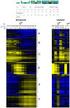
19 groupcomparisonplots 19 Details numprotein clustering The number of proteins which will be presented in each heatmap. Default is 100. Maximum possible number of protein for one heatmap is 180. Determines how to order proteins and comparisons. Hierarchical cluster analysis with Ward method(minimum variance) is performed. protein means that protein dendrogram is computed and reordered based on protein means (the order of row is changed). comparison means comparison dendrogram is computed and reordered based on comparison means (the order of comparison is changed). both means to reorder both protein and comparison. Default is protein. width width of the saved file. Default is 10. height height of the saved file. Default is 10. which.comparison list of comparisons to draw plots. List can be labels of comparisons or order numbers of comparisons from levels(data$label), such as levels(testresultmulticomparisons$compariso Default is "all", which generates all plots for each protein. address the name of folder that will store the results. Default folder is the current working directory. The other assigned folder has to be existed under the current working directory. An output pdf file is automatically created with the default name of "VolcanoPlot.pdf" or "Heatmap.pdf" or "ComparisonPlot.pdf". The command address can help to specify where to store the file as well as how to modify the beginning of the file name. If address=false, plot will be not saved as pdf file but showed in window. Volcano plot : illustrate actual log-fold changes and adjusted p-values for each comparison separately with all proteins. The x-axis is the log fold change. The base of logarithm transformation is the same as specified in "logtrans" from dataprocess. The y-axis is the negative log2 or log10 adjusted p-values. The horizontal dashed line represents the FDR cutoff. The points below the FDR cutoff line are non-significantly abundant proteins (colored in black). The points above the FDR cutoff line are significantly abundant proteins (colored in red/blue for up-/down-regulated). If fold change cutoff is specified (FCcutoff = specific value), the points above the FDR cutoff line but within the FC cutoff line are non-significantly abundant proteins (colored in black)/ Heatmap : illustrate up-/down-regulated proteins for multiple comparisons with all proteins. Each column represents each comparison of interest. Each row represents each protein. Color red/blue represents proteins in that specific comparison are significantly up-regulated/downregulated proteins with FDR cutoff and/or FC cutoff. The color scheme shows the evidences of significance. The darker color it is, the stronger evidence of significance it has. Color gold represents proteins are not significantly different in abundance. Comparison plot : illustrate log-fold change and its variation of multiple comparisons for single protein. X-axis is comparison of interest. Y-axis is the log fold change. The red points are the estimated log fold change from the model. The blue error bars are the confidence interval with 0.95 significant level for log fold change. This interval is only based on the standard error, which is estimated from the model. The input of this function is "ComparisonResult" in the testing results from function (groupcomparison).

20 20 groupcomparisonplots References Meena Choi, Ching-Yun Chang, Timothy Clough, Daniel Broudy, Trevor Killeen, Brendan MacLean and Olga Vitek. "MSstats: an R package for statistical analysis of quantitative mass spectrometrybased proteomic experiments" Bioinformatics, 30(17): , Ching-Yun Chang, Paola Picotti, Ruth Huttenhain, Viola Heinzelmann-Schwarz, Marko Jovanovic, Ruedi Aebersold, Olga Vitek. "Protein significance analysis in selected reaction monitoring (SRM) measurements." Molecular & Cellular Proteomics, 11:M , Timothy Clough, Safia Thaminy, Susanne Ragg, Ruedi Aebersold, Olga Vitek. "Statistical protein quantification and significance analysis in label-free LC-M experiments with complex designs" BMC Bioinformatics, 13:S16, Examples QuantData<-dataProcess(SRMRawData) head(quantdata$processeddata) ## based on multiple comparisons (T1 vs T3; T1 vs T7; T1 vs T9) comparison1<-matrix(c(-1,0,1,0,0,0,0,0,0,0),nrow=1) comparison2<-matrix(c(-1,0,0,0,0,0,1,0,0,0),nrow=1) comparison3<-matrix(c(-1,0,0,0,0,0,0,0,1,0),nrow=1) comparison<-rbind(comparison1,comparison2, comparison3) row.names(comparison)<-c("t3-t1","t7-t1","t9-t1") testresultmulticomparisons<-groupcomparison(contrast.matrix=comparison,data=quantdata) testresultmulticomparisons$comparisonresult # Volcano plot with FDR cutoff = 0.05 and no FC cutoff groupcomparisonplots(data=testresultmulticomparisons$comparisonresult,type="volcanoplot",logbase.pvalue=2,addre # Volcano plot with FDR cutoff = 0.05, FC cutoff = 70, upper y-axis limit = 100, and no protein name displayed # FCcutoff=70 is for demonstration purpose groupcomparisonplots(data=testresultmulticomparisons$comparisonresult,type="volcanoplot",fccutoff=70, logbase.p # show only T3-T1 comparisons # Volcano plot with FDR cutoff = 0.05, FC cutoff = 70, upper y-axis limit = 100, and no protein name displayed # FCcutoff=70 is for demonstration purpose # groupcomparisonplots(data=testresultmulticomparisons$comparisonresult,type="volcanoplot",fccutoff=70, logbase # Heatmap with FDR cutoff = 0.05 groupcomparisonplots(data=testresultmulticomparisons$comparisonresult,type="heatmap", logbase.pvalue=2, address # Heatmap with FDR cutoff = 0.05 and FC cutoff = 70 # FCcutoff=70 is for demonstration purpose

21 MaxQtoMSstatsFormat 21 groupcomparisonplots(data=testresultmulticomparisons$comparisonresult,type="heatmap",fccutoff=70, logbase.pvalu # Comparison Plot groupcomparisonplots(data=testresultmulticomparisons$comparisonresult,type="comparisonplot",address="ex1_") # Comparison Plot groupcomparisonplots(data=testresultmulticomparisons$comparisonresult,type="comparisonplot",ylimup=8,ylimdown=- MaxQtoMSstatsFormat Generate MSstats required input format for MaxQuant output Convert MaxQuant output into the required input format for MSstats. Usage MaxQtoMSstatsFormat(evidence, annotation,proteingroups, proteinid="proteins", useuniquepeptide=true, summaryformultiplerows=max, fewmeasurements="remove", removempeptides=true) Arguments evidence annotation proteingroups proteinid name of evidence.txt data, which includes feature-level data. name of annotation.txt data which includes Raw.file, Condition, BioReplicate, Run, IsotopeLabelType information. name of proteingroups.txt data. It needs to matching protein group ID. If proteingroups=null, use Proteins column in evidence.txt. Proteins (default) or proteingroups in proteingroup.txt for Protein ID. useuniquepeptide TRUE(default) removes peptides that are assigned for more than one proteins. We assume to use unique peptide for each protein. summaryformultiplerows max(default) or sum - when there are multiple measurements for certain feature and certain fun, use highest or sum of all. fewmeasurements remove (default) will remove the features that have 1 or 2 measurements across runs. It can affect dataprocess function with unequal variance between features option. removempeptides TRUE(default) will remove the peptides including M sequence.
22 22 modelbasedqcplots Warning MSstats does not support for metabolic labeling or itraq experiments. modelbasedqcplots Visualization for model-based quality control in fitting model Usage To check the assumption of linear model(summarymethod="linear" and censoredint=null), modelbasedqcplots takes the results after fitting models from function (dataprocess) as input and automatically generate two types of figures in pdf files as output : (1) normal quantile-quantile plot (specify "QQPlot" in option type) for checking normally distributed errors.; (2) residual plot (specify "ResidualPlot" in option type) for checking constant variance among different features. modelbasedqcplots(data,type, axis.size=10,dot.size=3,text.size=7,legend.size=7, width=10, height=10, featurename=true,feature.qqplot="all",which.protein="all",address="") Arguments data type result data.frame called "ModelQC" in output from function dataprocess. choice of visualization. "QQPlots" represents normal quantile-quantile plot for each protein after fitting models. "ResidualPlots" represents a plot of residuals versus fitted values for each protein in the dataset. axis.size size of axes labels. Default is 10. dot.size size of points in the graph for residual plots and QQ plots. Default is 3. text.size size of labeling for feature names only in normal quantile-quantile plots separately for each feature. Default is 7. legend.size size of legend for feature names only in residual plots. Default is 7. featurename for "ResidualPlot" only, TRUE show feature labeling and FALSE means no feature legend printing. feature.qqplot "all"(default) means that one normal quantile-quantile plot will be generated with across features of a protein. "byfeature" will generate normal quantilequantile plots separately for each feature of a protein. width width of the saved file. Default is 10. height height of the saved file. Default is 10.
23 modelbasedqcplots 23 which.protein address Protein list to draw plots. List can be names of Proteins or order numbers of Proteins from levels(data$protein). Default is "all", which generates all plots for each protein. the name of folder that will store the results. Default folder is the current working directory. The other assigned folder has to be existed under the current working directory. If type="residualplots" or "QQPlots", "ResidualPlots.pdf" or "QQPlots.plf" will be generated. The command address can help to specify where to store the file as well as how to modify the beginning of the file name. If address=false, plot will be not saved as pdf file but showed in window. Details Results based on statistical models are accurate as long as the assumptions of the model are met. The model assumes that the measurement errors are normally distributed with mean 0 and constant variance. The assumption of a constant variance can be checked by examining the residuals from the model. QQPlots : a normal quantile-quantile plot for each protein is generated in order to check whether the errors are well approximated by a normal distribution. If points fall approximately along a straight line, then the assumption is appropriate for that protein. Only large deviations from the line are problematic. ResidualPlots : The plots of residuals against predicted(fitted) values. If it shows a random scatter, then the assumption is appropriate. The input of this function is "ModelQC" in the results from function (dataprocess). References Ching-Yun Chang, Paola Picotti, Ruth Huttenhain, Viola Heinzelmann-Schwarz, Marko Jovanovic, Ruedi Aebersold, Olga Vitek. "Protein significance analysis in selected reaction monitoring (SRM) measurements." Molecular & Cellular Proteomics, 11:M , Timothy Clough, Safia Thaminy, Susanne Ragg, Ruedi Aebersold, Olga Vitek. "Statistical protein quantification and significance analysis in label-free LC-M experiments with complex designs" BMC Bioinformatics, 13:S16, Examples QuantData<-dataProcess(SRMRawData, summarymethod="linear", censoredint=null) head(quantdata$modelqc) # normal quantile-quantile plots modelbasedqcplots(data=quantdata$modelqc,type="qqplots",address="")
24 24 quantification # residual plots modelbasedqcplots(data=quantdata$modelqc,type="residualplots",address="") quantification Protein sample quantification or group quantification Usage Model-based quantification for each condition or for each biological samples per protein in a targeted Selected Reaction Monitoring (SRM), Data-Dependent Acquisition (DDA or shotgun), and Data-Independent Acquisition (DIA or SWATH-MS) experiment. Quantification takes the processed data set by dataprocess as input and automatically generate the quantification results (data.frame) with long or matrix format. quantification(data,type="sample",format="matrix", scopeoftechreplication="restricted", scopeofbiore Arguments data type name of the (processed) data set. choice of quantification. "Sample" or "Group" for protein sample quantification or group quantification. format choice of returned format. "long" for long format which has the columns named Protein, Condition, LonIntensities (and BioReplicate if it is subject quantification), NumFeature for number of transitions for a protein, and NumPeaks for number of observed peak intensities for a protein. "matrix" for data matrix format which has the rows for Protein and the columns, which are Groups(or Conditions) for group quantification or the combinations of BioReplicate and Condition (labeled by "BioReplicate"_"Condition") for sample quantification. Default is "matrix" scopeofbioreplication choice of scope of biological replication. "restricted" (default) represents restricted scope of biological replication by specifying subject term as fixed effect in the model. "expanded" represents expanded scope of biological replication by specifying subject term as random effect in the model. scopeoftechreplication choice of scope of technical MS run replication. "restricted"(default) represents restricted scope of technical MS run replication by specifying run term as fixed effect in the model. "expanded" represents expanded scope of technical MS run replication by specifying run term as random effect in the model. interference choice of interference data. TRUE(default) means data contain interference transitions and need additional model interaction to address the interference. FALSE means data contain no interference transitions and no need additional model interaction to address the interference.
25 quantification 25 Details missing.action specifies the action to take in presence of extreme missing values; must be one of nointeraction, impute, or remove. Default is nointeraction. equalfeaturevar logical variable for whether the model should account for heterogeneous variation among intensities from different features. Default is TRUE, which assume equal variance among intensities from features. FALSE means that we cannot assume equal variance among intensities from features, then we will account for heterogeneous variation from different features. Sample quantification : model-based individual biological sample quantification for each protein. The label of each biological sample is a combination of the corresponding group and the sample ID. The same model with groupcomparison will be used. However, if there is only one transition in a certain protein, the estimate of variation is NA. Therefore, the result may be unreliable. Group quantification : model-based quantification for individual group or individual condition per protein. The same model with groupcomparison will be used. The quantification for reference is the average among all reference intensities. The quantification for endogenous samples is based on the log-intensities of model-based averaging of all endogenous transitions within a specific sample. The quantification for reference sample is based on the log-intensities of the model-based averaging among all reference transitions. The quantification of log-ratios of specific endogenous sample over reference sample can be obtained by the quantification of that endogenous sample minus the quantification of the reference sample. The input of this function is the quantitative data from function (dataprocess). References Meena Choi, Ching-Yun Chang, Timothy Clough, Daniel Broudy, Trevor Killeen, Brendan MacLean and Olga Vitek. "MSstats: an R package for statistical analysis of quantitative mass spectrometrybased proteomic experiments" Bioinformatics, 30(17): , Ching-Yun Chang, Paola Picotti, Ruth Huttenhain, Viola Heinzelmann-Schwarz, Marko Jovanovic, Ruedi Aebersold, Olga Vitek. "Protein significance analysis in selected reaction monitoring (SRM) measurements." Molecular & Cellular Proteomics, 11:M , Timothy Clough, Safia Thaminy, Susanne Ragg, Ruedi Aebersold, Olga Vitek. "Statistical protein quantification and significance analysis in label-free LC-M experiments with complex designs" BMC Bioinformatics, 13:S16, Examples #Consider quantitative data (i.e. QuantData) from a yeast study with ten time points of interests, three biologica #Sample quantification shows model-based estimation of protein abundance in each biological replicate within each
26 26 SRMRawData #Group quantification shows model-based estimation of protein abundance in each time point. QuantData<-dataProcess(SRMRawData) head(quantdata$processeddata) # Sample quantification samplequant<-quantification(quantdata$processeddata) head(samplequant) # Group quantification groupquant<-quantification(quantdata$processeddata, type="group") head(groupquant) SRMRawData Example dataset from a SRM experiment with stable isotope labeled reference of a time course yeast study This is a partial data set obtained from a published study (Picotti, et. al, 2009). The experiment targeted 45 proteins in the glycolysis/gluconeogenesis/tca cycle/glyoxylate cycle network, which spans the range of protein abundance from less than 128 to 10E6 copies per cell. Three biological replicates were analyzed at ten time points (T1-T10), while yeasts transited through exponential growth in a glucose-rich medium (T1-T4), diauxic shift (T5-T6), post-diauxic phase (T7-T9), and stationary phase (T10). Prior to trypsinization, the samples were mixed with an equal amount of proteins from the same N15-labeled yeast sample, which was used as a reference. Each sample was profiled in a single mass spectrometry run, where each protein was represented by up to two peptides and each peptide by up to three transitions. The goal of this study is to detect significantly change in protein abundance across time points. Transcriptional activity under the same experimental conditions has been previously investigated by (DeRisi et. al., 1997). Genes coding for 29 of the proteins are differentially expressed between conditions similar to those represented by T7 and T1 and could be treated as external sources to validate the proteomics analysis. In this exampled data set, two of the targeted proteins are selected and validated with gene expression study: Protein IDHC (gene name IDP2) is differentially expressed in time point 1 and time point 7, whereas, Protein PMG2 (gene name GPM2) is not. The protein names are based on Swiss Prot Name. Usage SRMRawData Format data.frame
27 transformmsnsettomsstats 27 Details The raw data (input data for MSstats) is required to contain variable of ProteinName, PeptideSequence, PrecursorCharge, FragmentIon, ProductCharge, IsotopeLabelType, Condition, BioReplicate, Run, Intensity. The variable names should be fixed. If the information of one or more columns is not available for the original raw data, please retain the column variables and type in fixed value. For example, the original raw data does not contain the information of ProductCharge, we retain the column ProductCharge and type in NA for all transitions in RawData. The column BioReplicate should label with unique patient ID (i.e., same patients should label with the same ID). Variable Intensity is required to be original signal without any log transformation and can be specified as the peak of height or the peak of area under curve. References Ching-Yun Chang, Paola Picotti, Ruth Huttenhain, Viola Heinzelmann-Schwarz, Marko Jovanovic, Ruedi Aebersold, Olga Vitek. Protein significance analysis in selected reaction monitoring (SRM) measurements. Molecular & Cellular Proteomics, 11:M , Examples head(srmrawdata) transformmsnsettomsstats Transforms a MSnSet class dataset into a required input for MSstats Convert MSnSet class into the required input format for MSstats Usage transformmsnsettomsstats(proteinname,peptidesequence, PrecursorCharge, FragmentIon, ProductCharge, IsotopeLabelType, Bioreplicate,Run, Condition, data)
28 28 transformmsnsettomsstats Arguments data ProteinName name of dataset with MSnSet class name of column in the MSnSet that contains protein information. If not assigned, "ProteinAccession" column will be used. PeptideSequence name of column in the MSnSet that contains information of peptide sequence. If not assigned, "PeptideSequence" column will be used. PrecursorCharge name of column in the MSnSet that contains information of peptide charge. If not assigned, "charge" will be used. FragmentIon ProductCharge name of column in the MSnSet that contains information of transition. If not assigned, value of "NA" will be used. name of column in the MSnSet that contains information of transition charge. If not assigned, value of "NA" will be used. IsotopeLabelType name of the column in phenodata component of MSnSet that contains labeling information. If not assigned, "mz" column will be used. Bioreplicate Run Condition name of the column in phenodata component of MSnSet that contains unique ids of biological replicates of the corresponding samples. If not assigned, rownames of pdata(data) will be used. name of the column in MSnSet that contains information of experimental MS runs. If not assigned, "file" column will be used. names of the columns in phenodata that correspond to the group variables of interest. If more than one variable is listed, a concatentated variable is created based on the variables. Details raw : See MSnSet for the general format on the proteomics. Condition must be specified. Intensity should not be specified, as this information is extracted automatically from the assaydata component of the MSnSet. Warning The types of experiment that MSstats can analyze are LC-MS, SRM, DIA(SWATH) with label-free or labeled synthetic peptides. MSstats does not support for metabolic labeling or itraq experiments.
29 transformmsstatstomsnset 29 References Meena Choi, Ching-Yun Chang, Timothy Clough, Daniel Broudy, Trevor Killeen, Brendan MacLean and Olga Vitek. "MSstats: an R package for statistical analysis of quantitative mass spectrometrybased proteomic experiments" Bioinformatics, 30(17): , Ching-Yun Chang, Paola Picotti, Ruth Huttenhain, Viola Heinzelmann-Schwarz, Marko Jovanovic, Ruedi Aebersold, Olga Vitek. "Protein significance analysis in selected reaction monitoring (SRM) measurements." Molecular & Cellular Proteomics, 11:M , Timothy Clough, Safia Thaminy, Susanne Ragg, Ruedi Aebersold, Olga Vitek. "Statistical protein quantification and significance analysis in label-free LC-M experiments with complex designs" BMC Bioinformatics, 13:S16, Gatto, L. and Lilly, K.S. (2012). MSnbase-an R Bioconductor package for isobaric tagged mass spectrometry data visualization, processing and quantitation. Bioinformatics, 28, Examples library("msnbase") data(itraqdata) class(itraqdata) msnset <- quantify(itraqdata[10:15], method = "trap", reporters = itraq4, verbose = FALSE) msnset pdata(msnset)$group<-c("control","disease","control","disease") transformmsnsettomsstats(data=msnset,condition="group") transformmsstatstomsnset Transformation input format for MSstats to MSnSet class Convert the required input format for MSstats into general format (MSnSet class in MSnbase package) on the proteomics. Usage transformmsstatstomsnset(data) Arguments data name of the raw (input) data set with required column for MSstats.
30 30 transformmsstatstomsnset Details raw : See SRMRawData for the required data structure of raw (input) data. output : After transformation, assaydata includes value of Intensity. phenodata has variables of IsotopeLabelType, Condition, BioReplicate,Run. featuredata has variables of ProteinName, PeptideSequence, PrecursorCharge, FragmentIon, ProductCharge. References Meena Choi, Ching-Yun Chang, Timothy Clough, Daniel Broudy, Trevor Killeen, Brendan MacLean and Olga Vitek. "MSstats: an R package for statistical analysis of quantitative mass spectrometrybased proteomic experiments" Bioinformatics, 30(17): , Ching-Yun Chang, Paola Picotti, Ruth Huttenhain, Viola Heinzelmann-Schwarz, Marko Jovanovic, Ruedi Aebersold, Olga Vitek. "Protein significance analysis in selected reaction monitoring (SRM) measurements." Molecular & Cellular Proteomics, 11:M , Timothy Clough, Safia Thaminy, Susanne Ragg, Ruedi Aebersold, Olga Vitek. "Statistical protein quantification and significance analysis in label-free LC-M experiments with complex designs" BMC Bioinformatics, 13:S16, Gatto, L. and Lilly, K.S. (2012). MSnbase-an R Bioconductor package for isobaric tagged mass spectrometry data visualization, processing and quantitation. Bioinformatics, 28, Examples library(msnbase) quant.msnset<-transformmsstatstomsnset(srmrawdata)
31 Index Topic MSstats MSstats-package, 2 dataprocess, 2, 3, 6, 8, 11, 16, 19, dataprocessplots, 2, 6 DDARawData, 2, 9 DDARawData.Skyline, 10 designsamplesize, 2, 11, 13, 14 designsamplesizeplots, 2, 13 DIARawData, 2, 15 groupcomparison, 2, 16, 17, 19 groupcomparisonplots, 2, 17 lm, 16 lmer, 16 MaxQtoMSstatsFormat, 21 modelbasedqcplots, 22 MSnSet, 28 MSstats (MSstats-package), 2 MSstats-package, 2 quantification, 2, 24 SRMRawData, 2, 5, 26, 30 transformmsnsettomsstats, 27 transformmsstatstomsnset, 29 31
Tutorial for proteome data analysis using the Perseus software platform
 Tutorial for proteome data analysis using the Perseus software platform Laboratory of Mass Spectrometry, LNBio, CNPEM Tutorial version 1.0, January 2014. Note: This tutorial was written based on the information
ProteinPilot Report for ProteinPilot Software
 ProteinPilot Report for ProteinPilot Software Detailed Analysis of Protein Identification / Quantitation Results Automatically Sean L Seymour, Christie Hunter SCIEX, USA Pow erful mass spectrometers like
Pinpointing phosphorylation sites using Selected Reaction Monitoring and Skyline
 Pinpointing phosphorylation sites using Selected Reaction Monitoring and Skyline Christina Ludwig group of Ruedi Aebersold, ETH Zürich The challenge of phosphosite assignment Peptides Phosphopeptides MS/MS
Tutorial 9: SWATH data analysis in Skyline
 Tutorial 9: SWATH data analysis in Skyline In this tutorial we will learn how to perform targeted post-acquisition analysis for protein identification and quantitation using a data-independent dataset
DeCyder Extended Data Analysis module Version 1.0
 GE Healthcare DeCyder Extended Data Analysis module Version 1.0 Module for DeCyder 2D version 6.5 User Manual Contents 1 Introduction 1.1 Introduction... 7 1.2 The DeCyder EDA User Manual... 9 1.3 Getting
Session 1. Course Presentation: Mass spectrometry-based proteomics for molecular and cellular biologists
 Program Overview Session 1. Course Presentation: Mass spectrometry-based proteomics for molecular and cellular biologists Session 2. Principles of Mass Spectrometry Session 3. Mass spectrometry based proteomics
Increasing the Multiplexing of High Resolution Targeted Peptide Quantification Assays
 Increasing the Multiplexing of High Resolution Targeted Peptide Quantification Assays Scheduled MRM HR Workflow on the TripleTOF Systems Jenny Albanese, Christie Hunter AB SCIEX, USA Targeted quantitative
Package empiricalfdr.deseq2
 Type Package Package empiricalfdr.deseq2 May 27, 2015 Title Simulation-Based False Discovery Rate in RNA-Seq Version 1.0.3 Date 2015-05-26 Author Mikhail V. Matz Maintainer Mikhail V. Matz
A Streamlined Workflow for Untargeted Metabolomics
 A Streamlined Workflow for Untargeted Metabolomics Employing XCMS plus, a Simultaneous Data Processing and Metabolite Identification Software Package for Rapid Untargeted Metabolite Screening Baljit K.
Mass Spectrometry Signal Calibration for Protein Quantitation
 Cambridge Isotope Laboratories, Inc. www.isotope.com Proteomics Mass Spectrometry Signal Calibration for Protein Quantitation Michael J. MacCoss, PhD Associate Professor of Genome Sciences University of
Quantitative proteomics background
 Proteomics data analysis seminar Quantitative proteomics and transcriptomics of anaerobic and aerobic yeast cultures reveals post transcriptional regulation of key cellular processes de Groot, M., Daran
MultiQuant Software 2.0 for Targeted Protein / Peptide Quantification
 MultiQuant Software 2.0 for Targeted Protein / Peptide Quantification Gold Standard for Quantitative Data Processing Because of the sensitivity, selectivity, speed and throughput at which MRM assays can
Hierarchical Clustering Analysis
 Hierarchical Clustering Analysis What is Hierarchical Clustering? Hierarchical clustering is used to group similar objects into clusters. In the beginning, each row and/or column is considered a cluster.
MRMPilot Software: Accelerating MRM Assay Development for Targeted Quantitative Proteomics
 MRMPilot Software: Accelerating MRM Assay Development for Targeted Quantitative Proteomics With Unique QTRAP and TripleTOF 5600 System Technology Targeted peptide quantification is a rapidly growing application
using ms based proteomics
 quantification using ms based proteomics lennart martens Computational Omics and Systems Biology Group Department of Medical Protein Research, VIB Department of Biochemistry, Ghent University Ghent, Belgium
Scatter Plots with Error Bars
 Chapter 165 Scatter Plots with Error Bars Introduction The procedure extends the capability of the basic scatter plot by allowing you to plot the variability in Y and X corresponding to each point. Each
MarkerView Software 1.2.1 for Metabolomic and Biomarker Profiling Analysis
 MarkerView Software 1.2.1 for Metabolomic and Biomarker Profiling Analysis Overview MarkerView software is a novel program designed for metabolomics applications and biomarker profiling workflows 1. Using
The Scheduled MRM Algorithm Enables Intelligent Use of Retention Time During Multiple Reaction Monitoring
 The Scheduled MRM Algorithm Enables Intelligent Use of Retention Time During Multiple Reaction Monitoring Delivering up to 2500 MRM Transitions per LC Run Christie Hunter 1, Brigitte Simons 2 1 AB SCIEX,
泛 用 蛋 白 質 體 學 之 質 譜 儀 資 料 分 析 平 台 的 建 立 與 應 用 Universal Mass Spectrometry Data Analysis Platform for Quantitative and Qualitative Proteomics
 泛 用 蛋 白 質 體 學 之 質 譜 儀 資 料 分 析 平 台 的 建 立 與 應 用 Universal Mass Spectrometry Data Analysis Platform for Quantitative and Qualitative Proteomics 2014 Training Course Wei-Hung Chang ( 張 瑋 宏 ) ABRC, Academia
Exercise 1.12 (Pg. 22-23)
 Individuals: The objects that are described by a set of data. They may be people, animals, things, etc. (Also referred to as Cases or Records) Variables: The characteristics recorded about each individual.
MASCOT Search Results Interpretation
 The Mascot protein identification program (Matrix Science, Ltd.) uses statistical methods to assess the validity of a match. MS/MS data is not ideal. That is, there are unassignable peaks (noise) and usually
Exiqon Array Software Manual. Quick guide to data extraction from mircury LNA microrna Arrays
 Exiqon Array Software Manual Quick guide to data extraction from mircury LNA microrna Arrays March 2010 Table of contents Introduction Overview...................................................... 3 ImaGene
Protein Prospector and Ways of Calculating Expectation Values
 Protein Prospector and Ways of Calculating Expectation Values 1/16 Aenoch J. Lynn; Robert J. Chalkley; Peter R. Baker; Mark R. Segal; and Alma L. Burlingame University of California, San Francisco, San
Exploratory data analysis (Chapter 2) Fall 2011
 Exploratory data analysis (Chapter 2) Fall 2011 Data Examples Example 1: Survey Data 1 Data collected from a Stat 371 class in Fall 2005 2 They answered questions about their: gender, major, year in school,
Data Analysis Tools. Tools for Summarizing Data
 Data Analysis Tools This section of the notes is meant to introduce you to many of the tools that are provided by Excel under the Tools/Data Analysis menu item. If your computer does not have that tool
Preprocessing, Management, and Analysis of Mass Spectrometry Proteomics Data
 Preprocessing, Management, and Analysis of Mass Spectrometry Proteomics Data M. Cannataro, P. H. Guzzi, T. Mazza, and P. Veltri Università Magna Græcia di Catanzaro, Italy 1 Introduction Mass Spectrometry
mquest/mprophet Software Manual
 mquest/mprophet Software Manual STATISTICAL ANALYSIS OF MRM DATA 1/14 General mquest/mprophet is a software for the analysis of multiple/selected reaction monitoring MRM/SRM data. It was developed at the
Engineering Problem Solving and Excel. EGN 1006 Introduction to Engineering
 Engineering Problem Solving and Excel EGN 1006 Introduction to Engineering Mathematical Solution Procedures Commonly Used in Engineering Analysis Data Analysis Techniques (Statistics) Curve Fitting techniques
Analyzing the Effect of Treatment and Time on Gene Expression in Partek Genomics Suite (PGS) 6.6: A Breast Cancer Study
 Analyzing the Effect of Treatment and Time on Gene Expression in Partek Genomics Suite (PGS) 6.6: A Breast Cancer Study The data for this study is taken from experiment GSE848 from the Gene Expression
An analysis method for a quantitative outcome and two categorical explanatory variables.
 Chapter 11 Two-Way ANOVA An analysis method for a quantitative outcome and two categorical explanatory variables. If an experiment has a quantitative outcome and two categorical explanatory variables that
Practical Differential Gene Expression. Introduction
 Practical Differential Gene Expression Introduction In this tutorial you will learn how to use R packages for analysis of differential expression. The dataset we use are the gene-summarized count data
SELDI-TOF Mass Spectrometry Protein Data By Huong Thi Dieu La
 SELDI-TOF Mass Spectrometry Protein Data By Huong Thi Dieu La References Alejandro Cruz-Marcelo, Rudy Guerra, Marina Vannucci, Yiting Li, Ching C. Lau, and Tsz-Kwong Man. Comparison of algorithms for pre-processing
Tutorial for Proteomics Data Submission. Katalin F. Medzihradszky Robert J. Chalkley UCSF
 Tutorial for Proteomics Data Submission Katalin F. Medzihradszky Robert J. Chalkley UCSF Why Have Guidelines? Large-scale proteomics studies create huge amounts of data. It is impossible/impractical to
STATS8: Introduction to Biostatistics. Data Exploration. Babak Shahbaba Department of Statistics, UCI
 STATS8: Introduction to Biostatistics Data Exploration Babak Shahbaba Department of Statistics, UCI Introduction After clearly defining the scientific problem, selecting a set of representative members
Gene Expression Analysis
 Gene Expression Analysis Jie Peng Department of Statistics University of California, Davis May 2012 RNA expression technologies High-throughput technologies to measure the expression levels of thousands
How To Run Statistical Tests in Excel
 How To Run Statistical Tests in Excel Microsoft Excel is your best tool for storing and manipulating data, calculating basic descriptive statistics such as means and standard deviations, and conducting
In-Depth Qualitative Analysis of Complex Proteomic Samples Using High Quality MS/MS at Fast Acquisition Rates
 In-Depth Qualitative Analysis of Complex Proteomic Samples Using High Quality MS/MS at Fast Acquisition Rates Using the Explore Workflow on the AB SCIEX TripleTOF 5600 System A major challenge in proteomics
Data Mining Techniques Chapter 5: The Lure of Statistics: Data Mining Using Familiar Tools
 Data Mining Techniques Chapter 5: The Lure of Statistics: Data Mining Using Familiar Tools Occam s razor.......................................................... 2 A look at data I.........................................................
Common Tools for Displaying and Communicating Data for Process Improvement
 Common Tools for Displaying and Communicating Data for Process Improvement Packet includes: Tool Use Page # Box and Whisker Plot Check Sheet Control Chart Histogram Pareto Diagram Run Chart Scatter Plot
Step-by-Step Guide to Bi-Parental Linkage Mapping WHITE PAPER
 Step-by-Step Guide to Bi-Parental Linkage Mapping WHITE PAPER JMP Genomics Step-by-Step Guide to Bi-Parental Linkage Mapping Introduction JMP Genomics offers several tools for the creation of linkage maps
A Short Guide to R with RStudio
 Short Guides to Microeconometrics Fall 2013 Prof. Dr. Kurt Schmidheiny Universität Basel A Short Guide to R with RStudio 1 Introduction 2 2 Installing R and RStudio 2 3 The RStudio Environment 2 4 Additions
Doing Multiple Regression with SPSS. In this case, we are interested in the Analyze options so we choose that menu. If gives us a number of choices:
 Doing Multiple Regression with SPSS Multiple Regression for Data Already in Data Editor Next we want to specify a multiple regression analysis for these data. The menu bar for SPSS offers several options:
Tutorial 3: Graphics and Exploratory Data Analysis in R Jason Pienaar and Tom Miller
 Tutorial 3: Graphics and Exploratory Data Analysis in R Jason Pienaar and Tom Miller Getting to know the data An important first step before performing any kind of statistical analysis is to familiarize
Using Excel for descriptive statistics
 FACT SHEET Using Excel for descriptive statistics Introduction Biologists no longer routinely plot graphs by hand or rely on calculators to carry out difficult and tedious statistical calculations. These
11. Analysis of Case-control Studies Logistic Regression
 Research methods II 113 11. Analysis of Case-control Studies Logistic Regression This chapter builds upon and further develops the concepts and strategies described in Ch.6 of Mother and Child Health:
STATISTICA Formula Guide: Logistic Regression. Table of Contents
 : Table of Contents... 1 Overview of Model... 1 Dispersion... 2 Parameterization... 3 Sigma-Restricted Model... 3 Overparameterized Model... 4 Reference Coding... 4 Model Summary (Summary Tab)... 5 Summary
BASIC STATISTICAL METHODS FOR GENOMIC DATA ANALYSIS
 BASIC STATISTICAL METHODS FOR GENOMIC DATA ANALYSIS SEEMA JAGGI Indian Agricultural Statistics Research Institute Library Avenue, New Delhi-110 012 [email protected] Genomics A genome is an organism s
2. Simple Linear Regression
 Research methods - II 3 2. Simple Linear Regression Simple linear regression is a technique in parametric statistics that is commonly used for analyzing mean response of a variable Y which changes according
Step-by-Step Guide to Basic Expression Analysis and Normalization
 Step-by-Step Guide to Basic Expression Analysis and Normalization Page 1 Introduction This document shows you how to perform a basic analysis and normalization of your data. A full review of this document
NATIONAL GENETICS REFERENCE LABORATORY (Manchester)
 NATIONAL GENETICS REFERENCE LABORATORY (Manchester) MLPA analysis spreadsheets User Guide (updated October 2006) INTRODUCTION These spreadsheets are designed to assist with MLPA analysis using the kits
Appendix 2.1 Tabular and Graphical Methods Using Excel
 Appendix 2.1 Tabular and Graphical Methods Using Excel 1 Appendix 2.1 Tabular and Graphical Methods Using Excel The instructions in this section begin by describing the entry of data into an Excel spreadsheet.
Survey, Statistics and Psychometrics Core Research Facility University of Nebraska-Lincoln. Log-Rank Test for More Than Two Groups
 Survey, Statistics and Psychometrics Core Research Facility University of Nebraska-Lincoln Log-Rank Test for More Than Two Groups Prepared by Harlan Sayles (SRAM) Revised by Julia Soulakova (Statistics)
Accurate Mass Screening Workflows for the Analysis of Novel Psychoactive Substances
 Accurate Mass Screening Workflows for the Analysis of Novel Psychoactive Substances TripleTOF 5600 + LC/MS/MS System with MasterView Software Adrian M. Taylor AB Sciex Concord, Ontario (Canada) Overview
La Protéomique : Etat de l art et perspectives
 La Protéomique : Etat de l art et perspectives Odile Schiltz Institut de Pharmacologie et de Biologie Structurale CNRS, Université de Toulouse, [email protected] Protéomique et Spectrométrie de Masse
Database Searching Tutorial/Exercises Jimmy Eng
 Database Searching Tutorial/Exercises Jimmy Eng Use the PETUNIA interface to run a search and generate a pepxml file that is analyzed through the PepXML Viewer. This tutorial will walk you through the
Statistical Analysis. NBAF-B Metabolomics Masterclass. Mark Viant
 Statistical Analysis NBAF-B Metabolomics Masterclass Mark Viant 1. Introduction 2. Univariate analysis Overview of lecture 3. Unsupervised multivariate analysis Principal components analysis (PCA) Interpreting
AP Physics 1 and 2 Lab Investigations
 AP Physics 1 and 2 Lab Investigations Student Guide to Data Analysis New York, NY. College Board, Advanced Placement, Advanced Placement Program, AP, AP Central, and the acorn logo are registered trademarks
SPSS Manual for Introductory Applied Statistics: A Variable Approach
 SPSS Manual for Introductory Applied Statistics: A Variable Approach John Gabrosek Department of Statistics Grand Valley State University Allendale, MI USA August 2013 2 Copyright 2013 John Gabrosek. All
ALLEN Mouse Brain Atlas
 TECHNICAL WHITE PAPER: QUALITY CONTROL STANDARDS FOR HIGH-THROUGHPUT RNA IN SITU HYBRIDIZATION DATA GENERATION Consistent data quality and internal reproducibility are critical concerns for high-throughput
InfiniteInsight 6.5 sp4
 End User Documentation Document Version: 1.0 2013-11-19 CUSTOMER InfiniteInsight 6.5 sp4 Toolkit User Guide Table of Contents Table of Contents About this Document 3 Common Steps 4 Selecting a Data Set...
Choices, choices, choices... Which sequence database? Which modifications? What mass tolerance?
 Optimization 1 Choices, choices, choices... Which sequence database? Which modifications? What mass tolerance? Where to begin? 2 Sequence Databases Swiss-prot MSDB, NCBI nr dbest Species specific ORFS
Example: Credit card default, we may be more interested in predicting the probabilty of a default than classifying individuals as default or not.
 Statistical Learning: Chapter 4 Classification 4.1 Introduction Supervised learning with a categorical (Qualitative) response Notation: - Feature vector X, - qualitative response Y, taking values in C
Windows-Based Meta-Analysis Software. Package. Version 2.0
 1 Windows-Based Meta-Analysis Software Package Version 2.0 The Hunter-Schmidt Meta-Analysis Programs Package includes six programs that implement all basic types of Hunter-Schmidt psychometric meta-analysis
Quality Assessment of Exon and Gene Arrays
 Quality Assessment of Exon and Gene Arrays I. Introduction In this white paper we describe some quality assessment procedures that are computed from CEL files from Whole Transcript (WT) based arrays such
Real-time PCR: Understanding C t
 APPLICATION NOTE Real-Time PCR Real-time PCR: Understanding C t Real-time PCR, also called quantitative PCR or qpcr, can provide a simple and elegant method for determining the amount of a target sequence
Analysis of Variance. MINITAB User s Guide 2 3-1
 3 Analysis of Variance Analysis of Variance Overview, 3-2 One-Way Analysis of Variance, 3-5 Two-Way Analysis of Variance, 3-11 Analysis of Means, 3-13 Overview of Balanced ANOVA and GLM, 3-18 Balanced
Package tagcloud. R topics documented: July 3, 2015
 Package tagcloud July 3, 2015 Type Package Title Tag Clouds Version 0.6 Date 2015-07-02 Author January Weiner Maintainer January Weiner Description Generating Tag and Word Clouds.
Application Note # LCMS-81 Introducing New Proteomics Acquisiton Strategies with the compact Towards the Universal Proteomics Acquisition Method
 Application Note # LCMS-81 Introducing New Proteomics Acquisiton Strategies with the compact Towards the Universal Proteomics Acquisition Method Introduction During the last decade, the complexity of samples
Univariate Regression
 Univariate Regression Correlation and Regression The regression line summarizes the linear relationship between 2 variables Correlation coefficient, r, measures strength of relationship: the closer r is
NCSS Statistical Software Principal Components Regression. In ordinary least squares, the regression coefficients are estimated using the formula ( )
 Chapter 340 Principal Components Regression Introduction is a technique for analyzing multiple regression data that suffer from multicollinearity. When multicollinearity occurs, least squares estimates
An Introduction to Point Pattern Analysis using CrimeStat
 Introduction An Introduction to Point Pattern Analysis using CrimeStat Luc Anselin Spatial Analysis Laboratory Department of Agricultural and Consumer Economics University of Illinois, Urbana-Champaign
Chapter 7. One-way ANOVA
 Chapter 7 One-way ANOVA One-way ANOVA examines equality of population means for a quantitative outcome and a single categorical explanatory variable with any number of levels. The t-test of Chapter 6 looks
LEGENDplex Data Analysis Software
 LEGENDplex Data Analysis Software Version 7.0 User Guide Copyright 2013-2014 VigeneTech. All rights reserved. Contents Introduction... 1 Lesson 1 - The Workspace... 2 Lesson 2 Quantitative Wizard... 3
Identification of rheumatoid arthritis and osteoarthritis patients by transcriptome-based rule set generation
 Identification of rheumatoid arthritis and osterthritis patients by transcriptome-based rule set generation Bering Limited Report generated on September 19, 2014 Contents 1 Dataset summary 2 1.1 Project
Simple Predictive Analytics Curtis Seare
 Using Excel to Solve Business Problems: Simple Predictive Analytics Curtis Seare Copyright: Vault Analytics July 2010 Contents Section I: Background Information Why use Predictive Analytics? How to use
Data Exploration Data Visualization
 Data Exploration Data Visualization What is data exploration? A preliminary exploration of the data to better understand its characteristics. Key motivations of data exploration include Helping to select
Gamma Distribution Fitting
 Chapter 552 Gamma Distribution Fitting Introduction This module fits the gamma probability distributions to a complete or censored set of individual or grouped data values. It outputs various statistics
Package copa. R topics documented: August 9, 2016
 Package August 9, 2016 Title Functions to perform cancer outlier profile analysis. Version 1.41.0 Date 2006-01-26 Author Maintainer COPA is a method to find genes that undergo
Aiping Lu. Key Laboratory of System Biology Chinese Academic Society [email protected]
 Aiping Lu Key Laboratory of System Biology Chinese Academic Society [email protected] Proteome and Proteomics PROTEin complement expressed by genome Marc Wilkins Electrophoresis. 1995. 16(7):1090-4. proteomics
Exploratory Data Analysis
 Exploratory Data Analysis Johannes Schauer [email protected] Institute of Statistics Graz University of Technology Steyrergasse 17/IV, 8010 Graz www.statistics.tugraz.at February 12, 2008 Introduction
Using R for Linear Regression
 Using R for Linear Regression In the following handout words and symbols in bold are R functions and words and symbols in italics are entries supplied by the user; underlined words and symbols are optional
Getting Started with R and RStudio 1
 Getting Started with R and RStudio 1 1 What is R? R is a system for statistical computation and graphics. It is the statistical system that is used in Mathematics 241, Engineering Statistics, for the following
An analysis appropriate for a quantitative outcome and a single quantitative explanatory. 9.1 The model behind linear regression
 Chapter 9 Simple Linear Regression An analysis appropriate for a quantitative outcome and a single quantitative explanatory variable. 9.1 The model behind linear regression When we are examining the relationship
Data exploration with Microsoft Excel: analysing more than one variable
 Data exploration with Microsoft Excel: analysing more than one variable Contents 1 Introduction... 1 2 Comparing different groups or different variables... 2 3 Exploring the association between categorical
More details on the inputs, functionality, and output can be found below.
 Overview: The SMEEACT (Software for More Efficient, Ethical, and Affordable Clinical Trials) web interface (http://research.mdacc.tmc.edu/smeeactweb) implements a single analysis of a two-armed trial comparing
X X X a) perfect linear correlation b) no correlation c) positive correlation (r = 1) (r = 0) (0 < r < 1)
 CORRELATION AND REGRESSION / 47 CHAPTER EIGHT CORRELATION AND REGRESSION Correlation and regression are statistical methods that are commonly used in the medical literature to compare two or more variables.
Protein Protein Interaction Networks
 Functional Pattern Mining from Genome Scale Protein Protein Interaction Networks Young-Rae Cho, Ph.D. Assistant Professor Department of Computer Science Baylor University it My Definition of Bioinformatics
Package missforest. February 20, 2015
 Type Package Package missforest February 20, 2015 Title Nonparametric Missing Value Imputation using Random Forest Version 1.4 Date 2013-12-31 Author Daniel J. Stekhoven Maintainer
Using Illumina BaseSpace Apps to Analyze RNA Sequencing Data
 Using Illumina BaseSpace Apps to Analyze RNA Sequencing Data The Illumina TopHat Alignment and Cufflinks Assembly and Differential Expression apps make RNA data analysis accessible to any user, regardless
Data representation and analysis in Excel
 Page 1 Data representation and analysis in Excel Let s Get Started! This course will teach you how to analyze data and make charts in Excel so that the data may be represented in a visual way that reflects
Microsoft Excel Tutorial
 Microsoft Excel Tutorial Microsoft Excel spreadsheets are a powerful and easy to use tool to record, plot and analyze experimental data. Excel is commonly used by engineers to tackle sophisticated computations
Optimization of sampling strata with the SamplingStrata package
 Optimization of sampling strata with the SamplingStrata package Package version 1.1 Giulio Barcaroli January 12, 2016 Abstract In stratified random sampling the problem of determining the optimal size
January 26, 2009 The Faculty Center for Teaching and Learning
 THE BASICS OF DATA MANAGEMENT AND ANALYSIS A USER GUIDE January 26, 2009 The Faculty Center for Teaching and Learning THE BASICS OF DATA MANAGEMENT AND ANALYSIS Table of Contents Table of Contents... i
Medical Information Management & Mining. You Chen Jan,15, 2013 [email protected]
 Medical Information Management & Mining You Chen Jan,15, 2013 [email protected] 1 Trees Building Materials Trees cannot be used to build a house directly. How can we transform trees to building materials?
1) Write the following as an algebraic expression using x as the variable: Triple a number subtracted from the number
 1) Write the following as an algebraic expression using x as the variable: Triple a number subtracted from the number A. 3(x - x) B. x 3 x C. 3x - x D. x - 3x 2) Write the following as an algebraic expression
STATGRAPHICS Online. Statistical Analysis and Data Visualization System. Revised 6/21/2012. Copyright 2012 by StatPoint Technologies, Inc.
 STATGRAPHICS Online Statistical Analysis and Data Visualization System Revised 6/21/2012 Copyright 2012 by StatPoint Technologies, Inc. All rights reserved. Table of Contents Introduction... 1 Chapter
PUBLIC Model Manager User Guide
 SAP Predictive Analytics 2.4 2015-11-23 PUBLIC Content 1 Introduction....4 2 Concepts....5 2.1 Roles....5 2.2 Rights....6 2.3 Schedules....7 2.4 Tasks.... 7 3....8 3.1 My Model Manager....8 Overview....
From Reads to Differentially Expressed Genes. The statistics of differential gene expression analysis using RNA-seq data
 From Reads to Differentially Expressed Genes The statistics of differential gene expression analysis using RNA-seq data experimental design data collection modeling statistical testing biological heterogeneity
Effects of Intelligent Data Acquisition and Fast Laser Speed on Analysis of Complex Protein Digests
 Effects of Intelligent Data Acquisition and Fast Laser Speed on Analysis of Complex Protein Digests AB SCIEX TOF/TOF 5800 System with DynamicExit Algorithm and ProteinPilot Software for Robust Protein
Using Excel (Microsoft Office 2007 Version) for Graphical Analysis of Data
 Using Excel (Microsoft Office 2007 Version) for Graphical Analysis of Data Introduction In several upcoming labs, a primary goal will be to determine the mathematical relationship between two variable