
Security Target. McAfee Host Intrusion Prevention 8 and epolicy Orchestrator 4.5. Document Version 1.1. September 9, 2011
|
|
|
- Arron Jordan
- 10 years ago
- Views:
Transcription
1 Security Target McAfee Host Intrusion Prevention 8 and epolicy Orchestrator 4.5 Document Version 1.1 September 9, 2011 Document Version 1.1 McAfee Page 1 of 61
2 Prepared For: Prepared By: McAfee, Inc Mission College Blvd. Santa Clara, CA Apex Assurance Group, LLC 530 Lytton Avenue, Ste. 200 Palo Alto, CA Abstract This document provides the basis for an evaluation of a specific Target of Evaluation (TOE), the Host Intrusion Prevention 8 and epolicy Orchestrator 4.5. This Security Target (ST) defines a set of assumptions about the aspects of the environment, a list of threats that the product intends to counter, a set of security objectives, a set of security requirements and the IT security functions provided by the TOE which meet the set of requirements. Document Version 1.1 McAfee Page 2 of 61
3 Table of Contents 1 Introduction ST Reference TOE Reference Document Organization Document Conventions Document Terminology TOE Overview TOE Description HIP Agent epolicy Orchestrator (epo) McAfee Agent Physical Boundary Hardware and Software Supplied by the IT Environment Logical Boundary TOE Data Rationale for Non- bypassability and Separation of the TOE Conformance Claims Common Criteria Conformance Claim Protection Profile Conformance Claim Security Problem Definition Threats Organizational Security Policies Assumptions Security Objectives Security Objectives for the TOE Security Objectives for the Operational Environment Security Objectives Rationale Extended Components Definition IDS Class of SFRs IDS_SDC.1 System Data Collection IDS_ANL.1 Analyzer Analysis IDS_RCT.1 Analyzer React IDS_RDR.1 Restricted Data Review (EXT) IDS_STG.1 Guarantee of System Data Availability IDS_STG.2 Prevention of System Data Loss Security Requirements Security Functional Requirements Security Audit (FAU) Identification and Authentication (FIA) Security Management (FMT) Protection of the TSF (FPT) IDS Component Requirements (IDS) Document Version 1.1 McAfee Page 3 of 61

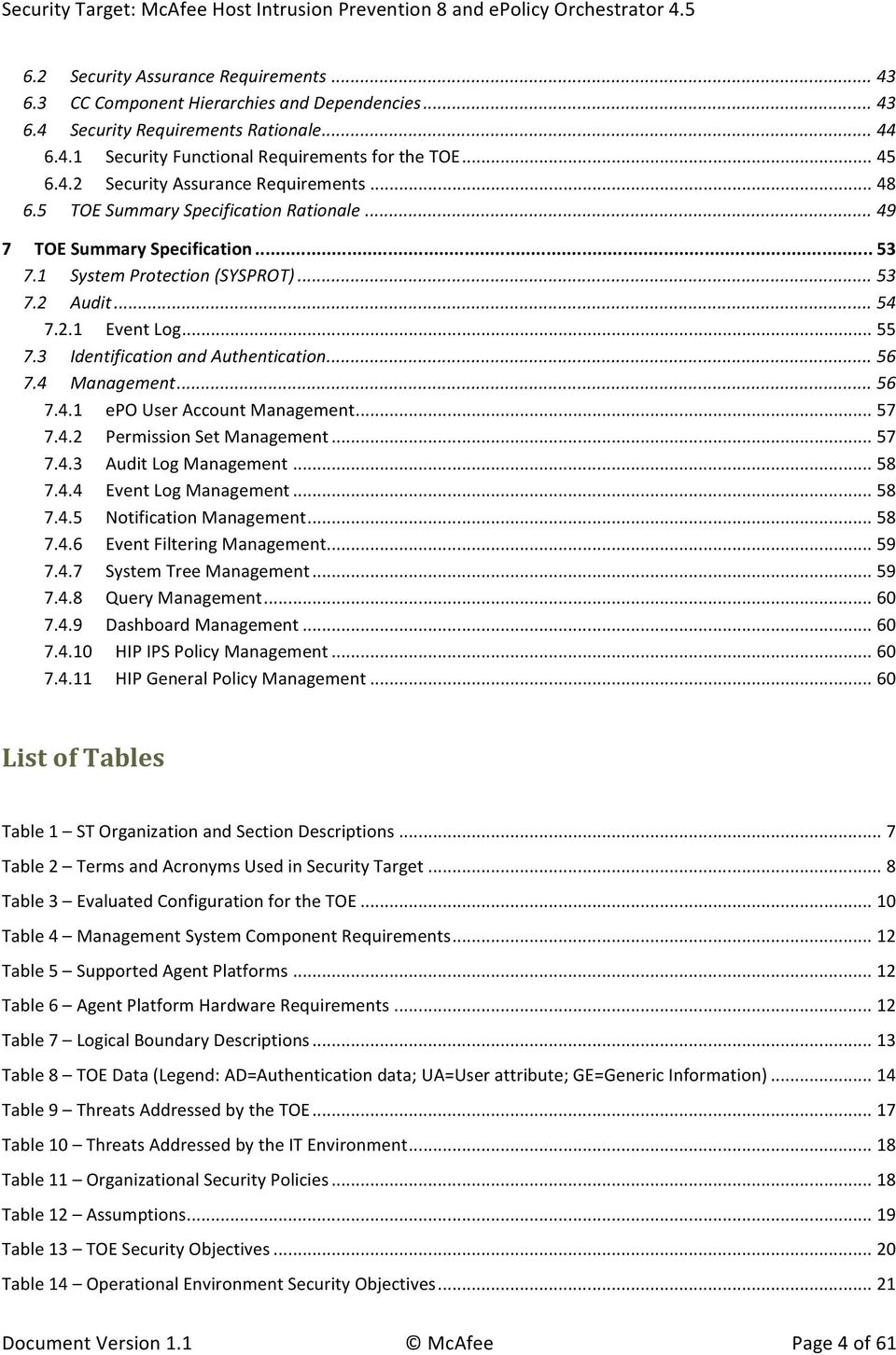
4 6.2 Security Assurance Requirements CC Component Hierarchies and Dependencies Security Requirements Rationale Security Functional Requirements for the TOE Security Assurance Requirements TOE Summary Specification Rationale TOE Summary Specification System Protection (SYSPROT) Audit Event Log Identification and Authentication Management epo User Account Management Permission Set Management Audit Log Management Event Log Management Notification Management Event Filtering Management System Tree Management Query Management Dashboard Management HIP IPS Policy Management HIP General Policy Management List of Tables Table 1 ST Organization and Section Descriptions... 7 Table 2 Terms and Acronyms Used in Security Target... 8 Table 3 Evaluated Configuration for the TOE Table 4 Management System Component Requirements Table 5 Supported Agent Platforms Table 6 Agent Platform Hardware Requirements Table 7 Logical Boundary Descriptions Table 8 TOE Data (Legend: AD=Authentication data; UA=User attribute; GE=Generic Information) Table 9 Threats Addressed by the TOE Table 10 Threats Addressed by the IT Environment Table 11 Organizational Security Policies Table 12 Assumptions Table 13 TOE Security Objectives Table 14 Operational Environment Security Objectives Document Version 1.1 McAfee Page 4 of 61
5 Table 15 Mapping of Assumptions, Threats, and OSPs to Security Objectives Table 16 Rationale for Mapping of Threats, Policies, and Assumptions to Objectives Table 17 System Data Collection Events and Details Table 18 TOE Functional Components Table 19 Audit Events and Details Table 20 TSF Data Access Permissions Table 21 System Data Collection Events and Details Table 22 System Data Access Table 23 Security Assurance Measures Table 24 TOE SFR Dependency Rationale Table 25 Mapping of TOE SFRs to Security Objectives Table 26 Rationale for Mapping of TOE SFRs to Objectives Table 27 Security Assurance Rationale and Measures Table 28 SFR to TOE Security Functions Mapping Table 29 SFR to TSF Rationale List of Figures Figure 1 TOE Boundary Document Version 1.1 McAfee Page 5 of 61

6 1 Introduction This section identifies the Security Target (ST), Target of Evaluation (TOE), Security Target organization, document conventions, and terminology. It also includes an overview of the evaluated product. 1.1 ST Reference ST Title ST Revision ST Publication Date Author Security Target: McAfee Host Intrusion Prevention 8 and epolicy Orchestrator September 9, 2011 Apex Assurance Group 1.2 TOE Reference TOE Reference TOE Type McAfee Host Intrusion Prevention 8 and epolicy Orchestrator 4.5 Intrusion Prevention System (IPS) 1.3 Document Organization This Security Target follows the following format: SECTION TITLE DESCRIPTION 1 Introduction Provides an overview of the TOE and defines the hardware and software that make up the TOE as well as the physical and logical boundaries of the TOE 2 Conformance Claims Lists evaluation conformance to Common Criteria versions, Protection Profiles, or Packages where applicable 3 Security Problem Definition Specifies the threats, assumptions and organizational security policies that affect the TOE 4 Security Objectives Defines the security objectives for the TOE/operational environment and provides a rationale to demonstrate that the security objectives satisfy the threats 5 Extended Components Describes extended components of the evaluation (if any) Definition 6 Security Requirements Contains the functional and assurance requirements for this TOE 7 TOE Summary Specification Identifies the IT security functions provided by the TOE and also identifies the assurance measures targeted to meet the assurance requirements. Document Version 1.1 McAfee Page 6 of 61

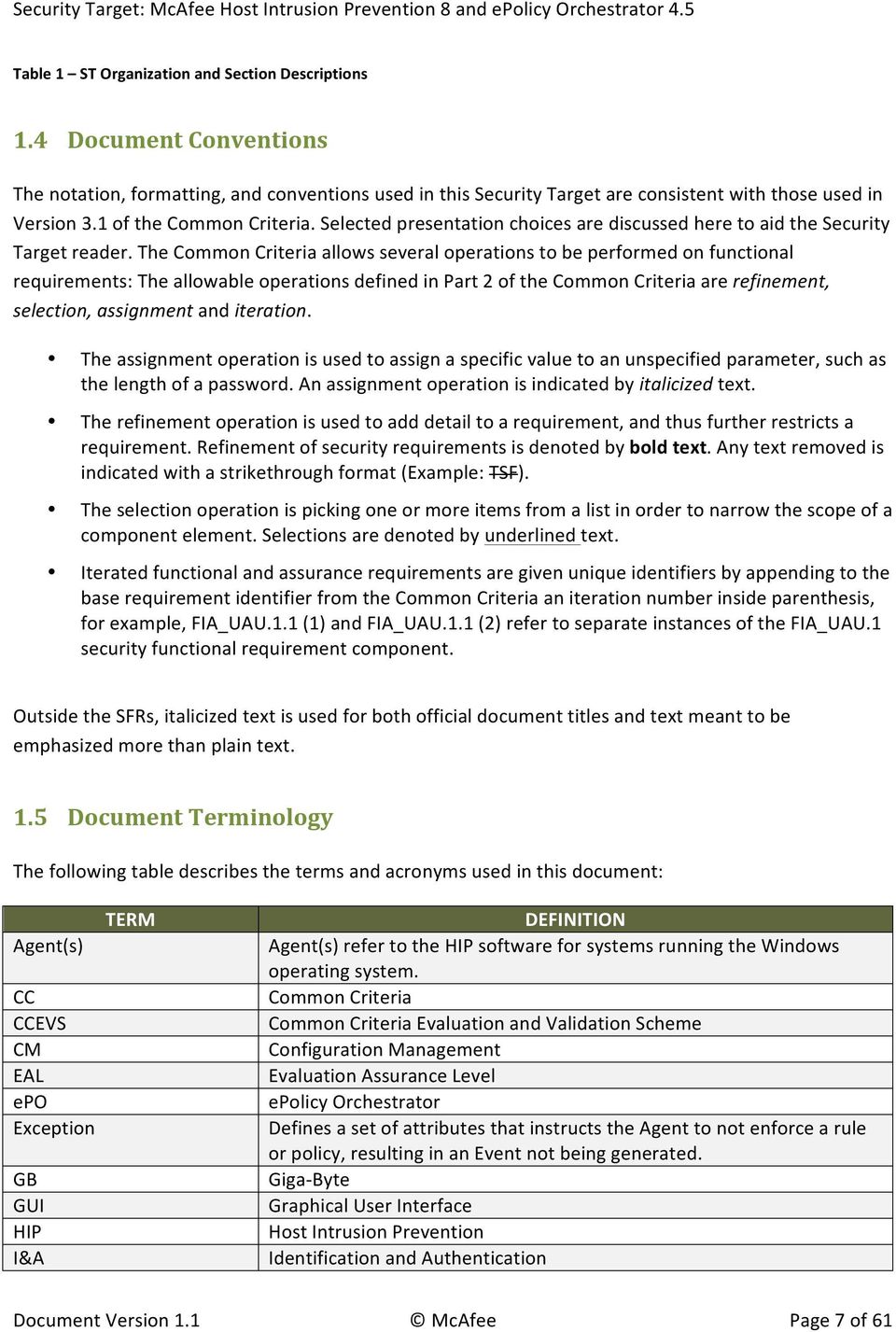
7 Table 1 ST Organization and Section Descriptions 1.4 Document Conventions The notation, formatting, and conventions used in this Security Target are consistent with those used in Version 3.1 of the Common Criteria. Selected presentation choices are discussed here to aid the Security Target reader. The Common Criteria allows several operations to be performed on functional requirements: The allowable operations defined in Part 2 of the Common Criteria are refinement, selection, assignment and iteration. The assignment operation is used to assign a specific value to an unspecified parameter, such as the length of a password. An assignment operation is indicated by italicized text. The refinement operation is used to add detail to a requirement, and thus further restricts a requirement. Refinement of security requirements is denoted by bold text. Any text removed is indicated with a strikethrough format (Example: TSF). The selection operation is picking one or more items from a list in order to narrow the scope of a component element. Selections are denoted by underlined text. Iterated functional and assurance requirements are given unique identifiers by appending to the base requirement identifier from the Common Criteria an iteration number inside parenthesis, for example, FIA_UAU.1.1 (1) and FIA_UAU.1.1 (2) refer to separate instances of the FIA_UAU.1 security functional requirement component. Outside the SFRs, italicized text is used for both official document titles and text meant to be emphasized more than plain text. 1.5 Document Terminology The following table describes the terms and acronyms used in this document: TERM Agent(s) CC CCEVS CM EAL epo Exception GB GUI HIP I&A DEFINITION Agent(s) refer to the HIP software for systems running the Windows operating system. Common Criteria Common Criteria Evaluation and Validation Scheme Configuration Management Evaluation Assurance Level epolicy Orchestrator Defines a set of attributes that instructs the Agent to not enforce a rule or policy, resulting in an Event not being generated. Giga- Byte Graphical User Interface Host Intrusion Prevention Identification and Authentication Document Version 1.1 McAfee Page 7 of 61
8 TERM DEFINITION IDS Intrusion Detection System IPS Intrusion Prevention System IT Information Technology JRE Java Runtime Environment MB Mega- Byte NIAP National Information Assurance Partnership OS Operating System OSP Organizational Security Policy PC Personal Computer PD Precedent Decision PDC Primary Domain Controller Policy File Each Signature is assigned a Security Level. The Policy File defines the Reaction to take for a specific Security Level. Each Policy File entry includes the Reaction to take if a signature of that severity level occurs. PP Protection Profile RAM Random Access Memory Reaction A Reaction is defined in a Policy File. It defines the action (Prevent, Log, or Ignore) the Agent is to take per Event Severity Level (High, Medium, Low, Information). Severity Level The available Severity Levels available are: High, Medium, Low, or Information. SFR Security Functional Requirement Signature Signatures are patterns that indicate a potential security violation. Signature File Agents are installed with a Signature File that contains a list of Signatures. The Agents intercept operating system calls and network packets and compare them to the Signatures File SMTP Simple Mail Transfer Protocol ST Security Target TOE Target of Evaluation TSC TOE Scope of Control TSF TOE Security Function VGA Video Graphics Array Table 2 Terms and Acronyms Used in Security Target 1.6 TOE Overview The TOE is a host- based intrusion prevention system designed to protect system resources and applications, and includes a host based management system that provides management and monitoring functionality. HIP works to intercept system calls prior to their execution and network traffic prior to their processing. If the HIP Agent determines that a call or packet is symptomatic of malicious code, the call or packet can be blocked and/or an audit log created; if it determines that a call or packet is safe, it is allowed. Document Version 1.1 McAfee Page 8 of 61
9 McAfee Agent and HIP software is installed on the host to be protected. HIP software is operating system specific; only the Windows version is included in this evaluation. epo distributes and manages agents that reside on client systems. A centralized but distributed architecture allows the HIP software to be centrally managed and yet decrease network traffic required to manage clients. epo provides the management interface and functionality for the administrators of the TOE. It also provides centralized audit collection and review functionality. Based upon per- user permissions, users may configure the policies to be enforced on individual systems (executing the HIP software). 1.7 TOE Description HIP Agent The HIP Agent for Windows (hereafter referred to as Agent) provides a protection layer that identifies and prevents malicious attempts to compromise a host. Agent software is installed on the host to be protected. Agents are operating system specific; only the Windows Agent is included in this evaluation epolicy Orchestrator (epo) In addition to the Agent, the TOE includes epolicy Orchestrator (epo). epo distributes and manages agents that reside on client systems. A centralized but distributed architecture allows the Agent software to be centrally managed and yet decrease network traffic required to manage clients. epo provides: the management interface and functionality for the administrators of the TOE centralized audit collection and review functionality provides HIP- specific functions for policy management. The TOE does include McAfee Host Intrusion Prevention for Desktops as well as McAfee Host Intrusion Prevention for Servers. Both are the same software/code base; the latter provides SQL and IIS protection when a server operating system is detected during install McAfee Agent The McAfee Agent is a vehicle of information and enforcement between the epo server and each managed system. It provides common communication functionality between epo and all of McAfee s product- specific agents (such as HIP) Physical Boundary The TOE is a software TOE and includes: 1. The epo application executing on a dedicated server Document Version 1.1 McAfee Page 9 of 61
10 2. The McAfee Agent and HIP software on each system to be protected Note specifically that the hardware, operating systems and third party support software (e.g. DBMS) on each of the systems are excluded from the TOE boundary. In order to comply with the evaluated configuration, the following hardware and software components should be used: TOE COMPONENT VERSION/MODEL NUMBER TOE Software HIP Agent 8.0 (for Servers and for Desktops) epolicy Orchestrator 4.5 Patch 3 McAfee Agent Patch 2 Database Capacity Monitor Extension 1.0 IT Environment Specified in the following: Table 4 Management System Component Requirements Table 5 Supported Agent Platforms Table 6 Agent Platform Hardware Requirements Table 3 Evaluated Configuration for the TOE The evaluated configuration consists of a single instance of the management system (with epo) and one or more instances of managed systems (with McAfee Agent and the HIP Agent). epo supports both epo authentication and Windows authentication of user account credentials. The evaluated configuration requires the use of epo authentication only. The following figure presents an example of an operational configuration. The shaded elements in the boxes at the top of the figure represent the TOE components. 1 McAfee Agent 4.5 is shipped/packaged with epo 4.5. From a clean installation, no additional steps are necessary to install McAfee Agent 4.5. Document Version 1.1 McAfee Page 10 of 61

11 Figure 1 TOE Boundary The functionality not included in the evaluation is itemized below: 1. Firewall functionality (some government users require firewall functionality to be disabled unless it has been evaluated against one of the firewall PPs at EAL4 or Medium Robustness). Application Blocking functionality is associated with the firewall functionality and is also excluded. 2. Custom signatures and policies. 3. Importing configurations. 4. HIP Solaris Agents. 5. HIP Linux Agents Hardware and Software Supplied by the IT Environment The TOE consists of a set of software applications. The hardware, operating systems and all third party support software (e.g., DBMS) on the systems on which the TOE executes are excluded from the TOE boundary. The platform on which the epo software is installed must be dedicated to functioning as the management system. epo operates as a distribution system and management system for a client- server architecture offering components for the server part of the architecture (not the clients). The TOE requires the following hardware and software configuration on this platform. COMPONENT Processor Memory Free Disk Space Monitor Operating System DBMS Additional Software MINIMUM REQUIREMENTS Intel Pentium III- class or higher; 1GHz or higher 1 GB RAM 1 GB 1024x768, 256- color, VGA monitor or higher Windows Server 2003 Enterprise with Service Pack 2 or later Windows Server 2003 Standard with Service Pack 2 or later Windows Server 2003 Web with Service Pack 2 or later Windows Server 2003 R2 Enterprise with Service Pack 2 or later Windows Server 2003 R2 Standard with Service Pack 2 or later Windows Server 2008 Enterprise Windows Server 2008 Standard SQL Server 2005 SQL 2005 Express SQL 2008 SQL 2008 Express Firefox 3.0 Microsoft Internet Explorer 7.0 or 8.0 Document Version 1.1 McAfee Page 11 of 61

12 COMPONENT MINIMUM REQUIREMENTS Network Card Ethernet, 100Mb or higher Disk Partition Formats NTFS Domain Controllers The system must have a trust relationship with the Primary Domain Controller (PDC) on the network Table 4 Management System Component Requirements The McAfee Agent and HIP Agent execute on one or more managed systems. The supported platforms for these components are: SUPPORTED AGENT OS Windows XP Professional with SP2, SP3 Windows Server 2003 SP2, 2003 R2, 2003 R2 SP2 (all editions) Windows Vista SP1 (Business, Enterprise, Ultimate editions) Windows Server 2008, 2008 SP1, 2008 SP2, 2008 R2 (all editions) Windows 7 (Professional, Enterprise, Ultimate editions) Table 5 Supported Agent Platforms PLATFORM X86 platforms X86 and X64 platforms X86 and X64 platforms X86 and X64 platforms X86 and X64 platforms The minimum hardware requirements for the agent platforms are specified in the following table: COMPONENT MINIMUM HARDWARE REQUIREMENTS Memory 20MB RAM Free Disk Space 80MB Network Card Ethernet, 10Mb or higher Table 6 Agent Platform Hardware Requirements The management system is accessed from remote systems via a browser. The supported browsers are Microsoft Internet Explorer 6.0 with Service Pack 1 or later or Microsoft Internet Explorer Logical Boundary This section outlines the boundaries of the security functionality of the TOE; the logical boundary of the TOE includes the security functionality described in the following sections. Audit TSF Identification and Authentication DESCRIPTION The TOE generates audit records upon detection of a potential security violation or system configuration events. The audit records can be viewed by an authorized user. The TOE audit functionality includes the ability to configure what auditable events generate audit records. The TOE requires administrative users to identify and authenticate themselves before accessing the TOE software or before viewing any TSF data or configuring any portion of the TOE. No action can be initiated before proper identification and authentication. Each TOE user has security attributes associated with their user account that defines the functionality the user is allowed to perform. Document Version 1.1 McAfee Page 12 of 61

13 TSF DESCRIPTION Management The TOE s Management Security Function provides administrator functionality that enables a human user to configure and manage TOE components. Configuration functionality includes enabling a user to modify TSF Data. Management functionality includes invocation of TOE functions that effect security functions and security function behavior. System Protection The Agents are host based intrusion prevention systems designed to protect system resources and applications from attacks. The Agents accomplish this by intercepting operating system calls and comparing them to signatures symptomatic of known attacks and behavioral rules. The Agents also inspect network traffic by comparing packets to signatures symptomatic of known attacks. If a potential security violation is detected, the system call or network traffic may be allowed to proceed or be blocked. An audit event may also be generated. Table 7 Logical Boundary Descriptions TOE Data TOE data consists of both TSF data and user data (information). TSF data consists of authentication data, security attributes, and other generic configuration information. Security attributes enable the TOE to enforce the security policy. Authentication data enables the TOE to identify and authenticate users. TSF Data Description AD UA GE Application List of processes that are explicitly enabled or disabled for Protection Lists performing user- level hooking Audit Filter A list of audits that are filtered (not generated) by the TOE. Configuration Contacts A list of addresses that epolicy Orchestrator uses to send messages to specified users in response to events. Dashboards Collections of chart- based queries that are refreshed at a user- configured interval. Server SMTP server name and port used to send messages for notifications. Credentials may optionally be specified for authenticated interactions. epo User epo user name, authentication configuration, enabled status, Accounts Global Administrator status and permission sets for each user authorized to access TOE functionality on the management system. Event Filtering Specifies which events are forwarded to the server from the agents on the managed systems. Exceptions Mechanism to refine the signature matches to eliminate false positives Global Administrator Status Individual epo user accounts may be configured as Global Administrators, which means they have read and write permissions and rights to all operations. Document Version 1.1 McAfee Page 13 of 61

14 TSF Data Description AD UA GE Groups Node on the hierarchical System Tree that may contain subordinate groups or systems. IPS Options Per- Agent mode for operation of the IPS processing, may be ON for normal operation or configured for Adaptive mode IPS Policies Used to configure the reaction to signature matches IPS Protection Policies Per- Agent reaction specified for each of the severity levels that can be specified in signatures. Notification Rules associated with groups or systems used to generate Rules alerts upon receipt of specified events Permission A privilege to perform a specific function. Permission Set A group of permissions that can be granted to any users by assigning it to those users accounts. Queries Configurable objects that retrieve and display data from the database. Server Settings Control how the epolicy Orchestrator server behaves. Signatures Collection of system call events or network traffic indicative of malicious code System Event Configuration to determine which actions create audit events Audit Configuration System Information specific to a single managed system (e.g. Information internet address) in the System Tree. System Tree A hierarchical collection of all of the systems managed by epolicy Orchestrator. Trusted Mechanism to refine the signature matches to eliminate false Applications positives Table 8 TOE Data (Legend: AD=Authentication data; UA=User attribute; GE=Generic Information) 1.8 Rationale for Non- bypassability and Separation of the TOE The responsibility for non- bypassability and non- interference is split between the TOE and the IT Environment. TOE components are software only products and therefore the non- bypassability and non- interference claims are dependent upon hardware and OS mechanisms. The TOE runs on top of the IT Environment supplied operating systems. The TOE ensures that the security policy is applied and succeeds before further processing is permitted whenever a security relevant interface is invoked: the interfaces are well defined and insure that the access restrictions are enforced. Non- security relevant interfaces do not interact with the security functionality of the TOE. The TOE depends upon OS mechanisms to direct the system calls and network packets to the TOE for examination. The TOE is implemented with well- defined interfaces that can be categorized as security relevant or non- security relevant. The TOE is implemented such that non- security relevant interfaces have no means of impacting the security functionality of the TOE. Unauthenticated users may not perform any Document Version 1.1 McAfee Page 14 of 61

15 actions within the TOE. The TOE tracks multiple users by sessions and ensures the access privileges of each are enforced. The server hardware provides virtual memory and process separation, which the server OS utilizes to ensure that other (non- TOE) processes may not interfere with the TOE; all interactions are limited to the defined TOE interfaces. The OS and DBMS restrict access to TOE data in the database to prevent interference with the TOE via that mechanism. The TOE consists of distributed components. Communication between the components relies upon cryptographic functionality provided by the OS or third party software (operational environment) to protect the information exchanged from disclosure or modification. Document Version 1.1 McAfee Page 15 of 61
16 2 Conformance Claims 2.1 Common Criteria Conformance Claim The TOE is Common Criteria Version 3.1 Revision 3 (July 2009) Part 2 extended and Part 3 conformant at Evaluation Assurance Level 2 and augmented by ALC_FLR.2 Flaw Reporting Procedures. 2.2 Protection Profile Conformance Claim The TOE claims strict conformance to the U.S. Government Protection Profile Intrusion Detection System - System for Basic Robustness Environments, Version 1.7, dated July 25, Document Version 1.1 McAfee Page 16 of 61
17 3 Security Problem Definition In order to clarify the nature of the security problem that the TOE is intended to solve, this section describes the following: Any known or assumed threats to the assets against which specific protection within the TOE or its environment is required. Any organizational security policy statements or rules with which the TOE must comply. Any assumptions about the security aspects of the environment and/or of the manner in which the TOE is intended to be used. This chapter identifies assumptions as A.assumption, threats as T.threat and policies as P.policy. 3.1 Threats The following are threats identified for the TOE and the IT System the TOE monitors. The TOE itself has threats and the TOE is also responsible for addressing threats to the environment in which it resides. The assumed level of expertise of the attacker for all the threats is unsophisticated. The TOE addresses the following threats: THREAT DESCRIPTION T.COMDIS An unauthorized user may attempt to disclose the data collected and produced by the TOE by bypassing a security mechanism. T.COMINT An unauthorized user may attempt to compromise the integrity of the data collected and produced by the TOE by bypassing a security mechanism. T.FACCNT Unauthorized attempts to access TOE data or security functions may go undetected. T.IMPCON An unauthorized user may inappropriately change the configuration of the TOE causing potential intrusions to go undetected. T.INFLUX An unauthorized user may cause malfunction of the TOE by creating an influx of data that the TOE cannot handle. T.LOSSOF An unauthorized user may attempt to remove or destroy data collected and produced by the TOE. T.NOHALT An unauthorized user may attempt to compromise the continuity of the System s collection and analysis functions by halting execution of the TOE. T.PRIVIL An unauthorized user may gain access to the TOE and exploit system privileges to gain access to TOE security functions and data Table 9 Threats Addressed by the TOE The following table identifies threats to the managed systems that may be indicative of vulnerabilities in or misuse of IT resources: THREAT DESCRIPTION Document Version 1.1 McAfee Page 17 of 61
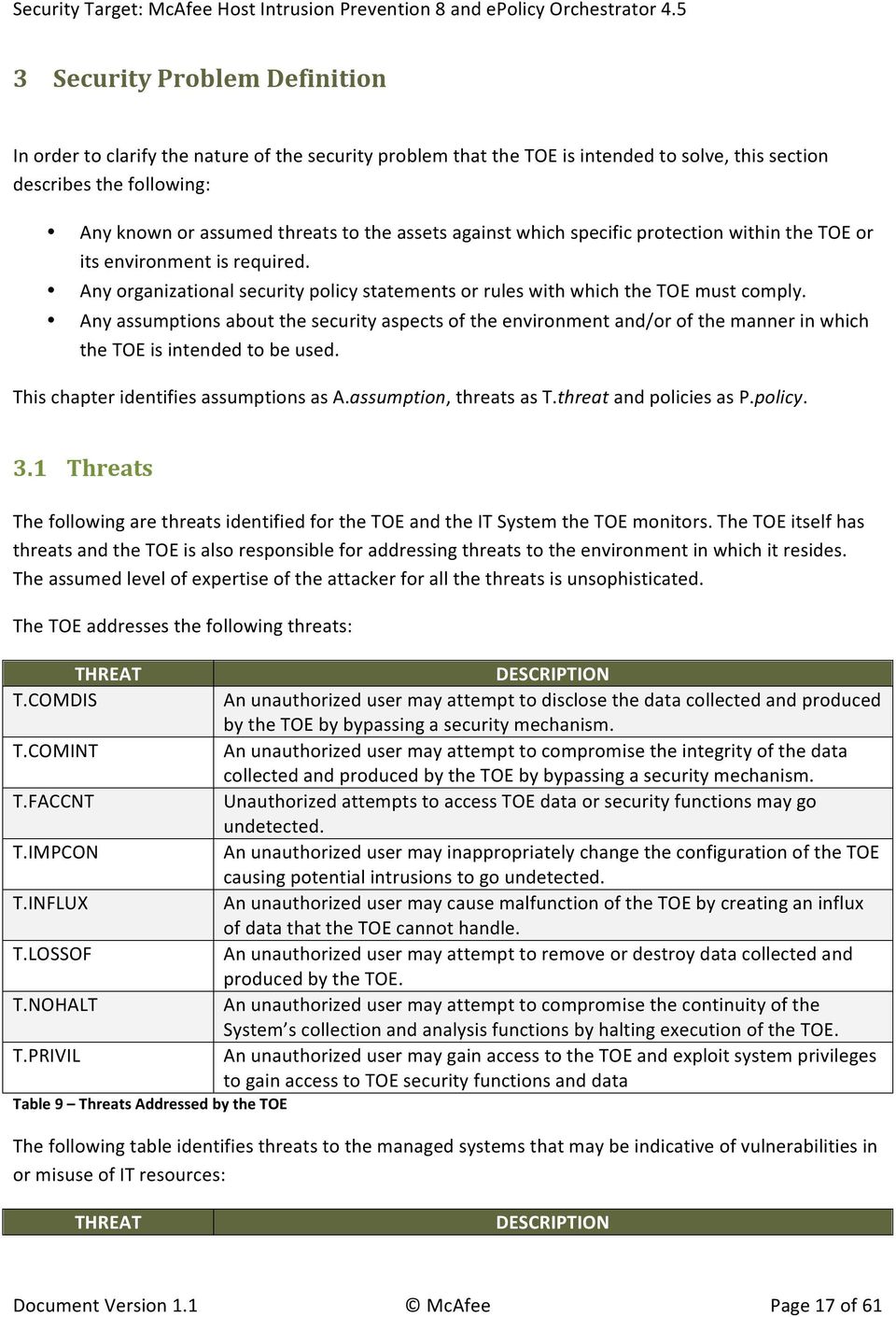
18 THREAT DESCRIPTION T.FALACT The TOE may fail to react to identified or suspected vulnerabilities or inappropriate activity. T.FALASC The TOE may fail to identify vulnerabilities or inappropriate activity based on association of IDS data received from all data sources. T.FALREC The TOE may fail to recognize vulnerabilities or inappropriate activity based on IDS data received from each data source. T.INADVE Inadvertent activity and access may occur on an IT System the TOE monitors. T.MISACT Malicious activity, such as introductions of Trojan horses and viruses, may occur on an IT System the TOE monitors. T.MISUSE Unauthorized accesses and activity indicative of misuse may occur on an IT System the TOE monitors. T.SCNCFG Improper security configuration settings may exist in the IT System the TOE monitors. T.SCNMLC Users could execute malicious code on an IT System that the TOE monitors which causes modification of the IT System protected data or undermines the IT System security functions. T.SCNVUL Vulnerabilities may exist in the IT System the TOE monitors. Table 10 Threats Addressed by the IT Environment 3.2 Organizational Security Policies An organizational security policy is a set of rules, practices, and procedures imposed by an organization to address its security needs. The following Organizational Security Policies apply to the TOE: POLICY DESCRIPTION P.ACCACT Users of the TOE shall be accountable for their actions within the IDS. P.ACCESS All data collected and produced by the TOE shall only be used for authorized purposes. P.ANALYZ Analytical processes and information to derive conclusions about intrusions (past, present, or future) must be applied to IDS data and appropriate response actions taken. P.DETECT Static configuration information that might be indicative of the potential for a future intrusion or the occurrence of a past intrusion of an IT System or events that are indicative of inappropriate activity that may have resulted from misuse, access, or malicious activity of IT System assets must be collected. P.INTGTY Data collected and produced by the TOE shall be protected from modification. P.MANAGE The TOE shall only be managed by authorized users. P.PROTCT The TOE shall be protected from unauthorized accesses and disruptions of TOE data and functions. Table 11 Organizational Security Policies 3.3 Assumptions This section describes the security aspects of the environment in which the TOE is intended to be used. The TOE is assured to provide effective security measures in a co- operative non- hostile environment Document Version 1.1 McAfee Page 18 of 61

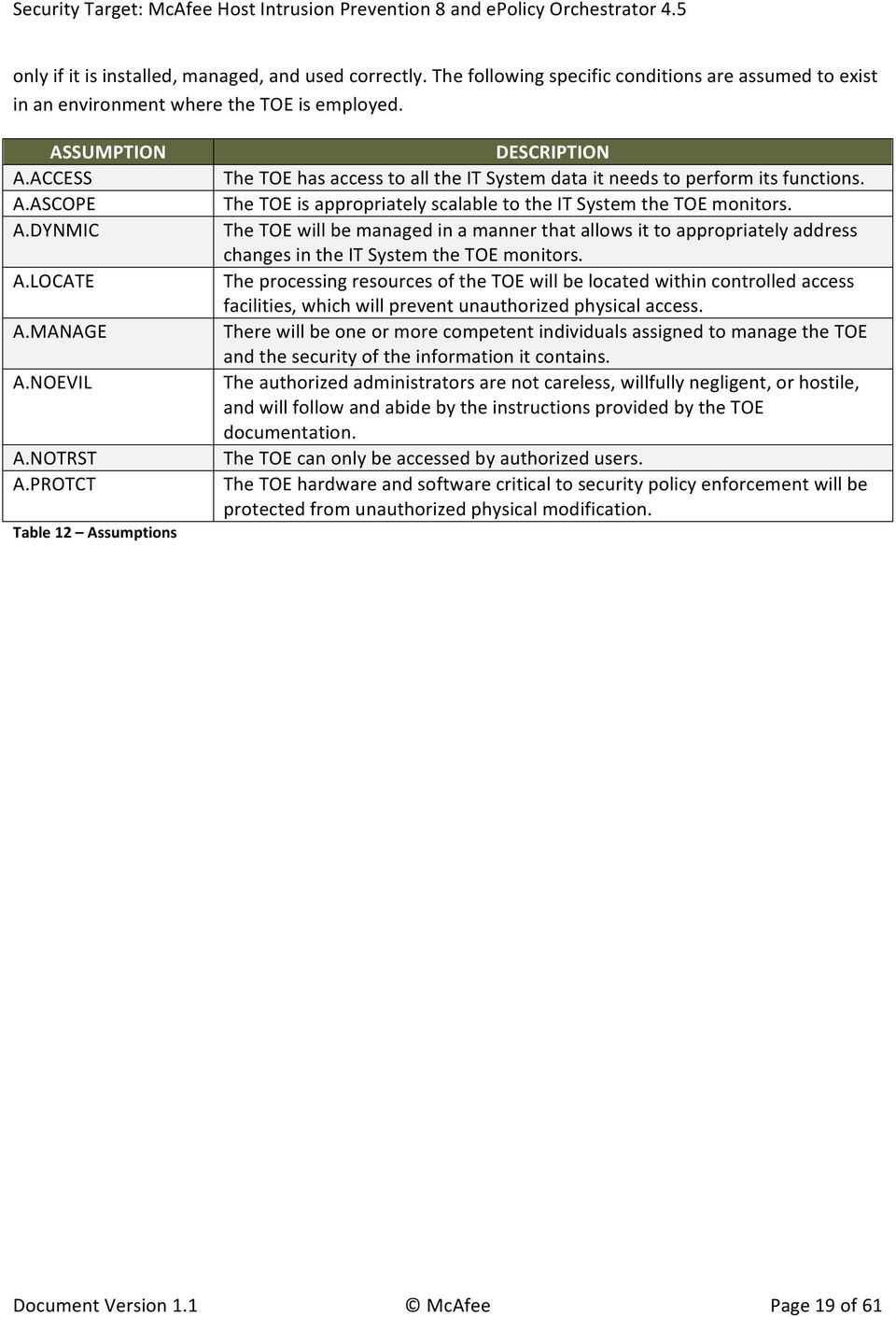
19 only if it is installed, managed, and used correctly. The following specific conditions are assumed to exist in an environment where the TOE is employed. ASSUMPTION A.ACCESS A.ASCOPE A.DYNMIC A.LOCATE A.MANAGE A.NOEVIL A.NOTRST A.PROTCT Table 12 Assumptions DESCRIPTION The TOE has access to all the IT System data it needs to perform its functions. The TOE is appropriately scalable to the IT System the TOE monitors. The TOE will be managed in a manner that allows it to appropriately address changes in the IT System the TOE monitors. The processing resources of the TOE will be located within controlled access facilities, which will prevent unauthorized physical access. There will be one or more competent individuals assigned to manage the TOE and the security of the information it contains. The authorized administrators are not careless, willfully negligent, or hostile, and will follow and abide by the instructions provided by the TOE documentation. The TOE can only be accessed by authorized users. The TOE hardware and software critical to security policy enforcement will be protected from unauthorized physical modification. Document Version 1.1 McAfee Page 19 of 61
20 4 Security Objectives 4.1 Security Objectives for the TOE The IT security objectives for the TOE are addressed below: OBJECTIVE DESCRIPTION O.ACCESS The TOE must allow authorized users to access only appropriate TOE functions and data. O.AUDITS The TOE must record audit records for data accesses and use of the System functions. O.EADMIN The TOE must include a set of functions that allow effective management of its functions and data. O.IDANLZ The Analyzer must accept data from IDS Sensors or IDS Scanners and then apply analytical processes and information to derive conclusions about intrusions (past, present, or future). O.IDAUTH The TOE must be able to identify and authenticate users prior to allowing access to TOE functions and data. O.IDSCAN The Scanner must collect and store static configuration information that might be indicative of the potential for a future intrusion or the occurrence of a past intrusion of an IT System. O.IDSENS The Sensor must collect and store information about all events that are indicative of inappropriate activity that may have resulted from misuse, access, or malicious activity of IT System assets and the IDS. O.INTEGR The TOE must ensure the integrity of all audit and System data. O.OFLOWS The TOE must appropriately handle potential audit and System data storage overflows. O.PROTCT The TOE must protect itself from unauthorized modifications and access to its functions and data. O.RESPON The TOE must respond appropriately to analytical conclusions. Table 13 TOE Security Objectives 4.2 Security Objectives for the Operational Environment The security objectives for the operational environment are addressed below: OBJECTIVE OE.AUDIT_PROTECTION OE.AUDIT_SORT OE.CREDEN OE.INSTAL OE.INTROP DESCRIPTION The IT Environment will provide the capability to protect audit information. The IT Environment will provide the capability to sort the audit information. Those responsible for the TOE must ensure that all access credentials are protected by the users in a manner which is consistent with IT security. Those responsible for the TOE must ensure that the TOE is delivered, installed, managed, and operated in a manner which is consistent with IT security. The TOE is interoperable with the IT System it monitors Document Version 1.1 McAfee Page 20 of 61

21 OBJECTIVE DESCRIPTION OE.PERSON Personnel working as authorized administrators shall be carefully selected and trained for proper operation of the System. OE.PHYCAL Those responsible for the TOE must ensure that those parts of the TOE critical to security policy are protected from any physical attack. OE.PROTECT The IT environment will protect itself and the TOE from external interference or tampering. OE.SD_PROTECTION The IT Environment will provide the capability to protect system data. OE.TIME The IT Environment will provide reliable timestamps to the TOE Table 14 Operational Environment Security Objectives 4.3 Security Objectives Rationale This section provides the summary that all security objectives are traced back to aspects of the addressed assumptions, threats, and Organizational Security Policies (if applicable). The following table provides a high level mapping of coverage for each threat, assumption, and policy: OBJECTIVE THREAT / ASSUMPTION O.ACCESS O.AUDITS O.EADMIN O.IDANLZ O.IDAUTH O.IDSCAN O.IDSENS O.INTEGR O.OFLOWS A.ACCESS A.ASCOPE A.DYNMIC A.LOCATE A.MANAGE A.NOEVIL A.NOTRUST A.PROTCT P.ACCACT P.ACCESS P.ANALYZ P.DETECT P.INTGTY P.MANAGE P.PROTCT T.COMDIS T.COMINT T.FACCNT T.FALACT O.PROTCT O.RESPON OE.AUDIT_PROTECTION OE.AUDIT_SORT OE.CREDEN OE.INSTAL OE.INTROP OE.PERSON OE.PHYCAL OE.PROTECT OE.SD_PROTECTION OE.TIME Document Version 1.1 McAfee Page 21 of 61
22 OBJECTIVE THREAT / ASSUMPTION O.ACCESS O.AUDITS O.EADMIN O.IDANLZ O.IDAUTH O.IDSCAN O.IDSENS O.INTEGR T.FALASC T.FALREC T.IMPCON T.INADVE T.INFLUX T.LOSSOF T.MISACT T.MISUSE T.NOHALT T.PRIVIL T.SCNCFG T.SCNMLC T.SCNVUL Table 15 Mapping of Assumptions, Threats, and OSPs to Security Objectives O.OFLOWS O.PROTCT O.RESPON OE.AUDIT_PROTECTION OE.AUDIT_SORT OE.CREDEN OE.INSTAL OE.INTROP OE.PERSON OE.PHYCAL OE.PROTECT OE.SD_PROTECTION OE.TIME The following table provides detailed evidence of coverage for each threat, policy, and assumption: THREATS, POLICIES, AND ASSUMPTIONS A.ACCESS A.ASCOPE A.DYNMIC A.LOCATE A.MANAGE RATIONALE The TOE has access to all the IT System data it needs to perform its functions. The OE.INTROP objective ensures the TOE has the needed access. The TOE is appropriately scalable to the IT System the TOE monitors. The OE.INTROP objective ensures the TOE has the necessary interactions with the IT System it monitors. The TOE will be managed in a manner that allows it to appropriately address changes in the IT System the TOE monitors. The OE.INTROP objective ensures the TOE has the proper access to the IT System. The OE.PERSON objective ensures that the TOE will be managed appropriately. The processing resources of the TOE will be located within controlled access facilities, which will prevent unauthorized physical access. The OE.PHYCAL provides for the physical protection of the TOE. There will be one or more competent individuals assigned to manage the TOE and the security of the information it contains. The OE.PERSON objective ensures all authorized administrators are qualified and trained to manage the TOE. Document Version 1.1 McAfee Page 22 of 61
23 THREATS, POLICIES, AND ASSUMPTIONS A.NOEVIL A.NOTRUST A.PROTCT P.ACCACT P.ACCESS P.ANALYZ P.DETECT RATIONALE The authorized administrators are not careless, willfully negligent, or hostile, and will follow and abide by the instructions provided by the TOE documentation. The OE.INSTAL objective ensures that the TOE is properly installed and operated and the OE.PHYCAL objective provides for physical protection of the TOE by authorized administrators. The OE.CREDEN objective supports this assumption by requiring protection of all authentication data. The TOE can only be accessed by authorized users. The OE.PHYCAL objective provides for physical protection of the TOE to protect against unauthorized access. The OE.CREDEN objective supports this assumption by requiring protection of all authentication data. The TOE hardware and software critical to security policy enforcement will be protected from unauthorized physical modification. The OE.PHYCAL provides for the physical protection of the TOE hardware and software. Users of the TOE shall be accountable for their actions within the IDS. The O.AUDITS objective implements this policy by requiring auditing of all data accesses and use of TOE functions. The OE.TIME objective supports this policy by providing a time stamp for insertion into the audit records. The O.IDAUTH objective supports this objective by ensuring each user is uniquely identified and authenticated. The OE.AUDIT_SORT objective supports this policy by providing a mechanism for administrators to effectively review the audit logs. All data collected and produced by the TOE shall only be used for authorized purposes. The O.IDAUTH objective provides for authentication of users prior to any TOE function accesses. The O.ACCESS objective builds upon the O.IDAUTH objective by only permitting authorized users to access TOE functions. The OE.AUDIT_PROTECTION and OE.SD_PROTECTION objectives counter this threat via IT Environment protections of the audit trail. The O.PROTCT objective addresses this policy by providing TOE self- protection. Analytical processes and information to derive conclusions about intrusions (past, present, or future) must be applied to IDS data and appropriate response actions taken. The O.IDANLZ objective requires analytical processes be applied to data collected from Sensors and Scanners. Static configuration information that might be indicative of the potential for a future intrusion or the occurrence of a past intrusion of an IT System or events that are indicative of inappropriate activity that may have resulted from misuse, access, or malicious activity of IT System assets must be collected. The O.AUDITS, O.IDSENS, and O.IDSCAN objectives address this policy by requiring collection of audit, Sensor, and Scanner data. The OE.TIME objective supports this policy by providing a time stamp for insertion into the audit records. Document Version 1.1 McAfee Page 23 of 61
24 THREATS, POLICIES, AND ASSUMPTIONS P.INTGTY P.MANAGE P.PROTCT T.COMDIS T.COMINT T.FACCNT T.FALACT RATIONALE Data collected and produced by the TOE shall be protected from modification. The O.INTEGR objective ensures the protection of data from modification. The TOE shall only be managed by authorized users. The OE.PERSON objective ensures competent administrators will manage the TOE and the O.EADMIN objective ensures there is a set of functions for administrators to use. The OE.INSTAL objective supports the OE.PERSON objective by ensuring administrator follow all provided documentation and maintain the security policy. The O.IDAUTH objective provides for authentication of users prior to any TOE function accesses. The O.ACCESS objective builds upon the O.IDAUTH objective by only permitting authorized users to access TOE functions. The OE.CREDEN objective requires administrators to protect all authentication data. The O.PROTCT objective addresses this policy by providing TOE self- protection. The TOE shall be protected from unauthorized accesses and disruptions of TOE data and functions. The O.OFLOWS objective counters this policy by requiring the TOE handle disruptions. The OE.PHYCAL objective protects the TOE from unauthorized physical modifications. The OE.PROTECT objective supports the TOE protection from the IT Environment. An unauthorized user may attempt to disclose the data collected and produced by the TOE by bypassing a security mechanism. The O.IDAUTH objective provides for authentication of users prior to any TOE data access. The O.ACCESS objective builds upon the O.IDAUTH objective by only permitting authorized users to access TOE data. The O.PROTCT objective addresses this threat by providing TOE self- protection. The OE.PROTECT objective supports the TOE protection from the IT Environment. An unauthorized user may attempt to compromise the integrity of the data collected and produced by the TOE by bypassing a security mechanism. The O.IDAUTH objective provides for authentication of users prior to any TOE data access. The O.ACCESS objective builds upon the O.IDAUTH objective by only permitting authorized users to access TOE data. The O.INTEGR objective ensures no TOE data will be modified. The O.PROTCT objective addresses this threat by providing TOE self- protection. The OE.PROTECT objective supports the TOE protection from the IT Environment. Unauthorized attempts to access TOE data or security functions may go undetected. The O.AUDITS objective counters this threat by requiring the TOE to audit attempts for data accesses and use of TOE functions. The TOE may fail to react to identified or suspected vulnerabilities or inappropriate activity. The O.RESPON objective ensures the TOE reacts to analytical conclusions about suspected vulnerabilities or inappropriate activity. Document Version 1.1 McAfee Page 24 of 61
25 THREATS, POLICIES, AND ASSUMPTIONS T.FALASC T.FALREC T.IMPCON T.INADVE T.INFLUX T.LOSSOF T.MISACT T.MISUSE RATIONALE The TOE may fail to identify vulnerabilities or inappropriate activity based on association of IDS data received from all data sources. The O. IDANLZ objective provides the function that the TOE will recognize vulnerabilities or inappropriate activity from multiple data sources. The TOE may fail to recognize vulnerabilities or inappropriate activity based on IDS data received from each data source. The O.IDANLZ objective provides the function that the TOE will recognize vulnerabilities or inappropriate activity from a data source. An unauthorized user may inappropriately change the configuration of the TOE causing potential intrusions to go undetected. The OE.INSTAL objective states the authorized administrators will configure the TOE properly. The O.EADMIN objective ensures the TOE has all the necessary administrator functions to manage the product. The O.IDAUTH objective provides for authentication of users prior to any TOE function accesses. The O.ACCESS objective builds upon the O.IDAUTH objective by only permitting authorized users to access TOE functions. Inadvertent activity and access may occur on an IT System the TOE monitors. The O.IDSENS objective addresses this threat by requiring a TOE to collect Sensor data. An unauthorized user may cause malfunction of the TOE by creating an influx of data that the TOE cannot handle. The O.OFLOWS objective counters this threat by requiring the TOE handle data storage overflows. The OE.SD_PROTECTION objective counters this threat via IT Environment protections of the audit trail. An unauthorized user may attempt to remove or destroy data collected and produced by the TOE. The O.IDAUTH objective provides for authentication of users prior to any TOE data access. The O.ACCESS objective builds upon the O.IDAUTH objective by only permitting authorized users to access TOE data. The O.INTEGR objective ensures no TOE data will be deleted. The O.PROTCT objective addresses this threat by providing TOE self- protection. Malicious activity, such as introductions of Trojan horses and viruses, may occur on an IT System the TOE monitors. The O.IDSENS objective addresses this threat by requiring a TOE to collect Sensor data. Unauthorized accesses and activity indicative of misuse may occur on an IT System the TOE monitors. The O.IDSENS objective addresses this threat by requiring a TOE to collect Sensor data. Document Version 1.1 McAfee Page 25 of 61
26 THREATS, POLICIES, AND ASSUMPTIONS T.NOHALT T.PRIVIL T.SCNCFG T.SCNMLC T.SCNVUL RATIONALE An unauthorized user may attempt to compromise the continuity of the System s collection and analysis functions by halting execution of the TOE. The O.IDAUTH objective provides for authentication of users prior to any TOE function accesses. The O.ACCESS objective builds upon the O.IDAUTH objective by only permitting authorized users to access TOE functions. The O.IDSCAN, O.IDSENS, and O.IDANLZ objectives address this threat by requiring the TOE to collect and analyze System data, which includes attempts to halt the TOE. An unauthorized user may gain access to the TOE and exploit system privileges to gain access to TOE security functions and data. The O.IDAUTH objective provides for authentication of users prior to any TOE function accesses. The O.ACCESS objective builds upon the O.IDAUTH objective by only permitting authorized users to access TOE functions. The O.PROTCT objective addresses this threat by providing TOE self- protection. Improper security configuration settings may exist in the IT System the TOE monitors. The O.IDSCAN objective counters this threat by requiring a TOE to collect and store static configuration information that might be indicative of a configuration setting change. Users could execute malicious code on an IT System that the TOE monitors which causes modification of the IT System protected data or undermines the IT System security functions. The O.IDSCAN objective counters this threat by requiring a TOE to collect and store static configuration information that might be indicative of malicious code. Vulnerabilities may exist in the IT System the TOE monitors. The O.IDSCAN objective counters this threat by requiring a TOE to collect and store static configuration information that might be indicative of a vulnerability. Table 16 Rationale for Mapping of Threats, Policies, and Assumptions to Objectives Document Version 1.1 McAfee Page 26 of 61
27 5 Extended Components Definition 5.1 IDS Class of SFRs All of the components in this section are taken from the U.S. Government Protection Profile Intrusion Detection System System For Basic Robustness Environments. This class of requirements is taken from the IDS System PP to specifically address the data collected and analysed by an IDS scanner and analyzer. The audit family of the CC (FAU) was used as a model for creating these requirements. The purpose of this class of requirements is to address the unique nature of system data and provide for requirements about collecting, reviewing and managing the data IDS_SDC.1 System Data Collection Management: IDS_SDC.1 The following actions could be considered for the management functions in FMT: a) Configuration of the events to be collected Audit: IDS_SDC.1 There are no auditable events foreseen. IDS_SDC.1 System Data Collection Hierarchical to: Dependencies: IDS_SDC.1.1 No other components No dependencies The System shall be able to collect the following information from the targeted IT System resource(s): a) [selection: Start- up and shutdown, identification and authentication events, data accesses, service requests, network traffic, security configuration changes, data introduction, detected malicious code, access control configuration, service configuration, authentication configuration., accountability policy configuration, detected known vulnerabilities]; and b) [assignment: other specifically defined events]. IDS_SDC.1.2 At a minimum, the System shall collect and record the following information: a) Date and time of the event, type of event, subject identity, and the outcome (success or failure) of the event; and Document Version 1.1 McAfee Page 27 of 61
28 b) The additional information specified in the Details column of the table below: COMPONENT EVENT DETAILS IDS_SDC.1 Startup and shutdown None IDS_SDC.1 Identification and authentication events User identity, location, source address, destination address IDS_SDC.1 Data accesses Object IDS, requested access, source address, destination address IDS_SDC.1 Service requests Specific service, source address, destination address IDS_SDC.1 Network traffic Protocol, source address, destination address IDS_SDC.1 Security configuration changes Source address, destination address IDS_SDC.1 Data introduction Object IDS, location of object, source address, destination address IDS_SDC.1 Startup and shutdown of audit None functions IDS_SDC.1 Detected malicious code Location, identification of code IDS_SDC.1 Access control configuration Location, access settings IDS_SDC.1 Service configuration Service identification (name or port), interface, protocols IDS_SDC.1 Authentication configuration Account names for cracked passwords, account policy parameters IDS_SDC.1 Accountability policy configuration Accountability policy configuration parameters IDS_SDC.1 Detected known vulnerabilities Identification of the known vulnerability Table 17 System Data Collection Events and Details Application Note: The rows in this table must be retained that correspond to the selections in IDS_SDC.1.1 when that operation is completed. If additional events are defined in the assignment in IDS_SDC.1.1, then corresponding rows should be added to the table for this element. Document Version 1.1 McAfee Page 28 of 61
29 5.1.2 IDS_ANL.1 Analyzer Analysis Management: IDS_ANL.1 The following actions could be considered for the management functions in FMT: a) Configuration of the analysis to be performed Audit: IDS_ANL.1 The following actions should be auditable if FAU_GEN Security audit data generation is included in the ST: a) Minimal: Enabling and disabling of any of the analysis mechanisms IDS_ANL.1 Analyzer Analysis Hierarchical to: Dependencies: IDS_ANL.1.1 No other components No dependencies The System shall perform the following analysis function(s) on all IDS data received: a) [selection: statistical, signature, integrity]; and b) [assignment: other analytical functions]. IDS_ANL.1.2 The System shall record within each analytical result at least the following information: a. Date and time of the result, type of result, identification of data source; and b. [assignment: other security relevant information about the result]. (EXT) IDS_RCT.1 Analyzer React Management: IDS_RCT.1 The following actions could be considered for the management functions in FMT: a) Configuration of the reaction operations to be performed Audit: IDS_RCT.1 The following actions could be auditable if FAU_GEN Security audit data generation is included in the ST: Document Version 1.1 McAfee Page 29 of 61
30 a) Minimal: Enabling and disabling of any of the reaction mechanisms IDS_RCT.1 Analyzer React Hierarchical to: Dependencies: IDS_RCT.1.1 No other components No dependencies The System shall send an alarm to [assignment: specified location] and take [assignment: specified actions] when an intrusion is detected IDS_RDR.1 Restricted Data Review (EXT) Management: IDS_RDR.1 The following actions could be considered for the management functions in FMT: a) maintenance (deletion, modification, addition) of the group of users with read access right to the system data records. Audit: IDS_RDR.1 The following actions should be auditable if FAU_GEN Security audit data generation is included in the ST: a) Basic: Attempts to read system data that are denied. b) Detailed: Reading of information from the system data records. Application Note: The audit event definition is consistent with CCEVS Policy Letter #15, which states that only access failures are auditable at the Basic level of audit. IDS_RDR.1 Restricted Data Review Hierarchical to: No other components Dependencies: IDS_SDC.1 System Data Collection IDS_ANL.1 Analyzer Analysis IDS_RDR.1.1 IDS_RDR.1.2 IDS_RDR.1.3 The System shall provide [assignment: authorized users] with the capability to read [assignment: list of System data] from the System data. The System shall provide the System data in a manner suitable for the user to interpret the information. The System shall prohibit all users read access to the System data, except those users that have been granted explicit read- access. Document Version 1.1 McAfee Page 30 of 61
31 5.1.5 IDS_STG.1 Guarantee of System Data Availability Management: IDS_STG.1 The following actions could be considered for the management functions in FMT: b) maintenance of the parameters that control the system data storage capability. Audit: IDS_STG.1 There are no auditable events foreseen. IDS_STG.1 Guarantee of System Data Availability Hierarchical to: No other components Dependencies: IDS_SDC.1 System Data Collection IDS_ANL.1 Analyzer Analysis IDS_STG.1.1 IDS_ STG.1.2 The System shall protect the stored System data from unauthorized deletion. The System shall protect the stored System data from modification. Application Note: Authorized deletion of data is not considered a modification of System data in this context. This requirement applies to the actual content of the System data, which should be protected from any modifications. IDS_ STG.1.3 The System shall ensure that [assignment: metric for saving System data] System data will be maintained when the following conditions occur: [selection: System data storage exhaustion, failure, attack] IDS_STG.2 Prevention of System Data Loss Management: IDS_STG.2 The following actions could be considered for the management functions in FMT: a) maintenance (deletion, modification, addition) of actions to be taken in case system data storage capacity has been reached. Audit: IDS_STG.2 The following actions should be auditable if FAU_GEN Security audit data generation is included in the ST: a) Basic: Actions taken if the storage capacity has been reached. Document Version 1.1 McAfee Page 31 of 61
32 IDS_STG.2 Prevention of System data loss Hierarchical to: No other components Dependencies: IDS_SDC.1 System Data Collection IDS_ANL.1 Analyzer Analysis IDS_STG.2.1 The System shall [selection: 'ignore System data', 'prevent System data, except those taken by the authorized user with special rights', 'overwrite the oldest stored System data '] and send an alarm if the storage capacity has been reached. Document Version 1.1 McAfee Page 32 of 61
33 6 Security Requirements The security requirements that are levied on the TOE and the IT environment are specified in this section of the ST. 6.1 Security Functional Requirements The functional security requirements for this Security Target consist of the following components from Part 2 of the CC, and those that were explicitly stated, all of which are summarized in the following table: CLASS HEADING CLASS_FAMILY DESCRIPTION Security Audit FAU_GEN.1 Audit Data Generation FAU_SAR.1 Audit Review FAU_SAR.2 Restricted Audit Review FAU_SEL.1 Selective Audit FAU_STG.4 Prevention of Audit Trail Data Loss Identification and FIA_ATD.1 User Attribute Definition Authentication FIA_UAU.1 Timing of authentication FIA_UID.1 Timing of Identification Security Management FMT_MOF.1 Management of security functions behavior FMT_MTD.1 Management of TSF Data FMT_SMF.1 Specification of Management Functions FMT_SMR.1 Security Roles Protection of Security FPT_ITT.1 Basic Internal TSF Data Transfer Protection Functions IDS Component IDS_SDC.1 System Data Collection Requirements IDS_ANL.1 Analyzer Analysis IDS_RCT.1 Analyzer React IDS_RDR.1 Restricted Data Review IDS_STG.1 Guarantee of System Data Availability IDS_STG.2 Prevention of System Data Loss Table 18 TOE Functional Components Security Audit (FAU) FAU_GEN.1 Audit Data Generation FAU_GEN.1.1 The TSF shall be able to generate an audit record of the following auditable events: a) Start- up and shutdown of the audit functions; b) All auditable events for the basic level of audit; and c) Access to the System and access to the TOE and System data Document Version 1.1 McAfee Page 33 of 61
34 FAU_GEN.1.2 The TSF shall record within each audit record at least the following information: a) Date and time of the event, type of event, subject identity, and the outcome (success or failure) of the event; and b) For each audit event type, based on the auditable event definitions of the functional components included in the PP/ST, the information detailed in the following table. Application Note: The auditable events for the basic level of auditing are included in the following table: COMPONENT EVENT DETAILS FAU_GEN.1 Start- up and shutdown of audit functions FAU_GEN.1 Access to the TOE and System data Object IDs, Requested access FAU_SAR.1 Reading of information from the audit records. FAU_SAR.2 Note: Unsuccessful attempts to read information from the audit records do not occur because the TOE does not present that capability to users that are not authorized to read the audit records. FAU_SEL.1 All modifications to the audit configuration that occur while the audit collection functions are operating FAU_STG.4 Note: Since new audit records are discarded when storage space is exhausted, an audit record and alert are generated in response to audit storage failure. FIA_ATD.1 All changes to TSF data (including passwords) result in an audit record being generated. FIA_UAU. 1 All use of the authentication mechanism User identity, location FIA_UID.1 All use of the user identification mechanism User identity, location FMT_MOF.1 All modifications in the behavior of the functions of the TSF FMT_MTD.1 All modifications to the values of TSF data FMT_SMF.1 Use of the management functions. User identity, function used FMT_SMR.1 Modifications to the group of users that User identity are part of a role IDS_ANL.1 None (the analysis function is always enabled) IDS_RDR.1 None (the user is not given the option of accessing unauthorized system data) Document Version 1.1 McAfee Page 34 of 61
35 COMPONENT EVENT DETAILS IDS_STG.2 Note: Since new audit records are discarded when storage space is exhausted (system data and audit records are stored in the same database), an audit record is recorded and an alarm sent to the administrator in response to storage failure. Table 19 Audit Events and Details FAU_SAR.1 Audit Review FAU_SAR.1.1 FAU_SAR.1.2 The TSF shall provide users with the View audit log or View and purge audit log permission or Global Administrators with the capability to read all information from the audit records. The TSF shall provide the audit records in a manner suitable for the user to interpret the information FAU_SAR.2 Restricted Audit Review FAU_SAR.2.1 The TSF shall prohibit all users read access to the audit records, except those users that have been granted explicit read- access FAU_SEL.1 Selective audit FAU_SEL.1.1 The TSF shall be able to include or exclude auditable events from the set of audited events based on the following attributes: a) event type; b) no additional attributes FAU_STG.4 Prevention of Audit Data Loss FAU_STG.4.1 The TSF shall prevent auditable events, except those taken by the authorized user with special rights and send an alarm if the audit trail is full Identification and Authentication (FIA) FIA_ATD.1 User Attribute Definition FIA_ATD.1.1 The TSF shall maintain the following list of security attributes belonging to individual users: a) User Identity; b) Authentication Data; c) Authorizations; Document Version 1.1 McAfee Page 35 of 61
36 d) Enabled or disabled; e) Authentication configuration (must be configured for epo); Application Note: User identity is the epo User name. Authentication data is the password. Authorizations are the permission sets and Global Administrator status FIA_UAU.1 Timing of authentication FIA_UAU.1.1 The TSF shall allow no actions on behalf of the user to be performed before the user is authenticated. FIA_UAU.1.2 The TSF shall require each user to be successfully authenticated before allowing any other TSF- mediated actions on behalf of that user FIA_UID.1 Timing of Identification FIA_UID.1.1 FIA_UID.1.2 The TSF shall allow no actions on behalf of the user to be performed before the user is identified. The TSF shall require each user to be successfully identified before allowing any other TSF- mediated actions on behalf of that user. Application Note: Authorized System Administrators in this context are users with the HIP IPS Policy View and modify settings permission and/or the HIP General Policy View and modify settings permission, or Global Administrators Security Management (FMT) FMT_MOF.1 Management of Security Functions Behaviour FMT_MOF.1.1 The TSF shall restrict the ability to modify the behavior of the functions of System data collection, analysis and reaction to authorised System administrators. Application Note: Authorized System Administrators in this context are users with the HIP IPS Policy View and modify settings permission and/or the HIP General Policy View and modify settings permission, or Global Administrators FMT_MTD.1 Management of TSF Data FMT_MTD.1.1 The TSF shall restrict the ability to query and add System and audit data, and shall restrict the ability to query and modify all other TOE data the TSF data identified in the following table to a user with the permissions identified in the following table or a Global Administrator. TSF DATA ASSOCIATED PERMISSION OPERATIONS PERMITTED Application HIP IPS Policy: View settings Query Document Version 1.1 McAfee Page 36 of 61
37 TSF DATA ASSOCIATED PERMISSION OPERATIONS PERMITTED Protection HIP IPS Policy: View and Query and modify Lists modify settings Contacts Create and edit contacts Query, create, delete and modify Use contacts Use Dashboards Use public dashboards Query and use public dashboards Use public dashboards; create and edit personal dashboards Query and use public dashboards; create and modify personal dashboards Servers Use public dashboards; create and edit personal dashboards; make personal dashboards public The owner of a personal dashboard has the implicit permission to change the owner of the dashboard (making it a personal dashboard of the new owner). View notification rules and Notification Log Create and edit notification rules; view Notification Log Create and edit notification rules; view and purge Notification Log. n/a (only allowed by a Global Administrator) n/a (only allowed by a Global Administrator) Query and use public dashboards; create, delete and modify personal dashboards; make personal dashboards public Modify the owner Query Query Query, create, delete and modify epo User Accounts Query, create, delete and modify Event Query and modify Filtering Exceptions HIP IPS Policy: View settings Query HIP IPS Policy: View and Query and modify modify settings Global n/a (only allowed by a Global Query and modify Administrator Administrator) Status Groups n/a (only allowed by a Global Administrator) Query, create, delete and modify IPS Options HIP IPS Policy: View settings Query HIP IPS Policy: View and Query and modify modify settings IPS Policies HIP IPS Policy: View settings Query Document Version 1.1 McAfee Page 37 of 61
38 TSF DATA ASSOCIATED PERMISSION OPERATIONS PERMITTED HIP IPS Policy: View and Query and modify modify settings IPS HIP IPS Policy: View settings Query Protection HIP IPS Policy: View and Query and modify Policies modify settings Notification View notification rules and Query Rules Notification Log Create and edit notification rules; view Notification Log Query, create, delete and modify Create and edit notification rules; view and purge Query, create, delete and modify Notification Log Permission Set n/a (only allowed by a Global Administrator) Query, create, delete, modify, and assign (to a user) permissions Queries Use public queries Query and use public queries Use public queries; create and edit personal queries Edit public queries; create and edit personal queries; make personal queries public Query and use public queries; create and modify personal queries Query, delete, modify and use public queries; create, delete and modify (including make public) personal queries Query and modify Server Settings n/a (only allowed by a Global Administrator) Signatures HIP IPS Policy: View settings Query HIP IPS Policy: View and Query and modify modify settings System Event n/a (only allowed by a Global Query and modify Audit Administrator) Configuration System Information System Tree Access to the specific group node in the tree View System Tree tab, access to the specific group node in the tree, and Edit System Tree groups and systems View System Tree tab and access to the specific group node in the tree Query Query, create, delete and modify Query Document Version 1.1 McAfee Page 38 of 61
39 TSF DATA ASSOCIATED PERMISSION OPERATIONS PERMITTED View System Tree tab, access to the specific group Query, create, delete and modify node in the tree, and Edit System Tree groups and systems Trusted HIP General Policy: View Query Applications settings HIP General Policy: View and Query and modify modify settings Table 20 TSF Data Access Permissions FMT_SMF.1 Specification of Management Functions FMT_SMF.1.1 The TSF shall be capable of performing the following security management functions: a) epo User Account management, b) Permission Set management, c) Audit Log management, d) Event Log management, e) Notification management, f) Event Filtering management, g) System Tree management, h) Query management, i) Dashboard management, j) HIP IPS Policy management, k) HIP General Policy management FMT_SMR.1 Security Roles FMT_SMR.1.1 The TSF shall maintain the following roles: authorized System Administrators, and Global Administrators and Users users assigned any of the following permissions: a) Create and edit contacts b) Create and edit notification rules; view and purge Notification Log; c) Create and edit notification rules; view Notification Log d) Edit public queries; create and edit personal queries; make personal queries public Document Version 1.1 McAfee Page 39 of 61
40 e) Edit System Tree groups and systems f) HIP General Policy: View and modify settings g) HIP General Policy: View settings h) HIP IPS Policy: View and modify settings i) HIP IPS Policy: View settings j) System permissions (to specific nodes) k) Use contacts l) Use public dashboards m) Use public dashboards; create and edit personal dashboards n) Use public dashboards; create and edit personal dashboards; make personal dashboards public o) Use public queries p) Use public queries; create and edit personal queries q) View notification rules and Notification Log r) View System Tree tab. Application Note: The authorized administrator role specified in the PP has been deleted since the only reference to it (other than this SFR) is in FIA_AFL.1, which has been deleted from the ST per NIAP PD Application Note: Authorized System Administrators in this context are users with the HIP IPS Policy View and modify settings permission and/or the HIP General Policy View and modify settings permission, or Global Administrators. FMT_SMR.1.2 The TSF shall be able to associate users with roles Protection of the TSF (FPT) FPT_ITT.1 Basic Internal TSF Data Transfer Protection FPT_ITT.1.1 The TSF shall protect TSF data from disclosure, modification when it is transmitted between separate parts of the TOE. Application Note: This SFR requires the TOE to use IT Environment- provided functionality to protect communication between TOE components. Having the functionality in the IT Environment is not sufficient since the TOE is not necessarily utilizing it. Document Version 1.1 McAfee Page 40 of 61
41 6.1.5 IDS Component Requirements (IDS) IDS_SDC.1 System Data Collection IDS_SDC.1.1 IDS_SDC.1.2 The System shall be able to collect the following information from the targeted IT System resource(s): a) detected malicious code and b) no other events. At a minimum, the System shall collect and record the following information: a) Date and time of the event, type of event, subject identity, and the outcome (success or failure) of the event; and b) The additional information specified in the Details column of the table below. COMPONENT EVENT DETAILS IDS_SDC.1 Start- up and shutdown None IDS_SDC.1 Detected malicious code Location, identification of code Table 21 System Data Collection Events and Details IDS_ANL.1 Analyzer analysis IDS_ANL.1.1 The System shall perform the following analysis function(s) on all system data received: a) signature; and b) behavioral intrusion prevention functions. IDS_ANL.1.2 The System shall record within each analytical result at least the following information: a) Date and time of the result, type of result, identification of data source; and b) Severity level IDS_RCT.1 Analyser react IDS_RCT.1.1 The System shall send an alarm to the audit log and take optionally block the system call or network packet from proceeding (if configured to do so) when an intrusion is detected. Document Version 1.1 McAfee Page 41 of 61
42 IDS_RDR.1 Restricted Data Review (EXP) IDS_RDR.1.1 The System shall provide Global Administrators and users with System permissions with the capability to read the system data listed in the table below from the System data. USER TYPE Global Administrators Users with System permissions Table 22 System Data Access ACCESS Full access System Data originating from systems the users have been granted permission to IDS_RDR.1.2 IDS_RDR.1.3 The System shall provide the System data in a manner suitable for the user to interpret the information. The System shall prohibit all users read access to the System data, except those users that have been granted explicit read- access IDS_STG.1 Guarantee of System Data Availability IDS_STG.1.1 IDS_ STG.1.2 The System shall protect the stored System data from unauthorized deletion via interfaces within the TSC. The System shall protect the stored System data from modification via interfaces within the TSC. Application Note: Authorized deletion of data is not considered a modification of System data in this context. This requirement applies to the actual content of the System data, which should be protected from any modifications. IDS_ STG.1.3 The System shall ensure that the full number of the currently stored System data will be maintained when the following conditions occur: System data storage exhaustion. Rationale for refinement: The TOE is only able to restrict access to the database from within the TSC. Access to the database from outside the TSC is addressed by OE.SD_PROTECTION IDS_STG.2 Prevention of System data loss IDS_STG.2.1 The System shall prevent System data, except those taken by the authorized user with special rights and send an alarm if the storage capacity has been reached. Document Version 1.1 McAfee Page 42 of 61
43 6.2 Security Assurance Requirements This section identifies the Configuration Management, Delivery/Operation, Development, Test, and Guidance measures applied to satisfy CC assurance requirements. SECURITY ASSURANCE REQUIREMENT ADV_ARC.1: Security Architecture Description ADV_FSP.2: Security- Enforcing Functional Specification ADV_TDS.1: Basic Design AGD_OPE.1: Operational User Guidance AGD_PRE.1: Preparative Procedures ALC_CMC.2: Use of a CM System ALC_CMS.2: Parts of the TOE CM Coverage ALC_DEL.1: Delivery Procedures ALC_FLR.2 Flaw Reporting Procedures ATE_COV.1: Evidence of Coverage ATE_FUN.1: Functional Testing ATE_IND.2: Independent Testing Sample Table 23 Security Assurance Measures ASSURANCE MEASURES / EVIDENCE TITLE Architecture Description: McAfee Host Intrusion Prevention 8 and epolicy Orchestrator 4.5 Functional Specification: McAfee Host Intrusion Prevention 8 and epolicy Orchestrator 4.5 Basic Design: McAfee Host Intrusion Prevention 8 and epolicy Orchestrator 4.5 Operational User Guidance and Preparative Procedures Supplement: McAfee Host Intrusion Prevention 8 and epolicy Orchestrator 4.5 Operational User Guidance and Preparative Procedures Supplement: McAfee Host Intrusion Prevention 8 and epolicy Orchestrator 4.5 Configuration Management Processes and Procedures: McAfee Host Intrusion Prevention 8 and epolicy Orchestrator 4.5 Configuration Management Processes and Procedures: McAfee Host Intrusion Prevention 8 and epolicy Orchestrator 4.5 Delivery Procedures: McAfee Host Intrusion Prevention 8 and epolicy Orchestrator 4.5 Flaw Reporting Procedures: Host Intrusion Prevention 8 and epolicy Orchestrator 4.5 Security Testing: McAfee Host Intrusion Prevention 8 and epolicy Orchestrator 4.5 Security Testing: McAfee Host Intrusion Prevention 8 and epolicy Orchestrator 4.5 Security Testing: McAfee Host Intrusion Prevention 8 and epolicy Orchestrator CC Component Hierarchies and Dependencies This section of the ST demonstrates that the identified SFRs include the appropriate hierarchy and dependencies. The following table lists the TOE SFRs and the SFRs each are hierarchical to, dependent upon and any necessary rationale. SFR HIERARCHICAL TO DEPENDENCY RATIONALE FAU_GEN.1 No other components. FPT_STM.1 Satisfied by the operational environment (OE.TIME). This approach is acceptable per NIAP PD Document Version 1.1 McAfee Page 43 of 61
44 SFR HIERARCHICAL TO DEPENDENCY RATIONALE FAU_SAR.1 No other FAU_GEN.1 Satisfied components. FAU_SAR.2 No other FAU_SAR.1 Satisfied components. FAU_SEL.1 No other components. FAU_GEN.1, FMT_MTD.1 Satisfied Satisfied FAU_STG.4 FAU_STG.3 FAU_STG.1 Satisfied by the operational environment (OE.AUDIT_PROTECTION) FIA_ATD.1 No other None n/a components. FIA_UAU.1 No other FIA_UID.1 Satisfied components. FIA_UID.1 No other None n/a components. FMT_MOF.1 No other components. FMT_SMF.1, FMT_SMR.1 Satisfied Satisfied FMT_MTD.1 No other components. FMT_SMF.1, FMT_SMR.1 Satisfied Satisfied FMT_SMF.1 No other None n/a components. FMT_SMR.1 No other FIA_UID.1 Satisfied components. FPT_ITT.1 No other None n/a components. IDS_SDC.1 No other components. FPT_STM.1 Satisfied by the operational environment (OE.TIME). This approach is acceptable per NIAP PD IDS_ANL.1 No other None n/a components. IDS_RCT.1 No other None n/a components. IDS_RDR.1 No other components. IDS_SDC.1, IDS_ANL.1 Satisfied Satisfied IDS_STG.1 No other components. IDS_SDC.1, IDS_ANL.1 Satisfied Satisfied IDS_STG.2 No other components. Table 24 TOE SFR Dependency Rationale IDS_SDC.1, IDS_ANL.1 Satisfied Satisfied 6.4 Security Requirements Rationale This section provides rationale for the Security Functional Requirements demonstrating that the SFRs are suitable to address the security objectives Document Version 1.1 McAfee Page 44 of 61
45 6.4.1 Security Functional Requirements for the TOE The following table provides a high level mapping of coverage for each security objective: OBJECTIVE SFR O.ACCESS O.AUDITS FAU_GEN.1 FAU_SAR 1 FAU_SAR.2 FAU_SEL.1 FAU_STG.4 FIA_ATD.1 FIA_UAU.1 FIA_UID.1 FMT_MOF.1 FMT_MTD.1 FMT_SMF.1 FMT_SMR.1 FPT_ITT.1 IDS_ANL.1 IDS_RCT.1 IDS_RDR.1 IDS_SDC.1 IDS_STG.1 IDS_STG.2 Table 25 Mapping of TOE SFRs to Security Objectives O.EADMIN O.IDAUTH O.IDANLZ O.IDSCAN O.IDSENS O.INTEGR O.OFLOWS O.PROTCT O.RESPON The following table provides detailed evidence of coverage for each security objective: OBJECTIVE RATIONALE Document Version 1.1 McAfee Page 45 of 61
46 OBJECTIVE O.ACCESS O.AUDITS O.EADMIN O.IDANLZ RATIONALE The TOE must allow authorized users to access only appropriate TOE functions and data. The TOE is required to restrict the review of audit data to those granted with explicit read- access [FAU_SAR.2]. The System is required to restrict the review of System data to those granted with explicit read- access [IDS_RDR.1]. Users authorized to access the TOE are defined using an identification and authentication process [FIA_UID.1, FIA_UAU.1]. The TOE is required to provide the ability to restrict managing the behavior of functions of the TOE to authorized users of the TOE [FMT_MOF.1]. Only authorized administrators of the System may query and add System and audit data, and authorized administrators of the TOE may query and modify all other TOE data [FMT_MTD.1]. The System is required to protect the System data from any modification and unauthorized deletion [IDS_STG.1]. The TOE must record audit records for data accesses and use of the System functions. Security- relevant events must be defined and auditable for the TOE [FAU_GEN.1]. The TOE must provide the capability to select which security- relevant events to audit [FAU.SEL.1]. The TOE must prevent the loss of collected data in the event the audit trail is full [FAU_STG.4]. The TOE must include a set of functions that allow effective management of its functions and data. The TOE must provide the ability to review and manage the audit trail of the System [FAU_SAR.1, FAU_SEL.1]. The System must provide the ability for authorized administrators to view all System data collected and produced [IDS_RDR.1]. The management functions provided by the TOE are specified [FMT_SMF.1]. The Analyzer must accept data from IDS Sensors or IDS Scanners and then apply analytical processes and information to derive conclusions about intrusions (past, present, or future). The Analyzer is required to perform intrusion analysis and generate conclusions [IDS_ANL.1]. Document Version 1.1 McAfee Page 46 of 61
47 OBJECTIVE O.IDAUTH O.IDSCAN O.IDSENS O.INTEGR O.OFLOWS RATIONALE The TOE must be able to identify and authenticate users prior to allowing access to TOE functions and data. The TOE is required to restrict the review of audit data to those granted with explicit read- access [FAU_SAR.2]. The System is required to restrict the review of System data to those granted with explicit read- access [IDS_RDR.1]. Security attributes of subjects use to enforce the authentication policy of the TOE must be defined [FIA_ATD.1]. Users authorized to access the TOE are defined using an identification and authentication process [FIA_UID.1, FIA_UAU.1]. The TOE is required to provide the ability to restrict managing the behavior of functions of the TOE to authorized users of the TOE [FMT_MOF.1]. Only authorized administrators of the System may query and add System and audit data, and authorized administrators of the TOE may query and modify all other TOE data [FMT_MTD.1]. The TOE must be able to recognize the different administrative and user roles that exist for the TOE [FMT_SMR.1]. The System is required to protect the System data from any modification and unauthorized deletion, as well as guarantee the availability of the data in the event of storage exhaustion [IDS_STG.1]. The Scanner must collect and store static configuration information that might be indicative of the potential for a future intrusion or the occurrence of a past intrusion of an IT System. A System containing a Scanner is required to collect and store static configuration information of an IT System. The type of configuration information collected must be defined in the ST [IDS_SDC.1]. The Sensor must collect and store information about all events that are indicative of inappropriate activity that may have resulted from misuse, access, or malicious activity of IT System assets and the IDS. A System containing a Sensor is required to collect events indicative of inappropriate activity that may have resulted from misuse, access, or malicious activity of IT System assets of an IT System. These events must be defined in the ST [IDS_SDC.1]. The TOE must ensure the integrity of all audit and System data. Only authorized administrators of the System may query or add audit and System data [FMT_MTD.1]. The System is required to protect the System data from any modification and unauthorized deletion [IDS_STG.1]. The System must protect the collected data from modification and ensure its integrity when the data is transmitted between distributed TOE components [FPT_ITT.1]. The TOE must appropriately handle potential audit and System data storage overflows. The TOE must prevent the loss of audit data in the event the its audit trail is full [FAU_STG.4]. The System must prevent the loss of audit data in the event the audit trail is full [IDS_STG.2]. The System is required to protect the System data from any modification and unauthorized deletion, as well as guarantee the availability of the data in the event of storage exhaustion [IDS_STG.1]. Document Version 1.1 McAfee Page 47 of 61
48 OBJECTIVE RATIONALE O.PROTCT The TOE must protect itself from unauthorized modifications and access to its functions and data. The TOE is required to provide the ability to restrict managing the behavior of functions of the TOE to authorized users of the TOE [FMT_MOF.1]. Only authorized administrators of the System may query and add System and audit data, and authorized administrators of the TOE may query and modify all other TOE data [FMT_MTD.1]. The System is required to protect the System data from any modification and unauthorized deletion, as well as guarantee the availability of the data in the event of storage exhaustion [IDS_STG.1]. O.RESPON The TOE must respond appropriately to analytical conclusions. The TOE is required to respond accordingly in the event an intrusion is detected [IDS_RCT.1]. Table 26 Rationale for Mapping of TOE SFRs to Objectives Security Assurance Requirements This section identifies the Configuration Management, Delivery/Operation, Development, Test, and Guidance measures applied to satisfy CC assurance requirements. SECURITY ASSURANCE REQUIREMENT ADV_ARC.1 Security Architecture Description ADV_FSP.3 Functional Specification with Complete Summary ADV_TDS.2 Architectural Design AGD_OPE.1 Operational User Guidance AGD_PRE.1 Preparative Procedures ALC_CMC.3 Authorization Controls ALC_CMS.3 Implementation representation CM coverage ALC_DEL.1 Delivery Procedures ALC_DVS.1 Identification of Security Measures ALC_LCD.1 Developer defined life- cycle model ALC_FLR.2 Flaw Reporting Procedures ASE_CCL.1 Conformance claims EVIDENCE TITLE Security Architecture: McAfee Host Intrusion Prevention 8 and epolicy Orchestrator 4.5 Functional Specification: McAfee Host Intrusion Prevention 8 and epolicy Orchestrator 4.5 Architectural Design: McAfee Host Intrusion Prevention 8 and epolicy Orchestrator 4.5 Operational User Guidance and Preparative Procedures Supplement: McAfee Host Intrusion Prevention 8 and epolicy Orchestrator 4.5 Operational User Guidance and Preparative Procedures Supplement: McAfee Host Intrusion Prevention 8 and epolicy Orchestrator 4.5 Security Measures: McAfee Host Intrusion Prevention 8 and epolicy Orchestrator 4.5 Security Measures: McAfee Host Intrusion Prevention 8 and epolicy Orchestrator 4.5 Secure Delivery Processes and Procedures: McAfee Host Intrusion Prevention 8 and epolicy Orchestrator 4.5 Security Measures: McAfee Host Intrusion Prevention 8 and epolicy Orchestrator 4.5 Life Cycle Model: McAfee Host Intrusion Prevention 8 and epolicy Orchestrator 4.5 Flaw Reporting Procedures: Host Intrusion Prevention 8 and epolicy Orchestrator 4.5 Security Target: Host Intrusion Prevention 8 and epolicy Orchestrator 4.5 Document Version 1.1 McAfee Page 48 of 61
49 SECURITY ASSURANCE REQUIREMENT EVIDENCE TITLE ASE_ECD.1 Extended components Security Target: Host Intrusion Prevention 8 and epolicy definition Orchestrator 4.5 ASE_INT.1 ST introduction Security Target: Host Intrusion Prevention 8 and epolicy Orchestrator 4.5 ASE_OBJ.2 Security objectives Security Target: Host Intrusion Prevention 8 and epolicy Orchestrator 4.5 ASE_REQ.2 Derived security Security Target: Host Intrusion Prevention 8 and epolicy requirements Orchestrator 4.5 ASE_SPD.1 Security problem definition Security Target: Host Intrusion Prevention 8 and epolicy Orchestrator 4.5 ASE_TSS.1 TOE summary specification Security Target: Host Intrusion Prevention 8 and epolicy Orchestrator 4.5 ATE_COV.2 Analysis of Coverage Testing Evidence Supplement: McAfee Host Intrusion Prevention 8 and epolicy Orchestrator 4.5 ATE_DPT.1 Testing: Basic Design Testing Evidence Supplement: McAfee Host Intrusion Prevention 8 and epolicy Orchestrator 4.5 ATE_FUN.1 Functional Testing Testing Evidence Supplement: McAfee Host Intrusion Prevention 8 and epolicy Orchestrator 4.5 Table 27 Security Assurance Rationale and Measures Rationale for TOE Assurance Requirements Selection The TOE stresses assurance through vendor actions that are within the bounds of current best commercial practice. The TOE provides, via review of vendor- supplied evidence, independent confirmation that these actions have been competently performed. The general level of assurance for the TOE is: 1. Consistent with current best commercial practice for IT development and provides a product that is competitive against non- evaluated products with respect to functionality, performance, cost, and time- to- market. 2. Hierarchically stronger than or the same as the assurance requirements specified in the referenced PP. 3. The TOE assurance also meets current constraints on widespread acceptance, by expressing its claims against EAL2 augmented byalc_flr.2 from part 3 of the Common Criteria 6.5 TOE Summary Specification Rationale This section demonstrates that the TOE s Security Functions completely and accurately meet the TOE SFRs. The following tables provide a mapping between the TOE s Security Functions and the SFRs and the rationale. Document Version 1.1 McAfee Page 49 of 61
50 TSF AUDIT SFR FAU_GEN.1 FAU_SAR.1 FAU_SAR.2 FAU_SEL.1 FAU_STG.4 FIA_ATD.1 FIA_UAU.1 FIA_UID.1 FMT_MOF.1 FMT_MTD.1 FMT_SMF.1 FMT_SMR.1 FPT_ITT.1 IDS_ANL.1 IDS_RCT.1 IDS_RDR.1 IDS_SDC.1 IDS_STG.1 IDS_STG.2 Table 28 SFR to TOE Security Functions Mapping I&A MGMT SYSPROT SFR FAU_GEN.1 FAU_SAR.1 FAU_SAR.2 FAU_SEL.1 FAU_STG.4 FIA_ATD.1 SF AND RATIONALE Audit As management events occur, the TOE generates audit records. Audit - Authorized Console Users are given access to all the audit event records. Audit Audit review access is controlled by the TSF and limited to authorized users. Access is determined by the security attributes of the console user type and permissions. Audit Audit generation includes the ability to selectively audit based on audit event type. Filtering of specific security events is specified via the audit filter configuration file. Audit When the space for audit records is exhausted, the TOE will prevent auditable events, except those taken by the authorized user with special rights and send an alarm. I&A User security attributes are associated with the user upon successful login. Document Version 1.1 McAfee Page 50 of 61
51 SFR FIA_UAU.1 FIA_UID.1 FMT_MOF.1 FMT_MTD.1 FMT_SMF.1 FMT_SMR.1 FPT_ITT.1 IDS_SDC.1 IDS_ANL.1 IDS_RCT.1 IDS_RDR.1 IDS_STG.1 SF AND RATIONALE I&A - The TSF requires users to identify and authenticate themselves before invoking any other TSF function or before viewing any TSF data via an interface within the TSC. No action can be initiated before proper identification and authentication. I&A - The TSF requires users to identify and authenticate themselves before invoking any other TSF function or before viewing any TSF data via an interface within the TSC. No action can be initiated before proper identification and authentication. Mgmt The User Type identifies the privilege level of the console user. System administrators modify the behaviour of the IDS functions by determining the systems on which the TOE is installed and configuring the Agents on those systems. Mgmt The User Type identifies the privilege level of the console user. Appropriate privileges are provided to the various user types for management of Agents and Console Users. Note that the SFR describes management functionality in terms of querying and modifying all TOE data other than system data and audit data. Since this description does not explicitly address the ability to add or delete data (e.g., console users), the ST author interprets modify in this instance to include creation and deletion of TOE data where appropriate. Mgmt The TOE provides the management functions specified in the SFR. Mgmt The TOE provides the roles specified in the SFR. When a Console User Account is created or modified, the user must specify the user type of the console user. Sysprot Whenever information is communicated between distributed TOE components, the TOE invokes IT Environment- provided functionality to protect the information from modification and disclosure. Sysprot The Agents detect malicious code by examining system calls. Upon detection, an audit is generated. Agents also generate events when they are started or stopped. Sysprot The Agents detect malicious code by comparing system calls to signatures of known malicious attacks. Upon detection, an audit is generated. Sysprot The Agents detect malicious code by comparing system calls to signatures of known malicious attacks. Upon detection, an audit is generated and the system call may be blocked (as configured by the administrator). Audit Authorized Console Users are given access to all the system data records. Audit The TOE does not provide any mechanism to modify or delete saved system data. If storage space for system data is exhausted, the oldest records are maintained and new records are discarded. Document Version 1.1 McAfee Page 51 of 61
52 SFR SF AND RATIONALE IDS_STG.2 Audit When the space for audit records is exhausted, the new system data is discarded and the TOE records and audit record and sends an alert. Table 29 SFR to TSF Rationale Document Version 1.1 McAfee Page 52 of 61
53 7 TOE Summary Specification 7.1 System Protection (SYSPROT) The Agents are host based intrusion detection/prevention systems designed to detect malicious code and protect system resources and applications from attacks. The Agents accomplish this by intercepting operating system calls and network packets (both incoming and outgoing) and comparing them to signatures symptomatic of malicious code. The Agent software includes Policy rules that reference a list of Signatures. Signatures are system call and network packet patterns that are symptomatic of a potential security violation. The Agents compare system calls and network packets against the Signatures referenced by Policies enabled on that Agent. If the system call or network packet matches a signature, a potential security violation has been detected. Each Signature in the Signature File is assigned a Severity Level (Information, Low, Medium or High). Each Severity Level defines the potential danger an occurrence of the Signature poses to a host. On a match of a Signature, the reaction taken by an Agent is defined by the Agent s Protection Policy. If a potential security violation is detected, the reactions configured by the administrator for that Agent are performed automatically by the TOE. Possible reactions are: 1. Generate a security audit event 2. Block the system call or network packet 3. Allow the system call or network packet to proceed If no signatures match, the call or packet is allowed to proceed. When multiple signatures match, the highest reaction is taken. Exceptions and Trusted Applications may be defined for each Policy to override the Signatures. The exception feature enables administrators to weed out false positive alerts, minimize needless data flowing to the console, and ensures that the alerts are legitimate security threats. A trusted application is an application that is known to be safe in the end user environment, has no known vulnerabilities, and is allowed to perform operations that would otherwise be prevented. Application Protection may also be configured for Policies to control what applications are permitted to perform user- level process hooking. Explicit lists of permitted and blocked processes may be configured. If a process is not included in either list, then the hook is permitted if the process is a Windows service and blocked otherwise. The Agent s IPS Options Policy defines the overall operation of the Agent. An Agent may be: 1. operating normally (On), 2. automatically generating client rules that permit all operations that would normally trigger an event (Adaptive). Document Version 1.1 McAfee Page 53 of 61
54 An Agent is typically put into Adaptive (or Learning) mode when the Agent is first installed. This assists the Administrator in reviewing the activity on the system to customize the signatures and policies for that system. Once the customization is complete, the system is configured to operate normally. Once this activity is normalized, the TOE can analyze behavioral patterns and take action based on patterns that fall outside the normal usage patterns. Security audit events are generated on the Agent systems and communicated to epo, where they are saved and reviewed via the same mechanism used for audit events (see AUDIT below). Each audit events includes a timestamp, the type of event, and Agent identity. For events involving signatures, the event also identifies the matching signature, user id (if applicable), process name (if applicable), severity level, and the reaction taken. The transfer of information between the Agent systems and epo must be protected from disclosure and modification in order to ensure the integrity of the information exchanged between those components. The TOE invokes functionality provided by the IT Environment to protect all communication between the components. 7.2 Audit The Audit Log maintains a record of epo user actions. The auditable events are specified in the Audit Events and Details table in the FAU_GEN.1 section. Event filters may be configured to specify which possible events do not result in audit records being generated. Event filters for the Selective Audit function are specified in a configuration file using any text editor. The audit filter file is read whenever the TOE is started. This file is located in the conf directory of the epo server. Typically this will be located at %Program Files%\McAfee\ePolicy Orchestrator\ \conf\orion\audit- filter.txt. The following audit event types can be selectively audited: CommonEvents EPO Core CommonEvents View IPS Events Delete Site (System) Move Branch Node Move Leaf Node New User Delete User Document Version 1.1 McAfee Page 54 of 61
55 Run Query Run Report (Dashboard) Set Policy Setting Value Set Policy User Role Uninstall Branch Node Uninstall Leaf Node EPO Core Startup Error Purge Client Events Purge Audit Log Add Dashboard View Audit Log View Audit Events Server Restart The Audit Log entries may be displayed via reports. The information displayed is configurable, but is always presented in human readable form. Audit Log entries can be queried against by a Global Administrator or users with the View Audit Log or View and purge audit log permission. The Audit Log entries are automatically purged based upon a configured age. A Global Administrator or users with the View and purge audit log permission may issue a command through the epo GUI to purge all audit records older than a specified time. The audit log entries are stored in the database. Auditable events are prevented if database storage space is exhausted; the Database Capacity Monitor will fire an alarm and epo operations can not be performed until space is made available via operational environment procedures (e.g., increasing the storage space or deleting information from the database) Event Log The Event Log maintains a record of events generated by HIP. The auditable events are specified in the IDS_SDC.1, IDS_ANL.1, and IDS_RCT.1 SFRs. The Event Log entries may be displayed via dashboards and reports. The information displayed is configurable, but is always presented in human readable form. Event Log information can be viewed by a Global Administrator or users with the View Events or View and purge events log permission. Global Administrators may view information originating from any Document Version 1.1 McAfee Page 55 of 61
56 system, while users are limited to information originating on systems they have been granted permission to view. The Event Log entries are automatically purged based upon a configured age. A Global Administrator or users with the View and purge events permission may issue a command through the epo GUI to purge all event records older than a specified time. 7.3 Identification and Authentication Users must log in to epo with a valid user name and password supplied via a GUI before any access is granted by the TOE to TOE functions or data. The supplied credentials are validated by epo. If validation is successful, the TOE grants access to additional TOE functionality. If the validation is not successful, an error message is displayed and the user may try to login again. Upon successful login, the Global Administrator status and the union of all the permissions from the permission sets from the user account configuration are bound to the session, along with the user name. Those attributes remain fixed for the duration of the session (until the user logs off). 7.4 Management The TOE s Management Security Function provides administrator support functionality that enables a user to configure and manage TOE components. Management of the TOE may be performed via the epo GUI. Management permissions are defined per- user. Configuring Global Administrator status to an account implicitly grants all user permissions to that user. The TOE provides functionality to manage the following: 1. epo User Accounts, 2. Permission Sets, 3. Audit Log, 4. Event Log, 5. Notifications, 6. Event Filtering, 7. System Tree, 8. Queries, 9. Dashboards, 10. HIP IPS Policies, 11. HIP General Policies. Each of these items is described in more detail in the following sections. Document Version 1.1 McAfee Page 56 of 61
57 7.4.1 epo User Account Management Each user authorized for login to epo must be defined with epo. Only Global Administrators may perform epo user account management functions (create, view, modify and delete). For each defined account, the following information is configured: 1. User name 2. Password 3. Enabled or disabled 4. Whether authentication for this user is to be performed by epo or Windows (the evaluated configuration requires epo authentication for all users) 5. Permission sets granted to the user 6. Global Administrator status One or more permission sets may be associated with an account. Global Administrators are granted all permissions. Permissions exclusive to global administrators (i.e., not granted via permission sets) include: 1. Change server settings. 2. Create and delete user accounts. 3. Create, delete, and assign permission sets. 4. Limit events that are stored in epolicy Orchestrator databases Permission Set Management A permission set is a group of permissions that can be granted to any users by assigning it to those users accounts. One or more permission sets can be assigned to any users who are not global administrators (global administrators have all permissions to all products and features). Permission sets only grant rights and access no permission set ever removes rights or access. When multiple permission sets are applied to a user account, they aggregate. For example, if one permission set does not provide any permissions to server tasks, but another permission set applied to the same account grants all permissions to server tasks, that account has all permissions to server tasks. Global administrators may create, view, modify and delete permission sets. Each permission set has a unique name so that it can be appropriately associated with epo users. When a permission set is created or modified, the permissions granted via the permission set may be configured by a global administrator. Document Version 1.1 McAfee Page 57 of 61
58 7.4.3 Audit Log Management A global administrator may configure the length of time Audit Log entries are to be saved. Entries beyond that time are automatically purged. The audit log may also be purged manually by a global administrator or a user with the View and purge audit log permission using a GUI to specify that all events older than a specified date are to be deleted. This is a one- time operation and the date specified is independent of the time period specified for automatic purging. A global administrator or a user with either the View audit log or View and purge audit log permission may view events in the audit log Event Log Management A global administrator may configure the length of time Event Log entries are to be saved. Entries beyond that time are automatically purged. The event log may also be purged manually by a global administrator or a user with the View and purge events permission using a GUI to specify that all events older than a specified date are to be deleted. This is a one- time operation and the date specified is independent of the time period specified for automatic purging. A global administrator or a user with either the View events or View and purge events permission may view events in the events log. Users access to event information is further restricted to information generated on systems to which they have been granted access (via System permissions) Notification Management Notifications may be specified in response to events generated by the TOE. Notifications cause alert messages to be sent to the configured recipient(s). A global administrator or user with the Create and edit contacts permission may create, view, edit and delete contacts. Each contact includes a first name, last name and address. The contacts are used in notifications; any global administrator or user with the Use contacts permission may cause a notification to be sent to the specified contact for that notification. A global administrator or user with the appropriate permissions (see below) may configure independent rules at different levels of the System Tree. The rules specify when and what type of notification should be sent under what conditions. The permissions associated with Notification management are: 1. View notification rules and Notification Log - This permission also grants the ability to view registered executables, and external commands. 2. Create and edit notification rules; view Notification Log - This permission also grants the ability to registered servers, and external commands. Document Version 1.1 McAfee Page 58 of 61
59 Users can configure when notification messages are sent by setting thresholds based on aggregation and throttling. Use aggregation to determine the thresholds of events at which the rule sends a notification message. Use throttling to ensure not too many notification messages are sent. Once associated with a group or system, notification rules may be enabled and disabled by a global administrator or user with the Create and edit contacts permission Event Filtering Management A global administrator may view and modify the list of auditable events that are generated System Tree Management The System Tree organizes managed systems in units for monitoring, assigning policies, scheduling tasks, and taking actions. The System Tree is a hierarchical structure that allows systems to be organized within units called groups. Groups have these characteristics: 1. Groups can be created by global administrators. 2. A group can include both systems and other groups. 3. Groups are modified or deleted by a global administrator. The System Tree root includes a Lost&Found group. Depending on the methods for creating and maintaining the System Tree, the server uses different characteristics to determine where to place systems. The Lost&Found group stores systems whose locations could not be determined. The Lost&Found group has the following characteristics: 1. It can't be deleted. 2. It can't be renamed. 3. Its sorting criteria can't be changed (although you can provide sorting criteria for the subgroups you create within it.) 4. It always appears last in the list and is not alphabetized among its peers. 5. All users with view permissions to the System Tree can see systems in Lost&Found. 6. When a system is sorted into Lost&Found, it is placed in a subgroup named for the system s domain. If no such group exists, one is created. Child groups in the System Tree hierarchy inherit policies set at their parent groups. Inheritance is enabled by default for all groups and individual systems that you add to the System Tree. Inheritance may be disabled for individual groups or systems by a Global Administrator. Inheritance can be broken by applying a new policy at any location of the System Tree (provided a user has appropriate permissions). Users can lock policy assignments to preserve inheritance. User permissions in the Systems category that are relevant to this information are: Document Version 1.1 McAfee Page 59 of 61
60 1. View the System Tree tab 2. Edit System Tree groups and systems Systems may be deleted or moved between groups by a Global Administrator or users with both the View the System Tree tab and Edit System Tree groups and systems permissions. User access to groups in the System Tree is controlled by individual check boxes in the permission sets for the System Tree Query Management Users may create, view, modify, use and delete queries based upon their permissions. Permissions associated with queries are: 1. Use public queries Grants permission to use any queries that have been created and made public. 2. Use public queries; create and edit personal queries Grants permission to use any queries that have been created and made public by users with the same permissions, as well as the ability to create and edit personal queries. 3. Edit public queries; create and edit personal queries; make personal queries public Grants permission to use and edit any public queries, create and modify any personal queries, as well as the ability to make any personal query available to anyone with access to public queries Dashboard Management User- specific dashboards may be configured to display data of interest to each user; these chart- based displays are updated at a configured rate to keep the information current. Permissions relevant to dashboards are: 1. Use public dashboards 2. Use public dashboards; create and edit personal dashboards 3. Edit public dashboards; create and edit personal dashboards; make personal dashboards public HIP IPS Policy Management HIP IPS Policy management addresses the management of Application Protection Lists, Exceptions, IPS Options, IPS Policies, IPS Protection Policies, and Signatures. Permissions relevant to HIP IPS Policy management are: 1. View settings 2. View and change settings HIP General Policy Management HIP General Policy management addresses the management of Trusted Applications. Permissions relevant to HIP General Policy management are: 1. View settings Document Version 1.1 McAfee Page 60 of 61
61 2. View and change settings Document Version 1.1 McAfee Page 61 of 61
Security Target. McAfee Database Security 4.4.3. Document Version 1.4. June 18, 2013. Security Target: McAfee Database Security 4.4.
 Security Target McAfee Database Security 4.4.3 Document Version 1.4 June 18, 2013 Document Version 1.4 McAfee Page 1 of 66 Prepared For: Prepared By: McAfee, Inc. 2821 Mission College Blvd. Santa Clara,
Security Target: IBM Internet Security Systems GX Series Security Appliances Version 4.1 and SiteProtector Version 2.0 Service Pack 8.
 Security Target IBM Internet Security Systems GX Series Security Appliances Version 4.1 and Document Version 0.6 February 27, 2012 Document Version 0.6 IBM Internet Security Systems Page 1 of 55 Prepared
IBM Internet Security Systems GX6116 Security Appliance Version 2.2 and SiteProtector Version 2.0 Service Pack 7.0 with Reporting Module
 Security Target IBM Internet Security Systems GX6116 Security Appliance Version 2.2 and SiteProtector Version 2.0 Service Pack 7.0 with Reporting Module Document Version 2.0 July 6, 2011 Document Version
Security Target. McAfee Enterprise Mobility Management 9.7. Document Version 0.9. July 5, 2012
 Security Target McAfee Enterprise Mobility Management 9.7 Document Version 0.9 July 5, 2012 Document Version 0.9 McAfee Page 1 of 39 Prepared For: Prepared By: McAfee, Inc. 2821 Mission College Blvd. Santa
Security Target. McAfee VirusScan Enterprise 8.8 and epolicy Orchestrator 4.5. Document Version 1.3. October 12, 2011
 Security Target McAfee VirusScan Enterprise 8.8 and epolicy Orchestrator 4.5 Document Version 1.3 October 12, 2011 Document Version 1.3 McAfee Page 1 of 69 Prepared For: Prepared By: McAfee, Inc. 2821
Security Target. McAfee Data Loss Prevention Endpoint 9.4 and epolicy Orchestrator 5.1.3. Document Version 1.0
 Security Target McAfee Data Loss Prevention Endpoint 9.4 and epolicy Orchestrator 5.1.3 Document Version 1.0 November 24, 2015 Prepared For: Prepared By: Intel Corporation. 2821 Mission College Blvd. Santa
Security Target. McAfee Enterprise Mobility Management 12.0. Document Version 1.16
 Security Target McAfee Enterprise Mobility Management 12.0 Document Version 1.16 September 17, 2014 Prepared For: Prepared By: McAfee, Inc. 2821 Mission College Blvd. Santa Clara, CA 95054 Primasec Ltd
How To Evaluate A Security Target Of Evaluation (Toe)
 Security Target McAfee Enterprise Security Manager with Event Receiver, Enterprise Log Manager, Advanced Correlation Engine, Application Data Monitor and Database Event Monitor 9.1 Document Version 1.1
Trustwave DbProtect Version 6.4.3 Security Target
 Trustwave DbProtect Version 6.4.3 Security Target Version 1.8 July 21, 2015 Trustwave 70 West Madison Street Suite 1050 Chicago, IL 60602 Prepared By: Common Criteria Consulting LLC 15804 Laughlin Lane
Security Target. Symantec TM Network Access Control Version 12.1.2. Document Version 0.12. February 14, 2013
 Security Target Symantec TM Network Access Control Version 12.1.2 Document Version 0.12 February 14, 2013 Document Version 0.12 Symantec Page 1 of 39 Prepared For: Prepared By: Symantec Corporation 350
Intrusion Detection System System Protection Profile
 Intrusion Detection System System Protection Profile Prepared for National Security Agency 9800 Savage Road Fort Meade MD, 20755 Prepared by Science Applications International Corporation 7125 Gateway
Trustwave Secure Web Gateway Security Target
 Trustwave Secure Web Gateway Security Target Version 1.5 September 18, 2013 Trustwave 70 West Madison Street Suite 1050 Chicago, IL 60602 Prepared By: Common Criteria Consulting LLC 15804 Laughlin Lane
Security Target. Symantec Data Loss Prevention 11.1.1. Document Version 1.0. January 23, 2012
 Security Target Symantec Data Loss Prevention 11.1.1 Document Version 1.0 January 23, 2012 Document Version 1.0 Symantec Corporation Page 1 of 40 Prepared For: Prepared By: Symantec Corporation 350 Ellis
LogRhythm Integrated Solution. Security Target
 LogRhythm Integrated Solution Security Target Version 1.1 March 30, 2012 Prepared for: LogRhythm, Inc. 4780 Pearl East Circle Boulder, CO 80301 Prepared By: Science Applications International Corporation
RSA, The Security Division of EMC envision platform v4.0 SP 1. Security Target
 RSA, The Security Division of EMC envision platform v4.0 SP 1 Security Target Evaluation Assurance Level: 3+ Document Version: 0.8 Prepared for: Prepared by: RSA, The Security Division of EMC 174 Middlesex
SolarWinds Log and Event Manager Software Security Target
 SolarWinds Log and Event Manager Software Security Target Version 1.5 August 25, 2014 SolarWinds Worldwide, LLC 3711 South MoPac Expressway Building Two Austin, Texas 78746 Copyright 2013 SolarWinds Worldwide,
Intrusion, Inc. SecureNet Pro Intrusion Detection System Version 4.1 SP1 Security Target December 20, 2002 Document No.
 Intrusion, Inc. SecureNet Pro Intrusion Detection System Version 4.1 SP1 Security Target December 20, 2002 Document No. F2-1202-004 COACT, Inc. Rivers Ninety Five 9140 Guilford Road, Suite L Columbia,
Security Target. Securonix Security Intelligence Platform 4.0. Document Version 1.12. January 9, 2015
 Security Target Securonix Security Intelligence Platform 4.0 Document Version 1.12 January 9, 2015 Document Version 1.12 Copyright Securonix Page 1 of 41 Prepared For: Prepared By: Securonix 5777 W. Century
McAfee Endpoint Encryption 7.0 for PC with McAfee epolicy Orchestrator 4.6 Common Criteria EAL2+ Security Target
 McAfee, Inc. 2821 Mission College Blvd. Santa Clara, CA 95054 888.847.8766 www.mcafee.com McAfee Endpoint Encryption 7.0 for PC with McAfee epolicy Orchestrator 4.6 Common Criteria EAL2+ Security Target
Trustwave WebDefend Enterprise Software Security Target
 Trustwave WebDefend Enterprise Software Security Target Version 1.5 June 22, 2012 Trustwave 70 West Madison Street Suite 1050 Chicago, IL 60602 Prepared By: Common Criteria Consulting LLC 15804 Laughlin
Marimba Client and Server Management from BMC Software Release 6.0.3
 Marimba Client and Server Management from BMC Software Release 6.0.3 Version 2.3.0 4 June, 2007 Prepared by: BMC Software, Inc. 2101 City West Blvd. Houston, Texas 77042 TABLE OF CONTENTS 1. Introduction...
LogLogic v4.6.1 Open Log Management Platform Security Target. Release Date: 30 June 2009 Version: 2.0
 LogLogic v4.6.1 Open Log Management Platform Security Target Release Date: 30 June 2009 Version: 2.0 Prepared for: LogLogic Inc. 110 Rose Orchard Way, Suite 200 San Jose, CA 95134 Prepared by: Savvis Federal
Enterasys Networks, Inc. Netsight/Network Access Control v3.2.2. Security Target
 Enterasys Networks, Inc. Netsight/Network Access Control v3.2.2 Security Target Evaluation Assurance Level: EAL2+ Document Version: 0.7 Prepared for: Prepared by: Enterasys Networks, Inc. Corsec Security,
HP TippingPoint Intrusion Prevention Systems Security Target
 HP TippingPoint Intrusion Prevention Systems Security Target Version 1.0 July 29, 2011 Prepared for: TippingPoint/Hewlett-Packard Corporation 14231 Tandem Blvd Austin, TX 78728 USA Prepared By: Science
Enterasys Dragon-EAL Intrusion Defense System. Security Target
 Enterasys Dragon-EAL Intrusion Defense System Security Target Version 11 August 31, 2004 Enterasys Networks 50 Minuteman Road Andover Massachusetts 01810 www.enterasys.com Table of Contents 1. SECURITY
U.S. Government Protection Profile for Application-level Firewall In Basic Robustness Environments
 U.S. Government Protection Profile for Application-level Firewall In Basic Robustness Environments Information Assurance Directorate Version 1.1 July 25, 2007 Forward This Protection Profile US Government
Firewall Protection Profile
 samhällsskydd och beredskap 1 (38) ROS-ISÄK Ronny Janse 010-2404426 [email protected] Firewall Protection Profile samhällsskydd och beredskap 2 (38) Innehållsförteckning 1. Introduction... 4 1.1 PP reference...
Certification Report
 Certification Report EAL 3+ Evaluation of Rapid7 Nexpose Vulnerability Management and Penetration Testing System V5.1 Issued by: Communications Security Establishment Canada Certification Body Canadian
How To Understand The Security Of A System From A Microsoft Powerbook (Powerbook)
 Trustwave SIEM LP Software and SIEM Operations Edition Security Target Trustwave SIEM LP Software and SIEM Operations Edition Security Target Version 1.12 June 28, 2012 Trustwave 70 West Madison Street
Certification Report
 Certification Report EAL 2+ Evaluation of Symantec Endpoint Protection Version 12.1.2 Issued by: Communications Security Establishment Canada Certification Body Canadian Common Criteria Evaluation and
Security Target: Symantec Mail Security 8300 Series Appliances Version 5.0
 Security Target: Symantec Mail Security 8300 Series Appliances Version 5.0 ST Version 1.6 August 20, 2007 Document Version 1.6 Symantec Corporation Page 1 of 55 Prepared For: Prepared By: Symantec Corporation
SECURITY TARGET FOR FORTIANALYZER V4.0 MR3 CENTRALIZED REPORTING
 SECURITY TARGET FOR FORTIANALYZER V4.0 MR3 CENTRALIZED REPORTING Document No. 1735-005-D0001 Version: 1.0, 3 June 2014 Prepared for: Fortinet, Incorporated 326 Moodie Drive Ottawa, Ontario Canada, K2H
Certification Report
 Certification Report EAL 3+ Evaluation of RSA envision platform v4.0 SP 1 Issued by: Communications Security Establishment Canada Certification Body Canadian Common Criteria Evaluation and Certification
Certification Report
 Certification Report McAfee Network Security Platform v7.1 (M-series sensors) Issued by: Communications Security Establishment Canada Certification Body Canadian Common Criteria Evaluation and Certification
EMC Documentum. EMC Documentum Content Server TM V5.3. and EMC Documentum Administrator TM V5.3. Security Target V2.0
 EMC Documentum EMC Documentum Content Server TM V5.3 and EMC Documentum Administrator TM V5.3 Security Target V2.0 December 8, 2005 ST prepared by Suite 5200, 4925 Jones Branch Drive McLean, VA 22102-3305
Security Target. NetIQ Access Manager 4.0. Document Version 1.13. August 7, 2014. Security Target: NetIQ Access Manager 4.0
 Security Target NetIQ Access Manager 4.0 Document Version 1.13 August 7, 2014 Document Version 1.13 NetIQ Page 1 of 36 Prepared For: Prepared By: NetIQ, Inc. 1233 West Loop South Suite 810 Houston, TX
SECURITY TARGET FOR CENTRIFY SUITE VERSION 2013.2
 SECURITY TARGET FOR CENTRIFY SUITE VERSION 2013.2 Document No. 1769-000-D0007 Version: v0.89, 12 September 2013 Prepared for: Centrify Corporation 785 N. Mary Avenue, Suite 200 Sunnyvale, California USA,
Extended Package for Mobile Device Management Agents
 Extended Package for Mobile Device Management Agents 31 December 2014 Version 2.0 REVISION HISTORY Version Date Description 1.0 21 October 2013 Initial Release 1.1 7 February 2014 Typographical changes
Security Target: Symantec Endpoint Protection Version 11.0
 Security Target: Symantec Endpoint Protection Version 11.0 ST Version 1.6 June 2, 2008 Document Version 1.6 Symantec Corporation Page 1 of 68 Prepared For: Prepared By: Symantec Corporation 20330 Stevens
Security Target Microsoft SQL Server Team
 Security Target Microsoft SQL Server Team Author: Roger French Version: 1.27 Date 2008-07-23 File Name: MS_SQL_ST_1.27 Abstract This document is the Security Target (ST) for the Common Criteria evaluation
Validation Report. McAfee, Inc.
 Validation Report McAfee, Inc. McAfee Network Security Platform Release 5.1 Document ID: 10-1904-R-0035 V1.4 May 27, 2010 Table of Contents 1 Executive Summary... 3 2 Identification of the TOE... 4 3 Interpretations...
Certification Report
 Certification Report EAL 3+ Evaluation of AccessData Cyber Intelligence and Response Technology v2.1.2 Issued by: Communications Security Establishment Canada Certification Body Canadian Common Criteria
Cisco IronPort S-Series Web Security Appliance Security Target
 Cisco IronPort S-Series Web Security Appliance Security Target Version 1.0 October 12, 2009 Prepared for: Cisco IronPort Systems 1100 Grundy Lane San Bruno, CA 94066 Prepared By: Science Applications International
McAfee Web Gateway Version 7.2.0.1 EAL 2 + ALC_FLR.2 Security Target
 McAfee Web Gateway Version 7.2.0.1 EAL 2 + ALC_FLR.2 Release Date: 5 October 2012 Version: 1.0 Prepared By: Primasec Ltd. Prepared For: McAfee Inc. 3965 Freedom Circle Santa Clara, CA 95054 Document Introduction
McAfee Web Gateway Version 7.0.1.1 EAL 2 + ALC_FLR.2 Security Target
 McAfee Web Gateway Version 7.0.1.1 EAL 2 + ALC_FLR.2 Security Target Release Date: September 2010 Document ID: Version: Draft J Prepared By: Primasec Ltd. Prepared For: McAfee Inc. 3965 Freedom Circle
Voltage Security, Inc. Palo Alto, CA
 National Information Assurance Partnership Common Criteria Evaluation and Validation Scheme Report Number: CCEVS-VR-07-0029 Dated: 29 May 2007 Version: 1.3 Validation Report TM Voltage Security, Inc. Palo
Oracle Identity and Access Management 10g Release 10.1.4.0.1 running on Red Hat Enterprise Linux AS Release 4 Update 5
 122-B CERTIFICATION REPORT No. CRP245 Oracle Identity and Access Management 10g Release 10.1.4.0.1 running on Red Hat Enterprise Linux AS Release 4 Update 5 Issue 1.0 June 2008 Crown Copyright 2008 Reproduction
Certification Report
 Certification Report Symantec Network Access Control Version 12.1.2 Issued by: Communications Security Establishment Canada Certification Body Canadian Common Criteria Evaluation and Certification Scheme
National Information Assurance Partnership. Common Criteria Evaluation and Validation Scheme Validation Report
 National Information Assurance Partnership Common Criteria Evaluation and Validation Scheme Validation Report TM HP Network Node Management Advanced Edition Software V7.51 with patch PHSS_35278 Report
Certification Report
 Certification Report EAL 2+ Evaluation of Symantec Endpoint Protection Version 11.0 Issued by: Communications Security Establishment Canada Certification Body Canadian Common Criteria Evaluation and Certification
Network Security Platform (NSP) Security Target (M-series sensors)
 Network Security Platform (NSP) Security Target (M-series sensors) Release Date: July 19, 2013 Version: 1.0 Prepared By: Primasec Ltd. Prepared For: McAfee, Incorporated 2821 Mission College Blvd Santa
Certification Report - Firewall Protection Profile and Firewall Protection Profile Extended Package: NAT
 Template: CSEC_mall_doc.dot, 7.0 Ärendetyp: 6 Diarienummer: 14FMV10188-21:1 Dokument ID CB-015 HEMLIG/ enligt Offentlighets- och sekretesslagen (2009:400) 2015-06-12 Country of origin: Sweden Försvarets
RSA, The Security Division of EMC RSA Access Manager v6.1. Security Target
 RSA, The Security Division of EMC RSA Access Manager v6.1 Security Target Evaluation Assurance Level: EAL3+ Augmented with ALC_FLR.2 Document Version: 0.8 Prepared for: Prepared by: RSA, The Security Division
Certification Report
 Certification Report HP Network Automation Ultimate Edition 10.10 Issued by: Communications Security Establishment Certification Body Canadian Common Criteria Evaluation and Certification Scheme Government
Oracle Business Intelligence Enterprise Edition (OBIEE) Version 10.1.3.3.2 with Quick Fix 090406 running on Oracle Enterprise Linux 4 update 5 x86_64
 122-B CERTIFICATION REPORT No. CRP250 Business Intelligence Edition (OBIEE) Version 10.1.3.3.2 with Quick Fix 090406 running on update 5 Issue 1.0 June 2009 Crown Copyright 2009 All Rights Reserved Reproduction
Certification Report
 Certification Report EAL 2+ Evaluation of Issued by: Communications Security Establishment Canada Certification Body Canadian Common Criteria Evaluation and Certification Scheme Government of Canada, Communications
BMC Remedy Action Request System 6.3 Security Target
 BMC Remedy Action Request System 6.3 Security Target Version 4.5 March 28, 2007 Part number: 60658 Prepared by: BMC Software, Inc. 1030 W. Maude Avenue Sunnyvale, CA 94085 Copyright 2004-2007 BMC Software,
RSA, The Security Division of EMC RSA Data Loss Prevention Suite v6.5. Security Target
 RSA, The Security Division of EMC RSA Data Loss Prevention Suite v6.5 Security Target Evaluation Assurance Level: EAL2 Augmented with ALC_FLR.1 Document Version: 0.7 Prepared for: Prepared by: RSA, The
TIBCO ActiveMatrix BusinessWorks TM. Release 5.8
 National Information Assurance Partnership TM Common Criteria Evaluation and Validation Scheme Validation Report TIBCO ActiveMatrix BusinessWorks TM Release 5.8 Report Number: CCEVS-VR-VID10230-2010 Dated:
FIREWALL POLICY November 2006 TNS POL - 008
 FIREWALL POLICY November 2006 TNS POL - 008 Introduction Network Security Services (NSS), a department of Technology and Network Services, operates a firewall to enhance security between the Internet and
EAL4+ Security Target
 EAL4+ Security Target Common Criteria: EAL4 augmented with ALC_FLR.3 Version 1.0 21-DEC-10 Document management Document identification Document ID Document title Release authority E14_EAL4_ASE Microsoft
U.S. Government Protection Profile for Database Management Systems
 U.S. Government Protection Profile for Database Management Systems Information Assurance Directorate Version 1.3 December 24, 2010 Protection Profile Title: 1 U.S. Government Protection Profile for Database
Security Target. Astaro Security Gateway V8 Packet Filter Version 1.000. Assurance Level EAL4+ Common Criteria v3.1
 Astaro Security Gateway V8 Packet Filter Version 1.000 Assurance Level EAL4+ Common Criteria v3.1 This Security Target also covers the secunet wall 2 packet filter Version : 1.03 Date: 2011-05-20 Author:
SenSage, Inc. SenSage 4.6.2. Security Target. Evaluation Assurance Level: EAL2+ Document Version: 1.2
 SenSage, Inc. SenSage 4.6.2 Security Target Evaluation Assurance Level: EAL2+ Document Version: 1.2 Prepared for: Prepared by: SenSage, Inc. 55 Hawthorne Street San Francisco, CA 94105 United States of
Common Criteria Security Target For XenApp 6.0 for Windows Server 2008 R2 Platinum Edition
 Common Criteria Security Target For XenApp 6.0 for Windows Server 2008 R2 Platinum Edition Version 1-0 7 February 2011 2011 Citrix Systems, Inc. All rights reserved. Summary of Amendments Version 1-0 7
Network Security Platform (NSP) Security Target
 Network Security Platform (NSP) Security Target Release Date: January 10, 2012 Document ID: 10-2280-R-0044 Version: 1.1 Prepared By: InfoGard Laboratories, Inc. Prepared For: McAfee, Incorporated 2821
CA CA, Inc. Identity Manager 12.5 Identity Manager r12.1 Security Target
 CA CA, Inc. Identity Manager 12.5 Identity Manager r12.1 Security Target Version 2.0 June Version 21, 2010 0.6 December 29, 2008 Prepared for: Prepared CA for: 100 Staples CA, Inc. Drive Framingham, 100
How To Understand The Toe
 Rapid7 Nexpose Vulnerability Management and Penetration Testing System V.5.1 Security Target Version 1.7 May 11, 2012 Prepared for: Rapid7 LLC 545 Boylston Street, Suite 400 Boston, MA 02116 Prepared By:
IronMail Secure Email Gateway Software Version 4.0.0 Security Target April 27, 2006 Document No. CipherTrust E2-IM4.0.0
 IronMail Secure Email Gateway Software Version 4.0.0 Security Target April 27, 2006 Document No. CipherTrust E2-IM4.0.0 CipherTrust 4800 North Point Parkway Suite 400 Alpharetta, GA 30022 Phone: 678-969-9399
Citrix Systems, Inc. NetScaler Platinum Edition Load Balancer Version 9.1 Security Target
 Citrix Systems, Inc. NetScaler Platinum Edition Load Balancer Version 9.1 Security Target Evaluation Assurance Level: EAL2 augmented with ALC_FLR.2 Document Version: 1 Prepared for: Prepared by: Citrix
Cryptographic Modules, Security Level Enhanced. Endorsed by the Bundesamt für Sicherheit in der Informationstechnik
 Common Criteria Protection Profile Cryptographic Modules, Security Level Enhanced BSI-CC-PP-0045 Endorsed by the Foreword This Protection Profile - Cryptographic Modules, Security Level Enhanced - is issued
Citrix Password Manager, Enterprise Edition Version 4.5
 122-B COMMON CRITERIA CERTIFICATION REPORT No. CRP235 Citrix Password Manager, Enterprise Edition Version 4.5 running on Microsoft Windows and Citrix Presentation Server Issue 1.0 June 2007 Crown Copyright
BMC ProactiveNet Performance Management 9.5. Security Target
 BMC ProactiveNet Performance Management 9.5 Security Target Version 0.4 18 July 2014 Copyright 2014 BMC Software, Inc. All rights reserved. BMC, BMC Software, and the BMC Software logo are the exclusive
McAfee Application Control v5.0, Change Control v5.0, and Integrity Monitor v5.0 with McAfee Agent v4.5 and epolicy Orchestrator v4.
 McAfee Application Control v5.0, Change Control v5.0, and Integrity Monitor v5.0 with McAfee Security Target Evaluation Assurance Level: EAL3+ Document Version: 0.6 Prepared for: Prepared by: McAfee, Inc.
GFI White Paper PCI-DSS compliance and GFI Software products
 White Paper PCI-DSS compliance and Software products The Payment Card Industry Data Standard () compliance is a set of specific security standards developed by the payment brands* to help promote the adoption
Protection Profile for Portable Storage Media (PSMPP) Common Criteria Protection Profile BSI-CC-PP-0081-2012 Version 1.0
 Protection Profile for Portable Storage Media (PSMPP) Common Criteria Protection Profile BSI-CC-PP-0081-2012 Version 1.0 German Federal Office for Information Security PO Box 20 03 63 D-53133 Bonn Tel.:
Common Criteria for Information Technology Security Evaluation Protection Profile. General-Purpose Operating System Protection Profile
 Common Criteria for Information Technology Security Evaluation Protection Profile General-Purpose Operating System Protection Profile 09 09 2013 Table of contents Table of Contents 1 INTRODUCTION... 7
ensure prompt restart of critical applications and business activities in a timely manner following an emergency or disaster
 Security Standards Symantec shall maintain administrative, technical, and physical safeguards for the Symantec Network designed to (i) protect the security and integrity of the Symantec Network, and (ii)
Certification Report
 Certification Report EAL 4+ Evaluation of Entrust Authority Security Manager and Security Manager Administration v8.1 SP1 Issued by: Communications Security Establishment Canada Certification Body Canadian
Total Defense Endpoint Premium r12
 DATA SHEET Total Defense Endpoint Premium r12 Overview: Total Defense Endpoint Premium Edition r12 offers comprehensive protection for networks, endpoints and groupware systems from intrusions, malicious
Natek Network Access Control (NAC)
 Natek Network Access Control (NAC) V 5.4.2 Security Target Release Date: 28.08.2014 Version 1.13 AUTHOR: NATEK BİLİŞİM BİLGİSAYAR EĞİTİM DANIŞMANLIK YAZILIM TİCARET SANAYİ ANONİM ŞİRKETİ 1 Revision History
Low Assurance Security Target for a Cisco VoIP Telephony System
 Low Assurance Security Target for a Cisco VoIP Telephony System Security Target Version 1.6 March 14, 2005 Document Control Preparation Action Name Date Prepared by: Rob Hunter of TNO-ITSEF BV on behalf
EPASSPORT WITH BASIC ACCESS CONTROL AND ACTIVE AUTHENTICATION
 COMMON CRITERIA PROTECTION PROFILE EPASSPORT WITH BASIC ACCESS CONTROL AND ACTIVE AUTHENTICATION Draft Version 1.0 TURKISH STANDARDS INSTITUTION TABLE OF CONTENTS Common Criteria Protection Profile...
F5 Networks FirePass 4100 Version 5.5.2 Security Target EAL 2 + ALC_FLR.1, ADV_SPM.1
 F5 Networks FirePass 4100 Version 5.5.2 Security Target EAL 2 + ALC_FLR.1, ADV_SPM.1 Release Date: December 19, 2007 Document ID: Version: 1.3 06-1023-R-0018 Prepared By: InfoGard Laboratories, Inc. Prepared
Wyse Technology Inc. Wyse Device Manager Enterprise Edition Version 4.7.2 Security Target
 Wyse Technology Inc. Wyse Device Manager Enterprise Edition Version 4.7.2 Security Target Version 1.8 April 18, 2011 Wyse Technology Inc. 3471 N. First Street San Jose, CA 95134 DOCUMENT INTRODUCTION Prepared