
SAP BusinessObjects License Key Request. A step-by-step guide for direct customers with support agreements SAP Global License Auditing Services
|
|
|
- Eleanor Lorraine Elliott
- 10 years ago
- Views:
Transcription
1 SAP BusinessObjects License Key Request A step-by-step guide for direct customers with support agreements SAP Global License Auditing Services

2 Recommendations for System Creation We recommend to represent your systems as follows: Client Components Create one (1) system per client component, e.g. Crystal Reports, and request one (1) license key with all licenses. Server Components Create one (1) system for the physical system, e.g. SBOP BI Platform, and request one (1) license key per installed server component, e.g. SAP Business Objects Dashboard Builder SAP SE or an SAP affiliate company. All rights reserved. Customer 2

3 ames of System Types Choose your system type according following list Development for Development systems Production for Production or Live systems Test for Quality or Sandbox systems Backup for Standby or Disaster Recovery systems Please note that the licenses shown can differ depending on your license model and the system type chosen SAP SE or an SAP affiliate company. All rights reserved. Customer 3

4 SAP BusinessObjects Products Package licenses of the BI platform products included License Included product (licenses) Product needs key (yes/no) BI Package User Option BI Starter Package BA&T SAP BusinessObjects BI Suite (user) BA&T SAP BusinessObjects BI Suite (CS) SAP BusObj Enterprise Premium (User) SAP BusObj Xcelsius Enterprise Crystal Reports 2008 SAP BusObj Voyager (USR) SAP BusObj Metadata Management SAP BusObj Integration for Siebel (USR) SAP BusObj Data Federator SAP BusObj Web Intelligence (USR) SAP BusObj Integration JDE Ent.One (USR) SAP BusObj Int. PeopleSoft Ent. (USR) SAP BusObj Mobile (USR) SAP BusObj Explorer (USR) SAP BusObj Web Intell. Int. View (USR) BOBJ Xcelsius Ent Interactive Viewing U SAP BusObj Int. f.oracle E-BusSuite(CPU) SAP BusObj Enterprise Premium (User) SAP BusObj Xcelsius Enterprise Crystal Reports 2008 SAP BusObj Integration for Siebel (USR) SAP BusObj Integration JDE Ent.One (USR) SAP BusObj Int. PeopleSoft Ent. (USR) SAP BusObj Xcelsius Ent. Int.View.(USR) SAP BusObj Int. f.oracle E-BusSuite(USR) BA&T SAP BusinessObjects BI Suite (user) BA&T SAP BusinessObjects Dashboard(user) BA&T SAP Crystal Reports (user) SAP Lumira (Visual Intelligence) BA&T SAP Bobj B.I. Plfm Mob add-on(user) BA&T SAP BObj Web Intelligence (user) BA&T SAP BObj Analysis ed. f OLAP (user) BA&T SAP BObj Analysis ed. f Ofc (user) BA&T SAP BusinessObjects Explorer (user) BA&T SAP BusinessObjects BI Suite (CS) BA&T SAP BusinessObjects Dashboard (CS) BA&T SAP Crystal Reports (CS) SAP Lumira (Visual Intelligence) BA&T SAP Bobj B.I. Plfm Mob add-on (CS) BA&T SAP BObj Web Intelligence (CS) BA&T SAP BObj Analysis ed. f OLAP (CS) BA&T SAP BObj Analysis ed. f Ofc (CS) BA&T SAP BusinessObjects Explorer (CS) 2014 SAP SE or an SAP affiliate company. All rights reserved. Customer 4

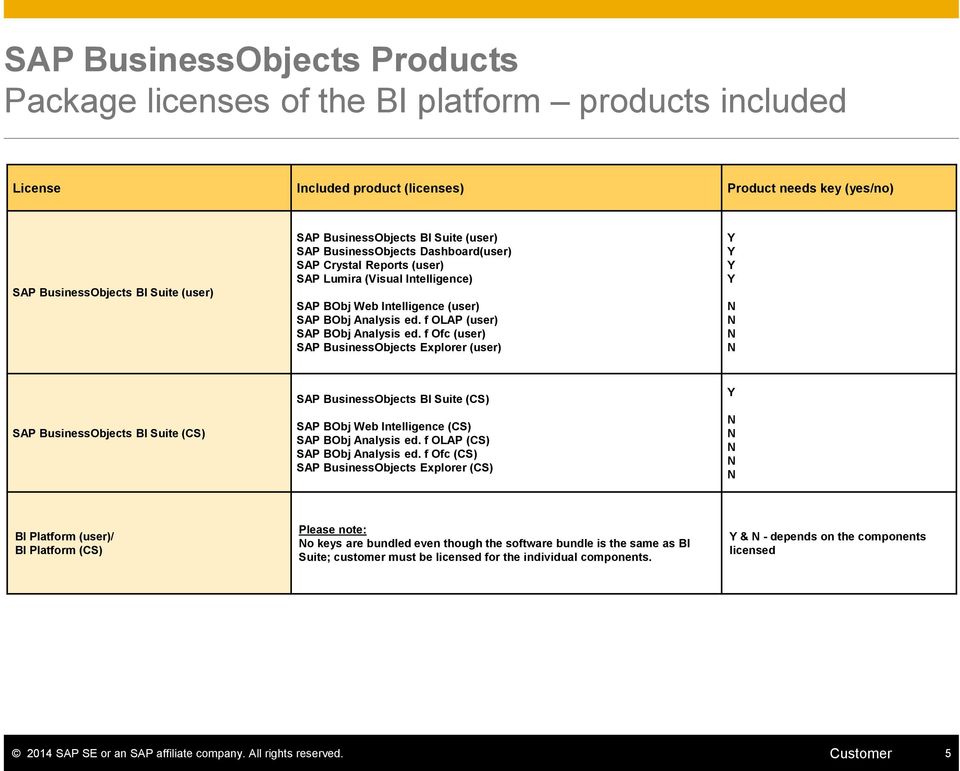
5 SAP BusinessObjects Products Package licenses of the BI platform products included License Included product (licenses) Product needs key (yes/no) SAP BusinessObjects BI Suite (user) SAP BusinessObjects BI Suite (user) SAP BusinessObjects Dashboard(user) SAP Crystal Reports (user) SAP Lumira (Visual Intelligence) SAP BObj Web Intelligence (user) SAP BObj Analysis ed. f OLAP (user) SAP BObj Analysis ed. f Ofc (user) SAP BusinessObjects Explorer (user) SAP BusinessObjects BI Suite (CS) SAP BusinessObjects BI Suite (CS) SAP BObj Web Intelligence (CS) SAP BObj Analysis ed. f OLAP (CS) SAP BObj Analysis ed. f Ofc (CS) SAP BusinessObjects Explorer (CS) BI Platform (user)/ BI Platform (CS) Please note: o keys are bundled even though the software bundle is the same as BI Suite; customer must be licensed for the individual components. & - depends on the components licensed 2014 SAP SE or an SAP affiliate company. All rights reserved. Customer 5
6 Overview BI Platform licensing (from a pricelist perspective) Analytics Model Legacy a la carte BOBJ Day 1 Bundles BI Package BA&T BI Suite UL CAL/CPU UL CPU UL CS PROD: Requested number of licenses reduces the number of remaining licenses (UL licensing per deployment) PROD: Requested number of licenses reduces the number of remaining licenses PROD: Licensed number can be requested for several systems/ deployments PROD: Licensed number can be requested for several systems/ deployments PROD: Requested number of licenses reduces the number of remaining licenses PROD: Licensed number can be requested for several systems/ deployments PROD: Requested number of licenses reduces the number of remaining licenses PROD: Licensed number can be requested for UL several systems/ deployments BA&T BI Platform August 15, 2011 ES Licensed components PROD: Requested number of licenses reduces the CS number of remaining licenses BA&T Edge BI Suite Effective date prior to April 15, 2009 prior to April 15, 2009 April 15, 2009 August 15, 2011 August 15, 2011 SAP amed users required O ES ES ES ES-1 Bus. Analyst & 9 BI Ltd included Metrics Impact of Production key requests License keys delivered Software Downloads UL UL CS PROD: Licensed number can be requested for several systems/ deployments PROD: Requested number of licenses reduces the number of remaining licenses Licensed components Licensed components BI Server & Desktop components BI Server & Desktop components Licensed components Licensed components All BI Server and desktop downloads All BI Server and desktop downloads All BI Server and desktop downloads Edge BI Server & Desktop components All Edge BI Server and desktop downloads ES PROD: Licensed number can be requested for UL several systems/ deployments BI Server & Desktop components BO BI Suite July 15, 2014 O All BI Server and desktop downloads ES PROD: Requested number of licenses reduces the CS number of remaining licenses BI Server components only-no desktop PROD: Licensed number can be requested for UL several systems/ deployments BO BI Platform July 15, 2014 O Licensed components All BI Server and desktop downloads ES PROD: Requested number of licenses reduces the CS number of remaining licenses PROD: Licensed number can be requested for UL several systems/ deployments Edge BI Server & Desktop components BO Edge BI Suite July 15, 2014 O All Edge BI Server and desktop downloads PROD: Requested number of licenses reduces the CS number of remaining licenses Edge BI Server components only-no desktop T/D included? O must be specifically licensed or split production licenses across system types 2014 SAP SE or an SAP affiliate company. All rights reserved. Customer 6 ES ES ES ES ES


7 Go to and enter your S-user ID and password. These were sent out during the transition to the SAP Service Marketplace and you will also receive a download letter with these credentials for new purchases. Select Request a Key 2014 SAP SE or an SAP affiliate company. All rights reserved. Customer 7

8 Where to request license keys - Emergency! Temporary Keys are stored here. Select Request Key from Install or Request Key from a List 2014 SAP SE or an SAP affiliate company. All rights reserved. Customer 8


9 Requesting a License Key for a ew System or to change an Existing System Select Installation ou can select the installation name from the list of recently used installations here. ou can also search for the Product SAP BusinessObjects and Installation here SAP SE or an SAP affiliate company. All rights reserved. Customer 9


10 Requesting a License Key for a ew System or to change an Existing System Installation In case you have no SAP BusinessObjects technical installation number yet or your existing installation numbers are not sufficient for your configuration you can request a new technical installation number at using Installation Data on the left- hand side. To use these functions, you need the authorization Manage Installations SAP SE or an SAP affiliate company. All rights reserved. Customer 10


11 Requesting a License Key for a ew System no license key requested yet Continue! Select ew system to request a license key for your system SAP SE or an SAP affiliate company. All rights reserved. Customer 11

12 Requesting a License Key for a ew System or to change an Existing System Select System Select the existing SID to display the already requested license keys Select the symbol System change to modify your existing system entries e.g. add further products, change number of licenses (for further information please see page 18). Select ew License to request license keys for a new system (please note that a new system ID / system number will be created with 1 to many license keys assigned). System change 2014 SAP SE or an SAP affiliate company. All rights reserved. Customer 12

13 Requesting a License Key for a ew System


14 Requesting a License Key for a ew System System Data Enter a new System ID. System ID check is performed to see if SID is already in use. Each request will result in 1 System ID with 1 to many license keys assigned SAP SE or an SAP affiliate company. All rights reserved. Customer 14


15 Requesting a License Key for a ew System System Data If you have requested a license key for a EW system, but the system ID (SID) already exists under this installation number you receive this information. If you would like to create a new system with the same system ID please select the button ew System. If you would like to add an additional license key to the existing system ID please select it from the drop down menu and select the button Change selected system SAP SE or an SAP affiliate company. All rights reserved. Customer 15


16 Requesting a License Key for a ew System System Data Enter a system name of your choice. Click on Continue button. A list of available products is derived from the licensed products in the assigned contracts SAP SE or an SAP affiliate company. All rights reserved. Customer 16


17 Requesting a License Key for a ew System Product Data ou are shown the list of licenses here. In this case - you can see the list of products included in the BI Package (User based) SAP SE or an SAP affiliate company. All rights reserved. Customer 17


18 Requesting a License Key for a ew System Product Data The total number of licenses according to your license agreements. Enter the number of licenses required. The remaining number of licenses. Please note, that keys might have been already issued for this product version under some other installation number(s), which can affect the remaining number of licenses displayed here. Click on Add to proceed SAP SE or an SAP affiliate company. All rights reserved. Customer 18


19 Requesting a License Key for a ew System Product Data Click on Add to proceed. Multiple materials and versions can be added to the request; each line will result in a license key assigned to the system ID chosen in step 2. Click on Continue SAP SE or an SAP affiliate company. All rights reserved. Customer 19


20 Requesting a License Key for a ew System Submit Enter the address to which the license key/s will be sent. Click on Submit SAP SE or an SAP affiliate company. All rights reserved. Customer 20

21 Requesting a License Key for an Existing System
22 Requesting a License Key for an Existing System Select System Select the icon System change to modify your existing system entries e.g. add further products, change number of licenses SAP SE or an SAP affiliate company. All rights reserved. Customer 22

23 Requesting a License Key for an Existing System System Data Click on Continue SAP SE or an SAP affiliate company. All rights reserved. Customer 23

24 Requesting an additional License Key for an Existing System Product Data Click on Add. Multiple materials and versions can be added to already existing system SAP SE or an SAP affiliate company. All rights reserved. Customer 24

25 Requesting an additional License Key for an Existing System Product Data Saved entry SAP SE or an SAP affiliate company. All rights reserved. Customer 25

26 Change the number of licenses for an Existing System Product Data 1. To change an existing license key please select the entry check the box in the first column to highlight the line. 2. Click on Change selected entry to change the number of licenses of an existing system. 3. The button Remove selected entry can only be used to correct or delete your pending license key request. This button can OT be used for already fulfilled license key requests SAP SE or an SAP affiliate company. All rights reserved. Customer 26

27 Requesting a License Key for an Existing System Submit Enter the address to which the license key/s will be sent. Click on Submit SAP SE or an SAP affiliate company. All rights reserved. Customer 27
28 Here is some further information to assist you. To contact your nearest Customer Interaction Center* go to To open a support message go to For SAP Business Objects license keys support open a case on component XX-SER-LIKE-BOJ To maintain system data go to For assistance with access levels or content of your SMP account open a case on component XX-SER-SAPSMP-SS To maintain S-user data and authorizations go to For assistance with access levels or content of your SMP account open a case on component XX-SER-SAPSMP-USR To create or delete installations go to For details on how to request license keys see SAP ote , available on your SMP account For details on how to locate the key for the Integration Kit for SAP, see SAP ote For details on how to install the license key for the Integration Kit for SAP: Installation of the license key for the SAP Integration Kit on Windows, see SAP ote Installation of the license key for the SAP Integration Kit on Unix for XI, see SAP ote *Customer Interaction Center (CIC) work out of main centers around the world, serving our customers worldwide in their local language SAP SE or an SAP affiliate company. All rights reserved. Customer 28
29 Temporary License Keys Temporary keys for the SAP BusinessObjects range are available in a document in the Keys, Requests and Installation section of SMP (see Page 7). These keys are to assist with product installation while permanent keys are being requested. This document includes: Section 1 Temporary Keys for Current Releases-All Products Section 2 SAP BA&T Analytics Solutions - CS (Concurrent Session) Temporary Keys Section 3 Temporary Keys for Older Releases Please ote: The temporary keys must be removed from your installation once the permanent key is installed. The activation provided by the permanent key reflects the product-use licensed under your agreement. If you require a temporary key to trial or evaluate a product not already under your agreement, please contact your Account Manager SAP SE or an SAP affiliate company. All rights reserved. Customer 29
SAP BusinessObjects License Key Request
 SAP BusinessObjects License Key Request A step-by-step guide for direct customers with support agreements SAP Global License Auditing Services Recommendations for System Creation We recommend to represent
Installation Manual for Setting up SAP Business Objects BI 4.0 Edge System
 Installation Manual for Setting up SAP Business Objects BI 4.0 Edge System The following components need to be installed before starting the installation: Microsoft Office 2007 Adobe Flash 10.1 or higher
How To Upgrade Your System With Bib 4.6.1.1
 Best Practices and Methodologies for Upgrading SAP BusinessObjects Enterprise to SAP BusinessObjects BI 4.0 Disclaimer This presentation outlines our general product direction and should not be relied
By Makesh Kannaiyan [email protected] 8/27/2011 1
 Integration between SAP BusinessObjects and Netweaver By Makesh Kannaiyan [email protected] 8/27/2011 1 Agenda Evolution of BO Business Intelligence suite Integration Integration after 4.0 release
PRODUCT SPECIFIC LICENSE TERMS. SAP Business Objects Programs
 PRODUCT SPECIFIC LICENSE TERMS SAP Business Objects Programs IN ADDITION TO THE LICENSE TERMS SET OUT IN THE SYBASE LICENSE AGREEMENT, THE FOLLOWING ADDITIONAL OR DIFFERENT RIGHTS AND ACCOMPANYING OBLIGATIONS
SAP BusinessObjects SOLUTIONS FOR ORACLE ENVIRONMENTS
 SAP BusinessObjects SOLUTIONS FOR ORACLE ENVIRONMENTS BUSINESS INTELLIGENCE FOR ORACLE APPLICATIONS AND TECHNOLOGY SAP Solution Brief SAP BusinessObjects Business Intelligence Solutions 1 SAP BUSINESSOBJECTS
Platform Architecture Evolution : SAP BO Enterprise XI (R2) to SAP BO Enterprise XI (3.1) to SAP BusinessObjects Business Intelligence Platform 4.
 Platform Architecture Evolution : SAP BO Enterprise XI (R2) to SAP BO Enterprise XI (3.1) to SAP BusinessObjects Business Intelligence Platform 4.1 Overview Since 2005 there have been a number of major
SAP HANA Big Data Intelligence rapiddeployment
 SAP HANA 1.0 November 2015 English SAP HANA Big Data Intelligence rapiddeployment solution: Software and Delivery Requirements SAP SE Dietmar-Hopp-Allee 16 69190 Walldorf Germany Document Revisions 0 1
SAP BusinessObjects Business Intelligence Suite Document Version: 4.1 Support Package 3-2014-05-07. Patch 3.x Update Guide
 SAP BusinessObjects Business Intelligence Suite Document Version: 4.1 Support Package 3-2014-05-07 Table of Contents 1 Document History....3 2 Introduction....4 2.1 About this Document....4 2.1.1 Constraints....4
SAP BO 4.1 COURSE CONTENT
 Data warehousing/dimensional modeling/ SAP BW 7.0 Concepts 1. OLTP vs. OLAP 2. Types of OLAP 3. Multi Dimensional Modeling Of SAP BW 7.0 4. SAP BW 7.0 Cubes, DSO s,multi Providers, Infosets 5. Business
Components of SAP BusinessObjects 4.0 An Overview. Adam Getz Practice Manager, Business Intelligence DCS Consulting, Inc.
 Components of SAP BusinessObjects 4.0 An Overview Adam Getz Practice Manager, Business Intelligence Overview of DCS Consulting is a Business Intelligence and Data Warehousing (BI/DW) professional services
John D. Bonam Disaster Recovery Architecture Session # 2841
 John D. Bonam Disaster Recovery Architecture Session # 2841 LEARNING POINTS Understand the known Traditional approach to Backup Recovery of the BusinessObjects Environment Understand the need for Disaster
Charl du Buisson Charl du Buisson Britehouse Specialist SAP Division
 Business Objects 4.0 Upgrade Lessons Learned Charl du Buisson Charl du Buisson Britehouse Specialist SAP Division Agenda Our Reasons to upgrade to BOBJ 4.0 Lessons Upgrade strategy Was the Wait for Service
BusinessObjects XI R2 Product Documentation Roadmap
 XI R2 Product Documentation Roadmap XI R2 indows and UNIX Patents Trademarks Copyright Third-party contributors Business Objects owns the following U.S. patents, which may cover products that are offered
SAP BusinessObjects Business Intelligence Platform Document Version: 4.1 Support Package 5-2014-11-06. Business Intelligence Launch Pad User Guide
 SAP BusinessObjects Business Intelligence Platform Document Version: 4.1 Support Package 5-2014-11-06 Business Intelligence Launch Pad User Guide Table of Contents 1 Document history....7 2 Getting started
SAP BusinessObjects Business Intelligence 4 Innovation and Implementation
 SAP BusinessObjects Business Intelligence 4 Innovation and Implementation TABLE OF CONTENTS 1- INTRODUCTION... 4 2- LOGON DETAILS... 5 3- STARTING AND STOPPING THE APPLIANCE... 6 4.1 Remote Desktop Connection
How SAP Business Intelligence Solutions provide real-time insight into your organization
 How SAP Business Intelligence Solutions provide real-time insight into your organization 28 Oct 2015 Agenda 1) What is Business Intelligence (BI) 2) SAP BusinessObjects Features Overview 3) Demo & Report
How To Use Sap Business Objects For Microsoft (For Microsoft) For Microsoft (For Pax) For Pax (For Sap) For Spera) For A Business Intelligence (Bio) Solution
 SAP BusinessObjects FOR MICROSOFT ENVIRONMENTS MAKE BETTER DECISIONS TODAY SAP Solution Brief SAP BusinessObjects Business Intelligence Solutions SAP BusinessObjects FOR MICROSOFT ENVIRONMENTS SAP BusinessObjects
SAP Business Intelligence Adoption V7.41:Software and Delivery Requirements. SAP Business Intelligence Adoption August 2015 English
 Business Intelligence Adoption August 2015 English Business Intelligence Adoption V7.41:Software and Delivery Requirements SE Dietmar-Hopp-Allee 16 69190 Walldorf Germany Document Revisions Date 0 6/26/2015
Software and Delivery Requirements
 SAP HANA Big Data Intelligence rapiddeployment solution November 2014 English SAP HANA Big Data Intelligence rapiddeployment solution: Software and Delivery Requirements SAP SE Dietmar-Hopp-Allee 16 69190
SA S P A BO B BJ B 4. 4 1. COURSE CONTENT 2015
 SAP BOBJ 4.1 COURSE CONTENT 2015 SAP Business Objects 4.1 Course Content SAP BI Launch Pad 4.1 SAP Business Objects Web Intelligence Web-Intelligence Rich Client (Desktop based tool) SAP Business Objects
SAP Business Objects BO BI 4.1
 SAP Business Objects BO BI 4.1 SAP Business Objects (a.k.a. BO, BOBJ) is an enterprise software company, specializing in business intelligence (BI). Business Objects was acquired in 2007 by German company
EA104 World Premiere of SAP BusinessObjects Design Studio. Eric Schemer, Senior Director Product Management, BI Clients, SAP AG October, 2013
 EA104 World Premiere of SAP BusinessObjects Design Studio Eric Schemer, Senior Director Product Management, BI Clients, SAP AG October, 2013 Disclaimer This presentation outlines our general product direction
SAP BusinessObjects BI Clients
 SAP BusinessObjects BI Clients April 2015 Customer Use this title slide only with an image BI Use Cases High Level View Agility Data Discovery Analyze and visualize data from multiple sources Data analysis
BUSINESSOBJECTS DATA INTEGRATOR
 PRODUCTS BUSINESSOBJECTS DATA INTEGRATOR IT Benefits Correlate and integrate data from any source Efficiently design a bulletproof data integration process Improve data quality Move data in real time and
SAP BusinessObjects Business Intelligence (BOBI) 4.1
 SAP BusinessObjects Business Intelligence (BOBI) 4.1 SAP BusinessObjects BI (also known as BO or BOBJ) is a suite of front-end applications that allow business users to view, sort and analyze business
Adding Outlook to a Blackberry, Downloading, Installing and Configuring Blackberry Desktop Manager
 Adding Outlook to a Blackberry, Downloading, Installing and Configuring Blackberry Desktop Manager The following instructions work for the District provided Blackberrys from Sprint, but I think it should
BusinessObjects XI. New for users of BusinessObjects 6.x New for users of Crystal v10
 BusinessObjects XI Delivering extreme Insight Bringing information to new users, in new ways, with unmatched simplicity and context. Broadest and deepest end user capabilities from reporting, to query
Set Up Hortonworks Hadoop with SQL Anywhere
 Set Up Hortonworks Hadoop with SQL Anywhere TABLE OF CONTENTS 1 INTRODUCTION... 3 2 INSTALL HADOOP ENVIRONMENT... 3 3 SET UP WINDOWS ENVIRONMENT... 5 3.1 Install Hortonworks ODBC Driver... 5 3.2 ODBC Driver
SAP BusinessObjects Business Intelligence 4.1 One Strategy for Enterprise BI. May 2013
 SAP BusinessObjects Business Intelligence 4.1 One Strategy for Enterprise BI May 2013 SAP s Strategic Focus on Business Intelligence Core Self-service Mobile Extreme Social Core for innovation Complete
Migrating documents from Business Objects Reporter to Web Intelligence XI R2
 Migrating documents from Business Objects Reporter to Web Intelligence XI R2 1. This document describes how to migrate documents from Business Objects Reporter to Web Intelligence documents. They can then
Meeting the Challenges of
 Meeting the Challenges of Reporting and Dashboards In a Microsoft Software Environment SAP Thought Leadership Reporting and Dashboards SAP Crystal Reports Server software encourages IT best practices by
Setup Guide for PrestaShop and BlueSnap
 Setup Guide for PrestaShop and BlueSnap This manual is meant to show you how to connect your PrestaShop store with your newly created BlueSnap account. It will show step-by-step instructions. For any further
SAP PartnerEdge Program: Opportunities for SAP-Authorized Resellers
 For SAP-Authorized Resellers SAP PartnerEdge Program: Opportunities for SAP-Authorized Resellers SAP now offers companies the opportunity to resell SAP solutions to their customers. SAP-authorized resellers
BIA and BO integration other performance management options Crystal Reports Basic: Fundamentals of Report Design
 SAP BO Training Content Overview System Set up and Administration SAP BO Integration Kit Installation & Configuration SAP BO integrated solution approach Server administration SAP Authorization administration
Esri Maps for Business Intelligence (BI)
 2013 Esri International User Conference July 8 12, 2013 San Diego, California Technical Workshop Esri Maps for Business Intelligence (BI) Pierre Seguin Patrick Brennan Esri UC2013. Technical Workshop.
8902 How to Generate Universes from SAP Sybase PowerDesigner. Revision: 27.08.2013
 8902 How to Generate Universes from SAP Sybase PowerDesigner Revision: 27.08.2013 Objectives After reviewing this content, you will be able to: Explain Dimensional Modeling for Cubes in SAP Sybase PowerDesigner
Extending The Value of SAP with the SAP BusinessObjects Business Intelligence Platform Product Integration Roadmap
 Extending The Value of SAP with the SAP BusinessObjects Business Intelligence Platform Product Integration Roadmap Naomi Tomioka Phipps Principal Solution Advisor Business User South East Asia 22 nd April,
An Oracle White Paper November 2010. Oracle Business Intelligence Standard Edition One 11g
 An Oracle White Paper November 2010 Oracle Business Intelligence Standard Edition One 11g Introduction Oracle Business Intelligence Standard Edition One is a complete, integrated BI system designed for
Session 3119 Mobilizing Your Dashboards Best Tips for the Mobile Market. Scott Leaver, SAP and Matt Lloyd, SAP
 Session 3119 Mobilizing Your Dashboards Best Tips for the Mobile Market Scott Leaver, SAP and Matt Lloyd, SAP Legal Disclaimer The information in this presentation is confidential and proprietary to SAP
Crystal Server Upgrade Guide SAP Crystal Server 2013
 Crystal Server Upgrade Guide SAP Crystal Server 2013 Copyright 2013 SAP AG or an SAP affiliate company. All rights reserved. No part of this publication may be reproduced or transmitted in any form or
Deploying Crystal Reports on Top of a SAP BI Query
 Deploying Crystal Reports on Top of a SAP BI Query Applies to: SAP BI NetWeaver 2004s, Crystal Reports 2008. For more information, visit the Business Intelligence homepage. Summary The objective of the
BusinessObjects Enterprise InfoView User's Guide
 BusinessObjects Enterprise InfoView User's Guide BusinessObjects Enterprise XI 3.1 Copyright 2009 SAP BusinessObjects. All rights reserved. SAP BusinessObjects and its logos, BusinessObjects, Crystal Reports,
Consumption of OData Services of Open Items Analytics Dashboard using SAP Predictive Analysis
 Consumption of OData Services of Open Items Analytics Dashboard using SAP Predictive Analysis (Version 1.17) For validation Document version 0.1 7/7/2014 Contents What is SAP Predictive Analytics?... 3
Open Items Analytics Dashboard System Configuration
 Author: Vijayakumar Udayakumar [email protected] Target Audience Developers Consultants For validation Document version 0.95 03/05/2013 Open Items Analytics Dashboard Scenario Overview Contents
Creating a universe on Hive with Hortonworks HDP 2.0
 Creating a universe on Hive with Hortonworks HDP 2.0 Learn how to create an SAP BusinessObjects Universe on top of Apache Hive 2 using the Hortonworks HDP 2.0 distribution Author(s): Company: Ajay Singh
SAS 9.3 Foundation for Microsoft Windows
 Software License Renewal Instructions SAS 9.3 Foundation for Microsoft Windows Note: In this document, references to Microsoft Windows or Windows include Microsoft Windows for x64. SAS software is licensed
SAP Business Intelligence Suite Patch 10.x Update Guide
 SAP BusinessObjects Business Intelligence Suite Document Version: 4.0 Support Package 10-2014-07-25 SAP Business Intelligence Suite Patch 10.x Update Guide Table of Contents 1 Introduction.... 3 1.1 About
Acronis Backup & Recovery 11
 Acronis Backup & Recovery 11 Quick Start Guide Applies to the following editions: Advanced Server Virtual Edition Advanced Server SBS Edition Advanced Workstation Server for Linux Server for Windows Workstation
Crank Your BI Performance up to 11 - Sizing, Tuning & Performance Testing. Innovation Center Network, Silicon Valley Active Global Support
 Crank Your BI Performance up to 11 - Sizing, Tuning & Performance Testing James Rapp Jonathan Brown Innovation Center Network, Silicon Valley Active Global Support How-To Live Example Existing Patterns
Empowered Self-Service with SAP HANA and SAP Lumira. Dennis Scoville BI Evangelist Business Intelligence & Technology Honeywell Aerospace
 Empowered Self-Service with SAP HANA and SAP Lumira Dennis Scoville BI Evangelist Business Intelligence & Technology Honeywell Aerospace Agenda About Honeywell Introduction Self-Service Business Intelligence
Business Intelligence mit SAP: Strategie, Neuerungen, Nutzen. Andreas Forster / Solution Advisor June 2013
 Business Intelligence mit SAP: Strategie, Neuerungen, Nutzen Andreas Forster / Solution Advisor June 2013 Agenda SAP Business Intelligence Vision SAP BusinessObjects Suite SAP BusinessObjects BI and SAP
SAP Business Intelligence Adoption V6.41: Software and Delivery Requirements. SAP Business Intelligence Adoption February 2015 English
 Business Intelligence Adoption February 2015 English Business Intelligence Adoption V6.41: Software and Delivery Requirements AG Dietmar-Hopp-Allee 16 69190 Walldorf Germany Document Revisions Date 0 11/11/14
BUSINESS OBJECTS EDGE
 You can read the recommendations in the user guide, the technical guide or the installation guide for BUSINESS OBJECTS EDGE 3.1. You'll find the answers to all your questions on the BUSINESS OBJECTS EDGE
USER GUIDE for Salesforce
 for Salesforce USER GUIDE Contents 3 Introduction to Backupify 5 Quick-start guide 6 Administration 6 Logging in 6 Administrative dashboard 7 General settings 8 Account settings 9 Add services 9 Contact
ASYST Intelligence South Africa A Decision Inc. Company
 Business Intelligence - SAP BusinessObjects BI Platform 4.0... 2 SBO BI Platform 4.0: Admin and Security (2 days)... 2 SBO BI Platform 4.0: Administering Servers (3 days)... 3 SBO BI Platform 4.0: Designing
Deploy SAP ERP Foundation Extension Ready-to- Activate Appliance Blu-ray Disc. May 2015
 Deploy SAP ERP Foundation Extension Ready-to- Activate Appliance Blu-ray Disc May 2015 Agenda SAP ERP Foundation Extension Ready-to-Activate Appliance Introduction Technical details Technical Deployment
Online Backup - Installation and Setup
 The following guide will assist you in installing the Attix5 Backup Professional Server Edition on your Admin Server. You will have received your Group Name and Group Create Key from the Schools Broadband
SAP Cloud for Analytics
 SAP Cloud for Analytics All Analytics. All Users. One Product. Carl Harris, ANZ Analytics Director November, 2015 Massive amounts of data lead to new opportunities... Transactions Conversations Machines
SAP Business Objects XIR3.0/3.1, BI 4.0 & 4.1 Course Content
 SAP Business Objects XIR3.0/3.1, BI 4.0 & 4.1 Course Content SAP Business Objects Web Intelligence and BI Launch Pad 4.0 Introducing Web Intelligence BI launch pad: What's new in 4.0 Customizing BI launch
Agenda. SAP BusinessObjects 2012 / Slide 2 Private and Confidential
 SAP BusinessObjects 2012 / Slide 2 Private and Confidential Agenda IDD / EIM / EDGE Product Portfolio Roma Background and overview Deployment Phase 1 Deployment Phase 2 Deployment Phase 3 Next Phase -
Business Objects and Microsoft Interoperability
 Business Objects and Microsoft Interoperability 1 Business Objects and Microsoft Interoperability Published: April 2007 Applies To: Microsoft SQL Server 2005, Microsoft SharePoint, Microsoft Office and
SAP BusinessObjects Edge BI, Preferred Business Intelligence. SAP BusinessObjects Portfolio SAP Solutions for Small Businesses and Midsize Companies
 SAP BusinessObjects Edge BI, Standard Package Preferred Business Intelligence Choice for Growing Companies SAP BusinessObjects Portfolio SAP Solutions for Small Businesses and Midsize Companies Executive
PLSAP CONNECTOR FOR TALEND USER MANUAL
 PLSAP CONNECTOR FOR TALEND USER MANUAL www.starschema.net 2 Contents 1. Overview... 3 1.1 Architecture... 3 2. PLSC GUI... 4 2.1 Connection wizard... 4 2.2 Table wizard... 5 3. Components... 6 3.1 tplsapsimpleinput...
How City of Chicago:
 How City of Chicago: Boosts their SAP BusinessObjects environment Prepares for 4.1 migration Implements incremental backup & audits their deployment with GB&SMITH s 360Suite Dariusz Zyskowski, BI Manager
SAP BO 4.1 Online Training
 WWW.ARANICONSULTING.COM SAP BO 4.1 Online Training Arani consulting 2014 A R A N I C O N S U L T I N G, H Y D E R A B A D, I N D I A SAP BO 4.1 Training Topics In this training, attendees will learn: Data
Tips and tricks for using SAP BusinessObjects Web Intelligence with SAP BW
 Orange County Convention Center Orlando, Florida May 15-18, 2011 Tips and tricks for using SAP BusinessObjects Web Intelligence with SAP BW Deepu Sasidharan ] [ Agenda Introduction System Landscape Advanced
How to Move an SAP BusinessObjects BI Platform System Database and Audit Database
 How to Move an SAP BusinessObjects BI Platform System Database and Audit Database Technology Used SAP BI Platform 4.1 (this includes SAP BusinessObjects Enterprise 4.1, SAP BusinessObjects Edge 4.1 and
SAP BusinessObjects Edge BI, Standard Package Preferred Business Intelligence Choice for Growing Companies
 SAP Solutions for Small Businesses and Midsize Companies SAP BusinessObjects Edge BI, Standard Package Preferred Business Intelligence Choice for Growing Companies SAP BusinessObjects Edge BI, Standard
SAS 9.3 Intelligence Platform
 SAS 9.3 Intelligence Platform System Administration Guide Second Edition SAS Documentation The correct bibliographic citation for this manual is as follows: SAS Institute Inc. 2012. SAS 9.3 Intelligence
SAP BusinessObjects BI Platform Document Version: 4.2 2015-11-12. Recommendations for Conversion Using the Report Conversion Tool
 SAP BusinessObjects BI Platform Document Version: 4.2 2015-11-12 Recommendations for Conversion Using the Report Conversion Tool Content 1 Document History....3 2 About this Document.... 4 3 Conversion
LVS Troubleshooting Common issues and solutions
 LVS Troubleshooting Common issues and solutions www.sap.com TABLE OF CONTENT INSTALLATION... 3 No SQL Instance found... 3 Server reboots after LVS installs... 3 LVS Service does not start after update...
vrops Microsoft SQL Server MANAGEMENT PACK OVERVIEW
 vrops Microsoft SQL Server MANAGEMENT PACK OVERVIEW What does Blue Medora do? We connect business critical applications, databases, storage, and converged systems to leading virtualization and cloud management
Monitoring SAP Business Objects
 Monitoring SAP Business Objects eg Enterprise v6.0 Restricted Rights Legend The information contained in this document is confidential and subject to change without notice. No part of this document may
Agentry and SMP Metadata Performance Testing Guidelines for executing performance testing with Agentry and SAP Mobile Platform Metadata based
 Agentry and SMP Metadata Performance Testing Guidelines for executing performance testing with Agentry and SAP Mobile Platform Metadata based applications AGENTRY PERFORMANCE TESTING V 1.0 TABLE OF CONTENTS
BusinessObjects Enterprise XI Release 2 Administrator s Guide
 BusinessObjects Enterprise XI Release 2 Administrator s Guide BusinessObjects Enterprise XI Release 2 1 Patents Trademarks Copyright Third-party contributors Business Objects owns the following U.S. patents,
SAP BusinessObjects Mobile for ios Document Version: 6.2.7 2015-08-20. Mobile BI Report Designer's Guide
 SAP BusinessObjects Mobile for ios Document Version: 6.2.7 2015-08-20 Content 1 About this Document....4 1.1 Target Readership....4 2 Introduction....5 2.1 Mobile Solution Overview.... 5 2.2 Know the SAP
Welcome to the Technical Stream
 Welcome to the Technical Stream Extend Your BI Toolkit with the SAP SDKs John Weikert November 26 th 2013 No part of this document may be reproduced in any form without the written permission of Sulis
Using MS-SQL Server with Visual DataFlex March, 2009
 Using MS-SQL Server with Visual DataFlex March, 2009 All rights reserved. Target Audience It is assumed that the reader of this white paper has general knowledge of the Visual DataFlex development environment.
SAP BusinessObjects Document Version: 4.1 Support Package 7 2015-11-27. Dashboards and Presentation Design Installation Guide
 SAP BusinessObjects Document Version: 4.1 Support Package 7 2015-11-27 Dashboards and Presentation Design Installation Guide Content 1 Document History....3 2 About this Guide....4 3 Planning Installations....5
Technology Partners. Acceleratio Ltd. is a software development company based in Zagreb, Croatia, founded in 2009.
 Acceleratio Ltd. is a software development company based in Zagreb, Croatia, founded in 2009. We create innovative software solutions for SharePoint, Office 365, MS Windows Remote Desktop Services, and
How to create connections with SAP BusinessObjects BI 4.0
 How to create connections with SAP BusinessObjects BI 4.0 Creator: Twitter: Blog: Pieter Verstraeten http://www.twitter.com/pverstraeten http://www.pieterverstraeten.com/blog Hi, Thanks for downloading
Introduction to Oracle Business Intelligence Standard Edition One. Mike Donohue Senior Manager, Product Management Oracle Business Intelligence
 Introduction to Oracle Business Intelligence Standard Edition One Mike Donohue Senior Manager, Product Management Oracle Business Intelligence The following is intended to outline our general product direction.
Frequently Asked Questions
 Table of contents 1. Agent Technology...3 1.1. Has the Knoa agent been tested with standard set of services on the PC?... 3 1.2. Do users need to do anything to activate the Agent?...3 1.3. Does the Knoa
How to Create a Support Message in SAP Service Marketplace
 How to Create a Support Message in SAP Service Marketplace Summary This document explains how to create a message (incident) on the SAP Service Marketplace. It is assumed that the customer has never logged
BUSINESSOBJECTS DATA INTEGRATOR
 PRODUCTS BUSINESSOBJECTS DATA INTEGRATOR IT Benefits Correlate and integrate data from any source Efficiently design a bulletproof data integration process Accelerate time to market Move data in real time
AWS Service Catalog. User Guide
 AWS Service Catalog User Guide AWS Service Catalog: User Guide Copyright 2016 Amazon Web Services, Inc. and/or its affiliates. All rights reserved. Amazon's trademarks and trade dress may not be used in
Trends, Strategy, Roadmaps and Product Direction for SAP BI tools in SAP HANA environment
 September 9 11, 2013 Anaheim, California Trends, Strategy, Roadmaps and Product Direction for SAP BI tools in SAP HANA environment Surya K Dutta [email protected] Analytics New possibilities In-Memory
Creating a Fiori Starter Application for sales order tracking
 SAP Web IDE How-To Guide Provided by Customer Experience Group Creating a Fiori Starter Application for sales order tracking Applicable Releases: SAP Web IDE 1.4 Version 2.0 - October 2014 Creating a Fiori
Installing and Using Sage App Manager
 Installing and Using Sage App Manager Document Version: 1.0.0.0 For Sage App Manager 6.2A Sage Software Asia Pte Ltd Copyright 2015 Sage Software Asia Pte Ltd All rights reserved. No part of this manual
Understanding the SAP BI Strategy
 Understanding the SAP BI Strategy Blair Wheadon, GM of Enterprise BI September 2014 Use this title slide only with an image Legal disclaimer The information in this presentation is confidential and proprietary