
e s p i o n s.com. V680 GPS Watch User s Manual
|
|
|
- Doreen Thornton
- 10 years ago
- Views:
Transcription
1 1 V680 GPS Watch User s Manual

2 2 Table of Contents Chapter I Preface..4 I.General...4 II.Notices..4 Chapter II about the Device.5 1. Appearance Product Features.5 3. Product Specification.6 (1).Technical Specifications 6 (2).Others 7 Chapter III Usage Preparation 8 I.Accessories..8 II.Appearance and Interface Appearance and Buttons Interface Definition...9 III.Charge the Battery.9 IV.Installation of SIM Card...11

3 3 Chapter IV Commands Corresponding to and Operation Method of Basic Functions Location Inquiry.12 (1) SMS Inquiry 12 (2) Platform Inquiry Setup of Centre Number Bi-directional Call Function Adjust Receiver Volume SOS Function Monitoring Function Regular Upload Interval Setup Function of Changing Password Set User Name Command Set APN Command Set Server Address Command Low Voltage Alarming Function Method to Set Time Zone Electronic Fence Function.20

4 4 (1). GPS Fence Function...20 (2). Fence Reading Function.20 (3). Function of Canceling Fence Auxiliary Functions 21 Notices..22 Chapter I Preface I. General V680 represents the perfect combination of GSM and GPS technologies. This model, with its precise dimensions and compact appearance, expresses the advanced workmanship in the GSM and GPS field. It is a typical design combing communication products and GPS services. As a professional security and positioning company, we will provide you with more and better products and services. Before using the watch, please spend several minutes reading this user s manual in order to get to know about operation details and obtain better services. II. Notices 1. Please read this user s manual carefully and always use correct operation methods to prevent any possible errors.

5 5 2. This user s manual is for reference only. If some contents and operation steps are inconsistent with those for the actual product, the latter will prevail. 3. The defaulted password of this product is Chapter II about the Device V680, as a personal remote positioning device made up of GPS module and GSM/GPRS module, is compact in dimensions with high accuracy. On the basis of GPS satellites and under dynamic conditions, it can provide you with accurate and correct location information. With such features, it can be used to protect and look for our old people and children. It can also be used for safety purpose and other purposes, such as remote positioning to protect property safety. 1 Appearance

6 6 2 Product Features Inbuilt GPS Module Internet positioning service center, used to receive and send positioning information GSM /GPRS modem supports Quad frequency bands, i.e. 850/900/1800/1900 MHz High-sensitivity, new workmanship and the most advanced GPS chip Can work effectively in limited space such as urban canyon Low energy consumption Fast signal acquisition Supports single positioning and continuous tracking; Supports alarming and remote monitoring Supports fast dial button Supports the location information inquiry by SMS and Internet May monitor without disturbing the tracked person and realizes real-time tracking; Can position the holder by call or SMS In emergency, press the SOS button to have an accurate positioning 3 Product Specifications (1). Technical Specifications GSM module GSM 850/900/1800/1900 MHz Quad frequency

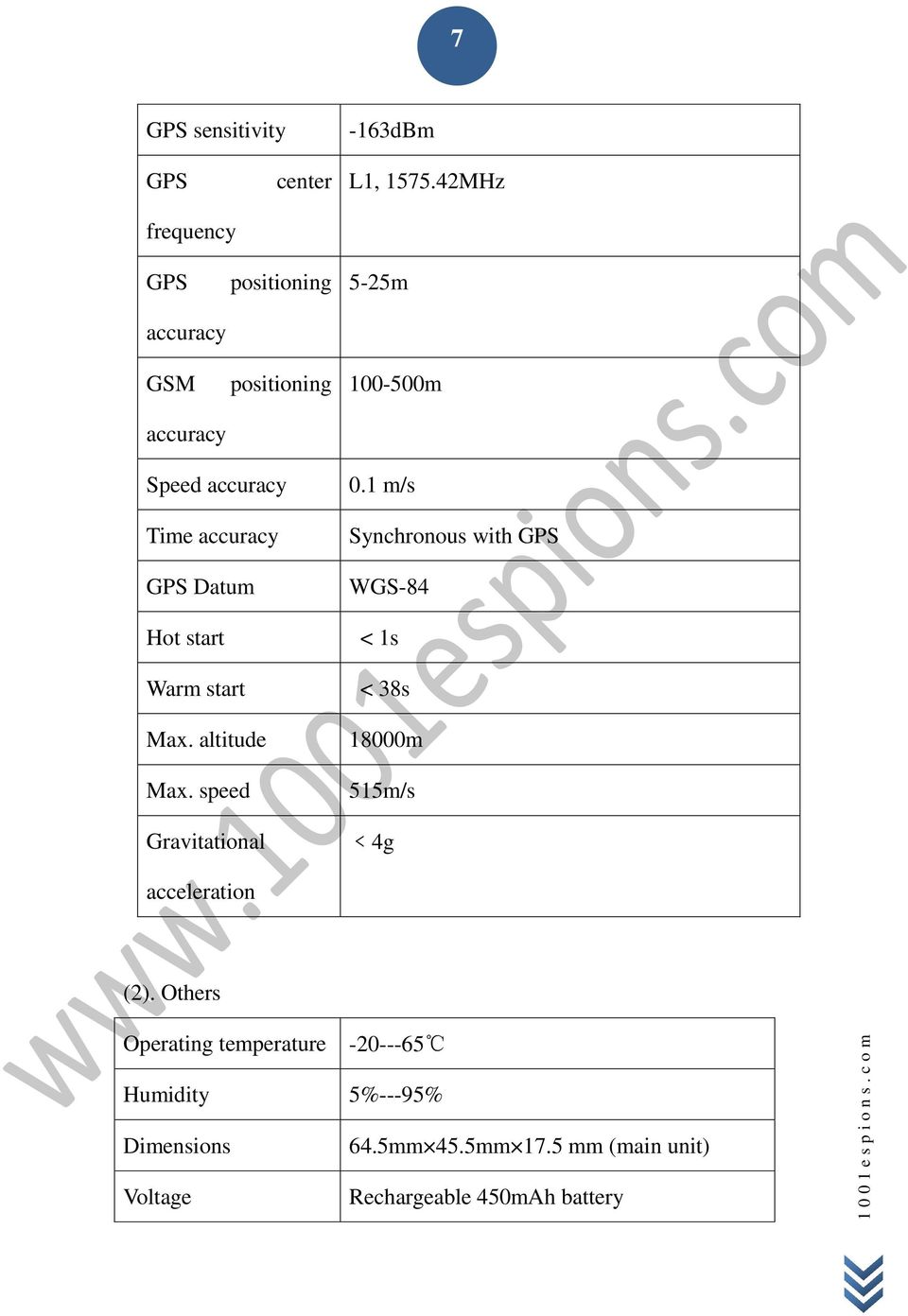
7 7 GPS sensitivity -163dBm GPS frequency center L1, MHz GPS accuracy GSM accuracy positioning positioning 5-25m m Speed accuracy Time accuracy GPS Datum Hot start Warm start Max. altitude Max. speed Gravitational 0.1 m/s Synchronous with GPS WGS-84 < 1s < 38s 18000m 515m/s <4g acceleration (2). Others Operating temperature Humidity 5%---95% Dimensions Voltage 64.5mm 45.5mm 17.5 mm (main unit) Rechargeable 450mAh battery
8 8 Power supply DC5V Standby time >48h Buttons SOS button for emergency aid; Call 1, Call 2, Switch on / off buttons, interface switch button Chapter III Usage Preparation I. Accessories 1. Main unit 2. USB data cable 3. Charger 4. Headset cable (optional) 5 Battery II. Appearance and Interface 1. Appearance and Buttons Five buttons are equipped with this watch, the upper left button serves for switch-on and hold-on, the bottom left button serves interface switch, while the upper right button for predetermined number 1, middle right button for emergency aid (SOS button) and the bottom right button for predetermined number 2 as shown in picture 1:

9 9 2. Interface Definition GSM signal strength is indicated on the upper left corner of the main interface as showed in picture 2: Bottom left button is for interface switch as showed in picture 3: III. Charge the Battery Please use up the battery and discharge it for 2-3 times and then charge the battery for at least 12 hours for initial use, in order to keep the quality of the battery. The normal charging time of this product is 4-5 hours.

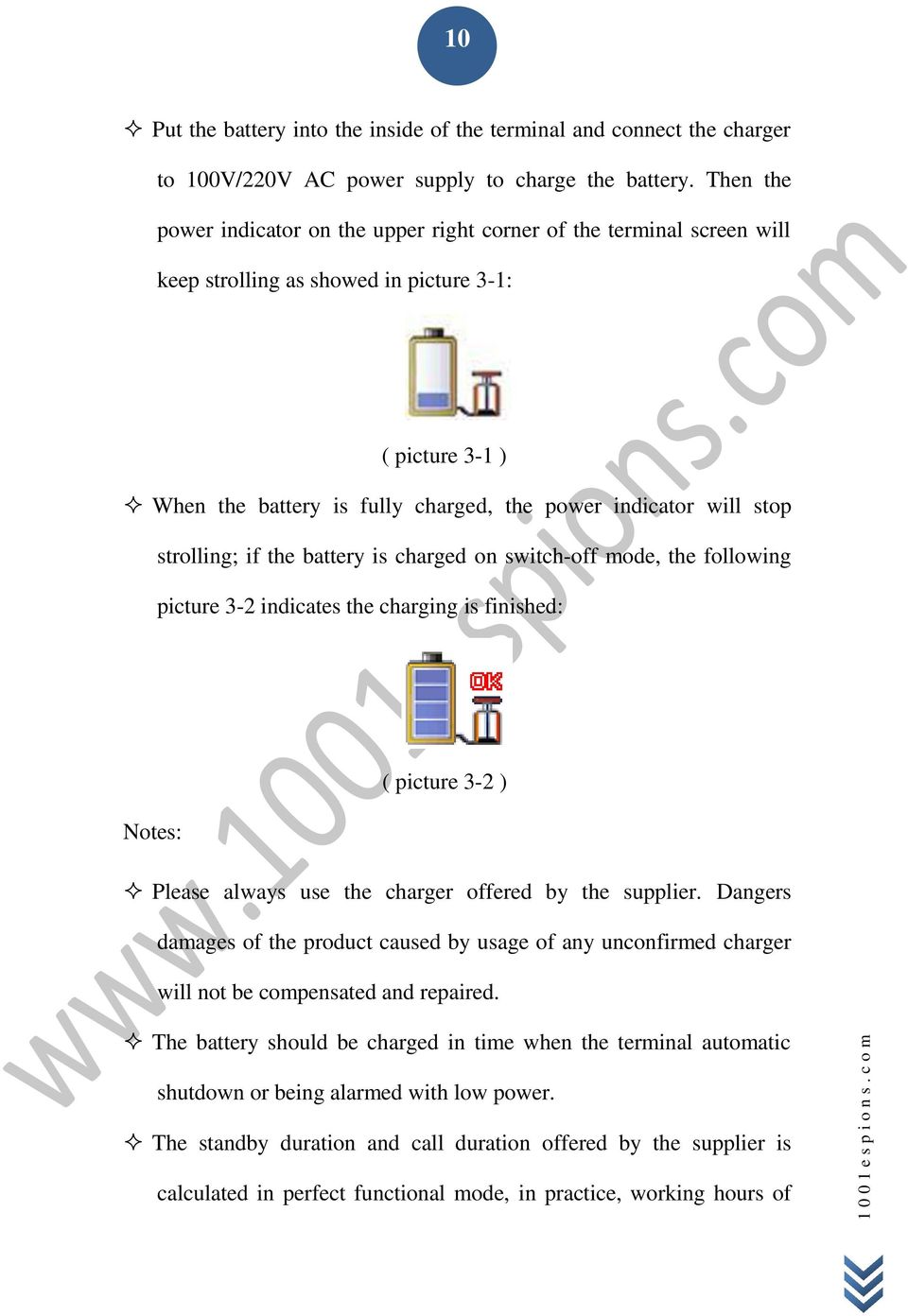
10 10 Put the battery into the inside of the terminal and connect the charger to 100V/220V AC power supply to charge the battery. Then the power indicator on the upper right corner of the terminal screen will keep strolling as showed in picture 3-1: ( picture 3-1 ) When the battery is fully charged, the power indicator will stop strolling; if the battery is charged on switch-off mode, the following picture 3-2 indicates the charging is finished: ( picture 3-2 ) Notes: Please always use the charger offered by the supplier. Dangers damages of the product caused by usage of any unconfirmed charger will not be compensated and repaired. The battery should be charged in time when the terminal automatic shutdown or being alarmed with low power. The standby duration and call duration offered by the supplier is calculated in perfect functional mode, in practice, working hours of
11 11 the battery may vary due to difference of internet service, functional mode and usage mode. Disconnect the terminal and charger as soon as possible after the battery is well charged. IV. Installation of SIM Card Open the back cover, then you will see the place where the SIM card is placed. Then push the SIM card into the slot until it comes into its proper position completely and consolidate it with the dome sheet nearby. Choose SIM card: The type of the SIM card is GSM card (the SIM card of China Mobile is recommended). Ensure sufficient money is within the SIM card in order to pay the communication fee. Prepare a SIM card for mobile phone (the SIM card of China Mobile is recommended), make sure that the card has opened such functions of Caller ID and sending and receiving SMS. If service platform real-time tracking is in need, then GPRS function should be open. Chapter IV Commands Corresponding to and Operation Method of Basic Functions

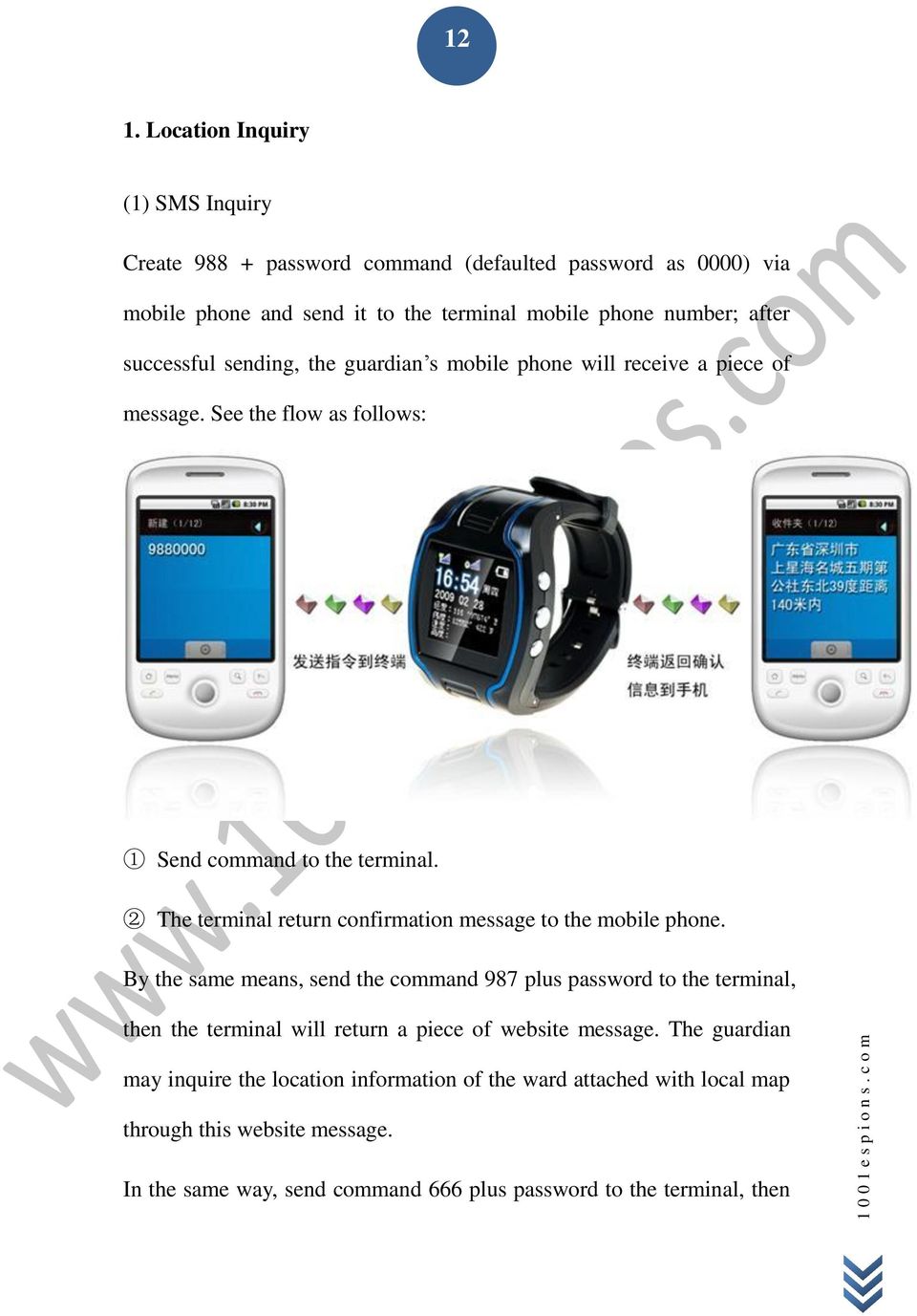
12 12 1. Location Inquiry (1) SMS Inquiry Create password command (defaulted password as 0000) via mobile phone and send it to the terminal mobile phone number; after successful sending, the guardian s mobile phone will receive a piece of message. See the flow as follows: 1 Send command to the terminal. 2 The terminal return confirmation message to the mobile phone. By the same means, send the command 987 plus password to the terminal, then the terminal will return a piece of website message. The guardian may inquire the location information of the ward attached with local map through this website message. In the same way, send command 666 plus password to the terminal, then
13 13 the terminal will return a piece of detailed latitude and longitude message. (2) Platform Inquiry Step 1: Log onto the platform (Please contact with the service provider to get the platform address). Step 2: Click the terminal of the ward, then the location of the ward will be displayed on the map. 2. Setup of Centre Number Set the centre number by SMS through the mobile phone, after the setup is successful, then the mobile phone that sending the SMS will receive the &710&successful setting&& response message from the terminal. Command format: #710# center number # user password ## For example: #710#134xxxxxxxx#0000## Note: All alarming information thereafter including SOS, low power,

14 14 electronic fence, etc will be returned to that number. 3. Bi-directional Call Function Incoming calls can be rejected by pressing upper left button or received by pressing middle right button. Send the command in form of SMS to the terminal via mobile phone. After the setup is successful, the mobile phone will receive the &710&successful setting&& response message from the terminal. Setup format: #711# Call1# Call2 # Call3 # 0000## incoming call interface and call duration interface Notes: After the setup is successful, press the upper right button for a while, then the terminal will automatically dial the first phone number. Press the bottom right button, then the terminal will automatically dial the second phone number. 4. Adjust Receiver Volume While making phone calls, the user could press upper or bottom right button to adjust receiver volume.

15 15 5. SOS Function If a ward number (predetermined number in item3) is set, when the ward encounters emergency and presses the SOS button, the terminal will send alarming information to the center number and dial the three ward numbers in turn. Picture 5 is SOS alarming interface: SOS button for emergency aid interface SOS SMS format: IMEI number: SOS (information about latitude and longitude or base station) Example: :SOS( ,E, ,N) or :SOS(26280E77) Remarks: when interface in picture 5 appears on the phone, the terminal will skip to standby mode automatically; sound and interface during the dialing will be completely shielded. 6. Monitoring Function The guardian may send SMS 555 plus password to the terminal of the ward, then the ward terminal will automatically call back to the mobile phone of the guardian and the guardian may hear the sound of the

16 16 surroundings within 10m around the ward. SMS format: Remarks: 0000 is the initial defaulted password and in practice the password could be set by the user. 7. Regular Upload Interval Setup The defaulted upload interval of this product is 0, meaning that the defaulted GPRS is closed. The user may change the parameter according to actual demand. Command format: # command number 730# Sampling interval # Pieces of uploads # User password ## Example: 730#20#4#0000## Notes: The parameter 20 indicates getting one point every 20s; after getting points accumulatively for 4 times, upload one piece of positioning information with the upload interval as 20*4=80s. The user may change this parameter as the case may be. 8. Function of Changing Password Send the SMS #770# User new password # User old password ## by mobile phone to the terminal number, after successful sending, the mobile

17 17 phone with such setup will receive one piece of &770&successful setting&& response information or &770&PASSWORD ER&& if the password is wrong, as shown in the following picture: 1 Send command to the terminal. 2 The terminal return confirmation message to the mobile phone. 9. Set User name Command SMS Command Format: #801#4~20-digit letters or numbers #4-digit password ## Example: #801# #0000## Notes: After executing this command, the user name of the terminal on GPRS mode is required to be set up according to actual demand. After the setup is successful, the terminal will send reply with &801&successful setting&& or &801&PASSWORD ER&& if the password is wrong.

18 Set APN Command Create the SMS 802#APN letters or digits, 4-20 bits # Log user name letters or digits 4-20 bits in # Log password letter or digits 4-20 bits in # terminal password 4 bits ## and send it to the terminal; after executing this command, the terminal will automatically restart and connect to GPRS with APN set. Command example 1: #802#cmnet###0000### Command example 2: #802#CCDLEN#QIUXIA.21#RX0000#0000## After this command is executed, APN will be CCDLEN; the login user name is QIUXIA.21 and login password is RX0000. Note: The default APN of this product is CMNET. 11. Setup of Server Address Command Format: #803# Fixed IP address# port number#4-digit password## This command is used to set GPRS center server address, which could be fixed IP number, like IP1, IP2, IP3, IP4 as well as domain name with the length less than 64. After the setup is successful, the module will send a reply with &803&successful setting&& or &803&PASSWORD ER&& if the password is wrong. Example: #803# #7003#0000##

19 19 Setup via domain name: Example: #803#gps.chinaradio.hk#9876#0000## 12. Low-Voltage Alarming Function If the terminal of the ward has a very low power and needs to be powered off, the terminal of the ward will automatically upload one piece of low-voltage alarming command to the monitoring center number. SMS Format: IMEI Number: low power; please charge the battery in time (information about latitude and longitude or base station) Example: : low power, please charge the battery in time ( , E, , N) or : low power; please charge the battery in time (26280E77). 13. Method to Set Time Zone Command Format: 896xxxxDnn Notes: xxxx stands for a 4-digit password, D depends on E,W, while E representing eastern time zone and W representing western time zone, nn is a two-digit number, meaning time zone number. For example, given the current time is 09:30:08, after sending the command E08, the time will add with 8 and change into 17:30:08. Similarly, when setting the command W07, the time will automatically reduce with 7 and change into 02:30:08.
20 20 When satellite time is corrected to GMT automatically, send SMS command E08 and the time will change into Beijing time. 14. Electronic Fence Function (1)GPS Fence Function The guardian could get the center spot of a fence through Google map or single inquiry. Set Fence Format: # command number (751) # fence radius # sampling interval # longitude # latitude # user password ##. Example: #751#500#5# N#113.91E#0000## After the setup is successful, the mobile phone will receive a piece of &751&succeful setting&&. Then, each time when the ward leaves this area, the terminal will send the alarming information of being out of the fence to the center number.

21 21 (2) Fence Reading Function Send commands to the terminal: # command number (752) # user password 4 digits ##; after the command is set successfully, the terminal will read the data of the module fence working status and return message to the sending mobile phone, or PASSWORD ER if the password is wrong. Example: #752#0000## Return:#open:1#lat: #lng: #distance:500#time:5 #status:2 Where, open: 1 indicates fence open; Open: 0 indicates fence closed; lat: , latitude; lng: ; longitude; distance: 500; fence radius; time: 5 sampling interval; status: 2, terminal has obtained valid satellite data, fence works normally; status: 1, fence open, but there are no valid satellite data have been received; status: 0, no electronic fence is set.
22 22 (3) Function of Canceling Fence Command name: # command number (760) # user password 4-digits ## Example: #760#0000## After the terminal receiving this command, all fence settings will be cancelled. Advice: Do not set GSM fence and GPS fence at the same time. 15. Auxiliary Function (1) #901## Command of inquiring machine parameters (2) #902## Command of inquiring GPRS parameters (3) #904## GPRS connection command (4) #905## GPRS disconnection command Notices 1. This device is of non-waterproof design. 2. This device must work with the cooperation of GSM/GPRS network. 3. Make sure that the SIM card has sufficient balance in order to avoid inconvenience in use. 4. This device will not be able to work in case of power-off and out of the service area, even if you are a registered user.
23 23 5. This device supports the dual positioning mode of GPS and GSM/GPRS. 6. Please use this device in a legal area, any illegal consequence will be borne by the user. Notes: due to the high sensitivity of the GPS module adopted by this product, it is normal to be drifting with weak GPS signal.
GPS Vehicle Tracker User Manual VT810
 GPS Vehicle Tracker User Manual VT810 1. Please read this manual carefully for correct operation. 2. You need to ask a professional to install this product in a safe position of your vehicle. Avoid dangerous
GPS Vehicle and personal location tracker. User manual
 GPS Vehicle and personal location tracker User manual 1 Contents 1. Product overview... 2 2. Safety instruction... 3 3. Specification and parameters... 3 4. Getting started... 4 4.1 Hardware and accessories...
INSTRUCTION. The smallest GPS watch locator in the country
 Please read the user manual carefully before you use it, so that you can get the correct installation and make quick online activation. Product appearance and color are subject to change. Actual product
GPS VEHICLE TRACKER USER MANUAL VT-G118
 GPS VEHICLE TRACKER USER MANUAL VT-G118 Welcome Thanks for using VT-G118 satellite positioning tracker This tracker is a multi-functional GPS satellite positioning tracker device which can be applied to
USER MANUAL V5.0 VT300
 GPS Vehicle Tracker USER MANUAL V5.0 VT300 Updated on 26/12/2008 Contents 1 Product Overview 3 2 For Your Safety 3 3 VT300 Parameters 3 4 Getting Started 4 4.1 Hardware and Accessories 4 4.2 Light and
User Manual (UDTTV01 V 1.6
 User Manual (UDTTV01 GPS/GSM Vehicle Tracker) V 1.6 1.1 Brief Introduction The UDTTV01 GPS/GSM Tracker is a vehicle remote positioning device with built-in GPS and GSM/GPRS technology in compact size.
CatTraQ Live 2 User Manual
 CatTraQ Live 2 User Manual CatTraQ CatTraQ is a trademark of Perthold Engineering Revision History Revision Change V1.0 Initial version V1.1 Time zone adjustment V1.2 Rain protection V1.3 New SIM card
GSM/GPRS/GPS Tracker (LDW-101-B) User Manual. Version 1.0
 GSM/GPRS/GPS Tracker (LDW-101-B) User Manual Version 1.0 Chapter I Preface 1. 1 General LDW-101 represents the perfect combination of GSM, GPRS and GPS technologies. This model, with precise dimensions
GSM/GPRS/GPS TRACKER MANUAL
 U GSM/GPRS/GPS TRACKER MANUAL Preface Thank you for purchasing the tracker. This manual shows how to operate the device smoothly and correctly. Make sure to read this manual carefully before using this
PERSONAL GPS TRACKING SOLUTION TL206
 PERSONAL GPS TRACKING SOLUTION TL206 Contents Tables 1. Introduction-----------------------------------------------------------------------------------------------------------------------1 2. What s new?
GSM/GPRS/GPS TRACKER MANUAL TK-102B
 GSM/GPRS/GPS TRACKER MANUAL TK-102B Preface Thank you for purchasing the tracker. This manual shows how to operate the device smoothly and correctly. Make sure to read this manual carefully before using
VEHICLE GPS TRACKER USER MANUAL VT-108
 VEHICLE GPS TRACKER USER MANUAL VT-108 1 Content Tables 1. Introduction------------------------------------------------------------------------------------------------------2 2. What s new? ----------------------------------------------------------------------------------------------------3
GPS Vehicle Tracker USER MANUAL VT-108
 GPS Vehicle Tracker USER MANUAL VT-108 VT-108 is a GPS/GSM/GPRS tracking device which is specially developed and designed for vehicle Real-time tracking and security. With superior GPS and GPRS modules,
GPS TRACKER USER MANUAL
 GPS TRACKER USER MANUAL Summary Working Based on existing GSM /GPRS network and GPS satellites, this tracker is a small and powerful tracking device that is developed for personal, vehicle and pet etc.
Marine-Electronic SA Tel. +4121 8262111 41, rue Louis de Savoie Fax +4121 8262114 CH 1110 Morges [email protected]
 GSM/GPRS/GPS TRACKER TK102-2 USER MANUAL Content: 1. Summary 2. Applications 3. Hardware description 4. Specifications 5. User manual - Utilisation 5.1. SIM card installation 5.2. Battery and Charger 5.3.
SuperGuard VT-05 Vehicle Tracking Device
 SuperGuard VT-05 Vehicle Tracking Device The SuperGuard VT-05 Vehicle Tracker is a professional GPS tracking device designed for fleet management and commercial data centers, with customizable data upload
GPS VEHICLE TRACKER USER MANUAL
 GPS VEHICLE TRACKER USER MANUAL Preface Thank you for purchasing the GPS vehicle tracker. This manual shows how to operate the device smoothly and correctly. Make sure to read this manual carefully before
Operation Instructions
 GPS/GSM (GPR S ) Vehicle Tracker Operation Instructions 1 System Function Introduction This ve h ic l e tra c k e r ha s c om b in e d GPS and GSM(GPRS) functions. Location information will be send by
X-SOS 3000 Outdoor GPS tracking system with emergency button.
 X-SOS 3000 Outdoor GPS tracking system with emergency button. Introduction : Thank you for buying the X-SOS outdoor GPS tracking system with emergency button. We take great pride in designing each of our
Vehicle GPS Tracker GP268. GP268 Vehicle GPS/GPRS Tracking and Monitoring System Presentation July, 2009
 Vehicle GPS Tracker GP268 Winwill World Co., Ltd 2008 Website: www.winwillworld.com Inquire now: [email protected] - 1 - 1 PRODUCT INTRODUCTION 1.1 Features of unpacking 1.2 Brief introduction GP268,
Falcon Protector Tracking System
 Falcon Protector Tracking System Product Overview The Falcon Protector is a GPS and GSM tracking device which is specially developed and designed for vehicle tracking. With the latest SIFR III GPS module
GPS/SMS/GPRS TRACKER TK103A VEHICLE CAR REALTIME TRACKING DEVICE SYSTEM
 GPS/SMS/GPRS TRACKER TK103A VEHICLE CAR REALTIME TRACKING DEVICE SYSTEM This GPS Tracker was specially made for vehicles. It's a new product based on the GSM/GPRS (850, 900, 1800, 1900MHz) network and
VEHICLE GPS TRACKER SOLUTION
 VEHICLE GPS TRACKER SOLUTION 1 Content Tables 1. Introduction--------------------------------------------------------------1 2. What s new? -------------------------------------------------------------2
GPS/GSM Personal Tracking Device
 GPS/GSM Personal Tracking Device User Manual INDEX Usage Packing list Before using Add/Delete/Check Preset Phone Number Change / Check Password Set langue Set SMS locate mode after calling Send a SMS trigger
GSM/GPRS/GPS TRACKER USER MANUAL
 GSM/GPRS/GPS TRACKER USER MANUAL UPreface Thank you for purchasing the TK201. This manual shows how to operate the device smoothly and correctly. Make sure to read this manual carefully before using this
USER MANUAL V5.0 ST100
 GPS Vehicle Tracker USER MANUAL V5.0 ST100 Updated on 15 September 2009-1 - Contents 1 Product Overview 3 2 For Your Safety 3 3 ST100 Parameters 3 4 Getting Started 4 4.1 Hardware and Accessories 4 4.2
GSM/GPRS/GPS TRACKER USER MANUAL
 GSM/GPRS/GPS TRACKER USER MANUAL UPreface Thank you for purchasing GPS Tracker. This manual shows how to operate the device smoothly and correctly. Make sure to read this manual carefully before using
GSM/GPRS/GPS PORTABLE VEHICLE TRACKER USER MANUAL UM03
 GSM/GPRS/GPS PORTABLE VEHICLE TRACKER USER MANUAL UM03 Preface Thank you for purchasing the tracker. This manual shows how to operate the device smoothly and correctly. Make sure to read this manual carefully
IDD-213T User Manual. (Rev. 1.0) China Aerospace Telecommunications Limited
 (Rev. 1.0) China Aerospace Telecommunications Limited Contents 1. Introduction......3 2. Specifications...4 2.1 External Interface... 4 2.2 Status Indicator...... 5 2.3 Technical Parameters... 6 3. Device
Overview. 1. GPS data tracking via GSM SMS / GPRS. 2. GPS data logging in internal memory. 3. Alarm alert via GSM SMS / Dialing / GPRS
 Vehicle or Personal Position Tracking Vehicle Status and Speed Tracking Auto Accident Report Global Position System (GPS) Navigation System Anti theft Alarm System Overview 1. GPS data tracking via GSM
GSM/GPRS/GPS PORTABLE VEHICLE TRACER GPS104 User manual
 GSM/GPRS/GPS PORTABLE VEHICLE TRACER GPS104 User manual Preface Thank you for purchasing the tracker. This manual shows how to operate the device smoothly and correctly. Make sure to read this manual carefully
CCTR-800 Portable Real Time GPS Tracker
 CCTR-800 Portable Real Time GPS Tracker Welcome to use Real Time GPS tracker CCTR-800, This product is with GPS module and GSM module, It has many new and unique functions, such as real time uploading
WynnYeen International (China) Limited www.wynnyeen.com [email protected]. GPS/GSM (GPRS) Vehicle Tracker Operation Instructions
 WynnYeen International (China) Limited www.wynnyeen.com [email protected] GPS/GSM (GPRS) Vehicle Tracker Operation Instructions Contents 1 System Function Introduction... 1 2 Product Description... 1 3
VT600X USER MANUAL. GPS Vehicle Tracker. User Manual V5.4 VT600X
 GPS Vehicle Tracker User Manual V5.4 VT600X 1 Preface VT600X USER MANUAL Thank you for purchasing our products. This deliberately edited manual is to introduce the tracker with the complete technical data
MT90 Applications 3. MT90 Features 3. MT90 Main Functions 4. MT90 Specifications 4. Inside the Box 6. Your MT90 7. Getting Started 12
 Revision: V1.9 Thanks for purchasing this Meitrack MT90. This device will provide you high quality GPS tracking service based on Meitrack s exceptional technology and standards. This user manual has been
Vehicle GPS Tracker GP2068
 Vehicle GPS Tracker GP2068-1 - 1 PRODUCT INTRODUCTION 1.1 Features of unpacking 1.2 Brief introduction This newly launched vehicle GPS tracker-gp2068 is a GPRS based tracking system. It is for individual
GPS Vehicle tracker (GPS+GSM+SMS/GPRS) GT06 User Manual
 GPS Vehicle tracker (GPS+GSM+SMS/GPRS) GT06 User Manual (Version 3.2) Thank you for purchasing the tracker. This manual shows how to operate the device smoothly and correctly. Make sure to read this manual
Technical Manual. (TLT-2H GPS/GSM Vehicle Tracker) V1.5
 Technical Manual (TLT-2H GPS/GSM Vehicle Tracker) V1.5 Product main features Real-time SMS query coordinates time position, Phone Position active help feature speed alarm function historical data uploading
GSM/GPRS/GPS Vehicle Tracker TK103-A/TK103-B User Manual
 1 GSM/GPRS/GPS Vehicle Tracker TK103-A/TK103-B User Manual Preface Thank you for purchasing the tracker. This manual shows how to operate the device smoothly and correctly. Make sure to read this manual
PG88 GPS Tracker Watch Manual
 PG88 GPS Tracker Watch Manual Patent products, counterfeit will investigate Patent no#:201230361046.8 Patent no#:201230066090.6 1. Products Summary 1.1 Foreword Welcome to use our GPS tracker watch, in
Vehicle GPS/GSM/GPRS Tracking System
 Vehicle GPS/GSM/GPRS Tracking System GP600 ( with fuel monitoring ) Winwill World Co., Ltd Website: www.winwillworld.com Inquire now: [email protected] - 1 - 1 PRODUCT INTRODUCTION 1.1 Overview GP600
CCTR-800 Portable Real Time GPS Tracker
 CCTR-800 Portable Real Time GPS Tracker Welcome to use this Real Time GPS tracker CCTR-800, This product is with GPS module and GSM module, It has many new and unique functions, such as real time uploading
PREFACE SUMMARY. Mobile Network (GPRS) communication established. No power to the unit or the unit cannot start
 PREFACE Thank you for purchasing the GPS turtle. This manual shows how to operate the device: read this manual carefully before using the device. Please note that specification and information contained
808 Vehicle Real Time GPS Tracker
 808 Vehicle Real Time GPS Tracker Welcome to use this Real Time GPS tracker CCTR-808, This product is with GPS module and GSM module, It has many new and unique functions, such as real time uploading current
CCTR-810 Real Time Car GPS Tracker
 CCTR-810 Real Time Car GPS Tracker Welcome to use this Real Time Vehicle GPS tracker CCTR-810 & tracking system. This product integrates GSM and GPS Module. So it can achieve many functions through our
GPS Multi-function Vehicle Positioning Tracker
 Version Number Modified by Change Content Type Date GPS Multi-function Tracker User Manual V1.0 Amy create 2014.06.23 GPS Multi-function Vehicle Positioning Tracker User manual 1 CONTENTS 1. PRODUCTS OVERVIEW
User Manual. Genius GPS / GSM 810 Real Time GPS Tracker. Android App Download. Iphone App Download ENGLISH. Genius Advanced Technologies
 Genius GPS / GSM 810 Real Time GPS Tracker User Manual Android App Download Iphone App Download www.geniuscaralarm.com 1 Genius GPS / GSM 810 Real Time GPS Tracker Welcome to use this real time car GPS
GPS Monitoring Device
 GPS Monitoring Device Products Features GPS Tracking System is a multi function tracking device with gps positioning and Anti-theft technology. Main features Mobile phone inquiry (via sms, up to 3 different
GSM / GPRS / GPS VEHICLE TRACKER XT-009
 GSM / GPRS / GPS VEHICLE TRACKER XT-009 Preface Thank you for purchasing our GPS vehicle tracker. This manual shows how to operate the device smoothly and correctly. Please read this manual carefully before
GPS Vehicle Tracker. User Manual V7.0 VT300
 GPS Vehicle Tracker User Manual V7.0 VT300 Contents 1 Product Overview... - 3-2 For Your Safety... - 3-3 VT300 Characteristics... - 4-4 Getting Started... - 4-4.1 Hardware and Accessories... - 4-4.2 View...
Vehicle GPS/GSM/GPRS Tracking System
 Vehicle GPS/GSM/GPRS Tracking System TT02 www.tracking-tracing.com.au T: 02 9011 5294 E:[email protected] 1/23 Table of Contents 1 PRODUCT INTRODUCTION..3-7 1.1 Overview 3. 1.2 Applications
LA-9011 GSM/GPS Tracker User Manual
 LA-9011 GSM/GPS Tracker User Manual GSM/GPS Tracker A GSM and GPS Tracking solution to locate and track the whereabouts of your vehicle in real time via the Internet on a computer or Smart phone. The device
GSM teknik. GPS Tracking System TK-06A. User Manual
 GPS Tracking System TK-06A User Manual Thank you for purchasing the tracker. This manual shows how to operate the device smoothly and correctly. Make sure to read this manual carefully before using this
Fleets Vehicle GPS Tracker TS20 User Manual. (Version 1.0)
 Fleets Vehicle GPS Tracker TS20 User Manual (Version 1.0) Index Contents 1. Package Contents... 3 2. Features and Specifications... 3 3. Mechanical Size... 4 4. Knowledge before Usage... 4 4.1 Factory
GPS Tracker Software Platform User Manual. Content
 GPS Tracker Software Platform User Manual Content I.Preparation... 1 II. Manual track on google earth... 1 III. Track on PDA & cell phone... 1 IV. Get location in real street/address name by cell phone....
Car Alarm Tracker Manual-20150814
 CCTR-922 Car Alarm Tracker Manual-20150814 Welcome to use this GSM car alarm with tracker function CCTR-922. this product use 2G GSM network (LBS locate) to locate the car, it has many new and unique functions,
WIRELESS ALARM MONITORING. User Manual V1.2
 WIRELESS ALARM MONITORING User Manual V1.2 Please read this user manual fully before attempting installation. Pictures are for indication and illustration purposes only. 1. Accessories Please make sure
2.1 Dial the SIM card number in tracker, it will hang up and reply a SMS with http link and real-time latitude and longitude automatically.
 GPS Tracker Software Platform User Manual Content I.Preparation...1 II. Manual track on Google Earth...1 III. Track on PDA & cell phone...1 IV. Get location in real street/address name by cell phone...2
GSM / GPRS / GPS VEHICLE TRACKER XT-009
 GSM / GPRS / GPS VEHICLE TRACKER XT-009 Preface Thank you for purchasing our GPS vehicle tracker. This manual shows how to operate the device smoothly and correctly. Please read this manual carefully before
How To Use A Gps Tracker Device
 GSM/GPRS/GPS PORTABLE VEHICLE TRACKER USER MANUAL Preface Thank you for purchasing the tracker. This manual shows how to operate the device smoothly and correctly. Make sure to read this manual carefully
GPS Personal Tracker
 GPS Personal Tracker User Manual V6.2 PT01 Page 1 of 19 Table of Contents 1. Product Overview.....3 2. Specification 4 3. Installation...4 3.1. Product Parts List...4 3.2. Precaution before Installation...5
Real-Time Car GPS Tracker (Portable, Weatherproof, Magnet, More)
 TK104 GPS Portable Asset Tracker Real-Time Car GPS Tracker (Portable, Weatherproof, Magnet, More) Product code: TK104 Real-Time Car GPS Tracker Meet the TK104. Our current top-of-the-line, heavy-duty GPS
TR-151A / TR-151E Vehicle/Asset Tracker User Manual. Version 1.0.0
 TR-151A / TR-151E Vehicle/Asset Tracker User Manual Version 1.0.0 Table of Content 1. Introduction and Features... 4 1.1 Introduction...4 1.2 Features...4 1.3 Hardware...5 2. Start-up... 6 2.1 Accessories...6
AL900 USER MANUAL. GPS Vehicle Tracker. User Manual V5.5 AL900. Page 1 of 19
 GPS Vehicle Tracker User Manual V5.5 AL900 Page 1 of 19 Table of Contents 1. Working Directions.....3 2. Specification 3 3. GPS Tracker Installation...4 3.1. Product Parts List...4 3.2. Precaution before
GPS WATCH Q50 MANUAL
 GPS WATCH Q50 MANUAL Please read the instruction of the smart watch carefully before using, The color is subject to the actual product. I. Quick Start Guide: 1. Remove the battery cover, install a small
GTLT3 USER MANUAL. GPS Vehicle Tracker. User Manual V1.4 GTLT3. Page 1 of 12
 GPS Vehicle Tracker User Manual V1.4 GTLT3 Page 1 of 12 Table of Contents 1. Product Overview.....3 2. Specification 4 3. Wiring Installation...4 3.1. Product Parts List...5 3.2. Precaution before Installation...5
GSM / GPRS / GPS VEHICLE TRACKER XT-008
 XT-008 User Manual GSM / GPRS / GPS VEHICLE TRACKER XT-008 UPreface Thank you for purchasing GPS Vehicle Tracker. This manual shows how to operate the device smoothly and correctly. Make sure to read this
UVI Group Corporation www.chinagpstracking.com User manual for PT502. Super Mini Vehicle Tracker PT502. User Manual
 Super Mini Vehicle Tracker PT502 User Manual Please read carefully before operation For technical support, please contact us at [email protected] Skype ID: KevinChu1981 1 / 14 1 Product overview UVI
GETTING TO KNOW YOUR TELSTRA PRE-PAID 3G WI-FI
 GETTING TO KNOW YOUR TELSTRA PRE-PAID 3G WI-FI LET S GET THIS SHOW ON THE ROAD You must be excited about your brand new Telstra Pre-Paid 3G Wi-Fi. This guide will help you get connected as quickly and
CCTR-811 Vehicle GPS Tracker
 CCTR-811 Vehicle GPS Tracker Welcome to use Real Time GPS tracker CCTR-811, This product is with u-blox GPS module and GSM module, it can upload current location to website, display history tracking on
999GPS Tracking Platform Operation Guide
 999GPS Tracking Platform Operation Guide Welcome to use this Real Time GPS tracking platform, This software is web based system, it is not necessary to download any software or any plug-in software, just
Autos Limited Ghana Vehicle Tracking Business Proposal
 Autos Limited Ghana Vehicle Tracking Business Proposal Executive Summary Our Understanding of Your Goals We understand that you or your business needs to monitor all your vehicles or company's to minimize
GETTING TO KNOW YOUR PRE-PAID TELSTRA WI-FI 4G
 GETTING TO KNOW YOUR PRE-PAID TELSTRA WI-FI 4G LET S GET THIS SHOW ON THE ROAD You must be excited about your brand new Pre-Paid Telstra Wi-Fi 4G. This guide will help you get connected as quickly and
125 8880 telstra.com/ppmbb visit a telstra store or partner GETTING TO KNOW YOUR
 FOR MORE INFORMATIoN: 125 8880 telstra.com/ppmbb visit a telstra store or partner GETTING TO KNOW YOUR Telstra PRE-paid 4G wi-fi LET S GET THIS SHOW ON THE ROad WHAT S INSIDE Your Telstra Pre-Paid 4G Wi-Fi
GPS Tracker Watch LGW1 User Manual
 GPS Tracker Watch LGW1 User Manual Patent products, copyright reserved 1. Products Summary 1.1 Foreword 1.2 GPS tracker watch functions 1.3 Technical specifications 2. Attention 3. Introduction Of Products
GPS Vehicle tracker (GPS+GSM+SMS/GPRS) User Manual. (Version 5.0N)
 GPS Vehicle tracker (GPS+GSM+SMS/GPRS) User Manual (Version 5.0N) This user manual has been specially designed to guide you through the functions and features of your GPS vehicle tracker. 1. Accessories:
Firmware version: 1.10 Issue: 7 AUTODIALER GD30.2. Instruction Manual
 Firmware version: 1.10 Issue: 7 AUTODIALER GD30.2 Instruction Manual Firmware version: 2.0.1 Issue: 0.6 Version of the GPRS transmitters configurator: 1.3.6.3 Date of issue: 07.03.2012 TABLE OF CONTENTS
Quick Start Guide: Iridium GO! Advanced Portal
 Quick Start Guide: Iridium GO! Advanced Portal Contents Set-Up... 3 Overview... 4 Main Tab 1: General... 5 Status.... 5 Settings... 8 Audio.... 8 GPS.... 9 Tab 2: Communication... 9 Wi-Fi... 9 Satellite...
Fleets Vehicle GPS Tracker TR-11E User Manual (Version 1.0)
 Fleets Vehicle GPS Tracker TR-11E User Manual (Version 1.0) Index Contents 1. Introduction:... 3 1.1 Features... 3 1.2 Specification... 3 1.3 Mechanical Size:... 3 2. Knowledge before Usage:... 4 2.1Factory
MEITRACK T1 User Guide
 MEITRACK T1 User Guide Change History File Name MEITRACK T1 User Guide Created By Kyle Lv Project T1 Creation Date Update Date 2014-06-10 2015-05-28 Subproject User Guide Total Pages 18 Version V2.4 Confidential
Mini Tracker. User Manual V-A1.10 MT90 M I N I
 Mini Tracker M I N I User Manual V-A1.10 MT90 User manual of product 1 Contents 1. Products Overview...2 2. MT90 Characteristics...2 3. Getting Started...3 3.1. Hardware and Accessories...3 3.2. View...4
GSM HOME SECURITY SYSTEM
 Cell /Mobile phone home security system GSM HOME SECURITY SYSTEM Model : GSM-120 TABLE OF CONTENTS 1. FEATURES... 1 2. APPLICATION... 2 3. SPECIFICATIONS... 3 4. FRONT PANEL & LAYOUT DESCRIPTION...6 5.
Continuous, remote monitoring and logging of electromagnetic fields
 MULTI-BAND EMF AREA MONITOR AMB-8057-03/G Continuous, remote monitoring and logging of electromagnetic fields Discrimination of GSM and UMTS contributions to total EMF values Electric field monitoring
User s Manual. Revision 1.46. Copyright 2012 by Laipac Technology Inc.
 User s Manual Revision 1.46 Copyright 2012 by Laipac Technology Inc. CONTENTS 4 For your safety 4 About your device 4 Network Services 6 Chapter 1: SIM card Installation Instruction 7 Preparation before
FWT-8848 GSM (GATEWAY) USER S MANUAL
 FWT-8848 GSM (GATEWAY) USER S MANUAL COPYRIGHT -2009 1 ST VERSION 1 1,General Description: FWT-8848 is a GSM to Analog Converter(single port,insert 1 sim card only), the device can produce a FXS line to
Mini A8 Instructions. Location Inquiry /Track Inquiry/ Battery status Inquiry Electronic fence/voice Callback/ Emergency Alarm. http://e5ex.
 Mini A8 Instructions Location Inquiry /Track Inquiry/ Battery status Inquiry Electronic fence/voice Callback/ Emergency Alarm http://e5ex.com This product applies the newest technology in Taiwan and has
GPS+GSM+GPRS. AVL Automatic Vehicle Tracker PST-AVL01
 GPS+GSM+GPRS AVL Automatic Vehicle Tracker PST-AVL01 Please read it carefully before installation and operation Page 1 of 23 Table of Contents I. Hardware installation...3 A. working directions. 3 B. System
SMS GSM Alarm Messenger
 SMS GSM Alarm Messenger Data Logging Alarm Input Relay Output Voice Temperature Humidity Analog Input Capture and Send Data via SMS Report triggered alarm via SMS Output triggered via SMS Auto pick up
GPS GPRS Tracking System
 GPS GPRS Tracking System Main Features on GPS device 1. Positioning and Tracking: Locate vehicles and get working status by on-line Positioning Platform or the cell phone at times. You can choose the Positioning
Ⅱ Function Characteristics
 CONTENT Ⅰ Introduction... 2 Ⅱ Function Characteristics... 2 Ⅲ Technical Parameters... 3 Ⅳ Packet List... 4 Ⅴ Components... 4 Ⅵ Installation and Connection...4 Ⅶ The Description of Basic Operations... 5
New OBD Smart PC Tool User Manual
 New OBD Smart PC Tool User Manual V0.6 2013-07-30 1 / 16 Catalogue I Installation... 3 II Configuration... 3 2.1 Main interface... 4 2.2 Alarms... 6 2.3 Network... 8 2.4 Regular Report... 9 2.5 Others...
GPS Vehicle Tracker (GPS+GSM+SMS/GPRS) GT06. User Manual. (Version 1.0)
 GPS Vehicle Tracker (GPS+GSM+SMS/GPRS) GT06 User Manual (Version 1.0) Please read this manual carefully before attempting installation and online activation. Pictures are for indication and illustration
GPS Vehicle Tracker (GPS+GSM+GPRS) User Manual For GT02 (Version 1.2)
 GPS Vehicle Tracker (GPS+GSM+GPRS) User Manual For GT02 (Version 1.2) UVI Group Corporation 11C, HaiYue Building, HuiJing Garden, Nanshan Technology Park, Shenzhen, China Tel: +86-755-83315079 Mobile:
GPS VEHICLE TRACKER USER MANUAL Preface
 GPS VEHICLE TRACKER USER MANUAL Preface Thank you for purchasing GPS Vehicle Tracker. This manual shows how to operate the device smoothly and correctly. Make sure to read this manual carefully before
GSM Gate Opener GSM Remote Switch RTU5015 User Manual
 GSM Gate, Barrier, Shutter, Garage Door and Door opener Open gate or garage door with a FREE call from your mobile phone! Remote switching machines with a FREE call from your mobile phone! GSM Gate Opener
Teltonika FM41XX. Configurator v. 1.0
 Teltonika FM41XX Configurator v. 1.0 1. First steps Connect Teltonika FM41XX (PIN1 for plus and PIN11 ground ) to the voltage supply 10-30 V as shown below and GPS, GSM antennas. (GSM is long and thin,
CCTR-811 Vehicle GPS Tracker
 CCTR-811 Vehicle GPS Tracker Welcome to use Real Time GPS tracker CCTR-811, This product is with GPS module and GSM module, It has many new and unique functions, the basic function is: real time uploading
THE SHADOW TRACKER COMPLETE GPS TRACKING SYSTEM
 Complete contract free tracking System Simple to use Click-to-track software Breadcrumb Trail/Time-lapse Tracking Tracker is also GSM Phone Emergency SOS Call and Position Feature Supplied with everything
GSM/3G UMTS/GPS/SMS Data Logger. The King Pigeon S262W S263W Data Logger inbuilt industrial GSM and 3G WCDMA
 S262W S263W GSM/3G UMTS/GPS/SMS Data Logger The King Pigeon S262W S263W Data Logger inbuilt industrial GSM and 3G WCDMA module, GPS optional. channel Analog inputs (0-20mA,-20mA,0-5V) support Ultra-Low/Low/High/Ultra-High