
Gigabit Ethernet Turn-up Procedure using the JDSU T-BERD 8000 or T-BERD 6000A March 4, 2009
|
|
|
- Silvester Nelson
- 10 years ago
- Views:
Transcription
1 Gigabit Ethernet Turn-up Procedure using the JDSU T-BERD 8000 or T-BERD 6000A March 4, 2009 Table of Contents Background Information Launching the Test Platform Gigabit Ethernet Test Procedure Test 1: GigE Connectivity Test 2: GigE BER Test Test 3: GigE RFC 2544 Test JDSU. All Rights reserved
2 Background Information This document has been developed in order to describe proper testing methodology for point to point Ethernet links using either the JDSU T-BERD 8000 or T-BERD 6000A test platform. Whether the circuit is CWDM, DWDM, or SONET, this procedure has been designed for testing from one side of a link to a hard loop on the far end using native Ethernet services. Where relavant portions of the display differ, screen snapshots are shown for both the T-BERD 8000 (left) and T-BERD 6000A (right) T-BERD Native Ethernet - SONET ring with NGADM Native Ethernet (Hard Loop) T-BERD 8000: A scalable optical test platform for installation and maintenance of fiber networks. A Transport Module provides an integrated solution for testing multiple Ethernet/IP, SONET/SDH, and PDH/Tcarrier networks up. Optical Modules allow thorough testing of short-haul, long-haul, FTTx, DWDM, and CWDM networks. T-BERD 6000A: A compact and lightweight optical test platform for installation and maintenance of fiber networks. A Multi-Services Application module provides an integrated solution for testing Ethernet/IP, SONET/SDH, and PDH/T-Carrier networks. Optical Modules allow thorough testing of shorthaul, long-haul, FTTx, and CWDM networks. JDSU Product Assistance: For technical assistance call the JDSU Technical Assistance Center at ext For more information on JDSU products and support refer to their website referenced JDSU. All Rights reserved

3 Launching the Test Platform The T-BERD 8000 and T-BERD 6000A support multiple testing functions including OTDR, OSA, BERT, VFL, ORL, Talk Set, and Data Transfer. Steps to select the BERT application follow: Step Action 1 Press the ON/OFF button to turn on the unit. Wait for the boot sequence to complete. If the unit launches to the main test results screen, proceed to the Gigabit Ethernet Test Procedure on the following pages. If not, proceed to Step 2. 2 Select the BERT Module. Press the button in the middle of the screen so that it turns yellow. 3 The unit will start booting up. Wait for the T-BERD to complete its boot sequence and launch to the main test result screen, then proceed to the GigE Test Procedure JDSU. All Rights reserved

4 GigE Test Procedure The Gigabit Ethernet Test Procedure consists of a Connectivity & Link Initialization test, Bit Error Rate (BER) Test, and RFC2544 test for Native Ethernet Service accessed at an optical GigE interface (1000BaseSX or 1000BaseLX). Test 1: GigE Connectivity Steps to complete the Connectivity Ethernet Link Initialization Test follow: Step Action 1 In the menu at the top of the Main screen, select TEST. Then select Ethernet>1GigE Optical>Layer 2 Traffic> Terminate. 2 Using the drop-down menus above the Left Results Window, set the Left Results Category to Summary/Status and the Right Results Category to Ethernet/L2 Link Stats. 3 Tap the SETUP button on the top right side of Main screen. A set of Setup tabs is displayed, including Interface, Ethernet, and Traffic. Tap INTERFACE to display the Interface setup tab JDSU. All Rights reserved

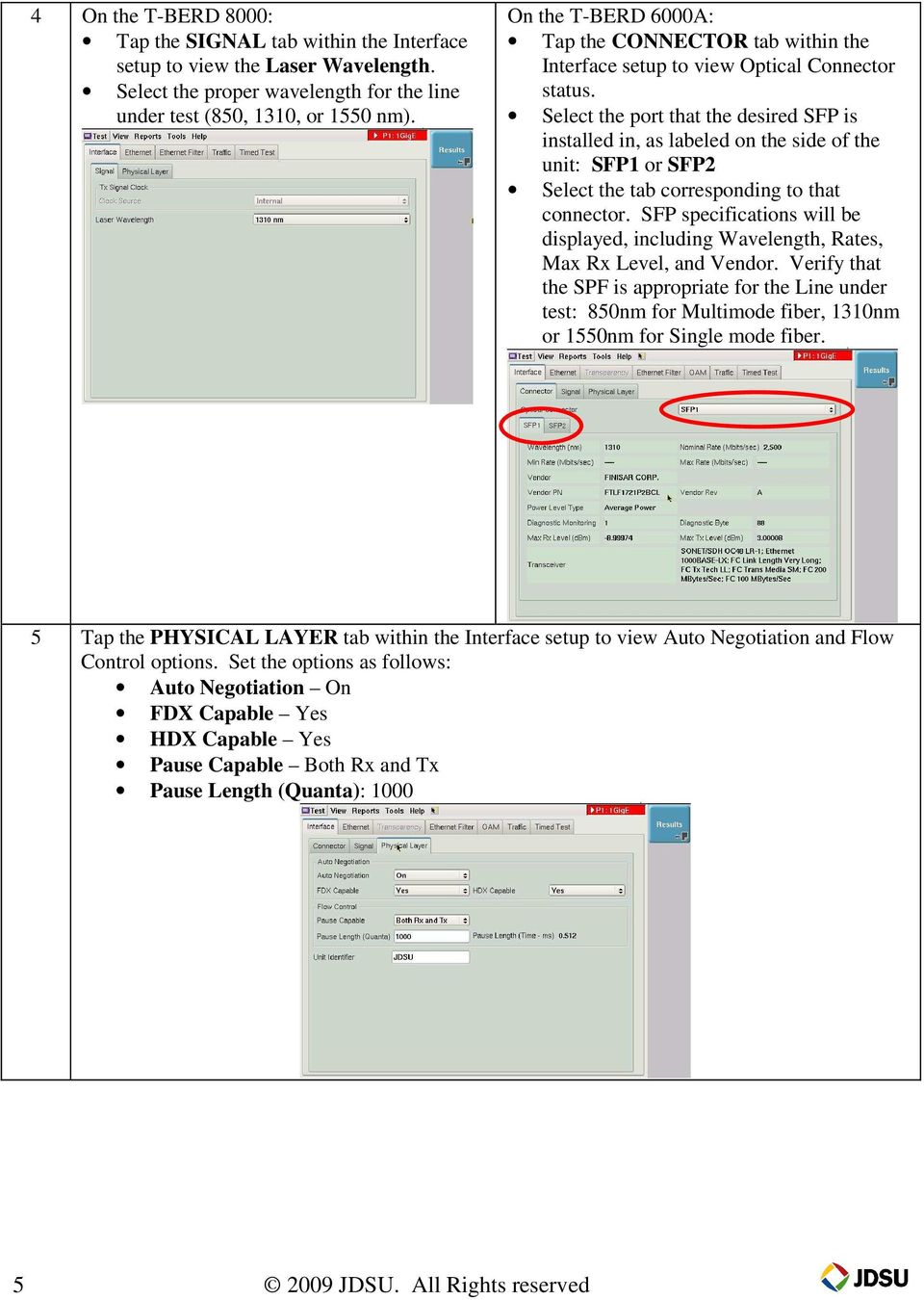
5 4 On the T-BERD 8000: Tap the SIGNAL tab within the Interface setup to view the Laser Wavelength. Select the proper wavelength for the line under test (850, 1310, or 1550 nm). On the T-BERD 6000A: Tap the CONNECTOR tab within the Interface setup to view Optical Connector status. Select the port that the desired SFP is installed in, as labeled on the side of the unit: SFP1 or SFP2 Select the tab corresponding to that connector. SFP specifications will be displayed, including Wavelength, Rates, Max Rx Level, and Vendor. Verify that the SPF is appropriate for the Line under test: 850nm for Multimode fiber, 1310nm or 1550nm for Single mode fiber. 5 Tap the PHYSICAL LAYER tab within the Interface setup to view Auto Negotiation and Flow Control options. Set the options as follows: Auto Negotiation On FDX Capable Yes HDX Capable Yes Pause Capable Both Rx and Tx Pause Length (Quanta): JDSU. All Rights reserved
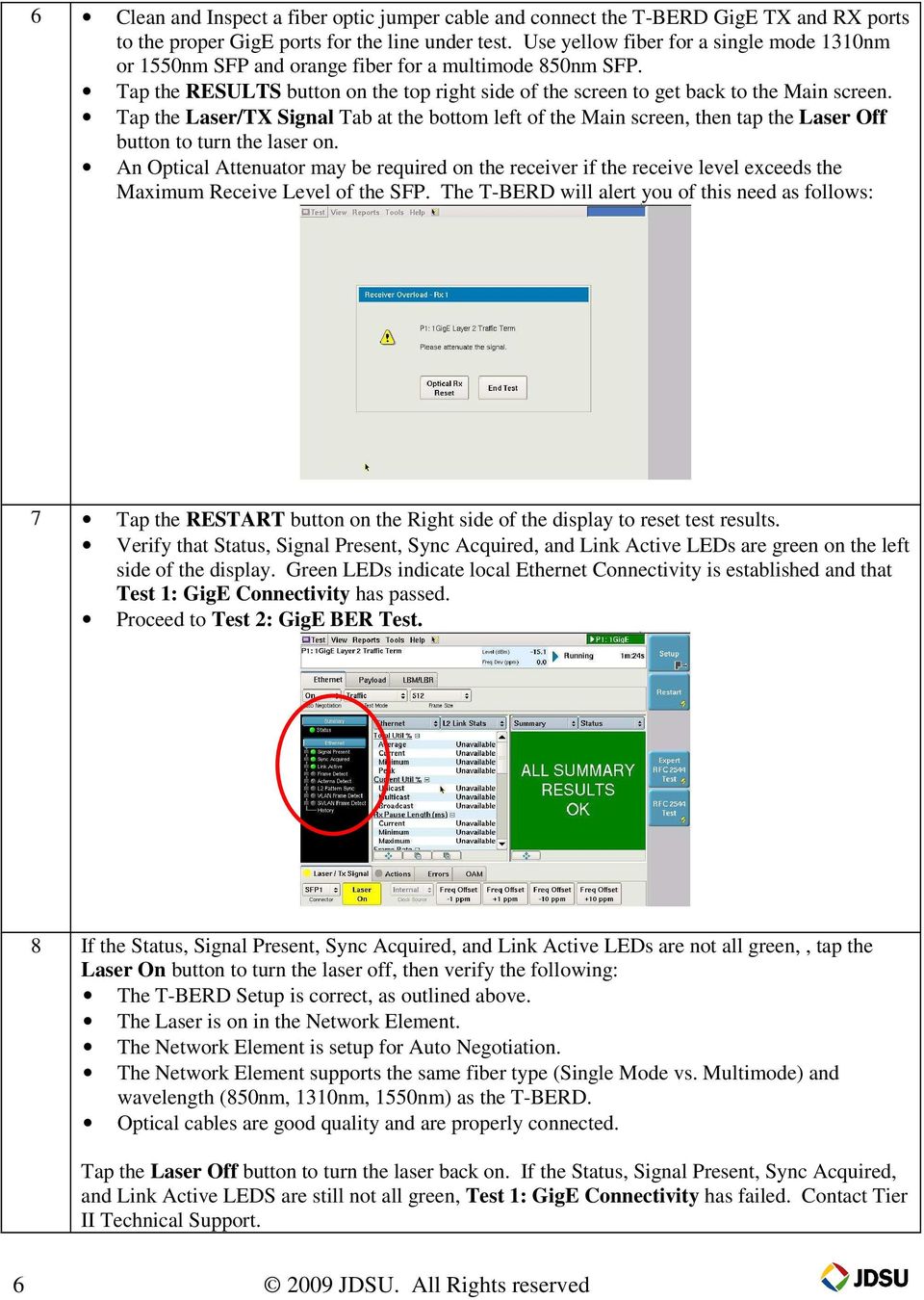
6 6 Clean and Inspect a fiber optic jumper cable and connect the T-BERD GigE TX and RX ports to the proper GigE ports for the line under test. Use yellow fiber for a single mode 1310nm or 1550nm SFP and orange fiber for a multimode 850nm SFP. Tap the RESULTS button on the top right side of the screen to get back to the Main screen. Tap the Laser/TX Signal Tab at the bottom left of the Main screen, then tap the Laser Off button to turn the laser on. An Optical Attenuator may be required on the receiver if the receive level exceeds the Maximum Receive Level of the SFP. The T-BERD will alert you of this need as follows: 7 Tap the RESTART button on the Right side of the display to reset test results. Verify that Status, Signal Present, Sync Acquired, and Link Active LEDs are green on the left side of the display. Green LEDs indicate local Ethernet Connectivity is established and that Test 1: GigE Connectivity has passed. Proceed to Test 2: GigE BER Test. 8 If the Status, Signal Present, Sync Acquired, and Link Active LEDs are not all green,, tap the Laser On button to turn the laser off, then verify the following: The T-BERD Setup is correct, as outlined above. The Laser is on in the Network Element. The Network Element is setup for Auto Negotiation. The Network Element supports the same fiber type (Single Mode vs. Multimode) and wavelength (850nm, 1310nm, 1550nm) as the T-BERD. Optical cables are good quality and are properly connected. Tap the Laser Off button to turn the laser back on. If the Status, Signal Present, Sync Acquired, and Link Active LEDS are still not all green, Test 1: GigE Connectivity has failed. Contact Tier II Technical Support JDSU. All Rights reserved
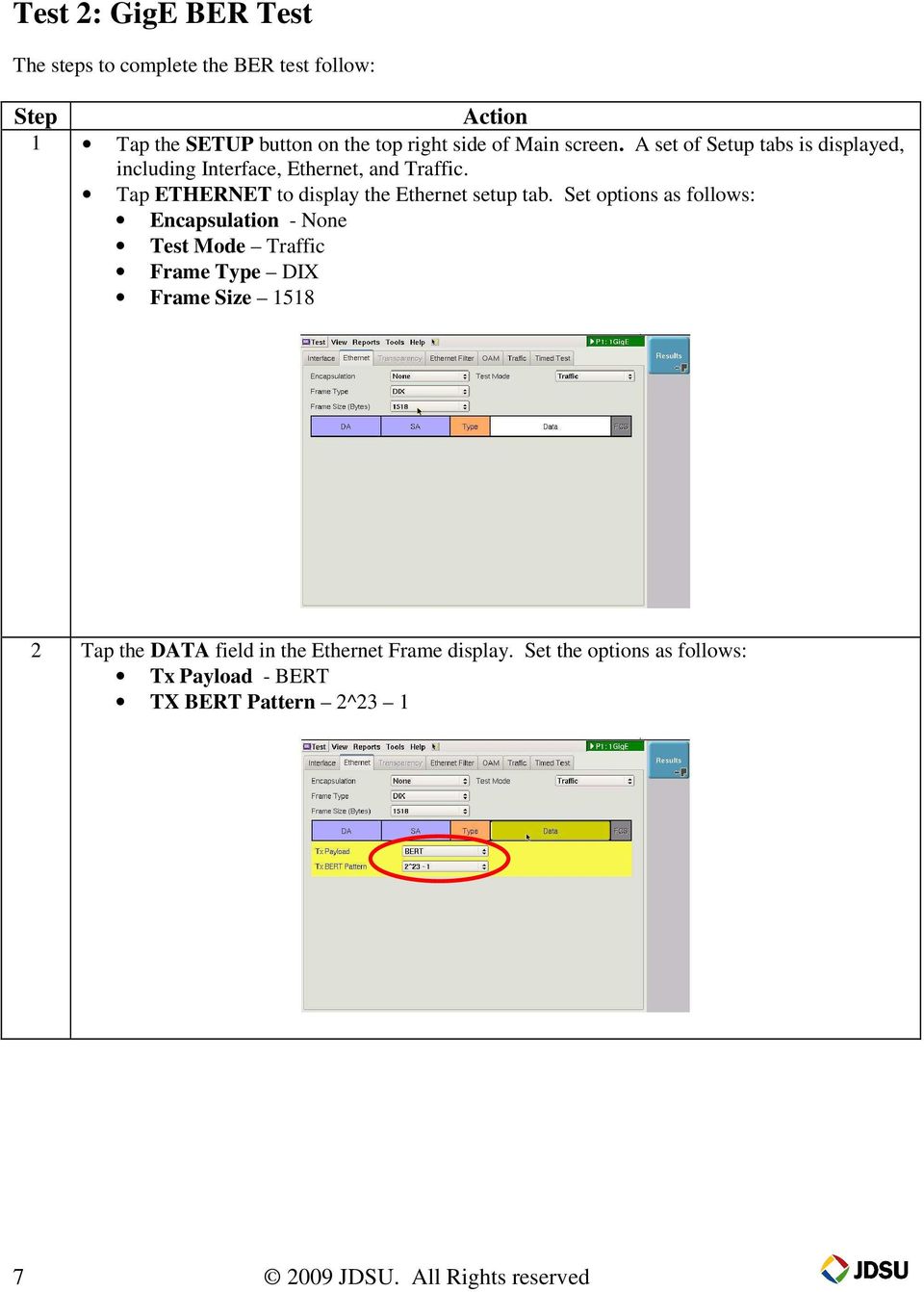
7 Test 2: GigE BER Test The steps to complete the BER test follow: Step Action 1 Tap the SETUP button on the top right side of Main screen. A set of Setup tabs is displayed, including Interface, Ethernet, and Traffic. Tap ETHERNET to display the Ethernet setup tab. Set options as follows: Encapsulation - None Test Mode Traffic Frame Type DIX Frame Size Tap the DATA field in the Ethernet Frame display. Set the options as follows: Tx Payload - BERT TX BERT Pattern 2^ JDSU. All Rights reserved
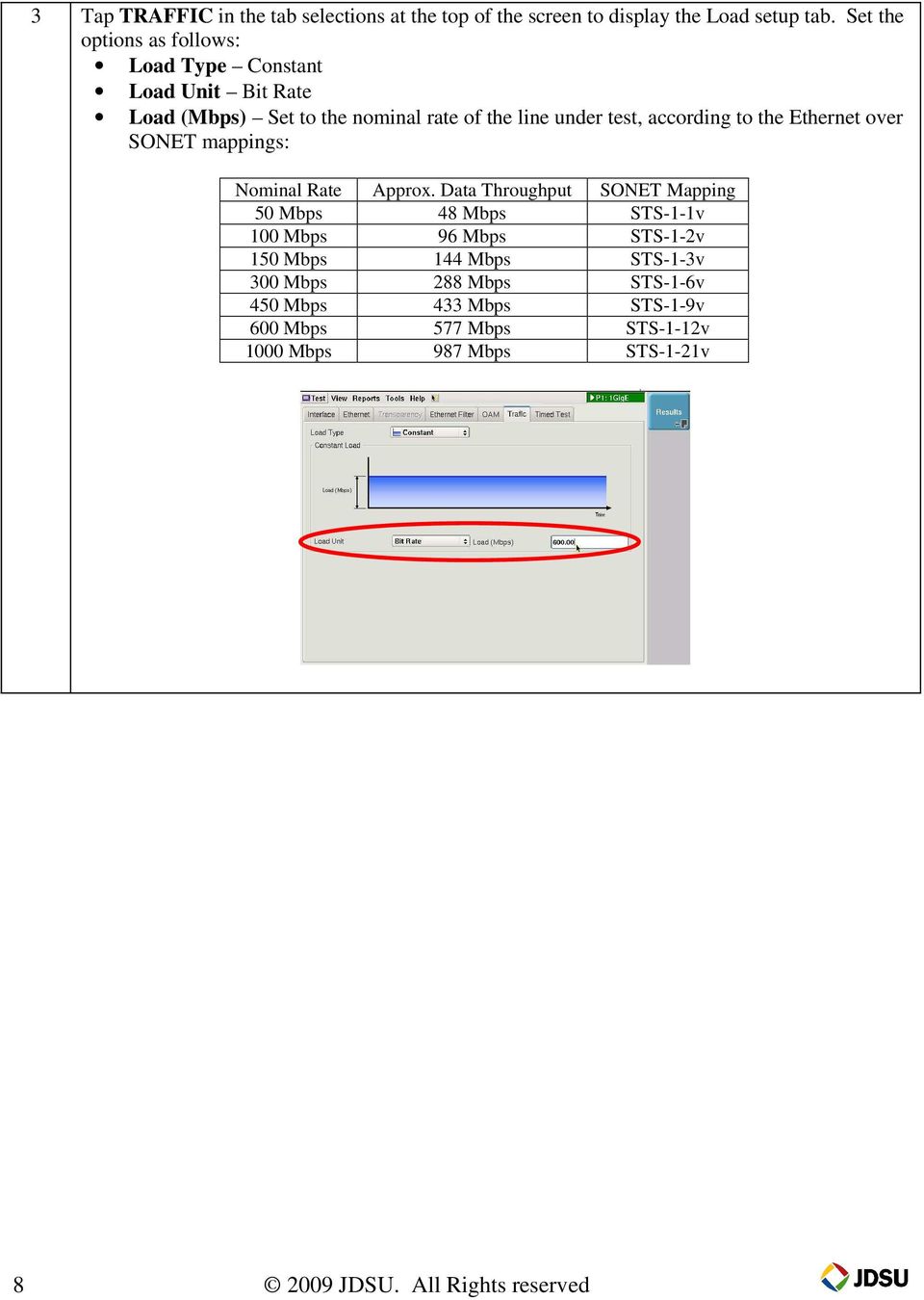
8 3 Tap TRAFFIC in the tab selections at the top of the screen to display the Load setup tab. Set the options as follows: Load Type Constant Load Unit Bit Rate Load (Mbps) Set to the nominal rate of the line under test, according to the Ethernet over SONET mappings: Nominal Rate Approx. Data Throughput SONET Mapping 50 Mbps 48 Mbps STS-1-1v 100 Mbps 96 Mbps STS-1-2v 150 Mbps 144 Mbps STS-1-3v 300 Mbps 288 Mbps STS-1-6v 450 Mbps 433 Mbps STS-1-9v 600 Mbps 577 Mbps STS-1-12v 1000 Mbps 987 Mbps STS-1-21v JDSU. All Rights reserved
9 4 Tap the RESULTS button on the top right side of the screen to get back to the Main screen. Tap the ACTIONS Tab at the bottom of the Main screen, then tap the START TRAFFIC button to generate the configured traffic load. Tap the RESTART button on the Right side of the display to reset test results. Tap the ERRORS Tab at the bottom of the Main screen. Set the Error Type to FCS and the Insertion Style to Single, then tap the Error Insert button to generate a bad frame. Verify that the Ethernet/L2 Link Stats Display shows Total Util %, Cur equal to that of the configured nominal rate, and that the Summary/Status Display shows FCS Errored Frames 1 and Errored Frames 1 with a red background. If the Current Util % does not equal to that of the configured nominal rate, or the Summary/Status display does not shows FCS Errored Frames 1 and Errored Frames 1, then verify the following and repeat this step: The T-BERD Setup is correct, as outlined above. The Laser is on at the far-end Network Element. The far-end Network Element has a hard loop If the results are still negative, Test 2: GigE BERT has failed. Contact Tier II Technical Support JDSU. All Rights reserved

10 5 Tap the RESTART button on the Right side of the display to reset test results. After running the test for at least 10 minutes, Verify that the Ethernet/L2 Link Stats Display shows Total Util %, Cur equal to that of the configured nominal rate, and that the Summary/Status Display shows ALL SUMMARY RESULTS OK with a green background. This indicates that you have end-to-end connectivity at the configured nominal bit rate, and that Test 2: GigE BER Test has passed. 6 Tap the ACTIONS Tab at the bottom of the Main screen, then tap the Traffic Started button to stop the configured traffic load. Proceed to Test 3: GigE RFC 2544 Test JDSU. All Rights reserved

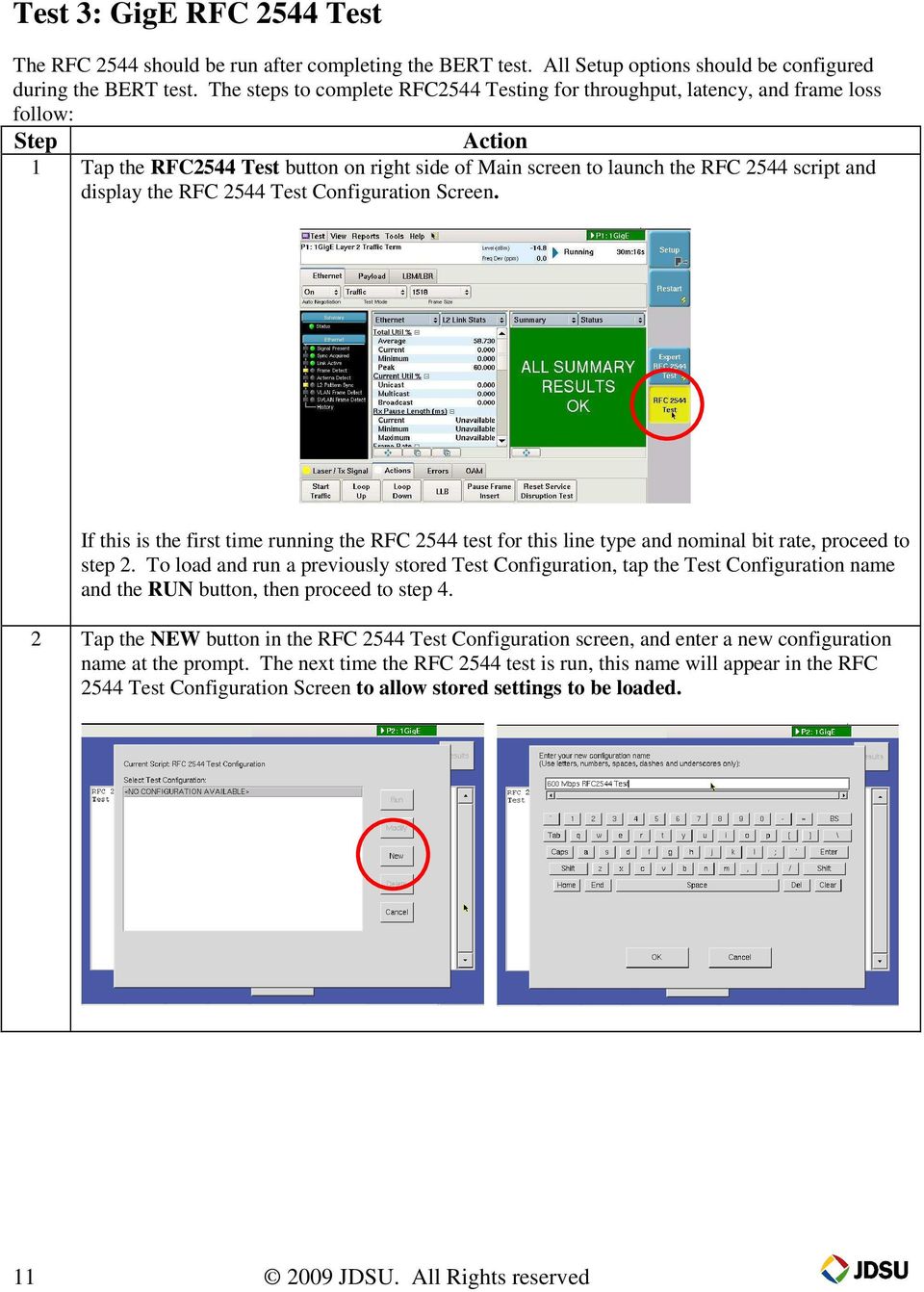
11 Test 3: GigE RFC 2544 Test The RFC 2544 should be run after completing the BERT test. All Setup options should be configured during the BERT test. The steps to complete RFC2544 Testing for throughput, latency, and frame loss follow: Step Action 1 Tap the RFC2544 Test button on right side of Main screen to launch the RFC 2544 script and display the RFC 2544 Test Configuration Screen. If this is the first time running the RFC 2544 test for this line type and nominal bit rate, proceed to step 2. To load and run a previously stored Test Configuration, tap the Test Configuration name and the RUN button, then proceed to step 4. 2 Tap the NEW button in the RFC 2544 Test Configuration screen, and enter a new configuration name at the prompt. The next time the RFC 2544 test is run, this name will appear in the RFC 2544 Test Configuration Screen to allow stored settings to be loaded JDSU. All Rights reserved
12 3 Use the NEXT buttons in the subsequent screens to configure options as follows: Frame Lengths to Test 64 and 1518 (deselect all others) Test Options Throughput, Latency, Frame Loss Rate (deselect others) Show Pass/Fail status for None Maximum Bandwidth (percent) Set to the nominal rate of the line under test Measurement Accuracy To within.1% Frame Loss Tolerance (%) 0.00 Throughout Test, Trial Duration (seconds) 60 Latency, Number of Trials 1 Latency, Trial Duration (seconds) 60 Frame Loss, Trial Duration (seconds) 60 Bandwidth Granularity (%) - 1 Tap Start to begin the RFC2544 Test. 4 The test will execute for approximately 8 minutes. The Test progress and estimated time remaining will be displayed while the script is executing: 5 At the completion of the RFC2544 test, when prompted to Save the test report, tap YES, and enter the Customer Name, Technician Name, Test Location, and Comments. The results will be saved to the harddisk as a.txt and a.pdf file, using a time / date stamp as the file name JDSU. All Rights reserved

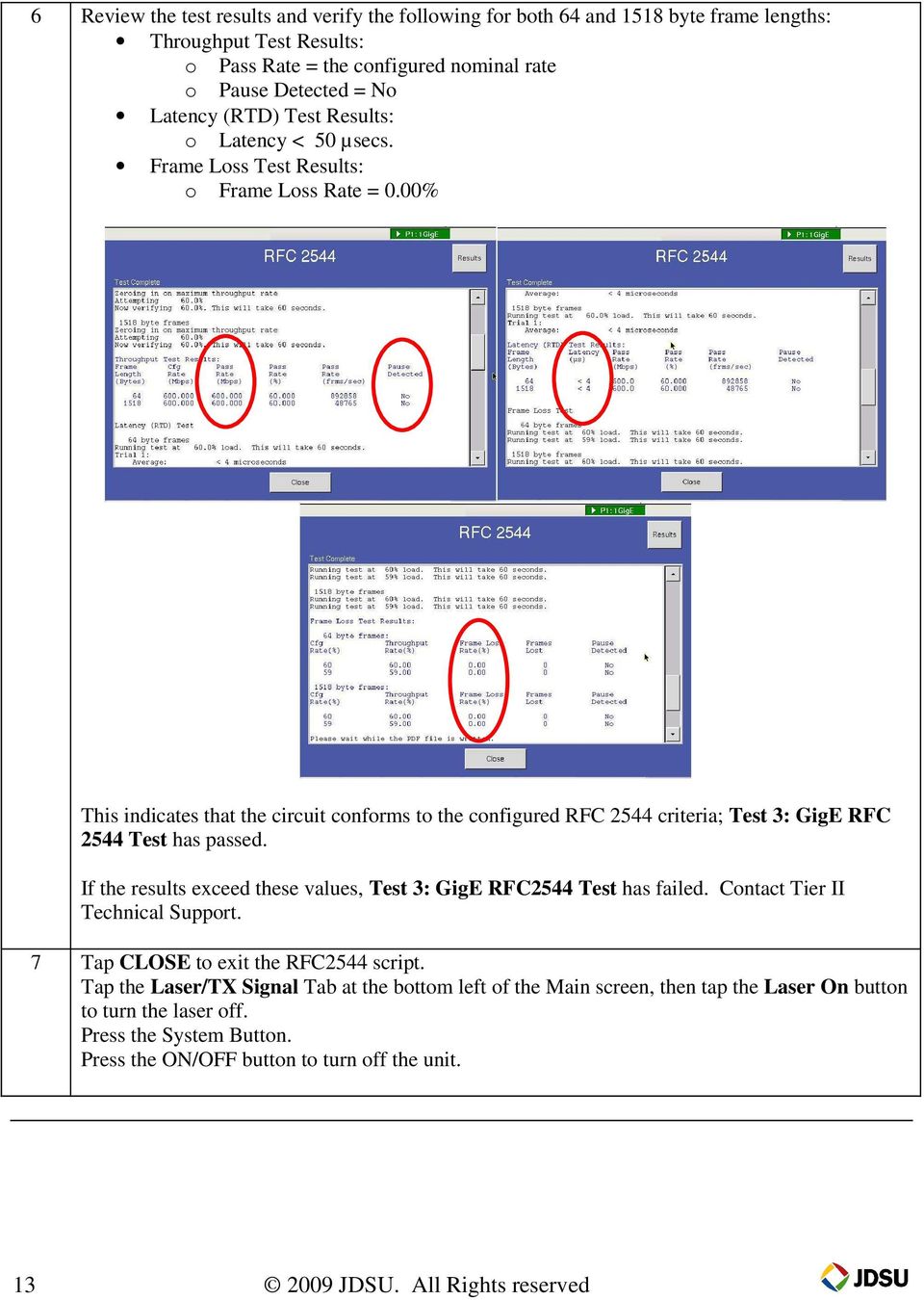
13 6 Review the test results and verify the following for both 64 and 1518 byte frame lengths: Throughput Test Results: o Pass Rate = the configured nominal rate o Pause Detected = No Latency (RTD) Test Results: o Latency < 50 µsecs. Frame Loss Test Results: o Frame Loss Rate = 0.00% This indicates that the circuit conforms to the configured RFC 2544 criteria; Test 3: GigE RFC 2544 Test has passed. If the results exceed these values, Test 3: GigE RFC2544 Test has failed. Contact Tier II Technical Support. 7 Tap CLOSE to exit the RFC2544 script. Tap the Laser/TX Signal Tab at the bottom left of the Main screen, then tap the Laser On button to turn the laser off. Press the System Button. Press the ON/OFF button to turn off the unit JDSU. All Rights reserved
JDSU HST-3000 RFC-2544 Ethernet Testing Guide
 Page 1 of 24 JDSU HST-3000 RFC-2544 Ethernet Testing Guide Version 1.2 May 15, 2013 Page 2 of 24 Table of Contents Scope... 2 Revision History... 2 1. Overview... 3 1.1 Hardware Description... 3 2. RFC-2544
Network Master Gigabit Ethernet Tester. Network Master Gigabit Ethernet Tester. Introduction. By Ole Sørensen Product manager.
 Network Master Gigabit Ethernet Tester Introduction By Ole Sørensen Product manager Slide 1 Important Technology Background The market for GigE Installation and Maintenance testers is growing 20% annually.
CMA5000 SPECIFICATIONS. 5710 Gigabit Ethernet Module
 CMA5000 5710 Gigabit Ethernet Module SPECIFICATIONS General Description The CMA5710 Gigabit Ethernet application is a single slot module that can be used in any CMA 5000. The Gigabit Ethernet test module
AXS-200/850 ETHERNET TEST SET. part of the SharpTESTER Access Line
 ETHERNET TEST SET AXS-200/850 part of the SharpTESTER Access Line NETWORK TESTING TRANSPORT AND DATACOM Innovative, all-in-one tiered-services test suite with unique graphical data display brings powerful
The MTS-8000 Transport Module SDH, PDH, and Ethernet Test Module for the MTS-8000
 ACTERNA TEST & MEASUREMENT SOLUTIONS The MTS-8000 Transport Module SDH, PDH, and Ethernet Test Module for the MTS-8000 Key Features Optical testing at 155 Mb/s, 622 Mb/s, 2.5 Gb/s, and 10 Gb/s SDH/SONET
SmartClass Ethernet 10M-1G Ethernet Tester
 COMMUNICATIONS TEST & MEASUREMENT SOLUTIONS SmartClass Ethernet 10M-1G Ethernet Tester Key Features Generates and measures L2/L3 traffic on up to 1G electrical or optical Ethernet interfaces with VLAN,
Cabling & Test Considerations for 10 Gigabit Ethernet LAN
 Introduction Current communication data rates in local networks range from 10/100 megabits per second (Mbps) in Ethernet to 1 gigabit per second (Gbps) in fiber distributed data interface (FDDI) and Gigabit
Advanced Test Set for 10/100/Gigabit Ethernet
 ParaScope GigE Advanced Test Set for 10/100/Gigabit Ethernet The ideal tool for field engineers and technicians installing, maintaining, and troubleshooting Metro Carrier and Campus Ethernet networks.
FST-2802 TestPad Gigabit Ethernet Services Module Test Ethernet, Fibre Channel, and IP services using one test instrument!
 ACTERNA TEST & MEASUREMENT SOLUTIONS TestPad Gigabit Ethernet Services Module Test Ethernet, Fibre Channel, and IP services using one test instrument! Key Features Full line rate traffic generation to
VePAL MX300. Platform Highlights. Key Features. 10GbE LAN/WAN and Gigabit Ethernet and Fast Ethernet Test Set. Metro Expert
 VePAL MX300 10GbE LAN/WAN and Gigabit Ethernet and Fast Ethernet Test Set Next Generation of Metro and Carrier Ethernet Testing VeEX MX300 Ethernet Transport Expert is the next generation of Core Transport
MPX100 Intelligent Ethernet Test Probe
 MPX100 Intelligent Ethernet Test Probe Next Generation of Metro and Carrier Ethernet Testing System VeEX MPX100 Metro Probe Expert system is the next generation of Metro and Carrier Ethernet test system
Central Office Testing of Network Services
 Central Office Testing of Network Services Rev 4 Application Note Ethernet is rapidly becoming the predominant method for deploying new commercial services and for expanding backhaul capacity. Carriers
Troubleshooting LANs with Wirespeed Packet Capture and Expert Analysis
 Application Note Troubleshooting LANs with Wirespeed Packet Capture and Expert Analysis Introduction This application note is one in a series of local area network (LAN) troubleshooting papers from JDSU
MTS/T-BERD Platforms Very Long Range (VLR) OTDR Module
 COMMUNICATIONS TEST & MEASUREMENT SOLUTIONS MTS/T-BERD Platforms (VLR) OTDR Module Key Features CWDM/DWDM ready with 1310, 1383, 1490, 1550, and 1625 nm wavelengths FTTx ready with 1310/1490/1550 nm wavelengths
1019-00-1528 GBIC-Optical SX 850nm (Multi Mode) 1019-00-1529 GBIC-Optical LX 1310nm (Single Mode) 1019-00-1530 GBIC-Electrical TX 1000 BaseT (RG-45)
 Initial Instructions Before reading the Gigabit Ethernet (GbE) quick start guide, please refer to the DTS-330 or MVP-200 quick start guide that came with your test instrument. Preparing the GbE For Use
Advanced Test Set for 10/100/Gigabit Ethernet
 Established 1981 Advanced Test Equipment Rentals www.atecorp.com 800-404-ATEC (2832) ParaScope GigE Advanced Test Set for 10/100/Gigabit Ethernet The ideal tool for field engineers and technicians installing,
FST-2802 TestPad Gigabit Ethernet Services Module Now able to test Ethernet, Fibre Channel, and IP services in a single test instrument!
 ACTERNA TEST & MEASUREMENT SOLUTIONS TestPad Gigabit Ethernet Services Module Now able to test Ethernet, Fibre Channel, and IP services in a single test instrument! Key Features Full line rate traffic
Recession-Proof Consulting Services with CWDM Network Design
 Recession-Proof Consulting Services with CWDM Network Design Presented By Ty Estes Marketing Communications Director Omnitron Systems Recession-Proof Consulting Services with CWDM Network Design Introduction
RFC 2544 Testing of Ethernet Services in Telecom Networks
 RFC 2544 Testing of Ethernet Services in Telecom Networks White Paper Nigel Burgess Agilent Technologies Introduction The object of this paper is to discuss the use and testing of Ethernet services in
Packet Capture and Expert Troubleshooting with the Viavi Solutions T-BERD /MTS-6000A
 Packet Capture and Expert Troubleshooting with the Viavi Solutions T-BERD /MTS-6000A By Barry Constantine Introduction As network complexity grows, network provider technicians require the ability to troubleshoot
JDSU Ethernet Testing
 Key Benefits of Probe/Instrument Integration Unique Test Capabilities The following sections detail how various test applications benefit from the interoperability of QT-600 probes and T-BERD/MTS instruments.
Fiber Characterization Service
 About JDSU JDSU s verifies the integrity and capacity of your fiber plant through the measurement of key fundamental properties, such as attenuation, reflectance, and dispersion. Comprehensive testing,
AXS-200/850 ETHERNET TEST SET. part of the SharpTESTER Access Line
 ETHERNET TEST SET AXS-200/850 part of the SharpTESTER Access Line NETWORK TESTING TRANSPORT AND DATACOM Innovative, all-in-one tiered-services test suite with unique graphical data display brings powerful
Interfaces and Payload Testing
 application note 225 Packet Optical Transport Network Testing: From Commissioning to In-Service Monitoring Mai Abou-Shaban, Product Specialist, Transport and Datacom For network service providers considering
GigE Triple Play PIM. Comprehensive prioritization support including VLAN Q-in-Q, layer 3 IP ToS and Cisco DSCP
 AnaCise GigE Triple Play PIM is an advanced ergonomic CSA Platform Interface Module (PIM) capable of testing 10/100/1000Mbps Ethernet network, providing field demanding functions conforming to the latest
JDSU Test Solutions for Fiber-to-the-Antenna
 COMMUNICATIONS TEST AND MEASUREMENT SOLUTIONS JDSU Test Solutions for Fiber-to-the-Antenna Key Benefits Ensure reliable, robust, and future-proof installation and operation of the mobile infrastructure
How To Test For 10 Gigabit Ethernet At 10 Gb/S
 White Paper Testing Scenarios for Ethernet at 10 Gb/s By Guylain Barlow Introduction As a natural evolution, the typical test concepts borrowed from lower-rate Ethernet apply to 10 Gigabit Ethernet (GigE).
CMA 3000. Ethernet interface measurement options SPECIFICATIONS
 CMA 3000 Ethernet interface measurement options SPECIFICATIONS General description When equipped with the Ethernet interface measurement option, the battery-powered, easy-to-use and portable Anritsu CMA
BV-10 Performance Endpoint Unit PERFORMANCE DEMARCATION FOR NETWORK-WIDE VISIBILITY
 PERFORMANCE DEMARCATION FOR NETWORK-WIDE VISIBILITY Highly cost-effective Ethernet performance monitoring device providing complete network visibility for mobile backhaul, Carrier Ethernet and PTN networks
Important Notes for WinConnect Server VS Software Installation:
 Important Notes for WinConnect Server VS Software Installation: 1. Only Windows Vista Business, Windows Vista Ultimate, Windows 7 Professional, Windows 7 Ultimate, Windows Server 2008 (32-bit & 64-bit),
Single Port Gigabit Ethernet Media Converter Board (P/N 201350-xxx) User s Manual And Troubleshooting Guide
 Single Port Gigabit Ethernet Media Converter Board (P/N 201350-xxx) User s Manual And Troubleshooting Guide August 12, 2009 Rev C Moog Components Group Springfield Operations 750 West Sproul Road Springfield,
Auditing the LAN with Network Discovery
 Application Note Auditing the LAN with Network Discovery Introduction This application note is one in a series of papers about troubleshooting local area networks (LAN) from JDSU Communications Test and
HARTING mcon 1000 Introduction and features
 Introduction and features HARTING mcon 1000 es, managed, for mounting onto top-hat mounting rail in control cabinets General Description Features Supporting Ethernet (10 Mbit/s), Fast Ethernet (100 Mbit/s)
Modultech MT-XDFx-xx192-08(04)CD 80 (40) km DWDM XFP module with built-in FEC wrapper Description
 Modultech MT-XDFx-xx192-08(04)CD 80 (40) km DWDM XFP module with built-in FEC wrapper Description Modultech OTN XFP DWDM transceiver combines carrier grade OTN G.709 and FEC performance into a XFP MSA
Polymer Coated Fiber Cable (PCF)
 Polymer Coated Fiber Cable (PCF) Panduit has introduced a Polymer Coated Fiber (PCF) to their fiber cable offering available in 50µm and 62.5µm core diameters. Along with this cable having a stronger durability
Verifying Metro Ethernet Quality of Service
 White Paper Verifying Metro Ethernet Quality of Service Introduction Metro Ethernet is widely accepted as a cost-effective, resilient, and scalable switching and transport technology. Used for delivery
Optical Fiber Data Center Field Testing. ANSI/BICSI 002-2011 Data Center Design and Implementation Best Practices
 Optical Fiber Data Center Field Testing ANSI/BICSI 002-2011 Data Center Design and Implementation Best Practices Abstract Data Centers are a growing segment of the enterprise market. Regardless of whether
4 Ports + 3 SFP Gigabit Smart Switch Use Manual. Ver.A0
 4 Ports + 3 SFP Gigabit Smart Switch Use Manual Ver.A0 Chapter 1 Product Specification 1.1 Product Characteristics Complies with IEEE802.3,IEEE802.3u,IEEE802.3ab standards; 4 10/100/1000Mbps Auto-Negotiation
SFP Transceiver Specifications
 APPENDIXB This appendix provides cabling specifications for the SFP transceivers supported on the Cisco ME 60 Ethernet switch. Figure B-1 shows an optical SFP transceiver with the major features labeled.
Opternus GmbH. optische Spleiss- und Messtechnik. Tel. +49(0)4532-20 44-0 Fax +49(0)4532-20 44-25
 ETHERNET ANALYZER ETS-1000 NETWORK TESTING TRANSPORT AND DATACOM Cost-effective, dual-port, 10M to 1G handheld Ethernet tester Two 10/100/1000BaseT and GigE independent test ports Throughput, back-to-back,
T-BERD MTS 5800 Handheld Network Test Family
 T-BERD MTS 5800 Handheld Network Test Family Ethernet, Fibre Channel, IP, and TCP/UDP Testing Manual T-BERD MTS 5800 Handheld Network Test Family Ethernet, Fibre Channel, IP, and TCP/UDP Testing Manual
How To Get A Better Signal From A Fiber To A Coax Cable
 Gigabit Transmission What s the Limit? Fanny Mlinarsky Page 1 What s the Limit? Speed Faster higher frequency higher attenuation less headroom Distance Longer higher attenuation more jitter less headroom
Troubleshooting Guide
 Troubleshooting Guide Before you start troubleshooting: Power down the Tooway modem for 60 seconds. Connect a computer directly (via Ethernet cable) to the Tooway modem Power the Tooway modem and wait
AXS-200/850. EthErnEt test set. part of the SharpTESTER Access Line NETWORK TESTING TRANSpORT ANd datacom
 EthErnEt test set AXS-200/850 part of the SharpTESTER Access Line NETWORK TESTING TRANSpORT ANd datacom Innovative, all-in-one tiered-services test suite with unique graphical data display brings powerful
GIGABIT GATEWAY TECHNOTE
 Corporate North & Latin America Asia & Pacific Other regional offices Headquarters +32 4 361 7000 Headquarters +1 973 575 7811 Headquarters +852 2914 2501 Available at www.evs.com/contact TABLE OF CONTENTS
Agilent System Protocol Test Release Note
 Agilent System Protocol Test Release Note Release 6.0, Build 5.5.5.29 October 2006 This document provides information on fixes and known problems for the software released with this version. This version
Installing S500 Power Monitor Software and LabVIEW Run-time Engine
 EigenLight S500 Power Monitor Software Manual Software Installation... 1 Installing S500 Power Monitor Software and LabVIEW Run-time Engine... 1 Install Drivers for Windows XP... 4 Install VISA run-time...
for Windows Media Center User's Guide
 for Windows Media Center User's Guide Table of Contents Introduction System Requirements Installation Running HAI Home Control Using HAI Home Control Product Support Introduction Thank you for purchasing
HP ProCurve High-Speed Transceivers Installation Guide
 HP ProCurve High-Speed Transceivers Installation Guide Introduction The HP ProCurve High-Speed Transceivers can be installed into a number of HP ProCurve networking devices to provide 100 Mbps and 1000
Ethernet/IEEE 802.3 evolution
 Ethernet/IEEE 802.3 evolution Pietro Nicoletti www.studioreti.it 8023-Evolution-Engl - 1 P. Nicoletti: see note pag. 2 Copyright note These slides are protected by copyright and international treaties.
Making Ethernet Over SONET Fit a Transport Network Operations Model
 Making Over SONET Fit a Transport Network Operations Model Introduction Many carriers deploy or evaluate deployment of EoS as a private line offering to enhance existing service offerings. Service definitions
High Speed Ethernet. Dr. Sanjay P. Ahuja, Ph.D. Professor School of Computing, UNF
 High Speed Ethernet Dr. Sanjay P. Ahuja, Ph.D. Professor School of Computing, UNF Hubs and Switches Hubs and Switches Shared Medium Hub The total capacity in the shared medium hub configuration (figure
Software User Guide UG-461
 Software User Guide UG-461 One Technology Way P.O. Box 9106 Norwood, MA 02062-9106, U.S.A. Tel: 781.329.4700 Fax: 781.461.3113 www.analog.com ezlinx icoupler Isolated Interface Development Environment
Attaching the PA-A1-ATM Interface Cables
 CHAPTER 4 Attaching the PA-A1-ATM Interface Cables To continue your PA-A1-ATM port adapter installation, you must attach the port adapter cables. The instructions that follow apply to all supported platforms.
Raj Jain. The Ohio State University Columbus, OH 43210 [email protected] These slides are available on-line at:
 IP Over SONET The Ohio State University Columbus, OH 43210 [email protected] These slides are available on-line at: http://www.cis.ohio-state.edu/~jain/cis788-99/h_bipsn.htm 1 Overview IP over SONET:
10G CWDM Conversion Technology
 10G CWDM Conversion Technology Simplifying Today s Challenges By Transition Networks Curt Carlson Product Manager [email protected] com Agenda WDM Technology Overview What are the features/benefits
HP-1000 Powerline Ethernet Adapter
 HP-1000 Powerline Ethernet Adapter User s manual BEFORE INSTALLATION Plan ahead the installation of your powerline network. Note: You will need at least two powerline adapters to create a powerline network.
Procedure: You can find the problem sheet on Drive D: of the lab PCs. Part 1: Router & Switch
 University of Jordan Faculty of Engineering & Technology Computer Engineering Department Computer Networks Laboratory 907528 Lab. 2 Network Devices & Packet Tracer Objectives 1. To become familiar with
HP-1000 Powerline USB Adapter
 HP-1000 Powerline USB Adapter User s manual BEFORE INSTALLATION Plan ahead the installation of your powerline network. Note: You will need at least two powerline adapters to create a powerline network.
RE:Open for SQL Anywhere. Installation Guide. RE:Open for SQL Anywhere Installation Guide 1
 RE:Open for SQL Anywhere Installation Guide RE:Open for SQL Anywhere Installation Guide 1 Pre-Installation Considerations Close all other Windows applications before running the installation. Your Raiser
10/100/1000 Base-T to Gigabit Fiber Media Converter
 10/100/1000 Base-T to Gigabit Fiber Media Converter Operation Manual DA-MC1101 Powered by Before Using the Product FCC Compliance Statement This device complies with part 15 of the FCC Rules. Operation
NetProbe 2000 GigE BAS+ADV Full Feature Gigabit Ethernet Analyzer
 NetProbe 2000 GigE BAS+ADV Full Feature Gigabit Ethernet Analyzer The NetProbe 2000 represents a new generation of handheld telecom analyzers that leverage technology used in today s smart phones and tablets.
Quick Installation Guide. Live! Titanium
 Quick Installation Guide Live! Titanium Contents 1. Live! overview... 2. Installation... 3. Network setup... 4. Wireless setup... 5. Configuring your Live!... 6. Troubleshooting... 2 4 7 8 9 10 1 1. Live!
Acterna DSL Services Tester TPI 350+ Application Highlights
 Acterna TPI 350+ DSL Test Set Product Highlights Field engineered, rugged construction, lightweight design, and batterypowered operation Automated testing capabilities minimize training costs and testing
Link Link sys E3000 sys RE1000
 User Guide High Performance Extender Wireless-N Router Linksys Linksys RE1000 E3000Wireless-N Table of Contents Contents Chapter 1: Product Overview 1 Front 1 Top 1 Bottom 1 Back 2 Chapter 2: Advanced
DRG700 Quick Installation Guide. This guide applies to all DRG700 models
 DRG700 Quick Installation Guide This guide applies to all DRG700 models Contents 1. DRG700 overview... 2. Installation... 3. Network setup... 4. Wireless setup... 5. Configuring your DRG700... 6. Troubleshooting...
LifeSize Networker Installation Guide
 LifeSize Networker Installation Guide November 2008 Copyright Notice 2006-2008 LifeSize Communications Inc, and its licensors. All rights reserved. LifeSize Communications has made every effort to ensure
PLA4201 v2. User s Guide. Quick Start Guide. 500 Mbps Mini Powerline Ethernet Adapter. Version 1.00 Edition 1, 01/2013
 PLA4201 v2 500 Mbps Mini Powerline Ethernet Adapter Version 1.00 Edition 1, 01/2013 Quick Start Guide User s Guide www.zyxel.com Copyright 2013 ZyXEL Communications Corporation IMPORTANT! READ CAREFULLY
T-BERD / MTS-4000 Multiple Services Test Platform. Enterprise Solutions
 T-BERD / MTS-4000 Multiple Services Test Platform Enterprise Solutions The Modular Handheld Test Platform for Enterprises Today s IT networks are more complex than ever with voice over IP, IP security
T3 Mux M13 Multiplexer
 T3 Mux M13 Multiplexer User Manual [Type the abstract of the document here. The abstract is typically a short summary of the contents of the document. Type the abstract of the document here. The abstract
Important Notes for WinConnect Server ES Software Installation:
 Important Notes for WinConnect Server ES Software Installation: 1. Only Windows 8/8.1 Enterprise, Windows 8/8.1 Professional (32-bit & 64-bit) or Windows Server 2012 (64-bit) or Windows Server 2012 Foundation
Cisco Small Form-Factor Pluggable Modules for Gigabit Ethernet Applications
 Data Sheet Cisco Small Form-Factor Pluggable Modules for Gigabit Ethernet Applications The industry-standard Cisco Small Form-Factor Pluggable (SFP) Gigabit Interface Converter is a hot-swappable input/output
LP 2844 Thermal Printer
 Quick Installation Guide FedEx Ship Manager Software FedEx Ship Manager at fedex.com LP 2844 Thermal Printer Step 1: Confirm Printer Kit Contents Your printer kit contains: 1. Thermal Printer 4. Serial
Dominion KX II-101-V2
 Dominion KX II-101-V2 Quick Setup Guide Thank you for your purchase of the Dominion KX II-101-V2, the economical, full-featured, single-port digital KVM-over-IP device. For details on using the KX II-101-V2,
FrontDesk Installation And Configuration
 Chapter 2 FrontDesk Installation And Configuration FrontDesk v4.1.25 FrontDesk Software Install Online Software Activation Installing State Related Databases Setting up a Workstation Internet Transfer
Intel Ethernet SFP+ Optics
 Product Brief Intel Ethernet SFP+ Optics Network Connectivity Intel Ethernet SFP+ Optics SR and LR Optics for the Intel Ethernet Server Adapter X520 Family Hot-pluggable SFP+ footprint Supports rate selectable
Customer White paper. SmartTester. Delivering SLA Activation and Performance Testing. November 2012 Author Luc-Yves Pagal-Vinette
 SmartTester Delivering SLA Activation and Performance Testing November 2012 Author Luc-Yves Pagal-Vinette Customer White paper Table of Contents Executive Summary I- RFC-2544 is applicable for WAN and
Software version 5.1.3-3 Feb 21, 2014
 MX100+ Firmware/Software Updates Software version 5.1.3-3 Feb 21, 2014 Must use ReVeal MTX 1.5.9 or newer with this release. 1. Added support for Huawei E1803G Data card supporting HSDPA/UMTS 900/2100MHz,
CISCO WDM SERIES OF CWDM PASSIVE DEVICES
 DATA SHEET CISCO WDM SERIES OF CWDM PASSIVE DEVICES Cisco Systems introduces its second generation of coarse wavelength-division multiplexing (CWDM) passive devices boasting increased functions and improved
Layer 2 Network Encryption where safety is not an optical illusion Marko Bobinac SafeNet PreSales Engineer
 Layer 2 Network Encryption where safety is not an optical illusion Marko Bobinac SafeNet PreSales Engineer Layer 2 Network Encryption where safety is not an optical illusion Todays Agenda Fibre is safe
CS 326e F2002 Lab 1. Basic Network Setup & Ethereal Time: 2 hrs
 CS 326e F2002 Lab 1. Basic Network Setup & Ethereal Time: 2 hrs Tasks: 1 (10 min) Verify that TCP/IP is installed on each of the computers 2 (10 min) Connect the computers together via a switch 3 (10 min)
There are numerous ways to access monitors:
 Remote Monitors REMOTE MONITORS... 1 Overview... 1 Accessing Monitors... 1 Creating Monitors... 2 Monitor Wizard Options... 11 Editing the Monitor Configuration... 14 Status... 15 Location... 17 Alerting...
Methode Electronics. DM-317-XXXX 40 Gbps QSFP+ Passive Cable RoHS COMPLIANT. www.methode.com
 DM-317-XXXX 40 Gbps QSFP+ Passive Cable RoHS COMPLIANT QSFP+ MSA compliant Hot-pluggable footprint Supports Digital Serial ID and User Memory Robust Die Cast Housing Small footprint to maximize port spacing
How To Use An Ethernet Card On A Cisco Ons 15310-Ma (Mspp) With A Microsoft Cisco Ces-Series 6 Port Multirate Card (Ce-Mr-6) For A Network Card
 Cisco ONS 15310-MA CE-Series 6-Port Multirate Ethernet Card The 6-port Multirate Ethernet Card for the Cisco ONS 15310-MA Multiservice Provisioning Platform (MSPP) enables the delivery of true carrier-class
Manual. CANcaseXL CANcaseXL log. Version 5.1 English
 Manual CANcaseXL CANcaseXL log Version 5.1 English Imprint Vector Informatik GmbH Ingersheimer Straße 24 D-70499 Stuttgart The information and data given in this user manual can be changed without prior
Cisco ONS 15454 CE-Series 10-Port Multirate Ethernet Card
 Cisco ONS 15454 CE-Series 10-Port Multirate Ethernet Card The 10-port multirate Ethernet card for the Cisco ONS 15454 Multiservice Provisioning Platform (MSPP) enables the delivery of true carrier-class
BEC 6200WZL. 4G/LTE Cellular Broadband Router. Quick Start Guide
 BEC 6200WZL 4G/LTE Cellular Broadband Router Quick Start Guide 1 BEC 6200WZL 4G/LTE Cellular Broadband Router PLEASE READ THE QUICK START GUIDE AND FOLLOW THE STEPS CAREFULLY. THIS QUICK START GUIDE WILL
Cisco ONS 15454 Multiservice Transport Platform 7.0
 Product Bulletin No. 3212 Multiservice Transport Platform 7.0 Product Overview The Cisco ONS 15454 Multiservice Transport Platform (MSTP) offers a unique solution for delivering any wavelength to any location
Optimux-34, Optimux-25
 Data Sheet Optimux-34, Optimux-25 Up to 16 E1/T1 links and high-speed data or Ethernet traffic multiplexed into fiber optic uplink E3 copper uplink for Optimux-34 Single-mode, multimode, single-mode over
T-BERD MTS 8000 and T-BERD MTS 6000A Transport Module, 40/100G Transport Module, and Multiple Services Application Module
 T-BERD MTS 8000 and T-BERD MTS 6000A Transport Module, 40/100G Transport Module, and Multiple Services Application Module Ethernet, IP, TCP/UDP, Fibre Channel, VoIP, and IP Video Testing Manual T-BERD
Product Overview. Features CHAPTER
 CHAPTER 1 This chapter describes the Cisco IAD1101 integrated access device chassis, and the line interface modules supported by the Cisco IAD1101. This chapter includes the following sections: Features
How To Build A Network For Storage Area Network (San)
 White Paper Data Storage across the MAN by deploying a SAN over Dark Fiber by Pieter Panis, EuroFiber 1/7 1 Introduction The purpose of this document is to illustrate how a storage area network (SAN) can
AXIS Installation Monitor. User s Manual
 AXIS Installation Monitor User s Manual Overview Setup Single camera setup One or more cameras in a network setup Device menu Monitor window Monitor menu Tips and tricks Overview AXIS Installation Monitor
Rebuilding a Show Store RAID with the original drives
 Rebuilding a Show Store RAID with the original drives It is important to note that if a drive fails in the Show Store RAID, it does not necessarily mean that the drive is faulty. In the vast majority of
User Guide HUAWEI UML397. Welcome to HUAWEI
 User Guide HUAWEI UML397 Welcome to HUAWEI 1 Huawei UML397 4G LTE Wireless Modem User Manual CHAPTER 1 BEFORE USING YOUR UML397 WIRELESS MODEM ABOUT THIS USER MANUAL...4 WHAT S INSIDE THE PRODUCT PACKAGE...4
INF-USB2 and SI-USB Quick Start Guide
 INF-USB2 and SI-USB Quick Start Guide Please follow these instructions carefully. DO NOT connect the INF-USB2 or SI-USB module to your computer before running the setup program. After running Setup and