
Understanding the WebLogic Scripting Tool c (12.1.3)
|
|
|
- Jody Norman
- 10 years ago
- Views:
Transcription
1 [1]Oracle Fusion Middleware Understanding the WebLogic Scripting Tool c (12.1.3) E August 2015 This document describes the WebLogic Scripting Tool (WLST) for WebLogic Server It explains how you use the WLST command-line scripting interface to configure, manage, and persist changes to WebLogic Server instances and WebLogic domains, and monitor and manage server run-time events.

2 Oracle Fusion Middleware Understanding the WebLogic Scripting Tool , 12c (12.1.3) E Copyright 2007, 2015, Oracle and/or its affiliates. All rights reserved. This software and related documentation are provided under a license agreement containing restrictions on use and disclosure and are protected by intellectual property laws. Except as expressly permitted in your license agreement or allowed by law, you may not use, copy, reproduce, translate, broadcast, modify, license, transmit, distribute, exhibit, perform, publish, or display any part, in any form, or by any means. Reverse engineering, disassembly, or decompilation of this software, unless required by law for interoperability, is prohibited. The information contained herein is subject to change without notice and is not warranted to be error-free. If you find any errors, please report them to us in writing. If this is software or related documentation that is delivered to the U.S. Government or anyone licensing it on behalf of the U.S. Government, then the following notice is applicable: U.S. GOVERNMENT END USERS: Oracle programs, including any operating system, integrated software, any programs installed on the hardware, and/or documentation, delivered to U.S. Government end users are "commercial computer software" pursuant to the applicable Federal Acquisition Regulation and agency-specific supplemental regulations. As such, use, duplication, disclosure, modification, and adaptation of the programs, including any operating system, integrated software, any programs installed on the hardware, and/or documentation, shall be subject to license terms and license restrictions applicable to the programs. No other rights are granted to the U.S. Government. This software or hardware is developed for general use in a variety of information management applications. It is not developed or intended for use in any inherently dangerous applications, including applications that may create a risk of personal injury. If you use this software or hardware in dangerous applications, then you shall be responsible to take all appropriate fail-safe, backup, redundancy, and other measures to ensure its safe use. Oracle Corporation and its affiliates disclaim any liability for any damages caused by use of this software or hardware in dangerous applications. Oracle and Java are registered trademarks of Oracle and/or its affiliates. Other names may be trademarks of their respective owners. Intel and Intel Xeon are trademarks or registered trademarks of Intel Corporation. All SPARC trademarks are used under license and are trademarks or registered trademarks of SPARC International, Inc. AMD, Opteron, the AMD logo, and the AMD Opteron logo are trademarks or registered trademarks of Advanced Micro Devices. UNIX is a registered trademark of The Open Group. This software or hardware and documentation may provide access to or information about content, products, and services from third parties. Oracle Corporation and its affiliates are not responsible for and expressly disclaim all warranties of any kind with respect to third-party content, products, and services unless otherwise set forth in an applicable agreement between you and Oracle. Oracle Corporation and its affiliates will not be responsible for any loss, costs, or damages incurred due to your access to or use of third-party content, products, or services, except as set forth in an applicable agreement between you and Oracle.

3 Contents Preface... vii Documentation Accessibility... Conventions... vii vii 1 Introduction and Roadmap 1.1 Document Scope and Audience Guide to This Document Related Documentation WLST Sample Scripts WLST Online Sample Scripts WLST Offline Sample Scripts Using the WebLogic Scripting Tool 2.1 Using WLST Online or Offline Using WLST Online Using WLST Offline Interactive Mode, Script Mode, and Embedded Mode Interactive Mode Script Mode Embedded Mode Security for WLST Securing the WLST Connection Securing Access to Configuration Data Securing Access from WLST Online Writing and Reading Encrypted Configuration Values Securing Access to Security Data Main Steps for Using WLST in Interactive or Script Mode Invoking WLST Invoking WLST Using Provided Shell Scripts Invoking WLST Using the java Command Running Scripts Invoking WLST From the Start Menu Exiting WLST Syntax for WLST Commands Considerations When Invoking Multiple WLST Instances iii
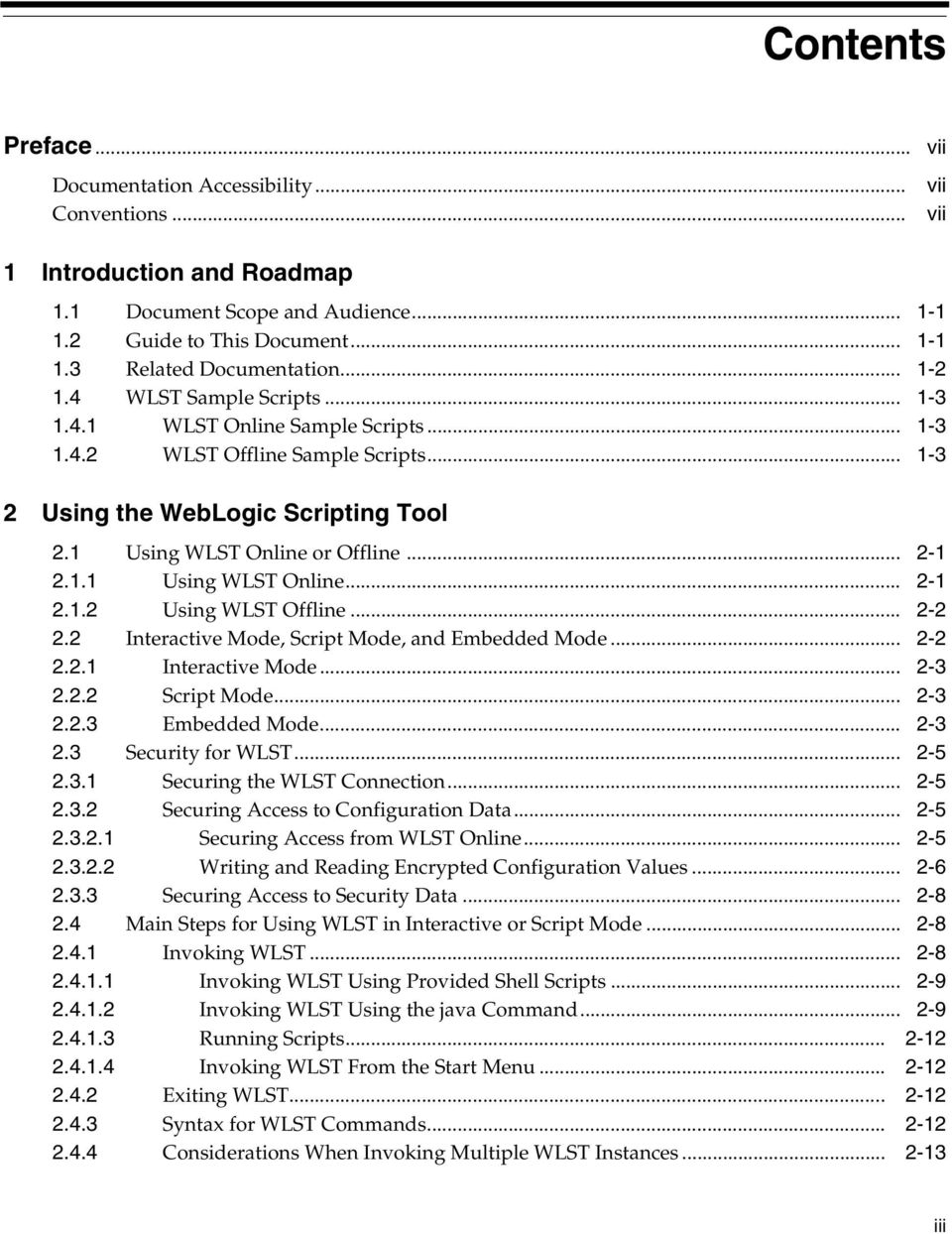
4 2.5 Redirecting Error and Debug Output to a File Getting Help Running WLST from Ant Parameters Parameters Specified as Nested Elements script classpath Examples Example Example Example Importing WLST as a Jython Module Customizing WLST Adding Integrated Help for Custom Commands Sample Scripts For Defining new WLST Commands Creating WebLogic Domains Using WLST Offline 3.1 Creating and Using a Domain Template (Offline) Creating and Updating a WebLogic Domain Browsing Information About the Configuration Hierarchy (Offline) Editing a WebLogic Domain (Offline) Alternative: Using the configtoscript Command Considerations for Clusters, JDBC, and JMS Resources Creating a Managed Server Domain on a Remote Machine Managing the Server Life Cycle 4.1 Using WLST and Node Manager to Manage Servers Using Node Manager to Start Servers on a Machine Using Node Manager to Start Managed Servers in a WebLogic Domain or Cluster Starting and Managing Servers Without Node Manager Starting an Administration Server Without Node Manager Managing Server State Without Node Manager Navigating MBeans (WLST Online) 5.1 Navigating and Interrogating MBeans Changing the Current Management Object Navigating and Displaying Configuration MBeans Example Browsing Runtime MBeans Navigating and Displaying Runtime MBeans Example Navigating Among MBean Hierarchies Finding MBeans and Attributes Accessing Other WebLogic MBeans and Custom MBeans Accessing Custom MBeans in the Domain Runtime MBean Server Accessing Custom MBeans in the Edit MBean Server iv

5 6 Configuring Existing WebLogic Domains 6.1 Using WLST Online to Update an Existing WebLogic Domain Tracking Configuration Changes Undoing or Canceling Changes Additional Operations and Attributes for Change Management Using WLST Offline to Update an Existing WebLogic Domain Managing Security Data (WLST Online) Determining If You Need to Access the Edit Hierarchy Creating a User Adding a User to a Group Verifying Whether a User Is a Member of a Group Listing Groups to Which a User Belongs Listing Users and Groups in a Security Realm Changing a Password Protecting User Accounts in a Security Realm Set Consecutive Invalid Login Attempts Unlock a User Account Configuring Additional LDAP Authentication Providers Deploying Applications Using WLST Online to Deploy Applications Using WLST Offline to Deploy Applications Updating the Deployment Plan 8 Getting Runtime Information 8.1 Accessing Runtime Information: Main Steps Script for Monitoring Server State Script for Monitoring the JVM Configuring Logging Working with the WebLogic Diagnostics Framework A B WLST Deployment Objects A.1 WLSTPlan Object... A-1 A.2 WLSTProgress Object... A-2 FAQs: WLST B.1 General WLST... B-1 B.2 Jython Support... B-2 B.3 Using WLST... B-2 v

6 vi

7 Preface This preface describes the document accessibility features and conventions used in this guide Understanding the WebLogic Scripting Tool Documentation Accessibility For information about Oracle's commitment to accessibility, visit the Oracle Accessibility Program website at Access to Oracle Support Oracle customers that have purchased support have access to electronic support through My Oracle Support. For information, visit or visit if you are hearing impaired. Conventions The following text conventions are used in this document: Convention boldface italic monospace Meaning Boldface type indicates graphical user interface elements associated with an action, or terms defined in text or the glossary. Italic type indicates book titles, emphasis, or placeholder variables for which you supply particular values. Monospace type indicates commands within a paragraph, URLs, code in examples, text that appears on the screen, or text that you enter. vii

8 viii

9 1 1Introduction and Roadmap [2]This chapter describes the contents and organization of this WebLogic Server guide Understanding the WebLogic Scripting Tool This chapter includes the following sections: Section 1.1, "Document Scope and Audience" Section 1.2, "Guide to This Document" Section 1.3, "Related Documentation" Section 1.4, "WLST Sample Scripts" 1.1 Document Scope and Audience This document describes the Oracle WebLogic Scripting Tool (WLST). It explains how you use the WLST command-line scripting interface to configure, manage, and persist changes to WebLogic Server instances and WebLogic domains, and monitor and manage server run-time events. This document is written for WebLogic Server administrators and operators who deploy Java EE applications using the Java Platform, Enterprise Edition (Java EE). It is assumed that readers are familiar with Web technologies and the operating system and platform where WebLogic Server is installed. 1.2 Guide to This Document This document is organized as follows: This chapter, Chapter 1, "Introduction and Roadmap" introduces the organization of this guide and lists related documentation. Chapter 2, "Using the WebLogic Scripting Tool," describes how the scripting tool works, its modes of operation, and the basic steps for invoking it. Chapter 3, "Creating WebLogic Domains Using WLST Offline," describes how to create a new WebLogic domain or update an existing WebLogic domain without connecting to a running WebLogic Server (that is, using WLST offline) supporting the same functionality as the Configuration Wizard. Chapter 4, "Managing the Server Life Cycle," describes using WLST to start and stop WebLogic Server instances and to monitor and manage the server life cycle. Chapter 5, "Navigating MBeans (WLST Online)," describes how to retrieve WebLogic domain configuration and run-time information, and edit configuration or custom MBeans. Introduction and Roadmap 1-1
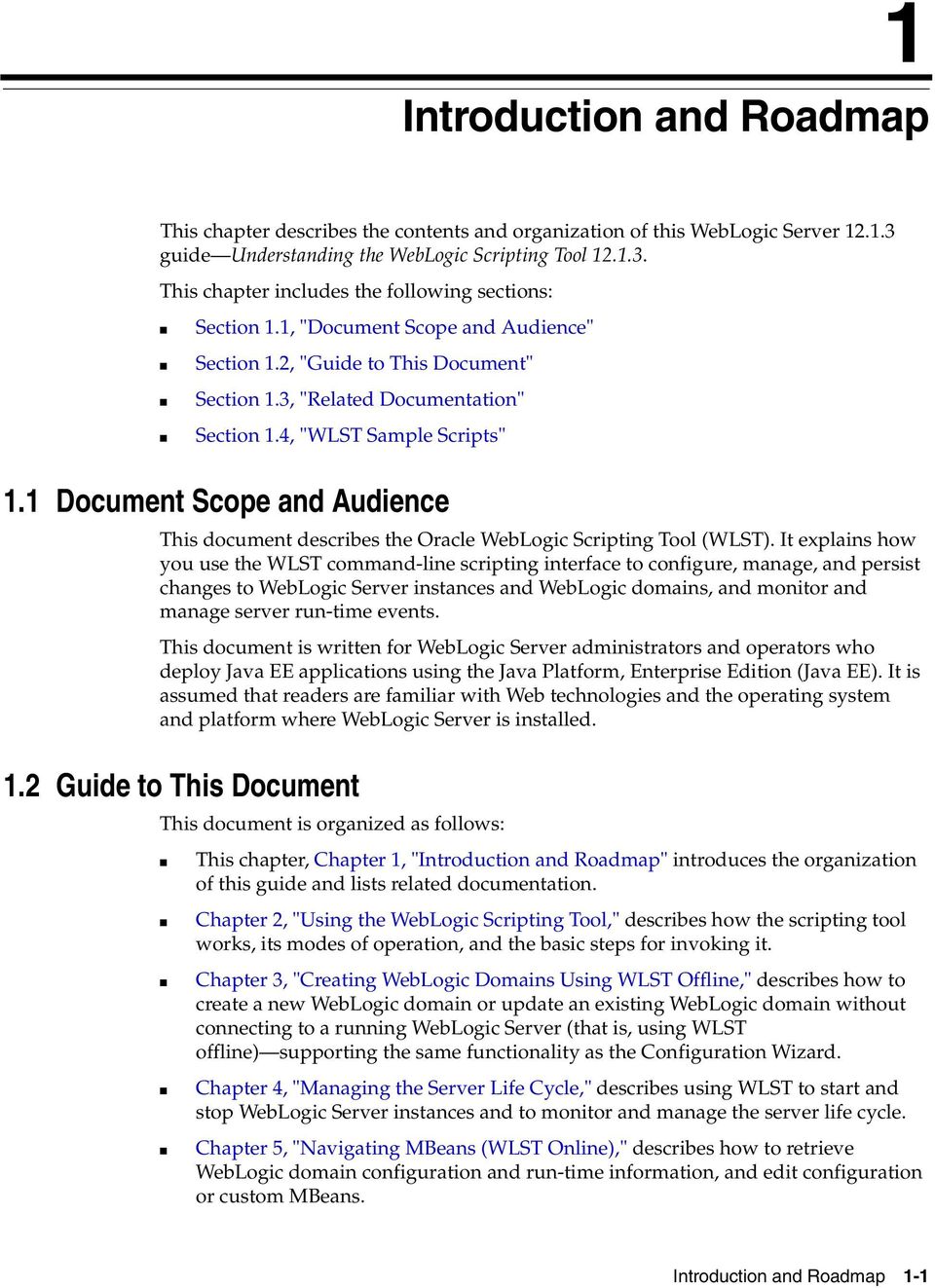
10 Related Documentation Chapter 6, "Configuring Existing WebLogic Domains" describes using scripts to automate the creation and management of WebLogic domains, servers, and resources. Chapter 7, "Updating the Deployment Plan," describes using WLST to update an application's deployment plan. Chapter 8, "Getting Runtime Information," describes using WLST to retrieve information about the run-time state of WebLogic Server instances. Appendix A, "WLST Deployment Objects," describes WLST deployment objects that you can use to update a deployment plan or access information about the current deployment activity. Appendix B, "FAQs: WLST," provides a list of common questions and answers. 1.3 Related Documentation WLST is one of several interfaces for managing and monitoring WebLogic Server. For information about the other management interfaces, see: WebLogic Scripting Tool Command Reference describes the WLST commands that are available for WebLogic Server. WLST Command Reference for Infrastructure Components describes the WLST commands that are available for Oracle Fusion Middleware infrastructure components, including Java Required Files (JRF), Web services, Metadata services (MDS), Application Development Framework (ADF), Dynamic Monitoring Service (DMS), Logging, Diagnostic Framework, and User Messaging Service (UMS). WLST Command Reference for SOA Suite describes the WLST commands that are available for SOA, Business Process Management (BPM), Enterprise Scheduler (ESS), Managed File Transfer (MFT), and Oracle Service Bus (OSB). "Using Ant Tasks to Configure and Use a WebLogic Server Domain" in Developing Applications for Oracle WebLogic Server, describes using WebLogic Ant tasks for starting and stopping WebLogic Server instances and configuring WebLogic domains. "Deployment Tools" in Deploying Applications to Oracle WebLogic Server describes several tools that WebLogic Server provides for deploying applications and stand-alone modules. Oracle WebLogic Server Administration Console Online Help describes a Web-based graphical user interface for managing and monitoring WebLogic domains. Creating Domains Using the Configuration Wizard describes using a graphical user interface to create a WebLogic domain or extend an existing one. Creating Templates and Domains Using the Pack and Unpack Commands describes commands that recreate existing WebLogic domains quickly and easily. Developing Custom Management Utilities Using JMX for Oracle WebLogic Server describes using Java Management Extensions (JMX) APIs to monitor and modify WebLogic Server resources. Monitoring Oracle WebLogic Server with SNMP describes using Simple Network Management Protocol (SNMP) to monitor WebLogic domains. Administering Server Environments for Oracle WebLogic Server describes how you design, configure, and manage WebLogic Server environments. It is a resource for 1-2 Understanding the WebLogic Scripting Tool

11 WLST Sample Scripts system administrators and operators responsible for implementing a WebLogic Server installation. Administering Node Manager for Oracle WebLogic Server describes how to configure and use Node Manager to control and manage servers within a WebLogic Server environment. 1.4 WLST Sample Scripts The following sections describe the WLST online and offline sample scripts that you can run or use as templates for creating additional scripts. For information about running scripts, see Section , "Running Scripts". Note: The sample scripts are not installed by default. To install the server samples, you must select the Complete With Examples option when installing WebLogic Server WLST Online Sample Scripts The WLST online sample scripts demonstrate how to perform administrative tasks and initiate WebLogic Server configuration changes while connected to a running server. WLST online scripts are located in the following directory: ORACLE_HOME\user_ projects\applications\wl_server\examples\src\examples\wlst\online. Table 1 1 summarizes WLST online sample scripts. Table 1 1 WLST Sample Script cluster_creation.py cluster_deletion.py WLST Offline Sample Scripts WLST Online Sample Scripts configjmssystemresource.py deletejmssystemresource.py jdbc_data_source_creation.py jdbc_data_source_deletion.py Description Connects WLST to an Administration Server, starts an edit session, and creates 10 Managed Servers. It then creates two clusters, assigns servers to each cluster, and disconnects WLST from the server. Removes the clusters and servers created in cluster_ creation.py. Connects WLST to an Administration Server, starts an edit session, creates two JMS Servers, and targets them to the Administration Server. Then creates JMS topics, JMS queues, and JMS templates in a JMS System module. The JMS queues and topics are targeted using sub-deployments. Removes the JMS System module created by configjmssystemresource.py. Connects WLST to an Administration Server, starts an edit session, and creates a JDBC data source called myjdbcdatasource. Removes the JDBC data source created by jdbc_data_ source_creation.py. The WLST offline sample scripts demonstrate how to create WebLogic domains using the domain templates that are installed with the software. The WLST offline scripts are located in the following directory: ORACLE_ HOME\wlserver\common\templates\scripts\wlst. Introduction and Roadmap 1-3

12 WLST Sample Scripts Table 1 2 summarizes WLST offline sample scripts. Table 1 2 WLST Sample Script basicwlsdomain.py basicwlssdomain.py clustermedrecdomain.py distributedqueue.py geo1domain.py geo2domain.py replicateddomain.py WLST Offline Sample Script Description Creates a simple WebLogic domain demonstrating how to open a domain template, create and edit configuration objects, and write the domain configuration information to the specified directory. The sample consists of a single server, representing a typical development environment. This type of configuration is not recommended for production environments. The script uses the Basic WebLogic Server Domain template. Creates a simple WebLogic SIP Server domain using the Basic WebLogic SIP Server Domain template. The script demonstrates how to open a domain template, create and edit configuration objects, and write the domain configuration information to the specified directory. The sample consists of a single server, representing a typical development environment. This type of configuration is not recommended for production environments. Creates a single-cluster WebLogic domain, creating three Managed Servers and assigning them to a cluster. The script uses the Basic WebLogic Server Domain template and extends it using the Avitek Medical Records Sample extension template. Demonstrates two methods for creating distributed queues. The script uses the Basic WebLogic Server Domain template and extends it using the Avitek Medical Records Sample extension template. Creates a simple WebLogic SIP Server domain using the Geographic Redundancy Site 1 Domain template. The script demonstrates how to open a domain template, create and edit configuration objects, and write the domain configuration information to the specified directory. The sample consists of a single server, representing a typical development environment. This type of configuration is not recommended for production environments. Creates a simple WebLogic SIP Server domain using the Geographic Redundancy Site 2 Domain template. The script demonstrates how to open a domain template, create and edit configuration objects, and write the domain configuration information to the specified directory. The sample consists of a single server, representing a typical development environment. This type of configuration is not recommended for production environments. Creates a simple WebLogic SIP Server domain using the Oracle WebLogic SIP Server Replicated Domain template. The script demonstrates how to open a domain template, create and edit configuration objects, and write the domain configuration information to the specified directory. The sample consists of a single server, representing a typical development environment. This type of configuration is not recommended for production environments. 1-4 Understanding the WebLogic Scripting Tool

13 WLST Sample Scripts Table 1 2 WLST Sample Script samplemedrecdomain.py (Cont.) WLST Offline Sample Script Description Creates a WebLogic domain that defines resources similar to those used in the Avitek MedRec sample. This example does not recreate the MedRec example in its entirety, nor does it deploy any sample applications. The script uses the Basic WebLogic Server Domain template. Introduction and Roadmap 1-5

14 WLST Sample Scripts 1-6 Understanding the WebLogic Scripting Tool

15 2 2Using the WebLogic Scripting Tool [3]This chapter describes the WebLogic Scripting Tool (WLST) for WebLogic Server , a command-line scripting environment that you can use to create, manage, and monitor WebLogic domains. It is based on the Java scripting interpreter, Jython. In addition to supporting standard Jython features such as local variables, conditional variables, and flow control statements, WLST provides a set of scripting functions (commands) that are specific to WebLogic Server. You can extend the WebLogic scripting language to suit your needs by following the Jython language syntax (see This chapter includes the following sections: Section 2.1, "Using WLST Online or Offline" Section 2.2, "Interactive Mode, Script Mode, and Embedded Mode" Section 2.3, "Security for WLST" Section 2.4, "Main Steps for Using WLST in Interactive or Script Mode" Section 2.5, "Redirecting Error and Debug Output to a File" Section 2.6, "Getting Help" Section 2.7, "Running WLST from Ant" Section 2.8, "Importing WLST as a Jython Module" Section 2.9, "Customizing WLST" 2.1 Using WLST Online or Offline Using WLST Online You can use WLST as the command-line equivalent to the WebLogic Server Administration Console (WLST online) or as the command-line equivalent to the Configuration Wizard (WLST offline). For information about the WebLogic Server Administration Console, see Oracle WebLogic Server Administration Console Online Help. For information about the Configuration Wizard, see Creating Domains Using the Configuration Wizard. You can use WLST to connect to a running Administration Server and manage the configuration of an active WebLogic domain, view performance data about resources in the domain, or manage security data (such as adding or removing users). You can also use WLST to connect to Managed Servers, but you cannot modify configuration data from Managed Servers. Using the WebLogic Scripting Tool 2-1

16 Interactive Mode, Script Mode, and Embedded Mode WLST online is a Java Management Extensions (JMX) client. It interacts with a server's in-memory collection of Managed Beans (MBeans), which are Java objects that provide a management interface for an underlying resource. For information on WebLogic Server MBeans, see "Understanding WebLogic Server MBeans" in Developing Custom Management Utilities Using JMX for Oracle WebLogic Server Using WLST Offline Without connecting to a running WebLogic Server instance, you can use WLST to create domain templates, create a new domain based on existing templates, or extend an existing, inactive domain. You cannot use WLST offline to view performance data about resources in a WebLogic domain or modify security data (such as adding or removing users). WLST offline provides read and write access to the configuration data that is persisted in the domain's config directory or in a domain template JAR created using Template Builder. See Section 3.3, "Browsing Information About the Configuration Hierarchy (Offline)" for more information. Note the following restrictions for modifying configuration data with WLST offline: Oracle recommends that you do not use WLST offline to manage the configuration of an active WebLogic domain. Offline edits are ignored by running servers and can be overwritten by JMX clients such as WLST online or the WebLogic Server Administration Console. As a performance optimization, WebLogic Server does not store most of its default values in the WebLogic domain's configuration files. In some cases, this optimization prevents management objects from being displayed by WLST offline (because WebLogic Server has never written the corresponding XML elements to the domain's configuration files). For example, if you never modify the default logging severity level for a WebLogic domain while the domain is active, WLST offline will not display the domain's Log management object. If you want to change the default value of attributes whose management object is not displayed by WLST offline, you must first use the create command to create the management object. Then you can cd to the management object and change the attribute value. See "create" in WebLogic Scripting Tool Command Reference. Do not use WLST offline if there are any saved or pending unactivated changes in the domain. This applies if the changes were made using WLST online or the Administration Console. In this situation, offline changes will be ignored when the saved or pending changes are activated. You must activate or undo the saved online changes before running the WLST offline script. 2.2 Interactive Mode, Script Mode, and Embedded Mode You can use any of the following techniques to invoke WLST commands: Interactively, on the command line; see Section 2.2.1, "Interactive Mode" In batches, supplied in a file; see Section 2.2.2, "Script Mode" Embedded in Java code; see Section 2.2.3, "Embedded Mode" 2-2 Understanding the WebLogic Scripting Tool

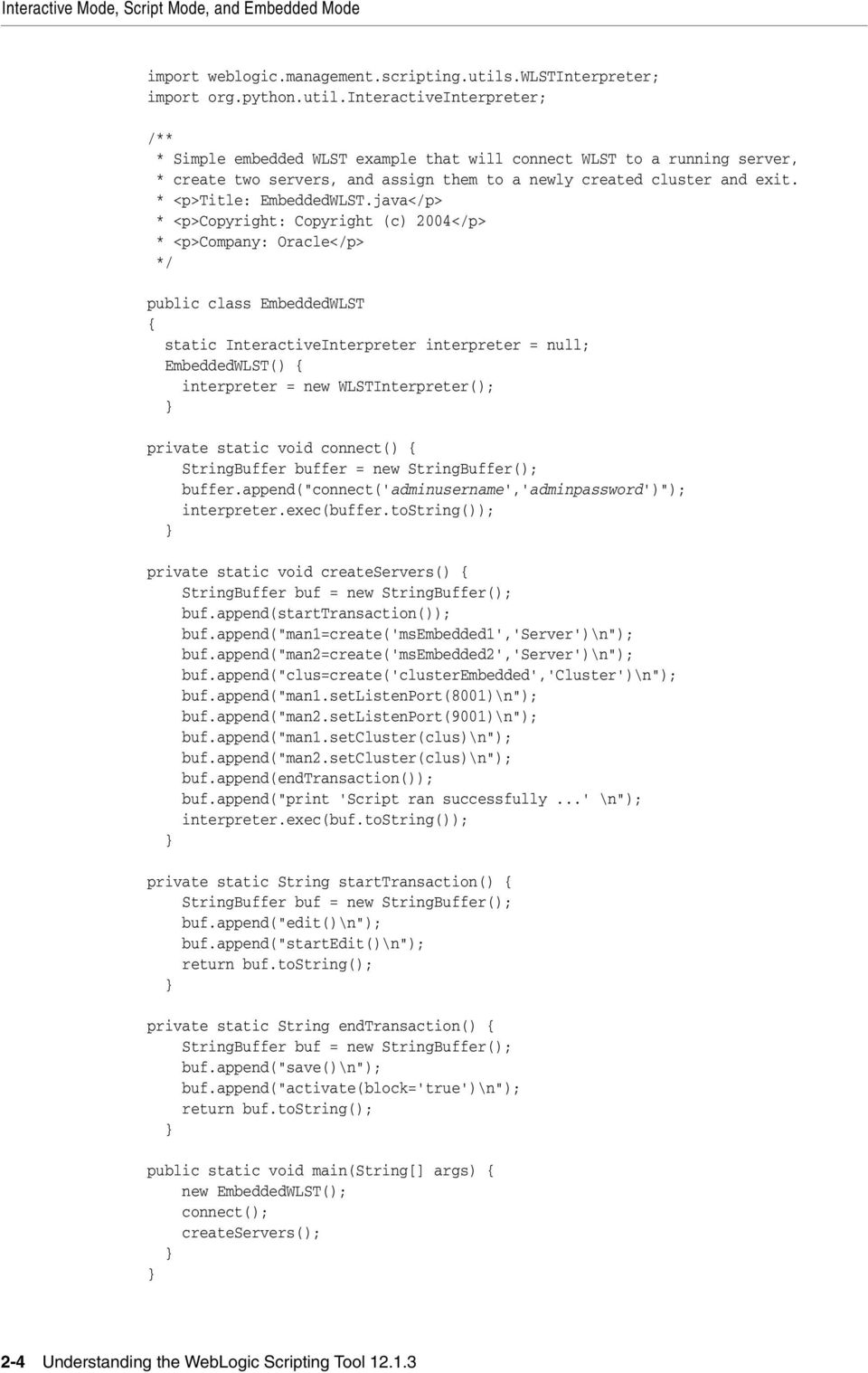
17 Interactive Mode, Script Mode, and Embedded Mode Interactive Mode Script Mode Embedded Mode Interactive mode, in which you enter a command and view the response at a command-line prompt, is useful for learning the tool, prototyping command syntax, and verifying configuration options before building a script. Using WLST interactively is particularly useful for getting immediate feedback after making a critical configuration change. The WLST scripting shell maintains a persistent connection with an instance of WebLogic Server. WLST can write all of the commands that you enter during a WLST session to a file. You can edit this file and run it as a WLST script. For more information, see "startrecording" and "stoprecording" in WebLogic Scripting Tool Command Reference. Scripts invoke a sequence of WLST commands without requiring your input, much like a shell script. Scripts contain WLST commands in a text file with a.py file extension, for example, filename.py. You use script files with the Jython commands for running scripts. Using WLST scripts, you can: Automate WebLogic Server configuration and application deployment Apply the same configuration settings, iteratively, across multiple nodes of a topology Take advantage of scripting language features, such as loops, flow control constructs, conditional statements, and variable evaluations that are limited in interactive mode Schedule scripts to run at various times Automate repetitive tasks and complex procedures Configure an application in a hands-free data center For information about sample scripts that WebLogic Server installs, see Section 1.4, "WLST Sample Scripts". In embedded mode, you instantiate the WLST interpreter in your Java code and use it to run WLST commands and scripts. All WLST commands and variables that you use in interactive and script mode can be run in embedded mode. Prior to running the program with embedded WLST, you must invoke the following command to set the appropriate environment variables: Windows: WL_HOME\server\bin\setWLSEnv.cmd UNIX: WL_HOME/server/bin/setWLSEnv.sh On UNIX operating systems, the setwlsenv.sh command does not set the environment variables in all command shells. Oracle recommends that you execute this command using the Korn shell or bash shell. Example 2 1 illustrates how to instantiate the WLST interpreter and use it to connect to a running server, create two servers, and assign them to clusters. Example 2 1 Running WLST From a Java Class package wlst; import java.util.*; Using the WebLogic Scripting Tool 2-3

18 Interactive Mode, Script Mode, and Embedded Mode import weblogic.management.scripting.utils.wlstinterpreter; import org.python.util.interactiveinterpreter; /** * Simple embedded WLST example that will connect WLST to a running server, * create two servers, and assign them to a newly created cluster and exit. * <p>title: EmbeddedWLST.java</p> * <p>copyright: Copyright (c) 2004</p> * <p>company: Oracle</p> */ public class EmbeddedWLST { static InteractiveInterpreter interpreter = null; EmbeddedWLST() { interpreter = new WLSTInterpreter(); } private static void connect() { StringBuffer buffer = new StringBuffer(); buffer.append("connect('adminusername','adminpassword')"); interpreter.exec(buffer.tostring()); } private static void createservers() { StringBuffer buf = new StringBuffer(); buf.append(starttransaction()); buf.append("man1=create('msembedded1','server')\n"); buf.append("man2=create('msembedded2','server')\n"); buf.append("clus=create('clusterembedded','cluster')\n"); buf.append("man1.setlistenport(8001)\n"); buf.append("man2.setlistenport(9001)\n"); buf.append("man1.setcluster(clus)\n"); buf.append("man2.setcluster(clus)\n"); buf.append(endtransaction()); buf.append("print 'Script ran successfully...' \n"); interpreter.exec(buf.tostring()); } private static String starttransaction() { StringBuffer buf = new StringBuffer(); buf.append("edit()\n"); buf.append("startedit()\n"); return buf.tostring(); } private static String endtransaction() { StringBuffer buf = new StringBuffer(); buf.append("save()\n"); buf.append("activate(block='true')\n"); return buf.tostring(); } public static void main(string[] args) { new EmbeddedWLST(); connect(); createservers(); } } 2-4 Understanding the WebLogic Scripting Tool
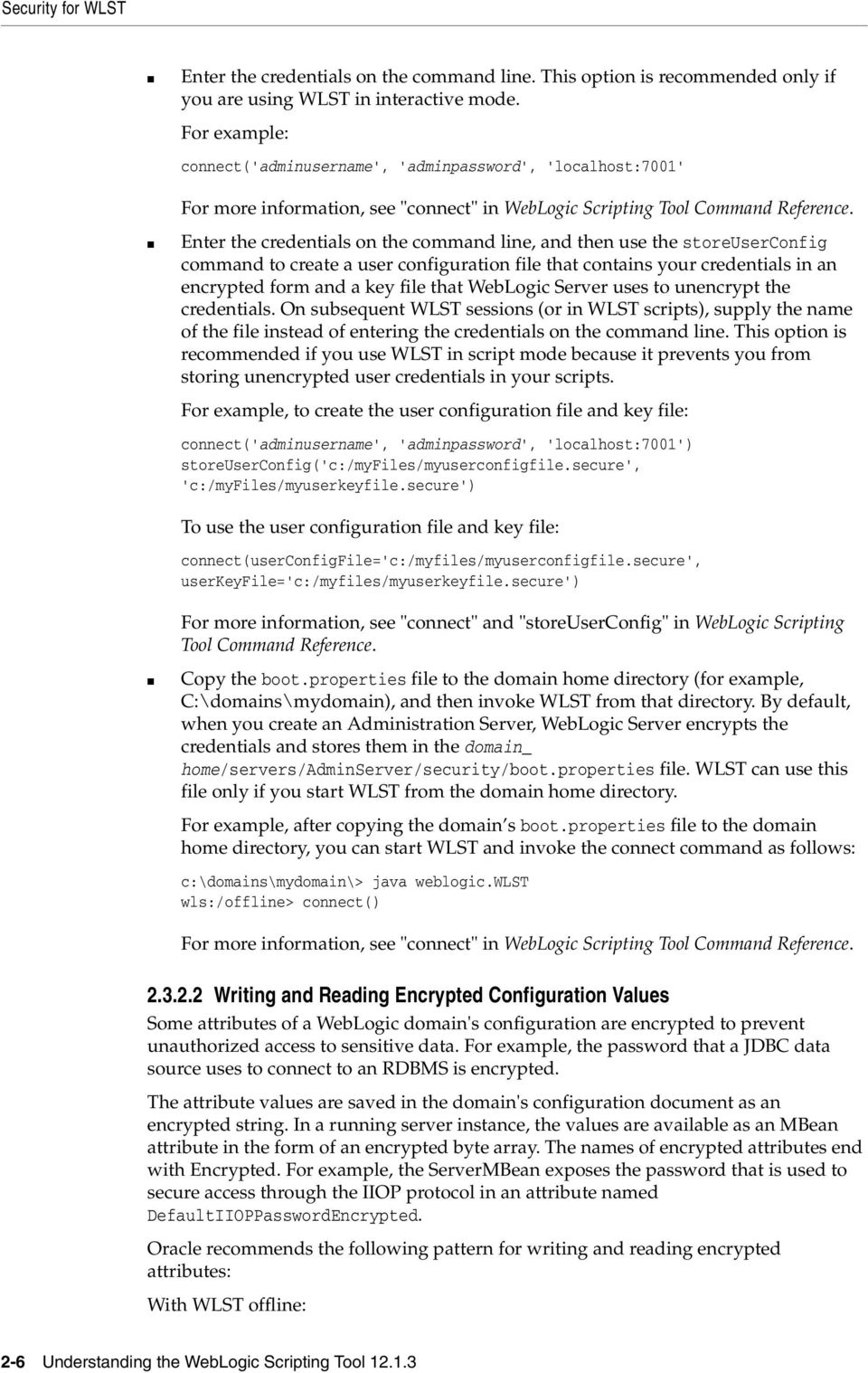
19 Security for WLST 2.3 Security for WLST WLST uses the WebLogic Security Framework to prevent unauthorized users from modifying a WebLogic domain or from viewing encrypted data. The following sections describe the actions you must take to satisfy WLST security requirements: Section 2.3.1, "Securing the WLST Connection" Section 2.3.2, "Securing Access to Configuration Data" Section 2.3.3, "Securing Access to Security Data" Securing the WLST Connection If you use WLST to connect to a WebLogic Server instance, Oracle recommends that you connect to the server instance through the administration port. The administration port is a special, secure port that all WebLogic Server instances in a WebLogic domain can use for administration traffic. By default, this port is not enabled, but Oracle recommends that you enable the administration port in a production environment. The default value for the administration port is Separating administration traffic from application traffic ensures that critical administration operations (starting and stopping servers, changing a server's configuration, and deploying applications) do not compete with high-volume application traffic on the same network connection. The administration port requires all communication to be secured using SSL. By default, all servers in a WebLogic domain use demonstration certificate files for SSL, but these certificates are not appropriate for a production environment. For information about configuring the administration port, see "Administration Port and Administrative Channel" in Administering Server Environments for Oracle WebLogic Server Securing Access to Configuration Data A WebLogic domain stores its configuration data in a collection of XML documents that are saved in the domain directory. For example, these configuration documents describe the names, listen addresses, and deployed resources in the domain. When one or more servers in a WebLogic domain are running, each server instance maintains an in-memory representation of the configuration data as a collection of Managed Beans (MBeans). You must use your own security measures to make sure that only authorized users can access your domain's configuration files through the file system. Anyone who is authorized to access the domain's configuration files through the file system can use a text editor, WLST offline, or other tools to edit the configuration files Securing Access from WLST Online If you use WLST to connect to a running instance of WebLogic Server, you must provide the credentials (user name and password) of a user who has been defined in the active WebLogic security realm. Once you are connected, a collection of security policies determine which configuration attributes you are permitted to view or modify. (See "Default Security Policies for MBeans" in the MBean Reference for Oracle WebLogic Server.) When you invoke the WLST connect command, you can supply user credentials by doing any of the following: Using the WebLogic Scripting Tool 2-5

20 Security for WLST Enter the credentials on the command line. This option is recommended only if you are using WLST in interactive mode. For example: connect('adminusername', 'adminpassword', 'localhost:7001' For more information, see "connect" in WebLogic Scripting Tool Command Reference. Enter the credentials on the command line, and then use the storeuserconfig command to create a user configuration file that contains your credentials in an encrypted form and a key file that WebLogic Server uses to unencrypt the credentials. On subsequent WLST sessions (or in WLST scripts), supply the name of the file instead of entering the credentials on the command line. This option is recommended if you use WLST in script mode because it prevents you from storing unencrypted user credentials in your scripts. For example, to create the user configuration file and key file: connect('adminusername', 'adminpassword', 'localhost:7001') storeuserconfig('c:/myfiles/myuserconfigfile.secure', 'c:/myfiles/myuserkeyfile.secure') To use the user configuration file and key file: connect(userconfigfile='c:/myfiles/myuserconfigfile.secure', userkeyfile='c:/myfiles/myuserkeyfile.secure') For more information, see "connect" and "storeuserconfig" in WebLogic Scripting Tool Command Reference. Copy the boot.properties file to the domain home directory (for example, C:\domains\mydomain), and then invoke WLST from that directory. By default, when you create an Administration Server, WebLogic Server encrypts the credentials and stores them in the domain_ home/servers/adminserver/security/boot.properties file. WLST can use this file only if you start WLST from the domain home directory. For example, after copying the domain s boot.properties file to the domain home directory, you can start WLST and invoke the connect command as follows: c:\domains\mydomain\> java weblogic.wlst wls:/offline> connect() For more information, see "connect" in WebLogic Scripting Tool Command Reference Writing and Reading Encrypted Configuration Values Some attributes of a WebLogic domain's configuration are encrypted to prevent unauthorized access to sensitive data. For example, the password that a JDBC data source uses to connect to an RDBMS is encrypted. The attribute values are saved in the domain's configuration document as an encrypted string. In a running server instance, the values are available as an MBean attribute in the form of an encrypted byte array. The names of encrypted attributes end with Encrypted. For example, the ServerMBean exposes the password that is used to secure access through the IIOP protocol in an attribute named DefaultIIOPPasswordEncrypted. Oracle recommends the following pattern for writing and reading encrypted attributes: With WLST offline: 2-6 Understanding the WebLogic Scripting Tool
21 Security for WLST To write an encrypted value, pass the name of the encrypted attribute and an unencrypted string to the set command. For example: set('defaultiioppasswordencrypted', 'mypassword') WLST encrypts the string and writes the encrypted value to the domain's configuration file. For more information, see "set" in WebLogic Scripting Tool Command Reference. WLST offline does not display the unencrypted value of an encrypted attribute. If you use the ls command to display management attributes, WLST offline returns asterisks as the value of encrypted attributes. If you use the get command, WLST offline returns a byte array that represents asterisks. For example: wls:/offline/wl_server/server/examplesserver>ls() returns... -rw- DefaultIIOPPasswordEncrypted ********... While wls:/offline/wl_ server/server/examplesserver>get('defaultiioppasswordencrypted') returns array([42, 42, 42, 42, 42, 42, 42, 42], byte) For more information, see "ls" and "get" in WebLogic Scripting Tool Command Reference. With WLST online, for each encrypted attribute, an MBean also contains an unencrypted version. For example, ServerMBean contains an attribute named DefaultIIOPPasswordEncrypted which contains the encrypted value and an attribute named DefaultIIOPPassword, which contains the unencrypted version of the value. To write and read encrypted values with WLST online: To write an encrypted value, start an edit session. Then do either of the following: Pass the name of the unencrypted attribute and an unencrypted string to the set command. For example: set('defaultiioppassword', 'mypassword') Pass the name of the encrypted attribute and an encrypted byte array to the set command. You can use the encrypt command to create the encrypted byte array (see "encrypt" in WebLogic Scripting Tool Command Reference). For example: set('defaultiioppasswordencrypted', encrypt('mypassword')) Note: Do not pass an unencrypted string to the encrypted attribute. The encrypted attribute assumes that the value you pass to it is already encrypted. Using the WebLogic Scripting Tool 2-7
22 Main Steps for Using WLST in Interactive or Script Mode When you activate the edit, WebLogic Server writes the encrypted value to the domain's configuration file. To read the encrypted value of the attribute, pass the name of the encrypted attribute to the get command. For example: get('defaultiioppasswordencrypted') returns array([105, 114, 111, 110, 115, 116, 101, 101, 108], byte) Securing Access to Security Data The user names and passwords of WebLogic Server users, security groups, and security roles are not stored in a WebLogic domain's XML configuration files. Instead, a WebLogic domain uses a separate software component called an Authentication provider to store, transport, and provide access to security data. Authentication providers can use different types of systems to store security data. The Authentication provider that WebLogic Server installs uses an embedded LDAP server. When you use WLST offline to create a domain template, WLST packages the Authentication provider's data store along with the rest of the domain documents. If you create a domain from the domain template, the new domain has an exact copy of the Authentication provider's data store from the domain template. You cannot use WLST offline to modify the data in an Authentication provider's data store. You can, however, use WLST online to interact with an Authentication provider and add, remove, or modify users, groups, and roles. For more information, see Section 6.3, "Managing Security Data (WLST Online)". 2.4 Main Steps for Using WLST in Interactive or Script Mode Invoking WLST The following sections summarize the steps for setting up and using WLST: Section 2.4.1, "Invoking WLST" Section 2.4.2, "Exiting WLST" Section 2.4.3, "Syntax for WLST Commands" You can invoke WLST in the following ways: Execute the appropriate shell script for your environment and enter WLST commands from the WLST shell. See Section , "Invoking WLST Using Provided Shell Scripts." Execute the java weblogic.wlst command. See Section , "Invoking WLST Using the java Command." Run a prepared WLST script when invoking the WLST shell script. See Section , "Running Scripts." Execute the WebLogic Scripting Tool command from the Start menu (Windows only). 2-8 Understanding the WebLogic Scripting Tool
23 Main Steps for Using WLST in Interactive or Script Mode Note: If you notice that it takes a long time to create or update a domain using WLST on a UNIX or Linux operating system, set the CONFIG_JVM_ARGS environment variable to the following value to resolve this issue: -Djava.security.egd=file:/dev/urandom See also Section 2.7, "Running WLST from Ant." Invoking WLST Using Provided Shell Scripts To invoke WLST using a shell script, execute the command that is appropriate for your environment. This is the recommended way to invoke WLST. Environment variables are automatically set when you invoke WLST this way. You can then enter WLST commands from within the WLST shell. Note: The following commands apply only to standalone WebLogic Server installations (those that do not include other Fusion Middleware components). Many Fusion Middleware components supply custom WLST commands. To use them, you must invoke WLST from the appropriate directory. See "Using Custom WLST Commands" in Administering Oracle Fusion Middleware. UNIX cd ORACLE_HOME/oracle_common/common/bin./wlst.sh ORACLE_HOME is the Oracle Home directory you specified at installation. To set WLST properties in a UNIX environment prior to running WLST: export WLST_PROPERTIES="-Dweblogic.security.SSL.ignoreHostnameVerification=true, -Dweblogic.security.TrustKeyStore=DemoTrust"./wlst.sh Note: To avoid log file name collisions when multiple WLST offline processes are running, set the following property in the environment prior to invoking WLST: export WLST_PROPERTIES="-Dwlst.offline.log=./logs/debug.log" Windows cd ORACLE_HOME\oracle_common\common\bin wlst.cmd ORACLE_HOME is the Oracle Home directory you specified at installation Invoking WLST Using the java Command To invoke WLST using the java command, you must first set up your environment for WLST. To set up your environment for WLST: 1. Install and configure the WebLogic Server software, as described in Installing and Configuring Oracle WebLogic Server and Coherence. Using the WebLogic Scripting Tool 2-9
24 Main Steps for Using WLST in Interactive or Script Mode Table 2 1 Option 2. Add WebLogic Server classes to the CLASSPATH environment variable and WL_ HOME\server\bin to the PATH environment variable, where WL_HOME refers to the full path to the WebLogic Server home directory. You can use the setwlsenv script to set the required variables: Windows: WL_HOME\server\bin\setWLSEnv.cmd UNIX: WL_HOME/server/bin/setWLSEnv.sh On UNIX operating systems, the setwlsenv.sh command does not set the environment variables in all command shells. Oracle recommends that you execute this command using the Korn shell or bash shell. After setting up your environment, use the following syntax to invoke WLST. See Table 2 1 for a description of the WLST command options. See Table 2 2 for a description of the SSL arguments. Table 2 3 lists additional optional startup arguments for WLST. java [ -Dweblogic.security.SSL.ignoreHostnameVerification=true -Dweblogic.security.TrustKeyStore=DemoTrust ] [ -Dweblogic.security.JavaStandardTrustKeyStorePassPhrase=password] [ -Dweblogic.security.CustomTrustKeyStoreFileName=filename -Dweblogic.security.TrustKeystoreType=jks [ -Dweblogic.security.CustomTrustKeyStorePassPhrase=password]] [ -Dweblogic.security.SSL.hostnameVerifier=classname] weblogic.wlst [ -loadproperties propertyfilename ] [ -skipwlsmodulescanning ] [ [-i] filepath.py ] Command Options for WLST -loadproperties propertyfilename -skipwlsmodulescanning [-i] filepath.py Description Use this option to load properties into the WLST session, where propertyfilename is the name of a file that contains name=value pairs. You cannot use this option when you are importing WLST as a Jython module (see Section 2.8, "Importing WLST as a Jython Module"). Instead of using this command-line option, you can use the loadproperties WLST command. See "loadproperties" in WebLogic Scripting Tool Command Reference. Use this option to reduce startup time by skipping package scanning and caching for WebLogic Server modules. Use this option to run a WLST script, where filepath.py is an absolute or relative pathname for the script. By default, WLST exits (stops the Java process) after it executes the script. Include -i to prevent WLST from exiting. Note: If a WLST script named wlstprofile.py exists in the directory from which you invoke WLST or in user.home (the home directory of the operating system user account as determined by the JVM), WLST automatically runs the wlstprofile.py script; you do not need to specify the name of this WLST script file on the command-line. Instead of using this command-line option, you can use the following command after you start WLST: execfile('filepath.py') Understanding the WebLogic Scripting Tool
25 Main Steps for Using WLST in Interactive or Script Mode Table 2 2 Argument SSL Arguments -Dweblogic.security.SSL. ignorehostnameverification=true -Dweblogic.security.TrustKeyStore= DemoTrust -Dweblogic.security.JavaStandardTr ustkeystorepassphrase=password -Dweblogic.security.CustomTrustKey StoreFileName=filename -Dweblogic.security.TrustKeystoreT ype=jks -Dweblogic.security.CustomTrustKey StorePassPhrase=password -Dweblogic.security.SSL.hostnameVe rifier=classname Definition Use these system properties if you plan to connect WLST to a WebLogic Server instance through an SSL listen port, and if the server instance is using the demonstration SSL keys and certificates. ignorehostnameverification disables host name verification. TrustKeyStore causes WLST to trust the CA certificates in the demonstration trust keystore (WL_HOME\server\lib\DemoTrust.jks). TrustKeyStore is required if the server instance to which you want to connect is using the demonstration identity and certificates. By default, WLST trusts only the CA certificates in the Java Standard Trust keystore (SDK_HOME\jre\lib\security\cacerts). Password that was used to secure the Java Standard Trust keystore. If the Java Standard Trust keystore is protected by a password, and if you want to trust its CA certificates, you must use this argument. By default, the Java Standard Trust keystore is not protected by a password. Causes WLST to trust the CA certificates in a custom keystore that is located at filename. You must use both arguments to trust custom keystores. The filename must match exactly the ServerMBean.CustomTrustKeyStoreFileName value persisted in config.xml; if the value specified in the CustomTrustKeyStoreFileName attribute is a relative pathname, you must also specify the same relative pathname in this argument. Password that was used to secure the custom keystore. You must use this argument only if the custom keystore is protected by a password. Name of a custom Host Name Verifier class. The class must implement the weblogic.security.ssl.hostnameverifier interface. Table 2 3 Argument Additional WLST Startup Arguments -Dwlst.debug.init=value -Dweblogic.wlstHome=path1: path2:...: pathn -Dweblogic.wlstHome=path1; path2;...; pathn -Dwlst.offline.log=path -Dwlst.offline.log.priority=debug Description If true, debug mode is turned on. If false, debug mode is turned off. The default is false. A comma-separated list of directory paths from which to load.py files at startup. Note that the path separator is ':' on UNIX operating systems and ';' on Windows. Sets the path and file name for WLST offline logging, for example, -Dwlst.offline.log=./logs/debug.log. Sets the log priority level to debug for WLST offline logging. Examples To use WLST in script mode: java weblogic.wlst c:/oracle/middleware/wlserver/common/templates/scripts/wlst/distributequeues.py To run a WLST script on a WebLogic Server instance that uses the SSL listen port and the demonstration certificates: Using the WebLogic Scripting Tool 2-11
26 Main Steps for Using WLST in Interactive or Script Mode java -Dweblogic.security.SSL.ignoreHostnameVerification=true -Dweblogic.security.TrustKeyStore=DemoTrust weblogic.wlst c:/oracle/middleware/wlserver/common/templates/scripts/wlst/distributequeues.py To use WLST in interactive mode: java weblogic.wlst To connect to a WebLogic Server instance after you start WLST in interactive mode: wls:/offline> connect('adminusername','adminpassword','localhost:7001') Running Scripts You can run WLST scripts in the following ways: Include the script in the wlst.cmd or wlst.sh command: wlst.sh /oracle/middleware/wlserver/common/templates/scripts/wlst/distributedqueues.py Include the script in the java weblogic.wlst command. You can either include the full path to the script, as shown here: java weblogic.wlst c:/oracle/middleware/wlserver/common/templates/scripts/wlst/distributedqueues.p y or you can navigate to the directory where the script is located before invoking WLST, in which case you only need to include the script name in the command: cd C:/Oracle/Middleware/wlserver/common/templates/scripts/wlst java weblogic.wlst distributequeues.py After invoking interactive WLST, use the execfile() command: wls:offline> execfile('c:/oracle/middleware/wlserver/common/templates/scripts/wlst/distribut edqueues.py') Note: If you use backslashes (\) in the path name, be aware that WLST interprets them as a special character, which you must escape. For more information, see Section 2.4.3, "Syntax for WLST Commands." Exiting WLST Invoking WLST From the Start Menu On Windows, a shortcut on the Start menu sets the environment variables and invokes WLST (Oracle WebLogic > WebLogic Server > Tools > WebLogic Scripting Tool). To exit WLST, enter the exit() command: wls:/mydomain/serverconfig> exit() Exiting WebLogic Scripting Tool... c:\> Syntax for WLST Commands Follow this syntax when entering WLST commands or writing them in a script: 2-12 Understanding the WebLogic Scripting Tool
27 Main Steps for Using WLST in Interactive or Script Mode Command names and arguments are case sensitive. Enclose arguments in single or double quotes. For example, 'newserver' or "newserver". If you specify a backslash character (\) in a string, either precede the backslash with another backslash or precede the entire string with a lower-case r character. The \ or r prevents Jython from interpreting the backslash as a special character. For example when specifying a file path name that contains a backslash: readtemplate('c:\\userdomains\\mytemplates\\mytemplate.jar', 'Expanded') or readtemplate(r'c:\userdomains\mytemplates\mytemplate.jar', 'Expanded') Note: When specifying path names in WLST commands on a Windows machine, you can use a forward slash (/). For example: readtemplate('c:/userdomains/templates/template.jar', 'Expanded') is as valid as readtemplate('c:\\userdomains\\templates\\template.jar', 'Expanded') When using WLST offline, the following characters are not valid in names of management objects: period (.), forward slash (/), or backward slash (\). If you need to cd to a management object whose name includes a forward slash (/), surround the object name in parentheses. For example: cd('jmsqueue/(jms/registration_mdb_queue)') Do not use reserved names, such as server or cluster, as variables in WLST scripts. Doing so causes a TypeError to occur when the WLST script is executed. For example, the following code would cause an error because the reserved name server was used as a variable for myserver, and the variable server was then used in the state command: server='myserver' state(server,'server') The following code would not cause the error because srvr is not a reserved name: srvr='myserver' state(srvr,'server') Considerations When Invoking Multiple WLST Instances At WLST startup, Jython stores information in a temporary directory based on the username of the person who started WLST. If the same user invokes two different WLST instances which will run at the same time, conflicts may occur when saving this information in the temporary directory. If you plan to invoke multiple WLST instances with the same username, Oracle recommends that you define the java.io.tmpdir system property to point to a temporary directory that will not be shared by other WLST instances that are running Using the WebLogic Scripting Tool 2-13
28 Redirecting Error and Debug Output to a File at the same time. For example, include the following parameter in the java command you use to start WLST: -Djava.io.tmpdir=C:\mytempdir 2.5 Redirecting Error and Debug Output to a File To redirect WLST information, error, and debug messages from standard output to a file, enter redirect(outputfile,[tostdout]) stopredirect() This command also redirects the output of the dumpstack() and dumpvariables() commands. For example, to redirect WLST output to the logs/wlst.log file under the directory from which you started WLST, enter the following command: wls:/mydomain/serverconfig> redirect('./logs/wlst.log') For more information, see "redirect" and "stopredirect" in WebLogic Scripting Tool Command Reference. 2.6 Getting Help To display information about WLST commands and variables, enter the help command. If you specify the help command without arguments, WLST summarizes the command categories. To display information about a particular command, variable, or command category, specify its name as an argument to the help command. To list a summary of all online or offline commands from the command line using the following commands, respectively: help('online') help('offline') The help command will support a query; for example, help('get*') displays the syntax and usage information for all commands that begin with get. For example, to display information about the disconnect command, enter the following command: wls:/mydomain/serverconfig> help('disconnect') The command returns the following: Description: Disconnect from a WebLogic Server instance. Syntax: disconnect() Example: wls:/mydomain/serverconfig> disconnect() 2.7 Running WLST from Ant WebLogic Server provides a custom Ant task, wlst, which invokes a WLST script from an Ant build file. You can create a WLST script (.py) file and then use this task to 2-14 Understanding the WebLogic Scripting Tool
29 Running WLST from Ant invoke the script file, or you can create a WLST script in a nested element within this task. For more information about Ant, see the Apache Ant Manual at The wlst task is predefined in the version of Ant that is installed with WebLogic Server. To add this version of Ant to your build environment, run the following script, where WL_HOME is the directory in which you installed WebLogic Server. WL_HOME\server\bin\setWLSEnv.cmd (or setwlsenv.sh on UNIX) On UNIX operating systems, the setwlsenv.sh command does not set the environment variables in all command shells. Oracle recommends that you execute this command using the Korn shell or bash shell. If you want to use the wlst task with your own Ant installation, include the following task definition in your build file: <taskdef name="wlst" classname="weblogic.ant.taskdefs.management.wlsttask" /> Parameters Table 2 4 Table 2 4 lists the wlst task parameters that you specify as attributes of the <wlst> element. wlst Parameters Attribute Description Required properties="propsfile" filename="filename" arguments="arglist" failonerror="value" executescriptbeforefile="v alue" debug="value" replaceproperties="value" Name and location of a properties file that contains name-value pairs that you can reference in your WLST script. Name and location of the WLST script file that you would like to execute. If the specified WLST script file does not exist, this task fails. List of arguments to pass to the script. These arguments are accessible using the sys.argv variable. Boolean value specifying whether the Ant build will fail if this task fails. Boolean value specifying whether this task invokes the script in the nested <script> element before the script file specified by the filename attribute. This attribute defaults to true, specifying that the embedded script is invoked first. Boolean value specifying whether debug statements should be output when this task is executed. Boolean value that specifies whether ant property expansion will work in the specified WLST script. No Yes, if no nested <script> is used. No No; default is true. No; default is true. No; default is false. No; default is true Parameters Specified as Nested Elements The following sections describe the wlst task parameters that you specify as nested elements of the <wlst> element script This element contains a WLST script. It is required if you do not use the filename attribute to name a script file. Using the WebLogic Scripting Tool 2-15
30 Running WLST from Ant classpath This element specifies classes to add to the classpath. Use classpath if your script requires classes that are not already on the classpath. This element is the standard Ant classpath element. You can specify a reference to a path element that you have defined elsewhere in the build file or nest elements that specify the files and directories to add to the class path. See "Path-like Structures" in Apache Ant Manual at Examples The following sections show examples for the createserver, loop, and error targets Example 1 In the following example, the createserver target does the following: Adds classes to the task's classpath. Executes the script in the nested script element. This script connects to a WebLogic domain's Administration Server at t3://localhost:7001. (Note that executescriptbeforefile is set to true, so this is invoked before the specified WLST script file.) Executes the script file myscript.py that is specified by the filename attribute. The script file is located in the directory from which you started Ant. You could use such a file to start an edit session, create a new server, save, and activate the configuration changes. Defines three arguments that are passed to the script. These arguments are accessible using the sys.argv variable. Continues execution, as per the failonerror="false" setting, even if the wlst Ant task fails to execute. Disables debugging. <target name="configserver"> <wlst debug="false" failonerror="false" executescriptbeforefile="true" filename="./myscript.py"> <classpath> <pathelement location="${my.classpath.dir}"/> </classpath> <script> connect('adminusername','adminpassword','t3://localhost:7001') </script> </wlst> </target> Example 2 In the following example, the loop target does the following: Adds classes to the task's classpath using a path reference. Executes the WLST script file myscript.py in the directory from which you started Ant. (Note that executescriptbeforefile is set to false, so the WLST script file is executed first, before the embedded script.) Executes the embedded script to connect to the server at t3://localhost:7001 and access and print the list of servers in the WebLogic domain Understanding the WebLogic Scripting Tool
31 Importing WLST as a Jython Module Results in a build failure if the wlst task fails to execute, as per the failonerror="true" setting. Enables debugging. <path id="my.classpath"> <pathelement location="${my.classpath.dir}"/> </path> <target name="loop"> <wlst debug="true" executescriptbeforefile="false" filename="./myscript.py" failonerror="true"> <classpath> <pathelement location="${my.classpath.dir}"/> </classpath> <script replaceproperties="true"> print 'In the target loop' connect('${admin.user}','${admin.password}','t3://localhost:7001') svrs = cmo.getservers() print 'Servers in the domain are' for x in svrs: print x.getname() </script> </wlst> </target> Example 3 In the following example, the error target: Executes the embedded script to print the variable, thiswillcausenameerror. Continues execution, as per the failonerror="false" setting, even if the thiswillcausenameerror variable does not exist and the wlst Ant task fails to execute. Enables debugging. <target name="error"> <wlst debug="true" failonerror="false"> <script>print thiswillcausenameerror</script> </wlst> </target> 2.8 Importing WLST as a Jython Module Advanced users can import WLST from WebLogic Server as a Jython module. After importing WLST, you can use it with your other Jython modules and invoke Jython commands directly using Jython syntax. The main steps include converting WLST definitions and method declarations to a.py file, importing the WLST file into your Jython modules, and referencing WLST from the imported file. To import WLST as a Jython module: 1. Invoke WLST. cd ORACLE_HOME/oracle_common/common/bin./wlst.sh wls:/offline> 2. Use the writeinifile command to convert WLST definitions and method declarations to a.py file. Using the WebLogic Scripting Tool 2-17
32 Customizing WLST wls:/offline> writeinifile("wl.py") The Ini file is successfully written to wl.py wls:/offline> 3. Open a new command shell and invoke Jython directly by entering the following command: c:\>java org.python.util.jython The Jython package manager processes the JAR files in your classpath. The Jython prompt appears: >>> 4. Import the WLST module into your Jython module using the Jython import command. >>>import wl 5. Now you can use WLST methods in the module. For example, to connect WLST to a server instance: wl.connect('username','password')... Notes: When using WLST as a Jython module, in all WLST commands that have a block argument, block is always set to true, specifying that WLST will block user interaction until the command completes. See "WLST Command and Variable Reference" in WebLogic Scripting Tool Command Reference. When running recorded scripts directly in a Jython interpreter, Boolean values of true and false can cause an error. Before running recorded scripts in a Jython interpreter, make one of the following changes to the script: Add the following two lines to the script to define the true and false values: true=1 false=0 Change true and false values to wl.true or wl.false, where wl is the name from the import. 2.9 Customizing WLST You can customize WLST using the WLST home directory, which is located at WL_ HOME/common/wlst, by default, where WL_HOME refers to the top-level installation directory for WebLogic Server. All Python scripts that are defined within the WLST home directory are imported at WLST startup. Note: You can customize the default WLST home directory by passing the following argument on the command line: -Dweblogic.wlstHome=<another-directory> The following table describes ways to customize WLST Understanding the WebLogic Scripting Tool
33 Customizing WLST Table 2 5 Customizing WLST To define custom... Do the following... For a sample script, see... WLST commands WLST commands within a library WLST commands as a Jython module Integrated help for custom WLST commands Create a Python script defining the new commands and copy that file to WL_HOME/common/wlst. Create a Python script defining the new commands and copy that file to WL_HOME/common/wlst/lib. The scripts located within this directory are imported as Jython libraries. Create a Python script defining the new commands and copy that file to WL_HOME/common/wlst/modules. This script can be imported into other Jython modules, as described in Section 2.8, "Importing WLST as a Jython Module." Define the help text for each command group and command in a resource bundle. Use addhelpcommandgroup to add a command group to the list of command groups that are displayed by the help() command. Use addhelpcommand to add a command to the list of commands that is displayed by the help('commandgroup') command. Typically, you will call the addhelpcommandgroup and addhelpcommand from the.py file that contains the definition of your custom commands. See Section 2.9.1, "Adding Integrated Help for Custom Commands" for more information. Section 2.9.2, "Sample Scripts For Defining new WLST Commands" Section 2.9.2, "Sample Scripts For Defining new WLST Commands" WL_HOME/common/wlst/modules/wlstModule.py A JAR file, jython-modules.jar, which contains all of the Jython modules that are available in Jython 2.2.1, is also available within this directory. Not applicable Adding Integrated Help for Custom Commands You can customize WLST to include integrated help for any custom WSLT commands you've defined. To add integrated help, you define the help text for each command group and command in a resource bundle, which can be either a class or a property resource file. You can define the help for multiple command groups in the same resource bundle. Note: The resource bundle must be present in the classpath. The resource bundle contains the following entries for each command group: <commandgroup>_shortdescription=\ <short description of command group> <commandgroup>_description=\ \n<description of command group> Using the WebLogic Scripting Tool 2-19
34 Customizing WLST For example, the following lines define the short description and description for the command group navigate: navigate_shortdescription=\ Lists commands for navigating the hierarchy of beans. navigate_description=\ \n Navigates the hierarchy of beans and controls the prompt display. \n When you enter the help() command to display a list of command groups, the short description for navigate is displayed in the listing: wls:/offline>help() WLST is a command line scripting tool to configure and administer a WebLogic Server. Try: help('all') List all WLST commands available. help('browser') List commands for browsing the hierarchy. help('navigate') List commands for navigating the bean hierarchy. When you enter the help('navigate') command, the description is displayed above the list of commands in the group: wls:/offline> help('navigate') Navigates the hierarchy of beans and controls the prompt display. help('mycd') Navigate the hierarchy of beans. help('myprmpt') Toggle the display of path information at the prompt. The resource bundle contains help text entries for commands using a standard pattern. For each command name, there are several entries: <commandname>_shortdescription <commandname>_description <commandname>_example <commandname>_syntax The following defines the help for mycd command: mycd_shortdescription=\ Navigate the hierarchy of beans. mycd_description=\ \nnavigate the hierarchy of configuration or runtime beans. This \ \ncommand uses a model that is similar to navigating a file system \ \nin a Windows or UNIX command shell. For example, to navigate back \ \nto a parent configuration or runtime bean, enter mycd(".."). The \ \ncharacter string.. (dot-dot) refers to the directory immediately \ \nabove the current directory. To get back to the root configuration \ \nbean after navigating to a configuration or runtime bean that is \ \ndeep in the hierarchy, enter mycd("/"). \ mycd_example=\ wls:/mydomain/serverconfig> mycd('servers')\n\ wls:/mydomain/serverconfig/servers> mycd('myserver)\n\ wls:/mydomain/serverconfig/servers/myserver>mycd('../..')\n\ wls:/mydomain/serverconfig> mycd_syntax=\ mycd(mbeanname) \n- mbeanname = Path to the configuration or runtime bean in the namespace.\ \n The short description is shown to the right of the command name when you enter the help('commandgroup') command to list all commands in a group: 2-20 Understanding the WebLogic Scripting Tool
35 Customizing WLST wls:/offline> help('navigate') Navigates the hierarchy of beans and controls the prompt display. help('mycd') Navigate the hierarchy of beans. help('myprmpt') Toggle the display of path information at the prompt. The description, example, and syntax are displayed when you enter the help('commandname') command: wls:/offline> help('mycd') Description: Navigate the hierarchy of configuration or runtime beans. This command uses a model that is similar to navigating a file system in a Windows or UNIX command shell. For example, to navigate back to a parent configuration or runtime bean, enter mycd(".."). The character string.. (dot-dot) refers to the directory immediately above the current directory. To get back to the root configuration bean after navigating to a configuration or runtime bean that is deep in the hierarchy, enter mycd("/"). Syntax: mycd(mbeanname) - mbeanname = Path to the configuration or runtime bean in the namespace. Example: wls:/mydomain/serverconfig> mycd('servers')\n\ wls:/mydomain/serverconfig/servers> mycd('myserver)\n\ wls:/mydomain/serverconfig/servers/myserver>mycd('../..')\n\ wls:/mydomain/serverconfig> After defining the help text in the resource bundle, use addhelpcommandgroup to add the command group name to the list of command groups output by the help() command. Use addhelpcommand to add each command in a group to the list of commands displayed by the help('commandgroup') command. See "addhelpcommandgroup" and "addhelpcommand" in the WebLogic Scripting Tool Command Reference. For more information on resource bundles and localization, refer to Sample Scripts For Defining new WLST Commands The following sample script demonstrates how to define a new WLST command. def wlsthomesample(): print 'Sample wlst home command' Within this script, the wlsthomesample() command is defined, which prints a text string: wls:/offline> wlsthomesample() Sample wlst home command When defining new WLST commands in this way, store the.py file in the WL_ HOME/common/wlst directory. The following sample script demonstrate usage of the WLST lib directory, where layered products and ISVs can add commands to WLST in their namespace. The script has the same structure as the previous example. It differs only in that it is stored in the Using the WebLogic Scripting Tool 2-21
36 Customizing WLST WL_HOME/common/wlst/lib directory instead of the WL_HOME/common/wlst directory. def wlstexamplecmd(): print 'Example command' Within this script, the wlstexamplecmd() command is defined, which prints a text string: wls:/offline>wlstlibsample.wlstexamplecmd() Example command Note that you must create the WLST lib directory if it does not already exist Understanding the WebLogic Scripting Tool
37 3 3Creating WebLogic Domains Using WLST Offline [4]This chapter describes how to create and configure WebLogic Server domains using WebLogic Scripting Tool (WLST) offline. WLST enables you to create a new WebLogic domain or update an existing WebLogic domain without connecting to a running WebLogic Server (that is, using WLST offline) supporting the same functionality as the Configuration Wizard. This chapter includes the following sections: Section 3.1, "Creating and Using a Domain Template (Offline)" Section 3.2, "Creating and Updating a WebLogic Domain" Section 3.3, "Browsing Information About the Configuration Hierarchy (Offline)" Section 3.4, "Editing a WebLogic Domain (Offline)" Section 3.5, "Alternative: Using the configtoscript Command" Section 3.6, "Considerations for Clusters, JDBC, and JMS Resources" Section 3.7, "Creating a Managed Server Domain on a Remote Machine" For information about sample scripts that you can use to create WebLogic domains, see Section 1.4.2, "WLST Offline Sample Scripts". For more information about the Configuration Wizard, see Creating Domains Using the Configuration Wizard. 3.1 Creating and Using a Domain Template (Offline) A domain template is a JAR file that contains domain configuration documents, applications, security data, startup scripts, and other information needed to create a WebLogic domain. To create and use a domain template, perform the steps described in Table 3 1. Note: If you notice that it takes a long time to create or update a domain using WLST, set the CONFIG_JVM_ARGS environment variable to the following value to resolve this issue: -Djava.security.egd=file:/dev/urandom Creating WebLogic Domains Using WLST Offline 3-1
38 Creating and Updating a WebLogic Domain Table 3 1 To... Steps for Creating a Domain Template (Offline) Open an existing WebLogic domain or template (Optional) Modify the WebLogic domain Set the password for the default user, if it is not already set. The default username and password must be set before you can write the domain template. Write the domain configuration information to a domain template. Use the template to create a domain. Use this command... readdomain(domaindirname) readtemplate(templatefilename, profile) Browsing and editing commands cd('/security/domainname/user/usern ame') cmo.setpassword('password') writetemplate(templatename) createdomain(domaintemplate, domaindir, user, password) Note: The Configuration Wizard can also use the domain template. See Creating Domains Using the Configuration Wizard. For more information, see... "readdomain" and "readtemplate" in WebLogic Scripting Tool Command Reference Section 3.3, "Browsing Information About the Configuration Hierarchy (Offline)" Section 3.4, "Editing a WebLogic Domain (Offline)" Section 1.4.2, "WLST Offline Sample Scripts" "writetemplate" in WebLogic Scripting Tool Command Reference "createdomain" in WebLogic Scripting Tool Command Reference Example 3 1 shows the basic commands needed to create a domain template from an existing domain: Example 3 1 Creating a Domain Template From an Existing Domain # Read the domain from the domain home located at /domains/mydomain readdomain('/domains/mydomain') # Create the template jar mydomain.jar in /templates writetemplate('/templates/mydomain.jar') 3.2 Creating and Updating a WebLogic Domain When creating or updating a WebLogic domain, there are three phases to the configuration session: Load and merge the configuration using readtemplate (for creating) or readdomain (for updating) optionally followed by one or more addtemplate() calls. Modify the configuration by navigating the configuration tree and updating attributes. 3-2 Understanding the WebLogic Scripting Tool
39 Creating and Updating a WebLogic Domain Save the configuration using writedomain (for creating), updatedomain (for updating), or writetemplate (for creating a template), followed by closetemplate or closedomain as appropriate. The following examples demonstrate the sequence of commands for creating a domain from a single template and creating a domain from multiple templates. More extensive sample WLST offline scripts are available in the following directory: ORACLE_HOME/wlserver/common/templates/scripts/wlst Example 3 2 shows the basic sequence of commands needed to create a domain from a single template. This example creates a basic WebLogic Server domain from the wls.jar template. Example 3 2 Creating a Domain From a Single Template # Read the template to use for creating the domain readtemplate('oracle_home/middleware/wlserver/common/templates/wls/wls.jar') # Set the listen address and listen port for the Administration Server cd('servers/adminserver') set('listenaddress','') set('listenport', 7001) # Enable SSL on the Administration Server and set the SSL listen address and # port create('adminserver','ssl') cd('ssl/adminserver') set('enabled', 'True') set('listenport', 7002) # Set the domain password for the WebLogic Server administration user cd('/') cd('security/base_domain/user/'adminusername') cmo.setpassword('adminpassword') # If the domain already exists, overwrite the domain setoption('overwritedomain', 'true') # write the domain and close the template writedomain('/domains/mydomain') closetemplate() exit() Example 3 2 shows how to create a new domain using a domain template and one or more extension templates. This example creates the basic WebLogic Server domain from the wls.jar template and then extends the domain by adding the WebLogic Web Services Extension template to the domain. Example 3 3 Creating a Domain From Multiple Templates # Read the basis WebLogic Server domain template readtemplate('oracle_home/middleware/wlserver/common/templates/wls/wls.jar') # Add the second template, in this example, the Web Services template addtemplate('/scratch/leturme/wls1213/oracle_common/common/templates/wls/ oracle.wls-webservice-template_ jar') # Set the listen address and listen port for the Administration Server Creating WebLogic Domains Using WLST Offline 3-3
40 Browsing Information About the Configuration Hierarchy (Offline) cd('servers/adminserver') set('listenaddress','') set('listenport', 7001) # Enable SSL on the Administration Server and set the SSL listen address and # port create('adminserver','ssl') cd('ssl/adminserver') set('enabled', 'True') set('listenport', 7002) # Set the domain password for the WebLogic Server administration user cd('/') cd('security/base_domain/user/'adminusername') cmo.setpassword('adminpassword') # If the domain already exists, overwrite the domain setoption('overwritedomain', 'true') # write the domain and close the templates writedomain('/domains/mydomain') closetemplate() exit() 3.3 Browsing Information About the Configuration Hierarchy (Offline) WLST offline provides read and write access to the configuration data that is persisted in the WebLogic domain's config directory or in a domain template JAR created using Template Builder. This data is a collection of XML documents and expresses a hierarchy of management objects. The schemas that define a WebLogic domain's configuration document are in the following locations: stics.xsd In JAR files under WL_HOME/server/lib/schema, where WL_HOME is the directory in which you install WebLogic Server. Within this directory: The domain.xsd document is represented in the weblogic-domain-binding.jar under the pathname META-INF/schemas/schema-0.xsd. The security.xsd document is represented in the weblogic-domain-binding.jar under the pathname META-INF/schemas/schema-1.xsd. The weblogic-diagnostics.xsd document is represented in the diagnostics-binding.jar under the pathname META-INF/schemas/schema-0.xsd. WLST represents this hierarchy as a file system. The root of the file system is the management object that represents the WebLogic domain. Below the domain directory is a collection of directories for managed-object types; each instance of the type is a subdirectory under the type directory; and each management attribute and operation is a file within a directory. The name of an instance directory matches the value of the management object's Name attribute. If the management object does not have a Name 3-4 Understanding the WebLogic Scripting Tool
41 Editing a WebLogic Domain (Offline) attribute, WLST generates a directory name using the following pattern: NO_NAME_ number, where number starts at 0 (zero) and increments by 1 for each additional instance. To navigate the hierarchy, you use such WLST commands as cd, ls, and pwd in a similar way that you would navigate a file system in a UNIX or Windows command shell (see Table 3 2). Note: As a performance optimization, WebLogic Server does not store most of its default values in the domain's configuration files. In some cases, this optimization prevents entire management objects from being displayed by WLST offline (because WebLogic Server has never written the corresponding XML elements to the domain's configuration files). For example, if you never modify the default logging severity level for a WebLogic domain while the domain is active, WLST offline will not display the domain's Log management object. If you want to change the default value of attributes whose management object is not displayed by WLST offline, you must first use the create command to create the management object. Then you can cd to the management object and change the attribute value. See "create" in WebLogic Scripting Tool Command Reference. Table 3 2 To Editing a WebLogic Domain (Offline) Displaying WebLogic Domain Configuration Information (Offline) Navigate the hierarchy of management objects List child attributes or management objects for the current management object Toggle the display of the management object navigation path information at the prompt Display the current location in the configuration hierarchy Display all variables used by WLST Display the stack trace from the last exception that occurred while performing a WLST action Use this command... cd(path) ls(['a' 'c']) prompt(['off' 'on']) pwd() dumpvariables() dumpstack() For more information, see this section in WebLogic Scripting Tool Command Reference To edit a WebLogic domain using WLST offline, you can perform any of the tasks defined in the following table. "cd" "ls" "prompt" "pwd" "dumpvariables" "dumpstack" Creating WebLogic Domains Using WLST Offline 3-5
42 Alternative: Using the configtoscript Command Note: If you notice that it takes a long time to create or update a domain using WLST, set the CONFIG_JVM_ARGS environment variable to the following value to resolve this issue: -Djava.security.egd=file:/dev/urandom Table 3 3 To... Add an application to a WebLogic domain Assign resources to one or more destinations (such as assigning servers to clusters) Unassign resources Create and delete management objects Get and set attribute values Set configuration options Load SQL files into a database Editing a WebLogic Domain Use this command... addtemplate(templatefilename) assign(sourcetype, sourcename, destinationtype, destinationname) unassign(sourcetype, sourcename, destinationtype, destinationname) create(name, childmbeantype) delete(name, childmbeantype) get(attrname) set(attrname, value) setoption(optionname, value) loaddb(dbversion, connectionpoolname) For more information, see this section in WebLogic Scripting Tool Command Reference "addtemplate" "assign" "unassign" "create" "delete" "get" "set" "setoption" "loaddb" 3.5 Alternative: Using the configtoscript Command WLST includes a command, configtoscript, that reads an existing WebLogic domain and outputs a WLST script that can recreate the WebLogic domain. See "configtoscript" in WebLogic Scripting Tool Command Reference. Notes: If you use configtoscript for a domain that contains other Fusion Middleware components in addition to WebLogic Server, be aware that configtoscript does not include the configuration for those components in the resulting WLST script. Only the WebLogic Server configuration is included in the script. configtoscript will be deprecated in a future release. Oracle recommends that you use pack and unpack to recreate the domain on remote servers. See Creating Templates and Domains Using the Pack and Unpack Commands. Unlike creating and using a domain template, the configtoscript command creates multiple files that must be used together. (A domain template is a single JAR file.) In addition, the script that the configtoscript command creates: 3-6 Understanding the WebLogic Scripting Tool
43 Creating a Managed Server Domain on a Remote Machine Can only be run by WLST. A domain template can be used by WLST or the Configuration Wizard. Requires a WebLogic Server instance to be running. If a server isn't running, the script starts one. WLST offline or the Configuration Wizard can use domain templates to create WebLogic domains without starting a server instance. Contains only references to applications and other resources. When you run the generated script, the applications and resources must be accessible to the WebLogic domain through the file system. A domain template is a JAR file that contains all applications and resources needed to create a WebLogic domain. Because the domain template is self-contained, you can use it to create WebLogic domains on separate systems that do not share file systems. 3.6 Considerations for Clusters, JDBC, and JMS Resources When using WLST offline to create or extend a clustered WebLogic domain with a template that has applications containing application-scoped JDBC and/or JMS resources, you may need to perform additional steps (after the domain is created or extended) to make sure that the application and its application-scoped resources are targeted and deployed properly in a clustered environment. For more information on the targeting and deployment of application-scoped modules, see "Deploying Applications and Modules with weblogic.deployer" in Deploying Applications to Oracle WebLogic Server. If you want to use JDBC resources to connect to a database, modify the environment as the database vendor requires. Usually this entails adding driver classes to the CLASSPATH variable and vendor-specific directories to the PATH variable. To set the environment that the sample Derby database requires as well as add an SDK to the PATH variable and the WebLogic Server classes to the CLASSPATH variable, invoke the following script: ORACLE_HOME\user_projects\domains\wl_server\setExamplesEnv.cmd (on Windows) ORACLE_HOME/user_projects/domains/wl_server/setExamplesEnv.sh (on UNIX) 3.7 Creating a Managed Server Domain on a Remote Machine If your WebLogic domain contains multiple Managed Servers, and each Managed Server domain directory is located on a remote machine on which the Administration Server does not reside, you can use the WLST writetemplate command in online mode. When you execute the writetemplate command while connected to the Administration Server from a remote machine, it dynamically packs the domain on the Administration Server into a template JAR file and transfers the template JAR to the specified directory. The following sample WLST script demonstrates how to use writetemplate to create or update a Managed Server domain on a remote machine. Run the script on each remote machine in the domain. import os wlshome = os.getenv('wl_home') mwhome = os.path.join(wlshome, '..') Creating WebLogic Domains Using WLST Offline 3-7
44 Creating a Managed Server Domain on a Remote Machine #Substitute the administrator user name and password values below as needed connect('adminusername','adminpassword','localhost:7001') #The path on the local machine where the template will be created, #it should not already exist. templatepath = 'user_templates/mytemplate.jar' #get the packed template from the Administration Server writetemplate(templatepath) #disconnect from online WLST connection to the Administration Server disconnect() #read the template that was downloaded from the Administration Server. In this #case, the Expanded configuration of the domain is read. readtemplate('templatepath', 'Expanded') #specify the domain directory where the domain needs to be created domainpath = 'domains/myremotedomain') #create the domain writedomain(domainpath) 3-8 Understanding the WebLogic Scripting Tool
45 4 4Managing the Server Life Cycle [5]This chapter describes how to use WebLogic Server WLST to manage and monitor the server life cycle. During its lifetime, a server can transition through a number of operational states, such as shutdown, starting, standby, admin, resuming, and running. This chapter includes the following sections: Section 4.1, "Using WLST and Node Manager to Manage Servers" Section 4.2, "Starting and Managing Servers Without Node Manager" For more information about the server life cycle, see "Understanding Server Life Cycle" in Administering Server Startup and Shutdown for Oracle WebLogic Server. For information on other techniques for starting and stopping server instances, see "Starting and Stopping Servers" in Administering Server Startup and Shutdown for Oracle WebLogic Server. 4.1 Using WLST and Node Manager to Manage Servers Node Manager is a utility that enables you to control the life cycles of multiple servers through a single WLST session and a single network connection. (It can also automatically restart servers after a failure.) For more information about Node Manager, see the Administering Node Manager for Oracle WebLogic Server. You can use WLST to do the following with Node Manager: Start a Node Manager. Connect to a Node Manager, then use the Node Manager to start and stop servers on the Node Manager machine. See Figure 4 1. Managing the Server Life Cycle 4-1
46 Using WLST and Node Manager to Manage Servers Figure 4 1 Starting Servers on a Machine A Node Manager process may be associated with a specific WebLogic domain or it may be associated with a particular machine. If associated with a domain, you can use the Node Manager process only to control server instances in that domain. If associated with a machine, you can use the same Node Manager process to control server instances in any WebLogic domain, as long as the server instances reside on the same machine as the Node Manager process. For information about the commands that WLST can use while acting as a Node Manager client, see "Node Manager Commands" in WebLogic Scripting Tool Command Reference. For information about Node Manager configuration, see "Default Node Manager Configuration" in Administering Node Manager for Oracle WebLogic Server. Connect to an Administration Server and then use the Administration Server to start and stop servers in the domain. See Figure 4 2. Figure 4 2 Starting Servers in a WebLogic Domain 4-2 Understanding the WebLogic Scripting Tool
47 Using WLST and Node Manager to Manage Servers In this case, WLST is a client of the Administration Server, and the Administration Server uses one or more Node Managers to start Managed Servers. For information about the life cycle commands that WLST can use while acting as an Administration Server client, see "Life Cycle Commands" in WebLogic Scripting Tool Command Reference Using Node Manager to Start Servers on a Machine WLST can connect to a Node Manager that is running on any machine and start one or more WebLogic Server instances on the machine. A WebLogic domain's Administration Server does not need to be running for WLST and Node Manager to start a server instance using this technique. To connect WLST to a Node Manager and start servers: 1. Configure Node Manager to start servers. See "Configuring Java Node Manager" in Administering Node Manager for Oracle WebLogic Server. 2. Start WLST. 3. Start Node Manager. If Node Manager is not already running, use the startnodemanager script in either DOMAIN_HOME/bin or WL_HOME/server/bin to start it. For more information, see "Starting Java-based Node Manager Using Scripts" in Administering Node Manager for Oracle WebLogic Server. 4. Connect WLST to a Node Manager by entering the nmconnect command. wls:/offline>nmconnect('username','password','nmhost','nmport', 'domainname','domaindir','nmtype') For example, nmconnect('adminusername', 'adminpassword', 'localhost', '5556', 'mydomain','c:/bea/user_projects/domains/mydomain','ssl') Connecting to Node Manager... Successfully connected to Node Manager. wls:/nm/mydomain> For detailed information about nmconnect command arguments, see "nmconnect" in WebLogic Scripting Tool Command Reference. 5. Use the nmstart command to start a server. wls:/nm/mydomain>nmstart('adminserver') starting server AdminServer... Server AdminServer started successfully wls:/nm/mydomain> 6. Monitor the status of the Administration Server by entering the nmserverstatus command. wls:/nm/mydomain>nmserverstatus('servername') RUNNING wls:/nm/mydomain> 7. Stop the server by entering the nmkill command. wls:/nm/mydomain>nmkill('servername') Managing the Server Life Cycle 4-3
48 Starting and Managing Servers Without Node Manager Killing server AdminServer Server AdminServer killed successfully wls:/nm/mydomain> For more information about WLST Node Manager commands, see "Node Manager Commands" in WebLogic Scripting Tool Command Reference Using Node Manager to Start Managed Servers in a WebLogic Domain or Cluster To start Managed Servers and clusters using Node Manager: 1. Configure Node Manager to start servers. See "Configuring Java Node Manager" in the Administering Node Manager for Oracle WebLogic Server. 2. Start WLST. 3. Start Node Manager. If Node Manager is not already running, use the startnodemanager script in either domain_home/bin or WL_HOME/server/bin to start it. For more information, see "Starting Java-based Node Manager Using Scripts" in Administering Node Manager for Oracle WebLogic Server. 4. Start an Administration Server. 5. Connect WLST to the Administration Server instance using the connect command. wls:/offline> connect('username','password') Connecting to weblogic server instance running at t3://localhost:7001 as username weblogic... Successfully connected to Admin Server 'myserver' that belongs to domain 'mydomain'. Warning: An insecure protocol was used to connect to the server. To ensure on-the-wire security, the SSL port or Admin port should be used instead. wls:/mydomain/serverconfig> For detailed information about connect command arguments, see "connect" in WebLogic Scripting Tool Command Reference. 6. Do any of the following: To start a Managed Server, enter the following command, where managedservername is the name of the server. start('managedservername','server') To start a cluster, enter the following command, where clustername is the name of the cluster. start('clustername','cluster') For more information, see "start" in WebLogic Scripting Tool Command Reference. 4.2 Starting and Managing Servers Without Node Manager The following sections describe starting and managing server state without using the Node Manager: Section 4.2.1, "Starting an Administration Server Without Node Manager" 4-4 Understanding the WebLogic Scripting Tool
49 Starting and Managing Servers Without Node Manager Section 4.2.2, "Managing Server State Without Node Manager" If you do not use Node Manager, WLST cannot start Managed Servers. For information on other techniques for starting and stopping server instances, see "Starting and Stopping Servers" in Administering Server Startup and Shutdown for Oracle WebLogic Server Starting an Administration Server Without Node Manager To start an Administration Server without using Node Manager: 1. If you have not already done so, use WLST to create a WebLogic domain. For more information, see Chapter 3, "Creating WebLogic Domains Using WLST Offline" 2. Open a shell (command prompt) on the computer on which you created the domain. 3. Change to the directory in which you located the domain. 4. Set up your environment by running one of the following scripts. bin\setdomainenv.cmd (Windows) bin/setdomainenv.sh (UNIX: Oracle recommends that you run this script from the Korn shell.) On Windows, you can use a shortcut on the Start menu to set your environment variables and invoke WLST (Tools > WebLogic Scripting Tool). 5. Invoke WLST by as described in Section 2.4.1, "Invoking WLST." The WLST prompt appears. wls:/offline> 6. Use the WLST startserver command to start the Administration Server. startserver([adminservername], [domainname], [url], [adminusername], [adminpassword],[domaindir], [block], [timeout], [serverlog], [systemproperties], [jvmargs] [spaceasjvmargsdelimiter]) For detailed information about startserver command arguments, see "startserver" in WebLogic Scripting Tool Command Reference. For example, wls:offline/>startserver('adminserver','mydomain','t3://localhost:7001', 'adminusername','adminpassword','c:/domains/mydomain', 'true',60000,'false') After WLST starts a server instance, the server runs in a separate process from WLST; exiting WLST does not shut down the server Managing Server State Without Node Manager WLST life cycle commands enable you to control the states through which a server instance transitions. See "Life Cycle Commands" in WebLogic Scripting Tool Command Reference. Oracle recommends that you enable and use the WebLogic domain's administration port when you connect to servers and issue administrative commands. See Section 2.3.1, "Securing the WLST Connection." Managing the Server Life Cycle 4-5
50 Starting and Managing Servers Without Node Manager The commands in Example 4 1 explicitly move a server instance through the following server states: RUNNING->ADMIN->RUNNING->SHUTDOWN. Start WebLogic Server before running this script. Example 4 1 WLST Life Cycle Commands # Specify the SSL arguments when starting WLST export WLST_PROPERTIES="-Dweblogic.security.TrustKeyStore=DemoTrust, -Dweblogic.security.SSL.ignoreHostnameVerification=true"./wlst.sh # Connect to the Administration Server connect("username","password","t3://localhost:7001") # First enable the Administration Port. This is not a requirement. # After you enable the Administration Port in a domain, WebLogic Server # persists the setting in its configuration files. You do not need to repeat # the process in future WLST sessions. edit() startedit() cmo.setadministrationportenabled(1) activate(block="true") # check the state of the server state("myserver") # now move the server from RUNNING state to ADMIN suspend("myserver", block="true") # reconnect to the server exit() connect("username","password","t3://localhost:7001") # check the state state("myserver") # now resume the server to RUNNING state resume("myserver",block="true") # check the state state("myserver") # now take a thread dump of the server threaddump("./dumps/threaddumpadminserver.txt") # finally shutdown the server shutdown(block="true") 4-6 Understanding the WebLogic Scripting Tool
51 5 5Navigating MBeans (WLST Online) [6]This chapter describes how to navigate, interrogate, and edit MBeans using WebLogic Server WLST online. This chapter includes the following sections: Section 5.1, "Navigating and Interrogating MBeans" Section 5.2, "Browsing Runtime MBeans" Section 5.3, "Navigating Among MBean Hierarchies" Section 5.4, "Finding MBeans and Attributes" Section 5.5, "Accessing Other WebLogic MBeans and Custom MBeans" 5.1 Navigating and Interrogating MBeans WLST online provides simplified access to MBeans. While JMX APIs require you to use JMX object names to interrogate MBeans, WLST enables you to navigate a hierarchy of MBeans in a similar fashion to navigating a hierarchy of files in a file system. WebLogic Server organizes its MBeans in a hierarchical data model. In the WLST file system, MBean hierarchies correspond to drives; MBean types and instances are directories; MBean attributes and operations are files. WLST traverses the hierarchical structure of MBeans using commands such as cd, ls, and pwd in a similar way that you would navigate a file system in a UNIX or Windows command shell. After navigating to an MBean instance, you interact with the MBean using WLST commands. In the configuration hierarchy, the root directory is DomainMBean (see "DomainMBean" in the MBean Reference for Oracle WebLogic Server); the MBean type is a subdirectory under the root directory; each instance of the MBean type is a subdirectory under the MBean type directory; and MBean attributes and operations are nodes (like files) under the MBean instance directory. The name of the MBean instance directory matches the value of the MBean's Name attribute. If the MBean does not have a Name attribute, WLST generates a directory name using the following pattern: NO_NAME_ number, where number starts at 0 (zero) and increments by 1 for each additional MBean instance. Navigating MBeans (WLST Online) 5-1
52 Navigating and Interrogating MBeans Figure 5 1 Configuration MBean Hierarchy WLST first connects to a WebLogic Server instance at the root of the server's configuration MBeans, a single hierarchy whose root is DomainMBean. WLST commands provide access to all the WebLogic Server MBean hierarchies within a WebLogic domain, such as a server's run-time MBeans, run-time MBeans for domain-wide services, and an editable copy of all the configuration MBeans in the domain. For more information, see "Tree Commands" in WebLogic Scripting Tool Command Reference. For more information about MBean hierarchies, see "WebLogic Server MBean Data Model" in Developing Custom Management Utilities Using JMX for Oracle WebLogic Server Changing the Current Management Object WLST online provides a variable, cmo, that represents the current management object. You can use this variable to perform any get, set, or invoke method on the management object. For example, the cmo variable enables the following command: wls:/mydomain/edit> cmo.setadministrationport(9092) The variable is available in all WLST hierarchies except custom and jndi. WLST sets the value of cmo to the current WLST path. Each time you change directories, WLST resets the value of cmo to the current WLST path. For example, when you change to the serverruntime hierarchy, cmo is set to ServerRuntime. When you change to the serverconfig hierarchy, cmo is set to DomainMBean. If you change to the Servers directory under DomainMBean, cmo is set to an instance of ServerMBean (see Example 5 1). Example 5 1 Changing the Current Management Object wls:/offline> connect('username','password') Connecting to weblogic server instance running at t3://localhost:7001 as username weblogic... Successfully connected to Admin Server 'myserver' that belongs to domain 'mydomain'. Warning: An insecure protocol was used to connect to the server. To ensure on-the-wire security, the SSL port or Admin port should be used instead. wls:/mydomain/serverconfig> cmo [MBeanServerInvocationHandler]com.bea:Name=mydomain,Type=Domain wls:/mydomain/serverconfig> cd('servers') wls:/mydomain/serverconfig/servers> cmo [MBeanServerInvocationHandler]com.bea:Name=mydomain,Type=Domain 5-2 Understanding the WebLogic Scripting Tool
53 Navigating and Interrogating MBeans wls:/mydomain/serverconfig/servers> cd('myserver') wls:/mydomain/serverconfig/servers/myserver> cmo [MBeanServerInvocationHandler]com.bea:Name=myserver,Type=Server For more information on WLST variables, see "WLST Variable Reference" in WebLogic Scripting Tool Command Reference Navigating and Displaying Configuration MBeans Example The commands in Example 5 2 instruct WLST to connect to an Administration Server instance and display attributes, operations, and child MBeans in DomainMBean. Example 5 2 Navigating and Displaying Configuration MBeans wls:/offline> connect('username','password') wls:/mydomain/serverconfig> ls() dr-- AdminConsole dr-- AppDeployments dr-- BridgeDestinations dr-- Clusters dr-- CoherenceClusterSystemResources dr-- CoherenceServers dr-- CustomResources dr-- DeploymentConfiguration dr-- Deployments... -r-- AdminServerName myserver -r-- AdministrationMBeanAuditingEnabled false -r-- AdministrationPort r-- AdministrationPortEnabled false -r-- AdministrationProtocol t3s -r-- ArchiveConfigurationCount 5... wls:/mydomain/serverconfig> cd('servers') wls:/mydomain/serverconfig/servers> ls() dr-- AdminServer dr-- managed1 dr-- myserver wls:/mydomain/serverconfig/servers> cd('myserver') wls:/mydomain/serverconfig/servers/myserver> ls() dr-- COM dr-- CandidateMachines dr-- Cluster dr-- CoherenceClusterSystemResource dr-- DefaultFileStore dr-- ExecutiveQueues dr-- FederationServices dr-- IIOP dr-- JTAMigrateableTarget dr-- Log dr-- Machine dr-- NetworkAccessPoints... -r-- AcceptBacklog 50 -r-- AdminReconnectIntervalSeconds 10 -r-- AdministrationPort 0 -r-- AdministrationProtocol t3s -r-- AutoKillIfFailed false -r-- AutoMigrationEnabled false -r-- AutoRestart true Navigating MBeans (WLST Online) 5-3
54 Navigating and Interrogating MBeans... wls:/mydomain/serverconfig/servers/myserver> cd('log/myserver') wls:/mydomain/serverconfig/servers/myserver/log/myserver> ls() dr-- DomainLogBroadcastFilter dr-- LogFileFilter dr-- MemoryBufferFilter dr-- StdoutFilter -r-- BufferSize 8 -r-- DateForatPattern MMM d, yyyy h:mm:ss a z -r-- DomainLogBroadcastFilter null -r-- DomainLogBroadcastSeverity Warning -r-- DomainLogBroadcasterBufferSize 1 -r-- FileCount 7 -r-- FileMinSize 500 -r-- FileName myserver.log -r-- FileTimeSpan 24 -r-- Log4jLoggingEnabled false -r-- LogFileFilter null -r-- LogFileRotationDir null -r-- LogFileSeverity Debug -r-- LoggerSeverity Info -r-- LoggerSeverityProperties null -r-- MemoryBufferFilter null -r-- MemoryBufferSeverity Debug -r-- MemoryBufferSize 500 -r-- Name myserver -r-- Notes null -r-- NumberOfFilesLimited false -r-- RedirectStderrToServerLogEnabled false -r-- RedirectStdoutToServerLogEnabled false -r-- RotateLogOnStartup true -r-- RotationTime 00:00 -r-- RotationType bysize -r-- ServerLogBridgeUseParentLoggersEnabled false -r-- StdoutFilter null -r-- StdoutFormat standard -r-- StdoutLogStack true -r-- StdoutSeverity Warning -r-- Type Log -r-x freezecurrentvalue Void : String(attributeName) -r-x isset Boolean : String(propertyName) String(propertyName) -r-x unset Void : String(propertyName) In the ls command output information, d designates an MBean with which you can use the cd command (analogous to a directory in a file system), r indicates a readable property, w indicates a writeable property, and x an executable operation. Note: The read, write, and execute indicators assume that there are no restrictions to the current user's access privileges. A specific user might not be able to read values that WLST indicates as readable because the user might not have been given appropriate permission by the policies in the WebLogic Security realm. See "Default Security Policies for MBeans" in the MBean Reference for Oracle WebLogic Server. 5-4 Understanding the WebLogic Scripting Tool
55 Browsing Runtime MBeans To navigate back to a parent MBean, enter the cd('..') command: wls:/mydomain/serverconfig/servers/myserver/log/myserver> cmo [MBeanServerInvocationHandler]mydomain:Name=myserver,Server=myserver,Type=Log wls:/mydomain/serverconfig/servers/myserver/log/myserver> cd('..') wls:/mydomain/serverconfig/servers/myserver/log> wls:/mydomain/serverconfig/servers/myserver/log> cmo [MBeanServerInvocationHandler]mydomain:Name=myserver,Type=Server After navigating back to the parent MBean type, WLST changes the cmo from LogMBean to ServerMBean. To get back to the root MBean after navigating to an MBean that is deep in the hierarchy, enter the cd('/') command. 5.2 Browsing Runtime MBeans Similar to the configuration information, WebLogic Server run-time MBeans are arranged in a hierarchical data structure. When connected to an Administration Server, you access the run-time MBean hierarchy by entering the serverruntime or the domainruntime command. The serverruntime command places WLST at the root of the server run-time management objects, ServerRuntimeMBean; the domainruntime command, at the root of the domain-wide run-time management objects, DomainRuntimeMBean. When connected to a Managed Server, the root of the run-time MBeans is ServerRuntimeMBean. The domain run-time MBean hierarchy exists on the Administration Server only; you cannot use the domainruntime command when connected to a Managed Server. For more information, see "ServerRuntimeMBean" and "DomainRuntimeMBean" in the MBean Reference for Oracle WebLogic Server. Using the cd command, WLST can navigate to any of the run-time child MBeans. The navigation model for run-time MBeans is the same as the navigation model for configuration MBeans. However, run-time MBeans exist only on the same server instance as their underlying managed resources (except for the domain-wide run-time MBeans on the Administration Server) and they are all un-editable Navigating and Displaying Runtime MBeans Example The commands in Example 5 3 instruct WLST to connect to an Administration Server instance, navigate, and display server and domain run-time MBeans. Example 5 3 Navigating and Displaying Runtime MBeans wls:/offline > connect('username','password') wls:/mydomain/serverconfig> serverruntime() Location changed to serverruntime tree. This is a read-only tree with ServerRuntimeMBean as the root. For more help, use help('serverruntime') wls:/mydomain/serverruntime> ls() dr-- ApplicationRuntimes dr-- ClusterRuntime dr-- ConnectorServiceRuntime... dr-- JDBCServiceRuntime dr-- JMSRuntime dr-- JTARuntime dr-- JVMRuntime dr-- LibraryRuntimes Navigating MBeans (WLST Online) 5-5
56 Browsing Runtime MBeans dr-- dr-- dr-- dr-- dr-- dr-- dr-- dr-- dr-- dr-- MailSessionRuntimes RequestClassRuntimes ServerChannelRuntimes ServerSecurityRuntime ServerServices ThreadPoolRuntime WLDFAccessRuntime WLDFRuntime WTCRuntime WorkManagerRuntimes -r-- ActivationTime r-- AdminServer true -r-- AdminServerHost -r-- AdminServerListenPort r-- AdminServerListenPortSecure false -r-- AdministrationPort r-- AdministrationPortEnabled false... wls:/mydomain/serverruntime> domainruntime() Location changed to domainruntime tree. This is a read-only tree with DomainRuntimeMBean as the root. For more help, use help('domainruntime') wls:/mydomain/domainruntime> ls() dr-- DeployerRuntime... dr-- ServerLifecycleRuntimes dr-- ServerRuntimes -r-- ActivationTime Tue Aug 31 09:27:22 EDT r-- Clusters null -rw- CurrentClusterDeploymentTarget null -rw- CurrentClusterDeploymentTimeout 0 -rw- Name mydomain -rw- Parent null -r-- Type DomainRuntime -r-x lookupserverlifecycleruntime javax.management.objectname : java.lang.string wls:/mydomain/domainruntime> The commands in Example 5 4 instruct WLST to navigate and display run-time MBeans on a Managed Server instance. Example 5 4 Navigating and Displaying Runtime MBeans on a Managed Server wls:/offline> connect('username','password','t3://localhost:7701') Connecting to weblogic server instance running at t3://localhost:7701 as username weblogic... Successfully connected to managed Server 'managed1' that belongs to domain 'mydomain'. Warning: An insecure protocol was used to connect to the server. To ensure on-the-wire security, the SSL port or Admin port should be used instead. wls:/mydomain/serverconfig> serverruntime() wls:/mydomain/serverruntime> ls() dr-- ApplicationRuntimes dr-- ClusterRuntime Understanding the WebLogic Scripting Tool
57 Navigating Among MBean Hierarchies dr-- JMSRuntime dr-- JTARuntime dr-- JVMRuntime dr-- LibraryRuntimes dr-- MailSessionRuntimes dr-- RequestClassRuntimes dr-- ServerChannelRuntimes dr-- ServerSecurityRuntime dr-- ThreadPoolRuntime dr-- WLDFAccessRuntime dr-- WLDFRuntime dr-- WTCRuntime dr-- WorkManagerRuntimes -r-- ActivationTime r-- AdminServer false -r-- AdminServerHost localhost -r-- AdminServerListenPort r-- AdminServerListenPortSecure false -r-- AdministrationPort r-- AdministrationPortEnabled false... wls:/mydomain/serverruntime> 5.3 Navigating Among MBean Hierarchies To navigate to a configuration MBean from the run-time hierarchy, enter the serverconfig command or, if connected to an Administration Server only, the domainconfig command. This places WLST at the configuration MBean to which you last navigated before entering the serverruntime or domainruntime command. The commands in the following example instruct WLST to navigate from the run-time MBean hierarchy to the configuration MBean hierarchy and back: wls:/mydomain/serverruntime/jvmruntime/managed1> serverconfig() Location changed to serverconfig tree. This is a read-only tree with DomainMBean as the root. For more help, use help('serverconfig') wls:/mydomain/serverconfig> cd ('Servers/managed1') wls:/mydomain/serverconfig/servers/managed1> cd('log/managed1') wls:/mydomain/serverconfig/servers/managed1/log/managed1> serverruntime() wls:/mydomain/serverruntime/jvmruntime/managed1> Entering the serverconfig command from the run-time MBean hierarchy again places WLST at the configuration MBean to which you last navigated. wls:/mydomain/serverruntime/jvmruntime/managed1> serverconfig() wls:/mydomain/serverconfig/servers/managed1/log/managed1> For more information, see "Tree Commands" in WebLogic Scripting Tool Command Reference. Alternatively, you can use the currenttree command to store your current MBean hierarchy location and to return to that location after navigating away from it. See "currenttree" in WebLogic Scripting Tool Command Reference. For example: wls:/mydomain/serverconfig/servers/managed1/log/managed1> mylocation = currenttree() wls:/mydomain/serverconfig/servers/managed1/log/managed1> serverruntime() Navigating MBeans (WLST Online) 5-7
58 Finding MBeans and Attributes wls:/mydomain/serverruntime> cd('jvmruntime/managed1') wls:/mydomain/serverruntime/jvmruntime/managed1>mylocation() wls:/mydomain/serverconfig/servers/managed1/log/managed1> 5.4 Finding MBeans and Attributes To locate a particular MBean and attribute, you use the find command. WLST returns the pathname to the MBean that stores the attribute and its value. You can use the getmbean command to return the MBean specified by the path. For more information, see "find" and "getmbean" in WebLogic Scripting Tool Command Reference. For example: wls:/mydomain/edit!> find('debugejbcaching') finding 'DebugEjbCaching' in all registered MBean instances... /Servers/AdminServer/ServerDebug/AdminServer /Servers/managed2/ServerDebug/managed2 false false wls:/mydomain/edit!> bean=getmbean('servers/managed2/serverdebug/managed2') wls:/mydomain/edit!> print bean [MBeanServerInvocationHandler]bea.com:Name=managed2,Type=ServerDebug, Server=managed2 wls:/mydomain/edit!> Note: getmbean does not throw an exception when an instance is not found. Alternatively, the getpath command returns the MBean path for a specified MBean instance or ObjectName for the MBean in the current MBean hierarchy. See "getpath" in WebLogic Scripting Tool Command Reference. wls:/mydomain/serverconfig>path=getpath('com.bea:name=myserver,type=server') wls:/mydomain/serverconfig> print path Servers/myserver 5.5 Accessing Other WebLogic MBeans and Custom MBeans In addition to accessing WebLogic Server MBeans, WLST can access MBeans that WebLogic Integration and WebLogic Portal provide. It can also access MBeans that you create and register (custom MBeans) to configure or monitor your own resources. (For information on creating and registering your own MBeans, see "Instrumenting and Registering Custom MBeans" in Developing Manageable Applications Using JMX for Oracle WebLogic Server.) To navigate other WebLogic MBeans or custom MBeans, enter the custom command or the domaincustom command, depending on the MBean server (Runtime or Domain Runtime) on which the custom MBean is registered. You can use custom when WLST is connected to an Administration Server or a Managed Server instance. You can use domaincustom only when WLST is connected to an Administration Server. See Section 5.5.1, "Accessing Custom MBeans in the Domain Runtime MBean Server," for information about domaincustom. WLST treats all non-weblogic Server MBeans as custom MBeans: 5-8 Understanding the WebLogic Scripting Tool
59 Accessing Other WebLogic MBeans and Custom MBeans Instead of arranging custom MBeans in a hierarchy, WLST organizes and lists custom MBeans by JMX object name. All MBeans with the same JMX domain name are listed in the same WLST directory. For example, if you register all of your custom MBeans with JMX object names that start with mycompany:, then WLST arranges all of your MBeans in a directory named mycompany. Custom MBeans cannot use the cmo variable because a stub is not available. Custom MBeans are editable, but not subject to the WebLogic Server change management process. You can use MBean get, set, invoke, and create and delete commands on them without first entering the startedit command. See Section 6.1, "Using WLST Online to Update an Existing WebLogic Domain". Note that this applies to the custom() tree, but not to the editcustom() tree. Here is an example of navigating custom MBeans on the Runtime MBean Server: wls:/mydomain/serverconfig> custom() Location changed to custom tree. This is a writable tree with No root. For more help, use help('custom') wls:/mydomain/custom> ls() drw- mycompany drw- anothercompany wls:/mydomain/custom> cd("mycompany") wls:/mydomain/custom/mycompany> ls() drw- mycompany:y1=x drw- mycompany:y2=x wls:/mydomain/custom/mycompany> cd("mycompany:y1=x") wls:/mydomain/custom/mycompany/mycompany:y1=x> ls() -rw- MyAttribute 10 wls:/mydomain/custom/mycompany/mycompany:y1=x> Accessing Custom MBeans in the Domain Runtime MBean Server Use the domaincustom() command to browse and invoke methods or perform operations on custom MBeans that are registered in the Domain Runtime MBean Server. This is similar to using the custom() command to access custom MBeans that are registered in the Runtime MBean Server, as described in Section 5.5. You can use the domaincustom() command only when WLST is connected to the Administration Server. For information on using domaincustom(), see "domaincustom" in the WebLogic Scripting Tool Command Reference. For information on how to access custom MBeans in the Domain Runtime MBean server, see "Make Local Connections to the Domain Runtime MBean Server" in Developing Custom Management Utilities Using JMX for Oracle WebLogic Server. For information on creating and registering your own MBeans, see "Instrumenting and Registering Custom MBeans" in Developing Manageable Applications Using JMX for Oracle WebLogic Server Accessing Custom MBeans in the Edit MBean Server Use the editcustom() command to browse, change and invoke methods or perform operations on custom MBeans that are registered in the Edit MBean Server. This is similar to using the custom() command, but custom MBeans in the Edit MBeanServer also allow edit operations. You can use the editcustom() command only when WLST is connected to the Administration Server. For more information about editcustom(), see "editcustom" in the WebLogic Scripting Tool Command Reference. Navigating MBeans (WLST Online) 5-9
60 Accessing Other WebLogic MBeans and Custom MBeans Oracle system components, such as OHS, may define custom MBeans that are present in the Edit MBeanServer. These MBeans are editable and are subject to the WebLogic Server change-managed process Understanding the WebLogic Scripting Tool
61 6 6Configuring Existing WebLogic Domains [7]This chapter describes how to use WebLogic Server WLST both online and offline to update an existing WebLogic domain. This chapter includes the following sections: Section 6.1, "Using WLST Online to Update an Existing WebLogic Domain" Section 6.2, "Using WLST Offline to Update an Existing WebLogic Domain" Section 6.3, "Managing Security Data (WLST Online)" Section 6.4, "Deploying Applications" 6.1 Using WLST Online to Update an Existing WebLogic Domain Because WLST online interacts with an active WebLogic domain, all online changes to a domain are controlled by the change management process, which loosely resembles a database transaction. For more information on making and managing configuration changes, see "Configuration Change Management Process" in Understanding Domain Configuration for Oracle WebLogic Server. Table 6 1 describes the steps for using WLST online to update an existing WebLogic domain. Table 6 1 To... Access the edit MBean hierarchy Steps for Updating an Existing WebLogic Domain (Online) Obtain a lock on the current configuration To indicate that configuration changes are in process, an exclamation point (!) appears at the end of the WLST command prompt. Modify the WebLogic domain Use this command... edit() This command places WLST at the root of the edit MBean hierarchy, which is the editable DomainMBean. startedit([waittimeinmillis], [timeoutinmillis], [exclusive]) Browsing and online editing commands For more information, see this section in WebLogic Scripting Tool Command Reference "edit" "startedit" "Browse Commands" "Editing Commands" Configuring Existing WebLogic Domains 6-1
62 Using WLST Online to Update an Existing WebLogic Domain Table 6 1 To... (Cont.) Steps for Updating an Existing WebLogic Domain (Online) (Optional) Validate your validate() "validate" edits Save your changes save() "save" Distribute your changes to the working configuration MBeans on all servers in the WebLogic domain Release your lock on the configuration (Optional) Determine if a change you made to an MBean attribute requires you to re-start servers Use this command... activate([timeout], [block]) stopedit([defaultanswer]) isrestartrequired([attributename]) For more information, see this section in WebLogic Scripting Tool Command Reference "activate" "stopedit" "isrestartrequired" The WLST online script in Example 6 1 connects WLST to an Administration Server, initiates an edit session that creates a Managed Server, saves and activates the change, initiates another edit session, creates a startup class, and targets it to the newly created server. Example 6 1 Creating a Managed Server connect("username","password") edit() startedit() svr = cmo.createserver("managedserver") svr.setlistenport(8001) svr.setlistenaddress("address") save() activate(block="true") startedit() sc = cmo.createstartupclass("my-startupclass") sc.setclassname("com.bea.foo.bar") sc.setarguments("foo bar") # get the server mbean to target it tbean = getmbean("servers/managedserver") if tbean!= None: print "Found our target" sc.addtarget(tbean) save() activate(block="true") disconnect() exit() The interactive edit session in Example 6 2 changes an Administration Server running in development mode to production mode. 6-2 Understanding the WebLogic Scripting Tool
63 Using WLST Online to Update an Existing WebLogic Domain Example 6 2 Changing to Production Mode wls:/offline> connect('username','password') wls:/mydomain/serverconfig> edit() wls:/mydomain/edit> startedit() Starting an edit session... Started edit session, please be sure to save and activate your changes once you are done. wls:/mydomain/edit!> cmo.setproductionmodeenabled(true) wls:/mydomain/edit!> activate() Activating all your changes, this may take a while... The edit lock associated with this edit session is released once the activation is completed. The following non-dynamic attribute(s) have been changed on MBeans that require server re-start: MBean Changed : com.bea:name=adminserver,type=webserverlog,server=adminserver, WebServer=AdminServer Attributes changed : RotateLogOnStartup MBean Changed : com.bea:name=adminserver,type=webserverlog,server=adminserver, WebServer=AdminServer Attributes changed : RotateLogOnStartup MBean Changed : com.bea:name=domain1,type=log Attributes changed : RotateLogOnStartup Activation completed wls:/mydomain/edit> exit() Note: When using WLST to change the Administration Server from development to production mode, the Java -Xverify option (if used) is not changed from none to all and must be changed manually to all to ensure that all classes are verified. In addition, it does not prevent an existing boot.properties file from being used when starting the servers Tracking Configuration Changes For all changes that are initiated by WLST, you can use the showchanges command, which displays all the changes that you made to the current configuration from the start of the WLST edit session, including any MBean operations that were implicitly performed by the server. See Example 6 3. Example 6 3 Displaying Changes connect("username","password") wls:/mydomain/serverconfig> edit() wls:/mydomain/edit> startedit() Starting an edit session... Started edit session, please be sure to save and activate your changes once you are done. wls:/mydomain/edit!> cmo.createserver('managed2') [MBeanServerInvocationHandler]mydomain:Name=managed2,Type=Server wls:/mydomain/edit!> cd('servers/managed2') wls:/mydomain/edit/servers/managed2!> cmo.setlistenport(7702) wls:/mydomain/edit/servers/managed2!> cmo.setlistenaddress("localhost") wls:/mydomain/edit/servers/managed2!> showchanges() Changes that are in memory and saved to disc but not yet activated are: All changes that are made but not yet activated are: MBean Changed : com.bea:name=len,type=domain Configuring Existing WebLogic Domains 6-3
64 Using WLST Online to Update an Existing WebLogic Domain Operation Invoked : create Attribute Modified : Servers Attributes Old Value : null Attributes New Value : managed2 Server Restart Required : false MBean Changed : com.bea:name=managed2,type=server Operation Invoked : modify Attribute Modified : ListenPort Attributes Old Value : null Attributes New Value : 7702 Server Restart Required : false wls:/mydomain/edit/servers/managed2!> save() Saving all your changes... Saved all your changes successfully. wls:/mydomain/edit!> activate() Activating all your changes, this may take a while... The edit lock associated with this edit session is released once the activation is completed. Activation completed wls:/mydomain/edit/servers/managed2> The WLST online script in Example 6 4 connects WLST to a running server instance as an administrator, gets the activation task, and prints the user and the status of the task. It also prints all the changes that took place. The getactivationtask function provides information about the activation request and returns the latest ActivationTaskMBean which reflects the state of changes that a user is currently making or made recently in the current WLST session. You invoke the methods that this interface provides to get information about the latest activation task in progress or just completed. For detailed information, see "ActivationTaskMBean" in the MBean Reference for Oracle WebLogic Server. Example 6 4 Checking the Activation Task at = getactivationtask() changes = at.getchanges() newstate = at.getstate() print "The user for this Task is "+at.getuser()+ "and the state is:" print newstate print "The changes are:" print changes Undoing or Canceling Changes WLST offers two commands to undo or cancel changes: The undo command reverts all unsaved or unactivated edits. You specify whether to revert all unactivated edits (including those that have been saved to disk), or all edits made since the last save operation. See "undo" in WebLogic Scripting Tool Command Reference. The canceledit command releases the edit lock and discards all unsaved changes. See "canceledit" in WebLogic Scripting Tool Command Reference. 6-4 Understanding the WebLogic Scripting Tool
65 Using WLST Offline to Update an Existing WebLogic Domain Additional Operations and Attributes for Change Management The standard change-management commands described in the previous section are convenience commands for invoking operations in the ConfigurationManagerMBean. In addition to these operations, the ConfigurationManagerMBean contains attributes and operations that describe edit sessions. For detailed information, see "ConfigurationManagerMBean" in the MBean Reference for Oracle WebLogic Server. To access this MBean, use the WLST getconfigmanager command. See "getconfigmanager" in WebLogic Scripting Tool Command Reference. The WLST online script in Example 6 5 connects WLST to a server instance as an administrator, checks if the current editor making changes is not the administrator, then cancels the configuration edits. The script also purges all the completed activation tasks. You can use this script to make a fresh start to edit changes, but you should verify that the changes made by other editors are not needed. Example 6 5 Using the Configuration Manager connect('adminusername','adminpassword') user = cmgr.getcurrenteditor() if user!= "weblogic": cmgr.undo() cmgr.canceledit() cmgr.purgecompletedactivationtasks() 6.2 Using WLST Offline to Update an Existing WebLogic Domain To update an existing WebLogic domain using WLST offline, perform the steps described in Table 6 2. Notes: Oracle recommends that you do not use WLST offline to manage the configuration of an active WebLogic domain. Offline edits are ignored by running servers and can be overwritten by JMX clients such as WLST online or the WebLogic Server Administration Console. The commands in the following table are used to read an existing domain, update the domain as needed, and close the domain in offline mode. During this process, if a connection factory is targeted to a subdeployment, after running the updatedomain command and restarting the domain, default-targeting-enabled is set to true for the connection factory. Table 6 2 Steps for Updating an Existing WebLogic Domain (Offline) To... Use this command... For more information, see... Open an existing WebLogic domain for update Extend the current WebLogic domain (optional) readdomain(domaindirname) addtemplate(templatefilename) "readdomain" in WebLogic Scripting Tool Command Reference "addtemplate" in WebLogic Scripting Tool Command Reference Configuring Existing WebLogic Domains 6-5
66 Managing Security Data (WLST Online) Table 6 2 Modify the WebLogic domain (optional) Save the WebLogic domain Close the WebLogic domain (Cont.) Steps for Updating an Existing WebLogic Domain (Offline) To... Use this command... For more information, see... Browsing and editing commands updatedomain() closedomain() Section 3.3, "Browsing Information About the Configuration Hierarchy (Offline)" Section 3.4, "Editing a WebLogic Domain (Offline)" "updatedomain" in WebLogic Scripting Tool Command Reference "closedomain" in WebLogic Scripting Tool Command Reference 6.3 Managing Security Data (WLST Online) In the WebLogic Security Service, an Authentication provider is the software component that proves the identity of users or system processes. An Authentication provider also remembers, transports, and makes that identity information available to various components of a system when needed. A security realm can use different types of Authentication providers to manage different sets of users and groups. (See "Authentication Providers" in Developing Security Providers for Oracle WebLogic Server. You can use WLST to invoke operations on the following types of Authentication providers: The default WebLogic Server Authentication provider, AuthenticatorMBean. By default, all security realms use this Authentication provider to manage users and groups. Custom Authentication providers that extend weblogic.security.spi.authenticationprovider and extend the optional Authentication SSPI MBeans. See "SSPI MBean Quick Reference" in Developing Security Providers for Oracle WebLogic Server The following sections describe basic tasks for managing users and groups using WLST: Section 6.3.1, "Determining If You Need to Access the Edit Hierarchy" Section 6.3.2, "Creating a User" Section 6.3.3, "Adding a User to a Group" Section 6.3.4, "Verifying Whether a User Is a Member of a Group" Section 6.3.5, "Listing Groups to Which a User Belongs" Section 6.3.6, "Listing Users and Groups in a Security Realm" Section 6.3.7, "Changing a Password" Section 6.3.8, "Protecting User Accounts in a Security Realm" Section 6.3.9, "Configuring Additional LDAP Authentication Providers" For information about additional tasks that the AuthenticationProvider MBeans support, see "AuthenticationProviderMBean" in the MBean Reference for Oracle WebLogic Server. 6-6 Understanding the WebLogic Scripting Tool
67 Managing Security Data (WLST Online) Determining If You Need to Access the Edit Hierarchy Creating a User If you are using WLST to change the configuration of a security MBean, you must access the edit hierarchy and start an edit session. For example, if you change the value of the LockoutThreshold attribute in UserLockoutManagerMBean, you must be in the edit hierarchy. If you invoke security provider operations to add, modify, or remove data in a security provider data store, WLST does not allow you to be in the edit hierarchy. Instead, invoke these commands from the serverconfig or domainconfig hierarchy. For example, you cannot invoke the createuser operation in an AuthenticatorMBean MBean from the edit hierarchy. WLST enforces this restriction to prevent the possibility of incompatible changes. For example, an edit session could contain an unactivated change that removes a security feature and will invalidate modifications to the provider's data. To create a user, invoke the UserEditorMBean.createUser method, which is extended by the security realm's AuthenticationProvider MBean. For more information, see the "createuser" method of the UserEditorMBean in the MBean Reference for Oracle WebLogic Server. The method requires three input parameters. The password must be at least eight characters, with one special character or numeric character. username password user-description WLST cannot invoke this command from the edit hierarchy, but it can invoke the command from the serverconfig or domainconfig hierarchy. The following WLST online script invokes createuser on the default authentication provider. Example 6 6 Creating a User from weblogic.management.security.authentication import UserEditorMBean print "Creating a user..." atnr=cmo.getsecurityconfiguration().getdefaultrealm().lookupauthentication Provider("DefaultAuthenticator") atnr.createuser('new_user','adminpassword','new_admin') print "Created user successfully" Adding a User to a Group To add a user to a group, invoke the GroupEditorMBean.addMemberToGroup method, which is extended by the security realm's AuthenticationProvider MBean. For more information, see the "addmembertogroup" method in the MBean Reference for Oracle WebLogic Server. The method requires two input parameters: groupname username WLST cannot invoke this command from the edit hierarchy, but it can invoke the command from the serverconfig or domainconfig hierarchy. The following WLST online script invokes addmembertogroup on the default Authentication Provider. For information on how to run this script, see Section 2.4.1, "Invoking WLST". Configuring Existing WebLogic Domains 6-7
68 Managing Security Data (WLST Online) Example 6 7 Adding a User to a Group from weblogic.management.security.authentication import GroupEditorMBean print "Adding a user..." atnr=cmo.getsecurityconfiguration().getdefaultrealm().lookupauthenticationprovider ("DefaultAuthenticator") atnr.addmembertogroup('administrators','my_user') print "Done adding a user" Verifying Whether a User Is a Member of a Group To verify whether a user is a member of a group, invoke the GroupEditorMBean.isMember method, which is extended by the security realm's AuthenticationProvider MBean. For more information, see the "ismember" method in the MBean Reference for Oracle WebLogic Server. The method requires three input parameters: groupname username boolean where boolean specifies whether the command searches within child groups. If you specify true, the command returns true if the member belongs to the group that you specify or to any of the groups contained within that group. WLST cannot invoke this command from the edit hierarchy, but it can invoke the command from the serverconfig or domainconfig hierarchy. The following WLST online script invokes ismember on the default Authentication Provider. For information on how to run this script, see Section 2.4.1, "Invoking WLST". Example 6 8 Verifying Whether a User is a Member of a Group from weblogic.management.security.authentication import GroupEditorMBean user = "my_user" print "Checking if "+user+ " is a Member of a group... " atnr=cmo.getsecurityconfiguration().getdefaultrealm().lookupauthenticationprovider ("DefaultAuthenticator") if atnr.ismember('administrators',user,true) == 0: print user+ " is not member of Administrators" else: print user+ " is a member of Administrators" Listing Groups to Which a User Belongs To see a list of groups that contain a user or a group, invoke the MemberGroupListerMBean.listMemberGroups method, which is extended by the security realm's AuthenticationProvider MBean. For more information, see the "listmembergroups" method of the MemberGroupListerMBean in the MBean Reference for Oracle WebLogic Server. The method requires one input parameter: memberuserorgroupname where memberuserorgroupname specifies the name of an existing user or a group. WLST cannot invoke this command from the edit hierarchy, but it can invoke the command from the serverconfig or domainconfig hierarchy. The following WLST online script invokes listmembergroups on the default Authentication provider. For information on how to run this script, see Section 2.4.1, 6-8 Understanding the WebLogic Scripting Tool
69 Managing Security Data (WLST Online) "Invoking WLST". Example 6 9 Listing Groups to Which a User Belongs from weblogic.management.security.authentication import MemberGroupListerMBean print "Listing the member groups..." atnr=cmo.getsecurityconfiguration().getdefaultrealm().lookupauthenticationprovider ("DefaultAuthenticator") x = atnr.listmembergroups('my_user') print x The method returns a cursor value (for example, Cursor_16), which refers to a list of names. The NameLister.haveCurrent, getcurrentname, and advance operations iterate through the returned list and retrieve the name to which the current cursor position refers. See "NameListerMBean" in the MBean Reference for Oracle WebLogic Server Listing Users and Groups in a Security Realm To see a list of user or group names, you invoke a series of methods, all of which are available through the AuthenticationProvider interface: The GroupReaderMBean.listGroups and UserReaderMBean.listUsers methods take two input parameters: a pattern of user or group names to search for, and the maximum number of names that you want to retrieve. Because a security realm can contain thousands (or more) of user and group names that match the pattern, the methods return a cursor, which refers to a list of names. For more information, see the "listgroups" operation in the GroupReaderMBean and the "listusers" operation in the UserReaderMBean in the MBean Reference for Oracle WebLogic Server. The NameLister.haveCurrent, getcurrentname, and advance operations iterate through the returned list and retrieve the name to which the current cursor position refers. For more information, see "NameListerMBean" in the MBean Reference for Oracle WebLogic Server. The NameLister.close operation releases any server-side resources that are held on behalf of the list. WLST cannot invoke these commands from the edit hierarchy, but it can invoke them from the serverconfig or domainconfig hierarchy. The WLST online script in Example 6 10 lists all the users in a realm and the groups to which they belong. For information on how to run this script, see Section 2.4.1, "Invoking WLST". Example 6 10 Listing Users and Groups from weblogic.management.security.authentication import UserReaderMBean from weblogic.management.security.authentication import GroupReaderMBean realm=cmo.getsecurityconfiguration().getdefaultrealm() atns = realm.getauthenticationproviders() for i in atns: if isinstance(i,userreadermbean): userreader = i cursor = i.listusers("*",0) print 'Users in realm '+realm.getname()+' are: ' Configuring Existing WebLogic Domains 6-9
70 Managing Security Data (WLST Online) while userreader.havecurrent(cursor): print userreader.getcurrentname(cursor) userreader.advance(cursor) userreader.close(cursor) for i in atns: if isinstance(i,groupreadermbean): groupreader = i cursor = i.listgroups("*",0) print 'Groups in realm are: ' while groupreader.havecurrent(cursor): print groupreader.getcurrentname(cursor) groupreader.advance(cursor) groupreader.close(cursor) Changing a Password To change a user's password, invoke the UserPasswordEditorMBean.changeUserPassword method, which is extended by the security realm's AuthenticationProvider MBean. For more information, see the "changeuserpassword" method in the MBean Reference for Oracle WebLogic Server. WLST cannot invoke this command from the edit hierarchy, but it can invoke the command from the serverconfig or domainconfig hierarchy. The following WLST online script invokes changeuserpassword on the default Authentication Provider. For information on how to run this script, see Section 2.4.1, "Invoking WLST." Example 6 11 Changing a Password from weblogic.management.security.authentication import UserPasswordEditorMBean print "Changing password..." atnr=cmo.getsecurityconfiguration().getdefaultrealm().lookupauthenticationprovider ("DefaultAuthenticator") atnr.changeuserpassword('my_user','my_password','new_password') print "Changed password successfully" Protecting User Accounts in a Security Realm The UserLockoutManagerMBean provides a set of attributes to protect user accounts from intruders. By default, these attributes are set for maximum protection. You can decrease the level of protection for user accounts. For example, you can set whether or not lockout is enabled, increase the time period in which invalid login attempts are made before locking the user account, or change the amount of time a user account is locked. The UserLockoutManagerRuntimeMBean provides a set of attributes for collecting lockout statistics, and operations for managing user lockouts. For example, you can get the number of users currently locked out, get the number of invalid login attempts since the server was started, or clear the lockout on a user account. For more information about lockout configuration, see the "UserLockoutManagerMBean" interface in the MBean Reference for Oracle WebLogic Server. For information about collecting lockout statistics and performing lockout operations, see the "UserLockoutManagerRuntimeMBean" interface in the MBean Reference for Oracle WebLogic Server 6-10 Understanding the WebLogic Scripting Tool
71 Managing Security Data (WLST Online) The following tasks provide examples for invoking UserLockoutManagerRuntimeMBean methods: Section , "Set Consecutive Invalid Login Attempts" Section , "Unlock a User Account" Note that because these tasks edit MBean attributes, WLST must connect to the Administration Server, navigate to the edit hierarchy, and start an edit session Set Consecutive Invalid Login Attempts The following WLST online script sets the number of consecutive invalid login attempts before a user account is locked out. For information on how to run this script, see Section 2.4.1, "Invoking WLST." Example 6 12 Setting Consecutive Invalid Login Attempts from weblogic.management.security.authentication import UserLockoutManagerMBean edit() startedit() #You have two choices for getting a user lockout manager to configure # 1 - to configure the default realm's UserLockoutManager: ulm=cmo.getsecurityconfiguration().getdefaultrealm().getuserlockoutmanager() # 2 - to configure another realm's UserLockoutManager: #ulm=cmo.getsecurityconfiguration().lookuprealm("anotherrealm").getuserlockoutmana ger() ulm.setlockoutthreshold(3) save() activate() Unlock a User Account The following WLST online script unlocks a user account. For information on how to run this script, see Section 2.4.1, "Invoking WLST". Example 6 13 Unlocking a User Account from weblogic.management.runtime import UserLockoutManagerRuntimeMBean serverruntime() ulm=cmo.getserversecurityruntime().getdefaultrealmruntime().getuserlockoutmanagerr untime() #note1 : You can only manage user lockouts for the default realm starting from #when the server was booted (versus other non-active realms). #note2 : If the default realm's user lockout manager's LockoutEnabled attribute #is false, then the user lockout manager's runtime MBean will be null. #That is, you can only manage user lockouts in the default realm if its user #lockout manager is enabled. if ulm!= None: ulm.clearlockout("myuser") Configuring Additional LDAP Authentication Providers In some cases, such as when installing some Oracle Fusion Middleware products, you must add an additional external LDAP authentication providers to the WebLogic Configuring Existing WebLogic Domains 6-11
72 Managing Security Data (WLST Online) Server security providers. This can be done either by using the WebLogic Server Administration Console (see "Configure Authentication and Identity Assertion Providers") or by using WLST. Example 6 14 shows how to use WLST to add an Oracle Internet Directory (OID) authentication provider. To add other types of LDAP authentication providers, substitute the appropriate class type in the createauthenticationprovider command, as shown in Table 6 3. Note: For important information about switching LDAP authentication providers if the corresponding LDAP server will contain the user or users who start the domain, see "Requirements for Using an LDAP Authentication Provider" in Administering Security for Oracle WebLogic Server. Example 6 14 Adding an Authentication Provider connect ('adminuser','adminpassword','t3://'+adminserverhost+':'+adminserverport) edit() startedit() cd('/securityconfiguration/'+domainname+'/realms/myrealm') # In the following command, substitute the appropriate class type cmo.createauthenticationprovider(ldapprovidername, 'weblogic.security.providers.authentication.oracleinternetdirectoryauthenticator') cd('/securityconfiguration/'+domainname+'/realms/myrealm/authenticationproviders /'+LDAPProviderName) cmo.setcontrolflag('sufficient') cd('/securityconfiguration/'+domainname+'/realms/myrealm/ AuthenticationProviders/'+LDAPProviderName) cmo.sethost(ldaphost) cmo.setport(ldapport) cmo.setprincipal(ldapadmin) set("credential",ldapadminpassword) cmo.setgroupbasedn(ldapgroupbase) cmo.setuserbasedn(ldapuserbase) cmo.setusernameattribute(usernameattribute) cmo.setuserobjectclass('inetorgperson') cd('/securityconfiguration/'+domainname+'/realms/myrealm/authenticationproviders /DefaultAuthenticator') cmo.setcontrolflag('sufficient') cd('/securityconfiguration/'+domainname+'/realms/myrealm') set('authenticationproviders',jarray.array([objectname('security:name=myrealm' +LDAPProviderName), ObjectName('Security:Name=myrealmDefaultAuthenticator'), ObjectName('Security:Name=myrealmDefaultIdentityAsserter')], ObjectName)) activate() Table 6 3 Provider Oracle Internet Directory Oracle Virtual Directory Microsoft AD Class Types for External LDAP Authentication Providers Class Type weblogic.security.providers.authentication.oracleinternetdirectoryauthenticator weblogic.security.providers.authentication.oraclevirtualdirectoryauthenticator weblogic.security.providers.authentication.activedirectoryauthenticator 6-12 Understanding the WebLogic Scripting Tool
73 Deploying Applications Table 6 3 Provider OpenLDAP weblogic.security.providers.authentication.openldapauthenticator edirectory SunOne LDAP (Cont.) Class Types for External LDAP Authentication Providers Class Type weblogic.security.providers.authentication.novellauthenticator weblogic.security.providers.authentication.iplanetauthenticator 6.4 Deploying Applications The process for deploying applications varies depending on whether you use WLST offline or WLST online Using WLST Online to Deploy Applications When WLST is connected to a domain's Administration Server, use the deploy command to deploy applications. (See "deploy" in WebLogic Scripting Tool Command Reference.) The command in Example 6 15 deploys a sample application from the WebLogic Server ExamplesServer domain. Example 6 15 Deploying Applications # Deploying Applications deploy("exampleswebapp","c:/oracle/middleware/wlserver/samples/server/examples/bui ld/exampleswebapp") Note: Please note the following when using WLST online to deploy applications: Deployment operations must be performed through the Administration Server. Your WLST client must connect to the Administration Server to invoke deployment commands. You do not need to be in an edit session to deploy applications. For more information using WLST for deploying applications, see "Deployment Tools" in Deploying Applications to Oracle WebLogic Server Using WLST Offline to Deploy Applications Table 6 4 describes the steps for using WLST offline to deploy applications in an existing domain. Table 6 4 Steps for Deploying Applications (Offline) To... Use this command... For more information, see... Use the Template Builder to create an application template. Open an existing WebLogic domain or template not applicable readdomain(domaindirname) Creating Domain Templates Using the Domain Template Builder "readdomain" and "readtemplate" in WebLogic Scripting Tool Command Reference Configuring Existing WebLogic Domains 6-13
74 Deploying Applications Table 6 4 Add the application template to the WebLogic domain. Save the WebLogic domain Close the WebLogic domain (Cont.) Steps for Deploying Applications (Offline) To... Use this command... For more information, see... addtemplate(templatefilename) updatedomain() closedomain() "addtemplate" in WebLogic Scripting Tool Command Reference "updatedomain" in WebLogic Scripting Tool Command Reference "closedomain" in WebLogic Scripting Tool Command Reference For an example of using the addtemplate command, see the following sample WLST script, where WL_HOME refers to the top-level installation directory for WebLogic Server: WL_HOME\common\templates\scripts\wlst\clusterMedRecDomain.py 6-14 Understanding the WebLogic Scripting Tool
75 7 7Updating the Deployment Plan [8]This chapter describes how to use WebLogic Server WLST to retrieve and update an application's deployment plan. When using WLST to update an application's deployment plan, you define variable definitions and variable assignments. A variable definition identifies a new value; a variable assignment associates the new value with the descriptor entity to be changed. The following procedure describes how to use WLST in interactive mode. For information about using WLST in script or embedded mode, see Chapter 2, "Using the WebLogic Scripting Tool." To update a deployment plan using WLST in interactive mode, perform the following steps: Note: The example commands provided in the following procedure demonstrate how to update and configure the MedRec application, which is installed on your system if you installed the Server Examples. 1. Create a deployment plan for the application. For more information, see "Create a deployment plan" in the Oracle WebLogic Server Administration Console Online Help. 2. Start WLST in interactive mode. 3. Enter the following command to load the application and deployment plan. For example: plan=loadapplication(loadapplication('c:/oracle/middleware/user_projects/ applications/mydomain/modules/medrec/assembly/target/medrec.ear', 'c:/oracle/middleware/user_projects/applications/mydomain/modules/medrec/ assembly/target/plan.xml') The WLST loadapplication command returns a WLSTPlan object that you can access to make changes to the deployment plan. For more information about the WLSTPlan object, see Section A.1, "WLSTPlan Object". 4. Identify the configuration options that you want to update and their corresponding XPath values. You can determine the XPath value for configuration options by using the weblogic.plangenerator utility. You can copy and paste the XPath from the generated plan into your active deployment plan. See "weblogic.plangenerator Command Line Reference" in Deploying Applications to Oracle WebLogic Server. Updating the Deployment Plan 7-1
76 5. Determine if variable definitions and variable assignments are currently defined in your deployment plan for the configuration options identified in the previous step. To do so, enter one of the following commands: a. To display variables: plan.showvariables() Name Value SessionDescriptor_cookieMaxAgeSecs_ SessionDescriptor_invalidationIntervalSecs_ SessionDescriptor_maxInMemorySessions_ SessionDescriptor_timeoutSecs_ b. To display variable assignments: plan.showvariableassignments() medrec.ear META-INF/weblogic-application.xml SessionDescriptor_timeoutSecs_ medrec.ear META-INF/weblogic-application.xml SessionDescriptor_invalidationIntervalSecs_ medrec.ear META-INF/weblogic-application.xml SessionDescriptor_maxInMemorySessions_ medrec.ear META-INF/weblogic-application.xml SessionDescriptor_cookieMaxAgeSecs_ If the variable definition and assignment are not defined, create them and set the XPath value for the variable assignment, as follows: a. Create the variable definition. Use the createvariable() method to specify the variable name and value. For example: v=plan.createvariable('new_var', '3') b. Create the variable assignment. Use the createvariableassignment() method to specify the name of the variable, the application to which is applies, and the corresponding deployment descriptor. For example: va=plan.createvariableassignment('new_var', 'medrec.ear', 'META-INF/ weblogic-application.xml') Creating VariableAssignment for ModuleOverride medrec.ear and ModuleDescriptor with URI META-INF/weblogic-application.xml. Created VariableAssignment with name new_var successfully. c. Set the XPath value for the variable assignment by pasting the XPath value from the deployment plan you generated with weblogic.plangenerator in Step 4. For example: va.setxpath('weblogic-application/session-descriptor/new_var') 7-2 Understanding the WebLogic Scripting Tool
77 Note: To get the correct XPath values for the desired variable assignment, Oracle recommends that you use the weblogic.plangenerator utility to generate a template deployment plan with empty values. You can then cut or copy the XPath values from the template deployment plan and paste them into the WLST script. 7. Save the deployment plan. For example: plan.save() Updating the Deployment Plan 7-3
78 7-4 Understanding the WebLogic Scripting Tool
79 8 8Getting Runtime Information [9]This chapter describes how to use WebLogic Server WLST to retrieve information that WebLogic Server instances produce to describe their run-time state. This chapter includes the following sections: Section 8.1, "Accessing Runtime Information: Main Steps" Section 8.2, "Configuring Logging" Section 8.3, "Working with the WebLogic Diagnostics Framework" 8.1 Accessing Runtime Information: Main Steps The Administration Server hosts the domain run-time hierarchy which provides access to any MBean on any server in the WebLogic domain. If the Administration Server is not running for a WebLogic domain, WLST can connect to individual Managed Servers to retrieve run-time data. Accessing the run-time information for a WebLogic domain includes the following main steps: 1. Invoke WLST and connect to a running Administration Server instance. See Section 2.4.1, "Invoking WLST". 2. Navigate to the domain run-time MBean hierarchy by entering the domainruntime command. wls:/mydomain/serverconfig>domainruntime() The domainruntime command places WLST at the root of the domain-wide run-time management objects, DomainRuntimeMBean. 3. Navigate to ServerRuntimes and then to the server instance which you are interested in monitoring. wls:/mydomain/domainruntime>cd('serverruntimes/myserver') 4. At the server instance, navigate to and interrogate run-time MBeans. wls:/mydomain/domainruntime/serverruntimes/myserver>cd('jvmruntime/myserver')> wls:/mydomain/domainruntime/serverruntimes/myserver/jvmruntime/myserver>ls() -r-- HeapFreeCurrent r-- HeapFreePercent 87 -r-- HeapSizeCurrent r-- HeapSizeMax r-- JavaVMVendor Sun Microsystems Inc. -r-- JavaVendor Sun Microsystems Inc. Getting Runtime Information 8-1
80 Accessing Runtime Information: Main Steps -r-- JavaVersion 1.6.0_21 -r-- Name AdminServer -r-- OSName Windows XP -r-- OSVersion 5.1 -r-- Type JVMRuntime -r-- Uptime r-x prederegister Void :... The following sections provide example scripts for retrieving run-time information about WebLogic Server server instances and WebLogic domain resources Script for Monitoring Server State The WLST online script in Example 8 1 navigates the domain run-time hierarchy and checks the status of a Managed Server every 5 seconds. It restarts the server if the server state changes from RUNNING to any other status. It assumes that WLST is connected to the WebLogic domain's Administration Server. Example 8 1 Monitoring Server State # Node Manager needs to be running to run this script. import thread import time def checkhealth(servername): while 1: slbean = getslcrt(servername) status = slbean.getstate() print 'Status of Managed Server is '+status if status!= "RUNNING": print 'Starting server '+servername start(servername, block="true") time.sleep(5) def getslcrt(svrname): domainruntime() slrbean = cmo.lookupserverlifecycleruntime(svrname) return slrbean checkhealth("myserver") Script for Monitoring the JVM The WLST online script in Example 8 2 monitors the HJVMHeapSize for all running servers in a WebLogic domain; it checks the heap size every 3 minutes and prints a warning if the heap size is greater than a specified threshold. It assumes that the URL for the WebLogic domain's Administration Server is t3://localhost:7001. For information on how to run this script, see Section 2.4.1, "Invoking WLST". Example 8 2 Monitoring the JVM Heap Size waittime= THRESHOLD= uname = "adminusername" pwd = "adminpassword" url = "t3://localhost:7001" 8-2 Understanding the WebLogic Scripting Tool
81 Configuring Logging def monitorjvmheapsize(): connect(uname, pwd, url) while 1: servernames = getrunningservernames() domainruntime() for name in servernames: print 'Now checking '+name.getname() try: cd("/serverruntimes/"+name.getname()+"/jvmruntime/"+name.getname()) heapsize = cmo.getheapsizecurrent() if heapsize > THRESHOLD: # do whatever is neccessary, send alerts, send etc print 'WARNING: The HEAPSIZE is Greater than the Threshold' else: print heapsize except WLSTException,e: # this typically means the server is not active, just ignore # pass print "Ignoring exception " + e.getmessage() java.lang.thread.sleep(waittime) def getrunningservernames(): # only returns the currently running servers in the domain return domainruntimeservice.getserverruntimes() if name == "main": monitorjvmheapsize() 8.2 Configuring Logging Using WLST, you can configure a server instance's logging and message output. To determine which log attributes can be configured, see "LogMBean" and "LogFileMBean" in the MBean Reference for Oracle WebLogic Server. The reference also indicates valid values for each attribute. The WLST online script in Example 8 3 sets attributes of LogMBean (which extends LogFileMBean). For information on how to run this script, see Section 2.4.1, "Invoking WLST". Example 8 3 Configuring Logging # Connect to the server connect("adminusername","adminpassword","t3://localhost:7001") edit() startedit() # set CMO to the server log config cd("servers/myserver/log/myserver") ls () # change LogMBean attributes set("filecount", 5) set("fileminsize", 400) # list the current directory to confirm the new attribute values ls () # save and activate the changes save() Getting Runtime Information 8-3
82 Working with the WebLogic Diagnostics Framework activate() # all done... exit() 8.3 Working with the WebLogic Diagnostics Framework The WebLogic Diagnostic Framework (WLDF) is a monitoring and diagnostic framework that can collect diagnostic data that servers and applications generate. You configure WLDF to collect the data and store it in various sources, including log records, data events, and harvested metrics. For more information, see Configuring and Using the Diagnostics Framework for Oracle WebLogic Server. For example scripts that demonstrate using WLST to configure the WebLogic Diagnostic Framework, see "WebLogic Scripting Tool Examples" in Configuring and Using the Diagnostics Framework for Oracle WebLogic Server. To view the collected diagnostics information using WLST, use one of the following commands to export the data from the WLDF repositories: From WLST offline, use the exportdiagnosticdata command (see "exportdiagnosticdata" in WebLogic Scripting Tool Command Reference). From WLST online, use the exportdiagnosticdatafromserver command (see "exportdiagnosticdatafromserver" in WebLogic Scripting Tool Command Reference)). 8-4 Understanding the WebLogic Scripting Tool
83 A AWLST Deployment Objects A.1 WLSTPlan Object Table A 1 [10]This appendix describes the WebLogic Server WLST deployment objects. This appendix includes the following sections: Section A.1, "WLSTPlan Object" Section A.2, "WLSTProgress Object" The WLSTPlan object enables you to make changes to an application deployment plan after loading an application using the loadapplication command, as described in "loadapplication" in WebLogic Scripting Tool Command Reference. The following table describes the WLSTPlan object methods that you can use to operate on the deployment plan. WLSTPlan Object Methods To operate on the... Use this method... To... Deployment Plan Deployment Plan Module Descriptors Module Overrides Module Overrides Module Overrides Variables DeploymentPlanBean getdeploymentplan() void save() throws FileNotFoundException, ConfigurationException ModuleDescriptorBean createmoduledescriptor(string uri, String moduleoverridename) ModuleOverrideBean[] getmoduleoverride(string name) ModuleOverrideBean[] getmoduleoverrides() void showmoduleoverrides() VariableBean createvariable(string name, String value) Return the DeploymentPlanBean for the current application. Save the deployment plan to a file from which it was read. Create a ModuleDescriptorBean with the specified uri for the ModuleOverrideBean moduleoverridename Return the ModuleOverrideBean name. Return all ModuleOverrideBean objects that are available in the deployment plan. Print all of the ModuleOverrideBean objects that are available in the deployment plan as name/type pairs. Create a VariableBean name with this specified value that can override the value in the deployment plan. Variables void destroyvariable(string name) Destroy the VariableBean name. Variables VariableBean getvariable(string name) Return the VariableBean name. WLST Deployment Objects A-1
84 WLSTProgress Object Table A 1 Variables VariableBean[] getvariables() Return all VariableBean objects that are available in the deployment plan. Variables void setvariablevalue(string name, String value) Set the variable name to the specified value. Variables void showvariables() Print all of the VariableBean objects in the deployment plan as name/value pairs. Variable Assignment Variable Assignment Variable Assignment (Cont.) WLSTPlan Object Methods To operate on the... Use this method... To... VariableAssignmentBean createvariableassignment(string name, String moduleoverridename, String moduledescriptoruri) void destroyvariableassignment(string name, String moduleoverridename, String moduledescriptorname) VariableAssignmentBean getvariableassignment(string name, String moduleoverridename, String moduledescriptorname) Create a VariableAssignmentBean for the ModuleDescriptorBean moduledescriptoruri for the ModuleOverrideBean modueloverridename. Destroy the VariableAssignmentBean name for the ModuleDescriptorBean moduleoverridename for the ModuleDescriptorBean moduledescriptorname. Return the VariableAssignmentBean name for the ModuleDescriptorBean moduleoverridename for the ModuleDescriptorBean moduledescriptorname. A.2 WLSTProgress Object The WLSTProgress object enables you to check the status of an executed deployment command. The WLSTProgress object is returned by the following commands (refer to the associated command section in WebLogic Scripting Tool Command Reference for more information: deploy distributeapplication redeploy startapplication stopapplication updateapplication The following table describes the WLSTProgress object methods that you can use to check the status of the current deployment action. Table A 2 Use this method... WLSTProgress Object Methods String getcommandtype() String getmessage() ProgressObject getprogressobject() To... Return the deployment CommandType of this event. This command returns one of the following values: distribute, redeploy, start, stop, or undeploy. Return information about the status of this event. Return the ProgressObject that is associated with the current deployment action. A-2 Understanding the WebLogic Scripting Tool
85 WLSTProgress Object Table A 2 Use this method... String getstate() boolean iscompleted() boolean isfailed() boolean isrunning() void printstatus() (Cont.) WLSTProgress Object Methods To... Retrieve the state of the current deployment action. CommandType of this event. This command returns one of the following values: running, completed, failed, or released (indicating that the object has been released into production). Determine if the current deployment action has been completed. Determine if the current deployment action has failed. Determine if the current deployment action is running. Print the current status of the deployment action, including the command type, the state, additional messages, and so on. WLST Deployment Objects A-3
86 WLSTProgress Object A-4 Understanding the WebLogic Scripting Tool
87 B BFAQs: WLST B.1 General WLST [1]This appendix lists various frequently asked questions relating to WebLogic Server WLST. This appendix includes the following sections: Section B.1, "General WLST" Section B.2, "Jython Support" Section B.3, "Using WLST" What is the relationship between WLST and the existing WebLogic Server command-line utilities, such as wlconfig and weblogic.deployer? WLST functionality includes the capabilities of the following WebLogic Server command-line utilities: wlconfig Ant task tool for making WebLogic Server configuration changes (see "Using Ant Tasks to Configure and Use a WebLogic Server Domain" in Developing Applications for Oracle WebLogic Server) weblogic.deployer utility for deploying applications. (see "Deployment Tools" in Deploying Applications to Oracle WebLogic Server) When would I choose to use WLST over the other command-line utilities or the WebLogic Server Administration Console? You can create, configure, and manage WebLogic domains using WLST, command-line utilities, and the WebLogic Server Administration Console interchangeably. The method that you choose depends on whether you prefer using a graphical or command-line interface, and whether you can automate your tasks by using a script. What is the distinction between WLST online and offline? You can use WLST online (connected to a running Administration Server or Managed Server instance) and offline (not connected to a running server). WLST online interacts with an active WebLogic domain and provides simplified access to Managed Beans (MBeans), WebLogic Server Java objects that you can also manage through JMX. Online, WLST provides access to information that is persisted as part of the internal representation of the configuration. WLST offline enables you to create a new WebLogic domain or update an existing WebLogic domain without connecting to a running WebLogic Server supporting the same functionality as the Configuration Wizard. Offline, WLST only provides access to information that is persisted in the config directory. FAQs: WLST B-1
88 Jython Support B.2 Jython Support B.3 Using WLST What version of Jython is used by WLST? The WLST scripting environment is based on the Java scripting interpreter, Jython Can I run regular Jython scripts from within WLST? Yes. WebLogic Server developers and administrators can extend the WebLogic scripting language to suit their environmental needs by following the Jython language syntax. For more information, see If I have SSL or the administration port enabled for my server, how do I connect using WLST? If you will be connecting to a WebLogic Server instance through an SSL listen port on a server that is using the demonstration SSL keys and certificates, invoke WLST using the following command: java -Dweblogic.security.SSL.ignoreHostnameVerification=true -Dweblogic.security.TrustKeyStore=DemoTrust weblogic.wlst Otherwise, at a command prompt, enter the following command: java weblogic.wlst In the event of an error, can I control whether WLST continues or exits? Yes, using the exitonerror variable. Set this variable to true to specify that execution should exit when WLST encounters an error, or false to continue execution. This variable defaults to true. For more information, see "WLST Variable Reference" in WebLogic Scripting Tool Command Reference. Why do I have to specify (and) after each command, and enclose arguments in single- or double-quotes? This is the proper Jython syntax. For more information, see Can I start a server, deploy applications, and then shut down the server using WLST? Yes, see documentation for the following groups of WLST commands: "Life Cycle Commands" in WebLogic Scripting Tool Command Reference "Deployment Commands" in WebLogic Scripting Tool Command Reference Can WLST connect to a Managed Server? Yes. You can connect to a Managed Server using the connect command. While connected to a Managed Server, you can view run-time data for the server and manage the security data that is in your Authentication provider's data store (for example, you can add and remove users). You cannot modify the WebLogic domain's configuration. For more information, see "connect" in WebLogic Scripting Tool Command Reference. Can WLST use variables that I define in a properties file? Yes. You can use the loadproperties command to load your variables and values from a properties file. When you use the variables in your script, during execution, the variables are replaced with the actual values from the properties file. See "loadproperties" in WebLogic Scripting Tool Command Reference. B-2 Understanding the WebLogic Scripting Tool
89 Using WLST Does the configtoscript command convert security MBeans in config.xml? Yes, the security MBeans are converted. However, the information within the Embedded LDAP is not converted. How can I access custom MBeans that are registered in the WebLogic MBeanServer? To navigate to the custom MBean hierarchy on the Runtime MBean Server, use the custom command. To navigate to the custom MBean hierarchy on the Domain Runtime MBean Server, use the domaincustom command. For more information, see "Tree Commands" in WebLogic Scripting Tool Command Reference. Why am I not seeing all the MBeans that are registered in the MBeanServer? There are internal and undocumented MBeans that are not shown by WLST. Why does WLST offline not display the same MBeans as WLST online? As a performance optimization, WebLogic Server does not store most of its default values in the WebLogic domain's configuration files. In some cases, this optimization prevents entire management objects from being displayed by WLST offline (because WebLogic Server has never written the corresponding XML elements to the WebLogic domain's configuration files). For example, if you never modify the default logging severity level for a WebLogic domain while the domain is active, WLST offline will not display the domain's Log management object. If you want to change the default value of attributes whose management object is not displayed by WLST offline, you must first use the create command to create the management object. Then you can cd to the management object and change the attribute value. See "create" in WebLogic Scripting Tool Command Reference. When browsing custom MBeans, why do I get the following error message: No stub Available? When browsing the custom MBeans, the cmo variable is not available. Can I connect to a WebLogic Server instance via HTTP? If you are connecting to a WebLogic Server instance via HTTP, ensure that the TunnelingEnabled attribute is set to true for the WebLogic Server instance. For more information, see "TunnelingEnabled" in MBean Reference for Oracle WebLogic Server. Can I invoke WLST via Ant? Yes, you can initiate a new weblogic.wlst process inside an Ant script and pass your script file as an argument. Can WLST scripts execute on the server side? Yes. You can create an instance of the WLST interpreter in your Java code and use it to run WLST commands and scripts. You can then call the WLST scripts as a startup class or as part of ejbcreate so that they execute on the server side. For more information, see Section 2.2.3, "Embedded Mode". Can I customize WLST? Yes. You can update the WLST home directory to define custom WLST commands, WLST commands within a library, and WLST commands as a Jython module. For more information, see Section 2.9, "Customizing WLST". How do I execute custom WLST commands? You execute custom WLST commands in the same way as WebLogic Server WLST commands. Once you define custom commands in a.py file, they are available for use from the WLST command line and within scripts. FAQs: WLST B-3
90 Using WLST Similarly, if you have installed Fusion Middleware (FMW) components that include custom WLST commands, the commands are available for use from the WLST command line or within scripts. For information on how to use the FMW Custom WLST commands, see "Using Custom WLST Commands" in the Oracle Fusion Middleware Administrator's Guide. The FMW custom commands are WLST versions of many (but not all) of the existing Oracle ASCTL commands. For a complete list and description of the available FMW commands, see WebLogic Scripting Tool Command Reference. You can display help for these commands by entering the help(), help('commandgroup'), and help('commandname') commands on the WLST command line. B-4 Understanding the WebLogic Scripting Tool
Oracle Fusion Middleware. 1 Oracle Identity Management Templates
 Oracle Fusion Middleware Domain Reference for Oracle Identity and Access Management 11g Release 2 (11.1.2) E35961-01 July 2012 This chapter describes the WebLogic domain and extension templates that are
Oracle WebLogic Server
 Oracle WebLogic Server Creating WebLogic Domains Using the Configuration Wizard 10g Release 3 (10.3) November 2008 Oracle WebLogic Server Oracle Workshop for WebLogic Oracle WebLogic Portal Oracle WebLogic
Oracle WebLogic Server
 Oracle WebLogic Server Creating Templates and Domains Using the pack and unpack Commands 10g Release 3 (10.3) November 2008 Oracle WebLogic Server Oracle Workshop for WebLogic Oracle WebLogic Portal Oracle
Oracle Fusion Middleware
 Oracle Fusion Middleware Managing Server Startup and Shutdown for Oracle WebLogic Server 11g Release 1 (10.3.6) E13708-05 November 2011 This book describes how you manage Oracle WebLogic Server startup,
Oracle Cloud. Creating a Business Intelligence Cloud Extract 11.1.1.10.1 E59934 01
 Oracle Cloud Creating a Business Intelligence Cloud Extract 11.1.1.10.1 E59934 01 June 2015 Oracle Cloud Creating a Business Intelligence Cloud Extract, 11.1.1.10.1 E59934 01 Copyright 2014, 2015, Oracle
Oracle Cloud E66791-05
 Oracle Cloud Using Oracle Managed File Transfer Cloud Service 16.2.5 E66791-05 June 2016 Oracle Managed File Transfer (MFT) is a standards-based, endto-end managed file gateway. Security is maintained
Application Interface Services Server for Mobile Enterprise Applications Configuration Guide Tools Release 9.2
 [1]JD Edwards EnterpriseOne Application Interface Services Server for Mobile Enterprise Applications Configuration Guide Tools Release 9.2 E61545-01 October 2015 Describes the configuration of the Application
Siebel Application Deployment Manager Guide. Siebel Innovation Pack 2013 Version 8.1/8.2 September 2013
 Siebel Application Deployment Manager Guide Siebel Innovation Pack 2013 Version 8.1/8.2 September 2013 Copyright 2005, 2013 Oracle and/or its affiliates. All rights reserved. This software and related
Oracle Cloud E37404-05
 Oracle Cloud Known Issues for Oracle Business Intelligence Cloud Service E37404-05 November 2015 Describes information about known software issues and their workarounds for this release of Oracle Business
1 What Are Web Services?
 Oracle Fusion Middleware Introducing Web Services 11g Release 1 (11.1.1.6) E14294-06 November 2011 This document provides an overview of Web services in Oracle Fusion Middleware 11g. Sections include:
Oracle Virtual Desktop Client for ipad. User Guide for Version 1.0
 Oracle Virtual Desktop Client for ipad User Guide for Version 1.0 Oracle Virtual Desktop Client for ipad: User Guide for Version 1.0 Published June 2011 Abstract Part Number: E23350-01 This manual describes
Oracle Fusion Middleware
 Oracle Fusion Middleware Managing Server Startup and Shutdown for Oracle WebLogic Server 11g Release 1 (10.3.5) E13708-04 April 2011 This book describes how you manage Oracle WebLogic Server startup, shutdown,
NetFlow Collection and Processing Cartridge Pack User Guide Release 6.0
 [1]Oracle Communications Offline Mediation Controller NetFlow Collection and Processing Cartridge Pack User Guide Release 6.0 E39478-01 June 2015 Oracle Communications Offline Mediation Controller NetFlow
IBM WebSphere Portal Reference Guide Release 9.2
 [1]JD Edwards EnterpriseOne IBM WebSphere Portal Reference Guide Release 9.2 E53620-03 March 2016 Describes how to use this guide to supplement the use of the IBM WebSphere Portal with Oracle JD Edwards
Oracle WebCenter Sites. Backup and Recovery Guide 11g Release 1 (11.1.1)
 Oracle WebCenter Sites Backup and Recovery Guide 11g Release 1 (11.1.1) April 2012 Oracle WebCenter Sites Backup and Recovery Guide, 11g Release 1 (11.1.1) Copyright 2012 Oracle and/or its affiliates.
Oracle Enterprise Manager
 Oracle Enterprise Manager System Monitoring Plug-in Installation Guide for Microsoft Active Directory Release 12.1.0.1.0 E28548-04 February 2014 Microsoft Active Directory, which is included with Microsoft
Oracle Cloud E66330-01
 Oracle Cloud Known Issues for Oracle Data Visualization Cloud Service E66330-01 November 2015 Describes information about known software issues and their workarounds for this release of Oracle Data Visualization
Oracle WebLogic Server
 Oracle WebLogic Server Monitoring and Managing with the Java EE Management APIs 10g Release 3 (10.3) July 2008 Oracle WebLogic Server Monitoring and Managing with the Java EE Management APIs, 10g Release
Oracle Fusion Middleware
 Oracle Fusion Middleware Installation Guide for Oracle Business Intelligence 11g Release 1 (11.1.1) E10539-04 April 2012 Explains how to install and deinstall Oracle Business Intelligence products (including
[1]Oracle Communications Billing and Revenue Management Web Services Manager Release 7.5 E16724-11
![[1]Oracle Communications Billing and Revenue Management Web Services Manager Release 7.5 E16724-11](/thumbs/35/17199989.jpg "[1]Oracle Communications Billing and Revenue Management Web Services Manager Release 7.5 E16724-11") [1]Oracle Communications Billing and Revenue Management Web Services Manager Release 7.5 E16724-11 December 2015 Oracle Communications Billing and Revenue Management Web Services Manager, Release 7.5 E16724-11
[1]Oracle Communications Billing and Revenue Management Web Services Manager Release 7.5 E16724-11 December 2015 Oracle Communications Billing and Revenue Management Web Services Manager, Release 7.5 E16724-11
Oracle Enterprise Manager
 Oracle Enterprise Manager System Monitoring Plug-in Installation Guide for Apache Tomcat Release 12.1.0.1.0 E28545-04 February 2014 This document provides installation instructions and configuration information
Oracle Audit Vault Administrator s Guide Oracle Audit Vault Auditor s Guide Oracle Enterprise Manager Cloud Control Administrator s Guide
 Oracle Enterprise Manager System Monitoring Plug-in Installation Guide for Oracle Audit Vault Release 12.1 (12.1.0.2.0) E26595-02 September 2012 Oracle Audit Vault is used to transparently collect and
Siebel Installation Guide for Microsoft Windows. Siebel Innovation Pack 2013 Version 8.1/8.2, Rev. A April 2014
 Siebel Installation Guide for Microsoft Windows Siebel Innovation Pack 2013 Version 8.1/8.2, Rev. A April 2014 Copyright 2005, 2014 Oracle and/or its affiliates. All rights reserved. This software and
Oracle WebLogic Server
 Oracle WebLogic Server Configuring and Using the WebLogic Diagnostics Framework 10g Release 3 (10.3) July 2008 Oracle WebLogic Server Configuring and Using the WebLogic Diagnostics Framework, 10g Release
Oracle Enterprise Manager
 Oracle Enterprise Manager System Monitoring Plug-in Installation Guide for Microsoft Internet Information Services Release 12.1.0.2.0 E28547-05 February 2014 This document provides a brief description
About Node Manager and the WebLogic Scripting Tool
 Controlling the P6 EPPM WebLogic Domain Using Node Manager And WebLogic Scripting Release 8.4 September 2014 Contents About Node Manager and the WebLogic Scripting Tool... 5 Prerequisites... 5 Starting
Oracle Fusion Middleware
 Oracle Fusion Middleware Installation Guide for Oracle Business Intelligence 11g Release 1 (11.1.1) E10539-05 February 2013 Explains how to install and deinstall Oracle Business Intelligence products (including
Pre-Installation Instructions
 Agile Product Lifecycle Management PLM Mobile Release Notes Release 2.0 E49504-02 October 2014 These Release Notes provide technical information about Oracle Product Lifecycle Management (PLM) Mobile 2.0.
Oracle Retail MICROS Stores2 Functional Document Tax Free - Manual Receipt Number Assignment Release 1.35. September 2015
 Oracle Retail MICROS Stores2 Functional Document Tax Free - Manual Receipt Number Assignment Release 1.35 September 2015 Oracle Retail MICROS Stores2 Functional Document Tax Free - Manual Receipt Number
Oracle Fusion Middleware
 Oracle Fusion Middleware Getting Started with Oracle Stream Explorer 12c Release (12.1.3) E58912-05 October 2015 Describes the prerequisites and how to install Oracle Stream Explorer on top of the existing
1 What Are Web Services?
 Oracle Fusion Middleware Introducing Web Services 11g Release 1 (11.1.1) E14294-04 January 2011 This document provides an overview of Web services in Oracle Fusion Middleware 11g. Sections include: What
Oracle Virtual Desktop Client. Release Notes for Release 3.2
 Oracle Virtual Desktop Client Release s for Release 3.2 E36350-03 January 2013 Oracle Virtual Desktop Client: Release s for Release 3.2 Copyright 2013, Oracle and/or its affiliates. All rights reserved.
Integrating Oracle Sales Cloud, Release 9 with JD Edwards EnterpriseOne release 9.1 Implementation Guide
 December 2014 Integrating Oracle Sales Cloud, Release 9 with JD Edwards EnterpriseOne release 9.1 Implementation Guide Doc version 1.0 Copyright 2005, 2014 Oracle and/or its affiliates. All rights reserved.
Oracle Communications Network Charging and Control. Release: 4.4
 Oracle Communications Network Charging and Control SMS Email Interface Release: 4.4 June 2011 Copyright Copyright 2011, Oracle and/or its affiliates. All rights reserved. This software and related documentation
Siebel Installation Guide for UNIX. Siebel Innovation Pack 2013 Version 8.1/8.2, Rev. A April 2014
 Siebel Installation Guide for UNIX Siebel Innovation Pack 2013 Version 8.1/8.2, Rev. A April 2014 Copyright 2005, 2014 Oracle and/or its affiliates. All rights reserved. This software and related documentation
Oracle Retail MICROS Stores2 Functional Document Sales - Reasons Release 1.34. September 2015
 Oracle Retail MICROS Stores2 Functional Document Sales - Reasons Release 1.34 September 2015 Oracle Retail MICROS Stores2 Functional Document, Sales - Reasons, Release 1.34 Copyright 2015, Oracle and/or
Oracle Virtual Desktop Client. Release Notes for Version 3.0
 Oracle Virtual Desktop Client Release s for Version 3.0 Oracle Virtual Desktop Client: Release s for Version 3.0 Published August 2011 Abstract Part Number: E23537-01 This manual provides information about
Oracle Cloud E54561-04
 Oracle Cloud Known Issues for Trial and Paid Subscriptions Release 15.3 E54561-04 August 2015 Documentation for Oracle Cloud administrators that lists the known issues related to subscription of Oracle
Reference Process Models User's Guide for Oracle Application Integration Architecture Foundation Pack 11g Release 1 (11.1.1.9.0)
 [1]Oracle Fusion Middleware Reference Process Models User's Guide for Oracle Application Integration Architecture Foundation Pack 11g Release 1 (11.1.1.9.0) E17368-09 December 2014 Describes the modeling
Oracle Fusion Middleware. 1 Oracle Team Productivity Center Server System Requirements. 2 Installing the Oracle Team Productivity Center Server
 Oracle Fusion Middleware Installation Guide for Oracle Team Productivity Center Server 11g Release 2 (11.1.2.1.0) E17075-02 September 2011 This document provides information on: Section 1, "Oracle Team
JD Edwards World. Database Audit Manager Release A9.3 E21957-02
 JD Edwards World Database Audit Manager Release A9.3 E21957-02 April 2013 JD Edwards World Database Audit Manager, Release A9.3 E21957-02 Copyright 2013, Oracle and/or its affiliates. All rights reserved.
Oracle Virtual Desktop Client for Android. Release Notes for Release 1.2
 Oracle Virtual Desktop Client for Android Release Notes for Release 1.2 E35974-01 February 2013 Oracle Virtual Desktop Client for Android: Release Notes for Release 1.2 Copyright 2013, Oracle and/or its
Introduction to Virtual Datacenter
 Oracle Enterprise Manager Ops Center Configuring a Virtual Datacenter 12c Release 1 (12.1.1.0.0) E27347-01 June 2012 This guide provides an end-to-end example for how to use Oracle Enterprise Manager Ops
Oracle. NoSQL Database Security Guide. 12c Release 1
 Oracle NoSQL Database Security Guide 12c Release 1 Library Version 12.1.3.0 Legal Notice Copyright 2011, 2012, 2013, 2014, Oracle and/or its affiliates. All rights reserved. This software and related
About Contract Management
 Contract Management System Architecture Data Sheet June 2015 About Contract Management Oracle Primavera Contract Management is a multi-user, multi-project Web-based application that manages all aspects
Oracle Hospitality OPERA Cloud Services Security Guide Release 1.20 Part Number: E69079-01. April 2016
 Oracle Hospitality OPERA Cloud Services Security Guide Release 1.20 Part Number: E69079-01 April 2016 Copyright 2016, Oracle and/or its affiliates. All rights reserved. This software and related documentation
JD Edwards EnterpriseOne Tools. 1 Understanding JD Edwards EnterpriseOne Business Intelligence Integration. 1.1 Oracle Business Intelligence
 JD Edwards EnterpriseOne Tools Embedded Business Intelligence for JD Edwards EnterpriseOne Release 8.98 Update 4 E21426-02 March 2011 This document provides instructions for using Form Design Aid to create
1 Changes in this release
 Oracle SQL Developer Oracle TimesTen In-Memory Database Support Release Notes Release 4.0 E39883-01 June 2013 This document provides late-breaking information as well as information that is not yet part
An Oracle White Paper Sep 2012. Embedding Oracle WebLogic Server
 An Oracle White Paper Sep 2012 Embedding Oracle WebLogic Server Introduction... 2 Embedding WebLogic Overview... 2 Silent Installation... 3 Domain Creation & Configuration... 3 Application Deployment...
Oracle WebCenter Content Service for Microsoft Exchange
 Oracle WebCenter Content Service for Microsoft Exchange Installation and Upgrade Guide 10g Release 3 (10.3) November 2008 Oracle WebCenter Content Service for Microsoft Exchange Installation and Upgrade
Oracle Fusion Middleware
 Oracle Fusion Middleware Getting Started with Oracle Business Intelligence Publisher 11g Release 1 (11.1.1) E28374-02 September 2013 Welcome to Getting Started with Oracle Business Intelligence Publisher.
Security Guide Release 7.3
 [1]Oracle Communications ASAP Security Guide Release 7.3 E61084-01 July 2015 Oracle Communications ASAP Security Guide, Release 7.3 E61084-01 Copyright 2012, 2015, Oracle and/or its affiliates. All rights
Collections Manager Release 7.5
 [1]Oracle Communications Billing and Revenue Management Collections Manager Release 7.5 E16698-09 October 2014 Oracle Communications Billing and Revenue Management Collections Manager, Release 7.5 E16698-09
PeopleSoft Enterprise Campus Solutions 9.0 Enrollment Web Services
 PeopleSoft Enterprise Campus Solutions 9.0 Enrollment Web Services DEVELOPER'S GUIDE July 2011 ORACLE PROPRIETARY AND C ONFIDENTIAL P AGE 1 OF 26 Enrollment Web Services Developer s Guide for PeopleSoft
Oracle Fusion Middleware
 Oracle Fusion Middleware Getting Started with Oracle Data Integrator 12c Virtual Machine Installation Guide December 2014 Oracle Fusion Middleware Getting Started with Oracle Data Integrator, 12c Copyright
Oracle Fusion Middleware
 Oracle Fusion Middleware Administrator s Guide for Oracle Enterprise Scheduling Service 11g Release 1 (11.1.1.6.0) E24712-01 November 2011 Documentation for administrators that describes how to define,
Required Ports and Protocols. Communication Direction Protocol and Port Purpose Enterprise Controller Port 443, then Port 11165 Port 8005
 Oracle Enterprise Manager Ops Center Ports and Protocols Guide 12c Release 2 (12.2.2.0.0) E51942-04 December 2014 This document contains the latest information on the ports and protocols that Oracle Enterprise
Oracle Identity Manager
 Oracle Identity Manager Connector Guide for Microsoft Active Directory Password Synchronization Release 9.1.1 E11218-15 November 2015 Oracle Identity Manager Connector Guide for Microsoft Active Directory
http://support.oracle.com/
 Contract Management System Architecture Data Sheet October 2012 Legal Notices Copyright 1997, 2012, Oracle and/or its affiliates. All rights reserved. Oracle and Java are registered trademarks of Oracle
Oracle Human Capital Management Cloud Securing Oracle HCM Cloud. Release 10
 Oracle Human Capital Management Cloud Release 10 Oracle Human Capital Management Cloud Part Number E61339-03 Copyright 2011-2015, Oracle and/or its affiliates. All rights reserved. Authors: Suzanne Kinkead,
Copyright http://support.oracle.com/
 Primavera Portfolio Management 9.0 Security Guide July 2012 Copyright Oracle Primavera Primavera Portfolio Management 9.0 Security Guide Copyright 1997, 2012, Oracle and/or its affiliates. All rights reserved.
Siebel Correspondence, Proposals, and Presentations Guide. Siebel Innovation Pack 2013 Version 8.1/8.2 September 2013
 Siebel Correspondence, Proposals, and Presentations Guide Siebel Innovation Pack 2013 Version 8.1/8.2 September 2013 Copyright 2005, 2013 Oracle and/or its affiliates. All rights reserved. This software
P R O V I S I O N I N G O R A C L E H Y P E R I O N F I N A N C I A L M A N A G E M E N T
 O R A C L E H Y P E R I O N F I N A N C I A L M A N A G E M E N T, F U S I O N E D I T I O N R E L E A S E 1 1. 1. 1.x P R O V I S I O N I N G O R A C L E H Y P E R I O N F I N A N C I A L M A N A G E
Monitoring Oracle WebLogic Server with SNMP 12c (12.2.1)
 [1]Oracle Fusion Middleware Monitoring Oracle WebLogic Server with SNMP 12c (12.2.1) E55206-01 October 2015 Documentation for administrators that describes the SNMP capabilities of Oracle WebLogic Server.
How To Customize An Orgsync App On Anorus Mobile Security Suite On A Microsoft Ipad Oracle 2.5 (Ios) On A Pc Orca 2.2 (Iphone) On An Android Orca2 (Ip
 Oracle Fusion Middleware Customization and Branding Guide for Oracle Mobile Security Suite Release 3.0 E51967-01 February 2014 Oracle Mobile Security Suite enhances employee productivity by allowing secure
Oracle Banking Current Accounts and Savings Accounts
 Oracle Banking Current Accounts and Savings Accounts Functional Overview Release 2.2.0.0.0 E51323-01 December 2013 Oracle Banking Current Accounts and Savings Accounts Functional Overview, Release 2.2.0.0.0
StorageTek Library Attach for Window Servers
 StorageTek Library Attach for Window Servers Release Notes Version 1.4.3 Part Number: 316138001 May 2010, Revision AA Submit comments about this document by clicking the Feedback [+] link at: http://docs.sun.com
GlassFish Server Open Source Edition 3.1 Quick Start Guide
 GlassFish Server Open Source Edition 3. Quick Start Guide Oracle Corporation 500 Oracle Parkway Redwood City, CA 94065 U.S.A. Part No: 8 455 July 0 Copyright 00, 0, Oracle and/or its affiliates. All rights
Configuring Log Files and Filtering Log Messages for Oracle WebLogic Server 12.1.3 12c (12.1.3)
 [1]Oracle Fusion Middleware Configuring Log Files and Filtering Log Messages for Oracle WebLogic Server 12.1.3 12c (12.1.3) E41909-02 August 2015 Documentation for system administrators who configure WebLogic
Oracle Order to Activate Integration Pack for Siebel CRM and Oracle Communications Order and Service Management
 Oracle Order to Activate Integration Pack for Siebel CRM and Oracle Communications Order and Service Management 2.5: Installation Guide Addendum Release 2.5 E18738-03 January 2012 Oracle Order to Activate
Oracle Enterprise Manager Ops Center. Ports and Protocols. Ports and Protocols 12c Release 3 (12.3.0.0.0)
 Oracle Enterprise Manager Ops Center Ports and Protocols 12c Release 3 (12.3.0.0.0) E59963-01 June 2015 This document contains the latest information on the ports and protocols that Oracle Enterprise Manager
Oracle Utilities Meter Data Management Business Intelligence
 Oracle Utilities Meter Data Management Business Intelligence Metric Reference Guide Release 2.3.2 E22567-01 May 2011 Oracle Utilities Meter Data Management Business Intelligence Metric Reference Guide
Note : It may be possible to run Test or Development instances on 32-bit systems with less memory.
 Oracle Enterprise Data Quality Customer Data Services Pack Installation Guide Release 11g R1 (11.1.1.7) E40736-01 October 2013 1 Installation This guide explains how to install Oracle Enterprise Data Quality
Oracle Business Intelligence Publisher. 1 Oracle Business Intelligence Publisher Certification. Certification Information 10g Release 3 (10.1.3.4.
 Oracle Business Intelligence Publisher Certification Information 10g Release 3 (10.1.3.4.2) E12692-08 September 2011 This document outlines the certified hardware and software configurations for Oracle
Oracle Enterprise Manager. Introduction to the Oracle Virtual Networking Plug-in. Requirements. Supported Versions
 Oracle Enterprise Manager System Monitoring Plug-in Installation Guide for Oracle Virtual Networking Release 12.1.0.2.0 E40873-02 October 2013 This document describes how to install and use the System
Oracle Field Service Cloud SmartCollaboration Administration Panel. Release 4.5
 Oracle Field Service Cloud SmartCollaboration Administration Panel Release 4.5 Copyright 2015 Oracle and/or its affiliates. All rights reserved. Part Number E62377-02. This software and related documentation
Third Party System Management Integration Solution
 Third Party System Management Integration Solution Oracle Hardware Management Connector Update Catalog 1.1 for Microsoft System Center Configuration Manager 2007 A complete list of currently supported
ORACLE GOLDENGATE BIG DATA ADAPTER FOR HIVE
 ORACLE GOLDENGATE BIG DATA ADAPTER FOR HIVE Version 1.0 Oracle Corporation i Table of Contents TABLE OF CONTENTS... 2 1. INTRODUCTION... 3 1.1. FUNCTIONALITY... 3 1.2. SUPPORTED OPERATIONS... 4 1.3. UNSUPPORTED
Securing a Production Environment for Oracle WebLogic Server 10.3.6 11g Release 1 (10.3.6)
 [1]Oracle Fusion Middleware Securing a Production Environment for Oracle WebLogic Server 10.3.6 11g Release 1 (10.3.6) E13705-09 March 2016 This document describes how to secure an Oracle WebLogic Server
Oracle Enterprise Data Quality. 1 JMX Binding. 1.1 Examples. Java Management Extensions Configuration Release 11g R1 (11.1.1.7)
 Oracle Enterprise Data Quality Java Management Extensions Configuration Release 11g R1 (11.1.1.7) E40043-02 October 2013 Oracle Enterprise Data Quality (EDQ) provides a Java Management Extensions (JMX)
Oracle Virtual Desktop Infrastructure. VDI Demo (Microsoft Remote Desktop Services) for Version 3.2
 Oracle Virtual Desktop Infrastructure VDI Demo (Microsoft Remote Desktop Services) for Version 2 April 2011 Copyright 2011, Oracle and/or its affiliates. All rights reserved. This software and related
OAuth Guide Release 6.0
 [1]Oracle Communications Services Gatekeeper OAuth Guide Release 6.0 E50767-02 November 2015 Oracle Communications Services Gatekeeper OAuth Guide, Release 6.0 E50767-02 Copyright 2012, 2015, Oracle and/or
Oracle Retail Clearance Optimization Engine. Overview. About Patch Releases. Release Notes Release 14.0.1
 Oracle Retail Clearance Optimization Engine Release Notes Release 14.0.1 E53504-01 May 2014 Oracle Retail Clearance Optimization Engine (COE) Release 14.0.1 is a patch release for COE 14.0. COE 14.0.1
Oracle Fusion Middleware
 Oracle Fusion Middleware Release Notes for Oracle HTTP Server 11g Release 1 (11.1.1) E55728-01 April 2015 This document describes issues and release-specific user information associated with Oracle HTTP
Universal Content Management Version 10gR3. Security Providers Component Administration Guide
 Universal Content Management Version 10gR3 Security Providers Component Administration Guide Copyright 2008 Oracle. All rights reserved. The Programs (which include both the software and documentation)
Oracle Fusion Middleware
 Oracle Fusion Middleware Understanding Oracle WebLogic Server 12c Release 1 (12.1.1) E24446-02 January 2012 This document provides an overview of Oracle WebLogic Server features and describes how you can
Oracle Database. Products Available on the Oracle Database Examples Media. Oracle Database Examples. Examples Installation Guide 11g Release 2 (11.
 Oracle Database Examples Installation Guide 11g Release 2 (11.2) E10846-01 August 2009 This document describes how to install and configure the products available on the Oracle Database Examples media.
Oracle Utilities Customer Care and Billing Integration to Oracle Utilities Meter Data Management
 Implementation Guide Oracle Utilities Customer Care and Billing Integration to Oracle Utilities Meter Data Management Installation Guide Release 12.1 Media Pack E64681-01 June 2015 Oracle Utilities Customer
Oracle Retail MICROS Stores2 Functional Document General - License Control Release 1.37.1. September 2015
 Oracle Retail MICROS Stores2 Functional Document General - License Control Release 1.37.1 September 2015 Oracle Retail MICROS Stores2 Functional Document General - License Control, Release 1.37.1 Copyright
Oracle Banking Digital Experience
 Oracle Banking Digital Experience Merchant Payments User Manual Release 16.1.0.0.0 Part No. E71761-01 March 2016 Merchant Payments User Manual March 2016 Oracle Financial Services Software Limited Oracle
An Oracle White Paper September 2013. Oracle WebLogic Server 12c on Microsoft Windows Azure
 An Oracle White Paper September 2013 Oracle WebLogic Server 12c on Microsoft Windows Azure Table of Contents Introduction... 1 Getting Started: Creating a Single Virtual Machine... 2 Before You Begin...
Oracle Hospitality Payment Gateway Services Release Notes Release 6.0.2 Part Number: E70291-01. January 2016
 Oracle Hospitality Payment Gateway Services Release Notes Release 6.0.2 Part Number: E70291-01 January 2016 Copyright 2006, 2016, Oracle and/or its affiliates. All rights reserved. This software and related
Oracle Enterprise Manager Ops Center. Introduction. Tuning Monitoring Rules and Policies 12c Release 1 (12.1.1.0.0)
 Oracle Enterprise Manager Ops Center Tuning Monitoring Rules and Policies 12c Release 1 (12.1.1.0.0) E27340-01 August 2012 This guide provides an end-to-end example for how to use Oracle Enterprise Manager
Oracle Retail Customer Engagement Cloud Service (Relate) Release Notes Release 11.4. March 2015
 Oracle Retail Customer Engagement Cloud Service (Relate) Release Notes Release 11.4 March 2015 Oracle Retail Customer Engagement Cloud Service (Relate), Release Notes, Release 11.4 Copyright 2015, Oracle
Oracle WebLogic Integration
 Oracle WebLogic Integration Using the WebLogic Integration Administration Console 10g Release 3 (10.3.1) January 2010 Oracle WebLogic Intergation Using the Oracle WebLogic Integration Administration Console,
Oracle Java Micro Edition Software Development Kit
 Oracle Java Micro Edition Software Development Kit Release Notes Release 3.0.5 for Windows E25309-04 April 2012 Contents Release Highlights Prerequisites Installation Installation and Runtime Security
ORACLE GOLDENGATE BIG DATA ADAPTER FOR FLUME
 ORACLE GOLDENGATE BIG DATA ADAPTER FOR FLUME Version 1.0 Oracle Corporation i Table of Contents TABLE OF CONTENTS... 2 1. INTRODUCTION... 3 1.1. FUNCTIONALITY... 3 1.2. SUPPORTED OPERATIONS... 4 1.3. UNSUPPORTED
Oracle Agile Product Lifecycle Management for Process
 Oracle Agile Product Lifecycle Management for Process Document Reference Library User Guide Release 6.1.0.1 E27854-01 March 2012 Oracle Agile Product Lifecycle Management for Process Document Reference
PeopleSoft Customer Relationship Management 9.1 Hardware and Software Requirements Guide
 PeopleSoft Customer Relationship Management 9.1 Hardware and Software Requirements Guide June 2012 PeopleSoft Customer Relationship Management 9.1 Hardware and Software Requirements Guide SKU crm91hwsw
Review Employee Leave Balances
 COPYRIGHT & TRADEMARKS Copyright 1998, 2009, Oracle and/or its affiliates. All rights reserved. Oracle is a registered trademark of Oracle Corporation and/or its affiliates. Other names may be trademarks