
Unemployment Insurance Handbook for Claimants
|
|
|
- Bertina Fowler
- 10 years ago
- Views:
Transcription
1 Colorado Department of Labor and Employment Unemployment Insurance Operations P.O. Box 400, Denver, CO (Denver-Metro Area) (Outside Denver-Metro Area) Unemployment Insurance Handbook for Claimants This handbook provides general information and does not constitute legal advice. For questions involving legal interpretations or when litigation is involved, always refer to the Colorado Revised Statutes, which are published and enacted according to Article 5 of Title 2, Colorado Revised Statutes. The statutes dealing directly with unemployment insurance (UI) law (Articles 70 to 82 of Title 8, Colorado Revised Statutes) are known as the Colorado Employment Security Act (CESA). To view this handbook online, visit and click on Claimant Handbook. If you would like to request additional copies of this publication or if you have any questions about the UI Program, visit and click on Contact Us or call (Denver-metro area) or (outside Denver-metro area).

2

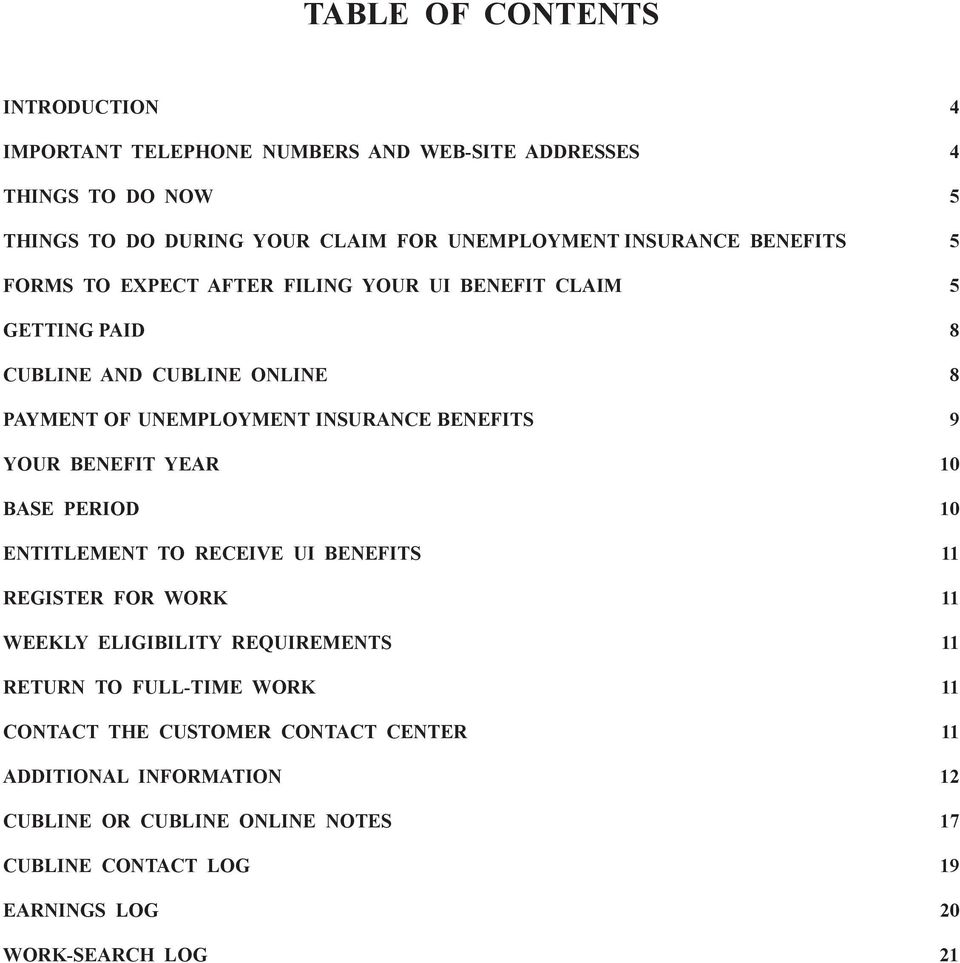
3 Table of Contents INTRODUCTION 4 IMPORTANT TELEPHONE NUMBERS AND WEB-SITE ADDRESSES 4 THINGS TO DO NOW 5 things to do DURING YOUR CLAIM FOR Unemployment Insurance BENEFITS 5 FORMS TO EXPECT AFTER FILING YOUR UI BENEFIT CLAIM 5 GETTING PAID 8 CUBLINE AND CUBLINE ONLINE 8 PAYMENT OF Unemployment Insurance BENEFITS 9 YOUR BENEFIT YEAR 10 BASE PERIOD 10 ENTITLEMENT TO RECEIVE UI BENEFITS 11 REGISTER FOR WORK 11 WEEKLY ELIGIBILITY REQUIREMENTS 11 Return to Full-Time Work 11 CONTACT THE CUSTOMER CONTACT CENTER 11 ADDITIONAL INFORMATION 12 CUBLine or CUBLine Online notes 17 CUBLIne contact Log 19 earnings log 20 work-search log 21
4 INTRODUCTION Unemployment insurance (UI) is not a welfare program. It is temporary income to help people who are unemployed through no fault of their own. When a UI claim is filed, your social security number and alien permit number, if applicable, are verified. Only U.S. citizens and certain aliens are eligible to receive UI benefits. You must use your legal name when filing your UI claim. In Colorado, no deduction is made from your wages to finance UI benefits. UI benefits are paid from funds contributed by employers who are covered by the Colorado Employment Security Act (CESA). The UI Program may verify all information that you provide through federal matching programs that compile information provided by private employers and government agencies. These federal matching programs include information such as name, social security number, employer name, employer address, and wages. The UI Program may share claimant data with other government participants of federal matching programs. IMPORTANT TELEPHONE NUMBERS AND WEB-SITE ADDRESSES Web Site Customer Contact Center Available Monday through Friday 7:30 a.m. to 4:30 p.m. (Mountain time) (Denver-metro area) (outside Denver-metro area) Telecommunications Device for the Deaf (TDD): (Denver-metro area) (outside Denver-metro area) CUBLine and CUBLine Online (Denver-metro area) (outside Denver-metro area) Click on CUBLine Online UI Appeals (Denver-metro area) (outside Denver-metro area) Fax: Chase Bank Customer service: (toll free) (Chase s cardholder Web site) 4 Questions? Go to or call (Denver-metro area) or (outside Denver-metro area).

5 THINGS TO DO NOW Read This Handbook. This handbook contains important information regarding UI benefits. Check Your Forms. You will receive various forms that contain important information relating to your claim for UI benefits. Carefully read and understand every form you receive (see Forms to Expect After Filing Your UI Benefit Claim on page 5 for more information). If you have any questions regarding these forms, call the Customer Contact Center. Look for Work and Record Your Job Contacts. You are required to look for work in order to receive UI benefits. You may be asked to provide a record of your work-search efforts so it is important to maintain a record of your job contacts (See page 21 for a sample work-search log). Additional work-search logs are available to download and/ or print at Click on Claimant Handbook, select Web Version, and then click on Work- Search Log in the Table of Contents. Register With Your Local Workforce Center. Follow the instructions on the employment-registration notice. Request Benefits by the Date Provided by the UI Program. In your initial paperwork, you receive a date by which you must request payment by calling the Colorado Unemployment Benefits Line (CUBLine) or visiting CUBLine Online (see CUBLine and CUBLine Online on page 8). Payment is made only if you have requested payment for that week and if you are determined to be entitled for UI benefits. things to do DURING YOUR CLAIM FOR Unemployment Insurance BENEFITS: Be able to work, available for work, and willing to accept suitable work. Continue your job search. Maintain your list of job contacts. Continue to request payment on time every two weeks by calling CUBLine or visiting CUBLine Online. (See Getting Paid on page 8 for more information.) If you do not request payment on time, you may not be paid UI benefits for the period of time for which you make a late request for payment. Report all hours worked and all earnings received. tify the UI Program immediately if you move. Important Things to Know The Length of Time to Process a Claim. benefit payments are released until your claim for UI benefits is processed. Processing your claim takes four to six weeks. Waiting Week. The first week you are eligible for UI benefits is an unpaid waiting week. You must meet all of the weekly eligibility requirements during this week to receive credit for an unpaid waiting week (see Weekly Eligibility Requirements on page 11 for more information). Canceling a Claim. You have 12 calendar days from the date you file your new UI claim to cancel the claim. If you do not cancel the claim within 12 calendar days, the claim is valid for your benefit year (see Your Benefit Year on page 10 for a detailed explanation). You cannot establish a new claim for UI benefits until your benefit year ends, but you can reopen the existing claim. You are paid only if UI benefits are still available. FORMS TO EXPECT AFTER FILING YOUR UI BENEFIT CLAIM Form UIB-1, Claim for Unemployment Insurance Benefits Form UIB-1, Claim for Unemployment Insurance Benefits, provides basic information obtained when you filed your UI claim. On this form, you must affirm that you are a U.S. citizen, are a legal permanent resident, or are otherwise lawfully present in the U.S. Office Use Only UIB-1 (R 08/2007) You must possess and provide information regarding one of the following forms of identification (ID): Colorado Department of Labor and Employment Unemployment Insurance Operations P.O. Box 400, Denver, CO (Denver-metro area) or (outside Denver-metro area), Fax A valid Colorado driver s license or a Colorado ID card. A U.S. military ID card or a military dependent ID card. A U.S. Coast Guard Merchant Mariner card. A Native American tribal document. If you live in a state other than Colorado or in Canada and you do not possess a form of identification listed above, you Date Due Date ClaIM for UneMPloYMenT InsURanCe benefits Unemployment Insurance (UI) Operations is processing your claim for UI benefits. You must complete, sign, and mail or fax this form by the above Due Date. If this form is received after the 14-day limit, benefits will not be paid for the weeks prior to the week in which the form is received unless you show good cause, as defined by the Regulations Concerning Employment Security , for the untimely return. Review the accuracy of the information you provided when you filed your UI claim. If anything is incorrect, cross out the error and make the necessary correction. The information you provide, including your social security number, is verified. Misrepresenting or failing to disclose facts in order to obtain UI benefits is unlawful. Social Security Number Date of Birth Telephone Number Are you a United States (U.S.) citizen? If no, verify or provide your alien permit number. Alien Permit Number If not a U.S. citizen, do you have lawful authorization to work in the U.S.? To be eligible for UI benefits, you must possess and provide valid information regarding one of the following forms of identification (ID). Indicate below the form of ID you possess. Colorado Driver s License/Colorado ID Card U.S. Military Card/Military Dependent ID Card Native American Tribal Document U.S. Coast Guard Merchant Mariner Card Other State or Canadian Driver s License/Other State ID Card Issued by Provide the ID number and the expiration date, if applicable, for the form of ID checked above. ID Number Expiration Date Affirmation I affirm under penalty of perjury the above information is true, correct, and complete to the best of my knowledge. I understand my lawful presence in the U.S. will be verified before UI benefits can be provided. I affirm I am a U.S. citizen, legal permanent resident, or am otherwise lawfully present in the U.S. I understand there are severe penalties for providing false statements and willfully misrepresenting information in order to obtain or increase UI benefits. I authorize the release of all information to determine my eligibility for UI benefits. I understand this may include release of information from former employers, verification with the U.S. Bureau of Citizenship and Immigration Services, and sharing of information with other public agencies in the performance of their public duties in accordance with the Colorado Employment Security Act Sign and date below your acknowledgement and understanding of the above affirmation. Signature If you made any corrections to your personal information printed on this form, check this box. Claimant Social Security Number First Four Letters of Last Name Benefit-Year-Begin Date Benefit-Year-End Date Date The Colorado Employment Security Act and the Regulations Concerning Employment Security are available online. Go to and select the publication name from the column on the left. 5

6 must provide proof of a valid driver s license or ID card issued in the other state or in Canada. Make sure the information on the form is correct. Provide all requested information. Cross out any incorrect information and clearly mark the change. Complete, sign, and return this form by the due date indicated on the form. If you return the form late, you are not paid benefits for the weeks before the week in which the form is received unless you show good cause, as defined by the Regulations Concerning Employment Security Form UIB-571, Personal Identification Number A personal identification number (PIN) is issued to every claimant for use on a UI claim. If you do not receive a PIN within seven days of filing your claim for UI benefits, call the Customer Contact Center. Only you know your PIN. Keep your PIN confidential and in a safe place. Your PIN ensures only you have access to your claim when using CUBLine, CUBLine Online, or performing other electronic functions concerning your UI benefit claim. You are responsible for all actions involving your PIN. If you lose your PIN or need a new one, call the Customer Contact Center. Your PIN is valid for your entire benefit year. Form UIB-388, tice of Income-Tax Withholding Form UIB-388, tice of Income-Tax Withholding, confirms the income tax withholding option you selected when you filed your claim for UI benefits. Make sure the tice of Income-Tax Withholding states the option you selected. You may change your withholding option only once during your [Claimant Name] [Claimant Address] [Claimant Address] [Claimant Address] Colorado Department of Labor and Employment Unemployment Insurance Operations P.O. Box 400, Denver, CO notice of InCoMe-TaX WITHHolDInG Social Security Number XXX-XX-[Last 4 digits of SSN] Date Mailed [Date] The state of Colorado allows the withholding of federal and/or state income taxes. Federal income tax is withheld at 10 percent. State income tax is withheld at 4 percent. You have chosen to withhold [chosen withholding option]. If you have any questions, call the Customer Contact Center at: UIB-388 (R 08/2006) (Denver-metro area) (outside the Denver-metro area) (TDD Denver-metro area) (TDD outside the Denver-metro area) claim for UI benefits by calling the Customer Contact Center. UI benefits are taxable and must be reported on your federal and state income tax returns. Direct any questions about how your withholding option may impact your income tax returns to either the Internal Revenue Service (for federal income-tax returns) or to the Colorado Department of Revenue (for state income-tax returns). In January the UI Program mails Form UIB-1099-G, Certain Government Payments, which shows the amount of UI benefits paid to you during the previous year. Inform the Customer Contact Center of any address changes during your benefit year to ensure Certain Government Payments is mailed to your correct address. Form UIB-5, Monetary Determination of Unemployment Insurance Benefits Form UIB-5, Monetary Determination of U n e m p l o y m e n t Insurance Benefits, shows the wages used to calculate the weekly benefit amount and the maximum benefit amount for which you may be eligible. Review the Monetary Determination of U n e m p l o y m e n t eligibility. Insurance Benefits UIB-5 (R 08/01) carefully. All items are described in detail on the reverse side of the form. Colorado Department of Labor and Employment P.O. Box 400, Denver, CO (Denver-metro area) (outside Denver-metro area) Being monetarily eligible does not automatically entitle you to receive UI benefits. Separate decisions about issues such as vacation pay, severance pay, and job separations are made to determine entitlement to UI benefits. A claim for UI benefits is based on a 12-month period, set by law, called a base period. Wages paid to you during this period are used to determine your potential weekly benefit amount and maximum benefit amount. Weekly Benefit Amount The weekly benefit amount is the amount of UI benefits you are eligible to receive each week before taxes and other deductions, if you are eligible to receive UI benefits. Maximum Benefit Amount The maximum benefit amount is the total amount of UI benefits you are eligible to receive during your benefit year, if you are eligible to receive UI Date Mailed MoneTaRY DeTeRMInaTIon of UneMPloYMenT InsURanCe benefits Route to T IMPoRTanT: Wages reported below will affect your benefits. If you have any questions, call the appropriate telephone number above. Keep this document for your records. Do not ReTURn THIs form If WaGes are CoRReCT Examine this notice carefully. Be sure that it includes all employers and wages during the quarters shown. If employers or wages are missing or incorrect, complete the reverse side of this form to request a correction of wages and mail this form to: UNEMPLOYMENT INSURANCE TAX REDETERMINATION UNIT, P. O. BOX 8789, DENVER, CO social security number * 2. MoneTaRIlY eligible 3. WeeKlY benefit amount 4. MaXIMUM PaYable 5. benefit YeaR end 6. employer name 7. base-period WaGes 8. ToTal Unemployment benefits are subject to state and federal income taxes. 9. ToTal all employers *Being monetarily eligible does not automatically mean that you will receive benefits. If you left any employment during the last 15 to 18 months for any other reason than lack of work, you could be penalized. If you are not able and available for work, your claim could be disallowed until you become able and available. If you are penalized or your claim is disallowed, you will be notified. If benefits are paid erroneously, or if a decision to pay you is reversed, you must repay the Unemployment Insurance Program all monies paid in error. An "S" after the employer's name indicates seasonal wages that may be used to pay benefits only during the employer's seasonal period. A "C" indicates both seasonal and nonseasonal wages; these may be used to pay benefits regardless of the season. If you have filed a federal, military, or combined-wage claim or requested a change in wages when you filed your claim, these may not be included on this determination. Continue to call CUBLine biweekly to claim your benefits. You will be notified of any changes in your monetary 6 Questions? Go to or call (Denver-metro area) or (outside Denver-metro area).

7 benefits. Divide your maximum benefit amount by your weekly benefit amount to calculate the number of weeks for which you may be entitled to UI benefits. NOTE: More information on how your weekly benefit amount and maximum benefit amount are calculated is available at Click on Benefits Estimator. Base Period and Base-Period Wages The base period is composed of four calendar quarters (12 months). Baseperiod wages are the gross wages paid to you during the base period. This one-year period of wages is used to determine your potential weekly benefit amount and maximum benefit amount (see Base Period on page 10). If any base-period employers or wages are missing, or if the wages reported on this form are incorrect, follow the instructions on the reverse side of the form. tify the Customer Contact Center if you need assistance. You will receive a new Monetary Determination of Unemployment Insurance Benefits once the wages are added to, corrected on, or deleted from your claim. Form B-569, tice to Register for Work If you live outside Colorado and are not job-attached, you receive Form B-569, tice to Register for Work. This notice instructs you to register with the local workforce center in your resident state. You must return this completed form once you have registered with a local workforce center. Colorado Department of Labor and Employment Unemployment Insurance Benefits P. O. Box 400, Denver, CO Social Security Number Date Mailed B-569 (R 10/00) Copy 1 - Claimant Copy Copy 2 - Central Office Copy MFT notice To ReGIsTeR for WoRK Part of your eligibility requirement for unemployment insurance (UI) benefits is that you register for work at your local state employment office. You must register for work and mail this completed form to the address shown above within fifteen days of the mailing date of this letter. Failure to register can cause your benefits to be delayed or disallowed. UI benefits cannot be paid until you have met this requirement. 1. Date you registered for work 2. Office name and address CERTIFICATION: I have completed the information above for the purpose of obtaining UI benefits, knowing the law provides penalties for making false statements. I know that this information is subject to verification. If the information that I have provided changes, I will immediately report that change to the Colorado UI Benefits Program. signature Date Telephone/Message number Form UIB-183, Request for Job-Separation Information You may receive Form Colorado Department of Labor and Employment Unemployment Insurance Operations P.O. Box 400 Denver, CO (Denver-metro area) or (outside Denver-metro area); Fax UIB-183, Request Date Due Date Social Security Number for Job-Separation Benefit-Year-End Date Employer Name (Claimant Name) (Address Line 1) Information. You will Employer Account Number (Address Line 2) (Address Line 3) receive this form only ReQUesT for Job-sePaRaTIon InfoRMaTIon from ClaIManT Complete this form, including the reason you are no longer working for the above-identified employer. Sign and date the reverse side. Mail or fax the completed form to the above address or fax number. Failure to return this form could result in delay or denial of your claim for benefits. Return this form even if you are no longer filing for benefits or have returned to work. if you did not provide Complete Item 1 if the employer was a temporary agency. (If not, go to Item 2.) 1. Did the agency provide you with written notice at the time of hire to contact the agency upon completion of an assignment? Did you contact the agency for another assignment? (If no, explain in Item 14.) If, on what date did you contact this agency for another assignment? the details of why you Were you offered another assignment? Did you accept the new assignment? (If no, explain in Item 14.) If, on what date did you accept the new assignment? no longer work for an 2. Why are you no longer working for this employer? 3. Rate of Pay Laid Off/Lack of Work (complete Item 10) Discharged/Fired (complete Item 13) $ per Quit (complete Item 11) Strike (explain in Item 14) Hour Two Weeks Quit for Another Construction Job (complete Other (explain in Item 14) Day Month Item 12) Week Year employer when you 4. First Day Worked 5. Last Day Worked 6. Number of Worked per Week 7. Number of Worked in hours did you normally of the week? 8. How many work for this employer each day Last Week of Employment filed your claim. In Monday Tuesday Wednesday Thursday Friday Saturday Sunday 9. Check the box next to the type of payment that you received Number of or will receive. Gross Amount Date Paid Weeks Days Wages in lieu of notice (payment received for no this situation, you notice or short notice of layoff) $ Vacation Pay (report unused vacation pay only) $ Severance Allowance Were you required to sign a waiver agreement in order to receive the payment? If will receive a Request so, check this box. (Return a copy with this form.) $ separation bonus $ other Payments (specify each type of payment) $ for Job-Separation Company Pension (to which the employer contributed) $ How Paid? Lump Sum Monthly Complete Item 10 if you were laid off from this job or are no longer working because of a lack of work. 10. Provide the name and title of the person who laid you off and the reason you were given for the layoff. Information for every Office Use Only employer on your UIB-183 (R 11/2007) claim. Look at the employer name at the top of the form, and give as many details as possible about why you no longer work for that employer. Complete the section that asks whether you received vacation, severance, or any kind of pay other than your wages from that employer. UI Operations will use this information, along with information from the employer, to decide whether you are entitled to benefits. Form UIB-6, tice of Decision When a decision on your entitlement or eligibility for UI benefits is made, Form UIB-6, tice of Decision, is mailed. You may receive more than one tice of Decision as each notice addresses a separate issue. Decisions are based upon CESA. The most common decisions address: UIB-6 (R 08/2007) state of ColoRaDo DePaRTMenT of labor and employment P.o. box 8988 DenVeR, ColoRaDo Addressee Name LEGAL CITATION: DECISION: Claimant Social Security Number Employer Account Number Employer Charging Information Addressee Name notice of DeCIsIon Date Mailed Benefit-Year-End Date Job Separations Decisions regarding the mostrecent job separation and any job separation from a base-period employer. Ability and Availability Decisions regarding being able to work, being available for work, actively seeking work, and accepting suitable work. Deputy ID Issue ID This decision becomes final unless a written appeal is received within 20 calendar days after the above Date Mailed. If you appeal this decision and remain unemployed, continue to claim benefits by calling CUbline at (Denver-metro area) or (outside Denver-metro area) while the appeal is being processed. Please see ReVeRse side of THIs form for appeal InfoRMaTIon. The Colorado Employment Security Act and the Regulations Concerning Employment Security are available online. Go to and select the publication name from the column on the left. 7

8 Receiving Other Payments Decisions regarding receipt of payments such as severance pay, vacation pay, and wages in lieu of notice. Reporting Requirements Decisions regarding the requirement to report to the workforce center when requested, to report timely on CUBLine or CUBLine Online, or to provide information to the UI Program as requested. If you do not understand a tice of Decision or how it impacts your claim, contact the Customer Contact Center immediately. A customer-service representative will help you to understand the decision and its impact on your claim. GETTING PAID In order to receive UI benefits, you must request payment by calling CUBLine or visiting CUBLine Online every two weeks. CUBLine is a computerized telephone-response system that allows you to request payment via a touch-tone telephone. CUBLine Online allows you to request payment via the Internet. You must request payment during the seven days immediately following the two weeks for which you are requesting payment. You may make your request any time within those seven days. The sooner your request is made, the sooner you receive payment for which you are eligible. If you do not call to request payment, you are not paid. Call by 11:59 p.m. on the Saturday of your week to request payment; otherwise, you may not be paid for the period of time for which you are requesting payment. Do not request payment too early (before the Sunday date shown on the notice). Your claim is inactivated if you call too early. To request payment for any further weeks, you must call the Customer Contact Center to reopen your claim. You are responsible for knowing when you are scheduled to request payment. For your convenience, a three-year calendar is provided on the inside back cover of this handbook. CUBLINE AND CUBLINE ONLINE CUBLine allows you to request payment of UI benefits, obtain payment information, change your address, or obtain general information about the UI Program via the telephone. CUBLine Online allows you to request payment of UI benefits online. CUBLine or CUBLine Online 24 hours a day, 7 days a week (Denver-metro area) (outside Denver-metro area) Click on CUBLine Online When you call CUBLine, the following options are presented: To file for payment, press 1. To change your mailing address, press 2. To review recent payment information or check on the balance of your claim, press 3. To change your personal identification number, press 4. To review general information about unemployment insurance in Colorado, press 5. Requesting Payment of UI Benefits on CUBLine Call (Denver-metro area) or (outside Denver-metro area) for the CUBLine menu. You are given the option to press 1 for English or 2 for Spanish. After selecting a language, press 1 to indicate that you have a current claim established. Next, when asked if you want to file for payment, press 1 for yes. Enter your social security number and then your PIN on your telephone keypad when prompted. NOTE: If you do not have an established claim, call the Customer Contact Center or visit to file a new claim. Keep a record of your calls to CUBLine or your visits to CUBLine Online. Your record should include the date and time you contacted CUBLine or CUBline Online, and the number of weeks you claimed. For your convenience, a sample CUBLine contact log is provided on page 19. CUBLine Questions You must respond to the following questions by pressing 1 for yes or 9 for no. Were you able to work and available for work during the week ending (date)? During the week ending (date)? Did you receive payment for severance, vacation, pension, or social security during the week ending (date)? During the week ending (date)? (Answer 8 Questions? Go to or call (Denver-metro area) or (outside Denver-metro area).

9 yes only if you have not already informed UI Operations about the payment.) Did you attend school or training during the week ending (date)? During the week ending (date)? (Answer yes only if you have not already informed UI Operations about attending school or training.) Did you refuse any job offers or separate from any employment during the week ending (date)? During the week ending (date)? (Answer yes only if you have not already informed UI Operations about the job separation or job refusal.) You have been instructed to make and record job contacts each week. Did you make your required job contacts during the week ending (date)? During the week ending (date)? NOTE: If you are job- or union-attached, your work-search obligation is waived. Answer yes if you are able to work and available to immediately return to work for your employer or in a union assignment. Did you work or have a paid holiday during the week ending (date)? During the week ending (date)? (You are asked to provide the following information only if you responded yes. ) Press the number of hours that you worked, not including the minutes, then press #. You entered (number) hours; if correct, press 1, or if incorrect, press 9. Report your total earnings or holiday pay before deductions are taken from your pay, even if you have not yet been paid. Do not include cents; round up to the nearest whole-dollar amount, and then press #. If you did not earn any money, press 0, and then press #. You entered (amount) dollars; if correct, press 1, or if incorrect, press 9. Did you receive a payment for prior commission sales during the week ending (date)? During the week ending (date)? If you worked during either week for which you are requesting payment, you must enter hours and earnings. Report your gross wages (before taxes and other deductions). Earnings are reported for the week in which they were earned, regardless of when you are paid for the work. When reporting earnings, do not include cents; round up to the nearest whole-dollar amount. For your convenience, an earnings log is available on page 20. Additional earnings logs are available at Click on Claimant Handbook, select the Web Version, and then select Earnings Log from the Table of Contents. Listen carefully when CUBLine asks you to verify the responses you entered. This is your opportunity to change any responses. Do not hang up until CUBLine tells you that your claim for UI benefits for the weeks filed has been accepted. If you hang up before hearing this statement, you will not receive payment of UI benefits for which you may be eligible and must file again through CUBLine by the end of the filing period. Continue to call CUBLine or visit CUBLine Online: While UI Operations processes your claim. If you filed an appeal and the outcome of the appeal is pending. While waiting for a redetermination of base-period wages. Even if you are job-attached or have received a waiver of the work-search requirement. Stop calling CUBLine or visiting CUBLine Online when you return to full-time work. PAYMENT OF Unemployment Insurance BENEFITS UI benefits are paid every two weeks. Benefit payments are deposited to your personal Colorado Automated Payment (CAP) Card, a Visa debit card issued by the Colorado Department of Labor and Employment (CDLE) through its agent Chase bank (Chase). Your CAP Card account is automatically created when you file for UI benefits. Within one week after you file your UI claim, you will receive a welcome letter, an informational brochure, your CAP Card, an Allpoint automated teller machine (ATM) flyer, and the Chase Bank Colorado Automated Payment Card Disclosures Agreement (fee schedule included) from Chase. Carefully read all of the CAP Card information that you receive. You will only receive the CAP Card and the CAP Card information if you are a first-time recipient of the CAP Card, notify CDLE of a name change, or request a replacement CAP Card from Chase. Your CAP Card will arrive in a plain, white window envelope with one of the following return addresses: P.O. Box 6320, Aurora, IL or P.O. Box 92079, Long Beach, CA Do not throw away this envelope. Activate your CAP Card as soon as you receive it by calling Chase Customer Service at (toll free). To activate your card, you will establish a six-digit access The Colorado Employment Security Act and the Regulations Concerning Employment Security are available online. Go to and select the publication name from the column on the left. 9

10 code. You will need this access code for contact with Chase Customer Service. Once you receive confirmation that your CAP Card has been activated, select the PIN Selection option from the main menu and follow the instructions to establish a four-digit personal identification number (PIN). The PIN is needed to use your CAP Card at point-of-sale machines and ATMs. Keep your PIN confidential. The PIN you use for your CAP Card is different from the PIN you use for your UI claim. Benefit payments are deposited to your CAP Card only if you are eligible for UI benefits. Keep your CAP Card for the duration of your current UI claim and through the expiration date on the card for potential future benefit claims. If you choose to appeal the decision issued to you, or if you file another UI claim within this time period and are eligible for benefits, you will need the CAP Card that was issued to you at the time you filed your initial claim. Replacement cards are available through Chase. You may be charged a fee for the replacement card (see Chase s fee schedule). For questions about your UI claim, contact the UI Customer Contact Center at (Denver-metro area) or (outside Denver-metro area). For questions about your CAP Card, contact Chase Customer Service at (toll free) or visit their Web site at www. myaccount.chase.com. You may also refer to Chase s informational brochure, Information About Your Colorado Department of Labor and Employment Colorado Automated Payment Card, for answers to more specific questions you may have about your CAP Card. Visit and click on Colorado Automated Payment (CAP) Card for more information. Colorado Department of Labor and Employment Payment Authorization UI benefit payments are issued on a CAP Card. You authorize CDLE to release your records and information to CDLE s financial institution to obtain the CAP Card. You release CDLE and its employees from all liability for supplying such information pertaining to yourself. YOUR BENEFIT YEAR Your claim is valid for a 52-week period called a benefit year. This is the time frame during which you may collect the maximum amount of UI benefits payable on your claim. You may exhaust your UI benefits before the benefit year expires. Call the Customer Contact Center to reopen your claim if you return to work and become unemployed again or if you stop requesting payment of UI benefits during your benefit year and you wish to request payment again. Be prepared to give detailed information about why you no longer work for any employers for whom you have worked since you last received benefits. If you reopen an existing claim, you may need to renew your registration with the local workforce center. Claim s Effective Date The day on which you open a new or reopened claim determines the claim s effective date. If you file on Sunday, Monday, Tuesday, or Wednesday, the effective date is the Sunday at the beginning of that week. If you file on Thursday, Friday, or Saturday, the effective date is the Sunday at the beginning of the following week. BASE PERIOD UI benefits are based on wages earned in covered employment and paid during a 12-month period called the base period. Covered employment is employment for which your employer is required to pay UI taxes. Most employment in Colorado is covered. The base period is the first four of the last five completed calendar quarters at the time you file your initial claim for UI benefits. A calendar quarter is a three-month time period; a completed calendar quarter is a quarter in which all three months are in the past. To determine your base period, locate the month in which you filed your claim for UI benefits in one of the boxes containing an asterisk (*). The base period of your claim consists of the four quarters to the left of the arrow. Oct. v. Dec. Year Before Last Jan. Feb. March Jan. Feb. March April May June April May June April May June Last Year July Aug. Sept. July Aug. Sept. July Aug. Sept. July Aug. Sept. Oct. v. Dec. Oct. v. Dec. Oct. v. Dec. *Jan. Feb. March Jan. Feb. March Jan. Feb. March *April May June April May June This Year *July Aug. Sept. *Oct. v. Dec. 10 Questions? Go to or call (Denver-metro area) or (outside Denver-metro area).

11 ENTITLEMENT TO RECEIVE UI BENEFITS The reason of why you no longer work for (are separated from) an employer determines whether you are entitled to receive UI benefits. The reasons for the job separations from all base-period employers and from your most recent employer impact your entitlement to UI benefits. UI Operations gathers information from you and from your employers regarding the reasons for separation from each employer. The information received is reviewed, and entitlement in accordance with the Colorado Employment Security Act is determined. Form UIB-6, tice of Decision, is issued to notify you of your entitlement to UI benefits based on each individual employer. You may appeal any decision with which you do not agree (see Disagreement With a Decision on page 13). Full Award If you are out of work through no fault of your own (such as laid off) you are entitled to UI benefits. If you were laid off due to a lack of work, you may not receive a tice of Decision but are entitled to a full award. Disqualification If you are determined to have been responsible for the job separation, a disqualification is imposed. Your UI benefits may be postponed and/or your maximum benefit amount may be reduced. REGISTER FOR WORK You must register with a workforce center in Colorado or in the state in which you live in order to collect UI benefits. Refer to Form UIB-536, tice to Complete an Employment Registration and Prepare a Work-Search Agreement, or Form B-569, tice to Register for Work, for instructions on how to register with a local workforce center (see page 7). You are not required to register for work if you are jobattached (see Job-Attached Status on page 12). WEEKLY ELIGIBILITY REQUIREMENTS You must meet all of the eligibility requirements during any given week in order to receive UI benefits for that week. You must contact the Customer Contact Center any time you do not meet these requirements. The eligibility requirements are as follows: Able to Work You must be mentally and physically able to work your normal workweek. If you worked full-time hours for the base-period employers on your claim, you must be able to work full-time now. Available for Work You must make the necessary arrangements for family care, transportation, or any other potential issue so that you are available to report to work immediately in the event you are offered work. Actively Seek Work You must try to find suitable employment. You are required to contact a specific number of employers each week. The purpose of a job contact is to see whether an employer has available jobs. The contacts you make must be for work you are reasonably qualified to perform and are willing to accept. Actions that are considered an active search for employment include completing job applications, faxing or mailing resumes, telephoning employers, or visiting the employers in person. You are not required to look for work if you are job-attached (see Job-Attached Status on page 12). Accept Suitable Work Suitable employment includes work of an equal or higher skill level than your past employment. You must be willing to accept suitable work. There are penalties for refusing to accept suitable work when it is offered as well as for refusing referrals that could lead to a job offer. Return to Full-Time Work You do not need to notify the Customer Contact Center when you have returned to full-time work (32 or more hours) or have gross earnings greater than your weekly benefit amount. Your claim automatically becomes inactive when you stop requesting payment via CUBLine or CUBLine Online. Be sure to request payment for any week in which you did not work full-time or did not have gross earnings greater than your weekly benefit amount. CONTACT THE CUSTOMER CONTACT CENTER Call the Customer Contact Center if you: Need to request payment of UI benefits but have not requested payment in three or more weeks. Become self-employed or an officer of a corporation. Begin attending school or are considering going to school. Begin to perform volunteer work. Have moved out of state. Become unable to work for any reason. Become unavailable for work for any reason. The Colorado Employment Security Act and the Regulations Concerning Employment Security are available online. Go to and select the publication name from the column on the left. 11

12 Begin to receive workers compensation. Separate from a job. Are receiving other pay (e.g., severance, vacation, social security, pension or retirement, sick pay) that you have not previously reported to UI Operations. Cash out a 401K or other retirement account that was contributed to by your employer. Have been instructed by CUBLine or CUBLine Online to do so because of an issue with your claim. ADDITIONAL INFORMATION Overview This section provides information related to: Job-Attached Status (page 12) Claims Based Upon Federal-Civilian Wages (page 12) Claims Based Upon Military Service (page 12) Claims Based Wages From More Than One State (page 12) Trade Readjustment Allowance and Alternative Trade Adjustment Assistance Benefits (page 13) Working During the Benefit Year (page 13) Disagreement With a Decision (page 13) Serving in the National Guard or the Military Reserve (page 14) Seasonal Workers (page 14) Being Overpaid (page 14) Detecting Fraud (page 14) The National Directory of New Hires Program (page 15) The Benefit Accuracy Measurement Program (page 15) America s Service Locator (page 15) Job-Attached Status Job-attached status waives your work-search requirement. Job-attached status may be approved if you: Are unemployed due to a lack of work from your most recent employer, have a recall date within 16 weeks from the week in which you became unemployed, and are available for immediate recall. Obtain work through a union hiring hall, are properly registered with such hall, and are available for immediate recall. Have accepted new employment that begins within two weeks from the date the job offer was accepted. You are not required to register for work if you are jobattached. You must continue to request payment of UI benefits via CUBLine or CUBLine Online and meet all other eligibility requirements. Claims Based Upon Federal-Civilian Wages The federal government does not report wages to the states. Colorado requests the wages when a claim is filed. Your wages are added when they are verified by the federal agency for which you worked. You receive a new Form UIB-5, Monetary Determination of Unemployment Insurance Benefits, when wages are added to the claim (see Form UIB-5, Monetary Determination of Unemployment Insurance Benefits on page 6). You must sign and return Form ES-935, Claimant s Affidavit of Federal-Civilian Service, Wages, and Reason for Separation. Claims Based Upon Military Service You must send a copy of your DD Form 214, Member 4, so that UI Operations can process your claim. Wages are not added until that copy is received. Mail the copy to: Unemployment Insurance Operations, P.O. Box 400, Denver, CO You may also fax it to tarized copies are not required. You receive a new Form UIB-5, Monetary Determination of Unemployment Insurance Benefits, when wages are added to the claim (see Form UIB-5, Monetary Determination of Unemployment Insurance Benefits on page 6). Once your claim has been processed, an entitlement decision is issued on Form B-6UCX, tice of Decision UCX. If you disagree with the tice of Decision UCX, you must submit your appeal to the appropriate military-service branch at the address shown on the reverse side of the form. Claims Based Upon Wages From More Than One State If you worked in covered employment in more than one state, your claim may be based on wages from all of those states. UI Operations must request your out-of-state wages from the appropriate state or states. These wages are added when received. You receive a new Form UIB-5, Monetary Determination of Unemployment Insurance Benefits, when wages are added to the claim (see Form UIB-5, Monetary Determination f Unemployment Insurance Benefits on page 6). 12 Questions? Go to or call (Denver-metro area) or (outside Denver-metro area).

13 Trade Readjustment Allowance and Alternative Trade Adjustment Assistance Benefits Trade Readjustment Allowance (TRA) and Alternative Trade Adjustment Assistance (ATAA) benefits are a part of the Trade Adjustment Assistance (TAA) Program that is administered by the Employment and Training Administration of the U.S. Department of Labor (USDOL). The states serve as agents to the USDOL in administering the TAA Program. TRA and ATAA benefit payments are provided to workers who lose their jobs or whose hours of work and wages are reduced as a result of increased imports, or whose jobs were exported offshore ( tradeaffected workers ). TRA benefit payments are only payable to eligible workers who exhausted their UI benefits. To meet application requirements for TRA or ATAA benefits, the eligible worker must have worked for an employer that is USDOL certified as a TAA employer, and the eligible worker must meet deadlines and other requirements for TRA and ATAA benefits. For more information about the TAA Program, visit Colorado Department of Labor and Employment Payment Authorization UI, TRA, and ATAA benefit payments are issued on a CAP Card. You authorize CDLE to release your records and information to CDLE s financial institution to obtain the CAP Card. You release CDLE and its employees from all liability for supplying such information pertaining to yourself. Keep Your Colorado Automated Payment Card You must keep your CAP Card through its expiration date and for the duration of your current or future UI, TRA, or ATAA benefit claims. Working During the Benefit Year Any employment (full-time, part-time, temporary assignments, short-term contracts, or cash-in-hand jobs, such as mowing lawns and babysitting) must be reported when you request payment through CUBLine or visit CUBLine Online. Working 32 or more hours in a week is considered full-time employment. UI benefits cannot be paid for a week during which you work 32 or more hours. If you work part-time while continuing to request UI benefits based on full-time earnings, you must continue to seek fulltime work and meet all the other eligibility requirements. You may earn, in gross wages, up to 25 percent of your weekly benefit amount in any given week without affecting UI benefits for that week. Earnings over 25 percent of your weekly benefit amount, but less than your weekly benefit amount, are subtracted dollar-for-dollar from that week s UI benefits. UI benefits are not paid for any week in which your earnings equal or exceed your weekly benefit amount. UI benefits that cannot be paid based on hours or earnings remain available for you to claim during the benefit year. EXAMPLE: Your weekly benefit amount is $200 (25 percent = $50). If you worked 32 or more hours in a given week, regardless of the wages you earned during that time, UI benefits for that week are not paid. If you worked fewer than 32 hours in a given week and: You earned $50 or less, your UI benefit amount for that week is not affected (you receive the full amount). You earned $51, your UI benefit amount for that week is $199. You earned $200 or more, UI benefits for that week are not paid. t Reporting Earnings t reporting earnings for any week in which UI benefits are claimed may be considered fraud and may cause an overpayment of UI benefits. Penalties may be assessed. Disagreement With a Decision If you disagree with a tice of Decision, you have the right to appeal that decision. Each decision must be appealed separately. For further appeal instructions, see Form UIB- 6 Reverse. If you file an appeal, continue to request payment via CUBLine or CUBLine Online while the appeal is being processed. Form UIB-6 Reverse Carefully read the reverse side of the tice of Decision. UI Appeals must receive your written appeal within 20 calendar days after the date of the tice of Decision. If the 20th day is a Saturday, Sunday, or legal holiday, the appeal must be received by the following business day. This decision becomes final unless a written appeal is received no later than 20 calendar days after the mailing date indicated on the reverse side of this notice. If the twentieth day is a Saturday, Sunday, or legal holiday, the appeal must be received by the following business day. If you wish to appeal this decision, please provide the information requested below. Include facts so that the reason for appeal can be determined. It is suggested that you photocopy and retain this form for your own records. MaIl YoUR CoMPleTeD appeal form To: appeals section P.o. box 8988 DenVeR, Co The postmark will not be considered in determining the timeliness of an appeal. You may also fax your appeal to: appeals section, Make sure you include both sides of the decision you are appealing. The date received will determine the date of appeal. either fax or mail an appeal; one is sufficient. You cannot present information at an appeal hearing which has not been previously presented to the Division, either in the separation information you provided or in your appeal request, unless you can show good cause for the omission. 2. Has your address changed? If, indicate change below. 4. Will you be represented at the hearing by a lawyer, union-business agent, etc.? If, enter name and address of individual. 7. I disagree with the decision for the following reason(s) (be specific): explanation of appeal RIGHTs If you appeal a job-separation decision, you will automatically be mailed all relevant separation information from your file. However, if you feel it is necessary to review this information before filing an appeal, instructions for requesting these copies may be obtained by calling: (Denver-metro area) (outside Denver-metro area) Hearing Impaired TDD: (Denver-metro area) (outside Denver-metro area) Review of this information before filing the appeal does not extend the 20- day limit for the receipt of a written appeal. Appeals received beyond the 20-day limit must state the reason(s) why the appeal is late and the facts supporting the reasons for acceptance of appeal. If you fail to follow these steps, your appeal will be dismissed and no file material will be sent. IMPoRTanT notice To ClaIManTs: You can receive benefits only for weeks in which a valid claim has been filed. It is important to continue filing for payment of benefits while the appeal is being processed. If a previous award of benefits is reversed as the result of an appeal, repayment of these monies may be required. 1. Enter Claimant's Social Security Number 3. Do you need an interpreter? If, enter language or type. If We are Unable To locate an InTeRPReTeR, YoU MaY HaVe To MaKe arrangements on YoUR own. 5. The appeal is being filed by: Claimant 6. Address where worked if different than reverse side. I CeRTIfY THaT THe above InfoRMaTIon Is TRUe and CoRReCT To THe best of MY KnoWleDGe, InfoRMaTIon, and belief. Signature of Appellant Date Signed Employer UIB-6 (R 08/2007) The Colorado Employment Security Act and the Regulations Concerning Employment Security are available online. Go to and select the publication name from the column on the left. 13

14 If you file a late appeal, you must demonstrate that you had good cause for filing late. See the Regulations Concerning Employment Security, Part XII Good Cause, for more information. You must file your appeal by mail or fax; do not do both. The mailing address and the fax number are on the tice of Decision. Submit both sides of the tice of Decision. Retain a copy of your appeal, including both sides of the tice of Decision, for your records. Answer the general questions on the form. Provide specific, factual information as to why you disagree with the decision. You must sign the appeal in order for UI Appeals to accept it as a valid appeal. For more information about UI appeals, visit www. coworkforce.com, and click on How Do I Appeal? Then select Appeals Section. Serving In the National Guard Or the Military Reserves If you are in the National Guard or the Military Reserves and are on active duty, do not report any earnings for the first 72 hours of service within a calendar month. You are also exempt from work-search requirements during those 72 hours. In addition, do not report your military pay for the two weeks of annual training required as part of your duty. With the exception of the two-week training, you must report any wages earned after 72 hours of service per calendar month. When you call CUBLine or visit CUBLine Online to request payment of benefits, answer yes to the question regarding ability and availability to work and answer yes to the question regarding job contacts. Enter National Guard and Military Reserves in the space labeled Job Contacts on CUBLine Online. Also, log this information in your worksearch log. Seasonal Workers A seasonal worker is a person who works for an employer who conducts business only during a defined period of time or who is hired in an occupation that operates only for a defined period of time. Examples of workers designated as seasonal workers include ski instructors employed during the ski season and tax preparers employed during the peak season for the filing of income-tax returns. Seasonal workers cannot collect UI benefits based on wages paid for the seasonal employment unless they are out of work during the specified season. Seasonal workers who work outside the season are no longer considered seasonal workers and may collect UI benefits based on the seasonal wages. EXAMPLE: You are a chairlift operator, and your employer s designated season for your occupation is October 15 through April 15. You must be out of work between October 15 and April 15 in order to collect UI benefits based on the wages paid for the seasonal employment. If you are laid off at the end of the season on April 15, you cannot collect UI benefits between April 16 and October 14 based on wages paid for this employment. If your employer s season ends on April 15, and you work through April 16, you are no longer a seasonal worker, and you may be entitled to UI benefits based on the wages paid by this employer. Being Overpaid Sometimes claimants receive UI benefits to which they are not entitled. This results in an overpayment of UI benefits. If this occurs on your UI claim, you are responsible to repay the full amount of any overpaid UI benefits, including any taxes that were withheld. Overpayments occur for a variety of reasons, such as: You were unable to work or unavailable for work. You did not actively look for work or refused an offer of suitable work. You reported a payment late or inaccurately. You did not report earnings, you underreported earnings, or you reported earnings late. You did not report a job separation. Upon appeal, a full award of UI benefits was reversed. UI Integrity, Benefit Payment Control (BPC) conducts reviews of UI claims. If an overpayment occurs, you are notified of your rights and responsibilities concerning the overpayment. Some or all future UI benefits may be withheld to repay the overpayment. If you do not make and keep arrangements to repay the overpaid UI benefits, you may have to pay additional fees, and you may be reported to the credit-reporting agencies. If you are overpaid UI benefits, contact UI Integrity, BPC at (Denver-metro area) or (outside Denver-metro area) for a more complete explanation of your options for repayment. Detecting Fraud Detecting and prosecuting fraud is a high priority for Colorado s UI Program. Knowingly making a false 14 Questions? Go to or call (Denver-metro area) or (outside Denver-metro area).

15 statement or withholding information in order to receive UI benefits is fraud. The penalty for fraud can include a fourweek postponement of future UI benefits for each week in which you fraudulently requested payment of UI benefits. You must also repay the entire amount of UI benefits fraudulently received and pay a monetary penalty of 50 percent of that amount. Additional collection activities may include civil and criminal prosecution, including court costs, fines, and/or imprisonment. Visit ASL s Web site at or contact AWN s toll-free help line at The National Directory of New Hires Program The National Directory of New Hires was established under a federal law requiring employers to report all newly hired employees for the purpose of locating individuals who are not paying their child support. Colorado s UI Program performs cross matches using new-hire information and current UI-claim information to determine whether claimants are attempting to receive UI benefits while earning wages. The Benefit Accuracy Measurement Program The Benefit Accuracy Measurement (BAM) program is a federally mandated program with investigators that review randomly selected claims to determine whether UI benefits payments were properly paid or denied. You are notified if your claim is selected for review. You must respond to a detailed questionnaire by mail or telephone, if you are selected for review. You can assist by providing: Accurate records of your work history, including dates of employment, reason for any job separation, wages earned, employer addresses and telephone numbers, and rates of pay. Records of any money earned during each week for which you have requested payment of UI benefits. Detailed records of your work-search activities. (You may use page 21 of this handbook to record your work-search contacts. Additional work-search logs are available to download and/or print at Click on Claimant Handbook, select Web Version, and then click on Work-Search Log in the Table of Contents.) America s Service Locator America s Service Locator (ASL) is a Web site that contains information on agencies that provide employment and training services. ASL has partnered with America s Workforce Network (AWN) to provide information about the services available for workers and employers. You can find information on services, including One-Stop Career Centers, child-care providers, and transportation services. The Colorado Employment Security Act and the Regulations Concerning Employment Security are available online. Go to and select the publication name from the column on the left. 15

16 16 Questions? Go to or call (Denver-metro area) or (outside Denver-metro area).

17 CUBLine or CUBLine Online (Denver-metro area) (outside Denver-metro area) 24 hours a day, 7 days a week CUBLine o CUBLine Online (área urbana de Denver) (fuera del área urbana de Denver) 24 horas al día, 7 días por semana The following options are presented when you call CUBLine: To file for payment, press 1. To change your mailing address, press 2. To review recent payment information or check on the balance of your claim, press 3. To change your personal identification number, press 4. To review general information about unemployment insurance in Colorado, press 5. Continue to call CUBLine or visit CUBLine Online: While your claim is being processed by UI Operations. If you filed an appeal and the outcome of the appeal is pending. While waiting for a redetermination of baseperiod wages. Even if you are job-attached or have received a waiver of the work-search requirement. Stop calling CUBLine or visiting CUBLine Online when you return to full-time work. Contact the Customer Contact Center if you have questions. NOTE: If you call CUBLine or visit CUBLine Online late, you may not be paid UI benefits. Cuando llame a CUBLine, puede usar las siguientes opciones: Para reclamar por su pago, marque 1. Para cambiar su dirección de correo, marque 2. Para verificar información sobre pagos recientes o el balance monetario en su reclamo, marque 3. Para cambiar su número de identificación personal, marque 4. Para escuchar información general sobre como funciona el sistema de beneficios de desempleo en Colorado, marque 5. Continúe llamando a CUBLine o usando CUBLine Online: Mientras que su reclamo está siendo procesado por el Programa de Seguro de Desempleo. Si apeló alguna decisión en su reclamo y está esperando el resultado. Si está esperando una re-determinación de sus ganancias reportadas en el período base. Aún si está job attached (atado a su trabajo) o tiene permiso de no buscar trabajo. Deje de llamar a CUBLine o de usar CUBLine Online cuando regrese al trabajo por tiempo completo. Comuníquese con el Centro de Servicio de Clientes si tiene preguntas. ANOTE: Si llama a CUBLine o entregue sus respuestas en CUBLine Online tarde, es posible que no reciba los beneficios. The Colorado Employment Security Act and the Regulations Concerning Employment Security are available online. Go to and select the publication name from the column on the left. 17

18 CUBLine o CUBLine Online CUBLine or CUBLine Online (área urbana de Denver) (fuera del área urbana de Denver) (Denver-metro area) (outside Denver-metro area) Cuando solicite su pago de beneficios, CUBLine y CUBLine Online le hacen las siguientes preguntas para determinar su elegibilidad. Tiene que responder dos veces a cada pregunta una vez por cada una de las dos semanas que está reclamando. Estuvo dispuesto y disponible a trabajar? Recibió pago de separación, vacaciones, una pensión, o seguro social? Asistió a la escuela o algún tipo de entrenamiento? Negó alguna oferta de trabajo o se separó de algún empleo? Hizo los contactos de trabajo requeridos? ( le harán esta pregunta si está job attached, o sea, si tiene permiso de no buscar trabajo.) Trabajó o recibió pago por un día festivo? Recibió pago por trabajo de comisión previo? Si se desconecta la llamada en CUBLine o termina las sesión con de CUBLine Online antes de confirmar sus respuestas, su reclamo por su pago de beneficios no será registrado en el sistema. When filing for UI benefits, CUBLine and CUBLine Online ask you the following questions, and you are asked to answer each question twice (once for each week): Were you able and available for work? Did you receive payments for severance, vacation, pension, or social security? Did you attend school or training? Did you refuse any work or separate from any employment? Did you make the required number of job contacts? Did you work or have a paid holiday? Did you receive a payment for prior commission sales? If you do not confirm your answers with CUBLine or CUBLine Online, there is no record that you requested payment. NOTE: If you call CUBLine or visit CUBLine Online late, you may not be paid UI benefits. ANOTE: Si llama a CUBLine o entregue sus respuestas en CUBLine Online tarde, es posible que no reciba los beneficios por las semanas que reclamó tarde. puede solicitar beneficios por un período de 2 semanas hasta después de medianoche del sábado de la segunda semana. Si solicita beneficios por solamente una semana, su reclamo se cierra, y tendrá que llamar al Centro de Servicio de Clientes para poder reactivar su reclamo. You cannot file for any 2-week period until after midnight of the Saturday of the second week. If you file for only one week, your claim will be stopped and you will be required to call the Customer Contact Center to resume filing. 18 Questions? Go to or call (Denver-metro area) or (outside Denver-metro area).

19 CUbline or CUbline online Keep a record of your calls to CUBLine or your visits to CUBLine Online (Denver-metro area) (outside Denver-metro area) CUbline or CUbline online Keep a record of your calls to CUBLine or your visits to CUBLine Online (Denver-metro area) (outside Denver-metro area) CUbline o CUbline online Mantenga un registro de sus llamadas a CUBLine o cuando use CUBLine Online (área urbana de Denver) (fuera del área urbana de Denver) Date Contact of Time Contact of Weeks Claimed Date Contact of Time Contact of Weeks Claimed La Fecha de Contacto La Hora de Contacto Las Semanas Solicitadas You must confirm your answers with CUBLine or CUBLine Online to successfully complete a request for payment. You must confirm your answers with CUBLine or CUBLine Online to successfully complete a request for payment. Tiene que confirmar sus respuestas con CUBLine o CUBLine Online para completar el pedido de su pago. The Colorado Employment Security Act and the Regulations Concerning Employment Security are available online. Go to and select the publication name from the column on the left. 19

20 earnings log Use this log to record and calculate your earnings, record when the earnings are reported, and record the impact of the earnings on your UI benefit payments. Important: Be sure to report these earnings when you request payment for the week in which they were earned. Date sunday Monday Tuesday Wednesday Thursday friday saturday Total Pay Rate Gross Pay Regular Regular X$ =$ Overtime at Other Rate Week-Ending Date Date Filed on CUBLine or CUBLine Online Date Received Check Number Amount of UI Benefit Payment Overtime X$ =$ Other Rate X$ =$ Total * Total earnings* Date sunday Monday Tuesday Wednesday Thursday friday saturday Total Pay Rate Gross Pay Regular Regular X$ =$ Overtime at Other Rate Week-Ending Date Date Filed on CUBLine or CUBLine Online Date Received Check Number Amount of UI Benefit Payment Overtime X$ =$ Other Rate X$ =$ Total * Total earnings* Date sunday Monday Tuesday Wednesday Thursday friday saturday Total Pay Rate Gross Pay Regular Regular X$ =$ Overtime at Other Rate Week-Ending Date Date Filed on CUBLine or CUBLine Online Date Received Check Number Amount of UI Benefit Payment Overtime X$ =$ Other Rate X$ =$ Total * Total earnings* Date sunday Monday Tuesday Wednesday Thursday friday saturday Total Pay Rate Gross Pay Regular Regular X$ =$ Overtime at Other Rate Week-Ending Date Date Filed on CUBLine or CUBLine Online Date Received Check Number Amount of UI Benefit Payment Overtime X$ =$ Other Rate X$ =$ Total * Total earnings* * Include this information when you file for your biweekly claim via CUBLine or CUBLine Online. 20 Questions? Go to or call (Denver-metro area) or (outside Denver-metro area).

21 WoRK-seaRCH log You must keep a record of your job contacts. You may be asked to produce this record at any time. Date Mo/Day/Yr employer name, address, Telephone number, or address How Contacted Person Contacted Work sought Results In Person Telephone Mail /Fax In Person Telephone Mail / Fax In Person Telephone Mail / Fax In Person Telephone Mail / Fax In Person Telephone Mail /Fax In Person Telephone Mail /Fax In Person Telephone Mail /Fax In Person Telephone Mail /Fax In Person Telephone Mail /Fax In Person Telephone Mail /Fax In Person Telephone Mail /Fax In Person Telephone Mail /Fax t Hiring t Hiring t Hiring t Hiring t Hiring t Hiring t Hiring t Hiring t Hiring t Hiring t Hiring t Hiring application or Resume filed? The Colorado Employment Security Act and the Regulations Concerning Employment Security are available online. Go to and select the publication name from the column on the left. 21
Unemployment Insurance Handbook for Claimants
 Colorado Department of Labor and Employment Unemployment Insurance Operations P.O. Box 400, Denver, CO 80201-0400 303-318-9000 (Denver-Metro Area) 1-800-388-5515 (Outside Denver-Metro Area) Unemployment
WHAT YOU MUST DO TO RECEIVE UNEMPLOYMENT BENEFITS
 Rev. 01/2014 Office of Unemployment Insurance Administration Unemployment Claims Unit PO Box 94094, Room 386 Baton Rouge, Louisiana 70804-9096 Unemployment Benefits Rights and Responsibilities (Benefits
MyUI Claimant User Guide
 MyUI Claimant User Guide Version 1.0 September 26, 2013 Date: September 26, 2013 1/36 Table of Contents MYUI CLAIMANT... 1 TABLE OF CONTENTS... 2 1 MYUI CLAIMANT: FAQS... 4 What Can MyUI Claimant do for
The Commonwealth of Massachusetts Executive Office of Labor and Workforce Development Department of Unemployment Assistance. www.mass.
 The Commonwealth of Massachusetts Executive Office of Labor and Workforce Development Department of Unemployment Assistance www.mass.gov/dua A Message from the Director Unemployment Insurance (UI) is a
Your Guide to Unemployment Benefits
 Your Guide to Unemployment Benefits Form B-19 Rev.1152015 Overview This handbook is designed to provide a basic understanding of the unemployment benefit process. Unemployment benefits may be available
What Every Worker Should Know About Unemployment Insurance
 What Every Worker Should Know About Unemployment Insurance * * * * * * * * * Information About Unemployment Insurance Eligibility and How to File a Claim You are strongly urged to read the information
Your Guide to Unemployment Benefits. Get started at www.wyomingworkforce.org/ui. Call 307-473-3789
 Wyoming Department of Workforce Services PO Box 2760 Casper, WY 82602 307-473-3789 August, 2015 Your Guide to Unemployment Benefits Get started at www.wyomingworkforce.org/ui or Call 307-473-3789 Table
I Filed My Claim What Happens Now?
 State of Illinois Department of Employment Security I Filed My Claim What Happens Now? UI Finding Within 7-10 days of filing your claim you will receive a UI Finding in the mail (see sample below). Among
Unemployment Insurance. A Claimant Handbook. October 2014
 Unemployment Insurance A Claimant Handbook October 2014 The New York State Department of Labor is an Equal Opportunity employer and program provider. Auxiliary aids and services are available upon request
Unemployment Insurance Information for Claimants
 Unemployment Insurance Information for Claimants A Handbook for Persons Claiming Benefits under the New York State Unemployment Insurance Law Protect Assist Connect *Important Notice* As an individual
CLAIMANT HANDBOOK YOUR GUIDE TO UNEMPLOYMENT INSURANCE BENEFITS OFFICE LOCATIONS:
 OFFICE LOCATIONS: Wilmington Local Office Department of Labor Division of Unemployment Insurance 4425 North Market Street Fox Valley Wilmington, DE 19802 (302) 761-8446 Newark Local Office Department of
Vermont Claimant Handbook
 Vermont Claimant Handbook A Guide to Unemployment Insurance in Vermont VERMONT DEPARTMENT OF LABOR B-11 (08/14) Table of Contents 1 Introduction to Unemployment 1 Vermont JobLink Plus Account and Job
Information Handbook. www.uimn.org. What you need to know about Unemployment Insurance. October 26, 2014 through October 24, 2015
 What you need to know about Unemployment Insurance October 26, 2014 through October 24, 2015 www.uimn.org Apply for benefits, request benefit payments, check your account online or by phone Monday through
What is the unemployment insurance program?
 What is the unemployment insurance program? The Iowa unemployment insurance program provides qualified workers temporary income to help them through short periods of unemployment. Employers pay a special
A GUIDE TO BENEFITS AND EMPLOYMENT SERVICES
 UNEMPLOYMENT INSURANCE A GUIDE TO BENEFITS AND EMPLOYMENT SERVICES Bilingual Representatives Available This booklet is issued by the California Employment Development Department. It contains general information
Claims Take Home Packet
 North Carolina Department of Commerce Division of Employment Security Claims Take Home Packet The fastest and most efficient way to apply for unemployment benefits is to visit our website at www.ncesc.com.
TABLE OF CONTENTS FILING YOUR APPEAL...
 THE APPEALS PROCESS This handbook provides general information and does not constitute legal advice. For questions involving legal interpretations or when litigation is involved, always refer to the Colorado
Utah Department of Workforce Services. Claimant Guide. Unemployment Insurance Benefits
 Utah Department of Workforce Services Claimant Guide Unemployment Insurance Benefits Do it all online: File for benefits Check claim status Register for work jobs.utah.gov IMPORTANT: You will be held accountable
Facts About Unemployment Insurance Benefits
 PAM-247 Rev. March 2015 Facts About Unemployment Insurance Benefits www.sdjobs.org Unemployment Insurance (UI) Division www.sd.uiclaims.com DO NOT DISCARD RETAIN FOR YOUR RECORDS. Identification Name Address
UNEMPLOYMENT INSURANCE CLAIMANT HANDBOOK
 UNEMPLOYMENT INSURANCE CLAIMANT HANDBOOK MARK BUTLER, COMMISSIONER WWW.DOL.STATE.GA.US Interpreter Services The Georgia Department of Labor (GDOL) will provide an interpreter for the hearing or voice impaired
Worker s Self-Service User Guide
 John R. Kasich, Governor Cynthia C. Dungey, Director Worker s Self-Service User Guide Ohio Unemployment Benefits for Workers Information at Your Fingertips Why Use Self-Service? Worker (Claimant) Self-Service
State of Florida. Department of Economic Opportunity. Florida s Reemployment Assistance Program
 State of Florida Department of Economic Opportunity Florida s Reemployment Assistance Program UC BULLETIN 1E (REV 12/13) IMPORTANT This information will help you understand your rights and responsibilities
Unemployment Insurance Claimant Guide
 Unemployment Insurance Claimant Guide To-Do List Use the To-Do list below to help keep yourself on track with your unemployment insurance claims activity. Failure to complete required activities as directed
CLAIMANT RIGHTS AND RESPONSIBILITIES RULES FOR FILING A CLAIM AND APPEAL RIGHTS
 DIVISION OF TEMPORARY DISABILITY INSURANCE CLAIM FOR DISABILITY BENEFITS (DS-1) DETACH THIS PAGE AND KEEP FOR YOUR RECORDS CLAIMANT RIGHTS AND RESPONSIBILITIES RULES FOR FILING A CLAIM AND APPEAL RIGHTS
YOU SHOULD KEEP THIS HANDBOOK FOR 2 YEARS FROM THE DATE YOU FILED YOUR CLAIM.
 FRAUD: To willfully withhold information or deliberately give the wrong information is a crime and is punishable by law, which could include a fine and/or imprisonment. Pages 15-16 $ $ $ $ $ EARNINGS:
NYS-45-I (10/14) Instructions for Form NYS-45. Quarterly Combined Withholding, Wage Reporting, and Unemployment Insurance Return
 New York State Department of Taxation and Finance Important information For returns due on or after April 30th, 2015, you must electronically file your quarterly returns and pay any balance due. If you
UI Online Claimant User Guide. Requesting Weekly Benefits
 UI Online Claimant User Guide Requesting Weekly Benefits Massachusetts UI Online System Department of Unemployment Assistance (DUA) Commonwealth of Massachusetts Version 1.01 June 25, 2013 Document Revision
Claimant. Handbook. Your Rights & Responsibilities
 Claimant Handbook Your Rights & Responsibilities Using This Handbook This handbook explains what you need to know while claiming Unemployment Insurance (UI) benefits. This handbook does not cover all laws
Unemployment Insurance Benefits Handbook
 Unemployment Insurance Benefits Handbook 2015 A GUIDE TO THE IOWA UNEMPLOYMENT INSURANCE BENEFIT PROCESS IOWA DEVELOPMENT Smart. Results. 70-6200 (06/15) UNEMPLOYMENT INSURANCE CLAIMANT HANDBOOK 2015 1
To-Do List for Unemployment Insurance
 To-Do List for Unemployment Insurance Failure to Complete Activities As Directed Will Stop Your Claim And May Result in Loss of Benefits Everyone filing a claim must: Complete weekly certifications to
IDES Claimant Services 1-800-244-5631 1-866-322-8357 TTY
 State of Illinois Department of Employment Security Certify for Unemployment Benefits by Phone Tele-Serve Hours 5:00 a.m. - 7:30 p.m. Monday through Friday IDES Claimant Services 1-800-244-5631 1-866-322-8357
State of New Jersey Department of Labor and Workforce Development
 State of New Jersey Department of Labor and Workforce Development Please Read This Guide And Save It For Future Reference PR-94 (R-3-15) ON THE INTERNET Visit www.nj.gov/labor for unemployment and reemployment
U.S. Railroad Retirement Board www.rrb.gov. RAILROAD UNEMPLOYMENT and SICKNESS BENEFITS
 U.S. Railroad Retirement Board www.rrb.gov RAILROAD UNEMPLOYMENT and SICKNESS BENEFITS U. S. Railroad Retirement Board MISSION STATEMENT The Railroad Retirement Board s mission is to administer retirement/survivor
RULES FOR FILING A CLAIM AND APPEAL RIGHTS
 DIVISION OF TEMPORARY DISABILITY INSURANCE APPLICATION FOR FAMILY LEAVE INSURANCE BENEFITS (FL-1) DETACH THIS PAGE AND KEEP FOR YOUR RECORDS RULES FOR FILING A CLAIM AND APPEAL RIGHTS 1. It is your responsibility
EMPLOYMENT INSURANCE. Employment Insurance Regular Benefits
 EMPLOYMENT INSURANCE Employment Insurance Regular Benefits This document can be made available in alternative formats such as Braille, large print, audio cassette, CD, DAISY, and computer diskette. Call
Pennsylvania Unemployment Compensation Handbook
 Pennsylvania Unemployment Compensation Handbook Internet Services in Pennsylvania Many of our telephone and mail UC services are available on the Internet. Los servicios de Internet también están disponibles
Please read this book carefully to protect your benefit rights. ui.nv.gov UI FRAUD. Fraud. Employment Security Division
 Please read this book carefully to protect your benefit rights ui.nv.gov UI FRAUD Fraud Employment Security Division Top 10 Things you should know... about Unemployment Insurance (UI) when filing your
State of New Jersey Department of Labor and Workforce Development
 State of New Jersey Department of Labor and Workforce Development Please Read This Guide And Save It For Future Reference PR-94 (R-1-13) ON THE INTERNET Visit www.nj.gov/labor for unemployment and reemployment
STATE OF NEW HAMPSHIRE 32 South Main Street, Concord, NH 03301
 STATE OF NEW HAMPSHIRE 32 South Main Street, Concord, NH 03301 How to File an Application for Unemployment Benefits Note: Read all instructions thoroughly before starting. Please file during the first
Unemployment Insurance Weekly Claims Filing Instructions. Easy Call. www.laworks.net. Revised May 2009 LOUISIANA
 Unemployment Insurance Weekly Claims Filing Instructions Easy Call www.laworks.net Revised May 2009 LOUISIANA VOICE RESPONSE SYSTEM INSTRUCTIONS The Interactive Voice Response (IVR) System, Easy Call,
A Help Guide. Applying for Unemployment Insurance (UI) online
 Applying for Unemployment Insurance (UI) online A Help Guide For information on the Alaska Unemployment Insurance program visit: labor.alaska.gov/unemployment 1 Applying for UI over the Internet is fast,
Unemployment Insurance Benefits - An Employer s Guide
 New York State Department of Labor Unemployment Insurance Division State Office Campus Albany, NY 12240 www.labor.ny.gov Unemployment Insurance Benefits - An Employer s Guide The New York State Unemployment
FUNDS AVAILABILITY POLICY. This Disclosure describes your ability to withdraw funds at Westerra Credit Union.
 FUNDS AVAILABILITY POLICY This Disclosure describes your ability to withdraw funds at Westerra Credit Union. 1. General Policy. Our policy is to make funds from your cash and check deposits available to
WHAT YOU SHOULD KNOW ABOUT UNEMPLOYMENT INSURANCE IN MARYLAND DLLR STATE OF MARYLAND DIVISION OF UNEMPLOYMENT INSURANCE. www.mdunemployment.
 WHAT YOU SHOULD KNOW ABOUT UNEMPLOYMENT INSURANCE IN MARYLAND DLLR STATE OF MARYLAND DIVISION OF UNEMPLOYMENT INSURANCE www.mdunemployment.com DLLR/Pub./DUI 4034 (Revised 12/13) 1 Table of Contents What
Actor s Guide to California Unemployment Benefits
 Actor s Guide to California Unemployment Benefits 2008 Screen Actors Guild, Inc. All rights reserved. The following contributed to the creation of this document: Bonnie Chávez, Vicki Shapiro, Pamela Conley
TENNESSEE CONSOLIDATED RETIREMENT SYSTEM 502 Deaderick Street Nashville, Tennessee 37243-0201 1-800-770-8277 http://tcrs.tn.gov
 Retirement Application for Service or Early Retirement Benefits TENNESSEE CONSOLIDATED RETIREMENT SYSTEM 502 Deaderick Street Nashville, Tennessee 37243-0201 1-800-770-8277 http://tcrs.tn.gov Refer to
All references to "Internet Banking" reflect the CU Online services offered by FORUM Credit Union.
 Electronic Funds Transfer Agreement This Electronic Funds Transfer Agreement is the contract which covers your and our rights and responsibilities concerning the electronic funds transfer (EFT) services
State of Nevada Unemployment Insurance. Guide to Online Claimant Self Service
 State of Nevada Unemployment Insurance Guide to Online Claimant Self Service Table of Contents Guide to Online Claimant Self Service Getting Started... 3 Introduction... 3 Getting Help... 3 Basic System
DEO CONNECT Claimant Guide
 1. TABLE OF CONTENTS 1. Table of Contents... 2 2. Introduction... 6 2.1 Guide Instructions... 6 2.2 CONNECT System Overview... 7 2.2.1 What is CONNECT?... 7 2.2.2 Where can I access CONNECT?... 7 2.2.3
- - If this claim is awarded, do you want a password to use SSA's Internet/phone service? Yes
 SOCIAL SECURITY ADMINISTRATION APPLICATION FOR RETIREMENT INSURANCE BENEFITS TEL TOE 120/145/155 Form Approved OMB. 0960-0618 (Do not write in this space) I apply for all insurance benefits for which I
Follow these easy steps to apply for an account by mail:
 Follow these easy steps to apply for an account by mail: 1. All information is required unless otherwise indicated. Federal law requires all financial institutions to obtain, verify, and record information
Credit Card Agreement for Consumer Cards in Capital One Bank (USA), N.A.
 Credit Card Agreement for Consumer Cards in Capital One Bank (USA), N.A. There are two parts to this Credit Card Agreement: Capital One Pricing Information and the Capital One Customer Agreement. The Pricing
Credit Card Agreement for VISA Signature and World MasterCard in Capital One Bank (USA), N.A.
 Credit Card Agreement for VISA Signature and World MasterCard in Capital One Bank (USA), N.A. There are two parts to this Credit Card Agreement: Capital One Pricing Information and the Capital One Customer
FIRST REPUBLIC BANK ONLINE BANKING AGREEMENT
 FIRST REPUBLIC BANK ONLINE BANKING AGREEMENT I. Introduction This Agreement between you and First Republic Bank ("Bank"), governs the use of the Bank's Internet Banking services ("Online Banking"). These
Unemployment Insurance Continued Eligibility Requirements REPORTING WAGES EARNED
 Unemployment Insurance Continued Eligibility Requirements REPORTING WAGES EARNED YOUR LEGAL RIGHTS To be, and stay, eligible for unemployment insurance (UI) benefits the Employment Development Department
Electronic Funds Transfers
 Electronic Funds Transfers By signing the Account Card or using any Electronic Fund Transfer, you agree to the following terms governing your and our rights and responsibilities concerning the electronic
A GUIDE TO UNEMPLOYMENT INSURANCE BENEFITS IN ARIZONA
 A GUIDE TO UNEMPLOYMENT INSURANCE BENEFITS IN ARIZONA The William E. Morris Institute for Justice 202 East McDowell Road, Suite 257 Phoenix, Arizona 85003 Phone (602) 252 3432 Fax (602) 257 8138 www.morrisinstituteforjustice.org
WHAT YOU SHOULD KNOW ABOUT UNEMPLOYMENT INSURANCE IN MARYLAND DLLR STATE OF MARYLAND DIVISION OF UNEMPLOYMENT INSURANCE. www.mdunemployment.
 WHAT YOU SHOULD KNOW ABOUT UNEMPLOYMENT INSURANCE IN MARYLAND DLLR STATE OF MARYLAND DIVISION OF UNEMPLOYMENT INSURANCE www.mdunemployment.com DLLR/Pub./DUI 4034 (Revised 3/16) 1 Table of Contents What
Share Secured Visa Credit Card Agreement. 10.99% when you open your accounts, based on your credit worthiness.
 Share Secured Visa Credit Card Agreement Interest Rates and Interest Charges ANNUAL PERCENTAGE RATE (APR) for Purchases APR for Balance Transfers 10.99% 10.99% when you open your accounts, based on your
Long-Term Disability Insurance Reference Guide
 Long-Term Disability Insurance Reference Guide ET-5109 (Created 02/2012) ii Table of Contents General Information... 1 Disability Benefits and Dates of Employment... 1 Definitions... 1 Eligibility Requirements
ELECTRONIC FUND TRANSFERS AGREEMENT AND DISCLOSURE
 ELECTRONIC FUND TRANSFERS AGREEMENT AND DISCLOSURE This Electronic Fund Transfers Agreement and Disclosure is the contract which covers your and our rights and responsibilities concerning the electronic
Deposit funds to your Checking and Share accounts (At deposit taking ATM locations).
 VERITY CREDIT UNION ELECTRONIC FUNDS TRANSFERS AGREEMENT AND DISCLOSURES This Agreement is the contract that covers your and our rights and responsibilities concerning electronic fund transfer (EFT) services
UNIVERSITY FEDERAL CREDIT UNION ABILITY CARD TERMS AND CONDITIONS
 UNIVERSITY FEDERAL CREDIT UNION ABILITY CARD TERMS AND CONDITIONS Please keep these Terms and Conditions handy and refer to them when you need to. And remember, whenever you have a question, you can call
ATM/DEBIT CARD APPLICATION
 ATM/DEBIT CARD APPLICATION Application and Member Information Account No. Member Name Street City/State/Zip Home Phone Work Phone Joint Owner Street City/State/Zip Joint Owner Information (If applicable)
UNEMPLOYMENT INSURANCE BENEFITS
 CHRIS CHRISTIE Governor HAROLD J. WIRTHS Commissioner All unemployment claims run from Sunday to Saturday You may not file for unemployment before your actual layoff date If you file early, it will code
UNEMPLOYMENT INSURANCE WHAT S NEXT?
 UNEMPLOYMENT INSURANCE WHAT S NEXT? NOTICE OF MONETARY DETERMINATION Within a week after filing your initial Unemployment Insurance (UI) claim, you should receive a Notice of Monetary Determination in
FIRST NAME, MIDDLE INITIAL, LAST NAME
 SOCIAL SECURITY ADMINISTRATION TEL TOE 120/145 APPLICATION FOR DISABILITY INSURANCE BENEFITS Form Approved OMB. 0960-0060 (Do not write in this space) I apply for a period of disability and/or all insurance
Online Banking Agreement & Disclosure
 Online Banking Agreement & Disclosure This Agreement provides information about the CITIZENS FIRST Online Banking service and contains the disclosures required by the Electronic Funds Transfer Act, as
Business Electronic Funds Transfer Disclosure Statement and Agreement
 ESL Federal Credit Union Business Electronic Funds Transfer Disclosure Statement and Agreement ESL Visa Business Check Card TEL-E$L ESL Business Internet Banking ESL Online Bill Pay 1. INTRODUCTION This
Electronic Funds Transfer Disclosures
 Electronic Funds Transfer Disclosures P.O. Box 1010 Moline, IL 61266-1010 (309)793-6200 www.ihmvcu.org The following disclosures set forth your and our rights and responsibilities concerning electronic
Checking Solutions Comparison Chart. Active Duty Checking For the military. Yes. Up to $20 per statement period. None. None;
 SWITCHKIT Highlights Free Visa Check Card Over 1 million ATMs worldwide Checking Protection options 24-hour account access ATM fee rebates 1-888-842-6328 For toll-free numbers when overseas, visit navyfederal.org
New Jersey Sales and Use Tax EZ Telefile System Instructions
 New Jersey Sales and Use Tax EZ Telefile System Instructions (Forms ST-50 Quarterly Return and ST-51 Monthly Remittance Statement) Do NOT Use for 3rd Quarter 2006 Filing Forms ST-50/51 by Phone Complete
P E N N S Y L V A N I A
 P E N N S Y L V A N I A Application for Payment of Medicare Premiums, Coinsurance and Deductibles If you have a disability and need this form in large print or another format, please call our helpline
Employment Law What Employees and Small Business Employers Are Asking After a Disaster
 Employment Law What Employees and Small Business Employers Are Asking After a Disaster 1 Can employers fire employees because of a disaster? Yes. There is no federal or state law that prohibits an employer
DISABILITY BENEFITS. An explanation of the salary protection program available to IMRF members. Locally funded, financially sound.
 DISABILITY BENEFITS An explanation of the salary protection program available to IMRF members. 02/2015 Locally funded, financially sound. YOUR IMRF DISABILITY CHECKLIST Please use this checklist when
Contact information for account assistance is listed on the last page of this brochure. Please read the following terms and conditions carefully.
 2014 ELECTRONIC FUND TRANSFER DISCLOSURES AND AGREEMENT The following disclosures and agreement ( Disclosures and Agreement ) describe your rights, protection, and liabilities as a consumer, pursuant to
COMMUNITY FIRST CREDIT UNION OF FLORIDA BUSINESS ONLINE BANKING AGREEMENT
 COMMUNITY FIRST CREDIT UNION OF FLORIDA BUSINESS ONLINE BANKING AGREEMENT This Electronic Fund Transfers Agreement and Disclosure is the contract which covers your and our rights and responsibilities concerning
Overdraft Protection By The Credit Union
 ELECTRONIC FUND TRANSFERS AGREEMENT AND DISCLOSURE This Electronic Fund Transfers Agreement and Disclosure is the contract which covers your and our rights and responsibilities concerning the electronic
ELECTRONIC FUND TRANSFERS AGREEMENT AND DISCLOSURE
 ELECTRONIC FUND TRANSFERS AGREEMENT AND DISCLOSURE This Electronic Fund Transfers Agreement and Disclosure is the contract which covers your and our rights and responsibilities concerning the electronic
Electronic Fund Transfers Initiated By Third Parties. Preauthorized credits. Preauthorized payments. Electronic check conversion.
 Indicated below are types of Electronic Fund Transfers we are capable of handling, some of which may not apply to your account. Please read this disclosure carefully because it tells you your rights and
ELECTRONIC FUNDS TRANSFER AGREEMENT AND DISCLOSURE
 ELECTRONIC FUNDS TRANSFER AGREEMENT AND DISCLOSURE By signing the Membership Application and/or Account Card or signing or using an Automated Teller Machine (ATM) Card, Visa Check Card (card), Mia24 Member
Federal Work-Study Student Handbook
 Financial Aid Office Federal Work-Study Student Handbook Table of Contents Introduction What is Federal Work- Study? How do I apply for Federal Work- Study? Who is eligible for Federal Work- Study? What
ELECTRONIC FUND TRANSFERS AGREEMENT AND DISCLOSURE
 ELECTRONIC FUND TRANSFERS AGREEMENT AND DISCLOSURE This Electronic Fund Transfers Agreement and Disclosure is the contract which covers your and our rights and responsibilities concerning the electronic
EagleBank Online Service Agreement and Electronic Funds Transfer Disclosure
 EagleBank Online Service Agreement and Electronic Funds Transfer Disclosure No one from EagleBank will ever contact you in any form (fax, letter, email, phone call, etc.) and ask you to provide your online
Application for Bank of Pontiac NetTeller Services Internet Banking and Bill Pay
 Application for Bank of Pontiac NetTeller Services Internet Banking and Bill Pay Please print, complete, and bring this form to any Bank of Pontiac location. You will receive your User ID and PIN via regular
FUNDS AVAILABILITY POLICY DISCLOSURE
 FUNDS AVAILABILITY POLICY DISCLOSURE YOUR ABILITY TO WITHDRAW FUNDS AT BLUE RIDGE BANK AND TRUST CO. Our policy is to make funds from your cash and check deposits available to you on the same business
WESTMORELAND COMMUNITY FEDERAL CREDIT UNION DEBIT CARD AGREEMENT AND DISCLOSURE
 WESTMORELAND COMMUNITY FEDERAL CREDIT UNION DEBIT CARD AGREEMENT AND DISCLOSURE This Debit Card Agreement and Disclosure is the contract which covers your and our rights and responsibilities concerning
ELECTRONIC FUND TRANSFERS AGREEMENT AND DISCLOSURE WITH APPLICATION
 ELECTRONIC FUND TRANSFERS AGREEMENT AND DISCLOSURE WITH APPLICATION This Electronic Fund Transfers Agreement and Disclosure is the contract which covers your and our rights and responsibilities concerning
Terminating Unemployment Insurance Liability. Obligations as an Employer. Page 2 of 6
 New York State Department of Labor Unemployment Insurance Division Harriman State Office Campus Albany, NY 12240-0322 www.labor.ny.gov 888-899-8810 Household Employers Guide for Unemployment Insurance
PO Box 8300 Columbus, MS 39705. (662) 434-6052 (800) 434-6052 Fax: (662) 434-8406 www.trianglefcu.com
 PO Box 8300 Columbus, MS 39705 (662) 434-6052 (800) 434-6052 www.trianglefcu.com ELECTRONIC FUND TRANSFERS AGREEMENT AND DISCLOSURE This Electronic Fund Transfers Agreement is the contract which covers
Colorado Severance Tax Booklet
 (06/19/15) Colorado Severance Tax Booklet THIS BOOKLET CONTAINS: DR 0021 Oil and Gas Severance Tax Return DR 0021D Oil and Gas Severance Tax Computation Schedule DR 0021S Application for Extension of Time