
Accounts Payable Overview
|
|
|
- Felicia Sherman
- 10 years ago
- Views:
Transcription
1 Accounts Payable Overview Managing Invoices & Payments Overview Accounts Payable (AP) is responsible for processing all invoice and non-payroll payments. There are 5 distinct payment categories. Vendor Invoices: These are typically payments for supplies, equipment, service agreements, and other purchases made to vendors. Invoices are paid against a BuzzMart PO. AP Payment Request Form: These payments typically are made to non-trade vendors or for situations where there is not a standard invoice (conference registrations, refunds, training stipends, utilities) AP Recurring Payment Request Form: These are payments for rents, training stipends, or fellowships where 3+ payments are needed on a recurring schedule. AP Honoraria Request Form: This form is used to request an honorarium payment to an individual who performed an activity for Georgia Tech where an honorarium payment would be customary, such as a guest speaker, advisory board member, or mentor. Wire Transfer/Foreign Currency Check Request: This form is used for any international payment that must be sent via wire transfer or foreign currency. Standard Best Practices All vendor invoices should be sent directly to Accounts Payable from the vendor, with the PO# referenced by the vendor POs should initiate the procure-to-pay process and should have sufficient open encumbrance balance to cover any outstanding invoices. If additional funding is required, a BuzzMart PO Change Request should be processed first Vendor invoice processing is prioritized to ensure that aged invoices are processed first to minimize past-due payments Do not submit multiple copies of the same invoice 1/ [email protected]

2 Vendors can register for ACH payments to improve security and speed of payments. US mail is the standard delivery method for all non-ach payments Standard payment terms are net 30 days for trade vendors, unless alternate terms are negotiated and approved by the Georgia Tech procurement officer Vendor Invoices Received in Your Department: When you receive paper invoices from your supplier, they should be scanned individually to a pdf format and attached to an addressed to [email protected]. Make sure the BuzzMart PO is noted on the invoice prior to submission. This process will put the invoice images into ImageNow/WebNow. This address is an automated process for moving invoice images to a work queue for processing. Do not use this address to make inquiries or request special processing. If you receive an invoice that is not associated with a PO and the invoice is less than $10,000, use the Confirming Order Only Form in BuzzMart. No PO will be sent to the vendor. Write that PO number on the invoice and route to AP as noted above. If you receive an invoice that is not associated with a PO and the invoice is $10,000 or more, use the Non Contract Form in BuzzMart and include the invoice number and the words Unauthorized Purchase on the line description. A contract officer will review and create a PO to encumber the funds, but no PO will be sent to the vendor. Write that PO number on the invoice and route to AP as noted above. Department writes BuzzMart Scan and to: Accounts Payable enters BuzzMart PO on invoice. [email protected] voucher and links voucher to invoice in WebNow Vendor Invoices Sent Directly to Accounts Payable: Invoices with a BuzzMart PO will be routed directly to the AP pay desk for processing without additional departmental approval. Invoices less than $3,000 will be matched to the PO (2-way match process). Invoices $3,000 or greater will be matched to both the PO and the departmental receipt (3-way match process). Departmental financial approvers will review and approve any match exceptions. 1/ [email protected]
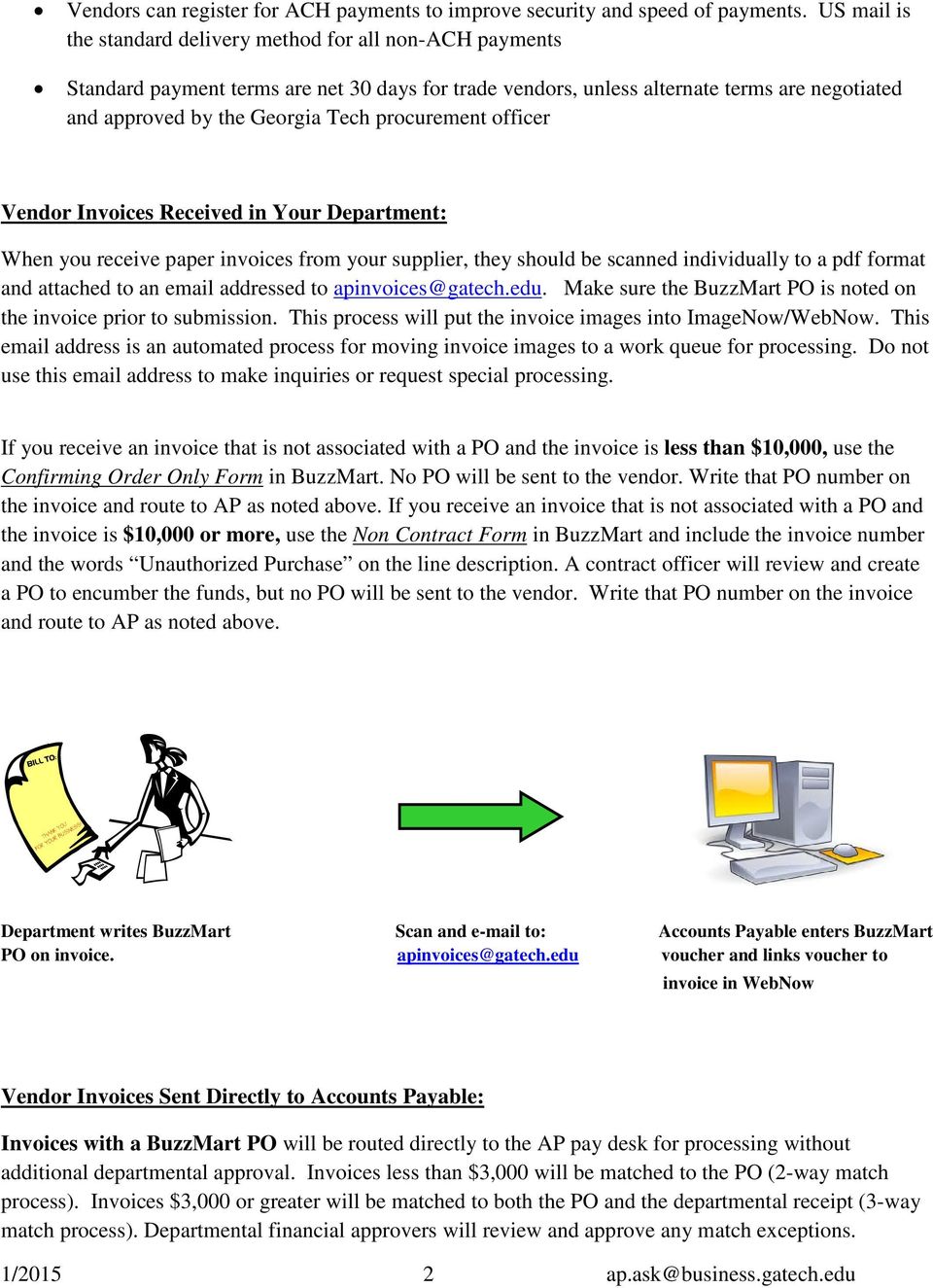
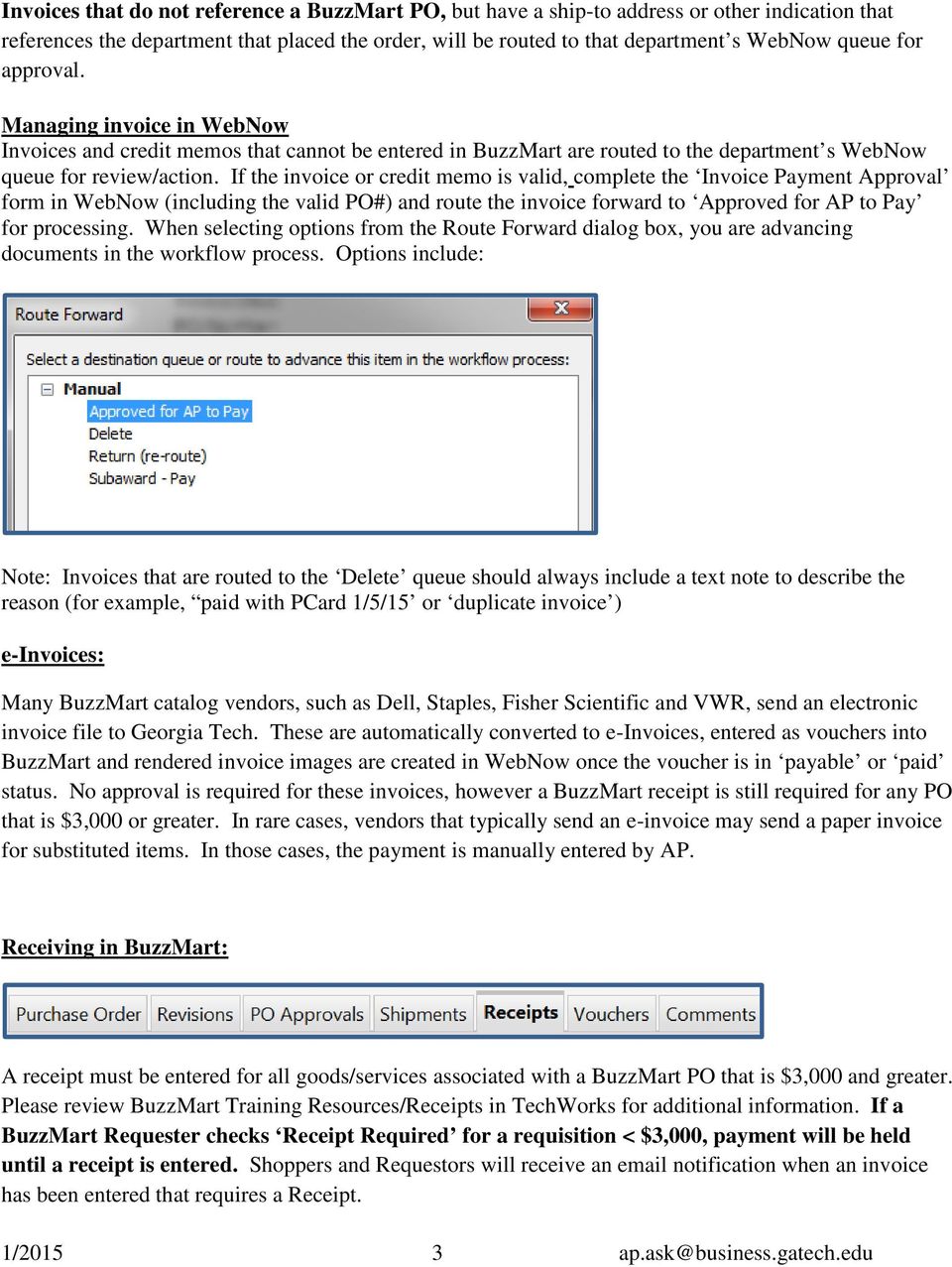
3 Invoices that do not reference a BuzzMart PO, but have a ship-to address or other indication that references the department that placed the order, will be routed to that department s WebNow queue for approval. Managing invoice in WebNow Invoices and credit memos that cannot be entered in BuzzMart are routed to the department s WebNow queue for review/action. If the invoice or credit memo is valid, complete the Invoice Payment Approval form in WebNow (including the valid PO#) and route the invoice forward to Approved for AP to Pay for processing. When selecting options from the Route Forward dialog box, you are advancing documents in the workflow process. Options include: Note: Invoices that are routed to the Delete queue should always include a text note to describe the reason (for example, paid with PCard 1/5/15 or duplicate invoice ) e-invoices: Many BuzzMart catalog vendors, such as Dell, Staples, Fisher Scientific and VWR, send an electronic invoice file to Georgia Tech. These are automatically converted to e-invoices, entered as vouchers into BuzzMart and rendered invoice images are created in WebNow once the voucher is in payable or paid status. No approval is required for these invoices, however a BuzzMart receipt is still required for any PO that is $3,000 or greater. In rare cases, vendors that typically send an e-invoice may send a paper invoice for substituted items. In those cases, the payment is manually entered by AP. Receiving in BuzzMart: A receipt must be entered for all goods/services associated with a BuzzMart PO that is $3,000 and greater. Please review BuzzMart Training Resources/Receipts in TechWorks for additional information. If a BuzzMart Requester checks Receipt Required for a requisition < $3,000, payment will be held until a receipt is entered. Shoppers and Requestors will receive an notification when an invoice has been entered that requires a Receipt. 1/ [email protected]
4 Match Exceptions: Match exceptions are generally caused by: A Missing or insufficient Receipt (orders $3,000 or greater) PO: Invoice amount mismatch that exceeds system tolerance (5%, up to $500 for the PO) Hold Payment for Receiving Box has been selected (2-Way Match or 3-Way Match) Additional quantity or line on an invoice, not on PO Creating a negative Quantity Receipt to reverse the original Quantity Receipt entry and now creating a Cost Receipt. Although this change/adjustment will update the data, a Matching Exception will exist once the Cost Receipt is created Please review BuzzMart Training Resources/Procure-to-Pay in Techworks for additional information. Match Exceptions are managed and approved by department financial approvers and are resolved by either authorizing a Force Match, entering a Receipt and Force Match, or contacting [email protected] for voucher correction. Accounts Payable Invoice Entry Accounts Payable will enter the invoice directly into BuzzMart which creates a voucher. If additional action is required, an notification will be sent to the requestor or approver. POs $3,000 or greater require that a receipt be entered in BuzzMart (Receipts tab). Departmental financial approvers will manage and approve any match exceptions. 1/ [email protected]

5 Process Flow of Invoice Vouchers Entered in BuzzMart to PeopleSoft: Vouchers entered in BuzzMart will not export to PeopleSoft until successfully matched to the PO and Receipt (if $3,000 or greater). Invoice vouchers that are in the In Process status will not be processed until the match exception is resolved by the department. Voucher # in BuzzMart=Voucher# in PeopleSoft. All vouchers initiated in BuzzMart will be in the format Qxxxxxx. Vouchers that have successfully transferred to PeopleSoft will have a note on the voucher s History tab the invoice has been successfully sent to ERP (PeopleSoft). OSP Subcontracts and Subagreements: Invoices for OSP Subcontracts and Subagreements are sent directly to OSP by the subcontract vendor and will be routed to each department s WebNow queue for approval. Complete the Invoice Payment Approval Form (Worksheet) within the image in WebNow and route the invoice forward to the Subaward Pay queue for processing. Subcontract payments are processed directly in PeopleSoft, rather than BuzzMart, so voucher detail will not be available in BuzzMart. Your electronic signature approval on the WebNow approval form certifies that the goods were received and/or services performed, so no additional Receipt is required in BuzzMart and vouchers should not create a match exception. Non-BuzzMart Payments Processed from Paper Request Forms Specific payment types, outlined below, are initiated via completion of the appropriate form and inclusion of supporting documentation. The payee (vendor) should be set-up prior to submission of the payment request by having any first-time payees complete the e-vendor Profile Form. The process will establish the vendor ID used at time of payment request. A link to the user-friendly e-vendor Profile Form is on the VENDORS tab of the Procurement website. Payments for refunds, reimbursements, and research participants do not require submission of the e-vendor Profile Form. 1/ [email protected]

6 AP Payment Request Forms: The paper AP Payment Request Form process is used to initiate payments for all transaction types that are listed on the form. An encumbrance in BuzzMart is only required for vendors that require an e-verify affidavit for services greater than $2, AP Recurring Payment Request Form: The paper AP Recurring Payment Request Form process is used to request recurring payments for stipends and participant payments, monthly leases, non-gt student fellowships and other recurring payments that are not supported by a vendor invoice. This form should only be used if the payee is scheduled to receive three or more payments. An encumbrance in BuzzMart is not required nor recommended. AP Honorarium Request Form: The paper AP Honorarium Request Form process is used to pay non-employee individuals for a shortterm activity that benefits Georgia Tech. Please review the definition and requirements as specified on the form. Wire Transfer Request Form: International wire transfers are customarily restricted to international payees, due to additional administrative cost and bank fees. Wires can be requested via the Wire Transfer Request Form in the currency requested on the vendor invoice. Transactions are posted after the wire has been confirmed by the bank and funds have been converted to US $. Domestic vendors can be paid electronically through establishment of a Bank of America PayMode ACH account. Document Viewing / Searching in ImageNow/WebNow: PeopleSoft and BuzzMart link to our Imaging system, ImageNow/WebNow. Images of all invoices, AP Payment Requests, AP Recurring Payment form and PO s are stored in ImageNow/WebNow. Researching Payment Status: All payments (check, ACH, or EFT) are made through PeopleSoft and can be researched through the AP Payment Inquiry website: Once a PeopleSoft voucher is created, the payment should release on the scheduled due date, per the payment terms associated with the vendor (net 30 days from invoice date for trade vendors and next day terms for non-trade vendor payments). 1/ [email protected]

7 Tools/Forms and Web Resources Visit the AP website for additional resources: Some forms are only available to Georgia Tech employees and students, so login with GT credentials may be required. Questions/Issues/Extra Assistance: is used for all questions related to AP policies, procedures, or payment status is an automated invoice routing used for initial receipt of invoices from vendors or campus customers. A valid PO# must be referenced on all invoices. [email protected] is used for inquiries related to expense adjustments, stop payments, refunds and deposits, international payments including Glacier initiation and wire transfers, and 1099 and 1042 tax reporting. [email protected] is used for issues related to purchasing, BuzzMart requisitions, and contract review 1/ [email protected]

Office of Business and Finance
 OBJECTIVE To establish procedures for review and payment of invoices for goods and services purchased by the university. POLICY Applies to: Faculty, staff, students, visitors, vendors Issued: 08/2000 Revised:
Office of Business and Finance
 OBJECTIVE To establish procedures for review and payment of invoices for goods and services purchased by the university. POLICY Applies to: Faculty, staff, students, visitors, vendors Issued: 8/2000 Revised:
Office of Contracting & Procurement and Support Service Center Desk Reference
 Oracle PeopleSoft Enterprise I m in. DETROIT PUBLIC SCHOOLS Office of Contracting & Procurement and Support Service Center Desk Reference Created by the Division of Finance Office of Strategic Management
Introduction to Disbursement Services
 Introduction to Disbursement Services Purpose Disbursement Services is a service unit within the University business organization, reporting to the Controller. The department's responsibility is to monitor,
Florida A & M University
 Florida A & M University AP PROCEDURES 3-8-2013 TABLE OF CONTENTS 1.0 OVERVIEW... 1 2.0 DEFINITIONS... 1 3.0 RESPONSIBILITIES... 2 4.0 GENERAL PROCEDURES... 3 4.1 DEPARTMENTAL FISCAL REPRESENTATIVES...
Accounts Payable Workshop. Boston University Office of the Comptroller
 Accounts Payable Workshop Boston University Office of the Comptroller Accounts Payable Workshop Topics of Discussion Accounts Payable Organization Purchases Covered by University Purchasing Policy Receipt
Workday AP Questions & Answers (FAQs)
 Workday AP Questions & Answers (FAQs) 1 P a g e Q. Will there be I# in Workday? A. No, Workday will replace I# with supplier# which will start with SUPP_INV that generates when you use Create Supplier
HOWARD UNIVERSITY POLICY
 HOWARD UNIVERSITY POLICY Policy Number: 300-001 Policy Title: ACCOUNTS PAYABLE: PAYMENTS TO VENDORS Responsible Officer: Chief Financial Officer Responsible Office: Office of the Chief Financial Officer
Vendor Request Form. 2015 CGI Group Inc. All rights reserved
 2015 CGI Group Inc. All rights reserved Preface This how-to guide provides instructions to CGI vendors and business units on how to communicate with CGI s Accounts Payable (AP) team. It explains how to
FREQUENTLY ASKED QUESTIONS ABOUT ACCOUNTS PAYABLE WHEN DOES THE STATE OF MARYLAND PAY MY VENDORS?
 FREQUENTLY ASKED QUESTIONS ABOUT ACCOUNTS PAYABLE WHEN DOES THE STATE OF MARYLAND PAY MY VENDORS? The state attempts to pay all vendors within 30 days of the Service Date. This is defined as the later
Automated Vendor Form for Disbursement Voucher Vendors Instruction Manual
 Automated Vendor Form for Disbursement Voucher Vendors Instruction Manual Table of Contents Eligible Vendor Types for Use with the Automated Vendor Form... 2 Search KFS for Vendors Before Using the Automated
e-procurement (epro) Overview Advantages of epro
 e-procurement (epro) PeopleSoft e-procurement (epro) is designed to make it easier for a casual user to requisition items. This ease-of-use method helps reduce out-of-system purchasing; also known as maverick
Solutions for Accounts Payable Process Optimization
 Solutions for Accounts Payable Process Optimization ScerIS is your resource for Accounts Payable Process Optimization (APPO). We help clients do more at lower cost, in less time and with fewer people.
The Benefits of Automating AP Invoice and Purchase Order Operations
 The Benefits of Automating AP Invoice and Purchase Order Operations Presented by Dan Humbert Chrome River, Product Manager Today s Objectives 1. Benefits of automating AP operations 2. Benefits of integrating
R12 Oracle Purchasing Fundamentals
 R12 Oracle Purchasing Fundamentals 5 Days What you will learn: In this course, participants learn how to set up and use R12 Oracle Purchasing to managing the purchasing process. They learn how to create
Accounts Payable. Vendors and Vouchers
 Accounts Payable Vendors and Vouchers 1 Agenda Searching for Vendors Entering Vouchers Budget Checking Submitting for Approval Viewing Workflow Viewing Voucher Status Approving Vouchers Denying (returning)
How To Pay A Bank Transfer At The University Of Central Florida
 ELECTRONIC FUNDS TRANSFER PROCEDURE MANUAL Effective Date: 7/1/2012 Updated: July 25, 2012 Contents Introduction... 1 Incoming EFTs:... 3 ACH/Wire Transfers received... 3 Outgoing EFTs... 3 Student Direct
Best Practice exensys Asset Purchases
 Best Practice exensys Asset Purchases Table of Contents Introduction:... 3 Overview:... 3 Benefits:... 4 Conclusion:... 4 Introduction: Accounting of fixed assets is a complex task. To effectively manage
Accounts Payable Invoice Processing Managing PO Exceptions
 Accounts Payable Invoice Processing Managing PO Exceptions Note: The application is most effective in the latest version of Mozilla for Windows users and the latest version of Safari for Mac uses. In each
PROCURE-TO-PAY TRANSFORMATION FOR CFOs. Achieving Control, Visibility & Cost Savings.
 PROCURE-TO-PAY TRANSFORMATION FOR CFOs Achieving Control, Visibility & Cost Savings. Table of Contents Introduction...3 Driving up the Cost of the Procure-to-Pay Cycle...4 5 Ways to Cut Procure-to-Pay
Accounts Payable/Purchase Order Tool Kit. Yale Shared Services
 Table of Contents Yale Buy/Pay Best Practice... 2 4 Vendor Compliance Vendor Verification... 5 Vendor Terminology... 6 Vendor Setup Form with Checklist... 7 ACH/EFT Vendor Enrollment... 8 Procurement Procurement
SUPPLIER PAYMENT GUIDE EUROPE
 SUPPLIER PAYMENT GUIDE EUROPE Expectations and requirements to facilitate accurate and timely payments to suppliers Table of Contents 1) Procure To Pay Cycle 2) Payment Process Overview 3) Payment Due
AP & Travel: Need-To-Know Tips
 AP & Travel: Need-To-Know Tips Agenda Using the PeopleSoft Chartfield Conversion Tool Non-PO Voucher Process & Tips Travel Process & Tips Employee Reimbursement Process & Tips 2 PeopleSoft Chartfield Conversion
BUSINESS PROCESS (SAS 112 Compliance)
 Functional Area: Accounts Payable Name of Process: Payment of PO Invoices Purpose of Process: To liquidate encumbrances for purchase orders issued for goods and services on behalf Of the University. Primary
Stated below are the SCIRE activity level control objectives for purchasing and accounts payable.
 SCIRE PURCHASING AND ACCOUNTS PAYABLE AND SUMMARY The goals of the purchasing function at SCIRE are to achieve open, competitive and costeffective buying, while adhering to external funding sources for
Procure to Pay Process Four Requisition Types. Procure to Pay Process Four Payment Types
 Four Requisition Types Requisition for low dollar amount, item is not on a catalog Requisition for a low dollar amount, item is on a catalog Requisition is for a high dollar amount, item is not on a catalog.
It all Starts with the Invoice
 It all Starts with the Invoice Speakers Mel Steals Director of Invoice Automation Solutions PNC Bank Amy Rush Shared Services Controller Courtney Caton Finance Manager Westmoreland Coal Company 1 Agenda
BOSTON COLLEGE Travel and Expense Presentation
 1 BC Travel Program Information and PeopleSoft Expense Report Workshop 2 AGENDA 1. University Travel Policy 2. Overview of Department Roles 3. Department Role Comparison 4. P1 Listing 5. Overview of PeopleSoft
How Your Accounts Payable Strategy Can Boost ROI ADP Procure-To-Pay Jeff White - Director of Implementations Session #1050
 How Your Accounts Payable Strategy Can Boost ROI ADP Procure-To-Pay Jeff White - Director of Implementations Session #1050 2 Manual Process : Complex, Slow and Tactical Invoice Processing Price Validation
Accounts Payable User Manual Spectrum Plus
 Accounts Payable User Manual Spectrum Plus PeopleSoft Version 8.9 Go Live Date, July 1, 2009 Office of Disbursements. All rights reserved Issue Date 07.01.09 v. 01 1 Statement of Validity This material
Department of Veterans Affairs Financial Services Center 1615 Woodward Street Austin, TX 78772
 Department of Veterans Affairs Financial Services Center 1615 Woodward Street Austin, TX 78772 Date: January 28 th, 2013 Dear Accounts Receivable Representative & Valued Vendor, President Obama signed
ADMINISTRATION AND FINANCE POLICIES AND PROCEDURES. INVOICE PROCESSING AND DISBURSEMENTS Revision Date: 1/24/2010 Reviewed 11/23/2013
 Chapter 8 ADMINISTRATION AND FINANCE POLICIES AND PROCEDURES INVOICE PROCESSING AND DISBURSEMENTS Revision Date: 1/24/2010 Reviewed 11/23/2013 TABLE OF CONTENTS 8.01 OVERVIEW OF CASH DISBURSEMENTS PROCESS..
Table of Contents. Table of Contents 1. Voucher Approval Function 2 5. Worklist Search and Approval History 6. Budget Check Exceptions 7-9
 Approver Table of Contents Table of Contents 1 Voucher Approval Function 2 5 Worklist Search and Approval History 6 Budget Check Exceptions 7-9 Regular Entry 10 Incomplete and Denied Vouchers 11 Delete
Procure to Pay (P2P) Welcome. Presenters: Barbara Moser- Purchasing Joanne Webb- Accounts Payable
 Procure to Pay (P2P) Presenters: Barbara Moser- Purchasing Joanne Webb- Accounts Payable Welcome Before we Get Started Please turn cellphones to silent or vibrate Be courteous to presenters and other people
Financials 9.1 Upgrade Project and Electronic Approvals Overview Session October 10, 2012
 Financials 9.1 Upgrade Project and Electronic Approvals Overview Session October 10, 2012 Project included two major components: - Core Module Upgrade to version 9.1 - Implementation of Electronic Approvals
Sungard Banner Integration
 Project Team eprocurement Overview Advantages of Implementing HigherMarkets Sungard Banner Integration Savings Overview Questions BUSINESS INTELLIGENCE REPORTS SOURCING MANAGER CONTRACT MANAGER SPEND
Change in Submission of Supplier Invoices - Instructions
 Government of Newfoundland and Labrador Office of the Comptroller General October 15, 2014 Change in Submission of Supplier Invoices - Instructions The Government of Newfoundland and Labrador (GNL) is
Advance Payments to Suppliers (Prepayments)
 Advance Payments to Suppliers (Prepayments) Purpose Generally, goods and services provided to the Institute are paid for after receipt. On occasion, it may be necessary or desirable to provide a known
Steps for Entering an OnBase Purchase Requisition (PR)
 Steps for Entering an OnBase Purchase Requisition (PR) 1. Login to OnBase from BuzzIn. (or Click the Digital Purchase Order link on the InfoPath Forms page and skip to step 5) 2. Click on the drop down
1 - ACCOUNTS RECEIVABLE
 1 - ACCOUNTS RECEIVABLE ACCOUNTS RECEIVABLE 1.01 User defined GL posting dates for receivables documents (e.g. orders, invoices, etc.) to be either the Transaction Date or the System Date. 1.02 User configuration
Working with Accounts Payable. Agenda
 Working with Accounts Payable (This document is a complement to the VO System Reference Manual) Updated 2/01/2015 Carole Gill 294-5181 [email protected] 1 Working with Accounts Payable Agenda Objectives:
SUPPLIER PAYMENT GUIDE
 SUPPLIER PAYMENT GUIDE Expectations and requirements to facilitate accurate and timely payment to suppliers Table of Contents 1) Procure-To-Pay Cycle 2) Payment Process Overview 3) Payment Terms 4) Submittal
Supplier registers on SRF. VC logs into SRF portal. Check for Duplicates (System & Manual) Check SRF Entity type for 1099 indicator
 Restart Create Record 1. Create Record Start Campus Purchase Request Housing & Food Services Dept? Department Check PDR Request to fill our SRF registers on SRF VC logs into SRF portal Flag Sales indicator
GATEWAY DESK MANUAL. January 2014
 GATEWAY DESK MANUAL January 2014 University of California, Santa Barbara 3203 Student Affairs and Administrative Services Building (SAASB) Santa Barbara, CA 93106-1150 Vol.1 Christine Griffin and Hannah
KFS Invoice Processing and Practices. Charlie Sinex, Director Indiana University FMS Accounts Payable and Records Management
 KFS Invoice Processing and Practices Charlie Sinex, Director Indiana University FMS Accounts Payable and Records Management Presentation Focus Invoice submission importance of PO# Accounts Payable email
Welcome to the topic on managing delivery issues with Goods Receipt POs.
 Welcome to the topic on managing delivery issues with Goods Receipt POs. In this topic, we will explore how to receive incorrect shipments from a vendor in a goods receipt PO document. Sometimes your supplier
Accounts Payable Automation
 Accounts Payable Automation Dataline - a brief history Launched as privately owned company, based in Chatswood, Sydney. Became a leading proponent of distributed non-impact MICR technology We remain the
Sole Source Procurement
 Sole Source Procurement A Sole Source Procurement is a purchase made over $5000 without competition when competition is normally required. A Sole Source purchase is justified when there is only one good
Online Requesting and Receiving. Training Manual
 Online Requesting and Receiving Training Manual 1 Table of Contents Introduction 3 Logging In.3 Creating a Profile...3 Modifying a Ship to Address...3 FOAPAL and Commodity Codes 3 Code Favorites...3 Understanding
Fusion Financials White Paper Manage Payments Business Process Prepare and Record Payments
 Fusion Financials White Paper Manage Payments Business Process Prepare and Record Payments An Overview of Payments Process Author: Vijaya Gudipati Version: 1.0 Created: 14th June 2011 1 1. Table of Contents
County of Henrico ACCOUNTS PAYABLE ORACLE UPGRADE R12
 County of Henrico ACCOUNTS PAYABLE ORACLE UPGRADE R12 08/01/2014 ACCOUNTS PAYABLE Oracle Payables Invoice Types... 3 Query Invoice Records... 4 Create Invoice Batches... 6 Enter a Direct Pay Invoice...
Travel and Expense Management User Guide. Revised 02.04.15
 Travel and Expense Management User Guide Revised 02.04.15 2 Table of Contents Access TEM and Review Profile. 4 Submitting a Travel Authorization (TA).. 5 Intro and Login.. 5 Funding Change. 6 Itinerary..
Oracle Payables Implementation Overview with screenshots Compilation of Oracle Payables Implementation notes by Ranu Srivastava ...
 Compilation of Oracle Payables Implementation notes by Ranu Srivastava... Setting up Banks... Defining Internal Bank... Payables Options... Defining Payment Documents... Creating Suppliers... Overview
Case Western Reserve University. Payment and Reimbursement Policy. Updated March 26, 2013 Established: March, 1 2008
 Case Western Reserve University Payment and Reimbursement Policy Updated March 26, 2013 Established: March, 1 2008 Case Western Reserve University Payment and Reimbursement Policy Full Revision TABLE OF
Training. Account Payable Invoice Processing PTP0401A
 Monday, Tuesday, February June 18, 04, 2013 2013 1 1 Account Payable Invoice Processing PTP0401A Introduction Ramon Mira Welcome and Introductions Logistics Ground Rules Course Objectives Course Content
Accounts Payable Reference Guide
 Create a New Vendor Vendors supply you with goods or services you need to run your business. Vendor records must be created prior to processing bills or other payable transactions. 1 Before entering in
5 Ways Senior Finance Executives are Improving Visibility Across the Procure-to-Pay Cycle
 5 Ways Senior Finance Executives are Improving Visibility Across the Procure-to-Pay Cycle An IOFM white paper, sponsored by 5 Ways Senior Finance Executives are Improving Visibility Across the Procure-to-Pay
Imaging, Workflow and OCR: The Road to AP Productivity
 Imaging, Workflow and OCR: The Road to AP Productivity Agenda Ryerson Background and Challenges Best Practices in AP Processing Ryerson Benefits of Imaging & OCR Impact of Imaging & OCR on Data Entry and
1. Direct Payment Request (DPR) Form http://www.northwestern.edu/financialoperations/policies-procedures/forms/dpr.pdf:
 Introduction Accounts Payable makes domestic and international electronic funds transfers through JPMorganChase bank. Domestic electric funds transfers are usually completed within a day of the order being
ACCOUNTS PAYABLE POLICIES AND PROCEDURES
 ACCOUNTS PAYABLE POLICIES AND PROCEDURES...... Accounts Payable Payment Processing General Information Overview of the Disbursement Voucher Disbursement Voucher Approval Payments Against Purchase Orders
Workday Payments: Quick Reference Guide
 Workday Payments: Quick Reference Guide What Am I Paying? Advances (initiated and settled in Workday) Use the Create Expense business process in Workday to initiate the advance; type Create Expense in
A Guide to Accounts Payable Supplier Processes
 A Guide to Accounts Payable Supplier Processes The Johnson & Johnson Family of Companies believe in the benefits associated with the efficiencies gained through methods of electronic or paperless invoicing.
UNIVERSITY OF OTTAWA Financial Resources. UO - SMARTStream System Theory - Purchasing and Accounts Payable
 UNIVERSITY OF OTTAWA Financial Resources UO - SMARTStream System Theory - Purchasing and Accounts Payable version 1.0 - May 1999 Theory Purchasing and Accounts Payable Table of Contents 1. Foreword...
Receivables & Payables
 Receivables & Payables Microsoft Dynamics NAV RECEIVABLES AND PAYABLES MANAGEMENT Microsoft DynamicsTM NAV gives you an efficient vendor and customer management system that helps you strengthen business
Travel and Expense System. Traveler s Guide
 Travel and Expense System Traveler s Guide Contents System Setup... 3 Authorization Reports (Before Traveling)... 3 Creating and Reviewing an Authorization Report... 3 Adding a Comment... 5 Submitting
State of Connecticut Core-CT Continuing Education Initiative. Introduction to Accounts Payable
 State of Connecticut Core-CT Continuing Education Initiative Introduction to Accounts Payable 1 Course Goals To give students a greater understanding of their place in Core- CT, an integrated financial
GEORGIA SOUTHERN UNIVERSITY FOUNDATION POLICY ON FOUNDATION EXPENSES
 GEORGIA SOUTHERN UNIVERSITY FOUNDATION POLICY ON FOUNDATION EXPENSES The Georgia Southern University Foundation exists in order to support Georgia Southern University in its endeavors by raising, investing,
General Accounting Applications (As featured in this pdf document) Licensing Applications. Additional Applications
 SOFTWARE PRODUCTS LIST General Accounting Applications (As featured in this pdf document) MSI-Accounts Payable...pg 2,3 MSI-Accounts Receivable...pg 4,5 MSI-Budget Planning...pg 6,7 MSI-Cash Register...pg
Accelerating Your Cash Flow
 Accelerating Your Cash Flow Invoices On-Line Invoices On-Line (IOL) from Direct Insite delivers on-demand AP, AR and payments capabilities that are deployed fast, with minimal cost and operational impact,
Department of Sociology Cash Handling Procedures Fiscal Year 2016
 Department of Sociology Cash Handling Procedures Fiscal Year 2016 I. PURPOSE AND OVERVIEW In accordance with MAPP 05.01.01, Cash Handling, all cash transactions involving the University, its colleges,
Texas A&M University Commerce Prompt Payment and Payment Scheduling Procedures
 Texas A&M University Commerce Prompt Payment and Payment Scheduling Procedures I. Purpose This document applies to all payments processed through Texas A&M University - Commerce (TAMC) Accounts Payable.
Important Information for Invoicing Hewlett Packard:
 Important Information for Invoicing Hewlett Packard: Dear Supplier, Paper invoicing has always been an arduous and cost intensive process for both our Suppliers and HP. Invoices are often lost in transit
9.2 PeopleSoft Upgrade New Features and Functionality. May 2015
 9.2 PeopleSoft Upgrade New Features and Functionality May 2015 1 General Accounting 2 Project Overview» The PeopleSoft Finance/Supply Chain upgrade is scheduled for May 20 (at 5pm) thru May 25, 2015» Current
Eastern Washington University TEMS Employee Travel Guide
 This document describes university travel procedures using the Banner Travel and Expense Management System (TEMS). 1 This is a companion document to the TEMS User Guide, a stepby-step tutorial prepared
eva Purchasing & Banner Receiving Manual
 eva Purchasing & Banner Receiving Manual Compliance Employees are responsible for knowing and complying with established University and State policies and procedures when creating/approving requisitions
PEP 2 Peoplesoft eprocurement Hands on Training 1
 This course covers five objectives 1) Understanding eprocurement business processes. 2) Creating requisitions. 3) Creating requisitions from favorites and templates. 4) Understanding requisition approvals
4/29/2016. Kelly Augsburger Auburn City Schools
 Kelly Augsburger Auburn City Schools District AP Overview The way we were Reasons to change Transition to paperless Purchasing & Accounts Payable Paperless Requisitions and Purchase Orders Invoice Processing
Dell E-Commerce guide for Skyward Users 1
 Dell E-Commerce guide for Skyward Users 1 This document contains instructions on how to use the e-commerce application running on Skyward s Business Suite to purchase from your Dell Premier Page. E-Commerce
YOU WANT TO. Copyright 2014 ADP, LLC. Proprietary and Confidential.
 YOU WANT TO 2 BUT THERE ARE CHALLENGES 1 2 4 3 1 PWC s most recent Global Economic Crime Survey (2011) 2 Source: ACFE. 2012 Report to the Nations on Occupational Fraud and Abuse. 3 2013 Invoice and Workflow
CatBuy Preparer Training Course
 CatBuy Preparer Training Course Section II UC Merced 5200 N. Lake Road Merced, CA 95343 Please retain and keep available for your reference. CatBuy Training Course Section II The CatBuy Shopping Engine
City of Portland. Accounts Payable. SAP Accounts Payable Processor
 City of Portland Accounts Payable SAP Accounts Payable Processor This guide was developed by EBS Training in collaboration with OMF Financial Services. Page 2 This document last modified: 5/12/2014 Accounts
SAO Cash Management Group To Be Process Flow
 Centralized Accounts Payable (AP) Disbursement Generate Checks and Positive Pay file Distribute Checks Review AP Reports Exception Processing Create Control Group in Peoplesoft Accounts Payable (HIGHLY
MIT s E-Commerce Portal
 MIT s E-Commerce Portal powered by Elevating procurement to a new level Who Is SciQuest? Software company offering a suite of hosted solutions to meet e-procurement e needs MIT signed with SciQuest in