
OnGuard Collision Mitigation System
|
|
|
- Nathan Simmons
- 10 years ago
- Views:
Transcription
1 Maintenance Manual MM-1306 OnGuard Collision Mitigation System Revised 04-15

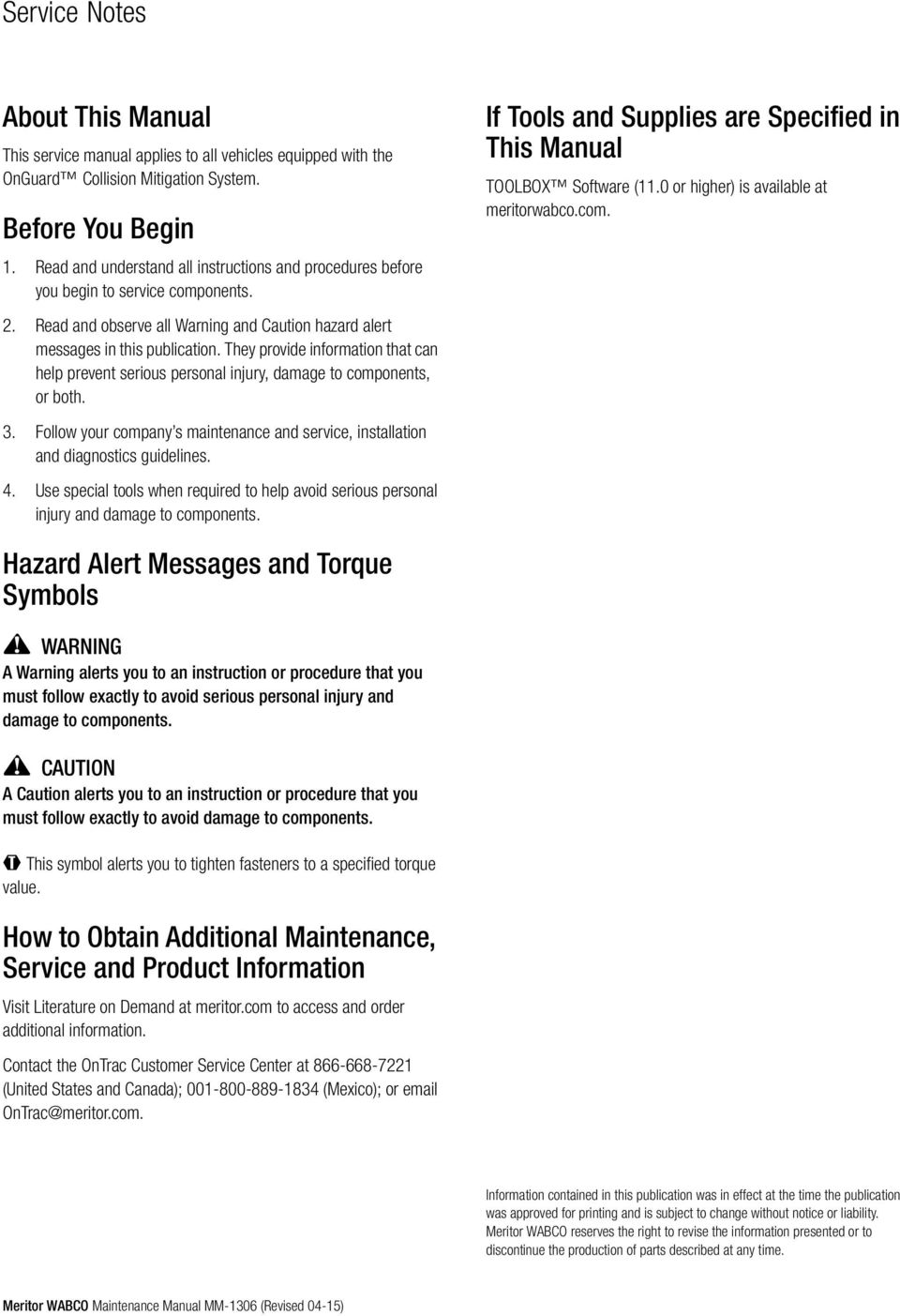
2 Service Notes About This Manual This service manual applies to all vehicles equipped with the OnGuard Collision Mitigation System. Before You Begin 1. Read and understand all instructions and procedures before you begin to service components. 2. Read and observe all Warning and Caution hazard alert messages in this publication. They provide information that can help prevent serious personal injury, damage to components, or both. 3. Follow your company s maintenance and service, installation and diagnostics guidelines. 4. Use special tools when required to help avoid serious personal injury and damage to components. If Tools and Supplies are Specified in This Manual TOOLBOX Software (11.0 or higher) is available at meritorwabco.com. Hazard Alert Messages and Torque Symbols A Warning alerts you to an instruction or procedure that you must follow exactly to avoid serious personal injury and damage to components. CAUTION A Caution alerts you to an instruction or procedure that you must follow exactly to avoid damage to This symbol alerts you to tighten fasteners to a specified torque value. How to Obtain Additional Maintenance, Service and Product Information Visit Literature on Demand at meritor.com to access and order additional information. Contact the OnTrac Customer Service Center at (United States and Canada); (Mexico); or [email protected]. Information contained in this publication was in effect at the time the publication was approved for printing and is subject to change without notice or liability. Meritor WABCO reserves the right to revise the information presented or to discontinue the production of parts described at any time. Meritor WABCO Maintenance Manual MM-1306 (Revised 04-15)
3 Driver Information OnGuard Warnings, Cautions and Operating Guidelines Driver-Related Information The OnGuard Collision Mitigation System (CMS) is a driver aid only. It is designed to assist the vehicle operator in maintaining a safe following distance and, if needed, provide limited initial braking to reduce the severity of a possible collision. It is not an auto-pilot system for operating the vehicle. The OnGuard CMS is no substitute for the most important factor in vehicle safety, which is a safe, conscientious driver. Use of OnGuard CMS cannot compensate for a driver that is distracted, inattentive or impaired by fatigue, drugs or alcohol. As always, it is the driver s responsibility to: Use safe driving techniques Exercise proper judgment for the traffic, road and weather conditions Maintain a safe distance between vehicles Apply the brakes when needed to maintain control of the vehicle Whether OnGuard CMS is in use or not, the driver is responsible for the vehicle s speed, distance between other vehicles and braking the vehicle, if necessary, to avoid a collision. Never wait for an OnGuard CMS warning before applying the brakes. Failure to do so can result in serious personal injury or death, and/or severe property damage. The driver is responsible for understanding the operation and limitations of the OnGuard CMS before operating the vehicle. Failure to do so can result in serious personal injury or death, and/or severe property damage. Environment-Related Information The driver should consider the benefit/risk of using OnGuard Collision Mitigation System (CMS) under the following conditions. Weather such as rain, sleet, snow, ice, heavy fog, as well as smoke or dust. These conditions can make roads slippery which can cause a spinout, or block or limit the radar s distance sensing ability. Construction zones, off road, dirt roads or muddy roads with loose surface. These conditions can cause the wheels to lose traction and limit OnGuard s ability to provide appropriate warning and adequate braking. Curvy or winding roads, roads with sharp turns. Curvy roads can make it difficult for the OnGuard CMS radar to track vehicles in it s path. While in a sharp turn or if the preceding vehicle is in a sharp turn, OnGuard may no longer track a vehicle in front of you. Your vehicle could then unexpectedly accelerate to the previously selected speed. Heavy or complicated traffic, entry and exit ramps, downhill, cross traffic and intersections. OnGuard CMS is not capable of taking into account these complex traffic situations and respond to each scenario. It cannot track traffic and objects traveling perpendicular to it s path. Driving in these conditions with OnGuard CMS active can produce false warnings, unexpected braking or no response at all. Serious personal injury or death, and/or severe property damage can result. The OnGuard Collision Mitigation System (CMS) is designed to monitor only the distance between your vehicle and the vehicle moving in the same direction directly ahead of it. It may not identify a vehicle moving TOWARDS it or stationary objects in the road, such as a vehicle that is stopped in traffic or disabled. As such, the OnGuard System will not provide engine torque control or braking. The driver must always be aware of the objects in front of his vehicle and be ready to apply the brakes, if required. Failure to apply the brakes when needed can result in an accident. Meritor WABCO Maintenance Manual MM-1306 (Revised 04-15) i

4 Driver Information OnGuard CMS is designed to detect and track common size automobiles and trucks with metal surfaces. It is not designed to detect smaller objects such as pedestrians, narrow vehicles, motorcycles, mopeds, bicycles, or similar sized items. It also cannot detect vehicles of unusual shape or with limited metal surfaces, such as recreational vehicles, horse-drawn buggies, or logging trailers. As such, OnGuard may provide little or no warning of these objects in the vehicle s path. It is the driver s responsibility to be aware of these objects and apply the brakes as necessary to avoid an accident. It is always the driver s responsibility to apply the brakes, if needed, to avoid an accident. Never wait for an OnGuard CMS warning before applying the brakes. Failure to apply the brakes when needed can result in serious personal injury or death, and/or severe property damage. System-Function Information Once the driver applies the brake, the OnGuard CMS will be disabled and no longer provide braking intervention. It is the driver s responsibility to maintain a safe speed and distance from other vehicles and brake as necessary to maintain vehicle control. Failure to apply the brakes when necessary can result in serious personal injury or death, and/or severe property damage. The driver is responsible for selecting a safe and legal speed setting that is appropriate for the traffic, road surface and weather conditions. Adjust the speed setting as necessary when driving in reduced visibility or potentially slick conditions. Driving with OnGuard CMS at a speed that is inappropriate for following a vehicle safely can lead to an accident. Serious personal injury or death, and/or severe property damage can result. While the OnGuard CMS is in System/Radar Alignment mode, the system will not track vehicles or operate. Make sure that the Service Alignment procedure is completed before releasing the vehicle from service. Failure to do so can result in serious personal injury or death, and/or severe property damage. If a potential collision is developing and the driver does not take action to decelerate the vehicle, the OnGuard CMS sounds an alert, automatically de-throttles the engine and applies the foundation brakes to provide up to 0.35g of braking power. The driver must still apply the brakes to provide additional braking force to help avoid an accident. Failure to apply the brakes when necessary can result in serious personal injury or death, and/or severe property damage. Do not allow the installation of bumpers, cattle guards or other such items in front of the radar area. If the radar is blocked, the OnGuard CMS will have limited or no functionality, which can lead to an accident. Serious personal injury or death, and/ or severe property damage can result. OnGuard CMS automatically becomes active once the vehicle reaches a speed of 15 mph (24 kph). It does not provide warning and braking functionality below 15 mph (24 kph). It is the driver s responsibility, at all times, to use safe driving techniques, be alert, maintain a proper distance between vehicles and brake the vehicle, if needed, to avoid a collision. Never wait for OnGuard CMS to provide a warning or braking before applying the brakes. Failure to do so can result in serious personal injury or death, and/or severe property damage. OnGuard CMS may initiate forward collision warnings or in seldom cases unwanted or inappropriate acceleration or deceleration. In such cases, the driver has to either deactivate or override the system as necessary to maintain proper vehicle control. Failure to do so can result in serious personal injury or death, and/or severe property damage. If the driver accelerates to a faster speed than the one set to overtake a vehicle, OnGuard CMS will return to the last stored speed once the vehicle has been overtaken. The driver must be aware of the last stored speed to make sure that the vehicle can remain in control or deactivate the system. Failure to do so can result in serious personal injury or death, and/or severe property damage. ii Meritor WABCO Maintenance Manual MM-1306 (Revised 04-15)

5 Driver Information OnGuard CMS may take a few moments to adjust to the selected speed. Adjust the speed as necessary to accommodate the current road, traffic and weather conditions. Use care to avoid dramatic acceleration or deceleration of the vehicle which can lead to a loss of control. Serious personal injury or death, and/or severe property damage can result. Using the Resume option will return the vehicle to the last stored set speed. It is the driver s responsibility to be aware of what the last stored speed is and ensure it is safe and legal for the current road, traffic and weather conditions. Failure to do so can result in serious personal injury or death, and/or severe property damage. System Functions and Miscellaneous Information Always keep the path of the radar clear of obstructions. Snowy and muddy conditions can cause the radar to become blocked or debris to get between the fascia and radar. Always remove snow, mud or other debris from the front of the fascia and between the fascia and radar immediately to ensure proper radar operation. Do not allow the installation of bumpers, shields, deflectors, guards or other such items in front of the radar area. Do not allow items to block the radar or the OnGuard CMS will have limited or no functionality, which can lead to an accident. Serious personal injury or death, and/ or severe property damage can result. The OnGuard CMS requires time to recognize an object or potential obstacle. An object moving at a speed of approximately 20 mph or more may not be recognized in enough time to produce a warning or brake the vehicle. Never wait for the OnGuard CMS to intervene when a potentially hazardous situation arises. The driver must always monitor traffic and apply the brakes, if needed, to avoid a crash. Failure to do so can result in serious personal injury or death, and/or severe property damage. System Malfunction Information Do not allow the fascia to become blocked by any foreign matter (dirt, snow, ice, stickers etc.), otherwise a system fault will occur and the OnGuard CMS will be disabled. If the system becomes disabled, immediately inspect the OnGuard CMS fascia for a blockage and correct it as necessary. Whether or not the radar is working correctly, it is the driver s responsibility to apply the brakes when necessary to maintain vehicle control. Failure to do so can result in serious personal injury or death, and/or severe property damage. If the OnGuard CMS is not correctly tracking vehicles that are in your lane or is tracking vehicles that are not in your lane, this may be due to radar operational issues. Typically, these are radar operational issues that can result from the following problems: Debris (dirt, snow, ice) on the radar fascia or between the fascia and the radar sensor. This must be removed. A loose radar sensor or one that is not tightly secured on the mounting bracket. The radar sensor may be too close to or actually contacting the bumper as mounted. There should be at least 1/4 inch of clearance between the fascia, radar sensor or bracket and the bumper. Radar interference from other radar sources or strong radar reflections. If OnGuard CMS is not functioning correctly or as expected, immediately have the OnGuard CMS inspected to correct the issue. Whether or not the radar is working correctly, it is the driver s responsibility to apply the brakes when necessary to maintain vehicle control. Failure to do so can result in serious personal injury or death, and/or severe property damage. When active Diagnostic Trouble Codes (DTCs) are present, the OnGuard CMS may be partially or fully disabled depending on whether the DTC(s) is associated with the Adaptive Cruise Control (ACC) functions or the CMS functions. If OnGuard CMS is not functioning correctly or as expected, have the Meritor WABCO Maintenance Manual MM-1306 (Revised 04-15) iii

6 Driver Information OnGuard CMS inspected immediately to correct the issue. Whether or not the radar is working correctly, it is the driver s responsibility to apply the brakes when necessary to maintain vehicle control. Failure to do so can result in serious personal injury or death, and/or severe property damage. If the OnGuard CMS is not correctly tracking vehicles that are in your lane or is tracking vehicles that are not in your lane, the radar may not be aligned correctly. If this occurs, immediately have the OnGuard CMS radar inspected and corrected as needed. Refer to the Radar Sensor Service Alignment procedure. Whether or not the radar is working correctly, it is the driver s responsibility to be aware of vehicles in front of the driver s vehicle and apply the brakes when necessary to maintain vehicle control. Failure to do so can result in serious personal injury or death, and/or severe property damage. If OnGuard CMS is not providing alerts as expected, immediately have the OnGuard CMS inspected to correct the issue. Whether or not the radar is working correctly, it is the driver s responsibility to apply the brakes when necessary to maintain vehicle control. Failure to do so can result in serious personal injury or death, and/or severe property damage. In order to reduce the potential danger of injuries caused during OnGuard activated vehicle decelerations, the driver and front passenger must always be correctly seated and with seat belts correctly fastened when operating the vehicle. Additionally, the driver should secure all loose items in the cab so that they will not fly forward during a full brake application. iv Meritor WABCO Maintenance Manual MM-1306 (Revised 04-15)

7 Contents pg. 1 Section 1: Introduction Overview OnGuard System Components 2 How OnGuard Works 3 In-Cab Dash Display Operating Modes 5 System Limitations 6 Section 2: Diagnostics, Troubleshooting and Testing General Information Radar Sensor and Display Software Levels Error Screens and Diagnostic Trouble Codes Troubleshooting Guide 11 TOOLBOX Software 13 OnGuard Radar Diagnostic Trouble Code Table Radar Inspection and Preventive Maintenance Radar System Troubleshooting 31 Electrical System and Harnesses Troubleshooting 34 Component Message Fault Troubleshooting 35 Cruise Control System Troubleshooting 36 Section 3: Component Replacement Radar Sensor Display Replacement 37 Section 4: Frequently Asked Questions OnGuard System Information What is OnGuard? How does OnGuard work? What is ACC? How can I enable/disable it? What is Haptic Warning? What is Active Braking? What is the difference between a stopped object and a stationary object? How does OnGuard respond differently? 38 What objects does OnGuard warn on or actively brake on? Is OnGuard active while at very low speeds? Will the system react to stop and go traffic? Do the brake lights come on when OnGuard activates the brakes? What are Meritor WABCO s Roll Stability Control (RSC) and Electronic Stability Control (ESC) systems? Why is either one required for OnGuard to be installed? How much braking power does OnGuard apply? Will the system override the ABS and lock up the brakes? pg. 38 How does the system adjust for severe and slippery weather conditions that could cause sliding or jackknifing? 38 Sometimes when cruise control is set, the vehicle slows down on its own while going around a curve even though there is no vehicle ahead, why? 39 OnGuard sometimes gives audible warnings even though there is nothing in the lane, why? What happens if the driver receives an OnGuard System Error Notification? Can the vehicle still be driven?

8 1 Introduction 1 Introduction Overview OnGuard OnGuard is a collision safety system that incorporates adaptive cruise control with active braking and CMS. It is currently available for pneumatically braked vehicles. Adaptive Cruise Control (If Equipped) Adaptive Cruise Control (ACC) adjusts the speed of your vehicle while in cruise control and attempts to maintain a pre-set following interval defaulted at 3.6 seconds when there is a vehicle ahead driving at a lower speed than your vehicle. ACC works in conjunction with conventional cruise control to maintain the set cruise speed when the lane ahead is clear and will automatically adjust the vehicle s speed to maintain the set following interval when a vehicle ahead is detected. OnGuard achieves the set following interval by controlling engine torque, engine and foundation brakes without driver intervention. When the lane ahead again becomes clear, the set cruise speed resumes automatically. Collision Mitigation System OnGuard s Collision Mitigation System (CMS) assists the driver in recognizing and responding to potentially dangerous driving scenarios that could lead to a rear end collision. The system responds by sending warnings, automatically reducing engine torque and applying foundation brakes. OnGuard s CMS will provide both visual and audible alerts through an in-cab dash display when the vehicle s following interval could result in a rear-end collision. If a potential rear-end collision is developing and the driver does not take action to decelerate the vehicle, OnGuard s active braking feature issues a haptic warning (short brake pulse) and automatically de-throttles the engine. If a potential rear-end collision still exists, and the driver has not taken the appropriate action, OnGuard s CMS will apply the foundation brakes to provide up to 50% of available braking power. When OnGuard activates the vehicle s brakes, the brake lights will come on. The active braking application is intended to assist the driver to avoid or reduce the severity of a collision. The driver must take the appropriate corrective action in response to the collision warning. OnGuard warnings will not be issued below a vehicle speed of 15 mph. Forward Collision Warning The Forward Collision Warning (FCW) will generate an audible and visible alert when the vehicle s following distance may result in a collision. FCW will also generate an audible and visible alert when a threatening stationary object is detected. FCW provides only a warning and will not control vehicle speed unless ACC is engaged or a collision mitigation event is detected. FCW cannot be turned off and is always active at speeds above 15 mph. Cruise Control Cruise Control is the standard OEM system that maintains a vehicle speed set by the driver. System Components Radar Sensor The radar sensor is used to detect vehicles and obstacles for the OnGuard Collision Mitigation System. It is mounted in the front of the vehicle near the center of the bumper and recessed in the bumper in most applications. Figure 1.1. The sensor has an electrical connector that provides power, ground and communication to the SAE J1939 network which is required for correct operation. The mounting orientation is determined by the 3 hole bolt pattern of the bracket. The radar sensor generally is mounted with the connector on the driver s side of the vehicle. The sensor connector is protected by a rubber boot. This boot should fully cover the connector upon completion of the sensor installation or repair. Figure 1.1 Figure a Meritor WABCO Maintenance Manual MM-1306 (Revised 04-15) 1

9 1 Introduction Fascia The fascia is a protective cover for the radar sensor and is assembled to the same bracket on which the radar sensor is mounted. Some vehicle manufacturer s use other fascia designs. Only original equipment fascias supplied by Meritor WABCO and the vehicle manufacturer may be used to protect the radar sensor. Figure 1.2. The fascia should not be blocked by any foreign matter (dirt, snow, ice, stickers, etc.), otherwise a system fault will occur and the OnGuard system will be disabled. Figure 1.2 Figure 1.2 Display The OnGuard display provides the interface for the driver. Figure 1.3. Audible and visual warnings, as well as verification of correct system operation and faults, are communicated to the driver. The driver is able to monitor the status of lead vehicles that the OnGuard system is tracking. The functions of the OnGuard display may be integrated into a vehicle s instrument panel. If the vehicle has an integrated display, please refer to your vehicle owner s manual for correct operation. Figure a SAE J1939 Network The SAE J1939 Serial Control and Communications Heavy-Duty Vehicle Network allows various electronic controllers on the vehicle to interact efficiently and in coordination with each other. The interactions between controllers include sharing sensor data, calculated information, subsystem operating state and configuration. This communication allows subsystems to influence each other s operation. How OnGuard Works OnGuard is a Collision Warning System (CWS) and Collision Mitigation System (CMS) with Adaptive Cruise Control (ACC) if so equipped. ACC is a radar-based tracking system that works in conjunction with standard Cruise Control to maintain the set cruise speed when no vehicle is being tracked and maintains a safe following distance when a lead vehicle is being tracked. The safe following distance is maintained by controlling engine throttle, engine retarder and the foundation brakes as necessary. This automatic brake application is intended only to provide early braking until the driver is recognizing and reacting to the situation (the driver must also apply the brakes in response to the Collision Warning). If the cruise control is not set, the CWS provides the driver with audible and visual alerts to notify the driver of a potentially dangerous driving situation. The CWS does not apply braking, engine throttle or retarder control. If the driver is following too close behind another vehicle at a steady driving speed, the following distance alert emits an audible tone and the in-cab dash display screen turns yellow. This alert ends when the driver s vehicle speed drops below the lead vehicle speed and the following distance is increased. The alert also activates if the driver is using the accelerator pedal to override the cruise control and approaches too close to a vehicle. The CWS is always active when at a road speed of approximately 15 mph (24 kph) or faster. No action is needed to turn CWS on and it cannot be arbitrarily turned off. Collision Mitigation System (CMS) is integral to the OnGuard Collision Safety System. The system will provide driver alerts with both visual and audible alarms through an in-cab dash display when the vehicle s following distance could result in a rear-end collision. If a potential rear-end collision is developing and the driver does not a Figure Meritor WABCO Maintenance Manual MM-1306 (Revised 04-15)

10 1 Introduction take action to decelerate the vehicle, OnGuard s Active Braking automatically de-throttles the engine followed by the application of the foundation brakes to provide up to 0.35g of braking power. The CMS will activate on moving objects and objects that were seen moving by the radar and have stopped. If hard braking is required to prevent a collision, a haptic warning may occur. This situation can occur if another vehicle crosses into the path of the driver s vehicle at a distance near the front of the vehicle. The foundation brakes are applied very briefly at 0.25g to make the driver aware of the impending danger. With this notification, the driver has the opportunity to attempt a steering maneuver and further driver initiated brake applications to avoid the collision. If the situation requires further system intervention, automatic braking for collision prevention or mitigation can provide up to 0.35g of braking. Stationary Object Warning The OnGuard system can also identify stationary objects (objects that the radar never saw moving) that are in the path of the vehicle and will provide audible and visual warning to the driver. The system does not provide engine torque control or braking during this situation. The OnGuard CMS should only be considered an aid to drivers in maintaining a safe following distance and is not intended to replace driver control of the vehicle at any time. OnGuard is only intended to initiate braking of the vehicle in an effort to reduce the severity of an impending collision. OnGuard will not become active below 15 mph (24 kph). It is not to be relied on to always function and is a mitigation safety system. In the event the OnGuard CMS requires activation of the foundation brakes, there is a limit to its maximum braking ability (by design). The driver is expected to intervene and assume control of the braking of the vehicle. In-Cab Dash Display The in-cab dash display has five different screen background colors. Blue: General operating mode with no target vehicle detected Green: Target vehicle detected ahead Yellow: Following distance alert, System capability warning Red: Collision warning, Stationary object warning Amber: Diagnostic Trouble Code (DTC) screen Operating Modes Adaptive Cruise Control Not Set The vehicle operates as usual when the ACC speed is not set. The system will still emit audible and visual warnings when it detects a possible rear-end collision. CMS is active above 15 mph and will apply brakes if deemed necessary. During the power up process, the Radar not Aligned 0%, then the Radar aligned 100% screens will display briefly. Figure 1.4 and Figure 1.5. Figure 1.4 Figure 1.4 RADAR ALIGNMENT Radar Not Aligned Start Alignment Process 0% a Figure 1.5 OnGuard should not be relied on to track vehicles when either or both vehicles (base and lead vehicle) have entered and are traveling through a curve in the road. ACC is not recommended for use in winding (curving) roads. OnGuard should not be expected to track smaller objects such as motorcycles, mopeds, bicycles, etc. RADAR ALIGNMENT Radar Aligned When operating a vehicle, always use safe driving techniques. The driver is ALWAYS the most important factor in safe vehicle operation. Figure % a Meritor WABCO Maintenance Manual MM-1306 (Revised 04-15) 3

11 1 Introduction After the alignment screens, the NO CMS screen will be displayed and will remain on the screen while the vehicle is traveling less than 15 mph. Figure 1.6. Figure 1.8 Figure 1.6 NO CMS Figure 1.8 Cruise Control not set. Following distance alert a Figure 1.6 Once the vehicle is traveling faster than 15 mph, the following screens will be displayed. Figure 1.7. Figure a Adaptive Cruise Control Set When the ACC speed is set, the set cruise speed appears on the display. When a slower vehicle is detected in front of the vehicle, ACC will attempt to reduce the speed to the speed of the lead vehicle. This speed adjustment may momentarily drop lower than the lead vehicle in order to maintain a 3.6 seconds following interval between the vehicle and the vehicle ahead when appropriate. While ACC is on, the display will emit visual and audible collision warnings, and the system will control throttle and apply engine and service brakes if needed while attempting to maintain a set following interval. Figure 1.9. Figure 1.9 Cruise Control not set. No lead vehicle detected. Cruise Control not set. Lead vehicle detected a Figure 1.7 Following Distance Alert: Adaptive Cruise Control Not Set The Following-Distance Alert will provide an audible alert and the in-cab dash display screen will turn yellow if the vehicle is following another vehicle too closely at a 3.0 seconds (hwy)/1.5 seconds (city) following interval (tailgating). This alert will end when the following distance is increased to a safe level or if the speed drops below the lead vehicle speed. Figure 1.8. Cruise Control set. No lead vehicle detected. Figure 1.9 Cruise Control set. Lead vehicle detected a Following Distance Alert: Adaptive Cruise Control Set When the vehicle is in cruise control mode, the Following-Distance Alert will provide an audible alert and the in-cab dash display screen will turn yellow if the driver uses the accelerator pedal to override the ACC and approaches a vehicle too closely. The Following-Distance Alert will not provide warnings when the vehicle speed is below 15 mph. Figure Meritor WABCO Maintenance Manual MM-1306 (Revised 04-15)

12 1 Introduction Figure 1.10 Figure 1.10 Cruise Control set. Following distance alert. ACC at maximum braking and requesting additional driver braking a Collision Warning and Mitigation When an unforeseen event occurs, such as another vehicle enters the vehicle s lane traveling slower than the vehicle, or the gap between the vehicles becomes too close, OnGuard will provide an audible alert and the display will turn red with a collision warning symbol. If the system determines that a rear-end collision is imminent, it will automatically apply the brakes to reduce the vehicle s speed. The driver may also feel a haptic warning (short brake pulse) to warn of collision danger. The driver must also take the appropriate corrective action to avoid dangerous driving situations. If OnGuard detects a stationary object in the vehicle s lane (such as a disabled car) it will provide an audible alert and the display will turn red showing a stationary object symbol. OnGuard will not apply the brakes or reduce the vehicle s speed when it detects a stationary object. CMS will not be active when the vehicle s speed is below 15 mph. Figure System Limitations The OnGuard CMS only brakes for moving objects located directly in front of the vehicle and does not operate when the speed is less than 15 mph. Accordingly, OnGuard : Will not react and alert the driver to objects crossing in front of the vehicle or oncoming traffic. Should not be relied on to track lead vehicles when traveling through a severe curve in the road. Because of this, ACC is not recommended for use on winding (curving) roads. Will alert but not actively brake on stationary objects. Should not be relied upon to track smaller objects (e.g. motorcycles, mopeds, bicycles, pedestrians, etc.). Should not be relied on to alert drivers to vehicles in an adjacent lane. Figure 1.11 Object Collision Warning Stationary Collision Warning a Figure 1.11 Meritor WABCO Maintenance Manual MM-1306 (Revised 04-15) 5

13 2 Diagnostics, Troubleshooting and Testing General Information Radar Sensor and Display Software Levels Many diagnostic and troubleshooting procedures will require knowledge of the software version of the OnGuard radar sensor and display. NOTE: The radar sensor software version can be determined using TOOLBOX Software. The display software revision level can be determined using the following display operating procedure. 1. Turn the ignition key ON and wait for the display to power up. 2. Press the Mode key on the display several times until the screen labeled Software Rev shown in Figure 2.1 appears. Figure 2.1 Display Figure 2.1 SOFTWARE REV SOF0862XX a NOTE: Take note of the software version of each component for reference during procedures required in this manual and for component replacement. Error Screens and Diagnostic Trouble Codes If the system is not operating correctly, an error screen or a screen containing Diagnostic Trouble Codes (DTCs) may be shown on the display. Only currently active DTCs are displayed. Multiple DTCs may be active simultaneously. If a DTC is shown on the display, use the UP and DOWN keys on the OnGuard display to scroll through each code. Figure 2.2. Record each DTC for future reference. Figure 2.2 Figure 2.2 OnGuard DTCs may become active during service procedures on other electrical system components (e.g., engine, transmission, ABS, etc.). If there are other vehicle systems with faults, they should be repaired first. After completion of service on the other vehicle system components, cycle the ignition OFF for one minute and then turn the ignition back ON. Start the engine and run it at idle speed for one minute. This frequently clears the OnGuard DTCs. Troubleshooting Guide When ignition power is switched on, the screen shown in Figure 2.3 will be displayed for several seconds. Figure 2.3 DISPLAY UP/DOWN KEYS OnGuard Collision Mitigation System b NOTE: It is important to document any DTC that is displayed because stored DTCs are not displayed and are only retrievable with TOOLBOX Software XXXXXXXXXX b NOTE: When active DTCs are present, the OnGuard system may be partially or fully disabled depending on whether the DTC(s) is associated with the ACC functions or the CMS functions. Figure Meritor WABCO Maintenance Manual MM-1306 (Revised 04-15)

14 If the OnGuard display does not light up when the ignition is on, make sure that the display brightness is turned up sufficiently to make the screen visible. If the display brightness adjustment is correct or the adjustment screen cannot be seen, the display is not receiving any power or input signals. This can be caused by problems in the electrical harness. Refer to Display Harness Electrical Checks in the Electrical System and Harness Troubleshooting Section. If the OnGuard display shows an amber error screen use the following Error/System Failure Screen Repair Table to determine the correct repair action. If the error requires use of TOOLBOX Software use the Diagnostic Trouble Code Table section to identify the correct repair action. Also, refer to the Troubleshooting Section and Sub-Section of this manual, listed in the last column of the Diagnostic Trouble Code Table. NOTE: If the display remains dark after performing a display update, attempt the update again until the procedure is successful. NOTE: OnGuard is sensitive to faults in other vehicle systems and will set a DTC as a reaction. As such, it is recommended that all faults in any other vehicle ECUs are diagnosed and repaired prior to diagnosing OnGuard DTCs. Meritor WABCO Maintenance Manual MM-1306 (Revised 04-15) 7

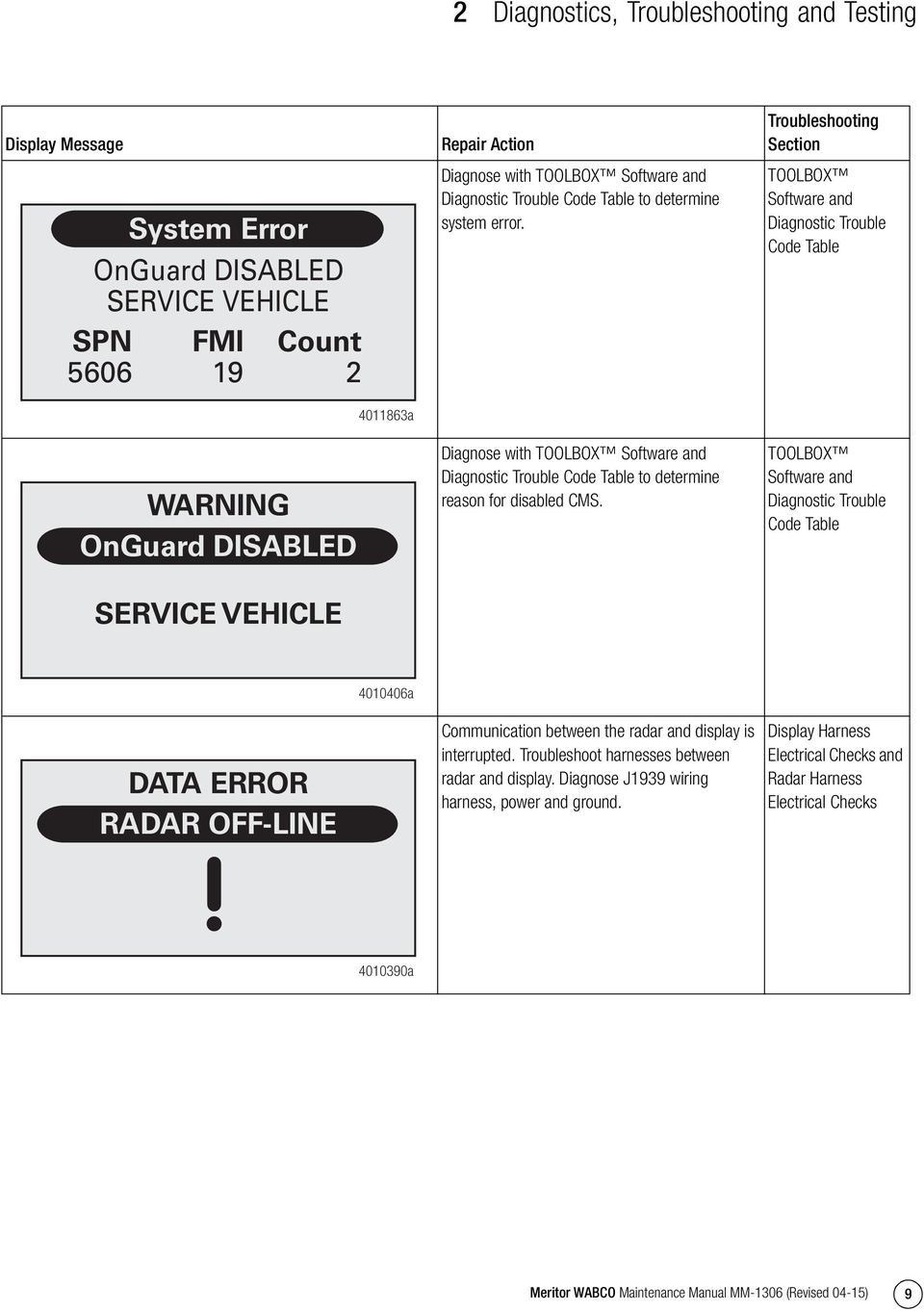
15 Table A: System Error Screen Repair Action Display Message System Error OnGuard DISABLED SERVICE VEHICLE SPN FMI 14 Count a Repair Action Remove snow, mud, etc. from fascia or between radar and fascia. Troubleshooting Section Blocked SPN System Error BLOCKED RADAR REMOVE DEBRIS FMI 14 Count 2 RADAR ALIGNMENT Radar Not Aligned Start Alignment Process a Radar not aligned. Perform Radar Sensor Service Alignment using TOOLBOX Software. Ignition cycle may be required to clear the fault and restore system function. Radar Sensor Alignment 0% a 8 Meritor WABCO Maintenance Manual MM-1306 (Revised 04-15)

16 Display Message System Error OnGuard DISABLED SERVICE VEHICLE SPN 5606 FMI 19 Count 2 OnGuard DISABLED a Repair Action Diagnose with TOOLBOX Software and Diagnostic Trouble Code Table to determine system error. Diagnose with TOOLBOX Software and Diagnostic Trouble Code Table to determine reason for disabled CMS. Troubleshooting Section TOOLBOX Software and Diagnostic Trouble Code Table TOOLBOX Software and Diagnostic Trouble Code Table SERVICE VEHICLE DATA ERROR RADAR OFF-LINE a Communication between the radar and display is interrupted. Troubleshoot harnesses between radar and display. Diagnose J1939 wiring harness, power and ground. Display Harness Electrical Checks and Radar Harness Electrical Checks a Meritor WABCO Maintenance Manual MM-1306 (Revised 04-15) 9
17 Display Message CAN BUS ERROR No J1939 Messages Repair Action Diagnose J1939 wiring harness. Troubleshooting Section Electrical System and Harness Troubleshooting CHECK CONNECTIONS a NO ACC ACC is Inactive. CMS is still active. Cruise control is disabled. Diagnose with TOOLBOX Software and Diagnostic Trouble Code Table to determine reason for disabled ACC. TOOLBOX Software and Diagnostic Trouble Code Table CMS a OnGuard DTCs may be generated and displayed during service procedures on other electrical system components (i.e., engine, transmission, ABS, etc.). If the OnGuard display screen turns amber with error screens or DTCs visible after the vehicle has been serviced for other vehicle system issues, cycle the ignition OFF for one minute, turn the ignition back ON, start the engine and run at idle speed for one minute. OnGuard DTCs caused by other systems that have been repaired should be cleared. If active DTCs remain, continue troubleshooting. If the OnGuard Collision Mitigation System is not correctly tracking vehicles that are in your lane or is tracking vehicles that are not in your lane, this may be due to radar operational issues. Typically these are radar operational issues that can result from the following problems: Debris (dirt, snow, ice) on the radar fascia or between the fascia and the radar sensor. This must be removed. The radar sensor may be loose or not tightly secured on the mounting bracket. The radar sensor may be too close to or actually contacting the bumper as mounted, which will affect the radar signal. There should be at least 1/4 inch of clearance between the fascia, radar sensor or bracket and the bumper. Contact your vehicle manufacturer representative on adjustments to the bumper for radar sensor clearance. The radar may not be aligned correctly. Refer to the Radar Sensor Service Alignment procedure. If the vehicle s standard cruise control is working and OnGuard Adaptive Cruise Control (ACC) is not working, consult your dealer or engine supplier. This can occur if the engine controller has been re-programmed or the engine parameter that activates Adaptive Cruise Control has been turned off. Consult with your dealer or engine supplier for engine software and parameter adjustments. 10 Meritor WABCO Maintenance Manual MM-1306 (Revised 04-15)

18 TOOLBOX Software NOTE: To download TOOLBOX Software, visit meritorwabco.com. To access the Meritor WABCO TOOLBOX Software from the desktop screen, double-click on the Meritor WABCO TOOLBOX icon. Figure 2.4. Displaying Radar Information: To retrieve radar sensor information, select Diagnostic Information from the home screen. This will then display the radar sensor part number and radar software version, as well as other important information. Figure 2.6. Figure 2.6 Figure a Figure 2.4 From the message box that appears, click on the OnGuard Radar Diagnostics button. Figure 2.5. Figure a Figure 2.5 Retrieving DTCs: 1. To display OnGuard radar sensor DTCs, select the Display option from the menu. 2. From the pull-down menu, select Diagnostic Trouble Codes to bring up the DTC information screen. Figure 2.7. Figure 2.7 Diagnostic Trouble Codes Misalignment Angles a Figure 2.5 NOTE: OnGuard will only communicate on J1939. Verify that the correct device and protocol are selected under Adapter selection in Utilities. If the protocol was changed, you will need to cycle the key a Figure 2.7 Meritor WABCO Maintenance Manual MM-1306 (Revised 04-15) 11

19 3. A description of the DTC, the number of times the DTC occurred, the suspect parameter number (SPN) and the failure mode identifier (FMI) are all displayed in the Diagnostic Trouble Codes window. Basic repair instructions for each DTC are also provided. Figure 2.8. After making the necessary repairs, use the Clear Faults button to clear the DTCs. Figure 2.10 Figure b Figure 2.10 DTCs can be cleared after generating a fault report. Only stored DTCs will clear. Figure 2.8. Figure a 4. A fault report can also be generated by selecting the Generate Fault Report button, while in the Diagnostic Trouble Codes screen. A Save As screen will then come up asking you to name the file and select where it will be saved. Figure 2.9. The Fault Report screen provides additional information that is not included in the Diagnostic Trouble Codes screen. Figure Recording J1939 Data: 1. Go to J1939 Bus Monitor in the TOOLBOX Software Utilities menu. 2. To capture a log file, click on Start Logging. Figure A single log file will capture up to five minutes of information. To pause a log file, click on Pause ; to resume logging, click on Resume. Once the required data has been captured, click on Stop Logging. Figure Figure 2.11 Figure a Figure a Figure Meritor WABCO Maintenance Manual MM-1306 (Revised 04-15)

20 Figure 2.12 Figure a a Figure A Save As screen will then come up asking you to name the file and select where it will be saved. Figure Specific messages can also be viewed after saving the file by clicking on Load Saved Data, and then highlighting the desired message. Figure Figure 2.13 Figure 2.14 OnGuard Radar Diagnostic Trouble Code Table The following table provides repair instructions and the corresponding Troubleshooting Sections in this manual for SPN/FMI DTCs that are readable using TOOLBOX Software. If the display shows a code not listed in the table, contact the Meritor OnTrac Customer Call Center at 866-OnTrac1 ( ) for assistance a Figure 2.13 Meritor WABCO Maintenance Manual MM-1306 (Revised 04-15) 13

21 Table B: Diagnostic Trouble Code Table SPN FMI Display Color System Reaction Cause/Description Action/Repair Instructions Amber OnGuard Amber OnGuard Amber OnGuard Amber OnGuard Amber OnGuard Amber OnGuard Amber OnGuard Incorrect J1939 Parking Brake Switch data received in CCVS1 message (from engine ECM, body, cab or chassis controller) Incorrect J1939 Wheel-Based Vehicle Speed data received in CCVS1 message (usually from engine ECM) Incorrect J1939 Cruise Control Set Speed data received in CCVS1 message (usually from engine ECM) Incorrect J1939 Accelerator Pedal Position 1 data received in EEC2 message (usually from engine ECM, also possible in body, cab or chassis controller) J1939 Engine Configuration 1 (EC1) message not received or intermittent Incorrect J1939 Engine Speed At Idle data received in EC1 message from engine Incorrect J1939 Engine Speed data received in EEC1 message from engine Verify operation of the Parking Brake Switch and the ECU broadcasting this information on the J1939 network (engine ECM, body, cab or chassis controller) is functional. Verify the correct radar part number is installed on the vehicle. Verify the correct radar part number is installed on the vehicle. Verify the engine ECM is functional and has correct software and parameters. Verify the correct radar part number is installed on the vehicle. Cycle the ignition to clear DTCs after engine Verify the engine ECM is functional and has correct software and parameters. Verify the Accelerator Pedal is operating correctly and the ECU broadcasting this information on the J1939 network (engine ECM, body, cab or chassis controller) is functional. Verify the correct radar part number is used on the vehicle. Cycle the ignition to clear DTCs after engine Verify engine ECM is functional and has correct software and parameters. Cycle the ignition to clear DTCs after engine Verify engine ECM is functional and has correct software and parameters. Cycle the ignition to clear DTCs after engine Verify engine ECM is functional and has correct software and parameters. 14 Meritor WABCO Maintenance Manual MM-1306 (Revised 04-15)
22 SPN FMI Display Color System Reaction Cause/Description Action/Repair Instructions Amber OnGuard Amber OnGuard Amber OnGuard Amber OnGuard Amber OnGuard Amber OnGuard Amber OnGuard Incorrect J1939 Transmission Output Shaft Speed data received in ETC1 message from transmission Incorrect J1939 Driver s Demand Engine - Percent Torque data received in EEC1 message from engine J1939 Electronic Engine Controller 1 (EEC1) message not received or intermittent Incorrect J1939 Actual Engine - Percent Torque data received in EEC1 message from engine J1939 Electronic Retarder Controller 1 (ERC1) message not received or intermittent Incorrect J1939 Actual Retarder - Percentage Torque data received in ERC1 message from engine retarder Incorrect J1939 Brake Pedal Position data received in EBC1 message from ABS Verify the correct radar part number is installed on the vehicle. Cycle the ignition to clear DTCs after transmission Verify the transmission ECU is functional and has correct software and parameters. Cycle the ignition to clear DTCs after engine Verify the engine ECM is functional and has correct software and parameters. Cycle the ignition to clear DTCs after engine Verify the engine ECM is functional and has correct software and parameters. Cycle the ignition to clear DTCs after engine Verify the engine ECM is functional and has correct software and parameters. Cycle the ignition to clear DTCs after engine Verify the engine ECM is functional and has correct software and parameters. Cycle the ignition to clear DTCs after engine Verify the engine ECM is functional and has correct software and parameters. Use Meritor WABCO TOOLBOX Software PC Diagnostics to test the ABS Brake Pedal Pressure Sensor. Verify the correct radar part number is installed on the vehicle. Verify the correct ABS ECU part number is used on the vehicle. Cycle the ignition to clear DTCs after ABS Meritor WABCO Maintenance Manual MM-1306 (Revised 04-15) 15
23 SPN FMI Display Color System Reaction Cause/Description Action/Repair Instructions Amber OnGuard Amber OnGuard Amber OnGuard Amber OnGuard Amber OnGuard Amber OnGuard J1939 Electronic Transmission Controller 2 (ETC2) message not received or intermittent Incorrect J1939 Transmission Current Gear data received in ETC2 message from transmission J1939 Cruise Control/Vehicle Speed 1 (CCVS1) message from the primary source (usually the engine) not received or intermittent Incorrect J1939 Cruise Control States data received in CCVS1 message (usually from engine, also possible from body, cab or chassis controller) Incorrect J1939 Engine Reference Torque data in EC1 message received from engine J1939 Electronic Engine Controller 2 (EEC2) message not received or intermittent Verify the correct OnGuard radar part number is installed on the vehicle. Cycle the ignition to clear DTCs after transmission Verify transmission ECU is functional and has correct software and parameters. Verify the correct radar part number is installed on the vehicle. Cycle the ignition to clear DTCs after transmission Verify transmission ECU is functional and has correct software and 527 parameters. Verify the correct OnGuard radar part number is installed on the vehicle. Cycle the ignition to clear DTCs after engine Verify engine ECU is functional and has correct software and parameters. Verify the correct radar part number is installed on the vehicle. Cycle the ignition to clear DTCs after engine Verify the engine ECM (or body, cab or chassis controller) is functional and has correct software and parameters. Cycle the ignition to clear DTCs after engine Verify the engine ECM is functional and has correct software and parameters. Verify the correct OnGuard radar part number is installed on the vehicle. Cycle the ignition to clear DTCs after engine Verify engine ECU is functional and has correct software and parameters. 16 Meritor WABCO Maintenance Manual MM-1306 (Revised 04-15)
24 SPN FMI Display Color System Reaction Cause/Description Action/Repair Instructions Amber OnGuard Amber OnGuard Amber OnGuard Amber OnGuard Amber OnGuard Amber OnGuard J1939 Electronic Transmission Controller 1 (ETC1) message not received or intermittent Incorrect J1939 Transmission Driveline Engaged data received in ETC1 message from transmission Incorrect J1939 Anti-Lock Braking Active data received in EBC1 message from ABS Incorrect J1939 Transmission Shift In Process data received in ETC1 message from transmission Incorrect J1939 Cruise Control Enable Switch data received in CCVS1 message (from engine ECM, body, cab or chassis controller) Incorrect J1939 Brake Switch data received in CCVS1 message (from engine ECM, body, cab or chassis controller) Verify the correct OnGuard radar part number is installed on the vehicle. Cycle the ignition to clear DTCs after transmission Verify transmission ECU is functional and has correct software and parameters. Verify the correct OnGuard radar part number is installed on the vehicle. Cycle the ignition to clear DTCs after transmission Verify transmission ECU is functional and has correct software and parameters. Verify the correct ABS ECU part number is used on this vehicle. Cycle the ignition to clear the DTCs after ABS Verify the correct radar part number is installed on the vehicle. Cycle the ignition to clear DTCs after transmission Verify the transmission ECU is functional and has correct software and parameters. Verify operation of the Cruise Control Enable Switch and the ECU broadcasting this information on the J1939 network (engine ECM, body, cab or chassis controller) is functional. Verify the correct radar part number is installed on the vehicle. Verify operation of the Brake Switch and the ECU broadcasting this information on the J1939 network (engine ECM, body, cab or chassis controller) is functional. Verify the correct radar part number is installed on the vehicle. Meritor WABCO Maintenance Manual MM-1306 (Revised 04-15) 17
25 SPN FMI Display Color System Reaction Cause/Description Action/Repair Instructions Amber OnGuard Amber OnGuard Amber OnGuard Amber OnGuard Amber OnGuard Amber OnGuard Amber OnGuard Incorrect J1939 Clutch Switch data received in CCVS1 message (from engine ECM, body, cab or chassis controller) Incorrect J1939 Cruise Control Set Switch data received in CCVS1 message (from engine ECM, body, cab or chassis controller) Incorrect J1939 Cruise Control Resume Switch data received in CCVS1 message (from engine ECM, body, cab or chassis controller) Bootloader error usually caused when there is an issue during a radar software update J1939-Wheel Speed Information (EBC2) message from the ABS not received or intermittent CAN Out of Range for signal EBC2_FRNT_AXLE_SPD. See ABS ECU. CAN Out of Range for signal EBC2_RELSPD_FRNTAXLE_LW Verify operation of the Clutch Switch and the ECU broadcasting this information on the J1939 network (engine ECM, body, cab or chassis controller) is functional. Verify the correct radar part number is installed on the vehicle. Verify operation of the Cruise Control Set Switch and the ECU broadcasting this information on the J1939 network (engine ECM, body, cab or chassis controller) is functional. Verify the correct radar part number is installed on the vehicle. Verify operation of the Cruise Control Resume Switch and the ECU broadcasting this information on the J1939 network (engine ECM, body, cab or chassis controller) is functional. Verify the correct radar part number is installed on the vehicle. Run the software update again. Is usually seen in TOOLBOX Software with SPN FMI 31 on the display. Verify the ABS ECU is connected to the J1939 network and is functional. Verify correct ABS part number is used. Cycle ignition to clear DTCs after ABS Verify the ABS ECU is connected to the J1939 network and is functional. Verify correct radar part number is installed on the vehicle. Verify wheel speed sensor signal per ABS ECU diagnostics. Cycle ignition to clear DTCs after ABS Check ABS ECU for proper function and active faults. Verify correct ABS ECU is installed. 18 Meritor WABCO Maintenance Manual MM-1306 (Revised 04-15)
26 SPN FMI Display Color System Reaction Cause/Description Action/Repair Instructions Amber OnGuard Amber OnGuard Amber OnGuard Amber OnGuard Amber OnGuard Amber OnGuard Amber OnGuard CAN Out of Range for signal EBC2_RELSPD_FRNTAXLE_RW CAN Out of Range for signal EBC2_RELSPD_REARAXLE_LW CAN Out of Range for signal EBC2_RELSPD_REARAXLE_RW J1939 Electronic Brake Controller 1 (EBC1) message from the ABS not received or intermittent Incorrect J1939 EBS Brake Switch data received in EBC1 message from ABS Incorrect J1939 ABS Fully Operational data received in EBC1 message from ABS J1939 Adaptive Cruise Control 1 (ACC1) message from the engine not received or intermittent Check ABS ECU for proper function and active faults. Verify correct ABS ECU is installed. Check ABS ECU for proper function and active faults. Verify correct ABS ECU is installed. Check ABS ECU for proper function and active faults. Verify correct ABS ECU is installed. Verify the ABS ECU is connected to the J1939 network and is functional. Verify correct ABS part number is used. Cycle ignition to clear DTCs after ABS Use Meritor WABCO TOOLBOX Software PC Diagnostics to test the ABS Brake Pedal Pressure Sensor. Verify the correct radar part number is installed on the vehicle. Verify the correct ABS ECU part number is used on the vehicle. Cycle the ignition to clear DTCs after ABS Use Meritor WABCO TOOLBOX Software PC Diagnostics to test the Anti-Lock Braking System. Verify the correct radar part number is installed on the vehicle. Verify the correct ABS ECU part number is used on the vehicle. Cycle the ignition to clear DTCs after ABS Verify the correct OnGuard radar part number is installed on the vehicle. Cycle the ignition to clear DTCs after engine Verify the engine ECM has the Adaptive Cruise Control parameter enabled. Meritor WABCO Maintenance Manual MM-1306 (Revised 04-15) 19
27 SPN FMI Display Color System Reaction Cause/Description Action/Repair Instructions Amber OnGuard Amber OnGuard Amber OnGuard Amber OnGuard Amber OnGuard Incorrect J1939 ACC Mode data in ACC1 message received from engine. This code may indicate the engine has recognized a radar malfunction (e.g. blocked radar) and has disabled Cruise Control. This code may also indicate the engine is not configured for operation with an Adaptive Cruise Control system. Incorrect J1939 Cruise Control Pause Switch data received in CCVS1 message (from engine ECM, body, cab or chassis controller) J1939 Electronic Brake Controller 5 (EBC5) message from ABS not received or intermittent J1939 Adaptive Cruise Control 2 (ACC2) message from the OnGuard display (or instrument cluster) not received or intermittent J1939 Cruise Control/Vehicle Speed 3 (CCVS3) message (usually from the engine) not received or intermittent Check for multiple active DTCs in the radar. If there is more than one active code, repair all other codes, then cycle the ignition to clear the error recognition in the engine. If this is the only active DTC, verify the engine ECM has the Adaptive Cruise Control parameter enabled. Verify operation of the Cruise Control Pause Switch and the ECU broadcasting this information on the J1939 network (engine ECM, body, cab or chassis controller) is functional. Verify the correct radar part number is installed on the vehicle. Verify the ABS ECU is connected to the J1939 network and is functional. Verify the correct OnGuard radar part number is installed on the vehicle. Verify correct ABS part number is used. Cycle ignition to clear DTCs after ABS Intermittent power or J1939 network connection to OnGuard display or instrument cluster. Verify harness is correct. Verify correct software version in OnGuard display or instrument cluster. Verify the correct OnGuard radar part number is installed on the vehicle. Cycle the ignition to clear DTCs after engine Verify the engine ECM has the Adaptive Cruise Control parameter enabled. 20 Meritor WABCO Maintenance Manual MM-1306 (Revised 04-15)
28 SPN FMI Display Color System Reaction Cause/Description Action/Repair Instructions Amber OnGuard Amber OnGuard Amber OnGuard Amber OnGuard Amber OnGuard Incorrect J1939 Adaptive Cruise Control Readiness Status data received in CCVS3 message from engine. This code may indicate the engine has recognized a radar malfunction (e.g. blocked radar) and has disabled Cruise Control. This code may also indicate the engine is not configured for operation with an Adaptive Cruise Control system. J1939 Advanced Emergency Braking System 2 (AEBS2) message from the OnGuard display (or instrument cluster) not received or intermittent Incorrect J1939 Driver activation demand for Advanced Emergency Braking System data received in AEBS2 message from OnGuard display (or instrument cluster) Incorrect J1939 AEBS2 Message Counter data received in AEBS2 message from OnGuard display (or instrument cluster) Incorrect J1939 AEBS2 Message Checksum data received in AEBS2 message from OnGuard display (or instrument cluster) Verify the fault is active at all times by cycling the key off for 2 to 3 minutes and powering it back up to see if the fault code is still active. Verify there are no faults in any system on the vehicle and repair all other faults before diagnosing the OnGuard system. Check for multiple active DTCs in the radar. If there is more than one active code, repair all other codes, then cycle the ignition to clear the error recognition in the engine. If this is the only active DTC, instruct the dealer to verify with the engine manufacturer that the engine parameters are set correctly. Check any optional components that are connected to the J1939 network that may cause a message issue. Intermittent power or J1939 network connection to OnGuard display or instrument cluster. Verify harness is correct. Verify correct software version in OnGuard display or instrument cluster. Intermittent power or J1939 network connection to OnGuard display (or instrument cluster). Verify harness is correct. Verify correct software version in OnGuard display (or instrument cluster). Intermittent power or J1939 network connection to OnGuard display (or instrument cluster). Verify harness is correct. Verify correct software version in OnGuard display (or instrument cluster). Intermittent power or J1939 network connection to OnGuard display (or instrument cluster). Verify harness is correct. Verify correct software version in OnGuard display (or instrument cluster). Meritor WABCO Maintenance Manual MM-1306 (Revised 04-15) 21
29 SPN FMI Display Color System Reaction Cause/Description Action/Repair Instructions Amber OnGuard Amber OnGuard Amber OnGuard Amber OnGuard Amber OnGuard Amber OnGuard Bootloader error usually caused when there is an issue during a radar software update. J1939 Cruise Control/Vehicle Speed 1 (CCVS1) message from second source (usually the body controller or chassis controller) not received or intermittent J1939 Cruise Control/Vehicle Speed 1 (CCVS1) message from third source (usually the body controller or chassis controller) not received or intermittent J1939 Retarder Configuration (RC) message from the engine retarder not received or intermittent Incorrect J1939 Reference Retarder Torque data received in RC message from engine retarder CAN 1 Bus Off Run the software update again. Is usually seen in MeritorWABCO TOOLBOX Software PC Diagnostics with SPN FMI 31 on the display. Verify the correct OnGuard radar part number is installed on the vehicle. Verify the body/chassis ECU is functional and has correct software and parameters. Cycle the ignition to clear DTCs after servicing body/chassis ECU. If SPN FMI 9 is also active in conjunction with this code, there may be an issue with the Central Gateway Module, review with the OEM. Verify the correct OnGuard radar part number is installed on the vehicle. Verify the body/chassis ECU is functional and has correct software and parameters. Cycle the ignition to clear DTCs after servicing body/chassis ECU. If SPN FMI 9 is also active in conjunction with this code, there may be an issue with the Central Gateway Module, review with the OEM. Verify the correct OnGuard radar part number is installed on the vehicle. Cycle the ignition to clear DTCs after engine Verify engine-retarder-ecu is functional and has correct parameters and software downloaded from database. Verify the correct engine-retarder-ecu part number is installed on this vehicle. Cycle the ignition to clear DTCs after retarder Check CAN wiring at other ECUs. 22 Meritor WABCO Maintenance Manual MM-1306 (Revised 04-15)
30 SPN FMI Display Color System Reaction Cause/Description Action/Repair Instructions Amber OnGuard Amber OnGuard Amber OnGuard Amber OnGuard Amber OnGuard J1939 network messages not received or intermittent Excessive automatic braking is used to maintain safe following interval while driving down hill This code may indicate the engine has recognized a radar malfunction (e.g. blocked radar) and has disabled Cruise Control. This code may also indicate the engine is not configured for operation with an Adaptive Cruise Control system. Malfunction in the Anti-Lock Braking System caused OnGuard to be temporarily disabled Malfunction in the Anti-Lock Braking System caused OnGuard to be temporarily disabled Verify J1939 network backbone, stub connections to each ECU and terminating resistors are correct. Verify engine, ABS and OnGuard display are operational and communicating on J1939 network. Stored Fault: Driver must reduce speed and use a lower gear while driving down hill. Verify the correct OnGuard radar part number is installed on the vehicle. Verify the fault is active at all times by cycling the key off for 2 to 3 minutes and powering it back up to see if the fault code is still active. Check for multiple active DTCs in the radar. If there is more than one active code, repair all other codes, then cycle the ignition to clear DTCs. If this is the one active DTC, instruct the dealer to verify with the engine manufacturer the engine parameters are set correctly. Use Meritor WABCO TOOLBOX PC Diagnostics to test the Anti-Lock Braking System. Verify the correct radar part number is installed on the vehicle. Verify the correct ABS ECU part number is used on the vehicle. Cycle the ignition to clear DTCs after ABS Verify the correct ABS ECU part number is used on the vehicle. Use Meritor WABCO TOOLBOX Software PC Diagnostics to test the Anti-Lock Braking System. Verify the correct radar part number is installed on the vehicle. Cycle the ignition to clear DTCs after ABS Meritor WABCO Maintenance Manual MM-1306 (Revised 04-15) 23
31 SPN FMI Display Color System Reaction Cause/Description Action/Repair Instructions Amber OnGuard Amber OnGuard Amber OnGuard Amber OnGuard Amber Blocked Radar. Remove Debris Amber OnGuard Amber OnGuard Amber OnGuard Extended Plausibility check for Signal Brake System accepts AEBS XBR OnGuard radar sensor is not aligned Cruise Control States and Adaptive Cruise Control Mode are Mismatched Wabco Production Data could not be read from EEPROM during startup OnGuard Radar Sensor blocked by ice, mud or debris while driving. Reflected signal from other vehicles is too weak OnGuard Radar Sensor blocked. No stationary objects observed within 2 minutes while driving VDY velocity correction factor is Out of Range Unknown error during alignment. Software did not respond on time Verify the correct ABS ECU part number is used on the vehicle. Use Meritor WABCO TOOLBOX Software PC Diagnostics to test the Anti-Lock Braking System. Verify the correct radar part number is installed on the vehicle. Cycle the ignition to clear DTCs after ABS Perform Service Alignment. Cycle ignition and determine if issue is resolved. Driver must cycle Brake Switch and Clutch Switch prior to activating Cruise Control. Cycle the ignition to clear DTCs. Park the vehicle in a safe location, set the Parking Brake and turn ignition OFF. Inspect and clean the radar fascia. The DTC will be cleared when ignition is switched ON. Drive the vehicle in traffic about 5 minutes at speeds above 20 mph to confirm the blockage is cleared. Park the vehicle in a safe location, set the Parking Brake and turn ignition OFF. Inspect and clean the radar fascia. Re-start the engine. DTC should clear as the vehicle begins driving above 15 mph. If the Blocked Radar DTC causes a secondary engine DTC, an additional ignition OFF cycle may be required to clear the secondary DTC. Check speed signal parameters in engine, braking system, and tachograph. Perform Service Alignment. 24 Meritor WABCO Maintenance Manual MM-1306 (Revised 04-15)
32 SPN FMI Display Color System Reaction Cause/Description Action/Repair Instructions Amber Radar Alignment. Failed Left Amber Radar Alignment. Failed Right Amber Radar Alignment. Failed High. Alignment monitoring failed in azimuth - Radar sensor is looking too far to the right. This code may indicate the radar installation was damaged by impact (frame cross-member, bumper, radar bracket, etc.). This code may also indicate a Radar Service Alignment was not completed following axle alignment. Alignment monitoring failed in azimuth - Radar sensor is looking too far to the left. This code may indicate the radar installation was damaged by impact (frame cross-member, bumper, radar bracket, etc.). This code may also indicate a Radar Service Alignment was not completed following axle alignment. Alignment monitoring failed in azimuth - Radar sensor is looking too low. This code may indicate the radar installation was damaged by impact (frame cross-member, bumper, radar bracket, etc.). This code may also indicate a Radar Service Alignment was not completed following axle alignment. Check for damage to radar sensor, bracket and fascia. Perform Service Alignment. Check for damage to radar sensor, bracket and fascia. Perform Service Alignment. Check for damage to radar sensor, bracket and fascia. Perform Service Alignment. Meritor WABCO Maintenance Manual MM-1306 (Revised 04-15) 25
33 SPN FMI Display Color System Reaction Cause/Description Action/Repair Instructions Amber Radar Alignment. Failed Low Amber OnGuard Amber OnGuard Amber OnGuard Amber OnGuard Alignment monitoring failed in azimuth - Radar sensor is looking too high. This code may indicate the radar installation was damaged by impact (frame cross-member, bumper, radar bracket, etc.). This code may also indicate a Radar Service Alignment was not completed following axle alignment. Electrical supply voltage too low Electrical supply voltage too high Shutdown by OSEK Motor azimuth: Blockage detected Check for damage to radar sensor, bracket and fascia. Perform Service Alignment. Verify that the voltage at the radar sensor connector is greater than 6 VDC with a 1 amp load (e.g. tail light or marker light bulb). Inspect the radar connector for corrosion. Inspect each of the power connections between the ignition switch and the radar to determine where loss of power may be occurring. Monitor the battery voltage to determine if the battery is providing voltage between 10 and 16 VDC. If the voltage is too high, troubleshoot the voltage regulator and alternator system. Determine if a jump start or battery charging has occurred that could cause a vehicle overvoltage condition. Cycle ignition power off for 2 to 3 minutes. Verify fault does not return. Verify no visible/physical damage to radar. Check power ground and load test at the radar harness connector. If fault persists after completing previous checks and repairs, this may indicate the radar has failed. 26 Meritor WABCO Maintenance Manual MM-1306 (Revised 04-15)
34 SPN FMI Display Color System Reaction Cause/Description Action/Repair Instructions Amber OnGuard Amber OnGuard Amber OnGuard Amber OnGuard Amber OnGuard Amber OnGuard Motor azimuth: Blockage detected Motor azimuth: crosscheck between light barrier and bemf speed Motor Azimuth: drum runs in a wrong direction Motor Azimuth: light barrier speed is out of range for more than 5 minutes Motor Azimuth: bemf speed is out of range for more than 5 minutes Motor elevation: plate is blocked or not available Verify no visible/physical damage to radar. Check power ground and load test at the radar harness connector. If fault persists after completing previous checks and repairs, this may indicate the radar has failed. Verify no visible/physical damage to radar. Check power ground and load test at the radar harness connector. If fault persists after completing previous checks and repairs, this may indicate the radar has failed. Verify no visible/physical damage to radar. Check power ground and load test at the radar harness connector. If fault persists after completing previous checks and repairs, this may indicate the radar has failed. Verify no visible/physical damage to radar. Check power ground and load test at the radar harness connector. If fault persists after completing previous checks and repairs, this may indicate the radar has failed. Verify no visible/physical damage to radar. Check power ground and load test at the radar harness connector. If fault persists after completing previous checks and repairs, this may indicate the radar has failed. Verify no visible/physical damage to radar. Check power ground and load test at the radar harness connector. If fault persists after completing previous checks and repairs, this may indicate the radar has failed. Meritor WABCO Maintenance Manual MM-1306 (Revised 04-15) 27
35 SPN FMI Display Color System Reaction Cause/Description Action/Repair Instructions Amber OnGuard Amber OnGuard Motor elevation: Fault while setting back the original plate position occurred Bootloader: invalid Bootloader and application interface Verify no visible/physical damage to radar. Check power ground and load test at the radar harness connector. If fault persists after completing previous checks and repairs, this may indicate the radar has failed. Run the software update again. Cycle ignition power off for 3 minutes and power on. If fault persists after completing previous checks and repairs, this may indicate the radar has failed. Hazard Alert Messages Read and observe all Warning and Caution hazard alert messages in this publication. They provide information that can help prevent serious personal injury, damage to components, or both. To prevent serious eye injury, always wear safe eye protection when you perform vehicle maintenance or service. Release all air from the air systems before you remove any components. Pressurized air can cause serious personal injury. Refer to the vehicle manufacturer s service manual for instructions. Radar Inspection and Preventive Maintenance Radar Inspection NOTE: It is recommended to perform the radar inspection process every time normal preventive maintenance is performed on the vehicle. 1. Remove the fascia and inspect the bumper positioning. Check if the bumper is physically touching the radar sensor, fascia or mounting bracket at any point. If the bumper is touching the fascia: Reposition the bumper so there is a minimum of 1/4-inch (6.35 mm) clearance between it and the fascia at all points. 2. Visually inspect the radar connector and housing for any damage. Inspect the edge of the fascia for any signs of wear or prior contact with the bumper. Also, inspect the routing of the radar sensor harness to ensure it is not pinched in the bumper or damaged at any point. The rubber boot on the radar harness connector must fully cover the connector. 3. Grab onto the radar sensor and gently wiggle it back and forth. You should not feel any slack or movement in the installation. The radar sensor should be securely mounted at all three positions. 4. If the radar passes all of these inspections, reinstall the fascia and verify correct vertical and horizontal alignment according to the Radar Sensor Service Alignment procedure in this section. Radar System Troubleshooting Refer to the Diagnostic Trouble Code Table for further information. The following sections and sub-sections are the troubleshooting sections and sub-sections referenced in the last column of the Diagnostic Trouble Code Table. Radar Sensor Connector Corrosion Radar sensor connector corrosion has been found on vehicles where the radar sensor connector or protective rubber boot has been incorrectly installed following service. When the connector is not fully seated during installation or repair activities, water, corrosive road salts or other contaminants can enter the radar sensor 28 Meritor WABCO Maintenance Manual MM-1306 (Revised 04-15)
36 connector. When salt water interacts with electrical current, corrosion occurs quickly. When this occurs, severe corrosion can occur on the radar sensor and harness pins. If this corrosion is not detected early enough, a fault may be generated and the radar sensor and radar sensor harness may need to be replaced. Corrosion in the connector may also occur if the radar sensor harness becomes damaged somewhere along the length of the harness. Water and corrosive road salts can wick down the harness and into the radar sensor connector. If damage to the harness is detected early enough, damage to the radar sensor connector can be avoided. Use of rubber boot to protect the connector improves the corrosion performance of the connector. After the harness connector has been mated to the radar sensor connector, slide the boot over the harness connector body. This will ensure that water, salt, mud, ice, snow and other debris will not enter the connector during vehicle operation. Radar Blocked The radar sensor is protected by a fascia. The fascia and the radar sensor must not be blocked in any manner. The radar sensor can become blocked by snow, ice, dirt or other foreign matter. If this occurs, the radar sensor will have limited or no functionality. If a Radar Blocked error occurs, the screen in Figure 2.15 or Figure 2.16 will be presented on the OnGuard display: Figure 2.15 System Error OnGuard DISABLED SERVICE VEHICLE SPN FMI 14 Count 2 Figure a Figure 2.16 Figure 2.16 If this occurs, perform the following procedure: 1. Determine if the radar sensor is blocked by snow, ice, dirt or anything else. 2. Clean the surface of the fascia and between the fascia and the radar sensor. Remove any foreign debris that may form in this area. Removal of the fascia may be necessary to completely remove the radar sensor and the inside of the fascia. Do not remove the radar. 3. Verify the fascia is correctly installed. 4. Cycle the ignition OFF for one minute to clear the fault. The vehicle must be driven to determine if the fault has been corrected. Radar Sensor Service Alignment If the radar sensor needs to be replaced, the radar sensor mounting system has become damaged or has loosened, or new radar sensor software has been installed, a Radar Sensor Service Alignment will need to be performed. If a Radar Sensor Service Alignment is required, the Radar Not Aligned Screen may be displayed as shown in Figure Figure 2.17 SPN System Error BLOCKED RADAR REMOVE DEBRIS FMI 14 Count 2 RADAR ALIGNMENT Radar Not Aligned Start Alignment Process a 0% a Figure 2.17 Meritor WABCO Maintenance Manual MM-1306 (Revised 04-15) 29
37 NOTE: While the OnGuard system is in Service Alignment mode, OnGuard will not track vehicles or operate until the Service Alignment procedure is completed. Due to this, the system will set a DTC SPN 5606 FMI 19. This can be cleared by cycling the key off for a few minutes. 1. Before starting the alignment procedure, visually verify that the radar sensor is not loose. To correctly inspect the integrity of the radar mounting hardware, hold on to the radar and wiggle it back and forth. There should not be any physical or visual movement or slack in the radar or radar mounting bracket. Ensure there is at least 1/4-inch (6.35 mm) of clearance between the radar sensor and the bumper in all directions. Contact between the radar sensor and bumper can cause damage to the radar sensor. 2. Use TOOLBOX Software to send a diagnostic command to put the OnGuard system into the service alignment mode. While in this mode, the OnGuard display will show the progress of the alignment process as shown in Figure Figure 2.18 Figure 2.18 RADAR ALIGNMENT Service Alignment In Progress 20% a 3. Drive the vehicle on a straight road above 30 mph (48 kph). The road should have telephone poles, signposts and other non-moving objects along the roadside. There must also be other traffic on the road, either on coming or lead vehicles at distances greater than 150 ft. Stopping the vehicle while traveling in traffic is acceptable but will increase the time needed to complete the alignment procedure. 4. Wait until the Radar Aligned screen in Figure 2.19 appears. This typically takes 10 to 30 minutes of driving time to complete. Figure 2.19 Figure 2.19 RADAR ALIGNMENT Radar Aligned 100% 5. Once completed, the system will revert to one of the normal operating screens. This completes the Radar Sensor Service Alignment procedure. The OnGuard system should now be aligned. The key must now be cycled off for a few minutes to save the alignment. NOTE: If the radar alignment fails, a specific radar alignment error will appear that indicates the direction in which the sensor is incorrectly aimed. If this occurs, review the radar sensor installation, determine if the radar sensor needs to be repositioned (or in some way serviced) and then re-perform the Radar Sensor Service Alignment procedure. Contact OnTrac if the radar service alignment fault cannot be resolved. NOTE: As the vehicle continues to be driven following the Radar Sensor Service Alignment, the OnGuard system performs continuous adjustments to the radar sensor alignment. Further service alignments will generally not be required unless the radar sensor mounting assembly is disturbed, becomes loose or the radar sensor requires replacement. If the OnGuard Radar Service Alignment will not initiate, perform the following procedure. 1. Turn off the ignition for 90 seconds. 2. Start the vehicle and drive above 10 mph a 3. Pull to the side of the road and come to a complete stop d and leave the key on. 4. With the TOOLBOX Software connected, initiate the service alignment to complete the alignment process. 30 Meritor WABCO Maintenance Manual MM-1306 (Revised 04-15)
38 Electrical System and Harnesses Troubleshooting Refer to the Diagnostic Trouble Code Table for further information. The following sections and sub-sections are the troubleshooting sections and sub-sections referenced in the last column of Diagnostic Trouble Code Table. The following procedures require a multi-meter. Note that during pin probing, damage to connector pins can result if the probe exceeds the recommended maximum diameter. For the radar sensor, the maximum diameter is inch (1/64-inch). For the OnGuard Display connector, the maximum diameter is inch (1/ 64-inch). Harness Routing and Associated Wire Fatigue or Abrasion Wire fatigue will occur at any harness location where sufficient harness motion allows bending of the wiring. When this occurs, individual harness wires become weakened and can break. The harness can have intermittent or permanent open circuit failures causing the OnGuard Collision Mitigation System to malfunction. Harness abrasion will occur at any harness location where sufficient harness motion allows rubbing of the harness against adjacent vehicle components. When this occurs, the outer harness jacket and the individual wire insulation can wear, causing short circuits between each of the exposed wires or to the vehicle chassis causing the OnGuard Collision Mitigation System to malfunction. The harness is especially susceptible to wear when the harness rubs against a sharp edge. Both wire fatigue and harness abrasion can be prevented by correctly attaching the harness to the chassis at closely spaced intervals while avoiding contact with sharp edges. The harness should be secured with tie wraps every two feet or less in areas where damage may occur. Tie wraps should be tightened with a tie wrap gun set to the appropriate setting to correctly secure the harness without allowing a loose mounting but also not causing the harness to be over-tightened. Over-tightening the tie wrap to the harness can crush the harness jacket and conductors causing harness damage and system failures. Radar Harness Electrical Checks The radar harness is connected to the radar sensor using an eight-pin connector. Figure Figure 2.20 Figure 2.20 Table C: Radar Harness Connector Pinouts Pin Circuit 1 +12V (or ignition) 2 Ignition 3 J1939 High 4 No Connection 5 No Connection 6 J1939 Low 7 No Connection 8 Ground The radar harness connector consists of harness connector housing part number AMP MQS , socket pin part number AMP , WABCO socket AMP ( mm^2) or AMP (0.75mm^2). The following radar sensor harness check should be performed when various DTCs occur. Refer to the Troubleshooting Guide and the Diagnostic Trouble Code Table for further information. Disconnect the radar harness connector and perform the following procedures. 1. Key On/Engine Off Check Pin 1 (power) to Pin 8 (ground) for 12 volts. If the power shows 12 volts, go to step a If the power is less than 12 volts, trace and inspect the harness for severe abrasion or kinks that might crush or cut wires and check all connections for corrosion or connector damage. If any damage is found, replace as necessary. 2. Repeat this procedure for Pin 2 (Ignition) to Pin 8 (ground). Meritor WABCO Maintenance Manual MM-1306 (Revised 04-15) 31
39 3. Key Off/Engine Off Check Pin 8 (ground) to chassis for resistance of less than 1 ohm. If the resistance is less than 1 ohm, go to step 4. If the resistance is higher than 1 ohm, trace and inspect the harness for severe abrasion or kinks that might crush or cut wires and check all connections for corrosion or connector damage. Over-tightened tie wraps may cause this type of damage. If any damage or corrosion is found, repair and replace as necessary. Clean connector corrosion using electrical contact cleaner. 4. Key On/Engine Off Perform a load test across Pins 1 and 8. If good, go to step 5. If bad, trace and inspect the harness for severe abrasion or kinks that might crush or cut wires and check all connections for corrosion or connector damage. Over-tightened tie wraps may cause this type of damage. If any damage or corrosion is found, repair and replace as necessary. Clean connector corrosion using electrical contact cleaner. 5. Repeat Step 4 across Pins 2 and 8. If good, go to step Key Off/Engine Off Check across Pins 3 and 6 (SAE J1939) for resistance of 60 ohms. If the resistance is 120 ohms, check the two termination resistors. Each should measure ohms across the resistor pins. If each individual resistor does not measure ohms, replace the bad termination resistor. Check harness SAE J1939 circuits for open or shorts. If the resistance between Pins 3 and 6 is greater than 130 ohms, both SAE J1939 circuits are open or both termination resistors are missing. Repair and replace as necessary. If the resistance between Pins 3 and 6 is equal to 120 ohms, one of the SAE J1939 circuits is open or one of the termination resistors is missing. Repair and replace as necessary. If the resistance between Pins 3 and 6 is less than 60 ohms, more than two termination resistors are installed, the SAE J1939 harness is shorted or one or more ECUs on the SAE J1939 network are damaged. Remove each ECU connected to the bus one by one until the bus resistance returns to 60 ohms. Repair and replace as necessary. NOTE: Make sure to check the firewall pass-thru connections for loose or broken connections. 7. Key On/Engine Off Check voltage to ground on Pins 3 and 6. The voltage readings on pins 3 and 6 will fluctuate but should always be within a certain range and should never be the same. Pin 3 should be 2.5 volts to 5 volts. Pin 6 should be 2.49 volts or less. The total voltage between pins 3 and 6 should be approximately 5 volts. If the voltages are out of range, review J1939 diagnostics with the vehicle OEM. 8. If no problems are found with the harness, 12V is present at the radar harness connector and the SAE J1939 bus resistance is 60 ohms, replace the radar sensor per the Radar Sensor Replacement procedure in Section Pins 4, 5 and 7 are not used. Display Harness Electrical Checks The display harness is connected to the OnGuard Display mounted in the dashboard. The following display harness checks should be followed when various DTCs occur. Refer to Troubleshooting Guide for further information. Remove the dash to access the back of the OnGuard Display and harness connector. Figure Figure 2.21 Figure a 32 Meritor WABCO Maintenance Manual MM-1306 (Revised 04-15)
40 Disconnect the OnGuard Display harness connector and perform the following electrical checks. Table D: Radar Harness Connector Pins Pin Circuit 1 No Connection 2 No Connection 3 No Connection 4 Ignition 5 Ground 6 J1939 Low 7 J1939 High 8 No Connection 1. Key On/Engine Off Check Pin 4 (power) to Pin 5 (ground) for 12 volts. If power shows 12 volts, go to step 2. If power shows less than 12 volts, trace and inspect the harness for severe abrasion or kinks that might crush or cut wires and check all connections for corrosion or connector damage. If damage is found, repair and replace as necessary. 2. Key Off/Engine Off Check Pin 5 (ground) to chassis for resistance of less than 1 ohm. If the resistance is less than 1 ohm, go to step 3. If the resistance is higher than 1 ohm, trace and inspect the harness for severe abrasion or kinks that might crush or cut wires and check all connections for corrosion or connector damage. If damage is found, repair and replace as necessary. 3. Key On/Engine Off Perform a load test across Pins 4 and 5. If good, go to step 4. If bad, trace and inspect the harness for severe abrasion or kinks that might crush or cut wires and check all connections for corrosion or connector damage. If damage is found, repair and replace as necessary. 4. Key Off/Engine Off Check across Pins 7 and 6 (SAE J1939) for resistance of 60 ohms. If the resistance is 120 ohms, check the two termination resistors. Each should measure ohms across the resistor pins. If each individual resistor does not measure ohms, replace the bad termination resistor. Check harness SAE J1939 circuits for open or shorts. If the resistance between Pins 7 and 6 is greater than 130 ohms, both SAE J1939 circuits are open or both termination resistors are missing. Repair and replace as necessary. If the resistance between Pins 7 and 6 is equal to 120 ohms, one of the SAE J1939 circuits is open or one of the termination resistors is missing. Repair and replace as necessary. If the resistance between Pins 7 and 6 is less than 60 ohms, more than two termination resistors are installed, the SAE J1939 harness is shorted or one or more ECUs on the SAE J1939 network are damaged. Remove each ECU connected to the bus one by one until the bus resistance returns to 60 ohms. Repair and replace as necessary. NOTE: Make sure to check the firewall pass-thru connections for loose or broken connections. 5. Key On/Engine Off Check voltage to ground on Pins 7 and 6 The voltage readings on pins 7 and 6 will fluctuate, but should always be within a certain range and should never be the same. Pin 7 should be 2.5 volts to 5 volts. Pin 6 should be 2.49 volts or less. The total voltage between pins 7 and 6 should be approximately 5 volts. If the voltages are out of range, review J1939 diagnostics with the vehicle OEM. 6. If no problems are found in the harness, 12V is present at the display connector, the SAE J1939 network resistance is 60 ohms and the connector is correctly installed, replace the display per the display replacement procedure in Section Pins 1, 2, 3 and 8 are not used. Meritor WABCO Maintenance Manual MM-1306 (Revised 04-15) 33
41 System Voltage DTC Occasionally the vehicle battery, voltage regulator or alternator can cause the OnGuard Collision Mitigation System to generate high or low voltage DTCs. Refer to the Key ON section of the Radar Harness Electrical Check in this section to determine if correct power is supplied to the system. If a radar undervoltage or overvoltage DTC is present, troubleshoot the vehicle alternator, battery and voltage regulator as required. SAE J1939 Network SAE J1939 network communication errors can occur if all components interacting with the OnGuard Collision Mitigation System are not correctly connected to the network, are transmitting at a different rate than expected or the termination resistors are missing or not correctly positioned at the ends of the SAE J1939 network. Perform the Radar Harness Electrical Check in this section if a radar SAE J1939 network DTC is present. Display Message Timeout Error Occasionally, the OnGuard Collision Mitigation System will generate Display Message Timeout DTCs because the OnGuard Display has stopped sending messages to the radar sensor at a 250 ms rate. This can be caused by an intermittent OnGuard Display power or intermittent SAE J1939 data link connection. Perform the Display Harness Electrical Checks in this section if a Display Message Timeout DTC is present. Display Message Data Error If the Display Message DTC occurs, replace the display per the Display Replacement procedure in Section 3. Component Message Fault Troubleshooting Refer to the Diagnostic Trouble Code Table for further information. The following sections and sub-sections are the troubleshooting sections and sub-sections referenced in the last column of the Diagnostic Trouble Code Table. Message Timeout Occasionally the OnGuard Collision Mitigation System will generate Message Timeout DTCs due to data not being received from the ECUs connected on the SAE J1939 network. This can occur if the cruise control, engine, transmission, ABS, engine retarder or driveline retarder ECUs have been re-flashed with new software that is incorrect, was not downloaded correctly or has the incorrect parameter set. This information may reside in the vehicle OEM ECU database. It is also possible that various ECUs are not operating correctly on the SAE J1939 network or DTCs have occurred during diagnostic procedures. Perform the following procedure if a Message Timeout DTC is present: NOTE: Certain diagnostic software programs, other than TOOLBOX Software, can generate Timeout DTCs. Verify code is Active on the display without any diagnostic software connected to the vehicle. 1. Determine if the software or parameter set from the appropriate ECU has recently been modified. Install the correct software and parameter set if required. 2. Verify that the SAE J1939 network is functioning correctly. Use the Radar Harness Electrical Checks procedure to repair any SAE J1939 network issues. 3. After any ECU servicing has been completed, cycle the ignition OFF for one minute and then back ON for one minute with the engine idling to clear the OnGuard DTC. Verify that the DTC has been cleared. Message Data Error Occasionally the OnGuard Collision Mitigation System will generate Message Data Error DTCs from ECUs connected on the SAE J1939 network. This can occur if an ECU has been re-flashed with new software that is incorrect, was not downloaded correctly or has the wrong parameter set. This information resides in the OEM ECU database. It is also possible that the problem ECU was replaced with the wrong ECU. Perform the following procedure if a Message Data Error DTC is present: 1. Determine if the appropriate ECU has been recently replaced. Verify that the correct ECU part number has been installed. Install the correct ECU if required. 2. Determine if the ECU software or parameter set have recently been modified. Install the correct software and parameter set if required. 3. Use the OnGuard display to determine if the various functions (i.e., set, resume, accel, coast, etc.) are functioning correctly. Consult the OnGuard display operating instructions for more information. 4. After ECU servicing has been completed, cycle the ignition OFF for one minute and then back ON for one minute with the engine idling to clear the OnGuard DTC. Verify that the DTC has been cleared. 34 Meritor WABCO Maintenance Manual MM-1306 (Revised 04-15)
42 Cruise Control System Troubleshooting Refer to the Diagnostic Trouble Code Table for further information. The following sections and sub-sections are the troubleshooting sections and sub-sections referenced in the last column of the Diagnostic Trouble Code Table. The Engine Ignores ACC Control DTC may be generated due to other vehicle system DTCs or issues. Check for multiple OnGuard DTCs using the TOOLBOX Software. If multiple DTCs are present, the DTC is most likely a secondary DTC. Take corrective action for the primary DTC first and cycle the ignition. Document all DTCs present. If the other DTCs are corrected and the Engine Ignores ACC DTC is still present, then the Engine Ignores ACC Control DTC becomes the primary DTC. There is a communication issue with the other vehicle systems. Verify the Engine and Gateway ECU software is up-to-date and cycle the ignition. Programming DTCs 1. Verify with the OEM or engine manufacturer that the correct engine parameters are programmed to accept TSC1 messages from the Adaptive Cruise Control (ACC). 2. Reprogram the engine parameters if not correct. Refer to the vehicle manufacturer s service manual for further instruction. 3. Check for multiple DTCs using the OnGuard Display. If there are multiple DTCs, this is a secondary DTC caused by other DTCs. 4. Correct the other DTCs and cycle ignition to clear this DTC. If it is a single DTC, update the Engine and Vehicle Gateway software. Meritor WABCO Maintenance Manual MM-1306 (Revised 04-15) 35
43 3 Component Replacement 3 Component Replacement Hazard Alert Messages Read and observe all Warning and Caution hazard alert messages in this publication. They provide information that can help prevent serious personal injury, damage to components, or both. To prevent serious eye injury, always wear safe eye protection when you perform vehicle maintenance or service. Release all air from the air systems before you remove any components. Pressurized air can cause serious personal injury. Refer to the vehicle manufacturer s service manual for instructions. Radar Sensor Park the vehicle on a level surface. Block the wheels to prevent the vehicle from moving. Support the vehicle with safety stands. Do not work under a vehicle supported only by jacks. Jacks can slip and fall over. Serious personal injury and damage to components can result. Radar Sensor Replacement 1. Turn the ignition switch to the OFF position. 2. Place blocks under the rear tires to prevent the vehicle from moving. Apply the parking brake. 3. Remove the three fascia mounting bolts and remove the fascia from the radar sensor. Figure 3.1. Figure 3.1 Figure 3.1 RADAR FASCIA a 4. Pull back the rubber boot from the radar connector. Disconnect the radar sensor connector by depressing the lock tabs on both sides of the radar connector. 5. Remove the radar sensor from the radar sensor bracket by removing the three M6 nuts on the rear of the radar sensor bracket. 6. Verify that the mounting bracket bolts are securely tightened and the mounting bracket is in good condition. If the bracket is loose, repair or replace as necessary. NOTE: Care should be taken to verify the correct part number radar is being installed on the vehicle as all CMS radars look alike. 7. Mount the replacement radar sensor to the bracket. Tighten the mounting nuts to in-lb ( N m). No motion should occur between the bracket and the radar sensor after the sensor has been correctly installed on the mounting 8. Verify that there is at least 1/4-inch gap, between the radar sensor and the bumper. If there is not a 1/4-inch gap, contact the manufacturer for assistance in adjusting the bumper. This gap is critical to the correct operation of the OnGuard Collision Mitigation System. 9. Reconnect the sensor connector by pushing on the connector until it snaps into the radar sensor. Slide the rubber boot over the connector until the connector is completely covered by the boot. If required, snap the cable clip into the hole at the corner of the bracket and make sure the harness does not rub against any sharp edges. 10. Replace the fascia using the M6 x14 mm flange head bolts (bolt class ISO 8.8) or M6 bolt with 12 mm washer that was removed or recommended hardware per OEM requirements. Dry tighten the bolts to 91 in-lb (10.3 N m). Figure 11. Perform the Radar Sensor Service Alignment procedure in Section 2. Display Replacement 1. Follow the vehicle manufacturer s recommendation for removal of the instrument panel. 2. Make sure the ignition is in the OFF position. Disconnect the wiring connector from the OnGuard Display. 3. Remove the OnGuard Display. Save the 6-32 nuts for installation of the new display. 4. Reinstall the new OnGuard Display. 5. Connect the wiring connector to the new OnGuard Display. 36 Meritor WABCO Maintenance Manual MM-1306 (Revised 04-15)
44 4 Frequently Asked Questions 4 Frequently Asked Questions OnGuard System Information What is OnGuard? OnGuard is a radar-based active safety system that offers Forward Collision Warning, Collision Mitigation and Adaptive Cruise Control (ACC). OnGuard detects objects ahead and measures the vehicle s position in relation to others on the road to assist the driver in recognizing and responding to potentially dangerous driving scenarios that could lead to a rear-end collision. The system responds by sending audible, visual and haptic warnings, automatically reducing engine torque and applying the foundation brakes when necessary to help avoid or mitigate an impending collision. OnGuard is always monitoring the road and provides warnings and active braking even when cruise control is not set. The system also warns on stationary objects, such as disabled cars, to alert drivers of potential obstructions in their lane. OnGuard s Adaptive Cruise Control (ACC) automatically adjusts the vehicle s set cruising speed to maintain a safe following distance whenever a vehicle ahead is detected. OnGuard should only be considered as an aid and is not intended to replace driver control over the vehicle at any time. The active braking application is intended to assist the driver to avoid or reduce the severity of a collision. The driver remains in control of the vehicle and ultimately determines the actions that are necessary for safe operation. OnGuard warnings will not be issued below a vehicle speed of 15 mph. How does OnGuard work? OnGuard uses a forward-looking dual-beam radar sensor to detect objects in the vehicle s path at distances up to 650 feet away. The dual beam radar uses far-range and near-range detection to expand the total width of radar coverage. What is ACC? How can I enable/disable it? The ACC maintains a safe following interval of 3.6 seconds between the vehicle and the vehicle ahead. When there is no moving vehicle detected ahead, the set cruise speed resumes automatically. To enable ACC, simply press the ON and Set button for cruise control in the vehicle, the same as using conventional cruise control. The driver can disengage the ACC at anytime by applying the brakes, applying the clutch (if the vehicle has one), or pressing the cruise control OFF button. What is Haptic Warning? The OnGuard system utilizes three alerting methods to warn drivers of a collision danger; audible, visual and haptic. The audible warning will beep while the visual warning changes the color and screen image of the OnGuard display. The haptic warning is a quick pulse of braking felt when a collision danger is present, depending on the speed and distance of vehicles ahead. These warnings will occur when an unforeseen event occurs, such as another vehicle entering the lane and travelling slower than you are, or when the gap between the vehicles becomes too small. For a detailed explanation of OnGuard s alerts, please refer to the driver tips document available on Meritor WABCO s website. What is Active Braking? Active braking is a system-initiated brake application that can be triggered by OnGuard without the driver s input. If OnGuard determines that a rear-end collision is imminent and a safe evasive maneuver is no longer possible, it will automatically apply foundation brakes to help mitigate or prevent a collision. Active braking can also be triggered by ACC to maintain a safe following distance or by the stability control systems to maintain control of they vehicle during hazardous weather conditions or to reduce rollover risks. What is the difference between a stopped object and a stationary object? How does OnGuard respond differently? A stationary object is an object that was never detected as moving. When the object comes into the radar range and does not move (such as a disabled car), the radar classifies it as stationary and will provide only visible and audible warnings, but will not activate the brakes. A stopped object is an object that was detected moving and came to a stop. When the radar detects the object as moving and decelerates to a complete stop, the radar will classify the object as stopped and will provide visible and audible warnings as well as activate the CMS braking sequence if necessary to mitigate rear-end collision. Meritor WABCO Maintenance Manual MM-1306 (Revised 04-15) 37
45 4 Frequently Asked Questions What objects does OnGuard warn on or actively brake on? OnGuard warns and reacts to objects such as cars, trucks or buses that are moving in the same direction as the vehicle on the road. In addition, OnGuard provides only visual and audible warnings on stationary objects (such as disabled cars) that are in the path of the vehicle to alert the driver of potential obstruction. The system will not apply the brakes on stationary objects. OnGuard will not warn or react to oncoming traffic or traffic crossing the vehicle s driving lane. Is OnGuard active while at very low speeds? Will the system react to stop and go traffic? OnGuard will not react to objects when the vehicle is travelling at speeds below 15 mph to prevent slow-speed activation in heavy traffic, truck stops and rest areas. Do the brake lights come on when OnGuard activates the brakes? Yes, the vehicle brake lights will come on when OnGuard applies the brakes. What are Meritor WABCO s Roll Stability Control (RSC) and Electronic Stability Control (ESC) systems? Why is either one required for OnGuard to be installed? RSC and ESC are active vehicle safety systems that assist drivers in maintaining control of the vehicle. RSC monitors conditions that can lead to a rollover, and it automatically intervenes if a high rollover risk is detected by reducing engine torque, engaging the engine retarder and if necessary, applying drive axle and trailer brakes. ESC combines RSC with the added capability of directional or rotational control to reduce the potential of jack-knifing and drift out conditions. OnGuard utilizes the stability control systems on the vehicle to ensure the vehicle s stability during active braking in all weather conditions. How much braking power does OnGuard apply? Will the system override the ABS and lock up the brakes? OnGuard applies the brakes during ACC to maintain a safe following distance and during collision mitigation when a rear-end collision is deemed unavoidable. Depending on the speed of the vehicle and the vehicle ahead, OnGuard will calculate the braking required and will apply up to 50% of a vehicle s braking power to help in avoiding or mitigating a collision. The system utilizes the vehicle s ABS and stability system to prevent wheel lock-up and maintain control. How does the system adjust for severe and slippery weather conditions that could cause sliding or jackknifing? OnGuard works with the Anti-Lock Braking System (ABS) and stability control systems on the vehicle and therefore the braking initiated by the system is not likely to cause the vehicle to slide or jack-knife. Sometimes when cruise control is set, the vehicle slows down on its own while going around a curve even though there is no vehicle ahead, why? Vehicles equipped with OnGuard are also equipped with a sophisticated stability control system, either SmartTrac Electronic Stability Control System (ESC) or SmartTrac Roll Stability Control System (RSC). These systems monitor the vehicle s speed and weight to determine the threshold of a potential loss of control. When the stability control system determines the vehicle is going around a curve at a speed that can cause a potential loss of control, it will reduce engine torque, apply engine brakes and, if necessary, apply the service brakes of the vehicle. This type of intervention can happen whether cruise control is set or not. 38 Meritor WABCO Maintenance Manual MM-1306 (Revised 04-15)
46 4 Frequently Asked Questions OnGuard sometimes gives audible warnings even though there is nothing in the lane, why? OnGuard relies on a radar device mounted to the front of the your vehicle. If the radar is not mounted correctly, has come loose or the alignment of the device is not adjusted properly, the unit could detect objects that may not be in the vehicle s intended path. Check the OnGuard device during pre- and post-trip inspection for proper mounting, or broken or loose mounting brackets. Any issues should be reported to the fleet manager. What happens if the driver receives an OnGuard System Error Notification? Can the vehicle still be driven? If the driver receives an OnGuard System Error Notification, the display will turn amber and a Diagnostic Trouble Code (DTC) will appear. While the vehicle will still be operable, certain OnGuard functions such as standard cruise control and CMS will not be available. It is recommended that the driver find a safe place to park and turn off the ignition for one to three minutes. This will reboot the systems and should correct most errors. If the condition persists, contact the fleet manager to review the issue. Any DTC information should be recorded for troubleshooting purposes. Meritor WABCO Maintenance Manual MM-1306 (Revised 04-15) 39
47 Meritor WABCO Vehicle Control Systems 2135 West Maple Road Printed in USA Troy, MI OnTrac1 ( ) Copyright 2015 Revised meritorwabco.com Meritor, Inc. Maintenance Manual MM-1306 (16579)
Adaptive cruise control (ACC)
 Adaptive cruise control (ACC) PRINCIPLE OF OPERATION The Adaptive Cruise Control (ACC) system is designed to assist the driver in maintaining a gap from the vehicle ahead, or maintaining a set road speed,
Bendix Wingman ACB Active Cruise with Braking Questions & Answers
 Bendix Wingman ACB Active Cruise with Braking Questions & Answers Please note: This document is designed to assist you in understanding select aspects of the Bendix Wingman ACB Active Cruise with Braking
Bendix Wingman ACB Active Cruise with Braking. Operator s Manual
 Bendix Wingman ACB Active Cruise with Braking Operator s Manual Warning: Improper use of the Bendix Wingman ACB Active Cruise with Braking System can result in a collision causing property damage, serious
Electronically Controlled Air Suspension (ECAS) for Trucks
 $2.50 Electronically Controlled Air Suspension (ECAS) for Trucks Maintenance Manual No. 36 Issued 7-99 ECAS System for 6 x 2 and 6 x 4 Vehicles with Rear Air Suspensions Service Notes Service Notes This
Adaptive Cruise Control System Overview
 5th Meeting of the U.S. Software System Safety Working Group April 12th-14th 2005 @ Anaheim, California USA 1 Introduction Adaptive Cruise System Overview Adaptive Cruise () is an automotive feature that
Meritor WABCO Pneumatic Antilock Braking System (ABS) 42.22
 (ABS) 2.22 Troubleshooting WARNING Before testing a vehicle equipped with Automatic Traction Control (ATC) on a dynamometer, the ATC system must be disabled. See Subject 160 for instructions. Activation
UMTRI Automotive Safety Conference
 Heavy Truck Advanced Brake Control Safety Systems UMTRI Automotive Safety Conference February 16, 2011 Alan Korn Agenda Introduction / Background Government Truck Safety Initiatives Tractor and Trailer
Service Manual Trucks
 Service Manual Trucks Group 36 Vehicle Electronic Control Unit (MID 144), Diagnostic Trouble Code (DTC), Guide From build date 1.2007 PV776-88951780 Foreword The descriptions and service procedures contained
TOOLBOX. Quick Start Guide. Diagnostic Software. Introduction. TOOLBOX 12 Software Installation. TOOLBOX 12 System Requirements
 TOOLBOX Diagnostic Software Quick Start Guide A quick start guide for the downloading, installation and basic operation of Meritor WABCO TOOLBOX PC-diagnostic software. Introduction Meritor WABCO TOOLBOX
Adaptive Cruise Control
 33 Adaptive Cruise Control Adaptive Cruise Control Adaptive Cruise Control is a driving support system intended to allow more comfortable driving on expressways, freeways and interstate highways. The vehicle
SAMPLE VEHICLE FLEET SAFETY & USAGE POLICY
 SAMPLE VEHICLE FLEET SAFETY & USAGE POLICY Policy The purpose of this policy is to ensure the safety of those individuals who drive company vehicles and to provide guidance on the proper use of company
GENERAL KNOWLEDGE PRACTICE TEST
 GENERAL KNOWLEDGE PRACTICE TEST 1. Driving under the influence of any drug that makes you drive unsafely is: a. Permitted if it is prescribed by a doctor b. Against the law c. Permitted if it is a diet
TECHNICAL BULLETIN. Meritor WABCO Cab Leveling Valves and Chassis Leveling Valves. How the Cab Leveling and Chassis Leveling Valves Work
 Revised 02-00 TECHNICAL BULLETIN Meritor WABCO Cab Leveling Valves and Chassis Leveling Valves This technical bulletin covers both cab and chassis leveling valves manufactured by Meritor WABCO. While the
Electronic Power Control
 Service. Self-Study Programme 210 Electronic Power Control Design and Function With the Electronic Power Control system, the throttle valve is actuated only by an electric motor. This eliminates the need
Bicycle Safety Quiz Answers Parental Responsibilities
 Bicycle riding is a great way to get into shape and enjoy the outdoors. To remain safe on Illinois roads, it is important to follow the same traffic safety laws that govern vehicle drivers. No amount of
DEFENSIVE DRIVING. It s an Attitude
 DEFENSIVE DRIVING It s an Attitude RLI Design Professionals Design Professionals Learning Event DPLE 155 July 15, 2015 RLI Design Professionals RLI Design Professionals is a Registered Provider with The
User s Manual. Diagnostic and On-Screen Service Instructions For:
 Rev 01-04 User s Manual TOOLBOX TM SOFTWARE W H ME R I T O R A T Y O U WA B C O Diagnostic and On-Screen Service Instructions For: TOOLBOX Pneumatic ABS (D and E Versions) Trailer ABS (Easy-Stop TM and
KEYLESS ENTRY UPGRADE SECURITY SYSTEM for 2004 TOYOTA HIGHLANDER
 KEYLESS ENTRY UPGRADE SECURITY SYSTEM for 2004 TOYOTA HIGHLANDER DEALER SERVICE AND INSTALLATION MANUAL KIT NO. 00016-30915 Contents PARTS LIST... 2 PARTS ILLUSTRATIONS... 2 VEHICLE PREPARATION... 3 INSTALLING
Atlanta, Georgia Road Test
 1. When driving your car Into traffic from a parked position, you should: A. Sound your horn and pull Into the other lane. B. Signal and proceed when safe. C. Signal other traffic and pull directly into
HOW TO PREPARE FOR YOUR MARYLAND NONCOMMERCIAL CLASS C DRIVER S TEST
 ` HOW TO PREPARE FOR YOUR MARYLAND NONCOMMERCIAL CLASS C DRIVER S TEST A portion of your noncommercial driving test will be conducted on a closed course to test your basic control of the vehicle, and a
2001 Mercedes-Benz ML320
 MODEL IDENTIFICATION 2001-04 STARTING & CHARGING SYSTEMS Starters - 163 Chassis WARNING: Vehicles are equipped with air bag supplemental restraint system. Before attempting any repairs involving steering
Bendix Wingman Fusion
 Protect Your Fleet with Our Most Advanced Safety System Ever Bendix Wingman Fusion The integration of camera, radar, and brakes delivers a new level of performance in North America. OUR NEW FLAGSHIP DRIVER
Safety-conscious Drivers Prevent Crashes. Defensive Driving: Managing Visibility, Time and Space. Improve Your Defensive Driving Skills
 Defensive Driving: Managing Visibility, Time and Space Motor vehicle travel is the primary means of travel in the United States. With all the benefits that come along with mobility, there are thousands
USING THE MOBILE PHONE WHILE DRIVING. Using a mobile phone while driving can significantly impair a driver s:
 USING THE MOBILE PHONE WHILE DRIVING Is it dangerous to use the phone while driving? Driving is a complex task, requiring drivers to use and coordinate a number of skills. Any lapse in concentration increases
Operating Vehicle Control Devices
 Module 2 Topic 3 Operating Vehicle Control Devices 1. Identify the vehicle controls in the pictures below: 1. 2. 3. 4. 7. 7. 5. 6. 1. accelerator 2. parking brake 3. foot brake 4. gear shift lever_ 5.
SmartTrac Stability Control Systems
 Innovation That Delivers SmartTrac Stability Control Systems safety SmartTrac brings stability to your vehicles and your bottom line. Meritor WABCO is a recognized pioneer in delivering advanced stability
Bicycle riding is a great way to get into shape
 Bicycle riding is a great way to get into shape and have fun. To remain safe on Illinois roads, it is important to follow the same traffic safety laws that govern vehicle drivers. No amount of bicycle
Document Name: Driving Skills. Purpose: To outline necessary driving skills required to maximize driving safety.
 Document Name: Driving Skills Date Created: 8 October 2013 Date Reviewed: 4 February 2014 Date Approved: 29 July 2015 Purpose: To outline necessary driving skills required to maximize driving safety. Overview:
Chapter 4 DEFENSIVE DRIVING
 Chapter 4 DEFENSIVE DRIVING Chapter 4 Table of Contents Chapter 4 DEFENSIVE DRIVING... 4-1 DEFENSIVE DRIVING... 4-3 Positioning The Bus... 4-3 When Making a Turn at an Intersection... 4-3 Making the perfect
What Every Driver Must Know Review Assignment
 What Every Driver Must Know Review Assignment 1. Who is the Michigan Secretary of State? What services does the Secretary of State office offer? What days and hours is your local Secretary of State branch
INSTRUMENT PANEL. 1995 Volvo 850 DESCRIPTION & OPERATION. 1995-96 ACCESSORIES & EQUIPMENT Volvo Instrument Panels
 INSTRUMENT PANEL 1995 Volvo 850 1995-96 ACCESSORIES & EQUIPMENT Volvo Instrument Panels 850 WARNING: When working around steering column and before performing repairs, disconnect and shield battery ground
Level 2 Award in Safe Driving at Work
 Level 2 Award in Safe Driving at Work Student notes (sample) www.britsafe.org Membership Training Qualifications Audit and Consultancy Audit and Policy Consultancy and Opinion Policy Awards and Opinion
FMCSA Webinar Nov.18th to Examine Large Truck Crash Fatalities Involving Pedestrians & Bicyclists. New Technology for Better Fleet Management
 In This Issue: FMCSA Webinar Nov.18th to Examine Large Truck Crash Fatalities Involving Pedestrians & Bicyclists Help Prevent Roadway Accidents involving Pedestrians How to Steer Clear of Accidents with
YOUR GUIDE TO INTRA-TOWN CYCLING
 YOUR GUIDE TO INTRA-TOWN CYCLING Content 04 Introduction 05 Attire Before you set off 06 Safety Checklist for Bicycle 07 Maintenance 08 Preventing Bicycle Theft What to look out for on the way 10 Signs
2015 Programming Guide
 2015 Programming Guide Table of Contents 1.0 Introduction... 4 2.0 References... 4 3.0 How to Read This Document... 4 4.0 Engine Ratings... 7 5.0 General Settings... 10 6.0 Idle Settings... 12 6.1. Engine
VEHICLE SPEED CONTROL SYSTEM
 PL VEHICLE SPEED CONTROL SYSTEM 8H - 1 VEHICLE SPEED CONTROL SYSTEM TABLE OF CONTENTS page DESCRIPTION AND SPEED CONTROL SYSTEM...1 SPEED CONTROL SERVO-PCM OUTPUT....2 SPEED CONTROL SWITCHES PCM INPUT...2
general, accidents caused by misjudging
 Unit 3: The Effect of Natural Forces on your Vehicle Page 1 of 11 Purpose: Acquaint the student with some of the natural forces acting on a vehicle while stopping, maneuvering, and during a crash. Explain
Testimony of Ann Wilson House Energy & Commerce Committee Subcommittee on Commerce, Manufacturing and Trade, October 21, 2015
 House Energy & Commerce Committee Subcommittee on Commerce, Manufacturing and Trade, October 21, 2015 Introduction Chairman Burgess, Ranking Member Schakowsky, members of the subcommittee: Thank you for
TEST ON Driving Safely Among Bicyclists and Pedestrians
 TEST ON Driving Safely Among Bicyclists and Pedestrians Next you will take a 16 question test about driving safely among bicyclists and pedestrians. Please take out a sheet of paper to mark down and score
Adaptive Cruise Control
 IJIRST International Journal for Innovative Research in Science & Technology Volume 3 Issue 01 June 2016 ISSN (online): 2349-6010 Adaptive Cruise Control Prof. D. S. Vidhya Assistant Professor Miss Cecilia
OPERATOR S MANUAL WARNING
 ELECTRIC PALLET TRUCK E30 SERIES OPERATOR S MANUAL WARNING DO NOT INSTALL, OPERATE OR SERVICE THIS PRODUCT UNLESS YOU HAVE READ AND FULLY UNDERSTAND THE ENTIRE CONTENTS OF THIS MANUAL. FAILURE TO DO SO
ROAD SIGNS IN JAPAN PARKING SIGNS. No Parking or Stopping Anytime SIZE & WEIGHT LIMIT SIGNS SPEED LIMIT SIGNS
 ROAD SIGNS IN JAPAN Stop Slow & all Do Not Enter & Motorcycles Road Large Sized Trucks & Special Duty Road All Except Two Wheeled Light Except Bicycles Large Passenger No Right Turn No Passing No U-Turn
15-Passenger Van Safety Awareness Program. Environmental Health & Safety Department 570-662-4906
 15-Passenger Van Safety Awareness Program Environmental Health & Safety Department 570-662-4906 Course Objective The objective of this presentation is to increase the safety awareness of passenger van
Bendix ACom Diagnostics Diagnostic Software 6.5 User Guide
 Bendix ACom Diagnostics Diagnostic Software 6.5 User Guide - 1 - Contents General Information... 3 RP1210 Adapters... 4 PC Hardware Requirements... 5 Technical Assistance... 5 Installing Bendix ACom Diagnostics...
ABS Flash Code (Blink Code) Instructions
 ABS Flash Code (Blink Code) Instructions Innovative Products of America Incorporated Tinker Street, Woodsttock, NY 8 Local: 8-6-00 Toll Free: 888-86-8 Fax: 8-6-600 www.ipatools.com [email protected] ABS
Videos for Safety Meetings
 Videos for Safety Meetings 2474 2005, ERI Safety Videos OPERATING ELECTRIC PALLET JACKS SAFELY This easy-to-use Leader s Guide is provided to assist in conducting a successful presentation. Featured are:
Model Fleet Safety Program Short
 TM Model Fleet Safety Program Short CORPORATE HEADQUARTERS 518 EAST BROAD STREET COLUMBUS, OHIO 43215 614.464.5000 STATEAUTO.COM TM Disclaimer: The information contained in this publication was obtained
Defensive Driving While Towing a Trailer By Elizabeth Koncki, Maryland Department of Agriculture
 Defensive Driving While Towing a Trailer By Elizabeth Koncki, Maryland Department of Agriculture Many of you have heard the term defensive driving, but maybe you may have not been taught the method or
AAA AUTOMOTIVE ENGINEERING
 AAA AUTOMOTIVE ENGINEERING Evaluation of Blind Spot Monitoring and Blind Spot Intervention Technologies 2014 AAA conducted research on blind-spot monitoring systems in the third quarter of 2014. The research
The State Government recognises. areas, and regulates bicycle
 cycling & THE LAW rules introduction for roads The State Government recognises The cycling South Australian as a legitimate Road Traffic form of Act including transport the Australian and an increasingly
G-100/200 Operation & Installation
 G-100/200 Operation & Installation 2 Contents 7 Installation 15 Getting Started 16 GPS Mode Setup 18 Wheel Sensor Mode Setup 20 Fuel Calibration 23 Basic Operation 24 Telemetery Screen 27 Entering a Distance
Signature and ISX CM870 Electronics
 Signature and ISX CM870 Electronics Cummins West Training Center System Description General Information The Signature and ISX CM870 engine control system is an electronically operated fuel control system
TOYOTA ELECTRONIC TRANSMISSION CHECKS & DIAGNOSIS
 Checks and Adjustments The transmission requires regular maintenance intervals if it is to continue to operate without failure. As we discussed in previous sections, transmission fluid loses certain properties
Note: Autopilot improvements are available if your car is equipped with Driver Assistance hardware and you have purchased the Autopilot package.
 MODEL S SOFTWARE RELEASE NOTES v7.1 With this release, we have expanded and improved Autopilot functionality in Model S. Autopark can now park Model S in the garage for you and in perpendicular parking
Tips and Technology For Bosch Partners
 Tips and Technology For Bosch Partners Current information for the successful workshop No. 04/2015 Electrics / Elektronics Driver Assistance Systems In this issue, we are continuing our series on automated
Bicycle Safety Enforcement Action Guidelines
 Introduction Bicycle Safety Enforcement Action Guidelines People ride bicycles for many different reasons: fitness, recreation, or for transportation. Regardless of the reason for riding, bicyclists young
Road Signs Recognition Quiz
 Road Signs Recognition Quiz Place your answer for each of the signs/pavement markings on the answer sheet. Ready to Roll? Here Comes Sign # 1... #1 A No right turn B Right turn only C Warning, no turn
Appendix A In-Car Lessons
 Driver Education Classroom and In-Car Curriculum Appendix A In-Car Lessons Table of Contents In-Car Lessons Introduction..... A-4 Overview and Objectives Teacher Information and Resources Lesson #1 Developing
Operation Guide. Operation Guide. Winnebago Hydraulic Leveling Systems by Kwikee. Introduction. Table of Content WARNINGS
 Operation Guide 05/07 Kwikee #1422192 Rev. 0F Table of Content Page Introduction 1 Safety Information 1 Operation 2 Control Panel 3 Manual Leveling 3 Automatic Leveling 3 Remote Operation 4 Stabilizing
DETROIT ASSURANCE TM A SUITE OF SAFETY SYSTEMS
 RADAR SYSTEM CAMERA SYSTEM DETROIT ASSURANCE TM A SUITE OF SAFETY SYSTEMS TM Detroit Assurance Safety Systems deliver exceptional control and protection. Through a radar and optional camera system, Detroit
Turbocharger system components, servicing
 21-1 Turbocharger system components, servicing Engine codes: AAZ, 1Z, AHU Observe rules of cleanliness Page 21-10 Turbocharger hoses and lines, connecting Page 21-11 WARNING! Do not re-use any fasteners
Electronic Brake Controller Hayes Brake Controller Company ENERGIZE III P/N # 81741B or ENERGIZE XPC P/N #81745 OPERATION MANUAL
 Electronic Brake Controller Hayes Brake Controller Company ENERGIZE III P/N # 81741B or ENERGIZE XPC P/N #81745 OPERATION MANUAL ENERGIZE III is for trailers with 2 or 4 electric brakes and vehicles with
LOCAL INTERCONNECT NETWORK (LIN)
 54C-1 GROUP 54C LOCAL INTERCONNECT NETWORK (LIN) CONTENTS GENERAL INFORMATION...54C-2 SPECIAL TOOL...54C-3...54C-4 DIAGNOSTIC FUNCTION...54C-4 DIAGNOSTIC TROUBLE CODE CHART...54C-6 DIAGNOSTIC TROUBLE CODE
SD-13-4869. Bendix EC-60 ABS / ATC / ESP Controllers (Advanced Models) INTRODUCTION
 SD-13-4869 Bendix EC-60 ABS / ATC / ESP Controllers (Advanced Models) See SD-13-4863 for Standard and Premium Controllers FIGURE 1 - EC-60 ADVANCED CONTROLLER INTRODUCTION The Bendix EC-60 advanced controller
Beginner s Permit. Survival Guide. Compliments of. (843) 263-5023 www.123drivedrivingacademy.com [email protected]
 Beginner s Permit Survival Guide Compliments of (843) 263-5023 www.123drivedrivingacademy.com [email protected] Please use this study guide to assist you in studying for your written knowledge
2003/2004/2005 TOYOTA COROLLA
 2003/2004/2005 TOYOTA COROLLA KEYLESS ENTRY UPGRADE SECURITY SYSTEM INSTALLATION INSTRUCTIONS KIT NO. 00016-30120 SPECIAL NOTE: Installation Sequences After TMS and Safety mandated preparatory steps have
DiscPlus DX195 and DX225 Air Disc Brakes
 Revised 11-04 Technical Bulletin Revised 1 Technical 11-04 Bulletin DiscPlus DX195 and DX225 Air Disc Brakes Inspection, Installation and Diagnostics Air Disc Brake Inspection Intervals and Procedures
Professional Truck Driver Training Course Syllabus
 Professional Truck Driver Training Course Syllabus The curriculum standards of this course incorporate the curricular recommendations of the U. S. Department of Transportation s Federal Highway Administration
OPERATOR'S MANUAL i-shift transmission
 OPERATOR'S MANUAL i-shift transmission R Volvo Trucks. Driving Success. Table of Contents i Foreword... 1 Safety Information... 2 Volvo I-Shift Transmission... 4 General Information... 4 Gear Selector...
CHAPTER 2 TRAFFIC SIGNS AND HIGHWAY MARKINGS
 CHAPTER 2 TRAFFIC SIGNS AND HIGHWAY MARKINGS This chapter summarizes traffic signs, signals and road markings that control the flow of traffic, making streets and highways safer for motorists, bicyclists
ON THE WAY TOWARDS ZERO ACCIDENTS
 VOLVO TRUCKS. DRIVING PROGRESS ON THE WAY TOWARDS ZERO ACCIDENTS Volvo Trucks and Traffic Safety www.volvotrucks.com RSP 20100110001 English. Printed in Sweden. An automobile conveys and is driven by people.
INSTALLATION & OPERATION MANUAL
 INSTALLATION & OPERATION MANUAL HB6PAKX & HB6PAKXX HIDE-A-BLAST STANDARD HIDE A BLAST UNIT HB6PAK-PI-X NGPI TWIST LOCK HIDE-A-BLAST LED WARNING LIGHT NGPI TWIST LOCK HIDE A BLAST UNIT IMPORTANT: 6 LED
Development of an Automotive Active Safety System Using a 24 GHz-band High Resolution Multi-Mode Radar
 Special Issue Automobile Electronics Development of an Automotive Active Safety System Using a 24 GHz-band High Resolution Multi-Mode Yasushi Aoyagi* 1, Keisuke Morii* 1, Yoshiyuki Ishida* 1, Takashi Kawate*
GPS AutoSteer System Installation Manual
 GPS AutoSteer System Installation Manual Supported Vehicles John Deere Sprayers 4720 4630 4730 4830 AutoTrac Ready PN: 602-0227-01-A LEGAL DISCLAIMER Note: Read and follow ALL instructions in this manual
ADRENALINE TRUCK PERFORMANCE
 ADRENALINE TRUCK PERFORMANCE EFILive AutoCal Customer Quick Start Guide (No Tunes Loaded) Idaho Rob www.atptrucks.com (208) 685-1000 Table Of Contents 3. - Getting Started 5. - Reading Your Stock Tune
Department of Transport. Cycling Rules
 Department of Transport Cycling Rules 2 Contents Definition of a bicycle Standard requirements Power-assisted pedal cycles Carrying or towing loads The rider, passenger and helmets Rules affecting cycling
CHASSIS - 4WD SYSTEM. Realizes stable start-off and acceleration performance
 CH-66 CHASSIS - 4WD SYSTEM 4WD SYSTEM DESCRIPTION The 4WD system of the 06 RAV4 uses an active torque control 4WD system. It is a compact, lightweight, and high performance 4WD system that optimally controls
2009 QUICK REFERENCE GUIDE GET INFORMED. ROLL.
 xb 2009 QUICK REFERENCE GUIDE GET INFORMED. ROLL. 2009 Scion xb This Quick Reference Guide is a summary of basic vehicle operations. It contains brief descriptions of fundamental operations so you can
ELECTRONICS G H I J K L M
 ELECTRONICS TM LASER INSTALLATION INSTRUCTIONS PARTS KIT Parts Kit includes the following: A- (1) Universal Mounting Bracket A B- (1) Red L.E.D. Laser Alert Light C- (1) Piezo Beeper w/ O Ring Tape D-
Analysis of Accidents by Older Drivers in Japan
 Analysis of Accidents by Older Drivers in Japan Kazumoto Morita 1, Michiaki Sekine 1 1 National Traffic Safety and Environment Laboratory, Japan Abstract Since Japan is a rapidly aging society, ensuring
FY16 Defensive Driving Test ANSWER SHEET. Instructor: Bob Bugger
 1. What is the most important safety item on the bus? a. First aid kit b. Bio hazard kit c. Safety reflector kit d. Driver* *The driver has to operate all the other equipment. The driver must be in top
ILLINOIS STATUTES REGARDING BICYCLES Updated March 2009
 ILLINOIS STATUTES REGARDING BICYCLES Updated March 2009 ILLINOIS VEHICLE CODE 625 ILCS 5/ "Every person riding a bicycle upon a highway shall be granted all of the rights and shall be subject to all of
12 & 15- Passenger Van Defensive Driver Training
 12 & 15- Passenger Van Defensive Driver Training NHTS-national Highway Traffic Safety Administration Recognizes that 12-15 passenger vans (include driver) are similar type vehicle and offer the same hazards
SUBJECT: FLORIDA LAW: SECTION:
 SUBJECT: FLORIDA LAW: SECTION: Motorcycles. Any person operating a motorcycle shall be granted all of the rights and shall be subject to all of the duties applicable to the driver of any other vehicle
GENERAL DRIVING TEST QUESTIONS
 GENERAL DRIVING TEST QUESTIONS 99 15 16 16 17 15 20 18 GENERAL TEST QUESTIONS 1. When you take a road test for a driver s license: 1. You must provide the vehicle. 2. The vehicle must be in safe operating
Multi-information Display (see MID )
 Driving Position Memory (see Seats ) Power Mirrors (see Mirrors ) Indicators/Gauges (see Instrument Panel ) Multi-information Display (see MID ) HomeLink (see HomeLink ) Navigation System (see Navigation
Anti-Lock Braking System (ABS) and Electronic Stability Controls (ESC)
 Maintenance Manual MM-0 Anti-Lock Braking System (ABS) and Electronic Stability Controls (ESC) For E Version ECUs -Volt and -Volt Systems Revised 0- Service Notes About This Manual This manual contains
GENIUS DMV. cheat sheets QUESTION 1 QUESTION 2 QUESTION 3 QUESTION 4. 2 Driving-Tests.org. All Rights Reserved.
 DMV GENIUS cheat sheets QUESTION 1 QUESTION 2 QUESTION 3 QUESTION 4 are a pair of white or longitudinal lines that mark where pedestrians are permitted to walk. Crosswalk lines Crosswalk lines are a pair
1. When the roads are slippery, you should make turns as gentle as possible.
 GENERAL KNOWLEDGE KEY FACTS CDL 1. When the roads are slippery, you should make turns as gentle as possible. 2. The heavier a vehicle or the faster it is moving, the more heat the brakes have to absorb
INSTRUCTIONS FOR THE INSTALLATION AND OPERATION OF ACTIVATOR II
 INSTRUCTIONS FOR THE INSTALLATION AND OPERATION OF ACTIVATOR II ELECTRONIC TRAILER BRAKE CONTROL 5500 FOR 2, 4, 6 & 8 BRAKE SYSTEMS IMPORTANT: READ AND FOLLOW THESE INSTRUCTIONS CAREFULLY. KEEP THESE INSTRUCTIONS
GENUINE PARTS INSTALLATION INSTRUCTIONS
 GENUINE PARTS INSTALLATION INSTRUCTIONS DESCRIPTION: Illuminated Kick Plate APPLICATION: Rogue (2011) PART NUMBER: 999G6 GX010 KIT CONTENTS: Item A B C G H QTY 1 1 1 D 1 E 1 F 3 15 6 Description Kick Plate,
NHTSA Heavy Vehicle Test Track Research. Frank Barickman Devin Elsasser. National Highway Traffic Safety Administration
 NHTSA Heavy Vehicle Test Track Research Frank Barickman Devin Elsasser National Highway Traffic Safety Administration NHTSA Heavy Vehicle Test Track Research Stability Control Research Truck-Tractor Stability
ECM Diagnosis. Section 11. Learning Objectives:
 Section 11 ECM Diagnosis Learning Objectives: 1. Diagnose ECM specific Diagnostic Trouble Codes. 2 Troubleshooting the diagnostic circuit. 3. Reprogramming the ECU. Engine Control Systems II - Course 874
VEHICLE THEFT/SECURITY SYSTEM
 PL VEHICLE THEFT/SECURITY SYSTEM 8Q - 1 VEHICLE THEFT/SECURITY SYSTEM TABLE OF CONTENTS page DESCRIPTION AND OPERATION INTRODUCTION...1 VEHICLE THEFT/SECURITY SYSTEM (VTSS)... 1 (SKIS)... 2 SENTRY KEY
R O A D M A S T E R, I N C.
 R O A D M A S T E R, I N C. 6 28 1 2 "ā 1 2 " 4 8 ITEM QTY NAME PART # 1...4...1/2 x 1 1/4 BOLTS... 350094-00 2...4...1/2 LOCK WASHER... 350309-00 3...4...1/2 HEX NUT... 350258-00 4...2...SPACER PLATE...
E70 Rear-view Camera (RFK)
 Table of Contents (RFK) Subject Page Introduction..................................................3 Rear-view Camera..............................................3 Input/Output...................................................4
Stop Alert Flasher with G-Force sensor
 Stop Alert Flasher with G-Force sensor Stop Alert module creates brake light flashing effect to catch attention of the drivers behind to avoid dangerous rear end collision. The flasher module is a state
Cycle Safety. Some tips on safer cycling. Údarás Um Shábháilteacht Ar Bhóithre Road Safety Authority
 Cycle Safety Some tips on safer cycling Údarás Um Shábháilteacht Ar Bhóithre Road Safety Authority Be safe For further information on safe cycling, please look at the Rules of the Road website at www.rulesoftheroad.ie
SERVICE BULLETIN No.1103
 SERVICE BULLETIN No.1103 Circulate to listed addressees COACH MODEL BULLETIN TYPE MANUAL & SECTION PARTS BOOK REVISION : T 2100 and C2000 Series : Service Information : Maintenance Manual: Chapter 3 Drive