
Bulletin 1609 UPS Management Software
|
|
|
- Jocelin Norman
- 10 years ago
- Views:
Transcription
1 User Manual Bulletin 1609 UPS Management Software Shutdown Management Software For Windows

2 Important User Information Solid-state equipment has operational characteristics differing from those of electromechanical equipment. Safety Guidelines for the Application, Installation and Maintenance of Solid State Controls (publication SGI-1.1 available from your local Rockwell Automation sales office or online at describes some important differences between solid-state equipment and hard-wired electromechanical devices. Because of this difference, and also because of the wide variety of uses for solid-state equipment, all persons responsible for applying this equipment must satisfy themselves that each intended application of this equipment is acceptable. In no event will Rockwell Automation, Inc. be responsible or liable for indirect or consequential damages resulting from the use or application of this equipment. The examples and diagrams in this manual are included solely for illustrative purposes. Because of the many variables and requirements associated with any particular installation, Rockwell Automation, Inc. cannot assume responsibility or liability for actual use based on the examples and diagrams. No patent liability is assumed by Rockwell Automation, Inc. with respect to use of information, circuits, equipment, or software described in this manual. Reproduction of the contents of this manual, in whole or in part, without written permission of Rockwell Automation, Inc., is prohibited. Throughout this manual, when necessary, we use notes to make you aware of safety considerations. WARNING: Identifies information about practices or circumstances that can cause an explosion in a hazardous environment, which may lead to personal injury or death, property damage, or economic loss. ATTENTION: Identifies information about practices or circumstances that can lead to personal injury or death, property damage, or economic loss. Attentions help you identify a hazard, avoid a hazard, and recognize the consequence. SHOCK HAZARD: Labels may be on or inside the equipment, for example, a drive or motor, to alert people that dangerous voltage may be present. BURN HAZARD: Labels may be on or inside the equipment, for example, a drive or motor, to alert people that surfaces may reach dangerous temperatures. IMPORTANT Identifies information that is critical for successful application and understanding of the product. Allen-Bradley, Rockwell Software, Rockwell Automation, and TechConnect are trademarks of Rockwell Automation, Inc. Trademarks not belonging to Rockwell Automation are property of their respective companies.
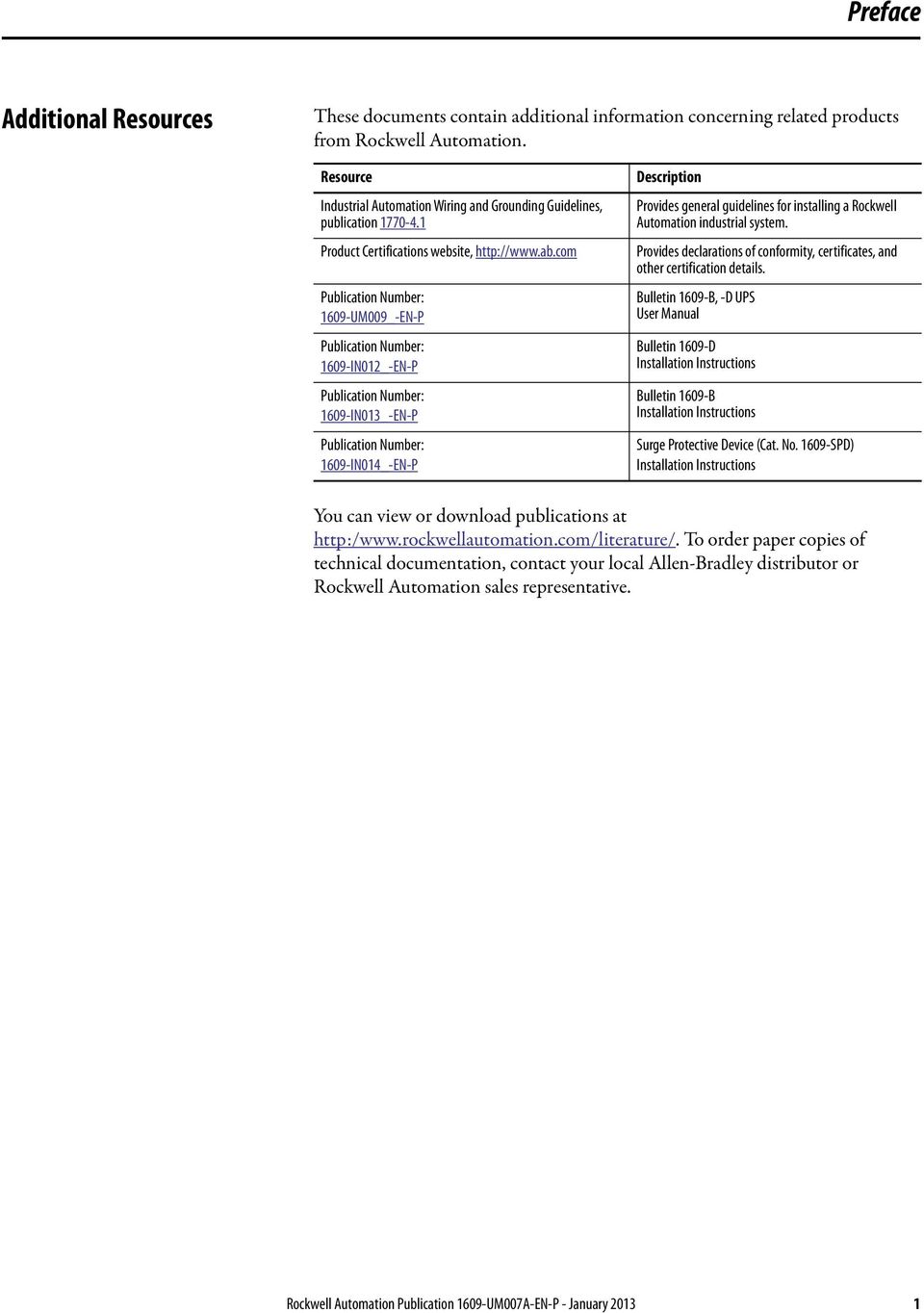
3 Preface Additional Resources These documents contain additional information concerning related products from Rockwell Automation. Resource Industrial Automation Wiring and Grounding Guidelines, publication Product Certifications website, Publication Number: 1609-UM009_-EN-P Publication Number: 1609-IN012_-EN-P Publication Number: 1609-IN013_-EN-P Publication Number: 1609-IN014_-EN-P Description Provides general guidelines for installing a Rockwell Automation industrial system. Provides declarations of conformity, certificates, and other certification details. Bulletin 1609-B, -D UPS User Manual Bulletin 1609-D Installation Instructions Bulletin 1609-B Installation Instructions Surge Protective Device (Cat. No SPD) Installation Instructions You can view or download publications at To order paper copies of technical documentation, contact your local Allen-Bradley distributor or Rockwell Automation sales representative. Rockwell Automation Publication 1609-UM007A-EN-P - January
4 Preface Notes: 2 Rockwell Automation Publication 1609-UM007A-EN-P - January 2013

5 Table of Contents Introduction and Features UPS Management Software Installation Software Setup UPS Management Service UPS Management Monitor Networking Operation Modes Remote Monitoring and Control: 1609 UPS Manag. Monitor Remote Monitor and Control: Internet Browser UPS Management Monitor operation Top Layer Buttons UPS Management Monitor Main Menu System Login Monitor Screen Font Window Close Monitor Configuration Configuration Window Devices Notification Users -- Pager List Notification Users Notification Users -- Network Broadcast Notification Users SMS (Short Message Service) Color Close UPS UPS Property Attached Devices Log Management Schedule Action Action Shutdown Action Logging Action Broadcasting Action - SMS(Short Message Service) Action Paging Action- Command Action Alarm Action Action - SNMP Trap Action - Receptacle Control Stop All Action Voltage Sensitivity Transfer Voltage Rockwell Automation Publication 1609-UM007A-EN-P - January

6 Table of Contents Advanced UPS Property Network Set Password Choose Master/Slave Wake On LAN SNMP SNMP Trap Number HTTP Control Shutdown Now Cancel Shutdown Turn Receptacle Relay On Turn Receptacle Relay Off UPS Audible Alarm On UPS Audible Alarm Off Seconds Test Deep Battery Test Cancel Test View Meters Event Log History Graph History Data Auto Save Remote Hosts Bottom Layer Buttons Main UPS Tree Time Status Diagram Scroll Outlet Network Rockwell Automation Publication 1609-UM007A-EN-P - January 2013

7 Introduction Congratulations on your purchase of 1609 UPS Management Software to manage your Uninterruptible Power Supply (UPS) UPS Management Software is designed to provide end users the ability to take proactive steps to protect their equipment from power related damages UPS Management Software allows for automatic shutdowns, scheduled shutdowns and a variety of other features that help you manage your system and its peripheral components UPS Management Software provides detailed information about the UPS and its protected equipment. It is easy to install and program, yet has the necessary features to handle all of one's power requirements. Included is the capability for network management protocol (SNMP) UPS Management Software will disseminate UPS information into SNMP protocol and project it to the appropriate Network Management Station (NMS), such as HP OpenView. To make use of resources on the Internet, 1609 UPS Management Software also supports HTTP protocol. This enables end-users to monitor their UPS anywhere, anytime, by simply utilizing their web browser UPS Management Software runs in the background as a Windows service, and communicates with the UPS in order to ensure that your computer and attached components are protected from any power problems UPS Management Software Features Graceful operating system shutdown Scheduled tests, shutdown/restarts of the UPS, turn on/off receptacles Flexible events Notification: SMS, Pager, and audible alarm, network broadcasting and SNMP Real-time values of voltage, current, frequency and loading... Historical data & graph Network monitoring Multi-computer shutdown/restart Support Simple Network Management Protocol (SNMP) Support Universal Serial Bus (USB) Multi-lingual menus Rockwell Automation Publication 1609-UM007A-EN-P - January
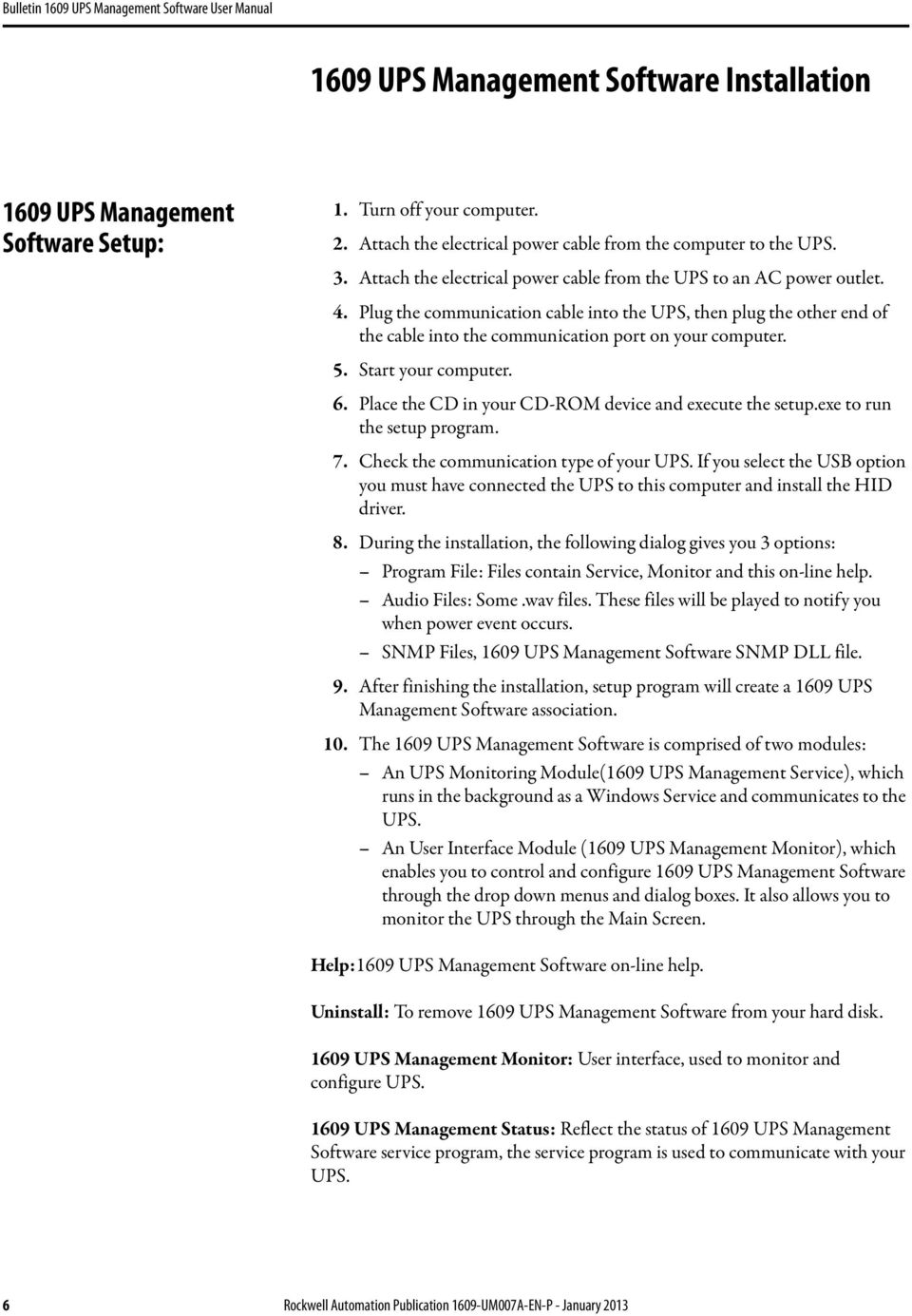
8 1609 UPS Management Software Installation 1609 UPS Management Software Setup: 1. Turn off your computer. 2. Attach the electrical power cable from the computer to the UPS. 3. Attach the electrical power cable from the UPS to an AC power outlet. 4. Plug the communication cable into the UPS, then plug the other end of the cable into the communication port on your computer. 5. Start your computer. 6. Place the CD in your CD-ROM device and execute the setup.exe to run the setup program. 7. Check the communication type of your UPS. If you select the USB option you must have connected the UPS to this computer and install the HID driver. 8. During the installation, the following dialog gives you 3 options: Program File: Files contain Service, Monitor and this on-line help. Audio Files: Some.wav files. These files will be played to notify you when power event occurs. SNMP Files, 1609 UPS Management Software SNMP DLL file. 9. After finishing the installation, setup program will create a 1609 UPS Management Software association. 10. The 1609 UPS Management Software is comprised of two modules: An UPS Monitoring Module(1609 UPS Management Service), which runs in the background as a Windows Service and communicates to the UPS. An User Interface Module (1609 UPS Management Monitor), which enables you to control and configure 1609 UPS Management Software through the drop down menus and dialog boxes. It also allows you to monitor the UPS through the Main Screen. Help:1609 UPS Management Software on-line help. Uninstall: To remove 1609 UPS Management Software from your hard disk UPS Management Monitor: User interface, used to monitor and configure UPS UPS Management Status: Reflect the status of 1609 UPS Management Software service program, the service program is used to communicate with your UPS. 6 Rockwell Automation Publication 1609-UM007A-EN-P - January 2013
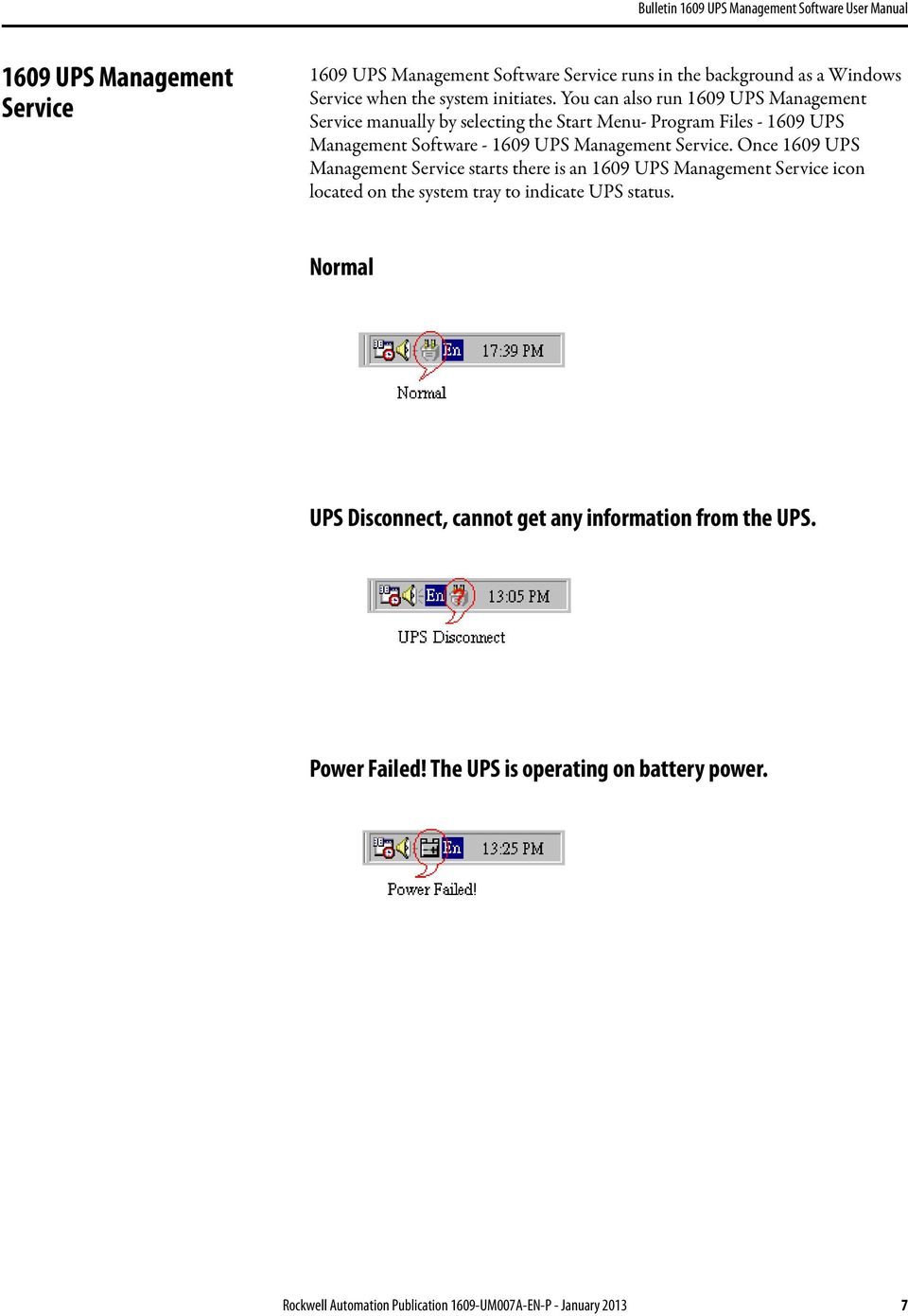
9 1609 UPS Management Service 1609 UPS Management Software Service runs in the background as a Windows Service when the system initiates. You can also run 1609 UPS Management Service manually by selecting the Start Menu- Program Files UPS Management Software UPS Management Service. Once 1609 UPS Management Service starts there is an 1609 UPS Management Service icon located on the system tray to indicate UPS status. Normal UPS Disconnect, cannot get any information from the UPS. Power Failed! The UPS is operating on battery power. Rockwell Automation Publication 1609-UM007A-EN-P - January
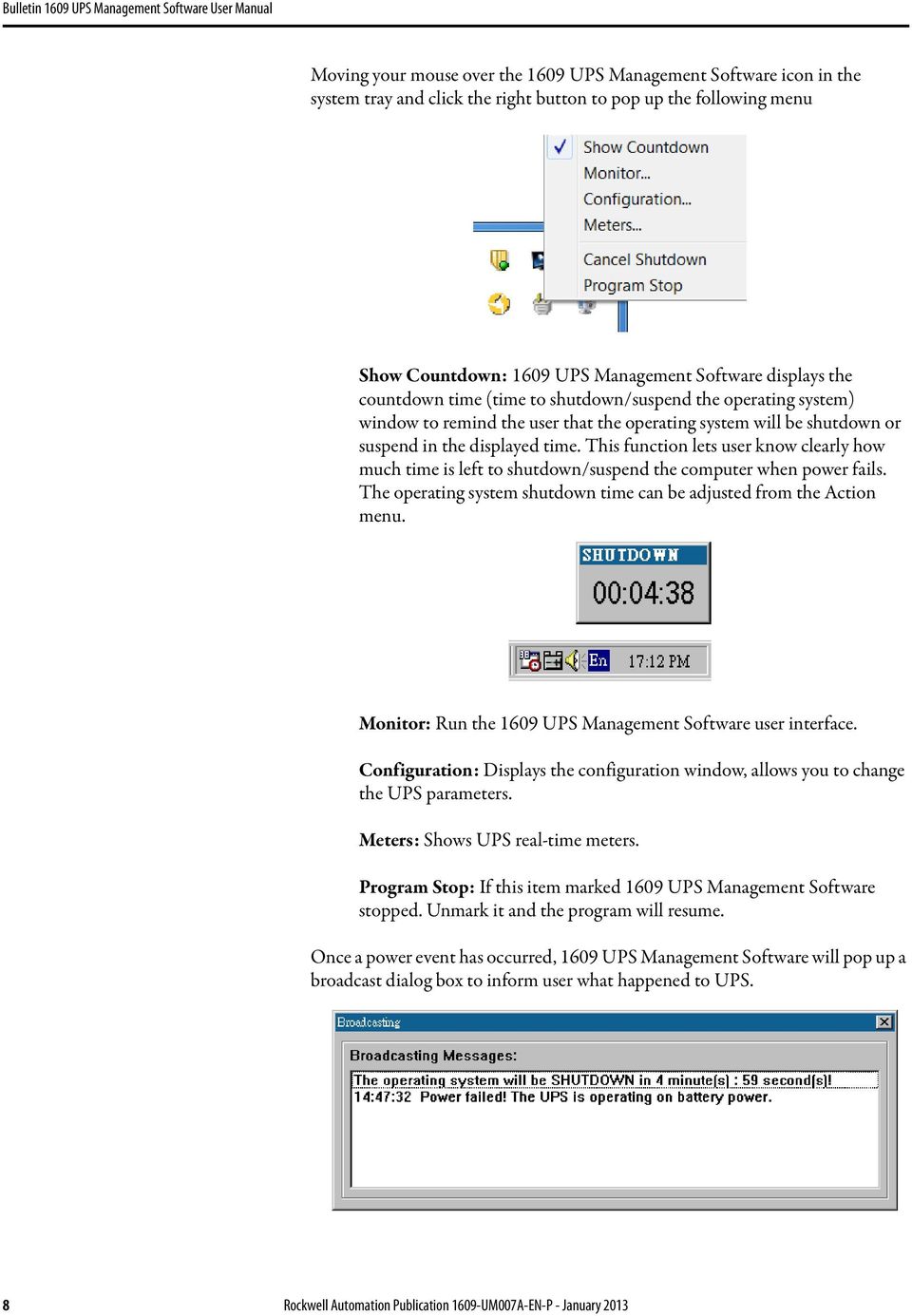
10 Moving your mouse over the 1609 UPS Management Software icon in the system tray and click the right button to pop up the following menu Show Countdown: 1609 UPS Management Software displays the countdown time (time to shutdown/suspend the operating system) window to remind the user that the operating system will be shutdown or suspend in the displayed time. This function lets user know clearly how much time is left to shutdown/suspend the computer when power fails. The operating system shutdown time can be adjusted from the Action menu. Monitor: Run the 1609 UPS Management Software user interface. Configuration: Displays the configuration window, allows you to change the UPS parameters. Meters: Shows UPS real-time meters. Program Stop: If this item marked 1609 UPS Management Software stopped. Unmark it and the program will resume. Once a power event has occurred, 1609 UPS Management Software will pop up a broadcast dialog box to inform user what happened to UPS. 8 Rockwell Automation Publication 1609-UM007A-EN-P - January 2013

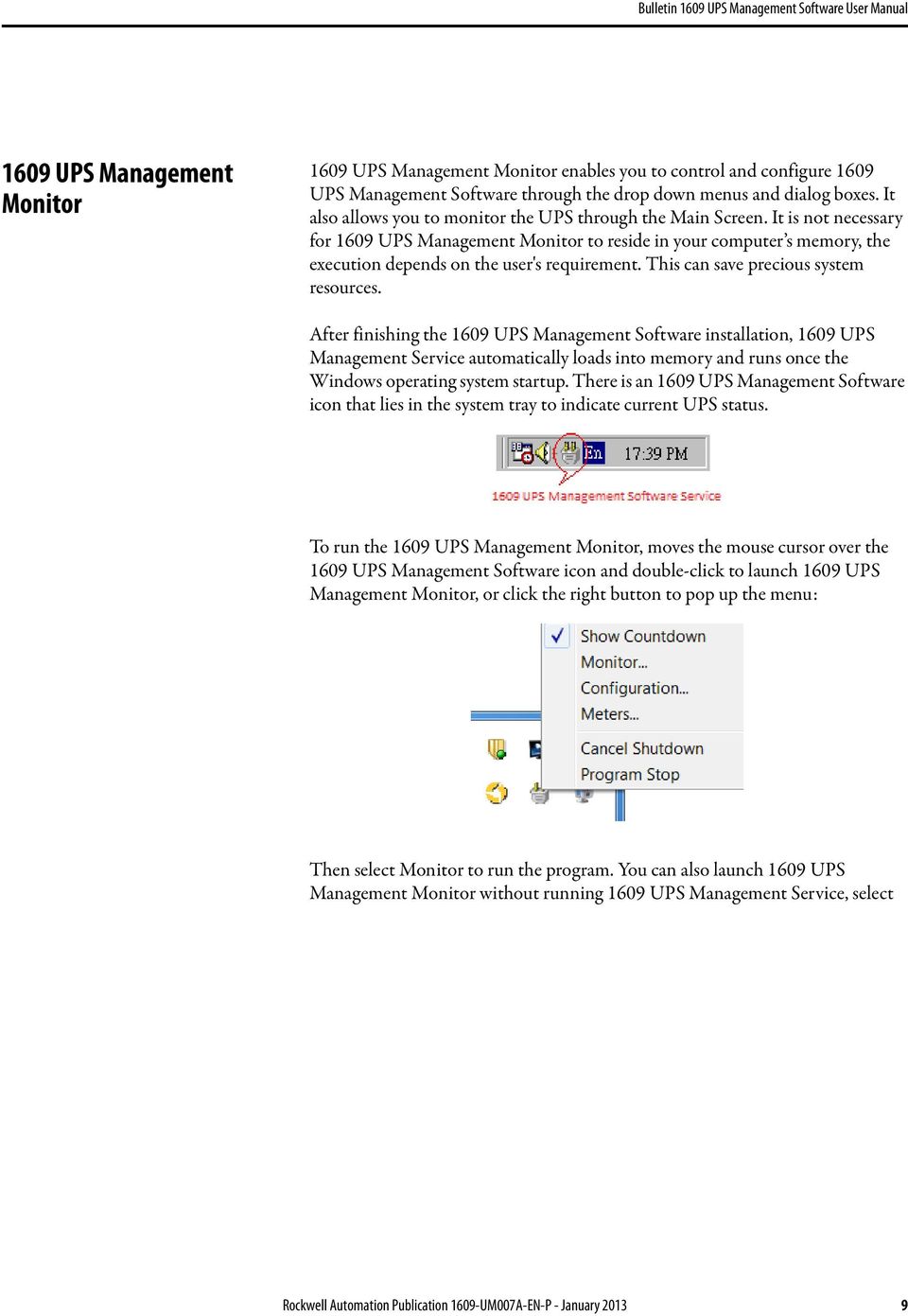
11 1609 UPS Management Monitor 1609 UPS Management Monitor enables you to control and configure 1609 UPS Management Software through the drop down menus and dialog boxes. It also allows you to monitor the UPS through the Main Screen. It is not necessary for 1609 UPS Management Monitor to reside in your computer s memory, the execution depends on the user's requirement. This can save precious system resources. After finishing the 1609 UPS Management Software installation, 1609 UPS Management Service automatically loads into memory and runs once the Windows operating system startup. There is an 1609 UPS Management Software icon that lies in the system tray to indicate current UPS status. To run the 1609 UPS Management Monitor, moves the mouse cursor over the 1609 UPS Management Software icon and double-click to launch 1609 UPS Management Monitor, or click the right button to pop up the menu: Then select Monitor to run the program. You can also launch 1609 UPS Management Monitor without running 1609 UPS Management Service, select Rockwell Automation Publication 1609-UM007A-EN-P - January
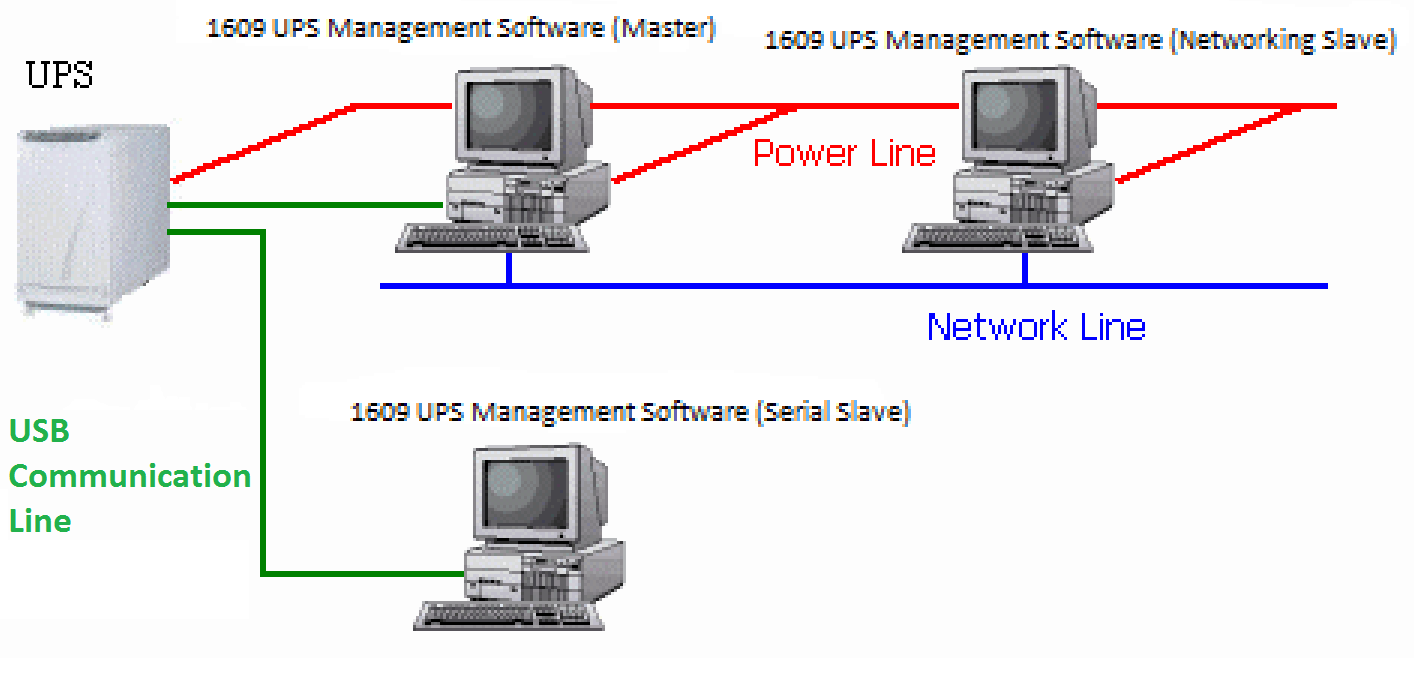
12 1609 UPS Management Monitor from Program Files UPS Management Software menu. Networking 1609 UPS Management Software is comprised of two modules: 1609 UPS Management Service and 1609 UPS Management Monitor. You may run both the programs in a computer to monitor your localized UPS or run the programs in two different computers. Operation Modes 1609 UPS Management Service can operate in "Master" Mode (which allows 1609 UPS Management Software to send commands to its connected UPS) in "USB Slave" mode (which listens to its connected UPS) or in "Networking Slave" mode (which obtains the UPS information from Master via the network). If two or more computers are communicating with a single UPS, only one of these 10 Rockwell Automation Publication 1609-UM007A-EN-P - January 2013
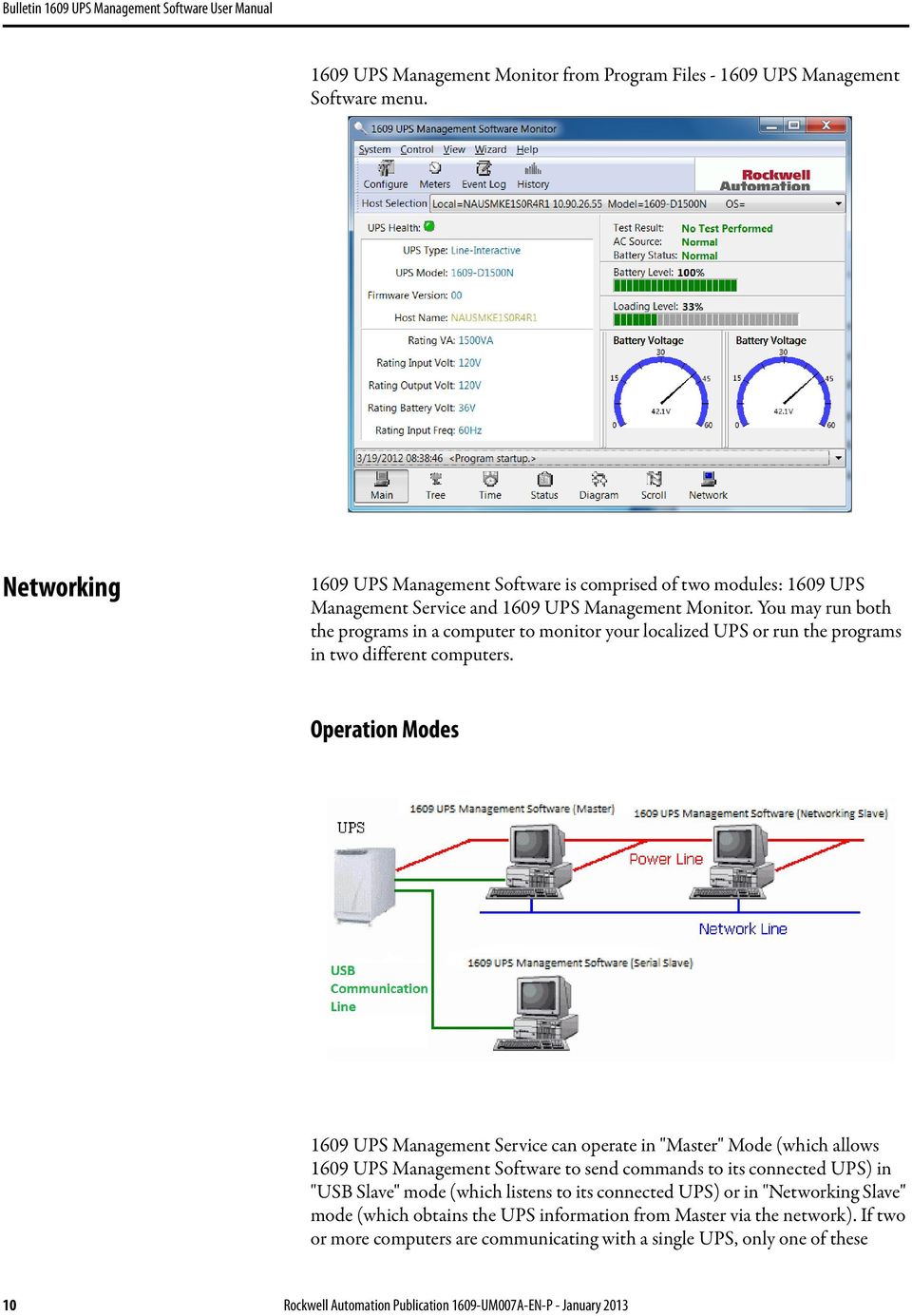

13 computers should be in Master mode; the others should be in Slave mode to prevent them from sending contradictory commands. When a power event occurs, the Master gets the information then transmits it to Salve(s). Each 1609 UPS Management Service executes different "Actions" (FlexEvent) so that the system manager can configure different strategies into each different computer. For example: When a power failure occurs, the file server and mail server won't shutdown until the UPS battery is low, but other less important workstations execute shutdown after 5 minutes, and the initial workstations shutdown after 10 minutes. Shutting down workstations preserves more battery power for your mission critical network servers. Remote Monitoring and Control: 1609 UPS Management Monitor 1609 UPS Management Monitor with the ability to monitor Local host and Remote host. You can run only 1609 UPS Management Monitor without running 1609 UPS Management Service UPS Management Monitor will search hosts in the LAN(Local Area Network) which runs 1609 UPS Management Service in the combo box. Click on the Host Selection combo box to list the searched hosts in Rockwell Automation Publication 1609-UM007A-EN-P - January

14 the LAN. Select one, then 1609 UPS Management Monitor will connect to the selected host. If the host is located on the Internet, you can also input the remote host IP address from the View Menu- Remote Hosts menu shows the hosts you can establish connections with. Remote Monitor and Control: Internet Browser Another way to remote monitor 1609 UPS Management Service is by using the Internet Browser. Launch the Microsoft Internet Explorer or Netscape Communicator, type the IP address in the URL and press enter you will then be able to see the UPS information. You can change the network port number to prevent conflict with other WEB server programs. If the port number isn't 80 you have to type URL like this: where 2000 is the port number you assigned. 12 Rockwell Automation Publication 1609-UM007A-EN-P - January 2013


15 1609 UPS Management Monitor operation The Main Screen has 7 areas that present information on the operating status of your UPS. These areas are discussed in the following sections. Host Selection: Press the combo box to select hosts that runs 1609 UPS Management Software in the LAN. Users can monitor or control the UPS remotely (password is needed). Connection Indication: The logo will rotate while the communication between 1609 UPS Management Monitor and 1609 UPS Management Service is established. Information Display: Press Bottom Layer Buttons to change the information that is displayed in this area. Recent Event Log: Preserve last 10 event logs in the combo box, click on the combo box to pull down and view the logs. Top Layer Buttons These buttons are used to increase the speed of your operation, refer to the dialog boxes in the menu. Configuration: Same as the System-> Configuration in the menu. Meters: Same as the View-> Meters in the menu. Event Log: Same as the View-> Event Log in the menu. History Graph: Same as the View-> History Graph in the menu. Rockwell Automation Publication 1609-UM007A-EN-P - January

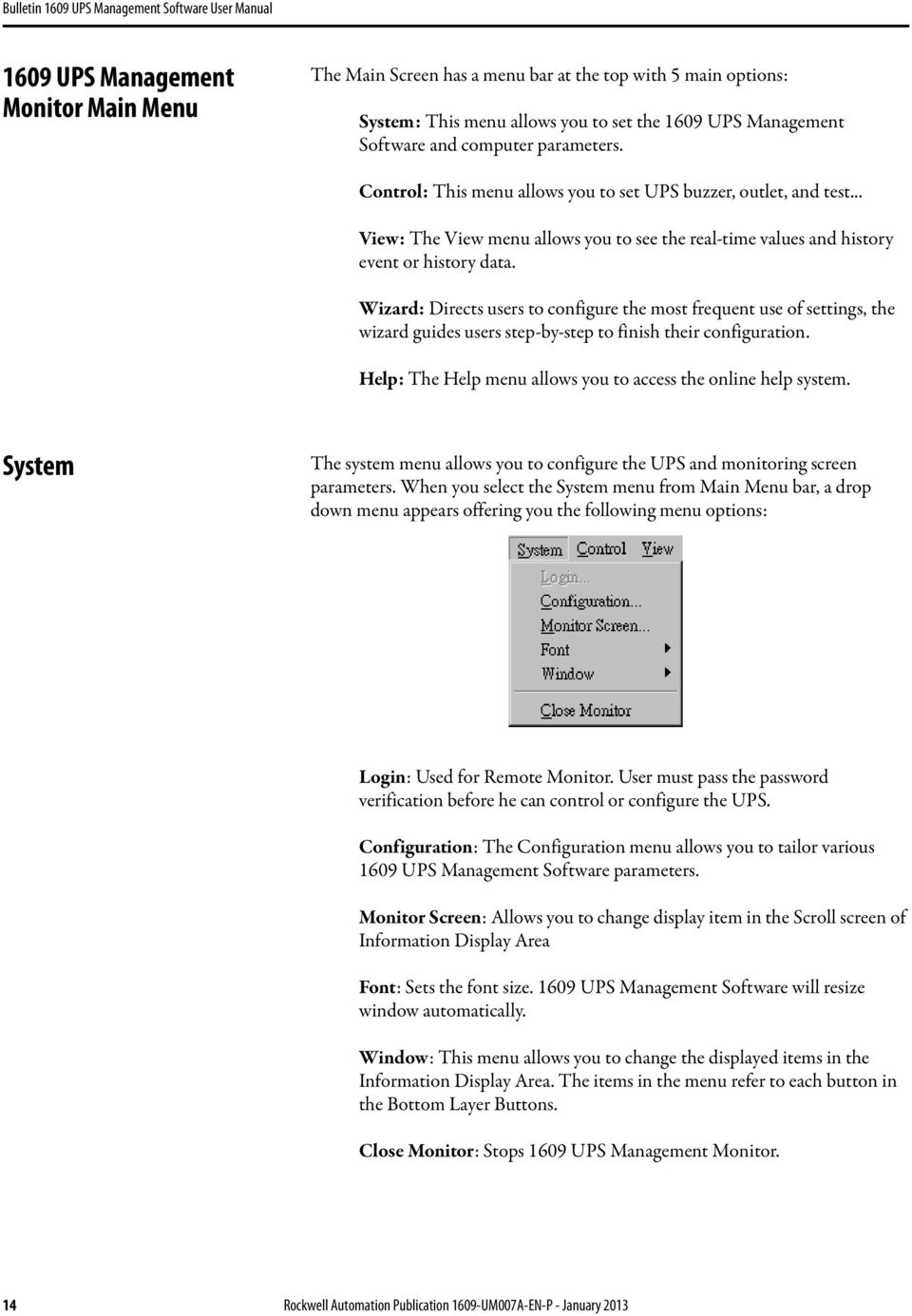
16 1609 UPS Management Monitor Main Menu The Main Screen has a menu bar at the top with 5 main options: System: This menu allows you to set the 1609 UPS Management Software and computer parameters. Control: This menu allows you to set UPS buzzer, outlet, and test... View: The View menu allows you to see the real-time values and history event or history data. Wizard: Directs users to configure the most frequent use of settings, the wizard guides users step-by-step to finish their configuration. Help: The Help menu allows you to access the online help system. System The system menu allows you to configure the UPS and monitoring screen parameters. When you select the System menu from Main Menu bar, a drop down menu appears offering you the following menu options: Login: Used for Remote Monitor. User must pass the password verification before he can control or configure the UPS. Configuration: The Configuration menu allows you to tailor various 1609 UPS Management Software parameters. Monitor Screen: Allows you to change display item in the Scroll screen of Information Display Area Font: Sets the font size UPS Management Software will resize window automatically. Window: This menu allows you to change the displayed items in the Information Display Area. The items in the menu refer to each button in the Bottom Layer Buttons. Close Monitor: Stops 1609 UPS Management Monitor. 14 Rockwell Automation Publication 1609-UM007A-EN-P - January 2013
17 Login When attempting to use 1609 UPS Management Monitor as a Remote Monitor (connect to different host) you have to enter the password for verification if you want to do such tasks as configuration, or to control the UPS. Otherwise, you can only view the UPS information. If user runs 1609 UPS Management Service and 1609 UPS Management Monitor on the same computer, you can perform such configurations or control the UPS without the password. To change your password, please choose the Set Password from Configure - Network menu Monitor Screen This dialog box allows you to change display item in the Scroll screen of Information Display Area Language: Choose a language that suits your operating system needs. Program will automatic replace the on-line help file and audio files to your selected preferences. Meters: Press the Main button from the Bottom Layer Buttons, and you will see that there are two meters in the information area. You can change the displayed items of the two meters. Rockwell Automation Publication 1609-UM007A-EN-P - January

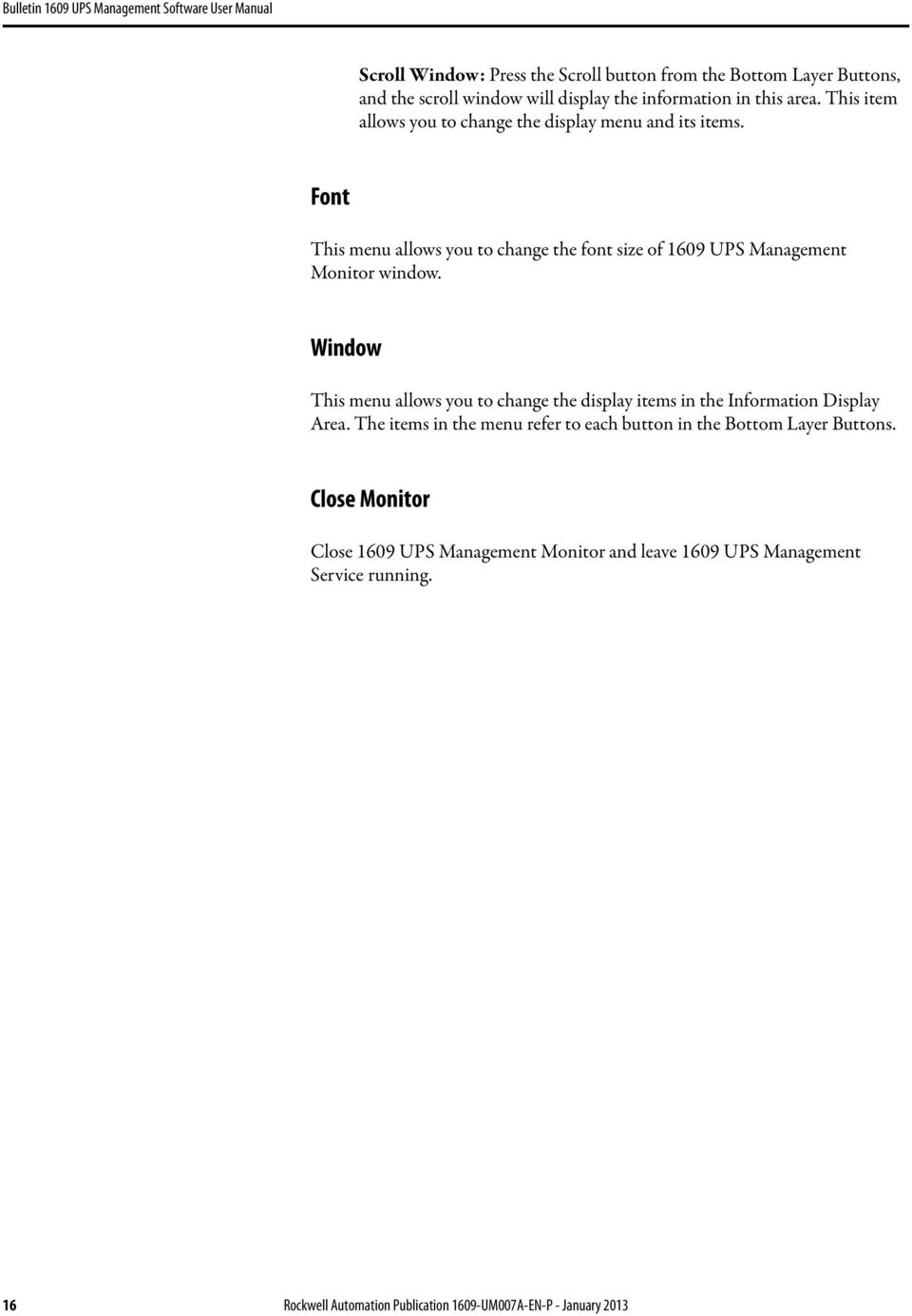
18 Scroll Window: Press the Scroll button from the Bottom Layer Buttons, and the scroll window will display the information in this area. This item allows you to change the display menu and its items. Font This menu allows you to change the font size of 1609 UPS Management Monitor window. Window This menu allows you to change the display items in the Information Display Area. The items in the menu refer to each button in the Bottom Layer Buttons. Close Monitor Close 1609 UPS Management Monitor and leave 1609 UPS Management Service running. 16 Rockwell Automation Publication 1609-UM007A-EN-P - January 2013
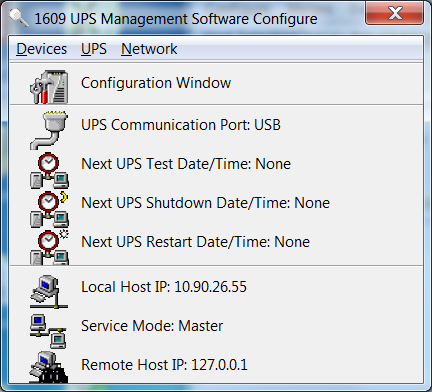
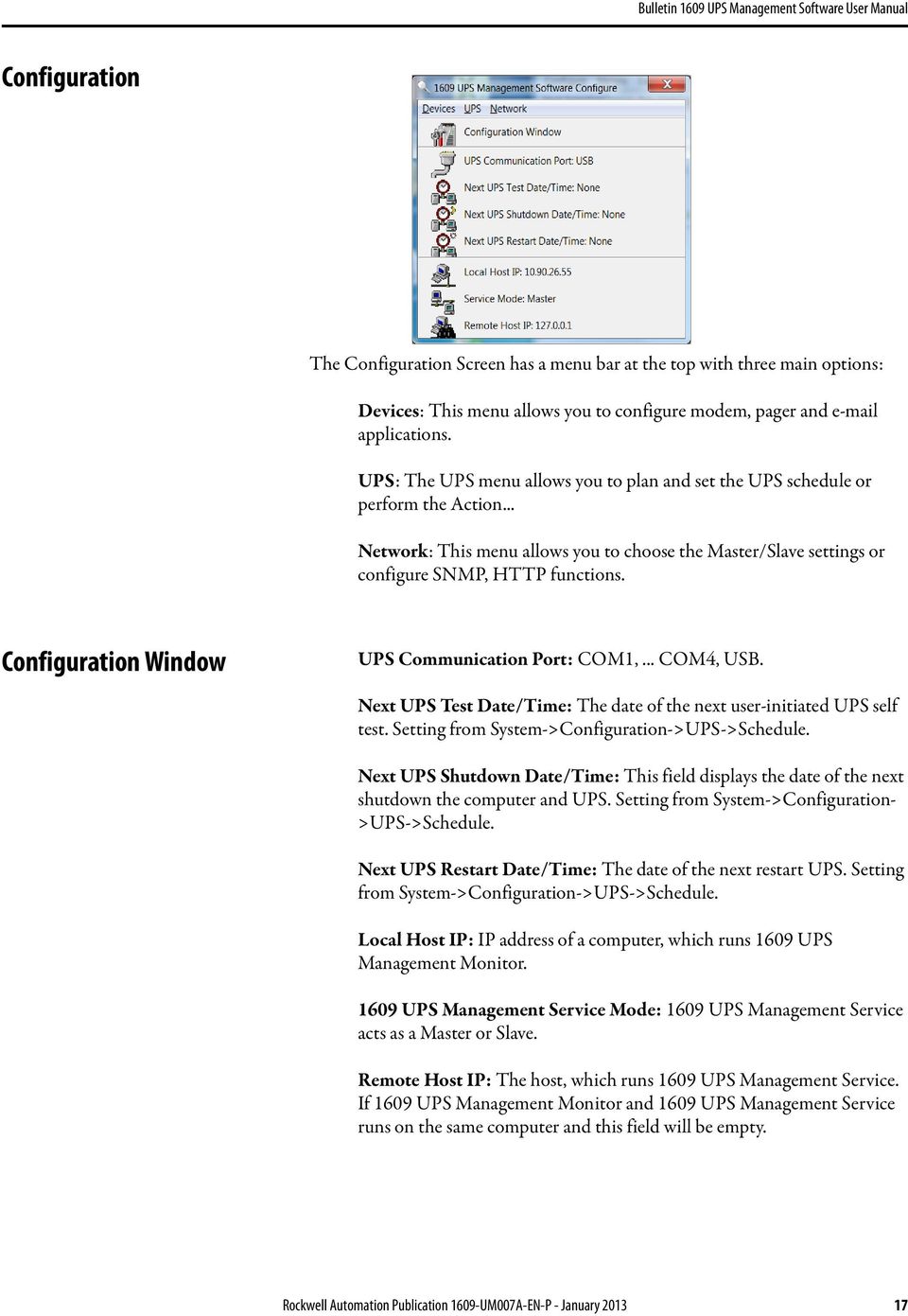
19 Configuration The Configuration Screen has a menu bar at the top with three main options: Devices: This menu allows you to configure modem, pager and applications. UPS: The UPS menu allows you to plan and set the UPS schedule or perform the Action... Network: This menu allows you to choose the Master/Slave settings or configure SNMP, HTTP functions. Configuration Window UPS Communication Port: COM1,... COM4, USB. Next UPS Test Date/Time: The date of the next user-initiated UPS self test. Setting from System->Configuration->UPS->Schedule. Next UPS Shutdown Date/Time: This field displays the date of the next shutdown the computer and UPS. Setting from System->Configuration- >UPS->Schedule. Next UPS Restart Date/Time: The date of the next restart UPS. Setting from System->Configuration->UPS->Schedule. Local Host IP: IP address of a computer, which runs 1609 UPS Management Monitor UPS Management Service Mode: 1609 UPS Management Service acts as a Master or Slave. Remote Host IP: The host, which runs 1609 UPS Management Service. If 1609 UPS Management Monitor and 1609 UPS Management Service runs on the same computer and this field will be empty. Rockwell Automation Publication 1609-UM007A-EN-P - January
20 Devices Notification Users -- Pager List To let 1609 UPS Management Software notify you via pager you must setup the modem device. If you select the TAPI (Windows Telephony Application Programming Interface) then Windows will handle the modem device, otherwise, 1609 UPS Management Software will control the modem device directly (AT Command). Program will set the modem to notify all via the pager numbers, which are listed in the pager list. You can input your pager number for your own notification purposes. For example: is your pager number, each ',' tells modem to delay 2 seconds, delay time is for setting waiting period for the response signal, before proceeding to transmit to the displayed number will appear in your pager LCD. To trigger the pager notification you must enable the Pager Action in the Action dialog box. COM Port: The communication port COM1,...COM4. Baud Rate: Set the data transmitting speed. Initialize String: The string, which is sent to the modem before paging is attempted. Dial Prefix: The string, which is added to the beginning of each of the Pager Number before they are sent to the modem. Using TAPI: Lets Windows handle the modem device. Add: Add a new pager number. Modify: Modify the selected pager number. Delete: Delete the selected pager number. Notification Users -- You can also users through SMTP when power events occur. To trigger the notification you must enable the Action in the Action dialog box. Add: Add a new user. Modify: Modify the selected user name. Delete: Delete the selected user. 18 Rockwell Automation Publication 1609-UM007A-EN-P - January 2013

21 Notification Users -- Network Broadcast You can also broadcasting information to users when power event has occurred. The broadcast function is associated with Microsoft Messenger service. To trigger the broadcasting notification you must enable the Broadcast Action in the Action dialog box. Domain: Enable this item to broadcast to all the users in the domain, otherwise 1609 UPS Management Software will send messages to the hosts that users assigned. Add: Add a new machine name. Modify: Modify the selected machine name. Delete: Delete the selected name. Notification Users SMS (Short Message Service) To let 1609 UPS Management Software notify you via SMS(Short Message Service) you must setup the GSM modem or connect the mobile phone to your PC(Nokia is recommended). To trigger the SMS notification you must enable the SMS action in the Action dialog box. COM Port: The communication port COM1,...COM8. Baud Rate: Define the data transmitting speed. Add: Add a new mobile phone number. Modify: Modify the selected number. Delete: Delete the selected number. Color Used to change the screen color. Color Items: This area lets you select an item, which you want to change the color for. The right-top corner color will display current selected color. Change: Change the color you have selected. Default: Default setting. Exit: Close the dialog box. Close Close the Configuration window. Rockwell Automation Publication 1609-UM007A-EN-P - January

22 UPS UPS Property This dialog box allows you to configure the UPS COM port, battery replacement date,... etc. Load Warning and Load Severity used to prevent UPS overload (see the UPS hardware user manual). In general, Load Warning will notify users to reduce the UPS load, Load Severity will shutdown the computer to prevent overload. COM Port: COM1,...COM4, USB. Load Warning: Load warning. Load Severity: User must reduce UPS load. Last Battery Replacement Date: Records last battery replacement date. Next Battery Replacement Date: Displays the date of the next battery replacement, 1609 UPS Management will notify users to replace the battery. Host Name: Local host name. 20 Rockwell Automation Publication 1609-UM007A-EN-P - January 2013
23 Attached Devices Allows the user to assign the attached device a name. When you're controlling the outlet, 1609 UPS Management Software will let you know which devices you are controlling. Select an Outlet Group: Assigns an outlet group. Please look at the back panel carefully, Some outlets may share one control relay, these outlets are called outlet group. If you turn off outlet group (for example: outlet1 and outlet2) then the UPS will stop power to the outlet group outlet1 and outlet2. Device Name: Assigns the attached devices a name, for example: Outlet Group1 is called Monitor for association with the monitor and Outlet Group2 is called Computer for association with the CPU. These records can improve the efficiency of your management. Don't forget to press the Update button. Update: Updates your change. Log Management Please consider about the free space in your hard disk Maximum Event Log Entries: Always 1609 UPS Management to preserve less than the assigned entries of event log. Data Log Interval: Time designated for automatic saving of a record of UPS data. Maximum Data Log Storage: It allows you to save how many months UPS data files you wish to keep. Rockwell Automation Publication 1609-UM007A-EN-P - January
24 Schedule This function allows you to shutdown, restart, test and turn on/off outlet. You can schedule up to 6 events. Settings are based on day, week or month and up to a period of 2 years. Choose the applicable schedule to set whether it be for: One Time: This set schedule is applicable for a single day. Daily: This set schedule is applicable for every day Weekly: This set schedule is applicable for once a week period. Monthly: This set schedule is applicable for once a month period. 22 Rockwell Automation Publication 1609-UM007A-EN-P - January 2013
25 Action The action menu provides you with a list of events to choose from. The event and/or any combination of these actions can be selected from the Choose Event list box. Actions that are already enabled will show a check mark. To delay the actions, set the desired time for delay in the Delay combo box. Enable Auto-Save: 1609 UPS Management will save opened files and close applications automatically when you enable this function. Choose Event: When you select one item in the list the action buttons will display current settings. Press button to do further configurations. Set Default: Set all the actions to default values. Delay: The power event must stay within the delay time to trigger actions. Action Shutdown Shutdown/Hibernate/Suspend the operating system or shutdown UPS. If you select shutdown item 1609 UPS Management Software will execute or ignore the Auto-Save function depending on your selection in the Action dialog box. But if you select the suspend or hibernate item, the program will ignore the Auto- Save function. The action of shutdown, hibernate or suspend are the same as if you select the Shutdown option from the Windows Start menu. Action Logging Allows you to log events as well as modify the default logging message. You can see this message in the Event Log dialog box. Action Broadcasting Permits you to broadcast an event based on a set period of time. If you want to be notified once, set the time period to "0". However, if you want to be notified more than once, set the time period to a larger number. Each number corresponds to the number of times of notification. Action - SMS(Short Message Service) Permits you to send SMS through GSM modem or mobile phone. You can edit the user list by clicking the Edit list button, and add, modify or delete any user name in the list. To enable or disable this action, mark the Enable SMS check box. Rockwell Automation Publication 1609-UM007A-EN-P - January
26 Action Paging Allows you to set the time period for paging intervals. If you want to be notified once, set the time period to "0". However, if you want to be notified more than once, set the time period to a larger number. Each number corresponds to the number of times of notification. Action- Command Permits you to execute command files and set a period of time to delay its activation. To test this function, you can click the Test button. To enable or disable this action, mark the Enable Command check box. Action Alarm Permits you to send out audible alarm instead of a broadcast message. There are two alarms to select from - Buzzer and Audio. If you choose Audio, the 1609 UPS Management Software requires a ".wav" file to emit the alarm. You can browse your system for other ".wav" files by clicking on the Browse button. If you want to be notified once, set the time period to "0". However, if you want to be notified more than once, set the time period to a larger number. Each number corresponds to the number of times of notification. Action - Permits you to send s through SMTP. If you want to be notified once, set the time period to "0". However if you want to be notified more than once, set the time period to a larger number. Each number corresponds to the number of times of notification. You can edit the user list by clicking the Edit list button, and add, modify or delete any user name in the list. To enable or disable this action, mark the Enable check box. Action - SNMP Trap Lets you send a SNMP trap when the relative power event occurs. To enable or disable this action, mark the Enable SNMP Trap check box. You also need to specify the SNMP Trap target hosts and community string, please see the SNMP dialog box in the Network menu. 24 Rockwell Automation Publication 1609-UM007A-EN-P - January 2013
27 Action - Receptacle Control Allows you to control the Receptacle Relay on or off. Each Receptacle Relay may control not only one outlet, please see the rear panel of your UPS or the UPS hardware user's manual. Stop All Action Clicking on this, terminates all the actions immediately. Voltage Sensitivity Adjust the UPS voltage sensitivity. Transfer Voltage Changes the low transfer voltage and high transfer voltage. This function lets your UPS adjust to the local power environment. Low Transfer Voltage: When utility power voltage drops lower than the assigned value the UPS will switch to backup mode. The output power is supplied from the battery. High Transfer Voltage: When utility power voltage rises higher than the assigned value, the UPS will switch to backup mode. The output power is supplied from the battery. Rockwell Automation Publication 1609-UM007A-EN-P - January
28 Advanced UPS Property If your UPS doesn't support this function, the item will be displayed as gray and the user cannot select this item. Enable Wakeup Computer: If your computer architecture is compatible to ATX and the BIOS supports RS-232(RI) Wakeup function. You should enable this item to make the Schedule work correctly. Enable Resume Computer: Be sure the BIOS supports RS-232(RI) Wakeup function. When 1609 UPS Management Software suspends the computer and the UPS detects the change of power status, the UPS will resume the computer to its prior operating status and let 1609 UPS Management Software notify users. Enable Power Fail, Auto-Reboot: The time-line describes below: If you enable this function, the UPS will reboot to restart the computer otherwise, it goes back to its normal state. Enable Economic Mode: Switches to UPS economic mode. UPS Periodic Auto-Test: Daily, weekly, biweekly and monthly. UPS starts the test procedure automatically when it reaches the test time. 26 Rockwell Automation Publication 1609-UM007A-EN-P - January 2013
29 Network Set Password Sets the 1609 UPS Management Service password. Choose Master/Slave Rockwell Automation Publication 1609-UM007A-EN-P - January

30 Please refer to the 1609 UPS Management Service operation mode. If the computer connects to UPS directly (with RS-232 or USB) and can send commands to its connected UPS then the 1609 UPS Management Service acts as a "Master". If it connects to UPS directly (with RS-232 or USB) but only listens to UPS then it is a "USB Slave". If the computer is powered by the UPS, but obtains the UPS information from Master via TCP/IP network then it is a "Networking Slave". When 1609 UPS Management Service is a Networking Slave you must assign the Master IP address so that the Networking Slave can connect to the Master and obtain the UPS information. Master: Configures the 1609 UPS Management Service to be a Master. USB Slave: Configures the 1609 UPS Management Service to be a USB Slave. Networking Slave: Configures the 1609 UPS Management Service to be a Networking Slave. Master IP Address: When 1609 UPS Management Service is a Networking Slave you must assign the Master IP address so that the Slave can connect to the Master host and obtain the UPS information. Wake On LAN To wake up the remote host, 1609 UPS Management Software sends notification through the network. You must provide the IP address and the network hardware address of the remote host. In Windows98, you can execute the "ipconfig /All" command under the MS-DOS prompt to obtain the network cards physical address of the local host. Or, input the "arp -a" command to see the remote host s physical address. Your network card must support the remote wakeup feature and this function should be enabled UPS Management Resume The Computer From Suspend Mode: 1609 UPS Management Software will reinstate the computer into normal 28 Rockwell Automation Publication 1609-UM007A-EN-P - January 2013
31 mode, and the program will awaken the remote hosts once the actions have been enabled. Each Time 1609 UPS Management Startup: Program will wake up the remote hosts which are enabled when 1609 UPS Management Software starts and is connected to the UPS. SNMP ATTENTION: If you are using a Windows 95/98/Me operating system, you can configure the SNMP parameters directly from the 1609 UPS Management Software: Select the Accept SNMP packet from any hosts, 1609 UPS Management Software will accept all the requested commands and set commands. When you select the Accept SNMP packet from the following hosts, 1609 UPS Management Software receives information only from the hosts that you assigned. Once a power event has occurred and the user enables the SNMP Trap in the Action dialog box, 1609 UPS Management Software will send the SNMP trap to the hosts that are listed in the Trap Target list box. To add, modify or delete the host, click on its respective command button. ATTENTION: If you are using a Windows 2000/XP/2003 operating system, you must install the SNMP Service and configure the SNMP parameters from your operating system: 1609 UPS Management Software will ignore the values that were set in the SNMP dialog box. To change the parameters of SNMP function, you should install the SNMP Service in the Network option. Select the SNMP Service from the Network option in the Control Panel and click the Property button to do your changes. Rockwell Automation Publication 1609-UM007A-EN-P - January

32 SNMP Trap Number Variable Trap No. Description dupscommunicationlost 1 SEVER: Communication with the UPS failed dupscommunicationestablished 2 INFORMATION: Communication with the UPS reestablished dupspowerfail 3 WARNING: Power failed! The UPS is operating on battery power dupspowerrestored 4 INFORMATION: Power restored! The utility power restored dupslowbattery 5 SEVER: The UPS batteries are low and will soon be exhausted dupsreturnfromlowbattery 6 INFORMATION: The UPS has returned from a low battery condition dupsloadwarning 7 INFORMATION: Loading percent of the UPS over the Load Warning value dupsnolongerloadwarning 8 INFORMATION: Returnd from Load Warning condition dupsloadseverity 9 Warning: Loading percent of the UPS over the Load Severity value dupsnolongerloadseverity 10 INFORMATION: Returned from Load Severity condition dupsupsfault 13 SEVER: A general fault caused in the UPS dupsbatterygroundfault 14 SEVER: The UPS battery ground faul dupsnolongerbatteryfault 15 INFORMATION: The UPS recovered from battery ground fault dupstestinprogress 16 INFORMATION: The UPS test in progress dupsbatterytestfail 17 SEVER: The UPS test in progress dupsfusefailure 18 SEVER: The UPS fuse failed dupsfuserecovered 19 INFORMATION: The UPS fuse recovere dupsoutputoverload 20 SEVER: The UPS overload dupsnolongeroverload 21 INFORMATION: Recovered from UPS overload dupsoutputovercurrent 22 SEVER: The UPS output overcurrent dupsnolongeroutputovercurrent 23 INFORMATION: Recovered from UPS overcurrent dupsinverterabnormal 24 SEVER: The UPS inverter abnorma dupsinverterrecovered 25 SEVER: Recovered from UPS inverter abnorma dupsrectifierabnormal 26 SEVER: The UPS rectifier abnormal dupsrectifierrecovered 27 INFORMATION: The UPS recovered from rectifier abnormal dupsreserveabnormal 28 SEVER: The UPS rectifier abnorma dupsreserverecovered 29 INFORMATION: The UPS rectifier abnormal dupsloadonreserve 30 INFORMATION: The UPS load on reserve dupsnolongerloadonreserve 31 INFORMATION: The UPS no longer load on reserve dupsenvovertemperature 32 WARNING: The environment overtemperature DupsNoLongerEnvOverTemperature 33 INFORMATION: The environment recovered from overtemperatur DupsEnvOverHumidity 34 WARNING: The environment overhumidit DupsNoLongerEnvOverHumidity 35 INFORMATION: The environment recovered from overhumidity HTTP 1609 UPS Management Software supports WEB Server for remote manager to obtain the UPS information. Users can use IE or Communicator to connect with 1609 UPS Management Service. Even your computer doesn't have 1609 UPS Management Software installed you can monitor and control your UPS via network. Enable HTTP: Enable or disable the feature of Web service. HTTP Root: The HTTP root path. All the html and gif files will be located here. Port Number: The default port number is 80 but if there is already one WEB server running you can change 1609 UPS Management Service HTTP port number to a different number. At the Internet Browser you can input in the URL where 2000 is the assigned port number. 30 Rockwell Automation Publication 1609-UM007A-EN-P - January 2013
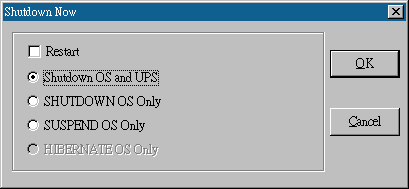
33 Control Shutdown Now This command will execute the shutdown procedure at once. Restart: This function lets you restart the UPS automatically after being shutdown. To start the UPS for the next schedule, mark the Restart check box. Shutdown OS and UPS: Use this function to shutdown both the OS and UPS. SHUTDOWN OS Only: Use this function to shutdown OS only. SUSPEND OS Only: Use this function to suspend your operating system. HIBERNATE OS Only: Use this function to hibernate your operating system. Cancel Shutdown This menu enables you to terminate the current shutdown procedure. Rockwell Automation Publication 1609-UM007A-EN-P - January
34 Turn Receptacle Relay On Turns the selected receptacle relay on. Each Receptacle Relay may control more than one outlet, please see the rear panel of your UPS or the UPS hardware user's manual. Select a Receptacle Relay: Selects a receptacle relay. Delay: Set the delay time to turn on the receptacle relay. On: Executes the turn on command. Turn Receptacle Relay Off Turns the receptacle relay off. Each Receptacle Relay may control more than one outlet, please see the rear panel of your UPS or the UPS hardware user's manual. Select a Receptacle Relay: Selects a receptacle relay. Delay: Set the delay time to turn off the outlet group. Off: Executes the turn off command. UPS Audible Alarm On Enables the UPS buzzer. On the Bottom Layer Buttons press the Status button to get the UPS buzzer status. UPS Audible Alarm Off Mutes UPS buzzer alarm. 10 Seconds Test UPS switches to backup mode and the output power is supplied by the battery for 10 seconds. Deep Battery Test UPS switches to backup mode and output power is supplied by the battery until the battery is low. Cancel Test This menu allows you to stop test immediately. 32 Rockwell Automation Publication 1609-UM007A-EN-P - January 2013

35 View Meters The 1609 UPS Management supports up to 12 meters of real-time values. Each meter has the ability to display all of the UPS values. Selecting different items from the Selection dialog box will display the selected item value. 2,4,6,8,12: Displays meter number. Selection: Assigns each meter to a different UPS item value. Close: Closees the meter window. Rockwell Automation Publication 1609-UM007A-EN-P - January

36 Event Log This menu offers you the possibility of viewing past events. Print: Prints the event log. Exit: Closes event log dialog box. History Graph Clicking on the History Graph opens a dialog box that contains information about the UPS data in graph format. This information is available only if there is an accumulation of data. You can select the month and year you want to view. Horizontal Scale: Selects the time scale. Vertical Scale: Selects the value scale. Select Month: Displays the UPS data for the month Draw Item1(Blue): Displays the UPS item value by a blue line. 34 Rockwell Automation Publication 1609-UM007A-EN-P - January 2013
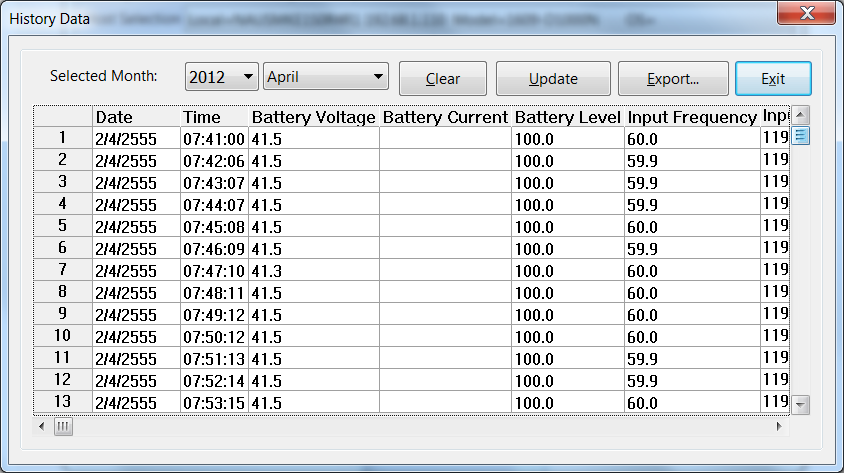
37 Draw Item2(Red): Displays the UPS item value by a red line. Update: Updates the graph. Print: Exports the graph to a printer. Exit: Closes the history graph dialog box. History Data Clicking on the History Data opens a dialog box that contains information about UPS data in list form. This information is available only if there is an accumulation of data. You can select the month and year you want to view. Select Month: Displays the UPS data in the month, Save As: Saves the data in the list to the file that you assigned. Print: Exports the list data to a printer. Exit: Closes the history data dialog box. Auto Save When certain power events occur, 1609 UPS Management will save open files and close applications before shutting down the operating system. If these saved files are untitled, 1609 UPS Management will assign file names for them and put the files in temporary directory. This dialog box will tell you which files were saved by 1609 UPS Management Software. Program Title: The application s title name. Auto-Save File Name: 1609 UPS Management names the file for you. Clear: Clear this record. Rockwell Automation Publication 1609-UM007A-EN-P - January

38 Remote Hosts Detects the hosts, which are running the 1609 UPS Management Service in the LAN. You can also type in the IP address and connect to the WAN. Search Result: The hosts will be listed in the Search Result list box. Select the host you want to connect to and press the Connect button to establish the connection. Connect to this IP address: 1609 UPS Management will connect to the IP address, which you type in. Connect: Establish the network connection. 36 Rockwell Automation Publication 1609-UM007A-EN-P - January 2013
39 Bottom Layer Buttons Each button shows the respective information in the Information Area Main:General Information about the UPS. Tree: There are 2 sub-trees in the 1609 UPS Management tree: System and UPS. The system tree is for host information and the status of Master/ Slave connection, the UPS tree is for all other UPS information. Time:Displays the time for all schedules, battery replacement date and countdown time. Status: UPS status. Diagram:Indicates the UPS current flow. Scroll:UPS data graph. Outlet:Displays outlet status. (If your UPS cannot control the outlet then this button disappears) Network:Indicates the connection of Master/Slave, 1609 UPS Management Monitor and 1609 UPS Management Service. Main UPS Health: 3 levels: Green, yellow and red. UPS Type: On line, off line, line interactive or 3 phase on line. UPS Model: The UPS model, which is being monitored by 1609 UPS Management Software. Firmware Version: Indicating the version status of the UPS internal code. Host Name: The host, which runs 1609 UPS Management Software. Rating VA: The UPS rating VA. Rockwell Automation Publication 1609-UM007A-EN-P - January
40 Rating Input Voltage: The UPS rating input voltage. Rating Current: The UPS rating current. Rating Battery Voltage: The UPS rating battery voltage. Rating Input Frequency: The UPS rating input frequency. Test Result: Results of the last self-test. AC Source: Normal or battery Battery Status: The status of battery. Battery Level: Percentage of battery level. Loading: Output loading percentage UPS Management Software with the ability to change the display item of the meters, the referred menu item: System-> Main Screen. UPS Tree System: System tree for host information and the connection of Master/ Slave. UPS: UPS tree for all of the UPS information. Time Last Battery Replacement Date: To change the date of last battery replacement in the System-> Configuration UPS->UPS Property. Next Battery Replacement Date: To change the date of next battery replacement in the System-> Configuration UPS->UPS Property. Next 10 seconds Test Time: System-> Configuration UPS-> Schedule. Next Deep Test Time: System-> Configuration UPS-> Schedule. Next Shutdown UPS Time: System->Configuration UPS-> Schedule. Next Restart UPS Time: System-> Configuration UPS-> Schedule. Status Shows all of the UPS status, red light indicates this event happened. Diagram Input and output power flow of UPS. 38 Rockwell Automation Publication 1609-UM007A-EN-P - January 2013
41 Scroll Records the most recent UPS data information. You can change the displayed item from System->Main Screen. Outlet Displays the UPS outlet status(if your UPS cannot control outlet this button disappears). Status: Identifies the current outlet status: Normal or shut. Next Turn Off Time: System->Configuration->UPS->Schedule Next Turn On time: System->Configuration->UPS->Schedule Network Displays all the 1609 UPS Management Services searched in the LAN. Rockwell Automation Publication 1609-UM007A-EN-P - January
42 Notes: 40 Rockwell Automation Publication 1609-UM007A-EN-P - January 2013
43
44 Rockwell Automation Support Rockwell Automation provides technical information on the Web to assist you in using its products. At you can find technical manuals, technical and application notes, sample code and links to software service packs, and a MySupport feature that you can customize to make the best use of these tools. You can also visit our Knowledgebase at for FAQs, technical information, support chat and forums, software updates, and to sign up for product notification updates. For an additional level of technical phone support for installation, configuration, and troubleshooting, we offer TechConnect SM support programs. For more information, contact your local distributor or Rockwell Automation representative, or visit Installation Assistance If you experience a problem within the first 24 hours of installation, review the information that is contained in this manual. You can contact Customer Support for initial help in getting your product up and running. United States or Canada Outside United States or Canada Use the Worldwide Locator at or contact your local Rockwell Automation representative. New Product Satisfaction Return Rockwell Automation tests all of its products to ensure that they are fully operational when shipped from the manufacturing facility. However, if your product is not functioning and needs to be returned, follow these procedures. United States Outside United States Contact your distributor. You must provide a Customer Support case number (call the phone number above to obtain one) to your distributor to complete the return process. Please contact your local Rockwell Automation representative for the return procedure. Documentation Feedback Your comments will help us serve your documentation needs better. If you have any suggestions on how to improve this document, complete this form, publication RA-DU002, available at Publication 1609-UM007A-EN-P - January 2013 Copyright 2013 Rockwell Automation, Inc. All rights reserved. Printed in the U.S.A.
SentryPlus. Shutdown Management Software for Windows. User s Manual
 SentryPlus Shutdown Management Software for Windows User s Manual Table of Contents Introduction...3 SentryPlus Features...3 SentryPlus Installation...4 SentryPlus Setup...4 SentryPlus Service...5 SentryPlus
Sentry Bulldog Shutdown Management Software (For UNIX Series)
 Sentry Bulldog Shutdown Management Software (For UNIX Series) User Manual Table of Contents Introduction...4 Sentry Bulldog Installation...5 Sentry Bulldog Services...6 Sentry Bulldog Monitor...7 Networking...8
Belkin Bulldog Plus. Shutdown Management Software for Windows. User s Manual
 Belkin Bulldog Plus Shutdown Management Software for Windows User s Manual Table of Contents INTRODUCTION...5 Bulldog Plus features:...5 BULLDOG PLUS INSTALLATION...5 Bulldog Plus Setup:...6 BULLDOG PLUS
Belkin Bulldog Plus Shutdown Management Software for Windows
 Belkin Bulldog Plus Shutdown Management Software for Windows User s Manual Introduction Congratulations on your purchase of Bulldog Plus to manage your Uninterruptible Power Supply (UPS). Bulldog Plus
UPSentry Smart 2000 Shutdown Management Software for Windows
 UPSentry Smart 2000 Shutdown Management Software for Windows User s Manual Introduction Congratulations on your purchase of UPSentry Smart 2000 to manage your Uninterruptible Power Supply (UPS). UPSentry
InsightPower Client. Shutdown Management Software for Windows 2000/XP/2003. User s Manual
 InsightPower Client Management Software for Windows 2000/XP/2003 User s Manual Table of Contents INTRODUCTION... 3 InsightPower Client features:...3 INSIGHTPOWER CLIENT INSTALLATION... 4 InsightPower Client
SNMP-NET Client Shutdown Management Software for Windows 2000/XP/2003 User s Manual
 Client Management Software for Windows 2000/XP/2003 User s Manual PN: 340000285 Introduction Client is designed to provide the user the ability to take proactive steps to protect their equipment from power
Installation and Configuration User's Guide
 Dell UPS Management Software Installation and Configuration User's Guide www.kesintisizservis.com Notes NOTE: A NOTE indicates important information that helps you make better use of your software. Information
ViewPower. User s Manual. Management Software for Uninterruptible Power Supply Systems
 ViewPower User s Manual Management Software for Uninterruptible Power Supply Systems Table of Contents 1. ViewPower Overview... 2 1.1. Introduction...2 1.2. Structure...2 1.3. Applications...2 1.4. Features...2
SLC 5/05 Processors Firmware/Operating System ControlFLASH Upgrade
 Installation Instructions SLC 5/05 Processors Firmware/Operating System ControlFLASH Upgrade Catalog Numbers 1747-DU501 Topic Page System Requirements 3 Install ControlFLASH 3 Prior to Running ControlFLASH
Belkin. Automatic Power Management Software. User s Manual
 Belkin Automatic Power Management Software User s Manual Table of Contents Belkin... 1 Automatic Power Management Software... 1 User s Manual...1 Table of Contents...i Chapter 1 Belkin Automatic Power
User s Manual. Management Software for Inverter
 WatchPower User s Manual Management Software for Inverter Table of Contents 1. WatchPower Overview... 2 1.1. Introduction... 2 1.2. Features... 2 2. WatchPower Install and Uninstall... 2 2.1. System Requirement...
User Manual WatchPower
 User Manual WatchPower Management Software for Inverter Table of Contents 1. WatchPower Overview... 1 1.1. Introduction... 1 1.2. Features... 1 2. WatchPower Install and Uninstall... 1 2.1. System Requirement...
MicroLogix 1100 Embedded Web Server
 User Manual MicroLogix 1100 Embedded Web Server Bulletin 1763 Controllers Important User Information Solid-state equipment has operational characteristics differing from those of electromechanical equipment.
How To Set Up Power Supply On Windows 8.1.1 (Windows) With Powerup (Windows 8) On Windows 7.1) On A Pc Or Windows 8 (Windows 7) On An Ipad Or Ipad (Windows Xp
 User Guide Contents Contents... 2 Chapter 1 Software introduction... 4 1.1 Brief introduction... 4 1.2 Software structure... 4 1.3 Application... 5 1.3.1 Application on individual computer... 5 1.3.2 Application
User's Reference Guide for PowerAlert UPS Management Software Version 10.2 for Windows
 User's Reference Guide for PowerAlert UPS Management Software Version 10.2 for Windows 1111 W. 35th Street Chicago, IL 60609 USA (773) 869-1234 www.tripplite.com Table of Contents A QUICK GUIDE TO POWERALERT
Winpower. User Manual. To find user manual in other languages and software updates, please visit www.eaton.com/eseries for more information
 Winpower User Manual To find user manual in other languages and software updates, please visit www.eaton.com/eseries for more information Table of Contents Chapter 1 Winpower Introduction -----------------------------------------------------
Winpower. User Manual. e-mail:[email protected]
 Winpower User Manual www.advice.co.il e-mail:[email protected] Table of Contents Chapter 1 Winpower Introduction... 4 1. Winpower profile... 4 2. Winpower Structure... 4 3. Winpower Application Range...
UPS Monitoring Software. User manual Borri Power Guardian
 UPS Monitoring Software User manual Borri Power Guardian For Microsoft Windows 8 Microsoft Windows Server 2012 Microsoft Windows 7 Microsoft Windows Server 2008 R2 Microsoft Windows VISTA Microsoft Windows
UPS Monitoring and Management Software
 UPS Monitoring and Management Software LEN.MAN.SOF.141 Rev.1.00/2008 User s Guide: Easy-Mon X 1. Configuration Before Easy-Mon X software can display the electrical data of LEONICS UPS, user has to configure
Universal Serial Bus (USB) to DH-485 Interface Converter
 Installation Instructions Universal Serial Bus (USB) to DH-485 Interface Converter Catalog Number 1747-UIC Contents Overview..................................................3 Computer and Operating System
Network Management Card. User Manual
 User Manual 1 Contents Contents 2 Chapter 1 Overview 3 1.1 NMC package contents 4 1.2 NMC CD Resources 4 1.3 Features 4 1.4 NMC Applications 5 Chapter 2 NMC parameters setting via serial COM port 6 2.1
Using the UPSMON-Plus Monitoring Software
 Using the UPSMON-Plus Monitoring Software With UPSMON-Plus UPS Monitoring software, you can: Monitor battery level, load level, input and output current. Schedule daily, weekly, or monthly battery self
SNMP Web card. User s Manual. Management Software for Uninterruptible Power Supply Systems
 SNMP Web card User s Manual Management Software for Uninterruptible Power Supply Systems Table of Contents 1. Overview... 3 1.1 Introduction... 3 1.2 Features... 3 1.3 Overlook... 3 1.4 Installation and
PowerPanel Business Edition USER MANUAL
 USER MANUAL Rev. 0.9 2007/10/26 Copyright 2006-2007 Cyber Power Systems, Inc. All rights reserved. PowerPanel Business Edition USER S MANUAL PowerPanel Business Edition provides power management Services.
NEC Express5800 Series NEC ESMPRO AlertManager User's Guide
 NEC Express5800 Series NEC ESMPRO AlertManager User's Guide 7-2006 ONL-4152aN-COMMON-128-99-0606 PROPRIETARY NOTICE AND LIABILITY DISCLAIMER The information disclosed in this document, including all designs
User s Manual. Management Software for Uninterruptible Power Supply Systems
 PowerShield NetGuard User s Manual Management Software for Uninterruptible Power Supply Systems Table of Contents 1. NetGuard Overview...2 1.1. Introduction...2 1.2. Structure...2 1.3. Applications...3
Stratix 5700 Network Address Translation. Quick Start
 Stratix 5700 Network Address Translation Quick Start Important User Information Solid state equipment has operational characteristics differing from those of electromechanical equipment. Safety Guidelines
ViewPower User Manual
 ViewPower User Manual Management Software for Uninterruptible Power Supply Systems Table of Contents 1. ViewPower Overview... 1 1.1. Introduction... 1 1.2. Structure... 1 1.3. Applications... 1 1.4. Features...
User s Manual Network Management Card
 User s Manual Network Management Card RMCARD202 Intelligent Network Management Card allows a UPS system to be managed, monitored, and configured Version 1.0 E-K01-SNMP005-0 TABLE OF CONTENTS Introduction
User s Manual PowerPanel Shutdown Service Graceful Shutdown and Notification service to ensure power protection of your computer
 User s Manual PowerPanel Shutdown Service Graceful Shutdown and Notification service to ensure power protection of your computer Revision 1.1 TABLE OF CONTENTS INTRODUCTION... 1 INSTALLATION GUIDE... 2
NVMS-1200. User Manual
 NVMS-1200 User Manual Contents 1 Software Introduction... 1 1.1 Summary... 1 1.2 Install and Uninstall... 1 1.2.1 Install the Software... 1 2 Login Software... 3 2.1 Login... 3 2.2 Control Panel Instruction...
Installing the Microsoft Network Driver Interface
 Installing the Microsoft Network Driver Interface Overview This guide explains how to install the PictureTel Live200 Microsoft Network Driver Interface (NDIS) software you have downloaded from PictureTel's
VERITAS Backup Exec TM 10.0 for Windows Servers
 VERITAS Backup Exec TM 10.0 for Windows Servers Quick Installation Guide N134418 July 2004 Disclaimer The information contained in this publication is subject to change without notice. VERITAS Software
Getting Started. rp5800, rp5700 and rp3000 Models
 Getting Started rp5800, rp5700 and rp3000 Models Copyright 2011 Hewlett-Packard Development Company, L.P. The information contained herein is subject to change without notice. Microsoft, Windows, and Windows
User s Manual. Management Software for ATS
 ATS Monitor User s Manual Management Software for ATS Table of Contents 1. ATS Monitor Overview... 2 2. ATS Monitor Install and Uninstall... 2 2.1. System Requirement... 2 2.2. Software Install... 2 2.3.
Intelligent Power Protector User manual extension for Microsoft Virtual architectures: Hyper-V 6.0 Manager Hyper-V Server (R1&R2)
 Intelligent Power Protector User manual extension for Microsoft Virtual architectures: Hyper-V 6.0 Manager Hyper-V Server (R1&R2) Hyper-V Manager Hyper-V Server R1, R2 Intelligent Power Protector Main
CentreWare Internet Services Setup and User Guide. Version 2.0
 CentreWare Internet Services Setup and User Guide Version 2.0 Xerox Corporation Copyright 1999 by Xerox Corporation. All rights reserved. XEROX, The Document Company, the digital X logo, CentreWare, and
ren Winpower User Manual
 ren Winpower User Manual Table of Contents Chapter 1 Winpower Introduction... 4 1. Winpower profile... 4 2. Winpower Structure... 4 3. Winpower Application Range... 5 4. Winpower Functions & Advantages...
Personal Call Manager User Guide. BCM Business Communications Manager
 Personal Call Manager User Guide BCM Business Communications Manager Document Status: Standard Document Version: 04.01 Document Number: NN40010-104 Date: August 2008 Copyright Nortel Networks 2005 2008
hp embedded web server for hp LaserJet printers
 hp embedded web server for hp LaserJet printers user guide Trademark Credits Microsoft is a U.S. registered trademark of Microsoft Corporation. Netscape is a U.S. trademark of Netscape Communications Corporation.
ViewPower Pro. User s Manual. Management Software for Uninterruptible Power Supply Systems
 ViewPower Pro User s Manual Management Software for Uninterruptible Power Supply Systems Table of Contents 1. ViewPower Pro Overview...3 1.1. Introduction...3 1.2. Structure...3 1.3. Features...4 2. ViewPower
SA-9600 Surface Area Software Manual
 SA-9600 Surface Area Software Manual Version 4.0 Introduction The operation and data Presentation of the SA-9600 Surface Area analyzer is performed using a Microsoft Windows based software package. The
IsItUp Quick Start Manual
 IsItUp - When you need to know the status of your network Taro Software Inc. Website: www.tarosoft.com Telephone: 703-405-4697 Postal address: 8829 110th Lane, Seminole Fl, 33772 Electronic mail: [email protected]
Dell UPS Local Node Manager USER'S GUIDE EXTENSION FOR MICROSOFT VIRTUAL ARCHITECTURES Dellups.com
 CHAPTER: Introduction Microsoft virtual architecture: Hyper-V 6.0 Manager Hyper-V Server (R1 & R2) Hyper-V Manager Hyper-V Server R1, Dell UPS Local Node Manager R2 Main Operating System: 2008Enterprise
StruxureWare Power Monitoring 7.0.1
 StruxureWare Power Monitoring 7.0.1 Installation Guide 7EN02-0308-01 07/2012 Contents Safety information 5 Introduction 7 Summary of topics in this guide 7 Supported operating systems and SQL Server editions
OfficeServ Link. User Guide. Version 2.1 June 2005
 OfficeServ Link User Guide Version 2.1 June 2005 OfficeServ Link Version 2.1 User Guide This manual should be read before the installation and operation of the OfficeServ Link Software. COPYRIGHT This
Logix5000 Controllers Nonvolatile Memory Card
 Programming Manual Logix5000 Controllers Nonvolatile Memory Card Catalog Numbers 1756 ControlLogix, 1756 GuardLogix, 1768 CompactLogix, 1768 Compact GuardLogix, 1769 CompactLogix, 1789 SoftLogix, PowerFlex
ViewPower Pro. User s Manual. Management Software for Uninterruptible Power Supply Systems
 ViewPower Pro User s Manual Management Software for Uninterruptible Power Supply Systems Table of Contents 1. ViewPower Pro Overview...4 1.1. Introduction...4 1.2. Structure...4 1.3. Features...5 2. ViewPower
Overview of ServerView Windows Agent This chapter explains overview of ServerView Windows Agent, and system requirements.
 ServerView User s Guide (For Windows Agent) Areas Covered - Before Reading This Manual This section explains the notes for your safety and conventions used in this manual. Chapter 1 Overview of ServerView
Kaseya 2. Quick Start Guide. for Network Monitor 4.1
 Kaseya 2 Syslog Monitor Quick Start Guide for Network Monitor 4.1 June 5, 2012 About Kaseya Kaseya is a global provider of IT automation software for IT Solution Providers and Public and Private Sector
Table of Contents MONITORING SOFTWARE USER MANUAL
 Table of Contents MONITORING SOFTWARE USER MANUAL 1.Installations & Settings... 2 1.1. Note... 2 1.2. Installation... 2 1.3. Un-install EnerSolis Monitoring Software from Your Computer 6 2. Function Explanations...
Monitoring Network DMN
 Monitoring Network DMN User Manual Table of contents Table of contents... 2 1. Product features and capabilities... 3 2. System requirements... 5 3. Getting started with the software... 5 3-1 Installation...
NETWORK PRINT MONITOR User Guide
 NETWORK PRINT MONITOR User Guide Legal Notes Unauthorized reproduction of all or part of this guide is prohibited. The information in this guide is subject to change without notice. We cannot be held liable
Stratix 5700 Switch Configuration
 Quick Start Stratix 5700 Switch Configuration Important User Information Read this document and the documents listed in the additional resources section about installation, configuration, and operation
User Manual. Onsight Management Suite Version 5.1. Another Innovation by Librestream
 User Manual Onsight Management Suite Version 5.1 Another Innovation by Librestream Doc #: 400075-06 May 2012 Information in this document is subject to change without notice. Reproduction in any manner
Xerox 700 Digital Color Press with Integrated Fiery Color Server. Utilities
 Xerox 700 Digital Color Press with Integrated Fiery Color Server Utilities 2008 Electronics for Imaging, Inc. The information in this publication is covered under Legal Notices for this product. 45072726
AXIS Camera Station Quick Installation Guide
 AXIS Camera Station Quick Installation Guide Copyright Axis Communications AB April 2005 Rev. 3.5 Part Number 23997 1 Table of Contents Regulatory Information.................................. 3 AXIS Camera
Kaseya 2. User Guide. for Network Monitor 4.1
 Kaseya 2 Ping Monitor User Guide for Network Monitor 4.1 June 5, 2012 About Kaseya Kaseya is a global provider of IT automation software for IT Solution Providers and Public and Private Sector IT organizations.
Cloning Utility for Rockwell Automation Industrial Computers
 Technical Data Cloning Utility for Rockwell Automation Industrial Computers Topic Page About the Cloning Utility 2 Recovery Partition Considerations 2 Prepare to Boot from the Accessories CD 3 Start the
Liebert MultiLink. User Manual - Fundamental & Advanced
 Liebert MultiLink User Manual - Fundamental & Advanced TABLE OF CONTENTS 1.0 WHAT IS LIEBERT MULTILINK?..............................................2 1.1 How Does Liebert MultiLink Work?.............................................
Legal Notes. Regarding Trademarks. 2012 KYOCERA Document Solutions Inc.
 Legal Notes Unauthorized reproduction of all or part of this guide is prohibited. The information in this guide is subject to change without notice. We cannot be held liable for any problems arising from
Metasys System Direct Connection and Dial-Up Connection Application Note
 Metasys System Direct Connection and Dial-Up Connection Application Note Code No. LIT-1201639 Software Release 5.1 Issued August 27, 2013 Supersedes October 4 2010 Refer to the QuickLIT website for the
Hard Disk Drive (HDD)
 Installation Instructions Hard Disk Drive (HDD) Catalog Number 6189V-35HDDST80, 6189V-35HDDST160 Topic Page About This Publication 1 Important User Information 2 Electrostatic Discharge (ESD) Precautions
NVMS - 1000 USER MANUAL. Version 2.1.0
 NVMS - 1000 USER MANUAL Version 2.1.0 Contents 1 Software Introduction... 1 1.1 Summary... 1 1.2 Operation Environment... 1 1.3 Install and Uninstall... 2 1.3.1 Install the Software... 2 1.3.2 Uninstall
NETGEAR genie Apps. User Manual. 350 East Plumeria Drive San Jose, CA 95134 USA. August 2012 202-10933-04 v1.0
 User Manual 350 East Plumeria Drive San Jose, CA 95134 USA August 2012 202-10933-04 v1.0 Support Thank you for choosing NETGEAR. To register your product, get the latest product updates, get support online,
Backup & Disaster Recovery Appliance User Guide
 Built on the Intel Hybrid Cloud Platform Backup & Disaster Recovery Appliance User Guide Order Number: G68664-001 Rev 1.0 June 22, 2012 Contents Registering the BDR Appliance... 4 Step 1: Register the
Administrator s Guide
 Administrator s Guide Citrix Network Manager for MetaFrame XPe Version 1.0 Citrix Systems, Inc. Information in this document is subject to change without notice. Companies, names, and data used in examples
VERITAS Backup Exec 9.1 for Windows Servers Quick Installation Guide
 VERITAS Backup Exec 9.1 for Windows Servers Quick Installation Guide N109548 Disclaimer The information contained in this publication is subject to change without notice. VERITAS Software Corporation makes
SMS Database System Quick Start. [Version 1.0.3]
![SMS Database System Quick Start. [Version 1.0.3]](/thumbs/27/10030198.jpg "SMS Database System Quick Start. [Version 1.0.3]") SMS Database System Quick Start [Version 1.0.3] Warning ICP DAS Inc., LTD. assumes no liability for damages consequent to the use of this product. ICP DAS Inc., LTD. reserves the right to change this manual
SMS Database System Quick Start [Version 1.0.3] Warning ICP DAS Inc., LTD. assumes no liability for damages consequent to the use of this product. ICP DAS Inc., LTD. reserves the right to change this manual
PowerPanel Personal Edition User Manual. User Manual. PowerPanel Personal Edition. Rev. 9 2015/12/2
 User Manual PowerPanel Personal Edition Rev. 9 2015/12/2 ELECTRONIC END USER LICENSE AGREEMENT FOR CYBERPOWER POWERPANEL PERSONAL EDITION NOTICE TO USER: THIS IS A CONTRACT. BY INSTALLING THIS SOFTWARE
Features Reference. About Unified Communication System. Before Using This Machine. Starting a Meeting. What You Can Do During the Meeting
 Features Reference About Unified Communication System Before Using This Machine Starting a Meeting What You Can Do During the Meeting Leaving a Meeting Managing Address Book Changing Network Configuration
Short Manual Intellect v.4.7.6 SP2 module Unipos Contents:
 Short Manual Intellect v.4.7.6 SP2 module Unipos Contents: 1. Software Installation... 2 2. Hardware Configuration... 12 3. System Dispatching... 14 3.1. Create dispatching objects... 14 3.2. Graphical
Dell Statistica 13.0. Statistica Enterprise Installation Instructions
 Dell Statistica 13.0 2015 Dell Inc. ALL RIGHTS RESERVED. This guide contains proprietary information protected by copyright. The software described in this guide is furnished under a software license or
Amcrest 960H DVR Quick Start Guide
 Amcrest 960H DVR Quick Start Guide Welcome Thank you for purchasing our Amcrest 960H DVR! This quick start guide will help you become familiar with our DVR in a very short time. Before installation and
WatchGuard Mobile User VPN Guide
 WatchGuard Mobile User VPN Guide Mobile User VPN establishes a secure connection between an unsecured remote host and a protected network over an unsecured network using Internet Protocol Security (IPSec).
FactoryTalk ViewPoint Quick Start Guide
 FactoryTalk ViewPoint Quick Start Guide Publication FTVP-QS002F-EN-E - September 2015 Supersedes Publication FTVP-QS002E-EN-E Important user information Read this document and the documents listed in the
Central Management Software CV3-M1024
 Table of Contents Chapter 1. User Interface Overview...5 Chapter 2. Installation...6 2.1 Beginning Installation...6 2.2 Starting the CMS software...10 2.3 Starting it from the Start menu...10 2.4 Starting
Verizon Remote Access User Guide
 Version 17.12 Last Updated: August 2012 2012 Verizon. All Rights Reserved. The Verizon names and logos and all other names, logos, and slogans identifying Verizon s products and services are trademarks
KCU-02 Monitor. Software Installation User Manual. For Windows XP and Windows 7
 KCU-02 Monitor Software Installation User Manual For Windows XP and Windows 7 Headquarters : No.3, Lane 201, Chien Fu ST., Chyan Jenn Dist., Kaohsiung, TAIWAN Tel : + 886-7-8121771 Fax : + 886-7-8121775
User Manual. DeviceNet Network Configuration
 User Manual DeviceNet Network Configuration Important User Information Solid-state equipment has operational characteristics differing from those of electromechanical equipment. Safety Guidelines for the
PowerPanel Personal Edition User Manual. User Manual. PowerPanel Personal Edition. Rev. 6 2012/02/24
 User Manual PowerPanel Personal Edition Rev. 6 2012/02/24 ELECTRONIC END USER LICENSE AGREEMENT FOR CYBERPOWER POWERPANEL PERSONAL EDITION NOTICE TO USER: THIS IS A CONTRACT. BY INSTALLING THIS SOFTWARE
1. Installing and configuring APC UPS Management
 1. Installing and configuring APC UPS Management 1.1. Objectives and Overview In this lab, you will learn how to install and configure the APC UPS power management suite and the Web/SNMP Management Card.
FXM Communication Manual
 Operator s Manual 017-201-B1 9/06 EFFECTIVE: September, 2006 Alpha Technologies Power Alpha Technologies 1 Introduction to FXM Computer Communication There are several ways to connect a computer to the
NetBak Replicator 4.0 User Manual Version 1.0
 NetBak Replicator 4.0 User Manual Version 1.0 Copyright 2012. QNAP Systems, Inc. All Rights Reserved. 1 NetBak Replicator 1. Notice... 3 2. Install NetBak Replicator Software... 4 2.1 System Requirements...
LOREX CLIENT Remote Software 4.0
 LOREX CLIENT Remote Software 4.0 Instruction Manual English Version 2.0 MODEL: L20WD800 Series www.lorexcctv.com Copyright 2008 LOREX Technology Inc. Table of Contents Table of Contents Software Installation...
Control Software for UPS with LAN-Ethernet Interface
 ENGLISH Control Software for UPS with LAN-Ethernet Interface User s Manual Management Software for Uninterruptible Power Supply Systems VPP 1.13 User manual Page 1 1. View Power Overview 4 1.1. Introduction
User Guide Win7Zilla
 User Guide Win7Zilla Table of contents Section 1: Installation... 3 1.1 System Requirements... 3 1.2 Software Installation... 3 1.3 Uninstalling Win7Zilla software... 3 Section 2: Navigation... 4 2.1 Main
UPSentry Smart 2000. User s Manual. Shutdown Management Software. for Mac OS X 10.2
 UPSentry Smart 2000 Shutdown Management Software for Mac OS X 10.2 User s Manual Table of Contents Introduction...3 Installing/Removing UPSentry Smart 2000...4 User Interface: UPSentry...5 System Menu...6
Infinity C Reference Guide
 1 2! Infinity C Reference Guide Table of Contents Components... 1 Hardware Setup... 5 SmartDrive Configuration... 12 Startup... 15 Login... 16 System Configuration... 19 DICOM Setup... 20 Monitoring Status...
SSL-Manager (SNMP-SSL Management Software)
 SSL-Manager (SNMP-SSL Management Software) User s Manual Table of Contents Chapter 1 Introduction... 3 Chapter 2 Installation... 4 Chapter 3 SSL-Manager Menus... 8 Chapter 4 Setup... 11 Chapter 5 Operation...
Allworx Installation Course
 VPN Hello and welcome. In the VPN section we will cover the steps for enabling the VPN feature on the Allworx server and how to set up a VPN connection to the Allworx System from your PC. Page 1 VPN The
If you are unable to set up your Linksys Router by using one of the above options, use the steps below to manually configure your router.
 This article describes how to manually configure a Linksys Router for broadband DSL that uses PPPoE (Point-to-Point Protocol over Ethernet) for authentication. For automatic configuration options, please
DSG SoftPhone & USB Phone Series User Guide
 DSG SoftPhone & USB Phone Series User Guide Table of Contents Overview Before You Start Installation Step 1. Installing DSG SoftPhone Step 2. Installing USB Phone Step 3. System Check First Time Use Step
N600 WiFi USB Adapter
 Model WNDA3100v3 User Manual December 2014 202-11470-01 350 East Plumeria Drive San Jose, CA 95134 USA Support Thank you for selecting NETGEAR products. After installing your device, locate the serial
Broadband Router ESG-103. User s Guide
 Broadband Router ESG-103 User s Guide FCC Warning This equipment has been tested and found to comply with the limits for Class A & Class B digital device, pursuant to Part 15 of the FCC rules. These limits
USER MANUAL GRAVITAS SABRE SERIES WINPOWER PC SOFTWARE
 USER MANUAL GRAVITAS SABRE SERIES WINPOWER PC SOFTWARE WWW.UNIPOWERTELECOM.COM Manual No. WINPOWER-1 2008 UNIPOWER Corp. 01/15/08 winpower-man All Rights Reserved UNIPOWER Telecom, Division of UNIPOWER
Logix5000 Controllers Security
 Programming Manual Logix5000 Controllers Security Catalog Numbers 1756 ControlLogix, 1769 CompactLogix, 1789 SoftLogix, 1794 FlexLogix, PowerFlex 700S with DriveLogix Important User Information Solid-state
SNMP Web Management. User s Manual For SNMP Web Card/Box
 SNMP Web Management User s Manual For SNMP Web Card/Box Management Software for Off-Grid Inverter Version: 1.2 Table of Contents 1. Overview... 1 1.1 Introduction... 1 1.2 Features... 1 1.3 Overlook...
QIAsymphony Management Console User Manual
 April 2012 QIAsymphony Management Console User Manual For use with software version 4.0 Sample & Assay Technologies Trademarks QIAGEN, QIAsymphony, Rotor-Gene (QIAGEN Group). InstallShield (Informer Technologies,