
Dell cloud client-computing.
|
|
|
- Tyler Sims
- 10 years ago
- Views:
Transcription
1 Dell cloud client-computing. epocket guide. Welcome to Dell cloud client-computing. Learn more here:

2 Welcome to Dell cloud client-computing. Dell offers a complete spectrum of virtual desktop solutions and service delivery models including both pre-configured and customized options, on-premise infrastructure options, hosted and managed services offerings, subscription-based Dell cloud desktop-as-a service, and desktop virtualization hardware and software components. Why Dell for Desktop Virtualization? Introduction

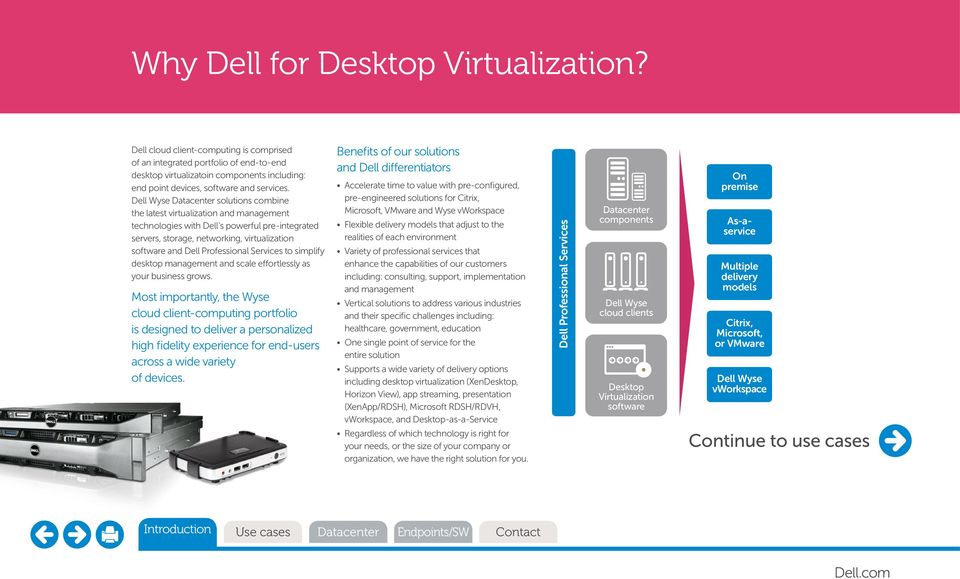
3 Why Dell for Desktop Virtualization? Dell cloud client-computing is comprised of an integrated portfolio of end-to-end desktop virtualizatoin components including: end point devices, software and services. Dell Wyse Datacenter solutions combine the latest virtualization and management technologies with Dell s powerful pre-integrated servers, storage, networking, virtualization software and Dell Professional Services to simplify desktop management and scale effortlessly as your business grows. Most importantly, the Wyse cloud client-computing portfolio is designed to deliver a personalized high fidelity experience for end-users across a wide variety of devices. Benefits of our solutions and Dell differentiators Accelerate time to value with pre-configured, pre-engineered solutions for Citrix, Microsoft, VMware and Wyse vworkspace Flexible delivery models that adjust to the realities of each environment Variety of professional services that enhance the capabilities of our customers including: consulting, support, implementation and management Vertical solutions to address various industries and their specific challenges including: healthcare, government, education One single point of service for the entire solution Supports a wide variety of delivery options including desktop virtualization (XenDesktop, Horizon View), app streaming, presentation (XenApp/RDSH), Microsoft RDSH/RDVH, vworkspace, and Desktop-as-a-Service Regardless of which technology is right for your needs, or the size of your company or organization, we have the right solution for you. Dell Professional Services Datacenter components Dell Wyse cloud clients Desktop Virtualization software On premise As-aservice Multiple delivery models Citrix, Microsoft, or VMware Dell Wyse vworkspace to use cases Introduction
4 Desktop virtualization typical use cases. Healthcare Government Education Financial services Retail Industry User types Business sector - Doctors - Nurses - Clinical technicians - Secure environments - Training facilities - Computer labs - Mobile and commuter students - Customer service reps - Business continuity - Global scale - Point of sale - Manager s terminals - Public presentation - 3D graphic intensive - Oil and gas - Entertainment Drivers & benefits - Fewer help-desk calls/more employee uptime - Improved regulatory compliance (Sarbanes-Oxley, state laws, HIPAA, etc.) - Heightened data security - Reliability and business continuity - Improved application access and performance - Standardized images, applications and support - Fewer logins through session portability - Better customer care - Enable an increasingly mobile workforce Use cases

5 Dell Desktop Virtualization Solutions. Select an option below. Datacenter

6 Supporting today s workforce demands. Today s workforce expects the freedom and flexibiity to work from anywhere, anytime - using their preferred device(s). IT is expected to save money and do more with fewer people, and your organization needs to be more productive, efficient and competitive. But how do you get there? Do It Yourself Reference architectures and components Dell helps you do it Build and Transfer Build and Operate Dell Wyse datacenter pre-configured infrastructure and appliances As-a-service Cloud platforms Dell DaaS Dell does it for you Dell cloud client-computing lets any user access any application on any device personal or corporate-owned while keeping your organization s systems and data secure, manageable and reliable. Dell offers a complete spectrum of virtual desktop solution and service delivery models including; both pre-configured and customizable options, hosted and managed services offerings, and subscription-based Dell cloud desktop-as-a service. Benefits

7 Dell Wyse Datacenter portfolio. Solution portfolio overview. Citrix, Microsoft, VMware and Wyse vworkspace based software platforms Dell Wyse Datacenter Dell Wyse Datacenter for Virtual Workstations Dell Wyse Datacenter VRTX Dell Wyse Datacenter 10 seat Rapid Deployments Maximum flexibilty Workspace as a Service

8 Dell Wyse Datacenter portfolio. Dell Wyse Datacenter for VRTX Dell VRTX provides enterprise-level virtual desktop capabilities within a converged infrastructure which can be used in a normal office environment. Best suited for organizations with IT resources whose requirements place a high priority on efficient deployment and management of their virtual desktop infrastructure, both as stand-alone and in remote locations. The solution uses Dell purpose-designed reference architectures to speed time-to-value and streamline day-to-day operations and management. Provided with a choice of stacks which support from 250 to 600 users, these solutions deliver desktop virtualization as an IT service to meet dynamic business needs and maximize efficiency by improving the utilization of staff and infrastructure. Learn more here. Dell Wyse Datacenter Ideal for organizations with a sophisticated IT environment and IT resources that are interested in robust, flexible and highly scalable desktop virtualization supporting a range of graphics and collaboration capabilities, which provides the optimal price/performance ratio for their workload. Based upon industry standards, the solution is available with blade or rack mount server architectures. It enables a high degree of choice through an array of pre-qualified components, while still pre-engineered to speed time-to-value. Dell Wyse Datacenter simplifies the deployment of virtualized desktops for environments ranging from 50 and scaling to 50,000+ users. Learn more here. Dell Wyse Datacenter for Virtual Workstations Delivers high-end, workstation class virtual desktops through a scalable, configurable and highly flexible approach that provides an ISV-certified solution with high-performing Dell infrastructure components. The solution is the only single-vendor end-to-end virtualized workstation available in the market today, serving from a handful to thousands of users. It incorporates certifications for key applications and Dell Solution Centers provide a process for certifying additional applications and proof-of-concept testing. Learn more here.

9 Dell Wyse Datacenter for VRTX. Office-optimized innovation for small and medium sized organizations, branch & remote offices Ideal for those organizations seeking a robust, enterprise-grade desktop virtualization solution that can run in an office environment. The converged infrastructure - servers, storage and networking - simplifies the deployment of virtualized desktops for environments of 50 to 600 users, supported by reference architectures and services which speed time-to-value. Learn more here. At a glance Delivers the benefits of desktop virtualization in an integrated stack that costs about the same as a high-end desktop workstation PC Designed to provide cost-effective enterprise-class VDI for smaller organizations and remote/branch office locations Unique shared internal storage architecture removes cost and complexity Works with an array of thin/zero clients including Dell Wyse zero clients optimized and verified for Citrix, VMware and Microsoft Broad available range of Dell Services helps maximize the value of your VDI investments. Benefits Office-optimized dimensions, acoustics and security leverages industry standards-based hardware and software components for the optimal balance of performance and cost per user Allows standalone operation for up to 600 users, or extend the capabilities of a centralized VDI program to a multi-location enterprise Flexible, high-performance infrastructure that can be managed using simplified tools Optional support for high availability (HA) and redundancy Provides unified communications and collaboration (UCC) support for Microsoft Lync 2013, leveraging Citrix HDX 3D Pro RealTime Optimization Pack for scalable real-time audio and video conferencing Available Dell services include design/deployment, infrastructure managed services, remote monitoring management, and virtual desktop management. Components Citrix XenDesktop, VMware Horizon View, Microsoft Server 2012 and Wyse vworkspace Choice of VMware vsphere or Microsoft Hyper-V hypervisors Dell PowerEdge VRTX converged infrastructure in 250 or 600 user configuration Dell ProSupport 3yr, 24x7 available.

10 Dell Wyse Datacenter. Optimized price/performance Ideal for organizations with sophisticated IT environments who are seeking a robust, configurable and scalable desktop virtualization solution with a broad range of component choice. Simplifies the deployment of virtualized desktops for environments ranging from 50 to 50,000 users, supported by reference architectures and services which speed time-to-value. At a glance Designed to deliver cost-effective, enterprise-class virtual desktops, enabling efficient scaling as adoption increases Unique internal storage option starts at less than $200/user for infrastructure True hardware virtualized graphics capability with vgpu which enables high end/3d graphics performance Available SANless option reduces cost of storage and supports high I/O requirements via SSD hard drives. Works with an array of thin/zero clients including Dell Wyse zero clients optimized and verified for Citrix XenDesktop Complete end-to-end solution, including servers, storage, networking, services and your choice of endpoints for better together operation. Benefits Configurable virtual desktop infrastructure leverages industry standards-based hardware and software components for the optimal balance of performance and cost per user Protects your IT existing investment by supporting select compatible non-dell components within the architecture Scalable and flexible high-performance infrastructure - rapidly deploy pilots in just a few days, and expand to full deployment with one solution that scales from 50 to 50,000 users Optional support for high availability (HA) and redundancy Includes a choice of PowerEdge blade or rack server configurations and storage options Supports true vgpu virtualized graphics, from basic to high end graphics/3d visualization, with HDX 3D Pro enabling virtualized graphics for OpenGL applications in pass-through configuration using available NVIDIA K1/K2 cards Provides unified communications and collaboration (UCC) support for Microsoft Lync 2013, leveraging Citrix HDX 3D Pro RealTime Optimization Pack for scalable real-time audio and video conferencing Available Dell Services for Dell Wyse Datacenter include design/deployment, infrastructure managed services, remote monitoring management, and virtual desktop management. Components Citrix XenDesktop, VMware Horizon View, Microsoft Server 2012 and Dell Wyse vworkspace compatible Choice of VMware vsphere or Microsoft Hyper-V hypervisors Dell PowerEdge rack or blade servers Dell EqualLogic, Compellent, or internal storage Dell Networking converged fabric True vgpu virtualized graphics with NVIDIA GRID K1/K2 Unified communications, MS Lync 2013 Dell ProSupport 3yr, 24x7. Design Your Solution.* * Related Videos - link to the Dell cloud client-computing Advisor

11 Dell Wyse Datacenter for Virtual Workstations. A complete, tested and configurable virtualized workstation solution Delivers high-end, workstation-grade virtual desktops through a scalable, configurable and highly flexible approach that matches the Dell Precision brand capabilities with high-performing Dell infrastructure components. The solution enables organizations to retain complete control of their sensitive data while increasing asset utilization and overall management quality to ensure their users have workstation class performance for their graphically-intensive workloads wherever and whenever they need it. In its full data center configuration with the Dell PowerEdge R720 servers or Dell Workstations, the solution can also be used to deliver other types of desktops for task and knowledge workers, enabling organizations to manage all virtual desktop deployments through a single infrastructure. At a glance Designed to deliver workstation-class virtual desktops with lower TCO than traditional physical workstations Certified with Autodesk AutoCAD, Siemens PLM NX, Tecnomatix and Teamcenter Visualization, PTC Creo, and Dassault Systemes SolidWorks Dell Solution Centers provide engagement process for certifying applications and proof-of-concept testing Complete end-to-end solution including servers, storage, networking and your choice of endpoints designed for better together operation. Benefits Reliable and secure need-based virtual access to applications and data Improved data protection and disaster recovery Device independent, enabling BYOD Workstation-class performance in line with the Dell Precision brand promise Centralized infrastructure is easily scalable based on user and performance needs Full end-to-end solution with certified configurations supports workstation-class needs Centralized management of workstations and desktops reduces OPEX. Components Citrix XenDesktop, VMware Horizon View, Microsoft Server 2012 and Dell Wyse vworkspace compatible Choice of VMware vsphere or Microsoft XenServer hypervisors Dell PowerEdge rack or blade servers Dell EqualLogic, Compellent, or internal storage Dell Networking converged fabric True vgpu virtualized graphics with NVIDIA GRID K1, K2 and K2A Unified communications, MS Lync 2013 Dell ProSupport 3yr, 24x7.

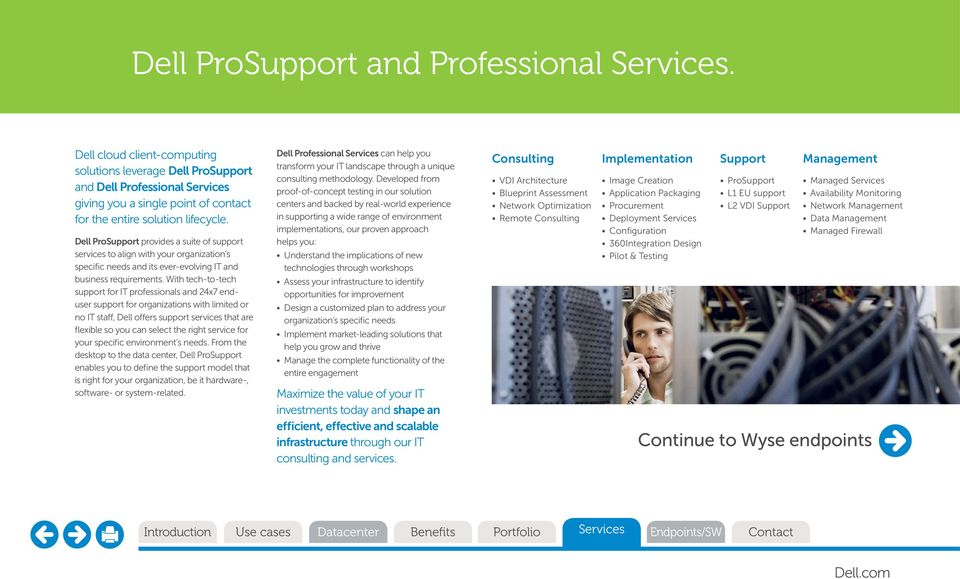
12 Dell ProSupport and Professional Services. Dell cloud client-computing solutions leverage Dell ProSupport and Dell Professional Services giving you a single point of contact for the entire solution lifecycle. Dell ProSupport provides a suite of support services to align with your organization s specific needs and its ever-evolving IT and business requirements. With tech-to-tech support for IT professionals and 24x7 enduser support for organizations with limited or no IT staff, Dell offers support services that are flexible so you can select the right service for your specific environment s needs. From the desktop to the data center, Dell ProSupport enables you to define the support model that is right for your organization, be it hardware-, software- or system-related. Dell Professional Services can help you transform your IT landscape through a unique consulting methodology. Developed from proof-of-concept testing in our solution centers and backed by real-world experience in supporting a wide range of environment implementations, our proven approach helps you: Understand the implications of new technologies through workshops Assess your infrastructure to identify opportunities for improvement Design a customized plan to address your organization s specific needs Implement market-leading solutions that help you grow and thrive Manage the complete functionality of the entire engagement Maximize the value of your IT investments today and shape an efficient, effective and scalable infrastructure through our IT consulting and services. Consulting Implementation Support Management VDI Architecture Blueprint Assessment Network Optimization Remote Consulting Image Creation Application Packaging Procurement Deployment Services Configuration 360Integration Design Pilot & Testing ProSupport L1 EU support L2 VDI Support Managed Services Availability Monitoring Network Management Data Management Managed Firewall to Wyse endpoints Services
13 Wyse endpoints and software products. Select an option below. Endpoints/SW

14 Which client for which environment? * Native support for HDX with Dell Wyse ThinOS 8 and Xenith Citrix XenApp XenDesktop ICA / HDX Microsoft Remote Desktop Services/ Terminal Server Hyper-V / vworkspace RDP / RemoteFX Microsoft Remote Desktop Services/ Terminal Server Hyper-V / vworkspace RDP VMware Horizon View PCoIP VMware Horizon View RDP ** The only non Win32 RDP 8 software client in the market; available with Dell Wyse ThinOS 8 Non Win 32 client Win 32 client Non Win 32 client Win 32 client Non Win 32 client Win 32 client Non Win 32 client Win 32 client Non Win 32 client Win 32 client Citrix HDX* Citrix HDX RDP7/8 - RemoteFX RDP7/8 View+RDC7** View+RDC7 View Client View Client View+RDC7** View+RDC7 Dell Wyse TCX/VDA Citrix PS Dell Wyse TCX/VDA Dell Wyse TCX/VDA PCoIP HW Dell Wyse WSM Dell Wyse TCX/VDA OEM TCX MMR PC Extender Dell Wyse TCX/VDA Dell Wyse WSM PC Extender Dell Wyse WSM PC Extender Dell Wyse TCX/VDA Dell Wyse WSM PocketCloud PocketCloud Dell Wyse WSM Xenith 3 Xenith Pro 2 D10D D10DP 5212 All-in-one T10D T10 C10LE Z50D/S D50D T50 X50m Cloud Connect Z90Q7/8 Z90D7/8 Z90DE7 D90Q7/8 D90D7/8 C90LE7 X90m7 D10D D10DP 5212 All-in-one T10D Z90Q7/8 Z90D7/8 Z90DE7 D90Q7/8 D90D7/8 X90m7 D10D D10DP 5212 All-in-one T10D T10 C10LE Z50D/S D50D T50 X50m Cloud Connect Z90Q7/8 Z90D7/8 Z90DE7 D90Q7/8 D90D7/8 C90LE7 X90m7 P25 P45 D10DP Z50D/S D50D T50 X50m Cloud Connect Z90Q7/8 Z90D7/8 Z90DE7 D90Q7/8 D90D7/8 C90LE7 X90m7 D10D 5212 All-in-one T10D T10 C10LE Z50D/S D50D T50 X50m Z90Q7/8 Z90D7/8 Z90DE7 D90Q7/8 D90D7/8 C90LE7 X90m7 Integration

15 Dell Wyse portfolio. A wide choice of advanced, innovative client firmware options available. Take a portfolio tour

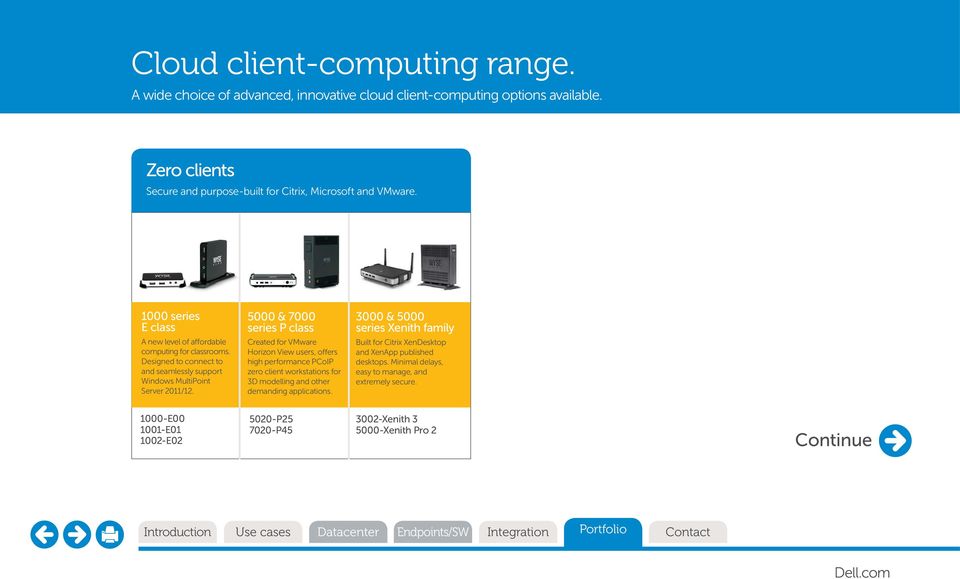
16 Cloud client-computing range. A wide choice of advanced, innovative cloud client-computing options available. Zero clients Secure and purpose-built for Citrix, Microsoft and VMware series E class A new level of affordable computing for classrooms. Designed to connect to and seamlessly support Windows MultiPoint Server 2011/ & 7000 series P class Created for VMware Horizon View users, offers high performance PCoIP zero client workstations for 3D modelling and other demanding applications & 5000 series Xenith family Built for Citrix XenDesktop and XenApp published desktops. Minimal delays, easy to manage, and extremely secure E E E P P Xenith Xenith Pro 2
17 Cloud client-computing range. A wide choice of advanced, innovative cloud client-computing options available. ThinOS thin clients. Optimized for maximum thin client security and performance series T class Offers an excellent web, Citrix, Microsoft, and VMware VDI user experience on a budget series C class Compact, highly capable thin client features a powerful processor and an enhanced hardware graphics accelerator series D class Versatile, compact and efficient. Dual core thin client capable of delivering 3D graphics and HD multimedia all-in-one thin client Secure all-in-one, delivers an excellent virtual desktop experience, with extreme ease of use & management T T10D 3110-C10LE 5012-D10D 5012-D10DP 5212 all-in-one thin client

18 Cloud client-computing range. A wide choice of advanced, innovative cloud client-computing options available. Linux thin clients. Versatile and multi-functional series T class Offers an excellent web, Citrix, Microsoft, and VMware VDI user experience on a budget series C class Compact, highly capable thin client features a powerful processor and an enhanced hardware graphics accelerator series D class Versatile, compact and efficient. Dual core thin client capable of delivering 3D graphics and HD multimedia series Z class Powerful thin clients made for the most demanding applications series X class Mobile thin clients offering a rich integrated WiFi, Bluetooth TM option, and 3G card support T C50LE 5250-D50D 7250-Z50D 7050-Z50S 7452-X50m

19 Cloud client-computing range. A wide choice of advanced, innovative cloud client-computing options available. Windows Embedded Standard thin clients. Scalable & highly flexible series C class Compact, highly capable thin client features a powerful processor and an enhanced hardware graphics accelerator series D class Versatile, compact and efficient. Dual core thin client capable of delivering 3D graphics and HD multimedia series Z class Powerful and expandable thin clients made for the most demanding rich media and graphicsintensive applications series X class Mobile thin clients offering a rich integrated WiFi, Bluetooth TM option, and 3G card support C90LE D90D D90Q D90D D90Q Z90D Z90D Z90DE Z90Q Z90QQ7p 7490-Z90Q X90m7

20 Cloud client-computing range. Cloud Connect personal cloud access device. Cloud Connect Secure connectivity at work, home, or on the go. Cloud Connect Ultra-portable hand held multi-function cloud access device with enterprise-class security and control. Makes any HDMI/ MHL monitor your personal productivity display. Cloud Connect

21 Cloud client-computing range. A wide choice of advanced, innovative cloud client-computing options available. Cloud desktops. Offer the power of a PC with the security/ease of management of VDI series D class Versatile, compact and efficient. Dual core cloud PC capable of delivering 3D graphics and HD multimedia series Z class Powerful cloud PC made for the most demanding rich media and graphics-intensive applications series X class Mobile cloud desktop offering a rich integrated WiFi, Bluetooth TM option, and 3G card support D00D 5400-D00Q 7200-Z00D 7400-Z00Q 7402-X00M
22 Dell Wyse virtualization software. Dell Wyse virtualization software is built into Wyse cloud clients and addresses limitations previously found in virtualization, enhancing the user experience, reducing network bandwidth needs and expanding server scalability. Wyse vworkspace vworkspace enables the delivery of applications and desktops to users based on their unique needs. Organizations can maximize value and reduce complexity by deploying, monitoring and managing a blend of hosted VDI, RDSH and application virtualization from a single pane of glass. Integration with native Microsoft technologies significantly reduces the amount of storage required in support of the desktop virtualization infrastructure, increases provisioning speed and ensures a quality user experience. vworkspace Advanced Targets allow the creation of granular, context-aware assignments which organizations can leverage for increased security. User access can be defined in many ways including two-factor authentication, trusted entry point, client type or version, user, group, OU, IP, name, day of week/time of day and other variables. Wyse WSM TM Wyse WSM provides the local processing power of a PC with management and security benefits of your private cloud. WSM offers full PC desktop functionality without complexity by streaming everything a user needs operating systems, media-rich applications and documents on-demand to Dell Wyse cloud PCs or diskless PCs. WSM is designed to scale from small, single server systems for an individual office or classroom to high-availability, multi-site deployments with centralized management. WSM is easy to install and integrates seamlessly with virtualized application and desktop technologies from Citrix, Microsoft or VMware when full PC functionality at the desktop is required. Wyse TCX Suite TM Wyse TCX Suite virtualization software offers an outstanding user experience available over virtualized environments by enabling desktop and mobile users to run diverse multimedia formats (including Flash), use multiple monitors, plug-in USB devices and run voice applications. Multi-display Helps make virtual desktops and applications work better across multiple displays. USB virtualizer Simple and revolutionary, software that makes client attached USB devices visible to virtual desktops. Multimedia acceleration This software enables Collaborative Processing Architecture TM, designed to improve multimedia quality while reducing load on servers and networks. Rich sound This software uses virtual desktops and applications to deliver rich, bi-directional sound for applications like VoIP and unified communications. Flash redirection Extends high-quality multimedia support to Flash.
23 Dell Wyse virtualization software. Wyse Virtual Desktop Accelerator TM Wyse Virtual Desktop Accelerator (VDA) enables virtualized desktop environments to be deployed to areas where network packet-loss and latency present operational barriers. Now, with VDA, more users can receive the full benefits of Dell cloud client-computing offering an outstanding PC experience over virtualized desktops. Wyse VDA is a software-only solution for Dell Wyse cloud clients and supported PCs. VDA: Offers one of the best user experiences for the allocated network bandwidth. Neutralizes the effects of network latency and packet loss, making thin suitable for more remote-site, branch or field-based users. Can significantly accelerate RDP and ICA protocols on certain WAN links where end-to-end performance may be impacted by link distance or capacity. Wyse PC Extender TM Wyse PC Extender enables organizations to access the benefits of thin and virtual computing environments by repurposing their existing PC hardware into intelligent virtualized desktops.
24 Dell Wyse management software. Device Manager TM Enables low TCO through scalable remote monitoring, management and reporting of Dell Wyse clients. Centralizes control of clients Easy-to-view status monitoring Full image or patch/update distribution Updates can be scheduled for after hours Out-of-the-box, auto-configuration of devices Detailed asset management Scales up to thousands of devices Standards-based, secure communications Can be configured for high availability (HA) Network-friendly peer-assisted delivery of desktop images, updates, and patches Configuration Manager TM Configuration Manager automates deployment of Dell Wyse Windows-based thin clients through your private cloud or server. Self-configuration capability for Windows Embedded thin clients Select desired configuration, and Configuration Manager does the rest, automatically No imaging or re-booting required, works in concert with write-filter technology for enhanced security Supports SMB to enterprise environments Supports stationary or mobile thin clients, in or out of the office Includes appliance mode to restrict one or more thin clients to a singular function (e.g. info-only kiosk) Integrates with Microsoft Active Directory, when present Cloud Client Manager Securely embrace consumerized IT and BYOD alongside corporate owned devices, apps and content. Cloud Client Manager is a cloud-based fixed and mobile device management console that allows you to securely manage thin clients, mobile devices and employee access to corporate applications and content all from a single cloud-based console. Empower your workforce, protect your data and cut costs. Configure and manage Dell Wyse thin clients and mobile devices from virtually anywhere* Securely manage employee access to company applications and content Enable user self-service provisioning for devices and corporate resources Monitor user devices, track asset and application inventory and enforce policy compliance Real-time alerts, troubleshooting and audit trails *Supports ios and Android mobile devices and Dell Wyse ThinOS thin and zero clients.
25 Dell Wyse PocketCloud personal cloud content access. PocketCloud Remote Desktop TM PocketCloud Remote Desktop is a secure and fast way to remotely connect to your Mac or Windows desktop with your ipad, iphone, ipod touch, or Android device no matter where you are. Access your files, pictures, and applications like Excel, Powerpoint, Photoshop, or any other program. PocketCloud Explore TM PocketCloud Explore brings an intuitive view of your Windows/Mac file systems to Android and ios smartphones and tablets and Windows RT tablets, and lets you search, view, organize, and share across all of your computers. Create your own personal cloud out of your computers, plus Dell Wyse Cloudbin online storage for anytime, anywhere access and sharing. PocketCloud Web TM PocketCloud Web is a browser-based application and service that lets you search, view, organize, and share files across all of your computers and Dell Wyse Cloudbin online storage. Create a personal cloud of your computers and Cloudbin for access and sharing from any Web browser. Restart portfolio tour
26 For information on Dell cloud client-computing and the full end-to-end solution please visit Dell cloud client computing One Dell Way Round Rock, TX The Dell logo and references are trademarks of Dell Inc. Other product names mentioned herein are for identification purposes only and may be trademarks and/or registered trademarks of their respective companies. All specifications are subject to change without notice. While we make every effort to ensure the accuracy of the details, specifications, models, images and benefits featured in this datasheet, we cannot be held responsible for any errors and/or omissions. If you have any queries regarding Dell Wyse products please contact your authorized regional Dell Partner. Some features require support by server operating system and protocol. Design draft Contact
Dell Cloud Client Computing.
 Dell Cloud Client Computing. epocket guide. Dell Cloud Client Computing. Learn more. Here: Find your way around the epocket Guide. Select an option below. Home Matching use cases to technologies. Basic
Desktop Virtualization Solutions Simplified Appliance
 Desktop Virtualization Solutions Simplified Appliance Seizing opportunities in today s mobile and social world Today s business models and customer engagements are increasingly real-time, dynamic and contextual.
Dell Wyse Cloud Connect
 Dell Wyse Cloud Connect Secure productivity from work, home, and on the go. The ultra-compact personal cloud device that can make any HDMI/MHL-equipped display your own. For personal access to all of your
VMware End User Computing Horizon Suite
 VMware End User Computing Horizon Suite Luc Gallet [email protected] 2010 VMware Inc. All rights reserved The pace and rate of technology change is faster than ever Devices 66 % use 2+ devices for work
End User Computing - Cloud Client Computing
 End User Computing - Cloud Client Computing Eduoard Lorrain, VMware David Angwin, Dell The Growing Complexity of Today Diverse Apps Data Everywhere Diverse Platform Diverse Devices Mobile Corporate Devices
NVIDIA GRID OVERVIEW SERVER POWERED BY NVIDIA GRID. WHY GPUs FOR VIRTUAL DESKTOPS AND APPLICATIONS? WHAT IS A VIRTUAL DESKTOP?
 NVIDIA GRID OVERVIEW Imagine if responsive Windows and rich multimedia experiences were available via virtual desktop infrastructure, even those with intensive graphics needs. NVIDIA makes this possible
Dell Desktop Virtualization Solutions DVS Enterprise
 Dell Desktop Solutions Enterprises of all sizes are poised to explore alternatives to traditional end user computing. Many are reevaluating how their IT groups provision, manage, and support their workforce.
VMware Horizon 7. End-User Computing Today. Horizon 7: Delivering Desktops and Applications as a Service
 DATASHEET 7 AT A GLANCE Extend the power of virtualization from the data center to devices. 7 delivers virtualized or hosted desktops and applications through a single platform to end users. These desktop
Wyse Cloud Connect. Secure productivity from work, home, and on the go. Learn more. Here:
 Wyse Cloud Connect Secure productivity from work, home, and on the go The ultra-compact personal cloud device that can make any HDMI/MHL-equipped display your own. For personal access to all of your apps
Wyse vworkspace Supports Higher Education s Desktop Virtualization Needs
 Wyse vworkspace Supports Higher Education s Desktop Virtualization Needs Prepared by Chris Lyman, Senior Systems Consultant Dell cloud client-computing Solutions Abstract As interest in alternative approaches
Simplify the Deployment and Management of Desktop Virtualization & VDI Technologies. Terry Lewis Solutions Architect
 Simplify the Deployment and Management of Desktop Virtualization & VDI Technologies Terry Lewis Solutions Architect Today s discussion Technology Drivers Desktop and Application Delivery Complexity Which
Dell Wyse cloud client device management
 Wyse Dell Wyse cloud client device management This interactive PDF is best viewed in Adobe Acrobat 9 or above. Dell Wyse cloud client device management. All you need to know, here: Dell Wyse device management
Protecting Content and Securing the Organization Through Smarter Endpoint Choices
 Protecting Content and Securing the Organization Through Smarter Endpoint Choices Prepared by Dan O Farrell Dell Cloud Client-Computing Finally a practical approach to protecting content and securing desktops
Dell Wyse Cloud Connect discussion card
 Dell Wyse Cloud Connect discussion card What is Cloud Connect? Cloud Connect is a portable enterprise IT-controlled HDMI/MHL (mobile high-definition link) cloud device that allows people to convert a capable
Desktop Virtualization. The back-end
 Desktop Virtualization The back-end Will desktop virtualization really fit every user? Cost? Scalability? User Experience? Beyond VDI with FlexCast Mobile users Guest workers Office workers Remote workers
Where are Organizations Today? The Cloud. The Current and Future State of IT When, Where, and How To Leverage the Cloud. The Cloud and the Players
 The Current and Future State of IT When, Where, and How To Leverage the The and the Players Software as a Service Citrix VMWare Google SalesForce.com Created and Presented by: Rand Morimoto, Ph.D., MCITP,
605: Design and implement a desktop virtualization solution based on a mock scenario. Hands-on Lab Exercise Guide
 605: Design and implement a desktop virtualization solution based on a mock scenario Hands-on Lab Exercise Guide Contents Overview... 2 Scenario... 5 Quick Design Phase...11 Lab Build Out...12 Implementing
VMware Horizon. VMware Horizon 6. Q. What is VMware Horizon? Central image management is supported for
 FREQUENTLY ASKED QUESTIONS VMware Horizon Q. What is VMware Horizon? A. VMware Horizon is a family of desktop and application virtualization solutions designed to deliver Windows and online services from
Which ViewSonic VDI client is right
 01 Finches Only 02 ViewSonic Only Which ViewSonic VDI client is right for your customer? Erik Willey 02.10.2014 SUMMARY: The first brand to offer smart display clients for Android, as well as zero client
IT Convergence Solutions from Dell More choice, better outcomes. Mathias Ohlsén
 IT Convergence Solutions from Dell More choice, better outcomes Mathias Ohlsén What is really converge all about? Converge From Latin convergere, from con-, "together", + vergere, "to bend". Verb (third-person
The all-new Citrix VDI-in-a-Box
 The all-new Citrix VDI-in-a-Box Citrix presents the VDI (r)evolution for small businesses Fabian Kienle Senior Channel Sales Manager, Eastern EMEA [email protected] Best-in-class Offerings Enable
Dell Desktop Virtualization Solutions (DVS) Enterprise
 Enterprises of all sizes are poised to explore alternatives to traditional end user computing. Many are reevaluating how their IT groups provision, manage, and support their workforce. IT administrators
Dell Desktop Virtualization Solutions Simplified. All-in-one VDI appliance creates a new level of simplicity for desktop virtualization
 Dell Desktop Virtualization Solutions Simplified All-in-one VDI appliance creates a new level of simplicity for desktop virtualization Executive summary Desktop virtualization is a proven method for delivering
PNY Professional Solutions NVIDIA GRID - GPU Acceleration for the Cloud
 PNY Professional Solutions NVIDIA GRID - GPU Acceleration for the Cloud PNY Professional Solutions GRID PARALLEL COMPUTING QUADRO ADVANCED VISUALIZATION TESLA PARALLEL COMPUTING PREVAIL & PREVAIL ELITE
(VDI) William Stein, LHRIC. Jim Geueke, MainLine
 Virtual Desktop Infrastructure (VDI) William Stein, LHRIC Jim Geueke, MainLine Why Desktop Virtualization? Central management of desktop images User receives a fresh image every time Easier Windows OS
Citrix XenDesktop 5.6 Providing best TCO and TVO at once. Fabian Kienle Regional Sales Manager, Baltics @ Citrix Systems
 Citrix XenDesktop 5.6 Providing best TCO and TVO at once Fabian Kienle Regional Sales Manager, Baltics @ Citrix Systems Ususally IT vendors keep telling you about the how.. but did anyone ever told you
DeviceLock Virtual DLP: Overview & Scenarios
 DeviceLock Virtual DLP: Overview & Scenarios DeviceLock Virtual DLP Overview DeviceLock s Virtual DLP feature extends the reach of DeviceLock data leak prevention capabilities to a variety of virtual computing
Meet the BYOD, Computing Anywhere Challenge: Planning and License Management for Desktop Virtualization
 Meet the BYOD, Computing Anywhere Challenge: Planning and License Management for Desktop Virtualization Barb Goldworm Founder, president & chief analyst, FOCUS, LLC [email protected] The
Virtual Client Solution: Desktop Virtualization
 IBM System x and BladeCenter Virtual Client Solution: Desktop Virtualization Powered by and VMware View June 29, 2010 Agenda 1 2 3 4 5 6 Virtual client solution overview Addressing companies pain points
VMware Horizon DaaS: Desktop as a Cloud Service (DaaS)
 VMware Horizon DaaS: Desktop as a Cloud Service (DaaS) 1 43% of workforce using 3+ devices 74% of employees use consumer technologies, due to a lack of alternatives from IT 2010 The year the number of
Dell Desktop Virtualization Solutions Enterprise Offering Overview
 Dell Desktop Virtualization Solutions Enterprise Offering Overview Dell Desktop Virtualization Solutions Enterprise are designed to help you get up and running faster, with less risk, and optimal end user
How To Get The Most Out Of Vdi
 A GUIDE TO IMPLEMENTING VDI AS A SERVICE CREATIVE-ITC.COM OVERVIEW After years of promise, Virtual Desktop Infrastructure (VDI) is finally hitting the mainstream as a desktop management solution suitable
Welcome the world of Citrix - where Desktops, Apps and Data are following you, where ever you go
 Welcome the world of Citrix - where Desktops, Apps and Data are following you, where ever you go Fabian Kienle Regional Manager, Baltics @ Citrix Systems Cloud Computing Definition Wikipedia Cloud Computing
How To Use Windows Small Business Server 2011 Essentials
 Everything Your Business Needs in a Server, Nothing it doesn t. Ideal as a first server for small businesses with up to 25 users, Windows Small Business Server 2011 Essentials provides a cost-effective
Citrix desktop virtualization and Microsoft System Center 2012: better together
 Citrix desktop virtualization and Microsoft System Center 2012: better together 2 Delivery of applications and data to users is an integral part of IT services today. But delivery can t happen without
Desktop virtualization for all
 Desktop virtualization for all 2 Desktop virtualization for all Today s organizations encompass a diverse range of users, from road warriors using laptops and mobile devices as well as power users working
Vertex Virtual Desktops
 Vertex Virtual Desktops Whitepaper Revision 3.1 Updated 9-1-2012 Tangent, Inc. 2009. V.2 To the reader, I m Ron Perkes and I run the engineering group at Tangent responsible for our virtual desktop solutions.
Desktop virtualization for all
 Desktop virtualization for all 2 Desktop virtualization for all Today s organizations encompass a diverse range of users, from road warriors using laptops and mobile devices as well as power users working
Vmware Horizon View with Rich Media, Unified Communications and 3D Graphics
 Vmware Horizon View with Rich Media, Unified Communications and 3D Graphics Edward Low 2014 VMware Inc. All rights reserved. Agenda Evolution of VDI Horizon View with Unified Communications Horizon View
Foundation for Windows as a Service. With FlexCast Management Architecture (FMA)
 Foundation for Windows as a Service With FlexCast Management Architecture (FMA) FlexCast Delivery Technology Simplified approaches to deployment flexibility Central Management Application & Desktop Delivery
Cisco WAAS Optimized for Citrix XenDesktop
 White Paper Cisco WAAS Optimized for Citrix XenDesktop Cisco Wide Area Application Services (WAAS) provides high performance delivery of Citrix XenDesktop and Citrix XenApp over the WAN. What ou Will Learn
FastPass Password Manager
 FastPass Password Manager Version 3.4 FastPass in Thin Clients environments Document Title FastPass in Thin Clients environments Document Classification Public Document Revision B Document Status Final
Cisco Desktop Virtualization with UCS: A Blueprint for Success
 Cisco Desktop Virtualization with UCS: A Blueprint for Success Eugenios Zervoudis Product Sales Specialist [email protected] Challenges with Desktop Virtualization today Challenges implementing Enterprise
LEOSTREAM. Case Study Remote Access to High-Performance Applications
 LEOSTREAM TM ~ Case Study Remote Access to High-Performance Applications Freescale Semiconductor deploys virtual desktop infrastructure solution to provide global engineers with secure access to high-performing
Virtual Desktop VMware View Horizon
 Virtual Desktop VMware View Horizon Presenter - Scott Le Marquand VMware Virtualization consultant with 6 years consultancy experience VMware Certified Professional 5 Data Center Virtualization VMware
How To Create A Desktop Computer From A Computer Or Mouse And Keyboard (For Business)
 Wyse WSM The power of a PC. Without the complexity. : Learn all you need to know. Here. Introducing Powerful, cost-effective desktop and application virtualization for businesses of all sizes. delivers
White paper. Microsoft and Citrix VDI: Virtual desktop implementation scenarios
 White paper Microsoft and Citrix VDI: Virtual desktop implementation scenarios Table of contents Objective Microsoft VDI offering components High definition user experience...3 A very cost-effective and
Silver Peak s Virtual Acceleration Open Architecture (VXOA)
 Silver Peak s Virtual Acceleration Open Architecture (VXOA) A FOUNDATION FOR UNIVERSAL WAN OPTIMIZATION The major IT initiatives of today data center consolidation, cloud computing, unified communications,
Citrix XenDesktop. Deploy virtual desktops and apps for any use case.
 Citrix XenDesktop Citrix XenDesktop transforms Windows desktops and apps into a cloud service available to any user, any device, anywhere. XenDesktop quickly and securely delivers any type of virtual desktop
Citrix XenDesktop. Deploy virtual desktops and apps for any use case.
 Citrix XenDesktop Citrix XenDesktop transforms Windows desktops and apps into a cloud service available to any user, any device, anywhere. XenDesktop quickly and securely delivers any type of virtual desktop
Microsoft and Citrix: Joint Virtual Desktop Infrastructure (VDI) Offering
 Microsoft and Citrix: Joint Virtual Desktop Infrastructure (VDI) Offering Architectural Guidance July 2009 The information contained in this document represents the current view of Microsoft Corporation
Introducing the IT Service Centric, Automated Data Center
 Introducing the IT Service Centric, Automated Data Center Tony Wand Solution Director EMEA EMG Enterprise Solutions Group Atea Action - Tallin Oct 2013 What is our customers want to achieve An IT service
VCE PROFESSIONAL SERVICES PORTFOLIO OVERVIEW
 vce.com VCE PROFESSIONAL SERVICES PORTFOLIO OVERVIEW Accelerate IT Transformation Today's fast-moving global economy requires an infrastructure with greater flexibility and agility than ever before. This
Parallels VDI Solution
 Parallels VDI Solution White Paper Version 1.0 April 2009 Table of Contents Enterprise Desktop Computing Challenges... 3 What is Virtual Desktop Infrastructure (VDI)... 3 Benefits of Virtual Desktop Infrastructure...
The Technical Differential: Why Service Providers Choose VMware for Cloud-Hosted Desktops as a Service
 The Technical Differential: Technical WHITE PAPER Table of Contents Executive Summary...3 Partnering With VMware Makes Business Sense...3 The VMware DaaS Blueprint...3 The VMware Technology Advantage...4
Frequently Asked Questions: Desktone s Offerings and Market
 Frequently Asked Questions: Desktone s Offerings and Market General Virtualization Q: What is desktop virtualization? A: Desktop virtualization is the separation of a client operating system/environment
Get into higher gears with Citrix in 2012: XenDesktop 5.6 the most complete solution on the planet
 Get into higher gears with Citrix in 2012: XenDesktop 5.6 the most complete solution on the planet Fabian Kienle, Senior Channel Manager @ Citrix Systems Business runs on Applications Decision Support
Secure Your Mobile Device Access with Cisco BYOD Solutions
 Solution Overview Secure Your Mobile Device Access with Cisco BYOD Solutions BENEFITS The Cisco Meraki solution (cloud managed) and Cisco BYOD Solution (on-premises management) help you secure multiple
Cisco and VMware: Transforming the End-User Desktop
 VMware Desktop Solutions SOLUTION BENEFITS Built on the industry s fastestgrowing blade server solution and the most widely adopted virtualization platforms Unparalleled price-toperformance ratio that
Extending the Power of Virtualization in End-User Computing Barry Flanagan End-User Computing Partner Strategy
 Extending the Power of Virtualization in End-User Computing Barry Flanagan End-User Computing Partner Strategy 2014 VMware Inc. All rights reserved. IT Management Processes are Not Optimized For Change
Simplify VDI and RDS Private Clouds for SMBs
 PRODUCT BRIEF Simplify VDI and RDS Private Clouds for SMBs VDI Private Cloud Konect Elite is an application and virtual desktop delivery software that offers the ability to dynamically sync, create, configure,
MITEL BUSINESS COMMUNICATIONS SOLUTIONS
 BROCHURE MITEL BUSINESS COMMUNICATIONS SOLUTIONS BUSINESS COMMUNICATIONS YOUR WAY, WITH COMPREHENSIVE AND FLEXIBLE SOLUTIONS ON PREMISE OR IN THE CLOUD Whether it s retaining productive employees, providing
SA Series SSL VPN Virtual Appliances
 SA Series SSL VPN Virtual Appliances Data Sheet Published Date July 2015 Product Overview The world s mobile worker population passed the 1 billion mark in 2010 and will grow to more than 1.3 billion by
Wyse Technology Inc. The Global Leader in Cloud Client Computing
 Technology Inc. The Global Leader in Cloud Client Computing Desktops, Mobility, Management Cloud Client Computing Solutions September 2012 software, hardware and services helps companies maximize the benefits
Citrix Solutions. Overview
 Citrix Solutions Citrix solutions empower people to work and collaborate from anywhere, securely accessing apps and data on any of the latest devices, as easily as they would in their own office. As work
Dell Wyse Datacenter for View RDS Desktops and Remote Applications
 Dell Wyse Datacenter for View RDS Desktops and Remote Applications An overview of Remote Desktop Session (RDS) based desktops and Remote Applications in a VMware Horizon View environment Dell Wyse Solutions
Features. Key benefits. HDX WAN optimization. QoS
 Citrix CloudBridge and Branch Repeater Datasheet CloudBridge and Branch Repeater Accelerates, controls and optimizes applications to all locations datacenter, branch offices, public and private clouds
Mobile workforce management software solutions. Empowering the evolving workforce with an end-to-end framework
 Mobile workforce management software solutions Empowering the evolving workforce with an end-to-end framework 2013 Dell, Inc. ALL RIGHTS RESERVED. This document contains proprietary information protected
Dell vworkspace Supports Higher Education s Desktop Virtualization Needs
 Dell vworkspace Supports Higher Education s Desktop Virtualization Needs Prepared by Chris Lyman, Senior Systems Consultant Dell Cloud Client Computing Solutions Abstract As adoption of desktop virtualization
Enterprise Desktop Solutions: VMware View 4.5
 C H E A T S H E E T Enterprise Desktop Solutions: What is VMware View? VMware View 4.5 is the leading desktop virtualization solution, built for delivering desktops as a managed service from the platform
IBM Systems and Technology IBM SmartCloud Desktop Infrastructure
 IBM Systems and Technology IBM SmartCloud Desktop Infrastructure Realize the potential of virtual desktops with greater choice and control 2 IBM SmartCloud Desktop Infrastructure Highlights Simplify desktop