
MICROSOFT EXCHANGE, OFFERED BY INTERCALL
|
|
|
- Dennis Dorsey
- 10 years ago
- Views:
Transcription

1 MICROSOFT EXCHANGE, OFFERED BY INTERCALL Comparison Sheet The table below compares in-product or service feature availability between Microsoft 2013 on-premises and Online within. Planning and Deployment Hybrid deployment IMAP migration Cutover migration Staged migration Permissions Role-Based Permissions Yes No No No Yes Yes Yes No No No Yes Yes Yes Yes Yes No RBAC customization. Default roles only. Role Groups Yes No RBAC customization. Default roles only. Role Assignment Policies Yes Message Policy, Recovery and Compliance Archiving Online-based Mailboxes Cloud-Based Archiving of On- Premises Mailboxes No RBAC customization. Default roles only. Yes Yes Yes Yes No Yes Yes Yes Yes No Yes Yes Yes Yes No No Yes Yes Yes Yes Yes No Yes 8 No No No No No No Retention Tags and Retention Policies Information Rights Management (IRM) Yes No No No Yes Yes Yes [email protected] INTERCALL.COM

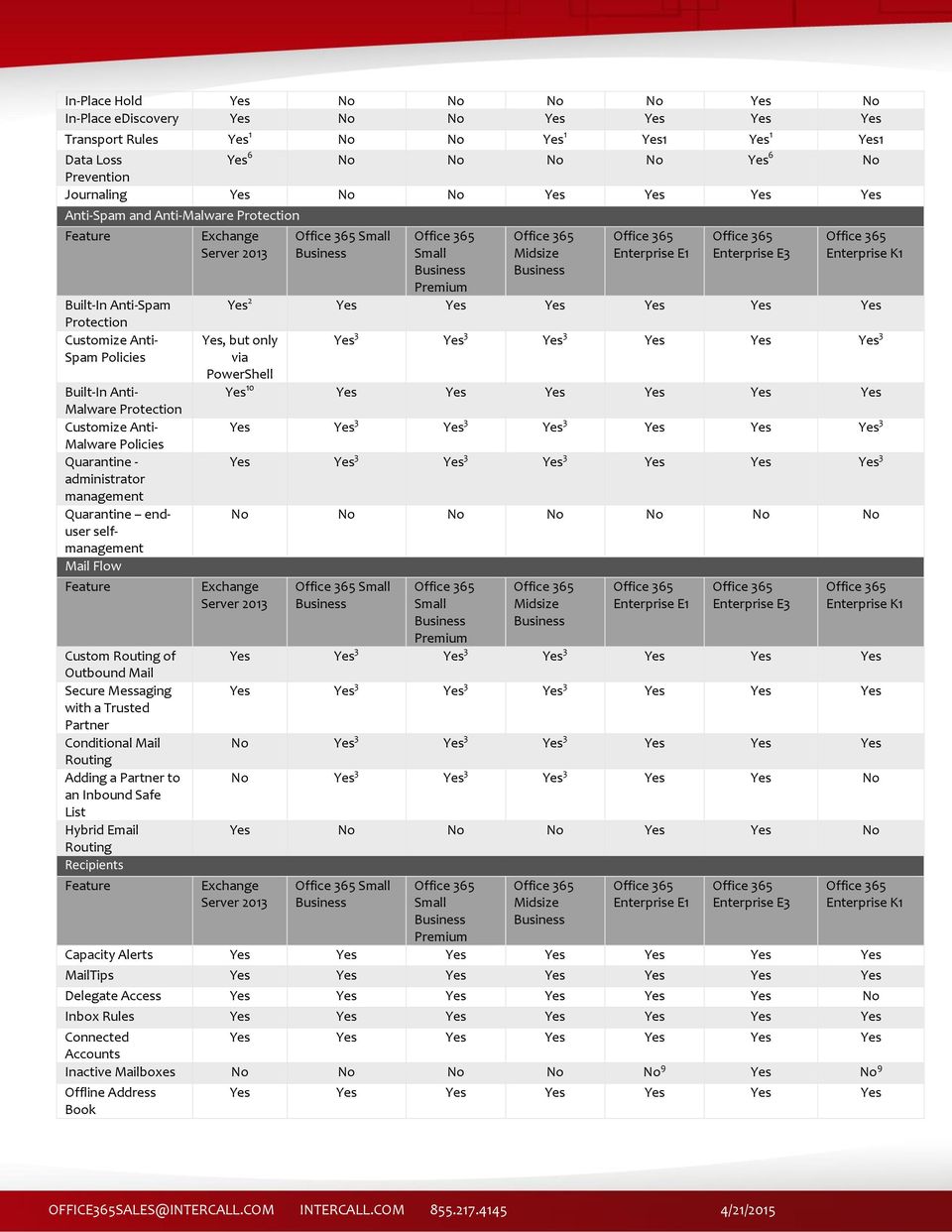
2 In-Place Hold Yes No No No No Yes No In-Place ediscovery Yes No No Yes Yes Yes Yes Transport Rules Yes 1 No No Yes 1 Yes1 Yes 1 Yes1 Data Loss Yes 6 No No No No Yes 6 No Prevention Journaling Yes No No Yes Yes Yes Yes Anti-Spam and Anti-Malware Protection Built-In Anti-Spam Protection Customize Anti- Spam Policies Built-In Anti- Malware Protection Customize Anti- Malware Policies Quarantine - administrator management Quarantine enduser selfmanagement Mail Flow Custom Routing of Outbound Mail Secure Messaging with a Trusted Partner Conditional Mail Routing Adding a Partner to an Inbound Safe List Hybrid Routing Recipients Yes 2 Yes Yes Yes Yes Yes Yes Yes, but only via PowerShell Yes 3 Yes 3 Yes 3 Yes Yes Yes 3 Yes 10 Yes Yes Yes Yes Yes Yes Yes Yes 3 Yes 3 Yes 3 Yes Yes Yes 3 Yes Yes 3 Yes 3 Yes 3 Yes Yes Yes 3 No No No No No No No Yes Yes 3 Yes 3 Yes 3 Yes Yes Yes Yes Yes 3 Yes 3 Yes 3 Yes Yes Yes No Yes 3 Yes 3 Yes 3 Yes Yes Yes No Yes 3 Yes 3 Yes 3 Yes Yes No Yes No No No Yes Yes No Capacity Alerts MailTips Delegate Access Yes Yes Yes Yes Yes Yes No Inbox Rules Connected Accounts Inactive Mailboxes No No No No No 9 Yes No 9 Offline Address Book
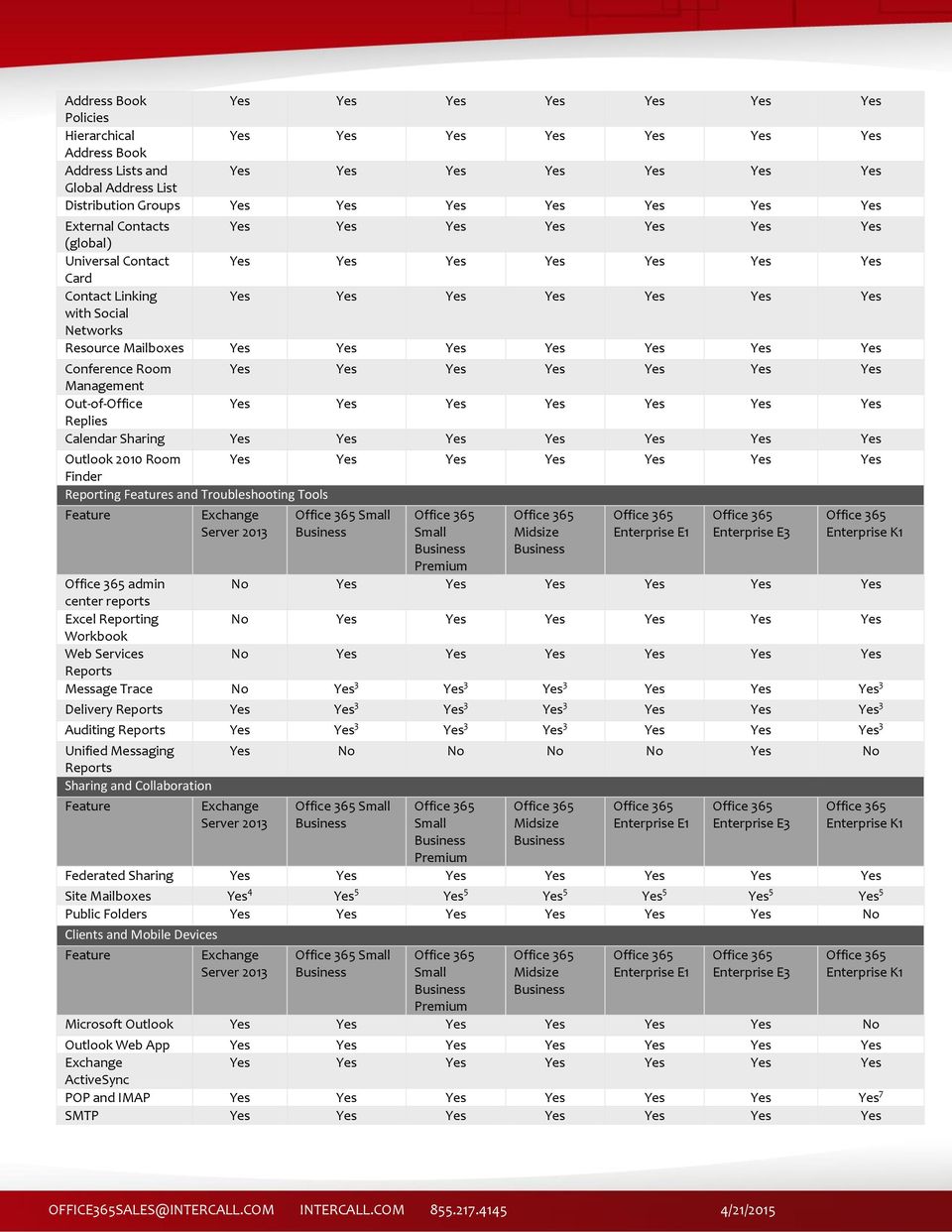
3 Address Book Policies Hierarchical Address Book Address Lists and Global Address List Distribution Groups External Contacts (global) Universal Contact Card Contact Linking with Social Networks Resource Mailboxes Conference Room Management Out-of-Office Replies Calendar Sharing Outlook 2010 Room Finder Reporting s and Troubleshooting Tools admin center reports Excel Reporting Workbook Web Services Reports Message Trace No Yes 3 Yes 3 Yes 3 Yes Yes Yes 3 Delivery Reports Yes Yes 3 Yes 3 Yes 3 Yes Yes Yes 3 Auditing Reports Yes Yes 3 Yes 3 Yes 3 Yes Yes Yes 3 Unified Messaging Reports Sharing and Collaboration Yes No No No No Yes No Federated Sharing Site Mailboxes Yes 4 Yes 5 Yes 5 Yes 5 Yes 5 Yes 5 Yes 5 Public Folders Yes Yes Yes Yes Yes Yes No Clients and Mobile Devices Microsoft Outlook Yes Yes Yes Yes Yes Yes No Outlook Web App ActiveSync POP and IMAP 7 SMTP
4 EWS Application Yes Yes Yes Yes Yes Yes No support Macintosh Clients Yes Yes Yes Yes Yes Yes No Voice Message Services Hosted Voice Mail No No No No No Yes No Third-Party No No No No No Yes No Interoperability FAX Integration No No No No No Yes No High Availability and Continuity Mailbox Replication at Data Centers Deleted Mailbox Recovery Deleted Item Recovery Interoperability, Connectivity, and Compatibility s Skype for Yes Yes Yes Yes Yes Yes No Presence in OWA SharePoint Interoperability EWS Connectivity Support SMTP Relay Support Online Administration and Management Microsoft Office 365 portal Access Microsoft Office No No No Yes Yes Yes No 365 admin center Access admin Yes No No Yes3 Yes Yes Yes3 center Access Remote Windows PowerShell Access ActiveSync Policies for Mobile Devices Usage Reporting
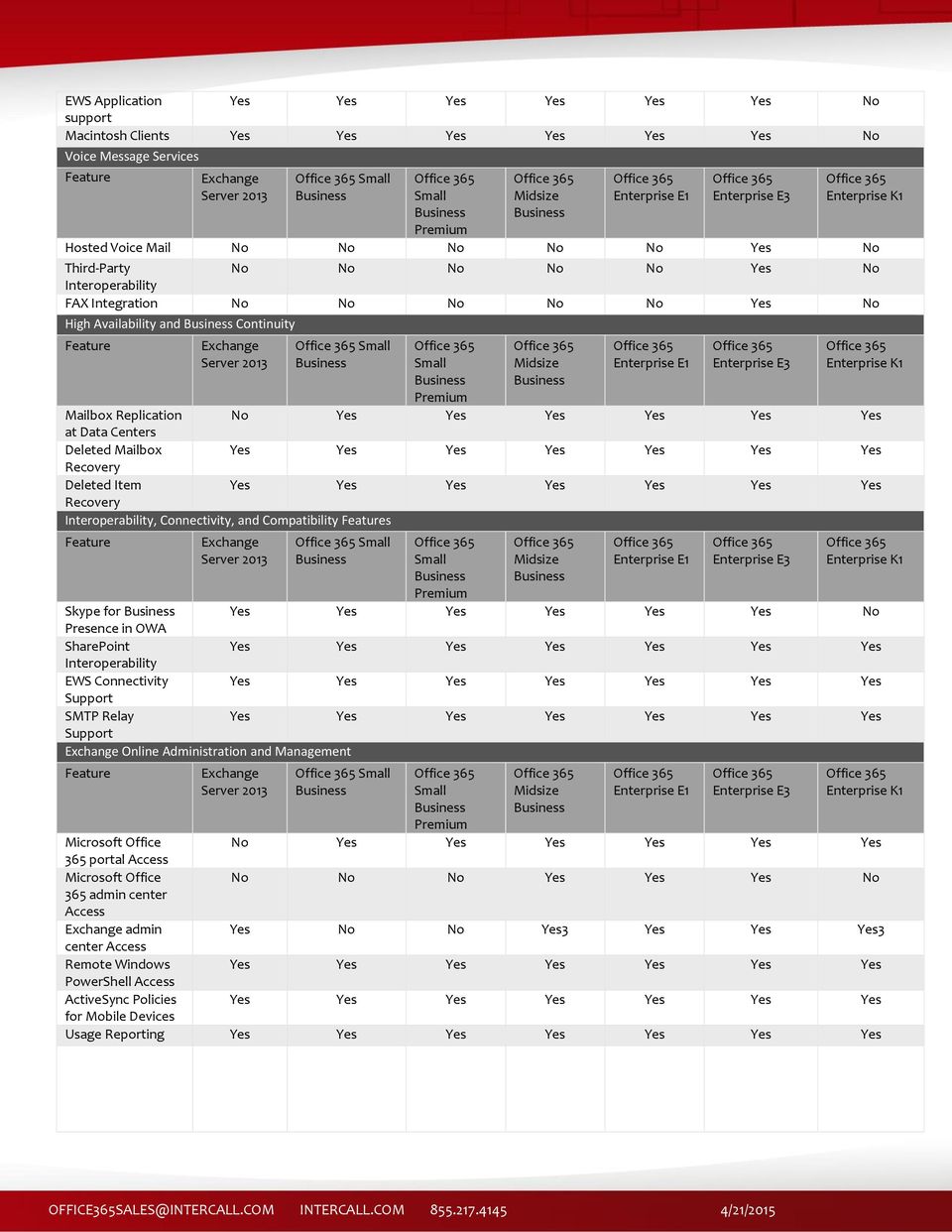
5 Extending the Service - Customization, Add-ins, and Resources Outlook Web App Web Parts Outlook Add-ins and Outlook MAPI 1 Transport rules are made up of predicates, which allow you to define conditions and exceptions, and actions to take based on the predicates. The available predicates and actions differ between Online, and Microsoft. For a list of available predicates and actions, see the corresponding predicates and actions topics for each product. 2 has the same built-in anti-spam capabilities as Server For a comparison of anti-spam capabilities between the hosted and on-premises offerings, see Comparing Anti-Spam Protection s Between Products 3 Only accessible via direct access to the admin center (EAC) management interface. 4 SharePoint must be deployed in the on-premises organization. 5 SharePoint Online must be included in the subscription plan. 6 Data loss prevention functionality requires an Online Plan 2 license. For more information, see Online Licensing. 7 IMAP is not. 8 Requires an Online Archiving (EOA) subscription for each on-premises mailbox user that has a cloud-based archive. 9 An EOA subscription can be purchased separately for each mailbox that requires the inactive mailbox feature. 10 uses only the Microsoft anti-malware engine. Online Protection uses multiple anti-malware engines. Mailbox types and storage limits Maximum Mailbox Unlimited 50 GB 50 GB 50 GB 50 GB 50 GB 1 GB Size Default Mailbox 2 GB 50 GB 50 GB 50 GB 50 GB 50 GB 1 GB Size Archive Mailbox N/A 50 GB 1 50 GB 1 50 GB 1 50 GB 1 Unlimited 2 N/A Size 1 Each subscriber receives 50 GB of total storage, which the user can apportion between the primary mailbox and the personal archive. The size of the personal archive therefore cannot exceed 50 GB. 2 Each subscriber receives 50 GB of storage in the primary mailbox, plus unlimited storage in the personal archive. A default quota of 100 GB is set on the personal archive, which will generally accommodate reasonable use, including the import of one user s historical . In the unlikely event that a user reaches this quota, a call to support is required. Administrators cannot adjust this quota upward or downward. Capacity alerts Warning 1.9 GB GB 24.5 GB 24.5 GB 24.5 GB 24.5 GB.92 GB Prohibit Send 2 GB GB GB GB GB GB.97 GB Prohibit 2.3 GB 1 25 GB 25 GB 25 GB 25 GB 25 GB 1 GB Send/Receive 1 This is the default value for on-premises organizations. Administrators can change this value for their organization.

6 Message and recipient limits Message size limit 10 MB 1 25 MB 25 MB 25 MB 25 MB 25 MB 25 MB File limit File attachment size 35 MB 1 25 MB 25 MB 25 MB 25 MB 25 MB 25 MB limit Recipient rate limit Unlimited 1 recipients per Recipient limit recipients recipients 500 recipients recipients 1 recipients recipients recipients Message rate limit Unlimited 1 per minute 1 This is the default value for on-premises organizations. Administrators can change this value for their organization.

Exchange Online Dedicated Service Description
 Exchange Online Dedicated Service Description Applies to: Exchange Online Dedicated Topic Last Modified: 2015-08-31... 1 Messaging Infrastructure... 4 Key Benefits Summary... 6 Planning and Deployment...
Core Solutions of Microsoft Exchange Server 2013
 Course 20341B: Core Solutions of Microsoft Exchange Server 2013 Course Details Course Outline Module 1: Deploying and Managing Microsoft Exchange Server 2013 This module describes Exchange Server 2013
COURSE OUTLINE MOC 20341: CORE SOLUTIONS OF MICROSOFT EXCHANGE SERVER 2013 MODULE 1: DEPLOYING AND MANAGING MICROSOFT EXCHANGE SERVER 2013
 COURSE OUTLINE MOC 20341: CORE SOLUTIONS OF MICROSOFT EXCHANGE SERVER 2013 MODULE 1: DEPLOYING AND MANAGING MICROSOFT EXCHANGE SERVER 2013 This module describes Exchange Server 2013 prerequisites and requirements,
Course 20341A MCSA: 70-341 Core Solutions of Microsoft Exchange Server 2013 5 Days
 MCSE: Messaging Description Exchange 2013 is part of the new version of Office, making it easy for people to stay connected, access files anytime, and maintain messaging security. Get certified as an MCSE
Outlook. Sharepoint. Lync. BlackBerry. McAfee. Microsoft Hosted Exchange
 Outlook Sharepoint Lync BlackBerry McAfee Microsoft Hosted Exchange Microsoft Hosted Exchange Webhosting.net provides a comprehensive Hosted Exchange solution that combines the comprehensive features of
70-662: Deploying Microsoft Exchange Server 2010
 70-662: Deploying Microsoft Exchange Server 2010 Course Introduction Course Introduction Chapter 01 - Active Directory and Supporting Infrastructure Active Directory and Supporting Infrastructure Network
MOC 20342B: Advanced Solutions of Microsoft Exchange Server 2013
 MOC 20342B: Advanced Solutions of Microsoft Exchange Server 2013 Course Overview This course provides students with the knowledge and skills to utilize advanced solutions in Microsoft Exchange Server 2013.
The new Exchange Work Smarter, Anywhere.
 The new Exchange Work Smarter, Anywhere. Email on a browser Email on a phone Voicemail in your inbox Massive, low-cost mailboxes May 1997 Nov. 1997 Dec. 2001 Mar. 2004 Dec. 2006 Nov. 2008 Nov. 2009 Mission-critical,
5/20/2013. The primary design goal was for simplicity of scale, hardware utilization, and failure isolation. Microsoft Exchange Team
 Additions and Subtractions The primary design goal was for simplicity of scale, hardware utilization, and failure isolation. Microsoft Exchange Team Exchange Version Exchange Server 2003 and earlier versions
Core Solutions of Microsoft Exchange Server 2013 MOC 20341
 Core Solutions of Microsoft Exchange Server 2013 MOC 20341 Course Outline Module 1: Deploying and Managing Exchange Server 2013 This module explains how to plan and perform deployment and management of
MS 20341B: Core Solutions of Microsoft Exchange Server 2013
 MS 20341B: Core Solutions of Microsoft Exchange Server 2013 Description: In this course, students will learn to configure and manage a Microsoft Exchange Server 2013 messaging environment. This course
10135A: Configuring, Managing, and Troubleshooting Microsoft Exchange Server 2010
 10135A: Configuring, Managing, and Troubleshooting Microsoft Exchange Server 2010 Course Number: 10135A Course Length: 5 Day Course Overview This instructor-led course will provide you with the knowledge
BUILT FOR YOU. Contents. Cloudmore Exchange
 BUILT FOR YOU Introduction is designed so it is as cost effective as possible for you to configure, provision and manage to a specification to suit your organisation. With a proven history of delivering
This course is intended for IT professionals who are responsible for the Exchange Server messaging environment in an enterprise.
 10233A: Designing and Deploying Messaging Solutions with Microsoft Exchange Server 2010 Course Number: 10233A Course Length: 5 Day Course Overview This instructor-led course provides you with the knowledge
Microsoft Exchange 2013 Ultimate Bootcamp Your pathway to becoming a GREAT Exchange Administrator
 Microsoft Exchange 2013 Ultimate Bootcamp Your pathway to becoming a GREAT Exchange Administrator Introduction Microsoft Exchange with its inherent high level of security features, improved assistant,
G-Cloud Service Description. Atos Enterprise Collaboration SaaS. Anytime Collaboration and Communication Cloud. for: G-Cloud 3
 G-Cloud Service Description Atos Enterprise Collaboration SaaS Anytime Collaboration and Communication Cloud for: G-Cloud 3 Atos, the Atos logo, Atos Consulting, Atos Worldline, Atos Sphere, Atos Cloud,
ABOUT THIS COURSE AT COURSE COMPLETION PREREQUISITES COURSE OUTLINE. Core Solutions of Microsoft Exchange Server 2013 Duration : 5 days
 Core Solutions of Microsoft Exchange Server 2013 Duration : 5 days ABOUT THIS COURSE This course will provide you with the knowledge and skills to plan, deploy, manage, secure, and support Microsoft Exchange
20341 Core Solutions of Microsoft Exchange Server 2013
 20341 Core Solutions of Microsoft Exchange Server 2013 Course Number: 20341 Category: Exchange Server 2013 Duration: 5 days Course Description This course will provide you with the knowledge and skills
Hybrid Architecture. Office 365. On-premises Exchange org (Exchange 2007+) Provisioned via DirSync. Secure Mail flow
 Hybrid Deployment Hybrid Architecture Provisioned via DirSync Exchange 2010 (HUB/CAS) Exchange 2013 CAS & MBX Secure Mail flow Exchange Federation (Free/Busy, Mail Tips, Archive, etc.) Mailbox data via
MS 10135 Configuring, Managing and Troubleshooting Microsoft Exchange Server 2010 Service Pack 2
 MS 10135 Configuring, Managing and Troubleshooting Microsoft Exchange Server 2010 Service Pack 2 P a g e 1 of 10 About this Course This course will provide you with the knowledge and skills to configure
NYSeMail Office 365 Administration Guide for Agencies
 NYSeMail Office 365 Administration Guide for Agencies Office 365 Overview... 34 What is included... 34 Software Requirements... 34 Message Limits... 34 Provisioning... 34 Archive and Retention Policy...
Configuring, Managing and Troubleshooting Microsoft Exchange Server 2010 Service Pack 2
 Course 10135B: Configuring, Managing and Troubleshooting Microsoft Exchange Server 2010 Service Pack 2 Course Details Course Outline Module 1: Deploying Microsoft Exchange Server 2010 This module describes
Updating Your Skills from Microsoft Exchange Server 2003 or Exchange Server 2007 to Exchange Server 2010 Course 10165; 5 Days, Instructor-led
 Updating Your Skills from Microsoft Exchange Server 2003 or Exchange Server 2007 to Exchange Server 2010 Course 10165; 5 Days, Instructor-led Course Description There are two main reasons for the course.
Microsoft Exchange Server 2013. Design, Deploy and Deliver an Enterprise Messaging Solution
 Brochure More information from http://www.researchandmarkets.com/reports/2330797/ Microsoft Exchange Server 2013. Design, Deploy and Deliver an Enterprise Messaging Solution Description: Get the knowledge
Core Solutions of Microsoft Exchange Server 2013
 EXCHANGE 2013 COURSE OUTLINE Visit Our Website to Enroll Now Www.ITBigBang.Com/IT-Training Core Solutions of Microsoft Exchange Server 2013 Course Title Core Solutions of Microsoft Exchange Server 2013
Introduction. Part I Introduction to Exchange Server 2010 1
 Contents Introduction xxix Part I Introduction to Exchange Server 2010 1 Chapter 1 Introduction to Exchange Server 2010 3 Part II Brief History of Exchange Servers 4 New Features in Exchange Server 2010
Updating Your Skills from Microsoft Exchange Server 2003 or Exchange Server 2007 to Exchange Server 2010 SP1
 Course 10165A: Updating Your Skills from Microsoft Exchange Server 2003 or Exchange Server 2007 to Exchange Server 2010 SP1 OVERVIEW About this Course There are two main reasons for the course. Firstly,
How to sell Hosted Exchange to SMB s
 How to sell Hosted Exchange to SMB s July 2013. The Trusted Channel Centric Marketplace AGENDA The background Partner opportunity Target audience The solution: Microsoft Hosted Exchange 2013 How to capitalize
2016 March 70-341 NEW Dumps is Released Today!
 2016 March 70-341 NEW Dumps is Released Today! Exam Code: 70-341 Exam Name: Core Solutions of Microsoft Exchange Server 2013 Certification Provider: Microsoft Corresponding Certifications: MCSE, MCSE:
MS 20342B: Advanced Solutions of Microsoft Exchange Server 2013
 MS 20342B: Advanced Solutions of Microsoft Exchange Server 2013 Description: Days: 5 Prerequisites: In this course, students will learn to to configure and manage a Microsoft Exchange Server 2013 messaging
Microsoft Exchange Online for Enterprises
 Microsoft Exchange Online for Enterprises Service Description Published: June 28, 2011 For the latest information, please see Microsoft Office 365. The names of actual companies and products mentioned
Cloud. Hosted Exchange Administration Manual
 Cloud Hosted Exchange Administration Manual Table of Contents Table of Contents... 1 Table of Figures... 4 1 Preface... 6 2 Telesystem Hosted Exchange Administrative Portal... 7 3 Hosted Exchange Service...
Microsoft Exchange Online Archiving and Symantec Enterprise Vault.cloud
 Microsoft Exchange Online Archiving and Symantec Enterprise Vault.cloud Introduction According to The Radicati Group, email has become one of businesses most critical assets and with worldwide email traffic
MS-10135 - Configuring, Managing and Troubleshooting Microsoft Exchange Server 2010
 MS-10135 - Configuring, Managing and Troubleshooting Microsoft Exchange Server 2010 Introduction This course will provide you with the knowledge and skills to configure and manage a Microsoft Exchange
OUTSOURCERY CLOUD MAIL SERVICE DESCRIPTION. Document Version 1.0
 OUTSOURCERY CLOUD MAIL SERVICE DESCRIPTION Document Version 1.0 INTRODUCTION Workplaces are changing. Teams are more distributed. People need productivity tools that enable them to work from virtually
Administering Microsoft Exchange Server 2016 20345-1; 5 Days, Instructor-led
 Administering Microsoft Exchange Server 2016 20345-1; 5 Days, Instructor-led Course Description This 5-day instructor-led course teaches IT professionals how to administer and support Exchange Server 2016.
Simple migrations. Hybrid. IMAP migration Supports wide range of email platforms Email only (no calendar, contacts, or tasks)
 Hybrid Simple migrations IMAP migration Cutover migration Staged migration 2010 hybrid 2013 hybrid IMAP migration Supports wide range of email platforms Email only (no calendar, contacts, or tasks) Cutover
Build Your Knowledge!
 About this Course This course will provide you with the knowledge and skills to configure and manage a Microsoft Exchange Server 2010 messaging environment. This course will teach you how to configure
Course 20341B: Core Solutions of Microsoft Exchange Server 2013 OVERVIEW
 Course 20341B: Core Solutions of Microsoft Exchange Server 2013 OVERVIEW About this Course This course will provide you with the knowledge and skills to plan, deploy, manage, secure, and support Microsoft
ADMINISTERING MICROSOFT EXCHANGE SERVER 2016
 ADMINISTERING MICROSOFT EXCHANGE SERVER 2016 Table of Contents Prerequisite... 2 About Course... 2 Audience Profile... 2 At Course Completion... 3 Module 1: Deploying Microsoft Exchange Server 2016...
Core Solutions of Microsoft Exchange Server 2013 Course 20341B; 5 days, Instructor-led
 Core Solutions of Microsoft Exchange Server 2013 Course 20341B; 5 days, Instructor-led Course Description This course will provide you with the knowledge and skills to plan, deploy, manage, secure, and
Core Solutions of Microsoft Exchange Server 2013
 About this Course This course will provide you with the knowledge and skills to plan, deploy, manage, secure, and support Microsoft Exchange. This course will teach you how to configure Exchange and supply
MCTS: Microsoft Exchange Server 2010
 MCTS: Microsoft Exchange Server 2010 Course Description and Overview Overview SecureNinja's Exchange Server 2010 training and certification boot camp in Washington, DC will provide you the knowledge necessary
Office 365. Microsoft Exchange Online Archiving Beta Service Description. Published: February 2011
 Office 365 Microsoft Exchange Online Archiving Beta Service Description : The information contained in this document relates to pre-release software and services, which may be substantially modified before
Core Solutions of Microsoft Exchange Server 2013 Course 20341A; 5 Days
 Core Solutions of Microsoft Exchange Server 2013 Course 20341A; 5 Days Lincoln Land Community College Capital City Training Center 130 West Mason Springfield, IL 62702 217-782-7436 www.llcc.edu/cctc Course
Configuring, Managing and Troubleshooting Microsoft Exchange Server 2010 Service Pack 2
 Course 10135 Configuring, Managing and Troubleshooting Microsoft Exchange Server 2010 Service Pack 2 Length: 5 Days Language(s): English Audience(s): IT Professionals Level: 200 Technology: Microsoft Exchange
Configuring, Managing and Troubleshooting Microsoft Exchange Server 2010 Service Pack 2
 Course 10135B: Configuring, Managing and Troubleshooting Microsoft Exchange Server 2010 Service Pack 2 Length: 5 Days Audience(s): IT Professionals Level: 200 Technology: Microsoft Exchange Server 2010
Workshop purpose and objective
 Messaging Workshop purpose and objective Workshop purpose Facilitate planning discussions for messaging coexistence Considerations of Office 365 limits and features Objectives Identify Microsoft Office
5053A: Designing a Messaging Infrastructure Using Microsoft Exchange Server 2007
 5053A: Designing a Messaging Infrastructure Using Microsoft Exchange Server 2007 Course Number: 5053A Course Length: 3 Days Course Overview This three-day instructor-led course provides students with the
Quick Heal Exchange Protection 4.0
 Quick Heal Exchange Protection 4.0 Customizable Spam Filter. Uninterrupted Antivirus Security. Product Highlights Built-in defense keeps your business communications and sensitive information secure from
Core Solutions of Microsoft Exchange Server 2013
 Course 20341B: Core Solutions of Microsoft Exchange Server 2013 Page 1 of 6 Core Solutions of Microsoft Exchange Server 2013 Course 20341B: 4 days; Instructor-Led Introduction This course will provide
Microsoft Exchange Online Archiving
 Microsoft Exchange Online Archiving Service Description Published: July 19, 2011 Updated: August 26, 2011 For the latest information, please see Microsoft Office 365. Exchange Online Archiving is a solution
Microsoft Exchange Online Archiving
 Microsoft Exchange Online Archiving Service Description Published: July 19, 2011 Updated: August 26, 2011 For the latest information, please see Microsoft Office 365. Exchange Online Archiving is a solution
Advanced Solutions of Microsoft Exchange Server 2013
 Advanced Solutions of Microsoft Exchange Server 2013 Course 20342B: 5 days Module 1: Designing and Implementing Site Resilience This module explains how to design and implement site resilience for Exchange
Configuring Managing and Troubleshooting Microsoft Exchange Server 2010
 Course Code: M10135 Vendor: Microsoft Course Overview Duration: 5 RRP: 1,980 Configuring Managing and Troubleshooting Microsoft Exchange Server 2010 Overview This course will provide you with the knowledge
20342 Advanced Solutions of Microsoft Exchange Server
 20342 Advanced Solutions of Microsoft Exchange Server Course Number: 20342 Category: Exchange Server 2013 Duration: 5 days Course Description This course will provide you with the knowledge and skills
REDCENTRIC MANAGED ARCHIVE SERVICE SERVICE DEFINITION
 REDCENTRIC MANAGED ARCHIVE SERVICE SERVICE DEFINITION SD005 V2.0 Issue Date 02 July 2014 1) SERVICE OVERVIEW Redcentric's Managed Archive Service allows customers to regain control of their Microsoft Exchange
UNCLASSIFIED. UK Email Archiving powered by Mimecast Service Description
 UNCLASSIFIED 11/12/2015 v2.2 UK Email Archiving powered by Mimecast Service Description Cobweb s UK Email Archiving, powered by Mimecast, provides businesses with a secure, scalable cloud-based message
Extend your Exchange On Premises Organization to the Cloud
 Phoenix Cloud Intelligence 2012 Extend your Exchange On Premises Organization to the Cloud Mike Pfeiffer Technical Director Interface Technical Training What is Office 365? Bringing together cloud versions
Course 20341B: Core Solutions of Microsoft Exchange Server 2013
 Course 20341B: Core Solutions of Exchange Server 2013 Length : 5 days Audience(s) : IT Professionals Level : 300 Technology : Exchange Server 2013 Delivery Method : Instructor-led (classroom) Course Overview
Configuring, Managing and Troubleshooting Microsoft Exchange Server 2010 Service Pack 2
 About this Course This course will provide you with the knowledge and skills to configure and manage a Microsoft Exchange Server 2010 messaging environment. This course will teach you how to configure
Mod 9: Exchange Online Archiving
 Office 365 for SMB Jump Start Mod 9: Exchange Online Archiving Chris Oakman Managing Partner Infrastructure Team Eastridge Technology Stephen Hall Owner & IT Consultant District Computers 1 Jump Start
Microsoft Exchange Online Archiving
 Microsoft Exchange Online Archiving Service Description Published: July 19, 2011 Updated: December 20, 2011 For the latest information, please see Microsoft Office 365. Exchange Online Archiving is a solution
20341B: Core Solutions of Microsoft Exchange Server 2013
 20341B: Core Solutions of Microsoft Exchange Server Course Details Course Code: Duration: Notes: 20341B 5 days This course syllabus should be used to determine whether the course is appropriate for the
Cloud Relay Solution. Whitepaper
 Cloud Relay Solution Whitepaper Abstract Cloud-based email is an attractive solution for organizations looking to provide optimum email service for their users at predictable costs. However, cloud-based
MOC 5047B: Intro to Installing & Managing Microsoft Exchange Server 2007 SP1
 MOC 5047B: Intro to Installing & Managing Microsoft Exchange Server 2007 SP1 Course Number: 5047B Course Length: 3 Days Certification Exam This course will help you prepare for the following Microsoft
MS 10135B Configuring, Managing and Troubleshooting Microsoft Exchange Server 2010
 MS 10135B Configuring, Managing and Troubleshooting Microsoft Exchange Server 2010 Description: Days: 5 Prerequisites: This course will provide you with the knowledge and skills to configure and manage
Service Definition The following section provides a summary overview of the hosted Microsoft Exchange solution.
 Microsoft Exchange Service Definition Service Description Hosted Exchange 2010 is a secure business-class email messaging and collaboration service designed to make it possible for you and your employees
Exchange Online Protection In-Depth
 Exchange Online Protection In-Depth Mike Crowley Baseline Technologies Session Agenda Introduction to EOP Administration DMARC, SPF & DKIM Advanced Threat Protection EOP Deployment Tips Introduction to
Office 365 for small businesses
 Office 365 for small businesses Businessclass Email File Sharing Plus HD Video Conferencing Office Desktop Apps Office Mobile Office Online Anywhere Access Technical Support Simple IT Management Financiallybacked
Configuring, Managing and Troubleshooting Microsoft Exchange Server 2010 Service Pack 2
 Configuring, Managing and Troubleshooting Microsoft Exchange Server 2010 Service Pack 2 Course Details Course Code: Duration: 10135B 5 day(s) Elements of this syllabus are subject to change. This course
Office 365 Pricelist Swisscom Swisscom (Switzerland) AG
 Office 365 Pricelist Swisscom Swisscom (Switzerland) AG Valid from 1st of June 2 Office 365 Small Business Premium Packages for professionals and small businesses Subscription monthly One-time price Exchange
Managing Office 365 Identities and Services
 Course 20346B: Managing Office 365 Identities and Services Page 1 of 7 Managing Office 365 Identities and Services Course 20346B: 4 days; Instructor-Led Introduction This is a 4-day Instructor Led Training
EXCHANGE TO OFFICE 365
 EXCHANGE TO OFFICE 365 ARCHIVING CONSIDERATIONS by Brien Posey As an organization prepares to migrate mailboxes from an on premise Exchange Server to Office 365, it must carefully consider how the migration
BTC STUDENT EMAIL GUIDE
 BTC STUDENT EMAIL GUIDE All students have a BTC email account. If you are unable to access your account, please contact your instructor. Student Email Each student has an email account. Your email address
Personal Archiving in Exchange Online
 Personal Archiving in Exchange Online IT Professional & Customer Helpdesk Feature Guide Exchange Online Personal Archiving Feature Guide - 12.3 Release Office 365 Dedicated & ITAR-Support Plans Revised:
Introduction to Installing and Managing Microsoft Exchange Server 2007
 COMPUTER TRAINING The key to a better future EXCHANGE Course No. 5047 3 Days Target Audience: This course provides students who are new to Exchange Server with the knowledge and skills to configure and
SafeMail April 2015. SafeMail Helping your business reach further with email hosted at UK based, ISO 27001, Tier 4 data centres.
 SafeMail April 2015 Secure cloud solutions with guaranteed UK data sovereignty. SafeMail Helping your business reach further with email hosted at UK based, ISO 27001, Tier 4 data centres. Detailing the
HGC SUPERHUB HOSTED EXCHANGE EMAIL - 2010 / 2007 SMART PANEL USER GUIDE
 HGC SUPERHUB HOSTED EXCHANGE EMAIL - 2010 / 2007 SMART PANEL USER GUIDE Table of Contents 1. Login to Smart Panel... 1 2. Account Info... 2 3. User Setup Profile... 3 4. User & Mailbox... 4 5. Domain Name...
How Should Your Organization Deploy Microsoft Exchange?
 WHITEPAPER How Should Your Organization Deploy Microsoft Exchange? Choosing between Exchange Server on premises, Exchange Online in the cloud, and hybrid deployment options Introduction The purpose of
MICROSOFT EXCHANGE 2013 WHAT EVERY LEGAL PROFESSIONAL SHOULD KNOW
 MICROSOFT EXCHANGE 2013 WHAT EVERY LEGAL PROFESSIONAL SHOULD KNOW WELCOME Thank you for joining Numerous diverse attendees Today s topic and presenters This is an interactive presentation You will receive
Office 365 from the ground to the cloud
 Office 365 from the ground to the cloud Webinar 8 Preparing for Exam 74-325 July 2014 The Series The Basics Building Your Office 365 Practice Cross-Selling and Upselling Opportunities Microsoft Azure and
Optimizing Microsoft Exchange in the Enterprise Part II: Hub Transport Server and Lync-SharePoint Integration
 Expert Reference Series of White Papers Optimizing Microsoft Exchange in the Enterprise Part II: Hub Transport Server and Lync-SharePoint Integration 1-800-COURSES www.globalknowledge.com Optimizing Microsoft
Cobweb Hosted Exchange 2013 Service Description
 Cobweb Hosted Exchange 2013 Service Description Cobweb Hosted Exchange 2013 is a business-class messaging and collaboration service designed to help your business communicate securely, efficiently and
HGC SUPERHUB HOSTED EXCHANGE SMART PANEL 2013 USER GUIDE
 HGC SUPERHUB HOSTED EXCHANGE SMART PANEL 2013 USER GUIDE V2015.12 Table of Contents 1. Login to Smart Panel 2013... 2 2. Customer Information... 3 2.1 Company Information... 3 2.2 User Setup... 3 2.3 User