
Virtual Address Mapping
|
|
|
- Carol Greene
- 10 years ago
- Views:
Transcription
1 Virtual Address Mapping Ziel ist es, zwischen zwei ZyWALL Routern (ZyWALL 2 Plus <~> ZyWALL P1), welche sich beide im selben Lokalen IP Bereich ( /24) befinden, einen VPN-Tunnel mittels NAT over IPSec zu etablieren. Overlapping Local And Remote Network IP Addresses Devices behind the ZyWALL (local devices) and the devices behind the remote IPSec router (remote devices) may use private IP addresses. Therefore it is possible that local devices and remote devices may have the same IP addresses. This is known as overlapping local and remote IP addresses. For example, local network X uses IP addresses to Remote network Y uses IP addresses to If you select the VPN rules skip applying to the overlap range of local and remote IP addresses option (see VPN Global Setting ), every time a computer on network X tries to access a network X computer with an IP address from to , the ZyWALL sends the traffic through the VPN tunnel to network Y. If you clear the VPN rules skip applying to the overlap range of local and remote IP addresses option (see VPN Global Setting ), every time a computer on network X tries to access a network X computer with an IP address from to , the ZyWALL sends the traffic to the local network. Virtual Address Mapping Virtual address mapping (NAT over IPSec) changes the source IP addresses of packets from your local devices to virtual IP addresses before sending them through the VPN tunnel. Avoiding Overlapping Local And Remote Network IP Addresses If both IPSec routers support virtual address mapping, you can access devices on both networks, even if their IP addresses overlap. You map the ZyWALL's local network addresses to virtual IP addresses and map the remote IPSec router's local IP addresses to other (non-overlapping) virtual IP addresses. Take Overlapping Local And Remote Network IP Addresses as an example of overlapping local and remote IP addresses. You can set up virtual address mapping on both IPSec routers to allow computers on network X to access network X and network Y computers with the same IP address. You set ZyWALL A to change the source IP addresses of packets from local network X ( to ) to virtual IP addresses to before sending them through the VPN tunnel. You set ZyWALL B to change the source IP addresses of packets from the remote network Y ( to ) to virtual IP addresses to before sending them through the VPN tunnel. On ZyWALL A, you specify to as the remote network. On ZyWALL B, you specify to as the remote network. Computers on network X use IP addresses to to access local network devices and IP addresses to to access the remote network devices. Computers on network Y use IP addresses to to access local network devices and IP addresses to to access the remote network devices.

2 ZyWALL 2 Plus 1. LAN = /24 ( ) 2. WAN = /24 ( ) - # Name Local Network Remote Network Encapsulation IPSec Algorithm Tunnel ESP AES--SHA1 (ZyWALL2A)

3

4 ZyWALL P1 1. LAN = /24 ( ) 2. WAN = /24 ( ) - # Name Local Network Remote Network Encapsulation IPSec Algorithm Tunnel ESP AES--SHA1 (ZyWALLP1)

5

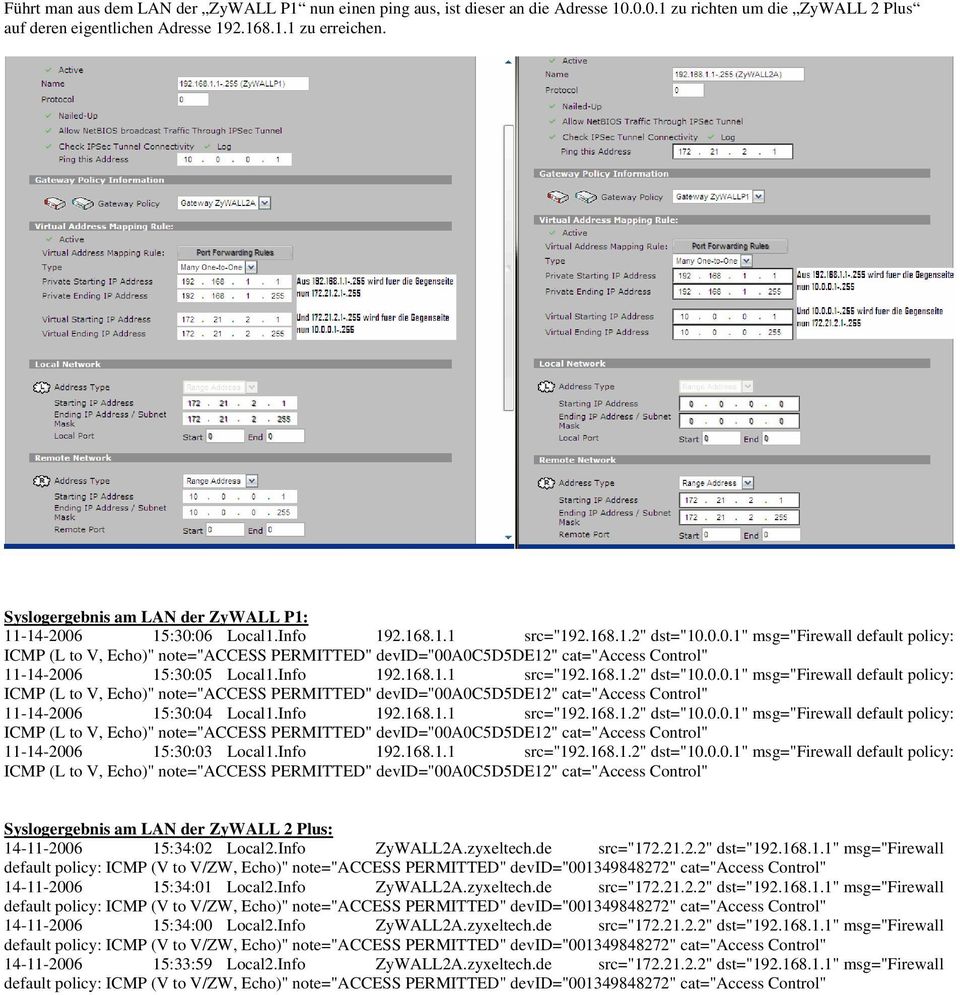
6 Führt man aus dem LAN der ZyWALL P1 nun einen ping aus, ist dieser an die Adresse zu richten um die ZyWALL 2 Plus auf deren eigentlichen Adresse zu erreichen. Syslogergebnis am LAN der ZyWALL P1: :30:06 Local1.Info src=" " dst=" " msg="firewall default policy: :30:05 Local1.Info src=" " dst=" " msg="firewall default policy: :30:04 Local1.Info src=" " dst=" " msg="firewall default policy: :30:03 Local1.Info src=" " dst=" " msg="firewall default policy: Syslogergebnis am LAN der ZyWALL 2 Plus: :34:02 Local2.Info ZyWALL2A.zyxeltech.de src=" " dst=" " msg="firewall :34:01 Local2.Info ZyWALL2A.zyxeltech.de src=" " dst=" " msg="firewall :34:00 Local2.Info ZyWALL2A.zyxeltech.de src=" " dst=" " msg="firewall :33:59 Local2.Info ZyWALL2A.zyxeltech.de src=" " dst=" " msg="firewall
ISG50 Application Note Version 1.0 June, 2011
 ISG50 Application Note Version 1.0 June, 2011 Scenario 1 - ISG50 is placed behind an existing ZyWALL 1.1 Application Scenario For companies with existing network infrastructures and demanding VoIP requirements,
Creating a VPN with overlapping subnets
 Creating a VPN with overlapping subnets This recipe describes how to construct a VPN connection between two networks with overlapping IP addresses in such a way that traffic will be directed to the correct
ZyXEL ZyWALL P1 firmware V3.64
 TheGreenBow IPSec VPN Client Configuration Guide ZyXEL ZyWALL P1 firmware V3.64 WebSite: Contact: http://www.thegreenbow.com [email protected] IPSec VPN Router Configuration Property of TheGreenBow
Configuring an IPsec VPN to provide ios devices with secure, remote access to the network
 Configuring an IPsec VPN to provide ios devices with secure, remote access to the network This recipe uses the IPsec VPN Wizard to provide a group of remote ios users with secure, encrypted access to the
How To Set Up A Vpn Tunnel Between Winxp And Zwall On A Pc 2 And Winxp On A Windows Xp 2 On A Microsoft Gbk2 (Windows) On A Macbook 2 (Windows 2) On An Ip
 WINXP VPN to ZyWALL Tunneling 1. Setup WINXP VPN 2. Setup ZyWALL VPN This page guides us to setup a VPN connection between the WINXP VPN software and ZyWALL router. There will be several devices we need
Apliware firewall. TheGreenBow IPSec VPN Client. Configuration Guide. http://www.thegreenbow.com [email protected]
 TheGreenBow IPSec VPN Client Configuration Guide Apliware firewall WebSite: Contact: http://www.thegreenbow.com [email protected] Table of contents 1 Introduction... 0 1.1 Goal of this document...
How To Establish IPSec VPN connection between Cyberoam and Mikrotik router
 How To Establish IPSec VPN connection between Cyberoam and Mikrotik router Applicable Version: 10.00 onwards Scenario Establish IPSec VPN connection between Cyberoam and Mikrotik router using Preshared
Establishing a VPN tunnel to CNet CWR-854 VPN router using WinXP IPSec client
 Establishing a VPN tunnel to CNet CWR-854 VPN router using WinXP IPSec client Generally speaking, remote users need to use a VPN client software for establishing a VPN connection to their home/work router
ZyWALL USG-Series. How to setup a Site-to-site VPN connection between two ZyWALL USG series.
 ZyWALL USG-Series How to setup a Site-to-site VPN connection between two ZyWALL USG series. Table of content Introduction... 3 ZyWALL USG 100... 4 Creating the address objects... 4 Creating VPN Gateway...
TheGreenBow IPsec VPN Client. Configuration Guide Cisco RV325 v1. Website: www.thegreenbow.com Contact: [email protected]
 TheGreenBow IPsec VPN Client Configuration Guide Cisco RV325 v1 Website: www.thegreenbow.com Contact: [email protected] Table of Contents 1 Introduction... 3 1.1 Goal of this document... 3 1.2 VPN
Symantec Firewall/VPN 200
 TheGreenBow IPSec VPN Client Configuration Guide Symantec Firewall/VPN 200 WebSite: Contact: http://www.thegreenbow.com [email protected] Table of contents 1 Introduction... 0 1.1 Goal of this document...
Netopia 3346. TheGreenBow IPSec VPN Client. Configuration Guide. http://www.thegreenbow.com. [email protected]
 TheGreenBow IPSec VPN Client Configuration Guide Netopia 3346 WebSite: Contact: http://www.thegreenbow.com [email protected] IPSec VPN Router Configuration Property of TheGreenBow Sistech SA - Sistech
Scenario 1: One-pair VPN Trunk
 VPN Trunk Load-Balance between Vigor3200 and Other Vigor Router This section will discuss how to build VPN Trunk with load-balance between Vigor3200 and other router (e.g., Vigor3300). Scenario 1: One-pair
Configuring TheGreenBow VPN Client with a TP-LINK VPN Router
 Configuring TheGreenBow VPN Client with a TP-LINK VPN Router This chapter describes how to configure TheGreenBow VPN Client with a TP-LINK router. This chapter includes the following sections: Example
Building scalable IPSec infrastructure with MikroTik. IPSec, L2TP/IPSec, OSPF
 Building scalable IPSec infrastructure with MikroTik IPSec, L2TP/IPSec, OSPF Presenter information Tomas Kirnak Network design Security, wireless Servers Virtualization MikroTik Certified Trainer Atris,
Configuring a VPN for Dynamic IP Address Connections
 Configuring a VPN for Dynamic IP Address Connections Summary A Virtual Private Network (VPN) is a virtual private network that interconnects remote (and often geographically separate) networks through
Micronet SP881. TheGreenBow IPSec VPN Client Configuration Guide. http://www.thegreenbow.com [email protected]
 TheGreenBow IPSec VPN Client Configuration Guide Micronet SP881 WebSite: Contact: http://www.thegreenbow.com [email protected] IPSec VPN Router Configuration Property of TheGreenBow Sistech SA -
PowerLink Bandwidth Aggregation Redundant WAN Link and VPN Fail-Over Solutions
 Bandwidth Aggregation Redundant WAN Link and VPN Fail-Over Solutions Find your network example: 1. Basic network with and 2 WAN lines - click here 2. Add a web server to the LAN - click here 3. Add a web,
Planet CS-1000. TheGreenBow IPSec VPN Client. Configuration Guide. http://www.thegreenbow.com [email protected]
 TheGreenBow IPSec VPN Client Configuration Guide Planet CS-1000 WebSite: Contact: http://www.thegreenbow.com [email protected] IPSec VPN Router Configuration Property of TheGreenBow Sistech SA -
Linksys RV042. TheGreenBow IPSec VPN Client. Configuration Guide. http://www.thegreenbow.com [email protected]
 TheGreenBow IPSec VPN Client Configuration Guide Linksys RV042 WebSite: Contact: http://www.thegreenbow.com [email protected] Configuration Guide written by: Writer: TheGreenBow Support Team Company:
Juniper NetScreen 5GT
 TheGreenBow IPSec VPN Client Configuration Guide Juniper NetScreen 5GT WebSite: Contact: http://www.thegreenbow.com [email protected] Configuration Guide written by: Writer: Connected Team Company:
enable: no, log: by-profile enable: no, log: by-profile enable: no, log: by-profile
 Bad terminal type: "unknown". Will assume vt100. Router> show firewall status secure-policy status: yes secure-policy asymmetrical route status: yes secure-policy default rule: deny, log Router> show firewall
Configuring IPSec VPN Tunnel between NetScreen Remote Client and RN300
 Configuring IPSec VPN Tunnel between NetScreen Remote Client and RN300 This example explains how to configure pre-shared key based simple IPSec tunnel between NetScreen Remote Client and RN300 VPN Gateway.
Configuration Procedure
 How to Establish Site-to-Site VPN between USG and MS Azure Background Microsoft (MS) Azure is an open and flexible cloud platform that enables users to quickly build, deploy, scale and manage applications
Cisco SA 500 Series Security Appliance
 TheGreenBow IPSec VPN Client Configuration Guide Cisco SA 500 Series Security Appliance This guide applies to the following models: Cisco SA 520 Cisco SA 520W Cisco SA 540 WebSite: Contact: http://www.thegreenbow.de
How to configure VPN function on TP-LINK Routers
 How to configure VPN function on TP-LINK Routers 1. VPN Overview... 2 2. How to configure LAN-to-LAN IPsec VPN on TP-LINK Router... 3 3. How to configure GreenBow IPsec VPN Client with a TP-LINK VPN Router...
Introduction. Quick Configuration Guide (QCG) Configuring a VPN for Multiple Subnets in AOS
 Quick Configuration Guide (QCG) Configuring a VPN for Multiple Subnets in AOS Introduction After creating a VPN, it is often necessary to have access to a new subnet across the VPN. To add a subnet, there
Interconnection between the Windows Azure
 Interconnection between the Windows Azure Virtual Network and SEIL Series VPN Updated: January 17, 2014 Author: Internet Initiative Japan, Inc. SEIL (http://www.seil.jp/) is an access router for companies
Using IPsec VPN to provide communication between offices
 Using IPsec VPN to provide communication between offices This example provides secure, transparent communication between two FortiGates located at different offices using route-based IPsec VPN. In this
Ingate Firewall. TheGreenBow IPSec VPN Client Configuration Guide. http://www.thegreenbow.com [email protected]
 TheGreenBow IPSec VPN Client Configuration Guide Ingate Firewall WebSite: Contact: http://www.thegreenbow.com [email protected] IPSec VPN Router Configuration Property of TheGreenBow Sistech SA -
Cisco RV 120W Wireless-N VPN Firewall
 TheGreenBow IPSec VPN Client Configuration Guide Cisco RV 120W Wireless-N VPN Firewall WebSite: Contact: http://www.thegreenbow.com [email protected] IPSec VPN Router Configuration Property of TheGreenBow
How to access peers with different VPN through IPSec. Tunnel
 How to access peers with different VPN through IPSec Tunnel Scenario: Taipei branch and Kaohsiung branch dial to Hsinchu headquarter via IPSec VPN Tunnel respectively. Both Taipei branch and Kaohsiung
Configuring IPsec VPN with a FortiGate and a Cisco ASA
 Configuring IPsec VPN with a FortiGate and a Cisco ASA The following recipe describes how to configure a site-to-site IPsec VPN tunnel. In this example, one site is behind a FortiGate and another site
IPsec VPN Application Guide REV: 1.0.0 1910010876
 IPsec VPN Application Guide REV: 1.0.0 1910010876 CONTENTS Chapter 1. Overview... 1 Chapter 2. Before Configuration... 2 Chapter 3. Configuration... 5 3.1 Configure IPsec VPN on TL-WR842ND (Router A)...
VPN Tracker for Mac OS X
 VPN Tracker for Mac OS X How-to: Interoperability with WatchGuard Firebox Internet Security Appliances Rev. 4.0 Copyright 2003-2005 equinux USA Inc. All rights reserved. 1. Introduction 1. Introduction
Appendix A: Configuring Firewalls for a VPN Server Running Windows Server 2003
 http://technet.microsoft.com/en-us/library/cc757501(ws.10).aspx Appendix A: Configuring Firewalls for a VPN Server Running Windows Server 2003 Updated: October 7, 2005 Applies To: Windows Server 2003 with
How To Configure An Ipsec Tunnel On A Network With A Network Gateways (Dfl-800) On A Pnet 2.5V2.5 (Dlf-600) On An Ipse 2.0.5 Vpn
 - Network topology WAN IP: 9.68.0.3/4 DFL-800 LAN IP: 9.68.3./4 WAN Static IP: 9.68.0.4/4 Remote LAN Internal LAN IP: 9.68.3.0/4 DFL-600 LAN IP: 9.68../4 PC IP: 9.68.3.00/4 Internal LAN IP: 9.68..0/4 PC
Lab 4.4.8a Configure a Cisco GRE over IPSec Tunnel using SDM
 Lab 4.4.8a Configure a Cisco GRE over IPSec Tunnel using SDM Objective Scenario Topology In this lab, the students will complete the following tasks: Prepare to configure Virtual Private Network (VPN)
Connecting Remote Offices by Setting Up VPN Tunnels
 Connecting Remote Offices by Setting Up VPN Tunnels Cisco RV0xx Series Routers Overview As your business expands to additional sites, you need to ensure that all employees have access to the network resources
Cisco 1841 MyDigitalShield BYOG Integration Guide
 Cisco 1841 MyDigitalShield BYOG Integration Guide CONTENTS Introduction 3 Assumptions 3 What You Will Need 4 Verify IP Address 5 Configure the IPSEC Tunnel 6 Configure Access List for Local Interface 6
Tech-Note Bridges Vs Routers Version 1.0-02/06/2009. Bridges Vs Routers
 Tech-Note Bridges Vs Routers - 02/06/2009 1 2 Index 1. About this tech-note... 3 2. Recommended configurations... 4 3. Issues that may arise with other types of connections... 5 3.1. Connected to a router
VPN Tracker for Mac OS X
 VPN Tracker for Mac OS X How-to: Interoperability with Novell BorderManager 3.8 Rev. 1.0 Copyright 2003-2004 equinux USA Inc. All rights reserved. 1. Introduction 1. Introduction This document describes
VPN Configuration Guide. ZyWALL USG Series / ZyWALL 1050
 VPN Configuration Guide ZyWALL USG Series / ZyWALL 1050 2011 equinux AG and equinux USA, Inc. All rights reserved. Under copyright law, this configuration guide may not be copied, in whole or in part,
VPN. VPN For BIPAC 741/743GE
 VPN For BIPAC 741/743GE August, 2003 1 The router supports VPN to establish secure, end-to-end private network connections over a public networking infrastructure. There are two types of VPN connections,
Digi Connect WAN Application Helper NAT, GRE, ESP and TCP/UPD Forwarding and IP Filtering
 Introduction Digi Connect Application Helper NAT, GRE, ESP and TCP/UPD Forwarding and IP Filtering The Digi Connect supports five features which provide security and IP traffic forwarding when using incoming
VPN Tracker for Mac OS X
 VPN Tracker for Mac OS X How-to: Interoperability with NETASQ Internet Security Appliances Rev. 3.0 Copyright 2003-2004 equinux USA Inc. All rights reserved. 1. Introduction 1. Introduction This document
Based on the VoIP Example 1(Basic Configuration and Registration), we will introduce how to dial the VoIP call through an encrypted VPN tunnel.
 30. VoIP Example 3 (VoIP over VPN) Based on the VoIP Example 1(Basic Configuration and Registration), we will introduce how to dial the VoIP call through an encrypted VPN tunnel. In this example 3300V
21.4 Network Address Translation (NAT) 21.4.1 NAT concept
 21.4 Network Address Translation (NAT) This section explains Network Address Translation (NAT). NAT is also known as IP masquerading. It provides a mapping between internal IP addresses and officially
IAC-BOX Network Integration. IAC-BOX Network Integration IACBOX.COM. Version 2.0.1 English 24.07.2014
 IAC-BOX Network Integration Version 2.0.1 English 24.07.2014 In this HOWTO the basic network infrastructure of the IAC-BOX is described. IAC-BOX Network Integration TITLE Contents Contents... 1 1. Hints...
How to configure VPN function on TP-LINK Routers
 How to configure VPN function on TP-LINK Routers 1. VPN Overview... 2 2. How to configure LAN-to-LAN IPsec VPN on TP-LINK Router... 3 3. How to configure GreenBow IPsec VPN Client with a TP-LINK VPN Router...
ZyWALL 5. Internet Security Appliance. Quick Start Guide Version 3.62 (XD.0) May 2004
 ZyWALL 5 Internet Security Appliance Quick Start Guide Version 3.62 (XD.0) May 2004 Introducing the ZyWALL The ZyWALL 5 is the ideal secure gateway for all data passing between the Internet and the LAN.
Configuring a Lan-to-Lan VPN with Overlapping Subnets with Juniper NetScreen/ISG/SSG Products
 Application Note Configuring a Lan-to-Lan VPN with Overlapping Subnets with Juniper NetScreen/ISG/SSG Products Version 1.0 January 2008 Juniper Networks, Inc. 1194 North Mathilda Avenue Sunnyvale, CA 94089
Configuring IPsec VPN between a FortiGate and Microsoft Azure
 Configuring IPsec VPN between a FortiGate and Microsoft Azure The following recipe describes how to configure a site-to-site IPsec VPN tunnel. In this example, one site is behind a FortiGate and another
VPN Consortium Scenario 1: Gateway-to-Gateway with Preshared Secrets
 VPN Consortium Scenario 1: Gateway-to-Gateway with Preshared Secrets The following is a typical gateway-to-gateway VPN that uses a preshared secret for authentication. Figure 4-5: VPN Consortium Scenario
VPN Consortium Scenario 1: Gateway-to-Gateway with Preshared Secrets
 VPN Consortium Scenario 1: Gateway-to-Gateway with Preshared Secrets The following is a typical gateway-to-gateway VPN that uses a preshared secret for authentication. Figure 4-5: VPN Consortium Scenario
Gateway-to-Gateway VPN with Certificate
 VPN Gateway-to-Gateway VPN with Certificate Product SonicWALL PRO 2040 with SonicOS Enhanced 3.1.0.11 SonicWALL TZ 150 Wireless with SonicOS Standard 3.1.0.11 Microsoft Windows Server 2003, Standard Edition
Cisco Which VPN Solution is Right for You?
 Table of Contents Which VPN Solution is Right for You?...1 Introduction...1 Before You Begin...1 Conventions...1 Prerequisites...1 Components Used...1 NAT...2 Generic Routing Encapsulation Tunneling...2
VPN L2TP Application. Installation Guide
 VPN L2TP Application Installation Guide 1 Configuring a Remote Access L2TP VPN Dial-in Connection A remote worker establishes a L2TP VPN connection with the head office using Microsoft's VPN Adapter (included
Network/VPN Overlap How-To with SonicOS 2.0 Enhanced Updated 9/26/03 SonicWALL,Inc.
 Network/VPN Overlap How-To with SonicOS 2.0 Enhanced Updated 9/26/03 SonicWALL,Inc. Introduction In this whitepaper, we will configure a VPN tunnel between two SonicWALLs running SonicOS 2.0 Enhanced that
Configuration Guide. How to set up the IPSec site-to-site Tunnel between the D-Link DSR Router and the Cisco Firewall. Overview
 Configuration Guide How to set up the IPSec site-to-site Tunnel between the D-Link DSR Router and the Cisco Firewall Overview This document describes how to implement IPSec with pre-shared secrets establishing
Title: Peer to Peer Communications on TDE systems Using Multi-Tech Routers
 KX-TDE100 KX-TDE200 www.voicesonic.com Phone 877-289-2829 Technical Information Communication Systems Division DATE: Monday October 01, 2007 DOCUMENT NO. TN-KXTDE-1007-1 Title: Peer to Peer Communications
Internet Privacy Options
 2 Privacy Internet Privacy Sirindhorn International Institute of Technology Thammasat University Prepared by Steven Gordon on 19 June 2014 Common/Reports/internet-privacy-options.tex, r892 1 Privacy Acronyms
Watchguard Firebox X Edge e-series
 TheGreenBow IPSec VPN Client Configuration Guide Watchguard Firebox X Edge e-series WebSite: Contact: http://www.thegreenbow.com [email protected] Configuration Guide written by: Writer: Anastassios
quick documentation Die Parameter der Installation sind in diesem Artikel zu finden:
 quick documentation TO: FROM: SUBJECT: [email protected] ASTARO FIREWALL SCAN MIT NESSUS AUS BACKTRACK 5 R1 DATE: 24.11.2011 Inhalt Dieses Dokument beschreibt einen Nessus Scan einer Astaro
Configure ISDN Backup and VPN Connection
 Case Study 2 Configure ISDN Backup and VPN Connection Cisco Networking Academy Program CCNP 2: Remote Access v3.1 Objectives In this case study, the following concepts are covered: AAA authentication Multipoint
DFL-210/260, DFL-800/860, DFL-1600/2500 How to setup IPSec VPN connection
 DFL-210/260, DFL-800/860, DFL-1600/2500 How to setup IPSec VPN connection This setup example uses the following network settings: In our example the IPSec VPN tunnel is established between two LANs: 192.168.0.x
VPN Wizard Default Settings and General Information
 1. ProSecure UTM Quick Start Guide This quick start guide describes how to use the IPSec VPN Wizard to configure IPSec VPN tunnels on the ProSecure Unified Threat Management (UTM) Appliance. The IP security
I. What is VPN? II. Types of VPN connection. There are two types of VPN connection:
 Table of Content I. What is VPN?... 2 II. Types of VPN connection... 2 III. Types of VPN Protocol... 3 IV. Remote Access VPN configuration... 4 a. PPTP protocol configuration... 4 Network Topology... 4
MINI-FAQ: OpenBSD 2.4 IPSEC VPN Configuration
 MINI-FAQ: OpenBSD 2.4 IPSEC VPN Configuration Maintainer: Steve McQuade v1.07 - March 2, 1999 After trying to configure an OpenBSD 2.4 IPSEC based VPN based on the samples and
OvisLink 8000VPN VPN Guide WL/IP-8000VPN. Version 0.6
 WL/IP-8000VPN VPN Setup Guide Version 0.6 Document Revision Version Date Note 0.1 11/10/2005 First version with four VPN examples 0.2 11/15/2005 1. Added example 5: dynamic VPN using TheGreenBow VPN client
Configuration Guide. How to set up the IPSec site-to-site Tunnel between the D-Link DSR Router and the Sonicwall Firewall.
 Configuration Guide How to set up the IPSec site-to-site Tunnel between the D-Link DSR Router and the Sonicwall Firewall Overview This document describes how to implement IPSec with pre-shared secrets
WAN Failover Scenarios Using Digi Wireless WAN Routers
 WAN Failover Scenarios Using Digi Wireless WAN Routers This document discusses several methods for using a Digi wireless WAN gateway to provide WAN failover for IP connections in conjunction with another
Configuration Guide. How to set up the IPSec site-to-site Tunnel between the D-Link DSR Router and the Fortinet Firewall. Overview
 Configuration Guide How to set up the IPSec site-to-site Tunnel between the D-Link DSR Router and the Fortinet Firewall Overview This document describes how to implement IPSec with pre-shared secrets establishing
IPv6 for AT&T Broadband
 IPv6 for AT&T Broadband Chris Chase, AT&T Labs Sept 15, 2011 AT&T Broadband ~15 million subscribers Legacy DSL, PPP subscribers, ATM aggregation Not many CPE IPv6 capable Customer owned, unmanaged CPE
8 Steps for Network Security Protection
 8 Steps for Network Security Protection cognoscape.com 8 Steps for Network Security Protection Many small and medium sized businesses make the mistake of thinking they won t be the target of hackers because
8 Steps For Network Security Protection
 8 Steps For Network Security Protection 8 Steps For Network Security Protection Many small and medium sized businesses make the mistake of thinking they won t be the target of hackers because of their
How To Configure L2TP VPN Connection for MAC OS X client
 How To Configure L2TP VPN Connection for MAC OS X client How To Configure L2TP VPN Connection for MAC OS X client Applicable Version: 10.00 onwards Overview Layer 2 Tunnelling Protocol (L2TP) can be used
Configure IPSec VPN Tunnels With the Wizard
 Configure IPSec VPN Tunnels With the Wizard This quick start guide provides basic configuration information about setting up IPSec VPN tunnels by using the VPN Wizard on the ProSafe Wireless-N 8-Port Gigabit
Firewall Defaults and Some Basic Rules
 Firewall Defaults and Some Basic Rules ProSecure UTM Quick Start Guide This quick start guide provides the firewall defaults and explains how to configure some basic firewall rules for the ProSecure Unified
GPRS / 3G Services: VPN solutions supported
 GPRS / 3G Services: VPN solutions supported GPRS / 3G VPN soluti An O2 White Paper An O2 White Paper Contents Page No. 3 4-6 4 5 6 6 7-10 7-8 9 9 9 10 11-14 11-12 13 13 13 14 15 16 Chapter No. 1. Executive
Cisco QuickVPN Installation Tips for Windows Operating Systems
 Article ID: 2922 Cisco QuickVPN Installation Tips for Windows Operating Systems Objective Cisco QuickVPN is a free software designed for remote access to a network. It is easy to install on a PC and simple
VPN with INSYS routers Connecting two Siemens S7-300 in different networks. Configuration Guide
 VPN with INSYS routers Connecting two Siemens S7-300 in different networks Configuration Guide Pos: 1 /Datenkommunikation/Configuration Guide/=== ORGA - Module ===/1 Einführung: Prinzipschaltbild und Ziel/1-0
Setting up D-Link VPN Client to VPN Routers
 Setting up D-Link VPN Client to VPN Routers Office Unit: DI-804HV (firmware 1.41) LAN IP: 192.168.100.22 Subnet Mask: 255.255.255.0 WAN IP: 202.129.109.82 Subnet Mask: 255.255.255.224 Default Gateway:
How To Configure Syslog over VPN
 How To Configure Syslog over VPN Applicable Version: 10.00 onwards Overview Cyberoam provides extensive logging capabilities for traffic, system and network protection functions. Detailed log information
TheGreenBow IPsec VPN Client. VPN Troubleshooting. Website: www.thegreenbow.com Contact: [email protected]
 TheGreenBow IPsec VPN Client VPN Troubleshooting Website: www.thegreenbow.com Contact: [email protected] Table of Contents 1 Introduction...3 2 Tools in case of trouble...3 2.1 A good network analyser:
Intranet Security Solution
 Intranet Security Solution 1. Introduction With the increase in information and economic exchange, there are more and more enterprises need to communicate with their partners, suppliers, customers or their
IP Office Technical Tip
 IP Office Technical Tip Tip no: 190 Release Date: September 27, 2007 Region: GLOBAL Configuring a VPN Remote IP Phone with a Sonicwall Tz170 Standard / Enhanced VPN Router The following document assumes
This chapter describes how to set up and manage VPN service in Mac OS X Server.
 6 Working with VPN Service 6 This chapter describes how to set up and manage VPN service in Mac OS X Server. By configuring a Virtual Private Network (VPN) on your server you can give users a more secure
How to setup PPTP VPN connection with DI-804HV or DI-808HV using Windows PPTP client
 How to setup PPTP VPN connection with DI-804HV or DI-808HV using Windows PPTP client Make sure your DI-804HV or DI-808HV is running firmware ver.1.40 August 12 or later. You can check firmware version
Virtual Private Network VPN IPSec Testing: Functionality Interoperability and Performance
 Virtual Private Network VPN IPSec Testing: Functionality Interoperability and Performance Johnnie Chen Project Manager of Network Security Group Network Benchmarking Lab Network Benchmarking Laboratory
Enabling NAT and Routing in DGW v2.0 June 6, 2012
 Enabling NAT and Routing in DGW v2.0 June 6, 2012 Proprietary 2012 Media5 Corporation Table of Contents Introduction... 3 Starting Services... 4 Distinguishing your WAN and LAN interfaces... 5 Configuring
Virtual Private Network and Remote Access
 Virtual Private Network and Remote Access Introduction A virtual private network (VPN) is the extension of a private network that encompasses links across shared or public networks like the Internet. A
Configuration Professional: Site to Site IPsec VPN Between Two IOS Routers Configuration Example
 Configuration Professional: Site to Site IPsec VPN Between Two IOS Routers Configuration Example Document ID: 113337 Contents Introduction Prerequisites Requirements Components Used Conventions Configuration
GregSowell.com. Mikrotik Security
 Mikrotik Security IP -> Services Disable unused services Set Available From for appropriate hosts Secure protocols are preferred (Winbox/SSH) IP -> Neighbors Disable Discovery Interfaces where not necessary.
Virtual Private Network and Remote Access Setup
 CHAPTER 10 Virtual Private Network and Remote Access Setup 10.1 Introduction A Virtual Private Network (VPN) is the extension of a private network that encompasses links across shared or public networks
Configuration Guide. How to establish IPsec VPN Tunnel between D-Link DSR Router and iphone ios. Overview
 Configuration Guide How to establish IPsec VPN Tunnel between D-Link DSR Router and iphone ios Overview The iphone is a line of smartphones designed and marketed by Apple Inc. It runs Apple s IOS mobile
IPSec Pass through via Gateway to Gateway VPN Connection
 IPSec Pass through via Gateway to Gateway VPN Connection 1. Connection 2 In the diagram depicted below, the left side router represents the SME200/SME100/SME50 in HQ and right side represents the PC installed
ZyWALL USG ZLD 3.0 Support Notes
 2012 ZyWALL USG ZLD 3.0 Support Notes CSO ZyXEL 2/1/2012 Scenario 1 - Reserving Highest Bandwidth Management Priority for VoIP Traffic 1.1 Application scenario In an enterprise network, there are various
Firewalls P+S Linux Router & Firewall 2013
 Firewalls P+S Linux Router & Firewall 2013 Firewall Techniques What is a firewall? A firewall is a hardware or software device which is configured to permit, deny, or proxy data through a computer network
Device Interface IP Address Subnet Mask Default Gateway
 Felix Rohrer Topology Diagram Addressing Table Device Interface IP Address Subnet Mask Default Gateway S1 VLAN 99 192.168.99.11 255.255.255.0 192.168.99.1 S2 VLAN 99 192.168.99.12 255.255.255.0 192.168.99.1