
SQUARE D Multi-Link Structured Wiring System
|
|
|
- Ethel Peters
- 10 years ago
- Views:
Transcription
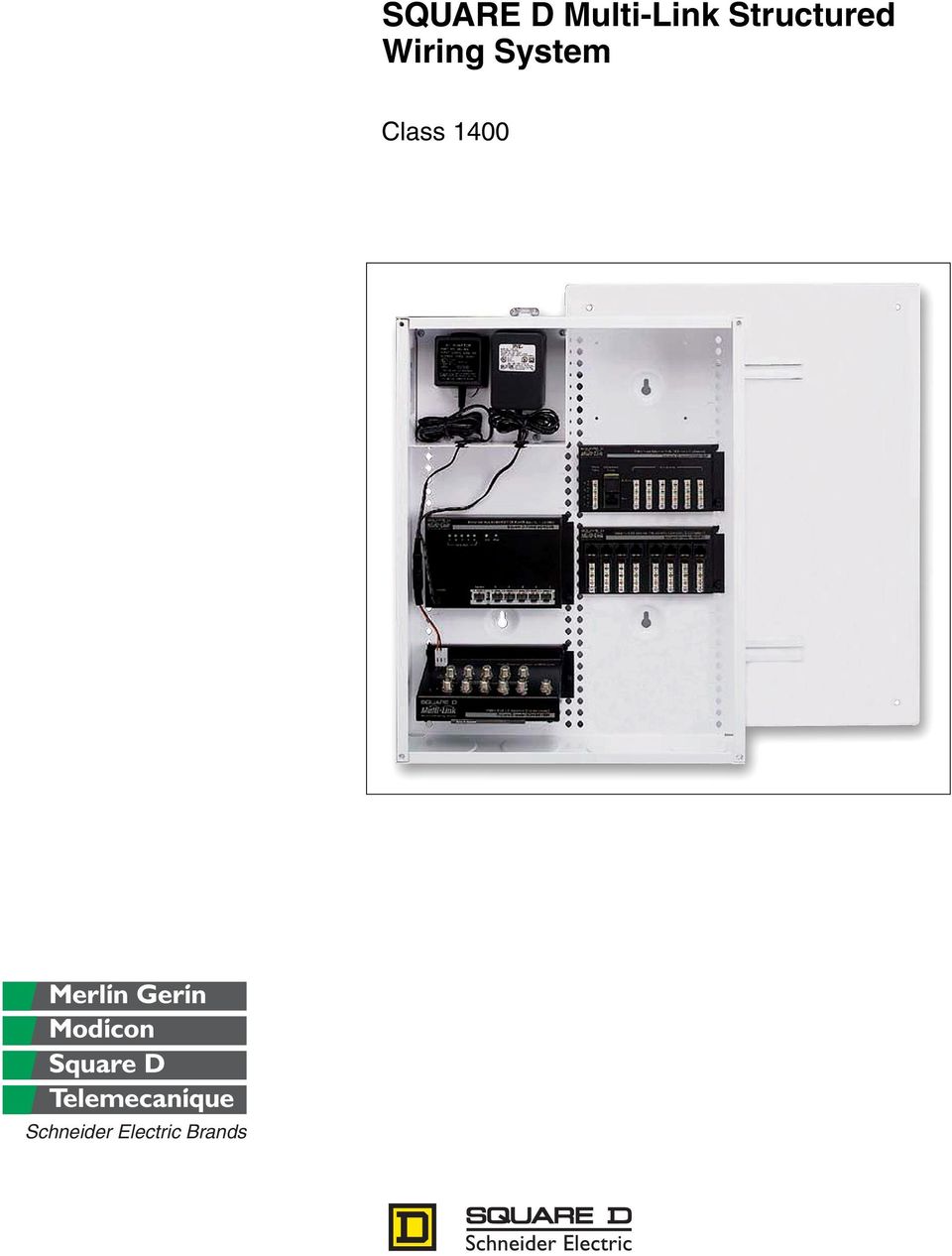
1 SQUARE D Multi-Link Structured Wiring System Class 1400 Schneider Electric Brands
2

3 Table of Contents Introduction Product Description Application Data Wiring Guide Recommended Pre-wire Schemes Installing and Terminating the Cable Recommended Product Configurations Enclosures and Brackets Product Description General Information and Application Data Television/Telephone Combination Hubs Product Description General Information and Application Data Specifications Voice and Data Network Hubs Product Description Specifications Expanding the Network Audio Distribution Hub Product Description Video Distribution Hubs Product Description General Information and Application Data Specifications Satellite Multi-Switch Product Description General Information and Application Data Modulators Product Description General Information and Application Data Technical Information Specifications Video Cameras Product Description General Information and Application Data Technical Information Specifications / Schneider Electric All Rights Reserved

4 Table of Contents Video Wall Plate Product Description General Information and Application Data IR Target and Emitter Product Description General Information and Application Data Accessories Product Description Troubleshooting General Troubleshooting Techniques Radio Frequency Troubleshooting Techniques Modulator Troubleshooting for Cameras Glossary Structured Wiring Terms Index Model Number Index Schneider Electric All Rights Reserved 04/03

5 INTRODUCTION PRODUCT DESCRIPTION Introduction Product Description The Square D Multi-Link Structured Wiring System represents the next generation of products for home networks. The Square D Multi-Link Structured Wiring System offers a complete range of products that integrate voice, data, and video applications for a complete system solution. Square D warrants the product to be free from defects in materials and workmanship for eighteen months from the date of invoice from Square D or its authorized sales channel. The devices are UL Listed for use in US markets and CUL Listed for use in Canada. APPLICATION DATA The structured wiring modules are wired using Category 5 (CAT-5) or Category 5E (CAT-5E) cable and RG-6 coaxial cables. All structured wiring modules are easily installed into enclosures, also supplied by Square D. Category 5 and 5E Cable Category 5 and 5E cables are made up of four unshielded twisted pairs. Each pair is color coded for application identification. CAT-5 or CAT-5E cables are recommended for telecommunications, camera, and data applications. CAT-5 and CAT-5E cables will support standard analog telephone, digital telephone, and data. Category 5 and Category 5E cables meet TIA/EIA 586A and 570 standards for data applications such as high-speed Internet access. The cables have a bandwidth of 100 MHz and data transmission speeds up to 100 Mbps. CAT-5 and CAT-5E cable installations provide connections for immediate and future computer, video, and telephone upgrades, thus protecting the long-term resale value of the home. NOTE: Category 5/5E cables should not be routed parallel to the AC power wiring unless 14 in. (356 mm) of separation or greater is provided. Cross Category 5/5E cables over AC power wires at 90. Section 1 Introduction Aluminum Foil Shielding Foam Polyethylene Dielectric Core F-Connector RG-6 Coaxial Cable PVC Jacket 60% Aluminum Braid Copper Clad Center Conductor RG-6 Quad RG-6 coaxial cable has an 18 gauge copper coated steel center conductor, polyethylene dielectric core, aluminum braid, and PVC jacket. Standard F connectors are used for video, audio, and television equipment connections. Under extreme noise conditions, such as near a radio or television transmitter, use quad-shielded RG-6 cable. NOTES: RG-6 coaxial cable should not be routed parallel to AC power wiring unless 14 in. (356 mm) of separation or greater is provided. Cross RG-6 coaxial cable over AC power wires at 90. When bending coaxial cable, a radius of no less than four times the outside diameter of the cable should be maintained. For RG-6 coaxial cable, the bending radius should be 1-1 1/2 inches or greater. 04/ Schneider Electric All Rights Reserved 5

6 R 4 T R 3 T R 2 T R 1 T RJ-31X Expansion Telephone Service Hub Square D model SDM412PJ Telephones Section 1 Introduction Introduction Application Data Installing Modules into Enclosure All structured wiring modules are easily installed into enclosures, also supplied by Square D. Using the hook on the back of the module, hang the module on the enclosure grid, swing the module into place, and push the button on the right side of the module to lock the module into the enclosure grid. Hook Enclosure grid Push button to lock module into place Schneider Electric All Rights Reserved 04/03

7 Wiring Guide Recommended Pre-wire Schemes WIRING GUIDE RECOMMENDED PRE-WIRE SCHEMES Structured wiring cables run from the wall boxes in the various rooms of the house directly to the structured wiring enclosure (called home run wiring). Two types of wire are used for communication and entertainment: CAT-5 or CAT-5E, made up of 4-UTP (unshielded twisted pairs), and RG-6 coaxial. CAT-5 or CAT-5E 4-UTP wires handle voice and data for up to four telephone lines. CAT-5 or CAT-5E wires can have two to four unshielded twisted pairs. Square D recommends four pairs. RG-6 coaxial wires handle television (antenna or cable), satellite dish, cable modem, or AV modulator signals. Refer to the following table for the recommended wiring schemes. These wires run from the enclosure to the locations indicated in the table. Recommended Pre-wire Schemes Section 2 Wiring Guide Typical Room Media Center Home Office Good Better Best Phone/TV Phone/TV/ Ethernet Phone/TV/ Ethernet/ Satellite Receiver Wire Type Quantity Wire Type Quantity Wire Type Quantity Phone/Satellite Phone/TV/Cable CAT 5 1 Receiver/AV CAT 5 1 CAT 5 1 Modem Modulators RG 6 1 RG 6 3 RG 6 2 Wire Type Quantity Phone/TV/Ethernet/ Wire Type Quantity Phone/TV/ Wire Type Quantity CAT 5 2 Satellite Receiver/AC CAT 5 2 Ethernet/Cable CAT 5 2 RG 6 1 Modulators RG 6 3 Modem RG 6 2 Wire Type Quantity Wire Type Quantity Phone/TV/ Wire Type Quantity Phone/TV/Ethernet/ Ethernet/Satellite CAT 5 2 Satellite Receiver/AC CAT 5 3 Receiver/Cable CAT 5 3 Modulators/Hi speed Modem/Hi speed RG 6 2 Data RG 6 3 Data RG 6 3 Telephone and Video Camera Pre-wire Scheme Recommended Color Coding for Category 5/5E Wire Category 5/5E Wire Color Gray Red Blue Yellow Usage Telephone Security Data Demarc and Gateway For pre-wiring telephone modules, use one gray CAT-5/5E cable from each telephone and modem location, web television and/or satellite box location, and telephone demarcation point (the interface from the telephone service provider). For pre-wiring video camera modules, use one red CAT-5/5E cable from each video camera location (for example, front door) and security panel location. Audio/Video and Television Pre-wire Scheme Recommended Color Coding for Coaxial Wire RG-6 Coaxial Wire Color White Black Usage Use as send, upstream, or internal cable from modulators to distribution panel Use as receive, downstream, or external cable from distribution panel to televisions For pre-wiring audio/video and television modules, use RG-6 coaxial cable. Use black coaxial cable for each television and computer location. Use white coaxial cable for each location where one or more video sources are located, the CATV demarcation point (the interface from the television service provider), and off-air antennas. For satellite dish locations, use two white coaxial cables to the distribution panel. For each satellite receiver location, use one white coaxial cable to the distribution panel. If HDTV satellite dishes are installed, four coaxial cables may be required because the satellite systems can accommodate up to four different receivers from a single dish. 04/ Schneider Electric All Rights Reserved 7

8 Wiring Guide Installing and Terminating the Cable Section 2 Wiring Guide Data Pre-wire Scheme For pre-wiring data modules, use one blue CAT-5/5E cable from each computer location, room with a separate peripheral (such as a laser printer), and room where access to the network is needed. Wiring a Telephone Wall Plate To wire a telephone wall plate, refer to the following table. NOTE: The wiring method shown in the table below requires the use of two-line telephones. Telephone Wall Plate Wiring Using Two Six-Position, Four-Conductor Jacks (RJ-14) Cable Color Pin Number Connector Color (As Marked on RJ-14 Modular Connector) Jack 1: Pairs 1 and 2 White/Orange Pin 2 White/Orange Blue Pin 3 Blue White/Blue Pin 4 White/Blue Orange Pin 5 Orange Jack 2: Pairs 3 and 4 White/Brown Pin 2 White/Orange Green Pin 3 Blue White/Green Pin 4 White/Blue Brown Pin 5 Orange When a fax machine is present or single-line telephones are used, wire line 1 (blue, blue/white pair) to the center pins (marked blue, blue/white) on the RJ-14 jack. For access to a second line for a fax machine or to enable single-line telephone use, wire line 2 (orange, orange/white pair) to the center pins (marked blue, blue/white) on a second RJ-14 jack. INSTALLING AND TERMINATING THE CABLE 110 Punch-Down Connectors The 110 punch-down connector is an insulation displacement connection system typically included on combination telephone/video hubs, telephone hubs, and data hubs. The CAT-5/5E wires are inserted into the connectors. To push wire into the connector, use only a 110 punch-down tool. When wiring the connector, keep the wire cable sheath close to the connector and do not untwist the wire more than 1/2 in. (13 mm). 110 punch-down tool CAT-5/5E cable Schneider Electric All Rights Reserved 04/03

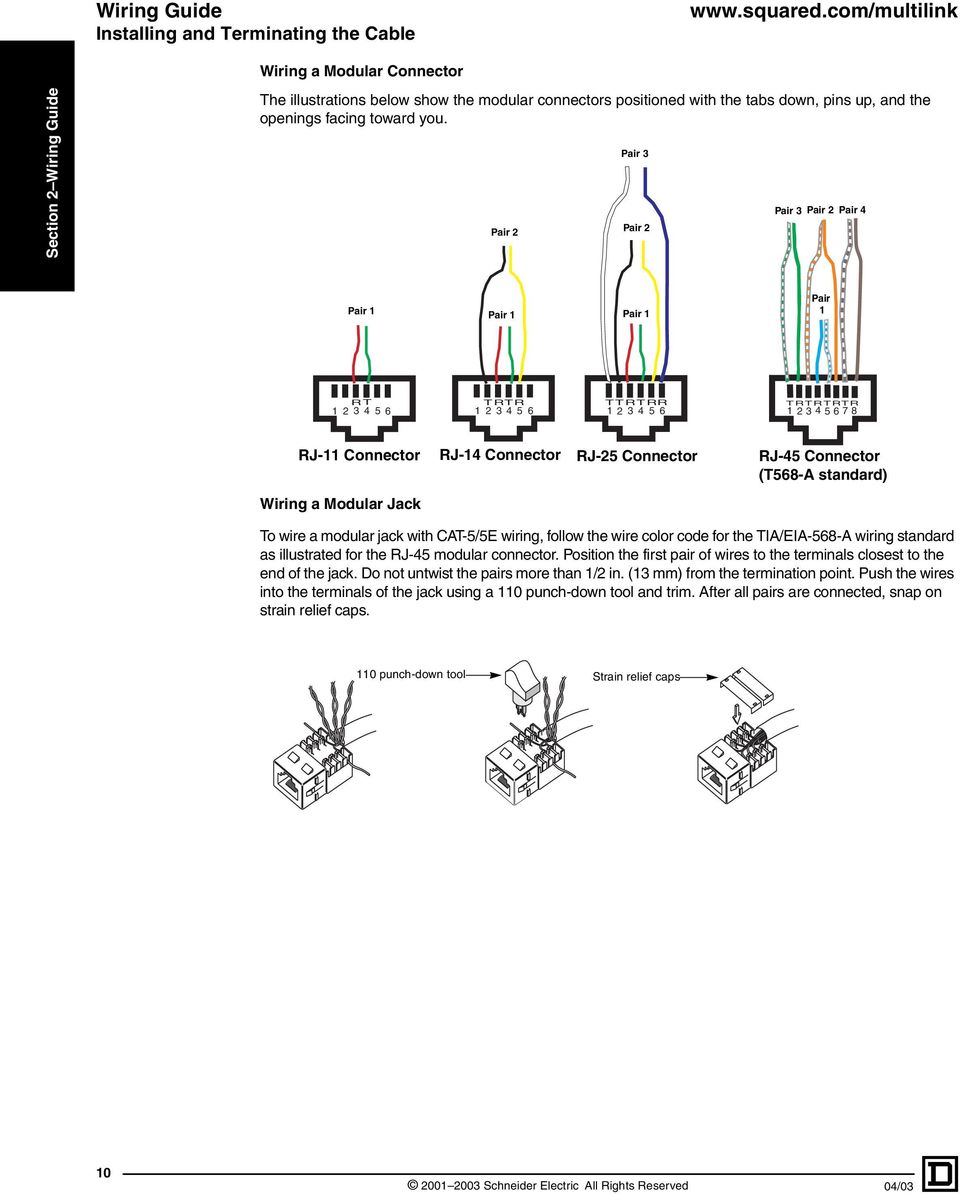
9 Wiring Guide Installing and Terminating the Cable Modular Connectors Modular connectors are attached to each end of a CAT-5/5E jumper cable. Modular connectors are used with television, telephone, data, and Ethernet hubs. There are three six-position connector types, depending on the number and usage of lines. Eight-position connectors are used with the telephone expansion hub (model SDM48PX). For residential purposes, it is recommended that the eight-position connectors (RJ-45) are wired to the T568-A wiring standard. Refer to the table below for the modular connector type and the figures below for wiring configurations. Modular Connector Types Section 2 Wiring Guide Line Usage Six-position Connectors Single-line telephones, answering machines, and modems (six-position, two-conductor) Dual-line telephones and answering machines (six-position, four-conductor) Three-line key service unit (six-position, six-conductor) Eight-position Connectors Telephones, Ethernet (10 Base-T and 100 Base-T), and data lines (eight-position, eight-conductor) Connector Type RJ-11 RJ-14 RJ-25 RJ-45 04/ Schneider Electric All Rights Reserved 9

10 Wiring Guide Installing and Terminating the Cable Wiring a Modular Connector Section 2 Wiring Guide The illustrations below show the modular connectors positioned with the tabs down, pins up, and the openings facing toward you. Pair 2 Pair 3 Pair 2 Pair 3 Pair 2 Pair 4 Pair 1 Pair 1 Pair 1 Pair 1 RT TRTR TTRTRR TRTRTRTR RJ-11 Connector RJ-14 Connector RJ-25 Connector RJ-45 Connector (T568-A standard) Wiring a Modular Jack To wire a modular jack with CAT-5/5E wiring, follow the wire color code for the TIA/EIA-568-A wiring standard as illustrated for the RJ-45 modular connector. Position the first pair of wires to the terminals closest to the end of the jack. Do not untwist the pairs more than 1/2 in. (13 mm) from the termination point. Push the wires into the terminals of the jack using a 110 punch-down tool and trim. After all pairs are connected, snap on strain relief caps. 110 punch-down tool Strain relief caps Schneider Electric All Rights Reserved 04/03
11 R Wiring Guide Recommended Product Configurations RECOMMENDED PRODUCT CONFIGURATIONS The following product configurations are guides for installing a structured wiring system for the most common applications. Basic Home Distributes two telephone lines to six locations and one cable input to four locations Handles multiple telephone lines for voice, fax and Internet access Section 2 Wiring Guide Catalog Number SDM18BW SDM18CW SDM26P14V Description 18 In. (457.2 mm) Enclosure 18 In. (457.2 mm) Cover Combination Telephone/Video Hub Incoming RG-6 coaxial cable from cable company or local antenna RG-6 coaxial cables connected to four television wall plates OUT IN OUT IN IN OUT OUT IN OUT IN MHzto 1000MHz SPLITTER COMBINER SDM26P14V From Telco Telephones Incoming telephone service (two lines) R 2 T R 1 T Combo Hub (2 lines x 6 phones, 1inpu t x 4 televisions) Square D model SDM26P14V CAT-5/5E cable Internal telephone cables connected to six telephone wall plates (CAT 5/5E unshielded twisted pairs). Each cable can have two to four pairs of wire. 04/ Schneider Electric All Rights Reserved 11

12 R Wiring Guide Recommended Product Configurations Basic Home Office Section 2 Wiring Guide Distributes four telephone lines to six locations and one cable input to four locations Allows sharing of files and peripherals among two computers Handles multiple telephone lines for voice, fax, and Internet access Catalog Number Description SDM18BW 18 In. (457.2 mm) Enclosure SDM18CW 18 In. (457.2 mm) Cover SDM8D Eight-Port Data Hub SDM46P14V Combination Telephone/Video Hub Incoming RG-6 coaxial cable from cable company or local antenna RG-6 coaxial cables connected to four television wall plates OUT IN OUT IN IN OUT OUT IN OUT IN MHzto 1000MHz COMBINER SDM46P14V From Telco 4 R T 3 R T R 2 T R 1 T Telephones Combo Hub (2 lines x 6 phones, 1 inpu t x 4 televisions) Square D model SDM46P14V Incoming telephone service (four lines) CAT-5/5E cable Internal telephone cables connected to six telephone wall plates (CAT-5/5E unshielded twisted pairs). Each cable can have two to four pairs of wire. Data Hub ( 8 cables, TIA-568A) Category 5 Compliant Square D model SDM8D SDM8D CAT-5/5E cable Cables connecting to data jacks in eight wall plates Up to eight data jacks can be wired using this equipment. However, unless an Ethernet hub is used, only two computers can be networked by connecting two RJ-45 jacks with a patch cord on the data hub. NOTE: To allow two computers to be networked, one crossover patch cord must be used somewhere in the system, i.e., between one computer and data outlet Schneider Electric All Rights Reserved 04/03

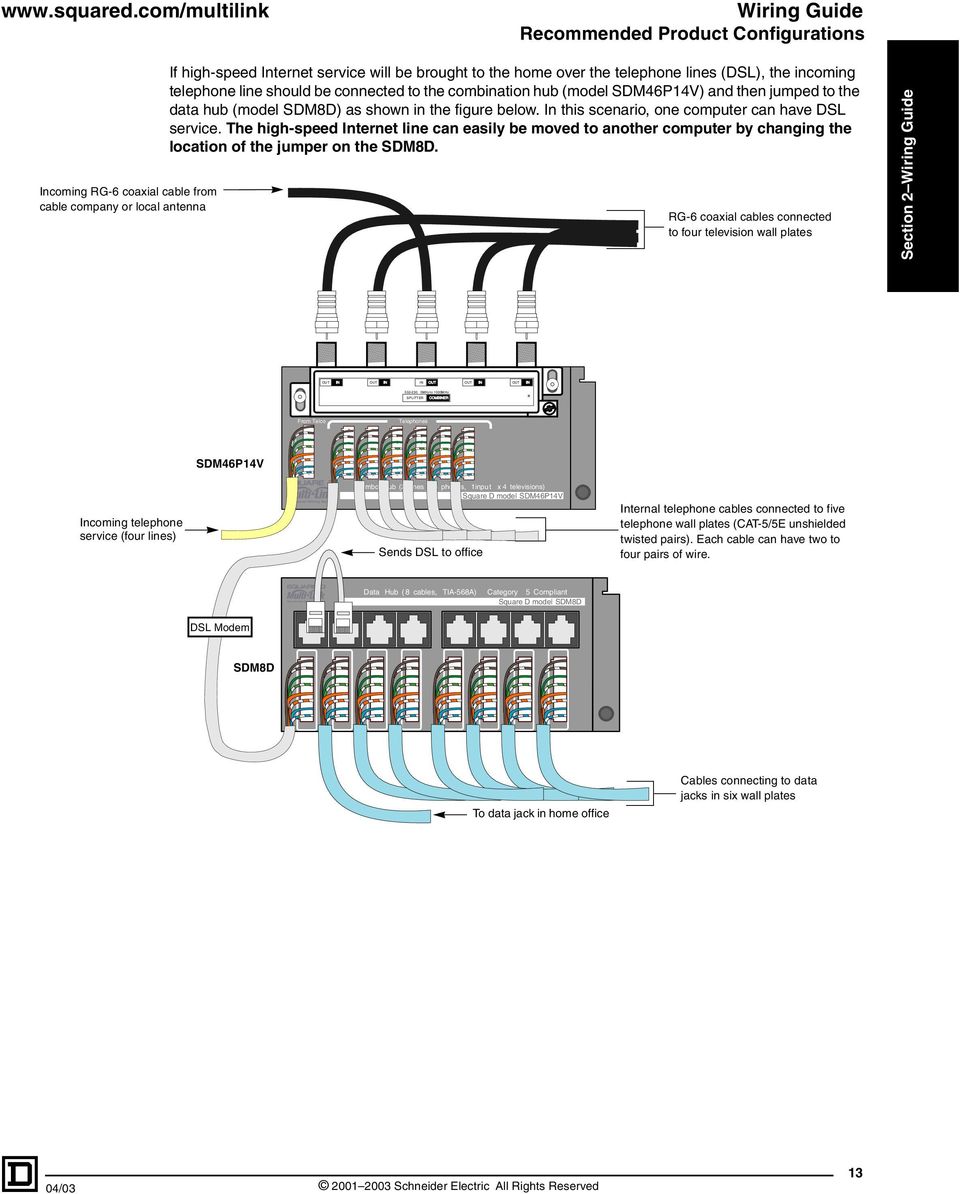
13 R Wiring Guide Recommended Product Configurations Incoming RG-6 coaxial cable from cable company or local antenna If high-speed Internet service will be brought to the home over the telephone lines (DSL), the incoming telephone line should be connected to the combination hub (model SDM46P14V) and then jumped to the data hub (model SDM8D) as shown in the figure below. In this scenario, one computer can have DSL service. The high-speed Internet line can easily be moved to another computer by changing the location of the jumper on the SDM8D. RG-6 coaxial cables connected to four television wall plates Section 2 Wiring Guide OUT IN OUT IN IN OUT OUT IN OUT IN MHzto 1000MHz SPLITTER COMBINER Incoming telephone service (four lines) SDM46P14V From Telco 4 R T 3 R T R 2 T R 1 T Telephones Combo Hub (2 lines x 6 phones, 1inpu t x 4 televisions) Square D model SDM46P14V Sends DSL to office Internal telephone cables connected to five telephone wall plates (CAT-5/5E unshielded twisted pairs). Each cable can have two to four pairs of wire. Data Hub ( 8 cables, TIA-568A) Category 5 Compliant Square D model SDM8D DSL Modem SDM8D To data jack in home office Cables connecting to data jacks in six wall plates 04/ Schneider Electric All Rights Reserved 13
14 Wiring Guide Recommended Product Configurations Advanced Home Office Section 2 Wiring Guide Distributes four telephone lines to six locations Creates a LAN by connecting up to five computers or peripherals through the Ethernet hub (model SDM5DE) Allows a high-speed Internet connection to be shared among computers Distributes CATV or antenna signals to up to eight televisions Catalog Number SDM18BW SDM18CW SDM4AC SDM46P SDM8D SDM5DE SDM38VBIR or SDM38VHIR Description 18 In. (457.2 mm) Enclosure 18 In. (457.2 mm) Cover Four-Outlet AC Accessory (Two Plugs) Phone Board Eight-Port Data Hub Ethernet Hub Video Hub Five rooms have ethernet connections Data Hub ( 8 cables, TIA-568A) Category 5 Compliant Square D model SDM8D SDM8D Power supply-included (model SDM350087) CAT-5/5E patch to SDM4AC cords (models SDM1DC or SDM2DC) Ethernet Hub 10BASE-T (5 RJ-45 inputs, 1 uplink) Square D model SDM5DE CAT-5 cable To data jacks in remote wall plates Col. Pwr Link/Act. SDM5DE +5VDC Uplink Power supply-included (model SDM350086) to SDM4AC Adapter (included) LED glows when power is applied +12vdc Gnd IR B +Pwr Modulators A Televisions Antenna or cable (model SDM38VHIR) Cable only (model SDM38VBIR) SDM38VBIR Up to eight televisions RG-6 coaxial cable Schneider Electric All Rights Reserved 04/03

15 Wiring Guide Recommended Product Configurations NOTES: If high-speed Internet service is brought to the home over the telephone lines (DSL), the incoming telephone line should be connected to the SDM46P and then jumped to the SDM8D through the DSL modem (as shown in the figure below). If the Internet service provider (ISP) allows multiple IP addresses to be leased to one modem, then the high-speed Internet service may be available to all the computers in the home using the Multi-Link Ethernet Hub. In this situation, the high-speed Internet line will jump from the SDM8D to the uplink port in the SDM5DE. All the computers connected to the Ethernet hub must have firewall software or hardware installed since they all will have access to the high-speed line at the same time. If the ISP does not allow multiple IP addresses to be leased to one modem, then replace the Multi-Link Ethernet Hub in the figure below with a router (purchased separately). Section 2 Wiring Guide Security system connection (RJ-31X only) Telephone Master Hub (4 lines x 6 phones) Square D model SDM46P From Telco Expansion Ports Telephones SDM46P R 4 T R 3 T R 2 T R 1 T RJ31X Out Four lines from telephone company (CAT-5/5E, four unshielded twisted pairs) Five rooms have ethernet connections Data Hub ( 8 cables, TIA-568A) Category 5 Compliant Square D model SDM8D SDM8D DSL Modem Power supply-included (model SDM350087) to SDM4AC Ethernet Hub 10BASE-T (5 RJ-45 inputs, 1 uplink) Square D model SDM5DE CAT-5 cable To data jacks in remote wall plates Col. Pwr Link/Act. SDM5DE +5VDC Uplink / Schneider Electric All Rights Reserved 15

16 Wiring Guide Recommended Product Configurations Advanced Video and Security Camera Section 2 Wiring Guide Distributes four telephone lines to six locations Creates a local channel for viewing a camera signal Distributes camera signal along with the cable television or antenna signals to up to eight televisions No power is necessary at the camera, it is powered through the channel injector Multiple cameras can be added to the system (a channel injector is needed for each one) Catalog Number Description SDM18BW 18 In. (457.2 mm) Enclosure SDM18CW 18 In. (457.2 mm) Cover SDM4AC Four-Outlet AC Accessory (Two Plugs) SDM46P Phone Board SDM38VBIR Video Hub SDM1VC Black and White Camera SDM11VMB or SDM11VMH Channel Injector Power supply-included (model SDM350079) to model SDM4AC SDM11VMB or SDM11VMH CAT-5/5E cable Make all cables and CAT-5 connections first. Power the channel injector last. Connect antenna or incoming cable to channel injector (model SDM11VMH) CATV/Ant input or the CATV to model SDM11VMB. RG-6 coaxial cable Video camera-rear view (model SDM1VC) SDM1VC Power supply-included (model SDM350086) to SDM4AC SDM38VBIR Adapter (included) +12vdc Gnd IR LED glows when power is applied B +Pwr Modulators Televisions A Up to eight televisions RG-6 coaxial cable Schneider Electric All Rights Reserved 04/03

17 Wiring Guide Recommended Product Configurations Media Center and Security Camera Distributes four telephone lines to six locations Creates a local channel for viewing a camera signal Distributes camera signal along with the cable television or antenna signals to up to eight televisions No power is necessary at the camera, it is powered through the channel injector Multiple cameras can be added to the system (channel injectors can be cascaded) Video sources, such as DVD players, are connected via line level inputs to the set top modulator (model SDM41VTST) Set top modulator modulates all the inputs and combines them onto a single coaxial cable for distribution back to the video hub Output of the set top modulator is connected to port B of the video hub, which allows the video hub to be powered via the set top modulator NOTE: Port A on the video hub is also used to connect modulated signals, however, no IR control can be passed through this port Cable or antenna signal is connected to the model SDM11VMB IR targets are connected in-line with each television where IR control is desired IR emitters are connected to the set top modulator and position over the IR sensor on the video source device Section 2 Wiring Guide Catalog Number SDM18BW SDM18CW SDM4AC SDM46P SDM38VBIR or SDM38VHIR SDM41VTST SDM2VCC SDM11VMB or SDM11VMH SDM1VIR SDM2VIR Description 18 In. (457.2 mm) Enclosure 18 In. (457.2 mm) Cover Four-Outlet AC Accessory (Two Plugs) Phone Board Video Hub 4-Input Set Top Modulator Color Camera Channel Injector IR Target IR Emitter For satellite applications, see pages / Schneider Electric All Rights Reserved 17

18 VCR Remove jumper for Hi-Z (See manual) Wiring Guide Recommended Product Configurations Section 2 Wiring Guide Power connection SDM41VT Video/audio outputs Use only shielded 75 ohm coaxial cable VCR OUTPUT POWER 15VDC 900mA CH C CH D VIDEO AUDIOL AUDIOR 12:00 CH A CH B Satellite dish and receiver VIDEO AUDIOL AUDIOR RG-6 coaxial preferred Video/audio outputs ABCD CCTV Camera at front door A B C D Note: The satellite dish and receiver, CCTV Camera, VCR, and DVD shown are not Square D Multi-Link products. Terminating jumpers (on side of unit) RCA "Y" adapter to local monitor or Dolby Pro-Logic system Optional IR emitter (model SDM2VIR) repeats what the IR target sees in the other room. Attach the IR emitter directly over the IR sensor. DVD Power option-do not power. Power is obtained through port B of set top modulator. SDM38VHIR or SDM38VBIR To more televisions Optional IR target (model SDM1VIR) may be used at any or all televison locations. RG-6 coaxial cable Control the DVD, DSS, or VCR from any room. Power supply-included (model SDM350079) to model SDM4AC SDM11VMB or SDM11VMH Make all cables and CAT-5 connections first. Power the channel injector last. CAT-5/5E cable Connect antenna or incoming cable to channel injector (model SDM11VMH) CATV/Ant input or the CATV to model SDM11VMB. Security system connection (RJ-31X only) Video camera-rear view Telephone Master Hub (4 lines x 6 phones) Square D model SDM46P SDM1VC Four lines from telephone company (CAT-5/5E, four unshielded twisted pairs) From Telco R 4 T R 3 T R 2 T R 1 T Expansion Ports RJ31X Out SDM46P Telephones Internal telephone cable connected to six telephone wall plates (CAT-5/5E unshielded twisted pairs). Each cable can have two to four pairs of wire Schneider Electric All Rights Reserved 04/03

19 Enclosures and Brackets Product Description PRODUCT DESCRIPTION ENCLOSURES AND BRACKETS The enclosures are the housing components of the Square D Multi-Link Structured Wiring System. Each enclosure has a mounting grid, allowing any structured wiring module to easily mount into the enclosure. Modules can be mounted on either side of the grid and upside down. The universal mounting bracket (model SDM10BW) can be surface mounted over a single- or double-gang box or mud ring. Any Square D Multi-Link Structured Wiring module can be installed onto the mounting bracket. To give the bracket a finished look, a snap-on cover (model SDM10CW) is available. Universal Mounting Bracket (Model SDM10BW) Features: 10 in. (254 mm) high, 6.5 in. (165 mm) wide,.35 in. (9 mm) deep 10 in. (254 mm) of grid mounting space Vertical or horizontal mounting Surface mount over single- or double-gang openings Optional cover (model SDM10CW) Painted steel, white Section 3 Enclosures and Brackets SDM10BW SDM10BW With Modules Installed Cover (Model SDM10CW) Features: 11 in. (279 mm) high, 6.7 in. (170 mm) wide, 4.5 in. (114 mm) deep Snap-on cover design Painted steel, white 04/ Schneider Electric All Rights Reserved 19

20 Enclosures and Brackets Product Description Enclosures (Models SDM18BW and SDM36BW) Features: Section 3 Enclosures and Brackets SDM18BW With Modules Installed Model SDM18BW is 18 in. (457.2 mm) high, in. (362 mm) wide, and 3.5 in. (89 mm) deep, with 34 in. (864 mm) of grid mounting space Model SDM18BW has two columns of grid mounting space, each column is 17 in. (432 mm) Model SDM36BW is 36 in. (914.4 mm) high, in. (362 mm) wide, and 3.5 in. (89 mm) deep, with 70 in. (1778 mm) of grid mounting space Model SDM36BW has two columns of grid mounting space, each column is 35 in. (889 mm) Side mounting tabs included for field installation Fits between studs on 16 in. (406 mm) center lines Surface or flush mounting Optional combination flush/surface cover: cover dimensions for SDM18CW 19.5 in. (495.3 mm) high, in. (400 mm) wide and SDM36CW 37.5 in. high (953 mm), (400 mm) wide Can be mounted upside down Accepts model SDM4AC or model SDM8AC power accessory Four 2 in. (51 mm) and two 1/2 in. (13 mm) knockouts in each endwall Painted steel, white Paint shield included SDM18CW and SDM18BW Schneider Electric All Rights Reserved 04/03

21 Enclosures and Brackets Product Description AC Power Accessories (Models SDM8AC and SDM4AC) SDM8AC The AC power accessories (models SDM8AC and SDM4AC) mount inside the enclosures to provide a UL listed location for power supplies. All of the enclosures accept the AC power accessories. Features: SDM8AC will mount four receptacles, providing eight outlets for four power supplies SDM4AC will mount two receptacles, providing four outlets for two power supplies Uses standard duplex receptacles, not included Mounts in any of the four corners of model SDM18BW or model SDM36BW enclosure Mounting hardware included UL Listed SDM8AC covers 5.5 in. (140 mm) of grid mounting space on each side, 11 in. (280 mm) total SDM4AC covers 5.5 in. (140 mm) of grid mounting space on one side Section 3 Enclosures and Brackets SDM4AC SDM18BW with SDM4AC and Other Modules Installed 04/ Schneider Electric All Rights Reserved 21
22 Enclosures and Brackets General Information and Application Data GENERAL INFORMATION AND APPLICATION DATA Section 3 Enclosures and Brackets Mounting the Enclosure The enclosures can be flush mounted between studs. For versatile flush mounting, the mounting tabs are field installed. Three available positions for the flush mounting tabs allow for wall thicknesses of 1/2 in. (13 mm), 5/8 in. (16 mm) or 3/4 in. (19 mm). Nail holes are provided in each sidewall for flush mounting in existing installations. Mounting holes are also provided in the rear of the enclosure for surface mounting. Covers SDM18CW and SDM36CW are combination covers for flush or surface applications. NOTE: The enclosure should not be mounted next to an AC power distribution panel. Maintain 17.5 in. (445 mm) or more between the structured wiring panel and the home s AC panel in. on center (406 mm) Mounting tab hole and hole inside enclosure Knockout Enclosure Mounting the AC Power Accessory The AC power accessory is easily mounted into the enclosure using the hardware provided. The AC power accessory can be mounted into any corner of the enclosure. Low voltage wires exit the AC power accessory through the grommets provided. The grommets can be cut to accommodate the wiring. Location of knockouts for 120 VAC Left or right OEM AC ADAPTOR Part no.: U L Top or bottom Enclosure Grommet cut for wiring AC Power Accessory Mounting Locations (SDM8AC depicted) Schneider Electric All Rights Reserved 04/03
23 Grounding Lug Enclosures and Brackets General Information and Application Data The AC power accessories include a grounding lug. The enclosures do not include a separate grounding lug. However, there is a #10 32 threaded hole provided in the top and bottom endwall for the user to install ground lugs, as necessary. Installing the Cables Install the data and video cables into the enclosure through removable knockouts. Line the knockout holes with grommets (provided) to protect incoming cable. Knockout hole with grommet Cabling running through knockout hole Grommet Section 3 Enclosures and Brackets Cabling in enclosure Paint shield Installing the Cover Cover installation is streamlined with temporary hardware (provided). Install nails through the mounting holes to temporarily align screw holes. Enclosure mounting holes Cover 04/ Schneider Electric All Rights Reserved 23
24 Enclosures and Brackets General Information and Application Data Section 3 Enclosures and Brackets Schneider Electric All Rights Reserved 04/03
25 OUT IN MHzto 1000MHz SPLITTER R TELEVISION/ TELEPHONE COMBINATION HUBS PRODUCT DESCRIPTION Television/Telephone Combination Hubs Product Description The combination hubs provide a four-way passive splitter to distribute incoming video (CATV or antenna) signals to four locations. The hubs incorporate 110 punch-down blocks for distributing telephone lines. Combination Hubs (Models SDM26P14V and SDM46P14V) Features: Distributes CATV or antenna to four locations Telephone service for two lines (model SDM26P14V) or four lines (SDM46P14V) with outputs to six locations 3 in. (76.2 mm) of grid mounting space.video F-connectors extend 1/2 in. (13 mm) above the hub mounting pan. Allow approximately 2 in. (51 mm) clearance for cable bending radius above the module. Section 4 Television/Telephone Combination Hubs SDM26P14V SDM46P14V GENERAL INFORMATION AND APPLICATION DATA Combination Hubs See the following figure for the typical installation of combination hubs. RG-6 coaxial cable from cable company or antenna RG-6 coaxial cables connected to four television wall plates IN OUT IN OUT OUT IN OUT IN COMBINER From Telco Telephones R 2 T Two lines from telephone company (CAT-5/5E unshielded twisted pairs) R 1 T Combo Hub (2 lines x 6 phones, 1inpu t x 4 televisions) Square D model SDM26P14V SDM26P14V Internal telephone cables connected to six telephone wall plates (CAT-5/5E, two unshielded twisted pairs). Each cable can have two to four pairs of wire. 04/ Schneider Electric All Rights Reserved 25
26 Television/Telephone Combination Hubs General Information and Application Data SPECIFICATIONS Passive Splitter Section 4 Television/Telephone Combination Hubs The specifications for the passive video splitter portion of the combination hubs are shown in the following table. Parameter Insertion Loss In-Out (db maximum) Return Loss Input (db maximum) Return Loss Output (db minimum) Isolation OUT-OUT (db minimum) Frequency (MHz) SDM26P14V SDM46P14V Power Pass 500 ma One port or all ports Impedance ohms RFI (db) db Schneider Electric All Rights Reserved 04/03
27 RJ-45 J10 RJ-45 J9 RJ-45 J10 RJ-45 J9 J8 110D-4 Blu J8 110D-4 Blu J7 110D-4 Blu J7 110D-4 Blu J6 110D-4 Blu J6 110D-4 Blu J5 110D-4 Blu J5 110D-4 Blu J3 110D-4 Blu J3 110D-4 Blu J4 110D-4 Blu J4 110D-4 Blu J2 110D-4 Blu J2 110D-4 Blu J1 110D-4 Blu J1 110D-4 Blu PRODUCT DESCRIPTION Voice and Data Network Hubs Product Description The voice and data network hubs distribute telephone and data signals to multiple locations throughout the home. Each hub uses the standard grid mounting and will fit in any enclosure model or the universal mounting bracket. Telephone Master Hub (Model SDM46P) Features: SDM46P Telephone service for four lines with outputs to six separate locations Security panel connection RJ-31X only (top jack) for seizure of line punch-down connectors Can be mounted upside down Expansion jack RJ-45 (bottom jack) for telephone expansion hub (model SDM48PX) 3 in. (76.2 mm) of grid mounting space Telephone Expansion Hub (Model SDM48PX) Section 5 Voice and Data Network Hubs Security system connection (RJ 31X only) Four lines from telephone company (CAT 5/5E, four unshielded twisted pairs) R 4 T R 3 T R 2 T R 1 T In Out SDM48PX From Telco Expansion Ports Expansion Ports Telephone Master Hub (model SDM46P) RJ31X Out Telephone Master Hub (4 lines x 6 phones) Square D model SDM46P Telephones Telephones CAT 5 patch cord Telephone Expansion Hub (model SDM48PX) Telephone Expansion Hub (4 lines x 8 phones) Square D model SDM48PX CAT 5 patch cord R T 4 R 3 T R 2 T R 1 T Features: Accessory to telephone master hub (model SDM46P) Telephone service for four lines with outputs to eight separate locations (when used with SDM46P, 14 outlets are accommodated) CAT-5/5E patch cord included to connect to SDM46P 110 punch-down connectors Can be mounted upside down 3 in. (76.2 mm) of grid mounting space Expansion jack allows multiple SDM48PX units to be cascaded, providing expanded telephone distribution (see graphic on the left) Telephone Interface Hub/Patch Panel (Model SDM412PJ) Features: Telephone service for four lines with outputs to twelve separate locations RJ-45 modular jacks 110 punch-down connectors for incoming telephone company service Can be mounted upside down 3 in. (76.2 mm) of grid mounting space Expansion jack allows connection to additional SDM412PJ for large applications Use with SDM8D data hub and SDM5DE Ethernet hub to allow easy reassignment of phone outlets to data network outlets Telephone Expansion Hub (model SDM48PX) Telephone Expansion Hub (4 lines x 8 phones) Square D model SDM48PX In Expansion Ports Telephones R T 4 R 3 T Out R 2 T R 1 T SDM412PJ 04/ Schneider Electric All Rights Reserved 27
28 Section 5 Voice and Data Network Hubs Voice and Data Network Hubs Product Description Telephone company line CAT-5/5E data hub (model SDM8D) CAT-5/5E data hub (model SDM8D) SDM8D ( TIA-568A) Category 5 Compliant Square D model SDM8D Data Hub (88 cables, TIA-568A) Category 5 Compliant Square D model SDM8D H628 SDM8DB Cables connecting to voice or data jacks in eight wall plates Data Termination Hub (Model SDM8D) Features: Certified 100 Base-T performance CAT-5/5E performance in a multi-port hub Terminates eight CAT-5/5E lines with RJ-45 jacks Terminates eight CAT-5/5E lines with 110 punch-down connectors 110 punch-down connectors are connected to the RJ-45 jacks Can be mounted upside down Circuits may be bridged for telephone distribution 3 in. (76.2 mm) of grid mounting space Suitable for Digital Subscriber Line (DSL) from telephone company Distributes Ethernet connections Distributes camera connections The data termination hub can be used for telephone distribution by connecting two data hubs using CAT-5/5E patch cords. In the figure to the left, one hub shows the telephone lines bridged at the hub to bring telephone distribution to the jacks. The additional hub has the cables connecting to voice or data jacks in eight wall plates. Bridgeable CAT-5/5E Hub (Model SDM8DB) Features: Certified 100 Base-T performance Eight CAT-5/5E circuits (110 to RJ-45) Eight additional 110 connectors to bridge for telephone distribution (see diagram below) 4.5 in. (114.3 mm) of grid mounting space The bridgeable CAT-5/5E data hub can also be used for telephone distribution. In the following figure, three telephone outlets are wired using CAT-5/5E cables terminated to the lower section of 110 punch-down connectors. The wires can also be terminated into the RJ-45 jacks via RJ-45 plugs. To bring telephone distribution to the jacks, bridge the telephone lines by running the incoming telephone lines across the top set of 110 punch-down connectors. All CAT-5/5E circuits can be bridged for telephone distribution. The remaining terminals are available for use as data terminations. The lines from the telephone company bridged across the connectors. Data Hub (8 cables,tia-568a) Category 5 Compliant Square D model SDM8DB Telephone lines Data lines Schneider Electric All Rights Reserved 04/03
29 Ethernet Hub (Model SDM5DE) Voice and Data Network Hubs Product Description The Ethernet hub is used to provide a five port 10 Base-T hub to interface computers and printers throughout the home. This hub creates a local area network, allowing file and peripheral (printer) sharing among multiple computers. The Ethernet hub has activity LEDs for network status and diagnosis. SDM5DE VOICE AND DATA NETWORK HUBS The Ethernet hub is easier to install when used as a companion piece with the data termination hub. Features: Certified 10 Base-T performance Five-port hub RJ-45 connectors Can be mounted upside down FCC and UL approved Uplink port provided to jumper to additional SDM5DE units 120 Vac power supply included 4 in. (102 mm) of grid mounting space Section 5 Voice and Data Network Hubs DSL from telephone company DSL sent to home office computer only Ethernet connection from home office Four ethernet connections Data Hub (8 cables,tia-568a) Category 5 Compliant Square D model SDM8DB Hub ( 8 cables, TIA-568A) Camera signal connects to channel injector by way of the RJ-45 patch cord CAT-5/5E data hub (model SDM8DB) Cables connecting to two phone jacks (one in home office) Ethernet hub (model SDM5DE) Network hub 10 base-t Square D model SDM5DE Camera wire (CAT-5/5E) Cable connecting to data jacks in five wall plates Power Channel injector (model SDM11VMH) Link/ normal 10 base-t hub CAT-5 video Program Antenna or incoming cable Power supply (model SDM350079) Output CATV /Ant Power Channel Injector NOTE: The channel injector shown in this scheme is not required for Ethernet connections. 04/ Schneider Electric All Rights Reserved 29
30 Voice and Data Network Hubs Technical Information SPECIFICATIONS Section 5 Voice and Data Network Hubs Ethernet Hub (Model SDM5DE) Specifications at F ( C) Compliance IEEE Base-T RJ-45 ports 5 Network Interface RJ-45 uplink 1 Maximum Cable Length CAT-5/5E (UTP) 328 ft (100 m) each unit PWR, COL LED Indicators each port LINK/ACT Environmental operating temperature 32 F to 122 F (0 C to 50 C) Power Supply EXPANDING THE NETWORK model number output current output voltage input power SDM ma maximum 5 Vdc ± 5% regulated Vac To expand the network, one of the ports on the Ethernet hub is used to connect to the uplink port on the expansion hub using a straight through RJ-45 CAT-5 cable. See the graphic below. Ethernet Hub 10BASE-T (5 RJ-45 inputs, 1 uplink) Square D model SDM5DE Col. Pwr Link/Act. Ethernet hub (model SDM5DE) +5VDC Uplink Connect to four network devices or to the uplink port of additional ethernet hubs. Ethernet Hub 10BASE-T (5 RJ-45 inputs, 1 uplink) Square D model SDM5DE Col. Pwr Link/Act. Ethernet hub expansion (model SDM5DE) +5VDC Uplink Leave this port unused Connect to four network devices or to the uplink port of additional ethernet hubs. Additional hubs can be used, as long as the path between any two network devices does not exceed four hubs and five cables. NOTE: When the uplink port of a hub is used, a network device cannot be connected to port 5. All hubs must be powered Schneider Electric All Rights Reserved 04/03
31 PRODUCT DESCRIPTION Audio Distribution Hub Product Description Speaker Distribution Hub (Model SDM16A) AUDIO DISTRIBUTION HUB Features: Distributes one stereo audio to six rooms 3 in. (76.2 mm) of grid mounting space Connects with standard speaker wire (12 gauge maximum) to supply six pairs of speakers with stereo audio from one receiver or amplifier Outputs wired (via speaker wire) to impedance matching volume controls (not supplied by Square D) Speaker wire terminations removable for easy wiring Speakers not supplied by Square D Section 6 Audio Distribution Hub SDM16A 04/ Schneider Electric All Rights Reserved 31
32 Audio Distribution Hub General Information and Application Data Section 6 Audio Distribution Hub Schneider Electric All Rights Reserved 04/03
33 VIDEO DISTRIBUTION HUBS SDM13VS PRODUCT DESCRIPTION Video Distribution Hubs Product Description The splitter hubs are cable company grade passive splitters that are tilted to 10 for easy connections. Three-, four-, and eight-way balanced splitters are available. The video distribution hubs amplify and distribute antenna and/or cable signals to television locations. The high headroom amplifier and bi-directional amplifier video hubs (models SDM38VHIR and SDM38VBIR) include two modulator inputs to add locally generated channels for cameras, DVDs, or VCRs. All of the video distribution hubs are compatible with NTSC and future HDTV signals. SDM14VS Splitter Hubs (Models SDM13VS, SDM14VS, and SDM18VS) Features: Cable company grade passive splitter Model SDM13VS is a three-way balanced splitter, MHz Model SDM14VS is a four-way balanced splitter, MHz Model SDM18VS is an eight-way balanced splitter, MHz Splitter tilted 10 for easy connections -130 db RFI rejection 2 in. (51 mm) of grid mounting space NOTES: The splitter hubs are not DC passing. Section 7 Video Distribution Hubs SDM18VS SDM16VAB Video Amplifier Hub (Model SDM16VAB) The video amplifier hub (model SDM16VAB) distributes community antenna television (CATV) or antenna signals to six televisions. The hub has four standard outputs (up to 75 ft, 22.9 m) and two long outputs (up to 150 ft, 45.8 m). The SDM16VAB has a broadband amplifier ( MHz) and a 5 42 MHz return path for pay-per-view and interactive cable. The video amplifier hub works like a zero-loss splitter. The signals that are put on the antenna/catv input will appear on the outputs with about 1dB of gain for short outputs and about 4 db of gain for long outputs. Features: Distributes CATV or antenna to six televisions Four standard short outputs (up to 75 ft, 22.9 m) Two long outputs (up to 150 ft, 45.8 m) Up to four additional hubs (model SDM16VAB) can be cascaded (from the four standard short outputs only) of a master hub HDTV compatible Bi-directional with a 5 42 MHz return path for interactive applications and pay-per-view boxes Can be mounted upside down LED power indicator 120 Vac power supply included 3 in. (25.4 mm) of grid mounting space Termination caps are not required 04/ Schneider Electric All Rights Reserved 33
34 Video Distribution Hub Product Description Adding a Camera Section 7 Video Distribution Hubs A camera channel can be added to the video amplifier hub (model SDM16VAB) using the channel injector (model SDM11VMH or SDM11VMB) and the camera (example: model SDM2VC). The channel injector adds the camera channel to the existing off-air channels and the video amplifier hub distributes the channel to all the outputs. See the figure below. Channel injector (model SDM11VMH) CAT-5 video Camera (model SDM2VC) Output Program CATV /Ant Power Video amplifier hub (model SDM16VAB) Power +15VDC Video Amplifier Hub (1 inpu t x 6 televisions) Square D model Short Long CATV/ Ant Televisions Camera channel is now available on all televisions in the house. Video Hubs (Models SDM38VHIR and SDM38VBIR) The video hubs work like a zero-loss splitter and signal combiner. The signals that are put on the antenna or cable television input will appear on the outputs with about 3dB of gain. The modulator inputs will automatically appear on the outputs at an FCC legal level. Features: SDM38VHIR SDM38VBIR SDM38VHIR is a high headroom amplifier video hub used with CATV systems or antennas for off-air digital and analog television signals. The amplifier handles signal differences between high-powered analog VHF (off-air television channels 2 through 13) and low-powered digital UHF (off-air television channels 14 through 69). Use SDM38VBIR if CATV services require a return path. SDM38VBIR is a bi-directional amplifier video hub used with CATV services using pay-per-view boxes and interactive cable and has a 5 42 return path. The bi-directional system is not for use with off-air antennas. Bi-directional with a 5 42 MHz return path for pay-per-view boxes (SDM38VBIR only) Distributes CATV (SDM38VBIR or SDM38VHIR) or antenna (SDM38VHIR only) to eight televisions Maximum 150 ft (46 m) coaxial cable run from all eight outputs HDTV compatible Two modulator inputs to add locally generated channels (camera, VCR, or DVD) Schneider Electric All Rights Reserved 04/03
35 IR Video Distribution Hubs Product Description Use modulator input B for IR information passing IR repeating system using 5-volt targets Antenna isolation compliant with FCC Part 15 requirements (SDM38VHIR only) 120 Vac power supply and adapter included LED power indicator Up to eight additional hubs (models SDM38VBIR or SDM38VHIR) can be cascaded from a master hub 2.5 in. (64 mm) of grid mounting space Termination caps are not required Modulator Inputs The high headroom amplifier and bi-directional amplifier video hubs (models SDM38VHIR and SDM38VBIR) have modulator inputs to add locally generated channels. The new channel is selected using the programming instructions included with the modulator or the channel injector (see the Programming section for modulators on page 50). Any television connected to the video hub output by coaxial cables can receive the signal when tuned to the proper channel. For typical installation, see the figure below. Section 7 Video Distribution Hubs Power supply-included (model SDM350086) Adapter (included) Video hub (model SDM38VHIR) +12vdc Gnd Antenna or cable (model SDM38VHIR) Cable only (model SDM38VBIR) LED glows when power is applied B +Pwr Modulators Televisions A Modulator Connect modulators to A or B inputs Up to eight televisions DVD, VCR, or Satellite RG-6 coaxial cable To increase the number of modulator inputs, a modulator combiner (model SDM81VC) is connected to a video hub modulator input port to work as an expansion hub. When the modulator combiner is used with a video hub, each of the eight locations can receive the broadband feed as well as the modulated channels. 04/ Schneider Electric All Rights Reserved 35
36 Video Distribution Hub Product Description IR Repeating System Section 7 Video Distribution Hubs The high headroom amplifier and bi-directional amplifier video hubs (models SDM38VBIR and SDM38VHIR) have integrated 5-volt IR engines that pass IR information, allowing control of any video device from any location by simply adding an IR target (model SDM1VIR), an IR emitter (model SDM2VIR), and a set top modulator to the system. For example, when the remote control is pointed at the IR target located at the television, the IR pulses are repeated by the emitter, which is controlling the DVD player in another location. IR information and power from the set top modulator are passed through port B only. When the modulator is connected to port A, IR remote control passing capability is not available and the video hub must be powered. All of the television ports can have targets connected. See the following figure. +12vdc Gnd IR Video hub (model SDM38VHIR) B +Pwr Modulators Televisions A Set top modulator IR target (model SDM1VIR) IR emitter (model SDM2VIR) Typical remote control The single channel modulator (model SDM11VM), channel injectors (models SDM11VMB/SDM11VMH), and the modulator combiner (model SDM81VC) do not pass IR information for remote control. Use only a modulator with IR control, such as a set top modulator (model SDM41VTST, SDM21VTST, SDM41VT, or SDM21VT), and connect the set top modulator to the B+pwr input port of the video hub Schneider Electric All Rights Reserved 04/03
37 Video Distribution Hubs Product Description Television Output Expansions A video hub can be connected to up to eight more video hubs, adding up to 64 television outlets. The longest recommended coaxial cable length should not exceed 150 ft (45.8 m) (total length from master hub to expansion hub and expansion hub to the television). NOTE: IR control can also be expanded using an IR control expander (ChannelPlus model 2181). For typical installation, see the figure below. Master SDM38VHIR/VBIR Expansion SDM38VHIR/VBIR ChannelPlus model 2181 allows the SDM38VHIR/VBIR to expand IR control also. Use one 2181 for each SDM38VHIR/VBIR expansion. Section 7 Video Distribution Hubs Expansion SDM38VHIR/VBIR SDM81VC Modulator Combiner Hub (Model SDM81VC) The modulator combiner hub has inputs for eight modulators for distribution through a coaxial panel. The signals from all eight inputs are consolidated into a single output. The modulator combiner hub works like a zero-loss amplifier/combiner. The modulated signals that are put on the inputs will appear on the outputs with about 1dB of gain. When the output of the modulator combiner hub is connected to one of the modulator inputs of a video hub, signals will automatically appear on the video hub outputs at a legal FCC level. Features: Combines modulator inputs from eight locations Combines all channels into single output Accepts modulated inputs from MHz Modulator input expansion hub for models SDM38VBIR and SDMVHIR 120 Vac power supply and adapter included LED power indicator 2.5 in. (64 mm) of grid mounting space 04/ Schneider Electric All Rights Reserved 37
38 Video Distribution Hub General Information and Application Data GENERAL INFORMATION AND APPLICATION DATA Troubleshooting Section 7 Video Distribution Hubs Situation No picture Weak UHF channel Herringbone interference on modulator channel (diagonal lines) Herringbone interference on many channels, including modulator channels (disappears when you remove the CATV/antenna feed) Audio volume is low No color on modulated channels Possible Solution Check that the television and the modulator are tuned to the same channel. For example, if the modulator is broadcasting on UHF channel 16, make sure the television is on UHF 16 rather than CATV16. UHF 16 and CATV 16 are at different frequencies. If the television has a separate UHF input, be sure that it is connected. Move the modulator channel to another number. A low pass filter might need to be added to remove the cable company noise. If the filter does not work, add a DC-block to remove common mode interference. Use a variable attenuator and try to find a signal level where the interference just disappears. Sometimes, the problem is one station is stronger than the rest. In this case, attenuating all of the signals with a simple attenuator may cause the desired stations to be weak (snowy). Reduce the strength of only the offending station. A common FM trap will help if the problem is a nearby FM tower. If the problem is a nearby television station, usually the station management can provide suitable filters. If you have a mono source, connect it to both right and left inputs using an RCA Y connector. For proper audio level, both right and left inputs must be used. The incorrect cable standard might be in use. Not all televisions can accommodate the 1.25MHz frequency difference between the HRC and IRC cable standards. FCC Requirements These products comply with FCC requirements. A system using these devices will comply with FCC requirements. Use only video modulators and modulator combiners that comply with Part 15 of the FCC rules and have 25 dbmv maximum output levels. Failure to do so may void the user s authority to operate this equipment. The high headroom amplifier video hub (model SDM38VHIR) is suitable for use with an antenna or with CATV systems. The bi-directional amplifier video hub (model SDM38VBIR) is suitable for use with CATV systems only and has a bi-directional return path. The video amplifier hub (model SDM16VAB) is suitable for use with an antenna or CATV systems and also incorporates a bi-directional return path. SPECIFICATIONS Passive Splitter The specifications for the video passive splitter portion of the combination hubs are shown in the following table. Parameter Insertion Loss In-Out (db maximum) Return Loss Input (db maximum) Return Loss Output (db minimum) Frequency (MHz) Three-Way Splitter (SDM13VS) Four-Way Splitter (SDM14VS Eight-Way Splitter (SDM18VS) Isolation OUT-OUT (db minimum) Power Pass 500 ma One port or all ports Impedance ohms RFI (db) db Schneider Electric All Rights Reserved 04/03
39 Video Distribution Hubs General Information and Application Data Video Amplifier Hub (Model SDM16VAB) Specifications at F ( C) Long Short Output Run Distance (RG-6 coaxial): 150 ft (46 m) 75 ft (23 m) Gain: CATV/Ant Input to Television Output 4 db 1 db Television Output to CATV/Ant Input (5 42MHz reverse channel) -8 db -12 db Bandwidth: Forward MHz Reverse 5 42 MHz Max CATV/Antenna Input (64 channels) 20 dbmv Power Supply (SDM included) ma High Headroom Amplifier and Bi-directional Amplifier Video Hubs Specifications at F ( C) SDM38VHIR SDM38VBIR Output Run Distance (RG-6 Coaxial) 150 ft (46 m) 150 ft (46 m) Modulator Input Distance 75 ft (23 m) 75 ft (23 m) Gain: CATV/Ant Input to Television Output 3 db 3 db Modulator Input to Television Output -10 db -10 db Television Output to CATV/Ant Input (5 42MHZ reverse channel) N/A -15 db Isolation: Modulator Input to CATV/Ant >80 db >35 db Bandwidth: Forward MHz MHz Reverse N/A 5 42 MHz Max CATV/Antenna Input (64 channels) 20 dbmv 20 dbmv Power Supply (SDM included) ma ma Section 7 Video Distribution Hubs Modulator Combiner Hub (Model SDM81VC) Specifications at F ( C) Number of Modular Inputs 8 Gain, Modulator Input to Output ~1 db Bandwidth MHz Nominal Modulator Input Level 25 dbmv Maximum Number of Modulated Channels 16 Power Supply (SDM included) ma 04/ Schneider Electric All Rights Reserved 39
40 Video Distribution Hub General Information and Application Data Section 7 Video Distribution Hubs Schneider Electric All Rights Reserved 04/03
41 PRODUCT DESCRIPTION Satellite Multi-Switch Product Description The satellite multi-switch (model SDM24VD) is a dual low noise block (LNB) connection switch for use with DIRECTV and Dish Network Dish 300 satellite systems. The satellite multi-switch is not suitable for use with Dish Network Dish 500 satellite systems. The satellite multi-switch connects up to four satellite receivers to a dual LNB dish. SDM24VD The multi-switch locks one LNB to receive right-hand polarized signals and the other LNB to receive left-hand polarized signals. The individual satellite receivers can select any satellite channel. The multi-switch will automatically connect the satellite receivers to the correct LNB. SATELLITE MULTI-SWITCH Features: Dual LNB connections Outputs to four satellite receivers Compatible with DIRECTV and Dish Network Dish 300 systems MHz 2.5 in. (64 mm) of grid mounting space GENERAL INFORMATION AND APPLICATION DATA Dual LNB 18 In. Satellite Dish For the installation of the dual 18 in. satellite dish to the satellite multi-switch, run two RG-6 coaxial lines from the satellite dish to the satellite multi-switch in the enclosure. Connect up to four RG-6 lines to the outputs of the satellite multi-switch. Each RG-6 coaxial line will connect to a satellite receiver. See the following figure. Section 8 Satellite Multi-Switch Satellite multi-switch (model SDM24VD) LNB-A 13V LNB-B dish 18V satellite receivers Four standard satellite receivers 04/ Schneider Electric All Rights Reserved 41
42 IR Satellite Multi-Switch General Information and Application Data HDTV Dual-Dual LNB 24 In. Satellite Dish For the installation of an HDTV Dual-Dual LNB 24 in. satellite dish to the satellite multi-switch, run four RG-6 coaxial lines from the dish to the multi-switch included with the dish. From the multi-switch supplied with the dish, run two RG-6 coaxial lines to the Square D satellite multi-switch and two more RG-6 lines to two HDTV satellite receivers (each cable will connect to a receiver).the Square D satellite multi-switch can connect up to four more standard satellite receivers. See the following figure. Section 8 Satellite Multi-Switch Satellite multi-switch (model SDM24VD) LNB-A 13V dish satellite receivers HDTV Multi-switch LNB-B 18V Multi-switch included with satellite dish HDTV satellite receivers Four standard satellite receivers Satellite and Antenna Distribution For the highest performance of satellite and antenna or community antenna television (CATV) signals, the satellite and antenna (or CATV) signals should be kept separated. A second coaxial cable should run from each room that will have a satellite receiver. See the following figure. Antenna or CATV LNB-A 13V dish LNB-B 18V +15vdc Gnd satellite receivers Satellite multi-switch (model SDM24VD) B +Pwr Modulators A Televisions Video hub (model SDM38VHIR) Schneider Electric All Rights Reserved 04/03
43 Gnd IR Satellite Multi-Switch General Information and Application Data Satellite and Antenna Distribution Using Diplexers Diplexers combine satellite and antenna or CATV signals on a single coaxial cable. A diplexer will reduce the strength of the signals and increase the chance of noisy pictures. Coupling the two cables may also cause interference. It is recommended to only use diplexers when the user cannot run a second coaxial cable. See the following figure. Satellite multi-switch (model SDM24VD) LNB-A 13V dish satellite receivers Coaxial cable Diplexer (not supplied by Square D) Single coaxial cable Diplexer (not supplied by Square D) LNB-B 18V +15vdc B +Pwr Modulators A Televisions Video hub (model SDM38VHIR) Satellite receiver Section 8 Satellite Multi-Switch Expanding Satellite Outputs To expand the outputs, a second satellite multi-switch can be added to the system, allowing the use of up to six receivers. A third satellite multi-switch can be added, allowing the use of up to eight satellite receivers. See the following figure. Satellite multi-switches cannot cascade more than two layers (two additional multi-switch connections, shown below). Satellite multi-switch (model SDM24VD) LNB-A 13V dish satellite receivers LNB-B 18V Satellite multi-switch (model SDM24VD) LNB-A 13V dish satellite receivers LNB-B 18V LNB-A 13V dish satellite receivers LNB-B 18V Satellite multi-switch (model SDM24VD) 04/ Schneider Electric All Rights Reserved 43
44 Satellite Multi-Switch General Information and Application Data Section 8 Satellite Multi-Switch Schneider Electric All Rights Reserved 04/03
45 IR PRODUCT DESCRIPTION Modulators Product Description MODULATORS The modulators have an internal quartz crystal reference oscillator and PLL circuitry to ensure drift-free reliable performance. With features such as DIP switch or push button channel programming and loop-through capabilities (except models SDM11VMH/SDM11VMB) for a monitor or VCR, the modules are user friendly. Single-Channel Digital Video Modulator (Model SDM11VM) The digital video modulator (model SDM11VM) is a digitally tuned video modulator that creates in-house television channels for a camera, DVD, satellite, or VCR by converting baseband video and audio signals to a user-selected UHF (off-air television channels 14 through 69) or Ultraband community antenna television (CATV channels 65 through 125). SDM11VM The modulator is compatible with video hub models SDM38VHIR and SDM38VBIR, supplied by Square D. For typical installation, see the figure below. Video hub (model SDM38VHIR) +12vdc Gnd B +Pwr Modulators A High Headroom Amp w/ir Engine Televisions CATV /Ant Section 9 Modulators Power supply-included (model SDM350086) Connects to up to eight televisions RG-6 coaxial cable Audio inputs: Right and left are combined for monaural. Input Video input Video modulator (model SDM11VM) Output Power Channel Select Single Channel Digital Modulator Audio L Audio R Video pll frequency control LED glows when power is applied Use the DIP switch to setup channel, mode (UHF or Cable), system (std, irc or hrc) and termination method. CCTV Camera or video source (CCTV Camera shown is not a Square D product) Features: RCA jack inputs video and audio Digitally tuned Creates television channel for camera or other video device Channel range: CATV (excluding 95 99) and UHF Compatible with SDM38V series 25 dbmv output level DIP switch programmable Loop-through termination FCC Part 15 compliant Power supply and adapter included LED power indicator 2.5 in. (64 mm) of grid mounting space 04/ Schneider Electric All Rights Reserved 45
46 Modulators Product Description Channel Injectors (Models SDM11VMH and SDM11VMB) The channel injectors create a new channel using audio and video signals received from a CAT-5/5E cable. Using a camera (model SDM1VC, SDM1VCC, SDM2VC, or SDM2VCC) or wall plate (model SDM1VWP), any audio/video device can be connected to the channel injector with a CAT-5/5E cable. Both models include push-button programming. SDM11VMH The injectors are designed to work with an existing installation, so additional hardware such as coaxial panels or coaxial wiring to the video source is not necessary. The community antenna television (CATV) or antenna coaxial cables are connected directly to the channel injector input. The channel injector distributes the new channel with antenna or CATV throughout the house using the existing coaxial cable. Any television connected to the channel injector will be able to view the antenna or CATV along with the newly created camera or video channel. Section 9 Modulators Features: SDM11VMH is a combination modulator, high headroom amplifier, and isolator. The channel injector is used with antennas for off-air digital and analog television or CATV signals. SDM11VMB is a combination modulator and bi-directional amplifier with a 5 42 MHz reverse channel. The reverse channel is used to support bi-directional CATV (cable modems, pay-per-view, and interactive cable). CAT-5/5E inputs (screw down terminal block or RJ-45 jack) Channel range: CATV (excluding 95 99) and UHF Push button channel programming FCC Part 15 compliant 120 Vac power supply included LED power indicator 2.5 in. (64 mm) of grid mounting space Channel Injector and CAT-5/5E Cable Length Limitations The length of the CAT-5/5E cable that runs between the channel injector and the video cameras must not exceed the maximum cable lengths shown in the table below. Cable Connection Length Limitations Connections From Maximum Cable Length Black and white camera (models SDM1VC and SDM2VC) Channel Injector 300 ft (91.4 m) Color camera (models SDM1VCC and SDM2VCC) Channel Injector 100 ft (30.5 m) Video wall plate (model SDM1VWP) Channel Injector 100 ft (30.5 m) To Schneider Electric All Rights Reserved 04/03
47 OUT IN OUT IN IN OUT OUT IN OUT IN MHzto 1000MHz SPLITTER COMBINER Modulators Product Description Connecting the Channel Injector to a Camera or Video Wall Plate The channel injectors can be connected to a camera or a video wall plate. The video wall plate can be connected to the channel injector by two methods. The first method connects the camera or video wall plate with CAT-5 or CAT-5E cable directly to a CAT-5/5E data hub (model SDM8D) 110 punch-down block and then connects an RJ-45 patch cord (included) from the data hub RJ-45 jack to the channel injector. The second method connects the camera or video wall plate directly to the eight-position terminal block on the channel injector. The channel injector was designed to work with CAT-5 or CAT-5E wiring. Although the system will function with quad wire, CAT-5 or CAT-5E wiring will deliver the highest quality picture and allows the use of an automatic line length sensor and picture compensator. See the figure below. Channel injector (model SDM11VMH) CAT-5 video Channel Injector Output Program CATV /Ant Power Program push button Power the channel injector (model SDM11VMH) last. Make all the cable and CAT-5 connections first. Power supply-included (model SDM350079) Section 9 Modulators Color bar Connect SDM11VMH output to distribution panel input (coaxial jumper included). Remove antenna or incoming cable from existing distribution and connect to channel injector (model SDM11) input. To four television wall plates To camera or wallplate (model SDM1VCtypical installation) Existing distribution hub-typical installation (model SDM26P14V) From Telco R 2 T R 1 T Telephones From telephone company Combo Hub (2 lines x 6 phones,1input x 4 televisions) Square D model SDM26P14V To wall plates 04/ Schneider Electric All Rights Reserved 47
48 Section 9 Modulators Modulators Product Description SDM21VT and SDM41VT (Front view) SDM21VT and SDM41VT (Back view) SDM21VTST and SDM41VTST (Front view) SDM21VTST and SDM41VTST (Back view) Set Top Modulators (Models SDM21VT, SDM21VTST, SDM41VT, and SDM41VTST) The set top digital modulators are frequency-agile and installer friendly. They are digitally tuned and convert any baseband video and audio signal to a user-selected UHF, or Ultraband CATV channel. They have push-button programming for setting the desired channel. They provide an output signal level of 25 dbmv. Each set top modulator has a 5-volt IR engine and connections for IR emitters. When the modulators are used with a video distribution hub (models SDM38VHIR or SDM38VBIR), they allow remote television locations to have IR control of connected video components, such as DVDs, VCRs, and satellite receivers. An IR target (model SDM1VIR) would be required at each television location. An IR emitter (model SDM2VIR) would be required at each device being controlled. The set top modulators offer loop-through capability. Jumpers (75 ohm termination) are located on the side of each unit. When the terminator is removed, output signals can be looped to a local monitor or VCR. The MTS (Multichannel Television Sound) stereo sound modulators encode both audio channels using the MTS stereo standard. Stereo and surround sound information will be received by any MTS compatible television receiver. Features: SDM21VT and SDM21VTST have two inputs for modulating DVD, VCR, etc. SDM41VT and SDM41VTST have four inputs for modulating DVD, VCR, etc. SDM21VTST and SDM41VTST maintain MTS stereo sound 25 dbmv output level 5-volt IR engines Connections for IR emitters (model SDM2VIR) Push button programming Tuning range: UHF and CATV (excluding 95 99) Drift free performance FCC Part 15 compliant Schneider Electric All Rights Reserved 04/03
49 Modulators General Information and Application Data GENERAL INFORMATION AND APPLICATION DATA Troubleshooting Situation No picture Weak UHF channel LEDs blink Herringbone interference on modulator channel (diagonal lines) Herringbone interference on many channels, including modulator channels (disappears when you remove the CATV/antenna feed) Audio volume is low No stereo (models SDM21VTST and SDM41VTST) No color on modulated channels Possible Solution Verify that the video source is on and is producing a video signal. Verify that the channel injector and camera or wall plate are wired properly. The CAT-5/5E colors must match the connector colors. Check that the television and the modulator are tuned to the same channel. For example, if the modulator is broadcasting on UHF channel 16, make sure the television is on UHF 16 rather than CATV 16. UHF 16 and CATV 16 are at different frequencies. If the television has a separate UHF input, be sure that it is connected. Include one unused channel between modulated channels.the display will blink if you have chosen a channel that cannot be used. Move the modulator channel to another number. A low pass filter might need to be added to remove the cable company noise. If the filter does not work, add a DC-block to remove common mode interference. Use a variable attenuator and try to find a signal level where the interference just disappears. Sometimes, the problem is one station is stronger than the rest. In this case, attenuating all of the signals with a simple attenuator may cause the desired stations to be weak (snowy). Reduce the strength of the only offending station. A common FM trap will help if the problem is a nearby FM tower. If the problem is a nearby television station, usually the station management can provide suitable filters. If you have a mono source, connect it to both right and left inputs using an RCA Y connector. For proper audio level, both right and left inputs must be used. When using the television outputs to send audio to a home theater system, make sure the television is in the stereo mode for external speakers. Consult the television manual. The incorrect cable standard might be in use. Not all televisions can accommodate the 1.25MHz frequency difference between the HRC and IRC cable standards. Section 9 Modulators FCC Requirements These products comply with Part 15 of the FCC rules. Operation is subject to the following two conditions: these devices may not cause harmful interference, and these devices must accept any interference received, including interference that may cause undesired operation. Installation Requirements FCC classifies this product under Part 15 of its rules as a "television interface device. Systems designed using television interface devices have the following legal requirements: 1. The modulated channel signal strength may not exceed dbmv at any television (Federal Regulation 47CFR15.115(b)(1)(i)). 2. If an antenna is used in the system, the modulated channel signal strength may not exceed -51 dbmv at the antenna input port (Federal Regulation 47CFR15.115(c)(4)). NOTE FOR INSTALLER: The system you design must comply with these regulations. As the installer, you are responsible. The easiest way to be fully compliant is to use a Square D video hub. Square D video hubs have the necessary isolation from the modulator input ports to the antenna input port and gain characteristic from the modulator input ports to the television output ports. These features will make your modulator installation comply with the above requirements. The typical installation shown on page 45 is fully compliant. The channel injectors have the necessary characteristics to comply with the requirements as designed without additional accessories. The model SDM11VMH is suitable for use with an antenna or with CATV systems.the model SDM11VMB is suitable for use with CATV systems only. 04/ Schneider Electric All Rights Reserved 49
50 A B C D select program IR quad mts stereo surround sound modulator with IR output model H564 pll frequency control Modulators Technical Information TECHNICAL INFORMATION Programming Programming New Channels The new channel selected should be an unused channel. It should have no interference or trace of pictures, just snow. There must also be one unused channel above and below the selected channel to avoid interference. Programming a new channel with the channel injector (models SDM11VMH/SDM11VMB) and set top modulators (models SDM21VT/SDM21VTST and SDM41VT/SDM41VTST) is simple with the push button programming feature. For the channel injector (models SDM11VMH/SDM11VMB), the Program push button is used to enter the channel digits. For a programming example, see the following figure. The example uses channel 120. Section 9 Modulators Step 1 Press 1 Step 3 time Press 2 program program more times button button power Wait for LED (ready for next number.) Step 2 Step 4 Step 5 program Press more times 10 (press 10 to enter a zero ) button power Wait for LED (ready for next number.) LED comes back on when done. If an incorrect channel is entered, LED will flash quickly and return to the previous setting. Step 6 For the set top modulators, the Select push button is used to choose which modulator input channel to change (A, B, C, or D). Then, the new television channel is programmed using the Program push button. For a programming example, see the following figure. The example uses modulator input channel B, television channel 60. Press Select button until channel LED is on A B C D select program Press Program button six times A B C D select program Wait for channel B LED to light (ready for next number) A B C D select program A B C D select program Press Program button ten more times (press ten times to enter a zero) Schneider Electric All Rights Reserved 04/03
51 Modulators Technical Information Programming DIP Switches The DIP switch programming feature makes installing the video modulator (model SDM11VM) easy. To program the DIP switches, simply set the desired channel, mode, and termination. To program the video modulator, see the following figure. UHF/CATV 14/65 30/81 46/102 62/118 15/66 31/82 47/103 63/119 16/67 32/83 48/104 64/120 17/68 33/84 49/105 65/121 18/69 34/85 50/106 66/122 19/70 20/71 21/72 22/73 23/74 24/75 25/76 26/77 35/86 36/87 37/88 38/89 39/90 40/91 41/92 42/93 51/107 52/108 53/109 54/110 55/111 56/112 57/113 58/114 67/123 68/124 69/125 UHF CATV STD CATV IRC CATV HRC Section 9 Modulators 27/78 43/94 59/115 28/79 44/100 60/116 LOOP 29/80 45/101 61/117 NORM Programming Examples UHF channel 23, normal termination (75 ) Cable channel 116 (standard), loop through termination (Hi-Z) UHF channel 65, normal termination (75 ) Cable channel 65 (HRC), normal termination (75 ) 04/ Schneider Electric All Rights Reserved 51
52 Modulators Specifications SPECIFICATIONS Section 9 Modulators Digital Video Modulator (Model SDM11VM) Specifications at F ( C) Inputs Video Performance RF Output Power Supply Video Video Termination (switch selectable) Channel Injectors Specifications at F ( C) RF Gain 1 75 Ω 75 Ω in normal mode (NORM) >1 MΩ in loop through mode (LOOP) 1 47 kω Audio L and R inputs combined for monaural Differential Gain 4% Differential Phase <4 Signal/Noise 55 db Standard UHF CATV Channel Ranges (excluding 95 99) Output Level +25 dbmv (85 dbuv) IM Distortion -60 dbc Alternate Channel 12 MHz Model Number SDM Output Current 300 ma Output Voltage 15 Vdc Input Power Vac SDM11VMH SDM11VMB CATV/Ant Input to Output 2 db 2 db Output to CATV/Ant Input 5 42 MHz Reverse Channel N/A -4 db Forward MHz MHz Bandwidth Reverse N/A 5 42 MHz Max CATV/Ant Input (64 channels) 20 dbmv RF Output Video Performance Power Supply Channel Ranges UHF CATV (excluding 95 99) Output Level +12 dbmv nominal IM Distortion -60 dbc Alternate Channel MHz Differential Gain 4% Differential Phase <4 Signal/Noise 55 db Model Number SDM Output Current 600 ma Output Voltage 15 Vdc Input Power Vac Schneider Electric All Rights Reserved 04/03
53 Modulators Specifications Set Top Modulators (Models SDM21VT, SDM21VTST, SDM41VT, and SDM41VTST) Specifications at F ( C) Inputs Video Audio 1 75 Ω 1 47 kω Differential Gain 4% Video Performance Differential Phase <4 Signal/Noise 55 db Standard UHF CATV Channel Ranges (excluding 95 99) RF Output Output Level +25 db mv IM Distortion -60 dbc Alternate Channel MHz Modulator Model SDM21VT SDM41VT SDM21VTST SDM41VTST Output Current 600 ma 900 ma 900 ma 900 ma Power Supply Model Number SDM SDM SDM SDM Output Voltage 15 Vdc Input Power Vac Frequency Range 20 Hz 12 khz MTS Audio Performance Signal/Noise 65 db (models SDM21VTST and Separation Hz SDM41VTST) Surround Sound compatible with Dolby full logic surround sound Noise Reduction certified dbx Section 9 Modulators 04/ Schneider Electric All Rights Reserved 53
54 Modulators Specifications Section 9 Modulators Schneider Electric All Rights Reserved 04/03
55 VIDEO CAMERAS PRODUCT DESCRIPTION Video Cameras Product Description Video Cameras (Models SDM1VC, SDM1VCC, SDM2VC and SDM2VCC) The cameras must be used with the companion channel injectors (models SDM11VMH or SDM11VMB). The video signal received from the camera is modulated by the channel injector to create a new channel to add to the existing television channels. The video camera is connected to the channel injector by a single run of CAT-5 or CAT-5E wire. Features: SDM1VC or SDM1VCC SDM2VC SDM1VC and SDM1VCC are solid state, wide-angle cameras designed to fit in a single-gang junction box for exterior or interior installation SDM2VC and SDM2VCC are solid state, wide-angle cameras designed to fit double-gang junction boxes for exterior or interior installation Uses CAT-5/5E wire for use with the SDM11VM(H/B) series channel injector 78 viewing angle coverage Automatic white balance NTSC format (models SDM1VCC and SDM2VCC) EIA format (models SDM1VC and SDM2VC) Weather resistant seals and a paintable brass finish (models SDM1VC and SDM1VCC) Drip cap and gasket for outside installation (models SDM2VC and SDM2VCC) Smoked front panel (models SDM2VC and SDM2VCC) Screw terminal connectors Power is supplied by the channel injector Section 10 Video Cameras SDM2VCC 04/ Schneider Electric All Rights Reserved 55
56 Video Cameras General Information and Application Data GENERAL INFORMATION AND APPLICATION DATA Camera Installation Weather Resistant Video Cameras (Models SDM1VC and SDM1VCC) The weather resistant video cameras are easily mounted into a single-gang junction box using the supplied single-gang gasket. The camera looks straight out from the cover plate. For a front door application, place the camera lens approximately 66 in. ( mm) off the ground, adjacent to the door. The camera lens cannot be adjusted. CAT-5 or CAT-5E cable Junction box Camera plate Gasket Camera plate Gasket Junction box Section 10 Video Cameras Standard single-gang junction box In-Wall Video Cameras (Models SDM2VC and SDM2VCC) 6-32 x 1in. screws (included) The in-wall video cameras can be installed inside or outside. For outside installation, the video camera is mounted in a two-gang junction box using the supplied drip cap and gasket. The camera works best when looking down on the subject. For a front door application, place the camera lens approximately 7 ft (2.1 m) off the ground, adjacent to the door. The camera lens can be adjusted up and down. CAT-5 or CAT-5E cable Drip cap Gasket Frame Deep two-gang J-box Add RTV to seal from weather 6-32 x 1in. screws (included) Insert top screws Frame Gasket Drip cap Attach drip cap, gasket, and frame Wire terminals and insert camera at an angle and rotate into place Schneider Electric All Rights Reserved 04/03
57 Video Cameras General Information and Application Data For interior installation, the video camera is mounted into drywall using the supplied CADDY bracket. CADDY bracket frame Drywall CADDY bracket Video Camera Connection to Channel Injector Via Data Hub Insert top screws The video cameras can be connected to the channel injector by two methods. The first method is connecting the video camera directly to a CAT-5/5E data hub (model SDM8D) 110 punch-down block and running an RJ-45 patch cord (included) from the data hub RJ-45 jack to the channel injector RJ-45 jack. The second method is wiring the camera directly to the eight-position terminal block on the channel injector. When wiring to the eight-position terminal block, match CAT-5 or CAT-5E wires to top row of color block and remove the default resistor. If using quad wire, match wiring to bottom row of color bar and leave default resistor in place. Section 10 Video Cameras DSL sent to home office computer only Ethernet connection from home office Four ethernet connections Power supply-included (model SDM350087) CAT-5 data hub (model SDM8D) Cable connecting to phone jack DSL from phone company Data Hub ( 8 cables, TIA-568A) Category 5 Compliant Square D model SDM8D Network hub 10 base-t Square D model H SDM5DE Camera signal connects to channel injector by way of the RJ-45 patch cord Camera wire Cables connecting to data jacks in five wall plates Ethernet hub (model SDM5DE) Power Link/ normal 10 base-t hub Antenna or incoming cable Channel injector (model SDM11VMH) CAT-5 video Channel Injector Output Program CATV /Ant Power Power supply (model SDM350079) 04/ Schneider Electric All Rights Reserved 57
58 Video Cameras General Information and Application Data NOTE: The channel injector was designed to work with CAT-5/5E wiring. Although the system will function with quad wire, CAT-5/5E wiring will deliver the highest quality picture and allows the use of an automatic line length sensor and picture compensator. Painting the Cover Plate of Weather Resistant Cameras The brass cover plate can be painted to match any exterior house paint. The brass cover plate is ready to paint after sanding and applying exterior use metal primer. Channel Injector and CAT-5/5E Cable Length Limitations The length of the CAT-5/5E cable that runs between the channel injector and the video cameras must not exceed the maximum cable lengths listed in the table below. Cable Connection Length Limitations Section 10 Video Cameras Connections From FCC Requirements These products comply with Part 15 of the FCC rules. Operation is subject to the following two conditions: these devices may not cause harmful interference, and these devics must accept any interference received, including interference that may cause undesired operation. Installation Requirements To Maximum Cable Length Black and white camera (SDM1VC and SDM2VC) Channel Injector or CAT-5/5E data hub 300 ft (91.4 m) Color camera (SDM1VCC and SDM2VCC) Channel Injector or CAT-5/5E data hub 100 ft (30.5 m) FCC classifies this product under Part 15 of its rules as a "television interface device. Systems designed using television interface devices have the following legal requirements: 1. The modulated channel signal strength may not exceed dbmv at any television (Federal Regulation 47CFR15.115(b)(1)(i)). 2. If an antenna is used in the system, the modulated channel signal strength may not exceed -51dBmV at the antenna input port (Federal Regulation 47CFR15.115(c)(4)). NOTE TO INSTALLER: The system you design must comply with these regulations. As the installer, you are responsible. The video cameras (when used with an SDM11VMH or SDM11VMD channel injector) have the necessary characteristics to comply with the above requirements as designed without additional accessories. The model SDM11VMH is suitable for use with an antenna or with CATV systems.the model SDM11VMB is suitable for use with CATV systems only Schneider Electric All Rights Reserved 04/03
59 TECHNICAL INFORMATION Video Cameras Technical Information Programming Once a video camera is connected to a channel injector, programming a new channel with the channel injector (model SDM11VMH or SDM11VMB) is simple with the push button programming feature. The Program push button is used to enter the channel digits. For a programming example, see the following figure. The example uses channel 120. Step 1 Press 1 time program button Step 2 Step 3 program Press more times 2 Step 5 Press more times 10 program (press 10 to enter a zero ) button button power Wait for LED (ready for next number.) power Wait for LED (ready for next number.) LED comes back on when done. If an incorrect channel is entered, LED will flash quickly and return to the previous setting. Step 4 Step 6 Section 10 Video Cameras SPECIFICATIONS Video Cameras Specifications at F ( C) SDM1VC SDM2VC SDM1VCC SDM2VCC Image Format EIA (black and white) NTSC (color) Resolution, Horizontal 525 lines Resolution 350 lines Minimum Illumination 0.3 lux 2 lux 6 lux 8 lux Signal to Noise Ratio >45 db AGC Yes Lens 3.6 mm F2.0 Lens Viewing Angle 78 White Balance automatic Electronic Shutter Speed 1/60 to 1/50,000 second Maximum Cable Length to Channel Injector or CAT-5/5E Data Hub 300 ft (91.4 m) 100 ft (30.5 m) Ambient Temperature Operating Range -10 C to +50 C (+14 F to +122 F) 04/ Schneider Electric All Rights Reserved 59
60 Video Cameras Specifications Section 10 Video Cameras Schneider Electric All Rights Reserved 04/03
61 VIDEO WALL PLATE PRODUCT DESCRIPTION Video Wall Plate Product Description Video Wall Plate (Model SDM1VWP) The video wall plate (model SDM1VWP) is a companion piece to the channel injector module. Using the video wall plate, any audio/video device with RCA connections can be connected to the channel injector using a single run of CAT-5 or CAT-5E wire. No coaxial cables or additional power wires are needed. The video wall plate provides switchable 75 ohm or Hi-Z termination for loop-through capability. The looped video output can be fed to a local monitor or VCR. Features: Uses CAT-5/5E wire for use with SDM11VM(B/H) series channel injectors Switchable 75 ohm, or Hi-Z terminations for loop-through Looped video output for monitor or VCR Uses Decora style wall plates Uses screw terminal connectors (in rear, for CAT-5/5E termination) Satellite receiver SDM1VWP Audio/video outputs Accepts any type of video input from a camera or other video device with RCA connections GENERAL INFORMATION AND APPLICATION DATA Connecting Video Wall Plate to Video Source The video wall plate connection to a video source is completed using RCA type connector cables. Section 11 Video Wall Plate Video wall plate (model SDM1VWP) Operating Controls Control Description AUDIO R POWER The green power LED will be lit showing active power when the power supply is plugged into either the video wall plate or the channel injector. AUDIO L NORM Select NORM when a television or audio/video receiver is not used at the wall plate to view the connected source. The NORM position terminates the video source with 75 Ω. VIDEO N O R M L O P Local television LOOP Select LOOP when a television or audio/video receiver is connected to the wall plate to view the connected source. The LOOP position leaves the source unterminated. The local monitor will provide termination. POWER Video input NOTE: When the video wall plate is wired to a channel injector, the channel injector and the video wall plate can be powered from either location. However, the video wall plate does not come with a source of power, so the power supply from the channel injector must be used. 12:00 Audio inputs Audio receiver POWER N O R M L O P 04/ Schneider Electric All Rights Reserved 61
62 Video Wall Plate General Information and Application Data Video Wall Plate Connection to Channel Injector Channel injector (model SDM11VMH or SDM11VMB) CAT-5 video CAT-5 cable Power the channel injector (model SDM11VMH or SDM1VWP) last. Make all cables and CAT-5 connections first. Connect antenna or incoming cable to channel injector (model SDM11VMH) input. Connect channel injector (model SDM11VMH) output to splitter or distribution panel input. Video wall plate (model SDM1VWP) (Rear view) The video wall plate can be connected to the channel injector by two methods. The first method is by connecting the video wall plate directly to a CAT-5/5E data hub (model SDM8D)110 punch-down block and running an RJ-45 patch cord (included) from the data hub RJ-45 jack to the channel injector RJ-45 jack. The second method is wiring the video wall plate directly to the eight-position terminal block on the channel injector. When wiring to the eight-position terminal block, match CAT-5 or CAT-5E wires to top row of color block and remove default resistor. If using quad wire, match wiring to bottom row of color bar and leave default resistor in place. NOTE: The channel injector was designed to work with CAT-5/5E wiring. Although the system will function with quad wire, CAT-5/5E wiring will deliver the highest quality picture and allows the use of an automatic line length sensor and picture compensator. Channel Injector and CAT-5/5E Cable Length Limitations The length of the CAT-5/5E cable that runs between the channel injector and the video wall plate must not exceed 100 ft (30.5 m). Section 11 Video Wall Plate FCC Requirements These products comply with Part 15 of the FCC rules. Operation is subject to the following two conditions: these devices may not cause harmful interference, and these devics must accept any interference recieved, including interference that may cause undesired operation. Installation Requirements FCC classifies this product under Part 15 of its rules as a television interface device. Systems designed using television interface devices have the following legal requirements: 1. The modulated channel signal strength may not exceed dbmv at any television (Federal Regulation 47CFR15.115(b)(1)(i)). 2. If an antenna is used in the system, the modulated channel signal strength may not exceed -51dBmV at the antenna input port (Federal Regulation 47CFR15.115(c)(4)). NOTE TO INSTALLER: The system you design must comply with these regulations. As the installer, you are responsible. The video wall plate (when used with an SDM11VMH or SDM11VMB channel injector) has the necessary characteristics to comply with the above requirements as designed without additional accessories. The model SDM11VMH is suitable for use with an antenna or with CATV systems.the model SDM11VMB is suitable for use with CATV systems only Schneider Electric All Rights Reserved 04/03
63 SDM1VIR SDM2VIR PRODUCT DESCRIPTION IR Target (Model SDM1VIR) Features: Controls DVD, VCR and DSS players 5-volt target Locate at television IR Emitter (Model SDM2VIR) Features: Controls DVD, VCR and DSS players 5-volt emitter Compatible 12- and 5-volt IR systems Adhesive backed single head emitter Locate at video source IR Target and Emitter Product Description GENERAL INFORMATION AND APPLICATION DATA IR TARGET AND EMITTER IR Repeating System The high headroom amplifier and bi-directional amplifier video hubs (models SDM38VBIR and SDM38VHIR) and the set top modulators (models SDM21VT, SDM41VT, SDM21VTST, and SDM41VTST) have integrated 5-volt IR engines that pass IR information, allowing remote control of any video device from any location when the IR target and IR emitter are used. To control the video devices, an IR target (model SDM1VIR) and an IR emitter (model SDM2VIR) are connected to the modules. For example, when the remote control is pointed to the IR target located at the television, the IR pulses are repeated by the emitter, which is controlling the DVD player located in a remote area. Section 12 IR Target and Emitter Video hub (model SDM38VHIR) +12vdc Gnd IR B +Pwr Modulators Televisions A Set top modulator IR target (model SDM1VIR) IR emitter (model SDM2VIR) Typical remote control 04/ Schneider Electric All Rights Reserved 63
64 IR Target and Emitter General Information and Application Data Section 12 IR Target and Emitter Schneider Electric All Rights Reserved 04/03
65 PRODUCT DESCRIPTION Low Pass Filter (Model SDM600LPF) Accessories Product Description Features: Used to clear channels so that modulated signals can be added to the system Filter begins to remove programming starting at channel 85 Modulated signals can be added above channel 91 Video Signal Attenuator (Models SDM2503 and SDM2506) Features: SDM1A Used to reduce signal strength SDM2503 reduces signal by 3dB SDM2506 reduces signal by 6dB Amplifier Adapter (Model SDM1A) The adapter mounts to any enclosure grid. The adapter allows ChannelPlus amplifiers (models 3400 and 8200) to mount into the enclosure grid. The adapter requires 2 in. (51 mm) of grid mounting space in the enclosure. Six-Connector Adapter (Model SDM6A) SDM6A The adapter allows for a combination of eight keystone connectors (CAT-5/5E) or six coaxial barrel connections. The adapter requires 2 in. (51 mm) of grid mounting space in the enclosure. Features: Mounts to any enclosure grid Eight CAT-5/5E connectors Six coaxial connectors Section 13 Accessories SDM1DC Isolation Mounting Brackets (Models SDM1IMB and SDM2IMB) Features: Universal mounting plate for products that are not Square D Multi-Link brand Works with audio multi-zone amps, security panels and home automation controllers Adjustable for mounting patterns from 4.5 in. (114.3 mm) to 10.5 in. (266.7 mm) wide Heavy duty bracket (model SDM1IMB) load rated 60 pounds Light duty bracket (model SDM2IMB) load rated 10 pounds Isolated to prevent ground loops CAT-5/5E Patch Cords (Models SDM1DC and SDM2DC) SDM2DC The patch cords are available in two sizes, a one foot cord and a two foot cord. The cords can be used with data hubs (models SDM8D, SDM8DB, and SDM5DE), telephone hubs (models SDM46P and SDM48PX), and channel injectors (models SDM11VMH and SDM11VMB). 04/ Schneider Electric All Rights Reserved 65
66 Accessories Product Description Coupling Tube (Model SDM2C) Features: Stack multi-link enclosures 2 in. (59 mm) conduit size passes cables from enclosure to enclosure No limits on number coupled Automatically spaces enclosure 2 in. (59 mm) apart Use up to four coupling tubes per enclosure Replacement Snap Locks (Model SDM10SL) Features: Ten replacement snap locks per package Power Supply Channel Injectors and Two-Input Set Top Modulators (Model SDM350079) Used on the following modules: Channel injectors (models SDM11VMB and SDM11VMH) Dual set top modulator (model SDM21VT) Four-Input and MTS Stereo Set Top Modulators (Model SDM350082) Used on the following modules: Section 13 Accessories Quad set top modulator (model SDM41VT) Dual and quad MTS stereo sound set top modulators (models SDM21VTST and SDM41VTST) Video Hubs (Model SDM350086) Used on the on the following modules: Video hubs (models SDM38VBIR and SDM38VHIR) Modulator combiner (model SDM81VC) Video amplifier hub (model SDM16VAB) Video modulator (model SDM11VM) Ethernet Hub (Model SDM350087) Used on the Ethernet hub (model SDM5DE). Adapter Cable (Model SDM532172) Used on the following modules: Video hubs (models SDM38VBIR and SDM38VHIR) Modulator combiner (model SDM81VC) Video amplifier hub (model SDM16VAB) Video modulator (model SDM11VM) Schneider Electric All Rights Reserved 04/03
67 Accessories Product Description Wire Spacer (Model SDM12WS) Features: SDM12WS Connects to the grid on SDM18BW or SDM36BW enclosures Lifts modules one inch (25.4 mm) above the grid Repeats grid pattern Provides wire management channel 11.2 in. (285 mm) high and 6.5 in. (165.1 mm) wide The wire spacer, due to panel depth limitations, cannot be used to mount the following modules: Video hubs (models SDM38VHIR/BIR) Modulator combiner (model SDM81VC) Modulator (model SDM11VM) Channel injectors (models SDM11VMH/MB) Satellite multi-switch (model SDM24VD) Accessory adapters (models SDM1A or SDM6A) Video splitter (model SDM18VS) Section 13 Accessories 04/ Schneider Electric All Rights Reserved 67
68 Accessories Product Description Section 13 Accessories Schneider Electric All Rights Reserved 04/03
69 TROUBLESHOOTIN G Troubleshooting General Troubleshooting Techniques GENERAL TROUBLESHOOTING TECHNIQUES Multi-Link products are designed for easy, trouble-free installation and connection. Any problems encountered with Multi-Link structured wiring installations can most likely be attributed to the situations that are outlined in the table below. To ensure a properly working system, it is recommended to test each connection during the installation process. If it is necessary to troubleshoot a Multi-Link installation, follow these guidelines to make the troubleshooting process easier: Start at the demarcation point of the system. Don t overlook the obvious. For example, make sure all the power supplies are connected. Temporarily remove as many Multi-Link products as possible from the system to focus on the specific problem. Connect each modulator or video hub directly to a television to verify each Multi-Link product is working properly. RADIO FREQUENCY TROUBLESHOOTING TECHNIQUES Thin Rolling Lines or Herringbone Patterns on Many Channels Cause Signal strength at television is too high. Usually caused by an over-driven amplifier. Solution Add one or more in-line attenuators (Multi-Link catalog numbers SDM2503 or SDM2506, see page 65 for more information). Snowy Channels Cause Bad coaxial runs. Solution Check coaxial cable for damage. Replace F-connectors. Thick Video Bars Cause Interference from AC power. Hum Cause Bad power supply. Dark Band Moves Up Screen Cause Bad power supply. No Infrared Control Signals Solution Move coaxial cable runs at least 1 ft (.31m) away from AC wiring, HID or florescent lighting ballasts, ground wires and lightning rods. Solution Replace power supply on affected Multi-Link amplifier or modulator. Solution Replace power supply on affected Multi-Link amplifier or modulator. Section 14 Troubleshooting Cause Solution Either a short in infrared control products (catalog numbers SDM1VIR and SDM2VIR) or a non-ir/dc passing splitter is installed in the system. Multiple Channels Not Displayed by Television Disconnect all IR products. Reconnect one at a time to identify shorted product. Replace shorted IR product. Also replace any non-ir/dc passing splitters in the system. Cause Solution Too narrow bandwidth on coaxial and/or splitters. Also, television tuner may not be able to accept higher channels (a problem with older television sets). Television Will Not Receive Modulated Signal When Cable Box is Used Use RG-6 coaxial cable. Make sure bandwidth of Multi-Link splitters and amplifiers match incoming system frequency range; replace with higher bandwidth products if needed. Cause Some Cable Company Boxes will not pass modulated signals. Solution Install a 2-way splitter ahead of cable box. Connect one side of 2-way splitter to cable box. Connect the other side to a high pass filter (Channelplus catalog number C-BCK). Use another 2-way splitter to combine the output of the cable box with the output from the high pass filter and connect combined signal to television. Modulated Channels Exhibit Ghosting Cause Interference from cable or off-air programming. Also possible result of inadequate coaxial cable. Solution Make sure coaxial cable has adequate shielding. Also see Modulator Troubleshooting below. 04/ Schneider Electric All Rights Reserved 69
70 Troubleshooting General Troubleshooting Techniques RADIO FREQUENCY TROUBLESHOOTING TECHNIQUES (CONTINUED) Modulated Channel Displays all Snow on Television Cause Solution Television tuner and modulator are not set on the same mode (UHF vs VHF). See Modulator Troubleshooting below. Modulated Channel is a Black Picture on Television Cause Modulator is working, but connections from video source to modulator are incorrect. Modulated Channel Exhibits Herringbone Patterns Cause Interference from cable or off-air programming. Solution Make sure video source is powered. Verify good connections from video source (VCR, DVD, etc.) to modulator. Verify video source is working by connecting directly to television. Also see the section Modulator Troubleshooting for Cameras below. Solution See the section Modulator Troubleshooting for Cameras below. MODULATOR TROUBLESHOOTING FOR CAMERAS If the modulated channel is not displayed on the television or if the modulated channel is displayed on the television but exhibits ghosting or herringbone patterns, follow the guidelines below: Section 14 Troubleshooting 1. Make sure the channel programmed on the modulator matches the mode to which the television is set. For example, if the modulator is programmed to a channel between channel 14 and channel 69, then make sure the television is set for off air programming. If the modulator is programmed to a channel between channel 69 and channel 125, make sure the television is set for cable television. 2. With the modulator disconnected from the structured wiring system and the incoming cable or antenna signal connected to the structured wiring system, run the autoprogram on the television set. Autoprogram will detect all used channels. Make sure the modulator is programmed to a channel which autoprogram did not detect, i.e., an unused channel. 3. Connect the modulator output directly to one television and remove the cable or antenna signal from the structured wiring system. 4. If the modulated signal is displayed on the television, then the incoming cable or antenna signal is interfering with the modulated signal. To correct this problem, a filter must be inserted on the incoming signal to clear any cable signal from desired modulated channel. For the filter, see page page If, when the cable or antenna signal is removed from the structured wiring system, the modulated signal does not show up on the television, then the problem may lie with the television set or a cable run. With the cable or antenna signal removed, connect the modulator output to another television set. If the problem still exists, check the relevant coaxial runs for any damage or improperly installed connectors Schneider Electric All Rights Reserved 04/03
71 STRUCTURED WIRING TERMS Glossary Structured Wiring Terms Adjacent channels Two television channels having video carriers 6 MHz apart or two FM channels having carriers occupying neighboring allocations. ADSL (Asymmetrical Digital Subscriber Line) Providing a high-speed Internet connection via an incoming telephone line and modems. Amplifier A device used to increase the power and voltage level of a signal. ATSC (Advanced Television Systems Committee) An international organization establishing voluntary technical standard for advanced television systems. Attenuation The decrease in magnitude of a signal as it travels through a transmission medium such as a coaxial cable. Attenuator A passive device used to reduce signal strength. Bandwidth The range of frequencies required for proper transmission of a signal. Expressed in Hertz (cycles per second). The higher the bandwidth, the more information that can be carried. Baseband A transmission method in which the entire bandwidth is used to transmit a single digital signal. The signal has not been modulated onto a carrier (i.e. Hi-Fi Audio, NTSC video, or RS-232 data). BID (Bi-directional) Systems used with CATV services using pay-per-view or cable modems. BID is not for use with off-air antennas. Bit One binary digit. BPS (Bits Per Second) A measurement of data transmission speed. Broadband A transmission method having a bandwidth sufficient to carry multiple voice, video, or data signals simultaneously. Each channel is modulated to a different frequency bandwidth on the transmission medium and is demodulated to its original frequency at the receiving end. This technique is used to provide many CATV channels on one coaxial cable. Category rated Twisted pair communications circuits are rated by category, whose specifications are covered under EIA/TIA 568. The higher the category number, the higher the information capacity of the circuit. Category 5 See Category Rated. For modern telephone/data transmission, Category 5, 4-UTP (four unshielded twisted wire pairs) is recommended. Data transmission at frequencies up to 100 MHz. Section 15 Glossary Category 5E See Category 5. Improved specifications for near-end cross talk and attenuation. CATV (Community Antenna Television, cable television) A radio frequency distribution system which distributes television broadcast programs, original programs, premium programming and other services using a network of coaxial cable. Channel In television, a portion of the radio frequency spectrum that is 6 MHz wide and carries the audio and video carriers of the television signal. CO (Central Office) A reference to the local telephone exchange carrier. Coaxial cable A concentric cable consisting of a center conductor, a dielectric, and a shield. Coaxial cable is used for most MATV and CATV work and has a characteristic impedance of 75 ohms. Composite video signal The composite video signal including the picture (luminance) signal, the blanking and sync pulses, and the color (chrominance). Cross connect The physical connection between patch panels or punch-down blocks that facilitates connections from systems and feeds to drops. 04/ Schneider Electric All Rights Reserved 71
72 Glossary Structured Wiring Terms Crosstalk The unwanted introduction of signals from one channel to another. Daisy Chain Wiring A wiring concept where multiple terminations of a branch wiring run are looped in parallel, interconnecting one location to the next. Decibel Abbreviation db. A logarithmic function used to simplify MATV calculations. Decibels may be added or subtracted. 0 db is the standard reference level for all MATV calculations. db See Decibel. dbmv An absolute signal level where 0 dbmv is equal to 1000 µv across 75 ohms. Demarc (Demarcation Point) The point of interconnection between telephone company facilities and a building s wiring. Diplexer A device that combines RF frequencies (OFF-air or CATV) and satellite frequencies onto a single coaxial cable. Another diplexer would also be required to separate the signals at the point of use. DIP switch (Dual Inline Package Switch) A manual means of selecting settings on an electronic circuit board. DSL (Digital Subscriber Line) A service that offers a faster Internet connection than a standard dial-up connection. DSL technology uses existing two-wire copper telephone wiring to deliver high-speed data services to homes and businesses. Egress A condition often called signal leakage in which signals carried by the distribution system radiate into the air. EIA (Electronic Industry Association-formerly RMA or RETMA) An association of manufacturers and users that establishes standards and publishes test methodologies. Ethernet Ethernet is a LAN (Local Area Network) technology protocol that transmits information between computers and peripherals at speeds of 10 and 100 Mbps (fast Ethernet). Currently, the most widely used version of Ethernet technology is the 10 Mbps. Section 15 Glossary F-connector A barrel-type connector used to terminate coaxial cable, such as RG-59, RG-6, or RG-6Q, for video applications. Filter Filters are used to block out undesired frequencies. There are two types of filters: band pass and rejection. A band pass filter permits only the desired range to pass through, while the rejection filter attenuates and undesired range of frequencies. Gain A measure of amplification of a device, usually expressed in db at the highest frequency of operation. Ghosting A signal interference condition producing positive or negative pictures displaced in time from the desired picture, caused by multi-path signal reception. Ghost pictures also result from cable ringing. GigaHertz (GHz) A unit of measurement of frequency or bandwidth of one billion cycles per second. HAN (Home Area Network) See LAN. HDTV (High Definition Television) A high-resolution, wide-screen common picture format and transmission standard for bringing digital broadcast television to the home. Head end The equipment located at the start of a CATV system. The place where the signals are processed and combined prior to distribution. Hertz (Hz) The unit of measurement of frequency or bandwidth of one billion cycles per second. HHR A high headroom amplifier used in high performance off-air antenna or non bi-directional CATV systems. Homerun Wiring A wiring concept in which all branch wiring is run back to a central hub, or service entrance location. Hub A central point to connect and distribute common information to multiple locations Schneider Electric All Rights Reserved 04/03
73 Glossary Structured Wiring Terms IDC (Insulation Displacement Connector) A type of wire terminating in which the wire is punched down into a metal holder which cuts into the wire insulation, making contact with the conductor. Ingress A condition where unwanted RF signal leaks into a distribution system. Insertion loss Also called feed through loss. This is the loss that occurs as signals pass through a passive device. Insertion loss occurs in all devices which do not amplify the signal. IR signal Infrared signal, used to transmit functional commands to a remotely located device, such as a television, DVD, or VCR. ISDN (Integrated Services Digital Network) Provides a user up to 56 kpbs of data bandwidth on a telephone line that is also used for voice, or up to 128 kbps if the line is only used for data. KiloHertz (KHz) A unit of measurement of frequency or bandwidth of one thousand cycles per second. LAN (Local Area Network) A group of computers and peripherals set up to communicate with each other. LNB A low noise bandpass amplifier is located in the feed horn of a satellite dish and receives satellite signals that are reflected from the dish. MATV (Master Antenna Television System) A distribution system which is usually contained within a single building and receives its signals from an antenna or CATV system. Megabits (Mbps) Megabits (one billion bits) per second, a measurement of transmission speed. MegaHertz (MHz) A unit of measurement of frequency or bandwidth of one million cycles per second. Modulation Placing information, audio/video, onto a higher frequency carrier by means of amplitude, frequency, or phase adjustment. MTS (Multi-Television Stereo) NID (Network Interface Device) NTSC (National Television System Committee) A national organization formed to establish standards with regards to commercial television transmissions. Off-air Any channel which can be received by a conventional antenna system, including VHF and UHF broadcasts. Patch cords The cords interconnecting terminations at the central distribution panel. Typically these cords are terminated with modular plugs. Section 15 Glossary Punch-Down block Refer to 110 Connector. RF (Radio Frequency) Generally refers to data modulated over a high-frequency carrier for wireless transmission. RFI (Radio Frequency Interference) RG-6 cable A coaxial cable used for broadband video applications. RG-6 has an 18 gauge center conductor, allowing a higher bandwidth than the RG-59 cable, which has a smaller 20 gauge center conductor. RG-6 uses standard F connectors for video equipment connections. RG-6Q cable Quadruple, or Quad Shield cable, doubles the shielding of a standard RG-6 cable, using a second layer of foil and aluminum braid. RJ-11 Voice grade modular interface (jacks and plugs), accepts one pair of conductors. Commonly used for single line telephones, answering machines, and modems. 04/ Schneider Electric All Rights Reserved 73
74 Glossary Structured Wiring Terms RJ-14 Voice grade modulator interface (jacks and plugs), accepts two pairs of conductors. Commonly used for dual line telephones and answering machines. RJ-25 Voice grade modular interface (jacks and plugs), accepts three pairs of conductors. Commonly used for KTS (Key Telephone System), a system that provides direct selection of an available line from a multiline telephone set. RJ-31X Modular interface (jacks and plugs), used with security systems only. RJ-45 Voice/data grade modular interface (jacks and plugs). Offering four pairs of connectors, RJ-45 is the interface of choice for all structured wiring installations. Signal-to-noise ratio (SIN) The ratio of desired signal level to the undesired noise level, expressed in db. Signal strength The intensity of an RF signal measured in volts (V), millivolts (mv), microvolts (µv), or dbmv. Snow A large quantity of random noise in a television picture which results from a poor CON (earner-to-noise) ratio. Star Topology Wiring See Homerun Wiring. Tap A device inserted into a feeder line which allows a specific amount of signal to be removed from the feeder line and isolates the TAP port from the main through line. Terminator A resistive device which matches a cable, or the unused output of an active or passive system component to its characteristic impedance. Proper termination is required to prevent unused outputs from causing reflections back down the line. TIA (Telecommunications Industry Association) Body which authored the TIA/EIA 568-A Commercial Building Telecommunications Wiring Standard in conjunction with EIA. Section 15 Glossary Tilt A linearized change in the frequency response of the CATV system caused primarily by the frequency dependent cable loss. Tilt is quantified by comparing the difference between the level of the highest channel s video carrier and that of the lowest channel. UHF (Ultra High Frequency) Off-air television channel 14 through 69. UTP (Unshielded Twisted Pair) Twisted pair cable without either individual or overall shielding. VHF (Very High Frequency) Off-air television channels 2 through BASE-T 10 Mbps 802.3/Ethernet over standard unshielded twisted pair cable specification. 10 BASE-T supports network configurations over twisted pair transmission systems up to 100 meters in length without the use of a repeater. 100 BASE-T See 10 BASE-T, except rated for 100 Mbps (fast Ethernet). 110 connector An Insulation Displacement Connection (see IDC ) system used to terminate telephone and data cables. Commonly referred to as a 110 connector or 110 punch-down. A 110 punch-down tool is required to terminate the cable in the connector terminals Schneider Electric All Rights Reserved 04/03
75 Index Index A accessories adapter cable amplifier adapter CAT-5/5E patch cords coupling tube isolation mounting brackets low pass filter replacement snap locks six-connector adapter wire spacer B bridgeable CAT-5/5E hub C CAT-5 jack Category 5 and 5E cable channel injectors , 50, 52 combination hubs D data termination hub dual LNB 18 in. satellite dish E enclosures and brackets AC power accessories cover enclosures , 20, universal mounting bracket Ethernet hub Section 16 Index G glossary H HDTV dual-dual LNB 24 in. satellite dish / Schneider Electric All Rights Reserved 75
76 Index I IR emitter IR target M modular connectors modulator combiner hub , 39 modulators P Section 16 Index power supply channel injectors and two-input set top modulators Ethernet hub four-input and MTS stereo set top modulators video hubs pre-wire schemes audio/video and television data telephone and video camera telephone wall plate product configurations advanced home office advanced video and security camera basic home basic home office media center and security camera punch-down connectors (110) R RG-6 coaxial cable Schneider Electric All Rights Reserved 04/03
77 Index S satellite and antenna distribution satellite and antenna distribution using diplexers satellite multi-switch satellite outputs set top modulators , 50, 53 single-channel digital video modulator , speaker distribution hub splitter hubs , 33, 38 T telephone expansion hub telephone interface hub/patch panel telephone master hub V video amplifier hub , video cameras video distribution hubs video signal attenuator video wall plate voice and data network hubs Section 16 Index 04/ Schneider Electric All Rights Reserved 77
78 Index Section 16 Index Schneider Electric All Rights Reserved 04/03
79 Model Number Index Model Numbers Model Number Index SDM10BW SDM10CW SDM10SL SDM11VM SDM11VMB SDM11VMH SDM12WS SDM13VS SDM14VS SDM16A SDM16VAB SDM18BW SDM18VS SDM1A SDM1DC SDM1IMB SDM1VC SDM1VCC SDM1VIR SDM1VWP SDM21VT SDM21VTST SDM24VD SDM SDM SDM26P14V SDM2C SDM2DC SDM2IMB SDM2VC SDM2VCC SDM2VIR SDM SDM SDM SDM SDM36BW SDM38VBIR SDM38VHIR SDM412PJ SDM41VT SDM41VTST SDM46P SDM46P14V SDM48PX SDM4AC SDM SDM5DE SDM600LPF Section 17 Model Number Index 04/ Schneider Electric All Rights Reserved 79
80 Model Number Index SDM6A SDM81VC SDM8AC SDM8D SDM8DB Section 17 Model Number Index Schneider Electric All Rights Reserved 04/03
81 04/ Schneider Electric All Rights Reserved 81
82 Schneider Electric All Rights Reserved 04/03
83 Frequency Spectrum Broadcast Cable Television Broadcast Cable Television Band Chnl Off-Air Chnl Std Hrc Irc Band Chnl Off-Air Chnl Std Hrc Irc VHF low FM radio VHF high Midband Superband Hyperband See low-midband channels UHF and Ultraband Low-Midband UHF and Ultraband continued Ultraband continued
84 Square D Company 1601 Mercer Road Lexington, KY SquareD ( ) Catalog No. 1400CT0101R3/03 April Schneider Electric All Rights Reserved Replaces 1400CT0101R3/02 dated 04/02.
Square D Multi-Link Structured Wiring System Increase Your Home s Value and Convenience
 Square D Multi-Link Structured Wiring System Increase Your Home s Value and Convenience Product Selection Guide Recent technological advances have led to a whole new way of wiring and networking a home,
How To Set Up A Minipatch System For A Small Office Or Home Use
 Issue : 4 Wood Communications Networking Products Catalogue Small Office & Home Solution Small Office / Home Solution Min LAN Comms Cabinets - Multimedia Panel - Soho Ethernet Switches - Multiroom Audio/Video,
FITNESS FACILITY WIRING SPECIFICATIONS. NETPULSE Inc. 2331 3rd Street San Francisco, CA 94107 Phone: 415.643.0223
 FITNESS FACILITY WIRING SPECIFICATIONS NETPULSE Inc. 2331 3rd Street San Francisco, CA 94107 Phone: 415.643.0223 CONTENTS: - Scope of work Summary - Equipment list - Technical specifications - Map of data
Integrated Home Networks
 Integrated Home Networks 8050 Series elephone/data Hubs Instruction Manual & Structured Wiring Guide 8053 8051 8052 8052 multiplex technology, inc. 3001 Enterprise Street, Brea, CA 92821-6213, U.S.A. 714-996-4100
Catalog 1307532 Issued 8-00
 Catalog 075 Issued 8-00 Table of Contents Congratulations on purchasing a home featuring the OnQ Home Wiring System! Your home is equipped with an advanced structured wiring system that provides the electronic
5-port / 8-port 10/100BaseTX Industrial Ethernet Switch User Manual
 5-port / 8-port 10/100BaseTX Industrial Ethernet Switch User Manual Content Overview... 1 Introduction... 1 Features... 3 Packing List... 4 Safety Precaution... 4 Hardware Description... 5 Front Panel...
Instruction Sheet ACS-101. General Description. Specifications. Amplified Broadband UHF Combiner-Splitter. Overall. Antenna Splitter.
 ACS-101 Amplified Broadband UHF Combiner-Splitter General Description The ACS-101 (Antenna Combiner Splitter 10 to 1) is an amplified and filtered broadband splitter-combiner. It allows up to 10 base stations
Ethernet Cat 5e & Cat 6 Patch Panels
 Ethernet Cat e & Cat Patch Panels Copper :: RJ/IDC Models EPPE-CTE & EPPE-CAT User Manual Applys to : EPPE-CTE :: EPPE-CAT Telect, Inc., All Rights Reserved, 9- A0.09.9.000 :: telect.com Ethernet Cat e
Lynx Broadband Installation Manual for Residential Packages with a 20 db Amp Quick Start Guide (first two pages)
 Lynx Broadband Installation Manual for Residential Packages with a 20 db Amp Quick Start Guide (first two pages) 1. Be sure that your kit includes all the parts shown in the Check the Equipment section
Siemens Energy & Automation. structured. WIRING Product Training Series: Advanced Video Session 3
 s structured WIRING Product Training Series: Advanced Video Session 3 1 Table of Contents This presentation will give you a closer look at Video in Structured Wiring applications. The following Areas will
1. Furnish and install faceplate and modular jacks at each single gang outlet as described below:
 Washington University in St. Louis Building: Communication Specification: Research Voice/Network/Typical 1. Furnish and install faceplate and modular jacks at each single gang outlet as described below:
Quick Installation Guide 24-port PoE switch with 2 copper Gigabit ports and 2 Gigabit SFP ports (af Version 15.4W)
 Quick Installation Guide 24-port PoE switch with 2 copper Gigabit ports and 2 Gigabit SFP ports (af Version 15.4W) Table of Contents Introduction.. Power Over Ethernet (PoE) & Features.... Unpacking and
LevelOne IFE-0500 4-Port PoE + 1-Port TP Industrial Fast Ethernet Switch User Manual
 LevelOne IFE-0500 4-Port PoE + 1-Port TP Industrial Fast Ethernet Switch User Manual Ver. 1.0.0-0711 1 FCC Warning This Equipment has been tested and found to comply with the limits for a Class-A digital
Cable Products HONEYWELL SECURITY & CUSTOM ELECTRONICS. Honeywell's Genesis Series provides a full range
 HONEYWELL SECURITY & CUSTOM ELECTRONICS Cable Products Honeywell's Genesis Series provides a full range of low voltage cables for security, fire, sound, voice and data, video, structured cabling and other
Category 6 Solutions. 4. Category 6 Solutions. 09/08 400836IN TrueNet Structured Cabling. Introduction... 4.2. Cable... 4.3. Patch Panels... 4.
 Category 6 Solutions Introduction... 4.2 Cable... 4.3 Patch Panels... 4.4 Modules... 4.6 Patch Cords... 4.12 Outlets... 4.16 Faceplates...4.18 4. 1 Search Category 6 Solutions Introduction ADC KRONE s
T1 Backhaul Connectivity Solution All Products :: Application Note
 Telect 1 RU Customer Interface Panel (CIP) Enables Demarcation, Remote Circuit Maintenance and Trouble Isolation at the Backhaul Node The Application: T1 Demarcation and Testing in Backhaul Environments
EVOline Multimedia Modules
 243 EVOline VGA cable EVOline DVI-A cable EVOline DVI-D cable EVOline HDMI cable Cable properties Flame retardant self extinguishing VW-1 Halogen free yes yes yes Colour Black Black Outer diameter 7,2
InnoMedia ESBC 9580-4B. Quick Install Guide. www.innomedia.com 1
 InnoMedia ESBC 9580-4B Quick Install Guide www.innomedia.com 1 Table of Contents Introduction 2 Package Contents 2 CAUTION 2 Installation 3 Wall-Mounting Instructions 5 Troubleshooting 6 Appendix A. LED
Sealed Industrial Ethernet Circular IP67 Cat. 5e RJ45 Connector System
 Revised Sept--22-2009 Sealed Industrial Ethernet Circular IP67 Cat. 5e RJ45 Connector System Description The sealed circular RJ45 connector system is designed for use in harsh environments. The connector
1080P. Extender for HDMI over one CAT5. GTV-HDBT-CAT5 User Manual. gefentv.com
 1080P Extender for HDMI over one CAT5 GTV-HDBT-CAT5 User Manual gefentv.com ASKING FOR ASSISTANCE Technical Support: Telephone (818) 772-9100 (800) 545-6900 Fax (818) 772-9120 Technical Support Hours:
Network Design. Yiannos Mylonas
 Network Design Yiannos Mylonas Physical Topologies There are two parts to the topology definition: the physical topology, which is the actual layout of the wire (media), and the logical topology, which
HPM Home Networks Installation Manual
 HPM Home Networks Installation Manual Patch Panel Data Hub Power Adapter External Memory Contents Preface... 4 Chapter 1 Introduction... 5 Home Networks... 5 Chapter 2 Planning... 6 Star Configuration...
Ethernet Patch Cord Wiring
 Ethernet Patch Cord Wiring C ONTENTS Ethernet Patch Cords & RJ-45 Connectors... 2 Ethernet Patch Cords and UTP Cabling... 3 What s all the twisting about?... 4 Ethernet Applications... 5 568A & 568B Wiring
Square D Clipsal DIN-Rail Four-Channel Auxiliary Input Unit
 Square D Clipsal DIN-Rail Four-Channel Auxiliary Input Unit SLCLE5504AUX for Use with Wired C-Bus Networks Instruction Bulletin Retain for future use. Square D Clipsal DIN-Rail Four-Channel Auxiliary Input
Connections and Setup
 12 Connections and Setup HOW TO CONNECT YOUR SATELLITE RECEIVER Use the information in this chapter to connect your receiver to other equipment. CONNECTING TO THE NEARBY HDTV (TV1) CONNECTING TO THE REMOTE
01. HARTING RJ INDUSTRIAL RJ45 ETHERNET CONNECTORS
 . HARTING RJ INDUSTRIAL ETHERNET CONNECTORS Ethernet is is coming up to standard industrial interface. Therefore, automation devices such as controllers, sensors and actuators feature possess on one or
What is the Siemon Home Cabling System SM? The Future of Residential Cabling is Here Residential telecommunication technologies have come a long
 What is the Siemon Home Cabling System SM? The Future of Residential Cabling is Here Residential telecommunication technologies have come a long way over the past few decades. Cable TV, satellite TV, multiple
User Manual PT-E-HIP
 User Manual PT-E-HIP PT-E-HIP User Manual Contents PT-E-HIP-TX Transmitter 1. Introduction 2. How It Connects 3. Features 4. Transmitter Unit Panel Layout PT-E-HIP-RX Receiver 5. Transmitter Unit Panel
Chapter 4 Connecting to the Internet through an ISP
 Chapter 4 Connecting to the Internet through an ISP 1. According to Cisco what two things are essential to gaining access to the internet? a. ISPs are essential to gaining access to the Internet. b. No
Presenters Brett Weiss, Gabe Martinez, Brian Kroeger.
 1 Presenters Brett Weiss, Gabe Martinez, Brian Kroeger. Topics to be covered: Cable identification Purpose of the various cable types Installation techniques Building Infrastructure Overview of networking
BIX Cross-Connect System Distribution Connectors, Multiplying Connectors and Modular Jack Connectors
 C O M M E R C I A L N E T W O R K I N G C O P P E R 15.13 Distribution Connectors, Multiplying Connectors and Modular Jack Connectors A0393146 QCBIX1A4 Connector BIX Distribution Connector The BIX Distribution
Contents. Section A Networking Basics... 1. 1 Learning the Basics... 3. Section B Wired Ethernet Networking... 17
 Contents Section A Networking Basics...................................... 1 1 Learning the Basics............................................. 3 Selecting a network connection........................................
LIEBERT VNSA Installation Sheet
 LIEBERT VNSA Installation Sheet Description The Liebert vnsa network switch is designed for connecting multiple Ethernet-ready devices and comes in various models. The unit may have: A Liebert icom display
VE02AL / VE05AL / VE02ALR VGA & Stereo Audio CAT5 Extender with Chainable Output
 VE02AL / VE05AL / VE02ALR VGA & Stereo Audio CAT5 Extender with Chainable Output Introduction: VE02AL, VE05AL is designed for VGA +Stereo Audio signal over cost effective CAT5 cable to instead of VGA and
Cat7/Class F New Installation Concept New infrastructure. Handbook
 Cat7/Class F New Installation Concept New infrastructure Handbook contents 1 Introduction 3 2 What is the Cat7/Class F installation concept 3 3 Distribution centre 3 3.1 Patch Modules 3 4 How to handle
Networking 101 (Networking Basics) Presentation to UCHUG - 1/03/07 G. Skalka
 Networking 101 (Networking Basics) Presentation to UCHUG - 1/03/07 G. Skalka What is a network? A computer network is two or more computers connected together using a telecommunication system for the purpose
NEI-30 VEI-30 Dinion Infrared Imager NEI VEI Series. Quick Install Guide
 NEI-30 VEI-30 Dinion Infrared Imager NEI VEI Series en Quick Install Guide NEI-30 VEI-30 Dinion Infrared Imager Table of Contents en 3 Table of Contents 1 Planning 4 1.1 Hardware Requirements 4 1.2 Pre-installation
KVM - DVI, USB 2.0, Cat 5 Extender
 KVM - DVI, USB 2.0, Cat 5 Extender 330 feet (100 meters) EL5100 User Guide Powered by Thank you for purchasing the KVM - DVI, USB 2.0, Cat 5 Extender 330 feet (100 meters) Please read this guide thoroughly.
Standards Affecting a Premise T-1 Installation
 Standards Affecting a Premise T-1 Installation The T-carrier system originated many years ago as a technology developed by AT&T. The intended use of the scheme was to increase the voice channel capacity
Connections and Setup
 9242_14_Ch12_eng 6/11/07 9:36 AM Page 1 Connections and Setup HOW TO CONNECT YOUR SATELLITE RECEIVER Do you have a handful of cables and a head full of questions? This chapter is the perfect place to find
Communication, Signal & Data Cables
 Communication, Signal & Data Cables Used for indoor installation and interconnection of transmission, telephone, telegraph and electronic equipment as well as media equipments www.alfanar.com Communication
NETWORKING GUIDE. designed to be better.
 NETWORKING GUIDE designed to be better. 2 The home network is more critical than ever before. ARE YOU CAPITALIZING ON THE OPPORTUNITY? Every home network is different, just like the needs of your customers.
Telephone Line Distribution Module
 Telephone Line Distribution Module,,,,,,,,,,,,,,,,,,,,,,,,,,,,,,, E/-#8 Table of Contents... Introduction....................................................... TLDM Enhancements, Overview & Comparison...........................
FriendlyNet Hub 5-Port or 8-Port Ethernet Hub User s Manual
 FriendlyNet Hub 5-Port or 8-Port Ethernet Hub User s Manual Asanté Technologies, Inc. 821 Fox Lane San Jose, CA 95131 Copyright Notice Copyright 1997 by Asanté Technologies, Inc. All rights reserved. No
LSA-PLUS Series 2 Connection and Disconnection Modules and Accessories
 LSA-PLUS Series 2 Connection and Disconnection Modules and Accessories 2015 PRODUCT CATALOG 2ND EDITION LSA-PLUS Series 2 Connection and Disconnection Modules and Accessories A technically and commercially
One Room One Cable Architectural Specification
 One Room One Cable Architectural Specification ORC-1: One Room One Cable Kit: The ORC-1 One Room One Cable Kit shall consist of one (1) DXW-2 Wall Plate switcher, one (1) DXE-CAT-RX3-A HDBaseT Receiver
LOXONE 12 Channel Amplifier
 LOXONE 12 Channel Amplifier Item no.: 200110 Thank you for purchasing the Loxone Twelve Channel Amplifier. The versatility of the Amplifier makes it the perfect choice for almost every type of custom multi-room
Belkin High Speed Cable Modem with USB and Ethernet. User Manual
 Belkin High Speed Cable Modem User Manual P74206 F5D5530-W Introduction Congratulations on your purchase of this quality Belkin product. The Belkin High-Speed Cable Modem allows you to enjoy the Internet
CCTV System Troubleshooting Guide
 Wouldn t be nice to start and finish a CCTV System Project without running into any problems before, during and after the installation is completed. Well, in this article we will try and explain why we
Draper Low Voltage, Remote Control, Serial and Network Wiring Guide
 Draper Low Voltage, Remote Control, Serial and Network Wiring Guide Copyright 2007 Draper Inc. Form LV-RC-Serial-Network_Wiring07 Print ed in U.S.A. Draper Low Voltage, Remote Control, Serial and Network
FSW-0505TX/0805TX 5/8 Port SOHO 10/100Mbps NWay Switch FSW-0505TX FSW-0805TX. 5/8 Port SOHO 10/100Mbps NWay Switch. User s Manual. (Revision 1.
 FSW-0505TX FSW-0805TX 5/8 Port SOHO 10/100Mbps NWay Switch User s Manual (Revision 1.0) FCC Class A Appliance This equipment generates and uses radio frequency energy. If it is not installed and used
The Evolution of Copper Cabling Systems from Cat5 to Cat5e to Cat6 Copper Cabling Standards and Technical Aspects
 The Evolution of Copper Cabling Systems from Cat5 to Cat5e to Cat6 Copper Cabling Standards and Technical Aspects White Paper /7/0 Executive Summary Now that the TIA/EIA-568-B.- Category 6 Copper Cabling
VIEW. SLX300 SpeakerLinX IP Zone. Amplifier Installation and Setup Guide. AVoIP
 VIEW SLX300 SpeakerLinX IP Zone Amplifier Installation and Setup Guide TM AVoIP ClearOne 5225 Wiley Post Way Suite 500 Salt Lake City, UT 84116 Telephone 1.800.283.5936 1.801.974.3760 Tech Sales 1.800.705.2103
LFH4-M/LFH8-M Mini Fast Hubs. Installation Guide
 LFH4-M/LFH8-M Mini Fast Hubs Installation Guide Table of Contents CHAPTER 1. Introduction 1.1 Product Introduction............................... 2 1.2 Features.........................................
428 MY HOME Structured cabling system for the home sector
 428 MY HOME Structured cabling system for the home sector CONTENTS MY HOME Structured cabling system for the home sector General features. 384 General rules for installation. 400 Wiring diagrams. 404 Structured
Cisco Model EPC2100 EuroDOCSIS 2.0 Cable Modem
 Cisco Model EPC2100 EuroDOCSIS 2.0 Cable Modem The Cisco Model EPC2100 EuroDOCSIS 2.0 Cable Modem provides EuroDOCSIS broadband network operators with a cost-effective solution for delivering standardsbased,
2 Setting Up the Hardware for a Wired Ethernet Network... 13. 3 Setting Up the Software for an Ethernet Network... 21
 Contents 1 Networking Basics............................................... 1 Selecting a network connection........................................ 2 Wired Ethernet network...........................................
IMMS-CCC. IMMS-CCC Hardwire Central Interface. Installation Instructions
 IMMS-CCC IMMS-CCC Hardwire Central Interface Installation Instructions TABLE OF CONTENTS... Choose a Location... 1 Connections... 2 Operations... 3 Software Configuration... 4 Troubleshooting... 5 Loopback
CCNA Discovery Chapter Four
 CCNA Discovery Chapter Four By Chief Eng. Amna Ahmed Institute of Telecommunication [email protected] Modified by Vincenzo Bruno Hacklab Cosenza Chapter 4 Explain what the internet is Every day millions
LMR16TC Mini 10BASE-T Repeater. Installation Guide
 LMR16TC Mini 10BASE-T Repeater Installation Guide LMR16TC Ethernet Mini Hub/Repeater Installation Guide The Lantronix LMR16TC is a multi-port hub that provides multi-media wiring connections for up to
Active Speaker System LX523 AUDAC PROFESSIONAL AUDIO EQUIPMENT. Active Speaker System with remote input LX523. User Manual & Installation Guide
 Active Speaker System LX523 AUDAC PROFESSIONAL AUDIO EQUIPMENT Active Speaker System with remote input LX523 User Manual & Installation Guide AUDAC PROFESSIONAL AUDIO EQUIPMENT User Manual & Installation
Terminal and Dimension
 Ethernet Extender Model Number: SJ-L-DSL Complete Installation Guide Product Description Product Features SJ-L-DSL is network signal extension device, which consists of remote unit and local unit. It can
3x cinch/s-video socket Order no.: 33 1532 xx. USB/3.5 mm audio socket Order no.: 33 1539 xx. VGA socket Order no.: 33 1540 xx
 3x cinch/s-video socket Order no.: 33 1532 xx USB/3.5 mm audio socket Order no.: 33 1539 xx VGA socket Order no.: 33 1540 xx VGA socket with screw-in lift terminals Order no.: 33 1541 xx High definition
47611-GB4. Quick-Start Guide 10/100/1000 Mbps 4-Port Gigabit Router IMPORTANT INSTRUCTIONS SAFETY INFORMATION PRE-INSTALLATION CHECKLIST
 IMPORTANT INSTRUCTIONS 1. Read and understand all instructions. Follow all warnings and instructions marked on the product. 2. Do not use this product near water e.g., near a tub, wash basin, kitchen sink
GEU-0822 8-Port Gigabit Switch
 GEU-0822 8-Port Gigabit Switch 1 V1. 1_20150622 1. INTRODUCTION... 3 1.1 Product Briefs... 3 1.2 Product Features... 3 1.3 Hardware Introduction... 4 2. CONNECTING THE SWITCH... 5 2.1 Package Contents...
PCS300 Universal IP Reporting Module V1.0
 PCS300 Universal IP Reporting Module V1.0 Reference and Installation Manual Patents: One or more of the following US patents may apply: 7046142, 6215399, 6111256, 6104319, 5920259, 5886632, 5721542, 5287111,
USB 2.0 4-Port Extender Kit
 USB 2.0 4-Port Extender Kit 500072 MuxLab Inc. 2014 94-000760-A / SE-000760-A Table of Contents 1. Introduction... 2 2. Features... 2 3. Specifications... 2 4. Package Contents... 3 5. Physical Diagram...
How To Install An Icc Media Center
 I N S T L L T I O N I N S T R U C T I O N S 9 PLSTIC NET.MEDI CENTER ICRESDC9PE ICC s new 9 Plastic Net.Media Center is designed to be installed in a residence; such as small homes, multi-unit dwellings
ScreenLogic Wireless Connection Kit. Installation Guide. pool/spa control system
 pool/spa control system ScreenLogic Wireless Connection Kit Installation Guide P/N 520663 - Rev B 8 Technical Support Contact Technical Support at: Sanford, North Carolina (8 A.M. to 5 P.M.) Phone: (800)
DES-1005P 5-Port 10/100Mbps with 1-Port PoE Unmanaged Switch
 DES-1005P 5-Port 10/100Mbps with 1-Port PoE Unmanaged Switch Manual RECYCLABLE V1.01 TABLE OF CONTENTS About This Guide... 1 Purpose... 1 Introduction... 2 Fast Ethernet Technology... 2 Switching Technology...
2-Pair. Managed SHDSL Ethernet Extender. User s Manual
 2-Pair User s Manual 1. Quick Start Guide This quick start guide describes how to install and use the Managed SHDSL Ethernet Extender. This is the Ethernet Extender of choice to extend 10/100 Ethernet
ANSI/TIA/EIA-570. 570-A A Revisited. Residential Telecommunications Cabling Standard (Draft 6/22/99) Larry L. Hamlin, RCDD
 BICS I CABLING INSTALLATION PROGRAM ANSI/TIA/EIA-570 Residential Telecommunications Cabling Standard (Draft 6/22/99) Larry L. Hamlin, RCDD Copyright BICSI, October 1999 -A Revisited 1.1 Purpose standardize
DTS/DRS-1000RV. Owner s Manual. DTS-1000RV: DVI/HDMI or VGA, Audio, RS-232C Transmitter Extender
 DTS/DRS-1000RV Owner s Manual DTS-1000RV: DVI/HDMI or VGA, Audio, RS-232C Transmitter Extender DRS-1000RV: DVI/VGA or VGA, Audio, RS-232C Receiver Extender Dtrovision LLC 9A Bergen Turnpike Little Ferry,
Cable 101. A Broadband Telecommunications Primer for Non-technical Personnel
 Cable 101 KnowledgeLink, Inc. A Broadband Telecommunications Primer for Non-technical Personnel Presented by: Justin J. Junkus President, KnowledgeLink, Inc. November 20, 2013 Agenda Broadband Cable Systems
Chapter 2 TCP/IP Networking Basics
 Chapter 2 TCP/IP Networking Basics A network in your home or small business uses the same type of TCP/IP networking that is used for the Internet. This manual provides an overview of IP (Internet Protocol)
Cisco Model DPC3010 DOCSIS 3.0 8x4 Cable Modem
 Cisco Model DPC3010 DOCSIS 3.0 8x4 Cable Modem The Cisco Model DPC3010 DOCSIS 3.0 8x4 Cable Modem (DPC3010) provides DOCSIS broadband service providers with a cost-effective solution for delivering high-speed
Home Network. Installation Instructions
 Home Network Installation Instructions TM Installation Instructions Table of Contents Overview...2 Installation Considerations...2 Quick Installation Instructions...2 Identifying and Creating the Home
Extender for HDMI Long Range. www.gefentv.com GTV-HDMI-CAT5LR. User Manual
 Extender for HDMI Long Range GTV-HDMI-CAT5LR User Manual www.gefentv.com Technical Support: Telephone (818) 772-9100 (800) 545-6900 Fax (818) 772-9120 Technical Support Hours: 8:00 AM to 5:00 PM Monday
HDTV. Amplified Indoor Outdoor Antenna. indoor outdoor. 10 db Amplification. Paintable. Versatile TERRESTRIAL VHF UHF
 Amplified Indoor Outdoor Antenna VHF UHF 10 db Amplification fixed 10 db amplification for improved reception of weak signals Paintable customize your antenna color to match your interior or exterior décor
MyM 3T. User Manual. English
 User Manual Compact unit with 2 DVB-T tuners MPEG-2 and MPEG-4 compliant 3 analogue modulators Two CI for decryption or multidecryption NICAM or A2 stereo 12-volt power supply Low power consumption MyM
A guide to connecting to fibre optic networks for homeowners, architects, builders and developers.
 A guide to connecting to fibre optic networks for homeowners, architects, builders and developers. Chorus is New Zealand s largest telecommunications utility company. We maintain and build the local access
USER GUIDE. Studio Hotline Multi-line System Phone Flasher and Door/Alert Indicator Input Module and Indicator. DM Engineering. Version 1.
 USER GUIDE Studio Hotline Multi-line System Phone Flasher and Door/Alert Indicator Input Module and Indicator Version 1.3 DM Engineering 2174 Chandler St. Camarillo, CA 91345-4611 805-987-7881 800-249-0487
Top Homebuyer Trends. The Internet Home computers Functional home office Access to entertainment services Assurance of resale value
 Index Page Top Homebuyer Trends 3 The Internet 4 Home Computers 5 Functional Home Office 6 Access to Entertainment Services 7 Assurance of Resale Value 8 Home Wiring Technology 9 What is Bandwidth? 10
Setting Up the Cisco Unified IP Phone
 CHAPTER 3 This chapter includes the following topics, which help you install the Cisco Unified IP Phone on an IP telephony network: Before You Begin, page 3-1 Understanding the Cisco Unified IP Phone 7962G
8-Port 10/100Mbps 802.3at PoE + 1-Port 10/100/1000Mbps Desktop Switch
 8-Port 10/100Mbps 802.3at + 1-Port 10/100/1000Mbps Desktop Switch Key Features RJ-45 Interface 8-Port 10/100Mbps Fast Ethernet Switch 8-Port supports 56V DC power to powered device 1-Port 10/100/1000Mbps
PHONE WIRE PHONE JACKS & PHONE PLUGS. Modular plugs are made in three sizes:
 X PHONE WIRE Each phone line (i.e. each phone number) is an electrical circuit requiring two wires, just like a hi-fi speaker or a light bulb or bicycle horn. In some areas, fiber optics or other new technology
Networks. The two main network types are: Peer networks
 Networks Networking is all about sharing information and resources. Computers connected to a network can avail of many facilities not available to standalone computers: Share a printer or a plotter among
Network Cabling Guide
 Network Cabling Guide Poor or incorrectly installed network cabling can cause numerous problems with your computer network. Whilst we recommend that you employ a network / cabling specialist to wire and
Dialog Telephone Interface Module Installation Sheet
 Dialog Telephone Interface Module Installation Sheet Description The Dialog Telephone Module (DTIM), model number 60-879- 95R, is a battery operated communication link between the security system control
Amplifier: AMP-8125. Feature Summary
 Savant Systems AMP-825 is a multi-room amplifier for distributed audio applications. The AMP-825 is an ultraefficient Class D amplifier delivering 8 channels of reliable amplification rated at 25 watts
Product Specifications
 Cisco Model EPR2320 EuroDOCSIS 2.0 Residential Gateway with Wireless Access Point The Cisco Model EPR2320 EuroDOCSIS 2.0 Residential Gateway (EPR2320) combines a cable modem, router, and wireless access
Connecting to the Internet. LAN Hardware Requirements. Computer Requirements. LAN Configuration Requirements
 Connecting to the Internet LAN Hardware Requirements Computer Requirements LAN Configuration Requirements Installation Performed by Time Warner Cable Technician Connecting via Ethernet Connecting via USB
SCREENLOGIC INTERFACE WIRELESS CONNECTION KIT
 SCREENLOGIC INTERFACE WIRELESS CONNECTION KIT FOR INTELLITOUCH AND EASYTOUCH CONTROL SYSTEMS INSTALLATION GUIDE IMPORTANT SAFETY INSTRUCTIONS READ AND FOLLOW ALL INSTRUCTIONS SAVE THESE INSTRUCTIONS Technical
IP DSLAM IDL-2402. Quick Installation Guide
 IP DSLAM IDL-2402 Quick Installation Guide Table of Contents Package Contents... 3 Overview... 4 Setup the IDL series IP DSLAM... 5 Safety Instruction... 5 Hardware Installation... 6 WEB Configuration...
WxGoos-1 Climate Monitor Installation Instructions Page 1. Connections. Setting an IP Address
 Instructions Page 1 Connections The WxGoos-1 is a self-contained web server and requires 6vdc of power at 300ma. A center-positive 2.1 mm plug is used. There are five ports: 1. 10/100 Ethernet RJ-45 receptacle
ULTIMATE SNAP-N-SEAL
 ULTIMATE SNAP-N-SEAL F Series Compression Connectors Thomas & Betts introduces the Ultimate Snap-N-Seal Compression Connector, the newest addition to the Snap-N-Seal system. Look for the classic design
Color Mark Sensor with Red or Green LED E3S-VS
 Color Mark Sensor with Red or Green LED Rugged IP67 Color Mark Sensor 1 ms response time Detects a wide variety of color marks PNP or NPN output ls Light-on/ Dark-on operation, wire selectable Vertical