
Introduction to WANs. Objectives. Key Terms CHAPTER 1
|
|
|
- Cordelia Robbins
- 10 years ago
- Views:
Transcription
1 CHAPTER 1 Introduction to WANs Objectives After completing this chapter, you should be able to answer the following questions: How does the Cisco enterprise architecture provide integrated services over an enterprise network? What are the key WAN technology concepts? What appropriate WAN technologies are used to meet different enterprise business requirements? Key Terms This chapter uses the following key terms. You can find the definitions in the glossary at the end of the book. wide-area network (WAN) page 3 enterprise network page 3 data communications page 3 transactions page 5 voice over IP (VoIP) page 6 broadband page 6 teleworkers page 11 wiring closets page 11 backbone page 12 metropolitan-area network (MAN) page 15 Frame Relay page 18 Asynchronous Transfer Mode (ATM) page 18 High-Level Data Link Control (HDLC) page 18 Customer Premises Equipment (CPE) page 19 channel page 19 Data Communications Equipment (DCE) page 19 Data Terminal Equipment (DTE) page 19 local loop page 19 cable page 19 demarcation point page 19 central office (CO) page 19 communications lines page 19 modem page 20 T1 page 20 T3 page 20 channel service unit (CSU) page 20 data service unit (DSU) page 20 T-carrier page 20 access server page 21 X.25 page 21 public switched telephone network (PSTN) page 21

2 2 Accessing the WAN, CCNA Exploration Companion Guide Integrated Services Digital Network (ISDN) page 21 point of presence (POP) page 21 core router page 21 High-Speed Serial Interface (HSSI) page 22 Point-to-Point Protocol (PPP) page 24 circuit page 26 time-division multiplexing (TDM) page 26 circuit-switching page 27 packet switching page 27 packet-switched network page 27 connectionless page 27 connection-oriented page 27 Data Link Connection Identifiers (DLCI) page 27 virtual circuit (VC) page 27 permanent virtual circuit (PVC) page 28 switched virtual circuit (SVC) page 28 leased line page 29 telephony page 33 bearer (B) channels page 33 signaling page 33 delta channel page 33 Basic Rate Interface (BRI) page 33 Primary Rate Interface (PRI) page 34 synchronization page 34 E1 page 34 J1 page 34 call setup time page 34 cell page 38 coaxial cable page 39 cable television 39 headend 39 Microwave 40 firewall 42

3 Chapter 1: Introduction to WANs 3 When an enterprise grows to include branch offices, e-commerce services, or global operations, a single local-area network (LAN) is no longer sufficient to meet its business requirements. Wide-area network (WAN) access has become essential for larger businesses today. A variety of WAN technologies meet the different needs of businesses, and there are many ways to scale the network. Adding WAN access introduces other considerations, such as network security and address management. Consequently, designing a WAN and choosing the correct carrier network services is not a simple matter. In this chapter, you will begin exploring some of the options available for designing enterprise WANs, the technologies available to implement them, and the terminology used to discuss them. You will learn about selecting the appropriate WAN technologies, services, and devices to meet the changing business requirements of an evolving enterprise. The activities and labs confirm and reinforce your learning. After completing this chapter, you will be able to identify and describe the appropriate WAN technologies to enable integrated WAN services over a multilocation enterprise network. Introducing Wide-Area Networks (WANs) One way to categorize networks is to divide them into local-area networks (LAN) and wide-area networks (WAN). LANs typically are connected workstations, printers, and other devices within a limited geographic area such as a building. All the devices in the LAN are under the common administration of the owner of that LAN, such as a company or an educational institution. Most LANs today are Ethernet LANs. WANs are networks that span a larger geographic area and usually require the services of a common carrier. Examples of WAN technologies and protocols include Frame Relay, ATM, and DSL. What Is a WAN? A WAN is a data communications network that operates beyond the geographic scope of a LAN. Figure 1-1 shows the relative location of a LAN and WAN.
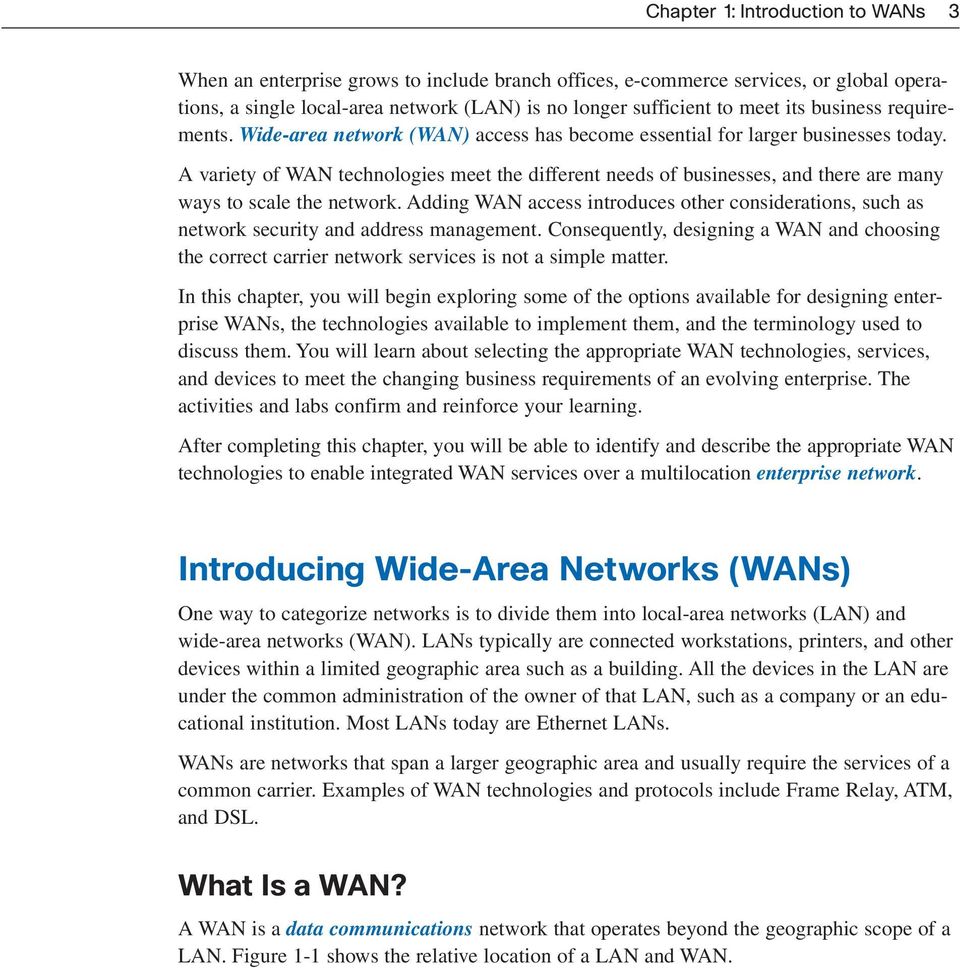
4 4 Accessing the WAN, CCNA Exploration Companion Guide Figure 1-1 WAN Location Wide-Area Network LAN WAN Access Workgroups Branch Office Building Backbone Campus Backbone WAN Telecommuter Remote User WANs differ from LANs in several ways. Whereas a LAN connects computers, peripherals, and other devices in a single building or other small geographic area, a WAN allows the transmission of data across greater geographic distances. In addition, an enterprise must subscribe to a WAN service provider to use WAN carrier network services. LANs typically are owned by the company or organization that uses them. WANs use facilities provided by a service provider, or carrier, such as a telephone or cable company, to connect the locations of an organization to each other, to locations of other organizations, to external services, and to remote users. WANs provide network capabilities to support a variety of mission-critical traffic such as voice, video, and data. Here are the three major characteristics of WANs: WANs generally connect devices that are separated by a broader geographic area than can be served by a LAN. WANs use the services of carriers, such as telephone companies, cable companies, satellite systems, and network providers. WANs use serial connections of various types to provide access to bandwidth over large geographic areas.

5 Chapter 1: Introduction to WANs 5 Why Are WANs Necessary? LAN technologies provide both speed and cost efficiency for the transmission of data in organizations over relatively small geographic areas. However, other business needs require communication among remote sites, including the following: People in the regional or branch offices of an organization need to be able to communicate and share resources with the central site. Organizations often want to share information with other organizations across large distances. For example, software manufacturers routinely communicate product and promotion information to distributors that sell their products to end users. Employees who frequently travel on company business need to access information that resides on their corporate networks. In addition, home computer users need to send and receive data across increasingly larger distances. Here are some examples: It is now common in many households for consumers to communicate with banks, stores, and a variety of providers of goods and services via computers. Students do research for classes by accessing library catalogs and publications located in other parts of their country and in other parts of the world. Because it is obviously not feasible to connect computers across a country or around the world in the same way that they are connected in a LAN with cables, different technologies have evolved to support this need. The Internet has become and continues to be an inexpensive alternative for WAN connectivity. New technologies are available to businesses to provide security and privacy for their Internet communications and transactions. WANs used by themselves, or in concert with the Internet, allow organizations and individuals to meet their wide-area communication needs. The Evolving Enterprise As companies grow, they hire more employees, open branch offices, and expand into global markets. These changes also influence companies requirements for integrated services and drive their network requirements. This section explores how company networks evolve to accommodate companies changing business requirements. Businesses and Their Networks Every business is unique. How an organization grows depends on many factors, such as the type of products or services the business sells, the owners management philosophy, and the economic climate of the country in which the business operates.
6 6 Accessing the WAN, CCNA Exploration Companion Guide In slow economic times, many businesses focus on increasing their profitability by improving the efficiency of the existing operations, increasing employee productivity, and lowering operating costs. Establishing and managing networks can represent significant installation and operating expenses. To justify such a large expense, companies expect their networks to perform optimally and to be able to deliver an ever-increasing array of services and applications to support productivity and profitability. To illustrate, we ll use a fictitious company called Span Engineering as an example. You ll watch how its network requirements change as the company grows from a small local business into a global enterprise. Small Office (Single LAN) Span Engineering, an environmental consulting firm, has developed a special process for converting household waste into electricity. It is developing a small pilot project for a municipal government in its local area. The company, which has been in business for four years, has grown to include 15 employees: six engineers, four computer-aided drawing (CAD) designers, two senior partners, a receptionist, and two office assistants. Span Engineering s management is hoping that the company will have full-scale projects after the pilot project successfully demonstrates the feasibility of its process. Until then, the company must manage its costs carefully. For its small office, shown in Figure 1-2, Span Engineering uses a single LAN to share information between computers and to share peripherals, such as a printer, a large-scale plotter (to print engineering drawings), and fax equipment. The company recently upgraded its LAN to provide inexpensive voice over IP (VoIP) service to save on the costs of separate phone lines for its employees. The company connects to the Internet through a common broadband service called Digital Subscriber Line (DSL), which is supplied by the local telephone service provider. With so few employees, bandwidth is not a significant problem. The company cannot afford in-house information technology (IT) support staff, so it uses support services purchased from the same service provider. The company also uses a hosting service rather than purchasing and operating its own FTP and servers. Campus (Multiple LANs) Five years later, Span Engineering has grown rapidly. As the owners had hoped, the company was contracted to design and implement a full-sized waste conversion facility soon after the successful implementation of their first pilot plant. Since then, other projects have also been won in neighboring municipalities and in other parts of the country.

7 Chapter 1: Introduction to WANs 7 Figure 1-2 Small-Office LAN Broadband Access to Internet Internet Small Office (Few Employees) Small Single LAN for Sharing Peripherals and Internet Access To handle the additional workload, the business has hired more staff and leased more office space. It is now a small to medium-sized business with several hundred employees. Many projects are being developed at the same time, and each requires a project manager and support staff. The company has organized itself into functional departments, with each department having its own organizational team. To meet its growing needs, the company has moved into several floors of a larger office building. As the business has expanded, the network has also grown. Instead of a single small LAN, the network now consists of several subnetworks, each devoted to a different department. For example, all the engineering staff are on one LAN, and the marketing staff is on another LAN. These multiple LANs are joined to create a company-wide network, or campus, which spans several floors of the building. Figure 1-3 shows Span Engineering s expanded campus LAN. The business now has in-house IT staff to support and maintain the network. The network includes servers for , data transfer and file storage, web-based productivity tools, and applications. The network includes a company intranet to provide in-house documents and information to employees. In addition, the company has an extranet that provides project information only to designated customers.

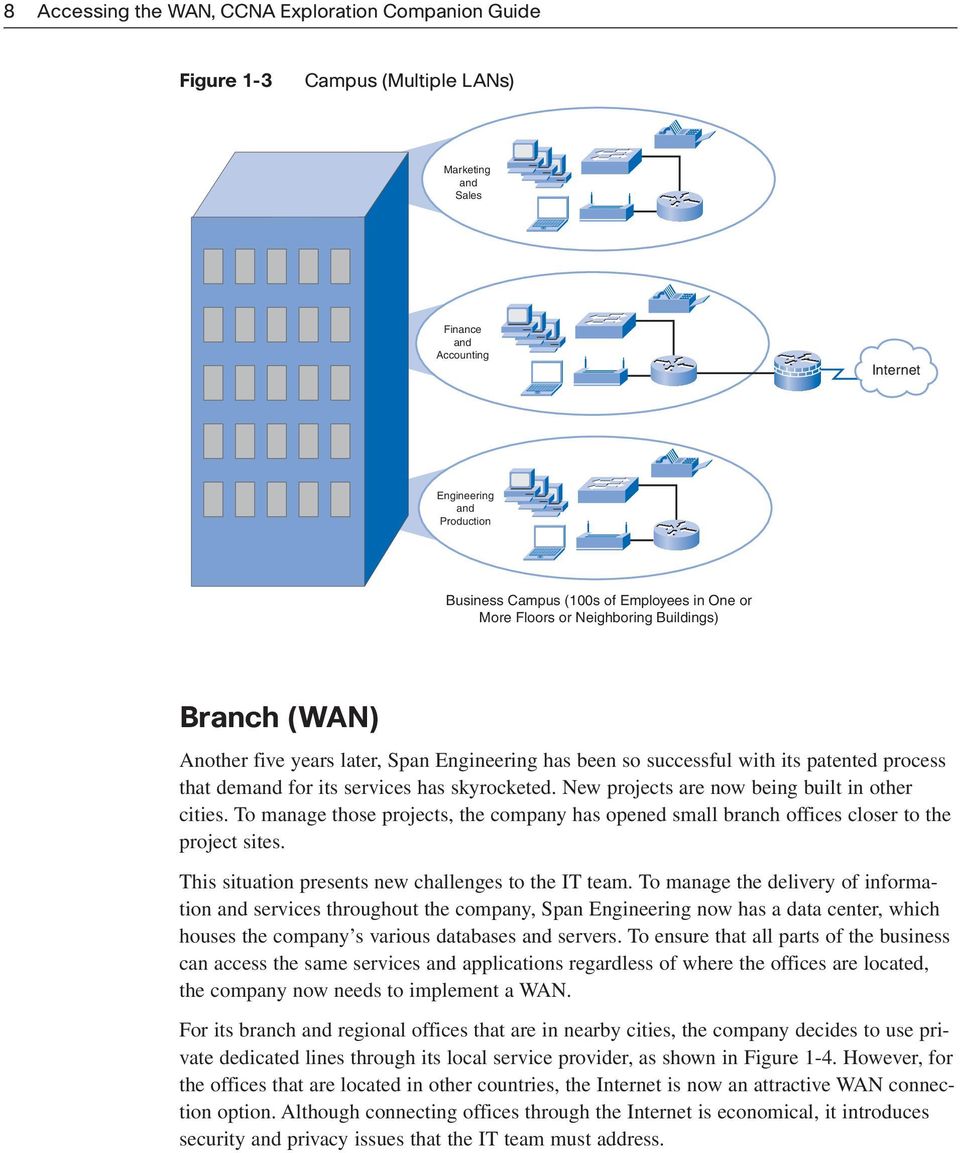
8 8 Accessing the WAN, CCNA Exploration Companion Guide Figure 1-3 Campus (Multiple LANs) Marketing and Sales Finance and Accounting Internet Engineering and Production Business Campus (100s of Employees in One or More Floors or Neighboring Buildings) Branch (WAN) Another five years later, Span Engineering has been so successful with its patented process that demand for its services has skyrocketed. New projects are now being built in other cities. To manage those projects, the company has opened small branch offices closer to the project sites. This situation presents new challenges to the IT team. To manage the delivery of information and services throughout the company, Span Engineering now has a data center, which houses the company s various databases and servers. To ensure that all parts of the business can access the same services and applications regardless of where the offices are located, the company now needs to implement a WAN. For its branch and regional offices that are in nearby cities, the company decides to use private dedicated lines through its local service provider, as shown in Figure 1-4. However, for the offices that are located in other countries, the Internet is now an attractive WAN connection option. Although connecting offices through the Internet is economical, it introduces security and privacy issues that the IT team must address.
9 Chapter 1: Introduction to WANs 9 Figure 1-4 Central Office Branch (WAN) Remote Office Regional Office Branch Office Service Provider Distributed (Global) Span Engineering has now been in business for 20 years and has grown to thousands of employees distributed in offices worldwide. The cost of the network and its related services is a significant expense. The company is looking to provide its employees with the best network services at the lowest cost. Optimized network services would allow each employee to work at high efficiency. To increase profitability, Span Engineering needs to reduce its operating expenses. It has relocated some of its office facilities to less expensive areas. The company is also encouraging teleworking and virtual teams. Web-based applications including web conferencing, e- learning, and online collaboration tools are being used to increase productivity and reduce costs. Site-to-site and remote-access Virtual Private Networks (VPN) enable the company to use the Internet to connect easily and securely with employees and facilities around the world. To meet these requirements, the network must provide the necessary converged services and secure Internet WAN connectivity to remote offices and individuals. Figure 1-5 shows SPAN Engineering s new distributed or global network.

10 10 Accessing the WAN, CCNA Exploration Companion Guide Figure 1-5 Distributed (Global) Branch Office Regional Office Central Office Internet Home Office Branch Office Branch Office Home Office Telecommuter As you can see from this example, a company s network requirements can change dramatically as the company grows over time. Distributing employees saves costs in many ways, but it puts increased demands on the network. Not only must a network meet the business s day-to-day operational needs, but it also needs to be able to adapt and grow as the company changes. Network designers and administrators meet these challenges by carefully choosing network technologies, protocols, and service providers, and by optimizing their networks using many of the techniques we teach in this series of courses. The next sections describe a model for designing networks that can accommodate the changing needs of today s evolving businesses.

11 Chapter 1: Introduction to WANs 11 The Evolving Network Model The hierarchical network model is a framework that helps you visualize and design networks. Several variations of this model exist, and it can be adapted for specific implementations. The Hierarchical Design Model Figure 1-6 shows the hierarchical network model, which is a useful high-level tool for designing a reliable network infrastructure. It provides a modular view of a network, making it easier to design and build a scalable network. The figure conceptually displays the model and identifies its major responsibilities. Figure 1-6 Hierarchical Network Model Core High-Speed Switching Distribution Access Policy-Based Connectivity Local and Remote Workgroup Access The Hierarchical Network Model As you may recall from CCNA Exploration: LAN Switching and Wireless, the hierarchical network model divides a network into three layers: The access layer grants user access to network devices. In a network campus, the access layer generally incorporates switched LAN devices with ports that provide connectivity to workstations and servers. In the WAN environment, it may give teleworkers or remote sites access to the corporate network across WAN technology. The distribution layer aggregates the wiring closets, using switches to segment workgroups and isolate network problems in a campus environment. Similarly, the distribution layer aggregates WAN connections at the edge of the campus and provides policy-based connectivity.

12 12 Accessing the WAN, CCNA Exploration Companion Guide The core layer (also called the backbone) is a high-speed backbone that is designed to switch packets as fast as possible. Because the core is critical for connectivity, it must provide a high level of availability and adapt to changes very quickly. It also provides scalability and fast convergence. Figure 1-7 represents the Hierarchical Network Model in campus environments. The Hierarchical Network Model provides a modular framework that allows flexibility in network design and facilitates ease of implementation and troubleshooting in the infrastructure. However, it is important to understand that the network infrastructure is only the foundation of a comprehensive architecture. Figure 1-7 Hierarchical Network Model in Campus Environments Core Distribution Access Access WAN Internet Telephone Network Networking technologies have advanced considerably in recent years, resulting in networks that are increasingly intelligent. The current network elements are more aware of traffic characteristics and can be configured to deliver specialized services based on such things as the types of data they carry, the data s priority, and even the security needs. Although most of these various infrastructure services are outside the scope of this course, it is important to understand that they influence network design. The next sections explore the Cisco Enterprise Architecture, which expands on the hierarchical model by making use of network intelligence to address the network infrastructure.

13 Chapter 1: Introduction to WANs 13 The Enterprise Architecture As described earlier, different businesses need different types of networks, depending on how the business is organized and its business goals. Unfortunately, all too often networks grow in a haphazard way as new components are added in response to immediate needs. Over time, those networks become complex and expensive to manage. Because the network is a mixture of newer and older technologies, it can be difficult to support and maintain. Outages and poor performance are a constant source of trouble for network administrators. To help prevent this situation, Cisco has developed a recommended architecture called the Cisco Enterprise Architecture. It has relevance to the different stages of a business s growth, as shown in Figure 1-8. This architecture is designed to give network planners a road map for network growth as the business moves through different stages. By following the suggested road map, IT managers can plan for future network upgrades that will integrate seamlessly into the existing network and support the ever-growing need for services. Figure 1-8 Cisco Enterprise Architecture WAN Campus Data Center BROADBAND Branch Sites Teleworker

14 14 Accessing the WAN, CCNA Exploration Companion Guide The Cisco Enterprise Architecture consists of modules representing focused views that target each place in the network. Each module has a distinct network infrastructure with services and network applications that extend across the modules. The following are some of the modules within the architecture that are relevant to the Span Engineering scenario described earlier: Enterprise Campus Architecture Enterprise Branch Architecture Enterprise Data Center Architecture Enterprise Teleworker Architecture Figure 1-9 shows the Cisco Enterprise Architecture, which consists of modules representing focused views that target each place in the network. Each module has a distinct network infrastructure with services and network applications that extend across the modules. Figure 1-9 Modules of the Enterprise Architecture The Enterprise Architecture Enterprise Campus Building Access Enterprise Edge E-Commerce WAN and Internet Enterprise Branch ISP A Building Distribution Campus Core Internet Connectivity ISP B Enterprise Data Center WAN and MAN Site-to-Site VPN Frame Relay, ATM, Man... Server Farm and Data Center Network Management Remote Access and VPN PSTN Enterprise Teleworker The Cisco Enterprise Architecture includes the following modules, each of which is described in greater detail in the following sections: Enterprise Campus Architecture
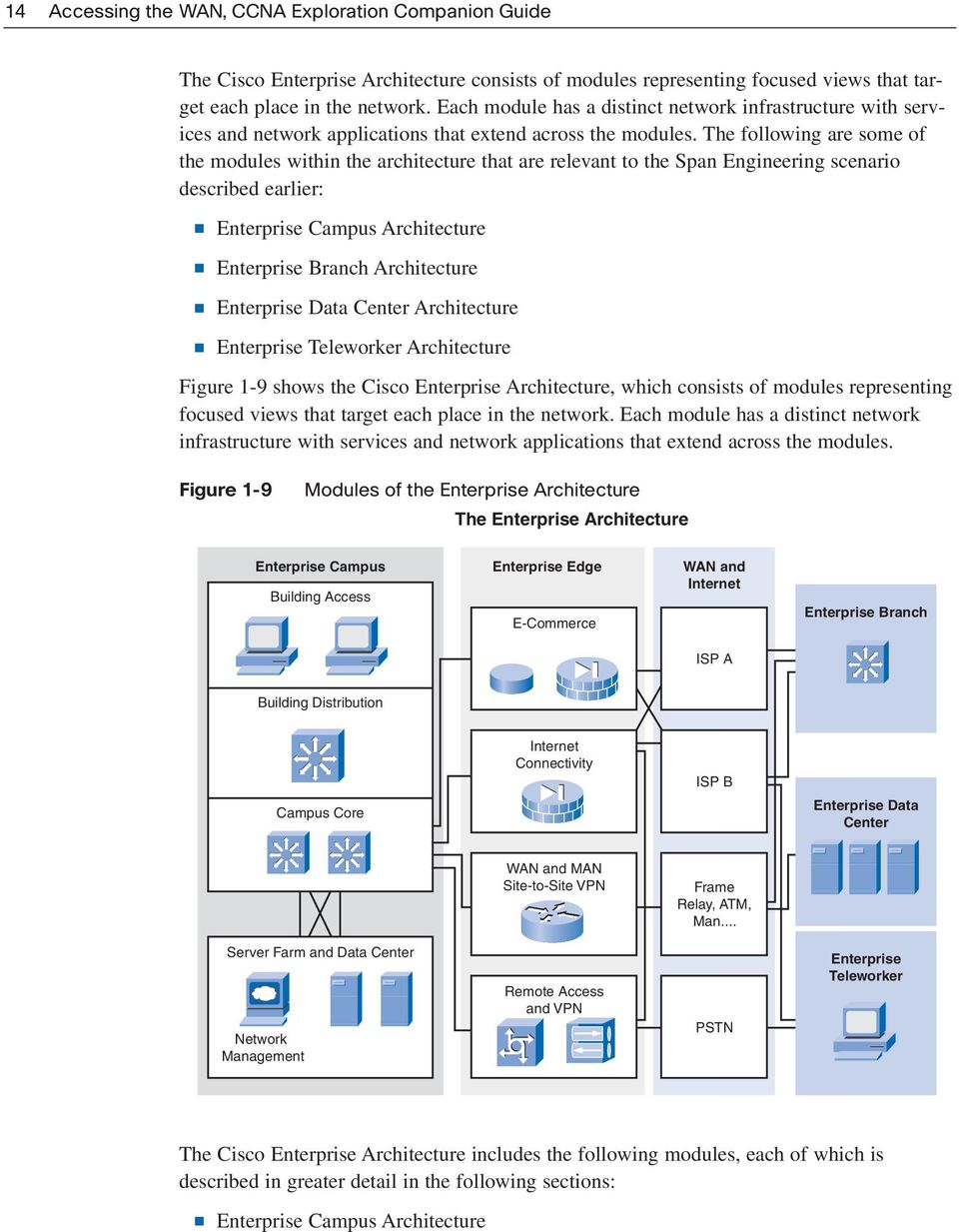
15 Chapter 1: Introduction to WANs 15 Enterprise Edge Architecture Enterprise Branch Architecture Enterprise Data Center Architecture Enterprise Teleworker Architecture Enterprise Campus Architecture A campus network is a building or group of buildings connected into one enterprise network that consists of many LANs. A campus generally is limited to a fixed geographic area, but it can span several neighboring buildings, such as an industrial complex or business park environment. In the Span Engineering example, the campus spans multiple floors of the same building. The Enterprise Campus Architecture describes the recommended methods to create a scalable network while addressing the needs of campus-style business operations. The architecture is modular and can easily expand to include additional campus buildings or floors as the enterprise grows. The Enterprise Campus Architecture, as illustrated in Figure 1-9, is composed of four submodules: The building access contains end-user workstations, IP phones, and Layer 2 access switches that connect devices to the building distribution submodule. The building distribution provides aggregation of building access devices, often using Layer 3 switching. This submodule performs routing, quality control, and access control. The campus core provides redundant and fast-converging connectivity between buildings and the server farm and enterprise edge. The server farm contains and corporate servers providing application, file, print, , and Domain Name System (DNS) services to internal users. The enterprise campus module describes the connections between users, the campus network, the server farm, and the Enterprise Edge modules. Enterprise Edge Architecture This module, as illustrated in Figure 1-9, often functions as a liaison between the campus module and the other modules in the Enterprise Architecture. It offers connectivity to voice, video, and data services outside the enterprise. It enables the enterprise to use Internet and partner resources and provide resources for its customers. The Enterprise WAN and metropolitan-area network (MAN) Architecture, which the technologies covered later in this course are relevant to, are considered part of this module.

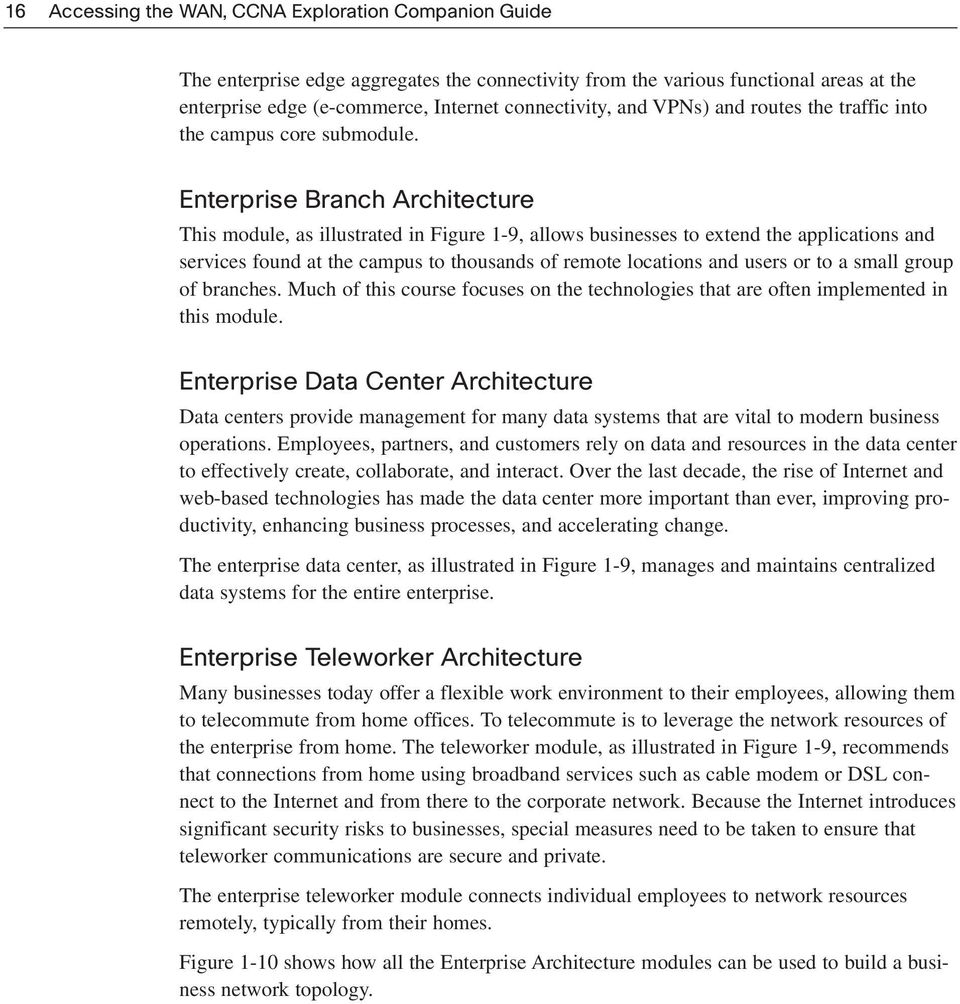
16 16 Accessing the WAN, CCNA Exploration Companion Guide The enterprise edge aggregates the connectivity from the various functional areas at the enterprise edge (e-commerce, Internet connectivity, and VPNs) and routes the traffic into the campus core submodule. Enterprise Branch Architecture This module, as illustrated in Figure 1-9, allows businesses to extend the applications and services found at the campus to thousands of remote locations and users or to a small group of branches. Much of this course focuses on the technologies that are often implemented in this module. Enterprise Data Center Architecture Data centers provide management for many data systems that are vital to modern business operations. Employees, partners, and customers rely on data and resources in the data center to effectively create, collaborate, and interact. Over the last decade, the rise of Internet and web-based technologies has made the data center more important than ever, improving productivity, enhancing business processes, and accelerating change. The enterprise data center, as illustrated in Figure 1-9, manages and maintains centralized data systems for the entire enterprise. Enterprise Teleworker Architecture Many businesses today offer a flexible work environment to their employees, allowing them to telecommute from home offices. To telecommute is to leverage the network resources of the enterprise from home. The teleworker module, as illustrated in Figure 1-9, recommends that connections from home using broadband services such as cable modem or DSL connect to the Internet and from there to the corporate network. Because the Internet introduces significant security risks to businesses, special measures need to be taken to ensure that teleworker communications are secure and private. The enterprise teleworker module connects individual employees to network resources remotely, typically from their homes. Figure 1-10 shows how all the Enterprise Architecture modules can be used to build a business network topology.
17 Chapter 1: Introduction to WANs 17 Figure 1-10 WAN and Internet Enterprise Edge Sample Enterprise Architecture Topology Frame Relay Internet Broadband WAN Internet Connectivity Remote Access and VPN Enterprise Branch Enterprise Campus Campus Core Campus Core A Campus Core B Building Distribution Building Access Branch Office Building 1 Building 2 Teleworker WAN Technology Concepts This section discusses the physical and data link layer concepts of wide-area networks, including an introduction to some of the standards and protocols. WAN Technology Overview A variety of protocols and technologies are used in wide-area networks. Some of these services, such as HDLC and Frame Relay, are explained in more detail later in this book. As described in relation to the OSI reference model, WAN operations focus primarily on Layer 1 and Layer 2, as shown in Figure WAN access standards typically describe both physical layer delivery methods and data link layer requirements, including physical addressing, flow control, and encapsulation. WAN access standards are defined and managed by a number of recognized authorities, including the International Organization for Standardization (ISO), the Telecommunication Industry Association (TIA), and the Electronic Industries Alliance (EIA).

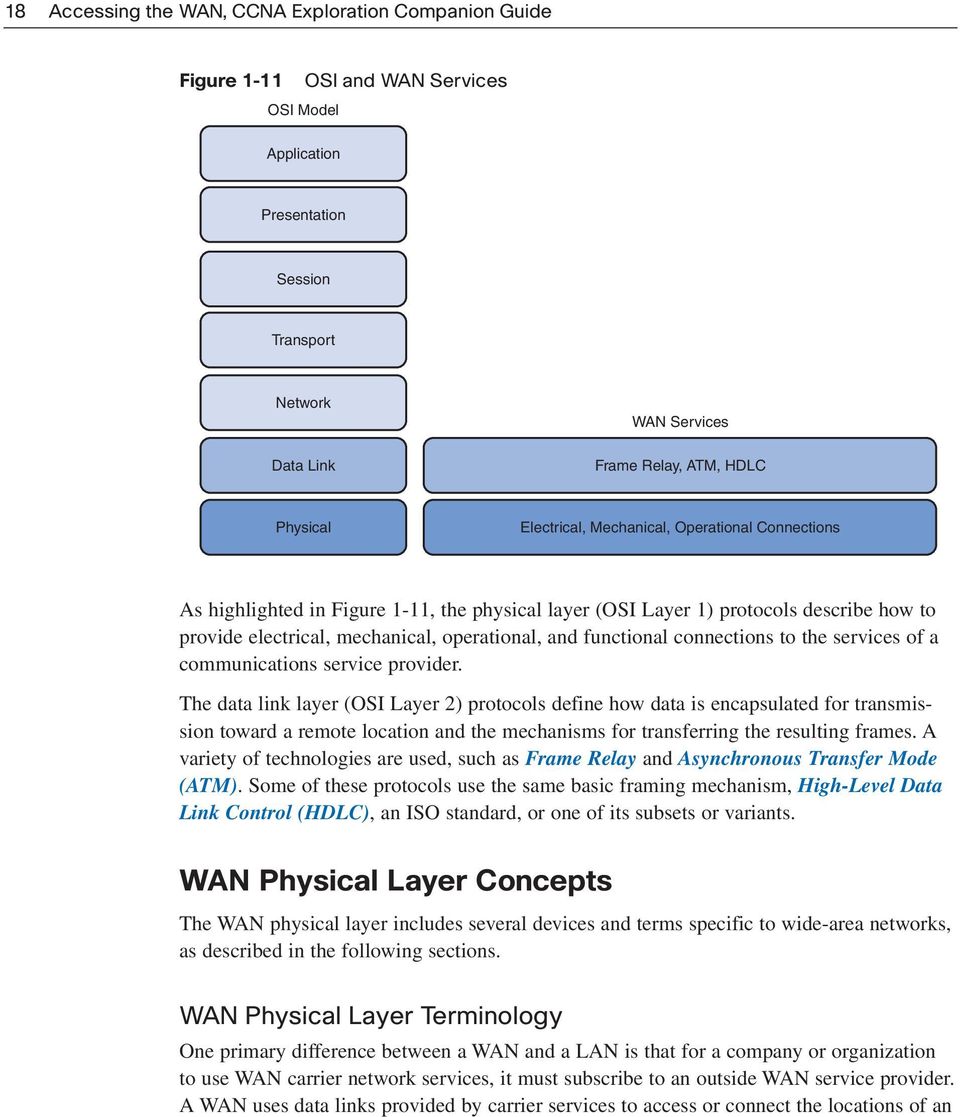
18 18 Accessing the WAN, CCNA Exploration Companion Guide Figure 1-11 OSI Model OSI and WAN Services Application Presentation Session Transport Network Data Link Core WAN Services Frame Relay, ATM, HDLC Physical Electrical, Mechanical, Operational Connections As highlighted in Figure 1-11, the physical layer (OSI Layer 1) protocols describe how to provide electrical, mechanical, operational, and functional connections to the services of a communications service provider. The data link layer (OSI Layer 2) protocols define how data is encapsulated for transmission toward a remote location and the mechanisms for transferring the resulting frames. A variety of technologies are used, such as Frame Relay and Asynchronous Transfer Mode (ATM). Some of these protocols use the same basic framing mechanism, High-Level Data Link Control (HDLC), an ISO standard, or one of its subsets or variants. WAN Physical Layer Concepts The WAN physical layer includes several devices and terms specific to wide-area networks, as described in the following sections. WAN Physical Layer Terminology One primary difference between a WAN and a LAN is that for a company or organization to use WAN carrier network services, it must subscribe to an outside WAN service provider. A WAN uses data links provided by carrier services to access or connect the locations of an
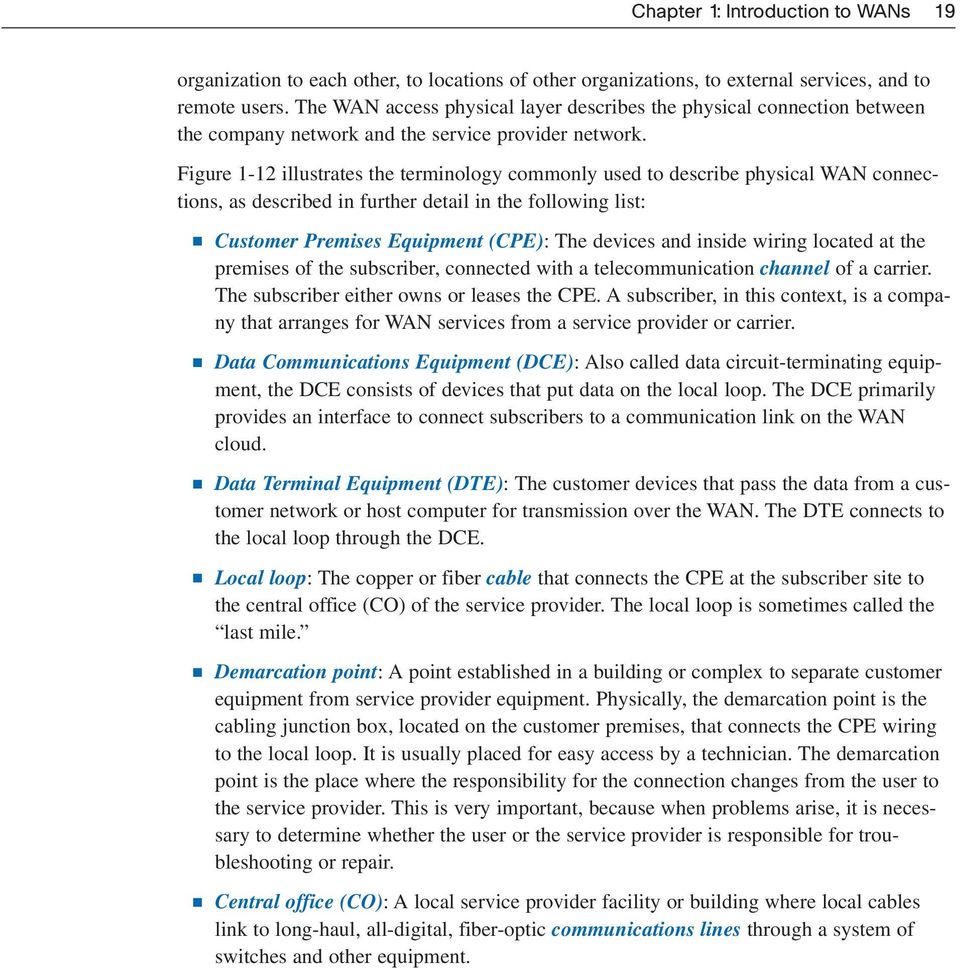
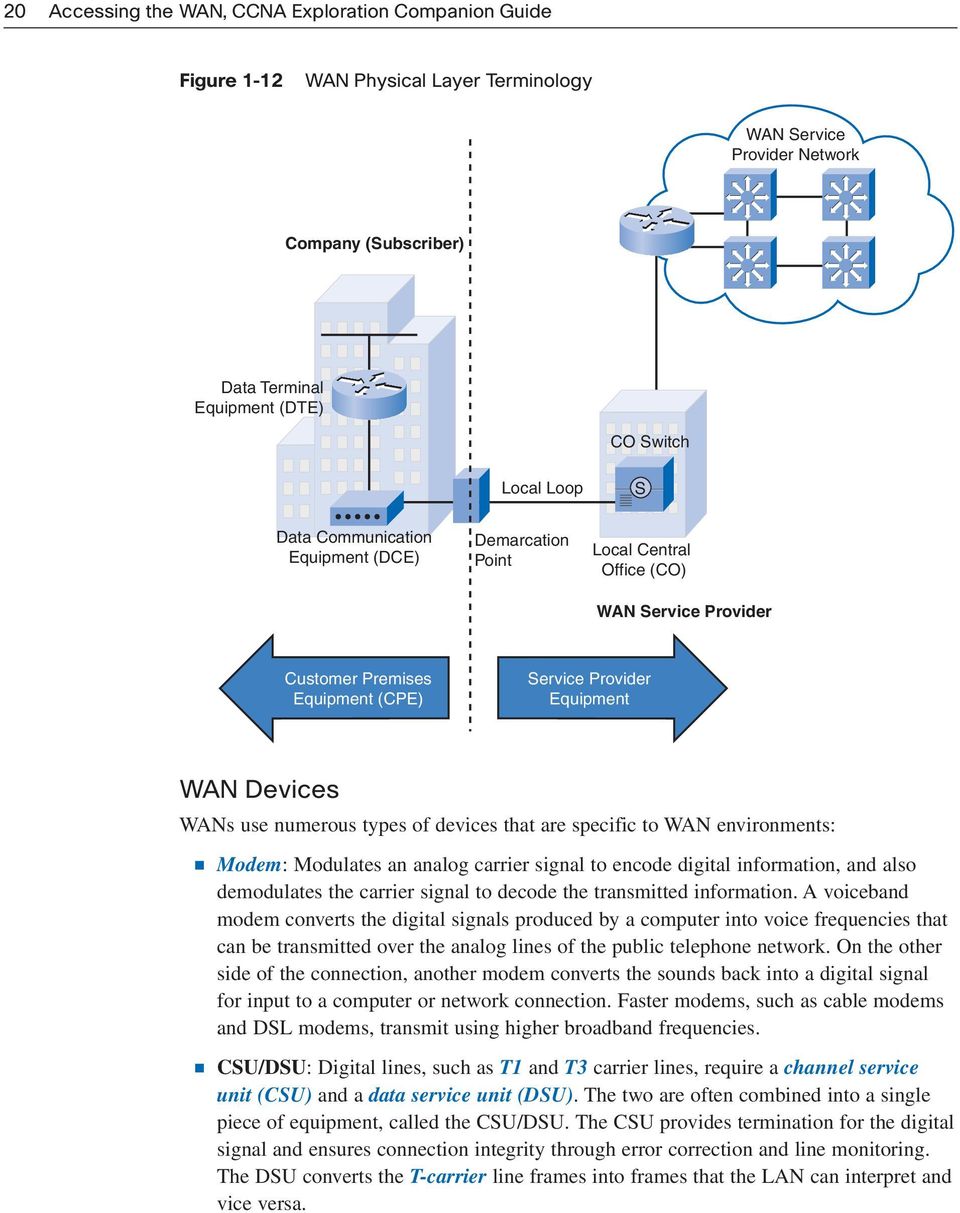
19 Chapter 1: Introduction to WANs 19 organization to each other, to locations of other organizations, to external services, and to remote users. The WAN access physical layer describes the physical connection between the company network and the service provider network. Figure 1-12 illustrates the terminology commonly used to describe physical WAN connections, as described in further detail in the following list: Customer Premises Equipment (CPE): The devices and inside wiring located at the premises of the subscriber, connected with a telecommunication channel of a carrier. The subscriber either owns or leases the CPE. A subscriber, in this context, is a company that arranges for WAN services from a service provider or carrier. Data Communications Equipment (DCE): Also called data circuit-terminating equipment, the DCE consists of devices that put data on the local loop. The DCE primarily provides an interface to connect subscribers to a communication link on the WAN cloud. Data Terminal Equipment (DTE): The customer devices that pass the data from a customer network or host computer for transmission over the WAN. The DTE connects to the local loop through the DCE. Local loop: The copper or fiber cable that connects the CPE at the subscriber site to the central office (CO) of the service provider. The local loop is sometimes called the last mile. Demarcation point: A point established in a building or complex to separate customer equipment from service provider equipment. Physically, the demarcation point is the cabling junction box, located on the customer premises, that connects the CPE wiring to the local loop. It is usually placed for easy access by a technician. The demarcation point is the place where the responsibility for the connection changes from the user to the service provider. This is very important, because when problems arise, it is necessary to determine whether the user or the service provider is responsible for troubleshooting or repair. Central office (CO): A local service provider facility or building where local cables link to long-haul, all-digital, fiber-optic communications lines through a system of switches and other equipment.
20 20 Accessing the WAN, CCNA Exploration Companion Guide Figure 1-12 WAN Physical Layer Terminology WAN Service Provider Network Company (Subscriber) Data Terminal Equipment (DTE) CO Switch Local Loop S Data Communication Equipment (DCE) Demarcation Point Local Central Office (CO) WAN Service Provider Customer Premises Equipment (CPE) Service Provider Equipment WAN Devices WANs use numerous types of devices that are specific to WAN environments: Modem: Modulates an analog carrier signal to encode digital information, and also demodulates the carrier signal to decode the transmitted information. A voiceband modem converts the digital signals produced by a computer into voice frequencies that can be transmitted over the analog lines of the public telephone network. On the other side of the connection, another modem converts the sounds back into a digital signal for input to a computer or network connection. Faster modems, such as cable modems and DSL modems, transmit using higher broadband frequencies. CSU/DSU: Digital lines, such as T1 and T3 carrier lines, require a channel service unit (CSU) and a data service unit (DSU). The two are often combined into a single piece of equipment, called the CSU/DSU. The CSU provides termination for the digital signal and ensures connection integrity through error correction and line monitoring. The DSU converts the T-carrier line frames into frames that the LAN can interpret and vice versa.
21 Chapter 1: Introduction to WANs 21 Access server: Concentrates dial-in and dial-out user communications. An access server may have a mixture of analog and digital interfaces and support hundreds of simultaneous users. WAN switch: A multiport internetworking device used in carrier networks. These devices typically switch traffic such as Frame Relay, ATM, or X.25 and operate at the data link layer of the OSI reference model. Public switched telephone network (PSTN) switches may also be used within the cloud for circuit-switched connections such as Integrated Services Digital Network (ISDN) or analog dialup. Router: Provides internetworking and WAN access interface ports that are used to connect to the service provider network. These interfaces may be serial connections or other WAN interfaces. With some types of WAN interfaces, an external device such as a DSU/CSU or modem (analog, cable, or DSL) is required to connect the router to the service provider s local point of presence (POP). Core router: A router that resides within the middle or backbone of the WAN rather than at its periphery. To fulfill this role, a router must be able to support multiple telecommunications interfaces of the highest speed in use in the WAN core, and it must be able to forward IP packets at full speed on all those interfaces. The router must also support the routing protocols being used in the core. Figure 1-13 shows the location of each device. Figure 1-13 WAN Devices Router Access Server WAN CSU/DSU T1 Dialup Modems WAN Switch Core Routers WAN Switch PSTN Network Cable Network DSL Modem Cable Modem
22 22 Accessing the WAN, CCNA Exploration Companion Guide WAN Physical Layer Standards WAN physical-layer protocols describe how to provide electrical, mechanical, operational, and functional connections for WAN services. The WAN physical layer also describes the interface between the DTE and DCE. The DTE/DCE interface uses various physical layer protocols: EIA/TIA-232: This protocol allows signal speeds of up to 64 kbps on a 25-pin D-connector over short distances. It was formerly known as RS-232. The ITU-T V.24 specification is effectively the same. EIA/TIA-449/530: This protocol is a faster (up to 2 Mbps) version of EIA/TIA-232. It uses a 36-pin D-connector and is capable of longer cable runs. Several versions exist. This standard is also known as RS-422 and RS-423. EIA/TIA-612/613: This standard describes the High-Speed Serial Interface (HSSI) protocol, which provides access to services up to 52 Mbps on a 60-pin D-connector. V.35: This is the ITU-T standard for synchronous communications between a network access device and a packet network. Originally specified to support data rates of 48 kbps, it now supports speeds of up to Mbps using a 34-pin rectangular connector. X.21: This protocol is an ITU-T standard for synchronous digital communications. It uses a 15-pin D-connector. These protocols establish the codes and electrical parameters the devices use to communicate with each other. Choosing a protocol is largely determined by the service provider s method of facilitation. Figure 1-14 illustrates the types of cable connectors associated with each physical layer protocol. Figure 1-14 WAN Cable Connectors EIA/TIA-232 Female V.35 Female X.21 Female EIA/TIA-449 Female EIA/TIA-232 Male V.35 Male X.21 Male EIA/TIA-449 Male EIA-530 Male EIA-613 Male
23 Chapter 1: Introduction to WANs 23 WAN Data Link Layer Concepts In addition to physical layer devices, WANs require data link layer protocols to establish the link across the communication line from the sending to the receiving device. This section describes the common data link protocols that are used in today s enterprise networks to implement WAN connections. Data Link Protocols Data link layer protocols define how data is encapsulated for transmission to remote sites and the mechanisms for transferring the resulting frames. A variety of technologies are used, such as ISDN, Frame Relay, or ATM, as shown in Figure Many of these protocols use the same basic framing mechanism, HDLC, an ISO standard, or one of its subsets or variants. ATM is different from the others, because it uses small fixed-size cells of 53 bytes (48 bytes for data), unlike the other packet-switched technologies, which use variablesized packets. Figure 1-15 Data Link Layer Protocols Dedicated Point-to-Point Cisco HDLC, PPP Packet- Switched X.25, Frame Relay ATM Circuit- Switched ISDN Protocol Link Access Procedure Balanced (LAPB) Link Access Procedure D Channel (LAPD) Link Access Procedure Frame (LAPF) High-Level Data Link Control (HDLC) Point-to-Point Protocol (PPP) Usage X.25 ISDN D Channel Frame Relay Cisco Default Serial WAN Switched Connections
24 24 Accessing the WAN, CCNA Exploration Companion Guide The most common WAN data-link protocols are as follows: HDLC Point-to-Point Protocol (PPP) Frame Relay ATM ISDN and X.25 are older data-link protocols that are less frequently used today. However, ISDN is still covered in this course because of its use when provisioning a VoIP network using PRI links. X.25 is mentioned to help explain the relevance of Frame Relay. As well, X.25 is still in use in developing countries where packet data networks (PDN) are used to transmit credit card and debit card transactions from retailers. Note Another data link layer protocol is Multiprotocol Label Switching (MPLS). MPLS is increasingly being deployed by service providers as an economical solution to carry circuit-switched as well as packet-switched network traffic. It can operate over any existing infrastructure, such as IP, Frame Relay, ATM, or Ethernet. It sits between Layer 2 and Layer 3 and is sometimes referred to as a Layer 2.5 protocol. MPLS is beyond the scope of this course, but it is covered on the CCNP: Implementing Secure Converged Wide Area Networks course. WAN Encapsulation Data from the network layer is passed to the data link layer for delivery on a physical link, which normally is point-to-point on a WAN connection. The data link layer builds a frame around the network layer data so that the necessary checks and controls can be applied. Each WAN connection type uses a Layer 2 protocol to encapsulate a packet while it is crossing the WAN link. To ensure that the correct encapsulation protocol is used, the Layer 2 encapsulation type used for each router serial interface must be configured. The choice of encapsulation protocols depends on the WAN technology and the equipment. HDLC was first proposed in 1979; for this reason, most framing protocols that were developed afterwards are based on it. Figure 1-16 shows how WAN data link protocols encapsulate traffic. Examining the header portion of an HDLC frame, shown in Figure 1-17, helps you identify common fields used by many WAN encapsulation protocols. The frame always starts and ends with an 8-bit Flag field. The bit pattern is The Address field is not needed for WAN links, which are almost always point-to-point. The Address field is still present and may be 1 or 2 bytes long. The Control field is protocol-dependent, but it usually indicates whether the data is control information or network layer data. The Control field normally is 1 byte.
25 Chapter 1: Introduction to WANs 25 Figure 1-16 WAN Encapsulation Network Layer (3) IP Packet (for Example, Web Request) Network Layer (3) Flag Address Control Data FCS Flag Network data is encapsulated in an HDLC frame. Figure 1-17 WAN Frame Encapsulation Formats Flag Header Data FCS Flag Address Control Protocol A WAN header address field is usually a broadcast address on a point-to point link. The control field identifies the data portion as either information or control. The protocol field identifies the intended layer 3 protocol (e.g., IP, IPX). The Address and Control fields, as illustrated in Figure 1-17, are called the frame header. The encapsulated data follows the Control field. Then a frame check sequence (FCS) uses the cyclic redundancy check (CRC) mechanism to establish a 2- or 4-byte field. Several types of WAN encapsulation formats exist, including subsets and proprietary versions of HDLC. Both PPP and the Cisco version of HDLC have an extra field in the header to identify the network layer protocol of the encapsulated data.
26 26 Accessing the WAN, CCNA Exploration Companion Guide WAN Switching Concepts WAN switched networks are categorized as either circuit-switched or packet-switched, as described in greater detail in the following sections. Circuit Switching A circuit-switched network is one that establishes a dedicated circuit (or channel) between nodes and terminals before the users may communicate. As an example, Figure 1-18 shows that when a subscriber makes a telephone call, the dialed number is used to set switches in the exchanges along the call s route so that a continuous circuit exists from the caller to the called party. Because of the switching operation used to establish the circuit, the telephone system is called a circuit-switched network. If the telephones are replaced with modems, the switched circuit can carry computer data. Figure 1-18 Circuit Switching Dialing B A Ringing B The internal path taken by the circuit between exchanges is shared by a number of conversations. Time-division multiplexing (TDM) gives each conversation a share of the connection in turn. TDM ensures that a fixed-capacity connection is made available to the subscriber.
27 Chapter 1: Introduction to WANs 27 If the circuit carries computer data, the usage of this fixed capacity may be inefficient. For example, if the circuit is used to access the Internet, a burst of activity occurs on the circuit while a web page is transferred. This could be followed by no activity while the user reads the page, and then another burst of activity while the next page is transferred. This variation in usage between none and maximum is typical of computer network traffic. Because the subscriber has sole use of the fixed-capacity allocation, switched circuits generally are an expensive way of moving data. PSTN and ISDN are two types of circuit-switching technology that may be used to implement a WAN in an enterprise setting. Packet Switching In contrast to circuit switching, packet switching splits traffic data into packets that are routed over a shared network. Packet-switching networks do not require a circuit to be established, and they allow many pairs of nodes to communicate over the same channel. The switches in a packet-switched network determine which link the packet must be sent on next from the addressing information in each packet. There are two approaches to this link determination: Connectionless systems, such as the Internet, carry full addressing information in each packet. Each switch must evaluate the address to determine where to send the packet. Connection-oriented systems predetermine a packet s route, and each packet only has to carry an identifier. In the case of Frame Relay, these are called Data Link Connection Identifiers (DLCI). The switch determines the onward route by looking up the identifier in tables held in memory. The set of entries in the tables identifies a particular route or circuit through the system. If this circuit exists only while a packet travels through it, it is called a virtual circuit (VC). A virtual circuit is a logical circuit between two network devices to help ensure reliable communications. Because the internal links between the switches are shared between many users, the costs of packet switching are lower than those of circuit switching. Delays (latency) and variability of delay (jitter) are greater in packet-switched networks than in circuit-switched networks. This is because the links are shared, and packets must be entirely received at one switch before moving to the next. Despite the latency and jitter inherent in shared networks, modern technology allows satisfactory transport of voice and even video communications on these networks. In Figure 1-19, Server A is sending data to Server B. Packets may not necessarily always take the same path to reach the destination. Each packet may take different routes to reach Server B.
28 28 Accessing the WAN, CCNA Exploration Companion Guide Figure 1-19 Packet Switching Receiving data from B A Packets Waiting in Switch Queue Receiving data from A Virtual Circuits Packet-switched networks may establish routes through the switches for particular end-toend connections. These routes are called virtual circuits (VC). A VC is a logical circuit created within a shared network between two network devices. Two types of VCs exist: Permanent virtual circuit (PVC): A permanently established virtual circuit that consists of one mode: data transfer. PVCs are used in situations in which data transfer between devices is constant. PVCs decrease the bandwidth use associated with establishing and terminating VCs, but they increase costs because of constant virtual circuit availability. PVCs generally are configured by the service provider when an order is placed for service. Switched virtual circuit (SVC): A VC that is dynamically established on demand and terminated when transmission is complete. Communication over an SVC consists of three phases: circuit establishment, data transfer, and circuit termination. The establishment phase involves creating the VC between the source and destination devices, with SVC entries stored in lookup tables held in memory. Data transfer involves transmitting data between the devices over the VC, and the circuit termination phase involves tearing down the VC between the source and destination devices. SVCs are used in situations in which data transmission between devices is intermittent, largely to save costs. SVCs release the circuit when transmission is complete, which results in less expensive connection charges than those incurred by PVCs, which maintain constant virtual circuit availability. B
29 Chapter 1: Introduction to WANs 29 Note Virtual circuits are discussed in more detail in Chapter 3, Frame Relay. Connecting to a Packet-Switched Network To connect to a packet-switched network, a subscriber needs a local loop to the nearest location where the provider makes the service available. This is called the service s point of presence (POP). Normally this is a dedicated leased line. This line is much shorter than a leased line connected directly between the subscriber locations. In addition, this one line to the POP can carry several VCs, allowing it to provide connections to multiple destinations. Because it is likely that not all the VCs require maximum demand simultaneously, the capacity of the leased line can be smaller than the sum of the individual VCs. Examples of packet- or cell-switched connections include X.25 Frame Relay ATM WAN Connection Options This section covers various WAN connection options, including private dedicated links, private switched links, and public connection options using the Internet. WAN Link Connection Options Many options for implementing WAN solutions are currently available. They differ in technology, speed, and cost. Familiarity with these technologies is an important part of network design and evaluation: Figure 1-20 provides a high-level view of the various WAN link connection options: Private WAN connection options: Private WAN connections include both dedicated and switched communication link options: Dedicated communication links: When permanent dedicated connections are required, point-to-point lines are used with various capacities that are limited only by the underlying physical facilities and the willingness of users to pay for these dedicated lines. A point-to-point link provides a preestablished WAN communications path from the customer premises through the provider network to a remote destination. Point-to-point lines usually are leased from a carrier and are also called leased lines.
30 30 Accessing the WAN, CCNA Exploration Companion Guide Switched communication links: Switched communication links can be either circuit-switched or packet-switched: Circuit-switched communication links: Circuit switching dynamically establishes a dedicated connection for voice or data between a sender and a receiver. Before communication can start, it is necessary to establish the connection through the service provider s network. Examples of circuit-switched communication links are analog dialup (PSTN) and ISDN. Packet-switched communication links: Many WAN users do not make efficient use of the fixed bandwidth that is available with dedicated, switched, or permanent circuits, because the data flow fluctuates. Communications providers have data networks available to more appropriately service these users. In packet-switched networks, the data is transmitted in labeled frames, cells, or packets. Packetswitched communication links include Frame Relay, ATM, X.25, and Metro Ethernet. Public WAN connection options: Public connections use the global Internet infrastructure. Until recently, the Internet was not a viable networking option for many businesses because of the significant security risks and lack of adequate performance guarantees in an end-to-end Internet connection. With the development of VPN technology, however, the Internet is now an inexpensive and secure option for connecting to teleworkers and remote offices where performance guarantees are not critical. Internet WAN connection links are through broadband services such as DSL, cable modem, and broadband wireless, and they are combined with VPN technology to provide privacy across the Internet. Figure 1-20 WAN Link Connection Options WAN Private Public Dedicated Switched Internet Leased Lines Circuit- Switched Packet- Switched Broadband VPN PSTN ISDN Frame Relay x.25 ATM DSL Cable Broadband Wireless
31 Chapter 1: Introduction to WANs 31 Dedicated Connection Link Options When permanent dedicated connections are required, a point-to-point link is used to provide a preestablished WAN communications path from the customer premises through the provider network to a remote destination. Point-to-point lines usually are leased from a carrier and are called leased lines. Figure 1-21 shows a T3 and E3 circuit. This section describes how enterprises use leased lines to provide a dedicated WAN connection. Figure 1-21 Leased Lines The Standard in the United States The Standard in Europe New York Office CSU/DSU T3 Service Provider Network E3 DSU/CSU London Office Leased lines are available in different capacities. They generally are priced based on the bandwidth required and the distance between the two connected points. Table 1-1 lists the available leased-line types and their bit-rate capacities. Table 1-1 Leased-Line Types and Capacities Line Type Bit Rate Capacity Line Type Bit Rate Capacity kbps OC Mbps kbps OC Mbps T Mbps OC Mbps E Mbps OC Mbps J Mbps OC Mbps E Mbps OC Mbps T Mbps OC Mbps OC Mbps OC Mbps OC Mbps OC , Mbps
32 32 Accessing the WAN, CCNA Exploration Companion Guide Point-to-point links usually are more expensive than shared services such as Frame Relay. The cost of leased-line solutions can become significant when they are used to connect many sites over increasing distances. However, sometimes the benefits outweigh the cost of the leased line. The dedicated capacity removes latency and jitter between the endpoints. Constant availability is essential for some applications, such as VoIP and video over IP. A router serial port is required for each leased-line connection. A CSU/DSU and the actual circuit from the service provider are also required. Leased lines provide permanent dedicated capacity and are used extensively to build WANs. They have been the traditional connection of choice but have a number of disadvantages. Leased lines have a fixed capacity; however, WAN traffic is often variable, leaving some of the capacity unused. In addition, each endpoint needs a separate physical interface on the router, which increases equipment costs. Any changes to the leased line generally require a site visit by the carrier. Circuit-Switched Connection Options Circuit-switched networks establish a dedicated connection for voice or data between a sender and a receiver. Before any communications can begin, it is necessary to establish the connection through the service provider s network. Analog Dialup When intermittent, low-volume data transfers are needed, modems and analog dialed telephone lines provide low capacity and dedicated switched connections. This section describes the pros and cons of using analog dialup connection options and describes the types of business scenarios that benefit most from this type of option. Figure 1-22 shows an analog dialup connection. Figure 1-22 WAN Built with an Intermittent Connection Using a Modem and the Voice Telephone Network PSTN Dialup Modem Dialup Modem
33 Chapter 1: Introduction to WANs 33 Traditional telephony uses a copper cable, called the local loop, to connect the telephone handset in the subscriber premises to the CO. The signal on the local loop during a call is a continuously varying electronic signal that is a translation of the subscriber analog voice signal. Traditional local loops can transport binary computer data through the voice telephone network using a modem. The modem modulates the binary data into an analog signal at the source and demodulates the analog signal into binary data at the destination. The physical characteristics of the local loop and its connection to the PSTN limit the signal s rate to less than 56 kbps. For small businesses, these relatively low-speed dialup connections are adequate for the exchange of sales figures, prices, routine reports, and . Using automatic dialup at night or on weekends for large file transfers and data backup can take advantage of lower off-peak tariffs (line charges). Tariffs are based on the distance between the endpoints, time of day, and the call s duration. The advantages of modem and analog lines are simplicity, availability, and low implementation cost. The disadvantages are the low data rates and a relatively long connection time. The dedicated circuit has little delay or jitter for point-to-point traffic, but voice or video traffic does not operate adequately at these low bit rates. Integrated Services Digital Network Integrated Services Digital Network (ISDN) is a circuit-switching technology that enables the local loop of a PSTN to carry digital signals, resulting in higher-capacity switched connections. ISDN changes the internal connections of the PSTN from carrying analog signals to time-division multiplexed (TDM) digital signals. TDM allows two or more signals or bit streams to be transferred as subchannels in one communication channel. The signals appear to transfer simultaneously, but physically they take turns on the channel. A data block of subchannel 1 is transmitted during time slot 1, subchannel 2 during time slot 2, and so on. One TDM frame consists of one time slot per subchannel. TDM is described in more detail in Chapter 2, PPP. ISDN turns the local loop into a TDM digital connection. This change enables the local loop to carry digital signals that result in higher-capacity switched connections. The connection uses 64-kbps bearer (B) channels to carry voice or data and a signaling, delta channel for call setup and other purposes. There are two types of ISDN interfaces: Basic Rate Interface (BRI): ISDN is intended for the home and small enterprise and provides two 64-kbps B channels and a 16-kbps D channel. The BRI D channel is designed for control and often is underused, because it has only two B channels to control. Therefore, some providers allow the D channel to carry data at low bit rates, such as X.25 connections at 9.6 kbps.
34 34 Accessing the WAN, CCNA Exploration Companion Guide Primary Rate Interface (PRI): ISDN is also available for larger installations. PRI delivers 23 B channels with 64 kbps and one D channel with 64 kbps in North America, for a total bit rate of up to Mbps. This includes some additional overhead for synchronization. In Europe, Australia, and other parts of the world, ISDN PRI provides 30 B channels and one D channel, for a total bit rate of up to Mbps, including synchronization overhead. In North America, PRI corresponds to a T1 connection. The PRI rate of lines outside North America corresponds to an E1 or J1 connection. Figure 1-23 illustrates the various differences between ISDN BRI and PRI lines. Figure 1-23 ISDN Network Infrastructure and PRI/BRI Line Capacity TA ISDN ISDN Terminal Adapter (TA) 2B D 64 kbps 64 kbps 16 kbps 6x 144 kbps 23B (T1) or 30B (E1) D 64 kbps each 64 kbps T Mbps or E Mbps (Includes Sync) For WAN links, which require low bandwidth, the BRI ISDN can provide an ideal connection mechanism. BRI has a call setup time that is less than a second, and the 64-kbps B channel provides greater capacity than an analog modem link. If greater capacity is required, a second B channel can be activated to provide a total of 128 kbps. Although this is inadequate for video, it permits several simultaneous voice conversations in addition to data traffic. Another common application of ISDN is to provide additional capacity as needed on a leased-line connection. The leased line is sized to carry average traffic loads, and ISDN is added during peak demand periods. ISDN is also used as a backup if the leased line fails. ISDN tariffs are based on a per-b-channel basis and are similar to those of analog voice connections.
35 Chapter 1: Introduction to WANs 35 With PRI ISDN, multiple B channels can be connected between two endpoints. This allows for videoconferencing and high-bandwidth data connections with no latency or jitter. However, multiple connections can be very expensive over long distances. Note Although ISDN is still an important technology for telephone service provider networks, it is declining in popularity as an Internet connection option with the introduction of high-speed DSL and other broadband services. The Consumer and Industry Perspectives section at provides a good discussion of ISDN worldwide trends. Packet-Switched Connection Options The most common packet-switching technologies used in today s enterprise WANs include legacy X.25, Frame Relay, and ATM, as described in the following sections. X.25 Figure 1-24 shows an X.25 network. X.25 is a legacy network-layer protocol that provides subscribers with a network address. Virtual circuits can be established through the network with call request packets to the target address. The resulting SVC is identified by a channel number. Data packets labeled with the channel number are delivered to the corresponding address. Multiple channels can be active on a single connection. Figure 1-24 X.25 Network Branch Office A Branch Office B CSU/DSU SVC PVC CSU/DSU X.25 Switch CSU/DSU Corporate Head Office
36 36 Accessing the WAN, CCNA Exploration Companion Guide Typical X.25 applications are point-of-sale card readers. These readers use X.25 in dialup mode to validate transactions on a central computer. For these applications, the low bandwidth and high latency are not a concern, and the low cost makes X.25 affordable. X.25 link speeds vary from 2400 bps up to 2 Mbps. However, public networks usually are low-capacity, with speeds rarely exceeding 64 kbps. X.25 networks are now in dramatic decline, being replaced by newer Layer 2 technologies such as Frame Relay, ATM, and ADSL. However, they are still in use in many portions of the developing world, which have limited access to newer technologies. Frame Relay Figure 1-25 shows a Frame Relay network. Although the network layout appears similar to X.25, Frame Relay differs from X.25 in several ways. Most importantly, it is a much simpler protocol, operating strictly at Layer 2, whereas X.25 additionally provides Layer 3 services. Frame Relay implements no error or flow control. The simplified handling of frames leads to reduced latency, and measures taken to avoid frame buildup at intermediate switches help reduce jitter. Frame Relay offers data rates up to 4 Mbps, with some providers offering even higher rates. Figure 1-25 Frame Relay Network Branch Office DTE DLCI 102 DLCI 201 R1 R2 R1 DTE DCE DCE ISP Corporate Head Office
37 Chapter 1: Introduction to WANs 37 Frame Relay VCs are uniquely identified by a DLCI, which ensures bidirectional communication from one DTE device to another. Most Frame Relay connections are PVCs rather than SVCs. Frame Relay provides permanent, shared, medium-bandwidth connectivity that carries both voice and data traffic. Frame Relay is ideal for connecting enterprise LANs. The router on the LAN needs only a single interface, even when multiple VCs are used. The short-leased line to the Frame Relay network edge allows cost-effective connections between widely scattered LANs. Frame Relay is described in more detail in Chapter 3. ATM Figure 1-26 shows an ATM network. Asynchronous Transfer Mode (ATM) technology can transfer voice, video, and data through private and public networks. It is built on a cellbased architecture rather than on a frame-based architecture. ATM cells are always a fixed length of 53 bytes. The ATM cell contains a 5-byte ATM header followed by 48 bytes of ATM payload. Small, fixed-length cells are well suited for carrying voice and video traffic, because this traffic is intolerant of delay. Video and voice traffic do not have to wait for a larger data packet to be transmitted. Figure 1-26 ATM Network Corporate Head Office 4 IP TV Broadcast Server 3 Web Server ATM Switch 4 Service Provider Network WAN ATM Switch 2 VoIP LAN 1 Branch Office
38 38 Accessing the WAN, CCNA Exploration Companion Guide The 53-byte ATM cell is less efficient than the bigger frames and packets of Frame Relay and X.25. Furthermore, the ATM cell has at least 5 bytes of overhead for each 48-byte payload. When the cell is carrying segmented network layer packets, the overhead is higher, because the ATM switch must be able to reassemble the packets at the destination. A typical ATM line needs almost 20 percent more bandwidth than Frame Relay to carry the same volume of network layer data. ATM was designed to be extremely scalable. It can support link speeds of T1/E1 to OC-12 (622 Mbps) and higher. ATM offers both PVCs and SVCs, although PVCs are more common with WANs. And as with other shared technologies, ATM allows multiple VCs on a single leased-line connection to the network edge. Internet Connection Options The Internet is an inexpensive and secure option for connecting to teleworkers and remote offices where performance guarantees are not critical. Broadband connection options typically are used to connect telecommuting employees to a corporate site over the Internet. These options include DSL, cable, and wireless. DSL DSL technology, shown in Figure 1-27, is an always-on connection technology that uses existing twisted-pair telephone lines to transport high-bandwidth data and provides IP services to subscribers. A DSL modem converts an Ethernet signal from the user device into a DSL signal, which is transmitted to the central office. Figure 1-27 DSL Teleworker Company Head Office Ethernet DSL Service Provider Internet WAN Service Provider Router DSL Modem DSLAM Point of Presence (POP)
39 Chapter 1: Introduction to WANs 39 Multiple DSL subscriber lines are multiplexed into a single high-capacity link using a DSL access multiplexer (DSLAM) at the provider location. DSLAMs incorporate TDM technology to aggregate many subscriber lines into a single medium, generally a T3 (DS3) connection. Current DSL technologies use sophisticated coding and modulation techniques to achieve data rates of up to Mbps. A wide variety of DSL types, standards, and emerging technologies exist. DSL is now a popular choice for enterprise IT departments to support home workers. Generally, a subscriber cannot choose to connect to an enterprise network directly. The subscriber must first connect to an ISP, and then an IP connection is made through the Internet to the enterprise. Security risks are incurred in this process, but they can be mediated with security measures. Cable Modem Coaxial cable is widely used in urban areas to distribute television signals. Network access is available from some cable television networks. This allows for greater bandwidth than the conventional telephone local loop. Cable modems provide an always-on connection and a simple installation. Figure 1-28 shows how a subscriber connects a computer or LAN router to the cable modem, which translates the digital signals into the broadband frequencies used for transmitting on a cable television network. The local cable TV office, which is called the cable headend, contains the computer system and databases needed to provide Internet access. The most important component located at the headend is the cable modem termination system (CMTS). It sends and receives digital cable modem signals on a cable network and is necessary for providing Internet services to cable subscribers. Figure 1-28 Cable Modem Teleworker Company Head Office Cable Service Provider Internet WAN Service Provider Router Cable Modem Cable Headend
40 40 Accessing the WAN, CCNA Exploration Companion Guide Cable modem subscribers must use the ISP associated with the service provider. All the local subscribers share the same cable bandwidth. As more users join the service, available bandwidth may be below the expected rate. Broadband Wireless Wireless technology uses the unlicensed radio spectrum to send and receive data. The unlicensed spectrum is accessible to anyone who has a wireless router and wireless technology in the device he or she is using. Until recently, one limitation of wireless access has been the need to be within the local transmission range (typically less than 100 feet) of a wireless router or a wireless modem that has a wired connection to the Internet. The following new developments in broadband wireless technology are changing this situation: Municipal Wi-Fi: Many cities have begun setting up municipal wireless networks. Some of these networks provide high-speed Internet access for free or for substantially less than the price of other broadband services. Others are for city use only, allowing police and fire departments and other city employees to do certain aspects of their jobs remotely. To connect to a municipal Wi-Fi, a subscriber typically needs a wireless modem, which provides a stronger radio and directional antenna than conventional wireless adapters. Most service providers provide the necessary equipment for free or for a fee, much like they do with DSL or cable modems. WiMAX: Worldwide Interoperability for Microwave Access (WiMAX) is a new technology that is just beginning to come into use. It is described in IEEE standard WiMAX provides high-speed broadband service with wireless access and provides broad coverage like a cell phone network rather than through small Wi-Fi hotspots. WiMAX operates in a similar way to Wi-Fi, but at higher speeds, over greater distances, and for a greater number of users. It uses a network of WiMAX towers that are similar to cell phone towers, as shown in Figure To access a WiMAX network, subscribers must subscribe to an ISP that has a WiMAX tower within 10 miles of their location. They also need a WiMAX-enabled computer and a special encryption code to get access to the base station. Satellite Internet: This is typically used by rural users where cable and DSL are unavailable. A satellite dish provides two-way (upload and download) data communications. The upload speed is about one-tenth of the 500-kbps download speed. Cable and DSL have higher download speeds, but satellite systems are about ten times faster than an analog modem. To access satellite Internet services, subscribers need a satellite dish, two modems (uplink and downlink), and coaxial cables between the dish and the modem.
41 Chapter 1: Introduction to WANs 41 Figure 1-29 Broadband Wireless Internet Backbone WiMAX Transmitter Home Local-Area Network Nonline of Sight Transmission DSL, cable, and wireless broadband services are described in more detail in Chapter 6, Teleworker Services. VPN Technology Security risks are incurred when a teleworker or remote office uses broadband services to access the corporate WAN over the Internet. To address security concerns, broadband services provide capabilities for using Virtual Private Network (VPN) connections to a VPN server, which typically is located at the corporate site. A VPN is an encrypted connection between private networks over a public network such as the Internet. Instead of using a dedicated Layer 2 connection such as a leased line, a VPN uses virtual connections called VPN tunnels, which are routed through the Internet from the company s private network to the remote site or employee host. VPN Benefits Benefits of VPN include the following: Cost savings: VPNs enable organizations to use the global Internet to connect remote offices and remote users to the main corporate site, thus eliminating expensive dedicated WAN links and modem banks. Security: VPNs provide the highest level of security by using advanced encryption and authentication protocols that protect data from unauthorized access.
42 42 Accessing the WAN, CCNA Exploration Companion Guide Scalability: Because VPNs use the Internet infrastructure within ISPs and devices, it is easy to add new users. Corporations can add large amounts of capacity without adding significant infrastructure. Compatibility with broadband technology: VPN technology is supported by broadband service providers such as DSL and cable, so mobile workers and telecommuters can take advantage of their home high-speed Internet service to access their corporate networks. Business-grade, high-speed broadband connections can also provide a costeffective solution for connecting remote offices. Types of VPN Access Two types of VPN access exist: Site-to-site VPNs: Site-to-site VPNs connect entire networks to each other. For example, they can connect a branch office network to a company headquarters network, as shown in Figure Each site is equipped with a VPN gateway, such as a router, firewall, VPN concentrator, or security appliance. In the figure, a remote branch office uses a site-to-site VPN to connect with the corporate head office. Remote-access VPNs: Remote-access VPNs enable individual hosts, such as telecommuters, mobile users, and extranet consumers, to access a company network securely over the Internet, as shown in Figure Each host typically has VPN client software loaded or uses a web-based client. Figure 1-30 Site-to-Site VPNs Company Head Office Branch A Head Office VPN Gateway (VPN Concentrator) VPN Tunnel VPN Tunnel ISP A Internet ISP C LAN ISP B Remote VPN Gateways (VPN-Enabled Routers) Intranet Web/TFTP Server LAN Branch B
43 Chapter 1: Introduction to WANs 43 Figure 1-31 Remote-Access VPNs Company Head Office VPN Gateway VPN Tunnel Internet ISP DSL Cable VPN Client Login User Name: Intranet Password: WEB/TFTP Server Teleworker 1 Teleworker 2 Metro Ethernet Metro Ethernet is a rapidly maturing networking technology that broadens Ethernet to the public networks run by telecommunications companies. IP-aware Ethernet switches enable service providers to offer enterprises converged voice, data, and video services such as IP telephony, video streaming, imaging, and data storage. Figure 1-32 shows that by extending Ethernet to the metropolitan area, companies can provide their remote offices with reliable access to applications and data on the corporate headquarters LAN. Here are some benefits of Metro Ethernet: Reduced expenses and administration: Metro Ethernet provides a switched, highbandwidth Layer 2 network that can manage data, voice, and video all on the same infrastructure. This characteristic increases bandwidth and eliminates expensive conversions to ATM and Frame Relay. The technology enables businesses to inexpensively connect numerous sites in a metropolitan area to each other and to the Internet. Easy integration with existing networks: Metro Ethernet connects easily to existing Ethernet LANs, reducing installation costs and time. Enhanced business productivity: Metro Ethernet enables businesses to take advantage of productivity-enhancing IP applications that are difficult to implement on TDM or Frame Relay networks, such as hosted IP communications, VoIP, and streaming and broadcast video.
44 44 Accessing the WAN, CCNA Exploration Companion Guide Figure 1-32 Service Provider Metro Ethernet Branch Office (Main St.) Internet Service Provider Metro Ethernet Head Office (Downtown) Branch Office (Suburb) Branch Office (Industrial Park) Choosing a WAN Link Connection Now that you have looked at the variety of WAN connection options, how do you choose the best technology to meet the requirements of a specific business? Table 1-2 compares the advantages and disadvantages of the WAN connection options that we have discussed in this chapter.
45 Chapter 1: Introduction to WANs 45 Table 1-2 Choosing a WAN Link Connection Option Description Advantages Disadvantages Sample Protocols Leased line Point-to-point Most secure Expensive PPP, connection between HDLC, two computers LANs. SDLC Circuit A dedicated circuit path Less expensive Call setup PPP, ISDN switching is created between endpoints. Best example is dialup connections. Packet Devices transport packets Highly efficient Shared media X.25, switching via a shared single use of across link Frame point-to-point or bandwidth Relay point-to-multipoint link across a carrier inter network. Variable-length packets are transmitted over PVCs or SVCs. Cell relay Similar to packet Best for Overhead can ATM switching, but uses simultaneous be considerable fixed-length cells instead use of voice of variable-length packets. and data Data is divided into fixedlength cells and then transported across virtual circuits. Internet Connectionless Least expensive, Least secure VPN, DSL, packet switching using globally cable the Internet as the WAN available modem, infrastructure. Uses wireless network addressing to deliver packets. Because of security issues, VPN technology must be used. This information is a good start. In addition, to help you in the decision-making process, the following sections list some questions to ask yourself when choosing a WAN connection option.
46 46 Accessing the WAN, CCNA Exploration Companion Guide What Is the Purpose of the WAN? Do you want to connect local branches in the same city area, connect remote branches, connect to a single branch, connect to customers, connect to business partners, or some combination of these? If the WAN is for providing authorized customers or business partners limited access to the company intranet, what is the best option? What Is the Geographic Scope? Is it local, regional, global, one-to-one (single branch), one-to-many branches, many-tomany (distributed)? Depending on the range, some WAN connection options may be better than others. What Are the Traffic Requirements? Traffic requirements to consider include the following: Traffic type (data only, VoIP, video, large files, streaming files) determines the quality and performance requirements. For example, if you are sending a lot of voice or streaming video traffic, ATM may be the best choice. Traffic volumes depending on type (voice, video, or data) for each destination determine the bandwidth capacity required for the WAN connection to the ISP. Quality requirements may limit your choices. If your traffic is highly sensitive to latency and jitter, you can eliminate any WAN connection options that cannot provide the required quality. Security requirements (data integrity, confidentiality, and security) are an important factor if the traffic is of a highly confidential nature or if provides essential services, such as emergency response. Should the WAN Use a Private or Public Infrastructure? A private infrastructure offers the best security and confidentiality, whereas the public Internet infrastructure offers the most flexibility and lowest ongoing expense. Your choice depends on the purpose of the WAN, the types of traffic it carries, and the available operating budget. For example, if the purpose is to provide a nearby branch with high-speed secure services, a private dedicated or switched connection may be best. If the purpose is to connect many remote offices, a public WAN using the Internet may be the best choice. For distributed operations, a combination of options may be the best solution. For a Private WAN, Should It Be Dedicated or Switched? Real-time, high-volume transactions have special requirements that could favor a dedicated line, such as traffic flowing between the data center and the corporate head office. If you are connecting to a local single branch, you could use a dedicated leased line. However, that
47 Chapter 1: Introduction to WANs 47 option would become very expensive for a WAN connecting multiple offices. In that case, a switched connection might be better. For a Public WAN, What Type of VPN Access Do You Need? If the purpose of the WAN is to connect a remote office, a site-to-site VPN may be the best choice. To connect teleworkers or customers, remote-access VPNs are a better option. If the WAN is serving a mixture of remote offices, teleworkers, and authorized customers, such as a global company with distributed operations, a combination of VPN options may be required. Which Connection Options Are Available Locally? In some areas, not all WAN connection options are available. In this case, your selection process is simplified, although the resulting WAN may provide less-than-optimal performance. For example, in a rural or remote area, the only option may be broadband satellite Internet access. What Is the Cost of the Available Connection Options? Depending on the option you choose, the WAN can be a significant ongoing expense. The cost of a particular option must be weighed against how well it meets your other requirements. For example, a dedicated leased line is the most expensive option, but the expense may be justified if it is critical to ensure secure transmission of high volumes of real-time data. For less-demanding applications, a cheaper switched or Internet connection option may be more suitable. Also, wireless point-to-point bridges are becoming a potential alternative to leased lines. As you can see, you must consider many important factors when choosing an appropriate WAN connection. Following the guidelines just described, as well as those described by the Cisco Enterprise Architecture, you should now be able to choose an appropriate WAN connection to meet the requirements of different business scenarios.
48 48 Accessing the WAN, CCNA Exploration Companion Guide Summary A WAN is a data communications network that operates beyond the geographic scope of a LAN. As companies grow, adding more employees, opening branch offices, and expanding into global markets, their requirements for integrated services change. These business requirements drive companies network requirements. The Cisco Enterprise Architecture expands on the Hierarchical Network Model by further dividing the enterprise network into physical, logical, and functional areas. Implementing a Cisco Enterprise Architecture provides a secure, robust network with high availability that facilitates the deployment of converged networks. WANs operate in relation to the OSI reference model, primarily on Layers 1 and 2. Devices that put data on the local loop are called data circuit-terminating equipment or data communications equipment (DCE). The customer devices that pass the data to the DCE are called data terminal equipment (DTE). The DCE primarily provides an interface for the DTE into the communication link on the WAN cloud. The physical demarcation point is the place where the responsibility for the connection changes from the enterprise to the service provider. Data link layer protocols define how data is encapsulated for transmission to remote sites and the mechanisms for transferring the resulting frames. A circuit-switching network establishes a dedicated circuit (or channel) between nodes and terminals before the users may communicate. A packet-switching network splits traffic data into packets that are routed over a shared network. Packet-switching networks do not require a circuit to be established and allow many pairs of nodes to communicate over the same channel. A point-to-point link provides a preestablished WAN communications path from the customer premises through the provider network to a remote destination. Point-to-point links use leased lines to provide a dedicated connection. Circuit-switching WAN options include analog dialup and ISDN. Packet-switching WAN options include X.25, Frame Relay, and ATM. ATM transmits data in 53-byte cells rather than frames. ATM is best suited to video traffic. Internet WAN connection options include broadband services, such as DSL, cable modem or broadband wireless, and Metro Ethernet. VPN technology enables businesses to provide secure teleworker access through the Internet over broadband services.
49 Chapter 1: Introduction to WANs 49 Labs The activities and labs available in the companion Accessing the WAN, CCNA Exploration Labs and Study Guide (ISBN ) provide hands-on practice with the following topic introduced in this chapter: Lab 1-1: Challenge Review (1.4.1) In this lab, you review basic routing and switching concepts. Try to do as much on your own as possible. Refer to previous material when you cannot proceed on your own. Note Configuring three separate routing protocols RIP, OSPF, and EIGRP to route the same network definitely is not a best practice. It should be considered a worst practice and is not something that would be done in a production network. It is done here so that you can review the major routing protocols before proceeding and see a dramatic illustration of the concept of administrative distance. Packet Tracer Companion Many of the Hands-on Labs include Packet Tracer Companion Activities, where you can use Packet Tracer to complete a simulation of the lab. Look for this icon in Accessing the WAN, CCNA Exploration Labs and Study Guide for Hands-on Labs that have a Packet Tracer Companion.
50 50 Accessing the WAN, CCNA Exploration Companion Guide Check Your Understanding Complete all the review questions listed here to test your understanding of the topics and concepts in this chapter. Answers are listed in Appendix, Check Your Understanding and Challenge Questions Answer Key. 1. Which of the following items are considered WAN devices? (Choose three.) A. Bridge B. Modem C. Router D. Ethernet switch E. Access server F. Repeater 2. Which layer of the hierarchical network design model is often called the backbone? A. Access B. Distribution C. Network D. Core E. Workgroup F. WAN 3. Match each term with its definition: Circuit switching Packet switching Connection-oriented packet switching Connectionless packet switching A. A switching technology in which each switch must evaluate the packet s address to determine where to send it. B. A switching technology in which a virtual circuit exists only while a packet travels through it. C. A switching technology that establishes routes through the switches for particular end-to-end connections. D. A switching technology that has a preestablished dedicated circuit (or channel) between nodes and terminals.
51 Chapter 1: Introduction to WANs Match each term with its packet-switched technology definition: Metro Ethernet X.25 ATM Frame Relay A. Provides a high-bandwidth Layer 2 network that can manage data, voice, and video all on the same infrastructure. B. Built on a cell-based architecture in which the cell has a fixed length of 53 bytes. C. Operates at the data link layer, and the PVC is identified by a Data Link Control Identifier. D. Operates at the network layer, and the SVC is identified by a channel number. 5. Which device is commonly used as Data Terminal Equipment? A. ISDN B. Modem C. Router D. CSU/DSU 6. Which type of WAN connection should you choose when a dedicated point-to-point WAN communications path from the customer premises through the provider network to a remote destination is required? A. ISDN B. Analog dialup C. ATM D. Frame Relay E. Leased line 7. How are Frame Relay virtual circuits identified? A. CIR B. DLCI C. VPI D. MAC E. SPID
52 52 Accessing the WAN, CCNA Exploration Companion Guide 8. What WAN technology is designed to deliver data, voice, and video simultaneously built on a cell-based architecture? A. ATM B. Cable C. Frame Relay D. ISDN 9. Which architecture enables enterprises to offer important network services such as security, new communication services, and improved application performance to every office, regardless of its size or proximity to headquarters? A. Cisco Enterprise Campus Architecture B. Cisco Enterprise Data Center Architecture C. Cisco Enterprise Branch Architecture D. Cisco Enterprise Teleworker Architecture 10. At which layer of the hierarchical network model do users connect to the network? A. Application B. Access C. Distribution D. Network E. Core 11. ISDN PRI is composed of how many B channels in North America? A. 2 B. 16 C. 23 D. 30 E The ability to connect securely to a private network over a public network is provided by which WAN technology? A. DSL B. Frame Relay C. ISDN D. PSTN E. VPN
53 Chapter 1: Introduction to WANs Which hierarchical network model layer is responsible for containing network problems to the workgroups in which they occur? A. Application B. Access C. Distribution D. Network E. Core 14. What term describes the cabling that connects the customer site to the nearest exchange of the WAN service provider? A. CPE B. CO C. Local loop D. DCE E. DTE 15. Which goal can be accomplished by implementing the Cisco Enterprise Teleworker Architecture? A. It allows the enterprise to add large branch sites that span geographic areas. B. It allows the enterprise to deliver secure voice and data services to workers no matter where or when they work. C. To reduce remote security threats, it forces users who are located at main sites to log on to resources. D. It satisfies telephony requirements for users who are located at medium to large enterprise sites. 16. Describe the three layers of the hierarchical network model. 17. Describe the five modules of the Cisco Enterprise Architecture. 18. Compare and contrast the following WAN terms: CPE, CO, local loop, DCE, DTE, and demarcation point. 19. Compare and contrast the following WAN devices: modem, CSU/DSU, access server, WAN switch, and router. 20. Compare and contrast X.25, Frame Relay, and ATM.
54 54 Accessing the WAN, CCNA Exploration Companion Guide Challenge Questions and Activities 1. Explain the advantages and disadvantages of circuit-switched networks. 2. What are the differences between a site-to-site VPN and a remote-access VPN?
WAN Data Link Protocols
 WAN Data Link Protocols In addition to Physical layer devices, WANs require Data Link layer protocols to establish the link across the communication line from the sending to the receiving device. 1 Data
WANs connect remote sites. Connection requirements vary depending on user requirements, cost, and availability.
 WAN Review A WAN makes data connections across a broad geographic area so that information can be exchanged between distant sites. This topic defines the characteristics of a WAN. WAN Overview WANs connect
WAN Technology. Heng Sovannarith [email protected]
 WAN Technology Heng Sovannarith [email protected] Introduction A WAN is a data communications network that covers a relatively broad geographic area and often uses transmission facilities provided
Chapter 2 - The TCP/IP and OSI Networking Models
 Chapter 2 - The TCP/IP and OSI Networking Models TCP/IP : Transmission Control Protocol/Internet Protocol OSI : Open System Interconnection RFC Request for Comments TCP/IP Architecture Layers Application
Connecting to the WAN
 CHAPTER 2 Connecting to the WAN Objectives Upon completion of this chapter What is the purpose of a WAN? How does a circuit-switched network differ from a packet-switched network? How do service provider
Introduction to WAN Technologies
 CHAPTER 3 Chapter Goals Become familiar with WAN terminology. Learn about different types of WAN connections. Become familiar with different types of WAN equipment. This chapter introduces the various
WAN. Introduction. Services used by WAN. Circuit Switched Services. Architecture of Switch Services
 WAN Introduction Wide area networks (WANs) Connect BNs and LANs across longer distances, often hundreds of miles or more Typically built by using leased circuits from common carriers such as AT&T Most
WAN Technologies Based on CCNA 4 v3.1 Slides Compiled & modified by C. Pham
 WAN Technologies Based on CCNA 4 v3.1 Slides Compiled & modified by C. Pham 1 Wide-area Networks (WANs) 2 Metropolitan-Area Network (MANs) 3 Path Determination 4 Internetworking Any internetwork must include
CTS2134 Introduction to Networking. Module 07: Wide Area Networks
 CTS2134 Introduction to Networking Module 07: Wide Area Networks WAN cloud Central Office (CO) Local loop WAN components Demarcation point (demarc) Consumer Premises Equipment (CPE) Channel Service Unit/Data
Notes Odom, Chapter 4 Flashcards Set: http://www.flashcardmachine.com/1162711/b41c
 EDTECH 552 (SP11) Susan Ferdon Notes Odom, Chapter 4 Flashcards Set: http://www.flashcardmachine.com/1162711/b41c telco Leased Line CSU/DSU Local Telephone Company Owns the cables and has right of way
Introduction to WAN Technologies
 CHAPTER 3 Introduction to WAN Technologies This chapter introduces the various protocols and technologies used in wide- area network (WAN) environments. Topics summarized here include point-to-point links,
Public Network. 1. Relatively long physical distance 2. Requiring a service provider (carrier) Branch Office. Home. Private Network.
 Introduction to LAN TDC 363 Week 4 Connecting LAN to WAN Book: Chapter 7 1 Outline Wide Area Network (WAN): definition WAN Topologies Choices of WAN technologies Dial-up ISDN T1 Frame Relay DSL Remote
Network+ Guide to Networks 6 th Edition. Chapter 7 Wide Area Networks
 Network+ Guide to Networks 6 th Edition Chapter 7 Wide Area Networks Objectives Identify a variety of uses for WANs Explain different WAN topologies, including their advantages and disadvantages Compare
Connection Services. Hakim S. ADICHE, MSc
 Connection Services Hakim S. ADICHE, MSc [email protected] Department of Computer Engineering King Fahd University of Petroleum and Minerals Dhahran, Saudi Arabia Connection Services Different connectivity
ADSL or Asymmetric Digital Subscriber Line. Backbone. Bandwidth. Bit. Bits Per Second or bps
 ADSL or Asymmetric Digital Subscriber Line Backbone Bandwidth Bit Commonly called DSL. Technology and equipment that allow high-speed communication across standard copper telephone wires. This can include
LECTURE 5: Wide Area Networks (WANs) CIS484. Communications Systems. Summer 2015 Instructor: Dr. Song Xing
 LECTURE 5: Wide Area Networks (WANs) CIS484 Summer 2015 Instructor: Dr. Song Xing Department of Information Systems California State University, Los Angeles Outlines Introduction to WAN Point-to-point
MANAGEMENT INFORMATION SYSTEMS 8/E
 MANAGEMENT INFORMATION SYSTEMS 8/E Raymond McLeod, Jr. and George Schell Chapter 10 Data Communications Copyright 2001 Prentice-Hall, Inc. 10-1 Objectives Understand data communication basics. Know the
Chapter 9A. Network Definition. The Uses of a Network. Network Basics
 Chapter 9A Network Basics 1 Network Definition Set of technologies that connects computers Allows communication and collaboration between users 2 The Uses of a Network Simultaneous access to data Data
November 2013. Defining the Value of MPLS VPNs
 November 2013 S P E C I A L R E P O R T Defining the Value of MPLS VPNs Table of Contents Introduction... 3 What Are VPNs?... 4 What Are MPLS VPNs?... 5 What Are the Benefits of MPLS VPNs?... 8 How Do
Telecommunications, Networks, and Wireless Computing
 Objectives Telecommunications, Networks, and Wireless Computing 1. What are the features of a contemporary corporate telecommunications system? On what major technology developments are they based? 2.
WAN Technologies and Components
 C H A P T E R 1 WAN Technologies and Components Over the last several years, web-based applications, wireless devices, and virtual private networking (VPN) have changed our expectations about computer
Computer Networking Networks
 Page 1 of 8 Computer Networking Networks 9.1 Local area network A local area network (LAN) is a network that connects computers and devices in a limited geographical area such as a home, school, office
Voice and Delivery Data Networks
 Voice and Delivery Data Networks Chapter 11 Learning Objectives After reading this chapter, you should be able to: Identify the basic elements of a telephone system Describe the composition of the telephone
Local-Area Network -LAN
 Computer Networks A group of two or more computer systems linked together. There are many [types] of computer networks: Peer To Peer (workgroups) The computers are connected by a network, however, there
T1 Networking Made Easy
 T1 Networking Made Easy 1 THE T1 CARRIER 3 WHAT DOES A T1 LOOK LIKE? 3 T1 BANDWIDTH 3 T1 PHYSICAL CHARACTERISTICS 4 T1 FRAMING 5 LINE CODE 6 T1 NETWORKING 6 TELCOS 6 PSTN ACCESS WITH A T1 8 SUMMARY OF
3.1 TELECOMMUNICATIONS, NETWORKS AND THE INTERNET
 3.1 TELECOMMUNICATIONS, NETWORKS AND THE INTERNET The Business Value of Telecommunications and Networking Business value impacts of the telecommunications and Networking are: Declining transaction costs
WANs and Routers. M.Sc. Aleksandra Kanevce M.Sc. Aleksandra Bogojeska
 WANs and Routers M.Sc. Aleksandra Kanevce M.Sc. Aleksandra Bogojeska 1 Introduction to WANs A WAN is a data communications network that spans a large geographic area such as a state, province, or country.
Chapter 5. Data Communication And Internet Technology
 Chapter 5 Data Communication And Internet Technology Purpose Understand the fundamental networking concepts Agenda Network Concepts Communication Protocol TCP/IP-OSI Architecture Network Types LAN WAN
Computer Networks. Definition of LAN. Connection of Network. Key Points of LAN. Lecture 06 Connecting Networks
 Computer Networks Lecture 06 Connecting Networks Kuang-hua Chen Department of Library and Information Science National Taiwan University Local Area Networks (LAN) 5 kilometer IEEE 802.3 Ethernet IEEE 802.4
Cisco CCNA Optional Semester 4 Labs Wide Area Networking LAB 1 T1 TSU WAN LINK OVERVIEW - Instructor Guide (Estimated time: 30 minutes)
 CNAP @ VCC 1 of 8 LAB 1 T1 TSU WAN LINK OVERVIEW - Instructor Guide (Estimated time: 30 minutes) Objectives: Understand the function of a T1 Service Unit (TSU) in network telecommunications Connect routers
Computer Network. Interconnected collection of autonomous computers that are able to exchange information
 Introduction Computer Network. Interconnected collection of autonomous computers that are able to exchange information No master/slave relationship between the computers in the network Data Communications.
Dedicated Access Solutions for Internet Service Providers
 White Paper Dedicated Access Solutions for Internet Service Providers INTRODUCTION Revenue from business connections to the Internet represents, on average, almost 60 percent of the total revenue to Internet
How To Get More Bandwidth From Your Business Network
 Choosing Ethernet Services IS ETHERNET THE RIGHT CHOICE FOR YOUR NETWORK? Business Ethernet Including Ethernet over Copper (EoC) and Ethernet over Digital Signal Cross-connect (EoDSx) Delivers Cost- Effective,
1. Public Switched Telephone Networks vs. Internet Protocol Networks
 Internet Protocol (IP)/Intelligent Network (IN) Integration Tutorial Definition Internet telephony switches enable voice calls between the public switched telephone network (PSTN) and Internet protocol
Overview of WAN Connections Module 1
 Overview of WAN Connections Module 1 Objectives This module introduces the basic elements of WAN connections and describes the role each element plays in creating that connection. After completing this
IP-VPN Architecture and Implementation O. Satty Joshua 13 December 2001. Abstract
 Abstract Virtual Private Networks (VPNs) are today becoming the most universal method for remote access. They enable Service Provider to take advantage of the power of the Internet by providing a private
Building integrated services intranets
 Building integrated services intranets A White Paper from Inalp Networks Inc Meriedweg 7 CH-3172 Niederwangen Switzerland http://www.inalp.com CONTENTS CONTENTS...2 1 EXECUTIVE SUMMARY...3 2 INTRODUCTION...4
51-10-50 Circuit-Switched Router Connections Nathan J. Muller
 Previous screen 51-10-50 Circuit-Switched Router Connections Nathan J. Muller Payoff LAN managers will find that routers supporting dial backup, bandwidth-on-demand, and dial-on-demand enable more flexible
Chapter 11: WAN. Abdullah Konak School of Information Sciences and Technology Penn State Berks. Wide Area Networks (WAN)
 Chapter 11: WAN Abdullah Konak School of Information Sciences and Technology Penn State Berks Wide Area Networks (WAN) The scope of a WAN covers large geographic areas including national and international
Region 10 Videoconference Network (R10VN)
 Region 10 Videoconference Network (R10VN) Network Considerations & Guidelines 1 What Causes A Poor Video Call? There are several factors that can affect a videoconference call. The two biggest culprits
Upon completion of this chapter, you should be able to answer the following questions:
 CHAPTER 1 WANs and Routers Objectives Upon completion of this chapter, you should be able to answer the following questions: Which four groups of industry professionals create the rules and standards that
Local Area Networks (LANs) Blueprint (May 2012 Release)
 Local Area Networks (LANs) The CCNT Local Area Networks (LANs) Course April 2012 release blueprint lists the following information. Courseware Availability Date identifies the availability date for the
Understand Wide Area Networks (WANs)
 Understand Wide Area Networks (WANs) Lesson Overview In this lesson, you will review: Dial-up Integrated services digital networks (ISDN) Leased lines Virtual private networks (VPN) Wide area networks
Chapter 7: Computer Networks, the Internet, and the World Wide Web. Invitation to Computer Science, C++ Version, Third Edition
 Chapter 7: Computer Networks, the Internet, and the World Wide Web Invitation to Computer Science, C++ Version, Third Edition Objectives In this chapter, you will learn about: Basic networking concepts
Glossary of Telco Terms
 Glossary of Telco Terms Access Generally refers to the connection between your business and the public phone network, or between your business and another dedicated location. A large portion of your business
Best Effort gets Better with MPLS. Superior network flexibility and resiliency at a lower cost with support for voice, video and future applications
 Best Effort gets Better with MPLS Superior network flexibility and resiliency at a lower cost with support for voice, video and future applications A White Paper on Multiprotocol Label Switching October,
This course has been retired. View the schedule of current <a href=http://www.ptr.co.uk/networkingcourses.htm>networking
 Introduction to Data Communications & Networking Course Description: This course has been retired. View the schedule of current networking Courses
Link Layer. 5.6 Hubs and switches 5.7 PPP 5.8 Link Virtualization: ATM and MPLS
 Link Layer 5.1 Introduction and services 5.2 Error detection and correction 5.3Multiple access protocols 5.4 Link-Layer Addressing 5.5 Ethernet 5.6 Hubs and switches 5.7 PPP 5.8 Link Virtualization: and
CS 5516 Computer Architecture Networks
 Lecture 11: ISDN & ATM CS 5516 Computer Architecture Networks VA Tech Prof. Roy M. Wnek History of ISDN Traditionally, local loop connectivity has been with an analog signal on copper Inefficient, prone
Cable Modems. Definition. Overview. Topics. 1. How Cable Modems Work
 Cable Modems Definition Cable modems are devices that allow high-speed access to the Internet via a cable television network. While similar in some respects to a traditional analog modem, a cable modem
Introduction to Meg@POP
 Introduction to Meg@POP SingTel Meg@POP is a comprehensive suite of IP services for businesses which need a secured connection to multiple locations, parties or services in Singapore. It provides a simple
WHITEPAPER MPLS: Key Factors to Consider When Selecting Your MPLS Provider
 WHITEPAPER MPLS: Key Factors to Consider When Selecting Your MPLS Provider INTRODUCTION Multiprotocol Label Switching (MPLS), once the sole domain of major corporations and telecom carriers, has gone mainstream
SSVVP SIP School VVoIP Professional Certification
 SSVVP SIP School VVoIP Professional Certification Exam Objectives The SSVVP exam is designed to test your skills and knowledge on the basics of Networking, Voice over IP and Video over IP. Everything that
Networking 4 Voice and Video over IP (VVoIP)
 Networking 4 Voice and Video over IP (VVoIP) Course Objectives This course will give delegates a good understanding of LANs, WANs and VVoIP (Voice and Video over IP). It is aimed at those who want to move
Data Link Protocols. TCP/IP Suite and OSI Reference Model
 Data Link Protocols Relates to Lab. This module covers data link layer issues, such as local area networks (LANs) and point-to-point links, Ethernet, and the Point-to-Point Protocol (PPP). 1 TCP/IP Suite
Communication Networks. MAP-TELE 2011/12 José Ruela
 Communication Networks MAP-TELE 2011/12 José Ruela Network basic mechanisms Introduction to Communications Networks Communications networks Communications networks are used to transport information (data)
APPLICATION NOTE. Benefits of MPLS in the Enterprise Network
 APPLICATION NOTE Benefits of MPLS in the Enterprise Network Abstract As enterprises evolve to keep pace with the ever-changing business climate, enterprises networking needs are becoming more dynamic.
Internet Public Network
 Internet Public Network Bandwidth Data rate measured in bits (not bytes) per seconds Kbps (Kilobits per seconds) 125 chars/sec Mbps (Megabits per seconds) 1,250 chars/sec Gbps (Gigabits per seconds) 12,500
MPLS: Key Factors to Consider When Selecting Your MPLS Provider Whitepaper
 MPLS: Key Factors to Consider When Selecting Your MPLS Provider Whitepaper 2006-20011 EarthLink Business Page 1 EXECUTIVE SUMMARY Multiprotocol Label Switching (MPLS), once the sole domain of major corporations
MPLS L2VPN (VLL) Technology White Paper
 MPLS L2VPN (VLL) Technology White Paper Issue 1.0 Date 2012-10-30 HUAWEI TECHNOLOGIES CO., LTD. 2012. All rights reserved. No part of this document may be reproduced or transmitted in any form or by any
Master Course Computer Networks IN2097
 Chair for Network Architectures and Services Prof. Carle Department for Computer Science TU München Master Course Computer Networks IN2097 Prof. Dr.-Ing. Georg Carle Christian Grothoff, Ph.D. Chair for
Frame Relay vs. IP VPNs
 Contents: The Case for Frame Relay The Case for IP VPNs Conclusion Frame Relay vs. IP VPNs 2002 Contents: Table of Contents Introduction 2 Definition of Terms 2 Virtual Privacy and 3 the Value of Shared
Hierarchical Network Design
 CHAPTER 1 Hierarchical Network Design Objectives Upon completion of this chapter What are the structured engineering principles of network design? How do you apply the three hierarchical network layers
Introduction to Computer Networks and Data Communications
 Introduction to Computer Networks and Data Communications Chapter 1 Learning Objectives After reading this chapter, you should be able to: Define the basic terminology of computer networks Recognize the
Frame Relay and Frame-Based ATM: A Comparison of Technologies
 White Paper and -Based : A Comparison of Technologies Larry Greenstein Nuera Communications VP, Technology, Forum June 1995 June 27, 1995 i TABLE OF CONTENTS 1. PREFACE...1 2. INTRODUCTION...1 3. INTERWORKING
Multi-protocol Label Switching
 An INS White Paper Multi-protocol Label Switching An economic way to deliver integrated voice, video and data traffic March 2013 Run your business on one network Multi-protocol Label Switching (MPLS) is
DL TC72 Communication Protocols: HDLC, SDLC, X.25, Frame Relay, ATM
 DL TC72 Communication Protocols: HDLC, SDLC, X.25, Frame Relay, ATM Objectives: Base training of an engineer for the installation and maintenance of Digital Telecommunications and Internetworking systems.
By: Mohsen Aminifar Fall 2014
 By: Mohsen Aminifar Fall 2014 Contact Information: E-Mail: [email protected] [email protected] Phone : 021-22919726 09128442885 Website : http://parsenet.ir http://aminifar.ir SMS Center : 5000262175
This chapter covers four comprehensive scenarios that draw on several design topics covered in this book:
 This chapter covers four comprehensive scenarios that draw on several design topics covered in this book: Scenario One: Pearland Hospital Scenario Two: Big Oil and Gas Scenario Three: Beauty Things Store
CSE 3461 / 5461: Computer Networking & Internet Technologies
 Autumn Semester 2014 CSE 3461 / 5461: Computer Networking & Internet Technologies Instructor: Prof. Kannan Srinivasan 08/28/2014 Announcement Drop before Friday evening! k. srinivasan Presentation A 2
R2. The word protocol is often used to describe diplomatic relations. How does Wikipedia describe diplomatic protocol?
 Chapter 1 Review Questions R1. What is the difference between a host and an end system? List several different types of end systems. Is a Web server an end system? 1. There is no difference. Throughout
Introduction to computer networks and Cloud Computing
 Introduction to computer networks and Cloud Computing Aniel Nieves-González Fall 2015 Computer Netwoks A computer network is a set of independent computer systems that are connected by a communication
Chapter 1 Reading Organizer
 Chapter 1 Reading Organizer After completion of this chapter, you should be able to: Describe convergence of data, voice and video in the context of switched networks Describe a switched network in a small
WAN and VPN Solutions:
 WAN and VPN Solutions: Choosing the Best Type for Your Organization xo.com WAN and VPN Solutions: Choosing the Best Type for Your Organization WAN and VPN Solutions: Choosing the Best Type for Your Organization
Clearing the Way for VoIP
 Gen2 Ventures White Paper Clearing the Way for VoIP An Alternative to Expensive WAN Upgrades Executive Overview Enterprises have traditionally maintained separate networks for their voice and data traffic.
Multi Protocol Label Switching (MPLS) is a core networking technology that
 MPLS and MPLS VPNs: Basics for Beginners Christopher Brandon Johnson Abstract Multi Protocol Label Switching (MPLS) is a core networking technology that operates essentially in between Layers 2 and 3 of
1 Which network type is a specifically designed configuration of computers and other devices located within a confined area? A Peer-to-peer network
 Review questions 1 Which network type is a specifically designed configuration of computers and other devices located within a confined area? A Peer-to-peer network B Local area network C Client/server
MPLS/IP VPN Services Market Update, 2014. United States
 MPLS/IP VPN Services Market Update, 2014 United States August 2014 Contents Section Slide Numbers Executive Summary 4 Market Overview & Definitions 8 Drivers & Restraints 14 Market Trends & Revenue Forecasts
Business Services. Is Ethernet the Right Choice for Your Network? Learn More: Call us at 877.634.2728. www.megapath.com
 Business Services Is Ethernet the Right Choice for Your Network? Learn More: Call us at 877.634.2728. www.megapath.com Is Ethernet the Right Choice for Your Network? Business Ethernet including Ethernet
ICTTEN6172A Design and configure an IP- MPLS network with virtual private network tunnelling
 ICTTEN6172A Design and configure an IP- MPLS network with virtual private network tunnelling Release: 1 ICTTEN6172A Design and configure an IP-MPLS network with virtual private network tunnelling Modification
The BANDIT Device in the Network
 encor! enetworks TM Version A.1, March 2010 2013 Encore Networks, Inc. All rights reserved. The BANDIT Device in the Network The BANDIT II and the BANDIT III, ROHS-compliant routers in the family of BANDIT
SSVP SIP School VoIP Professional Certification
 SSVP SIP School VoIP Professional Certification Exam Objectives The SSVP exam is designed to test your skills and knowledge on the basics of Networking and Voice over IP. Everything that you need to cover
MITEL. NetSolutions. Flat Rate MPLS VPN
 MITEL NetSolutions Flat Rate MPLS VPN A Comprehensive, Intelligent Network-based Solution Businesses today demand an ever-evolving list of requirements of their networks. From connecting branch locations
NETWORK ISSUES: COSTS & OPTIONS
 VIDEO CONFERENCING NETWORK ISSUES: COSTS & OPTIONS Prepared By: S. Ann Earon, Ph.D., President Telemanagement Resources International Inc. Sponsored by Vidyo By:S.AnnEaron,Ph.D. Introduction Successful
CCNA 1: Networking Basics. Cisco Networking Academy Program Version 3.0
 CCNA 1: Networking Basics Cisco Networking Academy Program Version 3.0 Table of Contents CCNA 1: NETWORKING BASICS...1 TARGET AUDIENCE...3 PREREQUISITES...3 COURSE DESCRIPTION...3 COURSE OBJECTIVES...3
Your Wide Area Network Just Got a Whole Lot Wider.
 Your Wide Area Network Just Got a Whole Lot Wider. Rely on XO for networking solutions that will enhance your business today and tomorrow. Contact your local XO sales representative or visit us at www.xo.com
C20.0001 Information Systems for Managers Fall 1999
 New York University, Leonard N. Stern School of Business C20.0001 Information Systems for Managers Fall 1999 Networking Fundamentals A network comprises two or more computers that have been connected in
CORPORATE NETWORKING
 CORPORATE NETWORKING C. Pham Université de Pau et des Pays de l Adour Département Informatique http://www.univ-pau.fr/~cpham [email protected] Typical example of Ethernet local networks Mostly based
How To Understand The Technical Specifications Of Videoconferencing
 Videoconferencing Glossary Algorithm A set of specifications that define methods and procedures for transmitting audio, video, and data. Analog Gateway A means of connecting dissimilar codecs. Incoming
Telecommunications systems (Part 1)
 School of Business Eastern Illinois University Telecommunications systems (Part 1) (Week 11, Thursday 11/02/2006) Abdou Illia, Fall 2006 Learning Objectives 2 Describe and compare types of connection to
Truffle Broadband Bonding Network Appliance
 Truffle Broadband Bonding Network Appliance Reliable high throughput data connections with low-cost & diverse transport technologies PART I Truffle in standalone installation for a single office. Executive
PLANEAMENTO E GESTÃO DE REDES INFORMÁTICAS COMPUTER NETWORKS PLANNING AND MANAGEMENT 2008-2009
 Mestrado em Engenharia Informática e de Computadores PLANEAMENTO E GESTÃO DE REDES INFORMÁTICAS COMPUTER NETWORKS PLANNING AND MANAGEMENT 2008-2009 Conceitos de Redes e Arquitecturas - Networks and Architectures
Virtual Private LAN Service (VPLS)
 Virtual Private LAN Service (VPLS) Walking through Wan history, from the early days Leased lines Customers subscribe to dedicated point-to-point links Cost prohibitive for customers Started in the 1980
11/22/2013 1. komwut@siit
 11/22/2013 1 Week3-4 Point-to-Point, LAN, WAN Review 11/22/2013 2 What will you learn? Representatives for Point-to-Point Network LAN Wired Ethernet Wireless Ethernet WAN ATM (Asynchronous Transfer Mode)
Chapter 4 Connecting to the Internet through an ISP
 Chapter 4 Connecting to the Internet through an ISP 1. According to Cisco what two things are essential to gaining access to the internet? a. ISPs are essential to gaining access to the Internet. b. No
Basic Networking Concepts. 1. Introduction 2. Protocols 3. Protocol Layers 4. Network Interconnection/Internet
 Basic Networking Concepts 1. Introduction 2. Protocols 3. Protocol Layers 4. Network Interconnection/Internet 1 1. Introduction -A network can be defined as a group of computers and other devices connected
L2F Case Study Overview
 LF Case Study Overview Introduction This case study describes how one Internet service provider (ISP) plans, designs, and implements an access virtual private network (VPN) by using Layer Forwarding (LF)
VoIP Bandwidth Considerations - design decisions
 VoIP Bandwidth Considerations - design decisions When calculating the bandwidth requirements for a VoIP implementation the two main protocols are: a signalling protocol such as SIP, H.323, SCCP, IAX or
Planeamento e Gestão de Redes. Análise de Requisitos
 Planeamento 1 Planeamento e Gestão de Redes Análise de Requisitos Manuel P. Ricardo Faculdade de Engenharia da Universidade do Porto Planeamento 2 Book Top-Down Network Design, Second Edition Priscilla