
STEPPER-MOTOR-RD STEPPER MOTOR REFERENCE DESIGN KIT USER S GUIDE. 1. Kit Contents. 2. Kit Overview. Figure 1. Stepper Motor Reference Design Board
|
|
|
- Dulcie Park
- 9 years ago
- Views:
Transcription
1 STEPPER MOTOR REFERENCE DESIGN KIT USER S GUIDE 1. Kit Contents The Stepper Motor Reference Design Kit contains the following items: Stepper Motor Reference Design Board Stepper Motor Universal AC to DC Power Adapter USB Debug Adapter USB Cable Serial Cable Reference Design Kit Tools & Documentation CD 2. Kit Overview This reference design demonstrates a high-performance stepper motor system using the C8051F300/1. The reference design provides for both stand-alone demo operation and UART control. The reference design may also be used as a platform for stepper motor code development. This User's Guide provides a step-by-step guide for getting your system up and running. Refer to the application note AN155: Stepper Motor Reference Design for complete documentation of the Stepper Motor Reference Design. Figure 1. Stepper Motor Reference Design Board Rev /06 Copyright 2006 by Silicon Laboratories STEPPER-MOTOR-RD

2 3. Stepper Motor Reference Design Demonstration The Stepper Motor Reference Design includes everything you need to set up a stepper motor demonstration. Connect the stepper motor to the stepper motor control board following the wiring chart for the 42BYG205 motor as shown in Table 1. Table 1. GBM 42BY201 Stepper Motor Wiring Diagram Color Name red A+ yellow Ac blue A green B+ orange Bc brown B Connect the universal ac/dc power adaptor to the dc supply (P1) on the Stepper Motor Reference Design Board. Press the Function (FUNC) button on the Stepper Motor Reference Design Board. The motor will turn in one direction. Notice that the motor accelerates smoothly up to the maximum speed, moves at a constant speed, and then decelerates smoothly to a standstill. Press the function button again and the motor will turn the other direction. Stepper Motor J3 J1 RS232 Debug Stepper Motor Reference Design Board FUNC P1 AC/DC Adapter Figure 2. Stepper Motor Reference Design Demonstration Setup 2 Rev. 0.1

3 4. HyperTerminal Demonstration Start with the Demo Setup above and add an RS-232 cable connection to your computer as shown in Figure 3. The RS-232 connection is used with a terminal program to provide a basic terminal interface for the stepper motor. If your PC has USB and does not have a serial port, you may use the Silicon Laboratories CP2102 EK to provide a virtual COM port connection. Stepper Motor PC Serial Cable J3 J1 RS232 Debug Stepper Motor Reference Design Board P1 AC/DC Adapter Figure 3. Stepper Motor Reference Design Terminal Setup Open the HyperTerminal application. The HyperTerminal program may be launched on most Windows XP systems from the Start Menu: Start Programs Accessories Communications HyperTerminal Enter any name into the "Connection Description" dialog box is shown in Figure 4. In the "Connect To" dialog box, choose the COM port corresponding to the Serial connection on your PC. In the Port Settings dialog box select baud and no flow control. Use the default settings of 8 data bits, no parity, and one stop bit. Figure 4. Setting Up HyperTerminal Rev

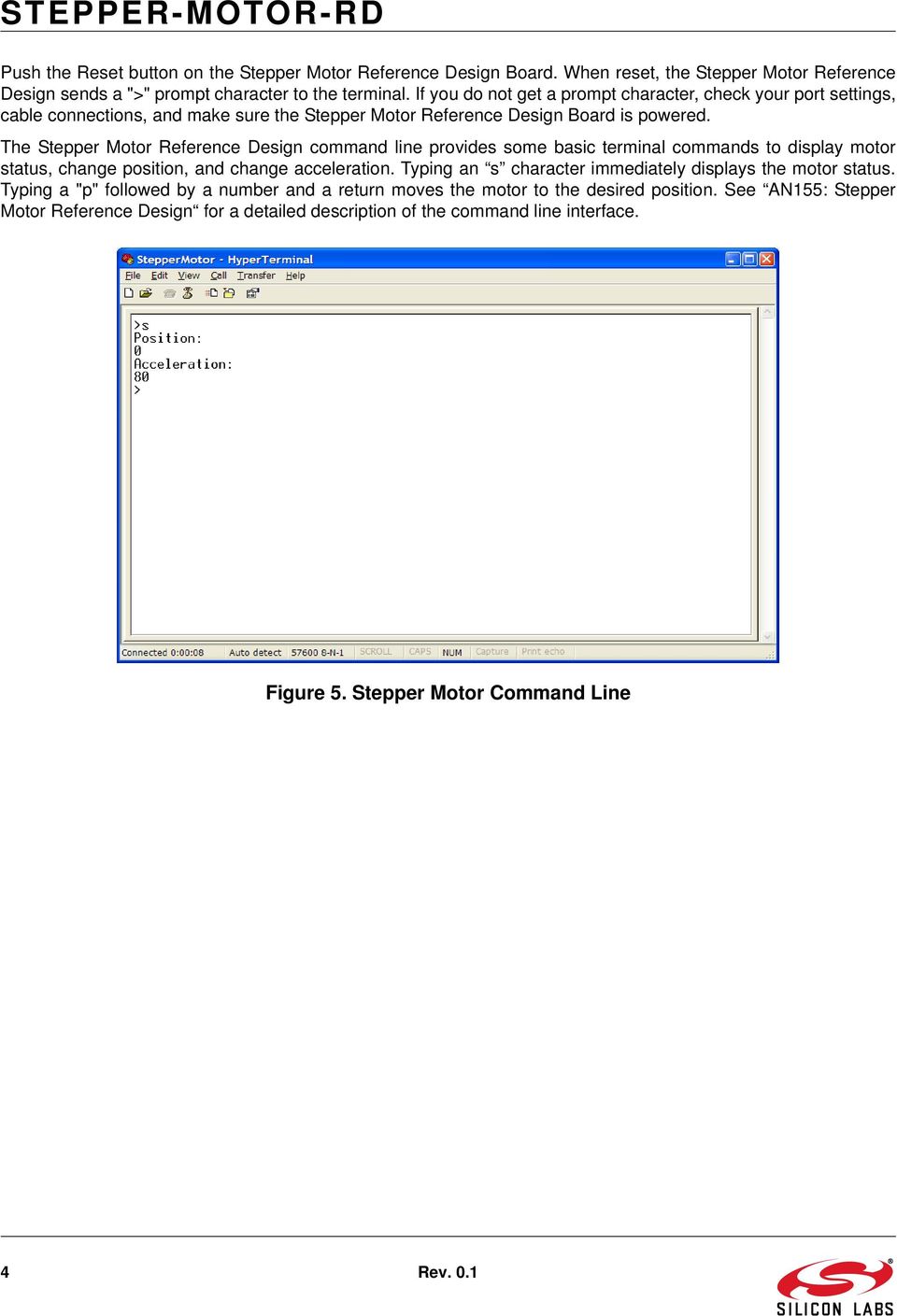
4 Push the Reset button on the Stepper Motor Reference Design Board. When reset, the Stepper Motor Reference Design sends a ">" prompt character to the terminal. If you do not get a prompt character, check your port settings, cable connections, and make sure the Stepper Motor Reference Design Board is powered. The Stepper Motor Reference Design command line provides some basic terminal commands to display motor status, change position, and change acceleration. Typing an s character immediately displays the motor status. Typing a "p" followed by a number and a return moves the motor to the desired position. See AN155: Stepper Motor Reference Design for a detailed description of the command line interface. Figure 5. Stepper Motor Command Line 4 Rev. 0.1
5 5. Development Tool Installation Install the Reference Design Kit Tools from the Reference Design Kit Tools & Documentation CD. This installs the Silicon Laboratories IDE and the 2k code size limited version of the Keil Compiler. Figure 6. Install Development Tools Rev

6 6. Development Setup using the USB Debug Adapter The Stepper Motor Reference Design includes everything you need to develop your own stepper motor control firmware using the Silicon Laboratories C8051F300/1 MCU. The Stepper Motor reference design code may be used as a starting point for your own code development. Connect the Stepper Motor, ac/dc power adapter, and serial cable if you have not done so already. Refer to the stepper motor wiring Table 1 on page 2 for the stepper motor connections. Connect the USB Debug Adapter ribbon cable to the 10-pin Debug connector on the Stepper Motor Reference Design Board. Connect the USB Debug Adapter to your PC using the supplied USB cable as shown in Figure 7. Stepper Motor PC USB Port USB Cable Serial Cable USB Debug Adapter Ribbon Cable J3 J1 RS232 Debug Stepper Motor Reference Design Board P1 AC/DC Adapter Figure 7. Development Setup using the USB Debug Adapter 6 Rev. 0.1

7 7. Stepper Motor Project The source code for the Stepper Motor Reference design is installed from the CD onto your hard drive in the following default location: C:\SiLabs\MCU\Stepper_Motor_RD\firmware\ The software for AN155 is also available as a zip file on the CD or from the Silicon Laboratories website. To create a stepper motor project, complete the following steps: 1. Launch the Silicon Laboratories IDE from the Start menu. 2. Select Add Files to Project from the Project menu. 3. Browse to the source code location listed above, and open the file stepper.c. 4. Double click on Stepper.c in the Project Workspace pane to open. 5. Select Rebuild All from the project menu or click on the Rebuild All button. (The IDE will compile and link the stepper.c file as shown in Figure 8.) 6. Select Connection Options from the Options menu. 7. Make sure the USB Debug Adapter is selected and the Debug Interface is using the C2 connection. 8. Select Connect from the Debug menu, or click on the Connect button in the tool bar. The Status Bar should display Target:C8051F301 to indicate the IDE is connected to the MCU on the Stepper Motor Reference Design Board. Refer to the application note AN155 for additional information on the stepper motor code. Figure 8. Stepper Motor Project Rev

8 8. Related Documents Stepper Motor Reference Design Quick Start Guide AN155: Stepper Motor Reference Design Soft copies of this document and the ones listed above are included on the Reference Design Kit Tools & Documentation CD. Click on Browse Documents to locate them or explore the CD and locate the User s Guides and Application Notes in the Documents folder. The latest versions of the documentation and software can also be downloaded from the Silicon Laboratories website 8 Rev. 0.1

9 Simplicity Studio One-click access to MCU and wireless tools, documentation, software, source code libraries & more. Available for Windows, Mac and Linux! IoT Portfolio SW/HW Quality Support and Community community.silabs.com Disclaimer Silicon Laboratories intends to provide customers with the latest, accurate, and in-depth documentation of all peripherals and modules available for system and software implementers using or intending to use the Silicon Laboratories products. Characterization data, available modules and peripherals, memory sizes and memory addresses refer to each specific device, and "Typical" parameters provided can and do vary in different applications. Application examples described herein are for illustrative purposes only. Silicon Laboratories reserves the right to make changes without further notice and limitation to product information, specifications, and descriptions herein, and does not give warranties as to the accuracy or completeness of the included information. Silicon Laboratories shall have no liability for the consequences of use of the information supplied herein. This document does not imply or express copyright licenses granted hereunder to design or fabricate any integrated circuits. The products must not be used within any Life Support System without the specific written consent of Silicon Laboratories. A "Life Support System" is any product or system intended to support or sustain life and/or health, which, if it fails, can be reasonably expected to result in significant personal injury or death. Silicon Laboratories products are generally not intended for military applications. Silicon Laboratories products shall under no circumstances be used in weapons of mass destruction including (but not limited to) nuclear, biological or chemical weapons, or missiles capable of delivering such weapons. Trademark Information Silicon Laboratories Inc., Silicon Laboratories, Silicon Labs, SiLabs and the Silicon Labs logo, CMEMS, EFM, EFM32, EFR, Energy Micro, Energy Micro logo and combinations thereof, "the world s most energy friendly microcontrollers", Ember, EZLink, EZMac, EZRadio, EZRadioPRO, DSPLL, ISOmodem, Precision32, ProSLIC, SiPHY, USBXpress and others are trademarks or registered trademarks of Silicon Laboratories Inc. ARM, CORTEX, Cortex-M3 and THUMB are trademarks or registered trademarks of ARM Holdings. Keil is a registered trademark of ARM Limited. All other products or brand names mentioned herein are trademarks of their respective holders. Silicon Laboratories Inc. 400 West Cesar Chavez Austin, TX USA

Figure 1. 8-Bit USB Debug Adapter
 8-BIT USB DEBUG ADAPTER USER S GUIDE 1. Introduction The 8-bit USB Debug Adapter (UDA) provides the interface between the PC s USB port and the Silicon Labs 8-bit target device s in-system debug/programming
Figure 1. Proper Method of Holding the ToolStick. Figure 2. Improper Method of Holding the ToolStick
 TOOLSTICK PROGRAMMING ADAPTER USER S GUIDE 1. Handling Recommendations The ToolStick Base Adapter and daughter cards are distributed without any protective plastics. To prevent damage to the devices or
AN111: Using 8-Bit MCUs in 5 Volt Systems
 This document describes how to incorporate Silicon Lab s 8-bit EFM8 and C8051 families of devices into existing 5 V systems. When using a 3 V device in a 5 V system, the user must consider: A 3 V power
AN803. LOCK AND SETTLING TIME CONSIDERATIONS FOR Si5324/27/ 69/74 ANY-FREQUENCY JITTER ATTENUATING CLOCK ICS. 1. Introduction
 LOCK AND SETTLING TIME CONSIDERATIONS FOR Si5324/27/ 69/74 ANY-FREQUENCY JITTER ATTENUATING CLOCK ICS 1. Introduction As outlined in the Product Bulletin*, issued in January 2013, Silicon Labs has made
AN962: Implementing Master-Slave Timing Redundancy in Wireless and Packet- Based Network Applications
 AN962: Implementing -Slave Timing Redundancy in Wireless and Packet- Based Network Applications Robust synchronization distribution schemes have historically been essential to communication networks and
TS1005 Demo Board COMPONENT LIST. Ordering Information. SC70 Packaging Demo Board SOT23 Packaging Demo Board TS1005DB TS1005DB-SOT
 REVISION NOTE The current revision for the TS1005 Demo Boards display the identifier TS100x Demo Board on the top side of the evaluation board as depicted in Figure 1. If the identifier is not printed
UG103.8: Application Development Fundamentals: Tools
 UG103.8: Application Development Fundamentals: Tools This document provides an overview of the toolchain used to develop, build, and deploy EmberZNet and Silicon Labs Thread applications, and discusses
UG129: ZigBee USB Virtual Gateway Reference Design (RD-0002-0201) User's Guide
 UG129: ZigBee USB Virtual Gateway Reference Design (RD-0002-0201) User's Guide The ZigBee USB Virtual Gateway Reference Design (RD-0002-0201) is designed to demonstrate ZigBee gateway functionality with
AN862. OPTIMIZING Si534X JITTER PERFORMANCE IN NEXT GENERATION INTERNET INFRASTRUCTURE SYSTEMS. 1. Introduction
 OPTIMIZING Si534X JITTER PERFORMANCE IN NEXT GENERATION INTERNET INFRASTRUCTURE SYSTEMS 1. Introduction To realize 100 fs jitter performance of the Si534x jitter attenuators and clock generators in real-world
AN952: PCIe Jitter Estimation Using an Oscilloscope
 AN952: PCIe Jitter Estimation Using an Oscilloscope Jitter of the reference clock has a direct impact on the efficiency of the data transfer between two PCIe devices. The data recovery process is able
AN486: High-Side Bootstrap Design Using ISODrivers in Power Delivery Systems
 AN486: High-Side Bootstrap Design Using ISODrivers in Power Delivery Systems Silicon Labs ISOdrivers are isolated gate drivers that combine low latency, high-drivestrength gate drive circuits with on-chip
AN580 INFRARED GESTURE SENSING. 1. Introduction. 2. Hardware Considerations
 INFRARED GESTURE SENSING 1. Introduction Touchless user interfaces are an emerging trend in embedded electronics as product designers seek out innovative control methods and more intuitive ways for users
Making Prototyping Boards for the EFM32 kits
 Making Prototyping Boards for the EFM32 kits AN0031 - Application Note Introduction This application note describes how anyone can make their own custom prototyping boards that can be connected directly
AN922: Using the Command Line Interface (CLI) for Frequency On-the-Fly with the Si5346/47
 AN922: Using the Command Line Interface (CLI) for Frequency On-the-Fly with the Si5346/47 Clockbuilder Pro comes with a command line interface (CLI)that can be used for adjusting the configuration of Si534x/8x
UG103-13: Application Development Fundamentals: RAIL
 UG103-13: Application Development Fundamentals: RAIL Silicon Labs RAIL (Radio Abstraction Interface Layer) provides an intuitive, easily-customizable radio interface layer that is designed to support proprietary
Bootloader with AES Encryption
 ...the world's most energy friendly microcontrollers Bootloader with AES Encryption AN0060 - Application Note Introduction This application note describes the implementation of a bootloader capable of
Current Digital to Analog Converter
 Current Digital to Analog Converter AN0064 - Application Note Introduction This application note describes how to use the EFM32 Current Digital to Analog Converter (IDAC), a peripheral that can source
AN220 USB DRIVER CUSTOMIZATION
 USB DRIVER CUSTOMIZATION Relevant Devices This application note applies to the following devices: CP2101/2/3, C8051F320/1/6/7, C8051F340/1/2/3/4/5/6/7 1. Introduction The information in this document and
CP2110-EK CP2110 EVALUATION KIT USER S GUIDE. 1. Kit Contents. 2. Relevant Documentation. 3. Software Setup
 CP2110 EVALUATION KIT USER S GUIDE 1. Kit Contents The CP2110 Evaluation Kit contains the following items: CP2110 Evaluation Board RS232 Serial Cable USB Cable DVD Quick Start Guide 2. Relevant Documentation
ZigBee-2.4-DK 2.4 GHZ ZIGBEE DEVELOPMENT KIT USER S GUIDE. 1. Kit Contents. Figure 1. 2.4 GHz ZigBee Development Kit
 2.4 GHZ ZIGBEE DEVELOPMENT KIT USER S GUIDE 1. Kit Contents The 2.4 GHz ZigBee Development Kit contains the following items, shown in Figure 1. 2.4 GHz 802.15.4/ZigBee Target Boards (6) Antennas (6) 9
PC Base Adapter Daughter Card UART GPIO. Figure 1. ToolStick Development Platform Block Diagram
 TOOLSTICK VIRTUAL TOOLS USER S GUIDE RELEVANT DEVICES 1. Introduction The ToolStick development platform consists of a ToolStick Base Adapter and a ToolStick Daughter card. The ToolStick Virtual Tools
How To Develop A Toolstick
 TOOLSTICK BASE ADAPTER USER S GUIDE 1. Handling Recommendations To enable development, the ToolStick Base Adapter and daughter cards are distributed without any protective plastics. To prevent damage to
AN220 USB DRIVER CUSTOMIZATION
 USB DRIVER CUSTOMIZATION Relevant Devices This application note applies to the following devices: CP2101/2/3/4/5/8, C8051F320/1/6/7, C8051F340/1/2/3/4/5/6/7/8/9/A/B/C/D, C8051F380/1/2/3/4/5/6/7, C8051T320/1/2/3/6/7,
ETRX3USB ETRX3USB-LRS ETRX3USB+8M ETRX3USB-LRS+8M PRODUCT MANUAL
 Telegesis ETRX3USB TG-PM-0518-ETRX357USB r4 Product Manual Telegesis is a trademark of Silicon Laboratories Inc. ZigBee USB STICKS: ETRX3USB ETRX3USB-LRS ETRX3USB+8M ETRX3USB-LRS+8M PRODUCT MANUAL 2015
RoHs compliant, Pb-free Industrial temperature range: 40 to +85 C Footprint-compatible with ICS552-02 1.8, 2.5, or 3.3 V operation 16-TSSOP
 1:8 LOW JITTER CMOS CLOCK BUFFER WITH 2:1 INPUT MUX (
AN588 ENERGY HARVESTING REFERENCE DESIGN USER S GUIDE. 1. Kit Contents. 2. Introduction. Figure 1. Energy Harvesting Sensor Node
 ENERGY HARVESTING REFERENCE DESIGN USER S GUIDE 1. Kit Contents The RF to USB Reference Design contains the following items: Si1012 Energy Harvesting Wireless Sensor Node EZRadioPRO USB Dongle ToolStick
Table 1. RF Pico Boards of the EZRadioPRO Development Kits. Qty Description Part Number
 EZRADIOPRO DEVELOPMENT KITS USER S GUIDE 1. Kits Overview This user's guide describes the development kits of the EZRadioPRO wireless development kit family. Each kit contains two RF nodes based on the
AN104 I NTEGRATING KEIL 8051 TOOLS INTO THE SILICON LABS IDE. 1. Introduction. 2. Key Points. 3. Create a Project in the Silicon Labs IDE
 I NTEGRATING KEIL 8051 TOOLS INTO THE SILICON LABS IDE 1. Introduction This application note describes how to integrate the Keil 8051 Tools into the Silicon Labs IDE (Integrated Development Environment).
AN335 USB DRIVER INSTALLATION UTILITY. 1. Description. 2. Installation. 2.1. Install Package
 USB DRIVER INSTALLATION UTILITY 1. Description The driver installer and uninstaller combination is a customizable installation utility for Silicon Laboratories USB drivers. These utilities are completely
AN614 A SIMPLE ALTERNATIVE TO ANALOG ISOLATION AMPLIFIERS. 1. Introduction. Input. Output. Input. Output Amp. Amp. Modulator or Driver
 A SIMPLE ALTERNATIVE TO ANALOG ISOLATION AMPLIFIERS 1. Introduction Analog circuits sometimes require linear (analog) signal isolation for safety, signal level shifting, and/or ground loop elimination.
Backup Power Domain. AN0041 - Application Note. Introduction
 Backup Power Domain AN0041 - Application Note Introduction This application note describes how to use the EFM32 Backup Power Domain and Backup Real Time Counter. An included software example for the Giant
AN583: Safety Considerations and Layout Recommendations for Digital Isolators
 AN583: Safety Considerations and Layout Recommendations for Digital Isolators This application note details the creepage and clearance requirements of an isolator type component, such as a digital isolator,
TWR-KV31F120M Sample Code Guide for IAR Board configuration, software, and development tools Rev.0
 TWR-KV31F120M Sample Code Guide for IAR Board configuration, software, and development tools Rev.0 Freescale TWR-KV31F120M Sample Code Guide for IAR KL25_LAB Contents 1 Purpose... 3 2 Getting to know the
CodeWarrior Development Studio for Freescale S12(X) Microcontrollers Quick Start
 CodeWarrior Development Studio for Freescale S12(X) Microcontrollers Quick Start SYSTEM REQUIREMENTS Hardware Operating System Disk Space PC with 1 GHz Intel Pentum -compatible processor 512 MB of RAM
Telegesis is a trademark of Silicon Laboratories Inc. Telegesis ZigBee Communications Gateway. Product Manual
 Telegesis ZigBee Communications Gateway TG-PM-510 ZigBee Communications Gateway Product Manual 0510r6 Telegesis is a trademark of Silicon Laboratories Inc. Telegesis ZigBee Communications Gateway Product
UG103.8 APPLICATION DEVELOPMENT FUNDAMENTALS: TOOLS
 APPLICATION DEVELOPMENT FUNDAMENTALS: TOOLS This document provides an overview of the toolchain used to develop, build, and deploy EmberZNet and Silicon Labs Thread applications, and discusses some additional
APPLICATION NOTE. AT07175: SAM-BA Bootloader for SAM D21. Atmel SAM D21. Introduction. Features
 APPLICATION NOTE AT07175: SAM-BA Bootloader for SAM D21 Atmel SAM D21 Introduction Atmel SAM Boot Assistant (Atmel SAM-BA ) allows In-System Programming (ISP) from USB or UART host without any external
In-System Programmer USER MANUAL RN-ISP-UM RN-WIFLYCR-UM-.01. www.rovingnetworks.com 1
 RN-WIFLYCR-UM-.01 RN-ISP-UM In-System Programmer 2012 Roving Networks. All rights reserved. Version 1.1 1/19/2012 USER MANUAL www.rovingnetworks.com 1 OVERVIEW You use Roving Networks In-System-Programmer
QSG105 GETTING STARTED WITH SILICON LABS WIRELESS NETWORKING SOFTWARE
 GETTING STARTED WITH SILICON LABS WIRELESS NETWORKING SOFTWARE This quick start guide provides basic information on configuring, building, and installing applications using the Thread, EmberZNet RF4CE,
Instructions for Installing and Using the FOCUS DL-15 Data Transfer Software
 27 March 2015 Instructions for Installing and Using the FOCUS DL-15 Data Transfer Software Introduction This guide will walk you through the process of transferring data from the FOCUS DL-15 to the computer
AN335 USB DRIVER INSTALLATION METHODS. 1. Introduction. 2. Relevant Documentation. 3. DPInst. 3.1. Installation and Customization
 USB DRIVER INSTALLATION METHODS 1. Introduction Users can install a driver for a Silicon Labs USB Device in three ways: Microsoft s Driver Package Installer (DPInst) Legacy Silicon Labs USB Driver Installer
QSG108: Blue Gecko Bluetooth Smart Software Quick-Start Guide
 QSG108: Blue Gecko Bluetooth Smart Software Quick-Start Guide Blue Gecko Bluetooth Smart Software Quick-Start Guide This document walks you through the architecture and APIs of the Blue Gecko Bluetooth
USER GUIDE EDBG. Description
 USER GUIDE EDBG Description The Atmel Embedded Debugger (EDBG) is an onboard debugger for integration into development kits with Atmel MCUs. In addition to programming and debugging support through Atmel
AN0822: Simplicity Studio User's Guide
 Simplicity Studio greatly reduces development time and complexity with Silicon Labs' EFM32, EFM8, and 8051 MCUs, wireless MCUs, and ZigBee SoCs. Simplicity Studio can create wireless applications and provides
0011-01-16-03-001 USB Stick Driver Installation Instructions
 Application Note 0011-01-16-03-001 USB Stick Driver Installation Instructions Document No: 0011-01-16-03-001 (Issue A) INTRODUCTION This document outlines how to install the virtual COM port drivers for
Getting Started with Kinetis SDK (KSDK)
 Freescale Semiconductor, Inc. Document Number: KSDKGSUG User s Guide Rev. 0, 12/2014 Getting Started with Kinetis SDK (KSDK) 1 Overview Kinetis SDK (KSDK) is a Software Development Kit that provides comprehensive
AN655 R ANGE TEST APPLICATION FOR EZRADIO AND EZRADIOPRO. 1. Introduction. 2. Supported Radio Types
 R ANGE TEST APPLICATION FOR EZRADIO AND EZRADIOPRO 1. Introduction The range evaluation demo provides an easy way to evaluate the link budget of EZRadio and EZRadioPRO devices by performing a range test
Selecting the Right MCU Can Squeeze Nanoamps out of Your Next Internet of Things Application
 Selecting the Right MCU Can Squeeze Nanoamps out of Your Next Internet of Things Application www.silabs.com Introduction Industry leaders predict that the number of connected devices for the Internet of
Genesi Pegasos II Setup
 Freescale Semiconductor Application Note AN2666 Rev. 0, 07/2004 Genesi Pegasos II Setup by Maurie Ommerman CPD Applications Freescale Semiconductor, Inc. Austin, TX This application note is the first in
MS830 / MS833 Barcode Reader v1.0 9-December-2014
 MS830 / MS833 Barcode Reader v1.0 9-December-2014 Publication Information 2014 Imagine Communications Corp. Proprietary and Confidential. Imagine Communications considers this document and its contents
UM1969 User manual. Getting started with STM32F746G discovery software development tools. Introduction
 UM1969 User manual Getting started with STM32F746G discovery software development tools Introduction This document describes the software environment recommendations, required to build an application using
Cypress CY7C64225 USB-to-UART Setup Guide Version 1.3
 Cypress CY7C64225 USB-to-UART Setup Guide Version 1.3 Overview The Cypress CY7C64225 is a fully integrated USB-to-UART Bridge that provides a simple way of updating RS-232 based devices to USB with a minimal
UM1727 User manual. Getting started with STM32 Nucleo board software development tools. Introduction
 User manual Getting started with STM32 Nucleo board software development tools Introduction The STM32 Nucleo board is a low-cost and easy-to-use development platform used to quickly evaluate and start
UM1727 User manual. Getting started with STM32 Nucleo board software development tools. Introduction
 User manual Getting started with STM32 Nucleo board software development tools Introduction The STM32 Nucleo board (NUCLEO-F030R8, NUCLEO-F072RB, NUCLEO-F103RB, NUCLEO-F302R8, NUCLEO-F401RE, NUCLEO-L152RE)
Bluetooth + USB 16 Servo Controller [RKI-1005 & RKI-1205]
![Bluetooth + USB 16 Servo Controller [RKI-1005 & RKI-1205]](/thumbs/40/21161302.jpg "Bluetooth + USB 16 Servo Controller [RKI-1005 & RKI-1205]") Bluetooth + USB 16 Servo Controller [RKI-1005 & RKI-1205] Users Manual Robokits India [email protected] http://www.robokitsworld.com Page 1 Bluetooth + USB 16 Servo Controller is used to control up to
Bluetooth + USB 16 Servo Controller [RKI-1005 & RKI-1205] Users Manual Robokits India [email protected] http://www.robokitsworld.com Page 1 Bluetooth + USB 16 Servo Controller is used to control up to
USB FM Radio-RD USB FM RADIO USER S GUIDE. 1. USB FM Radio Setup. One-time set-up enables configuration of presets and region specific FM band
 USB FM RADIO USER S GUIDE 1. USB FM Radio Setup Follow the instructions listed below to set up and configure the USB FM Radio. 1. Download the USB FM Radio Player from the Silicon Laboratories website
USER GUIDE. Ethernet Configuration Guide (Lantronix) P/N: 2900-300321 Rev 6
 KRAMER ELECTRONICS LTD. USER GUIDE Ethernet Configuration Guide (Lantronix) P/N: 2900-300321 Rev 6 Contents 1 Connecting to the Kramer Device via the Ethernet Port 1 1.1 Connecting the Ethernet Port Directly
UM1680 User manual. Getting started with STM32F429 Discovery software development tools. Introduction
 User manual Getting started with STM32F429 Discovery software development tools Introduction This document describes the software environment and development recommendations required to build an application
Configuring Serial Terminal Emulation Programs
 Configuring Serial Terminal Emulation Programs Table of Contents Configuring Serial Terminal Emulation Programs: An Introduction... 3 HyperTerminal... 3 Configuring HyperTerminal... 3 Tera Term Pro...
Keep it Simple Timing
 Keep it Simple Timing Support... 1 Introduction... 2 Turn On and Go... 3 Start Clock for Orienteering... 3 Pre Start Clock for Orienteering... 3 Real Time / Finish Clock... 3 Timer Clock... 4 Configuring
The following document contains information on Cypress products.
 The following document contains information on Cypress products. 32-BIT MICROCONTROLLER MB9B100A/MB9B300A/MB9B400A/MB9B500A Series FM3 family inverter solution GUI User Manual TM ARM and Cortex-M3 are
User Manual. Thermo Scientific Orion
 User Manual Thermo Scientific Orion Orion Star Com Software Program 68X637901 Revision A April 2013 Contents Chapter 1... 4 Introduction... 4 Star Com Functions... 5 Chapter 2... 6 Software Installation
GV-Data Capture V3 Series User's Manual
 GV-Data Capture V3 Series User's Manual Before attempting to connect or operate this product, please read these instructions carefully and save this manual for future use. 2006 GeoVision, Inc. All rights
Developing an Application on Core8051s IP-Based Embedded Processor System Using Firmware Catalog Drivers. User s Guide
 Developing an Application on Core8051s IP-Based Embedded Processor System Using Firmware Catalog Drivers User s Guide Developing an Application on Core8051s IP-Based Embedded Processor System Using Firmware
SecureLinx Spider Duo Quick Start Guide
 SecureLinx Spider Duo Quick Start Guide SecureLinx Spider Duo Quick Start Guide SecureLinx Spider Duo QUICK START GUIDE CONTENTS Overview... 2 What s In The Box... 3 Installation and Network Settings...
AT88CK490 Evaluation Kit
 AT88CK490 Evaluation Kit CryptoAuthentication USB Dongle HARDWARE USER GUIDE Atmel AT88CK490 CryptoAuthentication Evaluation Kit Introduction The Atmel AT88CK490 CryptoAuthentication Evaluation Kit is
STM32F4DISCOVERY. Discovery kit with STM32F407VG MCU. Features. Description
 Discovery kit with STM32F407VG MCU Data brief Features STM32F407VGT6 microcontroller featuring 32-bit ARM Cortex -M4 with FPU core, 1-Mbyte Flash memory, 192-Kbyte RAM in an LQFP100 package On-board ST-LINK/V2
PN 100-06843L, Revision B, October 2013. Epic 950 TM. Master Programmer User s Guide
 PN 100-06843L, Revision B, October 2013 Epic 950 TM Master Programmer User s Guide This page intentionally left blank Change History Rev A Initial release Feb 2007 Rev B Update Oct 2013 100-06843L Rev
1 Software Overview... 2. 1.1 ncp-uart... 2 1.2 ash-v3-test-app... 2 1.3 ash-v3-test-app Command Line Options... 2. 2 Testing... 2
 ASHV3-UART HOST INTERFACING GUIDE This document describes how to set up and test UART communication between a host and Network Co-Processor (NCP) using ASHv3-UART. It assumes that you have a Raspberry
APPLICATION NOTE. AT16268: JD Smart Cloud Based Smart Plug Getting. Started Guide ATSAMW25. Introduction. Features
 APPLICATION NOTE AT16268: JD Smart Cloud Based Smart Plug Getting Started Guide ATSAMW25 Introduction This application note aims to help readers to get started with the Atmel smart plug reference design
FLoader User's Manual
 FLoader User's Manual Version 1.0.07 Build February 12, 2002 Copyright Topcon Positioning Systems, Inc. 2002 All rights reserved Last Revised February 14, 2002 INTRODUCTION / TERMS AND CONDITIONS Thank
Current Cost Data Cable User Guide. Installing and configuring the data cable
 Current Cost Data Cable User Guide Installing and configuring the data cable Contents About the Data Cable... 3 Data Cable Installation Steps... 3 Post Installation Checks... 3 So the driver is installed,
Vicon Flash Upgrade Software
 INSTRUCTION MANUAL Notes Refer to XX134 NO. XX134-13-01 REV. 1212 Vicon Flash Upgrade Software It is possible to upgrade software for the SurveyorVFT and Surveyor -Mini Camera Domes through a PC using
Connect the EFM32 with a Smart Phone through the Audio Jack
 ...the world's most energy friendly microcontrollers Connect the EFM32 with a Smart Phone through the Audio Jack AN0054 - Application Note Introduction This application note describes how to connect the
PM1122 INT DIGITAL INTERFACE REMOTE
 PM1122 INT DIGITAL INTERFACE REMOTE PM1122 INT front panel description: 1. Clear wireless remotes knob: push this button for more than 2 seconds to clear the list of all assigned wireless remote settings
Develop a Dallas 1-Wire Master Using the Z8F1680 Series of MCUs
 Develop a Dallas 1-Wire Master Using the Z8F1680 Series of MCUs AN033101-0412 Abstract This describes how to interface the Dallas 1-Wire bus with Zilog s Z8F1680 Series of MCUs as master devices. The Z8F0880,
Digital Photo Bank / Portable HDD Pan Ocean E350 User Manual
 Digital Photo Bank / Portable HDD Pan Ocean E350 User Manual Installing a hard disk 1. Power off the unit. 2. Remove the bottom cover from the unit by removing four screws. 3. Insert the 2.5 HDD to the
APPLICATION. si32library. Callback CMSIS HARDWARE. Figure 1. Firmware Layer Block Diagram
 PRECISION32 SOFTWARE DEVELOPMENT KIT CODE EXAMPLES OVERVIEW 1. Introduction The Precision32 code examples are part of the Software Development Kit (SDK) installed with the Precision32 software package
Table of Contents. ARM Evaluation Board (AEB-1) Welcome Guide ARM DGI 0005D. Proprietary Notice
 Proprietary Notice ARM and the ARM Powered logo are registered trademarks of ARM Limited. Angel, EmbeddedICE, and Multi-ICE are unregistered trademarks of ARM Limited. All other products or services mentioned
ACU-1000 Manual Addendum Replacement of CPM-2 with CPM-4
 ACU-1000 Manual Addendum Replacement of CPM-2 with CPM-4 1 PURPOSE:... 1 2 CPM-4/CPM-2 COMPATIBILITY... 2 2.1 NETWORK CABLES... 2 2.2 FACTORY DEFAULT SETTINGS... 2 2.3 CHANGING THE RS-232 SERIAL PORT BAUD
MED-AFEs Design Reference Manual
 Freescale Semiconductor Design Reference Manual Document Number: DRM141 Rev. 0, 8/2013 MED-AFEs Design Reference Manual By: Alejandra Guzman This document explains how to test all Analog Front Ends using
Intel Compute Stick STCK1A32WFC User Guide. Intel Compute Stick STCK1A32WFC
 Intel Compute Stick STCK1A32WFC User Guide 1 Revision History Revision Revisions History Date 01 First release of the Intel Compute Stick STCK1A32WFC User Guide April 2015 Disclaimer INFORMATION IN THIS
UM1790 User manual. Getting started with STM32L053 discovery kit software development tools. Introduction
 User manual Getting started with STM32L053 discovery kit software development tools Introduction This document describes the software environment recommendations required to build an application using
About This Guide SolarEdge Configuration Tool Software Guide. About This Guide
 About This Guide 3 About This Guide This user guide is intended for Photovoltaic (PV) system owners, installers, technicians, maintainers, administrators and integrators who are authorized to configure
Desktop NETGEAR Genie
 User Manual 350 East Plumeria Drive San Jose, CA 95134 USA August 2011 202-10806-01 v1.0 2011 NETGEAR, Inc. All rights reserved No part of this publication may be reproduced, transmitted, transcribed,
User Manual. AS-Interface Programmer
 AS-Interface Programmer Notice: RESTRICTIONS THE ZMD AS-INTERFACE PROGRAMMER HARDWARE AND ZMD AS-INTERFACE PROGRAMMER SOFTWARE IS DESIGNED FOR IC EVALUATION, LABORATORY SETUP AND MODULE DEVELOPMENT ONLY.
SUDT AccessPort TM Advanced Terminal / Monitor / Debugger Version 1.37 User Manual
 SUDT AccessPort TM Advanced Terminal / Monitor / Debugger Version 1.37 User Manual Version 1.0 - January 20, 2015 CHANGE HISTORY Version Date Description of Changes 1.0 January 20, 2015 Initial Publication
Guide to Installing BBL Crystal MIND on Windows 7
 Guide to Installing BBL Crystal MIND on Windows 7 Introduction The BBL Crystal MIND software can not be directly installed on the Microsoft Windows 7 platform, however it can be installed and run via XP
Liebert IntelliSlot Web Cards
 Monitoring For Business-Critical Continuity Liebert IntelliSlot Web Cards Firmware Upgrade Manual Liebert IntelliSlot Web Card, Liebert IntelliSlot Web Card-LB, Liebert IntelliSlot Web Card-LBDS, Liebert
Knowledge Base POS/C31A Troubleshooting
 [Concept] Serial Port Include RS-232, RS-422, RS-485 and USB Currently NUUO only supports RS-232 Also named as COM port by Microsoft Why Null Modem? The RS-232 standard is asymmetrical as to the definitions
16-Port RS232 to USB2.0 High Speed Multi Serial Adapter (w/ Metal Case) Installation Guide
 16-Port RS232 to USB2.0 High Speed Multi Serial Adapter (w/ Metal Case) Installation Guide 1. Introduction Thank you for purchasing this 16-Port RS232 to USB2.0 High Speed Multi Serial Adapter. It is an
PL-2303 (Chip Rev H, HX, X) USB to Serial Adapter Windows Driver Installer Manual
 PL-2303 (Chip Rev H, HX, X) USB to Serial Adapter Windows Driver Installer Manual For Windows 98/ME/2000/XP/Vista/7 Release Version 1.3 (2/4/2010) Contents Introduction Features & Specifications System
AN10866 LPC1700 secondary USB bootloader
 Rev. 2 21 September 2010 Application note Document information Info Content Keywords LPC1700, Secondary USB Bootloader, ISP, IAP Abstract This application note describes how to add a custom secondary USB
HVP-KV31F120M Quick Start Guide
 HVP-KV31F120M Quick Start Guide Freescale Controller Card High Voltage Development Platform Quick Start Guide Get to Know the HVP-KV31F120M USB Mini for Communication, Debugging and Power Supply Isolated
STIM202 Evaluation Kit
 Table of contents: 1 FEATURES... 2 2 GENERAL DESCRIPTIONS AND SYSTEM CONTENTS... 2 3 SYSTEM REQUIREMENTS... 2 4 GETTING STARTED... 3 4.1 INSTALLATION OF NI-SERIAL CABLE ASSEMBLY DRIVER... 3 4.2 INSTALLATION
ISP Engineering Kit Model 300
 TM ISP Engineering Kit Model 300 December 2013 Model 300 Overview The Model 300 programmer supports JTAG programming of all Lattice devices that feature non-volatile configuration elements. The Model 300
MAXREFDES46# Quick Start Guide UG6207; Rev 1; 9/15. Abstract
 MAXREFDES46# Quick Start Guide UG6207; Rev 1; 9/15 Abstract The MAXREFDES46# 4-Channel Analog Input Output Quick Start Guide describes the steps required to quickly get the MAXREFDES46# reference design
USER GUIDE. ZigBit USB Stick User Guide. Introduction
 USER GUIDE ZigBit USB Stick User Guide Introduction This user guide describes how to get started with the Atmel ZigBit USB sticks. The ZigBit USB sticks is targeted for evaluating the USB features of the
LabelWriter. Print Server. User Guide
 LabelWriter Print Server User Guide Copyright 2010 Sanford, L.P. All rights reserved. 08/10 No part of this document or the software may be reproduced or transmitted in any form or by any means or translated
RN-XV-RD2 Evaluation Board
 RN-XV-RD2 Evaluation Board 2012 Roving Networks. All rights reserved. -1.01Version 1.0 9/28/2012 USER MANUAL OVERVIEW This document describes the hardware and software setup for Roving Networks RN-XV-RD2