
EMPLOYEE SELF SERVICE BENEFIT ENROLLMENT GUIDE
|
|
|
- Jody Atkinson
- 9 years ago
- Views:
Transcription
1 EMPLOYEE SELF SERVICE BENEFIT ENROLLMENT GUIDE
2 Table of Contents I. OVERVIEW II. NEW HIRE ENROLLMENT III. FAMILY STATUS CHANGES
3 OVERVIEW Employee Self Service is part of the Lawson system and enables you to manage your benefits, view your leave balances, manage your payroll and tax information, and enter supplemental pay information. Employees access Employee Self Service by logging into Lawson portal. The link to Lawson is available via the Employee Resources webpage or on the intranet home page in the logins section. Once the Lawson link is selected, enter your user name and password into the log on screen. The user name and password are the same as your District user name and password.

4 NEW HIRE Once you have logged in, select the Employee Self Service bookmark on the left and then select the Benefits link. Before you start the new hire benefit enrollment process, you must FIRST add your dependents so you can choose to include them in your NEISD benefit coverage. Make sure you have all dependent information for your spouse and children (if any). This information includes the dependent s full name, address, social security number, and birth date. Select the Dependents link from the menu on the left and follow the on screen directions. All dependent data that is marked with an asterisk must be completed. Once you have entered all your dependents, you are now ready to enroll in your benefits.
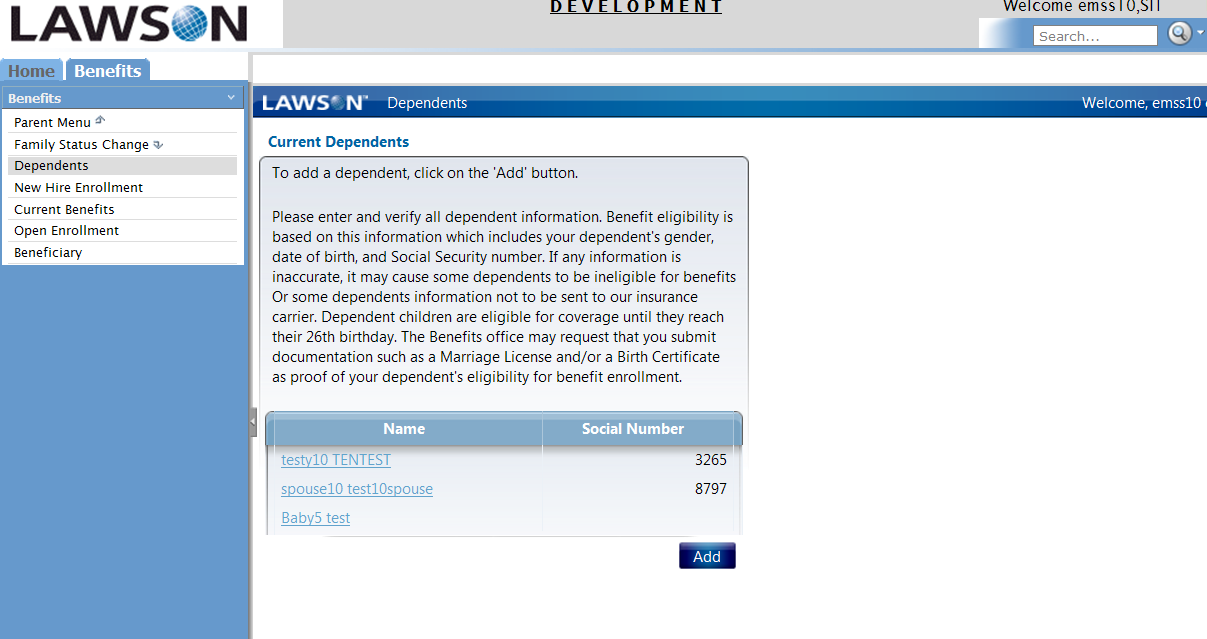

5 Select the New Hire Enrollment link from the bookmarks on the left The benefit enrollment process will begin with a welcome screen. Please select Continue at the bottom of the screen to proceed to the next page. Benefit plans by type (health, dental, etc) will appear on the next screen. Select the plan name to review information about the plan including coverage and rates. Select the button next to the plan that you wish to enroll in and select Continue at the bottom of the screen. The next screen will allow you to choose to cover yourself and/or your dependents. That screen displays the coverage options and the cost per month for the option that you choose. Select Continue to proceed to the next page.


6 Do not select Elections until after you have completed your choices for the first plan type or the screen will display a cost of $0.00. Once you have completed your choices for the first plan type, the screen displays the total cost per pay period of your completed benefit elections as shown in the following screen. (Cost per pay period is based on 12 monthly or 26 bi-weekly deductions, 10 month employees actual deduction will differ from amount displayed) On the following screen, choose the dependents that will be covered under your benefit plans and select continue to view a summary for that benefit type.

7 The following screen displays the plan and coverage that you have selected for the benefit plan. It also displays the dependents covered under the benefit plan and the cost per pay period. The Elections button displays the cost per pay period of all of the benefit plans that you have selected. If the information appears correct, select Continue. If you wish to make changes, select Previous. When you select Continue, the next screen displays your benefit options for the next plan type and you will follow the same process as outlined above until you have completed the process for all of the benefit plan types that are offered via Employee Self Service.

8 Once you have gone through the entire benefits enrollment, you will have a benefit elections summary page. You can choose from one of the options at the bottom of the summary screen: Continue, Make Changes, or Exit. If you select Continue, your benefit choices will be saved and you will not be able to make any further changes, you will be given the option to print your elections for your records. If you select Make Changes, then a list of the plans types will appear and you can select which plans to change. If you select Exit, then you will exit the Employee Self Service module and your benefit choices WILL NOT be saved. You will be able to come back and complete the process at any point within 31 days of your hire date. (Cost per pay period is based on 12 monthly or 26 bi-weekly deductions, 10 month employees actual deduction will differ from amount displayed) Congratulations, you have now completed your New Hire Enrollment!

9 FAMILY STATUS CHANGES Enrollment in benefits for North East Independent School District employees include benefits whose premiums are deducted before taxes are deducted from the employee s paycheck. This results in a more favorable tax status by lowering your taxable income. Because the benefits are deducted before taxes are applied, the Internal Revenue Service (IRS) does not allow changes to be made to benefit elections unless a qualifying family status change occurs. Family status changes include the following events: Marriage Divorce Birth Adoption Change in spouse employment that includes a change in insurance coverage If one of the events listed above occurs, you can change your NEISD benefit elections using Employee Self Service. Once you have logged into Employee Self Service, select Benefits and then Family Status Change from the bookmarks on the left as shown below:

10 This will bring you to the Family Status Change menu screen. Select the appropriate life event from the bookmarks on the left or from the main screen shown above. The benefit elections you are allowed to change are unique to each family status change. You will only be able to make changes to the benefit elections that are displayed on the screens after you select a family status change. If you are adding a dependent through a birth or an adoption, then select the appropriate link and follow the instructions. The screen will instruct you to add the dependent to your benefit elections. Once you add the dependent, you can go through the remaining screens and add coverage as needed. The screens will display the same information as noted previously in the new hire enrollment section of this guide. Your benefit changes are not effective until you submit supporting documentation to the Employee Benefits Department. The following is a list of required documentation for the various family status changes: Adoption Birth Divorce Marriage Spouse employment/change in insurance coverage Copy of adoption paperwork Copy of birth certificate Copy of divorce decree Copy of marriage certificate Proof of change in insurance coverage Also, the IRS regulations allow you to change your benefit elections based on a court decree. To change your benefits based on a court decree, please contact the Employee Benefits department at (210)
ESS Online Benefit Enrollment Guide
 From your web browser type in: https://ess.cityofchesapeake.net Or from CityPoint: -> City Systems -> Employee Self Service Those departments that use the External Agencies link should notify their employees
Benefits: Open Enrollment Self Service 2014
 Open Enrollment will be done online via the Human Resources Self Service pages. All employees will elect their health plan benefits using this process. Even if you aren t changing anything, you must still
MyBenefits Enrollment Resource for New Employees
 MyBenefits Enrollment Resource for New Employees Welcome to the University of Notre Dame! This guide will help you navigate MyBenefits, the University s online benefits enrollment application. All benefit-eligible
City of Riverside. Employee Online Benefits Guide
 City of Riverside Employee Online Benefits Guide Preparing to Enroll Online Before you log on to enroll, make sure your decisions are made and you have the information needed to enroll. Important Items
Employee Self Service Instructions. For. PULAU Corporation
 Employee Self Service Instructions For PULAU Corporation Company... 2 Directory... 2 Links... 2 Personal... 3 Life Events/New Hire... 3 Address/Phone Number... 10 Emergency Contacts... 11 Leave Status...
Your Missouri State Employee Benefits
 Your Missouri State Employee Benefits This presentation is designed to give you an overview of benefits provided to you as an active state employee in a benefit eligible position. This slide show does
Employee Self Service Guide
 Introduction The PDS Employee Self Service Portal (ESS) is an interactive web based tool allowing you to view and mange critical information about you, your benefits, and your compensation. The Portal
Tufts University Human Resources New Hire Benefits Enrollment
 Online allows fast and convenient processing of your New Hire Benefits Enrollment elections. You will be able to print a confirmation statement after you have completed your. Prior to enrolling online,
Instruction Guide. People First Dependent Certification Process
 People First Dependent Certification Process Each time an employee logs into People First to make an enrollment selection during open enrollment or because of a qualified status change (QSC), he/she must
SmartBen Life Event Instructions
 SmartBen Life Event Instructions 1 A Life Event According to IRS rules, once you enroll in your benefits choices, your decisions remain in effect for the rest of the year. However, you can make certain
EMPLOYEE SELF-SERVICE DIRECT DEPOSIT PROCEDURES
 EMPLOYEE SELF-SERVICE DIRECT DEPOSIT PROCEDURES STEP 1: To access Employee Self Service, login to Lawson by entering your District User ID and Password. STEP 2: Click on the down arrow next to Employee
How to Complete Newly Eligible Enrollment in ADP 2016-2017
 1. Go to https://portal.adp.com Click on User Sign In. 4. Click on the Benefit Enrollment System link. 2. Enter your User Name and Password. 5. At the Welcome page, read the information, then click Continue.
About Your Benefits 1
 About Your Benefits 1 BENEFIT HIGHLIGHTS Your Benefits. Provide Immediate Eligibility for You and Your Family As a Full-time or Part-time Employee, you are eligible for coverage under most benefits on
Frequently Asked Questions (FAQs)
 Frequently Asked Questions (FAQs) Q: Does everyone need to review their benefit elections? A: Yes, you should. The Open Enrollment period from May 14, 2013 May 28, 2013 is your opportunity to verify, or
Updating Your Benefits Using PeopleSoft
 Updating Your Benefits Using PeopleSoft Use this document to assist in updating your benefits enrollment due to a life event such as marriage, adding a dependent due to loss of coverage, or birth/adoption
TABLE OF CONTENTS. SECTION 1: How to Access Employee Self Service 2. SECTION 2: Enrolling in Benefits Plans 3 29
 Guide to Enrolling for Benefits with Employee Self Service Step by Step Instructions TABLE OF CONTENTS PAGES SECTION 1: How to Access Employee Self Service 2 SECTION 2: Enrolling in Benefits Plans 3 29
my>hr Employee Self-Service Open Enrollment How-To Guide
 my>hr Employee Self-Service Open Enrollment How-To Guide Version 2.1 May, 2012 Copyright 2011 Munson Healthcare. All Rights Reserved. No part of this manual may be displayed or reproduced in any form or
Affirmation of Accurate Information On the next you must affirm that that you are providing complete and accurate information. If you affirm, click
 New Applicants Overview Welcome to the Indiana State Police online handgun license application portal. This brief training document will provide an overview of the application process and show you new
Initiate Life Event Self-Service
 Employee Work Center Revised: April, 2014 Table of Contents: Log in to the Employee Work Center... 3 Initiate a Life Event... 3 Benefit Event Date Examples... 4 Change Benefits Elections... 5 Attachments...
Quick Reference Guide Welcome TEST USER
 Welcome TEST USER HELP RETIREMENT MANAGER DEMO FEEDBACK VersionE_000 Getting Started This Retirement Manager participant website Quick Reference Guide will assist you to easily navigate and complete important
Electing Pre-tax Dollars To Pay For Your Health Care Expenses
 Electing Pre-tax Dollars To Pay For Your Health Care Expenses FSA LPF HSA Your Benefit Options Based On Your Health Insurance Plan BENEFIT OPTIONS You Have Elected a Traditional Health Plan... Low or no
EMPLOYEE SELF SERVICE: ACCESSING YOUR INFORMATION
 EMPLOYEE SELF SERVICE: ACCESSING YOUR INFORMATION The implementation of the Human Resources Self-Service system means that you can access your information via the University s PipelineMT portal. The official
The Dependent Care Flexible Spending Account may be used to pay dependent care expenses that are necessary for you and your spouse to work.
 DEPENDENT CARE FLEXIBLE SPENDING ACCOUNT The Dependent Care Flexible Spending Account may be used to pay dependent care expenses that are necessary for you and your spouse to work. Eligibility Employee
Qualified Status Change (QSC) Matrix
 Employee may enroll newly eligible Spouse/Domestic Partner and children. Employee may waive medical coverage. Employee may decline dental and/or vision. Employee may opt out only if proof of other group
Benefits Summary for UAB Hospital Management LLC Employees www.uab.edu/benefits
 Benefits Summary for UAB Hospital Management LLC www.uab.edu/benefits HUMAN RESOURCE MANAGEMENT Health Care, Dental, and Vision Plans For new employees, coverage under UAB s group health care, dental,
Home BancShares, Inc.
 Topic: Payroll Human Resources FAQ s? When do I get paid? We are paid on a bi-weekly basis. Payday is every other Thursday. (See attachment for payroll dates and pay periods.) The payment is for wages
Payroll Direct Deposit Self Service Guide
 What do I do? Process Overview This guide takes you through the process to add or make changes to your payroll direct deposit bank accounts. 1. Review limitations, special considerations & Foreign National
HealthyCT Online Bill Pay
 HealthyCT Online Bill Pay User Guide for Enrollment and Online Payments Table of Contents I. Enrollment Process: On-line Bill Pay Page 1 II. Payment Process- Pay Your HealthyCT Bill Online A. One-Time
PeopleSoft Employee Self Service User Guide
 PeopleSoft Employee Self Service User Guide Welcome to the NJTA Employee Self Service (ESS) User Guide. This guide is designed to provide you with the information you need to successfully use the NJTA
What Benefits Can I Change Mid Year?
 What Benefits Can I Change Mid Year? Mid Year Benefits ment/change Summary* FAMILY STATUS EVENTS Options to Consider Marriage Add your legal spouse to your medical, dental, vision coverage Add newly acquired
Step-By-Step Benefits Enrollment Guide How To Enroll In Benefits Items Needed before Enrolling
 Step-By-Step Benefits Enrollment Guide How To Enroll In Benefits Items Needed before Enrolling Dependents/beneficiary information including date of birth and social security number. Name and address of
Workday Employee Self Service User Guide
 Workday Employee Self Service User Guide Table of Contents Welcome to Workday 2 Glossary of Terms. 3 Accessing Workday.. 5 Login page (desktop), Quick Tips Screen.. 6 Home pages..... 7 Navigating the Home
THE NELSON TRUST WWW.NELSON.AIBPA.COM
 December 28, 2012 Please read this notice carefully. This Notice contains important information regarding your coverage under The Nelson Trust Medicare Retiree Plan, effective April 1, 2013. You need to
WHEN COVERAGE ENDS AND CONTINUATION OF COVERAGE
 WHEN COVERAGE ENDS AND CONTINUATION OF COVERAGE An Employee s coverage under the Health Plan ends on the earliest of: (a) (b) Last day of the coverage period following the date employment ends, as set
Last Revised: 9/25/15. ERP Human Resources User Guide ebenefits
 Last Revised: 9/25/15 ERP Human Resources User Guide ebenefits REVISION CONTROL Document Title: Author: File Reference: ERP HR: ebenefits User Guide IT Training & Support UG-HR_SS_eBenefits.docx Revision
ILLUSTRATED INSTRUCTIONS BEGIN ON THE NEXT PAGE
 Add or Change Life Insurance Beneficiaries Please visit the Benefits web site for comprehensive information about Basic life insurance and Supplemental life insurance. Click on a staff category from the
Roman Catholic Archdiocese of Boston MyEnroll Administrator User and Reference Guide
 Roman Catholic Archdiocese of Boston MyEnroll Administrator User and Reference Guide Version 2.0 Locations Not on IOI Payroll May 2014 1 Table of Contents Topic Page I. Overview of MyEnroll Modules 3 Lay
Your Pre-Tax Premiums Plan
 Your Pre-Tax Premiums Plan Updated September 2015 INTRODUCTION Through s Pretax Premiums plan, your health, dental, vision and/or Accidental Death and Dismemberment (AD&D) monthly premiums are deducted
Student s Handbook. Swarthmore College 3/6/2009 4:03 PM. Web Time Entry For Students
 Web Time Entry for Students 1 Welcome to Web Time Entry! The Web Time Entry system allows students to individually log onto a secure website and enter the hours worked at their campus jobs online from
HEALTH SAVINGS ACCOUNT FAQs January 2014
 Overview Q. What is a Health Savings Account (HSA)? A: An HSA is a pre-tax account you set up with a high-deductible health plan to help pay for or reimburse current and future IRS-approved qualified medical
INSTRUCTIONS FOR ONLINE OPEN ENROLLMENT
 INSTRUCTIONS FOR ONLINE OPEN ENROLLMENT Open Enrollment runs from November 2 through November 20, 2015, with changes effective January 1, 2016. This year you can newly enroll in or change your medical,
Highlights of the. Boehringer Ingelheim. Retirement Savings Plan Retirement Plan. This brochure is intended for eligible employees of
 Highlights of the Boehringer Ingelheim: Retirement Savings Plan Retirement Plan This brochure is intended for eligible employees of Boehringer Ingelheim hired after December 31, 2003. Table of Contents
HSA Online Enrollment Instructions
 KNOWLEDGEABLE INNOVATIVE ESTABLISHED HSA Online Enrollment Instructions With a Health Savings Account (HSA), you ll pay less in taxes and increase your take-home pay. Take control over your health care
Summary of the Thrift Savings Plan for Federal Employees
 Summary of the Thrift Savings Plan for Federal Employees FEDERAL BUILDING May 2001 FEDERAL RETIREMENT THRIFT INVESTMENT BOARD 1250 H Street, NW Washington, DC 20005 May 2001 Dear Federal Employee: Whether
PLAINVIEW ISD OVERVIEW GUIDE
 PLAINVIEW ISD OVERVIEW GUIDE Plan Year: September 1, 2015 - August 31, 2016 Information Provided By: First Financial Group of America 3303 N 3 rd Suite 201 Abilene TX 79603 [email protected] 806-324-3193
Online Check Stub Enrollment. from Dominion Payroll Services
 Online Check Stub Enrollment from Dominion Payroll Services How to Create an Account In order to access the Employee Self-Service portal, you will need to go through a one-time process that allows you
OPEN ENROLLMENT YOUR WORKDAY STEP BY STEP INSTRUCTIONS:
 OPEN ENROLLMENT YOUR WORKDAY STEP BY STEP INSTRUCTIONS: These instructions are designed to give you detailed step by step directions of Open Enrollment through Workday. Please read through before you begin.
Welcome. Have questions or need help? Summary Plan Description
 Welcome Official plan documents Eligibility Benefit Eligibility and Coverage While on Leave Eligibility Upon Rehire Enrollment Costs for Coverage When Coverage Ends Welcome Your good health and well-being
Open Enrollment Updating and Submitting Elections with New Dependent(s)
 Purpose and Overview The purpose of this quick guide is to detail the steps of updating benefit elections, adding an additional dependent and submitting those updated elections for Open Enrollment. Workday
WEB EMPLOYEE SELF SERVICE
 WEB EMPLOYEE SELF SERVICE 1. Go to http://www.ahola.com. 2. Select Employer Services Login. 3. Click on Not Registered yet? 4. Enter your eight-digit Company Access code. You can find your code on your
Online Banking User Guide
 Online Banking User Guide Page 1 of 14 Set Up and Access to Online Banking How do I set up Online Banking? To enroll in Online Banking, complete the following: 1. Go to https://www.cobnks.com. 2. Under
Medical College of Wisconsin Affiliated Hospitals WPS HEALTH INSURANCE ENROLLMENT FORM
 Medical College of Wisconsin Affiliated Hospitals WPS HEALTH INSURANCE ENROLLMENT FORM Mail Completed Enrollment Form to: MCWAH, 8701 Watertown Plank Road, Milwaukee, WI 53226 OR FAX Completed Enrollment
Employer Access Program
 Employer Access Program Table of contents Note: To link to and view a specific topic, select the appropriate heading within the table of contents. Getting started... 4 Enrolling in the program... 4 Standard
DIVORCE WORKSHEET- with children. First: Middle: Last: First: Middle: Last: When were you married: Month ; Day ; Year
 !"#$%&#$'()%(#*%+&&',-%!""#$%&'()*++*,-(./*++0(1&234( 567(!28*%,++(!9&:;(GHF6>I(J,KE(F66GLH67( M-,*+E((A=,-N,-*+'+,O#NN*3&PA-,*+:3#-( )&Q2*"&E(B=,-J,-*+'R,OSNN*3&:3#-(
Konica Minolta s OPS Web Portal
 Konica Minolta s OPS Web Portal Manual Reporting V1.1 Contents OPS Web Portal... 3 Report Console... 5 CPC Report... Error! Bookmark not defined. Power Usage... Error! Bookmark not defined. Advanced Volume
BOOK GENERAL INFORMATION. NY Active Employees
 2014 GENERAL INFORMATION BOOK NY Active Employees New York State Health Insurance Program for Active Employees of the State of New York and their eligible dependents; also includes information regarding
Bizconferencing Service
 Bizconferencing Service Welcome! Thank you for using Dialog Bizconferencing Service, the flexible and cost effective Conference Solution that is secure and easy to use anytime, anywhere! This requires
Welcome to benefits orientation for Vidant Medical Center, Vidant Health, and Vidant Medical Group (non-providers).
 Welcome to benefits orientation for Vidant Medical Center, Vidant Health, and Vidant Medical Group (non-providers). In this presentation we will provide you with a brief overview of the benefits offered
HUMAN RESOURCES POLICIES AND PROCEDURES
 HUMAN RESOURCES POLICIES AND PROCEDURES Area: Benefits Number: 2400 Subject: Group Insurance Program Issued: 7/2008 Applies To: Campus Benefitted Employees Revised: Sources: Page(s): 1 of 5 Purpose To
Answers to your questions about Getting Ready to Retire
 Answers to your questions about Getting Ready to Retire 1. What is the earliest date I can begin my PERS Chapter 238 Program benefits? Your effective retirement date will be either the first day of the
HR - Tracking Benefits and Human Resources. Handout Manual
 HR - Tracking Benefits and Human Resources Handout Manual V08021075120PR185CMB2 2010 ADP, Inc. ADP s Trademarks The ADP Logo is a registered trademark of ADP, Inc. ADP Workforce Now is a trademark of ADP,
2016 PLAN CHANGES and HIGHLIGHTS
 October 2015 Dear CITGO Plan Participant: It is our goal to provide each CITGO eligible employee with competitive benefits every year. The Annual Election period provides an opportunity for eligible employees
Learn.ITRAUMA.org Purchasing & Managing Licenses for Group Registration
 1. Visit http://learn.itrauma.org. Start by adding the product you wish to purchase in bulk to your cart. 2. On the Cart page, adjust the quantity to the number of licenses you wish to purchase and click
Employee Self Service Site (ESS) Guide
 WELCOME to Atkore s Employee Self Service Site! Atkore is proud to announce an enhanced payroll, benefits and human resources system, supported by an external provider, ADP. This system will provide you
Medicare Plan Finder - General Tips
 Medicare Plan Finder - General Tips 1. For security purposes, your Medicare Plan Finder session will time out after 30 minutes of inactivity. However, you have the option to extend your session if you
Student Blue Portal. Table of Contents
 Student Blue Portal Introduction The Student Blue tool is used by students enrolled and who want to enroll in the Student Blue plan. Students will have the ability to manage the health coverage enrollment
Salary Effective Date for Life and Disability Insurance Calculations. Overview
 for Life and Disability Insurance Calculations Modules Affected: Versions Affected: Human Resource Suite (Base H/R) Version 6 and 7 (Software Levels 9.6c3.28 and 9.7c2.28) The discussion of this new feature
Frequently Asked Questions
 Frequently Asked Questions Open Enrollment Health, Dental, Vision Flexible Spending Accounts (Health Care/Dependent Care) Basic Life Insurance, Supplemental Life Insurance, Dependent Life Insurance, Long
ivisions Self Service Web Portal
 ivisions Self Service Web Portal LOGIN to ivisions Web Portal: Go to: Internet Explorer or Google Chrome Type: http://10.10.160.220/ivisions/ Click: Star to Bookmark to Bookmarks Bar User Information =
Dependent Life Insurance for OPSEU - Represented Employees
 Dependent Life Insurance for OPSEU - Represented Employees Effective October 28, 2013, as a regular OPSEU-represented employee, your options for purchasing life insurance coverage for your dependents have
Flexible Spending Account Employee Guide
 WHAT IS A FLEXIBLE SPENDING ACCOUNT (FSA)? A Flexible Spending Account, sometimes referred to as a Section 125 Plan, is a company-sponsored program, which allows you to voluntarily set aside pre-tax dollars
Add or Change Life Insurance Beneficiaries
 Add or Change Life Insurance Beneficiaries Please visit the Benefits web site for comprehensive information about Basic life insurance and Supplemental life insurance. Click on a staff category from the
Frequently Asked Questions about Retiree Reimbursement Accounts (RRAs)
 Frequently Asked Questions about Retiree Reimbursement Accounts (RRAs) 1. Do I need to do anything to sign up for an RRA? No. You re automatically enrolled in the RRA. If you want to use the online tools,
It's Your Fund - Your Money - Your Choice You can earn up to $2,400 per year
 UFCW Local 1776 and Participating Employers Health and Welfare Fund 3031 B Walton Road, Plymouth Meeting, PA 19462 Phone (610) 941-9400 Fax (610) 941-5325 www.ufcw1776benefitfunds.org [email protected]
Job Streaming User Guide
 Job Streaming User Guide By TOPS Software, LLC Clearwater, Florida Document History Version Edition Date Document Software Trademark Copyright First Edition 08 2006 TOPS JS AA 3.2.1 The names of actual
Quick Reference Card Create a Mileage Only Expense Report in Concur Travel and Expense
 Use this QRC when completing a mileage only expense report. LOG IN TO CONCUR Go to the Employee Portal at www.purdue.edu/employeeportal Choose Travel System (Concur). Log in using Purdue Career Account
2015 BENEFITS. There are important decisions to make. Look inside to learn more.
 2015 BENEFITS There are important decisions to make. Look inside to learn more. 1 Welcome to Enable Midstream! This is an exciting time to work at Enable Midstream. We are so glad you are part of our team.
MUNICIPALITY OF ANCHORAGE. Benefit and Retirement Plans For 2014 APDEA and IAFF. MOA Benefits Plan Book (Rev 12/20/2013) Page 1
 MUNICIPALITY OF ANCHORAGE Benefit and Retirement Plans For 2014 APDEA and IAFF Page 1 Table of Contents 2014 Health Plan Summary...Error! Bookmark not defined. Opt-out Program FAQs... 4 2013 Premium Rate
COOPER Health Care Benefits. Benefit Enrollment Guide Salaried Cooper Tire Retirees 2015
 COOPER Health Care Benefits Benefit Enrollment Guide Salaried Cooper Tire Retirees 2015 Retiree Medicare-Eligible Benefits Change Effective January 2010 Effective Jan. 1, 2010, Cooper revamped the medical
Health Reimbursement Arrangement (HRA).
 Retiree benefits 1 Retiree benefits Health Reimbursement Arrangement (HRA). Benefits for Union Pacific s Medicare-eligible retirees and their Medicare- eligible spouses and/or dependents. 2 Union pacific
Revision Control Date By Action Pages 04-04-2009 Carrie Medders Document created 40 12-23-2011 Mike Walker Modified 41
 Business Process Guide Process: Employee Self Service via MyCSUEB (portal) Module: Employee Self Service High Level Description Process Module Document Type Employee Self Service via MyCSUEB (portal) Employee
Benefits Enrollment/Change Form Workforce Management Organization
 Benefits Enrollment/Change Form Workforce Management Organization Instructions New Hire Enrollment Check New Hire Enrollment Below Complete Sections I, II and IV Completely Attach Proof of Other Medical
Guide. for HR Users. Posted May 1, 2012
 Guide for HR Users Posted May 1, 2012 Go to this URL: https://hrx.talx.com/webmanager/loginclientkey.aspx to log on to the Administrative site for the UGA Onboarding System. The Employer Code is 13990
My Benefits. My Life.
 My Benefits. My Life. Participant Guide to the 2011 Dependent Care Reimbursement Account Administered by WageWorks Table of Contents Dependent Care Reimbursement Account Contributions and Contacts.........................................