
The fastest and easiest way to troubleshoot Marine Electronic Fuel Injection Systems USER S GUIDE Version 5
|
|
|
- Kelly Austin
- 9 years ago
- Views:
Transcription
1 MerCruiser SCAN TOOL The fastest and easiest way to troubleshoot Marine Electronic Fuel Injection Systems USER S GUIDE Version 5 Rinda Technologies, Inc.

2

3 MerCruiser SCAN TOOL USER S GUIDE Rinda Technologies Inc N. Elston Ave. Chicago, IL USA Tel: (773) Fax: (773) Web: Serial Number:

4 Limited Warranty To the original purchaser only, Rinda Technologies, Inc. warrants the supplied scan tool hardware to be free from defects in materials and workmanship under normal use for a period of 1 year from date of purchase as evidenced by a copy of the sales receipt. Rinda Technologies, Inc. makes no other express warranties on the hardware products. The purchaser s sole remedy in the event of a breach of warranty is expressly limited to repair of the defective scan tool hardware. Repair parts and replacement hardware products will be provided on an exchange basis and will be either reconditioned or new. All replaced parts become property of Rinda Technologies, Inc. This limited warranty does not cover damage to the products resulting from misuse, accident, disaster, abuse, negligence, improper maintenance, or modification and/or repair of the hardware product other than by Rinda Technologies, Inc. The software components in the scan tool are believed to be accurate. Rinda Technologies, Inc. does not warrant that the operation of the software will be uninterrupted or error free. Further, Rinda Technologies, Inc. does not warrant or guarantee the use of, or the results of the use of, the software in terms of correctness, accuracy, reliability, currentness, or otherwise. Limitation of Liability Neither Rinda Technologies, Inc. nor its authorized dealer shall be liable for any defect, indirect, incidental, special, or consequential damages, whether in an action in contract or tort (including negligence and strict liability), such as, but not limited to, loss of anticipated profits or benefits resulting from the use of this scan tool and its software or any breach of any warranty, even if Rinda Technologies or its authorized dealer has been advised of the possibility of such damages. In no event will Rinda Technologies, Inc. or its authorized dealer s liability exceed the price paid for the product. The information presented in this manual is believed to be accurate. Responsibility for errors, omission of information, or consequences resulting from the use of this information cannot be assumed by Rinda Technologies, Inc. Rinda Technologies, Inc. retains all rights to make changes to specifications at any time without notice. Reproduction of this manual, in whole or in part, is forbidden without the express written permission of Rinda Technologies Inc. Manual contents including photographs Copyright ) Rinda Technologies Inc. All rights reserved worldwide. Volvo Penta is a registered trademark of Volvo Penta Corp. MerCruiser, Thunderbolt V, D-Tronic and Mercury are registered trademarks of Brunswick Corp. GM is a registered trademark of General Motors Corp. Indmar is a registered trademark of Indmar Engine Co. Pleasurecraft and Crusader are registered trademarks of Pleasurecraft Engine Group. All other trademarks are properties of their respective holders.

5 Table of Contents Safety Precautions Overview Scan Tool Key Functions Setup & Operation Function Flowchart Marine Engines Supported by the Scan Tool Engines with GM MEFI Volvo Penta EGC EFI Pleasurecraft / Crusader ECM-07 & ECM Indmar GCP EFI OBD-M compliant EFI MerCruiser PCM-555 / ECM-555 EFI MerCruiser PCM-09 (Visteon) EFI MerCruiser Thunderbolt V Ignition MerCruiser 2.8L / 4.2L D-Tronic Diesel MerCruiser 7.3L D-Tronic Diesel Mercury 3.0L Carbureted Outboard Mercury 3.0L EFI Outboard Mercury Hi Perf 2.0 / 2.5 L EFI Outboard Injector Test Mode Support Information Scan Tool Adapters Page 1

6 Safety Precautions Before attempting to use the MerCruiser Scan Tool please read and observe the following safety precautions: Always refer to and follow the engine and boat manufacturer s safety and service procedures to prevent personal injury and equipment damage. Never connect or disconnect the scan tool with the vehicle s ignition turned ON or while the engine is running. Always stay clear of any moving or movable engine components when connecting and using the scan tool. When working near marine batteries never use any device that is capable of producing a spark, high temperature or open flame. Marine batteries contain sulfuric acid and produce highly explosive gasses that may ignite. To prevent serious injury always observe this precaution along with the safety precautions provided by the engine, boat and battery manufacturers. Always test and service a running engine in a well ventilated area. Always wear approved eye protection. IMPORTANT This scan tool is a sensitive electronic instrument. Handle the tool with extreme care. DO NOT subject the scan tool to excessive water spray or expose it to rain. The scan tool is water resistant but not water proof. DO NOT leave the scan tool in direct sunlight for extended periods of time or subject it to extreme temperatures (hot or cold). ALWAYS store the scan tool in its protective carrying case (# 94015) when not in use. If you do not have a carrying case, store the scanner in its original packaging. Page 2

7 Overview What is the MerCruiser Scan Tool? The MerCruiser Scan Tool is a multi-purpose diagnostic device that functions as a scanner and a fuel injector t ester. The scanner supports current MerCruiser electronic engine control systems and is software ungradable for future applications. In addition to the MerCruiser Scan Tool s diagnostic functions, the tool also contains a programmable fuel injector tester that is compatible with most multi-port marine fuel injectors. The MerCruiser Scan Tool automatically tailors its menu choices and available functions based upon the type of ECM it detects on the engine. A flowchart of the basic menu choices is detailed on the Function Flowchart pages. Some functions and features may vary between similar ECM types. This variation is due to the way that a particular ECM is programmed at the factory. Some ECMs may have certain features enabled or disabled which will cause the MerCruiser scan tool to automatically adjust its menu and data display choices. To Begin: 1. Review the Key Functions, Setup and Operation, as well as the Function Flowchart information. 2. Proceed to the section pertaining to the specific system type being diagnosed. 3. Follow the procedures in that section. Figure 1 MerCruiser Scan Tool Page 3

8 Scan Tool Key Functions KEY FUNCTIONS Scrolls to next menu choice or used to increase a value Scrolls to previous menu choice or used to decrease a value Used to choose or activate menu options Exits the current menu or test mode Stops information that is scrolling across the display Displays scan tool setup options Used to activate outputs or pulse injectors depending upon test mode Provides information on menu selections or engine parameters Page 4

9 Setup and Operation Setup The setup function is accessible while in any of the scan tool s menus or while in the data scanning mode. Pressing the SETUP key causes the scanner to suspend its current mode of operation and enter a special setup menu. The setup menu contains items that allow you to tailor various functions of the scan tool. These functions are as follows: English/Metric Mode Causes data related to pressure, temperature and velocity to be displayed in English or Metric units. GPH Scaling MAP Scaling Save Settings Screen Adjust Affects the display of GM MEFI 1 & 2 fuel flow readings. Use Scale Factory #1 for most engine s. Use Scale Factor #2 when working on older MerCruiser engines. Use 2 ATM setting only when working on supercharged engines. Causes adjustments made to English/Metric Units, GPH Scaling, Screen Contrast, and Fuel Injector time settings to be stored in the scanner s non-volatile memory. These settings are permanently retained and will automatically be recalled each time the tool is turned ON. The settings remain in effect until changed. Allows the scanner s display contrast to be adjusted. Please note that the display s readability is affected by both ambient lighting conditions and temperature. Use the screen adjustment feature as necessary to produce a suitable amount of contrast for your viewing purposes. Press the NO key to exit the Setup mode. Operation The and keys are used to access all menu choices throughout the operation of the scan tool. The YES key is used to select or activate the currently displayed menu item. The HELP key provides information on current menu choices or items. After the scan tool displays its initial opening messages, use the and keys to access one of the following operating modes, then press the YES key to select it. Marine EFI Merc D-Tronic Thunderbolt V Mercury Outboard Injector Test Support Information Page 5

10 Function Flowchart Connect Tool Start Here Page 6

11 Function Flowchart Page 7

12 Function Flowchart continued from page 6 MerCruiser Up PCM-555 and ECM-555 Page 8

13 Function Flowchart continued from page 6 Volvo Penta EGC Pleasurecraft / Crusader ECM-07 & Up Indmar (GCP ECM) Page 9

14 Function Flowchart continued from page 6 MerCruiser Visteon ECM (catalyst equipped engines) and Generic OBD-M systems Page 10

15 Engines Supported by the Scan Tool Engine / EFI System Support The MerCruiser Scan Tool supports a variety of electronic engine control systems as summarized below. Please refer to the appropriate section of this manual based on the type of engine control system being diagnosed. All marine engines equipped with GM MEFI (MEFI 1 thru MEFI 5) Volvo Penta engines equipped with EGC EFI Pleasurecraft / Crusader engines with ECM-07 & ECM-08 EFI Indmar engine models equipped with GCP EFI MerCruiser engines equipped with PCM-555 and ECM-555 EFI MerCruiser engines equipped with Visteon EFI OBD-M compliant sterndrive / inboard gasoline marine engines. MerCruiser engines with Thunderbolt V Ignition MerCruiser 2.8L and 4.2L D-Tronic Diesel Engines MerCruiser 7.3L D-Tronic Diesel Engines Mercury 3.0L Carbureted Outboard Mercury 3.0L EFI Outboard Mercury Hi-Performance 2.0L / 2.5L EFI Outboard Page 11

16 GM Marine EFI Scan Tool GM EFI Compatibility At the date of publication of this manual, the MerCruiser Scan Tool is compatible with 1993 and newer GM Marine EFI systems being used by a variety of marine engine manufacturers. These manufacturers include Volvo Penta, MerCruiser, Indmar, Crusader, Flagship, Marine Power, Pleasurecraft, and KEM. Please note that other manufacturers may also apply based upon new product releases and MerCruiser Scan Tool software updates. Gasoline ECMs Supported The Marine EFI menu choice should be selected in order to service all 1993 and newer gasoline engines produced by Volvo Penta that are equipped with Electronic Fuel Injection. This is the menu choice you will use most often. Upon selecting the Marine EFI menu choice, the scan tool will establish communication with the engine s Electronic Control Module (ECM) and automatically determine the type of module that is present. There are, at the time of this writing, five base GM marine system types that are supported by the MerCruiser scan tool. Some of the system types shown below also have revisions that were released after their initial introductions which incorporated refinements. For example, MEFI-4 also had two follow-up revisions called MEFI-4a and MEFI-4b. The scan tool currently supports all known GM MEFI revisions from MEFI-1 through MEFI-5c. Supported GM EFI system types: MEFI 1 (introduced in 1993) MEFI 2 (introduced in 1996) MEFI 3 (introduced in 1998) MEFI 4 (introduced in 2001) MEFI 5 (introduced in 2005) Page 12

17 GM Marine EFI Connecting to GM MEFI-1 thru MEFI-4 systems (For connecting to GM MEFI-5 CAN based systems see page 15) 1) Locate the engine s 10 pin marine diagnostic connector (DLC). The location of this connector is specified in the engine manufacturer s service manual. Please be aware that the connector may have a protective cap attached to it. Shown below are photos depicting common locations of the GM diagnostic connector. Figure 2 GM EFI Diagnostic Connector Note: Some manufacturers place a protective cover over the GM diagnostic connector which must be removed in order to connect the scan tool to the engine. Be sure to replace the connector cover, if used, in order to protect the diagnostic connector s electrical terminals from water and corrosion. Page 13

18 GM Marine EFI 2) With the engine s ignition switch in the OFF position, plug the scan tool s communication cable into the diagnostic connector. Scan tool adapter #94005 is required for this application. 3) Once the tool is connected, turn the ignition switch ON and start the engine if necessary. If the engine will not start, simply leave the ignition switch ON and proceed. 4) After the scan tool displays its initial opening messages, use the and keys to select the Marine EFI operating mode, then press the YES key to select it. Connecting Twin Engine Systems In a twin engine configuration, the ECM modules (one on each engine) may be electronically linked together. This link is usually installed by the boat manufacturer and provides the ability to diagnose both engines from a single diagnostic connector. With the exception of setting the engine s base timing, all scanner functions are available for accessing both engines from one diagnostic plug. In order for the scanner to function properly in this mode, the ignition keys should be ON for BOTH engines. It is not necessary to have the engines running, but both ignition systems should be turned on (Key On/Engine OFF). For twin installations that are NOT electronically linked together, you must connect to and service each engine individually. In this situation, each engine in the twin installation will respond as Engine #1. Engine #1 / Engine #2 Selection (MEFI ECMs Only) This menu allows you to select which engine you would like to service. For a single engine system, choose Engine #1. For a twin engine system where the engines are electronically linked together, choose Engine #1 or Engine #2. If you are diagnosing a twin engine system that is NOT electronically linked together, you must have the scanner attached to the diagnostic connector on the engine you wish to service and choose Engine #1. Remember, both ignition systems should be ON when troubleshooting an electronically linked twin engine installation. Page 14

19 GM Marine EFI Connecting to GM MEFI-5 systems 1) Locate the engine s 6 pin CAN diagnostic connector. This connector may also be referred to as the OBD-M connector (On-Board Diagnostics-Marine). The location of this connector is specified in the engine manufacturer s service manual. Please note that the connector may have a protective cap attached to it. Figure 3 Scan Tool CAN Network Adapter # ) With the engine s ignition switch in the OFF position, plug the scan tool s communication cable into the diagnostic connector. Scan tool adapter #94027 (CAN Adapter) is required for this application as shown in Figure 3 above. 3) Once the tool is connected, turn the ignition switch ON and start the engine if necessary. If the engine will not start, simply leave the ignition switch ON and proceed. 4) After the scan tool displays its initial opening messages, use the and keys to select the Marine EFI operating mode, then press the YES key to select it. Page 15

20 GM Marine EFI Obtaining Data After selecting the Marine EFI function the scan tool will attempt to communicate with the engine s fuel injection computer and automatically identify it. After an identification is made, you will be presented with several menu choices. To obtain diagnostic data and system trouble codes, select the ECM Data function. This menu choice causes the scanner to begin reading information from the ECM module. The scanner will prompt for your input as follows: 1) After choosing the ECM data function, the scanner may prompt you to choose a data list(mefi-1 thru MEFI-4 systems only). Select Data List #1 or Data List #0. Data List #1 contains diagnostic service information and will usually be of primary interest to you. Data List #0 contains a smaller number of information items and is intended for electronic instrumentation purposes. 2) The scanner will now attempt to communicate with the engine s computer and automatically determine what version of ECM is installed on the engine. 3) Next, the scanner will provide you with the number of Operating Hours the engine has logged. Once displayed, the scanner will interrogate the ECM and obtain any stored Fault Codes. If any codes are detected, they will be displayed along with their descriptions. Options will be displayed allowing you to Review as well as Erase the stored codes. 4) The tool will now enter its Scanner mode and allow you to select and display a wide variety of engine sensor and operating information. The displayed data is updated several times per second. Use the and keys to scroll through the available information. Use the HELP key to access information on the currently displayed engine parameter. Use the NO key to exit the Scanner mode and return to the main menu. Page 16

21 GM Marine EFI GM EFI TROUBLE CODE CHART MEFI-1 Code Description 14 Coolant Temperature Sensor 21 Throttle Position Sensor 23 Manifold Air Temperature 33 Manifold Absolute Pressure 42 Electronic Spark Timing 43 Electronic Spark Control 51 Calibration Checksum Error MEFI-2 Code Description 14 Coolant Sensor Voltage High (cold) 15 Coolant Sensor Voltage Low (hot) 21 Throttle Position Sensor Voltage High 22 Throttle Position Sensor Voltage Low 23 Manifold Air Temp Sensor High (cold) 24 Speed Sensor (if installed) 25 Manifold Air Temp Sensor Low (hot) 33 Manifold Absolute Pressure Sensor High 34 Manifold Absolute Pressure Sensor Low 41 Electronic Spark Timing Open Circuit 42 Electronic Spark Timing Grounded Circuit 43 Electronic Spark Control Detects Continuous Knock 44 Electronic Spark Control Cannot Detect Knock 51 ECM Calibration Checksum Error 52 ECM Hardware Failure Page 17
22 GM Marine EFI GM EFI TROUBLE CODE CHART MEFI-3 & MEFI-4 Code Description 13 Oxygen Sensor 1 or 2 Malfunction 14 Coolant Sensor Voltage High (cold) 15 Coolant Sensor Voltage Low(hot) 21 Throttle Position Sensor Voltage High 21 Throttle Position Sensor Voltage Skewed High 22 Throttle Position Sensor Voltage Low 23 Manifold Air Temperature Sensor High (cold) 24 Speed Sensor Inactive (if installed) 25 Manifold Air Temperature Sensor Low (hot) 31 Governor Not Tracking 32 EGR Valve Not Tracking 33 Manifold Absolute Pressure Sensor High 34 Manifold Absolute Pressure Sensor Low 41 Electronic Spark Timing Open Circuit 42 Electronic Spark Timing Grounded Circuit 43 Electronic Spark Control Detects Continuous Knock 44 Knock Sensor 1 or 2 Inactive 51 Calibration Checksum Error 54 Oxygen Sensor 1 or 2 Lean 55 Oxygen Sensor 1 or 2 Rich 61 Fuel Pressure Sensor High 62 Fuel Pressure Sensor Low 63 Fuel Temperature High 64 Fuel Temperature Low 81 See Scan Tool* * Scan tool will display specific details on the type of Code 81 that is set. Code 81 is associated with a variety of system faults. Page 18
23 GM Marine EFI GM EFI TROUBLE CODE CHART MEFI-5 Mefi-5 ECM modules introduce a new system of fault codes that differs significantly from prior generations of MEFI modules. The new system breaks faults down into two parts, a Suspect Parameter Number (SPN) and a Fault Mode Identifier (FMI). This method of fault code delivery conforms to the OBD-M emissions standards being phased in for sterndrive and inboard gasoline marine engines. SPN (Suspect Parameter Number): This number provides a general description of the engine component, sub-system or process that is suspected of having an operational error. FMI (Fault Mode Identifier): This number reflects the type or method of failure associated with the SPN described above. In other words it describes how the engine component, sub-system or process has failed. On the scan tool's display screen the Suspect Parameter Number is preceded by the letters SPN and the Fault Mode Identifier is preceded by the letters FM as shown below: MEFI-5 OBD-M compliant fault display The scan tool will display text descriptions of all SPN and FMI values, scrolling the descriptions across the lower line of the scan tool's display screen. Due to the large number of SPN values a listing of all possible faults cannot be included in this manual. Please refer to the scan tool's display screen for all SPN and FMI descriptions. Note: In some cases additional information, such as the number of fault occurrences will be shown after the scan tool displays the SPN and FMI text descriptions. Page 19
24 GM Marine EFI Service Mode Function (MEFI-1 thru MEFI-4 ECMs Only) The Service Mode function is primarily used to set an engine s base spark timing. This function normally applies to engines equipped with a mechanical distributor and is typically not used on engines with Distributorless Ignition Systems (DIS) unless otherwise specified. Upon selecting the Service Mode menu option, the currently active mode will be displayed and you will have the choice of selecting either the Normal or Service Modes. Simply select the desired mode then continue on to perform other scanner functions if necessary. The Service mode will stay activated until changed by entering the Service Mode function again and selecting a different mode or by disconnecting the scan tool. Special note for twin engine systems: In order for the service Mode to function properly on twin engine systems, you must have the scan tool attached to the Diagnostic Connector on the engine being serviced. Power Balance Test (MEFI-4 & MEFI-5 ECMs Only) The Power Balance Test is designed to assist a technician in finding a problematic cylinder. This test commands the ECM to disable the spark output, or on some systems both spark and fuel, to a selected cylinder thereby causing that cylinder to misfire (not produce power). This test must be enabled by the engine manufacturer. Upon selecting the Power Balance Test the scan tool will query the ECM to see if the test is available. The objective of this test is to determine whether or not disabling a particular cylinder will cause a drop in engine RPM. If a cylinder is disabled and the RPM remains the same it is likely that the disabled cylinder is problematic and not producing power under normal operating conditions. Please refer to the engine manufacturer's service literature for more information on this test. IMPORTANT: This test should be performed with the engine running at approximately 1500 rpm, at normal operating temperature and under moderate load. Do not attempt to drive the boat while performing this test. Follow all engine and boat manufacturer s safety precautions and stay clear of all moving engine components. Refer to the engine manufacturer s service manual for special notes on performing this test.. Page 20
25 GM Marine EFI Reset BLM Values (MEFI-5 only) This function applies to MEFI-5 based engine that are equipped with oxygen sensors. During engine operation the ECM learns and stores modifications to it's factory preset fuel delivery values. This allows the ECM to adapt itself to the unique operating conditions it is subjected to in a particular engine application. The Reset BLM function allows a service technician to clear the ECM's learned values and reset the system back to factory default conditions. Note: Always consult the engine manufacturer's service literature prior to performing this function. Under normal circumstances resetting the BLM values should not need to be performed unless specified by the engine manufacturer. ECM Output Tests Function The MerCruiser scan tool has the ability to activate a number of ECM outputs for diagnostic purposes. Upon selecting the ECM Output Tests menu choice the scanner will interrogate the ECM in order to determine its version type. You will then be presented with a menu listing all ECM outputs the scanner is capable of triggering. Outputs are normally activated for one-second intervals. You may continue to cycle a particular output numerous times by pressing the scanner s FIRE key. WARNING! Please note that each engine manufacturer may use individual ECM outputs for functions other than those listed on the following pages. In order to avoid personal injury and unexpected device activation, always refer to the engine manufacturer s service manual before performing any output test Page 21
26 GM Marine EFI MEFI-1 & 2 Output Tests MEFI-1 EFI Output Tests (MerCruiser only) ECM Pin # Buzzer Circuit Output 1 J2-11 Buzzer Circuit Output 2 J2-27 Fuel Pump Output J2-9 IAC Motor Reset MEFI-1 EFI Output Tests (Volvo & Other Makes) Over Temp Lamp J2-11 Buzzer Output J2-12 I/O Fluid Level Lamp J2-26 Oil Pressure Lamp J2-27 Oil Level Lamp J2-30 Check Engine Lamp J2-31 Fuel Pump Output J2-9 IAC Motor Reset Page 22 MEFI-2 EFI Output Tests (MerCruiser only) (MerCruiser models using 1996 GM MEFI II ECM only) Buzzer Circuit Output 1 J2-11 * Buzzer Circuit Output 2 J2-26 Fuel Pump Output J2-9 IAC Motor Reset * Physically connected to J2-11, may electronically respond as J2-12 due to ECM s factory programmed calibration. MEFI-2 EFI Output Tests (Volvo and Other Makes) Check Gauges Lamp J2-11 Buzzer Output J2-12 General Warning #1 Output J2-26 RPM Controlled Output J2-27 Oil Level Lamp J2-30 Check Engine Lamp J2-31 Fuel Pump Output J2-9 IAC Motor Reset
27 GM Marine EFI MEFI 3&4 Output Tests MEFI 3 Output Tests ECM Pin # General Warning #1 Output J1-21 Buzzer Output J1-26 RPM Controlled Output J1-8 Oil Level Lamp J1-25 Check Gauges Lamp J1-7 Check Engine Lamp J1-9 General Warning #2 Output J1-22 Fuel Pump Output J1-23 IAC Motor Reset MEFI 4 Output Tests ECM Pin # General Warning #1 Output J1-22 Buzzer Output J1-8 RPM Controlled Output J1-7 Oil Level Lamp J1-18 Check Gauges Lamp J1-9 Check Engine Lamp J1-27 General Warning #2 Output J1-23 Fuel Pump Output J1-6 IAC Motor Reset Page 23
28 GM Marine EFI MEFI 5 Output Tests ECM Pin # Malfunction Indicator Lamp J1-12 Check Gauges Lamp J1-41 Oil Level Lamp J3-8 Warning Horn Output J1-54 General Warning #1 Output J1-51 General Warning #2 Output J1-52 RPM Controlled Output J1-53 Troll Lamp J3-16 Trans Shift Output J3-13 Governor Lamp J1-55 Fuel Pump Output J1-13 Page 24
29 Volvo Penta EGC Volvo Penta EGC Control Module This section describes scan tool functions related to marine engines equipped with Volvo Penta EGC (Electronic Gas Control) fuel injection systems. This system was introduced on Volvo Penta gasoline marine engines for the 2006 model year. Connecting to the Volvo Penta EGC System The MerCruiser scan tool provides a comprehensive set of diagnostic and support functions for troubleshooting EGC equipped engines. Connection and operation of the tool is simple and straight forward. 1) Locate the engine s diagnostic connector (DLC). The exact location of this connector is specified in the engine manufacturer s service manual and may vary depending upon the engine type. Please be aware that the connector may have a protective cap attached to it. Volvo Penta EGC Adapter for 2006 & 2007 EGC systems Rinda Tech P/N Scan Tool CAN Network Adapter for 2008-Up EGC systems Rinda Tech P/N ) With the engine s ignition switch in the OFF position, plug the scan tool s communication cable into the diagnostic connector. For 2006 & 2007 EGC systems use adapter #94024, for 2008 and newer systems use adapter # Page 25
30 Volvo Penta EGC 3) Once the tool is connected, turn the ignition switch ON and start the engine if necessary. If the engine will not start, leave the ignition switch ON and proceed. 4) After the scan tool displays its initial opening messages, use the and keys to display the MARINE EFI operating mode from the main menu, then press the YES key to select it. Obtaining General Diagnostic Data After selecting the MARINE EFI function the scan tool will attempt to communicate with the engine s fuel injection computer and automatically identify it. After an identification is made you will be presented with several menu choices. To obtain general diagnostic data and system trouble codes, select the ECM Data function. This menu choice causes the scanner to begin reading information from the Volvo EGC module. The scanner will prompt for your input as follows: 1) After selecting the ECM Data function the scanner will communicate with the engine s EGC control module and automatically provide you with the number of Operating Hours the engine has logged. 2) Once the engine operating hours have been displayed the scanner will prompt you to scan for trouble codes. Selecting YES will cause the scanner to interrogate the EGC s trouble code memory. If any codes are present, their descriptions will be displayed. After the trouble code description is displayed you will be prompted to view optional information associated with each code. This information includes whether the code was set during the current ignition cycle and the number of engine restarts since the code was set. 3) After trouble codes are displayed the scan tool will provide an option to Erase the stored codes. Viewing Specialized Diagnostic Data In addition to providing general diagnostic data as described above, the scan tool provides several other data lists that are each tailored for a specific purpose. These lists vary based upon EGC system type and are accessible from the main Volvo Penta EGC system menu. All lists may not be available on a particular EGC system type. Warning Monitor data list: This data list provides quick access to a subset of EGC parameters and status indicators that are considered system critical. Parameters displayed in this list provide a technician with a summary of important operating data such as oil pressure, engine temperature, MIL status as well as other critical engine indicators. Page 26
31 Volvo Penta EGC ECM Information data list: Selecting this data list allows a technician to view version, serial number and calibration information related to the engine and EGC module. This information includes a variety of non-diagnostic data including hardware and software version numbers, calibration checksums, serial numbers and engine firing order data. Sea Trial Monitor data list: The sea trial monitor data list includes a short set of engine parameters that are useful when performing boat tests. Information available in this data list includes engine speed, fuel flow rate, engine load and throttle position data. Injector Monitor data list: This data list provides a set of ON and OFF voltages for each fuel injector driver. By viewing the EGC module s injector output voltage levels a technician can quickly isolate fuel injector electrical failures. Throttle Monitor data list: This list is available only when connected to an engine that is equipped with Electronic Throttle Control (ETC). The throttle monitor data list provides quick access to EGC system parameters that are critical to electronic throttle operation. A complete set of items related to throttle lever position and throttle blade angle are provided to assist in diagnosing ETC related problems. O2 / Misfire Monitor data list: This list is available only when oxygen sensors and catalytic converters are present on an EGC equipped engine. This data list provides access to O2 sensor, catalyst and engine misfire information. Special Reset Functions for O2 / Catalyst equipped engines. Reset Fuel Adapt Allows a service technician to clear the ECM's learned fuel delivery values and reset the system back to factory default conditions. Consult the engine manufacturer's service literature prior to using this function. Reset Misfire Data Clears the ECM's stored cylinder misfire data. Consult the engine manufacturer's service literature prior to using this function. Page 27
32 Volvo Penta EGC ECM Tests The ECM TESTS option provides access to a variety of EGC functional tests. IMPORTANT: Before performing any ECM or engine test refer to the engine manufacturer's service literature for safety precautions and proper engine test procedures. To access the ECM TESTS menu perform the following steps: 1) After selecting the ECM TESTS option from the scanner s main EGC system menu you will be presented with a sub-menu containing the following choices: Spark Kill Injector Kill Test Spark Fire Test Injector Fire Test Relay Test Compression Test Idle Speed Test Drive by Wire Test O2 Sensor Test 2) Use the and keys to select the desired menu item then press YES. Spark Kill Test (not available on catalyst equipped engines) This test allows individual spark outputs to be disabled. This test should be performed with the engine under a moderate load within an RPM range of 1000 and 2000 rpm. Running the engine under a moderate load will allow you to audibly hear a drop in engine speed when the spark output is disabled. Upon selecting this test you will be prompted to select the spark output, 1 thru 8, to disable. Spark outputs follow cylinder number order. Use the and keys to select the desired spark output and then press the FIRE key to start the test. The test will run for approximately 10 seconds. To abort the Spark Kill test at any time, press and hold the scanner s NO key. Injector Kill Test This test allows individual fuel injectors to be disabled. This test should be performed with the engine under a moderate load within an RPM range of 1000 and 2000 rpm. Running the engine under a moderate load will allow you to audibly hear a drop in engine speed when the injector is disabled. Upon selecting this test you will be prompted to select the fuel injector, 1 thru 8, to disable. Injector numbers follow cylinder number order. Use the and keys to select the desired fuel injector and then press the FIRE key to start the test. The test runs for approximately 10 seconds. To abort the Injector Kill test at any time, press and hold the scanner s NO key. Page 28
33 Spark Fire Test This test allows individual spark outputs to be fired. Volvo Penta EGC WARNING: Engine backfire and external flame can occur during this test. As a safety precaution, purge fuel vapors from the engine before proceeding. Do not remove the flame arrestor if the engine is equipped with one. IMPORTANT: Before performing this test disconnect the engine s Crank Position Sensor. This test must be performed with Key-On and Engine Off. Upon selecting this test you will be prompted to select the spark output to fire. Spark outputs follow cylinder number order. Use the and keys to select the desired spark output and then press the FIRE key to start the test. The test will run for approximately 10 seconds. Use an inductive pickup KV tester to verify the spark output s operation. To abort the Spark Fire test at any time, press and hold the scanner s NO key. Injector Fire Test This test allows individual fuel injectors to be pulsed. The test must be performed with Key ON / Engine OFF. This test is intended to be used for injector leak-down testing and it can assist a technician in identifying clogged injectors. A fuel pressure gauge is normally used in conjunction with this test. Refer to the engine manufacturer's service literature for specific details and procedures on injector testing. Upon selecting this test you will first be prompted to select a fuel injector ON time. The ON time can be adjusted from 1 to 200 milliseconds. Use the and keys to set the injector ON time and then press the YES key to proceed to the test. Holding either the or key continuously for more than two seconds accelerates the injector ON time adjustment. After setting the time and pressing YES you will be prompted to select the fuel injector to pulse. Use the and keys to select the desired fuel injector and then press the FIRE key to activate the injector. After the injector is pulsed you will be prompted to run the engine for a short period of time to clear out the unburned fuel from the cylinder. The test cannot be re-run unless this procedure is performed. Page 29
34 Volvo Penta EGC Relay Test This test allows the EGC module s relay outputs to be activated. The test must be performed with Key ON / Engine OFF. Upon selecting this test you will be prompted to select either the Ignition Relay output or All Relays (including the Fuel Pump relay). Pressing the FIRE key will activate the selected relay(s) for approximately two seconds. Refer to the engine manufacturer's service literature for specific details and safety precautions associated with EGC system relay testing. Compression Test The Compression Test is a special test mode that the EGC system provides to allow a technician to safely perform a cylinder compression check. WARNING: This test commands the EGC module to disable all spark and fuel injector outputs. The test must be properly exited from the scan tool in order to re-enable normal spark and fuel operation. Do not perform this test at sea. The Compression Test should only be performed dockside or at a service facility since the engine will be disabled until the test is properly exited. If the scan tool is disconnected from the engine during the Compression Test the engine will remain in a disabled state. You must reconnect the scan tool, re-enter the Compression Test mode and then properly exit the test. Idle Speed Test This test allows a technician to verify the operation of the engine's idle speed control system. This test must be performed with the engine idling, in neutral and at normal operating temperature. The test overrides the factory set engine idle speed and allows a technician to adjust the idle speed between 600 to 2000 RPM. Upon selecting the Idle Speed Test the scan tool will initially command the engine to idle at 700 RPM. Use the and keys to vary the commanded speed in 100 RPM increments.. To stop the Idle Speed test at any time, press and hold the scanner s NO key. Page 30
35 Volvo Penta EGC Drive by Wire Test This test is available only when connected to engines equipped with Electronic Throttle Control (ETC). The test allows a technician to check the functionality of the ETC system by commanding the engine throttle blade to track helm throttle control lever movements. This test must be performed with Key ON / Engine OFF. Upon selecting this test you will be prompted to move the helm throttle lever and observe movements of the engine throttle blade. The scan tool will also display the commanded Throttle Control Position percentage as well as the commanded Throttle Position percentage (percentage of throttle blade movement). To stop the Drive by Wire test at any time, press and hold the scanner s NO key. O2 Sensor Test (O2 / catalyst equipped engines only) This test is available only when connected to an engine equipped with oxygen sensors and one or more catalytic converters. The test allows a technician to check the functionality of the O2 sensor feedback system by automatically cycling the engine through rich and lean phases of operation. This test must be performed with the engine idling and gear selector in the Neutral position. The engine's speed will be increased to approximately 1200 rpm during the test. To abort the O2 Sensor test at any time, press and hold the scanner s NO key. This test runs automatically and consists of several phases of operation. The particular phase being executed by the ECM will be indicated on the scan tool's display screen. Also displayed is the elapsed time that the test has been in progress as shown in the photo below. O2 Sensor Test display When the O2 sensor test is complete the scan tool will scroll messages across its screen displaying the results of the pre-catalyst and post-catalyst oxygen sensors. A message will also be displayed instructing the technician to scan for ECM fault codes to obtain additional information on any O2 sensor problem that was detected during the test. Page 31
36 PCM / Crusader ECM-07 & ECM-08 PCM / Crusader ECM-07 / ECM-08 Module Pleasurecraft Engine Group, manufacturer of both PCM and Crusader brand engines introduced their ECM-07 engine control system on 2007 model year engines. Engines produced prior to the 2007 model year used GM-Delphi MEFI control modules which are described starting on page 12 of this manual. ECM-07 equipped engines require use of the #94026 GCP scan tool adapter for diagnostic communication (see photo below). Please note that 2007 year engines are also equipped with a CAN connector which is compatible with the #94027 CAN adapter, however diagnostics are NOT supported via the CAN connector on ECM-07 equipped engines. You must use the #94026 GCP adapter. In 2008 Pleasurecraft Engine Group introduced the ECM-08 module which fully supports CAN communication for engine diagnostics. ECM-08 based systems require use of the #94027 scan tool CAN network adapter for all diagnosis and troubleshooting functions. Be sure to correctly identify the model year of the engine you are working on and select the correct adapter as shown in the photos below. PCM / Crusader GCP (ECM-07) Adapter # Scan Tool CAN Network Adapter # Diagnostic functions for ECM-07 and ECM-08 modules are identical to those described in the Volvo Penta EGC section of this manual. Please refer to pages 25 through 31 for a comprehensive description of the available functions. Page 32
37 Indmar models with GCP ECM Type 1 Indmar GCP Module Type 2 Indmar GCP Module In 2008 Indmar Engine Co. began installing GCP engine control modules (type 1 shown above) on engines used in tournament ski applications. Prior model years of Indmar engines used GM-Delphi MEFI control modules which are described starting on page 12 of this manual. The type 1 GCP module was a direct retrofit for the GM-Delphi MEFI-5 modules used on Indmar's production engines in the 2006 thru 2009 model years.. As of the date of this publication, Indmar is planning to phase in the type 2 GCP module on future production engines. Scan Tool CAN Network Adapter # The MerCruiser scan tool fully supports both the type 1 and type 2 modules with an extensive set of diagnostic functions. Both type 1 and type 2 modules require use of the #94027 scan tool CAN network adapter (shown above) for diagnostic communication. Diagnostic functions for both the type 1 and type 2 GCP modules are identical to those described in the Volvo Penta EGC section of this manual. Please refer to pages 25 through 31 for a comprehensive description of the available functions. Page 33
38 OBD-M compliant ECMs The MerCruiser scan tool supports marine sterndrive and inboard engines that comply with the 2008 California mandated OBD-M diagnostic specification. The scan tool displays both live data and fault codes when connected to OBD-M compliant systems. OBD-M live data The live data displayed by the scan tool is dependent upon the engine manufacturer's engine control system configuration. The OBD-M specification defines a set of common engine parameters that must be made available to service technicians using a scan tool if the those parameters apply to the engine being diagnosed. Connecting to an OBD-M system 1) Locate the engine s 6 pin OBD-M diagnostic connector. The location of this connector is specified in the engine manufacturer s service manual. Please note that the connector may have a protective cap attached to it. 2) With the engine s ignition switch in the OFF position, plug the scan tool s communication cable into the diagnostic connector. Scan tool adapter #94027 (CAN Network Adapter) is required for this application as shown below. Scan Tool CAN Network Adapter # ) Once the tool is connected, turn the ignition switch ON and start the engine if necessary. If the engine will not start, simply leave the ignition switch ON and proceed. 4) After the scan tool displays its initial opening messages, use the and keys to select the Marine EFI operating mode, then press the YES key to select it. 5) After selecting the Marine EFI function the scan tool will attempt to communicate with the engine s ECM and automatically identify it. To obtain general diagnostic data and system trouble codes, select the ECM Data function. This menu choice causes the scanner to begin reading information from the ECM module. Follow the prompts on the scan tool display screen. OBD-M Fault Codes OBD-M compliant engines use a system which displays fault codes in two parts, a Suspect Parameter Number (SPN) and a Fault Mode Identifier (FMI). An explanation of this system is detailed in the MEFI-5 section of this manual on page 19. Page 34
39 MerCruiser PCM-555 EFI This section describes MerCruiser Scan Tool functions related to marine engines equipped with MerCruiser PCM-555 / (ECM-555) fuel injection systems. PCM-555 fuel injection systems were first introduced on a limited number of MerCruiser engines in October of Connecting to the PCM-555 EFI System The MerCruiser scan tool provides an extensive set of diagnostic and support functions for troubleshooting engines equipped with the Mercury/MerCruiser PCM-555 engine control system. Connection and operation of the tool is simple and straight forward. 1) Locate the engine s 4 pin diagnostic connector (DLC) as shown in the photo above. The exact location of this connector is specified in the engine manufacturer s service manual and may vary depending upon the engine type. Please be aware that the connector may have a protective cap attached to it. 2) With the engine s ignition switch in the OFF position, plug the scan tool s communication cable into the diagnostic connector. Scan tool adapter #94006 is required for this application. 3) Once the tool is connected, turn the ignition switch ON and start the engine if necessary. If the engine will not start, simply leave the ignition switch ON and proceed. Page 35
40 MerCruiser PCM-555 EFI 4) After the scan tool displays its initial opening messages, use the and keys to display the MARINE EFI operating mode from the main menu, then press the YES key to select it. Obtaining Data After selecting the MARINE EFI function the scan tool will attempt to communicate with the engine s fuel injection computer and automatically identify it. After an identification is made you will be presented with several menu choices. To obtain diagnostic data and system trouble codes, select the PCM Data function. This menu choice causes the scanner to begin reading information from the PCM module. The scanner will prompt for your input as follows: 1) After selecting the PCM Data function the scanner will communicate with the engine s PCM-555 control module and automatically provide you with the number of Operating Hours the engine has logged. 2) Once the engine operating hours have been displayed the scanner will prompt you to display any currently stored system faults. Selecting YES will cause the scanner to interrogate the PCM s Fault Memory. If any faults are present, their descriptions will be displayed. Important Note on PCM-555 / (ECM-555) Faults: The PCM-555 engine control module stores faults concurrently in two different areas of it s internal memory. One area, called the Fault Memory, only stores faults that have been detected during the engine s current Ignition-On cycle. These faults will not be retained after the ignition switch is turned OFF. The second fault storage area is referred to as the Freeze Frame Memory. The Freeze Frame Memory retains the last 10 faults that the PCM has detected regardless of when they occurred and even if ignition power has been turned OFF. The Freeze Frame Memory also contains a snapshot of several critical engine parameters, such as the engine s speed and temperature, for each fault that is stored. This information is helpful in making an accurate diagnosis and also useful for understanding why the fault occurred. See Fault History for additional details. 3) After the scanner displays a fault description it will give you the option to access the fault s associated Freeze Frame engine data. This data represents a snapshot of various engine parameters at the time the fault was detected. Use the and keys to recall and scroll through the fault s Freeze Frame data. After viewing the Freeze Frame data, press the NO key to return to the Fault Memory access mode. Note: While displaying Freeze Frame data a ff: will appear on the left side of the second line of the scanner s display. Page 36
41 MerCruiser PCM-555 EFI 4) When all faults from the PCM s Fault Memory have been displayed, the scanner will provide you with the option of reviewing the faults or erasing them. The erase function will clear the PCM s Fault Memory to eradicate the faults that were stored during the present Ignition ON cycle. The faults and associated snapshot engine data stored in the PCM s Freeze Frame Memory will not be erased. 5) After the scanner has exited it s fault access mode the tool will enter its Scanner mode. This mode allows you to select and display a wide variety of engine sensor and operating information. The displayed data is updated several times per second. Use the and keys to scroll through the available data. Use the HELP key to access information on the currently displayed engine parameter. Use the NO key to exit the Scanner mode and return to the main menu. Fault History The PCM-555 control module contains a non-volatile memory that is used to retain fault and operating history information. This information is retained in the PCM even if power is removed from the system and allows historical operating information to be recalled. This information is designed to aid a technician in diagnosing intermittent and past events. To view Fault History information, perform the following steps: 1) After selecting the Fault History function from the scanner s PCM-555 menu you will be presented with a sub-menu containing the following choices: Read Fault Hist Read Fault Sec 2) Select the Read Fault Hist menu item then press YES. The scanner will now interrogate the PCM s Freeze Frame Memory to determine if any faults have occurred in the past. If any faults are found, their descriptions will be displayed. 3) After the scanner displays a fault description it will give you the option to access the fault s associated Freeze Frame engine data. This data represents a snapshot of various engine parameters at the time the fault was detected. Use the and keys to recall and scroll through the fault s Freeze Frame data. After viewing the Freeze Frame data press NO to return to the Fault History access mode. Note: While displaying Freeze Frame data a ff: will appear on the left side of the second line of the scanner s display. 4) When all faults from the PCM s Freeze Frame Memory have been displayed the scanner will provide you with the option of reviewing the faults or erasing them. The erase function will clear the PCM s Freeze Frame Memory to eradicate the PCM s fault history data. The faults and associated snapshot engine data stored in the PCM s Freeze Frame Memory (including Fault Seconds, described in the next paragraph) will be completely erased. Page 37
42 MerCruiser PCM-555 EFI Fault Seconds When critical faults occur and remain active the PCM-555 keeps track of how many seconds the fault has persisted during engine operation. The type and number of critical faults this function keeps track of is pre-selected by the engine manufacturer. All PCM-555 faults do not have an associated Fault Second counter assigned to them, only a select number of fault types are kept track of. To view Fault Seconds information perform the following steps: 1) After selecting the Fault History function from the scanner s PCM-555 menu you will be presented with a sub-menu containing the following choices: Read Fault Hist Read Fault Sec 2) Select the Read Fault Sec menu item then press YES. The scanner will now read the PCM s Fault Second Memory and display the number of seconds each critical fault has persisted. Use the and keys to recall and scroll through the Fault Second data. After viewing the Fault Second data, press the NO key to return to the Fault History access mode. Note: The Fault Second information is erased when the Fault History s Freeze Frame Memory is cleared. See the prior section describing Fault History for details. RPM History PCM-555 control modules have the ability to record the number of hours an engine has been operated within a predetermined set of RPM ranges. These ranges are set at the factory and allow a service technician to view a profile of how a particular engine has been operated. To view RPM History information perform the following steps: 1) After selecting the RPM History function from the scanner s PCM-555 menu you will be presented with a sub-menu containing the following choices: Read RPM History Erase RPM Hist 2) Select the Read RPM History menu item then press YES. The scanner will now read the PCM s RPM History Memory and display the number of hours the engine has operated in 9 sets of RPM ranges. Use the and keys to scroll through the RPM History data. After viewing the RPM History data press the NO key to return to the RPM History menu. Page 38
43 MerCruiser PCM-555 EFI Erase RPM History This function clears the RPM History memory. The accumulated hours recorded for each of the nine RPM ranges will be reset to zero after this function is executed. Please note that the Total Operating Hours will not be cleared. This value is not erasable. PCM System Info The PCM-555 control module contains an area of memory that is used to store helpful text information for the service technician. This information consists of many lines of text which describe basic engine settings, capacities, etc, as well as PCM software revision information. The System Info data is entered into the PCM s memory at the factory and may be read by performing the following steps : 1) After selecting the PCM System Info function from the main PCM-555 menu the scanner will begin to display the first line of System Info text from the PCM s memory. Use the following keys to navigate through the multiple lines of System Info text information: Keys to control System Info display: Use the key to repeat the line of information currently scrolling across the scanner s display screen. Use the key to skip to the next available line of system information. Use the PAUSE key to momentarily pause the scrolling display. Use the NO key to abort the System Info function and return to the main PCM-555 scanner menu. 2) After the scanner displays the last line of system information it will automatically return to the main PCM-555 menu. Page 39
44 MerCruiser PCM-555 EFI PCM Functions The PCM Functions menu option allows a technician to access a variety of PCM functional tests and settings. To access the PCM Functions menu perform the following steps: 1) After selecting the PCM Functions option from the scanner s PCM-555 menu you will be presented with a sub-menu containing the following choices: Auto Self Test Output Tests Induced Misfire IAC Test Set Engine Loc Set Trim Limit 2) Use the and keys to select the desired menu item then press YES. PCM Function - Auto Self Test The Auto Self Test function is actually a series of individual PCM tests that are executed in sequence. These tests are designed to provide a service technician with a quick method of testing engine actuators, ignition coils, fuel injectors and sensors to determine if they are operating within an acceptable range. WARNING: During this test, backfire and external flame can occur if fuel vapors have not been purged from the engine. Purge fuel vapors prior to performing this test so they are not ignited when the spark plugs are fired. Do not remove the flame arrestor if the engine is equipped with one. IMPORTANT: Before performing this test the engine s electric fuel pump should be disabled. Disabling of the fuel pump may be accomplished by removing the fuel pump fuse or disconnecting the pump s electrical connector. The Auto Self Test should be performed with Key-On and Engine Off. 1) Review the warnings stated above and be sure the engine is not running when attempting to conduct this test. The Auto Self Test should be run with Key-On and Engine Off. Page 40
45 MerCruiser PCM-555 EFI 2) After selecting the Auto Self Test function from the PCM Functions menu the scanner will begin to display several warning messages. Review these messages and be certain their instructions are followed. 3) When the warning messages have been displayed, you may begin the Auto Self Test by pressing the YES key. This action will initiate a series of engine actuator and sensor tests. The entire testing process may take several minutes to complete. While the Auto Self Test is in progress the scanner s display will indicate the type of test being performed. To Abort the Auto Self Test at any time, press and hold the scanner s NO key. 4) When the Auto Self Test has completed, the scanner will automatically interrogate the PCM s fault code memory and report any errors that have occurred. A successful self test will report no errors. PCM Function - Output Tests The Output Test menu provides a technician with the ability to exercise various PCM actuators and controls in order to verify correct operation. Available output tests are: Fuel Injectors Fuel Pump Relay Ignition Coils Warning Horn Tach Output The sections presented on the following pages will provide specific details on each output test. Page 41
46 MerCruiser PCM-555 EFI Fuel Injector Output Test The Fuel Injector output test allows individual fuel injectors to be actuated to verify their operation. The fuel injector under test will be fired at a rate equivalent to 1600 rpm. This test helps a technician verify that a particular fuel injector is receiving a command signal from the PCM. This test will not reveal if an injector is clogged, internally leaking or mechanically worn. IMPORTANT: Before performing this test the engine s electric fuel pump should be disabled. Disabling of the fuel pump may be accomplished by removing the fuel pump fuse or disconnecting the pump s electrical connector. This test should be performed with Key-On and Engine Off. 1) Review the warnings stated above and be sure the engine is not running when attempting to perform this test. 2) After selecting the Fuel Injector function from the PCM Output Test menu the scanner will begin to display several warning messages. Review these messages and be certain their instructions are followed. 3) When the warning messages have been displayed, you may select the fuel injector you wish to test by using the and keys. To begin firing the selected injector press the FIRE key. This action will being actuating the fuel injector at a speed equivalent to 1600 rpm for a period of approximately 10 seconds. To abort the Fuel Injector test at any time, press and hold the scanner s NO key. 4) After the test is complete you may return to step #3 to test another injector or press the NO key to return to the scanner s Output Test menu. Fuel Pump Relay Output Test This test will cause the PCM to energize the fuel pump relay thereby activating the engine s electric fuel pump. Upon executing this test the technician should listen for fuel pump and relay mechanical activity. The relay will be activated for a period of one second. This test should be performed with Key-On and Engine Off. 1) Review the advisory message stated above and be sure the engine is not running when attempting to perform this test. Page 42
47 MerCruiser PCM-555 EFI 2) After selecting the Fuel Pump Relay test from the PCM Output Test menu the scanner will prompt you to begin the test. To initiate the test press the FIRE key. The fuel pump relay will be activated for approximately one second. 3) You may press the FIRE key again to repeat the test or press the NO key to return to the Output Test menu. Ignition Coil Output Test The Ignition Coil output test allows individual coils and their associated spark outputs to be fired to verify their operation. This test requires that a spark gap tester be used to verify proper ignition coil operation. The ignition coil under test will be fired at a rate equivalent to 1600 rpm. This test helps a technician verify that a particular ignition coil is receiving a command signal from the PCM and that the coil s high voltage output is sufficient to generate a spark discharge. WARNING: Use of spark gap tester is required for this test. Do not perform this test with the ignition wires attached to the engine s spark plugs while they are installed in the cylinders. Engine backfire and external flame can occur. As a safety precaution, purge fuel vapors from the engine before proceeding. An approved spark gap tester must be attached to the spark output under test. See the spark gap tester s instructions for proper installation, adjustment and use. IMPORTANT: Before performing this test the engine s electric fuel pump should be disabled. Disabling of the fuel pump may be accomplished by removing the fuel pump fuse or disconnecting the pump s electrical connector. This test should be performed with Key-On and Engine Off. 1) Review the warnings stated above and be sure the engine is not running when attempting to perform this test. 2) After selecting the Ignition Coil function from the PCM Output Test menu the scanner will begin to display several warning messages. Review these messages and be certain their instructions are followed. Page 43
48 MerCruiser PCM-555 EFI 3) When the warning messages have been displayed, you may select the ignition coil you wish to test by using the and keys. To begin firing the selected coil press the FIRE key. This action will begin firing the ignition coil at a speed equivalent to 1600 rpm for a period of approximately 10 seconds. To abort the Ignition Coil test at any time, press and hold the scanner s NO key. 4) After the test is complete you may return to step #3 to test another ignition coil or press the NO key to return to the scanner s Output Test menu. Warning Horn Output Test This test will cause the PCM to energize the engine warning horn. Upon executing this test the technician should listen for warning horn activity. The warning horn will be activated for a period of one second. This test should be performed with Key-On and Engine Off. 1) Review the advisory message stated above and be sure the engine is not running when attempting to perform this test. 2) After selecting the Warning Horn test from the PCM Output Test menu the scanner will prompt you to begin the test To initiate the test press the FIRE key. The warning horn will be activated for approximately one second. 3) You may press the FIRE key again to repeat the test or press the NO key to return to the Output Test menu. Tachometer Output Test The Tachometer Output test is primarily used to verify the operation of an external, dash mounted, engine tachometer. The PCM is capable of supplying an internally generated RPM signal to a tachometer gauge during engine operation. This test will command the PCM to output a tach signal that is equivalent to 3000 rpm. This test should be performed with Key-On and Engine Off. 1) Review the advisory message stated above and be sure the engine is not running when attempting to perform this test. Page 44
49 MerCruiser PCM-555 EFI 2) After selecting the Tach Output test from the PCM Output Test menu the scanner will prompt you to begin the test. To initiate the test press the FIRE key. The tachometer output will begin sending a signal equivalent to 3000 rpm to an externally attached (usually dashboard mounted) tachometer gauge. The tach signal will be active for approximately 10 seconds. 3) You may press the FIRE key again to repeat the test or press the NO key to return to the Output Test menu. PCM Function - IAC Test The IAC Test allows the functionality of the engine s Idle Air Control system to be tested. This test commands the PCM module to change the IAC valve s position thereby changing the engine s idle speed. Perform the following steps to conduct the IAC test. IMPORTANT: This test should be performed in Neutral with the engine idling and at normal operating temperature. Do not attempt to drive the boat while performing this test. Follow all engine and boat manufacturer s safety precautions and stay clear of all moving engine components. 1) Review the warnings stated above prior to conducting this test. For best results the engine should be idling at normal operating temperature. 2) After selecting the IAC Test function from the PCM Functions menu the scanner will begin to display one or more advisory messages. Review these messages and be certain their instructions are followed. 3) When the advisory messages have been displayed, you may begin the test by pressing the YES key. While the test is in progress the scanner will display the current engine RPM as well as the IAC valve s position. Use the and keys to change the IAC s position in 10% increments. The IAC position range is from -100% to +100%. While changing the IAC position you should hear a noticeable change in engine speed. 4) To exit the IAC test, press the NO key. You will be returned to the scanner s PCM Function menu. Page 45
50 MerCruiser PCM-555 EFI PCM Function - Set Engine Location This function allows the technician to read and modify the PCM s engine location setting. All engines shipped from the factory are configured as STARBOARD. Multi-engine installations may require an alternate setting when used within a Mercury/MerCruiser SmartCraft system. Refer to the engine and boat manufacturer s installation procedures for the correct setting. Available PCM engine location settings are as follows: STARBOARD PORT STARBRD 2 INSIDE PORT 2 INSIDE Perform the following steps to read and change the Engine Location. This test should be performed with Key-On and Engine Off. 1) Review the advisory message stated above prior to performing this function. 2) After selecting the Set Engine Loc function from the PCM Functions menu the scanner will automatically read and display the current Engine Location setting. After displaying the setting you may choose to proceed to alter the location setting by pressing the YES key. Use the and keys to scroll through the available location settings. 3) When you have selected the correct Engine Location Setting, press the YES key to make the new setting permanent. The scanner will program the new location setting into the PCM s memory and you will be returned to the scanner s PCM Function menu. Note: The new Engine Location setting will not become active until the ignition has been cycled OFF and then back ON. PCM Function - Induced Misfire Test The Induced Misfire Test is designed to assist a technician in finding a problematic cylinder. This test commands the PCM module to disable the fuel injector on a selected cylinder thereby causing that cylinder to misfire (not produce power). Perform the following steps to conduct the induced misfire test. IMPORTANT: This test should be performed with the engine running at approximately 1500 rpm, at normal operating temperature and under moderate load. Page 46
51 MerCruiser PCM-555 EFI Do not attempt to drive the boat while performing this test. Follow all engine and boat manufacturer s safety precautions and stay clear of all moving engine components. 1) Review the warnings stated above prior to conducting this test. For best results the engine should be running at approx rpm and under a moderate load. 2) After selecting the Induced Misfire function from the PCM Functions menu the scanner will begin to display one or more advisory messages. Review these messages and be certain their instructions are followed. 3) When the advisory messages have been displayed, you may select the cylinder you wish to disable by using the and keys. To begin the test press the FIRE key. This action will command the PCM to disable the fuel injector on the selected cylinder for approximately 10 seconds. During this time you should hear a noticeable decrease in engine speed. This decrease indicates that the selected cylinder was contributing power to the system. If a decrease in engine speed is not heard during the course of this test it may indicate a problem with one or more cylinder components including the fuel injector, ignition coil, spark plug, or other component. Refer to the engine manufacturer s troubleshooting procedures to isolate the problem component. To Abort the Induced Misfire Test at any time, press and hold the scanner s NO key. 4) After the test is complete you may return to step #3 to test another cylinder or press the NO key to return to the scanner s PCM Function menu. PCM Function - Set Trim Limit The Trim Limit Setpoint function allows the technician to limit the range of the stern drive s trim movement. This setting has a range of 0% to 100%. When the trim position reaches the Trim Limit Setpoint the PCM will disable the trim limit relay in order to restrain the stern drive mechanism from further advancement. Perform the following steps to read and change the Trim Limit Setpoint. This test should be performed with Key-On and Engine Off. 1) Review the advisory message stated above prior to performing this function. 2) After selecting the Set Trim Limit function from the PCM Functions menu the scanner will display the current Trim Limit setting. Page 47
52 MerCruiser PCM-555 EFI 3) After displaying the current setting you may choose to alter the setpoint by pressing the YES key. Use the and keys to change the setpoint in 1% increments. The Trim Limit Setpoint range is from 0% to 100%. You may press the NO key at any time to abort the Trim Limit setpoint procedure. 4) To make the currently displayed setpoint permanent press the YES key. The scanner will program the new setpoint into the PCM s memory and you will be returned to the scanner s PCM Function menu. PCM Function - Set Trailer Limit Similar to the Set Trim Limit function described above, some MerCruiser systems allow the trailering position of the sterndrive to be set. This position is above the Trim Limit setpoint and is the upper limit of the sterndrive for trailering situations. Follow the scan tool's on screen prompts to set the Trailer Limit. PCM Function - Gear Shift Motor Test (DTS systems only) This test allows the technician to test the functionality sterndrive's shift actuator mechanism by commanding it to move into the Forward and Reverse positions. WARNING: This test causes the vessel's sterndrive to shift into forward and reverse, thereby causing the vessel to move. This test must be performed in NEUTRAL with the engine IDLING. Refer to the engine manufacturer's safety instructions PRIOR to performing this test. Vessel should be secured to prevent movement. After referring to the manufacturer's instructions and safety procedures for this procedure, follow the scan tool's on screen prompts to proceed with the test. Press and hold the NO key on the scan tool's keypad to stop the test at any time. PCM Function - Throttle Motor Test (DTS systems only) This test allows a technician to check the functionality of the engine's electronic throttle actuator motor. The test allows the throttle blade to be moved in 5 degree increments using the scan tool's and keys and also displays the current TPS voltages in real-time. This test must be performed with Key-On, Engine Off Follow the scan tool's on screen prompts to proceed with the test. Press and hold the NO key on the scan tool's keypad to stop the test at any time. Page 48
53 MerCruiser PCM-09 (Visteon) EFI MerCruiser PCM-09 Module MerCruiser introduced the PCM-09 ECM module on their 2009 model year engine's equipped with catalytic converters. These engines are initially intended for the California market and are designed to meet OBD-M emission requirements. The PCM-09 module is an entirely new ECM type for MerCruiser and bears little resemblance both physically and functionally to the PCM-555 / ECM-555 modules used on their non-catalyst engines. Scan Tool CAN Network Adapter # The PCM-09, manufactured by Visteon Corp., supports OBD-M compliant diagnostics and requires use of the #94027 scan tool CAN network adapter as shown in the photo above. Please refer to page 34 in this manual for additional details associated with the diagnostics available on OBD-M compliant engine control modules. Page 49
54 MerCruiser Thunderbolt V Ignition Thunderbolt V Figure 3 1st and 2nd Generation Thunderbolt V Module Figure 4 3rd Generation Thunderbolt V Module This section describes a procedure which allows marine service technicians to obtain engine operating hour information. This information is not useful for diagnosing ignition performance related problems. If you are trying to diagnose ignition system problems, please refer to an appropriate MerCruiser factory service manual for ignition system diagnostic procedures. The MerCruiser Thunderbolt V ignition module is a microprocessor based electronic ignition controller. The module incorporates a variety of performance related features and is designed to provide optimum spark advance throughout the engine s operating range. Three versions of the Thunderbolt V module are currently in existence. Two of the three versions are capable of providing historical engine operating information to the MerCruiser scan tool. The 1st generation Thunderbolt V module was originally introduced during the 1994 model year. Although this generation module provided precise spark control for the engine, it was superseded in 1996 and again in 1998 by second and third generation models which contained data logging capabilities. These newer Thunderbolt V modules are equipped with the ability to record engine operating hour information throughout the life of the engine. The 3rd generation Thunderbolt V module, introduced in 1998, has a redesigned outer case and improved diagnostic terminal connections. MerCruiser has eliminated the module s recessed diagnostic terminal connections. All connections to the module are now integrated into two weather-proof electrical connectors at the module s base. Page 50
55 MerCruiser Thunderbolt V Ignition Identifying the Thunderbolt V Version Before using your MerCruiser scan tool to extract information from the Thunderbolt V module you will first need to determine which version of the Thunderbolt V is installed on the engine you are servicing. The 1st and 2nd generation Thunderbolt V modules are mounted on a bracket that is attached to the engine s distributor as shown in figure 3. On some MerCruiser engines a Knock Sensor (KS) module is also mounted on the same bracket. The 3rd generation Thunderbolt V modules are mounted on the engine s exhaust elbow and may also have a Knock Sensor module mounted above it (see Fig. 4). Be careful not to confuse the Thunderbolt V module with the Knock Sensor module that may be mounted adjacent to it. White outline around text New Data Connector Figure 5 1st Generation Thunderbolt V Module Figure 6 2nd Generation Thunderbolt V Module Figure 7 3rd Generation Thunderbolt V Module Referring to Figures 5 and 6, you will notice that both the 1st and 2nd generation Thunderbolt V modules are physically identical. The telltale indicator that identifies the 2nd generation module is the white box that surrounds the printed information on the module s cover. Thunderbolt V modules displaying this white outline around their printed text are the 2nd generation modules which are capable of providing engine operating data to the MerCruiser scan tool. Modules that do not display this white outline will NOT communicate with the scan tool. The 3rd generation Thunderbolt V module exhibiting a redesigned outer case is shown in Fig. 7. All 3rd generation Thunderbolt V modules are capable of providing data to the MerCruiser scan tool. Page 51
56 MerCruiser Thunderbolt V Ignition Figure 9 2nd generation Thunderbolt V Data Terminals Figure 8 Scan Tool Adapter #94020 Data Terminal #1 Connect Yellow Lead Here Data Terminal #2 Connect Violet Lead Here Connecting to the 2nd Generation (1996-up) Thunderbolt V Module Connection of the MerCruiser scan tool to the Thunderbolt V modules requires scan tool adapter #94020 (Figure 8). The adapter has 4 leads protruding from it. Two leads are used for communicating with the 2nd generation Thunderbolt V module and 2 leads are used for battery power. To properly connect a scan tool equipped with this adapter to the 2nd generation Thunderbolt V module, carefully proceed through the following steps: 1) Before connecting the MerCruiser scan tool to the Thunderbolt V module be sure the Engine s Ignition Switch is in the OFF position. 2) Referring to Figure 9 above, locate the Thunderbolt V data communication terminals. These terminals are normally covered at the factory by a small amount of silicone rubber. Use a small jeweler s screwdriver or a pair of needle-nose pliers to carefully remove this material. This removal process will expose the Thunderbolt V s two communication terminals. Note, the communication terminals should be recovered with silicone rubber (GE RTV silicone or equivalent) when you have finished acquiring the Thunderbolt V s data. 3) Referring to Figures 9 and 10, connect the YELLOW and VIOLET mini-grabber test clips to the Thunderbolt V s communication terminals as shown. The mini-grabber clips are designed to hook underneath the terminal pins. Pay careful attention since the module s pins do not have any markings, to ensure connecting the colored leads to the proper terminals. Additionally, be sure the test clips form a good electrical connection with the Thunderbolt V s terminal pins. Page 52
57 MerCruiser Thunderbolt V Ignition Figure 10 Thunderbolt V Data Terminals Please note that reversing the YELLOW and VIOLET leads will cause the scan tool to fail to communicate with the module. No damage will occur to the scan tool or the module, the scan tool will simply display an error message stating it cannot communicate properly. 4) Connect the BLACK test lead to a good engine ground location. The lower mounting stud for the Thunderbolt V module, as shown in Figure 11, is a suitable location for this lead. Figure 11 Ground Connection Page 53
58 MerCruiser Thunderbolt V Ignition 5) With the engine s ignition switch still in the OFF position, connect the RED test lead to a +12 volt ignition power source. The engine s circuit breaker terminal, as shown in Figure 12, is a good connection for +12v power. Figure 12 Circuit Breaker Terminal Connecting to 3rd Generation Thunderbolt V Modules Connection of the scan tool to the 3rd generation Thunderbolt V module requires adapter #94020 attached to the tool. The adapter s red and black battery clips and square data connector will be used for this application. To properly connect the scan tool to this module, carefully proceed through the following steps: 1. Before connecting the scan tool cables to the Thunderbolt V module, be sure the engine s ignition switch is in the OFF position. 2. Locate the 3rd generation Thunderbolt V module mounted on the exhaust elbow. Unplug the engine wiring harness from the module s four pin data connector. Plug the square connector of the Thunderbolt V adapter into this connector (see Figure 13 on the next page). 3. Connect the adapter s BLACK test lead to a good ground location. 4. With the engine s switch still in the OFF position, connect adapter s RED test lead to a +12 volt ignition power source. The engine circuit breaker terminal is a good location for +12 volt power (as shown in Figure 12). Page 54
59 MerCruiser Thunderbolt V Ignition Unplug four pin engine harness connector and connect the scan tool s adapter here Figure 13 Location of 3rd generation Thunderbolt V module Obtaining Data The Thunderbolt V module is capable of providing engine operating history information to the MerCruiser scan tool. In order for the module to communicate this information to the scan tool, the Engine must be OFF. After checking that you have properly connected the scan tool to the module, proceed though the following steps to extract the module s data. 1) After observing standard safety precautions and ensuring that the scan tool is correctly connected to the module, place the engine s ignition switch in the ON position. DO NOT START THE ENGINE. 2) Choose the"thunderbolt V" option from the scan tool s main menu. 3) The scan tool will now automatically attempt to retrieve data from the Thunderbolt V module. If data is not received within 10 seconds the scan tool will report that a communication error has occurred. In this situation, turn the engine s ignition switch to the OFF position and recheck the scan tool connections to the Thunderbolt V module. Also, be sure you have correctly identified the module as described in Identifying the Thunderbolt V Version. 4) After the scan tool has successfully retrieved the Thunderbolt V s data, the information will be displayed for your review. Please note the scan tool does not continually retrieve information from the module. Unlike the live monitoring functions the scan tool performs on EFI systems, the Thunderbolt V s information is not continuously updated while you are viewing it. Also note that the information is not retained when the scan tool is powered off. Page 55
60 MerCruiser Thunderbolt V Ignition Scan Tool Display KEY-ON / ENG OFF UNDER 1000 RPM RPM RPM RPM RPM TIME AT REV LIMIT TOTAL RUN TIME Thunderbolt V Data Description Number of hours ignition has been ON with engine OFF Number of hours engine has operated under 1000 RPM Number of hours engine has operated between 1000 and 1999 RPM Number of hours engine has operated between 2000 RPM and 2999 RPM Number of hours engine has operated between 3000 and 3999 RPM Number of hours engine has operated between 4000 and 4999 RPM Number of hours engine has operated at its Rev (rpm) limiter Total number of hours engine has run Figure 11 Thunderbolt V Data Page 56
61 MerCruiser Thunderbolt V Ignition Disconnecting from the Thunderbolt V Modules Use the following procedure to disconnect the scan tool from all Thunderbolt V modules. 1) Turn the engine s ignition switch to the OFF position. 2) Remove the RED power lead from the +12v power connection. 3) Remove the BLACK ground lead from the engine s ground connection. 4) For 2nd Generation modules, remove the YELLOW and VIOLET mini-grabber test clips from the Thunderbolt V s communication terminals. For 3rd generation modules unplug the 4 pin scan tool adapter from the module s data connector. 5) Replace the removed silicone rubber waterproofing on the 2nd generation module s communication terminals. Use General Electric RTV silicone rubber or equivalent. 6) On 3rd generation modules, replace the four pin engine harness connector. Page 57
62 MerCruiser 2.8L / 4.2L D-Tronic Diesel The MerCruiser scan tool fully supports the D-Tronic fuel injection system found on 1997-Up 2.8L and 4.2L MerCruiser diesel engines. The D-Tronic system is equipped with a connector which is located on upper rear corner of the engine s electrical box as shown below. The electrical box is located near the rear of the engine on the left side. #94014 Figure L / 4.2L D-Tronic Adapter Figure 17 Data Connector Location Connecting to the 2.8L and 4.2L D-Tronic System Connection of the MerCruiser scan tool to the 2.8L or 4.2L D-Tronic system requires the use of a special adapter. You will need adapter #94014 along with a MerCruiser scan tool that has been updated with Version 3 or newer software. Be sure the Engine s Ignition Switch is in the OFF position before connecting the scan tool to the D-Tronic data connector. 1) Be sure the engine is turned OFF. 2) Locate the D-Tronic data connector as shown in Figure 17. Remove the data connector s protective cover. 3) Connect the adapter to the data connector. Turn the adapter s locking ring clockwise to lock the connector firmly in place. 4) Connect the scan tool to the adapter s round DIN connector. 5) Standing clear of all engine components, turn the engine s ignition switch ON. You may also start and run the engine if necessary. Obtaining Data Select the Merc D-Tronic option from the scan tool s main menu to begin reading the D-Tronic system s data. Follow the prompts to read fault codes and live data. Disconnecting the Scan Tool Shut the engine s ignition switch OFF. Disconnect the scan tool adapter from the data connector. If equipped, be sure to replace the data connector s protective cover. Page 58
63 MerCruiser 7.3L D-Tronic Diesel The MerCruiser scan tool fully supports the D-Tronic fuel injection system found on 1997-Up 7.3L MerCruiser diesel engines. The 7.3L D-Tronic system is equipped with a diagnostic data connector which is located on upper rear corner of the engine s electrical box as shown below. The electrical box is located near the rear of the engine on the left side. Figure L D-Tronic Adapter Figure L D-Tronic Engine #94021 Data Connector Connection of the MerCruiser scan tool to the 7.3L D-Tronic system requires the use of adapter #94021 (see Figure 18 above) along with a MerCruiser scan tool that has been updated with Version 3 or newer software Be sure the Engine s Ignition Switch is in the OFF position before connecting the scan tool to the D-Tronic data connector. 1) Locate the D-Tronic data connector as shown in Figure 19. Remove the data connector s protective cover. 2) Connect the adapter to the data connector. 3) Connect the scan tool to the adapter s round DIN connector. 4) Standing clear of all engine components, turn the engine s ignition switch ON. You may also start and run the engine if necessary. Obtaining Data Select the Merc Diesel EDI option from the scan tool s main menu to begin reading the D-Tronic system s data. Follow the scan tool s prompts to read fault codes and live data. Disconnecting the Scan Tool Shut the engine s ignition switch OFF. Disconnect the scan tool adapter from the data connector. If equipped, be sure to replace the data connector s protective cover. Page 59
64 Mercury 3.0L Carbureted Outboard The MerCruiser scan tool is equipped with the ability to diagnose Mercury s 3.0L outboard ignition system. This system incorporates an electronic control module and was used on 1994 and newer 3.0L (185c.i. / 225 HP) carbureted outboard motors. #94012 Figure L Adapter #94011 Figure Up 3.0L Adapter Connecting to the 3.0L Carbureted Outboard Connection of the MerCruiser scan tool to the Mercury outboard ignition system requires the use of a special adapter. Presently there are two adapters available for this system as shown in Figures 20 and 21. The 1994 model year 3.0L ignition modules were not equipped with a diagnostic connector and require the use of a T-Adapter harness # The 1995 and newer 3.0L ignition modules were equipped with a 4 pin diagnostic connector and require scan tool adapter # Be sure the Engine s Ignition Switch is in the OFF position before connecting the scan tool to the ignition system. If you are using the #94012 T-Adapter Harness 1) Be sure the engine is turned OFF. 2) Remove the 3.0L engine cover per Mercury s recommended procedure. 3) Locate the ECU module as shown in Figure 22 on the next page. 4) Disconnect the ECU s starboard engine harness connector. 5) Connect the T-Adapter into the ECU s starboard wiring harness as shown in Figure 22. 6) Connect the scan tool to the T-Adapter s round DIN connector. 7) Standing clear of all engine components, you may now turn the engine s ignition switch ON. Page 60
65 Mercury 3.0L Carbureted Outboard ECU Module T-Adapter Harness Connect Scan Tool Figure 22 T-Adapter Harness Installation If you are using the adapter 1) Be sure the engine is turned OFF. 2) Remove the 3.0L engine cover per Mercury s recommended procedure. 3) Locate the ECU s 4 pin diagnostic connector. 4) Connect the adapter to the engine s diagnostic connector. 5) Connect the scan tool to the adapter s round DIN connector. 6) Standing clear of all engine components, you may now turn the engine s ignition switch ON. Obtaining Data Select the Mercury Outboard selection from the scan tool s main menu to begin reading the ECU s data. The scan tool will automatically provide the ECU s software revision number, search for stored fault codes and then proceed to the live data scanning mode. Disconnecting the Scan Tool Be sure the engine s ignition switch is in the OFF position before disconnecting the scan tool or T-harness adapter. Disconnect the scan tool and adapter from the engine. Reconnect the ECU s starboard harness if the #94012 T-adapter was used. Replace engine cover per Mercury s recommended procedures. Page 61
66 Mercury Outboard 3.0 Fuel ECM The MerCruiser scan tool is equipped with the ability to diagnose Mercury s 3.0L outboard EFI system. This system incorporates a Fuel ECM which is capable of providing a variety of diagnostic information to the MerCruiser scan tool. #94011 Figure L EFI Adapter Connecting to the 3.0L Fuel ECM Figure 24 Data Connector Location Connection of the MerCruiser scan tool to the 3.0L Fuel ECM requires the use of a special adapter. You will need adapter #94011 along with a MerCruiser scan tool that has been updated with Version 3 or newer software. Be sure the Engine s Ignition Switch is in the OFF position before proceeding with the following steps. 1) Be sure the engine is turned OFF. 2) Locate the data connector as shown in Figure 24. 3) Connect the adapter to the data connector. 4) Connect the scan tool to the adapter s round DIN connector. 5) Standing clear of all engine components, turn the engine s ignition switch ON. Obtaining Data Select the 3.0L Fuel ECM option from the scan tool s Mercury Outboard menu to begin reading the ECM s data. Follow the prompts to read live data, status switches and sensor history data. Sensor history data is not retained by the Fuel ECM after it has been powered OFF. The history data pertains to the engine s current operating period since it has been powered ON. Turning the ignition switch OFF then ON will clear the Pass / Fail sensor history data. Disconnecting the Scan Tool Shut the engine s ignition switch OFF. Disconnect the scan tool adapter from the data connector. Page 62
67 Mercury Hi Performance 2.0L / 2.5L ECM The MerCruiser scan tool is equipped with the ability to diagnose Mercury High Performance s 2.0L / 2.5L ECM system. This system incorporates an ECM which is capable of providing a variety of diagnostic information to the MerCruiser scan tool. #94013 Figure L / 2.5L Hi Perf Figure 26 Data Connector Location Connecting to the 2.0L / 2.5L Hi Performance ECM Connection of the MerCruiser scan tool to the Hi Performance ECM requires the use of a special adapter. You will need adapter #94013 along with a MerCruiser scan tool that has been updated with Version 3 or newer software. Be sure the Engine s Ignition Switch is in the OFF position before proceeding with the following steps. 1) Be sure the engine is turned OFF. 2) Locate the data connector as shown in Figure 20. (ECM is shown with cover removed, data connector is accessible without removing cover.) 3) Connect the adapter to the data connector. 4) Connect the scan tool to the adapter s round DIN connector. 5) Standing clear of all engine components, turn the engine s ignition switch ON. Obtaining Data Select the Hi-Perf option from the scan tool s Mercury Outboard menu to begin reading the ECM s data. Follow the scan tool s prompts to read ECM data and status information. Disconnecting the Scan Tool Shut the engine s ignition switch OFF. Disconnect the scan tool adapter from the data connector. Page 63
68 Injector Test Mode When entering the fuel injector test mode, be sure to follow all pertinent fuel system safety precautions provided by the engine and injector manufacturers. Refer to the engine manufacturer s service manuals for fuel system safety and injector test information. Injector Test Multi-Pulse Test Single-Pulse Test Multi-Pulse Time Set 1) Select the type of injector test required. The following two test modes are available: Multi Pulse Test Mode Allows the injector to be cycled ON/OFF a predetermined number of times. When in this mode you may use the and keys to select from 5 to 50 cycles per test. The ON TIME reading displayed in this mode reflects the total time the injector is held ON. Single Pulse Mode Cycles the injector ON/OFF one time. When in this mode, you may use the and keys to select an ON time between 1 and 1000 milliseconds. Holding either the or key down for more than ten counts causes the ON time to change in 10 ms increments. 2) Press the YES key to enter the test mode. 3) Press the FIRE key to initiate the test. 4) Press the NO key to exit the test mode. The Multi-Pulse mode s overall ON time may be adjusted between 100 and 600 milliseconds by entering the Time Adjust menu option. Page 64
69 Injector Test Mode INJECTOR TEST SETTINGS Single Pulse Multi-Pulse Adjustable from ms in one-ms intervals Pulse Time Options (Total On-Time) 100 ms 200 ms 300 ms 400 ms 500 ms 600 ms Cycle Options 5 Cycles 10 Cycles 20 Cycles 50 Cycles Page 65
70 Support Mode The Support menu option provides factory and scan tool manufacturer contact information. Support Info Marine Mercury OB Scan Tool If you have any system support questions please contact us at: Rinda Technologies Technical Support Monday through Friday 9am-5pm CST Tel: (773) Fax: (773) Page 66
71 MerCruiser Scan Tool Adapters #94005 GM MEFI-1 thru MEFI-4 Adapter #94006 PCM-555 / ECM-555 Adapter # Up Outboard Adapter # L / 2.5L Hi-Perf Outboard Adapter # L / 4.2L D-Tronic Diesel Adapter #94020 Thunderbolt V Adapter Continued on the next page. Page 67
72 MerCruiser Scan Tool Adapters # L D-Tronic Diesel Adapter #94024 Volvo Penta EGC Adapter #94026 PCM / Crusader ECM-07 Adapter #94027 CAN Network Adapter Page 68
73 Notes: Page 69
74 Page 70 Notes:
75 Notes: Page 71
76 Rinda Technologies Inc N. Elston Ave. Chicago, IL USA Tel: (773) Fax: (773)
Marine Scan Tool. The fastest and easiest way to troubleshoot Marine Electronic Fuel Injection Systems. User s Guide
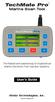 TechMate Pro Marine Scan Tool TM The fastest and easiest way to troubleshoot Marine Electronic Fuel Injection Systems. User s Guide Rinda Technologies, Inc. www.rinda.com . TechMate Pro Marine Scan Tool
Outboard Engine Supplement
 Outboard Engine Supplement Version 6 Software Rinda Technologies, Inc. www.rinda.com Outboard Engine Supplement Rinda Technologies Inc. 4563 N. Elston Ave. Chicago, IL 60630 USA Tel: (773) 736-6633 Fax:
1. SAFETY PRECAUTIONS AND WARNINGS
 Table of Contents 1. SAFETY PRECAUTIONS AND WARNINGS...1 2. INTRODUCTION...3 2.1 On Board Diagnostics (OBD)...3 2.2 Vehicles Covered...4 2.3 Diagnostic Trouble Codes (DTCs)...6 2.4 Location of the Data
Fault codes DM1. Industrial engines DC09, DC13, DC16. Marine engines DI09, DI13, DI16 INSTALLATION MANUAL. 03:10 Issue 5.0 en-gb 1
 Fault codes DM1 Industrial engines DC09, DC13, DC16 Marine engines DI09, DI13, DI16 03:10 Issue 5.0 en-gb 1 DM1...3 Abbreviations...3 Fault type identifier...3...4 03:10 Issue 5.0 en-gb 2 DM1 DM1 Fault
Signature and ISX CM870 Electronics
 Signature and ISX CM870 Electronics Cummins West Training Center System Description General Information The Signature and ISX CM870 engine control system is an electronically operated fuel control system
DIAGNOSIS SYSTEM (3S GTE and 5S FE)
 Diagnosis System (3SGTE and 5SFE) FI39 DIAGNOSIS SYSTEM (3SGTE and 5SFE) DESCRIPTION The ECM contains a builtin, selfdiagnosis system by which troubles with the engine signal network are detected and a
DTC P0125 Insufficient Coolant Temperature for Closed Loop Fuel Control
 EINE (5VZFE) DI195 DI8YY02 DTC P0125 Insufficient Coolant Temperature for Closed Loop Fuel Control CIRCUIT DESCRIPTION To obtain a high purification rate of the CO, HC and x components of the exhaust gas,
Emission Control Systems Warranties
 2004 Chevrolet TrailBlazer - 2WD Emission Control Systems Warranties This section outlines the emission warranties that General Motors provides for your vehicle in accordance with the U.S. Federal Clean
ENGINE DIAGNOSTICS & CONTROL
 ENGINE DIAGNOSTICS & CONTROL CONTROL SYSTEM WIRING DIAGRAM Page 1 Page 2 MONITORING SYSTEM AND CONTROL SYSTEM DEVICE RELATIONSHIP CHART : Applicable Component Input Battery Ignition switch A/C switch,
MERCRUISER HORN WARNING SYSTEMS
 Index All DTS 1.6 L 3.0 L 4.3 L 5.0 L 5.7 L 6.2 L Engine Model Years Starting SN Ending SN Fuel System Controller Page Sterndrive & Inboard 2006 current Any Current MPI PCM 555 10 100 Vazer 2007 current
6 & 12 Volt Battery and Systems Tester with 100 Amp Load
 6 & 12 Volt Battery and Systems Tester with 100 Amp Load Form No. 841-731 -000 DESCRIPTION This Load Tester tests 6 or 12 volt automotive-size lead-acid batteries under load. It will also test 6 or 12
Module 21 Fuel Injectors - Dual Point Injection (DPI)
 Module 21 Fuel Injectors - Dual Point Injection (DPI) Author: Grant Swaim E-mail: [email protected] URL: www.tech2tech.net Phone: (336) 632-9882 Fax: (336) 632-9688 Postal Address: Tech-2-Tech Website
BLUES CURING THE FUEL INJECTOR. In 1992, General Motors. BY JEFF MASTERMAN Armed with a pressure gauge, a good
 CURING THE FUEL INJECTOR BLUES In 1992, General Motors introduced a very unique fuel injection system on its 4.3-liter Vortec V6 truck engine. Dubbed Central Port Injection, or CPI, the system looked and
Service Manual Trucks
 Service Manual Trucks Group 36 Vehicle Electronic Control Unit (MID 144), Diagnostic Trouble Code (DTC), Guide From build date 1.2007 PV776-88951780 Foreword The descriptions and service procedures contained
Technical Service Information
 Technical Service Information COMPLAINT: CAUSE: 1996-20 DEFINITIONS When a VW/Audi vehicle is exhibiting a symptom or is in fail-safe, the technician, in many cases, is unable to communicate with the on-board
SAS light Check Engine Malfunction Indicator Lamp
 SAS light Check Engine Malfunction Indicator Lamp Here's how to do it: In car ECM Diagnostics/ECM Reset procedure: 1) Sit in the driver's seat. 2) Turn the ignition key to the ON position and wait three
Volvo Vehicle Communications Software Manual
 Volvo Vehicle Communications Software Manual August 2013 EAZ0025B47A Rev. C Trademarks Snap-on is a trademark of Snap-on Incorporated. All other marks are trademarks or registered trademarks of their respective
Diagnostics Scanner RAC-HP104
 Diagnostics Scanner RAC-HP104 Environmental Protection Waste electrical products should not be disposed of with household waste. Please recycle where facilities exist. Check with your local authority or
DESCRIPTION. DTC P0351 Ignition Coil "A" Primary / Secondary Circuit. DTC P0352 Ignition Coil "B" Primary / Secondary Circuit
 1 of 10 6/4/2012 10:38 PM Last Modified: 3-27-2012 6.4 C From: 201203 Model Year: 2013 Model: FR-S Doc ID: RM000000XH40PUX Title: FA20 ENGINE CONTROL: SFI SYSTEM: P0351-P0354: Ignition Coil "A" Primary
Reference Guide and Step-by-Step Installation Manual. Table of Contents
 Part #674 Revision Date: 6.7.07 Reference Guide and Step-by-Step Installation Manual Some adjustable features listed on the following pages are NOT applicable for all applications. The year, make, and
NISSAN FIGARO FAULT CODES AND DIAGNOSTICS
 NISSAN FIGARO FAULT CODES AND DIAGNOSTICS The Nissan Figaro uses an engine management system with the acronym ECCS you ll see it in large letters on the plenum box when you open the bonnet. It stands for
ON-Board Diagnostic Trouble Codes
 ON-Board Diagnostic Trouble Codes The list below contains standard diagnostic trouble codes (DTC s) that are used by some manufacturers to identify vehicle problems. The codes provide below are generic
AEROMOTIVE Part # 16302 INSTALLATION INSTRUCTIONS
 AEROMOTIVE Part # 16302 INSTALLATION INSTRUCTIONS CAUTION: Installation of this product requires detailed knowledge of automotive systems and repair procedures. We recommend that this installation be carried
Micro Tuner model S-JR PoD Common Rail Dodge Ram 5.9L, 24 Valve, Cummins Diesel Engine. Instruction Manual
 Micro Tuner model S-JR PoD Common Rail Dodge Ram 5.9L, 24 Valve, Cummins Diesel Engine Instruction Manual PLEASE READ THIS ENTIRE INSTRUCTION MANUAL BEFORE PROCEEDING www.madselectronics.com Rev. 5.08A
CAUTION: CAREFULLY READ INSTRUCTIONS BEFORE PROCEEDING. NOT LEGAL FOR SALE OR USE IN CALIFORNIA OR ON ANY POLLUTION CONTROLLED VEHICLES.
 Twin Tec Installation Instructions for Twin Cam Ignition CAUTION: CAREFULLY READ INSTRUCTIONS BEFORE PROCEEDING. T LEGAL FOR SALE OR USE IN CALIFORNIA OR ON ANY POLLUTION CONTROLLED VEHICLES. OVERVIEW
Important: Always perform the Diagnostic System Check - Vehicle prior to using this diagnostic procedure. P0106, P0107 P0107
 Page 1 of 5 DTC P0106 DTC Descriptor 2006 Pontiac GTO GTO (VIN V) Service Manual Document ID: 1417869 DTC P0106: Manifold Absolute Pressure (MAP) Sensor Diagnostic Fault Information Important: Always perform
E - THEORY/OPERATION
 E - THEORY/OPERATION 1995 Volvo 850 1995 ENGINE PERFORMANCE Volvo - Theory & Operation 850 INTRODUCTION This article covers basic description and operation of engine performance-related systems and components.
Evaporative emissions system
 just a test. Evaporative emissions system 20-48 Function description of EVAP canister system Depending upon the air pressure and ambient temperature, fuel vapor will form above the level of fuel in the
United States Air and Radiation EPA420-F-95-014 Environmental Protection December 1995 Agency
 United States Air and Radiation EPA420-F-95-014 Environmental Protection December 1995 Agency Office of Mobile Sources --------------------------------------------------------------------- EPA Environmental
Electronic Diesel Control EDC 16
 Service. Self-Study Programme 304 Electronic Diesel Control EDC 16 Design and Function The new EDC 16 engine management system from Bosch has its debut in the V10-TDI- and R5-TDI-engines. Increasing demands
Module 6 Engine Control Module (ECM)
 Module 6 Engine Control Module (ECM) Author: Grant Swaim E-mail: [email protected] URL: www.tech2tech.net Phone: (336) 632-9882 Fax: (336) 632-9688 Postal Address: Tech-2-Tech Website PO Box 18443 Greensboro,
The Aftertreatment System Technician's Guide has been revised.
 NUMBER: 2 ATS 07 S.M. REF.: Listed in Table 1 ENGINE: ATS DATE: April 2007 SUBJECT: UPDATES TO AFTERTREATMENT SYSTEM TROUBLESHOOTING PUBLICATION: 7SE63 The Aftertreatment System Technician's Guide has
TOYOTA ELECTRONIC TRANSMISSION CHECKS & DIAGNOSIS
 Checks and Adjustments The transmission requires regular maintenance intervals if it is to continue to operate without failure. As we discussed in previous sections, transmission fluid loses certain properties
AMS-1000 Multi-Channel Air Management System for Boost Control
 AMS-000 Multi-Channel Air Management System for Boost Control The terminal pin descriptions may also be viewed on screen. See Page 4 of manual for details. Clutch Input Shift Input Scramble Boost Input
GENERATOR START CONTROL MODULE - MINI (2 Wire to 3 Wire)
 FEATURES & APPLICATIONS Inexpensive 2 wire to 3 wire start controller for electric start high speed gas generators. Optimized for use with Outback Invertors. Supports three types of 3 wire generator control
Automotive Sensor Simulator. Automotive sensor simulator. Operating manual. AutoSim
 Automotive sensor simulator Operating manual AutoSim Contents Introduction.. page 3 Technical specifications.... page 4 Typical application of AutoSim simulator..... page 4 Device appearance... page 5
DTC P1271/78 FUEL PRESSURE REGULATOR CIRCUIT MALFUNCTION (OPEN/SHORT) DTC P1272/78 FUEL PRESSURE REGULATOR SYSTEM MALFUNCTION
 05 596 DIAGNOSTICS ECD SYSTEM (1KD FTV)(From August, 2004) DTC P1271/78 FUEL PRESSURE REGULATOR CIRCUIT MALFUNCTION (OPEN/SHORT) 05NJ6 01 DTC P1272/78 FUEL PRESSURE REGULATOR SYSTEM MALFUNCTION For more
ENGINE CONTROLS AND FUEL SYSTEMS
 ENGINE CONTROLS AND FUEL SYSTEMS SPRING 2005 FORD VEHICLE COMPUTER RELEARN PROCEDURES Performing repairs or service on any of the following may require you to initiate a computer relearn procedure in order
APPENDIX D PUBLIC AWARENESS INFORMATION
 APPENDIX D PUBLIC AWARENESS INFORMATION READINESS FAILURE FACT SHEET Beginning December 2004, New York will implement a new motor vehicle emission testing program in 53 of New York s upstate counties,
VOLVO PENTA 2+ 3 FACTORY PROTECTION PROGRAM. A New Generation of Customer Care for Today s New Technology Engines
 VOLVO PENTA 2+ 3 FACTORY PROTECTION PROGRAM A New Generation of Customer Care for Today s New Technology Engines A New Generation of Customer Care Volvo Penta provides a factory-backed, factory-administered
INTRODUCTION What is OBD?... 1 YOU CAN DO IT!... 2. SAFETY PRECAUTIONS Safety First!... 3
 G G M M Table of Contents Title Page No. INTRODUCTION What is OBD?..................................... 1 YOU CAN DO IT!....................................... 2 SAFETY PRECAUTIONS Safety First!......................................
Diagnostic Trouble Code (DTC) Charts
 Diagnostic Trouble Code (DTC) Charts Note: Before proceeding to the Pinpoint Test, refer to the Diagnostic Trouble Code (DTC) Descriptions for additional information to assist in diagnosis. 6.0L Diesel
MTX-D, Oil Temperature/Pressure Gauge
 MTX-D, Oil Temperature/Pressure Gauge 1 Mounting and Sensor Installation... 3 1.1 Mounting the Gauge... 3 1.2 Oil Temp Sensor... 3 1.3 Oil Pressure Sensor... 3 2 Wiring... 3 2.1 Main Gauge Wiring... 4
Mastertech Diagnostic Software Frequently Asked Questions
 Mastertech Diagnostic Software Frequently Asked Questions Version 1.8 02 February 2010 Table of Contents MDS USER INTERFACE - OVERVIEW... 2 HARDWARE AND O/S REQUIREMENTS... 2 HARDWARE AND O/S REQUIREMENTS...
Oregon Fuel Injection
 FORD POWERSTROKE DIAGNOSTICS 1994-2003 This guide is not a substitute for the proper diagnostic manuals and a scan tool. It is intended to be used with the proper tools to help diagnose and solve drivability
AUTOMATIC TRANSMISSION IN-CAR DIAGNOSTICS
 Learning Guide CHASSIS ELECTRICAL SPECIALIST AUTOMATIC TRANSMISSION IN-CAR DIAGNOSTICS COURSE NUMBER: C050-01 Notice Due to the wide range of vehicles makes and models, the information given during the
24.2L M.A.N. V12 Engine Module
 24.2L M.A.N. V12 Engine Module MANV1224 INSTALLATION INSTRUCTIONS For 24.2L M.A.N. V12 Engines V12 M.A.N. Engine Instructions Module ECM s (male and female, connect to the same ECM) ECM s (male and female,
RA Automotive. Silver Scan-Tool for the testing of OBD functionality. Peter Stoß Senior Manager RA Automotive. Mai 2008
 RA Automotive Silver Scan-Tool for the testing of OBD functionality Peter Stoß Senior Manager RA Automotive RA Consulting GmbH Zeiloch 6a D-76646 Bruchsal Tel +49 (0)7251 3862-0 Fax +49 (0)7251 3862-11
Questions and Answers
 Emissions Warranties for 1995 and Newer Light-duty Cars and Trucks under 8,500 Pounds Gross Vehicle Weight Rating (GVWR) Federally required emission control warranties protect you, the vehicle owner, from
RIGtalk. Revision 5. Owner s Manual 2012.
 RIGtalk Revision 5 Owner s Manual 2012 www.westmountainradio.com 1020 Spring City Drive Waukesha, WI 53186 262-522-6503 [email protected] 2012 West Mountain Radio, All rights reserved. All trademarks
Single Station Remote Alarm
 ADI 5106G Certified ISO 9001:2000 Single Station Remote Alarm 529 5106-01-120 529 5106-01-220 INSTALLATION AND OPERATING INSTRUCTIONS Carefully Read These Instructions Before Operating Controls Corporation
Note: This information obtained from internet sources and not verified- use at your own risk!!!!
 Cummins Engine Diagnostic Fault Codes for 2003 and later engines (generally for 2004 and later Alpines; see page 13 for earlier engine diagnostic codes): Note: This information obtained from internet sources
THERMO KING TRUCK & TRAILER UNIT ALARM CODES THIS DOCUMENT SHOWS ALL CURRENT ALARM CODES FOR THERMO KING TRUCK AND TRAILER UNITS.
 THERMO KING TRUCK & TRAILER UNIT ALARM CODES THIS DOCUMENT SHOWS ALL CURRENT ALARM CODES FOR THERMO KING TRUCK AND TRAILER UNITS. NOT ALL CODES ARE POSSIBLE ON ANY INDIVIDUAL UNIT. IF THE ALARM APPLIES
LAND ROVER FUEL INJECTION SYSTEMS
 LAND ROVER FUEL INJECTION SYSTEMS INTRODUCTION Land Rover vehicles use one of two types of electronically controlled fuel injection systems: Multiport Fuel Injection (MFI) or Sequential Multiport Fuel
Service Information Trucks
 Service Information Trucks Group 28 Release2 Engine Control Module (ECM), Diagnostic Trouble Code (DTC), Guide 2010 Emissions CHU CXU GU TD 89047073 Foreword The descriptions and service procedures contained
MTX-D Ethanol Content and Fuel Temperature Gauge User Manual
 MTX-D Ethanol Content and Fuel Temperature Gauge User Manual P/N 3912 kit does not include flex fuel sensor. The ECF-1 is compatible with GM P/Ns 13577429 and 13577379 1. Installation... 2 1.1 Gauge Mounting...
DTC Database (OBD-II Trouble Codes)
 Auto Consulting S.a.s di Cofano A. & C. Attrezzature diagnostiche Elaborazioni elettroniche Formazione tecnica DTC Database (OBD-II Trouble Codes) Definitions for generic powertrain diagnostic trouble
2GB MP3 Player USER GUIDE
 DO NOT FORMAT UNIT under FAT. 2GB MP3 Player USER GUIDE Jazwares, Inc. 2010 CONTENTS Please read the instructions along with the MP3 Player carefully before you use it, so that you can operate it conveniently.
A/C-HEATER SYSTEM - AUTOMATIC
 A/C-HEATER SYSTEM - AUTOMATIC 1995 Volvo 850 1995-96 Auto. A/C-Heater Systems Volvo 850 * PLEASE READ THIS FIRST * WARNING: To avoid injury from accidental air bag deployment, read and carefully follow
Throttle Body Fuel Injection
 Throttle Body Fuel Injection Initial Calibration of the TBI Disclaimer The author of this presentation assumes NO responsibility for information provided causing the owner to modify or alter their motorhome
Unit 8. Conversion Systems
 Unit 8. Conversion Systems Objectives: After completing this unit the students should be able to: 1. Describe the Basic conversion systems 2. Describe main conversion kit types. 3. Describe how the CNG
Diagnostic Fault Codes For Cummins Engines
 Section - Diagnostic Fault Codes For Cummins Engines Applies to Engine Models T, T, QSL T, QSM, QS, QSK9, QSK, QST, QSK//8 Note: These fault codes are current at date of publication. Always refer to engine
Global OBD Vehicle Communication Software Manual
 Global OBD Vehicle Communication Software Manual August 2013 EAZ0025B43C Rev. A Trademarks Snap-on is a trademark of Snap-on Incorporated. All other marks are trademarks or registered trademarks of their
PL-1, Pocket Logger 11-0135B
 PL-1, Pocket Logger 1 PL-1... 2 2 Wiring... 3 2.1.1 Single Innovate Device Relay Wiring Instructions... 3 3 Mounting... 4 4 Connecting the PL-1 to the MTS serial chain... 4 5 Recording... 5 6 LogWorks...
Electronic Power Control
 Service. Self-Study Programme 210 Electronic Power Control Design and Function With the Electronic Power Control system, the throttle valve is actuated only by an electric motor. This eliminates the need
Troubleshooting. Appendix B. B.1 Chrysler Communications Problems. B.1.1 Common Vehicle Problems. Engine (Except LH Models)
 Troubleshooting This chapter contains manufacturer-specific information for troubleshooting problems with scan tool-to-vehicle communications. For general troubleshooting information, see the user s manual
12 Volt 30 Amp Digital Solar Charge Controller
 12 Volt 30 Amp Digital Solar Charge Controller User s Manual WARNING Read carefully and understand all INSTRUCTIONS before operating. Failure to follow the safety rules and other basic safety precautions
DTC P0401, DTC P1491,
 Service Bulletin 05-026 Applies To: 1999 02 Odyssey ALL 2003 Odyssey From VIN 2HKRL18..3H500001 thru 2HKRL18..3H504511 and from VIN 5FNRL18..3B000001 thru 5FNRL18..3B067057 2003 Pilot From VIN 2HKYF18..3H500001
5.0L SEFI EEC IV TESTING
 5.0L SEFI EEC IV TESTING 1987 Lincoln Mark VII 1987 Computerized Engine Controls FORD MOTOR CO. EEC IV DIAGNOSIS & TESTING 5.0L SEFI DIAGNOSIS & TESTING DIAGNOSTIC PROCEDURE This diagnostic procedure is
Scan Tool Test Procedures Steve Zack - SPX. Scan Tool Test Procedures
 Scan Tool Test Procedures Steve Zack - SPX Scan Tool Test Procedures Steve Zack - SPX 1 PCM Input Tests While performing many of these tests, to obtain the fastest possible Datastream refresh rate, please
Powertrain DTC Summaries EOBD
 Powertrain DTC Summaries Quick Reference Diagnostic Guide Jaguar XJ Range V6, V8 N/A and V8 SC 2003.5 Model Year Refer to pages 2 9 for important information regarding the use of Powertrain DTC Summaries.
BMW Multi Tool User Manual
 X-Horse Electronics Co., Ltd. Table of Contents 1. Safety Precautions and Warnings... 3 2. General Information... 4 3. Hardware Overview... 5 3.1. Tool Description... 5 3.2. Specifications... 6 3.3. System
03-07 Ford 6.0 Powerstroke Installation Instructions and Manual P/N: 10401
 03-07 Ford 6.0 Powerstroke Installation Instructions and Manual P/N: 10401 2007 Edge Products Incorporated All rights reserved. Edge Products 1080 South Depot Dr. Ogden, UT 84404 1-888-360-3343 www.edgeproducts.com
BC-5000 OPERATIONS MANUAL BATTERY CAPACITY TESTER COFKO LLC.
 BC-5000 BATTERY CAPACITY TESTER OPERATIONS MANUAL COFKO LLC. COPYRIGHT 2010 1 UNPACKING As you unpack your new BC-5000 battery capacity tester, inspect the tester for signs of shipping damage. If shipping
USER MANUAL WARNING! CONTENTS MODEL 1 SPECIFICATIONS READ ALL INSTRUCTIONS BEFORE PROCEEDING. Non-Programmable Single Stage Heat/Cool Thermostat
 Builder MODEL 1010 Series Non-Programmable Single Stage Heat/Cool Thermostat USER MANUAL Compatible with low voltage single stage gas, oil or electric heating or cooling systems, including single stage
Vehicle Engine Management Systems
 Unit 11: Vehicle Engine Management Systems NQF level 3: Guided learning hours: 60 BTEC National Unit abstract Modern motor vehicles continue to make use of the rapid advances in electronics technology
Jing Sun Department of Naval Architecture and Marine Engineering University of Michigan Ann Arbor, MI USA
 Automotive Powertrain Controls: Fundamentals and Frontiers Jing Sun Department of Naval Architecture and Marine Engineering University of Michigan Ann Arbor, MI USA Julie Buckland Research & Advanced Engineering
The Aftertreatment System Technician's Guide has been revised.
 NUMBER: 1 ATS 07 S.M. REF.: Listed in Table 1 ENGINE: ATS DATE: April 2007 SUBJECT: CHANGES IN TROUBLESHOOTING PUBLICATION: 7SE63 The Aftertreatment System Technician's Guide has been revised. MANUAL REFERENCE
Before installing unit, please carefully look over Installation Guide.
 Thank you for purchasing the BassMaxx II. We are confident this product will help increase your trolling motor battery life, allowing you to spend more time fishing. We are proud of this patented system.
CA-125 Owner's Manual
 Remote Vehicle Control System CA-125 Owner's Manual Vehicle Security System With Remote Keyless Entry IMPORTANT NOTE: The operation of the Security and Convenience System as described in this manual is
Quick Start Guide RIVA/Athena Sea-Doo ECU
 Quick Start Guide RIVA/Athena Sea-Doo ECU PART# - RS11891-ECU-DC APPLICATION(S): Sea-Doo 260/255/215hp icontrol Models RIVA/Athena ECU Manager Web Site: www.rivaathena.com NOTE: YOU MUST PERFORM PHYSICAL
WARRANTY. Overview. Important Information You Should Know
 Overview It s important that Sales Consultants explain all applicable warranties to his/her customers. A thorough explanation of all applicable warranty coverage at the time of sale helps provide the owner
Introduction to Electronic Signals
 Introduction to Electronic Signals Oscilloscope An oscilloscope displays voltage changes over time. Use an oscilloscope to view analog and digital signals when required during circuit diagnosis. Fig. 6-01
Workshop Repair Manual
 Workshop Repair Manual N.T. 2863A All types Basic manual: M.R. 302 - M.R. 307 - M.R. 311 - M.R. 312 M.R. 291 - M.R. 293 77 11 196 407 OCTOBER 1997 Edition Anglaise "The repair methods given by the manufacturer
ABOUT THE DIAGNOSTIC TOOL
 Table of Contents INTRODUCTION WHAT IS OBD?... 1 YOU CAN DO IT!... 2 SAFETY PRECAUTIONS SAFETY FIRST!... 3 ABOUT THE DIAGNOSTIC TOOL VEHICLES COVERED... 5 BATTERY REPLACEMENT... 6 DIAGNOSTIC TOOL CONTROLS
PREPARATION FOR TESTING
 Table of Contents INTRODUCTION WHAT IS OBD?... 1 YOU CAN DO IT!... 2 SAFETY PRECAUTIONS SAFETY FIRST!... 3 ABOUT THE SCAN TOOL VEHICLES COVERED... 5 BATTERY REPLACEMENT... 6 SCAN TOOL CONTROLS CONTROLS
BOSCH D-JETRONIC Volkswagen: Type 3 & 4
 BOSCH D-JETRONIC Volkswagen: Type 3 & 4 MANIFOLD PRESSURE CONTROL SYSTEM (MPC) DESCRIPTION The Bosch D-Jetronic electronic fuel injection system is composed of 3 major subsystems: the air intake system,
INSTRUCTIONS FOR MAGNUM DS TRIP UNIT TESTING USING TEST KIT SYLES 140D481G02R, 140D481G02RR, 140D481G03 AND 140D481G04
 I.L. 32-693 A INSTRUCTIONS FOR MAGNUM DS TRIP UNIT TESTING USING TEST KIT SYLES 140D481G02R, 140D481G02RR, 140D481G03 AND 140D481G04 DANGER DO NOT ATTEMPT TO INSTALL OR PERFORM MAINTE- NANCE ON EQUIPMENT
INSTRUMENT PANEL. 1995 Volvo 850 DESCRIPTION & OPERATION. 1995-96 ACCESSORIES & EQUIPMENT Volvo Instrument Panels
 INSTRUMENT PANEL 1995 Volvo 850 1995-96 ACCESSORIES & EQUIPMENT Volvo Instrument Panels 850 WARNING: When working around steering column and before performing repairs, disconnect and shield battery ground
QUICK START GUIDE 199R10546
 QUICK START GUIDE 199R10546 1.0 Overview This contains detailed information on how to use Holley EFI software and perform tuning that is included within the software itself. Once you load the software,
DTC P0440 Evaporative Emission Control System Malfunction. DTC P0442 Evaporative Emission Control System Leak Detected (Small Leak)
 EINE (5VZFE) DI225 DI9TT01 DTC P0440 Evaporative Emission Control System Malfunction DTC P0442 Evaporative Emission Control System Leak Detected (Small Leak) CIRCUIT DESCRIPTION The vapor pressure sensor,
Air conditioning, electrical testing
 just a test. Air conditioning, electrical testing 01-253 Wire and component test using VAG1598 A test box Special tools and equipment VAG 1598 A test box and VAG 1598/11 adapter cable and VAG 1598/12 VAG1526
User Guide for the Wireless Headset (HS-11W) 9235346 Issue 1
 User Guide for the Wireless Headset (HS-11W) 9235346 Issue 1 DECLARATION OF CONFORMITY We, NOKIA CORPORATION declare under our sole responsibility that the product HS-11W is in conformity with the provisions
INSTALLATION AND OPERATING INSTRUCTIONS
 ddcwp_manual_gb_revisions.ai 10/23/06 Page 1 Date: Station 1 2 3 4 5 6 7 8 CUSTOM WATERING PLAN 3 Program Controller Description Program A Program B Program C Duration Duration Duration DDC WP Series Waterproof
ECM Diagnosis. Section 11. Learning Objectives:
 Section 11 ECM Diagnosis Learning Objectives: 1. Diagnose ECM specific Diagnostic Trouble Codes. 2 Troubleshooting the diagnostic circuit. 3. Reprogramming the ECU. Engine Control Systems II - Course 874
INSTALLATION INSTRUCTIONS BOOST CONTROLLER. Pro Control Input (Optional) Tach. Signal. Speed. Gray. Signal. Green Blue. Orange.
 2650-1706-00 INSTALLATION INSTRUCTIONS BOOST CONTROLLER WARNING! The installation of the Auto Meter Boost Controller is recommended only for experienced technicians. This product may damage your engine
Cylinder Leak- Down Tester
 Cylinder Leak- Down Tester Item 94190 INSTRUCTIONS AND PRECAUTIONS Visit our website at: http://www.harborfreight.com When unpacking, make sure that the product is intact and undamaged. If any parts are
DTC P0351 Ignition Coil "A" Primary / Secondary Circuit. DTC P0352 Ignition Coil "B" Primary / Secondary Circuit
 208 2UZ-FE EINE CONTROL SYSTEM SFI SYSTEM DTC P05 Ignition Coil "A" Primary / Secondary Circuit DTC P052 Ignition Coil "B" Primary / Secondary Circuit DTC P05 Ignition Coil "C" Primary / Secondary Circuit
G-100/200 Operation & Installation
 G-100/200 Operation & Installation 2 Contents 7 Installation 15 Getting Started 16 GPS Mode Setup 18 Wheel Sensor Mode Setup 20 Fuel Calibration 23 Basic Operation 24 Telemetery Screen 27 Entering a Distance