
Installation & Starting Guide
|
|
|
- Arleen Page
- 9 years ago
- Views:
Transcription
1 WiFi Video Doorbell Installation & Starting Guide

2 SkyBell works with the majority of existing home power standards around the world and with 95% of existing wired doorbell wires. SkyBell is designed to work with the power that is connected to your current doorbell and is connected to a lowvoltage transformer, no matter if you have a 110/120 VAC or 220/230/240 VAC power standard. SkyBell can only be attached to a low voltage transformer (8-36 VAC or 12 VDC) and not directly to primary power (110/120 VAC and 220/230/240 VAC). Questions? Want to see a video? Visit 1 WARNING Risk of electric shock. Do not attempt to install SkyBell in wet conditions. Do not proceed if you, SkyBell or the area around your door is wet. SkyBell can only be attached to a low voltage transformer (8-36 VAC or 12 VDC) and not directly to primary power (110/120 VAC and 220/230/240 VAC).
3 SkyBell Components Infrared LED (Night Vision) Camera Camera Positioning Hole LED Indicator Motion Sensor Button Set Screw Microphone Speaker Advanced Components Motion sensors detect a visitor. LED button tells you if SkyBell is disconnected from Wi-Fi. Infrared technology lets you see at night. 2

4 SkyBell Doorbell Device Contents Mounting Plate Special Locking Tool Wall Screws (4) Screw Anchors (4) Wire Connectors (2) Tools You May Need for Installation: Pliers or crimpers Power Drill or Screw Driver Outdoor Adhesive Wire Strippers 3

5 Installation Guide WARNING Risk of electric shock. Do not attempt to install SkyBell in wet conditions. Part 1 Wi-Fi Test Before you begin the installation process, it is a good idea to confirm you have Wi-Fi signal range at your door. To test, simply place your smartphone where you plan to install SkyBell. If you have a Wi-Fi connection on your phone, then SkyBell will also have Wi- Fi connection 99% of the time. If the location is out of range, you will need to install a Wi-Fi repeater or amplifier. Part 2 - Installation 1. To begin, press your current doorbell button to make sure your existing doorbell chime works. (Skip if you do not have a home doorbell chime). 2. It is recommended that you turn of power to your doorbell by switching off your circuit break. 4

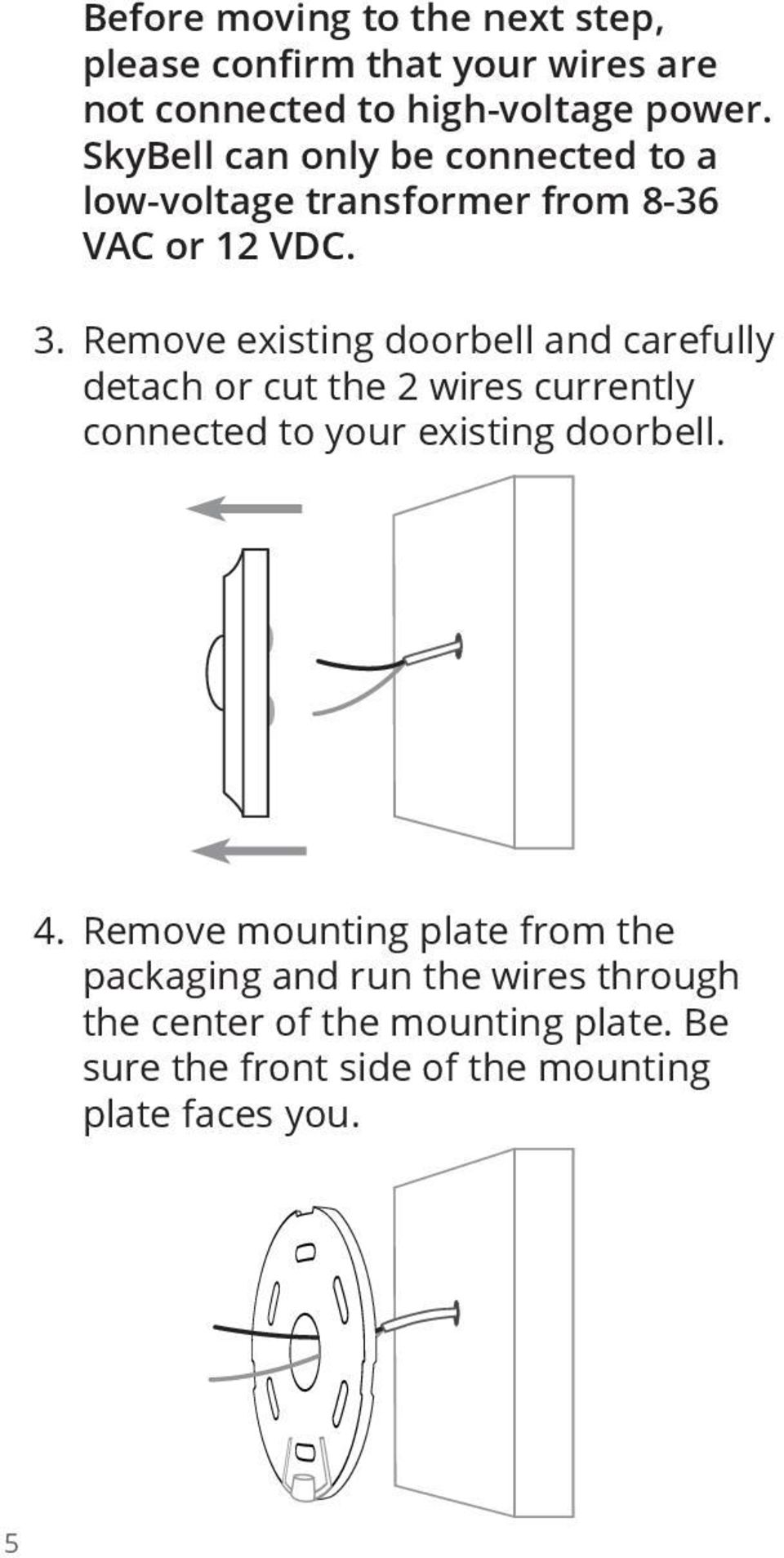
6 Before moving to the next step, please confirm that your wires are not connected to high-voltage power. SkyBell can only be connected to a low-voltage transformer from 8-36 VAC or 12 VDC. 3. Remove existing doorbell and carefully detach or cut the 2 wires currently connected to your existing doorbell. 4. Remove mounting plate from the packaging and run the wires through the center of the mounting plate. Be sure the front side of the mounting plate faces you. 5
7 5. Secure the mounting plate to the wall with the 4 screws. If you have stone, brick or drywall, drill holes with the correct drill bit for your surface and use the anchors to secure the screws. *Correct Drill Bit Sizes: Masonry: 3/16 Wood: 9/64 Steel: 9/64 Instead of drilling the mounting plate into place, you may use an outdoor adhesive to glue the mounting plate into place. ** Caution: Do not connect SkyBell directly to high voltage wires (120/130V or 220/230/240V) from your primary power system. SkyBell can only be attached to low voltage wires from a transformer (8 to 36 VAC or 12 VDC). ** 6

8 6. Use your fingers to rotate the camera into the correct position. OR insert a screw driver into the square hole on the back of the camera and rotate the camera into desired position. or 7. Next, strip the ends of your home s wires and the ends of the SkyBell wires. 8. Twist the ends of one SkyBell wire and one home doorbell wire as shown below. It does not matter which wires you use as long as you use one from the house and one from SkyBell. 7

9 9. Next, insert the joined wire into a blue connector and push until the wire reaches the end of the connector. 10. With a pair of pliers, clamp down on the connector with some force to join the wires together. 11. Repeat with the other wire. You can connect the wires from your SkyBell to either wire coming from your wall. 12. Turn your power back on. 13. Next, check SkyBell to confirm that the LED light is on. The device LED light will slowly blink red if the battery is charging. The light will turn a solid red when the battery is full. When the device LED is a solid red, the device is ready for the Syncing Process. This normally takes less than 2 minutes but can take up to 15 minutes for the battery to charge. 14. Once you see the solid red light, press the SkyBell button to confirm that your current home doorbell chime works correctly. 15. Next, gently place the SkyBell device over the mounting plate. Make sure 8
10 that the small video camera is on top and the main button with LED ring is on the bottom. 16. Insert the special locking tool into the hole at the bottom-center of the device. Turn the tool to the left three full rotations. This will lock the device. Do not over turn. Be sure that the screw is not exposed beyond the bottom of the device. x3 17. Your SkyBell device is now properly installed. Please allow the device s battery to charge for minutes before moving to Section 2 Syncing SkyBell. 9

11 Syncing SkyBell to Wi-Fi and Mobile Device What You Need For this section of the setup process, you will need: 1. An ios or Android device 2. Name of your Wi-Fi network 3. Wi-Fi network password (if necessary) 4. SkyBell Device ID Label Preparation 1. Before you get started, allow SkyBell to power up for 10 minutes. During this time the LED light should be red or slow blinking red. 2. Also, be sure that your Wi-Fi router has 2.4ghz frequency band or is a dual-band router with 2.4ghz and 5ghz. If you have a dual-band router, you ll want to sync your mobile device to the 2.4ghz network before you sync SkyBell. 3. *SkyBell cannot connect to 5ghz. Instructions 1. Download the app from the itunes App Store or Google Play Store. 2. Search SkyBell and select our free app. 10

12 3. Launch the app. 4. On the home screen, tap Register and create an account by entering your information and completing the account creation process. 5. Then log out by tapping the settings icon and then tapping Sign Out in the top right corner. 6. Next, sign back into the account with your new credentials. The Syncing Process 1. Before syncing the device, be sure that your mobile device is connected to a 2.4ghz wireless network and not a 5.0ghz network. 2. From the home screen in the app, tap the link that says Add device. Follow the screens that guide you through the syncing process. You will need your SkyBell Device ID and Wi-Fi Password. Be sure to put the device into Sync Mode by hitting and holding the main SkyBell button until the LED light starts blinking. 11 A. If the setup is successful: a. The SkyBell LED blinking red light will turn into a blinking green light.

13 b. A blinking green light means SkyBell device is connecting to server and syncing your account. c. The LED light will turn solid green when it is ready for use. (On average this takes a few minutes but can take up to 15 minutes) B. If the setup is unsuccessful, please: a. Restart the Syncing Process by first confirming that the SkyBell light is blinking red. If it is not, then press and hold the main SkyBell button for 20 seconds until the light is blinking red. b. In the app, go back to the home screen in the app and tap Add Device c. Enter the Wi-Fi information and the SkyBell Device ID again. d. *Be sure you accurately enter your Wi-Fi Password and the SkyBell Device ID. Wi-Fi passwords can be case sensitive. 3. Once your setup is successful, it may take up to 15 minutes for the device to connect to the server and for your account to be created. 4. When the SkyBell LED is a solid green light, press the SkyBell device button 12

14 13 and answer the call to confirm it is working properly. 5. If you need to adjust the camera, place the security tool into the small hole below the camera. Rotate the tool to position the camera with your finger and the security tool. 6. In the app, your new SkyBell device will appear in the home screen of the app. You can tap that device to adjust its individual settings. *Red Light - If the LED light is a solid red at any time after a successful sync, this means the device does not have WiFi connection and/or internet connection. Please visit to troubleshoot. LED Light Key 1. Red (Solid) = Device has power but no Wi-Fi or internet connection 2. Red (Blinking Fast) = Device is in setup mode 3. Red (Blinking Slow) = Device has direct power and battery is charging 4. Green (Solid) = Device has power, Wi-Fi and server connection (normal) 5. Green (Blinking Fast) = Device has power and Wi-Fi but no server/internet connection 6. Green (Blinking Slow) = Device has power and Wi-Fi but is connecting to server

15 SkyBell Product Information Guide This Important Product Information Guide contains safety and handling, regulatory, and warranty information for your SkyBell. This document is provided as is. SkyBell Technologies, Inc. ( SBT, us, we, or our ) assume no responsibility for any typographical, technical or other inaccuracies in this document. SBT reserves the right to periodically change information that is contained in this document. However, SBT makes no commitment to provide any such changes, updates, enhancements or other additions to this document to you in a timely manner or at all. Visit the SkyBell Web site ( for current updates and information concerning the use and operation of SBT Products. To avoid injury, read all operating instructions and the following safety information before using your SkyBell Wi-Fi video doorbell. For detailed operating instructions, read the entire guide below or by visiting Important Safety and Handling Information Warning: Failure to follow these safety instructions could result in fire, electric shock, or other injury or damage to the SkyBell Product or other property. 14

16 15 Your SkyBell. The SkyBell Wi-Fi video doorbell was built to withstand the wear and tear of a traditional doorbell. Do not disassemble, open, crush, bend, deform, puncture, shred, microwave, incinerate, paint or insert foreign objects into the SkyBell. Do not use or attempt to install your SkyBell if it has been damaged. Water and Wet Locations. Your SkyBell Wi- Fi video doorbell is weather resistant but not waterproof. Take care not to spill any food or liquid on the SkyBell especially before it s installed. Try to install your SkyBell in a dry location, protected from adverse weather conditions. DO NOT ATTEMPT TO INSTALL YOUR SKYBELL IF YOU OR THE DWELLING ONTO WHICH YOU ARE ATTEMTPING TO INSTALL THE SKYBELL, ARE WET. USE THE CIRCUIT BREAKER, TURN OFF THE POWER TO THE DWELLING PRIOR TO INSTALLING THE SKYBELL WI-FI VIDEO DOORBELL. Repairing or Modifying a SkyBell. Never attempt to repair or modify your SkyBell. Doing so will automatically void your warranty. Child Hazards. Keep the SkyBell Wi-Fi video doorbell and its accessories out of the reach of small children. Keeping SkyBell Within Acceptable Temperatures. SkyBell is designed to be operated in temperatures between -40 degrees and 71 degrees C (-40 degrees to 160 degrees F). Low-or high-temperature conditions might cause the Device to stop working properly.

17 FCC WARNING! EXPOSURE TO RADIO FREQUENCY ENERGY. THIS DEVICE COMPLIES WITH PART 15 OF THE FCC RULES. OPERATION IS SUBJECT TO THE FOLLOWING 2 CONDITIONS: 1) THE DEVICE MAY NOT CAUSE HARMFUL INTERFERENCE, AND 2) THE DEVICE MUST ACCEPT ANY INTERFERENCE RECEIVED, INCLUDING INTERFERENCE THAT MAY CAUSE UNDESIRED INTERRUPTION. FOR PRODUCT AVAILABLE IN THE USA/ CANADA MARKET, ONLY CHANNEL 1~11 CAN BE OPERATED. SELECTION OF OTHER CHANNELS IS NOT POSSIBLE. THIS DEVICE AND ITS ANTENNA(S) MUST NOT BE CO-LOCATED OR OPERATED IN CONJUNCTION WITH ANY OTHER ANTENNA OR TRANSMITTER. FCC RADIATION EXPOSURE STATEMENT: THIS EQUIPMENT COMPLIES WITH FCC RADIATION EXPOSURE LIMITS SET FORTH FOR AN UNCONTROLLED ENVIRONMENT. THIS EQUIPMENT SHOULD BE INSTALLED AND OPERATED WITH A MINIMUM DISTANCE OF 20CM BETWEEN THE RADIATOR AND YOUR BODY. ALL CABLES USED TO CONNECT PERIPHERALS MUST BE SHIELDED AND GROUNDED. OPERATION WITH CABLES CONNECTED TO PERIPHERALS THAT ARE NOT SHIELDED AND GROUNDED MAY RESULT IN INTERFERENCE TO RADIO AND TELEVISION RECEPTION. SkyBell Limited Warranty 16

18 Subject to the terms and conditions of this Limited Warranty, SBT, warrants to you only (the original purchaser), that under normal use, the SkyBell device (the Product ) will substantially conform with the specifications listed on our website ( and be free of reproducible defects that eliminate the functionality or successful operation of a feature critical to the primary functionality or successful operation of the Product for a period of TWELVE (12) MONTHS starting as of the date of your purchase of the Product (the Warranty Period ). Exclusive Remedy During the Warranty Period, SBT will, at its sole option, repair or replace any Product or parts of a Product that fail in normal use. Such repairs or replacement will be made at no charge to the customer for parts or labor, provided that the customer shall be responsible any shipping charges. SBT retains the exclusive right to replace the Product with a new or refurbished like new Product in its sole discretion. A replacement Product or part assumes the remaining warranty of the original Product or ninety (90) days from the date of replacement or repair, whichever provides longer coverage for you. When a Product or part is exchanged, any replacement item becomes your property and the replaced item becomes SBT property. SUCH REMEDY SHALL BE YOUR SOLE AND EXCLUSIVE REMEDY FOR ANY BREACH OF WARRANTY. 17

19 There is no warranty of any kind for any defects discovered after the Warranty Period has lapsed. After the Warranty Period has expired, SBT at its sole and complete discretion may offer you a replacement Product or repair of your Product in exchange for a fee to be determined at SBT s discretion. No Other Warranties THE WARRANTIES AND REMEDIES CONTAINED HEREIN ARE EXCLUSIVE AND IN LIEU OF ALL OTHER WARRANTIES EXPRESSED, IMPLIED, OR STATUTORY, INCLUDING ANY LIABILITY ARISING UNDER ANY WARRANTY OF MERCHANTABILITY OR FITNESS FOR A PARTICULAR PURPOSE, STATUTORY OR OTHERWISE. THIS WARRANTY GIVES YOU SPECIFIC LEGAL RIGHTS, WHICH MAY VARY FROM STATE TO STATE. THE EXPRESS WARRANTY STATED HEREIN IS THE ONLY EXPRESS WARRANTY MADE TO YOU AND IS PROVIDED IN LIEU OF ALL OTHER EXPRESS OR IMPLIED WARRANTIES AND CONDITIONS (IF ANY) INCLUDING ANY CREATED BY ANY OTHER DOCUMENTATION OR PACKAGING. NO OTHER WARRANTIES OR CONDITIONS ARE MADE WITH RESPECT TO THE PRODUCT OR THE WARRANTY SERVICES BY ANY PERSON, INCLUDING BUT NOT LIMITED TO SBT AND ITS SUPPLIERS. NO INFORMATION (ORAL OR WRITTEN) OR SUGGESTIONS GIVEN BY SBT, ITS AGENTS OR SUPPLIERS, OR ITS OR THEIR EMPLOYEES, SHALL CREATE A WARRANTY OR CONDITION OR EXPAND THE SCOPE OF THIS LIMITED WARRANTY. ALSO, THERE IS 18

20 19 NO WARRANTY OR CONDITION OF TITLE, QUIET ENJOYMENT, OR NON-INFRINGEMENT IN THE PRODUCT. YOU MAY HAVE GREATER RIGHTS EXISTING UNDER LEGISLATION IN YOUR JURISDICTION. WHERE SUCH LAWS PROHIBIT ANY TERM OF THIS LIMITED WARRANTY, IT SHALL BE NULL AND VOID, BUT THE REMAINDER OF THE LIMITED WARRANTY SHALL REMAIN IN FULL FORCE AND EFFECT. Exclusion of Consequential, Incidental, and Certain Other Damages, and Limitation of Liability TO THE FULL EXTENT ALLOWED BY LAW, SBT IS NOT LIABLE FOR ANY: (i) CONSEQUENTIAL OR INCIDENTAL DAMAGES; (ii) DAMAGES OR LOSS OF ANY NATURE WHATSOEVER RELATING TO LOST PROFITS, LOSS OF OR DAMAGE TO PERSONAL PROPERTY, LOSS OF DATA OR PRIVACY OR CONFIDENTIALITY, ANY INABILITY TO USE ALL OR PART OF THE PRODUCT, PERSONAL INJURY, OR ANY FAILURE TO MEET ANY DUTY (INCLUDING BUT NOT LIMITED TO ANY LACK OF NEGLIGENCE OR OF WORKMANLIKE EFFORT); OR (iii) INDIRECT, SPECIAL, OR PUNITIVE DAMAGES ARISING OUT OF RELATING IN ANY WAY TO THE SKYBELL PRODUCT. SBT S CUMULATIVE LIABILITY, WHETHER FOR BREACH OF CONTRACT, WARRANTY, NEGLIGENCE, STRICT LIABILITY IN TORT, INDEMNIFICATION, CONTRIBUTION,

21 OR OTHERWISE, SHALL BE LIMITED TO THE DIRECT DAMAGES RECOVERABLE UNDER LAW, BUT NOT TO EXCEED THE PURCHASE PRICE FOR THE SKYBELL WI-FI VIDEO DOORBELL. YOU HEREBY RELEASE SBT, ITS MANUFACTURERS, SERVICE PROVIDERS, LICENSORS AND EACH OF THEIR RESPECTIVE AFFILIATES, FROM ANY AND ALL OBLIGATIONS, LIABILITIES, AND CLAIMS IN EXCESS OF THIS LIMITATION. SBT IS ALSO NOT LIABLE FOR ANY COSTS OR DAMAGES ARISING FROM OR RELATED TO YOUR BREACH OF THIS AGREEMENT. SBT, ITS MANUFACTURERS, SERVICE PROVIDERS, LICENSORS AND EACH OF THEIR RESPECTIVE AFFILIATES, DISCLAIM ANY REPRESENTATION THAT IT WILL BE ABLE TO REPAIR ANY PRODUCT UNDER THIS LIMITED WARRANTY OR MAKE A PRODUCT EXCHANGE WITHOUT RISK TO OR LOSS OF PROGRAMS OR DATA. ALL CLAIMS BY YOU, WHETHER IN TORT, CONTRACT, STRICT LIABILITY OR OTHERWISE, MUST BE BROUGHT WITHIN TWO YEARS FROM THE DATE THE CAUSE OF ACTION ACCRUES. THIS LIMITATION OF LIABILITY CONSTITUTES AN ESSENTIAL PART OF THIS AGREEMENT. THE FOREGOING APPLIES EVEN IF SBT OR ANY SUPPLIER OR AGENT HAS BEEN ADVISED OF THE POSSIBILITY OF SUCH LOSSES OR DAMAGES; EVEN IN THE EVENT OF FAULT, TORT (INCLUDING NEGLIGENCE), STRICT OR PRODUCT LIABILITY, MISREPRESENTATION OR OTHER REASON; AND EVEN IF ANY REMEDY FAILS OF ITS ESSENTIAL PURPOSE. SKYBELL WI-FI VIDEO DOORBELL IS NOT INTENDED TO BE USED AS AN ALARM 20
22 21 SYSTEM, SECURITY SYSTEM OR THEFT DETERRENT. SKYBELL MAKES NO CLAIM OR REPRESENTATION THAT IT WILL KEEP YOU OR YOUR PROPERTY SAFE FROM HARM. Some jurisdictions do not allow the exclusion or limitation of incidental or consequential damages, so the above limitations or exclusions may not apply to you. If any term of this Limited Warranty is held to be illegal or unenforceable, the legality or enforceability of the remaining terms shall not be affected or impaired. Exclusions From Limited Warranty This warranty does not apply to: (i) theft or loss of the Product; (ii) damage caused by accident, abuse, misuse, water, flood, fire, or other acts of nature or external causes; (iii) damage caused by service performed by anyone who is not an authorized service provider of SBT; (iv) damage to a product that has been modified or altered without the written permission of SBT; (v) any damage or defects caused by rough handling or extreme thermal or environmental conditions or a rapid change in such conditions, corrosion, oxidation, unauthorized modifications or connections, unauthorized opening or repair, repair by use of unauthorized spare parts, accidents, forces of nature, or other actions beyond the reasonable control of SBT; (vi) any damage or defects caused by operating the product outside of the permitted or intended uses described on SBT s websites; (vii) damage caused during installation of a Product; or (viii) cosmetic damage, such as scratches, nicks and dents.
23 In addition, SBT reserves the right to refuse warranty claims against products or services that are obtained and/or used in contravention of the laws of any country. Geographic Limitations Devices returned from outside the US and Canada may not be able to be returned due to an act of God, war, embargo or other act by one or more sovereign nations limiting commerce between the US and another country or some other action or event outside SBT s control. Return of devices from outside the US and Canada is at your own risk. SBT is not responsible for providing a replacement device if, in SBT s sole discretion, it cannot successfully or legally ship a product to an international destination. Reseller Limitations This Warranty only applies to devices purchased from authorized SBT dealers. Devices purchased from unauthorized dealers and/or individuals reselling new or used devices, are not eligible to receive Warranty service or a refund of any kind. A list of authorized resellers is available on SBT s website. To review the full warranty, visit SkyBell and SkyBell Technologies, Inc. are trademarks SkyBell Technologies, Inc., registered in the U.S. and other countries. 22
24 SkyBell is a Wi-Fi enabled doorbell and is a trademark of SkyBell Technologies, Inc. The device complies with part 15 of the FCC Rules. Operation is subject to the following two conditions: (1) this device may not cause harmful interference, and (2) this device must accept any interference received, including interference that may cause undesired operations. FCC ID: Z64-CC3000EM
Quick Start Guide. Rev. 1.0
 Quick Start Guide Rev. 1.0 WARNING TO PREVENT SERIOUS INJURY OR DEATH FROM MOVING GARAGE DOORS OR GATES: DO NOT let children use the Gogogate product and app without adult supervision. ONLY operate your
Bluetooth Audio Receiver GDI-BTPB300. Quick Start Guide
 Bluetooth Audio Receiver GDI-BTPB300 Quick Start Guide 1. Before You Start Using Your 3play Bluetooth Audio Receiver Important Safety Instructions and Warnings Please read this user guide carefully before
MOTOROLA MOBILITY INC. LIMITED GLOBAL WARRANTY MOTOROLA TABLET COMPUTER
 MOTOROLA MOBILITY INC. LIMITED GLOBAL WARRANTY MOTOROLA TABLET COMPUTER FOR CONSUMERS WHO ARE COVERED BY CONSUMER PROTECTION LAWS OR REGULATIONS IN THEIR COUNTRY OF PURCHASE OR, IF DIFFERENT, THEIR COUNTRY
hello. welcome to smart watering.
 Quick Start Guide hello. welcome to smart watering. 04 Introduction myblossom.com i m your yard s new brain. let s get started. 06 Contents what s in the box. 1 2 3 4 5 Blossom Controller Blossom Bracket
AT&T. PARTNER Plus Door Phone. Installation and Operation Manual
 AT&T PARTNER Plus Door Phone Installation and Operation Manual Copyright 1990 AT&T All Rights Reserved Printed in U.S.A. CIC# 999-500-317 OII722050-051 Issue 1 October 1990 PARTNER Plus Door Phone is a
juice pack juice pack Made for Samsung Galaxy S6 Made for Samsung Galaxy S6 edge USER MANUAL
 juice pack Made for Samsung Galaxy S6 juice pack Made for Samsung Galaxy S6 edge USER MANUAL Welcome Thank you for purchasing the mophie juice pack battery case for Samsung Galaxy S6 or S6 edge. Your juice
Wireless Indoor/ Outdoor Thermometer
 Wireless Indoor/ Outdoor Thermometer Owner s Manual Please read before using this equipment. ˆ Contents FCC Information... 3 FCC Declaration of Conformity... 5 Preparation... 5 Installing Batteries...
safe, smart, protected
 safe, smart, protected en Safety, Regulatory, &Legal Charging Dock Operation Charging Dock Operation The charging dock is designed for tabletop use. To be compliant with RF exposure guidelines and to
AVerMedia AVerKey imicro User s Manual
 FCC NOTICE This device has been tested and found to comply with the limits for a Class B digital device, pursuant to Part 15 of the FCC Rules. These limits are designed to provide reasonable protection
LIMITED WARRANTY. (i) repair the defective portion of the BlackBerry Device without charge to YOU with new or reconditioned parts;
 LIMITED WARRANTY Additional Rights Under Consumer Laws. If YOU are a consumer YOU may have legal (statutory) rights that are in addition to those set out in this Limited Warranty (such as the consumer
Wireless Alarm System. Panic Button. User s Manual. Choice ALERT. Control all sensors, accessories and remote transmitters from one location
 Wireless Alarm System Panic Button User s Manual Choice ALERT Control all sensors, accessories and remote transmitters from one location Table of Contents Important Safeguards 4 Introduction 5 Activating
ARCHOS (www.archos.com/support).
 1 ! www.archos.com/register, ARCHOS.. ARCHOS, (www.archos.com/register).. ARCHOS (www.archos.com/support)., Windows, Windows Help Start ( ), Help and Support.. ARCHOS. 2 ,.! /, : ARCHOS 9,,,,,. -.,. ARCHOS
1. GRANT OF LICENSE. Formdocs LLC grants you the following rights provided that you comply with all terms and conditions of this EULA:
 END-USER LICENSE AGREEMENT FOR FORMDOCS SOFTWARE IMPORTANT-READ CAREFULLY: This End-User License Agreement ("EULA") is a legal agreement between you (either an individual or a single entity) and Formdocs
user s manual Battery Case model #: SPB3200 Battery Case Charger for Samsung Galaxy S 4
 user s manual model #: SPB3200 Charger for Samsung Galaxy S 4 What s Included Unpack the battery case and make sure all accessories are put aside so they will not be lost. hello. USB to Micro USB Cable
2GB MP3 Player USER GUIDE
 DO NOT FORMAT UNIT under FAT. 2GB MP3 Player USER GUIDE Jazwares, Inc. 2010 CONTENTS Please read the instructions along with the MP3 Player carefully before you use it, so that you can operate it conveniently.
Commercial Cardiovascular Equipment
 Commercial Cardiovascular Equipment Limited Warranty Limited Warranty. PLEASE READ THESE WARRANTY TERMS AND CONDITIONS CAREFULLY BEFORE USING YOUR PRECOR INCORPORATED PRODUCT. BY USING THE EQUIPMENT, YOU
Alarm Clock USER GUIDE
 Alarm Clock USER GUIDE Jazwares, Inc. 2010 1 CONTENTS Please read the instructions along with the alarm clock carefully before you use it, so that you can operate it conveniently. WELCOME, Safety Tips
AM/FM Emergency Weather Radio/Light With Hand Crank Back-Up Power
 VEC173 ONE YEAR LIMITED WARRANTY PROGRAM This limited warranty program is the only one that applies to this product, and it sets forth all the responsibilities of Vector Manufacturing, regarding this product.
User manual. Your best protection against theft and loss. (Android) Made for
 User manual Made for Your best protection against theft and loss (Android) Warranty SCOPE OF THE WARRANTY Subject to legal provisions, the responsibility of SECU4 under this warranty is limited to the
Dome Security Camera with IR night vision
 Dome Security Camera with IR night vision EN INSTRUCTION MANUAL 1 Before you begin Limited Warranty Terms & Conditions Swann Communications warrants this product against defects in workmanship and material
User s Manual. Bluetooth Calculator Keypad. Page
 User s Manual Bluetooth Calculator Keypad Page Regulatory Compliance This device complies with Part 15 of the FCC Rules. Operation is subject to the following two conditions: (1) This device may not cause
Nest Learning Thermostat Installation Guide. Installation step-by-step
 Nest Learning Thermostat Installation Guide Installation step-by-step Contents Compatibility. 3 In the box. 4 Before you start. 5 Choose an installation method. 6 Replacing an existing wired thermostat.
SanDisk Connect Wireless Flash Drive QUICK START GUIDE
 SanDisk Connect Wireless Flash Drive QUICK START GUIDE GET STARTED 1. Charge your Wireless Drive Plug the Drive into a computer or USB-AC adaptor. A full charge can take up to 2 hours. 2) Turn on the
15 Digital Photo Frame Instructional Manual
 15 Digital Photo Frame Instructional Manual aluratek.com mnl M10054 ADMPF315F Copyright 2011 Aluratek, Inc. All Rights Reserved. Table of Contents Frame Close-up... Remote Control Close-up... Package Contents...
HANDS-FREE BLUETOOTH CONTROLLER for SMART READY TABLETS AND COMPUTERS
 HANDS-FREE BLUETOOTH CONTROLLER for SMART READY TABLETS AND COMPUTERS Operating Manual 2 CONTENTS Before Turning on Your PED... 4 Power... 5 ON... 5 OFF... 5 Modes... 6 Changing the MODE... 7 Connecting
ITC-BTTN Cellular Bluetooth Gateway. Owner s Manual 1
 ITC-BTTN Cellular Bluetooth Gateway Owner s Manual 1 2 Table of Contents Introduction...3 Package Contents...3 XLink Connections Diagram...4 Setup...5 Pairing your Bluetooth Cell Phone to the XLink...6
ReadyNet Easy Jack 2 Voice/Data and Data Only Owner s Manual PX-211d and PX-211v
 ReadyNet Easy Jack 2 Voice/Data and Data Only Owner s Manual PX-211d and PX-211v Phonex Broadband Corporation dba ReadyNet 6952 High Tech Drive Midvale, Utah 84047 801.566.0100 Phone 801.566.0880 Fax www.readynetsolutions.com
QUICK INSTALLATION. 8-Port Telephony Gateway. Model: SPA8000
 QUICK INSTALLATION 8-Port Telephony Gateway Model: SPA8000 Table of Contents Connect................................................. 4 Regulatory Information....................................12 WEEE
Indoor/Outdoor Color Camera with Built-in 2.4 GHz Wireless Transmitter, plus X10 controlled power supply, and Video Receiver.
 Indoor/Outdoor Color Camera with Built-in 2.4 GHz Wireless Transmitter, plus X10 controlled power supply, and Video Receiver. OWNER'S MANUAL VR36A XC18A XM13A MODEL VK69A (INCLUDES XC18A CAMERA, XM13A
Advantium 2 Plus Alarm
 ADI 9510-B Advantium 2 Plus Alarm INSTALLATION AND OPERATING INSTRUCTIONS Carefully Read These Instructions Before Operating Carefully Read These Controls Corporation of America 1501 Harpers Road Virginia
CA-125 Owner's Manual
 Remote Vehicle Control System CA-125 Owner's Manual Vehicle Security System With Remote Keyless Entry IMPORTANT NOTE: The operation of the Security and Convenience System as described in this manual is
Intelli-Time Alarm Clock model 13027
 Instruction Manual Intelli-Time Alarm Clock model 13027 CONTENTS Unpacking Instructions... 2 Package Contents... 2 Product Registration... 2 Features & Benefits... 3 Clock Setup... 4 Intelli-Time Clock...
LCD5500Z / PKP-LCD v3.x Installation Instructions
 LCD5500Z / PKP-LCD v3.x Installation Instructions TM Introduction The LCD5500Z / PKP-LCD keypad displays system status using an LCD screen. The keypad can be used on PowerSeries security systems with up
User and Installation Guide
 Connect the AC adapter with the amplifier BEFORE plugging the AC adapter into an outlet to avoid spark generation! User and Installation Guide BlueFIDELITYTM Bluetooth Audio Amplifier Model 300 Contents
TERMS AND CONDITIONS 1 CONTRACT INFORMATION
 SUMMARY These terms and conditions govern your purchase of SocketCare for the Covered Products and for the Contract Term as defined herein. SocketCare is a service program that provides for the repair
LED Security Spotlight User Manual
 MOT ION-TR ACKING LED Security Spotlight User Manual www.jascoproducts.com 1-800-654-8483 2 TABLE OF CONTENTS Parts List 3 Questions? Missing Parts? 4 Installation (Wall mount) 6-9 Installation (Eave mount)
Installation & Operation Manual HANDS-FREE BLUETOOTH MEDIA INTEGRATION KIT. Perfect for ANDROID TM
 GET CONNECTED Installation & Operation Manual HANDS-FREE BLUETOOTH MEDIA INTEGRATION KIT TranzIt BLU HF ISFM2351 Perfect for ANDROID TM Note to Readers, The information contained within the following documentation
7 High-Resolution Digital Photo Frame
 TM 16-1003 User s Guide 7 High-Resolution Digital Photo Frame One demo photo included, as illustrated Please read this user s guide before using your new photo frame. Package contents Photo Frame AC Adapter
READ FIRST! Universal Car/Air Adapter User Manual
 AutoAir Manual 1/9/03 2:03 PM Page 1 READ FIRST! Universal Car/Air Adapter User Manual Congratulations! Your new Kensington Universal Car/Air Adapter is a highly efficient Universal Car/Air Adapter for
User Manual (English)
 User Manual (English) Table of Contents General Safety Information...2 Fueltank UNO Components...3 Charging the Fueltank UNO...4 Using the Fueltank UNO...5 Power Saving Mode...6 Checking the Fueltank UNO
1. GRANT OF LICENSE. Acunetix Ltd. grants you the following rights provided that you comply with all terms and conditions of this EULA:
 Acunetix Web Vulnerability Scanner Licensed Copies: 1 END USER LICENSE AGREEMENT IMPORTANT READ CAREFULLY: This End User License Agreement ("EULA") is a legal agreement between you (either an individual
Table of Contents Function Keys of Your RF Remote Control Quick Setup Guide Advanced Features Setup Troubleshooting
 Congratulations on your purchase of the AT&T U-verse TV Point Anywhere RF Remote Control. This product has been designed to provide many unique and convenient features to enhance your AT&T U-verse experience.
NFC Communication Tray Model: HHX-IT3-Z
 INSTRUCTION MANUAL NFC Communication Tray Model: HHX-IT3-Z ENGLISH CONTENTS Introduction...3 Important safety information...4 Know your unit...6 Transferring data to the PC...7 Care and maintenance...8
Stereo Bluetooth In-Car FM Transmitter. Owner s Manual. Model BTC008
 Stereo Bluetooth In-Car FM Transmitter Owner s Manual Model BTC008 Thank you for choosing the Alva FM transmitter Model BTC008. Please read this user s manual carefully before use. Features Play Smartphone
User Guide for the Wireless Headset (HS-11W) 9235346 Issue 1
 User Guide for the Wireless Headset (HS-11W) 9235346 Issue 1 DECLARATION OF CONFORMITY We, NOKIA CORPORATION declare under our sole responsibility that the product HS-11W is in conformity with the provisions
T855 Day & Night Security Camera
 T855 Day & Night Security Camera For use with Swann 4500 DVR EN INSTRUCTION MANUAL MT855_091014E Swann 2014 Before you begin Introduction Congratulations on your purchase of this T850 Day & Night Security
Regulatory Compliance. IC Certification. FCC Certification. Declaration of Conformity
 VP6495 Regulatory Compliance This device complies with Part 15 of the FCC Rules. Operation is subject to the following two conditions: (1) This device may not cause harmful interference, and (2) This device
ES-CAM2A IP Camera. www.etiger.com
 ES-CAM2A IP Camera www.etiger.com EN Box content - ES-CAM2A x1 - Mounting bracket x1 - AC Adaptor x1 - User Manual x1 and apps Before using the ES-CAM2A, download the app isecurity+ on the App Store or
Wireless Alarm System. Alarm Siren. User s Manual. Choice ALERT. Control all Sensors & accessories from one location
 45136 Wireless Alarm System Alarm Siren User s Manual Low Batt On Armed ON/OFF LEARN Choice ALERT Control all Sensors & accessories from one location Table of Contents Important Safeguards 4 Introduction
ChargePoint Home. Installation Guide. ATTENTION: Please read thoroughly and keep this installation guide.
 ChargePoint Home Installation Guide ATTENTION: Please read thoroughly and keep this installation guide. Contents Meet ChargePoint Home... 3 Setup and Installation... 4 For Professional Electricians...
Wireless Optical Travel Mouse
 Wireless Optical Travel Mouse User s Manual PLEASE READ THESE INSTRUCTIONS CAREFULLY BEFORE INSTALLING THIS DEVICE. Table of Contents FCC Statement Page 3 Introduction.. Page 6 Package Contents.. Page
Laser Wireless Rechargeable Mouse. User s Manual
 Laser Wireless Rechargeable Mouse Model #: LM8000WR User s Manual Rev. 060801 User s Record: To provide quality customer service and technical support, it is suggested that you keep the following information
END-USER LICENSE AGREEMENT FOR DIGIMETRICS AURORA SOFTWARE
 END-USER LICENSE AGREEMENT FOR DIGIMETRICS AURORA SOFTWARE IMPORTANT READ CAREFULLY: This End-User License Agreement ("EULA") is a legal agreement between you (either an individual or a single entity)
ES-CAM2AU IP Camera. www.etiger.com
 ES-CAM2AU IP Camera www.etiger.com EN Box content Connect your smartphone to the camera - ES-CAM2AU x1 - Mounting bracket x1 - AC Adaptor x1 - User Manual x1 and apps Before using the ES-CAM2AU, download
Wireless Alarm System. Wireless Keypad. User s Manual. Choice ALERT. Control all sensors, accessories and remote transmitters from one location
 Wireless Alarm System Wireless Keypad User s Manual 1 2 3 4 Choice ALERT Control all sensors, accessories and remote transmitters from one location Table of Contents Important Safeguards 4 Introduction
Wiser Panel Meter, Model Number WISERCTPM200 Installer s Guide
 Instruction Bulletin EAV85226 08/2014 Wiser Panel Meter, Model Number WISERCTPM200 Installer s Guide Retain for future use. Product Description Kit Contents The Wiser Panel Meter is for use in energy management
www.iconnectivity.com
 www.iconnectivity.com USER GUIDE WARRANTY INFORMATION iconnectivity warrants to the original purchaser that this unit is free of defects in materials and workmanship under normal use and maintenance for
Weather Radio Alarm Clock
 1200093 User s Guide Weather Radio Alarm Clock Thank you for purchasing your Weather Radio Alarm Clock from RadioShack. Please read this user s guide before installing, setting up, and using your new weather
Contents. Product Code -------------------------------------------------------15. Page 1
 Contents Important Safety Instructions -------------------------------------2 BT HP01 --------------------------------------------------------------4 BT HP01 Anatomy ---------------------------------------------------5
Congratulations on your HomePortal purchase. To install your HomePortal and configure your home network, follow these steps.
 Notice to Users 2003 2Wire, Inc. All rights reserved. This manual in whole or in part, may not be reproduced, translated, or reduced to any machine-readable form without prior written approval. 2WIRE PROVIDES
Wireless Mouse USER GUIDE. for Mac. www.targus.com/us/formac ONE YEAR LIMITED WARRANTY N2953
 AMW43US / 410-1514-001C N2953 www.targus.com/us/formac 2008 Manufactured or imported by Targus Group International, Inc. (for U.S. sales: 1211 North Miller Street, Anaheim, CA 92806 USA, for Australia
Installer Guide smart connect
 Installer Guide smart connect TM 7330 Wireless Remote Humidity Sensor Please read all instructions before proceeding. The wireless remote humidity sensor monitors the humidity passing through the return
P O W E R S U P P L Y M A N U A L
 POWER SUPPLY MANUAL Congratulations on the purchase of your new Corsair power supply. This User Agreement (the Agreement ) is a legal agreement between you ( You ), and Corsair Memory, Inc. ( Corsair ).
General Terms and Conditions for Online Sales of TomTom Inc ( TomTom )
 General Terms and Conditions for Online Sales of TomTom Inc ( TomTom ) 1) Scope a) These Terms and Conditions shall apply to all purchase orders submitted or to be submitted by you for any item, service
ibaby Monitor Model: M3s User Manual
 ibaby Monitor Model: M3s User Manual Index 1 Introduction...3 1.1 The package contents...3 1.2 Product Features...3 1.3 Product Specifications...4 2 Appearance and Interface...5 2.1 Appearance...5 2.2
This equipment has been tested and found to comply with the limits for a Class B digital device, pursuant to part 15 of the FCC Rules.
 Power Max Level 2 Charging Station en Installation and Operating Instructions This equipment has been tested and found to comply with the limits for a Class B digital device, pursuant to part 15 of the
Value Extended Warranty and Premium Extended Warranty. Terms and Conditions
 Value Extended Warranty and Premium Extended Warranty Terms and Conditions Your Value Extended Warranty and Premium Extended Warranty (referred to herein as the Plan or Plans ) are governed by these Terms
ANT1750F Multi-Directional Slim Digital Antenna / Antena multidireccional plana para interiores / Antenne numérique mince multidirectionnelle
 Multi-Directional Slim Digital Antenna / Antena multidireccional plana para interiores / Antenne numérique mince multidirectionnelle User s Guide / Guía del Usuario / Guide de l utilisateur FCC Statement
USB Scrolling Optical Mini Mouse
 USB Scrolling Optical Mini Mouse Owner s Manual Please read before using this equipment. ˆ Contents Features... 3 System Requirements... 4 FCC Declaration of Conformity... 5 The FCC Wants You to Know...
Quick Installation Guide TK-209K TK-409K
 Quick Installation Guide TK-209K TK-409K Table of of Contents Contents English... 1. Before You Start... 2. How to Connect... 3. Operation... 1 1 2 4 Troubleshooting... 5 Version 09.07.2006 1. Before You
User Guide Microsoft Screen Sharing for Lumia Phones (HD-10)
 User Guide Microsoft Screen Sharing for Lumia Phones (HD-10) Issue 1.1 EN-US User Guide Microsoft Screen Sharing for Lumia Phones (HD-10) Contents Safety 3 About your accessory 4 Keys and parts 5 Connect
Alarm Clock USER GUIDE
 Alarm Clock USER GUIDE Jazwares, Inc. 2012 CONTENTS Please read the instructions along with the Alarm Clock carefully before you use it, so that you can operate it conveniently. WELCOME & Warnings Page
Optical Wireless Mouse. User s Manual
 Optical Wireless Mouse Model : OM4000W User s Manual 110935-109154 Rev. 061101 User s Record: To provide quality customer service and technical support, it is suggested that you keep the following information
USB 2.0 4-Port Hub with USB Power Cable. User s Manual
 USB 2.0 4-Port Hub with USB Power Cable Model: UH2500 User s Manual 251104-109159 Rev. 061107 User s Record: To provide quality customer service and technical support, it is suggested that you keep the
Introduction. Setting Up Your Remote Installing the Battery. Contents. System Requirements
 410-1680-001E / AMP09US 1 YEAR LIMITED WARRANTY: We pride ourselves on the quality of our products. For complete warranty details and a list of our worldwide offices, please visit www.targus. com. Features
WAVE BLUETOOTH MUSIC ADAPTER
 WAVE BLUETOOTH MUSIC ADAPTER FOR WAVE SYSTEMS Owner s Guide Bedienungsanleitung Guía de usuario Notice d utilisation Manuale di istruzioni Gebruiksaanwijzing Tab 8, 16 Tab 7, 15 Tab 6, 14 Tab 5, 13 Tab
ES-CAM3A Outdoor IP Camera
 ES-CAM3A Outdoor IP Camera www.etiger.com EN Specifications - Image sensor: 1/3 CMOS, 3.15 MP - Video resolution: 160x90, 320x180, 640x360, 1280x720 (H.264) - Digital zoom: 2x - Focal: 3.6mm, Aperture:
Owner s Manual & Safety Instructions
 Owner s Manual & Safety Instructions Save This Manual Keep this manual for the safety warnings and precautions, assembly, operating, inspection, maintenance and cleaning procedures. Write the product s
by QUICK START GUIDE 1
 by QUICK START GUIDE 1 BUTTONS & CONTROLS TALK* PREVIOUS / NEXT* POWER BUTTON & LED PAIRING BUTTON LINE IN USB DC IN PLAY / PAUSE* VOLUME DOWN / UP * Only works when connected wirelessly via Bluetooth
LCD BacPac. User Manual + Warranty Info
 LCD BacPac User Manual + Warranty Info Firmware Update To determine if a firmware update is required, please follow these steps: With the camera fully charged, attach the LCD BacPac to camera and power
The Third Rail System User Manual
 The Third Rail System User Manual System Contents: Slim Case and Smart Battery for iphone 4 Slim Case for iphone 4 Smart Battery micro-usb Cable USB Adapter Cable User Manual Smart Battery only Smart Battery
OC821 Iris Outdoor Camera Set-Up Guide. RC8221 Iris. Camera Set-Up Guide
 Outdoor Camera Set-Up Guide RC8221 Iris Camera Set-Up Guide 2 2 A B Package Contents Basic A. Outdoor Setup Camera This B. chapter Power provides Adapter details on how to setup and mount the camera. C.
BroadBand PowerShield. User Manual
 BroadBand PowerShield User Manual 990-0375G 12/2006 Chapter 1 General Information The PowerShield provides a power source for broadband telephony and other DC applications. Safety This Safety Guide contains
AXIS T81B22 DC 30W Midspan
 INSTALLATION GUIDE AXIS T81B22 DC 30W Midspan ENGLISH About this Document This document includes instructions for installing AXIS T81B22 on your network. Previous experience of networking will be beneficial
InnoCaption TM Service Terms of Use
 PRIOR TO USING THE INNOCAPTION SERVICE YOU MUST REVIEW AND AGREE TO THE TERMS AND CONDITIONS OF THIS SERVICE AGREEMENT ( AGREEMENT ) BY COMPLETING YOUR REGISTRATION ( SIGN UP ) FOR INNOCAPTION SERVICE.
IDE ATA/133 Controller
 IDE ATA/133 Controller 2 Port PCI ATA-133 IDE Adapter Card PCIIDE2 Actual product may vary from photo FCC Compliance Statement This equipment has been tested and found to comply with the limits for a Class
Model 70A00-1. GSM Cellular Communications Center
 Home Automation, Inc. Model 70A00-1 GSM Cellular Communications Center Operation Manual Document Number 70I00-1 Rev A August, 2009 Contents Description... 1 Use with security systems...1 Everyday use...2
WBSn Family. FW Upgrade
 WBSn Family FW Upgrade WBSn-2400 and WBSn-2450 Software Version: 1.3.2 Doc version: v1 Jan 2013 WBSn Family FW Upgrade Procedure Copyright 2013 Alvarion All rights reserved. FCC Statement Federal Communication
Table of Contents. Use. Troubleshooting. Setup. Welcome. 11 How to arm/disarm system/camera(s) 19 Sync Module setup issues. 3 Installing the Blink app
 User Guide Table of Contents Welcome Setup Use Troubleshooting 2 What s in the box 2 What you need 3 Installing the Blink app 4 Setting up the Sync Module 5 Connecting the Sync Module to Your Wi-Fi 7 Adding
Device Protection Plan Terms & Conditions
 Fee Schedule. Device Protection Plan Terms & Conditions The Device Protection Plan is offered by ROGERS to both individual customers and enterprise customers. See your device protection kit (i.e. welcome
Terms and Conditions- OnAER Remote Monitoring Service
 Terms and Conditions- OnAER Remote Monitoring Service TERMS OF SERVICE Please read these terms of user ( Agreement or Terms of Service ) carefully before using the services offered by AERCO International,
PIR-1 Owner s Manual
 PIR-1 Owner s Manual PIR-1 Owner s Manual 2010 Universal Remote Control, Inc. The information in this manual is copyright protected. No part of this manual may be copied or reproduced in any form without
8 Digital Photo Frame Instructional Manual
 8 Digital Photo Frame Instructional Manual aluratek.com mnl M10126 ADMPF108F Copyright 2012 Aluratek, Inc. All Rights Reserved. Table of Contents Frame Close-up... Remote Control Close-up... Package Contents...
CABLE MODEM QUICK START
 CABLE MODEM QUICK START This Quick Start describes how to connect your Zoom cable modem to a cable modem service. This lets your cable modem provide Internet access to a computer or other device connected
This product has the equivalent gain performance with the 14 element Yagi antenna.
 Instruction manual Terrestrial Digital TV Antenna Model: UDF-80 Indoor / Outdoor Thin design UHF Antenna Thank you for purchasing Nippon Antenna product. Please read this manual carefully before using
MTV-FS1 / FS1T / FSB375
 MTV-FS1 / FS1T / FSB375 MYE Entertainment Freestanding LCD TV Floor Stand with Base Assembly Instructions man_mtvfs1_b3 www.myeclubtv.com Table of Contents Parts List 3 Parts Identification......3 Hardware
SECURITY CAMERA. USER S MANUAL Model DWC-400 1 Camera Included. ADD-ON CAMERA for DWS SERIES DVR NIGHT VISION INDOOR/OUTDOOR CAMERAS
 SECURITY CAMERA ADD-ON CAMERA for DWS SERIES DVR USER S MANUAL Model DWC-400 1 Camera Included AUDIO SURVEILLANCE INDOOR/OUTDOOR CAMERAS NIGHT VISION 1 INTRODUCTION THANK YOU WELCOME Thank you for choosing
ZigBee Extender 3. Features. Supported Models and Requirements. Important Safety Instructions. What Is Included: Specifications
 ZigBee Extender 3 Features The Card Access ZigBee Extender 3 operates as a ZigBee (IEEE 802.15.4) router and mesh extender. The Extender is designed to improve ZigBee signal latency that can occur when
LiteAide OWNER'S MANUAL PREASSEMBLED AUTOMATIC SECURITY FLOODLIGHTS MOTION SENSOR SECURITY LIGHTING SYSTEMS
 OWNER'S MANUAL PREASSEMBLED AUTOMATIC SECURITY FLOODLIGHTS MOTION SENSOR SECURITY LIGHTING SYSTEMS LiteAide HE-100B HE-100BW HE-112 HE-112W HE-117 HE-117W HE-117-2B OWNER'S MANUAL FLOOD LAMPS (BULBS) Your