
VPAT. Voluntary Product Accessibility Template. Version 1.3
|
|
|
- Jeremy Oswald Rich
- 9 years ago
- Views:
Transcription
1 Voluntary Product Accessibility Template Version 1.3 The purpose of the Voluntary Product Accessibility Template, or, is to assist Federal contracting officials and other buyers in making preliminary assessments regarding the availability of commercial Electronic and Information Technology products and services with features that support accessibility. Autodesk provides this information to help our customers understand the accessibility features of this Autodesk product in the context of the Section 508 standards. This was done with the intent to enable agencies to be compliant with the Section 508 regulations. This document is not intended to be a certification of compliance. The first table of the Template provides a summary view of the Section 508 Standards. The subsequent tables provide more detailed views of each subsection. There are three columns in each table. Column one of the Summary Table describes the subsections of subparts B and C of the Standards. The second column describes the supporting features of the product or refers you to the corresponding detailed table, e.g., equivalent facilitation." The third column contains any additional remarks and explanations regarding the product. In the subsequent tables, the first column contains the lettered paragraphs of the subsections. The second column describes the supporting features of the product with regard to that paragraph. The third column contains any additional remarks and explanations regarding the product. Date: 18 th January 2013 Name of Product: Autodesk Navisworks Freedom 2014 Contact for more Information (name/phone/ ): [email protected]

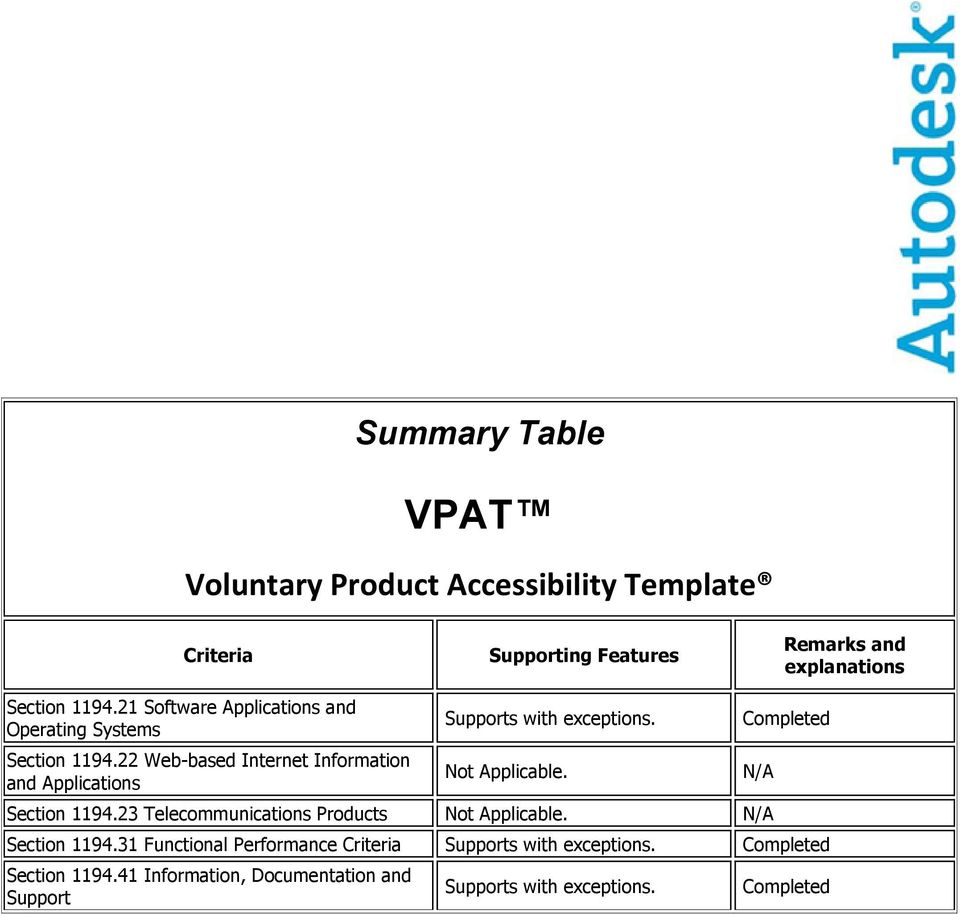
2 Summary Table Criteria Supporting Features Remarks and explanations Section Software Applications and Operating Systems Section Web-based Internet Information and Applications Supports with Not Applicable. Section Telecommunications Products Not Applicable. N/A Completed Section Functional Performance Criteria Supports with Completed Section Information, Documentation and Support Supports with N/A Completed
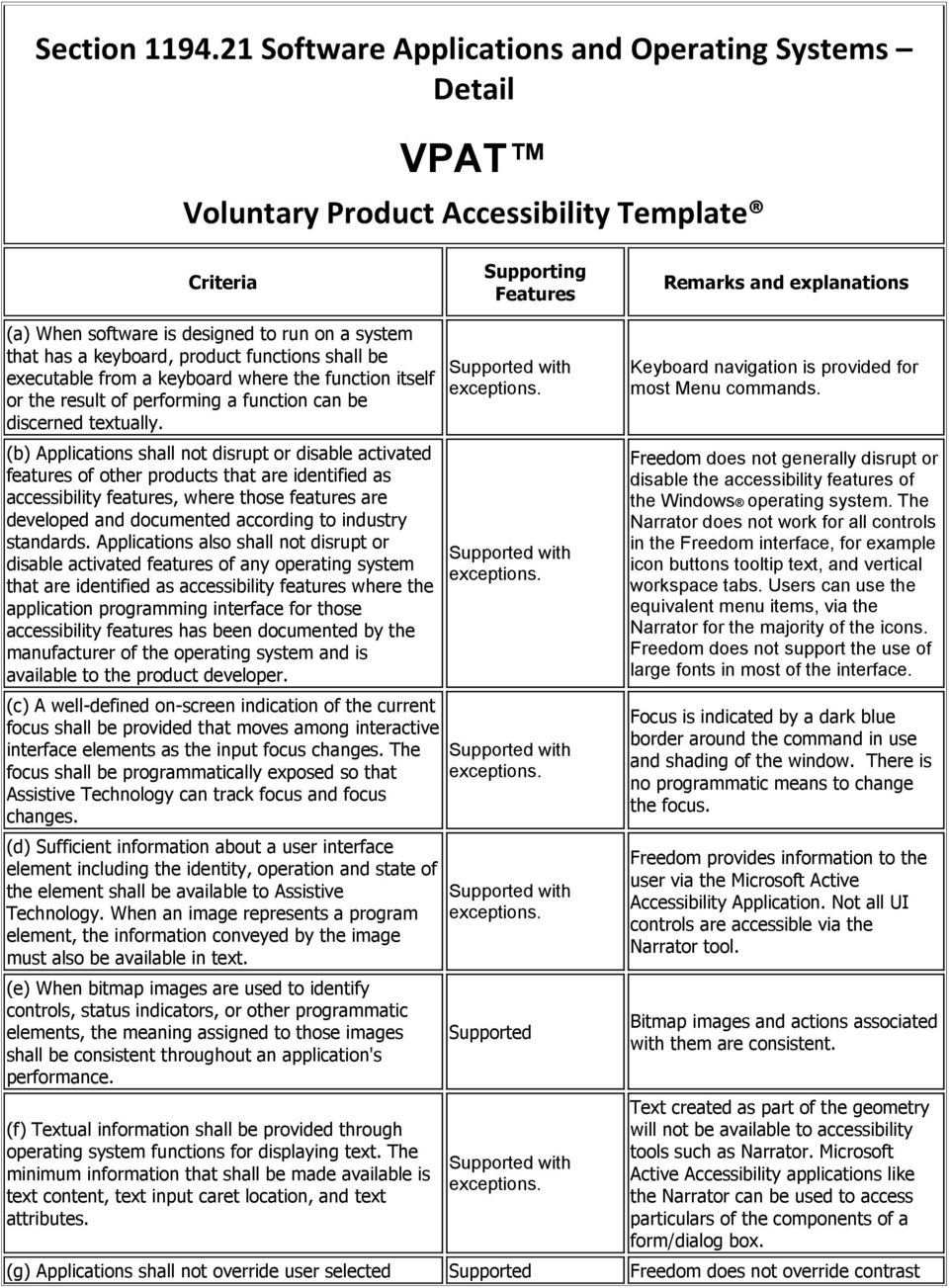
3 Section Software Applications and Operating Systems Detail Criteria Supporting Features Remarks and explanations (a) When software is designed to run on a system that has a keyboard, product functions shall be executable from a keyboard where the function itself or the result of performing a function can be discerned textually. (b) Applications shall not disrupt or disable activated features of other products that are identified as accessibility features, where those features are developed and documented according to industry standards. Applications also shall not disrupt or disable activated features of any operating system that are identified as accessibility features where the application programming interface for those accessibility features has been documented by the manufacturer of the operating system and is available to the product developer. (c) A well-defined on-screen indication of the current focus shall be provided that moves among interactive interface elements as the input focus changes. The focus shall be programmatically exposed so that Assistive Technology can track focus and focus changes. (d) Sufficient information about a user interface element including the identity, operation and state of the element shall be available to Assistive Technology. When an image represents a program element, the information conveyed by the image must also be available in text. (e) When bitmap images are used to identify controls, status indicators, or other programmatic elements, the meaning assigned to those images shall be consistent throughout an application's performance. (f) Textual information shall be provided through operating system functions for displaying text. The minimum information that shall be made available is text content, text input caret location, and text attributes. Keyboard navigation is provided for most Menu commands. Freedom does not generally disrupt or disable the accessibility features of the Windows operating system. The Narrator does not work for all controls in the Freedom interface, for example icon buttons tooltip text, and vertical workspace tabs. Users can use the equivalent menu items, via the Narrator for the majority of the icons. Freedom does not support the use of large fonts in most of the interface. Focus is indicated by a dark blue border around the command in use and shading of the window. There is no programmatic means to change the focus. Freedom provides information to the user via the Microsoft Active Accessibility Application. Not all UI controls are accessible via the Narrator tool. Bitmap images and actions associated with them are consistent. Text created as part of the geometry will not be available to accessibility tools such as Narrator. Microsoft Active Accessibility applications like the Narrator can be used to access particulars of the components of a form/dialog box. (g) Applications shall not override user selected Freedom does not override contrast
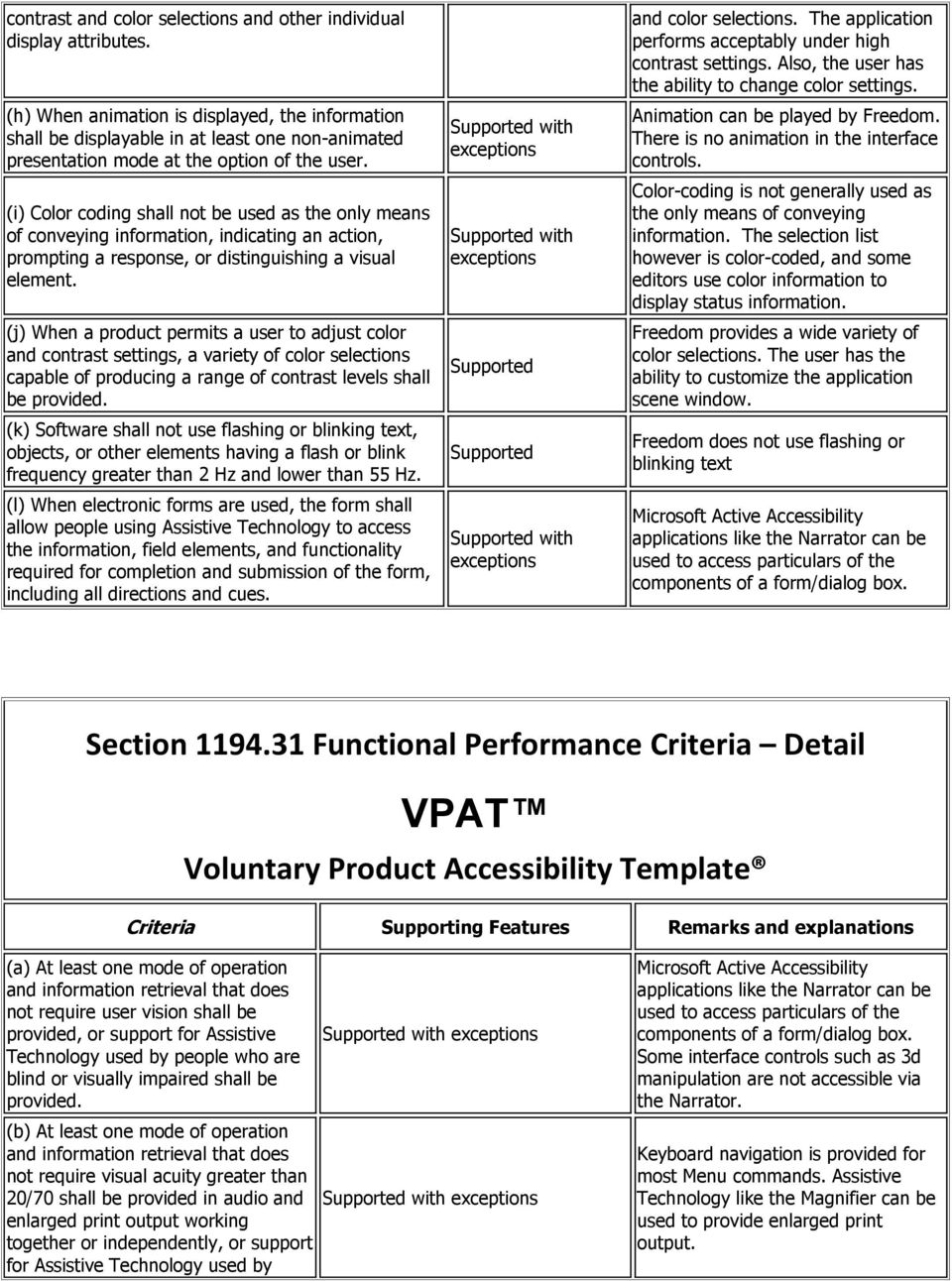
4 contrast and color selections and other individual display attributes. (h) When animation is displayed, the information shall be displayable in at least one non-animated presentation mode at the option of the user. (i) Color coding shall not be used as the only means of conveying information, indicating an action, prompting a response, or distinguishing a visual element. (j) When a product permits a user to adjust color and contrast settings, a variety of color selections capable of producing a range of contrast levels shall be provided. (k) Software shall not use flashing or blinking text, objects, or other elements having a flash or blink frequency greater than 2 Hz and lower than 55 Hz. (l) When electronic forms are used, the form shall allow people using Assistive Technology to access the information, field elements, and functionality required for completion and submission of the form, including all directions and cues. exceptions exceptions exceptions and color selections. The application performs acceptably under high contrast settings. Also, the user has the ability to change color settings. Animation can be played by Freedom. There is no animation in the interface controls. Color-coding is not generally used as the only means of conveying information. The selection list however is color-coded, and some editors use color information to display status information. Freedom provides a wide variety of color selections. The user has the ability to customize the application scene window. Freedom does not use flashing or blinking text Microsoft Active Accessibility applications like the Narrator can be used to access particulars of the components of a form/dialog box. Section Functional Performance Criteria Detail Criteria Supporting Features Remarks and explanations (a) At least one mode of operation not require user vision shall be provided, or support for Assistive Technology used by people who are blind or visually impaired shall be provided. (b) At least one mode of operation not require visual acuity greater than 20/70 shall be provided in audio and enlarged print output working together or independently, or support for Assistive Technology used by exceptions exceptions Microsoft Active Accessibility applications like the Narrator can be used to access particulars of the components of a form/dialog box. Some interface controls such as 3d manipulation are not accessible via the Narrator. Keyboard navigation is provided for most Menu commands. Assistive Technology like the Magnifier can be used to provide enlarged print output.
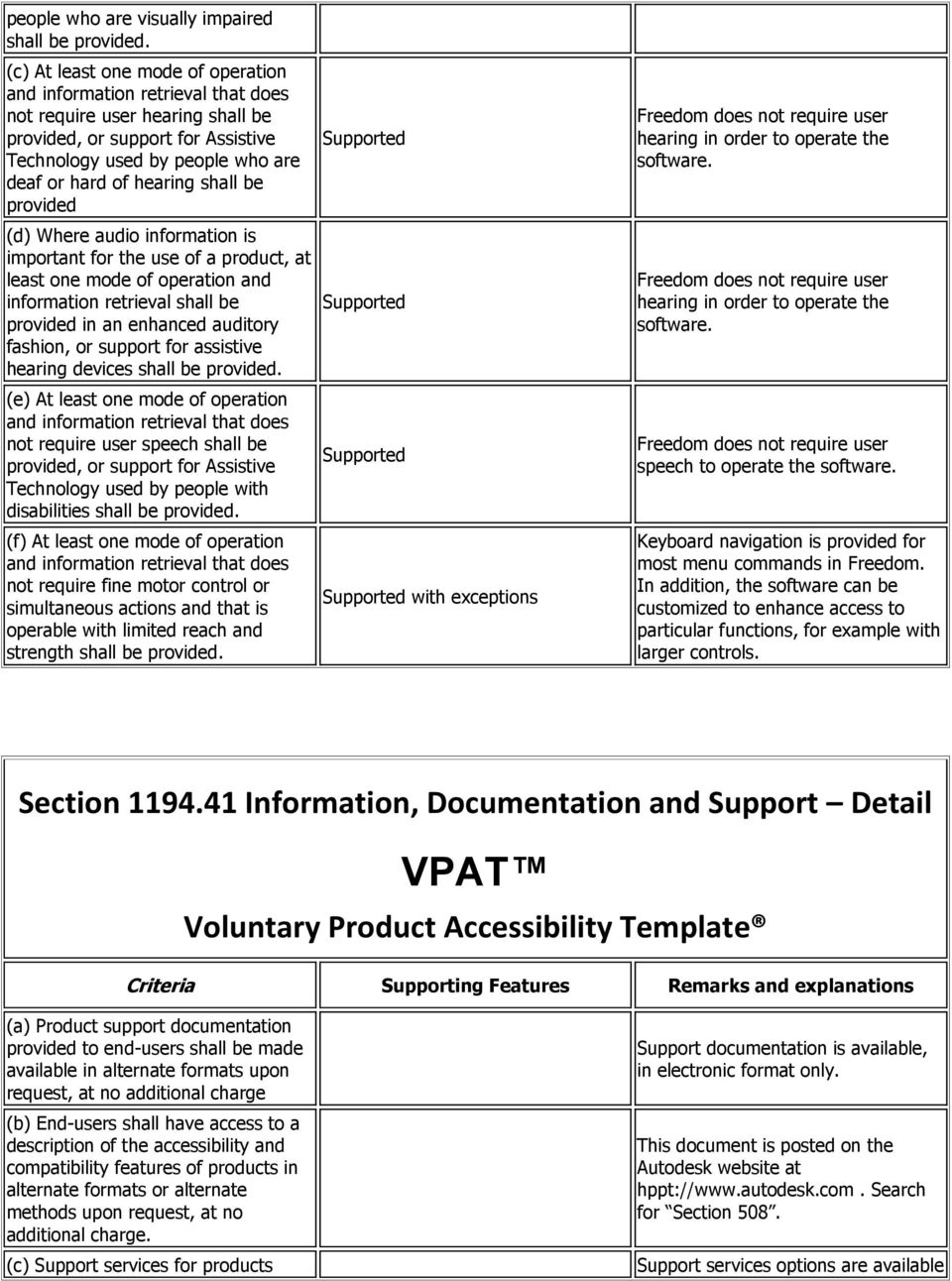
5 people who are visually impaired shall be provided. (c) At least one mode of operation not require user hearing shall be provided, or support for Assistive Technology used by people who are deaf or hard of hearing shall be provided (d) Where audio information is important for the use of a product, at least one mode of operation and information retrieval shall be provided in an enhanced auditory fashion, or support for assistive hearing devices shall be provided. (e) At least one mode of operation not require user speech shall be provided, or support for Assistive Technology used by people with disabilities shall be provided. (f) At least one mode of operation not require fine motor control or simultaneous actions and that is operable with limited reach and strength shall be provided. exceptions Freedom does not require user hearing in order to operate the software. Freedom does not require user hearing in order to operate the software. Freedom does not require user speech to operate the software. Keyboard navigation is provided for most menu commands in Freedom. In addition, the software can be customized to enhance access to particular functions, for example with larger controls. Section Information, Documentation and Support Detail Criteria Supporting Features Remarks and explanations (a) Product support documentation provided to end-users shall be made available in alternate formats upon request, at no additional charge (b) End-users shall have access to a description of the accessibility and compatibility features of products in alternate formats or alternate methods upon request, at no additional charge. (c) Support services for products Support documentation is available, in electronic format only. This document is posted on the Autodesk website at hppt:// Search for Section 508. Support services options are available
6 shall accommodate the communication needs of end-users with disabilities. via webpage, , fax, or phone. Direct, in-person support is available through resellers. Voluntary Product Accessibility Template and VPAT are registered trademarks or trademarks of Information Technology Industry Council. Autodesk and Navisworks are registered trademarks or trademarks of Autodesk, Inc., in the USA and/or other countries. All other brand names, product names, or trademarks belong to their respective holders. Autodesk reserves the right to alter product offerings and specifications at any time without notice, and is not responsible for typographical or graphical errors that may appear in this document Autodesk, Inc. All rights reserved.

Voluntary Product Accessibility Template
 SANsymphony-V 9.0 Voluntary Product Accessibility Template Version 1.3 The purpose of the Voluntary Product Accessibility Template, or VPAT, is to assist Federal contracting officials and other buyers
Nuance PDF Converter Enterprise 8
 8 Date: June 1 st 2012 Name of Product: 8 Contact for more Information: http://nuance.com/company/company-overview/contactus/index.htm or http://nuance.com/company/company-overview/companypolicies/accessibility/index.htm
Adobe Flash Player 11.9 Voluntary Product Accessibility Template
 Adobe Flash Player 11.9 Voluntary Product Accessibility Template The purpose of the Voluntary Product Accessibility Template is to assist Federal contracting officials in making preliminary assessments
Voluntary Product Accessibility Template
 Date: April 15, 2008 Name of Product: Summit Central Version 4 Contact for more Information: http://www.miesoftware.com Summary Table Section 1194.21 Software Applications and Operating. Please refer to
Avaya Speech Analytics Desktop Client 2.0
 Avaya Speech Analytics Desktop Client 2.0 Voluntary Product Accessibility Template (VPAT) Avaya Speech Analytics Desktop Client is a thick client desktop application for the Microsoft Windows operating
Contact for more Information: http://www.dameware.com or http://www.dameware.com/products/vpat.asp
 Date: 2/10/2003 Name of Product: Contact for more Information: http://www.dameware.com or http://www.dameware.com/products/vpat.asp Summary Table Criteria Supporting Features Remarks and explanations Section
Summary Table for SolarWinds Web Help Desk
 Date: February 25, 2013 Name of Product: SolarWinds Web Help Desk Contact for more Information: http://www.solarwinds.com/support/ Summary Table for Voluntary Product Accessibility Template (VPAT) Remarks
Section 1194.21 Software Applications and Operating Systems - Detail Voluntary Product Accessibility VPSX. Level of Support & Supporting Features
 Section 1194.21 Software Applications and Operating Systems - Detail Voluntary Product Accessibility VPSX (a) When software is designed to run on a system that has a keyboard, product functions shall be
Summary Table for SolarWinds Web Help Desk
 Date: February 10 th, 2015 Name of Product: (WHD) Contact for more Information: http://www.solarwinds.com/support/ Summary Table for Section 1194.21 Software Applications with. See section 1194.21 below.
VPAT. Voluntary Product Accessibility Template. Version 1.5. Summary Table VPAT. Voluntary Product Accessibility Template. Supporting Features
 Version 1.5 Date: Nov 5, 2014 Name of Product: Axway Sentinel Web Dashboard 4.1.0 Contact for more Information (name/phone/email): Axway Federal 877-564-7700 http://www.axwayfederal.com/contact/ Summary
Serena Software Voluntary Product Accessibility Report. Summary Table
 Serena Software Voluntary Product Accessibility Report Date: October 22, 2015 Name of Product: Serena Business Manager Contact for more Information (name/phone/email): Dave Easter / [email protected]
Summary Table Voluntary Product Accessibility Template
 Voluntary Product Accessibility Template (VPAT) Name of Product: Canon EOS 50D (EF 28-135 IS USM KIT) Date: June 29, 2009 e: This document was prepared based on normal walk-up functionality. It does not
Xerox DocuMate 3125 Document Scanner
 Xerox DocuMate 3125 Document Scanner Voluntary Product Accessibility Template (VPAT) Submitted by Visioneer, Inc., November 30, 2011 Date: 11/30/2011 Name of Product: Xerox DocuMate 3125 Contact for more
VPAT. Voluntary Product Accessibility Template. Version 1.3
 Version 1.3 EXHIBIT The purpose of the Voluntary Product Accessibility Template, or VPAT, is to assist Federal contracting officials and other buyers in making preliminary assessments regarding the availability
Voluntary Product Accessibility Report
 Voluntary Product Accessibility Report Compliance and Remediation Statement for Section 508 of the US Rehabilitation Act for OpenText Content Server 10.5 October 23, 2013 TOGETHER, WE ARE THE CONTENT EXPERTS
Voluntary Product Accessibility Template Blackboard Learn Release 9.1 April 2014 (Published April 30, 2014)
 Voluntary Product Accessibility Template Blackboard Learn Release 9.1 April 2014 (Published April 30, 2014) Contents: Introduction Key Improvements VPAT Section 1194.21: Software Applications and Operating
Summary Table Voluntary Product Accessibility Template
 Voluntary Product Accessibility Template (VPAT) Name of Product: imagerunner ADVANCE C5255/C5250/C5240/C5235 Date: May 27, 2012 Note: This document was prepared based on normal walk-up functionality. It
Supporting Features. Supports with Exceptions. Supports with Exceptions. Supports
 Voluntary Product Accessibility Template (VPAT) Date: April 1, 2008 Name of Product: Kyocera FS-1100 (Desktop Laser Printer) Contact for more Information: [email protected] Section 1194.21
icohere Products and Section 508 Standards Voluntary Product Accessibility Template (VPAT )
 icohere Products and Section 508 Standards Voluntary Product Accessibility Template (VPAT ) icohere and the Twenty-First Century Communications and Video Accessibility Act of 2010 (CVAA) The webcast portion
SECTION 508 COMPLIANCE
 SECTION 508 COMPLIANCE Section 508 requires that Federal Departments and Agencies provide Electronic and Information Technology (EIT) that s accessible to people with disabilities. The purpose of this
VPAT. Voluntary Product Accessibility Template. Version 1.3
 VPAT Version 1.3 The purpose of the Voluntary Product Accessibility Template, or VPAT, is to assist Federal contracting officials and other buyers in making preliminary assessments regarding the availability
VPAT. Voluntary Product Accessibility Template. Version 1.3
 VPAT Version 1.3 The purpose of the Voluntary Product Accessibility Template, or VPAT, is to assist Federal contracting officials and other buyers in making preliminary assessments regarding the availability
Wyse Winterm Thin Clients -- Accessibility Information
 Wyse Winterm Thin Clients -- Accessibility Information Winterm 3000 Series Thin Clients As of: November 1, 2002 Winterm 3000 Series Thin Clients -- Windows CE and CE.NET operating systems Section Software
vcenter Operations Manager Administration 5.0 Online Help VPAT
 Administration 5.0 Online Help VPAT Product Name: Administration 5.0 Online Help VPAT Since the VPAT must be comprehensive, all Section 508 issues on all pages must be corrected to sustain compliance.
Voluntary Product Accessibility Template (VPAT)
 Voluntary Product Accessibility Template (VPAT) Name of Product Date January 8 2016 Engineering Village (EV for short) Completed by Contact for More Information Heather Singleton Heather Singleton User
VPAT Voluntary Product Accessibility Template Version 1.3
 ADA COMPLIANCE 1. Does database support ADA compliant browsers? Yes X No If no, does the database make any accommodations in its visual display for visually impaired users? Yes No 2. Voluntary Product
Summary Table Voluntary Product Accessibility Template
 The following Voluntary Product Accessibility information refers to the Mac OS X version 10.7 Lion operating system. For more information on accessibility features in Mac OS X and to find out about available
VPAT Voluntary Product Accessibility Template
 Applies to the following products and features: Utelogy U-Control o Includes Configurator, Monitor, and Dashboard Utelogy U-Manage Utelogy U-Help Summary Table Section 1194.21 Software Applications and
Voluntary Product Accessibility Template (VPAT)
 Voluntary Product Accessibility Template (VPAT) Date: 2013 Name of Product: Pivot Product website: https://pivot.cos.com/ Contact for more Information: http://pivot.cos.com/helpdesk NOTE: All sections
Software Application & Operating Systems Checklist
 REVIEWER INFORMATION Product Name: Version #: Reviewer Name: Date: Filenames/URL: Locations: Intranet Training Academy DCMA360 Other (explain) REVIEW GUIDELINES Complete this review, using the following
Summary Table VPAT Voluntary Product Accessibility Template
 Version 1.3 Sharp MX M503N Sharp MX M453N Sharp MX M363N Sharp MX M283N Compliant with minor exceptions Date: May 20, 2010 Name of Products: Models MX-M283N, M363N, M453N, and M503N Contact for more Information:
Supporting Features*
 Page 1 of 16 As of: 1/11/2010 the HP EliteBook 8440w Notebook PC addresses the Section 508 standards as described in the chart below. Standard Software Applications and Operating Systems When software
CDC UNIFIED PROCESS PROCESS GUIDE
 As of October 01, 2010 practices, templates, and processes were version frozen. The contents of this document may be obsolete. It remains available as reference but should not be relied upon as current
Voluntary Product Accessibility Template (VPAT) Policy & Information
 Voluntary Product Accessibility Template (VPAT) Policy & Information What is a VPAT? A VPAT is a vendor-generated statement (using the required template) that provides relevant information on how a vendor
VPAT Summary. VPAT Details. Section 1194.22 Web-based Internet information and applications - Detail
 Date: October 8, 2014 Name of Product: System x3755 M3 VPAT Summary Criteria Status Remarks and Explanations Section 1194.21 Software Applications and Operating Systems Section 1194.22 Web-based Internet
Section 508 Compliance - Voluntary Product Accessibility Template (VPAT)
 Section 508 Compliance - Voluntary Product Accessibility Template (VPAT) Name of Product: Phire Architect, version 11.x Last Updated: April 01, 2016 Minimum Version: This Voluntary Product Accessibility
not a Web- based application. not self-contained, closed products. Please refer to the attached VPAT Please refer to the attached VPAT
 Apple Cinema Display Standards Subpart 1194.21 Software applications and operating systems. 1194.22 Web-based intranet and internet information and applications. 1194.23 Telecommunications products. 1194.24
Summary Table Voluntary Product Accessibility Template
 The following Voluntary Product Accessibility information refers to the Apple iphone 4S ( iphone ). For more information on the accessibility features of the iphone and to learn more about iphone features,
VPAT for Apple ipad Air 2
 VPAT for Apple ipad Air 2 The following Voluntary Product Accessibility information refers to the Apple ipad Air 2 running ios 8 or later. For more information on the accessibility features of the ipad
IP Office Contact Center R9.0 Interactive Voice Response Voluntary Product Accessibility Template (VPAT)
 IP Office Contact Center R9.0 Interactive Voice Response Voluntary Product Accessibility Template (VPAT) The IP Office Contact Center solution consists of a suite of software applications. The statements
Avaya Model 9608 H.323 Deskphone
 Avaya Model 9608 H.323 Deskphone Voluntary Product Accessibility Template (VPAT) The statements in this document apply to Avaya Model 9608 Deskphones only when they are configured with Avaya one-x Deskphone
Avaya DECT R4 Telephones Models 3720, 3725, 3740, 3745 and 3749
 Avaya DECT R4 Telephones Models Voluntary Product Accessibility Template (VPAT) The DECT ( Digital Enhanced Cordless Technology ) standard originated in Europe as a replacement for earlier cordless telephone
VPAT for Apple MacBook Pro (Late 2013)
 VPAT for Apple MacBook Pro (Late 2013) The following Voluntary Product Accessibility information refers to the Apple MacBook Pro (Late 2013). For more information on the accessibility features of this
Summary Table Voluntary Product Accessibility Template
 PLANTRONICS VPAT 7 Product: Call Center Hearing Aid Compatible (HAC) Polaris Headsets Over the Head Noise Canceling: P161N, P91N, P51N, P251N Over the Head Voice Tube: P161, P91, P51, P251 Over the Ear
Summary Table Voluntary Product Accessibility Template
 The following Voluntary Product Accessibility information refers to the Apple MacBook. For more information on the accessibility features of the MacBook, visit Apple s accessibility Web site at http://www.apple.com/accessibility.
Summary Table Voluntary Product Accessibility Template
 PLANTRONICS VPAT 8 Product: Call Center Polaris Headsets (Non-HAC) Over the Head Noise Canceling: P101N, P61N Over the Head Voice Tube: P101, P61 Over the Ear Voice Tube: P41 In the Ear Noise Canceling:
Avaya Model 1408 Digital Deskphone
 Avaya Model 1408 Digital Deskphone Voluntary Product Accessibility Template (VPAT) The statements in this document apply to Avaya Model 1408 Digital Deskphones only when they are used in conjunction with
VPAT 1 Product: Call Center Hearing Aid Compatible (HAC) Headsets Operated with Amplifier Models M12, MX10, P10, or SQD:
 Plantronics VPAT 1 Product: Call Center Hearing Aid Compatible (HAC) Headsets Operated with Amplifier Models M12, MX10, P10, or SQD: Over the Head Noise Canceling: H161N, H91N, H51N Over the Head Voice
Avaya 9600 Series IP Telephones Voluntary Product Accessibility Template (VPAT)
 Avaya 9600 Series IP Telephones Voluntary Product Accessibility Template (VPAT) The statements in this document apply to Avaya 9600 Series IP telephones only when the phones are configured with Avaya one-x
SAS/GRAPH Network Visualization Workshop 2.1
 SAS/GRAPH Network Visualization Workshop 2.1 User s Guide SAS Documentation The correct bibliographic citation for this manual is as follows: SAS Institute Inc 2009. SAS/GRAPH : Network Visualization Workshop
Summary Table Voluntary Product Accessibility Template
 PLANTRONICS VPAT 8 Product: Call Center Polaris Headsets (Non-HAC) Over the Head Noise Canceling: P101N, P61N Over the Head Voice Tube: P101, P61 Over the Ear Voice Tube: P41 In the Ear Noise Canceling:
Summary Table Voluntary Product Accessibility Template. Criteria Supporting Features Remarks and explanations
 Plantronics VPAT 1 Product: Call Center Hearing Aid Compatible (HAC) Headsets Operated with Amplifier Models M12, MX10, P10, or SQD: Over the Head Noise Canceling: H161N, H91N, H51N, H251N Over the Head
PDF Accessibility Overview
 Contents 1 Overview of Portable Document Format (PDF) 1 Determine the Accessibility Path for each PDF Document 2 Start with an Accessible Document 2 Characteristics of Accessible PDF files 4 Adobe Acrobat
Summary Table Voluntary Product Accessibility Template. Not Applicable- Not a web-based application. Supports. Not Applicable
 PLANTRONICS VPAT 1 Product: Call Center Hearing Aid Compatible (HAC) Headsets Summary Table Section 1194.21 Software Applications and Operating Systems Section 1194.22 Web-based internet information and
Accessibility-MiVoice-Business.docx Page 1
 Accessibility Standards MiVoice Business Mitel products are designed with the highest standards of accessibility. Below is a table that outlines how the MiVoice Business conforms to section 508 of the
SUMMARY TABLE VOLUNTARY PRODUCT ACCESSIBILITY TEMPLATE
 Date: 1 May 2009 Name of Product: Polycom VVX1500 Telephone Company contact for more Information: Ian Jennings, [email protected] Note: This document describes normal operational functionality.
How to Develop Accessible Linux Applications
 Sharon Snider Copyright 2002 by IBM Corporation v1.1, 2002 05 03 Revision History Revision v1.1 2002 05 03 Revised by: sds Converted to DocBook XML and updated broken links. Revision v1.0 2002 01 28 Revised
Developing accessible portals and portlets with IBM WebSphere Portal
 Developing accessible portals and portlets with IBM WebSphere Portal Level: Introductory IBM Human Ability and Accessibility Center Austin, Texas February, 2006 Copyright International Business Machines
Adobe Acrobat 9 Pro Accessibility Guide: PDF Accessibility Overview
 Adobe Acrobat 9 Pro Accessibility Guide: PDF Accessibility Overview Adobe, the Adobe logo, Acrobat, Acrobat Connect, the Adobe PDF logo, Creative Suite, LiveCycle, and Reader are either registered trademarks
Mac Built-in Accessibility (10.7 - Lion) - Quick Start Guide
 Mac Built-in Accessibility (10.7 - Lion) - Quick Start Guide Overview The Mac operating system has many helpful features to help users with a wide range of abilities access their computer. This Quickstart
Echo360 Voluntary Product Accessibility Template
 Echo360 Voluntary Product Accessibility Template Version 1.0 April 1, 2015 Contact for more Information: Jason Aubrey, [email protected] Introduction Echo360 is committed to ensuring that our platform
Blackboard Web Community Manager WCAG 2.0 Support Statement February 2016
 Blackboard Web Community Manager WCAG 2.0 Support Statement February 2016 Blackboard February 2016 Page 1 of 20 Overview The following Support Statement provides an evaluation of accessibility support
Website Accessibility Under Title II of the ADA
 Chapter 5 Website Accessibility Under Title II of the ADA In this chapter, you will learn how the nondiscrimination requirements of Title II of 1 the ADA apply to state and local government websites. Chapter
Assistive Technology Considerations for Students: Math
 SET-BC works in partnership with BC schools to provide assistive technology (AT) services for students with physical disabilities, autism spectrum disorders, moderate to profound intellectual disabilities,
Microsoft Office 2013
 Student manuals available at: www.learnit.com/manuals Username: manuals; Password: password Microsoft Office 2013 New Features Take this class home with you! Student Videos Available at: www.learnitanytime.com
Acrobat X Pro Accessible Forms and Interactive Documents
 Contents 2 PDF Form Fields 2 Acrobat Form Wizard 5 Enter Forms Editing Mode Directly 5 Create Form Fields Manually 6 Forms Editing Mode 8 Form Field Properties 11 Editing or Modifying an Existing Form
What is Microsoft PowerPoint?
 What is Microsoft PowerPoint? Microsoft PowerPoint is a powerful presentation builder. In PowerPoint, you can create slides for a slide-show with dynamic effects that will keep any audience s attention.
Access Tutorial 1 Creating a Database
 Access Tutorial 1 Creating a Database Microsoft Office 2013 Objectives Session 1.1 Learn basic database concepts and terms Start and exit Access Explore the Microsoft Access window and Backstage view Create
SMART Board Interactive Whiteboard Setup with USB Cable
 SMART Board Interactive Whiteboard Setup with USB Cable The instructions below are for the SMART Board interactive whiteboard 500 series and apply to both desktop and laptop computers. Ready Light USB
Creating Accessible Forms in Microsoft Word and Adobe PDF
 Creating Accessible Forms in Microsoft Word and Adobe PDF Disability Access Services i About Disability Access Services Centralized Resource and Information on Disability Access Disability Access Services
Adobe Acrobat 9 Pro Accessibility Guide: Creating Accessible PDF from Microsoft Word
 Adobe Acrobat 9 Pro Accessibility Guide: Creating Accessible PDF from Microsoft Word Adobe, the Adobe logo, Acrobat, Acrobat Connect, the Adobe PDF logo, Creative Suite, LiveCycle, and Reader are either
Overview of Microsoft Office Word 2007
 Overview of Microsoft Office What Is Word Processing? Office is a word processing software application whose purpose is to help you create any type of written communication. A word processor can be used
February 2014 Version 3.3. DHS Section 508 Compliance Test Process for Applications
 February 2014 Version 3.3 DHS Section 508 Compliance Test Process for Applications Contents About this document... 2 Section 1: Introduction and Rationale for Tests... 3 Section 2: Test Environment...
In this topic we discuss a number of design decisions you can make to help ensure your course is accessible to all users.
 Accessible Course Design As a course designer you hold a pivotal role in ensuring that Learning Environment is accessible to all users, regardless of their learning needs. It is your content that students
Features. Emerson Solutions for Abnormal Situations
 Features Comprehensive solutions for prevention, awareness, response, and analysis of abnormal situations Early detection of potential process and equipment problems Predictive intelligence network to
Acrobat XI Pro Accessible Forms and Interactive Documents
 Contents 2 Types of interactive PDF Form Fields 2 Automatic Field Detection using the Acrobat Form Wizard 5 Creating a Form without the Forms Wizard 6 Forms Editing Mode 6 Selecting a New Form Field to
Sharing Presentations, Documents, and Whiteboards
 Chapter 19 19 Sharing Presentations, Documents, and Whiteboards Your user role in an event determines your level of sharing. Whichever role you take, the following table describes the basic tasks associated
Microsoft PowerPoint Tutorial
 Microsoft PowerPoint Tutorial Contents Starting MS PowerPoint... 1 The MS PowerPoint Window... 2 Title Bar...2 Office Button...3 Saving Your Work... 3 For the first time... 3 While you work... 3 Backing
Basics of Accessible Design
 Basics of Accessible Design Font Consider using a sans serif type font such as Arial or Veranda. The sans serif fonts are easier for people with reading disorders and visual impairments to read. This document
Advanced Presentation Features and Animation
 There are three features that you should remember as you work within PowerPoint 2007: the Microsoft Office Button, the Quick Access Toolbar, and the Ribbon. The function of these features will be more
PowerPoint 2007 Lesson 1: Getting Started
 PowerPoint 2007 Lesson 1: Getting Started Anyone who is in a professional position will make presentations at one time or another. With the advent of fairly cheap and mobile LCD projectors, presentations