
Avaya DECT R4 Telephones Models 3720, 3725, 3740, 3745 and 3749
|
|
|
- Kerry Dixon
- 9 years ago
- Views:
Transcription
1 Avaya DECT R4 Telephones Models Voluntary Product Accessibility Template (VPAT) The DECT ( Digital Enhanced Cordless Technology ) standard originated in Europe as a replacement for earlier cordless telephone standards. It is being adopted increasingly worldwide for cordless telephones, wireless offices, and even wireless telephone lines to the home. The Avaya IP DECT solutions for Communication Manager and IP Office deliver secure, high-quality wireless voice communications to mobile employees within a building or across a campus. The statements in this document refer to the Avaya DECT R4 Model 3720, 3725, 3740, 3745, and 3749 telephones. Support Levels Support Level with /Minor through Equivalent Facilitation when combined with Compatible Assistive Technology Does Not Support Fundamental Alteration Exception Applies Description Avaya DECT telephones fully meet the letter and intent of the criterion. Avaya DECT telephones do not fully meet the letter and intent of the criterion, but provides some level of access relative to the criterion. Avaya DECT telephones provide an alternate way to meet the intent of the criterion. Avaya DECT telephones fully meet the letter and intent of the criterion when used in combination with compatible assistive technology. Avaya DECT telephones do not meet the letter or intent of the criterion. The criterion does not apply. A fundamental alteration of Avaya DECT telephones is required to meet the criterion. Compliance Summary Criteria Section Software Applications and Operating Systems Section Web-based Intranet and Internet Information and Applications Section Telecommunications Products Section Video and Multi-media Products Section Self-Contained, Closed Products Section Desktop and Portable Computers Section Functional Performance Criteria Section Information, Documentation and Support Support Levels with with Avaya DECT R4 Model 3720, 3725, 3740, 3745 and 3740 Telephones Page 1 of 6

2 Telecommunications Products Criteria Support Levels Remarks and Explanations (a) Telecommunications products or systems which provide a function allowing voice communication and which do not themselves provide a TTY functionality shall provide a standard non-acoustic connection point for TTYs. Microphones shall be capable of being turned on and off to allow the user to intermix speech with TTY use (b) Telecommunications products, which include voice communication functionality, shall support all commonly used cross-manufacturer non-proprietary standard TTY signal protocols (c) Voice mail, auto-attendant, and interactive voice response telecommunications systems shall be usable by TTY users with their TTYs (d) Voice mail, messaging, autoattendant, and interactive voice response telecommunications systems that require a response from a user within a time interval, shall give an alert when the time interval is about to run out, and shall provide sufficient time for the user to indicate more time is required (e) Where provided, caller identification and similar telecommunications functions shall also be available for users of TTYs, and for users who cannot see displays. Does not Support Avaya DECT R4 Model 3720, 3725, 3740, 3745 and 3749 telephones do not have a standard non-acoustic connection point for TTYs. Does not Support The ability of Avaya DECT R4 Model telephones to support the reliable transmission of TTY signals will vary depending on several factors that may be outside the user s control, including limitations in the corresponding DECT infrastructure components. This requirement applies to voice mail, auto-attendant, and interactive voice response telecommunication systems. It does not apply to Avaya DECT R4 Model telephones. This requirement applies to voice mail, auto-attendant, and interactive voice response telecommunication systems. It does not apply to Avaya DECT R4 Model telephones. Does not Support Avaya DECT R4 Model 3720, 3725, 3740, 3745 and 3749 telephones do not support users of TTYs, nor is there is non-visual caller identification presentation mode for users who cannot see displays. Avaya DECT R4 Model 3720, 3725, 3740, 3745 and 3740 Telephones Page 2 of 6

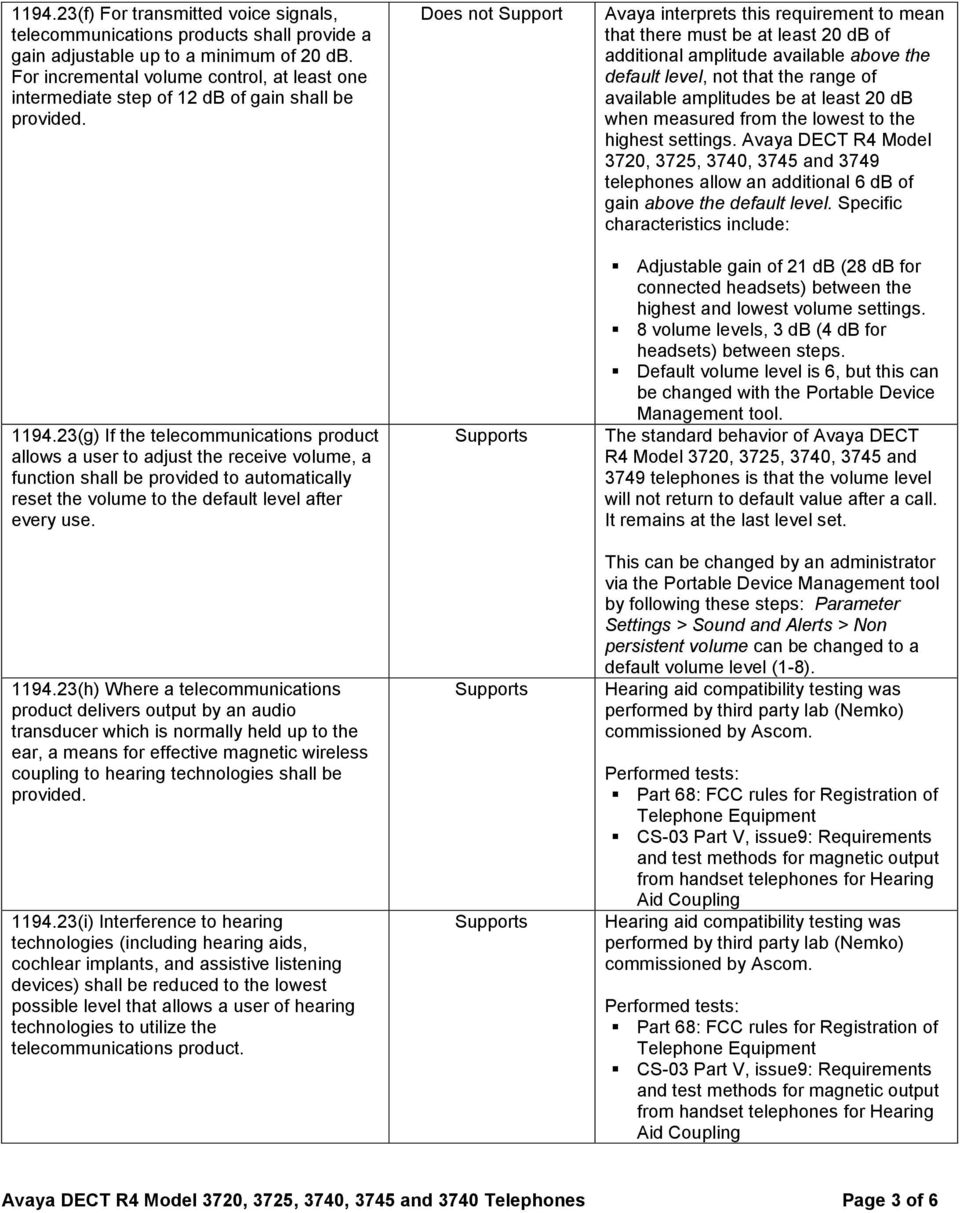
3 (f) For transmitted voice signals, telecommunications products shall provide a gain adjustable up to a minimum of 20 db. For incremental volume control, at least one intermediate step of 12 db of gain shall be provided (g) If the telecommunications product allows a user to adjust the receive volume, a function shall be provided to automatically reset the volume to the default level after every use (h) Where a telecommunications product delivers output by an audio transducer which is normally held up to the ear, a means for effective magnetic wireless coupling to hearing technologies shall be provided (i) Interference to hearing technologies (including hearing aids, cochlear implants, and assistive listening devices) shall be reduced to the lowest possible level that allows a user of hearing technologies to utilize the telecommunications product. Does not Support Avaya interprets this requirement to mean that there must be at least 20 db of additional amplitude available above the default level, not that the range of available amplitudes be at least 20 db when measured from the lowest to the highest settings. Avaya DECT R4 Model telephones allow an additional 6 db of gain above the default level. Specific characteristics include: Adjustable gain of 21 db (28 db for connected headsets) between the highest and lowest volume settings. 8 volume levels, 3 db (4 db for headsets) between steps. Default volume level is 6, but this can be changed with the Portable Device Management tool. The standard behavior of Avaya DECT R4 Model 3720, 3725, 3740, 3745 and 3749 telephones is that the volume level will not return to default value after a call. It remains at the last level set. This can be changed by an administrator via the Portable Device Management tool by following these steps: Parameter Settings > Sound and Alerts > Non persistent volume can be changed to a default volume level (1-8). Hearing aid compatibility testing was performed by third party lab (Nemko) commissioned by Ascom. Performed tests: Part 68: FCC rules for Registration of Telephone Equipment CS-03 Part V, issue9: Requirements and test methods for magnetic output from handset telephones for Hearing Aid Coupling Hearing aid compatibility testing was performed by third party lab (Nemko) commissioned by Ascom. Performed tests: Part 68: FCC rules for Registration of Telephone Equipment CS-03 Part V, issue9: Requirements and test methods for magnetic output from handset telephones for Hearing Aid Coupling Avaya DECT R4 Model 3720, 3725, 3740, 3745 and 3740 Telephones Page 3 of 6
4 (j) Products that transmit or conduct information or communication, shall pass through cross-manufacturer, non-proprietary, industry-standard codes, translation protocols, formats or other information necessary to provide the information or communication in a usable format. Technologies which use encoding, signal compression, format transformation, or similar techniques shall not remove information needed for access or shall restore it upon delivery (k)(1) Products which have comply with the following: Controls and Keys shall be tactilely discernible without activating the controls or keys (k)(2) Products which have comply with the following: Controls and Keys shall be operable with one hand and shall not require tight grasping, pinching, twisting of the wrist. The force required to activate controls and keys shall be 5 lbs. (22.2N) maximum (k)(3) Products which have comply with the following: If key repeat is supported, the delay before repeat shall be adjustable to at least 2 seconds. Key repeat rate shall be adjustable to 2 seconds per character (k)(4) Products which have comply with the following: The status of all locking or toggle controls or keys shall be visually discernible, and discernible either through touch or sound. Does not Support with The ETSI DECT Standard does not include support for the wide range of protocols that are envisioned by this requirement. The 5 key on the dial pad has two raised nubs The navigation key and on/off-hook can be identified by their form. (Note, however, that the functions accessed via the navigation key may not be discernible without vision.) The volume up/down and mute key on the left side of the telephone can be identified by their raised form and position (volume up/down on the top, close to each other and with space to the mute key) Avaya DECT R4 Model 3720, 3725, 3740, 3745 and 3749 telephones do not have a key repeat function. with The status of all locking or toggle controls or keys is visually discernible, but is not discernible through touch or sound. Avaya DECT R4 Model 3720, 3725, 3740, 3745 and 3740 Telephones Page 4 of 6

5 Functional Performance Criteria Criteria Support Levels Remarks and Explanations (a) At least one mode of operation require user vision shall be provided, or people who are blind or visually impaired shall be provided (b) At least one mode of operation require visual acuity greater than 20/70 shall be provided in audio and enlarged print output working together or independently, or people who are visually impaired shall be provided (c) At least one mode of operation require user hearing shall be provided, or people who are deaf or hard of hearing shall be provided (d) Where audio information is important for the use of a product, at least one mode of operation and information retrieval shall be provided in an enhanced auditory fashion, or support for assistive hearing devices shall be provided (e) At least one mode of operation require user speech shall be provided, or people with disabilities shall be provided (f) At least one mode of operation require fine motor control or simultaneous actions and that is operable with limited reach and strength shall be provided. with with with with with Many keys on Avaya DECT R4 Model telephones, including the keys on the dial pad, are tactilely discernible. Information that is presented by these telephones, such as Caller ID, is not accessible to users without vision. Many keys on Avaya DECT R4 Model telephones, including the keys on the dial pad, are tactilely discernible. Information that is presented by these telephones, such as Caller ID, is not accessible to users without vision. Avaya DECT R4 Model 3720, 3725, 3740, 3745 and 3749 telephones satisfy the FCC Part 68 requirements for Hearing Aid Compatibility. Support for users of TTYs and support for users who require more than 6 db of amplification above the normal level is not provided. Avaya DECT R4 Model 3720, 3725, 3740, 3745 and 3749 telephones satisfy the FCC Part 68 requirements for Hearing Aid Compatibility. Support for users of TTYs and support for users who require more than 6 db of amplification above the normal level is not provided. User speech is not required in order to operate Avaya DECT R4 Model 3720, 3725, 3740, 3745 and 3749 telephones. Note, however, that the lack of TTY support means that these telephones may not be suitable for users who cannot speak. The operational characteristics of all controls (e.g., the amount of strength required to press a button) are within the limits specified by paragraph (k)(2). Avaya DECT R4 Model 3720, 3725, 3740, 3745 and 3740 Telephones Page 5 of 6

6 Information, Documentation and Support Criteria Support Levels Remarks and Explanations (a) Product support documentation provided to end-users shall be made available in alternate formats upon request, at no additional charge (b) End-users shall have access to a description of the accessibility and compatibility features of products in alternate formats or alternate methods upon request, at no additional charge (c) Support services for products shall accommodate the communication needs of end-users with disabilities. Will provide upon request. Will provide upon request. Avaya's point-of-contact for accessibilityrelated issues: Dr. Paul R. Michaelis Voice: TTY: [email protected] 2016 Avaya Inc. All rights reserved. Except as specifically stated, none of the material may be copied, reproduced, distributed, republished, downloaded, displayed, posted, or transmitted in any form without authorized, prior written permission from Avaya Inc. Permission is granted for you to make a single copy of Avaya Inc. Section 508 documents, solely for informational and non-commercial use within your organization, provided that you keep intact all copyright and other proprietary notices. No other use of the information provided is authorized. This market information is provided, pursuant to FAR Part 39.2, to be used by Requiring Officers. It is not intended to represent a certification for compliance. Any statement of compliance or conformance indicated on this document is an indication that the product shall be capable, at the time of its delivery, when used in accordance with Avaya's associated documents, and other written information provided to the government, of providing comparable access to individuals with disabilities consistent with the designated provision of the Standards, provided that any assistive technologies used with the product properly interoperates with it and other assistive technologies. Updated February 8, 2016 Avaya DECT R4 Model 3720, 3725, 3740, 3745 and 3740 Telephones Page 6 of 6

IP Office Contact Center R9.0 Interactive Voice Response Voluntary Product Accessibility Template (VPAT)
 IP Office Contact Center R9.0 Interactive Voice Response Voluntary Product Accessibility Template (VPAT) The IP Office Contact Center solution consists of a suite of software applications. The statements
Avaya Model 9608 H.323 Deskphone
 Avaya Model 9608 H.323 Deskphone Voluntary Product Accessibility Template (VPAT) The statements in this document apply to Avaya Model 9608 Deskphones only when they are configured with Avaya one-x Deskphone
Avaya Model 1408 Digital Deskphone
 Avaya Model 1408 Digital Deskphone Voluntary Product Accessibility Template (VPAT) The statements in this document apply to Avaya Model 1408 Digital Deskphones only when they are used in conjunction with
Avaya 9600 Series IP Telephones Voluntary Product Accessibility Template (VPAT)
 Avaya 9600 Series IP Telephones Voluntary Product Accessibility Template (VPAT) The statements in this document apply to Avaya 9600 Series IP telephones only when the phones are configured with Avaya one-x
not a Web- based application. not self-contained, closed products. Please refer to the attached VPAT Please refer to the attached VPAT
 Apple Cinema Display Standards Subpart 1194.21 Software applications and operating systems. 1194.22 Web-based intranet and internet information and applications. 1194.23 Telecommunications products. 1194.24
Summary Table Voluntary Product Accessibility Template
 PLANTRONICS VPAT 7 Product: Call Center Hearing Aid Compatible (HAC) Polaris Headsets Over the Head Noise Canceling: P161N, P91N, P51N, P251N Over the Head Voice Tube: P161, P91, P51, P251 Over the Ear
VPAT 1 Product: Call Center Hearing Aid Compatible (HAC) Headsets Operated with Amplifier Models M12, MX10, P10, or SQD:
 Plantronics VPAT 1 Product: Call Center Hearing Aid Compatible (HAC) Headsets Operated with Amplifier Models M12, MX10, P10, or SQD: Over the Head Noise Canceling: H161N, H91N, H51N Over the Head Voice
Summary Table Voluntary Product Accessibility Template. Criteria Supporting Features Remarks and explanations
 Plantronics VPAT 1 Product: Call Center Hearing Aid Compatible (HAC) Headsets Operated with Amplifier Models M12, MX10, P10, or SQD: Over the Head Noise Canceling: H161N, H91N, H51N, H251N Over the Head
Summary Table Voluntary Product Accessibility Template
 PLANTRONICS VPAT 8 Product: Call Center Polaris Headsets (Non-HAC) Over the Head Noise Canceling: P101N, P61N Over the Head Voice Tube: P101, P61 Over the Ear Voice Tube: P41 In the Ear Noise Canceling:
Summary Table Voluntary Product Accessibility Template
 PLANTRONICS VPAT 8 Product: Call Center Polaris Headsets (Non-HAC) Over the Head Noise Canceling: P101N, P61N Over the Head Voice Tube: P101, P61 Over the Ear Voice Tube: P41 In the Ear Noise Canceling:
Accessibility-MiVoice-Business.docx Page 1
 Accessibility Standards MiVoice Business Mitel products are designed with the highest standards of accessibility. Below is a table that outlines how the MiVoice Business conforms to section 508 of the
Summary Table Voluntary Product Accessibility Template
 The following Voluntary Product Accessibility information refers to the Apple MacBook. For more information on the accessibility features of the MacBook, visit Apple s accessibility Web site at http://www.apple.com/accessibility.
VPAT for Apple MacBook Pro (Late 2013)
 VPAT for Apple MacBook Pro (Late 2013) The following Voluntary Product Accessibility information refers to the Apple MacBook Pro (Late 2013). For more information on the accessibility features of this
Summary Table Voluntary Product Accessibility Template. Not Applicable- Not a web-based application. Supports. Not Applicable
 PLANTRONICS VPAT 1 Product: Call Center Hearing Aid Compatible (HAC) Headsets Summary Table Section 1194.21 Software Applications and Operating Systems Section 1194.22 Web-based internet information and
SUMMARY TABLE VOLUNTARY PRODUCT ACCESSIBILITY TEMPLATE
 Date: 1 May 2009 Name of Product: Polycom VVX1500 Telephone Company contact for more Information: Ian Jennings, [email protected] Note: This document describes normal operational functionality.
VPAT. Voluntary Product Accessibility Template. Version 1.3
 Version 1.3 EXHIBIT The purpose of the Voluntary Product Accessibility Template, or VPAT, is to assist Federal contracting officials and other buyers in making preliminary assessments regarding the availability
Summary Table Voluntary Product Accessibility Template
 The following Voluntary Product Accessibility information refers to the Apple iphone 4S ( iphone ). For more information on the accessibility features of the iphone and to learn more about iphone features,
VPAT for Apple ipad Air 2
 VPAT for Apple ipad Air 2 The following Voluntary Product Accessibility information refers to the Apple ipad Air 2 running ios 8 or later. For more information on the accessibility features of the ipad
VPAT Summary. VPAT Details. Section 1194.22 Web-based Internet information and applications - Detail
 Date: October 8, 2014 Name of Product: System x3755 M3 VPAT Summary Criteria Status Remarks and Explanations Section 1194.21 Software Applications and Operating Systems Section 1194.22 Web-based Internet
Avaya Speech Analytics Desktop Client 2.0
 Avaya Speech Analytics Desktop Client 2.0 Voluntary Product Accessibility Template (VPAT) Avaya Speech Analytics Desktop Client is a thick client desktop application for the Microsoft Windows operating
VPAT Voluntary Product Accessibility Template
 Applies to the following products and features: Utelogy U-Control o Includes Configurator, Monitor, and Dashboard Utelogy U-Manage Utelogy U-Help Summary Table Section 1194.21 Software Applications and
Voluntary Product Accessibility Template (VPAT) Policy & Information
 Voluntary Product Accessibility Template (VPAT) Policy & Information What is a VPAT? A VPAT is a vendor-generated statement (using the required template) that provides relevant information on how a vendor
VPAT. Voluntary Product Accessibility Template. Version 1.3
 VPAT Version 1.3 The purpose of the Voluntary Product Accessibility Template, or VPAT, is to assist Federal contracting officials and other buyers in making preliminary assessments regarding the availability
CDC UNIFIED PROCESS PROCESS GUIDE
 As of October 01, 2010 practices, templates, and processes were version frozen. The contents of this document may be obsolete. It remains available as reference but should not be relied upon as current
Summary Table Voluntary Product Accessibility Template
 Voluntary Product Accessibility Template (VPAT) Name of Product: Canon EOS 50D (EF 28-135 IS USM KIT) Date: June 29, 2009 e: This document was prepared based on normal walk-up functionality. It does not
VPAT. Voluntary Product Accessibility Template. Version 1.3
 VPAT Version 1.3 The purpose of the Voluntary Product Accessibility Template, or VPAT, is to assist Federal contracting officials and other buyers in making preliminary assessments regarding the availability
Xerox DocuMate 3125 Document Scanner
 Xerox DocuMate 3125 Document Scanner Voluntary Product Accessibility Template (VPAT) Submitted by Visioneer, Inc., November 30, 2011 Date: 11/30/2011 Name of Product: Xerox DocuMate 3125 Contact for more
Voluntary Product Accessibility Template (VPAT)
 Voluntary Product Accessibility Template (VPAT) Date: 2013 Name of Product: Pivot Product website: https://pivot.cos.com/ Contact for more Information: http://pivot.cos.com/helpdesk NOTE: All sections
Summary Table Voluntary Product Accessibility Template
 Voluntary Product Accessibility Template (VPAT) Name of Product: imagerunner ADVANCE C5255/C5250/C5240/C5235 Date: May 27, 2012 Note: This document was prepared based on normal walk-up functionality. It
Supporting Features*
 Page 1 of 16 As of: 1/11/2010 the HP EliteBook 8440w Notebook PC addresses the Section 508 standards as described in the chart below. Standard Software Applications and Operating Systems When software
Section 508 Compliance - Voluntary Product Accessibility Template (VPAT)
 Section 508 Compliance - Voluntary Product Accessibility Template (VPAT) Name of Product: Phire Architect, version 11.x Last Updated: April 01, 2016 Minimum Version: This Voluntary Product Accessibility
Supporting Features. Supports with Exceptions. Supports with Exceptions. Supports
 Voluntary Product Accessibility Template (VPAT) Date: April 1, 2008 Name of Product: Kyocera FS-1100 (Desktop Laser Printer) Contact for more Information: [email protected] Section 1194.21
Summary Table VPAT Voluntary Product Accessibility Template
 Version 1.3 Sharp MX M503N Sharp MX M453N Sharp MX M363N Sharp MX M283N Compliant with minor exceptions Date: May 20, 2010 Name of Products: Models MX-M283N, M363N, M453N, and M503N Contact for more Information:
Wyse Winterm Thin Clients -- Accessibility Information
 Wyse Winterm Thin Clients -- Accessibility Information Winterm 3000 Series Thin Clients As of: November 1, 2002 Winterm 3000 Series Thin Clients -- Windows CE and CE.NET operating systems Section Software
Voluntary Product Accessibility Template
 SANsymphony-V 9.0 Voluntary Product Accessibility Template Version 1.3 The purpose of the Voluntary Product Accessibility Template, or VPAT, is to assist Federal contracting officials and other buyers
SECTION 508 COMPLIANCE
 SECTION 508 COMPLIANCE Section 508 requires that Federal Departments and Agencies provide Electronic and Information Technology (EIT) that s accessible to people with disabilities. The purpose of this
vcenter Operations Manager Administration 5.0 Online Help VPAT
 Administration 5.0 Online Help VPAT Product Name: Administration 5.0 Online Help VPAT Since the VPAT must be comprehensive, all Section 508 issues on all pages must be corrected to sustain compliance.
Nuance PDF Converter Enterprise 8
 8 Date: June 1 st 2012 Name of Product: 8 Contact for more Information: http://nuance.com/company/company-overview/contactus/index.htm or http://nuance.com/company/company-overview/companypolicies/accessibility/index.htm
Adobe Flash Player 11.9 Voluntary Product Accessibility Template
 Adobe Flash Player 11.9 Voluntary Product Accessibility Template The purpose of the Voluntary Product Accessibility Template is to assist Federal contracting officials in making preliminary assessments
Summary Table for SolarWinds Web Help Desk
 Date: February 25, 2013 Name of Product: SolarWinds Web Help Desk Contact for more Information: http://www.solarwinds.com/support/ Summary Table for Voluntary Product Accessibility Template (VPAT) Remarks
icohere Products and Section 508 Standards Voluntary Product Accessibility Template (VPAT )
 icohere Products and Section 508 Standards Voluntary Product Accessibility Template (VPAT ) icohere and the Twenty-First Century Communications and Video Accessibility Act of 2010 (CVAA) The webcast portion
Voluntary Product Accessibility Template
 Date: April 15, 2008 Name of Product: Summit Central Version 4 Contact for more Information: http://www.miesoftware.com Summary Table Section 1194.21 Software Applications and Operating. Please refer to
Summary Table for SolarWinds Web Help Desk
 Date: February 10 th, 2015 Name of Product: (WHD) Contact for more Information: http://www.solarwinds.com/support/ Summary Table for Section 1194.21 Software Applications with. See section 1194.21 below.
VPAT. Voluntary Product Accessibility Template. Version 1.3
 Voluntary Product Accessibility Template Version 1.3 The purpose of the Voluntary Product Accessibility Template, or, is to assist Federal contracting officials and other buyers in making preliminary assessments
Voluntary Product Accessibility Report
 Voluntary Product Accessibility Report Compliance and Remediation Statement for Section 508 of the US Rehabilitation Act for OpenText Content Server 10.5 October 23, 2013 TOGETHER, WE ARE THE CONTENT EXPERTS
VPAT Voluntary Product Accessibility Template Version 1.3
 ADA COMPLIANCE 1. Does database support ADA compliant browsers? Yes X No If no, does the database make any accommodations in its visual display for visually impaired users? Yes No 2. Voluntary Product
VPAT. Voluntary Product Accessibility Template. Version 1.5. Summary Table VPAT. Voluntary Product Accessibility Template. Supporting Features
 Version 1.5 Date: Nov 5, 2014 Name of Product: Axway Sentinel Web Dashboard 4.1.0 Contact for more Information (name/phone/email): Axway Federal 877-564-7700 http://www.axwayfederal.com/contact/ Summary
Voluntary Product Accessibility Template Blackboard Learn Release 9.1 April 2014 (Published April 30, 2014)
 Voluntary Product Accessibility Template Blackboard Learn Release 9.1 April 2014 (Published April 30, 2014) Contents: Introduction Key Improvements VPAT Section 1194.21: Software Applications and Operating
Section 1194.21 Software Applications and Operating Systems - Detail Voluntary Product Accessibility VPSX. Level of Support & Supporting Features
 Section 1194.21 Software Applications and Operating Systems - Detail Voluntary Product Accessibility VPSX (a) When software is designed to run on a system that has a keyboard, product functions shall be
Contact for more Information: http://www.dameware.com or http://www.dameware.com/products/vpat.asp
 Date: 2/10/2003 Name of Product: Contact for more Information: http://www.dameware.com or http://www.dameware.com/products/vpat.asp Summary Table Criteria Supporting Features Remarks and explanations Section
Serena Software Voluntary Product Accessibility Report. Summary Table
 Serena Software Voluntary Product Accessibility Report Date: October 22, 2015 Name of Product: Serena Business Manager Contact for more Information (name/phone/email): Dave Easter / [email protected]
Summary Table Voluntary Product Accessibility Template
 The following Voluntary Product Accessibility information refers to the Mac OS X version 10.7 Lion operating system. For more information on accessibility features in Mac OS X and to find out about available
Innovative Systems CVAA Compliance Statement
 Innovative Systems CVAA Compliance Statement History The Twenty First Century Communications and Video Accessibility Act of 2010 (CVAA) was signed into law on October 8, 2010 by President Obama. The CVAA
Voluntary Product Accessibility Template (VPAT)
 Voluntary Product Accessibility Template (VPAT) Name of Product Date January 8 2016 Engineering Village (EV for short) Completed by Contact for More Information Heather Singleton Heather Singleton User
Abstract. Avaya Solution & Interoperability Test Lab
 Avaya Solution & Interoperability Test Lab Application Notes for Configuring the Ascom Wireless IP- DECT SIP Solution with Avaya IP Office in a Converged Voice over IP and Data Network - Issue 1.1 Abstract
IP Telephony. United Nations Office at Geneva
 IP Telephony United Nations Office at Geneva Cisco IP Phone 8945 Summary Summary 1 Phone screen Shows information about your phone, including directory number, call information (for example caller ID,
Quick Reference Guide
 Dialing Plan Fill in these important numbers for your dialing plan. Cisco IP 8941/8945 Phone for ADP Network Phone Enterprise Quick Reference Guide Number Description My Direct Dial or Extension Operator/Attendant
Accessibility Features on Polycom Phones
 s on Polycom Phones Polycom designs and builds products for people who have many and varied abilities. In this feature profile, you ll learn about the a ccessibility features available on Polycom SoundPoint
Echo360 Voluntary Product Accessibility Template
 Echo360 Voluntary Product Accessibility Template Version 1.0 April 1, 2015 Contact for more Information: Jason Aubrey, [email protected] Introduction Echo360 is committed to ensuring that our platform
IP Phone 1140E User Guide. BCM Business Communications Manager
 IP Phone 1140E User Guide BCM Business Communications Manager Document Status: Standard Document Version: 03.02 Document Number: NN40050-105 Date: November 2006 Copyright Nortel Networks Limited 2006,
Avaya 9630 IP Telephone End User Guide
 Avaya 9630 IP Telephone End User Guide 9630 IP Telephone End User Guide 1 P age Table of Contents About Your Telephone... 3 9630 IP Telephone Button/Feature Descriptions... 3 Scrolling and Navigation...
Avaya one-x Deskphone Edition for 9640 IP Telephone User Guide
 Avaya one-x Deskphone Edition for 9640 IP Telephone User Guide 16-600910 Issue 1 January 2007 Contents Contents Notices... 5 Introduction to the 9640 IP Telephone... 7 Overview... 7 About Scrolling and
CISCO IP Phone 7942-7962
 CISCO IP Phone 7942-7962 PHONE / EXTENSION NUMBERS - Internal 5-digit extension numbers - 13000 to 13199 (Non-DID) - 73000 to 73199 (DID s) - External 7-digit phone numbers (DID Direct Inward Dial) - 687-3000
MiVoice 6725ip Microsoft Lync Phone 41-001368-00 REV04 WORK SMART USER GUIDE
 MiVoice 6725ip Microsoft Lync Phone 41-001368-00 REV04 WORK SMART USER GUIDE NOTICE The information contained in this document is believed to be accurate in all respects but is not warranted by Mitel Networks
Website Accessibility Under Title II of the ADA
 Chapter 5 Website Accessibility Under Title II of the ADA In this chapter, you will learn how the nondiscrimination requirements of Title II of 1 the ADA apply to state and local government websites. Chapter
Avaya one-x Deskphone Edition for 9630/9630G IP Telephone User Guide
 Avaya one-x Deskphone Edition for 9630/9630G IP Telephone User Guide 16-300700 Issue 3 May 2007 Contents Contents Notices... 5 Introduction to the 9630/9630G IP Telephone... 7 Overview... 7 Scrolling and
DEFINITY. CALLMASTER II and CALLMASTER III Voice Terminals Instructions for Programming the Options
 DEFINITY CALLMASTER II and CALLMASTER III Voice Terminals Instructions for Programming the Options 555-015-169 Issue 1, August 1994 1 Programming the Options Depending on the individual installation site
Aastra S850i Conference Phone Product Description
 Aastra S850i Conference Phone Product Description Date: June 5, 2013 Author: Simon Beebe Aastra S850i is a SIP-based wireless conference phone delivering a new level of freedom and flexibility for audio
Polycom IP321 User Guide
 Polycom IP321 User Guide Polycom IP320 Layout Graphical LCD LED Indicator Hook switch Context Sensitive Soft Keys Line 1 Key Hands Free Speaker LED Indicators Dial Key Menu Key Navigation Keys Line 2 Key
Cisco IP Phone Training
 Cisco IP Phone Training Objectives Overview Cisco IP Phone Layout Basic Phone Functions Voicemail Questions 2 Foot Stand Release Press the foot stand adjustment knob on the right-hand side of the phone.
User guide. Stereo Bluetooth Headset SBH50
 User guide Stereo Bluetooth Headset SBH50 Contents Stereo Bluetooth Headset User guide...3 Introduction...4 Function overview...4 Hardware overview...4 Status icon overview...5 Basics...6 Charging the
What is DECT? DECT stands for Digital Enhanced Cordless Telecommunications.
 DECT 6.0 vs 900 MHz vs 2.4GHz vs 5.8 GHz DECT 6.0 (1.9 GHz) 900 MHz 2.4 GHz 5.8 GHz FCC approved frequency for cordless telecommunication Baby monitors, microwave oven Wi-Fi electronics (routers), wireless
Voice Over Internet Protocol (VOIP)
 Voice Over Internet Protocol (VOIP) Helping with your telecoms management Voice over Internet Protocol (VoIP) What is VoIP? VoIP is the ability to transmit voice over the Internet VoIP was adopted by the
SIP-T22P User s Guide
 SIP-T22P User s Guide Thank you for choosing this T-22 Enterprise IP Phone. This phone is especially designed for active users in the office environment. It features fashionable and sleek design, and abundant
Avaya one-x Deskphone Edition for 9620 IP Telephone User Guide
 Avaya one-x Deskphone Edition for 9620 IP Telephone User Guide 16-300699 Issue 3 January 2007 Contents Contents Notices... 5 Introduction to the 9620 IP Telephone... 7 Overview... 7 About Scrolling and
AVAYA 9608 & 9611G IP DESKPHONE INSTRUCTIONS
 AVAYA 9608 & 9611G IP DESKPHONE INSTRUCTIONS 1 MESSAGE WAITING INDICATOR PHONE DISPLAY NAVIGATION ARROWS and the OK BUTTON PHONE BUTTON MESSAGE BUTTON CONTACTS HISTORY HOME HEADSET SPEAKER VOLUME BUTTON
Lync TM Phone User Guide Polycom CX600 IP Phone
 The Polycom CX600 IP (Internet Protocol) phone is a full-featured unified communications desktop phone, optimized for use with Microsoft Lync environments. It features Polycom HD Voice technology for crystal-clear
" (877)MY T4 TEL " " " " " " " (877)698-4835
 Display Features The display on your phone is interactive. As you use the phone the information will change and different features and functions will appear on the display. The 8 buttons above the display
PUBLIC NOTICE Federal Communications Commission 445 12 th Street, S.W. Washington, D.C. 20554
 PUBLIC NOTICE Federal Communications Commission 445 12 th Street, S.W. Washington, D.C. 20554 News Media Information 202 / 418-0500 Internet: http://www.fcc.gov TTY: 1-888-835-5322 DA 15-274 Released:
Mission Critical Voice Communications Requirements for Public Safety National Public Safety Telecommunications Council Broadband Working Group
 Mission Critical Voice Communications Requirements for Public Safety National Public Safety Telecommunications Council Broadband Working Group Executive Summary The term mission critical voice has been
Using Basic Call Management Functions
 Using Basic Call Management Functions This chapter provides instructions on using your basic phone functions. It includes the following sections: Managing the Audio Source and Volume, page 28 Answering
Phonak Wireless Communication Portfolio
 Phonak Wireless Communication Portfolio Product information The accessories of the Phonak Wireless Communication Portfolio offer great benefits in difficult listening situations and unparalleled speech
About the Proposed Refresh of the Section 508 Standards and Section 255 Guidelines for Information and Communication Technology
 About the Proposed Refresh of the Section 508 Standards and Section 255 Guidelines for Information and Communication Technology This overview highlights provisions in the Access Board s proposed update
Using Avaya one-x Communicator Release 6.1
 Using Avaya one-x Communicator Release 6.1 October 2011 Table Of Contents Introduction... 1 Logging in to the server... 3 Logging out of the server... 3 Using your feature buttons... 5 Using Avaya one-x
Quick Start Guide. Cisco SPA232D Mobility Enhanced ATA
 Quick Start Guide Cisco SPA232D Mobility Enhanced ATA Package Contents Analog Telephone Adapter Ethernet Cable Phone Cable Power Adapter Quick Start Guide Product CD-ROM Welcome Thank you for choosing