
Grandstream Networks, Inc. DHCP Options Guide
|
|
|
- Cameron Ball
- 9 years ago
- Views:
Transcription
1 Grandstream Networks, Inc. DHCP Options Guide

2 Table of Contents SUPPORTED DEVICES... 5 INTRODUCTION... 6 ENVIRONMENT SETUP... 7 Step 1: Install DHCP Server... 7 Step 2: DHCP Server Basic Configuration... 7 Start and Stop DHCP service... 8 DHCP OPTIONS... 9 DHCP Option 42 (NTP Server)... 9 DHCP Option 2 (Time Offset) DHCP Option 66 (TFTP Server Name) DHCP Option 43 (Vendor Specific Information) DHCP Option 12 (Host Name) DHCP Option 60 (Vendor Class Identifier) DHCP Option 120 (SIP Server) DHCP Option 125 (Vendor-Identifying Vendor Options) DHCP Option 132 (Vlan ID) DHCP Option 133 (QoS priority level) DHCP Option 150 (TFTP Servers List) DHCP Option 160 (Configuration Server Address) DHCP Option 242 (Avaya IP Phones) P a g e 2

3 Table of Figures Figure 1: Installing isc-dhcp-server... 7 Figure 2: isc-dhcp-server file... 7 Figure 3: Edit isc-dhcp-server file... 7 Figure 4: dhcpd.conf file... 8 Figure 5: dhcpd.conf... 8 Figure 6: Restart/Start/Stop Services... 8 Figure 7: DHCP Option Figure 8: DHCP Discover Request for Option Figure 9: DHCP Offer Reply for the Option Figure 10: DHCP Option Figure 11: DHCP Discover Request for Option Figure 12: DHCP Offer Reply for the Option Figure 13: DHCP Option Figure 14: DHCP Discover Request for Option Figure 15: DHCP Offer Reply for the Option Figure 16: DHCP Option Figure 17: DHCP Discover Request for Option Figure 18: DHCP Offer Reply for the Option Figure 19: DHCP Discover Advertisement for Option Figure 20: DHCP Option Figure 21: DHCP Discover Advertisement for Option Figure 22: DHCP Offer Reply for Option Figure 23: DHCP Option Figure 24: DHCP Discover Request for Option Figure 25: DHCP Offer Reply for Option Figure 26: DHCP Discover Advertisement for Option Figure 27: DHCP Option Figure 28: DHCP Discover Request for Option Figure 29: DHCP Offer Reply for Option P a g e 3

4 Figure 30: DHCP Option Figure 31: DHCP Discover Request for Option Figure 32: DHCP Offer Reply for Option Figure 33: DHCP Option Figure 34: DHCP Discover Request for Option Figure 35: DHCP Offer Reply for Option Figure 36: DHCP Option Figure 37: DHCP Discover Request for Option Figure 38: DHCP Offer Reply for Option Figure 39: DHCP Option Figure 40: DHCP Discover Request for Option Figure 41: DHCP Offer Reply for Option P a g e 4

5 SUPPORTED DEVICES Following table shows Grandstream products supporting DHCP Options: DHCP Options Grandstream Models GXP16XX GXP21XX GVC320X GAC2500 GXV32XX GXW400X GXW42XX HT70X HT50X DP750 DP715 Option 2 Option 12 Option 42 Option 43 Option 60 Option 66 Option 120 Option 125 Option 132 Option 133 Option 150 Option 160 Option 242 P a g e 5


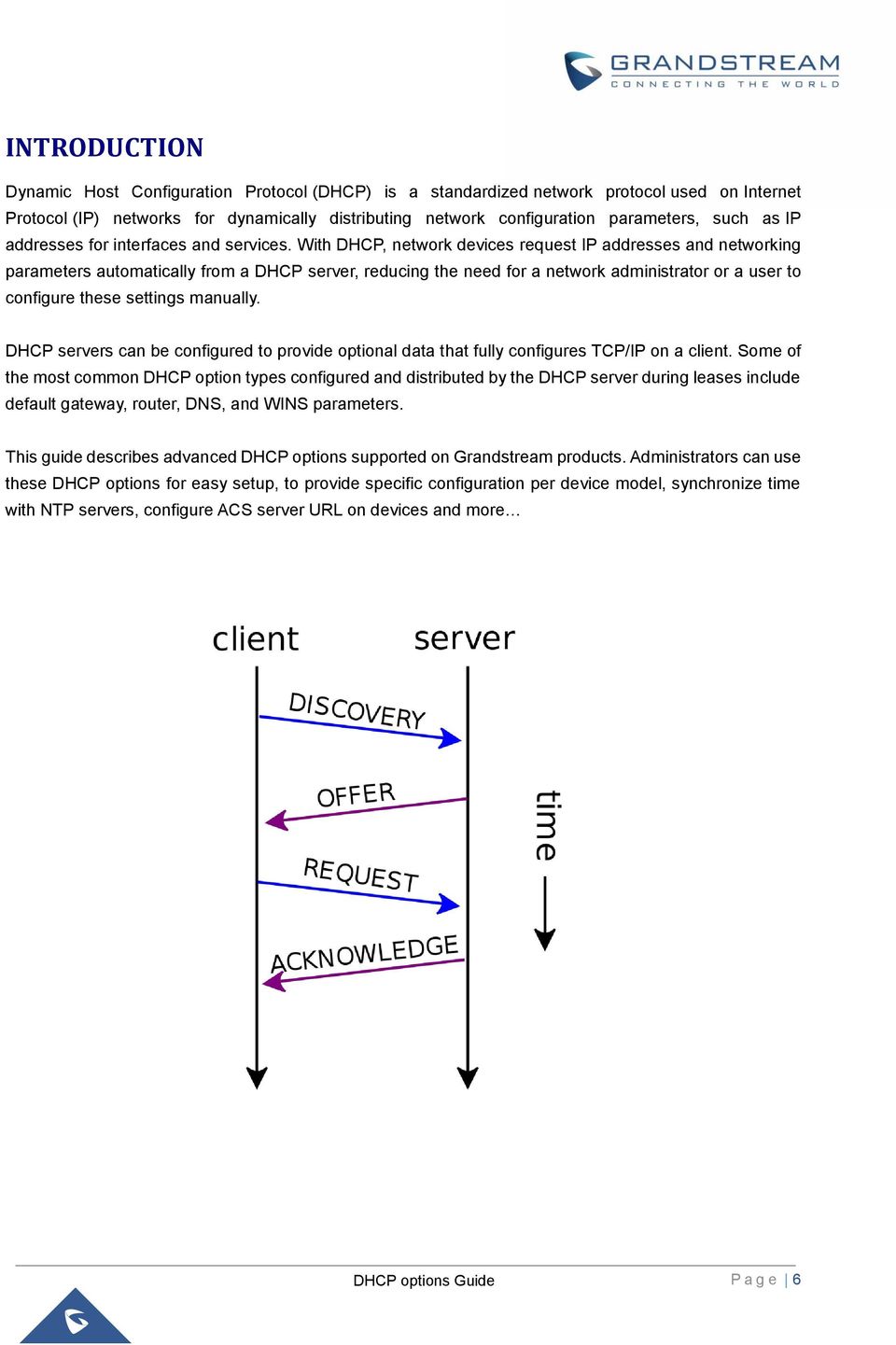
6 INTRODUCTION Dynamic Host Configuration Protocol (DHCP) is a standardized network protocol used on Internet Protocol (IP) networks for dynamically distributing network configuration parameters, such as IP addresses for interfaces and services. With DHCP, network devices request IP addresses and networking parameters automatically from a DHCP server, reducing the need for a network administrator or a user to configure these settings manually. DHCP servers can be configured to provide optional data that fully configures TCP/IP on a client. Some of the most common DHCP option types configured and distributed by the DHCP server during leases include default gateway, router, DNS, and WINS parameters. This guide describes advanced DHCP options supported on Grandstream products. Administrators can use these DHCP options for easy setup, to provide specific configuration per device model, synchronize time with NTP servers, configure ACS server URL on devices and more P a g e 6

7 ENVIRONMENT SETUP This chapter provides steps to setup a minimal test environment to run DHCP options described in this guide. In this guide, we will use isc-dhcp-server on an Ubuntu 12 machine with static IP Administrators can use other Windows or Linux based DHCP servers at their convenience. Note: This chapter can be skipped if a DHCP server supporting customizing options is already setup. Step 1: Install DHCP Server 1. Launch a Linux terminal. 2. Login as root by typing sudo su 3. Download and install DHCP server using following command: apt-get install isc-dhcp-server Figure 1: Installing isc-dhcp-server Step 2: DHCP Server Basic Configuration There are two main files to be configured: /etc/default/isc-dhcp-server (specify network interface to use for DHCP server) /etc/dhcp/dhcpd.conf (all DHCP Options in this guide can be defined in dhcpd.conf file) 1. Enter nano /etc/default/isc-dhcp-server to edit isc-dhcp-server file Figure 2: isc-dhcp-server file 2. Replace eth0 with the network interface to use for DHCP server. Figure 3: Edit isc-dhcp-server file P a g e 7


8 3. Save and exit the file using Ctrl+X 4. Enter nano /etc/dhcp/dhcpd.conf to edit dhcpd.conf file Figure 4: dhcpd.conf file 5. Configure DHCP server with basic options including subnet netmask range Screenshot below shows an example of configuration; in this example DHCP server will provide clients IP addresses from range to The server will lease an IP address for 180 seconds if no specific time frame requested by the client; otherwise, maximum (allowed) lease is 7200 seconds. DHCP server will also advise clients to use as subnet mask, as router/gateway, and as DNS servers. 6. Restart DHCP server Figure 5: dhcpd.conf Start and Stop DHCP service Figure 6: Restart/Start/Stop Services P a g e 8


9 DHCP OPTIONS DHCP Option 42 (NTP Server) DHCP option 42 specifies a list of NTP servers available to the client by IP address. Please refer to RFC2132 for more details. Figure 7: DHCP Option 42 Below screenshots of DHCP Discover/Offer for Option 42. Figure 8: DHCP Discover Request for Option 42 Figure 9: DHCP Offer Reply for the Option 42 P a g e 9

10 DHCP Option 2 (Time Offset) DHCP option 2 informs the client about the time zone offset (in seconds). A positive offset indicates a location east of the zero meridian and a negative offset indicates a location west of the zero meridian. Please refer to RFC2132 for more details. Figure 10: DHCP Option 2 In above example, GMT+1 was set as an offset value (one hour * 60 minutes/hour * 60 seconds/minute) = To set Pacific Standard Time (GMT-8). This field would be filled with (Eight hours * 60 minutes/hour * 60 seconds/minute). Below screenshots of DHCP Discover/Offer for Option 2 Figure 11: DHCP Discover Request for Option 2 Figure 12: DHCP Offer Reply for the Option 2 P a g e 10

11 DHCP Option 66 (TFTP Server Name) DHCP option 66 provides the IP address or the hostname of a single provisioning server where devices will be redirected to get their configuration files. Without this DHCP option, a manual configuration is requested on each phone the first time it boots. Please refer to RFC2132/RFC5859 for more details. Please refer to below link to learn how to how to provision Grandstream devices: Figure 13: DHCP Option 66 If is not specified, default TFTP protocol is used for configured server. Figure 14: DHCP Discover Request for Option 66 Figure 15: DHCP Offer Reply for the Option 66 P a g e 11

12 DHCP Option 43 (Vendor Specific Information) This option is used by clients and servers to exchange vendor-specific information. DHCP server can send one or more vendor specific parameters to clients, encoded in the form option_code/value_length/value in hexadecimal format. Please refer to RFC2132 for more details. In following example, DHCP server is configured to send CWMP information (ACS URL encapsulated in option 43. Figure 16: DHCP Option 43 Above DHCP option 43 contains the following: 0x01 (CWMP option for ACS URL) 0x13 (hex of decimal 19 = length of the URL) 19 bytes forming the URL in hexadecimal format ( Figure 17: DHCP Discover Request for Option 43 Figure 18: DHCP Offer Reply for the Option 43 P a g e 12


13 DHCP Option 12 (Host Name) This option specifies the name of the client. Option 12 is used to identify the client name against the DHCP server in order to make special configuration from the server side, this is similar to option 60 and 125. Please refer to RFC1533/RFC2132 for more details Below screenshot is taken from GXP2170, the value of Option 12 can be modified from the WebGUI under Network Settings > Basic Settings. Figure 19: DHCP Discover Advertisement for Option 12 P a g e 13

14 DHCP Option 60 (Vendor Class Identifier) Option 60 is used by clients to optionally identify the vendor type and configuration of a DHCP client. When using multiple devices from different vendors, DHCP server can provide specific configuration for each client based on received Option 60. Please refer to RFC1533/RFC2132 for more details. In following example, option 60 is configured to identify GXP2170 with its value Grandstream GXP2170 dslforum.org. If option 60 received matches the one configured, GXP2170 phones will get option 66 (tftp-server-name) with value For all other clients, they will get option 66 with value Figure 20: DHCP Option 60 Note: 32 is the number of digits that Grandstream GXP2170 dslforum.org contains. Figure 21: DHCP Discover Advertisement for Option 60 Figure 22: DHCP Offer Reply for Option 60 P a g e 14


15 DHCP Option 120 (SIP Server) The option is used to provide SIP server IP address or FQDN to SIP clients. Please refer to RFC3361 for more details. Figure 23: DHCP Option 120 Figure 24: DHCP Discover Request for Option 120 Figure 25: DHCP Offer Reply for Option 120 P a g e 15


16 DHCP Option 125 (Vendor-Identifying Vendor Options) DHCP clients may use this option to identify the vendor that manufactured the hardware on which the client is running the software in use in a unique way. Option 125 is similar to option 12 & 60 but advertising more parameters of a device: DeviceManufacturerOUI DeviceSerialNumber (Grandstream products set DeviceSerialNumber with MAC address) DeviceProductClass Please refer to RFC3925 for more details. During DHCP initiation, DHCP Discover/DHCP Request including option 125 are sent from client, the server checks V-I Vendor-specific information, if matching configured values, specific configuration will be provided to client, otherwise, common configuration is provided to client. Figure 26: DHCP Discover Advertisement for Option 125 Advertised information in above option 125 are: DeviceManufacturerOUI = 000b82 DeviceSerialNumber = DeviceMACaddress = 000b82XXXXXX DeviceProductClass = GXV3240 P a g e 16

17 DHCP Option 132 (Vlan ID) This option allows to assign a VLAN ID tag to devices during booting stage/dhcp renewal. Please refer to RFC4578 / IEEE_802.1Q for more details. Figure 27: DHCP Option 132 Figure 28: DHCP Discover Request for Option 132 Figure 29: DHCP Offer Reply for Option 132 In above screenshot, value 3230 is 20 (vlan-id) converted from text to hexadecimal. Note: After getting VLAN ID from DHCP server and finishing DHCP process, the device will send a second DHCP discover its new assigned VLAN tag to get an IP address on the VLAN range. P a g e 17

18 DHCP Option 133 (QoS priority level) This option assigns the priority within an Ethernet frame header when using VLAN tag, it specifies a priority value between 0 and 7 to differentiate the traffic priority. Please refer to RFC4578 / IEEE_P802.1p for more details Figure 30: DHCP Option 133 Figure 31: DHCP Discover Request for Option 133 Figure 32: DHCP Offer Reply for Option 133 In above screenshot, value 35 is 5 (priority level) converted from text to hexadecimal. P a g e 18

19 DHCP Option 150 (TFTP Servers List) DHCP option 150 provides one or more IP addresses of TFTP server(s) where devices will be redirected to download their configuration files. Without this DHCP option, a manual configuration is requested on each phone the first time it boots. Please refer to RFC5859 for more details. Please refer to below link to learn how to how to provision Grandstream devices: Figure 33: DHCP Option 150 Figure 34: DHCP Discover Request for Option 150 Figure 35: DHCP Offer Reply for Option 150 P a g e 19

20 DHCP Option 160 (Configuration Server Address) Similar to option 66, DHCP option 160 can provide one or more configuration server(s) to clients to get automatically provisioned. Without this DHCP option, a manual configuration is requested on each phone the first time it boots. Figure 36: DHCP Option 160 Figure 37: DHCP Discover Request for Option 160 Figure 38: DHCP Offer Reply for Option 160 In above screenshot, the value of the TFTP server was converted to hexadecimal. The phone contacts this IP address to get provisioned after receiving TFTP server value. P a g e 20


21 DHCP Option 242 (Avaya IP Phones) Once this option enabled, the phone will use configuration info issued by DHCP sever. Option 242 can include following parameters: MC IP address VLAN configuration HTTP server, Proxy Transport Protocol Figure 39: DHCP Option 242 Figure 40: DHCP Discover Request for Option 242 Figure 41: DHCP Offer Reply for Option 242 In above screenshot, MCIPADD and HTTPSRVR are converted to hexadecimal. P a g e 21
How to Configure an Initial Installation of the VMware ESXi Hypervisor
 How to Configure an Initial Installation of the VMware ESXi Hypervisor I am not responsible for your actions or their outcomes, in any way, while reading and/or implementing this tutorial. I will not provide
SonicWALL DHCP Server Enhancements in SonicOS Enhanced 4.0
 SonicWALL DHCP Server Enhancements in SonicOS Enhanced 4.0 Document Scope This document describes the DHCP enhancements in SonicOS Enhanced 4.0, including DHCP server options and DHCP server persistence.
Topic 7 DHCP and NAT. Networking BAsics.
 Topic 7 DHCP and NAT Networking BAsics. 1 Dynamic Host Configuration Protocol (DHCP) IP address assignment Default Gateway assignment Network services discovery I just booted. What network is this? What
Course Overview: Learn the essential skills needed to set up, configure, support, and troubleshoot your TCP/IP-based network.
 Course Name: TCP/IP Networking Course Overview: Learn the essential skills needed to set up, configure, support, and troubleshoot your TCP/IP-based network. TCP/IP is the globally accepted group of protocols
Dynamic Host Configuration Protocol (DHCP) 02 NAT and DHCP Tópicos Avançados de Redes
 Dynamic Host Configuration Protocol (DHCP) 1 1 Dynamic Assignment of IP addresses Dynamic assignment of IP addresses is desirable for several reasons: IP addresses are assigned on-demand Avoid manual IP
Savvius Insight Initial Configuration
 The configuration utility on Savvius Insight lets you configure device, network, and time settings. Additionally, if you are forwarding your data from Savvius Insight to a Splunk server, You can configure
THE HONG KONG POLYTECHNIC UNIVERSITY Department of Electronic and Information Engineering
 THE HONG KONG POLYTECHNIC UNIVERSITY Department of Electronic and Information Engineering ENG 224 Information Technology Laboratory 6: Internet Connection Sharing Objectives: Build a private network that
MS Windows DHCP Server Configuration
 MS Windows DHCP Server Configuration Abstract This document describes how to configure option 43 on a Microsoft Windows 2000/2003 DHCP server. This information may be used in an Aruba Networks solution
Create a virtual machine at your assigned virtual server. Use the following specs
 CIS Networking Installing Ubuntu Server on Windows hyper-v Much of this information was stolen from http://www.isummation.com/blog/installing-ubuntu-server-1104-64bit-on-hyper-v/ Create a virtual machine
HOST AUTO CONFIGURATION (BOOTP, DHCP)
 Announcements HOST AUTO CONFIGURATION (BOOTP, DHCP) I. HW5 online today, due in week! Internet Protocols CSC / ECE 573 Fall, 2005 N. C. State University copyright 2005 Douglas S. Reeves 2 I. Auto configuration
Copyright and Trademarks. How to Use this Guide. Phone Adapter with Router
 Copyright and Trademarks Specifications are subject to change without notice. Linksys is a registered trademark or trademark of Cisco Systems, Inc. and/or its affiliates in the U.S. and certain other countries.
Hosting more than one FortiOS instance on. VLANs. 1. Network topology
 Hosting more than one FortiOS instance on a single FortiGate unit using VDOMs and VLANs 1. Network topology Use Virtual domains (VDOMs) to divide the FortiGate unit into two or more virtual instances of
Linux Terminal Server Project
 Linux Terminal Server Project Tested by : C.V. UDAYASANKAR mail id: [email protected] The Linux Terminal Server Project adds thin client support to Linux servers. It allows you to set up a diskless
Comodo MyDLP Software Version 2.0. Installation Guide Guide Version 2.0.010215. Comodo Security Solutions 1255 Broad Street Clifton, NJ 07013
 Comodo MyDLP Software Version 2.0 Installation Guide Guide Version 2.0.010215 Comodo Security Solutions 1255 Broad Street Clifton, NJ 07013 Table of Contents 1.About MyDLP... 3 1.1.MyDLP Features... 3
Load Balancing. Outlook Web Access. Web Mail Using Equalizer
 Load Balancing Outlook Web Access Web Mail Using Equalizer Copyright 2009 Coyote Point Systems, Inc. Printed in the USA. Publication Date: January 2009 Equalizer is a trademark of Coyote Point Systems
Mediatrix 4404 Step by Step Configuration Guide June 22, 2011
 Mediatrix 4404 Step by Step Configuration Guide June 22, 2011 Proprietary 2011 Media5 Corporation Table of Contents First Steps... 3 Identifying your MAC Address... 3 Identifying your Dynamic IP Address...
Configuration of the DHCP server
 104 Page 91 of 294 Contents This section contains information on the following topics: Overview................................................ 91 i2004 Internet Telephone....................................
Installation of the On Site Server (OSS)
 Installation of the On Site Server (OSS) rev 1.1 Step #1 - Initial Connection to the OSS Having plugged in power and an ethernet cable in the eth0 interface (see diagram below) you can connect to the unit
1 PC to WX64 direction connection with crossover cable or hub/switch
 1 PC to WX64 direction connection with crossover cable or hub/switch If a network is not available, or if it is desired to keep the WX64 and PC(s) completely separated from other computers, a simple network
Steps for Basic Configuration
 1. This guide describes how to use the Unified Threat Management appliance (UTM) Basic Setup Wizard to configure the UTM for connection to your network. It also describes how to register the UTM with NETGEAR.
CS 326e F2002 Lab 1. Basic Network Setup & Ethereal Time: 2 hrs
 CS 326e F2002 Lab 1. Basic Network Setup & Ethereal Time: 2 hrs Tasks: 1 (10 min) Verify that TCP/IP is installed on each of the computers 2 (10 min) Connect the computers together via a switch 3 (10 min)
SOHO 6 Wireless Installation Procedure Windows 95/98/ME with Internet Explorer 5.x & 6.0
 SOHO 6 Wireless Installation Procedure Windows 95/98/ME with Internet Explorer 5.x & 6.0 Before You Begin Before you install the SOHO 6 Wireless, you must have: A computer with a 10/100BaseT Ethernet card
DKTCOMEGA AONode Management Module User Documentation
 AONode Management Module User Documentation Table of content Introduction...3 The boot process of the AONode...4 DHCP Settings...5 TFTP Settings...8 Custom configuration...9 Device script commands...10
DHCP Server. Heng Sovannarith [email protected]
 DHCP Server Heng Sovannarith [email protected] Introduction Dynamic Host Configuration Protocol (DHCP) automatically assigns IP addresses and other network configuration information to computers
Installing and Using the vnios Trial
 Installing and Using the vnios Trial The vnios Trial is a software package designed for efficient evaluation of the Infoblox vnios appliance platform. Providing the complete suite of DNS, DHCP and IPAM
Grandstream Networks, Inc. XML Configuration File Generator User Guide
 Grandstream Networks, Inc. XML Configuration File Generator User Guide XML Configuration File Generator User Guide XML Configuration File Generator User Guide Table of Content INTRODUCTION... 3 FILES IN
Hands-on MESH Network Exercise Workbook
 Hands-on MESH Network Exercise Workbook Santa Clara County RACES Date: 18 March 2015 Version: 1.0 scco_wifi_intro_exonly_v150318.docx 1 Table of Contents HANDS ON! Exercise #1: Looking at your Network
Cisco CNR and DHCP FAQs for Cable Environment
 Table of Contents CNR and DHCP FAQs for Cable Environment...1 Questions...1 Introduction...1 Q. How do I access CNR remotely?...1 Q. How do I access CNR remotely if the CNR server is behind a firewall?...2
802.1X Authentication, Link Layer Discovery Protocol (LLDP), and Avaya IP Telephones
 802.1X Authentication, Link Layer Discovery Protocol (LLDP), and Avaya IP Telephones Abstract The purpose of this document is to discuss 802.1X Authentication and Link Layer Discovery Protocol (LLDP) in
CCNA Exploration: Accessing the WAN Chapter 7 Case Study
 Objectives: Mitigate attacks based on DHCP rogue servers. Intro: ChurchBells Inc. is having connectivity issues and needs your help. The Scenario: According to the reports, some user PCs within the company
GregSowell.com. Mikrotik Basics
 Mikrotik Basics Terms Used Layer X When I refer to something being at layer X I m referring to the OSI model. VLAN 802.1Q Layer 2 marking on traffic used to segment sets of traffic. VLAN tags are applied
Management Software. Web Browser User s Guide AT-S106. For the AT-GS950/48 Gigabit Ethernet Smart Switch. Version 1.0.0. 613-001339 Rev.
 Management Software AT-S106 Web Browser User s Guide For the AT-GS950/48 Gigabit Ethernet Smart Switch Version 1.0.0 613-001339 Rev. A Copyright 2010 Allied Telesis, Inc. All rights reserved. No part of
100-101: Interconnecting Cisco Networking Devices Part 1 v2.0 (ICND1)
 100-101: Interconnecting Cisco Networking Devices Part 1 v2.0 (ICND1) Course Overview This course provides students with the knowledge and skills to implement and support a small switched and routed network.
V101 SIP VoIP Telephone Adaptor User Manual V1.1m
 V101 SIP VoIP Telephone Adaptor User Manual V1.1m Quick Guide Step 1: Broadband (ADSL/Cable Modem) Connections for V101 A. Connect V101 LAN port to ADSL NAT Router as the following connection. B. Connect
Optimum Business SIP Trunk Set-up Guide
 Optimum Business SIP Trunk Set-up Guide For use with IP PBX only. SIPSetup 07.13 FOR USE WITH IP PBX ONLY Important: If your PBX is configured to use a PRI connection, do not use this guide. If you need
SSVP SIP School VoIP Professional Certification
 SSVP SIP School VoIP Professional Certification Exam Objectives The SSVP exam is designed to test your skills and knowledge on the basics of Networking and Voice over IP. Everything that you need to cover
Administrator Guide KX-TGP550. SIP Cordless Phone. www.voicesonic.com Phone: 877.289.2829. Model No. KX-TGP500
 www.voicesonic.com Phone: 877.289.2829 Administrator Guide SIP Cordless Phone Model No. KX-TGP500 KX-TGP550 Thank you for purchasing a Panasonic product. Please read this guide before using the unit and
Building a Penetration Testing Virtual Computer Laboratory
 Building a Penetration Testing Virtual Computer Laboratory User Guide 1 A. Table of Contents Collaborative Virtual Computer Laboratory A. Table of Contents... 2 B. Introduction... 3 C. Configure Host Network
Integrating a Hitachi IP5000 Wireless IP Phone
 November, 2007 Avaya Quick Edition Integrating a Hitachi IP5000 Wireless IP Phone This application note explains how to configure the Hitachi IP5000 wireless IP telephone to connect with Avaya Quick Edition
Chapter 3 LAN Configuration
 Chapter 3 LAN Configuration This chapter describes how to configure the advanced LAN features of your ProSafe Dual WAN Gigabit Firewall with SSL & IPsec VPN. This chapter contains the following sections
Services. Vyatta System. REFERENCE GUIDE DHCP DHCPv6 DNS Web Caching LLDP VYATTA, INC.
 VYATTA, INC. Vyatta System Services REFERENCE GUIDE DHCP DHCPv6 DNS Web Caching LLDP Vyatta Suite 200 1301 Shoreway Road Belmont, CA 94002 vyatta.com 650 413 7200 1 888 VYATTA 1 (US and Canada) COPYRIGHT
Innominate mguard Version 6
 Innominate mguard Version 6 Configuration Examples mguard smart mguard PCI mguard blade mguard industrial RS EAGLE mguard mguard delta Innominate Security Technologies AG Albert-Einstein-Str. 14 12489
IP Addressing and Subnetting. 2002, Cisco Systems, Inc. All rights reserved.
 IP Addressing and Subnetting 2002, Cisco Systems, Inc. All rights reserved. 1 Objectives Upon completion, you will be able to: Discuss the Types of Network Addressing Explain the Form of an IP Address
WEBTITAN CLOUD. User Identification Guide BLOCK WEB THREATS BOOST PRODUCTIVITY REDUCE LIABILITIES
 BLOCK WEB THREATS BOOST PRODUCTIVITY REDUCE LIABILITIES WEBTITAN CLOUD User Identification Guide This guide explains how to install and configure the WebTitan Cloud Active Directory components required
Configuring the Edgewater 4550 for use with the Bluestone Hosted PBX
 Configuring the Edgewater 4550 for use with the Bluestone Hosted PBX NOTE: This is an advisory document to be used as an aid to resellers and IT staff looking to use the Edgewater 4550 in conjunction with
TCP/IP Network Essentials. Linux System Administration and IP Services
 TCP/IP Network Essentials Linux System Administration and IP Services Layers Complex problems can be solved using the common divide and conquer principle. In this case the internals of the Internet are
ICS 351: Today's plan
 ICS 351: Today's plan Quiz, on overall Internet function, linux and IOS commands, network monitoring, protocols IPv4 addresses: network part and host part address masks IP interface configuration IPv6
Voice Gateway with Router
 Voice User Guide Model No. SPA3102 Copyright and Trademarks Specifications are subject to change without notice. Linksys is a registered trademark or trademark of Cisco Systems, Inc. and/or its affiliates
IPv6 in Axis Video Products
 TECHNICAL NOTE REFERENCE DOCUMENT IPv6 in Axis Video Products Created: 2006-01-31 Last updated: 2006-05-29 TABLE OF CONTENTS DOCUMENT HISTORY... 2 1 IPV6 IN GENERAL... 3 1.1 The IPv6 address... 3 1.1.1
ASUS WL-5XX Series Wireless Router Internet Configuration. User s Guide
 ASUS WL-5XX Series Wireless Router Internet Configuration User s Guide Contents Chapter 1 Introduction:...1 Chapter 2 Connecting the wireless router...1 Chapter 3 Getting to know your Internet connection
OUTDOOR IR NETWORK CAMERA Series
 OUTDOOR IR NETWORK CAMERA Series INSTALLATION GUIDE Please read instructions thoroughly before operation and retain it for future reference. 1. OVERVIEW 1.1 Package Content Network camera Installation
FLX VoIP Registering with Avaya IP Office 500
 FLX VoIP Registering with Avaya IP Office 500 Date: April 5 th, 2012 This technical note gives a detailed description on how to register a Revolabs FLX conference phone with Avaya IP Office 500 PBX. On
What is VLAN Routing?
 Application Note #38 February 2004 What is VLAN Routing? This Application Notes relates to the following Dell product(s): 6024 and 6024F 33xx Abstract Virtual LANs (VLANs) offer a method of dividing one
D-LINK DPH-140S SIP PHONE INSTALLATION GUIDE
 pag.1 D-LINK DPH-140S SIP PHONE INSTALLATION GUIDE pag.2 SUMMARY SKYPHO VOIP SERVICE...3 DPH-140S PACKAGE CONTENT...3 DEVICE PHYSICAL CONNECTION...4 ACCESS TO THE DEVICE...6 Accesso to the IP Phone when
VLAN for DekTec Network Adapters
 Application Note DT-AN-IP-2 VLAN for DekTec Network Adapters 1. Introduction VLAN (Virtual LAN) is a technology to segment a single physical network into multiple independent virtual networks. The VLANs
Grandstream Networks, Inc. GXP2130/2140/2160 Auto-configuration Plug and Play
 Grandstream Networks, Inc. GXP2130/2140/2160 Auto-configuration Plug and Play Introduction: This is a technical guide targeted to PBX developers that want to learn the different mechanisms that GXP2130/2140/2160
Procedure to Create and Duplicate Master LiveUSB Stick
 Procedure to Create and Duplicate Master LiveUSB Stick A. Creating a Master LiveUSB stick using 64 GB USB Flash Drive 1. Formatting USB stick having Linux partition (skip this step if you are using a new
Chapter 1 Configuring Basic Connectivity
 Chapter 1 Configuring Basic Connectivity This chapter describes the settings for your Internet connection and your wireless local area network (LAN) connection. When you perform the initial configuration
Note: This case study utilizes Packet Tracer. Please see the Chapter 5 Packet Tracer file located in Supplemental Materials.
 Note: This case study utilizes Packet Tracer. Please see the Chapter 5 Packet Tracer file located in Supplemental Materials. CHAPTER 5 OBJECTIVES Configure a router with an initial configuration. Use the
AlienVault. Unified Security Management (USM) 4.8-5.x Initial Setup Guide
 AlienVault Unified Security Management (USM) 4.8-5.x Initial Setup Guide Contents USM v4.8-5.x Initial Setup Guide Copyright AlienVault, Inc. All rights reserved. The AlienVault Logo, AlienVault, AlienVault
NOC PS manual. Copyright Maxnet 2009 2015 All rights reserved. Page 1/45 NOC-PS Manuel EN version 1.3
 NOC PS manual Copyright Maxnet 2009 2015 All rights reserved Page 1/45 Table of contents Installation...3 System requirements...3 Network setup...5 Installation under Vmware Vsphere...8 Installation under
VLAN 802.1Q. 1. VLAN Overview. 1. VLAN Overview. 2. VLAN Trunk. 3. Why use VLANs? 4. LAN to LAN communication. 5. Management port
 1. VLAN Overview 2. VLAN Trunk 3. Why use VLANs? 4. LAN to LAN communication 5. Management port 6. Applications 6.1. Application 1 6.2. Application 2 6.3. Application 3 6.4. Application 4 6.5. Application
Procedure: You can find the problem sheet on Drive D: of the lab PCs. 1. IP address for this host computer 2. Subnet mask 3. Default gateway address
 Objectives University of Jordan Faculty of Engineering & Technology Computer Engineering Department Computer Networks Laboratory 907528 Lab.4 Basic Network Operation and Troubleshooting 1. To become familiar
Grandstream Networks, Inc. GXP-1450 GXP-2100 GXP-2110 GXP-2120
 3CX PhoneSystem Configuration Guide GXP21xx/GXP14xx IP Phone GXP-1450 GXP-2100 GXP-2110 GXP-2120 TABLE OF CONTENTS 3CX 3 PHONESYSTEM CONFIGURATION GUIDE FOR GXP21 1XX/GXP14xxx INTRODUCTION... 3 MANUAL
How To Plan Out Your Own Version Of Hpl (Dhcp) On A Network With A Network (Dns) On Your Network (Dhpl) On An Ipad Or Ipad On A Pc Or Ipa On A Server On A
 System i Networking Dynamic Host Configuration Protocol Version 5 Release 4 System i Networking Dynamic Host Configuration Protocol Version 5 Release 4 Note Before using this information and the product
F-Secure Internet Gatekeeper Virtual Appliance
 F-Secure Internet Gatekeeper Virtual Appliance F-Secure Internet Gatekeeper Virtual Appliance TOC 2 Contents Chapter 1: Welcome to F-Secure Internet Gatekeeper Virtual Appliance.3 Chapter 2: Deployment...4
VOIP-211RS/210RS/220RS/440S. SIP VoIP Router. User s Guide
 VOIP-211RS/210RS/220RS/440S SIP VoIP Router User s Guide Trademarks Contents are subject to revise without prior notice. All trademarks belong to their respective owners. FCC Warning This equipment has
Linux Networking Basics
 Linux Networking Basics Naveen.M.K, Protocol Engineering & Technology Unit, Electrical Engineering Department, Indian Institute of Science, Bangalore - 12. Outline Basic linux networking commands Servers
User Manual. Sipura SPA-2100 ATA with PC Router. January 2005 v1. Linhagratuita grupo csdata www.linhagratuita.com.br
 User Manual Sipura SPA-2100 ATA with PC Router January 2005 v1 Linhagratuita grupo csdata www.linhagratuita.com.br Disclaimer Please Read: This document contains implementation examples and techniques
Configuring the Switch IP Address and Default Gateway
 CHAPTER 3 Configuring the Switch IP Address and Default Gateway This chapter describes how to configure the IP address, subnet mask, and default gateway on the Catalyst enterprise LAN switches. Note For
Installation documentation for Ulteo Open Virtual Desktop
 Installation documentation for Ulteo Open Virtual Desktop Copyright 2008 Ulteo SAS - 1 PREREQUISITES CONTENTS Contents 1 Prerequisites 1 1.1 Installation of MySQL.......................................
Ulteo Open Virtual Desktop Installation
 Ulteo Open Virtual Desktop Installation Copyright 2008 Ulteo SAS - CONTENTS CONTENTS Contents 1 Prerequisites 2 1.1 Installation of MySQL....................................... 2 2 Session Manager (sm.ulteo.com)
Configuring Switch Ports and VLAN Interfaces for the Cisco ASA 5505 Adaptive Security Appliance
 CHAPTER 5 Configuring Switch Ports and VLAN Interfaces for the Cisco ASA 5505 Adaptive Security Appliance This chapter describes how to configure the switch ports and VLAN interfaces of the ASA 5505 adaptive
Tesira Voice-over-IP Interface. Preliminary Steps. Configuring a Cisco CallManager system to work with Biamp s SVC-2 card
 Configuring a Cisco CallManager system to work with Biamp s SVC-2 card Tesira Voice-over-IP Interface Biamp s SVC-2 card allows Biamp Tesira digital signal processors to make and receive calls over any
SI455 Advanced Computer Networking. Lab2: Adding DNS and Email Servers (v1.0) Due 6 Feb by start of class
 SI455 Advanced Computer Networking Lab2: Adding DNS and Email Servers (v1.0) Due 6 Feb by start of class WHAT TO HAND IN: 1. Completed checklist from the last page of this document 2. 2-4 page write-up
Broadband Router ESG-103. User s Guide
 Broadband Router ESG-103 User s Guide FCC Warning This equipment has been tested and found to comply with the limits for Class A & Class B digital device, pursuant to Part 15 of the FCC rules. These limits
Central Configuration Using File Server
 APPENDIXA This appendix contains information about configuring thin clients using a central file server as an alternative to Cisco VXC Manager. Cisco VXC Manager is the standard tool for central management.
Internet Control Protocols Reading: Chapter 3
 Internet Control Protocols Reading: Chapter 3 ARP - RFC 826, STD 37 DHCP - RFC 2131 ICMP - RFC 0792, STD 05 1 Goals of Today s Lecture Bootstrapping an end host Learning its own configuration parameters
Configuring your network settings to use Google Public DNS
 Configuring your network settings to use Google Public DNS When you use Google Public DNS, you are changing your DNS "switchboard" operator from your ISP to Google Public DNS. In most cases, the IP addresses
50.XXX is based on your station number
 Lab 6: Dynamic Host Configuration Protocol The purpose of this lab is to configure a DHCP server for multiple subnets. You will configure additional options along with an IP address and netmask, and you
Install Guide for JunosV Wireless LAN Controller
 The next-generation Juniper Networks JunosV Wireless LAN Controller is a virtual controller using a cloud-based architecture with physical access points. The current functionality of a physical controller
Configuring PA Firewalls for a Layer 3 Deployment
 Configuring PA Firewalls for a Layer 3 Deployment Configuring PAN Firewalls for a Layer 3 Deployment Configuration Guide January 2009 Introduction The following document provides detailed step-by-step
Application Note Startup Tool - Getting Started Guide
 Application Note Startup Tool - Getting Started Guide 1 April 2012 Startup Tool Table of Contents 1 INGATE STARTUP TOOL... 1 2 STARTUP TOOL INSTALLATION... 2 3 CONNECTING THE INGATE FIREWALL/SIPARATOR...
1 Data information is sent onto the network cable using which of the following? A Communication protocol B Data packet
 Review questions 1 Data information is sent onto the network cable using which of the following? A Communication protocol B Data packet C Media access method D Packages 2 To which TCP/IP architecture layer
Cisco - Configure the 1721 Router for VLANs Using a Switch Module (WIC-4ESW)
 Page 1 of 20 Configure the 1721 Router for VLANs Using a Switch Module (WIC-4ESW) Document ID: 50036 Contents Introduction Prerequisites Requirements Components Used Network Diagram The Role of Switched
Lab 8.4.2 Configuring Access Policies and DMZ Settings
 Lab 8.4.2 Configuring Access Policies and DMZ Settings Objectives Log in to a multi-function device and view security settings. Set up Internet access policies based on IP address and application. Set
RingCentral Office. Configure Grandstream phones with RingCentral. To contact RingCentral, please visit www.ringcentral.com or call 1-800-574-5290.
 TM RingCentral Office Configure Grandstream phones with RingCentral Configuring Grandstream phones Overview... 2 Getting ready to setup your Grandstream phones... 2 Configuring the Grandstream Phone...
GS510TP and GS110T Gigabit Smart Switches
 GS510TP and GS110T Gigabit Smart Switches Software Administration Manual 350 East Plumeria Drive San Jose, CA 95134 USA December 2011 202-10883-01 v1.0 2011 NETGEAR, Inc. All rights reserved No part of
Web Proxy Auto Discovery (WPAD) Configuration Guide. Revision 1.0.1. Warning and Disclaimer
 Web Proxy Auto Discovery (WPAD) Configuration Guide Revision 1.0.1 Warning and Disclaimer This document is designed to provide information about the configuration and installation of the CensorNet Professional
Grandstream Networks, Inc.
 Grandstream Networks, Inc. ActionURL Module User Guide Action URL User Guide ActionURL Module User Guide Index INTRODUCTION... 3 OVERVIEW OF FUNCTIONS... 4 SUPPORTED EVENTS... 4 SUPPORTED DYNAMIC VARIABLES...
KAREL UCAP DNS AND DHCP CONCEPTS MANUAL MADE BY: KAREL ELEKTRONIK SANAYI ve TICARET A.S. Organize Sanayi Gazneliler Caddesi 10
 KAREL UCAP DNS AND DHCP CONCEPTS MANUAL MADE BY: KAREL ELEKTRONIK SANAYI ve TICARET A.S. Organize Sanayi Gazneliler Caddesi 10 Sincan 06935 Ankara, Turkey Version Table Manual Version/Date AAA/22.03.2011
D-Link DAP-1360 Repeater Mode Configuration
 D-Link DAP-1360 Repeater Mode Configuration Outline 1. Package Contents 2. System Requirements 3. Hardware Overview Connections LED s WPS LED/Button 4. Default Settings 5. Configuring your LAN Adapter
CYAN SECURE WEB APPLIANCE. User interface manual
 CYAN SECURE WEB APPLIANCE User interface manual Jun. 13, 2008 Applies to: CYAN Secure Web 1.4 and above Contents 1 Log in...3 2 Status...3 2.1 Status / System...3 2.2 Status / Network...4 Status / Network
Ethernet Interface Manual Thermal / Label Printer. Rev. 1.01 Metapace T-1. Metapace T-2 Metapace L-1 Metapace L-2
 Ethernet Interface Manual Thermal / Label Printer Rev. 1.01 Metapace T-1 Metapace T-2 Metapace L-1 Metapace L-2 Table of contents 1. Interface setting Guiding...3 2. Manual Information...4 3. Interface
LifeSize Video Communications Systems Administrator Guide
 LifeSize Video Communications Systems Administrator Guide November 2009 Copyright Notice 2005-2009 LifeSize Communications Inc, and its licensors. All rights reserved. LifeSize Communications has made
Technical Support Information Belkin internal use only
 The fundamentals of TCP/IP networking TCP/IP (Transmission Control Protocol / Internet Protocols) is a set of networking protocols that is used for communication on the Internet and on many other networks.
DVG-2101SP VoIP Telephone Adapter
 This product can be set up using any current web browser, i.e., Internet Explorer 6 or Netscape Navigator 6.2.3. DVG-2101SP VoIP Telephone Adapter Before You Begin 1. If you purchased this VoIP Telephone
Fonality. Optimum Business Trunking and the Fonality Trixbox Pro IP PBX Standard Edition V4.1.2- p13 Configuration Guide
 Fonality Optimum Business Trunking and the Fonality Trixbox Pro IP PBX Standard Edition V4.1.2- p13 Configuration Guide Fonality Table of Contents 1. Overview 2. SIP Trunk Adaptor Set-up Instructions 3.
SevOne NMS Download Installation and Implementation Guide
 SevOne NMS Download Installation and Implementation Guide 5.3.X 530 V0002 Contents 1. Get Started... 3 2. SevOne Download Installation... 6 3. Appliance Network Configuration... 9 4. Install License and
SOA Software API Gateway Appliance 7.1.x Administration Guide
 SOA Software API Gateway Appliance 7.1.x Administration Guide Trademarks SOA Software and the SOA Software logo are either trademarks or registered trademarks of SOA Software, Inc. Other product names,