
JUNGHANS MEGA ALARM-CHRONO W
|
|
|
- Rosalyn Nicholson
- 9 years ago
- Views:
Transcription
1 JUNGHANS MEGA ALARM-CHRONO W

2 reset set + mode set

3 GB Contents Page 1. Wireless technology Readiness for use Automatic time synchronisation Functions Base mode Other functions Description of watch functions and how to use them Turning the LC display on and off Stop function, with split times (stopwatch) Alarm Count-down/count-up timer Second time Reception display Reception display Manual time synchronisation (transmitter calls) Set time zones Set language (day of the week display) Restart / getting started Hand start Adjusting the wrist strap Water resistance General information 89 3

4 GB reset button You can activate the alarm and timer with the reset button. You can also use it to reset settings, such as the second time. mode button The mode button enables you to switch between the individual items on the menu. The mode button can also be used to turn the LCD display on and off. set + Displays such as alarm, timer etc. can be adjusted with the + button. The + button is also used for starting and stopping the stopwatch. set The button is partly used for adjusting displays such as alarm, timer etc.. The button can also be used to change the date display language. (confer illustration in the fold-out part of the cover) 50

5 We are delighted that you have chosen the Junghans Mega Alarm Chronograph. Please read the following information at your leisure. It deals with how radio-controlled watches work in general and with the operation of your Junghans Mega Alarm Chronograph in particular. It will help you to make the most of all of your watch s many functions. We hope that you will get a lot of pleasure from this very special watch. 51

6 1. Wireless technology. The most up-to-date way to keep time. Over the 5,000 years since man began to keep time with sundials, we have progressed via water clocks, 13th century mechanical timepieces and quartz watches to the Junghans radio-controlled wrist watch. A watch, which as long as there s good reception will never go wrong and will never need adjusting. The Junghans radiocontrolled watch is absolutely precise, because it is linked via wireless technology to the timing control of one of the most accurate clocks in the world, namely the Caesium Time Base at the Physikalisch-Technischen Bundesanstalt in Braunschweig (Germany s national institute of natural and engineering sciences). This clock is so accurate that it is expected to deviate by no more than 1 second in a million years. Junghans radio-controlled watches receive timing data via longwave radio signals (77.5kHz) from Germany s official DCF 77 standard frequency and time signal transmitter in Mainflingen (24 km southeast of Frankfurt am Main). This transmitter has a coverage range of more than 1,500km. Within the coverage range of the DCF 77 transmitter, the high-performance antenna built into the case of a Junghans radio-controlled watch can pick up the time data signal wherever, for example, long-wave reception is possible with a good radio. 52

7 Junghans radio-controlled watches synchronise themselves every day with the DCF 77 time signal transmitter. This is done during the night at and If interference (e.g. from thunderstorms, nearby electrical equipment, light dimmers etc.) makes it impossible for the time signal to be picked up at the first attempt, the Junghans radio-controlled watch will automatically make further attempts to pick it up. Time synchronisation can also be carried out manually (e.g. after moving into an area with better reception) by using the watch s transmitter call button. The most recently received time data is stored internally in a time memory. The watch s high-precision 32kHz quartz movement will continue to keep to this original time until the watch synchronises itself again. Radio-controlled time synchronisation ensures not only that the watch always shows precisely the right time. The Junghans radio-controlled wrist watch also switches itself automatically from standard time (CET) to summer time (CEST), and, of course, vice versa (provided only that there is good reception). If you travel to a country in a different time zone, switching to the appropriate time for that country is made simple via the use of the time zone button on your Junghans radio-controlled watch. 53

8 2. Readiness for use To ensure that your watch is always ready for use, you should avoid allowing its power reserves to run down. You should check your watch regularly to make sure that it has enough battery power. If power is too low (e.g. battery has run down and ambient temperature is low, which affects the performance of the battery), the second-hand will stop in the 12:00 position. A blinking battery symbol appears in the 54

9 LC display. If the battery does not put itself right (e.g. due to better ambient temperature), you should take your watch to your Junghans specialist within the next weeks to have the battery changed. Alternatively, send it to the Junghans Service Centre. Battery type: CR 1632 Typical life: approx. 2 years Please be sure to dispose of the used battery in an orderly fashion, in accordance with legal provisions.! Please note that when power has run out, you can neither adjust time zones nor synchronise the time manually. The amount of power needed to move the hands would be too high. 55

10 3. Automatic time synchronisation Daily, fully automatic time synchronisation takes place overnight. When the synchronisation signal is received, the secondhand temporarily stops at quarter-to-the-hour. The display continues to show the actual seconds. The display then quickly changes to reception display mode (see section 5.6.1). While the synchronisation signal is being received, the radio mast flashes in the display. 56

11 After the time has been synchronised successfully, the original mode is again shown in the display. The date is changed automatically by the time signal. In leap years, your watch will also take 29th February into account. If definitive synchronisation is not possible, despite all attempts to pick up the signal, the reception check figure goes up by 1 (see also description of reception display mode in section 5.6.1). The watch keeps count of any further days without reception. Thanks to the internal time-memory, your watch will continue to run throughout such days with the precision of a quartz watch. As soon as it is possible to pick up the synchronisation signal successfully, your watch will be synchronised. Tip: To ensure the best possible conditions for night-time reception of the synchronisation signal, you should ideally not wear your watch at night and you should, if possible, not put it down near to electrical appliances, mobile or cordless phones. 4. Functions The Junghans Mega Alarm Chronograph can perform a variety of functions that are shown in the two sections of the LC display (above and below the centre of the watch). The functions are controlled via the four buttons on the right and left of the watch casing (for a description of what the buttons do, see the summary in the front of the fold-out part of the cover and on page 50). 57

12 Your Junghans Mega Alarm Chronograph s LC display can be switched on and off (see section 5.1). When the display is switched off, the time is shown in analogue form via the hour and minute hands. None of the digital displays are visible any more Base mode In base mode, the display shows the date and day of the week in the upper part and the watch s time in the lower part. This corresponds to the second time. Depending on the setting 58

13 you re using, this therefore either reproduces the analogue time or displays another, user-defined time. In this mode, the watch cannot be adjusted with the reset, set + and set buttons. You can only use the mode button actively, so that settings cannot be altered inadvertently Other functions The following functions can be accessed sequentially via the mode button: Stop function, with split times (stopwatch) Alarm Count-down / count-up timer Second time Synchronisation signal reception display / manual synchronisation (transmitter call) Setting time zones Base mode Stopwatch Alarm Timer Second time Reception display Time zone Base mode You can tell what mode your watch is in from the bar that appears below the relevant name in the mode menu on the display. The display in the lower part of the LCD changes 59

14 accordingly. In the upper part of the LC display, the date and day of week remain showing. The display can be shown in German, English or French. How to set the relevant language is described in section 5.8. The display continues to show the selected mode until another mode is selected via the mode button. 60

15 5. Description of watch functions and how to use them 5.1. Turning the LC display on and off >3 sec. To turn off the LC display, hold in the mode button for longer than 3 seconds. This applies, regardless of what mode the watch is currently in. 61

16 To turn the display on, you can use either the reset or mode button. Press one of the buttons and the display switches back on. The menu for the currently selected mode, plus the date and day of the week, are again visible. 62

17 5.2. Stop function, with split times (stopwatch) Keep pressing the mode button until you reach the stopwatch mode (CHRONO). The display shows hours, minutes, seconds and tenths of a second. 63
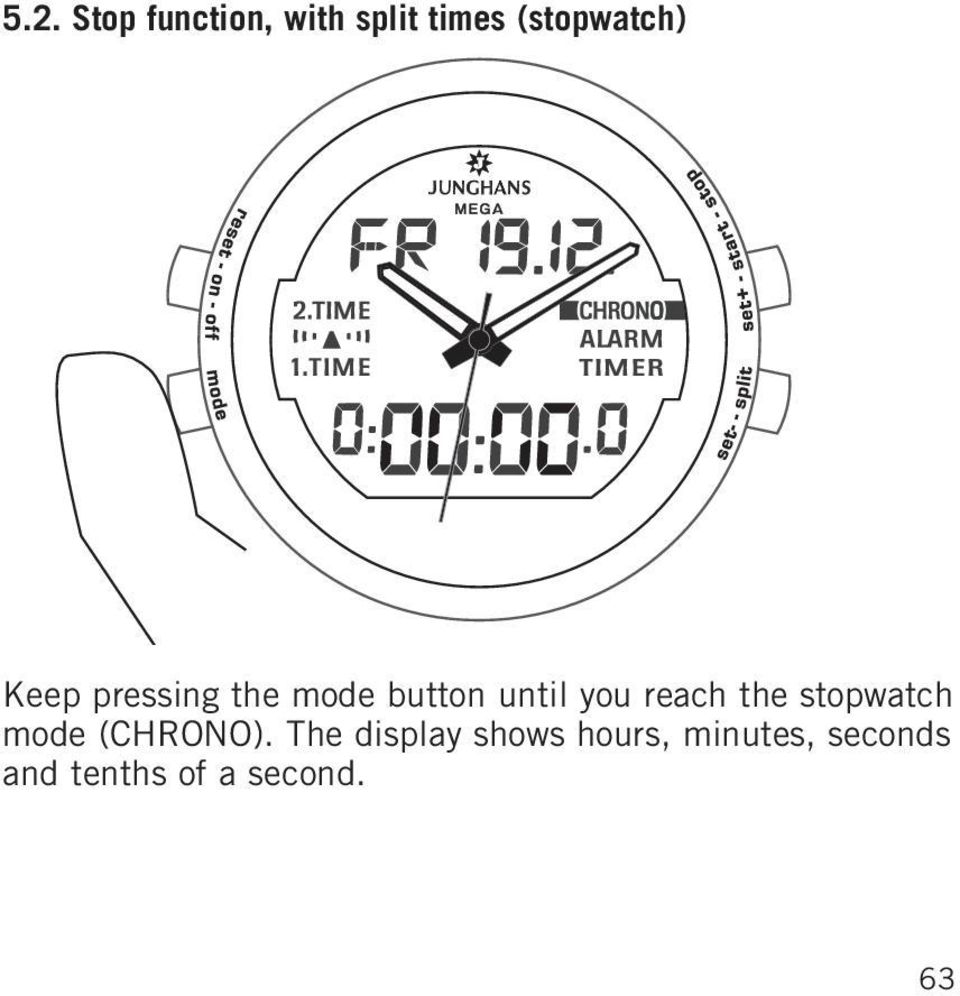
18 The stopwatch is started and stopped again using the start/stop button (set + button). When the stopwatch is running, ON is indicated alongside CHRONO on the menu. 64

19 With one press on the reset button, you can put the counter back to 0:00:00.0. The reset function only works, if the stopwatch has already been stopped. When the stopwatch is running, the current split time can be displayed for approx. 5 seconds by pressing the set-/split button. The stopwatch continues to run normally in the background. 65

20 5.3. Alarm Keep pressing the mode button until you reach the ALARM mode. 66

21 The alarm time can be set using the set + and set buttons. Press briefly to adjust by a minute at a time. Keep the button pressed longer, to adjust the time at high speed. 67
22 You can turn the alarm on and off with the reset button (on/off). If the alarm is active, ON appears in the display alongside ALARM on the menu. When it gets to the alarm time, an acoustic signal sounds. Once the alarm has successfully gone off, it is no longer active. If you want to use the alarm again, please set it and activate it as described above. 68
23 5.4. Count-down / count-up timer Keep pressing the mode button until you reach the TIMER mode. 69
24 The timer is set using the set + and set buttons. If you press the buttons briefly, the display will move a second at a time. If you hold the button longer, the setting changes rapidly. 70
25 You can turn the timer on and off with the reset button (on/off). If the timer is active, ON appears in the display alongside TIMER on the menu. If the timer gets to 0:00:00, an acoustic signal sounds. 71
26 5.5. Second time The second time function gives you the option to display another time in the display that is not connected with the actual analogue time (e.g. if you are on holiday in another time zone and want to see the time at home). Keep pressing the mode button until you reach the 2nd TIME mode. The second time can be adjusted in 30-minute steps via the set + and set buttons. 72
27 By pressing the reset button, you can have the second time again show the same time as the analogue time. 73
28 5.6. Reception display Reception display You can tell in the reception display whether your watch has synchronised with the signal from the synchronisation transmitter. Keep pressing the mode button until you reach the reception display mode (symbolised by a radio mast). An abbreviation for the selected language appears alongside the date in the upper area of the display. Below it, the current seconds are shown, as well as another number, the reception check figure. 74
29 If the reception check figure is 0, the watch picked up the signal correctly during the overnight auto-synchronisation. Reception check figures 1-9 show the number of days that the watch has not been able to synchronise automatically due to bad reception conditions. The next time that the watch synchronises successfully, the display goes back to Manual time synchronisation (transmitter calls) >3 sec 75
30 In reception display mode, you can also do a manual synchronisation by executing a so-called transmitter call. To do so, press the set + button for more than 3 seconds when in reception display mode. The hands start to race and stop in the 12:00 position. The watch begins to receive the signal. The display shows the current seconds. The radio mast in the display flashes. While the signal is being received, please keep yourwatch still or put it down. 76
31 When the watch has successfully picked up the time signal (after 2-3 minutes), the hands automatically move to the correct time and the display changes to base mode (see description above). If you wish, you can interrupt the manual synchronisation process, as soon as the hands have moved to the 12:00 position. To do so, press the set + button. The hands reset themselves to the original time. Please note that you cannot do a manual synchronisation while the stopwatch or the timer are running. Similarly, the transmitter call process only works if the time zone in use (see below) is no more than +1/ 1 hour away from DCF time (if the deviation is greater than this, you are probably no longer within the coverage area of the DCF 77 transmitter). What s more, to perform this function, the watch must have enough battery power (see also section 2). If you ve been successful in manually synchronising the time, the reception check figure resets itself to 0. If the transmitter call was not successful, the reception check figure does not change and the hands reset themselves to the time that was displayed before the transmitter call. 77
32 5.7. Set time zones Your Junghans Mega Alarm Chronograph receives its time signal from the DCF 77 transmitter in Mainflingen, near Frankfurt am Main. This enables it to show winter and summer time very reliably within the transmitter coverage area. If you travel to a country in another time zone, you can set the respective local time as the second time (shown in the lower section of the display for setting the second time, see Second time above), and/or adjust the analogue time display to the local time. 78
33 To do so, keep pressing the mode button until you reach the 1st TIME mode. In the lower display, the analogue time shown on your watch is now also shown digitally. You adjust the time zone setting, and the position of the hands, to the relevant time zone an hour at a time by pressing the set + (plus 10 hours) and set ( 13 hours) buttons. If necessary, the date is also adjusted automatically when you change the time zone. 79
34 If you want to reset the first time, and with it the analogue time display, to the DCF time, you can do this in set time zones mode by pressing the reset button. Both the digital and analogue time displays will then show the DCF time again Set language (day of the week display) The day of the week display on your Junghans Mega Alarm Chrono is set at the factory to German. You can change this to English or French in check reception mode. 80
35 To change the day of the week display to another language, press the mode button until you reach the check reception mode. In this mode, you can alter the language with the set button. The letter in the upper section of the display indicates which language is selected (D for German, F for French and En for English). 81
36 6. Restart / getting started When you change the battery, your watch will automatically begin a restart routine. After you insert the battery, the hands will move to the 12:00 position and your watch will start picking up the time signal. As this happens, a bar appears below the radio mast symbol in the display and the mast starts to blink. After a few moments, the seconds counter in the lower section of the display begins to run. 82
37 After a few minutes, if the reception process has been successful, the watch automatically sets itself to the correct DCF time. If your watch is unable to pick up the time signal for 30 minutes, the reception process is broken off to save battery power. However, it is started again regularly at the end of every complete hour. If, despite this, you want to display the time in the meantime, you will need to set your watch manually to the current time (a so-called hand start ). Your watch will then function just like a normal quartz watch Hand start The hand start mode is initiated automatically after 30 minutes of trying unsuccessfully to start the watch automatically. However, the process can also be launched manually by pressing the mode and set buttons simultaneously when restarting the watch, i.e. when the hands are in the 12:00 position (see illustration on the following page). If your watch is in hand start mode, you ll see an H in the display. The parameters that need to be set will flash (hour, minutes, date and day of week). 83
38 Manually launching hand start mode If the hour and minute are flashing, you can set these to the correct time with the set + and set buttons. If you press the 84
39 mode button after you ve set the time, you can set the date using the set + and set buttons. Press again on the mode button, and you can select the correct the day of the week (in German) via the two set + and set buttons. (The language for the day of the week cannot be adjusted in hand start mode. Please read more on this at section 5.8). If you pressed the mode button again, you would get back to where you set the hour and minutes. 85
40 When you have made all the necessary settings, confirm these with the reset button. The hands then move to the selected time. 86
41 7. Adjusting the wrist strap Depending on which model you have, your Junghans Mega Alarm Chrono will be fitted with either a leather or a metal wrist strap. In either case, the strap will have a clasp fastener. The leather strap can be adjusted as follows to fit your own wrist size. Lift the leather strap away from the stud on the inside of the clasp q. You can now adjust the leather strap to the desired length w. Now fix the strap back onto the stud using the desired hole e. q w e Metal straps are best adjusted by a specialist watch retailer. You could also send your watch to the Junghans Service Centre to have this done. 87
42 8. Water resistance Mark Rare of Watch case face Washing, Diving rain, without splashes Shower Bath Swimming gear * * No No No No No Water-resistant 3 bar * Yes No No No No Water-resistant 5 bar * Yes No Yes No No Water-resistant 10 bar * Yes Yes Yes Yes No No mark * Only watches in new condition are to be regarded as waterresistant. External influences can, however, affect water resistance. Please have your watch checked on a regular basis. 88
43 9. General information x Servicing, such as repairs to the glass, seal or wrist strap should only be carried out by a specialist watch retailer. x Please have the seals and the glass inspected regularly by an expert, approx. every 2 years. x If condensation gets into your watch, have it inspected by the Customer Service Unit without delay. Penetration of moisture may damage the watch. x Your watch is fitted with a quality wrist strap that has undergone multiple inspections in our factory. If, however, you decide to change the wrist strap, please fit a new one of the same quality, preferably an original Junghans wrist strap. x Clean your watch and wrist strap with a dry or slightly moist, soft cloth. Caution: do not use chemical cleaners (e.g. benzine or paint thinners). These may harm the surface. 89
44 JUNGHANS UHREN GmbH Postfach 100 D Schramberg / / 0404 / W
Interactive guide online at www.victorinoxswissarmy.com
 1 4 7 2 5 8 3 6 9 Interactive guide online at www.victorinoxswissarmy.com 2 VICTORINOX SWISS ARMY INSTRUCTIONS FOR USE I. GENERAL INFORMATION Disposal of used batteries 3 Water resistance 4 Meter/bar correlation
WEATHER STATION Instruction Manual Cat. No. 35.1115.IT
 WEATHER STATION Instruction Manual Cat. No. 35.1115.IT Thank you for choosing this wireless weather station from TFA. BEFORE YOU USE IT Please be sure to read the instruction manual carefully. This information
MEMO ALARM CLOCK Operating Manual
 MEMO ALARM CLOCK Operating Manual INTRODUCTION Congratulations on purchasing this state-of-the-art Alarm clock with radio controlled time. The operation of this product is simple and straightforward and
GB Instruction Manual. www.quantys.de
 GB Instruction Manual www.quantys.de GB Instruction manual Solar RADIO-CONTROLLED ALARM CLOCK With analogue alarm time setting Safety instructions - Swallowing batteries can be life-threatening. Therefore,
Caseback markings. w MB 119 CAL 0T10 SR927W. Accurist Watches Logo Model Number Calibre Number Battery Number
 Caseback markings w MB 119 CAL 0T10 SR927W Accurist Watches Logo Model Number Calibre Number Battery Number How to use these instructions This booklet contains setting instructions for the Accurist Chronograph
The Weather Station. Hanging Hole. LCD Display Battery Cover. Function Keys. Detachable Stand
 WIRELESS 433 MHz WEATHER STATION Instructions Manual INTRODUCTION: Congratulations on purchasing this Weather Station with wireless 433 MHz transmission of outdoor temperature and display of indoor temperature
LCD Display. Function keys. Stand. Adapter socket
 433 MHz RADIO CONTROLLED PROJECTION ALARM CLOCK Instructions manual INTRODUCTION: Congratulations on purchasing this innovative 433MHz Projection alarm clock which displays indoor temperature and humidity
INSTRUCTIONS FOR USE. Cal. ETA 988.333 9¾ x 11½ Cal. ETA 988.432 11 x 11½. English
 INSTRUCTIONS FOR USE Cal. ETA 988.333 9¾ x 11½ Cal. ETA 988.432 11 x 11½ English Summary English... Pages 3-18 2 1. Description 1.1 Using the crown A characteristic feature of your multifunction watch
Table of Contents. Introduction. Radio Frequency Control. Initial setup Setting the time. Setting the temperature
 LHZ USER GUIDE LHZ User Guide LHZ would like to thank you for purchasing your LHZ radiator. You have purchased a high quality, German designed and manufactured heating device, which will give you soft
Radio-Controlled Projection Clock with Indoor Temperature
 Item 972483 Radio-Controlled Projection Clock with Indoor Temperature Owner s Manual Thank you for purchasing the new generation of projection clock. Designed and engineered with the state-of-art technology
RF Projection Barometer With Remote Thermo Sensor
 RF Projection Barometer With Remote Thermo Sensor Model No.: BAR338P (UK VERSION BAR338PU) User s Manual MAIN UNIT CONTROLS GB INTRODUCTION Congratulations on your purchasing the BAR338P RF Projection
CITIZEN QUARTZ ALARM CHRONOGRAPH. Model No. AI3XXX Cal. No. 6870 INSTRUCTION MANUAL CTZ-B6813
 CITIZEN QUARTZ ALARM CHRONOGRAPH Model No. AI3XXX Cal. No. 6870 2. Mode (Display Function) Switching This watch is equipped with 8 modes consisting of time, alarm 1, alarm 2, chronograph, 0-position check,
Instructions and care
 Instructions and care watch care Skagen suggests the following solutions for cleaning metal and crystal surfaces: 3:1 solution of ammonia based window cleaner to water 4:1 solution of rubbing alcohol to
AN500T, AN1000, AN1000T, AN1500, AN1500T AN2000, AN2000T
 Product Instruction Manual Accona AN500T, AN1000, AN1000T, AN1500, AN1500T AN2000, AN2000T Panel heater v16.5/5 Version 3.2 Jan 2015 Contents 1. Important safety points 2. Installation 2.1. Wall mounting
RADIO CONTROLLED DIGITAL CLOCK MODELS 88905 / 88906
 RADIO CONTROLLED DIGITAL CLOCK MODELS 88905 / 88906 QUICK SETUP GUIDE IMPORTANT! INSTALL BATTERIES IN THE OUTDOOR TRANSMITTER BEFORE INSTALLING BATTERIES IN THE RADIO-CONTROLLED CLOCK. ALKALINE BATTERIES
PULSAR ANALOGUE QUARTZ WATCH WITH WORLD TIME, ALARM AND CHRONOGRAPH
 1 2 PULSAR ANALOGUE QUARTZ WATCH WITH WORLD TIME, ALARM AND CHRONOGRAPH Cal. N94J FEATURES This is a multi-functional watch featuring the world time, alarm and chronograph. The mode changes simply by turning
Quickster Chrono Foot G10-212 User s Manual
 Quickster Chrono Foot G-212 User s Manual 6 7 13 4 1 4 1 3 2 1 4 3 2 Display and functions Hour hand Minute hand Seconds hand (direct-drive) Calendar 4-minute counter -second counter Match phase counter
WEATHER STATION Instruction Manual Cat. No. 35.1111.IT
 WEATHER STATION Instruction Manual Cat. No. 35.1111.IT Thank you for choosing this wireless weather station from TFA. BEFORE YOU USE IT Please be sure to read the instruction manual carefully. This information
Please read the operating instructions carefully to familiarize yourself with the features and modes of operation before using the instrument.
 WS 6750 weather station user manual Please read the operating instructions carefully to familiarize yourself with the features and modes of operation before using the instrument. Technical Details Six
VIBRATION WATCH with:
 Vibration Alarm won't disturb others. Beep Alarm option VIBRATION WATCH with: Auto Reload Countdown Timer can be set for seconds, minutes & hours. Use for reminders such as medical conditions, medication,
Introduction. Your TAG Heuer. Your new TAG Heuer watch has all the technical features of an authentic sports watch:
 Introduction Your TAG Heuer Congratulations on your purchase of a TAG Heuer watch. You have made an excellent choice in selecting the ultimate in technical innovation, precision and endurance high-performance
TISSOT TWOTIMER SETTING INSTRUCTIONS
 TISSOT TWOTIMER SETTING INSTRUCTIONS The Twotimer is available in many different styles, in both round and rectangular cases but the setting instructions are identical for all. 1 of 5 26-03-2011 13:49
INSTRUCTIONS FOR ANALOGUE QUARTZ AND MECHANICAL WATCHES
 INSTRUCTIONS FOR ANALOGUE QUARTZ AND MECHANICAL WATCHES Your watch is one of the following six types of analogue quartz and mechanical watches. Before using your new watch, please read the instructions
H203D 中文 GB Version 1
 H203D 中 GB文 Version 1 Contents Installing batteries... 4 Using the AC adapter (not supplied)... 5 Setting the clock... 6-7 Updating your radio - DAB... 8 Selecting a station - DAB... 9 Secondary services
Regatta Master Watch_W012. Watch Instructions
 Regatta Master Watch_W012 Watch Instructions This watch comes with a 2 year warranty. For warranty issues please contact your nearest stockist. Proof of purchase required. 1.0 Introduction The watch is
INSTRUCTION MANUAL GUeSS WATCheS
 INSTRUCTION MANUAL Guess Watches WOMENS CONGRATULATIONS ON OWNING YOUR NEW GUESS WATCH. DEVELOPED FROM ADVANCED ELECTRONICS TECHNOLOGY, THE MOVEMENT IS MANUFACTURED FROM Congratulations THE BEST QUALITY
Time. Choose a location 6 feet or more from electronics such as cordless phones, wireless gaming systems, televisions,
 Model: 404-1220 Instruction Manual DC: 050614 20 Atomic Wall Clock Mountain Central DST Indicator Pacific Eastern Manual Set Button Battery Compartment 1- C Alkaline Get Started Step 1: Insert 1 fresh
REMOTE TERMOMETER TE 219 LED USER MANUAL
 INTRODUCTION REMOTE TERMOMETER TE 219 LED USER MANUAL Thank you for purchasing this unit with indoor thermometer, wireless thermometer sensor and radiocontrolled clock. This device is also equipped with
Current Split tim e. Stopwatch OSLO SILVER 30 OPERATING INSTRUCTIONS
 OSLO SILVER 30 OPERATING INSTRUCTIONS THANK YOU for buying the Oslo Silver 30 Thirty Lap Memory Stopwatch. Your purchase brings you a reliable, World-Class Timer which measures performance for a wide array
VIBRATION WATCH with: Vibration Alarm (won't disturb others). Beep Alarm (optional) Electro-Luminescent (EL) back light (for viewing display at
 VIBRATION WATCH with: Vibration Alarm (won't disturb others). Beep Alarm (optional) Electro-Luminescent (EL) back light (for viewing display at night). Second Clock (great when traveling in a different
Talking Atomic Alarm Clock Instructions
 1 Talking Atomic Alarm Clock Instructions S1 (Talking+Snooze+Back Light) S2 (Alarm Time + Alarm Hour) S4 (Alarm Volume + OFF) S3 (Alarm ON/OFF + Alarm Minute) S5 (Wave, Manual Signal Reception) S8 (DST
You have chosen a Hublot watch; you are about to enter a whole new world
 ENGLISH ENGLISH You have chosen a Hublot watch; you are about to enter a whole new world Every piece cultivates its distinction, to assert its powerful and incredible personality every time. Yet this
Reizen Atomic Talking Analog Alarm Clock Item #706810. Instruction Manual
 Reizen Atomic Talking Analog Alarm Clock Item #706810 Instruction Manual 1 Instruction Manual of Atomic Analog Talking Clock (Single-Band) S2 (Alarm Hour) S1 (Talking+Snooze+Lamp) S4 (Alarm Volume+Off)
CITIZEN QUARTZ NAVIHAWK. Model No. JNOXXX Caliber No. C300 INSTRUCTION MANUAL CTZ-D6758. Main Functions
 CITIZEN QUARTZ NAVIHAWK Model No. JNOXXX Caliber No. C300 INSTRUCTION MANUAL CTZ-D6758 This combination watch can display the time in 30 cities of the world with a simple operation. In addition to the
Atomic Alarm Clock Instruction Manual
 Atomic Alarm Clock Instruction Manual Introduction: Congratulations on purchasing the Atomic Alarm Clock with WWVB Radio controlled time, calendar, 12/24 hours display, time zone with US map, indoor temperature
Operating Manual for the Electronic Built-in Interval Timer. Micro II (Countdown Timer)
 Operating Manual for the Electronic Built-in Interval Timer Micro II (Countdown Timer) Note: This document has been designed for our OEM customers. They can use it as supporting material when creating
The Abingdon Co. Jackie. Product Information, Manual and Warranty
 The Abingdon Co. Jackie Product Information, Manual and Warranty Revision 3 2 Dear Friend, 3 Welcome to the Abingdon family. Thank you for purchasing your Abingdon watch. I hope it helps you navigate for
DX-395. FM/AM/SW1/SW2 PLL Synthesized Receiver OWNER S MANUAL. Cat. No. 20-225. Please read before using this equipment.
 20-225.fm Page 1 Wednesday, August 4, 1999 10:07 AM Cat. No. 20-225 OWNER S MANUAL Please read before using this equipment. DX-395 FM/AM/SW1/SW2 PLL Synthesized Receiver 20-225.fm Page 2 Wednesday, August
STRAPLESS HEART RATE MONITOR
 INSTRUCTION MANUAL STRAPLESS HEART RATE MONITOR Model: HR-210 ENGLISH table TABLE of OF CONTENTS Before using the Monitor Introduction... 3 Important Safety Information...4 Operating the Device...4 Care
DR 70 Portable Digital DAB+ and FM Radio Receiver User Manual English Please read carefully before using this product
 DR 70 Portable Digital DAB+ and FM Radio Receiver User Manual Please read carefully before using this product 15 1 Table of Contents 1 Table of Contents... 16 2 Safety Instructions:... 17 3 Specification:...
Video Baby Monitor System. User Guide
 Video Baby Monitor System User Guide What s inside Welcome!... 2 Getting started... 3 Tour of the system... 7 Everyday use...13 Cameras... 14 Motion/Alerts... 18 Recording... 21 Playing Back Pictures and
Reizen Atomic Talking Analog Alarm Clock Item #706810. Instruction Manual
 Reizen Atomic Talking Analog Alarm Clock Item #706810 Instruction Manual S1 (Talking + Snooze + Lamp) S2 (Alarm Hour) S4 (Alarm Volume + Off) S3 (Alarm Minute) S7 (Time Zone: P,M,C,E) S5 (Wave) S8 (DST
Weather Station TE 529EL USER MANUAL
 Weather Station TE 529EL USER MANUAL INTRODUCTION : Congratulations on your purchase of the weather station TE529EL with wireless sensor and radio controlled clock. The basic package comes with a main
Remote Engine Start System User s Information Manual
 Remote Engine Start System User s Information Manual A Few Words About Safety Your safety, and the safety of others, is very important. Operating this Remote Engine Starter System safely is an important
Wireless Alarm System. Wireless Keypad. User s Manual. Choice ALERT. Control all sensors, accessories and remote transmitters from one location
 Wireless Alarm System Wireless Keypad User s Manual 1 2 3 4 Choice ALERT Control all sensors, accessories and remote transmitters from one location Table of Contents Important Safeguards 4 Introduction
Atomic Projection Alarm Clock model 13021
 Instruction Manual Atomic Projection Alarm Clock model 13021 CONTENTS Unpacking Instructions... 2 Package Contents... 2 Product Registration... 2 Features & Benefits... 3 Clock Setup... 5 Atomic Clock...
MidiStream. UHF Wireless MIDI System Operating Manual
 MidiStream UHF Wireless MIDI System Operating Manual Introduction Congratulations on your purchase of the MidiStream UHF wireless MIDI system. The MidiStream system is very easy to use, but please take
WIRELESS 433 MHz TEMPERATURE STATION Instruction Manual Cat. No. 30.3015
 WIRELESS 433 MHz TEMPERATURE STATION Instruction Manual Cat. No. 30.3015 Thank you for choosing this wireless temperature station from TFA. BEFORE YOU USE IT Please be sure to read the instruction manual
ecomax Instructions for use Wall hung room sealed fan assisted condensing boilers For the user
 For the user Instructions for use ecomax Wall hung room sealed fan assisted condensing boilers ecomax 63/ E ecomax 68/ E ecomax 6/ E ecomax 635 E ecomax 84/ E ecomax 88/ E ecomax 835 E GB Table of contents
vements ATCH MO W 4. 4. WATCH MOvEMENTS
 4. WATCH MOVEMENTS 4. WATCH MOVEMENTS 4.1 WATCH MOVEMENTS QUARTZ MODELS MAIN COMPONENTS A Hour Hand B Minute Hand C Second Hand D Crown 4.1 WATCH MOVEMENTS Description of the display and control buttons
Important Safety Instructions
 PR-D7 GB Revision 1 Important Safety Instructions 1. Read these instructions. 2. Keep these instructions. 3. Heed all warnings. 4. Follow all instructions. 5. Do not use this apparatus near water. 6. Clean
Fox 40 Whistle Watch USER MANUAL 609-0700
 Fox 40 Whistle Watch USER MANUAL 609-0700 CONTENTS BUTTONS AND FEATURES... 3 OPERATING THE WATCH... 4 STOPWATCH MODE... 5 COUNTDOWN MODE... 6 ALARM MODE... 7 BATTERY REPLACEMENT... 8 CARE AND MAINTENANCE...
Radio BMR100 INSTRUCTION MANUAL. ENGLISH (Original instructions)
 ENGLISH (Original instructions) INSTRUCTION MANUAL Radio BMR00 WARNING: For your personal safety, READ and UNDERSTAND before using. SAVE THESE INSTRUCTIONS FOR FUTURE REFERENCE. Symbols The following show
ATOMIC CLOCK WITH MOON PHASE. MODEL 86730 Instruction Manual
 ATOMIC CLOCK WITH MOON PHASE MODEL 86730 Instruction Manual FEATURES: WWVB Radio controlled time with manual time setting 12/24 hour time display Time display: hour, minute, second Alarm setting with snooze
ŠkodaAuto CAR RADIO BEAT SIMPLY CLEVER
 ŠkodaAuto CAR RADIO BEAT SIMPLY CLEVER Contents 1 Contents Radio....................................... Radio - Overview............................. Important information........................ Anti-theft
CR9971 2 Band Auto Set Dual Alarm Clock Radio ROBERTS. Sound for Generations. Please read this manual before use
 ROBERTS Sound for Generations CR9971 2 Band Auto Set Dual Alarm Clock Radio Please read this manual before use Contents Contents... 1 Controls...2-5 Switching on... 6 Setting the time manually... 6 Setting
Drayton Digistat +2RF/+3RF
 /+3RF Programmable Room Thermostat Wireless Model: RF700/22090 Model: RF701/22092 Power Supply: Battery - Thermostat Mains - Digistat SCR Invensys Controls Europe Customer Service Tel: 0845 130 5522 Customer
Intelli-Time Alarm Clock model 13027
 Instruction Manual Intelli-Time Alarm Clock model 13027 CONTENTS Unpacking Instructions... 2 Package Contents... 2 Product Registration... 2 Features & Benefits... 3 Clock Setup... 4 Intelli-Time Clock...
EasyStart R + Operating instructions. Comfort radio remote control with integrated timer for parking heaters and more.
 EasyStart R + Operating instructions. Comfort radio remote control with integrated timer for parking heaters and more. 22 1000 32 80 06 03.2009 Contents Introduction Please read first... 3 Purpose... 3
PhoneWatch Smart Security System User Manual - Domonial
 PW0002 10/13 Customer Support: 1850 753 753 PhoneWatch Ltd., Unit 3/4, Sandyford Park, Burton Hall Rd, Sandyford Industrial Estate, Dublin 18. Email: [email protected] PhoneWatch Smart Security System
Wireless Powerlink II Receiver Set Active
 Wireless Powerlink II Receiver Set Active Installation Guide Contents 1 General WirelessPowerlink Page 2 Package Contents Safety Instructions Page 3 Disposal of Old Electrical Devices Page 4 Installation
User Guide for the Wireless Headset (HS-11W) 9235346 Issue 1
 User Guide for the Wireless Headset (HS-11W) 9235346 Issue 1 DECLARATION OF CONFORMITY We, NOKIA CORPORATION declare under our sole responsibility that the product HS-11W is in conformity with the provisions
INSTRUCTION MANUAL AND WARRANTY
 INSTRUCTION MANUAL AND WARRANTY THANK YOU FOR CHOOSING AN INVICTA TIMEPIECE Long ago, we set out to continue Invicta s original 1837 mission to offer magnificent Swiss timepieces at modest prices. In doing
ATOMIC CLOCK WITH OUTDOOR WIRELESS TEMPERATURE
 LCD1 display LCD2 display ATOMIC CLOCK WITH OUTDOOR WIRELESS TEMPERATURE INTRODUCTION: Congratulations on purchasing this state-of-the-art Skyscan Atomic Clock as an example of superior design and engineering.
The ebike Rechargeable Battery Guide
 The ebike Rechargeable Battery Guide Everything you need to know about PowerPacks Robert Bosch GmbH Bosch ebike Systems Postfach 1342 72703 Reutlingen Germany www.bosch-ebike.com www.facebook.com / boschebikesystems
MAKING MODERN LIVING POSSIBLE. living connect. Installation and User Guide. Danfoss Heating Solutions
 MAKING MODERN LIVING POSSIBLE living connect Installation and User Guide Danfoss Heating Solutions 2 living connect Thank you for buying a Danfoss product Danfoss Heating Solutions 3 Contents 1. System
Radio Thermostat Clock Part Number: 30800009. Installation & User Instructions. Suitable for all Ferroli Combination Boilers
 Radio Thermostat Clock Part Number: 30800009 Installation & User Instructions Suitable for all Ferroli Combination Boilers 2 Short Description Short description Radio Thermostat Clock - Transmitter The
IN-OUT Thermometer with Cable Free Sensor and Clock
 IN-OUT Thermometer with Cable Free Sensor and Clock MODEL: RAR232 USER'S MANUAL INTRODUCTION Congratulations on your purchase of the RAR232 In-Out Thermometer with 433MHz cable free sensor and calendar
DIGITAL ALARM CLOCK RADIO
 DIGITAL ALARM CLOCK RADIO INSTRUCTION MANUAL For information and support, www.lenco.eu CR3302 LENCO ENG FM ONLY IM 98 x1 1 11/5/2009 9:14:35 CAUTION RISK OF ELECTRIC SHOCK DO NOT OPEN WARNINGS ATTENTION
Information is Power. triax c5 features
 Information is Power By measuring intensity (heart rate) and duration (time) you can avoid over training, help prevent injury, and maximize your chances of achieving your goals. triax c5 features Adjustable
TABLE OF CONTENTS ENGLISH 1-08 ESPAÑOL 00-00 FRANCAIS 00-00 ITALIANO 00-00 DEUTSCH 00-00 JAPANESE 00-00
 TABLE OF CONTENTS ENGLISH 1-08 ESPAÑOL 00-00 FRANCAIS 00-00 ITALIANO 00-00 Português 00-00 Magyar 00-00 DEUTSCH 00-00 JAPANESE 00-00 2009 Oakley, Inc. U.S. Patent(s) Pending. 12 GAUGE INSTRUCTION MANUAL
Control Location. Replacing Battery
 Functions - Normal Time with PM Indicator - 12/24 hour selectable - Dual Alarm, Snooze, Sleep Timer Green LED Backlight display - Month and Date Display - Thermometer (32oF - 122-F) - AM/FM Radio Receiver
Underwater Housing for Sony RX100 III, RX100 IV
 Underwater Housing for Sony RX100 III, RX100 IV Product Number 6215.04 Product Registration Please register your product at ikelite.com within 15 days of purchase. Our product registration database is
Introduction 1 The system 1 The meter 2 The display 3 The mode 3 The measurement 4 Coding the meter 4 How to obtain a drop of blood 6 Application of
 Introduction 1 The system 1 The meter 2 The display 3 The mode 3 The measurement 4 Coding the meter 4 How to obtain a drop of blood 6 Application of the blood 7 Procedure to test glucose 7 Procedure to
EM6625 e-domotica Push Button
 EM6625 e-domotica Push Button EM6625 e-domotica Push Button 2 ENGLISH Table of contents 1.0 Introduction... 2 1.1 Functions and features... 2 1.2 Packing contents... 2 2.0 Inserting or replacing the battery...
PR-2500 Portable Receiver. Owner s Manual
 PR-2500 Portable Receiver Owner s Manual CONTENTS The PR-2500, battery charger, and belt clip. (figure 1) Figure 1 Warning This device complies with Part 15 of the FCC rules, operation of this device is
Installation and Operating Manual p. 23. Radio push button 2 channel: HM-PB-2-WM55-2
 Installation and Operating Manual p. 23 Radio push button 2 channel: HM-PB-2-WM55-2 1. English edition 10/2013 Documentation 2013 eq-3 Ltd., Hong Kong All rights reserved. No parts of this manual may be
RCR-22 AM/MW 2 bands Digital Clock Radio instruction manual
 RCR-22 AM/MW 2 bands Digital Clock Radio instruction manual Important safety instructions 1. Read and understand all safety and operating instructions before the radio is operated. 2. Retain instruction:
B/S/H/ Error codes and service programmes PH
 1 ERROR CODES AND APPLIANCE MESSAGES... 3 1.1 Complete overview of all error codes (in order)... 3 Automatic switch-off... 3 Display is dark and any individual LEDs are lit... 3 E 005... 3 E 011... 3 E
Albrecht DR314. DAB/DAB+/FM Radio 1.) User Manual
 Albrecht DR314 DAB/DAB+/FM Radio 1.) User Manual -1- Important Safety Notes TO PREVENT FIRE OR SHOCK HAZARD, DO NOT USE THIS PLUG WITH AN EXTENSION CORD, RECEPTACLE OR OTHER OUTLET UNLESS THE BLADES CAN
Digital Heart Rate Monitor
 W-248 843-095002-02 EU 2009 Timex Group, USA, Inc. TIMEX, TRIATHLON and NIGHT-MODE are registered trademarks of Timex Group USA, Inc. INDIGLO is a registered trademark of Indiglo Corporation in the US
TOUCH SCREEN WEATHER STATION MODEL WS-3500. Operation Manual
 TOUCH SCREEN WEATHER STATION MODEL WS-3500 Operation Manual 28 Table of Contents 1... General 2... Important Touch Screen Operating Notes generally applicable 3... Putting into Operation 3.1... Wiring
ST815 Illumination Sensor with LCD
 ST815 Illumination Sensor with LCD The Illumination Sensor with LCD (refer to as Illumination Sensor hereafter) is a Z-Wave TM enabled device which is fully compatible with any Z-Wave TM enabled network.
LG Wireless Remote Controller
 Visit us at : http://www.lgservice.com LG Wireless Remote Controller Owner's & Installation Manual Models: PQWRHSF0 PQWRCSF0 LG ENGLISH ITALIANO ESPAÑOL FRANÇAIS DEUTSCH IMPORTANT Please read this installation
To start the watch, first pull the stopper as shown in the image at the right, in the direction of the arrow
 Start up & Strap Adjusting P. 1 Instructions P. 2 Date time function Ice-Watch setting P. 3 Chronograph (with date) time function Ice-Watch setting P. 4-5 Warranty P. 6 ENGLISH Start up & Strap adjusting
DAB+ / FM Tuner Model: TU-201
 DAB+ / FM Tuner Model: TU-201 Instruction Manual www.pulse-audio.co.uk 1 Safety Information The lightning bolt within a triangle is intended to alert the user to the presence of dangerous voltage levels
Atomic Dual Alarm Clock models 13022 / 13035
 Instruction Manual Atomic Dual Alarm Clock models 13022 / 13035 CONTENTS Unpacking Instructions... 2 Package Contents... 2 Product Registration... 2 Features & Benefits: Sensor... 2 Features & Benefits:
Key. ➍ Micro USB Port ➎ Operating System Toggle Keys ➏ Foam Screen Protectors. ➊ On/Off switch ➋ Bluetooth Connect Button (flashes when searching)
 INSTRUCTION MANUAL ➏ ➋ ➊ Product Features ➎ ➍ ➌ Built-in wireless Bluetooth 3.0 keyboard Compatible across ios, Android, and Windows, enabling you to mix and match with devices Ultra-thin, lightweight
REVIVE DAB/FM ALARM CLOCK RADIO
 kitsound.co.uk REVIVE DAB/FM ALARM CLOCK RADIO USER MANUAL JB. 3208 / Made in China. KitSound 2014. Christchurch, Dorset. BH23 4FL We are craftspeople. We are musicians. We are KitSound And we all commit
Drayton Digistat +2RF
 Drayton Digistat +2RF T Programmable Room Thermostat Wireless 24 Hour Model: RF700/22090 Power Supply: Battery - Thermostat Mains - Digistat SCR Invensys Controls Europe Customer Service Tel: 0845 130
ATOMIC CLOCK WITH OUTDOOR WIRELESS TEMPERATURE AND MOON PHASE MODEL 87800-87801. Instruction Manual
 ATOMIC CLOCK WITH OUTDOOR WIRELESS TEMPERATURE AND MOON PHASE MODEL 87800-87801 Instruction Manual FEATURES: WWVB Radio controlled time with manual time setting 12/24 hour time display Time display: hour,
Jumbo Atomic Clock. Model 86931 With Indoor Temperature Instruction Manual THE SKYSCAN ATOMIC CLOCK
 Jumbo Atomic Clock Model 86931 With Indoor Temperature Instruction Manual THE SKYSCAN ATOMIC CLOCK With the SkyScan Atomic Clock, you have the most accurate timepiece within the continent. It can receive
INSTRUCTION MANUAL. Heart Rate Monitor. Model: HR-100C ST/SP SET MODE TIME
 INSTRUCTION MANUAL Heart Rate Monitor Model: HR-100C ST/SP SET MODE TIME CONTENTS Before Using the Unit Introduction... 3 Important Safety Information... 4 Physical condition and workout... 7 Training
WIRELESS 433 MHz WEATHER CLOCK Instruction Manual
 WIRELESS 433 MHz WEATHER CLOCK Instruction Manual INTRODUCTION: Congratulations on purchasing this fancy Weather clock with wireless 433MHz transmission of outdoor temperature and display of indoor temperature
System pro M DT1-IK DT1-IK/24V DT1-IK/DCF DT2-IK 2CSM204275R0611 2CSM204285R0611 2CSM204295R0611 2CSM204325R0611
 DT1-IK 2CSM204275R0611 DT1-IK/24V 2CSM204285R0611 DT1-IK/DCF 2CSM204295R0611 DT2-IK 2CSM204325R0611 System pro M GB -1- WEEKLY DIGITAL TIME SWITCH + PROGRAMMING KEY I -11- INTERRUTTORE ORARIO DIGITALE
Atomic Alarm Clock model 13131W2
 Instruction Manual Atomic Alarm Clock model 13131W2 CONTENTS Unpacking Instructions... 2 Package Contents... 2 Product Registration... 2 Features & Benefits... 3 Clock Setup... 4 Atomic Clock... 5 Set
ENGLISH ANALOG. 2 Hand Analog K62-132. 2 Hand Analog. 3 Hand Analog VX51E / R1063.2 / 9T33. Palindrome Too
 ANALOG ENGLISH 2 Hand Analog K62-132 Time Setting 1. Push button to move hands. 2. Set to correct time. FRONT BACK PUSHER BUTTON FOR TIME ADJUSTMENT 2 Hand Analog Time Setting 1. Pull crown out to position