
RCR-22 AM/MW 2 bands Digital Clock Radio instruction manual
|
|
|
- Debra O’Connor’
- 10 years ago
- Views:
Transcription
1 RCR-22 AM/MW 2 bands Digital Clock Radio instruction manual Important safety instructions 1. Read and understand all safety and operating instructions before the radio is operated. 2. Retain instruction: The safety and operating instructions should be retained for future reference. 3. Heed warnings. All warnings on the appliance and operating instructions should be followed. 4. Follow all operations and use instructions. 5. Water and moisture: The appliance should not be used near water. Do not use near a bathtub, washbowl, laundry tub, kitchen sink, wet basement, swimming pool, etc. 6. Unplug the radio from the AC power outlet before cleaning. Use only a damp cloth for cleaning the exterior of the radio. 7. Do not place the radio on an unstable cart, stand, bracket or table. The radio may fall, causing serious personal injury and damage to the radio. 8. Ventilation: This radio should be situated so that its location or position does not interfere with its proper ventilation. For example, the radio should not be used on a bed, sofa, rug or other soft surfaces that may block the ventilation openings. It should not be placed in a built-in situation like a cabinet that may reduce air flow through the ventilation openings. 9. Power sources: The radio should be operated only from the type of power source indicated on the marking label. If you are not sure of the type of power supply to your home, consult your radio dealer or power company. 10. Power cords: The power cord should be positioned so it is not walked on, pinched, or items placed on top of it. Pay particular attention to cords at plugs, convenience receptacles, and the point where they exit from the unit. Unplug the power cord by gripping the power plug, not the cord. Operate the radio using only the current type of power source indicated. If you are not sure of the type of power supply to your home, consult your dealer or local power company. 11. Do not overload wall outlets or extension cords. This can result in a risk of fire or electrical shock. Never insert objects of any kind into the radio through opening. The objects may touch dangerous voltage points or short out parts. This could cause a fire or electrical shock. 12. If the radio is left attended and unused for long periods of time, unplug it form the wall outlet. This will prevent damage caused by lightning or power line surges. 13. If the radio is left unattended and unused for a long period of time, remove the batteries. The batteries may leak and damage furniture of your radio. 14. Do not attempt to service the receiver yourself. Removing the cover may expose you to dangerous voltage, and will void the warranty. Refer all servicing to authorized service personnel. 15. Object and Liquid Entry-Never push objects of any kind into this radio through opening as they may touch dangerous voltage points or short-out parts that could result in a fire or electric shock. Never spill liquid of any kind of product.

2 16. The appliance should be serviced by qualified service personnel when: A. The power supply cord or the plug has been damaged. B. Objects have fallen or liquid had been spilled into the radio. C. The radio has been exposed to rain or water. D. The radio does not appear to operate normally or exhibits a marked change in performance. E. The radio has been dropped, or the enclosure damaged. Controls 1. Time/Date/Alarm set button; Daylight Saving Time (D.S.T.) set. 2. Preset memories and Alarm days buttons 3. Tuning Up/Down and Snooze button 4. FM/AM (FM/MW) band selection 5. Time capsule 6. Date button


3 7. Time button, auto time set enforcement 8. Alarm 2 button 9. Alarm 1 button 10. Power button and Sleep timer 11. Nap button 12. Display button 13. Light button 14. LCD display 15. Time zone switch 16. Reset button 17. Light level control 18. Alarm sound level control 19. AUX-IN 20. Headphones socket 21. Volume control LCD display A. Radio band and clock AM/PM display B. Daylight Saving Time indicator C. Time set indicator D. Nap indicator E. Sleep indicator and Snooze indicator F. Radio controlled time signal G. Auto tuning indicator H. Date indicator I. Day of week indicator J. Month/Date/Year/alarm time indicator K. Time indicator/frequency L. Minute indicator
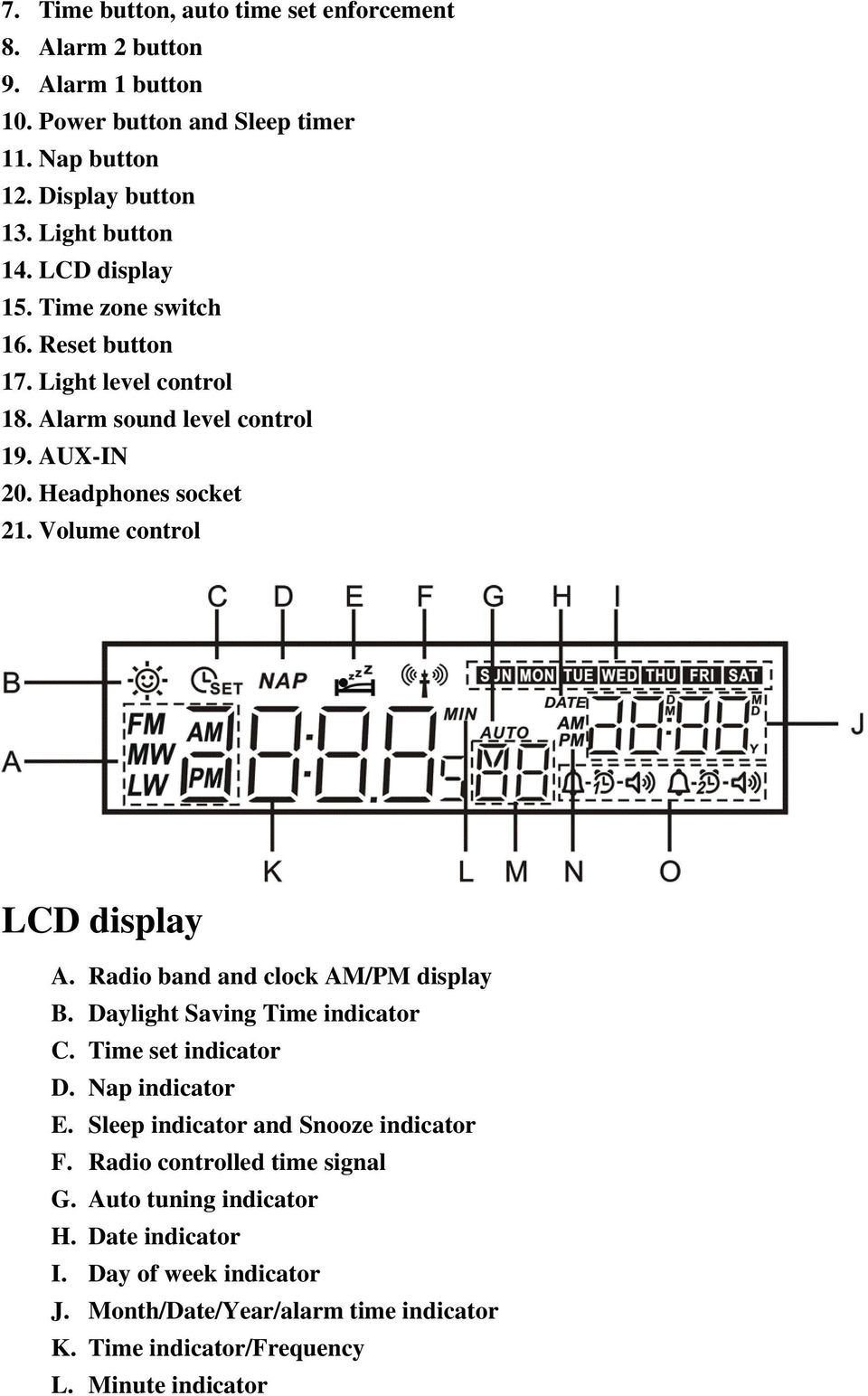
4 M. Memory and seconds indicator N. Alarm AM/PM indicator O. Alarm indicator Operation Clock Automatic clock setting 1. Connect the plug to a wall socket, and your clock radio will display -:- and the indicator will flash on the display. 2. When the radio is off, press and hold Time button for more than 4 seconds to receive Auto Time Set signal. Manual clock setting (only if automatic setting fails) 1. Press the TIME button, and the display will show. 2. Press the SET button, and the hour digits will flash on the display. 3. Press the up or down button to adjust the hours. 4. Then press the SET button, and the minute digits will flash on the display. 5. Press the up or down button to adjust the minutes. 6. Press SET button to complete the time setting. * You can also stop the process anytime by pressing TIME button. Manual date setting (only if automatic setting fails) 1. Press the DATE button then press SET button, the year digits will flash. 2. Press the up or down button to adjust the year. 3. Press the SET button again and the month digits will flash. 4. Press the up or down button to adjust the month. 5. Press the SET button again and the date digits will flash. 6. Press the up or down button to adjust the date. 7. Preset SET button to complete the time setting. * You can also stop the process anytime by pressing DATE button.

5 Change 12/24 hour clock format 1. Press TIME button, and then press SET button. 2. To set 12 hour clock format, press Station preset 1, or, to set 24 hours clock format, press Station preset Press Power button to finish the setting. D.S.T. (Daylight Saving Time) 1. When the display shows the time, press the SET button for more than 4 seconds to set the clock 1 hour faster, and the display will show. 2. To set the clock back from D.S.T., press the SET button for more than 4 seconds, the symbol will disappear. Radio operation Tuning into radio stations There are 3 ways of tuning your radio: A. Manual tuning 1. Press the Power button to turn on your radio. 2. Press the BAND button repeatedly to select AM (MW) or FM waveband. 3. Press the up or down button to change the frequency. 4. Press the Power button again to turn off your radio. B. Scan tuning 1. Press the Power button to turn on your radio. 2. Press the BAND button repeatedly to select AM (MW) or FM waveband. 3. Press the up or down button for more 0.5 second and release, it will tune into the next frequency with reception. 4. Press the Power button again to turn off your radio. C. Presetting and recalling stations Presetting stations: 1. Press the Power button to turn on your radio. 2. Press the BAND button repeatedly to select AM (MW) or FM waveband.
6 3. Tune into the station that you would like to preset. 4. There are 7 preset buttons from 1 to 7. Press 1 of them and hold for more than 2 seconds until the radio beeps, and the station frequency will be saved into the chosen preset. 5. Repeat the procedure for the remaining presets. Your radio has 7 presets for each AM and FM. 6. The preset can be overwritten by following the above procedure. Recalling stations: 1. Press the BAND button for AM or FM. 2. Simply press 1 of the PRESET buttons (from 1 to 7) you would like to tune into. And the preset number and frequency will appear on the display. Alarm operation There are 2 alarms which can be set independently. Also each alarm can be set to wake you by buzzer or radio. When the alarm light (alarm 1 or alarm 2 or both) is on, it means the indicated alarm will active in 24 hours. How to set buzzer alarm The radio buzzer beep increases in volume every 15 seconds. It beeps 1 minute, followed by 1 minute silence and repeat the cycle. The buzzer will beep for 1 hour, or stop by pressing the Power button. The buzzer alarm volume may be adjusted through the Alarm sound level control button on the bottom of the radio. 1. Press the Alarm 1 (or Alarm 2) button and Alarm 1 time (or Alarm 2) time will show on the display. 2. Press the SET button, the alarm hour will show on the display. 3. Press up or down button to adjust the hour. 4. Press the SET button again and adjust the minute by pressing up or down button. 5. Select required days of week on which the alarm will beep by pressing day of week buttons. 6. Press the SET button again and press up or down button until the display shows. 7. Press the SET button to complete the setting. * You can press the Alarm 1(or Alarm 2) button anytime to complete the setting. How to set Radio alarm
7 The radio alarm will sound for 1 hour, or stop by pressing the Power button. 1. Press the Alarm 1 (or Alarm 2) button and Alarm 1 time (or Alarm 2) time will show on the display. 2. Press the SET button, the alarm hour will show on the display. 3. Press up or down button to adjust the hour. 4. Press the SET button again and adjust the minute by pressing up or down button. 5. Select required days of week on which the alarm will beep by pressing day of week buttons. 6. Press the SET button again and press up or down button until the display shows. 7. Press the SET button again and press up or down button to tune into the station that you wish to wake up and adjust volume. Also press BAND button to select FM or AM (MW), then press he SET button to complete the setting. 8. Press the Power button to switch off the radio. 9. When the radio signal is weak, the radio alarm will be buzzer alarm. * You can press the Alarm 1(or Alarm 2) button anytime to complete the setting. * When it is AUX-IN, and the ratio band is not set, the alarm will be buzzer alarm. Snooze function 1. To interrupt the alarm signal (radio alarm or beep alarm), press the up or down button. The alarm will stop for 5 minutes and the display will show alarm is active. 2. Press the Power button to cancel the snooze and alarm function.. The snooze function can be repeat during the period of the How to cancel alarms 1. Press and continue to hold the Alarm 1 or Alarm 2 button that you wish to cancel for more than 2 seconds. 2. The symbol or will disappear from the display. And the alarm you press will be cancelled. 3. To reactive the alarm, press and hold Alarm 1 or Alarm 2 button that you wish to reactive, and the symbol or will appear on the display and it will be reactive. How to set alarm sound level With alarm level adjustment switch 18 on the bottom of the radio, you may adjust the alarm sound level. Note: Alarm level adjustment works only for buzzer alarm
8 Nap timer 4. It is a countdown alarm which will sound after the time period that you set. And the time period can be set from 10 to 120 minutes in 10 minutes steps. 5. Press the NAP button until the required time period is shown on the display. 6. The word NAP will be shown on the display and the Nap timer is set. 7. While the Nap timer is alarming, press the Power button to silence the alarm. 8. To cancel the Nap timer before the time Nap time is elapsed, press and release the NAP button until the OFF word is appeared on the display. Sleep timer radio auto shut off The Sleep timer can be set from min. The radio will be switch off after the time you set has elapsed. 1. When the radio is off, press and continue to hold the button, the radio will be switched on and the display will show the timer minutes in turn, and release the button when the required time is appeared. Then the Sleep timer is set. 2. To cancel the Sleep timer, press the Power button and the symbol will be gone. Time zone setting Set TIME ZONE switch (on the bottom of the radio) to 0 position for regular case. For some countries where don t provide radio controlled time facility but able to receive radio controlled time signal from nearby countries and the time zone is different, you may use the TIME ZONE switch to correct the time. For example, in Turkey which is one hour ahead of Central European time but still can receive radio controlled time signal from Germany (Central European time), you may use this TIME ZONE switch to correct the local time. If you are in USA just simply switch the TIME ZONE switch to the time zone for where you are. There are 4 time zones: PST (Pacific Standard Time), MST (Mountain Standard Time), CST (Central Standard Time), or EST (Eastern Standard Time). Display button

9 When the radio is on, you can switch the display between station frequency and time by pressing the DISPLAY button. Display backlight adjustment Press the button to switch the display backlight to be brighter or darker. When it is switched to darker, you can turn the button 17 (on the back of the radio) to adjust the display light to be the most dark. Headphone socket Plus in a headphone to the Headphone socket for headphone function, and the built-in radio speaker will be muted. AUX IN socket Plug in external audio devices such as CD player to the AUX IN socket (on the side of the radio), then play your device and press the Band button repeatedly until you see AU on the display. The radio will amplify and play out the signal form your device. Reset the radio If your radio doesn t operate correctly, or some display digits are missing, press the RESET button (on the bottom of the radio) with suitable implement for more than 2 seconds, the whole memory will be reset as a brand-new one. Technical data Power supply Output power Power consumption Volt/50-60 Hz (USA version); Volt/50-60 Hz (Europe version) 800 mw (max) 7W (max) Frequency coverage FM MHz AM khz (USA version); AM khz (Europe version)

PR-D9W. GB Version 1
 PR-D9W Version 1 Table of contents Important safety instructions... 2-3 Introduction... 4 Controls... 5-8 Using your weather alert radio for the first time... 9 Operating your radio Search tuning AM/FM...
Important Safety Instructions
 PR-D7 GB Revision 1 Important Safety Instructions 1. Read these instructions. 2. Keep these instructions. 3. Heed all warnings. 4. Follow all instructions. 5. Do not use this apparatus near water. 6. Clean
DAR-101. GB Version 1
 DAR-101 Version 1 Table of contents Important security notice... 2-3 Introduction... 4 Controls and connections... 5-9 Battery operation... 10 Using the AC adaptor / Charging the batteries... 11 Setting
AM/FM ALARM CLOCK RADIO
 AM/FM ALARM CLOCK RADIO Instruction Manual JL-206 Please read this manual carefully before operating and save it for future reference. Have a question? Please visit http:// INTRODUCTION Thank you for purchasing
Radio BMR100 INSTRUCTION MANUAL. ENGLISH (Original instructions)
 ENGLISH (Original instructions) INSTRUCTION MANUAL Radio BMR00 WARNING: For your personal safety, READ and UNDERSTAND before using. SAVE THESE INSTRUCTIONS FOR FUTURE REFERENCE. Symbols The following show
Doorbell Intercom Security System
 Doorbell Intercom Security System POWER IN USE OFF A B C LOCK CALL TALK Installation Guide Model WHDB-301 EXPLANATION OF GRAPHIC WARNING SYMBOLS This symbol is intended to alert the user to the presence
Albrecht DR314. DAB/DAB+/FM Radio 1.) User Manual
 Albrecht DR314 DAB/DAB+/FM Radio 1.) User Manual -1- Important Safety Notes TO PREVENT FIRE OR SHOCK HAZARD, DO NOT USE THIS PLUG WITH AN EXTENSION CORD, RECEPTACLE OR OTHER OUTLET UNLESS THE BLADES CAN
ANI-9005. Instruction Manual DIGITAL INDOOR/OUTDOOR TV ANTENNA OMNI-DIRECTIONAL WITH AMPLIFIER INTRODUCTION:
 INTRODUCTION: This is a specially designed new concept antenna for digital indoor, outdoor analogue, and terrestrial HDTV broadcasting reception. It is the best solution for home reception and digital
XPanel V2. Remote Control Panel. User Manual. XILICA Audio Design
 XPanel V2 Remote Control Panel User Manual XILICA Audio Design Important Safety Instructions 1. READ THESE INSTRUCTIONS All the safety and operating instructions should be read before the product is operated.
Controls. LCD Display. Tuning Up Time Set and Station Scan
 PR-D8 GB Revision 3 1 1 2 4 5 7 9 10 12 14 16 18 20 22 24 25 26 27 29 31 33 35 36 37 38 Controls Stereo Built-in Microphone (Left Channel) LCD Display Stereo Built-in Microphone (Right channel) Power/Auto
Jumbo Display AM/FM Clock Radio
 Model T236 Jumbo Display AM/FM Clock Radio For additional information, online registration, and exclusive special offers visit our website: Questions? Contact Customer Service at 1-800-888-4491 Table of
CR9971 2 Band Auto Set Dual Alarm Clock Radio ROBERTS. Sound for Generations. Please read this manual before use
 ROBERTS Sound for Generations CR9971 2 Band Auto Set Dual Alarm Clock Radio Please read this manual before use Contents Contents... 1 Controls...2-5 Switching on... 6 Setting the time manually... 6 Setting
Dual Alarm Clock with USB Charging & Night Light
 Model T128 Dual Alarm Clock with USB Charging & Night Light For additional information, online registration, and exclusive special offers please visit our website: Introduction Thank you for selecting
12-Volt 10-Amp Regulated Power Supply
 22-506.fm Page 1 Friday, August 6, 1999 12:55 PM Cat. No. 22-506 OWNER S MANUAL Please read before using this equipment. 12-Volt 10-Amp Regulated Power Supply 22-506.fm Page 2 Friday, August 6, 1999 12:55
INSTRUCTION MANUAL RM-5750. AM/FM Digital Alarm Clock Radio
 INSTRUCTION MANUAL RM-5750 AM/FM Digital Alarm Clock Radio Fig. 1 CAUTION: THE APPARATUS SHALL NOT BE EX- POSED TO DRIPPING OR SPLASHING. NO OBJECTS FILLED WITH LIQUIDS, SUCH AS VASES, SHALL BE PLACED
DAB2+ Dear Customer, Congratulations with your new Argon DAB2+
 Dear Customer, Quality has always been our driving force and founding Argon Audio is a natural extension of this philosophy. We have 20 years' experience in creating and specifying high quality products,
DUAL ALARM CLOCK SPEAKER SYSTEM
 snooze dimmer Now Playing 1:03-2:30 DF-H22, DK-H22, DM-H22 DUAL ALARM CLOCK SPEAKER SYSTEM for ipod All I Want To Be Keith LuBrant alm. reset sleep IMPORTANT Read before proceeding If you have any questions
PORTABLE ALARM CLOCK. Dual Alarm. FM Radio. Wake-up Sounds. USB Phone Charger G-1CR
 G-BUZZ PORTABLE ALARM CLOCK Dual Alarm FM Radio Wake-up Sounds USB Phone Charger G-1CR Welcome Alarm clocks can be boring. Get ready to shake things up with your new G-BUZZ. Slap the snooze for more ZZZ
User Guide. CR-111IP Clock radio with dock for ipod
 User Guide CR-111IP Clock radio with dock for ipod IMPORTANT SAFETY INFORMATION CAUTION! RISK OF ELECTRIC SHOCK DO NOT OPEN TO REDUCE THE RISK OF ELECTRIC SHOCK DO NOT REMOVE COVER (OR BACK) This symbol
FUTURE CALL PICTURE CARE PHONE MODEL: FC-1007 USER MANUAL
 FUTURE CALL PICTURE CARE PHONE MODEL: FC-1007 USER MANUAL Please follow instructions for repairing if any otherwise do not alter or repair any parts of device except specified. IMPORTANT SAFETY INSTRUCTIONS
Panasonic. Proprietary Telephone for Electronic Modular Switching System MODEL NO. KX-17030. Illustrated Model: White 1
 Panasonic Proprietary Telephone for Electronic Modular Switching System MODEL NO. KX-17030 Illustrated Model: White 1 KX-T7030 is compatible with all of the Panasonic Electronic Modular Switching Systems
Prescott. CD Alarm Clock Radio INSTRUCTION MANUAL
 1215205 Prescott CD Alarm Clock Radio INSTRUCTION MANUAL Important Safety Instructions CAUTION RISK OF ELECTRIC SHOCK DO NOT OPEN The lightning flash with arrowhead symbol, within an equilateral triangle
Single Day Alarm Clock with. Bluetooth and USB Play-through
 Single Day Alarm Clock with Bluetooth and USB Play-through MODEL : BSC 200 READ THIS INSTRUCTION MANUAL BEFORE OPERATING THE APPLIANCE. SAVE THIS MANUAL FOR FUTURE REFERENCE. TABLE OF CONTENTS IMPORTANT
Altec Lansing Computer Speaker System
 Altec Lansing Computer Speaker System User Guide ACS45.1 IMPORTANT If you experience any difficulties with your computer speaker system, please call us. It may be a simple problem that we can help you
ATS-505. GB Version 1
 ATS-505 GB Version 1 Control Locations Power/Sleep Power On/off/Alarm off/sleep function Display Switch between radio frequency and time while radio is power on Mode Mode set up (please see below mode
IMPORTANT SAFETY INSTRUCTIONS
 IMPORTANT SAFETY INSTRUCTIONS Before you install or use the apparatus, you must read and understand these Important Safety Instructions. At all times when using the apparatus you must follow these Important
2 series II COMPANION MULTIMEDIA SPEAKERS
 COMPANION MULTIMEDIA SPEAKERS Quick Setup Guide and Safety Information GuÍa rápida de instalación y información de seguridad Notice de montage et informations relatives à la sécurité 2 series II For additional
Controls (front) 1. Loudspeaker 2. Light button 3. Band button 4. Auto tune button 5. Alarm button 6. LCD display
 GB Contents Controls... 2-4 Mains operation... 5 Operating your radio... 6 Selecting a station DAB... 7 Display modes DAB... 8 Finding new stations - DAB... 9 Secondary services DAB... 9 Manual tuning
DUAL ALARM CLOCK RADIO WITH AUTO TIME SET
 DUAL ALARM CLOCK RADIO WITH AUTO TIME SET USER MANUAL JCR-230 PLEASE READ THIS USER MANUAL COMPLETELY BEFORE OPERATING THIS UNIT AND RETAIN THIS BOOKLET FOR FUTURE REFERENCE. WARNING TO PREVENT FIRE OR
Model ipl10 stereo alarm clock to charge your ipod or iphone
 Model ipl10 stereo alarm clock to charge your ipod or iphone QUESTIONS? Visit www.ihomeaudio.com WELCOME Thank you for choosing the ipl10 from ihome. This user guide will get you up and running quickly
HOME THEATER SYSTEM. Instruction Manual. Model ASR150. Please read the instruction manual carefully before using your unit.
 SURROUND SOUND HOME THEATER SYSTEM Instruction Manual Model ASR150 Please read the instruction manual carefully before using your unit. For support visit : www.1800customersupport.com GENERAL TABLE OF
FM clock radio with charge + play for iphone or ipod
 Model ipl22 FM clock radio with charge + play for iphone or ipod QUESTIONS? Visit www.ihome.com FCC Information This device complies with Part 15 of the FCC Rules, operation is subject to the following
Digital Radio/DAB+/FM RDS digital clock radio with dual alarm Operating instruction
 381SE1D-A Digital Radio/DAB+/FM RDS digital clock radio with dual alarm Operating instruction GB Contents Controls... 2-3 Using the clock radio for the first time... 4 Operating your clock radio... 5 Selecting
CR9986 ROBERTS. Dual Alarm CD Clock Radio. Sound for Generations. Please read this manual before use
 ROBERTS Sound for Generations CR9986 Dual Alarm CD Clock Radio Please read this manual before use Contents Contents... Controls... - Switching on and setting the time... 4 Listening to the radio... 5 Compact
DIGITAL ALARM CLOCK RADIO
 DIGITAL ALARM CLOCK RADIO INSTRUCTION MANUAL For information and support, www.lenco.eu CR3302 LENCO ENG FM ONLY IM 98 x1 1 11/5/2009 9:14:35 CAUTION RISK OF ELECTRIC SHOCK DO NOT OPEN WARNINGS ATTENTION
H203D 中文 GB Version 1
 H203D 中 GB文 Version 1 Contents Installing batteries... 4 Using the AC adapter (not supplied)... 5 Setting the clock... 6-7 Updating your radio - DAB... 8 Selecting a station - DAB... 9 Secondary services
Model ip38 Portable Stereo Alarm Clock Speaker Case for your ipod / iphone. Questions? Visit www.ihomeaudio.com
 Model ip38 Portable Stereo Alarm Clock Speaker Case for your ipod / iphone Questions? Visit www.ihomeaudio.com Table of Contents ip38 Quick Start Controls and Indicators Getting Started with your ip38
DAB Adapter 2+ Dear Customer,
 Dear Customer, Quality has always been our driving force and founding Argon Audio is a natural extension of this philosophy. We have 20 years' experience in creating and specifying high quality products,
WR-22 中文 GB Version 1
 WR-22 中 GB文 Version 1 1. 2. Important safety instructions Read these instructions. Keep these instructions. GB 3. 4. 5. 6. 7. 8. 9. Heed all warnings. Follow all instructions. Do not use this apparatus
Register your product and get support at. www.philips.com/welcome AS111. User manual
 Register your product and get support at www.philips.com/welcome AS111 User manual Contents 1 Important 4 Safety 4 English 2 Your docking speaker for AndroidTM 5 Introduction 5 What's in the box 5 Overview
MODEL NPB-252 PORTABLE CD MP3 RADIO PLAYER
 MODEL NPB-252 PORTABLE CD MP3 RADIO PLAYER PLEASE READ THIS USER MANUAL COMPLETELY BEFORE OPERATING THIS UNIT AND RETAIN THIS BOOKLET FOR FUTURE REFERENCE. WARNING TO PREVENT FIRE OR SHOCK HAZARD, DO NOT
MODEL: MEMPHIS FM STEREO RADIO OPERATING INSTRUCTIONS
 MODEL: MEMPHIS CD/USB/SD PLAYER WITH TURNTABLE. ENCODING TO USB AND SD CARD. FM STEREO RADIO OPERATING INSTRUCTIONS PLEASE READ THIS USER MANUAL COMPLETELY BEFORE OPERATING THIS UNIT AND RETAIN THIS BOOKLET
ATS-909X. GB Version 1
 ATS-909X GB Version 1 Important safety instructions 1. Read and understand all safety and operating instructions before the radio is operated. 2. Retain instruction: The safety and operating instructions
SOUNDDOCK DIGITAL MUSIC SYSTEM. Owner s Guide Guía de usuario Notice d utilisation
 SOUNDDOCK DIGITAL MUSIC SYSTEM Owner s Guide Guía de usuario Notice d utilisation TAB 8 TAB 7 TAB 6 TAB 5 TAB 4 TAB 3 TAB 2 English IMPORTANT SAFETY INSTRUCTIONS Please read this owner s guide Please take
Dual Alarm Clock with SmartSet Auto Time Setting System
 Dual Alarm Clock with SmartSet Auto Time Setting System (U.S. Patent No. 6,567,344) OWNER S MANUAL AC100 Visit our web site at www.emersonradio.com AC100_072806.p65 16 TO PREVENT FIRE OR SHOCK HAZARD,
Setup Guide. www.audioengineusa.com D1. Premium 24-bit DAC
 Setup Guide www.audioengineusa.com D1 24-bit DAC Premium 24-bit DAC Contents Introduction Package Contents Cleaning Features Overview Quick Setup Troubleshooting Specifications Contact Us About Audioengine
INSTRUCTION MANUAL WARNING: TO PREVENT FIRE OR ELECTRIC SHOCK HAZARD, DO NOT EXPOSE THIS PRODUCT TO RAIN OR MOISTURE. CAUTION RISK OF ELECTRIC
 INSTRUCTION MANUAL PLEASE READ ALL THE INSTRUCTIONS COMPLETELY BEFORE USE. WARNING: TO PREVENT FIRE OR ELECTRIC SHOCK HAZARD, DO NOT EXPOSE THIS PRODUCT TO RAIN OR MOISTURE. CAUTION RISK OF ELECTRIC SHOCK
The Bouncer Bluetooth Stereo Speaker
 The Bouncer Bluetooth Stereo Speaker 1 Welcome to JLab! Thank you for purchasing The Bouncer Bluetooth Speaker! Enjoy your music wirelessly from any smartphone, tablet, laptop, or other Bluetooth enabled
User Guide. DCR1401B/G Crescendo DAB alarm clock radio
 User Guide DCR1401B/G Crescendo DAB alarm clock radio IMPORTANT SAFETY INFORMATION CAUTION! RISK OF ELECTRIC SHOCK DO NOT OPEN TO REDUCE THE RISK OF ELECTRIC SHOCK DO NOT REMOVE COVER (OR BACK) This symbol
Evolution Digital HD Set-Top Box Important Safety Instructions
 Evolution Digital HD Set-Top Box Important Safety Instructions 1. Read these instructions. 2. Keep these instructions. 3. Heed all warnings. 4. Follow all instructions. 5. Do not use this apparatus near
CAUTION RISK OF ELECTRIC SHOCK NO NOT OPEN
 Evolution Digital HD Set-Top Box Important Safety Instructions 1. Read these instructions. 2. Keep these instructions. 3. Heed all warnings. 4. Follow all instructions. 5. Do not use this apparatus near
AM/FM PLL Clock/Table Radio
 12-1632.fm Page 1 Wednesday, May 10, 2000 10:57 AM Cat. No. 12-1632 OWNER S MANUAL Please read before using this equipment. AM/FM PLL Clock/Table Radio 12-1632.fm Page 2 Wednesday, May 10, 2000 10:57 AM
COMPANION 2 Series II MULTIMEDIA SPEAKERS
 COMPANION 2 Series II MULTIMEDIA SPEAKERS Owner s Guide Guia del usuario Notice d utilisation Français English SAFETY INFORMATION Please read this owner s guide Please take the time to follow the instructions
DAB Radio. Instruction Manual L55DAB10
 DAB Radio Instruction Manual L55DAB10 L55DAB10_IB_110810_Zell.indd 1 L55DAB10_IB_110810_Zell.indd 2 Contents Unpacking...5 Product Overview...6 Top View... 6 Rear View... 6 Power Source...7 Battery Power...
BOSE. Link AL8 HOMEWIDE WIRELESS AUDIO LINK
 BOSE Link AL8 HOMEWIDE WIRELESS AUDIO LINK Français English SAFETY INFORMATION Please read this owner s guide Please take the time to follow the instructions in this owner s guide carefully. It will help
B100. single-line business telephone
 users guide B100 single-line business telephone B100 TELEPHONE DIAGRAM TABLE OF CONTENTS 1) FEATURES......2 1.1 FLASH 1.2 LAST NUMBER REDIAL 1.3 MUTE 1.4 HANDSET VOLUME CONTROL 1.5 DATA PORT 1.6 HEARING
Control Location. Replacing Battery
 Functions - Normal Time with PM Indicator - 12/24 hour selectable - Dual Alarm, Snooze, Sleep Timer Green LED Backlight display - Month and Date Display - Thermometer (32oF - 122-F) - AM/FM Radio Receiver
Instruction Manual. 5.1 Power Amplified Home Theatre Speaker System w/ Remote Control DSS-200
 R Instruction Manual DSS-200 R 5.1 Power Amplified Home Theatre Speaker System w/ Remote Control Read this manual carefully to get the excellent acoustics from this unit. SPECIFICATIONS SAFETY INFORMATION
AM / FM Tuner + RDS. Model: TU-101. www.pulse-audio.co.uk
 AM / FM Tuner + RDS Model: TU-101 www.pulse-audio.co.uk 1 Safety Information The lightning bolt within a triangle is intended to alert the user to the presence of dangerous voltage levels within the product
User Guide. DAB-109CR DAB Digital Radio alarm clock
 User Guide DAB-109CR DAB Digital Radio alarm clock IMPORTANT SAFETY INFORMATION CAUTION! RISK OF ELECTRIC SHOCK DO NOT OPEN TO REDUCE THE RISK OF ELECTRIC SHOCK DO NOT REMOVE COVER (OR BACK) This symbol
THE NEW GENERATION IN TECHNOLOGY. NI-3103A Alarm Clock w/fm Radio ipod & iphone Docking. Operating Instructions
 THE NEW GENERATION IN TECHNOLOGY NI-3103A Alarm Clock w/fm Radio ipod & iphone Docking Operating Instructions Table of Contents Important Safeguards... 3 Parts... 6 Controls... 6 To Set Up... 7 ipod/iphone
INSTRUCTION MANUAL PLEASE READ ALL THE INSTRUCTIONS COMPLETELY BEFORE USE AND SAVE THIS MANUAL FOR FUTURE REFERENCE
 INSTRUCTION MANUAL PLEASE READ ALL THE INSTRUCTIONS COMPLETELY BEFORE USE AND SAVE THIS MANUAL FOR FUTURE REFERENCE m Before Use Please read IMPORTANT SAFETY INSTRUCTIONS on page 10 before use. It is important
Big Button Plus 20200
 Big Button Plus 20200 Congratulations on your selection of the Big Button Plus 20200 from Northwestern Bell Phones. This quality telephone, like all Genuine BELL products, has been designed to give you
Spider IV 15. Pilot s Handbook Manuel de pilotage Pilotenhandbuch Pilotenhandboek Manual del Piloto 取 扱 説 明 書
 Spider IV 15 Pilot s Handbook Manuel de pilotage Pilotenhandbuch Pilotenhandboek Manual del Piloto 取 扱 説 明 書 40-00-0187 Pilot s Handbook available @ www.line6.com/manuals Rev D Important Safety Instructions
DX-395. FM/AM/SW1/SW2 PLL Synthesized Receiver OWNER S MANUAL. Cat. No. 20-225. Please read before using this equipment.
 20-225.fm Page 1 Wednesday, August 4, 1999 10:07 AM Cat. No. 20-225 OWNER S MANUAL Please read before using this equipment. DX-395 FM/AM/SW1/SW2 PLL Synthesized Receiver 20-225.fm Page 2 Wednesday, August
EOSP-500 Dual Zone Streaming Music Player User Manual
 EOSP-500 Dual Zone Streaming Music Player menu User Manual TM commercial wireless audio Thank You For Choosing Eos Wireless! We hope you will get much enjoyment from your wireless audio system. Please
DUALIT KITCHEN RADIO INSTRUCTION MANUAL GB 10/06
 DUALIT KITCHEN RADIO INSTRUCTION MANUAL GB 10/06 CONTENTS SAFETY PRECAUTIONS... 3 / 4 PACKAGE CONTENTS... PARTS AND CONTROLS... RADIO HOUSING CONTROLS INPUTS AND OUTPUTS QUICK START... SETTING UP... CLOCK
Home Gateway. User s Installation Guide. In This Guide
 Explorer 4250 Home Gateway User s Installation Guide In This Guide Safety Information... 2 Safety First... 6 Explorer eclub... 6 Explorer 4250 Home Gateway Serial Number... 6 What s On the Front Panel?...
Model id99 Dual Dock Dual Alarm Stereo System for ipad, iphone or ipod
 Model id99 Dual Dock Dual Alarm Stereo System for ipad, iphone or ipod Note: Apps are not covered in detail in this booklet. To learn more about how apps can enhance your experience, please visit the App
DAB+ / FM Tuner Model: TU-201
 DAB+ / FM Tuner Model: TU-201 Instruction Manual www.pulse-audio.co.uk 1 Safety Information The lightning bolt within a triangle is intended to alert the user to the presence of dangerous voltage levels
ROBERTS. Enjoy Listening. DAB / FM RDS Digital Clock Radio with large display. Please read this manual before use
 ROBERTS Enjoy Listening DAB / FM RDS Digital Clock Radio with large display Please read this manual before use Contents Controls... -3 Using the clock radio for the fi rst time...4 Operating your clock
Wireless Phone Jack System
 926 Manual V2.0(1J9643) 6/10/99 1:39 PM Page 1 RC926 Wireless Phone Jack System (Digital Satellite System # D916) The Wireless Phone Jack System works with most telephone line devices, such as: Answering
Movie Cube N150H. User s Manual
 Movie Cube N150H User s Manual (v1.0) TABLE OF CONTENTS 1. Main Features... 4 1.1 Front panel... 4 1.2 Back panel... 4 2. Remote Control... 5 3. Welcome Page... 6 4. Installation Guide... 6 5. Program...
focus TOuCh P10 FOR DISPLAYS: 55, 70 AND 82 ENgliSh V01.3-2014-7
 focus TOuCh P10 FOR DISPLAYS: 55, 70 AND 82 ENgliSh V01.3-2014-7 Thank you for purchasing our product. Please read this manual carefully before operation your set and retain it for future reference. FT55-P10
TABLETOP CONTROLLER USER'S MANUAL
 TABLETOP CONTROLLER USER'S MANUAL Preface TABLETOP CONTROLLER USER S MANUAL CLEARONE PART NO. 800-151-891 OCTOBER 2009 (REV. 2.1) 2009 ClearOne Communications, Inc. All rights reserved. No part of this
BIG GAMES HOME VIDEO ARCADE ASSEMBLY INSTRUCTIONS
 TM BIG GAMES HOME VIDEO ARCADE ASSEMBLY INSTRUCTIONS IN-HOME ASSEMBLY OF YOUR BIGGAMES HOME VIDEO ARCADE MAY BE AVAILABLE IN YOUR AREA FOR AN ADDITIONAL CHARGE. FOR INFORMATION, PLEASE CALL (800) 749-4345.
Intelli-Time Alarm Clock model 13027
 Instruction Manual Intelli-Time Alarm Clock model 13027 CONTENTS Unpacking Instructions... 2 Package Contents... 2 Product Registration... 2 Features & Benefits... 3 Clock Setup... 4 Intelli-Time Clock...
LF-IRX. Limited Warranty LF-IRX. Remote Control Extender OWNER S MANUAL
 Limited Warranty OWNER S MANUAL Audiovox Corporation (Audiovox) warrants this product against defects in materials or workmanship for one (1) year from the date of purchase. During this period, this product
Ultrasonic Jewelry/DVD Cleaner. make jewelry, dvds and more sparkle like new
 Ultrasonic Jewelry/DVD Cleaner make jewelry, dvds and more sparkle like new Table of contents Cautions & Warnings...................................................... 2-4 Location of Controls........................................................
user s manual Battery Case model #: SPB3200 Battery Case Charger for Samsung Galaxy S 4
 user s manual model #: SPB3200 Charger for Samsung Galaxy S 4 What s Included Unpack the battery case and make sure all accessories are put aside so they will not be lost. hello. USB to Micro USB Cable
STANDBY SCAN PRESET ALARM ENTER SNOOZE MODE INFO/MENU. User Guide. DR1402 DAB Radio
 STANDBY SCAN PRESET MODE INFO/MENU ALARM ENTER SNOOZE User Guide DR1402 DAB Radio IMPORTANT SAFETY INFORMATION CAUTION! RISK OF ELECTRIC SHOCK DO NOT OPEN TO REDUCE THE RISK OF ELECTRIC SHOCK DO NOT REMOVE
ReadyNet Easy Jack 2 Voice/Data and Data Only Owner s Manual PX-211d and PX-211v
 ReadyNet Easy Jack 2 Voice/Data and Data Only Owner s Manual PX-211d and PX-211v Phonex Broadband Corporation dba ReadyNet 6952 High Tech Drive Midvale, Utah 84047 801.566.0100 Phone 801.566.0880 Fax www.readynetsolutions.com
ALTEC LANSING ONE YEAR LIMITED WARRANTY (TWO-YEAR LIMITED WARRANTY IN THE EUROPEAN UNION AND ASIA)
 User s guide The lightning flash with arrowhead, within an equilateral triangle, is intended to alert the user to the presence of uninsulated dangerous voltage within the product s enclosure that may be
Wake-up Light. Always here to help you. www.philips.com/welcome HF3510. User manual Manuel d utilisation. Register your product and get support at
 Always here to help you Register your product and get support at www.philips.com/welcome Question? Contact Philips Wake-up Light HF3510 User manual Manuel d utilisation IMPORTANT SAFETY INSTRUCTIONS WARNING
Sonic Boom Travel & Bed side Alarm Clock with Bed Shaker Model SB200ss-v3
 Sonic Boom Travel & Bed side Alarm Clock with Bed Shaker Model SB200ss-v3 IMPORTANT Please read these instructions carefully before use and retain for future reference. See operating instructions on back.
Reizen Atomic Talking Analog Alarm Clock Item #706810. Instruction Manual
 Reizen Atomic Talking Analog Alarm Clock Item #706810 Instruction Manual 1 Instruction Manual of Atomic Analog Talking Clock (Single-Band) S2 (Alarm Hour) S1 (Talking+Snooze+Lamp) S4 (Alarm Volume+Off)
PG-01instruction manual
 PG-01instruction manual DIGITAL RADIO fairbank house ashley road altrincham WA14 2DP united kingdom t: +44 (0)161 924 0300 f: +44 (0)161 924 0319 e: [email protected] www.intempodigital.com PG-01
IMPORTANT SAFETY INSTRUCTIONS
 Contents Important Safety Instructions.. 1 Location of Controls 4 Remote Control Unit 5 Connections... 7 Install Guide. 9 Basic Functions 10 Volume Control 10 Select Channel. 10 Signal Strength.... 11
24 Wide Screen LED Monitor with HDMI
 24 Wide Screen LED Monitor with HDMI USER MANUAL L24LE11B_MANUAL_EN_R1 Please read this manual carefully before using, and keep it for future reference. TABLE OF CONTENTS GETTING STARTED Monitor Stand
DR 70 Portable Digital DAB+ and FM Radio Receiver User Manual English Please read carefully before using this product
 DR 70 Portable Digital DAB+ and FM Radio Receiver User Manual Please read carefully before using this product 15 1 Table of Contents 1 Table of Contents... 16 2 Safety Instructions:... 17 3 Specification:...
INSTRUCTION MANUAL PLEASE READ ALL THE INSTRUCTIONS COMPLETELY BEFORE USE AND SAVE THIS MANUAL FOR FUTURE REFERENCE
 INSTRUCTION MANUAL PLEASE READ ALL THE INSTRUCTIONS COMPLETELY BEFORE USE Ver. 2.0 AND SAVE THIS MANUAL FOR FUTURE REFERENCE Table of Contents Unpacking... 3 About the CCRadio-EP... 4 Quick Start Guide...
PS42309C INSTRUCTION MANUAL
 7-Day Digital Timer Model Number: PS42309C INSTRUCTION MANUAL 7-Day Digital Timer Warranty Details The product is guaranteed to be free from defects in workmanship and parts for a period of 12 months from
CMP30. User Manual. www.audac.eu
 CMP30 User Manual www.audac.eu 2 Index Introduction 4 Precautions 5 Safety requirements 5 Caution servicing 5 EC Declaration of Conformity 5 Waste of Electrical and Electronic Equipment (WEEE) 6 Caution
SAFETY WARNINGS. Important Safety Instructions. FCC Notice. Caution
 Table of Contents SAFETY WARNINGS...2 FCC Notice...2 Caution...2 Important Safety Instructions...2 Basic Instructions...3 Equipment checklist...3 Input Voltage...3 Power Indicator Light...3 Function Keys...3
DAB+ Digital Alarm Clock Radio with Dock for iphone
 DAB+ Digital Alarm Clock Radio with Dock for iphone BCR33DABIP The Gold Technical Support Line: 1902 215 259 (Charges will apply at $2.95 per minute) www.bushaustralia.com.au Safety Instructions Ensure
Model SBB500SS-v3. Sonic Boom Alarm Clock & Bed Shaker OPERATION INSTRUCTIONS
 Model SBB500SS-v3 Sonic Boom Alarm Clock & Bed Shaker OPERATION INSTRUCTIONS IMPORTANT Please read these instructions carefully before use and retain for future reference. See operating instructions on
User Guide. MT-91 / MT-90 / MT-92 Interlinking Transmitter Module MT-90/MT-92 MT-91
 User Guide MT-9 / MT-90 / MT-9 MT-90/MT-9 All rights reserved. MN 04/08 Do not copy or forward without prior approvals MIPRO. Specifications and design subject to change without notice. CE5 0 4 A MT-9
15-INCH TFT-LCD MONITOR
 15-INCH TFT-LCD MONITOR 15RTV INSTRUCTION MANUAL Please read this manual thoroughly before use, and keep it handy for future reference. SAFETY INSTRUCTION.2-3 CAUTIONS....4 FCC RF INTERFERENCE STATEMENT.5