
Configuring LACP (802.3ad) Between a Catalyst 6500/6000 and a Catalyst 4500/4000
|
|
|
- Aldous Campbell
- 9 years ago
- Views:
Transcription
1 Configuring LACP (802.3ad) Between a Catalyst 6500/6000 and a Catalyst 4500/4000 Document ID: Contents Introduction Before You Begin Conventions Prerequisites Components Used Background Theory Difference Between CatOS and Cisco IOS System Software Configure Network Diagram Configurations Verify Troubleshoot Secondary Aggregator Ports Po1A or Po2A are Created Related Information Introduction This document will show the basic configuration needed to set up an 802.3ad link aggregate between a Catalyst 6500/6000 (running Catalyst OS [CatOS] system software) and a Catalyst 4500/4000 switch ad is a new specification from the IEEE that allows us to bundle several physical ports together to form one logical port. This is very similar to the already existing Cisco EtherChannel Solution. The main difference is that the Cisco implementation uses a proprietary protocol called Port Aggregation Protocol (PAgP). The IEEE later defined within 802.3ad a new control protocol for link aggregation called Link Aggregate Control Protocol (LACP). The primary advantage of using LACP (802.3ad) is for interoperability with other vendor switches. Since PAgP is Cisco proprietary, one cannot aggregate channels between a Cisco switch and a switch from another vendor unless LACP is utilized. For more details on configuring LACP using CatOS, refer to the following documents: Catalyst 6500/6000: Understanding the Link Aggregation Control Protocol section of the document Configuring EtherChannel Catalyst 4500/4000: Understanding the Link Aggregation Control Protocol section of the document Configuring Fast EtherChannel and Gigabit EtherChannel For information on how to configure LACP using Cisco IOS Software, refer to the following documents: Catalyst 6500/6000: Understanding IEEE 802.3ad LACP EtherChannel Configuration section of the document Configuring EtherChannels Catalyst 4500/4000: Understanding and Configuring EtherChannel section of the document Catalyst 4500 Series Switch Cisco IOS Software Configuration Guide, 12.1(13)EW
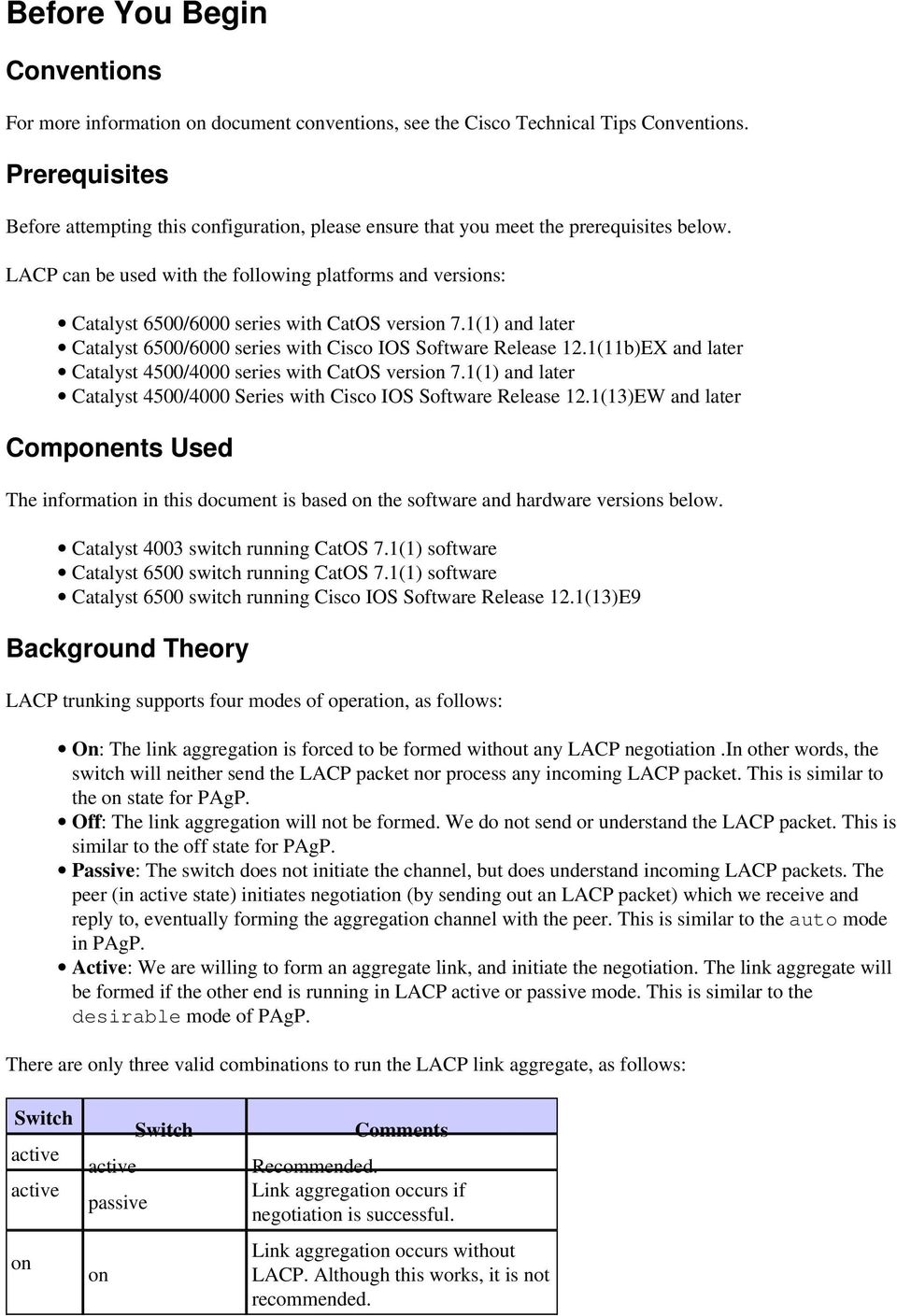
2 Before You Begin Conventions For more information on document conventions, see the Cisco Technical Tips Conventions. Prerequisites Before attempting this configuration, please ensure that you meet the prerequisites below. LACP can be used with the following platforms and versions: Catalyst 6500/6000 series with CatOS version 7.1(1) and later Catalyst 6500/6000 series with Cisco IOS Software Release 12.1(11b)EX and later Catalyst 4500/4000 series with CatOS version 7.1(1) and later Catalyst 4500/4000 Series with Cisco IOS Software Release 12.1(13)EW and later Components Used The information in this document is based on the software and hardware versions below. Catalyst 4003 switch running CatOS 7.1(1) software Catalyst 6500 switch running CatOS 7.1(1) software Catalyst 6500 switch running Cisco IOS Software Release 12.1(13)E9 Background Theory LACP trunking supports four modes of operation, as follows: On: The link aggregation is forced to be formed without any LACP negotiation.in other words, the switch will neither send the LACP packet nor process any incoming LACP packet. This is similar to the on state for PAgP. Off: The link aggregation will not be formed. We do not send or understand the LACP packet. This is similar to the off state for PAgP. Passive: The switch does not initiate the channel, but does understand incoming LACP packets. The peer (in active state) initiates negotiation (by sending out an LACP packet) which we receive and reply to, eventually forming the aggregation channel with the peer. This is similar to the auto mode in PAgP. Active: We are willing to form an aggregate link, and initiate the negotiation. The link aggregate will be formed if the other end is running in LACP active or passive mode. This is similar to the desirable mode of PAgP. There are only three valid combinations to run the LACP link aggregate, as follows: Switch active active on Switch active passive on Comments Recommended. Link aggregation occurs if negotiation is successful. Link aggregation occurs without LACP. Although this works, it is not recommended.
3 Note: By default, when an LACP channel is configured, the LACP channel mode is passive. Difference Between CatOS and Cisco IOS System Software CatOS on the Supervisor Engine and Cisco IOS Software on the MSFC (Hybrid): a CatOS image can be used as the system software to run the Supervisor Engine on Catalyst 6500/6000 switches. If the optional Multilayer Switch Feature Card (MSFC) is installed, a separate Cisco IOS Software image is used to run the MSFC. Cisco IOS Software on both the Supervisor Engine and MSFC (Native): a single Cisco IOS Software image can be used as the system software to run both the Supervisor Engine and MSFC on Catalyst 6500/6000 switches. Note: For more information, refer to Comparison of the Cisco Catalyst and Cisco IOS Operating Systems for the Cisco Catalyst 6500 Series Switch. Configure We assume that we are starting with switches containing empty configurations, and thus having all parameters set as default. We will now include the commands necessary to configure LACP. The steps include the Cisco IOS Software and CatOS commands required. Pick the appropriate command depending on the software that is running on the switch. Step 1: Setting the channel protocol to LACP CatOS By default, all ports on a Catalyst 4500/4000 and a Catalyst 6500/6000 use channel protocol PAgP and as such are not running LACP. For all ports concerned, you then need to change the channel mode to LACP. On switches running CatOS, you can only change channel mode per module. In the following example, we will change the channel mode for slot 1 and 2 using the set channelprotocol lacp module_number command. The changes can be verified by using the show channelprotocol command. CatOSSwitch (enable) set channelprotocol lacp 1 Mod 1 is set to LACP protocol. CatOSSwitch (enable) set channelprotocol lacp 2 Mod 2 is set to LACP protocol. Cisco IOS Software CatOSSwitch (enable) show channelprotocol Channel Module Protocol 1 LACP 2 LACP 3 PAGP 5 PAGP The ports on a Catalyst 6500/6000 or a Catalyst 4500/4000 running Cisco IOS Software can act as L2 switchports or L3 routed ports depending on the configuration. For this scenario, configure the interface as a L2 switchport by issuing the switchport command in interface configuration mode. CiscoIOSSwitch(config)#interface gigabitethernet 1/1 CiscoIOSSwitch(config if)#switchport
4 Next specify which interfaces should be using LACP using the command channel protocol lacp. CiscoIOSSwitch(config if)#channel protocol lacp Step 2: Assigning the same admin key to each port that will form the channel and settings channel mode CatOS There is a parameter exchanged in the LACP packet called the admin key. A channel will only be formed between ports having the same admin key. By issuing the set port lacp channel mod/ports_list command, you will assign all ports in the port_list the same admin key. For example, on one device, we assign both ports to the same group. (It gets randomly assigned admin key 56.) CatOSSwitch (enable) set port lacp channel 1/1,2/1 Port(s) 1/1,2/1 are assigned to admin key 56 On the other device, we also assign the ports to a single key. (It gets randomly assigned admin key 73.) OtherCatOSSwitch> (enable) set port lacp channel 3/33 34 Port(s) 3/33 34 are assigned to admin key 73 Keep in mind that the admin key is only locally significant. In other words, it must be the same only for ports within the switch and is not a factor between different switches. Cisco IOS Software If your device runs Cisco IOS Software, this step can be avoided. Proceed directly to Step 3. Step 3: Change the LACP channel mode CatOS The last step to form the channel is to change the LACP channel mode to active state on one or both of the sides. This can be done using the same commands as those used in Step 2, however, now specifying mode active state. The command syntax is as follows: set port lacp channel mod/ports_list mode {on off active passive} For example: CatOSSwitch (enable) set port lacp channel 1/1,2/1 mode active Port(s) 1/1,2/1 channel mode set to active. Note: To find additional information on the commands used in this document, use the Command Lookup Tool (registered customers only). Cisco IOS Software When you are configuring LACP on a Catalyst 6500/6000 running Cisco IOS Software, use the channel group command to assign interfaces to the same group. channel group number mode {active on passive}
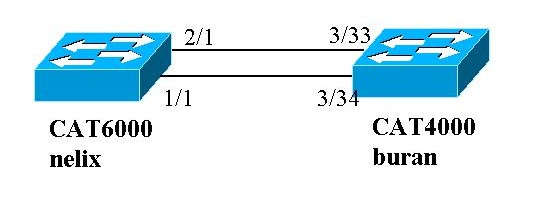
5 Note: PAgP mode options like 'auto' and 'desirable' are available for this command as well, but will not be discussed since this document pertains to configuring LACP only. Note: The number of valid values for the channel group number depends on the software release. For releases earlier than Cisco IOS Software Release 12.1(3a)E3, valid values are from 1 to 256; for Cisco IOS Software Releases 12.1(3a)E3, 12.1(3a)E4, and 12.1(4)E1, valid values are from 1 to 64. Cisco IOS Software Release 12.1(5c)EX and later support a maximum of 64 values ranging from 1 to 256. The configuration on 6500/6000 running Cisco IOS Software will be: CiscoIOSSwitch(config)#interface gigabitethernet 1/1 CiscoIOSSwitch(config if)#channel group 1 mode active Creating a port channel interface Port channel 1 CiscoIOSSwitch(config if)#interface gigabitethernet 2/1 CiscoIOSSwitch(config if)#channel group 1 mode active Creating a port channel interface Port channel 1 Note: To find additional information on the commands used in this document, use the Command Lookup Tool (registered customers only). Network Diagram This document uses the network setup shown in the diagram below. In this example, we configure an LACP aggregate link between a Catalyst 4000 and Catalyst 6000 series switch using two Gigabit Ethernet ports as shown in the diagram above. Note: In this example, the Catalyst 6000 is running Cisco IOS Software and the Catalyst 4000 is running CatOS. However, it is important to remember that the Cisco IOS LACP configuration can be used on any Catalyst 4500/4000 or 6500/6000 switch running Cisco IOS Software. Moreover, the CatOS configuration included below can also be applied to any Catalyst 4500/4000 or 6500/6000 switch running CatOS as well. Configurations The information presented in this document was created from devices in a specific lab environment. The configurations on all devices were cleared with the clear config all command (for CatOS) and the write erase command (for Cisco IOS Software) to ensure that they had a default configuration. If you are working in a live network, ensure that you understand the potential impact of any command before using it. buran (Catalyst 4000) begin # ***** NON DEFAULT CONFIGURATION *****

6 #time: Thu Jan , 17:54:23 #version 7.1(1) #system web interface version(s) #system set system name buran Output suppressed. #channelprotocol set channelprotocol lacp 3 All ports in module 3 are in LACP channel mode. #port channel set port lacp channel 3/ Ports 3/33 and 3/34 have a single admin key (73). Since we have not explicitly specified the LACP channel mode, the ports are in passive mode. However to prevent LACP negotiation problems, Cisco recommends that you configure LACP active mode using the set port lacp channel 3/33 34 mode active command. #multicast filter set igmp filter disable #module 1 : 0 port Switching Supervisor #module 2 : 48 port 10/100BaseTx Ethernet set port disable 2/48 #module 3 : 34 port 10/100/1000 Ethernet end version 12.1 hostname nelix ip subnet zero Output suppressed. interface Port channel1 nelix (Catalyst 6000) using Cisco IOS Software Cisco IOS Software automatically creates this logical interface when the channel group command is used under the physical interface. no ip address switchport interface GigabitEthernet1/1 no ip address switchport
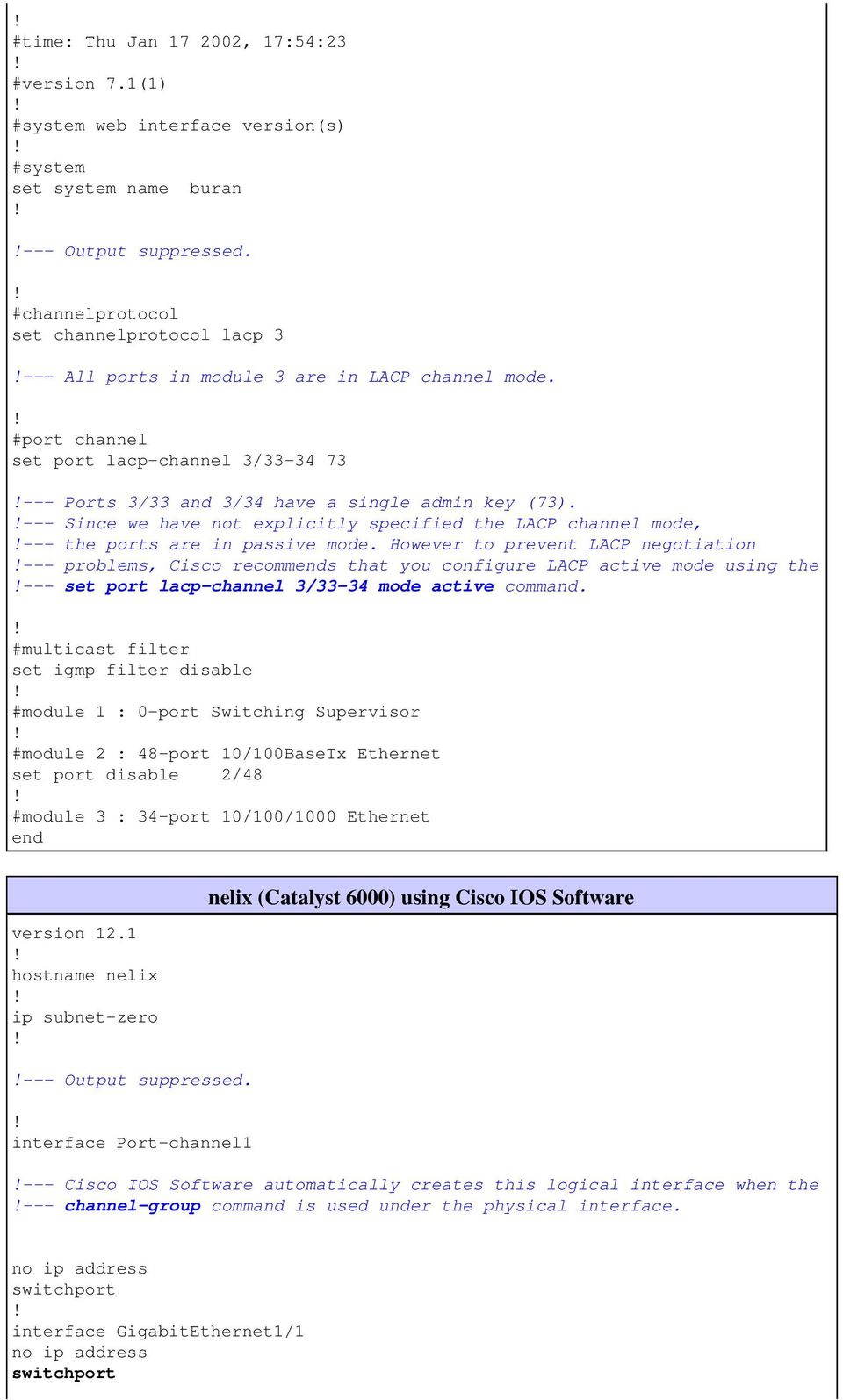
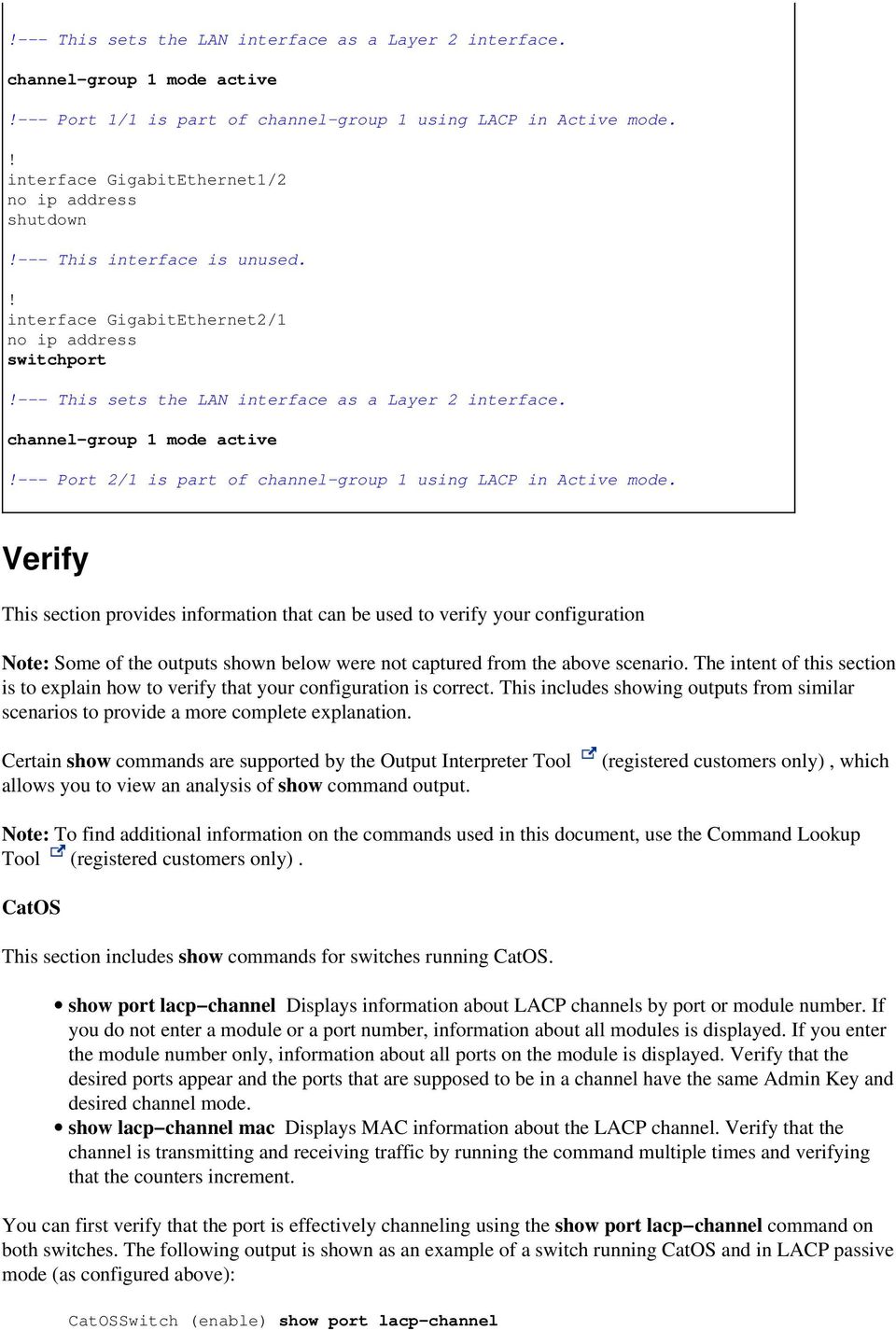
7 This sets the LAN interface as a Layer 2 interface. channel group 1 mode active Port 1/1 is part of channel group 1 using LACP in Active mode. interface GigabitEthernet1/2 no ip address shutdown This interface is unused. interface GigabitEthernet2/1 no ip address switchport This sets the LAN interface as a Layer 2 interface. channel group 1 mode active Port 2/1 is part of channel group 1 using LACP in Active mode. Verify This section provides information that can be used to verify your configuration Note: Some of the outputs shown below were not captured from the above scenario. The intent of this section is to explain how to verify that your configuration is correct. This includes showing outputs from similar scenarios to provide a more complete explanation. Certain show commands are supported by the Output Interpreter Tool allows you to view an analysis of show command output. (registered customers only), which Note: To find additional information on the commands used in this document, use the Command Lookup Tool (registered customers only). CatOS This section includes show commands for switches running CatOS. show port lacp channeldisplays information about LACP channels by port or module number. If you do not enter a module or a port number, information about all modules is displayed. If you enter the module number only, information about all ports on the module is displayed. Verify that the desired ports appear and the ports that are supposed to be in a channel have the same Admin Key and desired channel mode. show lacp channel macdisplays MAC information about the LACP channel. Verify that the channel is transmitting and receiving traffic by running the command multiple times and verifying that the counters increment. You can first verify that the port is effectively channeling using the show port lacp channel command on both switches. The following output is shown as an example of a switch running CatOS and in LACP passive mode (as configured above): CatOSSwitch (enable) show port lacp channel
8 Port Admin Channel LACP Port Ch Partner Oper Partner key Mode Priority id Sys ID Port 3/33 73 passive : f 2d /34 73 passive : f 2d The following output shows an example of a peer switch running CatOS and in LACP active mode. (This was not configured above.) CatOSSwitch (enable) show port lacp channel Port Admin Channel LACP Port Ch Partner Oper Partner key Mode Priority id Sys ID Port 1/1 56 active : /1 56 active : Note: Notice that LACP channels on one switch are in active mode while those on the other are in passive mode. If both switches were set to active, that would be indicated in the above output. You can also verify that the channel is transmitting and receiving traffic by viewing the show lacp channel mac command output for the channel ID corresponding to your channel. (See channel ID in the above command output.) The counters here should increase over time. CatOSSwitch (enable) show lacp channel mac Channel Rcv Unicast Rcv Multicast Rcv Broadcast Channel Xmit Unicast Xmit Multicast Xmit Broadcast Channel Rcv Octet Xmit Octet Channel Dely Exced MTU Exced In Discard Lrn Discrd In Lost Out Lost You can also verify, from the output below, that the two ports are now one unique port from the Spanning Tree Protocol (STP) point of view. CatOSSwitch (enable) show spantree 1 active VLAN 1 Spanning tree mode PVST+ Spanning tree type ieee Spanning tree enabled Designated Root Designated Root Priority Designated Root Cost 3 Designated Root Port 1/1,2/1 (agport 13/1) Root Max Age 20 sec Hello Time 2 sec Forward Delay 15 sec Bridge ID MAC ADDR f 2d Bridge ID Priority Bridge Max Age 20 sec Hello Time 2 sec Forward Delay 15 sec Port Vlan Port State Cost Prio Portfast Channel_id 1/1,2/1 1 forwarding 3 32 disabled 769 3/1 1 blocking disabled 0 3/2 1 blocking disabled 0 3/3 1 blocking disabled 0

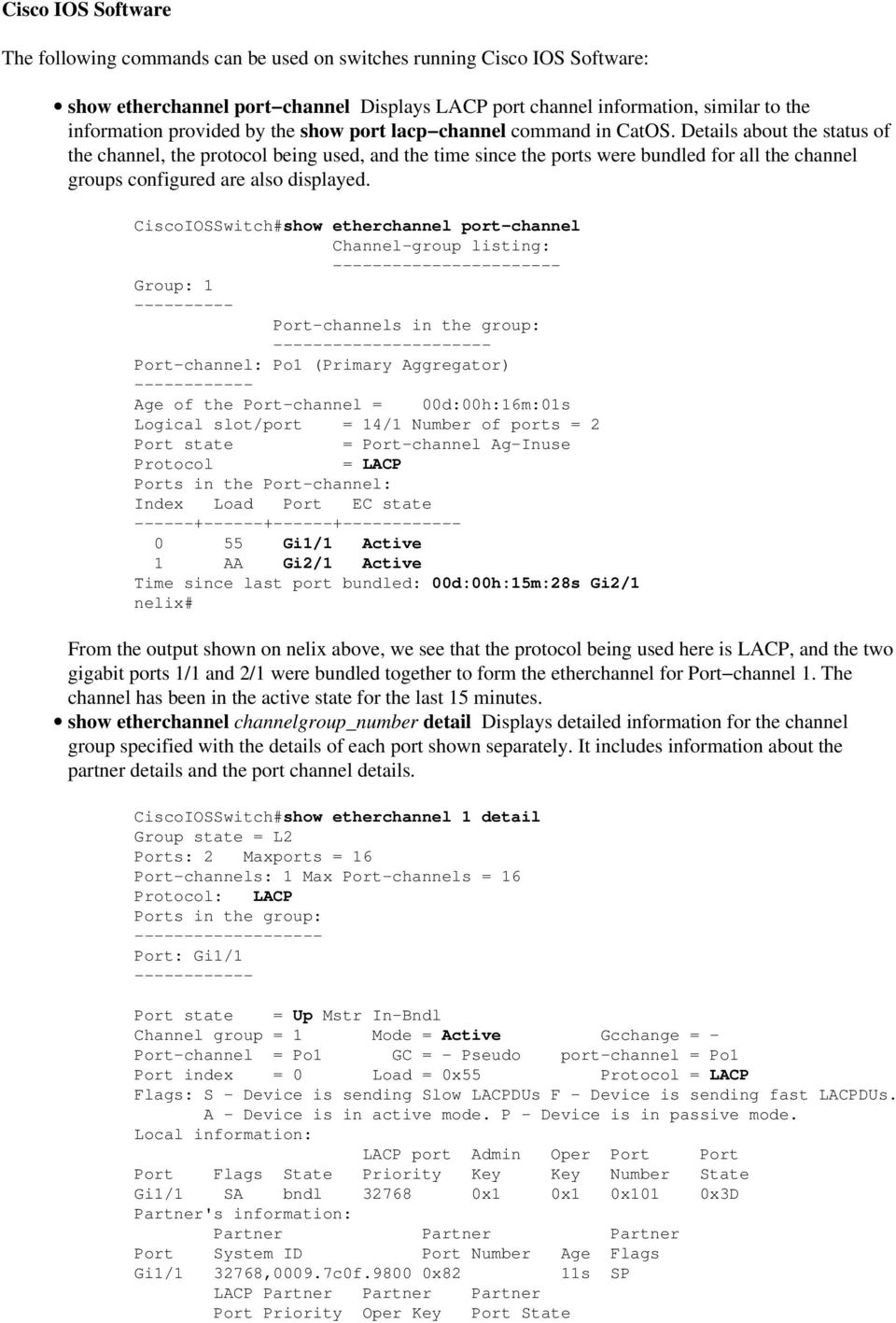
9 Cisco IOS Software The following commands can be used on switches running Cisco IOS Software: show etherchannel port channeldisplays LACP port channel information, similar to the information provided by the show port lacp channel command in CatOS. Details about the status of the channel, the protocol being used, and the time since the ports were bundled for all the channel groups configured are also displayed. CiscoIOSSwitch#show etherchannel port channel Channel group listing: Group: 1 Port channels in the group: Port channel: Po1 (Primary Aggregator) Age of the Port channel = 00d:00h:16m:01s Logical slot/port = 14/1 Number of ports = 2 Port state = Port channel Ag Inuse Protocol = LACP Ports in the Port channel: Index Load Port EC state Gi1/1 Active 1 AA Gi2/1 Active Time since last port bundled: 00d:00h:15m:28s Gi2/1 nelix# From the output shown on nelix above, we see that the protocol being used here is LACP, and the two gigabit ports 1/1 and 2/1 were bundled together to form the etherchannel for Port channel 1. The channel has been in the active state for the last 15 minutes. show etherchannel channelgroup_number detaildisplays detailed information for the channel group specified with the details of each port shown separately. It includes information about the partner details and the port channel details. CiscoIOSSwitch#show etherchannel 1 detail Group state = L2 Ports: 2 Maxports = 16 Port channels: 1 Max Port channels = 16 Protocol: LACP Ports in the group: Port: Gi1/1 Port state = Up Mstr In Bndl Channel group = 1 Mode = Active Gcchange = Port channel = Po1 GC = Pseudo port channel = Po1 Port index = 0 Load = 0x55 Protocol = LACP Flags: S Device is sending Slow LACPDUs F Device is sending fast LACPDUs. A Device is in active mode. P Device is in passive mode. Local information: LACP port Admin Oper Port Port Port Flags State Priority Key Key Number State Gi1/1 SA bndl x1 0x1 0x101 0x3D Partner's information: Partner Partner Partner Port System ID Port Number Age Flags Gi1/ ,0009.7c0f x82 11s SP LACP Partner Partner Partner Port Priority Oper Key Port State
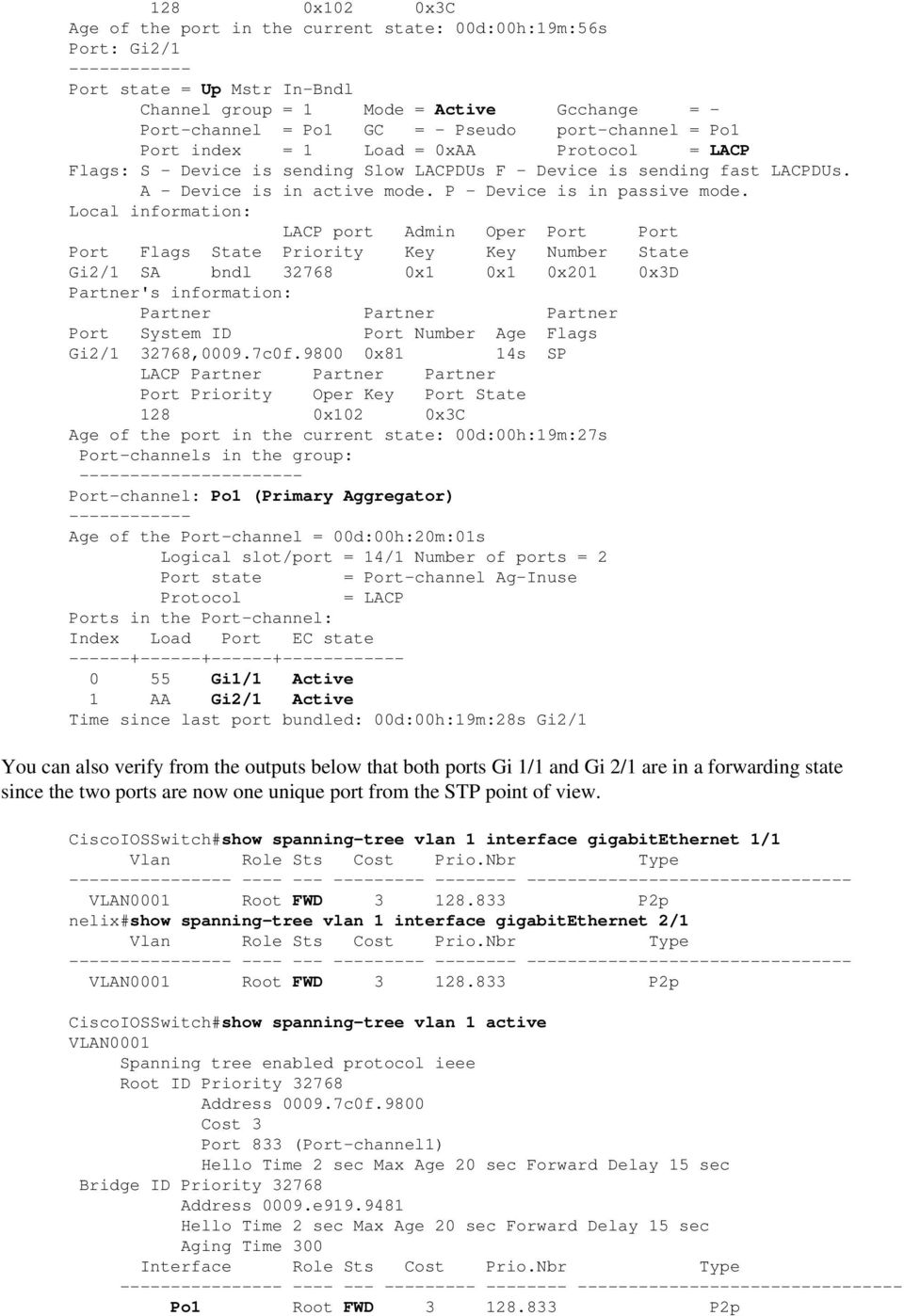
10 128 0x102 0x3C Age of the port in the current state: 00d:00h:19m:56s Port: Gi2/1 Port state = Up Mstr In Bndl Channel group = 1 Mode = Active Gcchange = Port channel = Po1 GC = Pseudo port channel = Po1 Port index = 1 Load = 0xAA Protocol = LACP Flags: S Device is sending Slow LACPDUs F Device is sending fast LACPDUs. A Device is in active mode. P Device is in passive mode. Local information: LACP port Admin Oper Port Port Port Flags State Priority Key Key Number State Gi2/1 SA bndl x1 0x1 0x201 0x3D Partner's information: Partner Partner Partner Port System ID Port Number Age Flags Gi2/ ,0009.7c0f x81 14s SP LACP Partner Partner Partner Port Priority Oper Key Port State 128 0x102 0x3C Age of the port in the current state: 00d:00h:19m:27s Port channels in the group: Port channel: Po1 (Primary Aggregator) Age of the Port channel = 00d:00h:20m:01s Logical slot/port = 14/1 Number of ports = 2 Port state = Port channel Ag Inuse Protocol = LACP Ports in the Port channel: Index Load Port EC state Gi1/1 Active 1 AA Gi2/1 Active Time since last port bundled: 00d:00h:19m:28s Gi2/1 You can also verify from the outputs below that both ports Gi 1/1 and Gi 2/1 are in a forwarding state since the two ports are now one unique port from the STP point of view. CiscoIOSSwitch#show spanning tree vlan 1 interface gigabitethernet 1/1 Vlan Role Sts Cost Prio.Nbr Type VLAN0001 Root FWD P2p nelix#show spanning tree vlan 1 interface gigabitethernet 2/1 Vlan Role Sts Cost Prio.Nbr Type VLAN0001 Root FWD P2p CiscoIOSSwitch#show spanning tree vlan 1 active VLAN0001 Spanning tree enabled protocol ieee Root ID Priority Address c0f.9800 Cost 3 Port 833 (Port channel1) Hello Time 2 sec Max Age 20 sec Forward Delay 15 sec Bridge ID Priority Address 0009.e Hello Time 2 sec Max Age 20 sec Forward Delay 15 sec Aging Time 300 Interface Role Sts Cost Prio.Nbr Type Po1 Root FWD P2p
11 Troubleshoot Secondary Aggregator Ports Po1A or Po2A are Created A secondary aggregator port will be created in the LACP process when the ports you are bundling are not compatible with each other, or with their remote peers. The secondary aggregator port will have the ports which are compatible with others. Switch#show etherchannel summary Flags: D down P in port channel I stand alone s suspended H Hot standby (LACP only) R Layer3 S Layer2 U in use f failed to allocate aggregator u unsuitable for bundling Number of channel groups in use: 6 Number of aggregators: 8 Group Port channel Protocol Ports Po1(SU) LACP Gi1/16(P) Gi10/1(P) Gi10/2(P) 2 Po2(SD) LACP 2 Po2A(SU) LACP Gi1/15(P) Gi10/3(P) Gi10/4(P) 3 Po3(SU) LACP Gi1/14(P) Gi10/5(P) Gi10/6(P) 4 Po4(SD) LACP 4 Po4A(SU) LACP Gi1/13(P) Gi10/7(P) Gi10/8(P) 5 Po5(SU) LACP Gi1/12(P) Gi10/9(P) Gi10/10(P) 6 Po6(SU) LACP Gi1/11(P) Gi10/11(P) Gi10/12(P) Configure all LAN ports in an EtherChannel to operate at the same speed and in the same duplex mode. LACP does not support half duplex. Half duplex ports in an LACP EtherChannel are put in the suspended state. If you configure an EtherChannel from trunking LAN ports, verify that the trunking mode is the same on all the trunks. LAN ports in an EtherChannel with different trunk modes can operate unpredictably. LAN ports with different STP port path costs can form an EtherChannel as long they are compatibly configured with each other. If you set different STP port path costs, the LAN ports are not incompatible for the formation of an EtherChannel. For a more comprehensive list, refer to the EtherChannel Feature Configuration Guidelines and Restrictions section of Configuring EtherChannels. Related Information Configuring Fast EtherChannel and Gigabit EtherChannel Configuring EtherChannels Understanding and Configuring EtherChannel LAN Product Support LAN Switching Technology Support Technical Support & Documentation Cisco Systems Contacts & Feedback Help Site Map Cisco Systems, Inc. All rights reserved. Terms & Conditions Privacy Statement Cookie Policy Trademarks of Cisco Systems, Inc.

12 Updated: Dec 14, 2005 Document ID: 19642

Configuring EtherChannel and 802.1Q Trunking Between Catalyst L2 Fixed Configuration Switches and Catalyst Switches Running CatOS
 Configuring EtherChannel and 802.1Q Trunking Between Catalyst L2 Fixed Configuration Switches and Catalyst Switches Running CatOS Document ID: 23408 Contents Introduction Prerequisites Requirements Components
Configuring EtherChannels
 CHAPTER 12 This chapter describes how to configure EtherChannels on the Cisco 7600 series router Layer 2 or Layer 3 LAN ports. For complete syntax and usage information for the commands used in this chapter,
Chapter 2 Lab 2-2, Configuring EtherChannel Instructor Version
 Chapter 2 Lab 2-2, Configuring EtherChannel Instructor Version Topology Objective Background Configure EtherChannel. Four switches have just been installed. The distribution layer switches are Catalyst
- EtherChannel - Port Aggregation
 1 Port Aggregation - EtherChannel - A network will often span across multiple switches. Trunk ports are usually used to connect switches together. There are two issues with using only a single physical
Link Aggregation Interoperability of the Dell PowerConnect 5316M with Cisco IOS or Cisco CatOS based Switches. By Bruce Holmes
 Link Aggregation Interoperability of the Dell PowerConnect 5316M with Cisco IOS or Cisco CatOS based Switches By Bruce Holmes August 2005 Contents Introduction...3 Link Aggregation with Gigabit Ethernet
Configuring EtherChannels
 25 CHAPTER This chapter describes how to configure EtherChannel interfaces. For complete syntax and usage information for the commands used in this chapter, refer to the Catalyst 2950 Desktop Switch Command
Configure IOS Catalyst Switches to Connect Cisco IP Phones Configuration Example
 Configure IOS Catalyst Switches to Connect Cisco IP Phones Configuration Example Document ID: 69632 Introduction Prerequisites Requirements Components Used Conventions Background Information Configure
ProCurve / Cisco Interoperability Guide
 ProCurve Networking ProCurve / Cisco Interoperability Guide Introduction... 3 Discovery protocols: LLDP & CDP... 4 VLAN configuration... 7 Introduction... 7 VLAN configuration on Cisco Catalyst... 8 VLAN
How To Balance On A Cisco Catalyst Switch With The Etherchannel On A Fast Ipv2 (Powerline) On A Microsoft Ipv1 (Powergen) On An Ipv3 (Powergadget) On Ipv4
 Cisco - Understanding EtherChannel Load Balancing and Redundancy on Catalyst Switch...Page 1 of 10 Understanding EtherChannel Load Balancing and Redundancy on Catalyst Switches Document ID: 12023 Contents
LINK AGGREGATION INTEROPERABILITY OF THE DELL POWERCONNECT 6200 SERIES
 LINK AGGREGATION INTEROPERABILITY OF THE DELL POWERCONNECT 6200 SERIES WITH CISCO IOS OR CISCO CATOS BASED SWITCHES By Bruce Holmes CONTENTS INTRODUCTION 3 LINK AGGREGATION WITH GIGABIT ETHERNET CISCO
6/8/2011. Document ID: 12023. Contents. Introduction. Prerequisites. Requirements. Components Used. Conventions. Introduction
 Page 1 of 9 Products & Services Understanding EtherChannel Load Balancing and Redundancy on Catalyst Switches Document ID: 12023 Contents Introduction Prerequisites Requirements Components Used Conventions
Catalyst Layer 3 Switch for Wake On LAN Support Across VLANs Configuration Example
 Catalyst Layer 3 Switch for Wake On LAN Support Across VLANs Configuration Example Document ID: 91672 Contents Introduction Prerequisites Requirements Components Used Conventions Background Information
Link Aggregation Interoperability of the Dell PowerConnect M6220 with Cisco IOS or Cisco CatOS Based Switches
 Link Aggregation Interoperability of the Dell PowerConnect M6220 with Cisco IOS or Cisco CatOS Based Switches By Bruce Holmes Introduction This paper describes how to configure the Dell PowerConnect 6220M
AlliedWare Plus OS How To Configure interoperation between PVST+ and RSTP or MSTP
 AlliedWare Plus OS How To Configure interoperation between PVST+ and RSTP or MSTP Introduction Spanning trees that protect networks from loops can provide better traffic load balancing if traffic in different
How To Configure InterVLAN Routing on Layer 3 Switches
 How To Configure InterVLAN Routing on Layer 3 Switches Document ID: 41860 Contents Introduction Prerequisites Requirements Components Used Conventions Configure InterVLAN Routing Task Step by Step Instructions
Cisco - Configure the 1721 Router for VLANs Using a Switch Module (WIC-4ESW)
 Page 1 of 20 Configure the 1721 Router for VLANs Using a Switch Module (WIC-4ESW) Document ID: 50036 Contents Introduction Prerequisites Requirements Components Used Network Diagram The Role of Switched
Lab 3.10.2 Use Network Inspector to Observe STP Behavior
 Lab 3.10.2 Use Network Inspector to Observe STP Behavior Objective The purpose of this lab is to observe STP behavior with the Network Inspector switch trace feature. Scenario A new switched network has
Abstract. MEP; Reviewed: GAK 10/17/2005. Solution & Interoperability Test Lab Application Notes 2005 Avaya Inc. All Rights Reserved.
 Configuring Single Instance Rapid Spanning Tree Protocol (RSTP) between an Avaya C360 Converged Switch and HP ProCurve Networking Switches to support Avaya IP Telephony Issue 1.0 Abstract These Application
RESILIENT NETWORK DESIGN
 Matěj Grégr RESILIENT NETWORK DESIGN 1/36 2011 Brno University of Technology, Faculty of Information Technology, Matěj Grégr, [email protected] Campus Best Practices - Resilient network design Campus
CCT vs. CCENT Skill Set Comparison
 Operation of IP Data Networks Recognize the purpose and functions of various network devices such as Routers, Switches, Bridges and Hubs Select the components required to meet a given network specification
How To Configure Link Aggregation On Supermicro Switch 2 And 3 (Lan) On A Microsoft Vlan 2 And Vlan 3 (Vlan) (Lan 2) (Vlans) (Lummer) (Powerline) (
 L2 / L3 Switches Link Aggregation Configuration Guide Revision 1.0 The information in this USER S MANUAL has been carefully reviewed and is believed to be accurate. The vendor assumes no responsibility
Configuring Traffic Storm Control
 39 CHAPTER This chapter describes how to configure the traffic storm control feature on the Catalyst 6500 series switches. For complete syntax and usage information for the commands used in this chapter,
Cisco Certified Network Associate Exam. Operation of IP Data Networks. LAN Switching Technologies. IP addressing (IPv4 / IPv6)
 Cisco Certified Network Associate Exam Exam Number 200-120 CCNA Associated Certifications CCNA Routing and Switching Operation of IP Data Networks Operation of IP Data Networks Recognize the purpose and
Configuring IPS High Bandwidth Using EtherChannel Load Balancing
 Configuring IPS High Bandwidth Using EtherChannel Load Balancing This guide helps you to understand and deploy the high bandwidth features available with IPS v5.1 when used in conjunction with the EtherChannel
Configuring Switch Ports and VLAN Interfaces for the Cisco ASA 5505 Adaptive Security Appliance
 CHAPTER 5 Configuring Switch Ports and VLAN Interfaces for the Cisco ASA 5505 Adaptive Security Appliance This chapter describes how to configure the switch ports and VLAN interfaces of the ASA 5505 adaptive
CHAPTER 10 LAN REDUNDANCY. Scaling Networks
 CHAPTER 10 LAN REDUNDANCY Scaling Networks CHAPTER 10 10.0 Introduction 10.1 Spanning Tree Concepts 10.2 Varieties of Spanning Tree Protocols 10.3 Spanning Tree Configuration 10.4 First-Hop Redundancy
Virtual PortChannel Quick Configuration Guide
 Virtual PortChannel Quick Configuration Guide Overview A virtual PortChannel (vpc) allows links that are physically connected to two different Cisco Nexus 5000 Series devices to appear as a single PortChannel
hp ProLiant network adapter teaming
 hp networking june 2003 hp ProLiant network adapter teaming technical white paper table of contents introduction 2 executive summary 2 overview of network addressing 2 layer 2 vs. layer 3 addressing 2
Catalyst 6500/6000 Switches NetFlow Configuration and Troubleshooting
 Catalyst 6500/6000 Switches NetFlow Configuration and Troubleshooting Document ID: 70974 Introduction Prerequisites Requirements Components Used Conventions Background Information Configure Network Diagram
Objectives. The Role of Redundancy in a Switched Network. Layer 2 Loops. Broadcast Storms. More problems with Layer 2 loops
 ITE I Chapter 6 2006 Cisco Systems, Inc. All rights reserved. Cisco Public 1 Objectives Implement Spanning Tree Protocols LAN Switching and Wireless Chapter 5 Explain the role of redundancy in a converged
BRI to PRI Connection Using Data Over Voice
 BRI to PRI Connection Using Data Over Voice Document ID: 14962 Contents Introduction Prerequisites Requirements Conventions Background Information Configure Network Diagram Configurations Verify Troubleshoot
Managing vlan.dat in Cisco Catalyst Switches Running Cisco IOS Software
 Managing vlan.dat in Cisco Catalyst Switches Running Cisco IOS Software Document ID: 109304 Contents Introduction Prerequisites Requirements Components Used Related Products Conventions Background Information
Interconnecting Cisco Networking Devices Part 2
 Interconnecting Cisco Networking Devices Part 2 Course Number: ICND2 Length: 5 Day(s) Certification Exam This course will help you prepare for the following exam: 640 816: ICND2 Course Overview This course
Course Contents CCNP (CISco certified network professional)
 Course Contents CCNP (CISco certified network professional) CCNP Route (642-902) EIGRP Chapter: EIGRP Overview and Neighbor Relationships EIGRP Neighborships Neighborship over WANs EIGRP Topology, Routes,
Configuring Link Bundling on Cisco IOS XR Software
 Configuring Link Bundling on Cisco IOS XR Software This module describes the configuration of link bundle interfaces on the Cisco CRS Router. A link bundle is a group of one or more ports that are aggregated
Switching in an Enterprise Network
 Switching in an Enterprise Network Introducing Routing and Switching in the Enterprise Chapter 3 Version 4.0 2006 Cisco Systems, Inc. All rights reserved. Cisco Public 1 Objectives Compare the types of
BLADE PVST+ Spanning Tree and Interoperability with Cisco
 BLADE PVST+ Spanning Tree and Interoperability with Cisco Technical Brief Industry-standard PVST+ Spanning Tree Protocol with Cisco interoperability Introduction...1 Spanning Tree Protocol (IEEE 802.1d)...1
Configuring Link Aggregation
 10 CHAPTER This chapter describes how to configure link aggregation for the ML-Series cards, both EtherChannel and packet-over-sonet/sdh (POS) channel. For additional information about the Cisco IOS commands
Juniper Networks EX Series/ Cisco Catalyst Interoperability Test Results. May 1, 2009
 Juniper Networks EX Series/ Cisco Catalyst Interoperability Test Results May 1, 2009 Executive Summary Juniper Networks commissioned Network Test to assess interoperability between its EX4200 and EX8208
LiveAction Application Note
 LiveAction Application Note Layer 2 Monitoring and Host Location Using LiveAction to monitor and identify inter-/intra-switch VLAN configurations, and locating workstations within the network infrastructure.
Configuring a Gateway of Last Resort Using IP Commands
 Configuring a Gateway of Last Resort Using IP Commands Document ID: 16448 Contents Introduction Prerequisites Requirements Components Used Conventions ip default gateway ip default network Flag a Default
Monitoring and Analyzing Switch Operation
 B Monitoring and Analyzing Switch Operation Contents Overview..................................................... B-3....................................... B-4 Menu Access To Status and Counters.........................
AT-S60 Version 1.1.4 Management Software for the AT-8400 Series Switch. Software Release Notes
 AT-S60 Version 1.1.4 Management Software for the AT-8400 Series Switch Supported Platforms Software Release Notes Please read this document before you begin to use the AT-S60 management software. The AT-S60
Web Authentication Proxy on a Wireless LAN Controller Configuration Example
 Web Authentication Proxy on a Wireless LAN Controller Configuration Example Document ID: 113151 Contents Introduction Prerequisites Requirements Components Used Conventions Web Authentication Proxy on
Chapter 4: Spanning Tree Design Guidelines for Cisco NX-OS Software and Virtual PortChannels
 Design Guide Chapter 4: Spanning Tree Design Guidelines for Cisco NX-OS Software and Virtual PortChannels 2012 Cisco and/or its affiliates. All rights reserved. This document is Cisco Public Information.
Port Trunking. Contents
 12 Port Trunking Contents Overview..................................................... 12-2................................... 12-2 Port Connections and Configuration.......................... 12-3 Link
16-PORT POWER OVER ETHERNET WEB SMART SWITCH
 16-PORT POWER OVER ETHERNET WEB SMART SWITCH User s Manual (DN-95312) - 0 - Content Web Smart Switch Configure login ---------------------------------- 2 Administrator Authentication Configuration ---------------------------------------------
Chapter 3. Enterprise Campus Network Design
 Chapter 3 Enterprise Campus Network Design 1 Overview The network foundation hosting these technologies for an emerging enterprise should be efficient, highly available, scalable, and manageable. This
LANs and VLANs A Simplified Tutorial
 Application Note LANs and VLANs A Simplified Tutorial Version 3.0 May 2002 COMPAS ID 90947 Avaya Labs 1 Companion document IP Addressing: A Simplified Tutorial COMPAS ID 92962 2 Introduction As the name
Configuration Professional: Site to Site IPsec VPN Between Two IOS Routers Configuration Example
 Configuration Professional: Site to Site IPsec VPN Between Two IOS Routers Configuration Example Document ID: 113337 Contents Introduction Prerequisites Requirements Components Used Conventions Configuration
Port Trunking. Contents
 13 Port Trunking Contents Overview.................................................... 13-2 Port Trunk Features and Operation........................... 13-4 Trunk Configuration Methods................................
- Virtual LANs (VLANs) and VTP -
 1 - Virtual LANs (VLANs) and VTP - Collision vs. Broadcast Domains A collision domain is simply defined as any physical segment where a collision can occur. Hubs can only operate at half-duplex, and thus
Configuring Port Security
 CHAPTER 62 This chapter describes how to configure the port security feature. For complete syntax and usage information for the commands used in this chapter, see the Cisco IOS Master List, at this URL:
Configuring DHCP Snooping
 CHAPTER 19 This chapter describes how to configure Dynamic Host Configuration Protocol (DHCP) snooping on Catalyst 4500 series switches. It provides guidelines, procedures, and configuration examples.
Configuring InterVLAN Routing and ISL/802.1Q Trunking on Catalyst 2900XL/3500XL/2940/2950/2970 Series Switches Using an External Router
 Configuring InterVLAN Routing and ISL/802.1Q Trunking on Catalyst 2900XL/3500XL/2940/2950/2970 Series Switches Using an External Router Document ID: 14976 Introduction Before You Begin Conventions Prerequisites
Network Analysis Modules
 CHAPTER 6 This chapter describes the (NAMs) and contains the following sections: Network Analysis Module (WS-SVC-NAM-1), page 6-2 Network Analysis Module (WS-SVC-NAM-2), page 6-4 NAMs monitor and analyze
CCNA R&S: Introduction to Networks. Chapter 5: Ethernet
 CCNA R&S: Introduction to Networks Chapter 5: Ethernet 5.0.1.1 Introduction The OSI physical layer provides the means to transport the bits that make up a data link layer frame across the network media.
Configuring Static and Dynamic NAT Simultaneously
 Configuring Static and Dynamic NAT Simultaneously Document ID: 13778 Contents Introduction Prerequisites Requirements Components Used Conventions Configuring NAT Related Information Introduction In some
> Avaya / Cisco Interoperability Technical Configuration Guide. Ethernet Routing Switch
 Ethernet Routing Switch IP Phones Engineering > Avaya Data Solutions Document Date: April 6, 2010 Document Number: NN48500-588 Document Version: 2.0 Abstract The purpose of this TCG is to show some of
Sample Configuration Using the ip nat outside source static
 Sample Configuration Using the ip nat outside source static Table of Contents Sample Configuration Using the ip nat outside source static Command...1 Introduction...1 Before You Begin...1 Conventions...1
Using Link Layer Discovery Protocol in Multivendor Networks
 Using Link Layer Discovery Protocol in Multivendor Networks Link Layer Discovery Protocol (LLDP), standardized by the IEEE as part of 802.1ab, enables standardized discovery of nodes, which in turn facilitates
Abstract. Avaya Solution & Interoperability Test Lab
 Avaya Solution & Interoperability Test Lab Sample Configuration for using Link Layer Discovery Protocol (LLDP) with Cisco Catalyst 4500 or 3750 Switches for VLAN Assignment for Avaya 9600 and 1600 Series
VMware ESX Server 3 802.1Q VLAN Solutions W H I T E P A P E R
 VMware ESX Server 3 802.1Q VLAN Solutions W H I T E P A P E R Executive Summary The virtual switches in ESX Server 3 support VLAN (IEEE 802.1Q) trunking. Using VLANs, you can enhance security and leverage
CT5760 Controller and Catalyst 3850 Switch Configuration Example
 CT5760 Controller and Catalyst 3850 Switch Configuration Example Document ID: 116342 Contributed by Antoine KMEID and Serge Yasmine, Cisco TAC Engineers. Aug 13, 2013 Contents Introduction Prerequisites
"Charting the Course...
 Description "Charting the Course... Course Summary Interconnecting Cisco Networking Devices: Accelerated (CCNAX), is a course consisting of ICND1 and ICND2 content in its entirety, but with the content
Enabling NetFlow and NetFlow Data Export (NDE) on Cisco Catalyst Switches
 Enabling NetFlow and NetFlow Data Export (NDE) on Cisco Catalyst Switches Revised 2/1/2007 Introduction...2 Requirements...2 Catalyst 4500 Series...2 Enabling NetFlow...2 Configuring a NetFlow Destination...3
CISCO STUDY GUIDE. Building Cisco Multilayer Switched Networks (BCMSN) 640-504 Edition 2
 CISCO STUDY GUIDE Building Cisco Multilayer Switched Networks (BCMSN) 640-504 Edition 2 Congratulations!! You have purchased a Testkiller, Ltd Study Guide. This study guide is a selection of keypoints
100-101: Interconnecting Cisco Networking Devices Part 1 v2.0 (ICND1)
 100-101: Interconnecting Cisco Networking Devices Part 1 v2.0 (ICND1) Course Overview This course provides students with the knowledge and skills to implement and support a small switched and routed network.
Configuring Redundancy
 7 CHAPTER This chapter describes how to configure redundancy and contains these sections: Configuring Fault Tolerance, page 7-1 Configuring HSRP, page 7-5 Configuring Interface and Device Tracking, page
FWSM introduction Intro 5/1
 Intro 5/0 Content: FWSM introduction Requirements for FWSM 3.2 How the Firewall Services Module Works with the Switch Using the MSFC Firewall Mode Overview Stateful Inspection Overview Security Context
CCNP SWITCH: Implementing High Availability and Redundancy in a Campus Network
 CCNP SWITCH: Implementing High Availability and Redundancy in a Campus Network Olga Torstensson SWITCHv6 1 Components of High Availability Redundancy Technology (including hardware and software features)
640-816: Interconnecting Cisco Networking Devices Part 2 v1.1
 640-816: Interconnecting Cisco Networking Devices Part 2 v1.1 Course Introduction Course Introduction Chapter 01 - Small Network Implementation Introducing the Review Lab Cisco IOS User Interface Functions
48 GE PoE-Plus + 2 GE SFP L2 Managed Switch, 375W
 GEP-5070 Version: 1 48 GE PoE-Plus + 2 GE SFP L2 Managed Switch, 375W The LevelOne GEP-5070 is an intelligent L2 Managed Switch with 48 x 1000Base-T PoE-Plus ports and 2 x 100/1000BASE-X SFP (Small Form
Configuring the Switch for the Firewall Services Module
 CHAPTER 2 Configuring the Switch for the Firewall Services Module This chapter describes how to configure the Catalyst 6500 series switch or the Cisco 7600 series router for use with the FWSM. Before completing
Configuring Port Security
 32 CHAPTER This chapter describes how to configure port security on Catalyst 4500 series switches. It provides guidelines, procedures, and configuration examples. Note For complete syntax and usage information
8-Port Gigabit managed POE Switch. User s Manual. Version: 2.3
 8-Port Gigabit managed POE Switch User s Manual Version: 2.3 September 9, 2007 1 TABLE OF CONTENT 1.0 INTRODUCTION... 3 1.1 MAIN FEATURES... 3 1.2 START TO MANAGE THIS SWITCH... 5 2.0 WEB MANAGEMENT...
How to Create VLANs Within a Virtual Switch in VMware ESXi
 How to Create VLANs Within a Virtual Switch in VMware ESXi I am not responsible for your actions or their outcomes, in any way, while reading and/or implementing this tutorial. I will not provide support
VLAN Interoperability
 PowerConnect Application Note #4 November 2003 VLAN Interoperability This Application Notes relates to the following Dell PowerConnect products: PowerConnect 33xx PowerConnect 52xx Abstract This Application
Chapter 7 Lab 7-1, Configuring Switches for IP Telephony Support
 Chapter 7 Lab 7-1, Configuring Switches for IP Telephony Support Topology Objectives Background Configure auto QoS to support IP phones. Configure CoS override for data frames. Configure the distribution
Juniper / Cisco Interoperability Tests. August 2014
 Juniper / Cisco Interoperability Tests August 2014 Executive Summary Juniper Networks commissioned Network Test to assess interoperability, with an emphasis on data center connectivity, between Juniper
Cisco Data Centre: Introducing Cisco Data Center Networking
 coursemonster.com/uk Cisco Data Centre: Introducing Cisco Data Center Networking View training dates» Overview In the Introducing Cisco Data Center Networking training course, delegates will learn to:â
How To Learn Cisco Cisco Ios And Cisco Vlan
 Interconnecting Cisco Networking Devices: Accelerated Course CCNAX v2.0; 5 Days, Instructor-led Course Description Interconnecting Cisco Networking Devices: Accelerated (CCNAX) v2.0 is a 60-hour instructor-led
Lab 7-1 Configuring Switches for IP Telephony Support
 Lab 7-1 Configuring Switches for IP Telephony Support Learning Objectives Configure auto QoS to support IP phones Configure CoS override for data frames Configure the distribution layer to trust access
Configuring Switch Ports and VLAN Interfaces for the Cisco ASA 5505 Adaptive Security Appliance
 CHAPTER 4 Configuring Switch Ports and VLAN Interfaces for the Cisco ASA 5505 Adaptive Security Appliance This chapter describes how to configure the switch ports and VLAN interfaces of the ASA 5505 adaptive
Chapter 7 Configuring Trunk Groups and Dynamic Link Aggregation
 Chapter 7 Configuring Trunk Groups and Dynamic Link Aggregation This chapter describes how to configure trunk groups and 802.3ad link aggregation. Trunk groups are manually-configured aggregate links containing
ASA 8.3 and Later: Enable FTP/TFTP Services Configuration Example
 ASA 8.3 and Later: Enable FTP/TFTP Services Configuration Example Document ID: 113110 Contents Introduction Prerequisites Requirements Components Used Network Diagram Related Products Conventions Background
AT-S105 Version 1.2.0 Management Software Release Notes AT-FS750/24POE and AT-FS750/48 Fast Ethernet WebSmart Switches
 AT-S105 Version 1.2.0 Management Software Release Notes AT-FS750/24POE and AT-FS750/48 Fast Ethernet WebSmart Switches Please read this document before you begin to use the management software. NOTE This
Data Networking and Architecture. Delegates should have some basic knowledge of Internet Protocol and Data Networking principles.
 Data Networking and Architecture The course focuses on theoretical principles and practical implementation of selected Data Networking protocols and standards. Physical network architecture is described
24 Port Gigabit Ethernet Web Smart Switch. Users Manual
 24 Port Gigabit Ethernet Web Smart Switch Users Manual Content Web Smart Switch Configure login -------------------------------- 2 Configuration System Configuration ---------------------------------------------------
ADVANCED NETWORK CONFIGURATION GUIDE
 White Paper ADVANCED NETWORK CONFIGURATION GUIDE CONTENTS Introduction 1 Terminology 1 VLAN configuration 2 NIC Bonding configuration 3 Jumbo frame configuration 4 Other I/O high availability options 4
Switch Web GUI Quick Configuration Guide for
 Switch Web GUI Quick Configuration Guide for SSE-G48-TG4 SSE-G24-TG4 SSE-X24S SSE-X24SR SSE-X3348S SSE-X3348SR SSE-X3348T SSE-X3348TR SBM-GEM-X2C SBM-GEM-X2C+ SBM-GEM-X3S+ SBM-XEM-X10SM Release: 1.0c 1
Bridgewalling - Using Netfilter in Bridge Mode
 Bridgewalling - Using Netfilter in Bridge Mode Ralf Spenneberg, [email protected] Revision : 1.5 Abstract Firewalling using packet filters is usually performed by a router. The packet filtering software
Ethernet Storage Best Practices
 Technical Report Ethernet Storage Best Practices David Klem, Trey Layton, Frank Pleshe, NetApp January 2010 TR-3802 TABLE OF CONTENTS 1 INTRODUCTION... 3 2 USING VLANS FOR TRAFFIC SEPARATION... 3 2.1 VLAN
Using MLAG in Dell Networks
 dd version Using MLAG in Dell Networks A deployment guide for Dell Networking switches (version ) Dell Engineering March 04 January 04 A Dell Deployment and Configuration Guide Revisions Date Description
Switch Quick Configuration CLI Guide for
 Switch Quick Configuration CLI Guide for SSE-G48-TG4 SSE-G24-TG4 SSE-X24S SSE-X24SR SSE-X3348S SSE-X3348SR SSE-X3348T SSE-X3348TR SBM-GEM-X2C SBM-GEM-X2C+ SBM-GEM-X3S+ SBM-XEM-X10SM Release : 1.0d 1 /
IOS NAT Load Balancing for Two ISP Connections
 IOS NAT Load Balancing for Two ISP Connections Document ID: 100658 Contents Introduction Prerequisites Requirements Components Used Conventions Configure Network Diagram Configurations Verify Troubleshoot
Note: This case study utilizes Packet Tracer. Please see the Chapter 5 Packet Tracer file located in Supplemental Materials.
 Note: This case study utilizes Packet Tracer. Please see the Chapter 5 Packet Tracer file located in Supplemental Materials. CHAPTER 5 OBJECTIVES Configure a router with an initial configuration. Use the
How To Understand and Configure Your Network for IntraVUE
 How To Understand and Configure Your Network for IntraVUE Summary This document attempts to standardize the methods used to configure Intrauve in situations where there is little or no understanding of
Fundamentals of Switching
 1 CCNA 640-801 Exam Notes - Fundamentals of Switching CCNA 640-801 Exam Notes Fundamentals of Switching 1. LAN Segmentation 1.1 In a collision domain, a frame sent by a device can cause collision with