
PG-01instruction manual
|
|
|
- Ferdinand Ellis
- 9 years ago
- Views:
Transcription
1 PG-01instruction manual DIGITAL RADIO

2 fairbank house ashley road altrincham WA14 2DP united kingdom t: +44 (0) f: +44 (0) e:

3 PG-01 User Manual Accessories Intempo Digital radio External power supply Telescopic aerial Warranty card Control panels AUTO TUNE DAB/FM SELECT UP STAND BY USER PRESETS 1-4 LCD DISPLAY ALARM SLEEP INFO DOWN VOLUME CONTROL Inputs/Outputs Aerial, headphone socket 3.5mm, & DC power socket. AERIAL INPUT HEADPHONE SOCKET DC POWER SOCKET

4 Switching your Intempo-digital radio on for the first time Connect the external power adapter to the radio and plug the other end into mains outlet. During scan mode the LCD will display a slide bar that indicates the progress of the scan and the amount of radio stations that have been found so far. Searching 11 DAB - unlike normal radio - Groups together several radio stations and transmits them on one frequency. These groups are referred to as multiplexes and ensembles. Every time one of these groups has been found the name of that group will be displayed on the bottom half of the display e.g. BBC National DAB. Once the scan has finished the radio will select the first alphanumerically found station. PRESENT STATION RADIO MODE (DAB OR FM) Extend the telescopic aerial as far as it will go. 1Xtra Searching DAB SCROLLING TEXT INFORMATION (DLS) If you can t hear any sound then turn the volume control clockwise until you reach a desired level. As soon as the power is connected to the radio it will automatically enter into auto tune mode. Autotune Full scan To explore the stations that have been found you need to press either the Up or Down keys. Every time you press the up or down buttons you will skip to the next found station. When you find a station that you would like to listen to then press the Select key. The radio will now switch to that station and display the station name. If you don t press the select key the display will revert back to the original station after 4 seconds.

5 Autoselect Instead of having to press the Select key after you have found a station that you would like to listen to you can set the radio so that as you scroll through the stations you listen to each one in turn. This is great for quickly checking what s on each station. To enable this feature select a station in the normal manner but then press and hold the Select key. The display will show Autoselect ON, the next time you press either the Up or Down key it will automatically select the next station. To turn the Autoselect off, press either the Up or Down key, then quickly follow this by pressing and holding the Select key until the display shows Autoselect OFF. Storing stations You can store up to 4 of your favourite stations to the preset keys, this will enable you to get access your favourite station at the touch of one button. To store a preset you must first be listening to the station that you would like to save, then press and hold one of the presets labelled 1-4 for 2 seconds. The LCD will then show Preset # stored. PRESET KEYS 1,2,3,& 4. Display modes The information is displayed on the lower segment of the LCD display. INFO KEY Every time you press the Info key the display will cycle through the following display modes:- DLS (scrolling text) Programme Type Ensemble (group name) Signal Strength Time and Date DLS Recalling a stored station Once you have saved a station to one of the presets you can recall it by pressing and releasing the corresponding preset key e.g. if you saved Radio1 to Preset 2 then just press the number 2 preset key. If you press a preset that hasn t been allocated a station then it will display preset # empty. Dynamic label segment is a scrolling message that the broadcaster may include with their transmissions. This message usually includes information such as programme details etc. Programme type This describes the style of music that is being broadcast e.g. Rock or Classical.

6 Ensemble/Multiplex (Group name) A multiplex/ensemble is a collection of radio stations that are bundled and transmitted on one frequency. There are national and local multiplexes, local ones contain stations that are specific to that area e.g. MXR West Midlands. Signal strength The slide bar indicates how strong the received signals are, the stronger the signal the longer the bar will be from left to right. Radio 1 MINIMUM SIGNAL LEVEL If the signal level drops below the fifth box (minimum signal level) then you may experience problems with the quality of the audio. Time & date The broadcaster (radio station) provides clock and date information automatically so there s no need to mess around manually setting the clock. In the unlikely event that the broadcaster doesn t transmit any clock information then the display will show <Time/date>. Radio CLOCK DAB DAB DATE Advanced display modes To enter the advanced display mode you need to press and hold the Info key for approximately 3 seconds then release it. Software version The first thing you will see is the software version number. You may be asked which version you have if you encounter any problems. Audio mode If you press the Info key again you will now see the audio mode, this displays what type of broadcast you are receiving e.g. mono or stereo and what bit rate is being used. By pressing the Info key again you will exit from the advanced display mode and revert back to DLS (scrolling text information). Auto tune modes There are two types of auto tune, one is quick scan and the other is full scan. Quick scan searches the UK DAB band III and full scan searches all band III DAB channels. To activate the quick scan press the Auto tune key and for full scan press and hold the Auto tune key. Secondary services On some occasions you will see a > symbol directly after the name of the station, this indicates that there are secondary services available to that station. These secondary services contain extra services that relate to the primary station. E.g. a sports station may want to add extra commentaries. The secondary services are inserted directly after the primary station.

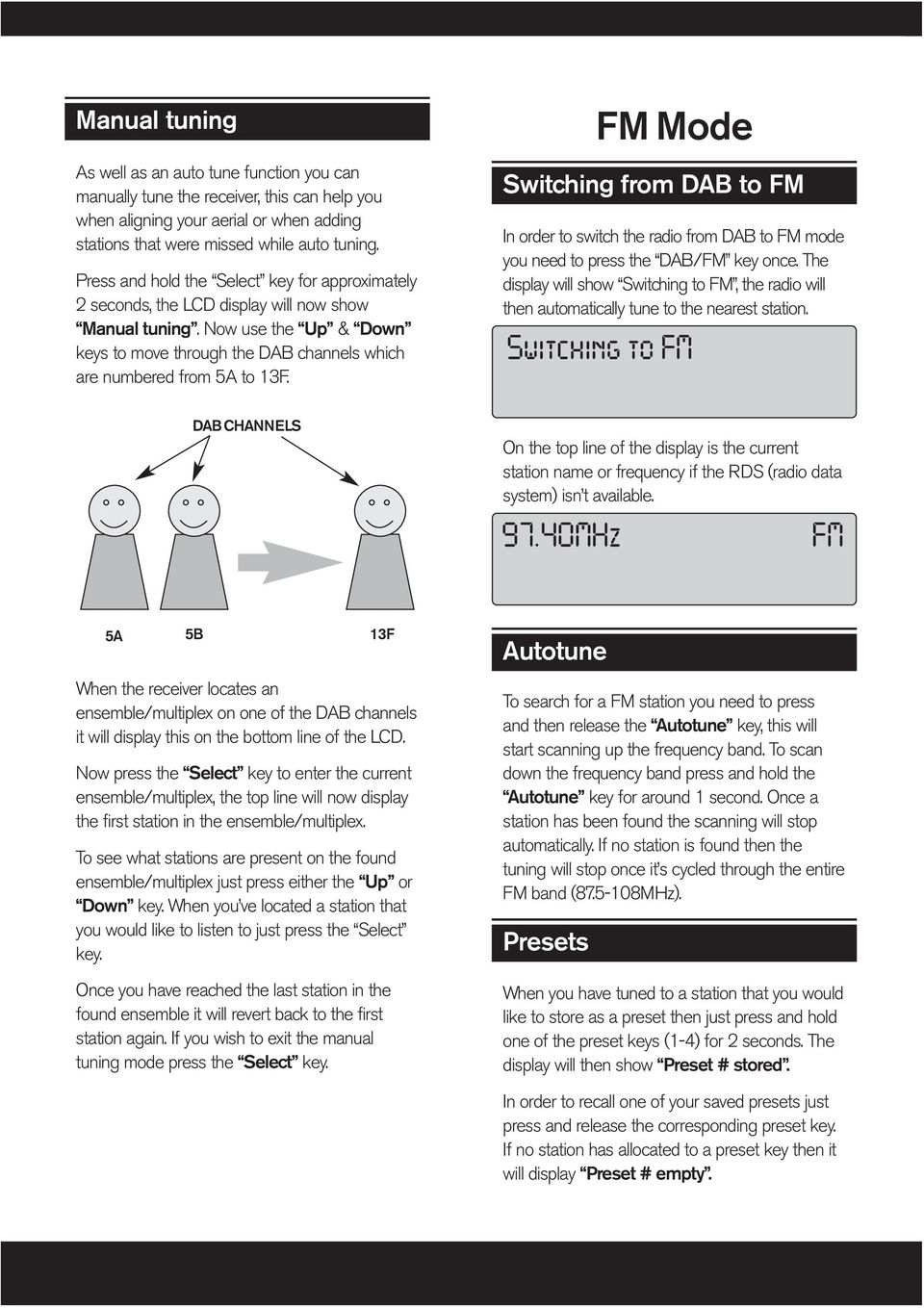
7 Manual tuning As well as an auto tune function you can manually tune the receiver, this can help you when aligning your aerial or when adding stations that were missed while auto tuning. Press and hold the Select key for approximately 2 seconds, the LCD display will now show Manual tuning. Now use the Up & Down keys to move through the DAB channels which are numbered from 5A to 13F. FM Mode Switching from DAB to FM In order to switch the radio from DAB to FM mode you need to press the DAB/FM key once. The display will show Switching to FM, the radio will then automatically tune to the nearest station. Switching to FM DAB CHANNELS On the top line of the display is the current station name or frequency if the RDS (radio data system) isn t available MHz FM 5A 5B 13F When the receiver locates an ensemble/multiplex on one of the DAB channels it will display this on the bottom line of the LCD. Now press the Select key to enter the current ensemble/multiplex, the top line will now display the first station in the ensemble/multiplex. To see what stations are present on the found ensemble/multiplex just press either the Up or Down key. When you ve located a station that you would like to listen to just press the Select key. Once you have reached the last station in the found ensemble it will revert back to the first station again. If you wish to exit the manual tuning mode press the Select key. Autotune To search for a FM station you need to press and then release the Autotune key, this will start scanning up the frequency band. To scan down the frequency band press and hold the Autotune key for around 1 second. Once a station has been found the scanning will stop automatically. If no station is found then the tuning will stop once it s cycled through the entire FM band ( MHz). Presets When you have tuned to a station that you would like to store as a preset then just press and hold one of the preset keys (1-4) for 2 seconds. The display will then show Preset # stored. In order to recall one of your saved presets just press and release the corresponding preset key. If no station has allocated to a preset key then it will display Preset # empty.
8 Display modes Every time you press the Info key the display will cycle through the following display modes:- Radiotext Radiotext Programme Type Signal Strength Time and Date Frequency Audio Mode As with DAB, the broadcaster can include scrolling text that displays information about the present programme. If there isn t any Radiotext information available then the display will show <Radiotext>. Programme type This describes the style of music that is being broadcast e.g. Rock or Classical. Signal strength The slide bar indicates how strong the signal is, the stronger the signal the longer the bar will be. Time and date The broadcaster provides clock and date information automatically so there s no need to mess around manually setting the clock. In the unlikely event that the broadcaster doesn t transmit any clock information then the display will show <Time/date>. Frequency This shows what the frequency is of the present station e.g MHZ. *Audio mode When in FM mode the display will show if the station being received is in mono or stereo. * The receiver will automatically switch between stereo and mono mode. You can however override this function so that you can manually switch between stereo and mono mode, which is helpful if you re listening to a poor FM signal. To switch between mono and stereo press and release the Select key, you will see on the display auto or mono. To toggle between each mode just press and release the Select key. Advanced display modes To enter the advanced display mode you need to press and hold the Info key for approximately 3 seconds then release it. Software version The first thing you will see is the software version number. PI (programme identification) code If you press the Info key again you will now see the PI code, this is just a code that is associated with the transmitted station.

9 Setting the alarm The radio can be used as a standard radio alarm clock. You can either set the alarm in standby or in power on mode. To set the alarm press and release the Alarm key. The display will show one of the states shown below. Every time you press and release the Select key it will move onto the next step in the cycle. Alarm Status off Alarm Time Set 00:00 Alarm Status on 00:00 To set the alarm time press the Alarm key, then press and release the Select key until you see Alarm Time Set. You should now see the present alarm time. To alter the time press and release the Up or Down key. Alarm Time Set 00:01 SELECT KEY ALARM KEY UP DOWN After each key press you will see that the time only steps up/down by one minute. To speed up the clock setting just press and hold the Up or Down keys. Once you have finished setting the alarm time press the Select key. The display will change to Alarm status ON. To exit, either press the Alarm key or don t press any key for about 4 seconds and the display will return to standard radio operation. Alarm type You can either set the alarm to activate the radio or to produce a continuous beeping sound. To change the alarm type press and release the Alarm key, followed by pressing and releasing the Up or Down key. If you push and release the Select key you can now toggle between Radio and Beep mode. Pick the one that you would like to use and then don t press any key for approximately 4 seconds That mode is now set. Alarm Type BEEP *Please note that if the alarm is set to radio and the wanted DAB station is not available then the alarm will automatically default to the beep mode. When you have finally set the alarm time and selected either BEEP or RADIO make sure that the volume is at a sufficient level for you to hear. To set the alarm press the Standby key to put the radio into standby. Next to the time you will see a * symbol, this indicates that the alarm is now set. To turn the alarm off, press the Alarm key then press and release the Select key until you see alarm status off. To exit either press the Alarm key or don t press any key for about four seconds. Silencing the alarm After the alarm has triggered either in radio or beep mode it will continue until you press the Standby key. To switch the radio back on just press the Standby key. Snooze function When the alarm has triggered press the Sleep key if you wish to postpone the alarm for a further 7 minutes.

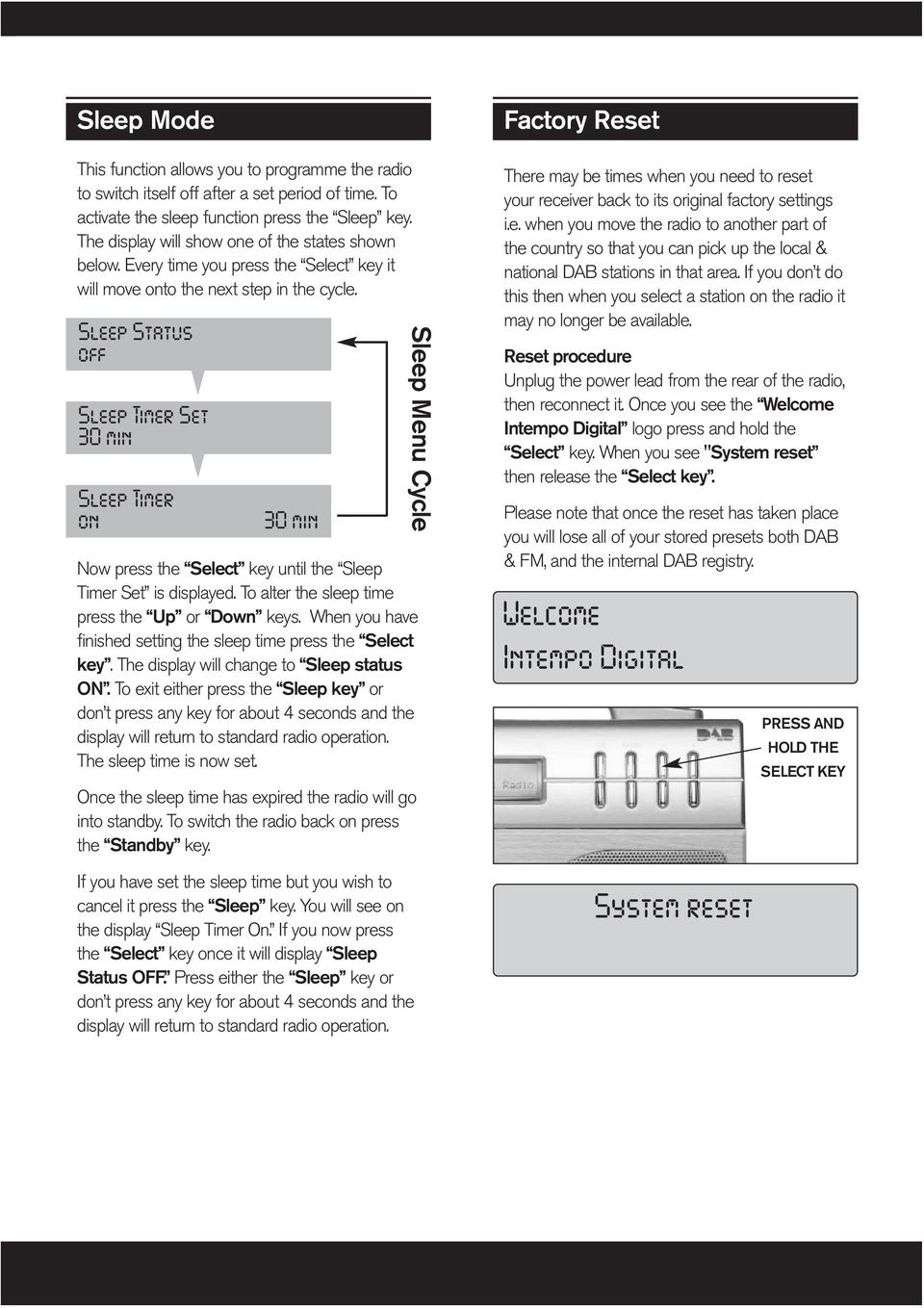
10 Sleep Mode Factory Reset This function allows you to programme the radio to switch itself off after a set period of time. To activate the sleep function press the Sleep key. The display will show one of the states shown below. Every time you press the Select key it will move onto the next step in the cycle. Sleep Status off Sleep Timer Set 30 min Sleep Timer on 30 min Now press the Select key until the Sleep Timer Set is displayed. To alter the sleep time press the Up or Down keys. When you have finished setting the sleep time press the Select key. The display will change to Sleep status ON. To exit either press the Sleep key or don t press any key for about 4 seconds and the display will return to standard radio operation. The sleep time is now set. Once the sleep time has expired the radio will go into standby. To switch the radio back on press the Standby key. Sleep Menu Cycle There may be times when you need to reset your receiver back to its original factory settings i.e. when you move the radio to another part of the country so that you can pick up the local & national DAB stations in that area. If you don t do this then when you select a station on the radio it may no longer be available. Reset procedure Unplug the power lead from the rear of the radio, then reconnect it. Once you see the Welcome Intempo Digital logo press and hold the Select key. When you see "System reset then release the Select key. Please note that once the reset has taken place you will lose all of your stored presets both DAB & FM, and the internal DAB registry. Welcome Intempo Digital PRESS AND HOLD THE SELECT KEY If you have set the sleep time but you wish to cancel it press the Sleep key. You will see on the display Sleep Timer On. If you now press the Select key once it will display Sleep Status OFF. Press either the Sleep key or don t press any key for about 4 seconds and the display will return to standard radio operation. System reset
11 Troubleshooting Q No power, display is not lit. Q The display is lit but there is no audio. Q The radio has auto tuned in DAB mode but no signals were found. Q I ve tried moving the aerial and repositioning the receiver but I still can t receive any DAB signals. Q I ve lost/broken my aerial, can I obtain a replacement? Q Whilst listening to certain DAB stations the audio sometimes drops out and breaks up. Q In FM mode the audio hisses and crackles. Q When the alarm has triggered there is no sound either in beep or radio mode. Q Some of the stations that I find, such as NTL data, don't play any music. A Ensure that the lead from the external power supply is securely attached to the DC input and the other end is plugged into a mains outlet that is switched on. If the fault remains then try plugging the power adapter into another mains socket. A Unplug any headphones that maybe connected at the rear, then make sure that the volume control is turned up (clockwise). A Extend the telescopic aerial as far it will go, then try repositioning the receiver e.g. move it to another room or near to a window. Now perform the auto tune again. A Go to and check that you can receive DAB transmissions in your area. A Please call or [email protected]. Please note that there will be a charge for replacement aerials. A Check the signal strength level. If it s low then try extending the telescopic aerial as far it will go. Reposition the radio or try moving it to another room or near to a window. A If you have a weak FM signal then try switching the radio over to Mono. (See FM Audio mode). FM needs a stronger signal in order to decode the stereo part of the signal than for just the mono component. A Ensure that the volume level is set to your desired level before you put the unit into standby. A Some Channels are being used for sending data. Maybe in the future some of them will start to offer services that you will be able to receive on your PG-01, such as stock market prices, news or even music.

12 Glossary DAB Ensemble/Multiplex Service Bit rate RDS FM MULTIPLEX PRIMARY SERVICES (STATIONS) Stands for Digital Audio Broadcasting. Analogue radio is transmitted by placing the audio onto a carrier. If there is any interference or static with the wanted signal then it will be heard on the receiver s speaker. Digital however is transmitted in the form of a digital stream. The decoder in the radio knows what data is needed to re-construct the original signal, so any other unwanted signal is discarded. Unlike analogue systems, digital radio groups together separate signals from a number of stations and transmits them as a complete, interleaved data stream. This is known as an Ensemble or Multiplex. Up to ten digital services can be transmitted in a single multiplex. This allows several programmes or services to be transmitted on a single frequency. Radio stations e.g. Radio 1 are known as services when talking about DAB transmissions. In simple terms when talking about music the higher the bit rate is the better the sound quality will be. For near CD quality audio128kbps (kilo bits per second) will suffice. So stations that are continually playing music etc use 128Kbps. Stations that generally only transmit speech etc. such as news stations can use 64Kbps as speech doesn t require such a high bit rate. Radio data system. The broadcaster can include data with their transmission. This data can then be displayed on the user receiver in a scrolling text format. The Data can include information such as station name and traffic announcements etc. Frequency modulation

Digital Radio/DAB+/FM RDS digital clock radio with dual alarm Operating instruction
 381SE1D-A Digital Radio/DAB+/FM RDS digital clock radio with dual alarm Operating instruction GB Contents Controls... 2-3 Using the clock radio for the first time... 4 Operating your clock radio... 5 Selecting
DAB DIGITAL RADIO MODEL: CANVAS USER MANUAL
 DAB DIGITAL RADIO MODEL: CANVAS USER MANUAL 1 Welcome 2 Your DAB Digital Radio 2.1 In The Box 2.2 Front View 2.3 Top View 2.4 Rear View 3 Quick Setup 4 Features POWER button 4.5 FM mode choosing menu options
Controls (front) 1. Loudspeaker 2. Light button 3. Band button 4. Auto tune button 5. Alarm button 6. LCD display
 GB Contents Controls... 2-4 Mains operation... 5 Operating your radio... 6 Selecting a station DAB... 7 Display modes DAB... 8 Finding new stations - DAB... 9 Secondary services DAB... 9 Manual tuning
H203D 中文 GB Version 1
 H203D 中 GB文 Version 1 Contents Installing batteries... 4 Using the AC adapter (not supplied)... 5 Setting the clock... 6-7 Updating your radio - DAB... 8 Selecting a station - DAB... 9 Secondary services
Pocket DAB & FM Radio with Speaker
 Pocket DAB & FM Radio with Speaker P MODEL: GDPRDAB USER MANUAL 1 Welcome 2 Your DAB Digital Radio 2.1 In The Box 2.2 Front View 2.3 Rear View 3 Quick Setup 3.1 Power On and Autoscan 3.2 Changing DAB Stations
DBT-003 FM/DAB+ Radio with Bluetooth Receiver
 DBT-003 FM/DAB+ Radio with Bluetooth Receiver User Manual : English Contents Important Safety Precautions... 3 Features and Controls... 4 Listening to your radio...5-6 Storing and Recalling Stored Stations...
DAB Radio. Instruction Manual L55DAB10
 DAB Radio Instruction Manual L55DAB10 L55DAB10_IB_110810_Zell.indd 1 L55DAB10_IB_110810_Zell.indd 2 Contents Unpacking...5 Product Overview...6 Top View... 6 Rear View... 6 Power Source...7 Battery Power...
Touch Nightball DAB Radio
 Touch Nightball DAB Radio DAB/FM Radio Alarm Clock Nightball DRAFT 1.indd 1 7/11/07 17:13:21 co n t e n t s Introducing the Touch Nightball DAB Radio 3 What is DAB Digital Radio? 3 Where to put your radio
Safety instructions. Copyright. Disclaimer. Trademarks. Credits
 Safety instructions Keep the radio away from heat sources. Do not use the radio near water. Avoid objects or liquids getting into the radio. Do not remove screws from or open the radio casing. Unplug the
Introduction and Contents
 Introduction and Contents Thank you for buying this Bush product, which is designed to give you many years of trouble-free service. You may already be familiar with using a similar unit, but please take
DR 70 Portable Digital DAB+ and FM Radio Receiver User Manual English Please read carefully before using this product
 DR 70 Portable Digital DAB+ and FM Radio Receiver User Manual Please read carefully before using this product 15 1 Table of Contents 1 Table of Contents... 16 2 Safety Instructions:... 17 3 Specification:...
STANDBY SCAN PRESET ALARM ENTER SNOOZE MODE INFO/MENU. User Guide. DR1402 DAB Radio
 STANDBY SCAN PRESET MODE INFO/MENU ALARM ENTER SNOOZE User Guide DR1402 DAB Radio IMPORTANT SAFETY INFORMATION CAUTION! RISK OF ELECTRIC SHOCK DO NOT OPEN TO REDUCE THE RISK OF ELECTRIC SHOCK DO NOT REMOVE
REVIVE DAB/FM ALARM CLOCK RADIO
 kitsound.co.uk REVIVE DAB/FM ALARM CLOCK RADIO USER MANUAL JB. 3208 / Made in China. KitSound 2014. Christchurch, Dorset. BH23 4FL We are craftspeople. We are musicians. We are KitSound And we all commit
DAB digital/fm radio. Instruction manual
 DAB digital/fm radio Instruction manual DAB digital/fm radio Thank you for purchasing this DAB digital/fm radio. Please read the instructions and warnings carefully before use to ensure safe and satisfactory
In-Car Digital Radio Adaptor User Guide
 S1000-DAB In-Car Digital Radio Adaptor User Guide Table of Content INTRODUCTION... 1 CONTENTS OF PACKAGE... 2 INSTALLATION...3 OVERVIEW OF CONTROLS AND CONNECTORS... 5 STARTING UP THE SYSTEM... 7 USING
DAB & FM RADIO Installation Manual
 Size: 105x145mm 105g copper paper DAB & FM RADIO Installation Manual Model: 10798 10799 10800 10801 Thank you for purchasing this AGK DAB/FM radio. Please read the instructions and warnings carefully before
User Guide. DAB-109CR DAB Digital Radio alarm clock
 User Guide DAB-109CR DAB Digital Radio alarm clock IMPORTANT SAFETY INFORMATION CAUTION! RISK OF ELECTRIC SHOCK DO NOT OPEN TO REDUCE THE RISK OF ELECTRIC SHOCK DO NOT REMOVE COVER (OR BACK) This symbol
DAB+ Digital Alarm Clock Radio with Dock for iphone
 DAB+ Digital Alarm Clock Radio with Dock for iphone BCR33DABIP The Gold Technical Support Line: 1902 215 259 (Charges will apply at $2.95 per minute) www.bushaustralia.com.au Safety Instructions Ensure
User Guide. DCR1401B/G Crescendo DAB alarm clock radio
 User Guide DCR1401B/G Crescendo DAB alarm clock radio IMPORTANT SAFETY INFORMATION CAUTION! RISK OF ELECTRIC SHOCK DO NOT OPEN TO REDUCE THE RISK OF ELECTRIC SHOCK DO NOT REMOVE COVER (OR BACK) This symbol
ROBERTS. Enjoy Listening. DAB / FM RDS Digital Clock Radio with large display. Please read this manual before use
 ROBERTS Enjoy Listening DAB / FM RDS Digital Clock Radio with large display Please read this manual before use Contents Controls... -3 Using the clock radio for the fi rst time...4 Operating your clock
DAB/FM personal digital radio with OLED display
 DAB/FM personal digital radio with OLED display ROBERTS Enjoy Listening Please read this manual before use Contents Controls... 3-4 Using the AC adaptor... 5-6 Keylock function... 7-8 Navigation... 9-10
RD-27 ROBERTS. FM RDS/DAB digital radio with. Sound for Generations. Please read this manual before use
 ROBERTS RD-7 Sound for Generations FM RDS/DAB digital radio with Please read this manual before use Contents Controls... Battery operation... 3 Mains operation... 3 Operating your radio - DAB... 4 Selecting
DAB1001. Wireless Digital Radio Interface. Installation & User Guide
 DAB1001 Wireless Digital Radio Interface Installation & User Guide Contents Contents... 2 Introduction... 3 Contents of Package... 4 Installation... 5 Product Overview... 5 Installation Procedure... 5
PR-D9W. GB Version 1
 PR-D9W Version 1 Table of contents Important safety instructions... 2-3 Introduction... 4 Controls... 5-8 Using your weather alert radio for the first time... 9 Operating your radio Search tuning AM/FM...
G e t t i n g. Know your radio. 1 external power connector. on /off switch. aerial
 G e t t i n g 1 external power connector Know your radio on /off switch aerial battery compartment Warning: See the Safety Notes on the back page. headphone connector Warning: Do not turn your radio on
RD-11 ROBERTS. FM RDS/DAB digital radio with. Sound for Generations. Please read this manual before use
 ROBERTS Sound for Generations RD- FM RDS/DAB digital radio with Please read this manual before use Contents Controls... Battery operation... 3 Mains operation... 3 Operating your radio - DAB... 4 Selecting
DAB / FM RDS / SD Digital Radio Recorder with PausePlus
 ROBERTS Enjoy Listening DAB / FM RDS / SD Digital Radio Recorder with PausePlus Please read this manual before use Contents Controls... 2-3 Battery operation...4 Using the AC adaptor...5 Operating your
CD / DAB / FM Digital Sound System with dock for ipod and iphone
 Enjoy Listening ROBERTS CD / DAB / FM Digital Sound System with dock for ipod and iphone Please read this manual before use Contents Introduction...2-9 Sound 00 Sound System features...3 Controls and connections...4-5
PEBBLE USER MANUAL. MODEL: GMR1888DAB DAB Digital & FM Radio. Hyper-link ALL text to corresponding sections
 PEBBLE Hyper-link ALL text to corresponding sections MODEL: GMR1888DAB DAB Digital & FM Radio USER MANUAL 1 2 Welcome Your DAB Digital&FM Radio 2.1 In The box 2.2 Front View 2.3 Top View 2.4 Rear View
Controls. LCD Display. Tuning Up Time Set and Station Scan
 PR-D8 GB Revision 3 1 1 2 4 5 7 9 10 12 14 16 18 20 22 24 25 26 27 29 31 33 35 36 37 38 Controls Stereo Built-in Microphone (Left Channel) LCD Display Stereo Built-in Microphone (Right channel) Power/Auto
ATS-505. GB Version 1
 ATS-505 GB Version 1 Control Locations Power/Sleep Power On/off/Alarm off/sleep function Display Switch between radio frequency and time while radio is power on Mode Mode set up (please see below mode
DUALIT KITCHEN RADIO INSTRUCTION MANUAL GB 10/06
 DUALIT KITCHEN RADIO INSTRUCTION MANUAL GB 10/06 CONTENTS SAFETY PRECAUTIONS... 3 / 4 PACKAGE CONTENTS... PARTS AND CONTROLS... RADIO HOUSING CONTROLS INPUTS AND OUTPUTS QUICK START... SETTING UP... CLOCK
ROBERTS. Enjoy Listening. DAB/FM RDS digital portable radio. Please read this manual before use
 ROBERTS Enjoy Listening DAB/FM RDS digital portable radio Please read this manual before use Contents Controls... -3 Battery operation...4 Using the AC adaptor...5 Operating your radio - DAB...6 Selecting
DAB+ / FM Tuner Model: TU-201
 DAB+ / FM Tuner Model: TU-201 Instruction Manual www.pulse-audio.co.uk 1 Safety Information The lightning bolt within a triangle is intended to alert the user to the presence of dangerous voltage levels
DAB2+ Dear Customer, Congratulations with your new Argon DAB2+
 Dear Customer, Quality has always been our driving force and founding Argon Audio is a natural extension of this philosophy. We have 20 years' experience in creating and specifying high quality products,
DAB+/FM/AM Digital Radio
 DAB+/FM/AM Digital Radio TR82DAB Instruction Book Toll Free Warranty and Service: 1800 509 394 The Gold Technical Support Line: 1902 215 259 (Charges will apply at $2.95 per minute for gold technical support
RCR-22 AM/MW 2 bands Digital Clock Radio instruction manual
 RCR-22 AM/MW 2 bands Digital Clock Radio instruction manual Important safety instructions 1. Read and understand all safety and operating instructions before the radio is operated. 2. Retain instruction:
Important Safety Instructions
 PR-D7 GB Revision 1 Important Safety Instructions 1. Read these instructions. 2. Keep these instructions. 3. Heed all warnings. 4. Follow all instructions. 5. Do not use this apparatus near water. 6. Clean
ROBERTS. Enjoy Listening. DAB/FM RDS digital portable radio. Please read this manual before use
 ROBERTS Enjoy Listening DAB/FM RDS digital portable radio Please read this manual before use Contents Controls... 2-3 Battery operation...4 Using the AC adaptor...5 Operating your radio - DAB...6 Selecting
User Guide. CR-111IP Clock radio with dock for ipod
 User Guide CR-111IP Clock radio with dock for ipod IMPORTANT SAFETY INFORMATION CAUTION! RISK OF ELECTRIC SHOCK DO NOT OPEN TO REDUCE THE RISK OF ELECTRIC SHOCK DO NOT REMOVE COVER (OR BACK) This symbol
DAB / FM and WiFi Internet Radio with Music Player and Last.fm Please read this manual before use
 Enjoy Listening ROBERTS DAB / FM and WiFi Internet Radio with Music Player and Last.fm Please read this manual before use Contents Introduction... 2-9 istream internet radio features... 2 Before you can
ROBERTS CRD-37. Sound for Generations. DAB / FM RDS / CD Clock radio with MP3 / WMA playback facility. Please read this manual before use
 ROBERTS Sound for Generations CRD-37 DAB / FM RDS / CD Clock radio with MP3 / WMA playback facility Please read this manual before use Contents CRD-37 Clock Radio features... Controls... 3-4 Using your
AM / FM Tuner + RDS. Model: TU-101. www.pulse-audio.co.uk
 AM / FM Tuner + RDS Model: TU-101 www.pulse-audio.co.uk 1 Safety Information The lightning bolt within a triangle is intended to alert the user to the presence of dangerous voltage levels within the product
Radio BMR100 INSTRUCTION MANUAL. ENGLISH (Original instructions)
 ENGLISH (Original instructions) INSTRUCTION MANUAL Radio BMR00 WARNING: For your personal safety, READ and UNDERSTAND before using. SAVE THESE INSTRUCTIONS FOR FUTURE REFERENCE. Symbols The following show
Contents. 2 Getting started. 4 Overview of the controls and display 5 Listening to radio 6 Using radio presets 7 Using the alarms
 Safety Instructions 1. Keep the radio away from heat sources. 2. Do not use the radio near water. 3. Avoid objects or liquids getting into the radio. 4. Do not remove screws from or open the radio casing.
Retro Radio. Operation Guide. Operation Guide. Guía de funcionamiento Guia de Operação. Guide d utilisation Betriebsanleitung.
 Retro Radio Operation Guide Guida Operativa Operation Guide Guide d utilisation Betriebsanleitung Guía de funcionamiento Guia de Operação GB View Quest Retro DAB+ Operation Guide 2 View Quest Retro DAB+
Tiny Audio C3. English TINY AUDIO C3. Please read carefully before using this product
 English TINY AUDIO C3 Please read carefully before using this product 1 Safety Instructions: 1. Do not use this radio near water. 2. Clean with dry cloth. 3. Do not block any ventilation openings. 4. Do
ROBERTS. Enjoy Listening. DAB / FM / CD Stereo Clock Radio with CD Bookmark. Please read this manual before use
 ROBERTS Enjoy Listening DAB / FM / CD Stereo Clock Radio with CD Bookmark Please read this manual before use Contents Sound 38 clock radio features...2 Controls... 3-4 Using your clock radio for the fi
Pure Warranty Statement for Australia
 Pure Warranty Statement for Australia This statement replaces any reference to warranty which may be contained elsewhere within this manual. What do you need to do now? Option 1: You can register your
Pop Maxi with Bluetooth
 Pop Maxi with Bluetooth Pure Warranty Statement for Australia This statement replaces any reference to warranty which may be contained elsewhere within this manual. What do you need to do now? Keep your
WFR-28D / WFR-28. GB Revision 2
 WFR-28D / WFR-28 Revision 2 Contents Introduction... 2-6 Before you can use this product... 2-3 Controls and connections... 4-5 Navigation controls... 6 Network configuration... 7-5 Connecting your radio
ROBERTS CRD-39. Sound for Generations. FM RDS/DAB digital radio with. Please read this manual before use
 ROBERTS Sound for Generations Please read this manual before use CRD-39 FM RDS/DAB digital radio with Contents Controls... 2-4 Mains operation...5 Operating your radio - DAB...6 Selecting a station - DAB...7
GMR1886DAB DAB Digital Radio User Guide
 GMR1886DAB DAB Digital Radio User Guide IMPORTANT: Please read all instructions carefully before use and keep for future reference Introduction Thank you for choosing this DAB digital radio which has been
All Hazards Weather Alert Radio WR-100
 All Hazards Weather Alert Radio WR-100 Owner s Manual Quick Start Instructions: Please see pg. 5 for important buttons and controls 1. Place 3 AAA alkaline batteries (not supplied) into the compartment
User Guide. Personal DAB Tuner. www.ministryofsound.com/audio MOSDR011
 User Guide Personal DAB Tuner www.ministryofsound.com/audio MOSDR011 The brief was just a few simple words on a single sheet of paper - yet the task was enormous: "Create the best sound in the world regardless".
ROBERTS. Sound for Generations. DAB / FM RDS digital clock radio with dual mode dimmer. Please read this manual before use
 ROBERTS Sound for Generations DAB / FM RDS digital clock radio with dual mode dimmer Please read this manual before use Contents Controls... -3 Using the clock radio for the fi rst time...4 Selecting a
Getting to Know Xsight... 3. Home Screen and Everyday Use... 9. Settings... 11. PC Setup... 17. 2 www.oneforall.com
 User Manual English English Getting to Know Xsight........................................ 3 Unpacking and Setting Up Xsight............................................................. 3 Using Xsight
INSTRUCTION MANUAL RM-5750. AM/FM Digital Alarm Clock Radio
 INSTRUCTION MANUAL RM-5750 AM/FM Digital Alarm Clock Radio Fig. 1 CAUTION: THE APPARATUS SHALL NOT BE EX- POSED TO DRIPPING OR SPLASHING. NO OBJECTS FILLED WITH LIQUIDS, SUCH AS VASES, SHALL BE PLACED
DX-395. FM/AM/SW1/SW2 PLL Synthesized Receiver OWNER S MANUAL. Cat. No. 20-225. Please read before using this equipment.
 20-225.fm Page 1 Wednesday, August 4, 1999 10:07 AM Cat. No. 20-225 OWNER S MANUAL Please read before using this equipment. DX-395 FM/AM/SW1/SW2 PLL Synthesized Receiver 20-225.fm Page 2 Wednesday, August
ER102. Emergency Crank Weather Radio Owner s Manual. www.midlandradio.com
 ER102 Emergency Crank Weather Radio Owner s Manual Table of Contents Welcome to the World of Midland Electronics Major ER102 Features ER102 Controls and Functions ER102 Power Sources - Built-in Rechargeble
CR9986 ROBERTS. Dual Alarm CD Clock Radio. Sound for Generations. Please read this manual before use
 ROBERTS Sound for Generations CR9986 Dual Alarm CD Clock Radio Please read this manual before use Contents Contents... Controls... - Switching on and setting the time... 4 Listening to the radio... 5 Compact
ENGLISH (Original instructions) Job Site DAB Radio BMR101. INSTRUCTION MANUAL IMPORTANT: Read Before Using.
 ENGLISH (Original instructions) Job Site DAB Radio BMR0 INSTRUCTION MANUAL IMPORTANT: Read Before Using. ENGLISH (Original instructions) Symbols The following show the symbols used for the equipment. Be
Programming Guide. http://www.reecominc.com. Model: R-1630C
 Programming Guide S.A.M.E Digital Weather / All Hazards Alert Radio CEA-2009-A Certified Alert Receiver Model: R-1630C Public Alert Certified Reecom Electronics Inc. http://www.reecominc.com Features:
DAB Adapter 2+ Dear Customer,
 Dear Customer, Quality has always been our driving force and founding Argon Audio is a natural extension of this philosophy. We have 20 years' experience in creating and specifying high quality products,
ROBERTS. Enjoy Listening. DAB/FM WiFi Sound System with Internet Radio, Music Player and Last.fm. Please read this manual before use
 ROBERTS Enjoy Listening DAB/FM WiFi Sound System with Internet Radio, Music Player and Last.fm Now supports remote control from iphone or ipod touch and Windows 7 'Play to' function Please read this manual
Operation Manual for Users
 Operation Manual for Users Model No.: FLTAMFMRCD!!!!!!!!!! ATTENTION!!!!!!!!!! THE RESET BUTTON MUST BE PRESSED TO ENSURE PROPER OPERATION. SEE INSTRUCTION MANUAL Table of Contents Table of Contents ---------------------------------------------------------------------------------------------
How To Use Internet Radio On A Iphone Or Ipod Or Ipad Or Ipo Or Ipode Or Ipon Or Ipot Or Ipro Or Ipor Or Ipob Or Ipow Or Ipop Or Ipos Or Ipok
 M7 Internet, DAB/DAB+ and FM Receiver I n s t r u c t i o n M a n u a l Safety Precautions To achieve the utmost in enjoyment and performance, and in order to become familiar with its features, please
Contents of the Guide
 BeoCenter 1 Guide Contents of the Guide 3 The following is an index to the contents of the separate Reference book with page references: How to set up BeoCenter 1, 4 Connect your TV cables, 5 Connect
All Hazards Weather Alert Radio
 All Hazards Weather Alert Radio WR-300 Owner s Manual Quick Start Instructions: Please see pg. 5 for important buttons and controls. 1. Place 4 AA batteries (not supplied) into the compartment on the underside
DVB-T 730. User s Manual
 EPG Program Reservation There are 10 program timers to bring up reminder for a reserved program. 20 seconds before the start of the reserved program, a pop-up window will remind viewer. If no further instruction,
Control Location. Replacing Battery
 Functions - Normal Time with PM Indicator - 12/24 hour selectable - Dual Alarm, Snooze, Sleep Timer Green LED Backlight display - Month and Date Display - Thermometer (32oF - 122-F) - AM/FM Radio Receiver
Albrecht DR314. DAB/DAB+/FM Radio 1.) User Manual
 Albrecht DR314 DAB/DAB+/FM Radio 1.) User Manual -1- Important Safety Notes TO PREVENT FIRE OR SHOCK HAZARD, DO NOT USE THIS PLUG WITH AN EXTENSION CORD, RECEPTACLE OR OTHER OUTLET UNLESS THE BLADES CAN
Quick Connection and Setup Guide
 3-300-262-13(1) Read this first Quick Connection and Setup Guide Quick start guide to main features GB HDD Network Audio System NAS-SC55PKE 2008 Sony Corporation Printed in Malaysia Table of Contents Checking
CR9971 2 Band Auto Set Dual Alarm Clock Radio ROBERTS. Sound for Generations. Please read this manual before use
 ROBERTS Sound for Generations CR9971 2 Band Auto Set Dual Alarm Clock Radio Please read this manual before use Contents Contents... 1 Controls...2-5 Switching on... 6 Setting the time manually... 6 Setting
PERSONAL music center II
 PERSONAL music center II Owner s Guide Guía de usario Notice d utilisation Français English INTRODUCTION Thank you By choosing a Bose PERSONAL music center II, you have opened the door to a variety of
DR601. User s Manual. English. D-22952 Lütjensee D-63303 Dreieich
 DR601 User s Manual English ALAN Electronics GmbH ALAN Electronics GmbH Dovenkamp 11 Daimlerstr. 1 k D-22952 Lütjensee D-63303 Dreieich Hotline: Phone: (+49) 6103 9481 30 Fax: (+49) 6103 9481 60 email:
Jabra CRUISER2. User manual. www.jabra.com MUTE VOL - VOL + jabra
 Jabra CRUISER2 VOL - VOL + MUTE jabra User manual www.jabra.com Contents THANK YOU...2 ABOUT YOUR JABRA CRUISER2...2 WHAT YOUR SPEAKERPHONE CAN DO...3 GETTING STARTED...4 CHARGE YOUR SPEAKERPHONE...4 TURNING
Hi, let s get started. Sound Rise Wireless Speaker & Alarm Clock
 Hi, let s get started. Sound Rise Wireless Speaker & Alarm Clock Welcome to your new Sound Rise! We created Sound Rise for music lovers like you. Start the day with your favorite tunes, rock out while
ATS Control Panel. User s Manual
 ATS Control Panel User s Manual ARITECH is a division of GE Interlogix BV COPYRIGHT 2004 GE Interlogix BV. All rights reserved. GE Interlogix BV grants the right to reprint this manual for internal use
A6210 WiFi USB Adapter 802.11ac USB 3.0 Dual Band User Manual
 802.11ac USB 3.0 Dual Band User Manual August 2014 202-11373-01 350 East Plumeria Drive San Jose, CA 95134 USA Support Thank you for selecting NETGEAR products. After installing your device, locate the
Contents. 5. Navigating the Software Menus 25 The Basics 25 Diagrams of Top Level Sub Menus 27. 6. Tips and Troubleshooting 34
 Contents 1. Quick Start 1 Features 1 What You Need to Begin 2 Installing the Battery 2 The Basic Controls 3 Play Music 5 Listen to the FM Radio 7 Voice recording 8 Headphone/Earphone 9 2. Playing Music
THE NEW GENERATION IN TECHNOLOGY. NI-3103A Alarm Clock w/fm Radio ipod & iphone Docking. Operating Instructions
 THE NEW GENERATION IN TECHNOLOGY NI-3103A Alarm Clock w/fm Radio ipod & iphone Docking Operating Instructions Table of Contents Important Safeguards... 3 Parts... 6 Controls... 6 To Set Up... 7 ipod/iphone
GSM Alarm System User Manual
 GSM Alarm System User Manual For a better understanding of this product, please read this user manual thoroughly before using it. Quick Guider After getting this alarm system, you need to do the following
Mini Hi-Fi Component System
 3-860-707-14(1) Mini Hi-Fi Component System Operating Instructions Owner s Record The model and serial numbers are located on the rear panel. Record the serial number in the space provided below. Refer
/&' 79 7; /% ) &RORU 7HOHYLVLRQ (QJOLVK
 245U Using the On Screen Displays Many features available on this TV can be accessed via the On Screen Display menu system. Use the remote control as shown below to access and adjust features as desired.
User guide. T250i. This is the Internet version of the User's guide. Print only for private use.
 User guide T250i Congratulations on your purchase of the Sony Ericsson T250i. For additional phone content, go to www.sonyericsson.com/fun. Register now to get free online storage and special offers at
MVS - Mini Video Speaker
 MVS - Mini Video Speaker Mini Clock Radio Night Vision Hidden Camera User Manual Spy Tec www.spytecinc.com GETTING STARTED Components Features Powering Up the Device Micro SD Memory Card for Data Storage
UVO SYSTEM QUICK REFERENCE GUIDE
 UVO SYSTEM QUICK REFERENCE GUIDE Congratulations on the Purchase of your new UVO system! Your new UVO system allows you to enjoy various audio and multimedia features through the main audio system. For
DAB / FM personal digital radio with loudspeaker ROBERTS. Enjoy Listening. Please read this manual before use
 DAB / FM personal digital radio with loudspeaker ROBERTS Enjoy Listening Please read this manual before use Contents Manual tuning - FM... 35-36 Controls... 3-4 Using the AC adaptor... 5-6 Keylock function...
Owner s Manual AWM910 JENSEN AWM910 COMPACT DISC PLAYER RADIO CD COMPACT MUSIC SYSTEM MUTE AUX BAND AUX IN PUSH PUSH PWR VOL ALARM T/F AUD SPK A SPK B
 AWM910 Owner s Manual COMPACT DISC PLAYER PUSH 1 2 3 4 5 6 RPT SCAN RDM H M PUSH PWR VOL ALARM SET ON/OFF EQ T/F AUD RADIO CD COMPACT MUSIC SYSTEM MUTE AUX BAND CD AUX IN A B A+B JENSEN AWM910 Thank You!
User guide. Stereo Bluetooth Headset SBH50
 User guide Stereo Bluetooth Headset SBH50 Contents Stereo Bluetooth Headset User guide...3 Introduction...4 Function overview...4 Hardware overview...4 Status icon overview...5 Basics...6 Charging the
Retro Style Turntable With CD/Radio/USB/SD/MP3/WMA and Vinyl-to-MP3 Encoding
 Retro Style Turntable With CD/Radio/USB/SD/MP3/WMA and Vinyl-to-MP3 Encoding PTCD8U INSTRUCTION MANUAL LOCATION OF CONTROLS 1) DUST COVER 2) DIAL POINTER 3) LEFT SPEAKER 4) LCD DISPLAY 5) FM STEREO LED
BUSINESS COMMUNICATIONS DIVISION. IP4100 SIP DECT User Guide
 BUSINESS COMMUNICATIONS DIVISION IP4100 SIP DECT User Guide TOSHIBA IP4100 DECT HANDSET END USER GUIDE FEATURES Toshiba IP4100 DECT Handset Features 2.0 inch colour TFT back-lit display Li-ion battery
Register your product and get support at. www.philips.com/welcome AS111. User manual
 Register your product and get support at www.philips.com/welcome AS111 User manual Contents 1 Important 4 Safety 4 English 2 Your docking speaker for AndroidTM 5 Introduction 5 What's in the box 5 Overview
New GSM Alarm System. User s Manual. Profile For a better understanding of this product, please read this user manual thoroughly before using it.
 New GSM Alarm System User s Manual Profile For a better understanding of this product, please read this user manual thoroughly before using it. Chapter 1. Features Chapter 2. Alarm Host Introduction Chapter
User Guide for the Orchid Key Phones KP416 & KP832
 User Guide for the Orchid Key Phones KP416 & KP832 Contents Page Introduction 2 Setting Up 2 Setting Date & Time 2 Making & Answering Calls 2 Call Pick 3 Call Transfer 3 Calls On Hold 3 Caller Display
www.fmtalkinghouse.com
 www.fmtalkinghouse.com 24x7 FM Announcement System (Talking Sign) 2009 FM TALKING HOUSE All rights reserved Talking Sign 24x7 FM Announcement System Description: The 24x7 FM Announcement System or Talking
Reizen Atomic Talking Analog Alarm Clock Item #706810. Instruction Manual
 Reizen Atomic Talking Analog Alarm Clock Item #706810 Instruction Manual S1 (Talking + Snooze + Lamp) S2 (Alarm Hour) S4 (Alarm Volume + Off) S3 (Alarm Minute) S7 (Time Zone: P,M,C,E) S5 (Wave) S8 (DST
August International Ltd United Kingdom Telephone: +44 (0) 845 250 0586 www.augustint.com
 August International Ltd United Kingdom Telephone: +44 (0) 845 250 0586 www.augustint.com EN FR DE IT ES FM Radio and Music Alarm Clock Radio-Réveil FM et Lecteur de Musique Musikanlage und Radiowecker