
GPSMAP 4000/5000 Series Installation Instructions
|
|
|
- Beverly Bell
- 9 years ago
- Views:
Transcription
1 GPSMAP 4000/5000 Series Installation Instructions The GPSMAP 4000/5000 series and GPS antenna must be properly installed according to the following instructions. You need the appropriate fasteners, tools, and mounts listed in each section. These items are available at most marine dealers. Caution Always wear safety goggles, ear protection, and a dust mask when drilling, cutting, or sanding. notice When drilling or cutting, always check what is on the opposite side of the surface. Mount the GPSMAP 4000/5000 series in a location that provides a clear, glare-free view of the display and easy operation of the controls or touch screen. Contact Garmin Product Support if you have any questions while installing your GPSMAP 4000/5000 Series. In the USA, go to or contact Garmin USA by phone at (913) or (800) In the UK, contact Garmin (Europe) Ltd. by phone at In Europe, go to and click Contact Support for in-country support information, or contact Garmin (Europe) Ltd. by phone at +44 (0) Before installing your GPSMAP 4000/5000 series, confirm that the package contains the items listed on the box. If any parts are missing, contact your Garmin dealer immediately. Warning See the Important Safety and Product Information guide in the product box for product warnings and other important information. To install the GPSMAP 4000/5000 series, you must: 1. Mount the GPSMAP 4000/5000 series (page 2). 2. Mount the GPS antenna (page 5). 3. Connect the GPSMAP 4000/5000 series device to power and to the GPS antenna (pages 8-9). 4. Create a NMEA 2000 network or connect the to an existing NMEA 2000 network (page 10). 5. Connect the GPS 19x antenna to the NMEA 2000 network (page 10). 6. Ensure the software is up-to-date (page 20). Although they are not necessary to use the GPSMAP 4000/5000, this manual covers other installation options: Connecting the to other Garmin Marine Network compatible devices, such as a sounder or a radar (page 15). Connecting the to other NMEA 0183-compatible devices such as a VHF radio with DSC (page 15). Connecting the to an external alarm (page 18). Connecting the to a video input source (page 19). Connecting the to an external video monitor (page 19). March 2012 Part Number Rev. A Printed in Taiwan


2 Mounting the GPSMAP 4000/5000 Series Chartplotter You can mount the GPSMAP 4000/5000 series s one of two ways. You can use the included bracket to bail mount the, or you can use the included template and hardware to flush mount the. Notice You cannot bail mount the GPSMAP 5015/5215 s. Because of the larger size, you must flush mount the GPSMAP 5015/5215 s. Bail Mounting the GPSMAP 4000/5000 Series Chartplotter Use the included bracket to bail mount the GPSMAP 4000/5000 series. Tools required (not included): Drill and drill bit Screwdriver Pencil Mounting hardware (screws or nuts, washers, and bolts) NOTE: The mounting hardware (screws or nuts, washers, and bolts) are not included. The holes on the bail mount are 5/16 in. (7.9 mm) in diameter. Choose mounting hardware that fits the holes in the bail mount and securely attaches it to your specific mounting surface. The size of the drill bit required depends on the mounting hardware chosen. To install the bail-mount bracket: NOTE: You cannot bail mount the GPSMAP 5015/5215 s. Because of the larger size, you must flush mount the GPSMAP 5015/ Using the bail mount as a template, mark the location of the four mounting holes. Be sure to leave at least 5 in. (12.7 cm) of clearance behind the 4000/5000 series for the wiring. NOTE: Mount a GPSMAP 4008/4208/5008/ /2 in. (80 cm), and a GPSMAP 4010/4210/4012/4212/5012/ /8 in. (1 m) from a magnetic compass to avoid interference. 2. Using an appropriately sized drill bit, drill the pilot holes for your mounting hardware. 3. Secure the bail mount to the surface with screws and washers. To install the GPSMAP 4000/5000 series on the bailmount bracket: 1. Loosely attach the mounting knobs to the GPSMAP 4000/5000 series. 2. Slide the onto the bail mount, and tighten the mounting knobs. Mounting screws Bail-mount bracket Mounting knobs 2 2 GPSMAP 4000/5000 Series Installation Instructions
3 Flush Mounting the GPSMAP 4000/5000 Series Chartplotter The flush-mount method you will use with your is dependent on the model. Be sure to follow the instructions for your model. Flush Mounting a GPSMAP 4008/4208/4012/4212 Chartplotter or a GPSMAP 5008/5208/5012/5212 Chartplotter Hardware (included): Flush-mount template Rubber gasket Four threaded 4 mm mounting studs Four 4 mm flat washers Four 4 mm lock washers Four 4 mm nuts Tools required (not included): Jigsaw Masking tape Scissors Drill Drill bits 3 / 8 in. (10 mm) and 4 mm 1 / 16 in. (2 mm) Allen (Hex) wrench 4 mm socket or wrench Center punch and hammer To flush mount a GPSMAP 4008/4208/4012/4212 or a GPSMAP 5008/5208/5012/5212 : 1. The flush-mount template is included in the product box. Trim the template and ensure it will fit in the location at which you want to flush mount the. NOTES: Make sure the surface on which you mount the has at least 7 in. (18 cm) of open space behind it to fit the and the connected wires. Make sure to leave approximately 1/2 in. (13 mm) of space on the right side of the to access the SD card door. Mount a 4008/4208/5008/ /2 in. (80 cm), and a 4012/4212/5012/ /8 in. (1 m) from a magnetic compass to avoid interference. 2. The flush-mount template has adhesive on the back. Remove the protective liner and apply the template to the mounting location. 3. Using a 3 / 8 in. (10 mm) drill bit, drill one or more of the four pilot holes inside the corner of the template to begin cutting the mounting surface. 4. Using the jigsaw, cut the mounting surface along the inside of the solid line indicated on the flush-mount template. Use a file and sandpaper to refine the size of the hole. Notice Be very careful when cutting this hole. There is only a small amount of clearance between the case and the mounting holes. 5. Install the four mounting studs by screwing them into the back of the. Use the 1 / 16 in. (2 mm) Allen wrench to tighten the mounting studs until they stop. The studs are coated with a reusable thread-locking patch applied at the factory. notice Do not use power tools to tighten the mounting studs. Doing so may cause you to overtighten. Do not overtighten - you may damage the mounting stud or the mounting holes. 6. Place the in the hole and make sure that the mounting studs line up with the pilot holes on the flush-mount template after cutting, sanding, and filing the hole. If they do not, mark the locations where the studs will feed through the mounting surface. 7. Using the center punch, indent the center of each of the 4 mm mounting-hole locations. 8. Using a 4 mm drill bit, drill the four mounting holes. 9. Install the rubber gasket on the back of the. The top and bottom sections will line up with the holes. The side sections will line up with the notches in the case (for the cover). 10. Place the into the cutout. The four mounting studs should feed through the four mounting holes drilled in step Place the flat washers and the lock washers over the mounting studs. Then thread the hex nuts onto the mounting studs. Tighten all four hex nuts evenly until the is snug against the mounting surface. GPSMAP 4000/5000 Series Installation Instructions 3
4 Mounting studs 4 Chartplotter Flat washers 4 Lock washers 4 Rubber gasket Mounting surface Hex nuts 4 Flush Mounting a GPSMAP 4008/4208/4012/4212/5008/5208/5012/5212 Chartplotter Flush Mounting a GPSMAP 4010/4210 Chartplotter or a GPSMAP 5015/5215 Chartplotter: Hardware (included): Flush-mount template Rubber gasket Mounting screws ( DIN7981 / number 8 ANSI) Tools required (not included): Jigsaw Masking tape Scissors Drill Drill bits 3 / 8 in. (10 mm) Center punch and hammer Anti-seize lubricant (optional) To flush mount a GPSMAP 4010/4210 or a GPSMAP 5015/5215 : 1. The flush-mount template is included in the product box. Trim the template and ensure it will fit in the location where you want to flush mount the. Notes: Make sure the surface on which you mount the has at least 7 in. (18 cm) of open space behind it to fit the and the connected wires, and make sure to leave approximately 1/2 in. (13 mm) of space on the right side of the to access the SD card door. Mount a 4010/ /2 in. (80 cm), and a 5015/ /8 in. (60 cm), from a magnetic compass to avoid interference. 2. The flush-mount template has adhesive on the back. Remove the protective liner and apply the template to the location at which you want to mount the. 3. Using a 3 / 8 in. (10 mm) drill bit, drill a pilot hole inside the corner of the template to begin cutting the mounting surface. 4. Using the jigsaw, cut the mounting surface along the inside of the solid line indicated on the flush-mount template. Use a file and sandpaper to refine the size of the hole. 5. If the top and bottom mounting covers are attached to the front of the, remove them by unsnapping the covers from the sides. Mounting covers 2 4 GPSMAP 4000/5000 Series Installation Instructions
5 6. Place the in the hole, and make sure that the mounting holes on the line up with the pilot holes on the flush-mount template after cutting, sanding, and filing the hole. If they do not, mark the locations where the pilot holes need to be. 7. Using the center punch, indent the center of each of the mounting-hole locations. 8. Using the 3 / 8 inch drill bit, drill the mounting holes. NOTE: If you are mounting the in fiberglass, it is recommended to use a countersink bit to drill a clearance-counterbore through only the top gel-coat layer. This will help to avoid any cracking in the gel-coat layer when the screws are tightened. 9. Install the rubber gasket on the back of the. The top and bottom sections will line up with the holes. The side sections will line up with the notches in the case for the sun cover. NOTE: To prevent corrosion of the metal contacts, cover unused connectors (page 20) with the attached weather caps. 10. Place the into the cutout. 11. Securely tighten the included mounting screws through the into the pilot holes. Note: Stainless-steel screws may bind when screwed into fiberglass and overtightened. Garmin recommends applying an anti-galling, stainless antiseize lubricant to the screw before using. 12. Replace the mounting covers by snapping them into place. Mounting the GPS 19x Antenna notice Be sure to follow the correct mounting directions and the correct wiring directions for the antenna included with your. You can surface mount the antenna, attach it to a standard marine pole mount, or install the antenna under fiberglass. Mounting Location Considerations To ensure the best reception, keep these considerations in mind while selecting a mounting location. Mount the antenna in a location that has a clear, unobstructed view of the sky in all directions. Mount the antenna where it is not covered by the superstructure of the boat, a radar device, or a mast ➊. On a sailboat, avoid mounting the GPS antenna high on the mast to prevent inaccurate speed readings caused by excessive heeling. Do not install the antenna near sources of electromagnetic interference (EMI) ➋, such as the motor or other large marine electronics. Install the antenna at least 3 ft. (1 m) away from the path of a radar beam or VHF radio antenna ➌. It is best to install the antenna above the path of the radar beam ➍. It is acceptable to install the antenna under the path of the radar beam ➎. Install the antenna at least 2 in. (5 cm) from a magnetic compass to avoid interfering with the compass. ➊ ➌ ➍ ➋ ➎ Verifying a Mounting Location 1. Select a mounting location. 2. Temporarily secure the antenna in the selected location. 3. Test the antenna for correct operation on the. 4. If you experience interference with other electronics, try a different location. 5. Repeat steps 3 and 4 until you find a mounting location where the antenna operates correctly. After you verify correct operation at the mounting location, permanently mount the antenna. GPSMAP 4000/5000 Series Installation Instructions 5
6 Mounting the Antenna on a Surface 1. Select a mounting location for the antenna, and verify correct operation at the mounting location. 2. Trim the surface-mount template, and make sure the antenna fits in the mounting location you selected. 3. Remove the protective liner on the back of the template, and apply the template to the mounting location. 4. Use a 1 / 8 in. (3.2 mm) bit to drill the three pilot holes indicated on the template. Notice If you are mounting the GPS 19x on fiberglass, it is recommended to use a countersink bit to drill a clearance counterbore through the top gelcoat layer (but no deeper). This helps to avoid cracking in the gelcoat layer when the screws are tightened. 5. Use a 3 / 8 in. (10 mm) bit to drill a starter hole for the jigsaw blade, as indicated on the template. 6. Use a jigsaw to cut the center hole as indicated on the template. 7. Use the three M4 screws ➊ to secure the surface-mount bracket ➋ to the mounting surface ➌. 8. Make sure the large gasket is in place on the bottom of the antenna ➍. 9. Route a NMEA 2000 drop cable through the center hole, and connect it to the antenna ➎. 10. Place the antenna on the surface-mount bracket, and twist it clockwise to lock it in place. 11. Secure the antenna to the mounting bracket with the M3 set screw ➏. 12. Route the NMEA 2000 drop cable away from sources of electronic interference. ➊ ➋ ➎ ➍ ➏ ➌ 13.Connect the antenna to your NMEA 2000 network. Mounting the Antenna on a Pole Using the pole-mount bracket, you can install the antenna on a standard marine pole Mount (not included). A standard threaded marine pole mount has the following characteristics: An outer diameter (OD) of 1 inch Threads that measure 14 threads per inch Note: An external cellular antenna is not compatible with the pole-mount bracket. Mounting the Antenna with the Cable Routed Outside of the Pole 1. Select a mounting location for the antenna, and verify correct operation at the mounting location. 2. Route a NMEA 2000 drop cable through the pole-mount bracket ➊. 3. Place the cable in the vertical slot ➋ along the base of the pole-mount bracket. 4. Thread the pole-mount bracket onto a standard marine pole mount (not included). Do not overtighten the bracket. 5. Connect the NMEA 2000 drop cable to the antenna. 6. Place the antenna on the pole-mount bracket, and twist it clockwise ➌ to lock it in place. 7. Secure the antenna to the bracket with the M3 set screw ➍. 8. Fasten the marine pole mount to the boat if it is not already attached. 9. Route the NMEA 2000 drop cable away from sources of electronic interference. 10. Connect the antenna to your NMEA 2000 network. 11. After the antenna has been installed on the pole mount, fill the remaining gap in the vertical cable slot with a marine sealant (optional). Mounting the Antenna with the Cable Routed through the Pole 1. Select a mounting location for the antenna, and verify correct operation at the mounting location. 2. Temporarily position a standard marine pole mount (not included) in the mounting location you selected. 3. Mark the approximate center of the pole. ➊ ➋ ➌ ➍ 6 GPSMAP 4000/5000 Series Installation Instructions
7 4. At the marked location, use a 3 / 4 in. (19 mm) bit to drill a hole for the cable to pass through. 5. Fasten the marine pole mount to the boat (hardware not included). 6. Thread the pole-mount bracket ➊ onto the marine pole mount. Do not overtighten the bracket. 7. Route a NMEA 2000 drop cable through the pole-mount bracket and the pole, and connect the cable to the antenna. 8. Place the antenna on the pole-mount bracket, and twist it clockwise ➌ to lock it in place. 9. Secure the antenna to the bracket with the included M3 set screw ➍. 10. Route the NMEA 2000 drop cable away from sources of electronic interference. 11. Connect the antenna to your NMEA 2000 network. 12. After the antenna is installed on the pole mount, fill the vertical cable slot with a marine sealant (optional). Mounting the Antenna under a Surface NOTICE When choosing a location to install the under-deck-mounting bracket, make sure the included screws are not too long for the surface thickness. If the screws are not appropriate for the surface, you must supply the correct length of M4 screws to avoid damage to the top of the mounting surface. The antenna can be mounted under a fiberglass surface. Because the antenna has difficulty acquiring cellular signals through metal, it is recommended that you use the under-deck mount under a fiberglass surface. 1. Identify the mounting location on the fiberglass surface ➊, and verify correct operation at the mounting location. 2. Using the under-deck-mounting bracket ➋ as a template, mark three pilot-hole locations ➌ on the surface. 3. Use a 1 / 8 in. (3.2 mm) bit to drill the three marked pilot holes. 4. Place the antenna in the bracket, and twist it clockwise to lock it in place. 5. Secure the antenna to the bracket with the included M3 set screw ➍. 6. Remove the backing from the adhesive pads ➎ on the under-deck mounting bracket. 7. Make sure that the bracket aligns with the pilot holes, and adhere the under-deck mounting bracket to the surface. 8. Using screws of the appropriate length, fasten the bracket to the surface. 9. Connect a NMEA 2000 drop cable to the antenna ➏. 10. Route the NMEA 2000 drop cable away from sources of electronic interference. 11. Connect the antenna to your NMEA 2000 network. ➋ ➍ ➊ ➌ ➏ ➎ GPSMAP 4000/5000 Series Installation Instructions 7
8 Wiring and Cables The GPSMAP 4000/5000 series comes with a power cable, a NMEA 2000 drop cable, a 19-pin NMEA 0183 data cable, and a 17-pin Marine Video cable. Optional Garmin Marine Network components use specialized Garmin Network cables. Depending on the installation, it may be necessary to drill holes to route the connector end of these cables. Garmin rubber grommets are provided to cover these holes for a finished look. You may not need the grommets in some installations. The grommets do NOT create a waterproof seal. Apply a marine sealant around the grommet and cable after installation. Be sure to test the system before installing and sealing the grommets. Purchase additional grommets from your Garmin dealer or directly from Garmin at Trim to this line for the Marine Video cable. Use this hole (no trim) for the power, NMEA, Marine Network, or GPS 17 cable. Tools Drill 1 1 / 4 in. (31.7 mm) paddle drill bit or hole saw Utility knife Marine sealant (optional) To install the cable grommet: 1. Mark the location where you want to route the cable (power, NMEA 0183, NMEA 2000 Marine Video, or Marine Network). 2. Using a 1 1 / 4 in. (31.7 mm) paddle drill bit or hole saw, drill the installation hole. 3. Refer to the diagram for trimming instructions. Carefully trim the cable hole in the grommet, as needed. 4. Route the cable to the, and test the system. 5. Spread the grommet apart at the split and place it around the cable. 6. Firmly push the grommet into the installation hole until it is seated. Apply marine sealant, as needed, to weatherproof the cable. Split Installing Locking Rings on the Cables To help make the cable-routing process easier, the locking rings are packaged separately from the cables. Each locking ring is packaged in a small bag with a number on the label for easy identification. After you route the cables, use the following table to identify the correct locking ring for each cable: Cable Connector Locking Ring Replacement Locking Color Number Ring Part Number Power Red ➀ NMEA 0183 Blue ➁ Video Yellow ➂ Notes: The NMEA 2000 cables and connectors come with the locking rings pre-installed. Do not remove the locking ring from a NMEA 2000 cable while routing the cable. Optional Garmin Marine Network components use specialized Garmin Network cables (not included). Each network cable is also packaged with a separate locking ring, in a bag labeled with a ➃. A network-cable specific locking ring should not be used with a GPSMAP 4000/5000 cable. Installing a locking ring on a cable: 1. Route the cable away from sources of electronic interference so that the cable connector is at the mounting location of the. 2. Use the table above to identify the correct locking ring for the cable, and locate the locking ring bag by number. 3. Separate the two halves of the locking ring. 4. Align the two halves of the locking ring over the cable and snap them together. 8 GPSMAP 4000/5000 Series Installation Instructions
9 5. Insert the O-ring into the end of the connector. Installing a Locking Ring Wiring the Power Cable The GPSMAP 4000/5000 series must be connected to the power supply for the boat. Use the 2-pin power cable included, and connect the power (red) and ground (black) wires. notes: Use 14 AWG shielded wiring for extended runs of wire to the power cable. Solder all connections and seal them with heat-shrink tubing. GPSMAP 4000/5000 Series Installation Instructions 9
10 Connecting the GPSMAP 4000/5000 Series Chartplotter and the GPS 19x Antenna to Your NMEA 2000 Network The GPSMAP 4000/5000 series is packaged with the necessary NMEA 2000 connectors and cable to either connect the GPSMAP 4000/5000 series and GPS 19x antenna to your existing NMEA 2000 network, or to build a basic NMEA 2000 network. For more information on NMEA 2000, visit Connecting to an Existing NMEA 2000 network If your boat already has a NMEA 2000 network installed, use the included T-connectors and drop cable to connect the GPSMAP 4000/5000 series and GPS 19x antenna to the existing network. To connect the GPSMAP 4000/5000 series and GPS 19x to your existing NMEA 2000 network: 1. Determine the appropriate locations to connect the GPSMAP 4000/5000 series and GPS 19x to your existing NMEA 2000 backbone. 2. Disconnect one side of a NMEA 2000 T-connector from the backbone nearest to the location where you want to connect the. If you need to extend the NMEA 2000 backbone, connect an appropriate NMEA 2000 backbone extension cable (not included) to the side of the T-connector you disconnected. 3. Connect an included T-connector in the NMEA 2000 backbone (for the ). 4. Route an included drop cable to the and to the top of the T-connector you added to your NMEA 2000 network. If the included drop cable is not long enough, you can add a drop cable extension up to 13 ft. (4 m). If more cable is needed, add an extension to your NMEA 2000 backbone, based on the NMEA 2000 guidelines. 5. Disconnect one side of a NMEA 2000 T-connector from the backbone nearest to the location where you want to connect the GPS 19x antenna. If you need to extend the NMEA 2000 backbone, connect an appropriate NMEA 2000 backbone extension cable (not included) to the side of the T-connector you disconnected. 6. Connect an included T-connector in the NMEA 2000 backbone (for the GPS 19x antenna). NMEA 2000 device (not included) GPSMAP 4000/5000 series T-connectors (included) GPS 19x antenna Drop cables (included) Existing NMEA 2000 network (not included) Connecting the GPSMAP 4000/5000 Series Chartplotter and GPS 19x Antenna to an Existing NMEA 2000 Network 7. Route an included drop cable from the GPS 19x antenna to the top of the T-connector you added to your NMEA 2000 network. If the included drop cable is not long enough, you can add a drop cable extension up to 13 ft. (4 m). If more cable is needed, add an extension to your NMEA 2000 backbone, based on the NMEA 2000 guidelines. notice If you have an existing NMEA 2000 network on your boat, it should already be connected to power. Do not connect the included NMEA 2000 power cable to an existing NMEA 2000 network. NOTES: The diagram shows only the NMEA 2000 data connection to the GPSMAP 4000/5000 series. The must also be connected to power or it will not function. See page 9. One GPS antenna will provide position data for every device on the NMEA 2000 network. Do not connect multiple GPS antennas if you are using multiple s. 10 GPSMAP 4000/5000 Series Installation Instructions
11 Creating a Basic NMEA 2000 Network If your boat does not already have an existing NMEA 2000 network installed, you will need to create a basic NMEA 2000 network. For more information on NMEA 2000, visit To create a basic NMEA 2000 network 1. Connect the three included T-connectors together by their sides. 2. Connect the appropriate terminators to each end of the combined T-connectors. 3. the included NMEA 2000 power cable to a 12 Vdc power source through a switch. Connect to the ignition switch for the boat if possible. 4. Connect the NMEA 2000 power cable to the top of one of the T-connectors. 5. Route and connect the included NMEA 2000 drop cables from the GPS 19x and from the GPSMAP 4000/5000 series to the tops of the other T-connectors. GPSMAP 4000/5000 series GPS 19x antenna Ignition or in-line switch Fuse Power cable + - Drop cables 12 Vdc battery Female terminator Male terminator T-connectors Creating a Basic NMEA 2000 Network notes: The diagram shows only the NMEA 2000 data connection to the GPSMAP 4000/5000 series. The must also be connected to power or it will not function. See page 9. One GPS antenna will provide position data for every device on the NMEA 2000 network. Do not connect multiple GPS antennas if you are using multiple s. GPSMAP 4000/5000 Series Installation Instructions 11
12 Wiring a Garmin Marine Network The optional Garmin Marine Network is a plug-and-play system that allows for high-speed data transfer between multiple Garmin s and other network-compatible Garmin devices such as a Garmin sonar unit (GSD 22), a Garmin radar (GMR 18 or GMR 404/406), or an XM Weather receiver (GDL 30/30A). The GPSMAP 4000/5000 series s have three network ports that can be used to connect other Garmin network-compatible s and devices. If the network requires more ports, use a Garmin Marine Network port extender (GMS 10), or another GPSMAP 4000/5000. Data from each connected component is shared by all the connected Garmin s. Notes: NMEA 0183 devices must all be wired to one on the network. The data is then shared over the network to other connected s. Connect all s to the NMEA 2000 network as well as to the Garmin Marine Network. NMEA 2000 data is not shared over the Garmin Marine Network. Connect network components, such as a Garmin GMR radar, GSD sounder, or GDL XM Weather receiver to any on the network or to an optional GMS 10 Network Port Expander. Data is shared between all s on the network. BlueChart g2 Vision cartography data is shared with any connected GPSMAP 4000/5000 series. Video input from the Marine Video cable is only viewable on the to which it is connected. You can connect a GPSMAP 4000/5000 to a Marine Network with a GPSMAP 3000 series : They will share GPS 17 GPS position information as well as information to and from standard NMEA 0183 devices. They will share information from connected network compatible Garmin devices such as a sonar unit (GSD 22), a radar (GMR 18 or GMR 404/406), or an XM Weather receiver (GDL 30/30A). Garmin GPSMAP 3000 series s CANNOT share cartography data with the GPSMAP 4000/5000 series s. All network components must be connected to the power source for the boat according to their installation instructions. The following diagrams show only the network connections, not power connections. Currently, XM Weather and audio service is only available in the United States (lower 48). Because of this, a connected XM Weather receiver (GDL 30/30A) will only function in the United States (lower 48). 12 GPSMAP 4000/5000 Series Installation Instructions
13 Sample Garmin Marine Network Setups: Garmin GPSMAP 4000/5000 series Garmin GPSMAP 4000/5000 series Marine Network with Two Chartplotters Garmin marine radar GDL 30/30A XM weather unit GSD 22 sounder unit xxxxxxxxxxxxxxxxxxxxxxxxxxx To transducer Garmin GPSMAP 4000/5000 series Garmin GPSMAP 4000/5000 series Extended Marine Network With Two Chartplotters NOTES: Every device connected to the Garmin Marine Network must be connected to the power supply for the boat. These diagrams show the network connections; however, they do not show the power connections. each device according to the appropriate installation instructions. These diagrams show the Garmin Marine Network connections; however, they do not show NMEA 2000 or NMEA 0183 connections. GPSMAP 4000/5000 Series Installation Instructions 13
14 Garmin marine radar GSD 22 sounder unit GMS 10 marine network port expander xxxxxxxxxxxxxxxxxxxxxxxxxxx To transducer GDL 30/30A XM weather receiver Garmin GPSMAP 3000 series Garmin GPSMAP 4000/5000 series Connecting a GPSMAP 4000/5000 Series Chartplotter to an Existing Garmin Marine Network NOTES: When connecting a GPSMAP 4000/5000 series to an existing Garmin Marine Network, the GMS 10 can be used but is not necessary. The GPSMAP 4000/5000 series has three network ports and acts as a port expander. the GPS antenna and additional NMEA devices to either the existing GPSMAP 3000 series or the new GPSMAP 4000/5000 Series. The existing GPSMAP 3000 series and the new GPSMAP 4000/5000 series share NMEA 0183 data and Garmin Marine Network data, but do not share cartography. Every device connected to the Garmin Marine Network must be connected to the power supply for the boat. This diagram shows the network connections; however, it does not show the power connections. each device according to the appropriate installation instructions. This diagram shows the Garmin Marine Network connections; however, it does not show NMEA 2000 or NMEA 0183 connections. 14 GPSMAP 4000/5000 Series Installation Instructions
15 Wiring Additional NMEA 0183 Devices The NMEA 0183 data cable included with the GPSMAP 4000/5000 series supports the NMEA 0183 standard, which is used to wire various NMEA 0183-compliant devices, such as VHF radios, NMEA instruments, autopilots, or a computer. Basic NMEA 0183 Wiring These diagrams illustrate basic NMEA 0183 wiring used to connect your GPSMAP 4000/5000 series to NMEA 0183-compliant devices such as an AIS or DSC device. For more-complete information on the NMEA 0183 capabilities of the GPSMAP 4000/5000 series, see the section on advanced NMEA 0183 wiring (page 16). wire color + - BATTERY Vdc Garmin GPSMAP 4000/5000 series Power cable NMEA 0183 Cable Fuse 7.5 A - 42 V White orange/white Transmit A(+) transmit B(-) Gray Receive A(+) pink receive B(-) Wiring to a NMEA 0183-compliant Device (AIS) NMEA 0183-compliant device (AIS) wire color + - BATTERY Vdc Garmin GPSMAP 4000/5000 series Power cable NMEA 0183 Cable Fuse 7.5 A - 42 V orange/white white gray pink unconnected Transmit Receive NMEA 0183-compliant device Wiring to a Single-ended NMEA 0183-compliant Device Notes: If the NMEA 0183-compliant device has only one receiving wire (no A, B, +, or -), leave the pink wire unconnected. If the NMEA 0183-compliant device has only one transmitting wire (no A, B, +, or -), connect the orange/white wire to ground. Consult the installation instructions of your NMEA 0183-compliant device to identify the Transmit A(+) and B(-) wires and Receive A(+) and B(-) wires. Use 28 AWG, shielded, twisted-pair wiring for extended runs of wire. Solder all connections and seal them with heat-shrink tubing. GPSMAP 4000/5000 Series Installation Instructions 15
16 Advanced NMEA 0183 Wiring The GPSMAP 4000/5000 series features four ports to receive NMEA 0183 data (RX ports), and two ports to send NMEA 0183 data (TX ports). one NMEA 0183 device per RX port to send data to a 4000/5000 series. up to three NMEA 0183 devices in parallel to each TX port to receive data from a 4000/5000 series. Each RX and TX port has 2 wires, labeled A (+) and B (-) according to the NMEA 0183 convention. Connect the corresponding A (+) and B (-) wires of each port to the A (+) and B (-) wires of your NMEA 0183-compliant device. Refer to the table and wiring diagrams when wiring the 4000/5000 to NMEA 0183 devices. Consult the installation instructions of your NMEA 0183-compliant device to identify the Transfer (TX) A(+) and B(-) wires and Receiving (RX) A(+) and B(-) wires. Use 28 AWG, shielded, twisted-pair wiring for extended runs of wire. Solder all connections and seal them with heat-shrink tubing. Notes: For two-way communication with a NMEA 0183 device, the ports on the GPSMAP 4000/5000 s are not linked. For example, if the RX port of the NMEA 0183-compliant device is wired to TX port 1 on the GPSMAP 4000/5000, you can wire the TX port of your NMEA 0183-compliant device to RX port 1, port 2, port 3, or port 4 on the GPSMAP 4000/5000. The ground wires on the NMEA 0183 data cable from the GPSMAP 4000/5000 series and your NMEA 0183-compliant device must both be grounded. Approved NMEA 0183 sentences GPBWC, GPRMC, GPGGA, GPGSA, GPGSV, GPGLL, GPBOD, GPRMB, GPRTE, GPVTG, GPWPL, GPXTE, and Garmin proprietary sentences PGRME, PGRMM, and PGRMZ. The GPSMAP 4000/5000 series also includes support for the WPL sentence, DSC, and sonar NMEA 0183 input with support for the DPT (depth) or DBT, MTW (water temperature), and VHW (water temperature, speed, and heading) sentences. Use the Communications section of the Configure menu on the GPSMAP 4000/5000 series to set up NMEA 0183 communications. See the owner s manual for details. Port Function Color Pin Number Connector Receiving Port 1 RX / A (+) White 1 RX / B (-) Orange/White 2 Receiving Port 2 RX / A (+) Brown 5 RX / B (-) Brown/White 6 Receiving Port 3 RX / A (+) Violet 9 RX / B (-) Violet/White 10 Receiving Port 4 RX / A (+) Black/White 11 Pin 1 Pin 3 rx / B (-) Red/White 12 Transmitting tx / A (+) Gray 3 Pin 8 Port 1 tx / B (-) Pink 4 Transmitting tx / A (+) Blue 7 Port 2 Pin 17 tx / B (-) Blue/White 8 NMEA 0183 Cable End N/A GPS 17 in Green/White 13 View N/A GPS 17 out Green 14 N/A spare 15 N/A Alarm Yellow 16 N/A Accessory on Orange 17 N/A Ground Black 18 N/a spare 19 GPSMAP 4000/5000 Series NMEA 0183 Data Cable 16 GPSMAP 4000/5000 Series Installation Instructions
17 Garmin GPSMAP 4000/5000 series Power cable NMEA 0183 Cable Fuse 7.5 A - 42 V + - TX / A(+) rx / A(+) TX / B(-) rx / B(-) Wiring to a Standard NMEA 0183-compliant Device with 2-way Communication see table for wire colors RX / A(+) RX / B(-) Battery Vdc tx / A (+) tx / B(-) NMEA 0183-compliant device Garmin GPSMAP 4000/5000 series Power cable NMEA 0183 Cable Fuse 7.5 A - 42 V see table for wire colors RX / A(+) RX / B(-) OR + - Battery Vdc tx / A(+) tx / B(-) OR NMEA 0183-compliant device Garmin GPSMAP 4000/5000 series Garmin GPSMAP 4000/5000 series TX / A(+) rx / A(+) TX / B(-) rx / B(-) Wiring to a Standard NMEA 0183-compliant Device for One-Way Communication Power cable NMEA 0183 Cable + - Wiring to Send Data to a NMEA 0183-compliant Device With a Single TX Connection Power cable NMEA 0183 Cable Fuse 7.5 A - 42 V Fuse 7.5 A - 42 V see table for wire colors tx / A(+) tx / B(-) see table for wire colors rx / b(-) rx / a(+) Battery Vdc Unconnected + - Battery Vdc Wiring to Receive Data from a NMEA 0183-compliant Device With a Single RX Connection rx tx NMEA 0183-compliant device NMEA 0183-compliant device GPSMAP 4000/5000 Series Installation Instructions 17
18 Wiring to an Optional Alarm The GPSMAP 4000/5000 series can be used with a lamp, a horn, or both, to sound or flash an alert when the displays a message. The alarm does not need to be wired for the GPSMAP 4000/5000 to function. The alarm circuit switches to a low-voltage state when the alarm sounds. The maximum current is 100 ma, and a relay is needed to limit the current from the to 100 ma. To select between visual and audible alerts, install a switch. Color + - Battery Vdc Garmin GPSMAP 4000/5000 series Power cable Fuse 7.5 A - 42 V Black (gnd) Horn NMEA 0183 Cable Yellow (alarm) Relay 100 ma max coil current Lamp Wiring to a lamp, a horn, or both. Wiring to a DB-9 PC Serial Connector The GPSMAP 4008/4208/4010/4210/4012/4212/5008/5208/5012/5212 s can be connected to a PC with a serial port by wiring the to a DB-9 serial connector. Garmin GPSMAP 4000/5000 series Power cable NMEA 0183 Cable Fuse 7.5 A - 42 V see table for wire colors RX / B(-) RX / A(+) tx / A(+) TX / B(-) + - Battery Vdc Unconnected DB-9 pin numbers pin 5: gnd Pin 3: tx Pin 2: rx DB-9 Serial PC Connector End View Wiring to a DB-9 Serial PC Connector 18 GPSMAP 4000/5000 Series Installation Instructions
19 Wiring to a GPS 17 or GPS 17 HVS Antenna If you already have a Garmin GPS 17 or GPS 17 HVS installed on your boat, you can wire it to the GPSMAP 4000/5000 series instead of installing the included GPS 19x. the existing GPS 17 or GPS 17 HVS antenna to the included 19-pin NMEA 0183 cable as well as to the power supply for the boat, referring to the diagram below. Use 22 AWG shielded wiring for extended runs of wire to the NMEA 0183 cable or GPS 17 HVS cable. Solder all connections and seal them with heat-shrink tubing. Note: If you are using more than one Garmin over a Garmin Marine Network, do not wire more than one to a GPS antenna. The GPS signal is shared between multiple s connected to a Garmin Marine Network. Garmin GPSMAP 4000/5000 series Power cable NMEA 0183 Cable Fuse 7.5 A - 42 V Orange (acc. on) Green (Data out) GREEN/white (data in) color Black (gnd) + - Battery Vdc Wiring to a GPS 17 or GPS 17 HVS Antenna color Black (gnd) Yellow (on) Blue (data in) White (data out) Fuse 1 A GPS 17 or GPS 17 HVS antenna Marine Video Cable The included Marine Video 17-pin cable allows input of NTSC (National Television System Committee)/PAL (Phase Alternate Line) composite video sources, and PC monitor output (4008/4208/4010/4210/5008/5208 = VGA output, 4012/4212/5012/5212/5015/5215 = XGA output). Marine Video inputs are only available on the to which they are attached and will not transmit over the Garmin Marine Network. ➊ and ➋ VIDEO 1 and VIDEO 2 Inputs (RCA connectors) allow input from two separate NTSC/PAL compatible video devices, such as VCR, DVD, TV, or a video camera. The can display one video input at a time or alternate between the two. See the owner s manual for details. Sound from a video source must be attached to a separate stereo/audio system. The video output from video devices attaches to the Video 1 (Black Cable) or Video 2 (Gray Cable) RCA connectors. ➌ Use the PC monitor output (HD 15-pin) connector for remote viewing of the display on a computer monitor. The remote monitor must be capable of at least VGA resolution and have multi-sync capability. Note Connector Pin Function ➌ ➋ ➊ Pin 17 Pin 2 Pin 1 Marine Video Cable End View Pin 7 ➊ ➋ ➌ RCA-1 Center 2 Video 1 in (black jacket) RCA-1 Outer 6 Video 1 in, gnd RCA-2 Center 11 Video 2 in (gray jacket) RCA-2 Outer 15 Video 2 in, gnd HD-15 Pin 1 1 VGA, analog-red HD-15 Pin 2 4 VGA, analog-green HD-15 Pin 3 3 VGA, analog-blue HD-15 Pin 5 13 VGA, analog, gnd HD-15 Pin 6 8 VGA, analog-red, gnd HD-15 Pin 7 8 VGA, analog-green, gnd HD-15 Pin 8 8 VGA, analog-blue, gnd HD-15 Pin VGA, sync-gnd HD-15 Pin 13 7 VGA, H-sync HD-15 Pin VGA, V-sync HD-15 Pin shell 9 VGA, overall shield GPSMAP 4000/5000 Series Installation Instructions 19
20 Making the Final Connections to the GPSMAP 4000/5000 Series Chartplotter After the power cable and the GPS antenna (as well as any optional Garmin Marine Network devices, NMEA 0183 devices, NMEA 2000 connections, or video connections) are wired to the boat, the cables must be connected to the GPSMAP 4000/5000 series. There are seven connectors on the back of the, one for power, three for Garmin Marine Network devices, one for the NMEA 0183 cable, one for a NMEA 2000 cable, and one for the marine video cable. To attach the power cable, the NMEA 0183 cable, and the marine video cable, carefully press the cable into the correct port on the back of the until it is firmly seated. Do not force the cable, because this may damage the pins. After the cable is seated, turn the locking ring clockwise until it stops. To attach a Garmin Marine Network cable or a NMEA 2000 Micro-connector cable, carefully press the cable into the correct port on the back of the until it is firmly seated. Do not force the cable, because this may damage the pins. After the cable is seated, turn the locking ring clockwise until it is tight. Be careful not to overtighten the locking ring. NMEA 2000 cable Micro-connector Power cable connector Garmin Marine Network connectors Marine video cable connector NMEA 0183 cable connector GPSMAP 4000/5000 Series Connectors Updating the Chartplotter Software Your GPSMAP 4000/5000 series may contain a software update SD card. If so, follow the instructions provided with the card. If a software update SD card is not included, visit to make sure your software is up-to-date. To determine the version of software on your, select or touch Configure System System Information. 20 GPSMAP 4000/5000 Series Installation Instructions
21 Specification Devices Measurement Specifications Size 4008, in. H 11 13/64 in. W 4 13/64 in. D ( mm) 4010, /32 in. H 13 13/32 in. W 4 1/8 in. D ( mm) 4012, /2 in. H 14 51/64 in. W 4 1/8 in. D ( mm) 5008, /64 in. H 10 3/32 in. W 4 11/64 in. D ( mm) 5012, /32 in. H 13 in. W 4 45/64 in. D ( mm) 5015, /32 in. H 15 35/64 in. W 5 21/32 in. D ( mm) Weight 4008, lb. (2.7 kg) 4010, lb. (3.6 kg) 4012, lb. (4.5 kg) 5008, lb. (2.7 kg) 5012, lb. (4.5 kg) 5015, lb. (5.4 kg) Display 4008, /64 in. H 6 27/32 in. W ( mm) 4010, /32 in. H 8 7/16 in. W ( mm) 4012, /64 in. H 9 11/16 in. W ( mm) 5008, in. H 6 47/64 in. W ( mm) 5012, /64 in. H 9 19/64 in. W ( mm) 5015, /64 in. H 11 31/32 in. W ( mm) Case All models Fully Gasketed, high-impact plastic and aluminum alloy, waterproof to IEC 529-IPX Temp. Range All models from 5 F to 131 F (from -15 C to 55 C) Compass Safe 4008, 4208, 5008, /2 in. (80 cm) Distance 4012, 4212, 5012, /8 in. (1 m) 4010, /2 in. (80 cm) 5015, /8 in. (60 cm) Power Specification Devices Measurement Source All models Vdc Usage 4008, W max. at 10 Vdc 4010, W max. at 10 Vdc 4012, W max. at 10 Vdc 5008, W max. at 10 Vdc 5012, W max. at 10 Vdc 5015, W max. at 10 Vdc Fuse All models 7.5 A, 42 V fast-acting NMEA 2000 Load Equivalency Number (LEN) All models 2 NMEA 2000 Unit Draw All models 75 ma max. GPSMAP 4000/5000 Series Installation Instructions 21
22 NMEA 2000 PGN Information Receive Transmit ISO Acknowledgment ISO Acknowledgment ISO Request ISO Request ISO Address Claim ISO Address Claim NMEA - Command/Request/Acknowledge Group Function NMEA - Command/Request/Acknowledge Group Function Transmit/Receive PGN List Group Function Transmit/Receive PGN List Group Function System Time Product Information Product Information Vessel Heading Vessel Heading Speed - Water Referenced Engine Parameters - Dynamic Water Depth Engine Parameters - Rapid Update Position - Rapid Update Fluid Level COG & SOG - Rapid Update Speed - Water Referenced GNSS Position Data Water Depth GNSS Sats in View Position - Rapid Update Wind Data COG & SOG - Rapid Update Temperature GNSS Position Data GNSS DOPs GNSS Sats in View Wind Data Environmental Parameters Environmental Parameters Temperature Humidity Actual Pressure GPSMAP 4000/5000 series s are NMEA 2000 certified. 22 GPSMAP 4000/5000 Series Installation Instructions
23 GPSMAP 4000/5000 Series Installation Instructions 23
24 For the latest free software updates (excluding map data) throughout the life of your Garmin products, visit the Garmin Web site at Garmin Ltd. or its subsidiaries Garmin International, Inc East 151 st Street, Olathe, Kansas 66062, USA Garmin (Europe) Ltd. Liberty House, Hounsdown Business Park, Southampton, Hampshire, SO40 9LR UK Garmin Corporation No. 68, Zhangshu 2 nd Road, Xizhi Dist., New Taipei City, 221, Taiwan (R.O.C.)
VHF 100/200 Series Radio Installation Instructions
 VHF 100/200 Series Radio Installation Instructions These installation instructions are for the following VHF radios and handsets: North American Models VHF 100 VHF 200 GHS 10 International Models VHF 100i
GPSMAP 700 Series Installation Instructions
 GPSMAP 700 Series Installation Instructions WARNING See the Important Safety and Product Information guide in the product box for product warnings and other important information. Caution Always wear safety
GSD 22 Sounder Module. installation instructions
 GSD 22 Sounder Module installation instructions Copyright 2006 Garmin Ltd. or its subsidiaries Garmin International, Inc. 1200 East 151 st Street, Olathe, Kansas 66062, USA Tel. (913) 397.8200 or (800)
StructureScan HD Module. Installation Guide ENGLISH. www.bandg.com www.simrad-yachting.com www.lowrance.com
 StructureScan HD Module Installation Guide ENGLISH www.bandg.com www.simrad-yachting.com www.lowrance.com Disclaimer As Navico is continuously improving this product, we retain the right to make changes
Traditional Sonar and DSI Sonar Installation
 Traditional Sonar and DSI Sonar Installation This document covers the installation of the transducer and display unit installation, which includes connecting the unit to power and installing the unit on
Manual. Simrad StructureScan LSS-1 Sonar Module. English
 Manual Simrad StructureScan LSS-1 Sonar Module English www.simrad-yachting.com A brand by Navico - Leader in Marine Electronics Disclaimer As Navico is continuously improving this product, we retain the
INSTALLATION MANUAL. Installation Instructions
 INSTALLATION MANUAL Power-Pole Signature Series Shallow Water Anchor Installation Instructions CAUTION: Read this instruction manual carefully. Become familiar with the controls and know how to operate
EDGE 800. quick start manual TOUCHSCREEN GPS-ENABLED BIKE COMPUTER
 EDGE 800 quick start manual TOUCHSCREEN GPS-ENABLED BIKE COMPUTER 2010 2012 Garmin Ltd. or its subsidiaries All rights reserved. Except as expressly provided herein, no part of this manual may be reproduced,
StructureScan HD Transducer Installation manual
 StructureScan HD Transducer Installation manual ENGLISH www.simrad-yachting.com www.lowrance.com 1 Preface Warning: It is your sole responsibility to install and use the instrument and transducer(s) in
Home Signal Distribution Kit for Cable TV Plus SIRIUS
 Home Signal Distribution Kit for Cable TV Plus SIRIUS For Use With a Single SIRIUS Radio Installation Manual Thank you for purchasing the Home Signal Distribution Kit for Cable TV Plus SIRIUS The Home
StructureScan Installation
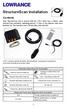 StructureScan Installation Contents Your StructureScan box is packed with the LSS-1 black box, a Power cable, StructureScan transducer, mounting bracket, 15 foot (4.5m) ethernet cable and a hardware kit.
BBWX1 Satellite Weather Receiver. Installation and Maintenance Guide
 BBWX1 Satellite Weather Receiver Installation and Maintenance Guide Rev FUSA 15JUL2007 Table of Contents Safety Precautions 3 Disclaimer. 3 Contents of Package. 4 Tools Required..4 Installation General
Raystar 125 GPS Receiver Owner's Handbook
 Raystar 125 GPS Receiver Owner's Handbook 1 www.raymarine.com Welcome to the Raystar RS125 GPS Receiver Your handbook contains an explanation of how to install, operate and maintain your Raystar RS125
Part Name/Description Part Number Quantity. Power Cable 4000950-5 1
 Note: Indented items indicate parts included in an assembly listed above Part Name/Description Part Number Quantity Power Cable 4000950-5 1 Raven Harness Adapter Kit 4100525 1 Installation Instructions
INSTALLATION INSTRUCTIONS
 INSTALLATION INSTRUCTIONS Application Outboards Faria 5 Gauge Set* Publication No. Description Part Number Honda Code PII53606A White faced, flat lens 06300-ZW5-010ZB 6315410 Issue Date Black faced, flat
ENGLISH www.bandg.com www.simrad-yachting.com www.lowrance.com
 StructureScan HD Transom mount Installation Guide ENGLISH www.bandg.com www.simrad-yachting.com www.lowrance.com Warning: It is your sole responsibility to install and use the instrument and transducer(s)
INSTALLATION INSTRUCTIONS
 Rear Vision System Aftermarket and Factory 5.0, 8.4 and 6.1 MyGig Touch Screen Display (Factory Display requires Chrysler/Dodge dealer to activate) 2009 Current* Dodge Ram (Kit part number 1009-6503) *NOTE:
Table of Contents. www.hunterfan.com. What to Expect with. Preparation. Tools Needed. Wiring. Hanging the Fan. Blades. Motor Housing.
 www.hunterfan.com Table of Contents What to Expect with Your Installation 30 inches Hanging the Fan Wiring 8 Maintenance, Operation & Cleaning Light Kit 13??? 14 1 9 Troubleshooting 11 5 Blades Motor Housing
EDGE 800. quick start manual TOUCHSCREEN GPS-ENABLED BIKE COMPUTER
 EDGE 800 quick start manual TOUCHSCREEN GPS-ENABLED BIKE COMPUTER 2010 Garmin Ltd. or its subsidiaries All rights reserved. Except as expressly provided herein, no part of this manual may be reproduced,
RMK-9. Installation and Operation instructions. ENGLISH Date: 04-2013 Document number: 81351-1-EN 2013 Raymarine UK Limited
 RMK-9 Installation and Operation instructions ENGLISH Date: 04-203 Document number: 835--EN 203 Raymarine UK Limited ENGLISH Document number: 835- Date: 04-203 Handbook information This handbook contains
TotalScan Transducer Installation manual
 TotalScan Transducer Installation manual ENGLISH www.simrad-yachting.com www.lowrance.com 1 Preface Warning: It is your sole responsibility to install and use the instrument and transducer(s) in a manner
KEYLESS ENTRY UPGRADE SECURITY SYSTEM for 2004 TOYOTA HIGHLANDER
 KEYLESS ENTRY UPGRADE SECURITY SYSTEM for 2004 TOYOTA HIGHLANDER DEALER SERVICE AND INSTALLATION MANUAL KIT NO. 00016-30915 Contents PARTS LIST... 2 PARTS ILLUSTRATIONS... 2 VEHICLE PREPARATION... 3 INSTALLING
Control Box Wiring For PRSstandard Tool
 888-680-4466 ShopBotTools.com Control Box Wiring For PRSstandard Tool Copyright 2016 ShopBot Tools, Inc. page 1 Copyright 2016 ShopBot Tools, Inc. page 2 Table of Contents Introduction:...5 Installation:...5
INSTALLATION INSTRUCTIONS
 INSTALLATION INSTRUCTIONS Accessory Application Publications No. AII23628 2003 PILOT Issue Date MAY 2002 PARTS LIST Security System Kit (sold separately): P/N 08E51-S84-100 2 Remote controls Attachment
FRONT BUMPER INSTALLATION INSTRUCTIONS 2007-2011 DODGE / MERCEDES SPRINTER
 Aluminess Products Inc 9402 Wheatlands Ct. #A Santee, CA 92071 619-449-9930 FRONT BUMPER INSTALLATION INSTRUCTIONS 2007-2011 DODGE / MERCEDES SPRINTER Please read before beginning Stainless steel hardware
Model 201 Wiegand Touchpad Reader Installation Guide
 Model 201 Wiegand Touchpad Reader Installation Guide P/N 460353001C 15AUG11 2011 UTC Fire & Security. All rights reserved. This document may not be copied in whole or in part or otherwise reproduced without
Home Signal Distribution Kit for Satellite TV Plus SIRIUS
 SR-101C SIRIUS/DBS Signal Combiner System SR-2261 Combiner-Outdoor Made in China DBS IN SIRIUS IN SR-101C SIRIUS/DBS Signal Combiner System SR-2251 Splitter-Indoor Made in China DC IN DBS OUT SIRIUS OUT
tidesmarine Smart Seal Temperature Alarm System Generation II Installation Instructions Starboard side cable
 tidesmarine Smart Seal Temperature Alarm System Generation II Installation Instructions Starboard side cable Port side cable (with black cable tie attached) Power cable Preparing for Installation 1 Overall
AM/FM ANTENNA RELOCATION KIT
 -J0 REV. 008-09-0 AM/FM ANTENNA RELOCATION KIT GENERAL Kit Number 766-09 Models This kit is used to relocate a fender-mounted AM/FM antenna to a Detachable Tour-Pak on specific model motorcycles. For model
INSTALLATION INSTRUCTIONS
 INSTALLATION INSTRUCTIONS Accessory Application Publications No. AII 26327 2004 S2000 Issue Date OCT 2004 PARTS LIST Security System: P/N 08E51-S84-100 Attachment Kit: P/N 08E55-S2A-101 2 Remote controls
Transducer Installation
 Transducer Installation This document covers the installation of all 83/200kHz, 50/200kHz and Downscan transducers using transom and shoot-thru hull installation methods, where applicable. This manual
e-4 AWT07MLED 7 Q TFT LCD MONITOR (LED Backlighted) USER MANUAL
 Thank you for purchasing our product. Please read this User s Manual before using the product. Change without Notice AWT07MLED 7 Q TFT LCD MONITOR (LED Backlighted) USER MANUAL e-4 SAFETY PRECAUTIONS Federal
etrex 10 quick start manual
 etrex 10 quick start manual Getting Started Device Overview warning See the Important Safety and Product Information guide in the product box for product warnings and other important information. ➊ ➍ ➌
DirectCommand Installation DirectCommand 3-Channel Spreader Kit
 Note: Indented items indicate parts included in an assembly listed above Part Name/Description Part Number With Switch Box Quantity With Remote Switch Display Cable Kit 4100814 1 1 Power Control Relay
Wiper Motor Marinco 2.5. Installation Instructions
 Wiper Motor Marinco 2.5 Installation Instructions Wiper Motor Marinco-2.5 The Marinco 2.5 Wiper Motor Offers the Following Features: Fully sealed base and housing which allows installation in outdoor wet
GENUINE PARTS INSTALLATION INSTRUCTIONS
 GENUINE PARTS INSTALLATION INSTRUCTIONS DESCRIPTION: Illuminated Kick Plate APPLICATION: Rogue (2011) PART NUMBER: 999G6 GX010 KIT CONTENTS: Item A B C G H QTY 1 1 1 D 1 E 1 F 3 15 6 Description Kick Plate,
Power Window/Power Lock Installation. To begin with you will need all the parts listed below:
 Power Window/Power Lock Installation To begin with you will need all the parts listed below: From Donor Fiero: Fiero power window regulators Power window motors (Generic GM type part) -motors are riveted
TraceTek TTDM Series Leak Detection and Location Modules Replacement Parts Installation Instructions
 TraceTek TTDM Series Leak Detection and Location Modules Replacement Parts Installation Instructions TRACETEK TraceTek TTDM Replacement Parts General Information These instructions detail the steps to
GTM 11. fm tmc traffic receiver. owner s manual. GTM 11 shown with the whip antenna
 GTM 11 fm tmc traffic receiver owner s manual GTM 11 shown with the whip antenna Copyright 2005 2006 Garmin Ltd. or its subsidiaries Garmin International, Inc. 1200 East 151st Street Olathe, Kansas 66062,
GPSMAP 62 series quick start manual. For use with the GPSMAP 62, 62s, 62st, 62sc, and 62stc
 GPSMAP 62 series quick start manual For use with the GPSMAP 62, 62s, 62st, 62sc, and 62stc Getting Started warning See the Important Safety and Product Information guide in the product box for product
Navico-Northstar 2kW JRC Radar Package, Scanner Cable Removal and Replacement
 Navico-Northstar 2kW JRC Radar Package, Scanner Cable Removal and Replacement This work instruction describes the methods and means for which to remove and reinstall optional scanner cable configurations
ScreenLogic Wireless Connection Kit. Installation Guide. pool/spa control system
 pool/spa control system ScreenLogic Wireless Connection Kit Installation Guide P/N 520663 - Rev B 8 Technical Support Contact Technical Support at: Sanford, North Carolina (8 A.M. to 5 P.M.) Phone: (800)
PUSH BUTTON START INSTALLATION MANUAL
 PUSH BUTTON START INSTALLATION MANUAL ALTHOUGH THIS PRODUCT HAS BEEN THOROUGHLY TESTED KPIERSON TECHNOLOGIES ASSUMES NO RESPONSIBILITY FOR ANY DAMAGE THAT MAY RESULT BY THE INSTALLATION OF THIS PRODUCT.
SCREENLOGIC INTERFACE WIRELESS CONNECTION KIT
 SCREENLOGIC INTERFACE WIRELESS CONNECTION KIT FOR INTELLITOUCH AND EASYTOUCH CONTROL SYSTEMS INSTALLATION GUIDE IMPORTANT SAFETY INSTRUCTIONS READ AND FOLLOW ALL INSTRUCTIONS SAVE THESE INSTRUCTIONS Technical
Back-Up Camera Installation Guide
 Hz Hz In This Guide: Back-up camera installation requires connecting power wiring to the existing reverse lighting circuit and adding a chassis ground, as well as routing a video signal cable to the front
owner s manual EDGE 200 GPS-ENABLED CYCLING COMPUTER December 2012 190-01368-00_0B Printed in Taiwan
 EDGE 200 GPS-ENABLED CYCLING COMPUTER owner s manual December 2012 190-01368-00_0B Printed in Taiwan Getting Started warning Always consult your physician before you begin or modify any exercise program.
Cisco Aironet 2.4-GHz MIMO Wall-Mounted Omnidirectional Antenna (AIR-ANT2440NV-R)
 Cisco Aironet 2.4-GHz MIMO Wall-Mounted Omnidirectional Antenna (AIR-ANT2440NV-R) This document outlines the specifications for the Cisco Aironet 2.4-GHz MIMO Wall-Mounted Omnidirectional Antenna (AIR-ANT2440NV-R)
F O R E R U N N E R 6 1 0. q u i c k s t a r t m a n u a l
 F O R E R U N N E R 6 1 0 q u i c k s t a r t m a n u a l Important Information warning Always consult your physician before you begin or modify any exercise program. See the Important Safety and Product
BUILT-IN DISHWASHER INSTALLATION INSTRUCTIONS
 BUILT-IN DISHWASHER INSTALLATION INSTRUCTIONS PLEASE READ COMPLETE INSTRUCTIONS BEFORE YOU BEGIN LEAVE INSTALLATION INSTRUCTIONS AND USER'S GUIDE WITH OWNER ALL ELECTRIC WIRING AND PLUMBING MUST BE DONE
Time needed: ~3h for lid replacement only. Add 1h for operation harness in lid and ~2h more for installing drive unit and cable harness in trunk.
 DIY for replacing trunk lid and/or retrofitting electrical operation of trunk lid. This document is meant to be a support and give advice on the procedure but I will take no responsibility for any damage
GARMIN GPS to PC Wiring Instructions
 GARMIN GPS to PC Wiring Instructions Introduction This will outline the basics for connecting most GARMIN GPS receivers to a PC serial connector for data transfer. Since the GPS needs to both send and
CUSTOM AUXILIARY FORWARD LIGHTING KIT
 -J0 REV. 0--0 CUSTOM AUXILIARY FORWARD LIGHTING KIT GENERAL Kit Number -0, 0000 Models This Custom Auxiliary Lighting Kit adds lamps and turn signals to 00 and later FLHX model motorcycles. Additional
Universal Vehicle Power Supply 9007AX01. Installation Instructions
 Universal Vehicle Power Supply 9007AX01 Installation Instructions Disclaimer Honeywell International Inc. ( HII ) reserves the right to make changes in specifications and other information contained in
WINEGARD MOTORIZED SENSAR ANTENNA Models MA1055W & MA1055G MADE IN U.S.A. U.S. Patents D500,496 and 7,358,909 INSTALLATION MANUAL
 WINEGARD MOTORIZED SENSAR ANTENNA Models MA1055W & MA1055G MADE IN U.S.A. U.S. Patents D500,496 and 7,358,909 INSTALLATION MANUAL CAUTION: This system is not for use with antenna in raised position while
DIY QUAD. Build Manual V.A 2014
 DIY QUAD Build Manual V.A 2014 1 Contents Thanks for purchasing a DIY Quad! These instructions will show you how to assemble a Quad using the Pixhawk autopilot system and ArduCopter/APM:Copter firmware.
DTM04 TANK MONITOR DTM08 TANK MONITOR Dtm12 TANK MONITOR. Installation and Operation Manual
 DTM04 TANK MONITOR DTM08 TANK MONITOR Dtm12 TANK MONITOR Installation and Operation Manual 1 ENGLISH Safety Instructions 2 Features 2-3 Specifications 3 Installation 4-5 Wiring Diagrams 6-7 Warranty 8
INSTALLATION INSTRUCTIONS
 Rear Vision System Tailgate Handle Camera Mirror Display 2004-2014 Ford F-150 and 2008-2015 Ford Super Duty (Kit part numbers 9002-9521) Kit Contents: Mirror Tailgate Handle with camera and harness Interior
SIMRAD SD10 Sailboat Drive
 INSTALLATION MANUAL SIMRAD SD10 Sailboat Drive 20222683/A English Simrad SD10 Sailboat Drive About this document Rev. A First issue 2007 Navico AS. All rights reserved. No part of this work covered by
1978-83 Malibu 1978-87 Monte Carlo 1978-87 El Camino
 Important facts about this kit. 1. The dash panel used in this picture is used by permission of Covan's Classic. 2. This kit requires some modification to your original under dash wiring harness. It is
TOYOTA Tundra 2007 - BACK-UP CAMERA SYSTEM Preparation
 Preparation Part Number(s): PT233-34070, PT923-35070-11, PT923-35070-43 NOTE: Part number of this accessory may not be the same as part number shown. Back Up Monitor Kit Contents PT923-35070-11 / PT923-35070-43
Post Mount Light Installation*
 Post Mount Light Installation* *For the general installation of most Post Mount Spotlights, many vehicles may need slight modifications to these instructions. You will need the following tools: High torque
Outdoor 33.6W Dual Port Passive Power-over-Ethernet Midspan For External Security Cameras and Wireless Access Points
 Outdoor 33.6W Dual Port Passive Power-over-Ethernet Midspan For External Security Cameras and Wireless Access Points Features SELV Compliant No Detection Passive Injector Gigabit Compatible Full Protection
OEM Manual MODEL 2350 ELECTRONIC DUAL CYLINDER SCALE
 OEM Manual MODEL 2350 ELECTRONIC DUAL CYLINDER SCALE Scaletron Industries, Ltd. Bedminster Industrial Park 53 Apple Tree Lane P.O. Box 365 Plumsteadville, PA 18949 USA Toll Free: 1-800-257-5911 (USA &
GHC 20 Owner s Manual
 GHC 20 Owner s Manual April 2013 190-01610-00_0A Printed in Taiwan All rights reserved. Under the copyright laws, this manual may not be copied, in whole or in part, without the written consent of Garmin.
Installation and Operation Manual. Digital Remote Meter for Monitoring System Performance. Version: RM-1
 REMOTE METER TM Installation and Operation Manual. Digital Remote Meter for Monitoring System Performance. Version: RM-1 1098 Washington Crossing Road Washington Crossing, PA 18977 USA www.morningstarcorp.com
quick start manual MULTISPORT GPS TRAINING DEVICE
 quick start manual F O R E R U N N E R 3 1 0 X T MULTISPORT GPS TRAINING DEVICE Warning: Always consult your physician before you begin or modify any exercise program. See the Important Safety and Product
Installation. Smart-UPS VT MGE Galaxy 3500. Maintenance Bypass Panel. 10-40 kva 400 V
 Installation Smart-UPS VT MGE Galaxy 3500 Maintenance Bypass Panel 10-40 kva 400 V Contents Safety.................................................. 1 Save these instructions...................................
AM/FM ANTENNA KIT (TOUR-PAK MOUNT)
 -J077 REV. 008-0-0 AM/FM ANTENNA KIT (TOUR-PAK MOUNT) GENERAL Kit Number 7-98A Models For model fitment information, see the P&A Retail Catalog or the Parts and Accessories section of www.harley-davidson.com
Approach S3 Owner s Manual
 Approach S3 Owner s Manual December 2012 190-01467-00_0C Printed in Taiwan All rights reserved. Under the copyright laws, this manual may not be copied, in whole or in part, without the written consent
INSTALLATION AND OPERATING INSTRUCTIONS For Model GL1 Gate Locks
 Securitron Magnalock Corp. www.securitron.com ASSA ABLOY, the global leader Tel 800.624.5625 [email protected] in door opening solutions INSTALLATION AND OPERATING INSTRUCTIONS For Model GL1 Gate
BILLET HEADLAMP SHELL
 -J008 REV. 007-07- BILLET HEADLAMP SHELL GENERAL Kit Number 770-0 Models For model fitment information, please see the P&A Retail Catalog or the Parts and Accessories section of www.harleydavidson.com
Elo Touch Solutions Wall-mounting Kit for the 5501L IDS Touchmonitors
 Installation Manual Elo Touch Solutions Wall-mounting Kit for the 5501L IDS Touchmonitors SW602206 Rev B Table of Contents Chapter 1: Safety Warning... 3 Chapter 2: Kit Contents... 4 Included in Kit...
KVT-729DVD INSTALLATION MANUAL
 MONITOR WITH DVD RECEIVER KVT-729DVD INSTALLATION MANUAL B54-4516-00/00 (EV) Accessories 1 0...1...1 2!...1...2 3...1 4 5...1...1 6...2 7...4 8...4 9...2 2 KVT-729DVD Installation Procedure 1. To prevent
DIY Y6. Build Manual V.A 2014
 DIY Y6 Build Manual V.A 2014 1 Contents Thanks for purchasing a DIY Y6! These instructions will show you how to assemble a Y6 using the Pixhawk autopilot system and ArduCopter/APM:Copter firmware. If you
Micrio WS1 Replacement Wind Speed Sensor and WC1 Replacement Wind Compass Sensor for Raymarine ST50 and ST60 Wind Instruments. Rev 4.
 Micrio WS1 Replacement Wind Speed Sensor and WC1 Replacement Wind Compass Sensor for Raymarine ST50 and ST60 Wind Instruments. Rev 4.1 The Micrio WS1 Wind Speed Sensor and WC1 Compass Sensor are direct
Installation Guide. WSD-100 Wind Speed and Direction Sensor For XR5 Data Loggers. February, 2011
 WSD-100 Wind Speed and Direction Sensor For XR5 Data Loggers Installation Guide February, 2011 Pace Scientific Inc www.pace-sci.com Tel: 704-799-0688 [email protected] 1 Disclaimer The following warranty
BILLET HEADLAMP WITH SHORT/TALL MOUNTS
 -J099 REV. 00-0- BILLET HEADLAMP WITH SHORT/TALL MOUNTS GENERAL Kit Number 9-0, 9-0 Models Kit 9-0 is a -/ inch headlamp and kit 9-0 is a -/ inch headlamp. Both kits will fit the models listed in Table.
ADDING AN ELECTRIC AUXILIARY FAN TO RADIATOR STACK ON 03 ALPINE COACH
 ADDING AN ELECTRIC AUXILIARY FAN TO RADIATOR STACK ON 03 ALPINE COACH The original design of the 03 Alpine Coaches (and perhaps other years as well) did not include any kind of engine fan engage mechanism
Networkfleet 3500 Product Line Installation Guide
 Networkfleet 3500 Product Line Installation Guide Light/Medium Duty (L3500) Heavy Duty (H3500) Universal (U3500) www.networkcar.com/fleet Customer Care: (866) 227-7323 [email protected] Table
2M IR Mini Dome Quick Installation Guide
 2M IR Mini Dome 2M IR Mini Dome Quick Installation Guide Please follow the installation steps below to set up 2M IR Mini Dome IP Camera. Check the package contents against the list below. See P.1 Physical
Multi Function, User Configurable Remote Vehicle Security System with 4 Button Replaceable Membrane Remote Transmitter
 MODEL PRO-9744 INSTALLATION MANUAL Multi Function, User Configurable Remote Vehicle Security System with 4 Button Replaceable Membrane Remote Transmitter This System Allows The Transmitter Buttons To Be
Sliding Door Hardware Installation Instructions
 Sliding Door Hardware Installation Instructions Installation Instructions Structural Information For standard systems and most custom single door opening systems. General Overview ff All Krown Lab sliding
GPS AutoSteer System Installation Manual
 GPS AutoSteer System Installation Manual Supported Vehicles John Deere Sprayers 4720 4630 4730 4830 AutoTrac Ready PN: 602-0227-01-A LEGAL DISCLAIMER Note: Read and follow ALL instructions in this manual
WARNING! REQUIRED TOOLS & SUPPLIES: HIGH VOLTAGE
 INSTRUCTIONS Product: GEM Electric Motorcars Models: All Subject: Instructions for installing Stereo Accessory Estimated Completion Time:.75 Hours Parts: See Page # 7 REQUIRED TOOLS & SUPPLIES: (1) 3/8
INSTALLATION GUIDE. Card Reader & Controller with KIM Swipe Reader for Solitaire 850 / 950 / 850L Learnlok PK2930
 INSTALLATION GUIDE Card Reader & Controller with KIM Swipe Reader for Solitaire 850 / 950 / 850L Learnlok PK2930 Card Reader and Controller Model 3.5 with KIM Swipe Reader Table of Contents 1. Features..................................
WIND ALARM. Wind Speed Alarm. Wind Speed. Set Point 2. Set Point 1 NEW BEDFORD, MA 02745 USA
 Thank you for purchasing the Maximum wind speed alarm. The Maximum wind speed alarm is a dual set point wind speed indicator with a two digit LED display. It contains a yellow light to display one set
TOYOTA TUNDRA 2015 Billet Grille w/led DRL
 TOYOTA TUNDRA 2015 Billet Grille w/led DRL Part Number: 00016-34088 Accessory Code: BG3000 Conflicts Models 1794 and Platinum Kit Contents Item # Quantity Reqd. Description 1 2 LED DRL 2 1 Driver Box 3
quick reference guide Edge 605/705 GPS-ENABLED BIKE COMPUTER
 quick reference guide Edge 605/705 GPS-ENABLED BIKE COMPUTER MB Warning: This product contains a lithium-ion battery. See the Important Safety and Product Information guide in the product box for important
Sliding Barn Door Hardware Installation Instructions BALDUR and ODEN
 Sliding Barn Door Hardware Installation Instructions BALDUR and ODEN Installation Instructions Structural Information For standard systems and most custom single door opening systems. General Overview
INSTRUCTIONS FOR THE INSTALLATION AND OPERATION OF ACTIVATOR II
 INSTRUCTIONS FOR THE INSTALLATION AND OPERATION OF ACTIVATOR II ELECTRONIC TRAILER BRAKE CONTROL 5500 FOR 2, 4, 6 & 8 BRAKE SYSTEMS IMPORTANT: READ AND FOLLOW THESE INSTRUCTIONS CAREFULLY. KEEP THESE INSTRUCTIONS
VOYAGER 570G. 744A Sprayer Control
 VOYAGER 570G 744A Sprayer Control U S E R M A N U A L U S E R M A N U A L Table of Contents CHAPTER 1 - INTRODUCTION...1 SYSTEM CONFIGURATIONS...1 KIT CONTENTS...3 CONTROL HOUSING ASSEMBLY...5 CHAPTER
33.6W Power over Ethernet Waterproof Adapter PoE Plus Single Port Injector for Outdoor Application
 33.6W Power over Ethernet Waterproof Adapter PoE Plus Single Port Injector for Outdoor Application Features Compliant with the IEEE802.3at Standard -40 to +60 C Temperature Range Diagnostic LEDs Full Protection
PCS300 Universal IP Reporting Module V1.0
 PCS300 Universal IP Reporting Module V1.0 Reference and Installation Manual Patents: One or more of the following US patents may apply: 7046142, 6215399, 6111256, 6104319, 5920259, 5886632, 5721542, 5287111,
Original Assembly Guide
 TCT Multipurpose Single Bevel Sliding Compound Mitre Saw Original Assembly Guide Read instructions before assembling this tool. Table of Contents GB Assembly Guide Read instructions before assembling this
Before installation it is important to know what parts you have and what the capabilities of these parts are.
 INSTALLATION GUIDE Before installation it is important to know what parts you have and what the capabilities of these parts are. The Recon XZT is the smallest and most powerful gauge of its kind. With
2003/2004/2005 TOYOTA COROLLA
 2003/2004/2005 TOYOTA COROLLA KEYLESS ENTRY UPGRADE SECURITY SYSTEM INSTALLATION INSTRUCTIONS KIT NO. 00016-30120 SPECIAL NOTE: Installation Sequences After TMS and Safety mandated preparatory steps have
INSTALLATION INSTRUCTIONS for Bifold Doors (JII103)
 Thank you for selecting JELD-WEN products. Attached are JELD-WEN s recommended installation instructions for premium composite, hollow and solid core molded Bifold Doors. Bifolds are designed for fast
GreenWay Solar LED Path and Trail Lighting System. Installation and Owner s Manual
 GreenWay Solar LED Path and Trail Lighting System Installation and Owner s Manual Important Notes and Warnings This installation and instruction manual provides installation, operation, and maintenance