
- Asynchronous Transfer Mode -
|
|
|
- Blanche McGee
- 9 years ago
- Views:
Transcription
1 1 - Asynchronous Transfer Mode - Asynchronous Transfer Mode (ATM) Asynchronous Transfer Mode (ATM) is a high-speed, non-broadcast Layer 2 technology, similar in many respects to Frame Relay. In addition to supporting higher bandwidths, ATM integrates QoS mechanisms directly into the technology. ATM is thus a very flexible technology, supporting data, voice and video traffic. Other Layer 2 technologies, such as Ethernet or Token Ring, support variable-sized packets. For example, Ethernet packets are 1514 bytes by default, but the MTU can be changed. ATM utilizes fixed-sized packets called cells. Each cell is exactly 53 bytes. Because the cell size is always consistent, traffic can be routed or switched far more efficiently. Two ATM interface types exist: User-Network Interface (UNI) connects an ATM end-user device to an ATM switch or router Network-Network Interface (NNI) connects an ATM switch to another ATM switch ATM, like Frame Relay, builds Virtual Channels (or Circuits) between ATM devices. These virtual channels can be permanent (PVC) or switched (SVC), and are one-way. Each virtual channel is identified by a Virtual Channel Identifier (VCI), the equivalent of a Frame-Relay DLCI. The VCI is only locally significant to the router/switch. Multiple virtual channels can then be bundled together into a Virtual Path, which is identified by a Virtual Path Identifier (VPI). Like VCI s, a VPI is only locally significant. A VPI essentially identifies a route between two ATM devices.
2 2 ATM Layers ATM is comprised of an ATM Adaptation Layer (AAL), which dictates how upper layer information (IP addresses, TCP ports, etc) gets packaged into an ATM cell. There are various AAL types, each dictating a different class of service for specific traffic: AAL-1 Intended for voice and video traffic, and other such delaysensitive traffic. Utilizes Constant Bit Rate (CBR) to provide consistent bandwidth and timing. AAL-2 Also intended for voice and video traffic. Supports a Variable Bit Rate (VBR), instead of a constant bit rate. Thus traffic rates and bandwidth will vary. VBR can either be Real Time (VBR-RT) or Non-Real Time (VBR-NRT). AAL-3/4 Legacy layer intended for Switched MultiMegabit Data Service (SMDS) traffic. AAL-5 Intended for data traffic. Utilizes Unspecified Bit Rate (UBR) and Available Bit Rate (ABR), where bandwidth and traffic rate are never guaranteed. Essentially a best-effort form of service. However, AAL-5 can also support CBR and VBR, if necessary. The order of priority for ATM s classes of service (from highest to lowest): CBR VBR-RT VBR-NRT ABR UBR and UBR+ ATM Encapsulations This guide will concentrate on the AAL-5 implementation of ATM. Several AAL-5 encapsulation types exist, including: aal5snap The default encapsulation type for an ATM interface. Supports multiplexing two or more Layer 3 protocols over the same PVC. aal5mux Used to dedicate the PVC to a single Layer 3 protocol.

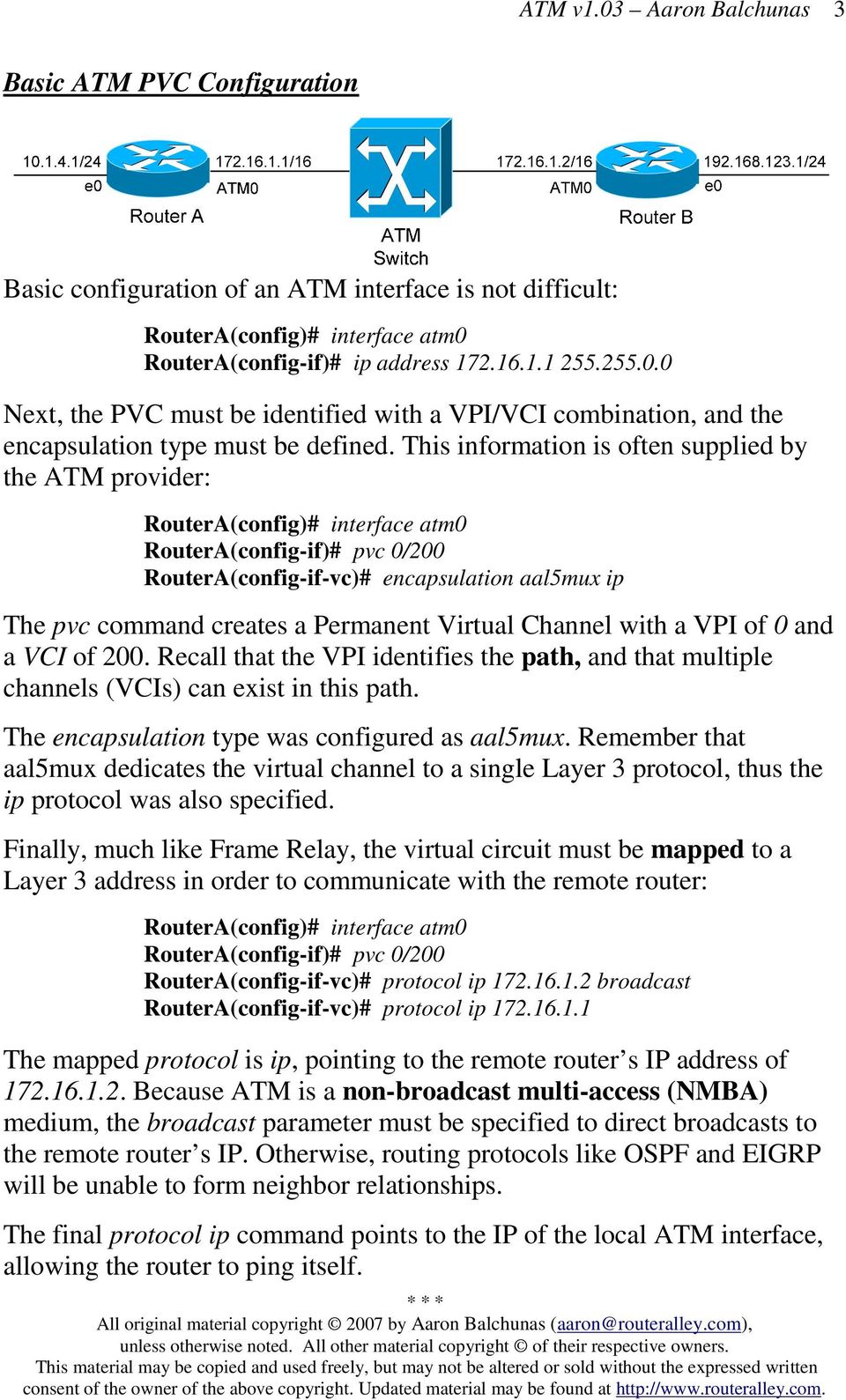
3 3 Basic ATM PVC Configuration Basic configuration of an ATM interface is not difficult: RouterA(config-if)# ip address Next, the PVC must be identified with a VPI/VCI combination, and the encapsulation type must be defined. This information is often supplied by the ATM provider: RouterA(config-if)# pvc 0/200 RouterA(config-if-vc)# encapsulation aal5mux ip The pvc command creates a Permanent Virtual Channel with a VPI of 0 and a VCI of 200. Recall that the VPI identifies the path, and that multiple channels (VCIs) can exist in this path. The encapsulation type was configured as aal5mux. Remember that aal5mux dedicates the virtual channel to a single Layer 3 protocol, thus the ip protocol was also specified. Finally, much like Frame Relay, the virtual circuit must be mapped to a Layer 3 address in order to communicate with the remote router: RouterA(config-if)# pvc 0/200 RouterA(config-if-vc)# protocol ip broadcast RouterA(config-if-vc)# protocol ip The mapped protocol is ip, pointing to the remote router s IP address of Because ATM is a non-broadcast multi-access (NMBA) medium, the broadcast parameter must be specified to direct broadcasts to the remote router s IP. Otherwise, routing protocols like OSPF and EIGRP will be unable to form neighbor relationships. The final protocol ip command points to the IP of the local ATM interface, allowing the router to ping itself.
4 4 Configuring Multipoint ATM PVCs Recall that multiple VCI s can be configured on an interface. Configuration is not difficult: RouterA(config-if)# no shut RouterA(config-if)# ip address RouterA(config-if)# pvc 0/200 RouterA(config-if-vc)# encapsulation aal5mux ip RouterA(config-if-vc)# protocol ip broadcast RouterA(config-if)# pvc 0/201 RouterA(config-if-vc)# encapsulation aal5mux ip RouterA(config-if-vc)# protocol ip broadcast A unique VCI must be used for each destination. For simplicity, each PVC can be assigned a descriptive name: RouterA(config-if)# pvc TOROUTERB 0/200 RouterA(config-if)# pvc TOROUTERC 0/201 Using Inverse-Arp for ATM PVCs The previous examples demonstrated the static configuration of PVC-to- Layer 3 mappings. This information can be dynamically discovered using Inverse-Arp: RouterA(config-if)# pvc 0/200 RouterA(config-if-vc)# encapsulation aal5mux ip RouterA(config-if-vc)# inarp 15 Inverse-ARP is automatically enabled by default, but will be disabled if a static mapping is configured.

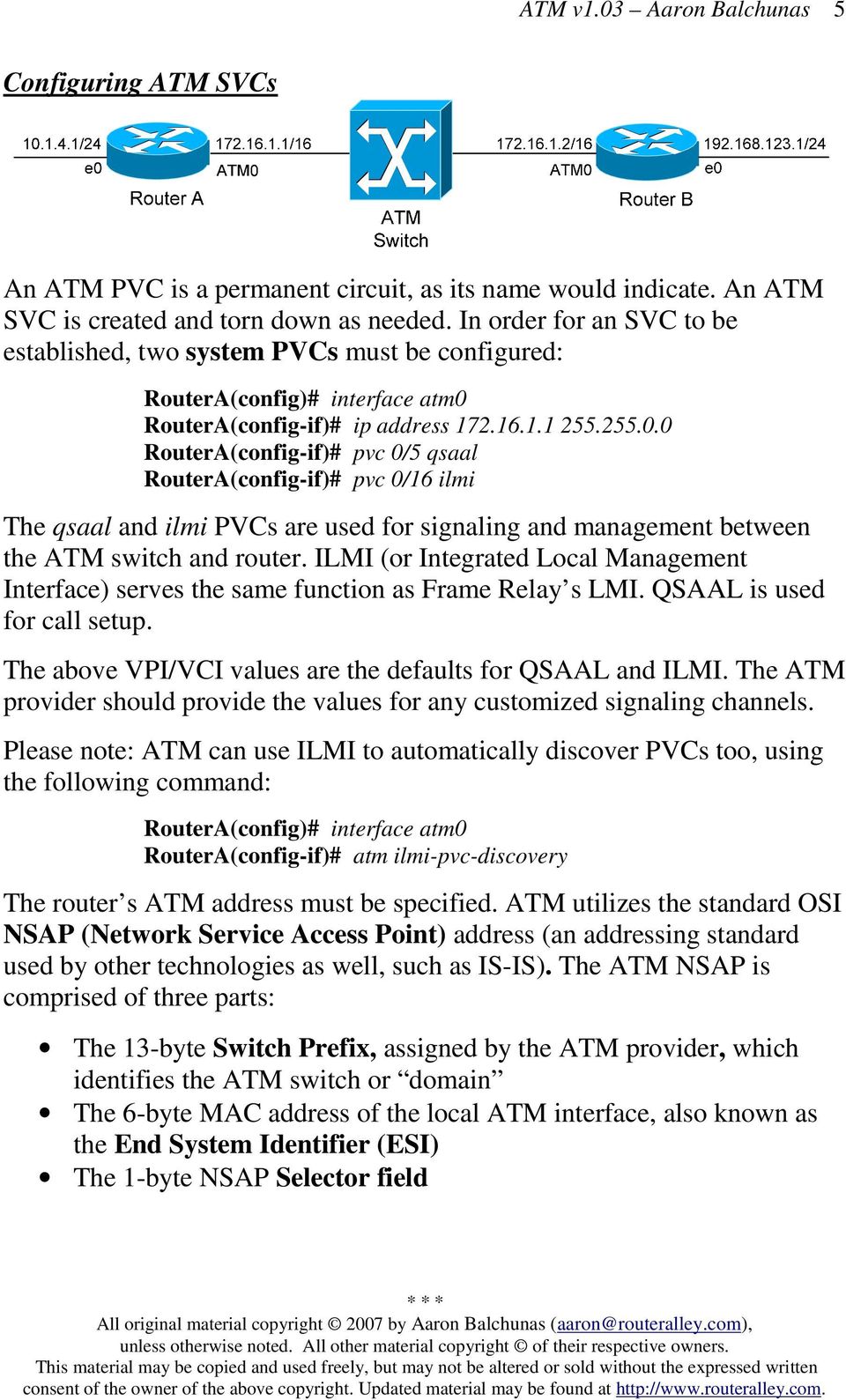
5 5 Configuring ATM SVCs An ATM PVC is a permanent circuit, as its name would indicate. An ATM SVC is created and torn down as needed. In order for an SVC to be established, two system PVCs must be configured: RouterA(config-if)# ip address RouterA(config-if)# pvc 0/5 qsaal RouterA(config-if)# pvc 0/16 ilmi The qsaal and ilmi PVCs are used for signaling and management between the ATM switch and router. ILMI (or Integrated Local Management Interface) serves the same function as Frame Relay s LMI. QSAAL is used for call setup. The above VPI/VCI values are the defaults for QSAAL and ILMI. The ATM provider should provide the values for any customized signaling channels. Please note: ATM can use ILMI to automatically discover PVCs too, using the following command: RouterA(config-if)# atm ilmi-pvc-discovery The router s ATM address must be specified. ATM utilizes the standard OSI NSAP (Network Service Access Point) address (an addressing standard used by other technologies as well, such as IS-IS). The ATM NSAP is comprised of three parts: The 13-byte Switch Prefix, assigned by the ATM provider, which identifies the ATM switch or domain The 6-byte MAC address of the local ATM interface, also known as the End System Identifier (ESI) The 1-byte NSAP Selector field
6 6 Configuring ATM SVCs (continued) If the ILMI PVC is not configured, then the entire NSAP address must be manually specified: RouterA(config-if)# atm nsap-address AB CDEF33.AB12.AF12.BF3C Rather long, yes? The AB CDEF33.AB12.AF12.BF3C portion of the nsap-address identifies the switch prefix. The portion identifies the ESI (or MAC address). The 00 identifies the NSAP Selector field. However, if the ILMI PVC is configured, the ATM switch will provide the switch prefix automatically. Thus, only the ESI and NSAP Selector must be manually specified: RouterA(config-if)# atm esi-address Notice that no periods separate the MAC address in this syntax. The atm nsap-address and atm esi-address commands cannot be used together. One will override the other. Finally, the SVC must be created, and pointed to a destination NSAP address: RouterA(config-if)# svc MYSVC CC CDEF33.AB12.AF12.BF3C Notice that the name MYSVC was assigned to the svc.

7 7 Configuring ATM QoS The first step in configuring QoS for ATM is to create a vc-class that contains the appropriate QoS parameters: Router(config)# vc-class atm MYCLASS Router(config-vc-class)# encapsulation aal5snap Router(config-vc-class)# ubr 1000 Router(config-vc-class)# ubr Router(config-vc-class)# abr The vc-class command creates an atm QoS policy called MYCLASS. The ATM encapsulation is configured as aal5snap. Traffic marked for ubr is given a Peak Cell Rate (PCR) of 1000 Kbps. PCR is essentially a best effort rate of bandwidth. Traffic marked for ubr+ is given both a PCR (2000) and Minimum Cell Rate (MCR) of 256 Kbps. Traffic marked for abr is also given both a PCR and MCR. The vc-class must then be applied to an interface: Router(config)# interface atm0 Router(config-if)# class-int MYCLASS Or, the vc-class can be directly applied to a PVC: Router(config)# interface atm0 Router(config-if)# pvc 0/200 Router(config-if-vc)# class-vc MYCLASS

8 8 PPP over ATM To configure PPP encapsulation over an ATM connection: RouterA(config)# username NAME password PASSWORD /0.111 RouterA(config-if)# pvc 0/111 RouterA(config-if)# protocol ppp Virtual-Template1 RouterA(config)# interface Virtual-Template1 RouterA(config-if)# ip address RouterA(config-if)# ppp authentication chap RouterA(config-if)# ppp chap hostname RouterA Troubleshooting ATM To view the status of all configured ATM PVCs: Router# show atm pvc To view the status of all configured ATM SVCs: Router# show atm svc To view the Layer 3 maps to remote ATM hosts: Router# show atm map

Asynchronous Transfer Mode: ATM. ATM architecture. ATM: network or link layer? ATM Adaptation Layer (AAL)
 Asynchrous Transfer Mode: architecture 1980s/1990 s standard for high-speed (155Mbps to 622 Mbps and higher) Broadband Integrated Service Digital Network architecture Goal: integrated, end-end transport
Protocol Architecture. ATM architecture
 Asynchronous Transfer Mode (ATM) Asynchronous Transfer Mode: ATM 1990 s/00 standard for high-speed (155Mbps to 622 Mbps and higher) Broadband Integrated Service Digital Network architecture Goal: integrated,
Module 4. Switched Communication Networks. Version 2 CSE IIT, Kharagpur
 Module 4 Switched Communication Networks Lesson 6 Asynchronous Transfer Mode Switching (ATM) Specific Instructional Objectives On completion on this lesson, the student will be able to: State the need
Asynchronous Transfer Mode
 CHAPTER 15 Asynchronous Transfer Mode Background Asynchronous Transfer Mode (ATM) technology is based on the efforts of the International Telecommunication Union Telecommunication Standardization Sector
Introduction to WAN Technologies
 CHAPTER 3 Chapter Goals Become familiar with WAN terminology. Learn about different types of WAN connections. Become familiar with different types of WAN equipment. This chapter introduces the various
ATM. Asynchronous Transfer Mode. Networks: ATM 1
 ATM Asynchronous Transfer Mode Networks: ATM 1 Issues Driving LAN Changes Traffic Integration Voice, video and data traffic Multimedia became the buzz word One-way batch Two-way batch One-way interactive
CCNP2 - Implementing Secure Converged Wide-area Networks v5.0
 2.6.11 - Configuring a DSL ATM Interface Figures and show the steps you use to configure a DSL ATM interface. Use the dsl operating-mode auto interface configuration command to specify that the router
Lecture Computer Networks
 Lecture Computer Networks Prof. Dr. Hans Peter Großmann mit M. Rabel sowie H. Hutschenreiter und T. Nau Sommersemester 2012 Institut für Organisation und Management von Informationssystemen Asynchronous
WAN Data Link Protocols
 WAN Data Link Protocols In addition to Physical layer devices, WANs require Data Link layer protocols to establish the link across the communication line from the sending to the receiving device. 1 Data
ADSL WAN Connections. Contents
 7 ADSL WAN Connections Contents ADSL Overview................................................. 7-4 ADSL Technologies.......................................... 7-5 ADSL2 and ADSL2+: Enhancing Transmission
Network Scenarios Pagina 1 di 35
 Network Scenarios Pagina 1 di 35 Table of Contents Network Scenarios Cisco 827 s Network Connections Internet Access Scenarios Before You Configure Your Internet Access Network Replacing a Bridge or Modem
Overview of Asynchronous Transfer Mode (ATM) and MPC860SAR. For More Information On This Product, Go to: www.freescale.com
 Overview of Asynchronous Transfer Mode (ATM) and MPC860SAR nc. 2 What is ATM? o Protocol that applies primarily to layer 2 of the OSI protocol stack: Application Presentation Session Transport Network
Introduction to WAN Technologies
 CHAPTER 3 Introduction to WAN Technologies This chapter introduces the various protocols and technologies used in wide- area network (WAN) environments. Topics summarized here include point-to-point links,
Link Layer. 5.6 Hubs and switches 5.7 PPP 5.8 Link Virtualization: ATM and MPLS
 Link Layer 5.1 Introduction and services 5.2 Error detection and correction 5.3Multiple access protocols 5.4 Link-Layer Addressing 5.5 Ethernet 5.6 Hubs and switches 5.7 PPP 5.8 Link Virtualization: and
Introduction to Wide Area Network Protocols
 1 Introduction to Wide Area Network Protocols Session 2 Agenda Wide Area Network (WAN) Environment Requirements Technologies Interface Signaling Protocols 3 Take-Away Message By selecting the right cache
 Setup The Setup screen is the first screen you will see when accessing the Gateway. Most users will be able to configure the Gateway and get it working properly using only the settings on this screen.
Master Course Computer Networks IN2097
 Chair for Network Architectures and Services Prof. Carle Department for Computer Science TU München Master Course Computer Networks IN2097 Prof. Dr.-Ing. Georg Carle Christian Grothoff, Ph.D. Chair for
Frame Relay and Frame-Based ATM: A Comparison of Technologies
 White Paper and -Based : A Comparison of Technologies Larry Greenstein Nuera Communications VP, Technology, Forum June 1995 June 27, 1995 i TABLE OF CONTENTS 1. PREFACE...1 2. INTRODUCTION...1 3. INTERWORKING
11/22/2013 1. komwut@siit
 11/22/2013 1 Week3-4 Point-to-Point, LAN, WAN Review 11/22/2013 2 What will you learn? Representatives for Point-to-Point Network LAN Wired Ethernet Wireless Ethernet WAN ATM (Asynchronous Transfer Mode)
MPLS. Cisco MPLS. Cisco Router Challenge 227. MPLS Introduction. The most up-to-date version of this test is at: http://networksims.com/i01.
 MPLS Cisco MPLS MPLS Introduction The most up-to-date version of this test is at: http://networksims.com/i01.html Cisco Router Challenge 227 Outline This challenge involves basic frame-mode MPLS configuration.
Technical Reference / User Guide
 / User Guide Copyright Copyright 2006 OPEN Networks Pty Ltd. All rights reserved. The content of this manual is subject to change without notice. The information and messages contained herein are proprietary
Configure ISDN Backup and VPN Connection
 Case Study 2 Configure ISDN Backup and VPN Connection Cisco Networking Academy Program CCNP 2: Remote Access v3.1 Objectives In this case study, the following concepts are covered: AAA authentication Multipoint
co Sample Configurations for Cisco 7200 Broadband Aggreg
 co Sample Configurations for Cisco 7200 Broadband Aggreg Table of Contents Sample Configurations for Cisco 7200 Broadband Aggregation...1 Introduction...1 Configurations...1 PPPoA Session Termination:
PPTP Server Access Through The
 PPTP Server Access Through The Firewall On The SureConnect 9003 DSLAM ATM Network ISP Internet PPTP Server Private IP: 192.168.1.3 Mask: 255.255.255.0 Default Gateway: 192.168.1.1 SureConnect 9003 Ethernet
How To Configure A Cisco Router With A Cio Router
 CHAPTER 1 This chapter provides procedures for configuring the basic parameters of your Cisco router, including global parameter settings, routing protocols, interfaces, and command-line access. It also
- Multiprotocol Label Switching -
 1 - Multiprotocol Label Switching - Multiprotocol Label Switching Multiprotocol Label Switching (MPLS) is a Layer-2 switching technology. MPLS-enabled routers apply numerical labels to packets, and can
100-101: Interconnecting Cisco Networking Devices Part 1 v2.0 (ICND1)
 100-101: Interconnecting Cisco Networking Devices Part 1 v2.0 (ICND1) Course Overview This course provides students with the knowledge and skills to implement and support a small switched and routed network.
AMG1001-T Series. AMG1011-T Series. User s Guide. Quick Start Guide. ADSL2+ 1-port Gateway. ADSL2+ 1-port Ethernet/USB Gateway. Default Login Details
 AMG1001-T Series ADSL2+ 1-port Gateway AMG1011-T Series ADSL2+ 1-port Ethernet/USB Gateway Version 1.00 Edition 1, 07/2013 Quick Start Guide User s Guide Default Login Details IP Address http://192.168.1.1
Data Link Protocols. TCP/IP Suite and OSI Reference Model
 Data Link Protocols Relates to Lab. This module covers data link layer issues, such as local area networks (LANs) and point-to-point links, Ethernet, and the Point-to-Point Protocol (PPP). 1 TCP/IP Suite
CCT vs. CCENT Skill Set Comparison
 Operation of IP Data Networks Recognize the purpose and functions of various network devices such as Routers, Switches, Bridges and Hubs Select the components required to meet a given network specification
Transport and Network Layer
 Transport and Network Layer 1 Introduction Responsible for moving messages from end-to-end in a network Closely tied together TCP/IP: most commonly used protocol o Used in Internet o Compatible with a
WAN Technologies Based on CCNA 4 v3.1 Slides Compiled & modified by C. Pham
 WAN Technologies Based on CCNA 4 v3.1 Slides Compiled & modified by C. Pham 1 Wide-area Networks (WANs) 2 Metropolitan-Area Network (MANs) 3 Path Determination 4 Internetworking Any internetwork must include
ADSL MODEM. User Manual V1.0
 ADSL MODEM User Manual V1.0 CONTENTS 1.OVERVIEW... 3 1.1 ABOUT ADSL... 3 1.2 ABOUT ADSL2/2+... 3 1.3 FEATURES... 3 2 SPECIFICATION... 4 2.1 INTERFACE INTRODUCTION... 4 2.1.1 INDICATOR AND INTERFACE...
DSL-2600U. User Manual V 1.0
 DSL-2600U User Manual V 1.0 CONTENTS 1. OVERVIEW...3 1.1 ABOUT ADSL...3 1.2 ABOUT ADSL2/2+...3 1.3 FEATURES...3 2 SPECIFICATION...4 2.1 INDICATOR AND INTERFACE...4 2.2 HARDWARE CONNECTION...4 2.3 LED STATUS
920-803 - technology standards and protocol for ip telephony solutions
 920-803 - technology standards and protocol for ip telephony solutions 1. Which CODEC delivers the greatest compression? A. B. 711 C. D. 723.1 E. F. 726 G. H. 729 I. J. 729A Answer: C 2. To achieve the
BRI to PRI Connection Using Data Over Voice
 BRI to PRI Connection Using Data Over Voice Document ID: 14962 Contents Introduction Prerequisites Requirements Conventions Background Information Configure Network Diagram Configurations Verify Troubleshoot
Guide to TCP/IP, Third Edition. Chapter 3: Data Link and Network Layer TCP/IP Protocols
 Guide to TCP/IP, Third Edition Chapter 3: Data Link and Network Layer TCP/IP Protocols Objectives Understand the role that data link protocols, such as SLIP and PPP, play for TCP/IP Distinguish among various
DSL-2500U. D-Link. User Manual. ADSL2/2+ Ethernet Router. RECYCLABLE 2006/08/30 Ver. 1.00. Building Networks for People
 D-Link DSL-2500U ADSL2/2+ Ethernet Router User Manual Building Networks for People RECYCLABLE 2006/08/30 Ver. 1.00 Table of Contents GENERAL INFORMATION... 3 Package Contents... 3 Important Safety Instructions...
CTS2134 Introduction to Networking. Module 07: Wide Area Networks
 CTS2134 Introduction to Networking Module 07: Wide Area Networks WAN cloud Central Office (CO) Local loop WAN components Demarcation point (demarc) Consumer Premises Equipment (CPE) Channel Service Unit/Data
Model 2120 Single Port RS-232 Terminal Server Frequently Asked Questions
 Applications What are some of the applications for the Model 2120 Single Port Terminal Server? The Patton Single Port RS-232 Terminal Server provides the ability to bring virtually any RS-232 device onto
Multiservice Access Technologies
 CHAPTER 18 Multiservice Access Technologies Multiservice networking is emerging as a strategically important issue for enterprise and public service provider infrastructures alike. The proposition of multiservice
Interconnecting Cisco Networking Devices Part 2
 Interconnecting Cisco Networking Devices Part 2 Course Number: ICND2 Length: 5 Day(s) Certification Exam This course will help you prepare for the following exam: 640 816: ICND2 Course Overview This course
Objectives. Router as a Computer. Router components and their functions. Router components and their functions
 2007 Cisco Systems, Inc. All rights reserved. Cisco Public Objectives Introduction to Routing and Packet Forwarding Routing Protocols and Concepts Chapter 1 Identify a router as a computer with an OS and
This course has been retired. View the schedule of current <a href=http://www.ptr.co.uk/networkingcourses.htm>networking
 Introduction to Data Communications & Networking Course Description: This course has been retired. View the schedule of current networking Courses
Introduction about cisco company and its products (network devices) Tell about cisco offered courses and its salary benefits (ccna ccnp ccie )
 CCNA Introduction about cisco company and its products (network devices) Tell about cisco offered courses and its salary benefits (ccna ccnp ccie ) Inform about ccna its basic course of networking Emergence
Nortel - 920-803. Technology Standards and Protocol for IP Telephony Solutions
 1 Nortel - 920-803 Technology Standards and Protocol for IP Telephony Solutions QUESTION: 1 To achieve the QoS necessary to deliver voice between two points on a Frame Relay network, which two items are
Router and Routing Basics
 Router and Routing Basics Malin Bornhager Halmstad University Session Number 2002, Svenska-CNAP Halmstad University 1 Routing Protocols and Concepts CCNA2 Routing and packet forwarding Static routing Dynamic
Configuring Remote Access to MPLS VPN
 CHAPTER 3 TheCisco 10000 series router supports the IP virtual private network (VPN) feature for Multiprotocol Label Switching (MPLS). MPLS-based VPNs allow service providers to deploy a scalable and cost-effective
ISTANBUL. 1.1 MPLS overview. Alcatel Certified Business Network Specialist Part 2
 1 ISTANBUL 1.1 MPLS overview 1 1.1.1 Principle Use of a ATM core network 2 Overlay Network One Virtual Circuit per communication No routing protocol Scalability problem 2 1.1.1 Principle Weakness of overlay
How To Learn Cisco Cisco Ios And Cisco Vlan
 Interconnecting Cisco Networking Devices: Accelerated Course CCNAX v2.0; 5 Days, Instructor-led Course Description Interconnecting Cisco Networking Devices: Accelerated (CCNAX) v2.0 is a 60-hour instructor-led
Post-Class Quiz: Telecommunication & Network Security Domain
 1. What type of network is more likely to include Frame Relay, Switched Multi-megabit Data Services (SMDS), and X.25? A. Local area network (LAN) B. Wide area network (WAN) C. Intranet D. Internet 2. Which
Introduction to Routing and Packet Forwarding. Routing Protocols and Concepts Chapter 1
 Introduction to Routing and Packet Forwarding Routing Protocols and Concepts Chapter 1 1 1 Objectives Identify a router as a computer with an OS and hardware designed for the routing process. Demonstrate
- IPv4 Addressing and Subnetting -
 1 Hardware Addressing - IPv4 Addressing and Subnetting - A hardware address is used to uniquely identify a host within a local network. Hardware addressing is a function of the Data-Link layer of the OSI
"Charting the Course...
 Description "Charting the Course... Course Summary Interconnecting Cisco Networking Devices: Accelerated (CCNAX), is a course consisting of ICND1 and ICND2 content in its entirety, but with the content
ITRI CCL. IP Routing Primer. Paul C. Huang, Ph.D. ITRI / CCL / N300. CCL/N300; Paul Huang 1999/6/2 1
 IP Routing Primer Paul C. Huang, Ph.D. ITRI / / N300 /N300; Paul Huang 1999/6/2 1 Basic Addressing / Subnetting Class A 0 Network Host Host Host 127 networks / 16,777,216 hosts Class A natural mask 255.0.0.0
Comtrend 4 Port Router Installation Guide CT-5361T
 Comtrend 4 Port Router Installation Guide CT-5361T 1 Installing Access Point s DSL Service with a Comtrend Router Thank you for selecting Access Point, Inc. to be your Internet service provider. This guide
- Enhanced Interior Gateway Routing Protocol -
 1 - Enhanced Interior Gateway Routing Protocol - EIGRP (Enhanced Interior Gateway Routing Protocol) EIGRP is a Cisco-proprietary Hybrid routing protocol, incorporating features of both Distance-Vector
Table of Contents. Cisco DSL Router Configuration and Troubleshooting Guide
 Table of Contents...1 Types of Service...1 Step by Step Configuration of a PC Acting as a PPPoE Client...2 Step by Step Configuration...2 Connect the Cisco DSL Router and Your PC...2 Start and Set Up HyperTerminal...2
ATM ATM. Tutorial. August 5, 2004
 ATM Tutorial ATM August 5, 2004 Trademarks and Copyrights Adobe Acrobat and Reader are registered trademarks of Adobe Systems, Inc. UNIX is a registered trademark of The Open Group All other products or
User Guide. Version: 2.0
 User Guide Version: 2.0 Contents 1. System Requirements...1-1 2. ADSL Bridge/Router and PC Configuration...2-1 2.1 ADSL Bridge/Router Installation... 2-1 2.2 Computer and Network Setup... 2-2 2.3 Login...
Cisco Certified Network Associate Exam. Operation of IP Data Networks. LAN Switching Technologies. IP addressing (IPv4 / IPv6)
 Cisco Certified Network Associate Exam Exam Number 200-120 CCNA Associated Certifications CCNA Routing and Switching Operation of IP Data Networks Operation of IP Data Networks Recognize the purpose and
What You Will Learn About. Computers Are Your Future. Chapter 8. Networks: Communicating and Sharing Resources. Network Fundamentals
 What You Will Learn About Computers Are Your Future Chapter 8 Networks: Communicating and Sharing Resources Basic networking concepts Advantages and disadvantages of networks Peer-to-peer and client/server
Link Layer Discovery Protocol
 12 Link Layer Discovery Protocol Contents Overview..................................................... 12-2 LLDP..................................................... 12-2 LLDP Messages............................................
Chapter 3 Connecting the Router to the Internet
 Chapter 3 Connecting the Router to the Internet This chapter describes how to set up the router on your Local Area Network (LAN) and connect to the Internet. It describes how to configure your DG834GT
COMPUTER NETWORK TECHNOLOGY (300)
 Page 1 of 10 Contestant Number: Time: Rank: COMPUTER NETWORK TECHNOLOGY (300) REGIONAL 2014 TOTAL POINTS (500) Failure to adhere to any of the following rules will result in disqualification: 1. Contestant
Internet Access to a DVR365
 Configuration Details : Internet Access to DVR365 Page : 1 Internet Access to a DVR365 These instructions will show you how to connect your DVR365 to the internet via an ADSL broadband modem/router. The
CCNA R&S: Introduction to Networks. Chapter 5: Ethernet
 CCNA R&S: Introduction to Networks Chapter 5: Ethernet 5.0.1.1 Introduction The OSI physical layer provides the means to transport the bits that make up a data link layer frame across the network media.
Network Simulator Lab Study Plan
 The CCNA 640-802 Network Simulator has 300 lab exercises, organized both by type (Skill Builder, Configuration Scenario, Troubleshooting Scenario, and Subnetting Exercise) and by major topic within each
Protocol Architecture
 Protocol Architecture ed Protocol Architectures OSI Reference Model TCP/IP Protocol Stack Need for Protocols The task of exchanging information between devices requires a high degree of cooperation between
Interconnecting Cisco Networking Devices, Part 1 (ICND1) v3.0
 Interconnecting Cisco Networking Devices, Part 1 (ICND1) v3.0 COURSE OVERVIEW: Interconnecting Cisco Networking Devices, Part 1 (ICND1) v3.0 is a five-day, instructor-led training course that teaches learners
Quality of Service in ATM Networks
 Quality of Service in ATM Networks Components of a QoS Network 1. At network entrance: Policing and Shaping 2. Somewhere in the network: Admission Control 3. At switches: Classification, Scheduling 4.
Configuring Switch Ports and VLAN Interfaces for the Cisco ASA 5505 Adaptive Security Appliance
 CHAPTER 5 Configuring Switch Ports and VLAN Interfaces for the Cisco ASA 5505 Adaptive Security Appliance This chapter describes how to configure the switch ports and VLAN interfaces of the ASA 5505 adaptive
- QoS Classification and Marking -
 1 - QoS Classification and Marking - Classifying and Marking Traffic Conceptually, DiffServ QoS involves three steps: Traffic must be identified and then classified into groups. Traffic must be marked
Chapter 2 - The TCP/IP and OSI Networking Models
 Chapter 2 - The TCP/IP and OSI Networking Models TCP/IP : Transmission Control Protocol/Internet Protocol OSI : Open System Interconnection RFC Request for Comments TCP/IP Architecture Layers Application
Chapter 1 Connecting Your Router to the Internet
 Chapter 1 Connecting Your Router to the Internet This chapter describes how to configure your DG834N RangeMax TM NEXT Wireless ADSL2+ Modem Router Internet connection.when you perform the initial configuration
Guideline for setting up a functional VPN
 Guideline for setting up a functional VPN Why do I want a VPN? VPN by definition creates a private, trusted network across an untrusted medium. It allows you to connect offices and people from around the
Interconnecting Cisco Network Devices 1 Course, Class Outline
 www.etidaho.com (208) 327-0768 Interconnecting Cisco Network Devices 1 Course, Class Outline 5 Days Interconnecting Cisco Networking Devices, Part 1 (ICND1) v2.0 is a five-day, instructorled training course
Introduction to WAN Protocols
 2001, Cisco Systems, Inc. All rights reserved. 1 Introduction to WAN Protocols Session: 2 1 Technology Assumptions Basic Understanding of the OSI Reference Model Basic understanding of routing and switching.
Comtrend 1 Port Router Installation Guide CT-5072T
 Comtrend 1 Port Router Installation Guide CT-5072T 1 Installing Access Point s DSL Service with a Comtrend Router Thank you for selecting Access Point, Inc. to be your Internet service provider. This guide
BCS THE CHARTERED INSTITUTE FOR IT. BCS HIGHER EDUCATION QUALIFICATIONS BCS Level 5 Diploma in IT COMPUTER NETWORKS
 BCS THE CHARTERED INSTITUTE FOR IT BCS HIGHER EDUCATION QUALIFICATIONS BCS Level 5 Diploma in IT COMPUTER NETWORKS Friday 2 nd October 2015 Morning Answer any FOUR questions out of SIX. All questions carry
Multiprotocol Label Switching (MPLS)
 Multiprotocol Label Switching (MPLS) รศ.ดร. อน นต ผลเพ ม Asso. Prof. Anan Phonphoem, Ph.D. [email protected] http://www.cpe.ku.ac.th/~anan Computer Engineering Department Kasetsart University, Bangkok, Thailand
MPLS Basics. For details about MPLS architecture, refer to RFC 3031 Multiprotocol Label Switching Architecture.
 Multiprotocol Label Switching (), originating in IPv4, was initially proposed to improve forwarding speed. Its core technology can be extended to multiple network protocols, such as IPv6, Internet Packet
Configuring T1 and E1 WAN Interfaces
 Configuration Guide 5991-3823 December 2005 Configuring T1 and E1 WAN Interfaces This configuration guide explains the processes for configuring your Secure Router Operating System (SROS) T1/E1 product
Copyright. Trademarks
 4 Ports ADSL2/2+ Router User Manual FOR ANNEX A/B Copyright The contents of this publication may not be reproduced in any part or as a whole, stored, transcribed in an information retrieval system, translated
Cisco Networking Professional-6Months Project Based Training
 Cisco Networking Professional-6Months Project Based Training Core Topics Cisco Certified Networking Associate (CCNA) 1. ICND1 2. ICND2 Cisco Certified Networking Professional (CCNP) 1. CCNP-ROUTE 2. CCNP-SWITCH
NetVanta Series (with Octal T1/E1 Wide Module)
 NET 1 LAN 1 NET 2 LAN 2 WIDE SLOT 1 ACTIVITY TEST NET 1 NET 1 LAN 1 LAN 2 WIDE SLOT 1 NET 2 ACTIVITY TEST LAN 1 NET 2 LAN 2 NET 1 WIDE SLOT 1 ACTIVITY TEST LAN 1 NET 2 LAN 2 WIDE SLOT 1 ACTIVITY TEST NetVanta
Communication Networks. MAP-TELE 2011/12 José Ruela
 Communication Networks MAP-TELE 2011/12 José Ruela Network basic mechanisms Introduction to Communications Networks Communications networks Communications networks are used to transport information (data)
Table of Contents. Cisco Configuring a Basic MPLS VPN
 Table of Contents Configuring a Basic MPLS VPN...1 Introduction...1 Prerequisites...1 Requirements...1 Components Used...2 Related Products...2 Conventions...2 Configure...3 Network Diagram...3 Configuration
DG Forwarding Algorithm
 DG Forwarding Algorithm Host or Router first check if destination on same Network Router multiple interfaces Match found deliver to that Network If not found default router for every router a default router
- Routing Information Protocol -
 1 - Routing Information Protocol - RIP (Routing Information Protocol) RIP is a standardized Distance Vector protocol, designed for use on smaller networks. RIP was one of the first true Distance Vector
Figure 1 - T1/E1 Internet Access
 Page 1 of 17 TECH NOTE Configuring T1 and E1 Internet Access in AOS Overview This guide explains how to configure an Adtran Operating System (AOS) router for T1/E1 Internet access. You should use this
NetFlow Subinterface Support
 NetFlow Subinterface Support Feature History Release Modification 12.2(14)S This feature was introduced. 12.2(15)T This feature was integrated into Cisco IOS Release 12.2 T. This document describes the
Note: This case study utilizes Packet Tracer. Please see the Chapter 5 Packet Tracer file located in Supplemental Materials.
 Note: This case study utilizes Packet Tracer. Please see the Chapter 5 Packet Tracer file located in Supplemental Materials. CHAPTER 5 OBJECTIVES Configure a router with an initial configuration. Use the