
ELECTRIC FENCE ENERGISER
|
|
|
- Regina Reeves
- 9 years ago
- Views:
Transcription
1 GROUP OF COMPANIES MERLIN 4 Electric Fence Energizer INSTALLER MANUAL ELECTRIC FENCE ENERGISER E-MER4

2 INSTALLER MANUAL Table of Contents INTRODUCTION 3 DISCLAIMER.. 3 GUARANTEE 4 MOUNTING / BATTERY REPLACEMENT PROCEDURES 5 CONNECTION TO THE FENCE.. 6 CONNECTION / CONFIGURATION DIAGRAM 7 PC BOARD REPLACEMENT PROCEDURES 8 SERVICE CONDITIONS.. 9 INSTALLER OPTIONS FAULT FINDING. 15 COMPLIANCE WITH INTERNATIONAL STANDARDS.. 15 FREQUENTLY ASKED QUESTIONS.. 16 APPENDIX A

3 Installer manual Disclaimer I N T R O D U C T I O N The MERLIN 4 is a battery (12V 7AH nominal) operated energizer suitable for connection to mains (230V 50Hz nominal). The batteries to be used are rechargeable lead-acid batteries. Nonrechargeable batteries must NOT be used. The lead-acid batteries require venting and it is imperative that the energizer be situated in a well-ventilated area. D I S C L A I M E R NEMTEK Holdings (Pty) Ltd or any of its subsidiary companies does not guarantee that the operation of the product will be uninterrupted or totally error free. Energizer specifications may be altered without prior notification. The installer is referred to the definitions and general requirements in Appendix A. The installer must take into consideration the applicable municipal laws concerning the installation of electric fences. General guidelines are available, or refer to the website: International standards can be viewed at and South African standards on NEMTEK GROUP OUTLETS: Nemtek Security Randburg Tel: Fax: Nemtek Security Warehouse Edenvale Tel: Fax: Website: [email protected] MANUFACTURED IN SOUTH AFRICA 3

4 Installer manual Guarantee G U A R A N T E E The MERLIN 4 energizer, manufactured by IO Tech Manufacturing (Pty) Ltd, is guaranteed for a period of one year from date of sale against defects due to faulty workmanship or materials. IO Tech Manufacturing (Pty) Ltd will, at its discretion, either repair or replace a product that proves to be defective. IO Tech Manufacturing (Pty) Ltd guarantees the product, when properly installed and used in line with the specification as determined by IO Tech Manufacturing (Pty) Ltd from time to time, will execute its function of generating a suitable potential. IO Tech Manufacturing (Pty) Ltd does not guarantee that the operation of the product will be uninterrupted and totally error free. Faulty units must be returned to Nemtek, Units 4 & 5, 64 Vervoer Street, Kya Sand, Randburg, Gauteng, South Africa OR Nemtek Security Warehouse, Unit 4, Meadowdale Park, Cnr. Herman & Dick Kemp Roads, Meadowdale, Edenvale, Gauteng, South Africa. Buyer shall pay all shipping and other charges for the return of the product to Nemtek or Nemtek Security Warehouse. L I M I T A T I O N O F G U A R A N T E E The guarantee does NOT apply to defects resulting from acts of GOD, modifications made by the buyer or any third party, misuse, neglect, abuse, accident and mishandling. E X C L U S I V E R E M E D I E S The remedies provided herein are IO Tech s sole liability and buyer s sole and exclusive remedies for breach of guarantee. IO Tech Manufacturing (Pty) Ltd shall not be liable for any special, incidental, consequential, direct or indirect damages, whether based on contact, tort, or any other legal theory. The foregoing guarantee is in lieu of any and all other guarantees, whether expressed, implied, or statutory, including but not limited to warranties of merchantability and suitability for a particular purpose. 4

5 Mounting / Battery Replacement Procedures *Energizer to be mounted vertically against a flat surface, in well ventilated area. *Avoid prolonged exposure to direct sunlight STEP 1: Disconnect mains. Open the lid by removing the two cap screws. Unplug the battery terminals if connected. 12V 7AH Battery STEP 2: Remove screws and battery bracket PC BOARD F1 STEP 3: Remove battery *Dispose of old battery according to legal requirements. Do NOT replace with non-rechargeable battery!! F2 F3 STEP 4: Drill 4 x 8mm holes for mounting the unit. Four nail-in anchors are supplied with the unit. Insert the plastic sleeve of the nail-in anchor from the inside of the box and then hammer the screw in with a screw driver and hammer. NB: Always insert the plastic sleeve from the inside of the box. PC BOARD F1 F2 F3 STEP 5: Insert battery with the positive terminal to the top. 12V 7AH Battery STEP 6: Place the battery bracket back (with plastic offsets at the top) and fasten the screws. PC BOARD F1 STEP 7: Connect battery wires. Close the lid by hooking the top of the lid in first and then fasten the bottom down with the two cap screws. Apply mains to the unit. F2 F3 5

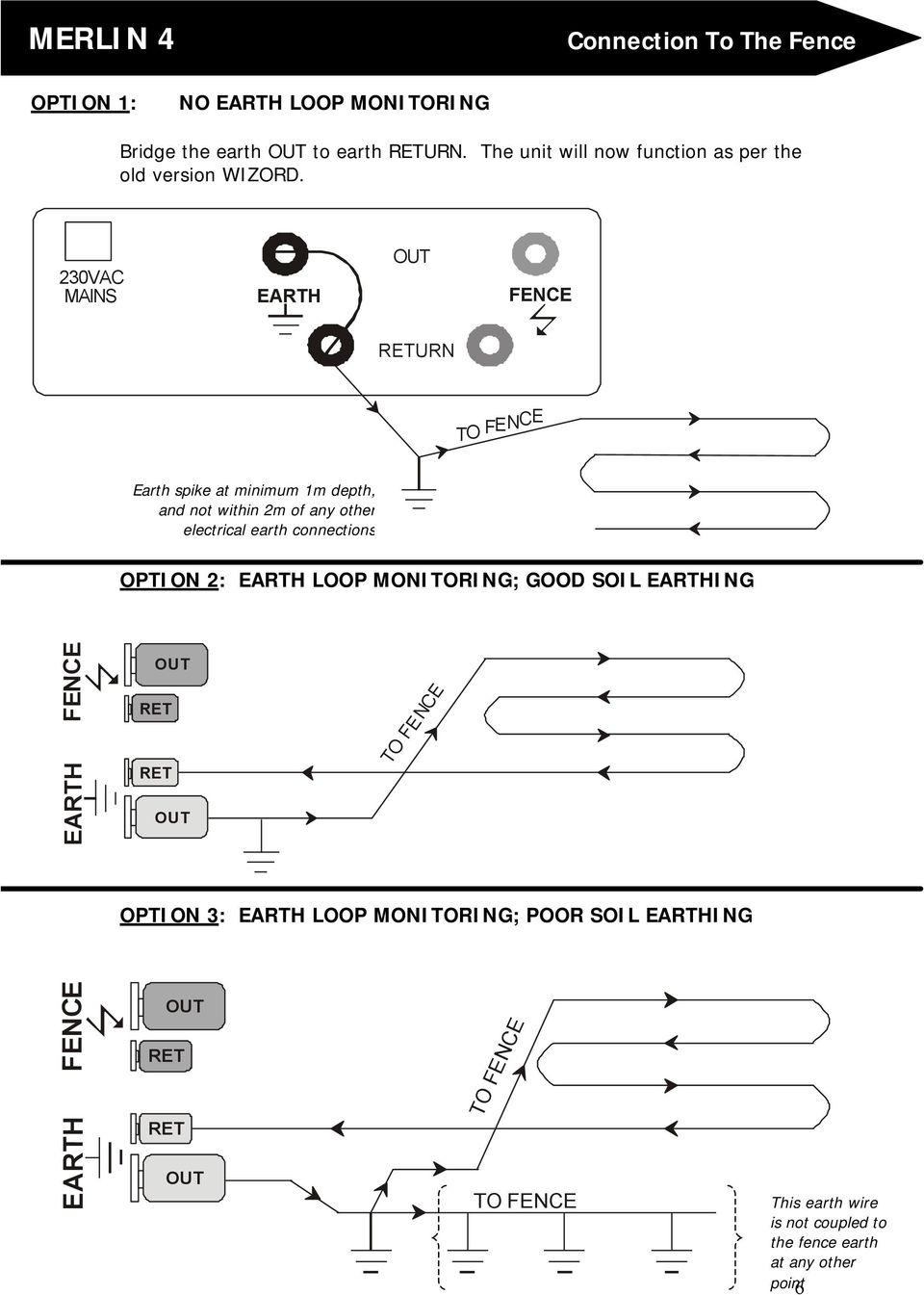
6 Connection To The Fence OPTION 1: NO EARTH LOOP MONITORING Bridge the earth OUT to earth RETURN. The unit will now function as per the old version WIZORD. 230VAC MAINS EARTH OUT FENCE RETURN T O F E N C E Earth spike at minimum 1m depth, and not within 2m of any other electrical earth connections OPTION 2: EARTH LOOP MONITORING; GOOD SOIL EARTHING FENCE EARTH OUT RET RET OUT TO FENCE OPTION 3: EARTH LOOP MONITORING; POOR SOIL EARTHING FENCE EARTH OUT RET RET OUT TO FENCE TO FENCE This earth wire is not coupled to the fence earth at any other point 6
7 Connection / Configuration Diagram 18VAC INPUT + - DAT JP3 INSERTED JP2 OUT PC BOARD JP1 OUT F1 F2 F STROBE LIGHT SWITCH JP4 +-12V AUXILIARY Radio Alarm RET RET OUT OUT EARTH FENCE BATT + ALARM INPUT COM N.O. Relay Board VDC Siren Strobe Light PC BOARD MAXIMUM 100 METERS OF COMMS CABLE JP1 + - DAT EE-MCP EE-M9CP EE-M2CP EE-M20CP KEYPAD JUMPER OPERATION: The following jumper settings must be used: * JP1 removed * JP2 removed * JP3 inserted * JP4 removed 7

8 PC Board Replacement Procedures REMOVAL: STEP 1: Disconnect mains and battery terminals if connected STEP 2: Remove screws 12V 7AH Battery STEP 3: Remove all connectors from PC Board STEP 4: Gently pull PC Board straight up to remove (connections on the back) REPLACEMENT: STEP 5: Gently push PC Board back into place Take care that the spade connectors are correctly positioned before pushing the PC Board into place. 12V 7AH Battery Also ensure that the opto-coupler (looks like LED) is correctly positioned before pushing the PC Board into place STEP 6: Reconnect all connectors to PC Board STEP 7: Reconnect battery terminals 8

9 Service Conditions FUSE DESCRIPTION & FAULT SYMPTOMS PC BOARD F1 F2 F3 HOW TO CHECK: (ALL FUSES ARE 2 AMPERE FAST BLOW) F1: Energizer does not operate when mains is switched off F2: Siren or strobe light does not operate (ensure that the unit was switched off with no fault conditions) F3: Power light is not lit, even when mains is present 9

10 Installer Options INSTALLATION NOTES: 1. Keep the wires to the fence separate from the keypad/gate/siren/strobe/ mains/remote wiring. 2. Do not try and modify the unit. Any unauthorised modifications will null and void the warranty and possibly make the unit illegal. 3. If the remote On/Off facility is used, the wire between the remote switch and the energiser can be up to a 100m. The switch contact must be closed for the energiser to be on. For security reasons it is better to use an intelligent FOB on the keypad bus. 4. A remote receiver can obtain 12VDC from the keypad bus. Current consumption must not exceed 0.1 Amps. This is not sufficient to supply power for an armed response transmitter. 5. The siren and strobe light together must not draw more than 1.75Amps. 6. To connect a radio alarm transmitter or alarm panel to the energiser use an isolation relay between the strobe light output and the panel. Never use the energiser battery to power a radio alarm transmitter or alarm panel. 7. The wire between the magnetic gate switch and the energiser can be up to a 100m but must not run in parallel with the fence wires. The gate switch must be open circuit if the gate is open. 8. The remote keypad cable must not exceed a 100m in total. Avoid running this cable in parallel with any fence (high voltage) wires. 9. You can connect a total of four keypads or FOB units to one energiser. Each must have a unique address setting. 10. Use high voltage insulation wire between the fence and energiser, including the earth wire. Never run these wires in the same conduit or through the same hole as the low voltage wiring. 11. Always use ferrules or line clamps to connect two high voltage wires together. Avoid using different types of material for connections like copper on steel. 12. The fence must be earthed properly with at least one earth electrode as close as possible to the energiser. The distance between the fence earth electrode and other earth systems shall be not less than 10 m. 13. When replacing the lid of the energiser hook the top in first while holding it an angle and then push it closed at the bottom. Fasten the lid down with the two cap screws. 14. Always test the fence alarm for a short and open-circuit after installation at the furthest point on the fence. 15. Do not use the energiser with Non-rechargeable batteries and any lead-acid batteries must be placed in a well-ventilated area during charging. 16. The unit contains a sealed lead-acid battery that will vent to the atmosphere under certain conditions. For this reason it is imperative that the energiser be installed in a well ventilated area. 17. Refer to the applicable laws concerning the installation of electric fences. 10

11 Installer Options ENTER PROGRAMMING MODE 0 Before any of the installer options can be changed, the unit must be in programming mode. To do so, enter the 6 digit installer PIN followed by the * 0 keys. The keypad will beep twice if the PIN was correct. The unit is now in programming mode. If no key is pressed for one minute, the system will automatically exit the programming mode. The default installer PIN is EXIT PROGRAMMING MODE When finished it is important to exit the programming mode. While in programming mode, you will be unable to access any user functions from the keypad. INSTALLER PIN 0 0 The default installer PIN can be changed by pressing the 0 key twice, followed by the new PIN and the key. The new PIN must be 6 digits long. If you cannot remember the PIN, default the unit and use as the PIN. SIREN-ON TIME 0 1 The time that the siren will be on for, can be changed by pressing the 0 key, followed by the 1 key. Select the desired time from the table and press the corresponding number from 0 to 4 followed by the key. The keypad will beep twice to indicate that the new setting was accepted. Example: To change the Siren-On Time to 4 minutes, enter The default Siren-On Time is 4 minutes Sec 1 30 Sec 2 1 Min 3 2 Min 4 4 Min 11

12 Installer Options SIREN-OFF TIME 0 2 The time for the siren to be silent after the Siren-On Time has elapsed, can be changed by pressing the 0 key followed by the 2 key. Select the desired time from the table and press the corresponding number from 0 to 4 followed by the key. The keypad will beep twice to indicate that the new setting was accepted. Example: To change the Siren-Off Time to 2 minutes, enter The default Siren-Off Time is 4 minutes Sec 1 30 Sec 2 1 Min 3 2 Min 4 4 Min NUMBER OF TIMES THE SIREN SOUNDS 0 3 The number of times the siren will sound after an alarm is activated, can be changed by pressing the 0 key, followed by the 3 key. Select the desired number of times from the table and press the corresponding number from 0 to 4 followed by the key. The keypad will beep twice to indicate that the new setting was accepted. Example: To change the Number of Times The Siren Sounds to 10 times, enter The default Number of Times The Siren Sounds is 3 times. 0 Once 1 Twice 2 3 Times 3 6 Times 4 10 Times GATE DELAY TIME 0 4 The time delay for the gate to stay open before the alarm is activated, can be changed by pressing the 0 key, followed by the 4 key. Select the desired time delay from the table and press the corresponding number from 0 to 4 followed by the key. The keypad will beep twice to indicate that the new setting was accepted. Example: To change the Gate Delay Time to 30 seconds, enter The default Gate Delay Time is 4 minutes Sec 1 30 Sec 2 1 Min 3 2 Min 4 4 Min HIGH POWER FENCE VOLTAGE 0 5 The open circuit fence voltage can be changed by pressing the 0 key, followed by the 5 key. Select the desired voltage from the table and press the corresponding number from 0 to 4 followed by the key. 12

13 Installer Options The keypad will beep twice to indicate that the setting was accepted. Example: To change the Fence Voltage to 6 kv, enter The default Fence Voltage is 7 kv. The energizer will only use the High Power Fence Voltage parameter when mains is present. The energizer has a unique algorithm for extending battery life during mains failure conditions and automatically controls the fence voltage kv kv kv kv kv LOW POWER FENCE VOLTAGE 0 6 The open circuit low power fence voltage can be changed by pressing the 0 key, followed by the 6 key. Select the desired voltage from the table and press the corresponding number from 0 to 4 followed by the key. The keypad will beep twice to indicate that the new setting was accepted. Example: To change the Low Power Fence Voltage to 1900 Volts, enter The default Low Power Fence Voltage is 1700 Volts V V V V V STROBE LIGHT FUNCTION 1 0 The strobe light output can be changed by pressing the 1 key followed by the 0 key. Select the desired function from the table and press the corresponding number from 0 to 1 followed by the key. The keypad will beep twice to indicate that the new setting was accepted. Example: To change the Strobe Light Function so that the strobe light switches on whenever the fence is on, enter Strobe light = Alarm 1 Strobe light = fence ON The default Strobe Light Function is option 0. The strobe light switches on when the alarm is activated. MAGNETIC SWITCH ENABLE The magnetic On/Off switch (under the facia of the energizer) can be enabled by pressing the 1 key, followed by the 0 key. Select the desired state from the table and press the corresponding number from 2 to 3 followed by the key. The keypad will beep twice to indicate that the new setting was accepted. Example: To enable the magnetic On/Off switch, enter By default the Magnetic switch is disabled Magnetic switch disabled 3 Magnetic switch enabled 13

14 Installer Options SWITCH FUNCTION (6 WAY TERMINAL STRIP) The switch input, marked as switch on the printed circuit board under the removable 6-way green connector block, can be configured as a timed input (typically used for monitoring a gate) or as a remote On/Off input. The switch function can be changed by pressing the 1 key, followed by the 0 key. Select the desired state from the table and press the corresponding number from 4 to 5 followed by the key. The keypad will beep twice to indicate that the new setting was accepted. Example: To enable the remote On/Off, enter By default the switch is a timed input Timed switch input 5 Remote On/Off input KEYPAD DETECT FUNCTION The energizer can be configured to detect if one or more keypads is present. The keypad detect function can be altered by pressing the 1 key, followed by the 0 key. Select the desired state from the table and press the corresponding number from 6 to 7 followed by the key. The keypad will beep twice to indicate that the new setting was accepted. Example: To enable the keypad detect function, enter (detection period is 15 seconds) By default the Keypad detect is off Keypad detect on 7 Keypad detect off FENCE ALARM DELAY 1 0 The energizer fence alarm delay can be altered. The fence alarm delay can be altered by pressing the 1 key, followed by the 0 key. Select the desired state from the table and press the corresponding number from 8 to 9 followed by the key. The keypad will beep twice to indicate that the new setting was accepted. Example: To make the fence alarm delay on pulse, enter By default the fence return voltage must not be present for three pulses. Note that during mains failure and initial turn On, the energizer automatically uses a 3-pulse count delay. 8 3 Pulse count 9 1 Pulse count 14

15 Installer Options PROGRAMMING NOTES 1. To load factory default settings: Unplug the energizer from the mains and disconnect one of the battery terminals. Reconnect the battery terminal and apply mains to the energizer. Within 38 seconds of reconnecting the battery terminal, the key sequence must be entered on the keypad. The energizer will turn off if the default parameters were accepted. 2. After changing the Fence Alarm Voltage setting, make sure that a short and open circuit fault can still activate the alarm. 3. The Fence Voltage setting is measured with no load on the energizer. It is possible that the output voltage is lower or higher than indicated in the table if a fence is connected to the energizer. FAULT FINDING General fault conditions: Condition Power On Service Siren Comment Normal On On Off Off Normal no fault Power Failure Off On Off Off Check if charger is plugged in Battery Low Off On Pulse (5 sec) Offf Check charger and fuses Battery Flat Off Flash On Check charger and fuses Low Voltage On Flash Off Off Fence in low voltage mode Service Flash On Service fault see next table Service fault conditions: There are 5 possible conditions that can cause a service alarm. To determine the cause of the service alarm, open the lid of the energizer box while the service light is flashing. Make sure that Jumper 4 (JP4) is NOT inserted. The following lights will indicate the cause of the service condition: Condition LEDS RHS (fence Comments terminals at bottom) Comms failure Closest battery Only if keypad detect enabled Fence interference Mains pickup, second energizer connected Over temperature Check battery/replace battery/unit faulty Energizer faulty Faulty or tampered with Battery flat Bottom energizer Check fuses/mains/battery COMPLIANCE WITH INTERNATIONAL STANDARDS The Merlin 4 Energizer has been designed to comply with the latest International safety and environmental standards. The manufacturer, IO Tech Manufacturing (Pty) Ltd., reserves the right to make modifications and alter specifications without prior notice. Compliance testing in accredited overseas laboratories is in the process of being finalized. 15

16 FAQ s FREQUENTLY ASKED QUESTIONS Q: Why do the alarm indicator lights sometimes flash at different rates and sometimes be lit permanently? A: A slow flash indicates a bypass condition. The respective alarm will not trigger when the energizer is in this state. A fast flash indicates that the alarm condition still persists i.e. the service indicator will flash if the battery voltage is still low. A permanently lit alarm indicator illustrates that a fault condition was present but is no longer active i.e. mains has been restored and the battery has charged sufficiently that the service indicator is permanently lit. Q: After the fence alarm is activated the fence alarm indicator light does not stop flashing even after repeatedly turning the unit on and off? A: There is most probably a fault on the fence. Switch the energiser off and disconnect the fence wires at the energizer. Take a short peace of HT wire and bridge the fence-out (Red) and fence-return (Black) terminals. Connect a jumper between the two Green terminals. Switch the energiser back on, if the fence indicates GOOD and the fence alarm indicator is lit continuously then the energiser is working correctly and the fault is on the fence. Q: After the energizer lid is opened I cannot turn the energizer on? A: The energiser has a built-in safety switch to avoid electrical shock. If you have to work on the unit while the lid is removed insert jumper 4 (JP4). For use by qualified service personnel only. It is illegal to leave this jumper inserted. Q: When and for how long will the siren sound? A: The siren will be activated by one of the following conditions: Fence Alarm, Gate Alarm, Service Alarm or by holding the Panic button (on the keypad) in for 3 seconds. For a permanent fault like a broken fence wire, the siren will sound for 4 minutes (Siren-on Time) or until the user resets the energiser by switching it off and on again. If the energiser is not reset then it will sound the alarm again after 4 minutes (Sirenoff Time). This siren on-off cycle will repeat itself 3 times (Number Of Times The Siren Sounds) after which the siren will not sound unless the fault, i.e. broken wire, is repaired. Q: Does the electric fence use a lot of electricity? A: No it does not. Typically 10 Watts and 100 hours of usage costs one unit of electricity. Q: How long will the energizer run for under mains failure conditions? A: If the fence is free from vegetation and the battery is in good condition, typically twenty hours. 16

17 Appendix A BASIC DEFINITIONS: Electric Fence: a barrier which includes one or more electric conductors, insulated from earth, to which electric pulses are applied by an energiser Connecting Lead: an electric conductor, used to connect the energiser to the electric fence or the earth electrode Electric Security Fence: a fence used for security purposes which comprises an electric fence and a physical barrier electrically isolated from the electric fence Public Access Area: any area where persons are protected from inadvertent contact with pulsed conductors by a physical barrier. Pulsed Conductors: conductors which are subjected to high voltage pulses by the energiser. Secure Area: an area where a person is not separated from pulse conductors below 1,5m by a physical barrier. GENERAL REQUIREMENTS FOR ELECTRIC SECURITY FENCES: Electric fences shall be installed and operated so that they cause no electrical hazard to persons, animals or their surroundings. Electric fence constructions which are likely to lead to the entanglement of animals or persons shall be avoided. An electric fence shall not be supplied from two different energizers or from independent fence circuits of the same energiser. For any two different electric fences, each supplied from a different energiser independently timed, the distance between the wires of the two electric fences shall be at least 2m. If this gap is to be closed, this shall be effected by means of electrically non-conductive material or an isolated metal barrier. Barbed wire or razor wire shall not be electrified by an energiser. Any part of an electric fence which is installed along a public road or pathway shall be identified at frequent intervals by prominently placed warning signs securely fastened to the fence posts or firmly clamped to the fence wires. The size of the warning signs shall be at least 100mm x 200mm. The background colour of both sides of the warning plate shall be yellow. The inscription on the plate shall be black. The warning sign shall typically appear as depicted in Figure x. The inscription shall be indelible, inscribed on both sides of the warning plate and have a height of at least 25 mm. 17

18 Appendix A Cont d Warning signs shall be placed at - each gate - each access point - intervals not exceeding 10m - adjacent to each sign relating to chemical hazards for the information of emergency services. Gates in electric security fences shall be capable of being opened without the person receiving an electric shock. The energiser earth electrode shall penetrate the ground to a depth of at least 1m. The distance between any electric security fence earth electrode and other earth systems shall not be less than 2m. Connecting leads that are run inside buildings shall be effectively insulated from the earthed structural parts of the building. This may be achieved by using insulated high voltage cable. Connecting leads that are run underground shall be run in a conduit of insulating material or else insulated high voltage cable shall be used. Care shall be taken to avoid damage to the connecting leads due to external factors. Connecting leads shall not be installed in the same conduit as the mains supply wiring, communication cables or data cables. Connecting leads and electric fence wires shall not cross above overhead power or communication lines. Mains supply wiring shall not be installed in the same conduit as signalling leads associated with the electric security fence installation. Crossings with overhead power lines shall be avoided wherever possible. If such a crossing cannot be avoided, it shall be made underneath the power line and as nearly as possible at right angles to it. If connecting leads and electric fence wires are installed near an overhead power line, the clearances shall not be less than those shown in Table 1. Power Line Voltage (V) Clearance(m) Equal or less than >1 000 and equal or less than > Table 1 If connecting leads and electric fence wires are installed near an overhead power line, their height above the ground shall not exceed 3m. 18

19 Appendix A Cont d Where an electric security fence passes below bare power line conductors, the highest metallic element shall be effectively earthed for a distance of not less than 5m on either side of the crossing point. This height applies either side of the orthogonal projection of the outermost conductors of the power line on the ground surface, for a distance of - 2m for power lines operating at a nominal voltage not exceeding V - 15m for power lines operating at a nominal voltage exceeding 1 000V Electric security fences and their ancillary equipment shall be installed, operated and maintained in a manner that minimizes danger to persons, and reduces the risk of persons receiving an electric shock unless they attempt to penetrate the physical barrier, or are in a secure area without authority. Exposed conductive parts of the physical barrier shall be effectively earthed. A spacing of 2.5 m shall be maintained between uninsulated electric fence conductors or uninsulated connecting leads supplied from different energizers. This spacing may be less where conductors or connecting leads are covered by insulating sleeving, or consist of insulated cables, rated to at least 10kV. This requirement need not apply where the separately energized conductors are separated by a physical barrier, which does not have any openings greater than 50mm. A vertical separation of not less than 2m shall be maintained between pulsed conductors fed from different energizers. Ensure that all ancillary equipment connected to the electric security fence circuit provides a degree of isolation between the fence circuit and the supply mains equivalent to that provided by the energiser. Protection from the weather shall be provided from the ancillary equipment unless this equipment is certified by the manufacturer as being suitable for use outdoors, and is of a type with a minimum degree of protection IPX4. Rev

ELECTRIC FENCE ENERGISER
 GROUP OF COMPANIES MERLIN 4 Electric Fence Energizer USER MANUAL ELECTRIC FENCE ENERGISER E-MER4 USER MANUAL Table of Contents INTRODUCTION.. 3 COMPANY PROFILE 3 GUARANTEE 4 USING YOUR KEYPAD 5-8 WHAT
Advantium 2 Plus Alarm
 ADI 9510-B Advantium 2 Plus Alarm INSTALLATION AND OPERATING INSTRUCTIONS Carefully Read These Instructions Before Operating Carefully Read These Controls Corporation of America 1501 Harpers Road Virginia
e-ask electronic Access Security Keyless-entry
 e-ask electronic Access Security Keyless-entry e-fob Keyless-entry entry System Full-Function Function Installation Manual FCC ID: TV2EFOB1 (UM20 ~ 22793-02) Table of Contents Introduction... 1 e-fob Operation
AIM TECHNICAL MANUAL PATENT PENDING STOP REMEMBER TO ACTIVATE UNIT BEFORE TESTING. See page 9 for Activation Instructions
 AIM TECHNICAL MANUAL AIM-1450HW HARDWIRE PATENT PENDING STOP REMEMBER TO ACTIVATE UNIT BEFORE TESTING See page 9 for Activation Instructions AIM Technical Manual - AIM 1450HW AIM-1450HW HARDWIRE ABOUT
Wireless Home Security Alarm System AM 500
 Wireless Home Security Alarm System AM 500 12 MONTH GUARANTEE Installation & Operating Instructions INTRODUCTION The AM500 is a simple self-contained alarm system. It protects the home by sounding a siren
Model SRMD Setra Remote Monitoring Display
 Model SRMD Setra Remote Monitoring Display 1.0 GENERAL INFORMATION Thank you for purchasing the Setra Remote Monitoring Display (SRMD). The SRMD is a digital panel meter with a bright 1 LED display for
PC Tab Security System INSTRUCTION MANUAL
 PC Tab Security System INSTRUCTION MANUAL This manual is intended as a Quick Start manual covering the basic functions that have been enabled on the alarm panel. The alarm panel is capable of extensive
This equipment has been tested and found to comply with the limits for a Class B digital device, pursuant to part 15 of the FCC Rules.
 Power Max Level 2 Charging Station en Installation and Operating Instructions This equipment has been tested and found to comply with the limits for a Class B digital device, pursuant to part 15 of the
WIRELESS HOME ALARM SYSTEM (WHA1)
 WIRELESS HOME ALARM SYSTEM (WHA1) IMPORTANT : PLEASE READ THIS MANUAL CAREFULLY BEFORE ATTEMPTING TO INSTALL AND OPERATE THIS ALARM SYSTEM. SAFETY Please note: Before you start to install this alarm, we
PK5500 v1.1 Installation Instructions
 PK5500 v1.1 Installation Instructions 1 2 3 4 5 6 7 8 9 * 0 # WARNING: Please refer to the System Installation Manual for information on limitations regarding product use and function and information on
BARDIC. 4 & 8 Zone Fire Panels Zircon range. Data, installation, operation and maintenance. by Honeywell
 Data, installation, operation and maintenance 4 & 8 Zone Fire Panels Zircon range BARDIC by Honeywell LED flashing LED Continuous FAULT DISABLE/TEST Power General Fault Sounder Fault/ Disable System Fault
User s Manual Before using the inverter, you need to read and save the safety instructions.
 User s Manual Before using the inverter, you need to read and save the safety instructions. STI SERIES (STI200, STI300, STI500, STI700, STI1000) Power Frequency Pure Sine Wave Inverter The information
Water Leak Detection System
 Water Leak Detection System Installation and Operating Manual 505-334-5865 ph 505-334-5867 fax www.rodisystems.com email:[email protected] 936 Highway 516 Aztec, NM 87410-2828 Manual Revisions and Copyright
When any of the following symbols appear, read the associated information carefully. Symbol Meaning Description
 Samba OPLC SM35-J-R20 Installation Guide The Unitronics SM35-J-R20 offers the following onboard I/Os: 12 Digital Inputs, configurable via wiring to include: 1 HSC/Shaft-encoder Input, 2 Analog inputs (only
CMD-8000 rev. A COMMANDER SERIES REMOTE CONTROL ENTRY SYSTEM
 INTRODUCTION CMD-8000 rev. A COMMANDER SERIES REMOTE CONTROL ENTRY SYSTEM Thank you for purchasing the CMD-8000 Commander from Dakota Digital. This, along with many other products that Dakota Digital has
Automatic Phone-Out Home Monitoring Systems
 Automatic Phone-Out Home Monitoring Systems Power Outage and Freeze Alarm Model Number: THP202 Power Outage, Freeze and Flood Alarm Product Description Model Number: THP201 These monitoring systems are
GENERATOR START CONTROL MODULE - MINI (2 Wire to 3 Wire)
 FEATURES & APPLICATIONS Inexpensive 2 wire to 3 wire start controller for electric start high speed gas generators. Optimized for use with Outback Invertors. Supports three types of 3 wire generator control
Residential Gateway (RG) Battery Backup REV B
 Residential Gateway (RG) Battery Backup REV B Save this user manual This manual contains important instructions regarding the installation and operation of this device. Read this manual thoroughly before
Wireless Alarm System. Panic Button. User s Manual. Choice ALERT. Control all sensors, accessories and remote transmitters from one location
 Wireless Alarm System Panic Button User s Manual Choice ALERT Control all sensors, accessories and remote transmitters from one location Table of Contents Important Safeguards 4 Introduction 5 Activating
HAM841K ALARM CONTROL PANEL FOR COMMERCIAL AND RESIDENTIAL SECURITY SYSTEMS
 ALARM CONTROL PANEL FOR COMMERCIAL AND RESIDENTIAL SECURITY SYSTEMS USER MANUAL USER MANUAL ALARM CONTROL PANEL FOR COMMERCIAL AND RESIDENTIAL SECURITY SYSTEMS INTRODUCTION The (HA-841K) is a complete
VARIO PROX CARD READER INSTALLATION MANUAL
 VARIO PROX CARD READER INSTALLATION MANUAL TABLE OF CONTENTS 1.0 INTRODUCTION...2 1.1 Legend...3 1.2 Terminology...4 2.0 MOUNTING...5 3.0 WIEGAND CONNECTION...6 4.0 AUX BUTTON INPUT...7 5.0 INSTALLER PROGRAMMING...8
SOLAR ELECTRIC MODULE ES-124 & ES-62T Owners Manual and Installation Guide
 SOLAR ELECTRIC MODULE ES-124 & ES-62T Owners Manual and Installation Guide circuit. Reverse connection will damage the module and may result in fire. CAUTIONS Solar electric modules produce DC electricity
Wireless Alarm System. Wireless Keypad. User s Manual. Choice ALERT. Control all sensors, accessories and remote transmitters from one location
 Wireless Alarm System Wireless Keypad User s Manual 1 2 3 4 Choice ALERT Control all sensors, accessories and remote transmitters from one location Table of Contents Important Safeguards 4 Introduction
Single Channel Loop Detector
 Single Channel Loop Detector Model - LD100 Series The LD100 is a single channel inductive loop detector designed for parking and access control applications. The detector is connected to an inductive loop
Wireless Indoor/ Outdoor Thermometer
 Wireless Indoor/ Outdoor Thermometer Owner s Manual Please read before using this equipment. ˆ Contents FCC Information... 3 FCC Declaration of Conformity... 5 Preparation... 5 Installing Batteries...
StructureScan HD Module. Installation Guide ENGLISH. www.bandg.com www.simrad-yachting.com www.lowrance.com
 StructureScan HD Module Installation Guide ENGLISH www.bandg.com www.simrad-yachting.com www.lowrance.com Disclaimer As Navico is continuously improving this product, we retain the right to make changes
RI-215A Operator s Manual. Part Number: 71-0045RK Revision 0 Released: 10/3/05
 RI-215A Operator s Manual Part Number: 71-0045RK Revision 0 Released: 10/3/05 Warranty RKI Instruments, Inc., warrants gas alarm equipment sold by us to be free from defects in materials and workmanship,
Master Time Clock MTC-200 MTC-400 MTC-600. Users Manual
 Master Time Clock MTC-200 MTC-400 MTC-600 Users Manual Toll Free (888)713-0373 Phone (972)987-4408 FAX (877)720-9291 www.midwest-time.com [email protected] TABLE OF CONTENTS TOPIC PAGE GENERAL DESCRIPTION
Solar Power Systems Models: PVS220W-24 and PVS220W-48 Installation Manual
 Solar Power Systems Models: PVS220W-24 and PVS220W-48 Installation Manual 255379 Rev. D0 1015 Printed in U.S.A. Copyright 2015 Federal Signal Corporation Limited Warranty The Alerting and Notification
AT&T. PARTNER Plus Door Phone. Installation and Operation Manual
 AT&T PARTNER Plus Door Phone Installation and Operation Manual Copyright 1990 AT&T All Rights Reserved Printed in U.S.A. CIC# 999-500-317 OII722050-051 Issue 1 October 1990 PARTNER Plus Door Phone is a
User Manual (English)
 User Manual (English) Table of Contents General Safety Information...2 Fueltank UNO Components...3 Charging the Fueltank UNO...4 Using the Fueltank UNO...5 Power Saving Mode...6 Checking the Fueltank UNO
Operating Instructions
 VMD202 Vehicle Motion Detector Operating Instructions CAUTIONS AND WARNINGS Never use the VMD202 as a safety reversing or presence detection system. The VMD202 requires that a vehicle be moving for detection.
HM-W536 Install Guide
 HM-W536 Install Guide 9/13/2013 IMPORTANT SAFETY INSTRUCTIONS Warning - When using electrical devices, basic safety precautions should be followed to reduce the risk of fire, electrical shock or injury.
Single Station Remote Alarm
 ADI 5106G Certified ISO 9001:2000 Single Station Remote Alarm 529 5106-01-120 529 5106-01-220 INSTALLATION AND OPERATING INSTRUCTIONS Carefully Read These Instructions Before Operating Controls Corporation
Solar Home System. User Manual. AEH-SHS01-10W2L Solar Home System 2 Lamps
 Solar Home System User Manual AEHSHS0110W2L Solar Home System 2 Lamps All rights reserved Specifications subject to change without prior notice 2 Dear Customer, Thank you for purchasing Schneider Electric
Model HPX10 Series Automatic Battery Charger User s Manual Rev. 1.0 October 17, 2006
 B R A N D Model HPX10 Series Automatic Battery Charger User s Manual Rev. 1.0 October 17, 2006 For Sales, Support and Service phone: 407-331-4793 fax: 407-331-4708 website: www.xenotronix.com email: [email protected]
Mobile Data Power Model: MDP-25
 Mobile Data Power Model: MDP-25 Topic Section Features... 2 Operational Features Summary... 2 Back-up Battery Power Internal Charger Voltage Spike Protection RF Noise Filtering Warning of Imminent Loss
PIPELINE INSPECTION COMPANY LTD. Portable Holiday Detectors. OPERATING INSTRUCTIONS SPY PORTABLE HOLIDAY DETECTORS Models 780, 785, & 790
 PIPELINE INSPECTION COMPANY LTD. Portable Holiday Detectors OPERATING INSTRUCTIONS SPY PORTABLE HOLIDAY DETECTORS Models 780, 785, & 790 Safety Disclaimer Only trained and responsible personnel should
Manual for Fire Suppression & Methane Detection System
 Manual for Fire Suppression & Methane Detection System Fogmaker North America Post address: 150 Gordon Dr Exton, PA 19341 Delivery address: 150 Gordon Dr Exton, PA 19341 Tel: 610-265-3610 Fax: 610-265-8327
INSTALLATION GUIDE. Card Reader & Controller with KIM Swipe Reader for Solitaire 850 / 950 / 850L Learnlok PK2930
 INSTALLATION GUIDE Card Reader & Controller with KIM Swipe Reader for Solitaire 850 / 950 / 850L Learnlok PK2930 Card Reader and Controller Model 3.5 with KIM Swipe Reader Table of Contents 1. Features..................................
PRODUCT WARRANTY. Page 20
 PRODUCT WARRANTY Manufactured equipment is warranted to be free from defects in material and workmanship for a period of twelve (12) months from date of manufacture as indicated by the date stamp and/or
Manual. Solar Fountain Mobile Phone Charger
 EN Manual Solar Fountain Mobile Phone Charger Copyrights 2008 Victron Energy B.V. All Rights Reserved This publication or parts thereof may not be reproduced in any form, by any method, for any purpose.
VK-250 WARRANTY REGISTRATION FORM
 VK-250 WARRANTY REGISTRATION FORM Unit Serial Number: Customer Name: Address: Date of Purchase: Purchased From: Dealer Name: Address: IMPORTANT NOTE: In order to receive the full five year product warranty,
Manual. Simrad StructureScan LSS-1 Sonar Module. English
 Manual Simrad StructureScan LSS-1 Sonar Module English www.simrad-yachting.com A brand by Navico - Leader in Marine Electronics Disclaimer As Navico is continuously improving this product, we retain the
Installation and Operation Guide for PD4100 Series Power Control Centers
 Installation and Operation Guide for PD4100 Series Power Control Centers Extended warranties are available for purchase at www.progressivedyn.com Member Thank you for selecting Progressive Dynamics as
for DNE-K07 Reference and Installation Manual
 for DNE-K07 Reference and Installation Manual TABLE OF CONTENTS INTRODUCTION...2 Specifications... 3 Navigation... 3 INSTALLATION...4 Viewing Angle... 4 Keypad Cover Clearance... 4 Mounting the Metal
Installation and Operation Guide for PD4000 Series Power Control Center
 Extended warranties are available for purchase at www.progressivedyn.com Installation and Operation Guide for PD4000 Series Power Control Center Member Thank you for selecting Progressive Dynamics as your
Auto Dialer. Manual E-921APQ E-921GPQ
 Troubleshooting: Auto dialer will not arm/disarm Auto dialer will not dial out Unit doesn t respond to a call-back Difficulty in activating room monitor by telephone remote control Make sure that you have
Daker DK 1, 2, 3 kva. Manuel d installation Installation manual. Part. LE05334AC-07/13-01 GF
 Daker DK 1, 2, 3 kva Manuel d installation Installation manual Part. LE05334AC-07/13-01 GF Daker DK 1, 2, 3 kva Index 1 Introduction 24 2 Conditions of use 24 3 LCD Panel 25 4 Installation 28 5 UPS communicator
EPM3. Phase Sequence and Motor Rotation Tester. Users Manual
 EPM3 Phase Sequence and Motor Rotation Tester Users Manual 1 L1 L2 L3 2 3 A B C CAT 600V 3-PHASE TESTER 5 TEST M1 M2 BATT M3 EPM3 MOTOR ROTATION TESTER EPM3 MOTOR ROTATION DETERMINED WHILE FACING MOTOR
LESTRONIC DV AUTOMATIC 12 OR 24 VOLT DUAL OUTPUT DUAL MODE BATTERY CHARGER MODEL 16350 TYPE 12/24EL40-10ET
 LESTRONIC DV AUTOMATIC 12 OR 2 VOLT DUAL OUTPUT DUAL MODE BATTERY CHARGER MODEL 16350 TYPE 12/2EL0-10ET PLEASE SAVE THESE IMPORTANT SAFETY AND OPERATING INSTRUCTIONS For correct operation of the equipment,
Crow Limited Warranty. Print Version 017
 Crow Limited Warranty (Crow) warrants this product to be free from defects in materials and workmanship under normal use and service for a period of one year from the last day of the week and year whose
Original instructions Tina 3A/Aps Adaptor unit
 Original instructions Tina 3A/Aps Adaptor unit ABB Jokab Safety Varlabergsvägen 11, SE-434 39 Kungsbacka, Sweden www.abb.com/jokabsafety Read and understand this document Please read and understand this
TRANSFORMER 1-855-HD-HAMPTON HAMPTONBAY.COM
 Item #1001 509 794 Model DIY-300PS USE AND CARE GUIDE TRANSFORMER Questions, problems, missing parts? Before returning to the store, call HamptonBay Customer Service 8 a.m. - 7 p.m., EST, Monday Friday,
AC-115 Compact Networked Single Door Controller. Installation and User Manual
 AC-115 Compact Networked Single Controller Installation and User Manual December 2007 Table of Contents Table of Contents 1. Introduction...5 1.1 Key Features... 6 1.2 Technical Specifications... 7 2.
Wireless Alarm System. Window/Door Sensor. User s Manual. Choice ALERT. Control all Sensors & accessories from one location
 45131 Wireless Alarm System Window/Door Sensor User s Manual Choice ALERT Control all Sensors & accessories from one location Table of Contents Important Safeguards 4 Introduction 5 Installation 6 Assigning
IPX AUTOMATIC IP NETWORK LOSS BACKUP A/B SWITCH INSTRUCTION BOOK IB6444-02
 IPX AUTOMATIC IP NETWORK LOSS BACKUP A/B SWITCH INSTRUCTION BOOK IB6444-02 TABLE OF CONTENTS DESCRIPTION 2 MOUNTING INSTRUCTIONS 2 HOW TO CABLE THE IPX 2/3 POWER SUPPLY INSTALLATION 3 OPERATION 3 CARE
HWS100 Wireless Home Security System
 4902000 HWS100 Wireless Home Security System Owner s Manual WARNING: Security system devices cannot compensate for loss of life or property. Company is not responsible for any loss or intrusion. CONTENTS
RUST ELECTRONICS LTD. Remote Switching Unit RCU-O4
 RUST ELECTRONICS LTD Remote Switching Unit RCU-O4 MAINS REMOTE SWITCHING UNIT RCU-O4 The RCU-O4 is a radio remote controlled switching unit that will allow the remote operation of any appropriate electrical
ABB Drives. User s Manual. Pulse Encoder Interface Module RTAC-01
 ABB Drives User s Manual Pulse Encoder Interface Module RTAC-0 Pulse Encoder Interface Module RTAC-0 User s Manual 3AFE 64486853 REV A EN EFFECTIVE:.5.00 00 ABB Oy. All Rights Reserved. Safety instructions
Owner's Manual [ S/N LABEL HERE ] Document # BW-BCU5DOC
![Owner's Manual [ S/N LABEL HERE ] Document # BW-BCU5DOC](/thumbs/39/18146231.jpg "Owner's Manual [ S/N LABEL HERE ] Document # BW-BCU5DOC") Owner's Manual [ S/N LABEL HERE ] Document # BW-BCU5DOC BAYweb Remote Model BW-BCU5 Owner's Manual Copyright 2009-2010 Bay Controls, LLC Part Number: BW-BCU5DOC Revision: 0.2 April 18, 2010 BAYweb is a
Owner's Manual [ S/N LABEL HERE ] Document # BW-BCU5DOC BAYweb Remote Model BW-BCU5 Owner's Manual Copyright 2009-2010 Bay Controls, LLC Part Number: BW-BCU5DOC Revision: 0.2 April 18, 2010 BAYweb is a
Tina 2A/B Adaptor unit
 Original instructions Tina 2A/B Adaptor unit ABB Jokab Safety Varlabergsvägen 11, SE-434 39 Kungsbacka, Sweden www.abb.com/jokabsafety Read and understand this document Please read and understand this
DRM75A 230V 20/100A DIN rail single phase two wire energy meter
 DRM75A 230V 20/100A DIN rail single phase two wire energy meter 1.1 Safety instruction 1.2 Foreword 1.3 Performance criteria 1.4 Specifications 1.5 Basic errors 1.6 Description 1.7 Dimensions 1.8 Installation
CM705B - Universal Expander Module CM707B - Plug On Zone Expander Security Systems
 CM705B - Universal Expander Module CM707B - Plug On Zone Expander Security Systems EN Security System CM705B CM705B - Universal Expander Module The CM705B universal expander provides a cost effective way
LCD5500Z / PKP-LCD v3.x Installation Instructions
 LCD5500Z / PKP-LCD v3.x Installation Instructions TM Introduction The LCD5500Z / PKP-LCD keypad displays system status using an LCD screen. The keypad can be used on PowerSeries security systems with up
Using your LED Plus keypad
 Using your LED Plus keypad System 238 System 2316 System 238i System 2316i Part Number 5-051-372-00 Rev B Thank you for purchasing this C&K alarm system Your system is one of the most powerful and advanced
ADA COMPLIANT BOX STYLE TELEPHONE INSTALLATION, PROGRAMMING AND OPERATING INSTRUCTIONS FOR MODEL PBX
 ADA COMPLIANT BOX STYLE TELEPHONE INSTALLATION, PROGRAMMING AND OPERATING INSTRUCTIONS FOR MODEL PBX INSTALLATION INSTRUCTIONS Step 1. Determine the position for the Hands-free phone in the elevator phone
AR-721U/721K/661U User s Guide
 AR-72U/72K/66U User s Guide Feb. 6, 2004 Table of Contents Page. Main Feature --------------------------------- 3 2. AR-72U Installation --------------------------------- 4 2. Steps ---------------------------------
Installation & Operation Manual
 GET CONNECTED Installation & Operation Manual DEVICE INTEGRATION AND CHARGING KIT TranzIt USB IS32 Note to Readers, The information contained within the following documentation is subject to change without
www.sebury.com.cn Digital Keypad Use s Manual
 K3 K4 www.sebury.com.cn Digital Keypad Use s Manual Contents Introduction Introduction Specifications Intramural Interface Circuit 3 Mounting 3 Wiring 5 Power UP 7 Engineer Programming Mode 7 The K3/K4
user s manual Battery Case model #: SPB3200 Battery Case Charger for Samsung Galaxy S 4
 user s manual model #: SPB3200 Charger for Samsung Galaxy S 4 What s Included Unpack the battery case and make sure all accessories are put aside so they will not be lost. hello. USB to Micro USB Cable
PK-01. Standalone door control module. SATEL sp. z o.o. ul. Schuberta 79 80-172 Gdańsk POLAND tel. + 48 58 320 94 00
 Standalone door control module PK-01 Firmware version 1.00 pk-01_en 06/12 SATEL sp. z o.o. ul. Schuberta 79 80-172 Gdańsk POLAND tel. + 48 58 320 94 00 [email protected] www.satel.eu WARNINGS Read carefully
GSM Alarm System User Manual
 GSM Alarm System User Manual For a better understanding of this product, please read this user manual thoroughly before using it. Quick Guider After getting this alarm system, you need to do the following
Wireless Laser Barcode Scanner ils 6300BU. User s Manual
 Wireless Laser Barcode Scanner ils 6300BU User s Manual FCC Compliance This equipment has been tested and found to comply with the limits for a Class A digital device, pursuant to Part 15 of the FCC Rules.
INSTALLATION MANUAL 3RP / 5RP 4-BUTTON SERIES VEHICLE SECURITY SYSTEMS
 3RP / 5RP 4-BUTTON SERIES VEHICLE SECURITY SYSTEMS INSTALLATION MANUAL Before you begin the installation Read the INSTRUCTIONS! Always use a multi-meter when verifying vehicle wiring. Before mounting the
INSTRUCTION MANUAL MODEL PCD-88
 INSTRUCTION MANUAL MODEL PCD-88 CLOSED CAPTION DECODER LINK ELECTRONICS, INC. 2137 Rust Avenue Cape Girardeau, Missouri 63703 Phone: 573-334-4433 Fax: 573-334-9255 e-mail: sales @ linkelectronics.com website:
Rain+Birdt. Simple To Set Timer (SST) Setup & Operation Instructions. English. 1-800- RAIN BIRD (800-724-6247) or visit www.rainbird.
 Rain+Birdt Simple To Set r (SST) Setup & Operation Instructions English Installation...2 Tools and Supplies Needed...2 Step 1. Mount r...2 Step 2. Connect Power...2 Indoor r...2 Outdoor r...2 Step 3. Connect
SSW-iLM Keypad. Wire Harness Configuration. Note: This product is designed to be installed and serviced by security and lock industry professionals
 SSW-iLM Keypad Note: This product is designed to be installed and serviced by security and lock industry professionals Specifications Case dimensions: 6 1/2 L x 1 3/4 W x 1 1/8 D Electrical: 5-12VDC Only
Digital echo-charge. Owner s Manual. Xantrex Digital echo-charge Battery Charger
 Digital echo-charge Owner s Manual Xantrex Digital echo-charge Battery Charger Thank you for purchasing a Xantrex Digital echo-charge. Xantrex Technology Inc. takes pride in manufacturing quality products
PT-6000 Power Tower INSTALLATION MANUAL SPECIFICATIONS
 PT-6000 Power Tower INSTALLATION MANUAL 10.5 9.75 12 22.75 10.75 MAXIMUM SOIL HEIGHT: DO NOT ALLOW FILL TO EXCEED THIS LEVEL! 11.5 4 4 13 Optional PT-BASE for new installations or when previous 2000/6000
CMD-9000 COMMANDER SERIES REMOTE CONTROL ENTRY SYSTEM
 CMD-9000 COMMANDER SERIES REMOTE CONTROL ENTRY SYSTEM INTRODUCTION Thank you for purchasing the CMD-9000 Commander from Dakota Digital. This, along with many other products that Dakota Digital has to offer,
Model 53603. Owner s Manual. Español - P. 19 Français - P. 39
 Model 53603 Owner s Manual Español - P. 19 Français - P. 39 Table of Contents I. Introduction............................ 1 Sample Watering Plan.......................... 1 II. Installation...........................
OPERATING MANUAL CONTRACTOR STYLE AXIAL FANS
 Manual No. BLWR043 Rev. 4 September 2012 OPERATING MANUAL CONTRACTOR STYLE AXIAL FANS CVF-8AC CVF-8AC50 CVF-6ACAN CVF-15ACAN CVF-25ACAN CVF-8A15KIT CVF-8A25KIT MODELS: CVF-8DC CVF-6DCAN CVF-15DCAN CVF-25DCAN
Instructions & Safety Information Models A220-20D and A220-20L Version 2
 Quick 220 Voltage Converting Power Supply Instructions & Safety Information Models A220-20D and A220-20L Version 2 Quick 220 Systems LLC PO Box 47489 Phoenix, Arizona 85068-7489 800-347-0394 602-938-6057
CHAPTER 1. GETTING STARTED... 1
 REV. 01-2014 TABLE OF CONTENTS LIMITATION OF LIABILITY CHAPTER 1. GETTING STARTED... 1 1.1 Introduction... 1 1.2 System Descriptions... 1 1.3 System Applications... 1 1.4 System Specifications... 1 1.5
ACTIVE 5 ENGINEERING MANUAL
 ACTIVE 5 ENGINEERING MANUAL C & K Systems Ltd C031-066 Issue 3 THE ACTIVE 5 INSTALLATION MANUAL. Date: Feb 1997 INTRODUCTION. The Active 5 is a microprocessor controlled intruder alarm panel. It features
Business/ Home GSM Alarm System
 Business/ Home GSM Alarm System BUSINESS/HOME GSM ALARM SYSTEM POWER STATUS RECORD SIGNAL User Manual Profile For a better understanding of this product, please read this user manual thoroughly before
UNIVERSAL LUMBAR INSTALLATION INSTRUCTIONS
 UNIVERSAL LUMBAR INSTALLATION INSTRUCTIONS CONTENTS Parts List... 2 Parts Diagram... 2 Helpful Hints... 3 Installation... 4 Operation and Troubleshooting Guide... 6 Warranty Information... 8 Form #3132,
WARNING: FAILURE TO FOLLOW THESE RULES MAY RESULT IN SERIOUS PERSONAL INJURY CAUTION: INSTALLATION LOCATION:
 Revision Level: 01 Revision Date: 07/07/2011 Please read all instructions carefully to help ensure a correct and SAFE installation of your Second Wind Ultraviolet Germicidal Air Purifier. Failure to do
Installation and Operation Guide PD4600 Series Converter Replacement
 Installation and Operation Guide PD4600 Series Converter Replacement Extended warranties are available for purchase at www.progressivedyn.com Member Thank you for selecting Progressive Dynamics as your
Back-UPS 650 VA 120 V with AVR (BX650CI-LM)
 Back-UPS 650 VA 120 V with AVR (BX650CI-LM) Overview Do not install the unit in direct sunlight, in areas of excessive heat or humidity, or in contact with fluids ON/OFF button Battery connector Circuit
i ChatterBox! Motorcycle Security
 i Before you Start the Installation * Please read this manual to become familiar with the requirements necessary to complete the installation. * Use a high quality multi-meter to test all wires before
Online UPS. PowerWalker VFI 1000R/1U
 Online UPS PowerWalker VFI 1000R/1U Manual Uninterruptible Power Supply System Table of Contents 1. Important Safety Warning... 1 1-1. Transportation... 1 1-2. Preparation... 1 1-3. Installation... 1 1-4.
e-ask electronic Access Security Keyless-entry Consumer Manual FCC ID: TV2EFOB1 (UM12 ~ 22271-02)
 e-ask electronic Access Security Keyless-entry e-fob / e-pade Consumer Manual FCC ID: TV2EFOB1 (UM12 ~ 22271-02) Table of Contents Introduction... 1 e-fob Operation and Features - Standard... 2 e-fob Operation
ADM1TE 5/30A DIN rail single phase two wire energy meter
 ADMTE 5/30A DIN rail single phase two wire energy meter. Safety instruction.2 Foreword.3 Performance criteria.4 Specifications.5 Basic errors.6 Description.7 Dimensions.8 Installation.9 Operating.0 Troubleshooting.
CelluLine CGW-TS GSM Cellular Gateway. Installation and Programming Manual
 CelluLine CGW-TS GSM Cellular Gateway Installation and Programming Manual CelluLine CGW-TS GSM Cellular Gateway Installation and Programming Manual CGWTS-M001A Version 1, Release 1, December 2004 NOTICE
Installation, Operation & Service Manual
 Installation, Operation & Service Manual 0RQLWRU Pulse Monitor Software Version 1 0 1 Pulse Monitor Card Software Revision 1 4 0 Pulse Monitor Card Product Revision 0 1 0 0 February, 2007 Copyright 2007,
Portable Holiday Detectors
 PIPELINE INSPECTION COMPANY LTD. Portable Holiday Detectors Pipeline Inspection Co. Shipping Address: 1919 Antoine Houston, Texas 77055 www.picltd.com Tel: 713/681-5837 Fax: 713/681-4838 E-mail: [email protected]
Match. GE Digital Energy. Uninterruptible Power Supply 500-1500 VA. Technology for the Digital World. Match UPS. GE Digital Energy.
 Match Uninterruptible Power Supply 500-1500 VA Manufactured by: General Electric Company Telephone +41 (0)91 / 850 51 51 CH 6595 Riazzino (Locarno) Fax +41 (0)91 / 850 51 44 Switzerland Website www.gedigitalenergy.com